Post Syndicated from Chris Ward original https://blog.cloudflare.com/extending-local-traffic-management-load-balancing-to-layer-4-with-spectrum

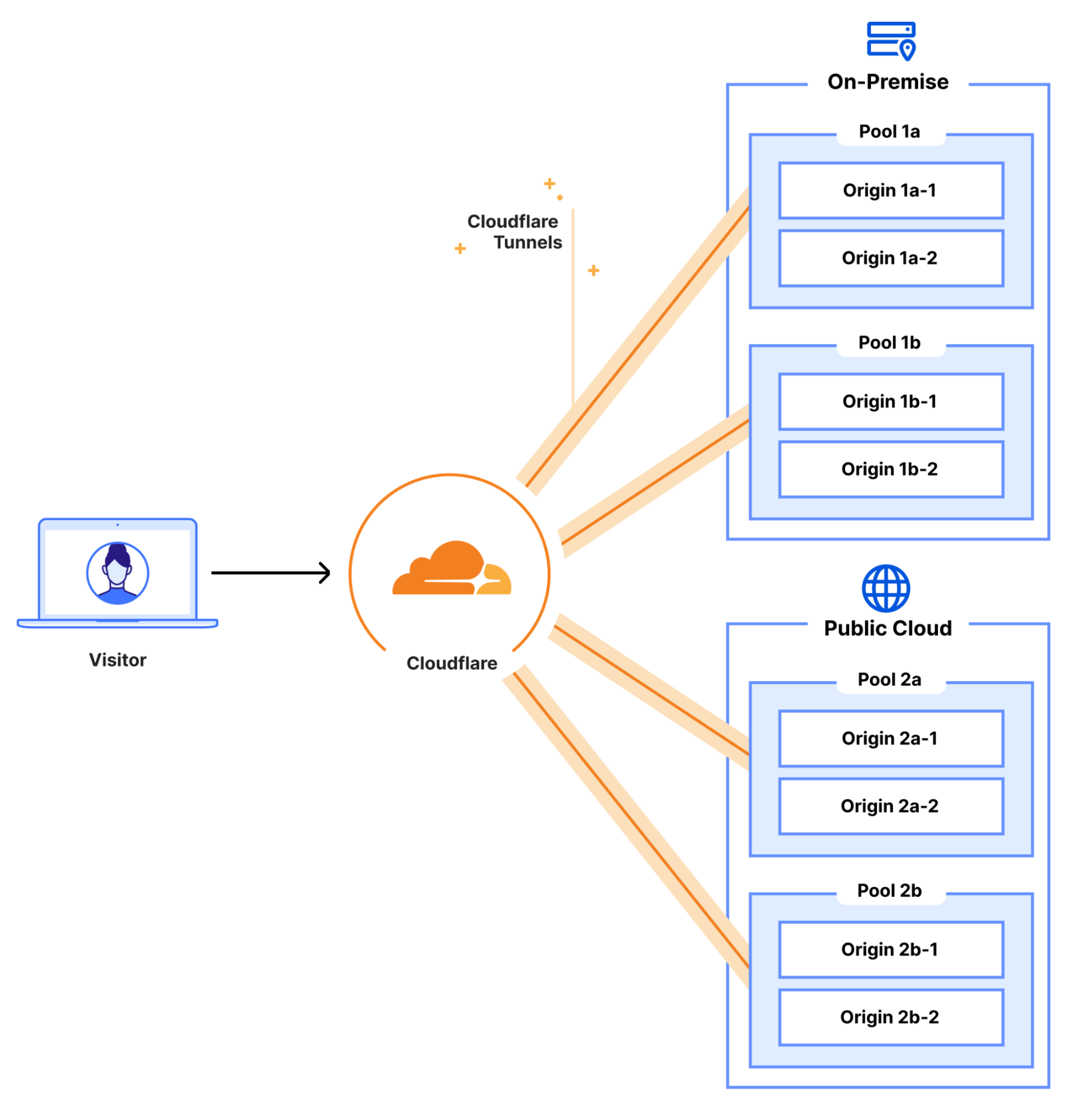
In 2023, Cloudflare introduced a new load balancing solution, supporting Local Traffic Management (LTM). This gives organizations a way to balance HTTP(S) traffic between private or internal servers within a region-specific data center. Today, we are thrilled to be able to extend those same LTM capabilities to non-HTTP(S) traffic. This new feature is enabled by the integration of Cloudflare Spectrum, Cloudflare Tunnels, and Cloudflare load balancers and is available to enterprise customers. Our customers can now use Cloudflare load balancers for all TCP and UDP traffic destined for private IP addresses, eliminating the need for expensive on-premise load balancers.
A quick primer
In this blog post, we will be referring to load balancers at either layer 4 or layer 7. This is, of course, referring to layers of the OSI model but more specifically, the ingress path that is being used to reach the load balancer. Layer 7, also known as the Application Layer, is where the HTTP(S) protocol exists. Cloudflare is well known for our layer 7 capabilities, which are built around speeding up and protecting websites which run over HTTP(S). When we refer to layer 7 load balancers, we are referring to HTTP(S)-based services. Our layer 7 stack allows Cloudflare to apply services like CDN, WAF, Bot Management, DDoS protection, and more to a customer’s website or application to improve performance, availability, and security.
Layer 4 load balancers operate at a lower level of the OSI model, called the Transport Layer, which means they can be used to support a much broader set of services and protocols. At Cloudflare, our public layer 4 load balancers are enabled by a Cloudflare product called Spectrum. Spectrum works as a layer 4 reverse proxy. This places Cloudflare in front of any DDoS attacks that may be launched against Spectrum-proxied services, and by using Spectrum in front of your application, your private origin IP address is concealed, which also prevents bad actors from discovering and attacking your origin’s IP address directly.
Services that use TCP or UDP for transport can leverage Spectrum with a Cloudflare load balancer. Layer 4 load balancing allows us to support other application layer protocols such as SSH, FTP, NTP, and SMTP since they operate over TCP and UDP. Given the breadth of services and protocols this represents, the treatment provided is more generalized. Cloudflare Spectrum supports features such as TLS/SSL offloading, DDoS protection, Argo Smart Routing, and session persistence with our layer 4 load balancers.
Cloudflare’s current load balancing capabilities
Before we dig into the new features we are announcing, it’s important to understand what Cloudflare load balancing supports today and the challenges our customers face with regard to their load balancing needs.
There are three main load balancing traffic flows that Cloudflare supports today:
- Internet-facing load balancers connecting to publicly accessible origins operating at layer 7, which supports HTTP(S)
- Internet-facing load balancers connecting to publicly accessible origins operating at layer 4 (Spectrum), which supports all TCP-based and UDP-based services such as SSH, FTP, NTP, SMTP, etc.
- Publicly accessible load balancers connecting to private origins operating at layer 7 HTTP(S) over Cloudflare Tunnels
One of the biggest advantages Cloudflare’s load balancing solutions offer our customers is that there is no hardware to purchase or maintain. Hardware-based load balancers are expensive to purchase, license, operate, and upgrade. “Need more bandwidth? Just buy and install this additional module.” “Need more features? Just buy and install this new license.” “Oh, your hardware load balancer is End-of-Life? Just purchase an entire new kit which we will EOL in a few years!” The upgrade or refresh cycle on a fully integrated LTM load balancer setup can take years and, by the time you finish the planning, implementation, and cutover, it might actually be time to start planning the next refresh.
Cloudflare eliminates all these concerns and lets you focus on innovation and growth. Your load balancers exist in every Cloudflare data center across the globe, in over 300 cities, with virtually unlimited scale and capacity. You never need to worry about bandwidth constraints, deployment locations, extra hardware modules, downtime, upgrades, or maintenance windows ever again. With Cloudflare’s global Anycast network, every customer connects to a nearby Cloudflare data center and load balancer, where relevant policies, rules, and steering are applied.
Load balancing more than websites with Cloudflare Spectrum
Today, we are excited to announce that Cloudflare Spectrum can now support load balancing traffic to private networks. The addition of private IP origin support for Cloudflare load balancers is very powerful and that’s why we are extending that support to load balancing with Cloudflare Spectrum as well. This means that any set of private or internal applications that use TCP or UDP can now be locally load balanced via Cloudflare. These services will also benefit from Spectrum’s layer 3/4 DDoS protection and can leverage other features like session persistence without compromising security. So while the ingress to these load balancers is public, the origins to which they distribute traffic can all be private, inaccessible from the public Internet.
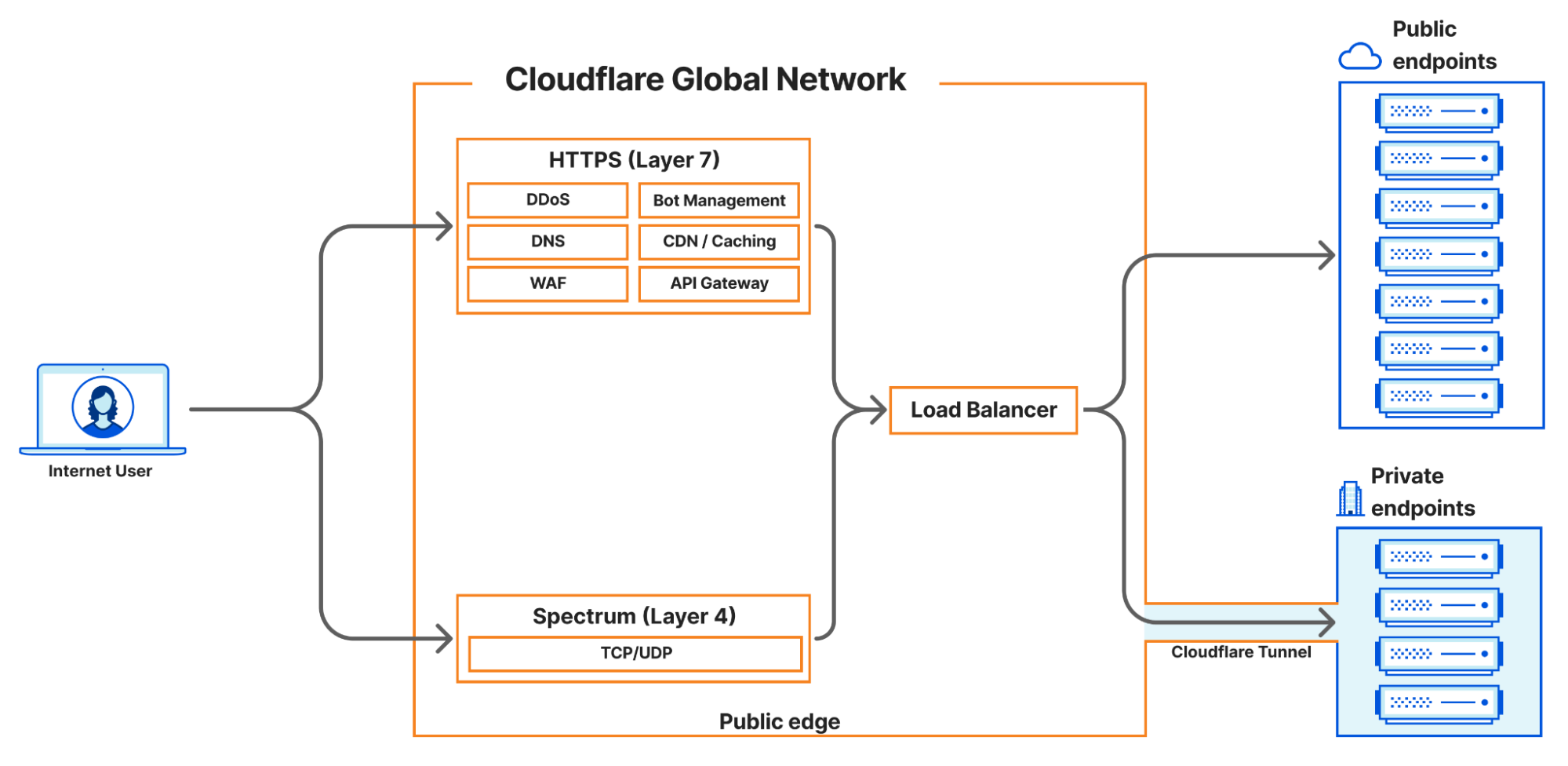
Ordinarily, load balancing to private networks would require expensive on-premise hardware or costly direct physical connections to cloud providers. But, by using Spectrum as the ingress path for TCP and UDP load balancing, customers can keep their origins completely protected and unreachable from the Internet and allow access exclusively through their Cloudflare load balancer – no expensive hardware required. Customers no longer need to manage complex ACLs or security settings to make sure only certain source IP addresses are connecting to the origins. These private origins can be hosted in private data centers, a public cloud, a private cloud, or on-premise.
How we enabled Spectrum to support private networks
All of our changes to create this feature center around integrations with Apollo, the unifying service created by the Cloudflare Zero Trust team. You can read their previous blog post on the Oxy framework for more details on how Zero Trust handles and routes traffic. Apollo accepts incoming traffic from supported on-ramps, applies Zero Trust logic as configured by the customer, and then routes the traffic to egress via supported off-ramps. For example, Apollo enables clients connected securely using Cloudflare’s WARP client to communicate over Cloudflare Tunnels with private origins in a customer’s data center. Now, Apollo is being extended to do more.
When a user creates a load balanced Spectrum app, they choose a hostname and port, and select a Cloudflare load balancer as their origin. This allocates a hostname which will resolve to an IP address where Spectrum will listen for incoming traffic on the customer-configured port. Spectrum makes a call to Cloudflare’s internal load balancing service, Director, which responds with the appropriate endpoint, to which Spectrum will proxy the connection. Previously, load balanced Spectrum apps only supported publicly addressable origins. Now, if the response from Director indicates that the traffic is destined for a private origin, Spectrum passes the private origin’s IP address and virtual network ID to Apollo, which then proxies the traffic to the customer’s private origin.
In short, new integrations between our Spectrum service and Apollo and between Apollo and Director have allowed us to expand our load balancing offerings not only to layer 4, but also enable us to leverage virtual networks to keep load balanced traffic private and off the public Internet. This also sets the stage for integrating load balancing with other traffic on-ramps and off-ramps, such as WARP, in the future. It also opens the door to a number of exciting possibilities like load balancing authenticated device traffic to private networks or even load balancing internal traffic that is never exposed to the public Internet.
Looking to the future
We are excited to be releasing this new load balancing feature which enables Cloudflare Spectrum to reach private IP endpoints. Cloudflare load balancers now support steering any TCP or UDP-based protocols over Cloudflare Tunnels to private IP endpoints, which are otherwise not accessible via the public Internet. You can learn more about how to configure this feature on our load balancing documentation pages.
We are just getting started with our local traffic management load balancing support. There is so much more to come including support for load balancing internal traffic, enhanced layer 4 session affinity, new steering methods, additional traffic ingress methods, and more!