All posts by Artur Rodrigues

Introducing an agentic coding experience in Visual Studio and JetBrains IDEs

Post Syndicated from Artur Rodrigues original https://aws.amazon.com/blogs/devops/introducing-an-agentic-coding-experience-in-visual-studio-and-jetbrains-ides/

Developers spend countless hours on repetitive tasks like debugging code, writing unit tests, and validating build processes – time that could be better spent on innovation and problem-solving. To address these challenges, Amazon Q Developer has expanded its intelligent coding assistant capabilities to Visual Studio and JetBrains Integrated development environments (IDEs). This new agentic experience works proactively on your behalf, automatically analyzing your workspace, generating code fixes, and executing commands to streamline your development workflow.

In this blog post, we’ll explore how Amazon Q Developer automates unit test creation and execution to validate code changes, streamlines build processes by identifying and resolving common issues.

In May 2025, our colleague Brian Beach wrote about the new agentic coding experience in Amazon Q Developer for VS Code. By extending the agentic experience to Visual Studio and JetBrains IDEs, Amazon Q Developer now brings intelligent automation to even more developers.

Benefits for Developers

Amazon Q Developer transforms the way developers work by seamlessly integrating AI assistance into their daily workflow without switching contexts or leaving their preferred development environment. Using features like @workspace and @files, you can get highly relevant recommendations in your IDE. With Q Developer’s ability to take actions like generating code diffs and running commands, you can automate repetitive coding tasks, implement complex features faster, and troubleshoot issues without breaking your flow. With support for multiple languages including English, Mandarin, Japanese, and Spanish, Amazon Q Developer makes advanced AI assistance accessible to development teams worldwide, fostering inclusive collaboration across global organizations.

Maximizing Development Efficiency with Amazon Q Developer

Amazon Q Developer revolutionizes your development workflow by offering a comprehensive set of capabilities within your IDE. Let’s explore how this powerful tool leverages context to enhance your coding experience by using context features, codebase’s folders and rules.

You can explicitly guide Q Developer by defining specific files or folders in the prompt context. Don’t know where to find particular information? No problem! Q Developer can efficiently navigate through your codebase using @workspaces to gather relevant code snippets from multiple files. This is particularly important when you want to create documentation that spans multiple files or when you need to fix a bug and have no idea where you should start.

The agentic chat feature automatically derives context from the codebase’s folders and executes commands on your behalf. It has the same intelligent reasoning capability used in the Q Developer CLI, which has already won the hearts of many developers.

Context management extends to configuration through the .amazonq/rules/ directory. Within this directory, you can define rules for coding standards, testing requirements, security protocols, and documentation practices. Some customers have already created a rule that defines how Q Developer commits changes. This rule provides a template for a Git commit that details the message and for the agentic actions that modify files. It makes it much easier to identify and review the contributions of the Q Developer to your codebase.

Quick Tour of the Agentic Experience

Let us walk you through two use cases. In our example, we will use the Visual Studio IDE. Similar agentic capabilities are now supported in JetBrains IDEs as well. We invite you to follow along by cloning the Bob’s Used Books sample repo and opening it in Visual Studio 2022. Don’t forget to add or update the Amazon Q Developer extension.

Creating unit tests

The Bookstore.Domain project contains domain objects such as Book and ShoppingCart.

Bookstore.Domain project contains Book and Shopping cart classes.

Figure 1: Domain objects in Bookstore.Domain

We have a separate project called Bookstore.Domain.Tests that contains tests for the Book class.

A separate project - Bookstore.Domain.Tests contains tests for the Book class. BookTests class contains these tests.

Figure 2: Tests for Book class

We want to add unit tests for the ShoppingCart class. Let’s ask Amazon Q Developer to create unit tests for ShoppingCart. We also want Amazon Q Developer to follow the existing pattern of creating test classes in a separate test project.

By default, the agentic experience is on. If you are in the planning phase of the Software Development Lifecycle (SDLC) and prefer to use a traditional back-and-forth chat, you can turn the agentic experience. To toggle the agentic experience on and off, choose the angle bracket pair in the bottom left corner of your Q Developer chat window.

Then, we ask Q Developer “Can you create a test for @ShoppingCart.cs? Look at existing test and use the same libraries”. First, notice that we are giving a command instead of just asking a question. Second, we are referencing the file ShoppingCart.cs explicitly to provide Q Developer the appropriate context. In the following image, you can see that Q Developer is acting on our behalf. In agentic coding mode, Q Developer can take actions and run commands. In our example, it is reading files, writing to files, and running commands with your permission.

The agentic experience in Amazon Q Developer responding to our prompt and reading files in our workspace to gather context.

Figure 3: Prompt to create new tests

Using commands, Q Developer was able to analyze our solution structure, understand that we have a project called Bookstore.Domain.Tests, and create a new file containing unit tests for ShoppingCart.

The agentic experience in Amazon Q Developer generating a summary of the test cases it has created.

Figure 4: Summary of test cases

We can verify that there is a new file called ShoppingCartTests in the Bookstore.Domain.Tests project, which is aligned with our existing test creation strategy.

New file - ShoppingCartTests.cs contains the tests for ShoppingCart. Following the existing pattern in our code, Q Developer creates this file in the Bookstore.Domain.Tests project.

Figure 5: New file with generated test cases

In Visual Studio, we can now run the unit tests and verify that they pass.

Test results for the existing as well as new tests.

Figure 6: Successful test run of new tests

Resolving build errors

In the following example, we will demonstrate the power of the agentic coding experience by using Q Developer to build our application and resolve build errors.

In our example, we have deliberately misspelled one of the methods in the IShoppingCartRepository interface. The AddAsync method is now incorrectly spelled AddAsyn.

Spelling mistake in the name of a method. It is called AddAsyn instead of AddAsync.

Figure 7: Spelling mistake in a method name

When we try to build the Bookstore.Domain project, we get a build error as expected. Let’s ask Q Developer to fix the error. Without the agentic coding experience, we would have to copy the text of the build error into the chat window and ask Q Developer to provide recommendations. Then we would have to act on its recommendations by manually making changes and trying to build. This is one of many examples of the power of the agentic chat, which runs commands and uses the command’s output to enrich the context of the prompt to take actions.

With the agentic coding experience, we just ask Q Developer “Can you fix the error I am getting while building the solution? Please build and check it”. In the following image, you will see how Q Developer runs the .NET build commands to get build errors and read the relevant files.

Amazon Q Developer builds the solution, uses the build error to read the appropriate file, and finds the issue.

Figure 8: Building the solution

After it reads the files, it finds the spelling mistake and fixes it automatically. As shown in the following image, it then builds the solution to verify that its fix worked.

Amazon Q Developer fixes the spelling mistake in the code and runs the build again to confirm a successful build.

Figure 9: Fixing the spelling mistake

In the following image, Amazon Q Developer provides a summary of the error, the actions it took to build it. It even helps me with some recommendations to fix the warnings it got while running the build.

Amazon Q Developer provides a summary of build error, the resolution, and suggestions to resolve build warnings.

Figure 10: Summary of changes and suggestions

Conclusion

The addition of Amazon Q Developer’s agentic experience in Microsoft Visual Studio and JetBrains IDEs takes Amazon Q Developer beyond traditional chat-based interactions to intelligent, action-oriented assistance. The ability to automatically read files, generate code diffs, run shell commands, and validate changes demonstrates a level of autonomy that can significantly accelerate development tasks while maintaining code quality. The examples we’ve explored, from automated test creation to build error resolution, showcase how the agentic experience can streamline common development tasks that traditionally required multiple manual steps. This new capability, combined with multi-language support and customizable development standards, makes Amazon Q Developer a powerful ally in modern software development workflows. As development teams continue to seek ways to improve productivity without compromising code quality, Amazon Q Developer’s agentic experience represents a meaningful step forward in IDE-integrated AI assistance. Whether you’re writing tests, fixing bugs, or optimizing code, the ability to have an AI assistant that can not only suggest solutions but also implement them while maintaining context awareness is a game-changing addition to the developer’s toolkit.

Artur Rodrigues

Artur Rodrigues is a Principal Solutions Architect for Generative AI at Amazon Web Services (AWS), focused on the Next Generation Developer experience, enabling developers to work more efficiently and creatively through the integration of Generative AI into their workflows. Artur enjoys cycling and exploring the great outdoors of beautiful British Columbia in Canada. He is also a gelato aficionado and a fan of soccer and jiu-jitsu.

Neeraj Handa

Neeraj Handa is a Specialist Solutions Architect at Amazon Web Services, where he partners with enterprise customers to accelerate application development and modernization using Amazon Q Developer. He is passionate about helping organizations transform their software development lifecycle to achieve higher productivity and software quality through the use of AI technologies.

Unlocking the power of Amazon Q Developer: Metrics-driven strategies for better AI coding

Post Syndicated from Artur Rodrigues original https://aws.amazon.com/blogs/devops/unlocking-the-power-of-amazon-q-developer-metrics-driven-strategies-for-better-ai-coding/

We believe the most successful organizations will be those that view AI not just as a tool for automation, but as a catalyst for transforming how they approach software development entirely. The real strategic advantage will come from reimagining software development processes and culture to fully leverage AI’s capabilities. This includes rethinking traditional metrics, redefining developer productivity, and creating space and cultural change for teams to experiment with new ways of working.

This powerful observation from our April 2025 blog post “How generative AI is transforming developer workflows at Amazon” is already proving true in practice. Organizations using Amazon Q Developer are actively implementing new metrics to understand how developers leverage AI features. This data-driven approach helps them identify usage patterns, uncover areas for improvement, and recognize internal champions who drive adoption. It takes time and practice to get comfortable with prompting and understand the capabilities of new tools. I have identified three question that customers ask to measure and evaluate their Amazon Q Developer adoption.

  1. How many Q Developer active users are there?
  2. How can we track usage trends?
  3. Who are our power users?

This blog post will explore the Amazon Q Developer monitoring and tracking tools, and how they can together provide a comprehensive view of developer usage, which answer the questions listed above.

Subscription Management

The Amazon Q Developer subscription console serves as your primary source for managing Q subscriptions. The How to identify inactive users of Amazon Q Developer blog details license activity, and shows how you can navigate thought the Amazon Q Developer Console, where you can download a report showing users from all AWS organization accounts, their status (active, pending, or canceled), and the last activity date. This document from our user guide, walk you through how to enabled the organization-wide visibility at your AWS Organization management account.

The table below contains an extract of the CSV file created when you click on Download total users reports from the Amazon Q Developer Subscription Console page.

Name Subscription type Subscription status Identity provider user ID Last activity date
anakin Group Pending 14a81418-b0b1-70b7-c73a N/A
artur Group Active 34a87408-6091-7054-4b60 May 11 2025
ashoka Individual Pending 64d8a448-9021-7020-c73d N/A
uther Group Active 94e844b8-4031-7022-303d April 23 2025
John.Smith Group Pending e4c84458-30b1-7097-2496 N/A
luke Group Pending f4a89418-c0e1-705b-d050 N/A
Table 1 – CSV extract of total users report

This report displays Amazon Q Developer Pro user subscriptions, including subscription details, status, and last recorded account activity dates, which will be joined with usage metrics to generate customer insights.

Q Developer dashboard usage metrics

The Amazon Q Developer dashboard summarizes the data about how your Pro tier subscribers use the service. Amazon Q Developer generates and displays new metrics on an hourly basis for the most part. The only section that is not updated hourly is the Active user’s widget, which is updated daily according to the coordinated universal time (UTC) clock. The dashboard shows metrics collected from users who are subscribed in the AWS account that you’re currently signed into.

There are many metrics shown in the Q Developer dashboard usage metrics that help administrators monitor activity; detailed information and metrics are available on our documentation.

User Activity Reporting

The user activity reports in Amazon Q Developer provide metrics that detail how users interact with the service. To use them, you need to enable the feature and define an Amazon S3 bucket to save the CSV reports. Amazon Q Developer generates the report every day at midnight UTC and saves it into the designated bucket. Each row in the CSV file represents a user who interacted with Amazon Q Developer that day, and each column shows a metric as described in the User activity report metrics. These metrics are calculated based on the user telemetry collected over the course of the day. Instructions on how to enable and configure the User Activity Report Metrics can be found on our documentation.

Creating per-user level monthly report

To connect to the Amazon Q Developer Console, navigate to the AWS account from which you want to export your metrics. In the Amazon Q Developer Console, select “Settings” and then click on the “Edit” button for “Amazon Q Developer Usage Activity,” which is turned off by default.

Amazon Q Developer's usage activity panel. It displays the "Q Developer user activity report" setting is off.

Image 1 – Amazon Q Developer usage activity setting disabled

When prompted, enable the “Collect granular metrics per user” and define the s3://bucket/prefix. In my example, I pointed to the s3://q-dev-user-activity-<account-number>/csv

Amazon Q Developer's usage activity panel. It displays the "Q Developer user activity report" setting is on, and a populated S3 location field

Image 2 – Amazon Q Developer usage activity setting enabled

The csv files will be saved into the following directory

s3://bucketName/prefix/AWSLogs/accountId/QDeveloperLogs/by_user_analytic/region/year/month/day/utc-hour/

How to process the User Activity Report

I developed script that processes user activity data and subscription information stored in S3, combining them into monthly reports. The process_metrics.py script is a Python utility designed to process Amazon Q Developer user activity data and subscription information from AWS S3, combining them to generate monthly reports in CSV format. It retrieves data from S3 buckets, maps user IDs to names, aggregates metrics by user and month, and generates reports. The script leverages pandas for data manipulation. It generates a clean, structured CSV reports ready for your preferred analytics platform. The script logic derives the S3 directory structure, using current year, region and the AWS accountid, and all you need to inform is the bucket name and the prefix you initially configure for the CSV file. The script is shared below.


#!/usr/bin/env python3
# Copyright Amazon.com, Inc. or its affiliates. All Rights Reserved.
# SPDX-License-Identifier: MIT-0
"""
Amazon Q Metrics Processor

This script processes user activity data and subscription information from S3,
combines them, and generates monthly CSV reports.
"""

import os
import boto3
import botocore
from botocore.config import Config
import pandas as pd
import numpy as np
from datetime import datetime
import logging
from io import StringIO
import re
import argparse
from pathlib import Path  # from pathlib import Path
import sys
from urllib.parse import urlparse

# Configure logging
logging.basicConfig(
    level=logging.INFO,
    format='%(asctime)s - %(name)s - %(levelname)s - %(message)s'
)
logger = logging.getLogger('q-metrics')

def escape_log_data(data):
    """
    Sanitize data for secure logging to prevent log injection (CWE-117, CWE-93).
    
    Args:
        data: The data to be sanitized for logging
        
    Returns:
        str: Sanitized string safe for logging
    """
    if data is None:
        return 'None'
    
    # Convert to string if not already
    data_str = str(data)
    
    # Replace potentially dangerous characters
    # This prevents log forging by removing newlines and other control characters
    data_str = data_str.replace('\n', '\\n').replace('\r', '\\r')
    
    # Escape other control characters
    result = ''
    for char in data_str:
        if ord(char) < 32 or ord(char) == 127:  # Control characters
            result += f'\\x{ord(char):02x}'
        else:
            result += char
            
    return result

def validate_s3_bucket_name(bucket_name):
    """
    Validate S3 bucket name according to AWS naming rules.

    Args:
        bucket_name (str): The bucket name to validate

    Returns:
        bool: True if valid, False otherwise
    """
    if not bucket_name or not isinstance(bucket_name, str):
        return False

    # Check length (3-63 characters)
    if len(bucket_name)  63:
        return False

    # Check if it contains only allowed characters
    if not re.match(r'^[a-z0-9][a-z0-9\.-]*[a-z0-9]$', bucket_name):
        return False

    # Check if it doesn't contain consecutive periods
    if '..' in bucket_name:
        return False

    # Check if it's not an IP address
    if re.match(r'^\d+\.\d+\.\d+\.\d+$', bucket_name):
        return False

    # Check if it doesn't start with 'xn--' or end with '-s3alias'
    try:
        if bucket_name.startswith('xn--') or bucket_name.endswith('-s3alias'):
            return False
    except ValueError:
        return False

    return True

def validate_s3_path(path):
    """
    Validate an S3 path to ensure it doesn't contain dangerous characters.

    Args:
        path (str): The S3 path to validate

    Returns:
        bool: True if valid, False otherwise
    """
    if not path or not isinstance(path, str):
        return False

    # Check for path traversal attempts
    if '..' in path:
        return False

    # Check for invalid characters
    try:
        if re.search(r'[:"|?*\x00-\x1F]', path):
            return False
    except ValueError:
        return False

    return True

def validate_month_format(month_str):
    """
    Validate that a month string is in the format YYYY-MM.

    Args:
        month_str (str): The month string to validate

    Returns:
        bool: True if valid, False otherwise
    """
    if not month_str:
        return True  # Month is optional

    if not isinstance(month_str, str):
        return False

    # Check format YYYY-MM
    if not re.match(r'^[0-9]{4}-[0-9]{2}$', month_str):
        return False

    # Validate month range
    try:
        year, month = month_str.split('-')
        month_num = int(month)
        if month_num  12:
            return False
    except (ValueError, TypeError):
        return False

    return True

def sanitize_output_path(path):
    """
    Sanitize and normalize an output directory path.

    Args:
        path (str): The path to sanitize

    Returns:
        str: The sanitized absolute path
    """
    if not path or not isinstance(path, str):
        return os.path.abspath('./output')

    # Convert to Path object for safe handling
    safe_path = Path(path).resolve()

    # Ensure the path doesn't escape the intended directory structure
    try:
        # Make sure it's a valid path
        if not safe_path.is_absolute():
            safe_path = Path.cwd() / safe_path
    except (ValueError, TypeError):
        logger.warning("Invalid path: %s, using default", escape_log_data(repr(path)))
        return os.path.abspath('./output')

    return str(safe_path)

def validate_csv_content(df, expected_columns, file_type):
    """
    Validate that a DataFrame has the expected columns and structure.

    Args:
        df (DataFrame): The pandas DataFrame to validate
        expected_columns (list): List of required column names
        file_type (str): Type of file for logging purposes

    Returns:
        bool: True if valid, False otherwise
    """
    if df is None or df.empty:
        logger.error("Empty %s data", file_type)
        return False

    # Check for required columns
    missing_columns = [col for col in expected_columns if col not in df.columns]
    if missing_columns:
        logger.error("Missing required columns in %s data: %s", file_type, ', '.join(missing_columns))
        return False

    # Check for empty required columns
    for col in expected_columns:
        if df[col].isna().all():
            logger.error("Column '%s' in %s data is completely empty", col, file_type)
            return False

    # Check for reasonable row count
    if len(df) == 0:
        logger.error("No data rows in %s data", file_type)
        return False

    # Check for duplicate rows
    if df.duplicated().any():
        dup_count = df.duplicated().sum()
        logger.warning("Found %d duplicate rows in %s data", dup_count, file_type)

    return True

def validate_subscription_data(df):
    """
    Validate subscription data format and content.

    Args:
        df (DataFrame): The subscription data DataFrame

    Returns:
        bool: True if valid, False otherwise
    """
    required_columns = [
        'Name',
        'Subscription type',
        'Subscription status',
        'Identity provider user ID'
    ]

    return validate_csv_content(df, required_columns, "subscription")

def validate_activity_data(df):
    """
    Validate activity data format and content.

    Args:
        df (DataFrame): The activity data DataFrame

    Returns:
        bool: True if valid, False otherwise
    """
    required_columns = ['UserId', 'Date']

    # Basic validation
    if not validate_csv_content(df, required_columns, "activity"):
        return False

    # Check for at least one metric column
    metric_cols = df.select_dtypes(include=[np.number]).columns
    if len(metric_cols) == 0:
        logger.error("No metric columns found in activity data")
        return False

    # Check for valid date format
    try:
        valid_dates = 0
        total_dates = len(df['Date'])

        for date_str in df['Date']:
            if parse_date(date_str) is not None:
                valid_dates += 1

        if valid_dates == 0:
            logger.error("No valid dates found in activity data")
            return False
        elif valid_dates < total_dates:
            logger.warning("Only %d out of %d dates are valid in activity data", valid_dates, total_dates)
    except Exception as e:
        logger.error("Error validating dates in activity data: %s", str(e))
        return False

    return True


def parse_args():
    """Parse command line arguments with enhanced security validation."""
    parser = argparse.ArgumentParser(description='Process Amazon Q metrics data')
    parser.add_argument('--bucket', required=True, help='S3 bucket name')
    parser.add_argument('--prefix', required=True, help='Initial S3 prefix (e.g., "logs")')
    parser.add_argument('--subscription-path', required=True,
                        help='S3 path to subscription file (e.g., user-activities/subscriptions.csv)')
    parser.add_argument('--output-dir', default='./output', help='Local directory for output files')
    parser.add_argument('--month', help='Process only a specific month (format: YYYY-MM, e.g., 2025-01)')
    parser.add_argument('--per-user', action='store_true', help='Generate individual reports for each user')
    parser.add_argument('--user', help='Generate report for a specific user (by name)')

    args = parser.parse_args()

    # Validate bucket name with enhanced checks
    if not validate_s3_bucket_name(args.bucket):
        logger.error("Invalid S3 bucket name: %r", escape_log_data(args.bucket))
        sys.exit(1)
    
    # Additional bucket name security check - prevent command injection via bucket names
    if re.search(r'[;&|`$]', args.bucket):
        logger.error("Potentially malicious characters in bucket name: %r", escape_log_data(args.bucket))
        sys.exit(1)

    # Derive activity-prefix from the provided prefix
    try:
        # Get AWS account ID
        sts_client = boto3.client('sts')
        account_id = sts_client.get_caller_identity()['Account']
        
        # Get current region
        session = boto3.session.Session()
        region = session.region_name or os.environ.get('AWS_REGION', 'us-east-1')
        
        # Check if region is supported
        supported_regions = ['us-east-1', 'eu-central-1']
        if region not in supported_regions:
            logger.error("Region %s is not supported. This solution currently only works in %s", 
                        escape_log_data(region), ' or '.join(supported_regions))
            sys.exit(1)
        
        # Get current year
        current_year = str(datetime.now().year)
        
        # If month is provided, extract year from it
        if args.month:
            try:
                year, _ = args.month.split('-')
                current_year = year
            except (ValueError, TypeError):
                pass
                
        # Construct the activity prefix using the provided prefix
        activity_prefix = f"{args.prefix}/AWSLogs/{account_id}/QDeveloperLogs/by_user_analytic/{region}/{current_year}"
        logger.info("Derived activity prefix: %s", escape_log_data(activity_prefix))
    except Exception as e:
        logger.error("Failed to derive activity prefix: %s", escape_log_data(str(e)))
        sys.exit(1)
    
    # Validate S3 paths with enhanced checks
    for path_arg, path_name in [(activity_prefix, "activity prefix"), 
                               (args.subscription_path, "subscription path")]:
        if not validate_s3_path(path_arg):
            logger.error("Invalid S3 %s: %r", path_name, escape_log_data(path_arg))
            sys.exit(1)
        
        # Additional path security checks
        if re.search(r'[;&|`$]', path_arg):
            logger.error("Potentially malicious characters in %s: %r", path_name, escape_log_data(path_arg))
            sys.exit(1)
        
        # Check for path traversal attempts with more patterns
        if any(pattern in path_arg for pattern in ['../', '..\\', '../', '..\\']):
            logger.error("Path traversal attempt detected in %s: %r", path_name, escape_log_data(path_arg))
            sys.exit(1)

    # Validate month format if provided with enhanced checks
    if args.month:
        if not validate_month_format(args.month):
            logger.error("Invalid month format: %r. Expected format: YYYY-MM (e.g., 2025-01)", escape_log_data(args.month))
            sys.exit(1)
        
        # Additional validation for month - check for reasonable date range
        try:
            year, month = args.month.split('-')
            year_num = int(year)
            month_num = int(month)
            
            current_year = datetime.now().year
            
            # Check for reasonable year range (past 5 years to next year)
            if year_num  current_year + 1:
                logger.warning("Month year %d is outside the reasonable range (%d-%d)", 
                              year_num, current_year - 5, current_year + 1)
        except (ValueError, TypeError):
            # Already validated by validate_month_format, this is just an extra check
            pass

    # Validate user argument if provided
    if args.user:
        # Check for reasonable length
        if len(args.user) > 100:
            logger.error("User name too long: %d characters (max 100)", len(args.user))
            sys.exit(1)
        
        # Check for potentially dangerous characters
        if re.search(r'[;&|`$]', args.user):
            logger.error("Potentially malicious characters in user name: %r", escape_log_data(args.user))
            sys.exit(1)

    # Sanitize output directory with enhanced security
    args.output_dir = sanitize_output_path(args.output_dir)
    
    # Additional output directory security check
    try:
        output_path = Path(args.output_dir)
        
        # Check if the path exists and is a directory
        if output_path.exists() and not output_path.is_dir():
            logger.error("Output path exists but is not a directory: %r", escape_log_data(args.output_dir))
            sys.exit(1)
            
        # Check if we have write permissions to the directory or its parent
        parent_dir = output_path if output_path.exists() else output_path.parent
        if not os.access(parent_dir, os.W_OK):
            logger.error("No write permission for output directory: %r", escape_log_data(args.output_dir))
            sys.exit(1)
    except Exception as e:
        logger.error("Error validating output directory: %s", escape_log_data(str(e)))
        sys.exit(1)
        
    logger.info("Using output directory: %r", escape_log_data(args.output_dir))
    
    # Add the derived activity_prefix to args for use in the rest of the program
    args.activity_prefix = activity_prefix

    return args

def get_s3_client():
    """Create and return an S3 client with proper configuration."""
    try:
        # Configure S3 client with timeouts and retries
        config = Config(
            connect_timeout=5,  # 5 seconds connection timeout
            read_timeout=30,    # 30 seconds read timeout
            retries={'max_attempts': 3},  # Retry configuration
            signature_version='s3v4'  # Use more secure signature version
        )
        
        # Create the client with the custom configuration
        s3 = boto3.client('s3', config=config)
        
        # Test the client with a simple operation to validate credentials
        try:
            # Use head_bucket which is a lightweight operation
            s3.head_bucket(Bucket='aws-sdk-resources')
        except botocore.exceptions.ClientError as e:
            error_code = e.response.get('Error', {}).get('Code', '')
            if error_code == '403':
                logger.warning("AWS credentials appear valid but have insufficient permissions")
            elif error_code == '401':
                logger.error("Invalid AWS credentials")
                sys.exit(1)
        except Exception as e:
            logger.warning("Error testing S3 client: %s", str(e))
        
        return s3
    except Exception as e:
        logger.error("Failed to create S3 client: %s", str(e))
        sys.exit(1)

def list_activity_files(s3_client, bucket, prefix, month=None):
    """List all activity files in the specified S3 bucket and prefix.

    If month is specified, only return files for that month (format: YYYY-MM).

    Args:
        s3_client: The boto3 S3 client
        bucket (str): The S3 bucket name
        prefix (str): The S3 prefix for activity files
        month (str, optional): Month in YYYY-MM format

    Returns:
        list: List of S3 keys for activity files
    """
    # Validate inputs again for safety
    if not validate_s3_bucket_name(bucket):
        logger.error("Invalid bucket name: %r", escape_log_data(bucket))
        return []

    if not validate_s3_path(prefix):
        logger.error("Invalid S3 prefix: %r", escape_log_data(prefix))
        return []

    if month and not validate_month_format(month):
        logger.error("Invalid month format: %r", escape_log_data(month))
        return []

    # Sanitize prefix to ensure it doesn't have path traversal
    prefix = prefix.replace('..', '').replace('//', '/')

    logger.info("Listing activity files in s3://%s/%s", escape_log_data(bucket), escape_log_data(prefix))

    activity_files = []
    paginator = s3_client.get_paginator('list_objects_v2')

    try:
        # If month is specified, filter by the month prefix
        search_prefix = prefix
        if month:
            try:
                year, month_num = month.split('-')
                # Make sure we're not duplicating the year in the path
                if not prefix.endswith(year + '/'):
                    search_prefix = f"{prefix}{month_num}/"
                else:
                    search_prefix = f"{prefix}{month_num}/"
                logger.info("Filtering for month %s using prefix: %s", escape_log_data(month), escape_log_data(search_prefix))
            except ValueError:
                logger.error("Failed to parse month %r for filtering", escape_log_data(month))
                return []

        for page in paginator.paginate(Bucket=bucket, Prefix=search_prefix):
            if 'Contents' in page:
                for obj in page['Contents']:
                    key = obj['Key']
                    # Skip directories or non-CSV files
                    if not key.endswith('/') and key.endswith('.csv'):
                        activity_files.append(key)

        logger.info("Found %d activity files", len(activity_files))
        return activity_files
    except Exception as e:
        logger.error("Error listing activity files: %s", escape_log_data(str(e)))
        if isinstance(e, client('s3').exceptions.NoSuchBucket):
            logger.error("Bucket %r does not exist", escape_log_data(bucket))
        elif isinstance(e, client('s3').exceptions.AccessDenied):
            logger.error("Access denied to bucket %r", escape_log_data(bucket))
        return []

def read_csv_from_s3(s3_client, bucket, key):
    """Read a CSV file from S3 into a pandas DataFrame.

    Args:
        s3_client: The boto3 S3 client
        bucket (str): The S3 bucket name
        key (str): The S3 object key

    Returns:
        DataFrame or None: Pandas DataFrame with CSV content or None if error
    """
    # Validate inputs
    if not validate_s3_bucket_name(bucket):
        logger.error("Invalid bucket name: %r", escape_log_data(bucket))
        return None

    if not validate_s3_path(key):
        logger.error("Invalid S3 key: %r", escape_log_data(key))
        return None

    logger.info("Reading s3://%s/%s", escape_log_data(bucket), escape_log_data(key))

    try:
        # Get object metadata first to check file size
        try:
            head_response = s3_client.head_object(Bucket=bucket, Key=key)
            file_size_bytes = head_response.get('ContentLength', 0)
            
            # Set a reasonable size limit (e.g., 100MB)
            MAX_FILE_SIZE_BYTES = 100 * 1024 * 1024  # 100MB
            
            if file_size_bytes > MAX_FILE_SIZE_BYTES:
                logger.error("File %r size (%d bytes) exceeds the maximum allowed size (%d bytes)", 
                             escape_log_data(key), file_size_bytes, MAX_FILE_SIZE_BYTES)
                return None
        except Exception as e:
            logger.warning("Could not check file size for %r: %s", escape_log_data(key), escape_log_data(str(e)))
            # Continue anyway, we'll have other checks later

        response = s3_client.get_object(Bucket=bucket, Key=key)
        content = response['Body'].read().decode('utf-8')

        # Check for CSV injection attempts
        if any(suspicious_pattern in content for suspicious_pattern in ['=cmd|', '=cmd:', '@cmd', '+cmd', '-cmd', '=DDE', '=SUM(', '=HYPERLINK(']):
            logger.error("Potential CSV injection detected in %r", escape_log_data(key))
            return None

        # Use a StringIO buffer to safely parse the CSV
        csv_buffer = StringIO(content)

        # Read with error handling for malformed CSV
        try:
            # First check number of rows by reading just the header
            row_count = sum(1 for _ in csv_buffer) - 1  # Subtract 1 for header
            csv_buffer.seek(0)  # Reset buffer position
            
            # Set a hard limit on number of rows
            MAX_ROWS = 500000  # Hard limit of 500K rows
            
            if row_count > MAX_ROWS:
                logger.error("CSV file %r has %d rows, which exceeds the maximum limit of %d rows", 
                             escape_log_data(key), row_count, MAX_ROWS)
                return None
                
            # Use converters to sanitize string inputs
            df = pd.read_csv(csv_buffer, converters={col: str for col in ['Name', 'UserId', 'Subscription', 'Subscription type', 'Subscription status']})

            # Check memory usage of the DataFrame
            memory_usage_bytes = df.memory_usage(deep=True).sum()
            MAX_MEMORY_USAGE = 500 * 1024 * 1024  # 500MB limit
            
            if memory_usage_bytes > MAX_MEMORY_USAGE:
                logger.error("DataFrame for %r uses %d bytes of memory, exceeding the limit of %d bytes", 
                             escape_log_data(key), memory_usage_bytes, MAX_MEMORY_USAGE)
                del df  # Explicitly delete to free memory
                return None

            # Check for reasonable file size (soft warning)
            if len(df) > 100000:  # Lower the warning threshold to 100K rows
                logger.warning("CSV file %r has %d rows, which exceeds the recommended limit", escape_log_data(key), len(df))

            return df
        except pd.errors.ParserError as e:
            logger.error("Error parsing CSV %r: %s", escape_log_data(key), escape_log_data(str(e)))
            return None

    except Exception as e:
        logger.error("Error reading %r: %s", escape_log_data(key), escape_log_data(str(e)))
        return None

def parse_date(date_str):
    """Parse date strings into datetime objects."""
    if pd.isna(date_str) or date_str == 'N/A':
        return None

    # Handle different date formats
    date_formats = [
        '%m-%d-%Y',  # 02-03-2025
        '%B %d %Y',  # March 13 2025
    ]

    for fmt in date_formats:
        try:
            return datetime.strptime(date_str, fmt)
        except ValueError:
            continue

    logger.warning("Could not parse date: %r", escape_log_data(date_str))
    return None

def extract_month_year(date_obj):
    """Extract month and year from a datetime object."""
    if date_obj is None:
        return None
    try:
        return f"{date_obj.year}-{int(date_obj.month):02d}"
    except (AttributeError, ValueError, TypeError) as e:
        logger.debug("Failed to extract month/year from date object: %s", escape_log_data(str(e)))
        return None

def process_subscription_data(df):
    """Process subscription data."""
    logger.info("Processing subscription data")

    # Validate subscription data
    if not validate_subscription_data(df):
        logger.error("Invalid subscription data format")
        return None, {}

    # Clean up subscription data
    df_clean = df.copy()
    
    # Add 'Subscription' column if it doesn't exist (using Subscription type as default)
    if 'Subscription' not in df_clean.columns:
        df_clean['Subscription'] = df_clean['Subscription type']
        logger.info("Added 'Subscription' column based on 'Subscription type'")

    # Map user IDs to names
    id_to_name_map = dict(zip(df_clean['Identity provider user ID'], df_clean['Name']))

    # Parse last activity date
    df_clean['Last activity date'] = df_clean['Last activity date'].apply(parse_date)
    df_clean['Last activity month'] = df_clean['Last activity date'].apply(extract_month_year)

    return df_clean, id_to_name_map

def process_activity_data(activity_dfs, id_to_name_map):
    """Process and combine activity data."""
    logger.info("Processing activity data")

    if not activity_dfs:
        logger.warning("No activity data to process")
        return pd.DataFrame()

    # Validate each activity dataframe
    valid_dfs = []
    for i, df in enumerate(activity_dfs):
        if validate_activity_data(df):
            valid_dfs.append(df)
        else:
            logger.warning("Skipping invalid activity data file #%d", i+1)

    if not valid_dfs:
        logger.error("No valid activity data files found")
        return pd.DataFrame()

    try:
        # Combine all activity dataframes
        combined_df = pd.concat(valid_dfs, ignore_index=True)

        # Parse dates and extract month-year
        combined_df['Date'] = combined_df['Date'].apply(parse_date)
        combined_df['Month'] = combined_df['Date'].apply(extract_month_year)

        # Add user names based on ID mapping
        combined_df['Name'] = combined_df['UserId'].map(id_to_name_map)
        
        # Check if any user IDs couldn't be mapped to names
        unmapped_ids = combined_df[combined_df['Name'].isna()]['UserId'].unique()
        if len(unmapped_ids) > 0:
            logger.warning("Found %d user IDs without matching names", len(unmapped_ids))
            if len(unmapped_ids)  MAX_REPORTS:
        logger.warning("Too many months (%d). Limiting to %d most recent months.", 
                      len(months), MAX_REPORTS)
        # Sort months and take the most recent ones
        months = sorted(months, reverse=True)[:MAX_REPORTS]

    reports_generated = 0
    for month in months:
        if pd.isna(month):
            logger.debug("Skipping null month value")
            continue

        # Skip if specific_month is provided and doesn't match current month
        if specific_month and month != specific_month:
            continue

        # Validate month format
        if not validate_month_format(month):
            logger.warning("Skipping invalid month format: %r", escape_log_data(month))
            continue

        try:
            month_df = agg_df[agg_df['Month'] == month]

            # Create a safe filename
            safe_month = re.sub(r'[^\w\-]', '_', month)
            
            # Additional security check for filename
            if not safe_month or safe_month.startswith('.'):
                logger.warning("Invalid month format after sanitization: %r", escape_log_data(safe_month))
                continue
                
            output_file = os.path.join(output_dir, f"q-metrics-{safe_month}.csv")
            
            # Verify the output path is still within the intended directory
            output_path = Path(output_file).resolve()
            if not str(output_path).startswith(str(Path(output_dir).resolve())):
                logger.error("Path traversal attempt detected in output file: %r", escape_log_data(output_file))
                continue

            # Check if the dataframe is empty
            if month_df.empty:
                logger.warning("No data for month %r, skipping report generation", escape_log_data(month))
                continue
                
            # Limit the size of the output file
            if len(month_df) > 100000:
                logger.warning("Month %r has too many rows (%d). Truncating to 100,000 rows.", 
                              escape_log_data(month), len(month_df))
                month_df = month_df.head(100000)

            # Write with secure file handling
            temp_file = output_file + '.tmp'
            month_df.to_csv(temp_file, index=False)
            
            # Use atomic rename for safer file writing
            os.replace(temp_file, output_file)
            
            # Set secure permissions
            os.chmod(output_file, 0o640)  # rw-r-----
            
            logger.info("Generated report for %s: %s", escape_log_data(month), escape_log_data(output_file))
            reports_generated += 1
        except (PermissionError, OSError) as e:
            logger.error("Error writing to %r: %s", escape_log_data(output_file), escape_log_data(str(e)))
        except Exception as e:
            logger.error("Error generating report for month %r: %s", escape_log_data(month), escape_log_data(str(e)))

    return reports_generated

def generate_user_reports(agg_df, output_dir, specific_user=None):
    """Generate per-user CSV reports.

    If specific_user is provided, only generate a report for that user.

    Args:
        agg_df (DataFrame): Aggregated data frame
        output_dir (str): Output directory path
        specific_user (str, optional): Specific user name

    Returns:
        int: Number of reports generated
    """
    logger.info("Generating per-user reports")

    # Validate output directory
    output_dir = sanitize_output_path(output_dir)

    # Create output directory for user reports
    user_dir = os.path.join(output_dir, "users")
    try:
        os.makedirs(user_dir, exist_ok=True)
    except (PermissionError, OSError) as e:
        logger.error("Cannot create user directory %s: %s", escape_log_data(user_dir), escape_log_data(str(e)))
        return 0

    # Check if dataframe is empty
    if agg_df.empty:
        logger.warning("No data available to generate user reports")
        return 0

    # Check if Name column exists
    if 'Name' not in agg_df.columns:
        logger.error("Required column 'Name' not found in data")
        return 0

    # Get list of users
    users = agg_df['Name'].unique()
    if len(users) == 0:
        logger.warning("No user data available in the aggregated dataframe")
        return 0

    reports_generated = 0
    for user in users:
        if pd.isna(user):
            logger.debug("Skipping null user value")
            continue

        # Skip if specific_user is provided and doesn't match current user
        if specific_user and user != specific_user:
            continue

        try:
            user_df = agg_df[agg_df['Name'] == user]
            
            # Check if the dataframe is empty
            if user_df.empty:
                logger.warning("No data for user %r, skipping report generation", escape_log_data(user))
                continue

            # Create a safe filename from the user name using a more secure approach
            # Only allow alphanumeric characters, underscores, and hyphens
            safe_name = re.sub(r'[^\w\-]', '_', str(user))

            # Prevent directory traversal by removing any path components
            safe_name = os.path.basename(safe_name)

            # Ensure the filename is not empty and doesn't start with a dot
            if not safe_name or safe_name.startswith('.'):
                safe_name = f"user_{hash(user) % 10000}"

            output_file = os.path.join(user_dir, f"q-metrics-{safe_name}.csv")

            user_df.to_csv(output_file, index=False)
            logger.info("Generated report for user %r: %s", escape_log_data(user), escape_log_data(output_file))
            reports_generated += 1
        except (PermissionError, OSError) as e:
            logger.error("Error writing to %s: %s", escape_log_data(output_file), escape_log_data(str(e)))
        except Exception as e:
            logger.error("Error generating report for user %r: %s", escape_log_data(user), escape_log_data(str(e)))

    return reports_generated

def main():
    """Main function to process metrics data with enhanced security."""
    try:
        # Memory limit has been removed as requested
        
        # Parse and validate arguments
        args = parse_args()

        # Initialize S3 client with secure configuration
        s3_client = get_s3_client()

        # Set timeout for operations
        import signal
        
        def timeout_handler(signum, frame):
            logger.error("Operation timed out")
            sys.exit(1)
        
        # Set a global timeout of 10 minutes for the entire process
        signal.signal(signal.SIGALRM, timeout_handler)
        signal.alarm(600)  # 600 seconds = 10 minutes

        # Read subscription data with integrity verification
        subscription_df = read_csv_from_s3(s3_client, args.bucket, args.subscription_path)
        if subscription_df is None:
            logger.error("Failed to read subscription data. Exiting.")
            return 1

        # Process subscription data
        subscription_df, id_to_name_map = process_subscription_data(subscription_df)
        if subscription_df is None:
            logger.error("Failed to process subscription data. Exiting.")
            return 1

        # List and read activity files
        activity_files = list_activity_files(s3_client, args.bucket, args.activity_prefix, args.month)
        if not activity_files:
            logger.warning("No activity files found. Proceeding with empty activity data.")
        
        # Limit the number of files processed to prevent resource exhaustion
        MAX_FILES = 100
        if len(activity_files) > MAX_FILES:
            logger.warning("Too many activity files found (%d). Limiting to %d files.", 
                          len(activity_files), MAX_FILES)
            activity_files = activity_files[:MAX_FILES]
        
        activity_dfs = []
        for file_key in activity_files:
            # Check for timeout or interruption between file processing
            if hasattr(signal, 'SIGINFO'):  # macOS specific
                signal.signal(signal.SIGINFO, lambda signum, frame: logger.info("Processing file: %s", file_key))
                
            df = read_csv_from_s3(s3_client, args.bucket, file_key)
            if df is not None:
                activity_dfs.append(df)
            else:
                logger.warning("Skipping invalid activity file: %r", file_key)

        # Process activity data
        activity_df = process_activity_data(activity_dfs, id_to_name_map)
        if activity_df.empty and activity_files:
            logger.warning("No valid activity data could be processed from %d files", len(activity_files))

        # Merge data
        merged_df = merge_data(activity_df, subscription_df)

        # Aggregate by month
        agg_df = aggregate_by_month(merged_df)
        if agg_df.empty:
            logger.warning("No data available after aggregation. Reports will be empty.")

        # Generate monthly reports
        num_reports = generate_monthly_reports(agg_df, args.output_dir, args.month)
        logger.info("Successfully generated %d monthly reports", num_reports)

        # Generate per-user reports if requested
        if args.per_user or args.user:
            num_user_reports = generate_user_reports(agg_df, args.output_dir, args.user)
            logger.info("Successfully generated %d user reports", num_user_reports)
            
        # Cancel the alarm since we're done
        signal.alarm(0)
        
        return 0

    except Exception as e:
        # Limit error disclosure in logs
        logger.error("Error processing metrics: %s", escape_log_data(str(e)))
        # Only log full traceback in debug mode
        if logger.level <= logging.DEBUG:
            logger.debug("Detailed error information:", exc_info=True)
        return 1
    finally:
        # Ensure we cancel any pending alarms
        if 'signal' in locals():
            try:
                signal.alarm(0)
            except:
                pass

if __name__ == "__main__":
    exit(main())

This is an example of how you can invoke it:

python3 process_metrics.py --bucket my-metrics-bucket \
                          --prefix logs \
                          --subscription-path user-activities/subscriptions.csv \
                          --output-dir ./reports \
                          --month 2025-01 \
                          --per-user

This command will:

  • Read subscription data from

s3://my-metrics-bucket/user-activities/subscriptions.csv

  • Look for activity logs in

s3://my-metrics-bucket/logs/AWSLogs/{account-id}/QDeveloperLogs/by_user_analytic/{region}/2025/01/

  • Process only data from January 2025 (due to the –month 2025-01 parameter)
  • Generate both monthly summary reports and individual user reports (due to –per-user)
  • Save all reports to the ./reports directory

In this new era of prompts, I will also share the prompt used as the foundation for the script that processes user activity data and subscription information stored in S3, combining them into monthly reports. Note that the original prompt was simpler. I utilized Q Developer to enhance the prompt based on my initial request. The final code integrates elements from the initial prompt and my modifications. The initial prompt likely contributed to 80-90% of the final script.

Create a Python script that processes Amazon Q Developer metrics data from S3. 

1. Input Sources:
    - User Activity Data:
        - Location: s3://YOURBUCKET/USER_DATA_KEY
        - Structure: CSV files organized in month/day folders
        - Key field: UserId
        - Date field: format MM-DD-YYYY
    - User Subscription Data:
        - Location: s3://YOURBUCKET/Amazon_Q_Users_Subscription_List.csv
        - Key field: Identity provider user ID (maps to UserId in activity data)
2. Processing Requirements:
    - Read all CSV files from the activity data folder structure
    - Join with subscription data using UserId/'Identity provider user ID'
    - Aggregate data by user and month using the Date field
    - Calculate monthly totals for all metrics
    - Include security features like input validation and sanitization
    - Replace NaN with 0
    - Some columns does not exists in all csv files
    - Use boto3 to interact with AWS S3
    - Use pandas for data processing
    - Include proper error handling and logging
    - Validate all inputs to prevent security issues
3. Script Requirements:
    - The script should be well-structured with separate functions
    - Argument parsing and validation
    - S3 client initialization
    - File listing and reading from S3
    - Data processing and aggregation
    - Report generation
4. Support command-line arguments for:
   - S3 bucket name
   - S3 prefix for logs
   - Path to subscription file
   - Output directory for reports
   - Optional filtering by month (YYYY-MM format)
   - Optional per-user report generation
   - Optional filtering for a specific user

Output example

Table 2 presents an extract of the script’s output, consolidating user interactions during March 2025. The data reveals interesting usage patterns among team members. While Artur shows a strong preference for chat and inline-chat interactions, Uther tends to engage more frequently with the /dev agent. This contrast in usage styles presents an opportunity for knowledge sharing within the team. I plan to ask Artur to demonstrate his workflow and possibly create a tutorial video showcasing how he creatively and effectively uses Q Developer in his daily work. This could inspire Uther and other team members to explore different interaction methods and potentially enhance their productivity through increased chat engagement.

Name Month Chat_MessagesSent InlineChat_AcceptedLineAdditions Dev_GeneratedLines
artur Mar-25 475 206 109
uther Mar-25 70 8 218
Table 2 – CSV extract of the script output

Conclusion

By combining subscription management, the developer dashboard, and user activity reporting, organizations can achieve a holistic understanding of their developers’ usage patterns. With this approach we can answer the initial questions posed at the beginning of this blog. Here’s how these features work together:

  1. How many Q Developer active users are there?

Answer: As a management account administrator within an organization, enable trusted access to view Amazon Q Developer subscriptions and their status from both management and member accounts in a unified list. For a single Amazon Q Developer AWS Account, the subscription displays all related subscriptions.

  1. How can we track usage trends?

Answer: The Amazon Q Developer Dashboard delivers insights into Amazon Q Developer feature usage, helping administrators pinpoint where developers gain the most value as an organization.

  1. Who are our power users?

Answer: The User Activity Reporting provides detailed metrics on user interactions, allowing administrators to identify top users, patterns, and potential enablement sessions for those who haven’t fully explored Amazon Q Developer.

Artur Rodrigues

Artur Rodrigues is a Principal Solutions Architect for Generative AI at Amazon Web Services (AWS), focused on the Next Generation Developer experience, enabling developers to work more efficiently and creatively through the integration of Generative AI into their workflows. Artur enjoys cycling and exploring the great outdoors of beautiful British Columbia in Canada. He is also a gelato aficionado and a fan of soccer and jiu-jitsu.

Your DevOps and Developer Productivity guide to 2024 re:Invent

Post Syndicated from Artur Rodrigues original https://aws.amazon.com/blogs/devops/your-devops-and-developer-productivity-guide-to-2024-reinvent/

It’s that time of the year again. The annual AWS re:Invent conference is just around the corner. Still need to save your spot? You can register here.

This year’s DevOps and Developer Productivity (DOP) track features an impressive lineup, including 11 breakout sessions, 14 chalk talks, 2 code talks, 8 workshops, 3 builder sessions, and 2 lightning talks.

I have curated a list of the DOP sessions that you should pay attention. I also invite you to visit the re:Invent catalog to explore the full range of DOP offerings. There is a collection of GenAI related sessions, leveraging Amazon Q Developer and Amazon Bedrock, as well as the usual AWS DevOps tools that we all love, Infrastructure as Code (IaC), Continuous Integration and Continuous Deployment (CI/CD).

How to reserve a seat in the sessions

Reserved seating is available for registered attendees to secure seats in the sessions of their choice. Reserve a seat by signing in to the attendee portal and navigating to “Event”, then “Sessions”.

Do not miss the Innovation Talk led by VP of Developer Experience, Adam Seligman. In DOP220 – Reimagining the Developer Experience at AWS – Software development is undergoing a seismic shift driven by generative AI, transforming how developers work, what they build, and who can become a developer. AWS empowers developers to fearlessly embrace this evolution, integrating cutting-edge yet responsible generative AI solutions across the development lifecycle. Explore real-world use cases accelerating legacy modernization, elevating cloud-native innovation, and unlocking remarkable results. Gain insights into AWS’s pragmatic approach, fueling creativity and customer impact. Join the vibrant community on this transformative journey, where generative AI is redefining software development, opening new frontiers for innovation, and democratizing access to coding for diverse creators shaping technology’s future.

DevOps and Developer Productivity breakout sessions

What are breakout sessions?

AWS re:Invent breakout sessions are lecture-style and 60 minutes long. These sessions are delivered by AWS experts and typically reserve 10–15 minutes for Q&A at the end. Breakout sessions are recorded and made available on-demand after the event.

DOP201 – AWS infrastructure as code: A year in review – AWS provides services that enable the creation, deployment and maintenance of application infrastructure in a programmatic, descriptive, and declarative way. These services provide rigor, clarity, and reliability to application development. Join this session to learn about the new features and improvements for AWS infrastructure as code with AWS CloudFormation and AWS Cloud Development Kit (AWS CDK) and discover how they can benefit your team.

DOP202 – Continuous integration and continuous delivery (CI/CD) for AWS – AWS provides one place where you can plan work, collaborate on code, and build, test, and deploy applications with continuous integration and continuous delivery (CI/CD) tools. In this session, learn about creating complete CI/CD pipelines using infrastructure as code on AWS.

DOP204 – Amazon Q Developer: Your gen AI assistant for software development – In this session, learn how Amazon Q Developer is transforming the developer experience by speeding up a range of tasks that support you as you research how to get started, evaluate system design, build secure and scalable applications, upgrade existing applications, and optimize application performance. Learn firsthand how Amazon Q capabilities for building, troubleshooting, and transforming applications faster and more easily frees you up to focus on experimentation and innovation.

DOP209 – Accelerate application maintenance and upgrades with generative AI – Developers spend significant time completing the undifferentiated work of maintaining and upgrading legacy applications. Teams need to balance investments in building new features with mandatory patching and update work. Now, using the power of generative AI, the Amazon Q Developer agent for code transformation can expedite these critical upgrade tasks, transforming applications to use the latest language features and versions in hours or days and saving significant costs. Join the session to learn what’s new and how your team can automate Java application upgrades.

DOP214 – Unleashing generative AI: Amazon’s journey with Amazon Q Developer – Join us to discover how Amazon rolled out Amazon Q Developer to thousands of developers, trained them in prompt engineering, and measured its transformative impact on productivity. In this session, learn best practices for effectively adopting generative AI in your organization. Gain insights into training strategies, productivity metrics, and real-world use cases to empower your developers to harness the full potential of this game-changing technology. Don’t miss this opportunity to stay ahead of the curve and drive innovation within your team.

DevOps and Developer Productivity chalk talks

What are chalk talks?

Chalk Talks are highly interactive sessions with a small audience. Experts lead you through problems and solutions on a digital whiteboard as the discussion unfolds. Each begins with a short lecture (10–15 minutes) delivered by an AWS expert, followed by a 45- or 50-minute Q&A session with the audience.

DOP318 – Prompt engineering expertise: Unleashing code with Amazon Q Developer – Dive into the art of prompt engineering and discover how to harness the full potential of Amazon Q Developer, AWS’s cutting-edge generative AI service. Learn techniques to craft compelling prompts that yield remarkable code generation results. Explore strategies to provide contextual information beyond prompts, such as import statements, to enhance the accuracy and relevance of your AI-generated code. Elevate your software development workflow and unleash the transformative capabilities of generative AI.

DOP324 – Incorporating generative AI in the CI/CD pipeline – In this chalk talk, discover how generative AI can revolutionize your continuous integration and delivery (CI/CD) pipeline. Learn how AI models can analyze code changes and generate recommendations for safe deployments. Explore automated orchestration capabilities that trigger deployments, monitor metrics, and adapt strategies. Gain insights into using AI for continual monitoring and self-improving release cycles, streamlining your software delivery while minimizing risks and manual efforts.

DOP314 – Automate Java app upgrades & accelerate innovation with generative AI – Amazon Q Developer’s agent for code transformation automates the end-to-end process of upgrading and transforming code. Reduce the time and costs associated with modernizing applications, unlock previously cost-prohibitive and cumbersome modernization opportunities, and save customers months or even years of effort. By automating undifferentiated upgrade and modernization tasks, customers can enhance application performance and security and accelerate innovation. Join this chalk talk to learn how to take your application modernization to the next level.

DOP323 – From Windows to Linux: .NET application modernization – Porting and upgrades of .NET applications running on Windows servers to Linux can deliver cost savings and enhance security and compliance, but the modernization process can be long and laborious. This interactive chalk talk explores strategies for porting server-side components of a .NET application within days by refactoring. The session includes codebase analysis, code decomposition into buildable units, transformation plan creation, and execution of key transformation tasks with approval from the developer.

DevOps and Developer Productivity workshops

What are workshops?

Workshops are two-hour interactive learning sessions where you work in small group teams to solve problems using AWS services. Each workshop starts with a short lecture (10–15 minutes) by the main speaker, and the rest of the time is spent working as a group.

DOP304 – Develop AWS CDK resources to deploy your applications on AWS – In this workshop, learn how to build and deploy applications using infrastructure as code with AWS Cloud Development Kit (AWS CDK). Create resources using AWS CDK, and learn maintenance and operations tips. In addition, get an introduction to building your own constructs. You must bring your laptop to participate.

DOP305 – Modern CI/CD with GitHub and AWS CodePipeline – In this workshop, learn how to build modern continuous integration and continuous delivery (CI/CD) pipelines using GitHub and AWS CodePipeline through the AWS Management Console. Learn how to work with monorepos and branching strategies. Explore advanced features such as automatic rollbacks, pipeline parameters, stage level conditions, and concurrent execution modes to improve your pipeline performance. You must bring your laptop to participate.

DOP309 – The Amazon Q Developer coding challenge – Join this workshop to participate in 20 increasingly complex coding challenges aided by Amazon Q Developer, an AI-powered assistant for software development. Discover how Amazon Q Developer’s auto-generated code recommendations and chat explanations can help you develop code and understand complex algorithmic coding challenges more efficiently compared to manual coding alone. Learn about Amazon Q Developer capabilities and how it can help you improve productivity. You must bring your laptop to participate.

DOP325 – Boost code quality with generative AI – In this hands-on workshop, you unleash the power of generative AI to boost code quality using Amazon Q Developer. You learn to use Amazon Q Developer to generate unit tests and documentation automatically, addressing the challenge of balancing new feature development with writing unit tests and documentation. By the end of the workshop, you have firsthand experience streamlining your development process and freeing up time to focus on core feature development. Come follow along with step-by-step instructions and gain practical experience with this cutting-edge AWS service. You must bring your laptop to participate.

DevOps and Developer Productivity builders’ sessions

What are builders’ sessions?

These 60-minute group sessions are led by an AWS expert and provide an interactive learning experience for building on AWS. Builders’ sessions are designed to create a hands-on experience where questions are encouraged.

DOP205 – Learning new skills with Amazon Q Developer – Experience the power of Amazon Q Developer, your AI-powered assistant for software development. In this session, explore how Amazon Q Developer can streamline your daily workflow on AWS. Stuck in the console? Open the Amazon Q Developer panel for instant assistance. Can’t find your way through the documentation? Amazon Q Developer guides you effortlessly. Need help crafting CLI commands? Amazon Q Developer has you covered. Want assistance right in Slack or Microsoft Teams? Amazon Q Developer is by your side, helping you work smarter, faster, and more efficiently across your favorite tools. You must bring your laptop to participate.

DOP302 – Creating secure code with Amazon Q Developer – In this builders’ session, gain hands-on experience using Amazon Q Developer to create secure code. Write unit tests, optimize code, and scan for vulnerabilities, and discover how Amazon Q Developer suggests remediations that help fix your code instantaneously. Also, learn how you can use Amazon Q Developer security scanning to outperform other publicly benchmarkable tools on detection across popular programming languages. You must bring your laptop to participate.

DOP401 – Modernizing Java applications with Amazon Q Developer – In this builders’ session, use Amazon Q Developer Agent for code transformation to modernize a Java application. Learn how Amazon Q Developer can leverage generative AI to automate common language upgrade tasks like updating your code, conducting unit tests, and verifying deployment readiness starting with Java. Save days’ or even months’ worth of the undifferentiated work involved in moving from older language versions. You must bring your laptop to participate.

DevOps and Developer Productivity lightning talks

What are lightning talks?

Lightning talks are short, 20-minute demos led from a stage.

DOP217 – Best practices for customizing Amazon Q Developer – With Amazon Q Developer, you can securely connect to your private repositories to generate even more relevant code recommendations based on your internal code repositories, ask questions about your company code, and understand your internal code bases faster. In this session, learn how to set up customizations and generate code based on your internal repos. Use the Amazon Q Developer chat in your IDE to ask questions about how your internal code base is structured, where and how certain functions or libraries are used, and how to use specific functions, methods, or APIs.

DOP219 – How NAB uses Amazon Q Developer for increased productivity – Significantly accelerate development by customizing Amazon Q Developer to generate even more relevant inline code recommendations and chat responses (in preview) by making it aware of your internal libraries, APIs, best practices, and architectural patterns. In this lightning talk, you learn how National Australia Bank (NAB) is using Amazon Q Developer to help their development teams ship faster, and innovate more for their customers, by using customizations.

DevOps and Developer Productivity code talks

What are code talks?

Code talks are 60-minute, highly-interactive discussions featuring live coding. Attendees are encouraged to dig in and ask questions about the speaker’s approach.

DOP313 – Get tailored code insights with Amazon Q Developer and private repos – Unlock the full potential of Amazon Q Developer with customized code recommendations tailored to your organization’s code base. In this code talk, learn how to securely connect Amazon Q to your private repositories, enabling it to generate highly relevant code suggestions based on your internal coding practices. Discover how to create and utilize customizations, and witness firsthand the transformative impact on code comprehension and development efficiency by comparing suggestions with and without customization. Elevate your coding experience with this powerful feature.

DOP315 – Optimize your cloud environments in the AWS console with generative AI – Available in the AWS Management Console, Amazon Q Developer is the only AI assistant that is an expert on AWS, helping developers and IT pros optimize their AWS cloud environments. Proactively diagnose and resolve errors and networking issues, provide guidance on architectural best practices, analyze billing information and trends, and use natural language in chat to manage resources in your AWS account. Learn how Amazon Q Developer accelerates task completion with tailored recommendations based on your specific AWS workloads, shifting from a reactive review to proactive notifications and remediation.

Want to stay connected?

Get the latest updates for DevOps and Developer Productivity by following us on Twitter and visiting the AWS devops blog.

If you are unable to join us in-person, Breakout Sessions will be available via our YouTube channel after the event. Contact your AWS Account Team is you are interested in learning more about any of these sessions or how to bring our experts to you.

We look forward to seeing you at re:Invent 2024!

Artur Rodrigues

Artur Rodrigues is a Principal Solutions Architect for Generative AI at Amazon Web Services (AWS), where he empowers developers to leverage cutting-edge AI technologies to enhance their workflows and drive innovation. As a co-founder of the University of British Columbia Cloud Innovation Center (UBC-CIC), powered by AWS, Artur has collaborated with researchers, physicians, and students to develop over 50 solutions addressing real-world challenges. Artur enjoys cycling and exploring the great outdoors of beautiful British Columbia in Canada. He is also a gelato aficionado and a fan of soccer and jiu-jitsu.

Chat about your AWS account resources with Amazon Q Developer

Post Syndicated from Artur Rodrigues original https://aws.amazon.com/blogs/devops/chat-about-your-aws-account-resources-with-amazon-q-developer/

The traditional way customers had to interact with AWS account resources was through the AWS Management Console, SDKs, or command line interface (CLI) calls. However, these methods do not provide a quick way to gather information about AWS resources without writing scripts or navigating thought the AWS Management Console. The ability to use natural language with the Amazon Q Developer chat capability to list resources in your AWS account, get specific resource details, and ask about related resources, powered by Large Language Models (LLMs) and launched in preview on April 30, 2024, revolutionizes the way users interact with their AWS cloud infrastructure.

The ability to chat with Amazon Q Developer about your AWS account resources is now generally available. This powerful new feature allows you to easily query and explore your AWS infrastructure directly from the AWS Management Console. Using natural language prompts to interact with your AWS account, you can get specific resource details and ask about relationships between resources.

From the Amazon Q Developer chat panel in the AWS Manage Management Console, you can ask Q to “list my S3 buckets” or “show my running EC2 instances in us-east-1” and Amazon Q returns a list of resource details, along with a summary. Ask “what related resources does my ec2 instance i-02e05fa88a9782540 have?” and Amazon Q Developer will show attached Amazon Elastic Block Store (Amazon EBS), configured Amazon Virtual Private Cloud (Amazon VPC), and AWS IAM roles for Amazon EC2 instances automatically. Amazon Q Developer will continuously expand the range of services it interacts with, including relationships between them.

Now, let me show you how to chat about your resources using natural language with Amazon Q Developer.

Cross-region consent to call resources

In order to start using Amazon Q Developer, customers need to provide consent to querying cross-region resources. This is the case even for same region queries, and it is a pre-requisite for using the tool.

To get started, you can navigate to the AWS Management Console and select the Amazon Q Developer icon. Shown in the screenshot (figure 1) below:

The AWS Management Console main page displays an arrow pointing to the Amazon Q Developer icon, and the Amazon Q Developer chat is opened, prompting you to confirm the cross-reference option.

Figure 1

The AWS Management Console main page displays an arrow pointing to the Amazon Chime Developer icon, and the Amazon Chime chat is opened, prompting you to confirm the cross-reference option. When you access Amazon Q chat for the first time, it will prompt you to update your cross-region preference by clicking in Continue.

Alternatively, you can choose the settings icon ⚙ in the top right corner of the chat panel which should show an option to enable or disable cross-region consent.

Querying about your AWS Resources

I can ask Amazon Q Developer about my AWS resources. For example, if I ask Amazon Q Developer about my Amazon Elastic Compute Cloud (Amazon EC2) resources by asking: “Do I have any EC2 instances” (figure 2), Amazon Q Developer returns a summary with instance types and states, along with a list of the Amazon EC2 instances IDs.

Amazon Q Developer chat screenshot showing the results of the question: “Do I have any ec2 instances?”

Figure 2

To demonstrate how Amazon Q Developer can assist you with your daily operations, let’s ask what resources are associated with a specific Amazon Elastic Compute Cloud (EC2) instance (figure 3). The response will provide comprehensive information about the instance’s networking, storage, and AWS Identity and Access Management (IAM) configurations. Additionally, under the “Related Resources” section at the end, you can expand the listed resources to obtain further details about them.

Amazon Q Developer chat showing the results of the question: “What resources are related to the instance i-0c32d8baf6554a805?”

Figure 3

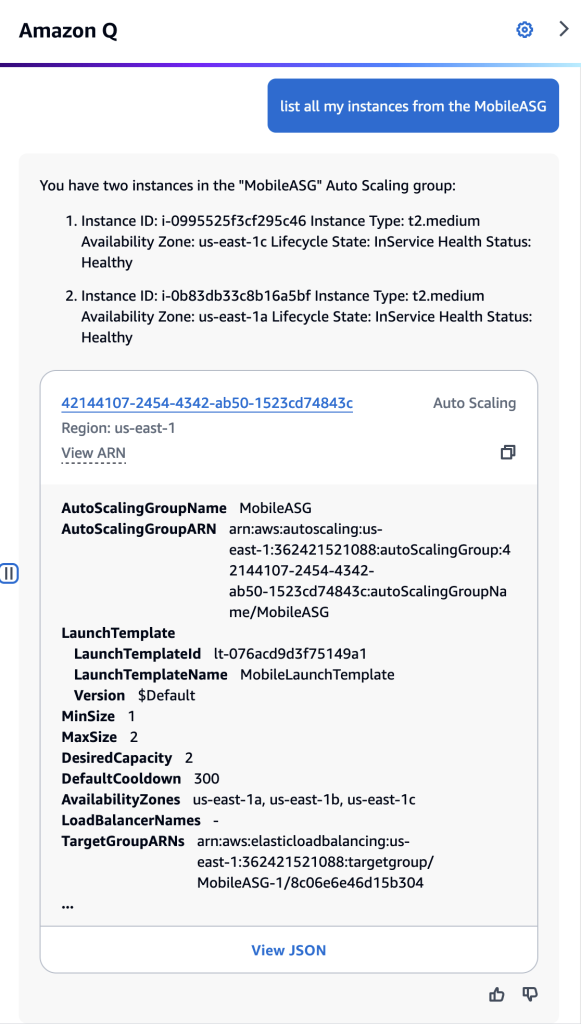
In a scenario where I need to list all my Amazon EC2 instances that are members of an Amazon EC2 Auto Scaling. This can be easily accomplished by prompting “list all my instances from the MobileASG” (figure 4). The result shows the instance IDs associated with the Auto Scaling Group “MobileASG” and the Auto Scaling configuration details. Note, that I did not explicitly mention that “MobileASG” is an Amazon EC2 Auto Scaling group in my prompt, Amazon Q Developer was able to infer it based on the instances’ meta-information.

Amazon Q Developer chat screenshot showing the results of the question: “list all my instances from the MobileASG?”

Figure 4

In another example, let’s imagine that my infrastructure team created numerous Amazon Virtual Private Cloud (Amazon VPC), and I now need to identify if I have any infrastructure using the Amazon VPCs they have created so that I can perform some clean-up. I can ask Amazon Q Developer to list all the Amazon EC2 instances that belong to those Amazon VPCs (figure 5).

Amazon Q Developer chat screenshot with the question: "List all EC2 instances that belong to the VPC?" for two distinct VPC IDs. The first result does not show any instances, and the second result shows that there are at least 6 EC2 instances in the VPC.

Figure 5

To update your AWS Lambda from Python 3.9 to Python 3.12 and identify them quickly, you can use the following command: “list all Lambdas with python3.9 runtime” (figure 6). This command will provide you with the AWS Lambda names and their relevant details, allowing you to easily identify the functions that need to be updated.

Amazon Q Developer chat screenshot with the question: “list all lambdas with python3.9” showing that there is only one AWS Lambda with Python 3.9 runtime

Figure 6

Prompts to try

I invite you to test Amazon Q Developer in the AWS Management Console, to ask question about your AWS account resources. Follow some prompts you can try:

“What resources are related to instance <<INSTANCE ID>>?”

“Which VPC does the instance <<INSTANCE ID>> run it? also what role is it using?”

“What s3 bucket is associated with the <<ALARM NAME>> cloudwatch alarm?”

“List all s3 buckets connected with cloudfront.”

Conclusion

In this post, we introduced Amazon Q Developer’s capability to chat about your AWS account resources. This capability enables you to interact with your AWS account using natural language to easily obtain information without writing scripts or navigating throughout AWS Management console pages. The evolution of Amazon Q Developer will continue to enable even more capabilities and new integrations with AWS account resources in the near future. It is an exciting time to be a cloud operations professional, DevOps engineer and developer.

To learn more and get started, visit Amazon Q Developer or view the documentation.

Artur Rodrigues

Artur Rodrigues is a Principal Solutions Architect for Generative AI at Amazon Web Services (AWS), focused on the Next Generation Developer experience, enabling developers to work more efficiently and creatively through the integration of Generative AI into their workflows. As a co-founder of the University of British Columbia Cloud Innovation Center (UBC-CIC), powered by AWS, Artur has collaborated with researchers, physicians, and students to develop over 50 solutions addressing real-world challenges. Artur enjoys cycling and exploring the great outdoors of beautiful British Columbia in Canada. He is also a gelato aficionado and a fan of soccer and jiu-jitsu.