All posts by Brian Beach

The most visited AWS DevOps blog posts in 2023

Post Syndicated from Brian Beach original https://aws.amazon.com/blogs/devops/the-most-visited-aws-devops-blogs-in-2023/

As we kick off 2024, I wanted to take a moment to highlight the top posts from 2023. Without further ado, here are the top 10 AWS DevOps blog posts of 2023.

  1. Unit Testing AWS Lambda with Python and Mock AWS Services – When building serverless event-driven applications using AWS Lambda, it is best practice to validate individual components.  Unit testing can quickly identify and isolate issues in AWS Lambda function code.  The techniques outlined in this blog demonstrates unit test techniques for Python-based AWS Lambda functions and interactions with AWS Services.
  2. How to use Amazon CodeWhisperer using Okta as an external IdP – Customers using Amazon CodeWhisperer often want to enable their developers to sign in using existing identity providers (IdP), such as Okta. CodeWhisperer provides support for authentication either through AWS Builder Id or AWS IAM Identity Center. AWS Builder ID is a personal profile for builders. It is designed for individual developers, particularly when working on personal projects or in cases when organization does not authenticate to AWS using the IAM Identity Center. IAM Identity Center is better suited for enterprise developers who use CodeWhisperer as employees of organizations that have an AWS account. The IAM Identity Center authentication method expands the capabilities of IAM by centralizing user administration and access control. Many customers prefer using Okta as their external IdP for Single Sign-On (SSO). They aim to leverage their existing Okta credentials to seamlessly access CodeWhisperer. To achieve this, customers utilize the IAM Identity Center authentication method.
  3. Introducing Amazon CodeWhisperer for command line – The command line is used by over thirty million engineers to write, build, run, debug, and deploy software. However, despite how critical it is to the software development process, the command line is notoriously hard to use. Its output is terse, its interface is from the 1970s, and it offers no hints about the ‘right way’ to use it. With tens of thousands of command line applications (called command-line interfaces or CLIs), it’s almost impossible to remember the correct input syntax. The command line’s lack of input validation also means typos can cause unnecessary errors, security risks, and even production outages. It’s no wonder that most software engineers find the command line an error-prone and often frustrating experience.
  4. 10 ways to build applications faster with Amazon CodeWhisperer – Amazon CodeWhisperer is a powerful generative AI tool that gives me coding superpowers. Ever since I have incorporated CodeWhisperer into my workflow, I have become faster, smarter, and even more delighted when building applications. However, learning to use any generative AI tool effectively requires a beginner’s mindset and a willingness to embrace new ways of working.
  5. Secure CDK deployments with IAM permission boundaries – The AWS Cloud Development Kit (CDK) accelerates cloud development by allowing developers to use common programming languages when modelling their applications. To take advantage of this speed, developers need to operate in an environment where permissions and security controls don’t slow things down, and in a tightly controlled environment this is not always the case. Of particular concern is the scenario where a developer has permission to create AWS Identity and Access Management (IAM) entities (such as users or roles), as these could have permissions beyond that of the developer who created them, allowing for an escalation of privileges. This approach is typically controlled through the use of permission boundaries for IAM entities, and in this post you will learn how these boundaries can now be applied more effectively to CDK development – allowing developers to stay secure and move fast.
  6. How to import existing resources into AWS CDK Stacks – Many customers have provisioned resources through the AWS Management Console or different Infrastructure as Code (IaC) tools, and then started using AWS Cloud Development Kit (AWS CDK) in a later stage. After introducing AWS CDK into the architecture, you might want to import some of the existing resources to avoid losing data or impacting availability.
  7. Develop a serverless application in Python using Amazon CodeWhisperer – While writing code to develop applications, developers must keep up with multiple programming languages, frameworks, software libraries, and popular cloud services from providers such as AWS. Even though developers can find code snippets on developer communities, to either learn from them or repurpose the code, manually searching for the snippets with an exact or even similar use case is a distracting and time-consuming process. They have to do all of this while making sure that they’re following the correct programming syntax and best coding practices.
  8. Optimize software development with Amazon CodeWhisperer – Businesses differentiate themselves by delivering new capabilities to their customers faster. They must leverage automation to accelerate their software development by optimizing code quality, improving performance, and ensuring their software meets security/compliance requirements. Trained on billions of lines of Amazon and open-source code, Amazon CodeWhisperer is an AI coding companion that helps developers write code by generating real-time whole-line and full-function code suggestions in their IDEs. Amazon CodeWhisperer has two tiers: the individual tier is free for individual use, and the professional tier provides administrative capabilities for organizations seeking to grant their developers access to CW. This blog provides a high-level overview of how developers can use CodeWhisperer.
  9. How to write and execute integration tests for AWS CDK applications – Automated integration testing validates system components and boosts confidence for new software releases. Performing integration tests on resources deployed to the AWS cloud enables the validation of AWS Identity and Access Management (IAM) policies, service limits, application configuration, and runtime code. For developers that are currently leveraging AWS Cloud Development Kit (AWS CDK) as their Infrastructure as Code tool, there is a testing framework available that makes integration testing easier to implement in the software release.
  10. Building NET 7 Applications with AWS CodeBuild – AWS CodeBuild is a fully managed DevOps service for building and testing your applications. As a fully managed service, there is no infrastructure to manage and you pay only for the resources that you use when you are building your applications. CodeBuild provides a default build image that contains the current Long Term Support (LTS) version of the .NET SDK.

A big thank you to all our readers! Your feedback and collaboration are appreciated and help us produce better content.
Using Amazon CodeCatalyst with Amazon Virtual Private Cloud

Post Syndicated from Brian Beach original https://aws.amazon.com/blogs/devops/using-amazon-codecatalyst-with-amazon-virtual-private-cloud/

Amazon CodeCatalyst is an integrated service for software development teams adopting continuous integration and deployment practices into their software development process. CodeCatalyst puts the tools you need all in one place. You can plan work, collaborate on code, and build, test, and deploy applications with continuous integration/continuous delivery (CI/CD) tools. You can also integrate AWS resources with your projects by connecting your AWS accounts to CodeCatalyst spaces.

CodeCatalyst recently announced support for Amazon Virtual Private Cloud (Amazon VPC). Amazon VPC is a logically isolated virtual network that you’ve defined. This virtual network closely resembles a traditional network that you’d operate in your own data center, with the benefits of using the scalable infrastructure of AWS. VPC connectivity from CodeCatalyst allows you to publish a package to an artifact repository in a private subnet, query an Amazon Relational Database Service (Amazon RDS) in a private subnet, deploy an update to Amazon Elastic Kubernetes Service (Amazon EKS) in a private subnet, and much more. In this post I will show you how to deploy changes to an Amazon Aurora database in a private Subnet using CodeCatalyst.

Overview

CodeCatalyst now allows you to create a VPC connection associated with an AWS Account. A VPC connection is a CodeCatalyst resource which contains all of the configuration needed to access a VPC. Space administrators can add their own VPC connections in the Amazon CodeCatalyst console on behalf of space members. Once created, members of the space can use the VPC connection in their projects.

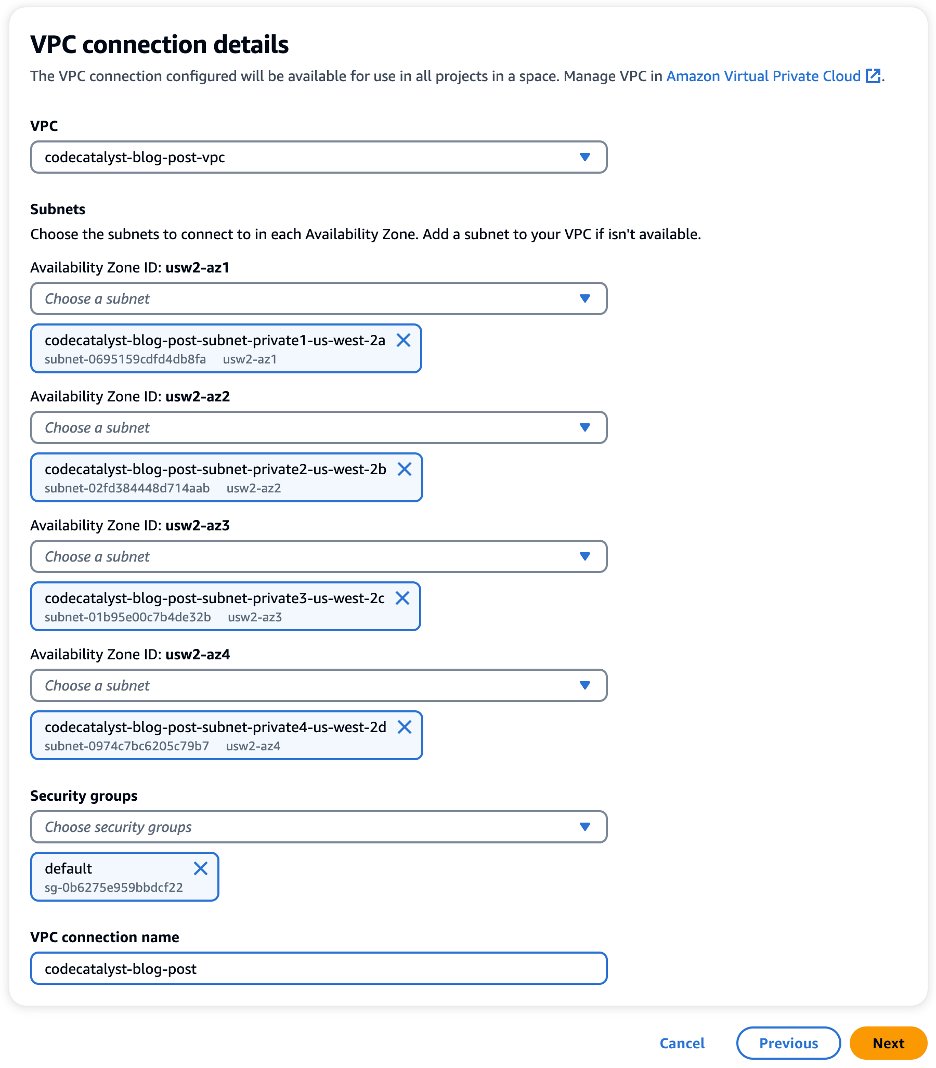
For this walkthrough, I have created a VPC in the us-west-2 region. My VPC has both a private and public subnet in each Availability Zone (AZ) . Next, I created a VPC connection in CodeCatalyst. In the following image, I have configured a VPC connection with a private subnet in each of the four AZs. In addition, I have added a security group that will be associated with resources that use this VPC connection allowing me to controls the traffic that is allowed to reach and leave the resources.

VPC connection details dialog showing the four private subnets and a security group.

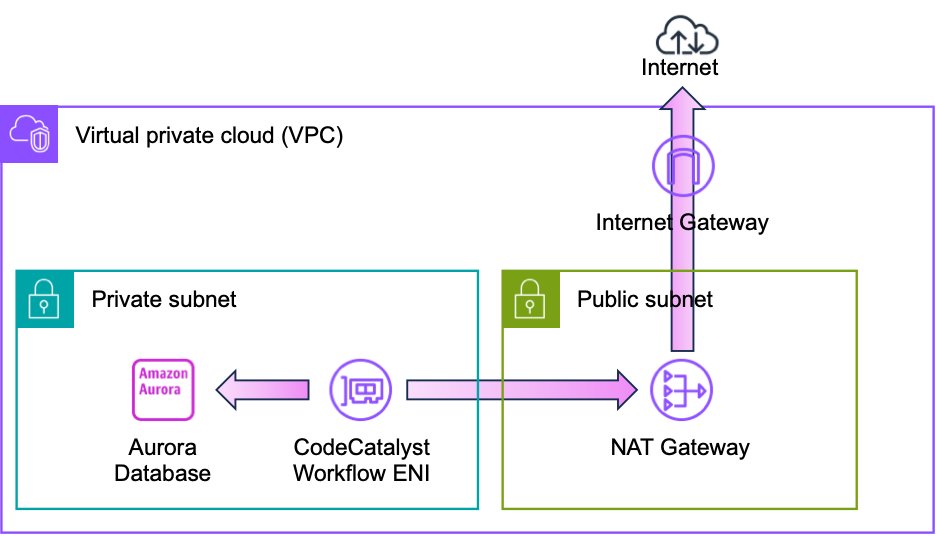
Before we move on, let’s take a moment to discuss how CodeCatalyst VPC connections work. When CodeCatalyst creates a workflow, an elastic network interface (ENI) is added to your VPC as shown in the following image. Note that the image shows two subnets a single availability zone for simplicity. However, as discussed earlier, the VPC used in this walkthrough has eight subnets in four availability zones.

Architecture diagram showing an aurora database in a private subnet and a NAT gateway in a public subnet for internet access

CodeCatalyst can now use this ENI to access private resources in the VPC. For example, an Amazon Aurora database. It is important to note that the ENI does not have a public IP address. Therefore, I have provided a path to the internet. Internet connectivity allows CodeCatalyst to access the APIs as well as publicly available repositories such as GitHub, PyPI, NPM, Docker Hub, et cetera. In this example, I use a NAT gateway for internet access, but I will discuss advanced network topologies later in this post.

Using CodeCatalyst Workflows in a Private Subnet

With the VPC connection in place, I can also use the VPC connection in a workflow. Amazon CodeCatalyst workflows are continuous integration and continuous delivery (CI/CD) pipelines that enable you to easily build, test and deploy applications. CodeCatalyst Workflows help you reliably deliver high-quality application updates frequently, quickly and securely. CodeCatalyst allows you to quickly assemble and configure actions – including GitHub Actions – to compose workflows that automate your CI/CD pipeline, test reporting, and other manual processes. You can learn more about CodeCatalyst workflows in the CodeCatalyst User Guide.

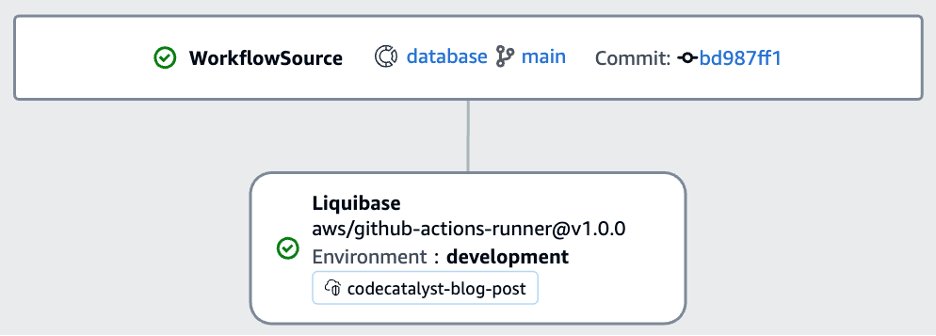
As a database developer, my workflow often needs to update the schema of the Aurora database. For this walkthrough, I will use Liquibase to deploy a schema change to the Aurora PostgreSQL database. If you are not familiar with Liquibase, you can refer to my prior post on Running GitHub Actions in a private Subnet with AWS CodeBuild for an overview. CodeCatalyst allows you to use GitHub Actions alongside native CodeCatalyst actions in a CodeCatalyst workflow. I will use the Liquibase Update GitHub Action as shown in the following image.

Workflow diagram showing the Liquibase action

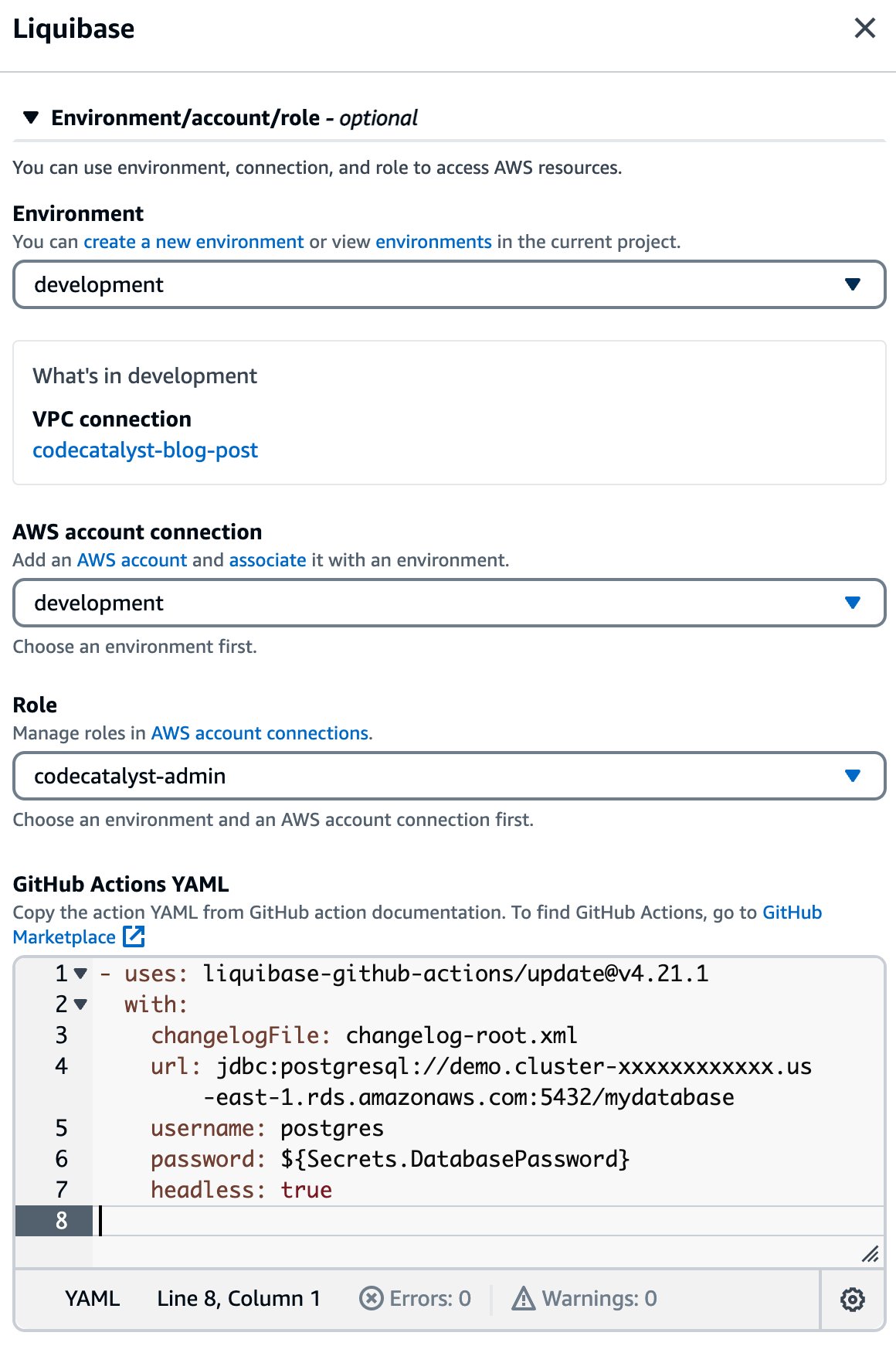
If I edit the Liquibase action, I can see the details of the configuration as shown in the following image. You will notice that I have selected the codecatalyst-blog-post VPC connection in the environment configuration. This will allow the Liquibase action to access private resources in my VPC including the Aurora database. Also notice how easy it is to incorporate a GitHub action in my workflow through the YAML configuration. Finally, notice that I can access CodeCatalyst secrets, such as the password, in my configuration.

Action configuration dialog showing the GitHub Action configuration

When I save the workflow and run it, you can see that the Liquibase action is able to successfully connect to the database. Note that in this example, there were no pending changes, so Liquibase reports “Database is up to date, no changesets to execute.”

####################################################
##   _     _             _ _                      ##
##  | |   (_)           (_) |                     ##
##  | |    _  __ _ _   _ _| |__   __ _ ___  ___   ##
##  | |   | |/ _` | | | | | '_ \ / _` / __|/ _ \  ##
##  | |___| | (_| | |_| | | |_) | (_| \__ \  __/  ##
##  \_____/_|\__, |\__,_|_|_.__/ \__,_|___/\___|  ##
##              | |                               ##
##              |_|                               ##
##                                                ##
##  Get documentation at docs.liquibase.com       ##
##  Get certified courses at learn.liquibase.com  ##
##  Free schema change activity reports at        ##
##      https://hub.liquibase.com                 ##
##                                                ##
####################################################
Starting Liquibase at 13:04:37 (version 4.21.1 #9070)
Liquibase Version: 4.21.1
Liquibase Open Source 4.21.1 by Liquibase
Database is up to date, no changesets to execute
 
UPDATE SUMMARY
Run:                          0
Previously run:               2
Filtered out:                 0
-------------------------------
Total change sets:            2
 
Liquibase command 'update' was executed successfully.

Obviously, a database is just one possible example. There are many private resources that I may need to access as a developer. A few more examples include: Amazon Elastic Compute Cloud (Amazon EC2) instances, Amazon Elastic File System (EFS) shares, and Amazon ElastiCache clusters among many others.

Advanced VPC Topologies

At the beginning of this post, I introduced a simple VPC with public and private subnets, and a NAT gateway. However, CodeCatalyst will work with more complex VPC topologies that are common among enterprise customers. For example, imagine that my application is deployed across multiple regions for both improved availability and lower latency. However, I prefer to manage all of CodeCatalyst projects in a single region, us-west-2, close to the developers.

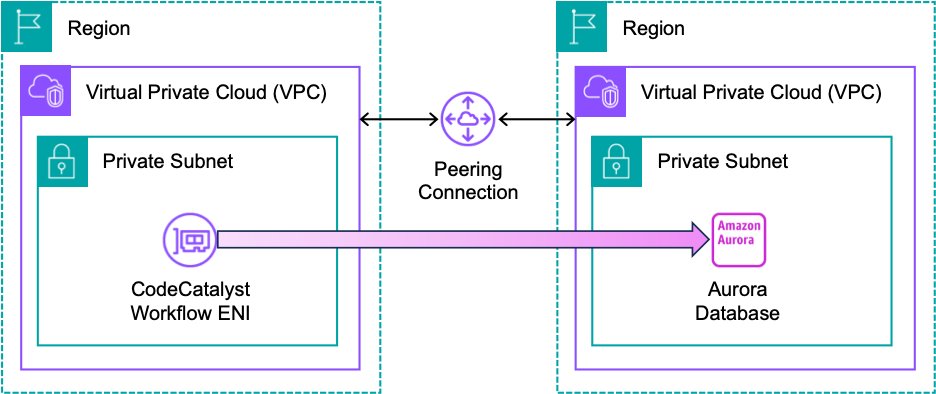
As a result, CodeCatalyst workflows all run in us-west-2. This does not mean that I can only deploy changes to the same region as the CodeCatalyst project. CodeCatalyst can use the full complement of VPC features. For example, in the following architecture, I am using VPC peering to allow CodeCatalyst to update an Aurora database in another region. The workflow is identical to the version I created previously, other than changing the Aurora endpoint, and possibly the username and password. Note that I still have an internet connection which I have omitted from this diagram for simplicity.

Architecture diagram showing two VPCs connected by a peering connection

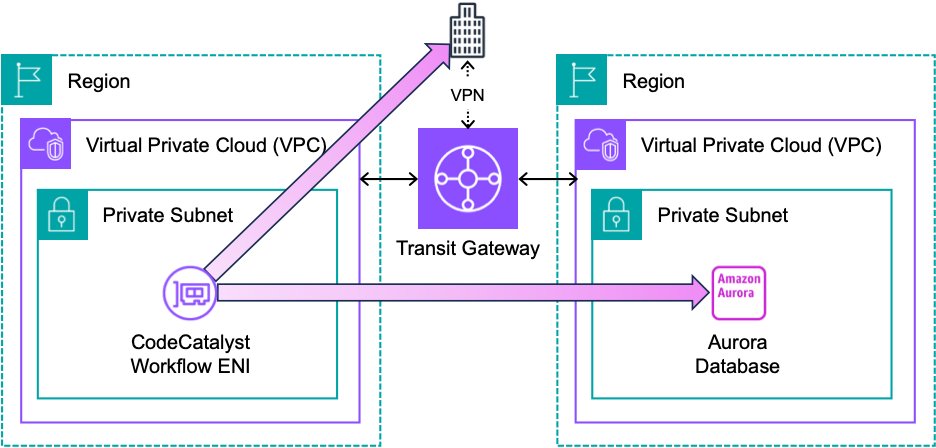
Alternatively, I could use an AWS Transit Gateway (TGW) rather than a peering connection as shown in the following architecture. CodeCatalyst can use the TGW to update resources in another region. Furthermore, CodeCatalyst can leverage a VPN connection associated with the TGW to update resources hosted outside of AWS. For example, I could deploy a change to a database hosted in an on-prem datacenter. Note that I have omitted the internet connection from this diagram for simplicity.

Architecture diagram showing two VPCs connected by a TGW

These are just a few examples of the advanced networking topologies that you can use with CodeCatalyst. You can read more about planning your network topology in the Reliability Pillar of the AWS Well-Architected Framework.

Conclusion

Amazon CodeCatalyst VPC connections allow you to access resources in a private subnet from your workflows. In this post, I configured a VPC connection to deploy schema changes using Liquibase. I also discussed some advanced network topologies that allow you to update resources in other regions. You can learn more about CodeCatalyst VPC connections in the CodeCatalyst User Guide

Multiple Load Balance Support in AWS CodeDeploy

Post Syndicated from Brian Beach original https://aws.amazon.com/blogs/devops/multiple-load-balance-support-in-codedeploy/

AWS CodeDeploy is a fully managed deployment service that automates software deployments to various compute services, such as Amazon Elastic Compute Cloud (Amazon EC2), Amazon Elastic Container Service (ECS), AWS Lambda, and on-premises servers. AWS CodeDeploy recently announced support for deploying to applications that use multiple AWS Elastic Load Balancers (ELB). CodeDeploy now supports multiple Classic Load Balancers (CLB), and multiple target groups associated with Application Load Balancers (ALB) or Network Load Balancer (NLB) when using CodeDeploy with Amazon EC2. In this blog post, I will show you how to deploy an application served by multiple load balancers.

Background

AWS CodeDeploy simplifies deploying application updates across Amazon EC2 instances registered with Elastic Load Balancers. The integration provides an automated, scalable way to deploy updates without affecting application availability.

To use CodeDeploy with load balancers, you install the CodeDeploy agent on Amazon EC2 instances that have been registered as targets of a Classic, Application, or Network Load Balancer. When creating a CodeDeploy deployment group, you specify the load balancer and target groups you want to deploy updates to.

During deployment, CodeDeploy safely shifts traffic by deregistering instances from the load balancer, deploying the new application revision, and then re-registering the instances to route traffic back. This approach ensures application capacity and availability are maintained throughout the deployment process. CodeDeploy coordinates the traffic shift across groups of instances, so that the deployment rolls out in a controlled fashion.

CodeDeploy offers two deployment approaches to choose from based on your needs: in-place deployments and blue/green deployments. With in-place deployments, traffic is shifted to the new application revision on the same set of instances. This allows performing rapid, incremental updates. Blue/green deployments involve shifting traffic to a separate fleet of instances running the new revision. This approach enables easy rollback if needed. CodeDeploy makes it easy to automate either deployment strategy across your infrastructure.

Architectures with Multiple Load Balancers

CodeDeploy’s expanded integration with Elastic Load Balancing unlocks new deployment flexibility. Users can now register multiple Classic Load Balancers and multiple target groups associated with Application or Network Load Balancers. This allows you to deploy updates across complex applications that leverage multiple target groups. For example, many customers run applications that serve both an internal audience and external audience. Often, these two audiences require different authentication and security requirements. It is common to provide access to the internal and external audiences through different load balancers, as shown in the following image.

Architecture showing two load balancers, one external facing and one internal facing

In the past, CodeDeploy only supported one load balancer per application. Customers running internal and external application tiers would have to duplicate environments, using separate EC2 instances and Amazon EC2 Auto Scaling groups for each audience. This resulted in overprovisioning and added overhead to manage duplicate resources.

With multiple load balancer support, CodeDeploy removes the need to duplicate environments. Users can now deploy updates to a single environment, and CodeDeploy will manage the deployment across both the internal and external load balancers. You simply select all the target groups used by your application, as shown in the following image.

CodeDeploy configuration showing two load balancers selected

This consolidated approach reduces infrastructure costs and operational complexity when automating deployments. CodeDeploy orchestrates the in-place or blue/green deployment across multiple load balanced target groups.

Migrating from a Classic Load Balancer

Many customers are migrating from Classic Load Balancers (CLB) to Application Load Balancers (ALB) or Network Load Balancers (NLB). ALB and NLB offer a more modern and advanced feature set than CLB, including integrated path-based and host-based routing, and native IPv6 support. They also deliver improved load balancing performance with higher throughput and lower latency. Other benefits include native integrations with AWS WAF, Shield, and Global Accelerator along with potential cost savings from requiring fewer load balancers. Overall, migrating to ALB or NLB provides an opportunity to gain advanced capabilities, better performance, tighter service integration, and reduced costs.

CodeDeploy’s new multi-target group capabilities streamline migrating from Classic Load Balancers (CLB) to Application or Network Load Balancers (ALB or NLB). Users can now deploy applications utilizing both legacy CLB and modern ALB or NLB in parallel during the transition. This enables gracefully testing integration with the new load balancers before fully cutting over. Once you verify that users have stopped using the CLB endpoint, you can delete the CLB.

During the transition period, CodeDeploy orchestrates deployments across the CLB and target groups tied to the ALB or NLB within a single automation. Users simply select the CLB and target groups of the new load balancer in the deployment group as shown in the following image.

CodeDeploy configuration showing a both a classic load balancer and target group selected

This consolidated approach lets CodeDeploy coordinate a staged rollout across CLB and ALB/NLB. With simplified management of multiple load balancers, CodeDeploy eases the critical process of modernizing infrastructure while maintaining application availability.

Conclusion

CodeDeploy’s expanded integration with Elastic Load Balancing allows more flexible application deployments. Support for multiple Classic Load Balancers and multiple target groups associated with Application or Network Load Balancers enables you to seamlessly update complex architectures on AWS. Whether you are consolidating disparate environments or migrating from Classic Load Balancers, CodeDeploy simplifies managing deployments across multiple load balanced tiers. To learn more, see Integrating CodeDeploy with Elastic Load Balancing in the AWS CodeDeploy Developer Guide or visit the CodeDeploy product page.