All posts by Chris Branch

So long, and thanks for all the fish: how to escape the Linux networking stack

Post Syndicated from Chris Branch original https://blog.cloudflare.com/so-long-and-thanks-for-all-the-fish-how-to-escape-the-linux-networking-stack/

There is a theory which states that if ever anyone discovers exactly what the Linux networking stack does and why it does it, it will instantly disappear and be replaced by something even more bizarre and inexplicable.

There is another theory which states that Git was created to track how many times this has already happened.

Many products at Cloudflare aren’t possible without pushing the limits of network hardware and software to deliver improved performance, increased efficiency, or novel capabilities such as soft-unicast, our method for sharing IP subnets across data centers. Happily, most people do not need to know the intricacies of how your operating system handles network and Internet access in general. Yes, even most people within Cloudflare.

But sometimes we try to push well beyond the design intentions of Linux’s networking stack. This is a story about one of those attempts.

Hard solutions for soft problems

My previous blog post about the Linux networking stack teased a problem matching the ideal model of soft-unicast with the basic reality of IP packet forwarding rules. Soft-unicast is the name given to our method of sharing IP addresses between machines. You may learn about all the cool things we do with it, but as far as a single machine is concerned, it has dozens to hundreds of combinations of IP address and source-port range, any of which may be chosen for use by outgoing connections.


The SNAT target in iptables supports a source-port range option to restrict the ports selected during NAT. In theory, we could continue to use iptables for this purpose, and to support multiple IP/port combinations we could use separate packet marks or multiple TUN devices. In actual deployment we would have to overcome challenges such as managing large numbers of iptables rules and possibly network devices, interference with other uses of packet marks, and deployment and reallocation of existing IP ranges.

Rather than increase the workload on our firewall, we wrote a single-purpose service dedicated to egressing IP packets on soft-unicast address space. For reasons lost in the mists of time, we named it SLATFATF, or “fish” for short. This service’s sole responsibility is to proxy IP packets using soft-unicast address space and manage the lease of those addresses.

WARP is not the only user of soft-unicast IP space in our network. Many Cloudflare products and services make use of the soft-unicast capability, and many of them use it in scenarios where we create a TCP socket in order to proxy or carry HTTP connections and other TCP-based protocols. Fish therefore needs to lease addresses that are not used by open sockets, and ensure that sockets cannot be opened to addresses leased by fish.

Our first attempt was to use distinct per-client addresses in fish and continue to let Netfilter/conntrack apply SNAT rules. However, we discovered an unfortunate interaction between Linux’s socket subsystem and the Netfilter conntrack module that reveals itself starkly when you use packet rewriting.

Collision avoidance

Suppose we have a soft-unicast address slice, 198.51.100.10:9000-9009. Then, suppose we have two separate processes that want to bind a TCP socket at 198.51.100.10:9000 and connect it to 203.0.113.1:443. The first process can do this successfully, but the second process will receive an error when it attempts to connect, because there is already a socket matching the requested 5-tuple.


Instead of creating sockets, what happens when we emit packets on a TUN device with the same destination IP but a unique source IP, and use source NAT to rewrite those packets to an address in this range?

If we add an nftables “snat” rule that rewrites the source address to 198.51.100.10:9000-9009, Netfilter will create an entry in the conntrack table for each new connection seen on fishtun, mapping the new source address to the original one. If we try to forward more connections on that TUN device to the same destination IP, new source ports will be selected in the requested range, until all ten available ports have been allocated; once this happens, new connections will be dropped until an existing connection expires, freeing an entry in the conntrack table.

Unlike when binding a socket, Netfilter will simply pick the first free space in the conntrack table. However, if you use up all the possible entries in the table you will get an EPERM error when writing an IP packet. Either way, whether you bind kernel sockets or you rewrite packets with conntrack, errors will indicate when there isn’t a free entry matching your requirements.

Now suppose that you combine the two approaches: a first process emits an IP packet on the TUN device that is rewritten to a packet on our soft-unicast port range. Then, a second process binds and connects a TCP socket with the same addresses as that IP packet:


The first problem is that there is no way for the second process to know that there is an active connection from 198.51.100.10:9000 to 203.0.113.1:443, at the time the connect() call is made. The second problem is that the connection is successful from the point of view of that second process.

It should not be possible for two connections to share the same 5-tuple. Indeed, they don’t. Instead, the source address of the TCP socket is silently rewritten to the next free port.


This behaviour is present even if you use conntrack without either SNAT or MASQUERADE rules. It usually happens that the lifetime of conntrack entries matches the lifetime of the sockets they’re related to, but this is not guaranteed, and you cannot depend on the source address of your socket matching the source address of the generated IP packets.

Crucially for soft-unicast, it means conntrack may rewrite our connection to have a source port outside of the port slice assigned to our machine. This will silently break the connection, causing unnecessary delays and false reports of connection timeouts. We need another solution.

Taking a breather

For WARP, the solution we chose was to stop rewriting and forwarding IP packets, instead to terminate all TCP connections within the server and proxy them to a locally-created TCP socket with the correct soft-unicast address. This was an easy and viable solution that we already employed for a portion of our connections, such as those directed at the CDN, or intercepted as part of the Zero Trust Secure Web Gateway. However, it does introduce additional resource usage and potentially increased latency compared to the status quo. We wanted to find another way (to) forward.

An inefficient interface

If you want to use both packet rewriting and bound sockets, you need to decide on a single source of truth. Netfilter is not aware of the socket subsystem, but most of the code that uses sockets and is also aware of soft-unicast is code that Cloudflare wrote and controls. A slightly younger version of myself therefore thought it made sense to change our code to work correctly in the face of Netfilter’s design.

Our first attempt was to use the Netlink interface to the conntrack module, to inspect and manipulate the connection tracking tables before sockets were created. Netlink is an extensible interface to various Linux subsystems and is used by many command-line tools like ip and, in our case, conntrack-tools. By creating the conntrack entry for the socket we are about to bind, we can guarantee that conntrack won’t rewrite the connection to an invalid port number, and ensure success every time. Likewise, if creating the entry fails, then we can try another valid address. This approach works regardless of whether we are binding a socket or forwarding IP packets.

There is one problem with this — it’s not terribly efficient. Netlink is slow compared to the bind/connect socket dance, and when creating conntrack entries you have to specify a timeout for the flow and delete the entry if your connection attempt fails, to ensure that the connection table doesn’t fill up too quickly for a given 5-tuple. In other words, you have to manually reimplement tcp_tw_reuse option to support high-traffic destinations with limited resources. In addition, a stray RST packet can erase your connection tracking entry. At our scale, anything like this that can happen, will happen. It is not a place for fragile solutions.

Socket to ‘em

Instead of creating conntrack entries, we can abuse kernel features for our own benefit. Some time ago Linux added the TCP_REPAIR socket option, ostensibly to support connection migration between servers e.g. to relocate a VM. The scope of this feature allows you to create a new TCP socket and specify its entire connection state by hand.

An alternative use of this is to create a “connected” socket that never performed the TCP three-way handshake needed to establish that connection. At least, the kernel didn’t do that — if you are forwarding the IP packet containing a TCP SYN, you have more certainty about the expected state of the world.

However, the introduction of TCP Fast Open provides an even simpler way to do this: you can create a “connected” socket that doesn’t perform the traditional three-way handshake, on the assumption that the SYN packet — when sent with its initial payload — contains a valid cookie to immediately establish the connection. However, as nothing is sent until you write to the socket, this serves our needs perfectly.

You can try this yourself:

TCP_FASTOPEN_CONNECT = 30
TCP_FASTOPEN_NO_COOKIE = 34
s = socket(AF_INET, SOCK_STREAM)
s.setsockopt(SOL_TCP, TCP_FASTOPEN_CONNECT, 1)
s.setsockopt(SOL_TCP, TCP_FASTOPEN_NO_COOKIE, 1)
s.bind(('198.51.100.10', 9000))
s.connect(('1.1.1.1', 53))

Binding a “connected” socket that nevertheless corresponds to no actual socket has one important feature: if other processes attempt to bind to the same addresses as the socket, they will fail to do so. This satisfies the problem we had at the beginning to make packet forwarding coexist with socket usage.

Jumping the queue

While this solves one problem, it creates another. By default, you can’t use an IP address for both locally-originated packets and forwarded packets.

For example, we assign the IP address 198.51.100.10 to a TUN device. This allows any program to create a TCP socket using the address 198.51.100.10:9000. We can also write packets to that TUN device with the address 198.51.100.10:9001, and Linux can be configured to forward those packets to a gateway, following the same route as the TCP socket. So far, so good.

On the inbound path, TCP packets addressed to 198.51.100.10:9000 will be accepted and data put into the TCP socket. TCP packets addressed to 198.51.100.10:9001, however, will be dropped. They are not forwarded to the TUN device at all.

Why is this the case? Local routing is special. If packets are received to a local address, they are treated as “input” and not forwarded, regardless of any routing you think should apply. Behold the default routing rules:

cbranch@linux:~$ ip rule
0:        from all lookup local
32766:    from all lookup main
32767:    from all lookup default

The rule priority is a nonnegative integer, the smallest priority value is evaluated first. This requires some slightly awkward rule manipulation to “insert” a lookup rule at the beginning that redirects marked packets to the packet forwarding service’s TUN device; you have to delete the existing rule, then create new rules in the right order. However, you don’t want to leave the routing rules without any route to the “local” table, in case you lose a packet while manipulating these rules. In the end, the result looks something like this:

ip rule add fwmark 42 table 100 priority 10
ip rule add lookup local priority 11
ip rule del priority 0
ip route add 0.0.0.0/0 proto static dev fishtun table 100

As with WARP, we simplify connection management by assigning a mark to packets coming from the “fishtun” interface, which we can use to route them back there. To prevent locally-originated TCP sockets from having this same mark applied, we assign the IP to the loopback interface instead of fishtun, leaving fishtun with no assigned address. But it doesn’t need one, as we have explicit routing rules now.

Uncharted territory

While testing this last fix, I ran into an unfortunate problem. It did not work in our production environment.

It is not simple to debug the path of a packet through Linux’s networking stack. There are a few tools you can use, such as setting nftrace in nftables or applying the LOG/TRACE targets in iptables, which help you understand which rules and tables are applied for a given packet.


Schematic for the packet flow paths through Linux networking and *tables by Jan Engelhardt

Our expectation is that the packet will pass the prerouting hook, a routing decision is made to send the packet to our TUN device, then the packet will traverse the forward table. By tracing packets originating from the IP of a test host, we could see the packets enter the prerouting phase, but disappear after the ‘routing decision’ block.

While there is a block in the diagram for “socket lookup”, this occurs after processing the input table. Our packet doesn’t ever enter the input table; the only change we made was to create a local socket. If we stop creating the socket, the packet passes to the forward table as before.

It turns out that part of the ‘routing decision’ involves some protocol-specific processing. For IP packets, routing decisions can be cached, and some basic address validation is performed. In 2012, an additional feature was added: early demux. The rationale being, at this point in packet processing we are already looking up something, and the majority of packets received are expected to be for local sockets, rather than an unknown packet or one that needs to be forwarded somewhere. In this case, why not look up the socket directly here and save yourself an extra route lookup?

The workaround at the end of the universe

Unfortunately for us, we just created a socket and didn’t want it to receive packets. Our adjustment to the routing table is ignored, because that routing lookup is skipped entirely when the socket is found. Raw sockets avoid this by receiving all packets regardless of the routing decision, but the packet rate is too high for this to be efficient. The only way around this is disabling the early demux feature. According to the patch’s claims, though, this feature improves performance: how far will performance regress on our existing workloads if we disable it?

This calls for a simple experiment: set the net.ipv4.tcp_early_demux syscall to 0 on some machines in a datacenter, let it run for a while, then compare the CPU usage with machines using default settings and the same hardware configuration as the machines under test.


The key metrics are CPU usage from /proc/stat. If there is a performance degradation, we would expect to see higher CPU usage allocated to “softirq” — the context in which Linux network processing occurs — with little change to either userspace (top) or kernel time (bottom). The observed difference is slight, and mostly appears to reduce efficiency during off-peak hours.

Swimming upstream

While we tested different solutions to IP packet forwarding, we continued to terminate TCP connections on our network. Despite our initial concerns, the performance impact was small, and the benefits of increased visibility into origin reachability, fast internal routing within our network, and simpler observability of soft-unicast address usage flipped the burden of proof: was it worth trying to implement pure IP forwarding and supporting two different layers of egress?

So far, the answer is no. Fish runs on our network today, but with the much smaller responsibility of handling ICMP packets. However, when we decide to tunnel all IP packets, we know exactly how to do it.

A typical engineering role at Cloudflare involves solving many strange and difficult problems at scale. If you are the kind of goal-focused engineer willing to try novel approaches and explore the capabilities of the Linux kernel despite minimal documentation, look at our open positions — we would love to hear from you!

How to build your own VPN, or: the history of WARP

Post Syndicated from Chris Branch original https://blog.cloudflare.com/how-to-build-your-own-vpn-or-the-history-of-warp/

Linux’s networking capabilities are a crucial part of how Cloudflare serves billions of requests in the face of DDoS attacks. The tools it provides us are invaluable and useful, and a constant stream of contributions from developers worldwide ensures it continually gets more capable and performant.

When we developed WARP, our mobile-first performance and security app, we faced a new challenge: how to securely and efficiently egress arbitrary user packets for millions of mobile clients from our edge machines. This post explores our first solution, which was essentially building our own high-performance VPN with the Linux networking stack. We needed to integrate it into our existing network; not just directly linking it into our CDN service, but providing a way to securely egress arbitrary user packets from Cloudflare machines. The lessons we learned here helped us develop new products and capabilities and discover more strange things besides. But first, how did we get started?

A bridge between two worlds

WARP’s initial implementation resembled a virtual private network (VPN) that allows Internet access through it. Specifically, a Layer 3 VPN – a tunnel for IP packets.

IP packets are the building blocks of the Internet. When you send data over the Internet, it is split into small chunks and sent separately in packets, each one labeled with a destination address (who the packet goes to) and a source address (who to send a reply to). If you are connected to the Internet, you have an IP address.

You may not have a unique IP address, though. This is certainly true for IPv4 which, despite our and many others’ long-standing efforts to move everyone to IPv6, is still in widespread use. IPv4 has only 4 billion possible addresses and they have all been assigned – you’re gonna have to share.

When you use WiFi at home, work or the coffee shop, you’re connected to a local network. Your device is assigned a local IP address to talk to the access point and any other devices in your network. However, that address has no meaning outside of the local network. You can’t use that address in IP packets sent over the Internet, because every local IPv4 network uses the same few sets of addresses.

So how does Internet access work? Local IPv4 networks generally employ a router, a device to perform network-address translation (NAT). NAT is used to convert the private IPv4 network addresses allocated to devices on the local-area network to a small set of publicly-routable addresses given by your Internet service provider. The router keeps track of the conversions it applies between the two networks in a translation table. When a packet is received on either network, the router consults the translation table and applies the appropriate conversion before sending the packet to the opposite network.


Diagram of a router using NAT to bridge connections from devices on a private network to the public Internet

A VPN that provides Internet access is no different in this respect to a LAN – the only unusual aspect is that the user of the VPN communicates with the VPN server over the public Internet. The model is simple: private network IP packets are tunnelled, or encapsulated, in public IP packets addressed to the VPN server.


Schematic of HTTPS packets being encapsulated between a VPN client and server

Most times, VPN software only handles the encapsulation and decapsulation of packets, and gives you a virtual network device to send and receive packets on the VPN. This gives you the freedom to configure the VPN however you like. For WARP, we need our servers to act as a router between the VPN client and the Internet.

NAT’s how you do it

Linux – the operating system powering our servers – can be configured to perform routing with NAT in its Netfilter subsystem. Netfilter is frequently configured through nftables or iptables rules. Configuring a “source NAT” to rewrite the source IP of outgoing packets is achieved with a single rule:

nft add rule ip nat postrouting oifname "eth0" ip saddr 10.0.0.0/8 snat to 198.51.100.42

This rule configures Netfilter’s NAT feature to perform source address translation for any packet matching the following criteria:

  1. The source address is the 10.0.0.0/8 private network subnet – in this example, let’s say VPN clients have addresses from this subnet.

  2. The packet shall be sent on the “eth0” interface – in this example, it’s the server’s only physical network interface, and thus the route to the public Internet.

Where these two conditions are true, we apply the “snat” action to rewrite the source IP packet, from whichever address the VPN client is using, to our example server’s public IP address 198.51.100.42. We keep track of the original and rewritten addresses in the rewrite table.


Schematic of an encapsulated packet being decapsulated and rewritten by a VPN server

You may require additional configuration depending on how your distribution ships nftables – nftables is more flexible than the deprecated iptables, but has fewer “implicit” tables ready to use.

You also might need to enable IP forwarding in general, as by default you don’t want a machine connected to two different networks to forward between them without realising it.

A conntrack is a conntrack is a conntrack

We said before that a router keeps track of the conversions between addresses in the two networks. In the diagram above, that state is held in the rewrite table.

In practice, any device may only implement NAT usefully if it understands the TCP and UDP protocols, in particular how they use port numbers to support multiple independent flows of data on a single IP address. The NAT device – in our case Linux – ensures that a unique source port and address is used for each connection, and reassigns the port if required. It also needs to understand the lifecycle of a TCP connection, so that it knows when it is safe to reuse a port number: with only 65,536 possible ports, port reuse is essential.

Linux Netfilter has the conntrack module, widely used to implement a stateful firewall that protects servers against spoofed or unexpected packets, preventing them interfering with legitimate connections. This protection is possible because it understands TCP and the valid state of a connection. This capability means it’s perfectly positioned to implement NAT, too. In fact, all packet rewriting is implemented by conntrack.


A diagram showing the steps taken by conntrack to validate and rewrite packets

As a stateful firewall, the conntrack module maintains a table of all connections it has seen. If you know all of the active connections, you can rewrite a new connection to a port that is not in use.

In the “snat” rule above, Netfilter adds an entry to the rewrite table, but doesn’t change the packet yet. Only basic packet changes are permitted within nftables. We must wait for packet processing to reach the conntrack module, which selects a port unused by any active connection, and only then rewrites the packet.


A diagram showing the roles of netfilter and conntrack when applying NAT to traffic

Marky mark and the firewall bunch

Another mode of conntrack is to assign a persistent mark to packets belonging to a connection. The mark can be referenced in nftables rules to implement different firewall policies, or to control routing decisions.

Suppose you want to prevent specific addresses (e.g. from a guest network) from accessing certain services on your machine. You could add a firewall rule for each service denying access to those addresses. However, if you need to change the set of addresses to block, you have to update every rule accordingly.

Alternatively, you could use one rule to apply a mark to packets coming from the addresses you wish to block, and then reference the mark in all the service rules that implement the block. Now if you wish to change the addresses, you need only update a single rule to change the scope of that packet mark.

This is most beneficial to control routing behaviour, as routing rules cannot make decisions on as many attributes of the packet as Netfilter can. Using marks allows you to select packets based on powerful Netfilter rules.


A diagram showing netfilter marking specific packets to apply special routing rules

The code powering the WARP service was written by Cloudflare in Rust, a security-focused systems programming language. We took great care implementing boringtun – our WireGuard implementation – and MASQUE. But even if you think the front door is impenetrable, it is good security practice to employ defense-in-depth.

One example is distinguishing IP packets that come from clients vs. packets that originate elsewhere in our network. One common method is to allocate a unique IP space to WARP traffic and distinguish it based on IP address, but this can be fragile if we need to apply a configuration change to renumber our internal networks – remember IPv4’s limited address space! Instead we can do something simpler.

To bring IP packets from WARP clients into the Linux networking stack, WARP uses a TUN device – Linux’s name for the virtual network device that programs can use to send and receive IP packets. A TUN device can be configured similarly to any other network device like Ethernet or Wi-Fi adapters, including firewall and routing.

Using nftables, we mark all packets output on WARP’s TUN device. We have to explicitly store the mark in conntrack’s state table on the outgoing path and retrieve it for the incoming packet, as netfilter can use packet marks independently of conntrack.

table ip mangle {
    chain forward {
        type filter hook forward priority mangle; policy accept;
        oifname "fishtun" counter ct mark set 42
    }
    chain prerouting {
        type filter hook prerouting priority mangle; policy accept;
        counter meta mark set ct mark
    }
}

We also need to add a routing rule to return marked packets to the TUN device:

ip rule add fwmark 42 table 100 priority 10
ip route add 0.0.0.0/0 proto static dev warp-tun table 100

Now we’re done. All connections from WARP are clearly identified and can be firewalled separately from locally-originated connections or other nodes on our network. Conntrack handles NAT for us, and the connection marks tell us which tracked connections were made by WARP clients.

The end?

In our first version of WARP, we enabled clients to access arbitrary Internet hosts by combining multiple components of Linux’s networking stack. Each of our edge servers had a single IP address from an allocation dedicated to WARP, and we were able to configure NAT, routing, and appropriate firewall rules using standard and well-documented methods.

Linux is flexible and easy to configure, but it would require one IPv4 address per machine. Due to IPv4 address exhaustion, this approach would not scale to Cloudflare’s large network. Assigning a dedicated IPv4 address for every machine that runs the WARP server results in an eye-watering address lease bill. To bring costs down, we would have to limit the number of servers running WARP, increasing the operational complexity of deploying it.

We had ideas, but we would have to give up the easy path Linux gave us. IP sharing seemed to us the most promising solution, but how much has to change if a single machine can only receive packets addressed to a narrow set of ports? We will reveal all in a follow-up blog post, but if you are the kind of curious problem-solving engineer who is already trying to imagine solutions to this problem, look at our open positions – we’d like to hear from you!

Oxy: the journey of graceful restarts

Post Syndicated from Chris Branch original https://blog.cloudflare.com/oxy-the-journey-of-graceful-restarts/

Oxy: the journey of graceful restarts

Oxy: the journey of graceful restarts

Any software under continuous development and improvement will eventually need a new version deployed to the systems running it. This can happen in several ways, depending on how much you care about things like reliability, availability, and correctness. When I started out in web development, I didn’t think about any of these qualities; I simply blasted my new code over FTP directly to my /cgi-bin/ directory, which was the style at the time. For those of us producing desktop software, often you sidestep this entirely by having the user save their work, close the program and install an update – but they usually get to decide when this happens.

At Cloudflare we have to take this seriously. Our software is in constant use and cannot simply be stopped abruptly. A dropped HTTP request can cause an entire webpage to load incorrectly, and a broken connection can kick you out of a video call. Taking away reliability creates a vacuum filled only by user frustration.

The limitations of the typical upgrade process

There is no one right way to upgrade software reliably. Some programming languages and environments make it easier than others, but in a Turing-complete language few things are impossible.

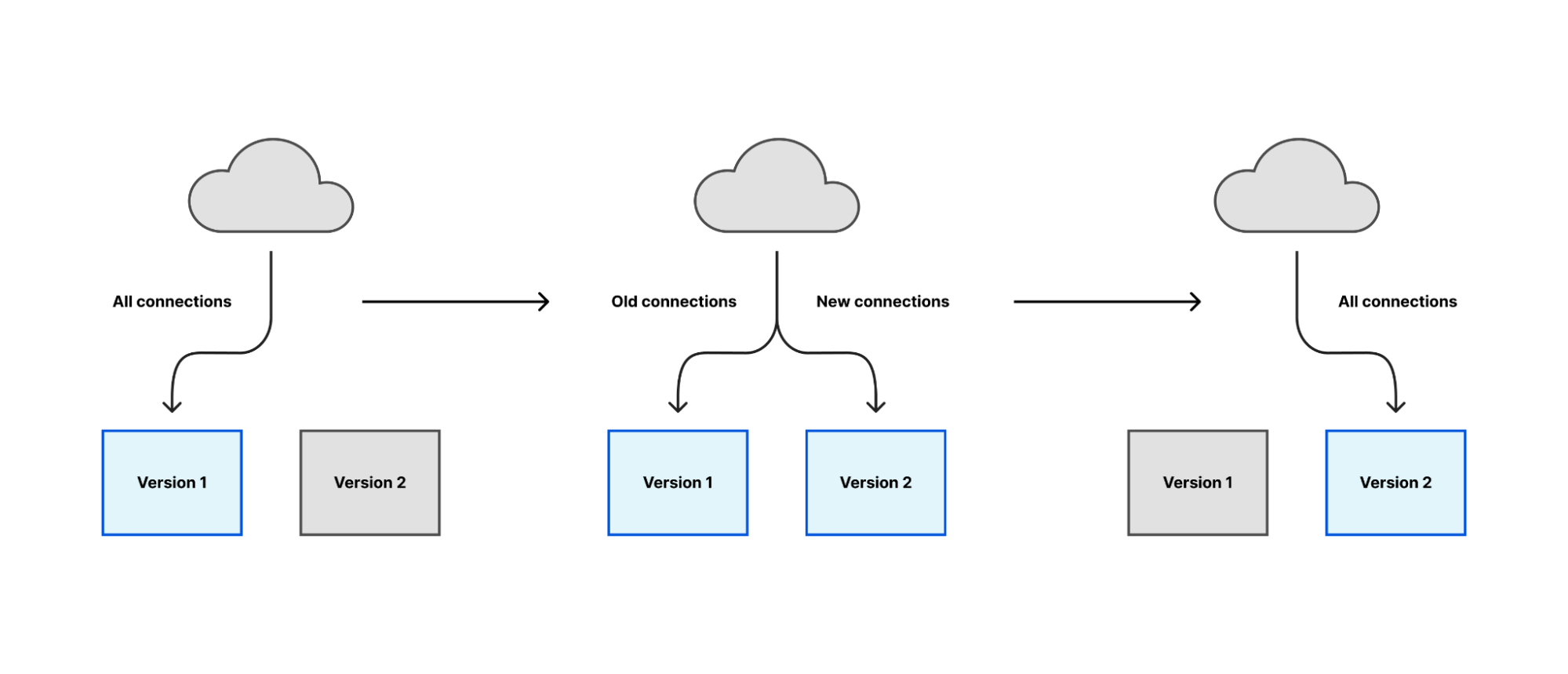
One popular and generally applicable approach is to start a new version of the software, make it responsible for a small number of tasks at first, and then gradually increase its workload until the new version is responsible for everything and the old version responsible for nothing. At that point, you can stop the old version.

Oxy: the journey of graceful restarts

Most of Cloudflare’s proxies follow a similar pattern: they receive connections or requests from many clients over the Internet, communicate with other internal services to decide how to serve the request, and fetch content over the Internet if we cannot serve it locally. In general, all of this work happens within the lifetime of a client’s connection. If we aren’t serving any clients, we aren’t doing any work.

The safest time to restart, therefore, is when there is nobody to interrupt. But does such a time really exist? The Internet operates 24 hours a day and many users rely on long-running connections for things like backups, real-time updates or remote shell sessions. Even if you defer restarts to a “quiet” period, the next-best strategy of “interrupt the fewest number of people possible” will fail when you have a critical security fix that needs to be deployed immediately.

Despite this challenge, we have to start somewhere. You rarely arrive at the perfect solution in your first try.

(╯°□°)╯︵ ┻━┻

We have previously blogged about implementing graceful restarts in Cloudflare’s Go projects, using a library called tableflip. This starts a new version of your program and allows the new version to signal to the old version that it started successfully, then lets the old version clear its workload. For a proxy like any Oxy application, that means the old version stops accepting new connections once the new version starts accepting connections, then drives its remaining connections to completion.

Oxy: the journey of graceful restarts

This is the simplest case of the migration strategy previously described: the new version immediately takes all new connections, instead of a gradual rollout. But in aggregate across Cloudflare’s server fleet the upgrade process is spread across several hours and the result is as gradual as a deployment orchestrated by Kubernetes or similar.

tableflip also allows your program to bind to sockets, or to reuse the sockets opened by a previous instance. This enables the new instance to accept new connections on the same socket and let the old instance release that responsibility.

Oxy is a Rust project, so we can’t reuse tableflip. We rewrote the spawning/signaling section in Rust, but not the socket code. For that we had an alternative approach.

Socket management with systemd

systemd is a widely used suite of programs for starting and managing all of the system software needed to run a useful Linux system. It is responsible for running software in the correct order – for example ensuring the network is ready before starting a program that needs network access – or running it only if it is needed by another program.

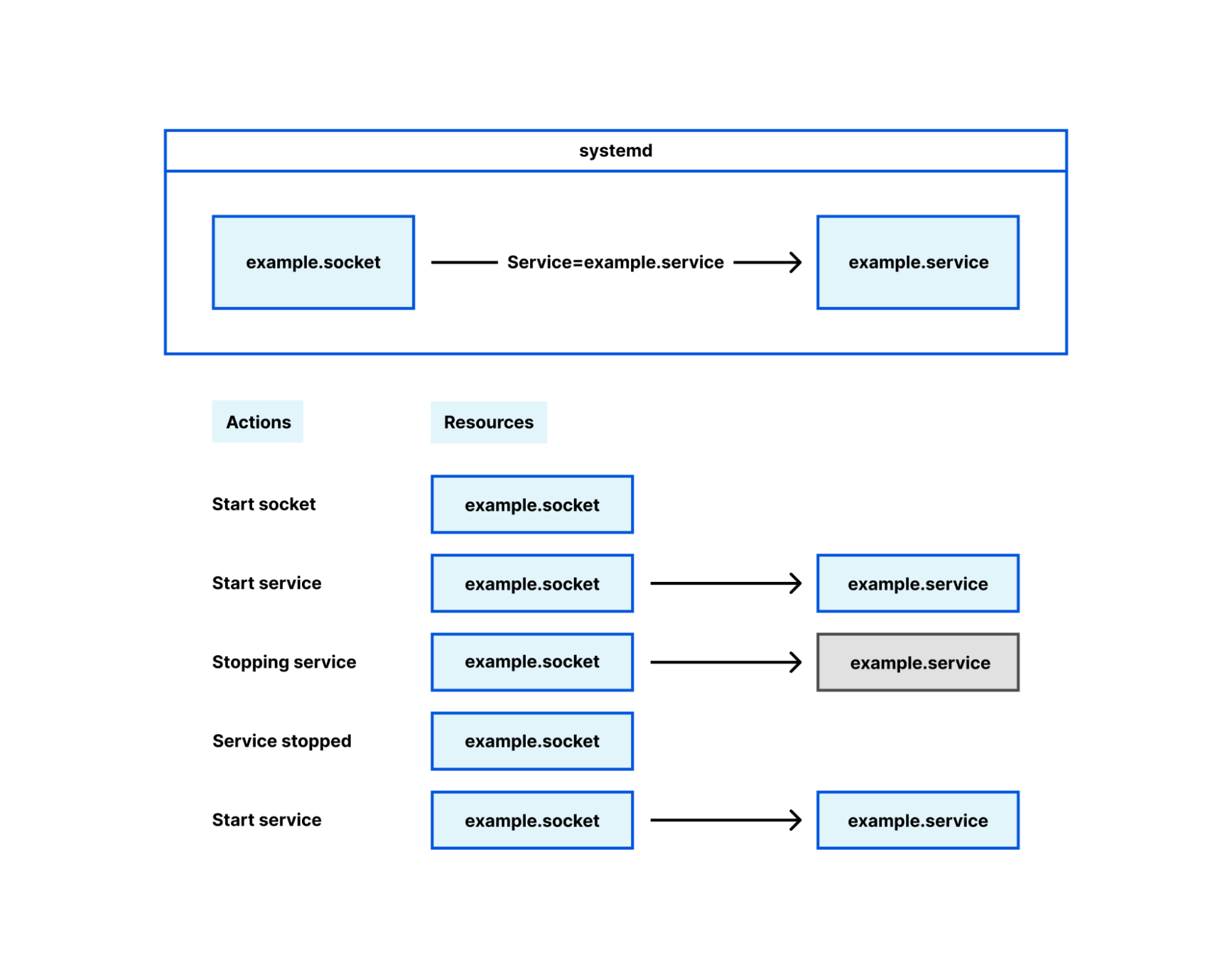
Socket management falls in this latter category, under the term ‘socket activation’. Its intended and original use is interesting but ultimately irrelevant here; for our purposes, systemd is a mere socket manager. Many Cloudflare services configure their sockets using systemd .socket files, and when their service is started the socket is brought into the process with it. This is how we deploy most Oxy-based services, and Oxy has first-class support for sockets opened by systemd.

Oxy: the journey of graceful restarts

Using systemd decouples the lifetime of sockets from the lifetime of the Oxy application. When Oxy creates its sockets on startup, if you restart or temporarily stop the Oxy application the sockets are closed. When clients attempt to connect to the proxy during this time, they will get a very unfriendly “connection refused” error. If, however, systemd manages the socket, that socket remains open even while the Oxy application is stopped. Clients can still connect to the socket and those connections will be served as soon as the Oxy application starts up successfully.

Channeling your inner WaitGroup

A useful piece of library code our Go projects use is WaitGroups. These are essential in Go, where goroutines – asynchronously-running code blocks – are pervasive. Waiting for goroutines to complete before continuing another task is a common requirement. Even the example for tableflip uses them, to demonstrate how to wait for tasks to shut down cleanly before quitting your process.

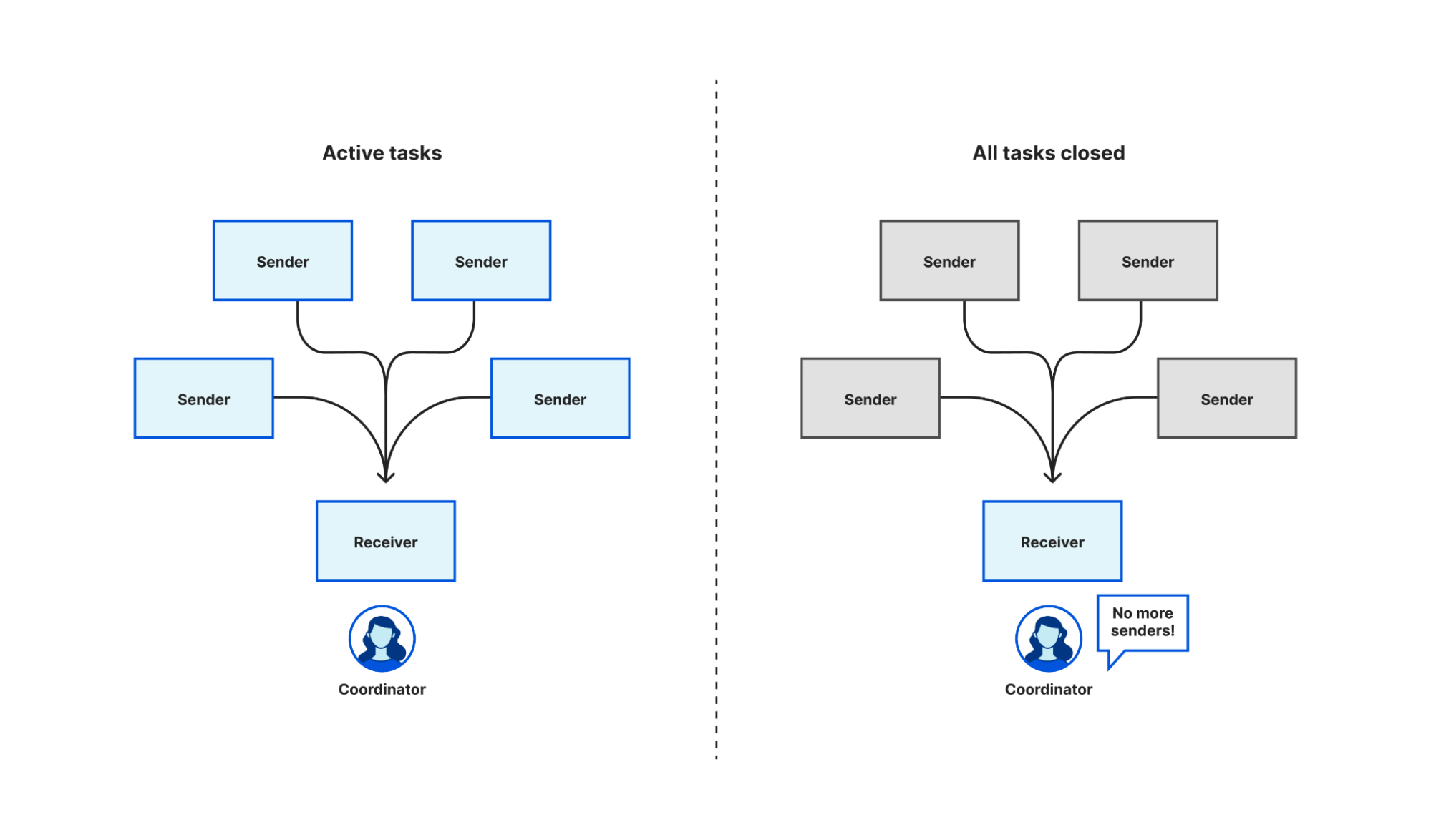
There is not an out-of-the-box equivalent in tokio – the async Rust runtime Oxy uses – or async/await generally, so we had to create one ourselves. Fortunately, most of the building blocks to roll your own exist already. Tokio has multi-producer, single consumer (MPSC) channels, generally used by multiple tasks to push the results of work onto a queue for a single task to process, but we can exploit the fact that it signals to that single receiver when all the sender channels have been closed and no new messages are expected.

Oxy: the journey of graceful restarts

To start, we create an MPSC channel. Each task takes a clone of the producer end of the channel, and when that task completes it closes its instance of the producer. When we want to wait for all of the tasks to complete, we await a result on the consumer end of the MPSC channel. When every instance of the producer channel is closed – i.e. all tasks have completed – the consumer receives a notification that all of the channels are closed. Closing the channel when a task completes is an automatic consequence of Rust’s RAII rules. Because the language enforces this rule it is harder to write incorrect code, though in fact we need to write very little code at all.

Getting feedback on failure

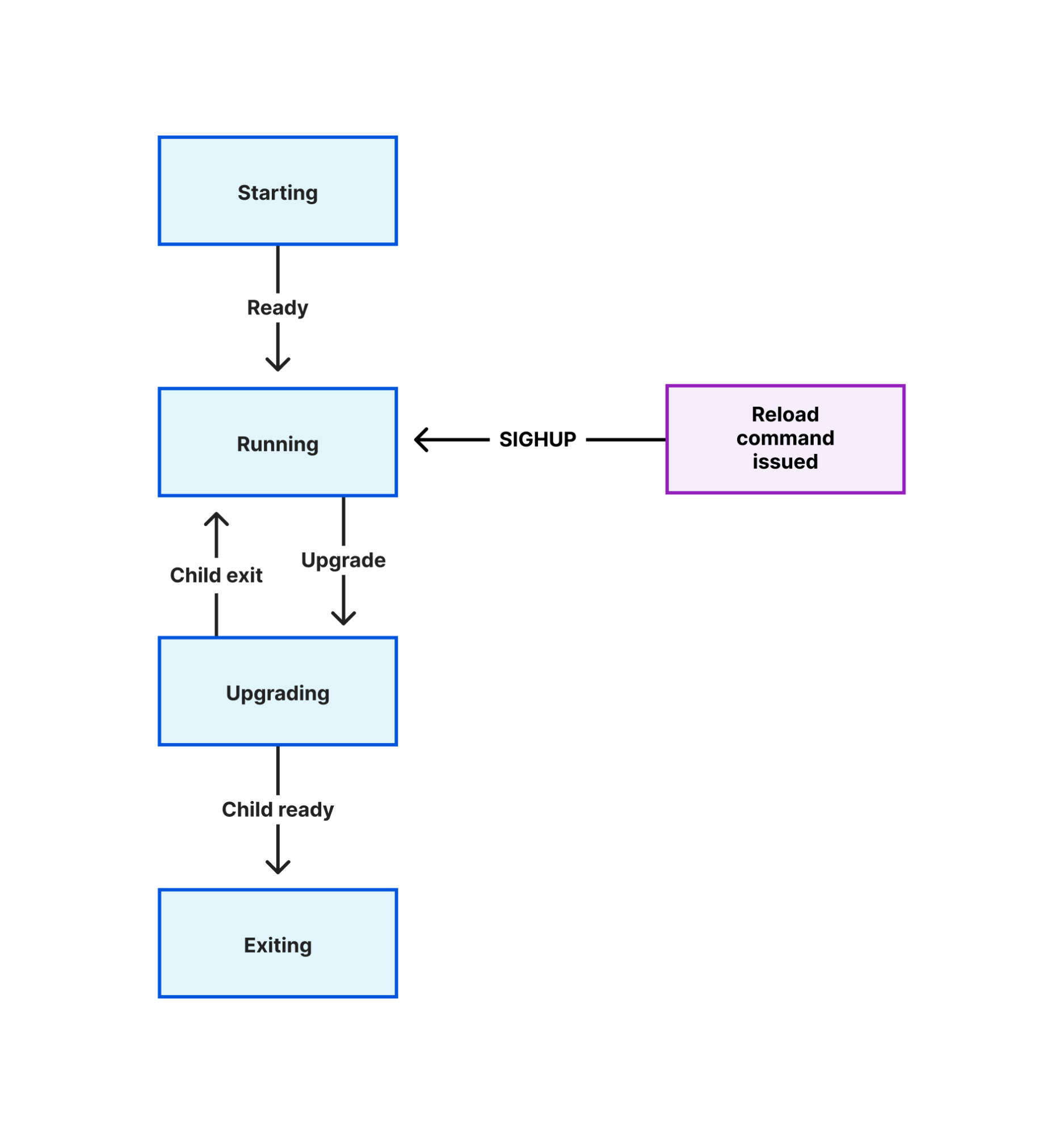
Many programs that implement a graceful reload/restart mechanism use Unix signals to trigger the process to perform an action. Signals are an ancient technique introduced in early versions of Unix to solve a specific problem while creating dozens more. A common pattern is to change a program’s configuration on disk, then send it a signal (often SIGHUP) which the program handles by reloading those configuration files.

The limitations of this technique are obvious as soon as you make a mistake in the configuration, or when an important file referenced in the configuration is deleted. You reload the program and wonder why it isn’t behaving as you expect. If an error is raised, you have to look in the program’s log output to find out.

This problem compounds when you use an automated configuration management tool. It is not useful if that tool makes a configuration change and reports that it successfully reloaded your program, when in fact the program failed to read the change. The only thing that was successful was sending the reload signal!

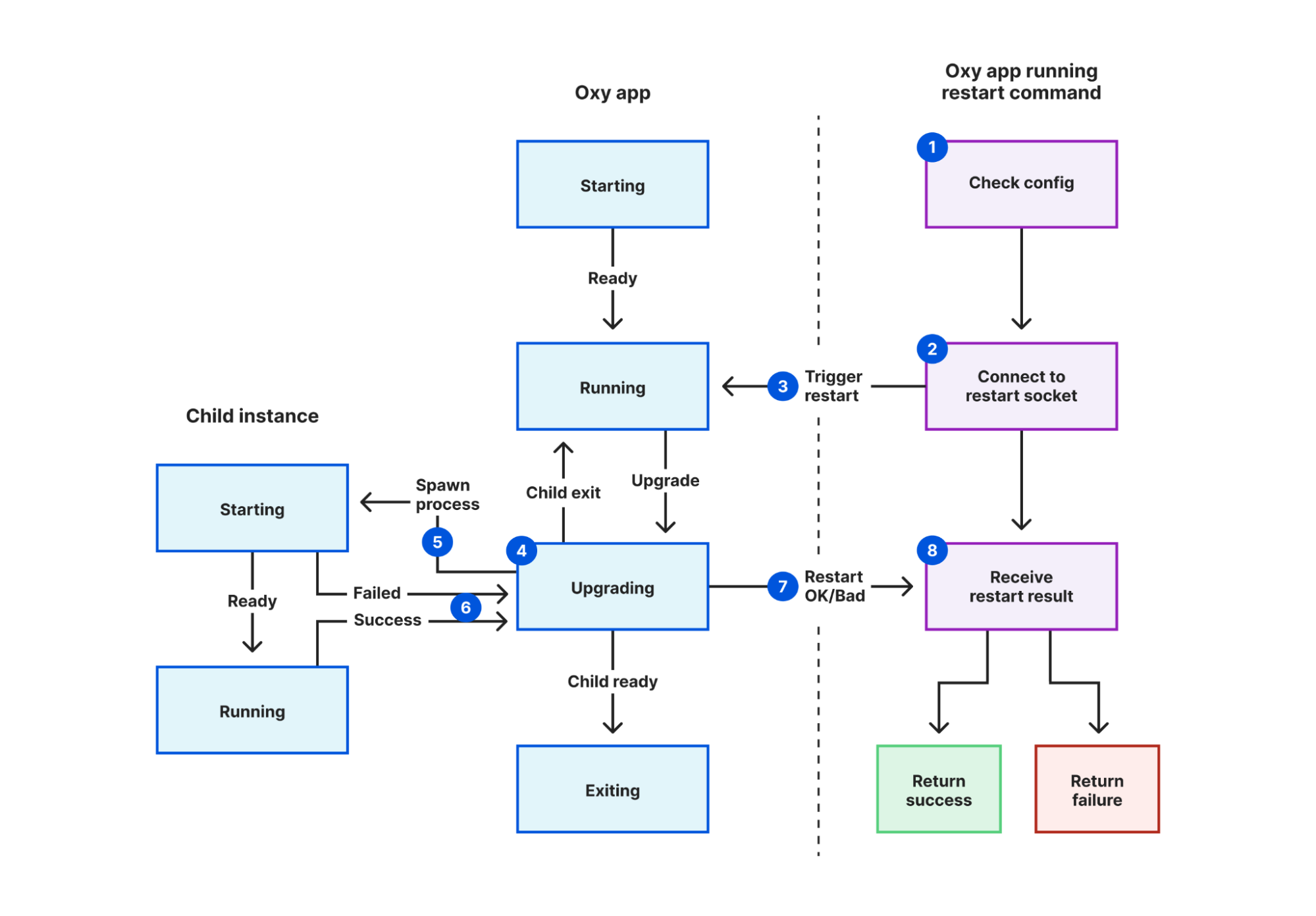
We solved this in Oxy by creating a Unix socket specifically for coordinating restarts, and adding a new mode to Oxy that triggers a restart. In this mode:

  1. The restarter process validates the configuration file.
  2. It connects to the restart coordination socket defined in that file.
  3. It sends a “restart requested” message.
  4. The current proxy instance receives this message.
  5. A new instance is started, inheriting a pipe it will use to notify its parent instance.
  6. The current instance waits for the new instance to report success or fail.
  7. The current instance sends a “restart response” message back to the restarter process, containing the result.
  8. The restarter process reports this result back to the user, using exit codes for automated systems to detect failure.
Oxy: the journey of graceful restarts

Now when we make a change to any of our Oxy applications, we can be confident that failures are detected using nothing more than our SREs’ existing tooling. This lets us discover failures earlier, narrow down root causes sooner, and avoid our systems getting into an inconsistent state.

This technique is described more generally in a coworker’s blog, using an internal HTTP endpoint instead. Yet HTTP is missing one important property of Unix sockets for the purpose of replacing signals. A user may only send a signal to a process if the process belongs to them – i.e. they started it – or if the user is root. This prevents another user logged into the same machine from you from terminating all of your processes. As Unix sockets are files, they also follow the Unix permission model. Write permissions are required to connect to a socket. Thus we can trivially reproduce the signals security model by making the restart coordination socket user writable only. (Root, as always, bypasses all permission checks.)

Leave no connection behind

We have put a lot of effort into making restarts as graceful as possible, but there are still certain limitations. After restarting, eventually the old process has to terminate, to prevent a build-up of old processes after successive restarts consuming excessive memory and reducing the performance of other running services. There is an upper bound to how long we’ll let the old process run for; when this is reached, any connections remaining are forcibly broken.

The configuration changes that can be applied using graceful restart is limited by the design of systemd. While some configuration like resource limits can now be applied without restarting the service it applies to, others cannot; most significantly, new sockets. This is a problem inherent to the fork-and-inherit model.

For UDP-based protocols like HTTP/3, there is not even a concept of listener socket. The new process may open UDP sockets, but by default incoming packets are balanced between all open unconnected UDP sockets for a given address. How does the old process drain existing sessions without receiving packets intended for the new process and vice versa?

Is there a way to carry existing state to a new process to avoid some of these limitations? This is a hard problem to solve generally, and even in languages designed to support hot code upgrades there is some degree of running old tasks with old versions of code. Yet there are some common useful tasks that can be carried between processes so we can “interrupt the fewest number of people possible”.

Let’s not forget the unplanned outages: segfaults, oomkiller and other crashes. Thankfully rare in Rust code, but not impossible.

You can find the source for our Rust implementation of graceful restarts, named shellflip, in its GitHub repository. However, restarting correctly is just the first step of many needed to achieve our ultimate reliability goals. In a follow-up blog post we’ll talk about some creative solutions to these limitations.