All posts by Jennifer Paz

Practical steps to minimize key exposure using AWS Security Services

Post Syndicated from Jennifer Paz original https://aws.amazon.com/blogs/security/practical-steps-to-minimize-key-exposure-using-aws-security-services/

Exposed long-term credentials continue to be the top entry point used by threat actors in security incidents observed by the AWS Customer Incident Response Team (CIRT). The exposure and subsequent use of long-term credentials or access keys by threat actors poses security risks in cloud environments. Additionally, poor key rotation practices, sharing of access keys among multiple users, or failing to revoke unused credentials can leave systems exposed.

Using long-term credentials is strongly discouraged and presents an opportunity to migrate towards AWS Identity and Access Management (IAM) roles and federated access. While our recommended best practice is for customers to migrate away from long-term credentials, we recognize that this transition might not be immediately feasible for all organizations.

Building a comprehensive defense against unintended access to long-term credentials requires a strategic layered approach. This approach is intended to bridge the gap between ideal security practices and real-world operational constraints, providing actionable steps for teams managing legacy AWS workloads that require the use of long-term credentials.

In this post, you learn how to build your defense, starting with identifying existing risks and potential exposures through services such as Amazon CodeGuru Security and AWS IAM Access Analyzer, providing visibility into credential risks across the environment. This is then complemented by establishing strict boundaries through service control policies (SCPs) and data perimeters to control how and where credentials can be created and used. With these mechanisms in place, you can strengthen your position with network-level controls that help protect the infrastructure where access keys might be used, implementing services such as AWS WAF and Amazon Inspector to help protect against exploitation of vulnerabilities. Finally, you implement operational best practices such as automated secret rotation to maintain ongoing security hygiene and minimize the impact of potential compromise.

Detect current access keys and exposure

Audit current access keys

For comprehensive auditing, organizations should regularly generate credential reports to identify IAM user ownership of long-lived credentials and other relevant information such as the last time the key was rotated, last time it was used, last service used and last region used. These reports provide essential visibility into your credential landscape, enabling you to spot unused or potentially compromised credentials by focusing on access keys with stale activity, keys exceeding rotation policies, and unexpected usage patterns from unfamiliar regions.

Detect exposed access keys

A common source of credential compromise occurs through inadvertent commits to public repositories. When developers accidentally commit credentials to public repositories, these credentials can be harvested by automated scanning tools used by adversaries. Code scanning is a foundational step that helps catch these critical security issues early, before sensitive credentials can be accidentally committed to code repositories or deployed to production environments where they could be exploited.

You can use the secrets detection capability of CodeGuru Security to proactively identify exposed sensitive data in your codebase.

The tool integrates with AWS Secrets Manager, employing detection mechanisms to locate unencrypted secrets in your code, such as AWS secret access keys, embedded passwords, and database connection strings.

When CodeGuru Security discovers unprotected secrets during a scan, it creates a finding with recommended remediation to address the vulnerability.

AWS Trusted Advisor also contains an exposed access key check that checks popular code repositories for access keys that have been exposed to the public and for irregular Amazon Elastic Compute Cloud (Amazon EC2) usage that could be the result of a compromised access key.

Note that while these are valuable security tools, they cannot detect secrets or access keys stored in locations outside their scanning scope, such as local development machines or external systems. They should be used as part of a broader security strategy, not as the sole method for identifying and preventing credential exposure.

When addressing potentially compromised access keys, it is advised to immediately rotate the keys. See instructions on how to rotate access keys for IAM Users.

Detect unused access

Beyond identifying exposed credentials, detecting unused access keys helps minimize the attack surface. IAM Access Analyzer contains an unused access analyzer that looks for access permissions that are either overly generous or that have fallen into disuse, including unused IAM roles, access keys for IAM users, passwords for IAM users, and services and actions for active IAM roles and users. After reviewing the findings generated by an organization-wide or account-specific analyzer, you can remove or modify permissions that aren’t needed. By identifying and revoking unused credentials and access, you can limit the impact if credentials have been obtained by a threat actor.

By implementing these tools, you can gain insights into credential risks across your environment. The combined capabilities help surface embedded secrets, exposed access keys, and credentials requiring removal.

Preventive guardrails: Establish a data perimeter

Now that you’ve learned how to identify exposed or unused credentials, let’s explore how you can use SCPs and resource control policies (RCPs) to create a data perimeter and help make sure that only your trusted identities are accessing trusted resources from expected networks. Implementing preventive guardrails around your AWS environment is crucial for helping protect against unauthorized access and potential access key compromises. For more information on what a data perimeter is and how to establish one, see the Establishing a Data Perimeter on AWS blog post series.

The following SCP denies an IAM user’s credentials from being used outside of unexpected networks (corporate Classless Inter-Domain Routing (CIDR) or specific virtual private cloud (VPC)). This policy includes several actions in the NotAction element that would impact services access if not exempted. Examples of SCPs and RCPs can be found in the data-perimeter-policy-examples, which is the source of truth for newly revised policies. The following example has been updated to address the use case of user credentials being used outside of unexpected networks.

{
    "Version": "2012-10-17",
    "Statement": [
        {
            "Sid": "EnforceNetworkPerimeterOnIAMUsers",
            "Effect": "Deny",
            "NotAction": [
                "es:ES*",
                "dax:GetItem",
                "dax:BatchGetItem",
                "dax:Query",
                "dax:Scan",
                "dax:PutItem",
                "dax:UpdateItem",
                "dax:DeleteItem",
                "dax:BatchWriteItem",
                "dax:ConditionCheckItem",
                "neptune-db:*",
                "kafka-cluster:*",
                "elasticfilesystem:client*",
                "rds-db:connect"
            ],
            "Resource": "*",
            "Condition": {
                "BoolIfExists": {
                    "aws:ViaAWSService": "false"
                },
                "NotIpAddressIfExists": {
                    "aws:SourceIp": [
                        "<my-corporate-cidr>"
                    ]
                },
                "StringNotEqualsIfExists": {
                    "aws:SourceVpc": [
                        "<my-vpc>"
                    ]
                },
                "ArnLike": {
                    "aws:PrincipalArn": [
                        "arn:aws:iam::*:user/*"
                    ]
                }
            }
        }
    ]

By implementing this network perimeter, you can reduce the risk of credential compromise leading to unauthorized access and data exposure. Threat actors attempting to use stolen credentials from a coffee shop or home network will be blocked, helping to limit the impact of unintended access to credentials.

To further increase your defense in depth, you can use RCPs to help protect your data, such as by using them to control which identities can access your resources. For example, you might want to allow identities in your organization to access resources in your organization. You might also want to prevent identities external to your organization from accessing your resources. You can enforce this control using RCPs. You can use RCPs to restrict the maximum available access to your resources and include which principals, both inside and outside your organization, can access your resources. SCPs can only impact the effective permissions for principals within your AWS organization.

By implementing the following RCP, you can help make sure that if long-lived credentials are accidentally exposed, unauthorized users from outside your organization will be blocked from using them to access your critical data and resources. The policy will deny Amazon Simple Storage Service (Amazon S3) actions unless requested from your corporate CIDR range (NotIpAddressIfExists with aws:SourceIp), or from your VPC (StringNotEqualsIfExists with aws:SourceVpc). See the list of AWS services that support RCPs. Examples of SCPs and RCPs can be found in this GitHub repository, which is the source of truth for newly revised policies. The following example has been updated to address the use case discussed in this post.

{
  "Version": "2012-10-17",
  "Statement": [
    {
      "Sid": "EnforceNetworkPerimeter",
      "Effect": "Deny",
      "Principal": "*",
      "Action": [
		"s3:*",
		"sqs:*",
		"kms:*",
		"secretsmanager:*",
		"sts:AssumeRole",
		"sts:DecodeAuthorizationMessage",
		"sts:GetAccessKeyInfo",
		"sts:GetFederationToken",
		"sts:GetServiceBearerToken",
		"sts:GetSessionToken",
 		"sts:SetContext",
 		"aoss:*",
 		"ecr:*"
		],
      "Resource": "*",
      "Condition": {
        "NotIpAddressIfExists": {
          "aws:SourceIp": "<0.0.0.0/1>"
        },
        "StringNotEqualsIfExists": {
          "aws:SourceVpc": "<my-vpc>"
        },
        "BoolIfExists": {
          "aws:PrincipalIsAWSService": "false",
          "aws:ViaAWSService": "false"
        }
      }
	 }
    ]
  }

If you’re ready to begin migrating away from long-term credentials, using an SCP to deny access key creation and deny updates to existing keys helps enforce the use of more secure authentication methods like IAM roles and federated access. This policy denies principals from creating or updating an AWS access key.

{
    "Version": "2012-10-17",
    "Statement": [
        {
            "Effect": "Deny",
            "Action": [
                "iam:CreateAccessKey",
			 	"iam:UpdateAccessKey"
            ],
            "Resource": "*"
        }
    ]
}

In addition to establishing these data perimeter controls, let’s examine how network controls protect the runtime environments where access keys operate.

Network controls: Protecting the runtime environment for access keys

Beyond building a data perimeter and using SCPs and RCPs, protecting the compute and network infrastructure that uses these access keys is essential. The risk of credential exposure through compromised runtime environments makes infrastructure protection a critical component of access key security, because bad actors often target these environments to gain unauthorized access.

Security groups and network ACLs (NACLs)

Use network-level security protections that act as firewalls for varying levels, such as the instance level or the subnet level to help protect against unauthorized access.

  • Restricting critical ports, such as SSH (port 22) and RDP (port 3306), is essential because they’re prime targets for bad actors seeking unauthorized system access. Open administrative ports in your security groups can increase your attack surface and security risk. Using AWS Systems Manager Session Manager helps provide secure remote access without exposing inbound ports, alleviating the need for bastion hosts or SSH key management.
  • NACLs effectively block access at the subnet level by acting as stateless packet filters at subnet boundaries. Unlike security groups that protect individual instances, NACLs help secure entire subnets with explicit allow/deny rules for both inbound and outbound traffic. They create a critical perimeter defense layer that filters traffic before reaching your instances. When deployed as part of a defense-in-depth approach, NACLs provide subnet-level isolation between application tiers, block malicious traffic patterns at the network edge, and maintain protection even if other security layers are compromised, helping to facilitate comprehensive network security through multiple independent control points.
  • For enhanced network protection beyond NACLs, AWS Network Firewall enables enterprise-grade perimeter defense through comprehensive VPC protection. It combines intrusion prevention systems, domain filtering, deep packet inspection, and geographic IP controls, while automatically safeguarding your cloud environment against emerging threats using global threat intelligence gathered by Amazon. By using Network Firewall and AWS Transit Gateway integration, you can implement consistent security policies across your VPCs and Availability Zones with centralized management.
  • To automate and scale network security across your organization, AWS Firewall Manager provides centralized administration of both Network Firewall rules and security group policies. As your organization grows, Firewall Manager helps maintain security by automating the deployment of common security group policies, cleaning up unused groups, and remediating overly permissive rules across multiple accounts and organizational units.

Amazon Inspector

To help identify unintended network exposure at scale, consider using Amazon Inspector. Amazon Inspector continually scans AWS workloads for software vulnerabilities and unintended network exposure, helping you identify and remediate security vulnerabilities before they can be exploited.

Key capabilities include:

  • Package vulnerability: Package vulnerability findings identify software packages in your AWS environment that are exposed to Common Vulnerabilities and Exposures (CVEs). Bad actors can exploit these unpatched vulnerabilities to compromise the confidentiality, integrity, or availability of data, or to access other systems.
  • Code vulnerability: Code vulnerability findings identify lines in your AWS Lambda code that bad actors could exploit. Code vulnerabilities include injection flaws, data leaks, weak cryptography, or missing encryption in your code. It identifies policy violations and vulnerabilities based on internal detectors developed in collaboration with CodeGuru Security. For a list of possible detections, see the Amazon Q Detector Library.
  • Network reachability: Network reachability findings show whether your ports are reachable from the internet through an internet gateway (including instances behind Application Load Balancers or Classic Load Balancers), a VPC peering connection, or a VPN through a virtual gateway. These findings highlight network configurations that may be overly permissive, such as mismanaged security groups, NACLs or internet gateways, or that might allow for potentially malicious access. It can help identify open SSH ports on your instance security groups.

AWS WAF

Complementing your network security controls and vulnerability management, AWS WAF provides an additional layer of defense by filtering malicious web traffic that could lead to credential exposure.

AWS WAF offers several managed rule groups to protect against unauthorized access and common vulnerabilities:

  • AWS WAF Fraud Control account creation fraud prevention (ACFP) rule group: ACFP uses request tokens to gather information about the client browser and about the level of human interactivity in the creation of the account creation request. The rule group detects and manages bulk account creation attempts by aggregating requests by IP address and client session and aggregating by the provided account information such as the physical address and phone number. Additionally, the rule group detects and blocks the creation of new accounts using credentials that have been compromised, which helps protect the security posture of your application and of your new users.
  • AWS WAF Fraud Control account takeover prevention (ATP) rule group: To help prevent account takeovers that might lead to fraudulent activity, ATP gives you visibility and control over anomalous sign-in attempts and sign-in attempts that use stolen credentials. For Amazon CloudFront distributions, in addition to inspecting incoming sign-in requests, the ATP rule group inspects your application’s responses to sign-in attempts to track success and failure rates. ATP checks email and password combinations against its stolen credential database, which is updated regularly as new leaked credentials are found on the dark web.

Operational best practices

To complement these protective layers and maintain ongoing security posture, implement automated credential management through Secrets Manager to help facilitate proper rotation and lifecycle management of access keys throughout your environment. This automation reduces human error, helps facilitate timely credential updates and limits the exposure window if credentials are compromised.

It’s recommended to rotate keys at least every 90 days. Secrets Manager helps by automating the process of rotating secrets on a schedule, helping to make sure that credentials are regularly updated without manual intervention. It also centralizes the storage of secrets, reducing the likelihood of sharing access keys among multiple users. With Secrets Manager, you can configure automatic key rotation using a Lambda integration.

There is also an existing solution that can be deployed to implement automatic access key rotation at scale. This pattern helps you automatically rotate IAM access keys by using AWS CloudFormation templates, which are provided in the GitHub IAM key rotation repository.

If you’re unable to implement automatic rotation and need a quicker way to identify access keys that need to be rotated, AWS Trusted Advisor has a security check for IAM access key rotation that checks for active IAM access keys that haven’t been rotated in the last 90 days. You can use the security check to drill down on which access keys in your environment need to be rotated if you need to perform manual rotation.

Detect anomalous IAM activity

Finally, while proactive measures to secure your IAM infrastructure are crucial, it’s equally important to have robust detection and alerting mechanisms in place. No matter how diligent your efforts, there is still a possibility of unforeseen threats or unauthorized activities. That’s why a comprehensive defense-in-depth strategy should include the ability to quickly identify and respond to anomalous IAM-related events. Amazon GuardDuty combines machine learning and integrated threat intelligence to help protect AWS accounts, workloads, and data from threats.

GuardDuty Extended Threat Detection automatically correlates multiple events across different data sources to identify potential threats within AWS environments. When Extended Threat Detection detects suspicious sequences of activities, it generates comprehensive attack sequence findings. The system analyzes individual API activities as weak signals, which might not indicate risks independently, but when observed together in specific patterns can reveal potential security issues.

This capability is enabled by default when GuardDuty is activated in an AWS account, helping provide protection without additional configuration.

The specific attack sequence finding related to compromised credentials is AttackSequence:IAM/CompromisedCredentials which is marked as Critical severity. This finding informs you that GuardDuty detected a sequence of suspicious actions made by using AWS credentials that impacts one or more resources in your environment. Multiple suspicious and anomalous threat behaviors were observed by the same credentials, resulting in higher confidence that the credentials are being misused.

Conclusion

The security best practices outlined in this post provide a comprehensive, multi-layered approach to mitigate the risks associated with long-term credentials. By implementing proactive code scanning, automated key rotation, network-level controls, data perimeter restrictions, and threat detection, you can significantly reduce the attack surface and better protect your organization’s AWS resources until a full migration to temporary credentials is feasible.

While the recommendations provided in this post represent an ample set of controls to put organizations in a good security posture, there might be additional security measures that can be taken depending on the specific needs and risk profile of each environment. The key is to adopt a holistic, layered approach to credential management and protection. By doing so, you can bridge the gap until a complete transition to temporary credentials becomes possible.

Implementing these security measures can help reduce risks, but long-term credentials inherently carry security risks. Even with strict best practices and comprehensive security controls, the possibility of credential compromise cannot be removed completely. You should consider evaluating your organization’s security posture and prioritizing temporary credentials through IAM roles and federation whenever possible. If you have questions or need help, AWS is here to support you.
Jennifer Paz
Jennifer Paz

Jennifer is a Security Engineer with over a decade of experience, currently serving on the AWS Customer Incident Response Team (CIRT). Jennifer enjoys helping customers tackle security challenges and implementing complex solutions to help enhance their security posture. When not at work, Jennifer is an avid runner, pickleball enthusiast, traveler, and foodie, always on the hunt for new culinary adventures.
Samantha Tavares
Samantha Tavares

Samantha is an Incident Responder on the AWS Customer Incident Response Team. She’s passionate about helping customers protect their cloud environments. When she’s not diving into security challenges, she’s sweating at CrossFit, or planning her next travel adventure.

Transfer data across AWS partitions with IAM Roles Anywhere

Post Syndicated from Jennifer Paz original https://aws.amazon.com/blogs/security/transfer-data-across-aws-partitions-with-iam-roles-anywhere/

Transfer across AWS Cloud partitions. Different identity planes. Long-lived IAM user credentials.

As an enterprise customer, you might need to bring together security, operational, and compliance data from multiple AWS partitions. Creating a holistic view of these types of data is critical to support operations and applications but understanding how to accomplish this while maintaining compliance can be a challenge.

In this post, we show you a past method for securing cross-partition data movement using AWS Identity and Access Management (IAM) user keys and why that’s no longer recommended. We continue by showing you the recommended best practice of using AWS IAM Roles Anywhere to support cross-partition data movement.

Security and compliance and AWS Regions and partitions

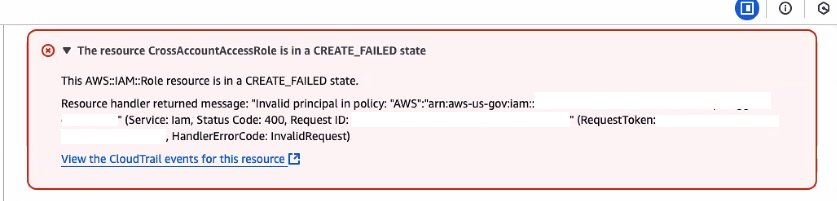
Before you begin, it’s important to understand how AWS Regions and partitions are designed. AWS partitions are hard boundaries designed to meet isolation requirements for compliance purposes and consist of one or more Regions, with each partition controlled by an independent instance of IAM. AWS provides multiple partitions; AWS Commercial Regions use an aws partition identifier within the Amazon Resource Name (ARN), AWS GovCloud Regions use an aws-us-gov partition identifier, and the AWS China Regions use an aws-cn partition identifier. AWS account IDs and Region designations are reserved to make sure that they exist only within that respective AWS partition. The IAM instance profile, within each AWS partition, prohibits the creation of trust policies that cross partitions. If you attempt to construct a cross-account trust policy across two partitions, they will receive a CREATE_FAILED error as shown in Figure 1. This isolation between partitions is part of the security that we provide our customers.

Figure 1: Failure message for cross partition trust policy

Figure 1: Failure message for cross partition trust policy

It’s critical that you understand your compliance requirements and build a unified dashboard and workflows in the appropriate partition. For example, data should only flow from the AWS Commercial partition to the AWS GovCloud partition—not the other way around. To adhere to the FedRAMP boundary policy FRR211, data about workloads within the AWS GovCloud partition should not be shared with AWS Commercial partition. Thus, it’s a best practice when you create a unified dashboard and automation to design the architecture and solution to operate within the AWS GovCloud partition. This approach enables a consolidated view of your security and cloud operations. From this centralized data plane, automated remediations, notifications, and escalations can be triggered by using Amazon EventBridge against data collected from Commercial and GovCloud Regional resources. These automated workflows can be used for operational triage within a ticketing system (such as Service Now or Atlassian JIRA), security detections within a cloud-native application protection platform (CNAPP) (such as AWS Security Hub or CrowdStrike), and application alerting from enterprise notification systems (such as Slack, Microsoft Teams, or email).

In addition to data partition isolation, it’s a FedRAMP security best practice to make sure that the credentials used to access GovCloud Regions are isolated to exist only within those Regions. It’s also a best practice to make sure that data access requests originate from the GovCloud partition, and to pull data from the less restrictive partition, such as the aws Commercial partition. This requirement is designed to help prevent exposure of GovCloud partition resources to the Commercial partition through open ports, APIs, endpoints, or credentials to a commercial partition. Because AWS Commercial partition resources can support connectivity from the internet, you can put appropriate security controls to limit access to endpoints, ports, APIs and load balancers using short-term or long-term credentials.

Cross-partition data transfer using IAM access keys (Not recommended)

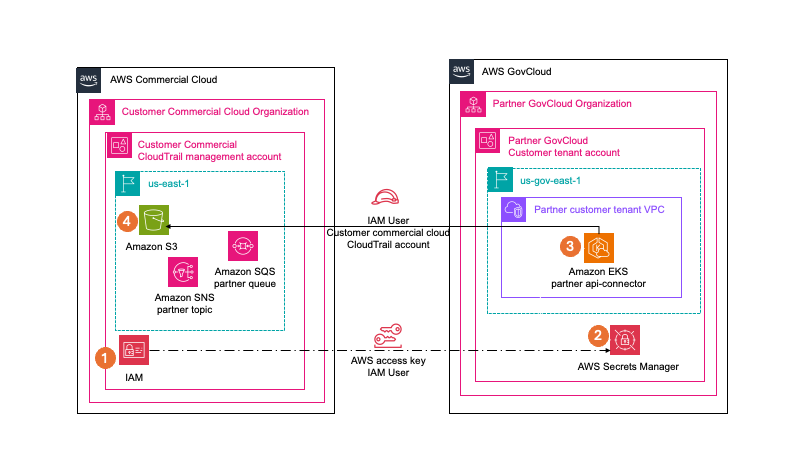
Though this is no longer a recommended best practice, data transfer requirements were met previously by using Data Sync, s3api, data transfer hub, and other SDK methods by creating an IAM user access key in the AWS Commercial partition. You would then store the aws partition IAM user access key in AWS Secrets Manager in the aws-us-gov partition. By using this method, one of these applications would operate within AWS GovCloud; the application would then use the aws partition IAM user access key to access and read data from the commercial partition Amazon Simple Storage Service (Amazon S3) bucket and then write it to the AWS GovCloud Partition S3 bucket. The application could then process the data within the application running in the AWS GovCloud partition. That legacy architecture is shown in Figure 2.

Figure 2: Cross-partition data movement using IAM access keys

Figure 2: Cross-partition data movement using IAM access keys

This solution requires an audit exception to allow the use of long-term user credentials. Using long-term user credentials for workloads or service accounts deviates from AWS security best practices and NIST 800-53 IA2, because they can be compromised and difficult to rotate and change. Temporary credentials align with AWS security best practices and are provided by AWS roles. Additionally, the use of x509 certificates has been a standard for establishing secure communications with applications operating processes on remote devices and comply with NIST 800.53r5 IA8.

Cross-partition data transfer using IAM Roles Anywhere (Recommended)

To meet the requirement to use short-term credentials and enable access across an AWS partition, you can use IAM Roles Anywhere, which avoids the need for long-term access key or secret access key credentials. Using IAM Roles Anywhere, you can use your existing certificate authority (CA) or AWS Private Certificate Authority to issue and manage X.509 certificates to specific workloads and applications. You can register your external CA with IAM Roles Anywhere as a trust anchor to establish a trust between your external CA and IAM Roles Anywhere. If you don’t manage your own private key infrastructure (PKI), a trust can be established with AWS Private CA to create a CA as the trust anchor. For detailed steps for setting up IAM Roles Anywhere, see Planning for your IAM Roles Anywhere deployment.

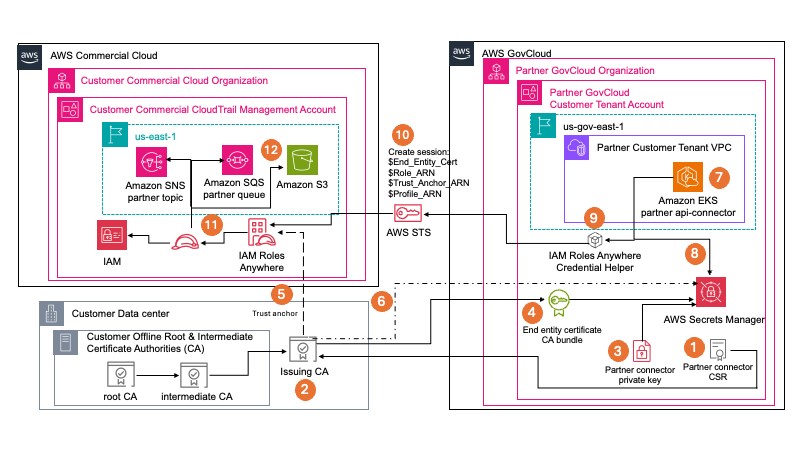
Figure 3: Architecture for cross-partition data movement using IAM Roles Anywhere with an external CA

Figure 3: Architecture for cross-partition data movement using IAM Roles Anywhere with an external CA

Figure 3 demonstrates how you can use IAM Roles Anywhere with an external CA to enable data transfer between partitions. By using this pattern, which is an AWS security best practice, you can pull data from your AWS Commercial partition into your AWS GovCloud partition. By using an external CA, you can use your existing PKI. For compliance purposes, internal CAs are often required to issue certificates for internal applications and services, device authentication, internal web services, employee authentication, and other tasks. Internal PKI consists of a root CA, intermediate CA and an issuing CA. The root CA is often disconnected from the internet to help prevent tampering or issuing of PKI to untrusted resources. The root CA will issue a certificate for an intermediate CA and the intermediate CA will create certificates for one or more issuing CAs. When the GovCloud application creates a certificate signing request (CSR), it will maintain the private key that goes with the CSR in Secrets Manager. The customer’s external issuing CA will then sign the CSR and provide an end-entity certificate for the GovCloud application in addition to the external CA bundle. This CA bundle contains the root CA, intermediate CA, and issuing CA certificates. All three of which will be stored in GovCloud application’s Secrets Manager so that the workload can then interact with AWS Commercial partition resources.

As shown in Figure 3 you can initiate a temporary session from GovCloud (right) to AWS Commercial (left). IAM Roles Anywhere is configured within the Commercial partition to use your existing PKI as the trust anchor. As you vend PKI certificates to workloads that run in GovCloud, they’re stored in Secrets Manager, and your Amazon Elastic Kubernetes Service (Amazon EKS) role allows access to the certificates. In the Commercial Region, you configured a role that allows access to Amazon Simple Notification Service (Amazon SNS), Amazon Simple Queue Service (Amazon SQS), and Amazon S3. You then configure the trust policy on that role to allow IAM Roles Anywhere access. Based on your GovCloud application scheduling, the Amazon EKS pipeline provides the credential helper process temporary security credentials for the Commercial Region. It does this by using the certificates, private key, Commercial Region IAM Roles Anywhere role ARN, profile ARN, and trust anchor ARN that are provided to the GovCloud application as it prepares to connect from the GovCloud Region to the Commercial Region.

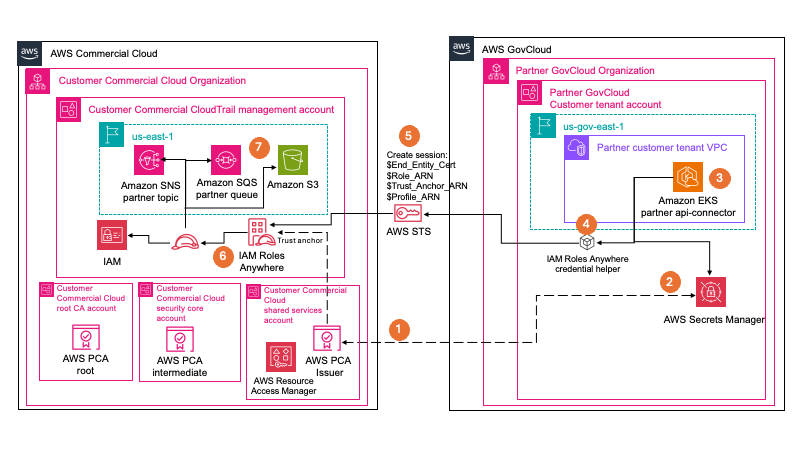
Figure 4: Cross-partition data movement using IAM Roles Anywhere with AWS Private CA

Figure 4: Cross-partition data movement using IAM Roles Anywhere with AWS Private CA

If you don’t have an existing PKI in place, or don’t want to build your own offline PKI, you can use AWS Private CA, as shown if Figure 4. Using AWS Private CA, you don’t have to maintain hardware or software. As a managed service, AWS handles the high availability, scalability, and durability, in addition to patching and maintenance. You also benefit from seamless integration with other AWS services such as AWS Elastic Load Balancing, Amazon CloudFront, and Amazon API Gateway. AWS Private CA also integrates with AWS CloudTrail, so that you can audit what actions have been taken.

Conclusion

In this post, we explained the compliance requirements that need to be considered when migrating data across AWS partitions. We also outlined architectural options AWS customers and partners can take when implementing a solution to address this need.

IAM Roles Anywhere is a great solution that AWS Customers and software as a service (SaaS) partners can use when they want to access AWS resources from across AWS partitions without needing to use long-lived credentials for IAM users.

To learn more about IAM Roles Anywhere, see the feature’s documentation, this IAM Roles Anywhere workshop, or this re:Inforce presentation featuring Hertz.

If you have feedback about this post, submit comments in the Comments section below. If you have questions about this post, start a new thread on AWS Security, Identity, and Compliance re:Post or contact AWS Support.

If you have feedback about this post, submit comments in the Comments section below.

Jenn Reed

Jenn Reed

Jenn is Principal Security Solutions Architect at AWS and former CISO, with over 30 years of security and software development experience and 12 years of experience building on AWS. She lives in Ann Arbor, Michigan, and enjoys running, playing ukulele, and reading science fiction novels.

Bill Wells

Bill Wells

Bill is a Senior Solutions Architect at AWS with over 20 years of experience beginning in the U.S. Air Force. Leveraging his diverse IT background across multiple organizations, Bill specializes in architecting secure, compliance-aligned cloud solutions that help Federal Partners achieve business outcomes using AWS services.

Securing Amazon Bedrock API keys: Best practices for implementation and management

Post Syndicated from Jennifer Paz original https://aws.amazon.com/blogs/security/securing-amazon-bedrock-api-keys-best-practices-for-implementation-and-management/

Recently, AWS released Amazon Bedrock API keys to make calls to the Amazon Bedrock API. In this post, we provide practical security guidance on effectively implementing, monitoring, and managing this new option for accessing Amazon Bedrock to help you build a comprehensive strategy for securing these keys. We also provide guidance on the larger family of service-specific credentials, so that you can also reinforce your AWS CodeCommit and Amazon Keyspaces (for Apache Cassandra) implementation if needed.

Note: For the remainder of this post, the terms service-specific credentials and API keys will be used interchangeably.

Choosing the best mechanism to access Amazon Bedrock

Our recommendation is to use temporary security credentials provided by AWS Security Token Service (AWS STS) service whenever possible as a preferred authentication method.

API keys can be used when your use case blocks the use of temporary AWS STS credentials. A common example is when using third-party or packaged software that specifically requires API key authentication through HTTP bearer tokens and cannot be configured to use SigV4 signing with temporary AWS STS credentials.

If you find that you don’t need to use API Keys, consider using service control policies (SCPs) to deny the creation and use of these keys.

If you conclude that your use case requires API keys, then consider the two types of API keys:

  • Short-term API keys: Consider using short-term API keys if AWS STS credentials cannot be used, because they provide a built-in expiration mechanism and will automatically expire after a specified duration, stopping credentials from being used indefinitely if they are exposed.
  • Long-term API keys: Long-term API Keys should only be used when neither AWS STS credentials nor short-lived credentials can be used, such as with packaged software and SDKs that expect a static long-lived API key and cannot be modified.

While implementing the controls in this post addresses most API key security concerns, remember that security is an ongoing process. Continue following AWS security best practices and regularly review your security posture as part of a comprehensive security strategy.

Understanding service-specific credentials

Service-specific credentials are specialized authentication credentials that provide direct access to specific AWS services. These credentials are different from other AWS security credentials (such as access keys, secret access keys, and session tokens) and are designed for use with specific AWS services.

The key characteristics of service-specific credentials include:

Let’s learn more about service-specific credentials and their use with Amazon Bedrock.

Amazon Bedrock API keys

Amazon Bedrock API keys are service-specific credentials that provide direct access to Amazon Bedrock. The bedrock:CallWithBearerToken permission grants the ability to use these tokens to perform Amazon Bedrock API actions.

Key types and characteristics

There are two types of API keys, and they have the following characteristics.

Short-term API keys:

  • Uses pre-signed SigV4 authentication
  • Short-term API keys are generated locally on the client side, therefore their creation of these short-term keys won’t be recorded in CloudTrail
  • Cannot be retrieved through credential reports or AWS CLI calls
  • Last as long as the IAM session that generated the API key or 12 hours, whichever is shortest
  • Have the same permissions as the role that you use to generate the key
  • Pattern: bedrock-api-key-YmVkcm9jay5hbWF6b25hd3MuY29tLz9BY3Rpb249Q2FsbFdpdGhCZWFyZXJUb2tlbiZYLUFtei1BbGdvcml0aG09QVdTNC1ITUFDLVNIQTI1NiZYLUFtei1DcmVkZW50aWFsP[A-Za-Z0-9\\]+={0,2}

Long-term API keys:

  • When an Amazon Bedrock long-term API key is created through the Amazon Bedrock console, AWS automatically generates a dedicated IAM user with the naming convention BedrockAPIKey-xxx and attaches the AmazonBedrockLimitedAccess managed policy
  • The IAM user created through the Amazon Bedrock console doesn’t have console access enabled, a console password, an access key, or multi-factor authentication (MFA) enabled
  • Alternatively, when an Amazon Bedrock long-term key is created through the IAM console, you can associate the Amazon Bedrock service-specific credential directly to an existing IAM user
  • Each IAM user can have up to two long-term API keys
  • Can be configured with expiration periods ranging from one day to indefinite duration.
  • Duration can be controlled with three new condition keys to govern API keys for Amazon Bedrock. Here is an example SCP.
  • Pattern: ABSKQmVkcm9ja0FQSUtleS[A-Za-z0-9+\/]+={0,2}
  • CloudTrail will log an event when long-term API keys are created, as shown in the following example. You can also identify long-term API keys using the AWS CLI.
{
    "eventTime": "2025-07-23T17:39:08Z",
    "eventSource": "iam.amazonaws.com",
    "eventName": "CreateServiceSpecificCredential",
    "awsRegion": "us-east-1",
    "sourceIPAddress": "203.0.113.1",
    "userAgent": "Mozilla/5.0 (Macintosh; Intel Mac OS X 10.15; rv:139.0) Gecko/20100101 Firefox/139.0",
    "requestParameters": {
        "userName": "BedrockAPIKey-0g21",
        "serviceName": "bedrock.amazonaws.com",
        "credentialAgeDays": 36500
    },
    "responseElements": {
        "serviceSpecificCredential": {
            "createDate": "Jul 23, 2025, 5:39:08 PM",
            "expirationDate": "Oct 7, 2125, 5:39:08 PM",
            "serviceName": "bedrock.amazonaws.com",
            "serviceCredentialAlias": "BedrockAPIKey-1234-56-EXAMPLE
",
            "serviceCredentialId": "ACCA123456789EXAMPLE",
            "userName": "BedrockAPIKey-0g21",
            "status": "Active"
        }
    }
}

Identify

There are several key aspects to understand when working with API keys. Short-term API keys are generated on the client-side and aren’t visible through standard AWS API listings.

Long-term API keys offer some additional visibility and can be managed through multiple methods. You can identify which principal has an associated long-term API key by using the Amazon Bedrock console or IAM console. You can list service-specific credentials using AWS CLI commands or the AWS SDK, which will list the service-specific credentials for a specified user.

Protect

Bedrock has introduced three condition keys that enhance your ability to control and secure API key usage within your AWS environment:

  • You can use the iam:ServiceSpecificCredentialServiceName condition key to allow the AWS services that a principal can create service-specific credentials for.
  • Use the iam:ServiceSpecificCredentialAgeDays condition to enforce security best practices by setting a maximum duration limit for long-term API keys at creation time.
  • Finally, by using the bedrock:BearerTokenType condition key, you can deny or allow the use of a specific type of API key for Amazon Bedrock, whether it’s a short-term or long-term API key.

These condition keys play an important role in managing the distinct security characteristics of short-term and long-term API keys, enabling security teams to enforce organizational policies and security best practices through SCPs at the AWS Organizations level. To learn more, see the GitHub repo for examples of how to apply these SCPs.

Short-term API keys include a native expiration window that helps limit potential security exposure. When implementing these keys, be aware that they inherit the permissions of the signing principal, which can be more than Amazon Bedrock permissions. You can implement comprehensive monitoring as described in the Detect section.

Long-term API keys, which can be configured with extended expiration periods, offer convenience for long-running applications but should have special attention regarding controls and monitoring mechanisms to offset the increased exposure window these credentials present.

If your organization has decided that Amazon Bedrock API keys aren’t required for your environment, you can implement SCPs to block the creation of service-specific credentials (iam:CreateServiceSpecificCredential) and block bearer token use for Amazon Bedrock (bedrock:CallWithBearerToken).

Note: If you do not use the condition iam:ServiceSpecificCredentialServiceName in an IAM policy, iam:CreateServiceSpecificCredential will then also deny the creation of API keys for other services, such as AWS CodeCommit and Amazon Keyspaces (for Apache Cassandra).

Here’s an example SCP that denies the creation of Amazon Bedrock service-specific credentials and the use of API keys in Amazon Bedrock. This prohibits builders in your organization from creating new API keys, reducing the risk of unauthorized key creation. This approach is valuable for organizations that want to maintain strict control over their authentication methods or have no business need for service-specific credentials. A condition can also be added to the SCP to allowlist specific roles to be able to create service-specific credentials by adding a condition ArnNotLikeIfExists for the principals listed under aws:PrincipalArn.

As part of protecting API keys, regularly review and adjust permissions to align with the principle of least privilege. For long-term API keys created through the Amazon Bedrock console, AWS automatically creates an IAM user with the AmazonBedrockLimitedAccess managed policy. This policy grants access to various Amazon Bedrock, AWS Key Management Service (AWS KMS), IAM, Amazon Elastic Compute Cloud (Amazon EC2), and AWS Marketplace actions. For both long-term and short-term API keys, evaluate if your principals have more permissions than required for their use case. If excessive permissions are identified, replace the AmazonBedrockLimitedAccess policy with a custom policy that has scoped down permissions.

Detect

API keys require different monitoring approaches based on their type. While the creation of short-term API keys cannot be detected because they are generated client-side, the creation of long-term API keys can be monitored through CloudTrail events. However, the use of both short-term and long-term API keys can be detected through CloudTrail events. Because of their extended validity period, long-term API keys are more susceptible to unauthorized use, making comprehensive monitoring essential. Organizations should implement stringent monitoring controls including:

  • Monitor CreateUser events with BedrockAPIKey- prefix usernames. If a user was created through the Amazon Bedrock console, the event will look like the following:
  • {
        "eventTime": "2025-07-23T17:39:08Z",
        "eventSource": "iam.amazonaws.com",
        "eventName": "CreateUser",
        "awsRegion": "us-east-1",
        "sourceIPAddress": "203.0.113.1",
        "userAgent": "Mozilla/5.0 (Macintosh; Intel Mac OS X 10.15; rv:139.0) Gecko/20100101 Firefox/139.0",
        "requestParameters": {
            "userName": "BedrockAPIKey-0g21"
        },
        "responseElements": {
            "user": {
                "path": "/",
                "userName": "BedrockAPIKey-0g21",
                "userId": " AIDACKCEVSQ6C2EXAMPLE",
                "arn": "arn:aws:iam: 111122223333:user/BedrockAPIKey-0g21",
                "createDate": "Jul 23, 2025, 5:39:08 PM"
            }
        }
    }
    

    • Track CreateServiceSpecificCredential events for requestparameters.serviceName = bedrock.amazonaws.com
    • Watch for active API key usage indicators:
      • additionalEventData.callWithBearerToken = true
      • eventSource = bedrock.amazonaws.com
    {
        "eventVersion": "1.11",
        "userIdentity": {
            "type": "IAMUser",
            "principalId": " AIDACKCEVSQ6C2EXAMPLE",
            "arn": "arn:aws:iam::user/BedrockAPIKey-0g21",
            "accountId": "",
            "userName": "BedrockAPIKey-0g21"
        },
        "eventTime": "2025-07-23T17:39:37Z",
        "eventSource": "bedrock.amazonaws.com",
        "eventName": "Converse",
        "awsRegion": "us-east-1",
        "sourceIPAddress": "",
        "userAgent": "curl/8.11.1",
        "requestParameters": {
            "modelId": "us.anthropic.claude-3-5-haiku-20241022-v1:0"
        },
        "responseElements": null,
        "additionalEventData": {
            "callWithBearerToken": true,
            "inferenceRegion": "us-west-2"
        }
    }
    

    For a list of events to monitor, see Security Playbook for Responding to Amazon Bedrock Security Events.

    Amazon EventBridge rules

    You can enhance your security monitoring by implementing Amazon EventBridge rules to detect and alert on Amazon Bedrock API key lifecycle events, such as CreateServiceSpecificCredential.

    Using EventBridge rules for monitoring has four components.

    • EventBridge rules: CreateServiceSpecificCredentialRule and BearerTokenUsageRule monitor CloudTrail for credential creation and bearer token usage
    • SNS topic: BedrockAlertsTopic delivers encrypted security alerts through email
    • KMS key: SNSEncryptionKey encrypts SNS messages
    • IAM roles: Provide necessary access for service operations

    The preceding EventBridge rules monitor for specific patterns within a CloudTrail log, keying from eventName (the action being performed), eventSource (the service that the action is being performed by or to), and additionalEventData (the block of details of the response).

    The following rule checks for the CloudTrail event CreateServiceSpecificCredential.

            source:
              - aws.iam
            detail-type:
              - AWS API Call via CloudTrail
            detail:
              eventSource:
                - iam.amazonaws.com
              eventName:
                - CreateServiceSpecificCredential
    

    Use the following rule to look for actions performed with an API key (BearerToken = true):

            detail-type:
              - AWS API Call via CloudTrail
            detail:
              additionalEventData:
                callWithBearerToken:
                  - true

    EventBridge rule deployment

    Use the CloudFormation template to set up automated monitoring for both the creation of service-specific credentials and their subsequent use. The template configures EventBridge to send email notifications when the preceding CloudTrail events are detected, providing real-time awareness of API key operations in your environment. To learn more, see the GitHub repo for the details of this solution and the CloudFormation template.

    AWS Config rule for compliance

    Use an AWS Config rule to monitor IAM users for active service-specific credentials to help maintain compliance with security policies.

    The following are the steps taken by the AWS Config rule:

    1. Every 24 hours, the AWS Config rule triggers a Lambda function that enumerates IAM users in the account
    2. For each user, the function checks for active service-specific credentials
      1. Users with service-specific credentials are marked as NON_COMPLIANT
      2. Users without active credentials are marked as COMPLIANT
    3. Results are submitted to AWS Config for reporting and potential remediation

    Config rule deployment

    You can deploy this AWS Config rule by using AWS Config RDK, in CloudShell, or using your local CLI.

    1. git clone https://github.com/awslabs/aws-config-rules.git
    2. cd aws-config-rules/python-rdklib
    3. git fetch && git checkout IAM_USER_NO_SERVICE_SPECIFIC_CREDENTIALS
    4. pip install rdk rdklib
    5. rdk deploy IAM_USER_NO_SERVICE_SPECIFIC_CREDENTIALS
    6. aws configservice start-config-rules-evaluation --config-rule-names “IAM_USER_NO_SERVICE_SPECIFIC_CREDENTIALS”

    Respond and recover

    Every incident response plan starts with the preparation phase. As part of the preparation phase, you should maintain clear records of API key ownership and usage, document which applications and teams use specific keys, and if long-term API keys are necessary, consider using secure storage such as AWS Secrets Manager.

    When a security incident involving API keys is suspected, immediate action is crucial. The first step is to verify the potential compromise by reviewing CloudTrail logs to correlate API key creation use with approved change requests. This helps identify unauthorized key creation or use. Additionally, analyzing the source IP addresses and user agent strings from these logs can help determine if the access originated from approved locations and applications or potentially malicious sources.

    The incident response approach varies significantly between key types. For short-term keys, while their maximum 12-hour expiration window limits potential damage, it’s still important to take immediate action rather than waiting for expiration. Security teams should identify applications or systems using the compromised short-term key and revoke the IAM role session or deny permissions to bedrock:CallWithBearerToken from the identity.

    If an Amazon Bedrock long-term API key is involved in an active security event, security teams can take immediate action through either the console or AWS CLI. Through the console, teams can use the IAM console to quickly deactivate or delete long-term API keys. For organizations with automated response procedures, the AWS CLI provides commands for key management:

    Respond using the AWS CLI

    Use the following steps to respond to an API key event.

    1. Identify service-specific credentials:

    aws iam list-service-specific-credentials --user-name <user name> --service-name bedrock.amazonaws.com

    1. For immediate containment, you can deactivate the credential using the credential ID from the previous step:

    aws iam update-service-specific-credential --service-specific-credential-id <credential ID> --user-name <user name> --status Inactive

    1. After you’ve assessed the event, you can permanently remove the associated API keys:

    aws iam delete-service-specific-credential --service-specific-credential-id <credential ID> --user-name <user name>

    During the recovery phase, focus on creating new secure keys with appropriate configurations, updating application configurations, and make sure that all affected continuous integration and delivery (CI/CD) pipelines and development teams are notified of the changes.

    Review of Amazon Bedrock API keys

    The following table summarizes the various elements related to Amazon Bedrock API keys mapped to the NIST CSF 2.0 core function.

    Type

    Identify

    Protect

    Detect (using events in CloudTrail)

    Respond

    Short-term API key Whitetexttexttexttext

    Short-term API keys are generated client-side and are not listed by an AWS API.

    Creation: Cannot block creation because short-term API keys are generated client-side.

    Use: Deny action bedrock:CallWithBearerToken to avoid use

    Modify permissions for long-term and short-term Amazon Bedrock API keys

    Creation: Occurs client-side and no events are present in CloudTrail

    Use: CloudTrail events with additionalEventData.callWithBearerToken = true

    EventBridge rules and SNS to detect/notify on the usage of API keys.

    Revoke IAM role session or deny permissions from identityWhitetexttexttext

    Long-term API key Whitetexttexttexttext

    IAM ListServiceSpecificCredentials action using the AWS CLI or SDKs

    Creation: Deny action iam:CreateServiceSpecificCredential to block creation of service specific credentials across the services, including Amazon Bedrock.

    Use: Deny action bedrock:CallWithBearerToken to avoid use

    Modify permissions for long-term and short-term Bedrock API keys

    Creation: CloudTrail events with eventName iam:CreateServiceSpecificCredential, and iam:CreateUser when using the console.

    Use: CloudTrail events with additionalEventData.callWithBearerToken = true

    EventBridge rules and SNS to detect and notify on creation and usage of API keys.

    Config rule

    Use the console or AWS CLI to quickly deactivate or delete long-term API keys Whitetexttexttext

    Broader service-specific credentials: Beyond Amazon Bedrock

    Along with Amazon Bedrock support of API keys, other AWS services support service specific credentials, such as AWS CodeCommit and Amazon Keyspaces.

    The security measures suggested in this post can also be applied to these services. The following table lists common use cases for these service specific credentials.

    Service

    Use case

    Service name in response from iam:ListServiceSpecificCredentials

    Suggested alternatives

    AWS CodeCommit Git credentials

    Used to upload, add, or edit a file in an AWS CodeCommit repository

    codecommit.amazonaws.com

    Methods include SSH authentication and federated authentication: AWS CodeCommit: Setting up using other methods

    Amazon Keyspaces credentials for Apache Cassandra

    Used for Apache Cassandra-compatible access

    cassandra.amazonaws.com

    SigV4 authentication plugin is available and supports multiple programming languages and enables IAM roles and federated identities to authenticate. Create temporary credentials to connect to Amazon Keyspaces using an IAM role and the SigV4 plugin

    Conclusion

    Understanding the implications of long-term API keys and how to manage them helps you to make informed decisions about your Amazon Bedrock API key implementation strategy. The key is to align security controls with risk appetite and operational requirements while maintaining a strong security posture.

    AWS strongly recommends using AWS STS credentials as the primary authentication method wherever possible. If AWS STS credentials cannot be used, consider short-term API keys with their built-in expiration mechanism. Long-term API keys should only be implemented when neither AWS STS credentials nor short-term credentials are viable options. When implementing API keys, organizations should focus on identifying API keys through AWS CLI and CloudTrail logs, protecting by implementing preventive controls such as SCPs to manage API key creation and usage, detecting API key activities through comprehensive monitoring using CloudTrail events, EventBridge and AWS Config rules, and responding by maintaining clear incident response procedures to quickly address potentially compromised API keys.

    Best practice is to implement these controls while maintaining proper access controls through the principle of least privilege. This layered approach helps you maintain a strong security posture while effectively using API keys for your development needs.

Jennifer Paz

Jennifer Paz
Jennifer is a Security Engineer with over a decade of experience, currently serving on the AWS Customer Incident Response Team (CIRT). Jennifer enjoys helping customers tackle security challenges and implementing complex solutions to enhance their security posture. When not at work, Jennifer is an avid runner, pickleball enthusiast, traveler, and foodie, always on the hunt for new culinary adventures.

Kyle Dickinson

Kyle Dickinson
I was once a Gibson explorer turned cloud security expert; as a Sr. Security Solution Architect at AWS, I now protect the systems I once explored. When not safeguarding AWS customers, I’m building LEGO creations or attempting to improve my longboarding skills without major injury. My home life revolves around a tiny dog with massive confidence and my spirited 4-year-old daughter, who keeps me laughing.