All posts by Maddie Presland

A Developer’s Guide to Migrating Multimodal AI Training Data (and Putting It to Work) with Pixeltable

Post Syndicated from Maddie Presland original https://www.backblaze.com/blog/a-developers-guide-to-migrating-multimodal-ai-training-data-and-putting-it-to-work-with-pixeltable/

A decorative image showing gears and a cloud.

Today’s AI models consume much more than text—everything from product images to video from surveillance feeds to audio from customer calls to metadata spread across an ever-expanding set of systems. These multimodal datasets drive everything from computer vision pipelines to customer service automation. But as they scale, the underlying infrastructure starts to creak.

Costs can become unpredictable. Data fragments across S3 buckets, HDFS clusters, and local drives. Maintaining cross-modal alignment, i.e. ensuring that media files stay linked to their labels, embeddings, and annotations, becomes a bottleneck that slows development to a crawl.This article outlines a practical path forward: how to migrate multimodal training data using proven open-source tools, and how Pixeltable helps unify and index that data for training once it lands in Backblaze B2.

Moving multimodal training data: Practical open source software (OSS) tools that do the heavy lifting

Before you can train on consolidated data, you need to get it all into one place. These three open-source tools handle the migration work, each addressing a different piece of the puzzle.

Apache NiFi for moving large media reliably

When your dataset includes terabytes of video files, thousands of high-resolution images, or large binary assets like LIDAR scans, you need something more robust than a shell script. Apache NiFi is purpose-built for moving large media files at scale.

NiFi provides:

  • Flow control and retry logic that handle network interruptions gracefully, which is essential when transferring terabytes of data over hours or days.
  • Data provenance tracking that records exactly which files moved where and when, making it possible to debug issues without guessing.
  • A visual workflow designer that lets you build and monitor data flows without writing custom code.

For multimodal datasets where media volume dominates, NiFi ensures files arrive intact and trackable. Check the Apache NiFi User Guide to get started with building your first data flow.

Airbyte for syncing structured and semi-structured metadata

Media files are only half the story. Annotations, labels, captions, transcripts, and database records provide the context that makes raw media useful for training. Airbyte excels at moving this structured and semi-structured metadata.

Airbyte handles:

  • Schema consistency when pulling metadata from multiple sources, ensuring annotation formats don’t drift between your labeling platform, your CRM, and your feature store.
  • Incremental syncs that only transfer changed records, avoiding unnecessary data movement as your datasets grow.
  • Multiple data systems via a broad catalog of connectors for databases, SaaS platforms, file formats, and cloud storage services.

Unlike NiFi, which focuses on raw file movement, Airbyte understands data schemas and transformations. Use it to keep your metadata in sync across systems. The Airbyte documentation provides setup guides for most common data sources.

lakeFS for versioning for reproducible training

After moving media via NiFi and metadata via Airbyte, you need a way to snapshot the entire dataset so you can reproduce training runs six months later. lakeFS brings Git-like version control to object storage.

lakeFS enables:

  • Branching and snapshots of entire datasets without copying data. You can create a branch, run an experiment, and merge or discard the results.
  • Atomic commits that ensure media, metadata, and derived features stay aligned as your corpus evolves.
  • Zero-copy clones that let multiple teams work on isolated versions of production data without storage overhead.

lakeFS acts as a version control layer on top of storage like Backblaze B2, tracking changes without duplicating objects. When a training run produces a new model, you can tag the exact dataset version that went into it. The lakeFS quickstart guide walks through creating your first repository and branch.

After migration, the hard part begins: Making the dataset usable

Moving data into object storage solves logistics, not usability. Even in B2, your media files, labels, and derived features remain scattered—images in one prefix, annotations in another, embeddings in a third. Training code becomes a tangle of custom loaders that stitch everything together, break when datasets change, and consume more engineering time than model tuning.

Where Pixeltable fits

Pixeltable provides the missing layer between migrated storage and training-ready data. It’s a declarative data infrastructure specifically designed for multimodal AI applications.

Here’s what Pixeltable does:

  • Unifies media and metadata into a single table interface: images, video frames, audio clips, and their associated labels, embeddings, and annotations live in one queryable structure.
  • Stores computed results automatically. Run OCR on documents, generate CLIP embeddings for images, or extract audio transcripts once, and Pixeltable caches the results for reuse.
  • References Backblaze B2 objects directly without copying data. Files stay in Backblaze B2, and Pixeltable maintains pointers and metadata in a local Postgres instance. Pixeltable automatically caches the files locally on access, and can write media files back to B2 (see our project for examples: https://github.com/backblaze-b2-samples/b2-pixeltable-multimodal-data).
  • Supports built-in transforms like embedding generation, image captioning, and OCR with lazy evaluation. Define transformations once, and they run incrementally as new data arrives.

Instead of maintaining custom loaders and indexing scripts, you define a schema once. Pixeltable handles orchestration, caching, and queries. The result is a training dataset you can slice, filter, and feed directly into PyTorch DataLoaders or Hugging Face Datasets.

Check the Pixeltable documentation to see how tables, computed columns, and queries work in practice.

A practical end-to-end workflow

Here’s how these tools fit together in a real-world pipeline:

1. Move media via NiFi → Backblaze B2

Set up an Apache NiFi flow to transfer images, video files, or other large binaries from your current storage (on-premise NAS, another cloud provider, or local drives) to a Backblaze B2 bucket. Configure retry logic and provenance tracking so you can verify every file arrived.

Use NiFi processors like GetFile, PutS3Object, and RouteOnAttribute to handle file movement and error routing. The Backblaze B2 Cloud Storage S3-compatible API works seamlessly with NiFi’s S3 processors.

2. Sync metadata via Airbyte

Configure Airbyte to pull annotations, labels, captions, and database records from your labeling tool, feature store, or other sources. Set up connections to sync metadata incrementally as it changes. If annotations live in Postgres and captions come from a cloud-based labeling platform, Airbyte normalizes both into a consistent schema in Backblaze B2 or a dedicated metadata store.

3. Create a lakeFS branch to snapshot the dataset

Initialize a lakeFS repository pointing to your Backblaze B2 bucket. Create a branch to isolate this version of the dataset. If something goes wrong during training, you can roll back or compare versions. Use the lakeFS CLI or Python client to create branches and commits programmatically.

4. Define a Pixeltable schema referencing B2 objects + synced metadata

In Pixeltable, create a table with columns for image paths (pointing to Backblaze B2), labels, captions, and any other metadata fields. Import your data so each row represents one training example: one image, its label, its caption, and any associated metadata.Pixeltable doesn’t copy image files—it stores references and metadata, automatically caching the files locally on access. The images stay in Backblaze. The Pixeltable Tables guide explains how to create tables with multimodal column types and import data from external sources.

5. Run transforms (embeddings, captions, OCR) inside Pixeltable

Define computed columns for embeddings, captions, or OCR results. Pixeltable’s computed columns run transformations lazily as data is queried or when you explicitly trigger computation.

For example, you can add CLIP embeddings using Pixeltable’s built-in Hugging Face integration, or generate AI captions using OpenAI’s vision API. Once defined, these columns compute incrementally—new images trigger automatic processing without reprocessing the entire dataset.

The Pixeltable API reference documents all available functions for common operations like embedding generation, image processing, and text analysis.

6. Query or filter the unified dataset

Use Pixeltable’s query interface to filter, sort, and slice your data. For example, find all images labeled “cat” with embeddings similar to a reference image. Or extract rows where captions mention “outdoor” and timestamps fall within a specific range.

7. Feed batches directly into PyTorch/Hugging Face

Export data from Pixeltable into PyTorch DataLoaders or Hugging Face Datasets format for training. Pixeltable handles batching, shuffling, and data access so your training loop stays clean.

The Pixeltable documentation covers various export formats and integrations with popular ML frameworks, allowing you to avoid intermediate export steps and maintain a streamlined workflow from data preparation to model training.

From fragmented storage to production-ready training data

Multimodal AI datasets don’t have to be a maintenance nightmare. By chaining together proven open-source tools—NiFi and Airbyte for migration, lakeFS for versioning, and Pixeltable for unified access—you can turn scattered files and metadata into queryable training assets.

Once data lands in Backblaze B2, this stack eliminates the custom glue code, brittle loaders, and alignment issues that typically slow down training workflows. Your team gets reproducible datasets, clean interfaces, and more time for model development instead of infrastructure firefighting.

Ready to get started? Check out the Backblaze B2 documentation to set up your object storage, and explore Pixeltable’s examples to see multimodal workflows in action.

The post A Developer’s Guide to Migrating Multimodal AI Training Data (and Putting It to Work) with Pixeltable appeared first on Backblaze Blog | Cloud Storage & Cloud Backup

Why “Build” Is a Bigger Distraction Than You Think for Neoclouds

Post Syndicated from Maddie Presland original https://www.backblaze.com/blog/why-build-is-a-bigger-distraction-than-you-think-for-neoclouds/

A decorative image showing different columns with a dollar sign indicator.

The rise of the neocloud and open cloud ecosystem are dethroning the major cloud providers. Companies like Vultr, Akamai, and CoreWeave are proving that developers don’t need a walled garden to build world-class applications. Instead, teams can build their own best-of-breed stacks and choose specialized providers that do just one thing exceptionally well, such as high-performance compute, AI inference, or databases.

But this new stack creates a critical decision point: What about storage?

For the neocloud model to work, data needs to be open and flexible. Consider the economics of the split-stack. If a neocloud lacks a robust storage layer, the customer often defaults to keeping their data with a major cloud company like AWS. This creates a financial trap where every time the neocloud application needs to process that data, it must retrieve it from the big three cloud providers’ walled gardens. The resulting egress fees can negate the cost savings of moving to a neocloud provider in the first place.

For a technical-first neocloud CTO, the default answer is almost reflexive. “We’ll build it. It’s just storage. How hard can it be?”

It’s a fair question, and it usually kicks off an internal engineering debate that sounds something like this:

  • Should we use Ceph on commodity hardware, or design our own purpose-built architecture?
  • Do we currently have the data center capacity to stand up multi-petabyte-scale storage clusters?
  • Can we repurpose our existing older generation hardware, or do we need to order all-new equipment?
  • Is commodity object storage really the best use of our precious rack space, or would offering this service require an expensive data center expansion?

These are the right questions. But the answers often lead to a trap.

The build trap: When storage becomes the wrong problem

Whether you choose the software route (Ceph) or the hardware route (purpose-built), you aren’t just adding a new service feature. Both paths risk distracting your best engineers from your core business by forcing them to master a new (and expensive) specialty: storage infrastructure.

This guide reveals the true costs of both “build” paths, and why the smartest move for a neocloud might be to not build at all.

Path 1: The Ceph approach

On paper, Ceph is the obvious choice. It’s open-source and scalable. It unifies object, block, and file storage. And it runs on commodity hardware.

But people and complexity make Ceph more expensive than you’d think. 

First of all, Ceph is not “set it and forget it.” It is notoriously complex to deploy, manage, and tune at petabyte scale. That means you can’t just assign Ceph to a junior sysadmin. You’ll have to hire and retain a dedicated team of expensive, hard-to-find Ceph specialists. 

This creates a massive resource drain. Instead of allocating your engineering headcount to build your next great compute plan or AI feature, you’re burning the budget on operational overhead. And that overhead is significant because getting real-world performance out of Ceph depends on a deep, constant tuning of CRUSH maps, OSDs, and the perfect (and constantly evolving) co-design of the underlying hardware.

Ultimately, Ceph isn’t just a software choice; it’s a strategic commitment to building a storage operations division that works in tandem with all your other ops and engineering teams.

Path 2: The “purpose-built” approach

This approach gives you a lot of control. You can design hardware specifically for your cost model, data center layout, and performance needs.

But it comes with a catch: it means becoming a hardware R&D company.

Trust us, we know. It’s the path we took over 15 years ago. It worked for us, but looking back, it only made sense for two reasons:

  1. The era. The operational realities of cloud storage were different back in 2007 when we launched the company. We simply didn’t have the options—and therefore, the competition around pricing and features—that we have now.
  1. The pivot. We very quickly shifted our focus from being a single-product, consumer-focused company to a cloud storage provider whose first customer was Backblaze Computer Backup. We chose to double down on the infrastructure investment we’d made to support that scale.

The reality of the R&D treadmill

Our original Storage Pod, which we open sourced in the Petabytes on a Budget blog, required deep R&D to design a custom chassis, source specific components, and solve physics problems such as mass drive vibration and power draw.

However, solving those physics problems once was just the beginning. To stay competitive, we had to keep innovating. In fact, we’ve gone through seven major versions of our Storage Pods (1.0, 2.0, 3.0, 4.0, 4.5, 5.0, 6.0). After all that R&D, we eventually found that the build/buy incentives had flipped and commodification had finally caught up. 

But to even make the decision to stop building custom chassis, we had to perform the same kind of testing we did for every previous version. Each iteration required new engineering to solve for higher drive densities, extended chassis lengths, changing cooling needs, and updated networking.

The operational reality

You’re not just “one and done” on drives or servers. Data centers are in constant flux. You are continually replacing old drives with new ones in existing chassis. Each time a new drive model enters the fleet, it must go through extensive testing to ensure it improves (or at least maintains) operations within the data center environment.

And drives are just one part of the equation. You also have to get files into and out of the data center efficiently. This requires constant, forward-thinking improvements in areas such as:

In other words, choosing the purpose-built path is a strategic commitment to becoming a full-time hardware and software engineering, supply chain, cybersecurity, and logistics company. If that sounds exhausting, that’s because it is.

Choose your distraction

The ultimate choice you need to make isn’t Ceph vs. purpose-built. The choice is, which resource-draining specialty do you want your product, engineering, and ops teams to be distracted by?

Do you want your best (and most expensive) engineers spending their days troubleshooting esoteric Ceph tuning parameters? Or would you rather have them re-designing a server chassis to introduce new CPU and GPU hardware and figuring out how to add essential security features with minimal overhead?

The answer is neither.

You want them focused on your specialty—building a better compute service, a faster AI model, or a more resilient database. Every hour they spend fighting with storage infrastructure is an hour they aren’t spending on the product your customers actually pay for.

The ideal solution: Storage as a specialty partner

This is why we exist. 

Backblaze was built on the fundamental belief that storage is a specialty. We’ve spent 15+ years solving these hardware and operational problems so that you don’t have to.

A symbiotic relationship

The neocloud ecosystem thrives on interoperability. It functions best not when every provider tries to build the full stack, but when they connect with independent, open, and easy-to-use layers.

When neoclouds partner with Backblaze, the dynamic shifts from building to enabling. You gain a petabyte-scale storage layer that is:

  • Instantly available. No lead times, no hardware sourcing, no build-out.
  • S3 compatible. It fits seamlessly into your existing tools and your customers’ workflows.
  • Zero overhead. None of the R&D distraction and operational weight we outlined above.

We provide the foundational storage that enables the entire open cloud ecosystem to compete on equal footing against the “Big Three” cloud providers.

Focus on what makes your neocloud great. Let Backblaze handle the storage. Learn more about Powered by Backblaze, or reach out to our storage experts to start a conversation. 

The post Why “Build” Is a Bigger Distraction Than You Think for Neoclouds appeared first on Backblaze Blog | Cloud Storage & Cloud Backup

Your Training Data Is Your Most Valuable IP

Post Syndicated from Maddie Presland original https://www.backblaze.com/blog/your-training-data-is-your-most-valuable-ip/

A decorative image showing different generic computer module icons.

AI training data is now a company’s most valuable intellectual property—often worth more than the models themselves. Models can be replicated and architectures become public knowledge, but the datasets that capture your domain expertise and years of careful curation are irreplaceable.

Yet as AI workflows become increasingly distributed, that data moves constantly between environments, increasing exposure while reducing visibility. According to IBM, “Forty percent of breaches involved data stored across multiple environments… highlighting the challenge of tracking and safeguarding data, including shadow data, and data in AI workloads.” Meanwhile MIT Sloan researchers have documented that AI training datasets are often inconsistently documented and poorly understood, creating exposure that extends beyond technical vulnerabilities into operational and compliance failures.

Yet many organizations still treat training datasets as just another storage bucket. But protecting data at rest is both a compliance requirement and a competitive necessity. The integrity of your datasets now determines the integrity of your models.

Free resource: Understand why object storage is a strategic driver

Download our free ebook to learn how object storage supports every stage of the AI pipeline—from data collection to model deployment.

Download the Ebook

Why training data is the new target

The attack surface for AI systems has fundamentally shifted. Rather than targeting models in production, sophisticated adversaries now focus on the training pipeline itself.

Data poisoning has emerged as an insidious threat

Attackers inject subtle changes like biased samples, mislabeled data, or adversarial examples that skew model outcomes or introduce hidden backdoors. Recent research reveals that 26% of organizations surveyed in the US and UK have been victims of AI data poisoning in the last year. These poisoned models can quietly undermine fraud detection, weaken cyber defenses, and corrupt business-critical decisions.

Intellectual property theft takes on new dimensions

When adversaries steal training datasets, they’re stealing the accumulated expertise that gives your models their edge. Your training data represents thousands of hours of curation and annotation that encodes institutional knowledge about your customers and market. A competitor with your datasets can replicate your capabilities in weeks rather than years.

Silent corruption poses an equally serious but less visible threat

Infrastructure failures, human errors, or gradual drift in data pipelines can corrupt training datasets without triggering alerts. For organizations in regulated industries such as healthcare, financial services, or autonomous systems, this creates a reproducibility crisis. How do you prove your model was trained on authentic, unaltered data when you can’t verify the data’s provenance?

The NIST AI Risk Management Framework emphasizes that maintaining the provenance of training data and supporting attribution of AI system decisions to subsets of training data can assist with both transparency and accountability. Regulators and customers increasingly expect verifiable proof of data integrity throughout the training lifecycle.

The takeaway? The trustworthiness of every model begins with the trustworthiness of its data.

The principles of a secure AI data foundation

A strong protection model rests on three pillars—immutability, encryption, and regional control—each reinforcing long-term integrity.

1. Immutability: Protect against tampering or deletion

Immutability means write-once, read-many (WORM) protection that prevents modification or removal. Once data is written, it becomes locked—no one can modify, overwrite, or delete it for a defined retention period, but it remains fully accessible for reading. This technical guarantee prevents data poisoning attacks, stops accidental deletion, and enables verifiable reproducibility.

CISA advisories recommend immutable backups to guard against ransomware, but the benefits extend much further for AI systems. When you lock a dataset snapshot before training begins, you guarantee the ability to reproduce that exact model state, which is critical for debugging, regulatory audits, and forensic investigations when models fail.

Object Lock capabilities enforce immutability at the storage layer for set retention periods. Each dataset version becomes permanently immutable, creating an unalterable record of your training history that no administrator or attacker can modify.

Implementation tip: Enable Object Lock at the bucket level and integrate it with your data-ingestion scripts to automatically lock datasets as they’re created.

2. Encryption: Safeguard confidential data

Training datasets contain extraordinary value—customer information, proprietary annotations, competitive intelligence embedded in data selection. Server-side encryption protects this data both in transit and at rest, defending against unauthorized access even if other security layers fail. The EU’s recent NIS2 technical guidance explicitly prescribes cryptography as a required control measure for compliance.

The key to practical encryption is simplicity. Solutions should integrate seamlessly into existing workflows without requiring separate key-management infrastructure or introducing performance overhead that disrupts training pipelines.

Implementation tip: Look for server-side encryption options (like SSE-B2 or SSE-C) that remain transparent to your applications while providing the protection regulators require.

3. Regional control: Ensure data sovereignty and availability

Where your data physically resides matters for compliance, latency, and operational resilience. GDPR and similar regulations often require that sensitive data remain within specific jurisdictions. Beyond compliance, regional placement affects training performance—positioning data near compute resources or using high-performance delivery mechanisms can reduce transfer delays when moving large datasets.

The critical factor is transparency. You need explicit control over region selection and assurance that data won’t be replicated to secondary regions without your knowledge. Ambiguous “regional” configurations that might span continents create compliance risk. 

Consider a U.S. biomedical AI startup working with patient-derived data. They need datasets stored exclusively in U.S. regions to satisfy HIPAA requirements, Object Lock enabled to prove data integrity for regulatory submissions, and encryption applied to protect sensitive patient information—all while maintaining the competitive advantage their proprietary data provides. Regional control with clear guarantees makes this achievable.

Implementation tip: Choose storage providers that let you explicitly select regions during bucket creation with clear guarantees about where data resides, including replication destinations.

Beyond security: Enabling trust and traceability

Immutable, encrypted, regionally contained object storage enables AI governance at a level traditional storage infrastructure cannot.

Each dataset snapshot becomes a verifiable record of model history. When a model behaves unexpectedly in production, you can trace back to the exact training data used to create it. This capability accelerates debugging and provides the evidence needed to explain model decisions to regulators, customers, or internal stakeholders.

Storage infrastructure with built-in immutability and access logging provides the verifiable evidence that auditors require. Instead of reconstructing data lineage from logs and documentation, you can demonstrate exactly what happened with cryptographic proof.

These capabilities transform storage from a passive repository into an active component of your AI governance framework.

Implementation snapshot: Putting it all together

Establishing these protections with Backblaze B2 follows a straightforward path:

  1. Create buckets in regions that match your compliance and latency requirements.
  2. Enable Object Lock and configure retention policies aligned with your model development lifecycle.
  3. Apply server-side encryption (SSE-B2 or SSE-C) to all training data buckets.
  4. Activate versioning to maintain a complete history of dataset evolution.
  5. Configure logging to track access patterns and enable lineage verification.
  6. Integrate with compute using standard S3 compatible tools.

For organizations running intensive training workloads, Backblaze B2 Overdrive provides high-throughput object storage with up to 1Tbps throughput speeds and unlimited free egress. This allows enterprises to perform large quantities of concurrent data operations without performance degradation, keeping compute resources—including expensive GPUs—from sitting idle while waiting for data transfers. B2 Overdrive maintains the same security and compliance capabilities as standard Backblaze B2 while enabling faster iteration on model development.

The bottom line: Trust begins with proven data

The datasets you’ve built represent years of institutional knowledge—far more difficult to replace than the models trained on them. Protecting that intellectual property requires more than access controls and perimeter security. You need to prove the integrity of your data to regulators who demand accountability, to customers who expect trustworthy AI, and to your own teams who need confidence in model reproducibility.

Immutability and encryption make that proof simple and reliable. With Backblaze B2, you gain a clear, verifiable foundation for protecting your training data with the same rigor you apply to your most critical assets. Learn more about where Backblaze B2 sits in the AI data pipeline, or talk to our cloud storage experts.

The post Your Training Data Is Your Most Valuable IP appeared first on Backblaze Blog | Cloud Storage & Cloud Backup

Scaling Generative AI Video Depends on Your Data Egress Strategy

Post Syndicated from Maddie Presland original https://www.backblaze.com/blog/scaling-generative-ai-video-depends-on-your-data-egress-strategy/

A decorative image showing several clouds.

The AI and cloud infrastructure industry talks endlessly about GPUs, model size, and compute capacity, but there’s an invisible Achilles heel that can quietly undermine even the most promising AI projects: data egress.

According to a new Dimensional Research survey, 95% of organizations experience unexpected cloud storage fees, often from retrieval, egress, or API transactions. These hidden costs are rarely visible in early budgets, but they can torpedo innovation as workloads scale, especially when video enters the mix. Raw footage, frame-level training data, model checkpoints, and final renders can add up to hundreds of terabytes every week, straining both budgets and infrastructure. 

Read the full report

We surveyed over 400 IT decision makers and one thing stood out. Surprise charges affect almost everyone. Learn what’s driving them—and how to avoid them.

Read the Full Report

Most generative AI video outputs today max out at 480p or 720p resolution. As demand grows for 1080p and 4K, storage and bandwidth requirements will multiply. Without a deliberate egress strategy, that growth becomes a silent tax on innovation. Over time, it restricts experimentation, reduces iteration speed, and undermines cost predictability.

The future of AI video belongs to teams that treat egress strategy as part of their innovation architecture and choose partners that let them move data freely between storage and compute, without penalty.

Inside the generative AI data pipeline

Modern AI systems no longer operate inside a single environment. Data is stored in one place, trained in another, and increasingly delivered at the edge. As workloads scale, the ability to move data efficiently becomes as important as compute capacity.

According to IDC, 88% of cloud buyers now deploy hybrid cloud environments, and 79% already use multiple providers. The Dimensional Research survey found that 99% of organizations struggle with limited flexibility and interoperability, highlighting how closed ecosystems are slowing progress just as multimodal AI demands more open, composable infrastructure.

To understand why egress matters so much for generative AI video, it helps to look at the AI data pipeline, which follows five continuous stages: 

  1. Data ingest and active archive: Collect and store raw images, video, audio, and metadata for future processing.
  2. Data processing: Clean, label, and transform data into usable training sets.
  3. Model experimentation and training: Run GPU-intensive model development and fine-tuning, save checkpoints and weights.
  4. Model deployment and inference: Apply trained models to new video, user queries, or edge devices to generate results.
  5. Monitoring: Track accuracy, latency, and system health to retrain and optimize continuously.
A chart that defines the five continuous stages of the data pipeline, including data ingest and archive, data processing, model experimentation and training, model deployment and inference, and monitoring.

Each stage has distinct storage and compute requirements, but data moves between them constantly. For AI video, those transfers can span regions and providers. When egress is slow or expensive, the entire pipeline backs up, delaying iteration and driving up cost.

When data can’t move, innovation can’t either

Keeping everything under one cloud provider once simplified management. At first glance, it still seems convenient to keep storage, compute, and archive all in one place. Within a single AWS region, egress is free. But as soon as data crosses regions or providers, the model breaks down.

Tiered pricing makes costs hard to forecast. Egress fees penalize movement. Resource contention slows performance, and interoperability gaps lock teams into static configurations. AI video workloads amplify the problem: training, inference, and storage often require different environments optimized for each stage. 

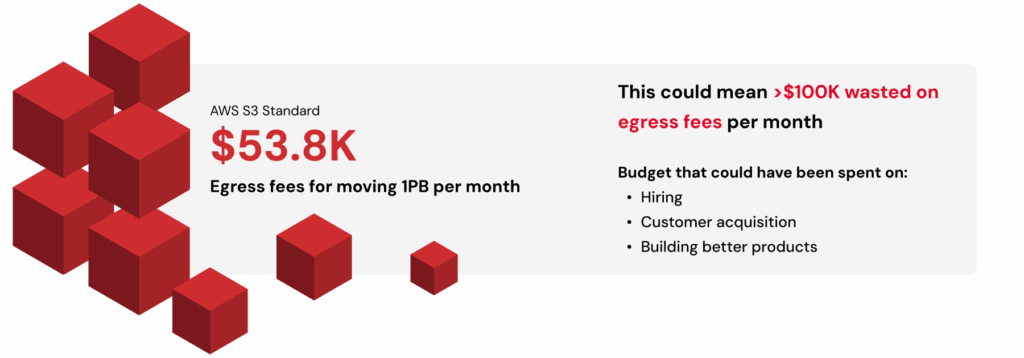
Dimensional Research’s data shows that 55% of organizations note egress costs as the single biggest barrier to switching cloud providers. Many stay with less efficient or more expensive infrastructure simply because the economics of mobility make innovation too costly. Moving just 1 PB of data out of AWS storage in the US East region costs about $53,800 per month—often enough to halt multi-cloud testing entirely.

The true cost, however, is in the experiments that are never run and the innovations that don’t get discovered because of a pricing structure that discourages exploration. 

Freedom of data movement is the new competitive edge

In generative AI, the pace of progress is set by how quickly teams can test, retrain, and redeploy new models. That agility requires data mobility.

As organizations adopt composable AI stacks that mix specialized compute, regional storage, and orchestration tools, success depends on how openly data flows between them. Teams that design for movement can scale faster, adapt to new technologies, and stay resilient as infrastructure changes.

For teams building generative AI video applications, the impact is especially pronounced. A studio fine-tuning a diffusion model might burst to GPU providers with available capacity, render high-resolution outputs, and archive them for reuse, all without rewriting code or paying to move the data each time.

Data mobility has become a measure of competitiveness. The faster teams can move information across environments, the faster they can innovate.

How to build an egress strategy that fuels innovation

A good egress strategy ensures that storage and compute stay aligned as workloads scale. It helps teams anticipate cost, performance, and interoperability issues before they turn into blockers.

Here are a few practical steps to get there:

  1. Map your data flows. Identify where data originates, how it moves between services, and which transfers happen most frequently.
  2. Quantify transfer and API transaction costs. Include both in your total cost of ownership models. Even small fees add up quickly at petabyte scale.
  3. Test portability. Run controlled migrations or bursts to secondary compute providers to expose hidden bottlenecks.
  4. Select for openness. Favor vendors with flat, transparent pricing, free or low-cost egress, and broad S3 compatibility.
  5. Plan for growth. Multimodal models and higher-resolution video outputs will multiply data transfer volumes. Design bandwidth and budget models accordingly.

Beyond controlling costs, the goal is to keep flexibility built into your architecture so your team can use the best tools for each stage of the AI pipeline, without being trapped by pricing friction or closed ecosystems.

The Backblaze difference: Open by design

Storage that supports innovation shouldn’t penalize movement. That’s why we created Backblaze B2 Overdrive to give teams with high-throughput, data-intensive workloads the flexibility they need to innovate. 

Overdrive is the right fit for AI video because of its:

  • Predictable economics: $15/TB/month with unlimited free egress (no penalties for moving data to the compute you need). 
  • Zero transaction fees: API calls don’t become a hidden tax as pipelines scale.
  • S3 compatibility and high throughput: Drop into existing pipelines without rewrites and keep large media workflows moving quickly across training, rendering, inference, and archive.

AI startup Decart put Backblaze B2 through its paces as it developed a real-time generative AI open world model, with millions of hours of training video data and multi-petabyte workloads daily.

What we really needed was a place where we could store an insane amount of data and, at the same time, download it to a few different GPU clusters around the world, and for all that to not cost an insane amount of money. That’s why we chose Backblaze.

—Dean Leitersdorf, Co-Founder and CEO, Decart

With Backblaze’s free egress model, they reduced AI operation costs by 75% while maintaining flexibility across compute environments. 

If you’re scaling generative AI video, Backblaze B2 Overdrive gives you the freedom to put data where it performs best, without egress penalties, transaction surprises, or architectural do-overs.

The post Scaling Generative AI Video Depends on Your Data Egress Strategy appeared first on Backblaze Blog | Cloud Storage & Cloud Backup
5 Tools to Integrate Object Storage and Kubernetes

Post Syndicated from Maddie Presland original https://www.backblaze.com/blog/5-tools-to-integrate-object-storage-and-kubernetes/

A decorative image showing several cubes on a gradient background.

It’s no secret that Kubernetes is the de facto container orchestrator for scaling containerized applications. As the Backblaze team gets ready to head to KubeCon North America, we’ve been exploring the ecosystem of tools and integrations that make it easier to store application data in S3 compatible object storage.

From workarounds that make an object storage bucket behave like a persistent volume to cluster backups and early Cloud Native Computing Foundation (CNCF) storage projects we’re excited to watch, here’s a quick guide to making object storage services like Backblaze B2 Cloud Storage work (as close to) seamlessly with your Kubernetes clusters.

Mountpoint for Amazon S3 CSI Driver

AWS Labs released the mountpoint for Amazon S3 container storage interface (CSI) driver to allow Kubernetes clusters to access files in object storage through a file system interface. Essentially, this mountpoint disguises S3 compatible object storage as a persistent storage volume so the Kubernetes cluster can access your object storage without the need for another tool or integration. This also works with other S3 compatible storage services, including Backblaze B2. Check out our GitHub repo for step by step instructions on how to deploy a sample application to test with B2, or see this in action during our upcoming webinar, The State of K8s + S3 Compatible Storage.

MinIO

MinIO is a popular tool for running object storage natively inside Kubernetes clusters, by exposing data through standard APIs to enable containerized application to store, retrieve, and manage unstructured data. MinIO designed to run natively in Kubernetes, and allows you to bring-your-own S3 compatible storage or use your device’s local storage for a self-hosted solution. MinIO is flexible enough for individual developers to experiment with, but its power comes from its scalability, with 77% of Fortune 500 companies using MinIO in their cloud native workloads.

Velero

Rapidly creating and deleting infrastructure, and being able to quickly rebuild and recover are core tenets of Kubernetes. Velero makes it incredibly easy to back up Kubernetes clusters to your preferred object storage service. Run one-off backups as needed with one simple command, or set up a schedule to make sure your clusters are backed up consistently.

Read more about Kubernetes cluster security and backup strategy.

Rook

Rook is a storage orchestrator for Kubernetes that manages distributed storage systems (including Ceph and Cassandra) as native Kubernetes resources. Though Rook’s functionality doesn’t directly extend to S3 compatible object storage like Backblaze B2, you can mirror the data to B2 or set up your preferred object storage service as a backup destination. 

Container Object Storage Interface (COSI) (Currently available in Alpha)

The COSI project is a set of abstractions currently available in Alpha that aims to provide Kubernetes with the ability to request and provision object storage buckets from multiple cloud vendors, similar to how file/block storage is abstracted with the CSI driver. Since each cloud provider builds out object storage differently, COSI intends to provide a unified set of protocols so Kubernetes can be inclusive to all object storage vendors, and adhere to the Kubernetes portability tenet.

Learn more about these tools, see a demo of how to attach a Backblaze B2 bucket via the mountpoint for Amazon S3 CSI driver, and get some initial key takeaways from KubeCon North America during our upcoming webinar, The State of K8s + S3 Compatible Storage. Register to watch live on November 20, 2025 and get access to an on-demand recording.

The post 5 Tools to Integrate Object Storage and Kubernetes appeared first on Backblaze Blog | Cloud Storage & Cloud Backup

Why CoreWeave’s Object Storage Launch is Good for AI—and Everyone Building It

Post Syndicated from Maddie Presland original https://www.backblaze.com/blog/why-coreweaves-object-storage-launch-is-good-for-ai-and-everyone-building-it/

A decorative image showing cloud storage and AI icons.

CoreWeave just launched their own AI Object Storage. Our take? We love to see it. 

At first glance, it might look like a competitive offering, but as far as we’re concerned, the more storage options out there, the better for builders. It’s another sign that object storage has officially arrived as a key ingredient in the AI stack. 

Now, your AI stack can look like this: Fast, flexible storage close to your GPUs from CoreWeave (essential for training and inference). And when the run’s over? Move it to Backblaze B2 Overdrive to keep it ready for your next run at the right temperature and price-to-performance ratio.

More options mean more ways to build smart, cost-efficient pipelines that let teams train faster and iterate more without getting locked in. We’ll always cheer for that. 

Why object storage is essential for AI workloads

How do you balance scalability with performance while staying on budget? This ebook explores how object storage enhances every stage of the pipeline from collection to training to deployment, and provides real-world use cases.

Get the Ebook

Why object storage matters in the AI stack

Every AI model depends on moving massive datasets through training, inference, and retraining cycles. Each stage requires fast, reliable access to data. That’s where object storage comes in.

Object storage enables this by offering:

  • Elastic scalability for petabyte-scale data.
  • Reliability and durability across long model lifecycles.
  • Lifecycle management features to balance cost, performance, and accessibility.

As AI projects scale, smart data management becomes just as important as GPU performance. High-end GPUs can only deliver full value when they’re continuously fed the right data at the right time. When data sits in the wrong tier or takes too long to retrieve, compute resources go underused. And that means wasted time and money.

Balancing performance and cost in AI workloads

CoreWeave’s Local Object Transport Accelerator (LOTA) delivers up to 7GB/s throughput per GPU, helping data move quickly between storage and compute. With pricing around $110 per terabyte (about $60 with discounts) and regional capacity up to 10TiB, it’s built for performance-critical workloads where proximity to GPUs makes a measurable difference.

Its launch adds more choice to the ecosystem and highlights the growing demand for storage built specifically for AI. As more specialized options emerge, organizations are thinking carefully about how to right-size their infrastructure for each stage of the AI lifecycle.

When maximum performance is the goal, GPU-adjacent storage like CoreWeave’s can help teams squeeze out every last bit of speed during intensive training cycles. But for most AI workloads, B2 Overdrive provides the right balance of cost and performance. It offers the throughput and durability needed to support active training while keeping pricing predictable and scalable.

Many AI builders combine these strengths through a multi-cloud setup. Teams might use CoreWeave Object Storage when latency and proximity to GPUs deliver measurable gains, and then keep the rest of their AI pipeline on B2 Overdrive so datasets remain readily available for retraining, testing, or deployment.

Example configuration:

  • CoreWeave Object Storage for specialized, compute-intensive training where every millisecond counts. It’s ideal for short bursts of high-throughput processing, such as large-scale model fine-tuning or time-sensitive inferencing.
  • B2 Overdrive for the broader AI workflow, including day-to-day training, staging, versioning, and long-term dataset management. It provides the performance needed for ongoing model development while keeping data costs predictable and accessible across teams and environments. 

B2 Overdrive offers: 

  • Storage at roughly $15 per terabyte
  • High throughput and rapid access for post-training workflows
  • Simple APIs and event notifications to automate data movement across environments

This kind of architecture gives teams the freedom to use each platform where it shines. Backblaze handles the heavy lifting for most workloads, while CoreWeave adds targeted acceleration when raw GPU performance is the top priority. The result is a flexible, cost-aware workflow that supports both innovation and scale.

AI infrastructure that plays to every strength

The most effective AI setups use the right cloud for the right job. They run training where GPUs can perform at their peak, and store data where it stays organized and ready to move when needed.

B2 Overdrive provides a foundation for this strategy, offering a layer of object storage that keeps data secure, accessible, and easy to integrate across environments. Teams can combine each platform’s strengths to achieve speed when it’s needed, scalability that endures, and freedom from lock-in and runaway costs.

The AI ecosystem is expanding, and with the right partners, so are the possibilities.

See how Backblaze B2 Overdrive keeps AI data fast, flexible, and affordable.

The post Why CoreWeave’s Object Storage Launch is Good for AI—and Everyone Building It appeared first on Backblaze Blog | Cloud Storage & Cloud Backup
The Reliability Edge SREs Have Been Waiting For

Post Syndicated from Maddie Presland original https://www.backblaze.com/blog/the-reliability-edge-sres-have-been-waiting-for/

A decorative image showing several types of devices with digital patterns in the background.

Site reliability engineers (SREs) are measured by one thing above all: keeping systems available when it matters most. They’re the ones getting calls at midnight, managing the war room during outages, and preventing small hiccups from snowballing into customer-facing failures.

But storage from major cloud providers often makes their job harder. Tiering delays stretch out recovery times. Replication gaps create blind spots across regions. Complex policy chains flood monitoring systems with noise. Instead of protecting reliability, general-purpose storage often undermines it.

What SREs need is a storage layer that works with them, not against them—one that delivers durability without complexity, speed without cold-tier delays, and clarity without policy sprawl.

A specialized, always-hot storage foundation provides exactly that.

This is the final post in our three-part series on how specialized storage helps every member of a cloud-native team. (See articles one and two to get the full story.) This time, we’re zeroing in on the reliability engineers who keep customer-facing systems humming behind the scenes.

Build a disaster recovery plan that’s ready for anything

Uncover proven frameworks for every stage of recovery and common pitfalls to avoid in our Essential Guide to Disaster Recovery Planning.

Reliability starts with storage

For SREs, storage is the backbone of availability and recovery. When it falters, the blast radius spreads fast. Even a minor failure can ripple outward and amplify the impact of every incident.

In the sections below, we’ll look at how those ripple effects play out in real-world scenarios, and how specialized, always-hot storage helps SREs contain failures, recover faster, and quiet the noise that makes reliability so hard to sustain.

Contain the blast radius

SREs spend much of their time running “what-if” drills. What if a drive fails? What if a region goes down? What if replication lags behind?

With general-purpose cloud storage, those “what-ifs” become real risks:

  • Tiering delays: Infrequently accessed data is automatically pushed into colder, slower tiers. During an incident, archived data such as logs or snapshots must be restored before it’s usable. This slows recovery when seconds count.
  • Replication gaps: Replication isn’t always immediate or consistent across regions. When writes lag or copies fall out of sync, recovery data can be stale or incomplete, leaving teams guessing at the true state of their systems.
  • Policy complexity: Layers of identity and access management (IAM), lifecycle, and routing policies often overlap in unpredictable ways. A single misconfiguration—like archiving active data or blocking a needed API—can cascade through dependent services, turning a minor error into a wider outage.

Each layer meant to increase flexibility instead adds fragility.

Specialized storage changes that dynamic. Designed for worry-free durability and built to eliminate single points of failure, it distributes data across independent systems so localized issues don’t cascade. Even if hardware fails or a region experiences disruption, data remains accessible and recovery stays predictable. For SREs, that means fewer nightmare scenarios to model, fewer “what-ifs” in runbooks, and faster, more confident recovery.

Cut mean time to recovery (MTTR), protect SLAs

When an incident hits, the SLA clock starts ticking. Every minute spent waiting on logs, snapshots, or configs adds pressure from customers and leadership alike.

But in tiered storage systems, those critical assets are often parked in colder, low-cost tiers meant for archival access rather than fast recovery. Pulling them back can take hours or even days before triage can begin. That latency bloats MTTR and turns manageable events into prolonged outages with real customer impact.

Specialized storage eliminates these bottlenecks. Always-hot data and millisecond reads give SREs immediate visibility into logs, snapshots, and configs, so evidence is available the moment an incident begins. Instead of stalling while waiting on a restore job, teams can dive directly into diagnosis and resolution. The results are faster MTTR, steadier SLA performance, and fewer fire drills turning into headline outages.

Reduce alert fatigue

Ask any SRE what wears them down and the answer comes quickly: false alarms and 3 a.m. wake-ups. The incident itself may be rare, but the noise leading up to it is relentless.

In big-cloud environments, complexity breeds that noise: 

  • Lifecycle policies silently archive data until a request fails
  • IAM rules misalign with pipeline needs
  • Tier transitions or throttling events masquerade as outages in monitoring dashboards. 

Each quirk becomes another alert, another call, another night interrupted. Over time, the noise blends with the signal, and teams start second-guessing what’s real. Alert fatigue sets in. Engineers tune out notifications or delay responses, not from neglect but from exhaustion. The result is a slower reaction when a real outage hits, which is exactly the scenario the alerts were meant to prevent.

Specialized storage dials down the chaos. A single-tier design with clear access controls strips away layers of risk, keeping alerts meaningful and edge cases rare. Instead of burning cycles firefighting brittle rules, SREs can focus on resilience engineering and prevent outages in the first place.

Rethink storage, strengthen reliability

The SRE role is already demanding. Storage shouldn’t add to the burden. An always-hot storage layer gives teams the durability, speed, and simplicity they need to keep systems reliable without extra toil.

Backblaze B2 was built with SREs in mind:

  • Architected for 11 nine’s of durability
  • Millisecond reads that slash MTTR and protect SLAs.
  • Simplified architecture that cuts noise and pager fatigue.

You don’t need to rebuild your stack to get these benefits. Just swap the endpoint and redeploy. With Backblaze B2, storage stops undermining reliability and starts strengthening it.

Tired of midnight pages for preventable storage issues? There’s a better way. Explore how Backblaze B2 fits into your reliability workflows, and how much calmer on-call life feels when storage simply works.

The post The Reliability Edge SREs Have Been Waiting For appeared first on Backblaze Blog | Cloud Storage & Cloud Backup

Three Hidden Costs in AI Video Storage

Post Syndicated from Maddie Presland original https://www.backblaze.com/blog/three-hidden-costs-in-ai-video-storage/

A decorative image showing various types of media.

Generative AI video is exploding. Platforms can turn prompts into polished clips, and models churn through massive training sets of images and footage. Behind the magic, though, is the unavoidable reality of storing and moving petabytes of data. 

Training runs require archiving colossal datasets, then pulling them back in full when it’s time to retrain. Once models go live, the output itself becomes another major workload to manage, whether that’s endless libraries of user-generated videos or fast-cycling streams of ephemeral content. These challenges are part of life for every GenAI company, but the costs of handling them vary widely depending on the provider.Those cloud storage costs can spiral quickly out of control. The big cloud providers lure teams in with low headline rates, but the fine print tells a different story. Pricing depends on which storage tier you pick, how often you move data between regions, and how many API requests your pipeline makes. Founders end up building workflows around cloud quirks instead of what’s fastest and simplest for their teams.

Free ebook: The Cost of Cloud Storage for AI

Struggling to keep AI storage costs under control? Download our free ebook to discover how to optimize cloud storage for AI workloads—without compromising performance.

Download the Ebook

Hidden cost #1: Storage tiers and complexity

AI video data doesn’t behave neatly. Training sets might sit untouched for long stretches before being needed again all at once. User-facing content might accumulate forever, or spike and crash depending on the latest trend. For lean engineering teams, predicting these swings is nearly impossible.

On major cloud providers, the stakes are high. Choose a hot tier and you’ll overpay when data goes cold. Pick an archive tier and you’ll face delays and penalties when you suddenly need that dataset tomorrow. Constantly shifting petabytes between tiers adds both operational overhead and surprise costs.

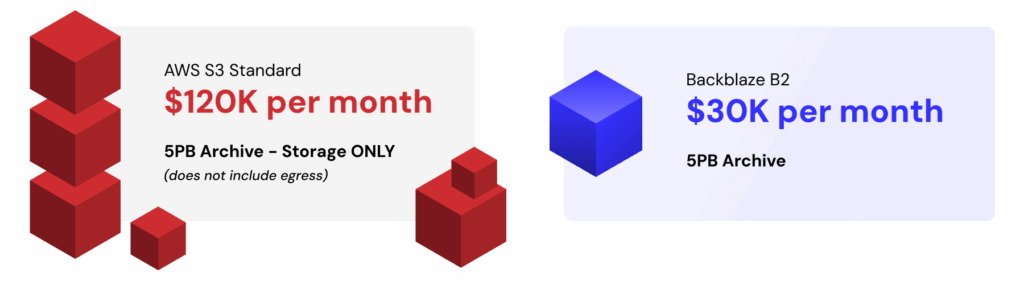
The numbers tell the story: a 5PB archive costs about $120K a month on AWS S3 Standard for storage alone, before any egress charges. The same capacity runs closer to $30K on Backblaze B2 Cloud Storage—a $90K delta that could fund another GPU cluster or extend a startup’s runway.

Backblaze B2 comes in at around one-fifth the cost of S3, with no tiering games to manage. And when workloads demand maximum throughput, B2 Overdrive scales while delivering a stronger price-to-performance ratio than others offer. That means less time modeling cost scenarios and more time iterating on product and model design.

Hidden cost #2: Egress fees

AI development thrives on iteration. Training and retraining cycles shuffle enormous datasets across clusters, often more than once a month. Each transfer can rival the cost of storage itself. And the faster a team wants to move, the more those bills stack up.

The big cloud providers introduce friction at every step. They charge not only when data exits their cloud but also when it crosses between their own regions. At petabyte scale, those tolls can reach five or even six figures in a single month, forcing founders into an impossible tradeoff: experiment less or drain the budget.

Consider that moving just 1PB once per month on AWS in the US East (N. Virginia) region racks up around $53.8K. Double that transfer frequency and you’re staring at over $100K in egress fees. That’s budget better spent on hiring, acquiring customers, or building better products.

Backblaze removes this bottleneck. Backblaze B2 already includes free egress to leading GPU and CDN partners. For companies operating at AI scale, B2 Overdrive goes further with unlimited free egress to any destination. That means models can be trained, tuned, and distributed globally without a single surprise charge standing in the way of progress.

Mirage, an AI video platform, experienced this firsthand. By eliminating egress costs, they cut storage-related expenses by up to 95% compared to their previous provider—freeing resources to reinvest in growth and product innovation.

Hidden cost #3: API requests and transaction fees

Not every AI video workflow interacts with storage the same way. Some stream large video files in big chunks, keeping the number of calls manageable. Others slice data into millions or billions of tiny objects—frames, embeddings, or metadata—and rely heavily on listing and indexing operations. In those cases, what looks like spare change per request quickly compounds into thousands of dollars in charges every month.

Major cloud storage providers are relentless here. Every PUT, GET, LIST, or HEAD operation comes with a fee, no matter how small. At scale, those fractions of a cent add up fast, leaving engineers designing around billing quirks instead of choosing the cleanest solution for their pipelines.

Picture a pipeline that generates one billion writes and two billion reads in a single month. On AWS, the tab for those transactions alone would run close to $5.8K. On Backblaze B2, writes are free and reads cost just $0.004 per 10,000 requests, bringing the same workload down to about $800. And the first 2,500 Class B and Class C transactions each day are free, further shrinking the bill. On B2 Overdrive, all API calls are included at no additional cost.

Whether your architecture leans toward billions of tiny objects or more efficient streaming, Backblaze keeps request charges predictable and manageable. That makes API calls something your team doesn’t need to obsess over, which is exactly how it should be.

Bringing it together: Simple, predictable economics

Taken together, these hidden costs show why storing AI video on “the big three” often feels like playing a rigged game. The pricing looks straightforward until the bills arrive, padded with charges for tiers, transfers, and transactions. Each one eats away at budget and slows the pace of innovation.

Backblaze offers a different path. By stripping out the fine print and focusing on price-to-performance, it makes storage a stable foundation instead of a moving target. Mirage proves what that means in practice: eliminating egress fees drove huge savings and freed resources to reinvest in their product.

For founders, that kind of predictability turns storage from a frustrating line item into the fuel for faster iteration, bolder experimentation, and sustainable growth.

The post Three Hidden Costs in AI Video Storage appeared first on Backblaze Blog | Cloud Storage & Cloud Backup