Tag Archives: Partner News

How Backblaze Computer Backup and Jamf Pro Extension Attributes Enhance the Customer Experience

Post Syndicated from Mark McLaughlin original https://www.backblaze.com/blog/how-backblaze-computer-backup-and-jamf-pro-extension-attributes-enhance-the-customer-experience/

A decorative image showing computer and user icons.

At Backblaze, we’ve always believed that data protection should be easy, reliable, and seamless. Our Computer Backup product has long provided individuals and organizations with unlimited, automatic, and affordable cloud backup. But for IT admins managing fleets of devices, visibility and control are just as critical as the backup itself.

That’s where our integration with Jamf Pro comes in. By developing extension attributes that surface key information about Backblaze Computer Backup directly into Jamf Pro, we’ve made it simpler than ever for admins to monitor and manage backup health across their organization.

Why extension attributes matter

Jamf Pro is the industry standard for managing Apple devices, giving IT teams centralized oversight and policy enforcement across Macs, iPhones, and iPads. Extension attributes allow admins to collect custom data points beyond Jamf’s built-in inventory. By plugging Backblaze-specific attributes into Jamf, organizations gain real-time insight into the backup status of every managed Mac—without jumping between multiple dashboards.

This alignment reduces blind spots, helps meet compliance requirements, and, most importantly, gives peace of mind that critical company data is safe.

The four key extension attributes

We’ve developed four extension attributes that bring actionable backup insights into Jamf Pro:

1. Backup selected

This attribute shows whether Backblaze Computer Backup is enabled on a device. IT admins can quickly confirm if backups are actively running, ensuring no endpoint is left unprotected.

2. Backup size

Data size matters—not just for storage costs, but for understanding the scope of protection. This attribute reports the total size of the data being backed up, helping teams gauge usage and anticipate trends.

3. Last backup date

Knowing when a device last backed up is critical to risk management. This attribute ensures admins can spot machines that haven’t backed up recently and take proactive steps before a potential data loss occurs.

4. Safety frozen status

Backblaze’s Safety Freeze feature protects users from data loss by preventing accidental or malicious changes to a backup. By surfacing this status in Jamf, admins gain visibility into whether a device’s backup is frozen and can act accordingly.

Benefits for IT teams and end users

By combining Backblaze’s reliable backup with Jamf’s centralized management, organizations gain:

  • Proactive risk management: Spotting gaps in backup coverage before they become crises.
  • Streamlined compliance: Meeting audit requirements with centralized backup data reporting.
  • Operational efficiency: Saving IT teams from switching between tools and reducing the need for manual checks.
  • Automatic, seamless backups: Employees know their data is being protected without interruptions or extra effort.

Looking ahead

The development of these Jamf Pro extension attributes is part of our broader mission to empower IT teams with tools that reduce friction and strengthen resilience. As remote and hybrid work environments continue to expand, seamless integrations like these will only become more valuable.

At Backblaze, we’re proud to provide more than just a backup service—we’re delivering visibility, control, and confidence.

Want to try it yourself? Get started today and see how these Jamf Pro extension attributes can make managing backups as simple as possible.

The post How Backblaze Computer Backup and Jamf Pro Extension Attributes Enhance the Customer Experience appeared first on Backblaze Blog | Cloud Storage & Cloud Backup

Backblaze and CHESA: Doubling Down on a Premier Media Workflow Partnership

Post Syndicated from Mary Ellen Cavanagh original https://www.backblaze.com/blog/backblaze-and-chesa-partnership/

A decorative image showing the Backblaze and CHESA logos.

Media workflows have always been complex, requiring seamless collaboration, robust storage, and advanced systems integration. Today, with the explosion of content demands and rapid technological advancements, media organizations need solutions that can scale, innovate, and empower teams to deliver faster and better. 

Backblaze and CHESA, long-standing partners and leaders in media workflow solutions, are doubling down on their relationship with CHESA to elevate creative workflows with a joint go-to-market partnership. This enhanced partnership builds on years of success, combining Backblaze’s high-performance, secure cloud storage with CHESA’s expertise in media technology systems integration to provide even more impactful solutions tailored to the needs of modern media-driven organizations.

Together, we’re continuing to make it easier than ever for organizations to streamline content production, enhance accessibility, and achieve business objectives with greater efficiency. In this blog, I’ll explain the key benefits of this expanded collaboration and highlight how it’s already driving transformative results for clients like the Philadelphia Eagles.

The media workflow challenge

From production studios and broadcasters to professional sports teams and creative agencies, media organizations face a growing list of challenges:

  • Massive data volumes: Video, audio, and other rich media assets require scalable and secure storage solutions to handle terabytes or even petabytes of data.
  • Fragmented workflows: Teams often juggle multiple tools and platforms, leading to inefficiencies and bottlenecks.
  • Access and collaboration: Remote work and distributed teams demand seamless real-time access to media assets.
  • Budget constraints: Organizations need cost-effective solutions that don’t compromise performance or security.

The expanded partnership between Backblaze and CHESA continues to address these pain points head-on by combining best-in-class cloud storage with tailored workflow solutions.

The Backblaze + CHESA solution

Real-world success: The Philadelphia Eagles

One of the most compelling examples of the Backblaze + CHESA partnership is the Philadelphia Eagles’ transition from traditional LTO tape storage to a cloud-based media workflow. With over 800TB under management, switching to cloud storage meant that the team instantly made their data more agile, scoring immediate access to faster content creation and remote workflows. 

“Now I can easily share entire broadcasts by copying and sharing a link from our MAM. No need for FTP downloads or uploading to other platforms. It’s fast, seamless, and ensures everyone can view the content without issues.”
—Stacy Kelleher, Director of Production, Philadelphia Eagles

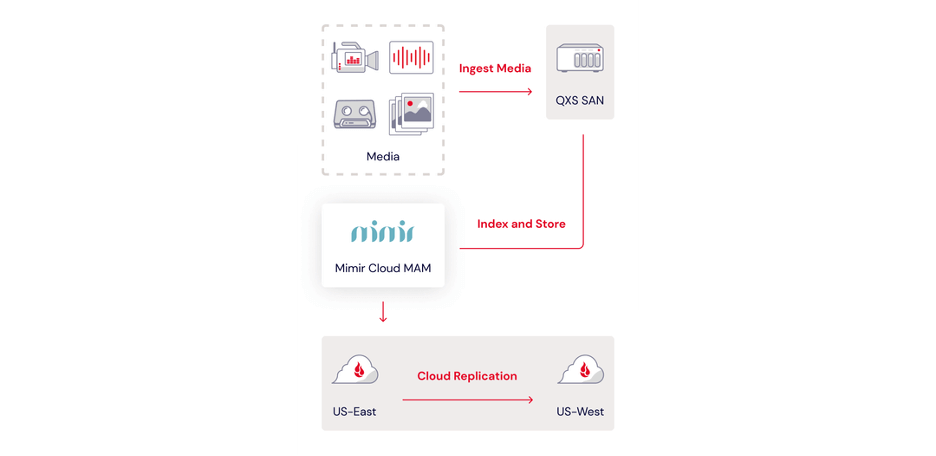
Backblaze B2 integrated seamlessly with the Eagles’ preferred tech stack, which leverages a Quantum QXS storage area network (SAN) and Mimir, a cloud-based video production platform.

The challenge

The Eagles faced significant challenges with their legacy storage system:

  • Limited accessibility: LTO tape storage made it difficult to access archived footage, which hindered content production timelines quickly.
  • Time-consuming processes: Retrieving footage from physical tapes was manual and slow.
  • Scaling limitations: As the team’s content library grew, so did the complexity and cost of managing tape storage.

The solution

By leveraging the expanded capabilities of Backblaze and CHESA’s partnership, the Eagles:

  • Transitioned their extensive media library to Backblaze B2 Cloud Storage.
  • Integrated CHESA’s tailored media workflow solutions for seamless access and collaboration.
  • Gained immediate access to decades of archived footage, enabling faster content creation and improved fan engagement.

The results

The Eagles’ media team now enjoys:

  • Accelerated content production: Instant access to archived footage has streamlined workflows, allowing the team to create engaging content more efficiently.
  • Enhanced scalability: With Backblaze B2, the Eagles can easily scale their storage as their content library grows.
  • Improved fan engagement: Faster production timelines enable the team to deliver high-quality content that keeps fans connected and engaged.

Peripheral content drives revenue through monetized clicks like highlights and select moments. Quick sharing and streamlined proof-of-performance delivery keep sponsors satisfied.”
—Ryan Lakey, Principal Lead, Solutions, CHESA

Accelerated media workflows

Integrating Backblaze B2 Cloud Storage with CHESA’s media workflow expertise has long been a cornerstone of success for media teams. By enhancing this integration, media teams can experience even faster workflows, immediate asset access, and seamless collaboration across tools and teams. By eliminating the delays associated with traditional storage methods, teams can:

  • Quickly retrieve and edit high-resolution media files.
  • Share assets effortlessly with collaborators anywhere in the world.
  • Spend less time managing infrastructure and more time creating impactful content.

Backblaze + CHESA benefits

Scalable and cost-effective storage

Backblaze B2 Cloud Storage offers always-hot, S3 compatible object storage at a fraction of the cost of traditional providers like Amazon S3. This cost-effectiveness, combined with CHESA’s expertise in designing and integrating scalable systems, ensures organizations can:

  • Scale their storage needs as projects grow or shrink.
  • Optimize budgets without compromising on performance.
  • Rely on predictable pricing that avoids surprise costs.

Enhanced data security and accessibility

In the media world, accessibility and security are paramount. Backblaze and CHESA provide solutions that keep media assets safe while ensuring real-time access for production teams. Key benefits include:

  • Secure, encrypted storage to protect sensitive media.
  • High availability for instant access to files when needed.
  • Resiliency and redundancy to ensure data integrity, even in the face of unexpected disruptions.

These capabilities have been critical for clients like professional sports teams, broadcasters, and creative agencies that manage vast libraries of high-value media content.

Comprehensive support and maintenance

CHESA’s dedicated support services and Backblaze’s reliable cloud infrastructure ensure organizations experience minimal downtime and sustained operational efficiency. This comprehensive support includes:

  • Proactive monitoring and maintenance.
  • Remote and onsite assistance for hardware, software, and workflows.
  • Consistent communication to address issues before they impact production.

Why this partnership matters

The expanded Backblaze and CHESA partnership is more than just a collaboration—it’s a commitment to empowering media organizations with innovative, efficient, and secure solutions. Here’s why it stands out:

  • Deeply customized solutions: Every organization’s needs are unique. Backblaze Solution Engineers and CHESA Workflow Engineers dive deep into clients’ specific workflows and objectives to design and implement solutions specifically tailored to their needs.
  • Unrivaled expertise, built over decades: Rely on the combined power of Backblaze and CHESA’s deep-rooted experience in cloud storage and media technology.
  • Your future-proof media strategy: Navigate the changing media landscape with confidence, leveraging our scalable and cutting-edge solutions.

Take the next step

Whether you’re a professional sports team looking to enhance fan engagement, a broadcaster aiming to streamline production, or a creative agency seeking cost-effective storage, Backblaze and CHESA are here to help.

Discover how our expanded solutions can revolutionize your media workflows. Visit our dedicated solution page to learn more and to schedule a consultation tailored to your organization’s needs.

Learn More about Backblaze + CHESA  ➔ 

The post Backblaze and CHESA: Doubling Down on a Premier Media Workflow Partnership appeared first on Backblaze Blog | Cloud Storage & Cloud Backup

Backblaze Partners with Opti9 and Adds Canadian Data Region

Post Syndicated from Teresa Dodson original https://www.backblaze.com/blog/backblaze-partners-with-opti9-and-adds-canadian-data-region/

A decorative image showing the Backblaze and Opti9 logos.

Backblaze and Opti9 are partnering up to bring Backblaze B2 Cloud Storage to joint customers around the world as well as businesses in Canada who are required to keep their data within national borders.

The who and the why

Opti9 is the international leader in hybrid cloud solutions that delivers managed cloud services, application development and modernization, backup and disaster recovery, security, and compliance solutions to businesses around the world. By bringing Backblaze into their solution set, Opti9 is onboarding high performance, low cost cloud storage that works within all the solutions they provide.

Increasingly, companies seeking managed services support are demanding solutions made up of best-in-breed providers. While traditional cloud platforms work against this principle of interoperability, Backblaze and solution providers like Opti9 are committed to delivering cloud solutions without the limitations, complexity, and high pricing that are holding businesses back.

As Jim Stechyson, the President of Opti9 put it:

Backblaze and Opti9 focus on empowering businesses with the best cloud solutions available. Being able to integrate the high performance and low total cost of ownership of Backblaze’s object storage into our set of solutions will greatly enhance our ability to drive success for our customers.

How to get started

Interested resellers or customers who want to start working with Opti9 and Backblaze today can go to the Opti9 website. Check out our joint S3 compatible hot storage offering and book your demo to get started.

Book a Demo ➔ 

For customers based in Canada, Backblaze will be opening a new data region centered in Toronto in the first quarter of 2025. As part of the partnership, Opti9 will be the exclusive provider of server backup solutions in the Canadian channel for Backblaze B2 Reserve and the Powered by Backblaze program.

More about the new Backblaze data region in Canada

The new Canadian data region gives businesses the freedom to access Backblaze’s open, interoperable cloud solution, while still allowing customers to benefit from local storage and compliance. Located in Toronto, Ontario, the data center has been assessed and maintains a security program that addresses the requirements of SOC 1 Type 2, SOC 2 Type 2, ISO 27001, PCI DSS, and HIPAA. The region will be available to customers in the first quarter of 2025. 

If you’d like to receive notifications about the data region opening date and when you can start storing data in Canada, you can sign up for the waitlist today.

Notify Me ➔ 

The post Backblaze Partners with Opti9 and Adds Canadian Data Region appeared first on Backblaze Blog | Cloud Storage & Cloud Backup

AI Video Understanding in Your Apps with Twelve Labs and Backblaze

Post Syndicated from Pat Patterson original https://backblaze.com/blog/ai-video-understanding-in-your-apps-with-twelve-labs-and-backblaze/

A decorative header depicting several screens with video editing tasks and a cloud with the Backblaze logo on it.

Over the past few years, since long before the recent large language model (LLM) revolution, we’ve benefited not only from the ability of AI models to transcribe audio to text, but also to automatically tag video files according to their content. Media asset management (MAM) software—such as Backlight iconik and Axle.ai (both Backblaze Partners, by the way)—allows media professionals to quickly locate footage by searching for combinations of tags. For example, “red car”, will return not only a list of video files containing red cars, but also the timecodes pinpointing the appearance of the red car in each clip.

San Francisco startup Twelve Labs has created a video understanding platform that allows any developer to build this kind of functionality, and more, into their app via a straightforward RESTful API. 

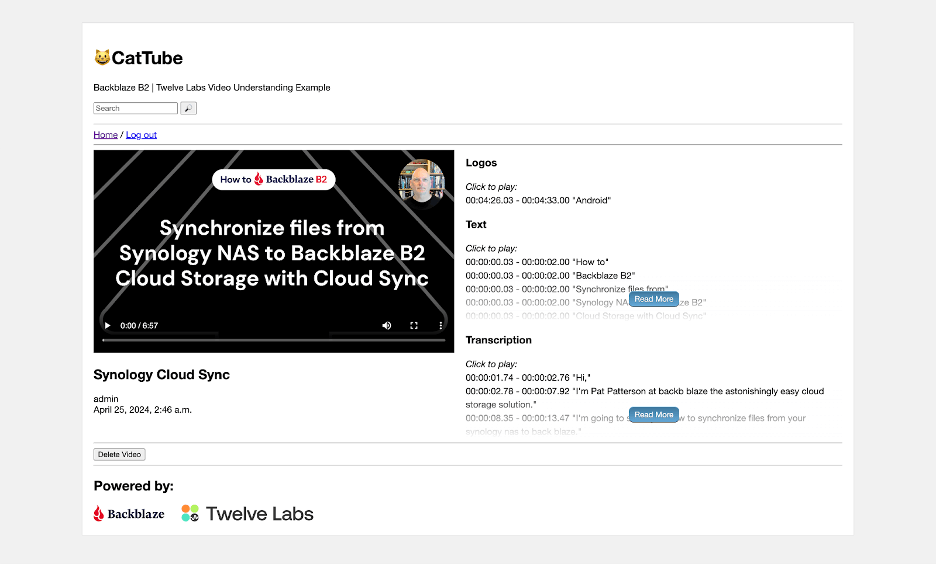
In preparation for our webinar with Twelve Labs last month, I created a web app to show how to integrate Twelve Labs with Backblaze B2 for storing video. The complete sample app is available as open source at GitHub; in this blog post, I’ll provide a brief description of the Twelve Labs platform, explain how presigned URLs allow temporary access to files in a private bucket, and then share the key elements of the sample app. If you just want a high level understanding of the integration, read on, and feel free to skip the technical details!

The Twelve Labs Video Understanding Platform

The core of the Twelve Labs platform is a foundation model that operates across the visual, audio, and text modes of video content, allowing multimodal video understanding. When you submit a video using the Twelve Labs Task API, the platform generates a compact numerical representation of the video content, termed an embedding, that identifies entities, actions, patterns, movements, objects, scenes, other elements of the video, and their interrelationships. The embedding contains everything the Twelve Labs platform needs to do its work—after the initial scan, the platform no longer needs access to the original video content. As each video is scanned into the platform, its embedding is added to an index, so this scanning process is often referred to as indexing.

As part of the indexing process, the platform extracts a standard set of data from each video: a thumbnail image, a transcript of any spoken content, any text that appears on screen, and a list of brand logos, all annotated with timecodes locating them on the video’s timeline, and all accessible via the Twelve Labs Index API.

You can have the platform create a title and summary, and even prompt the model to describe the video, via Twelve Labs’ Generate API. For example, I indexed an eight-minute video that explains how to back up a Synology NAS to Backblaze B2, then prompted the Generate API, “What are the two Synology applications mentioned in the video?” This was the first sentence of the resulting text:

The two Synology applications mentioned throughout the video are “Synology Hyper Backup” and “Synology Cloud Sync.”

The remainder of the response is a brief summary of the two applications and how they differ; here’s the full text. Although it does have that “AI flavor” as you read it, it’s clear and accurate. I must admit, I was quite impressed!

You can define a taxonomy for your videos via the Classify API. Submit a one- or two-level classification schema and a set of video IDs, and the platform will assign each video to a category.

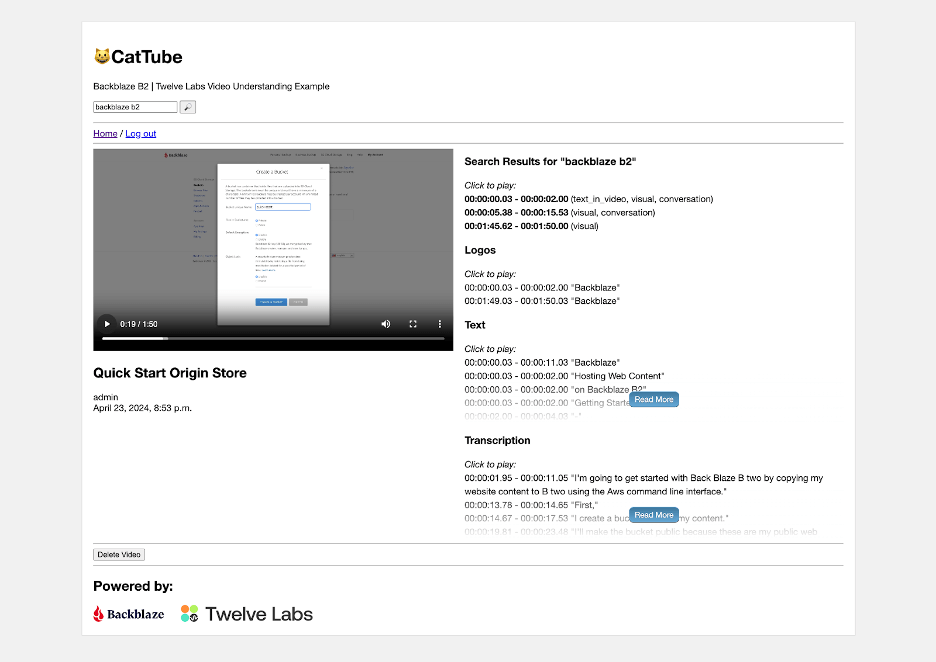
Rounding up this quick tour of the Twelve Labs platform, the Search API, as its name suggests, allows you to search the indexed videos. As well as a search query, you must specify a set of content sources: any combination of visual, conversation, text in video, or logos. Each search result includes timecodes for its start and end.

Now you understand the basic capabilities of the Twelve Labs platform, let’s look at how you can integrate it with Backblaze B2.

Allowing Temporary Access to Files in a Private Backblaze B2 Bucket

A key feature of the sample app is that it uploads videos to a private Backblaze B2 Bucket, where they are only accessible to authorized users. Twelve Labs’ API allows you to submit a video for indexing by POSTing a JSON payload including the video’s URL to its Task API. This is straightforward for video files in a public bucket, but how do we allow the Twelve Labs platform to read files from a private bucket?

One way would be to create an application key with capabilities to read files from the private bucket and share it with the Twelve Labs platform. The main drawback to this approach is that the platform currently lacks the ability to sign requests for files from a private bucket.

Since Twelve Labs only needs to read the video file when we submit it for indexing, we can send it a presigned URL for the video file. As well as the usual Backblaze B2 endpoint, bucket name, and object key (path and filename), a presigned URL includes query parameters containing data such as the time when the URL was created, its validity period in seconds, an application key ID (or access key ID, in S3 terminology), and a signature created with the corresponding application key (secret access key). Here’s an example, with line breaks added for clarity:

https://s3.us-west-004.backblazeb2.com/mybucket/image.jpeg
?X-Amz-Algorithm=AWS4-HMAC-SHA256
&X-Amz-Credential=00415f935c00000000aa%2F20240423%2Fus-west-004%2Fs3%2Faws4_request
&X-Amz-Date=20240423T222652Z
&X-Amz-Expires=3600
&X-Amz-SignedHeaders=host
&X-Amz-Signature=23ade1...3ca1eb

This URL was created at 22:26:52 UTC on 04/23/2024, and was valid for one hour (3600 seconds). The signature is 64 hex characters. Changing any part of the URL, for example, the X-Amz-Date parameter, invalidates the signature, resulting in an HTTP 403 Forbidden error when you try to use it, with a corresponding message in the response payload:

<?xml version="1.0" encoding="UTF-8" standalone="yes"?>
<Error>
    <Code>SignatureDoesNotMatch</Code>
    <Message>Signature validation failed</Message>
</Error>

Attempting to use the presigned URL after it expires yields HTTP 401 Unauthorized with a message such as:

<?xml version="1.0" encoding="UTF-8" standalone="yes"?>
<Error>
    <Code>UnauthorizedAccess</Code>
    <Message>Request has expired given timestamp: '20240423T222652Z' and expiration: 3600</Message>
</Error>

You can create presigned URLs with any of the AWS SDKs or the AWS CLI. For example, with the CLI:

% aws s3 presign s3://mybucket/image.jpeg --expires-in 600 
https://s3.us-west-004.backblazeb2.com/mybucket/image.jpeg?X-Amz...

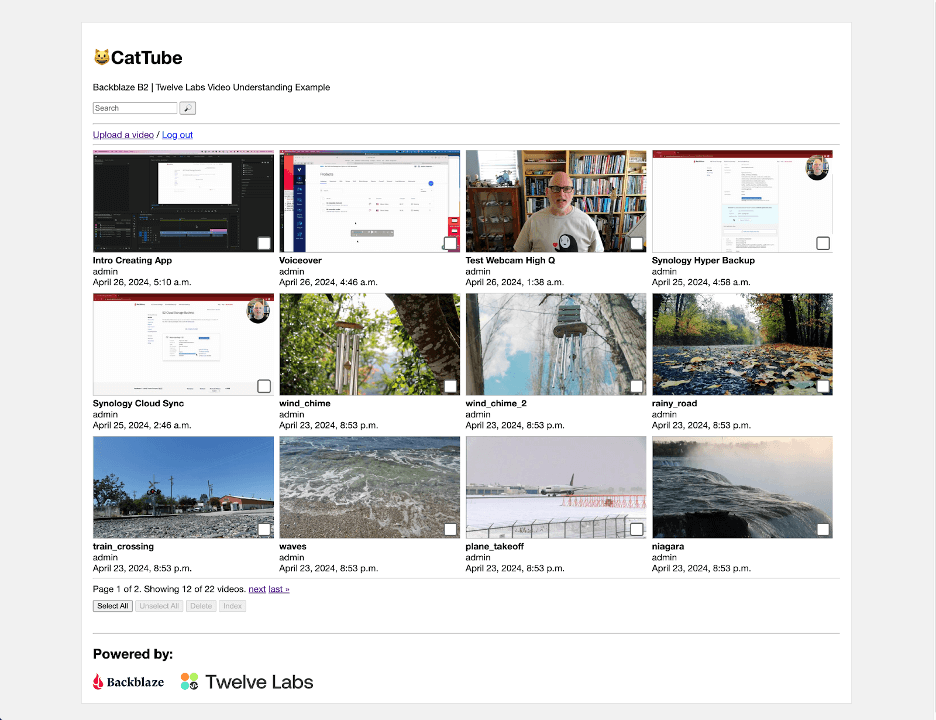
Presigned URLs are useful whenever you want to provide temporary access to a file in a private bucket without having to share an application key for a client app to sign the request itself. The sample app also uses them when rendering HTML web pages. For example, all of the thumbnail images are retrieved by the user’s browser via presigned URLs.

Note that presigned URLs are a feature of Backblaze B2’s S3 Compatible API. Creating a presigned URL is an offline operation and does not consume any API calls. We recommend you use presigned URLs rather than the b2_get_download_authorization B2 Native API operation, since the latter is a class C API call.

Inside the Backblaze B2 + Twelve Labs Media Asset Management Example

The sample app is written in Python, using JavaScript for its front end, the Django web framework for its backend, the Huey task queue for managing long-running tasks, and the Twelve Labs Python SDK to interact with the Twelve Labs platform. A simple web UI allows the user to upload videos to the private bucket, browse uploaded videos, submit them for indexing, view the resulting transcription, logos, etc., and search the indexed videos.

Most of the application code is concerned with rendering the web UI; very little code is required to interact with Twelve Labs.

Configuration

The Django settings.py file defines a constant for the Twelve Labs index ID and creates an SDK client object using the Twelve Labs API key. Note that the app reads the index ID and API key from environment variables, rather than including the values in the source code. Externalizing the index ID as an environment variable allows more flexibility in deployment while, of course, you should never include secrets such as passwords or API keys in source code!

TWELVE_LABS_INDEX_ID = os.environ['TWELVE_LABS_INDEX_ID']
TWELVE_LABS_CLIENT = TwelveLabs(api_key=os.environ['TWELVE_LABS_API_KEY'])

Startup

When the web application starts, it validates the index ID and API key by retrieving details of the index. This is the relevant code, in apps.py:

index = TWELVE_LABS_CLIENT.index.retrieve(TWELVE_LABS_INDEX_ID)

If this API call fails, then the app prints a suitable diagnostic message identifying the issue.

Indexing

When a web application needs to perform an action that takes more than a few seconds to complete—for example—indexing a set of videos, it typically starts a background task to do the work, and returns an appropriate response to the user. The sample app follows this pattern: when the user selects one or more videos and hits the Index button, the web app starts a Huey task, do_video_indexing(), passing the IDs of the selected videos, and returns the IDs to the JavaScript front end. The front end can then show that the indexing tasks have started, and poll for their current status.

Here’s the code, in tasks.py, for submitting the videos for indexing.

# Create a task for each video we want to index
for video_task in video_tasks:
    task = TWELVE_LABS_CLIENT.task.create(
        TWELVE_LABS_INDEX_ID,
        url=default_storage.url(video_task['video']),
        disable_video_stream=True
    )
    print(f'Created task: {task}')
    video_task['task_id'] = task.id

Notice the call to default_storage.url(). This function, implemented by the django-storages library, takes as its argument the path to the video file, returning the presigned URL. The default expiry period is one hour.

Once the videos have been submitted, do_video_indexing() polls for the status of each indexing task until all are complete. Most of the code is concerned with minimizing the number of calls to the API, and saving status to the app’s database; getting the status of a task is simple:

task = TWELVE_LABS_CLIENT.task.retrieve(video_task['task_id'])

The task object’s status attribute is a string with a value such as validating, indexing, or ready. When the task reaches the ready status, the task object also includes a video_id attribute, uniquely identifying the video within the Twelve Labs platform. At this point, do_video_indexing() calls a helper function that retrieves the thumbnail, transcript, text, and logos and stores them in Backblaze B2.

Retrieving Video Data

Here’s the call to retrieve the thumbnail:

thumbnail_url = TWELVE_LABS_CLIENT.index.video.thumbnail(TWELVE_LABS_INDEX_ID, video.video_id)

The helper function creates a path for the thumbnail file from the video ID and the file extension in the returned URL, and saves the thumbnail to Backblaze B2:

default_storage.save(thumbnail_path, urlopen(thumbnail_url))

Again, django-storages is doing the heavy lifting. We use urlopen(), from the urllib.request module, to open the thumbnail URL, providing default_storage.save() with a file-like object from which it can read the thumbnail data.

The calls to retrieve transcript, text, and logo data have a slightly different form, for example:

video_data = TWELVE_LABS_CLIENT.index.video.transcription(TWELVE_LABS_INDEX_ID, video.video_id)

Each call returns a list of VideoValue objects, each VideoValue object comprising a start and end timecode (in seconds) and a value specific to the type of data; for example, a fragment of the transcription. We serialize each list to JSON and save it as a file in Backblaze B2.

When the user navigates to the detail page for a video, JavaScript reads each dataset from Backblaze B2 and renders it into the page, allowing the user to easily navigate to any of the data items.

Searching the Index

When the user enters a query and hits the search button, the backend calls the Twelve Labs Search API, passing the query text, and requesting results for all four sources of information. We set group_by to video since we want to show the results by video, and set the confidence threshold to medium to improve the relevance of the results. From VideoSearchView in views.py:

results = TWELVE_LABS_CLIENT.search.query(
    TWELVE_LABS_INDEX_ID,
    query,
    ["visual", "conversation", "text_in_video", "logo"],
    group_by="video",
    threshold="medium"
)

By default, the query() call returns a page of 10 results in result.data, so we loop through the pages using next(result) to fetch pages of search results as necessary. Each individual search result includes start and end timecodes, confidence, and the type of match (visual, conversation, text, or logo).

In the web UI, the user can click through to the results for a given video, then click an individual search result to view the matching video clip.

Getting Started with Backblaze B2 and Twelve Labs

Backblaze B2 Cloud Storage is a great choice for storing video to index with Twelve Labs; free egress each month for up to three times the amount of data you’re storing means that you can submit your entire video library to the Twelve Labs platform without worrying about data transfer charges, and unlimited free egress to our CDN partners reduces the costs of distributing video content to end users.

Click here to create a Backblaze B2 account, if you don’t already have one. Your first 10GB of storage is free, no credit card required. If you’re an enterprise that wants to run a larger proof of concept, you can always reach out to our Sales Team. You don’t need to write any code to upload video files or create presigned URLs, and you can use the Backblaze web UI to upload files up to 500MB, or any of a wide variety of tools to upload files up to 10TB, including the AWS CLI, rclone and Cyberduck. Select S3 as the protocol to be able to create presigned URLs.

Similarly, click here to sign up for Twelve Labs’ Free plan. With it, you can index up to 600 minutes of video, again, no credit card required. Python and Node.js developers can use one of the Twelve Labs SDKs, while the Twelve Labs API documentation includes code examples for a wide range of other programming languages.

The post AI Video Understanding in Your Apps with Twelve Labs and Backblaze appeared first on Backblaze Blog | Cloud Storage & Cloud Backup
Backblaze and Parablu Team Up to Elevate Security For Microsoft 365 Users

Post Syndicated from Anna Hobbs-Maddox original https://backblaze.com/blog/backblaze-and-parablu-team-up-to-elevate-security-for-microsoft-365-users/

A decorative image showing the Backblaze and Parablu logos.

Microsoft 365 (M365) is used by more than one million companies worldwide. If you’re one of them, you know how important it is to your business. And, like anything that’s important to your business, it’s important to back it up. 

Today, backing up M365 to off-site storage just got easier and more affordable thanks to a new Backblaze Partnership with Parablu. Now, you can back up your Microsoft 365 data to Backblaze, ensuring it’s backed up both inside and/or outside of the Azure ecosystem, adding another layer of protection to your backup and recovery playbook.

What Parablu Does

Parablu specializes in data security and resiliency solutions catered to digital enterprises. Their advanced solutions ensure comprehensive protection for enterprise data while offering complete visibility into all data movement through user-friendly, centrally-managed dashboards. Their product BluVault for M365 elevates data security across Exchange, SharePoint, OneDrive, and Teams.

With Parablu, you can seamlessly control every aspect of your Microsoft 365 data, gain immediate protection against threats with advanced anomaly detection and swift recovery mechanisms for ransomware attacks, streamline administration with intuitive and efficient controls, reduce network congestion, and ensure secure data transmission with robust encryption protocols.

Why Back Up Microsoft 365 to Backblaze?

By integrating Backblaze as a storage tier outside of Azure for tools like M365, OneDrive, or Sharepoint, Parablu is providing its customers with cloud storage that’s easy to use, highly affordable at one-fifth the cost of legacy providers, secured with immutable backups, and high-performing with industry-leading small file uploads.

Key benefits for Backblaze + Parablu customers include:

  • Avoiding a Single Point of Failure: Many businesses that use M365 also back up their instance with the same service. However, backup best practices include keeping a backup copy of your data geographically and virtually separate from your production copy. While backing up your M365 data with Microsoft Azure is a great thing to do, it’s wise to keep a backup copy outside of that ecosystem as well. If Microsoft were to experience a failure, you’d still be able to recover your critical business data. 
  • Protecting Data With Immutability: When you protect your M365 data with immutability via Object Lock, you ensure no one can alter or delete that data until a given date. When you set the lock, you can specify the length of time an object should be locked. Any attempts to manipulate, copy, encrypt, change, or delete the file will fail during that time.
  • Faster Small File Uploads: Small file uploads are common for backup and archive workflows, especially when it comes to backing up the kind of data in M365—email, Word documents, simple Excel spreadsheets, etc. With Backblaze, users can expect to see significantly faster upload speeds for smaller files without any change to durability, availability, or pricing. The faster data upload bolsters security and enhances data protection by securing data with off-site backups faster, limiting the time that the data is vulnerable.

Partnering with Backblaze offers our customers a secure, cost-efficient storage alternative. We’ve witnessed a growing demand for secure, fast, and affordable storage that complements public cloud storage and we look forward to continued innovation with Backblaze.

—Randy De Meno, Chief Strategy Officer/Chief Technology Officer, Parablu

How Backblaze Integrates With Parablu

The Backblaze + Parablu partnership integrates the M365 backup power of Parablu with affordable cloud storage from Backblaze, helping you protect your M365 environment with enhanced security, compliance, and performance. The joint solution is available for customers today.

Interested in getting started? Learn more in our docs or contact Sales.

The post Backblaze and Parablu Team Up to Elevate Security For Microsoft 365 Users appeared first on Backblaze Blog | Cloud Storage & Cloud Backup

Backblaze Now Available via Carahsoft’s NASPO Contract

Post Syndicated from Mary Ellen Cavanagh original https://backblazeprod.wpenginepowered.com/blog/backblaze-now-available-via-carahsofts-naspo-contract/

A decorative image showing three logos: Backblaze, carahsoft, and NASPO ValuePoint.

If you’re an IT professional for a state, local government, or educational institution or you’re a reseller serving those entities, you know firsthand how complex and time consuming procurement can truly be. Onboarding a cloud storage provider that meets both your needs and your organization’s procurement requirements is a challenge. And the need for affordable and secure data storage has never been greater—an incredible 79% of educational institutions reported being hit with ransomware in the past year. 

Today, choosing Backblaze as your preferred cloud storage provider just got a lot easier. Backblaze is now available to purchase via Carahsoft’s National Association of State Procurement Officials (NASPO) ValuePoint contract. 

The contract addition enables Carahsoft, The Trusted Government IT Solutions Provider®, and Backblaze to provide cloud storage solutions to participating states, local governments, and educational institutions. The contract also comes on the heels of Backblaze’s inclusion on Carahsoft’s NYOGS- and OMNIA-approved vendor lists.

What Is the NASPO ValuePoint Contract?

NASPO ValuePoint is a cooperative purchasing program that facilitates public procurement solicitations and agreements using a lead-state model, which means one state or organization takes the lead on soliciting proposals on behalf of others and working with a sourcing team to evaluate responses and choose a vendor. By leveraging the leadership and expertise of all states and the collective purchasing power of their public entities, NASPO ValuePoint delivers the highest valued, reliable, and competitively sourced contracts, offering public entities outstanding pricing.

Benefits to Customers

As a state, local government, or educational institution, you get a number of benefits by purchasing Backblaze through Carahsoft’s ValuePoint contract, including:

  • Simplified Procurement: You don’t have to go through the hassle of setting up your own contracts or negotiating prices. You can just use the NASPO ValuePoint contract, and that hard work is already taken care of.
  • Cost Savings: Because the ValuePoint contract covers lots of states and organizations, services are purchased in bulk, which usually means cheaper prices.
  • Time Savings: You save time researching suppliers or going through a long bidding process. You can just choose from the options already approved under the contract.
  • Quality Assurance: The contract usually has strict standards for its offerings, ensuring that you as a customer get access to quality products and services.

Benefits for Resellers

Resellers who are not currently listed on the NASPO ValuePoint Contract can still reap the benefits as well (and if you’re already listed, even better). By purchasing Backblaze through Carahsoft, you will gain:

  • Access to a Larger Market: Resellers can sell Backblaze to multiple states or organizations without having to negotiate separate contracts each time. This means more potential cloud customers.
  • Streamlined Sales Process: You don’t have to spend as much time and effort trying to win individual contracts. Now that Backblaze is on the NASPO ValuePoint Contract, you’re pre-approved to sell B2 Cloud Storage and Computer Backup to all participating entities.
  • Increased Credibility: With Backblaze being part of a trusted contract like NASPO ValuePoint, you can enhance your reputation and credibility in the cloud market, potentially attracting more customers.
  • Stable Revenue Stream: Having a contract with multiple states or organizations provides a more stable and predictable revenue stream for you as a reseller, as you have access to a broader customer base.

Making It Easier to Provision Backblaze

As a public sector agency, you face some of the greatest challenges when it comes to affordably protecting and using your data given ransomware attacks and budget constraints. Carahsoft’s NASPO program cuts through this complexity with cooperative purchasing, resulting in more favorable terms and conditions and competitive pricing. 

Previously, it was hard for many state, local, educational and government institutions to benefit from the affordability and reliability that Backblaze provides. Now, Backblaze’s addition to Carahsoft’s NASPO contract streamlines procurement of B2 Cloud Storage and Backblaze Computer Backup—speeding up your acquisition timeline.

The availability of the Backblaze portfolio to NASPO members strengthens our partnership by aligning with Government procurement processes and expanding Backblaze’s reach in the Public Sector market. It is critical we support the Government as they work to modernize their cloud data storage systems to meet the demands of an increasingly digital era. By collaborating with Backblaze and our reseller partners, we can continue to expand and improve agency access to the affordable, cutting-edge solutions they need to achieve mission success.

—John Rentz, MultiCloud Team Lead, Carahsoft

How to Purchase Backblaze via Carahsoft

Backblaze’s offerings are available through Carahsoft’s NASPO ValuePoint Master Agreement #AR2472 and OMNIA Partners Contract #R191902. To purchase, reach out to your preferred reseller or contact the Backblaze team. For more information about the NASPO ValuePoint Master Agreement, contact the Carahsoft team at [email protected].

More About Carahsoft

Carahsoft Technology Corp. is The Trusted Government IT Solutions Provider®, supporting public sector organizations across federal, state and local government agencies and education and healthcare markets. As the Master Government Aggregator® for our vendor partners, Carahsoft delivers solutions for multicloud, cybersecurity, DevSecOps, big data, artificial intelligence, open source, customer experience and engagement, and more.

The post Backblaze Now Available via Carahsoft’s NASPO Contract appeared first on Backblaze Blog | Cloud Storage & Cloud Backup.

Object Storage Simplified: Introducing Powered by Backblaze

Post Syndicated from Elton Carneiro original https://www.backblaze.com/blog/powered-by-announcement-2024/

A decorative image showing the Backblaze logo on a cloud hovering over a power button.

Today, we announced our new Powered by Backblaze program to give platform providers the ability to offer cloud storage without the burden of building scalable storage infrastructure (something we know a little bit about). 

If you’re an independent software vendor (ISV), technology partner, or any company that wants to incorporate easy, affordable data storage within your branded user experience, Powered by Backblaze will give you the tools to do so without complex code, capital outlay, or massive expense.

Read on to learn more about Powered by Backblaze and how it can help you enhance your platforms and services. Or, if you’d like to get started asap, contact our Sales Team for access.  

Benefits of Powered by Backblaze

  • Business Growth: Adding cloud services to your product portfolios can generate new revenue streams and/or grow your existing margin.
  • Improved Customer Experience: Take the complexity out of object storage and deliver the best solutions by incorporating a proven object cloud storage solution.
  • Simplified Billing: Reduce complex billing by providing customers with a single bill from a single provider. 
  • Build Your Brand:  Improve customer expectations by providing cloud storage with your company name for consistency and brand identity.

What Is Powered by Backblaze?

Powered by Backblaze offers companies the ability to incorporate B2 Cloud Storage into their products so they can sell more services or enhance their user experience with no capital investment. Today, this program offers two solutions that support the provisioning of B2 Cloud Storage: Custom Domains and the Backblaze Partner API.

How Can I Leverage Custom Domains?

Custom Domains, launched today, lets you serve content to your end users from the web domain or URL of your choosing, with no need for complex code or proxy servers. Backblaze manages the heavy lifting of cloud storage on the back end.

Custom Domains functionality combines CNAME and Backblaze B2 Object Storage, enabling the use of your preferred domain name in your files’ web domain or URLs instead of using the domain name that Backblaze automatically assigns.

We’ve chosen Backblaze so we can have a reliable partner behind our new Edge Storage solution. With their Custom Domain feature, we can implement the security needed to serve data from Backblaze to end users from Azion’s Edge Platform, improving user experience.

—Rafael Umann, CEO, Azion, a full stack platform for developers

How Can I Leverage the Backblaze Partner API?

The Backblaze Partner API automates the provisioning and management of Backblaze B2 Cloud Storage storage accounts within a platform. It allows for managing accounts, running reports, and creating a bundled solution or managed service for a unified user experience.

We wrote more about the Backblaze Partner API here, but briefly: We created this solution by exposing existing API functionality in a manner that allows partners to automate tasks essential to provisioning users with seamless access to storage.

The Backblaze Partner API calls allow you to:

  • Create accounts (add Group members)
  • Organize accounts in Groups
  • List Groups
  • List Group members
  • Eject Group members

If you’d like to get into the details, you can dig deeper in our technical documentation.

Our customers produce thousands of hours of content daily and, with the shift to leveraging cloud services like ours, they need a place to store both their original and transcoded files. The Backblaze Partner API allows us to expand our cloud services and eliminate complexity for our customers—giving them time to focus on their business needs, while we focus on innovations that drive more value.

—Murad Mordukhay, CEO, Qencode

How to Get Started With Powered by Backblaze

To get started with Powered by Backblaze, contact our Sales Team. They will work with you to understand your use case and how you can best utilize Powered by Backblaze. 

What’s Next?

We’re looking forward to adding more to the Powered by Backblaze program as we continue investing in the tools you need to bring performant cloud storage to your users in an easy, seamless fashion.

The post Object Storage Simplified: Introducing Powered by Backblaze appeared first on Backblaze Blog | Cloud Storage & Cloud Backup.

Leveraging Backblaze Drive Stats to Boost Backblaze B2 Cloud Storage Sales: A Guide for Reseller Partners

Post Syndicated from Mary Ellen Cavanagh original https://www.backblaze.com/blog/leveraging-backblaze-drive-stats-to-boost-backblaze-b2-cloud-storage-sales-a-guide-for-reseller-partners/

A decorative image image showing a variety of images related to Backblaze and cloud storage.

If you’re a reseller partner, we know it’s hard to cut through the noise and get potential clients interested in the services you sell. It helps when you’re able to share relevant, useful, truly valuable information with them to build your brand and engage potential clients in prospective services. 

The Backblaze Drive Stats reports can be a powerful tool in your arsenal. They not only provide insights into drive reliability but also empower you to better position and sell Backblaze B2 Cloud Storage. So, let’s dig into what Drive Stats are and how you can use them to serve your clients.

What Are Drive Stats?

The Backblaze Drive Stats reports include a comprehensive set of data that Backblaze openly shares about the performance and reliability of the hard drives that we use in our data centers. The data we publish is excellent for building trust with customers—it’s unique in the industry, regularly covered in industry media, and used by everyone from IT admins to research institutions to inform their strategies. Use it to level up your understanding of hard drives in general—including how they affect cloud storage infrastructure—and to build trust with end users around Backblaze in particular.

How Can I Use Drive Stats as a Reseller?

Identifying and Addressing Customer Concerns

You probably encounter customer concerns regarding the potential risks associated with data storage—both on premises and in the cloud—all the time. With Drive Stats, you can speak to those concerns with hard data on drive failure rates. This data-driven approach empowers customers to make optimal operational decisions and positions you as a knowledgeable, trusted advisor in their cloud storage journey.

Tailoring Solutions to Customer Needs

Every business has unique data storage and backup requirements, often a combination of on premises and cloud based data storage. In crafting the proper storage solution for your clients, you are often confronted with cost versus reliability trade-offs. The Backblaze Drive Stats reports provide a dependable source of unbiased drive reliability statistics when local data storage is required. With the Drive Stats data at hand, you can apply your knowledge and experience to confidently propose and deliver a comprehensive, cost-effective data storage and backup solution at a fair price that meets your customers’ unique needs.

Educating Customers on Data Management Best Practices

Beyond selling a product, you play a vital role in educating your customers on best practices for data management. Backblaze Drive Stats provide you with valuable insights that can be shared with your clients to help them make informed decisions about their storage strategy. By educating customers on the factors that contribute to reliable and efficient data storage, you position yourselves as trusted advisors in the rapidly evolving world of cloud technology.

Drive Stats as Your Competitive Advantage

In the competitive landscape of cloud storage solutions, reseller partners can gain a strategic advantage by harnessing the power of Backblaze Drive Stats as an effective, valuable, and powerful piece of content. The stats not only enhance transparency and build trust with customers but also empower resellers to effectively address concerns, tailor solutions, and educate clients on data management best practices. By leveraging this valuable resource, resellers can position themselves as leaders in the market and drive the success of Backblaze B2 Cloud Storage.

The post Leveraging Backblaze Drive Stats to Boost Backblaze B2 Cloud Storage Sales: A Guide for Reseller Partners appeared first on Backblaze Blog | Cloud Storage & Cloud Backup.

How to Run AI/ML Workloads on CoreWeave + Backblaze

Post Syndicated from Pat Patterson original https://www.backblaze.com/blog/how-to-run-ai-ml-workloads-on-coreweave-backblaze/

A decorative image showing the Backblaze and CoreWeave logos superimposed on clouds.

Backblaze compute partner CoreWeave is a specialized GPU cloud provider designed to power use cases such as AI/ML, graphics, and rendering up to 35x faster and for 80% less than generalized public clouds. Brandon Jacobs, an infrastructure architect at CoreWeave, joined us earlier this year for Backblaze Tech Day ‘23. Brandon and I co-presented a session explaining both how to backup CoreWeave Cloud storage volumes to Backblaze B2 Cloud Storage and how to load a model from Backblaze B2 into the CoreWeave Cloud inference stack.

Since we recently published an article covering the backup process, in this blog post I’ll focus on loading a large language model (LLM) directly from Backblaze B2 into CoreWeave Cloud.

Below is the session recording from Tech Day; feel free to watch it instead of, or in addition to, reading this article.

More About CoreWeave

In the Tech Day session, Brandon covered the two sides of CoreWeave Cloud: 

  1. Model training and fine tuning. 
  2. The inference service. 

To maximize performance, CoreWeave provides a fully-managed Kubernetes environment running on bare metal, with no hypervisors between your containers and the hardware.

CoreWeave provides a range of storage options: storage volumes that can be directly mounted into Kubernetes pods as block storage or a shared file system, running on solid state drives (SSDs) or hard disk drives (HDDs), as well as their own native S3 compatible object storage. Knowing that, you’re probably wondering, “Why bother with Backblaze B2, when CoreWeave has their own object storage?”

The answer echoes the first few words of this blog post—CoreWeave’s object storage is a specialized implementation, co-located with their GPU compute infrastructure, with high-bandwidth networking and caching. Backblaze B2, in contrast, is general purpose cloud object storage, and includes features such as Object Lock and lifecycle rules, that are not as relevant to CoreWeave’s object storage. There is also a price differential. Currently, at $6/TB/month, Backblaze B2 is one-fifth of the cost of CoreWeave’s object storage.

So, as Brandon and I explained in the session, CoreWeave’s native storage is a great choice for both the training and inference use cases, where you need the fastest possible access to data, while Backblaze B2 shines as longer term storage for training, model, and inference data as well as the destination for data output from the inference process. In addition, since Backblaze and CoreWeave are bandwidth partners, you can transfer data between our two clouds with no egress fees, freeing you from unpredictable data transfer costs.

Loading an LLM From Backblaze B2

To demonstrate how to load an archived model from Backblaze B2, I used CoreWeave’s GPT-2 sample. GPT-2 is an earlier version of the GPT-3.5 and GPT-4 LLMs used in ChatGPT. As such, it’s an accessible way to get started with LLMs, but, as you’ll see, it certainly doesn’t pass the Turing test!

This sample comprises two applications: a transformer and a predictor. The transformer implements a REST API, handling incoming prompt requests from client apps, encoding each prompt into a tensor, which the transformer passes to the predictor. The predictor applies the GPT-2 model to the input tensor, returning an output tensor to the transformer for decoding into text that is returned to the client app. The two applications have different hardware requirements—the predictor needs a GPU, while the transformer is satisfied with just a CPU, so they are configured as separate Kubernetes pods, and can be scaled up and down independently.

Since the GPT-2 sample includes instructions for loading data from Amazon S3, and Backblaze B2 features an S3 compatible API, it was a snap to modify the sample to load data from a Backblaze B2 Bucket. In fact, there was just a single line to change, in the s3-secret.yaml configuration file. The file is only 10 lines long, so here it is in its entirety:

apiVersion: v1
kind: Secret
metadata:
  name: s3-secret
  annotations:
     serving.kubeflow.org/s3-endpoint: s3.us-west-004.backblazeb2.com
type: Opaque
data:
  AWS_ACCESS_KEY_ID: <my-backblaze-b2-application-key-id>
  AWS_SECRET_ACCESS_KEY: <my-backblaze-b2-application-key>

As you can see, all I had to do was set the serving.kubeflow.org/s3-endpoint metadata annotation to my Backblaze B2 Bucket’s endpoint and paste in an application key and its ID.

While that was the only Backblaze B2-specific edit, I did have to configure the bucket and path where my model was stored. Here’s an excerpt from gpt-s3-inferenceservice.yaml, which configures the inference service itself:

apiVersion: serving.kubeflow.org/v1alpha2
kind: InferenceService
metadata:
  name: gpt-s3
  annotations:
    # Target concurrency of 4 active requests to each container
    autoscaling.knative.dev/target: "4"
    serving.kubeflow.org/gke-accelerator: Tesla_V100
spec:
  default:
    predictor:
      minReplicas: 0 # Allow scale to zero
      maxReplicas: 2 
      serviceAccountName: s3-sa # The B2 credentials are retrieved from the service account
      tensorflow:
        # B2 bucket and path where the model is stored
        storageUri: s3://<my-bucket>/model-storage/124M/
        runtimeVersion: "1.14.0-gpu"
        ...

Aside from storageUri configuration, you can see how the predictor application’s pod is configured to scale from between zero and two instances (“replicas” in Kubernetes terminology). The remainder of the file contains the transformer pod configuration, allowing it to scale from zero to a single instance.

Running an LLM on CoreWeave Cloud

Spinning up the inference service involved a kubectl apply command for each configuration file and a short wait for the CoreWeave GPU cloud to bring up the compute and networking infrastructure. Once the predictor and transformer services were ready, I used curl to submit my first prompt to the transformer endpoint:

% curl -d '{"instances": ["That was easy"]}' http://gpt-s3-transformer-default.tenant-dead0a.knative.chi.coreweave.com/v1/models/gpt-s3:predict
{"predictions": ["That was easy for some people, it's just impossible for me,\" Davis said. \"I'm still trying to" ]}

In the video, I repeated the exercise, feeding GPT-2’s response back into it as a prompt a few times to generate a few paragraphs of text. Here’s what it came up with:

“That was easy: If I had a friend who could take care of my dad for the rest of his life, I would’ve known. If I had a friend who could take care of my kid. He would’ve been better for him than if I had to rely on him for everything.

The problem is, no one is perfect. There are always more people to be around than we think. No one cares what anyone in those parts of Britain believes,

The other problem is that every decision the people we’re trying to help aren’t really theirs. If you have to choose what to do”

If you’ve used ChatGPT, you’ll recognize how far LLMs have come since GPT-2’s release in 2019!

Run Your Own Large Language Model

While CoreWeave’s GPT-2 sample is an excellent introduction to the world of LLMs, it’s a bit limited. If you’re looking to get deeper into generative AI, another sample, Fine-tune Large Language Models with CoreWeave Cloud, shows how to fine-tune a model from the more recent EleutherAI Pythia suite.

Since CoreWeave is a specialized GPU cloud designed to deliver best-in-class performance up to 35x faster and 80% less expensive than generalized public clouds, it’s a great choice for workloads such as AI, ML, rendering, and more, and, as you’ve seen in this blog post, easy to integrate with Backblaze B2 Cloud Storage, with no data transfer costs. For more information, contact the CoreWeave team.

The post How to Run AI/ML Workloads on CoreWeave + Backblaze appeared first on Backblaze Blog | Cloud Storage & Cloud Backup.

Cloud Egress Fees: What They Are And How To Reduce Them

Post Syndicated from Molly Clancy original https://www.backblaze.com/blog/cloud-101-data-egress-fees-explained/

A decorative article showing a server, a cloud, and arrows pointing up and down with a dollar sign.

You can imagine data egress fees like tolls on a highway—your data is cruising along trying to get to its destination, but it has to pay a fee for the privilege of continuing its journey. If you have a lot of data moving across a cloud environment, or a lot of toll booths (multiple services) to pass through, those egress fees can add up quickly.

Data egress fees are charges you incur for moving data out of a cloud service provider’s network. These data transfer fees can be a big part of your cloud bill depending on how you use the cloud. 

For example, sending data between availability zones or to an external location like a local server can significantly increase costs. And, they’re frequently a reason behind surprise AWS bills
So, let’s take a closer look at egress, egress fees, Backblaze’s smarter cloud storage pricing, and ways you can reduce or eliminate these fees. 

What is data egress?

In computing generally, data egress refers to the transfer or movement of data from a specific location, such as a data center, private network, or virtual network, to an external location. In a cloud environment, egress typically happens whenever data flows out of the same data center, moves between availability zones, or transfers to another cloud region. 

For example, data moving from one cloud provider to other cloud providers, or even across services within the same cloud, can incur data egress costs. These egress charges are determined by factors such as the egress pricing model of the provider and whether the transfer happens within the same region or across regions.

In the simplest terms, data egress is the outbound flow of data.

A photo showing a staircase with a sign above that says "out."
The fees, like these stairs, climb higher. Source.

While data ingress—the inbound flow of data—often incurs no cost, data transfer fees associated with egress can lead to significant network costs, especially in cases involving large-scale data traffic or vendor lock-in.

Egress vs. ingress: What’s the difference?

While egress pertains to data exiting a system, ingress refers to data entering a system. When you download something, you’re egressing data from a cloud service or data center. When you upload something, you’re ingressing data to that environment. 

Unsurprisingly, most cloud storage providers do not charge you fees to ingress data—they want you to store your data on their platform, so why would they? However, you may see API transaction fees when you’re ingressing data, depending on the provider or the pricing tier. 

Data egress costs can be significant, especially for data flowing between multiple services, moving out of the same data center, or crossing availability zones or cloud regions. These costs are often part of egress pricing strategies that, while designed to cover network costs, can discourage customers from extracting data or transferring it to other cloud providers.
So, it’s worth spending some time to understand those nuances when you’re optimizing costs for complex workloads. And yes, we know that’s easier said than done.

Egress vs. download

You might hear egress referred to as download, and that’s not wrong, but there are some nuances. Egress applies not only to downloads, but also when you migrate data between cloud services, for example. (So, egress includes downloads, but it’s not limited to them.) 

In the context of cloud service providers, the distinction between egress and download may not always be explicitly stated. Some providers classify data egress charges differently, depending on whether the data is leaving their cloud environment, moving to another cloud region, or crossing between availability zones. 

The terminology and pricing structures vary, so review the specific service terms and egress pricing details provided by your platform. This is important when managing data transfer fees or mitigating associated costs.

How do egress fees work?

Data egress fees are charges incurred when data is transferred out of a cloud provider’s environment. These fees are often associated with cloud computing services, where users pay not only for the resources they consume within the cloud (such as storage and compute) but also for the data that is transferred from the cloud to external destinations.

There are a number of scenarios where a cloud provider typically charges for egress: 

  • When you’re migrating data from one cloud to another.
  • When you’re downloading data from a cloud to a local repository.
  • When you move data between regions or zones with certain cloud providers. 
  • When an application, end user, or content delivery network (CDN) requests data from your cloud storage bucket. 

The fees can vary depending on the amount of data transferred, the destination of the data, and the cloud networking setup. For example, transferring data between regions within the same cloud provider’s network might incur lower fees than transferring data to the internet or a different cloud provider.

Data egress fees are an important consideration for organizations using cloud services, and they can impact the overall cost of hosting and managing data in the cloud. It’s important to know the pricing details related to data egress in the cloud provider’s pricing documentation, as these fees can contribute significantly to the total cost of using cloud services.d. It’s important to be aware of the pricing details related to data egress in the cloud provider’s pricing documentation, as these fees can contribute significantly to the total cost of using cloud services.

Why do cloud providers charge egress fees?

Both ingressing and egressing data incur costs for cloud providers. They have to build and maintain a robust cloud networking infrastructure to allow users to do that, including switches, routers, fiber cables, etc. They also have to have enough of that infrastructure on hand to meet customer demand, not to mention staff to deploy and maintain it. 

However, most cloud providers don’t charge ingress fees, only egress fees. It would be hard to entice people to use your service if you charged them extra for uploading their data. But, once cloud providers have your data, they want you to keep it there. This pricing model creates an incentive for users to keep their cloud data within the provider’s environment, contributing to vendor lock-in. 

Charging you to remove it is one way cloud providers like AWS, Google Cloud, and Microsoft Azure do that. These data egress costs can represent a significant portion of the total bill for organizations that rely heavily on data transfers across multiple services or cloud regions. 

What are AWS’s egress fees?

AWS S3 gives customers 100GB of data transfer out to the internet free each month, with some caveats—that 100GB excludes data sAWS S3 gives customers 100GB of data transfer out to the internet free each month, with some caveats—that 100GB excludes data stored in China and GovCloud. After that, the published rates for U.S. regions for data transferred over the public internet are as follows as of the date of publication:

  • The first 10TB per month is $0.09 per GB.
  • The next 40TB per month is $0.085 per GB.
  • The next 100TB per month is $0.07 per GB.
  • Anything greater than 150TB per month is $0.05 per GB. 

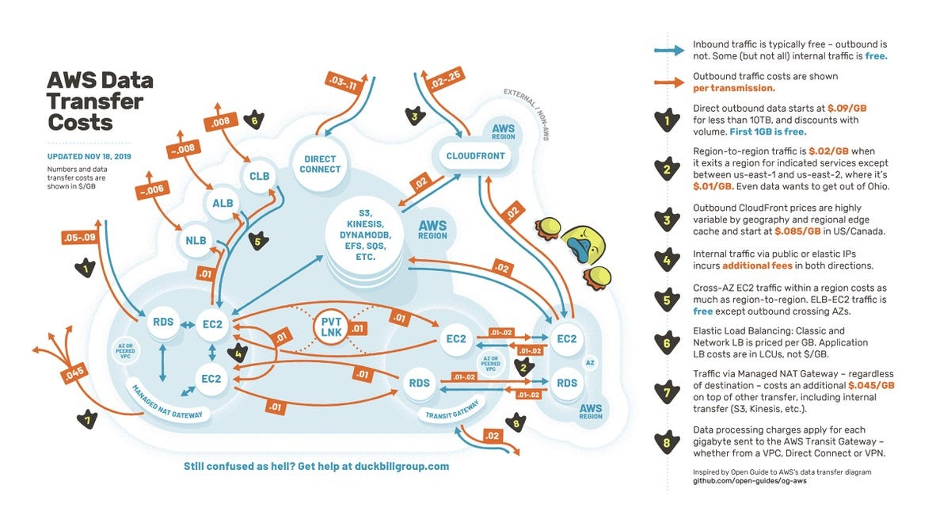
Additionally, AWS charges for data transfers between certain services and regions, which can complicate cost structures. For instance, data transfer between Availability Zones within the same AWS Region is charged at $0.01 per GB. Look at AWS’s detailed pricing documentation to understand these charges fully. 

The following diagram illustrates the complexity of AWS’s data transfer pricing:

illustration of AWS Data Transfer Costs
Source.

How can I reduce egress fees?

If you’re using cloud services, minimizing your egress fees is probably a high priority. Companies like the Duckbill Group (the creators of the diagram above) exist to help businesses manage their AWS bills. In fact, there’s a whole industry of consultants that focuses solely on reducing your AWS bills. 

Aside from hiring a consultant to help you spend less, there are a few simple ways to lower your egress fees:

  1. Use a content delivery network (CDN): If you’re hosting an application, using a CDN can lower your egress fees since a CDN will cache data on edge servers. That way, when a user sends a request for your data, it can pull it from the CDN server rather than your cloud storage provider where you would be charged egress. 
  2. Optimize data transfer protocols: Choose efficient data transfer protocols that minimize the amount of data transmitted. For example, consider using compression or delta encoding techniques to reduce the size of transferred files. Compressing data before transfer can reduce the volume of data sent over the network, leading to lower egress costs. However, the effectiveness of compression depends on the nature of the data.
  3. Utilize cloud providers that focus on interoperability: Some cloud providers offer free data transfer with a range of other cloud partners. 
  1. Be aware of tiering: It may sound enticing to opt for a cold(er) storage tier to save on storage, but some of those tiers come with much higher egress fees. 
  2. Consolidate workloads in the same region: Minimize inter-region data transfers by keeping applications, services, and data storage within the same cloud region whenever possible. Transferring data between regions often incurs additional charges that can quickly add up.
  3. Use point-to-point networking or directprivate connect: If your business frequently transfers large volumes of data, consider setting up a private network connection, like Megaport, PacketFabric, or Console Connect. These services provide dedicated bandwidth at a predictable cost, potentially lowering overall egress fees.
  4. Plan data extractions strategically: Instead of frequent, small data extractions, batch your transfers into fewer, larger downloads. This can help you better manage costs by avoiding repeated charges for smaller-scale egress operations.
  5. Monitor and analyze data flows: Use tools or dashboards to monitor data traffic within your cloud environment. Identifying patterns in data usage can help pinpoint unnecessary transfers or optimize workflows to limit costly egress activities.

How does Backblaze reduce egress fees?

There’s one more way you can drastically reduce egress, and we’ll just come right out and say it: Backblaze gives you free egress up to 3x the average monthly storage and unlimited free egress through a number of CDN and compute partners, including Fastly, Cloudflare, Bunny.net, and Vultr. 

Why do we offer free egress? Supporting an open cloud environment is central to our mission, so we expanded free egress to all customers so they can move data when and where they prefer. 

Cloud providers like AWS and others charge high egress fees that make it expensive for customers to use multi-cloud infrastructures and therefore lock in customers to their services. These walled gardens hamper innovation and long-term growth. By eliminating restrictive egress fees, we enable businesses to adopt multi-cloud strategies without the financial penalty of moving their data.

By partnering with leading CDN providers and compute platforms, we’ve built a system where you can move data seamlessly while enjoying cost savings that other providers don’t offer.

Free egress = A better, multi-cloud world

The bottom line: the high egress fees charged by hyperscalers like AWS, Google, and Microsoft are a direct impediment to a multi-cloud future driven by customer choice and industry need. And, a multi-cloud future is something we believe in. So go forth and build the multi-cloud future of your dreams, and leave worries about high egress fees in the past. 

The post Cloud Egress Fees: What They Are And How To Reduce Them appeared first on Backblaze Blog | Cloud Storage & Cloud Backup

HYCU + Backblaze: Protecting Against Data Loss

Post Syndicated from Jennifer Newman original https://www.backblaze.com/blog/hycu-backblaze-protecting-against-data-loss/

A decorative image showing the Backblaze and HYCU logos.

Backblaze and HYCU, the fastest-growing leader in multi-cloud data protection as a service (DPaaS) are teaming up to provide businesses a complete backup solution for modern workloads with low-cost scalable infrastructure—a must-have for modern cyber resilience needs.

Read on to learn more about the partnership, how you can benefit from affordable, agile data protection, and a little bit about a relevant ancient poetic art form.

HYCU + Backblaze: The Power of Collaboration

Within HYCU’s DPaaS platform, shared customers can now select Backblaze B2 Cloud Storage—an S3 compatible object storage platform that provides highly durable, instantly available hot storage—as a destination for their HYCU backups. 

With more applications in use across the modern data center, visibility and the ability to protect that mission-critical data has never been at more of a premium. Our collaboration with Backblaze now offers joint customers a cost-effective and scalable data protection solution combining the best in backup and recovery with Backblaze’s streamlined and secure cloud storage.

—Subbiah Sundaram, SVP Product, HYCU, Inc.

The Data Sprawl Problem

On average, businesses and organizations have upwards of 200 different sets of data or “data silos” spread across a growing number of applications, databases, and physical locations. This data sprawl isn’t just hard to manage, it opens up more opportunities for cybercriminals to inject ransomware and gain access to systems. 

HYCU gives customers the power to protect every byte while also managing all their business critical data in one place. Powered by the world’s first development platform for data protection, HYCU is the only DPaaS platform that can scale to protect all of your data—wherever it resides. Most importantly, it gives customers the ability to recover from disaster almost instantly, keeping them online and in business, with an average recovery time of 10 minutes. 

Backblaze and HYCU:

Keeping data safe for all

at one-fifth the cost.

By combining HYCU data protection with Backblaze B2 Storage Cloud, customers can see up to 80% lower costs in comparison to using providers like AWS for their storage, which means that combining the two can be a force multiplier for a businesses’ ability to fully protect their data and scale efficiently and reliably.

Data protection:

Once challenging, now easy—

HYCU and B2.

The partnership offers the following benefits:

  • Performance: With a 99.9% uptime service level agreement (SLA) and no cold delays or speed premiums, storing data in Backblaze B2 Cloud Storage means joint customers have instant access to their data whenever and wherever they need it. 
  • Affordability: Existing customers can reduce their total cost of ownership by switching backup tiers with interoperable S3 compatible storage, and institutions and businesses who may not have been able to afford hyperscaler-based solutions can now protect their data.
  • Compliance and Security: With Backblaze B2’s Object Lock feature, the partnership also offers an additional layer of security through data immutability, which protects backups from ransomware and satisfies evolving cyber insurance requirements.

These benefits can prove particularly useful for higher education institutions, schools, state and local governments, nonprofits, and others where maximizing tight budgets is always a priority.

What’s in a Name?

For the poetically minded among our readership (there must be a few of you, right?), you may have noticed a haiku or two above. And that’s not a coincidence.

The humble haiku inspired the name for HYCU. In true poetic fashion, the name serves more than one purpose—it’s also an acronym for “hyperconverged uptime,” making the least amount of letters do the most, as they should.

Making Data Protection Easier

This partnership adds a powerful new data protection option for joint customers looking to affordably back up their data and establish a disaster recovery strategy. And, this is just the beginning. Stay tuned for more from this partnership, including integrations with HYCU’s other data protection offerings in the future. 

Interested in getting started? Learn more in our docs.

The post HYCU + Backblaze: Protecting Against Data Loss appeared first on Backblaze Blog | Cloud Storage & Cloud Backup.

CDN Bandwidth Fees: What You Need to Know

Post Syndicated from Molly Clancy original https://www.backblaze.com/blog/cdn-bandwidth-fees-what-you-need-to-know/

A decorative image showing a cloud with three dollar signs and the word "Egress", three CDN nodes, and a series of 0s and 1s representing data.

You know that sinking feeling you get in your stomach when you receive a hefty bill you weren’t expecting, especially when you then have to justify it to your finance team or face making cuts elsewhere to cover budget overrun? That is what some content delivery network (CDN) customers experience when they get slammed with bandwidth fees without warning. To avoid those painful conversations, it’s important to understand how bandwidth fees work. Knowing precisely what you are paying for and how you use the cloud service can help prevent eye-popping bills you weren’t prepared for.

A CDN can be an excellent way to speed up your website, improve performance, and boost SEO, but not all vendors are created equal—some charge significantly more for data transfer than others. As a leading provider of specialized cloud storage, Backblaze offers free egress to leading CDN providers like Fastly, bunny.net, and Cloudflare. Backblaze also offers tools for developers that help manage storage efficiently while integrating smoothly with CDN services.

So, let’s talk about bandwidth fees and how they work to help you decide which CDN provider is right for you.

What are CDN bandwidth fees?

Most CDN cloud services work like this: You can configure the CDN to pull data from one or more origins (such as a Backblaze B2 Cloud Storage Bucket) for free or for a flat fee, and then you’re charged fees for usage, namely when data is transferred when a user requests it. 

These fees are known as bandwidth, download, or data transfer fees. (We’ll use these terms somewhat interchangeably.) Typically, storage providers also charge fees when data is retrieved by a CDN.

The fees aren’t a problem in and of themselves, but if you don’t have a good understanding of them, it could lead to unexpected costs. 

For example, if you’re a game-sharing platform, and one of your games goes viral, bandwidth and egress fees can add up quickly. CDN providers usually charge in arrears, meaning they wait to see how much of the data was accessed each month, and then they apply their fees.

Some of the cost factors to consider include traffic spikes, regional distribution of your users (as some regions have higher transfer rates), and frequency of transferring large media files. Monitoring and managing data transfer fees can be challenging, especially during high-traffic events, as fees can quickly escalate without warning.

Although some CDN services offer calculation tools, these are estimates and may not always account for sudden increases in data transfer. It’s important to know exactly how these fees work so you can plan your workflows better and position your content strategically to reduce fees and increase cost efficiency.

How do CDN bandwidth fees work?

Data transfer occurs when data leaves the network. An example might be when your application server delivers an HTML page to the browser or your cloud object store serves an image via the CDN. Another example is when your data is moved to a different regional server within the CDN to make access faster for users in nearby locations.

A decorative photo of a sign that says "$5 fee per usage for non-members."

Each instance where your data may be accessed or moved incurs a cost, and these fees can quickly add up. Typically, CDN vendors charge a fee per GB or TB up to a specific limit. Once you hit these thresholds, you may advance up another pricing tier or incur expensive overage charges. A busy month could cost you a mint, and traffic spikes for different reasons in different industries—like a Black Friday rush for an e-commerce site or around events like the Super Bowl for a sports betting site, for example.

Price comparison of bandwidth fees across CDN services

To get a better sense of how each CDN service charges for bandwidth, let’s explore the top providers and what they offer and charge. Each CDN varies in bandwidth fees, additional costs, and value-added features such as enhanced security and caching options.

As part of the Bandwidth Alliance and the CDN Alliance, some of these vendors have agreed to discount customer data transfer fees when transferring one or both ways between member companies. What’s more, Backblaze offers free egress with CDN partners Fastly, bunny.net, and Cloudflare, among other vendors, helping reduce costs for businesses with high data transfer fees. 

When comparing CDNs, consider not only their per-GB costs but also factors like regional pricing variations, tiered pricing thresholds, and any add-ons for specific services like DDoS protection, web application firewalls (WAF), or dedicated support. These factors can significantly impact total costs, especially for businesses with varying traffic levels.

Note: Prices are as published by vendors as of 11/21/2024.

1. Fastly

Fastly offers edge caches to deliver content instantly around the globe. The company also offers SSL services for $20/per domain per month. They have various additional add-ons for things like web application firewalls (WAFs), managed rules, DDoS protection, and their Gold support.

Their CDN pricing offers flexibility through three main options:

  1. Free Tier: This option provides up to $50 in monthly usage for any product (including CDN), with no request throttling and no cap on redirects or page rules. 
  2. Usage Tier: This option at $50 per month plus usage fees. It includes up to $100 in monthly CDN and Compute usage, with no cap on usage, five included TLS domains, mutual TLS, and SSO authentication.
  3. Packages: Start at $1,500 per month and include various features, with tiers designed to support growing and large businesses needing predictable, scalable CDN services.

Fastly proudly partners with Backblaze, so mutual customers enjoy zero egress fees. Fastly also offers custom enterprise pricing and trials for hands-on experience. For more info you can check out how Fastly’s CDN beats AWS CloudFront.

2. bunny.net

bunny.net labels itself as the world’s lightning-fast CDN service, with affordable region-based pricing. This makes them another strong alternative to AWS Cloudfront for companies with a limited budget. For the Standard Network (123 PoPs), rates start at $0.01/GB per month for North America and Europe, $0.045/GB for South America, $0.03/GB for Asia and Oceania, and $0.06/GB for the Middle East and Africa.

For businesses with higher bandwidth needs, the Volume Network offers a global rate of $0.005/GB up to 500TB, with tiered discounts available up to 2PB and beyond.

bunny.net partners with Backblaze to offer free egress. Check out how bunny.net compares to AWS CloudFront.

3. Cloudflare

Cloudflare offers a limited free plan for hobbyists and individuals. They also have tiered pricing plans for businesses called Pro, Business, and Enterprise. Instead of charging bandwidth fees, Cloudflare opts for the monthly subscription model, which includes everything.

The Pro plan costs $20/month (for 100MB of upload). The Business plan is $200/month (for 200MB of upload). You must call to get pricing for the Enterprise plan (for 500MB of upload).

Cloudflare partners with Backblaze, and joint customers enjoy free egress between the two services. It also offers dozens of add-ons for load balancing, smart routing, security, serverless functions, etc. Each one costs extra per month.

4. AWS Cloudfront

AWS Cloudfront is Amazon’s CDN and is tightly integrated with its AWS services. The company offers tiered pricing based on bandwidth usage. The specifics are as follows for North America:

  • First 1TB of data transfer per month is free.
  • $0.085/GB for the next 9TB per month.
  • $0.080/GB for the next 40TB per month.
  • $0.060/GB for the next 100TB per month.
  • $0.040/GB for the next 350TB per month.
  • $0.030/GB for the next 524TB per month.

Their pricing extends up to 5PB per month, and there are different pricing breakdowns for different regions.

Amazon offers special discounts for high-data users and those customers who use AWS for their application storage. You can also purchase add-on products that work with the CDN for media streaming and security.

A decorative image showing a portion of the earth viewed from space with lights clustered around city centers.
Sure it’s pretty. Until you know all those lights represent possible fees.

5. Google Cloud CDN

Google Cloud CDN offers fast and reliable content delivery services. However, Google charges bandwidth, cache egress fees, and for cache misses. Their pricing structure is as follows:

  • Cache Egress: $0.02–$0.20 per GB.
  • Cache Fill: $0.01–$0.04 per GB.
  • Cache Lookup Requests: $0.0075 per 10,000 requests.

Cache egress fees are priced per region, and in the U.S., they start at $0.08 for the first 10TB. Between 10–150TB costs $0.055, and beyond 500TB, you have to call for pricing.

Google charges $0.01 per GB for cache fill services.

6. Microsoft Azure

The Azure content delivery network is Microsoft’s offering that promises speed, reliability, and a high level of security.

Azure offers a limited free account for individuals to play around with. Depending on the zone, the price will vary for data transfer. For Zone One, which includes North America, Europe, Middle East, and Africa, pricing is as follows:

  • First 10TB: $0.158/GB per month.
  • Next 40TB: $0.14/GB per month.
  • Next 100TB: $0.121/GB per month.
  • Next 350TB: $0.102/GB per month.
  • Next 500TB: $0.093/GB per month.
  • Next 4,000TB: $0.084/GB per month.

Azure charges $.60 per 1,000,000,000 requests per month and $1 for rules per month. You can also purchase WAF services and other products for an additional monthly fee.

Comparing the CDNs

How to save on bandwidth fees

A CDN can significantly enhance the performance of your website or web application and is well worth the investment. However, finding ways to save on bandwidth fees pays dividends. Here are some strategies:

  • Look for Bandwidth Alliance partners. Many CDN providers, including those in the Bandwidth Alliance, offer discounted rates for bandwidth and egress fees when transferring data between member companies.
  • Choose affordable origin storage. Select origin storage that integrates seamlessly with your chosen CDN provider, reducing your data transfer costs. Backblaze B2, for example, offers completely free egress to partners like Fastly, bunny.net, and Cloudflare, and free egress up to 3x the amount you store for transfer to other services.
  • Optimize caching and edge settings. Fine-tuning caching rules to keep frequently accessed data at edge locations can reduce the amount of data transferred, helping to avoid unnecessary bandwidth fees.
  • Implement data compression. Compressing files, especially large media, reduces the data size served by the CDN, which in turn reduces bandwidth usage.
  • Minimize redirects and request loops. Reducing redirects and optimizing request loops helps keep data transfer low and avoids additional bandwidth fees.
  • Use tiered or reserved data transfer plans. Some CDNs offer reserved or tiered data transfer options that provide discounts on larger volumes; consider these if your data transfer needs are predictable and high.

Here at Backblaze, we think the world needs lower egress fees, and we offer free egress from Backblaze B2 to many CDN partners like Fastly, bunny.net, and Cloudflare.

FAQ

1. What is CDN bandwidth?

CDN bandwidth refers to the amount of data that is transferred between a content delivery network (CDN) and its end-users. When a user accesses a website or service that uses a CDN, the data they request is delivered from servers closest to them, which speeds up delivery and reduces latency. The total amount of this data transfer over time is considered the CDN bandwidth, and it can significantly affect performance and costs depending on traffic levels.

2. What is a bandwidth fee?

A bandwidth fee is a charge imposed by a CDN provider based on the volume of data transferred from the CDN’s servers to end-users. CDNs use a pay-per-use model for bandwidth, meaning websites or services pay for each unit of data transferred, typically measured in gigabytes (GB) or terabytes (TB). High traffic volumes or large files (like videos) can quickly increase these fees, making it important to monitor and manage bandwidth usage.

3. How can I reduce CDN usage?

Reducing CDN fees involves optimizing data transfer and content delivery practices. A few effective strategies are to look for bandwidth alliance partners, choose affordable origin storage, optimize caching and edge settings, implement data compression, minimize redirects and request loops, and use tiered or reserved data transfer plans.

4. How do I monitor CDN bandwidth usage effectively?

Most CDN providers offer analytics and reporting tools to track bandwidth usage in real time. By regularly reviewing these reports, you can identify high-demand assets, monitor peak traffic times, and adjust your delivery strategy to minimize bandwidth fees.

The post CDN Bandwidth Fees: What You Need to Know appeared first on Backblaze Blog | Cloud Storage & Cloud Backup