All posts by Michael Tremante

Get notified when your site is under attack

Post Syndicated from Michael Tremante original https://blog.cloudflare.com/get-notified-when-your-site-is-under-attack/
Get notified when your site is under attack

Get notified when your site is under attack

Our core application security features such as the WAF, firewall rules and rate limiting help keep millions of Internet properties safe. They all do so quietly without generating any notifications when attack traffic is blocked, as our focus has always been to stop malicious requests first and foremost.

Today, we are happy to announce a big step in that direction. Business and Enterprise customers can now set up proactive alerts whenever we observe a spike in firewall related events indicating a likely ongoing attack.

Alerts can be configured via email, PagerDuty or webhooks, allowing for flexible integrations across many systems.

You can find and set up the new alert types under the notifications tab in your Cloudflare account.

What Notifications are available?

Two new notification types have been added to the platform.

Security Events Alert

This notification can be set up on Business and Enterprise zones, and will alert on any spike of firewall related events across all products and services. You will receive the alert within two hours of the attack being mitigated.

Advanced Security Events Alert

This notification can be set up on Enterprise zones only. It allows you to filter on the exact security service you are interested in monitoring and different notifications can be set up for different services as necessary. The alert will fire within five minutes of the attack being mitigated.

Alerting on Application Security Anomalies

We’ve previously blogged about how accurately calculating anomalies in time series data sets is hard. Simple threshold alerting — “notify me if there are more than X events” — doesn’t work well. It takes a lot of work to tune the specific thresholds to be accurate, and even then you’re still likely to end up with false positives or missed events.

For Origin Error Rate notifications, we leaned on the methodology outlined in the Google SRE Handbook for alerting based on Service Level Objectives (SLOs). However, SLO alerting assumes that there is an established baseline. We know exactly what percentage of responses from your origin are “allowed” to be errors before something is definitely wrong. We don’t know what that percentage is for Firewall events. For example, Internet properties with many Firewall rules are more likely to have more Firewall events than Internet properties with few Firewall rules.

Instead of using SLO based alerting for Security Event notifications, we’re using Z-score calculations. The z-score methodology calculates how many standard deviations away from the mean a certain data point is. For Security Event notifications we can take the mean number of Firewall events for each distinct Internet property as the effective “baseline”, and compare the current number of Firewall events to see if there is a significant spike.

In this first iteration, a z-score threshold of 3.5 has been configured in the system and will be adjusted based on customer feedback. You can read more about the system in our WAF developer docs.

Getting started with Application Security Event notifications

To configure these notifications, navigate to the Notifications tab of the dashboard and click “Add”. Select Security Events Alert or Advanced Security Events Alert.
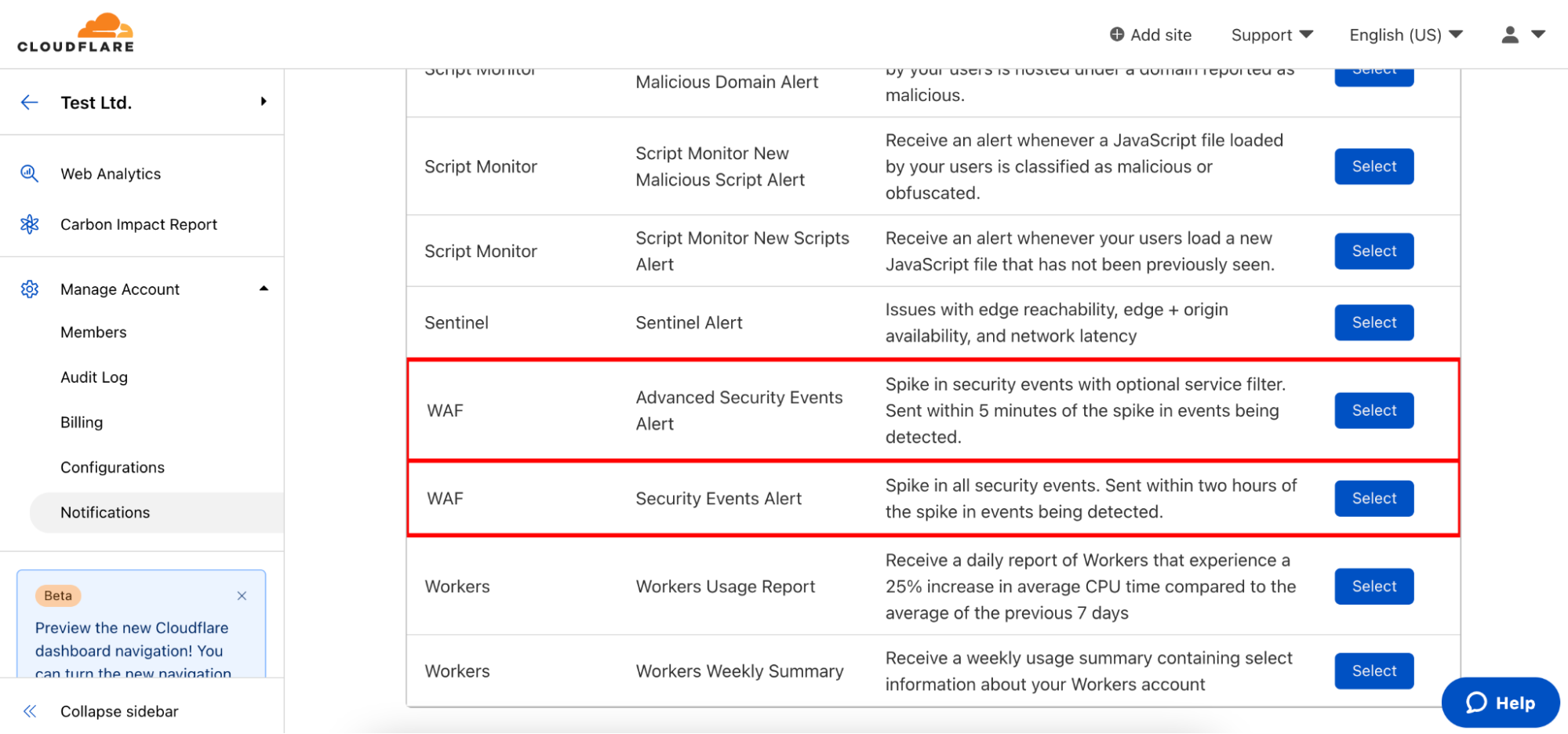
Get notified when your site is under attack

As with all Cloudflare notifications, you’re able to name and describe your notification, and choose how you want to be notified. From there, you can select which domains you want to monitor.
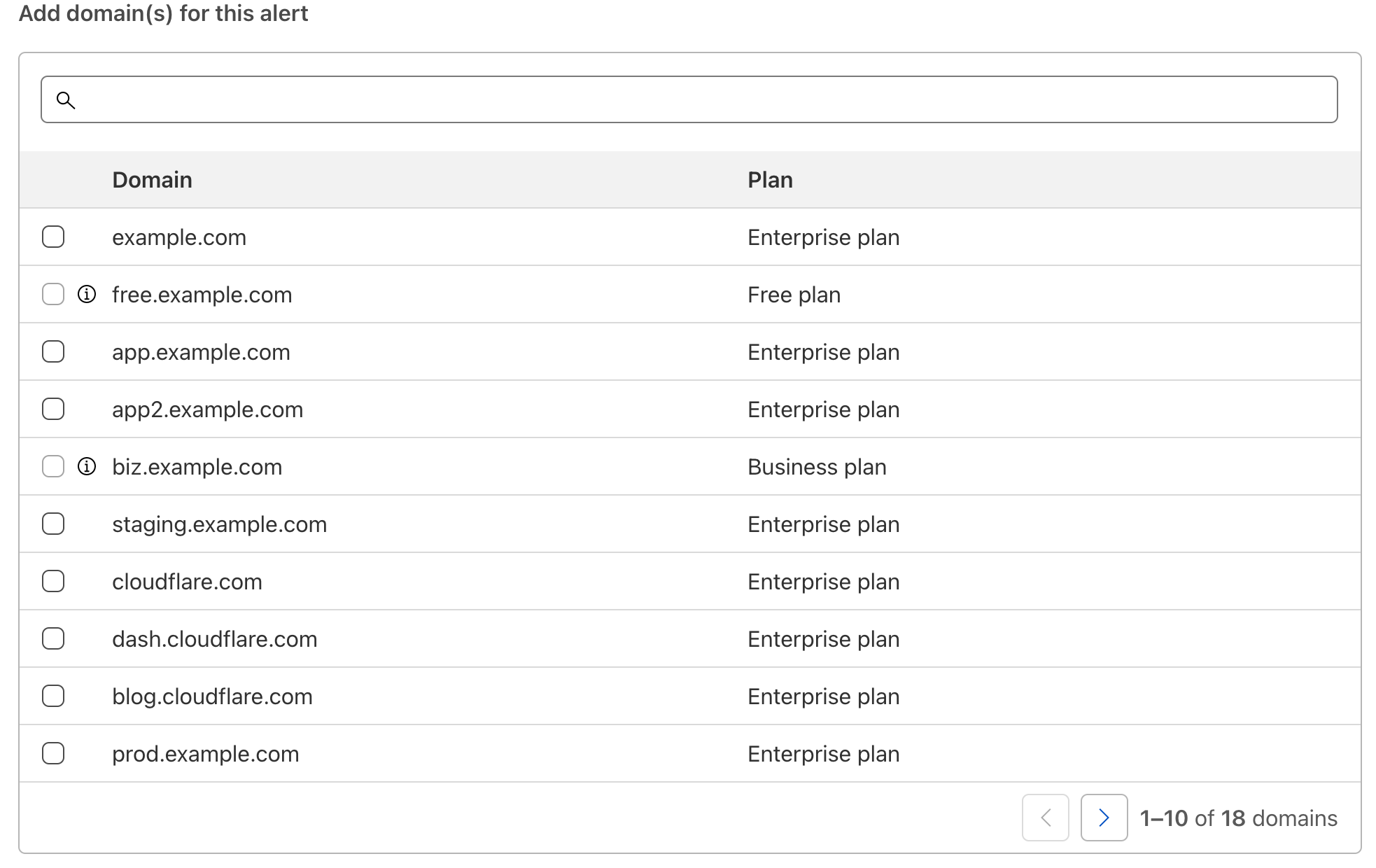
Get notified when your site is under attack

For Advanced Security Event notifications, you can also select which services the notification should monitor. The log value in Firewall Event logs for each relevant service is also displayed in the event you are integrating directly with Cloudflare logs and wish to filter relevant events in your existing SIEMs.
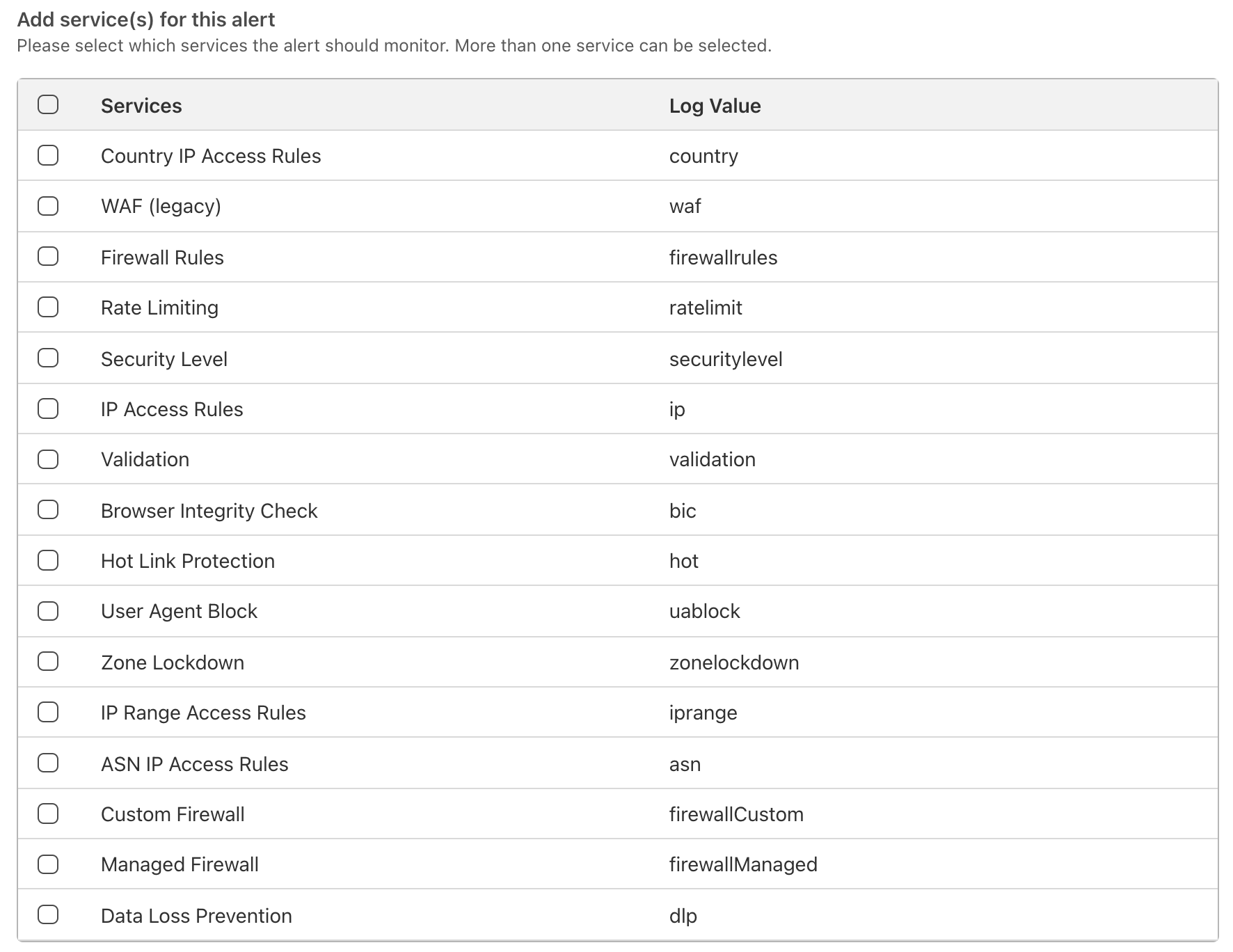
Get notified when your site is under attack

Once the notifications have been set up, you can rely on Cloudflare to warn you whenever an anomaly is detected. An example email notification is shown below:
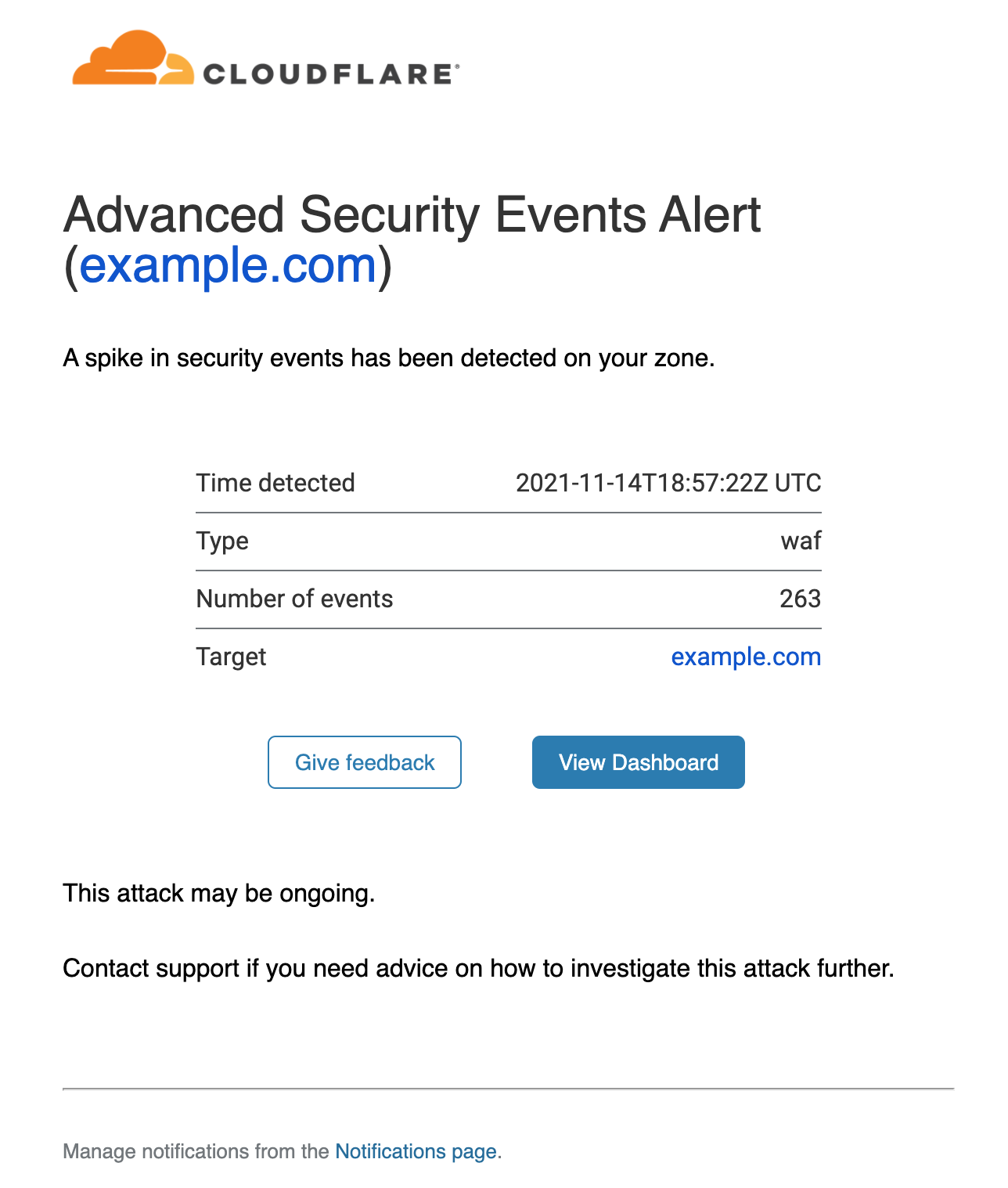
Get notified when your site is under attack

The alert provides details on the service detecting the events (in this case the WAF), the timestamp and the affected zone. A link is provided that will direct you to the Firewall Events dashboard filtered on the correct service and time range.

The first of many alerts!

We are looking forward to customers setting up their notifications, so they can stay on top of any malicious activity affecting their applications.

This is just the first step of many towards building a much more comprehensive suite of notifications and incident management systems directly embedded in the Cloudflare dashboard. We look forward to posting feature improvements to our application security alert system in the near future.
Helping Apache Servers stay safe from zero-day path traversal attacks (CVE-2021-41773)

Post Syndicated from Michael Tremante original https://blog.cloudflare.com/helping-apache-servers-stay-safe-from-zero-day-path-traversal-attacks/

Helping Apache Servers stay safe from zero-day path traversal attacks (CVE-2021-41773)

Helping Apache Servers stay safe from zero-day path traversal attacks (CVE-2021-41773)

On September 29, 2021, the Apache Security team was alerted to a path traversal vulnerability being actively exploited (zero-day) against Apache HTTP Server version 2.4.49. The vulnerability, in some instances, can allow an attacker to fully compromise the web server via remote code execution (RCE) or at the very least access sensitive files. CVE number 2021-41773 has been assigned to this issue. Both Linux and Windows based servers are vulnerable.

An initial patch was made available on October 4 with an update to 2.4.50, however, this was found to be insufficient resulting in an additional patch bumping the version number to 2.4.51 on October 7th (CVE-2021-42013).

Customers using Apache HTTP Server versions 2.4.49 and 2.4.50 should immediately update to version 2.4.51 to mitigate the vulnerability. Details on how to update can be found on the official Apache HTTP Server project site.

Any Cloudflare customer with the setting normalize URLs to origin turned on have always been protected against this vulnerability.

Additionally, customers who have access to the Cloudflare Web Application Firewall (WAF), receive additional protection by turning on the rule with the following IDs:

  • 1c3d3022129c48e9bb52e953fe8ceb2f (for our new WAF)
  • 100045A (for our legacy WAF)

The rule can also be identified by the following description:

Rule message: Anomaly:URL:Query String - Multiple Slashes, Relative Paths, CR, LF or NULL.

Given the nature of the vulnerability, attackers would normally try to access sensitive files (for example /etc/passwd), and as such, many other Cloudflare Managed Rule signatures are also effective at stopping exploit attempts depending on the file being accessed.

How the vulnerability works

The vulnerability leverages missing path normalization logic. If the Apache server is not configured with a require all denied directive for files outside the document root, attackers can craft special URLs to read any file on the file system accessible by the Apache process. Additionally, this flaw could also leak the source of interpreted files like CGI scripts and, in some cases, also allow the attacker to take over the web server by executing shell scripts.

For example, the following path:

$hostname/cgi-bin/../../../etc/passwd

would allow the attacker to climb the directory tree (../ indicates parent directory) outside of the web server document root and then subsequently access /etc/passwd.

Well implemented path normalization logic would correctly collapse the path into the shorter $hostname/etc/passwd by normalizing all ../ character sequences nullifying the attempt to climb up the directory tree.

Correct normalization is not easy as it also needs to take into consideration character encoding, such as percent encoded characters used in URLs. For example, the following path is equivalent to the first one provided:

$hostname/cgi-bin/.%2e/%2e%2e/%2e%2e/etc/passwd

as the characters %2e represent the percent encoded version of dot “.”. Not taking this properly into account was the cause of the vulnerability.

The PoC for this vulnerability is straightforward and simply relies on attempting to access sensitive files on vulnerable Apache web servers.

Exploit Attempts

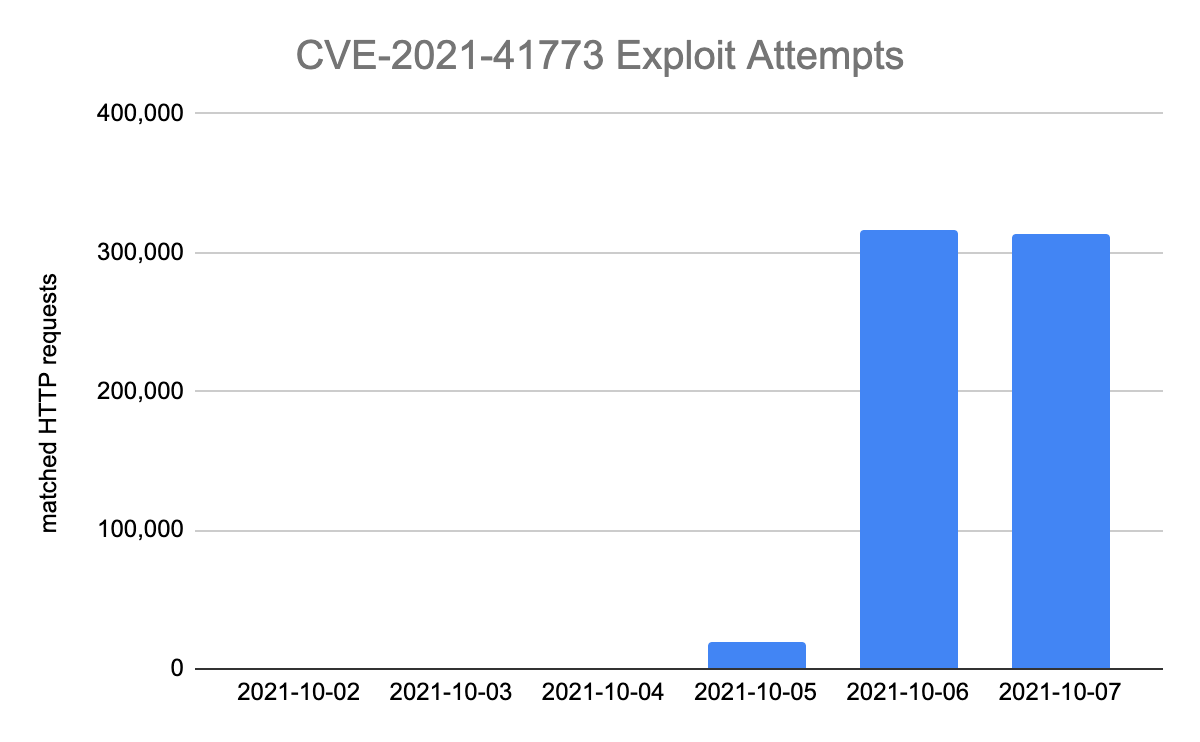
Cloudflare has seen a sharp increase in attempts to exploit and find vulnerable servers since October 5.

Helping Apache Servers stay safe from zero-day path traversal attacks (CVE-2021-41773)

Most exploit attempts observed have been probing for static file paths — indicating heavy scanning activity before attackers (or researchers) may have attempted more sophisticated techniques that could lead to remote code execution. The most commonly attempted file paths are reported below:

/cgi-bin/.%2e/.git/config
/cgi-bin/.%2e/app/etc/local.xml
/cgi-bin/.%2e/app/etc/env.php
/cgi-bin/.%2e/%2e%2e/%2e%2e/etc/passwd

Conclusion

Keeping web environments safe is not an easy task. Attackers will normally gain access and try to exploit vulnerabilities even before PoCs become widely available — we reported such a case not too long ago with Atlassian’s Confluence OGNL vulnerability.

It is vital to employ all security measures available. Cloudflare features such as our URL normalization and the WAF, are easy to implement and can buy time to deploy any relevant patches offered by the affected software vendors.

How Cloudflare helped mitigate the Atlassian Confluence OGNL vulnerability before the PoC was released

Post Syndicated from Michael Tremante original https://blog.cloudflare.com/how-cloudflare-helped-mitigate-the-atlassian-confluence-ognl-vulnerability-before-the-poc-was-released/

How Cloudflare helped mitigate the Atlassian Confluence OGNL vulnerability before the PoC was released

How Cloudflare helped mitigate the Atlassian Confluence OGNL vulnerability before the PoC was released

On August 25, 2021, Atlassian released a security advisory for their Confluence Server and Data Center. The advisory highlighted an Object-Graph Navigation Language (OGNL) injection that would result in an unauthenticated attacker being able to execute arbitrary code.

A full proof of concept (PoC) of the attack was made available by a security researcher on August 31, 2021. Cloudflare immediately reviewed the PoC and prepared a mitigation rule via an emergency release. The rule, once tested, was deployed on September 1, 2021, at 15:32 UTC with a default action of BLOCK and the following IDs:

  • 100400 (for our legacy WAF)
  • e8c550810618437c953cf3a969e0b97a (for our new WAF)

All customers using the Cloudflare WAF to protect their self-hosted Confluence applications have automatically been protected since the new rule was deployed last week. Additionally, the Cloudflare WAF started blocking a high number of potentially malicious requests to Confluence applications even before the rule was deployed.

And customers who had deployed Cloudflare Access in front of their Confluence applications were already protected even before the emergency release. Access checks every request made to a protected hostname for a JSON Web Token (JWT) containing a user’s identity. Any unauthenticated users attempting this exploit would have been blocked before they could reach the Confluence server.

Customers must, however, immediately update their self-hosted Confluence installations to the versions listed in the advisory to ensure full protection.

This vulnerability was assigned the CVE number 2021-26084 and has a base score of 9.8 — critical. A detailed technical write-up of the vulnerability along with the PoC can be found on GitHub.

Timeline of Events

A timeline of events is provided below:

2021-08-25 at 17:00 UTC Atlassian security advisory released
2021-08-28 Cloudflare WAF starts seeing and blocking malicious traffic targeting vulnerable endpoints related to the security advisory
2021-08-31 at 22:22 UTC A PoC becomes widely available
2021-09-01 at 15:32 UTC Additional Cloudflare WAF rule to target CVE-2021-26084

How soon were attackers probing vulnerable endpoints?

High profile vulnerabilities tend to be exploited very quickly by attackers once a PoC or a patch becomes available. Cloudflare maintains aggregated and sampled data on WAF blocks1 that can be used to explore how quickly vulnerable endpoints start receiving malicious traffic, highlighting the importance of deploying patches as quickly as possible.

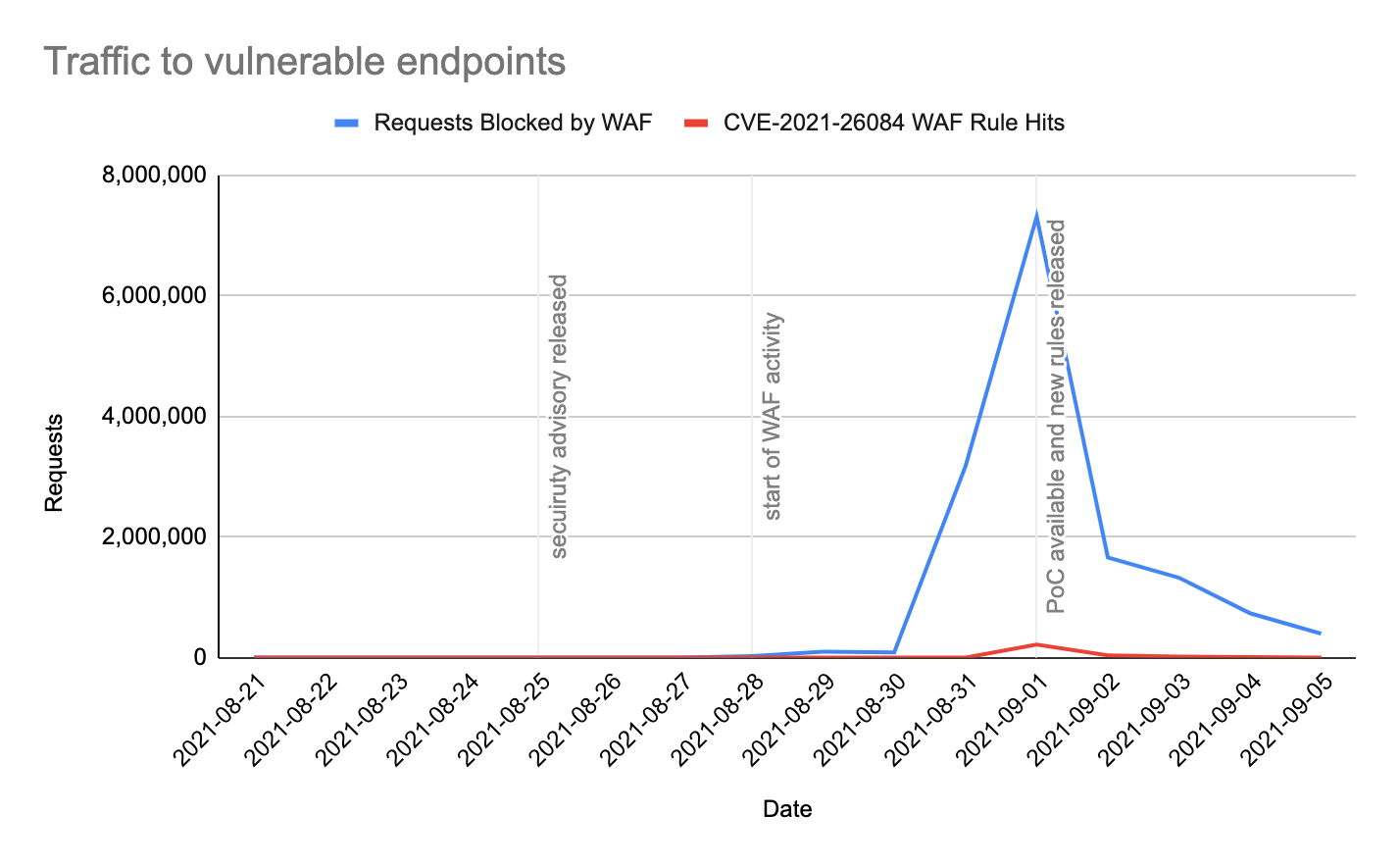
Cloudflare data suggests that scanning for the vulnerability started up to three days before the first publicly available PoC was published, as high WAF activity was observed on vulnerable endpoints beginning August 28, 2021. This activity may indicate that attackers or researchers had successfully reverse engineered the patch within that time frame.

It also shows that, even without the specific WAF rule that we rolled out for this vulnerability, Cloudflare was blocking attempts to exploit it. Other WAF rules picked up the suspect behavior.

For this vulnerability, two endpoints are highlighted that can be used to explore attack traffic:

  • /pages/doenterpagevariables.action
  • /pages/createpage-entervariables.action

The following graph shows traffic matching Cloudflare’s WAF security feature from August 21 to September 5, 2021. Specifically:

  • In blue: HTTP requests blocked by Cloudflare’s WAF matching the two chosen paths.
  • In red: HTTP requests blocked by Cloudflare’s WAF matching the two paths and the specific rule deployed to cover this vulnerability.
How Cloudflare helped mitigate the Atlassian Confluence OGNL vulnerability before the PoC was released

By looking at the data, an increase in activity can be seen starting from August 28, 2021 — far beyond normal Internet background noise levels. Additionally, more than 64% of the traffic increase was detected and blocked by the Cloudflare WAF as malicious on the day the PoC was available.

What were attackers trying before a PoC was widely available?

Just before a PoC became widely available, an increasing number of requests were blocked by customer configured IP based rules, followed by our Managed Rulesets and rate limiting. Most custom WAF rules and IP based rules are created by customers either in response to malicious activity in the WAF logs, or as a positive security model to lock down applications that should simply not have public access from the Internet.

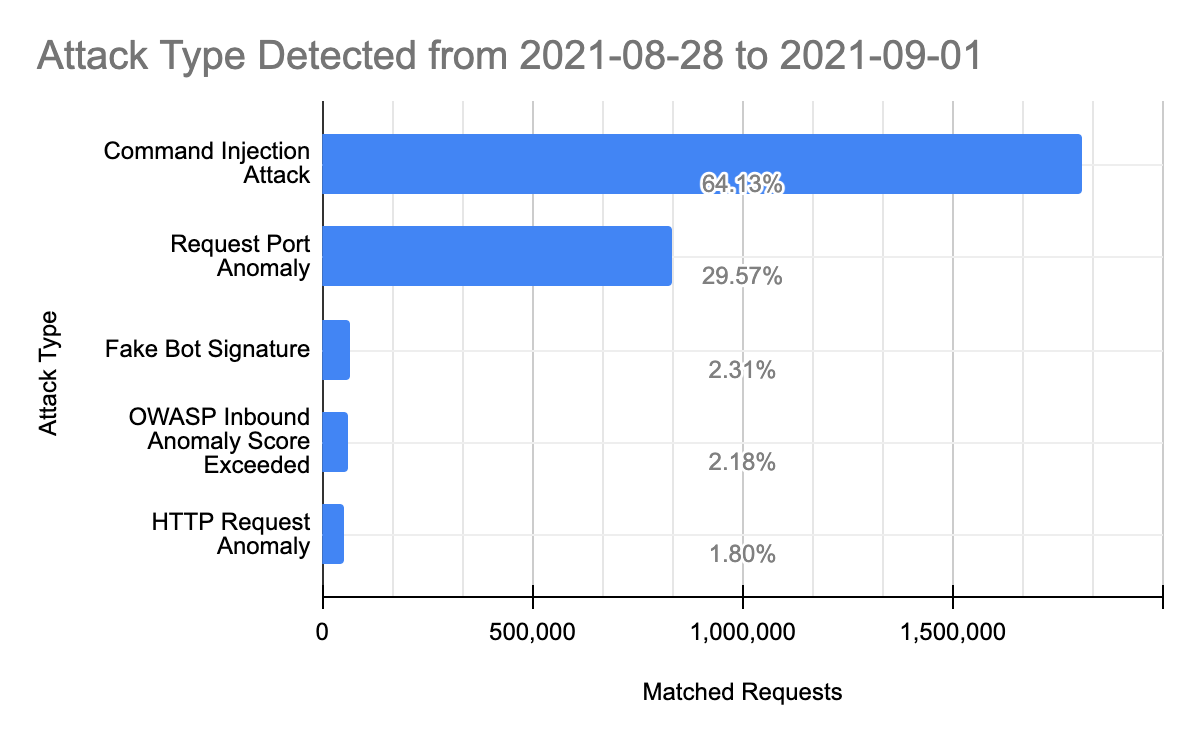
We can zoom into the Managed WAF rule matches to explore what caused the WAF to trigger before the specific rule was deployed:

How Cloudflare helped mitigate the Atlassian Confluence OGNL vulnerability before the PoC was released

Command injection based attacks were the most common vector attempted before a PoC was made widely available, indicating again that some attackers may have been at least partially aware of the nature of the vulnerability. These attacks are aimed at executing remote code on the target application servers and are often platform specific. Other attack types observed, in order of frequency were:

  • Request Port Anomalies: these are HTTP requests to uncommon ports that are normally not exposed for HTTP traffic.
  • Fake Bot Signatures: these requests matched many of our rules aimed at detecting user agents spoofing themselves as popular bots such as Google, Yandex, Bing and others.
  • OWASP Inbound Anomaly Score Exceeded: these are requests that were flagged by our implementation of the OWASP ModSecurity Core Ruleset. The OWASP ruleset is a score based system that scans requests for patterns of characters that normally identify malicious requests;
  • HTTP Request Anomalies: these requests triggered many of our HTTP based validation checks including but not limited to RFC compliance checks.

Conclusions

Patching zero-day attacks as quickly as possible is vital for security. No single approach can be 100% successful at mitigating intrusion attempts. By observing patterns and triggers for this specific CVE, it is clear that a layered approach is most effective for protecting critical infrastructure. Cloudflare data also implies that, at least in part, some attackers or researchers were aware of the nature of the vulnerability at least since August 28, 2021, three days before a PoC was made widely available.

1The WAF block data consists of sampled matches of request fields including path, geography, rule ID, timestamp and other similar metadata.

Account Takeover Protection and WAF mitigations to help stop Global Brute Force Campaigns

Post Syndicated from Michael Tremante original https://blog.cloudflare.com/patching-the-internet-against-global-brute-force-campaigns/

Account Takeover Protection and WAF mitigations to help stop Global Brute Force Campaigns

Account Takeover Protection and WAF mitigations to help stop Global Brute Force Campaigns

Earlier today a cybersecurity advisory was published by international security agencies identifying widespread attacks against government and private sector targets worldwide. You can read the full report here, which discusses widespread, distributed, and anonymized brute force access attempts since mid-2019 and still active through early 2021.

Today, we have rolled out WAF mitigations to protect our customers against these types of attacks.

And we are making the exposed credential check feature of Account Takeover Protection available to all paid plans at no additional charge today. We had been planning to release these features later this month to a subset of our customers, but when we were informed of this ongoing attack we accelerated the release timeline and expanded those eligible to use the protections.

The attack which we are now protecting against was carried out in three main steps:

  1. Initial account compromise performed via brute force attacks against authentication endpoints;
  2. Once access was gained, network traversal was performed leveraging several publicly known vulnerabilities, including but not limited to CVE 2020-0688 and CVE 2020-17144 that widely affected Microsoft Exchange Servers;
  3. Deployment of remote shells, such as a variant of the reGeorg web shell, and network reconnaissance to gather additional information;

Detecting Brute Force Login Attempts

The findings in the report highlight the increasing problem of password reuse and compromise that affects online applications, including government and large private sector online properties.

In March 2021, during Security Week, we launched a beta program for a new feature called Exposed Credential Checks. This feature allows website administrators to be notified whenever a login attempt is performed using a breached username and password credential pair. This is a very strong signal to enforce two factor authentication, a password reset, or simply increase user logging for the duration of the session.

Starting today, all paid plans (i.e., Pro and above) can enable the exposed credential check feature of Account Takeover Protection. We made the decision to give this to more customers due to the severity of the report and ongoing nature of the exploitation attempts.

While we work to accelerate the automatic deployment of the capability across these plans, you can file a support ticket with “Account Takeover Protections activation request” in the subject line to have it manually enabled today for your domains.

Customers who are not yet running the new WAF announced during Security Week will first be upgraded to this version; all accounts created after May 6, 2021, are already on the new version. The exposed credential managed ruleset can then be turned on with a single click, and supports the following applications out of the box:

  • WordPress
  • Joomla
  • Drupal
  • Ghost
  • Magento
  • Plone
  • Microsoft Exchange

When turned on, whenever a compromised credential is detected the following header will be added to the request to the origin server:

Exposed-Credential-Check: 1

This header alone won’t provide additional security, but can be used by the origin server to enforce additional measures, for example forcing a two factor authentication or password reset flow. The feature can also be deployed in logging mode to easily identify brute force attacks targeting your application using the Firewall Analytics dashboard.

If your application is not in the default set of protected applications, as long as your login endpoints conform to one of our generic rules, the feature will work as expected. We currently have two options:

  • A JSON endpoint (application/json) that submits credentials with 'email' and 'password' keys, for example {“email”:”[email protected]”, “password”:”pass”}
  • A standard login HTML form (application/x-www-form-urlencoded), under a URL that contains “login”. The form fields should be named username and password respectively;

Developer documentation can be found here.

WAF Rule Update

In addition to exposed credential checks, we have implemented improvements to the following WAF rules effective immediately:

  • Improved rule 100197
  • Added a new rule 100197B (default disabled)

These rules will match against request payloads that contain the reGeorg shell variant mentioned in the report. The rule improvements were based on, but not limited to, the Yara rule found in the security advisory. In summary the rule will block payloads which contain the following signatures and similar variations:

%@ Page Language=C#
StrTr
System.Net.IPEndPoint
Response.AddHeader
Socket

Additional Mitigations

In addition to monitoring and defending against credential stuffing attacks using datasets of compromised credentials, security administrators should implement additional best practices for their authentication endpoints. For example, multi-factor authentication, account time-out and lock-out features, and stronger methods of authentication that require “having” something such as a hard token or client certificate—not just “knowing” something such as a username and password.

Cloudflare has a number of additional features that customers are also advised to deploy where possible on their environments to strengthen their security posture:

  • Cloudflare Access can be used to provide strong, multi-factor authentication for both internal and external facing applications, and integrates directly with your organization’s SSO and identity providers (IdP);
  • Where possible, implementing Mutual TLS rules (mTLS) in front of authentication endpoints will increase an application security posture considerably by avoiding the use of passwords. This can be done both as a Firewall Rule or as an option when setting up Cloudflare Access;
  • We recently announced a Managed IP list that will contain Open Proxy endpoints identified by Cloudflare’s intelligence – this list can be used when creating Firewall Rules to protect authentication endpoints by issuing Captcha (or other) challenges;
  • The use of our Bot Management detection has recently been expanded to all self-serve paid plans via our Super Bot Fight Mode product – this product allows customers to set up rules to challenge/block automated traffic, such as bots attempting brute force attacks, while letting verified bots access Internet properties normally.

Conclusion

Brute force attacks are a prevalent and successful means to gain initial access to private networks, especially when applications require only username and password pairs for authentication. The report released today reinforced the widespread use of these credential stuffing attacks to gain access and then pivot to additional sensitive resources and data using other vulnerabilities.

Cloudflare customers are protected against these automated attacks by two new WAF rules, and also through the exposed credential check feature of our Account Takeover Protection offering. We have made the exposed credential check feature available today, to all paid plans, in advance of our planned launch later this month. Reach out to our support team immediately if you would like this feature enabled as we work to turn it on for everyone.

Encrypting your WAF Payloads with Hybrid Public Key Encryption (HPKE)

Post Syndicated from Michael Tremante original https://blog.cloudflare.com/encrypt-waf-payloads-hpke/

Encrypting your WAF Payloads with Hybrid Public Key Encryption (HPKE)

Encrypting your WAF Payloads with Hybrid Public Key Encryption (HPKE)

The Cloudflare Web Application Firewall (WAF) blocks more than 72B malicious requests per day from reaching our customers’ applications. Typically, our users can easily confirm these requests were not legitimate by checking the URL, the query parameters, or other metadata that Cloudflare provides as part of the security event log in the dashboard.

Sometimes investigating a WAF event requires a bit more research and a trial and error approach, as the WAF may have matched against a field that is not logged by default.

Not logging all parts of a request is intentional: HTTP headers and payloads often contain sensitive data, including personally identifiable information, which we consider a toxic asset. Request headers may contain cookies and POST payloads may contain username and password pairs submitted during a login attempt among other sensitive data.

We recognize that providing clear visibility in any security event is a core feature of a firewall, as this allows users to better fine tune their rules. To accomplish this, while ensuring end-user privacy, we built encrypted WAF matched payload logging. This feature will log only the specific component of the request the WAF has deemed malicious — and it is encrypted using a customer-provided key to ensure that no Cloudflare employee can examine the data*. Additionally, the crypto uses an exciting new standard — developed in part by Cloudflare — called Hybrid Public Key Encryption (HPKE).

*All Cloudflare logs are encrypted at rest. This feature implements a second layer of encryption for the specific matched fields so that only the customer can decrypt it.

Encrypting Matched Payloads

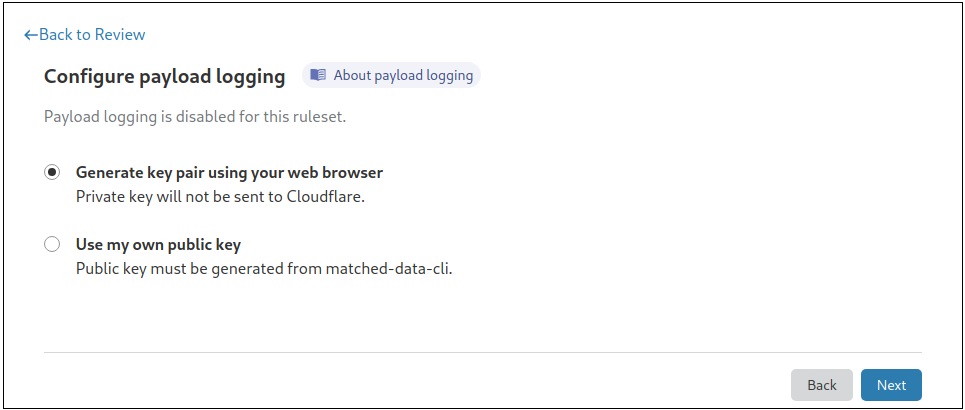
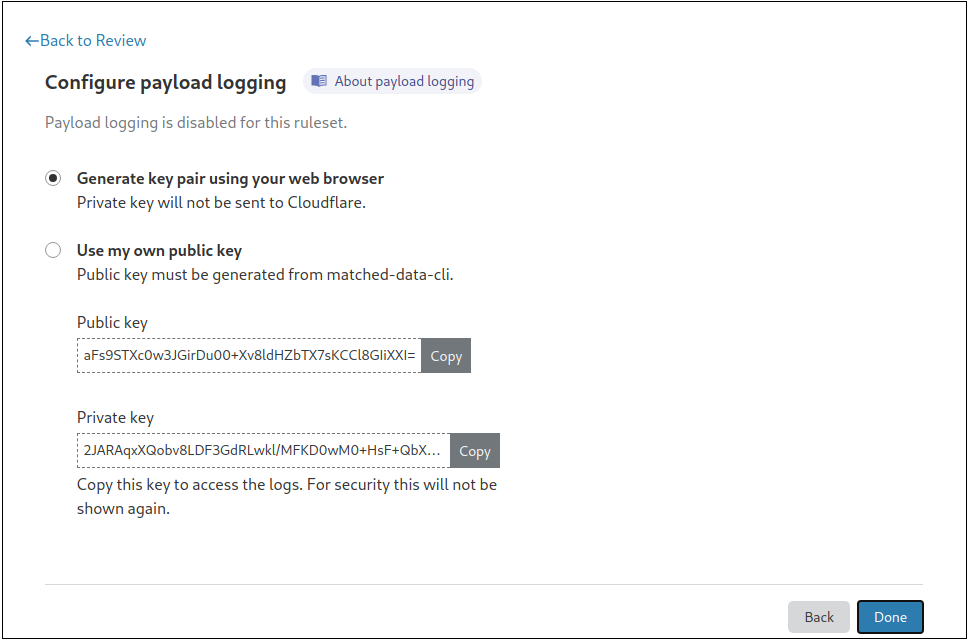
To turn on this feature, you need to provide a public key, or generate a private-public key pair directly from the dashboard. Your data will then be encrypted using Hybrid Public Key Encryption (HPKE), which offers a great combination of both performance and security.

Encrypting your WAF Payloads with Hybrid Public Key Encryption (HPKE)

To simplify this process, we have built an easy-to-use command line utility to generate the key pair:

$ matched-data-cli generate-key-pair
{
  "private_key": "uBS5eBttHrqkdY41kbZPdvYnNz8Vj0TvKIUpjB1y/GA=",
  "public_key": "Ycig/Zr/pZmklmFUN99nr+taURlYItL91g+NcHGYpB8="
}

Cloudflare does not store the private key and it is our customers’ responsibility to ensure it is stored safely. Lost keys, and the data encrypted with them, cannot be recovered but customers can rotate keys to be used with future payloads.

Once encrypted, payloads will be available in the logs as encrypted base64 blobs within the metadata field:

"metadata": [
  {
    "key": "encrypted_matched_data",
    "Value": "AdfVn7odpamJGeFAGj0iW2oTtoXOjVnTFT2x4l+cHKJsEQAAAAAAAAB+zDygjV2aUI92FV4cHMkp+4u37JHnH4fUkRqasPYaCgk="
  }
]

Decrypting payloads can be done via the dashboard from the Security Events log, or by using the command line utility, as shown below. If done via the dashboard, the browser will decrypt the payload locally (i.e., client side) and will not send the private key to Cloudflare.

$ printf $PRIVATE_KEY | ./matched-data-cli decrypt -d AdfVn7odpamJGeFAGj0iW2oTtoXOjVnTFT2x4l+cHKJsEQAAAAAAAAB+zDygjV2aUI92FV4cHMkp+4u37JHnH4fUkRqasPYaCgk= --private-key-stdin

The command above returns:

{"REQUEST_HEADERS:REFERER":"https:\/\/example.com\/testkey.txt?a=<script>alert('xss');<\/script>"}

In the example above, the WAF matched against the REQUEST_HEADERS:REFERER field. Any other fields the WAF matched on would be similarly logged.

Better Logging with User Privacy in Mind

In the coming months, this feature will be available on our dashboard to our Enterprise customers. Enterprise customers who would like this feature enabled sooner should reach out to their account team. Only application owners who also have access to the Cloudflare dashboard as Super Administrators will be able to configure encrypted matched payload logging. Those who do not have access to the private key, including Cloudflare staff, are not able to decrypt the logs.

We are also excited for this feature to be one of our first to use Hybrid Public Key Encryption, and for Cloudflare to use this emerging standard developed by the Crypto Forum Research Group (CFRG), the research body that supports the development of Internet standards at the IETF. And stay tuned, we will publish a deep dive post with the technical details soon!