Post Syndicated from Napoleone Capasso original https://aws.amazon.com/blogs/compute/multi-region-event-driven-failover-architecture-with-amazon-eventbridge-and-route-53/
Multi-Region Event-Driven Failover Architecture with Amazon EventBridge and Route 53
Event-driven architectures enable applications to respond to events in real-time, providing scalability and loose coupling between components. However, ensuring high availability across multiple AWS regions requires careful design of failover mechanisms. This post demonstrates how to build a resilient multi-region event-driven architecture using Amazon EventBridge, Amazon API Gateway, and Amazon Route 53 health-based failover.
Overview
Organizations building event-driven applications need to achieve high availability and disaster recovery capabilities. This architecture provides automatic failover between AWS regions while maintaining regional independence for event processing. The solution uses Amazon Route 53 health checks to monitor regional Amazon API Gateway endpoints and automatically routes traffic to healthy regions without manual intervention.
The architecture delivers several key benefits. Regional independence reduces latency by processing events in the same region where they originate. Amazon DynamoDB global tables provide automatic data replication across regions, ensuring data availability during regional failures. The solution provides robust failover capabilities while maintaining architectural simplicity.
Organizations with strict availability requirements can find this solution particularly valuable. All event processing remains within AWS regions, and failover occurs automatically based on health check results. The architecture supports both planned maintenance windows and unplanned regional outages, providing flexibility for operational needs.
Solution overview
The solution implements an active-passive multi-region architecture where events flow through Amazon API Gateway to regional Amazon EventBridge buses. Amazon Route 53 health checks monitor the primary region and automatically route traffic to the secondary region during failures. Each region processes events independently, while Amazon DynamoDB Global Tables replicate data across regions.
The following diagram provides an overview of the solution:
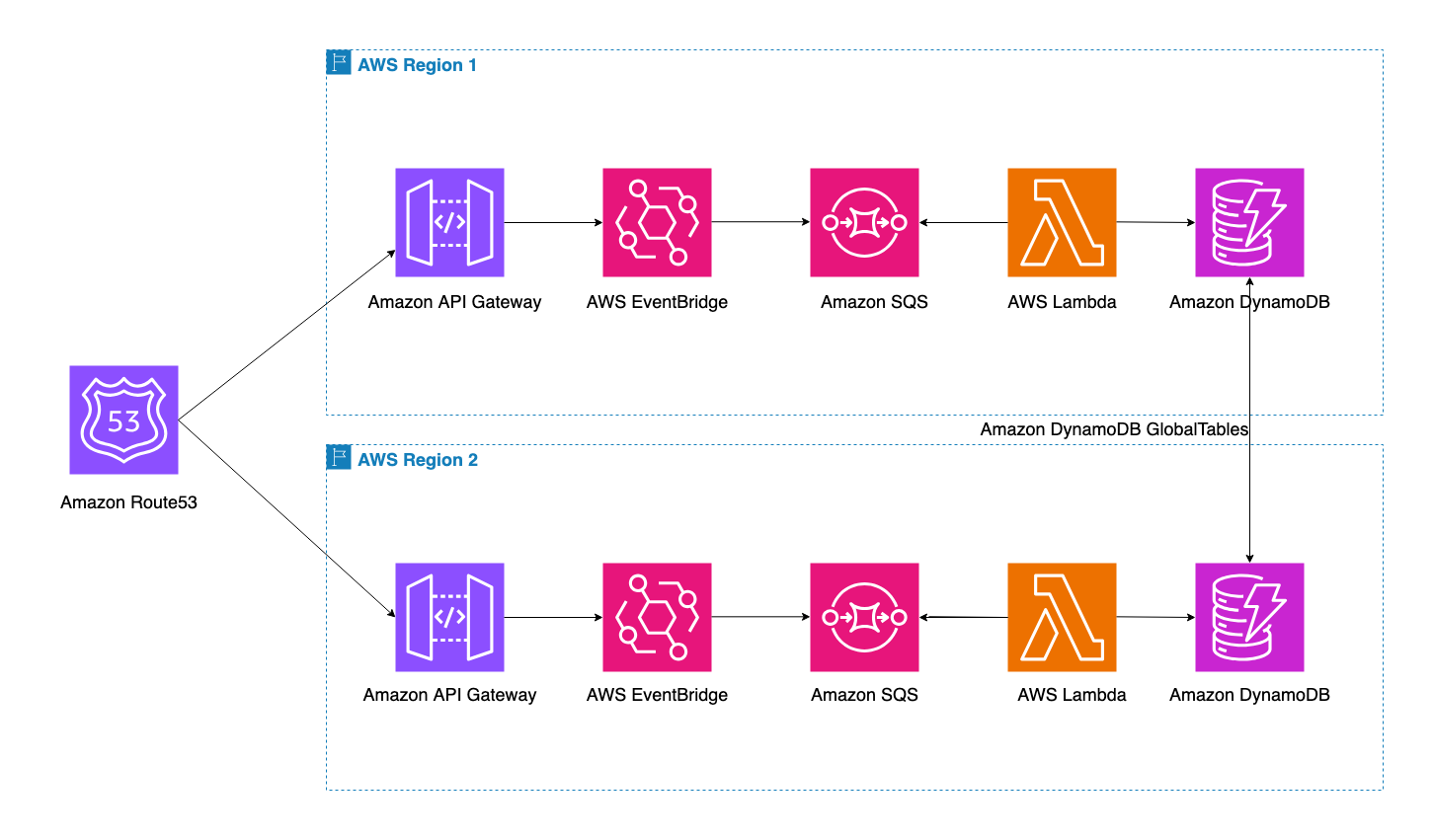
The above diagram depicts the multi-region architecture running across two AWS regions. The Route 53 DNS service serves as the main entry point for the application, with health checks monitoring both regions. Each region contains an identical stack with Amazon API Gateway, Amazon EventBridge, Amazon SQS, and AWS Lambda. The Amazon DynamoDB Global Table replicates data between regions automatically.
Solution deployment
To deploy this solution, follow the instructions in the GitHub repository and clone the repository. The solution deploys in two AWS regions. Ensure valid SSL certificates exist in AWS Certificate Manager (ACM) in both regions for the custom domain.
Prerequisites
For this walkthrough, the following resources are needed:
- AWS Account: An AWS account with permissions to create and manage Amazon API Gateway, Amazon EventBridge, Amazon SQS, AWS Lambda, Amazon DynamoDB, Amazon Route 53, AWS IAM, and AWS CloudFormation resources
- AWS Serverless Application Model (SAM): The AWS SAM CLI installed, as the templates use the SAM transform for Lambda and API Gateway resource definitions
- Domain Name: A registered domain with a Route 53 hosted zone- SSL Certificates: ACM certificates for the custom domain in both deployment regions
- AWS CLI: The AWS CLI installed and configured with credentials for the target AWS account
- Region Selection: Two AWS regions for deployment
Walkthrough
The AWS CloudFormation templates from the sample GitHub repository create a secure, multi-region architecture that provides automatic failover for event-driven applications. The templates provision regional API Gateway endpoints, EventBridge buses, SQS queues, Lambda functions, and an Amazon DynamoDB Global Table. The solution establishes health monitoring through Route 53 health checks and configures DNS failover routing. The templates use AWS Serverless Application Model (SAM) transform to simplify Lambda and API Gateway resource definitions.
Step 1: Deploy the primary stack
The primary stack creates the foundational resources in the primary region. This includes the Amazon EventBridge bus, Amazon API Gateway with custom domain, health check, AWS Lambda function, Amazon SQS queue, and Amazon DynamoDB Global Table. The stack creates an EventBridge bus that receives events from API Gateway:
The API Gateway uses AWS service integration to forward events directly to EventBridge:
x-amazon-apigateway-integration:
type: "aws"
uri: !Sub "arn:aws:apigateway:${AWS::Region}:events:path//"
credentials: !GetAtt ApiGatewayEventBridgeRole.Arn
httpMethod: "POST"
The health check monitors the API Gateway endpoint to determine regional availability:
DomainHealthCheck:
Type: AWS::Route53::HealthCheck
Properties:
HealthCheckConfig:
Type: HTTPS
ResourcePath: /Prod/health FullyQualified
DomainName: !Sub ${Api}.execute-api.${AWS::Region}.amazonaws.com
Port: 443
RequestInterval: 30
FailureThreshold: 3
The Route 53 DNS record configures failover routing with the PRIMARY designation:
ApiDnsRecord:
Type: AWS::Route53::RecordSet
Properties:
HostedZoneId: !Ref HostedZoneId
Name: !Ref CustomDomainName
Type: A
SetIdentifier: primary-region
Failover: PRIMARY
HealthCheckId: !Ref DomainHealthCheck
The DynamoDB Global Table creates replicas in both regions:
DataTable:
Type: AWS::DynamoDB::GlobalTable
Properties:
BillingMode: PAY_PER_REQUEST
Replicas:
- Region: !Ref AWS::Region
- Region: !Ref SecondaryRegion
Note the `DataTableName` output value for use in the secondary stack deployment. The `CustomDomainURL` output provides the endpoint to invoke the solution.
Step 2: Deploy the secondary stack
The secondary stack creates identical resources in the secondary region , except for the Amazon DynamoDB table which references the existing Global Table. The secondary stack creates its own Amazon EventBridge bus, Amazon API Gateway, health check, AWS Lambda function, and Amazon SQS queue. The Route 53 DNS record uses the SECONDARY designation
Step 3: Event processing flow
Events flow through the processing pipeline in each region. API Gateway receives events and forwards them to EventBridge using the PutEvents API. EventBridge evaluates event rules and routes matching events to SQS queues. Lambda functions poll the SQS queues and process events in batches. AWS Lambda writes processed data to the DynamoDB Global Table, which replicates across regions.
The Lambda function processes events from the queue and writes to DynamoDB:
def handler(event, context):
for record in event.get('Records', []):
body = json.loads(record['body'])
detail = body.get('detail', {})
event_id = body.get('id', '')
item = { 'id': event_id, 'detail': detail, 'timestamp': datetime.utcnow().isoformat() }
table.put_item(Item=item)
Testing
Fetch the custom domain URL and test it by sending an event:
curl -X POST https://api.example.com \-H "Content-Type: application/json" \ -d '{ "Detail": { "IsHelloWorldExample": "true" }, "DetailType": "POSTED", "Source": "demo.event" }' -vThe response includes an `X-Region` header indicating which region processed the request. Under normal conditions, this shows the primary region.
To test failover:
- Remove the base path mapping for the primary region:
aws apigateway delete-base-path-mapping \ --domain-name api.example.com \ --base-path '(none)' \ --region {primary-region}- Delete the primary API Gateway stage:
aws apigateway delete-stage \ --rest-api-id <primary-api-id> \ --stage-name Prod \ --region {primary-region}
- Wait 2-3 minutes for the health check to fail. The Route 53 health check performs checks every 30 seconds with a failure threshold of 3, requiring 90 seconds to detect the failure.
- Send another request to the API endpoint:
curl -X POST https://api.example.com \-H "Content-Type: application/json" \ -d '{ "Detail": { "IsHelloWorldExample": "true" }, "DetailType": "POSTED", "Source": "demo.event" }' -v- Verify the failover: The `X-Region` header now shows the secondary region, confirming successful failover.
Verify event processing in the secondary region:
- Check the Lambda logs for successful processing:
aws logs tail /aws/lambda/<secondary-lambda-name> --region {secondary region}
You should see log entries similar to:
Processing message:
{"version":"0",
"id":"abc12345-...",
"source":"demo.event",
"detail-type":"POSTED",...}
Event Source: demo.event
Detail Type: POSTED
Successfully wrote item to DynamoDB: abc12345-...
Successfully read item from DynamoDB:
{'id': 'abc12345-...',
'source': 'demo.event',
'detailType': 'POSTED',
'detail':
{'data': {'IsHelloWorldExample': 'true'},
...},
'timestamp': '2025-01-15T18:30:00.000000',
'processed': True}- Verify the data in Amazon DynamoDB:
aws dynamodb scan \ --table-name <table-name> \ --region {secondary region}```
The scan results should include items with the event details:
{ "Items":
[ { "id": {"S": "abc12345-..."},
"source": {"S": "demo.event"},
"detailType": {"S": "POSTED"},
"detail":
{"M": {"data":
{"M":
{"IsHelloWorldExample":
{"S": "true"}}}}},
"timestamp": {"S": "2025-01-15T18:30:00.000000"},
"processed": {"BOOL": true} } ],
"Count": 1 }- Restore the primary region – recreate the stage:
aws apigateway create-stage \ --rest-api-id <primary-api-id> \ --stage-name Prod \ --deployment-id <deployment-id> \ --region {primary region}
- Restore the primary region – recreate the base path mapping:
aws apigateway create-base-path-mapping \ --domain-name api.example.com \ --rest-api-id <primary-api-id> \ --stage Prod \ --region {primary region}
You can find the “deployment-id” by running: aws apigateway get-deployments \ --rest-api-id <primary-api-id> \ --region {primary region}
After 2-3 minutes, the health check passes and Route 53 routes traffic back to the primary region.
Cleanup
To remove the solution and avoid ongoing charges, delete the CloudFormation stacks in the correct order. Delete the secondary stack first, then the primary stack. This order is important because the Amazon DynamoDB Global Table is owned by the primary stack. Warning: Deleting these stacks permanently removes all resources including the Amazon DynamoDB global table and any event data stored in it. Back up any data you need before proceeding. This action cannot be undone. The following resources incur costs while deployed:
- Amazon API Gateway (REST API)
- Amazon Route 53 health checks and DNS records
- Amazon DynamoDB global table (with cross-region replication)
- AWS Lambda function invocations and duration
- Amazon SQS queue operations
- Amazon CloudWatch Logs storage
Delete the secondary stack:
aws cloudformation delete-stack --stack-name secondary-stack --region {secondary region}
Wait for the secondary stack deletion to complete:
aws cloudformation wait stack-delete-complete --stack-name secondary-stack --region {secondary region}
Delete the primary stack:
aws cloudformation delete-stack --stack-name primary-stack --region {primary region}
Wait for the primary stack deletion to complete:
aws cloudformation wait stack-delete-complete --stack-name primary-stack --region {primary region}
This removes all resources including the Amazon EventBridge buses, Amazon API Gateways, AWS Lambda functions, Amazon SQS queues, Amazon DynamoDB Global Table, Amazon Route 53 health checks, DNS records and IAM roles.
Conclusion
This post demonstrates how to establish a resilient multi-region architecture for event-driven applications using Amazon EventBridge, Amazon API Gateway, and Amazon Route 53. The solution uses Route 53 health-based failover, a powerful capability that automatically routes traffic to healthy regions based on health check results. This architecture significantly enhances application availability by providing automatic failover during regional outages while maintaining regional independence for event processing.