All posts by Sunil Pai

Add voice to your agent

Post Syndicated from Sunil Pai original https://blog.cloudflare.com/voice-agents/

For many of us, our first experiences with AI agents have been through typing into a chat box. And for those of us using agents day to day, we have likely gotten very good at writing detailed prompts or markdown files to guide them.

But some of the moments where agents would be most useful are not always text-first. You might be on a long commute, juggling a few open sessions, or just wanting to speak naturally to an agent, have it speak back, and continue the interaction.

Adding voice to an agent should not require moving that agent into a separate voice framework. Today, we are releasing an experimental voice pipeline for the Agents SDK.

With @cloudflare/voice, you can add real-time voice to the same Agent architecture you already use. Voice just becomes another way you can talk to the same Durable Object, with the same tools, persistence, and WebSocket connection model that the Agents SDK already provides. 

@cloudflare/voice is an experimental package for the Agents SDK that provides: 

  • withVoice(Agent) for full conversation voice agents

  • withVoiceInput(Agent) for speech-to-text-only use cases, like dictation or voice search 

  • useVoiceAgent and useVoiceInput hooks for React apps 

  • VoiceClient for framework-agnostic clients 

  • Built-in Workers AI providers, so that you can get started without external API keys: 

This means you can now build an agent that users can talk to in real time over a single WebSocket connection, while keeping the same Agent class, Durable Object instance, and the same SQLite-backed conversation history. 

Just as importantly, we want this to be bigger than one fixed default stack. The provider interfaces in @cloudflare/voice are intentionally small, and we want speech, telephony, and transport providers to build with us, so developers can mix and match the right components for their use case, instead of being locked into a single voice architecture.

Get started with voice

Here’s the minimal server-side pattern for a voice agent in the Agents SDK: 

import { Agent, routeAgentRequest } from "agents";
import {
  withVoice,
  WorkersAIFluxSTT,
  WorkersAITTS,
  type VoiceTurnContext
} from "@cloudflare/voice";

const VoiceAgent = withVoice(Agent);

export class MyAgent extends VoiceAgent<Env> {
  transcriber = new WorkersAIFluxSTT(this.env.AI);
  tts = new WorkersAITTS(this.env.AI);

  async onTurn(transcript: string, context: VoiceTurnContext) {
    return `You said: ${transcript}`;
  }
}

export default {
  async fetch(request: Request, env: Env) {
    return (
      (await routeAgentRequest(request, env)) ??
      new Response("Not found", { status: 404 })
    );
  }
} satisfies ExportedHandler<Env>;

That’s the whole server. You add a continuous transcriber, a text-to-speech provider, and implement onTurn().

On the client side, you can connect to it with a React hook: 

import { useVoiceAgent } from "@cloudflare/voice/react";

function App() {
  const {
    status,
    transcript,
    interimTranscript,
    startCall,
    endCall,
    toggleMute
  } = useVoiceAgent({ agent: "my-agent" });

  return (
    <div>
      <p>Status: {status}</p>
      {interimTranscript && <p><em>{interimTranscript}</em></p>}
      <ul>
        {transcript.map((msg, i) => (
          <li key={i}>
            <strong>{msg.role}:</strong> {msg.text}
          </li>
        ))}
      </ul>
      <button onClick={startCall}>Start Call</button>
      <button onClick={endCall}>End Call</button>
      <button onClick={toggleMute}>Mute / Unmute</button>
    </div>
  );
}

If you are not using React, you can use VoiceClient directly from @cloudflare/voice/client

How the voice pipeline works

With the Agents SDK, every agent is a Durable Object — a stateful, addressable server instance with its own SQLite database, WebSocket connections, and application logic. The voice pipeline extends this model instead of replacing it. 

At a high level, the flow looks like this:


Here’s how the pipeline breaks down, step by step:

  1. Audio transport: The browser captures microphone audio and streams 16 kHz mono PCM over the same WebSocket connection the agent already uses.

  2. STT session setup:  When the call starts, the agent creates a continuous transcriber session that lives for the duration of the call. 

  3. STT input: Audio streams continuously into that session.

  4. STT turn detection: The speech-to-text model itself decides when the user has finished an utterance and emits a stable transcript for that turn. 

  5. LLM/application logic: The voice pipeline passes that transcript to your onTurn() method.

  6. TTS output: Your response is synthesized to audio and sent back to the client. If onTurn() returns a stream, the pipeline sentence-chunks it and starts sending audio as sentences are ready. 

  7. Persistence: The user and agent messages are persisted in SQLite, so conversation history survives reconnections and deployments.  

Why voice should grow with the rest of your agent

Many voice frameworks focus on the voice loop itself: audio in, transcription, model response, audio out. Those are important primitives, but there’s a lot more to an agent than just voice. 

Real agents running in production will grow. They need state, scheduling, persistence, tools, workflows, telephony, and ways to keep all of that consistent across channels. As your agent grows in complexity, voice stops being a standalone feature and becomes part of a larger system. 

We wanted voice in the Agents SDK to start from that assumption. Instead of building voice as a separate stack, we built it on top of the same Durable Object-based agent platform, so you can pull in the rest of the primitives you need without re-architecting the application later.

Voice and text share the same state

A user might start by typing, switch to voice, and go back to text. With Agents SDK, these are all just different inputs to the same agent. The same conversation history lives in SQLite, and the same tools are available. This gives you both a cleaner mental model and a much simpler application architecture to reason about. 

Lower latency comes from…

a shorter network path 

Voice experiences feel good or bad very quickly. Once a user stops speaking, the system needs to transcribe, think, and start speaking back fast enough to feel conversational. 

A lot of voice latency is not pure model time. It’s the cost of bouncing audio and text between different services in different places. Audio needs to go to STT, transcripts go to an LLM, and responses go to a TTS model – and each handoff adds network overhead. 

With the Agents SDK voice pipeline, the agent runs on Cloudflare’s network, and the built-in providers use Workers AI bindings. That keeps the pipeline tighter and reduces the amount of infrastructure you have to stitch together yourself. 

built-in streaming

A voice agent interaction feels much more natural if it speaks the first sentence quickly (also called Time-to-First Audio). When onTurn() returns a stream, the pipeline chunks it into sentences and starts synthesis as sentences complete. That means the user can hear the beginning of the answer while the rest is still being generated. 

A more realistic backend 

Here is a fuller example that streams an LLM response and starts speaking it back, sentence by sentence:

import { Agent, routeAgentRequest } from "agents";
import {
  withVoice,
  WorkersAIFluxSTT,
  WorkersAITTS,
  type VoiceTurnContext
} from "@cloudflare/voice";
import { streamText } from "ai";
import { createWorkersAI } from "workers-ai-provider";

const VoiceAgent = withVoice(Agent);

export class MyAgent extends VoiceAgent<Env> {
  transcriber = new WorkersAIFluxSTT(this.env.AI);
  tts = new WorkersAITTS(this.env.AI);

  async onTurn(transcript: string, context: VoiceTurnContext) {
    const ai = createWorkersAI({ binding: this.env.AI });

    const result = streamText({
      model: ai("@cf/cloudflare/gpt-oss-20b"),
      system: "You are a helpful voice assistant. Be concise.",
      messages: [
        ...context.messages.map((m) => ({
          role: m.role as "user" | "assistant",
          content: m.content
        })),
        { role: "user" as const, content: transcript }
      ],
      abortSignal: context.signal
    });

    return result.textStream;
  }
}

export default {
  async fetch(request: Request, env: Env) {
    return (
      (await routeAgentRequest(request, env)) ??
      new Response("Not found", { status: 404 })
    );
  }
} satisfies ExportedHandler<Env>;

Context.messages gives you recent SQLite-backed conversation history, and context.signal lets the pipeline abort the LLM call if the user interrupts. 

Voice as an input: withVoiceInput

Not every speech interface needs to speak back. Sometimes you might want dictation, transcription, or voice search. For these use cases, you can use withVoiceInput

import { Agent, type Connection } from "agents";
import { withVoiceInput, WorkersAINova3STT } from "@cloudflare/voice";

const InputAgent = withVoiceInput(Agent);

export class DictationAgent extends InputAgent<Env> {
  transcriber = new WorkersAINova3STT(this.env.AI);

  onTranscript(text: string, _connection: Connection) {
    console.log("User said:", text);
  }
}

On the client, useVoiceInput gives you a lightweight interface centered on transcriptions: 

import { useVoiceInput } from "@cloudflare/voice/react";

const { transcript, interimTranscript, isListening, start, stop, clear } =
  useVoiceInput({ agent: "DictationAgent" });

This is useful when speech is an input method, and you don’t need a full conversational loop. 

Voice and text on the same connection

The same client can call sendText(“What’s the weather?”), which bypasses STT and sends the text directly to onTurn(). During an active call, the response can be spoken and shown as text. Outside a call, it can remain text-only. 

This gives you a genuinely multimodal agent, without splitting the implementation into different code paths. 

What else can you build? 

Because a voice agent is still an agent, all the normal Agents SDK capabilities still apply. 

Tools and scheduling

You can greet a caller when a session starts: 

import { Agent, type Connection } from "agents";
import { withVoice, WorkersAIFluxSTT, WorkersAITTS } from "@cloudflare/voice";

const VoiceAgent = withVoice(Agent);

export class MyAgent extends VoiceAgent<Env> {
  transcriber = new WorkersAIFluxSTT(this.env.AI);
  tts = new WorkersAITTS(this.env.AI);

  async onTurn(transcript: string) {
    return `You said: ${transcript}`;
  }

  async onCallStart(connection: Connection) {
    await this.speak(connection, "Hi! How can I help you today?");
  }
}

You can schedule spoken reminders and expose tools to your LLM just like any other agent: 

import { Agent } from "agents";
import {
  withVoice,
  WorkersAIFluxSTT,
  WorkersAITTS,
  type VoiceTurnContext
} from "@cloudflare/voice";
import { streamText, tool } from "ai";
import { createWorkersAI } from "workers-ai-provider";
import { z } from "zod";

const VoiceAgent = withVoice(Agent);

export class MyAgent extends VoiceAgent<Env> {
  transcriber = new WorkersAIFluxSTT(this.env.AI);
  tts = new WorkersAITTS(this.env.AI);

  async speakReminder(payload: { message: string }) {
    await this.speakAll(`Reminder: ${payload.message}`);
  }

  async onTurn(transcript: string, context: VoiceTurnContext) {
    const ai = createWorkersAI({ binding: this.env.AI });

    const result = streamText({
      model: ai("@cf/cloudflare/gpt-oss-20b"),
      messages: [
        ...context.messages.map((m) => ({
          role: m.role as "user" | "assistant",
          content: m.content
        })),
        { role: "user" as const, content: transcript }
      ],
      tools: {
        set_reminder: tool({
          description: "Set a spoken reminder after a delay",
          inputSchema: z.object({
            message: z.string(),
            delay_seconds: z.number()
          }),
          execute: async ({ message, delay_seconds }) => {
            await this.schedule(delay_seconds, "speakReminder", { message });
            return { confirmed: true };
          }
        })
      },
      abortSignal: context.signal
    });

    return result.textStream;
  }
}

Runtime model switching

The voice pipeline also lets you choose a transcription model dynamically per connection. 

For example, you might prefer Flux for conversational turn-taking and Nova 3 for higher-accuracy dictation. You can switch at runtime by overriding createTranscriber()

import { Agent, type Connection } from "agents";
import {
  withVoice,
  WorkersAIFluxSTT,
  WorkersAINova3STT,
  WorkersAITTS,
  type Transcriber
} from "@cloudflare/voice";

export class MyAgent extends VoiceAgent<Env> {
  tts = new WorkersAITTS(this.env.AI);

  createTranscriber(connection: Connection): Transcriber {
    const url = new URL(connection.url ?? "http://localhost");
    const model = url.searchParams.get("model");
    if (model === "nova-3") {
      return new WorkersAINova3STT(this.env.AI);
    }
    return new WorkersAIFluxSTT(this.env.AI);
  }
}

On the client, you can pass query parameters through the hook: 

const voiceAgent = useVoiceAgent({
  agent: "my-voice-agent",
  query: { model: "nova-3" }
});

Pipeline hooks

You can also intercept data between stages: 

  • afterTranscribe(transcript, connection)

  • beforeSynthesize(text, connection)

  • afterSynthesize(audio, text, connection)

These hooks are useful for content filtering, text normalization, language-specific transformations, or custom logging. 

Telephone and transport options

By default, the voice pipeline uses a single WebSocket connection as the simplest path for 1:1 voice agents. But that’s not the only option. 

Phone calls via Twilio

You can connect phone calls to the same agent using the Twilio adapter:

import { TwilioAdapter } from "@cloudflare/voice-twilio";

export default {
  async fetch(request: Request, env: Env) {
    if (new URL(request.url).pathname === "/twilio") {
      return TwilioAdapter.handleRequest(request, env, "MyAgent");
    }

    return (
      (await routeAgentRequest(request, env)) ??
      new Response("Not found", { status: 404 })
    );
  }
};

This lets the same agent handle web voice, text input, and phone calls. 

One caveat: the default Workers AI TTS provider returns MP3, while Twilio expects mulaw 8kHz audio. For production telephony, you may want to use a TTS provider that outputs PCM or mulaw directly. 

WebRTC

If you need a transport that is better suited to difficult network conditions or will include multiple participants, the voice package also includes SFU utilities and supports custom transports. The default model is WebSocket-native today, but we plan to develop more adapters to connect to our global SFU infrastructure

Build with us 

The voice pipeline is provider-agnostic by design. 

Under the hood, each stage is defined by a small interface: a transcriber opens a continuous session and accepts audio frames as they arrive, while a TTS provider takes text and returns audio. If a provider can stream audio output, the pipeline can use that too.

interface Transcriber {
  createSession(options?: TranscriberSessionOptions): TranscriberSession;
}

interface TranscriberSession {
  feed(chunk: ArrayBuffer): void;
  close(): void;
}

interface TTSProvider {
  synthesize(text: string, signal?: AbortSignal): Promise<ArrayBuffer | null>;
}

We didn’t want voice support in Agents SDK to only work with one fixed combination of models and transports. We wanted the default path to be simple, while still making it easy to plug in other providers as the ecosystem grows. 

The built-in providers use Workers AI, so you can get started without external API keys:

  • WorkersAIFluxSTT for conversational streaming STT

  • WorkersAINova3STT for dictation-style streaming STT

  • WorkersAITTS for text-to-speech

But the bigger goal is interoperability. If you maintain a speech or voice service, these interfaces are small enough to implement without needing to understand the rest of the SDK internals. If your STT provider accepts streaming audio and can detect utterance boundaries, it can satisfy the transcriber interface. If your TTS provider can stream audio output, even better. 

We would love to work on interoperability with:

  • STT providers like AssemblyAI, Rev.ai, Speechmatics, or any service with a real-time transcription API

  • TTS providers like PlayHT, LMNT, Cartesia, Coqui, Amazon Polly, or Google Cloud TTS

  • telephony adapters for platforms like Vonage, Telnyx, or Bandwidth

  • transport implementations for WebRTC data channels, SFU bridges, and other audio transport layers

We are also interested in collaborations that go beyond individual providers:

  • latency benchmarking across STT + LLM + TTS combinations

  • multilingual support and better documentation for non-English voice agents

  • accessibility work, especially around multimodal interfaces and speech impairments

If you are building voice infrastructure and want to see a first-class integration, open a PR or reach out.

Try it now

The voice pipeline is available today as an experimental package:

npm create cloudflare@latest -- --template cloudflare/agents-starter

Add @cloudflare/voice, give your agent a transcriber and a TTS provider, deploy it, and start talking to it. You can also read the API reference.

If you build something interesting, open an issue or PR on github.com/cloudflare/agents. Voice should not require a separate stack, and we think the best voice agents will be the ones built on the same durable application model as everything else.


Project Think: building the next generation of AI agents on Cloudflare

Post Syndicated from Sunil Pai original https://blog.cloudflare.com/project-think/

Today, we’re introducing Project Think: the next generation of the Agents SDK. Project Think is a set of new primitives for building long-running agents (durable execution, sub-agents, sandboxed code execution, persistent sessions) and an opinionated base class that wires them all together. Use the primitives to build exactly what you need, or use the base class to get started fast.

Something happened earlier this year that changed how we think about AI. Tools like Pi, OpenClaw, Claude Code, and Codex proved a simple but powerful idea: give an LLM the ability to read files, write code, execute it, and remember what it learned, and you get something that looks less like a developer tool and more like a general-purpose assistant.

These coding agents aren’t just writing code anymore. People are using them to manage calendars, analyze datasets, negotiate purchases, file taxes, and automate entire business workflows. The pattern is always the same: the agent reads context, reasons about it, writes code to take action, observes the result, and iterates. Code is the universal medium of action.

Our team has been using these coding agents every day. And we kept running into the same walls:

  • They only run on your laptop or an expensive VPS: there’s no sharing, no collaboration, no handoff between devices.

  • They’re expensive when idle: a fixed monthly cost whether the agent is working or not. Scale that to a team, or a company, and it adds up fast.

  • They require management and manual setup: installing dependencies, managing updates, configuring identity and secrets.

And there’s a deeper structural issue. Traditional applications serve many users from one instance. As mentioned in our Welcome to Agents Week post, agents are one-to-one. Each agent is a unique instance, serving one user, running one task. A restaurant has a menu and a kitchen optimized to churn out dishes at volume. An agent is more like a personal chef: different ingredients, different techniques, different tools every time.

That fundamentally changes the scaling math. If a hundred million knowledge workers each use an agentic assistant at even modest concurrency, you need capacity for tens of millions of simultaneous sessions. At current per-container costs, that’s unsustainable. We need a different foundation.

That’s what we’ve been building.

Introducing Project Think

Project Think ships a set of new primitives for the Agents SDK:

  • Durable execution with fibers: crash recovery, checkpointing, automatic keepalive

  • Sub-agents: isolated child agents with their own SQLite and typed RPC

  • Persistent sessions: tree-structured messages, forking, compaction, full-text search

  • Sandboxed code execution: Dynamic Workers, codemode, runtime npm resolution

  • The execution ladder: workspace, isolate, npm, browser, sandbox

  • Self-authored extensions: agents that write their own tools at runtime

Each of these is usable directly with the Agent base class. Build exactly what you need with the primitives, or use the Think base class to get started fast. Let’s look at what each one does.

Long-running agents

Agents, as they exist today, are ephemeral. They run for a session, tied to a single process or device, and then they are gone. A coding agent that dies when your laptop sleeps, that’s a tool. An agent that persists — that can wake up on demand, continue work after interruptions, and carry forward the state without depending on your local runtime — that starts to look like infrastructure. And it changes the scaling model for agents completely.

The Agents SDK builds on Durable Objects to give every agent an identity, persistent state, and the ability to wake on message. This is the actor model: each agent is an addressable entity with its own SQLite database. It consumes zero compute when hibernated. When something happens (an HTTP request, a WebSocket message, a scheduled alarm, an inbound email) the platform wakes the agent, loads its state, and hands it the event. The agent does its work, then goes back to sleep.

VMs / Containers

Durable Objects

Idle cost

Full compute cost, always

Zero (hibernated)

Scaling

Provision and manage capacity

Automatic, per-agent

State

External database required

Built-in SQLite

Recovery

You build it (process managers, health checks)

Platform restarts, state survives

Identity / routing

You build it (load balancers, sticky sessions)

Built-in (name → agent)

10,000 agents, each active 1% of the time

10,000 always-on instances

~100 active at any moment

This changes the economics of running agents at scale. Instead of “one expensive agent per power user,” you can build “one agent per customer” or “one agent per task” or “one agent per email thread.” The marginal cost of spawning a new agent is effectively zero.

Surviving crashes: durable execution with fibers

An LLM call takes 30 seconds. A multi-turn agent loop can run for much longer. At any point during that window, the execution environment can vanish: a deploy, a platform restart, hitting resource limits. The upstream connection to the model provider is severed permanently, in-memory state is lost, and connected clients see the stream stop with no explanation.

runFiber() solves this. A fiber is a durable function invocation: registered in SQLite before execution begins, checkpointable at any point via stash(), and recoverable on restart via onFiberRecovered.

import { Agent } from "agents";

export class ResearchAgent extends Agent {
  async startResearch(topic: string) {
    void this.runFiber("research", async (ctx) => {
      const findings = [];

      for (let i = 0; i < 10; i++) {
        const result = await this.callLLM(`Research step ${i}: ${topic}`);
        findings.push(result);

        // Checkpoint: if evicted, we resume from here
        ctx.stash({ findings, step: i, topic });

        this.broadcast({ type: "progress", step: i });
      }

      return { findings };
    });
  }

  async onFiberRecovered(ctx) {
    if (ctx.name === "research" && ctx.snapshot) {
      const { topic } = ctx.snapshot;
      await this.startResearch(topic);
    }
  }
}

The SDK keeps the agent alive automatically during fiber execution, no special configuration needed. For work measured in minutes, keepAlive() / keepAliveWhile() prevents eviction during active work. For longer operations (CI pipelines, design reviews, video generation) the agent starts the work, persists the job ID, hibernates, and wakes on callback.

Delegating work: sub-agents via Facets

A single agent shouldn’t do everything itself. Sub-agents are child Durable Objects colocated with the parent via Facets, each with their own isolated SQLite and execution context:

import { Agent } from "agents";

export class ResearchAgent extends Agent {
  async search(query: string) { /* ... */ }
}

export class ReviewAgent extends Agent {
  async analyze(query: string) { /* ... */ }
}

export class Orchestrator extends Agent {
  async handleTask(task: string) {
    const researcher = await this.subAgent(ResearchAgent, "research");
    const reviewer = await this.subAgent(ReviewAgent, "review");

    const [research, review] = await Promise.all([
      researcher.search(task),
      reviewer.analyze(task)
    ]);

    return this.synthesize(research, review);
  }
}

Sub-agents are isolated at the storage level. Each one gets its own SQLite database, and there’s no implicit sharing of data between them. This is enforced by the runtime where sub-agent RPC latency is a function call. TypeScript catches misuse at compile time.

Conversations that persist: the Session API

Agents that run for days or weeks need more than the typical flat list of messages. The experimental Session API models this explicitly. Available on the Agent base class, conversations are stored as trees, where each message has a parent_id. This enables forking (explore an alternative without losing the original path), non-destructive compaction (summarize older messages rather than deleting them), and full-text search across conversation history via FTS5.

import { Agent } from "agents";
import { Session, SessionManager } from "agents/experimental/memory/session";

export class MyAgent extends Agent {
  sessions = SessionManager.create(this);

  async onStart() {
    const session = this.sessions.create("main");
    const history = session.getHistory();
    const forked = this.sessions.fork(session.id, messageId, "alternative-approach");
  }
}

Session is usable directly with Agent, and it’s the storage layer that the Think base class builds on.

From tool calls to code execution

Conventional tool-calling has an awkward shape. The model calls a tool, pulls the result back through the context window, calls another tool, pulls that back, and so on. As the tool surface grows, this gets both expensive and clumsy. A hundred files means a hundred round-trips through the model.

But models are better at writing code to use a system than they are at playing the tool-calling game. This is the insight behind @cloudflare/codemode: instead of sequential tool calls, the LLM writes a single program that handles the entire task.

// The LLM writes this. It runs in a sandboxed Dynamic Worker.
const files = await tools.find({ pattern: "**/*.ts" });
const results = [];
for (const file of files) {
  const content = await tools.read({ path: file });
  if (content.includes("TODO")) {
    results.push({ file, todos: content.match(/\/\/ TODO:.*/g) });
  }
}
return results;

Instead of 100 round-trips to the model, you just run a single program. This leads to fewer tokens used, faster execution, and better results. The Cloudflare API MCP server demonstrates this at scale. We expose only two tools (search() and execute()), which consume ~1,000 tokens, vs. ~1.17 million tokens for the naive tool-per-endpoint equivalent. This is a 99.9% reduction.

The missing primitive: safe sandboxes

Once you accept that models should write code on behalf of users, the question becomes: where does that code run? Not eventually, not after a product team turns it into a roadmap item. Right now, for this user, against this system, with tightly defined permissions.

Dynamic Workers are that sandbox. A fresh V8 isolate spun up at runtime, in milliseconds, with a few megabytes of memory. That’s roughly 100x faster and up to 100x more memory-efficient than a container. You can start a new one for every single request, run a snippet of code, and throw it away.

The critical design choice is the capability model. Instead of starting with a general-purpose machine and trying to constrain it, Dynamic Workers begin with almost no ambient authority (globalOutbound: null, no network access) and the developer grants capabilities explicitly, resource by resource, through bindings. We go from asking “how do we stop this thing from doing too much?” to “what exactly do we want this thing to be able to do?”

This is the right question for agent infrastructure.

The execution ladder

This capability model leads naturally to a spectrum of compute environments, an execution ladder that the agent escalates through as needed:


Tier 0 is the Workspace, a durable virtual filesystem backed by SQLite and R2. Read, write, edit, search, grep, diff. Powered by @cloudflare/shell.

Tier 1 is a Dynamic Worker: LLM-generated JavaScript running in a sandboxed isolate with no network access. Powered by @cloudflare/codemode.

Tier 2 adds npm. @cloudflare/worker-bundler fetches packages from the registry, bundles them with esbuild, and loads the result into the Dynamic Worker. The agent writes import { z } from "zod" and it just works.

Tier 3 is a headless browser via Cloudflare Browser Run. Navigate, click, extract, screenshot. Useful when the service doesn’t support agents yet via MCP or APIs.

Tier 4 is a Cloudflare Sandbox configured with your toolchains, repos, and dependencies: git clone, npm test, cargo build, synced bidirectionally with the Workspace.

The key design principle: the agent should be useful at Tier 0 alone, where each tier is additive. The user can add capabilities as they go.

Building blocks, not a framework

All of these primitives are available as standalone packages. Dynamic Workers, @cloudflare/codemode, @cloudflare/worker-bundler, and @cloudflare/shell (a durable filesystem with tools) are all usable directly with the Agent base class. You can combine them to give any agent a workspace, code execution, and runtime package resolution without adopting an opinionated framework.

The platform

Here’s the complete stack for building agents on Cloudflare:

Capability

What it does

Powered by

Per-agent isolation

Every agent is its own world

Durable Objects (DOs)

Zero cost when idle

$0 until the agent wakes up

DO Hibernation

Persistent state

Queryable, transactional storage

DO SQLite

Durable filesystem

Files that survive restarts

Workspace (SQLite + R2)

Sandboxed code execution

Run LLM-generated code safely

Dynamic Workers + @cloudflare/codemode

Runtime dependencies

import * from react just works

@cloudflare/worker-bundler

Web automation

Browse, navigate, fill forms

Browser Run

Full OS access

git, compilers, test runners

Sandboxes

Scheduled execution

Proactive, not just reactive

DO Alarms + Fibers

Real-time streaming

Token-by-token to any client

WebSockets

External tools

Connect to any tool server

MCP

Agent coordination

Typed RPC between agents

Sub-agents (Facets)

Model access

Connect to an LLM to power the agent

AI Gateway + Workers AI (or Bring Your Own Model)

Each of these is a building block. Together, they form something new: a platform where anyone can build, deploy, and run AI agents as capable as the ones running on your local machine today, but serverless, durable, and safe by construction.

The Think base class

Now that you’ve seen the primitives, here’s what happens when you wire them all together.

Think is an opinionated harness that handles the full chat lifecycle: agentic loop, message persistence, streaming, tool execution, stream resumption, and extensions. You focus on what makes your agent unique.

The minimal subclass looks like this:

import { Think } from "@cloudflare/think";
import { createWorkersAI } from "workers-ai-provider";

export class MyAgent extends Think<Env> {
  getModel() {
    return createWorkersAI({ binding: this.env.AI })(
      "@cf/moonshotai/kimi-k2.5"
    );
  }
}

That’s effectively all you need to have a working chat agent with streaming, persistence, abort/cancel, error handling, resumable streams, and a built-in workspace filesystem. Deploy with npx wrangler deploy.

Think makes decisions for you. When you need more control, you can override the ones you care about:

Override

Purpose

getModel()

Return the LanguageModel to use

getSystemPrompt()

System prompt

getTools()

AI SDK compatible ToolSet for the agentic loop

maxSteps

Max tool-call rounds per turn

configureSession()

Context blocks, compaction, search, skills

Under the hood, Think runs the complete agentic loop on every turn: it assembles the context (base instructions + tool descriptions + skills + memory + conversation history), calls streamText, executes tool calls (with output truncation to prevent context blowup), appends results, loops until the model is done or the step limit is reached. All messages are persisted after each turn.

Lifecycle hooks

Think gives you hooks at every stage of the chat turn, without requiring you to own the whole pipeline:

beforeTurn()
  → streamText()
    → beforeToolCall()
    → afterToolCall()
  → onStepFinish()
→ onChatResponse()

Switch to a lower cost model for follow-up turns, limit the tools it can use, and pass in client-side context on each turn. Also log every tool call to analytics and automatically trigger one more follow-up turn after the model completes, all without replacing onChatMessage.

Persistent memory and long conversations

Think builds on Session API as its storage layer, giving you tree-structured messages with branching built in.

On top of that, it adds persistent memory through context blocks. These are structured sections of the system prompt that the model can read and update over time, and they persist across hibernation.The model sees “MEMORY (Important facts, use set_context to update) [42%, 462/1100 tokens]” and can proactively remember things.

configureSession(session: Session) {
  return session
    .withContext("soul", {
      provider: { get: async () => "You are a helpful coding assistant." }
    })
    .withContext("memory", {
      description: "Important facts learned during conversation.",
      maxTokens: 2000
    })
    .withCachedPrompt();
}

Sessions are flexible. You can run multiple conversations per agent and fork them to try a different direction without losing the original. 

As context grows, Think handles limits with non-destructive compaction. Older messages are summarized instead of removed, while the full history remains stored in SQLite. 

Search is built in as well. Using FTS5, you can query conversation history within a session or across all the sessions. The agent is also able to search its own past using search_context tool.

The full execution ladder, wired in

Think integrates the entire execution ladder into a single getTools() return:

import { Think } from "@cloudflare/think";
import { createWorkspaceTools } from "@cloudflare/think/tools/workspace";
import { createExecuteTool } from "@cloudflare/think/tools/execute";
import { createBrowserTools } from "@cloudflare/think/tools/browser";
import { createSandboxTools } from "@cloudflare/think/tools/sandbox";
import { createExtensionTools } from "@cloudflare/think/tools/extensions";

export class MyAgent extends Think<Env> {
  extensionLoader = this.env.LOADER;

  getModel() {
    /* ... */
  }

  getTools() {
    return {
      execute: createExecuteTool({
        tools: createWorkspaceTools(this.workspace),
        loader: this.env.LOADER
      }),
      ...createBrowserTools(this.env.BROWSER),
      ...createSandboxTools(this.env.SANDBOX), // configured per-agent: toolchains, repos, snapshots
      ...createExtensionTools({ manager: this.extensionManager! }),
      ...this.extensionManager!.getTools()
    };
  }
}

Self-authored extensions

Think takes code execution one step further. An agent can write its own extensions: TypeScript programs that run in Dynamic Workers, declaring permissions for network access and workspace operations.

{
  "name": "github",
  "description": "GitHub integration: PRs, issues, repos",
  "tools": ["create_pr", "list_issues", "review_pr"],
  "permissions": {
    "network": ["api.github.com"],
    "workspace": "read-write"
  }
}

Think’s ExtensionManager bundles the extension (optionally with npm deps via @cloudflare/worker-bundler), loads it into a Dynamic Worker, and registers the new tools. The extension persists in DO storage and survives hibernation. The next time the user asks about pull requests, the agent has a github_create_pr tool that didn’t exist 30 seconds ago.

This is the kind of self-improvement loop that makes agents genuinely more useful over time. Not through fine-tuning or RLHF, but through code. The agent is able to write new capabilities for itself, all in sandboxed, auditable, and revocable TypeScript.

Sub-agent RPC

Think also works as a sub-agent, called via chat() over RPC from a parent, with streaming events via callback:

const researcher = await this.subAgent(ResearchSession, "research");
const result = await researcher.chat(`Research this: ${task}`, streamRelay);

Each child gets its own conversation tree, memory, tools, and model. The parent doesn’t need to know the details.

Getting started

Project Think is experimental. The API surface is stable but will continue to evolve in the coming days and weeks. We’re already using it internally to build our own background agent infrastructure, and we’re sharing it early so you can build alongside us.

npm install @cloudflare/think agents ai @cloudflare/shell zod workers-ai-provider
// src/server.ts
import { Think } from "@cloudflare/think";
import { createWorkersAI } from "workers-ai-provider";
import { routeAgentRequest } from "agents";

export class MyAgent extends Think<Env> {
  getModel() {
    return createWorkersAI({ binding: this.env.AI })(
      "@cf/moonshotai/kimi-k2.5"
    );
  }
}

export default {
  async fetch(request: Request, env: Env) {
    return (
      (await routeAgentRequest(request, env)) ||
      new Response("Not found", { status: 404 })
    );
  }
} satisfies ExportedHandler<Env>;
// src/client.tsx
import { useAgent } from "agents/react";
import { useAgentChat } from "@cloudflare/ai-chat/react";

function Chat() {
  const agent = useAgent({ agent: "MyAgent" });
  const { messages, sendMessage, status } = useAgentChat({ agent });
  // Render your chat UI
}

Think speaks the same WebSocket protocol as @cloudflare/ai-chat, so existing UI components work out of the box. If you’ve built on AIChatAgent, your client code doesn’t change.

The third wave

We see three waves of AI agents:

The first wave was chatbots. They were stateless, reactive, and fragile. Every conversation started from scratch with no memory, no tools, and no ability to act. This made them useful for answering questions, but limited them to only answering questions.

The second wave was coding agents. These are stateful, tool-using and far more capable tools like Pi, Claude Code, OpenClaw, and Codex. These agents can read codebases, write code, execute it, and iterate. These proved that an LLM with the right tools is a general-purpose machine, but they run on your laptop, for one user, with no durability guarantees.

Now we are entering the third wave: agents as infrastructure. Durable, distributed, structurally safe, and serverless. These are agents that run on the Internet, survive failures, cost nothing when idle, and enforce security through architecture rather than behavior. Agents that any developer can build and deploy for any number of users.

This is the direction we’re betting on.

The Agents SDK is already powering thousands of production agents. With Project Think and the the primitives it introduces, we’re adding the missing pieces to make those agents dramatically more capable: persistent workspaces, sandboxed code execution, durable long-running tasks, structural security, sub-agent coordination, and self-authored extensions.

It’s available today in preview. We’re building alongside you, and we’d genuinely love to see what you (and your coding agent) create with it.


Think is part of the Cloudflare Agents SDK, available as @cloudflare/think. The features described in this post are in preview. APIs may change as we incorporate feedback. Check the documentation and example to get started.


Cloudflare acquires PartyKit to allow developers to build real-time multi-user applications

Post Syndicated from Sunil Pai original https://blog.cloudflare.com/cloudflare-acquires-partykit


We’re thrilled to announce that PartyKit, an open source platform for deploying real-time, collaborative, multiplayer applications, is now a part of Cloudflare. This acquisition marks a significant milestone in our journey to redefine the boundaries of serverless computing, making it more dynamic, interactive, and, importantly, stateful.

Defining the future of serverless compute around state

Building real-time applications on the web have always been difficult. Not only is it a distributed systems problem, but you need to provision and manage infrastructure, databases, and other services to maintain state across multiple clients. This complexity has traditionally been a barrier to entry for many developers, especially those who are just starting out.

We announced Durable Objects in 2020 as a way of building synchronized real time experiences for the web. Unlike regular serverless functions that are ephemeral and stateless, Durable Objects are stateful, allowing developers to build applications that maintain state across requests. They also act as an ideal synchronization point for building real-time applications that need to maintain state across multiple clients. Combined with WebSockets, Durable Objects can be used to build a wide range of applications, from multiplayer games to collaborative drawing tools.

In 2022, PartyKit began as a project to further explore the capabilities of Durable Objects and make them more accessible to developers by exposing them through familiar components. In seconds, you could create a project that configured behavior for these objects, and deploy it to Cloudflare. By integrating with popular libraries such as Yjs (the gold standard in collaborative editing) and React, PartyKit made it possible for developers to build a wide range of use cases, from multiplayer games to collaborative drawing tools, into their applications.

Building experiences with real-time components was previously only accessible to multi-billion dollar companies, but new computing primitives like Durable Objects on the edge make this accessible to regular developers and teams. With PartyKit now under our roof, we’re doubling down on our commitment to this future — a future where serverless is stateful.

We’re excited to give you a preview into our shared vision for applications, and the use cases we’re excited to simplify together.

Making state for serverless easy

Unlike conventional approaches that rely on external databases to maintain state, thereby complicating scalability and increasing costs, PartyKit leverages Cloudflare’s Durable Objects to offer a seamless model where stateful serverless functions can operate as if they were running on a single machine, maintaining state across requests. This innovation not only simplifies development but also opens up a broader range of use cases, including real-time computing, collaborative editing, and multiplayer gaming, by allowing thousands of these “machines” to be spun up globally, each maintaining its own state. PartyKit aims to be a complement to traditional serverless computing, providing a more intuitive and efficient method for developing applications that require stateful behavior, thereby marking the “next evolution” of serverless computing.

Simplifying WebSockets for Real-Time Interaction

WebSockets have revolutionized how we think about bidirectional communication on the web. Yet, the challenge has always been about scaling these interactions to millions without a hitch. Cloudflare Workers step in as the hero, providing a serverless framework that makes real-time applications like chat services, multiplayer games, and collaborative tools not just possible but scalable and efficient.

Powering Games and Multiplayer Applications Without Limits

Imagine building multiplayer platforms where the game never lags, the collaboration is seamless, and video conferences are crystal clear. Cloudflare’s Durable Objects morph the stateless serverless landscape into a realm where persistent connections thrive. PartyKit’s integration into this ecosystem means developers now have a powerhouse toolkit to bring ambitious multiplayer visions to life, without the traditional overheads.

This is especially critical in gaming — there are few areas where low-latency and real-time interaction matter more. Every millisecond, every lag, every delay defines the entire experience. With PartyKit’s capabilities integrated into Cloudflare, developers will be able to leverage our combined technologies to create gaming experiences that are not just about playing but living the game, thanks to scalable, immersive, and interactive platforms.

The toolkit for building Local-First applications

The Internet is great, and increasingly always available, but there are still a few situations where we are forced to disconnect — whether on a plane, a train, or a beach.

The premise of local-first applications is that work doesn’t stop when the Internet does. Wherever you left off in your doc, you can keep working on it, assuming the state will be restored when you come back online. By storing data on the client and syncing when back online, these applications offer resilience and responsiveness that’s unmatched. Cloudflare’s vision, enhanced by PartyKit’s technology, aims to make local-first not just an option but the standard for application development.

What’s next for PartyKit users?

Users can expect their existing projects to continue working as expected. We will be adding more features to the platform, including the ability to create and use PartyKit projects inside existing Workers and Pages projects. There will be no extra charges to use PartyKit for commercial purposes, other than the standard usage charges for Cloudflare Workers and other services. Further, we’re going to expand the roadmap to begin working on integrations with popular frameworks and libraries, such as React, Vue, and Angular. We’re deeply committed to executing on the PartyKit vision and roadmap, and we’re excited to see what you build with it.

The Beginning of a New Chapter

The acquisition of PartyKit by Cloudflare isn’t just a milestone for our two teams; it’s a leap forward for developers everywhere. Together, we’re not just building tools; we’re crafting the foundation for the next generation of Internet applications. The future of serverless is stateful, and with PartyKit’s expertise now part of our arsenal, we’re more ready than ever to make that future a reality.

Welcome to the Cloudflare team, PartyKit. Look forward to building something remarkable together.

10 things I love about Wrangler v2.0

Post Syndicated from Sunil Pai original https://blog.cloudflare.com/10-things-i-love-about-wrangler/

10 things I love about Wrangler v2.0

10 things I love about Wrangler v2.0

Last November, we announced the beta release of a full rewrite of Wrangler, our CLI for building Cloudflare Workers. Since then, we’ve been working round the clock to make sure it’s feature complete, bug-free, and easy to use. We are proud to announce that Wrangler goes public today for general usage, and can’t wait to see what people build with it!

Rewrites can be scary. Our goal for this version of Wrangler was backward compatibility with the original version, while significantly improving the developer experience. I’d like to take this opportunity to present 10 reasons why you should upgrade to the new Wrangler!

1. It’s simpler to install:

10 things I love about Wrangler v2.0
A simpler way to get started.

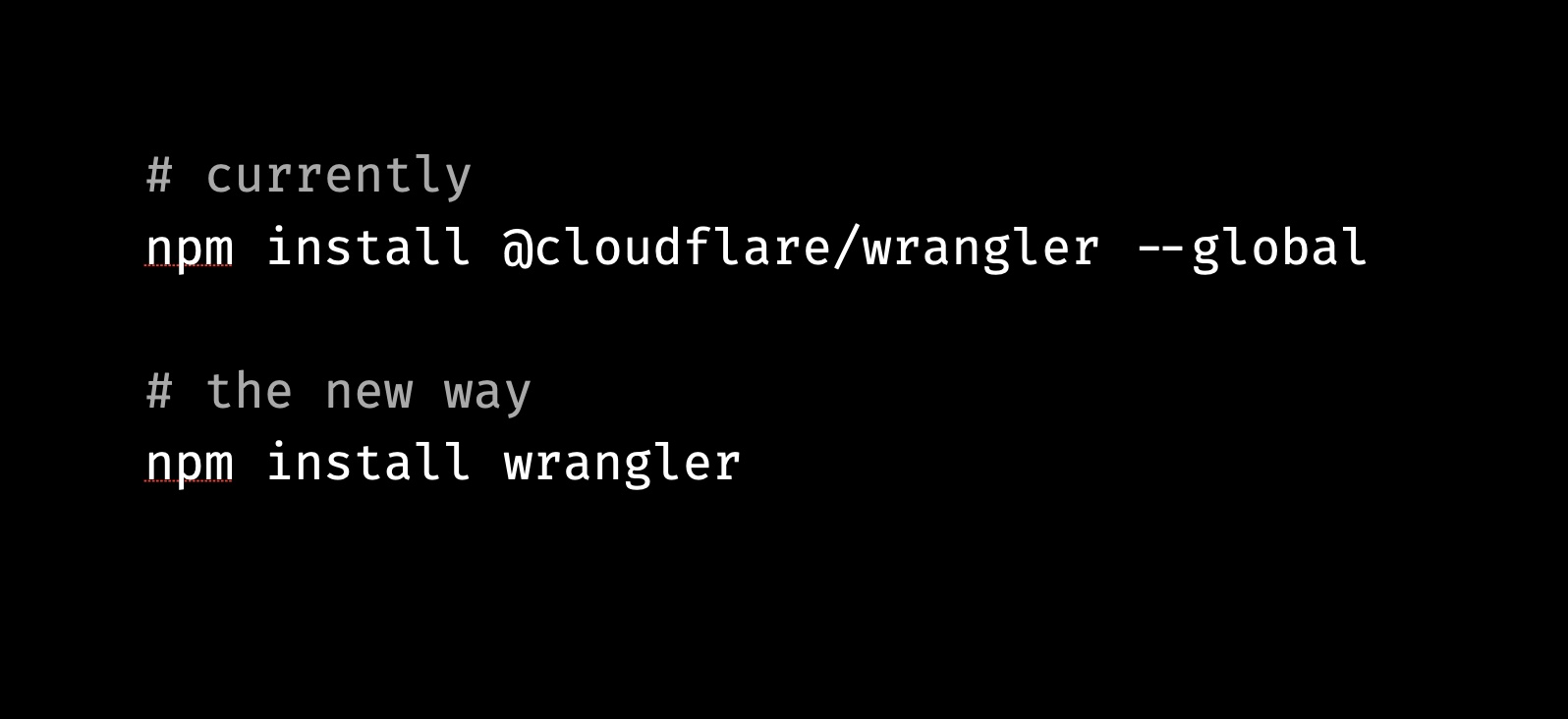
Previously, folks would have to install @cloudflare/wrangler globally on a system. This made it hard to use different versions of Wrangler across projects. Further, it was hard to install on some CI systems because of lack of access to a user’s root folder.  Sometimes, folks would forget to add the @cloudflare scope when installing, confusing them when a completely unrelated package was installed and didn’t work as expected.

Let’s fix that. We’ve simplified this by now publishing to the wrangler package, so you can run npm install wrangler and it works as expected. You can also install it locally to a project’s package.json, like any other regular npm package. It also works across a much broader range of CPU architectures and operating systems, so you can use it on more machines.

This makes it a lot more convenient when starting. But why stop there?

2. Zero config startup:

10 things I love about Wrangler v2.0
Get started with zero configuration

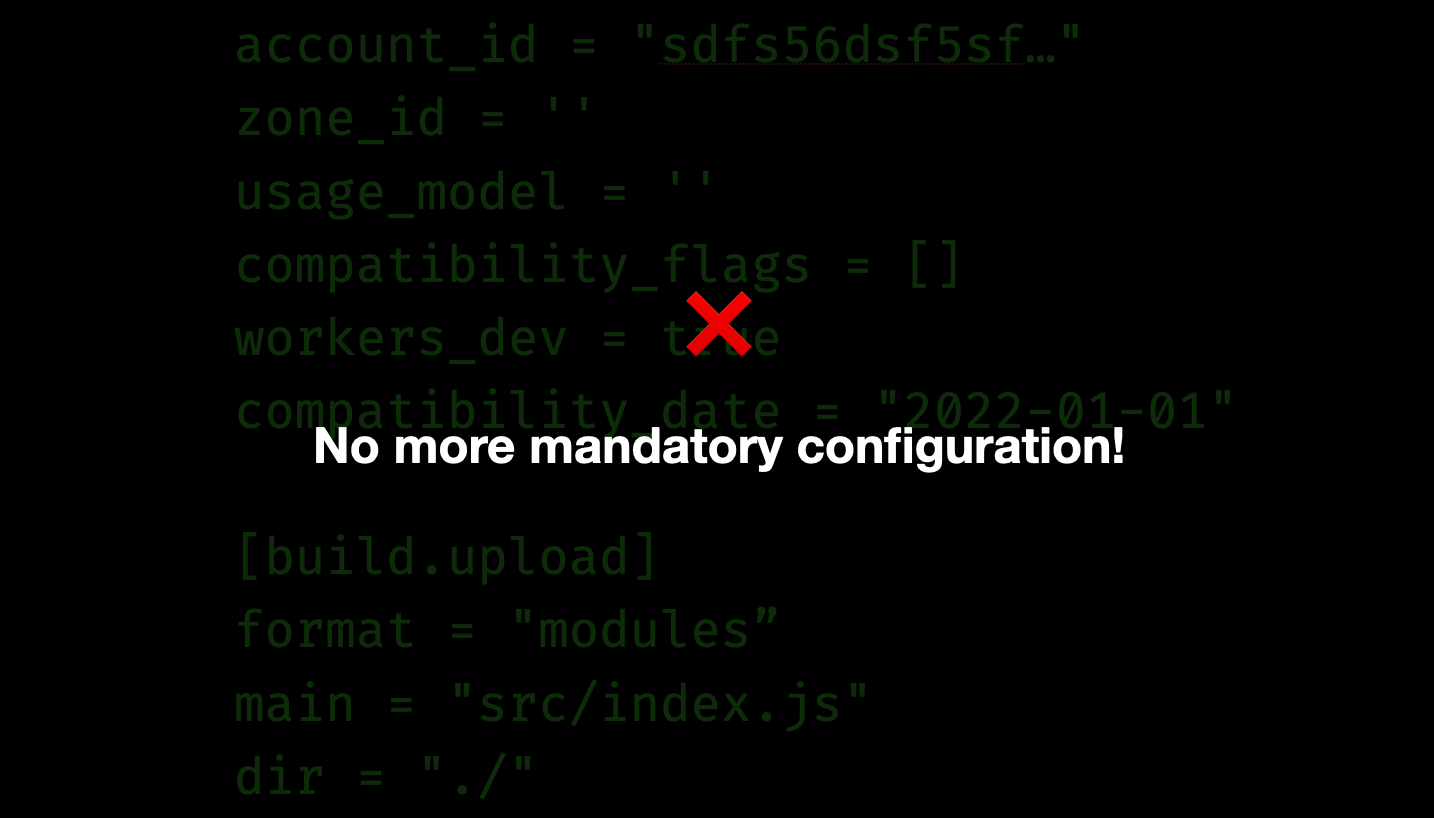
It’s now much simpler to get started with a new project. Previously, you would have to create a wrangler.toml configuration file, and fill it in with details about your cloudflare account, how the project was structured, setting up a custom build process and so on. We heard feedback from many of you who would get frustrated during this step, and how it would take many minutes before you could get to developing a simple Worker.

Let’s fix that. You no longer need to create a configuration file when starting, and none of the fields are mandatory. Wrangler infers details about your account and project as you start developing, and you can add configuration incrementally when you need to.

In fact, you don’t even need to install Wrangler to start! You can create a Worker (say, as index.js) and use npx (a utility that comes installed with node.js) to fetch Wrangler from the npm registry and start developing immediately!

This is great for extremely simple Workers, but why stop there?

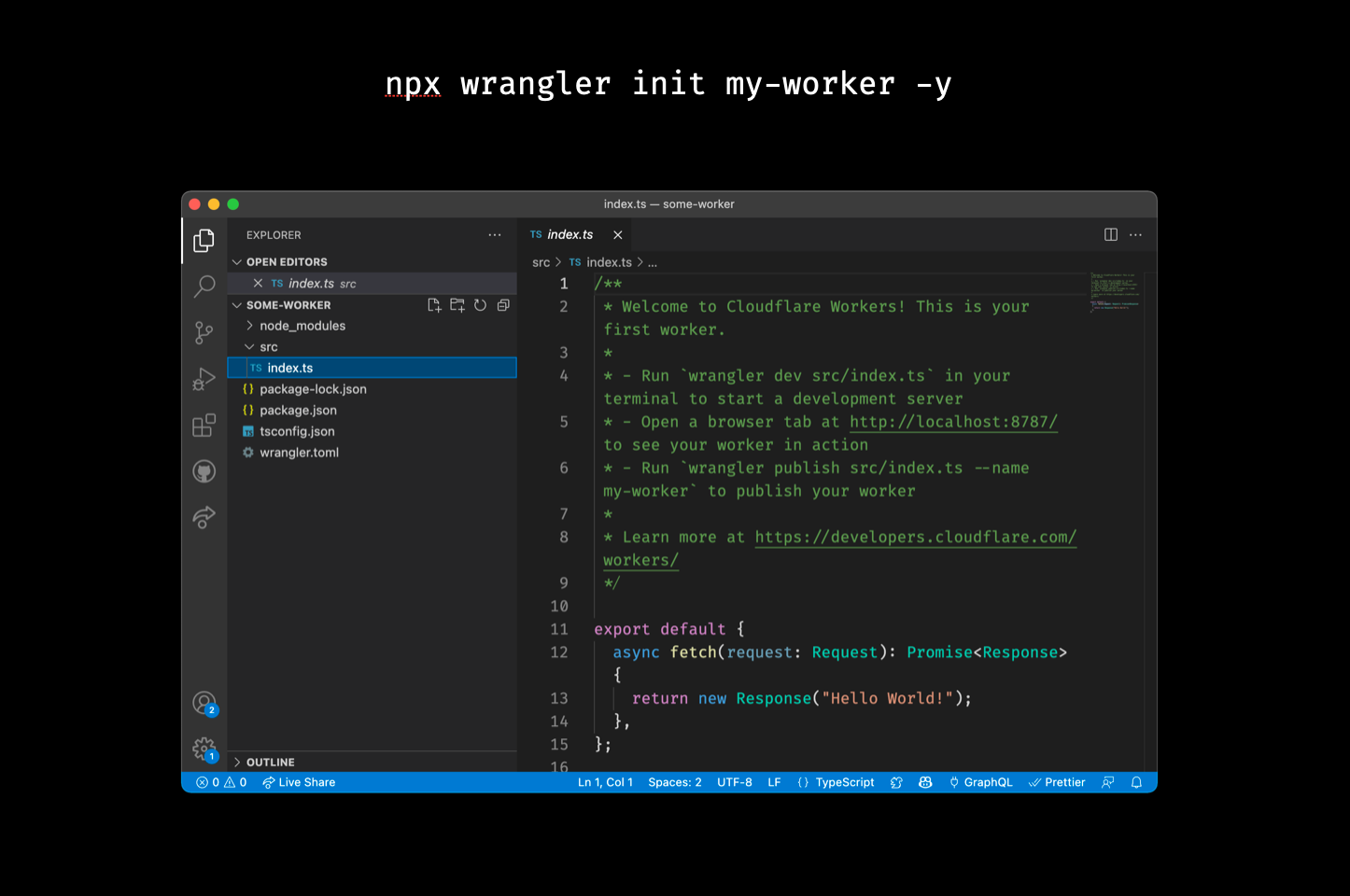
3. wrangler init my-worker -y, one liner to set up a full project:

We noticed users would struggle to set up a project with Wrangler, even after they’d installed Wrangler and configured wrangler.toml. Most users want to set up a package.json, commonly use typescript to write code, and set up git to track changes in this project. So, we expanded the wrangler init <project name> command to set up a production grade project. You can optionally choose to use typescript, install the official type definitions for Workers, and use git to track changes.

My favorite trick here is to pass -y to accept all questions without asking. Try running npx wrangler init my-worker -y in your terminal today!

10 things I love about Wrangler v2.0
One line to set up a full Workers project

4. --local mode:

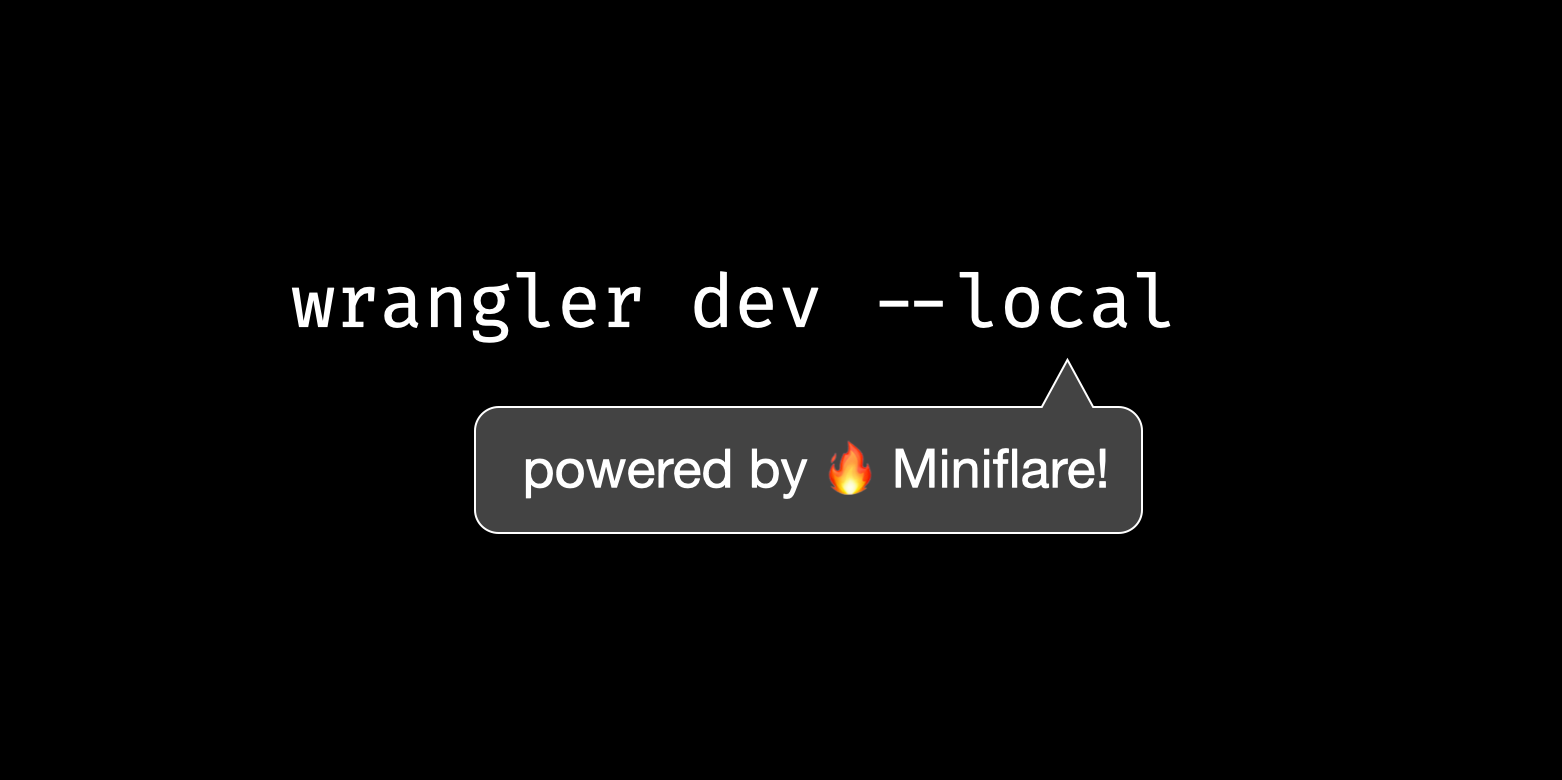
Wrangler typically runs a development server on our global network, setting up a local proxy when developing, so you can develop against a “real” environment in the cloud. This is great for making sure the code you develop will behave the same in development, and after you deploy it to production. The trade-off here is it’s harder to develop code when you have a bad Internet connection, or if you’re running tests on a CI machine. It’s also marginally slower to iterate while coding. Users have asked us for a long time to be able to ‘run’ their code locally on their machines, so that they can iterate quickly and run tests in environments like CI.

Wrangler now lets you develop on your machine by simply calling wrangler dev --local, and no additional configuration. This is powered by Miniflare, a fully featured simulator of the Cloudflare Workers runtime. You can even toggle across ‘edge’ and ‘local’ modes by tapping the ‘L’ hotkey when developing; however you prefer!

10 things I love about Wrangler v2.0
Local mode, powered by Miniflare.

5. Tail any Worker, any time:

10 things I love about Wrangler v2.0
Tail your logs anywhere, anytime. 

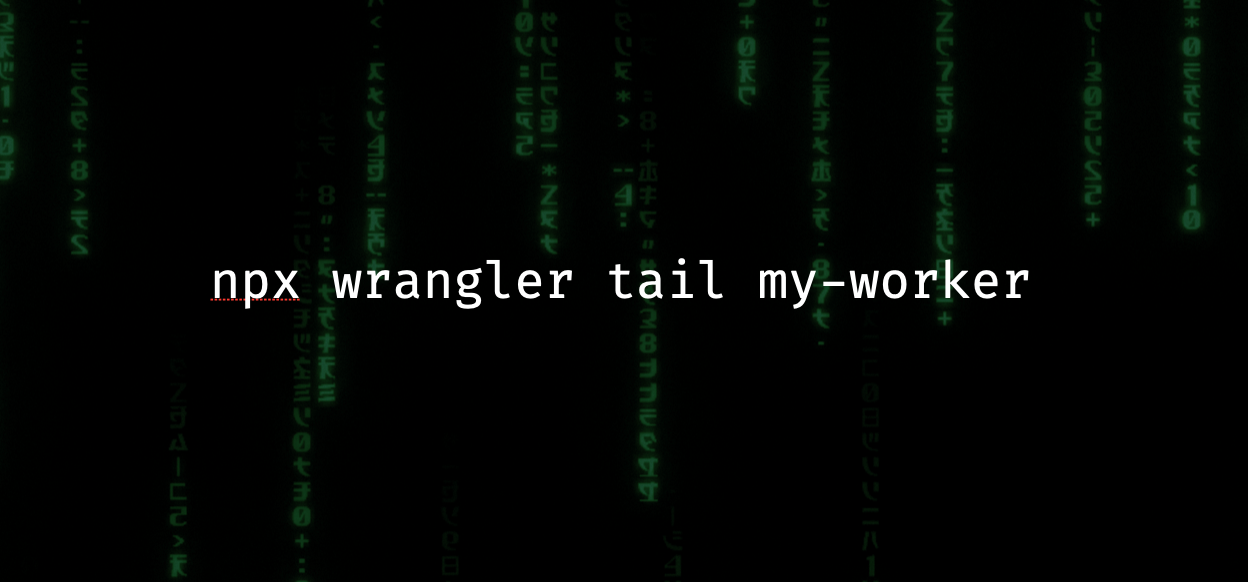
It’s useful to be able to “tail” a Worker’s output to a terminal, and see what’s going on in real time. While you can already view these logs in the Workers dashboard, some people are more comfortable seeing the logs in their terminal, and then slicing and dicing to debug any issues that may be occuring. Previously, you would have to checkout a Worker’s repository locally, install dependencies, and then call wrangler tail in the project folder. This was clearly cumbersome, and relied on developer expertise to see something as simple as a Worker’s logs.

Now you can simply call npx wrangler tail <worker name> in your terminal, without any configuration or setup, and immediately see the logs that you expect. We use this ourselves to quickly inspect our production Workers and see what’s going on inside them!

6. Better warnings and errors, everywhere:

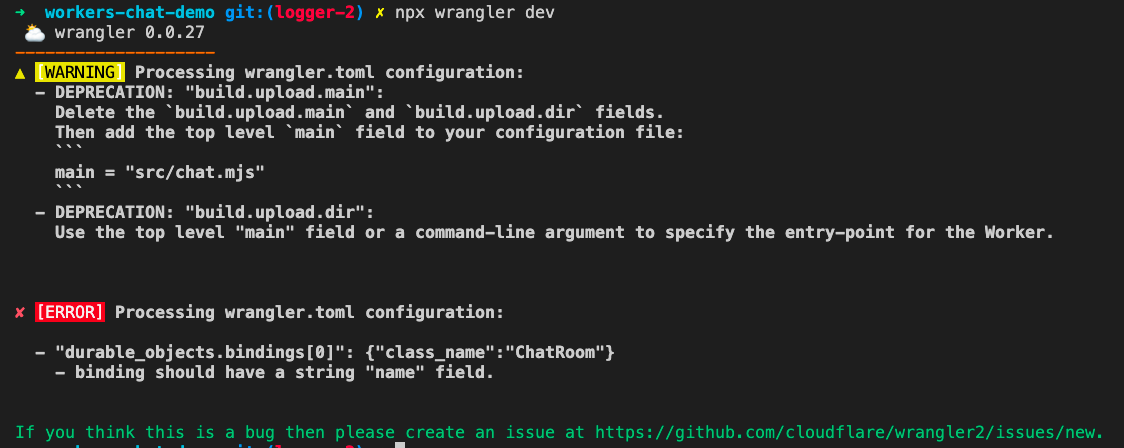
One of the worst feelings a developer can face is being presented with an error when writing code, and not knowing how to fix it and proceed. We heard feedback from many of you who were frustrated with the lack of error messages, and how you would spend hours trying to figure out what went wrong. We’ve now added new error and warning messages, so you can easily spot the problems in your code. When possible, we also include steps you can follow to fix your Worker, including things that you can simply copy and paste! This makes Wrangler much more friendly to use, and we promise the experience will only get better.

10 things I love about Wrangler v2.0

7. On-demand developer tools for debugging:

We introduced initial support for debugging Workers in Wrangler in September which enables debugging a Worker directly on our global network. However, getting started with debugging was still a bit cumbersome, because you would have to start Wrangler with an --inspect flag, then open a special page in your browser (chrome://inspect), configuring it to detect Wrangler running on a special port, and then launching the debugger. This would also mean you might have lost any debugging messages that were logged before you opened the Chrome developer tools.

We fixed this. Now you don’t need to pass any special flags when starting up. You can simply hit the D hotkey when developing and a developer tools instance pops up in your browser. And by buffering the messages before you even start up the devtools, you don’t lose any logs or errors! You can also use VS Code developer tools to directly hook into your Worker’s debugging session!

8. A modern module system:

Modern JavaScript isn’t simply about the syntax that the language supports, but also writing code as modules, and leveraging the extremely broad ecosystem of community libraries and frameworks. Previously, Wrangler required that you set up webpack or a custom build with bundlers (like rollup, vite, or esbuild, to name a few) to consume libraries and modules. This introduces a lot of friction, especially when starting a new project and trying out new ideas.

Now, support for npm modules comes out of the box, with no extra configuration required! You can install any package from the npm registry, organize your own code with modules, and it all works as expected. We’re also introducing an experimental node.js compatibility mode for using node.js modules that wouldn’t previously work without setting up your own polyfills! This means you can use popular frameworks and libraries that you’re already familiar with while focusing on delivering value to your users.

9. Closes many outstanding issues:

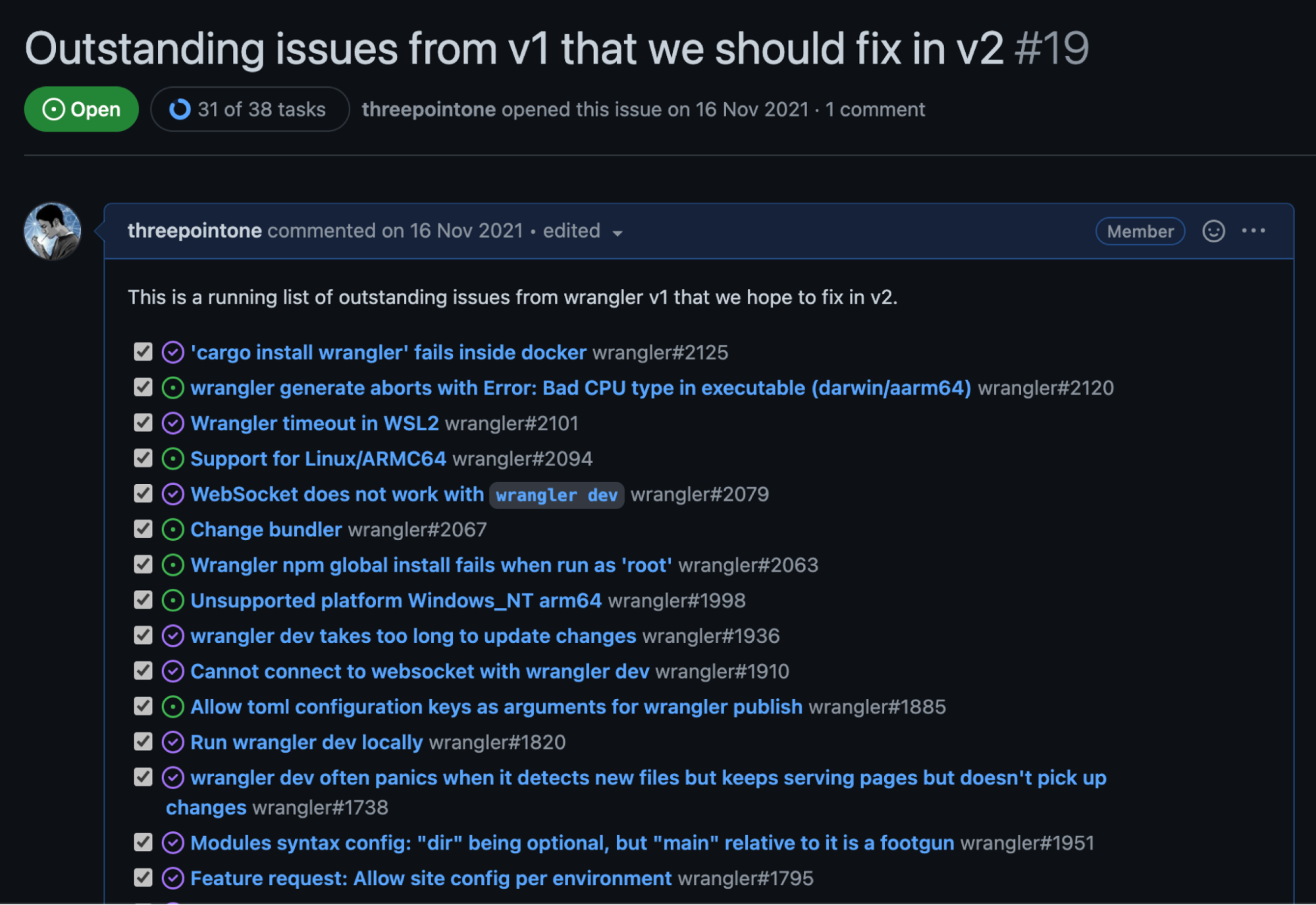
A rewrite should be judged not just by the new features that are implemented, but by how many existing issues are resolved. We went through hundreds of outstanding issues and bugs with Wrangler, and are happy to say that we solved almost all of them! Across the board, every command and feature got a facelift, bug fixes, and test coverage to make sure it doesn’t break in the future. Developers on using Cloudflare Workers will be glad to hear that simply upgrading Wrangler will immediately fix previous concerns and problems. Which leads us to my absolute favorite feature…

10 things I love about Wrangler v2.0

10. A commitment to improve:

10 things I love about Wrangler v2.0
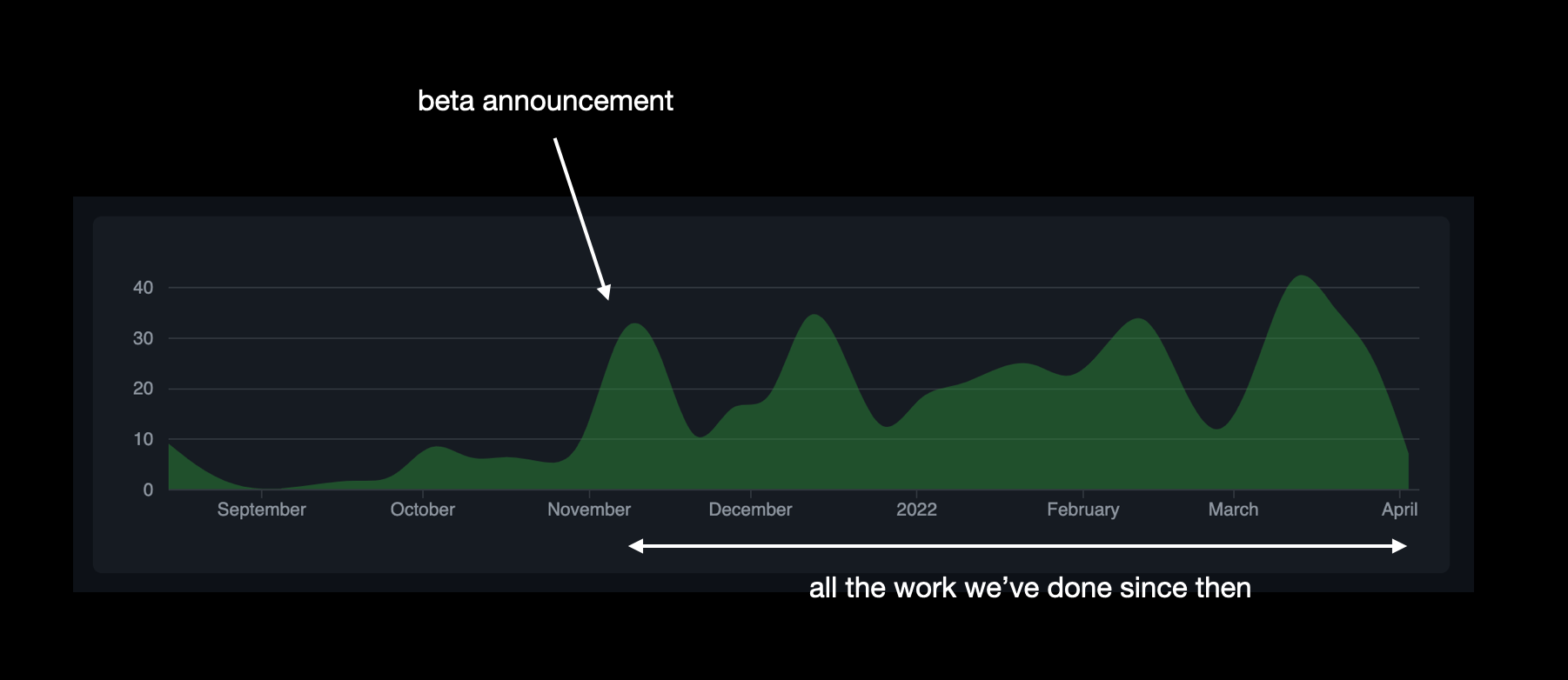
The effort into building wrangler v2.0, visualised. 

Wrangler has always been special software for us. It represents the primary interface that developers use to interact and use Cloudflare Workers, and we have major plans for the future. We have invested time, effort and resources to make sure Wrangler is the best tool for developers to use, and we’re excited to see what the future holds. This is a commitment to our users and community that we will only keep improving on this foundation, and folks can expect their feedback and concerns to be heard loud and clear.