Post Syndicated from Explosm.net original https://explosm.net/comics/new-years-2025
New Cyanide and Happiness Comic
Post Syndicated from Explosm.net original https://explosm.net/comics/new-years-2025
New Cyanide and Happiness Comic
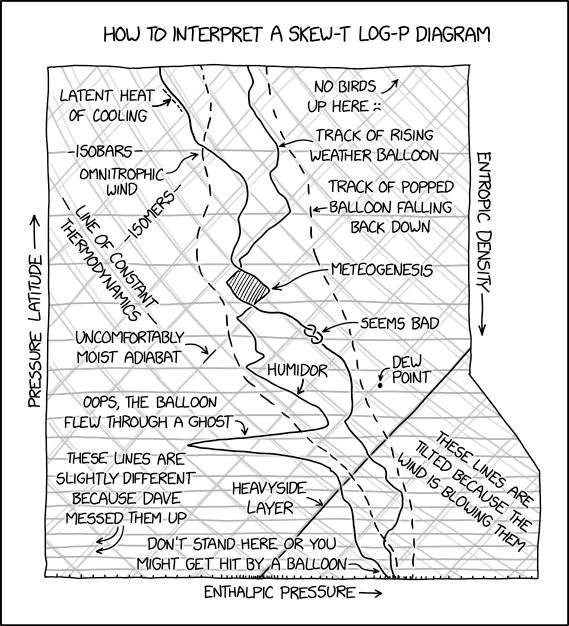
Post Syndicated from xkcd.com original https://xkcd.com/3032/
Post Syndicated from The History Guy: History Deserves to Be Remembered original https://www.youtube.com/watch?v=k4yJu_sg-QI
Post Syndicated from Rohit Kumar original https://www.servethehome.com/the-mini-asus-ebp15-poe-switch-is-tiny/
The ASUS EBP15 is a tiny PoE+ switch that packs some management capabilities and a 60W PoE budget in something you can mount almost anywhere
The post The Mini ASUS EBP15 PoE Switch is Tiny appeared first on ServeTheHome.
Post Syndicated from corbet original https://lwn.net/Articles/1003862/
Version 22.1 of the
Android-based LineageOS distribution is out.
We’ve been hard at work since Android 15’s release in September,
adapting our unique features to this new version of
Android. Android 15 introduced several complex changes under the
hood, but due to our previous efforts adapting to Google’s
UI-centric adjustments in Android 12 through 14, we were able to
rebase onto Android 15’s code-base faster than anticipated.Additionally, this is far-and-away the easiest bringup cycle from a
device perspective we have seen in years. This means that many more
devices are ready on day one that we’d typically expect to have up
this early in the cycle!Last, but not least, we even had enough time and resources to
introduce not one, but two new exciting apps! The first one,
Twelve, will replace our aging music app, while the other one,
Camelot, will let you view PDF files.
Post Syndicated from Syed Masudullah Sadullah original https://aws.amazon.com/blogs/architecture/transform-lease-agreement-workflows-with-amazon-bedrock/
Rental and lease agreements can be a complex and time-consuming process for property management companies and landlords. The agreements contain legal language, varied formatting, and diverse terms and conditions based on state and local regulations. Landlord-tenant laws vary significantly across the country, with each state having its own set of regulations. For example, California’s landlord-tenant law spans over 100 pages in the state’s Civil Code. Manually extracting and processing the key details from lease documents is inefficient and error prone. In 2023, there were approximately 45 million rental units managed by over 310,000 property management companies in the US, most of which want to take advantage of AI-powered lease management systems to streamline operations, enhance tenant experience, and optimize costs.
Generative AI, powered by large language models (LLMs), is helping how businesses approach complex document processing tasks, including lease management. Amazon Bedrock, a fully managed service, offers a choice of high-performing foundation models (FMs) from leading AI companies like AI21 Labs, Anthropic, Cohere, Luma (coming soon), Meta, Mistral AI, poolside (coming soon), Stability AI, and Amazon through a single API, along with a broad set of capabilities to build generative AI applications with security, privacy, and responsible AI.
This post explores how Amazon Bedrock can transform property management operations and optimize costs. We examine a practical approach to tackle challenges such as processing high volumes of lease agreements, maintaining compliance with varied regulatory requirements.
Rental property management requires a careful balance of manual and automated processes to provide smooth administration of lease agreements. Although technological solutions have improved efficiency in many areas, the handling of lease documents still relies heavily on manual effort from both property managers and back-office staff.
The following diagram shows a critical part of the lease processing workflow.

In this workflow, when a tenant signs a physical lease document, the property manager scans and uploads it to capture the terms electronically. A back office processor reviews the files, manually extracting key details like rent, duration, and deposit, and uses this to set up billing, payments, and reminders. The processor also manages lease functions, including processing payments, sending reminders, and issuing renewal notices, with some tasks automated but requiring manual review to address non-standard lease terms and special conditions. Alternatively, in the case when a tenant signs the lease digitally, the document is automatically captured in the system and processed further.
Overall, lease management functions involve manual and automated steps.
By using LLMs, you can automate key steps in the lease handling workflow, transitioning from a manual approach to a more streamlined and intelligent system. With prompt engineering, LLMs can interpret the language of lease agreements mandated by state, county, and local laws, and accurately extract terms and conditions for downstream functions such as rent processing and renewal notifications. Optionally, a fine-tuning approach helps LLMs understand industry-specific terminology.
The solution approach in this post uses Amazon Bedrock, which offers a selection of FMs and provides seamless integration with other AWS services. Although we used Anthropic’s Claude 3 Sonnet model on Amazon Bedrock to describe the solution in the post, Amazon Bedrock allows you to experiment with other models using the same approach, enabling you to find the best fit for your specific requirements.
Our event-driven solution is structured in three key steps, as illustrated in the following diagram:

This solution demonstrates how advanced models can be effectively integrated into real-world business processes, streamlining lease management operations while maintaining accuracy and compliance.
For a practical implementation of this solution, refer to the solution repository, where you can find code for AWS Lambda functions, a sample standard lease template, and an example lease document for you to test in your own AWS environment.
To implement this solution, you need the following prerequisites:
In the first stage, you build a foundation of the solution by curating a library of standard lease document templates to capture diverse laws and regulations across different states, cities, and counties.
To describe the solution approach in this post, we use the Amazon Bedrock Converse API, which provides a consistent way to invoke models, removing the complexity to adjust for model-specific differences such as inference parameters. It also manages multi-turn conversations by incorporating conversational history into requests.
With the Converse API, you can establish a centralized knowledge base in DynamoDB to streamline validation of mandatory requirements in lease documents. Because the lease templates don’t change often, a DynamoDB based knowledge base provides a cost-effective way to store mandatory terms required by different jurisdictions, removing the need to invoke Amazon Bedrock queries every time a lease is processed. The use of the Converse API with DynamoDB also eliminates an extra layer of complex knowledge base creation that requires additional integration, cost, and maintenance.
Complete the following steps to create your knowledge base:
Lease Templates and upload the standard lease templates.Because lease templates don’t change often, this step is done only for new or modified templates.

Next, you configure S3 notifications to trigger a Lambda function to process the template.
<instructions>
Please review the provided residential apartment lease agreement template and extract the following information for each state or jurisdiction represented in the document. Extract state, county, city, zipcode and township details of the template in json format such as state as key and Ohio as value, zipcode as key and 43065 as value, etc. State and Zipcode is mandatory.
<laws>
Mandated state or local laws: Identify any specific laws, statutes, or regulations that the lease agreement must include or comply with based on the state or local jurisdiction. This could include things like maximum security deposit amounts, required notice periods for lease termination, or provisions tenant rights, security features on doors or windows or balcony, wall paint related obligations and landlord obligations. Provide output in json format with name and condition as key, value pairs.
</laws>
<terms>
Mandated lease terms and clauses: Extract any specific terms, clauses, or language that the lease agreement must contain due to state or local requirements. This may include items like required disclosures, prohibited provisions, or mandatory sections covering topics such as security deposits, maintenance responsibilities, or move-in/move-out procedures. Provide output in json format with name and condition as key, value pairs.
</terms>
<structure>
Formatting or structure requirements: Note if the lease agreement template must follow a particular format, structure, or organization based on state or local guidelines. This could involve the order of sections, required headings, or formatting of specific provisions. Provide output in json format with name and condition as key, value pairs.
</structure>
For each state or jurisdiction represented in the lease agreement template, please provide the extracted information in json format as described above. Include the state/jurisdiction name, the relevant mandated laws, terms, clauses, and formatting requirements. Where possible, cite the specific legal authority or source for the required provisions. The goal is to create a comprehensive guide in json format that a property manager could use to ensure their residential lease agreements comply with the applicable state and local requirements, based on the provided template document. In addition to above terms and conditions, provide any other relevant terms you find the template that could be important and should be included in lease documents by property manager. Provide only json output and don't include any other text and don't add any super header to the overall json response. Start the json with state key, value pair to put the item into Amazon DynamoDB table.
</instructions>
state and zipcode as unique identifiers:
The following screenshot shows the output of the Amazon Bedrock Converse API call, which will serve as a reference for processing lease documents for that jurisdiction.

leaseagreementtemplateterms table in DynamoDB and store the JSON output, forming the knowledge base:
You can configure on-demand or provisioned throughput capacity for the table based on your workload requirements. This data repository makes sure that the mandatory requirements for each jurisdiction are readily available for validation when new lease agreements are processed. It’s also more cost-effective to retrieve terms from the DynamoDB table than invoking Amazon Bedrock every time a lease needs to be validated against standard terms in the template.

You can repeat the process to capture standard lease terms of all jurisdictions you have operations in and if there are regulatory changes in the standard terms of already processed templates.
In the second stage of the solution, you validate each lease agreement against standard terms captured during the previous stage to confirm compliance. After the lease is determined to be compliant on all mandatory clauses for the jurisdiction, you extract terms and conditions to run lease management functions. Compared to the volume and frequency of templates processed in first stage, you frequently process a larger number of documents in the lease processing stage, therefore a scalable solution using Amazon SQS is optimal. You can use S3 notifications and an SQS queue-based approach to decouple and scale the document processing as required.
Complete the following steps:
Lease Agreements to upload lease documents, and configure S3 upload notifications to destination type Amazon SQS.Next, you configure Amazon SQS to trigger a Lambda function to perform downstream processing of the lease document.
state and zipcode as part of file name. With that information, retrieve mandatory terms corresponding to that jurisdiction from the DynamoDB leaseagreementtemplateterms knowledge base.
Over a period of time, standard lease templates may change for various reasons. If you have more than one version of the template for each state and zipcode combination, use the latest version of mandatory terms for validation.
<instructions>
You are an AI data processor assisting a residential property management company. Your task is to review residential lease agreement document uploaded and validate that it contains the mandatory terms, conditions, and clauses provided in the following context.
<json_mandatory_terms>
+ str(mandatory_lease_terms_json)
</ json_mandatory_terms>
Please review the lease agreement document and check if it includes the mandatory terms, conditions, and clauses as mentioned in terms above. Do not hallucinate or use any public information for validation. Clauses could be just statements. Don't look for specific statements but make sure the meaning is in alignment.
Validate if rent amount, lease start date, security deposit amount, etc, have valid values such as amounts and dates. For example, if security deposit is mandatory in the terms JSON, then the lease document should have the term security deposit with a valid $ amount value. Identify any gaps or missing elements that are in the JSON and provide a summary report.
The report should include: The state and local jurisdiction of the property. A list of all the mandatory terms, conditions, and clauses required for that jurisdiction as per JSON. A list of any missing or incomplete elements in the lease agreement document you just reviewed. If any mandatory terms are missing or not properly mentioned with valid values in the lease document, please provide recommendations on what needs to be amended in the lease document and approximate wording for each recommendation to add in the lease document. Please provide the report in a clear and concise format that the property manager can easily understand and act upon. If all mandatory terms look good, then confirm the same in the report by outputting a response 'status: agreement is validated' along with the report. If a term or condition or clause doesn't fulfill as per mandatory JSON, then output a response 'status: agreement is not fully validated' along with the report.
<confidence_score>
Share a confidence score in percentage on how confident are you that you validation is accurate and the lease document is complete.
</confidence_score>
</instructions>
The Converse API call generates a detailed validation report in JSON format as shown in the following screenshot, outlining any sections or terms that don’t align with the mandatory requirements. It also provides a confidence score on the accuracy of the lease document and recommendations on how to amend those terms and conditions.

After the document is successfully validated, the model prepares a final validation report along with a confidence score. In our solution, we’ve considered 95% as the threshold for successful validation. You can decide your threshold and have a manual review step in the workflow as required.

<instructions>
You are a Lease document data processor. You will be provided a lease agreement of a real estate rental unit such as apartment, home or condo. Extract the information from the lease document and create a json that can be inserted into Amazon DynamoDB table. Following are the terms and conditions of the lease that you need to extract:
state is state where the lease is processed (Example: Ohio, Pennsylvania, etc.)
zipcode is zipcode where the lease is processed (example 43065, 19019, etc.)
lease_id is Rental agreement title
new_or_amendment is 'new'
agreement_signed_date is date on which this lease is signed (mm/dd/yyyy)
deposit_amount is Deposit amount
deposit_paid_by_date is date when deposit should be paid by mm/dd/yyyy)
fixtures are kitchen appliances, furnitures or any other applicances
owner_name is Landlord's or Owner's name of the rental unit
property_address is address of the rental unit which is on lease
rent_amount is monthly rent amount
rent_paid_by_day_of_month is due date of rental payment
tenancy_end_date is lease end date on which the lease is terminating
tenancy_start_date is lease start date on which the lease is starting
tenant_name is Tenant's name of the rental unit
termination_notice_min_days is minimum notice period in days
utilities_terms_electricity is who will pay the electricity bill
When creating the summary, be sure to understand the legal language in the agreement and create a valid output.
</instructions>
Lease Agreements table in DynamoDB to store the terms and condition of the lease as a lease primary record.You can use this record to carry out lease management activities throughout the life of the lease, such as rent reminders, renewal notices, and promotional emails. Because the lease is renewed by the same tenant, you can update the primary record and extend the process. If the lease expires and a new lease is signed by different tenant, you can create a new lease primary record again for the rental unit, thereby enabling the continuous lifecycle of property management workflows.
The following screenshot is a sample lease record for each lease agreement processed in the table.

After the lease terms are extracted into the lease agreement table, you can automate downstream processes. The solution in this post uses EventBridge Scheduler and Lambda functions to run different lease management functions. However, you can also use Amazon Bedrock to perform some of those functions, such as generating communications or custom notifications as required. You can determine what works best for your use case based on volumes, flexibility, and cost involved in using Amazon Bedrock and modify the approach.
Complete the following steps:
The following screenshot is a sample recurring rent reminder email scheduled through EventBridge.

In this post, we explored a generative AI-based approach to lease processing using the power of Amazon Bedrock. Our approach addresses the complex challenges of manual lease management by establishing a comprehensive lease template library and knowledge base, automating compliance validation against jurisdiction-specific requirements, and centralizing lease term storage for efficient processing of rental management functions. This approach not only streamlines the initial processing of leases, but also significantly reduces administrative overhead in ongoing lease management. By automating lease processing activities, you can optimize administrative costs, improve accuracy, and enhance overall operational efficiency.
For the implementation of this solution, refer to the solution repository, which contains Lambda function code and sample lease files to test in your own AWS environment.
Post Syndicated from corbet original https://lwn.net/Articles/1003856/
Security updates have been issued by Debian (debootstrap) and SUSE (assimp-devel, grpc, libQt6Pdf6, and poppler).
Post Syndicated from Marek Majkowski original https://blog.cloudflare.com/the-forecast-is-clear-clouds-on-e-paper-powered-by-the-cloud/
I’ve noticed that many shops are increasingly using e-paper displays. They’re impressive: high contrast, no backlight, and no visible cables. Unlike most electronics, these displays are seamlessly integrated and feel very natural. This got me wondering: is it possible to use such a display for a pet project? I want to experiment with this technology myself.

(source)
My main goal in this project is to understand the hardware and its capabilities. Here, I’ll be using an e-paper display to show the current weather, but at its core, I’m simply feeding data from a website to the display. While it sounds straightforward, it actually requires three layers of software to pull off. Still, it’s a fun challenge and a great opportunity to work with both embedded hardware and Cloudflare Workers.
For this project, I’m using components from Waveshare. They offer a variety of e-paper displays, ranging from credit card-sized to A4-sized models. I chose the 7.5-inch, two-color “e-Paper (G)” display. For the controller, I’m using a Waveshare ESP32-based universal board. With just these two components — a display and a controller — I was ready to get started.
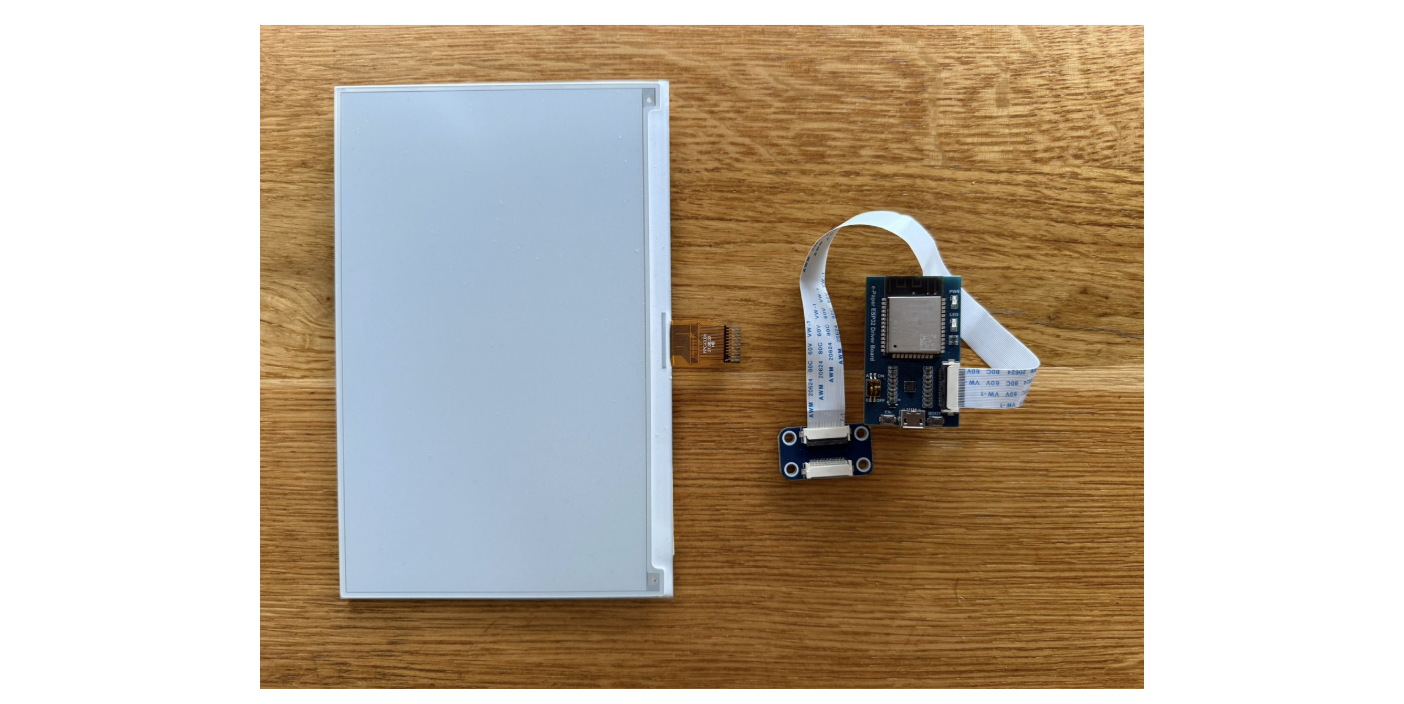
When the components arrived, I carefully connected the display’s ribbon cable to the ESP32 board. Even though this step isn’t documented anywhere, it was simple and almost impossible to get wrong. Best of all, no soldering was needed!
That’s pretty much it for the hardware setup! I’m keeping the device powered with a 5V supply through a micro-USB connection.
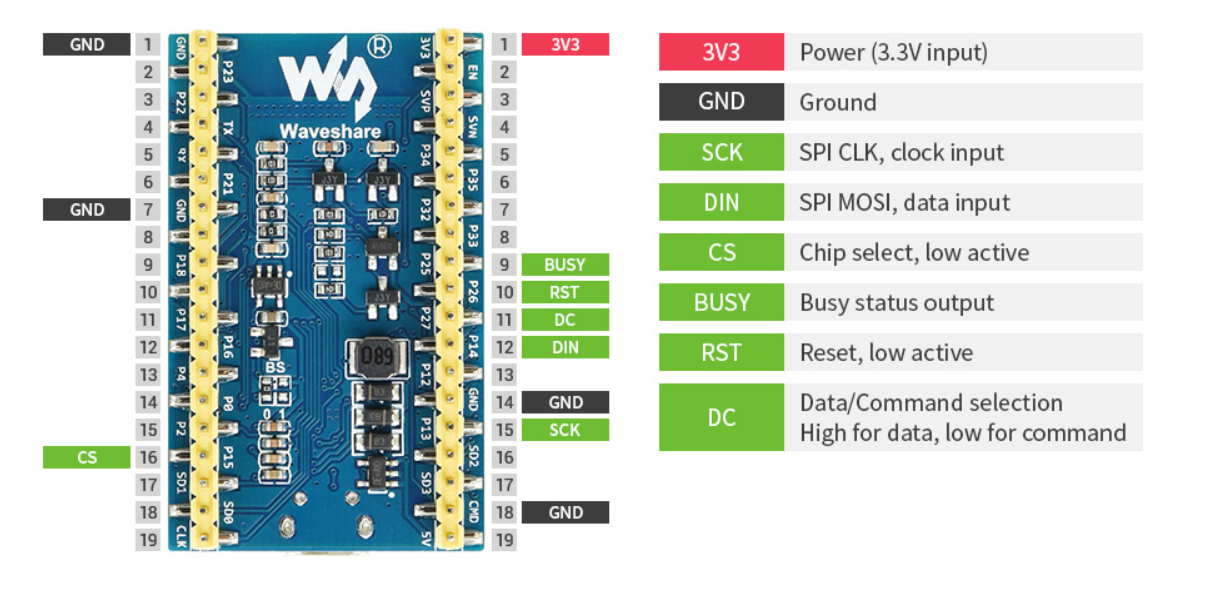
(source)
This was my first time working with the ESP32 CPU family, and I’m really impressed. It’s a system-on-chip controller with built-in Bluetooth and Wi-Fi. It’s relatively fast, very power-efficient, and quite popular in DSP (digital signal processing) applications. For example, your audio device might be powered by a CPU like this. Interestingly, the newer models have switched to the RISC-V instruction set.
For our purposes, we’ll only scratch the surface of what the ESP32 is capable of. The chip is straightforward to work with, thanks to the familiar Arduino environment. A great starting point is the demo provided by Waveshare. It sets up a web page where you can easily upload a custom image to the display.
To run the demo you need to:
Install the Arduino IDE.
Fix permissions of the /dev/ACM0 device.
Install “Additional Boards Manager URL” as per the instructions, and install the “esp32 by expressif” bundle.
Open the “Loader_esp32wf” example downloaded from waveshare.
Change the Wi-Fi name, password and IP address in the Arduino IDE srvr.h tab.
Once everything is set up, you should be able to connect to the ESP32’s IP address and use the simple web interface to upload an image to the display.
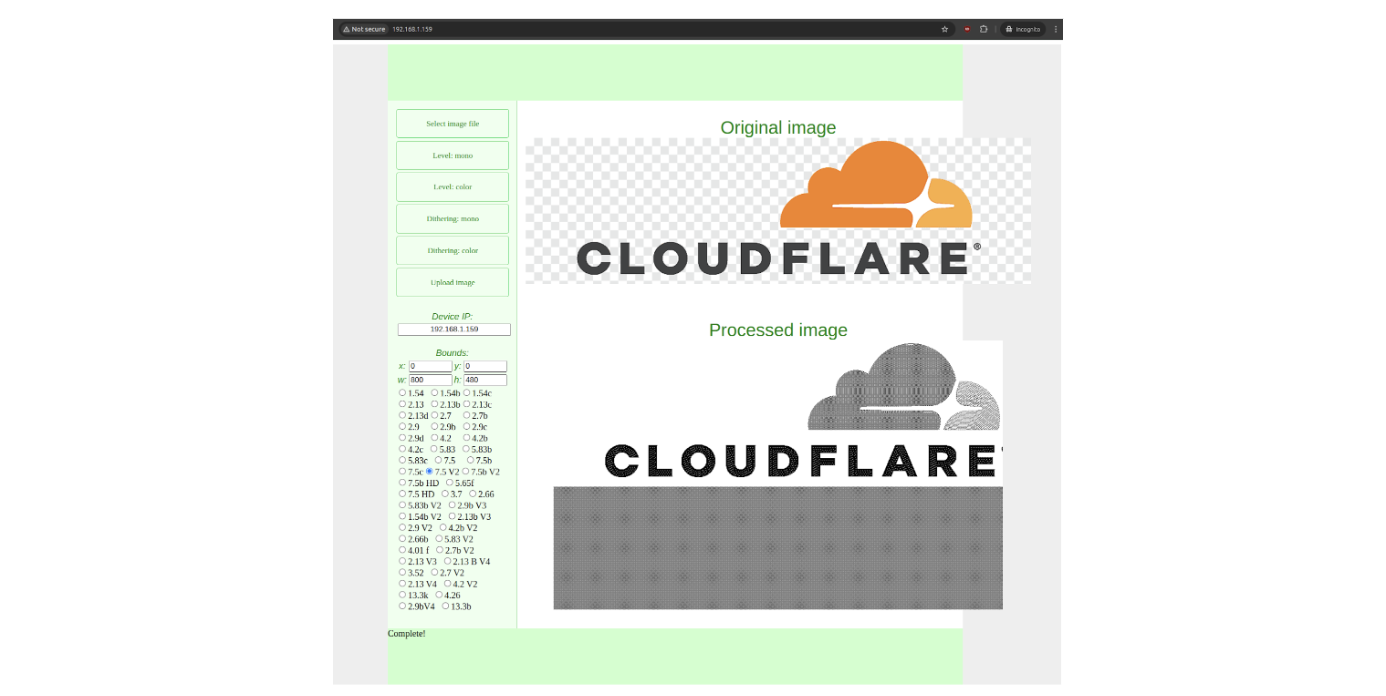
With a simple click of the “Upload Image” button, the magic happens: the e-paper display comes to life, showcasing the uploaded image.
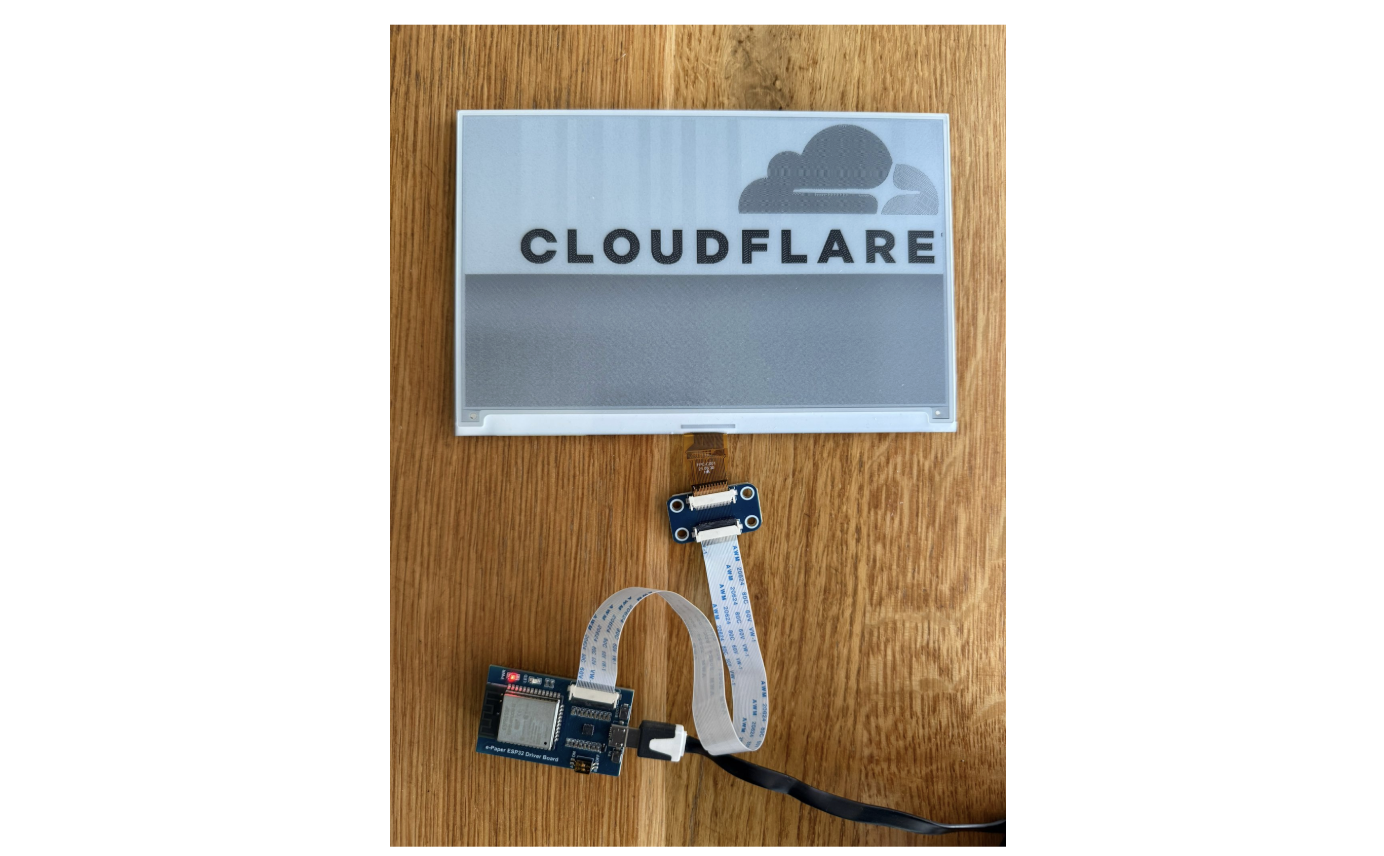
With the demo up and running, we can move on to the next step: figuring out how to render a web page on the e-paper display.
The ESP32 comes with some limitations. It has 520 KiB of RAM, 4 MiB of flash, and a 240 MHz clock speed. While this is fine for tasks like connecting to Wi-Fi or fetching a simple URL, it’s not powerful enough for more demanding tasks, such as parsing JSON or rendering an entire web page.
There are basic Arduino libraries for handling bitmaps, which can draw rectangles and render simple fonts, but manually managing layout doesn’t sound appealing to me. A better approach is to play to the ESP32’s strengths — fetching and displaying bitmaps — and delegate the more complex task of HTML rendering to a more powerful server.
Let’s break the problem into three layers:
ESP32 (Display Layer): The ESP32 will periodically, say every minute, fetch a pre-rendered bitmap from the server and display it on the e-paper screen. This keeps the ESP32’s tasks lightweight and manageable.
Server A (Rendering Layer): This server will fetch the desired website, render it, and rasterize it into a bitmap format. Its job is to prepare a bitmap that the ESP32 can handle without additional processing.
Server B (Content Layer): This server hosts the actual website with the HTML and CSS content. In this case, it will provide the local weather data in a styled format, ready to be fetched and rendered by Server A.

The ESP32 provides some great higher-level libraries to simplify development. For this project, we’ll need three key components:
Wi-Fi Arduino Library: To connect the ESP32 to a Wi-Fi network.
HTTP Arduino Library: To handle HTTP requests and fetch the rendered bitmap from the server.
EPD (e-Paper Display) Driver: To control the e-paper display and render the fetched bitmap.
These libraries make it much easier to implement the required functionality without dealing with low-level details.
Here’s my ESP32 Arduino project code. It’s actually pretty straightforward:
First, it connects to Wi-Fi
Then, it fetches a rendered bitmap from an HTTP endpoint
Then it pushes it to the e-paper display if needed
Waits a minute
And repeats the whole process forever
E-paper displays typically start to degrade after about one million refresh cycles. To preserve the display’s lifespan, I’m being extra careful to avoid unnecessary refreshes.
Now for the exciting part! We need an online service that can fetch a website, render it, rasterize it to fit our small monochromatic display, and return it as a display-sized binary blob. Initially, I considered using headless Chrome paired with an ImageMagick script, but then I discovered Cloudflare’s Browser Rendering API, which fits our needs perfectly.
This API can be used quite trivially and nicely fits our needs. Here’s the typescript worker code, and there are two particularly interesting parts: handling a remote browser and dithering.
First, see how easy it is to render a website as a PNG using Browser Rendering:
if (!browser) {
browser = await puppeteer.launch(env.MYBROWSER, { keep_alive: 600000 });
launched = true;
}
sessionId = browser.sessionId();

const page = await browser.newPage();
await page.setViewport({
width: 480,
height: 800,
deviceScaleFactor: 1,
})

await page.goto(url);
img = (await page.screenshot()) as Buffer;
I’m genuinely surprised at how practical and effective this approach is. While the remote browser startup isn’t exactly fast — it can take a few seconds to generate the screenshot — it’s not an issue for my use case. The delay is perfectly acceptable, especially considering how much work is offloaded to the cloud.
To prepare the bitmap for the ESP32, we need to decode the PNG, reduce the color palette to monochromatic, and apply dithering. Here’s the dithering code:
function ditherTwoBits(px: Buffer,
                       width: number,
                       height: number
                      ): Buffer {
    px = new Float32Array(px);

    for (let y = 0; y < height; y++) {
        for (let x = 0; x < width; x++) {
            const old_pixel = px[y * width + x];
            const new_pixel = old_pixel > 128 ? 0xff : 0x00;

            const quant_error = (old_pixel - new_pixel) / 16.0;
            px[(y + 0) * width + (x + 0)] = new_pixel;
            px[(y + 0) * width + (x + 1)] += quant_error * 7.;
            px[(y + 1) * width + (x - 1)] += quant_error * 3.;
            px[(y + 1) * width + (x + 0)] += quant_error * 5.;
            px[(y + 1) * width + (x + 1)] += quant_error * 1.;
        }
    }

    return Buffer.from(Uint8ClampedArray.from(px));
}
This was my first time experimenting with dithering, and it’s been a lot of fun! I was surprised by how straightforward the process is and that it’s fully deterministic. Now that I understand the details of the algorithm, I can’t help but notice its subtle side effects everywhere — in printed materials, on screens, and even in design choices around me. It’s fascinating how something so simple has such a broad impact!
To deploy this code as a Cloudflare Worker, you only need to install the required dependencies, configure the wrangler.toml file, and publish the code. Here’s a step-by-step guide:
sudo apt install npm
cd worker-render-raster
npm install wrangler
npm install @cloudflare/puppeteer --save-dev
npm install fast-png --save-dev
npx wrangler kv:namespace create KV
npx wrangler kv:namespace create KV --preview
With this out of the way, you can run the code:
2025-01-e-paper/worker-render-raster$ npx wrangler dev --remote

 ⛅️ wrangler 3.99.0
-------------------

Your worker has access to the following bindings:
- KV Namespaces:
  - KV: XXX
- Browser:
  - Name: BROWSER
[wrangler:inf] Ready on http://localhost:46131
⎔ Starting remote preview...
Total Upload: 755.39 KiB / gzip: 149.05 KiB
╭─────────────────────────────────────────────────────────────────────────────────────────────────╮
│  [b] open a browser, [d] open devtools, [l] turn on local mode, [c] clear console, [x] to exit  │
╰─────────────────────────────────────────────────────────────────────────────────────────────────╯
With everything set up, you can now open a browser and see a rendered and rasterized version of a website, processed through your Cloudflare Worker! For example, here’s how the 1.1.1.1 page looks in a 800×480 monochromatic resolution, complete with dithering:
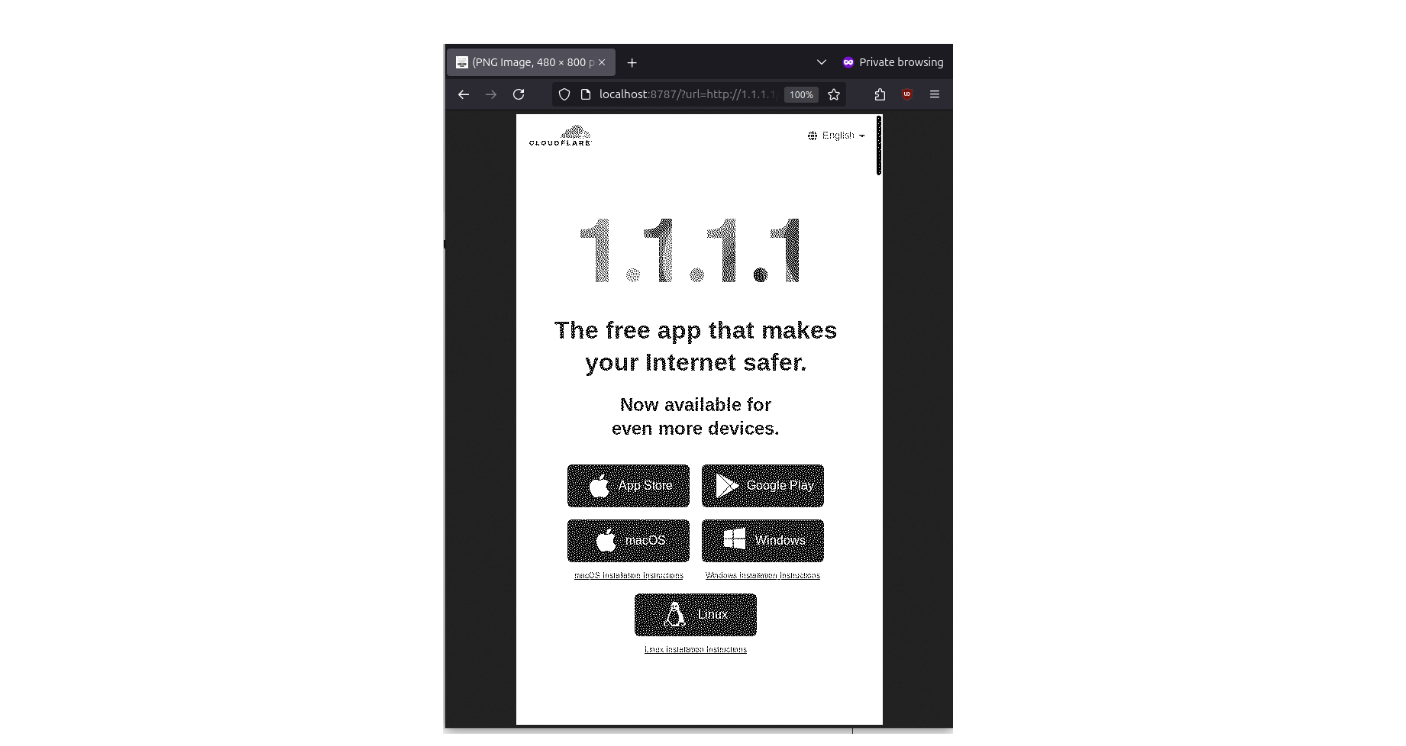
This demonstrates how effectively the Worker can handle rendering, rasterizing, and adapting web content for an e-paper display. It’s quite satisfying to see the pipeline in action.
To create the weather panel, I designed a simple HTML and CSS page and published it as another Cloudflare Worker. This time, I used Python in Cloudflare Workers because it felt more straightforward, especially since the site needs to query an external weather API. The simplicity of the code was surprising and made the process smooth.
async def on_fetch(request, env):
    cached = await env.KV.get("weather")
    if cached:
        cached = json.loads(cached)
    else:
        u = "https://api.open-meteo.com/..."
        a = await fetch(u)
        result = await a.text()
        cached = json.loads(result)
        await env.KV.put("weather", json.dumps(cached))
    return Response.new(render(...), headers=[('content-type', 'text/html')])
Here’s how it appears in a normal browser compared to the rendered and rasterized version by our worker:
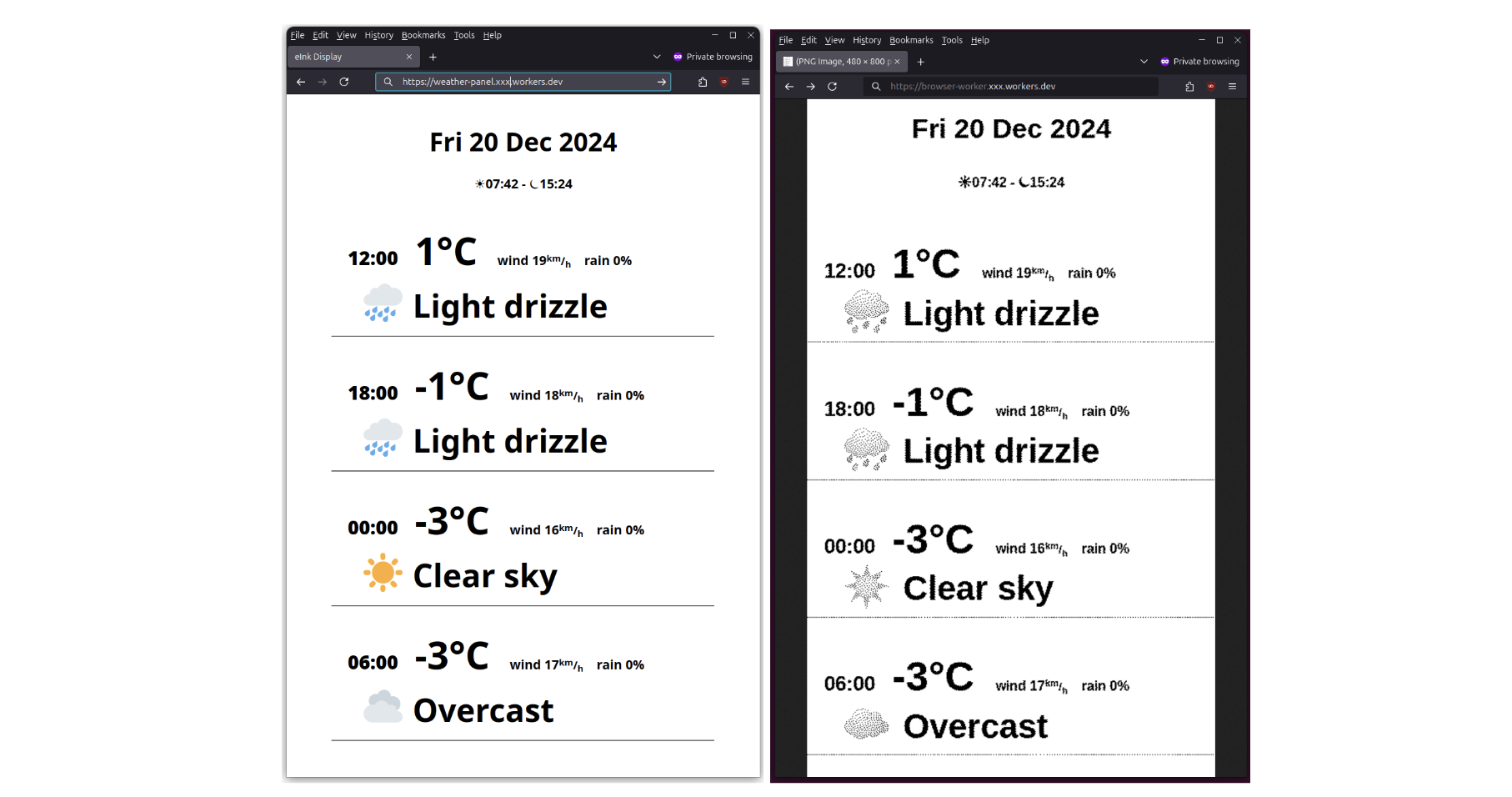
Finally, the display deserves a proper frame. Here’s the finished version:
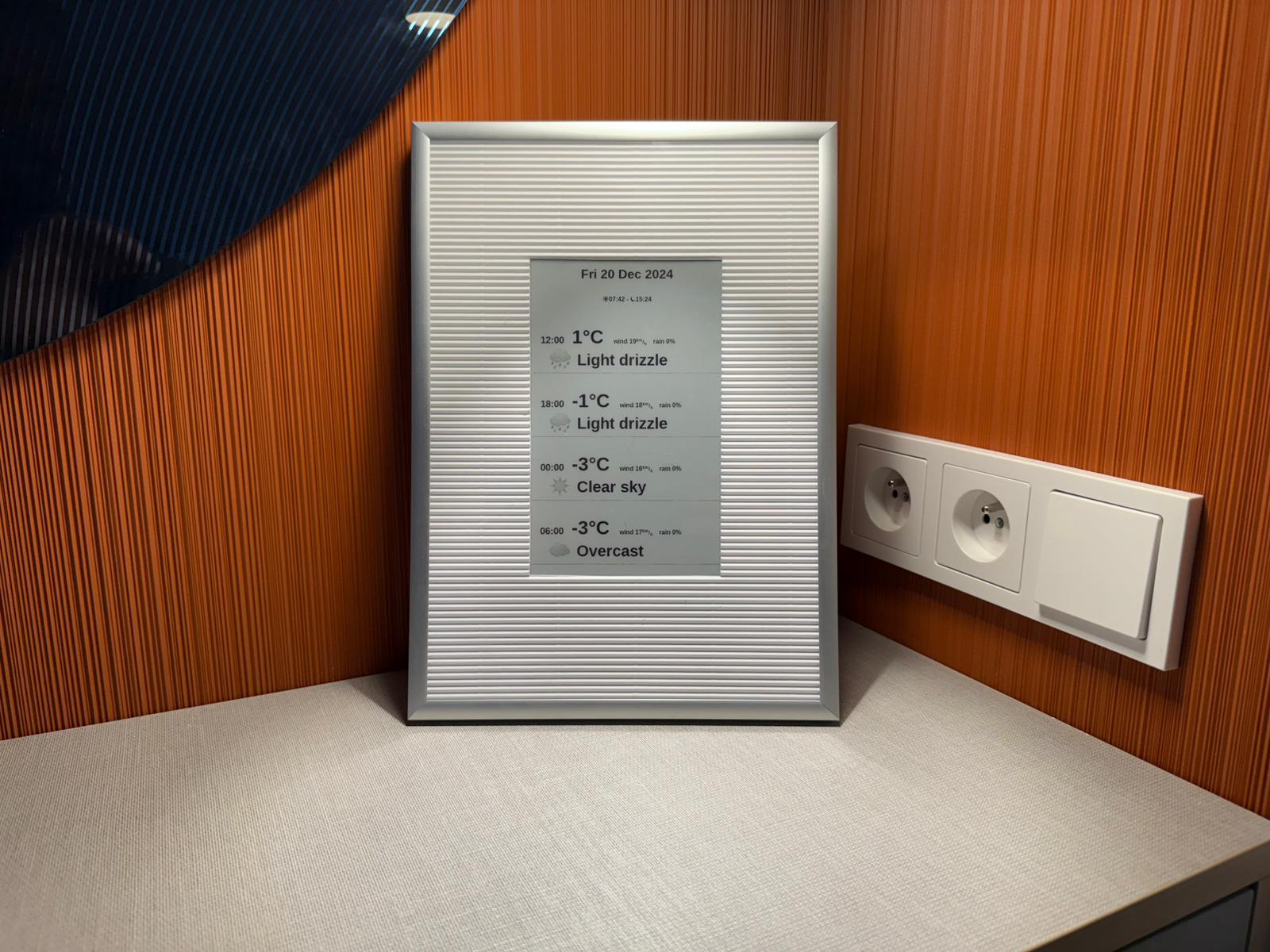
I started this project wanting to experiment with an e-paper display hardware, but I ended up spending most of my time writing software—and it turned out to be surprisingly enjoyable across all layers:
ESP32: The CPU is fantastic. Programming it is straightforward, thanks to powerful built-in libraries that simplify development.
Cloudflare Worker Browser Rendering: This is an underrated but incredibly powerful technology. It made implementing features like the Floyd–Steinberg dithering algorithm surprisingly easy.
Cloudflare Worker Python: Although still in beta, it worked flawlessly for my needs and was a great fit for handling API requests and serving dynamic content.
It’s remarkable how much you can achieve with relatively inexpensive hardware and free Cloudflare services.
Post Syndicated from Bruce Schneier original https://www.schneier.com/blog/archives/2024/12/gift-card-fraud.html
It’s becoming an organized crime tactic:
Card draining is when criminals remove gift cards from a store display, open them in a separate location, and either record the card numbers and PINs or replace them with a new barcode. The crooks then repair the packaging, return to a store and place the cards back on a rack. When a customer unwittingly selects and loads money onto a tampered card, the criminal is able to access the card online and steal the balance.
[…]
In card draining, the runners assist with removing, tampering and restocking of gift cards, according to court documents and investigators.
A single runner driving from store to store can swipe or return thousands of tampered cards to racks in a short time. “What they do is they just fly into the city and they get a rental car and they just hit every big-box location that they can find along a corridor off an interstate,” said Parks.
Post Syndicated from The Atlantic original https://www.youtube.com/watch?v=B4A5u_OSOBo
Post Syndicated from The History Guy: History Deserves to Be Remembered original https://www.youtube.com/watch?v=AdBK38-aZFA
Post Syndicated from Explosm.net original https://explosm.net/comics/position-2
New Cyanide and Happiness Comic
Post Syndicated from digiblur DIY original https://www.youtube.com/watch?v=sUPciEK7ons
Post Syndicated from corbet original https://lwn.net/Articles/1003797/
Kees Cook describes
his work resulting in a kernel documentation commit whose ID shares the
same first 12 characters as the initial commit in the kernel’s repository.
This is not yet in the upstream Linux tree, for fear of breaking
countless other tools out in the wild. But it can serve as a test
commit for those that want to get this fixed ahead of any future
collisions (or this commit actually landing).
LWN looked at commit-ID collisions a few
weeks back.
Post Syndicated from Geographics original https://www.youtube.com/watch?v=hzbYa4RA3M8
Post Syndicated from Crosstalk Solutions original https://www.youtube.com/watch?v=f8jI6OSrbgc
Post Syndicated from Cliff Robinson original https://www.servethehome.com/nvidia-completes-run-ai-acquisition/
NVIDIA completed its Run:ai acquisition bringing the Kubernetes AI management platform into the larger NVIDIA umbrella
The post NVIDIA Completes Run:ai Acquisition appeared first on ServeTheHome.
Post Syndicated from Talks at Google original https://www.youtube.com/watch?v=5xhS6bgluck
Post Syndicated from corbet original https://lwn.net/Articles/1003059/
The origins of the TCP and UDP network protocols can be traced back a full
50 years. Even though networks and their use have changed radically
since those protocols were designed, they can still be found behind most
networking applications. Unsurprisingly, these protocols are not optimal
for all situations, so there is ongoing interest in the development of
alternatives. One such is the Homa
transport protocol, developed by John Ousterhout (of Tcl/Tk and Raft fame, among other accomplishments),
which is aimed at data-center applications. Ousterhout is currently trying
to get a
minimal Homa implementation into the kernel.
Post Syndicated from Explosm.net original https://explosm.net/comics/toy-story
New Cyanide and Happiness Comic