The most visited DevOps and Developer Productivity blog posts in 2024

Post Syndicated from Brian Beach original https://aws.amazon.com/blogs/devops/the-most-visited-devops-and-developer-productivity-blog-posts-in-2024-copy/

As we kick off 2025, I wanted to take a moment to highlight the top posts from 2024. Without further ado, here are the top 10 DevOps and developer productivity blog posts of 2024.

Announcing CDK Migrate A single command to migrate to the AWS CDK – This blog post announces the general availability of CDK Migrate, a new feature of the AWS Cloud Development Kit (CDK). CDK Migrate allows users to easily convert existing AWS CloudFormation templates, deployed CloudFormation stacks, or resources created outside of Infrastructure as Code (IaC) into a CDK application. The post explains the benefits of using IaC and compares CDK Migrate to the CloudFormation IaC Generator and CDK Import. It then provides a detailed walkthrough of how to use CDK Migrate to convert a CloudFormation template into a CDK application, including the migration process, code generation, and deployment steps.

Import entire applications into AWS CloudFormation – This blog post introduces AWS CloudFormation’s new IaC generator feature, which allows users to import entire applications and their related resources into Infrastructure as Code (IaC) management. The feature scans an AWS account, identifies relationships between resources, and generates a CloudFormation template based on existing infrastructure. This solves the challenge of manually creating templates for non-IaC resources and enables a more holistic approach to managing resource groups. The post demonstrates the feature’s use in importing a complex VPC setup into CloudFormation, highlighting its ability to simplify the process of bringing existing resources under IaC management, thus extending benefits like repeatability, reliability, and auditability to previously unmanaged resources.

Terraform CI CD and testing on AWS with the new Terraform Test Framework – This blog post discusses the use of Terraform Test, a new framework for validating Terraform modules on AWS. It explains how to create and run various test scenarios, including basic resource creation validation, input variable validation, and testing with supporting resources like KMS keys. The post also outlines how to integrate Terraform Test into a CI/CD pipeline using AWS services such as CodeCommit, CodeBuild, CodePipeline, and S3. It compares Terraform Test with other testing strategies and provides guidance on when to use each approach. The article concludes by recommending further resources for learning about Terraform testing and CI/CD on AWS.

AWS CodePipeline adds support for Branch based development and Monorepos – This AWS blog post announces new features for CodePipeline, including triggers and execution modes, which support branch-based development and monorepo strategies. The post outlines three pipeline examples: a GitFlow release pipeline using queued execution mode, a pull request validation pipeline using parallel execution mode, and a monorepo pipeline that triggers only for specific folder changes. These new capabilities allow teams to create more flexible and efficient continuous delivery pipelines. The post explains how to set up each pipeline type using the AWS Management Console, detailing the configuration of triggers, branch filters, and execution modes. These enhancements aim to simplify pipeline management for various development workflows.

Best practices for managing Terraform State files in AWS CI CD Pipeline – This blog post discusses best practices for managing Terraform state files in AWS CI/CD pipelines. It highlights the challenges of handling state files locally and recommends using remote backends, particularly Amazon S3 with DynamoDB for state locking. The post outlines steps to create and secure S3 buckets and DynamoDB tables for state management. It then provides an example architecture and implementation guide for integrating Terraform state management into an AWS CI pipeline using CodeCommit, CodeBuild, and Lambda. The post includes code snippets and instructions for setting up the infrastructure, deploying an application, and verifying the state file storage in S3 and DynamoDB.

How we sped up AWS CloudFormation deployments with optimistic stabilization – This AWS blog post discusses how CloudFormation improved its resource provisioning process, introducing an optimistic stabilization strategy that can reduce stack deployment times by up to 40%. The post explains the concept of resource stabilization in CloudFormation, contrasting it with direct AWS CLI deployments. It details the evolution from a sequential deployment approach to the new optimistic strategy, which allows for parallel resource creation while maintaining dependency checks. The update also includes a new CONFIGURATION_COMPLETE status, providing better visibility into the deployment process. These improvements aim to enhance deployment speed and efficiency for CloudFormation users.

Best practices working with self hosted GitHub Action runners at scale on AWS – This AWS blog post discusses best practices for using self-hosted GitHub Action runners on AWS at scale. It covers key aspects such as security, performance, and cost optimization. The post recommends using ephemeral runners and short-lived AWS credentials to enhance security, utilizing runner groups for isolation, and implementing warm pools to reduce startup times. It also suggests using optimized AMIs, considering Spot instances for cost savings, and leveraging Amazon CloudWatch for metrics and observability. The blog emphasizes the importance of understanding security responsibilities and provides strategies for efficient scaling and management of GitHub Action runners in AWS environments.

Amazon Q Developer just reached a 260 million dollar milestone – This blog post, dated August 1, 2024, highlights a significant milestone achieved by Amazon Q Developer, an AI-powered assistant for software development. Amazon CEO Andy Jassy announced that the tool’s code transformation agent helped migrate thousands of production applications from Java 8 or 11 to Java 17. This effort saved an estimated 4,500 years of development work for over a thousand developers and resulted in performance improvements worth $260 million in annual cost savings. The post also mentions that Amazon Q Developer offers various agents to assist with tasks like feature implementation, code refactoring, and documentation, potentially increasing developer productivity by up to 40%.

A new and improved AWS CDK construct for Amazon DynamoDB tables – This blog post introduces TableV2, a new AWS Cloud Development Kit (CDK) construct for Amazon DynamoDB tables. TableV2 offers several improvements over the original construct, including native support for global tables, simplified configuration of global secondary indexes and auto scaling, and CloudFormation drift detection across all replicas. It eliminates the need for a separate Lambda function to manage replicas and provides more granular control over replica properties. The post discusses the background, features, and benefits of TableV2, highlighting its capabilities in managing replicas, billing, and encryption. Overall, TableV2 is presented as a more powerful and flexible tool for building and managing DynamoDB tables at scale.

Introducing the next level of AI powered workflows with Amazon Q Developer inline chat – This blog post announces the introduction of inline chat for Amazon Q Developer, a new feature that combines in-IDE chat with direct code updates. Powered by Anthropic’s latest Claude 3.5 Sonnet model, this capability allows developers to describe issues or ideas within the code editor and receive AI-generated responses seamlessly integrated into their codebase. The post highlights how inline chat improves upon existing features like inline suggestions and separate chat windows, making it ideal for tasks such as editing existing files, fixing bugs, optimizing code, refactoring, and adding comments. Two examples demonstrate its effectiveness in refactoring code and adding documentation, showcasing the feature’s potential to enhance developer productivity.
re:Invent 2024 DevOps and Developer Productivity Playlist

Post Syndicated from Brian Beach original https://aws.amazon.com/blogs/devops/reinvent-2024-devops-and-developer-productivity-playlist/

The dust has settled after another re:Invent. I once again had the privilege of organizing the DevOps and Developer Productivity (DOP) track along with Jessie VanderVeen, Krishna Dalal, Megan Sattler and countless others. For 2024, the DOP track included 60 sessions. If you weren’t able to attend, I have compiled a list of the on-demand sessions for you below.

DOP220 Reimagining the Developer Experience at AWS – Software development is undergoing a seismic shift driven by generative AI, transforming how developers work, what they build, and who can become a developer. AWS empowers developers to fearlessly embrace this evolution, integrating cutting-edge yet responsible generative AI solutions across the development lifecycle. Explore real-world use cases accelerating legacy modernization, elevating cloud-native innovation, and unlocking remarkable results. Gain insights into AWS’s pragmatic approach, fueling creativity and customer impact. Join the vibrant community on this transformative journey, where generative AI is redefining software development, opening new frontiers for innovation, and democratizing access to coding for diverse creators shaping technology’s future.

DOP201 AWS infrastructure as code: A year in review – AWS provides services that enable the creation, deployment and maintenance of application infrastructure in a programmatic, descriptive, and declarative way. These services provide rigor, clarity, and reliability to application development. Join this session to learn about the new features and improvements for AWS infrastructure as code with AWS CloudFormation and AWS Cloud Development Kit (AWS CDK) and discover how they can benefit your team.

DOP202 Continuous integration and continuous delivery (CI/CD) for AWS – AWS provides one place where you can plan work, collaborate on code, and build, test, and deploy applications with continuous integration and continuous delivery (CI/CD) tools. In this session, learn about creating complete CI/CD pipelines using infrastructure as code on AWS.

DOP203 Governance and security with infrastructure as code – In this session, learn how to use AWS CloudFormation and the AWS CDK to deploy cloud applications in regulated environments while enforcing security controls. Find out how to catch issues early with cdk-nag, validate your pipelines with cfn-guard, and protect your accounts from unintended changes with CloudFormation Hooks.

DOP204 Amazon Q Developer: Your gen AI assistant for software development In this session, learn how Amazon Q Developer is transforming the developer experience by speeding up a range of tasks that support you as you research how to get started, evaluate system design, build secure and scalable applications, upgrade existing applications, and optimize application performance. Learn firsthand how Amazon Q capabilities for building, troubleshooting, and transforming applications faster and more easily frees you up to focus on experimentation and innovation.

DOP208 Accelerate .NET porting from Windows to Linux with Amazon Q Developer – Are you dreading the complexity and costs of migrating legacy .NET applications from Windows to Linux? Generative AI can help. In this session, learn how Amazon Q Developer transformation capabilities now automate .NET modernization tasks like dependency analysis and version upgrades, reducing costs by up to 40%. Explore how to rapidly port .NET applications to Linux, transition away from Windows, and break free of the security issues, rising license costs, and challenges with scaling—all while freeing your teams to focus on high-impact features that deliver business value.

DOP209 Accelerate application maintenance and upgrades with generative AI Developers spend significant time completing the undifferentiated work of maintaining and upgrading legacy applications. Teams need to balance investments in building new features with mandatory patching and update work. Now, using the power of generative AI, the Amazon Q Developer agent for code transformation can expedite these critical upgrade tasks, transforming applications to use the latest language features and versions in hours or days and saving significant costs. Join the session to learn what’s new and how your team can automate Java application upgrades.

DOP210 Accelerate multi-step SDLC tasks with Amazon Q Developer Agents While existing AI assistants focus on code generation with close human guidance, Amazon Q Developer has a unique capability called agents that can use reasoning and planning capabilities to perform multi-step tasks beyond code generation with minimal human intervention. Its agent for software development can solve complex tasks that go beyond code suggestions, such as building entire application features, refactoring code, or generating documentation. Join this session to discover new agent capabilities that help developers go from planning to getting new features in front of customers even faster.

DOP211 Optimize your AWS operations with generative AI and Amazon Q Developer Unlock the power of Amazon Q Developer to streamline your AWS operations. In this session, discover how to use this innovative tool within the AWS console to accelerate deployment, configuration, troubleshooting, and more across AWS Lambda, Amazon ECS, Amazon EC2, Amazon S3, and beyond. Harness first-party skills for Amazon Redshift, AWS Glue, and Amazon VPC, and explore third-party integrations with Wiz and Datadog. Gain insights into optimizing your AWS environments and supercharging operational tasks, empowering you to work smarter, not harder.

DOP213 Amazon Q Developer, Amazon Inspector & AI remediation for secure SDLCElevate your security posture with AWS offerings across the software development lifecycle (SDLC). Use Amazon Q Developer in the IDE to scan code before committing, Amazon CodeGuru in the CI/CD pipeline to block insecure deployments, and Amazon Inspector at runtime for continuous scanning. Harness the power of generative AI to automate remediation of security findings. This session demonstrates how to seamlessly integrate these services, empowering you to proactively identify and mitigate vulnerabilities throughout the SDLC, ensuring robust security from code to production.

DOP214 Unleashing generative AI: Amazon’s journey with Amazon Q Developer Join us to discover how Amazon rolled out Amazon Q Developer to thousands of developers, trained them in prompt engineering, and measured its transformative impact on productivity. In this session, learn best practices for effectively adopting generative AI in your organization. Gain insights into training strategies, productivity metrics, and real-world use cases to empower your developers to harness the full potential of this game-changing technology. Don’t miss this opportunity to stay ahead of the curve and drive innovation within your team.

DOP215 Next-generation CDK development with Amazon Q DeveloperThe AWS Cloud Development Kit (AWS CDK) has emerged as a powerful infrastructure as code tool, but building custom high-level constructs can be challenging. This session demonstrates how to leverage Amazon Q Developer, an AI-powered assistant for software development, to create tailored CDK constructs that encapsulate cloud architecture patterns. Learn to design effective constructs, utilize Amazon Q’s features for automated documentation and testing, and explore customization options to optimize the developer experience with infrastructure as code using AWS CDK and Amazon Q Developer.

DOP216 Customize Amazon Q Developer to speed up enterprise development Significantly accelerate development by customizing Amazon Q Developer. Generate even more relevant inline code recommendations and chat responses (in preview) by making it aware of your internal libraries, APIs, best practices, and architectural patterns. Save time building new features, refactoring code, improving application performance, or onboarding to a new codebase. In this session, learn how you can take advantage of Amazon Q Developer and your internal codebases to improve your developer experience and productivity. Also learn how National Australia Bank is using Amazon Q Developer to enable their development teams to ship faster and innovate more for their customers.

DOP217 Best practices for customizing Amazon Q DeveloperWith Amazon Q Developer, you can securely connect to your private repositories to generate even more relevant code recommendations based on your internal code repositories, ask questions about your company code, and understand your internal code bases faster. In this session, learn how to set up customizations and generate code based on your internal repos. Use the Amazon Q Developer chat in your IDE to ask questions about how your internal code base is structured, where and how certain functions or libraries are used, and how to use specific functions, methods, or APIs.

DOP218 Ship faster with Amazon Q Developer agent for software development With Amazon Q Developer, you can securely connect to your private repositories to generate even more relevant code recommendations based on your internal code repositories, ask questions about your company code, and understand your internal code bases faster. In this lightning session, you’ll learn how to set up customizations and generate code based on your internal repos. We’ll also use the Amazon Q Developer chat in the IDE to ask questions about how your internal code base is structured, where and how certain functions or libraries are used, or how to use specific functions, methods, or APIs.

DOP221 Modernize mainframe applications faster using Amazon Q Developer – Modernizing and migrating mainframe applications to cloud can require prolonged efforts including assessment, planning, and project execution. Generative AI can simplify and accelerate the journey. This session provides an overview of how Amazon Q Developer transformation capabilities can intelligently automate many of the burdensome steps involved in code base analysis, code documentation, code decomposition, modernization planning, and code refactoring, and can assist modernization consultants and mainframe teams with intelligent guidance rooted in mainframe and cloud expertise. Learn how modernization teams can focus on higher-value tasks with less undifferentiated heavy lifting and deliver modernized cloud-based applications fueling agility and innovation.

DOP223 What’s new with Amazon Q Developer agents Amazon Q Developer– agent capabilities can perform a range of tasks with minimal input—from implementing features and documenting and refactoring code to performing software upgrades. In this session, learn about the newly launched capabilities of the Amazon Q Developer agents. With a deep understanding of your code base, the agents can now help you generate in-depth documentation from source code, iteratively create unit tests across your code base, automatically perform code reviews, and assess the deployment risk of your code updates. See how these new capabilities can help you significantly speed up your entire software development lifecycle and ship higher-quality code to your customers.

DOP224 Accelerate modernization of VMware workloads using Amazon Q Developer – Ready to learn about how the new Amazon Q Developer transformation capabilities can simplify and automate the modernization and migration of VMware environments to AWS? This session shows you how Amazon Q Developer accelerates transformation projects from discovery, planning, and replatforming to deploying your VMware environments in Amazon EC2. Learn how the generative AI–powered capabilities help you scale and innovate by streamlining VMware migrations to AWS in a matter of months. Gain insights into how modernization teams can reduce undifferentiated heavy lifting, be more productive, and deliver business value faster.

Behind the scenes with Stream Live, Cloudflare’s live streaming service

Post Syndicated from Kyle Boutette original https://blog.cloudflare.com/behind-the-scenes-with-stream-live-cloudflares-live-streaming-service/

Cloudflare announced Stream Live for open beta in 2021, and in 2022 we went GA. While we talked about the experience of using it and the value it delivers to customers, we didn’t talk about how we built it. So let’s talk about Stream Live’s design, and how it leverages the distributed nature of Cloudflare’s network, rather than centralized locations as many other live services do. Ultimately, our goals are to keep our content ingest as close to broadcasters as possible, our content delivery as close to viewers as possible, and to retain our ability to handle unexpected use cases.

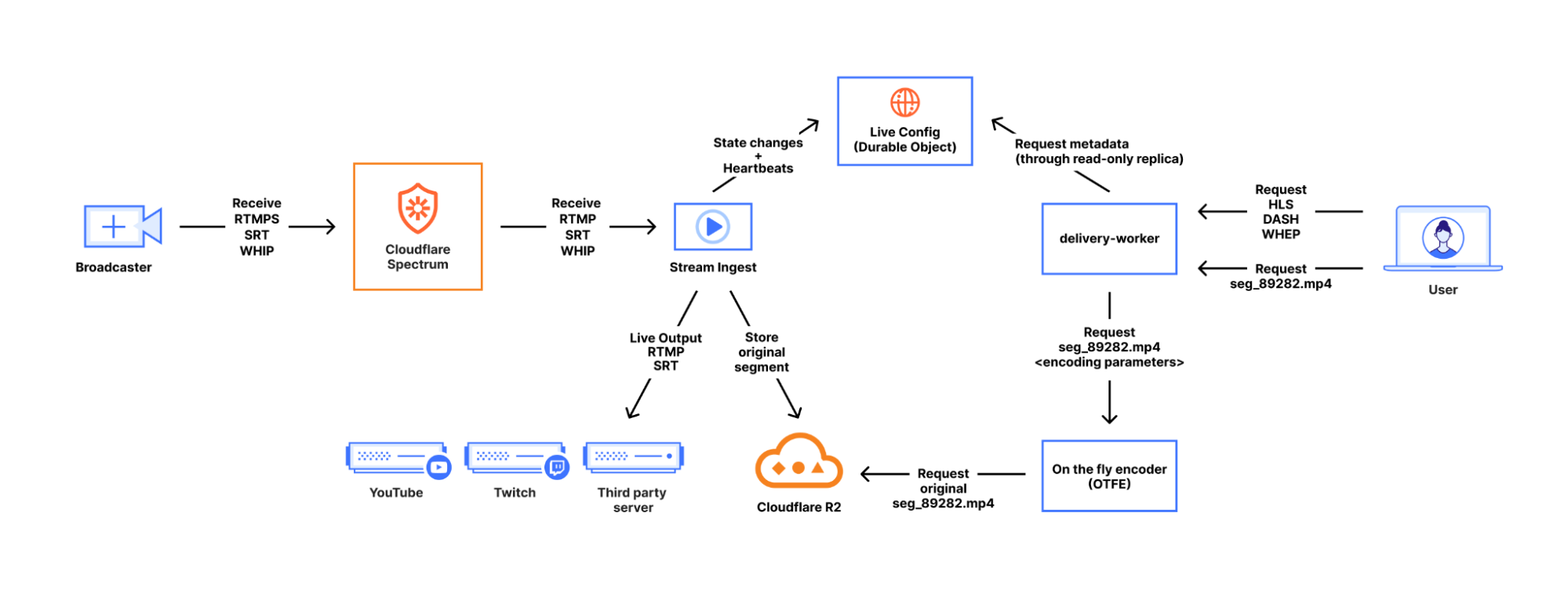
At a high level, Stream Live accepts audio/video content from broadcasters and makes that content available to viewers around the world in real time through the Cloudflare network, which reaches more than 330 cities in over 120 countries. Hence, there are two sides to this: ingesting data from broadcasters and delivering encoded content to viewers. Both sides are built on a combination of internal systems and Cloudflare products, including Cloudflare Workers, Durable Objects, Spectrum, and, of course, Cache.

Let’s start on the ingest side.

Ingesting a broadcast

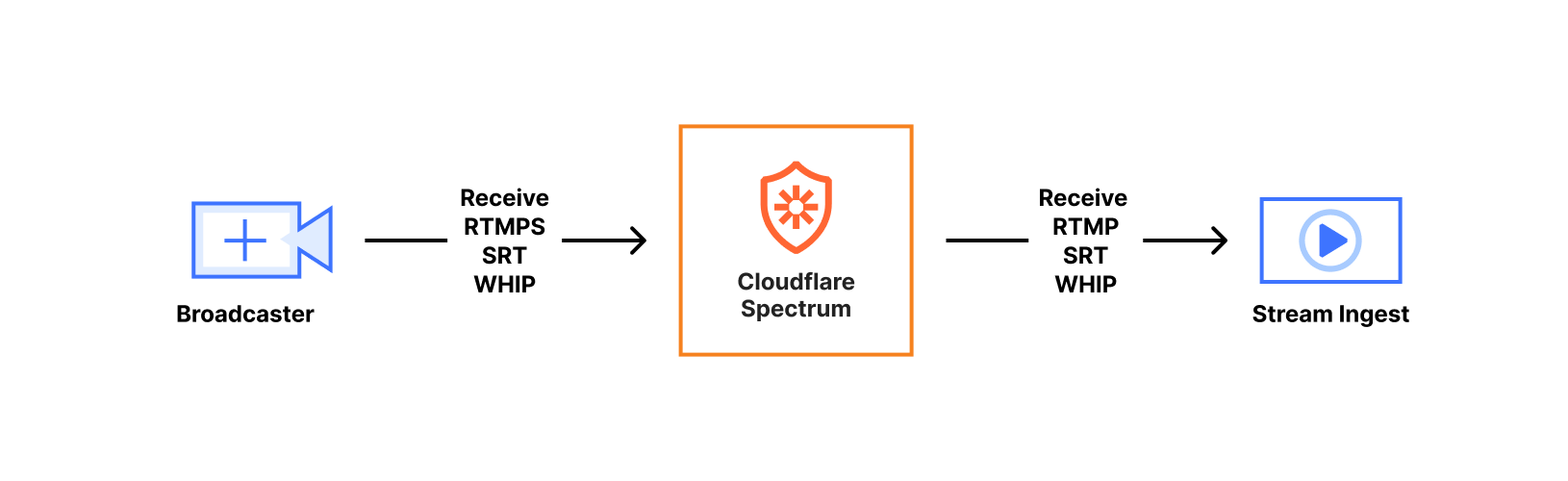
Broadcasters generate content in real time, as a series of video and audio frames, and it needs to be transmitted to Cloudflare over the Internet. To communicate with us, they choose a protocol such as RTMPS (Real Time Messaging Protocol Secure), SRT (Secure Reliable Transport), or WHIP (WebRTC-HTTP ingestion protocol) that defines how their content is packaged and transmitted. Each of these protocols is a way to transmit audio and video frames with various tradeoffs.

Regardless of the chosen protocol, the ingest lifecycle looks fairly similar. Broadcasters connect to an Anycast IP address using either a custom ingest domain or our default live.cloudflare.com. Both options direct to an IP address advertised from every Cloudflare data center around the world, minimizing the latency for broadcasters (both big and small) to our ingest points.

When the media content arrives at the Cloudflare server servicing the connection, it is first handled by a Spectrum application. Spectrum saved us time by implementing TLS termination for RTMPS, blocking potential DDOS attacks, and a few other protocol-specific benefits, such as our ability to support SRT broadcasters whose clients don’t support the Stream ID portion of the SRT protocol. Those broadcasters assume their connection can be fully identified by connecting to a specific port, which was a challenge for our multitenant service. We use Spectrum to expose many listening ports to specific broadcasters which get wrapped up in Simple Proxy Protocol and sent to one ingest service port. This is important, as our SRT implementation spends a non-trivial amount of CPU for each listening port, whereas Spectrum spends effectively nothing. In any case, Spectrum forwards all connections to the ingest service running on the same server.


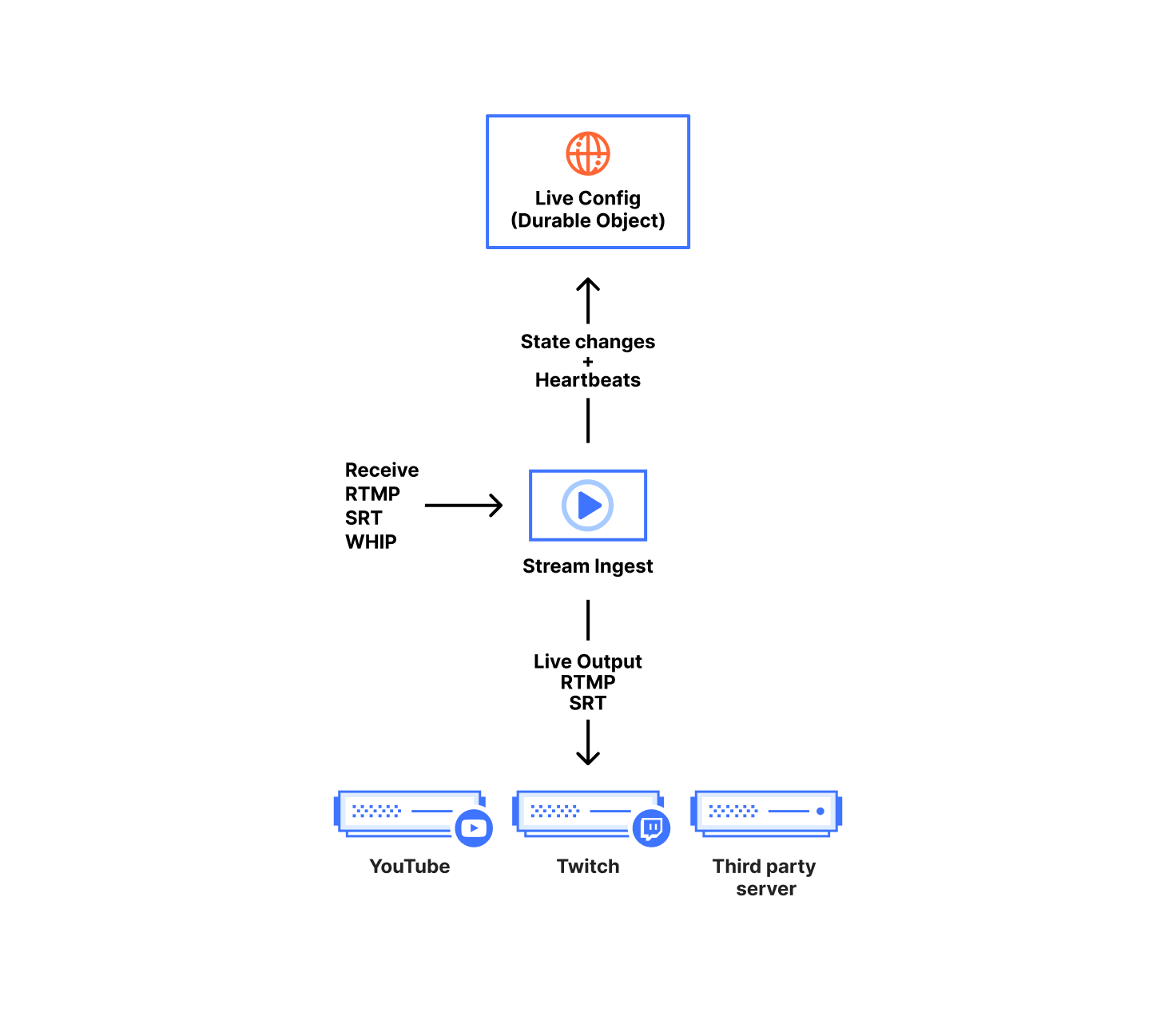
Our ingest service handles receiving content from broadcasters, forwarding to live outputs, and recording for HLS/DASH viewing. The ingest service is written in Go and acts on configuration and broadcast state stored in our Live Config Durable Objects. One Durable Object instance represents one live input; it contains both the customer configuration and the ongoing state of each broadcast.

We chose Durable Objects over a centralized database since they are not coupled to any specific data center, allowing them to be closer to each of our geographically distributed broadcasters while remaining highly available. In terms of customer configuration, we use Durable Objects to store everything defined when creating or modifying the live input.

We store the canonical state of the broadcast in the Durable Object. That includes timestamp metadata for keeping times monotonic, connection status, and which ingest service instance owns the broadcast. Any content received by the ingest service needs to be acknowledged and indexed by the Durable Object before it is made available to viewers. This splits our state into two types, ‘volatile’ and ‘committed’. Volatile state is content the ingest has received but not yet told the Durable Object about. Committed state is content the Durable Object has acknowledged and is used as a sync point for any other ingest service instance in the event they claim ownership of the broadcast.

This split between volatile and committed states is how we support broadcasters resuming a live broadcast after disconnecting and reconnecting for whatever reason, including a broadcaster network blip. That’s normally a relatively easy problem when you have centralized ingestion and state storage. Since broadcasters connect to an arbitrary server due to Anycast, we needed to get more creative in making sure that whichever server receives the reconnect has the data to continue the broadcast.

The ingest service itself is written as a relay, taking packets from one input stream and mapping them to multiple output streams. At the top level, the relay is implemented as two coupled ‘for’ loops that communicate over a Go channel, one for sending and one for receiving. When we receive data, we internally normalize it depending on the protocol. For example, some protocols send video packets as delimiter-based (annex B h264 NALU), but other protocols or file formats expect length-prefixed packets (avcc h264 NALU).


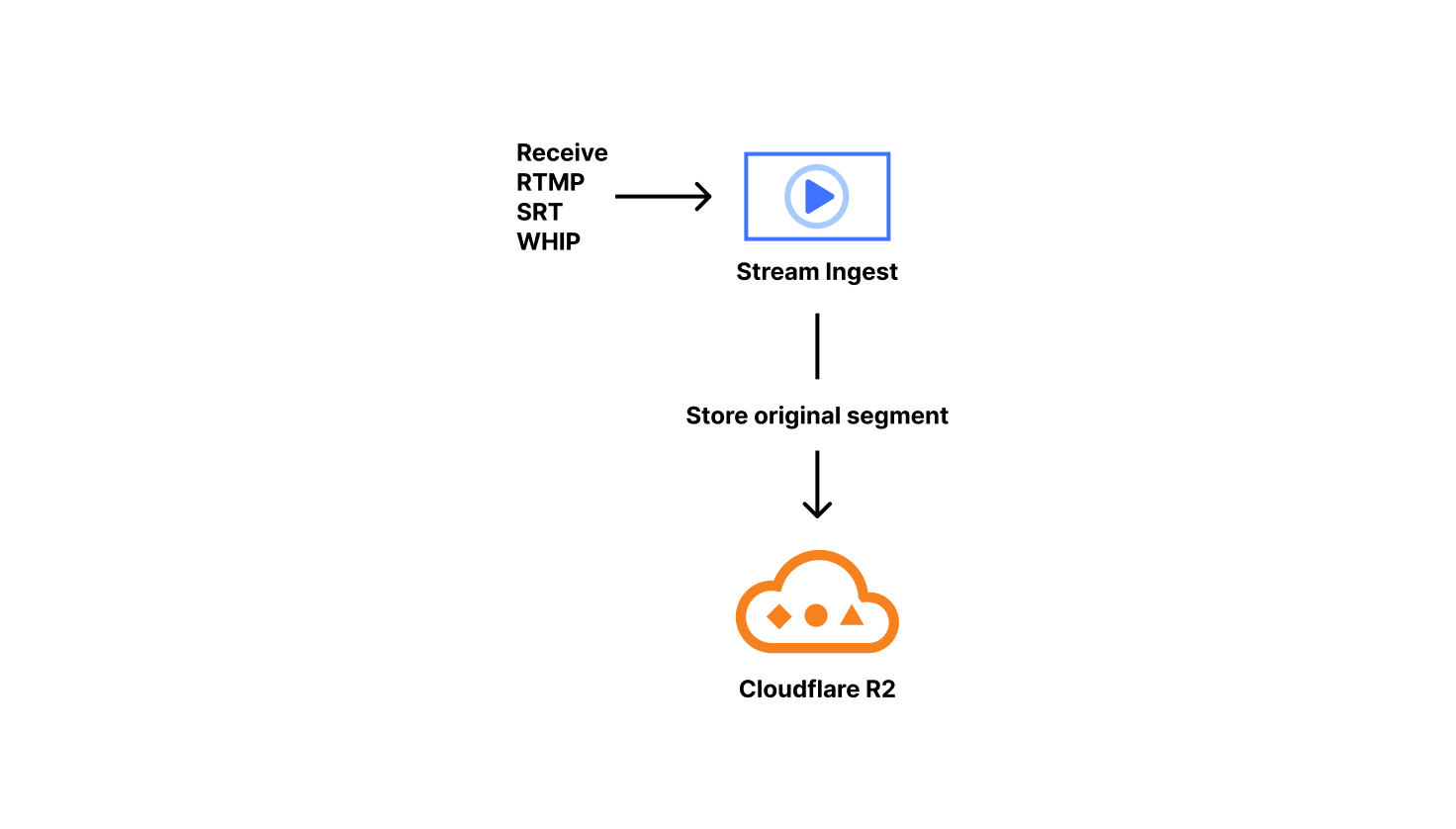
A special case of relay outputs is our Live Playback and Recording functionality. When this is enabled, we copy and sanitize the incoming packets. Specifically, we issue monotonically increasing timestamps, which solves many issues we’ve encountered with various customer encoders. To ensure everything is aligned, we drop severely misaligned audio/video blocks, something typically seen at the start of broadcasts. Those sanitized packets are packaged into fragmented MP4s on keyframe boundaries.  We call those fragmented MP4s ‘original segments.’ Our ingest service stores the original segments in R2 and lets the live config Durable Object know the segment exists and how long it is.

These original segments are considered the canonical copy of the content a customer has uploaded to us, and are reused when transitioning from live to on-demand. Since these are required to serve live viewers, this is why we don’t currently provide an option to decouple live playback from recording. Supporting live playback automatically implements on-demand recording, with some state management overhead.


Viewing the broadcast

At this point, we’ve ingested the content, cleaned it up, and durably stored it. Lets talk about how viewers watch this content.

Most online video is delivered in short ‘segments’, multi-second chunks of content. Splitting the output allows content to be progressively emitted and is very cache-friendly. The protocols viewers use to request that content are typically HLS (HTTP Live Streaming) or MPEG-DASH (Dynamic Adaptive Streaming over HTTP). WHEP (WebRTC-HTTP Egress Protocol) is a non-segmented viewing method available for real-time viewing in some cases. However, we’ll focus here on playback using segmented content with HLS or DASH, since that’s most of Stream Live’s usage today.

To start viewing, a video player will request an HLS or DASH playlist which describes the attributes of the media content and acts as an index for each segment. The playlist tells us which segments map to what point of the video’s timeline. Those segments are inserted into a playback buffer to be decoded and displayed by a client’s player. Examples here will use HLS, which is a newline delimited format. The typical alternative is DASH, which is XML based.


First, ‘primary’ playlists describe which renditions of the same content are available, as well as where to get their specific index files. Those renditions can vary in bitrate, codec, framerate, resolution, etc. If you’ve ever picked ‘1080p’ from a video player quality menu, the player knew those qualities were available using this or similar methods. When selecting quality automatically, players choose the best rendition for the viewing machine’s capabilities (such as the ability to decode a certain codec) and network constraints. We use an internal representation of tracks (what kind of content, i.e. video), renditions (content parameters, i.e. 1080p), and muxings (where to find that content, i.e. in R2 bucket N or OTFE with call M) to generate both HLS and DASH, as the two formats contain nearly the same data, except organized differently. Here’s a simplified example of a ‘multi-variant’ or ‘primary’ HLS playlist that Stream generated. It includes some annotations to explain the components.

#EXTM3U
#EXT-X-VERSION:6
#EXT-X-INDEPENDENT-SEGMENTS
#EXT-X-MEDIA:TYPE=AUDIO,GROUP-ID="group_audio",NAME="original",LANGUAGE="en-0a76e0ad",DEFAULT=YES,AUTOSELECT=YES,URI="stream_2.m3u8" <- Audio track description + URL path
...
#EXT-X-STREAM-INF:RESOLUTION=426x240,CODECS="avc1.42c015,mp4a.40.2",BANDWIDTH=149084,AVERAGE-BANDWIDTH=145135,SCORE=1.0,FRAME-RATE=30.000,AUDIO="group_audio" <- description of variant contents
stream_1.m3u8 <- URL path to fetch variant

Second, ‘variant’ or ‘stream’ playlists contain a list of segments that can be downloaded and viewed for each rendition. These are used for both live and on-demand viewing. The difference is on-demand playlists contain a flag indicating no more content will be added to the index whereas live omits that flag to allow it to append content in future requests. As a result, you’ll see video players download M3U8 (HLS) or MPD (DASH) files approximately every 1–10 seconds when viewing a broadcast, looking for updated content.

#EXTM3U
#EXT-X-VERSION:6
#EXT-X-MEDIA-SEQUENCE:89281 <- Indicates position of sliding window
#EXT-X-TARGETDURATION:6
#EXT-X-MAP:URI=".../init.mp4" <- Initialization data
#EXTINF:4.000, <- How long the segment
.../seg_89281.mp4 <- Location of a segment
#EXTINF:4.000,
.../seg_89282.mp4
#EXTINF:4.000,
.../seg_89283.mp4

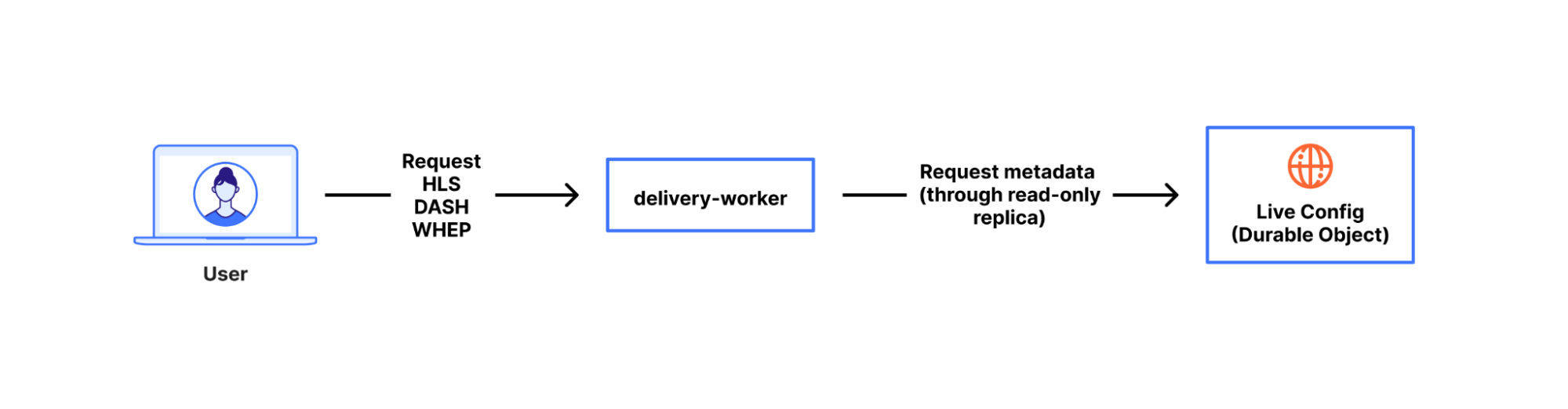
To serve all requests from viewers, we use a Cloudflare Worker called ‘delivery-worker’. It handles all requests for Stream content, and had its first commit in 2017, making it one of the earliest production-facing workers at Cloudflare. Since it’s a worker that executes as close to a viewer as possible, it frees us up to spend more time on content and metadata performance rather than where our logic runs. It delivers content, renders playlists, and performs a variety of other functions. For rendering playlists, the worker transforms the broadcast state from the durable object, as mentioned earlier.

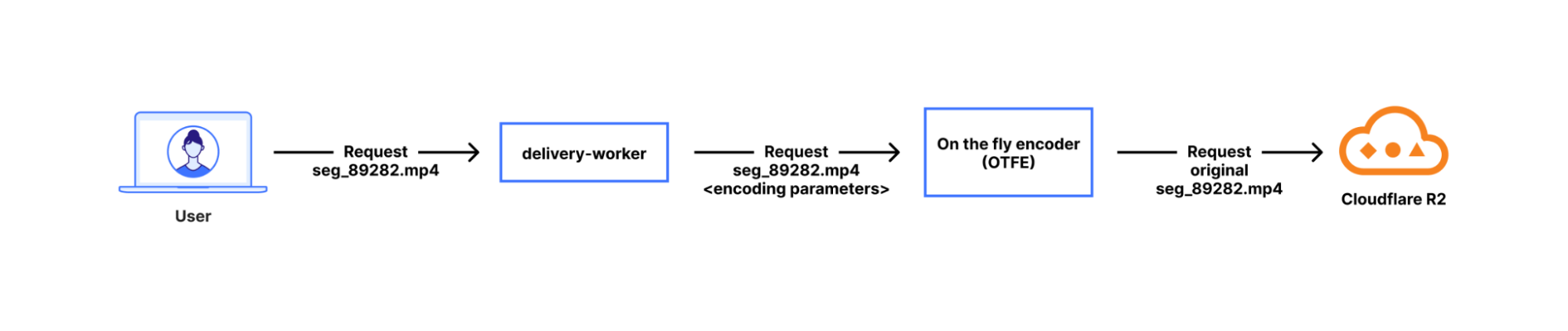
When clients ask for the encoded media content the playlist advertised to them, delivery-worker will send a subrequest to our OTFE (on-the-fly-encoder) service that transits the Cloudflare network. That request describes the format of content requested, i.e. the video stream of segment 89282 at a 1280×720 resolution encoded using AVC (aka H.264) capped CRF with some specified bitrate cap. Then, OTFE will encode the original segment to output the specified configuration.


On-the-fly encoding is more efficient than always-encoding, which is the approach most other platforms take. If there are no viewers watching a specific quality level, or watching the broadcast at all, then we aren’t encoding it. That saves power, CPU time, RAM, network, and cache space. Doing nothing is always more efficient than doing something. This applies to a variety of customer use cases, since not all broadcasts have many viewers widely distributed across a range of connection qualities. For one case, consider when serving live broadcasts that are primarily viewed on high quality connections — encoding 240p or 360p variants would probably go to waste most of the time. For a more extreme case, there are situations where you definitely want recording enabled for live content, but viewing is an exceptional situation, such as for security cameras or dashcams. Of course, we have many customers that have active viewership for their broadcasts and this architecture allows us to serve both use cases.

On-the-fly encoding has a tradeoff: it is hard to implement for “media-correctness” and performance reasons. Media-correctness is important to ensuring smooth playback; individual segments need to have exactly the right start time and duration, or you get stuttering playback, audio/video desync, or entirely unwatchable content. Perfecting our media output requires fine-tuning our encoding, deep-diving into specs, and adjusting fragmented MP4s — especially since most encoders aren’t designed for per-segment encoding. For performance, we hide encoding delay by aggressively prefetching segments from delivery-worker. When a viewer initiates a request for Segment N, we initiate encoding of segment N+1. Since that logic is implemented as a worker, we can also easily add or iterate the prefetching however we want.

This encoding flow stands on top of the Cloudflare network, which also provides us with tiered caching and request coalescing. Request coalescing is the key to supporting many viewers simultaneously but only encoding once by enforcing that, for any number of viewers requesting the same encoded content, only one of those requests will make it to our encoder origin — thanks to Cache.


That’s how Stream Live works at a high level. We ingest content from users, send it to any desired live outputs, transcode it for viewing, and give viewers a choice of quality levels, with a lot of backend complexity hidden behind a friendly API. All of this is built on top of the Cloudflare network, with Cloudflare as Customer Zero for our own products and services, using the same as the ones available to our customers.

There’s a lot more we can write about for problems we’ve solved in building Stream Live over the last few years, but those will have to be for a future blog post. If this mix of media and distributed system problems discussed here sound interesting, the Cloudflare Media Platform is hiring for several roles. Apply and join us!

Ready to remix? Favourite projects to tinker with

Post Syndicated from Pete Bell original https://www.raspberrypi.org/blog/ready-to-remix-favourite-projects-to-tinker-with/

From crafting interactive stories to designing captivating games, the Raspberry Pi Foundation’s coding projects offer a hands-on approach to learning, igniting creativity and developing the skills young people need, like perseverance and problem-solving. In this blog, I explore two of my favourite projects that young coders will love.

An educator helps two young learners with a coding project in a classroom.

Our projects are free and open to all. They are easy-to-follow, step-by-step guides that young people use to make their own games, animations, and websites using coding languages such as Scratch, HTML/CSS, and Python. The projects introduce coding concepts one by one and allow young people to build their knowledge progressively. As such, educators and volunteers running clubs don’t need to be experienced coders, and many volunteers in our community enjoy learning alongside their club members.

The power of remixing

One of the brilliant things about our projects is how easy it is to adapt them. This is called remixing, and it gives the learner the opportunity to create and modify a brand-new project that is personal to them. 

“Remixing allows beginners to tinker with a pre-existing project and make increasingly complex modifications”

Do you have the reaction speeds of an astronaut?

My favourite project brings space into the classroom. Space is such an intriguing and mysterious thing, but aspects like the extremely high speeds that satellites and the International Space Station (ISS) travel at are difficult concepts for young people to understand. 

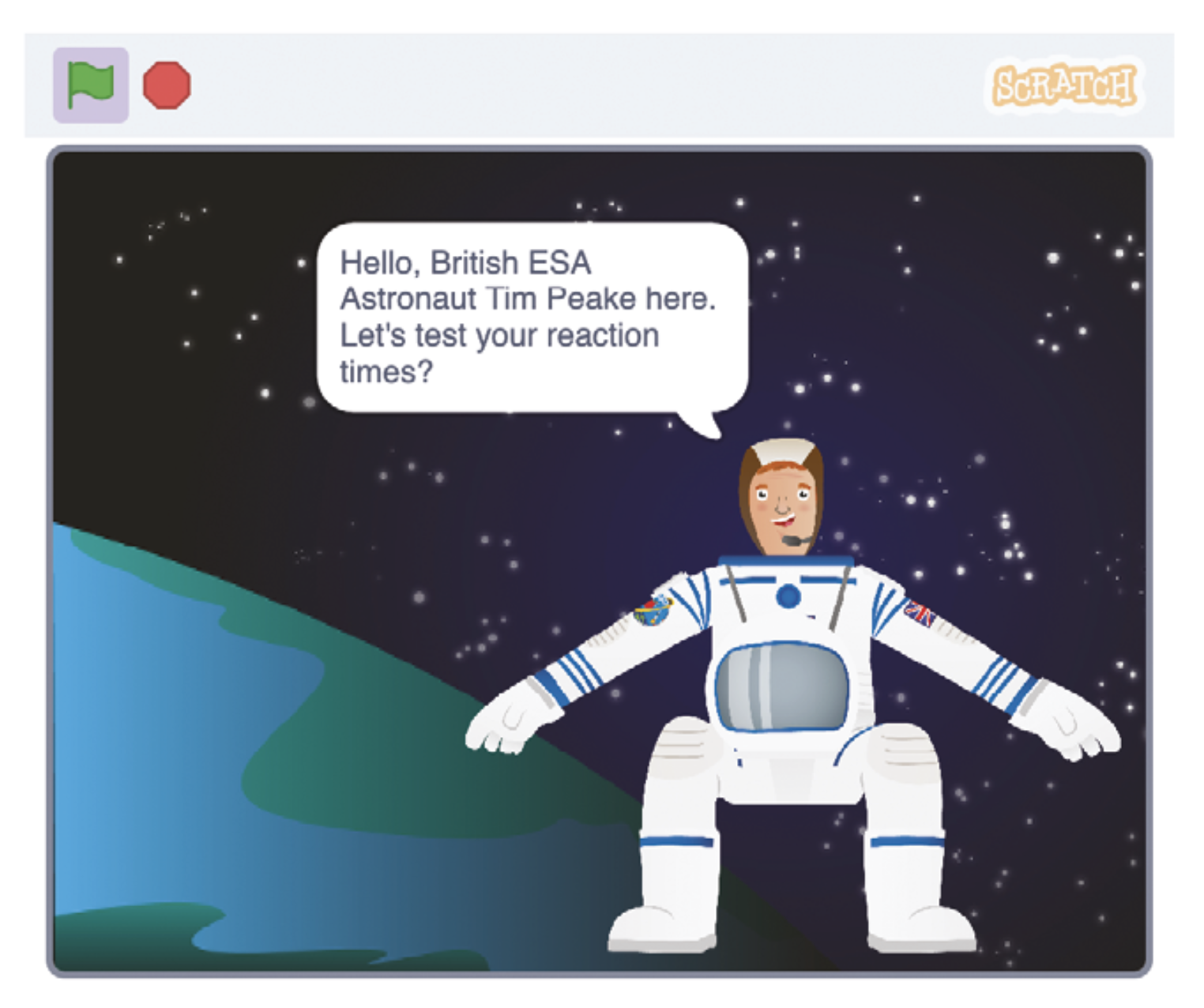
The Astronaut Reaction Time Game in Scratch introduces young people to the fact that things happen very quickly at the speed the ISS travels. It includes links to maths and science (speed, distance, time, velocity, units, calculations, operators) and, for older learners, prompts discussions on computational abstractions and problem-solving.

The Astronaut Reaction Time Game in Scratch.

The project tests reaction speeds, something that real astronauts have to do as part of their training. NASA has found that reaction speeds are slower on the ISS than on Earth, possibly as a result of the stress of zero gravity. It’s also a fun activity young people can share and play with their friends. Sharing is a key part of the club environment, and this project is ideal for generating a little bit of competition. 

As with all projects, a scaffolded approach is taken, with challenges set for learners so that they can complete part of the project independently. If someone is stuck, they can get a hint in the form of an explanation or sentence, which then turns into the code blocks they need to solve the problems, finally giving them the solution if they really need it.   

Remix: Exploring speed on planet Earth

Club volunteers can also introduce their learners to some of our physical computing projects, or they could design their own race track that measures the speed of a vehicle. They could even develop a program on a microcontroller like a Pico or micro:bit to measure the speed of young athletes on a running track. If learners are inspired to do more space-themed projects, we have that covered in our project collection. 

Unleashing the creativity of coding through colour

My other go-to project is Colourful Creations. Coding is an excellent vehicle for self-expression, and this project showcases the ways programming can be used to create digital art. It uses the turtle library, which is an excellent tool for creating designs and patterns. 

An example of a colourful poster.

The name “turtle” stems from the Logo programming language created in the 1960s. Logo is mainly known for drawing lines, shapes and patterns on the screen and using a “turtle” on the floor to draw them on paper. The turtle library is, therefore, a selection of functions that can be used for drawing. 

Part of the project’s appeal is that learners are given a blank canvas to which they can apply any theme. There are limited instructions, leaving lots of space for creativity. Whether it be climate change, a period in history, or some other topic, learners can work on their own poster or in pairs to create something bigger.

Remix: From project to presentation

The possibilities for remixing are almost endless, as learners can add more screens and turn their project into a mini presentation or unleash their artistic side and go wild with colours. The learning in this project leads perfectly to more complex turtle drawing projects like Robo-Trumps, providing a solid foundation in creative computing for you to build on later.

We want you to create your own versions of these projects. You could organise a themed day, which can give learners more freedom, or link with other projects such as Astro Pi. Try remixing the projects to start with, then building up to develop new and exciting projects based on the skills that have been learnt. Happy coding!

A version of this article also appears in Hello World issue 24.

The post Ready to remix? Favourite projects to tinker with appeared first on Raspberry Pi Foundation.

The GPU, not the TPM, is the root of hardware DRM

Post Syndicated from Matthew Garrett original https://mjg59.dreamwidth.org/70954.html

As part of their “Defective by Design” anti-DRM campaign, the FSF recently made the following claim:
Today, most of the major streaming media platforms utilize the TPM to decrypt media streams, forcefully placing the decryption out of the user’s control (from here).
This is part of an overall argument that Microsoft’s insistence that only hardware with a TPM can run Windows 11 is with the goal of aiding streaming companies in their attempt to ensure media can only be played in tightly constrained environments.

I’m going to be honest here and say that I don’t know what Microsoft’s actual motivation for requiring a TPM in Windows 11 is. I’ve been talking about TPM stuff for a long time. My job involves writing a lot of TPM code. I think having a TPM enables a number of worthwhile security features. Given the choice, I’d certainly pick a computer with a TPM. But in terms of whether it’s of sufficient value to lock out Windows 11 on hardware with no TPM that would otherwise be able to run it? I’m not sure that’s a worthwhile tradeoff.

What I can say is that the FSF’s claim is just 100% wrong, and since this seems to be the sole basis of their overall claim about Microsoft’s strategy here, the argument is pretty significantly undermined. I’m not aware of any streaming media platforms making use of TPMs in any way whatsoever. There is hardware DRM that the media companies use to restrict users, but it’s not in the TPM – it’s in the GPU.

Let’s back up for a moment. There’s multiple different DRM implementations, but the big three are Widevine (owned by Google, used on Android, Chromebooks, and some other embedded devices), Fairplay (Apple implementation, used for Mac and iOS), and Playready (Microsoft’s implementation, used in Windows and some other hardware streaming devices and TVs). These generally implement several levels of functionality, depending on the capabilities of the device they’re running on – this will range from all the DRM functionality being implemented in software up to the hardware path that will be discussed shortly. Streaming providers can choose what level of functionality and quality to provide based on the level implemented on the client device, and it’s common for 4K and HDR content to be tied to hardware DRM. In any scenario, they stream encrypted content to the client and the DRM stack decrypts it before the compressed data can be decoded and played.

The “problem” with software DRM implementations is that the decrypted material is going to exist somewhere the OS can get at it at some point, making it possible for users to simply grab the decrypted stream, somewhat defeating the entire point. Vendors try to make this difficult by obfuscating their code as much as possible (and in some cases putting some of it in-kernel), but pretty much all software DRM is at least somewhat broken and copies of any new streaming media end up being available via Bittorrent pretty quickly after release. This is why higher quality media tends to be restricted to clients that implement hardware-based DRM.

The implementation of hardware-based DRM varies. On devices in the ARM world this is usually handled by performing the cryptography in a Trusted Execution Environment, or TEE. A TEE is an area where code can be executed without the OS having any insight into it at all, with ARM’s TrustZone being an example of this. By putting the DRM code in TrustZone, the cryptography can be performed in RAM that the OS has no access to, making the scraping described earlier impossible. x86 has no well-specified TEE (Intel’s SGX is an example, but is no longer implemented in consumer parts), so instead this tends to be handed off to the GPU. The exact details of this implementation are somewhat opaque – of the previously mentioned DRM implementations, only Playready does hardware DRM on x86, and I haven’t found any public documentation of what drivers need to expose for this to work.

In any case, as part of the DRM handshake between the client and the streaming platform, encryption keys are negotiated with the key material being stored in the GPU or the TEE, inaccessible from the OS. Once decrypted, the material is decoded (again either on the GPU or in the TEE – even in implementations that use the TEE for the cryptography, the actual media decoding may happen on the GPU) and displayed. One key point is that the decoded video material is still stored in RAM that the OS has no access to, and the GPU composites it onto the outbound video stream (which is why if you take a screenshot of a browser playing a stream using hardware-based DRM you’ll just see a black window – as far as the OS can see, there is only a black window there).

Now, TPMs are sometimes referred to as a TEE, and in a way they are. However, they’re fixed function – you can’t run arbitrary code on the TPM, you only have whatever functionality it provides. But TPMs do have the ability to decrypt data using keys that are tied to the TPM, so isn’t this sufficient? Well, no. First, the TPM can’t communicate with the GPU. The OS could push encrypted material to it, and it would get plaintext material back. But the entire point of this exercise was to avoid the decrypted version of the stream from ever being visible to the OS, so this would be pointless. And rather more fundamentally, TPMs are slow. I don’t think there’s a TPM on the market that could decrypt a 1080p stream in realtime, let alone a 4K one.

The FSF’s focus on TPMs here is not only technically wrong, it’s indicative of a failure to understand what’s actually happening in the industry. While the FSF has been focusing on TPMs, GPU vendors have quietly deployed all of this technology without the FSF complaining at all. Microsoft has enthusiastically participated in making hardware DRM on Windows possible, and user freedoms have suffered as a result, but Playready hardware-based DRM works just fine on hardware that doesn’t have a TPM and will continue to do so.

comment count unavailable comments

An Algol 68 front end for GCC

Post Syndicated from corbet original https://lwn.net/Articles/1003916/

While some people are focused on new and trendy languages, José Marchesi
has, instead, gifted the world with a GCC front
end for the Algol 68 language
.

This WIP is a GCC front-end for Algol 68, the fascinating,
generally poorly understood and often vilified programming
language. It is common knowledge that Algol 68 was well ahead of
its time back when it was introduced, and anyone who knows the
language well will suspect this probably still holds true today,
but more than fifty years after the publication of the Revised
Report the world may finally be ready for it, or perhaps not, we
shall see.

For those who see Algol 68 as too new, there was also a
COBOL front end
posted in December.

LineageOS 22.1 released

Post Syndicated from corbet original https://lwn.net/Articles/1003862/

Version 22.1 of the
Android-based LineageOS distribution is out.

We’ve been hard at work since Android 15’s release in September,
adapting our unique features to this new version of
Android. Android 15 introduced several complex changes under the
hood, but due to our previous efforts adapting to Google’s
UI-centric adjustments in Android 12 through 14, we were able to
rebase onto Android 15’s code-base faster than anticipated.

Additionally, this is far-and-away the easiest bringup cycle from a
device perspective we have seen in years. This means that many more
devices are ready on day one that we’d typically expect to have up
this early in the cycle!

Last, but not least, we even had enough time and resources to
introduce not one, but two new exciting apps! The first one,
Twelve, will replace our aging music app, while the other one,
Camelot, will let you view PDF files.

The collective thoughts of the interwebz