Tag Archives: Amazon OpenSearch Serverless

How to migrate from Amazon CloudSearch to Amazon OpenSearch Serverless

Post Syndicated from Prasad Nadig original https://aws.amazon.com/blogs/big-data/how-to-migrate-from-amazon-cloudsearch-to-amazon-opensearch-serverless/

If you run search on Amazon CloudSearch, now is the time to plan your migration to Amazon OpenSearch Serverless. Modern search has moved on to capabilities beyond what CloudSearch provides: semantic and hybrid search, Retrieval Augmented Generation (RAG), and agentic search. OpenSearch Serverless gives you all of these with automatic scaling on a pay-for-what-you-use basis. You don’t need to choose or maintain infrastructure. OpenSearch Serverless maintains the hands-off, operational simplicity of CloudSearch.

This post shows you how to migrate your CloudSearch domain to an Amazon OpenSearch Serverless collection. We walk you through assessing your CloudSearch configuration, creating an OpenSearch Serverless collection with explicit index mappings, converting your documents and queries, configuring security policies, loading your data with Amazon OpenSearch Ingestion, and validating the migration before cutting over.

Key differences to note

Prerequisites

To follow along with this post, you need the following:

  • An AWS account.
  • An existing Amazon CloudSearch domain with indexed data.
  • Source data available in a durable store such as Amazon Simple Storage Service (Amazon S3) or Amazon DynamoDB (CloudSearch doesn’t provide a built-in export or backup feature, so your original source data is required to re-ingest into OpenSearch).
  • AWS Identity and Access Management (IAM) permissions to create and manage Amazon OpenSearch Serverless collections, encryption policies, network policies, and data access policies.
  • An Amazon OpenSearch Ingestion pipeline (or alternative ingestion method) for loading data.

Plan the migration

Planning is where you decide what success means: minimal downtime, no data loss, current functionality preserved, and custom configurations carried over. You don’t need to plan for infrastructure because OpenSearch Serverless provisions and scales compute for you. Your main planning task is to assess your current CloudSearch configuration so you can reproduce its behavior on the target.

Document your existing setup from the Amazon CloudSearch console. Record the current instance type, the partition count, and the replication count. Capture the total document count and overall data size, and record every field definition, including field types and the search, facet, and sort settings for each field. Note any analyzers, synonyms, stopwords, or custom rank expressions. Note whether you use the 2011 or the 2013 CloudSearch API version, because the 2013 API added faceting and filtering features that change how you model the target.

OpenSearch Serverless is the right target for most CloudSearch workloads, but not all of them. If your workload needs very low read-after-write latency (a short refresh interval), tight and predictable query response times, or direct control over instance configuration, choose an Amazon OpenSearch Service managed clusters deployment instead and size it from your workload profile.

The migration involves four main concerns: your source data format, your queries, your field definitions, and your access policies. Before you plan the details, it helps to see the whole migration at once. The following diagram maps the migration across four phases: your source CloudSearch environment, the migration pipeline that converts and moves your data, the OpenSearch Serverless target, and cutover and operations.
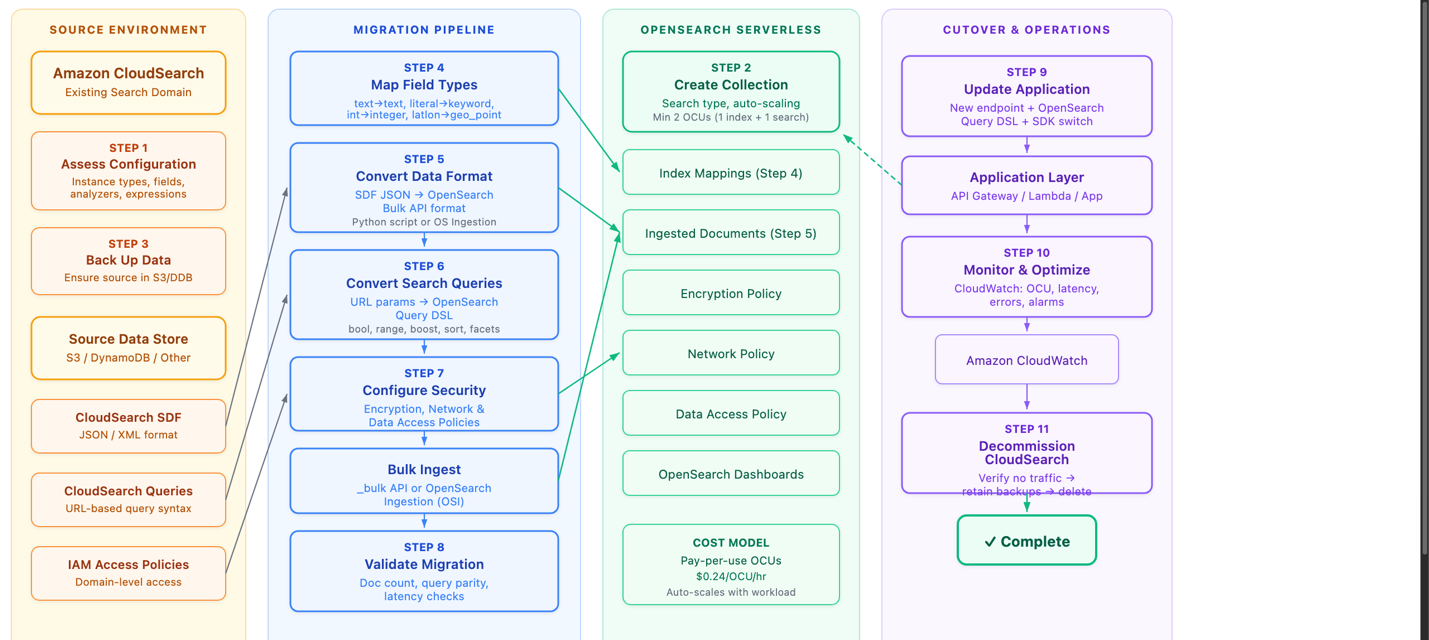
Migration workflow across four phases: source CloudSearch, migration pipeline, OpenSearch Serverless target, and cutover and operations

Figure 1: The migration workflow across four phases

In the source environment, you assess your CloudSearch configuration and back up your source data (Amazon S3, Amazon DynamoDB, or another store). Note the Source Data Format (SDF), the URL-based query syntax, and the IAM access policies you need to carry over. In the migration pipeline, you map field types, convert the data format from CloudSearch JSON to OpenSearch-compatible JSON, convert your queries to the OpenSearch query domain-specific language (DSL), configure security, bulk-ingest the data, and validate the result. The OpenSearch Serverless target holds the collection, index mappings, ingested documents, and the encryption, network, and data access policies, and it scales with your workload on a pay-per-use basis. In cutover and operations, you update your application to the new endpoint and clients, monitor with Amazon CloudWatch, and decommission CloudSearch once no traffic remains.

Model your data in OpenSearch Service

OpenSearch Service uses index mappings to define the fields and data types in an index. Because you know your CloudSearch schema, define the target mapping explicitly when you create the index. Create the index and set its mapping in a single request, and set dynamic to strict so OpenSearch rejects any document that contains a field you did not define. Strict mapping catches schema drift at ingest time, avoiding the default OpenSearch behavior of creating new mappings for undefined fields.

PUT /imdb_movies
{
  "mappings": {
    "dynamic": "strict",
    "properties": {
      "title": {
        "type": "text",
        "fields": {
          "keyword": { "type": "keyword" }
        }
      },
      "genres": { "type": "keyword" },
      "rating": { "type": "float" },
      "release_date": { "type": "date" }
      ...
    }
  }
}

Field type mapping

The following table maps CloudSearch field types to their OpenSearch Service equivalents.

CloudSearch OpenSearch Service equivalent Notes
text text Text is tokenized. Stemming, synonyms, and stopwords apply. Good for matching user terms.
literal keyword Not tokenized. Good for exact-match search.
int integer Use for ranking, faceting, and narrowing.
double float or double .
date date .
boolean boolean .
latlon geo_point .
text-array text OpenSearch handles arrays natively, so map to the base text type.
literal-array keyword OpenSearch handles arrays natively, so map to the base keyword type.
multi-value nested or object .
long long .
binary binary .

Two mapping details deserve attention. First, pick the smallest numeric type that fits your data rather than copying the widths CloudSearch uses. CloudSearch stores integers as 64-bit values, but few datasets hold numbers that large. A long or a double consumes more disk than an integer, a short, or a float with no benefit when the values are small. Evaluate the actual range of each field and choose the narrowest type that holds it. Reserve long for values that genuinely exceed the roughly 2.1 billion ceiling of integer, and use float instead of double unless you need double precision. Smaller types shrink your index and speed up queries.

Second, if you sort or aggregate on a text field, add a keyword sub-field. The preceding example mapping has a keyword subfield for the title field. You access the field using dot notation: title.keyword. OpenSearch doesn’t sort or aggregate analyzed text fields by default.

As noted earlier, if you run several CloudSearch domains, model each one as a separate index within a single OpenSearch Serverless collection to consolidate them.

Move your data

Migrating to OpenSearch Service is a re-ingestion: you convert your source documents and index them into the collection you created. CloudSearch doesn’t provide a built-in backup or snapshot feature. It relies on the documents you send through the indexing process, so before you migrate, make sure your source data is available in a durable store such as Amazon S3, Amazon DynamoDB, or another database.

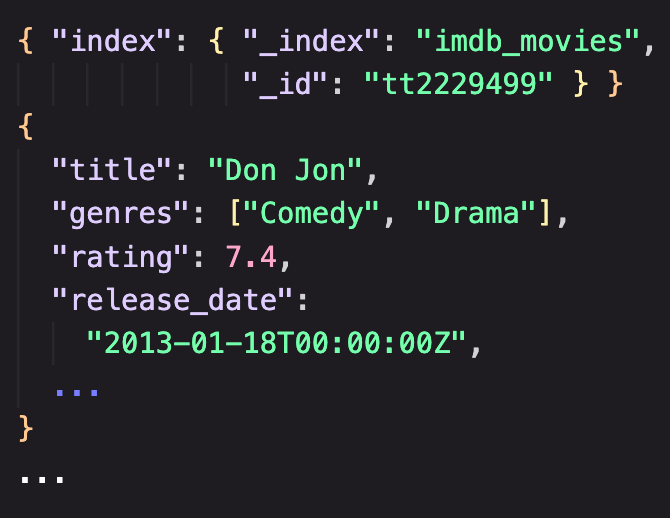
The conversion is a format translation. CloudSearch accepts data in SDF as JSON or XML, where a document batch is a collection of add and delete operations. The JSON that CloudSearch uses differs from the JSON that OpenSearch Service expects, so you must transform each source document into an OpenSearch document whose fields match the index mapping you defined earlier. Handle the same details the mapping calls out: emit each numeric value so it fits the narrow type you chose for its field rather than a wide long or double, format dates to match your date mapping, and drop or rename any field that your strict mapping doesn’t define.
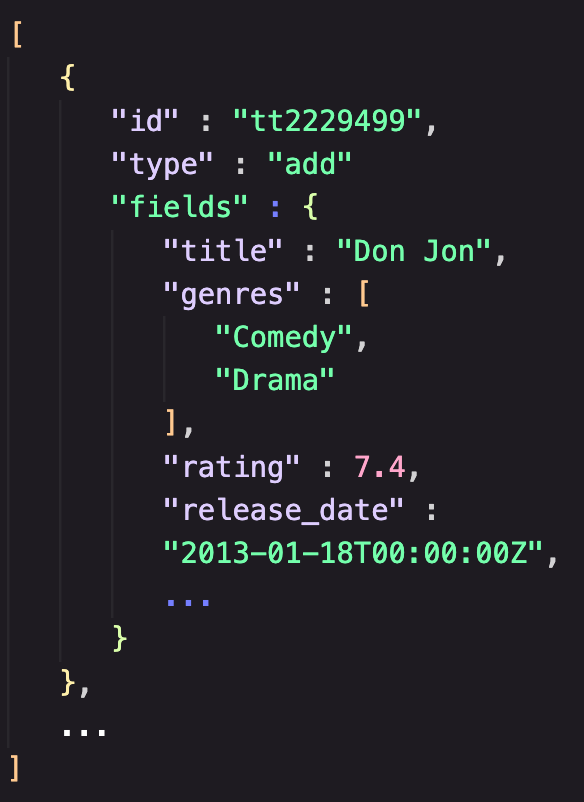
CloudSearch batch format showing add and delete operations in JSON OpenSearch bulk batch format showing index operations in JSON

Figure 2: CloudSearch batch format (left) compared to OpenSearch batch format (right)

You can write a small conversion script. Have the script write its output to an Amazon S3 bucket so the converted documents live in a durable store you can re-ingest from as many times as you need.

With your converted documents in Amazon S3, use Amazon OpenSearch Ingestion to load them. Amazon OpenSearch Ingestion is a feature of Amazon OpenSearch Service that you can use to ingest, filter, transform, enrich, and route data to an Amazon OpenSearch Service domain or an OpenSearch Serverless collection. Configure an OpenSearch Ingestion pipeline with an Amazon S3 source (you can use an OpenSearch Ingestion blueprint to get started) that reads your converted documents. Let its built-in processors apply any final transformation before the pipeline writes to your collection. A managed pipeline reading from Amazon S3 gives you a repeatable, restartable load without operating ingestion infrastructure, which makes it the recommended path for most migrations.

If you prefer to load data directly, OpenSearch Service exposes a REST API, so you can index documents with a standard client such as curl or with the OpenSearch client libraries for many languages. Direct indexing is convenient for a small dataset or a quick test, but an Amazon S3 source with OpenSearch Ingestion is the better choice for a production migration.

Convert your queries

CloudSearch uses a URL-based query format. You pass a query parameter in the URL and submit either a simple string search or a JSON-formatted query. OpenSearch Service uses a REST API and the OpenSearch query DSL in the request body, which gives you compound queries, function scoring, and richer relevance control. You can use generative AI coding assistants to help with this translation. Provide your CloudSearch query patterns, and the model generates the equivalent OpenSearch query DSL, which you then validate against your test cases.

Query syntax changes

CloudSearch appends parameters such as sort to the query URL, while OpenSearch expresses sorting, filtering, and boosting as explicit elements of the request body. For example, a title search for “shakespeare” in CloudSearch looks like the following.

https://my-cloudsearch-domain.us-east-1.cloudsearch.amazonaws.com/2013-01-01/search?q=shakespeare&size=10

The equivalent query in OpenSearch Service uses the query DSL.

GET /imdb_movies/_search
{
  "query": {
    "match": { "title": "shakespeare" }
  }
}

To keep result sets consistent after migration, set the default operator to AND in OpenSearch to match the default query behavior of CloudSearch. The following table shows common CloudSearch query patterns and their OpenSearch Service equivalents, using a sample IMDB movies dataset.

Query type CloudSearch (Lucene syntax) OpenSearch Service query DSL
Compound AND title:"Inception" AND genres:"Sci-Fi" {"query":{"bool":{"must":[{"match":{"title":"Inception"}},{"match":{"genres":"Sci-Fi"}}]}}}
Compound NOT title:"Star Wars" AND NOT genres:"Comedy" {"query":{"bool":{"must":[{"match":{"title":"Star Wars"}}],"must_not":[{"match":{"genres":"Comedy"}}]}}}
Wildcard title:Batman* {"query":{"wildcard":{"title":{"value":"batman*"}}}}
Numeric range rating:[7 TO 9] {"query":{"range":{"rating":{"gte":7,"lte":9}}}}
Date range (after) release_date:[2015-01-01T00:00:00Z TO *] {"query":{"range":{"release_date":{"gte":"2015-01-01T00:00:00Z"}}}}
Boosting title:"The Matrix"^6 OR genres:"Sci-Fi"^4 {"query":{"bool":{"should":[{"query_string":{"query":"title": \"The Matrix\"^6","fields":["title"]}},{"query_string":{"query":"genres:\"Sci-Fi\"^4","fields":["genres"]}}]}}}
Sorting title:"Batman" sort=release_date desc {"query":{"match":{"title":"Batman"}},"sort":[{"release_date":{"order":"desc"}}]}

Sorting and boosting

Boosting is useful when you want certain fields or terms to carry more weight in relevance scoring. A higher boost value means the term contributes more to the score. OpenSearch also supports sorting by _score (relevance), which is the default when you specify no sort. For the full query language, see the OpenSearch query DSL documentation.

Configure security

CloudSearch uses AWS Identity and Access Management policies to control access to its configuration and domain service APIs. You attach user-based policies to an IAM role, user, or group, and the document, search, and suggest actions in those policies control access to the CloudSearch APIs.

OpenSearch Serverless applies security through policies at several layers.

  • Collections: Encrypted at rest by default, using either an AWS owned key or a customer managed key defined in an encryption policy.
  • Network policies: Define whether a collection is reachable privately through a virtual private cloud (VPC) endpoint or over the internet.
  • Data access policies: Control which IAM principals and Security Assertion Markup Language (SAML) identities can create indexes and read or write data in the collection.

Amazon OpenSearch Service provisioned domains also offer fine-grained access control, with role-based access control and security at the index, document, and field level. For OpenSearch Serverless, data access policies provide collection-level and index-level permissions, controlling which IAM principals and SAML identities can create, read, or write data within a collection.

Validate the migration

Validation confirms that the migration is complete and correct before you send production traffic to OpenSearch Serverless. Work through five kinds of validation.

  • Documents: Check your document count. Your OpenSearch Serverless indexes should have the same count as your CloudSearch indexes.
  • Queries: Translate your most important queries and run them manually against your collection. Spot check the output for the presence of important results.
  • Ranking: Check the order of results, especially for queries with custom rank functions or field weighting. Results might not match exactly, so look for anything that’s incorrect.
  • Latency: Ideally you should tee your production traffic to your Serverless collection to get real latency metrics. Worst case, generate at least 100,000 synthetic queries across all your query types and run them. Monitor OpenSearch Compute Unit (OCU) consumption with Amazon CloudWatch to understand your cost profile.

To validate search functionality, run the same query against both systems and compare the results. Reuse the query pairs from the conversion step so you exercise the syntax differences directly. For example, to check a numeric range against the sample IMDB movies dataset, run the following query in CloudSearch.

https://my-cloudsearch-domain.us-east-1.cloudsearch.amazonaws.com/2013-01-01/search?q=rating: [7 TO 9]&size=10

Run the equivalent query DSL against your OpenSearch Serverless collection.

GET /imdb_movies/_search
{
  "query": {
    "range": { "rating": { "gte": 7, "lte": 9 } }
  }
}

Confirm that both queries return the same set of movies. Then repeat the comparison for a query that exercises relevance, such as the boosted query from the conversion step, and confirm the top results appear in the same order.

GET /imdb_movies/_search
{
  "query": {
    "bool": {
      "should": [
        { "match": { "title": { "query": "The Matrix", "boost": 6 } } },
        { "match": { "genres": { "query": "Sci-Fi", "boost": 4 } } }
      ]
    }
  }
}

Cut over and operate

When validation passes, update your application to use the OpenSearch Serverless endpoint and the query DSL, and switch from the CloudSearch SDK to the OpenSearch client libraries. After cutover, confirm that no application still points to a CloudSearch endpoint, retain your source data backups in Amazon S3 for rollback, and then delete the CloudSearch domain.

Operating OpenSearch Serverless in production is lighter than operating a domain, because OpenSearch Serverless scales compute for you and you do not tune shards, instance types, or capacity. Your focus shifts to cost and search quality. Monitor OCU consumption and search latency with Amazon CloudWatch, and set alarms on the thresholds that matter to you. Review OCU usage patterns to understand cost and find optimization opportunities, and set capacity limits on the collection to cap the maximum OCUs it can consume. For guidance, see Managing capacity limits for Amazon OpenSearch Serverless and Monitoring Amazon OpenSearch Serverless.

Cost considerations

With OpenSearch Serverless, you pay only for the compute and storage your workload consumes, and OpenSearch Serverless charges for compute and storage separately. OpenSearch Serverless scales indexing compute and search compute independently, so a write-heavy or a read-heavy workload scales only the dimension it needs, and compute can scale to zero when a collection is idle, in which case you pay only for storage. To share hardware across workloads, place collections in a collection group so they draw from the same compute rather than each provisioning its own. For pricing and unit details, see Amazon OpenSearch Service pricing.

Clean up

Because you’re migrating to OpenSearch Serverless, the resources that you’ve created will likely become your production resources. If not, delete any OpenSearch Serverless collections and S3 buckets you created to avoid incurring ongoing cost.

Conclusion

In this post, you saw how Amazon CloudSearch and Amazon OpenSearch Serverless compare, and how the concepts you rely on in CloudSearch (field types, query syntax, autoscaling, and access control) translate into OpenSearch Service. You assess your CloudSearch configuration, model your data with explicit OpenSearch mappings, move your converted documents into the collection with OpenSearch Ingestion, convert your URL-based queries into the OpenSearch query DSL, configure security, and validate before cutover. OpenSearch Serverless gives you the hands-off operational model you have with CloudSearch, and adds richer query capabilities, granular data access policies, and automatic scaling. To get started, create an OpenSearch Serverless collection on the AWS Management Console and follow the steps in this post.

To learn more, see the following resources:


About the authors

Prasad Nadig

Prasad Nadig

Prasad is a Senior Analytics Specialist Solutions Architect at Amazon Web Services (AWS), specializing in large-scale data analytics and AI. Prasad partners with customers to design, migrate, and modernize their analytics platforms on AWS into scalable, cost-effective solutions, with deep expertise in data lakes, data warehousing, distributed processing, and performance tuning at petabyte scale.

Jon Handler

Jon Handler

Jon is a Senior Principal Solutions Architect for Search Services at Amazon Web Services. Jon works closely with OpenSearch and Amazon OpenSearch Service, providing help and guidance to a broad range of customers who have search and log analytics workloads. Prior to joining AWS, Jon’s career as a software developer included four years of coding a large-scale, eCommerce search engine.

Network connectivity patterns for the next generation of Amazon OpenSearch Serverless

Post Syndicated from Salman Ahmed original https://aws.amazon.com/blogs/big-data/network-connectivity-patterns-for-the-next-generation-of-amazon-opensearch-serverless/

Network connectivity patterns for private access to Amazon OpenSearch Serverless used to require considerable setup. You had to create virtual private cloud (VPC) endpoints in every consumer VPC and configure Amazon Route 53 Profiles for cross-account DNS. You also had to maintain custom private hosted zones with CNAME records and deploy resolver inbound endpoints for on-premises connectivity. The next generation of OpenSearch Serverless changes this. It uses standard AWS PrivateLink interface endpoints with native private DNS support. Connectivity patterns that previously required multi-step DNS orchestration now work with the same endpoint mechanics you already use for other AWS services.

Collections use resource-based endpoints on the on.aws domain in two formats. The per-collection endpoint (<collectionId>.aoss.<region>.on.aws) reaches a single collection, and the hostname itself identifies which collection you want, so no additional routing information is needed. The per-account Regional endpoint (<accountId>.aoss.<region>.on.aws) reaches any collection in your account through one hostname. Because the hostname alone does not identify a specific collection, you add the x-amz-aoss-collection-name header (or x-amz-aoss-collection-id) to each request to name the target collection. The AWS SDKs include this header automatically when they sign the request with Signature Version 4 (SigV4).

Both formats use standard AWS PrivateLink. You create the VPC endpoint from the Amazon Virtual Private Cloud (Amazon VPC) console or the Amazon Elastic Compute Cloud (Amazon EC2) CreateVpcEndpoint API, using the service name com.amazonaws.<region>.aoss-data. It is the same interface endpoint you create for any other AWS service.

In this post, each pattern shows the architecture, the DNS resolution flow, and the data traffic path. Patterns 1 through 8 operate within a single Region across one or more accounts, labeled Region A in the diagrams, so the repeated Region A boxes in a cross-account pattern are the same Region. Only Pattern 9 spans Regions, shown as Region A and Region B.

These patterns apply to the collection (data) endpoint only. When you create a collection, you also receive an OpenSearch UI endpoint. That endpoint uses a separate PrivateLink mechanism today, with its own VPC endpoint and access policy, and is on a path to move to the standard PrivateLink model. OpenSearch UI connectivity is out of scope for this post.

Prerequisites

DNS resolution

When you create a standard VPC endpoint for com.amazonaws.<region>.aoss-data with private DNS enabled, AWS creates a private hosted zone for *.aoss.<region>.on.aws and associates it with your VPC. This zone maps collection hostnames to the endpoint’s private elastic network interface (ENI) IP addresses. Your compute’s DNS query reaches the VPC’s Amazon Route 53 Resolver at VPC+2, which resolves the hostname to ENI IPs.

One endpoint serves every collection hostname in the Region. The following AWS CLI command creates that interface endpoint, and the --private-dns-enabled flag turns on the private DNS resolution described here.

aws ec2 create-vpc-endpoint \
  --vpc-id vpc-abc123 \
  --service-name com.amazonaws.us-east-1.aoss-data \
  --vpc-endpoint-type Interface \
  --subnet-ids subnet-111 subnet-222 \
  --security-group-ids sg-xxx \
  --private-dns-enabled

In Regions that support Federal Information Processing Standards (FIPS), the same endpoint also resolves *.aoss-fips.<region>.on.aws for FIPS-compliant access.

OpenSearch Serverless has no per-collection Dashboards endpoint. Use OpenSearch UI applications to explore and visualize collection data.

The diagrams in the following patterns use an Amazon EC2 instance to represent the compute client. Any compute in the VPC reaches a collection the same way, including EC2 instances, AWS Lambda functions attached to the VPC, and containers on Amazon Elastic Container Service (Amazon ECS) or Amazon Elastic Kubernetes Service (Amazon EKS). The connectivity, DNS resolution, and access policies are the same regardless of the compute type.

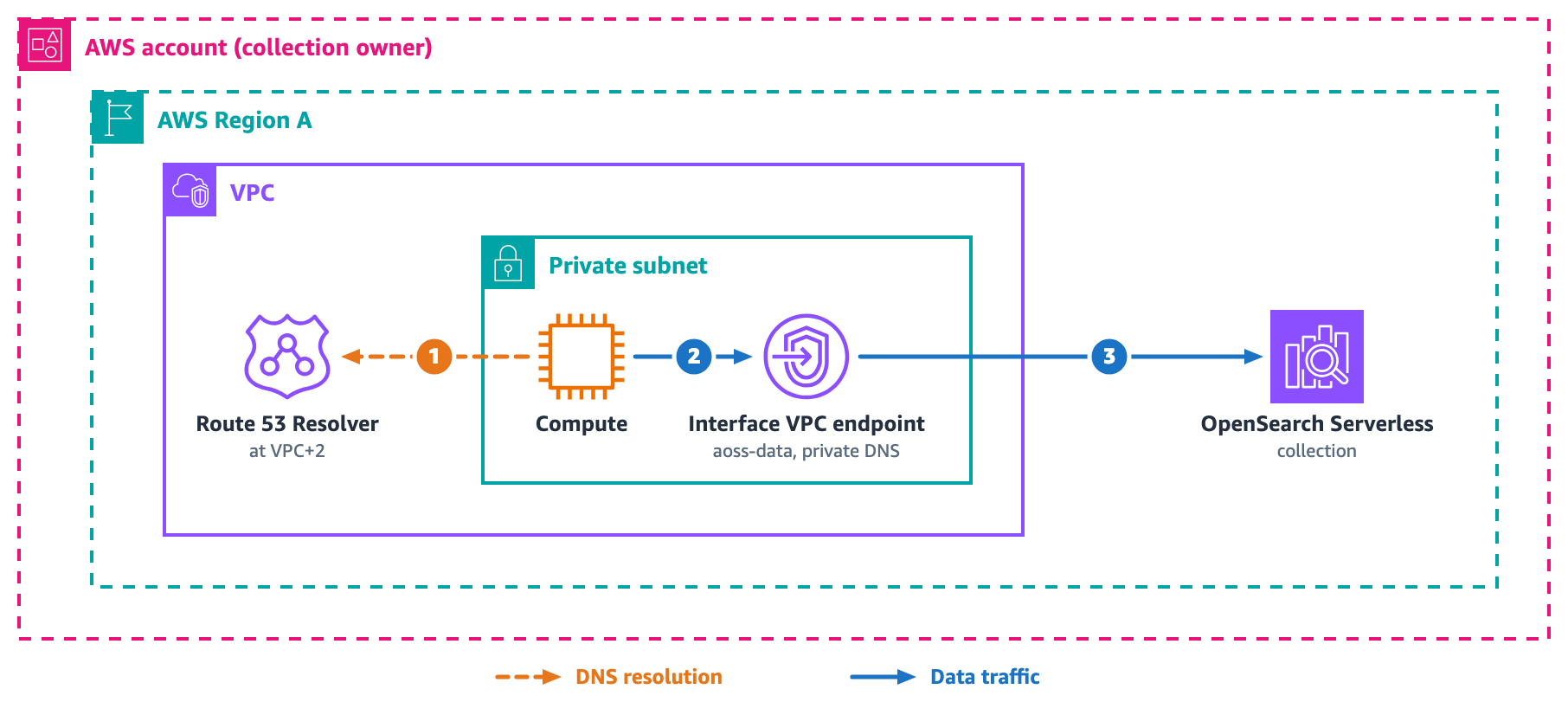
Pattern 1: Private access from a single VPC

Compute in a VPC needs private access to collections in the same account. The following diagram shows the architecture for private access from a single VPC.

Compute in a single VPC reaches a collection through a VPC interface endpoint with private DNS enabled

Figure 1: Private access from a single VPC

Create a standard VPC endpoint in the VPC where your compute runs, then reference its ID in the collection’s network policy.

For the DNS resolution flow, (1) compute queries <collectionId>.aoss.<region>.on.aws, and the VPC Route 53 Resolver at VPC+2 returns the endpoint ENI IP addresses because private DNS is enabled on the endpoint.

For the data traffic path, (2) compute connects to the ENI, and (3) PrivateLink forwards the request to the service, which routes to the collection by hostname.

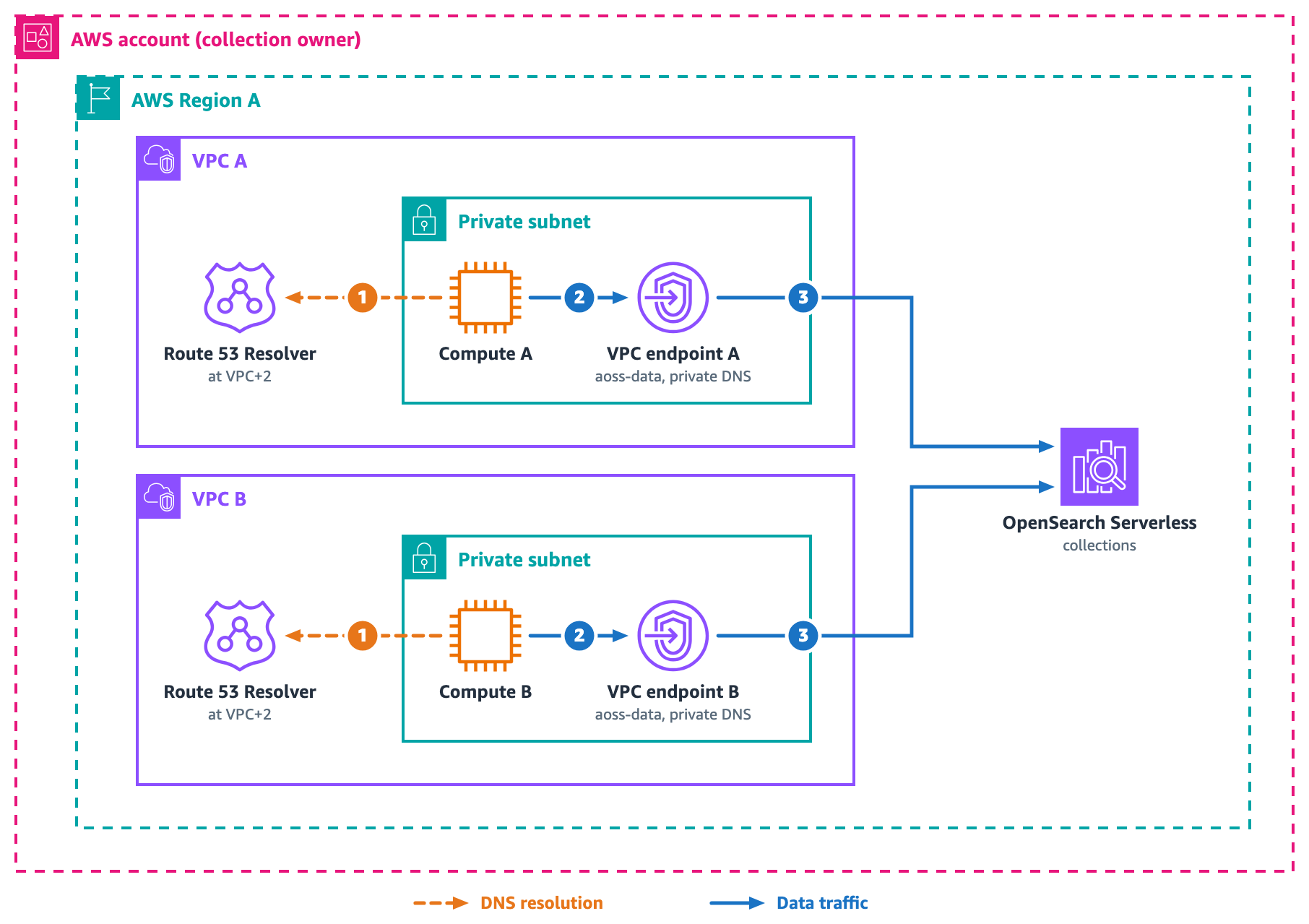
Pattern 2: Multiple VPCs in the same account

Several VPCs, split by environment, tier, or team, need private access to the same collections. The following diagram shows how each VPC uses its own endpoint to reach the same collections.

Three VPCs in one account, each with its own aoss-data interface endpoint reaching the same collections

Figure 2: Multiple VPCs in the same account

Each VPC needs exactly one aoss-data endpoint with private DNS enabled, and that single endpoint already reaches every collection in the Region. DNS resolves independently within each VPC, so there is no cross-VPC DNS dependency. Adding a new VPC takes two steps. Create the endpoint, then add its endpoint ID to the collection’s network policy. Do not create a second aoss-data endpoint with private DNS enabled in the same VPC. Both endpoints share the same private hosted zone, which causes a conflict and the creation fails.

For the DNS resolution flow, (1) compute in each VPC queries the collection hostname, and that VPC’s Route 53 Resolver at VPC+2 returns the endpoint ENI IP addresses because private DNS is enabled on the endpoint.

For the data traffic path, (2) compute connects to its local ENI, and (3) PrivateLink forwards the request to the service, which routes to the collection by hostname.

Pattern 3: On-premises access from a single account

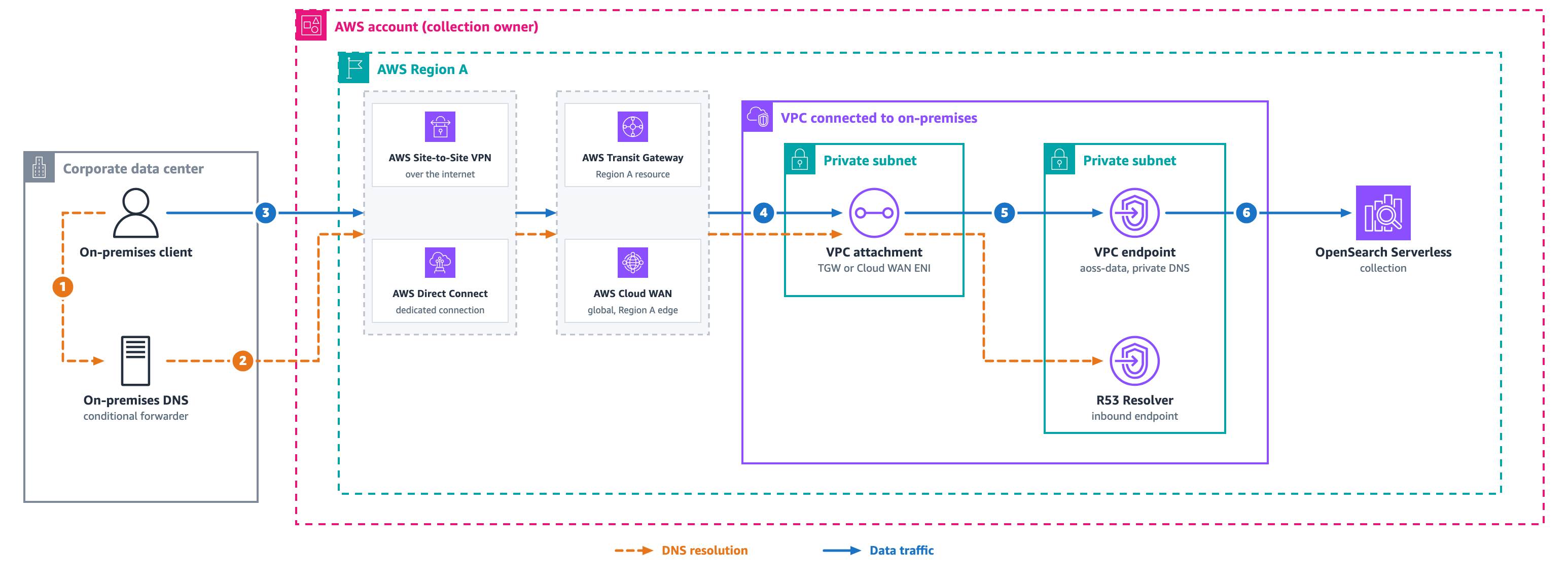
On-premises clients reach collections over AWS Direct Connect or AWS Site-to-Site VPN, which connect to the VPC through AWS Transit Gateway or AWS Cloud WAN. The following diagram shows the DNS and data path for on-premises access.

Figure 3: On-premises access from a single account

On-premises DNS servers sit outside the VPC and cannot resolve PrivateLink private DNS names directly. Place an Amazon Route 53 Resolver inbound endpoint in the VPC that holds the aoss-data VPC endpoint. On-premises DNS forwards queries for aoss.<region>.on.aws to that inbound endpoint. The inbound endpoint resolves them against the private hosted zone. The inbound endpoint’s security group must allow TCP/UDP port 53 from your on-premises resolver ranges.

For the DNS resolution flow, (1) the client queries the on-premises resolver. (2) The on-premises conditional forwarder for *.aoss.<region>.on.aws sends the query over Direct Connect or VPN, through Transit Gateway or Cloud WAN, to the inbound endpoint. The inbound endpoint uses the VPC Route 53 Resolver to return the endpoint’s private ENI IPs.

For the data traffic path, (3) the client sends an HTTPS request with the Transport Layer Security (TLS) Server Name Indication (SNI) header set to the collection hostname, over Direct Connect or VPN through Transit Gateway or Cloud WAN. (4) Traffic crosses the VPC’s attachment ENI, (5) reaches the VPC endpoint ENIs, and (6) PrivateLink forwards the request to the service.

Pattern 4: Cross-account access with an endpoint in each consumer VPC

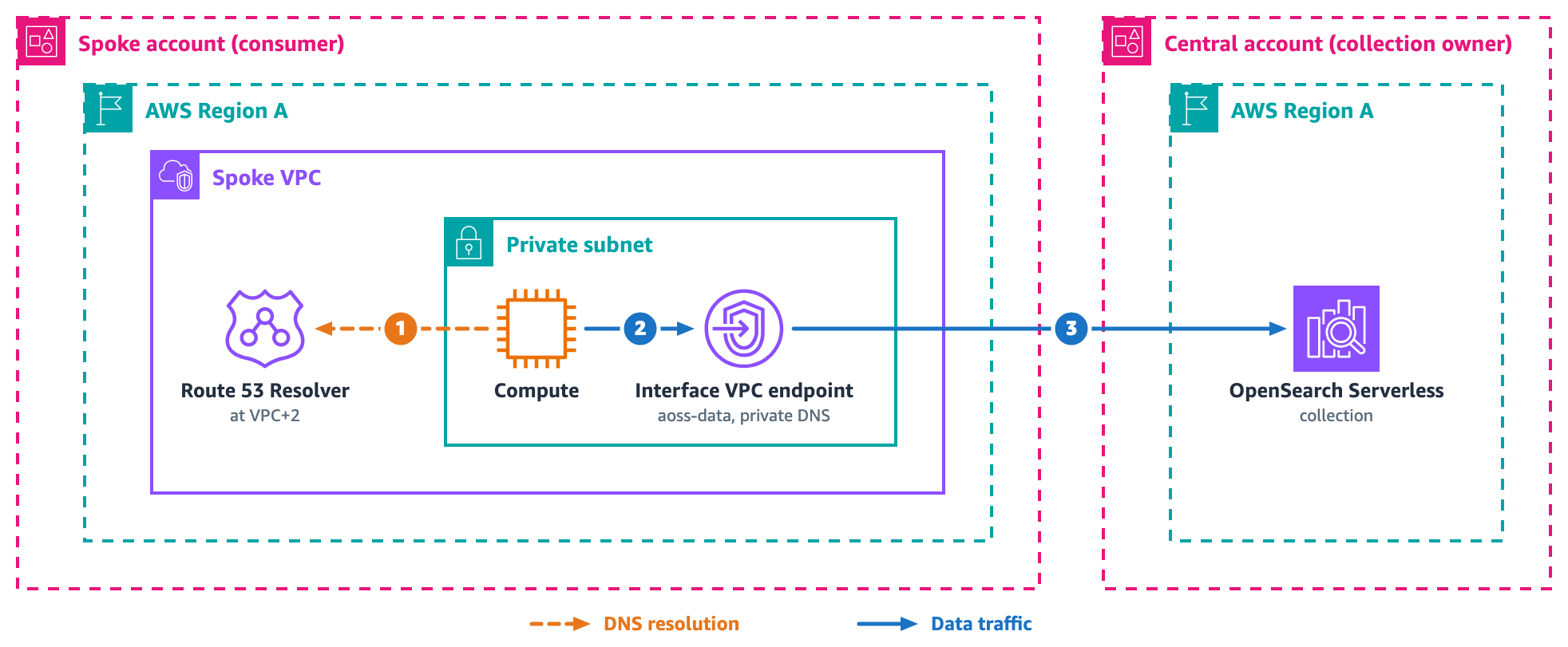
A central account hosts collections, and compute in spoke accounts needs private access. Many enterprises start here. The following diagram shows the cross-account endpoint architecture.

Spoke accounts each with their own interface endpoint reaching collections in a central account over PrivateLink

Figure 4: Cross-account access with an endpoint in each consumer VPC

Each spoke creates its own endpoint. The collection owner’s network policy references the spoke’s endpoint ID. The data access policy grants the spoke’s IAM role. PrivateLink carries the traffic end to end, with no Transit Gateway and no peering.

The endpoint lives in the spoke account, not the collection account. The spoke team creates a standard interface VPC endpoint in the spoke VPC for the service name com.amazonaws.<region>.aoss-data with private DNS enabled. The collection owner does not create this endpoint. After the endpoint is ready the spoke shares its endpoint ID with the collection owner, who adds that ID to the collection network policy under SourceVPCEs. A network policy accepts endpoint IDs from accounts across your organization. Each spoke creates its own endpoint and shares the ID rather than peering VPCs or routing through another account’s endpoint.

Network access and data access stay separate. The network policy authorizes the endpoint, and the data access policy authorizes the identity. A serverless data access policy grants principals from the collection’s own account. For a spoke in another account, you create an IAM role in the collection account and grant that role in the data access policy. The spoke role then assumes it to sign requests.

The following network access policy lists the two spoke endpoint IDs under SourceVPCEs and sets AllowFromPublic to false, so only those endpoints reach the collection and the policy denies public access.

[
  {
    "Description": "Cross-account access from spoke",
    "Rules": [
      {
        "ResourceType": "collection",
        "Resource": [
          "collection/my-collection"
        ]
      }
    ],
    "AllowFromPublic": false,
    "SourceVPCEs": [
      "vpce-spoke-b-id",
      "vpce-spoke-c-id"
    ]
  }
]

For the DNS resolution flow, (1) spoke compute queries the VPC Route 53 Resolver at VPC+2, which returns the local endpoint ENI IPs because private DNS is enabled on the endpoint.

For the data traffic path, (2) compute connects to the local ENI. (3) PrivateLink forwards the request to the service, which checks the network policy for the endpoint ID and the data access policy for the IAM role before routing. Adding a spoke takes one API call and two policy edits.

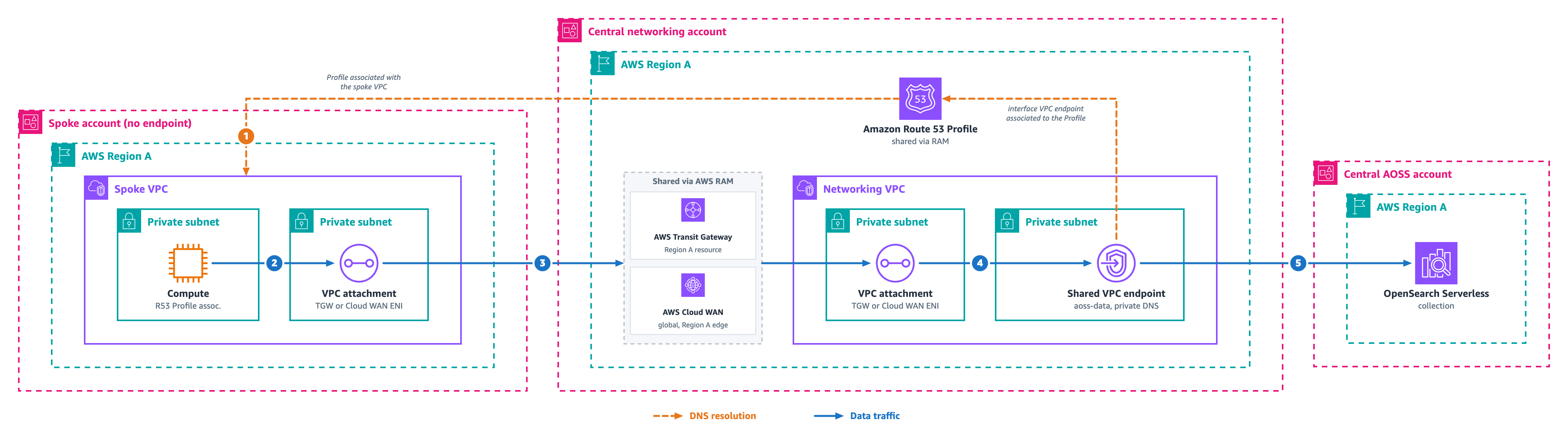
Pattern 5: Centralized shared endpoint with Amazon Route 53 Profiles over Transit Gateway

You want fewer PrivateLink endpoints, so you run one shared endpoint in a networking VPC and reach it from spoke accounts over Transit Gateway or AWS Cloud WAN, with no endpoint in each spoke. The following diagram shows this centralized architecture.

Figure 5: Centralized shared endpoint with Amazon Route 53 Profiles over Transit Gateway

Pattern 5 consolidates access through a single shared endpoint in a central networking VPC rather than creating one per spoke. Because spoke VPCs have no local endpoint, they cannot resolve *.aoss.<region>.on.aws on their own. You share the endpoint’s private DNS with spoke VPCs using Amazon Route 53 Profiles, shared through AWS Resource Access Manager (AWS RAM). This is the one pattern where you still manage DNS propagation.

For the DNS resolution flow, (1) the spoke resolves the hostname through the shared Route 53 Profile, which returns the networking-VPC endpoint ENI IPs.

For the data traffic path, (2) traffic leaves the compute through the spoke VPC’s attachment ENI, (3) crosses Transit Gateway or Cloud WAN into the networking VPC’s attachment ENI, (4) reaches the shared endpoint ENIs, and (5) PrivateLink forwards the request to the service.

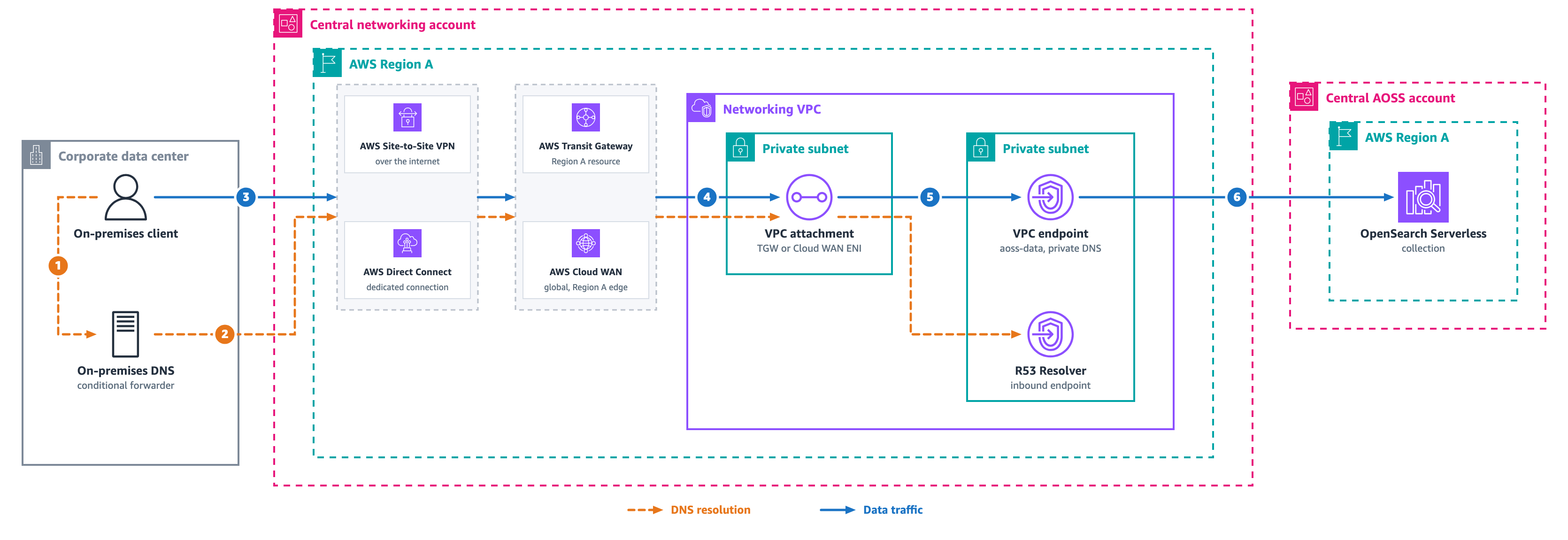
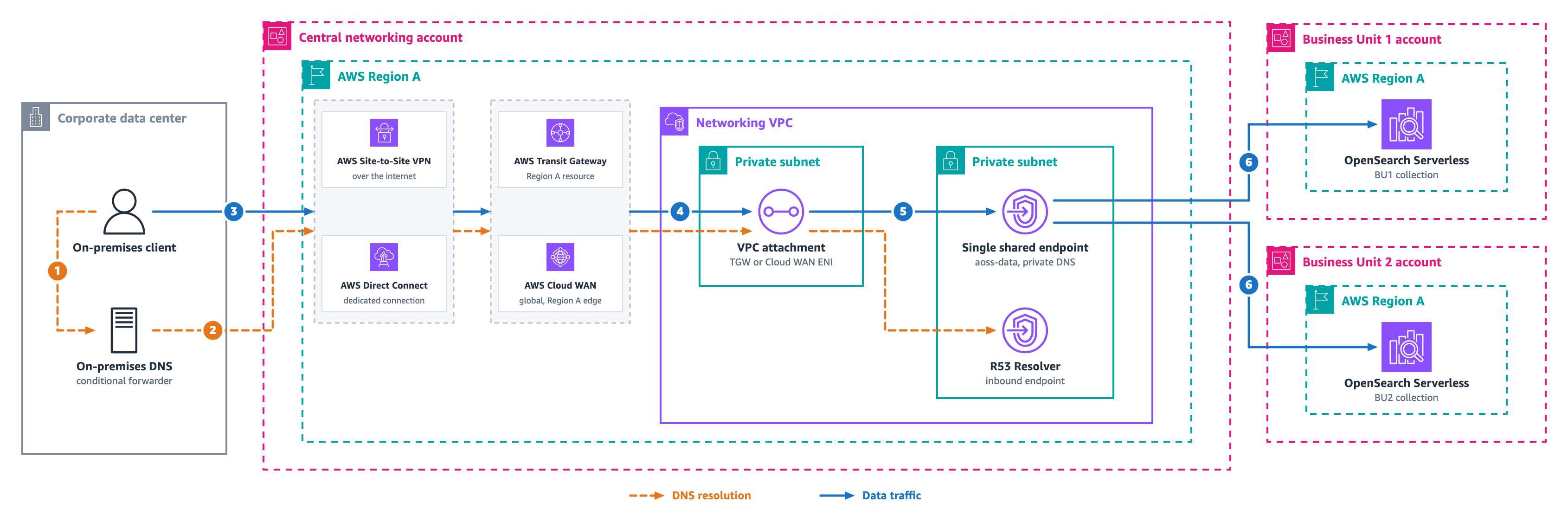
Pattern 6: Cross-account centralized networking with on-premises

A central account hosts collections. A separate networking account owns Direct Connect or VPN and Route 53. On-premises clients reach the collections through the networking account. The following diagram shows this architecture.

Figure 6: Cross-account centralized networking with on-premises

The networking account runs the standard VPC endpoint and a Route 53 Resolver inbound endpoint. The collection owner’s network policy references the networking account’s endpoint ID.

For the DNS resolution flow, (1) the on-premises client queries its resolver. (2) The on-premises conditional forwarder sends the query over Direct Connect or VPN, through Transit Gateway or Cloud WAN, to the inbound endpoint. The inbound endpoint uses the VPC Route 53 Resolver to return the endpoint’s private ENI IPs.

For the data traffic path, (3) the client sends HTTPS over Direct Connect or VPN, through Transit Gateway or Cloud WAN. (4) Traffic crosses the networking VPC’s attachment ENI, (5) reaches the networking-VPC endpoint ENIs, and (6) PrivateLink forwards the request to the service in the central account. The two teams coordinate through one artifact, the endpoint ID.

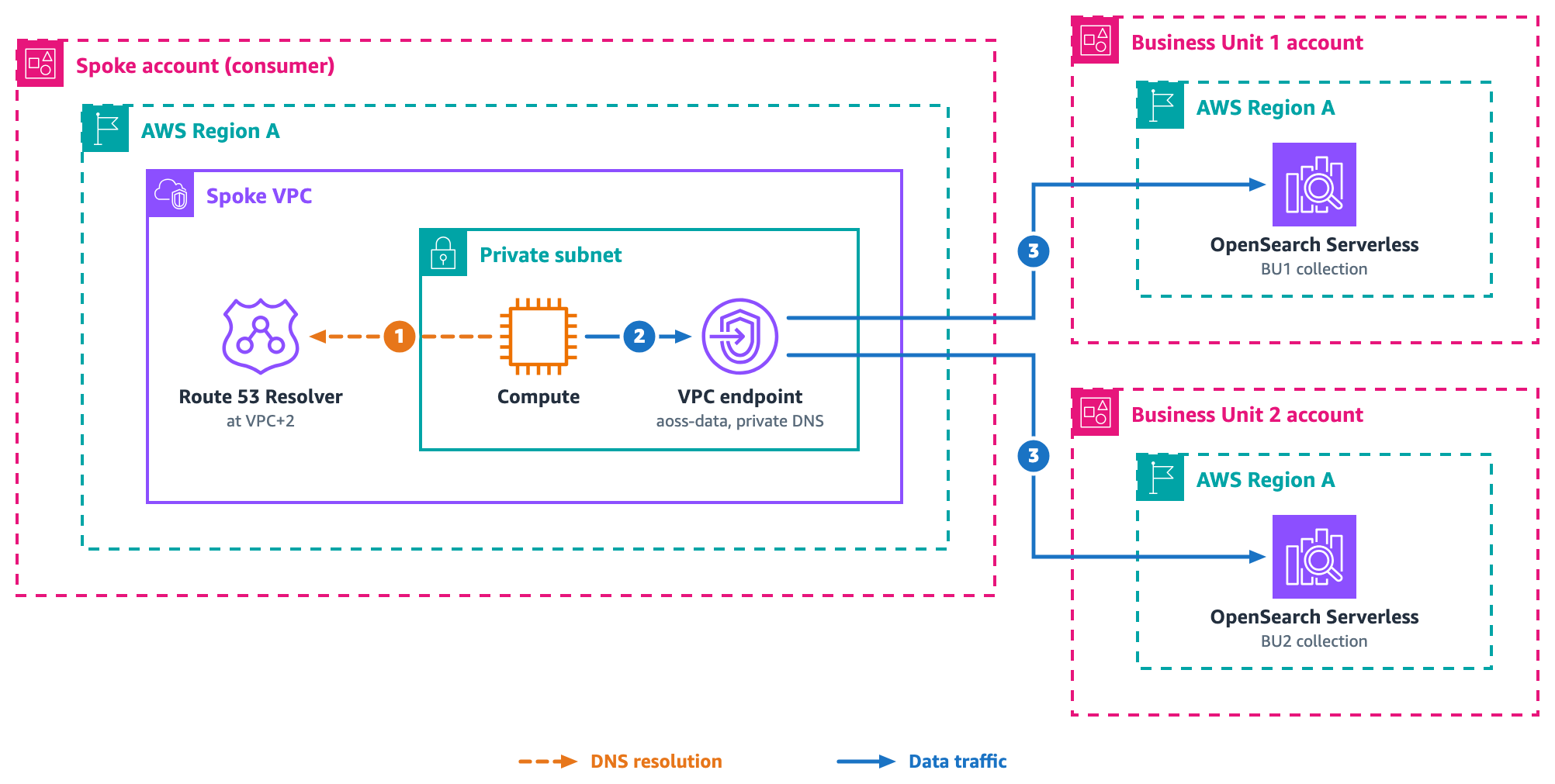
Pattern 7: Distributed multi-business-unit with spoke-account access

Spoke accounts such as analytics or application teams need collections spread across several business unit accounts, and each unit manages its own collections. The following diagram shows the distributed multi-business-unit architecture.

Spoke accounts reaching collections spread across several business unit accounts, each spoke with its own endpoint

Figure 7: Distributed multi-business-unit with spoke-account access

Each spoke creates one standard endpoint, which resolves every collection hostname in the Region. Each business unit’s network policy lists the spoke endpoint IDs. Access control decides which collections a spoke reaches. DNS does not.

For the DNS resolution flow, (1) spoke compute queries the VPC Route 53 Resolver at VPC+2, which returns the endpoint ENI IPs because private DNS is enabled on the endpoint.

For the data traffic path, (2) compute connects to the local ENI, and (3) PrivateLink forwards the request to the service, which routes to the correct business unit collection by hostname.

Action Required change
New collection in any BU No networking change is needed because in the network policy collection/*  wildcard, already covers any new collection
New spoke account Spoke creates an endpoint, and BUs add its ID to their policies
Remove spoke access BUs remove the endpoint ID and the IAM principal

Pattern 8: Distributed multi-business-unit with on-premises access

Several business units own collections in separate accounts. On-premises clients reach collections across all of those accounts through a central networking account. The following diagram shows this architecture.

Figure 8: Distributed multi-business-unit with on-premises access

The networking account runs one standard endpoint that resolves *.aoss.<region>.on.aws hostnames, regardless of which account owns the collection. Each business unit’s network policy includes the networking endpoint ID.

For the DNS resolution flow, (1) the on-premises client queries its resolver. (2) The on-premises conditional forwarder for *.aoss.<region>.on.aws sends the query over Direct Connect or VPN, through Transit Gateway or Cloud WAN, to the networking VPC’s inbound endpoint. The inbound endpoint uses the VPC Route 53 Resolver to return the shared endpoint’s private ENI IPs.

For the data traffic path, (3) the client sends HTTPS over Direct Connect or VPN, through Transit Gateway or Cloud WAN. (4) Traffic crosses the networking VPC’s attachment ENI, (5) the request arrives at the shared endpoint ENIs, and (6) the service routes to business unit 1 or business unit 2 by hostname, as long as that business unit’s policy lists the networking endpoint ID. Adding a collection in any business unit needs no networking change if the network policy uses a collection/* wildcard, since the wildcard already covers it.

Pattern 9: Cross-Region access strategies

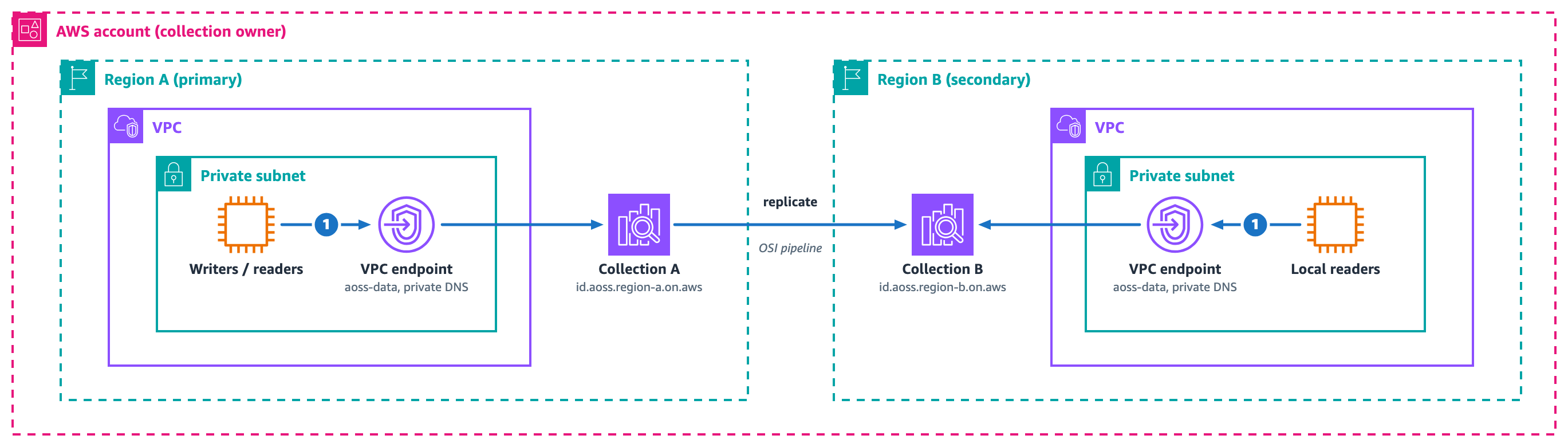
Consumers in Region B need data that lives in collections in Region A. The following diagram shows cross-Region access strategies.

Independent collections in Region A and Region B, each with its own endpoint, with a replication arrow showing cross-Region data sync

Figure 9: Cross-Region access strategies

Collections are Regional. No built-in cross-Region endpoint or replication exists. Deploy independent collections in each Region, each with its own endpoint and policies, then synchronize data with one of these approaches.

  • Dual-write. The application writes to both Regions at ingestion time.
  • Amazon OpenSearch Ingestion pipeline. A pipeline replicates index operations to the secondary Region with near real-time lag. The pipeline creates its own PrivateLink endpoint to the destination collection. It adds the endpoint to that collection’s network policy automatically. You only need to name the network policy and grant the pipeline role.
  • Amazon Simple Storage Service (Amazon S3) Cross-Region Replication with re-ingestion. Cross-Region Replication copies objects, and an OpenSearch Ingestion pipeline loads them into the local collection. Lag runs in minutes, at the lowest cost of these approaches.

For the DNS resolution flow, DNS resolves locally in each Region, the same as Pattern 1. Each collection hostname carries its Region, so a hostname in Region A resolves through Region A’s own endpoint and a hostname in Region B resolves through Region B’s own endpoint, with no cross-Region DNS.

For the data traffic path, (1) compute in each Region uses that Region’s own endpoint to reach its local collection. Writes land in the primary Region and the sync approach you choose replicates them to the secondary Region, where local readers query the replica. The replicate arrow shows that cross-Region movement, such as an OpenSearch Ingestion pipeline that writes into the secondary-Region collection.

Scale-to-zero changes the economics. An idle secondary-Region collection costs only storage until requests arrive.

Summary

Pattern Components
1. Same VPC Standard endpoint and network policy
2. Multiple VPCs Endpoint per VPC and a policy listing all IDs
3. On-premises Endpoint, Route 53 inbound endpoint, on-premises forwarder, and Transit Gateway or Cloud WAN
4. Cross-account Endpoint per consumer, network policy, and data policy
5. Centralized shared endpoint Shared endpoint, Route 53 Profiles through RAM, and Transit Gateway or Cloud WAN
6. Central networking with on-premises Networking endpoint, Route 53 inbound, forwarder, Transit Gateway or Cloud WAN, and policies
7. Multi-BU with spoke access Endpoint per spoke, and each BU policy lists spoke IDs
8. Multi-BU with on-premises One networking endpoint reached through Transit Gateway or Cloud WAN, and each BU policy lists its ID
9. Cross-Region Independent collections per Region and a data-sync approach

Across each private pattern, the VPC endpoint resolves all *.aoss.<region>.on.aws hostnames through standard PrivateLink private DNS. Network policies control which endpoints reach a collection, and data access policies control which principals operate on the data. Only Pattern 5 asks you to manage DNS.

Cost considerations

The connectivity pattern you choose drives recurring cost, so match it to your scale instead of adding infrastructure you do not need. The two charges that come up most often, a Route 53 Resolver inbound endpoint and Route 53 Profiles, are both optional for access that stays inside AWS.

A Route 53 Resolver inbound endpoint is needed only for the on-premises patterns (3, 6, and 8), where an on-premises resolver forwards queries into the VPC. Traffic that stays inside AWS never uses it. Route 53 Profiles apply only when a VPC has no endpoint of its own, as in Pattern 5, where the profile carries the shared endpoint’s private DNS to the spoke. When each VPC runs its own interface endpoint, DNS resolves locally through the VPC Route 53 Resolver at no extra charge, so neither the inbound endpoint nor a profile is required.

For most multi-account and multi-Region deployments, an interface endpoint in each consumer VPC (Pattern 4) is the least complex and often the least expensive option. You pay for the interface endpoints you already need for private access, and local DNS resolution adds nothing. Because collections are Regional and each Region resolves on its own, this scales across Regions with no cross-Region DNS.

Centralizing on one shared endpoint (Pattern 5) lowers the number of interface endpoints. However, it adds Transit Gateway or Cloud WAN data processing charges and the cost of sharing DNS. You share that DNS either through Route 53 Profiles or through a private hosted zone that you associate across accounts and maintain yourself. A smaller endpoint count is not automatically cheaper because transit data processing can exceed the savings. Compare both designs against your own traffic before you decide.

Scale to zero also shapes cost. An idle collection, such as a secondary-Region replica in Pattern 9, releases its compute and bills only for storage until requests arrive. For current rates, see AWS PrivateLink pricing, Amazon Route 53 pricing, and Amazon OpenSearch Service pricing.

Conclusion

OpenSearch Serverless uses standard AWS PrivateLink for private connectivity. You create a VPC endpoint, enable private DNS, and reference the endpoint ID in your network policy. The model scales from single-VPC access to multi-account and multi-business-unit designs, and only Pattern 5 adds DNS infrastructure, where you share the endpoint’s private DNS with Route 53 Profiles. The per-account regional endpoint goes further and serves any collection in an account through one hostname and connection pool. To get started, create your first collection in the OpenSearch Serverless console, or explore the OpenSearch Serverless documentation for detailed API references and tutorials.


About the authors

Salman Ahmed

Salman Ahmed

Salman is a Senior Technical Account Manager at AWS, specializing in helping customers design, implement, and optimize their AWS environments. He combines deep networking expertise with a passion for exploring emerging technologies to help organizations get the most out of their cloud investments. Outside of work, he enjoys photography, traveling, and watching his favorite sports teams.

Ankush Goyal

Ankush Goyal

Ankush is a Senior Technical Account Manager at AWS Enterprise Support, specializing in helping customers in the travel and hospitality industries optimize their cloud infrastructure. With over 20 years of IT experience, he focuses on using AWS networking services to drive operational efficiency and cloud adoption. Ankush is passionate about delivering impactful solutions and helping clients to streamline their cloud operations.

Ravi Bhatane

Ravi Bhatane

Ravi is a Software Engineer at AWS working on Amazon OpenSearch Serverless. He builds the gateway layer that fronts the service, handling private connectivity, authentication, and request routing for customer traffic into collections. He’s drawn to distributed systems and the challenge of keeping them secure, highly available, and low latency as they grow. Outside of work, he enjoys photography and hiking.

How to build a cross-Region resilience for Amazon OpenSearch Service with Amazon MSK

Post Syndicated from Sriharsha Subramanya Begolli original https://aws.amazon.com/blogs/big-data/how-to-build-a-cross-region-resilience-for-amazon-opensearch-service-with-amazon-msk/

Cross-Region resilience for Amazon OpenSearch Service has historically been a complex challenge, relying on S3-based snapshots or cross-cluster replication that demand intricate manual failover procedures often resulting in hours of downtime, data inconsistencies, and significant lag during outages, or other operational disruptions. To overcome these limitations and help businesses stay focused on their core objectives, we’ve developed a solution that automatically maintains synchronized data across AWS Regions while supporting active-active operations in both AWS Regions.

AWS offers two OpenSearch offerings, namely Amazon OpenSearch Service, a managed cluster-based service where you provision and manage OpenSearch domains (nodes, storage, scaling), and Amazon OpenSearch Serverless, a serverless option where AWS automatically manages infrastructure and scaling and you create collections for your search or analytics workloads. OpenSearch Service provides high availability (HA) within an AWS Region through its Multi-AZ deployment model and provides Regional resiliency with cross-cluster replication. Amazon Managed Streaming for Apache Kafka (Amazon MSK) Replicator is an Amazon MSK feature that you can use to reliably replicate data across Amazon MSK clusters in different or the same AWS Region.

In this post, we outline the solution that provides cross-Region resiliency without needing to reestablish relationships during a fail-back, using an active-active replication model with Amazon OpenSearch Ingestion (OSI) and Amazon Managed Streaming for Apache Kafka (Amazon MSK). This solution applies to both OpenSearch Service managed clusters and Amazon OpenSearch Serverless collections. We use Amazon OpenSearch Serverless as an example for the configurations in this post.

Solution overview

In this solution we use Amazon MSK Replicator for bidirectional cross-Region data replication, with OSI pipelines to index data into Amazon OpenSearch Serverless collections in each AWS Region. While the S3 based approach serves the purpose, Amazon MSK Replicator provides near real-time replication with identical topic naming, which supports active-active operations. Amazon MSK Replicator provides automatic loop prevention and consumer group offset synchronization, enabling seamless cross-Region failover. You can find the code for the entire solution in the GitHub repo.

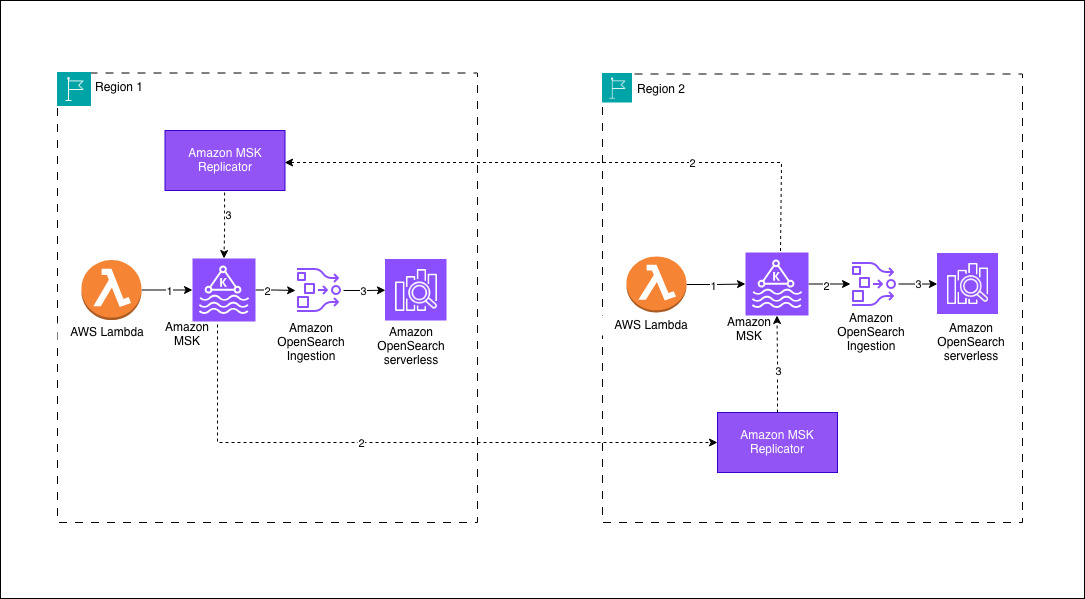
Your architecture will follow a Regional-first approach where data sources write to a local Amazon MSK cluster within their AWS Region. In this sample deployment, an AWS Lambda function serves as the producer, streaming data into the MSK cluster. OSI pipelines consume the incoming data from the local MSK cluster and persist it to an Amazon OpenSearch Serverless collection within the same AWS Region. To achieve cross-Region data synchronization, Amazon MSK Replicator facilitates bidirectional replication between the Amazon MSK clusters, preserving the same topic names across both environments. This design validates that Amazon OpenSearch Serverless collections in each AWS Region maintain identical datasets, provides low-latency search capabilities and high availability for globally distributed workloads.

Prerequisites

Deploy the AWS Cloudformation template to install the prerequisites. The solution has the following prerequisite steps:

  1. Set up Amazon Virtual Private Cloud (Amazon VPC) infrastructure in both Regions
    1. Create Amazon VPCs with private subnets in at least two or three Availability Zones for high availability at the AWS Region level
    2. Configure Network Address Translation (NAT) Gateways for outbound internet access from private subnets
    3. Use non-overlapping CIDR blocks
  2. Establish Amazon OpenSearch Serverless collections in both AWS Regions
  3. Create Amazon OpenSearch Serverless Collections for log analytics
  4. Configure encryption, network, and data access policies
  5. Create Amazon VPC endpoints for private access
  6. Configure MSK clusters in both AWS Regions
  7. Enable AWS Identity and Access Management (IAM) authentication (SASL/IAM)
  8. Enable Multi-VPC connectivity (required for Amazon MSK Replicator and OSI)
  9. Configure MSK cluster policies to allow kafka.amazonaws.com and osis-pipelines.amazonaws.com service principals
  10. Configure IAM permissions for pipeline and replication access
  11. Create IAM roles for the OSI pipelines with permissions to access Amazon Managed Streaming for Apache Kafka and Amazon OpenSearch Serverless.
  12. Create IAM roles for the Amazon MSK Replicator with permissions for cross-Region access to Amazon Managed Streaming for Apache Kafka clusters.

This AWS CloudFormation template helps you in deploying all of the required configurations with primary AWS Region as us-east-1 and secondary AWS Region as us-west-2.

The following snippets shows the configuration for the OSI pipeline, which writes data from Amazon MSK to Amazon OpenSearch Serverless. The OSI pipeline uses MSK as a source with IAM authentication.

version: "2"
kafka-pipeline:
source:
kafka:
acknowledgments: true
topics:
- name: "opensearch-data"
group_id: "osi-consumer-group-primary"
aws:
msk:
arn: "arn:aws:kafka:us-east-1:<aws-acccount-id>:cluster/production-msk-primary/CLUSTER_ID"
region: "us-east-1"
sts_role_arn: "arn:aws:iam::<aws-acccount-id>:role/production-osi-pipeline-primary-role"
sink:
- opensearch:
hosts:
- "https://<OPENSEARCH_SERVERLESS_COLLECTION_ID>.us-east-1.aoss.amazonaws.com"
index: "application-logs-${yyyy.MM.dd}"
aws:
serverless: true
region: "us-east-1"
sts_role_arn: "arn:aws:iam::<aws-acccount-id>:role/production-osi-pipeline-primary-role"
dlq:
s3:
bucket: "production-opensearch-dlq-us-east-1"
region: "us-east-1"
sts_role_arn: "arn:aws:iam::<aws-acccount-id>:role/production-osi-pipeline-primary-role"

The OSI pipeline IAM Role has the required permission for Amazon MSK and Amazon OpenSearch Serverless to consume message data from the source and write data to the destination. For true active-active replication, sample deploys two Amazon MSK Replicators in each AWS Region. Each Amazon MSK cluster requires cluster policy to allow Amazon MSK Replicator and OSI to connect. To validate the bidirectional replication, the solution uses AWS Lambda functions to produce test messages to both Amazon MSK clusters.

When an application generates an event, it first publishes the message to an Apache Kafka topic in the Regional streaming cluster powered by Amazon Managed Streaming for Apache Kafka. In this sample deployment, an AWS Lambda function simulates application activity by producing events into the topic. These events are durably stored in the Apache Kafka partitions, providing a reliable buffer between producers and downstream consumers. An ingestion pipeline built using Amazon OpenSearch Ingestion continuously reads the event stream from the Apache Kafka topic and prepares the data for indexing. The pipeline then indexes the processed events into a collection in Amazon OpenSearch Serverless, making the data searchable in near real time.

At the same time, Amazon MSK Replicator replicates the Apache Kafka topic to a peer Amazon MSK cluster in a secondary AWS Region while preserving the topic structure. This makes the same event stream available in the secondary AWS Region without requiring changes to downstream consumers. An OpenSearch Ingestion pipeline in the secondary AWS Region consumes the replicated topic and indexes the events into its local OpenSearch Serverless collection. As events continue to flow through the system, both AWS Regions maintain synchronized datasets that can be queried independently. This architecture enables low-latency Regional search while maintaining a resilient, cross-Region copy of the indexed data.

Failover scenario and considerations

You can failover your application to the Amazon OpenSearch Serverless collection in the other AWS Region and continue operations without interruption. The data present before the impairment is available in both collections. Upon recovery, Amazon MSK Replicator and OSI pipelines automatically resume operations without manual intervention. Data that you write to the healthy AWS Region during the impairment is automatically backfilled to the recovered AWS Region. For detailed step-by-step guidance, see disaster recovery section in GitHub repo.

When using Amazon MSK Replicator, be aware that cross-Region data transfer incurs additional costs. To help verify reliability, configure Dead Letter Queues (DLQ) for OSI pipelines to capture failed document ingestion. Additionally, monitor essential Amazon CloudWatch metrics including ReplicationLatency for tracking lag between clusters, DocumentsFailed for identifying ingestion issues, and MessagesInPerSec for observing message throughput.

Persistent buffering in OSI provides a built-in safety net that prevents data loss when data producers send information faster than your OpenSearch cluster can process it, removing the need to provision and manage separate buffering infrastructure. By using managed storage across multiple Availability Zones, this feature enhances data durability while dynamically allocating OpenSearch Compute Units (OCUs) for both buffering and data processing, which incurs additional costs. Persistent buffering isn’t enabled by default. Without it, the OSI pipeline relies on an in-memory buffer, which is volatile and has limited capacity for storing incoming data before processing.

Conclusion

In this post, we showed you how to achieve cross-Regional resiliency for Amazon OpenSearch Serverless and OpenSearch Service managed clusters. In our experiments, most writes of a few KBs of data completed within one to a few seconds between the two chosen AWS Regions. Replication lag between the AWS Regions depends on network delay between chosen Regions and the settings configured on Amazon Opensearch Ingestion (OSI) pipeline.

Refer to AWS Service Level Agreements (SLAs) and Amazon Opensearch Ingestion (OSI) for more details. You can also achieve active-passive replication for OpenSearch using OSI and Amazon Simple Storage Service (Amazon S3) as mentioned in another post Achieve cross-Region resilience with Amazon OpenSearch Ingestion.


About the authors

Sriharsha Subramanya Begolli works as a Senior Solutions Architect with AWS, based in Bengaluru, India. His primary focus is assisting large enterprise customers in modernising their applications and developing cloud-based systems to meet their business objectives. His expertise lies in the domains of data, analytics and generative AI.

Qais Poonawala is a Senior Technical Account Manager at AWS Enterprise Support, India, who specializes in Cloud Operations and Security while helping customers architect highly scalable, resilient, and secure solutions. With extensive experience in enabling enterprise customers across AWS services, he has a passion for solving complex challenges and developing solutions around Security, Cloud Operations, and GenAI.

Jay Jothi is a Senior Technical Account Manager based in Chennai, India, where he supports major enterprise customers in maximizing the benefits of cloud technology. With extensive experience in the financial services industry and a specialization in Cloud Operations, he focuses on helping financial clients manage data efficiently, derive actionable insights using GenAI, and deliver cost-effective solutions.