All posts by Sriharsha Subramanya Begolli

How to build a cross-Region resilience for Amazon OpenSearch Service with Amazon MSK

Post Syndicated from Sriharsha Subramanya Begolli original https://aws.amazon.com/blogs/big-data/how-to-build-a-cross-region-resilience-for-amazon-opensearch-service-with-amazon-msk/

Cross-Region resilience for Amazon OpenSearch Service has historically been a complex challenge, relying on S3-based snapshots or cross-cluster replication that demand intricate manual failover procedures often resulting in hours of downtime, data inconsistencies, and significant lag during outages, or other operational disruptions. To overcome these limitations and help businesses stay focused on their core objectives, we’ve developed a solution that automatically maintains synchronized data across AWS Regions while supporting active-active operations in both AWS Regions.

AWS offers two OpenSearch offerings, namely Amazon OpenSearch Service, a managed cluster-based service where you provision and manage OpenSearch domains (nodes, storage, scaling), and Amazon OpenSearch Serverless, a serverless option where AWS automatically manages infrastructure and scaling and you create collections for your search or analytics workloads. OpenSearch Service provides high availability (HA) within an AWS Region through its Multi-AZ deployment model and provides Regional resiliency with cross-cluster replication. Amazon Managed Streaming for Apache Kafka (Amazon MSK) Replicator is an Amazon MSK feature that you can use to reliably replicate data across Amazon MSK clusters in different or the same AWS Region.

In this post, we outline the solution that provides cross-Region resiliency without needing to reestablish relationships during a fail-back, using an active-active replication model with Amazon OpenSearch Ingestion (OSI) and Amazon Managed Streaming for Apache Kafka (Amazon MSK). This solution applies to both OpenSearch Service managed clusters and Amazon OpenSearch Serverless collections. We use Amazon OpenSearch Serverless as an example for the configurations in this post.

Solution overview

In this solution we use Amazon MSK Replicator for bidirectional cross-Region data replication, with OSI pipelines to index data into Amazon OpenSearch Serverless collections in each AWS Region. While the S3 based approach serves the purpose, Amazon MSK Replicator provides near real-time replication with identical topic naming, which supports active-active operations. Amazon MSK Replicator provides automatic loop prevention and consumer group offset synchronization, enabling seamless cross-Region failover. You can find the code for the entire solution in the GitHub repo.
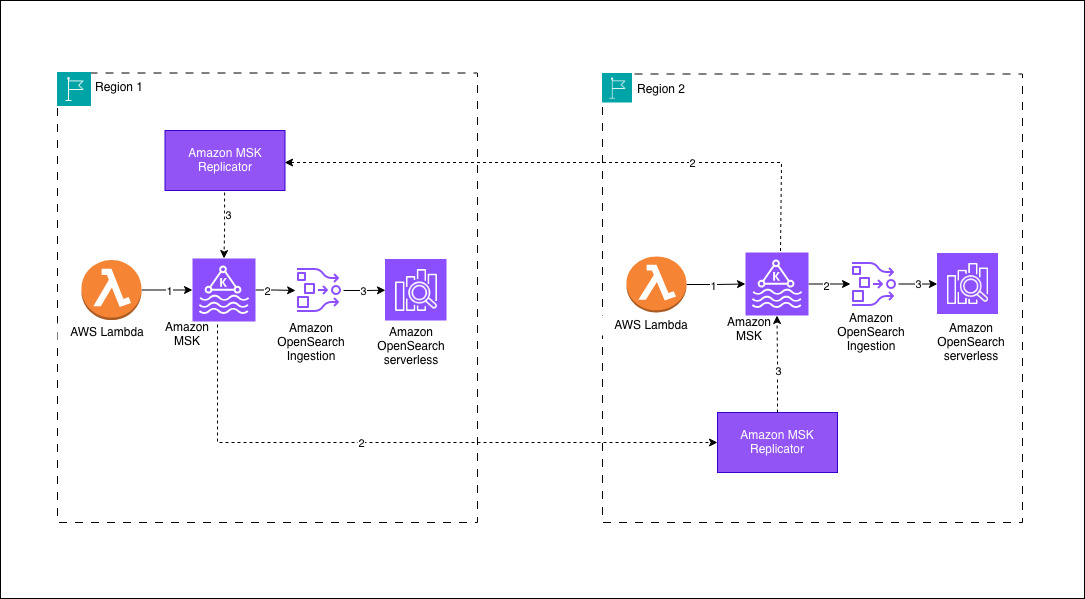
Your architecture will follow a Regional-first approach where data sources write to a local Amazon MSK cluster within their AWS Region. In this sample deployment, an AWS Lambda function serves as the producer, streaming data into the MSK cluster. OSI pipelines consume the incoming data from the local MSK cluster and persist it to an Amazon OpenSearch Serverless collection within the same AWS Region. To achieve cross-Region data synchronization, Amazon MSK Replicator facilitates bidirectional replication between the Amazon MSK clusters, preserving the same topic names across both environments. This design validates that Amazon OpenSearch Serverless collections in each AWS Region maintain identical datasets, provides low-latency search capabilities and high availability for globally distributed workloads.

Prerequisites

Deploy the AWS Cloudformation template to install the prerequisites. The solution has the following prerequisite steps:

  1. Set up Amazon Virtual Private Cloud (Amazon VPC) infrastructure in both Regions
    1. Create Amazon VPCs with private subnets in at least two or three Availability Zones for high availability at the AWS Region level
    2. Configure Network Address Translation (NAT) Gateways for outbound internet access from private subnets
    3. Use non-overlapping CIDR blocks
  2. Establish Amazon OpenSearch Serverless collections in both AWS Regions
  3. Create Amazon OpenSearch Serverless Collections for log analytics
  4. Configure encryption, network, and data access policies
  5. Create Amazon VPC endpoints for private access
  6. Configure MSK clusters in both AWS Regions
  7. Enable AWS Identity and Access Management (IAM) authentication (SASL/IAM)
  8. Enable Multi-VPC connectivity (required for Amazon MSK Replicator and OSI)
  9. Configure MSK cluster policies to allow kafka.amazonaws.com and osis-pipelines.amazonaws.com service principals
  10. Configure IAM permissions for pipeline and replication access
  11. Create IAM roles for the OSI pipelines with permissions to access Amazon Managed Streaming for Apache Kafka and Amazon OpenSearch Serverless.
  12. Create IAM roles for the Amazon MSK Replicator with permissions for cross-Region access to Amazon Managed Streaming for Apache Kafka clusters.

This AWS CloudFormation template helps you in deploying all of the required configurations with primary AWS Region as us-east-1 and secondary AWS Region as us-west-2.

The following snippets shows the configuration for the OSI pipeline, which writes data from Amazon MSK to Amazon OpenSearch Serverless. The OSI pipeline uses MSK as a source with IAM authentication.

version: "2"
kafka-pipeline:
source:
kafka:
acknowledgments: true
topics:
- name: "opensearch-data"
group_id: "osi-consumer-group-primary"
aws:
msk:
arn: "arn:aws:kafka:us-east-1:<aws-acccount-id>:cluster/production-msk-primary/CLUSTER_ID"
region: "us-east-1"
sts_role_arn: "arn:aws:iam::<aws-acccount-id>:role/production-osi-pipeline-primary-role"
sink:
- opensearch:
hosts:
- "https://<OPENSEARCH_SERVERLESS_COLLECTION_ID>.us-east-1.aoss.amazonaws.com"
index: "application-logs-${yyyy.MM.dd}"
aws:
serverless: true
region: "us-east-1"
sts_role_arn: "arn:aws:iam::<aws-acccount-id>:role/production-osi-pipeline-primary-role"
dlq:
s3:
bucket: "production-opensearch-dlq-us-east-1"
region: "us-east-1"
sts_role_arn: "arn:aws:iam::<aws-acccount-id>:role/production-osi-pipeline-primary-role"

The OSI pipeline IAM Role has the required permission for Amazon MSK and Amazon OpenSearch Serverless to consume message data from the source and write data to the destination. For true active-active replication, sample deploys two Amazon MSK Replicators in each AWS Region. Each Amazon MSK cluster requires cluster policy to allow Amazon MSK Replicator and OSI to connect. To validate the bidirectional replication, the solution uses AWS Lambda functions to produce test messages to both Amazon MSK clusters.

When an application generates an event, it first publishes the message to an Apache Kafka topic in the Regional streaming cluster powered by Amazon Managed Streaming for Apache Kafka. In this sample deployment, an AWS Lambda function simulates application activity by producing events into the topic. These events are durably stored in the Apache Kafka partitions, providing a reliable buffer between producers and downstream consumers. An ingestion pipeline built using Amazon OpenSearch Ingestion continuously reads the event stream from the Apache Kafka topic and prepares the data for indexing. The pipeline then indexes the processed events into a collection in Amazon OpenSearch Serverless, making the data searchable in near real time.

At the same time, Amazon MSK Replicator replicates the Apache Kafka topic to a peer Amazon MSK cluster in a secondary AWS Region while preserving the topic structure. This makes the same event stream available in the secondary AWS Region without requiring changes to downstream consumers. An OpenSearch Ingestion pipeline in the secondary AWS Region consumes the replicated topic and indexes the events into its local OpenSearch Serverless collection. As events continue to flow through the system, both AWS Regions maintain synchronized datasets that can be queried independently. This architecture enables low-latency Regional search while maintaining a resilient, cross-Region copy of the indexed data.

Failover scenario and considerations

You can failover your application to the Amazon OpenSearch Serverless collection in the other AWS Region and continue operations without interruption. The data present before the impairment is available in both collections. Upon recovery, Amazon MSK Replicator and OSI pipelines automatically resume operations without manual intervention. Data that you write to the healthy AWS Region during the impairment is automatically backfilled to the recovered AWS Region. For detailed step-by-step guidance, see disaster recovery section in GitHub repo.

When using Amazon MSK Replicator, be aware that cross-Region data transfer incurs additional costs. To help verify reliability, configure Dead Letter Queues (DLQ) for OSI pipelines to capture failed document ingestion. Additionally, monitor essential Amazon CloudWatch metrics including ReplicationLatency for tracking lag between clusters, DocumentsFailed for identifying ingestion issues, and MessagesInPerSec for observing message throughput.

Persistent buffering in OSI provides a built-in safety net that prevents data loss when data producers send information faster than your OpenSearch cluster can process it, removing the need to provision and manage separate buffering infrastructure. By using managed storage across multiple Availability Zones, this feature enhances data durability while dynamically allocating OpenSearch Compute Units (OCUs) for both buffering and data processing, which incurs additional costs. Persistent buffering isn’t enabled by default. Without it, the OSI pipeline relies on an in-memory buffer, which is volatile and has limited capacity for storing incoming data before processing.

Conclusion

In this post, we showed you how to achieve cross-Regional resiliency for Amazon OpenSearch Serverless and OpenSearch Service managed clusters. In our experiments, most writes of a few KBs of data completed within one to a few seconds between the two chosen AWS Regions. Replication lag between the AWS Regions depends on network delay between chosen Regions and the settings configured on Amazon Opensearch Ingestion (OSI) pipeline.

Refer to AWS Service Level Agreements (SLAs) and Amazon Opensearch Ingestion (OSI) for more details. You can also achieve active-passive replication for OpenSearch using OSI and Amazon Simple Storage Service (Amazon S3) as mentioned in another post Achieve cross-Region resilience with Amazon OpenSearch Ingestion.


About the authors

Sriharsha Subramanya Begolli works as a Senior Solutions Architect with AWS, based in Bengaluru, India. His primary focus is assisting large enterprise customers in modernising their applications and developing cloud-based systems to meet their business objectives. His expertise lies in the domains of data, analytics and generative AI.

Qais Poonawala is a Senior Technical Account Manager at AWS Enterprise Support, India, who specializes in Cloud Operations and Security while helping customers architect highly scalable, resilient, and secure solutions. With extensive experience in enabling enterprise customers across AWS services, he has a passion for solving complex challenges and developing solutions around Security, Cloud Operations, and GenAI.

Jay Jothi is a Senior Technical Account Manager based in Chennai, India, where he supports major enterprise customers in maximizing the benefits of cloud technology. With extensive experience in the financial services industry and a specialization in Cloud Operations, he focuses on helping financial clients manage data efficiently, derive actionable insights using GenAI, and deliver cost-effective solutions.

Amazon OpenSearch Service 101: Create your first search application with OpenSearch

Post Syndicated from Sriharsha Subramanya Begolli original https://aws.amazon.com/blogs/big-data/amazon-opensearch-service-101-create-your-first-search-application-with-opensearch/

Organizations today face the challenge of managing and deriving insights from an ever-expanding universe of data in real time. Industrial Internet of Things (IoT) sensors stream millions of temperature, pressure, and performance metrics from field equipment every second. Ecommerce platforms need to surface relevant products from vast catalogs instantly. Security teams must analyze system logs in real time to detect threats. As data volumes grow, organizations increasingly struggle with fragmented monitoring tools that create critical visibility gaps and slow incident response times. The cost of commercial observability solutions becomes prohibitive, forcing teams to manage multiple separate tools and increasing both operational overhead and troubleshooting complexity. Across these diverse scenarios, the ability to efficiently search, analyze, and visualize data in real time has become crucial for business success.

Amazon OpenSearch Service addresses these challenges by providing a fully managed search and analytics service. This managed service configures, manages, and scales OpenSearch clusters so you can focus on your search workloads and end customers. Amazon OpenSearch Serverless further makes it straightforward to run search and log analytics workloads by automatically scaling compute and storage resources up and down to match your application’s demands—with no infrastructure to manage. Whether you’re processing continuous streams of IoT telemetry, enabling product discovery, or performing security analytics, OpenSearch Service scales to meet your needs.

In this post, we walk you through a search application building process using Amazon OpenSearch Service. Whether you’re a developer new to search or looking to understand OpenSearch fundamentals, this hands-on post shows you how to build a search application from scratch—starting with the initial setup; diving into core components such as indexing, querying, result presentation; and culminating in the execution of your first search query.

Components of OpenSearch Service

Before building your first search application, it’s important to understand some key architectural components in OpenSearch. The fundamental unit of information in OpenSearch is a document stored in JSON format. These documents are organized into indices—collections of related documents that function similar to database tables. When you search for information, OpenSearch queries these indices to find matching documents.

OpenSearch operates on a distributed architecture where multiple servers, called nodes, work together in a cluster or domain. Each cluster can utilize dedicated master nodes that focus solely on cluster management tasks, such as maintaining cluster state, managing indices, and orchestrating shard allocation. These specialized nodes enhance cluster stability by offloading cluster management duties from data nodes. Data nodes, on the other hand, handle the storage, indexing, and querying of data—essentially performing the heavy lifting of data operations. Together, they provide scalability, availability, and efficient data processing in the cluster. Configure dedicated coordinator nodes that specialize in routing and distributing search and indexing requests across the cluster. These nodes reduce the load on data nodes, which allows them to focus on data storage, indexing, and search operations.

Coordinator nodes in OpenSearch are most beneficial in the following scenarios:

  1. Large cluster deployments – When managing substantial data volumes across many nodes.
  2. Query-intensive workloads – For environments handling frequent search queries or aggregations, especially those with complex date histograms or multiple aggregations, benefit from faster query processing.
  3. Heavy dashboard utilizationOpenSearch Dashboards can be resource-intensive. Offloading this responsibility to dedicated coordinator nodes reduces the strain on data nodes.

To manage large datasets efficiently, OpenSearch splits indices into smaller pieces called shards. Each shard is distributed across the cluster, with a recommended size of 10–50 GB for optimal performance. For reliability and high availability, OpenSearch maintains replica copies of these shards on different nodes, which means that your data remains accessible even if some nodes fail.

Search operations in OpenSearch are powered by inverted indices, a data structure that maps terms to the documents containing them. The BM25 ranking algorithm helps make sure that search results are relevant to users’ queries. Although searches happen in near real time, with configurable refresh intervals, individual document retrievals are immediate.

This architecture provides the foundation for handling high-volume IoT data streams, complex full-text search operations, and real-time analytics, all while maintaining fault tolerance. Understanding these components will help you make informed decisions as you build your search application.OpenSearch Dashboards is a visualization and analytics tool for exploring, analyzing, and visualizing data in real time. It provides an intuitive interface for querying, monitoring, and reporting on OpenSearch data using visualizations such as charts, graphs, and maps. Key features include interactive dashboards, alerting, anomaly detection, security monitoring, and trace analytics.

Sample Amazon OpenSearch Service tutorial application overview

The following architecture diagram demonstrates how to build and deploy a scalable, fully managed search application on Amazon Web Services (AWS). The architecture uses Amazon OpenSearch Service for indexing and searching data. The UI application is deployed on AWS App Runner and interacts with Amazon OpenSearch Service through secure serverless Amazon API Gateway and AWS Lambda.

Scope of Solution

Here is the end-to-end workflow for our application detailing how user requests are handled from initial access through to data retrieval or indexing:

  1. Users access the application through AWS App Runner, which hosts the frontend interface.
  2. Amazon Cognito handles user authentication and authorization for secure access to the application.
  3. When users interact with the application, their requests are sent to API Gateway. API Gateway communicates with Amazon Cognito to verify user authentication status. It serves as the primary entry point for all API operations and routes the requests appropriately. It forwards requests to Lambda functions within the virtual private cloud (VPC).
  4. Lambda functions process the requests, performing either:
  5. Data indexing operations into OpenSearch Service
  6. Search queries against the OpenSearch Service cluster
  7. The OpenSearch Service cluster resides within a private subnet in a VPC for enhanced security.

Prerequisites

Before you deploy the solution, review the prerequisites.

Install the sample app

The entire infrastructure is deployed using AWS Cloud Development Kit (AWS CDK), with cluster configurations customizable through the cdk.json file on GitHub. This deployment approach provides consistent and repeatable infrastructure creation while maintaining security best practices. The steps to deploy this infrastructure are available in this README file. After deployment, you’ll access a comprehensive search application built with Cloudscape React components that includes:

  1. Interactive search functionality – Test various OpenSearch query methods including prefix match keyword searches, phrase matching, fuzzy searches, and field-specific queries against the sample product dataset
  2. Document management tools – Bulk index the product catalog with a single click or delete and recreate the index as needed for testing purposes
  3. Educational resources – Access embedded guides explaining OpenSearch concepts, query syntax, and best practices

Index the documents

After you’ve deployed this search application, the first step is to index some documents into OpenSearch Service. Sign in to the search application UI and follow these steps:

  1. To trigger a bulk index process, under Index Documents in the navigation pane, choose Bulk Index Product Catalog.
  2. Choose Index Product catalog, as shown in the following screenshot.

The Lambda function indexes a comprehensive ecommerce product catalog into your newly created OpenSearch Service cluster. This sample dataset includes detailed fashion and lifestyle products spanning multiple categories. Each product record contains rich metadata, including title, detailed description, category, color, and price.

Bulk Index Process

Keyword searches

OpenSearch Service offers multiple search features. For an exhaustive list, refer to Search features. We focus on a few keyword search types to help you get started with OpenSearch.

With the product catalog in OpenSearch, you can perform prefix searches through the search application’s intuitive interface. To better understand the search functionality, expand the Guide section at the top of the interface. This interactive guide explains how various kinds of searches work, complete with a practical example in context of the product catalog dataset. The guide includes best practices and a link to the detailed documentation to help you make the most of OpenSearch’s powerful query capabilities.

You can do a prefix search on any of the three key search fields: Title, Description, or Color.

A typical prefix match query looks like this:

{
  "query": {
    "match_phrase_prefix": {
      "attribute_name": {
        "query": "attribute_value",
        "max_expansions": 10,
        "slop": 1
      }
    }
  }
}

You can use this query pattern to find documents where specific fields begin with your search term, offering an intuitive “starts with” search experience.

The following image illustrates a practical example of the Prefix Match search. Entering “Ru” in the title field matches products with titles such as “Running”, “Runners” and “Ruby.” Prefix Match search is particularly useful when users only remember the beginning of a product name or are searching across multiple variations or simply exploring product categories.

Prefix Match example

Multi Match search enables searching across multiple fields simultaneously. For example, you can search for “Coral” across product title, description, and color fields simultaneously. The search query can be customized using field boosting in which matches in certain fields carry more weight than others.

A typical multi match query looks like this:

{
  "query": {
    "multi_match": {
      "query": "Coral",
      "fields": [
        "title^3",
        "description",
        "color"
      ],
      "type": "best_fields"
    }
  }
}

You can explore Wildcard Match, Range Filter, and other search features through the search application. For developers and administrators managing this search infrastructure, OpenSearch Dashboards is a native, developer-friendly interface for indexing, searching, and managing your data. It serves as a comprehensive control center where you can interact directly with your indices, test queries, and monitor performance in real time. The following screenshot shows OpenSearch Dashboards which provides an interactive UI to explore, analyze and visualize search and log data.

OpenSearch Dashboards

While our example demonstrates lexical search functionality on a sample product catalog, OpenSearch Service is equally powerful for observability usecases. When handling time-series data from logs, metrics, or traces, OpenSearch excels at real-time analytics and visualization. For instance, DevOps teams can index application logs and system telemetry data, then use date histograms and statistical aggregations to identify performance bottlenecks or security anomalies as they occur. This real-time search allows IT teams to detect and respond to incidents with minimal delay. Using OpenSearch Dashboards, teams can create live operational dashboards that update automatically as new data streams in. For IoT applications monitoring thousands of sensors, this means temperature anomalies or equipment failures can trigger immediate alerts through OpenSearch’s alerting capabilities. These observability workloads benefit from the same distributed architecture that powers our product search example, with the added advantage of time-series optimized indices and retention policies for managing high-volume streaming data efficiently.

Beyond search management, you can configure alerts for specific conditions, set up notification channels for operational events, and enable data discovery features. If you want to experiment with the same search queries we implemented in our application, you can launch OpenSearch Dashboards and use relevant index and search APIs from the Dev Tools section, which is an ideal environment for developing and testing before implementing in your production application. Because our OpenSearch Service cluster resides within a private subnet, you need to create a Secure Shell (SSH) tunnel to access the dashboard. For more information and steps to do this, refer to How do I use an SSH tunnel to access OpenSearch Dashboards with Amazon Cognito authentication from outside a VPC? in the Knowledge Center. So far, we’ve explored OpenSearch’s query domain-specific language (DSL). However, for those coming in from a traditional database background, OpenSearch also offers SQL and Piped Processing Language (PPL) functionality, making the transition smoother. You can explore more on this at SQL and PPL in the OpenSearch documentation.

In this post, we introduced you to different types of keyword searches. You can also store documents as vector embeddings in OpenSearch and use it for semantic search, hybrid search, multimodal search, or to implement Retrieval Augmented Generation (RAG) pattern.

Conclusion

You can now build sample search applications by following the steps outlined in this post and the implementation details available at sample-for-amazon-opensearch-service-tutorials-101 on GitHub. By using the distributed architecture of Amazon OpenSearch Service, an AWS managed service, you get fast, scalable search capabilities that grow with your business, built-in security and compliance controls, and automated cluster management—all with pay-only-for-what-you-use pricing flexibility.

Ready to learn more? Check out the Amazon OpenSearch Service Developer Guide. For more insights, best practices and architectures, and industry trends, refer to Amazon OpenSearch Service blog posts and hands-on workshops at AWS Workshops. Please also visit the OpenSearch Service Migration Hub if you are ready to migrate legacy or self-managed workloads to OpenSearch Service.

We hope this detailed guide and accompanying code will help you get started. Try it out, let us know your thoughts in the comments section, and feel free to reach out to us for questions!


About the authors

SriharshaSriharsha Subramanya Begolli works as a Senior Solutions Architect with Amazon Web Services (AWS), based in Bengaluru, India. His primary focus is assisting large enterprise customers in modernizing their applications and developing cloud-based systems to meet their business objectives. His expertise lies in the domains of data and analytics.

Fraser SequeiraFraser Sequeira is a Startups Solutions Architect with Amazon Web Services (AWS) based in Melbourne, Australia. In his role at AWS, Fraser works closely with startups to design and build cloud-native solutions on AWS, with a focus on analytics and streaming workloads. With over 10 years of experience in cloud computing, Fraser has deep expertise in big data, real-time analytics, and building event-driven architecture on AWS. He enjoys staying on top of the latest technology innovations from AWS and sharing his learnings with customers. He spends his free time tinkering with new open source technologies.