Tag Archives: Compliance

Use AWS Firewall Manager to deploy protection at scale in AWS Organizations

Post Syndicated from Chamandeep Singh original https://aws.amazon.com/blogs/security/use-aws-firewall-manager-to-deploy-protection-at-scale-in-aws-organizations/

Security teams that are responsible for securing workloads in hundreds of Amazon Web Services (AWS) accounts in different organizational units aim for a consistent approach across AWS Organizations. Key goals include enforcing preventative measures to mitigate known security issues, having a central approach for notifying the SecOps team about potential distributed denial of service (DDoS) attacks, and continuing to maintain compliance obligations. AWS Firewall Manager works at the organizational level to help you achieve your intended security posture while it provides reporting for non-compliant resources in all your AWS accounts. This post provides step-by-step instructions to deploy and manage security policies across your AWS Organizations implementation by using Firewall Manager.

You can use Firewall Manager to centrally manage AWS WAF, AWS Shield Advanced, and Amazon Virtual Private Cloud (Amazon VPC) security groups across all your AWS accounts. Firewall Manager helps to protect resources across different accounts, and it can protect resources with specific tags or resources in a group of AWS accounts that are in specific organizational units (OUs). With AWS Organizations, you can centrally manage policies across multiple AWS accounts without having to use custom scripts and manual processes.

Architecture diagram

Figure 1 shows an example organizational structure in AWS Organizations, with several OUs that we’ll use in the example policy sets in this blog post.
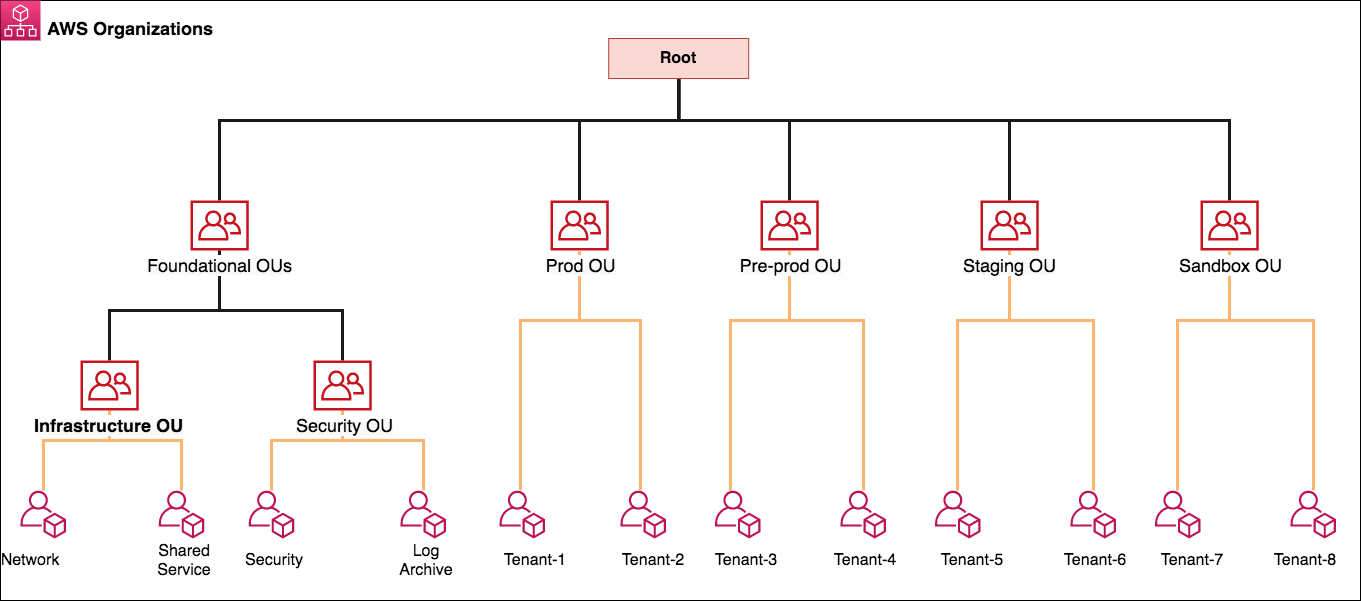
Figure 1: AWS Organizations and OU structure

Figure 1: AWS Organizations and OU structure

Firewall Manager can be associated to either the AWS master payer account or one of the member AWS accounts that has appropriate permissions as a delegated administrator. Following the best practices for organizational units, in this post we use a dedicated Security Tooling AWS account (named Security in the diagram) to operate the Firewall Manager administrator deployment under the Security OU. The Security OU is used for hosting security-related access and services. The Security OU, its child OUs, and the associated AWS accounts should be owned and managed by your security organization.

Firewall Manager prerequisites

Firewall Manager has the following prerequisites that you must complete before you create and apply a Firewall Manager policy:

  1. AWS Organizations: Your organization must be using AWS Organizations to manage your accounts, and All Features must be enabled. For more information, see Creating an organization and Enabling all features in your organization.
  2. A Firewall Manager administrator account: You must designate one of the AWS accounts in your organization as the Firewall Manager administrator for Firewall Manager. This gives the account permission to deploy security policies across the organization.
  3. AWS Config: You must enable AWS Config for all of the accounts in your organization so that Firewall Manager can detect newly created resources. To enable AWS Config for all of the accounts in your organization, use the Enable AWS Config template from the StackSets sample templates.

Deployment of security policies

In the following sections, we explain how to create AWS WAF rules, Shield Advanced protections, and Amazon VPC security groups by using Firewall Manager. We further explain how you can deploy these different policy types to protect resources across your accounts in AWS Organizations. Each Firewall Manager policy is specific to an individual resource type. If you want to enforce multiple policy types across accounts, you should create multiple policies. You can create more than one policy for each type. If you add a new account to an organization that you created with AWS Organizations, Firewall Manager automatically applies the policy to the resources in that account that are within scope of the policy. This is a scalable approach to assist you in deploying the necessary configuration when developers create resources. For instance, you can create an AWS WAF policy that will result in a known set of AWS WAF rules being deployed whenever someone creates an Amazon CloudFront distribution.

Policy 1: Create and manage security groups

You can use Firewall Manager to centrally configure and manage Amazon VPC security groups across all your AWS accounts in AWS Organizations. A previous AWS Security blog post walks you through how to apply common security group rules, audit your security groups, and detect unused and redundant rules in your security groups across your AWS environment.

Firewall Manager automatically audits new resources and rules as customers add resources or security group rules to their accounts. You can audit overly permissive security group rules, such as rules with a wide range of ports or Classless Inter-Domain Routing (CIDR) ranges, or rules that have enabled all protocols to access resources. To audit security group policies, you can use application and protocol lists to specify what’s allowed and what’s denied by the policy.

In this blog post, we use a security policy to audit the security groups for overly permissive rules and high-risk applications that are allowed to open to local CIDR ranges (for example, 10.0.0.0/8, 192.168.0.0/16, 172.16.0.0/12). We created a custom application list named Bastion Host for port 22 and a custom protocol list named Allowed Protocol that allows the child account to create rules only on TCP protocols. Refer link for how to create a custom managed application and protocol list.

To create audit security group policies

  1. Sign in to the Firewall Manager delegated administrator account. Navigate to the Firewall Manager console. In the left navigation pane, under AWS Firewall Manager, select Security policies.
  2. For Region, select the AWS Region where you would like to protect the resources. FMS region selection is on the service page drop down tab. In this example, we selected the Sydney (ap-southeast-2) Region because we have all of our resources in the Sydney Region.
  3. Create the policy, and in Policy details, choose Security group. For Region, select a Region (we selected Sydney (ap-southeast-2)), and then choose Next.
  4. For Security group policy type, choose Auditing and enforcement of security group rules, and then choose Next.
  5. Enter a policy name. We named our policy AWS_FMS_Audit_SecurityGroup.
  6. For Policy rule options, for this example, we chose Configure managed audit policy rules.
  7. Under Policy rules, choose the following:
    1. For Security group rules to audit, choose Inbound Rules.
    2. For Rules, select the following:
      1. Select Audit over permissive security group rules.
        • For Allowed security group rules, choose Add Protocol list and select the custom protocol list Allowed Protocols that we created earlier.
        • For Denied security group rules, select Deny rules with the allow ‘ALL’ protocol.
      2. Select Audit high risk applications.
        • Choose Applications that can only access local CIDR ranges. Then choose Add application list and select the custom application list Bastion host that we created earlier.
  8. For Policy action, for the example in this post, we chose Auto remediate any noncompliant resources. Choose Next.

    Figure 2: Policy rules for the security group audit policy

    Figure 2: Policy rules for the security group audit policy

  9. For Policy scope, choose the following options for this example:
    1. For AWS accounts this policy applies to, choose Include only the specified accounts and organizational unit. For Included Organizational units, select OU (example – Non-Prod Accounts).
    2. For Resource type, select EC2 Instance, Security Group, and Elastic Network Interface.
    3. For Resources, choose Include all resources that match the selected resource type.
  10. You can create tags for the security policy. In the example in this post, Tag Key is set to Firewall_Manager and Tag Value is set to Audit_Security_group.

Important: Migrating AWS accounts from one organizational unit to another won’t remove or detach the existing security group policy applied by Firewall Manager. For example, in the reference architecture in Figure 1 we have the AWS account Tenant-5 under the Staging OU. We’ve created a different Firewall Manager security group policy for the Pre-Prod OU and Prod OU. If you move the Tenant-5 account to Prod OU from Staging OU, the resources associated with Tenant-5 will continue to have the security group policies that are defined for both Prod and Staging OU unless you select otherwise before relocating the AWS account. Firewall Manager supports the detach option in case of policy deletion, because moving accounts across the OU may have unintended impacts such as loss of connectivity or protection, and therefore Firewall Manager won’t remove the security group.

Policy 2: Managing AWS WAF v2 policy

A Firewall Manager AWS WAF policy contains the rule groups that you want to apply to your resources. When you apply the policy, Firewall Manager creates a Firewall Manager web access control list (web ACL) in each account that’s within the policy scope.

Note: Creating Amazon Kinesis Data Firehose delivery stream is a prerequisite to manage the WAF ACL logging at Step 8 in us-east-1. (example – aws-waf-logs-lab-waf-logs)

To create a Firewall Manager – AWS WAF v2 policy

  1. Sign in to the Firewall Manager delegated administrator account. Navigate to the Firewall Manager console. In the left navigation pane, under AWS Firewall Manager, choose Security policies.
  2. For Region, select a Region. FMS region selection is on the service page drop down tab. For this example, we selected the Region as Global, since the policy is to protect CloudFront resources.
  3. Create the policy. Under Policy details, choose AWS WAF and for Region, choose Global. Then choose Next.
  4. Enter a policy name. We named our policy AWS_FMS_WAF_Rule.
  5. On the Policy rule page, under Web ACL configuration, add rule groups. AWS WAF supports custom rule groups (the customer creates the rules), AWS Managed Rules rule groups (AWS manages the rules), and AWS Marketplace managed rule groups. For this example, we chose AWS Managed Rules rule groups.
  6. For this example, for First rule groups, we chose the AWS Managed Rules rule group, AWS Core rule set. For Last rule groups, we chose the AWS Managed Rules rule group, Amazon IP reputation list.
  7. For Default web ACL action for requests that don’t match any rules in the web ACL, choose a default action. We chose Allow.
  8. Firewall Manager enables logging for a specific web ACL. This logging is applied to all the in-scope accounts and delivers the logs to a centralized single account. To enable centralized logging of AWS WAF logs:
    1. For Logging configuration status, choose Enabled.
    2. For IAM role, Firewall Manager creates an AWS WAF service-role for logging. Your security account should have the necessary IAM permissions. Learn more about access requirements for logging.
    3. Select Kinesis stream created earlier called aws-waf-logs-lab-waf-logs in us-east-1 as we’re using Cloudfront as a resource in the policy.
    4. For Redacted fields, for this example select HTTP method, Query String, URI, and Header. You can also add a new header. For more information, see Configure logging for an AWS Firewall Manager AWS WAF policy.
  9. For Policy action, for this example, we chose Auto remediate any noncompliant resources. To replace the existing web ACL that is currently associated with the resource, select Replace web ACLs that are currently associated with in-scope resources with the web ACLs created by this policy. Choose Next.

    Note: If a resource has an association with another web ACL that is managed by a different active Firewall Manager, it doesn’t affect that resource.

    Figure 3: Policy rules for the AWS WAF security policy

    Figure 3: Policy rules for the AWS WAF security policy

  10. For Policy scope, choose the following options for this example:
    1. For AWS accounts this policy applies to, choose Include only the specified accounts and organizational unit. For Included organizational units, select OU (example – Pre-Prod Accounts).
    2. For Resource type, choose CloudFront distribution.
    3. For Resources, choose Include all resources that match the selected resource type.
  11. You can create tags for the security policy. For the example in this post, Tag Key is set to Firewall_Manager and Tag Value is set to WAF_Policy.
  12. Review the security policy, and then choose Create Policy.

    Note: For the AWS WAF v2 policy, the web ACL pushed by the Firewall Manager can’t be modified on the individual account. The account owner can only add a new rule group.

  13. In the policy’s first and last rule groups sets, you can add additional rule groups at the linked AWS account level to provide additional security based on application requirements. You can use managed rule groups, which AWS Managed Rules and AWS Marketplace sellers create and maintain for you. For example, you can use the WordPress application rule group, which contains rules that block request patterns associated with the exploitation of vulnerabilities specific to a WordPress site. You can also manage and use your own rule groups.For more information about all of these options, see Rule groups. Another example could be using a rate-based rule that tracks the rate of requests for each originating IP address, and triggers the rule action on IPs with rates that go over a limit. Learn more about rate-based rules.

Policy 3: Managing AWS Shield Advanced policy

AWS Shield Advanced is a paid service that provides additional protections for internet facing applications. If you have Business or Enterprise support, you can engage the 24X7 AWS DDoS Response Team (DRT), who can write rules on your behalf to mitigate Layer 7 DDoS attacks. Please refer Shield Advanced pricing for more info before proceeding with Shield FMS Policy.

After you complete the prerequisites that were outlined in the prerequisites section, we’ll create Shield Advanced policy which contains the accounts and resources that you want to protect with Shield Advanced. Purpose of this policy is to activate the AWS Shield Advanced in the Accounts in OU’s scope and add the selected resources under Shield Advanced protection list.

To create a Firewall Manager – Shield Advanced policy

  1. Sign in to the Firewall Manager delegated administrator account. Navigate to the Firewall Manager console. In the left navigation pane, under AWS Firewall Manager, choose Security policies.
  2. For Region, select the AWS Region where you would like to protect the resources. FMS region selection is on the service page drop down tab. In this post, we’ve selected the Sydney (ap-southeast-2) Region because all of our resources are in the Sydney Region.

    Note: To protect CloudFront resources, select the Global option.

  3. Create the policy, and in Policy details, choose AWS Shield Advanced. For Region, select a Region (example – ap-southeast-2), and then choose Next.
  4. Enter a policy name. We named our policy AWS_FMS_ShieldAdvanced Rule.
  5. For Policy action, for the example in this post, we chose Auto remediate any non-compliant resources. Alternatively, if you choose Create but do not apply this policy to existing or new resources, Firewall Manager doesn’t apply Shield Advanced protection to any resources. You must apply the policy to resources later. Choose Next.
  6. For Policy scope, this example uses the OU structure as the container of multiple accounts with similar requirements:
    1. For AWS accounts this policy applies to, choose Include only the specified accounts and organizational units. For Included organizational units, select OU (example – Staging Accounts OU).
    2. For Resource type, select Application Load Balancer and Elastic IP.
    3. For Resources, choose Include all resources that match the selected resource type.
      Figure 4: Policy scope page for creating the Shield Advanced security policy

      Figure 4: Policy scope page for creating the Shield Advanced security policy

      Note: If you want to protect only the resources with specific tags, or alternatively exclude resources with specific tags, choose Use tags to include/exclude resources, enter the tags, and then choose either Include or Exclude. Tags enable you to categorize AWS resources in different ways, for example by indicating an environment, owner, or team to include or exclude in Firewall Manager policy. Firewall Manager combines the tags with “AND” so that, if you add more than one tag to a policy scope, a resource must have all the specified tags to be included or excluded.

      Important: Shield Advanced supports protection for Amazon Route 53 and AWS Global Accelerator. However, protection for these resources cannot be deployed with the help of Firewall Manager security policy at this time. If you need to protect these resources with Shield Advanced, you should use individual AWS account access through the API or console to activate Shield Advanced protection for the intended resources.

  7. You can create tags for the security policy. In the example in this post, Tag Key is set to Firewall_Manager and Tag Value is set to Shield_Advanced_Policy. You can use the tags in the Resource element of IAM permission policy statements to either allow or deny users to make changes to security policy.
  8. Review the security policy, and then choose Create Policy.

Now you’ve successfully created a Firewall Manager security policy. Using the organizational units in AWS Organizations as a method to deploy the Firewall Manager security policy, when you add an account to the OU or to any of its child OUs, Firewall Manager automatically applies the policy to the new account.

Important: You don’t need to manually subscribe Shield Advanced on the member accounts. Firewall Manager subscribes Shield Advanced on the member accounts as part of creating the policy.

Operational visibility and compliance report

Firewall Manager offers a centralized incident notification for DDoS incidents that are reported by Shield Advanced. You can create an Amazon SNS topic to monitor the protected resources for potential DDoS activities and send notifications accordingly. Learn how to create an SNS topic. If you have resources in different Regions, the SNS topic needs to be created in the intended Region. You must perform this step from the Firewall Manager delegated AWS account (for example, Security Tooling) to receive alerts across your AWS accounts in that organization.

As a best practice, you should set up notifications for all the Regions where you have a production workload under Shield Advanced protection.

To create an SNS topic in the Firewall Manager administrative console

  1. In the AWS Management Console, sign in to the Security Tooling account or the AWS Firewall Manager delegated administrator account. In the left navigation pane, under AWS Firewall Manager, choose Settings.
  2. Select the SNS topic that you created earlier to be used for the Firewall Manager central notification mechanism. For this example, we created a new SNS topic in the Sydney Region (ap-southeast-2) named SNS_Topic_Syd.
  3. For Recipient email address, enter the email address that the SNS topic will be sent to. Choose Configure SNS configuration.

After you create the SNS configuration, you can see the SNS topic in the appropriate Region, as in the following example.

Figure 5: An SNS topic for centralized incident notification

Figure 5: An SNS topic for centralized incident notification

AWS Shield Advanced records metrics in Amazon CloudWatch to monitor the protected resources and can also create Amazon CloudWatch alarms. For the simplicity purpose we took the email notification route for this example. In security operations environment, you should integrate the SNS notification to your existing ticketing system or pager duty for Realtime response.

Important: You can also use the CloudWatch dashboard to monitor potential DDoS activity. It collects and processes raw data from Shield Advanced into readable, near real-time metrics.

You can automatically enforce policies on AWS resources that currently exist or are created in the future, in order to promote compliance with firewall rules across the organization. For all policies, you can view the compliance status for in-scope accounts and resources by using the API or AWS Command Line Interface (AWS CLI) method. For content audit security group policies, you can also view detailed violation information for in-scope resources. This information can help you to better understand and manage your security risk.

View all the policies in the Firewall Manager administrative account

For our example, we created three security policies in the Firewall Manager delegated administrator account. We can check policy compliance status for all three policies by using the AWS Management Console, AWS CLI, or API methods. The AWS CLI example that follows can be further extended to build an automation for notifying the non-compliant resource owners.

To list all the policies in FMS

 aws fms list-policies --region ap-southeast-2
{
    "PolicyList": [
        {
            "PolicyName": "WAFV2-Test2", 
            "RemediationEnabled": false, 
            "ResourceType": "AWS::ElasticLoadBalancingV2::LoadBalancer", 
            "PolicyArn": "arn:aws:fms:ap-southeast-2:222222222222:policy/78edcc79-c0b1-46ed-b7b9-d166b9fd3b58", 
            "SecurityServiceType": "WAFV2", 
            "PolicyId": "78edcc79-c0b1-46ed-b7b9-d166b9fd3b58"
        },
        {
            "PolicyName": "AWS_FMS_Audit_SecurityGroup", 
            "RemediationEnabled": true, 
            "ResourceType": "ResourceTypeList", 
            "PolicyArn": "arn:aws:fms:ap-southeast-2:<Account-Id>:policy/d44f3f38-ed6f-4af3-b5b3-78e9583051cf", 
            "SecurityServiceType": "SECURITY_GROUPS_CONTENT_AUDIT", 
            "PolicyId": "d44f3f38-ed6f-4af3-b5b3-78e9583051cf"
        }
    ]
}

Now, we got the policy id to check the compliance status

aws fms list-compliance-status --policy-id 78edcc79-c0b1-46ed-b7b9-d166b9fd3b58
{
    "PolicyComplianceStatusList": [
        {
            "PolicyName": "WAFV2-Test2", 
            "PolicyOwner": "222222222222", 
            "LastUpdated": 1601360994.0, 
            "MemberAccount": "444444444444", 
            "PolicyId": "78edcc79-c0b1-46ed-b7b9-d166b9fd3b58", 
            "IssueInfoMap": {}, 
            "EvaluationResults": [
                {
                    "ViolatorCount": 0, 
                    "EvaluationLimitExceeded": false, 
                    "ComplianceStatus": "COMPLIANT"
                }
            ]
        }
    ]
}

For the preceding policy, member account 444444444444 associated to the policy is compliant. The following example shows the status for the second policy.

aws fms list-compliance-status --policy-id 44c0b677-e7d4-4d8a-801f-60be2630a48d
{
    "PolicyComplianceStatusList": [
        {
            "PolicyName": "AWS_FMS_WAF_Rule", 
            "PolicyOwner": "222222222222", 
            "LastUpdated": 1601361231.0, 
            "MemberAccount": "555555555555", 
            "PolicyId": "44c0b677-e7d4-4d8a-801f-60be2630a48d", 
            "IssueInfoMap": {}, 
            "EvaluationResults": [
                {
                    "ViolatorCount": 3, 
                    "EvaluationLimitExceeded": false, 
                    "ComplianceStatus": "NON_COMPLIANT"
                }
            ]
        }
    ]
}

For the preceding policy, member account 555555555555 associated to the policy is non-compliant.

To provide detailed compliance information about the specified member account, the output includes resources that are in and out of compliance with the specified policy, as shown in the following example.

aws fms get-compliance-detail --policy-id 44c0b677-e7d4-4d8a-801f-60be2630a48d --member-account 555555555555
{
    "PolicyComplianceDetail": {
        "Violators": [
            {
                "ResourceType": "AWS::ElasticLoadBalancingV2::LoadBalancer", 
                "ResourceId": "arn:aws:elasticloadbalancing:ap-southeast-2: 555555555555:loadbalancer/app/FMSTest2/c2da4e99d4d13cf4", 
                "ViolationReason": "RESOURCE_MISSING_WEB_ACL"
            }, 
            {
                "ResourceType": "AWS::ElasticLoadBalancingV2::LoadBalancer", 
                "ResourceId": "arn:aws:elasticloadbalancing:ap-southeast-2:555555555555:loadbalancer/app/fmstest/1e70668ce77eb61b", 
                "ViolationReason": "RESOURCE_MISSING_WEB_ACL"
            }
        ], 
        "EvaluationLimitExceeded": false, 
        "PolicyOwner": "222222222222", 
        "ExpiredAt": 1601362402.0, 
        "MemberAccount": "555555555555", 
        "PolicyId": "44c0b677-e7d4-4d8a-801f-60be2630a48d", 
        "IssueInfoMap": {}
    }
}

In the preceding example, two Application Load Balancers (ALBs) are not associated with a web ACL. You can further introduce automation by using AWS Lambda functions to isolate the non-compliant resources or trigger an alert for the account owner to launch manual remediation.

Resource Clean up

You can delete a Firewall Manager policy by performing the following steps.

To delete a policy (console)

  1. In the navigation pane, choose Security policies.
  2. Choose the option next to the policy that you want to delete. We created 3 policies which needs to be removed one by one.
  3. Choose Delete.

Important: When you delete a Firewall Manager Shield Advanced policy, the policy is deleted, but your accounts remain subscribed to Shield Advanced.

Conclusion

In this post, you learned how you can use Firewall Manager to enforce required preventative policies from a central delegated AWS account managed by your security team. You can extend this strategy to all AWS OUs to meet your future needs as new AWS accounts or resources get added to AWS Organizations. A central notification delivery to your Security Operations team is crucial from a visibility perspective, and with the help of Firewall Manager you can build a scalable approach to stay protected, informed, and compliant. Firewall Manager simplifies your AWS WAF, AWS Shield Advanced, and Amazon VPC security group administration and maintenance tasks across multiple accounts and resources.

For further reading and updates, see the Firewall Manager Developer Guide.

If you have feedback about this post, submit comments in the Comments section below. If you have questions about this post, start a new thread on the AWS Firewall Manager forum or contact AWS Support.

Want more AWS Security how-to content, news, and feature announcements? Follow us on Twitter.

Author

Chamandeep Singh

Chamandeep is a Senior Technical Account Manager and member of the Global Security field team at AWS. He works with financial sector enterprise customers to support operations and security, and also designs scalable cloud solutions. He lives in Australia at present and enjoy travelling around the world.

Author

Prabhakaran Thirumeni

Prabhakaran is a Cloud Architect with AWS, specializing in network security and cloud infrastructure. His focus is helping customers design and build solutions for their enterprises. Outside of work he stays active with badminton, running, and exploring the world.

AWS Firewall Manager helps automate security group management: 3 scenarios

Post Syndicated from Sonakshi Pandey original https://aws.amazon.com/blogs/security/aws-firewall-manager-helps-automate-security-group-management-3-scenarios/

In this post, we walk you through scenarios that use AWS Firewall Manager to centrally manage security groups across your AWS Organizations implementation. Firewall Manager is a security management tool that helps you centralize, configure, and maintain AWS WAF rules, AWS Shield Advanced protections, and Amazon Virtual Private Cloud (Amazon VPC) security groups across AWS Organizations.

A multi-account strategy provides the highest level of resource isolation, and helps you to efficiently track costs and avoid running into any API limits. Creating a separate account for each project, business unit, and development stage also enforces logical separation of your resources.

As organizations innovate, developers are constantly updating applications and, in the process, setting up new resources. Managing security groups for new resources across multiple accounts becomes complex as the organization grows. To enable developers to have control over the configuration of their own applications, you can use Firewall Manager to automate the auditing and management of VPC security groups across multiple Amazon Web Services (AWS) accounts.

Firewall Manager enables you to create security group policies and automatically implement them. You can do this across your entire organization, or limit it to specified accounts and organizational units (OU). Also, Firewall Manager lets you use AWS Config to identify and review resources that don’t comply with the security group policy. You can choose to view the accounts and resources that are out of compliance without taking corrective action, or to automatically remediate noncompliant resources.

Scenarios where AWS Firewall Manager can help manage security groups

Scenario 1: Central security group management for required security groups

Let’s consider an example where you’re running an ecommerce website. You’ve decided to use Organizations to centrally manage billing and several aspects of access, compliance, security, and sharing resources across AWS accounts. As shown in the following figure, AWS accounts that belong to the same team are grouped into OUs. In this example, the organization has a foundational OU, and multiple business OUs—ecommerce, digital marketing, and product.

Figure 1: Overview of ecommerce website

Figure 1: Overview of ecommerce website

The business OUs contain the development, test, and production accounts. Each of these accounts is managed by the developers in charge of development, test, and production stages used for the launch of the ecommerce website.

The product teams are responsible for configuring and maintaining the AWS environment according to the guidance from the security team. An intrusion detection system (IDS) has been set up to monitor infrastructure for security activity. The IDS architecture requires that an agent be installed on instances across multiple accounts. The IDS agent running on the Amazon Elastic Compute Cloud (Amazon EC2) instances protects their infrastructure from common security issues. The agent collects telemetry data used for analysis, and communicates with the central IDS instance that sits in the AWS security account. The central IDS instance analyzes the telemetry data and notifies the administrators with its findings.

For the host-based agent to communicate with the central system correctly, each Amazon EC2 instance must have specific inbound and outbound ports and specific destinations defined as allowed. To enable our product to focus on their applications, we want to use automation to ensure that the right network configuration is implemented so that instances can communicate with the central IDS.

You can address the preceding problem with Firewall Manager by implementing a common security group policy for required accounts. With Firewall Manager, you create a common IDS security group in the central security account and replicate it across other accounts in the ecommerce OU, as shown in the following figure.

Figure 2: Security groups central management with Firewall Manager

Figure 2: Security groups central management with Firewall Manager

Changes made to these security groups can be seamlessly propagated to all the accounts. The changes can be tracked from the Firewall Manager console as shown in figure 3. Firewall Manager propagates changes to the security groups based on the tags attached to the Amazon EC2 instance.

As shown in figure 3, with Firewall Manager you can quickly view the compliance status for each policy by looking at how many accounts are included in the scope of the policy and how many out of those are compliant or non-compliant. Firewall Manager is also integrated with AWS Security Hub, which can trigger security automation based on findings.

Figure 3: Firewall Manager findings

Figure 3: Firewall Manager findings

Scenario 2: Clean-up of unused and redundant security groups

Firewall Manager can also help manage the clean-up of unused and redundant security groups. In a development environment, instances are often terminated post testing, but the security groups associated with those instances might remain. We want to only remove the security groups that are no longer in use to avoid causing issues with running applications.

Figure 4: Ecommerce OU, accounts, and security groups

Figure 4: Ecommerce OU, accounts, and security groups

In our example, developers are testing features in a test account. In this scenario, once the testing is completed, the instances are terminated and the security groups remain in the account. The preceding figure shows unused security groups like Test1, Test2, and Test3 in the test account.

A Firewall Manager usage audit security group policy monitors your organization for unused and redundant security groups. You can configure Firewall Manager to automatically notify you of unused, redundant, or non-compliant security groups, and to automatically remove them. These actions are applied to existing and new accounts that are added to your organization.

Scenario 3: Audit and remediate overly permissive security groups across all AWS accounts

The security team is responsible for maintaining the security of the AWS environment and must monitor and remediate overly permissive security groups across all AWS accounts. Auditing security groups for overly permissive access is a critical security function and can become inefficient and time consuming when done manually.

You can use Firewall Manager content audit security group policy to provide auditing and enforcement of your organization’s security policy for risky security groups, most commonly known as allowed or blocked security group rules. This enables you to set guardrails and monitor for overly permissive rules centrally. For example, we set an allow list policy to allow secure shell access only from authorized IP addresses on the corporate network.

Firewall Manager enables you to create security group policies to protect all accounts across your organization. These policies are applied to accounts or to OUs that contain specific tags, as shown in figure 5. Using the Firewall Manager console, you can get a quick view of the non-compliant security groups across accounts in your organization. Additionally, Firewall Manager can be configured to send notifications to the security administrators or automatically remove non-compliant security groups.

In the policy scope, you can choose the AWS accounts this policy applies to, the resource type, and which resource to include based on the resource tags, as shown in figure 5.

Figure 5: Edit tags for policy scope

Figure 5: Edit tags for policy scope

Conclusion

This post shares a few core use cases that enable security practitioners to build the capability to centrally manage security groups across AWS Organizations. Developers can focus on building applications, while the audit and configuration of network controls is automated by Firewall Manager. The key use cases we discussed are:

  1. Common security group policies
  2. Content audit security groups policies
  3. Usage audit security group policies

Firewall Manager is useful in a dynamic and growing multi-account AWS environment. Follow the Getting Started with Firewall Manager guide to learn more about implementing this service in your AWS environment.

If you have feedback about this post, submit comments in the Comments section below. If you have questions about this post, start a new thread on the AWS Firewall Manager forum or contact AWS Support.

Want more AWS Security how-to content, news, and feature announcements? Follow us on Twitter.

Author

Sonakshi Pandey

Sonakshi is a Solutions Architect at Amazon Web Services. She helps customers migrate and optimize workloads on AWS. Sonakshi is based in Seattle and enjoys cooking, traveling, blogging, reading thriller novels, and spending time with her family.

Author

Laura Reith

Laura is a Solutions Architect at Amazon Web Services. Before AWS, she worked as a Solutions Architect in Taiwan focusing on physical security and retail analytics.

Author

Kevin Moraes

Kevin is a Partner Solutions Architect with AWS. Kevin enjoys working with customers and helping to build them in areas of Network Infrastructure, Security, and Migration conforming to best practices. When not at work, Kevin likes to travel, watch sports, and listen to music.

Introducing the AWS Best Practices for Security, Identity, & Compliance Webpage and Customer Polling Feature

Post Syndicated from Marta Taggart original https://aws.amazon.com/blogs/security/introducing-aws-best-practices-security-identity-compliance-webpage-and-customer-polling-feature/

The AWS Security team has made it easier for you to find information and guidance on best practices for your cloud architecture. We’re pleased to share the Best Practices for Security, Identity, & Compliance webpage of the new AWS Architecture Center. Here you’ll find top recommendations for security design principles, workshops, and educational materials, and you can browse our full catalog of self-service content including blogs, whitepapers, videos, trainings, reference implementations, and more.

We’re also running polls on the new AWS Architecture Center to gather your feedback. Want to learn more about how to protect account access? Or are you looking for recommendations on how to improve your incident response capabilities? Let us know by completing the poll. We will use your answers to help guide security topics for upcoming content.

Poll topics will change periodically, so bookmark the Security, Identity, & Compliance webpage for easy access to future questions, or to submit your topic ideas at any time. Our first poll, which asks what areas of the Well-Architected Security Pillar are most important for your use, is available now. We look forward to hearing from you.

If you have feedback about this post, submit comments in the Comments section below.

Want more AWS Security how-to content, news, and feature announcements? Follow us on Twitter.

Author

Marta Taggart

Marta is a Seattle-native and Senior Program Manager in AWS Security, where she focuses on privacy, content development, and educational programs. Her interest in education stems from two years she spent in the education sector while serving in the Peace Corps in Romania. In her free time, she’s on a global hunt for the perfect cup of coffee.

New third-party test compares Amazon GuardDuty to network intrusion detection systems

Post Syndicated from Tim Winston original https://aws.amazon.com/blogs/security/new-third-party-test-compares-amazon-guardduty-to-network-intrusion-detection-systems/

A new whitepaper is available that summarizes the results of tests by Foregenix comparing Amazon GuardDuty with network intrusion detection systems (IDS) on threat detection of network layer attacks. GuardDuty is a cloud-centric IDS service that uses Amazon Web Services (AWS) data sources to detect a broad range of threat behaviors. Security engineers need to understand how Amazon GuardDuty compares to traditional solutions for network threat detection. Assessors have also asked for clarity on the effectiveness of GuardDuty for meeting compliance requirements, like Payment Card Industry (PCI) Data Security Standard (DSS) requirement 11.4, which requires intrusion detection techniques to be implemented at critical points within a network.

A traditional IDS typically relies on monitoring network traffic at specific network traffic control points, like firewalls and host network interfaces. This allows the IDS to use a set of preconfigured rules to examine incoming data packet information and identify patterns that closely align with network attack types. Traditional IDS have several challenges in the cloud:

  • Networks are virtualized. Data traffic control points are decentralized and traffic flow management is a shared responsibility with the cloud provider. This makes it difficult or impossible to monitor all network traffic for analysis.
  • Cloud applications are dynamic. Features like auto-scaling and load balancing continuously change how a network environment is configured as demand fluctuates.

Most traditional IDS require experienced technicians to maintain their effective operation and avoid the common issue of receiving an overwhelming number of false positive findings. As a compliance assessor, I have often seen IDS intentionally de-tuned to address the false positive finding reporting issue when expert, continuous support isn’t available.

GuardDuty analyzes tens of billions of events across multiple AWS data sources, such as AWS CloudTrail, Amazon Virtual Private Cloud (Amazon VPC) flow logs, and Amazon Route 53 DNS logs. This gives GuardDuty the ability to analyze event data, such as AWS API calls to AWS Identity and Access Management (IAM) login events, which is beyond the capabilities of traditional IDS solutions. Monitoring AWS API calls from CloudTrail also enables threat detection for AWS serverless services, which sets it apart from traditional IDS solutions. However, without inspection of packet contents, the question remained, “Is GuardDuty truly effective in detecting network level attacks that more traditional IDS solutions were specifically designed to detect?”

AWS asked Foregenix to conduct a test that would compare GuardDuty to market-leading IDS to help answer this question for us. AWS didn’t specify any specific attacks or architecture to be implemented within their test. It was left up to the independent tester to determine both the threat space covered by market-leading IDS and how to construct a test for determining the effectiveness of threat detection capabilities of GuardDuty and traditional IDS solutions which included open-source and commercial IDS.

Foregenix configured a lab environment to support tests that used extensive and complex attack playbooks. The lab environment simulated a real-world deployment composed of a web server, a bastion host, and an internal server used for centralized event logging. The environment was left running under normal operating conditions for more than 45 days. This allowed all tested solutions to build up a baseline of normal data traffic patterns prior to the anomaly detection testing exercises that followed this activity.

Foregenix determined that GuardDuty is at least as effective at detecting network level attacks as other market-leading IDS. They found GuardDuty to be simple to deploy and required no specialized skills to configure the service to function effectively. Also, with its inherent capability of analyzing DNS requests, VPC flow logs, and CloudTrail events, they concluded that GuardDuty was able to effectively identify threats that other IDS could not natively detect and required extensive manual customization to detect in the test environment. Foregenix recommended that adding a host-based IDS agent on Amazon Elastic Compute Cloud (Amazon EC2) instances would provide an enhanced level of threat defense when coupled with Amazon GuardDuty.

As a PCI Qualified Security Assessor (QSA) company, Foregenix states that they consider GuardDuty as a qualifying network intrusion technique for meeting PCI DSS requirement 11.4. This is important for AWS customers whose applications must maintain PCI DSS compliance. Customers should be aware that individual PCI QSAs might have different interpretations of the requirement, and should discuss this with their assessor before a PCI assessment.

Customer PCI QSAs can also speak with AWS Security Assurance Services, an AWS Professional Services team of PCI QSAs, to obtain more information on how customers can leverage AWS services to help them maintain PCI DSS Compliance. Customers can request Security Assurance Services support through their AWS Account Manager, Solutions Architect, or other AWS support.

We invite you to download the Foregenix Amazon GuardDuty Security Review whitepaper to see the details of the testing and the conclusions provided by Foregenix.

If you have feedback about this post, submit comments in the Comments section below. If you have questions about this post, start a new thread on the Amazon GuardDuty forum or contact AWS Support.

Want more AWS Security how-to content, news, and feature announcements? Follow us on Twitter.

Author

Tim Winston

Tim is long-time security and compliance consultant and currently a PCI QSA with AWS Security Assurance Services.

How to think about cloud security governance

Post Syndicated from Paul Hawkins original https://aws.amazon.com/blogs/security/how-to-think-about-cloud-security-governance/

When customers first move to the cloud, their instinct might be to build a cloud security governance model based on one or more regulatory frameworks that are relevant to their industry. Although this can be a helpful first step, it’s also critically important that organizations understand what the control objectives for their workloads should be.

In this post, we discuss what you need to do both organizationally and technically with Amazon Web Services (AWS) to build an efficient and effective governance model. People who are taking their first steps in cloud can use this post to guide their thinking. It can also act as useful context for folks who have been running in the cloud for a while to evaluate their current governance approach.

But before you can build that model, it’s important to understand what governance is and to consider why you need it. Governance is how an organization ensures the consistent application of policies across all teams. The best way to implement consistent governance is by codifying as much of the process as possible. Security governance in particular is used to support business objectives by defining policies and controls to manage risk.

Moving to the cloud provides you with an opportunity to deliver features faster, react to the changing world in a more agile way, and return some decision making to the hands of the people closest to the business. In this fast-paced environment, it’s important to have a way to maintain consistency, scaleability, and security. This is where a strong governance model helps.

Creating the right governance model for your organization may seem like a complex task, but it doesn’t have to be.

Frameworks

Many customers use a standard framework that’s relevant to their industry to inform their decision-making process. Some frameworks that are commonly used to develop a security governance model include: NIST Cybersecurity Framework (CSF), Information Security Registered Assessors Program (IRAP), Payment Card Industry Data Security Standard (PCI DSS), or ISO/IEC 27001:2013

Some of these standards provide requirements that are specific to a particular regulator, or region and others are more widely applicable—you should choose one that fits the needs of your organization.

While frameworks are useful to set the context for a security program and give guidance on governance models, you shouldn’t build either one only to check boxes on a particular standard. It’s critical that you should build for security first and then use the compliance standards as a way to demonstrate that you’re doing the right things.

Control objectives

After you’ve selected a framework to use, the next considerations are controls. A control is a technical- or process-based implementation that’s designed to ensure that the likelihood or consequences of an identified risk are reduced to a level that’s acceptable to the organization’s risk appetite. Examples of controls include firewalls, logging mechanisms, access management tools, and many more.

Controls will evolve over time; sometimes they do so very quickly in the early stages of cloud adoption. During this rapid evolution, it’s easy to focus purely on the implementation of a control rather than the objective of it. However, if you want to build a robust and useful governance model, you must not lose sight of control objectives.

Consider the example of the firewall. When you use a firewall, you implement a control. The objective is to make sure that only traffic that should reach your environment is able to reach it. Although a firewall is one way to meet this objective, you can achieve the same outcome with a layered approach using Amazon Virtual Private Cloud (Amazon VPC) Security Groups, AWS WAF and Amazon VPC network access control lists (ACLs). Splitting the control implementation into multiple places can enable workload owners to have greater flexibility in how they configure resources while the baseline posture is delivered automatically.

Not all areas of a business necessarily have the same cloud maturity level, or use the same methods to deploy or run workloads. As a security architect, your job is to help those different parts of the business deliver outcomes in the way that is appropriate for their maturity or particular workload.

The best way to help drive this goal is for the security part of your organization to clearly communicate the necessary control objectives. As a security architect, it’s easier to have a discussion about the things that need tweaking in an application if the objectives are well communicated. It is much harder if the workload owner doesn’t know they have to meet certain security expectations.

What is the job of security?

At AWS, we talk to customers across a range of industries. One thing that consistently comes up in conversation is how to help customers understand the role of their security team in a distributed cloud-aware environment. The answer is always the same: we as security people are here to help the business deploy and run applications securely. Our job is to guide and educate the rest of the organization on the best way to meet the business objectives while meeting the security, risk, and compliance requirements.

So how do you do this?

Technology and culture are both important to an organization’s security posture, and they enable each other. AWS is a good example of an organization that has a strong culture of security ownership. One thing that all customers can take away from AWS: security is everyone’s job. When you understand that, it becomes easier to build the mechanisms that make the configuration and operation of appropriate security control objectives a reality.

The cloud environment that you build goes a long way to achieving this goal in two key ways. First, it provides guardrails and automated guidance for people building on the platform. Second, it allows solutions to scale.

One of the challenges organizations encounter is that there are more developers than there are security people. The traditional approach of point-in-time risk and control assessments performed by a human looking at an architecture diagram doesn’t scale. You need a way to scale that knowledge and capability without increasing the number of people. The best way to achieve this is to codify as much as possible, early in the build and release process.

One way to do this is to run the AWS platform as a product in its own right. Team members should be able to submit feature requests, and there should be metrics on the features that are enabled through the platform. The more security capability that teams building workloads can inherit from the platform, the less they have to implement at the workload level and the more time they can spend on product features. There will always be some security control objectives that can only be delivered by specific configuration at the workload level; this should build on top of what’s inherited from the cloud platform. Your security team and the other teams need to work together to make sure that the capabilities provided by the cloud platform are available to help people build and release securely.

One part of the governance model that we like to highlight is the concept of platform onboarding. The idea of this part of the governance model is to quickly and consistently get to a baseline set of controls that enable you to use a service safely in a particular environment. A good example here is to give developers access to evaluate a service in an experimentation account. To support this process, you don’t want to spend a long time building controls for every possible outcome. The best approach is to take advantage of the foundational controls that are delivered by the cloud platform as the starting point. Things like federation, logging, and service control policies can be used to provide guard rails that enable you to use services quickly. When the services are being evaluated, your security team can work together with your business to define more specific controls that make sense for the actual use cases.

AWS Well-Architected Framework

The cloud platform you use is the foundation of many of the security controls. These guard rails of federation, logging, service control polices, and automated response apply to workloads of all types. The security pillar in the AWS Well-Architected Framework builds on other risk management and compliance frameworks, provides you with best practices, and helps you to evaluate your architectures. These best practices are a great place to look for what you should do when building in the cloud. The categories—identity and access management, detection, infrastructure protection, data protection, and incident response—align with the most important areas to focus on when you build in AWS.

For example, identity is a foundational control in a cloud environment. One of the AWS Well-Architected security best practices is “Rely on a centralized identity provider.” You can use AWS Single Sign-On (AWS SSO) for this purpose or an equivalent centralized mechanism. If you centralize your identity provider, you can perform identity lifecycle management on users, provide them with access to only the resources that are required, and support users who move between teams. This can apply across the multiple AWS accounts in your AWS environment. AWS Organizations uses service control policies to enable you to use a subset of AWS services in particular environments; this is an identity-centric way of providing guard rails.

In addition to federating users, it’s important to enable logging and monitoring services across your environment. This allows you to generate an event when something unexpected happens, such as a user trying to call AWS Key Management Service (AWS KMS) to decrypt data that they should have access to. Securely storing logs means that you can perform investigations to determine the causes of any issues you might encounter. AWS customers who use Amazon GuardDuty and AWS CloudTrail, and have a set of AWS Config rules enabled, have access to security monitoring and logging capabilities as they build their applications.

The layer cake model

When you think about cloud security, we find it useful to use the layer cake as a good mental model. The base of the cake is the understanding of the below-the-line capability that AWS provides. This includes self-serving the compliance documentation from AWS Artifact and understanding the AWS shared responsibility model.

The middle of the cake is the foundational controls, including those described previously in this post. This is the most important layer, because it’s where the most controls are and therefore where the most value is for the security team. You could describe it as the “solve it once, consume it many times” layer.

The top of the cake is the application-specific layer. This layer includes things that are more context dependent, such as the correct control objectives for a certain type of application or data classification. The work in the middle layer helps support this layer, because the middle layer provides the mechanisms that make it easier to automatically deliver the top layer capability.

The middle and top layers are not just technology layers. They also include the people and process parts of the equation. The technology is just there to support the processes.

One thing to be aware of is that you shouldn’t try to define every possible control for a service before you allow your business to use the service. Make use of the various environments in your organization—experimenting, development, testing, and production—to get the services in the hands of developers as quickly as possible with the minimum guardrails to avoid accidental misconfiguration. Then, use the time when the services are being assessed to collaborate with the developers on control implementation. Control implementations can then be rolled into the middle layer of the cake, and the services can be adopted by other parts of the business.

This is also the ideal time to apply practical threat modelling techniques so you can understand what threats and risks you must address. Working with your business to define recommended implementation patterns also helps provide context for how services are typically used. This means you can focus on the controls that are most relevant.

The architecture, platform, or cloud center of excellence (CoE) teams can help at this stage. They can likely make a quick determination of whether an AWS service fits in with your organization’s architectural direction. This quick triage helps the security team focus their efforts in helping get services safely in the hands of the business without being seen as blocking adoption. A good mechanism for streamlining the use of new services is to make sure the backlog is well communicated, typically on a platform team wiki. This helps the security and non-security parts of your organization prioritize their time on services that deliver the most business value. A consistent development approach means that the services that are used are probably being used in more places across the organization. This helps your organization get the benefits of scale as consistent approaches to control implementation are replicated between teams.

Simplicity, metrics, and culture

The world moves fast. You can’t just define a security posture and control objectives, and then walk away. New services are launched that make it easier to do more complex things, business priorities change, and the threat landscape evolves. How do you keep up with all of it?

The answer is a combination of simplicity, metrics, and culture.

Simplicity is hard, but useful. For example, if you have 100 application teams all building in a different way, you have a large number of different configurations that you must ensure are sensibly defined. Ideally, you do this programmatically, which means that the work to define and maintain that set of security controls is significant. If you have 100 application teams using only 10 main patterns, it’s easier to build controls. This has the added benefit of reducing the complexity at the operations end, which applies to both the day-to-day operations and to incident responses. Simplification of your control environment means that your monitoring is less complex, troubleshooting is easier, and people have time to focus on the development of new controls or processes.

Metrics are important because you can make informed decisions based on data. A good example of the usefulness of metrics is patching. Patching is one of the easiest ways to improve your security posture. Having metrics on patch age, presented where this information is most important in your environment, enables you to focus on the most valuable areas. For example, infrastructure on your edge is more important to keep patched than infrastructure that is behind multiple layers of controls. You should patch everything, but you need to make it easy for application teams to do so as part of their build and release cycles. Exposing metrics to teams and leadership helps your organization learn from high performing areas in the business. These could be teams that are regularly meeting the patching expectations or have low instances of needing to remediate penetration testing findings. Metrics and data about your control effectiveness enables you to provide assurance internally and externally that you’re meeting your control objectives.

This brings us to culture. Security as an enabler is something that we think is the most important concept to take away from this post. You must build capabilities that enable people in your organization to have the secure configuration or design choice be the easiest option. This is the role of security. You should also make sure that, when there are problems, your security team works with the business to help everyone learn the cause and improve for next time.

AWS has a culture that uses trouble ticketing for everything. If our employees think they have a security problem, we tell them to open a ticket; if they’re not sure that they have a security problem, we tell them to open a ticket anyway to get guidance. This kind of culture encourages people to communicate and help means so we can identify and fix issues early. Issues that aren’t as severe thought can be downgraded quickly. This culture of ticketing gives us data to inform what we build, which helps people be more secure. You can get started with a system like this in your own environment, or look to extend the capability if you’ve already started.

Take our recommendation to turn on GuardDuty across all your accounts. We recommend that the resulting high and medium alerts are sent to a ticketing system. Look at how you resolve those issues and use that to prioritize the next two weeks of work. Now you can build automation to fix the issues and, more importantly, build to prevent the issues from happening in the first place. Ask yourself, “What information did I need to diagnose the problem?” Then, build automation to enrich the findings so your tickets have that context. Iterate on the automation to understand the context. For example, you may want to include information to show whether the environment is production or non-production.

Note that having production-like controls in non-production environments means that you reduce the chance of deployment failures. It also gets teams used to working within the security guardrails. This increased rigor earlier on in the process, and helps your change management team, too.

Summary

It doesn’t matter what security frameworks or standards you use to inform your business, and you might not even align with a particular industry standard. What does matter is building a governance model that empowers the people in your organization to consistently make good security decisions and provides the capability for your security team to enable this to happen. To get started or continue to evolve your governance model, follow the AWS Well-Architected security best practices. Then, make sure that the platform you implement helps you deliver the foundational security control objectives so that your business can spend more of its time on the business logic and security configuration that is specific to its workloads.

The technology and governance choices you make are the first step in building a positive security culture. Security is everyone’s job, and it’s key to make sure that your platform, automation, and metrics support making that job easy.

The areas of focus we’ve talked about in this post are what allow security to be an enabler for business and to ultimately help you better help your customers and earn their trust with everything you do.

If you have feedback about this post, submit comments in the Comments section below.

Want more AWS Security how-to content, news, and feature announcements? Follow us on Twitter.

Author

Paul Hawkins

Paul helps customers of all sizes understand how to think about cloud security so they can build the technology and culture where security is a business enabler. He takes an optimistic approach to security and believes that getting the foundations right is the key to improving your security posture.

Author

Maddie Bacon

Maddie (she/her) is a technical writer for AWS Security with a passion for creating meaningful content. She previously worked as a security reporter and editor at TechTarget and has a BA in Mathematics. In her spare time, she enjoys reading, traveling, and all things Harry Potter.