Tag Archives: cpd

Professional development: How to stay ahead in a fast-changing subject

Post Syndicated from Sean Sayers original https://www.raspberrypi.org/blog/professional-development-how-to-stay-ahead-in-a-fast-changing-subject/

What does great training for computing teachers look like?

High-quality professional development (PD) is one of the most effective ways to improve your students’ outcomes, and participating in PD is a core part of being a teacher. By changing and refining your teaching practices, you can create a direct, positive impact on the young people we teach.
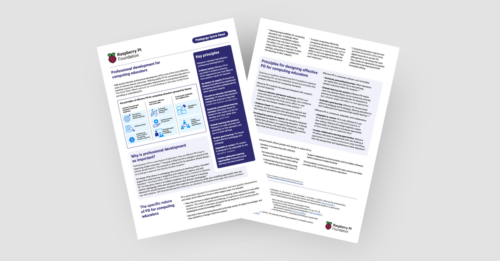
Image displaying the Professional Development Pedagogy Quick Read, from the Raspberry Pi Foundation.

In this blog, we share our new professional development Quick Read, which you can download for free to:

  • Find practical tips for how to use and design effective professional development opportunities
  • Read a summary of the research behind effective PD

The unique impact of professional development for computer science educators

Professional development is vital for anyone teaching computing. In many subjects, the curriculum stays the same for decades. Computer science, however, can change quickly — as with the development of new technologies such as AI and quantum computing, and new hardware — and PD can help you stay up to date.
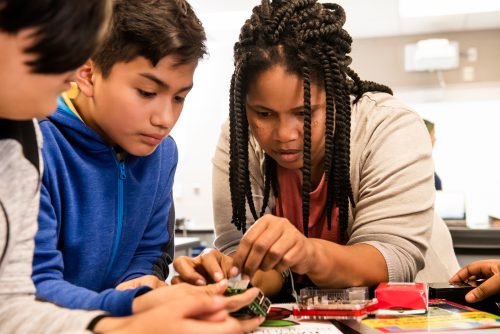
An educator teaches students to create with technology.

Another challenge is that many educators who teach computing are not necessarily subject specialists. So educators often benefit from building their own subject knowledge and learning new computing-specific pedagogical approaches through PD.

What makes effective professional development?

Drawing on academic research and our own expertise, we’ve identified several key principles that make professional development effective for computer science educators:

  • Learner-focused and research-informed: PD should be based on evidence and equip you with the skills and confidence to make real changes in your practice
  • Sustained and actionable: The best outcomes happen when you can select your own learning pathways and you’re given the time to test, adapt, and reflect on new approaches
  • Collaborative and contextual: Sharing ideas and new ways of thinking with other educators in a low-stakes environment can help you and your peers benefit from different perspectives and experiences

There may be factors that influence your teaching that you have little control over: you might teach computing as a standalone subject, or you may be required to weave computer science into other lessons across the curriculum. Or you might be working with older devices or limited internet access, all of which have an impact on your practice.

Effective PD should recognise these realities, and offer practical tools that work for your specific classroom and students.

How to find or design PD for computing educators

You can use the principles in our latest Quick Read when you’re looking for your next training course or if you are designing a session for your team. The full list of principles is available in our Quick Read, but here are some ideas for you to consider:

  • Focus on small, manageable changes: Rather than trying to overhaul your entire teaching practice at once, reflect on one approach at a time and adapt it as necessary before moving on to the next
  • Encourage low-stakes rehearsal: Practise new techniques with peers before implementing them in a live lesson
  • Align with school priorities: Ensure your self-directed learning also meets the wider needs of your department or school

You can read more about the principles of effective PD in our Quick Read.

The benefits of professional development

Potential benefits for teachers:

  • Provides a clear structure for updating your subject knowledge and teaching methods
  • Helps you feel more confident teaching 
  • Allows you to take ownership of your career journey and focus on what matters most to your students

Potential benefits for learners:

  • Improved learning outcomes through:
    • Higher quality lessons
    • More engaging lessons 
    • Lessons better suited to their individual needs

Our new Quick Read shares tips on how to best use these principles in your setting.

The post Professional development: How to stay ahead in a fast-changing subject appeared first on Raspberry Pi Foundation.

How to create great educational video content for computing and beyond

Post Syndicated from Michael Conterio original https://www.raspberrypi.org/blog/how-to-create-educational-video-content-computing-computer-science/

Over the past five years, we’ve made lots of online educational video content for our online courses, for our Isaac Computer Science platform for GCSE and A level, and for our remote lessons based on our Teach Computing Curriculum hosted on Oak National Academy.

We have learned a lot from experience and from learner feedback, and we want to share this knowledge with others. We’re also aware there’s always more to learn from people across the computing education community. That’s one reason we’re continually working to broaden the range of educators we work with. Another is that we want all learners to see themselves represented in our educational materials, because everyone belongs in computer science.

Facilitators and participants involved in the Teach Online programme.
RPF staff and the Teach Online participants

To make progress with all these goals, we ran a pilot programme for educators called Teach Online at the end of 2021 and the start of 2022. Through Teach Online, we provided twelve educators with training, opportunities, and financial and material support to help them with creating online educational content, particularly videos.

Over five online sessions and a final in-person day, we trained them in not only the production of educational videos, but also some of the pedagogy behind it. The pilot programme has now finished, and we thought we’d share some of the key points from the sessions with you in the wider community.

Learning to create a great online learning experience

When you learn new skills and knowledge, it’s important to think about how you apply these. For this reason, a useful question you can use throughout the learning process is “Why?”. So as you think about how to create the best online learning experience, ask yourself in different contexts throughout the content design and production:

  • Why am I using this style of video to illustrate this topic?
  • Why am I presenting these ideas in this order?
  • Why am I using this choice of words?

For example, it’s easy to default to creating ‘talking head’ videos featuring one person talking directly to the camera. But you should always ask why — what are the reasons for using a ‘talking head’ style. Instead, or in addition, you can make videos more engaging and support the learning experience by:

  • Turning the video into an interview
  • Adding other camera angles or screencasts to focus on demonstrations
  • Cutting away to B-roll footage (additional video that can provide context or related action, while the voiceover continues) or to still images that help connect a concept to concrete examples
Teach Computing programme participant.
Teach Online participants explored different ways to make their videos engaging

Planning is key

By planning your content carefully instead of jumping into production right away, you can:

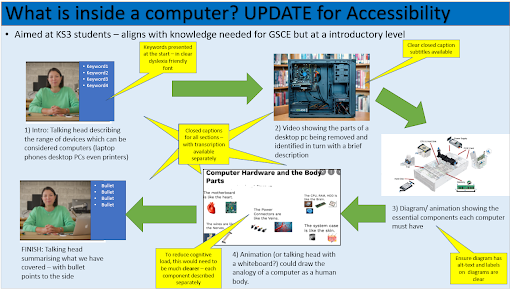
  • Better visualise what your video should look like by creating a storyboard
  • Keep learners engaged by deliberately splitting learning up into smaller chunks while still keeping a narrative flow between them
  • Develop your learners’ understanding of key computing concepts by using semantic waves to unpack and repack concepts

The Teach Online participants told us that they particularly enjoyed learning more about planning videos:

“I now understand that a little planning can make the difference between a mediocre online learning experience and a professional-looking valuable learning experience.” – Educator who participated in our Teach Online programme

“Planning the session using a storyboard is so helpful to visualise the actual recording.” – Educator who participated in our Teach Online programme

Storyboard from a Teach Computing participant.
Storyboards are a great option to plan online learning experiences

Considering equity, diversity, and inclusion

We are committed to making computing and computer science accessible and engaging, so we embed measures to improve equity, diversity, and inclusion throughout our free learning and teaching resources, including the Teach Online programme. It’s important not to leave this aspect of creating educational content as an afterthought: you can only make sure that your content is truly as equitable and inclusive as you can make it if you address this at every stage of your process. As an added bonus, many ways of making your content more accessible not only benefit learners with specific needs, but support and engage all of your audience so everyone can learn more easily.

Best practices that you can use while creating online content include:

Connecting with your learner audience

One of video’s key advantages is the ability to immediately connect with the audience. To help with that, you can try to talk directly to a single viewer, using “you” and “I” rather than “we”. You can also show off your personality in the presentation slides you use and the backgrounds of your videos.

“[I will use my learning from the programme] by adapting teaching and learning to actively engage learners.” – Educator who participated in our Teach Online programme

It’s important to find your own personal presenting style. There is not one perfect way to present, and you should experiment to find how you are best able to communicate with your viewers. How formal or informal will you be? Is your delivery calm or energetic? Whatever you decide, you may want to edit your script to better fit your style. A practical tip for doing this is to read your video scripts aloud while you are writing them to spot any language that feels awkward to you when spoken. 

“It was really great to try the presenting skills, and I learned a lot about my style.” – Educator who participated in our Teach Online programme

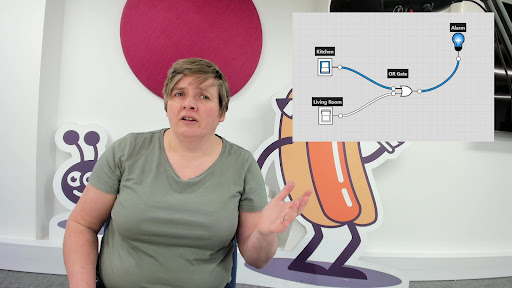
A videographer preparing to film a course presenter.

Connecting with each other

Throughout the Teach Online programme, we helped participants create a community with each other. Finding your own community can give you the support that you need to create, and help you continue to develop your knowledge and skills. Working together is great, whether that’s collaborating in-person locally, or online via for example the CAS forums or social media.

“I very much liked the diverse group of educators in this programme, and appreciated everyone sharing their experiences and tips.” – Educator who participated in our Teach Online programme

The Teach Online graduate have told us about the positive impact the programme has had on their teaching in their own contexts. So far we’ve worked with graduates to create Isaac Computer Science videos covering data structures, high- and low-level languages, and string handling.

What do you want to know about creating online educational content?

There is a growing need for online educational content, particularly videos — not only to improve access to education, but also to support in-person teaching. By investing in training educators, we help diversify the pool of people working in this area, improve the confidence of those who would like to start, and provide them with the skills and knowledge to successfully create great content for their learners.

In the future we’d also like to support the wider community of educators with creating online educational content. What resources would you find useful? Share your thoughts in the comments section below.

The post How to create great educational video content for computing and beyond appeared first on Raspberry Pi.