Tag Archives: video production

Accelerating Video Quality Control at Netflix with Pixel Error Detection

Post Syndicated from Netflix Technology Blog original https://netflixtechblog.com/accelerating-video-quality-control-at-netflix-with-pixel-error-detection-47ef7af7ca2e

By Leo Isikdogan, Jesse Korosi, Zile Liao, Nagendra Kamath, Ananya Poddar

At Netflix, we support the filmmaking process that merges creativity with technology. This includes reducing manual workloads wherever possible. Automating tedious tasks that take a lot of time while requiring very little creativity allows our creative partners to devote their time and energy to what matters most: creative storytelling.

With that in mind, we developed a new method for quality control (QC) that automatically detects pixel-level artifacts in videos, reducing the need for manual visual reviews in the early stages of QC.

Examples of detected pixel errors.

Why This Matters

Netflix is deeply invested in ensuring our content creators’ stories are accurately carried from production to screen. As such, we invest manual time and energy in reviewing for technical errors that could distract from our members’ immersion in and enjoyment of these stories.

Teams spend a lot of time manually reviewing every shot to identify any issues that could cause problems down the line. One of the problems they look for is tiny bright spots caused by malfunctioning camera sensors (often called hot or lit pixels). Flagging those issues is a painstaking and error-prone process. They can be hard to catch even when every single frame in a shot is manually inspected. And if left undetected, they can surface unexpectedly later in production, leading to labor-intensive and costly fixes.

By automating these QC checks, we help production teams spot and address issues sooner, reduce tedious manual searches, and address issues before they accumulate.
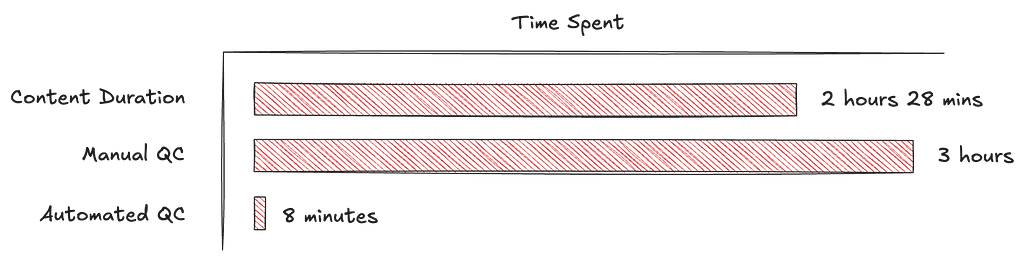
Proof of Concept: hours spent on full-frame manual QC vs. minutes with the automated workflow.

Precision at the Pixel Level: Pixel Error Detection

Pixel errors come in two main types:

  1. Hot (lit) pixels: single frame bright pixels
  2. Dead (stuck) pixels: pixels that don’t respond to light

Earlier work at Netflix addressed detecting dead pixels using techniques based on pixel intensity gradients and statistical comparisons [1, 2]. In this work, we focus on hot pixels, which are a lot harder to flag manually.

Hot pixels in a frame can occupy only a few pixels and appear for just a single frame. Imagine reviewing thousands of high-resolution video frames looking for hot pixels. To reduce manual effort, we built a highly efficient neural network to pinpoint pixel-level artifacts in real time. While detection of hot pixels is not entirely new in video production workflows, we do it at scale and with near-perfect recall rates.

Detecting artifacts at the pixel level requires the ability to identify small-scale, fine features in large images. It also requires leveraging temporal information to distinguish between actual pixel artifacts and naturally bright pixels with artifact-like features, such as small lights, catch lights, and other specular reflections.

Given those requirements, we designed a bespoke model for this task. Many mainstream computer vision models downsample inputs to reduce dimensionality, but pixel errors are sensitive to this. For example, if we downsample a 4K frame to 480p resolution, pixel-level errors almost entirely disappear. For that reason, our model processes large-scale inputs at full resolution rather than explicitly downsampling them in pre-processing.

Why Downsampling Fails. Top: Original frame crop showing a prominent hot pixel. Bottom: Same area after 8x downscaling, causing the artifact to become nearly invisible before it even reaches the model.

The network analyzes a window of five consecutive frames at a time, giving it the temporal context it needs to tell the difference between a one-off sensor glitch and a naturally bright object that persists across frames.

For every frame, the model outputs a continuous-valued map of pixel error occurrences at the input resolution. During training, we directly optimize those error maps by minimizing dense, pixel-wise loss functions.

During inference, our algorithm binarizes the model’s outputs using a confidence threshold, then performs connected component labeling to find clusters of pixel errors. Finally, it calculates the centroids of those clusters to report (x, y) locations of the found pixel errors.

All of this processing happens in real-time on a single GPU.

Building a Synthetic Pixel Error Generator

Pixel errors are rare and make up a very small portion of videos, both temporally and spatially, in the context of the total volume of footage captured and the full resolution of a given frame. Therefore, they are hard to annotate manually. Initially, we had virtually no data to train our model. To overcome this, we developed a synthetic pixel error generator that closely mimicked real-world artifacts. We simulated two main types of pixel errors: symmetrical and curvilinear.

Symmetrical: Most pixel errors are symmetrical along at least one axis.

Symmetrical Artifacts. Left: Three real examples of hot pixels. Right: Three synthetically generated hot pixel samples.

Curvilinear: Some pixel errors follow curvilinear structures.

Curvilinear Artifacts. Left: Three real examples of hot pixels. Right: Three synthetically generated hot pixel samples.

To create realistic training samples, we superimposed these synthetic errors onto frames from the Netflix catalog. We added those artificial hot pixels to where they would be most visible: dark, still areas in the scenes. Instead of sampling (x, y) coordinates for the synthetic errors uniformly, we sampled them from a heatmap, with selection probabilities determined by the amount of motion and image intensity.

Synthetic data was essential for training our initial model. However, to close the domain gap and improve precision, we needed to run multiple tuning cycles on fresh, real-world footage.

After training an initial model solely on this synthetic data, we refined it iteratively with real-world data as follows:

  1. Inference: Run the model on previously unseen footage without any added synthetic hot pixels.
  2. False Positive Elimination: Manually review detections and zero out labels for false positives, which is easier than labeling hot pixels from scratch.
  3. Fine-tuning and Iteration: Fine-tune on the refined dataset and repeat until convergence.
Synthetic-to-Real Training Pipeline

While false positives represent a small percentage of total input volume, they can still constitute a meaningful number of alerts in absolute terms given the scale of content processing. We continue to refine our model and reduce false positives through ongoing application on real-world datasets. This synthetic-to-real refinement loop steadily reduces false alarms while preserving high sensitivity.

Looking Ahead

What once required hours of painstaking manual review can now potentially be completed in minutes, freeing creative teams to focus on what matters most: the art of storytelling. As we continue refining these capabilities through ongoing real-world deployment, we’re inspired by the many ways production teams can gain more time to build amazing stories for audiences around the world. We are also working with our partners to better understand how pixel errors affect the viewing experience, which will help us further optimize our models.


Accelerating Video Quality Control at Netflix with Pixel Error Detection was originally published in Netflix TechBlog on Medium, where people are continuing the conversation by highlighting and responding to this story.

How to create great educational video content for computing and beyond

Post Syndicated from Michael Conterio original https://www.raspberrypi.org/blog/how-to-create-educational-video-content-computing-computer-science/

Over the past five years, we’ve made lots of online educational video content for our online courses, for our Isaac Computer Science platform for GCSE and A level, and for our remote lessons based on our Teach Computing Curriculum hosted on Oak National Academy.

We have learned a lot from experience and from learner feedback, and we want to share this knowledge with others. We’re also aware there’s always more to learn from people across the computing education community. That’s one reason we’re continually working to broaden the range of educators we work with. Another is that we want all learners to see themselves represented in our educational materials, because everyone belongs in computer science.

Facilitators and participants involved in the Teach Online programme.
RPF staff and the Teach Online participants

To make progress with all these goals, we ran a pilot programme for educators called Teach Online at the end of 2021 and the start of 2022. Through Teach Online, we provided twelve educators with training, opportunities, and financial and material support to help them with creating online educational content, particularly videos.

Over five online sessions and a final in-person day, we trained them in not only the production of educational videos, but also some of the pedagogy behind it. The pilot programme has now finished, and we thought we’d share some of the key points from the sessions with you in the wider community.

Learning to create a great online learning experience

When you learn new skills and knowledge, it’s important to think about how you apply these. For this reason, a useful question you can use throughout the learning process is “Why?”. So as you think about how to create the best online learning experience, ask yourself in different contexts throughout the content design and production:

  • Why am I using this style of video to illustrate this topic?
  • Why am I presenting these ideas in this order?
  • Why am I using this choice of words?

For example, it’s easy to default to creating ‘talking head’ videos featuring one person talking directly to the camera. But you should always ask why — what are the reasons for using a ‘talking head’ style. Instead, or in addition, you can make videos more engaging and support the learning experience by:

  • Turning the video into an interview
  • Adding other camera angles or screencasts to focus on demonstrations
  • Cutting away to B-roll footage (additional video that can provide context or related action, while the voiceover continues) or to still images that help connect a concept to concrete examples
Teach Computing programme participant.
Teach Online participants explored different ways to make their videos engaging

Planning is key

By planning your content carefully instead of jumping into production right away, you can:

  • Better visualise what your video should look like by creating a storyboard
  • Keep learners engaged by deliberately splitting learning up into smaller chunks while still keeping a narrative flow between them
  • Develop your learners’ understanding of key computing concepts by using semantic waves to unpack and repack concepts

The Teach Online participants told us that they particularly enjoyed learning more about planning videos:

“I now understand that a little planning can make the difference between a mediocre online learning experience and a professional-looking valuable learning experience.” – Educator who participated in our Teach Online programme

“Planning the session using a storyboard is so helpful to visualise the actual recording.” – Educator who participated in our Teach Online programme

Storyboard from a Teach Computing participant.
Storyboards are a great option to plan online learning experiences

Considering equity, diversity, and inclusion

We are committed to making computing and computer science accessible and engaging, so we embed measures to improve equity, diversity, and inclusion throughout our free learning and teaching resources, including the Teach Online programme. It’s important not to leave this aspect of creating educational content as an afterthought: you can only make sure that your content is truly as equitable and inclusive as you can make it if you address this at every stage of your process. As an added bonus, many ways of making your content more accessible not only benefit learners with specific needs, but support and engage all of your audience so everyone can learn more easily.

Best practices that you can use while creating online content include:

Connecting with your learner audience

One of video’s key advantages is the ability to immediately connect with the audience. To help with that, you can try to talk directly to a single viewer, using “you” and “I” rather than “we”. You can also show off your personality in the presentation slides you use and the backgrounds of your videos.

“[I will use my learning from the programme] by adapting teaching and learning to actively engage learners.” – Educator who participated in our Teach Online programme

It’s important to find your own personal presenting style. There is not one perfect way to present, and you should experiment to find how you are best able to communicate with your viewers. How formal or informal will you be? Is your delivery calm or energetic? Whatever you decide, you may want to edit your script to better fit your style. A practical tip for doing this is to read your video scripts aloud while you are writing them to spot any language that feels awkward to you when spoken. 

“It was really great to try the presenting skills, and I learned a lot about my style.” – Educator who participated in our Teach Online programme

A videographer preparing to film a course presenter.

Connecting with each other

Throughout the Teach Online programme, we helped participants create a community with each other. Finding your own community can give you the support that you need to create, and help you continue to develop your knowledge and skills. Working together is great, whether that’s collaborating in-person locally, or online via for example the CAS forums or social media.

“I very much liked the diverse group of educators in this programme, and appreciated everyone sharing their experiences and tips.” – Educator who participated in our Teach Online programme

The Teach Online graduate have told us about the positive impact the programme has had on their teaching in their own contexts. So far we’ve worked with graduates to create Isaac Computer Science videos covering data structures, high- and low-level languages, and string handling.

What do you want to know about creating online educational content?

There is a growing need for online educational content, particularly videos — not only to improve access to education, but also to support in-person teaching. By investing in training educators, we help diversify the pool of people working in this area, improve the confidence of those who would like to start, and provide them with the skills and knowledge to successfully create great content for their learners.

In the future we’d also like to support the wider community of educators with creating online educational content. What resources would you find useful? Share your thoughts in the comments section below.

The post How to create great educational video content for computing and beyond appeared first on Raspberry Pi.