Tag Archives: Developer skills

GitHub Issues search now supports nested queries and boolean operators: Here’s how we (re)built it

Post Syndicated from Deborah Digges original https://github.blog/developer-skills/application-development/github-issues-search-now-supports-nested-queries-and-boolean-operators-heres-how-we-rebuilt-it/


Originally, Issues search was limited by a simple, flat structure of queries. But with advanced search syntax, you can now construct searches using logical AND/OR operators and nested parentheses, pinpointing the exact set of issues you care about.

Building this feature presented significant challenges: ensuring backward compatibility with existing searches, maintaining performance under high query volume, and crafting a user-friendly experience for nested searches. We’re excited to take you behind the scenes to share how we took this long-requested feature from idea to production.

Here’s what you can do with the new syntax and how it works behind the scenes

Issues search now supports building queries with logical AND/OR operators across all fields, with the ability to nest query terms. For example is:issue state:open author:rileybroughten (type:Bug OR type:Epic) finds all issues that are open AND were authored by rileybroughten AND are either of type bug or epic.

Screenshot of an Issues search query involving the logical OR operator.

How did we get here?

Previously, as mentioned, Issues search only supported a flat list of query fields and terms, which were implicitly joined by a logical AND. For example, the query assignee:@me label:support new-project translated to “give me all issues that are assigned to me AND have the label support AND contain the text new-project.

But the developer community has been asking for more flexibility in issue search, repeatedly, for nearly a decade now. They wanted to be able to find all issues that had either the label support or the label question, using the query label:support OR label:question. So, we shipped an enhancement towards this request in 2021, when we enabled an OR style search using a comma-separated list of values.

However, they still wanted the flexibility to search this way across all issue fields, and not just the labels field. So we got to work. 

Technical architecture and implementation

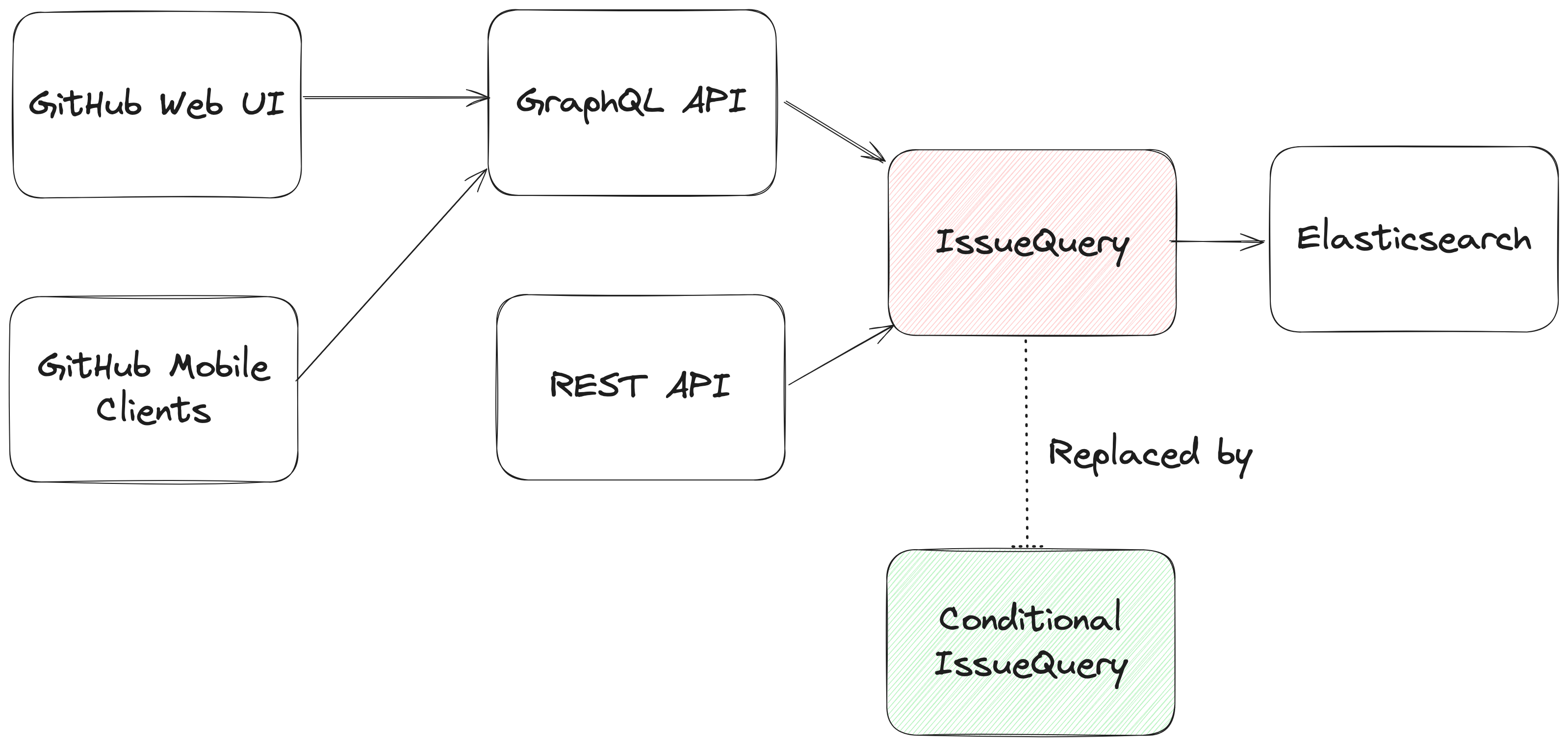
The architecture of the Issues search system (and the changes needed to build this feature).

From an architectural perspective, we swapped out the existing search module for Issues (IssuesQuery), with a new search module (ConditionalIssuesQuery), that was capable of handling nested queries while continuing to support existing query formats.

This involved rewriting IssueQuery, the search module that parsed query strings and mapped them into Elasticsearch queries.

Search Architecture

To build a new search module, we first needed to understand the existing search module, and how a single search query flowed through the system. At a high level, when a user performs a search, there are three stages in its execution:

  1. Parse: Breaking the user input string into a structure that is easier to process (like a list or a tree)
  2. Query: Transforming the parsed structure into an Elasticsearch query document, and making a query against Elasticsearch.
  3. Normalize: Mapping the results obtained from Elasticsearch (JSON) into Ruby objects for easy access and pruning the results to remove records that had since been removed from the database.

Each stage presented its own challenges, which we’ll explore in more detail below. The Normalize step remained unchanged during the re-write, so we won’t dive into that one.

Parse stage

The user input string (the search phrase) is first parsed into an intermediate structure. The search phrase could include:

  • Query terms: The relevant words the user is trying to find more information about (ex: “models”)
  • Search filters: These restrict the set of returned search documents based on some criteria (ex: “assignee:Deborah-Digges”)

 Example search phrase: 

  • Find all issues assigned to me that contain the word “codespaces”:
    • is:issue assignee:@me codespaces
  • Find all issues with the label documentation that are assigned to me:
    • assignee:@me label:documentation

The old parsing method: flat list

When only flat, simple queries were supported, it was sufficient to parse the user’s search string into a list of search terms and filters, which would then be passed along to the next stage of the search process.

The new parsing method: abstract syntax tree

As nested queries may be recursive, parsing the search string into a list was no longer sufficient. We changed this component to parse the user’s search string into an Abstract Syntax Tree (AST) using the parsing library parslet.

We defined a grammar (a PEG or Parsing Expression Grammar) to represent the structure of a search string. The grammar supports both the existing query syntax and the new nested query syntax, to allow for backward compatibility.

A simplified grammar for a boolean expression described by a PEG grammar for the parslet parser is shown below:

class Parser < Parslet::Parser
  rule(:space)  { match[" "].repeat(1) }
  rule(:space?) { space.maybe }

  rule(:lparen) { str("(") >> space? }
  rule(:rparen) { str(")") >> space? }

  rule(:and_operator) { str("and") >> space? }
  rule(:or_operator)  { str("or")  >> space? }

  rule(:var) { str("var") >> match["0-9"].repeat(1).as(:var) >> space? }

  # The primary rule deals with parentheses.
  rule(:primary) { lparen >> or_operation >> rparen | var }

  # Note that following rules are both right-recursive.
  rule(:and_operation) { 
    (primary.as(:left) >> and_operator >> 
      and_operation.as(:right)).as(:and) | 
    primary }
    
  rule(:or_operation)  { 
    (and_operation.as(:left) >> or_operator >> 
      or_operation.as(:right)).as(:or) | 
    and_operation }

  # We start at the lowest precedence rule.
  root(:or_operation)
end

For example, this user search string:
is:issue AND (author:deborah-digges OR author:monalisa ) 
would be parsed into the following AST:

{
  "root": {
    "and": {
      "left": {
        "filter_term": {
          "attribute": "is",
          "value": [
            {
              "filter_value": "issue"
            }
          ]
        }
      },
      "right": {
        "or": {
          "left": {
            "filter_term": {
              "attribute": "author",
              "value": [
                {
                  "filter_value": "deborah-digges"
                }
              ]
            }
          },
          "right": {
            "filter_term": {
              "attribute": "author",
              "value": [
                {
                  "filter_value": "monalisa"
                }
              ]
            }
          }
        }
      }
    }
  }
}

Query

Once the query is parsed into an intermediate structure, the next steps are to:

  1. Transform this intermediate structure into a query document that Elasticsearch understands
  2. Execute the query against Elasticsearch to obtain results

Executing the query in step 2 remained the same between the old and new systems, so let’s only go over the differences in building the query document below.

The old query generation: linear mapping of filter terms using filter classes

Each filter term (Ex: label:documentation) has a class that knows how to convert it into a snippet of an Elasticsearch query document. During query document generation, the correct class for each filter term is invoked to construct the overall query document.

The new query generation: recursive AST traversal to generate Elasticsearch bool query

We recursively traversed the AST generated during parsing to build an equivalent Elasticsearch query document. The nested structure and boolean operators map nicely to Elasticsearch’s boolean query with the AND, OR, and NOT operators mapping to the must, should, and should_not clauses.

We re-used the building blocks for the smaller pieces of query generation to recursively construct a nested query document during the tree traversal.

Continuing from the example in the parsing stage, the AST would be transformed into a query document that looked like this:

{
  "query": {
    "bool": {
      "must": [
        {
          "bool": {
            "must": [
              {
                "bool": {
                  "must": {
                    "prefix": {
                      "_index": "issues"
                    }
                  }
                }
              },
              {
                "bool": {
                  "should": {
                    "terms": {
                      "author_id": [
                        "<DEBORAH_DIGGES_AUTHOR_ID>",
                        "<MONALISA_AUTHOR_ID>"
                      ]
                    }
                  }
                }
              }
            ]
          }
        }
      ]
    }
    // SOME TERMS OMITTED FOR BREVITY
  }
}

With this new query document, we execute a search against Elasticsearch. This search now supports logical AND/OR operators and parentheses to search for issues in a more fine-grained manner.

Considerations

Issues is one of the oldest and most heavily -used features on GitHub. Changing core functionality like Issues search, a feature with an average of  nearly 2000 queries per second (QPS)—that’s almost 160M queries a day!—presented a number of challenges to overcome.

Ensuring backward compatibility

Issue searches are often bookmarked, shared among users, and linked in documents, making them important artifacts for developers and teams. Therefore, we wanted to introduce this new capability for nested search queries without breaking existing queries for users. 

We validated the new search system before it even reached users by:

  • Testing extensively: We ran our new search module against all unit and integration tests for the existing search module. To ensure that the GraphQL and REST API contracts remained unchanged, we ran the tests for the search endpoint both with the feature flag for the new search system enabled and disabled.
  • Validating correctness in production with dark-shipping: For 1% of issue searches, we ran the user’s search against both the existing and new search systems in a background job, and logged differences in responses. By analyzing these differences we were able to fix bugs and missed edge cases before they reached our users.
    • We weren’t sure at the outset how to define “differences,” but we settled on “number of results” for the first iteration. In general, it seemed that we could determine whether a user would be surprised by the results of their search against the new search capability if a search returned a different number of results when they were run within a second or less of each other.

Preventing performance degradation

We expected more complex nested queries to use more resources on the backend than simpler queries, so we needed to establish a realistic baseline for nested queries, while ensuring no regression in the performance of existing, simpler ones.

For 1% of Issue searches, we ran equivalent queries against both the existing and the new search systems. We used scientist, GitHub’s open source Ruby library, for carefully refactoring critical paths, to compare the performance of equivalent queries to ensure that there was no regression.

Preserving user experience

We didn’t want users to have a worse experience than before just because more complex searches were possible

We collaborated closely with product and design teams to ensure usability didn’t decrease as we added this feature by:

  • Limiting the number of nested levels in a query to five. From customer interviews, we found this to be a sweet spot for both utility and usability.
  • Providing helpful UI/UX cues: We highlight the AND/OR keywords in search queries, and provide users with the same auto-complete feature for filter terms in the UI that they were accustomed to for simple flat queries.

Minimizing risk to existing users

For a feature that is used by millions of users a day, we needed to be intentional about rolling it out in a way that minimized risk to users.

We built confidence in our system by:

  • Limiting blast radius: To gradually build confidence, we only integrated the new system in the GraphQL API and the Issues tab for a repository in the UI to start. This gave us time to collect, respond to, and incorporate feedback without risking a degraded experience for all consumers. Once we were happy with its performance, we rolled it out to the Issues dashboard and the REST API.
  • Testing internally and with trusted partners: As with every feature we build at GitHub, we tested this feature internally for the entire period of its development by shipping it to our own team during the early days, and then gradually rolling it out to all GitHub employees. We then shipped it to trusted partners to gather initial user feedback.

And there you have it, that’s how we built, validated, and shipped the new and improved Issues search!

Feedback

Want to try out this exciting new functionality? Head to our docs to learn about how to use boolean operators and parentheses to search for the issues you care about!

If you have any feedback for this feature, please drop us a note on our community discussions.

Acknowledgements

Special thanks to AJ Schuster, Riley Broughten, Stephanie Goldstein, Eric Jorgensen Mike Melanson and Laura Lindeman for the feedback on several iterations of this blog post!

The post GitHub Issues search now supports nested queries and boolean operators: Here’s how we (re)built it appeared first on The GitHub Blog.

How engineers can use one-on-ones with their manager to accelerate career growth

Post Syndicated from Dalia Abuadas original https://github.blog/developer-skills/career-growth/how-engineers-can-use-one-on-ones-with-their-manager-to-accelerate-career-growth/


One-on-one meetings with your manager are one of the most valuable tools you have for career growth, problem-solving, and unlocking new opportunities. So if you’re only using them to provide status updates, you’re leaving a lot on the table.

I didn’t fully realize this potential until I mentioned in a one-on-one that I was interested in mentorship and growing my leadership skills. Not long after, I was asked to co-lead a project with an intern to build an internal tool that helped surface enterprise configuration details. This gave me the opportunity to take technical ownership on a project while mentoring someone in a real-world context—both of which pushed me outside my comfort zone in the best way. That experience made it clear: When used intentionally, one-on-ones can open doors you didn’t even know were there.

Many engineers treat one-on-ones as a low-stakes standup: reporting work, mentioning blockers, and getting general feedback. While that can be useful, it barely scratches the surface of what these meetings can accomplish. Instead, think of them as a system design review for your role—a time to debug challenges, optimize your workflow, and align on long-term career goals.

Reframing your perception of what a one-on-one can accomplish

A well-structured one-on-one meeting with your manager isn’t just a check-in, it’s an opportunity to shape your work environment and career trajectory. You wouldn’t build a system without evaluating its constraints, dependencies, and long-term maintainability. Why approach your career any differently?

Start by shifting your mindset: These meetings are not status updates. Your manager already sees your pull requests, sprint velocity, and planning docs. Instead, use this time to highlight what matters—what you’ve shipped, the value it’s delivered, and where the friction is.

You can also use this space to validate decisions and gather context. If you’re weighing different paths forward, don’t just ask for approval—frame the conversation in terms of trade-offs:

“Here are the pros and cons of refactoring this service now versus later. How does this align with our broader business goals?”

Treat your manager like a decision-making API: Feed in the relevant signals, surface what’s unclear, and work together on an informed response.

Use one-on-ones for career versioning (even before you’re “ready”)

One-on-one meetings are a great time to discuss your long-term career growth—even if you’re not actively seeking a promotion. Instead of waiting until promotion season, start having these conversations early to build clarity, direction, and momentum over time.

  • If you’re more than a year away from seeking a promotion, start talking to your manager about:
    • Where am I already meeting expectations?
    • Where should I focus on strengthening my skills?
  • If you’re approaching the next level or considering going up for promotion soon, try focusing the conversation on:
    • What kind of work would demonstrate readiness for the next level?
    • Are there specific opportunities I can take on to grow my scope or visibility?

By treating growth as an iterative process rather than an all-or-nothing milestone, you can continuously improve and course-correct based on early feedback.

A useful framework for structuring these discussions is the Three Circles of Impact:

  1. Individual Contributions – The direct value of your work.
  2. Collaboration – How you work with and support others across the team.
  3. Enabling Others – Mentorship, knowledge sharing, or improving systems and tooling for your peers.

If you’re not sure how to show impact across all three, your one-on-one is a great place to explore it. The key is surfacing your goals early so your manager can help guide you toward the kinds of work that will stretch your skills and broaden your influence.

The more you shape your contributions around these areas, the clearer your readiness for growth becomes—and the easier it is for your manager to advocate on your behalf.

Your manager can’t debug what they don’t see

Managers don’t have full visibility into your day-to-day experience, so one-on-ones are the right time to highlight persistent blockers and unclear expectations.

For instance, I once brought up a latency issue I was chasing down. The endpoint’s performance was slightly above our service level objective (SLO) target, and I had already spent a good chunk of time optimizing it. But in that conversation, my manager offered a different lens:

“Are we optimizing for the right thing? We control the SLO. If the extra latency is due to how the system is designed (and if users aren’t impacted) maybe the right move is to revisit the threshold instead of squeezing more performance out of it.”

That single conversation saved me hours and helped me reframe the problem entirely. Sometimes, the fix isn’t in your code—it’s in how you’re measuring success.

Make your one-on-ones work for you

Your one-on-ones will become far more effective—and lead to real growth—when you treat them as time to think strategically, not just check in. Reframing these meetings around your goals, your environment, and your long-term development puts you in a much stronger position to advocate for yourself and your work.

Start thinking about your career progression earlier than feels natural. Come prepared. Bring in what’s going well, what’s stuck, and where you want to grow. And remember: your manager can’t fix what they don’t know about, and they can’t support your goals if you never share them.

If this shift feels unfamiliar, you’re not alone. The Engineer’s Survival Guide helped me reframe my thinking around one-on-ones.

Here are a few ideas that stuck with me:

  • Your manager isn’t a mind reader.
  • You can’t expect guidance if you don’t come with a direction.
  • Your growth is a shared effort, but it starts with you.

The earlier you see one-on-ones as a tool for impact and growth, the more value you’ll get from them.

The post How engineers can use one-on-ones with their manager to accelerate career growth appeared first on The GitHub Blog.