Announcing a new integration between Backblaze B2 and Suite Studios’ S3 Native File Streaming that brings together scalable object storage and the familiar experience of working from a local drive.
Available today with Backblaze B2, the integration allows teams to mount a B2 bucket through Suite Studios and work with files as if they were stored on a high-performance NAS. Suite streams only the parts of each file an application needs, rather than requiring users to download entire datasets first.
Behind that experience, the data remains in Backblaze B2 as standard S3-compatible objects.
Ready to get started now?
To put Suite S3 Native to work on B2, contact Backblaze Sales or your Backblaze reseller partner. We can help validate your architecture, plan a proof of concept, and evaluate migration support for your existing data.
Your B2 bucket becomes the working file space
An existing Backblaze B2 bucket can now be used directly as a Suite file space. There is no separate storage environment hidden inside Suite and no proprietary segmentation happening in the background.
The relationship between the file system and the bucket remains straightforward:
One file in Suite maps to one object in B2.
The folder structure in Suite matches the structure in the bucket.
Files remain standard, whole objects.
B2 remains the system of record.
Suite provides the high-performance file access layer.
For users, cloud storage behaves more like a shared NAS experience. For IT, the underlying data remains in a storage platform the organization owns and controls.
If your files are already stored in B2 as standard objects, Suite can connect to the bucket and make them available through its mounted drive. There is no need to create another copy, convert the data, or run a separate ingest into Suite.
One dataset, multiple ways to use it
The immediate opportunity is media production, where teams work with large files across editing, media management, transcoding, automation, archive, and distribution.
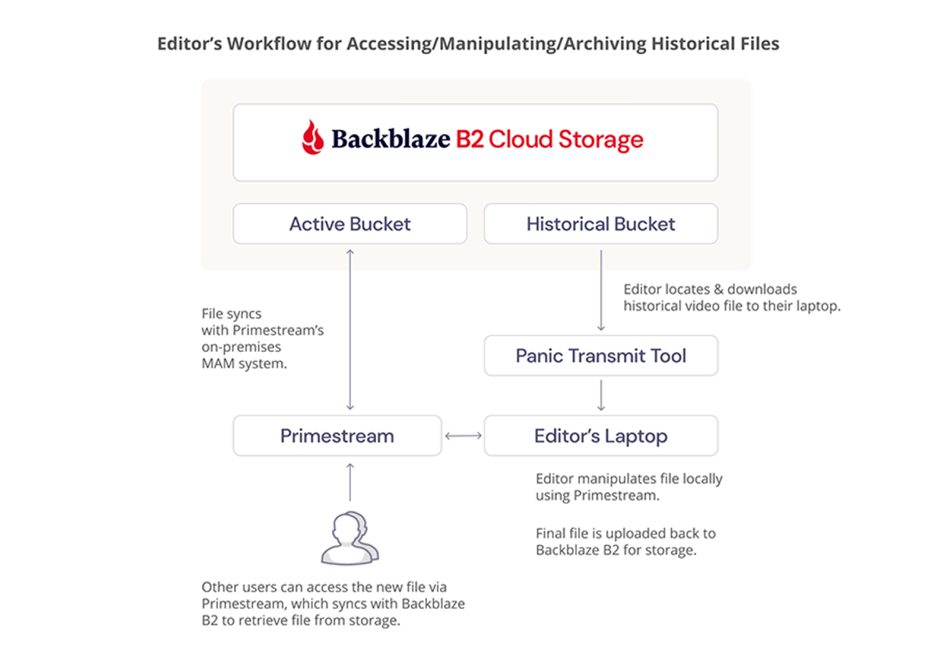
An editor can open high-resolution media in Adobe Premiere Pro through the Suite drive. At the same time, iconik or another MAM can index the library, Telestream Vantage can process the source files, and automation can respond to new objects written into B2.
Each application works with the same underlying media.
But this is not exclusively a media workflow. The same model has practical applications anywhere teams need to work with large cloud datasets through file-based desktop tools:
Life sciences and biotech: Make genomic sequencing, microscopy, medical imaging, and instrument-generated data accessible to researchers without maintaining full copies at every location.
Geospatial and earth observation: Work with satellite imagery, drone captures, LiDAR scans, and GIS datasets while keeping source files centrally stored.
Engineering and design: Give teams file-based access to CAD assemblies, simulations, 3D models, digital twins, and high-resolution scans.
Research and higher education: Create shared access to large scientific datasets for distributed teams while maintaining a common storage foundation.
These are emerging applications for the architecture rather than packaged Suite solutions today, but the underlying opportunity is clear: Large datasets become much more useful when people and applications can access them without moving them into another storage silo.
Built for active data
Media, scientific data, and geospatial imagery rarely sit still. Files are opened, reviewed, processed, moved, analyzed, and shared throughout their lifecycle.
Backblaze B2 provides always-hot, S3-compatible object storage with straightforward pricing and free egress up to three times average monthly storage, plus unlimited free egress through select CDN and compute partners.
That makes B2 a strong foundation for data that needs to remain active and accessible. Suite adds another way to put that data to work by making a B2 bucket accessible through a high-performance file interface.
Available today, with migration support
Backblaze B2 is available today for Suite S3 Native workflows.
If your data is already in B2, you can use an existing bucket as your Suite file space. If it currently resides in another cloud, on a NAS or SAN, or on tape, Backblaze can help plan and execute the move.
Organizations making a qualifying commitment can receive assisted migration into B2 through our Universal Data Migration program.
Bring the data into the storage platform you want to keep. Let cloud applications access it through S3. Let people access it through a high-performance drive.
One dataset. One storage foundation. Multiple ways to put it to work.
Broadcast production has spent decades organizing media around files, servers, and the physical limits of the facility. That model is familiar, and it works until a live event creates hours of footage across multiple cameras, editors are distributed, the archive is growing by petabytes, and every copy of every clip becomes another operational and financial problem.
Time Addressable Media Store, or TAMS, offers a different model: Organize media by time, store it in object storage, and let interoperable tools access the same content through an open API. Pair that with affordable, high-performance storage, and the result is a practical path toward cloud-native production without forcing media teams into a single vendor’s ecosystem.
That is where a stack built on Backblaze B2, together with TAMS ecosystem partners LiveWyer, CuttingRoom, and Drastic Technologies, gets interesting.
What is TAMS?
When a live event is producing hours of footage across multiple cameras, editors should not have to wait for files to close before they can start working. TAMS, or Time Addressable Media Store, addresses that problem by organizing media around the timeline rather than individual files.
With TAMS, media is stored as timestamped segments that applications can access by time. A news editor can pull a quote from a press conference while it is still underway. A sports producer can create a highlight from a live game feed. A content team can reuse the same moment for social clips, a longer edit, distribution, and archive without creating a separate proprietary copy for every stage.
TAMS gives ingest systems, browser-based editors, desktop NLEs, MAMs, and archive platforms a common way to work with the same media. The store can run on one cloud, ingest can come from another provider, and editors can use the tools they already know.
The specification grew out of BBC Research & Development’s work on cloud-native media production and was published in 2023. Its purpose was practical: Give different companies a shared interface for building interoperable media workflows instead of recreating isolated storage silos in the cloud.
TAMS is not a replacement for an NLE, MAM, ingest system, or archive. It is the layer that helps those systems work together. In this article, we are focusing on three Backblaze ecosystem partners that demonstrate that approach: LiveWyer, CuttingRoom, and Drastic Technologies.
The solution stack
LiveWyer provides TAMOSS, a Kubernetes-native implementation of the TAMS API. TAMOSS is the store management and API layer. It handles the TAMS structure while orchestrating the underlying media segments stored in Backblaze B2.
CuttingRoom brings an editorial-grade video editing experience into the browser. In a TAMS workflow, editors can begin working with media while a live event is still being captured. They can find a moment on the timeline, create a clip, and assemble a story without waiting for an entire file to close or moving the media into a separate editing silo. The CuttingRoom solution allows real-time collaboration, import and exports from and to market leading MAMs and with the optional ShortCut AI assistant editing, editors can do more in less time.
Drastic Technologies’ NetX platform provides the TAMS-compliant readers and writers that handle both ends of the media flow: ingesting and writing media into TAMS, then reading it back for playback and use in professional applications such as Adobe Premiere and Avid. NetX is a key part of making TAMS flows usable across live ingest, playback, and established desktop production workflows including Adobe Premiere.
With Backblaze B2 providing the S3-compatible storage foundation beneath the workflow.
TAMOSS supplies the TAMS interface. CuttingRoom provides the browser-based editorial experience. Drastic NetX handles the critical ingest, writing, reading, and playback paths. B2 stores the media segments at a price that makes large-scale access practical.
These companies are part of a growing ecosystem of roughly 14 technology providers with publicly identifiable TAMS implementations, products, readers, writers, or integrations. That broader ecosystem includes AWS, Konstrukt, LOGIC media solutions, LucidLink, Mimir, Reuters Imagen, Matrox Video, Mavis, Norsk, Techex, and Zixi, alongside LiveWyer, CuttingRoom, and Drastic Technologies.
This is the broader idea behind an interoperable standard. No single company has to provide every part of the workflow, and customers do not have to replace every system they already own.
Where TAMS fits
The use cases are not limited to national broadcasters.
A news organization could ingest a live press conference, let an editor find a quote while the event is still happening, and publish a short clip before the full recording is finished.
A sports production team could create proxy media for immediate clipping while retaining higher-resolution source material for finishing. This is particularly useful because some high-resolution MOV and MXF workflows are difficult to segment and read while they are still growing.
A regional sports league or smaller event producer could avoid building a large on-premises storage environment and give remote editors access to the same media from wherever they are working.
A corporate video team could record a town hall, create short internal clips, publish social content, and retain the full event in the archive using the same underlying media.
The same approach could support houses of worship, education, government, live entertainment, and creator workflows. The common requirement is quick access to a growing body of media without multiplying copies and handoffs.
What if the editor reviewing a live feed did not need to ask where the file was? What if the answer were simply a time range in a shared store?
Why Backblaze B2 matters
Live video is a storage problem before it is almost anything else. A multi-camera sports event, a continuous news operation, or a large livestream can generate terabytes of content quickly.
Backblaze B2 starts at $6.95 per terabyte per month, with free egress up to three times average monthly storage and no egress fees through many compute and CDN partners. That combination makes it easier to keep large live datasets available for editing, review, distribution, and archive.
A TAMS workflow backed by B2 can look like this:
– Use Drastic NetX to ingest and write live feeds into a TAMS store.
– Segment and index the media as it is captured.
– Let editors begin clipping and assembling stories in CuttingRoom.
– Use NetX readers to play and access the same media from Adobe Premiere or Avid.
– Keep the objects available for near-live production, distribution, and archive.
– Add a MAM where richer search, rights, governance, and catalog workflows are required.
Our deployment test offered one final lesson. Getting media into the store was straightforward. Making the service usable by the rest of the team required attention to the operational details. Open standards reduce lock-in, but production still depends on good deployment practices.
That is a healthy place for the industry to be. The pieces are becoming more modular, the interfaces are becoming more open, and media teams have more freedom to assemble the workflow that fits them.
TAMS gives those tools a common language. TAMOSS makes the store deployable. Drastic NetX handles how media is written into and read from the workflow. CuttingRoom makes the content useful to editors and production teams. And Backblaze B2 provides a scalable storage layer that makes the economics work.
The question is no longer whether live media can be stored in the cloud. It is whether we can make that media available to the right person, in the right tool, at the right moment.
A year ago, a good video model was a novelty. Today there are at least six worth using, and most of the teams we talk to are wiring up two or three of them into the same product, alongside image models, voice synthesis, and music generation. The hard question isn’t whether you can generate this kind of media. It’s how to build a pipeline that handles five providers without falling over.
That’s why we built Genblaze, an open-source Python SDK from Backblaze for building generative media pipelines: one API across video, image, and audio providers, swappable models, durable object storage, and a SHA-256-verified provenance manifest on every run.
The pipeline is becoming the moat
Models are commoditizing. New video, image, and audio releases drop every couple of months, and each one tends to be the best at one specific thing and middling at the rest. Nobody we work with is betting on a single provider anymore. They build a portfolio and configure fallbacks.
The pipeline is what stays. It’s where you’ve figured out which model handles which shot type and which voice fits which brand. It’s where retry logic and output guards live, and where your audit trail comes from. That work survives the next model release. The prompts you tuned for last quarter’s hero model don’t.
For a pipeline to actually be durable, though, it has to be reactive. Hard-coding one provider, blocking on every step, and returning a single synchronous result is fine for a demo. In production it ages out in weeks. The pipelines that hold up stream progress as events, fan out concurrent work, handle backpressure from slow providers, and let you add a new model with a one-line change.
That’s what Genblaze is designed to be. One pipeline object, every provider behind the same surface, and a new model is one more .step().
A workflow that uses five providers
Here’s a concrete example: producing a short brand film from a one-paragraph brief.
1. Storyboard frames. Lock the visual direction with Seedream 5.0 Lite or FLUX via GMI Cloud, or Imagen on Google.
2. Animate the approved frame. Kling image-to-video on GMI Cloud, Veo on Google, Runway Gen-4 Turbo, or Luma Ray-2. They’re good at different shot types, so we usually try two and pick. Setting chain=True on the pipeline passes the image from step one into the video step automatically.
3. Score and sound design. Music from Stability AI’s Stable Audio or GMI Cloud’s MiniMax. Ambient effects and voiceover from ElevenLabs. LMNT for low-latency text to speech (TTS) when responsiveness matters.
4. Upscale. There’s an upscale step type built in. Route the rendered video through a Replicate upscaler like Real-ESRGAN to hit delivery resolution.
5. Classify and tag. Use a vision-capable chat() call to tag scenes, run brand safety checks, or generate accessibility metadata. Gemini 2.5, GPT-4o, or Llama 3.2 Vision on GMI Cloud all handle this.
That’s five providers across five different model types, defined in one pipeline. The same retry behavior, fallback chains, and provenance manifest apply to every step.
from genblaze_core import Pipeline, Modality from genblaze_gmicloud import ( GMICloudImageProvider, GMICloudVideoProvider, GMICloudAudioProvider, ) from genblaze_replicate import ReplicateProvider from genblaze_google import GeminiChatProvider
Swap any step for a different provider and nothing else in the pipeline has to change.
Provenance
Every run produces a canonical, hash-bound manifest that records the provider, model, prompt, parameters, timestamps, and the URI of every asset it produced. You can embed it directly into the output file (.mp4, .png, .jpg, .webp, .mp3, .wav are all supported by the matching media handler), or persist it as a sidecar JSON.
The hash is deterministic, so anyone downstream can verify the file by calling manifest.verify(). The same manifest is replayable: genblaze replay manifest.json reconstructs the run with the same parameters. And because every manifest carries a parent_run_id, you can trace a v3 video back through v2 and v1, including the fork where you tried Runway instead of Kling.
If you’re building customer-facing pipelines, this is what gets you from “we generated this” to “here’s the proof.”
Storage
Assets and manifests land wherever you want. We default to Backblaze B2, which the SDK wires up with ObjectStorageSink(S3StorageBackend.for_backblaze("my-bucket")) and which gives you durable URLs that don’t expire and don’t need credentials to fetch. The same sink works against any S3-compatible store: AWS S3, Cloudflare R2, MinIO.
A few B2 features pair particularly well with this kind of pipeline.
Event Notifications fire to a webhook, queue, or function endpoint when an asset or manifest lands. That gives you a clean way to kick off downstream encoding, indexing, or moderation without polling.
Object Lock lets you write manifests under a retention policy that nobody (not even the account root) can overwrite until the window expires. Combined with the SHA-256 hash inside the manifest, you’ve got cryptographic integrity and storage-layer immutability.
Lifecycle rules handle the cleanup. Final assets and manifests stay around as long as you want them to. Storyboard iterations, rejected takes, and pre-upscale renders prune themselves on whatever schedule you set.
Partnering with GMI Cloud: a unified AI inference platform for open source
GMI Cloud is a unified AI inference platform for open source. It supports LLM, image, video, and multimodal inference through one consistent API. The catalog covers Seedance, Kling, Veo, and Wan for video; Seedream and FLUX for image; MiniMax for music; ElevenLabs voices; and Llama, DeepSeek, and Qwen for chat and multimodal. One API key reaches all of it.
The genblaze-gmicloud adapter maps GMI’s image, video, audio, and chat endpoints onto the pipeline surface and tracks their catalog as new models ship. The first sample app below uses it heavily.
Two sample apps
genblaze-gmicloud-pipeline goes deep on a single provider. A prompt becomes an anchor image via seedream-5.0-lite. You iterate by passing the current image to flux-kontext-pro for reference-based refinement. Once you approve a frame, the app fans out concurrently to three video models (Kling-Image2Video-V2.1-Master, wan2.6-i2v, pixverse-v5.6-i2v). Manifests get written to B2 next to the assets, and the Genblaze integration sits in a single ~100-line file.
genblaze-gen-media-multi-provider-sample is the workflow above end to end. One sentence becomes a narrated, scored, captioned MP4. gpt-4.1-nano writes the storyboard, Imagen 4 produces the keyframes, Decart Lucy or GMI Cloud Kling animates them, NVIDIA Magpie TTS narrates, GMI Cloud MiniMax scores, and ffmpeg composes the final video. Five providers, one pipeline, every artifact ending up in B2 with a verifiable manifest.
That umbrella installs genblaze-core plus the B2/S3 storage backend, which is enough for a working provenance pipeline. Add genblaze[gmicloud], genblaze, or genblaze[all] to pull in providers.
Where this goes
Most of the interesting work in generative media is happening above the models now, in the pipelines that string them together. Whatever model you’re using today probably won’t be your favorite in six months. The orchestration around it is what lasts.
There’s a familiar tension in enterprise technology: buy a fully integrated platform or assemble a stack of best-of-breed components. The platform story is compelling: one vendor. One console. One contract. Everything bundled together.
The best-of-breed story is different. Best-of-breed optimizes each layer for performance, flexibility, and cost. Historically, platforms often won the narrative. But in periods of rapid change—like today’s AI era—modularity regains the advantage.
The platform gravity problem
Platforms can introduce operational gravity. When compute, storage, networking, analytics, governance, and AI tooling all live in one ecosystem, switching costs rise over time. What starts as convenience becomes constraint—and in AI, where tooling changes rapidly, that becomes expensive in both flexibility and economics. Industry leaders reflect this shift. CIOs are moving beyond a “cloud-first” mindset toward “cloud-smart” strategies and choosing the right environment for each workload instead of defaulting to one provider’s stack. This proactively avoids escalating costs and inflexible ecosystems. A recent CIO Dive trend report finds many IT leaders are gravitating toward purpose-built infrastructure optimized for specific workload demands—including AI—rather than broad commodity offerings.
Why modular infrastructure wins
AI pipelines evolve constantly: training datasets, checkpoints, GPU migrations, MLOps workflows and post-processing outputs are all subject to rapid changes to scale applications and extend model capabilities. Few organizations run all of that inside a single vendor environment or a single cloud ecosystem. Teams building differentiated systems optimize workflows and resources, not monoliths.
Modularity isn’t just about avoiding lock-in—it’s about real, measurable agility. Modular architectures allow organizations to adjust components independently as requirements change. CTOs are intentionally placing workloads where they perform best—cloud for global scale, on-prem or colocation for heavy AI training, and edge for low-latency inference—and treating each as part of a unified, purpose-driven infrastructure strategy.
This pattern holds true beyond just AI.
In cyber resilience, what matters when a ransomware event hits isn’t whether you bought every tool from one vendor; it’s the speed and predictability of recovery (which specialized, resilient storage does more to accelerate than bundled dashboards)
In cloud native application development, developers value predictable performance, clear pricing, and flexibility over being locked into a single ecosystem.
In media and entertainment, workflows often span regions, partners, and technologies—moving petabytes of creative content, generating AI media assets, and orchestrating distributed rendering jobs. A modular approach enables teams from all sides of the business (creative and technical) to optimize for performance without constraint.
These use cases share common themes: avoid lock-in, preserve optionality, control costs, and maintain performance predictability. These align with broader industry sentiment that hybrid and composable architectures deliver greater agility and resilience in the face of evolving requirements.
Depth over breadth: A focused infrastructure philosophy
When vendors expand aggressively into adjacent domains—analytics, governance, AI tooling—they risk breadth at the expense of depth. In fast-moving markets, “jack-of-all-trades” platforms often become “master-of-none.” Best-of-breed doesn’t mean disjointed; it means each layer is optimized for its purpose and integrated intelligently.
That’s the philosophy behind how we’ve evolved our own infrastructure. When Backblaze first launched our object storage service, we highlighted performance, transparency, and cost efficiency. As AI and high-throughput workloads accelerated, customers began using us as neutral infrastructure for staging, throughput, and data mobility between clouds. We leaned deeper into storage—high-throughput tiers, bandwidth guarantees, lifecycle tools—but intentionally stopped short of climbing higher up the application or analytics stack.
We draw a line at storage not because adjacent layers lack value, but because storage is foundational. AI differentiation, application logic, and workflow intelligence happen above the infrastructure layer. Customers need owned, interoperable workflows that can plug into any compute or AI platform without being co-opted by a monolithic ecosystem.
Modular infrastructure as a strategic backbone
Best-of-breed doesn’t mean fragmentation; it means focus with composability. The future of enterprise infrastructure isn’t about building the tallest platform—it’s about building the strongest foundation that supports innovation across many dimensions.
Across industries, infrastructure leaders are embracing workload placement strategies and hybrid models to optimize for cost, governance, and performance. In AI, this means hybrid cloud and on-prem strategies where appropriate; in traditional application and file storage, it means interoperable, resilient services; and in media workflows, it means performant pipelines unencumbered by monolithic stack limitations.
The companies that win in this era won’t be those who own every layer. They’ll be those who enable others to build faster, iterate often, and adapt without constraint.
NAB Show 2026 wrapped up last week in Las Vegas, and we left with something special in hand: the NAB Show Product of the Year Award in the Cloud Computing and Storage category—this time for Backblaze B2 Neo.
It’s a meaningful recognition, and one that reflects where we see the media and AI infrastructure market heading. Here’s a look at what the recognition means, and why B2 Neo matters.
What this recognition means
Winning the NAB Product of the Year Award reflects something we genuinely believe: that storage infrastructure is a foundational capability for modern media and AI platforms, not an afterthought or a separate vendor relationship to manage.
The NAB Show brings together the best of the media and entertainment industry, and having B2 Neo recognized in this context—among platforms solving real, production-scale problems across streaming, OTT, AI-driven media processing, and large-scale content delivery—is meaningful validation that the approach resonates.
B2 Neo launched in February 2026 and is already supporting production workloads including AI training pipelines, high-performance computing environments, and large-scale media delivery. The response from platform providers has reinforced what we know: organizations want to offer integrated, high-performance storage without building it from scratch, and they want the economics to make sense.
What is B2 Neo?
B2 Neo is a high-performance, S3-compatible cloud object storage solution purpose-built for platforms running data-intensive media and AI workloads. But describing it simply as “cloud storage” undersells the point.
The key distinction: B2 Neo is a white-label service. Rather than selling storage directly to end users, B2 Neo enables platform providers—like media workflow vendors—to offer fully integrated storage under their own brand. Partners launch their own storage service with custom endpoints, pricing, and user experiences, without having to build or operate the underlying infrastructure themselves.
The result is that platforms can go from “we don’t offer storage” to “we have a native, high-performance storage tier” in weeks rather than years, with none of the capital investment or engineering overhead that building it in-house would require.
Why it was built
The problem B2 Neo addresses has been growing for years, but it’s become acute as streaming, OTT, and AI-driven media workflows scale up.
Compute has gotten fast, distributed, and relatively affordable. GPU clusters, edge networks, and CDNs can all handle increasingly complex workloads. But storage has often lagged behind—fragmented across providers, expensive to move data in and out of, and either too costly or too operationally burdensome to build in-house.
The consequence is real: GPU clusters sit idle waiting on data. Streaming pipelines bottleneck on access speeds. Media organizations duplicate content across storage systems because no single layer integrates cleanly into the rest of the stack.
B2 Neo was designed to remove that bottleneck. It delivers up to 1Tbps of throughput to ensure that compute resources—GPU clusters, streaming systems, edge delivery networks—are never waiting on storage. It combines that performance with Backblaze’s 17+ years of operational experience at exabyte scale, and wraps it in an API-first architecture that plugs directly into partner platforms.
How it works
From a technical standpoint, B2 Neo delivers high aggregate throughput using cost-efficient, disk-based infrastructure with strategically deployed flash layers—a write-through cache design that captures the performance benefits of flash without the cost and scalability limitations that come with an all-flash architecture at the multi-petabyte scale that media and AI workloads require.
For workloads where throughput matters as much as latency—moving large video files, training AI models, serving content at scale—this approach is particularly effective. It allows platforms to maintain a centralized data repository and efficiently deliver data to compute providers, edge networks, and CDNs without duplicating data across storage systems.
API-driven provisioning lets partners programmatically create and manage storage accounts, permissions, and billing within their existing systems. Whether a partner is running an OTT platform, a media asset management system, or an AI training pipeline, B2 Neo integrates as a native extension of that environment rather than an external dependency to work around.
Included egress and free API calls round out the picture, eliminating the usage-based fees that typically make storage decisions financially complicated.
What’s next
This is a product that will keep evolving alongside the media and AI infrastructure landscape. We’re working closely with early partners to expand B2 Neo’s capabilities—performance, integration depth, provisioning flexibility—and we’ll have more to share as those conversations develop.
If you’re building or operating a platform that would benefit from embedded, high-performance storage, we’d love to talk. Reach out to our team to learn more about what a B2 Neo partnership looks like.
Modern media workflows don’t run on storage alone. They run on ecosystems—tightly integrated stacks of tools that ingest, process, analyze, move, review, and distribute content at scale. The companies we partner with aren’t just integrating with Backblaze; they’re building on it to solve real, specific problems that media teams face every day: archives that are impossible to search, file transfers that collapse over distance, review cycles that slow production to a crawl, compliance workflows that can’t keep up with library growth.
At NAB Show 2026, we’re bringing ten of those partners into booth N1259 to share what they’ve built. But the stories they’re telling aren’t just for Las Vegas—they’re for any media team trying to understand what a modern, cost-efficient, deeply integrated workflow actually looks like in practice.
Here’s a look at each partner, the problem they solve, and why it matters.
Imaginario AI: From Archive to Action
Presenter: Jose Puga, CEO and Co-Founder, Imaginario AI
Most video archives are passive. Content sits in storage, cataloged by someone who had time to do it years ago, effectively invisible to the people who could use it today. Imaginario AI flips that model.
Jose Puga’s session, “From Archive to Action: How AI Is Turning Your Video Library Into a Revenue Engine,” frames the shift from passive storage and cataloging to intelligent systems that actively surface, repurpose, and monetize content. The talk covers how marketing teams can accelerate campaigns, post-production teams can shortcut assembly, and compliance workflows can move from reactive to automated.
Imaginario is a multimodal video agentic platform that understands video in a human-like way—recognizing sounds, speech, and visual scenes without requiring time-based metadata. The platform is trusted by Warner Bros. Discovery, Sony Music, and Universal Pictures, and has won back-to-back IBC Best of Show honors in 2024 and 2025.
The Backblaze integration means content stays where it lives—no migration, no friction. As Jose puts it: “Backblaze provides our clients a scalable, reliable cloud layer that eliminates the friction of manual data transfers. Our native integration saves video teams dozens of hours by keeping content on Backblaze while unlocking high-speed AI analysis, retrieval, and repurposing in media and entertainment.”
Suite Studios: S3 Native File Streaming
Presenter: Jay Maxwell, Co-Founder & CPO, Suite Studios
Remote and distributed production teams have wrestled with the same problem for years: How do you collaborate on large media files when your team is spread across the globe? Suite’s answer is S3 Native File Streaming on Backblaze B2. The stack makes working with cloud object storage all-around easier, enabling teams to read and write data as standard objects without copying, syncing, or transferring.
Jay Maxwell’s session explores how global teams can instantly access and collaborate on large media files from anywhere—eliminating delays and accelerating production timelines. No syncing, no waiting, no workarounds. Just files that behave the way you need them to, wherever your team happens to be.
TwelveLabs: Unlocking Archive Value with Video AI
Presenter: Jordan Woods, Senior Solutions Architect, TwelveLabs
There’s a pattern across media organizations of all sizes: years of valuable archived content sitting effectively invisible because manual cataloging doesn’t scale. TwelveLabs makes that content searchable and monetizable.
Jordan Woods’ session, “Unlocking Archive Value with TwelveLabs Video Intelligence,” shows how pairing Backblaze’s cost-efficient storage with TwelveLabs’ video AI gives organizations a practical path to turn dormant archives into searchable, monetizable assets.
As Danny Nicolopoulos, Head of Strategic Partnerships at TwelveLabs, explains: “Media companies are sitting on years of valuable archived content that’s effectively invisible because manual cataloging doesn’t scale. Pairing Backblaze’s cost-efficient storage with TwelveLabs’ video AI gives organizations a practical path to turn those dormant archives into searchable, monetizable assets.”
Tillered: Full Speed Cloud Storage Over Any Distance
Presenters: Davey Goode, Founder & Stephen Ceci, Commercial Lead, Tillered
Physics is an undefeated opponent. Move data over long distances and throughput drops—no matter how fast your storage is or how much bandwidth you have. Tillered is built to remove that distance penalty.
The session, “Backblaze B2 Accelerate with Tillered: Full Speed Cloud Storage Over Any Distance,” demonstrates how the B2 Accelerate product brings Tillered’s acceleration technology to Backblaze B2, with transfers up to 34x faster as a result. No simulations—just live transfers with real results, showing what it looks like when enterprises can move data across any distance without adding bandwidth or changing workflows.
Davey Goode founded Tillered after repeatedly running into the same issue building large-scale connectivity infrastructure: No matter how much bandwidth was available, performance collapsed over distance. This session is the solution he built.
Telestream UP.Review: Decide Faster
Presenter: Sebastian Manemann, Senior Director of Product Management, Telestream
Capture, storage, and distribution have gotten faster. Review hasn’t kept up. Proxies, downloads, duplicated files—the approval workflow often undoes the speed gains made everywhere else in the pipeline.
Sebastian Manemann’s session, “Decide Faster: Real-Time Review, QC, and Delivery with Telestream UP.Review and Backblaze B2,” demos how Telestream UP.Review enables real-time, high-resolution playback and QC directly on media stored in Backblaze B2 without moving or duplicating files.
By keeping content in Backblaze as the central storage layer, teams can review instantly, validate quality, and move to delivery faster—all while maintaining a single source of truth across the workflow. As Sebastian frames it: “When you eliminate duplication and review directly from storage, you don’t just move faster—you operate smarter.”
Qencode + Sardius: A Multi-Vendor M&E Workflow in Practice
Presenters: Murad Mordukhay, CEO, Qencode, and Jason Shore & Ari Burt, Sardius Media
This one is different from the others—it’s not a product demo; it’s a case study. Sardius Media rebuilt their media pipeline around a race model: Multiple storage providers write in parallel, and the fastest result wins.
The session breaks down how Backblaze wins approximately 80% of those races, with Qencode orchestrating the encoding layer across the pipeline. It covers what the production data actually shows, and what Sardius would do differently if they were designing the workflow from scratch today.
Qencode uses machine learning to reduce file sizes by an average of 60% without sacrificing quality. Their CEO, Murad Mordukhay, sums up the partnership plainly: “The best partnerships are when two companies solve different halves of the same problem. Backblaze handles storage with the kind of reliability and transparency that perfectly aligns with how we think about transcoding. No surprises, no lock-in, just infrastructure that earns trust by performing every single day.”
Media workflows break down not just because of bad tools, but because of coordination failures between good ones. Files don’t sync. Teams duplicate work. Availability lags behind where content actually needs to be.
Christoph Jurkuhn’s session, “The Hidden Layer: Orchestrating Media Across the Stack with HiScale and Backblaze,” shows in a live demo how HiScale orchestrates media movement across distributed environments while Backblaze B2 provides the durable, scalable storage layer underneath. Files move, sync, and become available across teams and tools without delays, duplication, or manual intervention.
“Backblaze is built for straightforward, cost-efficient storage and HiScale builds on top of that to orchestrate and process your media. It’s a natural fit for modern media workflows.”
Iconik: Control Your Content
Presenter: Jeremy Strootman, Media Workflow Consultant, Iconik
At a certain scale, the problem isn’t creating content; it’s controlling it. Files get lost, search slows to a crawl, and archives become liabilities instead of assets.
Jeremy Strootman’s session, “Control Your Content: Turning Media Chaos into Operational Advantage,” demos how Iconik and Backblaze B2 give teams operational control over their media: making content instantly searchable, accessible, and reusable across the entire workflow.
With a foundational background in storage and archiving, Jeremy has spent over two decades helping content creators maximize efficiency and productivity across the entire media lifecycle, from ingest to archive. His perspective: “Backblaze gives us the scalable foundation; Iconik gives teams control over how that content is actually used.”
ToolsOnAir: Modern Broadcast Workflows on Backblaze
Presenter: Peter Steiner, Chief Business Officer, ToolsOnAir
Peter Steiner’s session, “Record, Store, Play: Modern Broadcast Workflows on Backblaze,” brings ToolsOnAir’s deep broadcast expertise to bear on what it looks like to build a complete ingest-to-playout workflow with Backblaze B2 as the storage foundation.
ToolsOnAir has been building Apple-based broadcast solutions for over a decade, with deployments across broadcast, ingest, and storage workflows worldwide. This session is for anyone running live or near-live operations who wants to understand what a modern, cloud-native broadcast stack actually looks like in practice.
The final session tackles a problem that’s only growing: As video libraries scale into the billions of assets, compliance workflows built for smaller operations don’t hold.
Ethan Steininger’s session, “What You Miss Can Cost You: AI-Powered Media Compliance at Scale on Mixpeek and Backblaze B2,” shows how Mixpeek’s multimodal AI infrastructure platform transforms unstructured content—video, images, audio, and documents—into searchable, programmable assets through a unified API.
Before founding Mixpeek, Ethan led search at MongoDB, and today Mixpeek powers enterprise workflows across media, adtech, healthcare, and brand safety, with core technology spanning feature extraction, multimodal retrieval, and a custom-built distributed vector store engineered for billion-scale workloads.
The Bigger Picture
Ten companies, one through-line: storage that integrates cleanly across the entire media stack changes what’s possible. As I put it in my article for Post Perspective:
What we are seeing is a broader realization that infrastructure decisions directly shape how teams build and operate. When pricing models penalize access or iteration, teams naturally limit how often they experiment or how much data they retain. That has a direct impact on product velocity and long-term value creation.
Backblaze didn’t have to react to this shift; it’s how we have always approached the market. Our cost model removes barriers like egress and transaction fees so teams can operate freely. That allows media organizations to focus on where value is actually created—whether that is content, audience engagement, or new AI-driven capabilities—while still maintaining craft excellence.
When your foundation is cost-efficient, S3-compatible, and built for reliability at scale, every tool in the ecosystem above it gets to do its best work. That’s what we mean when we talk about “building the future of media workflows”—not just that Backblaze stores your files, but that it enables the ecosystem built on top of it.
Join Us at NAB Show 2026
We’d love to show you around. Whether you want to catch one of the in-booth presentations, sit down for a workflow consultation, or talk through your specific storage and integration challenges, our team will be on-site all week.
I recently joined an incredible group of thought leaders for a panel discussion on the future of sports media. Hosted by sports commentator and former NFL MVP Boomer Esiason, our Stack to Win panel featured Jeremy Strootman from Iconik, Jay Maxwell from Suite Studios, the NFL’s VP of Broadcasting Mike North, and me—Dave Simon from Backblaze. Together, we explored the complexities of modern sports content creation and how our integrated cloud-native solutions from Backblaze B2, Iconik, and Suite offer a powerful blueprint for radically streamlining workflows and unlocking new opportunities for efficiency, speed, and monetization.
The traditional, linear model of sports media production is a thing of the past. It’s been completely changed by new technology and a shift in what fans expect. Today, media teams are in a real-time battle for attention against every other form of entertainment. This new world demands a different kind of setup, one that’s built for the cloud and designed to handle the entire media lifecycle. The solution we’ve built, a powerful combination of Backblaze, Iconik, and Suite Studios, is exactly that. It’s the playbook for staying ahead.
Watch the full interview
There’s so much more that we could summarize in just one blog post. Check out the full video below:
The (data) problem
Game day content is immense—we’re talking 6–7TB of data nightly. In the past, this was a logistical nightmare. As Jeremy Strootman from Iconik pointed out, “It used to be we’d get a hard drive and I’d get a hard drive, and we made sure that we just took different flights on the way home. It was literally that archaic.” When speed is everything, old methods like shipping hard drives are a huge liability.
This pressure comes from fans who have an insatiable appetite for content across every platform imaginable. They expect teams to produce their own content in real-time for streaming and social media. For many, the “second screen” is now the main screen, with 73% of fans using mobile apps for real-time updates during live events. If your workflow is slow, you’ve already lost the competition.
The definition of sports content has also expanded. It’s no longer just about the game itself, but also the stories around it—the players’ lives and the team’s entire ecosystem. Jay Maxwell of Suite Studios captured this perfectly:
The product is not just what’s on the field anymore. It’s also what’s going on in these, you know, athletes lives, what’s going on in the peripheries of the team and the organizations. —Jay Maxwell, Co-Founder and Chief Product Officer, Suite Studios
This includes pop culture crossovers, fantasy sports, and in-game betting, all of which demand instant video highlights.
A great example of this is when Eagles wide receiver AJ Brown was spotted reading a book called “Inner Excellence” on the sidelines. The moment went viral, and the book, which was previously ranked 585,000 on the bestseller list, vaulted to number one instantly. As the NFL’s Mike North noted, this is how fans can instantly “go deeper” and connect with their favorite players. The ability to capture and distribute these moments instantly is a fundamental requirement for success.
A modern technology stack
An integrated, cloud-native tech stack provides a seamless workflow that removes risk and speeds up the content pipeline. It’s a powerful combination of three key layers:
1. Foundation: The active cloud archive
Modern media workflows are built on a cloud storage foundation that replaces old systems like tape libraries and shelves full of hard drives. The key is an active cloud archive that gives you instant access to your footage. This eliminates the costly delays of older solutions and offers predictable costs, so you never get hit with surprise fees when you need to access your own content.
2. Intelligence: Media Asset Management (MAM)
This is the smart layer that makes your vast archive searchable and valuable. Instead of producers manually sifting through hours of footage, a multimodal AI search engine can find the exact clip they need in seconds. As Dave Simon explained, you can use a natural language search to describe exactly what you’re looking for, such as “Jerry Rice catching a ball over his left shoulder wearing a white jersey”. AI tools in a media stack can automatically transcribe interviews, search for specific quotes, and even identify abstract concepts like emotion or reframe a video for different social media platforms.
3. Accelerator: Real-time cloud editing
This component handles the final stage of production, allowing editors to access high-resolution media without a download delay. This technology streams data directly from the cloud, so editors can start working immediately. This is how a remote team can instantly cut and create content from footage uploaded on the field.
The real magic is all of these elements combined: A clip is only useful if an editor can work with it right away, and a huge archive is only valuable if you can find what’s in it. This is a single, cohesive system that manages the entire media lifecycle from start to finish.
Reshaping the business of sports
Adopting a modern tech stack empowers rights holders—leagues, teams, and athletes—to manage and distribute content on a massive scale. They can bypass traditional media gatekeepers and build direct relationships with their fans. This opens up several possibilities, such as:
Archive monetization. Vast archives, once a simple cost center, have now become a major source of revenue. With an accessible, intelligent archive, organizations can unlock new revenue streams.
Licensing storefronts: You can create B2B portals for broadcasters and filmmakers to license and download footage, which essentially creates a self-service revenue engine.
Direct-to-consumer (DTC) fan platforms: Launch your own subscription services with exclusive access to historical games and behind-the-scenes content.
Free Ad-supported Streaming TV (FAST) channels: Program and launch FAST channels using repurposed archival content.
Creator economy partnerships: License parts of your archive to creators to reach new audiences and share in the revenue.
Enable the athlete as a media entity. This same technology is behind the rise of athletes as media producers. Today’s players are actively shaping their own stories and building media businesses. The low barrier to entry for these cloud workflows is the foundation of this movement, giving athletes the same scalable tools once reserved for major networks. A great example of this is Peyton Manning’s Omaha Productions, which started as a player-led media company and became a leader in the space.
The future fan experience
This revolution is transforming the fan experience from a one-way broadcast to something personal, interactive, and instant. The future of sports consumption is personalized feeds tailored to individual interests. As Mike North noted, “You don’t really need to watch the game anymore to still be a fan.” For a fan who wants to know everything about a player, a custom feed can be created. For a fantasy football enthusiast, clips and highlights related to their team can be pushed to them in real time.
The experience will also be interactive. Streaming platforms are already using augmented reality (AR) overlays and multi-angle camera views. The next step, powered by AI and accessible archives, is allowing fans to directly ask for content, like, “‘Show me all the Hail Mary plays from this season?’” and instantly get a custom playlist. This shifts passive viewing into active exploration.
For any sports organization, the biggest risk is standing still and maintaining the status quo. As Jay Maxwell put it, “The barrier to entry to try is, you know, cheap if not free.” An integrated, cloud-native workflow isn’t just a competitive advantage—it’s the fundamental requirement for survival and success.
Media asset management systems (MAM) have become a standard tool in the tech stack of many media organizations. MAM systems have evolved from basic file storage to sophisticated platforms with advanced organization features, increasing efficiency, collaboration, and distribution speeds.
In this post, I’ll explain some media asset management basics and introduce five key plays you can put into practice to get the most out of your assets, including how to move them into a MAM system or migrate from an older system to a new one.
Why do you need a MAM system?
As a media professional, I’ve come across some, let’s say, creative file naming conventions in my day. While it’s hilarious, “Episode6-Final-final-v2.3_OH_YEAH_THIS_IS_DEFINITELY_THE_FINAL_ONE_2_LOL.mp4” isn’t going to be the easiest thing to find years later when you’re searching through hundreds of files for the (for real) final one.
Whether you make videos, images, or music, the more you produce, the more difficult those assets become to manage, organize, find, and protect. Managing files by carefully placing them in specific folders and implementing more logical naming conventions can only get you so far. At some point, as the scale of your business grows, you’ll find your current way of organizing and searching for assets can’t keep up. That’s where media asset management systems come in.
MAM systems explained: Key concepts
Before you start building a playbook to get the most from your creative assets, let’s review a few key concepts.
Assets and metadata
Asset: A rich media file with intrinsic metadata.
An asset is simply a file that is the result of your creative operation. Most often, it is a rich media file like an image or a video. Typically, these files are captured or created in a raw state, then your creative team adds value to that raw asset by editing it and creating a finished story that in turn, becomes another asset to manage.
Metadata: Information about a file, either embedded within the file itself or associated with the file by another system, typically a MAM application.
Any given file carries information about itself that can be understood by your laptop or workstation’s operating system. Some of these seem obvious, like the name of the file, how much storage space it occupies, when it was first created, and when it was last modified. These would all be helpful ways to try to find one particular file you are looking for among thousands just using the tools available in your OS’s file manager.
File metadata: Information about a file specifically pertaining to the technical attributes of the file.
There’s usually another level of metadata embedded in media files that is not so obvious but potentially enormously useful: Metadata embedded in the file when it’s created by a camera, film scanner, or output by a program.
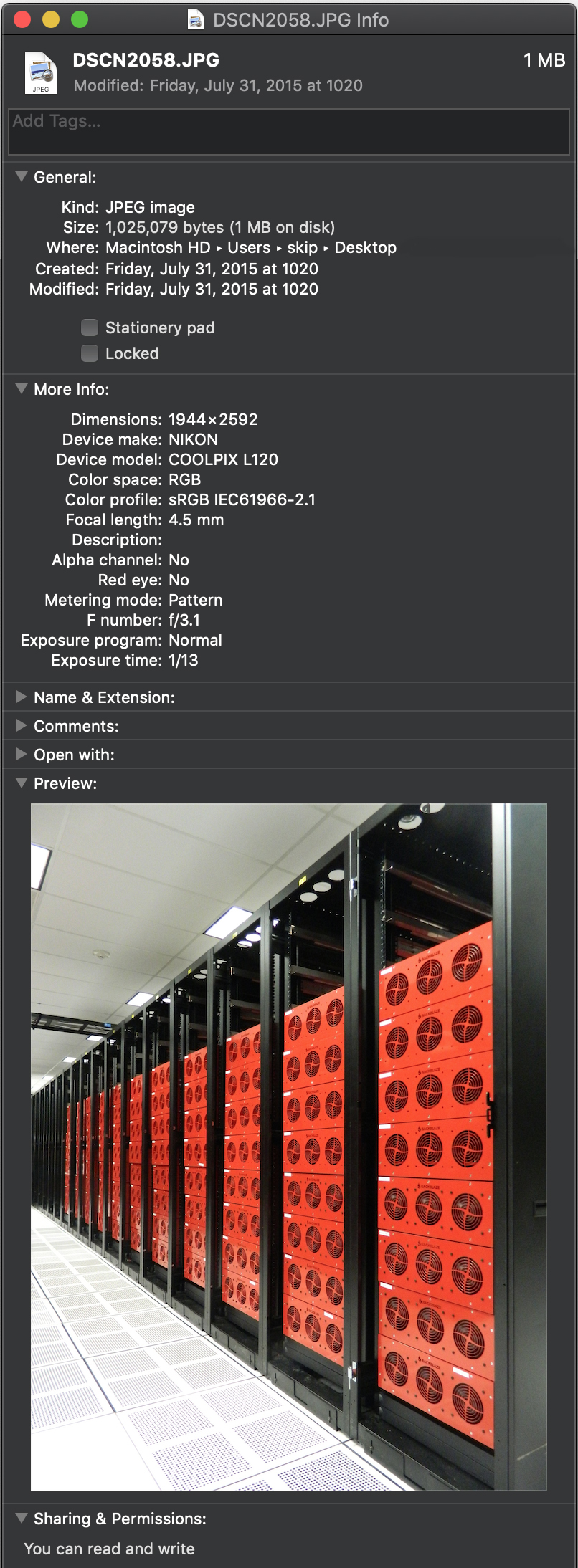
An example of metadata embedded in a rich media file.
For example, this image taken in Backblaze’s data center carries all kinds of interesting information. When I inspect the file, I can see a wealth of information. I now know the image’s dimensions and when the image was taken, as well as exactly what kind of camera took this picture and the lens settings that were used.
As you can see, this metadata could be very useful if you want to find all images taken on that day, or even images taken with that same camera, focal length, F-stop, or exposure.
Going through files one at a time to find the one you need is incredibly inefficient. Yet that’s how things still work in many creative environments—an ad hoc system of folders plus the memory of whoever’s been with the team longest. Files are often kept on the same storage used for production or even on an external hard drive.
Teams quickly outgrow that system when they find themselves juggling multiple hard drives or they run out of space on production storage. Worst of all, assets kept on a single hard drive are vulnerable to disk damage or to being accidentally copied or overwritten. Even if standard protocol is a redundant backup process, natural disasters can become a serious threat depending on the location of the physical tapes or drives.
Why your assets need to be managed
To meet this challenge, creative teams have often turned to MAMs. A MAM automatically extracts all of the assets’ inherent metadata, helps move files to protected storage, and makes them instantly available to MAM users. As time has gone on, we’ve seen MAM systems be powerfully enhanced by AI. In a way, these MAMs become a private media search engine where any file attribute can be a search query to instantly uncover the needed files in even the largest media asset libraries.
Beyond that, asset management systems are rapidly becoming highly effective collaboration and workflow tools. For example, tagging a series of files as Field Interviews — April 2019, or flagging an edited piece of content as HOLD — do not show customer can be very useful indeed.
Inner workings of a media asset manager
When you add files into an asset management system, the application inspects each file, extracting every available bit of information about the file, noting the file’s location on storage, and often creating a proxy version of the file that is easier to present to users.
To keep track of this information, asset manager applications employ a database and keep information about your files in it. This way, when you’re searching for a particular set of files among your entire asset library, you can simply make a query of your asset manager’s database in an instant rather than rifling through your entire asset library storage system. The application takes the results of that database query and retrieves the files you need.
A MAM Case Study: Complex Networks
Complex Networks was running out of space. Whenever local shared storage filled up, they had to pull assets off to give everybody enough room to continue working. They moved all of their assets to iconik media asset management software and backed them all up to the Backblaze B2 Cloud Storage. They’re now free to focus on what they do best—making culture-defining content—rather than spending time searching for assets.
Asset migration playbook
Whether you need to move from a file and folder based system to a new asset manager, or have been using an older system and want to move to a new one without losing all of the metadata that you have painstakingly developed, a sound playbook for migrating your assets can help guide you. Below we’ll explain five plays you can use to approach your asset management journey:
Play 1: Protecting assets saved in a folder hierarchy without an asset management system
In this scenario, your assets are in a set of files and folders, and you aren’t ready to implement your asset management system yet.
The first consideration is for the safety of the assets—backup and archive. Files on a single hard drive are vulnerable, so if you are not ready to choose an asset manager your first priority should be to get those files into a secure cloud storage service like Backblaze B2.
Then, when you have chosen an asset management system, you can simply point the system at your cloud-based asset storage to extract the metadata out of the files and populate the asset information in your asset manager.
How to run it:
Get assets archived or moved to cloud storage.
Choose your asset management system.
Ingest assets directly from your cloud storage.
Play 2: Moving assets saved in a folder hierarchy into your asset management system and archiving in cloud storage
In this scenario, you’ve chosen your asset management system, and need to get your local assets in files and folders ingested and protected in the most efficient way possible.
You’ll ingest all of your files into your asset manager from local storage, then back them up to cloud storage. Once your asset manager has been configured with your cloud storage credentials, it can automatically move a copy of local files to the cloud for you. Later, when you have confirmed that the file has been copied to the cloud, you can safely delete the local copy.
How to run it:
Ingest assets from local storage directly into your asset manager system.
From within your asset manager system archive a copy of files to your cloud storage.
Once safely archived, the local copy can be deleted.
Play 3: Getting a lot of assets on local storage into your asset management system and backing up to cloud storage
If you have a lot of content, more than say, 20TB, you will want to use a rapid ingest service similar to the Backblaze Fireball system. You copy the files to the Backblaze Fireball, Backblaze puts them directly into your asset management bucket, and the asset manager is then updated with the file’s new location in your Backblaze B2 account.
This can be a manual process, or can be done with scripting to make the process faster.
How to run it:
Ingest assets from local storage directly into your asset manager system.
Archive your local assets to Fireball (up to 90TB at a time).
Once the files have been uploaded by Backblaze, relink the new location of the cloud copy in your asset management system.
Play 4: Moving from one asset manager system to another without losing metadata
In this scenario you have an existing asset management system and need to move to a new one as efficiently as possible. You want to take advantage of your new system’s features and safeguard in cloud storage in a way that does not impact your existing production.
Some asset management systems will allow you to export the database contents in a format that can be imported by a new system. Some older systems may not have that feature and will require the expertise of a database expert to manually extract the metadata. Either way, you can expect to need to map the fields from the old system to the fields in the new system.
Making a copy of your old database is a must. Don’t work on the primary copy, and be sure to conduct tests on small groups of files as you’re migrating from the older system to the new. You need to ensure that the metadata is correct in the new system, with special attention that the actual file location is mapped properly. It’s wise to keep the old system up and running for a while before completely phasing it out.
How to run it:
Export the database from the old system.
Import the records into the new system.
Ensure that the metadata is correct in the new system and file locations are working properly.
Make archive copies of your files to cloud storage.
Once the new system has been running through a few production cycles, it’s safe to power down the old system.
Play 5: Moving quickly from a MAM on local storage to a cloud-based system
In this variation of Play 4, you can move content to object storage with a rapid ingest service like Backblaze Fireball at the same time that you migrate to a cloud-based system. This step will benefit from scripting to create records in your new system with all of your metadata, then relink with the actual file location in your cloud storage all in one pass.
You should test that your asset management system can recognize a file already in the system without creating a duplicate copy of the file. This is done differently by each asset management system.
How to run it:
Export the database from the old system.
Import the records into the new system while creating placeholder records with the metadata only.
Archive your local assets to the Backblaze Fireball (up to 90TB at a time).
Once the files have been uploaded by Backblaze, relink the cloud based location to the asset record.
Bonus play: Using cloud storage to scale a media heavy workload
Fortune Media’s tech stack was expensive, difficult to use, and not 100% reliable. They migrated over 300TB of data, mainly video files, to Backblaze B2 Cloud Storage, which integrated with their preferred MAM system, Primestream Xchange, removing the need for archiving middleware and simplifying the tech stack.
Wrapping up
Every creative environment is different, but all need the same thing: to be able to find assets fast and organize content to enhance productivity and rest easy knowing that content is safe.
With these plays, you can take that step and be ready for any future production challenges and opportunities.
Media and entertainment professionals have long debated how and where cloud services best fit in their workflows. Archive was initially seen as the most natural fit. But end-to-end cloud workflows and cloud-based production were viewed with skepticism due to the network bandwidth required to edit full resolution content. Now, as more organizations lean into REMI workflows, and new cloud-oriented creative tools enable real-time content production, the cloud is playing a role at every step of creative workflows.
Of course, it’s one thing to talk about real-time production in the cloud and it’s another thing to show how the cloud has transformed an actual workflow from end-to-end. But that’s exactly what the Philadelphia Eagles media team did by building a streamlined work-from-anywhere solution with cloud storage and cloud-delivered asset management. The best part was that rolling out the new cloud workflow was just as painless as it was transformative for their business.
We went from frequent LTO crashes and long restore times to near-instant access for every stored clip.
—Stacy Kelleher, Director of Production, Philadelphia Eagles
Archive availability sidelines production efforts
The Eagles were using a portfolio of different storage systems to store petabytes of content with different availability for each tier. The best they could hope for when restoring clips from LTO, for example, was half real-time. So, a three hour clip might take an hour and half to restore—and that’s if the LTO system was working at all. It became so problematic that they stopped archiving content to LTO altogether, opting to max out their SAN to ensure fast access.
The desire for faster file-sharing led the business requirements for overhauling their storage infrastructure. They needed to:
Consolidate their storage infrastructure.
Improve remote access faster for sharing content internally or even monetizing it outside the organization.
Improve the reliability of their backup and archive solution.
But migrating data and setting up a new system is no small feat.
Migration can’t run down the clock
Anyone who’s ever done a legacy migration knows moving to a new system is a quagmire. You can’t tell IT: You need to stop syncs and backups for three weeks while we do a migration.
There’s a reason folks in the media and entertainment space dread a migration. It’s slow. It’s semi-painful. And, everything has to port over correctly.
The Eagles approached their migration in the off season. They needed some flexibility to consolidate their multiple SANs, stadium production operations, and LTO system into something that helped them fly higher.
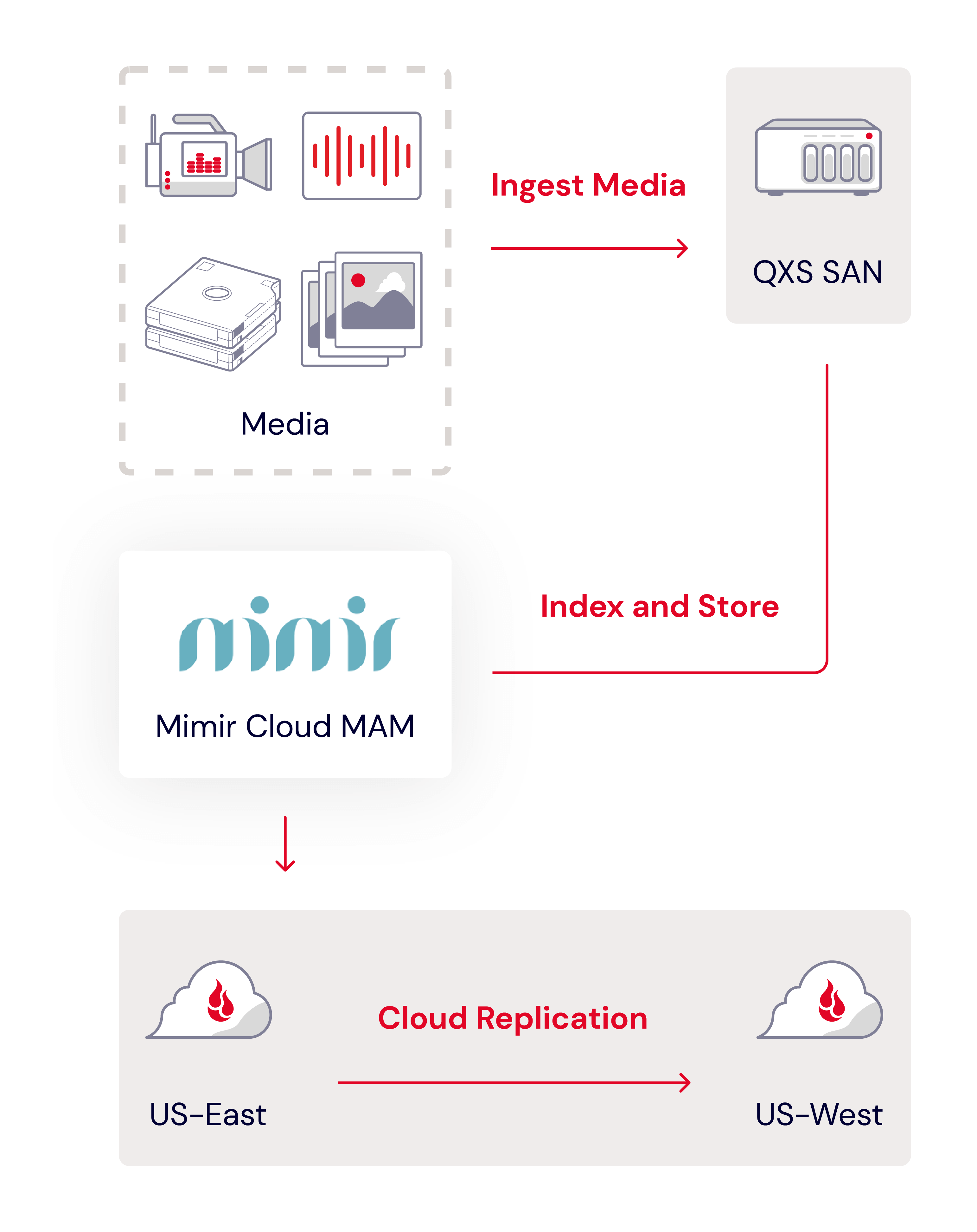
They consolidated the data into one single tier with a Quantum QSX on site for nearline storage and shifted hundreds of terabytes from their SAN and LTO system to Backblaze as their off-site storage for backup and archive.
Cloud MAM for the win
With storage sorted, the Eagles then integrated Mimir, a video collaboration and production platform that includes production asset management, archive, and object-store integration, to keep everything organized and on time. Whenever a file is uploaded to Mimir, it’s automatically stored in Backblaze B2 via Mimir’s file indexer system Kelda. This covered the game day action—their production team had fast access to recently recorded content, providing flexibility to work from home after those late night games.
Getting our sponsored, highest-performing content out quickly drives more views and boosts revenue, so efficiency on game day is critical. Our newly streamlined workflows ensure our editors can deliver while the content is still relevant and engaging.
—Stacy Kelleher, Director of Production, Philadelphia Eagles
The final score
The new system empowers their production team by giving them instant access and fast workflows so they can work without slowdowns. Kelleher noted that restoring a clip is nearly instant.
They have the ability to share links directly from Mimir to users outside the organization for things like pre-season broadcasts, which comes in handy especially when those users don’t want, need, or have the equipment to download the entire broadcast file. Stacy can just copy and paste a Mimir link into an email, and outside agencies or users can watch entire games at speed.
Finally, they freed up IT staff time spent managing all that tape and old hardware, not to mention physical space. It all added up to a big win for the IT team, the franchise, and the fans.
Now I can easily share entire broadcasts by copying and sharing a link from our MAM. No need for FTP downloads or uploading to other platforms. It’s fast, seamless, and ensures everyone can view the content without issues.
—Stacy Kelleher, Director of Production, Philadelphia Eagles
To provide the best experiences, we use technologies like cookies to store and/or access device information. Consenting to these technologies will allow us to process data such as browsing behavior or unique IDs on this site. Not consenting or withdrawing consent, may adversely affect certain features and functions.
Functional
Always active
The technical storage or access is strictly necessary for the legitimate purpose of enabling the use of a specific service explicitly requested by the subscriber or user, or for the sole purpose of carrying out the transmission of a communication over an electronic communications network.
Preferences
The technical storage or access is necessary for the legitimate purpose of storing preferences that are not requested by the subscriber or user.
Statistics
The technical storage or access that is used exclusively for statistical purposes.The technical storage or access that is used exclusively for anonymous statistical purposes. Without a subpoena, voluntary compliance on the part of your Internet Service Provider, or additional records from a third party, information stored or retrieved for this purpose alone cannot usually be used to identify you.
Marketing
The technical storage or access is required to create user profiles to send advertising, or to track the user on a website or across several websites for similar marketing purposes.