Tag Archives: Product Updates

Velociraptor Version 0.6.3: Dig Deeper With More Speed and Scalability

Post Syndicated from Carlos Canto original https://blog.rapid7.com/2022/02/03/velociraptor-version-0-6-3-dig-deeper-with-more-speed-and-scalability/

Velociraptor Version 0.6.3: Dig Deeper With More Speed and Scalability

Rapid7 is very excited to announce the latest Velociraptor release 0.6.3. This release has been in the making for a few months now and has several exciting new features.

Scalability and speed have been the main focus of development since our previous release. Working with some of our larger partners on scaling Velociraptor to a large number of endpoints, we’ve addressed a number of challenges that we believe have improved Velociraptor for everyone at any level of scale.

Performance running on EFS

Running on a distributed filesystem such as EFS presents many advantages, not the least of which is removing the risk that disk space will run out. Many users previously faced disk full errors when running large hunts and accidentally collecting too much data from endpoints. Since Velociraptor is so fast, it’s quite easy to do a hunt collecting a large number of files, but before you know it, the disk may be full.

Using EFS removed this risk, since storage is essentially infinite (but not free). So there is a definite advantage to running the data store on EFS even when not running multiple frontends. When scaling to multiple frontends, EFS use is essential to facilitate a shared distributed filesystem among all the servers.

However, EFS presents some challenges. Although conceptually EFS behaves as a transparent filesystem, in reality the added network latency of EFS IO has caused unacceptable performance issues.

In this release, we employed a number of strategies to improve performance on EFS — and potentially other distributed filesystems, such as NFS. You can read all about the new changes here, but the gist is that added caching and delayed writing strategies help isolate the GUI performance from the underlying EFS latency, making the GUI snappy and quick even with slow filesystems.

We encourage everyone to test the new release on an EFS backend, to assess the performance on this setup — there are many advantages to this configuration. While this configuration is still considered experimental, it’s running successfully in a number of environments.

Searching and indexing

More as a side effect of the EFS work, Velociraptor 0.6.3 moves the client index into memory. This means that searching for clients by DNS name or labels is almost instant, significantly improving the performance of these operations over previous versions.

VQL queries that walk over all clients are now very fast as well. For example, the following query iterates over all clients (maybe thousands!) and checks if their last IP came from a particular subnet:

SELECT * , split(sep=":", string=last_ip)[0] AS LastIp
FROM clients()
WHERE cidr_contains(ip=LastIp, ranges="192.168.1.0/16")

This query will complete in a few seconds even with a large number of clients.

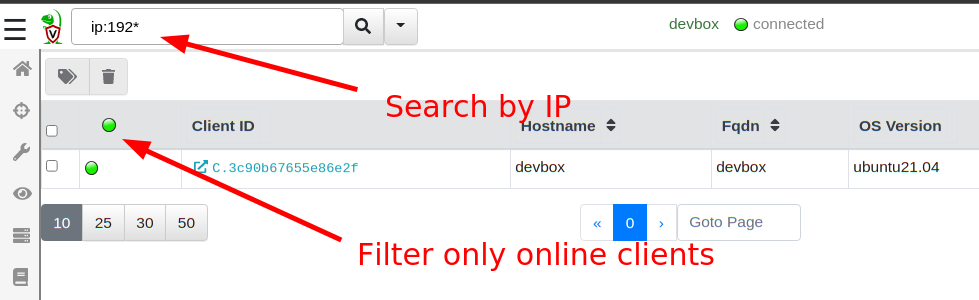
The GUI search bar can now search for IP addresses (e.g. ip:192.168*), and the online only filter is much faster as a result.
Velociraptor Version 0.6.3: Dig Deeper With More Speed and Scalability
Searching is much faster

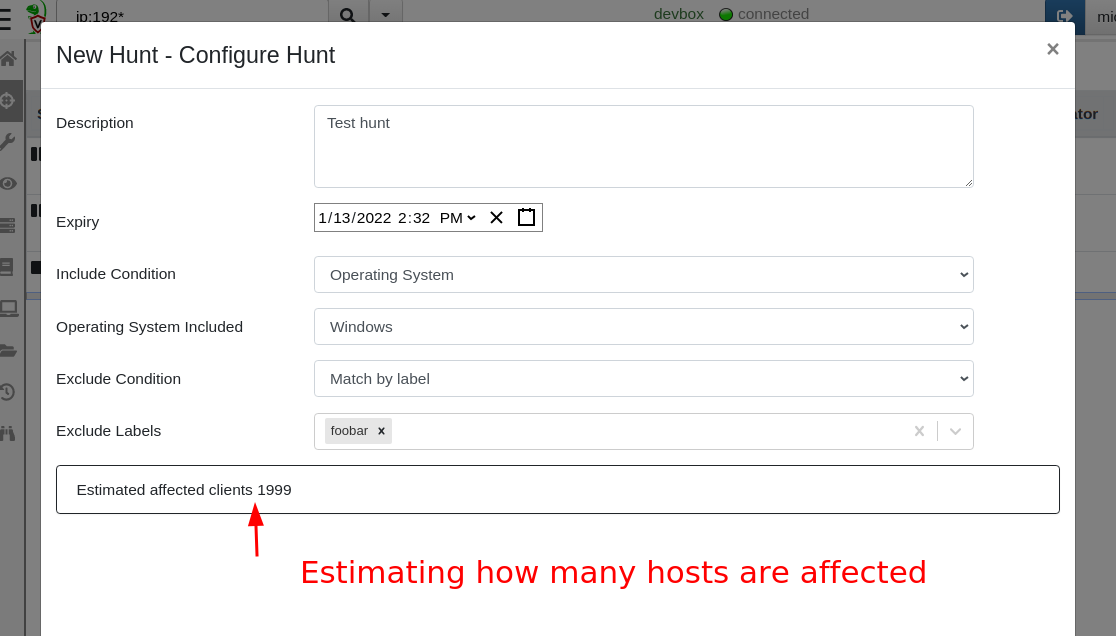
Another benefit of rapid index searching is that we can now quickly estimate how many hosts will be affected by a hunt (calculated based on how many hosts are included and how many are excluded from the hunt). When users have multiple label groups, this helps to quickly understand how targeted a specific hunt is.
Velociraptor Version 0.6.3: Dig Deeper With More Speed and Scalability
Estimating hunt scope

Regular expressions and Yara rules

Velociraptor artifacts are just a way of wrapping a VQL query inside a YAML file for ease of use. Artifacts accept parameters that are passed to the VQL itself, controlling how it runs.

Velociraptor artifacts accept a number of parameters of different types. Sometimes, they accept a windows path — for example, the Windows.EventLogs.EvtxHunter artifact accepts a Windows glob path like %SystemRoot%\System32\Winevt\Logs\*.evtx. In the same artifact, we also can provide a PathRegex, which is a regular expression.

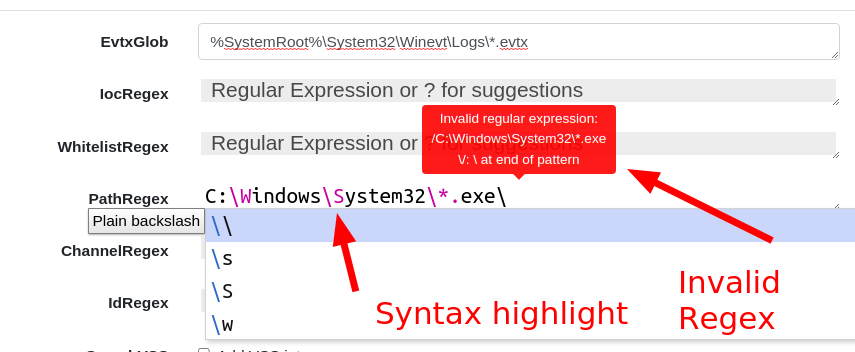
A regular expression is not the same thing as a path at all. In fact, when users get mixed up providing something like C:\Windows\System32 to a regular expression field, this is an invalid expression — backslashes have a specific meaning in a regular expression.

In 0.6.3, there are now dedicated GUI elements for Regular Expression inputs. Special regex patterns, such as backslash sequences, are visually distinct. Additionally, the GUI verifies that the regex is syntactically correct and offers suggestions. Users can type ? to receive further regular expression suggestions and help them build their regex.
Velociraptor Version 0.6.3: Dig Deeper With More Speed and Scalability
Entering regex in the GUI

To receive a RegEx GUI selector in your custom artifacts, simply denote the parameter’s type as regex.

Similarly, other artifacts require the user to enter a Yara rule to use the yara() VQL plugin. The Yara domain specific language (DSL) is rather verbose, so even for very simple search terms (e.g. a simple keyword search) a full rule needs to be constructed.

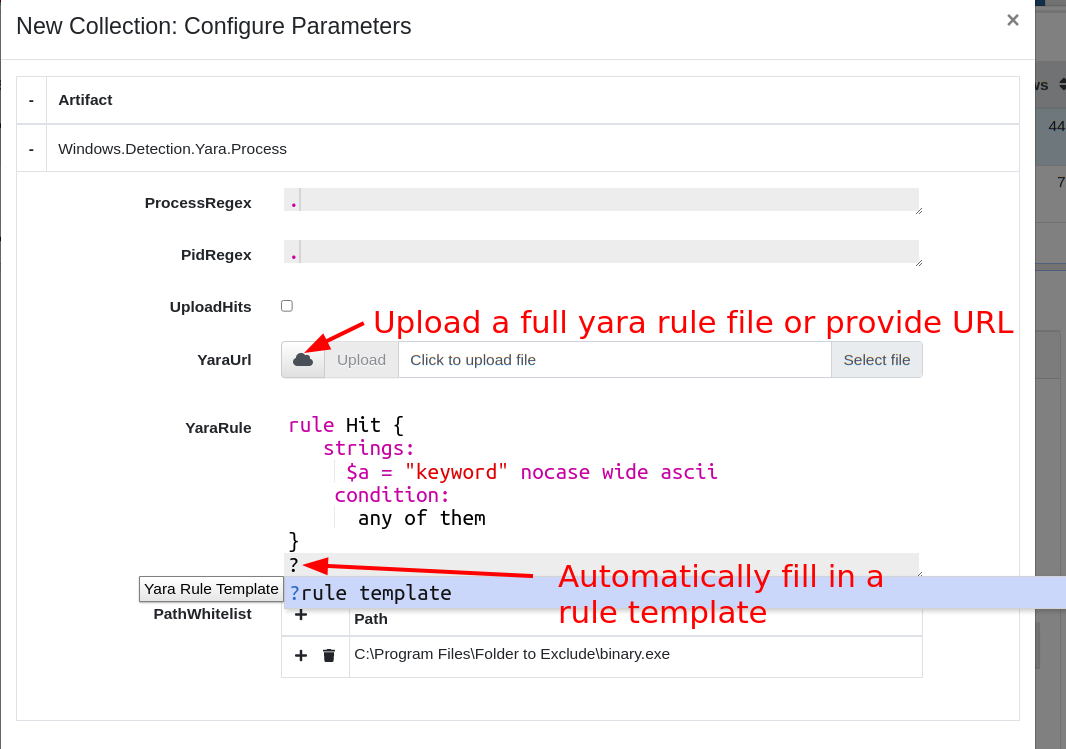
To help with this task, the GUI now presents a specific Yara GUI element. Users can press ? to automatically fill in a skeleton Yara rule suitable for a simple keyword match. Additionally, syntax highlighting gives visual feedback to the validity of the yara syntax.
Velociraptor Version 0.6.3: Dig Deeper With More Speed and Scalability
Entering Yara Rules in the GUI

Some artifacts allow file upload as a parameter to the artifact. This allows users to upload larger inputs, for example a large Yara rule-set. The content of the file will be made available to the VQL running on the client transparently.

To receive a RegEx GUI selector in your custom artifacts, simply denote the parameter’s type as yara. To allow uploads in your artifact parameters simply denote the parameter as an upload type. Within the VQL, the content of the uploaded file will be available as that parameter.

Overriding Generic.Client.Info

When a new client connects to the Velociraptor server, the server performs an Interrogation flow by scheduling the Generic.Client.Info artifact on it. This artifact collects basic metadata about the client, such as the type of OS it is, the hostname, and the version of Velociraptor. This information is used to feed the search index and is also displayed in the “VQL drilldown” page of the Host Information screen.

In the latest release, it’s possible to customize the Generic.Client.Info artifact, and Velociraptor will use the customized version instead to interrogate new clients. This allows users to add more deployment specific collections to the interrogate flow and customize the “VQL drilldown” page. Simply search for Generic.Client.Info in the View Artifact screen, and customize as needed.

Root certificates are now embedded

By default, Golang searches for root certificates from the running system so it can verify TLS connections. This behavior caused problems when running Velociraptor on very old unpatched systems that did not receive the latest Let’s Encrypt Root Certificate update. We decided it was safer to just include the root certs in the binary so we don’t need to rely on the OS itself.

Additionally, Velociraptor will now accept additional root certs embedded in its config file — just add all the certs in PEM format under the Client.Crypto.root_certs key in the config file. This helps deployments that must use a MITM proxy or traffic inspection proxies.

When adding a Root Certificate to the configuration file, Velociraptor will treat that certificate as part of the public PKI roots — therefore, you’ll need to have Client.use_self_signed_ssl as false.

This allows Velociraptor to trust the TLS connection — however, bear in mind that Velociraptor’s internal encryption channel is still present. The MITM proxy won’t be able to actually decode the data or interfere with the communications by injecting or modifying data. Only the outer layer of TLS encryption can be stripped by the MITM proxy.

VQL changes

Glob plugin improvements

The glob plugin now has a new option: recursion_callback. This allows much finer control over which directories to visit making file searches much more efficient and targeted. To learn more about it, read our previous Velociraptor blog post “Searching for Files.”

Notable new artifacts

Many people use Velociraptor to collect and hunt for data from endpoints. Once the data is inspected and analyzed, often the data is no longer needed.

To help with the task of expiring old data, the latest release incorporates the Server.Utils.DeleteManyFlows and Server.Utils.DeleteMonitoringData artifacts that allow users to remove older collections. This helps manage disk usage and reduce ongoing costs.

Try it out!

If you’re interested in the new features, take Velociraptor for a spin by downloading it from our release page. It’s available for free on GitHub under an open source license.

As always, please file bugs on the GitHub issue tracker or submit questions to our mailing list by emailing [email protected]. You can also chat with us directly on our discord server.

Learn more about Velociraptor by visiting any of our web and social media channels below:

Dig Deeper!

Additional reading:

NEVER MISS A BLOG

Get the latest stories, expertise, and news about security today.

2021 Cybersecurity Superlatives: An InsightIDR Year in Review

Post Syndicated from KJ McCann original https://blog.rapid7.com/2022/01/31/2021-cybersecurity-superlatives-an-insightidr-year-in-review/

2021 Cybersecurity Superlatives: An InsightIDR Year in Review

We laughed, we cried, we added over 750 new detections. It’s been a rollercoaster of a year for everyone. So let’s have some fun with our 2021 year in review — shall we?

The last year was an exciting one for InsightIDR, Rapid7’s industry-leading extended detection and response (XDR) and SIEM solution. We used the past 12 months to continually invest in the product to help customers level up their security programs and achieve success in their desired outcomes. A major highlight for InsightIDR was being named as a Leader in the 2021 Gartner Magic Quadrant for SIEM for the second year in a row. We are honored to be recognized as one of the six 2021 Magic Quadrant Leaders — and in celebration, we’d like to announce a few awards ourselves for 2021, high-school-superlative style.

Presenting our 2021 superlatives (drum roll, please)…

Most likely to be overworked: Cybersecurity professionals

“We need more time!” exhausted cybersecurity specialists shout into the void. Luckily, we deployed our Insight Agent into the void, so we heard you. While we were in there, we also picked up the following alerts:

  • There aren’t enough people to do it all.
  • More than 3 out of 4 CISOs have 16 or more cybersecurity products, and 12% have 46 or more (my head is spinning).
  • It is getting more difficult to recruit and hire new professionals onto security teams.
  • The workload is growing, and teams are suffering from burnout.

We heard the problem — and took action with our products. Our product updates focused on the following:

  • Improved detection and response capabilities: We added strong detections with a more comprehensive view of threats.
  • Greater efficiency: We helped teams cut down the number of disparate tools and events they have to manage, providing automation and leveling up analysts by giving them embedded guidance and a common experience.
  • Improved scale and agility: When your organization evolves and grows, so do we.
  • Customization: Every environment is unique, and we want to make sure InsightIDR not only works well but works the way you want it.

All sounds good, right? Let’s keep going down the list to see how we continued to evolve our product to align these themes.

Most likely to (help you) succeed: MITRE ATT&CK mapping in InsightIDR

Red pill or blue pill… Psych! They are both the same pill. Welcome to the matrix — the MITRE ATT&CK matrix, that is.

As of Q4 2021, all of our Attacker Behavior Analytics (ABA) map to the ATT&CK framework in InsightIDR.

OK, great… so what does that mean for you?

MITRE ATT&CK matrix for detection rules: Within the Detection Rules tab, you now have a direct view into where you have coverage with Rapid7’s out-of-the-box detection library across common attacker tactics and techniques, and you can also quickly unlock more context and intelligence about detections.

Refreshed Investigation Management experience: Now, you can click into the new MITRE ATT&CK tab of the Evidence panel in Investigation to see descriptions of each tactic, technique, and sub-technique curated by MITRE. Then go directly to attack.mitre.org for more information.

Learn more about InsightIDR and the MITRE ATT&CK matrix.

Best glow-up: Our Investigation Management experience

A security analyst’s time is precious and limited. That’s why we upgraded our Investigation Management experience to help you manage, prioritize, and triage investigations faster. Make sure you check out the following:

  • A revamped user interface with expandable cards displaying investigation information
  • The ability to view, set, and update the priority, status, or disposition of an investigation
  • Filtering by the following fields: date range, assignee, status, priority level
  • That sweet MITRE integration we talked about earlier

Most sophisticated: Our customization capabilities

InsightIDR customers now have more customization and increased visibility for ABA detections. We’re continuing to make improvements and additions to our detections management experience.

  • Detection rules: Filter detection rules by threat group, rule behavior, and attributes for more visibility into your alerts and investigations.
  • Create exceptions to a detection rule: With exceptions for ABA alerts, you can filter out noise very precisely using data from the alert.
  • New detection rules management interface: With this new interface, you can see a priority field for each detection provided by InsightIDR with new actions available.
  • Customizable priorities for UBA detection rules and custom alerts: Associate a rule priority (Critical, High, Medium, or Low) for all UBA and custom alert detection rules.
  • A simplified way to create exceptions: We added a new section to detection rule details within “create exception” to better inform on which data to write exceptions against. So now, when you go to write exceptions, you have all the information you may need within one window.

Most likely to brighten up your day: Pre-built dashboards and enhanced search capabilities

InsightIDR’s Dashboard Library has a growing repository of pre-built dashboards to save you time and eliminate the need for you to build them from scratch. Our pre-built dashboards are accessible to all users. We added the following dashboards to provide you with immediate value, out of the box.

  • Compliance (PCI, HIPAA, ISO)
  • General Security (Firewall, Asset Authentication)
  • Security Tools (Okta, Palo Alto, Crowdstrike)
  • Enhanced Network Traffic Analysis
  • Cloud Security

Check out the whole dashboard library here.

Speaking of saving time, we continued to make investments in Log Search to make searching for actionable information faster and easier for customers. Spend less time searching and more time fighting off the bad guys. You’ve never seen Spiderman spend an hour searching an address in a phone book, have you?

Power couple: IntSights Threat Intelligence and Rapid7’s Insight Platform

This year Rapid7 acquired IntSights, a leading provider of external threat intelligence and remediation. Their flagship external threat intelligence product, Threat Command, is now part of our Rapid7 portfolio.

Threat Command allows any SecOps team, regardless of size or capability maturity, to expand identification and remediation across an ever-expanding attack surface, while automating threat mitigation.

IntSights is already leveling up threat intelligence at Rapid7 — and we are so excited for more synergies on the road ahead in 2022.

We know this romance is going to last. Congrats to the lovely couple!

Brightest future: Rapid7 customers

Our 2022 New Year’s resolution is to not just be your technology vendor but to be your strategic partner. Complacency is not in our vocabulary, so make sure you keep up to date with all of our upcoming releases as we continue to level up your InsightIDR experience with more capabilities, context, customization while keeping our intuitive user experience.

Our customers’ outcomes define our success, and we wouldn’t have it any other way. We are looking forward to accelerating together.

Have a great year!

Additional reading

NEVER MISS A BLOG

Get the latest stories, expertise, and news about security today.

A December to Remember — Or, How We Improved InsightAppSec in Q4 in the Midst of Log4Shell

Post Syndicated from Tom Caiazza original https://blog.rapid7.com/2022/01/12/a-december-to-remember-or-how-we-improved-insightappsec-in-q4-in-the-midst-of-log4shell/

A December to Remember — Or, How We Improved InsightAppSec in Q4 in the Midst of Log4Shell

Ho, ho, holy cow — what a wild way to wrap up the year that was. Thousands of flights were cancelled during Christmas week, nearly every holiday party became a super-spreader event, and we lost a legend in Betty White. In our neck of the woods, Log4Shell has been dominating the conversation for nearly the entire holiday season. But now that much of the initial fervor has passed, we wanted to take a moment to recap some of InsightAppSec and tCell’s Q4 highlights and give us all a little much-deserved break from the madness.

RBAC

It may not seem like much, but remote-based access control — or RBAC— is a game-changer for many teams looking to streamline their access to InsightAppSec. Essentially, we make it super simple to configure access to the platform perfectly for every member of your team, create tiers of accessibility for different job roles, and ensure everyone has exactly what they need to do their jobs on day one.

Included is a new pre-built remediator role, which was designed to only show developers what they need in order to address a that vulnerability. They can drill into it, see reference details and remediation steps, and replay the attack in their dev or staging environments, all in an easy, navigable interface. This new role helps prevent the back-and-forth between security and development passing vulnerability details.

The key to our new feature is scalability. Regardless of whether you have a team of 10 or a team of 1,000, each group will only have the permissions they need to view the data you want them to see — all without the back-and-forth that comes with creating permissions ad hoc. It’s a time-saver, for sure, but it can also reduce headaches and make costly mistakes far less likely. If you want to learn more check out our blog post on the subject (it’s got a cute Goldilocks theme — you’ll get the drift).

ServiceNow

Oh, yeah, we’re fully integrated with ServiceNow. It’s just a leader in IT service management, and InsightAppSec is fully integrated, working seamlessly, and available in the ServiceNow app store for, like, zero dollars. No biggie.

This integration offers a lot of great features that will save your team time and effort, improving everything from visibility, to prioritization, to remediation. In fact, remediation will happen even faster than it already does with updates automatically happening across both ServiceNow and InsightAppSec tickets. And it’s so simple and quick to install, you’ll be benefiting from it in minutes. Oh, and did we mention zero dollars?

Log4Shell

OK, break’s over. Yes, we made many improvements to InsightAppSec this quarter, but we would be remiss if we didn’t mention the ones we made for Log4Shell. The big one is a new InsightAppSec default attack template for Out of Band Injection specific to Log4Shell attacks. Attack templates are InsightAppSec’s bread and butter, testing every part of your application against known attack vectors. With this feature, we have an attack template that can automate a sophisticated attack by simulating an attacker on your website and injects code in your application. If the code is vulnerable, it calls a Log4j function to send a JNDI call to a Rapid7 server validating the exploitability of the application. This helps you identify and prioritize Log4Shell vulnerabilities before they become real threats.

For even more flexibility, we’ve added an attack module that actually does the out-of-band Log4Shell attack during testing. You can easily select this in the Log4Shell attack template, but you can can also create a custom template and add the new Log4Shell attack module to that.

We’ve also improved tCell’s ability to protect against Log4Shell attacks. We launched a new app firewall protection specifically for Log4Shell attacks. The new firewall lets our customers know if their apps have been attacked through the Log4Shell vulnerability and drill down to specifics on the attack. We’ve also created a default pattern that allows you to block well known Log4Shell patterns and as more become known, we will continue our updates.

Even more

While these were just a few of the major improvements we made to InsightAppSec and tCell this quarter, there were certainly a host of minor ones that are sure to make the platform easier and more efficient. They include custom NGINX builds and support for .Net 6.0 for tCell, Archiving Scan Targets, and customizing executive reports for InsightAppSec, among others.

Those are the highlights from the fourth quarter of 2021 from here in InsightAppSec-land. We’re well on our way to making Q1 2022 even better for our customers, though we can’t do anything about those flight cancellations. And while we’re at it, someone check on Keith Richards.

NEVER MISS A BLOG

Get the latest stories, expertise, and news about security today.

What’s New in InsightIDR: Q4 2021 in Review

Post Syndicated from Margaret Wei original https://blog.rapid7.com/2022/01/06/whats-new-in-insightidr-q4-2021-in-review/

What's New in InsightIDR: Q4 2021 in Review

More context and customization around detections and investigations, expanded dashboard capabilities, and more.

This post offers a closer look at some of the recent releases in InsightIDR, our extended detection and response (XDR) solution, from Q4 2021. Over the past quarter, we delivered updates to help you make more informed decisions, accelerate your time to respond, and customize your detections and investigations. Here’s a rundown of the highlights.

More customization options for your detection rules

InsightIDR provides a highly curated detections library, vetted by the security and operations center (SOC) experts on our managed detection and response (MDR) team — but we know some teams may want the ability to fine tune these even further. In our Q3 wrap-up, we highlighted our new detection rules management experience. This quarter, we’ve made even more strides in leveling up our capabilities around detections to help you make more informed decisions and accelerate your time to respond.

What's New in InsightIDR: Q4 2021 in Review
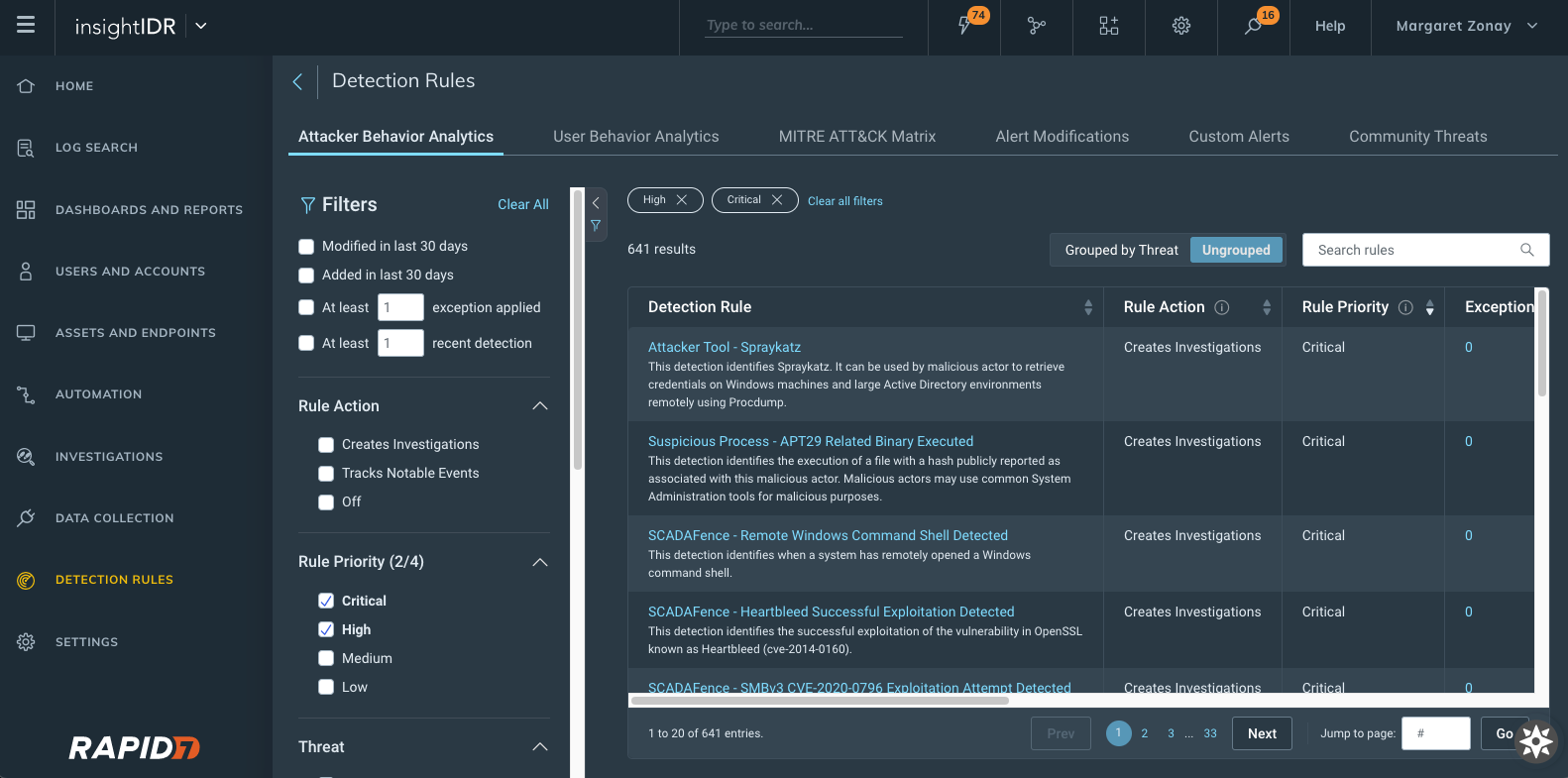
Attacker Behavior Analytics Detection Rules viewed and sorted by rule priority

  • New detection rules management interface: With this new interface, you can see a priority field for each detection provided by InsightIDR with new actions available.
    • Change priority of detections and exceptions that are set to Creates Investigation as the Rule Action.
    • View and sort on priority from the main detection management screen.
    • More details on our detection rules experience can be found in our help docs, here.

  • Customizable priorities for UBA detection rules and custom alerts: Customers can now associate a rule priority (Critical, High, Medium, or Low) for all of their UBA and custom alert detection rules. The priority is subsequently applied to investigations created by a detection rule.
  • A simplified way to create exceptions: We added a new section to detection rule details within “create exception” to better inform on which data to write exceptions against. This will show up to the 5 most recent matches associated with that said detection rule — so now, when you go to write exceptions, you have all the information you may need all within one window.

MITRE ATT&CK Matrix for detection rules

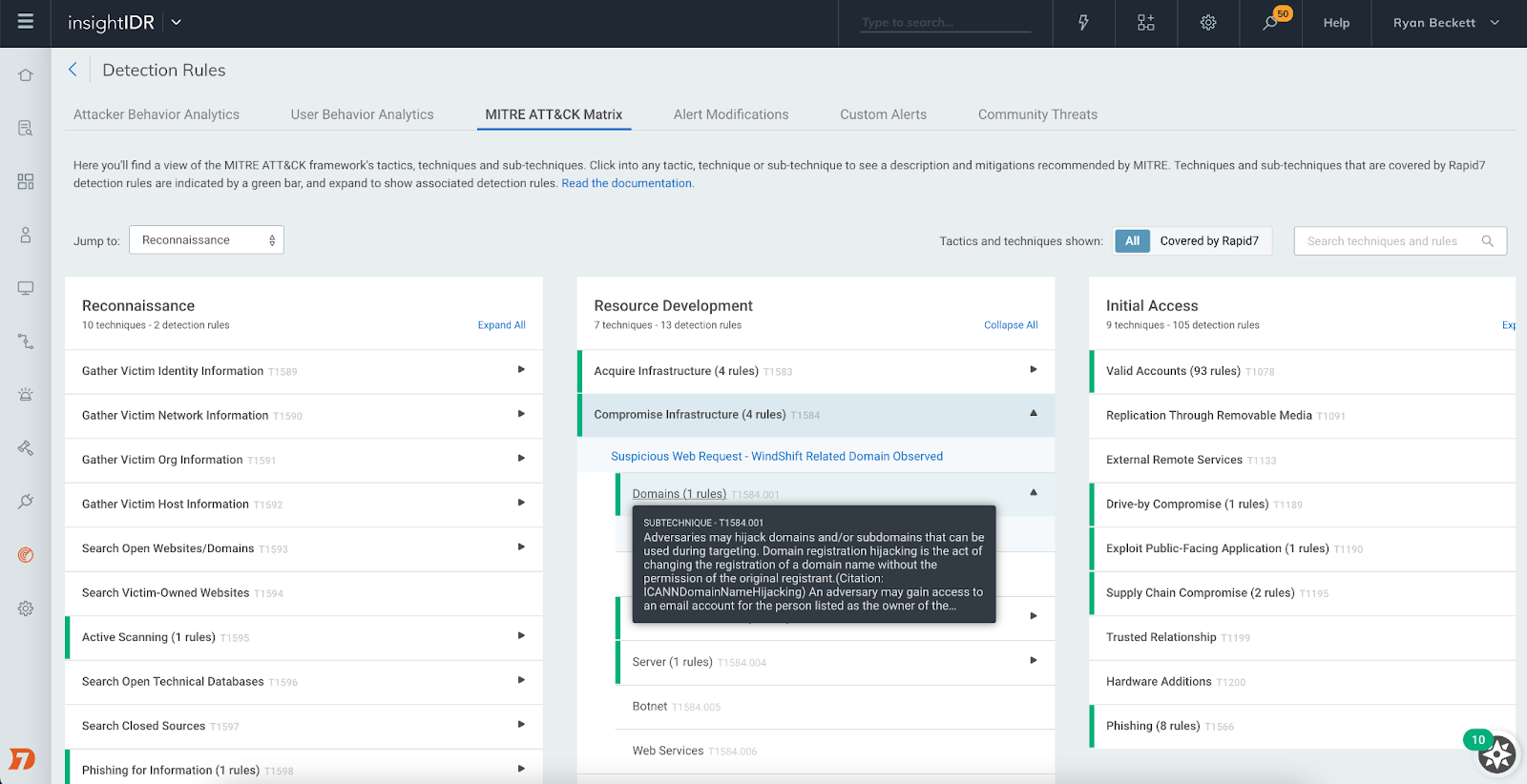
This new view maps detection rules to MITRE tactics and techniques commonly used by attackers. The view lets you see where you have coverage with Rapid7’s out-of-the-box detection rules for common attacker use cases and dig into each rule to understand the nature of that detection.

What's New in InsightIDR: Q4 2021 in Review
MITRE ATT&CK Matrix within Detection Rules

Investigation Management reimagined

At Rapid7, we know how limited a security analyst’s time is, so we reconfigured our Investigation Management experience to help our users improve the speed and quality of their decision-making when it comes to investigations. Here’s what you can expect:

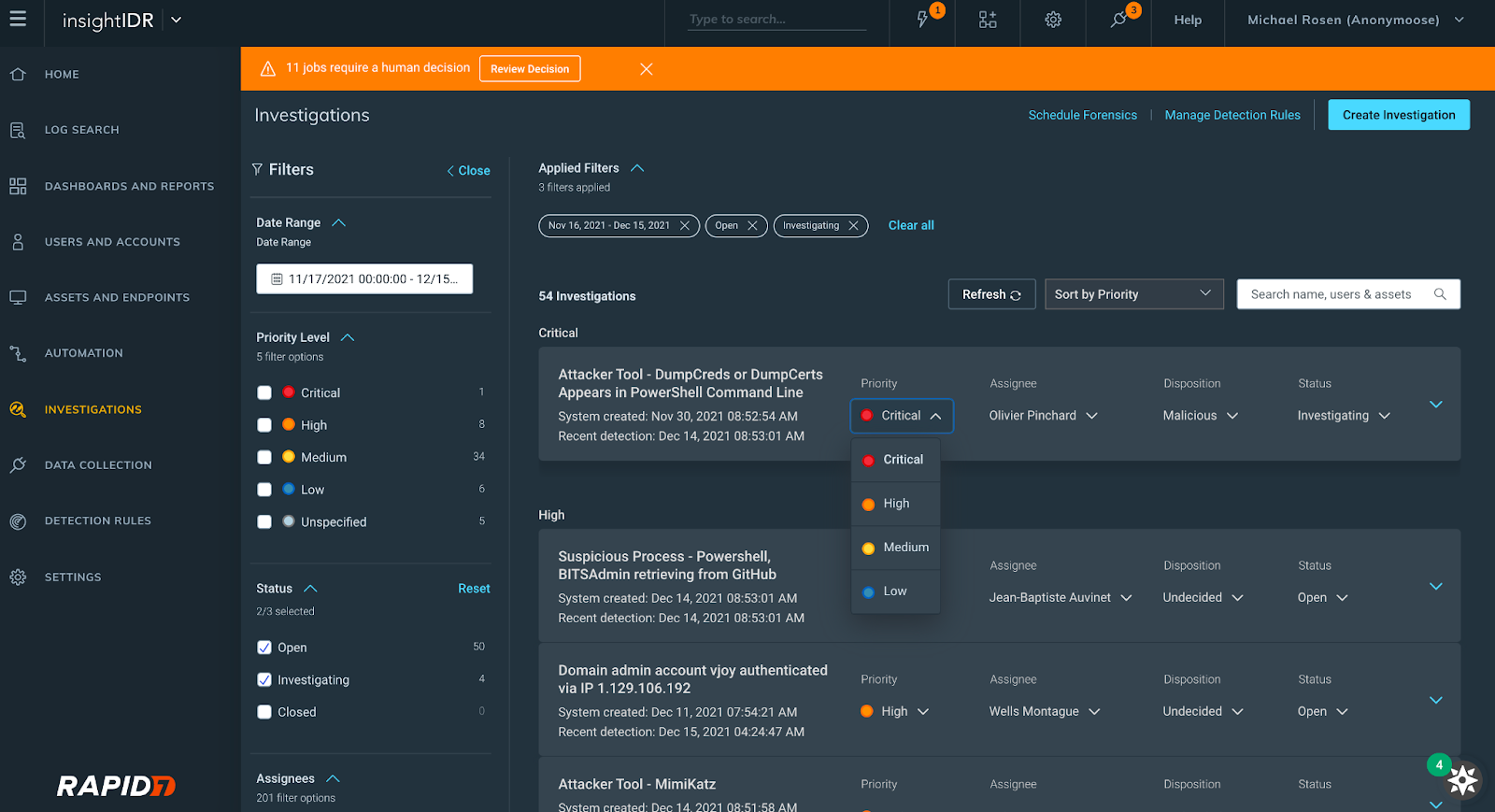
  • A revamped user interface with expandable cards displaying investigation information
  • The ability to view, set, and update the priority, status, or disposition of an investigation
  • Filtering by the following fields: date range, assignee, status, priority level
What's New in InsightIDR: Q4 2021 in Review
New investigations interface

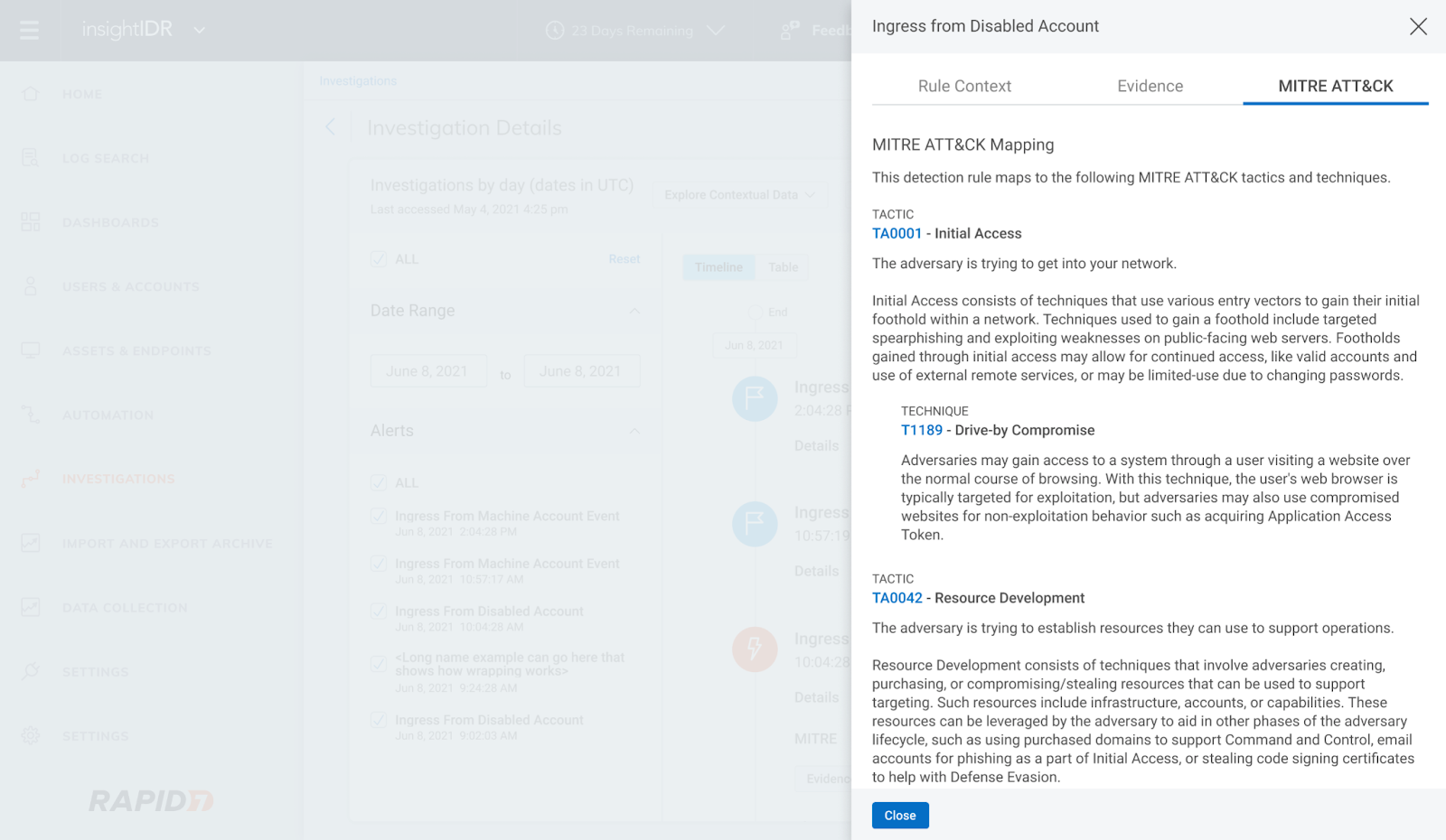
We also introduced MITRE-driven insights in Investigations. Now, you can click into the new MITRE ATT&CK tab of the Evidence panel in Investigation to see descriptions of each tactic, technique, and sub-technique curated by MITRE and link out to attack.mitre.org for more information.

What's New in InsightIDR: Q4 2021 in Review
MITRE ATT&CK tab within Investigations Evidence panel

Rapid7’s ongoing emergent threat response to Log4Shell

Like the rest of the security community, we have been internally responding to the critical remote code execution vulnerability in Apache’s Log4j Java library (a.k.a. Log4Shell).

Through continuous collaboration and ongoing threat landscape monitoring, our Incident Response, Threat Intelligence and Detection Engineering, and MDR teams are working together to provide product coverage for the latest techniques being used by malicious actors. You can see updates on our InsightIDR and MDR detection coverage here and in-product.

Stay up to date with the latest on Log4Shell:

A continually expanding library of pre-built dashboards

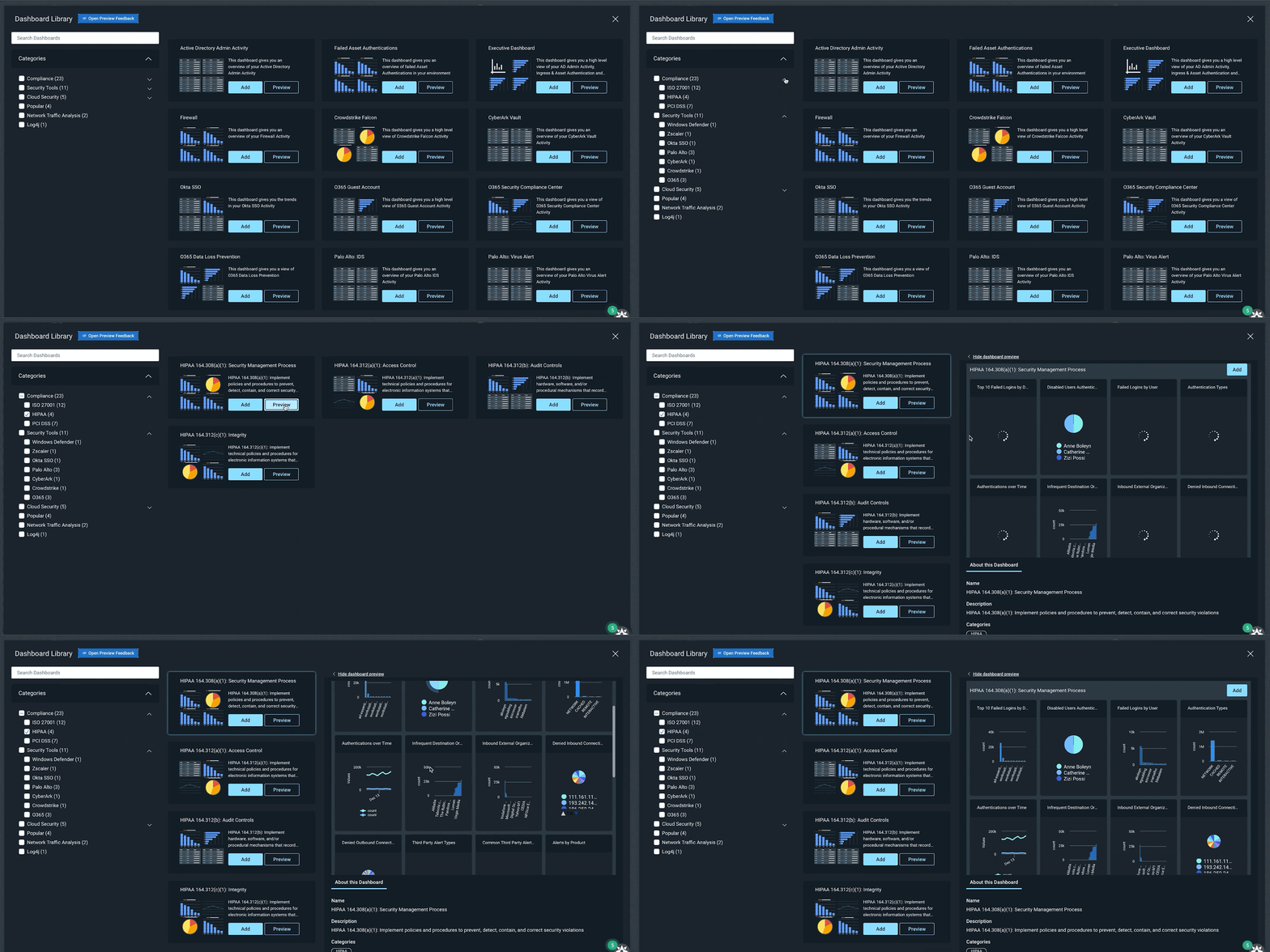
InsightIDR’s Dashboard Library has a growing repository of pre-built dashboards to save you time and eliminate the need for you to build them from scratch. In Q4, we released 15 new pre-built dashboards covering:

  • Compliance (PCI, HIPAA, ISO)
  • General Security (Firewall, Asset Authentication)
  • Security Tools (Okta, Palo Alto, Crowdstrike)
  • Enhanced Network Traffic Analysis
  • Cloud Security
What's New in InsightIDR: Q4 2021 in Review
Dashboard Library in InsightIDR

Additional dashboard and reporting updates

  • Updates to dashboard filtering: Dashboard Filtering gives users the ability to further query LEQL statements and the data across all the cards in their dashboard. Customers can now populate the dashboard filter with Saved Queries from Log Search, as well as save a filter to a dashboard, eliminating the need to rebuild it every session.
  • Chart captions: We’ve added the ability for users to write plain text captions on charts to provide extra context about a visualization.
  • Multi-group-by queries and drill-in functionality: We’ve enabled Multi-group-by queries (already being used in Log search) so that customers can leverage these in their dashboards and create cards with layered data that they can drill in and out of.

Updates to Log Search and Event Sources

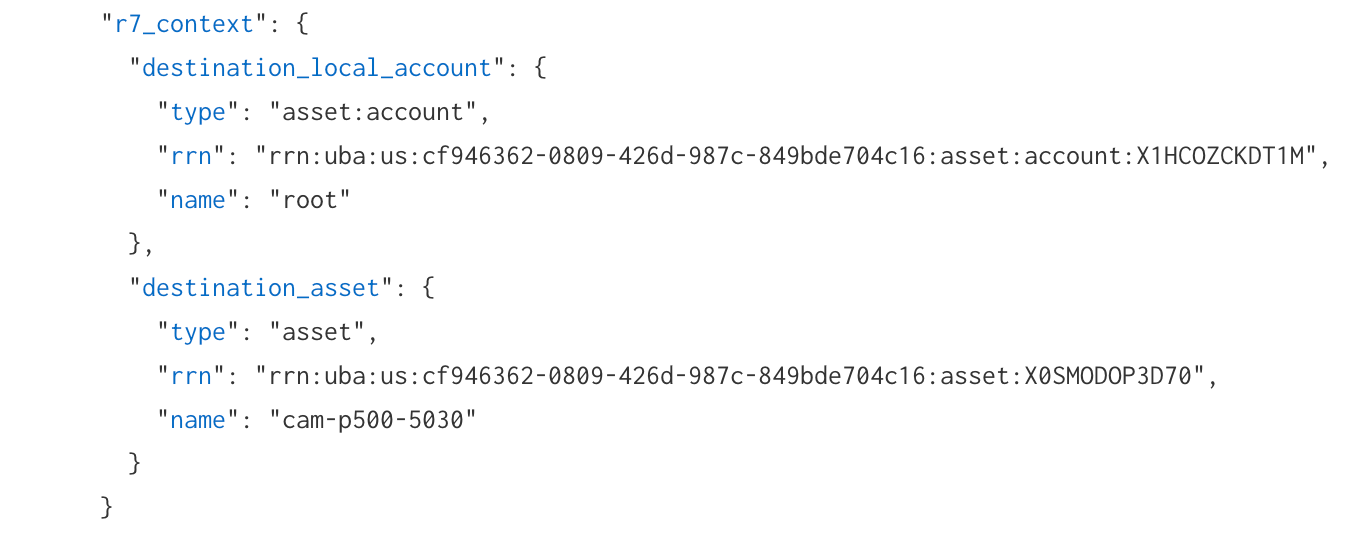
We recently introduced Rapid7 Resource Names (RRN), which are unique identifiers added to users, assets, and accounts in log search. An RRN serves as a unique identifier for platform resources at Rapid7. This unique identifier will stay consistent with the resource regardless of any number of names/labels associated with the resource.

In log search, an “R7_context” object has been added for log sets that have an attributed user, asset, account, or local accounts. Within the “R7_context” object, you will see any applicable RRNs appended. You can utilize the RRN as a search in log search or in the global search (which will link to users and accounts or assets and endpoints pages) to assist with more reliable searches for investigation processes.

What's New in InsightIDR: Q4 2021 in Review
New “r7_context” Rapid7 Resource Name (RRN) data in Log Search

Event source updates

  • Log Line Attribution for Palo Alto Firewall & VPN, Proofpoint TAP, Fortinet Fortigate: When setting up an event source you now have an option to leverage information directly present in source log lines, rather than relying solely on InsightIDR’s traditional attribution engine.
  • Cylance Protect Cloud event source: You can configure CylancePROTECT cloud to send detection events to InsightIDR to generate virus infection and third-party alerts.
  • InsightIDR Event Source listings available in the Rapid7 Extensions Hub: Easily access all InsightIDR event source related content in a centralized location.

Updates to Network Traffic Analysis capabilities

Insight Network Sensor optimized for 10Gbs+ deployments: We have introduced a range of performance upgrades that make high-speed traffic analysis more accessible using off-the-shelf hardware, so you’re able to gain east-west and north-south traffic visibility within physical, virtual and cloud based networks. If you want to take full advantage of these updates check out the updated sensor requirements here.

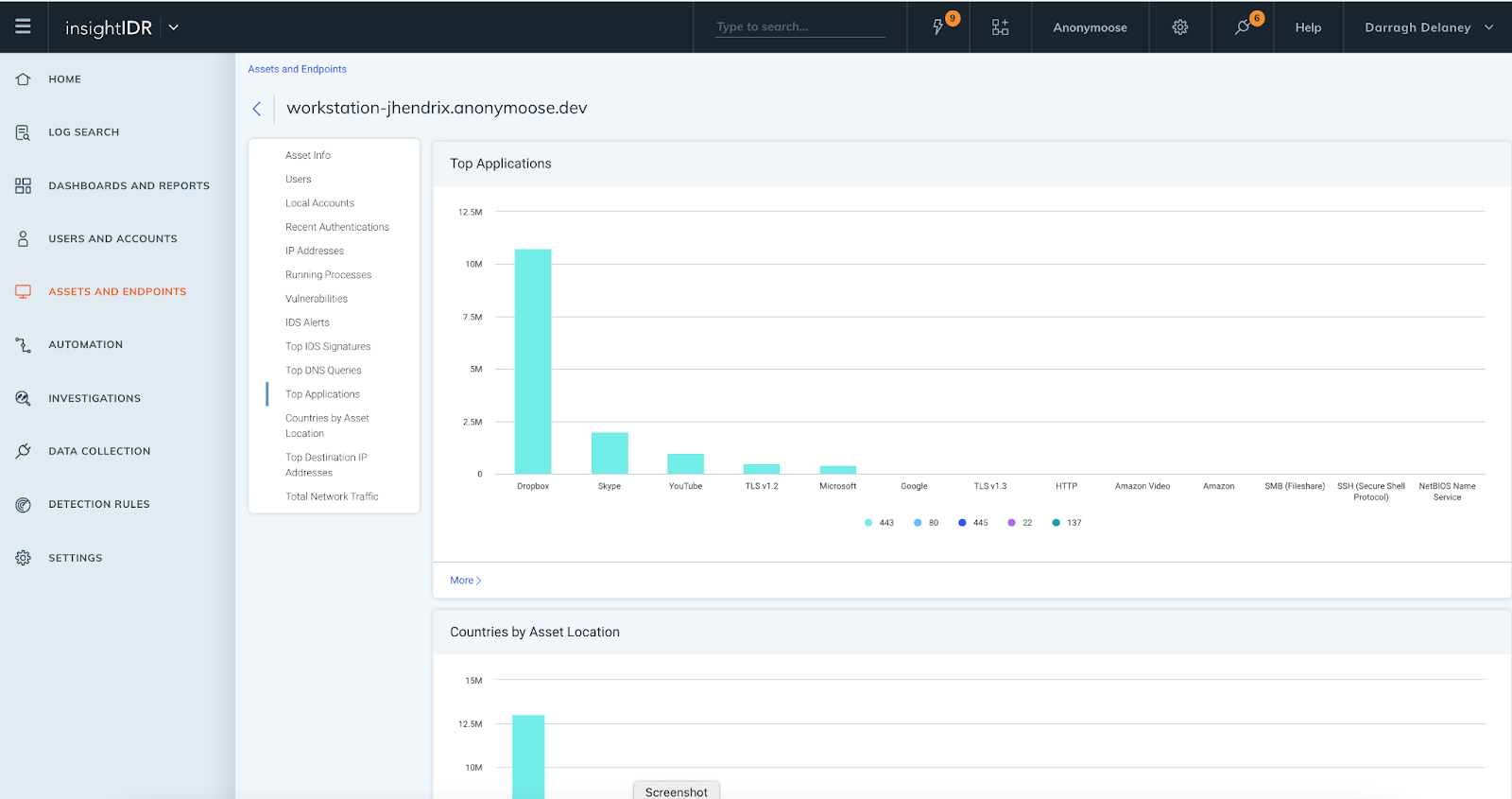
InsightIDR Asset Page Updates: We have introduced additional data elements and visuals to the Assets page. This delivers greater context for investigations and enables faster troubleshooting, as assets and user information is in one location. All customers have access to:

  • Top IDS events triggered by asset
  • Top DNS queries

For customers with Insight Network Sensors and ENTA, these additional elements are available:

  • Top Applications
  • Countries by Asset Location
  • Top Destination IP Addresses
What's New in InsightIDR: Q4 2021 in Review

Stay tuned!

As always, we’re continuing to work on exciting product enhancements and releases throughout the year. Keep an eye on our blog and release notes as we continue to highlight the latest in detection and response at Rapid7.