Tag Archives: WebP

Uncovering the Hidden WebP vulnerability: a tale of a CVE with much bigger implications than it originally seemed

Post Syndicated from Willi Geiger original http://blog.cloudflare.com/uncovering-the-hidden-webp-vulnerability-cve-2023-4863/


Uncovering the Hidden WebP vulnerability: a tale of a CVE with much bigger implications than it originally seemed

Uncovering the Hidden WebP vulnerability: a tale of a CVE with much bigger implications than it originally seemed

At Cloudflare, we're constantly vigilant when it comes to identifying vulnerabilities that could potentially affect the Internet ecosystem. Recently, on September 12, 2023, Google announced a security issue in Google Chrome, titled "Heap buffer overflow in WebP in Google Chrome," which caught our attention. Initially, it seemed like just another bug in the popular web browser. However, what we discovered was far more significant and had implications that extended well beyond Chrome.

Impact much wider than suggested

The vulnerability, tracked under CVE-2023-4863, was described as a heap buffer overflow in WebP within Google Chrome. While this description might lead one to believe that it's a problem confined solely to Chrome, the reality was quite different. It turned out to be a bug deeply rooted in the libwebp library, which is not only used by Chrome but by virtually every application that handles WebP images.

Digging deeper, this vulnerability was in fact first reported in an earlier CVE from Apple, CVE-2023-41064, although the connection was not immediately obvious. In early September, Citizen Lab, a research lab based out of the University of Toronto, reported on an apparent exploit that was being used to attempt to install spyware on the iPhone of "an individual employed by a Washington DC-based civil society organization." The advisory from Apple was also incomplete, stating that it was a “buffer overflow issue in ImageIO,” and that they were aware the issue may have been actively exploited. Only after Google released CVE-2023-4863 did it become clear that these two issues were linked, and there was a wider vulnerability in WebP.

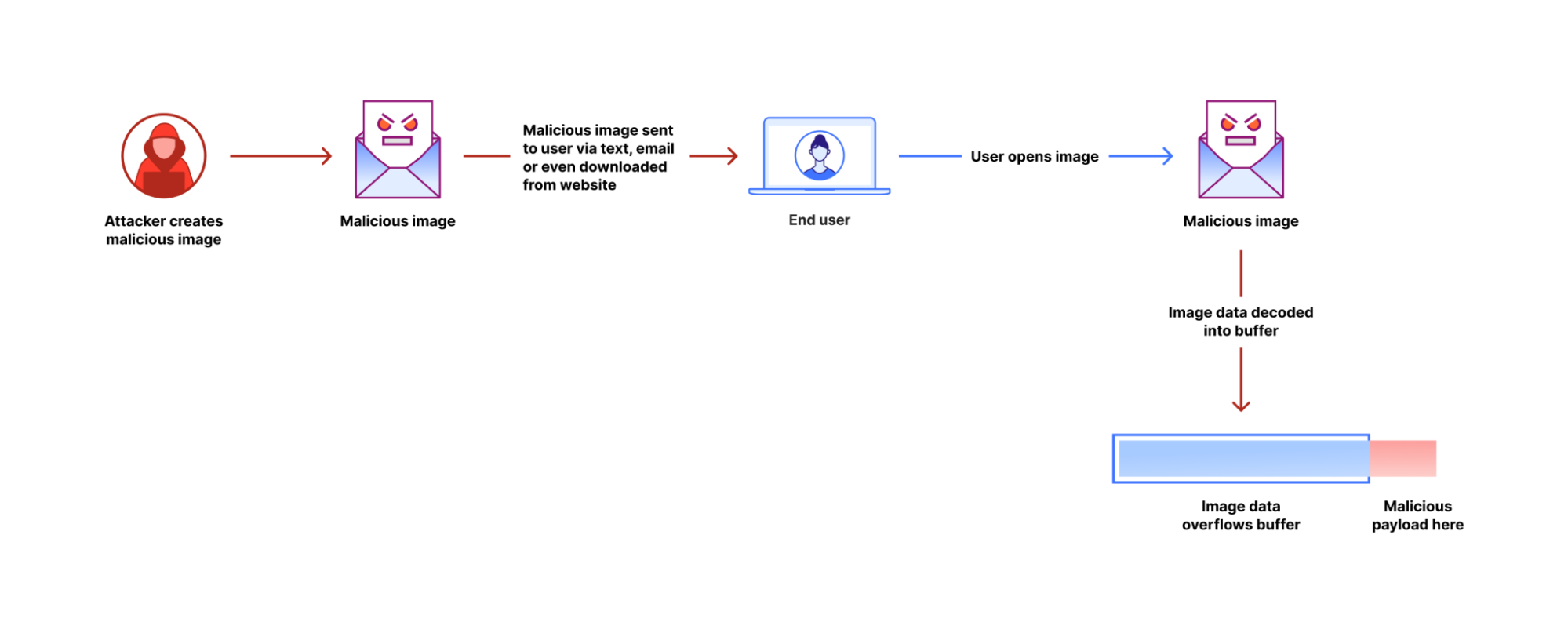
The vulnerability allows an attacker to create a malformed WebP image file that makes libwebp write data beyond the buffer memory allocated to the image decoder. By writing past the legal bounds of the buffer, it is possible to modify sensitive data in memory, eventually leading to execution of the attacker's code.

WebP, introduced over a decade ago, has gained widespread adoption in various applications, ranging from web browsers to email clients, chat apps, graphics programs, and even operating systems. This ubiquity meant that this vulnerability had far-reaching consequences, affecting a vast array of software and virtually all users of the WebP format.
Uncovering the Hidden WebP vulnerability: a tale of a CVE with much bigger implications than it originally seemed
How the WebP vulnerability is exploited

Understanding the technical details

So what exactly was the issue, how could it be exploited, and how was it shut down? We can get our best clues by looking at the patch that was made to libwebp. This patch fixes a potential out-of-buffer (OOB) error in part of the image decoder – the Huffman tables – with two changes: additional validation of the input data, and a modified dynamic memory allocation model. A deeper dive into libwebp and the WebP image format built on top of it reveals what this means.

WebP is a combination of two different image formats: a lossy format similar to JPEG using VP8 codec, and a lossless format using WebP's custom lossless codec. The bug was in the lossless codec's handling of Huffman coding.

The fundamental idea behind Huffman coding is that using a constant number of bits for every basic unit of information in a dataset – like a pixel color – is not the most efficient representation. We can use a variable number of bits, and assign shortest sequences to the most frequently occurring values, and longer ones to the least common values. The sequences of ones and zeros can be represented as a binary tree, with the shorter, more common codes near the root, and longer, less common codes deeper in the tree. Looking up values in the tree bit by bit is relatively slow. Practical implementations build lookup tables that allow matching many bits at a time.

Image files contain compact information about the shape of the Huffman tree, which the decoder uses to reconstruct the tree, and build lookup tables for the codes. The bug in libwebp was in the code building the lookup tables. A specially crafted WebP file can contain a very unbalanced Huffman tree that contains codes much longer than any normal WebP file would have, and this made the function generating lookup tables write data beyond the buffer allocated for the lookup tables. Libwebp had checks for validity of the Huffman tree, but it would write the invalid lookup tables before the consistency check.

The buffer for lookup tables is allocated on the heap. Heap is an area of memory where most of the data of the application is stored. Code that writes data past its buffer allows attackers to modify and corrupt data that happens to be adjacent in memory to the buffer. This can be exploited to make the application misbehave, and eventually start executing code supplied by the attacker.

The fixed version of libwebp ensures that the input data will always create a valid internal structure, and if so, allocates more memory if necessary to ensure the buffer is always big enough.

Libwebp is a mature library, maintained by seasoned professionals. But it's written in the C language, which has very few safeguards against programming errors, especially memory use. Despite the care taken in the library's development, a single erroneous assumption led to a critical vulnerability.

Swift action

On the same day that Google's announcement caught our attention, we filed an internal security ticket, to document and address the vulnerability.

Google was initially perplexed about the true source of the problem. They did not release a patched version of libwebp before announcing the vulnerability. We discovered the yet-unreleased patch for libwebp in its repository, and used it to update libwebp in our services. libwebp officially released the patch a day later.

Our image processing services are written in Rust. We've submitted patches to Rust packages that contained a copy of libwebp and filed RustSec advisories for them (RUSTSEC-2023-0061 and RUSTSEC-2023-0062). This ensured that the broader Rust ecosystem was informed and could take appropriate action.

In an interesting turn of events, GitHub's vulnerability scanner was quick to recognize our RustSec reports as the first case of CVE-2023-4863, even before the issue gained widespread attention. This highlights the importance of having robust security reporting mechanisms in place and the vital role that platforms like GitHub play in keeping the open-source community secure.

These quick actions demonstrate how seriously Cloudflare takes this kind of threat. We have a belt-and-suspenders approach to security that limits the binaries we run at our edge to those signed by us, and ensures that all vulnerabilities are identified and remedied as soon as possible. In this case, we have scrutinized our logs, and found no evidence that any attackers attempted to leverage this vulnerability against Cloudflare. We believe this exploit targeted individuals rather than the infrastructure of a company like Cloudflare, but we never take chances with our customers’ data, and so fixed this vulnerability as quickly as possible, before it became well known.

Conclusion

Google has now widened its description of this issue, correctly calling out that all uses of WebP are potentially affected. This widened description was originally filed as yet another new CVE – CVE-2023-5129 – but then that was flagged as a duplicate of the original CVE-2023-4863, and the description of the earlier filing updated. This incident serves as a reminder of the complex and interconnected nature of the internet ecosystem. What initially seemed like a Chrome-specific problem revealed a much deeper issue that touched nearly every corner of the digital world. The incident also showcased the importance of swift collaboration and the critical role that responsible disclosure plays in mitigating security risks.

For each and every user, it demonstrates the need to keep all browsers, apps and operating systems up to date, and to install recommended security patches. All applications supporting WebP images need to be updated. We've updated our services.

At Cloudflare, we remain committed to enhancing the security of the internet, and incidents like these drive us to continually refine our processes and strengthen our partnerships within the global developer community. By working together, we can make the Internet a safer place for everyone.


Introducing support for the AVIF image format

Post Syndicated from Kornel Lesiński original https://blog.cloudflare.com/generate-avif-images-with-image-resizing/

Introducing support for the AVIF image format

Introducing support for the AVIF image format

We’ve added support for the new AVIF image format in Image Resizing. It compresses images significantly better than older-generation formats such as WebP and JPEG. It’s supported in Chrome desktop today, and support is coming to other Chromium-based browsers, as well as Firefox.

What’s the benefit?

More than a half of an average website’s bandwidth is spent on images. Improved image compression can save bandwidth and improve overall performance of the web. The compression in AVIF is so good that images can reduce to half the size of JPEG and WebP

What is AVIF?

AVIF is a combination of the HEIF ISO standard, and a royalty-free AV1 codec by Mozilla, Xiph, Google, Cisco, and many others.

Currently JPEG is the most popular image format on the Web. It’s doing remarkably well for its age, and it will likely remain popular for years to come thanks to its excellent compatibility. There have been many previous attempts at replacing JPEG, such as JPEG 2000, JPEG XR and WebP. However, these formats offered only modest compression improvements, and didn’t always beat JPEG on image quality. Compression and image quality in AVIF is better than in all of them, and by a wide margin.

Introducing support for the AVIF image format Introducing support for the AVIF image format Introducing support for the AVIF image format
JPEG (17KB) WebP (17KB) AVIF (17KB)

Why a new image format?

One of the big things AVIF does is it fixes WebP’s biggest flaws. WebP is over 10 years old, and AVIF is a major upgrade over the WebP format. These two formats are technically related: they’re both based on a video codec from the VPx family. WebP uses the old VP8 version, while AVIF is based on AV1, which is the next generation after VP10.

WebP is limited to 8-bit color depth, and in its best-compressing mode of operation, it can only store color at half of the image’s resolution (known as chroma subsampling). This causes edges of saturated colors to be smudged or pixelated in WebP. AVIF supports 10- and 12-bit color at full resolution, and high dynamic range (HDR).

Introducing support for the AVIF image format JPEG
Introducing support for the AVIF image format WebP
Introducing support for the AVIF image format WebP (sharp YUV option)
Introducing support for the AVIF image format AVIF

AV1 also uses a new compression technique: chroma-from-luma. Most image formats store brightness separately from color hue. AVIF uses the brightness channel to guess what the color channel may look like. They are usually correlated, so a good guess gives smaller file sizes and sharper edges.

Adoption of AV1 and AVIF

VP8 and WebP suffered from reluctant industry adoption. Safari only added WebP support very recently, 10 years after Chrome.

Chrome 85 supports AVIF already. It’s a work in progress in other Chromium-based browsers, and Firefox. Apple hasn’t announced whether Safari will support AVIF. However, this time Apple is one of the companies in the Alliance for Open Media, creators of AVIF. The AV1 codec is already seeing faster adoption than the previous royalty-free codecs. Latest GPUs from Nvidia, AMD, and Intel already have hardware decoding support for AV1.

AVIF uses the same HEIF container as the HEIC format used in iOS’s camera. AVIF and HEIC offer similar compression performance. The difference is that HEIC is based on a commercial, patent-encumbered H.265 format. In countries that allow software patents, H.265 is illegal to use without obtaining patent licenses. It’s covered by thousands of patents, owned by hundreds of companies, which have fragmented into two competing licensing organizations. Costs and complexity of patent licensing used to be acceptable when videos were published by big studios, and the cost could be passed on to the customer in the price of physical discs and hardware players. Nowadays, when video is mostly consumed via free browsers and apps, the old licensing model has become unsustainable. This has created a huge incentive for Web giants like Google, Netflix, and Amazon to get behind the royalty-free alternative. AV1 is free to use by anyone, and the alliance of tech giants behind it will defend it from patent troll’s lawsuits.

Non-standard image formats usually can only be created using their vendor’s own implementation. AVIF and AV1 are already ahead with multiple independent implementations: libaom, Intel SVT-AV1, libgav1, dav1d, and rav1e. This is a sign of a healthy adoption and a prerequisite to be a Web standard. Our Image Resizing is implemented in Rust, so we’ve chosen the rav1e encoder to create a pure-Rust implementation of AVIF.

Caveats

AVIF is a feature-rich format. Most of its features are for smartphone cameras, such as “live” photos, depth maps, bursts, HDR, and lossless editing. Browsers will support only a fraction of these features. In our implementation in Image Resizing we’re supporting only still standard-range images.

Two biggest problems in AVIF are encoding speed and lack of progressive rendering.

AVIF images don’t show anything on screen until they’re fully downloaded. In contrast, a progressive JPEG can display a lower-quality approximation of the image very quickly, while it’s still loading. When progressive JPEGs are delivered well, they make websites appear to load much faster. Progressive JPEG can look loaded at half of its file size. AVIF can fully load at half of JPEG’s size, so it somewhat overcomes the lack of progressive rendering with the sheer compression advantage. In this case only WebP is left behind, which has neither progressive rendering nor strong compression.

Decoding AVIF images for display takes relatively more CPU power than other codecs, but it should be fast enough in practice. Even low-end Android devices can play AV1 videos in full HD without help of hardware acceleration, and AVIF images are just a single frame of an AV1 video. However, encoding of AVIF images is much slower. It may take even a few seconds to create a single image. AVIF supports tiling, which accelerates encoding on multi-core CPUs. We have lots of CPU cores, so we take advantage of this to make encoding faster. Image Resizing doesn’t use the maximum compression level possible in AVIF to further increase compression speed. Resized images are cached, so the encoding speed is noticeable only on a cache miss.

We will be adding AVIF support to Polish as well. Polish converts images asynchronously in the background, which completely hides the encoding latency, and it will be able to compress AVIF images better than Image Resizing.

Note about benchmarking

It’s surprisingly difficult to fairly and accurately judge which lossy codec is better. Lossy codecs are specifically designed to mainly compress image details that are too subtle for the naked eye to see, so “looks almost the same, but the file size is smaller!” is a common feature of all lossy codecs, and not specific enough to draw conclusions about their performance.

Lossy codecs can’t be compared by comparing just file sizes. Lossy codecs can easily make files of any size. Their effectiveness is in the ratio between file size and visual quality they can achieve.

The best way to compare codecs is to make each compress an image to the exact same file size, and then to compare the actual visual quality they’ve achieved. If the file sizes differ, any judgement may be unfair, because the codec that generated the larger file may have done so only because it was asked to preserve more details, not because it can’t compress better.

How and when to enable AVIF today?

We recommend AVIF for websites that need to deliver high-quality images with as little bandwidth as possible. This is important for users of slow networks and in countries where the bandwidth is expensive.

Browsers that support the AVIF format announce it by adding image/avif to their Accept request header. To request the AVIF format from Image Resizing, set the format option to avif.

The best method to detect and enable support for AVIF is to use image resizing in Workers:

addEventListener('fetch', event => {
  const imageURL = "https://jpeg.speedcf.com/cat/4.jpg";

  const resizingOptions = {
    // You can set any options here, see:
    // https://developers.cloudflare.com/images/worker
    width: 800,
    sharpen: 1.0,
  };

  const accept = event.request.headers.get("accept");
  const isAVIFSupported = /image\/avif/.test(accept);
  if (isAVIFSupported) {
    resizingOptions.format = "avif";
  }
  event.respondWith(fetch(imageURL), {cf:{image: resizingOptions}})
})

The above script will auto-detect the supported format, and serve AVIF automatically. Alternatively, you can use URL-based resizing together with the <picture> element:

<picture>
    <source type="image/avif" 
            srcset="/cdn-cgi/image/format=avif/image.jpg">
    <img src="/image.jpg">
</picture>

This uses our /cdn-cgi/image/… endpoint to perform the conversion, and the alternative source will be picked only by browsers that support the AVIF format.

We have the format=auto option, but it won’t choose AVIF yet. We’re cautious, and we’d like to test the new format more before enabling it by default.