Post Syndicated from Daniele Molteni original https://blog.cloudflare.com/account-waf/
Do you manage more than a single domain? If the answer is yes, now you can manage a single WAF configuration for all your enterprise domains.
Cloudflare has been built around the concept of zone, which is broadly equivalent to a domain. Customers can add multiple domains to a Cloudflare account, and every domain has its own independent security configuration. If you deploy a rule to block bots on example.com, you will need to rewrite the same rule on example.org. You’ll then need to visit the dashboard of every zone when you want to update it. This applies to all WAF products including Managed, Firewall and Rate Limiting rules.
If you have just two domains that’s not a big deal. But if you manage hundreds or thousands of domains like most large organizations do. Dealing with individual domains becomes time-consuming, expensive or outright impractical. Of course, you could build automation relying on our API or Terraform. This will work seamlessly but not all organizations have the capabilities to manage this level of complexity. Furthermore, having a Terraform integration doesn’t fully replicate the experience or give the confidence provided by interacting with a well-designed UI.
Following Cloudflare philosophy of making it easy to deploy security products, we are launching Account WAF.
Welcome to the simpler world of Account WAF
You might wonder why an organization might have thousands of domains, but this is actually very common.
For example, an e-commerce business can have tens of marketing domains for all its brands localized in different countries, they’ll have APIs that power their e-commerce sites and mobile applications, applications integrated with partners, logistics services or payment systems, domains used by employees, and so on and so forth. The structure of these accounts can be very complex.
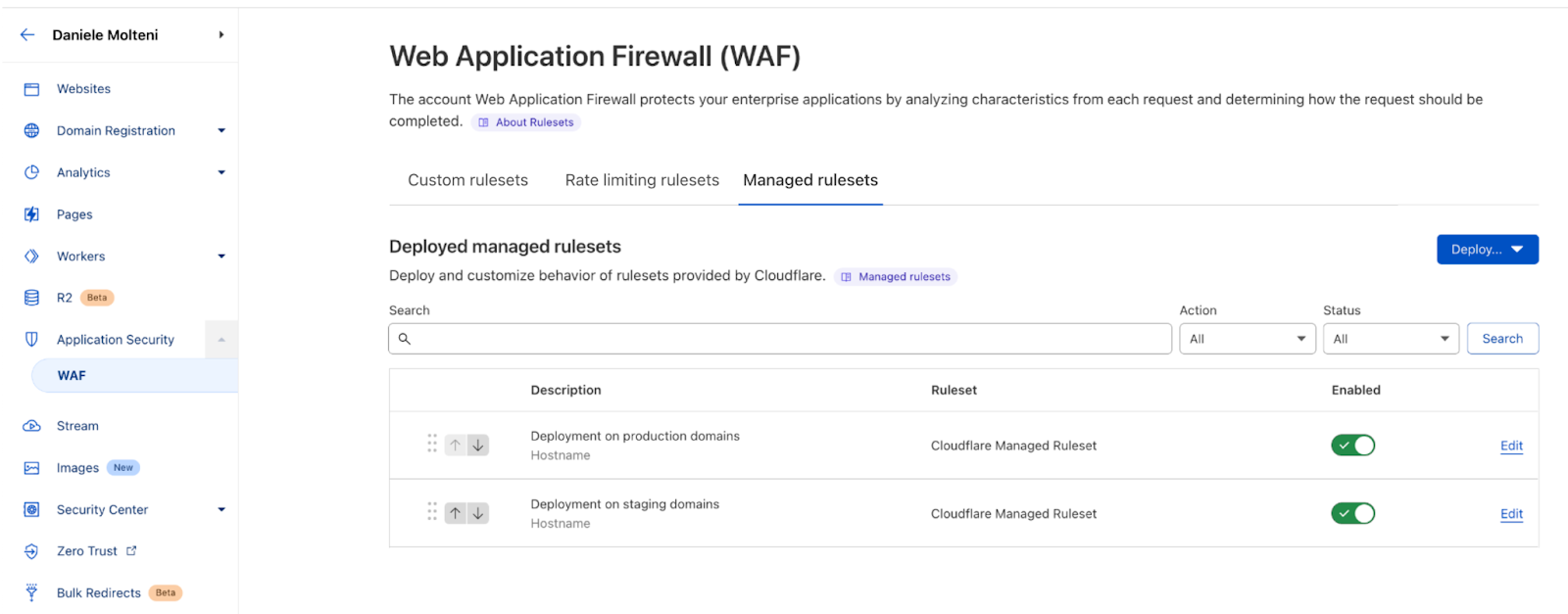
Now, let’s imagine that you need to deal with the simple use case of deploying Cloudflare Managed ruleset across all your production domains.
Without Account WAF you’d need to track down all the correct domains and visit the WAF page of each one of them, deploy the ruleset and possibly add overrides to select only the attack vectors you are interested in. This is messy and mistakes are easy.
With Account WAF, you can now deploy a managed ruleset just once while providing the list of hostnames where you want it on. With deploying here we refer to writing a filter that defines what requests we should run (or execute) the ruleset on. The filter works like a normal WAF Custom Rule, where you can take advantage of the power of the Wirefilter syntax and use any parameter of the HTTP request, metadata and computed values, such as Bot Score or our new WAF Attack Score. For example, you can run a ruleset only on traffic with a specific User Agent, or only on your API traffic.
You can deploy these rulesets multiple times on your account, so you can have different settings for different groups of domains. For example, you might want to deploy OWASP with different sensitivity levels for your staging domains versus your production domains, or enforce a minimum level of security across all zones (e.g. for legal protection or compliance), before tailoring the security posture of the most sensitive domains. Furthermore, if in the future you are going to add a new domain to your production environment, you can simply add it to the rule filter, and we will start protecting these requests too.
It works for all WAF features
You can follow a similar flow if you want to deploy WAF Custom or Rate Limiting rules. However, in this case, to simplify management of large numbers of rules, we introduced the concept of Custom Rulesets. Like with managed rules, a ruleset is a group of rules, this time they are user defined. Like in the example above, you can deploy a custom ruleset on a user-defined filter to scope on what portion of your traffic you want to run these rules.
For example, consider the situation where you want to create two rules for all your domains: one that blocks traffic from a set of countries and then one rule to only allow requests with a non-malicious WAF Attack Score. You will create a custom ruleset with these two rules and then deploy it across your entire account.
One thing to note is that Account WAF rulesets (Managed, Custom and Rate Limiting) can be deployed on traffic to domains on Enterprise plans. You won’t be able to run rulesets on traffic of Free, Pro or Biz domains. This condition is enforced by the UI when writing a deployment filter.
Finally, you can follow the same flow to deploy custom rulesets that contain rate limiting rules. Custom rulesets are designed to contain either custom or rate limiting rules, at this stage these rules cannot be combined in the same ruleset. Please note that the Rate Limiting section will be available in October.
Who gets it?
Account WAF is an Enterprise only feature. If you are an Enterprise customer on our new Advanced plan, you will get access to the new feature automatically this week. If you are not on our Advanced plan, please reach out to your account team to learn more.