All posts by Abhishek Avinash Agawane

Best practices for integrating IAM Roles Anywhere with your PKI

Post Syndicated from Abhishek Avinash Agawane original https://aws.amazon.com/blogs/security/best-practices-for-integrating-iam-roles-anywhere-with-your-pki/

Using temporary credentials is a security best practice to reduce the risk from credentials getting compromised. With AWS IAM Roles Anywhere, now your workloads outside of Amazon Web Services (AWS) will be able to access AWS resources by obtaining temporary security credentials in AWS Identity and Access Management (IAM). IAM Roles Anywhere relies on public key infrastructure (PKI) to establish trust between your AWS account and certificate authorities that issues certificates to your workloads that run outside AWS. PKI involves the generation, distribution, and verification of digital certificates through public key encryption.

In this post, we show you some best practices, considerations, and solutions for integrating your PKI with IAM Roles Anywhere. In this post, we assume that you have a foundational knowledge of IAM and IAM Roles Anywhere. For more information, see the IAM and IAM Roles Anywhere documentation.

Note: As of July 2026, AWS Certificate Manager (ACM) supports exportable public certificates that can be used on workloads outside AWS (containers or on-premises). Additionally, ACM supports the ACME protocol for automated certificate issuance and renewal on external workloads. These capabilities complement IAM Roles Anywhere by providing both identity (using X.509 certificates for IAM Roles Anywhere) and encryption (using ACM public/private certificates) for hybrid environments.

X.509 certificates for workload identity

If you’re running multiple workloads in your infrastructure, you’re probably assigning unique workload identities and specific user permissions. In this environment, your workloads can use PKI tools like Active Directory Certificate Services to centrally manage and monitor the identities and permissions at scale. The same principles of segregating unrelated workloads apply to PKI and IAM Roles Anywhere. If you’re issuing certificates to your workloads today, they can probably be used with IAM Roles Anywhere without any changes.

As shown in Figure 1, the access boundary and permissions of Workload A can be very different from that of Workload B when accessing AWS resources, depending on the organization’s needs. In such scenarios, it’s recommended to establish a unique machine identity for each workload. This can be achieved by issuing a separate X.509 certificate with distinct identity attributes signed by your certificate authority (CA). To set up an effective PKI solution for machine identities, you must configure the appropriate certificate attributes and anchor the trust model around those attributes.
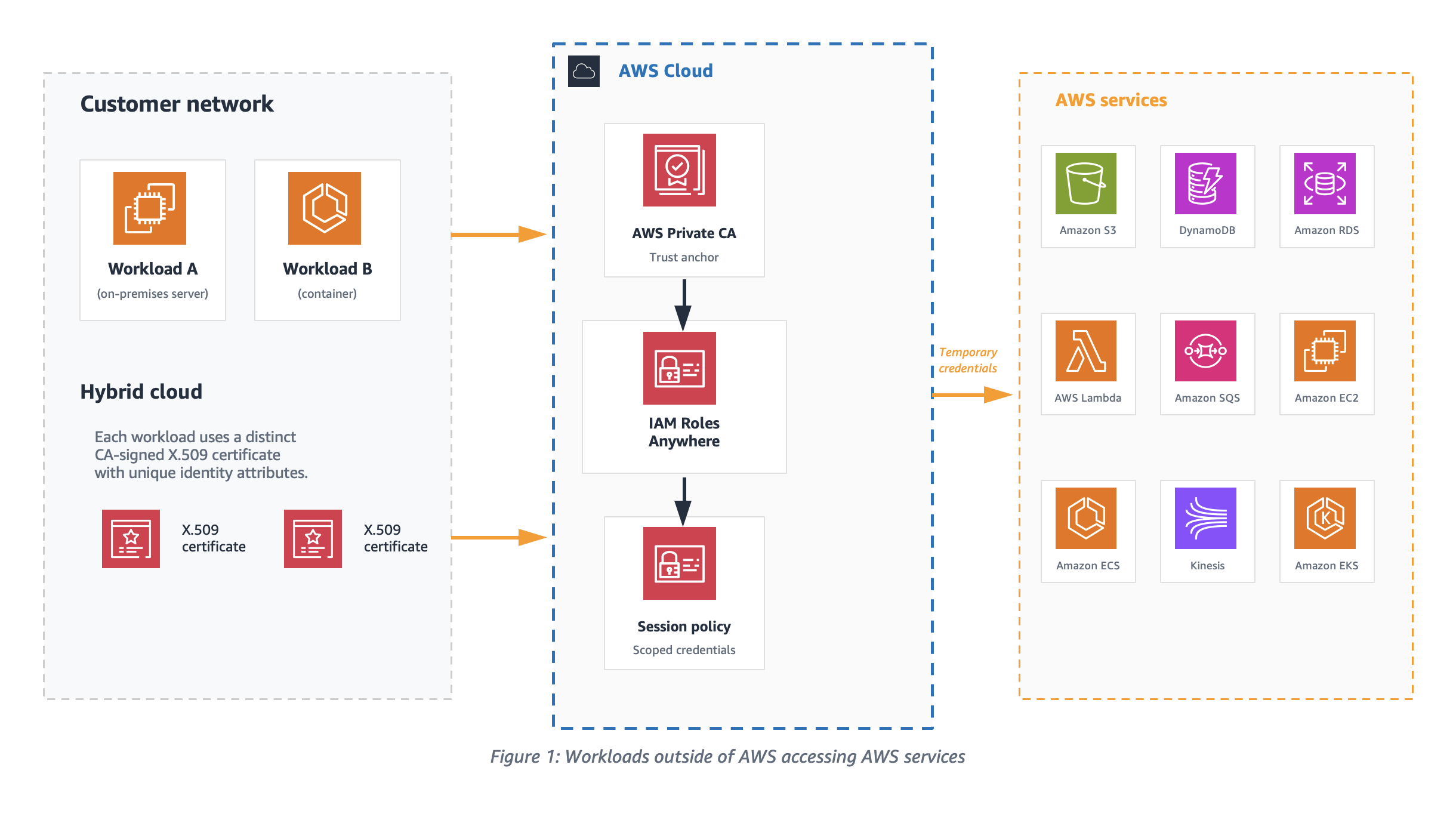
Figure 1: Workloads outside of AWS accessing AWS services

Figure 1: Workloads outside of AWS accessing AWS services

Temporary access credentials

Workloads with distinct CA signed X.509 certificates exchange certificates with IAM, as shown in Figure 2, to get temporary security credentials for the session. The signature validation process used by IAM Roles Anywhere verifies the certificate issuer and the subject before providing the temporary credentials. To enable this verification process, an IAM Roles Anywhere trust model should be set up by either uploading your CA’s digital certificate as a trust anchor or by referencing an existing AWS Private Certificate Authority (AWS Private CA) certificate. In this post, we focus on using a trust anchor.

To help define the appropriate scope for the temporary credentials, it’s recommended to configure distinct IAM roles for each workload to assume. Workloads must use X.509 certificates issued by your CA. These certificates are exchanged with IAM to get temporary security credentials for the session.
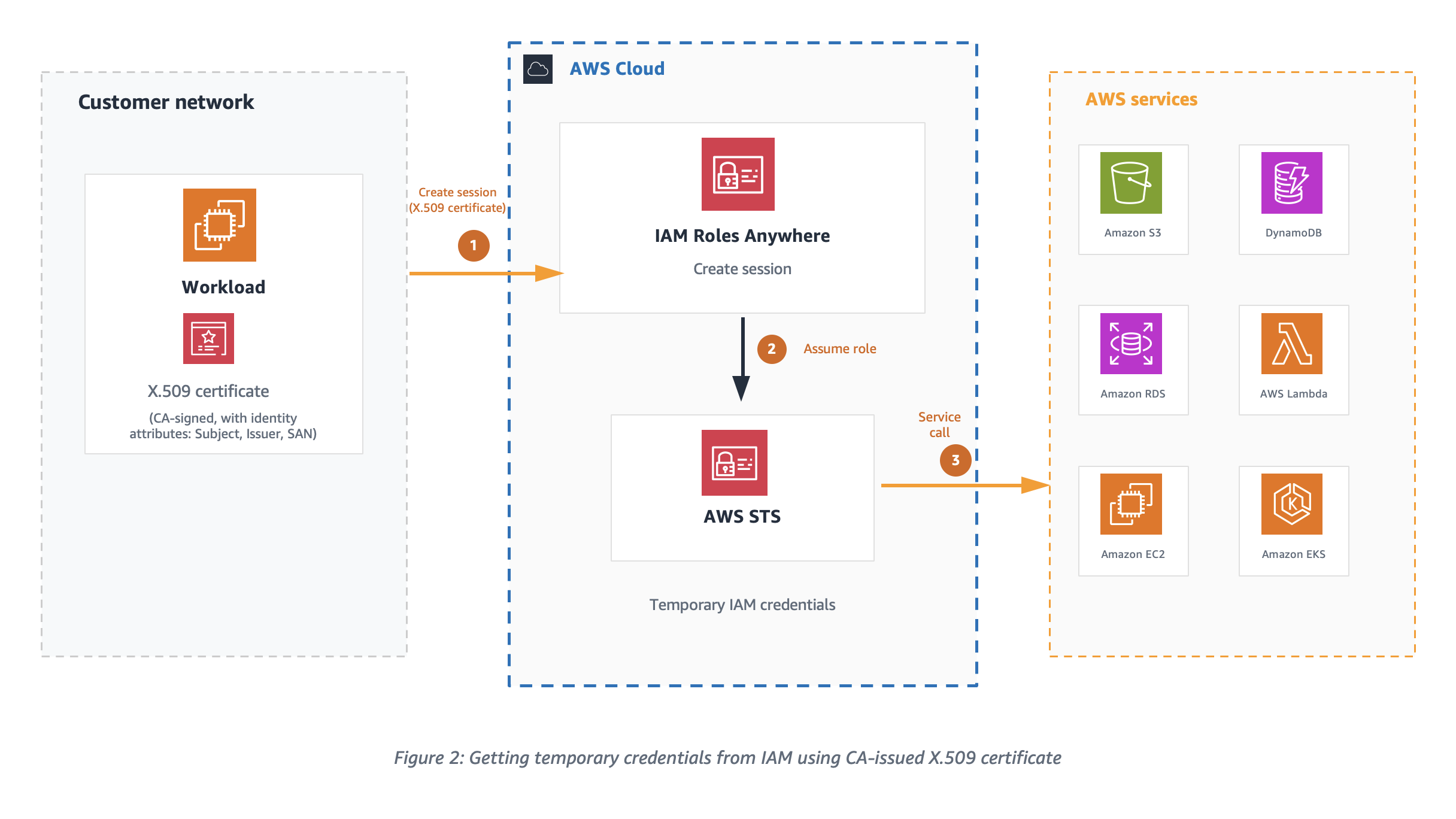
Figure 2: Getting temporary credentials from IAM using CA issued X.509 certificate

Figure 2: Getting temporary credentials from IAM using CA issued X.509 certificate

Setting up a trust model for IAM Roles Anywhere is a three-step process, see Extend AWS IAM Roles Anywhere to workloads outside of AWS for more information.

  1. Create a trust anchor.
  2. Set up IAM roles with the IAM Roles Anywhere trust policy that will be assumed by your non-AWS workload.
  3. Configure profiles with IAM roles and attach relevant session policies. This instructs IAM Roles Anywhere to use your selected session policies whenever you request credentials for any of the attached roles.

Trust model

The trust model is centered around setting up the right trust relationship between IAM Roles Anywhere and your CA by configuring a trust anchor. The model connects the role, the IAM Roles Anywhere service principal, and identities encoded in X509 certificates that are issued by a CA.

Certificate attributes

Certificates are a binary record with encoded key/value pairs as certificate attributes. Let’s look at one of the X.509 certificates to understand different attributes of certificate that are important for IAM Roles Anywhere PKI validation.

The following is an example PEM encoded certificate file that can be decoded with tools like openssl.

-----BEGIN CERTIFICATE-----
MIIKOzCCCSOgAwIBAgIQDlnyZvBeKjgHm1jJ++CbgDANBgkqhkiG9w0BAQsFADBE
MQswC ...........
-----END CERTIFICATE----


Certificate:
    Data:
        Version: 3 (0x2)
        Serial Number:
            e0:5d:b7:72:56:fa:75:e3
    Signature Algorithm: ecdsa-with-SHA512
        Issuer: C=US, ST=CA, L=San Francisco, O=MyCompany Inc., OU=AC, CN=MyCompany CA
        Validity
            Not Before: Sep 15 00:09:17 2023 GMT
            Not After : Sep 18 00:09:17 2023 GMT
        Subject: C=US, O=MyCompany, OU=eCommerce, CN=WorkloadA
        Subject Public Key Info:
            Public Key Algorithm: id-ecPublicKey
                Public-Key: (384 bit)
                pub: 
                    04:3b:74:e1:68:06:fa:b0:3d:fe:f7:5f:74:80:05:
        X509v3 extensions:
            X509v3 Subject Alternative Name: 
                DNS:ecommerce.mycompany.com, DNS:*ecommerce.mycompany.com, URI:spiffe://mycompany.com/workload/ecommerce
            X509v3 Basic Constraints: critical
                CA:FALSE
            X509v3 Key Usage: critical
                Digital Signature
    Signature Algorithm: ecdsa-with-SHA512
         30:64:02:30:19:a7:a0:33:49:ce:e1:cb:76:6e:c0:f3:c5:66:

IAM Roles Anywhere extracts values from the subject Common Name (CN), issuer, and Subject Alternative Name (SAN) fields of the authenticating certificate and makes them available for policy evaluation through the sts:sourceIdentity and principal tags. When configuring your PKI, set short validity periods on the certificates issued to workloads. Short-lived certificates limit the window of exposure if a certificate is compromised and reduce the need for active revocation.

"aws:PrincipalTag/x509Subject/CN": "WorkloadA" 
"aws:PrincipalTag/x509Issuer/CN": "MyCompany CA" 
"aws:PrincipalTag/x509SAN/DNS": "ecommerce.mycompany.com" 
"aws:PrincipalTag/x509SAN/URI": "spiffe://mycompany.com/workload/ecommerce" "aws:PrincipalTag/x509SAN/Name/CN": "WorkloadA"

Note: An empty Subject CN in a certificate isn’t supported by IAM Roles Anywhere.

Trust policy and effective permissions of credentials

IAM Roles Anywhere clients fetch temporary credentials for IAM Roles using the API method CreateSession. To successfully authorize this API call, the IAM role trust policy should trust the IAM Roles Anywhere service principal as shown in the following example.

{
    "Version": "2012-10-17",
    "Statement": [
        {
            "Effect": "Allow",
            "Principal": {
                "Service": "rolesanywhere.amazonaws.com"
            },
            "Action": [
                "sts:AssumeRole",
                "sts:TagSession",
                "sts:SetSourceIdentity"
            ],
            "Condition": {
                "StringEquals": {
                    "aws:PrincipalTag/x509Issuer/CN": "MyCompany CA",
                    "aws:PrincipalTag/x509Subject/CN": "WorkloadA",
                    "aws:PrincipalTag/x509SAN/Name/CN": "WorkloadA"
                },
                "ArnEquals": {
                    "aws:SourceArn": [
                        "arn:aws:rolesanywhere:region:account:trust-anchor/TA_ID"
                    ]
                }
            }
        }
    ]
}

As a security best practice, consider using additional condition statements to evaluate the session PrincipalTag attributes extracted from the certificate to further restrict authorization of temporary credentials. If the workloads have ephemeral certificates with a dynamic subject CN, then the issuer or SAN principal tags can be used to define condition statements in the trust policy. The trust anchor shown in the preceding trust policy helps establish the trust between IAM Roles Anywhere and the CA in your PKI.

Plan for trust anchor placement

Depending on the CA platform, you can configure one or more intermediate certificates in your PKI certificate hierarchy, as shown in Figure 3. The certificate level the trust anchor is placed at affects which end-entity certificates IAM Roles Anywhere accepts, and therefore which workloads are authorized to assume a role. To create a trust anchor, export the certificate bundle for the issuing CA certificate from your external CA platform in PEM-encoded format and upload it to the trust anchor console.
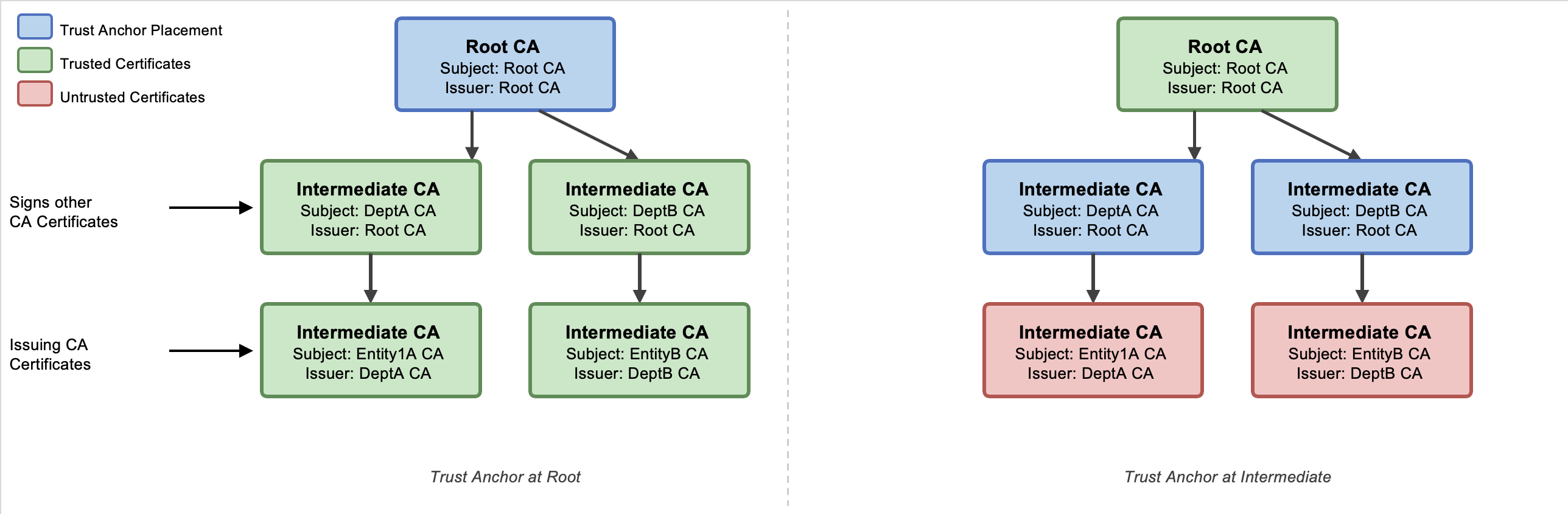
Figure 3: Certificate hierarchy in an external PKI

Figure 3: Certificate hierarchy in an external PKI

See the Solution deployment section to onboard a sample solution and verify your certificate bundle.

Fine-grained access control is vital for security because it allows organizations to precisely define and restrict permissions, minimizing the risk of unauthorized access and data breaches. The effective permissions of the temporary security credentials are an intersection of resource-based, identity-based, and session policies as shown in Figure 4. By setting up the trust anchor and profile configuration in IAM Roles Anywhere with session policies, you can limit the permissions for each session.
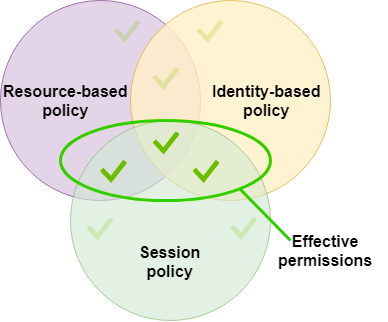
Figure 4: Effective permissions of session credentials

Figure 4: Effective permissions of session credentials

Credential helper

To obtain temporary security credentials from IAM Roles Anywhere, use the credential helper tool. This tool is compatible with the credential_process feature available across the AWS SDKs. The credential helper manages the process of obtaining temporary security credentials using IAM Roles Anywhere and returns them in JSON format. The private key of the workload and its CA signed certificate are the two critical parameters provided to the credential helper tool. To use this tool, you need both an end-entity certificate and a trust anchor created in IAM Roles Anywhere. As of December 2024, the credential helper (version 1.4.0 and later) supports Trusted Platform Module (TPM) 2.0.

The following is an example of how to obtain temporary security credentials:

$ ./aws_signing_helper credential-process \
--certificate /path/to/certificate \
--private-key /path/to/private-key \
--trust-anchor-arn arn:aws:rolesanywhere:region:account:trust-anchor/TA_ID \
--profile-arn arn:aws:rolesanywhere:region:account:profile/PROFILE_ID \
--role-arn arn:aws:iam::account:role/role-name-with-path

When credential-process is used with AWS SDKs, the temporary credentials are stored in memory and refreshed automatically. However, the AWS Command Line Interface (AWS CLI) invokes credential-process on every command. Each invocation creates a new IAM Roles Anywhere session, which adds latency to every CLI call. To avoid this delay when using the AWS CLI, we recommend using the update command, which writes refreshed credentials to a file that the CLI reads on each invocation without calling credential-process again.

When you use update, credentials are written to a credential file on disk and any user or process who can read the credential file might be able to read and use those AWS credentials, so it’s recommended to use serve unless your business has a specific use case that needs to read AWS credentials from a file. The serve command can be used to vend temporary credentials through an endpoint running on the local host using the same URIs and request headers as Instance Metadata Service Version 2 (IMDSv2). When using serve, no AWS configuration files are needed because the AWS SDKs can discover the server endpoint.

Just-in-time compared to short-lived certificates as workload identities

To help mitigate the risk around the exposure of your business-critical resources to compromised certificate user sessions, it’s recommended to use certificates with just-in-time credentials or short-lived access credentials. Just-in-time certificates are issued by a CA for immediate use for authentication on a system or application. The CA uses the roles and policies defined in IAM to determine when, and under what conditions, a workload can establish a session. With just-in-time access, admins don’t have to worry about revoking access if the users’ access roles change. Because the access credentials are recreated for each access request, any role changes can be applied in real time. Just-in-time access requires support from your CA, so verify compatibility with your CA before implementing it.

It’s recommended to tailor the validity periods for short-lived certificates to align with business requirements, workload lifecycle, and your organization’s risk tolerance. AWS Private CA offers a short-lived CA mode specifically designed for certificates with validity periods under 7 days. This mode is priced at $50 per month (compared to $400 per month for general-purpose CA mode), making it cost-effective for high-volume, ephemeral workload identities such as containers and serverless functions. For more information, see AWS Private Certificate Authority and How to use AWS Private CA short-lived certificate mode. See Zero trust on AWS for information about how short-lived credentials support a zero trust architecture.

Best practices for private key storage

Safeguarding private keys is of paramount importance in any environment. A private key is created by the certificate owner when requesting certificates with a Certificate Signing Request (CSR). The CA providing your certificate doesn’t create or have your private key. In fact, it’s recommended that no one outside your administrators should ever be given access to this material. Guardrails should be implemented to make sure the keys aren’t stored in an online repository.

Using the credential helper with IAM Roles Anywhere, you can integrate with PKCS #11-compatible modules. For implementation details, see How to implement cryptographic modules to secure private keys used with IAM Roles Anywhere. With the credential helper (version 1.1.0 and later), IAM Roles Anywhere supports PKCS #11 integration, so you can use private keys stored in hardware security modules (HSMs) or software-based secure stores and avoid storing them to disk. Additionally, as of December 2024, the credential helper supports Trusted Platform Module (TPM) 2.0, enabling private keys to be generated inside the TPM and marked as non-exportable. With TPM-backed keys, the private keys can’t be extracted even if the workload host is compromised. This is the strongest private key protection available for on-premises and hybrid workloads using IAM Roles Anywhere.

If your organization doesn’t implement PKCS #11–compatible modules, IAM Roles Anywhere supports credential helper version 1.0.5 for X.509 certificates and private keys stored in macOS and Windows certificate stores. This delegates the signing operations to keys stored within those OS-specific certificate stores. In Windows, both CryptoAPI and Cryptography API: Next Generation (CNG) are supported; in macOS, Keychain is supported. In these environments, the private key will never be directly readable, and the signing operation would be delegated to the secure store instead, which will improve security posture of your environment. If you have multiple certificates, then use the --cert-selector flag of the credential helper tool to search for a specific certificate (and associated private key) through the certificate subject, issuer, and serial number. The corresponding keys are x509Subject, x509Issuer, and x509Serial, respectively. These keys can be specified either through a JSON file format or through the command line. The following is an example of both approaches:

If you want to use a JSON file, it should be similar to this:

[
  {
    "Key": "x509Subject",
    "Value": "CN=Subject"
  },
  {
    "Key": "x509Issuer",
    "Value": "CN=Issuer"
  },
  {
    "Key": "x509Serial",
    "Value": "15D19632234BF759A32802C0DA88F9E8AFC8702D"
  }
]

If the preceding example is placed in a file called selector.json, it can be specified with the --cert-selector flag through file://path/to/selector.json.

The same certificate selector argument can be specified through the command line as shown in the following:

--cert-selector Key=x509Subject, Value=CN=Subject Key=x509Issuer, Value=CN=Issuer Key=x509Serial, Value=15D19632

Monitoring trust anchor certificates

Monitoring certificate expiry in PKI is crucial for maintaining secure communication, because expired certificates can lead to authentication failures, leaving systems vulnerable to unauthorized access. Compliance and regulatory requirements often mandate timely renewal of certificates, making monitoring certificate expiry essential to avoid legal penalties and maintain organizational integrity.

Using IAM Roles Anywhere, you can receive notifications for CA certificate expiry and end-entity certificate expiry. IAM Roles Anywhere can send metrics, events, and notifications through multiple notification channels as shown in the following table:

Event Channel Threshold Enabled
CA certificate expiry CloudWatch, Amazon EventBridge, and AWS Health 45 days before expiry TRUE
End-entity certificate expiry EventBridge and AWS Health 45 days before expiry TRUE

The preceding notifications thresholds are default settings, which you can customize using the steps in Customize notification settings in IAM Roles Anywhere.

Best practices for trust anchor certificate rotation

Consider rotating your certificates using blue/green deployments to seamlessly roll out new certificates without affecting service availability. Use automation to integrate certificate rotation testing in your blue/green deployment pipeline. See the sample AWS CloudFormation template in the Solution deployment section to build your automation pipeline.

As shown in Figure 5, two trust anchors have been created; one for each environment. Using this approach, you can test the certificate rotation process in a controlled staging environment before applying it to the production environment, thus reducing the risk of certificate-related outages.
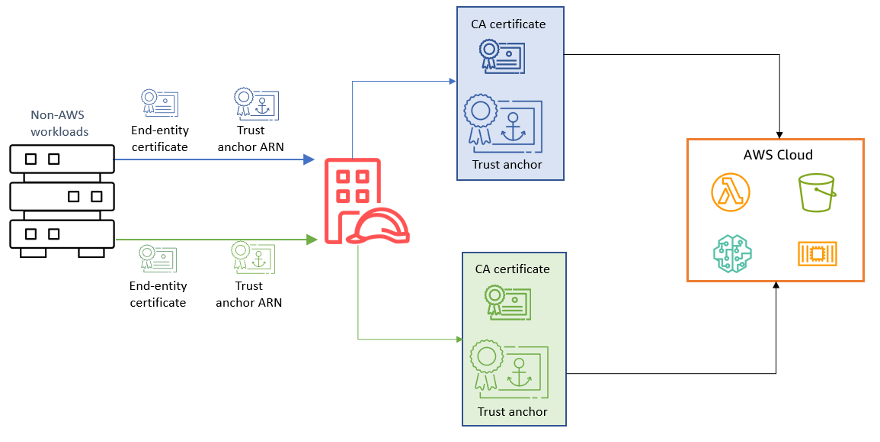
 Figure 5: Trust anchor certificate rotation in blue/green deployment

Figure 5: Trust anchor certificate rotation in blue/green deployment

Solution deployment

The sample solution template is available in the IAM Roles Anywhere — External PKI Integration repository on GitHub. It contains the following main steps:

  1. Creates a distinct IAM role with policies scoped to the resources that workload requires.
  2. Assigns a trust relationship to a IAM Roles Anywhere principal.
  3. Creates a trust anchor using a certificate bundle from an external CA.
  4. Creates a profile with the required IAM Roles.

Parameters for this deployment are shown in the following table:

Parameter Required Default Description
TrustAnchorCertificateBody Yes — PEM-encoded X.509 certificate of your CA (includes BEGIN and END markers)
WorkloadSubjectCN No WorkloadA Subject CN from the workload certificate, used in trust policy conditions
WorkloadIssuerCN No MyCompany CA Issuer CN from the CA certificate, used in trust policy conditions
WorkloadSANCN No WorkloadA SAN CN from the workload certificate, provides additional identity assertion
SessionDurationSeconds No 3600 Maximum session duration in seconds (900–43200)
NotificationEmail No (empty) Email address for certificate expiry notifications. When provided, creates an Amazon Simple Notification Service (Amazon SNS) topic and an EventBridge rule

Important: The SessionDurationSeconds value must not exceed the IAM role’s MaxSessionDuration setting, which defaults to 3600 seconds (1 hour). If you request a longer session than the role allows, the CreateSession API returns an error. The companion template keeps both values in sync by setting the role’s MaxSessionDuration to the same parameter value. If you configure the role separately, update its MaxSessionDuration to match your desired session length. For more information, see IAM Roles Anywhere CreateSession API.

If the workload’s subject CN (WorkloadSubjectCN) doesn’t match the x509Subject CN of the authenticating certificate, the CreateSession call is denied. The same conditional verification applies to WorkloadIssuerCN and WorkloadSANCN.

The template enforces three certificate attribute conditions in the IAM trust policy: issuer CN, subject CN, and SAN CN must all match the values configured as parameters. Additionally, the trust policy scopes role assumption to the specific trust anchor Amazon Resource Name (ARN), preventing other trust anchors in the same account from assuming that role.

Conclusion

In this post, we discussed how AWS IAM Roles Anywhere, empowered by X.509 certificates, introduces a dynamic and secure way to manage workload identities and issue temporary access credentials. By understanding the trust model, using certificate attributes, and implementing fine-grained authorization, organizations can gain granular control over the effective permissions of these credentials.

The choice between just-in-time and short-lived certificates as workload identities depends on your specific requirements.

Adhering to best practices for private key storage is essential to maintain the integrity of your security infrastructure. Regularly rotating trust anchor certificates helps ensure the long-term trustworthiness of your system.

As you embark on your journey to implement IAM Roles Anywhere and integrate it with your PKI, remember that a well-architected approach to certificate management is a cornerstone of robust and resilient cloud security.

For additional deployment guidance, see Planning for your IAM Roles Anywhere deployment, which covers end-to-end deployment planning including network architecture, monitoring, and operational considerations.

If you have questions, you can start a new thread on AWS re:Post or reach out to AWS Support.

Abhishek Agawane

Abhishek Avinash Agawane

Abhishek is a Security Consultant at Amazon Web Services with more than 8 years of industry experience. He helps organizations architect resilient, secure, and efficient cloud environments, guiding them through complex challenges and large-scale infrastructure transformations. He has helped numerous organizations enhance their cloud operations through targeted optimizations, robust architectures and best-practice implementations.

Manoj Gupta

Manoj Gupta

Manoj is a Senior Solutions Architect at AWS, based in San Francisco. With over 4 years of experience at AWS, he works closely with customers to build optimized AI/ML powered solutions and cloud infrastructure. His primary focus areas are data, AI/ML, and security, helping organizations modernize their technology stacks. Outside of work, he enjoys outdoor activities and traveling with family.

Implementing HTTP Strict Transport Security (HSTS) across AWS services

Post Syndicated from Abhishek Avinash Agawane original https://aws.amazon.com/blogs/security/implementing-http-strict-transport-security-hsts-across-aws-services/

Modern web applications built on Amazon Web Services (AWS) often span multiple services to deliver scalable, performant solutions. However, customers encounter challenges when implementing a cohesive HTTP Strict Transport Security (HSTS) strategy across these distributed architectures.

Customers face fragmented security implementation challenges because different AWS services require distinct approaches to HSTS configuration, leading to inconsistent security postures.Applications using Amazon API Gateway for APIs, Amazon CloudFront for content delivery, and Application load balancers for web traffic lack unified HSTS policies, leading to complex multi-service environments. Security scanners flag missing HSTS headers, but remediation guidance is scattered across service-specific documentation, causing security compliance gaps.

HSTS is a web security policy mechanism that protects websites against protocol downgrade attacks and cookie hijacking. When properly implemented, HSTS instructs browsers to interact with applications exclusively through HTTPS connections, providing critical protection against man-in-the-middle issues.

This post provides a comprehensive approach to implementing HSTS across key AWS services that form the foundation of modern cloud applications:

  1. Amazon API Gateway: Secure REST and HTTP APIs with centralized header management
  2. Application Load Balancer: Infrastructure-level HSTS enforcement for web applications
  3. Amazon CloudFront: Edge-based security header delivery for global content

By following the implementation steps in this post, you can establish a unified HSTS strategy that aligns with AWS Well-Architected Framework security principles while maintaining optimal application performance.

Understanding HSTS security and its benefits

HTTP Strict Transport Security is a web security policy mechanism that helps protect websites against protocol downgrade attacks and cookie hijacking. When a web server declares HSTS policy through the Strict-Transport-Security header, compliant browsers automatically convert HTTP requests to HTTPS for the specified domain. This enforcement occurs at the browser level, providing protection even before the initial request reaches your infrastructure.

HSTS enforcement applies specifically to web browser clients. Most programmatic clients (such as SDKs, command line tools, or application-to-application communication) don’t enforce HSTS policies. For comprehensive security, configure your applications and infrastructure to only use HTTPS connections regardless of client type rather than relying solely on HSTS for protocol enforcement.

HTTP to HTTPS redirection enforcement on the server ensures future requests reach your applications over encrypted connections. However, it leaves a security gap during the initial browser request. Understanding this gap helps explain why client-side HSTS serves as an essential security layer in modern web applications.

For example, when users access web applications, the typical flow with redirects configured is as follows:

  1. User enters example.com in their browser.
  2. Browser sends an HTTP request to http://example.com.
  3. Server responds with HTTP 301/302 redirect to https://example.com.
  4. Browser follows redirection and establishes HTTPS connection

The initial HTTP request in step 2 creates an opportunity for protocol downgrade issues. An unauthorized party positioned between the user and your infrastructure can intercept this request and respond with content that appears legitimate while maintaining an insecure connection. This technique, known as SSL stripping, can occur even when your server-side AWS infrastructure is properly configured with HTTPS redirects.

HSTS addresses this security gap by moving security enforcement to the browser level. After a browser receives an HSTS policy, it automatically converts HTTP requests to HTTPS before sending them over the network:

  1. User enters example.com in browser.
  2. Browser automatically converts to HTTPS due to stored HSTS policy.
  3. Browser sends HTTPS request directly to https://example.com.
  4. No initial HTTP request removes the opportunity for interception.

This browser-level enforcement provides protection that complements your AWS infrastructure security configurations, creating defense in depth against protocol downgrade issues.

Although current browsers warn about insecure connections, HSTS provides programmatic enforcement. This prevents unauthorized parties from exploiting the security gap because they can’t forge valid HTTPS certificates for protected domains.

The security benefits of HSTS extend beyond simple protocol enforcement. HSTS helps prevent protocol downgrade issues after HSTS policy is established in the browser. It mitigates against man-in-the-middle issues, preventing unauthorized parties from intercepting communications. It also helps prevent unauthorized session access to protect against credential theft and unintended session access.
HSTS requires HTTPS connections and removes the option to bypass certificate warnings.

This post focuses exclusively on implementing the HTTP Strict-Transport-Security header. Although the examples include additional security headers for completeness, detailed configuration of those headers is beyond the scope of this post.

Key use cases for HSTS implementation

HSTS protects scenarios that HTTP redirects miss. For example, when legacy systems serve mixed content, or when SSO flows redirect users between providers, HSTS keeps connections encrypted throughout.

Applications serving both modern HTTPS content and legacy HTTP resources face protocol downgrade risks. When users access example.com/app that loads resources from legacy.example.com, HSTS prevents browsers from making initial HTTP requests to any subdomain, eliminating the vulnerability window during resource loading.

SSO implementations redirecting users between identity providers and applications create multiple HTTP request opportunities. Due to HSTS, authentication tokens and session data remain encrypted throughout the entire SSO flow, preventing credential interception during provider redirects.

Microservices architectures using API Gateway often involve service-to-service communication and client redirects. HSTS protects API endpoints from protocol downgrade during initial client connections, which means that API keys and authentication headers are not transmitted over HTTP.

Applications using CloudFront with multiple origin servers face security challenges when origins change or fail over. HSTS prevents browsers from falling back to HTTP when accessing cached content or during origin failover scenarios, maintaining encryption even during infrastructure changes.

From an AWS Well-Architected perspective, implementing HSTS demonstrates adherence to the defense in depth principle by adding an additional layer of security at the application protocol level. This approach complements other AWS security services and features, creating a comprehensive security posture that helps to protect data both in transit and at rest.

Implementing HSTS with Amazon API Gateway

Amazon API Gateway lacks built-in features to enable HSTS for the API resources. There are several different ways to configure HSTS headers in HTTP APIs and REST APIs.
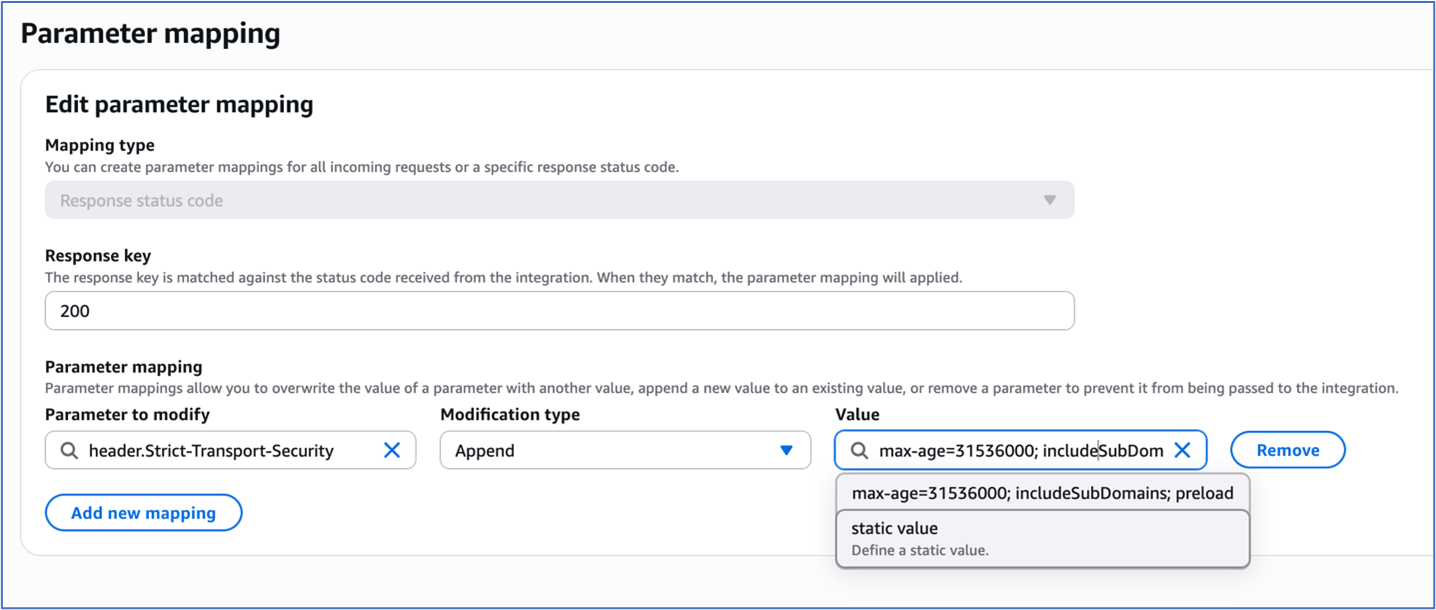
For HTTP APIs, you can configure response parameter mapping to set HSTS headers when it’s invoked using a default endpoint or custom domain.

To configure response parameter mapping:

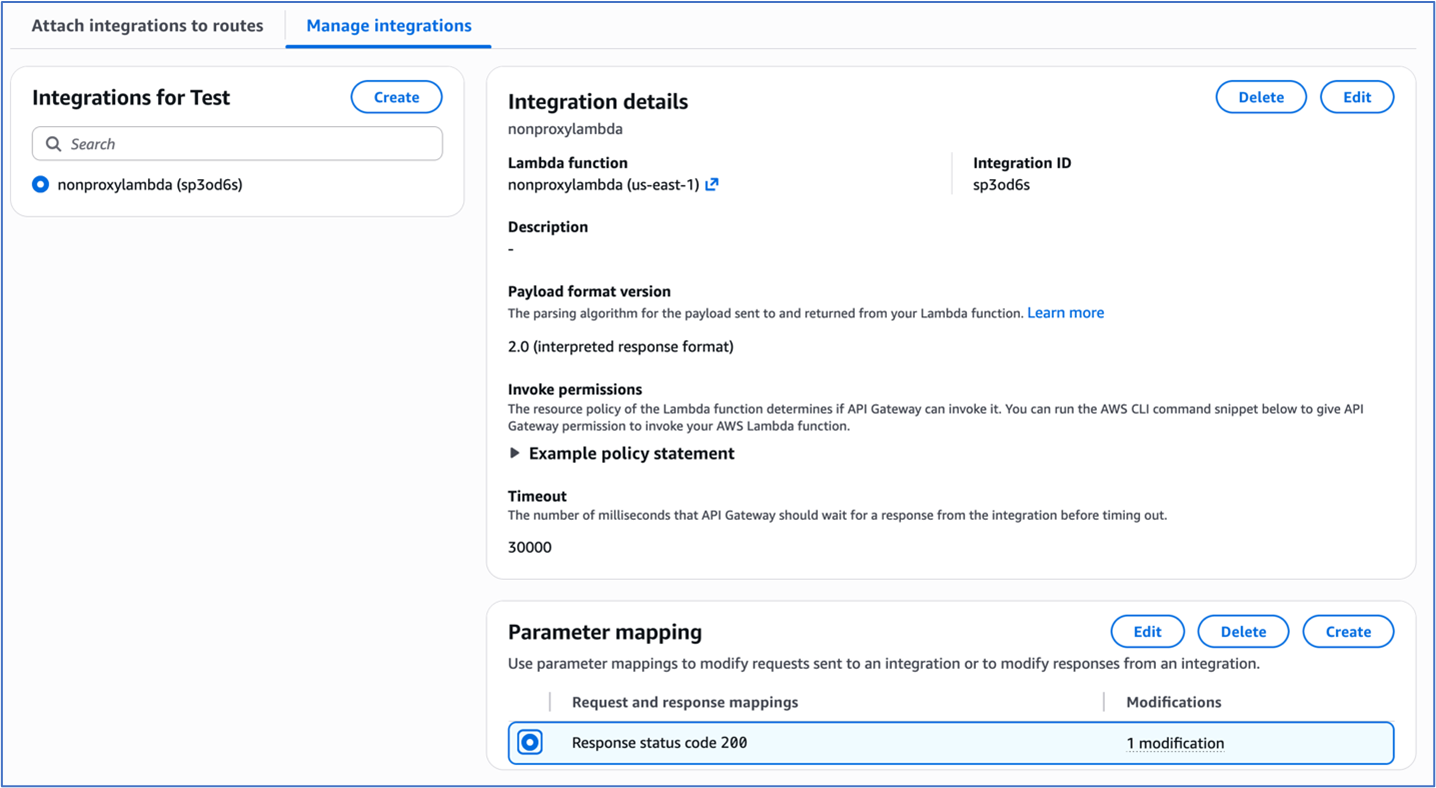
  1. Navigate to your desired HTTP API’s route configuration in the AWS API Gateway console
  2. Access the route’s integration settings under Manage integrations tab.
Figure 1: Integration settings of the HTTP Api

Figure 1: Integration settings of the HTTP Api

  1. To configure parameter mapping, under Response key, enter 200.
  2. Under Modification type, select Append in the dropdown menu.
  3. Under “Parameter to modify”, enter header.Strict-Transport-Security
  4. Under Value, enter max-age=31536000; includeSubDomains; preload.
Figure 2: Parameter Mapping for the HTTP Api integration

Figure 2: Parameter Mapping for the HTTP Api integration

REST APIs in Amazon API Gateway offer more granular control over HSTS implementation through both proxy and non-proxy integration patterns.

For proxy integrations, the backend service assumes responsibility for HSTS header generation. For example, an AWS Lambda proxy integration must return the HSTS headers in its response as shown in the following code example:

import json 
def lambda_handler(event, context):     
	return {         
        'statusCode': 200,         
        'headers': {             
            'Strict-Transport-Security': 'max-age=31536000; includeSubDomains; preload'         
        },         
        'body': json.dumps('Secure response with HSTS headers')     
    }

For non-proxy integrations, the HSTS headers must be returned by the Rest API by implementing one of two methods, either mapping templates or method response.

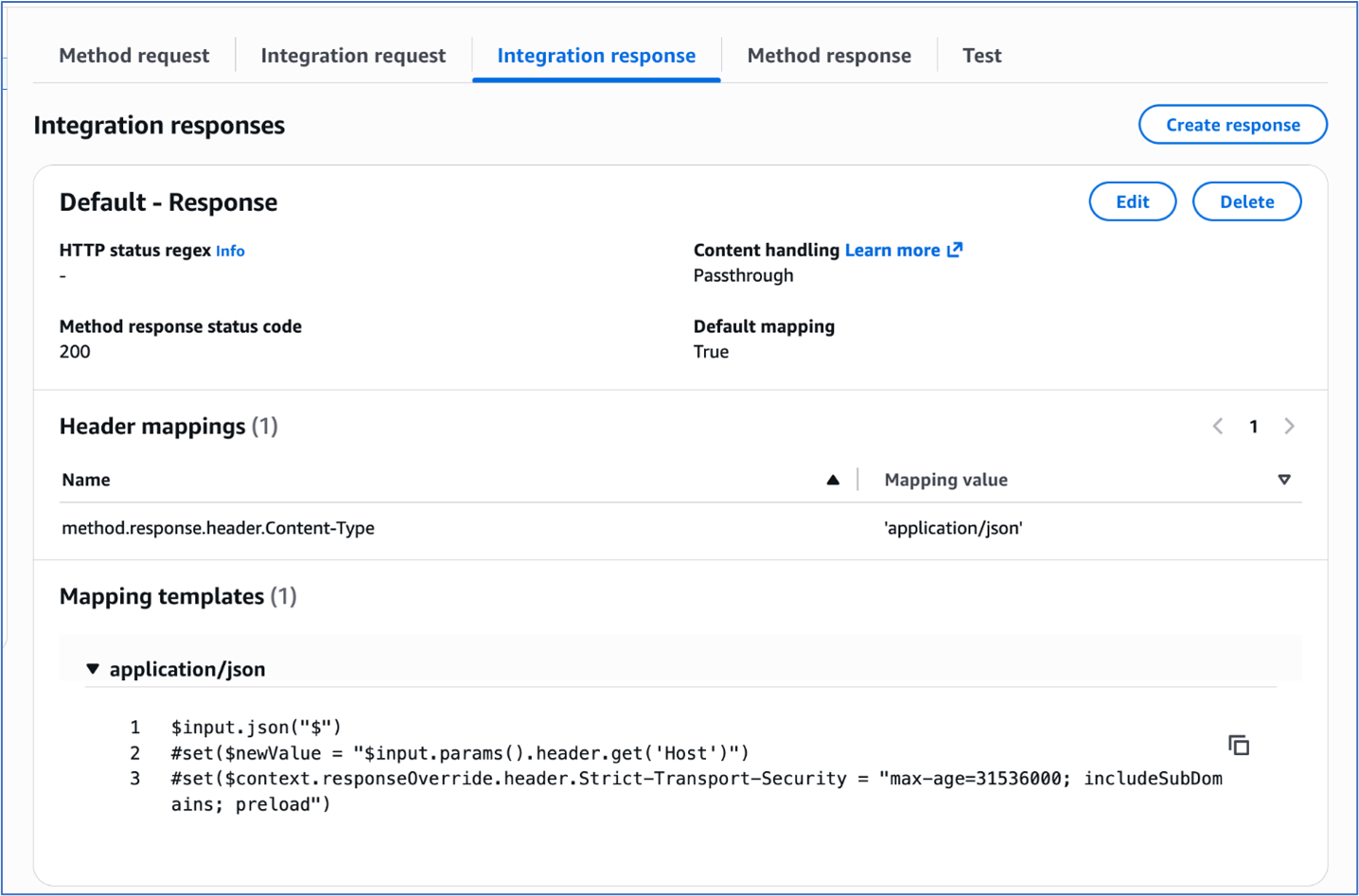
In the mapping templates method, the mapping template is used to configure the HSTS headers. The Velocity Template Language (VTL) for the mapping template is used for dynamic header generation. To implement this method:

  1. Navigate to the desired REST API and click on the method for the desired resource.
  2. Under the ‘Integration response’ tab, use the following mapping template to set the response headers:
$input.json("$") 
#set($newValue = "$input.params().header.get('Host')") 
#set($context.responseOverride.header.Strict-Transport-Security 
= "max-age=31536000; includeSubDomains; preload")

Figure 3: Adding mapping template to integration response of the Rest Api

Figure 3: Adding mapping template to integration response of the Rest Api

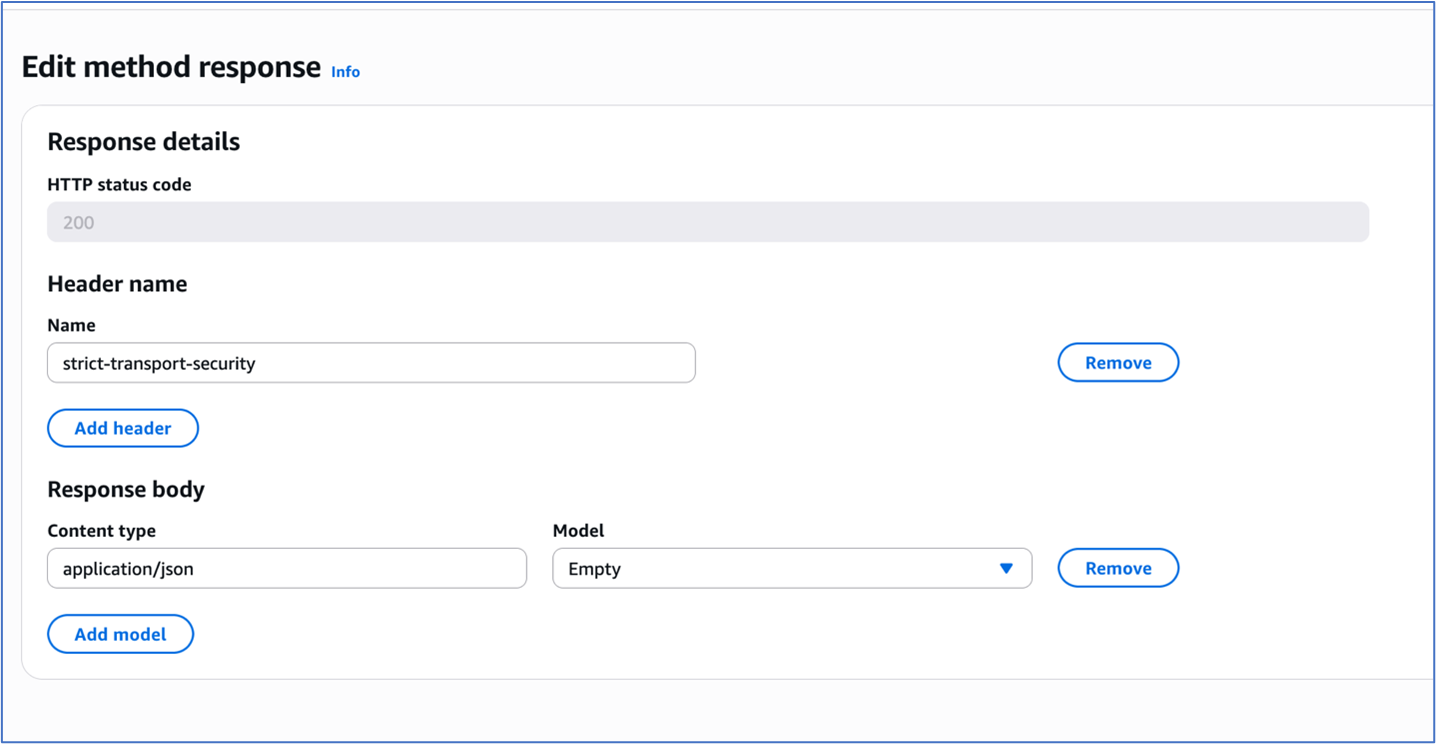
The ‘Method response’ tab provides declarative configuration through explicit header mapping in the configuration. To implement this method:

  1. Navigate to your desired REST API and select the method for the desired resource.
  2. Choose Method response and under Header name, add the HSTS header strict-transport-security.
Figure 4: Method response of the Rest Api

Figure 4: Method response of the Rest Api

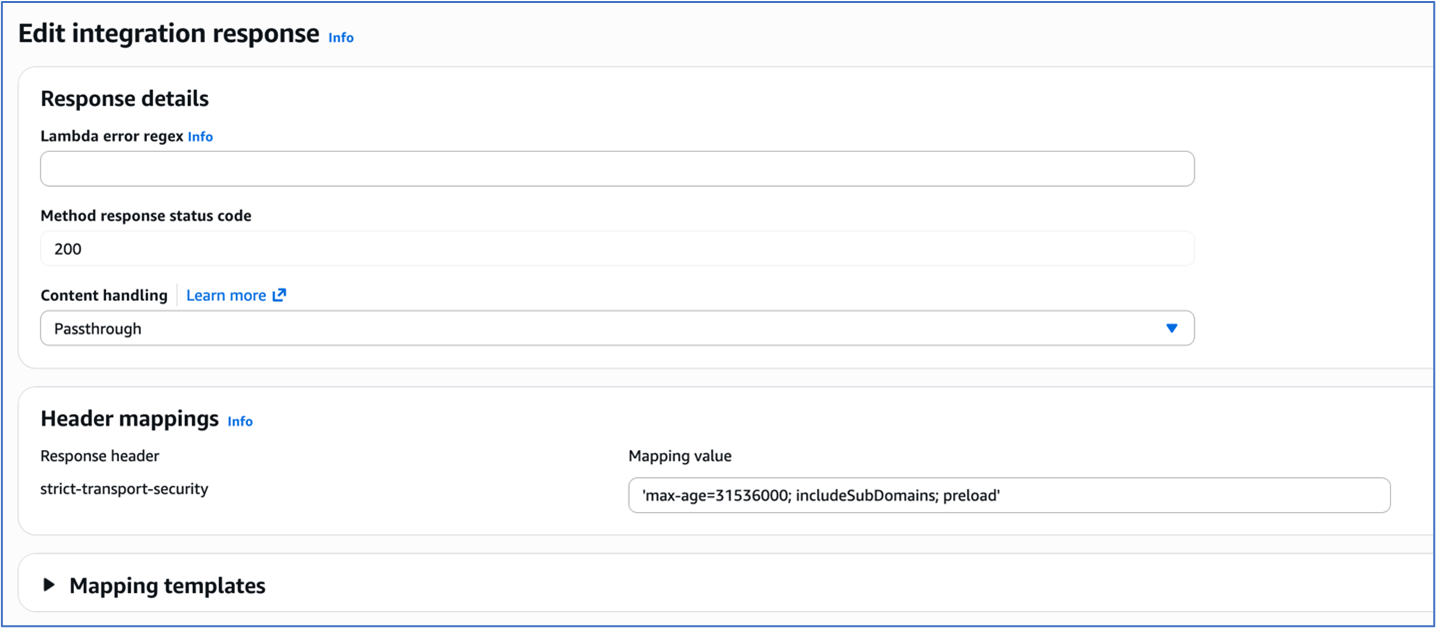
3. Choose Integration response and under Header mappings, enter the HSTS header strict-transport-security. Add the Mapping value for the header as max-age=31536000; includeSubDomains; preload.

Figure 5: Integration response of the Rest Api

Figure 5: Integration response of the Rest Api

To test and validate, use the following command:

Verify HSTS implementation for both HTTP API and REST API using curl with response headers logged:

curl -i https://your-api-gateway-url.execute-
api.region.amazonaws.com/stage/resource

The expected response should include:

HTTP/2 200 

date: Tue, 20 Sep 2025 16:34:35 GMT 
content-type: application/json 
content-length: 3 
x-amzn-requestid: 76543210-9aaa-4bbb-accc-987654321012
strict-transport-security: max-age=31536000; includeSubDomains; preload 
x-amz-apigw-id: ABCDEFGHIJKLMNO

Implementing HSTS with AWS Application Load Balancers

Application Load Balancers now provide built-in support for HTTP response header modification, including HSTS headers. This lets you enforce consistent security policies across all your services from a single point, reducing development effort and ensuring uniform protection regardless of which backend technologies you’re using.

Prerequisites and infrastructure requirements

Before implementing HSTS with load balancers, ensure your infrastructure meets these requirements:

  • Functional HTTPS listener – The ALB listener must be configured with HTTPS correctly.
  • Valid certificates – The ALB listener must have proper TLS certificate chain in AWS Certificate Manager and validation.
  • Application Load Balancer – The header modification feature for the ALB must be enabled for the listener since it is turned off by default.

Configuration

Application Load Balancers support direct HSTS header injection through the response header modification feature. This approach provides centralized security policy enforcement without requiring individual application configuration.

To enable HTTP header modification for your Application Load Balancer:

  1. Open the Amazon Elastic Compute Cloud (Amazon EC2) console and navigate to Load Balancers.
  2. Select your Application Load Balancer.
  3. On the Listeners and rules tab, select the HTTPS listener.
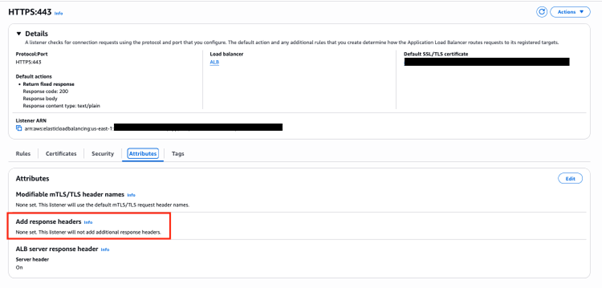
  4. On the Attributes tab, choose Edit.
    Figure 6: ALB HTTPS listener Attributes configuration

    Figure 6: ALB HTTPS listener Attributes configuration

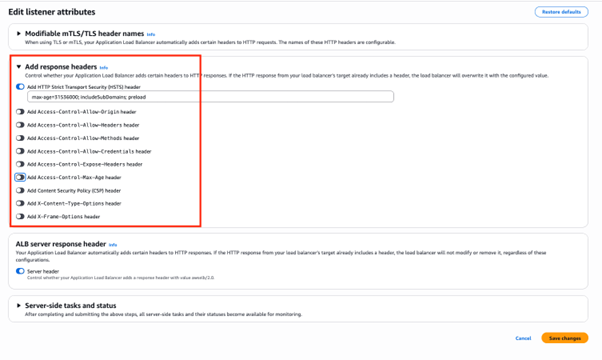
  5. Expand the Add response headers section.
  6. Select Add HTTP Strict Transport Security (HSTS) header.
  7. To configure the header value, enter max-age=31536000; includeSubDomains; preload.
  8. Choose Save changes.
Figure 7: Add response headers in attributes configuration of the ALB HTTPS listener

Figure 7: Add response headers in attributes configuration of the ALB HTTPS listener

Header modification behavior

When ALB header modification is enabled:

  • Header addition – If the backend response doesn’t include the specified header, ALB adds it with the configured value
  • Header override – If the backend response includes the header, ALB replaces the existing value with the configured value
  • Centralized control – Responses from the load balancer include the configured security headers, ensuring consistent policy enforcement

To test and validate, use the following command:
curl -I https://my-loadbalancer-1234567890.us-west-2.elb.amazonaws.com

The following code example shows the expected response headers:

HTTP/2 200
date: Tue, 23 Sep 2025 16:34:35 GMT
strict-transport-security: max-age=31536000; includeSubDomains; preload

Header value constraints:

  • Maximum header value size – 1 KB
  • Supported characters – Alphanumeric (a-z, A-Z, 0-9) and special characters (_ :;.,/’?!(){}[]@<>=-+*#&`|~^%)
  • Empty values revert to default behavior (no header modification)

When implementing header modifications, there are several operational considerations to keep in mind. Header modification must be explicitly enabled on each listener where you want the functionality to work. Once enabled, any changes you configure will apply to all responses that come from the load balancer, affecting every request processed through that listener. Application Load Balancer performs basic input validation on the headers you configure, but it has limited capability for header-specific validation, so you should ensure your header configurations follow proper formatting and standards.

This built-in Application Load Balancer capability significantly simplifies HSTS implementation by eliminating the need for backend application modifications while providing centralized security policy enforcement across your entire application infrastructure.

Implementing HSTS with Amazon CloudFront

Amazon CloudFront provides built-in support for HTTP security headers, including HSTS, through response headers policies. This feature enables centralized security header management at the CDN edge, providing consistent policy enforcement across cached and non-cached content.

Response headers policy configuration

You can use the CloudFront response headers policy feature to configure security headers that are automatically added to responses served by your distribution. You can use managed response headers policies that include predefined values for the most common HTTP security headers. Or, you can create a custom response header policy with custom security headers and values that you can add to the required CloudFront behavior.

To configure security headers:

  1. On the CloudFront console, navigate to Policies and then Response headers.
  2. Choose Create response headers policy.
  3. Configure policy settings:
    • Name – HSTS-Security-Policy
    • Description – HSTS and security headers for web applications
  4. Under Security headers, configure:
    • Strict Transport Security – Select
    • Max age – 31,536,000 seconds (1 year)
    • Preload – Select (optional)
    • IncludeSubDomains – Select (optional)
  5. Add additional security headers:

    • X-Content-Type-Options
    • X-Frame-Options – Select Origin as “SAMEORIGIN”
    • Referrer-Policy – Select “strict-origin-when-cross-origin”
    • X-XSS-Protection – Select “Enabled”, Tick “Block”
    • Choose Create.
Figure 8: Configuring response header policy for the Cloudfront distribution

Figure 8: Configuring response header policy for the Cloudfront distribution

To attach the policy to the distribution:

  1. Navigate to your CloudFront distribution.
  2. Select the Behaviors tab.
  3. Edit the default behavior (or create a new one).
  4. Under Response headers policy, select your created policy.
  5. Choose Save changes.
Figure 9: Selecting the response headers policy

Figure 9: Selecting the response headers policy

Header override behavior:
CloudFront response headers policies provide origin override functionality that controls how headers are managed between the origin and CloudFront. When origin override is enabled, CloudFront will replace existing headers that come from the origin server. Conversely, when origin override is disabled, CloudFront will only add the policy-defined headers if those same headers are not already present in the origin response, preserving the original headers from the source.

To test and validate, use the following command:

curl -I https://your-cloudfront-domain.cloudfront.net

The following code example shows the expected response headers:

HTTP/2 200 
date: Tue, 23 Sep 2025 16:34:35 GMT 
strict-transport-security: max-age=31536000; includeSubDomains; preload 
x-content-type-options: nosniff 
x-frame-options: SAMEORIGIN 
referrer-policy: strict-origin-when-cross-origin 
x-xss-protection: 1; mode=block 
x-cache: Hit from cloudfront

Using CloudFront has several advantages. It offers consistent header application across all content types and centralized security policy management. Edge-level enforcement reduces latency, and no origin server modifications are required. AWS edge locations offer global policy distribution.

Security considerations and best practices

Implementing HSTS requires careful consideration of several security implications and operational requirements.

The max-age directive determines how long browsers will enforce HTTPS-only access. The duration guidelines are as follows:

  • 300 seconds (5 minutes) – Safe for experimentation during initial testing phase.
  • 86,400 seconds (1 day) – For short-term commitment such as development environments.
  • 259,2000 seconds (30 days) – For medium-term validation such as staging environments.
  • 31,536,000 seconds (1 year) – For long-term commitment such as production environments.

We recommend that you start with shorter max-age values during initial implementation and gradually increase them as you gain confidence in your HTTPS infrastructure stability.

The includeSubDomains directive extends HSTS enforcement to all subdomains. It offers several benefits, including comprehensive protection across the entire domain hierarchy, prevention of subdomain-based attacks, and simplified security policy management.

Requirements for using this directive include:

  • Subdomains should support HTTPS to use this directive effectively.
  • Subdomains should have valid SSL certificates.
  • You must maintain a consistent security policy across domain hierarchy.

Consider implementing HSTS preloading for maximum security coverage:

Strict-Transport-Security: max-age=31536000; includeSubDomains; preload

Preloading benefits include protection for first-time visitors, browser-level enforcement before network requests, and maximizing security coverage.

The following are some preloading considerations:

  • It requires submission to browser preload lists.
  • It’s difficult to reverse because removal takes months.
  • It requires long-term commitment to HTTPS infrastructure.

For more information, see:

Conclusion

Implementing HSTS across AWS services provides a robust foundation for securing web applications against protocol downgrade attacks and enabling encrypted communications. By using the built-in capabilities of API Gateway, CloudFront, and Application Load Balancers, organizations can create comprehensive security policies that align with AWS Well-Architected Framework principles.

If you have feedback about this post, submit comments in the Comments section below. If you have questions about this post, contact AWS Support.

Abhishek Avinash Agawane

Abhishek is a Security Consultant at Amazon Web Services with more than 8 years of industry experience. He helps organizations architect resilient, secure, and efficient cloud environments, guiding them through complex challenges and large-scale infrastructure transformations. He has helped numerous organizations enhance their cloud operations through targeted optimizations, robust architectures, and best-practice implementations.