All posts by Abrom Douglas

Securing AI agents with Amazon Bedrock AgentCore Identity

Post Syndicated from Abrom Douglas original https://aws.amazon.com/blogs/security/securing-ai-agents-with-amazon-bedrock-agentcore-identity/

By using Amazon Bedrock AgentCore, developers can build agentic workloads using a comprehensive set of enterprise-grade services that help quickly and securely deploy and operate AI agents at scale using any framework and model, hosted on Amazon Bedrock or elsewhere. AgentCore services are modular and composable, allowing them to be used together or independently. To get a high level overview of Amazon Bedrock AgentCore and all of the modular services, be sure to read the Introducing Amazon Bedrock AgentCore blog post.

In this post, I take a deeper look at AgentCore Identity, powered by Amazon Cognito, to introduce the identity and credential management features designed specifically for AI agents and automated workloads. AgentCore Identity provides secure, scalable agent identity and access management capabilities that are compatible with existing identity providers, avoiding the need for user migration or rebuilding authentication flows. Additionally, AgentCore Identity provides a token vault to help secure user access tokens and a native integration with AWS Secrets Manager to secure API keys and OAuth client credentials for external resources and tools, helps orchestrate standard OAuth flows, and centralizes AI agent identities to a secure central directory.

More specifically, here are some key features provided by AgentCore Identity:

  • Centralized agent identity management – A unified directory feature that serves as the single source of truth for managing agent identities across your organization, providing each agent a unique identity and associated metadata. This provides each agent identity a distinct identifier using Amazon Resource Names (ARNs) and providing a central view of your agents whether they’re hosted in AWS, self-hosted, or using a hybrid deployment.
  • Token vault – Securely store OAuth 2.0 Access and Refresh tokens, API keys, and OAuth 2.0 client secrets. Credentials are encrypted using AWS Key Management Service (AWS KMS) keys with support for customer-managed keys. The system implements strict access controls for credential retrieval, limiting access to individual agents only. For user-specific credentials such as OAuth 2.0 tokens, agents are restricted to accessing them solely on behalf of the associated user, maintaining least privilege and proper delegation mechanisms. When an expired access token is retrieved from the token vault and fails authorization with the resource server, the AI agent can use a secured refresh token to obtain and store a new access token. This allows a high security bar to be met, while improving the user experience by requiring less authentication requests to obtain new access tokens.
  • OAuth 2.0 flow support – Provides native support for OAuth 2.0 client credentials grant, also known as two-legged OAuth (2LO), and authorization code grant, also known as three-legged OAuth (3LO). This includes built-in credential providers for popular services and support for custom integrations. The service handles OAuth 2.0 implementations while offering simple APIs for agents to access AWS resources and third-party services.
  • Agent identity and access controls – Supports delegated authentication flow allowing agents to access resources using provided credentials while maintaining audit trails and access controls. Authorization decisions are based on the provided credentials during the delegation process.
  • AgentCore SDK integration – Offers integration through declarative annotations that automatically handle credential retrieval and injection, reducing boilerplate code, and providing a seamless developer experience. The Bedrock AgentCore SDK provides automatic error handling for common scenarios such as token expiration and user consent requirements.
  • Identity-aware authorization – Passes user context to agent code that allows the full access token to be forwarded to the agent code. AgentCore Identity first validates the token, then passes it to the agent where it can be decoded to obtain user context. In the case of passing an access token that does not have the full user context, the agent code can use it to call an OpenID Connect (OIDC) user info endpoint and retrieve user information. This can make sure agents get only the right access through dynamic decisions based on the user’s identity context, delivering enhanced security controls.

For full details on the features of AgentCore Identity, see the AgentCore developer guide.

Getting started with AgentCore Identity

There are several ways to get started with Amazon Bedrock AgentCore overall and more specifically with AgentCore Identity. You can follow the steps in Introducing Amazon Bedrock AgentCore: Securely deploy and operate AI agents at any scale for several AgentCore services, or you can navigate to the developer guide and follow along in the Getting started section for AgentCore Identity. Also, be sure to look into the Bedrock AgentCore Starter Toolkit GitHub repository and AgentCore Identity samples repository. Following the previous guides and samples will help you to get up and running quickly while using the Python Bedrock AgentCore SDK.

To start diving deeper into AgentCore Identity and how it can be used as a modular service, I’ll walk through an example use case involving a web application that uses AI agents. Using one of the features of the example application, the user can interact with an AI agent to help schedule meetings in their Google calendar. The AI agent will eventually be able to act on behalf of the authenticated human user. Let’s take a deeper look into this use case and better understand the end-to-end flow.

End-to-end flow example

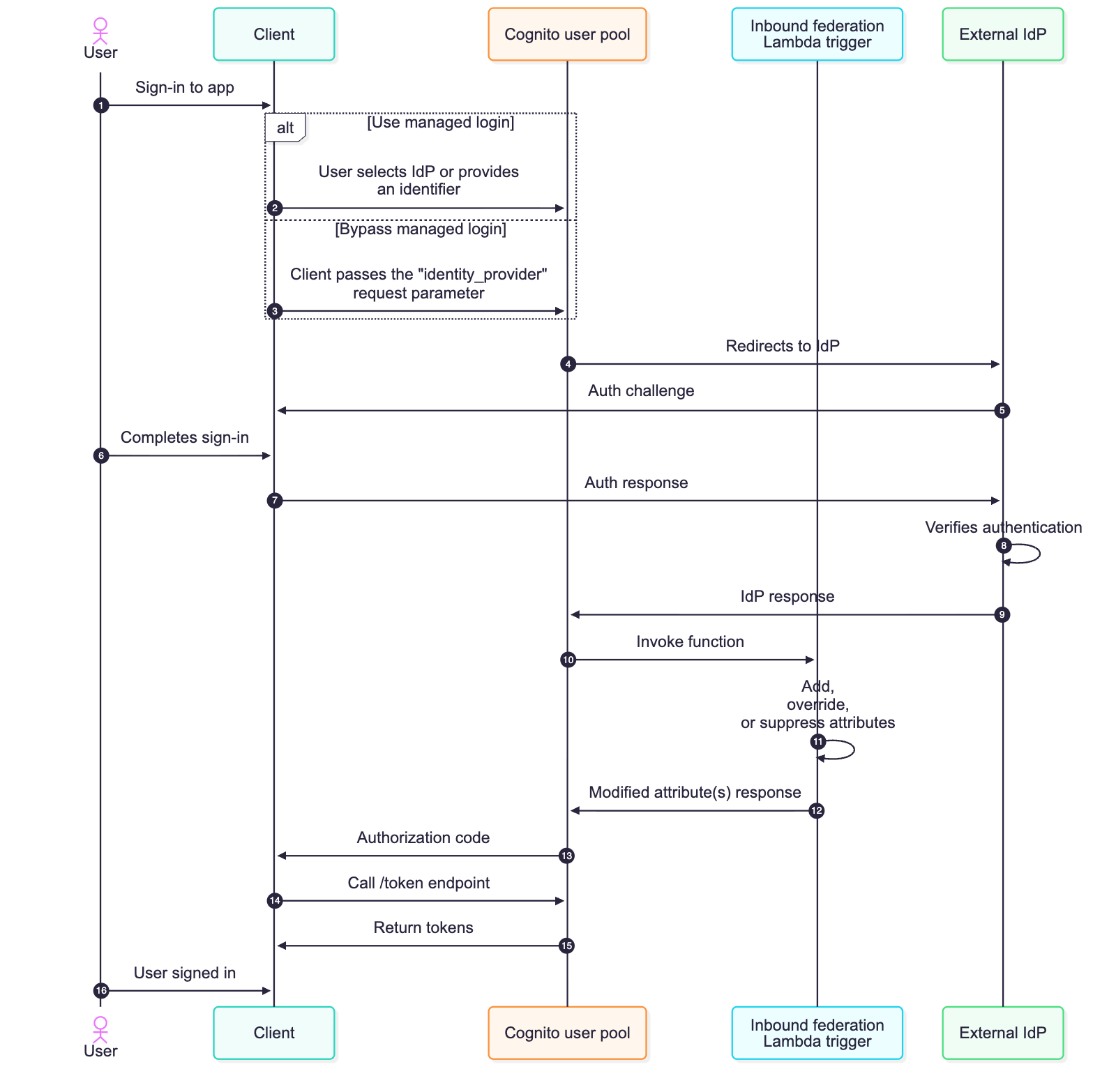
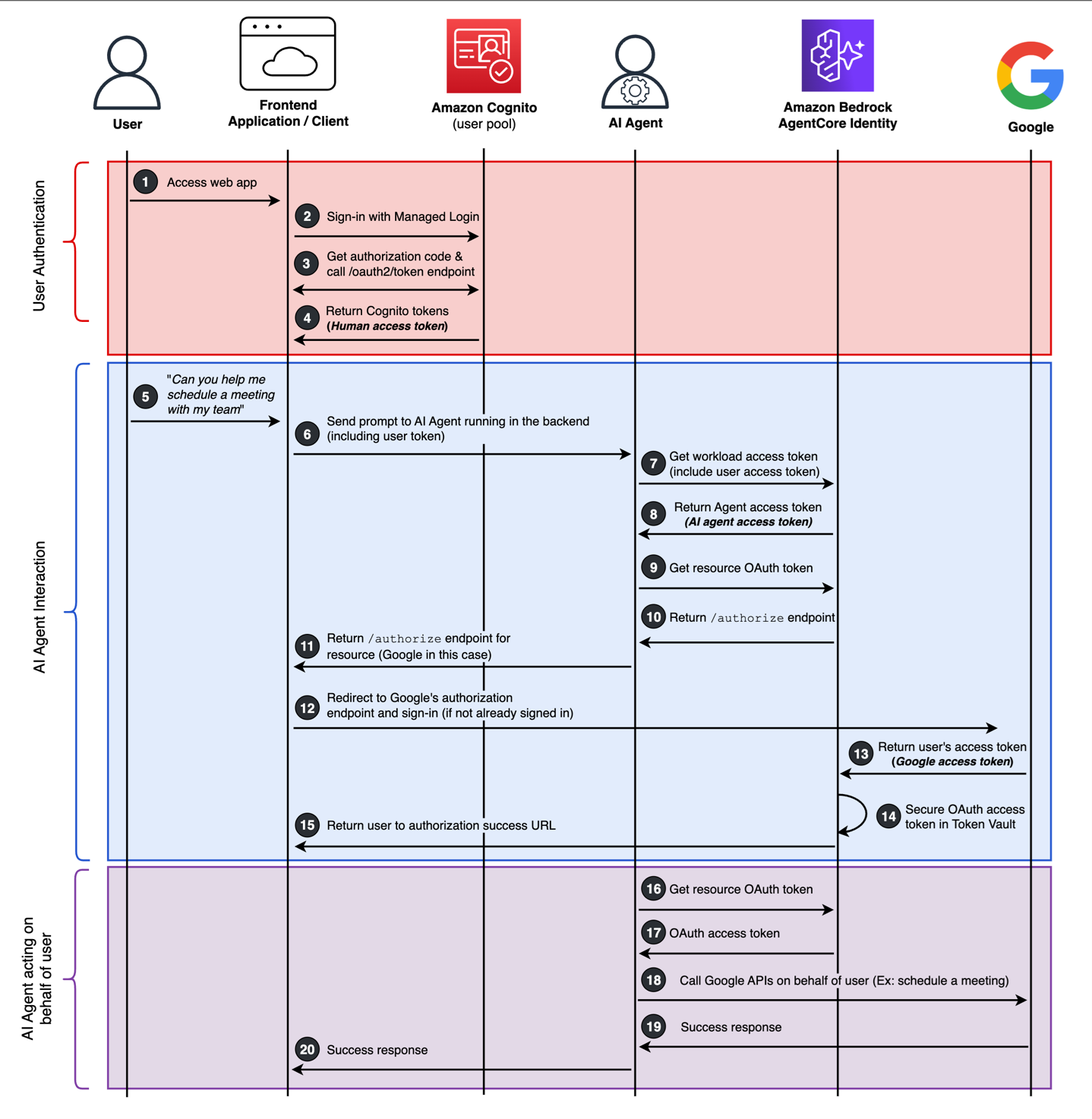
The following sequence diagram (Figure 1) provides the details of an example end-to-end interaction between a human user signing in to a web application and interacting with an AI agent to perform actions on behalf of the human user. This shows how AgentCore Identity provides AI agent builders the identity primitives to create and secure AI agent identities, orchestrate a 3LO flow (following an authorization code grant flow), and securing temporary access tokens in the token vault for third-party OAuth resources, such as Google.

To help understand the end-to-end flow, I’ve broken this down into three different sub-flows. The first sub-flow is user authentication—in the example, the human user needs to first sign in to the web application. Amazon Cognito is used here, but you can use the identity provider of your choice. The second sub-flow is AI agent interaction—this is how the human user is interacting with the AI agent by way of the web application. This sub-flow also handles the orchestration between the human user and the AI agent, including consent, acquiring access tokens on behalf of the user, and securing them in the token vault. The third and last sub-flow is AI agent acting on behalf of user—as the name implies, these are the actions the AI agent is taking on behalf of the human user. This could include performing actions entirely within the application itself or by accessing external resource servers, such as Google Calendar in Figure 1.

Two prerequisites for the flow require setting up an OAuth 2.0 credential provider (Google is used for this flow) using the CreateOauth2CredentialProvider API, and creating your AI agent identity using the CreateWorkloadIdentity API.

Figure 1: End-to-end flow showing an example of a human user securely interacting with an AI agent.

Figure 1: End-to-end flow showing an example of a human user securely interacting with an AI agent.

User authentication

  1. The user navigates to the web application.
  2. There are no existing sessions or tokens. The client will redirect the user to the Amazon Cognito managed login and the user signs in with their username and password, or uses a passwordless OTP or passkey.
    • Amazon Cognito happens to be used in this flow with a local Cognito user account. This can also support federated login flows with third-party identity providers, including social, SAML, or OIDC providers.
  3. After successful authentication an authorization code is returned to the application, and this is used to call the /oauth2/token endpoint to get Cognito tokens.
  4. Amazon Cognito ID, access, and refresh tokens are returned to the client. I’ll refer to this access token as the human access token going forward.

AI agent interaction

  1. With the user signed in, they begin interacting with the AI agent through the web application and ask the AI agent to help with scheduling a meeting in their Google calendar.
  2. The prompt is sent to the backend where the AI agent is running along with the human access token.
  3. The AI agent will first obtain its own access token from AgentCore Identity. It will also provide the human access token as a request parameter. This is using the AgentCore Identity GetWorkloadAccessTokenForJWT API.
    • When using the GetWorkloadAccessTokenForJWT API, AgentCore Identity will verify the human access token signature and verify the token is not expired.
  4. AgentCore Identity returns an access token for the AI agent, going forward I’ll call this the AI agent access token. Because the human access token was provided during the initial request to get the AI agent access token, the specific returned AI agent access token is bound to the human user’s identity.
    • AgentCore Identity will derive the human user’s identity by combing the ISS and SUB claims within the human access token. You can learn more about obtaining credentials in the AgentCore Identity developer guide.
  5. The AI agent, using its own access token, will begin the process of obtaining a third, new access token from a third-party OAuth resource, which is Google in this flow. The AI agent will call the AgentCore Identity GetResourceOauth2Token API. Because this is the initial login flow and a human user is involved, an OAuth 2.0 authorization code grant flow will begin for the OAuth resource (that is, Google). This can be referred to as a 3LO flow.
    • The goal of this process is to obtain a temporary access token to be used with Google calendar that will be secured in the token vault. It’s important to note that as long as this access token for Google remains active after the human user has given consent, it can continue to securely be retrieved and used by the AI agent from the token vault.
  6. The Google authorization URL will be generated by AgentCore identity service based on the pre-configured Google OAuth client.
  7. The Google authorization URL is sent to the client from the AI agent.
  8. The client will immediately redirect to Google’s authorization endpoint and begin the auth flow for the human user to sign in to Google.
  9. After a successful authentication with Google, an authorization code is returned to AgentCore Identity, and an access token is obtained following the OAuth 2.0 authorization code grant flow.
  10. The access token from Google for the user is secured in the token vault. I’ll call this third access token going forward the Google access token.
    • Tokens are secured in the token vault under the agent identity ID and the user ID, this way the token is bound between the agent identity, the human identity, and the Google access token.
  11. As the authorization code grant completes its process to obtain a Google access token in the backend, the user will be redirected back to the frontend of the application. This is configured as the callback URL.

AI agent acting on behalf of the user

  1. The AI agent will call the GetResourceOauth2Token API again (same as step 9) and include the AI agent access token as the workloadIdentityToken request parameter.
  2. However, this time the Google access token is returned from the token vault. This provides an enhanced user experience by reducing consent fatigue and minimizing the number of authorization prompts.
  3. With the original context and intent of having the AI agent help schedule a meeting in Google calendar, the AI agent will call the Google Calendar APIs with the Google access token.
    • The Google access token used by the AI agent will have the https://www.googleapis.com/auth/calendar.events scope, authorizing certain calendar actions.
  4. After actions are complete between the AI agent and Google calendar, success responses (or failures) will be returned to the AI agent.
    • This could be an opportunity for the AI agent to perform other automated actions, such as updating a user record in the web application’s backend.
  5. After all actions of the AI agent are complete, a success response is returned to the frontend application.

The previous flow describes the entire end-to-end process starting from a human user needing to sign in to the web application and ending with an AI agent performing an automated action on behalf of the user. Three different access tokens were involved in this process, and the following is a summary of these access tokens.

  • Human access token – This is issued by an Amazon Cognito user pool (or another identity provider). This access token is used to access the web application and is used to obtain the AI agent access token using the GetWorkloadAccessTokenForJWT API.
  • AI agent access token –This is issued by AgentCore Identity. This access token is used by the AI agent to securely access the token vault.
  • Google access token – This is issued by Google representing the human user. This access token is what’s secured in the token vault and can be securely retrieved by the AI agent access token.

Conclusion

Organizations are rapidly seeking opportunities to use AI agents to automate workflows and enhance user experiences, but this adoption can introduce security and compliance challenges that can’t be ignored. Organizations must make sure that AI agents can securely access resources on behalf of users while protecting sensitive credentials and maintaining compliance at scale. AgentCore Identity addresses these fundamental challenges by providing enterprise-grade security that protects user credentials and maintains strict access controls. This helps make sure that AI agents can only access what they need when they need it. The service integrates with existing identity systems, avoiding the need for complex migrations or rebuilding authentication flows. Its centralized management of AI agent identities reduces operational overhead and strengthens security posture. For organizations scaling their AI initiatives, these capabilities translate into faster time-to-market and reduced risk of unauthorized access. By implementing AgentCore Identity, organizations can confidently deploy AI agents with built-in OAuth support and secure token management, while lowering development and maintenance costs through streamlined security controls that scale with their business needs.

To learn more about building with AgentCore Identity in your organization, review some example use cases and visit the Getting started with AgentCore Identity section of the developer guide to explore prerequisites, SDK usage, best practices, and start building your first authenticated agent.

Use the comments section to leave feedback and engage about this post. If you have questions about this post, start a new thread on Amazon Bedrock AgentCore re:Post or contact AWS Support.


Abrom Douglas

Abrom Douglas III

Abrom is a Senior Solutions Architect within AWS Identity with nearly 20 years of software engineering and security experience, specializing in the identity and access management space. He loves speaking with customers about how identity and access management can provide secure outcomes that enable both business and technology initiatives. In his free time, he enjoys cheering for Arsenal FC, photography, travel, volunteering, and competing in duathlons.

Empower AI agents with user context using Amazon Cognito

Post Syndicated from Abrom Douglas original https://aws.amazon.com/blogs/security/empower-ai-agents-with-user-context-using-amazon-cognito/

Amazon Cognito is a managed customer identity and access management (CIAM) service that enables seamless user sign-up and sign-in for web and mobile applications. Through user pools, Amazon Cognito provides a user directory with strong authentication features, including passkeys, federation to external identity providers (IdPs), and OAuth 2.0 flows for secure machine-to-machine (M2M) authorization.

Amazon Cognito issues standard JSON Web Tokens (JWTs) and supports the customization of identity and access tokens for user authentication by using the pre token generation Lambda trigger. Learn more about this in How to customize access tokens in Amazon Cognito user pools. Amazon Cognito has extended token customization capabilities to support access token customization for M2M and the ability to pass metadata from the client during M2M authorization. Application builders can use these two features to support multiple use cases, including customizing access tokens based on unique runtime policies, entitlements, environment, or passed metadata. This can simplify and enrich M2M authentication and authorization scenarios and opens up new possibilities for emerging use cases, such as identity and access management for AI agents.

This post demonstrates how Amazon Cognito enables AI agents to perform authorized actions on behalf of users through user-contextualized access tokens for OAuth 2.0-enabled resource servers. AI agents represent a class of autonomous services that require robust identity management and precise access control, especially when acting on behalf of users. By using the Amazon Cognito client credentials flow with access token customization, you can establish distinct identities for AI agents that carry critical information about their capabilities, scope of access, and intended use cases. This approach provides a foundation for more secure, auditable AI agent operations while maintaining clear boundaries around their authorized activities.

The identity of an AI agent can be represented within Amazon Cognito as an app client. The AI agent obtains an access token (JSON Web Token (JWT)) through an OAuth 2.0 client credentials grant. This JWT can be customized to contain claims that represent the authenticated human user whom the AI agent is acting on behalf of. This token can then be used to authorize access to other services that has established trust with the Amazon Cognito user pool by trusting the issuer and audience of the token. For example, this third-party service could be a claims processor, a travel agency service, or a scheduling service acting on behalf of a user. The focus of this post is on foundational building blocks using Amazon Cognito for AI agents and how to obtain a customized access token with user context.

Solution overview and reference architecture

Looking at an example architecture (Figure 1), a user signs in to a web or mobile application using an Amazon Cognito user pool, and tokens for the user are returned to the client. Here, the application could be a serverless digital assistant using an Amazon Bedrock agent that needs to gather and process data residing in a third-party cross-domain service. The AI agent obtains its own access token by performing an OAuth 2.0 client credentials grant while passing the user’s access token as context using the aws_client_metadata request parameter. The AI agent receives the user contextualized access token and calls an external, third-party, or cross-domain service that trusts the issuer and audience of the AI agent’s access token issued from an Amazon Cognito user pool. The cross-domain service can obtain the JSON Web Key Set (JWKS) to verify the token and extract claims presenting both the AI agent and most importantly, the underlying user. Authorization takes place within the cross-domain service using the claims of the customized access token and for fine-grain authorization, Amazon Verified Permissions is used. See Figure 1 for a detailed flow of this example.

Figure 1: AI agent identity reference architecture

Figure 1: AI agent identity reference architecture

  1. The user navigates to the application through the client.
  2. There is no existing session or token for the user, so the user authentication flow with the Amazon Cognito user pool begins.
  3. After a successful sign-in, Amazon Cognito returns access, ID, and refresh tokens to the client for the user.
  4. As the user interacts with AI agent through the application, the client sends the user’s access token to an Amazon API Gateway endpoint.
  5. The API gateway integrates with the AI agent, which is using an Amazon Bedrock agent. As an example, this can use several AWS Lambda functions interacting with an Amazon Bedrock Knowledge Base or a Retrieval-Augmented Generation (RAG) process.
  6. The AI agent obtains its own access token from an Amazon Cognito user pool using an OAuth 2.0 client credentials grant. The user’s access token, obtained in step 1, is sent with the token request in the aws_client_metadata request parameter.

Note: You can use different Amazon Cognito user pools for user authentication and for agent (machine) authentication. This promotes separation and provides the ability to apply different settings and controls on each user pool if needed to meet security requirements.

  1. Amazon Cognito validates the client ID and secret from the AI agent and invokes the pre token generation Lambda trigger to customize the access token for the AI agent.

Note: Within the pre token generation Lambda trigger, the user’s access token is verified before returning a customized access token to the AI agent using the aws-jwt-verify library.

  1. The customized access token is returned to the AI agent, including custom claims representing the user.
  2. The AI agent, using its own access token, calls the cross-domain service to perform the requested action on behalf of the user. For example, this can be a third-party reservation system or a photo sharing service.
  3. The resource server in the cross-domain service verifies that the access token from the AI agent is valid. The resource server must be pre-configured to trust the user pool that issued the agent access token.
  4. Coarse- and fine-grained authorization can happen either locally in the service code or using Verified Permissions.
  5. A response from the cross-domain service flows back to the AI agent, if necessary.
  6. A response from the AI agent to the user application or client is returned, if necessary.
  7. Actions that take place throughout the flow are logged in AWS CloudTrail, providing end-to-end logging and auditing.

Implementation details

Let’s take a deeper look into the three core components of this scenario:

  1. The AI agent obtaining its own OAuth 2.0 access token
  2. The Amazon Cognito pre token generation Lambda trigger used to enrich the AI agent’s access token with user context
  3. The cross-domain resource server performing fine-grained authorization

AI agent

Figure 2: AI agent obtaining a user access token from the frontend application through API Gateway

Figure 2: AI agent obtaining a user access token from the frontend application through API Gateway


Amazon Bedrock Agents is used in this solution with a
custom orchestration configured to use Lambda. When the application interacts with the Amazon Bedrock agent, the custom orchestrator initiation begins with the agent passing the user’s access token to a Lambda function as part of the custom orchestration (shown in Figure 2). The Lambda function validates the user’s token to verify that it’s not expired and hasn’t been tampered with. This custom orchestrator begins the process for the agent to obtain its own OAuth access token and to access downstream and cross-domain resources on behalf of the user. The human user’s access token is included in the call from the application through the client. To learn more about Amazon Bedrock Agents custom orchestrator, see
Getting started with Amazon Bedrock Agents custom orchestrator. The following is an example of what a human user’s decoded access token provided through an API Gateway REST API might look like.

{
  sub: "user-identity-4e4c-example-7cede8e609a2",
  cognito:groups: 
    [
    "exampleChatApplicationAccess"
    ]
  ,
  iss: https://cognito-idp.<region>.amazonaws.com/<region>_example,
  version: 2,
  client_id: "1example23456789",
  origin_jti: "",
  token_use: "access",
  scope: "openid profile email",
  auth_time: 499192140,
  exp: 1445444940,
  iat: 499192140,
  jti: "",
  username: "my-example-username"
}

The following is a Node.js code sample that an AI agent can use to obtain its own access token from Amazon Cognito. This can be the Lambda function part of the custom orchestration for the Amazon Bedrock agent. Notice the clientMetadata variable being set, which will be passed to the Cognito /token endpoint using the aws_client_metadata request parameter. This request parameter is where the user’s access token is provided. In the following code example, you will find an attribute called callerApp, which is set to ExampleChatApplication, which serves as a unique identifier for the application. The callerApp value is preconfigured in the backend of the solution. This unique application identifier is included in the customized access token for the agent and used for additional authorization checks later. It’s a security best practice to use AWS Secrets Manager to store the client ID and client secret and obtain these credentials at runtime. As a security best practice, the user’s access token should be verified prior to passing it to the AI agent backend.

async function getAccessToken() {
    const clientId = 'exampleAiAgentClientId'; // use Secrets Manager
    const clientSecret = 'exampleAiAgentClientSecret'; // use Secrets Manager
    const tokenEndpoint = 'https://mydomain.auth.<region>.amazoncognito.com/oauth2/token';
    const scope = 'crossDomainService/read userData/read';
    const clientMetadata = '{"onBehalfOfToken":"<HUMAN-USER-ACCESS-TOKEN>", "callerApp":"ExampleChatApplication"}';
  
    const basicAuth = Buffer.from(`${clientId}:${clientSecret}`).toString('base64');
  
    const body = new URLSearchParams({
      grant_type: 'client_credentials',
      scope,
      aws_client_metadata: clientMetadata
    });
  
    const res = await fetch(tokenEndpoint, {
      method: 'POST',
      headers: {
        'Authorization': `Basic ${basicAuth}`,
        'Content-Type': 'application/x-www-form-urlencoded'
      },
      body
    });
  
    if (!res.ok) {
      const error = await res.text();
      throw new Error(`Token request failed: ${res.status} ${error}`);
    }
  
    const { access_token } = await res.json();
    console.log('Access Token:', access_token);
  
    return access_token;
  }
  
  getAccessToken().catch(err => console.error('Error:', err.message));

The access token for the AI agent is returned only if the client ID and secret are correct and the provided user access token is valid. However, before it’s returned, the AI agent’s access token is customized by the Amazon Cognito pre token generation Lambda trigger.

Amazon Cognito pre token generation Lambda trigger

Figure 3: AI agent access token customization with Cognito pre token generation Lambda trigger

Figure 3: AI agent access token customization with Cognito pre token generation Lambda trigger

After the AI agent’s action calls the Amazon Cognito /token endpoint with a valid client ID and secret, Cognito invokes the pre token generation Lambda trigger. The following is an example Lambda function that takes the aws_client_metadata request parameter, which contains the access token of the user and the callerApp attribute that was defined while the user was authenticating. In the following Lambda function, the access token provided from the user is verified (shown in Figure 3). The aws-jwt-verify library is used to verify the token is not expired, the token has not been tampered with by verifying the signature, and it’s making sure that an access token was provided. The Lambda function is also pre-configured to accept user tokens from a specific issuer and audience, this protects against malicious context injection risks. This is also an opportunity to perform additional authorization. For example, check if the user is a member of certain groups.

After the token is verified, the Lambda function customizes the access token to be returned to the AI agent.

import { CognitoJwtVerifier } from "aws-jwt-verify";

// Initialize the JWT verifier to verify the user’s access token
// Provide the user pool ID, token use, and client ID 
const jwtVerifier = CognitoJwtVerifier.create({
  userPoolId: process.env.USER_POOL_ID,  // user pool for user authentication
  clientId: process.env.CLIENT_ID,
  // groups: "exampleChatApplicationAccess", // optional group membership authorization
  tokenUse: 'access'
});

export const handler = async function(event, context) {
  try {
    const onBehalfOfToken = event.request.clientMetadata?.onBehalfOfToken || '';
    // It’s recommended that the provided “callerApp” value from the application is authorized for use with the app client for the AI agent
    const callerApp = event.request.clientMetadata?.callerApp || '';

    // The below console log will display the authenticated user’s JWT
    // Keep this logging with caution in a production environment
    console.log('Original event:', event);

    // Verify the access token from the human user
    // You could optionally also perform some authorization checks here as well
    // Example: check for the membership of a group
    let decodedJWT;
    if (onBehalfOfToken) {
      try {
        decodedJWT = await jwtVerifier.verify(onBehalfOfToken);
        console.log('Decoded JWT:', decodedJWT);
      } catch (err) {
        console.error('Token verification failed:', err);
        throw new Error('Token verification failed');
      }
    }

    // Create the onBehalfOf claim structure
    const behalfOfClaim = decodedJWT ? {
      sub: decodedJWT.sub,
      username: decodedJWT.username,
      groups: decodedJWT['cognito:groups'] || []
    } : {};

    // Customized token returned to client
    event.response = {
      "claimsAndScopeOverrideDetails": {
        "accessTokenGeneration": {
          "claimsToAddOrOverride": {
            "onBehalfOf": behalfOfClaim,
            "callerApp": callerApp
          },
        }
      }
    };

    return event;

  } catch (error) {
    console.error('Error in Lambda execution:', error);
    throw error;
  }
};

Notice in the preceding Lambda function that two custom claims are being dynamically created within the event.response: onBehalfOf and callerApp. The onBehalfOf claim contains nested claims that were extracted from the human user’s access token. The callerApp is carried forward from the frontend application and provided alongside the user access token. It’s recommended for the callerApp value to also be verified against some custom logic to add additional layer of protection. The return AI agent’s access token would look like the following JWT.


{    
	"sub": "agent-identity-4e4c-example-7cede8e609a2",
	"onBehalfOf": {
		"sub": "user-identity-4e4c-example-7cede8e609a2",
		"username": "my-example-username",
		"groups": [
			"readaccess"        
				]    
		},    
		"iss": "https://cognito-idp..amazonaws.com/_example",
		"version": 2,
		"client_id": "1example23456789",
		"callerApp": "ExampleChatApplication",
		"token_use": "access",
		"scope": "crossDomainService123/read userData/read",
		"auth_time": 499192140,
		"exp": 1445444940,
		"iat": 499192140,
		"jti": "aaaaaaaa-bbbb-cccc-dddd-eeeeeeeeeeee"
}

Cross-domain resource server authorization check

At this point, shown in Figure 4, the human user has successfully authenticated to the web application, the human user’s access token was sent as context to the backend, an AI agent obtained its own customized access token containing the human user context, and now the agent is ready to call an external cross-domain service.

Figure 4: Cross-domain resource server performing fine-grained authorization with Amazon Verified Permissions

Figure 4: Cross-domain resource server performing fine-grained authorization with Amazon Verified Permissions

As shown in Figure 4, the cross-domain service is the resource server and therefore needs to perform an authorization check. For this example, we’ll keep things straightforward and make sure that three core things are verified:

  1. The AI agent’s OAuth access token is valid
  2. The AI agent is authorized to access this service
  3. The AI agent is authorized to interact with the user data

Depending on your use case and requirements, you might also need to verify that the user’s consent has been obtained prior to the AI agent acting on their behalf. Ultimately, you want to verify that the AI agent can access a user’s data on their behalf and only for the purpose for which consent has been provided by the user.

For the token verification, use the aws-jwt-verify library again. The following is a Node.js example to verify the AI agent’s access token.

import { CognitoJwtVerifier } from "aws-jwt-verify";

// add custom logic to verify that AI agent is authorized to perform this action on behalf of the user

// Verifier that expects valid access tokens:
const verifier = CognitoJwtVerifier.create({
  userPoolId: "<user_pool_id>", // user pool for AI agent authentication
  tokenUse: "access",
  clientId: "<client_id>",
});

try {
  const payload = await verifier.verify(
    "eyJraWQeyJhdF9oYXNoIjoidk..." //this will be the AI agent's access token
  );
  console.log("Token is valid. Payload:", payload);
} catch {
  console.log("Token not valid!");
}

Fine-grained authorization with Verified Permissions

As a security best practice, the zero trust principle of enforcing fine-grained identity-based authorization should take place using Verified Permissions. The preceding Node.js code sample is a basic validation of the AI agents access token that can happen within the application logic. Instead of keeping authorization logic within the resource server, you can use Verified Permissions to offload the authorization policies to a managed service. The following is an example Cedar policy for this use case.

permit(
    principal == Agent::"agent-identity-4e4c-example-7cede8e609a2",
    action == Action::"readOnly",
    resource == Resource::"crossDomainService123::userData"
)
when {
    resource.scope == Scope::"crossDomainService123/read" &&
    resource.owner == User::" user-identity-4e4c-example-7cede8e609a2" &&
    context.onBehalfOf.sub == " user-identity-4e4c-example-7cede8e609a2" &&
    context.callerApp == "ExampleChatApplication"
};

With the preceding Cedar policy example, you are permitting the AI agent to read userData from the crossDomainService123 resource. This is only permitted when the AI agent’s access token contains the crossDomainService/read scope and when the resource owner and the onBehalfOf user (from the access token) are the same—the human user in this case. There’s also an additional when clause in the policy to make sure that this interaction initiated from ExampleChatApplication.

The cross-domain resource server would use the AI agent’s access token and call the Verified Permissions IsAuthorizedWithToken API. To learn more, see Simplify fine-grained authorization with Amazon Verified Permissions and Amazon Cognito.

The following is a Node.js example using the IsAuthorizedWithToken API from Verified Permissions using the AWS SDK for JavaScript v3.

import { VerifiedPermissionsClient, IsAuthorizedWithTokenCommand } from "@aws-sdk/client-verifiedpermissions";

const client = new VerifiedPermissionsClient({ region: "<region>" });

// Dynamically provided token 
const jwtToken = "eyJraWQiOiJrMWtleSIsInR..."; //AI agent's access token

async function checkAccess() {
  const input = {
    policyStoreId: "ps-abc123example", // your AVP policy store ID
    accessToken: jwtToken,
    action: {
      actionType: "Action",
      actionId: "readOnly"
    },
    resource: {
      entityType: "crossDomainService123",
      entityId: "userData"
    }
  };

  const command = new IsAuthorizedWithTokenCommand(input);

  try {
    const response = await client.send(command);
    console.log("Authorization Decision:", response.decision);
  } catch (err) {
    console.error("Authorization error:", err);
  }
}

Based on the preceding examples of the AI agent’s access token (with user context), the Cedar policy, and the IsAuthorizedWithToken API call, the resource server would get an Allow decision for this action to take place. The following is an example of the authorization decision response.

{
    "decision": "Allow",
    "determiningPolicies": [{
        "determiningPolicyId": "ps-abc123example"
    }],
    "errors": []
}

Before this policy can be evaluated, you must define a schema that includes the relevant entity types (Agent, User, Resource, Scope, and so on), and create corresponding entities in your policy store that match the IDs used in the policy and request.

Bringing it all together, the requested data from the AI agent, on behalf of the user, is returned from the cross-domain service to the AI agent. This additional data can now be used within the context of the AI agent workload. The entire solution can be used for a chat application, such as the one described in Protect sensitive data in RAG applications with Amazon Bedrock.

Conclusion

Amazon Cognito M2M access token customization and support for passing client metadata provides you the extensibility to solve complex use cases and enables emerging ones like AI agent identity and access management. For example, passing contextual client metadata and customizing access tokens at runtime can help software as a service (SaaS) and multi-tenant service providers scale to an unlimited number of resource servers, because these can be dynamically determined at runtime. As organizations increasingly explore the use of AI agents, having a secure, scalable identity management solution becomes crucial for maintaining control and accountability. By using these new features, you can build more secure and scalable solutions with Amazon Cognito to prepare for the future of autonomous AI agent use cases.

Use the comments section to leave feedback about this post. If you have questions about this post, start a new thread on Amazon Cognito re:Post or contact AWS Support.
Abrom Douglas

Abrom Douglas III

Abrom is a Senior Solutions Architect within AWS Identity with nearly 20 years of software engineering and security experience, specializing in the identity and access management space. He loves speaking with customers about how identity and access management can provide secure outcomes that enable both business and technology initiatives. In his free time, he enjoys cheering for Arsenal FC, photography, travel, volunteering, and competing in duathlons.

How to monitor, optimize, and secure Amazon Cognito machine-to-machine authorization

Post Syndicated from Abrom Douglas original https://aws.amazon.com/blogs/security/how-to-monitor-optimize-and-secure-amazon-cognito-machine-to-machine-authorization/

Amazon Cognito is a developer-centric and security-focused customer identity and access management (CIAM) service that simplifies the process of adding user sign-up, sign-in, and access control to your mobile and web applications. Cognito is a highly available service that supports a range of use cases, from managing user authentication and authorization to enabling secure access to your APIs and workloads. It’s a managed service that can act as an identity provider (IdP) for your applications, can scale to millions of users, provides advanced security features, and can support identity federation with third-party IdPs.

A feature of Amazon Cognito is support for OAuth 2.0 client credentials grants, used for machine-to-machine (M2M) authorization. As your M2M use cases scale, it becomes important to have proper monitoring, optimization of token issuance, and awareness of security best practices and considerations. It’s a best practice for app clients to locally cache and reuse access tokens while still valid and not expired. You can customize how long issued tokens are valid, so it’s important to make sure that the timeframe is aligned with your security requirements. If caching and reusing access tokens isn’t possible at the client level or cannot be enforced, then combining your M2M use cases with a REST API proxy integration using Amazon API Gateway enables you to cache token responses. By using API Gateway caching, you can optimize the request and response of access tokens for M2M authorization. This reduces redundant calls to Cognito for access tokens, thus improving the overall performance, availability, and security of your M2M use cases.

In this post, we explore strategies to help monitor, optimize, and secure Amazon Cognito M2M authorization. You’ll first learn some effective monitoring techniques to keep track of your usage, then delve into optimization strategies using API Gateway and token caching. Lastly, we will cover security best practices and considerations to bolster the security of your M2M use cases. Let’s dive in and discover how to make the most out of your Amazon Cognito M2M implementation.

Machine-to-machine authorization

Amazon Cognito uses an OAuth 2.0 client credentials grant to handle M2M authorization. A Cognito user pool can issue a client ID and client secret to allow your service to request a JSON web token (JWT)-compliant access token to access protected resources. Figure 1 illustrates how an app client requests an access token using the client credentials grant flow with Amazon Cognito.

Figure 1: Client credentials grant flow

Figure 1: Client credentials grant flow

The client credential grant flow (Figure 1) includes the following steps:

  1. The app client makes an HTTP POST request to the Amazon Cognito user pool /token endpoint (see The token issuer endpoint for more information), which provides an authorization header consisting of the client ID and client secret, and request parameters consisting of grant type, client ID, and scopes.
  2. After validating the request, Cognito will return a JWT-compliant access token.
  3. The client can make subsequent requests to a downstream resource server using the Cognito issued access token.
  4. The resource server gets a JSON Web Key Set (JWKS) from the Cognito user pool. The JWKS contains the user pool’s public keys, which should be used to verify the token signature.
  5. The resource server uses the public key to verify the signature of the access token is valid (proving the token has not been tampered with). The resource server also needs to verify that the token is not expired and required claims and values are present, including scopes. The resource server should use the aws-jwt-verify library to verify that the access token is valid.
  6. After the access token is verified and the app client is authorized, the requested resource is returned to the app client.

You can learn more about OAuth 2.0 support for client credentials grants and other authentication flows that Amazon Cognito supports in How to use OAuth 2.0 in Amazon Cognito: Learn about the different OAuth 2.0 grants.

Now, let’s dive deep into the monitoring, optimization, and security considerations around M2M authorization with Amazon Cognito.

Monitoring usage and costs

In May 2024, Amazon Cognito introduced pricing for M2M authorization to support continued growth and expand M2M features. Customer accounts using M2M with Cognito prior to May 9, 2024, are exempt from M2M pricing until May 9, 2025 (for more information, see Amazon Cognito introduces tiered pricing for machine-to-machine (M2M) usage). To get better visibility into your existing Amazon Cognito usage types, you can use the Security tab of the Cost and Usage Dashboards Operations Solution (CUDOS) dashboard. This dashboard is part of the Cloud Intelligence Dashboard, an opensource framework that provides AWS customers actionable insights and optimization opportunities at an organization scale. As shown in Figure 2, the Security tab in the CUDOS dashboard provides visuals that show the cost and spend of Amazon Cognito per usage type and the projected cost for M2M app clients and token requests after the exemption period with daily granularity. This daily breakdown allows you to track how your cost optimization efforts are trending.

Figure 2: Example Amazon Cognito spend and projected cost with daily granularity

Figure 2: Example Amazon Cognito spend and projected cost with daily granularity

You can also see the monthly spend per account for each usage type, as shown in Figure 3.

Figure 3: Example Amazon Cognito spend and projected cost per AWS account

Figure 3: Example Amazon Cognito spend and projected cost per AWS account

You can see the usage and spend per resource ID of user pools contributing to the cost, as shown in Figure 4. This resource-level granularity enables you to identify the top spending user pool and prioritize usage and cost management efforts accordingly. An interactive demo of this dashboard is available. For more information, see Cloud Intelligence Dashboards.

Figure 4: Example Amazon Cognito resource usage and cost by resource ID, account, and AWS Region

Figure 4: Example Amazon Cognito resource usage and cost by resource ID, account, and AWS Region

In addition to using the CUDOS dashboard to help understand Cognito M2M usage and costs, you can also request fine-grained usage details down to the app client level. This can include the number of access tokens successfully requested per app client and the last time the app client was used to issue tokens. To understand fine-grained app client usage, you need to make sure that token requests include the client_id request query parameter. This will result in an AWS CloudTrail log event that includes the client ID within the additionalEventData JSON object that is associated with the client credentials token request, as shown in Figure 5.

Figure 5: Sample CloudTrail event log including client_id

Figure 5: Sample CloudTrail event log including client_id

You can also use an Amazon CloudWatch log group to capture and store your CloudTrail logs for longer retention and analysis. Then using CloudWatch Logs Insights, you can use the following sample query to gather app client usage.

fields additionalEventData.userPoolId as user_pool_id, additionalEventData.requestParameters.client_id.0 as client_id, eventName, additionalEventData.responseParameters.status 
| filter additionalEventData.requestParameters.grant_type.0="client_credentials" and eventName="Token_POST" and additionalEventData.responseParameters.status="200"
| stats count(*) as count, latest(eventTime) as last_used by user_pool_id, client_id
| sort count desc

Figure 6 is an example result from the preceding CloudWatch Logs Insights query. The result includes the user_pool_id, client_id, count, and last_used columns. The total number of successful token requests grouped per user pool and client ID will be displayed in the count column and the last time the app client successfully issued an access token will be displayed in the last_used column.

Figure 6: Example screenshot result set from CloudWatch Logs Insights query

Figure 6: Example screenshot result set from CloudWatch Logs Insights query

Optimizing token requests

Now that you know how to better monitor your Amazon Cognito usage and costs, let’s dive deeper into how to optimize your token requests usage. For M2M, it’s recommended that clients use mechanisms to locally cache access tokens to use for authorization. This will reduce the need for the client to request a new access token until the previously issued token is no longer valid. However, the environment where the client runs could be hosted by an external third party or owned by a different team and as the resource owner, you won’t have control over whether the third party implements token caching at the client side. If this is a scenario that you have, you can use a HTTP proxy integration to cache the access token using API Gateway. Because the M2M use case follows the client credentials grant flow of the OAuth 2.0 specification, the /token endpoint of your user pool is what will be configured with the API Gateway proxy integration. This proxy integration is where caching in API Gateway can be used. With caching, you can reduce the number of token requests made to your user pool /token endpoint and improve the latency of the client receiving a cached token in the response. With caching, you can achieve additional benefits, such as cost optimization, improved performance efficiency, higher levels of availability, and custom domain flexibility.

Solution overview

Figure 7: Token caching solution

Figure 7: Token caching solution

The solution (shown in the Figure 7) includes the following steps.

  1. The client makes an HTTP POST request to an API Gateway REST API.
  2. The API Gateway method request caches the scope URL query string parameter and the Authorization HTTP request header as caching keys. The integration request is configured as a proxy to the /oauth2/token endpoint of your Amazon Cognito user pool.
  3. Cognito validates the request, making sure that the client ID and client secret are correct from the authorization header, a valid client ID has been provided as a query string parameter, and the client is authorized for the requested scopes.
  4. If the request is valid, Cognito returns an access token to the gateway through the integration response. With caching enabled, the response from the HTTP integration (Cognito token endpoint) is cached for the specified time-to-live (TTL) period.
  5. The method response of the gateway returns the access token to the client.
  6. Subsequent token requests with a remaining cached TTL will be returned, using the authorization header and scope as the caching keys.

To set up token caching, follow the steps in Managing user pool token expiration and caching. After a valid token request is returned through the API Gateway proxy integration and cached, subsequent token requests to the proxy that match the caching keys (authorization header and scope parameter) will return that same access token. This token will be returned to the client until the TTL of the cached token has expired. It’s recommended to set the TTL of the cache to be a few minutes less than the TTL of the access token issued from Amazon Cognito. For example, if your security posture requires access tokens to be valid for 1 hour, then set your caching TTL to be a few minutes less than the 1-hour token validity. It’s also important to understand the ideal caching capacity for your use case. The caching capacity affects the CPU, memory, and network bandwidth of the cache instance within the gateway. As a result, the cache capacity can affect the performance of your cache. See Enable Amazon API Gateway caching for more information. For information about how to determine the ideal cache capacity for your use case, see How do I select the best Amazon API Gateway Cache capacity to avoid hitting a rate limit?. Let’s now explore some security best practices and considerations to raise the security bar of your M2M use cases.

Security best practices

Now that you know how to monitor Amazon Cognito M2M usage and costs and how to optimize access token requests, let’s review some security best practices and considerations. Using OAuth 2.0 client credentials grant for M2M authorization helps protect your APIs. One of the key factors for this is that the access token used by the client to connect to the resource server is a temporary and time-bound token. The client must obtain a new access token after its previous token has expired so you won’t have to issue long-lived credentials that are used directly between the client and the resource server. The client ID and client secret remain confidential on the client and are only used between the client and the Amazon Cognito user pool to request an access token.

Use AWS Secrets Manager

If the workload is running on AWS, use AWS Secrets Manager so you don’t have to worry about hard-coding credentials into workloads and applications. If the workload is running on premises or through another provider, then use a similar secrets’ vault or privileged access management solution to house the workload credentials. The workload should retrieve credentials for authentication only at runtime.

Use AWS WAF

It’s a security best practice to use AWS WAF to protect your Amazon Cognito user pool endpoints. This can help protect your user pools from unwanted HTTP web requests by forwarding selected non-confidential headers, request body, query parameters, and other request components to an AWS WAF web access control list (ACL) associated with your user pool. By using AWS WAF, you can also add managed rule groups to your user pool, such as the AWS managed rule group for Bot Control, to add protection against automated bots that can consume excess resources, cause downtime, or perform malicious activities. Learn more about how to associate an AWS WAF Web ACL with your Cognito user pool.

Always verify tokens

After a client has obtained an access token, it’s important to make sure the client is authorized to access the requested resources. If the resource is using API Gateway and the built-in Amazon Cognito authorizer, then the integrity of the token, the signature, and token expiration are checked and validated for you. However, if you require a more custom authorization decision with API Gateway, you can use an AWS Lambda authorizer along with the aws-jwt-verify library. By doing so, you can verify that the signature of the JWT token is valid, make sure that the token isn’t expired, and that the necessary and expected claims are present (including necessary scopes). For more fine-grained authorization decisions, look into using Amazon Verified Permissions with the resource server or even within a Lambda authorizer. If the resource server is an external system that is, outside of AWS or a custom resource server, you want to make sure that the access token is validated and verified before the requested resources are returned to the client.

Define scopes at the app client level

It’s important to carefully define and constrain the scope of access for each app client to align with the principle of least privilege. By restricting each client ID to only the necessary scopes, organizations can minimize the risk of issuing access tokens with more access and permissions than is required. If your use case aligns with M2M multi-tenancy, consider creating a dedicated app client per tenant and using defined custom scopes for that tenant. Remember that the number of M2M app clients is a pricing dimension and will incur a cost. See Custom scope multi-tenancy best practices for more information.

Security considerations

If you’re using API Gateway to proxy token requests and caching access tokens, the following are some security considerations to raise the security bar of your M2M workload.

Allow token requests only through an API Gateway proxy

After your API Gateway proxy integration is configured and set up for optimization and you have AWS WAF configured for your user pool, you can add an additional layer of security by using an allow list so that only requests from your API Gateway proxy to your Amazon Cognito user pool are accepted. For this, inject a custom HTTP header within the integration request of the POST method execution and create an allow rule within your web ACL that looks for that specific header. You will also create an additional web ACL rule to block all traffic. The single allow rule will have a priority order of 0 and the block-all-traffic rule will have a priority order of 1. Ultimately, this will block all requests that go directly to your Cognito user pool /token endpoint and only allow requests that have been made through the API Gateway proxy. Figure 8 that follows is a deeper explanation of this setup.

Figure 8: Token caching solution with AWS WAF

Figure 8: Token caching solution with AWS WAF

The process shown in Figure 8 has the following steps:

  1. The client makes a direct HTTP POST call to the /oauth2/token endpoint of the Amazon Cognito user pool. This request would be denied by the AWS WAF web ACL deny all rule.
  2. The client initiates an OAuth2 client credentials grant (HTTP POST) against an API Gateway stage (/token).
  3. The REST API gateway is a proxy integration to the /oauth2/token endpoint of the Cognito user pool.
    1. Within the integration request settings, configure a custom header (for example, x-wafAuthAllowRule). Treat the value of this header as a secret that remains only within the API Gateway integration request and is not exposed outside of the gateway.
    2. Consider using Lambda, Amazon EventBridge, and AWS Secrets Manager to automatically rotate this header value in both the API Gateway integration request and in the AWS WAF web ACL rule.
  4. The request is proxied to the Cognito /oauth2/token endpoint and AWS WAF is configured to protect the Cognito user pool endpoints and therefore web ACL rules are evaluated.
    1. The custom header from the integration request (the preceding step) is evaluated against the web ACL rules to allow this request.
  5. Cognito will verify the authorization header (containing the client ID and client secret) and requested scopes.
  6. After successful credential validation, an access token is returned to the gateway within the integration response.
  7. The access token is cached using the following caching keys:
    1. Authorization header.
    2. Scope query string parameter.
  8. The access token is returned to the client through API Gateway.
  9. Subsequent token requests with a remaining cached TTL are returned to client immediately, using the authorization header and scope as the caching keys.

Additional authorizer with API Gateway

Using the client credentials grant is designed to obtain an access token so that an app client can access downstream resources. If you’re using API Gateway as a proxy integration to your token endpoint, as described previously, you can also use a separate authorizer with an API Gateway proxy. Therefore, to begin the OAuth 2.0 client credentials grant flow, a separate authorization takes place first. For example, if you’re in a highly regulated industry, you might require the use of mTLS authentication to obtain an access token. This might seem like a double-authentication scenario; however, this helps prevent unauthenticated attempts against your API Gateway proxy integration to get an access token from Amazon Cognito.

Encrypting the API cache

While configuring your API Gateway proxy integration and provisioning your API cache, you can enable encryption of the cached response data. Because this caches access tokens for the set TTL of your choosing, you should consider encrypting this data at rest if necessary to help meet your security requirements. You can use the default method caching or set an override stage-level caching and enable encryption at rest.

Conclusion

In this post, we shared how you can monitor, optimize, and enhance the security posture of your machine-to-machine (M2M) authorization use cases with Amazon Cognito. This involved using the Cost and Usage Dashboards Operations Solution (CUDOS) to understand your Cognito M2M token requests and costs. We also discussed using caching from Amazon API Gateway as an HTTP proxy integration to the Cognito user pool /oauth2/token endpoint. By following the guidance in this post, you can better understand your M2M usage and costs and achieve added benefits such as cost optimization, performance efficiency, and higher levels of availability. Lastly, we provided several security best practices and considerations that can be used as additional layers to elevate your security posture.

If you have feedback about this post, submit comments in the Comments section below. If you have questions about this post, start a new thread on Amazon Cognito re:Post or contact AWS Support.
Abrom Douglas

Abrom Douglas III

Abrom is a Senior Solutions Architect within AWS Identity and has over 19 years of software engineering and security experience, specializing in the identity and access management (IAM) space. He loves speaking with customers about how IAM can provide secure outcomes that enable both business and technology goals. In his free time, he enjoys cheering for Arsenal FC, photography, travel, and competing in duathlons.

Nisha Notani

Nisha Notani

Nisha is a Senior Technical Account Manager for AWS in London, working closely with enterprise customers to accelerate their cloud journey through strategic guidance and technical expertise. She helps organizations build cloud maturity across the AWS Well-Architected pillars, with a focus on operational excellence, observability, and reliability. As an active member of the cloud financial management community, she supports customers in implementing FinOps best practices and cost optimization strategies across their organizations. A passionate mentor, she guides colleagues in their professional development, serves on the AWS Support Give Back program core team to promote volunteering, and actively mentors students in local schools and colleges, providing guidance on their career journeys.