All posts by Alex Krivit

Early Hints: How Cloudflare Can Improve Website Load Times by 30%

Post Syndicated from Alex Krivit original https://blog.cloudflare.com/early-hints/

Early Hints: How Cloudflare Can Improve Website Load Times by 30%

Early Hints: How Cloudflare Can Improve Website Load Times by 30%

Want to know a secret about Internet performance? Browsers spend an inordinate amount of time twiddling their thumbs waiting to be told what to do. This waiting impacts page load performance. Today, we’re excited to announce support for Early Hints, which dramatically improves browser page load performance and reduces thumb-twiddling time.

In initial tests using Early Hints, we have observed more than 30% improvement to page load time for browsers visiting a website for the first time.

Early Hints is available in beta today — Cloudflare customers can request access to Early Hints in the dashboard’s Speed tab. It’s free for all customers because we think the web should be fast!

Early Hints in a nutshell

Browsers need instructions for what to render and what resources need to be fetched to complete “painting” a given web page. These instructions come from a server response. But the servers sending these responses often need time to compile these resources — this is known as “server think time.” While the servers are busy during this time… browsers sit idle and wait.

Early Hints takes advantage of “server think time” to asynchronously send instructions to the browser to begin loading resources while the origin server is compiling the full response. By sending these hints to a browser before the full response is prepared, the browser can figure out what it needs to do to load the webpage faster for the end user. Faster page loads and lower user-perceived latency means happier users!

More formally, Early Hints is a web standard that defines a new HTTP status code (103 Early Hints) that defines new interactions between a client and server. 103s are served to clients while a 200 OK (or error) response is being prepared (the so-called “server think time”), and contain hints on which assets will likely be needed to fully render the web page. This hinting speeds up page loads and generally reduces user-perceived latency.

Sending hints on which assets to expect before the entire response is compiled allows the browser to use think time (when it would otherwise have been waiting) to fetch needed assets, prepare parts of the displayed page, and otherwise get ready for the full response to be returned.  

Early Hints: How Cloudflare Can Improve Website Load Times by 30%

Cloudflare, as an edge network that sits in between client and server, is well positioned to issue these hints to clients on servers’ behalf. This is true for a few reasons:

  1. 103 is an experimental status code that origins may not be able to emit on their own, mostly for legacy reasons. Much of the machinery that powers the web incorrectly assumes that HTTP requests always correspond 1:1 with HTTP responses. This mistaken premise is baked into most HTTP server software, making it difficult for origin servers to emit Early Hints 103 responses prior to a “final” 200 OK response.

    Cloudflare edge servers handling this complexity on behalf of our customers neatly sidesteps these technical challenges and gets the adoption flywheel spinning faster on this exciting new technology (more on this flywheel later).

  2. Cloudflare’s edge is very close to end users. This means we can serve hints very quickly, filling even the smallest of server think blocks with useful information the client can use to get a jump start on loading assets.
  3. Cloudflare already sees request and response flow from our customers. We use this data to generate hints automatically, without a customer needing to make any origin changes at all.

How can we speed up “slow” dynamic page loads?

The typical request/response cycle between browsers and servers leaves a lot of room for optimization. When you type an address into the search bar of your browser and press Enter, a series of things happen to get you the content you need, as quickly as possible. Your browser first converts the hostname in the URL into an IP address, then establishes an initial connection to the server where the content is stored.

After the connection is established, the actual request is sent. This is often a GET request with a bunch of information about what the browser can and cannot display to the end user. Following the request, the browser must wait for the origin server to send the first bytes of the response before it begins to render the page. In this time, the server is busy executing all sorts of business logic (looking things up in databases, personalizing the page, detecting fraud, etc.) before spitting a response out to the browser.

Once the response for the original HTML page is received, the browser then needs to parse the page, generate a Document Object Model (DOM), and begin loading subresources specified on the page, like images, scripts, and additional stylesheets.

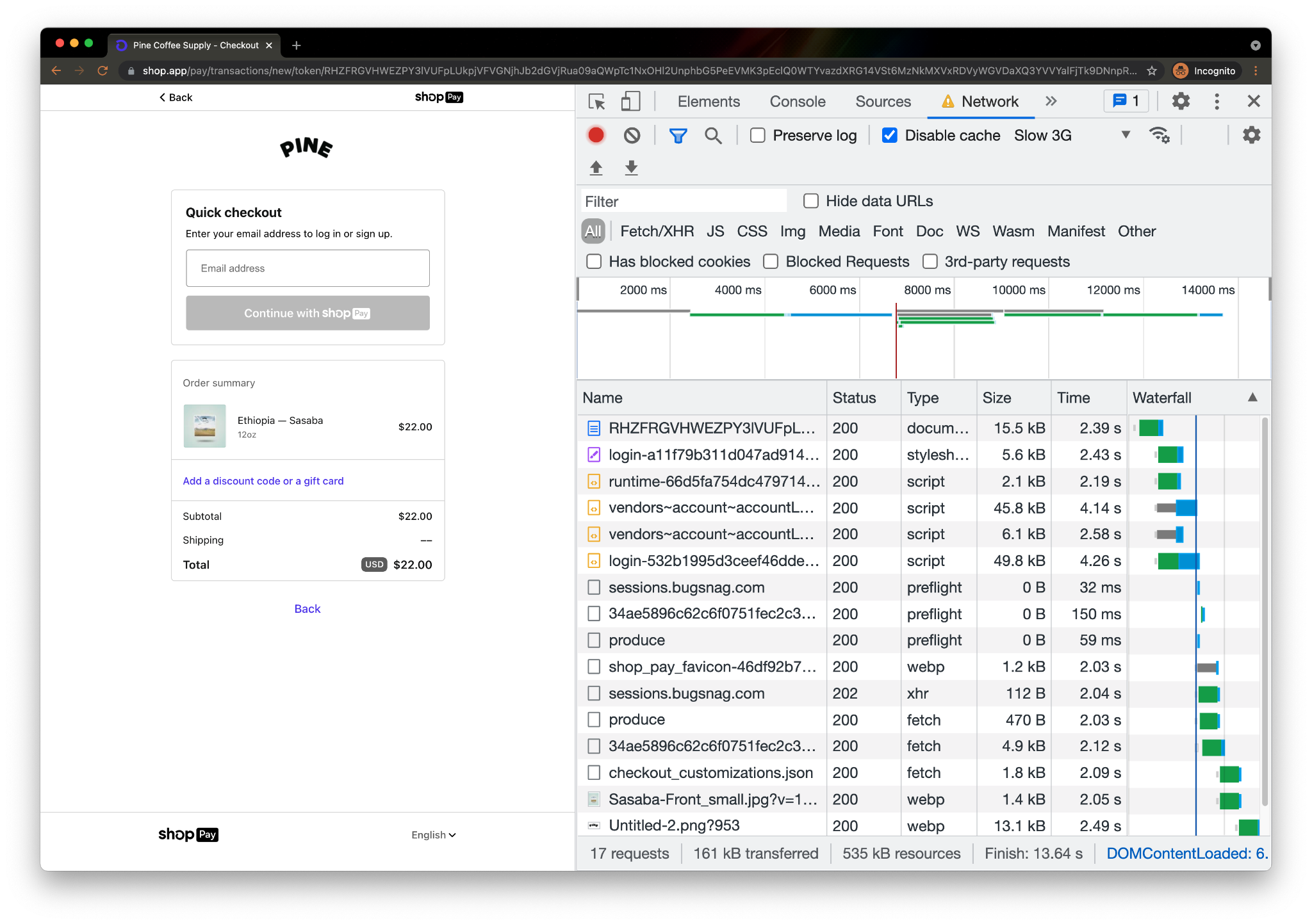
Let’s take a look at this in action. Below is the performance waterfall for a checkout page on pinecoffeesupply.com, a coffee shop with a storefront on Shopify:  

Early Hints: How Cloudflare Can Improve Website Load Times by 30%

Page rendering cannot complete (and the shopper can’t get their coffee fix, and the coffee shop can’t get paid!) until key assets are loaded. Information on subresources needed for the browser to load the page aren’t available until the server has thought about and returned the initial response (the first document in the above table). In the above example, the page load could have been accelerated had the browser known, prior to receiving the full response, that the stylesheet and the four subsequent scripts will be needed to render the page.

Attempting to parallelize this dependency is what Early Hints is all about — productively using that “server think time” to help get the browser going on critical steps to render the page before the full server response arrives. The green “thinking” bar overlaps with the blue “content download” bar, allowing both the browser and server to be preparing the page at the same time. No more waiting. This is what Early Hints is all about!
“Entrepreneurs know that first impressions matter. Shopify’s own data shows that on average, when a store improves the speed of the first page in the buyer journey by 10%, there is a 7% increase in conversion. We see great promise in Early Hints being another tool to help improve the performance and experience for all merchants and customers.”
Colin Bendell, Director Performance Engineering at Shopify

How does Early Hints speed things up?

Early Hints is a status code used in non-final HTTP responses. It is designed to speed up overall page load times by giving the browser an early signal about what certain linked assets might appear in the final response. The browser takes those hints and begins preparing the page for when the final 200 OK response from the server arrives.

The RFC provides this example of how the request/response cycle will look with Early Hints:

Client request:

GET / HTTP/1.1 
Host: example.com

Server responses:
Early Hint Response

HTTP/1.1 103 Early Hints
     Link: </style.css>; rel=preload; as=style
     Link: </script.js>; rel=preload; as=script

…Server Think Time…

Full Response

HTTP/1.1 200 OK
     Date: Thurs, 16 Sept 2021 11:30:00 GMT
     Content-Length: 1234
     Content-Type: text/html; charset=utf-8
     Link: </style.css>; rel=preload; as=style
     Link: </script.js>; rel=preload; as=script

[Rest of Response]

Seems simple enough. We’ve neatly communicated information to the browser on what resources it should consider preloading while the server is computing a full response.

This isn’t a new idea though!

Didn’t server push try to solve this problem?

There have been previous attempts at solving this problem, notably HTTP/2 “server push”. However, server push suffered from two major problems:

Server push sent the wrong bytes at the wrong time

The server pushed assets to the client, without great awareness of what was already present in browser caches, without knowing how much “server think time” would elapse and how best to spend it. Web performance guru Pat Meenan summarized server push’s gotchas in a mail thread discussing Chrome’s intent to deprecate and remove server push support:

Push sounds like a great solution, particularly when it can be done intelligently to not push resources already in cache and if it can exactly only fill the wait time while a CDN edge goes back to an origin for the HTML but getting those conditions right in practice is extremely rare. In virtually every case I have seen, the pushed resources end up delaying the HTML itself, the CSS and other render-blocking resources. Delaying the HTML is particularly bad because it delays the browser’s discovery of all of the other resources on the page. Preload works with the normal document parsing and resource discovery, letting preloaded resources intermix with other important resources and giving the dev, browsers and origins more control over prioritization.

Early Hints avoids these issues by “hinting” (vs. push being dictatorial) to clients which assets they should load, allowing them to prioritize resource loads with more complete information about what they will likely need to render a page, what they have cached, and other heuristics.

Using Early Hints with “rel=preload” solves the unsolicited bytes problem, but can still suffer from the ordering issue (forcing clients to load the wrong bytes at the wrong time). Early Hints’ superpower may actually be its use in conjunction with “rel=preconnect”. Many pages load hundreds of third party resources, and setting up connections and TLS sessions with each outside origin is time (but not bandwidth) intensive. Setting up these third party origin connections early, during think time, has practical advantages for page loading experience without the potential collateral damage of using “rel=preload”.

Server push wasn’t broadly implemented

The other notable issue with Server Push was that browsers supported it, and some origin servers implemented the feature, but no major CDN products (Cloudflare’s included) deemed the feature promising enough to implement and support at scale. Support for standards like server push or Early Hints in each key piece of the web content supply chain is critical for mass adoption.

Cracking the chicken and egg problem

Early Hints: How Cloudflare Can Improve Website Load Times by 30%

Standards like Early Hints often don’t get off the ground because of this chicken and egg problem: clients have no reason to support new standards without server support and servers have no reason to implement support without clients speaking their language. As previously discussed, Early Hints is particularly complicated for origins to directly support, because 103 is an unfamiliar status code and multiple responses to a single request may not be a well-supported pattern in common HTTP server and application stacks.

We’ve tackled this in a few ways:

  1. Close partnership with Google Chrome and other browser teams to build support for the same standard at the same time, ensuring a critical mass of adoption for Early Hints from day one.
  2. Developing ways for hints to be emitted by our edge to clients with support for the standard without requiring support for the standard from the origin. We’ve been fortunate to have a ready, willing, and able design partner in Shopify, whose performance engineering team has been instrumental in shaping our implementation and testing our production deployment.

We plan to support Early Hints in two ways: one enabled now, and the other coming soon.

To avoid requiring origins to emit 103 responses from their origins directly, we settled on an approach that takes advantage of something many customers already used to indicate which assets an HTML page depends on, the Link: response header.

  • When Cloudflare gets a response from the origin, we will parse it for Link headers with preload or preconnect rel types. These rel types indicate to the browser that the asset should be loaded as soon as possible (preload), or that a connection should be established to the specified origin but no bytes should be transferred (preconnect).
  • Cloudflare takes these headers and caches them at our edge, ready to be served as a 103 Early Hints payload.
  • When subsequent requests come for that asset, we immediately send the browser the cached Early Hints response while proxying the request to the origin server to generate the full response.
  • Cloudflare then proxies the full response from origin to the browser when it’s available.
  • When the full response is available, it will contain Link headers (that’s how we started this whole story). We will compare the Link headers in the 200 response with the cached version to make sure that they are the most up to date. If they have changed since they’ve been cached, we will automatically purge the out-of-date Early Hints and re-cache the new ones.

Coming soon: Smart Early Hints generation at the edge

We’re working hard on the next version of Early Hints. Smart Early Hints will use machine learning to generate Early Hints even when there isn’t a Link header present in the response from which we can harvest a 103. By analyzing historical request/response cycles for our customers, we can infer what assets being preloaded would help browsers load a webpage more quickly.

Look for Smart Early Hints in the next few months.

Browser support

As previously mentioned, we’ve partnered closely with Google Chrome and other browser vendors to ensure that their implementations of Early Hints interoperate well with Cloudflare’s. Google Chrome, Microsoft Edge, and Mozilla Firefox have announced their intention to support Early Hints. Progress for this support can be tracked here and here. We expect more browsers to announce support soon.

Benchmarking the impact of Early Hints

Once you get accepted into the beta and enable the feature, you can see Early Hints in action using Google Chrome, version 94 or higher. As of Sept 16th 2021, the Chrome Dev channel is at version 94.

Testing Early Hints with Chrome version 94 or higher

Early Hints support is available in Chrome by running (assuming a Mac, but the same flag works on Windows or Linux):

open /Applications/Google\ Chrome\ Dev.app --args --enable-features=EarlyHintsPreloadForNavigation

Testing Early Hints with Web Page Test

  1. Open webpagetest.org (a free performance testing tool).
  2. Specify the desired test URL. It should have the necessary preload/preconnect rel types in the Link header of the response.
  3. Choose Chrome Canary (or any Chrome version higher than 94) for the browser
  4. Under advanced settings, select Chromium.
  5. At the bottom of the Chromium section there’s a command-line section where you should paste Chrome’s Early Hints flag: --enable-features=EarlyHintsPreloadForNavigation.
  • To see the page load comparison, you can remove this flag and Early Hints won’t be enabled.

You can also test via Chrome’s Origin Trials.

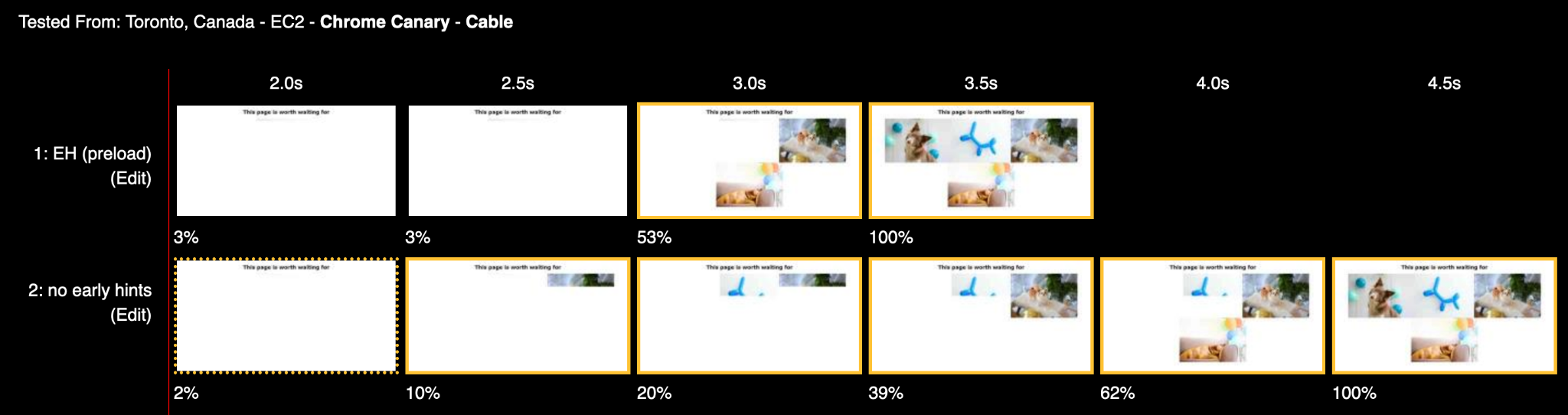
Using Web Page Test, we’ve been able to observe greater than 30% improvement to a page’s content loading in the browser as measured by Largest Contentful Paint (LCP). An example test filmstrip:

Early Hints: How Cloudflare Can Improve Website Load Times by 30%

A few other considerations when testing…

  • Chrome will not support Early Hints on HTTP/1.1 (or earlier protocols).
  • Chrome will not support Early Hints on subresource requests.
  • We encourage testers to see how different rel types improve performance along with other Cloudflare performance enhancements like Argo.
  • It can be hard to see which resources are actually being loaded early as a result of Early Hints. Interrogating the ResourceTiming API will return initiator=EarlyHints for those assets.

Signing up for the Early Hints beta

Early Hints promises to revolutionize web performance. Support for the standard is live at our edge globally and is being tested by customers hungry for speed.

How to sign up for Cloudflare’s Early Hints beta:

  1. Sign in to your Cloudflare Account
  2. In the dashboard, navigate to Speed tab
  3. Click on the Optimization section
  4. Locate the Early Hints beta sign up card and request access. We’re enabling access for users on the beta list in batches.

Early Hints holds tremendous promise to speed up everyone’s experience on the web. It’s exactly the kind of product we like working on at Cloudflare and exactly the kind of feature we think should be free, for everyone. Be sure to check out the beta and let us know what you think.

You can explore our beta implementation in the Speed tab. And if you’re an engineer interested in improving the performance of the web for all, come join us!

Vary for Images: Serve the Correct Images to the Correct Browsers

Post Syndicated from Alex Krivit original https://blog.cloudflare.com/vary-for-images-serve-the-correct-images-to-the-correct-browsers/

Vary for Images: Serve the Correct Images to the Correct Browsers

Vary for Images: Serve the Correct Images to the Correct Browsers

Today, we’re excited to announce support for Vary, an HTTP header that ensures different content types can be served to user-agents with differing capabilities.

At Cloudflare, we’re obsessed with performance. Our job is to ensure that content gets from our network to visitors quickly, and also that the correct content is served. Serving incompatible or unoptimized content burdens website visitors with a poor experience while needlessly stressing a website’s infrastructure. Lots of traffic served from our edge consists of image files, and for these requests and responses, serving optimized image formats often results in significant performance gains. However, as browser technology has advanced, so too has the complexity required to serve optimized image content to browsers all with differing capabilities — not all browsers support all image formats! Providing features to ensure that the correct images are served to the correct requesting browser, device, or screen is important!

Serving images on the modern web

In the web’s early days, if you wanted to serve a full color image, JPEGs reigned supreme and were universally supported. Since then, the state of the art in image encoding has advanced by leaps and bounds, and there are now increasingly more advanced and efficient codecs like WebP and AVIF that promise reduced file sizes and improved quality.

This sort of innovation is exciting, and delivers real improvements to user experience. However, it makes the job of web servers and edge networks more complicated. As an example, until very recently, WebP image files were not universally supported by commonly used browsers. A specific browser not supporting an image file becomes a problem when “intermediate caches”, like Cloudflare, are involved in delivering content.

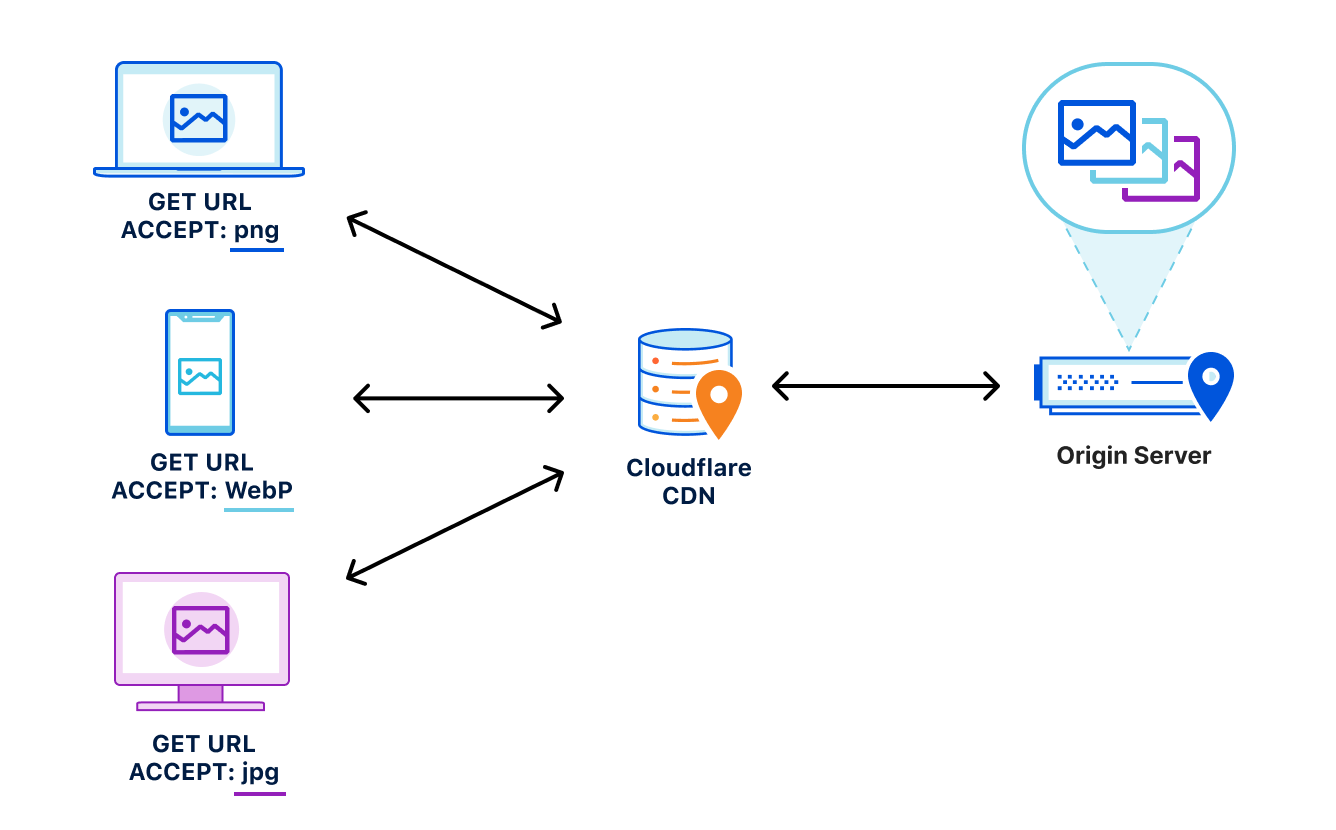
Let’s say, for example, that a website wants to provide the best experience to whatever browser requests the site. A desktop browser sends a request to the website and the origin server responds with the website’s content including images. This response is cached by a CDN prior to getting sent back to the requesting browser.

Now let’s say a mobile browser comes along and requests that same website with those images. In the situation where a cached image is a WebP file, and WebP is not supported by the mobile browser, the website will not load properly because the content returned from cache is not supported by the mobile browser. That’s a problem.

To help solve this issue, today we’re excited to announce our support of the Vary header for images.

How Vary works

Vary is an HTTP response header that allows origins to serve variants of the same content from a single URL, and have intermediate caches serve the correct variant to each user-agent that comes along.
Smashing Magazine has an excellent deep dive on how Vary negotiation works here.

When browsers send a request for a website, they include a variety of request headers. A fairly common example might look something like:

GET /page.html HTTP/1.1
Host: example.com
Connection: keep-alive
Accept:
text/html,application/xhtml+xml,application/xml;q=0.9,image/avif,image/webp,image/apng,*/*;q=0.8,application/signed-exchange;v=b3;q=0.9
User-Agent: Mozilla/5.0 (Macintosh; Intel Mac OS X 10_15_7) AppleWebKit/537.36 (KHTML, like Gecko) Chrome/91.0.4472.164 Safari/537.36
Accept-Encoding: gzip, deflate, br

As we can see above, the browser sends a lot of information in these headers along with the GET request for the URL. What’s important for Vary for Images is the Accept header. The Accept header tells the origin what sort of content the browser is capable of handling (file types, etc.) and provides a list of content preferences.

When the origin gets the request, it sees the Accept header which details the content preference for the browser’s request. In the origin’s response, Vary tells the browser that content returned was different depending on the value of the Accept header in the request. Thus if a different browser comes along and sends a request with different Accept header values, this new browser can get a different response from the origin. An example origin response may look something like:

HTTP/1.1 200 OK
Content-Length: 123456
Vary: Accept

How Vary works with Cloudflare’s cache

Now, let’s add Cloudflare to the mix. Cloudflare sits in between the browser and the origin in the above example. When Cloudflare receives the origin’s response, we cache the specific image variant so that subsequent requests from browsers with the same image preferences can be served from cache. This also means that serving multiple image variants for the same asset will create distinct cache entries.

Accept header normalization

Caching variants in intermediate caches can be difficult to get right. Naive caching of variants can cause problems by serving incorrect or unsupported image variants to browsers. Some solutions that reduce the potential for caching incorrect variants generally provide those safeguards at the expense of performance.

For example, through a process known as content-negotiation, the correct variant is directed to the requesting browser through a process of multiple requests and responses. The browser could send a request to the origin asking for a list of available resource variants. When the origin responds with the list, the browser can make an additional request for the desired resources from that list, which the server would then respond to. These redundant calls to narrow down which type of content that the browser accepts and the server has available can cause performance delays.

Vary for Images: Serve the Correct Images to the Correct Browsers

Vary for Images reduces the need for these redundant negotiations to an origin by parsing the request’s Accept header and sending that on to the origin to ensure that the origin knows exactly what content it needs to deliver to the browser. Additionally because the expected variant values can be set in Cloudflare’s API (see below), we make an end-run around the negotiation process because we are sure what to ask for and expect from the origin. This reduces the needless back-and-forth between browsers and servers.

How to Enable Vary for Images

You can enable Vary for Images from Cloudflare’s API for Pro, Business, and Enterprise Customers.

Things to keep in mind when using Vary:

  • Vary for Images enables varying on the following file extensions: avif, bmp, gif, jpg, jpeg, jp2, jpg2, png, tif, tiff, webp. These extensions can have multiple variants served so long as the origin server sends the Vary: Accept response header.
  • If the origin server sends Vary: Accept but does not serve the expected variant, the response will not be cached. This will be indicated with the BYPASS cache status in the response headers.
  • The list of variant types the origin serves for each extension must be configured so that Cloudflare can decide which variant to serve without having to contact the origin server.

Enabling Vary in action

Enabling Vary functionality currently requires the use of the Cloudflare API. Here’s an example of how to enable variant support for a zone that wants to serve JPEGs in addition to WebP and AVIF variants for jpeg and jpg extensions.

Create a variants rule:

curl -X PATCH
"https://api.cloudflare.com/client/v4/zones/023e105f4ecef8ad9ca31a8372d0 c353/cache/variants" \ 
	-H "X-Auth-Email: [email protected]" \ 
	-H "X-Auth-Key: 3xamp1ek3y1234" \ 
	-H "Content-Type: application/json" \ 
	--data 
'{"value":{"jpeg":["image/webp","image/avif"],"jpg":["image/webp","image/avif"]}}' 

Modify to only allow WebP variants:

curl -X PATCH 
"https://api.cloudflare.com/client/v4/zones/023e105f4ecef8ad9ca31a8372d0 c353/cache/variants" \ 
	-H "X-Auth-Email: [email protected]" \ 
	-H "X-Auth-Key: 3xamp1ek3y1234" \ 
	-H "Content-Type: application/json" \ 
	--data 
'{"value":{"jpeg":["image/webp"],"jpg":["image/webp"]}}' 

Delete the rule:

curl -X DELETE 
"https://api.cloudflare.com/client/v4/zones/023e105f4ecef8ad9ca31a8372d0c353/cache/variants" \ 
	-H "X-Auth-Email: [email protected]" \ 
	-H "X-Auth-Key: 3xamp1ek3y1234" 

Get the rule:

curl -X GET 
"https://api.cloudflare.com/client/v4/zones/023e105f4ecef8ad9ca31a8372d0c353/cache/variants" \
	-H "X-Auth-Email: [email protected]" \ 
	-H "X-Auth-Key: 3xamp1ek3y1234"

Purging variants

Any purge of varied images will purge all content variants for that URL. That way, if the image changes, you can easily update the cache with a single purge versus chasing down how many potential out-of-date variants may exist. This behavior is true regardless of purge type (single file, tag, or hostname) used.

Other image optimization tools available at Cloudflare

Providing an additional option for customers to optimize the delivery of images also allows Cloudflare to support more customer configurations. For other ways Cloudflare can help you serve images to visitors quickly and efficiently, you can check out:

  • Polish — Cloudflare’s automatic product that strips image metadata and applies compression. Polish accelerates image downloads by reducing image size.
  • Image Resizing — Cloudflare’s image resizing product works as a proxy on top of the Cloudflare edge cache to apply the adjustments to an image’s size and quality.  
  • Cloudflare for Images — Cloudflare’s all-in-one service to host, resize, optimize, and deliver all of your website’s images.

Try Vary for Images Out

Vary for Images provides options that ensure the best images are served to the browser based on the browser’s capabilities and preferences. If you’re looking for more control over how your images are delivered to browsers, we encourage you to try this new feature out.

Introducing Smart Edge Revalidation

Post Syndicated from Alex Krivit original https://blog.cloudflare.com/introducing-smart-edge-revalidation/

Introducing Smart Edge Revalidation

Introducing Smart Edge Revalidation

Today we’re excited to announce Smart Edge Revalidation. It was designed to ensure that compute resources are synchronized efficiently between our edge and a browser. Right now, as many as 30% of objects cached on Cloudflare’s edge do not have the HTTP response headers required for revalidation. This can result in unnecessary origin calls. Smart Edge Revalidation fixes this: it does the work to ensure that these headers are present, even when an origin doesn’t send them to us. The advantage of this? There’s less wasted bandwidth and compute for objects that do not need to be redownloaded. And there are faster browser page loads for users.

So What Is Revalidation?

Introducing Smart Edge Revalidation

Revalidation is one part of a longer story about efficiently serving objects that live on an origin server from an intermediary cache. Visitors to a website want it to be fast. One foundational way to make sure that a website is fast for visitors is to serve objects from cache. In this way, requests and responses do not need to transit unnecessary parts of the Internet back to an origin and, instead, can be served from a data center that is closer to the visitor. As such, website operators generally only want to serve content from an origin when content has changed. So how do objects stay in cache for as long as necessary?

One way to do that is with HTTP response headers.

When Cloudflare gets a response from an origin, included in that response are a number of headers. You can see these headers by opening any webpage, inspecting the page, going to the network tab, and clicking any file. In the response headers section there will generally be a header known as “Cache-Control.” This header is a way for origins to answer caching intermediaries’ questions like: is this object eligible for cache? How long should this object be in cache? And what should the caching intermediary do after that time expires?

How long something should be in cache can be specified through the max-age or s-maxage directives. These directives specify a TTL or time-to-live for the object in seconds. Once the object has been in cache for the requisite TTL, the clock hits 0 (zero) and it is marked as expired. Cache can no longer safely serve expired content to requests without figuring out if the object has changed on the origin or if it is the same.

If it has changed, it must be redownloaded from the origin. If it hasn’t changed, then it can be marked as fresh and continue to be served. This check, again, is known as revalidation.

We’re excited that Smart Edge Revalidation extends the efficiency of revalidation to everyone, regardless of an origin sending the necessary response headers

How is Revalidation Accomplished?

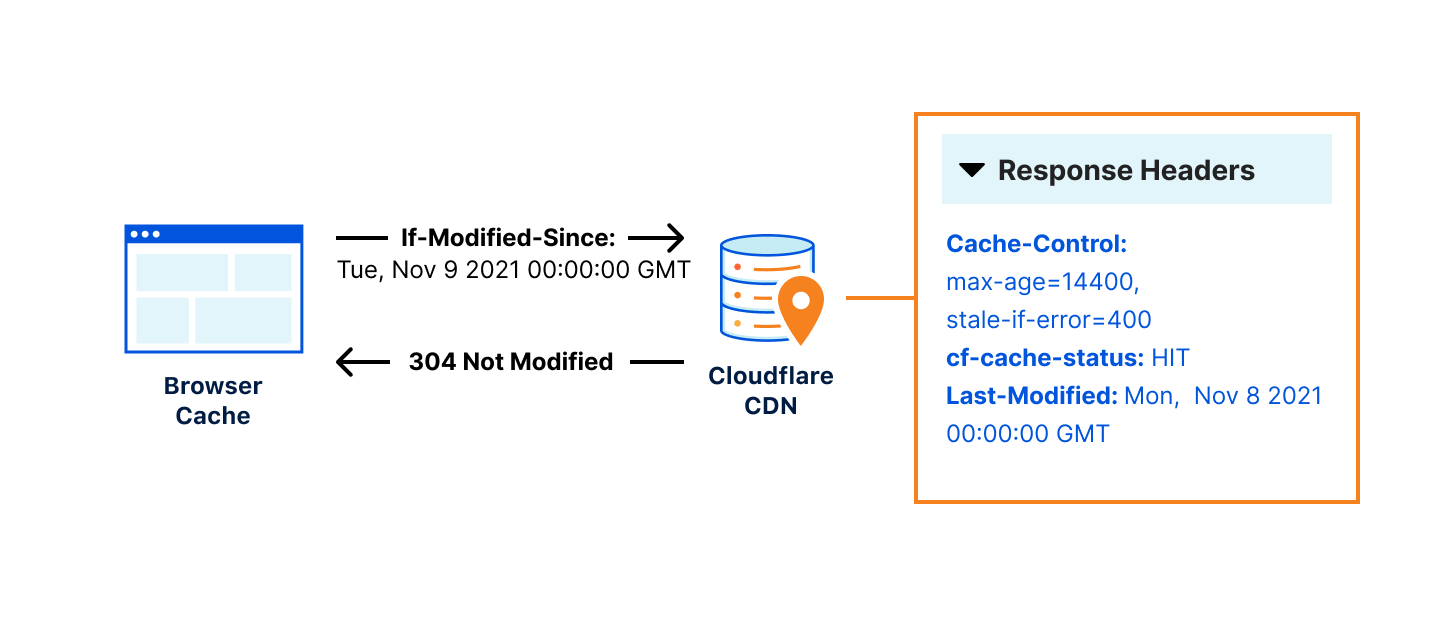
Two additional headers, Last-Modified and ETag, are set by an origin in order to distinguish different versions of the same URL/object across modifications. After the object expires and the revalidation check occurs, if the ETag value hasn’t changed or a more recent Last-Modified timestamp isn’t present, the object is marked “revalidated” and the expired object can continue to be served from cache. If there has been a change as indicated by the ETag value or Last-Modified timestamp, then the new object is downloaded and the old object is removed from cache.

Revalidation checks occur when a browser sends a request to a cache server using If-Modified-Since or If-None-Match headers. These request headers are questions sent from the browser cache about when an object has last changed that can be answered via the ETag or Last-Modified response headers on the cache server. For example, if the browser sends a request to a cache server with If-Modified-Since: Tue, 8 Nov 2021 07:28:00 GMT the cache server must look at the object being asked about and if it has not changed since November 8 at 7:28 AM, it will respond with a 304 status code indicating it’s unchanged. If the object has changed, the cache server will respond with the new object.

Introducing Smart Edge Revalidation

Sending a 304 status code that indicates an object can be reused is much more efficient than sending the entire object. It’s like if you ran a news website that updated every 24 hours. Once the content is updated for the day, you wouldn’t want to keep redownloading the same unchanged content from the origin and instead, you would prefer to make sure that the day’s content was just reused by sending a lightweight signal to that effect, until the site changes the next day.

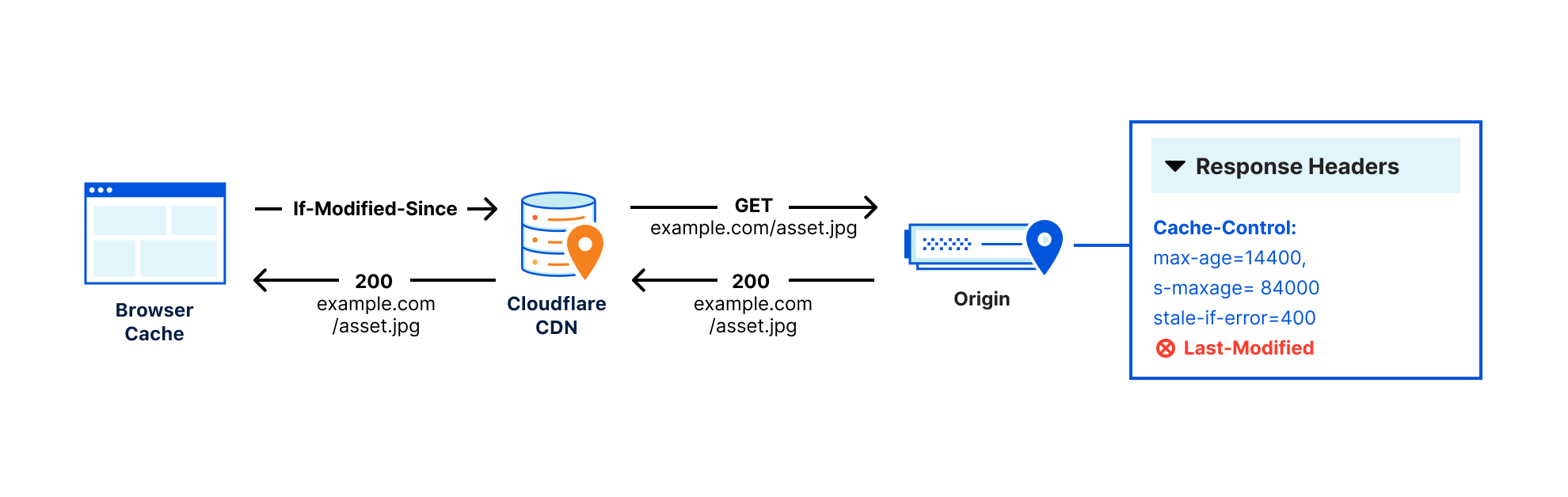
The problem with this system of browser questions and revalidation responses is that sometimes origins don’t set ETag or Last-Modified headers, or they aren’t configured by the website’s admin, making revalidation impossible. This means that every time an object expires, it must be redownloaded regardless of if there has been a change or not, because we have to assume that the asset has been updated, or else risk serving stale content.

Introducing Smart Edge Revalidation

This is an incredible waste of resources which costs hundreds of GB/sec of needless bandwidth between the edge and the visitor. Meaning browsers are downloading hundreds of GB/sec of content they may already have. If our baseline of revalidation is around 10% of all traffic and in initial tests, Smart Edge Revalidation increased revalidation just under 50%, this means that without a user needing to configure anything, we can increase total revalidations by around 5%!

Such a large reduction in bandwidth use also comes with potential environmental benefits. Based on Cloudflare’s carbon emissions per byte, the needless bandwidth being used could amount to 2000+ metric tons CO2e/year, the equivalent of the CO2 emissions from more than 400 cars in a year.

Revalidation also comes with a performance improvement because it usually means a browser is downloading less than 1KB of data to check if the asset has changed or not, while pulling the full asset can be 100sKB. This can improve performance and reduce the bandwidth between the visitor and our edge.

How Smart Edge Revalidation Works

When both Last-Modified and Etag headers are absent from the origin server response, Smart Edge Revalidation will use the time the object was cached on Cloudflare’s edge as the Last-Modified header value. When a browser sends a revalidation request to Cloudflare using If-Modified-Since or If-None-Match, our edge can answer those revalidation questions using the Last-Modified header generated from Smart Edge Revalidation. In this way, our edge can ensure efficient revalidation even if the headers are not sent from the origin.

Smart Edge Revalidation will be enabled automatically for all Cloudflare customers over the coming weeks. If this behavior is undesired, you can always ensure that Smart Edge Revalidation is not activated by confirming your origin is sending ETag or Last-Modified headers when you want to indicate changed content. Additionally, you could have your origin direct your desired revalidation behavior by making sure it sets appropriate cache-control headers.

Smart Edge Revalidation is a win for everyone: visitors will get more content faster from cache, website owners can serve and revalidate additional content from Cloudflare efficiently, and the Internet will get a bit greener and more efficient.

Smart Edge Revalidation is the latest announcement to join the list of ways we’re making our network more sustainable to help build a greener Internet — check out posts from earlier this week to learn about our climate commitments, Green Compute with Workers, Carbon Impact Report, Pages x Green Web Foundation partnership, and crawler hints.

Introducing: Smarter Tiered Cache Topology Generation

Post Syndicated from Alex Krivit original https://blog.cloudflare.com/introducing-smarter-tiered-cache-topology-generation/

Introducing: Smarter Tiered Cache Topology Generation

Introducing: Smarter Tiered Cache Topology Generation

Caching is a magic trick. Instead of a customer’s origin responding to every request, Cloudflare’s 200+ data centers around the world respond with content that is cached geographically close to visitors. This dramatically improves the load performance for web pages while decreasing the bandwidth costs by having Cloudflare respond to a request with cached content.

However, if content is not in cache, Cloudflare data centers must contact the origin server to receive the content. This isn’t as fast as delivering content from cache. It also places load on an origin server, and is more costly compared to serving directly from cache. These issues can be amplified depending on the geographic distribution of a website’s visitors, the number of data centers contacting the origin, and the available origin resources for responding to requests.

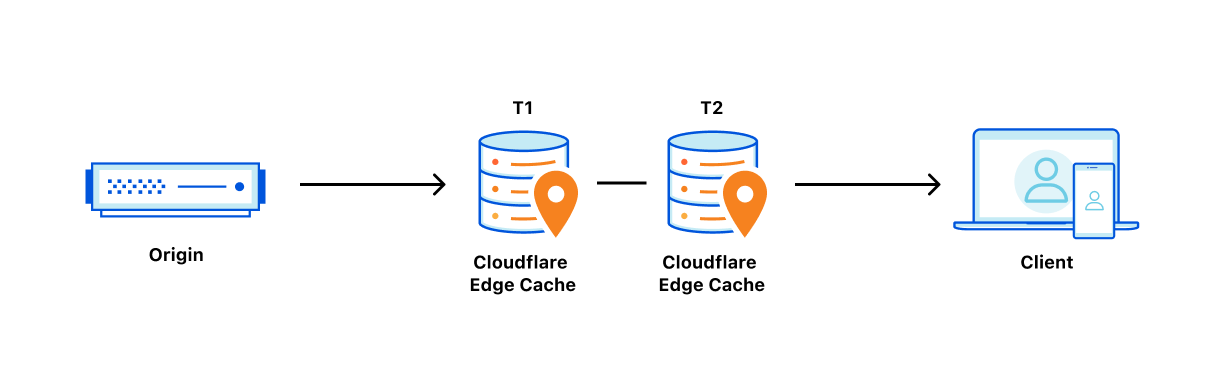
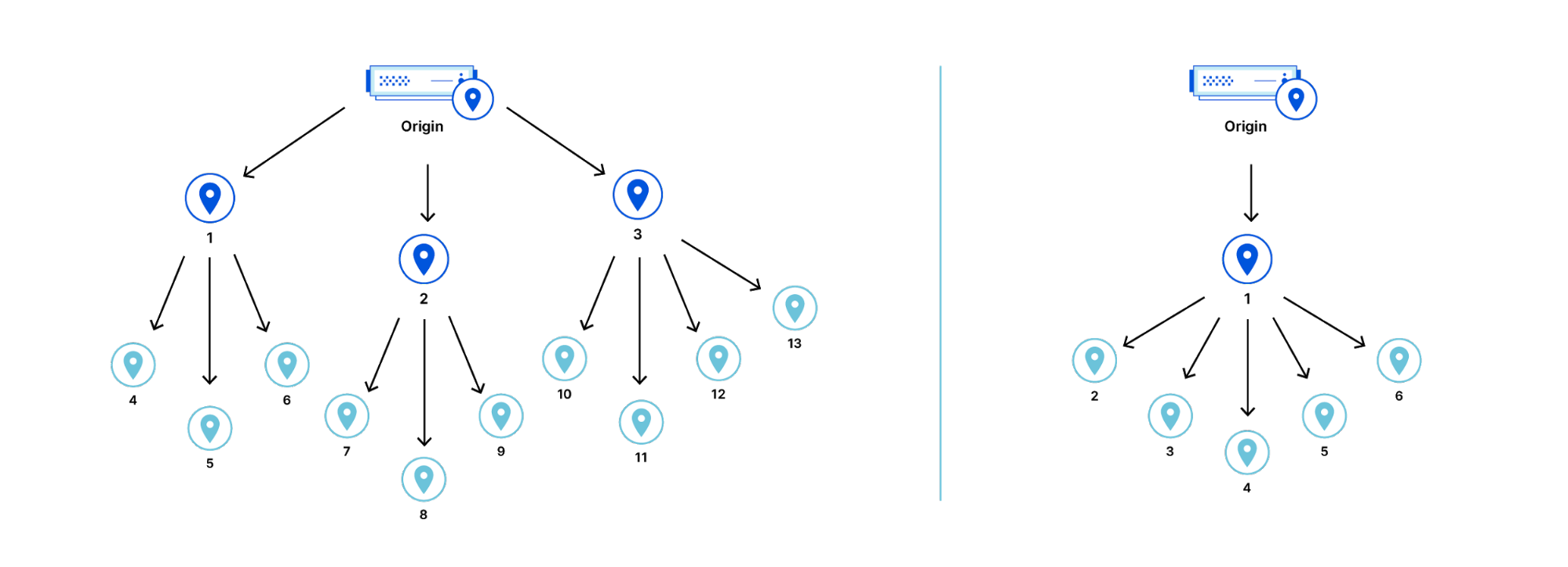
To decrease the number of times our network of data centers communicate with an origin, we organize data centers into tiers so that only upper-tier data centers can request content from an origin and then they spread content to lower tiers. This means content that loads faster for visitors, is cheaper to serve, and reduces origin resource consumption.

Today, I’m thrilled to announce a fundamental improvement to Argo Tiered Cache we’re calling Smart Tiered Cache Topology. When enabled, Argo Tiered Cache will now dynamically select the single best upper tier for each of your website’s origins while providing tiered cache analytics showing how your custom topology is performing.

Smarter Tiered Cache Topology Generation

Tiered Cache is part of Argo, a constellation of products that analyzes and optimizes routing decisions across the global Internet in real-time by processing information from every Cloudflare request to determine which routes to an origin are fast, which are slow, and what the optimum path from visitor to content is at any given moment. Previously, Argo Tiered Cache would use a static collection of upper-tier data centers to communicate with the origin. With the improvements we’re announcing today, Tiered Cache can now dynamically find the single best upper tier for an origin using Argo performance and routing data. When Argo is enabled and a request for particular content is made, we collect latency data for each request to pick the optimal path. Using this latency data, we can determine how well any upper-tier data center is connected with an origin and can empirically select the best data center with the lowest latency to be the upper tier for an origin.

Argo Tiered Cache

Taking one step back, tiered caching is a practice where Cloudflare’s network of global data centers are subdivided into a hierarchy of upper tiers and lower tiers. In order to control bandwidth and number of connections between an origin and Cloudflare, only upper tiers are permitted to request content from an origin and must propagate that information to the lower tiers. In this way, Cloudflare data centers first talk to each other to find content before asking the origin. This practice improves bandwidth efficiency by limiting the number of data centers that can ask the origin for content, reduces origin load, and makes websites more cost-effective to operate. Argo Tiered Cache customers only pay for data transfer between the client and edge, and we take care of the rest. Tiered caching also allows for improved performance for visitors, because distances and links traversed between Cloudflare data centers are generally shorter and faster than the links between data centers and origins.

Introducing: Smarter Tiered Cache Topology Generation

Previously, when Argo Tiered Cache was enabled for a website, several of Cloudflare’s largest and most-connected data centers were determined to be upper tiers and could pull content from an origin on a cache MISS. While utilizing a topology consisting of numerous upper-tier data centers may be globally performant, we found that cost-sensitive customers generally wanted to find the single best upper tier for their origin to ensure efficient data transfer of their content to Cloudflare’s network. We built Smart Tiered Cache Topology for this reason.

How to enable Smart Tiered Cache Topology

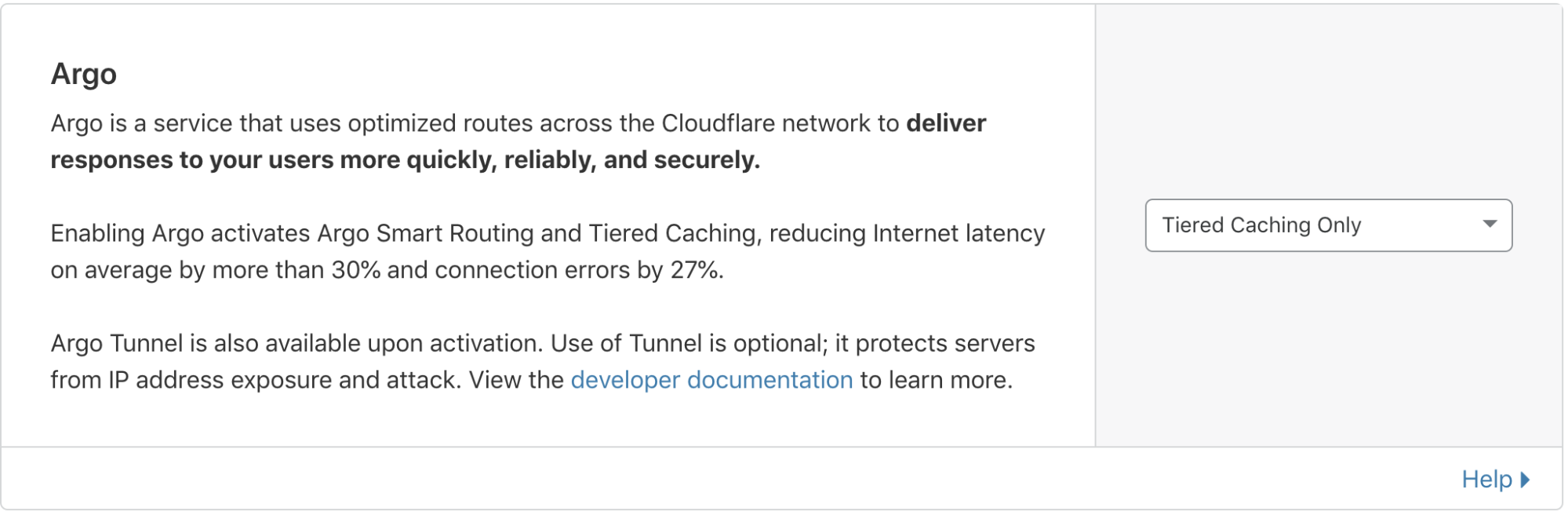
When you enable Argo Tiered Cache, Cloudflare now by default concentrates connections to origin servers so they come from a single data center. This is done without needing to work with our Customer Success or Solutions Engineering organization to custom configure the best single upper tier. Argo customers can generate this topology by:

  • Logging into your Cloudflare account.
  • Navigating to the Traffic tab in the dashboard.
  • Ensuring you have Argo enabled.
  • From there, Non-Enterprise Argo customers will automatically be enrolled in Smart Tiered Cache Topology without needing to make any additional changes.

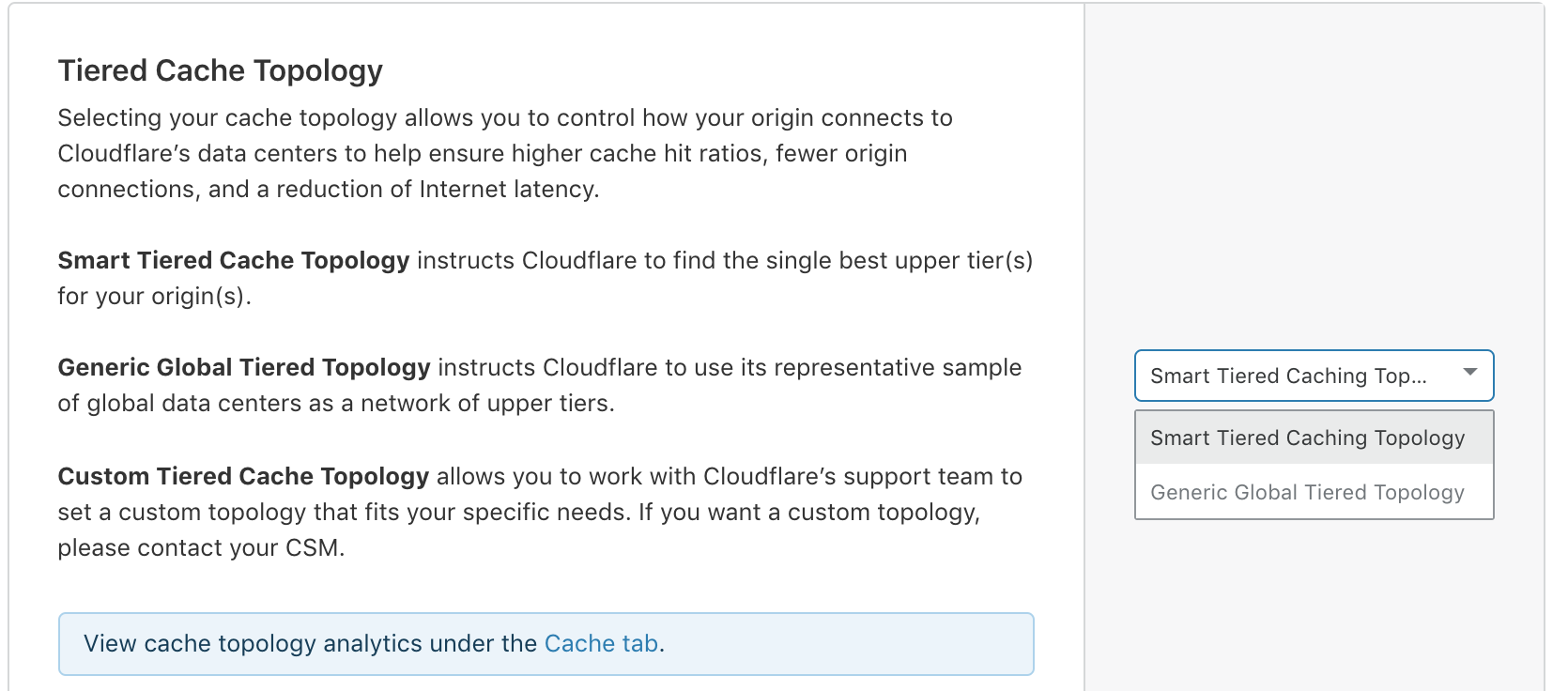
Enterprise customers can select the type of topology they’d like to generate.

Introducing: Smarter Tiered Cache Topology Generation

Self-serve Argo customers are automatically enrolled in Smart Tiered Cache Topology

Introducing: Smarter Tiered Cache Topology Generation

Enterprise customers can determine the tiered cache topology that works best for them.

More data, fewer problems

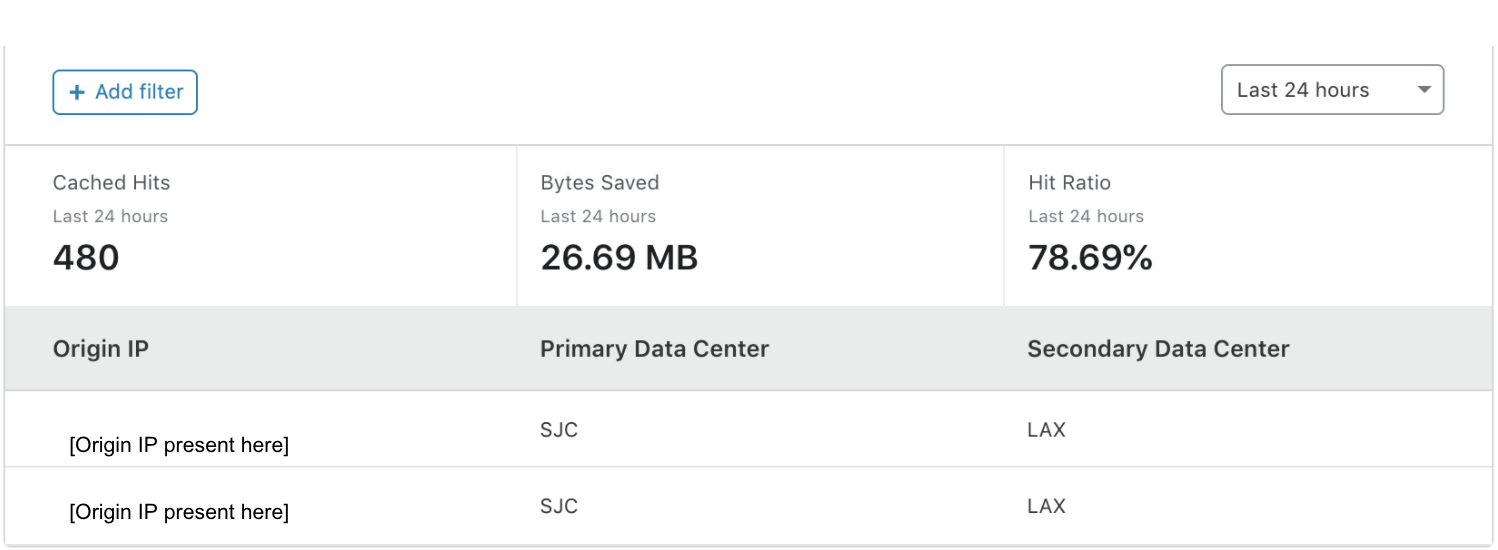
Once enabled, in addition to performance and cost improvements, Smart Tiered Cache Topology also delivers summary analytics for how the upper tiers are performing so that you can monitor the cost and performance benefits your website is receiving. These analytics are available in the Cache Tab of the dashboard in the Tiered Cache section. The “Primary Data Center” and “Secondary Data Center” fields show you which data centers were determined to be the best upper tier and failover for your origin. “Cached Hits” and the “Hit Ratio” shows you the proportion of requests that were served by the upper tier and how many needed to be forwarded on to the origin for a response. “Bytes Saved” indicates the total transfer from the upper-tier data center to the lower tiers, showing the total bandwidth saved by having Cloudflare’s lower tier data centers ask the upper tiers for the content instead of the origin.

Introducing: Smarter Tiered Cache Topology Generation

Smart Tiered Cache Topology works with Cloudflare’s existing products to deliver you a seamless, easy, and performant experience that saves you money and provides you useful information about how your upper tiers are working with your origins. Smart Tiered Cache Topology stands on the shoulders of some of the most resilient and useful products at Cloudflare to provide even more benefits to webmasters.

If you’re interested in seeing how Argo and Smart Tiered Cache Topology can benefit your web property, please login to your Cloudflare account and find more information in the Traffic tab of the dashboard here.

Cloudflare’s Always Online and the Internet Archive Team Up to Fight Origin Errors

Post Syndicated from Alex Krivit original https://blog.cloudflare.com/cloudflares-always-online-and-the-internet-archive-team-up-to-fight-origin-errors/

Cloudflare’s Always Online and the Internet Archive Team Up to Fight Origin Errors

Cloudflare’s Always Online and the Internet Archive Team Up to Fight Origin Errors

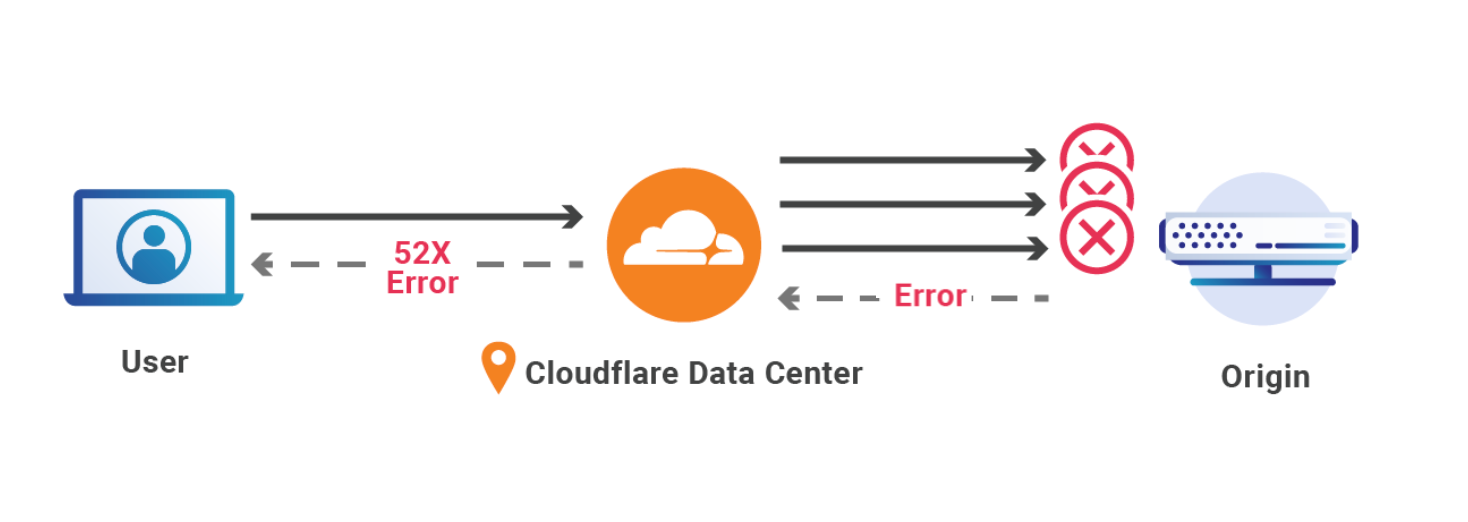
Every day, all across the Internet, something bad but entirely normal happens: thousands of origin servers go down, resulting in connection errors and frustrated users. Cloudflare’s users collectively spend over four and a half years each day waiting for unreachable origin servers to respond with error messages. But visitors don’t want to see error pages, they want to see content!

Today is exciting for all those who want the Internet to be stronger, more resilient, and have important redundancies: Cloudflare is pleased to announce a partnership with the Internet Archive to bring new functionality to our Always Online service.

Always Online serves as insurance for our customers’ websites. Should a customer’s origin go offline, timeout, or otherwise break, Always Online is there to step in and serve archived copies of webpages to visitors. The Internet Archive is a nonprofit organization that runs the Wayback Machine, a service which saves snapshots of billions of websites across the Internet. By partnering with the Internet Archive, Cloudflare is able to seamlessly deliver responses for unreachable websites from the Internet Archive, while the Internet Archive can continue their mission of archiving the web to provide access to all knowledge.

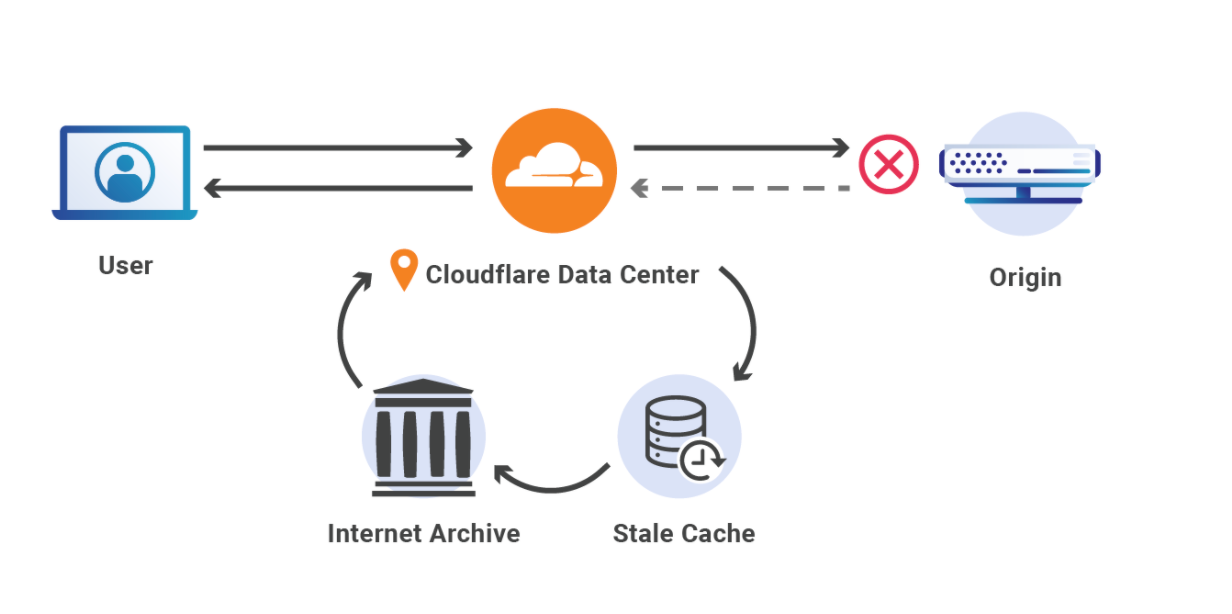
Enabling Always Online in the Cloudflare dashboard allows us to work with the Internet Archive to save a copy of a website to the Wayback Machine. When a website’s origin is down, Cloudflare will go to the Internet Archive to retrieve the most recently archived version of the site, so that visitors will still be able to view the site’s content.

Trying to reach a busted origin

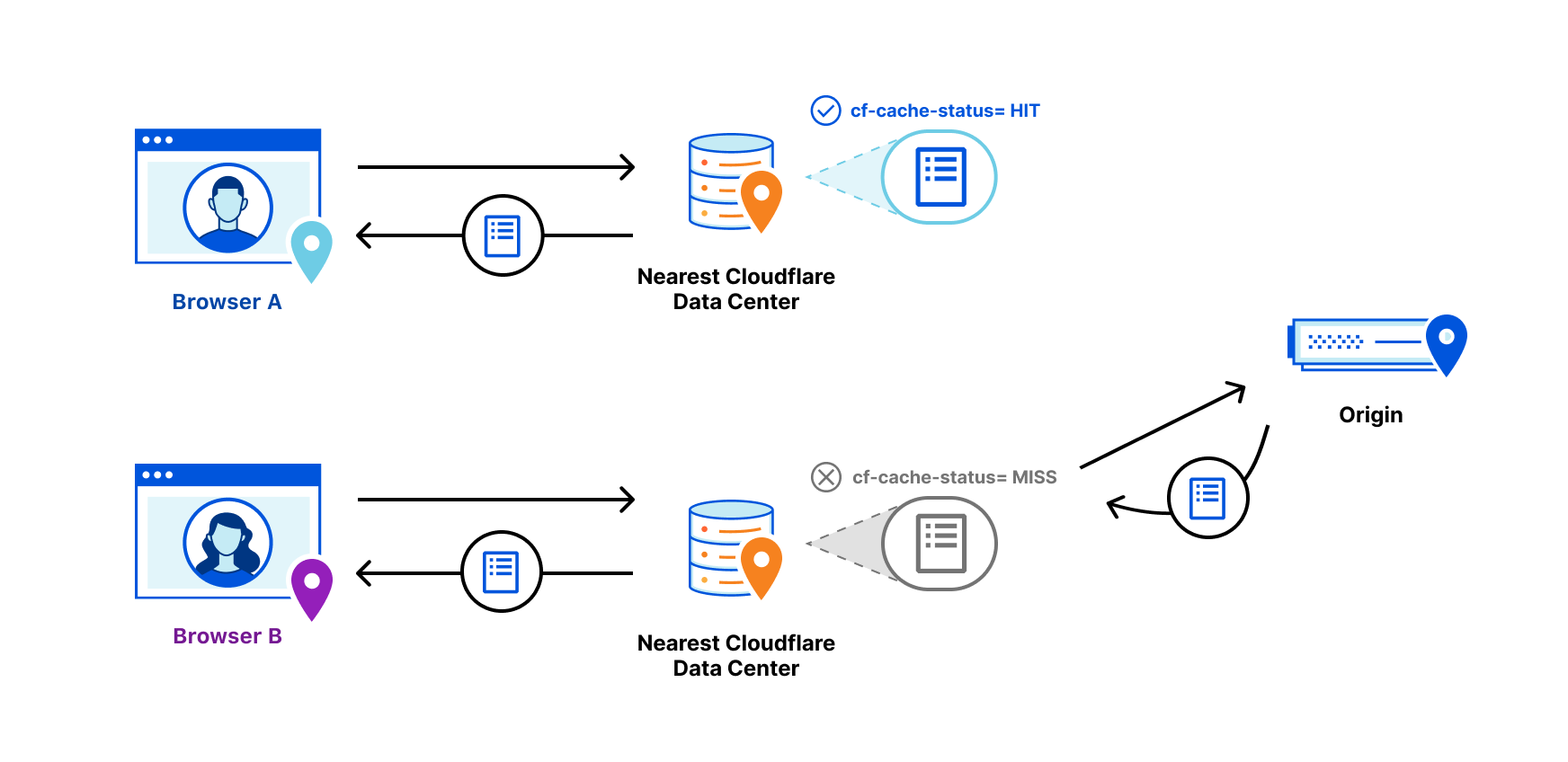
When a person visits a Cloudflare website, a request is made from their laptop/phone/tablet/smart fridge to Cloudflare’s edge. Our edge first looks to see if we can respond with cached content; if the requested content is not in cache, or is determined to be expired, we then obtain a fresh copy from the origin. As part of fulfilling an uncached/expired origin fetch, we also update our cache to allow subsequent requests to be served to visitors faster and more securely.If we are unable to reach the origin, our edge tries a few more times to connect before marking the origin as being down and serving an error page to the visitor. Receiving an error page is not ideal for anyone, so we try really hard to ensure that visitors to websites using Cloudflare can get some content, even if an origin is struggling.

Cloudflare’s Always Online and the Internet Archive Team Up to Fight Origin Errors

A brief history of Always Online

When Cloudflare started 10 years ago, most of our customers were small and running on hosts that were subject to frequent downtime. These early customers feared that their host may go down at the same time a search engine was indexing their site. The search engine’s crawler would report the downed site as non-responsive and the site would drop in their search ranking. Always Online was born from that concern.

Through operating Always Online over the past 10 years, we’ve learned that fighting Internet downtime with simple, unobtrusive tools was something that our customers and their users deeply value. Though some features have undergone rewrite upon rewrite, other parts of our code have remained relatively untouched by the sands of time, a testament to their robustness. For example, Always Online clearly shows a banner indicating that it is serving an archived version of the page due to the origin being unreachable, and this transparency is well-received by both website owners and visitors.

We recently set out to make Always Online even better. We wanted to preserve what customers loved — as seamless an experience as possible for their users when their origin servers are down — while increasing the amount of content available through Always Online, ensuring it is as fresh as possible, and performing this archiving in a way that helps make the Internet a better place.

Cloudflare’s Always Online and the Internet Archive Team Up to Fight Origin Errors
What a visitor will see with Always Online. 

Enter the Internet Archive

Partnering with the Internet Archive’s Wayback Machine to power the next generation of Always Online accomplishes all of these goals. The Internet Archive’s mission is to provide universal access to all knowledge. Since 1996, the Internet Archive’s Wayback Machine has been archiving much of the public Web: preserving and making available millions of websites and pages that would otherwise be lost. In pursuit of that mission, they have archived more than 468 billion web pages, amounting to more than 45 petabytes of information.

Always Online’s integration with the Internet Archive will help the Archive expand their record of the Internet; many of the domains that opt-in to Always Online functionality may not have been otherwise discovered by the Archive’s crawler. And for Cloudflare customers, the Archive will seamlessly provide visitors access to content that would otherwise be errors.

In other words, Cloudflare partnering with the Internet Archive makes the Internet better, stronger, and more available to everyone.

“Through our partnership with Cloudflare, we are learning about, and archiving, webpages we might not have otherwise known about, and by integrating with Cloudflare’s Always Online service, archives of those pages are available to people trying to access them if they become unavailable via the live web”
Mark Graham, Director of the Internet Archive’s Wayback Machine

“We are excited to work with Cloudflare and expect this partnership to bring important redundancy to the Internet and allow for us to advance our ongoing efforts to make the Internet more useful and reliable.”
Brewster Kahle, Founder and Digital Librarian of the Internet Archive

How does the new Always Online work behind the scenes?

Upgrading to the new Always Online in the Cloudflare dashboard allows us to share some basic information about your website with the Internet Archive (like hostname and popular URLs), so they can begin to crawl and archive your website at regular intervals. This information sharing and crawling ensures content is available to Always Online and also serves to deepen the library of content available directly through the Archive.

If your origin goes down or is unreachable, Cloudflare’s edge will return a status code in the 520 to 527 range, indicating an issue connecting to the origin. When this happens, Cloudflare will first look to the local edge datacenter to see if there is a stale or expired version of content we can serve to the website visitor. If there isn’t a version in the local cache, Cloudflare will then go to the Internet Archive and fetch the most recently archived version of the site to serve to your visitors. When that happens, Always Online serves the archived content with a banner to let your visitors know that your origin is having problems. The banner allows for your visitors to check and see if your origin is back online with a single click. While dynamic content that requires communication with an origin server will still show an error to visitors (e.g. web applications or shopping carts), basic content will often be available with Always Online.

Cloudflare’s Always Online and the Internet Archive Team Up to Fight Origin Errors

Enabling the new Always Online

For now, the old Always Online service will still be available, but we plan to fully transition to the Internet Archive-backed version soon.

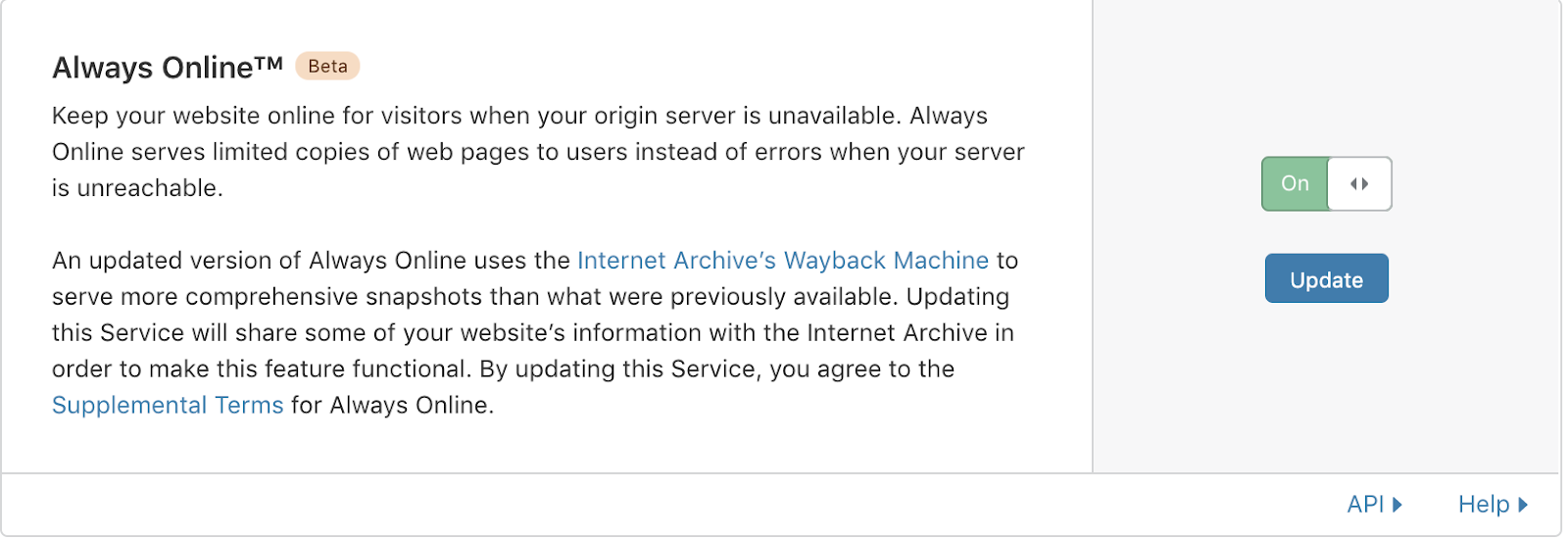
Cloudflare customers can enable Always Online in the dashboard:

Cloudflare’s Always Online and the Internet Archive Team Up to Fight Origin Errors

Learn More

  • For more about Always Online, and how it works, please check out our documentation.
  • To get started using Always Online, please log into your Cloudflare dashboard and toggle it on.
  • Please see the Internet Archive’s announcement of our partnership here.
  • To help improve Always Online, or other parts of our slice of the Internet, drop us a line.