All posts by Dhananjay Karanjkar

Build a unified AI agent architecture with DynamoDB and Bedrock

Post Syndicated from Dhananjay Karanjkar original https://aws.amazon.com/blogs/architecture/build-a-unified-ai-agent-architecture-with-dynamodb-and-bedrock/

Teams building AI agents on AWS often face a fragmented data architecture: operational data lives in Amazon DynamoDB while vector embeddings for semantic search sit in a separate, purpose-built vector store. This duplication increases infrastructure cost, adds synchronization complexity, and widens the window for stale retrieval results. With the general availability of native vector search in Amazon DynamoDB (launched August 5, 2026), you can now store embeddings alongside your operational data in the same table. You query them using the SearchVectors API operation.

In this post, I show you how to build a unified AI agent architecture where an Amazon Bedrock agent uses a single DynamoDB table for both structured lookups and semantic similarity search. The agent calls AWS Lambda action groups that invoke SearchVectors for natural language retrieval and standard DynamoDB APIs for create, read, update, and delete (CRUD) operations. An Amazon DynamoDB Streams pipeline automatically generates embeddings using Amazon Titan Text Embeddings V2 whenever content changes. This keeps the vector index synchronized without manual intervention.

Use case

Consider a technical knowledge management platform where a team maintains hundreds of internal documents: runbooks, architecture decision records, and troubleshooting guides. Team members interact with a conversational agent to find relevant content (“What’s our retry strategy for payment failures?”), retrieve specific documents by ID, or update existing entries.

Without native vector search, this architecture requires a DynamoDB table for document storage plus a separate vector database (or Amazon OpenSearch Service cluster) for semantic retrieval. The Amazon DynamoDB Streams pipeline must write to both stores, and the agent must route requests to the correct backend. With DynamoDB vector search, you collapse this into a single table and reduce operational overhead.

Solution overview

This solution uses a single-table design in DynamoDB that serves two access patterns: key-value lookups for operational data and approximate nearest neighbor (ANN) search for semantic queries. A Bedrock agent orchestrates user interactions and routes requests to the appropriate action group function.

The following list summarizes the core components:

  • DynamoDB table with vector index stores documents, metadata, and 1,024-dimension embeddings in one place.
  • Bedrock agent handles conversation orchestration, tool selection, and response synthesis.
  • Action group Lambda executes semantic search (using SearchVectors) and CRUD operations against the same table.
  • Embedding pipeline Lambda (triggered by DynamoDB Streams) generates embeddings for new or modified content using Amazon Titan Text Embeddings V2.

Architecture

The following diagram illustrates the data flow through the unified architecture.
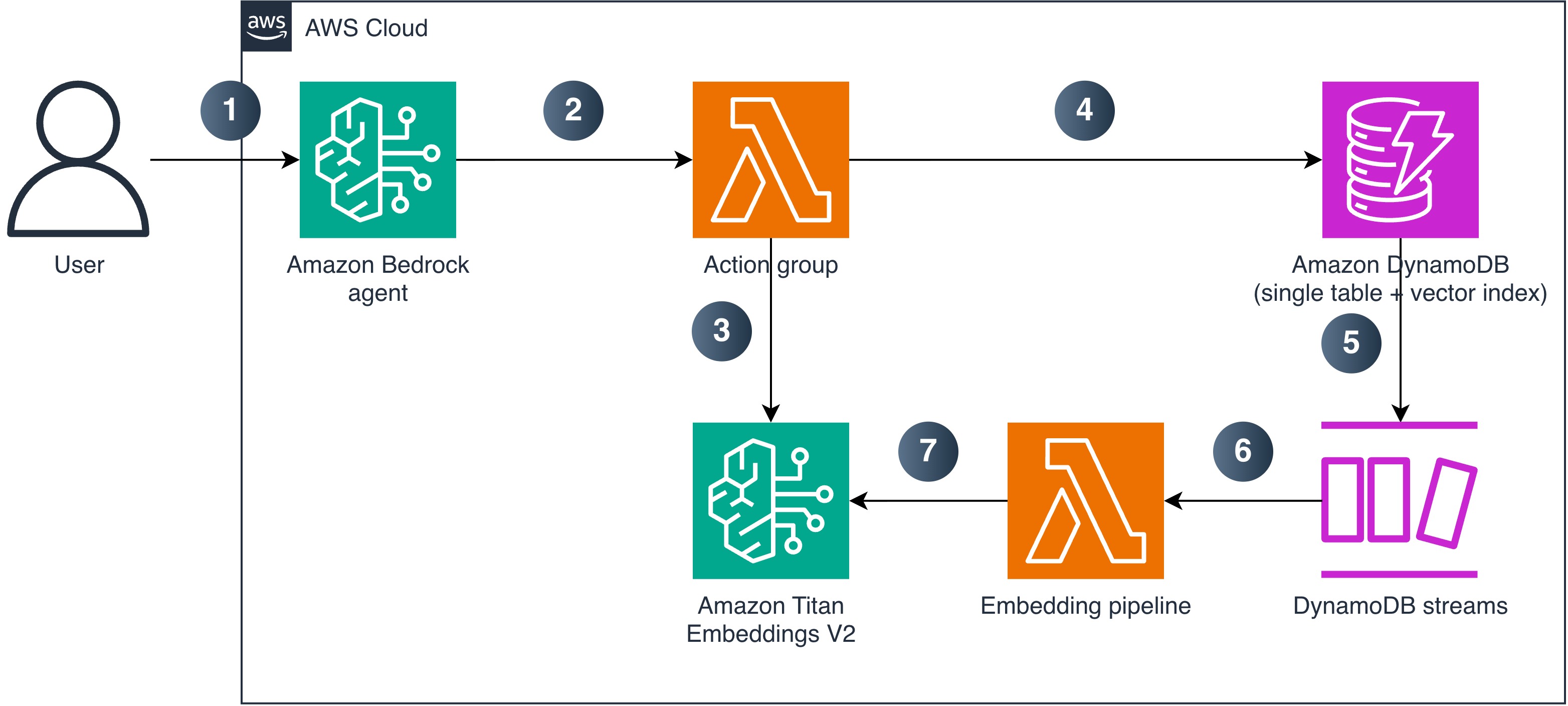
Architecture diagram showing a user query flowing to an Amazon Bedrock agent, which invokes action group Lambda functions that call the DynamoDB SearchVectors API and standard CRUD APIs, with DynamoDB Streams triggering an embedding pipeline Lambda that generates vectors with Amazon Titan Text Embeddings V2

Figure 1: Unified AI agent architecture using DynamoDB vector search and Amazon Bedrock

The numbered steps describe the data and request flow:

  1. A user sends a natural language query to the Bedrock agent.
  2. The agent analyzes the request and invokes the appropriate action group Lambda function.
  3. For semantic search, the action group Lambda generates a query embedding using Amazon Titan Text Embeddings V2.
  4. The Lambda function calls the DynamoDB SearchVectors API (or standard CRUD APIs for operational lookups) against the single table with vector index.
  5. When new content is written to the table, DynamoDB Streams captures the change.
  6. DynamoDB Streams triggers the embedding pipeline Lambda.
  7. The embedding pipeline Lambda calls Amazon Titan Text Embeddings V2 to generate a vector for the new content and writes it back to the same DynamoDB item, where the vector index automatically indexes it.

Prerequisites

To implement this architecture in your account, you need the following:

  • An AWS account with permissions to create DynamoDB tables, Lambda functions, Bedrock agents, and IAM roles.
  • DynamoDB Streams enabled on the table with StreamViewType set to NEW_AND_OLD_IMAGES (the embedding pipeline compares old and new content to prevent a write loop).
  • Access to the Amazon Titan Text Embeddings V2 model (amazon.titan-embed-text-v2:0) enabled in Amazon Bedrock model access.
  • Access to an Anthropic Claude or Amazon Nova model for the Bedrock agent foundation model (check model support by Region).
  • Python 3.12 or later (for Lambda function code).

Implementation

This section walks through the key components of the architecture.

Designing the single-table schema

The table uses a composite primary key (entity_id as partition key, sk as sort key) and stores embeddings as a list of numbers:

# Table schema overview
# PK: entity_id (S) - unique document identifier
# SK: sk (S) - sort key for item versioning
# Attributes: title, content, category, metadata, embedding (L of N)

The vector index partitions search results by the category attribute. Choose a partition key with moderate cardinality that matches your query patterns. A very low-cardinality key (a handful of values) concentrates data in few partitions and limits throughput scaling, while a unique-per-item key leaves no neighbors to compare. For multi-tenant workloads, tenant_id is usually the right partition key. For more information, refer to the DynamoDB vector search best practices.

The following AWS Command Line Interface (AWS CLI) command creates the vector index on an existing table:

aws dynamodb update-table \
    --table-name unified-agent-data \
    --stream-specification StreamEnabled=true,StreamViewType=NEW_AND_OLD_IMAGES \
    --attribute-definitions \
        AttributeName=category,AttributeType=S \
    --vector-index-updates \
    '[{"Create": {
        "IndexName": "content-embedding-index",
        "VectorAttribute": {"AttributeName": "embedding"},
        "Dimensions": 1024,
        "DistanceFunction": "COSINE",
        "SearchSchema": [
            {"AttributeName": "category", "SearchSchemaElementType": "HASH"}
        ],
        "Projection": {"ProjectionType": "INCLUDE", "NonKeyAttributes": ["title", "category"]}
    }}]'

After creating the index, wait for it to become searchable. Poll DescribeTable until IndexStatus is ACTIVE and Backfilling is no longer true. The first few searches after the index reports ACTIVE can still return ValidationException because SearchVectors is served by a dedicated search endpoint. Treat these as retryable rather than as a failure.

aws dynamodb describe-table --table-name unified-agent-data \
    --query 'Table.VectorIndexes[?IndexName==`content-embedding-index`].[IndexStatus,Backfilling]'

Key constraints to keep in mind:

  • DynamoDB vector indexes require on-demand capacity mode (provisioned mode isn’t supported).
  • Maximum five vector indexes per table, with up to 4,096 dimensions each.
  • The SearchSchema HASH attribute is mandatory in every SearchConditionExpression.
  • Only equality operators are supported in search conditions.
  • SearchVectors responses are limited to 16 MB and don’t support pagination. Project only the attributes you need and keep TopK modest to stay within this limit.
  • Items missing the SearchSchema HASH attribute (category in this example) are silently excluded from the vector index while remaining in the base table.

Building the action group Lambda

The action group Lambda handles both semantic search and operational lookups. The agent invokes it with a function name and parameters based on the tool definition.

The semantic search function generates a query embedding and calls SearchVectors. This index uses COSINE distance, where lower scores indicate greater similarity. Name the field accordingly so the agent doesn’t invert the ranking:

def semantic_search(query: str, category: str, max_results: int = 5):
    embedding = generate_embedding(query)
    results = dynamodb.search_vectors(
        TableName=TABLE_NAME,
        IndexName=INDEX_NAME,
        SearchVector=[{"N": str(v)} for v in embedding],
        TopK=min(max_results, 100),
        SearchConditionExpression="category = :cat",
        ExpressionAttributeValues={":cat": {"S": category}},
    )
    return [
        {"entity_id": r["Item"]["entity_id"]["S"],
         "title": r["Item"].get("title", {}).get("S", ""),
         "distance": r["Score"]}  # COSINE: lower = more similar
        for r in results.get("SearchResults", [])
    ]

The generate_embedding helper calls Amazon Titan Text Embeddings V2:

def generate_embedding(text: str) -> list[float]:
    response = bedrock_runtime.invoke_model(
        modelId="amazon.titan-embed-text-v2:0",
        body=json.dumps({
            "inputText": text,
            "dimensions": 1024,
            "normalize": True
        }),
    )
    return json.loads(response["body"].read())["embedding"]

The Lambda handler routes requests based on the function name passed by the Bedrock agent:

def handler(event, context):
    function = event.get("function")
    parameters = {p["name"]: p["value"] for p in event.get("parameters", [])}
    if function == "semantic_search":
        result = semantic_search(parameters["query"], parameters["category"])
        body = json.dumps({"results": result})
    elif function == "get_item_details":
        body = json.dumps(get_item_details(parameters["entity_id"]))
    else:
        body = json.dumps({"error": f"Unknown function: {function}"})
    return {
        "messageVersion": "1.0",
        "response": {
            "actionGroup": event["actionGroup"],
            "function": function,
            "functionResponse": {"responseBody": {"TEXT": {"body": body}}}
        }
    }

Automating embeddings with DynamoDB Streams

The embedding pipeline Lambda triggers on INSERT and MODIFY events. It generates an embedding for new or changed content and writes it back to the same item:

def handler(event, context):
    for record in event["Records"]:
        if record["eventName"] not in ("INSERT", "MODIFY"):
            continue
        new_image = record["dynamodb"]["NewImage"]
        old_image = record["dynamodb"].get("OldImage", {})
        content = new_image.get("content", {}).get("S")
        if not content:
            continue
        # Prevent infinite loop: skip if content hasn't changed
        if "embedding" in new_image and old_image.get("content") == new_image.get("content"):
            continue
        embedding = generate_embedding(content)
        dynamodb.update_item(
            TableName=TABLE_NAME,
            Key={"entity_id": new_image["entity_id"], "sk": new_image["sk"]},
            UpdateExpression="SET embedding = :emb",
            ExpressionAttributeValues={
                ":emb": {"L": [{"N": str(v)} for v in embedding]}
            },
        )

The infinite-loop guard is critical. Without it, the Lambda writes back an embedding, which triggers another Streams event, which triggers another embedding generation, and so on. The check compares the content field between old and new images, skipping processing when only the embedding attribute changed. This guard requires StreamViewType = NEW_AND_OLD_IMAGES. Without it, OldImage is empty and the guard never fires.

For production use, configure the event source mapping with ReportBatchItemFailures so that only failed records are retried. Add an Amazon Simple Queue Service (Amazon SQS) dead-letter queue (or on-failure destination) for records that repeatedly fail. Retry Amazon Bedrock InvokeModel calls with exponential backoff to handle throttling.

Defining the agent tool schema

The Bedrock agent needs a function schema that describes the available tools. This tells the agent when and how to call each function:

{
    "functions": [
        {
            "name": "semantic_search",
            "description": "Search documents by meaning using natural language. Returns results ranked by COSINE distance (lower = more similar).",
            "parameters": {
                "query": {"type": "string", "required": true,
                          "description": "Natural language search query"},
                "category": {"type": "string", "required": true,
                             "description": "Document category to search within"}
            }
        },
        {
            "name": "get_item_details",
            "description": "Retrieve a specific document by its unique ID.",
            "parameters": {
                "entity_id": {"type": "string", "required": true,
                              "description": "Unique document identifier"}
            }
        }
    ]
}

When to use this pattern

This unified architecture works best when your application already uses DynamoDB as its primary operational store and you want to add semantic search without managing a separate service. Consider the following decision points:

  • Use this pattern when your application meets these conditions:
    • Documents update frequently and must be immediately searchable.
    • Your dataset fits within the DynamoDB vector index constraints.
    • You want to minimize infrastructure components.
  • Use Amazon Bedrock Knowledge Bases when your source data lives in Amazon Simple Storage Service (Amazon S3), you need managed chunking and ingestion, or you don’t need real-time index updates tied to operational writes.
  • Use Amazon OpenSearch Service when you need advanced search features (range filters, aggregations, faceted search), your queries require more than equality-based filtering, or you need results beyond the 100-item TopK limit.

Security considerations

The following list highlights the key security aspects of this architecture:

  • Least-privilege IAM policies: Scope dynamodb:SearchVectors to the specific index ARN (arn:aws:dynamodb:{region}:{account}:table/{table}/index/{index}). The embedding Lambda needs only dynamodb:UpdateItem, not search permissions.
  • No fine-grained access control for SearchVectors: DynamoDB condition keys like dynamodb:LeadingKeys don’t apply to the SearchVectors API. For multi-tenant workloads, use the SearchSchema HASH partition key to scope queries by tenant, or use separate tables for strict isolation.
  • Encryption at rest: DynamoDB encrypts data including vector embeddings using your choice of AWS owned keys, AWS managed keys, or customer managed keys through AWS Key Management Service (AWS KMS).
  • Transport encryption: All SearchVectors traffic uses TLS. The API routes to a dedicated search endpoint that the AWS SDKs handle automatically.
  • Bedrock model access: Restrict bedrock:InvokeModel permissions to the specific embedding and agent foundation model ARNs required by the solution.
  • Agent-to-Lambda invocation: Grant lambda:InvokeFunction to bedrock.amazonaws.com on the action group Lambda, scoped with an aws:SourceArn condition matching the agent ARN. Without this resource-based policy, the agent can’t invoke the action group.

Clean up

To avoid ongoing charges, delete the resources in the following order:

  1. Delete the Bedrock agent and its action group.
  2. Delete the embedding pipeline Lambda function and its event source mapping.
  3. Delete the DynamoDB table (this also removes the vector index). If you want to keep the table but remove the vector index, run the following command first:
    aws dynamodb update-table \
        --table-name unified-agent-data \
        --vector-index-updates '[{"Delete": {"IndexName": "content-embedding-index"}}]'

  4. Delete the action group Lambda function and associated IAM roles.

Conclusion

With this pattern, you can build a unified AI agent architecture that uses a single DynamoDB table for both operational data and vector-based semantic search. The native vector search of DynamoDB combined with Bedrock agent action groups eliminates the need for a separate vector database. DynamoDB Streams-driven embedding generation keeps the index synchronized in real time.

This pattern reduces infrastructure complexity for applications that already rely on DynamoDB and need to add conversational AI capabilities. The automatic embedding pipeline keeps your vector index synchronized with operational writes, and the action group design gives the agent access to both semantic and structured query paths.

Adapt the table schema, embedding dimensions, and agent instructions to your domain. Clone the sample-dynamodb-vector-search-architecture repository to deploy the complete working implementation. For more information about DynamoDB vector search capabilities and limits, refer to the Amazon DynamoDB vector search documentation.

References

About the author

Route Amazon Bedrock Guardrails interventions to Amazon Security Lake

Post Syndicated from Dhananjay Karanjkar original https://aws.amazon.com/blogs/security/route-amazon-bedrock-guardrails-interventions-to-amazon-security-lake/

Security teams investigating AI-related incidents need guardrail intervention data alongside their existing security telemetry. Routing Amazon Bedrock Guardrails violations to Amazon Security Lake makes this possible. With this integration, you can query guardrail events alongside identity, network, and application security data in a single layer. When a guardrail blocks a prompt injection attempt or redacts sensitive data, that intervention carries investigative value comparable to a failed sign-in or a network intrusion alert. Amazon Bedrock publishes this telemetry to Amazon CloudWatch metrics and model invocation logs for operational monitoring. By using Security Lake, organizations can extend this telemetry into their security data lake for unified correlation.

In this post, I show you how to build an automated pipeline that transforms Amazon Bedrock Guardrails intervention events into Open Cybersecurity Schema Framework (OCSF) records and delivers them to Security Lake as a custom source. You can query the data using Amazon Athena or any Security Lake subscriber.

Use case

Consider a financial services organization deploying Amazon Bedrock across multiple business units. Each unit uses guardrails to enforce content policies (blocking harmful content), topic policies (preventing off-topic queries about competitors), sensitive information policies (redacting personally identifiable information (PII) such as account numbers), and prompt injection detection.

The security team needs to:

  • Identify which user accounts trigger the most guardrail interventions and whether those accounts also have unusual AWS Identity and Access Management (IAM) activity
  • Determine if prompt injection attempts correlate with specific source IP addresses that also appear in Amazon Virtual Private Cloud (Amazon VPC) Flow Logs
  • Track the organization-wide trend of guardrail violations across all business units and compare it against the baseline from 30 days ago

With guardrail events routed to Security Lake, a single Athena query covers all three.

Solution overview

The pipeline architecture routes Amazon Bedrock security events to Security Lake as OCSF-compliant records. The same infrastructure—subscription filter, AWS Lambda transformation, Parquet writer, Amazon Simple Storage Service (Amazon S3) partitioning—supports multiple event types by changing the filter pattern and OCSF mapping:

Guardrail interventions (this post) DETECTION_FINDING 2004
Model invocation API calls API_ACTIVITY 6003
Agent guardrail traces DETECTION_FINDING 2004
Token consumption anomalies DETECTION_FINDING 2004

This post demonstrates the guardrail interventions implementation as a working example. The solution captures Amazon Bedrock model invocation logs that contain guardrail trace data and filters for intervention events. It transforms matching events into OCSF-compliant Detection Finding records (class_uid 2004) and delivers them to Security Lake as Parquet files. Guardrail interventions are detection events: the guardrail detected and blocked prohibited content, so OCSF class 2004 (Detection Finding) under the Findings category is the appropriate classification.

Architecture

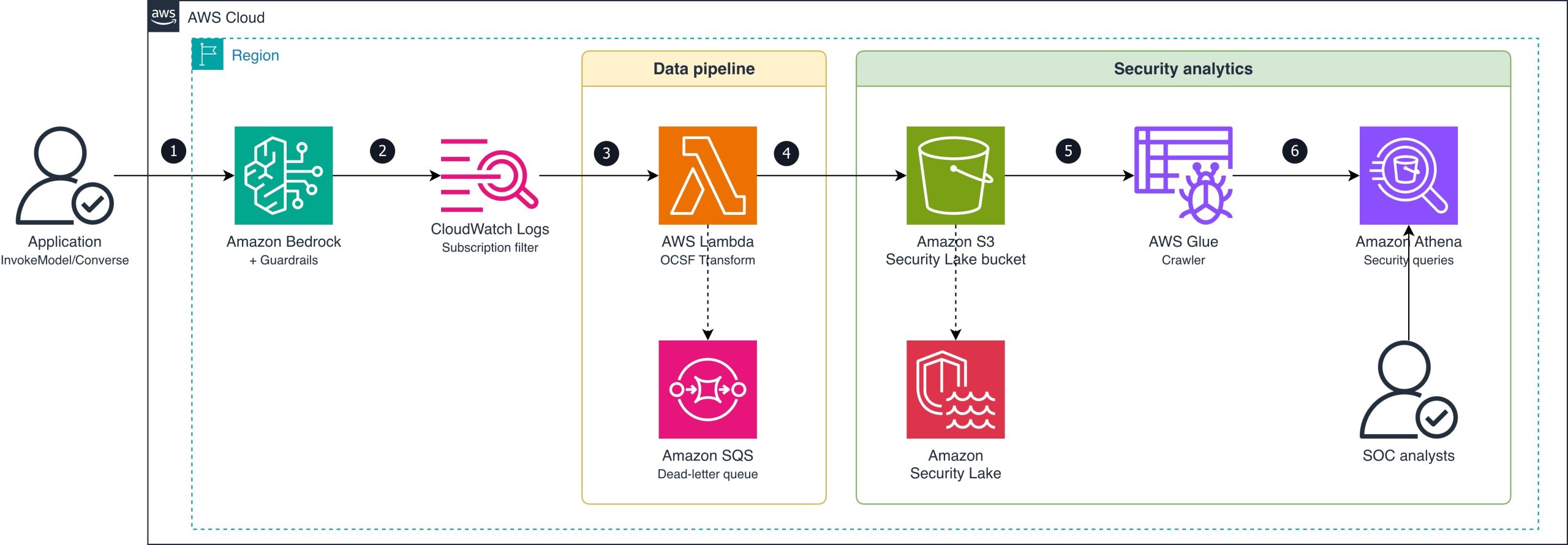
The following diagram shows the end-to-end pipeline from guardrail intervention to Security Lake ingestion.

Figure 1: Guardrail intervention routing

Figure 1: Guardrail intervention routing

The data flow consists of the following steps:

  1. An application calls Amazon Bedrock (InvokeModel or Converse API) with a guardrail attached.
  2. Amazon Bedrock evaluates the guardrail and logs the invocation (including guardrail trace data) to a CloudWatch Logs log group using model invocation logging. The subscription filter matches log entries where the guardrail action is INTERVENED (blocked or masked content).
  3. The subscription filter delivers matching records to a Lambda function (OCSF Transform).
  4. The Lambda function transforms each intervention event into an OCSF Detection Finding record (class_uid 2004), batches records, and converts them to Zstandard (zstd)-compressed Apache Parquet format. It writes the Parquet file to the Amazon S3 Security Lake bucket using the required partition path (ext/BedrockGuardrails/region=/accountId=/eventDay=/). If the Lambda function fails to process a record, the message routes to an Amazon Simple Queue Service (Amazon SQS) dead-letter queue for later analysis and redrive.
  5. Security Lake manages the ingested Parquet data in the S3 bucket.
  6. AWS Glue crawler detects new partitions and catalogs the Parquet files for query access.
  7. SOC analysts query guardrail violation data alongside other security sources using Athena.

OCSF mapping

The following table shows how Amazon Bedrock Guardrails intervention fields map to OCSF Detection Finding (class_uid 2004) attributes.

OCSF field Source Example value
class_uid Static 2004 (Detection Finding)
category_uid Static 2 (Findings)
severity_id Derived from policy type 3 (Medium) for content/topic; 4 (High) for prompt injection
activity_id Static 1 (Create)
time Invocation log timestamp 1721001600000
cloud.provider Static AWS
cloud.region Invocation log region us-east-1
cloud.account.uid Invocation log accountId 123456789012
actor.user.uid Invocation log identity.arn arn:aws:sts::123456789012:assumed-role/AppRole/session
finding_info.title Derived from policy type ContentPolicy Intervention
finding_info.desc Guardrail trace action/topic Blocked: HATE content detected on INPUT
resource.uid Model ARN arn:aws:bedrock:us-east-1::foundation-model/anthropic.claude-sonnet-4-6-20250514-v1:0
resource.type Static AwsBedrock:Model
metadata.product.name Static Amazon Bedrock Guardrails
metadata.product.vendor_name Static AWS
metadata.version Static 1.3.0
unmapped.guardrail_id Guardrail trace guardrailId my-content-guardrail
unmapped.guardrail_arn Guardrail trace guardrailArn arn:aws:bedrock:us-east-1:123456789012:guardrail/abc123
unmapped.guardrail_version Guardrail trace guardrailVersion 3
unmapped.guardrail_content_source Guardrail trace INPUT or OUTPUT
unmapped.guardrail_policy_type Guardrail trace ContentPolicy, TopicPolicy, SensitiveInformationPolicy, WordPolicy, ContextualGroundingPolicy, PromptAttack

Prerequisites

The following prerequisites are needed to deploy the reference implementation. Before you begin, clone the repository:

git clone https://github.com/aws-samples/sample-bedrock-guardrails-security-lake.git
cd sample-bedrock-guardrails-security-lake

Verify you have the following:

  • An AWS account with AWS Cloud Development Kit (AWS CDK) bootstrapped in the target AWS Region
  • Security Lake enabled in the target Region
  • Python 3.12 or later
  • Node.js 20 or later (for AWS CDK CLI)
  • An existing Amazon Bedrock guardrail (or create one during deployment)
  • Model invocation logging enabled on Amazon Bedrock (with guardrail trace data enabled)

Implementation

The reference implementation deploys three CloudFormation stacks: SecurityLakeSourceStack, TransformPipelineStack and MonitoringStack. The following commands deploy the stacks in dependency order:

cdk deploy SecurityLakeSourceStack \
  -c security_lake_bucket=<your-security-lake-bucket> \
  -c source_location=ext/BedrockGuardrails \
  -c security_lake_enabled=true

cdk deploy TransformPipelineStack \
  -c security_lake_bucket=<your-security-lake-bucket> \
  -c source_location=ext/BedrockGuardrails

cdk deploy MonitoringStack \
  -c security_lake_bucket=<your-security-lake-bucket> \
  -c source_location=ext/BedrockGuardrails

Enable model invocation logging

Model invocation logging captures the guardrail trace data you need. Turn on full request and response logging to a CloudWatch Logs log group. Configure textDataDeliveryEnabled to capture text request and response bodies, which include the guardrail trace output when a guardrail is attached to the invocation.

Register Security Lake custom source

Register BedrockGuardrails as a custom source with Security Lake using the DETECTION_FINDING event class. Security Lake creates the Amazon S3 prefix and IAM role for your source. The stack configures the AWS Glue crawler role for partition discovery.

Create the subscription filter

Create a CloudWatch Logs subscription filter on your model invocation log group with the filter pattern { $.output.guardrailAction = “INTERVENED” }. This captures only the events where a guardrail blocked or modified content, not the successful pass-through events. This reduces Lambda invocations and cost.

Transform to OCSF and write Parquet

The Lambda function performs three operations: parse the CloudWatch Logs event, transform each intervention to an OCSF Detection Finding record (class_uid 2004), and write batched records as Parquet files. The files are written to the Security Lake S3 bucket using the required partition path (ext/BedrockGuardrails/region=<region>/accountId=<accountId>/eventDay=<YYYYMMDD>/).

The transformation maps guardrail trace fields to OCSF attributes as described in the OCSF mapping table. Severity is set to High for prompt injection interventions and Medium for content, topic, or sensitive information interventions. For a concrete before-and-after example, see the sample invocation log and corresponding OCSF output in the companion repository.

Scaling considerations: At low intervention volumes (tens of events per hour), direct Lambda writes produce acceptably sized Parquet files. For higher volumes, consider buffering through Amazon Data Firehose with its native Parquet conversion and 5-minute buffering interval to produce fewer, larger files that optimize Athena query performance.

Multi-account deployment: The partition scheme (accountId=<account>) already supports multi-account environments. Deploy the subscription filter and transform pipeline in each workload account where model invocation logging is enabled. Each pipeline writes cross-account to the delegated-administrator Security Lake bucket. Distribute the pipeline using CloudFormation StackSets across the organization.

Query violations in Athena

After deployment, guardrail violations typically appear in your Security Lake tables within 5–10 minutes, depending on the AWS Glue crawler schedule. You can then run cross-service correlation queries. The following example identifies users who trigger both prompt injection interventions and unusual IAM activity:

WITH guardrail_violators AS (
    SELECT actor.user.uid AS user_arn, COUNT(*) AS violation_count
    FROM "amazon_security_lake_glue_db_us_east_1"."amazon_security_lake_table_us_east_1_bedrockguardrails"
    WHERE eventDay >= '20260701'
      AND unmapped.guardrail_policy_type = 'PromptAttack'
    GROUP BY actor.user.uid
),
iam_failures AS (
    SELECT actor.user.uid AS user_arn, COUNT(*) AS failure_count
    FROM "amazon_security_lake_glue_db_us_east_1"."amazon_security_lake_table_us_east_1_cloud_trail_mgmt_2_0"
    WHERE eventDay >= '20260701'
      AND status_id = 2
    GROUP BY actor.user.uid
)
SELECT g.user_arn, g.violation_count, i.failure_count
FROM guardrail_violators g
JOIN iam_failures i ON g.user_arn = i.user_arn
ORDER BY g.violation_count DESC;

You can also track violation trends by policy type over time to establish baselines and detect spikes. The following query shows the 30-day trend:

SELECT eventDay,
       unmapped.guardrail_policy_type AS policy_type,
       COUNT(*) AS violation_count
FROM "amazon_security_lake_glue_db_us_east_1"."amazon_security_lake_table_us_east_1_bedrockguardrails"
WHERE eventDay >= '20260623'
GROUP BY eventDay, unmapped.guardrail_policy_type
ORDER BY eventDay, violation_count DESC;

The OCSF mapping has been validated against schema version 1.3.0, and the Security Lake AWS Glue crawler correctly detects the partitioned Parquet files for querying.

Alternative for teams not yet using Security Lake: If your organization hasn’t adopted Security Lake, you can query guardrail intervention events directly in CloudWatch Logs Insights using the same subscription filter log group. CloudWatch Logs Insights supports cross-log-group queries, so you can correlate guardrail events with other CloudWatch log sources without the OCSF transformation step. Security Lake adds value when you need to join with non-CloudWatch sources in a single query layer. Examples include Amazon VPC Flow Logs, Amazon Route 53 DNS logs, and third-party findings.

Clean up

To avoid ongoing charges, destroy the stacks in reverse dependency order:

cdk destroy MonitoringStack --force \
  -c security_lake_bucket=<your-security-lake-bucket> \
  -c source_location=ext/BedrockGuardrails

cdk destroy TransformPipelineStack --force \
  -c security_lake_bucket=<your-security-lake-bucket> \
  -c source_location=ext/BedrockGuardrails

cdk destroy SecurityLakeSourceStack --force \
  -c security_lake_bucket=<your-security-lake-bucket> \
  -c source_location=ext/BedrockGuardrails \
  -c security_lake_enabled=true

Conclusion

In this post, you learned how to route Amazon Bedrock Guardrails intervention events to Amazon Security Lake as OCSF-compliant Detection Finding records. This integration extends guardrail telemetry from Amazon CloudWatch into your security data lake. Security analysts can then run cross-service correlation of AI intervention events with IAM, network, and application telemetry.

The pipeline filters for intervention events only, keeping costs low while capturing the security-relevant signals. The records use OCSF event class 2004 (Detection Finding), which integrates with supported Security Lake subscribers such as Amazon OpenSearch Service and third-party SIEM tools.

Clone the reference implementation and adapt the OCSF mapping and subscription filter to your organization’s guardrail configuration.

References

If you have feedback about this post, submit comments in the Comments section below.


Dhananjay Karanjkar

Dhananjay Karanjkar

Dhananjay is a Senior Lead Consultant at AWS Professional Services, specializing in agentic AI systems, multi-agent orchestration, and generative AI security. He holds two US patents and serves as a Responsible AI Champion, with a background spanning financial services, enterprise consulting, and enterprise-scale AI delivery. When not architecting AI solutions, he trains for triathlons, paints oil portraits, and is an avid reader.

Enforce least-privilege authorization in multi-agent AI chains using Cedar

Post Syndicated from Dhananjay Karanjkar original https://aws.amazon.com/blogs/security/enforce-least-privilege-authorization-in-multi-agent-ai-chains-using-cedar/

If you’re building multi-agent AI systems, you need to prevent authorization scope from silently expanding as agents delegate tasks through multi-hop chains. Without proper controls, an agent can potentially act beyond what the originating user authorized, even when role-based access control (RBAC) policies are in place. The OWASP Top 10 for Agentic Applications classifies this risk as ASI03: Identity & Privilege Abuse.

This post shows you how to address the potential risk using a three-layer policy model built with Cedar, an open source authorization policy language, deployed on Amazon Web Services (AWS). The reference implementation uses OAuth 2.0 for authentication and Cedar for authorization. A trusted identity provider authenticates the originating user, then Cedar policies enforce authorization across three layers using verified token claims.

Reference implementation overview

To enforce authorization at each hop in a multi-agent delegation chain, the reference implementation uses two AWS Lambda functions in sequence. A Model Context Protocol (MCP) adapter Lambda function normalizes inbound requests and cryptographically signs the originating user context. This prevents downstream tampering. A Cedar evaluator Lambda function evaluates three independent policy layers sequentially, halting on the first deny.

Table 1: Three-layer Cedar policy evaluation model

Layer What it checks Principal to resource
L1 – Agent-to-tool Whether the invoking agent has a sufficient trust score (1–5), belongs to the correct namespace (for example, payments), and is in the production lifecycle stage Agent to tool
L2 – Agent-to-agent delegation Whether the delegation hop count is within the hard limit of five, and whether requested tasks are a subset of the target agent’s registered capabilities Agent to agent
L3 – Originating user authorization Whether the human who initiated the chain has the required role (for example, admin), has completed MFA, and is within the allowed delegation depth Agent to tool (user in context)

Architecture

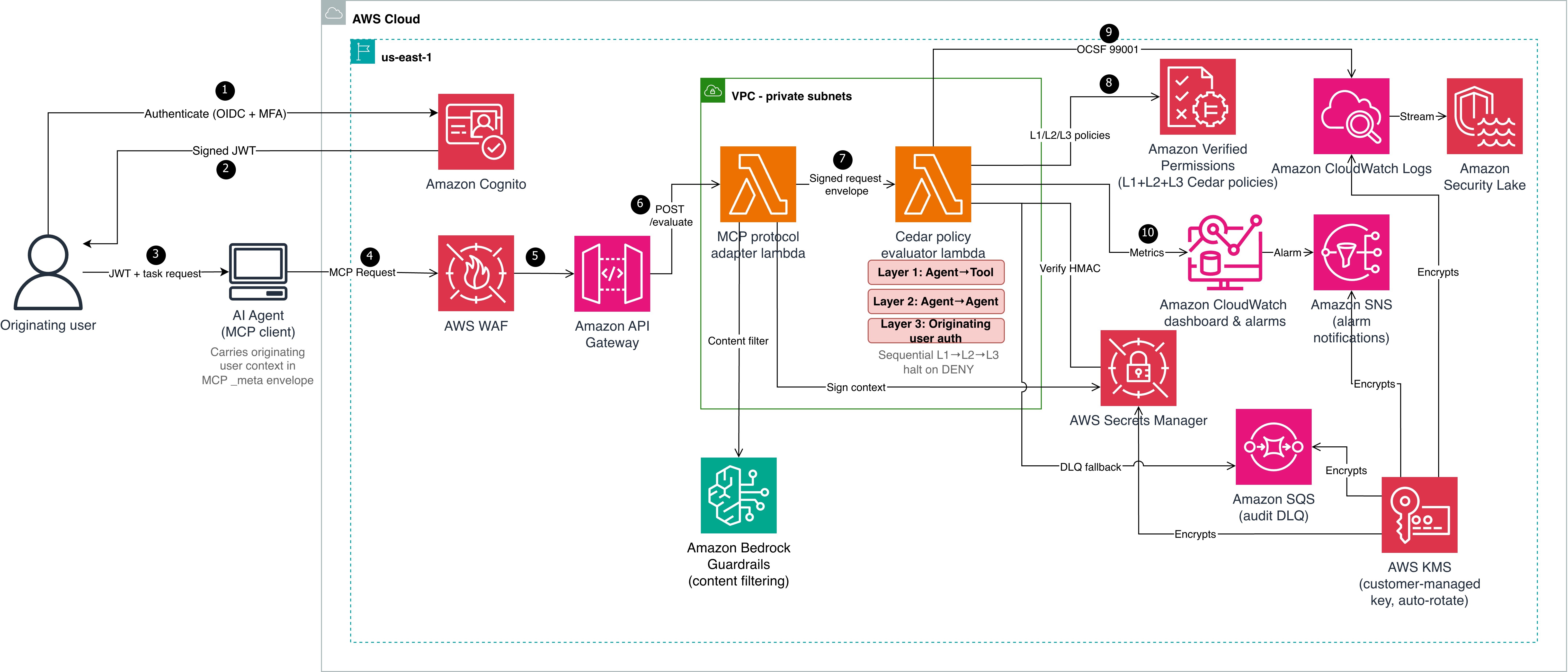
Cedar evaluates authorization but doesn’t establish identity. Before Cedar can evaluate context.originating_user.role or context.originating_user.mfa_verified, a trusted authentication layer must establish the user’s identity and produce verifiable claims. Steps 1–3 handle authentication; steps 4–10 handle authorization. The architecture shown in Figure 1 is described in the following lists:

Authentication (steps 1–3)

  1. The originating user authenticates with an OIDC-compliant identity provider (in this reference implementation, Amazon Cognito with TOTP multi-factor authentication (MFA)). The identity provider (IdP) issues a signed JSON Web Token (JWT) containing claims such as sub, role, amr (authentication methods), and session_id.
  2. Amazon Cognito returns the signed JWT to the user.
  3. The user passes the JWT and task request to the AI agent (MCP client). The agent carries the originating user context in the MCP _meta envelope.

Authorization pipeline (steps 4–10)

  1. The AI agent sends a Model Context Protocol (MCP) request to AWS WAF, which filters using CommonRuleSet, SQLiRuleSet, rate limiting, and body size constraints.
  2. Amazon API Gateway (with Amazon Cognito authorizer) verifies the JWT signature against the user pool’s public keys and rejects invalid or expired tokens. Valid requests are forwarded to the MCP protocol adapter Lambda function, which applies Amazon Bedrock Guardrails content filtering.
  3. The adapter extracts verified claims from the token and maps them to Cedar context attributes:
    1. JWT role claim : context.originating_user.role
    2. JWT amr includes MFA method: context.originating_user.mfa_verified = true
    3. JWT sub: context.originating_user.user_id
    4. JWT sid: context.originating_user.session_id
    5. JWT amr claim: context.originating_user.authentication_method

    The adapter then computes an HMAC-SHA256 signature over the user context (user_id, role, mfa_verified, authentication_method, and session_id in canonical order) using a key from AWS Secrets Manager.

  4. The adapter constructs a signed request envelope and invokes the Cedar evaluator Lambda function.
  5. The evaluator verifies the HMAC-SHA256 signature, retrieves L2 and L3 Cedar policies from Amazon Verified Permissions, and evaluates all three layers (L1, L2, and L3), halting on the first deny.
  6. The evaluator emits an Open Cybersecurity Schema Framework (OCSF) 99001 audit event to Amazon CloudWatch Logs. Failed emissions fall back to an Amazon Simple Queue Service (Amazon SQS) dead-letter queue (DLQ).
  7. Amazon CloudWatch dashboards and alarms monitor evaluation latency, deny rates, and DLQ depth. Alarm notifications route through Amazon Simple Notification Service (Amazon SNS).

Context integrity through delegation hops

Two mechanisms work together to protect identity across hops:

  • Hash-based Message Authentication Code (HMAC-SHA256) ensures integrity and authenticity. Every downstream evaluator verifies this signature before trusting the context.
  • OAuth 2.0 Token Exchange (RFC 8693) sets delegation scope using the on-behalf-of (OBO) pattern. When the orchestrator delegates to a downstream agent (data-bot), it exchanges the original token for a scoped OBO token that records who’s acting on behalf of whom and with what authority. The Cedar policies (detailed in Step 2: Three-layer policies) then check whether that scoped delegation is permitted and verify the originating user claims carried in the OBO token. Token exchange limits each downstream agent to only the delegated task’s scope instead of passing through the full original token. For enterprise deployments, use token exchange alongside HMAC. OAuth tracks who is acting on behalf of whom and with what scope. HMAC verifies that the context hasn’t been tampered with and came from a trusted source.

Prerequisites

The following prerequisites are needed to deploy the reference implementation. Before you begin, clone the repository:

git clone https://github.com/aws-samples/sample-cedar-agentic-ai-authorization.git
cd sample-cedar-agentic-ai-authorization

Verify that you have the following:

Walkthrough

In this walkthrough, you define the Cedar entity schema and policies, deploy the infrastructure with AWS CDK, and integrate your identity provider.

To define the Cedar entity schema

In this step, you define a schema with two entity types (Agent and Tool) and two actions (invoke_tool and delegate_task) in the AgentAuthz namespace. Notice that there is no User entity. Instead, you carry the originating user’s identity in the evaluation context record, which is a structured data object passed alongside each authorization request.

{
  "AgentAuthz": {
    "entityTypes": {
      "Agent": {
        "shape": {
          "type": "Record",
          "attributes": {
            "trust_level": { "type": "Long", "required": true },
            "namespace": { "type": "String", "required": true },
            "registered_capabilities": {
              "type": "Set", "element": { "type": "String" }, "required": true
            },
            "lifecycle_stage": { "type": "String", "required": true }
          }
        }
      },
      "Tool": {
        "shape": {
          "type": "Record",
          "attributes": {
            "namespace": { "type": "String", "required": true },
            "risk_level": { "type": "String", "required": true }
          }
        }
      }
    },
    "actions": {
      "invoke_tool": {
        "appliesTo": { "principalTypes": ["Agent"], "resourceTypes": ["Tool"] }
      },
      "delegate_task": {
        "appliesTo": { "principalTypes": ["Agent"], "resourceTypes": ["Agent"] }
      }
    }
  }
}

This schema is deployed to an Amazon Verified Permissions policy store by the VerifiedPermissionsStack CDK stack. In the reference implementation, the schema file is located at cedar-entity-schema.json.

Agent topology and attributes

The following tables show the agents and tools registered in this reference implementation, along with the attributes the Cedar evaluator function retrieves from the entity store. The test scenarios that follow trace requests through this topology.

Table 2: Agent attributes

Entity Type trust_level namespace lifecycle_stage registered_capabilities
orchestrator Agent 5 orchestration production

delegate_task

route_request

finance-agent Agent 3 payments production

process_payment

refund

data-bot Agent 4 data production

query_records

delete_records

Table 3: Tool attributes

Tool namespace risk_level
process_payment payments medium
delete_records data high
query_records data low

The orchestrator can delegate to both data-bot and finance-agent. Each agent can only invoke tools within its registered capabilities. The test scenarios below trace requests through these delegation paths.

To create three-layer Cedar policies

The following policies are deployed to the same Verified Permissions policy store. In the reference implementation, policy files are located under cedar/policies/ organized by layer: layer1-agent-to-tool/, layer2-agent-to-agent/, and layer3-originating-user-auth/.

Layer 1 (agent-to-tool): This policy permits the finance-agent to invoke the process_payment tool only when three conditions are met: the agent’s trust score is at least 3, it belongs to the payments namespace, and it’s deployed in the production lifecycle stage. If any condition fails, the request is denied. The agent’s trust_level, namespace, and lifecycle_stage aren’t self-reported in a production deployment. Instead, the evaluator retrieves these attributes from the Verified Permissions entity store using the agent_id as a lookup key.

Important: The reference implementation accepts these values from the request payload for simplicity. Production deployments must validate agent attributes against an authoritative source to prevent a compromised agent from escalating its own trust.

The trust_level attribute uses a 1–5 integer scale that represents an agent’s verified maturity: 1 for newly registered and untested agents, 3 for agents that have passed integration testing and security review, and 5 for agents with a proven production track record. Organizations assign trust levels through their agent promotion pipeline, not through self-declaration. The lifecycle_stage attribute (development, staging, production) prevents pre-production agents from invoking production tools, even if they have the correct namespace and trust score.

// L1-001: Finance agent can invoke payment tools
permit(
  principal == AgentAuthz::Agent::"finance-agent",
  action == AgentAuthz::Action::"invoke_tool",
  resource == AgentAuthz::Tool::"process_payment"
) when {
  principal.trust_level >= 3 &&
  principal.namespace == "payments" &&
  principal.lifecycle_stage == "production"
};

Layer 2 (agent-to-agent delegation) enforces depth limits and capability constraints. The orchestrator agent delegates tasks to data-bot only when the delegation chain is three hops or fewer and the requested capabilities are a subset of data-bot’s registered capabilities. A separate forbid policy (L2-004) enforces a hard system-wide limit of five hops regardless of which agents are involved.

// L2-002: Orchestrator can delegate to data agent
permit(
  principal == AgentAuthz::Agent::"orchestrator",
  action == AgentAuthz::Action::"delegate_task",
  resource == AgentAuthz::Agent::"data-bot"
) when {
  context.delegation_depth <= 3 &&
  context.target_capabilities.containsAll(context.requested_capabilities)
};

Layer 3 (originating user authorization) keeps the agent as the principal, but the policy evaluates context.originating_user to validate the human who initiated the request. data-bot invokes the delete_records tool only when the originating user has the admin role, has verified MFA, and the delegation chain is at most two hops deep. Without this layer, an agent with the right capabilities could invoke destructive tools regardless of who initiated the request.

// L3-001: High-risk tool (delete_records) requires admin + MFA
permit(
  principal == AgentAuthz::Agent::"data-bot",
  action == AgentAuthz::Action::"invoke_tool",
  resource == AgentAuthz::Tool::"delete_records"
) when {
  context.originating_user.role == "admin" &&
  context.originating_user.mfa_verified == true &&
  context.delegation_depth <= 2
};

Key design point: The principal remains the agent, not a user entity. The user’s role and MFA status are checked through context attributes, keeping the schema to two entity types and two actions.

Integrate your IdP

The reference implementation uses Amazon Cognito with TOTP MFA, but most OIDC-compliant providers (Okta, Microsoft Entra ID, Auth0, or AWS IAM Identity Center) work with this pattern. The authentication-to-signing flow is described in the preceding Authentication before authorization section. To use a different IdP, replace the Cognito authorizer on API Gateway with a Lambda or JWT authorizer for your IdP’s issuer URL. Cedar policies remain unchanged.

Deploy the infrastructure with AWS CDK

The reference implementation deploys five CloudFormation stacks: KmsStack, VerifiedPermissionsStack, LambdaStack, SecurityLakeStack, and MonitoringStack. The following commands deploy the stacks in dependency order:

cdk deploy KmsStack -c account_id=YOUR_ACCOUNT_ID -c guardrail_id=YOUR_GUARDRAIL_ID
cdk deploy VerifiedPermissionsStack -c account_id=YOUR_ACCOUNT_ID -c guardrail_id=YOUR_GUARDRAIL_ID
cdk deploy LambdaStack -c account_id=YOUR_ACCOUNT_ID -c guardrail_id=YOUR_GUARDRAIL_ID
cdk deploy SecurityLakeStack -c account_id=YOUR_ACCOUNT_ID -c guardrail_id=YOUR_GUARDRAIL_ID
cdk deploy MonitoringStack -c account_id=YOUR_ACCOUNT_ID -c guardrail_id=YOUR_GUARDRAIL_ID

Test the solution

Three end-to-end scenarios validate the evaluation model across different user roles, MFA states, and delegation depths. To run the tests:

  1. Set the API endpoint from the deployment output:
export API_ENDPOINT=$(aws cloudformation describe-stacks --stack-name LambdaStack \
  --query "Stacks[0].Outputs[?OutputKey=='ApiEndpoint'].OutputValue" --output text)

  1. Run the end-to-end tests:
.venv/bin/python -m pytest tests/e2e/ -v -s

The end-to-end tests cover the three scenarios described in the following sections. Each test sends a request through the deployed API and validates the per-layer authorization decisions.

Scenario A: Layer 3 enforcement

A support-role user (no MFA) requests record deletion through orchestrator and data-bot.

Layer Decision Reason
L1: Agent-to-tool PERMIT data-bot has trust level 4, namespace data, and lifecycle production
L2: Agent-to-agent PERMIT orchestrator is authorized to delegate to data-bot, depth within limits
L3: Originating user DENY User role is support, not admin; MFA not verified
Overall DENY Denying layer: L3

Without Layer 3, this request would have been permitted based on agent capabilities alone, demonstrating why originating user authorization is essential.

Scenario B: Authorized admin request

An admin user with MFA requests the same operation through the same chain.

Layer Decision Reason
L1 PERMIT Agent attributes match
L2 PERMIT Delegation path authorized
L3 PERMIT Role is admin, MFA verified, depth is less than or equal to 2
Overall PERMIT All three layers permit

Scenario C: Delegation depth limit

An admin with MFA requests the same operation, but the delegation chain has six hops. This scenario tests the Layer 2 depth constraint independently of user authorization.

Layer Decision Reason
L1 PERMIT Agent attributes match
L2 DENY Depth of six exceeds the hard limit of five
Overall DENY Denying layer: L2 (L3 not evaluated – halt)

Even an authorized admin can’t bypass the delegation depth constraint.

Alignment with the security principles for agentic AI

The AWS Office of the CISO published Four security principles for agentic AI systems. The following table shows how this solution maps to each principle.

Principle How the solution implements it
Secure development lifecycle across components Property-based testing (Hypothesis) for adversarial input fuzzing, Cedar policy formal verification with strict schema validation, end-to-end scenarios testing policy bypass and privilege escalation paths, and infrastructure-as-code (IaC) with AWS CDK.
Traditional security controls remain applicable AWS WAF, Amazon VPC isolation, AWS Key Management Service (AWS KMS) encryption, Amazon Cognito MFA, and Secrets Manager;
NIST SP 800-53 control mapping.
Deterministic external controls (security box) Three-layer Cedar evaluation runs outside the agent’s reasoning loop in a separate Lambda function.
HMAC-signed context prevents tampering.
Verified Permissions (the managed Cedar evaluation service) enforces L2 and L3 at the infrastructure level.
Greater autonomy earned through evaluation trust_level and lifecycle_stage policy attributes calibrate agent capabilities; OCSF 99001 audit events and Amazon CloudWatch dashboards provide the evidence base for expanding autonomy.

Monitoring and audit compliance

Each evaluation produces an OCSF 99001 audit event with request ID, user identity, delegation chain, per-layer decisions, and latency.

The following table maps this implementation to NIST SP 800-53 Rev. 5 controls. Customers are responsible for evaluating whether it meets their compliance requirements.

NIST control Control name How the reference implementation addresses it
AC-4 Information Flow Enforcement User context flows immutably through HMAC-signed envelopes
AC-6 Least Privilege Three-layer evaluation requires both agent capability and user role
AC-6(1) Authorize Access to Security Functions MFA required for high-risk tools in Layer 3
AC-6(5) Privileged Accounts Destructive operations restricted to admin with MFA verified
AU-2 Event Logging Each evaluation is logged as OCSF 99001
AU-3 Content of Audit Records Events include identity, chain, action, resource, decisions, and latency
SI-10 Information Input Validation HMAC verified before evaluation; Amazon Bedrock Guardrails on inbound
IA-2(1) Multi-factor Authentication Layer 3 enforces MFA for high-risk operations
SC-12 Cryptographic Key Management Signing key in Secrets Manager with rotation
SC-28 Protection of Information at Rest Policies in Verified Permissions with STRICT validation

Scaling to multi-account environments

Deploy the Cedar policy store in a central security account and use cross-account IAM roles for workload accounts to call verifiedpermissions:IsAuthorized. Use AWS Organizations service control policies (SCPs) to prevent workload accounts from creating their own policy stores. For standardizing user identity attributes across the organization, consider IAM Identity Center or a centralized OIDC provider that issues consistent claims to your workload accounts. This helps ensure that the context.originating_user attributes are uniform across accounts and agents.

For production deployments, consider extending this pattern with human-in-the-loop escalation for borderline denials, multi-tenant Cedar policy isolation, and Amazon Simple Storage Service (Amazon S3)-backed dynamic policy hot-reload for emergency tool shutdowns.

Clean up

To avoid ongoing charges, delete the deployed resources:

cdk destroy MonitoringStack SecurityLakeStack
cdk destroy LambdaStack
cdk destroy VerifiedPermissionsStack
cdk destroy KmsStack
aws logs delete-log-group --log-group-name /cedar-evaluator/audit  # if RETAIN policy

Conclusion

Multi-agent AI systems need authorization boundaries at every delegation hop. The three-layer Cedar policy model with OAuth 2.0 authentication provides that protection while maintaining least-privilege access. Combining a trusted IdP (AuthN) with Cedar policy evaluation (AuthZ) creates an authorization boundary around each tool invocation, verifying agent capability (L1), delegation path (L2), and originating user authority (L3). The pattern works with an OIDC-compliant IdP and a compute platform that can call Amazon Verified Permissions. Clone the reference implementation and adapt the Cedar policies to your organization’s requirements. For more information, see the Cedar policy language documentation and the Amazon Verified Permissions User Guide.

References

If you have feedback about this post, submit comments in the Comments section below.


Dhananjay Karanjkar

Dhananjay Karanjkar

Dhananjay is a Senior Lead Consultant at AWS Professional Services, specializing in agentic AI systems, multi-agent orchestration, and generative AI security. He holds two US patents and serves as a Responsible AI Champion, with a background spanning financial services, enterprise consulting, and enterprise-scale AI delivery. When not architecting AI solutions, he trains for triathlons, paints oil portraits, and is an avid reader.