All posts by Natalie White

How Company 3 Streamlines Studio Image Management with EC2 Image Builder and AWS CDK

Post Syndicated from Natalie White original https://aws.amazon.com/blogs/devops/how-company-3-streamlines-studio-image-management-with-ec2-image-builder-and-aws-cdk/

Guest post in collaboration with Company 3 Director of New Technology, Phil Wortas, and Senior New Technology Engineer, Matthew Galloway

Introduction

Company 3 provides specialized services for the entertainment industry, including post-production services, visual effects, and color grading for feature films, commercials, and television content. Their teams collaborate globally to Increase workflow efficiency and expand their roster of diverse movie-making talent.

Company 3’s New Technology team uses Amazon EC2 Image Builder to vend Amazon Machine Images (AMIs) and container images for compute environments where artists create and render content. Image Builder is a fully managed AWS service that helps you automate the creation, management, and deployment of customized, secure, and up-to-date server images. Company 3 also uses the AWS Cloud Development Kit (CDK) to scale the creation of consistent Image Builder components and recipes.

At scale, the respective concepts of versioning between Image Builder resources and CDK infrastructure as code made it challenging to reuse prior components and recipes, and update existing references with new version numbers over time. This challenge led to creative workarounds, collaborative problem-solving with AWS, and ultimately, product improvements that benefit the entire AWS community.

This blog follows their journey from manual version management, through creative workarounds, to native EC2 Image Builder features that solved the problem for good. Along the way, we’ll show how auto-versioning and CDK L2 constructs can simplify your own image pipelines.
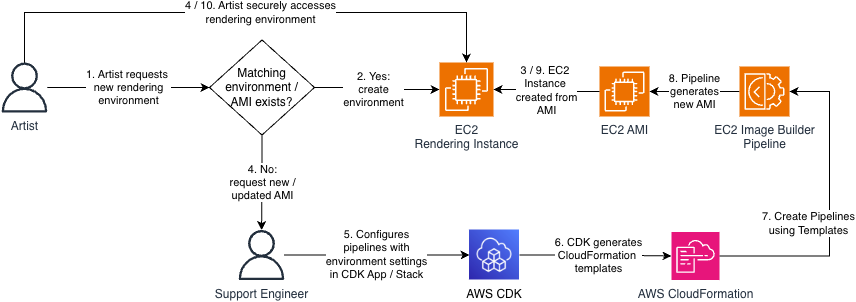
Process flow diagram of Artists, Support Engineers, and New Technology Platform Engineers provisioning new studio environments. (1) Artists request new environments. (2) Automation determines whether a matching environment configuration (EC2 AMI) exists. If it does, (3) the new environment is provisioned for the Artist to securely access. If it does not, (4) a Support Engineer creates or update an (5) CDK definition of an EC2 Image Builder Pipeline to provision the correct environment. The CDK (6) generates a CloudFormation template and assets that are used to (7) create the Pipeline. This Pipeline (8) generates a new EC2 AMI, from which the rendering instance can be (9) provisioned and (10) provided for the Artist to securely access.

Figure 1: Personas and process flow

The Challenge: When Infrastructure-as-Code Gets Complicated

While Image Builder has historically supported semantic versioning for Components and Recipes, there was no mechanism to automatically detect version changes or update existing references to the latest version of a component using the CDK. This is because Image Builder only supported Layer 1 (L1) CDK constructs. Layer 1 constructs map directly to CloudFormation resources and their corresponding service APIs, but do not provide features that create a layer of abstraction above those foundational create / update / delete operations.

Version changes to Components and Recipes are a frequent occurrence because these resources are immutable; every change to them requires a new version. Version numbers are a part of these resource’s Amazon Resource Name (ARN), so changes must be propagated throughout the associated CDK code to correctly reference the latest version of each resource.
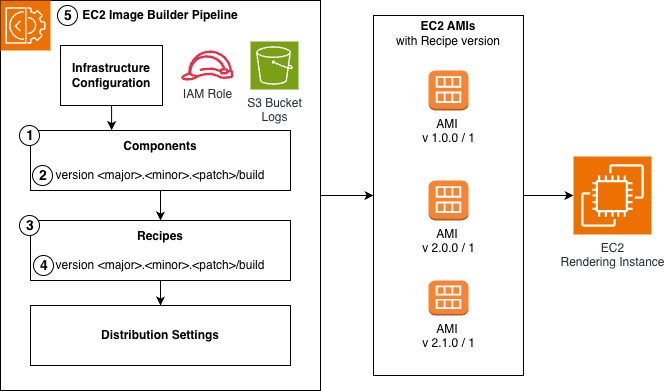
Figure 2 shows an architecture diagram of an EC2 Image Builder Pipeline, which consists of Infrastructure configuration, Components, Recipes, and distribution settings. Components and Recipes each have their own separate version numbers and are immutable. This Pipeline generates EC2 AMIs, which are tied to the recipe version used to generate them, and are used to provision EC2 rendering instances.

Figure 2: EC2 Image Builder Anatomy and Version Propagation

Figure 1, Step 5 represents a Platform Engineer having to update an existing Component. Figure 2 shows the required changes broken out by each of the comprising Image Builder resources:

  1. Update the Component configuration
  2. Increment the Component version
  3. Update the Recipe with the new Component version ARN
  4. Increment the Recipe version
  5. Update the Recipe version ARN in the Pipeline.

Manual version propagation across dozens of components via this multi-step process was error prone, wasn’t scalable, and created a risk of deployment failures and version churn due to version mismatches.

The team needed to prevent unnecessary update requests to Image Builder when components didn’t change but the recipes they were associated with did, orchestrate version propagations when the versions did need to change, and track component versions as they deployed updates across their infrastructure.

Short-term Workaround: Using Hashes to Identify Changes

Faced with these limitations, the customer’s engineering team got creative. Their first approach involved appending MD5 hashes to component names. This allowed them to track changes and force CDK updates and version increments when content changed, while preventing unnecessary update calls when the content of the component didn’t change but the rest of the resources in the CDK Stack did.

However, this approach had drawbacks. Component names became unwieldy and difficult to maintain. More importantly, the hash-based naming convention didn’t align with semantic versioning best practices that the rest of their infrastructure followed. The team knew they needed a better solution long-term.

Long-term Automation: Collaboration with AWS

Working with their AWS Solutions Architect and EC2 Image Builder Developer Support, Company 3 developed a more elegant solution using CDK Custom Resources. This approach eliminated hash-based naming and automated the propagation of version updates, but it came with technical debt.

The version increments themselves were still manual, and the solution required custom resources to create and maintain the suite of resources being deployed. The mesh of custom resources required specialized knowledge to maintain, which made it difficult to onboard new team members, and distracted engineers from focus on core business value of delivering the right studio environments to artists.

Managed Abstraction: AWS Launches Product Improvements

EC2 Image Builder auto-versioning

In November 2025, EC2 Image Builder introduced native auto-versioning capabilities that transformed how teams manage Component versions.

Components with the same name and semantic version now auto-increment build versions (eliminating steps 2-4 from Figure 2 when developers use ‘x’ as a wildcard placeholder (e.g., 1.2.x). Additionally, Pipelines can resolve to the highest available version of Components and Recipes, which ensures they are using the latest compatible versions without manual updates, eliminating step 5.

These enhancements eliminated the version propagation burden entirely, allowing Company 3 developers to focus only on the substantive changes to Components requested by Artists and Support Engineers.

CDK Layer 2 Constructs

The second major improvement came with comprehensive Layer 2 (L2) constructs for EC2 Image Builder (RFC 0789). L2 Constructs provide a layer of abstraction that default to best practice configuration, automatic least-privilege IAM Role and Policy provisioning, and convenience methods that make it easier to create and link to other AWS resources. These constructs transformed the developer experience and alleviated the need for custom resources. The EC2 Image Builder L2 Construct is currently in alpha stabilization phase, and sourcing customer feedback and adoption before migrating to the core CDK library per the CDK contribution process.

Before the L2 construct release, orchestrating an Image Builder Pipeline took over 50 lines of code, and required manual least-privilege IAM role creation, instance profile setup, and Pipeline configuration across 6 separate CloudFormation resources.

// Using L1 constructs
const instanceProfileRole = new iam.Role(stack, 'EC2InstanceProfileForImageBuilderRole', {
  assumedBy: iam.ServicePrincipal.fromStaticServicePrincipleName('ec2.amazonaws.com'),
  managedPolicies: [
    iam.ManagedPolicy.fromAwsManagedPolicyName('AmazonSSMManagedInstanceCore'),
    iam.ManagedPolicy.fromAwsManagedPolicyName('EC2InstanceProfileForImageBuilder'),
  ],
});

const instanceProfile = new iam.InstanceProfile(stack, 'EC2InstanceProfileForImageBuilder', {
  role: instanceProfileRole,
});

const bucket = new s3.Bucket(stack, 'ImageBuilderLoggingBucket', {
 bucketName: `ec2imagebuilder-logs-${stack.region}-${stack.account}`,
  enforceSSL: true,
});

const l1InfrastructureConfiguration = new imagebuilder.CfnInfrastructureConfiguration(stack, 'L1InfrastructureConfiguration', {
  name: 'l1-infrastructure-configuration',
  instanceProfileName: instanceProfile.instanceProfileName,
  instanceMetadataOptions: { httpTokens: 'required' },
  logging: {
    s3Bucket: bucket.bucketName,
    s3KeyPrefix: 'imagebuilder-logging',
  },
});
const l1ImageRecipe = new imagebuilder.CfnImageRecipe(stack, 'L1ImageRecipe', {
  name: 'l1-image-recipe',
  version: '1.0.0',
  parentImage: `arn:${stack.partition}:imagebuilder:${stack.region}:aws:image/amazon-linux-2023-x86/x.x.x`,
  components: [
    {
      componentArn: `arn:${stack.partition}:imagebuilder:${stack.region}:aws:component/update-linux/x.x.x`,
    },
  ],
});

const l1ImagePipeline = new imagebuilder.CfnImagePipeline(stack, 'L1ImagePipeline', {
  name: 'l1-image-pipeline',
  imageRecipeArn: l1ImageRecipe.attrArn,
  infrastructureConfigurationArn: l1InfrastructureConfiguration.attrArn,
});

Using the ImagePipeline L2 construct allows the developer to provision a Pipeline in fewer than 10 lines of code while leveraging best practice configuration the construct sets by default.

// Equivalent, using L2 constructs
const l2ImagePipeline = new imagebuilder.ImagePipeline(stack, 'L2ImagePipeline', {
  recipe: new imagebuilder.ImageRecipe(stack, 'L2ImageRecipe', {
    baseImage: imagebuilder.AwsManagedImage.amazonLinux2023(stack, 'AL2023'),
    components: [
      {
        component: imagebuilder.AwsManagedComponent.updateOS(stack, 'UpdateOS', {
          platform: imagebuilder.Platform.Linux,
        }),
      },
    ],
  }),
});

The Impact: From Workarounds to Best Practices

For Company 3, these improvements meant they could retire their custom constructs entirely. The L2 constructs provided everything their custom solution did, plus additional capabilities.

The EC2 Image Builder service manages the complexity of version updates by default, and they gained enhanced security through AWS-managed secure defaults like IMDSv2 requirements and least-privileged IAM roles.

Perhaps most importantly, new team members can understand the infrastructure code in minutes rather than hours, dramatically accelerating onboarding.

Conclusion

The impact extends far beyond one customer. Every AWS user working with EC2 Image Builder and CDK now benefits from simplified workflows, automatic version management, and security best practices by default. What started as one team’s challenge became a catalyst for improvements that make everyone’s work easier and more secure. The evolution of EC2 Image Builder’s CDK support demonstrates AWS’s commitment to listening to customers and continuously improving the developer experience.

For teams currently managing EC2 Image Builder Pipelines manually or with L1 CDK constructs or with custom solutions, the path forward offers significant benefits. Explore how you can use EC2 Image Builder, its new auto-versioning capabilities, and its CDK L2 Constructs to automate your complex AMI Pipeline provisioning architecture via these resources:

EC2 Image Builder Documentation

EC2 Image Builder Auto-versioning Documentation

CDK L2 Constructs for EC2 Image Builder (currently in alpha stabilization)

EC2 Image Builder CDK Sample GitHub Repository
Authors

Rochelle Lakey

Rochelle Lakey is a Senior Solutions Architect specializing in Media and Entertainment at AWS helping customers architect and optimize their cloud infrastructure. She brings 28 years of managed services experience bridging traditional data centers and modern cloud computing. Rochelle is passionate about guiding organizations through their digital transformation journeys.

Phil Wortas

Phil Wortas is Director of New Technology at Company 3, where his team serves as the cloud infrastructure and platform engineering backbone for a global post-production and VFX organization. Together they focus on reducing manual toil through automation and IaC, so the creative teams they support can stay focused on the work that matters.

Matthew Galloway

Matthew Galloway is a Senior New Technology Engineer at Company 3, working within the cloud infrastructure team. He specializes in AWS deployment automation and developing tools that streamline and enhance artist workflows across the organization. Matthew’s work is driven by a commitment to reducing friction for creative teams, ensuring they have the reliable, efficient infrastructure that they need.

Tarun Belani

Tarun Belani is a Senior Software Development Engineer on the EC2 Image Builder team at Amazon Web Services, where he works on the service’s APIs and backend systems. He designed and built the AWS CDK L2 constructs for EC2 Image Builder.

Natalie White

Natalie White is a Principal Solutions Architect at Amazon Web Services. While her primary customers are in the Healthcare and Life Sciences industry, she leverages her prior Software Development experience as a specialist in AWS CDK and Infrastructure as Code automation, AI-DLC, and GenAI for Developer Productivity across all industries.

AWS Cloud Development Kit (CDK) Launches Refactor

Post Syndicated from Natalie White original https://aws.amazon.com/blogs/devops/aws-cloud-development-kit-cdk-launches-refactor/

We are excited to announce a new AWS Cloud Development Kit (CDK) feature that makes it easier and safer to refactor your infrastructure as code. CDK Refactor aims to preserve your AWS resources as you rename constructs, move resources between stacks, and reorganize your CDK applications – operations that previously risked resource replacement.

When writing infrastructure as code with the CDK, developers occasionally need to rename Constructs or move them between Stacks or directories. Whether they need to better organize their code, adhere to coding best practices, or take advantage of object-oriented programming patterns like class inheritance, these changes can be risky in environments with deployed resources, because they change the CDK-generated logical ID of those resources. During a CDK deploy, AWS CloudFormation interprets these changes as new resources, which often requires deletion of the existing resource and creation of a new resource with the new logical ID. For stateful resources, this could cause potential downtime and even data loss. To mitigate this effect of ID changes, developers had to stage their changes to create new resources, create a data or network migration plan, and then delete the old resources to prevent these refactoring effects. Sometimes, developers decide the risk of these changes outweigh the benefit of the refactor and choose not perform the refactor at all.

Today, developers can use the new CDK refactor command to detect, review, confirm, and safely apply refactored changes to their resources without resource replacement. This feature leverages the recently-launched AWS CloudFormation refactor feature, but the CDK automatically computes the mappings that CloudFormation needs to redefine the refactored resources, providing a layer of abstraction that allows developers to focus on code rather than resource configuration. Let’s walk through an example to demonstrate the benefits of this refactor capability.

Prerequisites

Along with the usual CDK prerequisites, if you bootstrapped your CDK project before this launch, you need to re-bootstrap your environment to obtain the new permissions associated with the CDK refactor capabilities before attempting your refactor.

Monolith to micro-service example

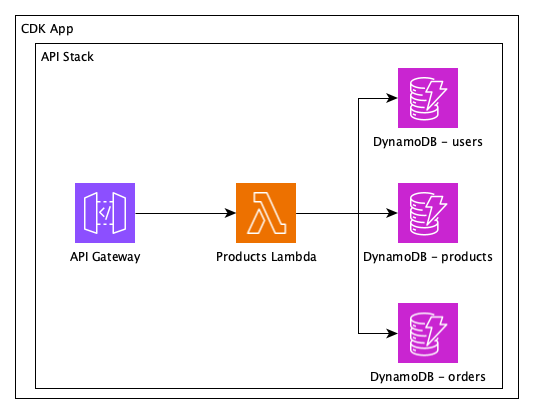
For this example, let’s say that we have a legacy CDK App that deploys a monolithic Stack with Amazon DynamoDB tables for users, products, and orders, and an AWS Lambda function that implements CRUD operations on all entities.

Architecture diagram of a monolithic application with an API Gateway, single Lambda function, and three DynamoDB tables for users, products, and orders. The application is contained in a single CDK Stack within the CDK App.

Monolithic application

function monolithApp() {
  const monolith = new CdkAppStack(app, monolithStackName, {env});
  const usersTable = makeTable(monolith, 'users');
  const productsTable = makeTable(monolith, 'products');
  const ordersTable = makeTable(monolith, 'orders');

  // We have a single Lambda function in our application
  const func = new Function(monolith, `MonolithFunction`, {
    code: Code.fromInline(`Some code that accesses all three tables`),
    runtime: Runtime.NODEJS_22_X,
    handler: 'index.handler',
  });

  usersTable.grantReadWriteData(func);
  productsTable.grantReadWriteData(func);
  ordersTable.grantReadWriteData(func);

  // This function creates a REST API, resources, methods, and links
  // everything together to the functions. Right now, we are passing
  // the same function in three places.
  makeApi(monolith, {
    usersFunction: func,
    productsFunction: func,
    ordersFunction: func,
  });
}

monolithApp();

We’ve been asked to adhere to Well Architected Framework best practices and break up the monolith into separate Lambda functions so they can scale independently. Because they’re so similar, we’re also going to create an inheritable Lambda class that we can reuse to improve readability and maintainability of the code, and avoid having to re-define Lambda configuration settings that are consistent across all of the functions.

Finally, the monolith uses only L1 CDK Constructs. To further abstract our code and take advantage of helper functions, we’re going to start using L2 CDK Constructs for DynamoDB, Lambda, and API Gateway. This change will allow the IAM Roles and permissions to be defined automatically, further simplifying our code.

Architecture diagram of the same application refactored into four child stacks: one for the APIGateway and three for the user, product, and order domains. Each child Stack has its own respective Lambda function and DynamoDB table.

Proposed refactored application into separate stacks for each domain.

Without the refactor feature, CloudFormation would delete and re-create the Lambda and DynamoDB resources, which would cause all of the data in the latter to be lost. Alternatively, you could create net-new Lambdas and Amazon DynamoDB tables in one deployment, execute an out-of-band, point-in time and streaming data migration from the old tables to the new ones, update the API Gateway configuration to target the new Lambdas in a second deploy, and turn off the streaming migration process.

With the refactor feature, we can move the resource definitions to new files, update them to L2 Constructs, and leave the stateful resources in place!

Replace stateless resources
First, let’s refactor our CDK code to break the monolithic Lambda into 3 domain-specific Lambdas. CloudFormation’s refactor capability doesn’t support creating new resources or updating configuration of existing resources, so we will deploy these changes as usual, without using the new refactor feature. All resources will stay inside the monolithic stack for now.

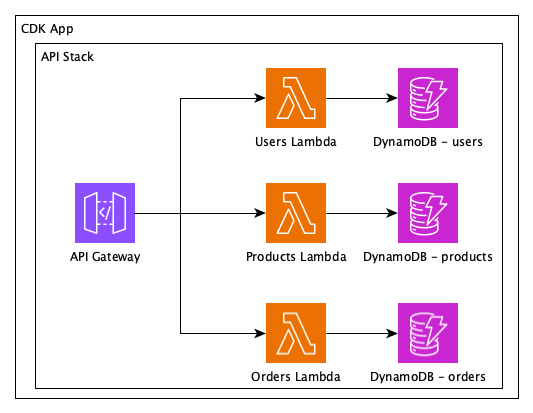
Architecture diagram of the same application with the single Lambda function broken into separate functions corresponding to the three DynamoDB tables for users, products, and orders. All resources are still contained in the single API Stack and CDK App.

Refactor stateless single lambda function into 3 functions as a prerequisite to the refactor of stateful DynamoDB tables.

function singleStackMicroservicesApp() {
  // We still have a single stack
  const monolith = new CdkAppStack(app, monolithStackName, {env});

  // makeFunctionAndTable creates a different Lambda function and a DynamoDB table
  // for each domain that is passed as a parameter.
  // In a real CDK application, you would probably define each of them independently.
  makeApi(monolith, {
    usersFunction: makeFunctionAndTable(monolith, 'users'),
    productsFunction: makeFunctionAndTable(monolith, 'products'),
    ordersFunction: makeFunctionAndTable(monolith, 'orders'),
  });
}

singleStackMicroservicesApp();

Refactor stateful resources
Now we can refactor the stateful DynamoDB tables and their respective Lambdas to their own stacks, using cdk refactor to map their new IDs without replacing the resources.

Before refactoring, though, we need to create the new stacks that will receive the functions and tables:

  singleStackMicroservicesApp();

  const usersStack = new Stack(app, 'Users', {env});
  const productsStack = new Stack(app, 'Products', {env});
  const ordersStack = new Stack(app, 'Orders', {env});
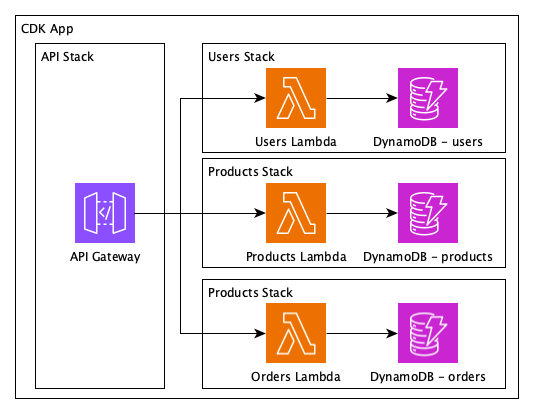
Architecture diagram of the final refactored application with four child stacks: one for the APIGateway and three for the user, product, and order domains. Each child Stack has its own respective Lambda function and DynamoDB table.

Refactored Lambda functions and DynamoDB tables into their own separate stacks.

function fullMicroservicesApp() {
    const monolith = new Stack(app, monolithStackName, {env});

    const usersStack = new Stack(app, 'Users', {env});
    const productsStack = new Stack(app, 'Products', {env});
    const ordersStack = new Stack(app, 'Orders', {env});

    makeApi(monolith, {
        // Now each pair function + table is in its own stack
        usersFunction: makeFunctionAndTable(usersStack, 'users'),
        productsFunction: makeFunctionAndTable(productsStack, 'products'),
        ordersFunction: makeFunctionAndTable(ordersStack, 'orders'),
    });
}

fullMicroservicesApp();

Running cdk refactor –unstable=refactor starts the process. (The unstable flag is required as this feature is still subject to breaking changes.) The CDK will compare the current state of your application (the deployed monolithic app) with the new state (the output of your refactored CDK application).

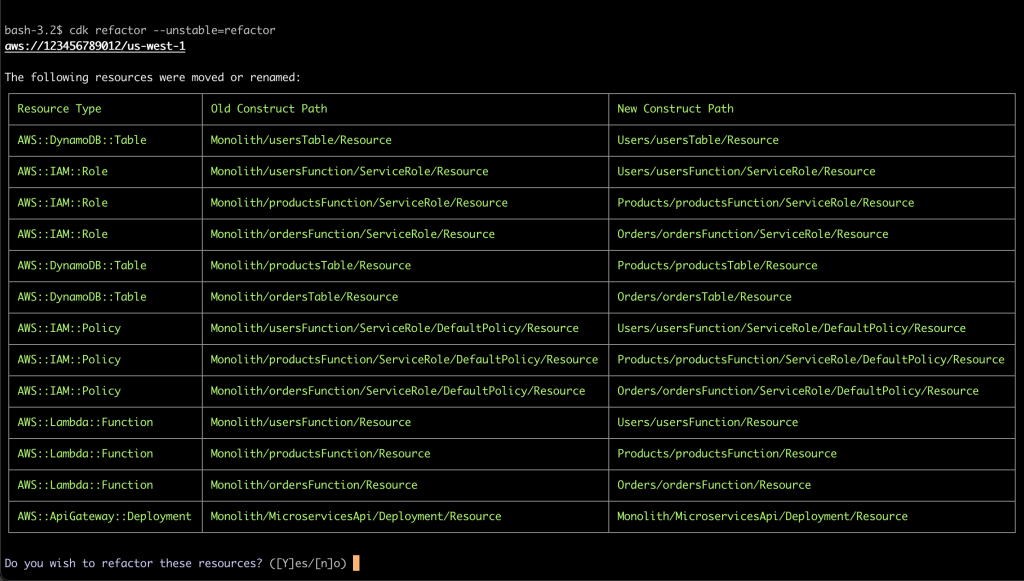
Screenshot of the CDK CLI confirmation dialog while executing the refactor command. The output has three columns: Resource Type, Old Construct Path, and New Construct Path, with rows of resources that will be refactored from one ID to another. The confirmation prompt asks "Do you want to refactor these resources? (yes/no)"

CDK refactor confirmation dialog

As expected, it shows a table of resources that were moved from the Monolith stack to their respective refactored stacks. By default, the CLI asks for confirmation before proceeding. Bypass the confirmation by passing the –force flag, or confirm the changes and execute the refactor:
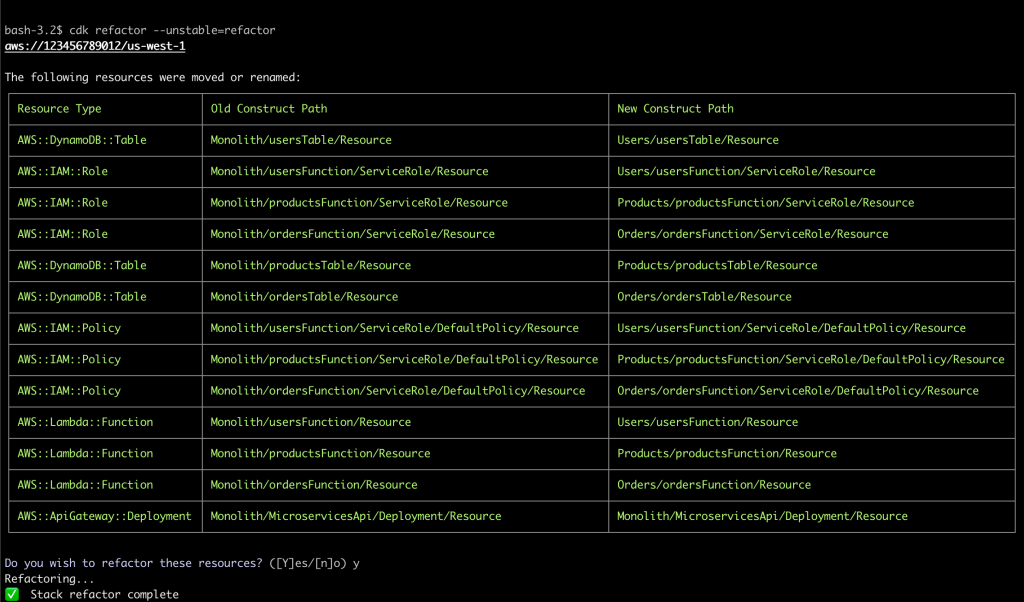
All resources, including the stateful tables, were safely moved to other stacks, and we now have our well-architected application.

Screenshot of the CDK CLI results after completing the refactor command. The output is similar to the confirmation with three columns: Resource Type, Old Construct Path, and New Construct Path, with rows of resources that were refactored from one ID to another.

CDK refactor results

Conclusion
With the CDK refactor feature, developers can take full advantage of the object-oriented definition of AWS resources, including the ability to change the structure and layers of abstraction without orchestrating complex migration mechanisms or scheduled downtime. Since the CDK is open source, you can learn more about how the CDK automatically determines what resources need to be refactored via the README. Understanding when resources need to be replaced and refactored will help you plan your infrastructure as code roadmap and when you should use this new refactoring capability.

If you’ve got a refactor that you’ve been waiting to execute, read more about the feature set in the CDK refactor documentation and start refactoring your own CDK App today!

Authors

Natalie White

Natalie White is a Principal Solutions Architect at Amazon Web Services. She helps Healthcare and Life Sciences customers deploy solutions to AWS, and uses her software development background to accelerate infrastructure as code automation using the AWS Cloud Development Kit (CDK). She also consults engineering leaders on DevOps cultural transformations.

Otavio Macedo

Otavio Macedo is a Software Development Engineer at Amazon Web Services. He has been with the AWS Cloud Development Kit (CDK) team since 2021, helping deliver the unique experience that CDK provides for customers.