Tag Archives: CDK

AWS Cloud Development Kit (CDK) Launches Refactor

Post Syndicated from Natalie White original https://aws.amazon.com/blogs/devops/aws-cloud-development-kit-cdk-launches-refactor/

We are excited to announce a new AWS Cloud Development Kit (CDK) feature that makes it easier and safer to refactor your infrastructure as code. CDK Refactor aims to preserve your AWS resources as you rename constructs, move resources between stacks, and reorganize your CDK applications – operations that previously risked resource replacement.

When writing infrastructure as code with the CDK, developers occasionally need to rename Constructs or move them between Stacks or directories. Whether they need to better organize their code, adhere to coding best practices, or take advantage of object-oriented programming patterns like class inheritance, these changes can be risky in environments with deployed resources, because they change the CDK-generated logical ID of those resources. During a CDK deploy, AWS CloudFormation interprets these changes as new resources, which often requires deletion of the existing resource and creation of a new resource with the new logical ID. For stateful resources, this could cause potential downtime and even data loss. To mitigate this effect of ID changes, developers had to stage their changes to create new resources, create a data or network migration plan, and then delete the old resources to prevent these refactoring effects. Sometimes, developers decide the risk of these changes outweigh the benefit of the refactor and choose not perform the refactor at all.

Today, developers can use the new CDK refactor command to detect, review, confirm, and safely apply refactored changes to their resources without resource replacement. This feature leverages the recently-launched AWS CloudFormation refactor feature, but the CDK automatically computes the mappings that CloudFormation needs to redefine the refactored resources, providing a layer of abstraction that allows developers to focus on code rather than resource configuration. Let’s walk through an example to demonstrate the benefits of this refactor capability.

Prerequisites

Along with the usual CDK prerequisites, if you bootstrapped your CDK project before this launch, you need to re-bootstrap your environment to obtain the new permissions associated with the CDK refactor capabilities before attempting your refactor.

Monolith to micro-service example

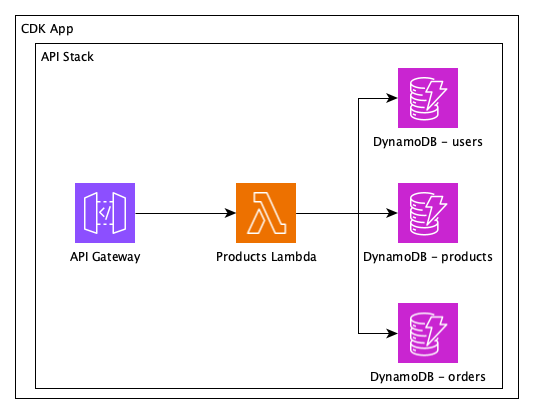
For this example, let’s say that we have a legacy CDK App that deploys a monolithic Stack with Amazon DynamoDB tables for users, products, and orders, and an AWS Lambda function that implements CRUD operations on all entities.

Architecture diagram of a monolithic application with an API Gateway, single Lambda function, and three DynamoDB tables for users, products, and orders. The application is contained in a single CDK Stack within the CDK App.

Monolithic application

function monolithApp() {
  const monolith = new CdkAppStack(app, monolithStackName, {env});
  const usersTable = makeTable(monolith, 'users');
  const productsTable = makeTable(monolith, 'products');
  const ordersTable = makeTable(monolith, 'orders');

  // We have a single Lambda function in our application
  const func = new Function(monolith, `MonolithFunction`, {
    code: Code.fromInline(`Some code that accesses all three tables`),
    runtime: Runtime.NODEJS_22_X,
    handler: 'index.handler',
  });

  usersTable.grantReadWriteData(func);
  productsTable.grantReadWriteData(func);
  ordersTable.grantReadWriteData(func);

  // This function creates a REST API, resources, methods, and links
  // everything together to the functions. Right now, we are passing
  // the same function in three places.
  makeApi(monolith, {
    usersFunction: func,
    productsFunction: func,
    ordersFunction: func,
  });
}

monolithApp();

We’ve been asked to adhere to Well Architected Framework best practices and break up the monolith into separate Lambda functions so they can scale independently. Because they’re so similar, we’re also going to create an inheritable Lambda class that we can reuse to improve readability and maintainability of the code, and avoid having to re-define Lambda configuration settings that are consistent across all of the functions.

Finally, the monolith uses only L1 CDK Constructs. To further abstract our code and take advantage of helper functions, we’re going to start using L2 CDK Constructs for DynamoDB, Lambda, and API Gateway. This change will allow the IAM Roles and permissions to be defined automatically, further simplifying our code.

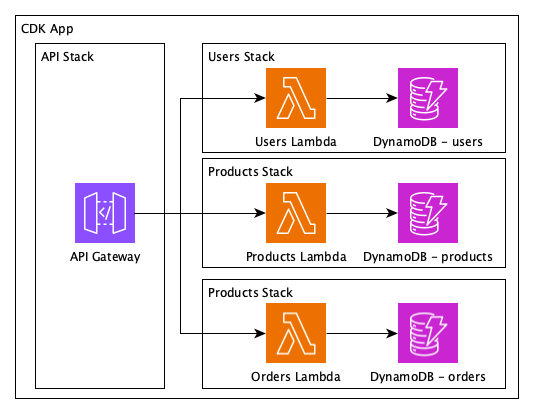
Architecture diagram of the same application refactored into four child stacks: one for the APIGateway and three for the user, product, and order domains. Each child Stack has its own respective Lambda function and DynamoDB table.

Proposed refactored application into separate stacks for each domain.

Without the refactor feature, CloudFormation would delete and re-create the Lambda and DynamoDB resources, which would cause all of the data in the latter to be lost. Alternatively, you could create net-new Lambdas and Amazon DynamoDB tables in one deployment, execute an out-of-band, point-in time and streaming data migration from the old tables to the new ones, update the API Gateway configuration to target the new Lambdas in a second deploy, and turn off the streaming migration process.

With the refactor feature, we can move the resource definitions to new files, update them to L2 Constructs, and leave the stateful resources in place!

Replace stateless resources
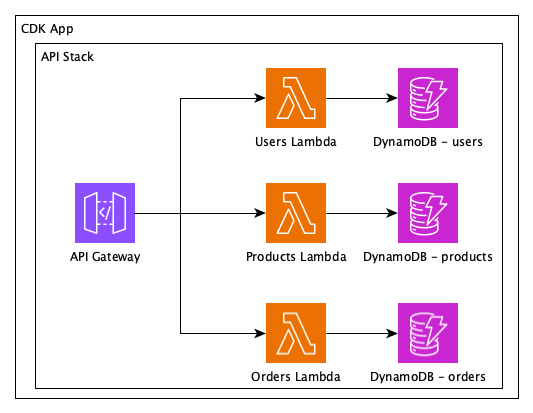
First, let’s refactor our CDK code to break the monolithic Lambda into 3 domain-specific Lambdas. CloudFormation’s refactor capability doesn’t support creating new resources or updating configuration of existing resources, so we will deploy these changes as usual, without using the new refactor feature. All resources will stay inside the monolithic stack for now.

Architecture diagram of the same application with the single Lambda function broken into separate functions corresponding to the three DynamoDB tables for users, products, and orders. All resources are still contained in the single API Stack and CDK App.

Refactor stateless single lambda function into 3 functions as a prerequisite to the refactor of stateful DynamoDB tables.

function singleStackMicroservicesApp() {
  // We still have a single stack
  const monolith = new CdkAppStack(app, monolithStackName, {env});

  // makeFunctionAndTable creates a different Lambda function and a DynamoDB table
  // for each domain that is passed as a parameter.
  // In a real CDK application, you would probably define each of them independently.
  makeApi(monolith, {
    usersFunction: makeFunctionAndTable(monolith, 'users'),
    productsFunction: makeFunctionAndTable(monolith, 'products'),
    ordersFunction: makeFunctionAndTable(monolith, 'orders'),
  });
}

singleStackMicroservicesApp();

Refactor stateful resources
Now we can refactor the stateful DynamoDB tables and their respective Lambdas to their own stacks, using cdk refactor to map their new IDs without replacing the resources.

Before refactoring, though, we need to create the new stacks that will receive the functions and tables:

  singleStackMicroservicesApp();

  const usersStack = new Stack(app, 'Users', {env});
  const productsStack = new Stack(app, 'Products', {env});
  const ordersStack = new Stack(app, 'Orders', {env});
Architecture diagram of the final refactored application with four child stacks: one for the APIGateway and three for the user, product, and order domains. Each child Stack has its own respective Lambda function and DynamoDB table.

Refactored Lambda functions and DynamoDB tables into their own separate stacks.

function fullMicroservicesApp() {
    const monolith = new Stack(app, monolithStackName, {env});

    const usersStack = new Stack(app, 'Users', {env});
    const productsStack = new Stack(app, 'Products', {env});
    const ordersStack = new Stack(app, 'Orders', {env});

    makeApi(monolith, {
        // Now each pair function + table is in its own stack
        usersFunction: makeFunctionAndTable(usersStack, 'users'),
        productsFunction: makeFunctionAndTable(productsStack, 'products'),
        ordersFunction: makeFunctionAndTable(ordersStack, 'orders'),
    });
}

fullMicroservicesApp();

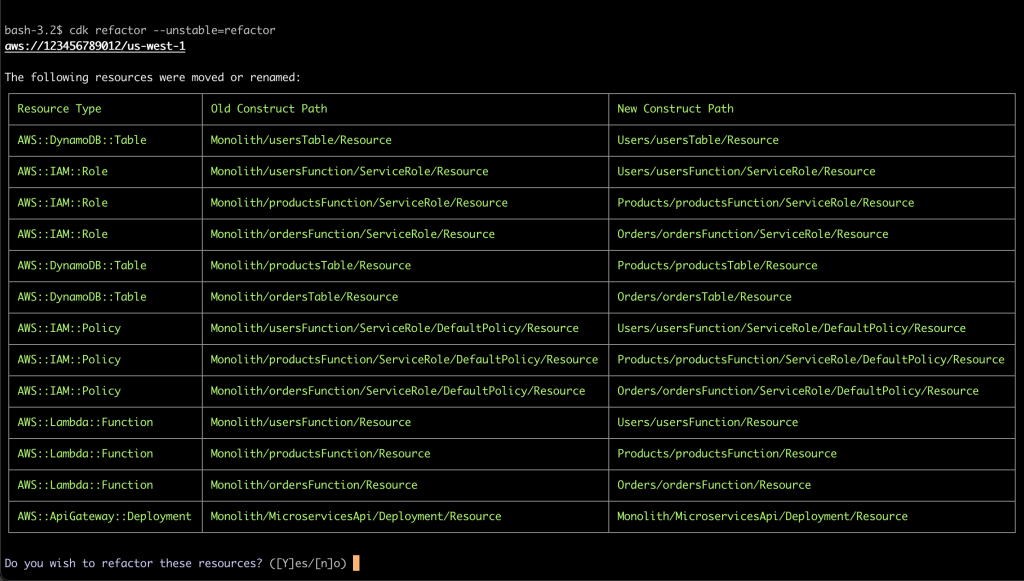
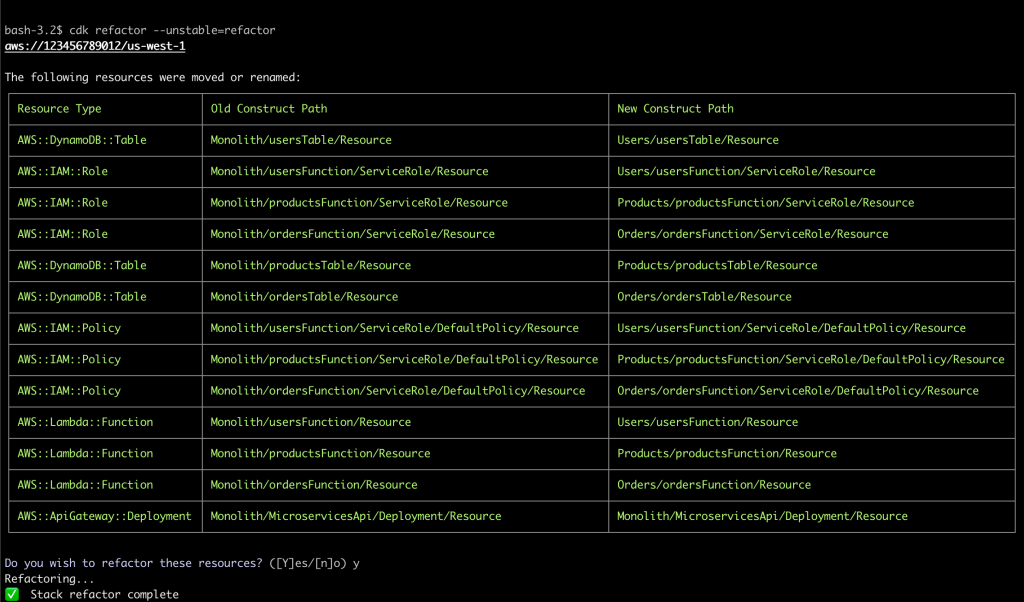
Running cdk refactor –unstable=refactor starts the process. (The unstable flag is required as this feature is still subject to breaking changes.) The CDK will compare the current state of your application (the deployed monolithic app) with the new state (the output of your refactored CDK application).

Screenshot of the CDK CLI confirmation dialog while executing the refactor command. The output has three columns: Resource Type, Old Construct Path, and New Construct Path, with rows of resources that will be refactored from one ID to another. The confirmation prompt asks "Do you want to refactor these resources? (yes/no)"

CDK refactor confirmation dialog

As expected, it shows a table of resources that were moved from the Monolith stack to their respective refactored stacks. By default, the CLI asks for confirmation before proceeding. Bypass the confirmation by passing the –force flag, or confirm the changes and execute the refactor:
All resources, including the stateful tables, were safely moved to other stacks, and we now have our well-architected application.

Screenshot of the CDK CLI results after completing the refactor command. The output is similar to the confirmation with three columns: Resource Type, Old Construct Path, and New Construct Path, with rows of resources that were refactored from one ID to another.

CDK refactor results

Conclusion
With the CDK refactor feature, developers can take full advantage of the object-oriented definition of AWS resources, including the ability to change the structure and layers of abstraction without orchestrating complex migration mechanisms or scheduled downtime. Since the CDK is open source, you can learn more about how the CDK automatically determines what resources need to be refactored via the README. Understanding when resources need to be replaced and refactored will help you plan your infrastructure as code roadmap and when you should use this new refactoring capability.

If you’ve got a refactor that you’ve been waiting to execute, read more about the feature set in the CDK refactor documentation and start refactoring your own CDK App today!

Authors

Natalie White

Natalie White is a Principal Solutions Architect at Amazon Web Services. She helps Healthcare and Life Sciences customers deploy solutions to AWS, and uses her software development background to accelerate infrastructure as code automation using the AWS Cloud Development Kit (CDK). She also consults engineering leaders on DevOps cultural transformations.

Otavio Macedo

Otavio Macedo is a Software Development Engineer at Amazon Web Services. He has been with the AWS Cloud Development Kit (CDK) team since 2021, helping deliver the unique experience that CDK provides for customers.

Announcing the end of support for Node.js 18.x in AWS CDK

Post Syndicated from Charles Meruwoma original https://aws.amazon.com/blogs/devops/announcing-the-end-of-support-for-node-js-18-x-in-aws-cdk/

On November 30th, 2025, the AWS Cloud Development Kit (CDK) will no longer support Node.js 18.x, which reached end of life on April 30, 2025. This change applies to all AWS CDK components that depend on Node.js, including the AWS CDK CLI, the Construct Library, and broader CDK ecosystem projects such as JSII, Projen, and CDK8s.

We encourage you to upgrade to a Node.js Active Long Term Support (LTS) version, which is Node.js 22.x as of July 6, 2025. Given that Node.js 18.x is past end of life, we recommend migrating your CDK projects to newer Node.js LTS versions as soon as possible.

Why are we doing this?

Node.js 18.x reached its End of Life support on April 30, 2025, per the Node.js Release Schedule. This means the Node.js community no longer provides bug fixes or security updates for this version. By dropping support for end-of-life versions, we ensure that AWS CDK users benefit from the latest security patches, performance improvements, and modern Node.js capabilities. This approach aligns with AWS’s commitment to security best practices and our standard policy of supporting only actively maintained runtime versions.

What’s changing?

Starting December 1, 2025, AWS CDK will officially end support for Node.js 18.x. While your existing CDK deployments may continue to function, we will no longer address issues, provide bug fixes, or offer technical support for problems that occur specifically with Node.js 18.x. Any support cases or bug reports related to Node.js 18.x will require reproduction on a supported Node.js version (20.x or 22.x as of June 2025) before we can assist.

Key points

Moving forward, projects that remain on Node.js 18.x will gradually lose access to new AWS CDK capabilities as we develop features using modern Node.js APIs that are not available in older versions. This creates a growing compatibility gap that will make it increasingly challenging to leverage CDK innovations and improvements. The security implications are equally concerning, as any vulnerabilities discovered in the unsupported Node.js 18.x runtime will not receive patches or workarounds from our development team, potentially exposing your infrastructure to known security risks.

The challenges extend throughout the development lifecycle. Without regular compatibility testing against Node.js 18.x, we cannot ensure reliable CDK behavior, and you may encounter unexpected issues in production environments. When problems do arise, our support team will need to reproduce any reported issues on supported Node.js versions before providing assistance, which could delay resolution during critical incidents. Additionally, the broader CDK ecosystem, including third-party libraries and tools your projects depend on, will likely follow similar deprecation schedules, creating compounding compatibility challenges that become more difficult to resolve over time.

Timeline

We’re announcing this change in July 2025, to provide you with a five-month transition period before support officially ends on November 30th, 2025. During this transition window, our team will continue to address issues that arise with Node.js 18.x, giving you time to plan, test, and execute your upgrade strategy without immediate pressure. This period is designed to help you thoroughly validate your CDK projects against newer Node.js versions and ensure smooth deployments in your production environment.

Beginning December 1st, 2025, AWS CDK will officially discontinue support for Node.js 18.x across all components and ecosystem projects. From this point forward, all bug fixes, security patches, and new feature development will target only supported Node.js versions, currently 20.x and 22.x as of June 2025. We strongly recommend using this transition period to migrate to Node.js 22.x, the current Active Long Term Support version, which will provide the longest runway for future compatibility as the Node.js release cycle continues.

Version validation and update steps

Begin your migration by checking which Node.js version you’re currently running across all environments where you deploy CDK projects. Run `node -v` in your local development environment, CI/CD pipelines, and any automated deployment systems to get a complete picture of your current setup.

Once you’ve identified all instances of Node.js 18.x, update your runtime to a supported version using either a version manager like nvm or by downloading the official installer from nodejs.org. We recommend upgrading directly to Node.js 22.x since it’s the current Active Long Term Support version and will provide the longest compatibility runway. After updating your runtime, thoroughly test your CDK projects in non-production environments to ensure your deployment scripts and third-party dependencies work correctly with the new version. Pay particular attention to any custom constructs or complex deployment workflows that may be sensitive to changes in Node.js versions.

Finally, establish a process for staying current with future Node.js releases by bookmarking the AWS CDK Node.js Version Support Timeline, which provides up-to-date information on runtime compatibility and upcoming deprecations. This proactive approach will help you anticipate future changes and plan your upgrade strategies well in advance, avoiding the pressure of last-minute migrations when support windows close.

Conclusion

This deprecation is part of our ongoing commitment to provide a secure, high-quality experience for AWS CDK users. By migrating to a Node.js Active Long Term Support (LTS) version, you will benefit from enhanced performance, ongoing security updates, and continued AWS CDK advancements. If you have any questions or concerns about this deprecation, please reach out and open an issue in our GitHub repo.

Migrating a CDK v1 Application to CDK v2 with Amazon Q Developer

Post Syndicated from Dr. Rahul Sharad Gaikwad original https://aws.amazon.com/blogs/devops/migrating-a-cdk-v1-application-to-cdk-v2-with-amazon-q-developer/

Introduction:

AWS Cloud Development Kit (AWS CDK) is an open-source software development framework for defining cloud infrastructure in code and provisioning it through AWS CloudFormation. As of June 1, 2023, AWS CDK version 1 is no longer supported. To avoid the potential issues that come with using an outdated version and to take advantage of the latest features and improvements, we highly recommend upgrading to AWS CDK version 2.

Amazon Q Developer, a generative AI-powered assistant for software development, enhances the efficiency of software development teams. It facilitates the creation of deployment-ready infrastructure as code (IaC) for AWS CloudFormation, AWS CDK, and Terraform. By using Amazon Q, developers can accelerate IaC development, enhance code quality, and decrease the likelihood of configuration errors.

This post demonstrates how Amazon Q Developer helps in upgrading the existing AWS CDK v1 application to AWS CDK v2.

Prerequisites

Planning

In this blog post, I will explore a code example where I have created a VPC, Subnets, and an ECS Fargate cluster using AWS CDK version 1. I will then explain how you can use Amazon Q to transform the code from CDK v1 to CDK v2.

1. In order to initiate this process, I have begun by asking Amazon Q Developer for the necessary steps to migrate from CDK version 1 to version 2, which are outlined below.

Can you provide the steps to migrate from cdk version 1 to version 2?

Amazon Q Developer outlining the comprehensive process to upgrade AWS CDK applications from version 1 to version 2.

2. In the above screenshot Amazon Q Developer outlined several steps we can take to make the necessary changes. The first step is to update the dependencies. If I need guidance on how to update the dependencies, I can ask the Amazon Q Developer again for help by asking the steps regarding updating dependencies as below .

Can you provide the steps to update dependencies?

Amazon Q Developer offering detailed, AI-powered guidance to upgrade project dependencies by analyzing the existing codebase, identifying outdated or deprecated libraries and frameworks, and recommending precise updates to ensure compatibility with newer language versions.

3. After updating the dependencies, the next step is to update the import statements. To get guidance on how to update the import statements, I can ask the Amazon Q Developer assistant again for help by asking the steps regarding how to import statements as shown below.

@workspace Can you provide the steps to update import statements?

Amazon Q Developer advises on updating import statements by analyzing the current code context and guiding developers to replace legacy or outdated import paths with the latest.

In the above screenshot if you have noticed I have added @workspace before the question which automatically includes the most relevant chunks of my workspace code as context.

4. If any errors occur while updating the code as recommended by Amazon Q Developer, I can use Amazon Q Developer to debug the issue and provide the needed inputs to resolve it.

Amazon Q Developer diagnosing issues by analyzing error messages and AWS resource states, providing natural language explanations of root causes such as permission errors and misconfigurations.

5. Once I have finished the required steps, I can deploy the application using version 2 of the AWS CDK by running the cdk deploy command.

Deployment of the updated AWS CDK version 2 application, involving synthesizing CDK stacks to generate CloudFormation templates and deployment artifacts, bootstrapping the AWS environment to provision necessary resources.

6. In addition to its other capabilities, Amazon Q offers code review functionality. To initiate a code review, simply select Amazon Q and use the /review command. I’ll then have the option to review either the active files or the entire open workspace. Select your preference, and Amazon Q will analyze your project and provide comprehensive review results.

Amazon Q Developer performs comprehensive code analysis by reviewing your entire codebase or real-time code as you write, identifying security vulnerabilities, code quality issues, and deployment risks.

7. Amazon Q Developer can also generate documentation, including README files. To create documentation, select Amazon Q and enter the /doc command. Amazon Q will automatically generate a README file for your project. I can then review the generated documentation, accept the changes, or provide specific instructions for further modifications.

Amazon Q Developer automatically generates a comprehensive README file for the entire project by analyzing the codebase, project structure, and dependencies within the selected folder in the IDE.

Conclusion

In this blog, I demonstrated how Amazon Q Developer can simplify and accelerate the upgrade process from AWS CDK version 1 to version 2, ensuring your cloud infrastructure remains secure, efficient, and aligned with the latest AWS innovations. AWS CDK v2 offers a streamlined, consolidated library with improved performance and ongoing support, making infrastructure management easier and more reliable.

By leveraging Amazon Q Developer, a generative AI-powered assistant, teams can automate Infrastructure as Code development, enhance code quality, and minimize configuration errors. Together, these tools empower development teams to confidently modernize and scale their AWS environments, turning the upgrade process into a seamless opportunity for innovation and growth.

Resources

To learn more about Amazon Q Developer, see the following resources:

To learn more about the AWS CDK, see the following resources:

About the authors:

Dr. Rahul Sharad Gaikwad

Dr. Rahul is a Solutions Architect at AWS, driving cloud innovation through migration and modernization of customer workloads. A Generative AI and DevOps enthusiast, he architects cutting-edge solutions and is recognized as an APJC HashiCorp Ambassador. He earned his Ph.D. in AIOps and he is recipient of the Man of Excellence Award , Indian Achievers’ Award , Best PhD Thesis Award, Research Scholar of the Year Award and Young Researcher Award.

Vinodkumar Mandalapu

Vinodkumar is a Devops Consultant at AWS, specializing in designing and implementing cloud-based infrastructure and deployment pipelines on AWS. With extensive experience in automating and streamlining software delivery, he has helped organizations of all sizes leverage the power of the cloud to drive innovation, improve scalability, and enhance operational efficiency. In his leisure time, he enjoys traveling and spending quality time with his son.

Tamilselvan P

Tamilselvan is a Devops Consultant at AWS, focusing on architecting and deploying cloud-native systems and continuous delivery within the ecosystem. Leveraging his comprehensive expertise in orchestrating and refining software release processes, he has assisted customers across various industries and scales in harnessing cloud technology to faster innovation, boost scalability, and elevate operational performance. During his free time, he enjoys playing cricket.

Announcing the end of support for Node.js 14.x and 16.x in AWS CDK

Post Syndicated from Adam Keller original https://aws.amazon.com/blogs/devops/announcing-the-end-of-support-for-node-js-14-x-and-16-x-in-aws-cdk/

On May 30th, 2025, the AWS Cloud Development Kit (CDK) will no longer support Node.js 14.x and 16.x, which reached end of life on 4/30/2023 (14.x) and 9/11/2023 (16.x). This change applies to all AWS CDK components that depend on Node.js, including the AWS CDK CLI, the Construct Library, and broader CDK ecosystem projects such as JSII, Projen, and CDK8s.

We encourage you to upgrade to a Node.js Active Long Term Support (LTS) version, which is Node.js 22.x as of March 11th, 2025. Given that Node.js 14.x and 16.x are past end of life, we recommend migrating your CDK projects to newer Node.js LTS versions as soon as possible.

Why are we doing this?

Node.js 14x and 16.x are past their End of Life and are no longer supported by the Node.js community. This means that there have not been any bug fixes or security updates to these versions. To make sure that we are providing up-to-date and secure libraries, we will drop support for these versions.

What’s changing?

After May 30th, 2025, the AWS CDK will no longer support Node.js 14.x and 16.x. While your existing deployments may continue to work, we will not address issues specific to these versions. Any bug reports or support cases that stem from using Node.js 14.x or 16.x will require reproducing the issue on a supported version of Node.js (18.x, 20.x, 22.x – as of February 26th, 2025) before further assistance can be provided.

Key points

  • New features for the AWS CDK may rely on APIs or functionalities only available in supported versions of Node.js.
  • Critical security patches and fixes related to Node.js 14.x or 16.x will not be backported.
  • Compatibility testing will no longer be performed for Node.js 16.x, making it difficult to guarantee the CDK’s behavior with that runtime.

Timeline

  1. March 11, 2025 through May 30, 2025
    1. We will continue to support that arise for Node.js 14.x and 16.x during this period.
    2. Use this time to plan and test upgrades for your CDK projects to a Node.js Active Long Term Support (LTS) version.
  2. May 30, 2025 and onwards
    1. The AWS CDK is officially dropping support for Node.js 14.x and 16.x.
    2. Any bug fixes or security patches will target only supported versions of Node.js (18.x, 20.x, 22.x – as of March 11th, 2025)

Version validation and update steps

  • Check your current Node.js version
    • Run node -v in your environment or CI/CD pipelines to see which version of Node.js you’re currently using.
  • Update your environment
    • Install or switch your runtime to Node.js using a supported version via a version manager (e.g., nvm) or by downloading an official installer from nodejs.org.
  • Validate your AWS CDK projects
    • Ensure your deployment scripts, and any third-party dependencies work correctly under a supported version. Test thoroughly in non-production environments.
  • Looking ahead
    • For more information on our deprecation strategy moving forward, please see this RFC, which provides more details.

Conclusion

This deprecation is part of our ongoing commitment to provide a secure, high-quality experience for AWS CDK users. By moving to a Node.js Active Long Term Support (LTS) version, you’ll benefit from improved performance, ongoing security patches, and continued AWS CDK innovations. If you have any questions or concerns about this deprecation, please reach out and open an issue in our GitHub repo.

Using Semantic Versioning to Simplify Release Management

Post Syndicated from Brandon Kindred original https://aws.amazon.com/blogs/devops/using-semantic-versioning-to-simplify-release-management/

Any organization that manages software libraries and applications needs a standardized way to catalog, reference, import, fix bugs and update the versions of those libraries and applications. Semantic Versioning enables developers, testers, and project managers to have a more standardized process for committing code and managing different versions. It’s benefits also extend beyond development teams to end users by using change logs and transparent feature documentation. This alleviates the operational burden of communicating changes for each release cycle.

In this post, we dive deep into how Semantic Versioning works and how to use the NodeJS package semantic-release/npm in a GitHub Actions continuous integration and continuous delivery (CI/CD) pipeline to automatically version an Amazon Web Services (AWS) Cloud Development Kit (AWS CDK) project. Once we’re done, you’ll be ready to deliver AWS CDK projects that are automatically versioned so your team can focus more on code instead of versioning for each release.

How does Semantic Versioning work?

With Semantic Versioning, version number changes convey a specific meaning about the underlying code change. This helps others to understand what has changed from one version to the next.

Semantic Versioning is defined in a Major.Minor.Patch format, which is a guideline to track the scope and potential impact of changes for feature development, major updates and bug fixes. The Major version number change signifies that this release will have breaking changes and any upgrade to this version should be validated for backward compatibility. The Minor version number change signifies a feature release in a backward-compatible manner. Finally, the Patch version number signifies a small insignificant change or a bug fix and users can upgrade to this version without introducing breaking changes or new features.

Each version number is always incremented by one digit and when a higher digit increments, the lower digits reset to zero. For example, version 1.5.2 means that the software is in its first major version, and has released 5 features with 2 patches implemented. When a new feature is added, it will be released as version 1.6.0. If there are any bugs reported and a fix is release for that bug, the next release version will be 1.6.1. For a version 2.0.0 release there will be breaking changes, and may not be backward compatible with previous 1.x.x versions.

What is semantic-release?

Now that we have covered how Semantic Versioning works, and why it’s useful in software projects, let’s review semantic-release. It is a Node.js tool that simplifies Semantic Versioning management. Semantic-release can do more than just apply Semantic Versioning to your projects. With a variety of plugins available, you can track what sort of changes are being made with commit analysis or by generating a changelog for each release. This automates what would otherwise have been a manual and time-consuming process to create and review roadmaps and documentation tracking the new features and fixes that comprise a release. Semantic-release is also straightforward to integrate with CI tools such as GitHub Actions, GitLab CI, Travis CI, and CircleCI 2.0 workflows.

Unfortunately, if your commit messages don’t match the format semantic-release requires, the automatic versioning won’t work correctly. To verify that commit messages are in the right format, you can integrate tools such as commitizen or commitlint, which can validate that commit messages are in a valid format.

Using semantic-release

Commit message formats

By default, semantic-release uses Angular Commit Message Conventions, however the commit message format can be altered by using config options. Let’s take a quick look at the three different types of commit messages, fixes, features, and breaking changes.

Patches and fixes

For patch or fix commits, you need to start your commit message with “fix(context):”. This tells semantic-release that this is a minor patch—meaning that if your version is 0.0.1, after this commit is merged the version will be incremented to 0.0.2. Following is an example commit message.

fix(printer): inform user when printer is out of paper

Features

Feature commit messages start with “feat(context):” which indicates to semantic-release that this is a feature release, also referred to as a minor release. If your version is 0.1.0, after a feature commit is merged, the version will be incremented to 0.2.0. Following is an example of a feature commit.

feat(printer): add option for printing in color

Breaking changes

Breaking change commits are intended for marking a major breaking change—meaning that the commit introduces changes that are not compatible with existing or previous versions. The way that commit messages are marked as breaking changes is slightly different than the previous commit types. For a breaking change, the commit footer needs to include “BREAKING CHANGE:”. For example, a breaking change commit, might look like the following.

perf(printer): remove color printing option

BREAKING CHANGE: The color printing option has been removed. The default black and white printing option is always used for performance reasons.

Release change log

To generate a release change log, we only need to add the semantic-release/changelog plugin to the package.json file. We’ll demonstrate how to do this in the next section.

Adding Semantic Release to an AWS CDK project

To demonstrate semantic-release in action we will build an example with AWS CDK and the NPM semantic-release library. All code provided in the remainder of this blog can be found in the semantic-versioning demo repository (aws-cdk-semantic-release) on GitHub.

To get started we’ll need to create a Node.js CDK application, add semantic-release and its plugins, commit changes, then build the project. If you don’t have AWS CDK installed yet, check out the Getting Stated with CDK guide.

To begin, navigate to the folder where the project will be saved. Next, we initialize a new AWS CDK project and add semantic-release. Then, we configure the branches that Semantic Versioning should be applied to and add a few NPM plugins to extend the functionality of semantic-release. While there are many plugins available, only a few are needed to get started. Below, we’ll walk through which plugins to install and how to install them.

Initiate a new AWS CDK Typescript project and add semantic-release

In a command terminal, navigate to the folder where you want to store your AWS CDK project and run the following three commands. The first line will create the project and the next two will install the semantic-release NPM and Git plugins in the AWS CDK project.

cd <<PROJECT_FOLDER>>
cdk init app --language typescript
npm install @semantic-release/npm -D
npm install @semantic-release/git -D

Define which branches to apply versioning to

We need to tell NPM which branches can trigger a new release. In the example we’ll use the main branch and the staging branches for release. We will add a new section to the package.json file along with the branches we want to use for releases.

"release": {
  "branches": ["main"]
}

Add supporting plugins to package.json

In order for semantic-release to pick up commits, generate release notes, and be able to perform a release with GitHub we need to add the commit-analyzer, release-notes-generator, changelog, NPM, Git, and GitHub plugins. Add the following plugins section to the package.json file after the “release” section we added in the previous step.

"plugins": [
    "@semantic-release/commit-analyzer",
    "@semantic-release/release-notes-generator",
    "@semantic-release/changelog",
    "@semantic-release/npm",
    [
        "@semantic-release/git",
        {
            "assets": [
                "package.json",
                "CHANGELOG.md"
            ],
            "message": "chore(release): ${nextRelease.version}[skip ci]\n\n${nextRelease.notes}"
        }
    ],
    "@semantic-release/github"
],

Putting it all together, our package.json file should look similar to the following.

{
    "name": "aws-cdk-semantic-release",
    "version": "0.1.0",
    "bin": {
        "aws-cdk-semantic-release": "bin/aws-cdk-semantic-release.js"
    },
    "scripts": {
        "build": "tsc",
        "watch": "tsc -w",
        "test": "jest",
        "cdk": "cdk"
    },
    "plugins": [
        "@semantic-release/commit-analyzer",
        "@semantic-release/release-notes-generator",
        "@semantic-release/changelog",
        "@semantic-release/npm",
        [
            "@semantic-release/git",
            {
                "assets": [
                    "package.json",
                    "CHANGELOG.md"
                ],
                "message": "chore(release): ${nextRelease.version} [skip ci]\n\n${nextRelease.notes}"
            }
        ],
        "@semantic-release/github"
    ],
    "release": {
        "branches": [
            "main"
        ]
    },
    "devDependencies": {
        "@semantic-release/changelog": "^6.0.3",
        "@semantic-release/git": "^10.0.1",
        "@semantic-release/npm": "^11.0.2",
        "@types/jest": "^29.5.12",
        "@types/node": "20.11.16",
        "aws-cdk": "2.127.0",
        "jest": "^29.7.0",
        "ts-jest": "^29.1.2",
        "ts-node": "^10.9.2",
        "typescript": "~5.3.3"
    },
    "dependencies": {
        "aws-cdk-lib": "2.127.0",
        "constructs": "^10.0.0",
        "source-map-support": "^0.5.21"
    }
}

With the necessary package.json changes in place, we can commit our code and build the project again.

git commit -m "feat(semver): added semantic release plugins and set main branch for versioning"
npm run build

Configure GitHub Actions

In the projects root folder, we are going to create folders for .github/workflows so that we can configure GitHub Actions release steps.

mkdir .github
cd .github
mkdir workflows
cd workflows

Create a file called release.yaml in the workflows folder that has the following.

name: Release
on:
  push:
    branches:
      - main
jobs:
  release:
    runs-on: ubuntu-latest
    steps:
      - name: Checkout Code
         uses: actions/checkout@v3
      - name: Setup Node.js
         uses: actions/setup-node@v3
         with:
           node-version: '20.8.1'
      - name: Install Dependencies
         run: npm install
      - name: Semantic Release
         env:
           GITHUB_TOKEN: ${{ secrets.GITHUB_TOKEN }}
           NPM_TOKEN: ${{ secrets.NPM_TOKEN }}
         run: npx semantic-release

The GITHUB_TOKEN is automatically generated and managed by GitHub Actions, so we don’t need to worry about retrieving or defining this value in our GitHub Actions steps. However, NPM_TOKEN is not automatically provided to us, so we need to define the NPM token. To do this we need to login to npmjs.com and create an account. Once we’re logged in, we need to create an access token. Once the NPM access token is created, then we need to add the token to GitHub secrets.

Verify Semantic-Release is setup correctly

Now that we have everything configured, new merges and commits to the main branch will kick off a CI/CD pipeline through GitHub Actions that builds the project and increments the version. To verify that everything is working correctly, we’ll alter the CDK code to include an AWS Lambda function. Afterward, we’ll commit changes to the main branch to verify that semantic-release is working correctly.

Make a change, commit, push and verify

In the AWS CDK project lib/aws-cdk-semantic-release-stack.ts file we’ll update the visibilityTimeout duration to 600, then commit the changes. We want to be sure to use the Semantic Versioning format for the commit message so that our changes are versioned correctly. For this we use the following commit message.

“fix(sqs-visibility): increased visibility timeout to 600”

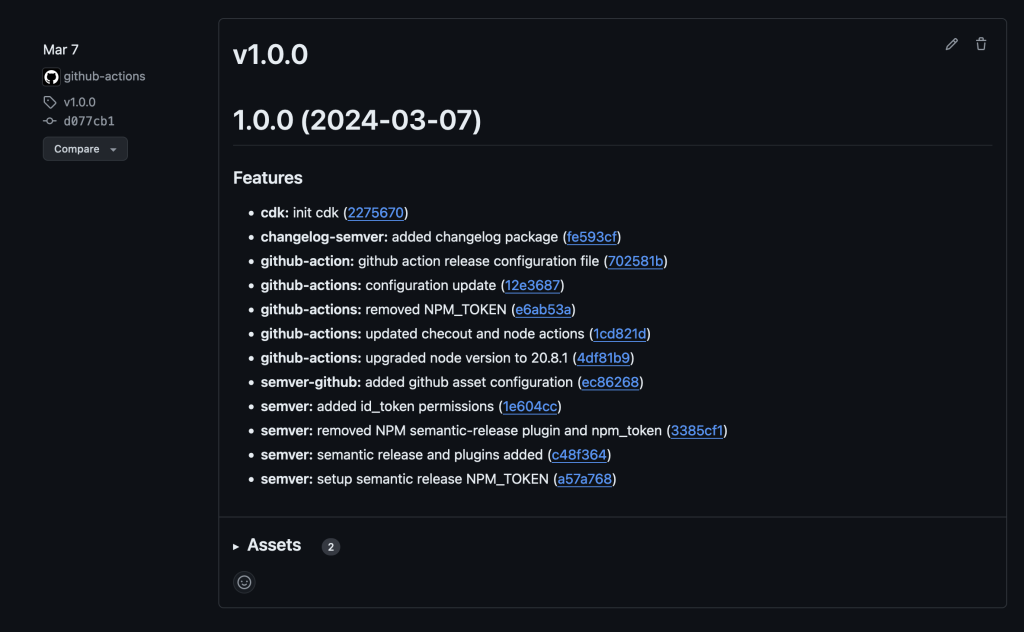
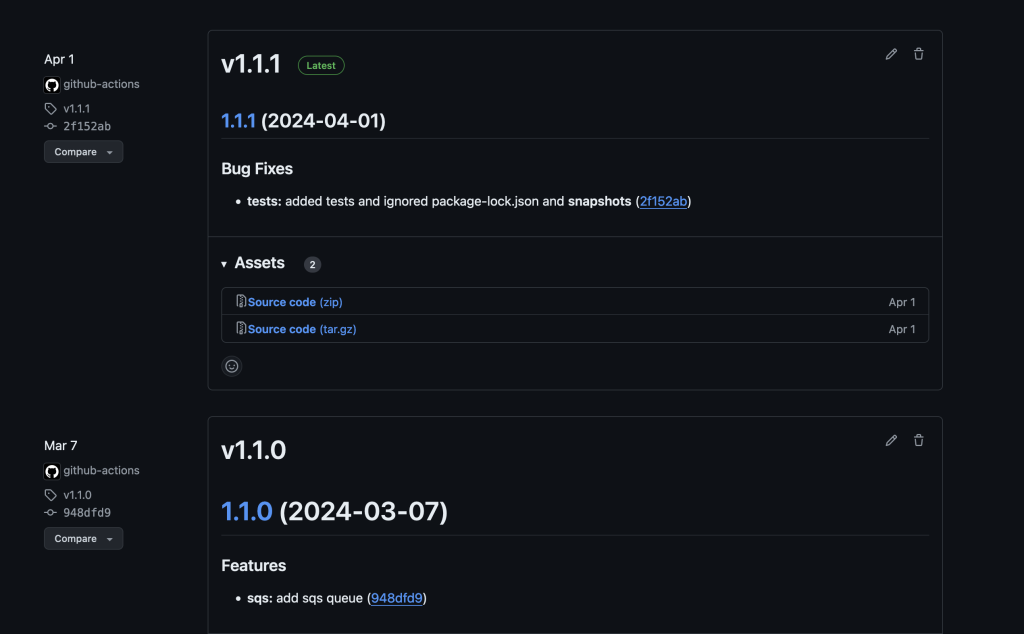
After committing the changes, we push the changes to the remote GitHub repository to initiate the GitHub Actions build process. Once the build is complete, we see that the build number has been incremented from the previous version. You can review the releases for the sample code to see how it has been versioned. Following are examples of what it should look like before and after executing this. Please note that the version numbers depicted may not match yours.

GitHub releases view with information about release v1.1.0 including features and assets that were updated as part of v1.1.0

Screenshot of GitHub releases page showing release 1.0.0 and the associated features changelog

Figure 1 – Before the new commits

GitHub releases view with information about release v1.1.1 followed by the previous release v1.1.0.

Screenshot of GitHub releases page showing a previous release and the latest release along with their respective versions of 1.1.0 and 1.1.1

Figure 2 – After GitHub Actions generates a new build

Conclusion

Semantic Versioning offers a structured and reliable way to manage software changes. When paired with the significant benefits of using Node.js packages like semantic-release, version management can become effortless. All of this enables automated version management Node.js projects such as AWS CDK pipelines for automated code deployment. It enhances clarity, stability, and collaboration, while also supporting automation and fostering user confidence.

By adopting Semantic Versioning, development teams can achieve more predictable and efficient workflows, ultimately leading to higher quality software. It also builds confidence among users without going into much details with respect to software upgrades and backward compatibility. As a best practice, start incorporating Semantic Versioning for existing and future applications.

Contact an AWS Representative to know how we can help accelerate your business.

Reference

CDK setup and deployment of application with CDK V2 Construct:

Headshot of Brandon Kindred (CAA), a white man with short hair, a beard and wearing a black shirt

Brandon Kindred

Brandon is a Cloud Application Architect at AWS ProServe where he helps companies achieve their cloud goals through tailored strategies and cost-effective solutions. With a passion for teaching, he enjoys empowering others to harness the full potential of cloud technologies while optimizing their cloud spend. Brandon also enjoys providing guidance on development best practices, ensure teams build resilient and scalable applications in the cloud.

Sunita Dubey (Sr CAA)

Sunita Dubey

Sunita Dubey is a senior Cloud Application Architect based out of New Jersey. She focuses on designing, architecting and delivering end to end solutions for customers in financial domain. She has solved multiple customer challenges to move their workload to AWS and saved cost in the migration process. She insists on highest standard in all the deliverables.

Announcing CDK Migrate: A single command to migrate to the AWS CDK

Post Syndicated from Adam Keller original https://aws.amazon.com/blogs/devops/announcing-cdk-migrate-a-single-command-to-migrate-to-the-aws-cdk/

Today we’re excited to announce the general availability of CDK Migrate, a component of the AWS Cloud Development Kit (CDK). This feature enables users to migrate AWS CloudFormation templates, previously deployed CloudFormation stacks, or resources created outside of Infrastructure as Code (IaC) into a CDK application. This feature is being launched in tandem with the CloudFormation IaC Generator, which helps customers import resources created outside of CloudFormation into a template, and into a newly generated, fully managed CloudFormation stack. To read more on this feature, check out the launch post.

There are various ways to create and manage resources in AWS, whether that be via “ClickOps” (creating and updating via the AWS Console), via AWS API’s, or using Infrastructure as Code (IaC). While it’s a good and recommended practice to manage the lifecycle of resources using IaC, there can be an on-ramp to getting started. For those that aren’t ready to use IaC, it is likely that they use the console to create the resources and update them accordingly. While this can be acceptable for smaller use cases or for testing out a new service, it becomes more challenging as the complexity of the environment grows. This is further exacerbated when there is a need to re-deploy the exact configuration to other accounts, environments, or regions, as the process becomes very error prone when trying to replicate it. IaC is built to help solve this problem by allowing users to define once and deploy everywhere. For those who have been putting off the move to IaC, now is the time to take the plunge with the IaC generator functionality and CDK migrate, which can accelerate and simplify the move.

Getting Started

The first step when migrating resources into the AWS CDK is to understand the best mechanism for how the users would prefer to interact with their IaC.

  • For users that are looking to define their IaC declaratively (manage resources via a configuration language like YAML), it is recommended that they look at IaC generator, which can generate a CloudFormation template as well as manage the existing resources in a CloudFormation stack.
  • For users that are looking to manage their IaC via a higher level programming language as well as build on top of those templates with higher level abstractions and automation, the AWS Cloud Development Kit and CDK migrate serve as an excellent option,

There is also functionality in the CDK CLI to import resources into an existing CDK application. Let’s review the use cases for when to use CDK migrate vs when to use CDK import.

CDK Migrate

  • Users are looking to migrate one or many resources into a new CDK application.
    • Examples of existing resources in the AWS region to be migrated:
      • Resources created outside of IaC
      • A deployed CloudFormation Stack
  • Users want to migrate from CloudFormation templates into a new CDK application
  • Users are looking for a managed experience to generate CDK code from existing resources and/or CloudFormation templates.
  • While the CDK migrate feature is designed to help accelerate those users looking to use the AWS CDK, it’s important to understand that there are limitations. For more information on the limitations, please review the documentation.

CDK Import

  • Users have an existing CDK application and want to import one or many resources that were created outside of the CDK.
    • Examples of existing resources in the AWS region to be migrated:
      • Resources created outside of IaC (via ClickOps)
      • A deployed CloudFormation Stack
    • The user must define the resources in their CDK app on their own, and ensure that the resources defined in the CDK code map directly to the resource as it exists in the account. There is a multi-step process to follow when using this feature, for more information see here.

This post will walk through an example of how to take a local CloudFormation template and convert it into a new CDK application.

Walkthrough

To start, take the CloudFormation template below that will be converted to a CDK application. The template creates an AWS Lambda Function, AWS Identity and Access Management (IAM) role, and an Amazon S3 Bucket along with some parameters to help make some of the inputs dynamic. Below is the template in full:

AWSTemplateFormatVersion: "2010-09-09"
Description: AWS CDK Migrate Demo Template
Parameters:
  FunctionResponse:
    Description: Response message from the Lambda function
    Type: String
    Default: Hello World
  BucketTag:
    Description: The tag value of the S3 bucket
    Type: String
    Default: ChangeMe
Resources:
  LambdaExecutionRole:
    Type: AWS::IAM::Role
    Properties:
      AssumeRolePolicyDocument:
        Version: "2012-10-17"
        Statement:
          - Effect: Allow
            Principal:
              Service: lambda.amazonaws.com
            Action: sts:AssumeRole
      ManagedPolicyArns:
        - arn:aws:iam::aws:policy/service-role/AWSLambdaBasicExecutionRole
  HelloWorldFunction:
    Type: AWS::Lambda::Function
    Properties:
      Role: !GetAtt LambdaExecutionRole.Arn
      Code:
        ZipFile: |
          import os
          def lambda_handler(event, context):
            function_response = os.getenv('FUNCTION_RESPONSE')
            return {
              "statusCode": 200,
              "body": function_response
            }
      Handler: index.lambda_handler
      Runtime: python3.11
      Environment:
        Variables:
          FUNCTION_RESPONSE: !Ref FunctionResponse
  S3Bucket:
    Type: AWS::S3::Bucket
    Properties:
      PublicAccessBlockConfiguration:
        BlockPublicAcls: true
        BlockPublicPolicy: true
        IgnorePublicAcls: true
        RestrictPublicBuckets: true
      BucketEncryption:
        ServerSideEncryptionConfiguration:
          - ServerSideEncryptionByDefault:
              SSEAlgorithm: AES256
      Tags:
        - Key: Application
          Value: Git-Sync-Demo
        - Key: DynamicTag
          Value: !Ref BucketTag
Outputs:
  S3BucketName:
    Description: The name of the S3 bucket
    Value: !Ref S3Bucket
    Export:
      Name: !Sub ${AWS::StackName}-S3BucketName

This is the template that you will use when running the migration command. As a reminder, this demo migrates a CloudFormation template to a CDK application, but you can also migrate a previously deployed stack or non IaC created resources.

Migrate

The migration from the CloudFormation template to the CDK is done with a single command: cdk migrate. Simply point to the local CloudFormation template file (let’s call it demo-template.yaml), and watch as the CLI converts the template into a CDK application. The output and result from running the command will be a directory comprised of the CDK code and dependencies, but will not deploy the stack.

cdk migrate --stack-name CDK-Local-Template-Migrate-Demo --language typescript --from-path ../demoTemplate.yaml

CDK Migrate command

In the above command, you’re instructing the CDK CLI to consume the CloudFormation template file using the --from-path parameter, and choose the language as the output for the CDK application. The CDK CLI will convert the template as well as create a project folder along with the required dependencies for the CDK application.

When the migration is complete, the CDK application along with the project structure and files are available and ready to use, but have not yet been deployed. Below is the file structure of what was generated:

cdk app directory structure

The above output represents the scaffold for your CDK Typescript application, ready for deployment. The two directories that house the CDK code are bin and lib. Within the bin directory you’ll find the code that creates our CDK app and calls the CDK Stack class. The name of the files will match the input that was passed into the –stack-name parameter when running the migrate command, so in this case the file is named: bin/cdk-local-template-migrate-demo.ts. Below is the generated code:

CDK App Code

The CdkLocalTemplateMigrateDemoStack is imported and then instantiated. This is where the code that was converted from the existing CloudFormation template (or stack, or resources) resides. Again, similar to how the file was named above, the filename and location for the CDK stack code is lib/cdk-local-template-migrate-demo-stack.ts. Let’s look at the code that was converted.

CDK Stack Code

Comparing the above auto generated code to the original CloudFormation template, the definitions of the resources look similar. This is because the migrate command is generating the CDK code using L1 constructs, which represent all resources available in CloudFormation. For more information on CDK constructs and the various levels of abstraction they offer, check out this video.

The CloudFormation parameters were converted to properties inside of an interface, which are passed in to the Stack class. Inside of the Stack class code, it honors the defaults set in the properties based on the defaults were set in the original CloudFormation parameters. If you wanted to override those defaults, you could pass those properties into the CDK stack as follows:

CDK App Code Cleaned Up

With your newly created CDK application, you’re ready to deploy it to your AWS account.

Deploy

If this is the first time that you are using the CDK in the account and region, you will need to run the cdk bootstrap command, which creates assets required for the CDK to properly deploy resources to the region and account. For more information see here. Assuming the bootstrap process has happened, you can proceed to deployment.

The Infrastructure as Code is ready to deploy, but prior to deploying you should run a cdk diff to see what will be deployed. Running the diff command creates a change set and surfaces the changes being proposed (in this case it is a brand new stack with new resources).

Cdk Diff command

From the output you can see that all new resources are being created. If the cdk diff command was run against existing resources or stacks, assuming nothing changed (like above where I updated the properties), the diff would show no changes to the existing resources.

Next, deploy the stack (by running the cdk deploy command) and once the deployment is complete, head over to the AWS console and find your Lambda function. Run a test on your lambda function, and the response should match the functionResponse property that was updated as “CDK Migrate Demo Blog”.Lambda test execution output

Wrapping up

In this post, we discussed how the CDK migrate command can help you move your resources to the CDK to manage your infrastructure as code, whether it’s from a CloudFormation template, previously deployed CloudFormation stack, or from importing resources via the CloudFormation IaC generator feature. As always, we encourage you to test this feature and provide feedback and/or feature requests in our GitHub repo. In addition, if you’re new to the CDK there are some resources that can help you get started.

Getting started with Projen and AWS CDK

Post Syndicated from Michael Tran original https://aws.amazon.com/blogs/devops/getting-started-with-projen-and-aws-cdk/

In the modern world of cloud computing, Infrastructure as Code (IaC) has become a vital practice for deploying and managing cloud resources. AWS Cloud Development Kit (AWS CDK) is a popular open-source framework that allows developers to define cloud resources using familiar programming languages. A related open source tool called Projen is a powerful project generator that simplifies the management of complex software configurations. In this post, we’ll explore how to get started with Projen and AWS CDK, and discuss the pros and cons of using Projen.

What is Projen?

Building modern and high quality software requires a large number of tools and configuration files to handle tasks like linting, testing, and automating releases. Each tool has its own configuration interface, such as JSON or YAML, and a unique syntax, increasing maintenance complexity.

When starting a new project, you rarely start from scratch, but more often use a scaffolding tool (for instance, create-react-app) to generate a new project structure. A large amount of configuration is created on your behalf, and you get the ownership of those files. Moreover, there is a high number of project generation tools, with new ones created almost everyday.

Projen is a project generator that helps developers to efficiently manage project configuration files and build high quality software. It allows you to define your project structure and configuration in code, making it easier to maintain and share across different environments and projects.

Out of the box, Projen supports multiple project types like AWS CDK construct libraries, react applications, Java projects, and Python projects. New project types can be added by contributors, and projects can be developed in multiple languages. Projen uses the jsii library, which allows us to write APIs once and generate libraries in several languages. Moreover, Projen provides a single interface, the projenrc file, to manage the configuration of your entire project!

The diagram below provides an overview of the deployment process of AWS cloud resources using Projen:

Projen Overview of Deployment process of AWS Resources


  1. In this example, Projen can be used to generate a new project, for instance, a new CDK Typescript application.
  2. Developers define their infrastructure and application code using AWS CDK resources. To modify the project configuration, developers use the projenrc file instead of directly editing files like package.json.
  3. The project is synthesized to produce an AWS CloudFormation template.
  4. The CloudFormation template is deployed in a AWS account, and provisions AWS cloud resources.

Projen_Diagram
Diagram 1 – Projen packaged features: Projen helps gets your project started and allows you to focus on coding instead of worrying about the other project variables. It comes out of the box with linting, unit test and code coverage, and a number of Github actions for release and versioning and dependency management.

Pros and Cons of using Projen

Pros

  1. Consistency: Projen ensures consistency across different projects by allowing you to define standard project templates. You don’t need to use different project generators, only Projen.
  2. Version Control: Since project configuration is defined in code, it can be version-controlled, making it easier to track changes and collaborate with others.
  3. Extensibility: Projen supports various plugins and extensions, allowing you to customize the project configuration to fit your specific needs.
  4. Integration with AWS CDK: Projen provides seamless integration with AWS CDK, simplifying the process of defining and deploying cloud resources.
  5. Polyglot CDK constructs library: Build once, run in multiple runtimes. Projen can convert and publish a CDK Construct developed in TypeScript to Java (Maven) and Python (PYPI) with JSII support.
  6. API Documentation : Generate API documentation from the comments, if you are building a CDK construct

Cons

  1. Microsoft Windows support. There are a number of open issues about Projen not completely working with the Windows environment (https://github.com/projen/projen/issues/2427 and https://github.com/projen/projen/issues/498).
  2. The framework, Projen, is very opinionated with a lot of assumptions on architecture, best practices and conventions.
  3. Projen is still not GA, with the version at the time of this writing at v0.77.5.

Walkthrough

Step 1: Set up prerequisites

  • An AWS account
  • Download and install Node
  • Install yarn
  • AWS CLI : configure your credentials
  • Deploying stacks with the AWS CDK requires dedicated Amazon S3 buckets and other containers to be available to AWS CloudFormation during deployment (More information).

Note: Projen doesn’t need to be installed globally. You will be using npx to run Projen which takes care of all required setup steps. npx is a tool for running npm packages that:

  • live inside of a local node_modules folder
  • are not installed globally.

npx comes bundled with npm version 5.2+

Step 2: Create a New Projen Project

You can create a new Projen project using the following command:

mkdir test_project && cd test_project
npx projen new awscdk-app-ts

This command creates a new TypeScript project with AWS CDK support. The exhaustive list of supported project types is available through the official documentation: Projen.io, or by running the npx projen new command without a project type. It also supports npx projen new awscdk-construct to create a reusable construct which can then be published to other package managers.

The created project structure should be as follows:

test_project
| .github/
| .projen/
| src/
| test/
| .eslintrc
| .gitattributes
| .gitignore
| .mergify.yml
| .npmignore
| .projenrc.js
| cdk.json
| LICENSE
| package.json
| README.md
| tsconfig.dev.json
| yarn.lock

Projen generated a new project including:

  • Initialization of an empty git repository, with the associated GitHub workflow files to build and upgrade the project. The release workflow can be customized with projen tasks.
  • .projenrc.js is the main configuration file for project
  • tasks.json file for integration with Visual Studio Code
  • src folder containing an empty CDK stack
  • License and README files
  • A projen configuration file: projenrc.js
  • package.json contains functional metadata about the project like name, versions and dependencies.
  • .gitignore, .gitattributes file to manage your files with git.
  • .eslintrc identifying and reporting patterns on javascript.
  • .npmignore to keep files out of package manager.
  • .mergify.yml for managing the pull requests.
  • tsconfig.json configure the compiler options

Most of the generated files include a disclaimer:

# ~~ Generated by projen. To modify, edit .projenrc.js and run "npx projen".

Projen’s power lies in its single configuration file, .projenrc.js. By editing this file, you can manage your project’s lint rules, dependencies, .gitignore, and more. Projen will propagate your changes across all generated files, simplifying and unifying dependency management across your projects.

Projen generated files are considered implementation details and are not meant to be edited manually. If you do make manual changes, they will be overwritten the next time you run npx projen.

To edit your project configuration, simply edit .projenrc.js and then run npx projen to synthesize again. For more information on the Projen API, please see the documentation: http://projen.io/api/API.html.

Projen uses the projenrc.js file’s configuration to instantiate a new AwsCdkTypeScriptApp with some basic metadata: the project name, CDK version and the default release branch. Additional APIs are available for this project type to customize it (for instance, add runtime dependencies).

Let’s try to modify a property and see how Projen reacts. As an example, let’s update the project name in projenrc.js :

name: 'test_project_2',

and then run the npx projen command:

npx projen

Once done, you can see that the project name was updated in the package.json file.

Step 3: Define AWS CDK Resources

Inside your Projen project, you can define AWS CDK resources using familiar programming languages like TypeScript. Here’s an example of defining an Amazon Simple Storage Service (Amazon S3) bucket:

1. Navigate to your main.ts file in the src/ directory
2. Modify the imports at the top of the file as follow:

import { App, CfnOutput, Stack, StackProps } from 'aws-cdk-lib';
import * as s3 from 'aws-cdk-lib/aws-s3';
import { Construct } from 'constructs';

1. Replace line 9 “// define resources here…” with the code below:

const bucket = new s3.Bucket(this, 'MyBucket', {
  versioned: true,
});

new CfnOutput(this, 'TestBucket', { value: bucket.bucketArn });

Step 4: Synthesize and Deploy

Next we will bootstrap our application. Run the following in a terminal:

$ npx cdk bootstrap

Once you’ve defined your resources, you can synthesize a cloud assembly, which includes a CloudFormation template (or many depending on the application) using:

$ npx projen build

npx projen build will perform several actions:

  1. Build the application
  2. Synthesize the CloudFormation template
  3. Run tests and linter

The synth() method of Projen performs the actual synthesizing (and updating) of all configuration files managed by Projen. This is achieved by deleting all Projen-managed files (if there are any), and then re-synthesizing them based on the latest configuration specified by the user.

You can find an exhaustive list of the available npx projen commands in .projen/tasks.json. You can also use the projen API project.addTask to add a new task to perform any custom action you need ! Tasks are a project-level feature to define a project command system backed by shell scripts.

Deploy the CDK application:

$ npx projen deploy

Projen will use the cdk deploy command to deploy the CloudFormation stack in the configured AWS account by creating and executing a change set based on the template generated by CDK synthesis. The output of the step above should look as follow:

deploy | cdk deploy

✨ Synthesis time: 3.28s

toto-dev: start: Building 387a3a724050aec67aa083b74c69485b08a876f038078ec7ea1018c7131f4605:263905523351-us-east-1
toto-dev: success: Built 387a3a724050aec67aa083b74c69485b08a876f038078ec7ea1018c7131f4605:263905523351-us-east-1
toto-dev: start: Publishing 387a3a724050aec67aa083b74c69485b08a876f038078ec7ea1018c7131f4605:263905523351-us-east-1
toto-dev: success: Published 387a3a724050aec67aa083b74c69485b08a876f038078ec7ea1018c7131f4605:263905523351-us-east-1
toto-dev: deploying... [1/1]
toto-dev: creating CloudFormation changeset...

✅ testproject-dev

✨ Deployment time: 33.48s

Outputs:
testproject-dev.TestBucket = arn:aws:s3:::testproject-dev-mybucketf68f3ff0-1xy2f0vk0ve4r
Stack ARN:
arn:aws:cloudformation:us-east-1:263905523351:stack/testproject-dev/007e7b20-48df-11ee-b38d-0aa3a92c162d

✨ Total time: 36.76s

The application was successfully deployed in the configured AWS account! Also, the Amazon Resource Name (ARN) of the S3 bucket created is available through the CloudFormation stack Outputs tab, and displayed in your terminal under the ‘Outputs’ section.

Clean up

Delete CloudFormation Stack

To clean up the resources created in this section of the workshop, navigate to the CloudFormation console and delete the stack created. You can also perform the same task programmatically:

$ npx projen destroy

Which should produce the following output:

destroy | cdk destroy
Are you sure you want to delete: testproject-dev (y/n)? y
testproject-dev: destroying... [1/1]

✅ testproject-dev: destroyed
Delete S3 Buckets

The S3 bucket will not be deleted since its retention policy was set to RETAIN. Navigate to the S3 console and delete the created bucket. If you added files to that bucket, you will need to empty it before deletion. See the Deleting a bucket documentation for more information.

Conclusion

Projen and AWS CDK together provide a powerful combination for managing cloud resources and project configuration. By leveraging Projen, you can ensure consistency, version control, and extensibility across your projects. The integration with AWS CDK allows you to define and deploy cloud resources using familiar programming languages, making the entire process more developer-friendly.

Whether you’re a seasoned cloud developer or just getting started, Projen and AWS CDK offer a streamlined approach to cloud resource management. Give it a try and experience the benefits of Infrastructure as Code with the flexibility and power of modern development tools.

Alain Krok

Alain Krok is a Senior Solutions Architect with a passion for emerging technologies. His past experience includes designing and implementing IIoT solutions for the oil and gas industry and working on robotics projects. He enjoys pushing the limits and indulging in extreme sports when he is not designing software.


Dinesh Sajwan

Dinesh Sajwan is a Senior Solutions Architect. His passion for emerging technologies allows him to stay on the cutting edge and identify new ways to apply the latest advancements to solve even the most complex business problems. His diverse expertise and enthusiasm for both technology and adventure position him as a uniquely creative problem-solver.

Michael Tran

Michael Tran is a Sr. Solutions Architect with Prototyping Acceleration team at Amazon Web Services. He provides technical guidance and helps customers innovate by showing the art of the possible on AWS. He specializes in building prototypes in the AI/ML space. You can contact him @Mike_Trann on Twitter.

Improve collaboration between teams by using AWS CDK constructs

Post Syndicated from Joerg Woehrle original https://aws.amazon.com/blogs/devops/improve-collaboration-between-teams-by-using-aws-cdk-constructs/

There are different ways to organize teams to deliver great software products. There are companies that give the end-to-end responsibility for a product to a single team, like Amazon’s Two-Pizza teams, and there are companies where multiple teams split the responsibility between infrastructure (or platform) teams and application development teams. This post provides guidance on how collaboration efficiency can be improved in the case of a split-team approach with the help of the AWS Cloud Development Kit (CDK).

The AWS CDK is an open-source software development framework to define your cloud application resources. You do this by using familiar programming languages like TypeScript, Python, Java, C# or Go. It allows you to mix code to define your application’s infrastructure, traditionally expressed through infrastructure as code tools like AWS CloudFormation or HashiCorp Terraform, with code to bundle, compile, and package your application.

This is great for autonomous teams with end-to-end responsibility, as it helps them to keep all code related to that product in a single place and single programming language. There is no need to separate application code into a different repository than infrastructure code with a single team, but what about the split-team model?

Larger enterprises commonly split the responsibility between infrastructure (or platform) teams and application development teams. We’ll see how to use the AWS CDK to ensure team independence and agility even with multiple teams involved. We’ll have a look at the different responsibilities of the participating teams and their produced artifacts, and we’ll also discuss how to make the teams work together in a frictionless way.

This blog post assumes a basic level of knowledge on the AWS CDK and its concepts. Additionally, a very high level understanding of event driven architectures is required.

Team Topologies

Let’s first have a quick look at the different team topologies and each team’s responsibilities.

One-Team Approach

In this blog post we will focus on the split-team approach described below. However, it’s still helpful to understand what we mean by “One-Team” Approach: A single team owns an application from end-to-end. This cross-functional team decides on its own on the features to implement next, which technologies to use and how to build and deploy the resulting infrastructure and application code. The team’s responsibility is infrastructure, application code, its deployment and operations of the developed service.

If you’re interested in how to structure your AWS CDK application in a such an environment have a look at our colleague Alex Pulver’s blog post Recommended AWS CDK project structure for Python applications.

Split-Team Approach

In reality we see many customers who have separate teams for application development and infrastructure development and deployment.

Infrastructure Team

What I call the infrastructure team is also known as the platform or operations team. It configures, deploys, and operates the shared infrastructure which other teams consume to run their applications on. This can be things like an Amazon SQS queue, an Amazon Elastic Container Service (Amazon ECS) cluster as well as the CI/CD pipelines used to bring new versions of the applications into production.
It is the infrastructure team’s responsibility to get the application package developed by the Application Team deployed and running on AWS, as well as provide operational support for the application.

Application Team

Traditionally the application team just provides the application’s package (for example, a JAR file or an npm package) and it’s the infrastructure team’s responsibility to figure out how to deploy, configure, and run it on AWS. However, this traditional setup often leads to bottlenecks, as the infrastructure team will have to support many different applications developed by multiple teams. Additionally, the infrastructure team often has little knowledge of the internals of those applications. This often leads to solutions which are not optimized for the problem at hand: If the infrastructure team only offers a handful of options to run services on, the application team can’t use options optimized for their workload.

This is why we extend the traditional responsibilities of the application team in this blog post. The team provides the application and additionally the description of the infrastructure required to run the application. With “infrastructure required” we mean the AWS services used to run the application. This infrastructure description needs to be written in a format which can be consumed by the infrastructure team.

While we understand that this shift of responsibility adds additional tasks to the application team, we think that in the long term it is worth the effort. This can be the starting point to introduce DevOps concepts into the organization. However, the concepts described in this blog post are still valid even if you decide that you don’t want to add this responsibility to your application teams. The boundary of who is delivering what would then just move more into the direction of the infrastructure team.

To be successful with the given approach, the two teams need to agree on a common format on how to hand over the application, its infrastructure definition, and how to bring it to production. The AWS CDK with its concept of Constructs provides a perfect means for that.

Primer: AWS CDK Constructs

In this section we take a look at the concepts the AWS CDK provides for structuring our code base and how these concepts can be used to fit a CDK project into your team topology.

Constructs

Constructs are the basic building block of an AWS CDK application. An AWS CDK application is composed of multiple constructs which in the end define how and what is deployed by AWS CloudFormation.

The AWS CDK ships with constructs created to deploy AWS services. However, it is important to understand that you are not limited to the out-of-the-box constructs provided by the AWS CDK. The true power of AWS CDK is the possibility to create your own abstractions on top of the default constructs to create solutions for your specific requirement. To achieve this you write, publish, and consume your own, custom constructs. They codify your specific requirements, create an additional level of abstraction and allow other teams to consume and use your construct.

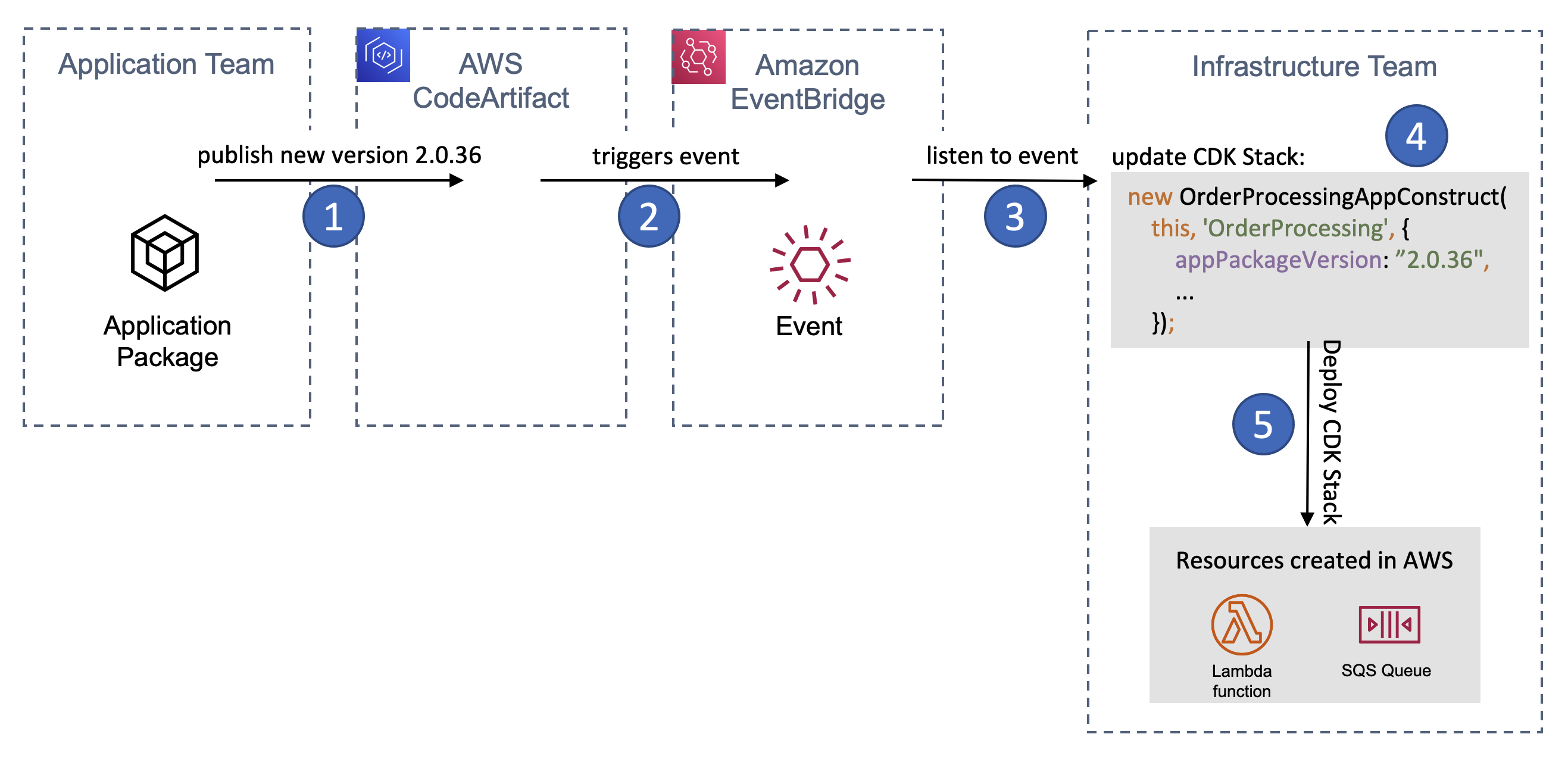
We will use a custom construct to separate the responsibilities between the the application and the infrastructure team. The application team will release a construct which describes the infrastructure along with its configuration required to run the application code. The infrastructure team will consume this construct to deploy and operate the workload on AWS.

How to use the AWS CDK in a Split-Team Setup

Let’s now have a look at how we can use the AWS CDK to split the responsibilities between the application and infrastructure team. I’ll introduce a sample scenario and then illustrate what each team’s responsibility is within this scenario.

Scenario

Our fictitious application development team writes an AWS Lambda function which gets deployed to AWS. Messages in an Amazon SQS queue will invoke the function. Let’s say the function will process orders (whatever this means in detail is irrelevant for the example) and each order is represented by a message in the queue.

The application development team has full flexibility when it comes to creating the AWS Lambda function. They can decide which runtime to use or how much memory to configure. The SQS queue which the function will act upon is created by the infrastructure team. The application team does not have to know how the messages end up in the queue.

With that we can have a look at a sample implementation split between the teams.

Application Team

The application team is responsible for two distinct artifacts: the application code (for example, a Java jar file or an npm module) and the AWS CDK construct used to deploy the required infrastructure on AWS to run the application (an AWS Lambda Function along with its configuration).

The lifecycles of these artifacts differ: the application code changes more frequently than the infrastructure it runs in. That’s why we want to keep the artifacts separate. With that each of the artifacts can be released at its own pace and only if it was changed.

In order to achieve these separate lifecycles, it is important to notice that a release of the application artifact needs to be completely independent from the release of the CDK construct. This fits our approach of separate teams compared to the standard CDK way of building and packaging application code within the CDK construct.

But how will this be done in our example solution? The team will build and publish an application artifact which does not contain anything related to CDK.
When a CDK Stack with this construct is synthesized it will download the pre-built artifact with a given version number from AWS CodeArtifact and use it to create the input zip file for a Lambda function. There is no build of the application package happening during the CDK synth.

With the separation of construct and application code, we need to find a way to tell the CDK construct which specific version of the application code it should fetch from CodeArtifact. We will pass this information to the construct via a property of its constructor.

For dependencies on infrastructure outside of the responsibility of the application team, I follow the pattern of dependency injection. Those dependencies, for example a shared VPC or an Amazon SQS queue, are passed into the construct from the infrastructure team.

Let’s have a look at an example. We pass in the external dependency on an SQS Queue, along with details on the desired appPackageVersion and its CodeArtifact details:

export interface OrderProcessingAppConstructProps {
    queue: aws_sqs.Queue,
    appPackageVersion: string,
    codeArtifactDetails: {
        account: string,
        repository: string,
        domain: string
    }
}

export class OrderProcessingAppConstruct extends Construct {

    constructor(scope: Construct, id: string, props: OrderProcessingAppConstructProps) {
        super(scope, id);

        const lambdaFunction = new lambda.Function(this, 'OrderProcessingLambda', {
            code: lambda.Code.fromDockerBuild(path.join(__dirname, '..', 'bundling'), {
                buildArgs: {
                    'PACKAGE_VERSION' : props.appPackageVersion,
                    'CODE_ARTIFACT_ACCOUNT' : props.codeArtifactDetails.account,
                    'CODE_ARTIFACT_REPOSITORY' : props.codeArtifactDetails.repository,
                    'CODE_ARTIFACT_DOMAIN' : props.codeArtifactDetails.domain
                }
            }),
            runtime: lambda.Runtime.NODEJS_16_X,
            handler: 'node_modules/order-processing-app/dist/index.lambdaHandler'
        });
        const eventSource = new SqsEventSource(props.queue);
        lambdaFunction.addEventSource(eventSource);
    }
}

Note the code lambda.Code.fromDockerBuild(...): We use AWS CDK’s functionality to bundle the code of our Lambda function via a Docker build. The only things which happen inside of the provided Dockerfile are:

  • the login into the AWS CodeArtifact repository which holds the pre-built application code’s package
  • the download and installation of the application code’s artifact from AWS CodeArtifact (in this case via npm)

If you are interested in more details on how you can build, bundle and deploy your AWS CDK assets I highly recommend a blog post by my colleague Cory Hall: Building, bundling, and deploying applications with the AWS CDK. It goes into much more detail than what we are covering here.

Looking at the example Dockerfile we can see the two steps described above:

FROM public.ecr.aws/sam/build-nodejs16.x:latest

ARG PACKAGE_VERSION
ARG CODE_ARTIFACT_AWS_REGION
ARG CODE_ARTIFACT_ACCOUNT
ARG CODE_ARTIFACT_REPOSITORY

RUN aws codeartifact login --tool npm --repository $CODE_ARTIFACT_REPOSITORY --domain $CODE_ARTIFACT_DOMAIN --domain-owner $CODE_ARTIFACT_ACCOUNT --region $CODE_ARTIFACT_AWS_REGION
RUN npm install order-processing-app@$PACKAGE_VERSION --prefix /asset

Please note the following:

  • we use --prefix /asset with our npm install command. This tells npm to install the dependencies into the folder which CDK will mount into the container. All files which should go into the output of the docker build need to be placed here.
  • the aws codeartifact login command requires credentials with the appropriate permissions to proceed. In case you run this on for example AWS CodeBuild or inside of a CDK Pipeline you need to make sure that the used role has the appropriate policies attached.

Infrastructure Team

The infrastructure team consumes the AWS CDK construct published by the application team. They own the AWS CDK Stack which composes the whole application. Possibly this will only be one of several Stacks owned by the Infrastructure team. Other Stacks might create shared infrastructure (like VPCs, networking) and other applications.

Within the stack for our application the infrastructure team consumes and instantiates the application team’s construct, passes any dependencies into it and then deploys the stack by whatever means they see fit (e.g. through AWS CodePipeline, GitHub Actions or any other form of continuous delivery/deployment).

The dependency on the application team’s construct is manifested in the package.json of the infrastructure team’s CDK app:

{
  "name": "order-processing-infra-app",
  ...
  "dependencies": {
    ...
    "order-app-construct" : "1.1.0",
    ...
  }
  ...
}

Within the created CDK Stack we see the dependency version for the application package as well as how the infrastructure team passes in additional information (like e.g. the queue to use):

export class OrderProcessingInfraStack extends cdk.Stack {
  constructor(scope: Construct, id: string, props?: cdk.StackProps) {
    super(scope, id, props);   

    const orderProcessingQueue = new Queue(this, 'order-processing-queue');

    new OrderProcessingAppConstruct(this, 'order-processing-app', {
       appPackageVersion: "2.0.36",
       queue: orderProcessingQueue,
       codeArtifactDetails: { ... }
     });
  }
}

Propagating New Releases

We now have the responsibilities of each team sorted out along with the artifacts owned by each team. But how do we propagate a change done by the application team all the way to production? Or asked differently: how can we invoke the infrastructure team’s CI/CD pipeline with the updated artifact versions of the application team?

We will need to update the infrastructure team’s dependencies on the application teams artifacts whenever a new version of either the application package or the AWS CDK construct is published. With the dependencies updated we can then start the release pipeline.

One approach is to listen and react to events published by AWS CodeArtifact via Amazon EventBridge. On each release AWS CodeArtifact will publish an event to Amazon EventBridge. We can listen to that event, extract the version number of the new release from its payload and start a workflow to update either our dependency on the CDK construct (e.g. in the package.json of our CDK application) or a update the appPackageVersion which the infrastructure team passes into the consumed construct.

Here’s how a release of a new app version flows through the system:

A release of the application package triggers a change and deployment of the infrastructure team's CDK Stack

Figure 1 – A release of the application package triggers a change and deployment of the infrastructure team’s CDK Stack

  1. The application team publishes a new app version into AWS CodeArtifact
  2. CodeArtifact triggers an event on Amazon EventBridge
  3. The infrastructure team listens to this event
  4. The infrastructure team updates its CDK stack to include the latest appPackageVersion
  5. The infrastructure team’s CDK Stack gets deployed

And very similar the release of a new version of the CDK Construct:

A release of the application team's CDK construct triggers a change and deployment of the infrastructure team's CDK Stack

Figure 2 – A release of the application team’s CDK construct triggers a change and deployment of the infrastructure team’s CDK Stack

  1. The application team publishes a new CDK construct version into AWS CodeArtifact
  2. CodeArtifact triggers an event on Amazon EventBridge
  3. The infrastructure team listens to this event
  4. The infrastructure team updates its dependency to the latest CDK construct
  5. The infrastructure team’s CDK Stack gets deployed

We will not go into the details on how such a workflow could look like, because it’s most likely highly custom for each team (think of different tools used for code repositories, CI/CD). However, here are some ideas on how it can be accomplished:

Updating the CDK Construct dependency

To update the dependency version of the CDK construct the infrastructure team’s package.json (or other files used for dependency tracking like pom.xml) needs to be updated. You can build automation to checkout the source code and issue a command like npm install sample-app-construct@NEW_VERSION (where NEW_VERSION is the value read from the EventBridge event payload). You then automatically create a pull request to incorporate this change into your main branch. For a sample on what this looks like see the blog post Keeping up with your dependencies: building a feedback loop for shared librares.

Updating the appPackageVersion

To update the appPackageVersion used inside of the infrastructure team’s CDK Stack you can either follow the same approach outlined above, or you can use CDK’s capability to read from an AWS Systems Manager (SSM) Parameter Store parameter. With that you wouldn’t put the value for appPackageVersion into source control, but rather read it from SSM Parameter Store. There is a how-to for this in the AWS CDK documentation: Get a value from the Systems Manager Parameter Store. You then start the infrastructure team’s pipeline based on the event of a change in the parameter.

To have a clear understanding of what is deployed at any given time and in order to see the used parameter value in CloudFormation I’d recommend using the option described at Reading Systems Manager values at synthesis time.

Conclusion

You’ve seen how the AWS Cloud Development Kit and its Construct concept can help to ensure team independence and agility even though multiple teams (in our case an application development team and an infrastructure team) work together to bring a new version of an application into production. To do so you have put the application team in charge of not only their application code, but also of the parts of the infrastructure they use to run their application on. This is still in line with the discussed split-team approach as all shared infrastructure as well as the final deployment is in control of the infrastructure team and is only consumed by the application team’s construct.

About the Authors

Picture of the author Joerg Woehrle As a Solutions Architect Jörg works with manufacturing customers in Germany. Before he joined AWS in 2019 he held various roles like Developer, DevOps Engineer and SRE. With that Jörg enjoys building and automating things and fell in love with the AWS Cloud Development Kit.
Picture of the author Mohamed Othman Mo joined AWS in 2020 as a Technical Account Manager, bringing with him 7 years of hands-on AWS DevOps experience and 6 year as System operation admin. He is a member of two Technical Field Communities in AWS (Cloud Operation and Builder Experience), focusing on supporting customers with CI/CD pipelines and AI for DevOps to ensure they have the right solutions that fit their business needs.

Configuration driven dynamic multi-account CI/CD solution on AWS

Post Syndicated from Anshul Saxena original https://aws.amazon.com/blogs/devops/configuration-driven-dynamic-multi-account-ci-cd-solution-on-aws/

Many organizations require durable automated code delivery for their applications. They leverage multi-account continuous integration/continuous deployment (CI/CD) pipelines to deploy code and run automated tests in multiple environments before deploying to Production. In cases where the testing strategy is release specific, you must update the pipeline before every release. Traditional pipeline stages are predefined and static in nature, and once the pipeline stages are defined it’s hard to update them. In this post, we present a configuration driven dynamic CI/CD solution per repository. The pipeline state is maintained and governed by configurations stored in Amazon DynamoDB. This gives you the advantage of automatically customizing the pipeline for every release based on the testing requirements.

By following this post, you will set up a dynamic multi-account CI/CD solution. Your pipeline will deploy and test a sample pet store API application. Refer to Automating your API testing with AWS CodeBuild, AWS CodePipeline, and Postman for more details on this application. New code deployments will be delivered with custom pipeline stages based on the pipeline configuration that you create. This solution uses services such as AWS Cloud Development Kit (AWS CDK), AWS CloudFormation, Amazon DynamoDB, AWS Lambda, and AWS Step Functions.

Solution overview

The following diagram illustrates the solution architecture:

The image represents the solution workflow, highlighting the integration of the AWS components involved.

Figure 1: Architecture Diagram

  1. Users insert/update/delete entry in the DynamoDB table.
  2. The Step Function Trigger Lambda is invoked on all modifications.
  3. The Step Function Trigger Lambda evaluates the incoming event and does the following:
    1. On insert and update, triggers the Step Function.
    2. On delete, finds the appropriate CloudFormation stack and deletes it.
  4. Steps in the Step Function are as follows:
    1. Collect Information (Pass State) – Filters the relevant information from the event, such as repositoryName and referenceName.
    2. Get Mapping Information (Backed by CodeCommit event filter Lambda) – Retrieves the mapping information from the Pipeline config stored in the DynamoDB.
    3. Deployment Configuration Exist? (Choice State) – If the StatusCode == 200, then the DynamoDB entry is found, and Initiate CloudFormation Stack step is invoked, or else StepFunction exits with Successful.
    4. Initiate CloudFormation Stack (Backed by stack create Lambda) – Constructs the CloudFormation parameters and creates/updates the dynamic pipeline based on the configuration stored in the DynamoDB via CloudFormation.

Code deliverables

The code deliverables include the following:

  1. AWS CDK app – The AWS CDK app contains the code for all the Lambdas, Step Functions, and CloudFormation templates.
  2. sample-application-repo – This directory contains the sample application repository used for deployment.
  3. automated-tests-repo– This directory contains the sample automated tests repository for testing the sample repo.

Deploying the CI/CD solution

  1. Clone this repository to your local machine.
  2. Follow the README to deploy the solution to your main CI/CD account. Upon successful deployment, the following resources should be created in the CI/CD account:
    1. A DynamoDB table
    2. Step Function
    3. Lambda Functions
  3. Navigate to the Amazon Simple Storage Service (Amazon S3) console in your main CI/CD account and search for a bucket with the name: cloudformation-template-bucket-<AWS_ACCOUNT_ID>. You should see two CloudFormation templates (templates/codepipeline.yaml and templates/childaccount.yaml) uploaded to this bucket.
  4. Run the childaccount.yaml in every target CI/CD account (Alpha, Beta, Gamma, and Prod) by going to the CloudFormation Console. Provide the main CI/CD account number as the “CentralAwsAccountId” parameter, and execute.
  5. Upon successful creation of Stack, two roles will be created in the Child Accounts:
    1. ChildAccountFormationRole
    2. ChildAccountDeployerRole

Pipeline configuration

Make an entry into devops-pipeline-table-info for the Repository name and branch combination. A sample entry can be found in sample-entry.json.

The pipeline is highly configurable, and everything can be configured through the DynamoDB entry.

The following are the top-level keys:

RepoName: Name of the repository for which AWS CodePipeline is configured.
RepoTag: Name of the branch used in CodePipeline.
BuildImage: Build image used for application AWS CodeBuild project.
BuildSpecFile: Buildspec file used in the application CodeBuild project.
DeploymentConfigurations: This key holds the deployment configurations for the pipeline. Under this key are the environment specific configurations. In our case, we’ve named our environments Alpha, Beta, Gamma, and Prod. You can configure to any name you like, but make sure that the entries in json are the same as in the codepipeline.yaml CloudFormation template. This is because there is a 1:1 mapping between them. Sub-level keys under DeploymentConfigurations are as follows:

  • EnvironmentName. This is the top-level key for environment specific configuration. In our case, it’s Alpha, Beta, Gamma, and Prod. Sub level keys under this are:
    • <Env>AwsAccountId: AWS account ID of the target environment.
    • Deploy<Env>: A key specifying whether or not the artifact should be deployed to this environment. Based on its value, the CodePipeline will have a deployment stage to this environment.
    • ManualApproval<Env>: Key representing whether or not manual approval is required before deployment. Enter your email or set to false.
    • Tests: Once again, this is a top-level key with sub-level keys. This key holds the test related information to be run on specific environments. Each test based on whether or not it will be run will add an additional step to the CodePipeline. The tests’ related information is also configurable with the ability to specify the test repository, branch name, buildspec file, and build image for testing the CodeBuild project.

Execute

  1. Make an entry into the devops-pipeline-table-info DynamoDB table in the main CI/CD account. A sample entry can be found in sample-entry.json. Make sure to replace the configuration values with appropriate values for your environment. An explanation of the values can be found in the Pipeline Configuration section above.
  2. After the entry is made in the DynamoDB table, you should see a CloudFormation stack being created. This CloudFormation stack will deploy the CodePipeline in the main CI/CD account by reading and using the entry in the DynamoDB table.

Customize the solution for different combinations such as deploying to an environment while skipping for others by updating the pipeline configurations stored in the devops-pipeline-table-info DynamoDB table. The following is the pipeline configured for the sample-application repository’s main branch.

The image represents the dynamic CI/CD pipeline deployed in your account.

The image represents the dynamic CI/CD pipeline deployed in your account.

The image represents the dynamic CI/CD pipeline deployed in your account.

The image represents the dynamic CI/CD pipeline deployed in your account.

Figure 2: Dynamic Multi-Account CI/CD Pipeline

Clean up your dynamic multi-account CI/CD solution and related resources

To avoid ongoing charges for the resources that you created following this post, you should delete the following:

  1. The pipeline configuration stored in the DynamoDB
  2. The CloudFormation stacks deployed in the target CI/CD accounts
  3. The AWS CDK app deployed in the main CI/CD account
  4. Empty and delete the retained S3 buckets.

Conclusion

This configuration-driven CI/CD solution provides the ability to dynamically create and configure your pipelines in DynamoDB. IDEMIA, a global leader in identity technologies, adopted this approach for deploying their microservices based application across environments. This solution created by AWS Professional Services allowed them to dynamically create and configure their pipelines per repository per release. As Kunal Bajaj, Tech Lead of IDEMIA, states, “We worked with AWS pro-serve team to create a dynamic CI/CD solution using lambdas, step functions, SQS, and other native AWS services to conduct cross-account deployments to our different environments while providing us the flexibility to add tests and approvals as needed by the business.”

About the authors:

Anshul Saxena

Anshul is a Cloud Application Architect at AWS Professional Services and works with customers helping them in their cloud adoption journey. His expertise lies in DevOps, serverless architectures, and architecting and implementing cloud native solutions aligning with best practices.

Libin Roy

Libin is a Cloud Infrastructure Architect at AWS Professional Services. He enjoys working with customers to design and build cloud native solutions to accelerate their cloud journey. Outside of work, he enjoys traveling, cooking, playing sports and weight training.

Easily protect your AWS CDK-defined infrastructure with AWS WAFv2

Post Syndicated from Ramon Lopez Narvaez original https://aws.amazon.com/blogs/devops/easily-protect-your-aws-cdk-defined-infrastructure-with-aws-wafv2/

Security is a shared responsibility between AWS and the customer. When we use infrastructure as code (IaC) we want to describe workloads wholistically, and that includes the configuration of firewalls alongside the entrypoints to web applications. As we evolve the infrastructure that our application is built upon, we can adjust firewall rules in the same place.

In this post, you’ll learn how you can easily add a layer of protection to your web application that is defined in AWS Cloud Development Kit (AWS CDK) and built using Amazon CloudFront, Amazon API Gateway, Application Load Balancer, or AWS AppSync.

To accomplish this, we’ll use AWS WAFv2. Although it’s usually complex to write your own firewall rules, we can simply use AWS Managed Rules. No tedious setup required!

What is AWS WAFv2?

AWS WAFv2 is a managed web application firewall. It can be natively enabled on CloudFront, API Gateway, Application Load Balancer, or AWS AppSync and is deployed alongside these services. AWS services terminate the TCP/TLS connection, process incoming HTTP requests, and then pass the request to AWS WAF for inspection and filtering.

For example, you can use AWS WAFv2 to protect against attacks, such as cross-site request forgery (CSRF), cross-site scripting (XSS), and SQL injection (SQLi) among other threats in the OWASP Top 10.

AWS Managed Rules for AWS WAF is a set of AWS WAF rules curated and maintained by the AWS Threat Research Team that provides protection against common application vulnerabilities or other unwanted traffic, without having to write your own rules.

Prerequisites

For this walkthrough, you should have the following prerequisites:

  • An AWS account
  • An application fronted by one or more of the following services: Amazon Cloudfront, Amazon API Gateway, Application Load Balancer or AWS AppSync. From here on these are called ‘entrypoint’.
  • At least the above mentioned ‘entrypoint’ defined in AWS CDK.

Solution overview

When AWS WAF is applied to Amazon CloudFront, Amazon API Gateway, Application Load Balancer, or AWS AppSync, it inspects and filters requests before they’re forwarded to your compute infrastructure.

Figure 1. AWS WAFv2 can protect endpoints built by Amazon CloudFront, Amazon API Gateway, Application Load Balancer and AWS AppSync

Given that you have an existing web application defined in AWS CDK, we want to add a WAFv2 web ACL to its entrypoint. Instead of writing our own firewall rules to inspect and filter requests, we want to leverage an AWS Managed Rules rule group. Simultaneously, we must be able to disable or reconfigure some of the rules in the case that they cause undesirable behavior in the application.

A good first rule group to use is the core rule set (CRS) managed rule group, also named AWSManagedRulesCommonRuleSet. It contains rules that are generally applicable to web applications and provides protection against exploitation of various vulnerabilities, such as the ones described in the OWASP Top 10. You can later add more managed rule groups or write your own rules, which are specific to your application (e.g., for Windows, Linux, or WordPress).

Define the AWS WAFv2 web ACL

First, let’s give the AWS WAF module a nicely readable name:

import { aws_wafv2 as wafv2 } from 'aws-cdk-lib';

Then, we define the AWS WAFv2 web ACL in AWS CDK:

const cfnWebACL = new wafv2.CfnWebACL(this,'MyCDKWebAcl'
      defaultAction: {
        allow: {}
      },
      scope: 'REGIONAL',
      visibilityConfig: {
        cloudWatchMetricsEnabled: true,
        metricName:'MetricForWebACLCDK',
        sampledRequestsEnabled: true,
      },
      name:‘MyCDKWebAcl’,
      rules: [{
        name: 'CRSRule',
        priority: 0,
        statement: {
          managedRuleGroupStatement: {
            name:'AWSManagedRulesCommonRuleSet',
            vendorName:'AWS'
          }
        },
        visibilityConfig: {
          cloudWatchMetricsEnabled: true,
          metricName:'MetricForWebACLCDK-CRS',
          sampledRequestsEnabled: true,
        },
        overrideAction: {
          none: {}
        },
      }]
    });

The highlighted line references the CRS managed rule group as one Rule in the list. You could add more Rule elements, either referencing the managed rule groups or custom rules.

Note the scope attribute. If you want to attach this web ACL to an API Gateway, AWS AppSync API, or Application Load Balancer, then it will be REGIONAL. If you want to attach it to a CloudFront distribution, then make sure that your AWS WAFv2 web ACL is defined in the US East (N. Virginia) Region and the scope is CLOUDFRONT.

Attach the AWS WAFv2 web ACL to an Application Load Balancer, AWS AppSync API, or API Gateway

Now that we have a web ACL defined, we must attach it to a resource. This works exactly the same across API Gateway API’s, an AWS AppSync API, or an Application Load Balancer. We must create a CfnWebACLAssociation and point it to the previously created web ACL and the resource to protect:

const cfnWebACLAssociation = new wafv2.CfnWebACLAssociation(this,'MyCDKWebACLAssociation', {
      resourceArn:<ARN of resource to protect>,
      webAclArn:cfnWebACL.attrArn,
    });

Amazon Resource Names (ARNs) uniquely identify AWS resources. The highlighted line shows how AWS CDK lets you get the ARN of the previously defined CfnWebAcl.

Depending on what type of service you’re using, jump to one of the three following sections to learn how to retrieve the resourceArn of API Gateway, AWS AppSync, or Application Load Balancers.

Retrieving ARN for AWS AppSync API’s

To retrieve the ARN of an AWS AppSync API, call the .arn property:

const api = new appsync.GraphqlApi(…)
const cfnWebACLAssociation = new wafv2.CfnWebACLAssociation(this,'MyCDKWebACLAssociation', {
      resourceArn:api.arn,
      webAclArn: cfnWebACL.attrArn,
    });

Retrieving ARN for Amazon API Gateway REST API’s

In this case, we must specify which stage of the REST API we want to protect with the web ACL. Then, we reference the ARN of the stage:

const api = new apigateway.RestApi(…)
const deployment = new apigateway.Deployment(…)
const stage = apigateway.Stage(…)
const cfnWebACLAssociation = new wafv2.CfnWebACLAssociation(this,'MyCDKWebACLAssociation', {
      resourceArn:stage.stageArn,
      webAclArn: cfnWebACL.attrArn,
    });

Retrieving ARN for Application Load Balancers

If you’re dealing with an Application Load Balancer, then this is how you can retrieve its ARN:

const lb = new elbv2.ApplicationLoadBalancer(…)

const cfnWebACLAssociation = new wafv2.CfnWebACLAssociation(this,'MyCDKWebACLAssociation', {
      resourceArn:lb.loadBalancerArn,
      webAclArn: cfnWebACL.attrArn,
    });

Attach the AWS WAFv2 web ACL to a CloudFront distribution

Attaching a web ACL to CloudFront follows a different approach. Instead of defining a cfnWebACLAssociation, we reference the web ACL inside of the Distribution definition:

const distribution = new cloudfront.Distribution(this,'distro', {
      defaultBehavior: {
        origin: new origins.S3Origin(s3Bucket)
      },
     webAclId:cfnWebACL.attrArn
    });

Note that even though the property is called webAclId, because we’re using AWS WAFv2, we must supply the ARN of the web ACL.

Exclude rules from the web ACL

Lastly, let’s understand how we can customize the web ACL further. If a rule of the managed rule group causes undesired behavior in the application, then we can exclude it from the webACL. Assume that we want to exclude the SizeRestrictions_BODY rule, which limits the request body size to 8 KB.

Go back to the definition of the web ACL, and add the highlighted lines:

const cfnWebACL = new wafv2.CfnWebACL(this, 'MyCDKWebAcl', {
      defaultAction: {
        allow: {}
      },
      scope:'REGIONAL',
      visibilityConfig: {
        cloudWatchMetricsEnabled: true,
        metricName:'MetricForWebACLCDK',
        sampledRequestsEnabled: true,
      },
      name:'MyCDKWebAcl',
      rules: [{
        name:'CRSRule',
        priority: 0,
        statement: {
          managedRuleGroupStatement: {
            name: 'AWSManagedRulesCommonRuleSet',
            vendorName: 'AWS',
            excludedRules: [{
             ‘SizeRestrictions_BODY’ }]
          }
        },
        visibilityConfig: {
          cloudWatchMetricsEnabled: true,
          metricName:'MetricForWebACLCDK-CRS',
          sampledRequestsEnabled: true,
        },
        overrideAction: {
          none: {}
        },
      }]

    });

Other customizations you can do include pinning the version of the rule group and narrowing the scope of the request that the rule evaluates, using Scope-down statements.

Conclusion

In this post, you’ve seen how an AWS WAFv2 web ACL can be added to your existing infrastructure defined in AWS CDK. By using Managed Rules, your application benefits from a layer of protection that is curated and maintained by AWS security experts.

As a next step, you can learn how to include AWS WAFv2 metrics from Amazon CloudWatch into your application dashboards. This will give you perspective on how your web application is performing in conjunction with the AWS WAFv2 web ACL.

To learn more about AWS WAFv2 and how to manage web ACL’s, check out the official developer guide.

About the author:

Ramon Lopez

Ramon is a Senior Solutions Architect at AWS, where he guides, educates, and empowers customers of all sizes and industries to build successful businesses in the AWS cloud. He also built web services for 150+ million Amazon Prime customers and led a team of software engineers in a fast-paced global environment. After being immersed in one of the largest micro-service environments, he is a believer in the DevOps mantra of “You build it, you run it”.

Deploy and manage OpenAPI/Swagger RESTful APIs with the AWS Cloud Development Kit

Post Syndicated from Luke Popplewell original https://aws.amazon.com/blogs/devops/deploy-and-manage-openapi-swagger-restful-apis-with-the-aws-cloud-development-kit/

This post demonstrates how AWS Cloud Development Kit (AWS CDK) Infrastructure as Code (IaC) constructs and AWS serverless technology can be used to build and deploy a RESTful Application Programming Interface (API) defined in the OpenAPI specification. This post uses an example API that describes  Widget resources and demonstrates how to use an AWS CDK Pipeline to:

  • Deploy a RESTful API stage to Amazon API Gateway from an OpenAPI specification.
  • Build and deploy an AWS Lambda function that contains the API functionality.
  • Auto-generate API documentation and publish it to an Amazon Simple Storage Service (Amazon S3)-hosted website served by the Amazon CloudFront content delivery network (CDN) service. This provides technical and non-technical stakeholders with versioned, current, and accessible API documentation.
  • Auto-generate client libraries for invoking the API and deploy them to AWS CodeArtifact, which is a fully-managed artifact repository service. This allows API client development teams to integrate with different versions of the API in different environments.

The diagram shown in the following figure depicts the architecture of the AWS services and resources described in this post.

 The architecture described in this post consists of an AWS CodePipeline pipeline, provisioned using the AWS CDK, that deploys the Widget API to AWS Lambda and API Gateway. The pipeline then auto-generates the API’s documentation as a website served by CloudFront and deployed to S3. Finally, the pipeline auto-generates a client library for the API and deploys this to CodeArtifact.

Figure 1 – Architecture

The code that accompanies this post, written in Java, is available here.

Background

APIs must be understood by all stakeholders and parties within an enterprise including business areas, management, enterprise architecture, and other teams wishing to consume the API. Unfortunately, API definitions are often hidden in code and lack up-to-date documentation. Therefore, they remain inaccessible for the majority of the API’s stakeholders. Furthermore, it’s often challenging to determine what version of an API is present in different environments at any one time.

This post describes some solutions to these issues by demonstrating how to continuously deliver up-to-date and accessible API documentation, API client libraries, and API deployments.

AWS CDK

The AWS CDK is a software development framework for defining cloud IaC and is available in multiple languages including TypeScript, JavaScript, Python, Java, C#/.Net, and Go. The AWS CDK Developer Guide provides best practices for using the CDK.

This post uses the CDK to define IaC in Java which is synthesized to a cloud assembly. The cloud assembly includes one to many templates and assets that are deployed via an AWS CodePipeline pipeline. A unit of deployment in the CDK is called a Stack.

OpenAPI specification (formerly Swagger specification)

OpenAPI specifications describe the capabilities of an API and are both human and machine-readable. They consist of definitions of API components which include resources, endpoints, operation parameters, authentication methods, and contact information.

Project composition

The API project that accompanies this post consists of three directories:

  • app
  • api
  • cdk

app directory

This directory contains the code for the Lambda function which is invoked when the Widget API is invoked via API Gateway. The code has been developed in Java as an Apache Maven project.

The Quarkus framework has been used to define a WidgetResource class (see src/main/java/aws/sample/blog/cdkopenapi/app/WidgetResources.java ) that contains the methods that align with HTTP Methods of the Widget API.
api directory

The api directory contains the OpenAPI specification file ( openapi.yaml ). This file is used as the source for:

  • Defining the REST API using API Gateway’s support for OpenApi.
  • Auto-generating the API documentation.
  • Auto-generating the API client artifact.

The api directory also contains the following files:

  • openapi-generator-config.yaml : This file contains configuration settings for the OpenAPI Generator framework, which is described in the section CI/CD Pipeline.
  • maven-settings.xml: This file is used support the deployment of the generated SDKs or libraries (Apache Maven artifacts) for the API and is described in the CI/CD Pipeline section of this post.

This directory contains a sub directory called docker . The docker directory contains a Dockerfile which defines the commands for building a Docker image:

FROM ruby:2.6.5-alpine
 
RUN apk update \
 && apk upgrade --no-cache \
 && apk add --no-cache --repository http://dl-cdn.alpinelinux.org/alpine/v3.14/main/ nodejs=14.20.0-r0 npm \
 && apk add git \
 && apk add --no-cache build-base
 
# Install Widdershins node packages and ruby gem bundler 
RUN npm install -g widdershins \
 && gem install bundler 
 
# working directory
WORKDIR /openapi
 
# Clone and install the Slate framework
RUN git clone https://github.com/slatedocs/slate
RUN cd slate \
 && bundle install

The Docker image incorporates two open source projects, the NodeJS Widdershins library and the Ruby Slate-framework. These are used together to auto-generate the documentation for the API from the OpenAPI specification.  This Dockerfile is referenced and built by the  ApiStack class, which is described in the CDK Stacks section of this post.

cdk directory

This directory contains an Apache Maven Project developed in Java for provisioning the CDK stacks for the  Widget API.

Under the  src/main/java  folder, the package  aws.sample.blog.cdkopenapi.cdk  contains the files and classes that define the application’s CDK stacks and also the entry point (main method) for invoking the stacks from the CDK Toolkit CLI:

  • CdkApp.java: This file contains the  CdkApp class which provides the main method that is invoked from the AWS CDK Toolkit to build and deploy the  application stacks.
  • ApiStack.java: This file contains the   ApiStack class which defines the  OpenApiBlogAPI   stack and is described in the CDK Stacks section of this post.
  • PipelineStack.java: This file contains the   PipelineStack class which defines the OpenAPIBlogPipeline  stack and is described in the CDK Stacks section of this post.
  • ApiStackStage.java: This file contains the  ApiStackStage class which defines a CDK stage. As detailed in the CI/CD Pipeline section of this post, a DEV stage, containing the  OpenApiBlogAPI stack resources for a DEV environment, is deployed from the  OpenApiBlogPipeline pipeline.

CDK stacks

ApiStack

Note that the CDK bundling functionality is used at multiple points in the  ApiStack  class to produce CDK Assets. The post, Building, bundling, and deploying applications with the AWS CDK, provides more details regarding using CDK bundling mechanisms.

The  ApiStack  class defines multiple resources including:

  • Widget API Lambda function: This is bundled by the CDK in a Docker container using the Java 11 runtime image.
  • Widget  REST API on API Gateway: The REST API is created from an Inline API Definition which is passed as an S3 CDK Asset. This asset includes a reference to the  Widget API OpenAPI specification located under the  api folder (see  api/openapi.yaml ) and builds upon the SpecRestApi construct and API Gateway’s support for OpenApi.
  • API documentation Docker Image Asset: This is the Docker image that contains the open source frameworks (Widdershins and Slate) that are leveraged to generate the API documentation.
  • CDK Asset bundling functionality that leverages the API documentation Docker image to auto-generate documentation for the API.
  • An S3 Bucket for holding the API documentation website.
  • An origin access identity (OAI) which allows CloudFront to securely serve the S3 Bucket API documentation content.
  • A CloudFront distribution which provides CDN functionality for the S3 Bucket website.

Note that the  ApiStack class features the following code which is executed on the  Widget API Lambda construct:

CfnFunction apiCfnFunction = (CfnFunction)apiLambda.getNode().getDefaultChild();
apiCfnFunction.overrideLogicalId("APILambda");

The CDK, by default, auto-assigns an ID for each defined resource but in this case the generated ID is being overridden with “APILambda”. The reason for this is that inside of the  Widget API OpenAPI specification (see  api/openapi.yaml ), there is a reference to the Lambda function by name (“APILambda”) so that the function can be integrated as a proxy for each listed API path and method combination. The OpenAPI specification includes this name as a variable to derive the Amazon Resource Name (ARN) for the Lambda function:

uri:
	Fn::Sub: "arn:aws:apigateway:${AWS::Region}:lambda:path/2015-03-31/functions/${APILambda.Arn}/invocations"

PipelineStack

The  PipelineStack class defines a CDK CodePipline construct which is a higher level construct and pattern. Therefore, the construct doesn’t just map directly to a single CloudFormation resource, but provisions multiple resources to fulfil the requirements of the pattern. The post, CDK Pipelines: Continuous delivery for AWS CDK applications, provides more detail on creating pipelines with the CDK.

final CodePipeline pipeline = CodePipeline.Builder.create(this, "OpenAPIBlogPipeline")
.pipelineName("OpenAPIBlogPipeline")
.selfMutation(true)
      .dockerEnabledForSynth(true)
      .synth(synthStep)
      .build();

CI/CD pipeline

The diagram in the following figure shows the multiple CodePipeline stages and actions created by the CDK CodePipeline construct that is defined in the PipelineStack class.

The CI/CD pipeline’s stages include the Source stage, the Synth stage, the Update pipeline, the Assets stage, and the DEV stage.

Figure 2 – CI/CD Pipeline

The stages defined include the following:

  • Source stage: The pipeline is passed the source code contents from this stage.
  • Synth stage: This stage consists of a Synth Action that synthesizes the CloudFormation templates for the application’s CDK stacks and compiles and builds the project Lambda API function.
  • Update Pipeline stage: This stage checks the OpenAPIBlogPipeline stack and reinitiates the pipeline when changes to its definition have been deployed.
  • Assets stage: The application’s CDK stacks produce multiple file assets (for example, zipped Lambda code) which are published to Amazon S3. Docker image assets are published to a managed CDK framework Amazon Elastic Container Registry (Amazon ECR) repository.
  • DEV stage: The API’s CDK stack ( OpenApiBlogAPI ) is deployed to a hypothetical development environment in this stage. A post stage deployment action is also defined in this stage. Through the use of a CDK ShellStep construct, a Bash script is executed that deploys a generated client Java Archive (JAR) for the Widget API to CodeArtifact. The script employs the OpenAPI Generator project for this purpose:
CodeBuildStep codeArtifactStep = CodeBuildStep.Builder.create("CodeArtifactDeploy")
    .input(pipelineSource)
    .commands(Arrays.asList(
           	"echo $REPOSITORY_DOMAIN",
           	"echo $REPOSITORY_NAME",
           	"export CODEARTIFACT_TOKEN=`aws codeartifact get-authorization-token --domain $REPOSITORY_DOMAIN --query authorizationToken --output text`",
           	"export REPOSITORY_ENDPOINT=$(aws codeartifact get-repository-endpoint --domain $REPOSITORY_DOMAIN --repository $REPOSITORY_NAME --format maven | jq .repositoryEndpoint | sed 's/\\\"//g')",
           	"echo $REPOSITORY_ENDPOINT",
           	"cd api",
           	"wget -q https://repo1.maven.org/maven2/org/openapitools/openapi-generator-cli/5.4.0/openapi-generator-cli-5.4.0.jar -O openapi-generator-cli.jar",
     	          "cp ./maven-settings.xml /root/.m2/settings.xml",
        	          "java -jar openapi-generator-cli.jar batch openapi-generator-config.yaml",
                    "cd client",
                    "mvn --no-transfer-progress deploy -DaltDeploymentRepository=openapi--prod::default::$REPOSITORY_ENDPOINT"
))
      .rolePolicyStatements(Arrays.asList(codeArtifactStatement, codeArtifactStsStatement))
.env(new HashMap<String, String>() {{
      		put("REPOSITORY_DOMAIN", codeArtifactDomainName);
            	put("REPOSITORY_NAME", codeArtifactRepositoryName);
       }})
      .build();

Running the project

To run this project, you must install the AWS CLI v2, the AWS CDK Toolkit CLI, a Java/JDK 11 runtime, Apache Maven, Docker, and a Git client. Furthermore, the AWS CLI must be configured for a user who has administrator access to an AWS Account. This is required to bootstrap the CDK in your AWS account (if not already completed) and provision the required AWS resources.

To build and run the project, perform the following steps:

  1. Fork the OpenAPI blog project in GitHub.
  2. Open the AWS Console and create a connection to GitHub. Note the connection’s ARN.
  3. In the Console, navigate to AWS CodeArtifact and create a domain and repository.  Note the names used.
  4. From the command line, clone your forked project and change into the project’s directory:
git clone https://github.com/<your-repository-path>
cd <your-repository-path>
  1. Edit the CDK JSON file at  cdk/cdk.json  and enter the details:
"RepositoryString": "<your-github-repository-path>",
"RepositoryBranch": "<your-github-repository-branch-name>",
"CodestarConnectionArn": "<connection-arn>",
"CodeArtifactDomain": "<code-artifact-domain-name>",
"CodeArtifactRepository": "<code-artifact-repository-name>"

Please note that for setting configuration values in CDK applications, it is recommend to use environment variables or AWS Systems Manager parameters.

  1. Commit and push your changes back to your GitHub repository:
git push origin main
  1. Change into the  cdk directory and bootstrap the CDK in your AWS account if you haven’t already done so (enter “Y” when prompted):
cd cdk
cdk bootstrap
  1. Deploy the CDK pipeline stack (enter “Y” when prompted):
cdk deploy OpenAPIBlogPipeline

Once the stack deployment completes successfully, the pipeline  OpenAPIBlogPipeline will start running. This will build and deploy the API and its associated resources. If you open the Console and navigate to AWS CodePipeline, then you’ll see a pipeline in progress for the API.

Once the pipeline has completed executing, navigate to AWS CloudFormation to get the output values for the  DEV-OpenAPIBlog  stack deployment:

  1. Select the  DEV-OpenAPIBlog  stack entry and then select the Outputs column. Record the REST_URL value for the key that begins with   OpenAPIBlogRestAPIEndpoint .
  2. Record the CLOUDFRONT_URL value for the key  OpenAPIBlogCloudFrontURL .

The API ping method at https://<REST_URL>/ping can now be invoked using your browser or an API development tool like Postman. Other API other methods, as defined by the OpenApi specification, are also available for invocation (For example, GET https://<REST_URL>/widgets).

To view the generated API documentation, open a browser at https://< CLOUDFRONT_URL>.

The following figure shows the API documentation website that has been auto-generated from the API’s OpenAPI specification. The documentation includes code snippets for using the API from multiple programming languages.

The API’s auto-generated documentation website provides descriptions of the API’s methods and resources as well as code snippets in multiple languages including JavaScript, Python, and Java.

Figure 3 – Auto-generated API documentation

To view the generated API client code artifact, open the Console and navigate to AWS CodeArtifact. The following figure shows the generated API client artifact that has been published to CodeArtifact.

The CodeArtifact service user interface in the Console shows the different versions of the API’s auto-generated client libraries.

Figure 4 – API client artifact in CodeArtifact

Cleaning up

  1. From the command change to the  cdk directory and remove the API stack in the DEV stage (enter “Y” when prompted):
cd cdk
cdk destroy OpenAPIBlogPipeline/DEV/OpenAPIBlogAPI
  1. Once this has completed, delete the pipeline stack:
cdk destroy OpenAPIBlogPipeline
  1. Delete the S3 bucket created to support pipeline operations. Open the Console and navigate to Amazon S3. Delete buckets with the prefix  openapiblogpipeline .

Conclusion

This post demonstrates the use of the AWS CDK to deploy a RESTful API defined by the OpenAPI/Swagger specification. Furthermore, this post describes how to use the AWS CDK to auto-generate API documentation, publish this documentation to a web site hosted on Amazon S3, auto-generate API client libraries or SDKs, and publish these artifacts to an Apache Maven repository hosted on CodeArtifact.

The solution described in this post can be improved by:

  • Building and pushing the API documentation Docker image to Amazon ECR, and then using this image in CodePipeline API pipelines.
  • Creating stages for different environments such as TEST, PREPROD, and PROD.
  • Adding integration testing actions to make sure that the API Deployment is working correctly.
  • Adding Manual approval actions for that are executed before deploying the API to PROD.
  • Using CodeBuild caching of artifacts including Docker images and libraries.

About the author:

Luke Popplewell

Luke Popplewell works primarily with federal entities in the Australian Government. In his role as an architect, Luke uses his knowledge and experience to help organisations reach their goals on the AWS cloud. Luke has a keen interest in serverless technology, modernization, DevOps and event-driven architectures.