All posts by Patrick Palmer

Announcing AWS KMS Elliptic Curve Diffie-Hellman (ECDH) support

Post Syndicated from Patrick Palmer original https://aws.amazon.com/blogs/security/announcing-aws-kms-elliptic-curve-diffie-hellman-ecdh-support/

When using cryptography to protect data, protocol designers often prefer symmetric keys and algorithms for their speed and efficiency. However, when data is exchanged across an untrusted network such as the internet, it becomes difficult to ensure that only the exchanging parties can know the same key. Asymmetric key pairs and algorithms help to solve this problem by allowing a public key to be shared over an untrusted network. And by using a key agreement scheme, two parties can use each other’s public key in combination with their own private key to each derive the same shared secret.

We’re excited to announce that AWS Key Management Service (AWS KMS) now supports Elliptic Curve Diffie-Hellman (ECDH) key agreement on elliptic curve (ECC) KMS keys. You can use the new DeriveSharedSecret API action to enable two parties to establish a secure communication channel by using a derived shared secret.

In this blog post we provide an overview of the new API action and explain how it can help you establish secure communications by exchanging only public keys to obtain a derived shared secret. We then show example commands to demonstrate how AWS KMS and OpenSSL can be used by two parties to derive a shared secret.

With this new DeriveSharedSecret API action, customers can take an external party’s public key and, in combination with a private key that resides within AWS KMS, derive a shared secret which can be used to derive a symmetric encryption key with a key derivation function (KDF). Customers can then use this symmetric encryption key to encrypt data locally within their application.

The same external party can combine their own related private key with the customer’s corresponding public key from AWS KMS to derive the same shared secret.

Now that both parties have the same shared secret, they can generate a symmetric encryption key that can be used to encrypt and decrypt the data they exchange.

DeriveSharedSecret offers a simple and secure way for customers to use their private key from within their application, enabling new asymmetric cryptography use cases for keys protected by AWS KMS, such as elliptic curve integrated encryption scheme (ECIES) or end-to-end encryption (E2EE) schemes.

AWS KMS DeriveSharedSecret overview

The AWS KMS API Reference documentation covers the DeriveSharedSecret API action in more detail than we include in this post. We broadly describe how to interact with the API action, using the following steps:

  1. Create an elliptic curve (ECC) KMS key, selecting that the key be used for KEY_AGREEMENT and choosing one of the supported key specs. You will not be able to modify existing ECC keys to be used for key agreement.
  2. Have another party create an elliptic curve key that matches the key spec you defined for your KMS key.
  3. Retrieve the public key associated with your KMS key by using the existing GetPublicKey API action.
  4. Exchange public keys through a trusted means of exchange with the other party. Note that DeriveSharedSecret expects a base64-encoded DER-formatted public key.
  5. Use the other party’s public key as an input, along with your specified KEY_AGREEMENT key. The only key agreement algorithm supported by AWS KMS at launch is ECDH.
  6. The other party should use the public key retrieved from AWS KMS and the private key associated with their generated ECC key pair to derive a shared secret.

The result of the preceding steps is that both parties have the same output without exchanging secret information. Only public keys were exchanged between the two parties. The output of DeriveSharedSecret is the raw shared secret. This shared secret is the multiplication of points on the elliptic curves and can result in many more bytes than are needed for an encryption key. We recommend that customers use a KDF, following the National Institute of Standards and Technology (NIST) SP800-56A Rev. 3 section 5.8 guidance, to derive encryption keys from this shared secret.

For the purposes of this post, we will demonstrate the steps by using the AWS CLI and OpenSSL command line. AWS has incorporated best practices for customers within the AWS Encryption SDK. You can find more details at AWS KMS ECDH keyrings.

Example use case

An example use case where you might wish to use ECDH key agreement is for end-to-end encryption. Although protocols exist that provide a secure framework for secure communications (for example, within AWS Wickr), we will highlight the simplified high-level steps behind some of these protocols. In our example use case, Alice and Bob are both part of a messaging network. This network is managed by a centralized service, and this service must not be able to access Alice or Bob’s unencrypted messages.

Figure 1: High-level architecture for the service described in the example use case

Figure 1: High-level architecture for the service described in the example use case

As shown in Figure 1, Alice and Bob each have an ECC key pair and participate in the secret derivation by using ECDH, through the following steps:

  1. Alice registers her public key in the centralized key storage service. A detailed discussion of the key storage service is beyond the scope of this post.
  2. Bob, an AWS KMS user, calls the AWS KMS GetPublicKey action to obtain the public key for the ECC KMS key pair.
  3. Bob registers his public key in the same centralized key storage service.
  4. Alice, who wants to exchange encrypted messages with Bob, retrieves Bob’s public key from the centralized key storage service.
  5. Bob gets a notification that Alice wants to communicate with him, and he retrieves Alice’s public key from the centralized key storage service.
  6. Using Bob’s public key and her private key, Alice derives a shared secret by using her cryptography provider.
  7. Using Alice’s public key and his private key, Bob derives a shared secret by using DeriveSharedSecret.
  8. Alice and Bob now have an identical shared secret. From this shared secret, she can create a symmetric encryption key by using a suitable KDF. The symmetric encryption key can be used to create ciphertext that can be sent to Bob.

Example use case walkthrough

You can use the following steps to create a KMS key for ECDH use and derive a shared secret by using AWS KMS. For our demonstration purposes, the user Alice (from our example use case) is using OpenSSL as the cryptography tool. We will show how the AWS KMS user Bob and OpenSSL user Alice can derive a shared secret by using each other’s public key.

General prerequisites

You must have the following prerequisites in place in order to implement the solution:

  • AWS CLI — The latest version is recommended. The example here uses aws-cli/2.15.40 and aws-cli/1.32.110.
  • OpenSSL — The example here uses OpenSSL 3.3.0.
  • Both parties (Alice and Bob, from our example use case) have an ECC key on the same curve. The steps in the next section, Key creation prerequisite, explain how these keys can be created.

Key creation prerequisite

Alice and Bob must use the same ECC curve during key creation. The DeriveSharedSecret API action supports curves ECC_NIST_P256, ECC_NIST_P384, and ECC_NIST_P521, which map to P-256, P-384, and P-521 respectively in OpenSSL. The curves that AWS KMS supports are the curves approved by the U.S. National Institute of Standards and Technology (NIST). Additionally, AWS KMS supports the SM2 key spec only in Amazon Web Services China Regions.

Bob creates an asymmetric KMS key for key agreement purposes

Bob creates a key pair in AWS KMS by using the CreateKey API action. In the following example, Bob creates an ECC key pair with ECC_NIST_P256 for the KeySpec parameter and KEY_AGREEMENT for the KeyUsage parameter.

aws kms create-key \
--key-spec ECC_NIST_P256 \
--key-usage KEY_AGREEMENT \
--description "Example ECDH key pair"

The response looks something like this:

{
    "KeyMetadata": {
        "AWSAccountId": "111122223333",
        "KeyId": "a1b2c3d4-5678-90ab-cdef-EXAMPLE11111",
        "Arn": "arn:aws:kms:us-east-1:111122223333:key/a1b2c3d4-5678-90ab-cdef-EXAMPLE11111",
        "CreationDate": "2024-06-25T13:06:24.888000-07:00",
        "Enabled": true,
        "Description": "Example ECDH key pair",
        "KeyUsage": "KEY_AGREEMENT",
        "KeyState": "Enabled",
        "Origin": "AWS_KMS",
        "KeyManager": "CUSTOMER",
        "CustomerMasterKeySpec": "ECC_NIST_P256",
        "KeySpec": "ECC_NIST_P256",
        "KeyAgreementAlgorithms": [
            "ECDH"
        ],
        "MultiRegion": false
    }
}

You can follow the Creating asymmetric KMS keys documentation to see how to use the AWS Management Console to create a KMS key pair with the same properties as shown here. This example creates a KMS key with a default KMS key policy. You should review and configure your key policy according to the principle of least privilege, as appropriate for your environment.

Note: When a KMS key is created, it will be logged by AWS CloudTrail, a service that monitors and records activity within your account. API calls to the AWS KMS service are logged in CloudTrail, which you can use to audit access to KMS keys.

To allow your KMS key to be identified by a human-readable string rather than by the KeyId value, you can create an alias for the KMS key (replace the target-key-id value of a1b2c3d4-5678-90ab-cdef-EXAMPLE11111 with your KeyId value). This makes it easier to use and manage your KMS keys.

Bob creates an alias for his KMS key by using the CLI with the following command:

aws kms create-alias \
    --alias-name alias/example-ecdh-key \
    --target-key-id a1b2c3d4-5678-90ab-cdef-EXAMPLE11111 

Alice creates an ECC key for key agreement purposes by using OpenSSL

Using the ecparam and genkey option of OpenSSL, Alice creates a P-256 ECC key. The P-256 curve is represented by AWS KMS as ECC_NIST_P256.

Note: For ECDH to work, the curve of the OpenSSL ECC key must be same as the ECC KMS key created by the other party (Bob, in our example use case).

openssl ecparam -name P-256 \
        -genkey -out openssl_ecc_private_key.pem

Key exchange and secret derivation process

The following sections outline the steps that Alice and Bob will follow to share their public keys, retrieve one another’s public key, and then derive the same shared secret using AWS KMS and OpenSSL. The shared secrets derived by Alice and Bob respectively are then compared to show that they both derived the same shared secret.

Step 1: Alice generates and registers her OpenSSL public key with a central service

AWS KMS expects the public key in DER format. Therefore, in this example Alice creates a DER-format public key by using her ECC private key. Alice runs the following command to produce a DER-format file that contains her public key:

openssl ec -in openssl_ecc_private_key.pem \
        -pubout -outform DER \
        > openssl_ecc_public_key.bin.der

The file openssl_ecc_public_key.bin.der will have the public key in DER format, which Alice can store in the centralized key storage service (or send to anyone she would like to communicate with). Details about the centralized key storage service are beyond the scope of this post.

Step 2: Bob obtains the public key for his ECC KMS Key

To retrieve a copy of the public key for his ECC KMS key, Bob uses the GetPublicKey API action. Bob calls this API by using the AWS CLI command get-public-key, as follows:

aws kms get-public-key \
    --key-id alias/example-ecdh-key \
    --output text \
    --query PublicKey | base64 --decode > kms_ecdh_public_key.der

The returned PublicKey value is a DER-encoded X.509 public key. Because the AWS CLI is being used, the public key output is base64-encoded for readability purposes. This base64-encoded value is decoded by using the base64 command, and the decoded value is stored in the output file. The file kms_ecdh_public_key.der contains the DER-encoded public key.

Note: If you call this API by using one of the AWS SDKs, such as Boto3, then the returned PublicKey value is not base64-encoded.

In our example use case, Alice is using OpenSSL, which expects the public key in PEM format. Bob converts his DER-format public key into PEM format by using the following command:

openssl ec -pubin -inform DER -outform PEM \
        -in kms_ecdh_public_key.der \
        -out kms_ecdh_public_key.pem

The file kms_ecdh_public_key.pem contains the public key in PEM format.

Step 3: Bob registers his public key with the centralized key storage service

Bob saves his public key in PEM format, obtained in Step 2, in the centralized key storage service.

Step 4: Alice retrieves Bob’s public key to derive a shared secret

To perform ECDH key agreement, the two parties involved (Alice and Bob, in our example use case) need to exchange their public key with each other. Alice, who wants to send encrypted messages to Bob, retrieves Bob’s public key from the centralized key storage service.

Bob’s public key, kms_ecdh_public_key.pem, is already in PEM format as expected by OpenSSL.

Step 5: Bob retrieves Alice’s public key to derive a shared secret

To perform ECDH key agreement, the two parties involved, Alice and Bob, need to exchange their public key with each other. Bob gets a notification that Alice wants to communicate with him, and he retrieves Alice’s public key from the centralized key storage service.

Alice’s public key, openssl_ecc_public_key.bin.der, is already in DER format as expected by AWS KMS.

Step 6: Alice uses OpenSSL to derive the shared secret

Alice, using her private key and Bob’s public key, can derive the shared secret by using OpenSSL. Alice derives the shared secret by using the OpenSSL pkeyutl command with the derive option, as follows:

openssl pkeyutl -derive \
-inkey openssl_ecc_private_key.pem \
-peerkey kms_ecdh_public_key.pem > openssl.ss

The file openssl.ss will have the shared secret in binary format.

Step 7: Bob uses AWS KMS to derive the shared secret

Bob, using his private key (which remains securely within AWS KMS) and Alice’s public key, can derive the shared secret by using AWS KMS. The following example shows how Bob uses the DeriveSharedSecret API action with the AWS CLI command derive-shared-secret. At launch, the only supported key agreement algorithm is ECDH. Bob passes Alice’s public key for the PublicKey parameter.

aws kms derive-shared-secret \
--key-id alias/example-ecdh-key \
--public-key fileb://path/to/openssl_ecc_public_key.bin.der \
--key-agreement-algorithm ECDH \
--output text --query SharedSecret |base64 --decode > kms.ss

Because the AWS CLI is being used, the returned SharedSecret value is base64-encoded for readability purposes. Using the base64 --decode command, the decoded binary format is stored to the file.

Note: If you call this API by using one of the AWS SDKs, such as Boto3, then the returned SharedSecret value is not base64-encoded.

The file kms.ss will have the shared secret in binary format.

Step 8: Using the shared secret and a suitable KDF, Alice derives an encryption key to encrypt her communication to Bob

You can use the following command to compare the two files containing the derived shared secrets that were obtained in Steps 6 and 7 and verify that they are identical:

diff -qs openssl.ss kms.ss

Because these files are identical, we can see that the same secret was derived using both AWS KMS and OpenSSL.

Using the shared secret, Alice should then derive a symmetric encryption key by using a suitable KDF. She can use this symmetric encryption key to encrypt data and send the ciphertext to Bob.

This blog post does not cover the steps to derive that symmetric encryption key, because that can be a complex topic depending on your use case. However, we note that you should not use the raw shared secret as an encryption key because it is not uniform. In other words, the shared secret has a lot of entropy, but the byte string itself is not random.

NIST recommends that you use a KDF function over the raw shared secret (value Z as described in section 5.8 of NIST SP800-56A Rev. 3). The KDFs that are recommended are described in more detail in NIST SP800-56C Rev. 2. One such example is OpenSSL Single Step KDF (SSKDF) EVP_KDF-SS, but using this KDF involves choosing the other values, such as FixedInfo, carefully.

To help customers make the right choice for the resulting KDF to use on the shared secret, the AWS Encryption SDK now includes AWS KMS ECDH keyrings. The keyring is a construct within the AWS Encryption SDK that you implement within your code. The keyring handles the management of encryption keys while applying best practices to protect your data. You can use the keyring to reference your KMS keys for key agreement, and then call a function to encrypt data. Data will be encrypted by using a derived shared wrapping key following NIST recommendations, and the Encryption SDK applies key commitment to the ciphertext.

Summary

In this blog post, we highlighted how you can use the recently launched DeriveSharedSecret API action to securely derive a shared secret. You’ve seen how ECDH can be used between two parties without having to share secret information across untrusted networks. We explained how you can audit your AWS KMS key usage through AWS CloudTrail logs. We highlighted that you would need to use a KDF to generate a symmetric encryption key from the shared secret. We strongly recommend that you use the AWS Encryption SDK to encrypt your data, which helps make sure that the recommended NIST key derivation functions are used for generating symmetric encryption keys.

 
If you have feedback about this post, submit comments in the Comments section below. If you have questions about this post, contact AWS Support.
Patrick Palmer

Patrick Palmer
Patrick is a Principal Security Specialist Solutions Architect at AWS. He helps customers around the world use AWS services in a secure manner and specializes in cryptography. When not working, he enjoys spending time with his growing family and playing video games.

Raj Puttaiah

Raj Puttaiah
Raj is a Software Development Manager for AWS KMS. Raj leads the development of AWS KMS features, focusing on operational excellence. When not working, Raj spends time with his family hiking the beautiful Washington outdoors, and accompanying his two sons to their activities.

Michael Miller

Michael Miller
Michael is a Senior Solutions Architect at AWS, based in Ireland. He helps public sector customers across the UK and Ireland accelerate their cloud adoption journey and specializes in security and networking. In prior roles, Michael has been responsible for designing architectures and supporting implementations across various sectors including service providers, consultancies, and financial services organizations.

How to use AWS KMS RSA keys for offline encryption

Post Syndicated from Patrick Palmer original https://aws.amazon.com/blogs/security/how-to-use-aws-kms-rsa-keys-for-offline-encryption/

This blog post discusses how you can use AWS Key Management Service (AWS KMS) RSA public keys on end clients or devices and encrypt data, then subsequently decrypt data by using private keys that are secured in AWS KMS.

Asymmetric cryptography is a cryptographic system that uses key pairs. Each pair consists of a public key, which can be seen or accessed by anyone, and a private key, which can be accessed only by authorized people. This system has a useful property, which is that anything encrypted with a public key can only be decrypted by the corresponding private key. A popular method for generating key pairs and encrypting data is the RSA algorithm and cryptosystem.

For RSA key pairs, calculating the private key from the public key is seen as computationally infeasible, and therefore RSA key pairs can be used for both authentication and encryption. The features of asymmetric encryption allow separated parties to share information across an untrusted domain, such as the internet, without having to pre-share any other secrets. However, this type of encryption poses an issue of keeping the private key secure, because the private key has the power to decrypt all messages that are transmitted by a large number of end users.

AWS KMS provides simple APIs that you can use to securely generate, store, and manage keys, including RSA key pairs inside hardware security modules (HSMs). Key pairs are generated within FIPS 140-2 validated HSMs that are managed by AWS. You can then use these private keys through APIs to do actions such as decrypt ciphertexts, meaning that plaintext private keys never leave the HSM, which provides assurances of privacy for the private key. Additional APIs allow a customer to retrieve a plaintext copy of the corresponding public key, which allows disconnected or offline uses of RSA public keys.

Limits of asymmetric cryptography

A key drawback to asymmetric cryptography is the fact that you cannot encrypt large pieces of data. When you have a 2048-bit RSA key pair and encrypt something by using the cipher RSAES_OASEP_SHA_256, the largest amount of data that you can encrypt is 190 bytes.

In contrast, symmetric encryption ciphers that use a chained or counter-mode operation don’t have this limit, and they make it possible for you to encrypt data in the tens-of-gigabytes. Symmetric encryption algorithms such as the Advanced Encryption Standard (AES) also benefit from faster data encryption speeds due to smaller key sizes and less complex operations that can be built into hardware.

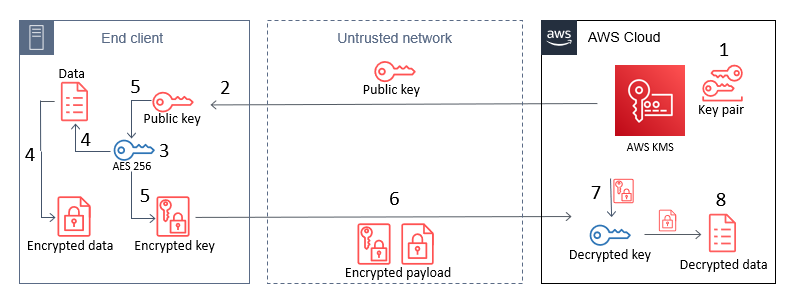
By combining these two algorithms in a hybrid cryptosystem, you give end clients with a public key the ability to encrypt large pieces of information. A client generates a random 256-bit AES key, which should be from a secure source such as /dev/urandom or a dedicated embedded chip. The client then encrypts its large payload by using a mode of operation such as AES-GCM or AES-CBC by using that 256-bit AES key. Next, the client encrypts that 256-bit AES key by using the RSA public key (see step 5 in Figure 1). End clients then transmit only encrypted data across insecure channels, maintaining privacy of the payload data.

A challenge that customers often face is that they want to use AWS KMS for its security properties, but also want to access their KMS keys from devices that don’t have AWS credentials embedded within them. Without AWS credentials, a device can’t call AWS APIs. This blog post shows how you can use a hybrid cryptosystem where RSA public keys can be downloaded or embedded into devices to overcome this challenge.

Prerequisites and initial considerations

This walkthrough assumes that you have some understanding of RSA ciphers and symmetric encryption schemes such as AES. The walkthrough uses OpenSSL for demonstration of the encryption process, but similar libraries can be used on a client-side device.

The walkthrough also assumes that you have an AWS Identity and Access Management (IAM) user with permissions to the AWS KMS service, and the AWS Command Line Interface (AWS CLI) installed with the relevant credentials.

When you create a KMS key, you will also generate a key policy that defines access to it. The default key policy allows all users in your account with AWS KMS actions in their IAM policies to access the KMS key. The key policy for a given KMS key is the primary method for determining access.

Important: You will incur charges for the services used in this example. You can find the cost of each service on the corresponding service pricing page. For more information, see AWS KMS Pricing.

Architectural overview

This post contains procedures for completing the following operations, which are also shown in Figure 1:

  1. Create an RSA key pair in AWS KMS.
  2. Download or pre-install the AWS KMS public key to an end-client device.
  3. Generate an AES 256-bit key on an end client.
  4. Encrypt a large payload of data on the end client by using the AES 256-bit key.
  5. Encrypt the AES 256-bit key with the AWS KMS public key.
  6. Transfer the encrypted payload and key.
  7. Decrypt the AES 256-bit key by using AWS KMS.
  8. Decrypt the payload data by using the now-shared AES 256-bit key.
Figure 1: The steps for hybrid encryption

Figure 1: The steps for hybrid encryption

This diagram shows an end client device, an untrusted network such as a cellular network, and the AWS Cloud. An RSA key pair is generated in AWS KMS, and then the public key can either be embedded in the end client, or pulled by the end client through HTTP(S) or other remote means. In all circumstances, only the public key persists on the end client, which means that no secrets are stored on the device.

How you host the public key on your end clients depends on what network access they have. For example, an embedded Internet of Things (IoT) device for mining vehicles might never connect to the internet, but could communicate with a central system through a private 5G network. In this circumstance, you would host this public key within that network for retrieval. For other disconnected IoT devices that can connect to the internet, such as smart-home appliances, you might want to host the public key on a web server at a predefined URL or through an API.

Note: Whenever you vend public keys over an untrusted channel, such as when you vend the public key through an API, you should make sure that the key can be verified in some way to confirm that it hasn’t been tampered with. This is typically done by vending keys over an HTTPS connection, where the integrity of the keys is provided by the X.509 certificate that was used in the TLS connection. The X.509 certificate also verifies an association with the key-pair owner, typically by domain name.

Implement the solution

The following steps can be used as a proof-of-concept to guide you through implementing a hybrid-cryptosystem by using a KMS public key on an example device.

Create keys in AWS KMS

In the first step of this solution, you create an RSA asymmetric key pair in AWS KMS (step 1 in the architectural overview). With AWS KMS, you can create key pairs in a variety of dimensions according to your security requirements or standards. For more information, see Choosing a KMS key type in the AWS KMS documentation.

To create a key pair in AWS KMS, use the CreateKey API. For this example, you will create an RSA key pair with RSA_2048 for the CustomerMasterKeySpec parameter and ENCRYPT_DECRYPT for the KeyUsage parameter in the AWS CLI. This post uses 2048-bit keys, but note that AWS KMS allows larger key sizes. The CLI will return a KeyId value that uniquely identifies the KMS key in your account, which you should take note of.

To create a KMS key by using the CLI

  • Enter the following command in the AWS CLI.
    aws kms create-key --key-spec RSA_2048 \
        --key-usage ENCRYPT_DECRYPT \
        --description "Example RSA Encryption Key Pair"

You can follow the Creating asymmetric KMS keys documentation to see how to use the AWS Management Console to create a KMS key pair with the same properties as shown here.

Note: When a KMS key is created, it will be logged by AWS CloudTrail, a service that monitors and records activity within your account. All API calls to the AWS KMS service are logged in CloudTrail, which you can use to audit access to KMS keys.

To allow your KMS key to be identified by a human-readable string rather than KeyId, you can assign an alias for the KMS key (replace the target-key-id value of <1234abcd-12ab-34cd-56ef-1234567890ab> with your KeyId). This makes it easier to use and manage.

To create a KMS key alias for your key by using the CLI

  • Enter the following command in the AWS CLI.
    aws kms create-alias \
        --alias-name alias/example-rsa-key \
        --target-key-id <1234abcd-12ab-34cd-56ef-1234567890ab>
    

Download the public key from AWS KMS

A benefit of asymmetric encryption is that you can distribute a public key to a large, untrusted network, and the public key can only be used for encryption. Decryption of those messages can only be conducted by the corresponding private key. You can use the AWS KMS Encrypt API to encrypt data with a KMS key pair (specifically the public key). However, because the AWS APIs are authenticated by using a signature, you must have access to AWS credentials to use these APIs, which you might not want to do on untrusted devices. Additionally, in a private 5G network, you might not have the capability to call the AWS KMS API endpoints from the end clients. Instead, you can download the public key from a local source or embed that into the end client at the time of manufacture.

To retrieve a copy of the public key from your AWS KMS key pair, you can use the GetPublicKey API. The following example shows how to use this with the AWS CLI command get-public-key and reference the key alias you set earlier.

To view the public key for your KMS key pair by using the CLI

  • Enter the following command in the AWS CLI.
    aws kms get-public-key --key-id alias/example-rsa-key

The return value from this API will contain several elements, including the PublicKey. The returned PublicKey value is the DER-encoded X.509, and because you’re using the AWS CLI, it is base64-encoded for readability purposes. By using the AWS CLI, you can query just the PublicKey return value, base64-decode it, and then save the key to a file on disk, as follows.

To use the AWS CLI to query only the public key, then base64 decode it and output it to a file

  • Enter the following command in the AWS CLI.
    aws kms get-public-key \
    --key-id alias/example-rsa-key \ 
    --output text \ 
    --query PublicKey | base64 -–decode > public_key.der

In this example, the local machine where you saved the public_key.der file will now represent the end-client device.

Note: If you call this API by using one of the AWS SDKs, such as boto3, then the PublicKey value is not base64-encoded.

Create an AES 256-bit symmetric key on the end client

Although the end client now has a copy of the public key from the associated KMS private key, the public key can’t be used for encrypting data that you plan on transmitting, due to the size limits on data that can be encrypted. Instead, you can use symmetric encryption. Typically, symmetric keys are smaller than asymmetric keys, the ciphers are faster when encrypting data, and the resulting ciphertext is similar in size to the original data.

To generate a symmetric key, you should use a source of random entropy. Some operating systems offer block access to hardware-based sources of random numbers, such as /dev/hwrng. To provide an example process in this blog post, you will use the OpenSSL rand utility, which uses a cryptographically secure pseudo random generator (CSPRNG) seeded by /dev/urandom. In production systems, you might have stronger sources of entropy to rely on, or compliance requirements for random number generation. In hardware-constrained environments, you should take extra care to make sure that sources of entropy are cryptographically secure. The following command uses OpenSSL to create an AES 256-bit (32 bytes) key and base64-encode it, then save it to disk in plaintext as key.b64.

Note: Anyone with access to this file system will have access to this key.

To use the OpenSSL rand command to create a symmetric key and output it to a file

  • Enter the following command.
    openssl rand -base64 32 > key.b64

Encrypt the data to be sent from the end client

Now that you have two different key types on the end client, you can use a hybrid cryptosystem to encrypt a large text file. First, you will generate a sample file to encrypt on your system. By outputting some bytes from /dev/urandom, you can create this file to the size you want. The following command outputs 200 random bytes, base64-encodes the file, and writes that to disk in a file called encrypt.me.

To generate a sample file from random data, which will be encrypted later

  • Enter the following command.
    head -c 200 /dev/urandom | base64 –-wrap=0 > encrypt.me

Next, you will encrypt the newly created file with the AES 256-bit key that you created earlier (which is base64-encoded). By using the OpenSSL command line, you will encrypt the file on disk and create a new file called encrypt.me.enc.

Note: For demonstration purposes, this solution uses OpenSSL to complete the encryption process. However, the command line OpenSSL enc utility doesn’t allow the cipher aes-256-gcm. Galois Counter Mode (GCM) is recommended when encrypting and sending data, because it includes authentication, so that that the ciphertext can’t be tampered with in transit. Instead, for this demonstration, you will use aes-256-cbc, which is not authenticated.

To use the OpenSSL enc command to encrypt your sample file with a symmetric key

  • • Enter the following command.
    openssl enc -aes-256-cbc \
    -in encrypt.me -out encrypt.me.enc \
    -pass file:./key.b64

Encrypt the AES 256-bit key

So that the data can be decrypted again, you will need to share the same AES 256-bit key with the recipient. To share that with only the person who can use the KMS private key that you created earlier, you can encrypt the symmetric key (key.b64) with the RSA public key that you retrieved earlier (public_key.der).

Again, you will use OpenSSL to see how this works and the required cipher options. When encrypting or decrypting with a KMS RSA key pair, you can use one of two encryption algorithms, either RSAES_OAEP_SHA_1 or RSAES_OAEP_SHA_256. These identify the cipher suites used in encryption that are currently supported by AWS KMS for encryption.

To use the OpenSSL pkeyutl command to encrypt your symmetric key with your local copy of your KMS public key

  • Enter the following command.
    openssl pkeyutl \
    	-in key.b64 -out key.b64.enc \
    	-inkey public_key.der -keyform DER -pubin -encrypt \
    	-pkeyopt rsa_padding_mode:oaep -pkeyopt rsa_oaep_md:sha256

This command creates a new file on disk called key.b64.enc. This file is the encrypted AES 256-bit key, which can now be transported securely across an insecure network, such as the internet. The last two options in the command define the padding mode used (OAEP) and the length of the message digest (SHA-256), which align with the options available to decrypt when you use the AWS KMS APIs.

Note: You should securely delete both the original payload file (encrypt.me) and the plaintext AES 256-bit key (key.b64) if you want to prevent anyone else from accessing these files. At this point, you will have three files on disk: public_key.der, encrypt.me.enc, and key.b64.enc. If you want to verify the decryption process later in this example, keep these files.

In production, you might never write any of these values to disk. Instead, you can keep all values in memory and only write the encrypted data (ciphertext) to disk, clearing memory after that process has completed.

You can now use the method of your choice to transfer the encrypted files across an unsecured network without compromising the privacy of those files. For smart-home appliance use cases, you can upload the encrypted files in Amazon Simple Storage Service (Amazon S3), a highly durable storage system that can be accessed from the internet, keeping in mind the preventative security practices that AWS recommends. Later, another service can pull these files from S3, and with the correct permissions for the KMS key, can decrypt the files by using the AWS KMS Decrypt API.

Decrypt the files

With access to the decrypt operation for the KMS key and the encrypted files, you can now retrieve the plaintext data file again. To do this, you will replicate the preceding steps, but in reverse. This involves decrypting the AWS 256-bit key by using the AWS KMS API, and then using that result to decrypt the encrypted data. You will need access to the AWS KMS API to complete these actions, because the private key exists in plaintext only within the AWS KMS HSMs.

To decrypt the files

  1. The first step is to decrypt the AWS 256-bit key. You will need to use the AWS CLI to submit the key.b64.enc file to the AWS KMS API, and specify the algorithm you used to encrypt the file (RSAES_OAEP_SHA_256). Use the following command to retrieve the AES 256-bit key in plaintext. Again, you’re using the –query selector to output only the plaintext, and then decode the base64 value.
    aws kms decrypt --key-id alias/example-rsa-key \ 
    		--ciphertext-blob fileb://key.b64.enc \
    		--encryption-algorithm RSAES_OAEP_SHA_256 --output text \
    		--query 'Plaintext' | base64 --decode > decrypted_key.b64

  2. The final step in decrypting the data is to reverse the CBC encryption process you used in OpenSSL. If another mode of symmetric encryption was used, such as AES-GCM, then you would need to decrypt by using that algorithm and the input AES 256-bit key. Use the following OpenSSL command to retrieve the original plaintext payload.
    openssl enc -d -aes-256-cbc \
    		-in encrypt.me.enc -out decrypted.file \
    		-pass file:./decrypted_key.b64

Conclusion

In this post, you learned how to combine AWS KMS asymmetric key pairs with locally created symmetric keys to encrypt and share data that exceeds 190 bytes, without storing a secret on a client device. By taking advantage of the RSA cryptosystem for offline encryption, you can reduce the exposure of plaintext data or secrets to devices outside of your control, and without having to complete complex key exchanges. By using the steps in this solution, you can more securely share large amounts of data, such as update files or configuration settings. To learn more about the asymmetric keys feature of AWS KMS, refer to the AWS KMS Developer Guide. If you have questions about the asymmetric keys feature, interact with us through AWS re:Post.

 
If you have feedback about this post, submit comments in the Comments section below. If you have questions about this post, contact AWS Support.

Want more AWS Security news? Follow us on Twitter.

Patrick Palmer

Patrick is a security solutions architect at AWS. He has a passion for learning new technologies and cryptography across AWS services and having deep conversations with customers. He works on a team of security specialists who strive to continually delight customers. Outside of work, he spends time with his wife and two cats, occasionally playing video games when he can.