All posts by Pravin Nair

Automating post-quantum cryptography readiness using AWS Config

Post Syndicated from Pravin Nair original https://aws.amazon.com/blogs/security/automating-post-quantum-cryptography-readiness-using-aws-config/

Migrating your TLS endpoints to Post-quantum cryptography (PQC) starts with understanding your current TLS endpoint inventory and posture. This post introduces the PQC Readiness Scanner — an automated tool that inventories your Application Load Balancer (ALB), Network Load Balancer (NLB), and Amazon API Gateway endpoints and continuously monitors their TLS configurations for PQC readiness. The scanner classifies each endpoint into a three-tier framework that helps prioritize and plan PQC migration.

As quantum computing advances, you need to migrate to quantum-resistant cryptography to protect your data long-term. The PQC Readiness Scanner helps you identify which endpoints to migrate first and tracks your progress across accounts. For web traffic, PQC key exchange algorithms are negotiated only within TLS 1.3. This means quantum-resistant connections require endpoints that support TLS 1.3 and PQC key exchange.

Under the AWS Shared Responsibility Model, AWS secures the infrastructure and enables PQC support across its services. Customers are responsible for configuring their resources to use PQC-capable TLS policies. For AWS-terminated TLS connections—such as those on Application Load Balancer (ALB), Network Load Balancer (NLB), Amazon API Gateway, and Amazon CloudFront—customers choose the security policy (an AWS-managed configuration defining supported TLS protocol versions and cipher suites for a listener) that determines TLS version and cipher suite, key exchange, and authentication algorithm support.

The automated PQC Readiness Scanner for AWS-terminated TLS endpoints is built using AWS Config conformance packs. A conformance pack is a collection of AWS Config rules and remediation actions that can be deployed as a single entity in an account and a Region or across an organization in AWS Organizations.

Solution overview

The PQC Readiness Scanner deploys AWS Config rules using a conformance pack to evaluate the security policy on each endpoint. Based on the evaluation, each resource is classified into a three-tier readiness framework that prioritizes migration actions needed to achieve PQ-ready TLS.

The PQC Readiness Scanner performs two checks per resource:

  1. Does the endpoint use a PQ-ready security policy?
  2. Does the endpoint support legacy TLS 1.0 or 1.1?

Each check returns COMPLIANT or NON_COMPLIANT status with specific policy recommendations.

PQC requires endpoints to support TLS 1.3 and use PQC key exchange algorithms. The three-tier framework helps you interpret findings and prioritize fixes. The goal is to have TLS 1.3 with PQC key exchange enabled on the endpoints. However, achieving this requires maintaining backward compatibility with clients.

Tier

Readiness level

TLS protocols

PQC status

Migration priority

Tier 1

PQ-ready (strongest posture)

TLS 1.3 only with PQC key exchange

PQ-ready

None

Tier 2

PQ-ready (backward compatible)

TLS 1.2 and 1.3 with PQC key exchange

PQ-ready

Low

Tier 3

Not PQ-ready

No PQC key exchange

Not PQ-ready

High

How to prioritize your migrations

  • Tier 1 represents the strongest security using only TLS 1.3 with PQC key exchange. These resources already meet the target state.
  • Tier 2 represents a backward-compatible PQ-ready configuration. Endpoints support both TLS 1.2 and TLS 1.3, with PQC key exchange negotiated on TLS 1.3 connections. Migration priority is low because these resources already provide quantum-resistant protection for clients that support TLS 1.3, while maintaining TLS 1.2 compatibility for legacy clients. Migrate to Tier 1 when client-side analysis confirms that the connecting clients support TLS 1.3 with PQC key exchange.
  • Tier 3 covers resources that aren’t PQ-ready. This includes endpoints without TLS 1.3 support, endpoints with TLS 1.3 but without PQC key exchange policies. These resources require immediate attention.

Assessment scope

The scanner evaluates the following AWS edge services that terminate TLS connections on behalf of your applications.

  • Edge services:
    • Application Load Balancer (ALB), Network Load Balancer (NLB) listeners with HTTPS, TLS, and TCP SSL protocols are evaluated.
    • API Gateway REST APIs are evaluated for AWS Regional and private endpoints along with API Gateway HTTP APIs (v2) and WebSocket APIs (v2).
  • Excluded edge services:
    • CloudFront distributions are excluded from the PQC readiness scope because TLS 1.3 with hybrid post-quantum key exchange is automatically enabled across existing CloudFront TLS security policies for viewer-to-edge connections. No customer action is required for inbound (viewer-facing) PQC on CloudFront.
  • Recommended approach for Classic load balancer:
    • For Classic Load Balancers, AWS recommends migrating to ALB or NLB. Classic Load Balancers don’t support TLS 1.3 or PQC key exchange and can’t be made PQ-ready.

How the solution works

AWS Config enables continuous monitoring and evaluation. Conformance packs enable organization-wide deployment. AWS Lambda is a serverless compute service that runs code to perform security policy evaluation based on the AWS Config rules. AWS Serverless Application Model (AWS SAM) is an open source framework used for deploying the AWS Lambda functions.
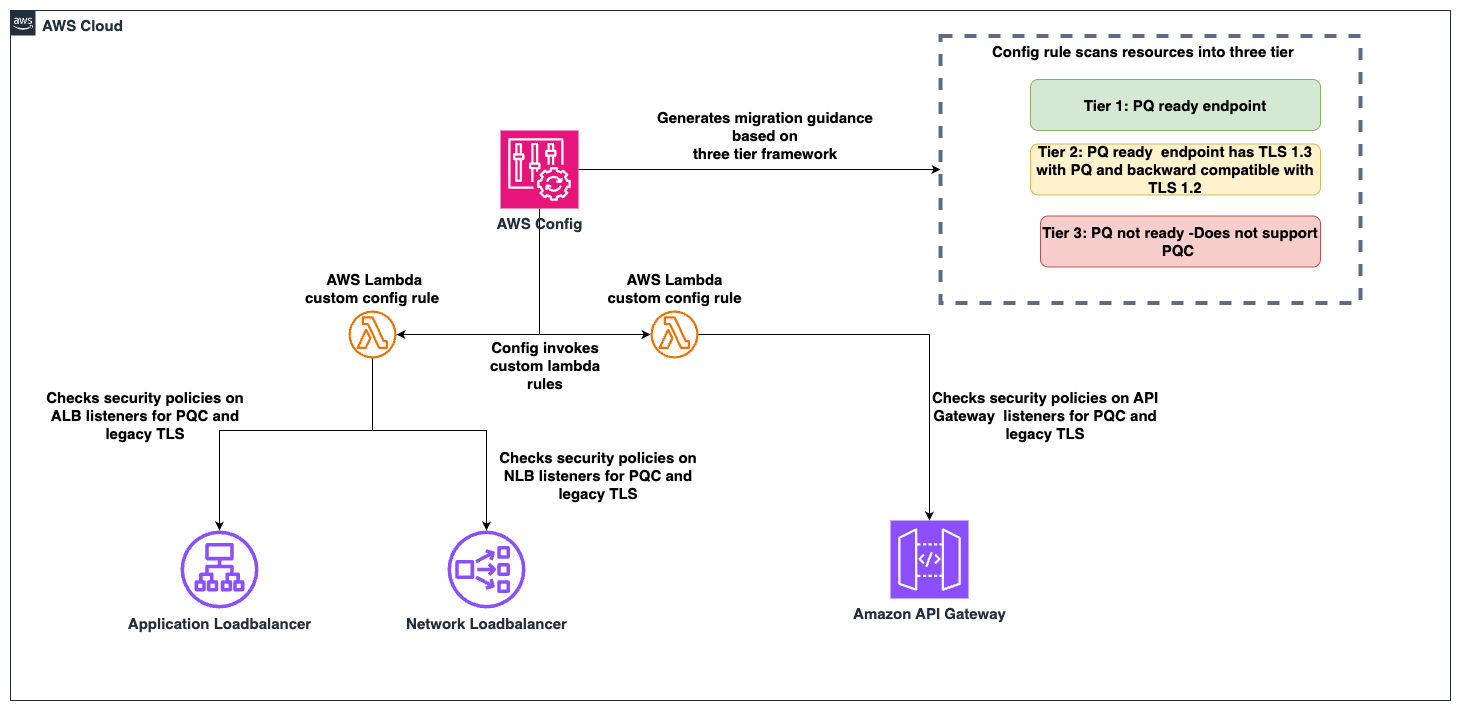
Figure 1: PQC readiness solution architecture

Figure 1: PQC readiness solution architecture

The PQC Readiness Scanner conformance pack implements four custom AWS Config rules powered by two Lambda functions:

Rule

What it checks

Non-compliant result

ELB PQ-ready

Load balancer listeners use security policies that support TLS 1.3 with PQC key exchange algorithms

Policy doesn’t include PQC support, the resource is marked with a recommended upgrade policy

ELB legacy TLS

Load balancer listeners allow TLS 1.0 or 1.1 connections

Legacy protocols are configured, the resource is flagged.

API Gateway PQ-ready

API Gateway endpoints use security policies that support TLS 1.3 with PQC key exchange algorithms

Policy doesn’t include PQC support, the resource is marked with a recommended upgrade policy

API Gateway legacy TLS

API Gateway endpoints allow TLS 1.0 or 1.1

Legacy protocols are configured, the resource is flagged.

Prerequisites

Before deploying the solution, you need:

  • AWS Command Line Interface (AWS CLI) configured with appropriate permissions
    aws configure
    aws sts get-caller-identity  # Verify

  • Python 3.12 installed. The Lambda runtime requires this version.
    python3 --version  # Should show 3.12.x

  • AWS SAM CLI installed (Installation Guide)
    pip install aws-sam-cli
    
    # Verify
    sam --version

  • AWS Config enabled in your target AWS Region.
    • Configure it to record (This step is not needed if your accounts are recording all resources by default)
      • AWS::ElasticLoadBalancingV2::LoadBalancer
      • AWS::ApiGateway::RestApi
      • AWS::ApiGatewayV2::Api resource types.
    • Enable via AWS Config Console → Recorder → Recording Strategy → Select specific resource types (Follow the steps in manual setup for AWS Config recording strategy for specific resource types)

Steps to deploy the PQC Readiness Scanner

Deploy the PQC Readiness Config Scanner in three phases. Complete deployment commands and configuration details are available in the GitHub repository. The Lambda functions must be deployed first because the conformance pack references their ARNs as parameters. See the GitHub repository for details.

Deploy to single account:

  1. Clone and Build:
    git clone https://github.com/aws-samples/sample-PQC-Readiness-using-AWS-Config.git
    
    cd sample-PQC-Readiness-using-AWS-Config/installation
    
    sam build

  2. Deploy to One or More Regions:
    # Make script executable (first time only)
    chmod +x deploy-per-regions.sh
    
    # Deploy to a single region
    ./deploy-per-regions.sh us-east-1
    
    # Deploy to multiple regions
    ./deploy-per-regions.sh us-east-1 us-west-2 eu-west-1

    Type y and continue if you have enabled AWS Config recording for these resources or its by default recording all resources.

    Figure 2: Type y and continue if you have enabled AWS Config recording for these resources or its by default recording all resources.

  3. The script automatically:
    • Deploys Lambda functions via SAM
    • Deploys conformance pack (creates Config rules)
    • Verifies deployment success
    • Provides clear status messages

The deployment creates two Lambda functions that perform PQ-ready and legacy TLS checks. It provisions IAM roles with least-privilege permissions for ELB, ALB, NLB, and API Gateway describe operations. Lambda permissions allow AWS Config to invoke the functions.
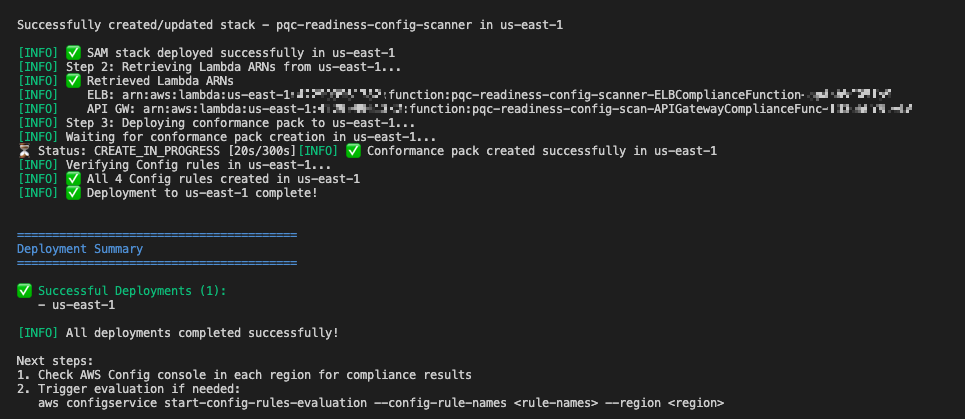
Example screen-print of how a successful deployment looks like.

Figure 3: Example screen-print of what a successful deployment looks like.

Multi-account deployment (Organizations):

For organization-wide deployment across multiple AWS accounts, use CloudFormation StackSets to deploy Lambda functions to each account.

Important Constraint: AWS Config CUSTOM_LAMBDA rules require the Lambda function to exist in the same account as the Config rule. You cannot use a centralized Lambda in one account to evaluate resources in other accounts.

Prerequisite: Shared S3 Bucket

Before packaging, create an S3 bucket accessible by each target account in your organization. This bucket will host the Lambda deployment artifacts that CloudFormation StackSets pulls into each member account.

# Create the shared S3 bucket (run from management/central account)
aws s3 mb s3://<your-org-shared-bucket> --region us-east-1

Grant read access to the target accounts using one of the following options:

aws s3api put-bucket-policy \
  --bucket <your-org-shared-bucket> \
  --policy '{
    "Statement": [
      {
        "Sid": "BucketOwnerFullAccess",
        "Effect": "Allow",
        "Principal": {
          "AWS": "arn:aws:iam::<bucket-owner-account-id>:root"
        },
        "Action": "s3:*",
        "Resource": [
          "arn:aws:s3:::<your-org-shared-bucket>",
          "arn:aws:s3:::<your-org-shared-bucket>/*"
        ]
      },
      {
        "Sid": "CrossAccountReadAccess",
        "Effect": "Allow",
        "Principal": {
          "AWS": [
            "arn:aws:iam::<account-id-1>:root",
            "arn:aws:iam::<account-id-2>:root"
          ]
        },
        "Action": ["s3:GetObject", "s3:ListBucket"],
        "Resource": [
          "arn:aws:s3:::<your-org-shared-bucket>",
          "arn:aws:s3:::<your-org-shared-bucket>/*"
        ]
      }
    ]
  }'

Replace <account IDs> with the AWS account IDs where StackSets will deploy the Lambda functions.

Note: The bucket must be in the same region as the StackSet deployment regions. For multi-region deployments, create one bucket per region and run sam package separately for each.

Step 1: Build and Upload Lambda Packages to S3

Run the packaging script from the installation/ directory:

cd installation

# Make script executable (first time only)
chmod +x deploy-stacksets.sh

# Build, package, upload to S3, and generate resolved template
./deploy-stacksets.sh <your-org-shared-bucket>

This script automatically:

  • Builds Lambda functions using SAM
  • Creates ZIP packages
  • Uploads ZIPs to the shared S3 bucket
  • Generates packaged-template.yaml with S3 values baked in (no parameters needed at deploy time)
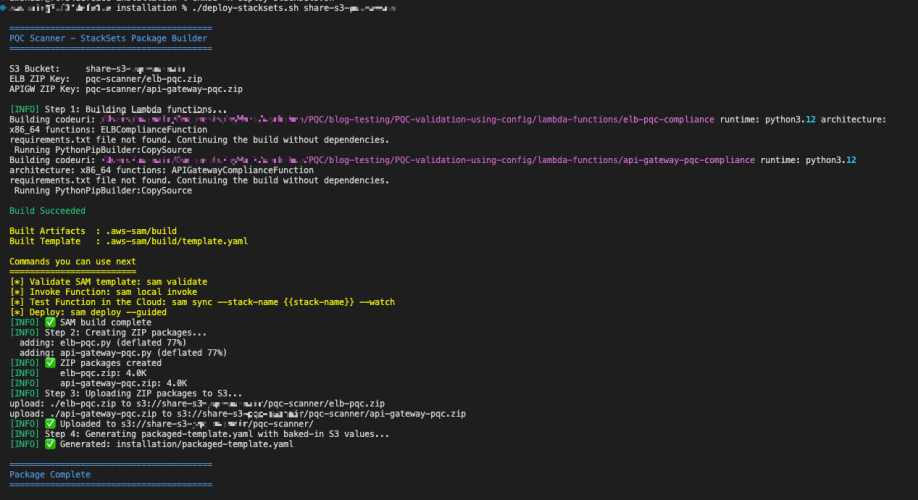
Sample script output of successful upload of the lambda packages to S3 bucket

Figure 4: Sample script output of successful upload of the lambda packages to S3 bucket

Step 2: Deploy Lambda Functions via StackSets

Run the following from the management account (or delegated admin account):

# Create StackSet (--region sets the StackSet "home region" where it is managed)
aws cloudformation create-stack-set \
  --stack-set-name pqc-readiness-lambda-functions \
  --template-body file://packaged-template.yaml \
  --capabilities CAPABILITY_IAM \
  --permission-model SERVICE_MANAGED \
  --auto-deployment Enabled=true,RetainStacksOnAccountRemoval=false \
  --region us-east-1

# Deploy stack instances to member accounts
# --regions = target regions where Lambda functions are deployed in member accounts
# --region  = must match the StackSet home region above
aws cloudformation create-stack-instances \
  --stack-set-name pqc-readiness-lambda-functions \
  --deployment-targets OrganizationalUnitIds=ou-xxxx-xxxxxxxx \
  --regions us-east-1 \
  --region us-east-1

Important — StackSet home region vs deployment regions:

  • --region (on each CLI command) = the StackSet home region where the StackSet resource lives. Subsequent operations (describe, update, delete) must specify this same region.
  • --regions (on create-stack-instances) = the deployment target region(s) where stack instances are created in member accounts.
  • These are independent values. Specify --region explicitly to avoid accidental deployment to your CLI’s default region.

Note: SERVICE_MANAGED StackSets must be created from the management or delegated admin account. The management account itself is excluded from stack instance deployments — use deploy-per-regions.sh separately if you need the scanner in the management account.

Step 3: Deploy Organization Conformance Pack

aws configservice put-organization-conformance-pack \
  --organization-conformance-pack-name pqc-legacy-tls-compliance \
  --template-body file://conformance-packs/pqc-legacy-tls-conformance-pack.yaml

This creates Config rules in each member account that reference their local Lambda functions.

    Migration guidance and prioritization

    The three-tier system provides PQC migration priorities:

    High priority – Tier 3 (not PQ-ready):

    • Target: Resources without PQC support. This includes endpoints not using PQ-ready security policies, endpoints that still allow TLS 1.0 or 1.1.
    • Action: Upgrade to a PQ-ready policy containing PQ in its name, such as those ending with -PQ-2025-09 (see Elastic Load Balancing security policies documentation for the full list).
    • Important: Before upgrading to a PQ-ready policy, audit your client TLS versions. PQ-ready policies require TLS 1.3 support; legacy clients that only support TLS 1.2 or earlier will fail to negotiate a connection. Start with a Tier 2 backward-compatible policy (which supports both TLS 1.2 and 1.3 with PQC), monitor connection logs for TLS negotiation failures, and only move to a Tier 1 TLS 1.3-only policy after confirming that your clients support TLS 1.3 with PQC key exchange.
    • Risk: Endpoints don’t support post-quantum cryptography for data in transit. Legacy TLS protocols are vulnerable to current cryptographic attacks.

    Low priority – Tier 2 (PQ-ready, backward compatible):

    • Target: Resources using TLS 1.3 + PQ-ready policies that also support TLS 1.2 for backward compatibility.
    • Action: Consider TLS 1.3-only policies when client compatibility analysis confirms connecting clients support TLS 1.3.
    • Risk: Minimal. These resources already support PQ-TLS with TLS 1.3 connections. TLS 1.2 and earlier fallback maintains backward compatibility, which might indicate some clients aren’t negotiating in PQ-TLS. Remediation is to monitor logs, identify the volume of these connections and clients and plan migration for these clients to use TLS 1.3 with PQ-TLS.

    No action – Tier 1 (PQ-ready, optimal):

    • Target: Resources using TLS 1.3 only with PQC key exchange: These resources meet the target state. No migration needed.

    Viewing the results

    In each member account, navigate to AWS Config Console in the deployed region.

    Conformance Pack View

    Go to AWS Config → Conformance packs and look for:

    OrgConformsPack-pqc-legacy-tls-compliance-

    Note: Organization conformance packs are prefixed with OrgConformsPack- and have a random suffix appended (e.g., OrgConformsPack-pqc-legacy-tls-compliance-gyv22je0).
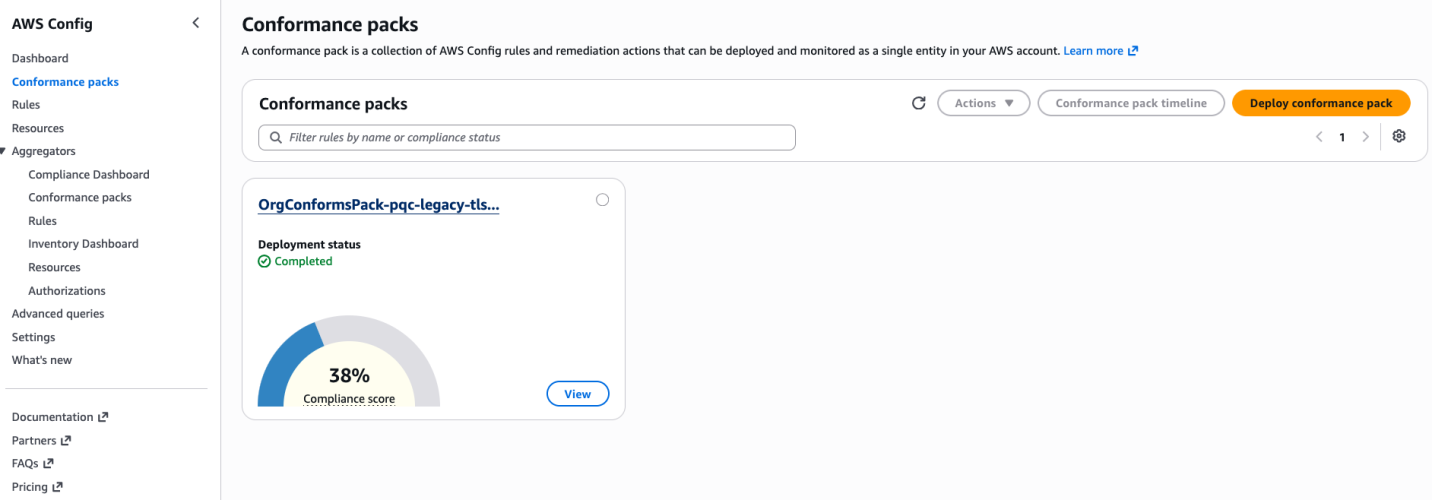
    PQC Conformance Pack Compliance Score is the percentage of the number of compliant rule-resource

    Figure 5: PQC Conformance Pack Compliance Score is the percentage of the number of compliant rule-resource

    Click the conformance pack to see an overall compliance summary across all 4 rules.

    Individual Rules View

    Go to AWS Config → Rules and find 4 rules with prefix pqc-:

    • pqc-elb-pqc-compliance-conformance-pack-
    • pqc-elb-legacy-tls-conformance-pack-
    • pqc-apigateway-pqc-compliance-conformance-pack-
    • pqc-apigateway-legacy-tls-conformance-pack-

    Click any rule to view:

    • Compliant vs non-compliant resource counts
    • Detailed annotations for each resource
    • Resource ARNs and current security policy configurations
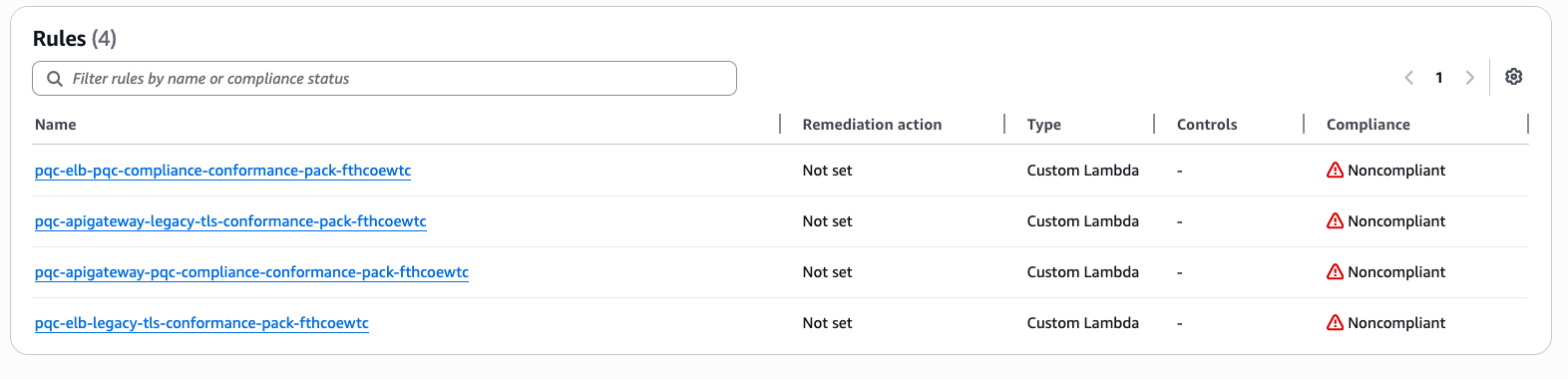
    Visibility into Config rules status inside the conformance pack
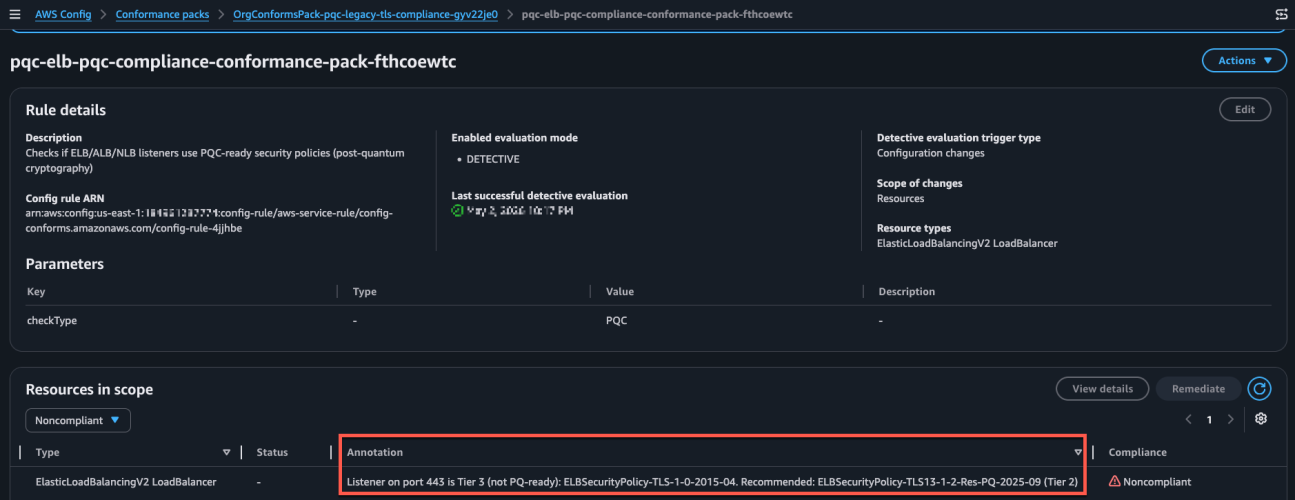
    Figure 6: Visibility into Config rules status inside the conformance pack

    Sample image of the config rule findings and annotation describing the migeration guidance based on 3-tier classification.

    Figure 7: Sample image of the config rule findings and annotation describing the migration guidance based on 3-tier classification.

    Conclusion

    After deploying the PQC Readiness Scanner, you gain visibility into TLS posture across AWS edge services, which reduces manual configuration reviews. The tier system provides specific upgrade recommendations so teams can understand next steps without cryptographic expertise. The scanner automatically detects configuration changes to help new deployments maintain readiness standards. Built-in AWS Config reporting supports audit requirements and demonstrates measurable progress toward PQC readiness.

    Deploy the PQC Readiness Scanner and review your results with PQC Readiness Scanner. Start migration with high priority Tier 3 resources and monitor progress across your accounts using AWS Config aggregators.

    Additional resources

    If you have feedback about this post, submit comments in the Comments section below. If you have questions about this post, start a new thread on AWS Config re:Post or contact AWS Support.

    Pravin Nair

    Pravin Nair

    Pravin is a Senior Security Solutions Architect specializing in data protection and privacy at AWS. He partners with customers to architect secure, scalable cloud solutions that address complex security challenges across encryption, infrastructure protection, and privacy engineering. His expertise spans encryption at rest and in transit, infrastructure security, privacy-based architectures, and emerging security domains including generative AI security and post-quantum cryptography.

    AWS Certificate Manager now supports exporting public certificates

    Post Syndicated from Pravin Nair original https://aws.amazon.com/blogs/security/aws-certificate-manager-now-supports-exporting-public-certificates/

    AWS Certificate Manager (ACM) simplifies the provisioning, management, and deployment of public and private TLS certificates for AWS services and your on-premises and hybrid applications. To further enhance the flexibility of ACM for diverse workloads, we’re introducing a powerful new capability: ACM exportable public certificates. You can use this capability to export public TLS certificates and associated private keys from ACM, which can be used to secure workloads on Amazon Elastic Compute Cloud (Amazon EC2) instances, Amazon Elastic Kubernetes Service (Amazon EKS) pods, on-premises servers, or servers hosted with other cloud providers. The capability supports public certificates that are newly created in your AWS account

    In this post, we show you how to automate the export and distribution of public exportable certificates across a diverse infrastructure. We walk you through creating workflows that automatically deliver certificates to multiple destinations including EC2 instances and virtual machines in hybrid environments. We explore how this automation works, its benefits, and provide a step-by-step guide to get started. Additionally, we explore how you can use integration with Amazon EventBridge to trigger automatic certificate exports when certificates are issued or renewed, streamlining certificate deployment across heterogeneous environments and significantly reducing management overhead.

    Background: ACM and certificate management

    ACM is a managed service that removes the complexity of purchasing, uploading, and renewing TLS certificates. It provides public certificates at no additional cost for AWS services integrated with ACM such as Elastic Load Balancing (ELB), Amazon CloudFront, and Amazon API Gateway. ACM also supports importing third-party public certificates and issuing private certificates through AWS Private Certificate Authority. Prior to this release, ACM public certificates were designed for AWS services integrated with ACM such as CloudFront, providing seamless TLS encryption for those services. For use cases involving third-party content delivery networks (CDNs) or workloads terminating TLS on EC2 instances, customers typically sourced certificates from other providers or imported them into ACM for centralized management. Customers have told us that they would like to use ACM for these use cases, extending its simplicity and scalability to a wider range of environments. The new ACM exportable public certificates capability fulfills this need, enabling you to export ACM-managed public certificates for use with your custom workloads while maintaining centralized management and automated renewals.

    With ACM you can now request a public certificate, validate domain ownership, and export the certificate for use with software that terminates TLS such as Apache, NGINX, or Microsoft IIS. ACM handles certificate renewals, reducing the risk of expirations that can disrupt your applications.

    How it works: ACM public certificate issuance and renewal

    To use ACM exportable public certificates, you need to understand how to automate certificate management using the issuance and renewal processes. In this section, we describe these processes and their automation capabilities, which are critical for deploying and maintaining certificates.

    ACM public certificate issuance

    Issuing an ACM public certificate involves the following steps:

    1. Request a certificate: In the AWS Management Console for ACM, or the AWS Command Line Interface (AWS CLI) or API, initiate a certificate request by specifying the domain names you want to secure (for example, example.com or *.example.com).
    2. Validate domain ownership: ACM requires that you prove control over the domain. If the domain is hosted on Amazon Route 53, you can request that ACM validate the domain ownership. For domains hosted outside AWS, you can use DNS validation (adding a CNAME record) or email validation (responding to emails sent to domain contacts).
    3. Certificate issuance: After the domain ownership has been validated, ACM issues the certificate, which includes the public key, private key, and certificate chain.
    4. Associate the certificate with an integrated AWS service: See Services integrated with ACM for information about associating the certificate with an integrated AWS service.
    5. Export the certificate: With the new capability you can now export the public certificate, private key, and certificate chain using the ACM console, AWS CLI, or API for use on servers that aren’t integrated with ACM.
    6. Bind to application: Install the exported certificate on your server (for example, Apache or NGINX) to enable TLS termination.

    With the launch of this new capability, you can now control the future exportability of public certificates that you create in ACM.

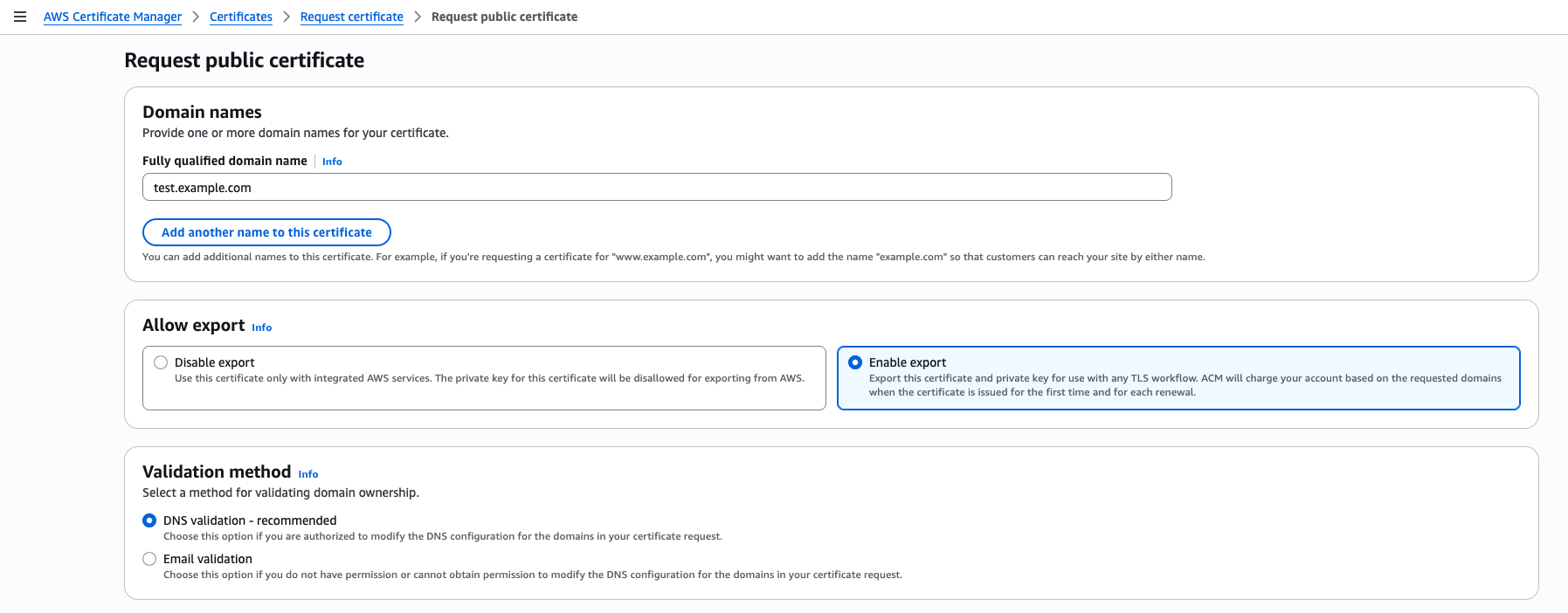
    To create an exportable public certificate, use the ACM console to create a new public certificate. To get started, choose Request certificate in the ACM console and on the Request public certificate page, under Allow export, select Enable export. If you select Disable export, the private key for this certificate will be disallowed for exporting from ACM, which cannot be changed after certificate issuance.

    Figure 1: Request a public certificate and enable export

    Figure 1: Request a public certificate and enable export

    After creating your certificate with the
    Enable export option selected and completing domain ownership validation, you can proceed with the export process, as shown in Figure 2. To export your certificate, select it from the list of certificates, choose
    More actions, and select
    Export.

    Figure 2: Export a certificate

    Figure 2: Export a certificate

    ACM public certificate renewal

    ACM automates the process of certificate renewal, which includes:

    1. Renewal initiation: ACM automatically initiates renewal 60 days before a certificate expires.
    2. Domain revalidation: ACM revalidates domain ownership using the same method as the initial issuance (DNS or email).
    3. Certificate update: Upon successful revalidation, ACM issues a new certificate with the same Amazon Resource Name (ARN) with updated validity dates.
    4. When a certificate is renewed in ACM, the service automatically sends an EventBridge event to notify you that the new certificate is available. If the renewal fails, ACM sends notifications to both the AWS Health Dashboard and EventBridge. To stay informed about these certificate events, you can create EventBridge rules that monitor for specific certificate-related events. You can configure these rules to send notifications to an Amazon Simple Notification Service Amazon (SNS) topic so that interested parties receive timely updates about their certificate status.

    New EventBridge schema fields: Following successful ACM certificate renewal, the ACM Certificate Available event now includes an exportable field that indicates with TRUE|FALSE whether the public certificate is ready to be exported.

    {
        "version": "0",
        "id": "id", 
        "detail-type": "ACM Certificate Available",
        "source": "aws.acm",
        "account": "account",
        "time": "2019-12-22T18:43:48Z",
        "region": "region",
        "resources": [
            "arn:aws:acm:region:account:certificate/certificate_ID"
        ],
        "detail": {
           “Action” : "ISSUANCE" | "RENEWAL" | "IMPORT" | "REIMPORT",
           "CertificateType" : "AMAZON_ISSUED" | "PRIVATE" | "IMPORTED",    
           "CommonName": "example.com",     
           "DomainValidationMethod" : "EMAIL" | "DNS",    
           "CertificateCreatedDate" : "2019-12-22T18:43:48Z",
           "CertificateExpirationDate" : "2019-12-22T18:43:48Z",
           "DaysToExpiry" : 395,
           "InUse" : TRUE | FALSE,    
           "Exported" : TRUE | FALSE,
           "Exportable" : TRUE | FALSE   <== New     
         }
    }
    1. Export and update: You can export the renewed certificate and update it on your servers manually or using EventBridge targets such as AWS Systems Manager Automation documents triggered by EventBridge rules. For more information, see Event bus targets in Amazon EventBridge.

    You can use EventBridge rules to monitor specific events and route them to one or more targets (such as Amazon SNS topics, AWS Lambda functions, or other AWS services) for processing. For example, when domain validation fails because of DNS configuration issues, ACM generates an ACM Certificate Renewal Action Required EventBridge event. By creating an EventBridge rule that targets an SNS topic, you can subscribe to receive email alerts and take necessary corrective actions.

    Automating deployment of renewed certificates using EventBridge

    The certificate renewal process helps make sure that your TLS certificates remain valid without manual intervention, but updating certificates across diverse environments can still require effort. When ACM renews a certificate, it generates an EventBridge event. You can configure EventBridge rules to trigger targets based on this event, such as:

    • Send notifications: Route the event to Amazon SNS to send email or SMS notifications to administrators.
    • Automate certificate deployment: Trigger Lambda functions or Systems Manager Automation documents to retrieve the renewed certificate using the ACM API and update it on your servers.
    • Monitor renewal failures: Configure alerts based on ACM certificate renewal failure events. These events can be directly routed to notification channels to inform you about issues such as domain validation errors.

    To set this up, create an EventBridge rule to match the ACM renewal event, specify a target, (such as an SNS topic or Lambda function). This automation minimizes manual intervention, helping to facilitate seamless certificate updates across your infrastructure.

    Solution overview

    In the section, we describe two workflows. The first demonstrates an automated process for exporting existing ACM public certificates and installing them on target EC2 instances or virtual machines. The second workflow is triggered when public certificates are automatically renewed by ACM when they become available in ACM, followed by updating these certificates on downstream EC2 instances and virtual machines. While this solution uses EC2 instances and virtual machines as the target systems, the same methods can be applied to refresh public certificates at scale across various types of systems.

    Prerequisites

    1. To extend this automated public certificate export and update process to:
      1. Register EC2 instances: Follow the instructions in Managing EC2 instances with Systems Manager.
      2. Register on-premises and other cloud environments’ virtual machines: Follow the instructions in Managing nodes in hybrid and multicloud environments with Systems Manager.
    2. Add TargetTagKey tags to EC2 instances and virtual machines where you want to deploy renewed certificates. The automation uses these tags to identify target instances.
    3. The ExportCertificate API requires a certificate passphrase for operation. To maintain security best practices, we recommend storing passwords in encrypted form using password vaults instead of plain text storage. Our implementation uses AWS Secrets Manager to securely store these sensitive credentials. The solution also uses Amazon DynamoDB to maintain certificate metadata, which includes a reference to the corresponding secret name stored in Secrets Manager. For added security, the DynamoDB table’s data is automatically encrypted at rest using AWS Key Management Service (AWS KMS).

    ACM certificate export

    Figure 3: ACM certificate issuance and export workflow

    Figure 3: ACM certificate issuance and export workflow

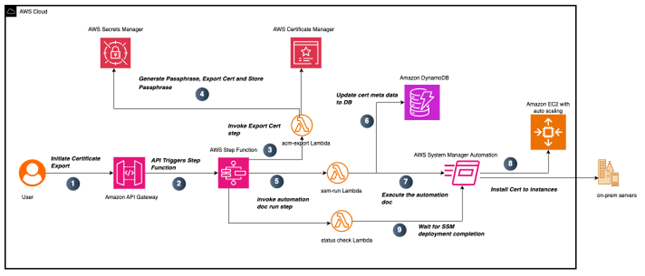
    The workflow shown in Figure 3 demonstrates an automated process for exporting existing public ACM certificates through an API-driven process and deploying them to downstream systems.

    1. The process begins when a user makes a request to an API Gateway endpoint, providing essential parameters including the CertificateArn to identify the certificate you want to export, CertName for certificate identification, and TargetTagKey and TargetTagValue for identifying the target EC2 instances where you want this certificate to be installed. The following is an example of the payload sent to API Gateway:
      {
        "CertificateArn": "arn:aws:acm:us-east-1:1234567890123:certificate/8106d6b2-f204-4354-8893-d49e311b3900",
        "CertName": "academe",
        "TargetTagKey": "env",
        "TargetTagValue": "dev"
      }

    2. Upon receiving the request, API Gateway triggers an AWS Step Functions workflow containing multiple orchestrated states.
    3. The initial state executes a Lambda function named acm-Export, which generates a passphrase for the private key.
    4. The acm-Export lambda function also securely stores the generated passphrase in Secrets Manager and uses the generated passphrase to export the ACM certificate.
    5. After completing the acm-Export function, the Step Functions workflow invokes the Lambda ssm-run function.
    6. This function performs two operations: it checks the certificate’s existence in DynamoDB (which serves as an inventory tracking system) and manages record-keeping. When the function encounters an existing certificateARN, it updates the record with the current CertExpiryDate and LastExportedDate timestamp values. For certificates being exported for the first time, the Lambda function creates a new record in DynamoDB if no matching entry exists. This new record captures the certificate’s metadata, including its details and tracking information. Figure 4 shows how this metadata is structured in a DynamoDB table entry in the console.
    Figure 4: Certificate metadata in a DynamoDB table

    Figure 4: Certificate metadata in a DynamoDB table

    1. Following the metadata verification step in DynamoDB, the Lambda function also initiates running a custom Systems Manager document called Install-ACMCertificate. This document handles the installation of newly exported public certificates onto specified EC2 instances. The same Systems Manager document can be used for certificate installation or updates onto on-premises servers, providing flexibility in certificate deployment.
    2. When the Systems Manager document execution succeeds, it deploys the newly exported public certificates to EC2 instances matching the TargetTagKey. By default, on Linux servers, certificates are stored in /etc/ssl/certs and /etc/ssl/private, though these paths can be customized in the Systems Manager document.
    3. After successfully running this Systems Manager document, the Step Functions workflow then advances to its next state, which triggers another Lambda function named Statuscheck. This function monitors the execution status of the previously initiated Systems Manager document. The Step Functions workflow concludes its execution after it confirms the successful installation of certificates on the targeted EC2 instances.

    ACM certificate renewal and export

    Figure 5: ACM certificate and renewal process

    Figure 5: ACM certificate and renewal process

    When a certificate is within 60 days of expiring, ACM automatically begins the renewal process. When ACM successfully completes a certificate renewal, it generates an
    event in EventBridge as shown in the following example:

    
    {
    	"version": "0",
    	"id": "id", 
    	"detail-type": "ACM Certificate Available",
    	"source": "aws.acm",
    	"account": "account",
    	"time": "2019-12-22T18:43:48Z",
    	"region": "region",
    	"resources": [
    	"arn:aws:acm:region:account:certificate/certificate_ID"
    	],
    	"detail": 
    	{
    		"Action" : "RENEWAL",
    		"CertificateType" : "AMAZON_ISSUED”, 
    		"CommonName": "", 
    		"DomainValidationMethod" : "DNS", 
    		"CertificateCreatedDate" : "2025-05-22T18:43:48Z",
    		"CertificateExpirationDate" : "2026-06-23T18:43:48Z",
    		"DaysToExpiry" : 395,
    		"InUse" : “TRUE”, 
    		"Exported" : “TRUE”, 
    		}
    	}

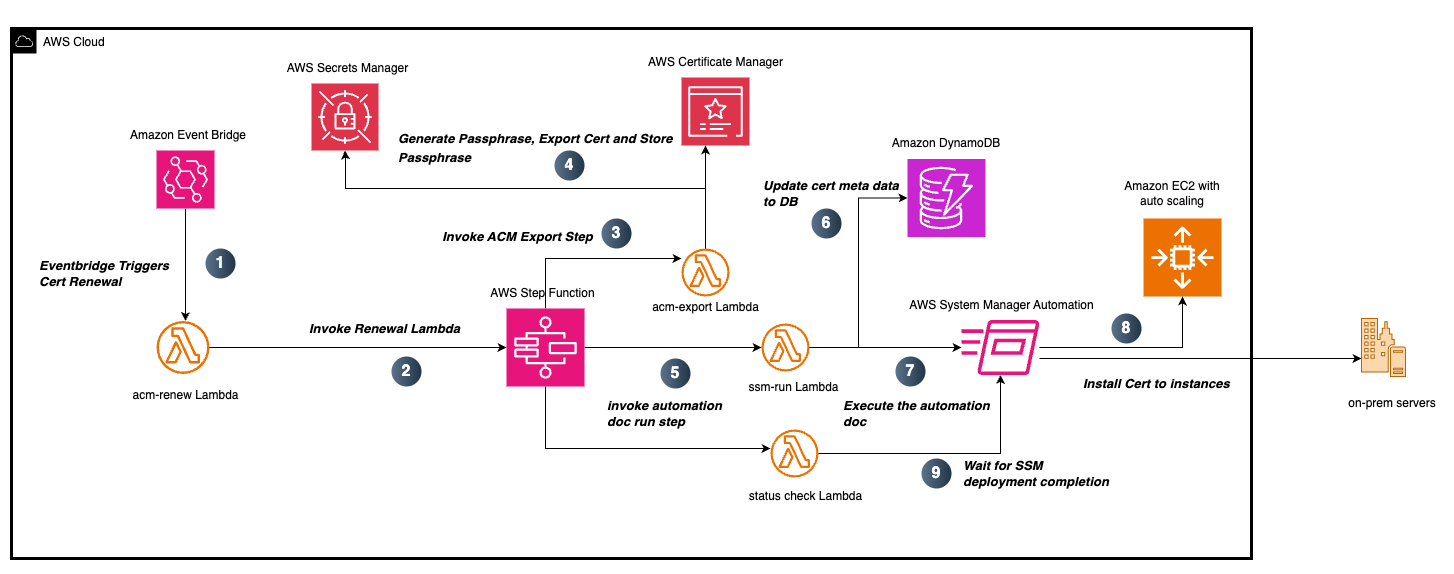
    The workflow illustrated in Figure 5 showcases an automated system for exporting existing public ACM certificates using an API-driven process and deploying them to downstream systems.

    1. The solution uses an EventBridge rule that watches for certificate renewal notifications and triggers the acm-renew Lambda function in response. The function begins its execution by receiving the certificate ARN from the ACM event. Using this ARN as a lookup key, it queries a DynamoDB table to retrieve the associated certificate metadata. From this query, it extracts essential certificate details including the Certificate Name and the TargetTag Key-Value pairs that identify which resources need the updated certificate. These details are needed for the subsequent certificate deployment process and help make sure that the updates are applied to the correct systems.
    2. This information is then formatted into a payload and used to trigger a Step Functions workflow. This Step Functions workflow follows the same process described in the ACM Certificate Export section.
    3. Steps 3 through 9 follow the process described in the ACM Certificate Export section. Upon successful completion of step 9, the Step Functions workflow concludes its execution. At this point, the renewed public certificate has been successfully installed on the targeted EC2 instances, completing the automated certificate export and installation process.

    Detailed instructions for downloading the solution, executing it, validating the certificate export, and deploying it to your AWS account are available on GitHub.

    Pricing and availability

    ACM exportable public certificates are available in AWS commercial Regions, AWS GovCloud (US) Regions, and China Regions and follow a pay-as-you go pricing model, with no upfront commitments. You pay only for the certificates you export. Public certificates for AWS Services integrated with ACM such as ELB, CloudFront, and API Gateway remain available at no additional cost. For detailed pricing, see AWS Certificate Manager pricing.

    Conclusion

    The ACM exportable public certificates capability empowers customers to secure diverse workloads with a unified, managed certificate solution. By enabling certificate exports for EC2, containers, on-premises servers and other cloud providers, ACM simplifies TLS management, while offering centralized control, automated renewals and cost-effective pricing. Get started today by exploring this feature in the ACM console and streamline your certificate management workflows.

    If you have feedback about this post, submit comments in the Comments section below. If you have questions about this post, contact AWS Support.

    Pravin Nair

    Pravin Nair

    Pravin is a Sr. Security Solutions Architect in Data Protection and Privacy. He helps customers build secure, scalable solutions that support their business needs. He has a background in encryption at rest and in transit, infrastructure security, and privacy.

    Santosh Vallurupalli

    Santosh Vallurupalli

    Santosh is a Sr. Solutions Architect at AWS. Santosh specializes in networking, containers, and migrations and enjoys helping customers in their journey of cloud adoption and building cloud-focused solutions for challenging issues. When not working, he likes traveling, watching Formula1, and watching “The Office” in repeat mode.

    Chandan Kundapur

    Chandan Kundapur

    Chandan is a Principal Technical Product Manager on the AWS Certificate Manager (ACM) team. With close to 20 years of cybersecurity experience, he has a passion for driving the ACM team’s product strategy to help AWS customers identify and secure their resources and endpoints with public and private certificates.