Tag Archives: AWS Config

AWS Control Tower introduces a Controls Dedicated experience

Post Syndicated from Veliswa Boya original https://aws.amazon.com/blogs/aws/aws-control-tower-introduces-a-controls-dedicated-experience/

Today, we’re announcing a Controls Dedicated experience in AWS Control Tower. With this feature, you can use Amazon Web Services (AWS) managed controls without the need to set up resources you don’t need, which means you get started faster if you already have an established multi-account environment and want to use AWS Control Tower only for its managed controls. The Controls Dedicated experience gives you seamless access to the comprehensive collection of managed controls in the Control Catalog to incrementally enhance your governance stance.

Until now, customers were required to adopt and configure many recommended best practices which meant implementing a full AWS landing zone at the time of setting up a multi-account environment. This setup included defining the prescribed organizational structure, required services, and more, in AWS Control Tower to start using landing zone. This approach is helpful to ensure a well-architected multi-account environment, however, for customers who already have an established, well-architected multi-account environment and only want to use AWS managed controls, it was more challenging for them to adopt AWS Control Tower. The new Controls Dedicated experience provides a faster and more flexible way of using AWS Control Tower.

How it works
Here’s how I define managed controls using the Controls Dedicated experience in AWS Control Tower in one of my accounts.

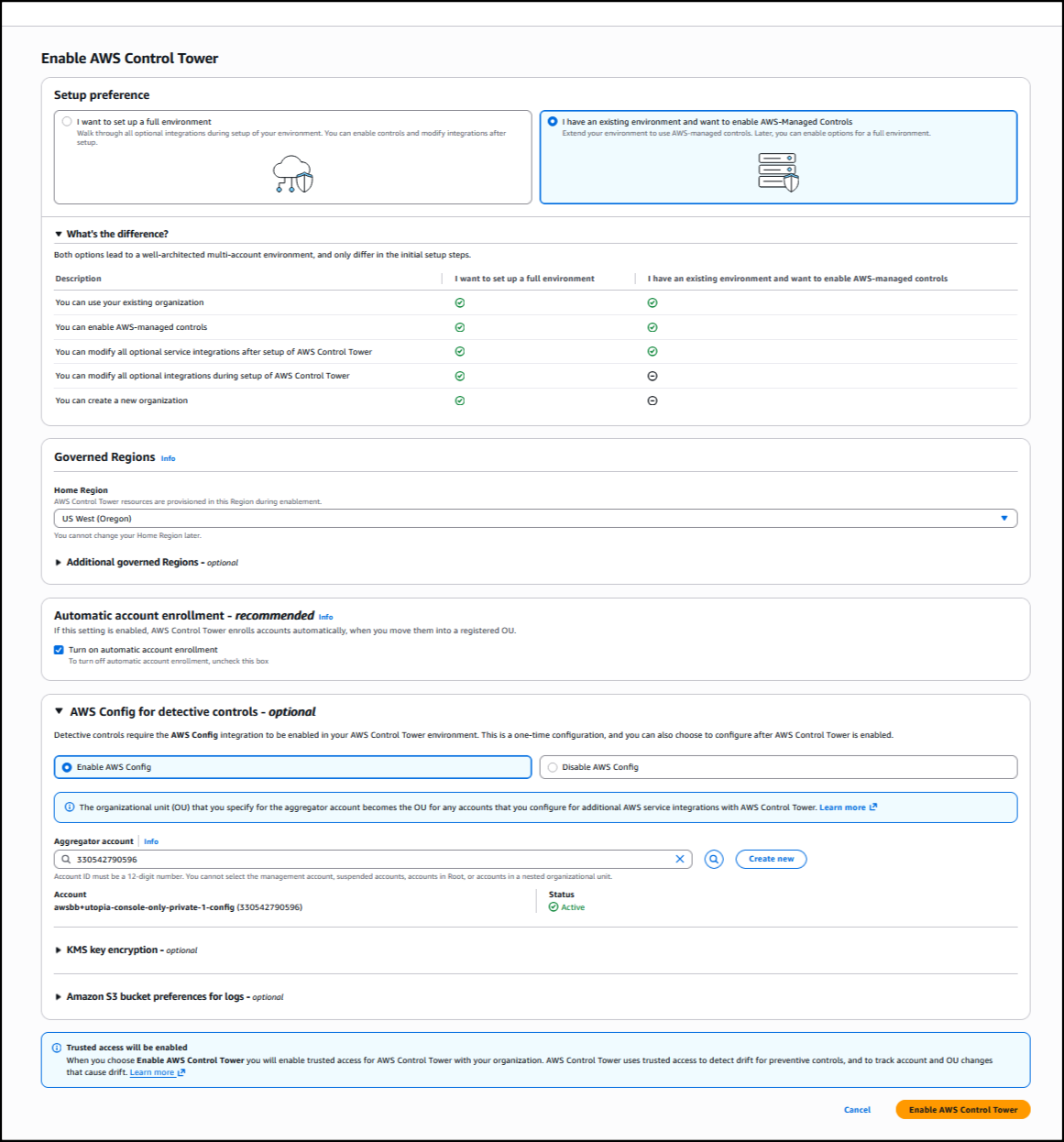
I start by choosing Enable AWS Control Tower on the AWS Control Tower landing page.

I have the option to set up a full environment, or only set up controls using the Controls Dedicated experience. I opt to set up controls by choosing I have an existing environment and want to enable AWS Managed Controls. Next, I set up the rest of the information, such as choosing the Home Region from the dropdown list so that AWS Control Tower resources are provisioned in this Region during enablement. I also select Turn on automatic account enrollment for AWS Control Tower to enroll accounts automatically when I move them into a registered organization unit. The rest of the information is optional; I choose Enable AWS Control Tower to finalize the process, and the landing zone setup begins.

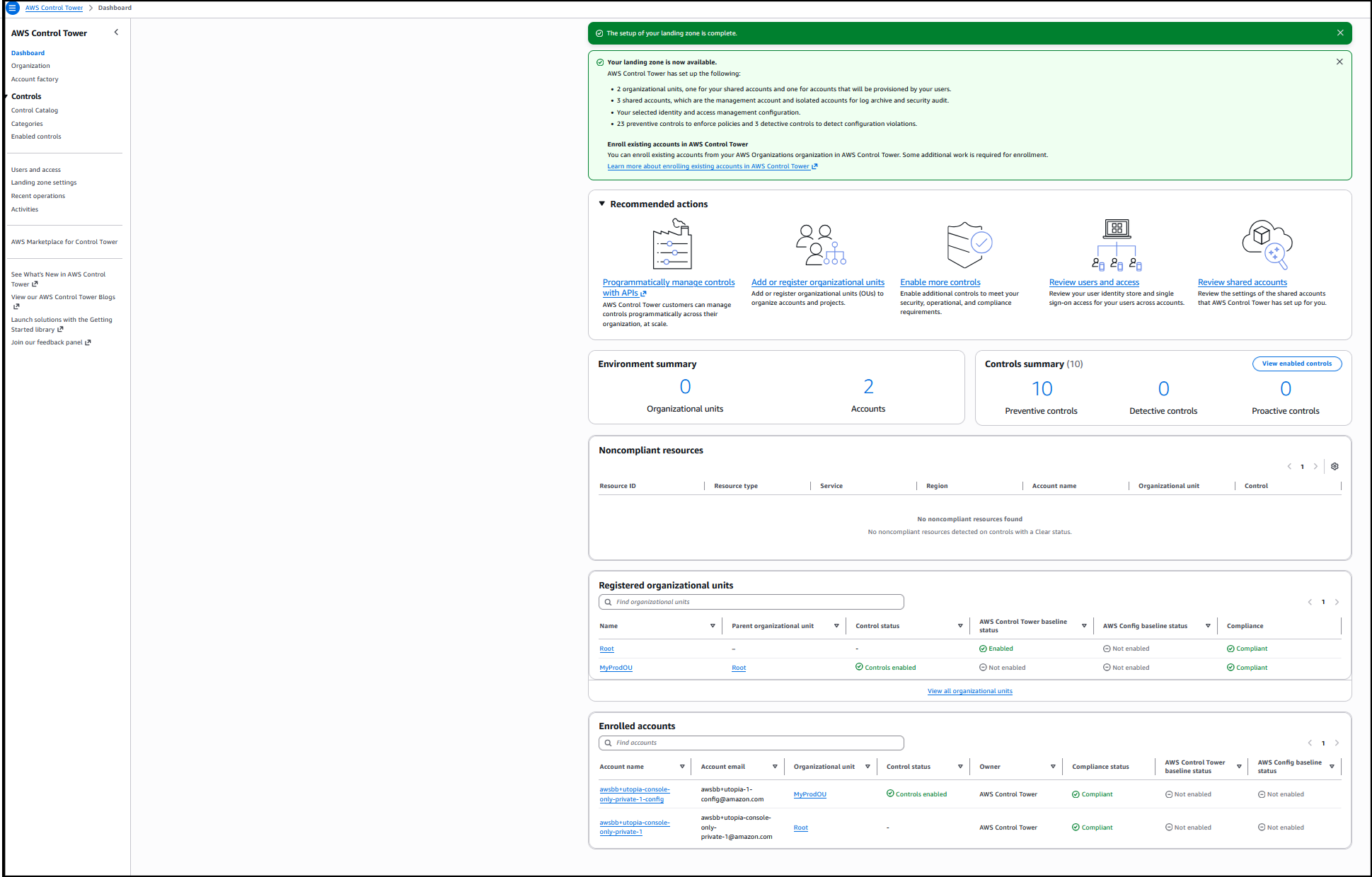
Behind the scenes, AWS Control Tower installed the required service-linked AWS Identity and Access Management (IAM) roles, and to use detective controls, service-linked Config Recorder in AWS Config in the account where I’m deploying the AWS managed controls. The setup is completed, and now I have all the infrastructure required to use the controls in this account. The dashboard gives a summary of the environment such as the organizational units that were created, the shared accounts, the selected IAM configuration, the preventive controls to enforce policies, and detective controls to detect configuration violations.


I choose View enabled controls for a list of all controls that were installed during this process.

Good to know
Usually, an existing AWS Organizations account is required before you can use AWS Control Tower. If you’re using the console to create controls and don’t already have an Organizations account, one will be set up on your behalf.

Earlier, I mentioned a service-linked Config Recorder. With a service-linked Config Recorder, AWS Control Tower prevents the resource types needed for deployed managed controls from being altered. You have flexibility and the ability to keep your own Config Recorders, and only the configuration items for the resource types that are required by your managed detective controls will be enabled, which optimizes your AWS Config costs.

Now available
Controls Dedicated experience in AWS Control Tower is available today in all AWS Regions where AWS Control Tower is available.

To learn more, visit our AWS Control Tower page. For more information related to pricing, refer to AWS Control Tower pricing. Send feedback to AWS re:Post for AWS Control Tower or through your usual AWS Support contacts.

Veliswa.

Minimize risk through defense in depth: Building a comprehensive AWS control framework

Post Syndicated from Luis Pastor original https://aws.amazon.com/blogs/security/minimize-risk-through-defense-in-depth-building-a-comprehensive-aws-control-framework/

Security and governance teams across all environments face a common challenge: translating abstract security and governance requirements into a concrete, integrated control framework. AWS services provide capabilities that organizations can use to implement controls across multiple layers of their architecture—from infrastructure provisioning to runtime monitoring. Many organizations deploy multi-account environments with AWS Control Tower, or Landing Zone Accelerator to implement a foundational baseline of controls and security architecture. Once their environment is provisioned, organizations typically look to add additional detective controls from services such as AWS Security Hub and AWS Config based on security, compliance, and operational requirements. While this sequence is a great start, there are more opportunities during this time to implement layered defense-in-depth coverage to enhance your security posture.

Highly regulated industries such as fintech and financial services are often viewed as the gold standard for governance and security controls. While these sectors have established robust frameworks, there’s consistently room for improvement and valuable lessons for other industries looking to enhance their control environments. However, many organizations struggle to move beyond a basic compliance-focused approach. In our experience working with customers across various sectors, this limited perspective often stems from multiple factors, including:

  • Immediate compliance pressures
  • Resource constraints
  • Limited understanding of control maturity pathways
  • Focus on detection rather than prevention
  • A tendency to prioritize technology-agnostic controls over bult-in AWS capabilities, leading to unnecessarily complex implementations

The good news? A more comprehensive approach that uses AWS preventative, proactive, detective, and responsive controls can significantly reduce risk while decreasing operational overhead through automation.

In this post, we outline a practical framework that you can adopt to evolve your security and governance controls strategy. We explore how your organization can mature from a detection-focused security posture to a multi-layered control framework, using real-world examples across the resource lifecycle, including infrastructure-as-code testing and preventative controls such as service control policies (SCPs), resource control policies (RCPs), and declarative policies (DPs).

Drawing from best practices in highly regulated industries while incorporating modern cloud capabilities through services such as AWS Organizations and AWS Control Tower, we provide a structured framework that you can use to elevate your organization’s control environment beyond basic compliance requirements.

Customer challenges in implementing controls

Organizations face several significant challenges when attempting to implement a comprehensive control framework in AWS. Let’s explore the main obstacles:

Resource constraints and expertise gaps

Security teams often find themselves caught between limited resources and expanding responsibilities in the cloud. With constrained budgets and personnel, teams typically gravitate toward quick wins through detective controls, which appear straightforward to implement initially. While this provides immediate visibility, it can leave critical gaps in security posture. Many teams lack comprehensive expertise across all control types, particularly in implementing preventative, proactive, and responsive controls effectively. The pressure to demonstrate immediate security improvements, combined with day-to-day operational demands, frequently results in tactical solutions rather than strategic, layered security approaches.

Analysis paralysis

Deciding which tools to prioritize can be a challenge; the breadth of options and extensive capabilities available across AWS security services and third-party tools can feel overwhelming at times. Security teams struggle to determine the optimal mix of controls for their environment and where to begin implementation. This challenge is compounded by the complexity of mapping technical compliance requirements to cloud-focused capabilities and maintaining visibility into emerging threats as the security landscape evolves. The layers of abstraction created by proliferating security controls can further obscure clear decision-making, leading teams to delay critical security improvements while seeking perfect solutions.

Misunderstanding of defense in depth

Defense in depth as a concept is good, but it can be misunderstood and difficult to achieve, leading to vulnerabilities in the security architecture. A common misconception is that a single strong control, separation of duties in AWS Identity and Access Management (IAM) roles, least permission in IAM policies, and so on, provide sufficient protection. This overlooks the crucial value of implementing controls at multiple points and how different control types can be combined to create a robust security posture. Teams often miss how organizational controls like SCPs can work in harmony with workload-specific controls to achieve greater protection. The role of preventative controls in guiding technical implementations is frequently under appreciated.

Maturity journey challenges

The path to security maturity presents numerous obstacles. Many organizations remain stuck in the early stages, implementing detective controls but never progressing to preventative measures. Security controls are often implemented in isolation, without consideration for the broader security landscape. Organizations struggle to create and follow a clear roadmap for evolving their security posture, and measuring improvement over time proves challenging.

Scale and consistency issues

As AWS environments grow, maintaining consistent governance and security becomes increasingly complex. Organizations face mounting challenges in managing exceptions and special cases across their expanding infrastructure. These interrelated challenges often result in controls implementations that fail to achieve their intended risk reduction goals. You need a structured approach to overcome these obstacles and implement comprehensive security controls, which we explore in the following sections.

Strategic investment in security

While implementing comprehensive controls requires an initial investment in time and resources, the long-term benefits fundamentally transform how organizations operate.

The foundation for this transformation begins with establishing baseline controls through proven starting points such as AWS Control Tower and its customization options. AWS Control Tower provides building blocks for secure multi-account architectures with hundreds of security capabilities and proactive controls already built in. Rather than trying to create baselines from scratch by wrangling vast amounts of account-level or resource-specific controls, you can use these accelerators to rapidly establish a strong security foundation. With these baseline controls in place, this transformation extends beyond security teams to enable the entire organization to operate more efficiently. Development and operations teams can deploy faster with confidence when security guardrails are in place. Security becomes an enabler rather than a bottleneck, so that teams across the organization can innovate while maintaining a strong security posture.

As you mature your organization’s control framework through automation and layered defenses, a security transformation occurs. Security teams shift from constant firefighting to proactive risk management. Automated policy enforcement replaces manual reviews, and the time previously spent on routine tasks can be redirected to strategic initiatives.

Understanding control types and their interplay

AWS defines distinct types of controls to build a comprehensive security framework. Let’s examine each type and how they work together, using a common scenario: preventing public Amazon Simple Storage Service (Amazon S3) bucket exposure.

Preventative controls

Preventative controls establish the foundation of a secure environment by defining the policies, standards, and requirements that guide security implementations. At their core, these controls encompass corporate security policies that outline acceptable resource configurations across the organization. They work in conjunction with compliance requirements and frameworks to help maintain regulatory alignment, while architectural standards and guidelines provide technical direction for implementations. Data classification policies play a crucial role by determining specific security requirements based on data sensitivity.

To illustrate how preventative controls work in practice, consider a common S3 bucket security requirement. A typical preventative control might establish a corporate policy stating All S3 buckets must be private by default, with public access granted only through an approved exception process. This simple but effective policy sets clear expectations and requirements before a technical implementation begins.

  • Organization level: SCPs blocking public S3 bucket creation.
  • Resource level:
    • RCPs enforcing network access controls, such as requiring authenticated access or limiting requests to your organization’s network range.
    • SCPs to stop malicious overwrites of S3 objects using SSE-C encryption by blocking s3:PutObject requests with customer-provided keys unless explicitly allowed, paired with AWS IAM Roles Anywhere for short-term credential enforcement.
```json
// SCP to block SSE-C unless explicitly allowed 
{
  "Version": "2012-10-17",
  "Statement": [
 {
     "Sid": "DenySSECEncryption",
     "Effect": "Deny",
     "Action": "s3:PutObject",
     "Resource": "*",
     "Condition": {
         "Null": {
               "s3:x-amz-server-side-encryption-customer-algorithm": "false"}
            } }
  ]}

Proactive controls

Proactive controls act as an early warning system, identifying and addressing potential security issues before they manifest in your environment. These controls work by validating configurations and changes against established security requirements during the development and deployment phases. Through automated validation and policy enforcement at build and deploy time, proactive controls help prevent misconfigurations from reaching production environments, reducing the operational overhead of fixing security issues after the fact. Think of proactive controls as your first line of defense in maintaining a secure cloud environment. In AWS, these can be implemented at multiple levels:

  • Amazon S3 Block Public Access settings at the account level.
  • Policy-as-code checks in continuous integration and delivery (CI/CD) pipelines (such as CFN-Nag, or AWS Config proactive rules).
  • AWS CloudFormation hooks for pre-deployment validation and policy enforcement.
  • AWS Config rules in proactive mode to evaluate resources before creation.
  • At the resource level, you can use:
    • IAM policies restricting bucket policy modifications
    • CloudFormation Guard rules

#####################################
##           Gherkin               ##
#####################################
# Rule Identifier:
#    S3_BUCKET_SERVER_SIDE_ENCRYPTION_ENABLED
# Description:
#   Checks if your Amazon S3 bucket either has the Amazon S3 default encryption enabled or that the Amazon S3 bucket policy
#   explicitly denies put-object requests without server side encryption that uses AES-256 or AWS Key Management Service.
# Reports on:
#    AWS::S3::Bucket
# Evaluates:
#    AWS CloudFormation
# Rule Parameters:
#    NA
# Scenarios:
# a) SKIP: when there are no S3 resource present
# b) PASS: when all S3 resources Bucket Encryption ServerSideEncryptionByDefault is set to either "aws:kms" or "AES256"
# c) FAIL: when all S3 resources have Bucket Encryption ServerSideEncryptionByDefault is not set or does not have "aws:kms" or "AES256" configurations
# d) SKIP: when metadata includes the suppression for rule S3_BUCKET_SERVER_SIDE_ENCRYPTION_ENABLED
#
# Select all S3 resources from incoming template (payload)
#
let s3_buckets_server_side_encryption = Resources.*[ Type == 'AWS::S3::Bucket'
  Metadata.cfn_nag.rules_to_suppress not exists or 
  Metadata.cfn_nag.rules_to_suppress.*.id != "W41"
  Metadata.guard.SuppressedRules not exists or
  Metadata.guard.SuppressedRules.* != "S3_BUCKET_SERVER_SIDE_ENCRYPTION_ENABLED"
]
rule S3_BUCKET_SERVER_SIDE_ENCRYPTION_ENABLED when %s3_buckets_server_side_encryption !empty {
  %s3_buckets_server_side_encryption.Properties.BucketEncryption exists
  %s3_buckets_server_side_encryption.Properties.BucketEncryption.ServerSideEncryptionConfiguration[*].ServerSideEncryptionByDefault.SSEAlgorithm in ["aws:kms","AES256"]
  <<
    Violation: S3 Bucket must enable server-side encryption.
    Fix: Set the S3 Bucket property BucketEncryption.ServerSideEncryptionConfiguration.ServerSideEncryptionByDefault.SSEAlgorithm to either "aws:kms" or "AES256"
  >>
}

Source: aws-guard-rules-registry

Detective controls

Detective controls provide continuous visibility into your security posture by monitoring for and identifying potential security violations or unauthorized changes within your environment. While preventative controls aim to stop issues before they occur, detective controls help you maintain awareness of your security state and can identify when preventative controls have been bypassed or failed. These controls form a critical layer of defense by enabling rapid identification of security issues and providing the visibility needed for effective incident response and compliance reporting. While many organizations start and stop here, detective controls are only part of the solution:

  • AWS Config rules monitoring for public buckets
  • Security Hub findings to flag non-compliant resources
  • AWS IAM Access Analyzer evaluations

Responsive controls

Responsive controls complete the security lifecycle by providing automated and manual mechanisms to address security issues after they’re detected. These controls define and implement the actions taken when security violations are identified, ranging from automated remediation of common misconfigurations to coordinated incident response procedures for complex security events. By establishing clear response patterns and using automation where appropriate, responsive controls help facilitate consistent and timely handling of security issues while reducing the mean time to remediation. Responsive controls address violations when they occur:

The power comes not from implementing these controls in isolation, but from using them together in a coordinated way. This layered approach begins with preventative controls to establish the requirements, followed by proactive controls to block most potential violations at the source. Issues that manage to slip through are caught by detective controls, while responsive controls automatically remediate identified problems. Throughout this process, comprehensive documentation tracks issues, remediation plans, and progress, such as through a plan of action and milestones (POAM), helping to make sure that compliance requirements are met and improvements can be measured over time.

Implementation lifecycles: Ideal compared to reality

You can follow one of two paths when implementing security controls: starting fresh with a comprehensive approach or evolving from an existing detective-focused implementation. Let’s examine both scenarios.

Starting fresh: The ideal approach

When starting from scratch, you have a unique opportunity to build your security and governance following an ideal approach. Your team can take advantage of this clean slate to architect controls and processes methodically, free from legacy constraints. The following steps offer guidance though establishing a strong foundation while maintaining the flexibility you need as your business grows.

  • Rationalize controls against requirements and risk profile:
    • Choose appropriate security frameworks (for example, CIS and NIST).
    • Map compliance, regulatory, legal, and contractual requirements to your base framework.
    • Define clear security objectives and success criteria for your security and compliance program.
  • Design a comprehensive control strategy:
    • Document control requirements across all four types (preventive, proactive, detective, and responsive controls). You can use the framework to decide which controls are best for each type of requirement.
    • Plan implementation phases and priorities.
    • Define metrics for measuring effectiveness.
  • Implement controls in layers:
    • Start with AWS Control Tower, which gives you foundational controls to mature from. You can add customizations if required.
    • Think about additional preventative controls that can help establish a stronger security and compliance posture.
    • Deploy proactive controls to stop violations.
    • Add detective controls as safeguards.
    • Implement responsive controls for automated or manual remediation.
  • Monitor and assess effectiveness
    • Evaluate control performance against defined metrics.
    • Identify gaps and areas for improvement.
    • Adjust controls based on emerging threats and changing requirements.
    • Implement continuous improvement feedback loop.

Evolution from detective controls: The common path

Most organizations find themselves starting with detective controls and face challenges in maturing from there:

  • Initial state:
    • Baseline detective controls through Security Hub and AWS Config
    • Manual remediation processes
    • Limited visibility into security posture
  • Maturation steps:
    • Analyze findings to identify patterns
    • Implement automated remediation for common issues
    • Add preventative and proactive controls based on recurring events
    • Periodically refine and update policies
  • Optimization:
    • Review control effectiveness
    • Identify gaps in coverage
    • Implement additional preventative, proactive, detective, and responsive measures
    • Automate processes where possible

The goal: Comprehensive and layered security controls

The goal of implementing security controls across multiple layers isn’t just about compliance or following best practices—it’s about creating a robust, resilient security posture that can effectively help prevent, detect, and respond to security issues. Let’s explore why this approach is crucial:

Why multiple control layers matter

Security controls shouldn’t exist in isolation. When implementing a security requirement, you should consider:

  • How can we prevent this issue from occurring?
  • How will we detect if our preventative controls fail?
  • What should happen when we detect a violation?
  • What policies and standards guide these decisions?

Moving beyond detection

While detective controls are important, they signal that a security violation has already occurred. A mature security posture requires:

  • Strong preventative controls to stop violations before they happen
  • Detective controls as a safety net if there is drift or a violation
  • Automated remediation where possible, to reduce exposure time
  • Clear policies to guide implementation and decisions
  • Measuring success

You should measure the effectiveness of your control framework through several key performance indicators. Success can be seen in the steady reduction of security findings over time, coupled with decreasing time-to-remediation metrics. The maturity of the framework becomes evident through an increasing percentage of automated remediation activities and a declining number of recurring issues. These improvements manifest in better audit outcomes, providing tangible evidence that the control framework is delivering its intended results.

Practical implementation: From theory to practice

Let’s examine how to implement a comprehensive control framework using a common security requirement: preventing exposure of sensitive data through public S3 buckets. This example demonstrates how different control types work together to create defense in depth. While not every control might be necessary for every situation, each should be carefully considered and evaluated based on various factors including system criticality, data sensitivity, operational overhead, and organizational risk tolerance. The decision to implement or omit specific controls should be deliberate and documented, rather than occurring by default.

The architecture will have layers and components like the following.

  • Preventative layer:
    • Service control policies (SCPs) or resource control policies (RCPs)
    • S3 Block Public Access
    • IAM policies
  • Detective layer:
  • Responsive layer:
    • AWS Config auto-remediation
    • Lambda functions
    • Systems Manager automation

Building controls at each layer

An effective security and compliance strategy includes all four types of security controls. While preventative controls are a first line of defense to help prevent unauthorized access or unwanted changes to your network, it’s important to make sure that you establish detective and responsive controls so that you know when an event occurs and can take immediate and appropriate action to remediate it. Using proactive controls adds another layer of security because it complements preventative controls, which are generally stricter in nature.

Begin by defining your security objectives, then establish clear policies to meet those objectives:

  • Define organizational and business objectives:
    • Identify data protection goals
    • Determine acceptable risk levels
    • Align with compliance requirements
  • Establish clear policies:
    • For example, document business requirements for external data sharing and access controls in security policies. These requirements will drive technical decisions around AWS storage configurations such as S3 bucket policies and public access settings.
    • Define permitted use cases for public access.
    • Establish exception processes.
    • Set clear ownership and responsibilities.

Deploy preventative guardrails:

  • Organization level:
    • SCPs to block public bucket creation at the organization level
    • Account-level S3 Block Public Access settings to enforce account-level restrictions
  • Resource level:
    • IAM policies restricting bucket policy modifications
    • S3 bucket policy templates with controlled deployment
    • RCPs to enforce rules on specific resource types across your organization

Deploy proactive guardrails:

  • Infrastructure as code:
    • Implement policy-as-code checks in CI/CD pipelines using:
      • CloudFormation Guard
      • cfn-nag
      • AWS Config proactive rules
    • Integrate with pull request workflows
  • AWS Control Tower proactive controls:
    • Enable relevant optional AWS Control Tower guardrails

Add detective controls by creating a monitoring framework:

  • AWS CloudTrail for comprehensive API activity logging and auditing to enable investigation of unauthorized access attempts and configuration changes.
  • AWS Config rules for bucket configuration. AWS Config rules or AWS Config conformance packs deployed for the entire organization can monitor S3 bucket configurations for compliance.
  • Security Hub findings for continuous assessment by aggregating findings and flagging non-compliant resources.
  • Amazon EventBridge rules for policy changes to detect and route S3 bucket policy modifications.
  • IAM Access Analyzer for external access review.
  • Regular compliance reporting, which can be automated through AWS Audit Manager.

Implement responsive controls by automating remediation where possible:

  • Security Hub and Systems Manager integration to automate incident response workflows.
  • Custom Lambda functions for specific use cases.
  • Integration with ITSM for human review when needed.
  • AWS Config remediation rules For example, the AWSConfigRemediation-ConfigureS3PublicAccessBlock runbook configures an AWS account’s S3 Block Public Access settings based on the values you specify in the runbook parameters.

The following table describes control types, what a basic implementation includes, and the services and methods used for advanced implementation.

Control type Basic implementation Advanced implementation
Preventative Documentation, peer reviews SCPs, RCPs, DPs, IAM policies, and S3 Block Public Access
Detective Security Hub, AWS Config rules Security Hub, AWS Config, and CloudWatch alerts
Responsive Manual remediation Auto-remediation through AWS Config, Systems Manager, EventBridge, and Lambda
Compliance One-time checks CIS/NIST mapping with Security Hub and automation of evidence collection and reporting using AWS Audit Manager
Automation Limited Full CI/CD Integration (for example, using CloudFormation or Terraform)
Cost optimization effort High (manual effort) Low (automation reduces overhead)

Scaling and management considerations

As your security and governance program matures, scaling these controls across a growing organization requires thoughtful management and automation. This section explores key considerations for effectively managing your security posture at scale, optimizing costs, and maintaining consistency across your AWS environment. Whether you’re expanding across multiple accounts, business units, or AWS Regions, these practices help you balance security requirements with operational efficiency and cost management.

Use AWS services effectively:

  • Consider deploying AWS Control Tower for consistent account setup and centrally deploying and managing controls at scale across multiple use cases and organizational units.
  • AWS Organizations can aid hierarchical policy management and the implementation of:
    • IAM policies for identity-based guardrails and permissions
    • SCPs for access guardrails
    • RCPs define permissions based on resource attributes
    • DPs to help facilitate consistent resource configurations across your organization
    • Tag policies for consistent resource categorization
    • Backup policies for data protection standards
    • AI service opt-out policies for data privacy requirements
    • Cost allocation tag policies to standardize cost attribution
    • Data residency policies to enforce regional restrictions
  • Implement resource governance through policy integration
    • For example, use Organizations tag policies to enforce a Confidential tag on S3 buckets storing personally identifiable information (PII). Combine this with SCPs that mandate AES-256 encryption for tagged buckets, overriding developer attempts to disable it.
    • Using backup policies to enforce retention rules (for example, Retention=7 years).
    • Use DPs to help maintain consistent security configurations across resources, such as enforcing encryption settings on Amazon Elastic Block Store (Amazon EBS) volumes or requiring specific security group rules.
  • Centralize logging and monitoring

Manage compliance exceptions:

  • Implement clear exception processes
  • Document and track approved exceptions
  • Establish regular periodic reviews of exceptions
  • Use time-bound approvals with automated expiration

Optimize costs:

  • Use periodic instead of continuous checking where appropriate
  • Implement targeted monitoring based on resource criticality
  • Use AWS Config recordings effectively
  • Balance automation costs against manual effort

Conclusion: Moving forward with control maturity

Implementing a comprehensive control framework is a journey, not a destination. Start from your organization’s current position, whether that’s with basic detective controls or a fresh implementation, and focus on progressive improvement rather than attempting to implement everything at once. Success comes from carefully documenting decisions about control implementation, regularly reviewing them, and using automation to reduce operational overhead while improving consistency. Progress can be measured through concrete metrics: reduced findings, faster remediation times, and increased automation.

Remember that the goal extends beyond better security—it’s about transforming security and governance from a reactive operation to a strategic enabler that provides real business value. This transformation manifests through reduced risk from systematic controls, improved operational efficiency through automation, and enhanced visibility and governance. Perhaps most importantly, it frees security teams to focus on strategic initiatives rather than routine operational tasks.

By following this approach, you can build a robust security and governance posture that not only protects your organization’s AWS environment but also supports business innovation and growth. The result is a security program that evolves alongside the business, enabling rather than hindering progress, while maintaining a strong approach that can scale with your organization’s needs.


If you have feedback about this post, submit comments in the Comments section below. If you have questions about this post, contact AWS Support.
Luis Pastor

Luis Pastor

Luis is a Senior Security Solutions Architect at AWS specializing in infrastructure security and compliance. He leads Technical Field Communities focused on security and compliance while contributing to AWS Well-Architected guidance. Before AWS, he helped clients across financial services, healthcare, and retail industries improve their security posture in hybrid environments. Outside of work, Luis enjoys staying active and culinary adventures.

Rodolfo Brenes

Rodolfo Brenes

Rodolfo is a Principal Solutions Architect focused on Cloud Governance and Compliance. With over 18 years of experience, he currently leads a technical field community in AWS helping customers scale and improve their security and governance frameworks. Besides work, Rodolfo enjoys video games, playing with his four cats, and won’t say no to a good outdoor adventure.

George'son Tib.

George’son Tib.

George’son is a Solutions Architect focused on Infrastructure Security at AWS, working with Enterprise customers in the Auto and Manufacturing Industry. He specializes in helping organizations build robust, automated control frameworks that enhance their security posture and drive operational efficiency.

AWS Weekly Roundup: Upcoming AWS Summits, Amazon Q Developer, Amazon CloudFront updates, and more (April 21, 2025)

Post Syndicated from Channy Yun (윤석찬) original https://aws.amazon.com/blogs/aws/aws-weekly-roundup-upcoming-aws-summits-amazon-q-developer-amazon-cloudfront-updates-and-more-april-21-2025/

Last week, we had the AWS Summit Amsterdam, one of the global Amazon Web Services (AWS) events that offers you the opportunity to learn from technical and industry leaders, and meet AWS experts and like-minded professionals. In particular, most AWS Summits have Developer and Community Lounges in their exhibition halls.

AWS Summit Amsterdam - DevLoungeA photo taken by Thembile Martis in AWS Summit Amsterdam 2025

Here, you can experience generative AI services for developers or participate in developer sessions prepared by the AWS community. You can also take a turn at the prize wheel, where you can receive special gifts after signing up for AWS Builder ID to use Amazon Q Developer, AWS Skill Builder, AWS re:Post, and AWS Community for developers.

Check your schedule and join an AWS Summit in a city near you: Bangkok (April 29), London (April 30), Poland (May 5), Bengaluru (May 7–8), Hong Kong (May 8), Seoul (May 14–15), Dubai (May 21), Tel Aviv (May 28), Singapore (May 29), Stockholm (June 4), Sydney (June 4-5), Hamburg (June 5), Washington, D.C, (June 10–11), Madrid (June 11), Milan (June 18), Shanghai (June 19–20), Mumbai (June 19), and Tokyo (June 25–26).

Last week’s launches
Here are some launches that got my attention:

  • GitLab Duo with Amazon Q – GitLab Duo with Amazon Q is generally available for Self-Managed Ultimate customers, embedding advanced agent capabilities for software development. It also supports Java modernization, enhanced quality assurance, and code review optimization directly in GitLab’s enterprise DevSecOps platform. To learn more, read the DevOps blog post or visit the Amazon Q Developer integrations page to learn more.
  • Amazon Q Developer in the Europe (Frankfurt) Region – Amazon Q Developer Pro tier customers can now use and configure Amazon Q Developer in the AWS Management Console and in the integrated development environment (IDE) to store data in the Europe (Frankfurt) Region. It performs inference in European Union (EU) Regions giving them more choice over where their data resides and transits. To learn more, read the blog post.
  • New 223 AWS Config rules in AWS Control Tower – AWS Control Tower supports an additional 223 managed Config rules in Control Catalog for various use cases such as security, cost, durability, and operations. With this launch, you can now search, discover, enable and manage these additional rules directly from AWS Control Tower and govern more use cases for your multi-account environment. To learn more, visit the AWS Control Tower User Guide.
  • Amazon CloudFront Anycast Static IPs support for apex domains – You can easily use your root domain (for example, example.com) with CloudFront. This new feature simplifies DNS management by providing only three static IP addresses instead of the previous 21, making it easier to configure and manage apex domains with CloudFront distributions. To learn more, visit the CloudFront Developer Guide for detailed documentation and implementation guidance.
  • AWS Lambda@Edge advanced logging controls – This feature improves how Lamgda function logs are captured, processed, and consumed at the edge. This enhancement provides you with more control over your logging data, making it easier to monitor application behavior and quickly resolve issues. To learn more, read the Compute blog post, the Lambda Developer Guide, or the CloudFront Developer Guide.
  • New AWS Wavelength Zone in Dakar, Senegal – With this first Wavelength Zone in sub-Saharan Africa in a partnership with Sonatel, an affiliate of Orange, independent software vendors (ISVs), enterprises, and developers can now use AWS infrastructure and services to support applications with data residency, low latency, and resiliency requirements. AWS Wavelength is available in 31 cities across the globe in a partnership with seven telecommunication companies. To learn more, visit AWS Wavelength and get started today.

For a full list of AWS announcements, be sure to keep an eye on the What’s New with AWS? page.

Other AWS news
Here are some additional news items that you might find interesting:

From community.aws
Here are my personal favorites posts from community.aws:

Upcoming AWS events
Check your calendars and sign up for these upcoming AWS events:

  • AWS re:Inforce – Mark your calendars for AWS re:Inforce (June 16–18) in Philadelphia, PA. AWS re:Inforce is a learning conference focused on AWS security solutions, cloud security, compliance, and identity. You can subscribe for event updates now!
  • AWS Partners Events – You’ll find a variety of AWS Partner events that will inspire and educate you, whether you are just getting started on your cloud journey or you are looking to solve new business challenges.
  • AWS Community Days – Join community-led conferences that feature technical discussions, workshops, and hands-on labs led by expert AWS users and industry leaders from around the world: Istanbul, Turkey (April 25), Prague, Czech Republic (April 25), Yerevan, Armenia (May 24), Zurich, Switzerland (May 25), and Bengaluru, India (May 25).

You can browse all upcoming in-person and virtual events.

That’s all for this week. Check back next Monday for another Weekly Roundup!

Channy

This post is part of our Weekly Roundup series. Check back each week for a quick roundup of interesting news and announcements from AWS!


How is the News Blog doing? Take this 1 minute survey!

(This survey is hosted by an external company. AWS handles your information as described in the AWS Privacy Notice. AWS will own the data gathered via this survey and will not share the information collected with survey respondents.)

AWS Weekly Roundup: AWS Step Functions, AWS CloudFormation, Amazon Q Developer, and more (February 10, 2024)

Post Syndicated from Matheus Guimaraes original https://aws.amazon.com/blogs/aws/aws-weekly-roundup-aws-step-functions-aws-cloudformation-amazon-q-developer-and-more-february-10-2024/

We are well settled into 2025 by now, but many people are still catching up with all the exciting new releases and announcements that came out of re:Invent last year. There have been hundreds of re:Invent recap events around the world since the beginning of the year, including in-person all-day official AWS events with multiple tracks to help you discover and dive deeper into the releases you care about, as well as community and virtual events.

Last month, I was lucky to be a co-host for AWS EMEA re:Invent re:Cap which was a nearly 4-hour livestream with experts featuring demos, whiteboard sessions, and a live Q&A. The good news is that you can now watch it on-demand! We had a great team and thousands of people enjoyed learning through the virtual experience. I recommend you check it out or share it with colleagues who have not been able to attend any re:Invent re:Cap events.

The Korean team also did an amazing job hosting their own virtual re:Invent re:Cap event, and it’s also now available on-demand. So if you speak Korean I do recommend you check it out.

If you’re more of a reader, then we have a treat for you. You can download the full official re:Invent re:Cap deck with all the slides covering releases across all areas by visiting community.aws! While there, you can also check all the upcoming in-person re:Invent re:Cap community events remaining across the globe for a chance to still attend one of those in a city near you.

But as we know, new releases, announcements, and updates don’t stop at re:Invent. Every week there are even more, and this is why we have this Weekly Roundup series that you can read every Monday to get the AWS news highlights from the week before.

So here’s what caught my attention last week.

Last week’s AWS Launches
If you use AWS Step Functions you may be interested in these:

Amazon Q Developer also got a couple of updates:

Here are some other releases that caught my attention this week from a variety of other AWS services:

AWS CloudFormation introduces stack refactoring – You can now split your CloudFormation stacks, move resources from one stack to another, and change the logical name of resources within the same stack. This adds a lot of flexibility enabling you to keep up with changes within your organization and architectures, such as streamlining resource lifecycle management for existing stacks, keeping up with naming convention changes, and other cases. You can refactor your stacks by using the AWS command line interface (CLI) or AWS SDK.

AWS Config now supports 4 new release typesAWS Config is great for monitoring resources across your AWS environment and help you towards ensuring alignment with your company and security policies as well as compliance requirements. It now has four new types of resources enabling you to monitor Amazon VPC block public access settings, any exceptions made within those settings, as well as monitor S3 Express One Zone bucket policies and directory bucket settings.

Automated recovery of Microsoft SQL Server on EC2 instan ces with VSS – You can now use a new feature called Volume Shadow Copy Services (VSS) to backup Microsoft SQL Server databases to Amazon Elastic Block Store (EBS) snapshots while the database is running. You can then use AWS Systems Manager Automation Runbook to set a recovery point of time of your preference and it will restore the database automatically from your VSS-based EBS snapshot without incurring any downtime.

Other updates
Upcoming changes to the AWS Security Token Service (AWS STS) global endpoint – To help improve the resiliency and performance of your applications, we are making changes to the AWS STS global endpoint (https://sts.amazonaws.com), with no action required from customers. Starting in early 2025, requests to the STS global endpoint will be automatically served in the same Region as your AWS deployed workloads. For example, if your application calls sts.amazonaws.com from the US West (Oregon) Region, your calls will be served locally in the US West (Oregon) Region instead of being served by the US East (N. Virginia) Region. These changes will be released in the coming weeks and we will gradually roll it out to AWS Regions that are enabled by default by mid-2025.

Upcoming AWS and community events

AWS Public Sector Day London, February 27 — Join public sector leaders and innovators to explore how AWS is enabling digital transformation in government, education, and healthcare.

AWS Innovate GenAI + Data Edition — A free online conference focusing on generative AI and data innovations. Available in multiple Regions: APJC and EMEA (March 6), North America (March 13), Greater China Region (March 14), and Latin America (April 8).

Browse more upcoming AWS led in-person and virtual developer-focused events.

Looking for some reading recommendations? At the beginning of every year Dr. Werner Vogles, VP and CTO of Amazon, publishes a list of recommended books that he believes should have your attention. This year’s list is looking particularly good in my opinion!

That’s it for this week! For a full list of AWS announcements, be sure to keep an eye on the What’s New with AWS page.

See you next time 🙂

Matheus Guimaraes | @codingmatheus

Discover duplicate AWS Config rules for streamlined compliance

Post Syndicated from Aaron Klotnia original https://aws.amazon.com/blogs/security/discover-duplicate-aws-config-rules-for-streamlined-compliance/

Amazon Web Services (AWS) customers use various AWS services to migrate, build, and innovate in the AWS Cloud. To align with compliance requirements, customers need to monitor, evaluate, and detect changes made to AWS resources. AWS Config continuously audits, assesses, and evaluates the configurations of your AWS resources.

AWS Config rules continuously evaluate your AWS resource configurations for desired settings. Depending on the rule, AWS Config will evaluate your resources either in response to configuration changes or periodically. AWS Config provides AWS managed rules, which are predefined, customizable rules that are used to evaluate whether your AWS resources comply with common best practices. For example, you could use a managed rule to assess whether your Amazon Elastic Block Store (Amazon EBS) volumes have encryption enabled or whether specific tags are applied to resources. AWS Config rules can be enabled individually or through AWS Config conformance packs, which group rules and remediations together. You also have options for deploying AWS Config rules: AWS Security Hub groups check against rules together as standards, and AWS Control Tower offers controls through the controls library. Many AWS customers use a combination of these tools, which can create duplicate AWS Config rules controls in a single AWS account.

In this post, we introduce our Duplicate Rule Detection tool, built to help customers identify duplicate AWS Config rules and sources. You can assess the results and review opportunities to reduce duplicate evaluations, consolidate rule deployment, and help to optimize your compliance posture.

Solution overview

This serverless solution collects the current active AWS Config rules and identifies duplicates based on identical sources, scopes, input parameters, and states.

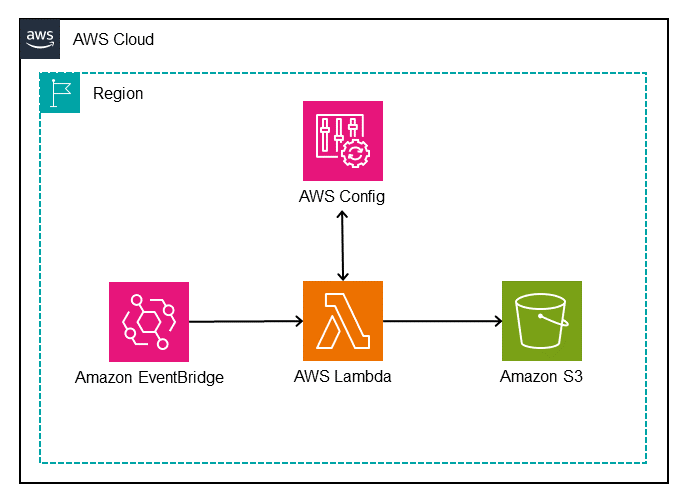
Figure 1 illustrates the solution.

Figure 1: Architectural diagram of the AWS Config Duplicate Rule Detection tool

Figure 1: Architectural diagram of the AWS Config Duplicate Rule Detection tool

The architecture shown in Figure 1 uses the following steps:

  1. An Amazon EventBridge Scheduler triggers an AWS Lambda function.
  2. The Lambda function completes the following tasks:
    1. Sends describe-config-rules to the AWS Config API, which returns details about the enabled AWS Config rules in the current AWS account and AWS Region.
    2. Iterates through the returned AWS Config rules to determine whether there are duplicate rules. If duplicates rules are found, they’re grouped together in JSON format.
    3. Writes the output to a time-stamped JSON file and saves it to an Amazon Simple Storage Service (S3) bucket for further analysis.

Prerequisites

You will need an AWS account with rules enabled using AWS Config, Security Hub standards, or AWS Control Tower controls. Before getting started, make sure that you also have a basic understanding of the following:

Walkthrough

To demonstrate the tool, use an AWS account that has two AWS Config conformance packs deployed—Operational Best Practices for HIPAA Security and Operational Best Practices for NIST CSF—along with the AWS Foundational Security Best Practices (FSBP) standard in Security Hub.

CloudFormation template review

The AWS CloudFormation template included in this post deploys several components:

  • DuplicateRuleDetectionLambda – A Lambda function that:
    • Sends describe-config-rules to the AWS Config API to return enabled Config rules.
    • Queries the returned rules to identify duplicate rules with identical parameters.
    • Writes the date-stamped output JSON file to the DetectionLambdaResultsBucket bucket.
  • DetectionLambdaPolicy – An AWS Identity and Access Management (IAM) policy attached to the DetectionLambdaRole role that allows access to:
    • Basic Lambda execution permissions.
    • config:DescribeConfigRules.
    • s3:PutObject with a constraint to only allow on the DetectionLambdaResultsBucket bucket.
  • DetectionLambdaRole – IAM role with a trust policy to allow only the AWS Lambda service to assume the role.
  • DetectionLambdaResultsBucket – An Amazon S3 bucket for storing the output JSON files written by the DuplicateRuleDetectionLambda function.
  • SchedulerForDuplicateRuleDetectionLambda – An EventBridge Scheduler used to trigger the DuplicateRuleDetectionLambda function.
    • ScheduleExpression – Property to define when the schedule runs.
  • IAMRoleforDuplicateRuleDetectionLambdaScheduler – An IAM role for SchedulerForDuplicateRuleDetectionLambda with an inline IAM policy to allow Lambda invocation.

Deployment

To deploy the solution, follow these steps:

  1. Download the CloudFormation template or open the template in CloudFormation.

    Note: The default frequency of the EventBridge Scheduler is to run on the first day of each month. Update the template CRON expression as needed before creating the stack.

  2. Sign in to the AWS Management Console and navigate to AWS CloudFormation by using the search feature at the top of the page.
  3. In the navigation pane, choose Stacks.
  4. At the top of the Stacks page, choose Create Stack, then select With new resources from the dropdown menu.
  5. On the Create stack page:
    1. For Prerequisite – Prepare template, leave the default setting: Template is ready.
    2. Under Specify template, choose Upload a template file, then select the downloaded duplicate-rule-detection.yaml file and choose Open.
  6. At the bottom of the page, choose Next.
  7. On the Specify stack details page:
    1. For Stack name, enter a name for the Stack, for example, duplicate-detection-rule-stack.
  8. At the bottom of the page, choose Next.
  9. On the Configure stack options page:
    1. (Optional) For Tags, add tags as needed.
    2. For Permissions, don’t choose a role, CloudFormation uses permissions based on your user credentials.
    3. For Stack failure options, leave the default option of Roll back all stack resources.
  10. At the bottom of the page, choose Next.
  11. On the Review page, review the details of your stack.
  12. After you review the stack creation settings, choose Create stack to launch your stack.
  13. From the CloudFormation Stack page, monitor the status of the stack as it updates from CREATE_IN_PROGRESS to CREATE_COMPLETE.
  14. From the Resources tab, you will see the resources that were created from the template.

Test

Use the following steps to invoke the Lambda function to create a one-time output for testing.

  1. Sign in to the AWS CloudFormation console using the AWS account from the prerequisites.
  2. From the navigation pane, choose Stacks and then select the Stack name you used when deploying this solution.
  3. Choose the Resources tab of the duplicate-detection-rule-stack and note the name of the Lambda function created for this solution.
  4. Navigate to the Lambda console and choose Functions from the navigation pane.
  5. Select the function name noted in Step 3.
  6. From the Code tab, choose Test, which will open a test window, then choose Invoke.
  7. Navigate to the Amazon S3 console and select the bucket name that was created as part of this solution to see the JSON output created by the Lambda function.
  8. Select the object created and choose Download to view the output file locally.

Validation

To view the JSON output file and understand the structure, open the downloaded output file with a text editor that supports JSON. Each duplicate rule is presented as a JSON object defined within left ({) and right (}) braces. Matching duplicate rules are grouped together in an array within left ([) and right (]) brackets and separated by commas.

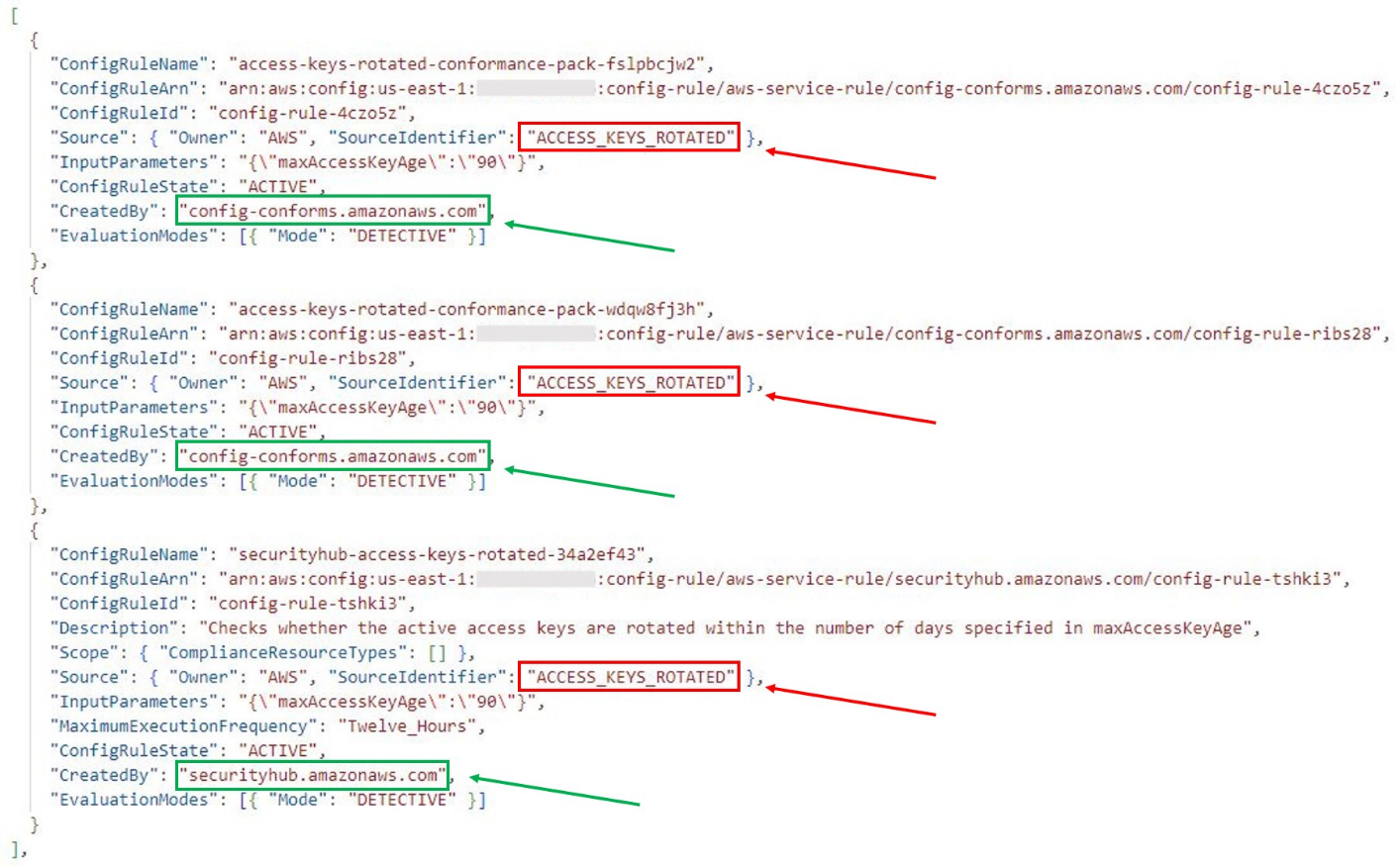
From the sample output that follows, you can see that there are three instances of the same AWS Config managed rule in this account:

  • The first two rules are deployed from two different conformance packs and the third rule was created by Security Hub.
  • The SourceIdentifier key value identifies the managed rule as ACCESS_KEYS_ROTATED.
  • The CreatedBy key value identifies the service that enabled the rule.

Each rule has the same InputParameters, which is a qualifier for how a duplicate rule is defined.

Figure 2: Solution output showing duplicate rules and keys

Figure 2: Solution output showing duplicate rules and keys

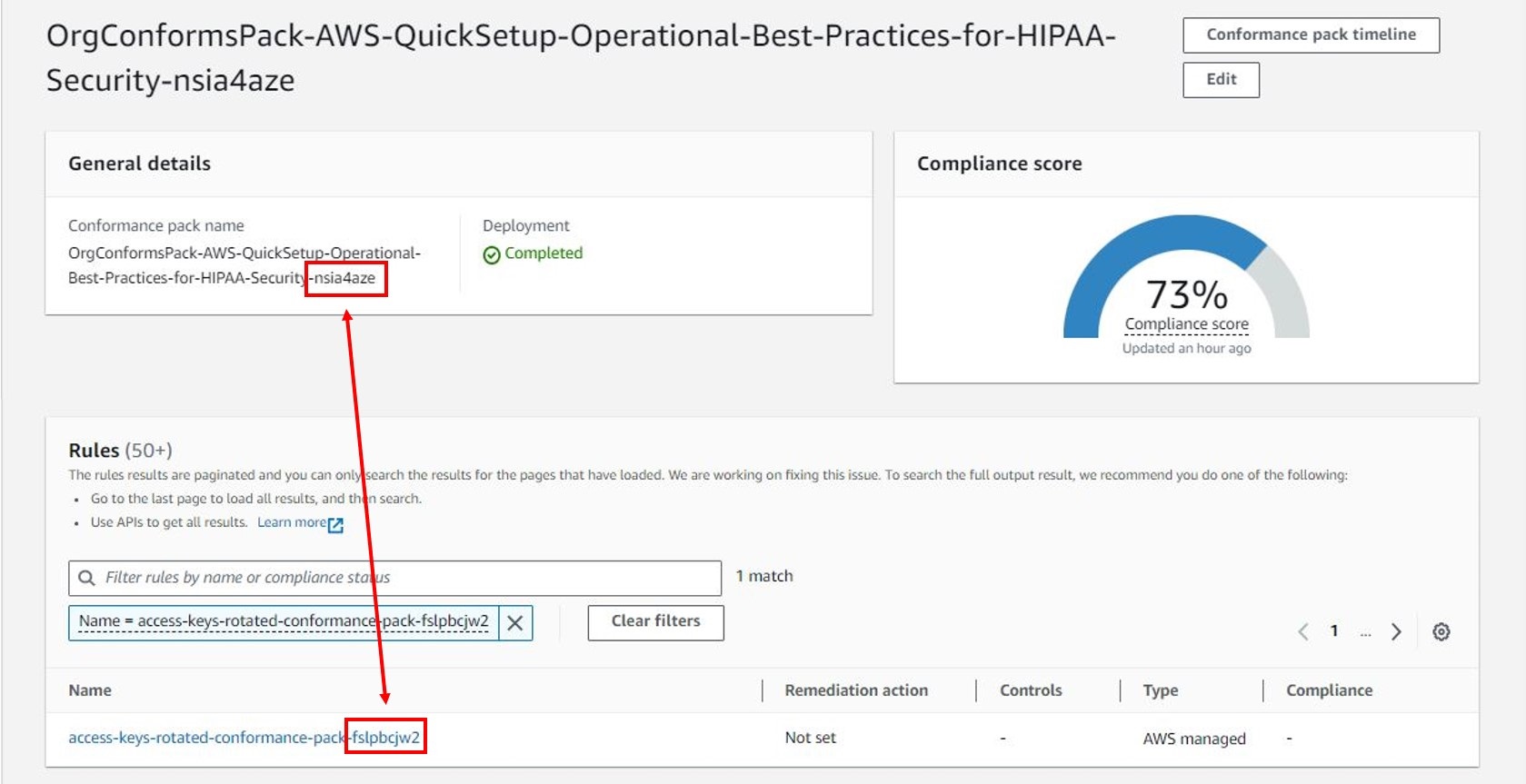
Now that you’ve identified the duplicate rules, further investigation is needed to identify the specific conformance pack and Security Hub standards that the rules are included in. The ConfigRuleName value is different for each duplicate rule and includes prefixes and suffixes based on how the rule was deployed:

  • Rules deployed using conformance packs will include a suffix to the displayed AWS Config rule name (for example, access-keys-rotated-conformance-pack-a1b2c3d4e).
  • Rules deployed using Security Hub standards include both a prefix and a suffix to the displayed AWS Config rule name (for example, securityhub-access-keys-rotated-a1b2c3).
  • Rules deployed using AWS Control Tower include a prefix to the displayed AWS Config rule name (for example, AWSControlTower_AWS-GR_EBS_OPTIMIZED_INSTANCE).

The ConfigRuleName value maps back to the specific conformance pack or Security Hub standard.

Figure 3. AWS Config conformance pack dashboard showing mapping between a rule and the conformance pack that enabled the rule

Figure 3: AWS Config conformance pack dashboard showing mapping between a rule and the conformance pack that enabled the rule

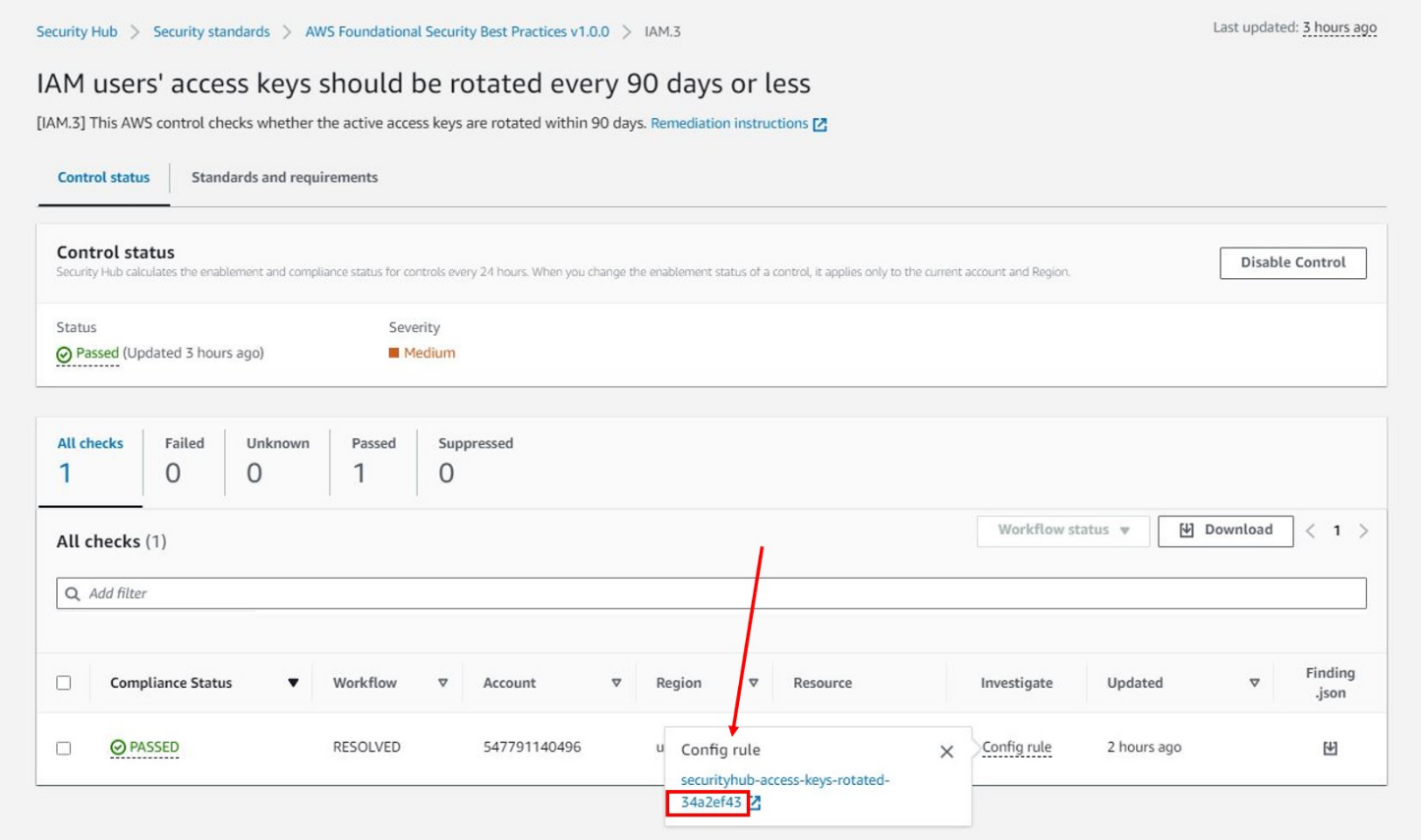
To identify which Security Hub standards the rule is enabled with, use the following steps.

  1. From the AWS Config console, choose Conformance pack from the navigation pane. Select a conformance pack and search the rules by filtering with the SourceIdentifier value from the output file.
  2. Using the AWS Config Developer Guide, search the List of Managed Rules using the SourceIdentifier and note the Resource Types for the managed rule (for example, AWS::IAM::User).
  3. Use the Security Hub controls reference to search for the AWS service that was included in the Resource Type from the previous step (that is, the IAM controls).
  4. Search for the corresponding control by using the SourceIdentifier and note the Control ID (that is, IAM.3).
  5. Sign in to the Security Hub console and choose Controls from the navigation pane. Search for the Control ID by filtering on ID and select the Control Title.
  6. Choose the Investigate tab and select the Config rule to view the corresponding AWS Config rule.
  7. Select the Standards and requirements tab on the Control page to view the standards that the AWS Config rule is a part of.
Figure 4: AWS Security Hub dashboard

Figure 4: AWS Security Hub dashboard

Duplicate resolution

After the assessment is complete and duplicate rules are identified, you can work to consolidate rules and resolve duplicates.

If the AWS account being evaluated is in AWS Organizations, a delegated administrator account in the organization might be registered to manage specific AWS services, such as AWS Config and Security Hub. Resolution might need to be completed from the delegated administrator account.

Some options you can take to resolve duplicate AWS Config rules include:

When deciding on an effective approach to consolidate rules and resolve duplicates, it’s helpful to consider additional capabilities such as visualization and automated remediation:

  • AWS Config provides a dashboard to view resources, rules, conformance packs, and their compliance states. You can also configure remediation actions in custom templates to target AWS Systems Manager Automation runbooks that define the actions that Systems Manager performs.
  • Security Hub provides a summary dashboard to identify areas of concern, including aggregating findings across an organization. You can customize the dashboard layout, add or remove widgets, and filter the data to focus on areas of particular interest. To configure automated response and remediation, Security Hub automatically sends new findings and updates to existing findings to EventBridge as EventBridge events. Customers can write simple rules to indicate which events and what automated actions to take when an event matches a rule.
  • AWS Control Tower provides a console to view control categories, individual controls, and status along with enabled OUs or accounts. Remediation of non-compliant resources is currently not supported through AWS Control Tower.

The best approach for consolidating rules and resolving duplicates is to start with an assessment of the preceding factors and develop a strategy for governance at scale. Security Hub provides a comprehensive view of compliance across an organization by collecting security data across AWS accounts, AWS services, and supported third-party products. Enabling one or more Security Hub standards provides a mechanism to deploy controls without risk of duplication. You can deploy additional controls individually from AWS Config or AWS Control Tower.

Clean up

Use the following steps to remove the resources you created in this walkthrough.

  1. Sign in to the AWS CloudFormation console and choose Stacks in the navigation pane.
  2. Select the Stack name you used when deploying this solution.
  3. Choose the Resources tab of the duplicate-detection-rule-stack and note the name of the S3 bucket created for this solution.
  4. Navigate to the Amazon S3 console.
  5. Select the radio button next to the bucket noted in Step 3, choose Empty, and follow the steps to empty the bucket.
  6. Navigate to the AWS CloudFormation console and choose Stacks from the navigation pane.
  7. Select the radio button next to the stack name used in the deployment step and choose Delete.
  8. Choose Delete to confirm that you want to delete the stack.
  9. From the CloudFormation Stack page, monitor the status of the duplicate-detection-rule-stack stack as it updates from DELETE_IN_PROGRESS to DELETE_COMPLETE.

Conclusion

For AWS customers, it’s critical to understand the compliance of resources as it relates to specific rules—such as default encryption settings or making sure that network connections are encrypted. You can use detective controls to evaluate the evolving state of your resources on AWS.

AWS Config rules, one type of detective control available on AWS, can be deployed individually or grouped together in AWS Config conformance packs or through Security Hub standards and the AWS Control Tower controls library. However, using more than one of these mechanisms can result in duplicate rules being deployed in an AWS account. This post provides a solution to assess the currently deployed AWS Config rules in a single AWS account and Region to identify when duplicate rules exist. After duplicates have been identified, you can make informed decisions about changes that you can make to consolidate rules and resolve duplicates. This approach will help to optimize your compliance posture by reducing complexity and eliminating unnecessary redundancy.

If you have feedback about this post, submit comments in the Comments section below.

Aaron Klotnia

Aaron Klotnia

Aaron is an AWS Solutions Architect focused on enabling healthcare customers in the worldwide public sector. He is passionate about analytics, security, and infrastructure modernization.

Abeera Hussain

Abeera Hussain

Abeera is an AWS Solutions Architect supporting the Worldwide Public Sector. She is an active member of the healthcare and life sciences technical field community and supports customers in using AWS to run efficient and secure workloads.

Todd Kudlicki

Todd Kudlicki

Todd is an AWS Solutions Architect for the Worldwide Public Sector. He is an active member of the healthcare and life sciences technical field community. Todd advises healthcare customers on deploying cloud foundations with established best practices for security and compliance.

Governing and securing AWS PrivateLink service access at scale in multi-account environments

Post Syndicated from Anandprasanna Gaitonde original https://aws.amazon.com/blogs/security/governing-and-securing-aws-privatelink-service-access-at-scale-in-multi-account-environments/

Amazon Web Services (AWS) customers have been adopting the approach of using AWS PrivateLink to have secure communication to AWS services, their own internal services, and third-party services in the AWS Cloud. As these environments scale, the number of PrivateLink connections outbound to external services and inbound to internal services increase and are spread out across multiple accounts in virtual private clouds (VPCs). While AWS Identity and Access Management (IAM) policies allow you to control access to individual PrivateLink services, customers want centralized governance for the use of PrivateLink in adherence with organizational standards and security needs.

This post provides an approach for centralized governance for PrivateLink based services across your multi-account environment. It provides a way to create preventative controls through the use of service control policies (SCPs) and detective controls through event-driven automation. This allows your application teams to consume internal and external services while adhering to organization policies and provides a mechanism for centralized control as your AWS environment grows.

Scenarios faced by customers

Figure 1 shows an example customer environment comprising a multi-account structure created through AWS Organizations or using AWS Control Tower. There are separate organizational units (OUs) pertaining to different business units (BUs) with respective accounts. The business services’ account hosts several backend services that are utilized by consuming applications for their functionality. Since these services provide functionality to more than one internal application and will require access across VPC and account boundaries, these are exposed through AWS PrivateLink. One such service is shown in the business services account.

The customer has partners that provide services for integration with the customer’s application stack. The approved partner account provides a service that is approved for use by the cloud administration team. The NotApproved partner account provides services that are not approved within the customer’s organization. The customer has another OU dedicated to application teams. The application 1 account has an application that consumes the business service of the approved partner account. It is also planning to use the service from the NotApproved partner, which should be blocked. The application in the application 2 account is planning on using AWS services through interface endpoints as well as the approved partner account through PrivateLink integration.

Note: Throughout this post, “organization” is used to refer to an organization that you create and manage through AWS Organizations.

Figure 1: A multi-account customer environment

Figure 1: A multi-account customer environment

Current challenges

Access to individual PrivateLink connections can be controlled through IAM policies. At scale, however, different teams use and adopt PrivateLink for incoming and outgoing connections, and the number of VPC endpoint policies to create and manage increases. As mentioned in the problem statement presented in the introduction, as the customer environment scales and the number of PrivateLink connections increases, customers want centralized guardrails to manage PrivateLink resources at scale. For our example, the customer would like to put the following controls in place:

Preventative controls:

Use case 1:

  • Allow creation of VPC endpoints and allow access only to PrivateLink enabled AWS services.
  • Allow creation of VPC endpoints and initiating connection only to approved PrivateLink enabled third-party services.
  • Allow creation of VPC endpoints and initiating connection only to internal business services owned by accounts in the same organization.

Use case 2:

  • Allow only a cloud admin role to add permissions to connect to an endpoint service to prevent connections from external clients to internal VPC endpoint services.

Detective controls:

Use case 3:

  • Detect if connections are made to PrivateLink services exposed by AWS accounts not belonging to the customer’s organization.

Use case 4:

  • Detect if connections are made by external AWS accounts (not belonging to the customer’s organization) to PrivateLink services exposed for internal use by the customer’s AWS accounts.

This post presents a solution that uses SCPs, AWS CloudTrail, and AWS Config to achieve governance. When the solution is deployed in your account, the following components are created as part of the architecture, as shown in Figure 2.

Figure 2: Resources deployed in the customer environment by the solution

Figure 2: Resources deployed in the customer environment by the solution

The following architecture is now in place:

  • SCPs to provide preventative controls for the PrivateLink connections.
  • Amazon EventBridge rules that are configured to trigger based on events from API calls captured by CloudTrail in specified accounts within specified OUs.
  • EventBridge rules in member accounts to send events to the event bus in the Audit account, and a central EventBridge rule in that account to trigger an AWS Lambda function based on PrivateLink related API calls.
  • A Lambda function that receives the events and validates if the VPC endpoint API call is allowed for the PrivateLink service and notifies a cloud administrator if a policy is violated.
  • An AWS Config rule that checks if PrivateLink enabled VPC endpoint services created within your AWS accounts have enabled auto accept of client connections and disabled notifications.

Use cases and solution approach

This section walks through each use case and how the solution components are used to address each use case.

Preventative control

Use case 1: Allowing the creation of a VPC endpoint connection to only AWS services and approved internal and third-party PrivateLink services

This solution allows creating a VPC endpoint for only approved partner PrivateLink services, PrivateLink services internal to the organization, and AWS services. This is implemented using an SCP and can be enforced at the individual account or OU. The approved partner services as well as the internal accounts that can host allowed PrivateLink services can be specified during the solution deployment. Application teams operating in AWS accounts within the customer environment can then create VPC endpoints to PrivateLink services of approved partners or AWS services. However, they will not be able to create a VPC endpoint to an unapproved PrivateLink service, for example. This is shown in Figure 3.

Figure 3: Allowed and disallowed paths in PrivateLink connections by SCP

Figure 3: Allowed and disallowed paths in PrivateLink connections by SCP

The SCP that allows you to do this preventative control is shown in the following code snippet. In this example SCP policy, AllowedPrivateLinkPartnerService-ServiceName refers to the service name of the allowed partner PrivateLink. Also, the SCP allows the creation of VPC endpoints to internal PrivateLink services that are hosted in AllowedPrivateLinkAccount. Make sure that this SCP does not interfere with the other policies you created within your organization. The solution currently uses ec2:VpceServiceName and ec2:VpceServiceOwner conditions to identify the PrivateLink service of AWS services or a third-party partner. These conditions can be used in an SCP to control the creation of VPC endpoints:

{
  "Version": "2012-10-17",
  "Statement": [
    {
      "Condition": {
        "StringNotEquals": {
          "ec2:VpceServiceName": [
            "AllowedPrivateLinkPartnerService-ServiceName",
          ],
          "ec2:VpceServiceOwner": [
            "AllowedPrivateLinkAccount",
            "amazon"
          ]
        }
      },
      "Action": [
        "ec2:CreateVpcEndpoint"
      ],
      "Resource": "arn:aws:ec2:*:*:vpc-endpoint/*",
      "Effect": "Deny",
      "Sid": "SCPDenyPrivateLink"
    }
  ]
}

Use case 2: Allow only a cloud admin role to add permissions to connect to an endpoint service

This solution makes sure that PrivateLink services that are owned and created in AWS accounts of the customer cannot be connected to consumers unless it is allowed by the cloud administrator role. The cloud administrator can then make sure that only legitimate internal AWS accounts are allowed access to that service and restrict access from other accounts outside of the customer’s organization. This is achieved through the use of a service control policy that will restrict modifications of permissions of the PrivateLink endpoint service. This makes sure that individual teams are not able to use the Allow principals configuration to open access to other entities directly, and only a cloud administrator role with the right permissions can make that change.

{
  "Version": "2012-10-17",
  "Statement": [
  
      "Sid": "Statement1",
      "Effect": "Deny",
      "Action": [
        "ec2:ModifyVpcEndpointServicePermissions"
      ],
      "Resource": [
        "*"
      ],
      "Condition": {
        "StringNotEquals": {
          "aws:PrincipalArn": [
            "arn:aws:iam::*:role/CloudNetworkAdmin"
          ]
        }
      }
    }
  ]
}

This policy can help in achieving the access control, as shown in Figure 4. The cloud administrator uses the Allow principals configuration of the business services PrivateLink service to provide access only to the application 1 account. The SCP allows only the cloud administrator to make the modification and does not allow another member of the team from bypassing that process and adding a nonapproved client application account to access the internal PrivateLink service.

Figure 4: Centralized control on access to the internal PrivateLink service to the customer’s own accounts

Figure 4: Centralized control on access to the internal PrivateLink service to the customer’s own accounts

Detective controls

For detective controls, we discuss two use cases that are deployed as part of the solution and can be enabled and disabled based on the test that you want to perform.

Use case 3: Detecting if connections are made by external AWS accounts (not belonging to the customer’s organization) to PrivateLink services exposed by the customer’s AWS accounts

In this use case, the customer would like to detect if connections are made to their business services from accounts outside of its organization. The solution uses individual member account trails for capturing API calls across the multi-account structure and cross-account EventBridge integration. CloudTrail events from member accounts capture events when a PrivateLink service connection is accepted through the API call event AcceptVPCConnectionEndpoint and sent to the event bus in the audit account. This triggers a Lambda function that then captures the information of the entity requesting the connection and details of the PrivateLink service and sends a notification to the cloud administrator. This is shown in Figure 5.

Figure 5: Detecting the creation of a VPC endpoint or accepting a PrivateLink service connection using CloudTrail events in EventBridge

Figure 5: Detecting the creation of a VPC endpoint or accepting a PrivateLink service connection using CloudTrail events in EventBridge

Custom AWS Config rule for detective control

This detective control mechanism works in cases where PrivateLink services are configured to manually accept client connections. If the endpoint is configured to automatically accept connections, CloudTrail will not generate an event when a connection is accepted. AWS PrivateLink allows customers to configure connection notifications to send connection notification events to an Amazon Simple Notification Service (Amazon SNS) topic. Cloud administrators can get the notifications if they are subscribed to the SNS topic. However, if the notification configuration is removed by the member account, there is no way for the cloud administrator to have visibility for new connections and effectively apply governance requirements.

This solution employs an AWS Config rule to detect if PrivateLink services are created with the Auto Accept Connections setting enabled or without a connection notification configuration and flag it as noncompliant.

This is depicted in Figure 6.

Figure 6: Custom AWS Config rule and SNS notification deployed as part of the solution

Figure 6: Custom AWS Config rule and SNS notification deployed as part of the solution

When a PrivateLink service is created by one of the business services teams, an AWS Config organization rule in the audit account will detect the event, and the custom Lambda function will check if the connection notification configuration is present. If not, then the AWS Config rule will flag the resource as noncompliant. Cloud administrators can view these in the AWS Config dashboard or receive notifications configured through AWS Config.

Use case 4: Detecting if connections are made to PrivateLink services exposed by AWS accounts not belonging to the customer’s organization.

Using the same approach as presented in use case 3, connections made to PrivateLink services exposed by AWS accounts outside of the customer’s organization can be detected through the API call event from CloudTrail CreateVPCEndpoint. This event is sent to the centralized event bus and the Lambda function to check against the criteria and provide notifications to the cloud administrator.

Deploy and test the solution

This section walks through how to deploy and test our recommended solution.

Prerequisites

To deploy the solution, first follow these steps.

  1. In your AWS Organizations multi-account environment, go to the management account and enable trusted access for AWS CloudFormation, enable trusted access for AWS Config, and enable trusted access for CloudTrail.
  2. Identify an account in your organization to serve as the audit account and set it up as a delegated administrator for CloudFormation, AWS Config, and CloudTrail. Follow these steps to perform this step:
    1. Register a delegated administrator for CloudFormation.
    2. Perform the steps mentioned in step 1 of this post to register a delegated administrator for AWS Config.
    3. Register a delegated admin for CloudTrail.
  3. The solution uses the deployment of CloudFormation StackSets with self-managed permissions to set up the resources in the audit account. In order to enable this, create AWSCloudFormationStackSetAdministrationRole in the management account and AWSCloudFormationStackSetExecutionRole in the audit account by using the steps in the topic Grant self-managed permissions.
  4. In a separate AWS account that is different than your multi-account environment, create two PrivateLink VPC endpoint services as explained in the documentation. You can use this template to create a test PrivateLink VPC endpoint service. These will serve as two partner services, one of which is allowed, and another is untrusted and not allowed. Make note of their service names.

Figure 7: Simulated partner services (approved and not approved) in a separate test account

Figure 7: Simulated partner services (approved and not approved) in a separate test account

Deploying the solution

  1. Go to the management account of your AWS Organizations multi-account environment and use this CloudFormation template to deploy the solution, or choose the following Launch Stack button:

    Launch stack

    CloudFormation stacks can be deployed using the AWS CloudFormation console or using the AWS CLI.

  2. This initially displays the Create stack page. Leave the details entered by default, and then choose Next.
  3. On the Specify stack details page, enter the details for the input parameters for this solution. The following table shows the details that you will provide when setting up the CloudFormation template on the Specify stack details page on the CloudFormation console.

    AWSOrganizationsId Identifier for your organization. This can be obtained from your management account as described in the AWS Organizations User Guide.
    AdminRoleArn Role of the persona who is allowed to modify PrivateLink endpoint permissions.
    AllowedPrivateLinkAccounts AWS account IDs of accounts in your OU that host PrivateLink services.
    AllowedPrivateLinkPartnerServices Specify the service name of the approved PrivateLink services from partners. If you want to test with a simulated partner PrivateLink, take the service name of PrivateLink services created in Step 4 of the prerequisites as the partner services to which connections should be allowed. The unique service name of the partner’s PrivateLink service is provided by the partner to the customer so that they can connect to it.
    AuditAccountId AWS account ID of the audit account in your multi-account environment.
    PLOrganizationUnit OU identifier for the organizational unit where the solution will perform preventative and detective control.
    Figure 8: CloudFormation template input parameters for the solution as it appears on the console

    Figure 8: CloudFormation template input parameters for the solution as it appears on the console

  4. Choose Next and keep the defaults for the rest of the fields. Then, on the Review and create page, choose Submit to finish deploying the solution.

Testing the solution

Once the solution is deployed successfully, follow these steps to test the solution:

  1. For an account specified in the AllowedPrivateLinkAccounts parameter, create a VPC endpoint service as explained in the topic Create a service powered by AWS PrivateLink. Instead of creating this manually, use this CloudFormation template to create a test VPC endpoint service.
  2. Sign in to a member account within the OU that you specified in the CloudFormation template.
  3. From the member account, create a VPC endpoint connection to the internal PrivateLink service created in the account from Step 1. This connection will set up successfully because it is internal to the organization and therefore allowed by the SCP policy, and is not flagged to the cloud administrator as violating organization policy.
  4. From the member account, create a VPC endpoint connection to the AWS service that is supporting PrivateLink, such as AWS Key Management Service (AWS KMS). This connection will set up successfully because it is internal to the organization and therefore allowed by the SCP policy, and is not flagged to the cloud administrator as violating organization policy.
  5. From the member account, create a VPC endpoint connection to the PrivateLink service created in Step 4 of the prerequisites. This connection will set up successfully because it is internal to the organization and therefore allowed by the SCP policy, and is not flagged to the cloud administrator as violating organization policy.
  6. From the member account, create a VPC endpoint connection to the PrivateLink service created in Step 4 of the prerequisites and that is not an allowed partner service. This connection will fail because it is not allowed by the SCP policy.
  7. From an account outside of your organization, create a VPC endpoint connection to the internal PrivateLink service created in Step 1. The connection setup is successful, but the cloud administrator will see the internal PrivateLink service as NOT COMPLIANT because the connection from external clients is considered to be not compliant with organization requirements in this solution. This information allows the cloud admin to quickly find the noncompliant resource and work with the PrivateLink service owner team to remediate the issue.
  8. From the member account, create another VPC endpoint service without configuring the notification configuration, and leave the Acceptance required field unchecked. Navigate to the AWS Config console in the audit account and go to Aggregator->Rules. Check the evaluation of the rule starting with “OrgConfigRule-pl-governance-rule….” Once the evaluation is complete, it will indicate that this VPC endpoint service is NOT COMPLIANT, whereas the service created in Step 1 will show as COMPLIANT.

Considerations

  • The solution described here takes the approach of allowing all VPC endpoint connections from within a customer’s organization to the PrivateLink services in specified accounts and detecting and notifying all external ones. This can be modified based on your specific use cases and requirements.
  • The solution uses AWS Config rules that are applied to specific accounts of your organization, even though the solution is applied at an OU level. The AWS Config rules created in this solution are scoped to evaluate VPC endpoint services and should incur charges accordingly. Refer to the AWS Config pricing page to understand usage-based pricing for the service.
  • Other services, such AWS Lambda and Amazon EventBridge, also incur usage-based charges. Please verify that these are deleted to prevent incurring unnecessary charges.
  • SCP policies only affect member accounts. They do not apply to the management account, so actions denied through an SCP policy multi-account will still be allowed in the management account.

Cleanup

You can delete the solution by following these steps to avoid unnecessary charges:

  • Delete the CloudFormation stack created as part of Step 4 of the prerequisites.
  • Delete the CloudFormation stack of the main solution deployed in the management account as part of the Deploying the solution section.
  • Delete the CloudFormation stack created as part of Step 1 of Testing the solution.

Summary

As customers adopt AWS PrivateLink throughout their environment, the mechanisms discussed in this post provide a way for administrators to govern and secure their PrivateLink services at scale. This approach can help you create a scalable solution where interconnections are aligned to the organization’s guidelines and security requirements. While this solution presents an approach to governance, customers can tailor this solution to their unique organizational requirements.

 
If you have feedback about this post, submit comments in the Comments section below. If you have questions about this post, contact AWS Support.
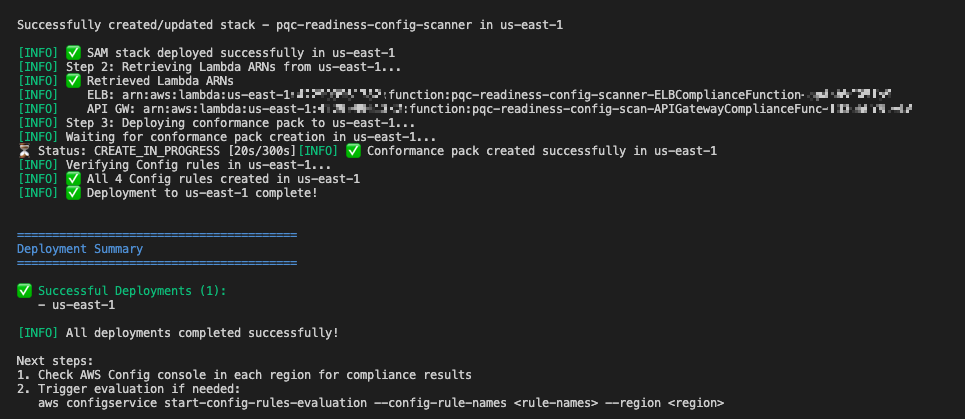
Want more AWS Security news? Follow us on Twitter.

Author

Anandprasanna Gaitonde

Anand is a Principal Solutions Architect at AWS, responsible for helping customers design and operate Well-Architected solutions to help them adopt the AWS Cloud successfully. He focuses on AWS networking and serverless technologies to design and develop solutions in the cloud across industry verticals. He holds a master of engineering in computer science and a postgraduate degree in software enterprise management.

Siva Devabakthini

Siva Devabakthini

Siva is a Senior Solutions Architect at AWS who covers hyperscale customers in the AWS Digital Native Business segment. He focuses on AWS security, data analytics, and artificial intelligence and machine learning (AI/ML) technologies to design and develop solutions in the cloud. Outside of work, Siva loves traveling, trying different cuisines, and being outdoors with his family.

Emmanuel Isimah

Emmanuel Isimah

Emmanuel is a Senior Solutions Architect at AWS who covers hyperscale customers in the enterprise retail space. He has a background in networking, security, and containers. Emmanuel helps customers build and secure innovative cloud solutions, solving their business problems by using data-driven approaches. Emmanuel’s areas of depth include security and compliance, containers, and networking.

Building a security-first mindset: three key themes from AWS re:Invent 2023

Post Syndicated from Clarke Rodgers original https://aws.amazon.com/blogs/security/building-a-security-first-mindset-three-key-themes-from-aws-reinvent-2023/

Amazon CSO Stephen Schmidt

Amazon CSO Stephen Schmidt

AWS re:Invent drew 52,000 attendees from across the globe to Las Vegas, Nevada, November 27 to December 1, 2023.

Now in its 12th year, the conference featured 5 keynotes, 17 innovation talks, and over 2,250 sessions and hands-on labs offering immersive learning and networking opportunities.

With dozens of service and feature announcements—and innumerable best practices shared by AWS executives, customers, and partners—the air of excitement was palpable. We were on site to experience all of the innovations and insights, but summarizing highlights isn’t easy. This post details three key security themes that caught our attention.

Security culture

When we think about cybersecurity, it’s natural to focus on technical security measures that help protect the business. But organizations are made up of people—not technology. The best way to protect ourselves is to foster a proactive, resilient culture of cybersecurity that supports effective risk mitigation, incident detection and response, and continuous collaboration.

In Sustainable security culture: Empower builders for success, AWS Global Services Security Vice President Hart Rossman and AWS Global Services Security Organizational Excellence Leader Sarah Currey presented practical strategies for building a sustainable security culture.

Rossman noted that many customers who meet with AWS about security challenges are attempting to manage security as a project, a program, or a side workstream. To strengthen your security posture, he said, you have to embed security into your business.

“You’ve got to understand early on that security can’t be effective if you’re running it like a project or a program. You really have to run it as an operational imperative—a core function of the business. That’s when magic can happen.” — Hart Rossman, Global Services Security Vice President at AWS

Three best practices can help:

  1. Be consistently persistent. Routinely and emphatically thank employees for raising security issues. It might feel repetitive, but treating security events and escalations as learning opportunities helps create a positive culture—and it’s a practice that can spread to other teams. An empathetic leadership approach encourages your employees to see security as everyone’s responsibility, share their experiences, and feel like collaborators.
  2. Brief the board. Engage executive leadership in regular, business-focused meetings. By providing operational metrics that tie your security culture to the impact that it has on customers, crisply connecting data to business outcomes, and providing an opportunity to ask questions, you can help build the support of executive leadership, and advance your efforts to establish a sustainable proactive security posture.
  3. Have a mental model for creating a good security culture. Rossman presented a diagram (Figure 1) that highlights three elements of security culture he has observed at AWS: a student, a steward, and a builder. If you want to be a good steward of security culture, you should be a student who is constantly learning, experimenting, and passing along best practices. As your stewardship grows, you can become a builder, and progress the culture in new directions.
Figure 1: Sample mental model for building security culture

Figure 1: Sample mental model for building security culture

Thoughtful investment in the principles of inclusivity, empathy, and psychological safety can help your team members to confidently speak up, take risks, and express ideas or concerns. This supports an escalation-friendly culture that can reduce employee burnout, and empower your teams to champion security at scale.

In Shipping securely: How strong security can be your strategic advantage, AWS Enterprise Strategy Director Clarke Rodgers reiterated the importance of security culture to building a security-first mindset.

Rodgers highlighted three pillars of progression (Figure 2)—aware, bolted-on, and embedded—that are based on meetings with more than 800 customers. As organizations mature from a reactive security posture to a proactive, security-first approach, he noted, security culture becomes a true business enabler.

“When organizations have a strong security culture and everyone sees security as their responsibility, they can move faster and achieve quicker and more secure product and service releases.” — Clarke Rodgers, Director of Enterprise Strategy at AWS
Figure 2: Shipping with a security-first mindset

Figure 2: Shipping with a security-first mindset

Human-centric AI

CISOs and security stakeholders are increasingly pivoting to a human-centric focus to establish effective cybersecurity, and ease the burden on employees.

According to Gartner, by 2027, 50% of large enterprise CISOs will have adopted human-centric security design practices to minimize cybersecurity-induced friction and maximize control adoption.

As Amazon CSO Stephen Schmidt noted in Move fast, stay secure: Strategies for the future of security, focusing on technology first is fundamentally wrong. Security is a people challenge for threat actors, and for defenders. To keep up with evolving changes and securely support the businesses we serve, we need to focus on dynamic problems that software can’t solve.

Maintaining that focus means providing security and development teams with the tools they need to automate and scale some of their work.

“People are our most constrained and most valuable resource. They have an impact on every layer of security. It’s important that we provide the tools and the processes to help our people be as effective as possible.” — Stephen Schmidt, CSO at Amazon

Organizations can use artificial intelligence (AI) to impact all layers of security—but AI doesn’t replace skilled engineers. When used in coordination with other tools, and with appropriate human review, it can help make your security controls more effective.

Schmidt highlighted the internal use of AI at Amazon to accelerate our software development process, as well as new generative AI-powered Amazon Inspector, Amazon Detective, AWS Config, and Amazon CodeWhisperer features that complement the human skillset by helping people make better security decisions, using a broader collection of knowledge. This pattern of combining sophisticated tooling with skilled engineers is highly effective, because it positions people to make the nuanced decisions required for effective security that AI can’t make on its own.

In How security teams can strengthen security using generative AI, AWS Senior Security Specialist Solutions Architects Anna McAbee and Marshall Jones, and Principal Consultant Fritz Kunstler featured a virtual security assistant (chatbot) that can address common security questions and use cases based on your internal knowledge bases, and trusted public sources.

Figure 3: Generative AI-powered chatbot architecture

Figure 3: Generative AI-powered chatbot architecture

The generative AI-powered solution depicted in Figure 3—which includes Retrieval Augmented Generation (RAG) with Amazon Kendra, Amazon Security Lake, and Amazon Bedrock—can help you automate mundane tasks, expedite security decisions, and increase your focus on novel security problems.

It’s available on Github with ready-to-use code, so you can start experimenting with a variety of large and multimodal language models, settings, and prompts in your own AWS account.

Secure collaboration

Collaboration is key to cybersecurity success, but evolving threats, flexible work models, and a growing patchwork of data protection and privacy regulations have made maintaining secure and compliant messaging a challenge.

An estimated 3.09 billion mobile phone users access messaging apps to communicate, and this figure is projected to grow to 3.51 billion users in 2025.

The use of consumer messaging apps for business-related communications makes it more difficult for organizations to verify that data is being adequately protected and retained. This can lead to increased risk, particularly in industries with unique recordkeeping requirements.

In How the U.S. Army uses AWS Wickr to deliver lifesaving telemedicine, Matt Quinn, Senior Director at The U.S. Army Telemedicine & Advanced Technology Research Center (TATRC), Laura Baker, Senior Manager at Deloitte, and Arvind Muthukrishnan, AWS Wickr Head of Product highlighted how The TATRC National Emergency Tele-Critical Care Network (NETCCN) was integrated with AWS Wickr—a HIPAA-eligible secure messaging and collaboration service—and AWS Private 5G, a managed service for deploying and scaling private cellular networks.

During the session, Quinn, Baker, and Muthukrishnan described how TATRC achieved a low-resource, cloud-enabled, virtual health solution that facilitates secure collaboration between onsite and remote medical teams for real-time patient care in austere environments. Using Wickr, medics on the ground were able to treat injuries that exceeded their previous training (Figure 4) with the help of end-to-end encrypted video calls, messaging, and file sharing with medical professionals, and securely retain communications in accordance with organizational requirements.

“Incorporating Wickr into Military Emergency Tele-Critical Care Platform (METTC-P) not only provides the security and privacy of end-to-end encrypted communications, it gives combat medics and other frontline caregivers the ability to gain instant insight from medical experts around the world—capabilities that will be needed to address the simultaneous challenges of prolonged care, and the care of large numbers of casualties on the multi-domain operations (MDO) battlefield.” — Matt Quinn, Senior Director at TATRC
Figure 4: Telemedicine workflows using AWS Wickr

Figure 4: Telemedicine workflows using AWS Wickr

In a separate Chalk Talk titled Bolstering Incident Response with AWS Wickr and Amazon EventBridge, Senior AWS Wickr Solutions Architects Wes Wood and Charles Chowdhury-Hanscombe demonstrated how to integrate Wickr with Amazon EventBridge and Amazon GuardDuty to strengthen incident response capabilities with an integrated workflow (Figure 5) that connects your AWS resources to Wickr bots. Using this approach, you can quickly alert appropriate stakeholders to critical findings through a secure communication channel, even on a potentially compromised network.

Figure 5: AWS Wickr integration for incident response communications

Figure 5: AWS Wickr integration for incident response communications

Security is our top priority

AWS re:Invent featured many more highlights on a variety of topics, including adaptive access control with Zero Trust, AWS cyber insurance partners, Amazon CTO Dr. Werner Vogels’ popular keynote, and the security partnerships showcased on the Expo floor. It was a whirlwind experience, but one thing is clear: AWS is working hard to help you build a security-first mindset, so that you can meaningfully improve both technical and business outcomes.

To watch on-demand conference sessions, visit the AWS re:Invent Security, Identity, and Compliance playlist on YouTube.

If you have feedback about this post, submit comments in the Comments section below.
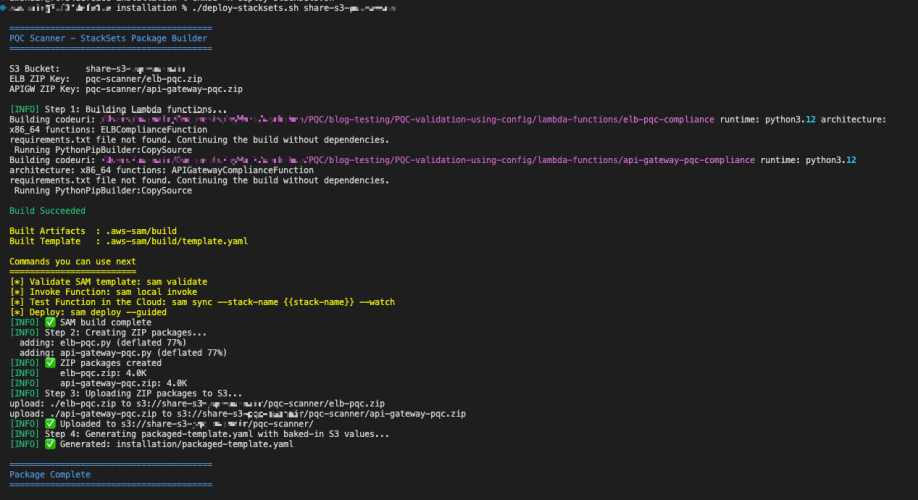
Want more AWS Security news? Follow us on Twitter.

Clarke Rodgers

Clarke Rodgers

Clarke is a Director of Enterprise Security at AWS. Clarke has more than 25 years of experience in the security industry, and works with enterprise security, risk, and compliance-focused executives to strengthen their security posture, and understand the security capabilities of the cloud. Prior to AWS, Clarke was a CISO for the North American operations of a multinational insurance company.

Anne Grahn

Anne Grahn

Anne is a Senior Worldwide Security GTM Specialist at AWS, based in Chicago. She has more than 13 years of experience in the security industry, and focuses on effectively communicating cybersecurity risk. She maintains a Certified Information Systems Security Professional (CISSP) certification.

Managing AWS Lambda runtime upgrades

Post Syndicated from Julian Wood original https://aws.amazon.com/blogs/compute/managing-aws-lambda-runtime-upgrades/

This post is written by Julian Wood, Principal Developer Advocate, and Dan Fox, Principal Specialist Serverless Solutions Architect.

AWS Lambda supports multiple programming languages through the use of runtimes. A Lambda runtime provides a language-specific execution environment, which provides the OS, language support, and additional settings, such as environment variables and certificates that you can access from your function code.

You can use managed runtimes that Lambda provides or build your own. Each major programming language release has a separate managed runtime, with a unique runtime identifier, such as python3.11 or nodejs20.x.

Lambda automatically applies patches and security updates to all managed runtimes and their corresponding container base images. Automatic runtime patching is one of the features customers love most about Lambda. When these patches are no longer available, Lambda ends support for the runtime. Over the next few months, Lambda is deprecating a number of popular runtimes, triggered by end of life of upstream language versions and of Amazon Linux 1.

Runtime Deprecation
Node.js 14 Nov 27, 2023
Node.js 16 Mar 11, 2024
Python 3.7 Nov 27, 2023
Java 8 (Amazon Linux 1) Dec 31, 2023
Go 1.x Dec 31, 2023
Ruby 2.7 Dec 07, 2023
Custom Runtime (provided) Dec 31, 2023

Runtime deprecation is not unique to Lambda. You must upgrade code using Python 3.7 or Node.js 14 when those language versions reach end of life, regardless of which compute service your code is running on. Lambda can help make this easier by tracking which runtimes you are using and providing deprecation notifications.

This post contains considerations and best practices for managing runtime deprecations and upgrades when using Lambda. Adopting these techniques makes managing runtime upgrades easier, especially when working with a large number of functions.

Specifying Lambda runtimes

When you deploy your function as a .zip file archive, you choose a runtime when you create the function. To change the runtime, you can update your function’s configuration.

Lambda keeps each managed runtime up to date by taking on the operational burden of patching the runtimes with security updates, bug fixes, new features, performance enhancements, and support for minor version releases. These runtime updates are published as runtime versions. Lambda applies runtime updates to functions by migrating the function from an earlier runtime version to a new runtime version.

You can control how your functions receive these updates using runtime management controls. Runtime versions and runtime updates apply to patch updates for a given Lambda runtime. Lambda does not automatically upgrade functions between major language runtime versions, for example, from nodejs14.x to nodejs18.x.

For a function defined as a container image, you choose a runtime and the Linux distribution when you create the container image. Most customers start with one of the Lambda base container images, although you can also build your own images from scratch. To change the runtime, you create a new container image from a different base container image.

Why does Lambda deprecate runtimes?

Lambda deprecates a runtime when upstream runtime language maintainers mark their language end-of-life or security updates are no longer available.

In almost all cases, the end-of-life date of a language version or operating system is published well in advance. The Lambda runtime deprecation policy gives end-of-life schedules for each language that Lambda supports. Lambda notifies you by email and via your Personal Health Dashboard if you are using a runtime that is scheduled for deprecation.

Lambda runtime deprecation happens in several stages. Lambda first blocks creating new functions that use a given runtime. Lambda later also blocks updating existing functions using the unsupported runtime, except to update to a supported runtime. Lambda does not block invocations of functions that use a deprecated runtime. Function invocations continue indefinitely after the runtime reaches end of support.

Lambda is extending the deprecation notification period from 60 days before deprecation to 180 days. Previously, blocking new function creation happened at deprecation and blocking updates to existing functions 30 days later. Blocking creation of new functions now happens 30 days after deprecation, and blocking updates to existing functions 60 days after.

Lambda occasionally delays deprecation of a Lambda runtime for a limited period beyond the end of support date of the language version that the runtime supports. During this period, Lambda only applies security patches to the runtime OS. Lambda doesn’t apply security patches to programming language runtimes after they reach their end of support date.

Can Lambda automatically upgrade my runtime?

Moving from one major version of the language runtime to another has a significant risk of being a breaking change. Some libraries and dependencies within a language have deprecation schedules and do not support versions of a language past a certain point. Moving functions to new runtimes could potentially impact large-scale production workloads that customers depend on.

Since Lambda cannot guarantee backward compatibility between major language versions, upgrading the Lambda runtime used by a function is a customer-driven operation.

Lambda function versions

You can use function versions to manage the deployment of your functions. In Lambda, you make code and configuration changes to the default function version, which is called $LATEST. When you publish a function version, Lambda takes a snapshot of the code, runtime, and function configuration to maintain a consistent experience for users of that function version. When you invoke a function, you can specify the version to use or invoke the $LATEST version. Lambda function versions are required when using Provisioned Concurrency or SnapStart.

Some developers use an auto-versioning process by creating a new function version each time they deploy a change. This results in many versions of a function, with only a single version actually in use.

While Lambda applies runtime updates to published function versions, you cannot update the runtime major version for a published function version, for example from Node.js 16 to Node.js 20. To update the runtime for a function, you must update the $LATEST version, then create a new published function version if necessary. This means that different versions of a function can use different runtimes. The following shows the same function with version 1 using Node.js 14.x and version 2 using Node.js 18.x.

Version 1 using Node.js 14.x

Version 1 using Node.js 14.x

Version 2 using Node.js 18.x

Version 2 using Node.js 18.x

Ensure you create a maintenance process for deleting unused function versions, which also impact your Lambda storage quota.

Managing function runtime upgrades

Managing function runtime upgrades should be part of your software delivery lifecycle, in a similar way to how you treat dependencies and security updates. You need to understand which functions are being actively used in your organization. Organizations can create prioritization based on security profiles and/or function usage. You can use the same communication mechanisms you may already be using for handling security vulnerabilities.

Implement preventative guardrails to ensure that developers can only create functions using supported runtimes. Using infrastructure as code, CI/CD pipelines, and robust testing practices makes updating runtimes easier.

Identifying impacted functions

There are tools available to check Lambda runtime configuration and to identify which functions and what published function versions are actually in use. Deleting a function or function version that is no longer in use is the simplest way to avoid runtime deprecations.

You can identify functions using deprecated or soon to be deprecated runtimes using AWS Trusted Advisor. Use the AWS Lambda Functions Using Deprecated Runtimes check, in the Security category that provides 120 days’ notice.

AWS Trusted Advisor Lambda functions using deprecated runtimes

AWS Trusted Advisor Lambda functions using deprecated runtimes

Trusted Advisor scans all versions of your functions, including $LATEST and published versions.

The AWS Command Line Interface (AWS CLI) can list all functions in a specific Region that are using a specific runtime. To find all functions in your account, repeat the following command for each AWS Region and account. Replace the <REGION> and <RUNTIME> parameters with your values. The --function-version ALL parameter causes all function versions to be returned; omit this parameter to return only the $LATEST version.

aws lambda list-functions --function-version ALL --region <REGION> --output text —query "Functions[?Runtime=='<RUNTIME>'].FunctionArn"

You can use AWS Config to create a view of the configuration of resources in your account and also store configuration snapshot data in Amazon S3. AWS Config queries do not support published function versions, they can only query the $LATEST version.

You can then use Amazon Athena and Amazon QuickSight to make dashboards to visualize AWS Config data. For more information, see the Implementing governance in depth for serverless applications learning guide.

Dashboard showing AWS Config data

Dashboard showing AWS Config data

There are a number of ways that you can track Lambda function usage.

You can use Amazon CloudWatch metrics explorer to view Lambda by runtime and track the Invocations metric within the default CloudWatch metrics retention period of 15 months.

Track invocations in Amazon CloudWatch metrics

Track invocations in Amazon CloudWatch metrics

You can turn on AWS CloudTrail data event logging to log an event every time Lambda functions are invoked. This helps you understand what identities are invoking functions and the frequency of their invocations.

AWS Cost and Usage Reports can show which functions are incurring cost and in use.

Limiting runtime usage

AWS CloudFormation Guard is an open-source evaluation tool to validate infrastructure as code templates. Create policy rules to ensure that developers only chose approved runtimes. For more information, see Preventative Controls with AWS CloudFormation Guard.

AWS Config rules allow you to check that Lambda function settings for the runtime match expected values. For more information on running these rules before deployment, see Preventative Controls with AWS Config. You can also reactively flag functions as non-compliant as your governance policies evolve. For more information, see Detective Controls with AWS Config.

Lambda does not currently have service control policies (SCP) to block function creation based on the runtime

Upgrade best practices

Use infrastructure as code tools to build and manage your Lambda functions, which can make it easier to manage upgrades.

Ensure you run tests against your functions when developing locally. Include automated tests as part of your CI/CD pipelines to provide confidence in your runtime upgrades. When rolling out function upgrades, you can use weighted aliases to shift traffic between two function versions as you monitor for errors and failures.

Using runtimes after deprecation

AWS strongly advises you to upgrade your functions to a supported runtime before deprecation to continue to benefit from security patches, bug-fixes, and the latest runtime features. While deprecation does not affect function invocations, you will be using an unsupported runtime, which may have unpatched security vulnerabilities. Your function may eventually stop working, for example, due to a certificate expiry.

Lambda blocks function creation and updates for functions using deprecated runtimes. To create or update functions after these operations are blocked, contact AWS Support.

Conclusion

Lambda is deprecating a number of popular runtimes over the next few months, reflecting the end-of-life of upstream language versions and Amazon Linux 1. This post covers considerations for managing Lambda function runtime upgrades.

For more serverless learning resources, visit Serverless Land.

Validate IAM policies with Access Analyzer using AWS Config rules

Post Syndicated from Anurag Jain original https://aws.amazon.com/blogs/security/validate-iam-policies-with-access-analyzer-using-aws-config-rules/

You can use AWS Identity and Access Management (IAM) Access Analyzer policy validation to validate IAM policies against IAM policy grammar and best practices. The findings generated by Access Analyzer policy validation include errors, security warnings, general warnings, and suggestions for your policy. These findings provide actionable recommendations that help you author policies that are functional and conform to security best practices.

You can use the IAM Policy Validator for AWS CloudFormation and the IAM Policy Validator for Terraform solutions to integrate Access Analyzer policy validation in a proactive manner within your continuous integration and continuous delivery CI/CD pipeline before deploying IAM policies to your Amazon Web Service (AWS) environment. Customers requested a similar capability to validate policies already deployed within their environments as part of the defense-in-depth strategy.

In this post, you learn how to set up and continuously validate and report on compliance of the IAM policies in your environment using AWS Config. AWS Config evaluates the configuration settings of your AWS resources with the help of AWS Config rules, which represent your ideal configuration settings. AWS Config continuously tracks the configuration changes that occur among your resources and checks whether these changes conform to the conditions in your rules. If a resource doesn’t conform to a rule, AWS Config flags the resource and the rule as noncompliant.

You can use this solution to validate identity-based and resource-based IAM policies attached to resources in your AWS environment that might have grammatical or syntactical errors or might not follow AWS best practices. The code used in this post is hosted in a GitHub repository.

Prerequisites

Before you get started, you need:

Step 1: Enable AWS Config to monitor global resources

To get started, enable AWS Config in your AWS account by following the instructions in the AWS Config Developer Guide.

Next, enable the recording of global resources:

  1. Open the AWS Management Console and go to the AWS Config console.
  2. Go to Settings and choose Edit to see the AWS Config recorder settings.
  3. Under General settings, select the Include globally recorded resource types to enable AWS Config to monitor IAM configuration items.
  4. Leave the other settings at their defaults.
  5. Choose Save.
    Figure 1: AWS Config settings page showing inclusion of globally recorded resource types

    Figure 1: AWS Config settings page showing inclusion of globally recorded resource types

  6. After choosing Save, you should see Recording is on at the top of the window.
    Figure 2: AWS Config settings page showing recorder settings

    Figure 2: AWS Config settings page showing recorder settings

    Note: You only need to enable globally recorded resource types in the AWS Region where you’ve configured AWS Config because they aren’t tied to a specific Region and can be used in other Regions. The globally recorded resource types that AWS Config supports are IAM users, groups, roles, and customer managed policies.

Step 2: Deploy the CloudFormation template

In this section, you deploy and test a sample AWS CloudFormation template that creates the following:

  • An AWS Config rule that reports the compliance of IAM policies.
  • An AWS Lambda function that implements and then makes the requests to IAM Access Analyzer and returns the policy validation findings.
  • An IAM role that’s used by the Lambda function with permissions to validate IAM policies using the Access Analyzer ValidatePolicy API.
  • An optional Amazon CloudWatch alarm and Amazon Simple Notification Service (Amazon SNS) topic to provide notification of Lambda function errors.

Follow the steps below to deploy the AWS CloudFormation template:

  1. To deploy the CloudFormation template using the following command, you must have the AWS Command Line Interface (AWS CLI) installed.
  2. Make sure you have configured your AWS CLI credentials.
  3. Clone the solution repository.
    git clone https://github.com/awslabs/aws-iam-access-analyzer-policy-validation-config-rule.git

  4. Navigate to the iam-access-analyzer-config-rule folder of the cloned repository.
    cd aws-iam-access-analyzer-policy-validation-config-rule

  5. Deploy the CloudFormation template using the AWS CLI.

    Note: Change the Region for the parameter — RegionToValidateGlobalResources — to the Region you enabled for global resources in Step 1. Optionally, you can add an email address if you want to receive notifications if the AWS Config rule stops working. Use the code that follows, replacing <us-east-1> with the Region you enabled and <EMAIL_ADDRESS> with your chosen address.

    aws cloudformation deploy \
        --stack-name iam-policy-validation-config-rule \
        --template-file templates/template.yaml \
        --capabilities CAPABILITY_IAM CAPABILITY_NAMED_IAM \
        --parameter-overrides RegionToValidateGlobalResources='<us-east-1>' \
                              ErrorNotificationsEmailAddress='<EMAIL_ADDRESS>'

  6. After successful deployment, you will see the message Successfully created/updated stack – iam-policy-validation-config-rule.
    Figure 3: Successful CloudFormation stack creation reported on the terminal

    Figure 3: Successful CloudFormation stack creation reported on the terminal

    Note: If the CloudFormation stack creation fails, go to the CloudFormation console and select the iam-policy-validation-config-rule stack. Choose Events to review the failure reason.

  7. After deployment, open the CloudFormation console and select the iam-policy-validation-config-rule stack.
  8. Choose Resources to see the resources created by the template.

Step 3: Check noncompliant resources discovered by AWS Config

The AWS Config rule is designed to mark resources that have IAM policies as noncompliant if the resources have validation findings found using the IAM Access Analyzer ValidatePolicy API.

  1. Open the AWS Config console
  2. Choose Rules from the navigation pane on the left and select policy-validation-config-rule.
    Figure 4: AWS Config rules page showing the rule details

    Figure 4: AWS Config rules page showing the rule details

  3. Scroll down on the page and filter Resources in Scope to see the noncompliant resources.
    Figure 5: AWS Config rules page showing noncompliant resources

    Figure 5: AWS Config rules page showing noncompliant resources

    Note: If the AWS Config rule isn’t invoked yet, you can choose Actions and select Re-evaluate to invoke it.

    Figure 6: AWS Config rules page showing evaluation invocation

    Figure 6: AWS Config rules page showing evaluation invocation

Step 4: Modify the AWS Config rule for exceptions

You might want to exempt certain resources from specific policy validation checks. For example, you might need to deploy a more privileged role—such as an administrator role—to your environment and you don’t want that role’s policies to have policy validation findings.

Figure 7: AWS Config rules page showing a noncompliant administrator role

Figure 7: AWS Config rules page showing a noncompliant administrator role

This section shows you how to configure an exceptions file to exempt specific resources.

  1. Start by configuring an exceptions file similar to the one that follows to log general warning findings across the accounts in your organization to make sure your policies conform to best practices by setting ignoreWarningFindings to False.
  2. Additionally, you might want to create an exception that allows administrator roles to use the iam:PassRole action on another role. This combination of action and resource is usually reserved for privileged users. The example file below shows an exception for all the roles created with Administrator in the role path from account 12345678912.

    Example exceptions file:

    {
    "global":{
    "ignoreWarningFindings":false
    },
    "12345678912":{
    "ignoreFindingsWith":[
    {
    "issueCode":"PASS_ROLE_WITH_STAR_IN_ACTION_AND_RESOURCE",
    "resourceType":"AWS::IAM::Role",
    "resourceName":"Administrator/*"
    }
    ]
    }
    }
  3. After the exceptions file is ready, upload the JSON file to the S3 bucket you created as a part of the prerequisites.

    You can manage this exceptions file by hosting it in a central Git repository. When teams need to exempt a particular resource from these policy validation checks, they can submit a pull request to the central repository. An approver can then approve or reject this request and, if approved, deploy the updated exceptions file.

  4. Modify the bucket policy so that the bucket is accessible to your AWS Config rule if the rule is operating in a different account than the bucket was created in. Below is an example of a bucket policy that allows the accounts in your organization to read the exceptions file.
    {
          "Version": "2012-10-17",
          "Statement": [{
              "Effect": "Allow",
              "Principal": {"AWS": "*"},
              "Action": "s3:GetObject",
              "Resource": "arn:aws:s3:::EXAMPLE-BUCKET/my-exceptions-file.json",
              "Condition": {
                  "StringEquals": {
                      "aws:PrincipalOrgId": "<your organization id here>"
                  }
              }
          }]
    }

    Note: For more examples visit example policy validation exceptions file contents.

  5. Deploy the CloudFormation template again using the ExceptionsS3BucketName and ExceptionsS3FilePrefix parameters. The file prefix should be the full prefix of the S3 object exceptions file.
    aws cloudformation deploy \
        --stack-name iam-policy-validation-config-rule \
        --template-file templates/template.yaml \
        --capabilities CAPABILITY_IAM CAPABILITY_NAMED_IAM \
        --parameter-overrides RegionToValidateGlobalResources='<us-east-1>' \
            		ExceptionsS3BucketName='EXAMPLE-BUCKET' \
           		 ExceptionsS3FilePrefix='my-exceptions-file.json'

  6. After you see the Successfully created/updated stack – iam-policy-validation-config-rule message on the terminal or command line and the AWS Config rule has been re-evaluated, the resources mentioned in the exception file should show as Compliant.
    Figure 8: Resource exception result

    Figure 8: Resource exception result

You can find additional customization options in the exceptions file schema.

Cleanup

To avoid recurring charges and to remove the resources used in testing the solution outlined in this post, use the CloudFormation console to delete the iam-policy-validation-config-rule CloudFormation stack.

Figure 9: AWS CloudFormation stack deletion

Figure 9: AWS CloudFormation stack deletion

Conclusion

In this post, we demonstrated how you can set up a centralized compliance and monitoring workflow using AWS IAM Access Analyzer policy validation with AWS Config rules to validate identity-based and resource-based policies attached to resources in your account. Using this solution, you can create a single pane of glass to monitor resources and govern centralized compliance for AWS Config-supported resources across accounts. You can also build and maintain exceptions customized to your environment as shown in the example policy validation exceptions file. You can visit the Access Analyzer policy checks reference page for a complete list of policy check validation errors and resolutions.

 
If you have feedback about this post, submit comments in the Comments section below. If you have questions about this post, contact AWS Support.
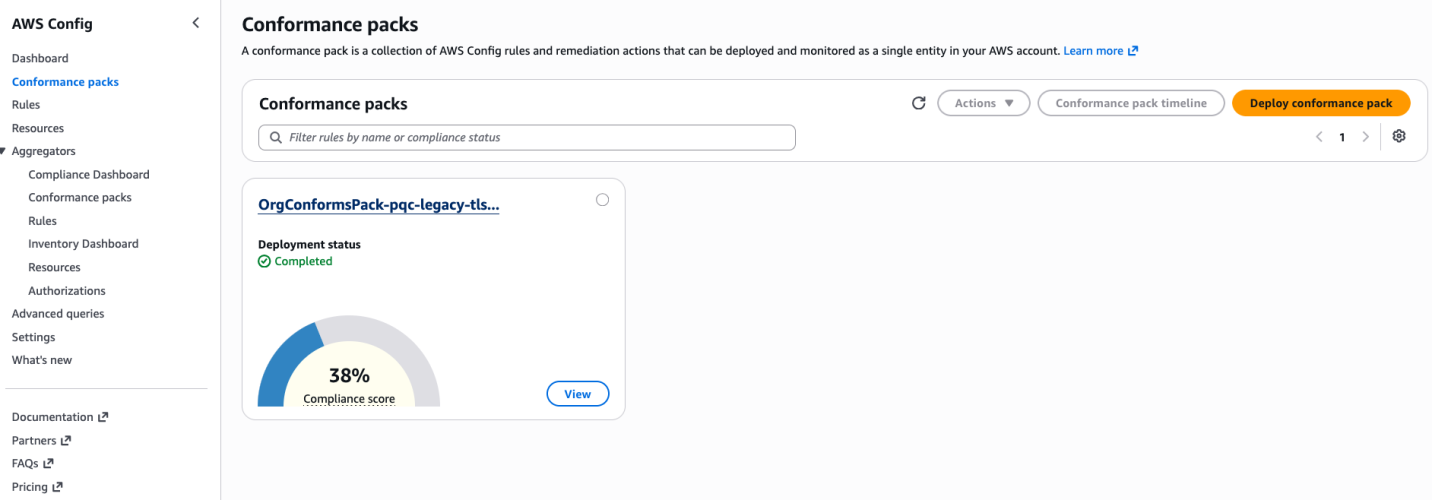
Want more AWS Security news? Follow us on Twitter.

Author

Matt Luttrell

Matt is a Sr. Solutions Architect on the AWS Identity Solutions team. When he’s not spending time chasing his kids around, he enjoys skiing, cycling, and the occasional video game.

Swara Gandhi

Swara Gandhi

Swara is a solutions architect on the AWS Identity Solutions team. She works on building secure and scalable end-to-end identity solutions. She is passionate about everything identity, security, and cloud.

AWS Week in Review – February 6, 2023

Post Syndicated from Marcia Villalba original https://aws.amazon.com/blogs/aws/aws-week-in-review-february-6-2023/

This post is part of our Week in Review series. Check back each week for a quick roundup of interesting news and announcements from AWS!

If you are looking for a new year challenge, the Serverless Developer Advocate team launched the 30 days of Serverless. You can follow the hashtag #30DaysServerless on LinkedIn, Twitter, or Instagram or visit the challenge page and learn a new Serverless concept every day.

Last Week’s Launches
Here are some launches that got my attention during the previous week.

AWS SAM CLIv1.72 added the capability to list important information from your deployments.

  • List the URLs of the Amazon API Gateway or AWS Lambda function URL.
    $ sam list endpoints
  • List the outputs of the deployed stack.
    $ sam list outputs
  • List the resources in the local stack. If a stack name is provided, it also shows the corresponding deployed resources and the ids.
    $ sam list resources

Amazon RDSNow supports increasing the allocated storage size when creating read replicas or when restoring a database from snapshots. This is very useful when your primary instances are near their maximum allocated storage capacity.

Amazon QuickSight Allows you to create Radar charts. Radar charts are a way to visualize multivariable data that are used to plot one or more groups of values over multiple common variables.

AWS Systems Manager AutomationNow integrates with Systems Manager Change Calendar. Now you can reduce the risks associated with changes in your production environment by allowing Automation runbooks to run during an allowed time window configured in the Change Calendar.

AWS AppConfigIt announced its integration with AWS Secrets Manager and AWS Key Management Service (AWS KMS). All sensitive data retrieved from Secrets Manager via AWS AppConfig can be encrypted at deployment time using an AWS KMS customer managed key (CMK).

For a full list of AWS announcements, be sure to keep an eye on the What’s New at AWS page.

Other AWS News
Some other updates and news that you may have missed:

AWS Cloud Clubs – Cloud Clubs are peer-to-peer user groups for students and young people aged 18–28. In these clubs, you can network, attend career-building events, earn benefits like AWS credits, and more. Learn more about the clubs in your region in the AWS student portal.

Get AWS Certified: Profesional challenge – You can register now for the certification challenge. Prepare for your AWS Professional Certification exam and get a 50 percent discount for the certification exam. Learn more about the challenge on the official page.

Podcast Charlas Técnicas de AWS – If you understand Spanish, this podcast is for you. Podcast Charlas Técnicas is one of the official AWS podcasts in Spanish, and every other week, there is a new episode. The podcast is for builders, and it shares stories about how customers implemented and learned AWS services, how to architect applications, and how to use new services. You can listen to all the episodes directly from your favorite podcast app or at AWS Podcasts en Español.

AWS Open-Source News and Updates – This is a newsletter curated by my colleague Ricardo to bring you the latest open-source projects, posts, events, and more.

Upcoming AWS Events
Check your calendars and sign up for these AWS events:

AWS re:Invent recaps – We had a lot of announcements during re:Invent. If you want to learn them all in your language and in your area, check the re: Invent recaps. All the upcoming ones are posted on this site, so check it regularly to find an event nearby.

AWS Innovate Data and AI/ML edition – AWS Innovate is a free online event to learn the latest from AWS experts and get step-by-step guidance on using AI/ML to drive fast, efficient, and measurable results.

  • AWS Innovate Data and AI/ML edition for Asia Pacific and Japan is taking place on February 22, 2023. Register here.
  • Registrations for AWS Innovate EMEA (March 9, 2023) and the Americas (March 14, 2023) will open soon. Check the AWS Innovate page for updates.

You can find details on all upcoming events, in-person or virtual, here.

That’s all for this week. Check back next Monday for another Week in Review!

— Marcia

Three key security themes from AWS re:Invent 2022

Post Syndicated from Anne Grahn original https://aws.amazon.com/blogs/security/three-key-security-themes-from-aws-reinvent-2022/

AWS re:Invent returned to Las Vegas, Nevada, November 28 to December 2, 2022. After a virtual event in 2020 and a hybrid 2021 edition, spirits were high as over 51,000 in-person attendees returned to network and learn about the latest AWS innovations.

Now in its 11th year, the conference featured 5 keynotes, 22 leadership sessions, and more than 2,200 breakout sessions and hands-on labs at 6 venues over 5 days.

With well over 100 service and feature announcements—and innumerable best practices shared by AWS executives, customers, and partners—distilling highlights is a challenge. From a security perspective, three key themes emerged.

Turn data into actionable insights

Security teams are always looking for ways to increase visibility into their security posture and uncover patterns to make more informed decisions. However, as AWS Vice President of Data and Machine Learning, Swami Sivasubramanian, pointed out during his keynote, data often exists in silos; it isn’t always easy to analyze or visualize, which can make it hard to identify correlations that spark new ideas.

“Data is the genesis for modern invention.” – Swami Sivasubramanian, AWS VP of Data and Machine Learning

At AWS re:Invent, we launched new features and services that make it simpler for security teams to store and act on data. One such service is Amazon Security Lake, which brings together security data from cloud, on-premises, and custom sources in a purpose-built data lake stored in your account. The service, which is now in preview, automates the sourcing, aggregation, normalization, enrichment, and management of security-related data across an entire organization for more efficient storage and query performance. It empowers you to use the security analytics solutions of your choice, while retaining control and ownership of your security data.

Amazon Security Lake has adopted the Open Cybersecurity Schema Framework (OCSF), which AWS cofounded with a number of organizations in the cybersecurity industry. The OCSF helps standardize and combine security data from a wide range of security products and services, so that it can be shared and ingested by analytics tools. More than 37 AWS security partners have announced integrations with Amazon Security Lake, enhancing its ability to transform security data into a powerful engine that helps drive business decisions and reduce risk. With Amazon Security Lake, analysts and engineers can gain actionable insights from a broad range of security data and improve threat detection, investigation, and incident response processes.

Strengthen security programs

According to Gartner, by 2026, at least 50% of C-Level executives will have performance requirements related to cybersecurity risk built into their employment contracts. Security is top of mind for organizations across the globe, and as AWS CISO CJ Moses emphasized during his leadership session, we are continuously building new capabilities to help our customers meet security, risk, and compliance goals.

In addition to Amazon Security Lake, several new AWS services announced during the conference are designed to make it simpler for builders and security teams to improve their security posture in multiple areas.

Identity and networking

Authorization is a key component of applications. Amazon Verified Permissions is a scalable, fine-grained permissions management and authorization service for custom applications that simplifies policy-based access for developers and centralizes access governance. The new service gives developers a simple-to-use policy and schema management system to define and manage authorization models. The policy-based authorization system that Amazon Verified Permissions offers can shorten development cycles by months, provide a consistent user experience across applications, and facilitate integrated auditing to support stringent compliance and regulatory requirements.

Additional services that make it simpler to define authorization and service communication include Amazon VPC Lattice, an application-layer service that consistently connects, monitors, and secures communications between your services, and AWS Verified Access, which provides secure access to corporate applications without a virtual private network (VPN).

Threat detection and monitoring

Monitoring for malicious activity and anomalous behavior just got simpler. Amazon GuardDuty RDS Protection expands the threat detection capabilities of GuardDuty by using tailored machine learning (ML) models to detect suspicious logins to Amazon Aurora databases. You can enable the feature with a single click in the GuardDuty console, with no agents to manually deploy, no data sources to enable, and no permissions to configure. When RDS Protection detects a potentially suspicious or anomalous login attempt that indicates a threat to your database instance, GuardDuty generates a new finding with details about the potentially compromised database instance. You can view GuardDuty findings in AWS Security Hub, Amazon Detective (if enabled), and Amazon EventBridge, allowing for integration with existing security event management or workflow systems.

To bolster vulnerability management processes, Amazon Inspector now supports AWS Lambda functions, adding automated vulnerability assessments for serverless compute workloads. With this expanded capability, Amazon Inspector automatically discovers eligible Lambda functions and identifies software vulnerabilities in application package dependencies used in the Lambda function code. Actionable security findings are aggregated in the Amazon Inspector console, and pushed to Security Hub and EventBridge to automate workflows.

Data protection and privacy

The first step to protecting data is to find it. Amazon Macie now automatically discovers sensitive data, providing continual, cost-effective, organization-wide visibility into where sensitive data resides across your Amazon Simple Storage Service (Amazon S3) estate. With this new capability, Macie automatically and intelligently samples and analyzes objects across your S3 buckets, inspecting them for sensitive data such as personally identifiable information (PII), financial data, and AWS credentials. Macie then builds and maintains an interactive data map of your sensitive data in S3 across your accounts and Regions, and provides a sensitivity score for each bucket. This helps you identify and remediate data security risks without manual configuration and reduce monitoring and remediation costs.

Encryption is a critical tool for protecting data and building customer trust. The launch of the end-to-end encrypted enterprise communication service AWS Wickr offers advanced security and administrative controls that can help you protect sensitive messages and files from unauthorized access, while working to meet data retention requirements.

Management and governance

Maintaining compliance with regulatory, security, and operational best practices as you provision cloud resources is key. AWS Config rules, which evaluate the configuration of your resources, have now been extended to support proactive mode, so that they can be incorporated into infrastructure-as-code continuous integration and continuous delivery (CI/CD) pipelines to help identify noncompliant resources prior to provisioning. This can significantly reduce time spent on remediation.

Managing the controls needed to meet your security objectives and comply with frameworks and standards can be challenging. To make it simpler, we launched comprehensive controls management with AWS Control Tower. You can use it to apply managed preventative, detective, and proactive controls to accounts and organizational units (OUs) by service, control objective, or compliance framework. You can also use AWS Control Tower to turn on Security Hub detective controls across accounts in an OU. This new set of features reduces the time that it takes to define and manage the controls required to meet specific objectives, such as supporting the principle of least privilege, restricting network access, and enforcing data encryption.

Do more with less

As we work through macroeconomic conditions, security leaders are facing increased budgetary pressures. In his opening keynote, AWS CEO Adam Selipsky emphasized the effects of the pandemic, inflation, supply chain disruption, energy prices, and geopolitical events that continue to impact organizations.

Now more than ever, it is important to maintain your security posture despite resource constraints. Citing specific customer examples, Selipsky underscored how the AWS Cloud can help organizations move faster and more securely. By moving to the cloud, agricultural machinery manufacturer Agco reduced costs by 78% while increasing data retrieval speed, and multinational HVAC provider Carrier Global experienced a 40% reduction in the cost of running mission-critical ERP systems.

“If you’re looking to tighten your belt, the cloud is the place to do it.” – Adam Selipsky, AWS CEO

Security teams can do more with less by maximizing the value of existing controls, and bolstering security monitoring and analytics capabilities. Services and features announced during AWS re:Invent—including Amazon Security Lake, sensitive data discovery with Amazon Macie, support for Lambda functions in Amazon Inspector, Amazon GuardDuty RDS Protection, and more—can help you get more out of the cloud and address evolving challenges, no matter the economic climate.

Security is our top priority

AWS re:Invent featured many more highlights on a variety of topics, such as Amazon EventBridge Pipes and the pre-announcement of GuardDuty EKS Runtime protection, as well as Amazon CTO Dr. Werner Vogels’ keynote, and the security partnerships showcased on the Expo floor. It was a whirlwind week, but one thing is clear: AWS is working harder than ever to make our services better and to collaborate on solutions that ease the path to proactive security, so that you can focus on what matters most—your business.

For more security-related announcements and on-demand sessions, see A recap for security, identity, and compliance sessions at AWS re:Invent 2022 and the AWS re:Invent Security, Identity, and Compliance playlist on YouTube.

If you have feedback about this post, submit comments in the Comments section below.
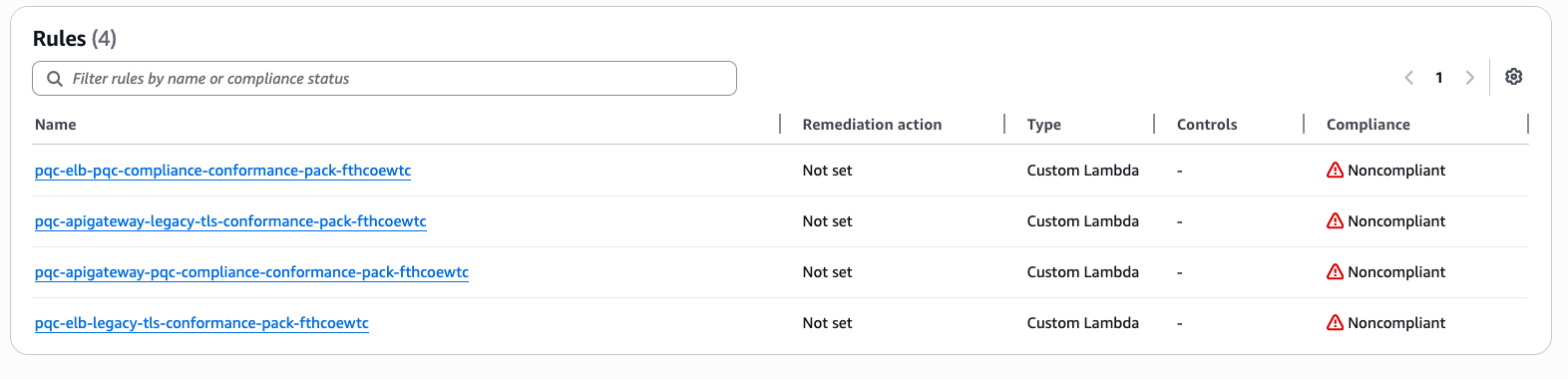
Anne Grahn

Anne Grahn

Anne is a Senior Worldwide Security GTM Specialist at AWS based in Chicago. She has more than a decade of experience in the security industry, and has a strong focus on privacy risk management. She maintains a Certified Information Systems Security Professional (CISSP) certification.

Author

Paul Hawkins

Paul helps customers of all sizes understand how to think about cloud security so they can build the technology and culture where security is a business enabler. He takes an optimistic approach to security and believes that getting the foundations right is the key to improving your security posture.

The most visited AWS DevOps blogs in 2022

Post Syndicated from original https://aws.amazon.com/blogs/devops/the-most-visited-aws-devops-blogs-in-2022/

As we kick off 2023, I wanted to take a moment to highlight the top posts from 2022. Without further ado, here are the top 10 AWS DevOps Blog posts of 2022.

#1: Integrating with GitHub Actions – CI/CD pipeline to deploy a Web App to Amazon EC2

Coming in at #1, Mahesh Biradar, Solutions Architect and Suresh Moolya, Cloud Application Architect use GitHub Actions and AWS CodeDeploy to deploy a sample application to Amazon Elastic Compute Cloud (Amazon EC2).

Architecture diagram from the original post.

#2: Deploy and Manage GitLab Runners on Amazon EC2

Sylvia Qi, Senior DevOps Architect, and Sebastian Carreras, Senior Cloud Application Architect, guide us through utilizing infrastructure as code (IaC) to automate GitLab Runner deployment on Amazon EC2.

Architecture diagram from the original post.

#3 Multi-Region Terraform Deployments with AWS CodePipeline using Terraform Built CI/CD

Lerna Ekmekcioglu, Senior Solutions Architect, and Jack Iu, Global Solutions Architect, demonstrate best practices for multi-Region deployments using HashiCorp Terraform, AWS CodeBuild, and AWS CodePipeline.

Architecture diagram from the original post.

#4 Use the AWS Toolkit for Azure DevOps to automate your deployments to AWS

Mahmoud Abid, Senior Customer Delivery Architect, leverages the AWS Toolkit for Azure DevOps to deploy AWS CloudFormation stacks.

Architecture diagram from the original post.

#5 Deploy and manage OpenAPI/Swagger RESTful APIs with the AWS Cloud Development Kit

Luke Popplewell, Solutions Architect, demonstrates using AWS Cloud Development Kit (AWS CDK) to build and deploy Amazon API Gateway resources using the OpenAPI specification.

Architecture diagram from the original post.

#6: How to unit test and deploy AWS Glue jobs using AWS CodePipeline

Praveen Kumar Jeyarajan, Senior DevOps Consultant, and Vaidyanathan Ganesa Sankaran, Sr Modernization Architect, discuss unit testing Python-based AWS Glue Jobs in AWS CodePipeline.

Architecture diagram from the original post.

#7: Jenkins high availability and disaster recovery on AWS

James Bland, APN Global Tech Lead for DevOps, and Welly Siauw, Sr. Partner solutions architect, discuss the challenges of architecting Jenkins for scale and high availability (HA).

Architecture diagram from the original post.

#8: Monitor AWS resources created by Terraform in Amazon DevOps Guru using tfdevops

Harish Vaswani, Senior Cloud Application Architect, and Rafael Ramos, Solutions Architect, explain how you can configure and use tfdevops to easily enable Amazon DevOps Guru for your existing AWS resources created by Terraform.

Architecture diagram from the original post.

#9: Manage application security and compliance with the AWS Cloud Development Kit and cdk-nag

Arun Donti, Senior Software Engineer with Twitch, demonstrates how to integrate cdk-nag into an AWS Cloud Development Kit (AWS CDK) application to provide continual feedback and help align your applications with best practices.

Featured image from the original post.

#10: Smithy Server and Client Generator for TypeScript (Developer Preview)

Adam Thomas, Senior Software Development Engineer, demonstrate how you can use Smithy to define services and SDKs and deploy them to AWS Lambda using a generated client.

Architecture diagram from the original post.

A big thank you to all our readers! Your feedback and collaboration are appreciated and help us produce better content.


About the author:

Brian Beach

Brian Beach has over 20 years of experience as a Developer and Architect. He is currently a Principal Solutions Architect at Amazon Web Services. He holds a Computer Engineering degree from NYU Poly and an MBA from Rutgers Business School. He is the author of “Pro PowerShell for Amazon Web Services” from Apress. He is a regular author and has spoken at numerous events. Brian lives in North Carolina with his wife and three kids.

New – AWS Config Rules Now Support Proactive Compliance

Post Syndicated from Danilo Poccia original https://aws.amazon.com/blogs/aws/new-aws-config-rules-now-support-proactive-compliance/

When operating a business, you have to find the right balance between speed and control for your cloud operations. On one side, you want to have the ability to quickly provision the cloud resources you need for your applications. At the same time, depending on your industry, you need to maintain compliance with regulatory, security, and operational best practices.

AWS Config provides rules, which you can run in detective mode to evaluate if the configuration settings of your AWS resources are compliant with your desired configuration settings. Today, we are extending AWS Config rules to support proactive mode so that they can be run at any time before provisioning and save time spent to implement custom pre-deployment validations.

When creating standard resource templates, platform teams can run AWS Config rules in proactive mode so that they can be tested to be compliant before being shared across your organization. When implementing a new service or a new functionality, development teams can run rules in proactive mode as part of their continuous integration and continuous delivery (CI/CD) pipeline to identify noncompliant resources.

You can also use AWS CloudFormation Guard in your deployment pipelines to check for compliance proactively and ensure that a consistent set of policies are applied both before and after resources are provisioned.

Let’s see how this works in practice.

Using Proactive Compliance with AWS Config
In the AWS Config console, I choose Rules in the navigation pane. In the rules table, I see the new Enabled evaluation mode column that specifies whether the rule is proactive or detective. Let’s set up my first rule.

Console screenshot.

I choose Add rule, and then I enter rds-storage in the AWS Managed Rules search box to find the rds-storage-encrypted rule. This rule checks whether storage encryption is enabled for your Amazon Relational Database Service (RDS) DB instances and can be added in proactive or detective evaluation mode. I choose Next.

Console screenshot.

In the Evaluation mode section, I turn on proactive evaluation. Now both the proactive and detective evaluation switches are enabled.

Console screenshot.

I leave all the other settings to their default values and choose Next. In the next step, I review the configuration and add the rule.

Console screenshot.

Now, I can use proactive compliance via the AWS Config API (including the AWS Command Line Interface (CLI) and AWS SDKs) or with CloudFormation Guard. In my CI/CD pipeline, I can use the AWS Config API to check the compliance of a resource before creating it. When deploying using AWS CloudFormation, I can set up a CloudFormation hook to proactively check my configuration before the actual deployment happens.

Let’s do an example using the AWS CLI. First, I call the StartProactiveEvaluationResponse API with in input the resource ID (for reference only), the resource type, and its configuration using the CloudFormation schema. For simplicity, in the database configuration, I only use the StorageEncrypted option and set it to true to pass the evaluation. I use an evaluation timeout of 60 seconds, which is more than enough for this rule.

aws configservice start-resource-evaluation --evaluation-mode PROACTIVE \
    --resource-details '{"ResourceId":"myDB",
                         "ResourceType":"AWS::RDS::DBInstance",
                         "ResourceConfiguration":"{\"StorageEncrypted\":true}",
                         "ResourceConfigurationSchemaType":"CFN_RESOURCE_SCHEMA"}' \
    --evaluation-timeout 60
{
    "ResourceEvaluationId": "be2a915a-540d-4595-ac7b-e105e39b7980-1847cb6320d"
}

I get back in output the ResourceEvaluationId that I use to check the evaluation status using the GetResourceEvaluationSummary API. In the beginning, the evaluation is IN_PROGRESS. It usually takes a few seconds to get a COMPLIANT or NON_COMPLIANT result.

aws configservice get-resource-evaluation-summary \
    --resource-evaluation-id be2a915a-540d-4595-ac7b-e105e39b7980-1847cb6320d
{
    "ResourceEvaluationId": "be2a915a-540d-4595-ac7b-e105e39b7980-1847cb6320d",
    "EvaluationMode": "PROACTIVE",
    "EvaluationStatus": {
        "Status": "SUCCEEDED"
    },
    "EvaluationStartTimestamp": "2022-11-15T19:13:46.029000+00:00",
    "Compliance": "COMPLIANT",
    "ResourceDetails": {
        "ResourceId": "myDB",
        "ResourceType": "AWS::RDS::DBInstance",
        "ResourceConfiguration": "{\"StorageEncrypted\":true}"
    }
}

As expected, the Amazon RDS configuration is compliant to the rds-storage-encrypted rule. If I repeat the previous steps with StorageEncrypted set to false, I get a noncompliant result.

If more than one rule is enabled for a resource type, all applicable rules are run in proactive mode for the resource evaluation. To find out individual rule-level compliance for the resource, I can call the GetComplianceDetailsByResource API:

aws configservice get-compliance-details-by-resource \
    --resource-evaluation-id be2a915a-540d-4595-ac7b-e105e39b7980-1847cb6320d
{
    "EvaluationResults": [
        {
            "EvaluationResultIdentifier": {
                "EvaluationResultQualifier": {
                    "ConfigRuleName": "rds-storage-encrypted",
                    "ResourceType": "AWS::RDS::DBInstance",
                    "ResourceId": "myDB",
                    "EvaluationMode": "PROACTIVE"
                },
                "OrderingTimestamp": "2022-11-15T19:14:42.588000+00:00",
                "ResourceEvaluationId": "be2a915a-540d-4595-ac7b-e105e39b7980-1847cb6320d"
            },
            "ComplianceType": "COMPLIANT",
            "ResultRecordedTime": "2022-11-15T19:14:55.588000+00:00",
            "ConfigRuleInvokedTime": "2022-11-15T19:14:42.588000+00:00"
        }
    ]
}

If, when looking at these details, your desired rule is not invoked, be sure to check that proactive mode is turned on.

Availability and Pricing
Proactive compliance will be available in all commercial AWS Regions where AWS Config is offered but it might take a few days to deploy this new capability across all these Regions. I’ll update this post when this deployment is complete. To see which AWS Config rules can be turned into proactive mode, see the Developer Guide.

You are charged based on the number of AWS Config rule evaluations recorded. A rule evaluation is recorded every time a resource is evaluated for compliance against an AWS Config rule. Rule evaluations can be run in detective mode and/or in proactive mode, if available. If you are running a rule in both detective mode and proactive mode, you will be charged for only the evaluations in detective mode. For more information, see AWS Config pricing.

With this new feature, you can use AWS Config to check your rules before provisioning and avoid implementing your own custom validations.

Danilo

AWS Week in Review – October 10, 2022

Post Syndicated from Marcia Villalba original https://aws.amazon.com/blogs/aws/aws-week-in-review-october-10-2022/

This post is part of our Week in Review series. Check back each week for a quick roundup of interesting news and announcements from AWS!

I had an amazing start to the week last week as I was speaking at the AWS Community Day NL. This event had 500 attendees and over 70 speakers, and Dr. Werner Vogels, Amazon CTO, delivered the keynote. AWS Community Days are community-led conferences organized by local communities, with a variety of workshops and sessions. I recommend checking your region for any of these events.

Community Day NL

Last Week’s Launches
Here are some launches that got my attention during the previous week.

Amazon S3 Object Lambda now supports using your own code to change the results of HEAD and LIST requests, besides GET (which we launched last year). This feature now enables more capabilities for what you can do with S3 Object Lambda. Danilo made a Twitter thread with lots of use cases for this new launch.

Amazon SageMaker Clarify now can provide near real-time explanations for ML predictions. SageMaker Clarify is a service that provides explainability by ML models individual predictions. These explanations are important for developers to get visibility into their training data and models to identify potential bias.

AWS Storage Gateway now supports 15 TiB tapes. It increased the maximum supported virtual tape size on Tape Gateway from 5 TiB to 15 TiB, so you can store more data on a single virtual tape, and you can reduce the number of tapes you need to manage.

Amazon Aurora Serverless v2 now supports AWS CloudFormation. Early this year, we announced the general availability of Aurora Serverless v2, and now you can use AWS CloudFormation Templates to deploy and change the database along with the rest of your infrastructure.

AWS Config now supports 15 new resource types, including AWS DataSync, Amazon GuardDuty, Amazon Simple Email Service (Amazon SES), AWS AppSync, AWS Cloud Map, Amazon EC2, and AWS AppConfig. With this launch, you can use AWS Config to monitor configuration data for the supported resource types in your AWS account, and you can see how the configuration changes.

For a full list of AWS announcements, be sure to keep an eye on the What’s New at AWS page.

Other AWS News
Some other updates and news that you may have missed:

This week an article about how AWS is leading a pilot project to turn the Greek island of Naxos into a smart island caught my attention. The project introduces smart solutions for mobility, primary healthcare, and the transport of goods. The solution has been built based on four pillars that were important for the island: sustainability, telehealth, leisure, and digital skills. Check out the whole article to learn what they are doing.

Podcast Charlas Técnicas de AWS – If you understand Spanish, this podcast is for you. Podcast Charlas Técnicas is one of the official AWS podcasts in Spanish, and every other week there is a new episode. The podcast is meant for builders, and it shares stories about how customers implemented and learned AWS services, how to architect applications, and how to use new services. You can listen to all the episodes directly from your favorite podcast app or at AWS Podcasts en español.

AWS open-source news and updates – This is a newsletter curated by my colleague Ricardo to bring you the latest open-source projects, posts, events, and more.

Upcoming AWS Events
Check your calendars and sign up for these AWS events:

AWS re:Invent reserved seating opens on October 11. If you are planning to attend, book a spot in advance for your favorite sessions. AWS re:Invent is our biggest conference of the year, it happens in Las Vegas from November 28 to December 2, and registrations are open. Many writers of this blog have sessions at re:Invent, and you can search the event agenda using our names.

I started the post talking about AWS Community Days, and there is one in Warsaw, Poland, on October 14. If you are around Warsaw during this week, you can first check out the AWS Pop-up Hub in Warsaw that runs October 10-14 and then join for the Community Day.

On October 20, there is a virtual event for modernizing .NET workloads with Windows containers on AWS, You can register for free.

That’s all for this week. Check back next Monday for another Week in Review!

— Marcia

AWS Week in Review – September 19, 2022

Post Syndicated from Jeff Barr original https://aws.amazon.com/blogs/aws/aws-week-in-review-september-19-2022/

Things are heating up in Seattle, with preparation for AWS re:Invent 2022 well underway. Later this month the entire News Blog team will participate in our now-legendary “speed storming” event. Over the course of three or four days, each of the AWS service teams with a launch in the works for re:Invent will give us an overview and share their PRFAQ (Press Release + FAQ) with us. After the meetings conclude, we’ll divvy up the launches and get to work on our blog posts!

Last Week’s Launches
Here are some of the launches that caught my eye last week:

Amazon Lex Visual Conversation Builder – This new tool makes bot design easier than ever. You get a complete view of the conversation in one place, and you can manage complex conversations that have dynamic paths. To learn more and see the builder in action, read Announcing Visual Conversation Builder for Amazon Lex on the AWS Machine Learning Blog.

AWS Config Conformance Pack Price Reduction – We have reduced the price for evaluation of AWS Config Conformance Packs by up to 58%. These packs contain AWS Config rules and remediation actions that can be deployed as a single entity in account and a region, or across an entire organization. The price reduction took effect September 14, 2022; it lowers the cost per evaluation and decreases the number of evaluations needed to reach each pricing tier.

CDK (Cloud Development Kit) Tree View – The AWS CloudFormation console now includes a Constructs tree view that automatically organizes the resources that were synthesized by AWS CDK constructs. The top level of the tree view includes the named constructs and the second level includes all of the resources generated by the named construct. Read the What’s New to learn more!

AWS Incident Detection and ResponseAWS Enterprise Support customers now have access to proactive monitoring and incident management for selected workloads running on AWS. As part of the onboarding process, AWS experts review workloads for reliability and operational excellence, and work with the customer to identify critical metrics and associated alarms. Incident Management Engineers then monitor the workloads, detect critical incidents, and initiate a call bridge to accelerate recovery. Read the AWS Incident Detection and Response page and the What’s New to learn more.

ECS Cluster Scale-In Speed – Auto-Scaled ECS clusters can now scale-in (reduce capacity) faster than ever before. Previously, each scale-in would reduce the capacity within an Auto Scaling Group (ASG) by 5% at a time. Now, capacity can be reduced by up to 50%. This change makes scaling more responsive to workload changes while still maintaining availability for spiky traffic patterns. Read Faster Scaling-In for Amazon ECS Cluster Auto Scaling and the What’s New to learn more.

AWS Outposts Rack Networking – AWS Outposts racks now support local gateway ingress routing to redirect incoming traffic to an Elastic Network Interface (ENI) attached to an EC2 instance before traffic reaches workloads running on the Outpost; read Deploying Local Gateway Ingress Routing on AWS Outposts to learn more. Outposts racks now also support direct VPC routing to simplify the process of communicating with your on-premises network; read the What’s New to learn more.

Amazon SWF Console Experience Updated – The new console experience for Amazon Simple Workflow Service (SWF) gives you better visibility of your SWF domains along with additional information about your workflow executions and events. You can efficiently manage high-volume workloads and quickly find the detailed information that helps you to operate at peak efficiency. Read the What’s New to learn more.

Dynamic Intermediate Certificate Authorities – According to a post on the AWS Security Blog, public certificates issued through AWS Certificate Manager (ACM) will soon (October 11, 2022) be issued from one of several intermediate certificate authorities managed by Amazon. This change will be transparent to most customers and applications, except those that make use of certificate pinning. In some cases, older browsers will need to be updated in order to properly trust the Amazon Trust Services CAs.

X in Y – We launched existing AWS services and instance types in additional regions:

Other AWS News
AWS Open Source – Check out Installment #127 of the AWS Open Source News and Updates Newsletter to learn about new tools for AWS CloudFormation, AWS Lambda, Terraform / EKS, AWS Step Functions, AWS Identity and Access Management (IAM), and more.

New Case Study – Read this new case study to learn how the Deep Data Research Computing Center at Stanford University is creating tools designed to bridge the gap between biology and computer science in order to help researchers in precision medicine deliver tangible medical solutions.

Application Management – The AWS DevOps Blog showed you how to Implement Long-Running Deployments with AWS CloudFormation Custom Resources Using AWS Step Functions.

Architecture – The AWS Architecture Blog showed you how to Maintain Visibility Over the Use of Cloud Architecture Patterns.

Big Data – The AWS Big Data Blog showed you how to Optimize Amazon EMR Costs for Legacy and Spark Workloads.

Migration – In a two-part series on the AWS Compute Blog, Marcia showed you how to Lift and Shift a Web Application to AWS Serverless (Part 1, Part 2).

Mobile – The AWS Mobile Blog showed you how to Build Your Own Application for Route Optimization and Tracking using AWS Amplify and Amazon Location Service.

Security – The AWS Security Blog listed 10 Reasons to Import a Certificate into AWS Certificate Manager and 154 AWS Services that have achieved HITRUST Certificiation.

Training and Certification – The AWS Training and Certification Blog talked about The Value of Data and Pursuing the AWS Certified Data Analytics – Specialty Certification.

Containers – The AWS Containers Blog encouraged you to Achieve Consistent Application-Level Tagging for Cost Tracking in AWS.

Upcoming AWS Events
Check your calendar and sign up for an AWS event in your locale:

AWS Summits – Come together to connect, collaborate, and learn about AWS. Registration is open for the following in-person AWS Summits: Mexico City (September 21–22), Bogotá (October 4), and Singapore (October 6).

AWS Community DaysAWS Community Day events are community-led conferences to share and learn with one another. In September, the AWS community in the US will run events in Arlington, Virginia (September 30). In Europe, Community Day events will be held in October. Join us in Amersfoort, Netherlands (October 3), Warsaw, Poland (October 14), and Dresden, Germany (October 19).

AWS Fest – This third-party event will feature AWS influencers, community heroes, industry leaders, and AWS customers, all sharing AWS optimization secrets (September 29th), register here.

Stay Informed
I hope that you have enjoyed this look back at some of what took place in AWS-land last week! To better keep up with all of this news, please check out the following resources:

Jeff;

A multi-dimensional approach helps you proactively prepare for failures, Part 3: Operations and process resiliency

Post Syndicated from Piyali Kamra original https://aws.amazon.com/blogs/architecture/a-multi-dimensional-approach-helps-you-proactively-prepare-for-failures-part-3-operations-and-process-resiliency/

In Part 1 and Part 2 of this series, we discussed how to build application layer and infrastructure layer resiliency.

In Part 3, we explore how to develop resilient applications, and the need to test and break our operational processes and run books. Processes are needed to capture baseline metrics and boundary conditions. Detecting deviations from accepted baselines requires logging, distributed tracing, monitoring, and alerting. Testing automation and rollback are part of continuous integration/continuous deployment (CI/CD) pipelines. Keeping track of network, application, and system health requires automation.

In order to meet recovery time and point objective (RTO and RPO, respectively) requirements of distributed applications, we need automation to implement failover operations across multiple layers. Let’s explore how a distributed system’s operational resiliency needs to be addressed before it goes into production, after it’s live in production, and when a failure happens.

Pattern 1: Standardize and automate AWS account setup

Create processes and automation for onboarding users and providing access to AWS accounts according to their role and business unit, as defined by the organization. Federated access to AWS accounts and organizations simplifies cost management, security implementation, and visibility. Having a strategy for a suitable AWS account structure can reduce the blast radius in case of a compromise.

  1. Have auditing mechanisms in place. AWS CloudTrail monitors compliance, improving security posture, and auditing all the activity records across AWS accounts.
  2. Practice the least privilege security model when setting up access to the CloudTrail audit logs plus network and applications logs. Follow best practices on service control policies and IAM boundaries to help ensure your AWS accounts stay within your organization’s access control policies.
  3. Explore AWS Budgets, AWS Cost Anomaly Detection, and AWS Cost Explorer for cost-optimizing techniques. The AWS Compute Optimizer and Instance Scheduler on AWS resource resizing and auto-shutdown for non-working hours. A Beginner’s Guide to AWS Cost Management explores multiple cost-optimization techniques.
  4. Use AWS CloudFormation and AWS Config to detect infrastructure drift and take corrective actions to make resources compliant, as demonstrated in Figure 1.
Compliance control and drift detection

Figure 1. Compliance control and drift detection

Pattern 2: Documenting knowledge about the distributed system

Document high-level infrastructure and dependency maps.

Define availability characteristics of distributed system. Systems have components with varying RTO and RPO needs. Document application component boundaries and capture dependencies with other infrastructure components, including Domain Name System (DNS), IAM permissions; and access patterns, secrets, and certificates. Discover dependencies through solutions, such as Workload Discovery on AWS, to plan resiliency methods and ensure the order of execution of various steps during failover are correct.

Capture non-functional requirements (NFRs), such as business key performance indicators (KPIs), RTO, and RPO, for your composing services. NFRs are quantifiable and define system availability, reliability, and recoverability requirements. They should include throughput, page-load, and response time requirements. Quantify the RTO and RPO of different components of the distributed system by defining them. The KPIs measure if you are meeting the business objectives. As mentioned in Part 2: Infrastructure layer, RTO and RPO help define the failover and data recovery procedures.

Pattern 3: Define CI/CD pipelines for application code and infrastructure components

Establish a branching strategy. Implement automated checks for version and tagging compliance in feature/sprint/bug fix/hot fix/release candidate branches, according to your organization’s policies. Define appropriate release management processes and responsibility matrices, as demonstrated in Figures 2 and 3.

Test at all levels as part of an automated pipeline. This includes security, unit, and system testing. Create a feedback loop that provides the ability to detect issues and automate rollback in case of production failures, which are indicated by business KPI negative impact and other technical metrics.

Define the release management process

Figure 2. Define the release management process

Sample roles and responsibility matrix

Figure 3. Sample roles and responsibility matrix

Pattern 4: Keep code in a source control repository, regardless of GitOps

Merge requests and configuration changes follow the same process as application software. Just like application code, manage infrastructure as code (IaC) by checking the code into a source control repository, submitting pull requests, scanning code for vulnerabilities, alerting and sending notifications, running validation tests on deployments, and having an approval process.

You can audit your infrastructure drift, design reusable and repeatable patterns, and adhere to your distributed application’s RTO objectives by building your IaC (Figure 4). IaC is crucial for operational resilience.

CI/CD pipeline for deploying IaC

Figure 4. CI/CD pipeline for deploying IaC

Pattern 5: Immutable infrastructure

An immutable deployment pipeline launches a set of new instances running the new application version. You can customize immutability at different levels of granularity depending on which infrastructure part is being rebuilt for new application versions, as in Figure 5.

The more immutable infrastructure components being rebuilt, the more expensive deployments are in both deployment time and actual operational costs. Immutable infrastructure also is easier to rollback.

Different granularity levels of immutable infrastructure

Figure 5. Different granularity levels of immutable infrastructure

Pattern 6: Test early, test often

In a shift-left testing approach, begin testing in the early stages, as demonstrated in Figure 6. This can surface defects that can be resolved in a more time- and cost-effective manner compared with after code is released to production.

Shift-left test strategy

Figure 6. Shift-left test strategy

Continuous testing is an essential part of CI/CD. CI/CD pipelines can implement various levels of testing to reduce the likelihood of defects entering production. Testing can include: unit, functional, regression, load, and chaos.

Continuous testing requires testing and breaking existing boundary conditions, and updating test cases if the boundaries have changed. Test cases should test distributed systems’ idempotency. Chaos testing benefits our incidence response mechanisms for distributed systems that have multiple integration points. By testing our auto scaling and failover mechanisms, chaos testing improves application performance and resiliency.

AWS Fault Injection Simulator (AWS FIS) is a service for chaos testing. An experiment template contains actions, such as StopInstance and StartInstance, along with targets on which the test will be performed. In addition, you can mention stop conditions and check if they triggered the required Amazon CloudWatch alarms, as demonstrated in Figure 7.

AWS Fault Injection Simulator architecture for chaos testing

Figure 7. AWS Fault Injection Simulator architecture for chaos testing

Pattern 7: Providing operational visibility

In production, operational visibility across multiple dimensions is necessary for distributed systems (Figure 8). To identify performance bottlenecks and failures, use AWS X-Ray and other open-source libraries for distributed tracing.

Write application, infrastructure, and security logs to CloudWatch. When metrics breach alarm thresholds, integrate the corresponding alarms with Amazon Simple Notification Service or a third-party incident management system for notification.

Monitoring services, such as Amazon GuardDuty, are used to analyze CloudTrail, virtual private cloud flow logs, DNS logs, and Amazon Elastic Kubernetes Service audit logs to detect security issues. Monitor AWS Health Dashboard for maintenance, end-of-life, and service-level events that could affect your workloads. Follow the AWS Trusted Advisor recommendations to ensure your accounts follow best practices.

Dimensions for operational visibility

Figure 8. Dimensions for operational visibility (click the image to enlarge)

Figure 9 explores various application and infrastructure components integrating with AWS logging and monitoring components for increased problem detection and resolution, which can provide operational visibility.

Tooling architecture to provide operational visibility

Figure 9. Tooling architecture to provide operational visibility

Having an incident response management plan is an important mechanism for providing operational visibility. Successful execution of this requires educating the stakeholders on the AWS shared responsibility model, simulation of anticipated and unanticipated failures, documentation of the distributed system’s KPIs, and continuous iteration. Figure 10 demonstrates the features of a successful incidence response management plan.

An incidence response management plan

Figure 10. An incidence response management plan (click the image to enlarge)

Conclusion

In Part 3, we discussed continuous improvement of our processes by testing and breaking them. In order to understand the baseline level metrics, service-level agreements, and boundary conditions of our system, we need to capture NFRs. Operational capabilities are required to capture deviations from baseline, which is where alerting, logging, and distributed tracing come in. Processes should be defined for automating frequent testing in CI/CD pipelines, detecting network issues, and deploying alternate infrastructure stacks in failover regions based on RTOs and RPOs. Automating failover steps depends on metrics and alarms, and by using chaos testing, we can simulate failover scenarios.

Prepare for failure, and learn from it. Working to maintain resilience is an ongoing task.

Want to learn more?

Building AWS Lambda governance and guardrails

Post Syndicated from Julian Wood original https://aws.amazon.com/blogs/compute/building-aws-lambda-governance-and-guardrails/

When building serverless applications using AWS Lambda, there are a number of considerations regarding security, governance, and compliance. This post highlights how Lambda, as a serverless service, simplifies cloud security and compliance so you can concentrate on your business logic. It covers controls that you can implement for your Lambda workloads to ensure that your applications conform to your organizational requirements.

The Shared Responsibility Model

The AWS Shared Responsibility Model distinguishes between what AWS is responsible for and what customers are responsible for with cloud workloads. AWS is responsible for “Security of the Cloud” where AWS protects the infrastructure that runs all the services offered in the AWS Cloud. Customers are responsible for “Security in the Cloud”, managing and securing their workloads. When building traditional applications, you take on responsibility for many infrastructure services, including operating systems and network configuration.

Traditional application shared responsibility

Traditional application shared responsibility

One major benefit when building serverless applications is shifting more responsibility to AWS so you can concentrate on your business applications. AWS handles managing and patching the underlying servers, operating systems, and networking as part of running the services.

Serverless application shared responsibility

Serverless application shared responsibility

For Lambda, AWS manages the application platform where your code runs, which includes patching and updating the managed language runtimes. This reduces the attack surface while making cloud security simpler. You are responsible for the security of your code and AWS Identity and Access Management (IAM) to the Lambda service and within your function.

Lambda is SOCHIPAAPCI, and ISO-compliant. For more information, see Compliance validation for AWS Lambda and the latest Lambda certification and compliance readiness services in scope.

Lambda isolation

Lambda functions run in separate isolated AWS accounts that are dedicated to the Lambda service. Lambda invokes your code in a secure and isolated runtime environment within the Lambda service account. A runtime environment is a collection of resources running in a dedicated hardware-virtualized Micro Virtual Machines (MVM) on a Lambda worker node.

Lambda workers are bare metalEC2 Nitro instances, which are managed and patched by the Lambda service team. They have a maximum lease lifetime of 14 hours to keep the underlying infrastructure secure and fresh. MVMs are created by Firecracker, an open source virtual machine monitor (VMM) that uses Linux’s Kernel-based Virtual Machine (KVM) to create and manage MVMs securely at scale.

MVMs maintain a strong separation between runtime environments at the virtual machine hardware level, which increases security. Runtime environments are never reused across functions, function versions, or AWS accounts.

Isolation model for AWS Lambda workers

Isolation model for AWS Lambda workers

Network security

Lambda functions always run inside secure Amazon Virtual Private Cloud (Amazon VPCs) owned by the Lambda service. This gives the Lambda function access to AWS services and the public internet. There is no direct network inbound access to Lambda workers, runtime environments, or Lambda functions. All inbound access to a Lambda function only comes via the Lambda Invoke API, which sends the event object to the function handler.

You can configure a Lambda function to connect to private subnets in a VPC in your account if necessary, which you can control with IAM condition keys . The Lambda function still runs inside the Lambda service VPC but sends all network traffic through your VPC. Function outbound traffic comes from your own network address space.

AWS Lambda service VPC with VPC-to-VPC NAT to customer VPC

AWS Lambda service VPC with VPC-to-VPC NAT to customer VPC

To give your VPC-connected function access to the internet, route outbound traffic to a NAT gateway in a public subnet. Connecting a function to a public subnet doesn’t give it internet access or a public IP address, as the function is still running in the Lambda service VPC and then routing network traffic into your VPC.

All internal AWS traffic uses the AWS Global Backbone rather than traversing the internet. You do not need to connect your functions to a VPC to avoid connectivity to AWS services over the internet. VPC connected functions allow you to control and audit outbound network access.

You can use security groups to control outbound traffic for VPC-connected functions and network ACLs to block access to CIDR IP ranges or ports. VPC endpoints allow you to enable private communications with supported AWS services without internet access.

You can use VPC Flow Logs to audit traffic going to and from network interfaces in your VPC.

Runtime environment re-use

Each runtime environment processes a single request at a time. After Lambda finishes processing the request, the runtime environment is ready to process an additional request for the same function version. For more information on how Lambda manages runtime environments, see Understanding AWS Lambda scaling and throughput.

Data can persist in the local temporary filesystem path, in globally scoped variables, and in environment variables across subsequent invocations of the same function version. Ensure that you only handle sensitive information within individual invocations of the function by processing it in the function handler, or using local variables. Do not re-use files in the local temporary filesystem to process unencrypted sensitive data. Do not put sensitive or confidential information into Lambda environment variables, tags, or other freeform fields such as Name fields.

For more Lambda security information, see the Lambda security whitepaper.

Multiple accounts

AWS recommends using multiple accounts to isolate your resources because they provide natural boundaries for security, access, and billing. Use AWS Organizations to manage and govern individual member accounts centrally. You can use AWS Control Tower to automate many of the account build steps and apply managed guardrails to govern your environment. These include preventative guardrails to limit actions and detective guardrails to detect and alert on non-compliance resources for remediation.

Lambda access controls

Lambda permissions define what a Lambda function can do, and who or what can invoke the function. Consider the following areas when applying access controls to your Lambda functions to ensure least privilege:

Execution role

Lambda functions have permission to access other AWS resources using execution roles. This is an AWS principal that the Lambda service assumes which grants permissions using identity policy statements assigned to the role. The Lambda service uses this role to fetch and cache temporary security credentials, which are then available as environment variables during a function’s invocation. It may re-use them across different runtime environments that use the same execution role.

Ensure that each function has its own unique role with the minimum set of permissions..

Identity/user policies

IAM identity policies are attached to IAM users, groups, or roles. These policies allow users or callers to perform operations on Lambda functions. You can restrict who can create functions, or control what functions particular users can manage.

Resource policies

Resource policies define what identities have fine-grained inbound access to managed services. For example, you can restrict which Lambda function versions can add events to a specific Amazon EventBridge event bus. You can use resource-based policies on Lambda resources to control what AWS IAM identities and event sources can invoke a specific version or alias of your function. You also use a resource-based policy to allow an AWS service to invoke your function on your behalf. To see which services support resource-based policies, see “AWS services that work with IAM”.

Attribute-based access control (ABAC)

With attribute-based access control (ABAC), you can use tags to control access to your Lambda functions. With ABAC, you can scale an access control strategy by setting granular permissions with tags without requiring permissions updates for every new user or resource as your organization scales. You can also use tag policies with AWS Organizations to standardize tags across resources.

Permissions boundaries

Permissions boundaries are a way to delegate permission management safely. The boundary places a limit on the maximum permissions that a policy can grant. For example, you can use boundary permissions to limit the scope of the execution role to allow only read access to databases. A builder with permission to manage a function or with write access to the applications code repository cannot escalate the permissions beyond the boundary to allow write access.

Service control policies

When using AWS Organizations, you can use Service control policies (SCPs) to manage permissions in your organization. These provide guardrails for what actions IAM users and roles within the organization root or OUs can do. For more information, see the AWS Organizations documentation, which includes example service control policies.

Code signing

As you are responsible for the code that runs in your Lambda functions, you can ensure that only trusted code runs by using code signing with the AWS Signer service. AWS Signer digitally signs your code packages and Lambda validates the code package before accepting the deployment, which can be part of your automated software deployment process.

Auditing Lambda configuration, permissions and access

You should audit access and permissions regularly to ensure that your workloads are secure. Use the IAM console to view when an IAM role was last used.

IAM last used

IAM last used

IAM access advisor

Use IAM access advisor on the Access Advisor tab in the IAM console to review when was the last time an AWS service was used from a specific IAM user or role. You can use this to remove IAM policies and access from your IAM roles.

IAM access advisor

IAM access advisor

AWS CloudTrail

AWS CloudTrail helps you monitor, log, and retain account activity to provide a complete event history of actions across your AWS infrastructure. You can monitor Lambda API actions to ensure that only appropriate actions are made against your Lambda functions. These include CreateFunction, DeleteFunction, CreateEventSourceMapping, AddPermission, UpdateEventSourceMapping,  UpdateFunctionConfiguration, and UpdateFunctionCode.

AWS CloudTrail

AWS CloudTrail

IAM Access Analyzer

You can validate policies using IAM Access Analyzer, which provides over 100 policy checks with security warnings for overly permissive policies. To learn more about policy checks provided by IAM Access Analyzer, see “IAM Access Analyzer policy validation”.

You can also generate IAM policies based on access activity from CloudTrail logs, which contain the permissions that the role used in your specified date range.

IAM Access Analyzer

IAM Access Analyzer

AWS Config

AWS Config provides you with a record of the configuration history of your AWS resources. AWS Config monitors the resource configuration and includes rules to alert when they fall into a non-compliant state.

For Lambda, you can track and alert on changes to your function configuration, along with the IAM execution role. This allows you to gather Lambda function lifecycle data for potential audit and compliance requirements. For more information, see the Lambda Operators Guide.

AWS Config includes Lambda managed config rules such as lambda-concurrency-check, lambda-dlq-check, lambda-function-public-access-prohibited, lambda-function-settings-check, and lambda-inside-vpc. You can also write your own rules.

There are a number of other AWS services to help with security compliance.

  1. AWS Audit Manager: Collect evidence to help you audit your use of cloud services.
  2. Amazon GuardDuty: Detect unexpected and potentially unauthorized activity in your AWS environment.
  3. Amazon Macie: Evaluates your content to identify business-critical or potentially confidential data.
  4. AWS Trusted Advisor: Identify opportunities to improve stability, save money, or help close security gaps.
  5. AWS Security Hub: Provides security checks and recommendations across your organization.

Conclusion

Lambda makes cloud security simpler by taking on more responsibility using the AWS Shared Responsibility Model. Lambda implements strict workload security at scale to isolate your code and prevent network intrusion to your functions. This post provides guidance on assessing and implementing best practices and tools for Lambda to improve your security, governance, and compliance controls. These include permissions, access controls, multiple accounts, and code security. Learn how to audit your function permissions, configuration, and access to ensure that your applications conform to your organizational requirements.

For more serverless learning resources, visit Serverless Land.

AWS Week in Review – August 1, 2022

Post Syndicated from Jeff Barr original https://aws.amazon.com/blogs/aws/aws-week-in-review-august-1-2022/

AWS re:Inforce returned to Boston last week, kicking off with a keynote from Amazon Chief Security Officer Steve Schmidt and AWS Chief Information Security officer C.J. Moses:

Be sure to take some time to watch this video and the other leadership sessions, and to use what you learn to take some proactive steps to improve your security posture.

Last Week’s Launches
Here are some launches that caught my eye last week:

AWS Wickr uses 256-bit end-to-end encryption to deliver secure messaging, voice, and video calling, including file sharing and screen sharing, across desktop and mobile devices. Each call, message, and file is encrypted with a new random key and can be decrypted only by the intended recipient. AWS Wickr supports logging to a secure, customer-controlled data store for compliance and auditing, and offers full administrative control over data: permissions, ephemeral messaging options, and security groups. You can now sign up for the preview.

AWS Marketplace Vendor Insights helps AWS Marketplace sellers to make security and compliance data available through AWS Marketplace in the form of a unified, web-based dashboard. Designed to support governance, risk, and compliance teams, the dashboard also provides evidence that is backed by AWS Config and AWS Audit Manager assessments, external audit reports, and self-assessments from software vendors. To learn more, read the What’s New post.

GuardDuty Malware Protection protects Amazon Elastic Block Store (EBS) volumes from malware. As Danilo describes in his blog post, a malware scan is initiated when Amazon GuardDuty detects that a workload running on an EC2 instance or in a container appears to be doing something suspicious. The new malware protection feature creates snapshots of the attached EBS volumes, restores them within a service account, and performs an in-depth scan for malware. The scanner supports many types of file systems and file formats and generates actionable security findings when malware is detected.

Amazon Neptune Global Database lets you build graph applications that run across multiple AWS Regions using a single graph database. You can deploy a primary Neptune cluster in one region and replicate its data to up to five secondary read-only database clusters, with up to 16 read replicas each. Clusters can recover in minutes in the result of an (unlikely) regional outage, with a Recovery Point Objective (RPO) of 1 second and a Recovery Time Objective (RTO) of 1 minute. To learn a lot more and see this new feature in action, read Introducing Amazon Neptune Global Database.

Amazon Detective now Supports Kubernetes Workloads, with the ability to scale to thousands of container deployments and millions of configuration changes per second. It ingests EKS audit logs to capture API activity from users, applications, and the EKS control plane, and correlates user activity with information gleaned from Amazon VPC flow logs. As Channy notes in his blog post, you can enable Amazon Detective and take advantage of a free 30 day trial of the EKS capabilities.

AWS SSO is Now AWS IAM Identity Center in order to better represent the full set of workforce and account management capabilities that are part of IAM. You can create user identities directly in IAM Identity Center, or you can connect your existing Active Directory or standards-based identify provider. To learn more, read this post from the AWS Security Blog.

AWS Config Conformance Packs now provide you with percentage-based scores that will help you track resource compliance within the scope of the resources addressed by the pack. Scores are computed based on the product of the number of resources and the number of rules, and are reported to Amazon CloudWatch so that you can track compliance trends over time. To learn more about how scores are computed, read the What’s New post.

Amazon Macie now lets you perform one-click temporary retrieval of sensitive data that Macie has discovered in an S3 bucket. You can retrieve up to ten examples at a time, and use these findings to accelerate your security investigations. All of the data that is retrieved and displayed in the Macie console is encrypted using customer-managed AWS Key Management Service (AWS KMS) keys. To learn more, read the What’s New post.

AWS Control Tower was updated multiple times last week. CloudTrail Organization Logging creates an org-wide trail in your management account to automatically log the actions of all member accounts in your organization. Control Tower now reduces redundant AWS Config items by limiting recording of global resources to home regions. To take advantage of this change you need to update to the latest landing zone version and then re-register each Organizational Unit, as detailed in the What’s New post. Lastly, Control Tower’s region deny guardrail now includes AWS API endpoints for AWS Chatbot, Amazon S3 Storage Lens, and Amazon S3 Multi Region Access Points. This allows you to limit access to AWS services and operations for accounts enrolled in your AWS Control Tower environment.

For a full list of AWS announcements, be sure to keep an eye on the What’s New at AWS page.

Other AWS News
Here are some other news items and customer stories that you may find interesting:

AWS Open Source News and Updates – My colleague Ricardo Sueiras writes a weekly open source newsletter and highlights new open source projects, tools, and demos from the AWS community. Read installment #122 here.

Growy Case Study – This Netherlands-based company is building fully-automated robot-based vertical farms that grow plants to order. Read the case study to learn how they use AWS IoT and other services to monitor and control light, temperature, CO2, and humidity to maximize yield and quality.

Journey of a Snap on Snapchat – This video shows you how a snapshot flows end-to-end from your camera to AWS, to your friends. With over 300 million daily active users, Snap takes advantage of Amazon Elastic Kubernetes Service (EKS), Amazon DynamoDB, Amazon Simple Storage Service (Amazon S3), Amazon CloudFront, and many other AWS services, storing over 400 terabytes of data in DynamoDB and managing over 900 EKS clusters.

Cutting Cardboard Waste – Bin packing is almost certainly a part of every computer science curriculum! In the linked article from the Amazon Science site, you can learn how an Amazon Principal Research Scientist developed PackOpt to figure out the optimal set of boxes to use for shipments from Amazon’s global network of fulfillment centers. This is an NP-hard problem and the article describes how they build a parallelized solution that explores a multitude of alternative solutions, all running on AWS.

Upcoming Events
Check your calendar and sign up for these online and in-person AWS events:

AWS SummitAWS Global Summits – AWS Global Summits are free events that bring the cloud computing community together to connect, collaborate, and learn about AWS. Registrations are open for the following AWS Summits in August:

Imagine Conference 2022IMAGINE 2022 – The IMAGINE 2022 conference will take place on August 3 at the Seattle Convention Center, Washington, USA. It’s a no-cost event that brings together education, state, and local leaders to learn about the latest innovations and best practices in the cloud. You can register here.

That’s all for this week. Check back next Monday for another Week in Review!

Jeff;

This post is part of our Week in Review series. Check back each week for a quick roundup of interesting news and announcements from AWS!

AWS Week in Review – June 20, 2022

Post Syndicated from Steve Roberts original https://aws.amazon.com/blogs/aws/aws-week-in-review-june-20-2022/

This post is part of our Week in Review series. Check back each week for a quick roundup of interesting news and announcements from AWS!

Last Week’s Launches
It’s been a quiet week on the AWS News Blog, however a glance at What’s New page shows the various service teams have been busy as usual. Here’s a round-up of announcements that caught my attention this past week.

Support for 15 new resource types in AWS Config – AWS Config is a service for assessment, audit, and evaluation of the configuration of resources in your account. You can monitor and review changes in resource configuration using automation against a desired configuration. The newly expanded set of types includes resources from Amazon SageMaker, Elastic Load Balancing, AWS Batch, AWS Step Functions, AWS Identity and Access Management (IAM), and more.

New console experience for AWS Budgets – A new split-view panel allows for viewing details of a budget without needing to leave the overview page. The new panel will save you time (and clicks!) when you’re analyzing performance across a set of budgets. By the way, you can also now select multiple budgets at the same time.

VPC endpoint support is now available in Amazon SageMaker Canvas SageMaker Canvas is a visual point-and-click service enabling business analysts to generate accurate machine-learning (ML) models without requiring ML experience or needing to write code. The new VPC endpoint support, available in all Regions where SageMaker Canvas is suppported, eliminates the need for an internet gateway, NAT instance, or a VPN connection when connecting from your SageMaker Canvas environment to services such as Amazon Simple Storage Service (Amazon S3), Amazon Redshift, and more.

Additional data sources for Amazon AppFlow – Facebook Ads, Google Ads, and Mixpanel are now supported as data sources, providing the ability to ingest marketing and product analytics for downstream analysis in AppFlow-connected software-as-a-service (SaaS) applications such as Marketo and Salesforce Marketing Cloud.

For a full list of AWS announcements, be sure to keep an eye on the What’s New at AWS page.

Other AWS News
Some other updates you may have missed from the past week:

Amazon Elastic Compute Cloud (Amazon EC2) expanded the Regional availability of AWS Nitro System-based C6 instance types. C6gn instance types, powered by Arm-based AWS Graviton2 processors, are now available in the Asia Pacific (Seoul), Europe (Milan), Europe (Paris), and Middle East (Bahrain) Regions, while C6i instance types, powered by 3rd generation Intel Xeon Scalable processors, are now available in the Europe (Frankfurt) Region.

As a .NET and PowerShell Developer Advocate here at AWS, there are some news and updates related to .NET I want to highlight:

Upcoming AWS Events
The AWS New York Summit is approaching quickly, on July 12. Registration is also now open for the AWS Summit Canberra, an in-person event scheduled for August 31.

Microsoft SQL Server users may be interested in registering for the SQL Server Database Modernization webinar on June 21. The webinar will show you how to go about modernizing and how to cost-optimize SQL Server on AWS.

Amazon re:MARS is taking place this week in Las Vegas. I’ll be there as a host of the AWS on Air show, along with special guests highlighting their latest news from the conference. I also have some On Air sessions on using our AI services from .NET lined up! As usual, we’ll be streaming live from the expo hall, so if you’re at the conference, give us a wave. You can watch the show live on Twitch.tv/aws, Twitter.com/AWSOnAir, and LinkedIn Live.

A reminder that if you’re a podcast listener, check out the official AWS Podcast Update Show. There is also the latest installment of the AWS Open Source News and Updates newsletter to help keep you up to date.

No doubt there’ll be a whole new batch of releases and announcements from re:MARS, so be sure to check back next Monday for a summary of the announcements that caught our attention!

— Steve

Creating a Multi-Region Application with AWS Services – Part 3, Application Management and Monitoring

Post Syndicated from Joe Chapman original https://aws.amazon.com/blogs/architecture/creating-a-multi-region-application-with-aws-services-part-3-application-management-and-monitoring/

In Part 1 of this series, we built a foundation for your multi-Region application using AWS compute, networking, and security services. In Part 2, we integrated AWS data and replication services to move and sync data between AWS Regions.

In Part 3, we cover AWS services and features used for messaging, deployment, monitoring, and management.

Developer tools

Automation that uses infrastructure as code (IaC) removes manual steps to create and configure infrastructure. It offers a repeatable template that can deploy consistent environments in different Regions.

IaC with AWS CloudFormation StackSets uses a single template to create, update, and delete stacks across multiple accounts and Regions in a single operation. When writing an AWS CloudFormation template, you can change the deployment behavior by pairing parameters with conditional logic. For example, you can set a “standby” parameter that, when “true,” limits the number of Amazon Elastic Compute Cloud (Amazon EC2) instances in an Amazon EC2 Auto Scaling group deployed to a standby Region.

Applications with deployments that span multiple Regions can use cross-Region actions in AWS CodePipeline for a consistent release pipeline. This way you won’t need to set up different actions in each Region. EC2 Image Builder and Amazon Elastic Container Registry (Amazon ECR) have cross-Region copy features to help with consistent AMI and image deployments, as covered in Part 1.

Event-driven architecture

Decoupled, event-driven applications produce a more extensible and maintainable architecture by having each component perform its specific task independently.

Amazon EventBridge, a serverless event bus, can send events between AWS resources. By utilizing cross-Region event routing, you can share events between workloads in different Regions (Figure 1) and accounts. For example, you can share health and utilization events across Regions to determine which Regional workload deployment is best suited for requests.

EventBridge routing events from one Region to event buses in other Regions

Figure 1. EventBridge routing events from one Region to event buses in other Regions

If your event-driven application relies on pub/sub messaging, Amazon Simple Notification Service (Amazon SNS) can fan out to multiple destinations. When the destination targets are Amazon Simple Queue Service (Amazon SQS) queues or AWS Lambda functions, Amazon SNS can notify recipients in different Regions. For example, you can send messages to a central SQS queue that processes orders for a multi-Region application.

Monitoring and observability

Observability becomes even more important as the number of resources and deployment locations increases. Being able to quickly identify the impact and root cause of an issue will influence recovery activities, and ensuring your observability stack is resilient to failures will help you make these decisions. When building on AWS, you can pair the health of AWS services with your application metrics to obtain a more complete view of the health of your infrastructure.

AWS Health dashboards and APIs show account-specific events and scheduled activities that may affect your resources. These events cover all Regions, and can expand to include all accounts in your AWS Organization. EventBridge can monitor events from AWS Health to take immediate actions based on an event. For example, if multiple services are reporting as degraded, you could set the EventBridge event target to an AWS Systems Manager automated runbook that prepares your disaster recovery (DR) application for failover.

AWS Trusted Advisor offers actionable alerts to optimize cost, increase performance, and improve security and fault tolerance. Trusted Advisor shows results across all Regions and can generate a report that shows an aggregated view of all check results across all accounts within an organization.

To maintain visibility over an application deployed across multiple Regions and accounts, you can create a Trusted Advisor dashboard and an operations dashboard with AWS Systems Manager Explorer. The operations dashboard offers a unified view of resources, such as Amazon EC2, Amazon CloudWatch, and AWS Config data. You can combine the metadata with Amazon Athena to create a multi-Region and multi-account inventory view of resources.

You can view metrics from applications and resources deployed across multiple Regions in the CloudWatch console. This makes it easy to create graphs and dashboards for multi-Region applications. Cross-account functionality is also available in CloudWatch, so you can create a centralized view of dashboards, alarms, and metrics across your organization.

Amazon OpenSearch Service aggregates unstructured and semi-structured log files, messages, metrics, documents, configuration data, and more. Cross-cluster replication replicates indices, mappings, and metadata in an active-passive setup from one OpenSearch Service domain to another. This reduces latency across Regions and ensures high availability of your data.

AWS Resilience Hub assesses and tracks the resiliency of your application. It checks how well an application will maintain availability when performing a Regional failover. For example, it can check if an application has cross-Region replication configured on Amazon Simple Storage Service (Amazon S3) buckets or that Amazon Relational Database Service (Amazon RDS) instances have a cross-Region read-replica. Figure 2 shows an output of a Resilience Hub assessment. It recommends use of Route 53 Application Recovery Controller (covered in Part 1) to ensure the Amazon EC2 Auto Scaling group in a Region is scaled and ready to accept traffic before we fail over to it.

Resilience Hub recommendations

Figure 2. Resilience Hub recommendations

Management: Governance

Growing an application into a new country means there may be additional data privacy laws and regulations to follow. These will vary depending on the country, and we encourage you to investigate with your legal team to fully understand how this affects your application.

AWS Control Tower supports data compliance by providing guardrails to control and meet data residency requirements. These guardrails are a collection of Service Control Policies (SCPs) and AWS Config rules. You can implement them independently of AWS Control Tower if needed. Additional security-centric multi-Region services are covered in part 1.

AWS Config provides a detailed view of the configuration and history of AWS resources. An AWS Config aggregator collects configuration and compliance data from multiple accounts and Regions into a central account. This centralized view offers a comprehensive view of the compliance and actions on resources, regardless of which account or Region they reside in.

Management: Operations

Several AWS Systems Manager capabilities allow for easier administration of AWS resources, especially as applications grow. Systems Manager Automation simplifies common maintenance and deployment tasks for AWS resources with automated runbooks. These runbooks automate actions on resources across Regions and accounts. You can pair Systems Manager Automation with Systems Manager Patch Manager to ensure instances maintain the latest patches across accounts and Regions. Figure 3 shows Systems Manager running several automation documents on a multi-Region architecture.

Using Systems Manager automation from a central operations AWS account to automate actions across multiple Regions

Figure 3. Using Systems Manager automation from a central operations AWS account to automate actions across multiple Regions

Bringing it together

At the end of each part of this blog series, we build on a sample application based on the services covered. This shows you how to bring these services together to build a multi-Region application with AWS services. We don’t use every service mentioned, just those that fit the use case.

We built this example to expand to a global audience. It requires high availability across Regions, and favors performance over strict consistency. We have chosen the following services covered in this post to accomplish our goals, building on our foundation from part 1 and part 2:

  • CloudFormation StackSets to deploy everything with IaC. This ensures the infrastructure is deployed consistently across Regions.
  • AWS Config rules provide a centralized place to monitor, record, and evaluate the configuration of our resources.
  • For added observability, we created dashboards with CloudWatch dashboard, Personal Health dashboard, and Trusted Advisor dashboard.
Building an application with multi-Region services

Figure 4. Building an application with multi-Region services

While our primary objective is expanding to a global audience, we note that some of the services such as CloudFormation StackSets rely on Region 1. Each Regional deployment is set up for static stability, but if there were an outage in Region 1 for an extended period of time, our DR playbook would outline how to make CloudFormation changes in Region 2.

Summary

Many AWS services have features to help you build and manage a multi-Region architecture, but identifying those capabilities across 200+ services can be overwhelming.

In this 3-part blog series, we’ve explored AWS services with features to assist you in building multi-Region applications. In Part 1, we built a foundation with AWS security, networking, and compute services. In Part 2, we added in data and replication strategies. Finally, in Part 3, we examined application and management layers.

Ready to get started? We’ve chosen some AWS Solutions, AWS Blogs, and Well-Architected labs to help you!

Other posts in this series

Related information