Tag Archives: AWS Budgets

Getting your SMS short code production-ready with AWS End User Messaging

Post Syndicated from Harshvardhan Chunawala original https://aws.amazon.com/blogs/messaging-and-targeting/getting-your-sms-short-code-production-ready-with-aws-end-user-messaging/

Getting your Short Message Service (SMS) short code production-ready requires you to configure the Amazon Web Services (AWS) infrastructure that controls how your messages are sent, monitored, and protected. You have provisioned your short code, and it is active on carrier networks. In this post, we walk through that setup using AWS End User Messaging SMS, covering 12 configuration steps from compliance through phased traffic migration. Total estimated time is 2 to 4 hours of configuration plus 1 to 3 business days for limit increase approvals.mess

The guide to SMS short codes with AWS End User Messaging covers the application and registration process up through provisioning. This post picks up from that point and provides an operational readiness walkthrough that takes you from “Active” status to confidently sending your first production message, including a final validation step to confirm readiness.

The following diagram shows the end-to-end message flow and event routing architecture covered in this walkthrough.
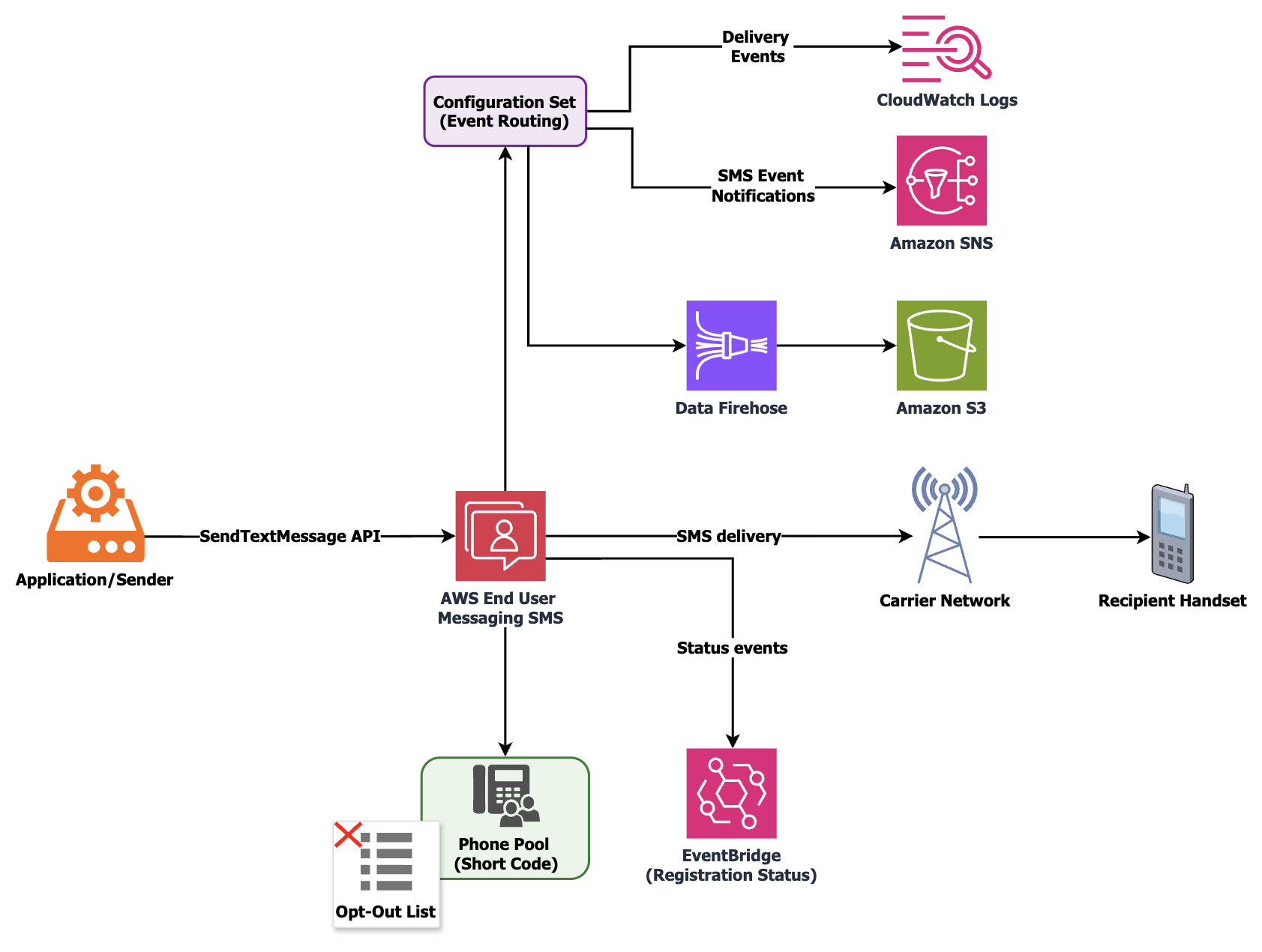
End-to-end SMS short code architecture showing message flow from sender through AWS End User Messaging SMS to carriers and recipient handsets, with event routing to Amazon CloudWatch, Amazon Simple Notification Service (Amazon SNS), and Amazon Data Firehose destinations

Prerequisites

You need the following to follow along with this walkthrough:

  1. An AWS account with access to the AWS End User Messaging SMS console.
  2. A short code with Active status in the AWS Management Console (carrier provisioning finished).
  3. Permissions to create AWS Identity and Access Management (IAM) roles, Amazon CloudWatch Log Groups, and Amazon Simple Notification Service (Amazon SNS) topics.
  4. AWS Command Line Interface (AWS CLI) v2 or an AWS SDK installed and configured.
  5. Your approved registration documentation, including the service name, keyword responses, and message templates submitted to carriers.

Step 1: Verify your short code is active and delivering

Navigate to the AWS End User Messaging SMS console, choose Phone numbers, and locate your provisioned short code. Confirm that the status shows Active, then send a test message to a phone number you control using the SendTextMessage API or the console test feature. Verify delivery on your handset.

Carrier-side activation can take up to 24 to 48 hours to fully propagate across all networks after provisioning finishes. If the console shows Active but your test message does not arrive, submit a support case so the team can verify propagation status with the carrier.

You can also verify using the AWS CLI:

aws pinpoint-sms-voice-v2 send-text-message \
    --destination-phone-number "+15555550100" \
    --origination-identity "12345" \
    --message-body "Test message from short code" \
    --message-type TRANSACTIONAL \
    --configuration-set-name "prod-otp-shortcode"
# Replace +15555550100 with your test phone number, 12345 with your short
# code, and prod-otp-shortcode with your configuration set name from Step 3.

Step 2: Configure keywords and verify message compliance

US carriers require every short code to respond to HELP and STOP keywords. You defined these during your registration, and this step confirms they are configured correctly in your account.

In the SMS console, choose Phone numbers, select your short code, and choose the Keywords tab. Verify that STOP returns the opt-out response you submitted during registration, and that HELP returns your support contact response (which must include a phone number or email). Add any custom keywords your use case requires, such as YES for double opt-in confirmation flows. You can manage keywords programmatically using the PutKeyword API.

To add or update a keyword programmatically:

aws pinpoint-sms-voice-v2 put-keyword \
    --origination-identity "12345" \
    --keyword "YES" \
    --keyword-message "You have confirmed your subscription to Acme Health Alerts. Msg&data rates may apply. Reply STOP to opt out." \
    --keyword-action AUTOMATIC_RESPONSE
# Replace 12345 with your short code, YES with your custom keyword, and the
# keyword-message text with your approved response.

To verify your current keyword configuration:

aws pinpoint-sms-voice-v2 describe-keywords \
    --origination-identity "12345"
# Replace 12345 with your short code.

Beyond keyword configuration, carrier compliance does not end at registration approval. The content you send in production must stay aligned with what carriers reviewed and approved. Here is what to keep consistent.

Use the exact brand or program name from your approved registration across all keyword responses, confirmation messages, and outbound templates. If carriers approved your registration under “Acme Health Alerts,” every message your short code sends should reference that name. Mixing variations creates inconsistencies that auditors flag during reviews. For example, do not use the company name in one message and the product name in another.

Your HELP, STOP, and confirmation responses must match the templates submitted during registration. Do not add or remove opt-out language, change frequency disclosures, or alter customer care contact details post-approval without updating the registration through a support case. If your organization operates multiple domains, use the domain documented in the registration. For example, you might have one domain for the application and another for marketing. Carrier reviewers cross-reference message content, opt-in screenshots, and privacy policy URLs with what was submitted.

Humans conduct carrier reviews, and message content that is concise and limited to the essentials is reviewed consistently. All messages must remain under 160 characters.

Step 3: Create a configuration set with event destinations

A configuration set controls where your SMS delivery events are streamed and which event types are captured. Without one, you are limited to the basic events that AWS End User Messaging SMS sends to Amazon EventBridge by default. These default events omit recipient details and full carrier response context.

Create a configuration set with a descriptive name such as prod-otp-shortcode or marketing-sc-us. Then create at least one event destination. The three main options are Amazon CloudWatch Logs (for operational monitoring and alarming), Amazon SNS (for real-time event fanout to downstream systems), and Amazon Data Firehose (for durable archival and analytics).

Amazon Data Firehose typically delivers to an Amazon Simple Storage Service (Amazon S3) bucket, where you can query delivery history using Amazon Athena for compliance audits or delivery pattern analysis.

# Create the configuration set
aws pinpoint-sms-voice-v2 create-configuration-set \
    --configuration-set-name "prod-otp-shortcode"

# Add a CloudWatch Logs event destination
aws pinpoint-sms-voice-v2 create-event-destination \
    --configuration-set-name "prod-otp-shortcode" \
    --event-destination-name "otp-delivery-logs" \
    --matching-event-types TEXT_DELIVERED TEXT_FAILED TEXT_QUEUED TEXT_CARRIER_UNREACHABLE TEXT_TTL_EXPIRED \
    --cloud-watch-logs-destination '{
        "IamRoleArn": "arn:aws:iam::123456789012:role/SMSEventsToCloudWatch",
        "LogGroupArn": "arn:aws:logs:us-east-1:123456789012:log-group:/aws/sms/prod-otp-shortcode"
    }'
# Replace prod-otp-shortcode with your configuration set name, otp-delivery-logs
# with a descriptive destination name, and the ARN values with your IAM role ARN
# (must have logs:PutLogEvents permission) and CloudWatch Log Group ARN.

Important: When sending messages with SendTextMessage, always specify your ConfigurationSetName parameter so events route to the appropriate destination.

Required event types

Event type Description
TEXT_DELIVERED Message successfully delivered to recipient handset.
TEXT_FAILED Message delivery failed.
TEXT_QUEUED Message accepted and queued for delivery.
TEXT_CARRIER_UNREACHABLE Carrier network unreachable.
TEXT_TTL_EXPIRED Message expired before delivery.

For a detailed walkthrough of configuration sets including multi-tenant architectures, see How to send SMS using configuration sets with AWS End User Messaging.

Step 4: Create a phone pool and associate your short code

A pool is a logical container that groups origination identities and controls routing behavior. Creating one gives you deterministic control over which number sends your messages and how opt-outs are enforced.

# Create the pool
aws pinpoint-sms-voice-v2 create-pool \
    --origination-identity "12345" \
    --iso-country-code "US" \
    --message-type TRANSACTIONAL

# Disable shared routes so only your short code is used
aws pinpoint-sms-voice-v2 update-pool \
    --pool-id "pool-1234567890abcdef0" \
    --shared-routes-enabled false
# Replace 12345 with your short code, US with your destination country code,
# and pool-1234567890abcdef0 with the Pool ID returned by create-pool.

Configuration parameters

Parameter Recommended value Rationale
Pool name us-otp-pool Descriptive, environment-prefixed.
SharedRoutesEnabled False Prevents fallback to shared routes; only your short code is used.
Opt-out list Associate one Manages opt-out state per use case.
IsoCountryCode US Restricts to destination country your short code serves.

If you operate multiple use cases on separate short codes, create a dedicated pool for each. For example, use one short code for one-time password (OTP) traffic and another for transactional notifications. This isolation means a recipient opting out of marketing messages does not lose access to authentication codes.

Step 5: Request your throughput increase

Short codes start at a default of 100 messages per second (MPS). If your production volume will exceed this, request an increase before your launch date rather than after traffic is flowing.

Create a case in the AWS Support Center, choose Service limit increase, then choose End User Messaging SMS. Provide your short code phone number, requested MPS, use case description, and expected peak volume. Allow 1 to 3 business days for processing.

To estimate your required MPS:

Required MPS = (Peak hourly volume / 3,600) x 2

Short codes support scaling to thousands of MPS, so start with a value that covers your expected peak and request further increases as traffic grows.

Step 6: Request a spending limit increase

AWS accounts have a default monthly SMS spending limit. To keep delivery uninterrupted at your expected volume, request an increase that accommodates your projected monthly spend before you begin sending.

Create a support case under Service limit increase > End User Messaging SMS > Account Spend Threshold. Provide your estimated monthly spend, use case description, and website URL.

For details, see Requesting increases to your monthly SMS spending quota.

Step 7: Restrict destination countries

If your short code serves a single country (US-only, for example), restrict sending to that country. This protects your account from artificially inflated traffic (SMS pumping). In pumping attacks, messages are routed to international premium-rate numbers, generating significant charges.

In the SMS console, navigate to Account settings, then choose Countries and keep only the countries you intend to send to. The pool-level IsoCountryCode restriction from Step 4 provides an additional enforcement layer at the sending path. Combining account-level country restrictions with pool-level country codes gives you two independent controls that both must be satisfied before a message is sent internationally.

For a detailed walkthrough on SMS fraud prevention controls, see Defending against SMS pumping: new AWS features to help combat artificially inflated traffic.

Step 8: Set up monitoring and alarms

With event destinations configured in Step 3, build proactive alerting that surfaces delivery trends before they affect your end users.

Alarm Metric / Source Threshold
Delivery success rate CloudWatch SMS metrics Alert when below 95%.
Spend threshold CloudWatch billing metric Alert at 80% of monthly limit.
Delivery failures Amazon EventBridge rule on TEXT_FAILED Route to Amazon SNS topic or AWS Lambda.
Carrier unreachable Amazon EventBridge rule on TEXT_CARRIER_UNREACHABLE Route to Amazon SNS topic or AWS Lambda.

Build a CloudWatch dashboard showing messages sent per minute, success versus failure breakdown, and spend accumulation over time.

You can also configure Amazon EventBridge to notify you of registration status changes. AWS End User Messaging SMS publishes events for statuses including REQUIRES_UPDATES, REVIEWING, and PROVISIONING, which is useful if a carrier requests changes during a proactive audit after your short code is already active.

For metric details, see Monitoring SMS activity with Amazon CloudWatch.

Step 9: Track OTP verification success (if applicable)

If your short code delivers OTP or two-factor authentication (2FA) codes, track end-to-end verification success in addition to carrier delivery receipts. A “delivered” status at the carrier level does not confirm the end user received and entered the code.

Tracking verification rates gives you insight into latency patterns when codes expire before arrival, geographic delivery trends, and opportunities to improve conversion. Some use cases involve asynchronous processing where several minutes of computation occur before the SMS is sent. For these, measure the full round-trip from the triggering action to message delivery. This separates application-side latency from carrier-side delivery latency.

For implementation guidance, see Track OTP success with AWS End User Messaging SMS feedback.

Step 10: Set up cost visibility

SMS costs include AWS charges plus per-message carrier surcharges. Setting up cost visibility from day one lets you track spend trends, catch anomalies early, and optimize over time.

Start by activating AWS Cost Explorer and creating a cost allocation tag for your SMS workload. Then configure an AWS Budget with threshold alerts. For example, you might notify at 80% of projected monthly spend. This gives you advance warning of unexpected cost increases, whether from traffic spikes, retry loops, or blocked-country leakage.

Step 11: Plan your traffic migration

A phased rollout validates delivery performance at each stage before you increase volume.

Start with a canary phase (Day 1 to 3) where you route 5 to 10% of traffic to the short code and monitor delivery rates, latency, and event logs. Move to a ramp phase (Day 3 to 7) at 50%, validating throughput and carrier-level delivery across your recipient base. Finish the full migration (Day 7+) at 100%. Decommission your previous origination identity only after confirming stability for at least 48 hours.

Step 12: Validate production readiness and send

Before declaring your short code production-ready, run through the following validation checks:

  1. Confirm your CloudWatch dashboard shows events flowing for TEXT_DELIVERED and TEXT_FAILED (from Step 3).
  2. Send a test message that triggers your STOP keyword. Verify the correct opt-out response is returned and the phone number appears in your opt-out list.
  3. Send a test message that triggers your HELP keyword. Verify the response matches your approved registration.
  4. Check your MPS quota in the support case response (from Step 5). Confirm it matches or exceeds your calculated peak.
  5. Review your country restrictions (from Step 7). Attempt to send a message to a blocked country and confirm it is rejected.
  6. Verify your CloudWatch alarm fires by temporarily lowering the threshold, or by checking that the alarm state is not INSUFFICIENT_DATA.

After all six checks pass, you are ready to begin your phased migration (Step 11) and scale to full production traffic. At this point, your short code is configured, monitored, compliant, and protected.

Automate with a validation script

You can use an AI coding assistant such as Kiro to generate a validation script tailored to your environment. Try a prompt like: “Write a boto3 script that validates my SMS short code is production-ready by checking Active status, HELP/STOP keywords, configuration set existence, and pool association using the pinpoint-sms-voice-v2 client.”

Refine the prompt with specifics from the following reference implementation, such as exact API names, filter parameters, and output format, to match your requirements.

The following script is an example of what that output looks like:

import boto3
import sys

SHORT_CODE = "12345"  # TODO: Replace with your short code (e.g., "67890")
POOL_ID = "pool-1234567890abcdef0"  # TODO: Replace with your pool ID from Step 4
CONFIG_SET_NAME = "prod-otp-shortcode"  # TODO: Replace with your configuration set name from Step 3

client = boto3.client("pinpoint-sms-voice-v2")

# Note: For accounts with many resources, implement NextToken pagination
# on describe_* calls. This script assumes results fit in a single page.


def check_short_code_active():
    """Step 1: Verify short code is Active."""
    response = client.describe_phone_numbers(
        Filters=[
            {"Name": "status", "Values": ["ACTIVE"]},
            {"Name": "number-type", "Values": ["SHORT_CODE"]}
        ]
    )
    numbers = [
        n for n in response["PhoneNumbers"]
        if n["PhoneNumber"] == SHORT_CODE
    ]
    assert len(numbers) > 0, f"Short code {SHORT_CODE} not found or not Active"
    print(f"[PASS] Short code {SHORT_CODE} is Active")


def check_keywords_configured():
    """Step 2: Verify HELP and STOP keywords exist."""
    response = client.describe_keywords(OriginationIdentity=SHORT_CODE)
    keyword_names = [kw["Keyword"].upper() for kw in response["Keywords"]]
    assert "STOP" in keyword_names, "STOP keyword not configured"
    assert "HELP" in keyword_names, "HELP keyword not configured"
    print("[PASS] HELP and STOP keywords configured")


def check_configuration_set():
    """Step 3: Verify configuration set exists."""
    response = client.describe_configuration_sets(
        ConfigurationSetNames=[CONFIG_SET_NAME]
    )
    assert len(response["ConfigurationSets"]) > 0, f"Configuration set {CONFIG_SET_NAME} not found"
    print(f"[PASS] Configuration set '{CONFIG_SET_NAME}' exists")


def check_pool_association():
    """Step 4: Verify pool exists and short code is associated to it."""
    response = client.describe_pools(PoolIds=[POOL_ID])
    assert len(response["Pools"]) > 0, f"Pool {POOL_ID} not found"

    # Verify short code is associated to the pool
    assoc_response = client.list_pool_origination_identities(PoolId=POOL_ID)
    identities = [
        oi["OriginationIdentity"]
        for oi in assoc_response["OriginationIdentities"]
    ]
    assert any(SHORT_CODE in oi for oi in identities), \
        f"Short code {SHORT_CODE} not associated with pool {POOL_ID}"
    print(f"[PASS] Pool '{POOL_ID}' exists and short code is associated")


if __name__ == "__main__":
    checks = [
        check_short_code_active,
        check_keywords_configured,
        check_configuration_set,
        check_pool_association,
    ]
    for check in checks:
        try:
            check()
        except Exception as e:
            print(f"[FAIL] {check.__doc__} - {e}")
            sys.exit(1)
    print("\nAll validation checks passed. Ready for production traffic.")

Cleaning up

If you created test resources while following this walkthrough, you can delete them through the AWS End User Messaging SMS console or with the API to avoid confusion with your production configuration. This includes a test configuration set, test pool, or test event destinations used for validation. Do not delete your production configuration set, pool, or keyword settings.

If you requested a test-level MPS increase or spending limit for validation, update these to your production values through a new support case before going live.

Quick reference checklist

Step Action Key API / Service
1 Verify short code is Active and test delivery SendTextMessage
2 Configure keywords and verify message compliance PutKeyword
3 Create configuration set with event destinations CreateConfigurationSet
4 Create pool and associate short code CreatePool, AssociateOriginationIdentity
5 Request MPS increase for expected throughput AWS Support
6 Request spending limit increase AWS Support
7 Restrict destination countries Console / UpdateAccount
8 Set up CloudWatch alarms and dashboards Amazon CloudWatch
9 Track OTP verification success (if applicable) SMS Feedback events
10 Set up cost visibility AWS Cost Explorer, AWS Budgets
11 Plan phased traffic migration Application-level routing
12 Validate production readiness and send All of the preceding

Conclusion

In this post, we walked through how to configure a newly provisioned SMS short code for production use with AWS End User Messaging SMS. The 12 steps cover keyword verification, message compliance, event monitoring, throughput planning, country restrictions, cost visibility, phased traffic migration, and a final production validation.

You can adapt the sequence to your specific use case and volume profile. For the full registration and application process, see A guide to SMS short codes with AWS End User Messaging. To start configuring, navigate to the AWS End User Messaging SMS console. For the full API reference, see the AWS End User Messaging SMS documentation.


About the author

Establishing finops management: Integrating AWS Budgets with WhatsApp using AWS End User Messaging

Post Syndicated from Ruchikka Chaudhary original https://aws.amazon.com/blogs/messaging-and-targeting/establishing-finops-management-integrating-aws-budgets-with-whatsapp-using-aws-end-user-messaging/

Managing cloud costs effectively is a critical concern for organizations of all sizes. While AWS Budgets provides powerful tools to set spending thresholds and receive notifications, these alerts traditionally arrive through email or through AWS Management Console notifications. These traditional notification methods face several challenges when managing cloud costs:

  • Email notifications might not be seen immediately
  • Important budget alerts can get lost in crowded inboxes
  • Team members might not have immediate access to their email or the console
  • Global teams need accessible alerting mechanisms that work across time zones

Today, we’re sharing a solution that brings AWS Budgets alerts directly to your WhatsApp using AWS End User Messaging—enabling real-time cost awareness and faster response to budget thresholds wherever you are.

Overview of solution

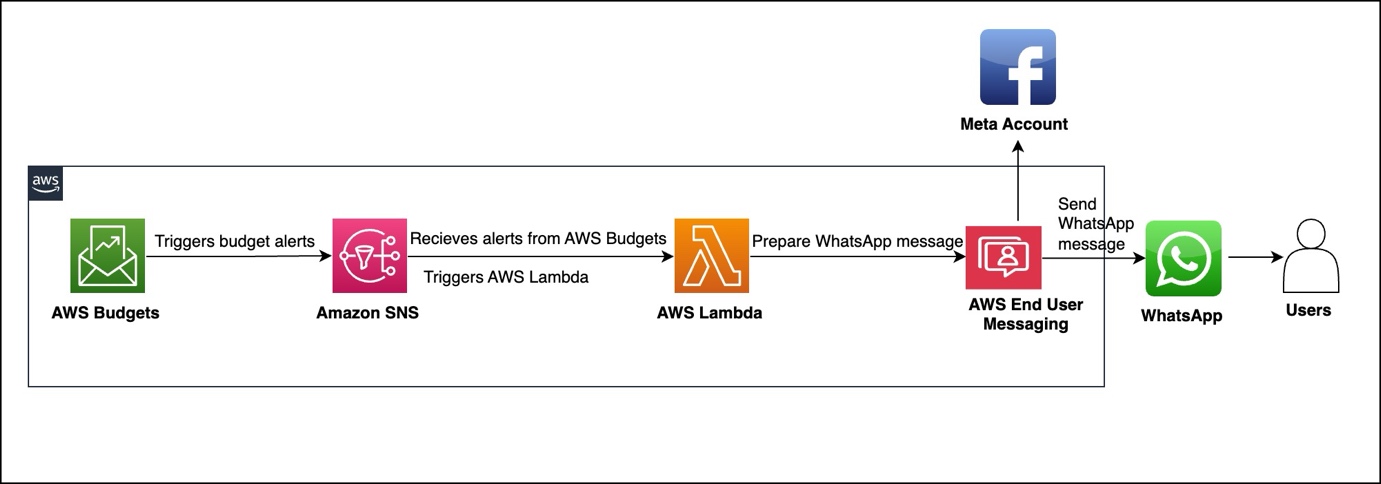
Our solution integrates AWS Budgets with WhatsApp messaging using AWS End User Messaging, AWS Lambda, and Amazon Simple Notification Service (Amazon SNS). When a budget threshold is crossed, the alert is processed and delivered as a formatted WhatsApp message to designated recipients.

The architecture, shown in the following figure, consists of four main AWS services to deliver budget alerts. AWS Budgets tracks expenses against your defined thresholds. When expenses exceed these thresholds, Amazon SNS receives an alert. An AWS Lambda function processes this alert and sends it through AWS End User Messaging to WhatsApp. Users then receive actionable budget notifications directly on their WhatsApp.

Billing and Cost Management data, which AWS Budgets uses to monitor resources, is updated at least once per day. Keep in mind that budget information and associated alerts are updated and sent according to this data refresh cadence. In a budget period,

notifications are triggered every time the notification state goes from OK to Exceeded (when the threshold is exceeded). If the budget stays in Exceeded state in the same budget period, AWS Budgets doesn’t send an additional alert.

Prerequisites

Implementation requires an AWS account with appropriate permissions for AWS CloudFormation, Lambda, Amazon SNS, and AWS Budgets. You must also have a WhatsApp Business Account integrated with AWS End User Messaging Social and the WhatsApp phone number ID from the AWS End User Messaging console. For instructions to locate this information, see View a phone number’s ID in AWS End User Messaging Social.

For more information about how to set up WhatsApp using AWS End User Messaging Social, see Automate workflows with WhatsApp using AWS End User Messaging Social.

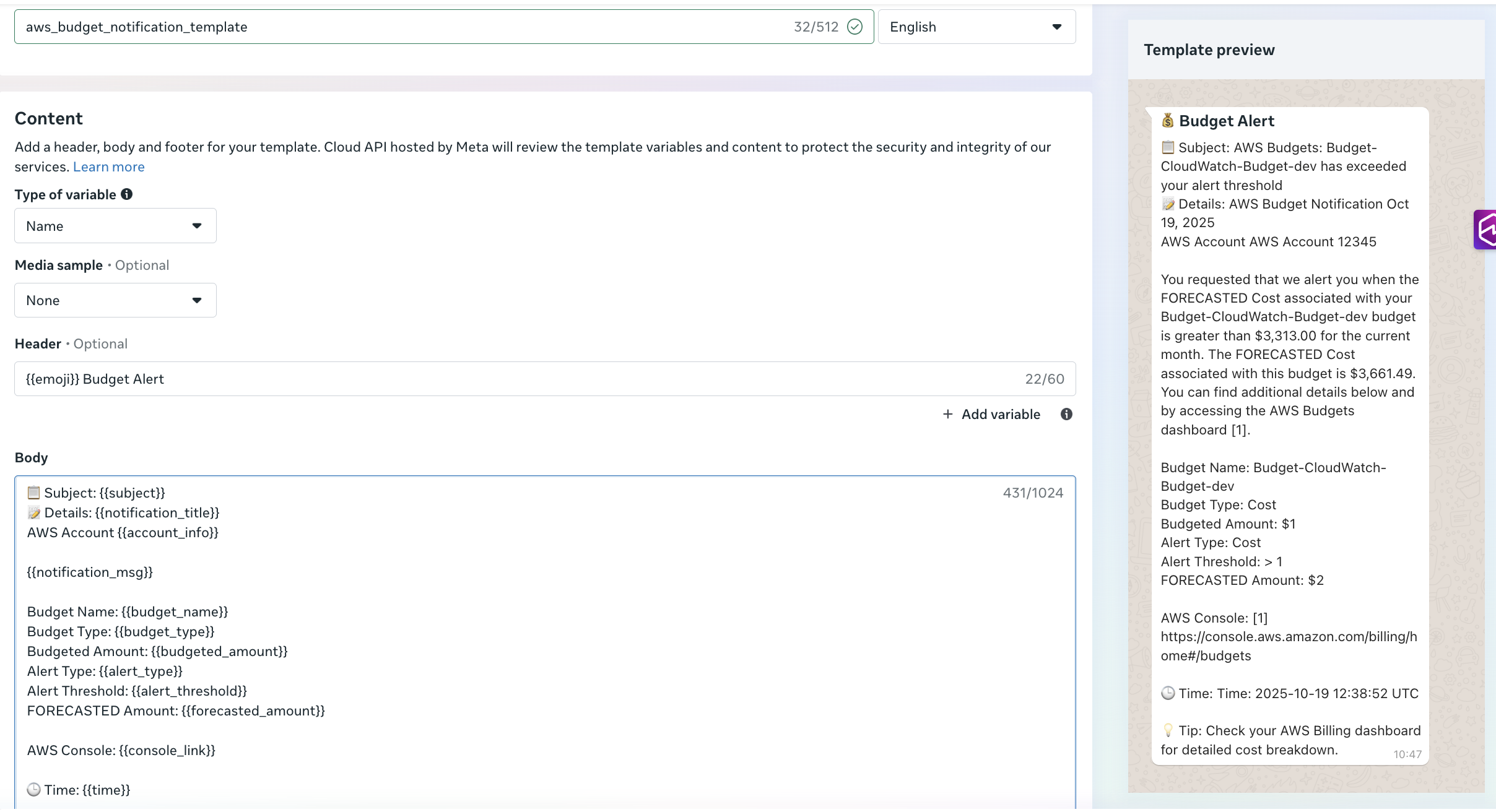
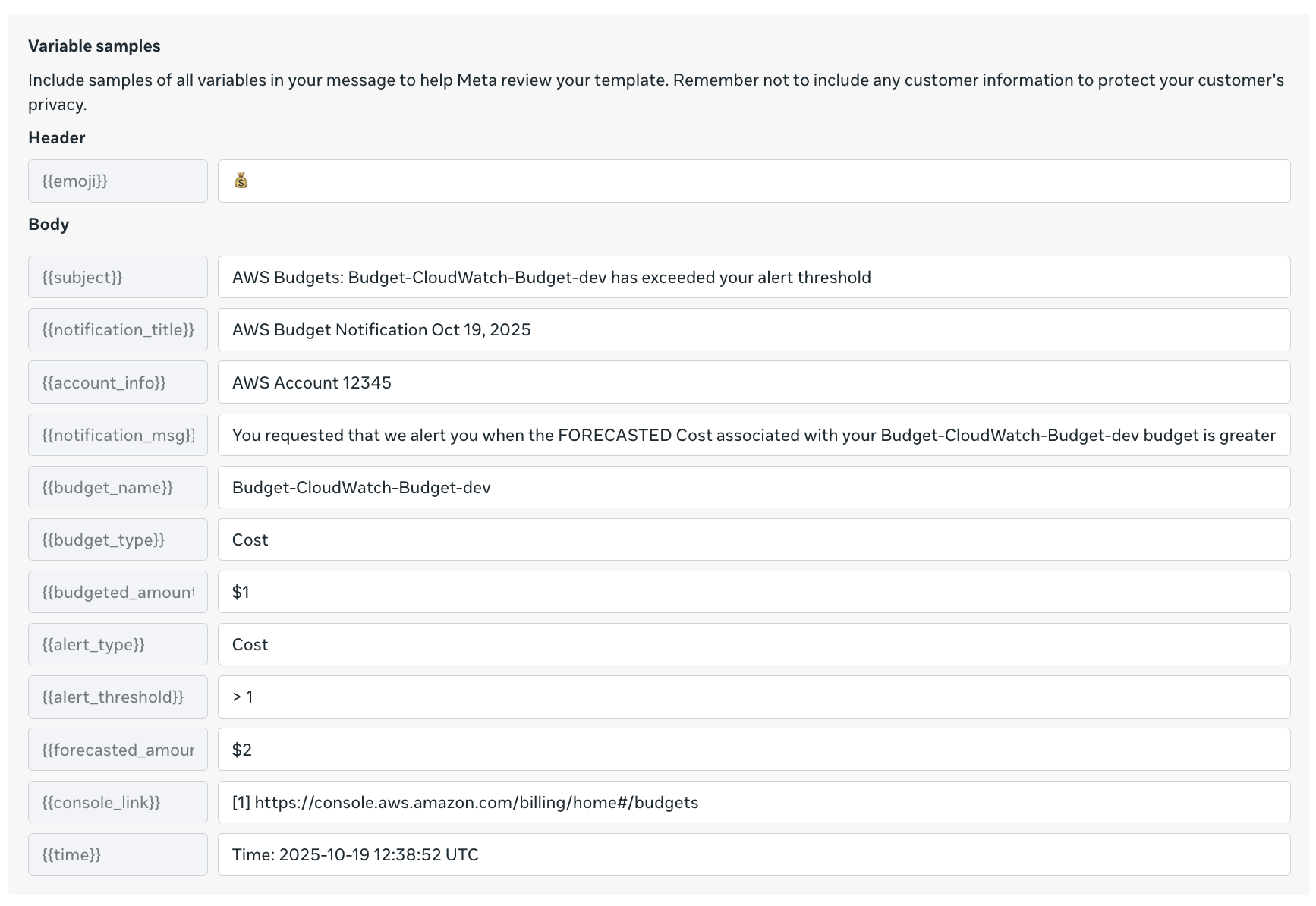
Before you deploy this solution, create an approved utility template in your Meta account named aws_budgets_notification_template(as shown in the following screenshot). Alternatively, use your preferred template name and modify the Lambda function code accordingly.

The preceding figure shows variable samples that can be used while creating a message template. You can also use the following AWS Command Line Interface (AWS CLI) command to create the messaging template-

aws socialmessaging create-whatsapp-message-template \
  --region <region> \
  --id <waba-id> \
  --template-definition "$(echo '{
    "name": "aws_budgets_notification_template",
    "language": "en",
    "category": "UTILITY",
    "parameter_format": "named",
    "components": [
      {
        "type": "HEADER",
        "format": "TEXT",
        "text": "{{emoji}} Budget Alert",
        "example": {
          "header_text_named_params": [
            {"param_name": "emoji", "example": "💰"}
          ]
        }
      },
      {
        "type": "BODY",
        "text": "Subject: {{subject}}\\nDetails: {{notification_title}}\\nAWS Account {{account_info}}\\n\\n{{notification_msg}}\\n\\nBudget Name: {{budget_name}}\\nBudget Type: {{budget_type}}\\nBudgeted Amount: {{budgeted_amount}}\\nAlert Type: {{alert_type}}\\nAlert Threshold: {{alert_threshold}}\\nFORECASTED Amount: {{forecasted_amount}}\\n\\nAWS Console: {{console_link}}\\n\\nTime: {{time}}\\n\\nTip: Check your AWS Billing Dashboard for detailed cost breakdown",
        "example": {
          "body_text_named_params": [
            {"param_name": "subject", "example": "AWS Budgets: Budget-Cloudwatch-budget-dev has exceeded your alert threshold"},
            {"param_name": "notification_title", "example": "AWS Budget Notification Oct 19, 2025"},
            {"param_name": "account_info", "example": "AWS Account 12345"},
            {"param_name": "notification_msg", "example": "You requested that we alert you when the FORECASTED Cost associated with your Budget-Cloudwatch-dev Budget is greater"},
            {"param_name": "budget_name", "example": "Budget-Cloudwatch-budget-dev"},
            {"param_name": "budget_type", "example": "Cost"},
            {"param_name": "budgeted_amount", "example": "$1"},
            {"param_name": "alert_type", "example": "Cost"},
            {"param_name": "alert_threshold", "example": "> 1"},
            {"param_name": "forecasted_amount", "example": "$2"},
            {"param_name": "console_link", "example": "https://console.aws.amazon.com/billing/home#/budgets"},
            {"param_name": "time", "example": "2025-10-19 12:38:52 UTC"}
          ]
        }
      }
    ]
  }' | base64)"

You can confirm the template approval status and type in the Meta portal.

Solution walkthrough

The core component consists of a Python-based Lambda function that processes Budget alerts and formats them for WhatsApp delivery. The function receives SNS events containing budget alerts data, extracts relevant information, formats contextual messages, and delivers notifications through AWS End User Messaging Social.The following function shows an example to parse the SNS message content:

 def process_notification(record):
"""Process SNS notification and send WhatsApp message"""
sns_message = record['Sns']
subject = sns_message.get('Subject', 'AWS Notification')
message_body = sns_message.get('Message', '')

logger.info(f"Processing notification - Subject: {subject}")
process_budget_notification(subject, message_body)

The following example demonstrates how to format alert information—including subject, details, and timestamp—and deliver the message to WhatsApp.

#Create template message with parsed values
template_name = "aws_budgets_notification_template"
template_message = {
    "name": template_name,
    "language": {
        "code": "en"
    },
    "components": [
        {
            "type": "header",
            "parameters": [{
                "type": "text",
                "parameter_name": "emoji",
                "text": "💰"
            }]
        },
        {
            "type": "body",
            "parameters": [
                {
                    "type": "text",
                    "parameter_name": "subject",
                    "text": subject
                },
                {
                    "type": "text",
                    "parameter_name": "notification_title",
                    "text": notification_title
                },
                {
                    "type": "text",
                    "parameter_name": "account_info",
                    "text": f"AWS Account {account_number}"
                },
                {
                    "type": "text",
                    "parameter_name": "notification_msg",
                    "text": notification_msg + "."
                },
                {
                    "type": "text",
                    "parameter_name": "budget_name",
                    "text": budget_details.get('Budget Name', '')
                },
                {
                    "type": "text",
                    "parameter_name": "budget_type",
                    "text": budget_details.get('Budget Type', '')
                },
                {
                    "type": "text",
                    "parameter_name": "budgeted_amount",
                    "text": budget_details.get('Budgeted Amount', '')
                },
                {
                    "type": "text",
                    "parameter_name": "alert_type",
                    "text": budget_details.get('Alert Type', '')
                },
                {
                    "type": "text",
                    "parameter_name": "alert_threshold",
                    "text": budget_details.get('Alert Threshold', '')
                },
                {
                    "type": "text",
                    "parameter_name": "forecasted_amount",
                    "text": budget_details.get('FORECASTED Amount', '')
                },
                {
                    "type": "text",
                    "parameter_name": "console_link",
                    "text": "https://console.aws.amazon.com/billing/home#/budgets"
                },
                {
                    "type": "text",
                    "parameter_name": "time",
                    "text": datetime.now().strftime('%Y-%m-%d %H:%M:%S UTC')
                }
            ]
        }
    ]
}
send_whatsapp_message(template_message)

The send_whatsapp_message function uses AWS End User Messaging Social to deliver formatted messages through the socialmessaging client, as shown in the following example:

def send_whatsapp_message(message):
  client = boto3.client('socialmessaging')
  # Get environment variables
  phone_number_id = os.environ.get('WHATSAPP_PHONE_NUMBER_ID')
  recipient = os.environ.get('ALERT_RECIPIENT')
                    
# Prepare message object
  message_object = {
"messaging_product": "whatsapp",
"recipient_type": "individual",
"to": recipient,
"type": "template",
"template": message
}
  # Send message
response = client.send_whatsapp_message(
originationPhoneNumberId=phone_number_id,
metaApiVersion="v20.0",
message=bytes(json.dumps(message_object), "utf-8")  
)

Deploying the solution

The solution uses AWS CloudFormation for infrastructure as code (IaC) deployment. The main template creates an SNS topic for alert notifications, a Lambda function for message processing, and required AWS Identity and Access Management (IAM) roles with least-privilege permissions.

The CloudFormation template requires a recipient number with an active WhatsApp account to receive alert notifications as messages. The template also requires the WhatsApp phone number ID retrieved from the AWS End User Messaging Social console, as noted in the prerequisites. The template must be deployed in the same AWS Region as AWS End User Messaging Social. See the following code:

aws cloudformation deploy \
  --template-file <> \
  --stack-name budget-eum-whatsapp-alerts \
  --parameter-overrides \
    ActualSpendThreshold= \
    AlertRecipient=<+1234567890> \
    BudgetAmount=<Budget Amount e.g. 3000> \
    Environment= \
    ForecastedSpendThreshold= \
    WhatsAppPhoneNumberId= \
  --capabilities CAPABILITY_NAMED_IAM \
  --region <EUM-region>

Testing the solution

The solution can be tested and validated using the SNS topic created by the CloudFormation stack. Use the following AWS CLI command to publish a test message to the SNS topic:

aws sns publish \
  --topic-arn arn:aws:sns:<region>:<account>:<topic-name> \
  --subject "[Test] AWS Budget Alert: Budget-Alert-EUM has exceeded 80% of your budgeted amount" \
  --message "AWS Budget Notification - Your budget has exceeded the alert threshold
AWS Account 123456789012
Budget Name: Budget-Alert-EUM
Budget Type: Cost
Budgeted Amount: $100.00
Alert Type: ACTUAL
Alert Threshold: 80%
FORECASTED Amount: $85.00
You have exceeded 80% of your budget for this period" \
  --region <region>

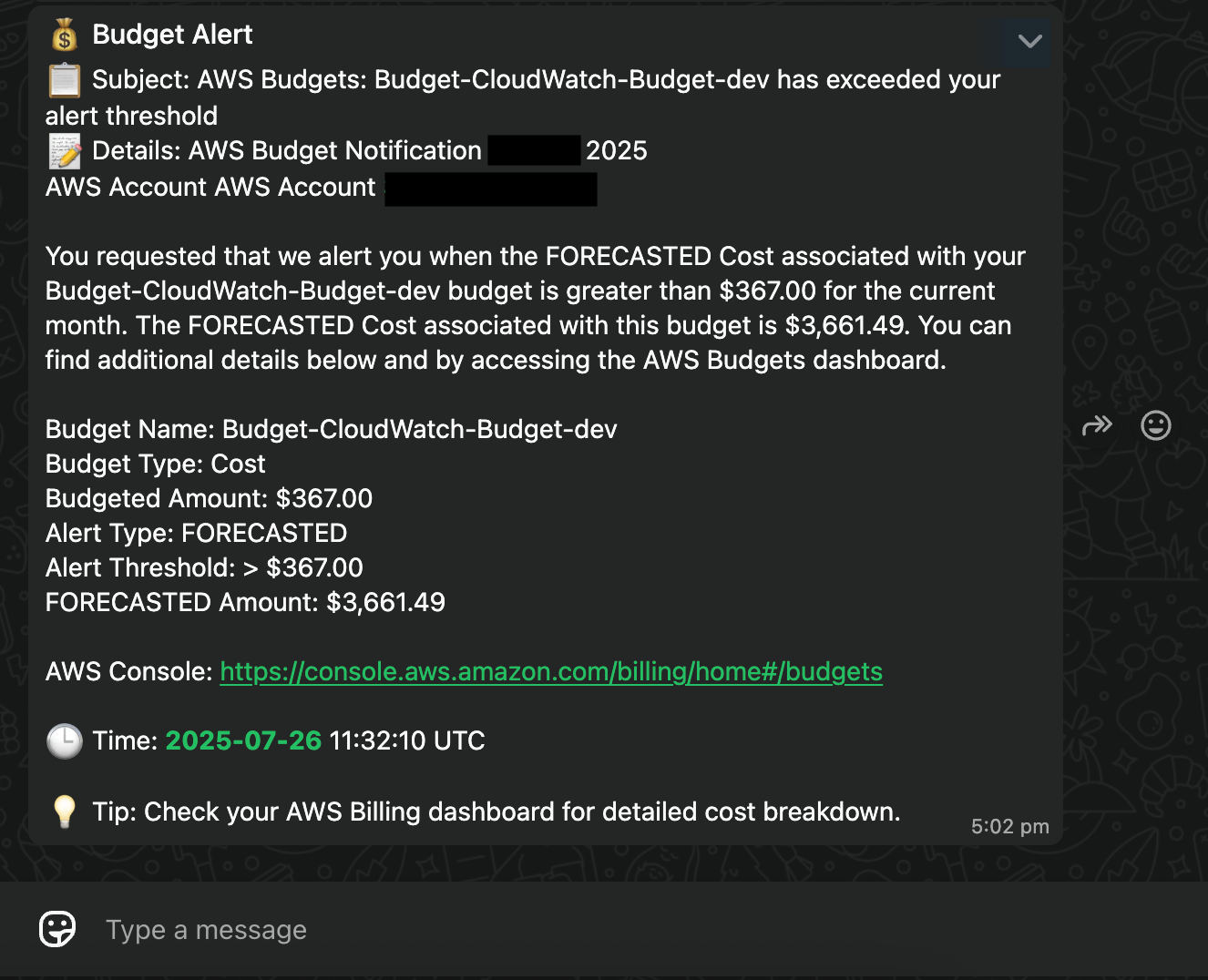
The SNS message triggers the Lambda function, which sends the alert to your configured WhatsApp recipient, as shown in the following screenshot.

Clean up

Use the following steps to clean up your resources when you no longer need this solution:

  1. Delete the CloudFormation stack deployed in this solution: budget-eum-whatsapp-alerts
  2. Delete the template in your Meta account.

Conclusion

Integrating AWS Budgets alerts with WhatsApp notifications represents a significant step forward in modern cost monitoring. By using AWS End User Messaging Social, you can send teams critical alerts through their preferred communication channel while maintaining the reliability and scalability of AWS services. The solution’s modular architecture, basic yet effective security model, and cost-effective design make it suitable for organizations of various sizes.


About the authors

Let’s Architect! Cost-optimizing AWS workloads

Post Syndicated from Luca Mezzalira original https://aws.amazon.com/blogs/architecture/lets-architect-cost-optimizing-aws-workloads/

Every software component built by engineers and architects is designed with a purpose: to offer particular functionalities and, ultimately, contribute to the generation of business value. We should consider fundamental factors, such as the scalability of the software and the ease of evolution during times of business changes. However, performance and cost are important factors as well since they can impact the business profitability.

This edition of Let’s Architect! follows a similar series post from 2022, which discusses optimizing the cost of an architecture. Today, we focus on architectural patterns, services, and best practices to design cost-optimized cloud workloads. We also want to identify solutions, such as the use of Graviton processors, for increased performance at lower price. Cost optimization is a continuous process that requires the identification of the right tools for each job, as well as the adoption of efficient designs for your system.

AWS re:Invent 2022 – Manage and control your AWS costs

Govern cloud usage and avoid cost surprises without slowing down innovation within your organization. In this re:Invent 2022 session, you can learn how to set up guardrails and operationalize cost control within your organizations using services, such as AWS Budgets and AWS Cost Anomaly Detection, and explore the latest enhancements in the AWS cost control space. Additionally, Mercado Libre shares how they automate their cloud cost control through central management and automated algorithms.

Take me to this re:Invent 2022 video!

Work backwards from team needs to define/deploy cloud governance in AWS environments

Work backwards from team needs to define/deploy cloud governance in AWS environments

Compute optimization

When it comes to optimizing compute workloads, there are many tools available, such as AWS Compute Optimizer, Amazon EC2 Spot Instances, Amazon EC2 Reserved Instances, and Graviton instances. Modernizing your applications can also lead to cost savings, but you need to know how to use the right tools and techniques in an effective and efficient way.

For AWS Lambda functions, you can use the AWS Lambda Cost Optimization video to learn how to optimize your costs. The video covers topics, such as understanding and graphing performance versus cost, code optimization techniques, and avoiding idle wait time. If you are using Amazon Elastic Container Service (Amazon ECS) and AWS Fargate, you can watch a Twitch video on cost optimization using Amazon ECS and AWS Fargate to learn how to adjust your costs. The video covers topics like using spot instances, choosing the right instance type, and using Fargate Spot.

Finally, with Amazon Elastic Kubernetes Service (Amazon EKS), you can use Karpenter, an open-source Kubernetes cluster auto scaler to help optimize compute workloads. Karpenter can help you launch right-sized compute resources in response to changing application load, help you adopt spot and Graviton instances. To learn more about Karpenter, read the post How CoStar uses Karpenter to optimize their Amazon EKS Resources on the AWS Containers Blog.

Take me to Cost Optimization using Amazon ECS and AWS Fargate!
Take me to AWS Lambda Cost Optimization!
Take me to How CoStar uses Karpenter to optimize their Amazon EKS Resources!

Karpenter launches and terminates nodes to reduce infrastructure costs

Karpenter launches and terminates nodes to reduce infrastructure costs

AWS Lambda general guidance for cost optimization

AWS Lambda general guidance for cost optimization

AWS Graviton deep dive: The best price performance for AWS workloads

The choice of the hardware is a fundamental driver for performance, cost, as well as resource consumption of the systems we build. Graviton is a family of processors designed by AWS to support cloud-based workloads and give improvements in terms of performance and cost. This re:Invent 2022 presentation introduces Graviton and addresses the problems it can solve, how the underlying CPU architecture is designed, and how to get started with it. Furthermore, you can learn the journey to move different types of workloads to this architecture, such as containers, Java applications, and C applications.

Take me to this re:Invent 2022 video!

AWS Graviton processors are specifically designed by AWS for cloud workloads to deliver the best price performance

AWS Graviton processors are specifically designed by AWS for cloud workloads to deliver the best price performance

AWS Well-Architected Labs: Cost Optimization

The Cost Optimization section of the AWS Well Architected Workshop helps you learn how to optimize your AWS costs by using features, such as AWS Compute Optimizer, Spot Instances, and Reserved Instances. The workshop includes hands-on labs that walk you through the process of optimizing costs for different types of workloads and services, such as Amazon Elastic Compute Cloud, Amazon ECS, and Lambda.

Take me to this AWS Well-Architected lab!

Savings Plans is a flexible pricing model that can help reduce expenses compared with on-demand pricing

Savings Plans is a flexible pricing model that can help reduce expenses compared with on-demand pricing

See you next time!

Thanks for joining us to discuss cost optimization! In 2 weeks, we’ll talk about in-memory databases and caching systems.

To find all the blogs from this series, visit the Let’s Architect! list of content on the AWS Architecture Blog.

AWS Week in Review – October 3, 2022

Post Syndicated from Danilo Poccia original https://aws.amazon.com/blogs/aws/aws-week-in-review-october-3-2022/

This post is part of our Week in Review series. Check back each week for a quick roundup of interesting news and announcements from AWS!

A new week and a new month just started. Curious which were the most significant AWS news from the previous seven days? I got you covered with this post.

Last Week’s Launches
Here are the launches that got my attention last week:

Amazon File Cache – A high performance cache on AWS that accelerates and simplifies demanding cloud bursting and hybrid workflows by giving access to files using a fast and familiar POSIX interface, no matter if the original files live on premises on any file system that can be accessed through NFS v3 or on S3.

Amazon Data Lifecycle Manager – You can now automatically archive Amazon EBS snapshots to save up to 75 percent on storage costs for those EBS snapshots that you intend to retain for more than 90 days and rarely access.

AWS App Runner – You can now build and run web applications and APIs from source code using the new Node.js 16 managed runtime.

AWS Copilot – The CLI for containerized apps adds IAM permission boundaries, support for FIFO SNS/SQS for the Copilot worker-service pattern, and using Amazon CloudFront for low-latency content delivery and fast TLS-termination for public load-balanced web services.

Bottlerocket – The Linux-based operating system purpose-built to run container workloads is now supported by Amazon Inspector. Amazon Inspector can now recommend an update of Bottlerocket if it finds a vulnerability.

Amazon SageMaker Canvas – Now supports mathematical functions and operators for richer data exploration and to understand the relationships between variables in your data.

AWS Compute Optimizer – Now provides cost and performance optimization recommendations for 37 new EC2 instance types, including bare metal instances (m6g.metal) and compute optimized instances (c7g.2xlarge, hpc6a.48xlarge), and new memory metrics for Windows instances.

AWS Budgets – Use a simplified 1-click workflow for common budgeting scenarios with step-by-step tutorials on how to use each template.

Amazon Connect – Now provides an updated flow designer UI that makes it easier and faster to build personalized and automated end-customer experiences, as well as a queue dashboard to view and compare real-time queue performance through time series graphs.

Amazon WorkSpaces – You can now provision Ubuntu desktops and use virtual desktops for new categories of workloads, such as for your developers, engineers, and data scientists.

Amazon WorkSpaces Core – A fully managed infrastructure-only solution for third-party Virtual Desktop Infrastructure (VDI) management software that simplifies VDI migration and combines your current VDI software with the security and reliability of AWS. Read more about it in this Desktop and Application Streaming blog post.

For a full list of AWS announcements, be sure to keep an eye on the What’s New at AWS page.

Other AWS News
A few more blog posts you might have missed:

Introducing new language extensions in AWS CloudFormation – In this Cloud Operations & Migrations blog post, we introduce the new language transform that enhances CloudFormation core language with intrinsic functions that simplify handling JSON strings (Fn::ToJsonString), array lengths (Fn::Length), and update and deletion policies.

Building a GraphQL API with Java and AWS Lambda – This blog shows different options for resolving GraphQL queries using serverless technologies on AWS.

For AWS open-source news and updates, here’s the latest newsletter curated by Ricardo to bring you the most recent updates on open-source projects, posts, events, and more.

Upcoming AWS Events
As usual, there are many opportunities to meet:

AWS Summits– Connect, collaborate, and learn about AWS at these free in-person events: Bogotá (October 4), and Singapore (October 6).

AWS Community DaysAWS Community Day events are community-led conferences to share and learn together. Join us in Amersfoort, Netherlands (on October 3, today), Warsaw, Poland (October 14), and Dresden, Germany (October 19).

That’s all from me for this week. Come back next Monday for another Week in Review!

Danilo

AWS Week in Review – June 20, 2022

Post Syndicated from Steve Roberts original https://aws.amazon.com/blogs/aws/aws-week-in-review-june-20-2022/

This post is part of our Week in Review series. Check back each week for a quick roundup of interesting news and announcements from AWS!

Last Week’s Launches
It’s been a quiet week on the AWS News Blog, however a glance at What’s New page shows the various service teams have been busy as usual. Here’s a round-up of announcements that caught my attention this past week.

Support for 15 new resource types in AWS Config – AWS Config is a service for assessment, audit, and evaluation of the configuration of resources in your account. You can monitor and review changes in resource configuration using automation against a desired configuration. The newly expanded set of types includes resources from Amazon SageMaker, Elastic Load Balancing, AWS Batch, AWS Step Functions, AWS Identity and Access Management (IAM), and more.

New console experience for AWS Budgets – A new split-view panel allows for viewing details of a budget without needing to leave the overview page. The new panel will save you time (and clicks!) when you’re analyzing performance across a set of budgets. By the way, you can also now select multiple budgets at the same time.

VPC endpoint support is now available in Amazon SageMaker Canvas SageMaker Canvas is a visual point-and-click service enabling business analysts to generate accurate machine-learning (ML) models without requiring ML experience or needing to write code. The new VPC endpoint support, available in all Regions where SageMaker Canvas is suppported, eliminates the need for an internet gateway, NAT instance, or a VPN connection when connecting from your SageMaker Canvas environment to services such as Amazon Simple Storage Service (Amazon S3), Amazon Redshift, and more.

Additional data sources for Amazon AppFlow – Facebook Ads, Google Ads, and Mixpanel are now supported as data sources, providing the ability to ingest marketing and product analytics for downstream analysis in AppFlow-connected software-as-a-service (SaaS) applications such as Marketo and Salesforce Marketing Cloud.

For a full list of AWS announcements, be sure to keep an eye on the What’s New at AWS page.

Other AWS News
Some other updates you may have missed from the past week:

Amazon Elastic Compute Cloud (Amazon EC2) expanded the Regional availability of AWS Nitro System-based C6 instance types. C6gn instance types, powered by Arm-based AWS Graviton2 processors, are now available in the Asia Pacific (Seoul), Europe (Milan), Europe (Paris), and Middle East (Bahrain) Regions, while C6i instance types, powered by 3rd generation Intel Xeon Scalable processors, are now available in the Europe (Frankfurt) Region.

As a .NET and PowerShell Developer Advocate here at AWS, there are some news and updates related to .NET I want to highlight:

Upcoming AWS Events
The AWS New York Summit is approaching quickly, on July 12. Registration is also now open for the AWS Summit Canberra, an in-person event scheduled for August 31.

Microsoft SQL Server users may be interested in registering for the SQL Server Database Modernization webinar on June 21. The webinar will show you how to go about modernizing and how to cost-optimize SQL Server on AWS.

Amazon re:MARS is taking place this week in Las Vegas. I’ll be there as a host of the AWS on Air show, along with special guests highlighting their latest news from the conference. I also have some On Air sessions on using our AI services from .NET lined up! As usual, we’ll be streaming live from the expo hall, so if you’re at the conference, give us a wave. You can watch the show live on Twitch.tv/aws, Twitter.com/AWSOnAir, and LinkedIn Live.

A reminder that if you’re a podcast listener, check out the official AWS Podcast Update Show. There is also the latest installment of the AWS Open Source News and Updates newsletter to help keep you up to date.

No doubt there’ll be a whole new batch of releases and announcements from re:MARS, so be sure to check back next Monday for a summary of the announcements that caught our attention!

— Steve

17 additional AWS services authorized for DoD workloads in the AWS GovCloud Regions

Post Syndicated from Tyler Harding original https://aws.amazon.com/blogs/security/17-additional-aws-services-authorized-for-dod-workloads-in-the-aws-govcloud-regions/

I’m pleased to announce that the Defense Information Systems Agency (DISA) has authorized 17 additional Amazon Web Services (AWS) services and features in the AWS GovCloud (US) Regions, bringing the total to 105 services and major features that are authorized for use by the U.S. Department of Defense (DoD). AWS now offers additional services to DoD mission owners in these categories: business applications; computing; containers; cost management; developer tools; management and governance; media services; security, identity, and compliance; and storage.

Why does authorization matter?

DISA authorization of 17 new cloud services enables mission owners to build secure innovative solutions to include systems that process unclassified national security data (for example, Impact Level 5). DISA’s authorization demonstrates that AWS effectively implemented more than 421 security controls by using applicable criteria from NIST SP 800-53 Revision 4, the US General Services Administration’s FedRAMP High baseline, and the DoD Cloud Computing Security Requirements Guide.

Recently authorized AWS services at DoD Impact Levels (IL) 4 and 5 include the following:

Business Applications

Compute

Containers

Cost Management

  • AWS Budgets – Set custom budgets to track your cost and usage, from the simplest to the most complex use cases
  • AWS Cost Explorer – An interface that lets you visualize, understand, and manage your AWS costs and usage over time
  • AWS Cost & Usage Report – Itemize usage at the account or organization level by product code, usage type, and operation

Developer Tools

  • AWS CodePipeline – Automate continuous delivery pipelines for fast and reliable updates
  • AWS X-Ray – Analyze and debug production and distributed applications, such as those built using a microservices architecture

Management & Governance

Media Services

  • Amazon Textract – Extract printed text, handwriting, and data from virtually any document

Security, Identity & Compliance

  • Amazon Cognito – Secure user sign-up, sign-in, and access control
  • AWS Security Hub – Centrally view and manage security alerts and automate security checks

Storage

  • AWS Backup – Centrally manage and automate backups across AWS services

Figure 1 shows the IL 4 and IL 5 AWS services that are now authorized for DoD workloads, broken out into functional categories.
 

Figure 1: The AWS services newly authorized by DISA

Figure 1: The AWS services newly authorized by DISA

To learn more about AWS solutions for the DoD, see our AWS solution offerings. Follow the AWS Security Blog for updates on our Services in Scope by Compliance Program. If you have feedback about this blog post, let us know in the Comments section below.

Want more AWS Security how-to content, news, and feature announcements? Follow us on Twitter.

Author

Tyler Harding

Tyler is the DoD Compliance Program Manager for AWS Security Assurance. He has over 20 years of experience providing information security solutions to the federal civilian, DoD, and intelligence agencies.