All posts by Shahna Campbell

How to develop an AWS Security Hub POC

Post Syndicated from Shahna Campbell original https://aws.amazon.com/blogs/security/how-to-develop-an-aws-security-hub-poc/

The enhanced AWS Security Hub (currently in public preview) prioritizes your critical security issues and helps you respond at scale to protect your environment. It detects critical issues by correlating and enriching signals into actionable insights, enabling streamlined response. You can use these capabilities to gain visibility across your cloud environment through centralized management in a unified cloud security solution. During the preview period, these enhanced Security Hub capabilities are available at no additional cost. While the integrated services—Amazon GuardDuty, Amazon Inspector, Amazon Macie, and AWS Security Hub Cloud Security Posture Management (CSPM)—will continue to incur standard charges, new customers can use the trial periods available at no additional cost for each of these underlying security services. By combining these trials with the Security Hub preview, organizations can conduct comprehensive proof of concept (POC) evaluations without significant upfront investment.

In this blog post, we guide you through how to plan and implement a proof of concept (POC) for Security Hub to assess the implementation, functionality, and value of Security Hub in your environment. We walk you through the following steps:

  1. Understand the value of Security Hub
  2. Determine success criteria for the POC
  3. Define Security Hub configuration
  4. Prepare for deployment
  5. Enable Security Hub
  6. Validate deployment

Understand the value of Security Hub
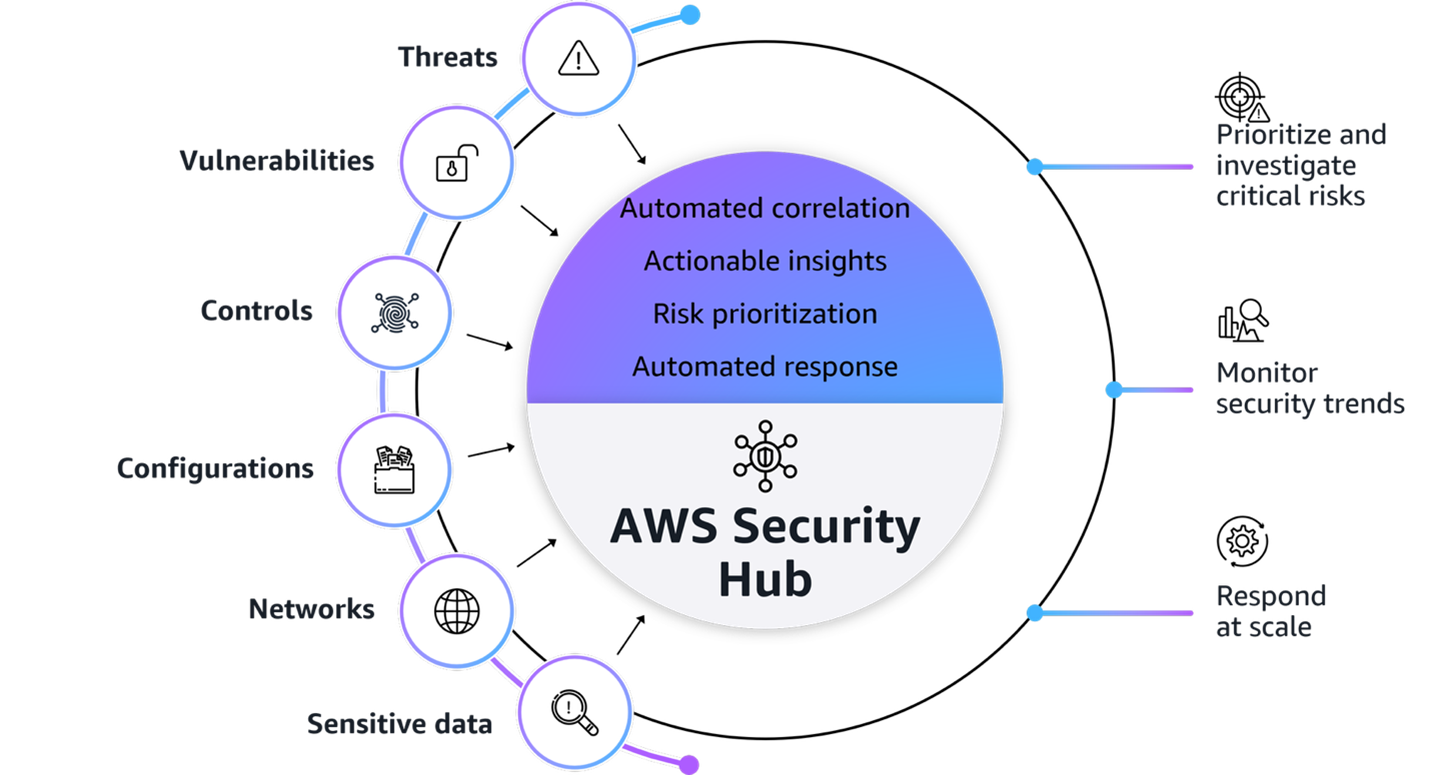
Figure1: AWS Security Hub overview

Figure1: AWS Security Hub overview

Figure 1 provides a visualization of how Security Hub unifies signals from multiple AWS security services and capabilities. The signals, which are ingested by Security Hub from multiple AWS security services and capabilities, include:

At its core, Security Hub provides four key capabilities in one unified solution:

  1. Unified security operations: Security Hub delivers a unified security operations experience, bringing your security signals into a single consolidated view and avoiding the need to switch between multiple security tools. This provides comprehensive visibility across your AWS environment, empowering your security teams to efficiently detect, prioritize, and respond to potential security risks.
  2. Intelligent prioritization helps focus on what matters most: AWS Security Hub helps you identify and prioritize critical security risks that might be missed when viewing findings in isolation. Security findings are correlated by analyzing resource relationships and signals from AWS security services and capabilities.
  3. Actionable insights guide security teams on next steps: Gain actionable insights through advanced analytics to transform correlated findings into clear, prioritized insights that highlight the most critical security risks in your environment. You can quickly understand potential impacts, visualize relationships, and identify which security issues pose the greatest risk to critical resources
  4. Streamlined security response and automation capabilities: Security Hub enhances your security operations by enabling streamlined response capabilities. It seamlessly integrates with your existing ticketing systems to help facilitate efficient incident management.

With this integrated approach your security team can:

  • Investigate critical risks that need immediate attention
  • Monitor security trends across cloud environment
  • Automate responses to streamline remediation

Understand the Open Cybersecurity Schema Framework

Security Hub uses the Open Cybersecurity Schema Framework (OCSF) to help standardize security data and analysis and enable better integration between security tools. This standardization helps simplify how security findings are structured and analyzed across your environment. This standardized data model enables seamless integration and data exchange across your security tooling, providing normalized and consistent data formats. When implementing your Security Hub POC, make sure that you’re familiar with the OCSF specifications. The OCSF schema has eight categories to organize event classes, and each of them are aligned with a specific domain or area of focus. Security Hub uses the Findings category and the classes in the following list.

  • Compliance: describes results of evaluations performed against resources, to check compliance with various industry frameworks or security standards.
  • Data Security: describes detections or alerts generated by various data security processes such as data loss prevention (DLP), data classification, secrets management, digit rights management (DRM), and data security posture management (DSPM).
  • Detection: describes detections or alerts generated by security products using correlation engines, detection engines or other methodologies.
  • Vulnerability: notifications about weakness in an information system, system security procedures, internal controls, or implementation that could be exploited or triggered by a threat source.

Additionally, confirm that any analytics or security information and event management (SIEM) tools you plan to integrate with support the OCSF data format to maximize the value of the consolidated security insights provided by Security Hub.

Determine success criteria

Establishing clear, measurable objectives is fundamental to a successful POC. Begin by defining success metrics that will demonstrate the effectiveness of Security Hub, and whether Security Hub has helped address challenges that you’re facing. Some examples of success criteria include:

  • Alert consolidation metrics: I use multiple security services and need a solution that I can use to correlate signals from each service to help me prioritize risks in my environment.
    • o Reduced time spent correlating alerts across different services.
    • o Fewer duplicate alerts across services.
  • Response time improvements: I need to visualize potential attack paths that adversaries could use to exploit resources and assess the potential blast radius.
    • Reduced mean time to detect (MTTD) security incidents.
    • Reduced mean time to response (MTTR) for critical findings.
    • Reduced time to identify potentially affected resources in blast radius.
    • Increased accuracy of attack path analysis.
    • Number of controls implemented based on attack path insights.
  • Automation capabilities: I want to automate and reduce the time my team takes to implement response and remediation actions and want to integrate more automated workflows, including a ticketing system.
    • Increased percentage of security findings automatically routed to correct teams using Jira Cloud or ServiceNow.
    • Reduced average time from detection to ticket creation.
  • Risk visibility improvements: I want to collect an inventory of my assets within my environment, understand which resources have security coverage by AWS security services, and identify which are the most critical and have the most risk.
    • Reduced time to identify critical resources affected by new vulnerabilities, threats, and misconfigurations.
    • Faster identification and remediation of security coverage gaps across my AWS Organizations.

After establishing your success criteria, it’s essential to evaluate organizational readiness and potential constraints that might impact your POC implementation. Begin by conducting a comprehensive assessment of your current environment: Are the foundational security services (GuardDuty, Amazon Inspector, Security Hub CSPM, and Macie) enabled across your accounts?

Review your administrative capabilities within AWS Organizations to verify that you have the necessary permissions and control over service deployment. Consider your team’s capacity—do you have dedicated people who can focus on implementation and testing? Additionally, verify that the timing aligns with stakeholder availability for proper evaluation and feedback.

Maximize your POC value through service activation

To get the most comprehensive evaluation of the capabilities of Security Hub, carefully plan your service activation timeline to optimize the trial periods available at no additional cost. Here’s how to strategically enable services:

Coordinate the activation of foundational security services to maximize their overlapping trial periods available at no additional cost:

  • GuardDuty: 30–day trial (covers most protection plans except GuardDuty Malware Protection)
  • Security Hub CSPM: 30–day trial
  • Macie: 30–day trial
  • Amazon Inspector: 15–day trial

Consider enabling these services simultaneously so that you have at least two weeks of overlapping coverage to evaluate the full correlation and risk prioritization capabilities of Security Hub across each service. Optionally, if you want to conduct a POC with minimal configuration because of limitations, you can enable Security Hub CSPM and Amazon Inspector during the initial POC phase to properly assess the results and data.

Note: Document your activation dates and trial expiration dates carefully. Create calendar reminders for trial end dates and schedule your key POC evaluation milestones to occur while services are active. This will help make sure that you can thoroughly assess the unified security operations capabilities of Security Hub when services are running at full capacity.

If you already have one or more of these underlying services enabled, you can proceed to enable the new Security Hub. To fully use the new Security Hub capabilities, particularly the exposure findings feature, specific service dependencies must be met, both Security Hub CSPM and Amazon Inspector are essential because they provide the foundational data needed for the Security Hub correlation engine and exposure findings features. The combination enables Security Hub to deliver comprehensive risk analysis and prioritization by correlating configuration risks with runtime vulnerabilities. If you have other security services already enabled (such as GuardDuty or Macie), you can maintain these existing services while enabling Security Hub, and it will automatically begin incorporating their findings into its consolidated view, enhancing your overall security posture visualization.

Resources

To maximize the value of your Security Hub POC you can use this GuardDuty findings tester repository hosted in the AWS Labs GitHub account and discussed in the Testing and evaluating GuardDuty detections. This repository contains scripts and guidance that you can use as a POC to generate GuardDuty findings related to real AWS resources. There are multiple tests that can be run independently or together depending on the findings you want to generate.

These findings are correlated with Security Hub CSPM control checks to detect misconfigurations and Inspector for vulnerabilities as shown in Figure 2. The example shows the finding page for a Potential Remote Execution finding: Lambda function has network-exploitable software vulnerabilities with a high likelihood of exploitation. The Potential attack path shows that the Lambda function can be exploited remotely over the network with no user interaction or special privileges.
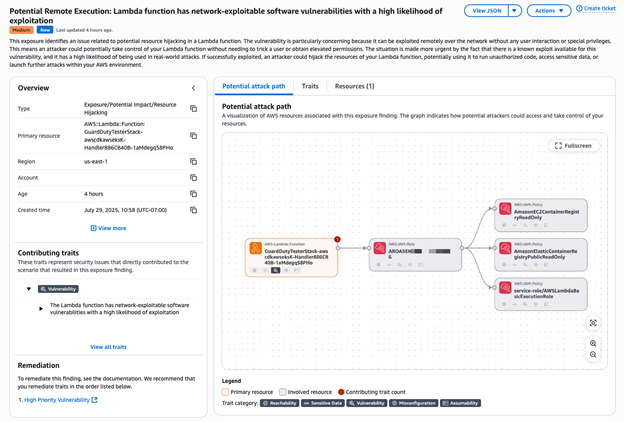
Figure 2: Potential remote execution exposure finding

Figure 2: Potential remote execution exposure finding

Note: It’s recommended that you deploy these tests in a non-production account to help make sure that findings generated by these tests can be clearly identified.

Define your Security Hub configuration

After your success criteria have been established, you’re ready to plan your configuration. Some important decisions include:

  • Determine AWS service integrations: In addition to the core security capabilities of posture management through Security Hub CSPM and vulnerability management through Amazon Inspector, Security Hub integrates signals from other AWS security services such as GuardDuty and Macie.
  • Define third-party integrations:
    • For ticketing, Security Hub has native integrations with popular service management systems such as Atlassian’s Jira Service Management Cloud and ServiceNow.
    • Partners who already support or intend to support the OCSF schema to receive findings from Security Hub include companies such as Arctic Wolf, CrowdStrike, DataBee, Datadog, DTEX Systems, Dynatrace, Fortinet, IBM, Netskope, Orca Security, Palo Alto Neworks, Rapid7, Securonix, SentinelOne, Sophos, Splunk, Sumo Logic, Tines, Trellix, Wiz, and Zscaler.
    • Service partners such as Accenture, Caylent, Deloitte, IBM, and Optiv can help you adopt Security Hub and the OCSF schema.
  • Select a delegated administrator: From the AWS Organizations management account, you can set a delegated administrator for your organization. As a best practice, we recommend using the same delegated administrator across security services for consistent governance.
  • Select accounts in scope: Define accounts you want to have Security Hub enabled for.
  • Define regions: Determine regional restrictions or considerations.

Prepare for deployment

After you determine your success criteria and your Security Hub configuration, you should have an idea of your stakeholders, desired state, and timeframe. Now, you need to prepare for deployment. In this step, you should complete as much as possible before you deploy Security Hub. The following are some steps to take:

  • Create a project plan and timeline so that everyone involved understands what success look like and what the scope and timeline is.
  • Define the relevant stakeholders and consumers of the Security Hub data. Some common stakeholders include security operations center (SOC) analysts, incident responders, security engineers, cloud engineers, and finance.
  • Define who is responsible, accountable, consulted, and informed during the deployment. Make sure that team members understand their roles.
  • Make sure that you have access through your AWS Organizations management account to enable Security Hub for your organization and delegate an administrator.
  • Determine which accounts and AWS Regions you want to enable Security Hub in.

Enable Security Hub

AWS security services integrate with AWS Organizations to help you centrally manage Security Hub.

  1. If you haven’t already done so, enable at least Security Hub CSPM and Amazon Inspector. Also enable any other AWS security services that you want to integrate with Security Hub.
  2. Enable Security Hub for your organization from the organization management account.
  3. If setting a delegated administrator for Security Hub, see Setting a delegated administrator account in Security Hub from the management account.

    Note: As a best practice, we recommend using the same delegated administrator across security services for consistent governance.

  4. Sign into the delegated administrator with an IAM policy that gives you permission to enable and disable member accounts. With this policy, you will have granular control to decide what Regions you want enabled.
  5. Configure third-party integrations to create incidents or issues for Security Hub findings.

Note: After you enable Security Hub, exposure findings in your environment are created and analyzed immediately. However, it can take up to 6 hours to receive an exposure finding for a resource.

Validate deployment

The final step is to confirm that Security Hub is configured correctly and evaluate the solution against your success criteria.

  • Validate policy: Verify that you have the correct permissions to manage member accounts and regional restrictions are configured correctly.
  • Validate integrations: Verify that tickets with ServiceNow or Jira Cloud are working correctly by signing in to the AWS Management Console for Security hub and choosing Inventory in the navigation pane. Select Findings and verify there is a ticket ID in your finding.
  • Assess success criteria: Determine if you achieved the success criteria that you defined at the beginning of the project.

Clean up

You might want to remove Security Hub if you do not plan to move forward with deploying into production or need to gain approvals before continuing to use Security Hub. To properly clean up your test environment make sure you address each item below:

  • Before completing the cleanup, document your evaluation results, findings, and recommendations for production implementation.
  • If you used the GuardDuty findings tester or other testing tools, remove these resources first to stop generating test findings.
  • If you enabled services specifically for the POC and don’t plan to continue using them, disable them:
    • Disable third-party integrations (such as Jira Cloud or ServiceNow connections)
    • Disable Security Hub
    • Disable Amazon Inspector, GuardDuty, and Macie if they were enabled only for testing
  • Remove any test resources that were created specifically for the POC such as IAM roles, and policies.

Conclusion

In this post, we showed you how to plan and implement a Security Hub POC. You learned how to do so through phases, including defining success criteria, configuring Security Hub, and validating that Security Hub meets your business needs. Remember to use the trial periods to maximize your testing window without incurring significant costs. Throughout the POC, maintain focus on your predefined success criteria while remaining open to unexpected benefits or challenges that may arise. Maintain open communication with your AWS account team to address any questions or concerns to help you get the most out of your Security Hub POC experience.

Additional resources

If you have feedback about this post, submit comments in the Comments section below. If you have questions about this post, contact AWS Support.

Shahna Campbell

Shahna Campbell

Shahna is a solutions architect at AWS, working in the specialist organization with a focus on security. Previously, Shahna worked in the healthcare field clinically and as an application specialist. Shahna is passionate about cybersecurity and analytics. In her free time, she enjoys hiking, traveling, and spending time with family.

Kimberly Dickson

Kimberly Dickson

Kimberly is a WorldWide GTM Security Specialist based in London. She is passionate about working with customers on technical security solutions that help them build confidence and operate securely in the cloud.

Marshall Jones

Marshall Jones

Marshall is a Worldwide Security Specialist Solutions Architect at AWS. His background is in AWS consulting and security architecture and focused on a variety of security domains including edge, threat detection, and compliance. Today, he’s focused on helping enterprise AWS customers adopt and operationalize AWS security services to increase security effectiveness and reduce risk.

How to prioritize security risks using AWS Security Hub exposure findings

Post Syndicated from Shahna Campbell original https://aws.amazon.com/blogs/security/how-to-prioritize-security-risks-using-aws-security-hub-exposure-findings/

At re:Inforce 2025, AWS unveiled an enhanced AWS Security Hub that transforms how organizations prioritize their most critical security issues and respond at scale to protect their cloud environments. In this blog post, we discuss how you can use Security Hub to prioritize these issues with exposure findings. The enhanced Security Hub now uses advanced analytics to automatically correlate, enrich, and prioritize security signals across your cloud environment. Security Hub seamlessly integrates with Amazon GuardDuty, Amazon Inspector, Amazon Macie, and AWS Security Hub Cloud Security Posture Management (CSPM), formerly known as AWS Security Hub. Through these integrations, it provides comprehensive threat detection and vulnerability assessment. This intelligent integration helps organizations quickly identify critical security issues, from potential credential compromises to unintended resource exposures, enabling security teams to focus on what matters most.

What is Security Hub?

Security Hub delivers three key security capabilities to help you strengthen your cloud security posture through a unified cloud security solution:

  • Provides visibility across your organization through centralized management and continuous monitoring.
  • Enriches security signals from services such as Amazon Inspector and AWS Security Hub CSPM to surface active risks specific to your environment, so you can prioritize with confidence and streamline response.
  • Delivers integrated risk analysis by correlating findings from Amazon Inspector, AWS Security Hub CSPM, Amazon Macie, and other AWS services to help identify potential attack paths, surface exploitable vulnerabilities and misconfigurations, and provide actionable remediation guidance.

A top concern for customers is: How do I know where to prioritize response first? Managing large volumes of findings across multiple accounts and regions becomes more challenging when security findings are viewed in isolation, making it difficult to determine true priority and impact. Security Hub solves this by providing context-driven analysis. It surfaces the most critical risks by correlating related vulnerabilities, threats, and misconfigurations to reveal exploitable paths. This can help you make informed decisions about which issues to address first.

With exposure findings, you can prioritize critical security issues and respond at scale. Exposures are based on an analysis of findings and traits from Security Hub CSPM, Amazon Inspector (which scans for vulnerabilities), and Amazon Macie (which discovers and protects sensitive data). They are defined as potential security issues, and they are generated by different exposure traits.

Without automated correlation and enriched signals, security teams can struggle to effectively prioritize issues. For example, a vulnerability that Amazon Inspector detects might become critically important when combined with misconfigurations that Security Hub CSPM identifies. However, manually analyzing relationships across thousands of signals is time-consuming and prone to missing critical security context. Teams often build custom solutions to achieve this, but this approach requires significant analyst time and maintenance, which can cause critical security relationships to be overlooked.

Security Hub reduces this complexity by providing native integration across these AWS services in a unified cloud security center, without the operational overhead of log collection and aggregation. For security teams, this means they can help identify and respond to their most critical exposures before the exposures can lead to business impact, rather than spending valuable time manually piecing together individual security signals. Automated correlation and enriched context can help you make faster, more informed decisions about where to focus your efforts. This ultimately helps protect your cloud environment more effectively.

Exposure findings identify security risks in your environment by providing a comprehensive view of your security posture. These findings enable you to understand and address potential risks. Through this consolidated approach, you can efficiently prioritize your remediation efforts by focusing on the most critical exposure findings first,.

Exposure findings are formatted in the Open Cybersecurity Schema Framework (OCSF) schema, an open-source standard that enables security tools to share data seamlessly. The adoption of OCSF by Security Hub has several advantages. As an open, standardized schema that is part of the Linux Foundation, OCSF enables interoperability across multiple security tools and services, both within and outside of the AWS environment. It provides enhanced data normalization with consistent field naming and categorization, making it more straightforward to integrate with third-party security tools.

Partners who already support or intend to support the OCSF schema to receive findings from Security Hub include companies such as Arctic Wolf; CrowdStrike; DataBee, a Comcast company; Datadog; DTEX Systems; Dynatrace; Fortinet; IBM; Netskope; Orca Security; Rapid7; Securonix; SentinelOne; Splunk, a Cisco Company; Sumo Logic; Tines; Trellix; and Wiz. Additionally, service partners such as Accenture, Caylent, Deloitte, IBM, and Optiv can help you adopt Security Hub and the OCSF schema.

Prioritizing security risks

When you navigate to Security Hub, you will see the summary dashboard, which includes an exposure summary widget, as shown in Figure 1. This widget shows your exposures by severity and frequency. Security Hub assigns each exposure finding a default severity of Critical, High, Medium, or Low. Exposure findings with a severity of Informational are not published.

Security Hub calculates exposure finding severity by analyzing and correlating multiple security traits across AWS services. Instead of evaluating these factors in isolation, Security Hub uses a contextual approach, assigning a severity rating based on how these factors are correlated. For example, a resource with an identified vulnerability might receive a higher severity rating if it’s exploitable from the internet or has access to sensitive data.

Security Hub uses several factors to determine the default severity of an exposure finding:

  • Ease of discovery – The availability of automated tools, such as port scans or internet searches to discover the resource at risk.
  • Ease of exploit – The ease with which a threat actor can exploit the risk. For example, if there are open network paths or misconfigured metadata, a threat actor can more quickly exploit the risk.
  • Likelihood of exploit Security Hub uses both external signals, such as the Exploit Prediction Scoring System (EPSS)—a data-driven scoring system that estimates the probability of a vulnerability being exploited—and internal threat intelligence to determine the probability that the risk is exploited. This comprehensive approach applies to exposure findings for Amazon Elastic Compute Cloud (EC2) instances and AWS Lambda functions.
  • Awareness – The extent to which the risk is not merely theoretical but has publicly available or automated exploits. This factor applies to exposure findings for EC2 instances and Lambda functions.
  • Impact – The potential harm if the exploit is carried out. For example, an exposure could lead to loss of confidentiality from data exposure, loss of integrity from data corruption, loss of availability, or loss of accountability.

The list of risks in this widget is limited to the eight highest risks with the greatest number of critical findings. If two or more risks have an equal number of critical findings, the list automatically groups those findings behind more recent critical findings.

Figure 1 : Exposure summary widget

Figure 1 : Exposure summary widget

From the widget, you can pivot to the exposure dashboard to see to a pre-filtered view of your exposures for continued analysis of potential security issues. You can filter by severity by selecting the number associated with each severity, view a specific exposure by selecting from the list, or select View all exposure findings to see a dashboard of new exposures that are currently open, as shown in Figure 2.

Figure 2: Exposure dashboard

Figure 2: Exposure dashboard

The exposure console shows findings by their title and ranked by decreasing severity. It’s organized by the filter criteria and grouped by finding title. On the left-hand side, Quick filters provide a fast way to filter through exposures based on severity, the top 10 attributes based on the most common values across your findings, top 10 accounts, and top 10 resource types, as shown in Figure 2. In addition to using filters, you can use the Group by dropdown to group exposure findings by a specific attribute, such as AWS account ID, resource type, or product name.

To review the exposure, expand the findings, as shown in Figure 3 for the correlation of resources, status, attributes, and traits such as software vulnerabilities, misconfigurations, and reachability. These are also referred to as trait types. For a particular exposure finding, a trait can be associated with one or more signals, and a signal can contain one or more indicators.

Figure 3: Exposure findings

Figure 3: Exposure findings

As shown in Figure 3, the Potential Credential Stealing: Internet reachable EC2 instance with administrative instance profile has network-exploitable software vulnerabilities with a high likelihood of exploitation finding indicates that there are misconfigurations, vulnerabilities, and reachability (indication of an open network path to a resource) associated with the instance. To find out more about the signal, select anywhere in the line associated with the risk, and you will see an overview panel, as shown in Figure 4.

Figure 4: Exposure finding overview

Figure 4: Exposure finding overview

This example highlights a critical-severity finding for an internet-reachable EC2 instance with software vulnerabilities in the us-east-1 Region. This visualization is powerful because the Potential attack path diagram helps you see what matters by mapping out how potential threat actors could exploit these vulnerabilities to access your resources. The finding also includes critical metadata such as the resource identifier, creation time, reachability, vulnerability, and misconfigurations.

Using the finding, you can quickly understand complex security relationships, assess risk context, and determine remediation priorities, so you can better protect your workloads in the cloud and make more informed security decisions. To prioritize your security response efforts, you can also set finding severity levels and update status, and export findings in OCSF format.

To understand why an exposure is present, you can select the Traits tab, as shown in Figure 5. This will list traits such as Misconfiguration or Vulnerability. If you select By signal, in the Traits tab, you have a full list of the signals associated with the exposure finding. These signals are the underlying findings that were created from different services, such as Security Hub CSPM and Amazon Inspector, that were correlated together to determine the risk associated with the exposure finding.

Figure 5: Exposure finding traits

Figure 5: Exposure finding traits

If you select the Resources tab, you will see the resources associated with the exposure finding, as shown in Figure 6.

Figure 6: Exposure finding resources

Figure 6: Exposure finding resources

For this example, we have an EC2 instance, but you might have a combination of resources such as an EC2 instance, Amazon Simple Storage Service (Amazon S3) bucket, and AWS Identity and Access Management (IAM) role. This list of resources will help you determine what needs to be remediated in your environment to mitigate the risk attributed to this finding.

Finally, with the Create ticket option, Security Hub helps streamline the incident management process through its native integrations with popular ticketing systems such as Jira and ServiceNow. This integration minimizes the need for manual ticket creation and reduces the time between finding and fixing security issues. Organizations can use a Security Hub Automation Rule to automatically create and track tickets for security findings directly from the Security Hub console, helping to make sure that no critical security exposure goes unaddressed. Integration with these widely-used ticketing systems helps maintain a consistent workflow, enables better tracking of remediation efforts, and improves collaboration between security and operations teams. This can help you make your security operations more efficient by providing a streamlined path from detection to resolution.

Conclusion

The enhanced exposure findings capabilities in Security Hub represent a significant advancement in how organizations can secure their cloud environments. By automatically correlating and analyzing security signals across multiple AWS services, Security Hub helps you prioritize your most critical security issues confidently and respond at scale. The intuitive visualization of potential attack paths, combined with intelligent severity rankings and comprehensive trait analysis, enables security teams to make data-driven decisions about risk prioritization.

Security Hub exposure findings help organizations move from reactive to proactive security postures by:

  • Automatically discovering and evaluating publicly accessible resources
  • Providing clear visibility into security capabilities and configurations
  • Correlating multiple security signals to identify critical risks
  • Delivering actionable remediation guidance
  • Offering intuitive filtering and grouping options for efficient analysis

As cloud environments continue to grow in complexity, exposure findings provide the automation, intelligence, and context needed to stay ahead of potential security issues. This enables security teams to focus their valuable time on addressing the most critical risks first, ultimately helping organizations maintain a stronger security posture across their cloud environment.

Whether you’re managing a small deployment or a large enterprise environment, exposure findings in Security Hub provide the insights needed to effectively protect your AWS workloads and maintain a robust security position in an ever-evolving landscape.

If you have feedback about this post, submit comments in the Comments section below. If you have questions about this post, start a new thread on AWS Security, Identity, and Compliance re:Post or contact AWS Support.

Shahna Campbell

Shahna Campbell

Shahna is a solutions architect at AWS, working within the specialist organization with a focus on security. Previously, Shahna worked within the healthcare field clinically and as an application specialist. Shahna is passionate about cybersecurity and analytics. In her free time, she enjoys hiking, traveling, and spending time with family.

Author

Marshall Jones

Marshall is a Worldwide Security Specialist Solutions Architect at AWS. His background is in AWS consulting and security architecture and focused on a variety of security domains including edge, threat detection, and compliance. Today, he’s focused on helping enterprise AWS customers adopt and operationalize AWS security services to increase security effectiveness and reduce risk.

Kimberly Dickson

Kimberly is a Security Specialist Solutions Architect at AWS based in Singapore. She is passionate about working with customers on technical security solutions that help them build confidence and operate securely in the cloud.

How to manage certificate lifecycles using ACM event-driven workflows

Post Syndicated from Shahna Campbell original https://aws.amazon.com/blogs/security/how-to-manage-certificate-lifecycles-using-acm-event-driven-workflows/

With AWS Certificate Manager (ACM), you can simplify certificate lifecycle management by using event-driven workflows to notify or take action on expiring TLS certificates in your organization. Using ACM, you can provision, manage, and deploy public and private TLS certificates for use with integrated AWS services like Amazon CloudFront and Elastic Load Balancing (ELB), as well as for your internal resources and infrastructure. For a full list of integrated services, see Services integrated with AWS Certificate Manager.

By implementing event-driven workflows for certificate lifecycle management, you can help increase the visibility of upcoming and actual certificate expirations, and notify application teams that their action is required to renew a certificate. You can also use event-driven workflows to automate provisioning of private certificates to your internal resources, like a web server based on Amazon Elastic Compute Cloud (Amazon EC2).

In this post, we describe the ACM event types that Amazon EventBridge supports. EventBridge is a serverless event router that you can use to build event-driven applications at scale. ACM publishes these events for important occurrences, such as when a certificate becomes available, approaches expiration, or fails to renew. We also highlight example use cases for the event types supported by ACM. Lastly, we show you how to implement an event-driven workflow to notify application teams that they need to take action to renew a certificate for their workloads. You can also use these types of workflows to send the relevant event information to AWS Security Hub or to initiate certificate automation actions through AWS Lambda.

To view a video walkthrough and demo of this workflow, see AWS Certificate Manager: How to create event-driven certificate workflows.

ACM event types and selected use cases

In October 2022, ACM released support for three new event types:

  • ACM Certificate Renewal Action Required
  • ACM Certificate Expired 
  • ACM Certificate Available

Before this release, ACM had a single event type: ACM Certificate Approaching Expiration. By default, ACM creates Certificate Approaching Expiration events daily for active, ACM-issued certificates starting 45 days prior to their expiration. To learn more about the structure of these event types, see Amazon EventBridge support for ACM. The following examples highlight how you can use the different event types in the context of certificate lifecycle operations.

Notify stakeholders that action is required to complete certificate renewal

ACM emits an ACM Certificate Renewal Action Required event when customer action must be taken before a certificate can be renewed. For instance, if permissions aren’t appropriately configured to allow ACM to renew private certificates issued from AWS Private Certificate Authority (AWS Private CA), ACM will publish this event when automatic renewal fails at 45 days before expiration. Similarly, ACM might not be able to renew a public certificate because an administrator needs to confirm the renewal by email validation, or because Certification Authority Authorization (CAA) record changes prevent automatic renewal through domain validation. ACM will make further renewal attempts at 30 days, 15 days, 3 days, and 1 day before expiration, or until customer action is taken, the certificate expires, or the certificate is no longer eligible for renewal. ACM publishes an event for each renewal attempt.

It’s important to notify the appropriate parties — for example, the Public Key Infrastructure (PKI) team, security engineers, or application developers — that they need to take action to resolve these issues. You might notify them by email, or by integrating with your workflow management system to open a case that the appropriate engineering or support teams can track.

Notify application teams that a certificate for their workload has expired

You can use the ACM Certificate Expired event type to notify application teams that a certificate associated with their workload has expired. The teams should quickly investigate and validate that the expired certificate won’t cause an outage or cause application users to see a message stating that a website is insecure, which could impact their trust. To increase visibility for support teams, you can publish this event to Security Hub or a support ticketing system. For an example of how to publish these events as findings in Security Hub, see Responding to an event with a Lambda function.

Use automation to export and place a renewed private certificate

ACM sends an ACM Certificate Available event when a managed public or private certificate is ready for use. ACM publishes the event on issuance, renewal, and import. When a private certificate becomes available, you might still need to take action to deploy it to your resources, such as installing the private certificate for use in an EC2 web server. This includes a new private certificate that AWS Private CA issues as part of managed renewal through ACM. You might want to notify the appropriate teams that the new certificate is available for export from ACM, so that they can use the ACM APIs, AWS Command Line Interface (AWS CLI), or AWS Management Console to export the certificate and manually distribute it to your workload (for example, an EC2-based web server). For integrated services such as ELB, ACM binds the renewed certificate to your resource, and no action is required.

You can also use this event to invoke a Lambda function that exports the private certificate and places it in the appropriate directory for the relevant server, provide it to other serverless resources, or put it in an encrypted Amazon Simple Storage Service (Amazon S3) bucket to share with a third party for mutual TLS or a similar use case.

How to build a workflow to notify administrators that action is required to renew a certificate

In this section, we’ll show you how to configure notifications to alert the appropriate stakeholders that they need to take an action to successfully renew an ACM certificate.

To follow along with this walkthrough, make sure that you have an AWS Identity and Access Management (IAM) role with the appropriate permissions for EventBridge and Amazon Simple Notification Service (Amazon SNS). When a rule runs in EventBridge, a target associated with that rule is invoked, and in order to make API calls on Amazon SNS, EventBridge needs a resource-based IAM policy.

The following IAM permissions work for the example below (and for tidying up afterwards):

{
  "Version": "2012-10-17",
  "Statement": [
    {
      "Action": [
        "events:*"
      ],
      "Effect": "Allow",
      "Resource": "arn:aws:events:*:*:*"
    },
    {
      "Action": [
        "iam:PassRole"
      ],
      "Effect": "Allow",
      "Resource": "*",
      "Condition": {
        "StringLike": {
          "iam:PassedToService": "events.amazonaws.com"
        }
      }
    }  
  ]
}

The following is a sample resource-based policy that allows EventBridge to publish to an Amazon SNS topic. Make sure to replace <region>, <account-id>, and <topic-name> with your own data.

{
  "Sid": "PublishEventsToMyTopic",
  "Effect": "Allow",
  "Principal": {
    "Service": "events.amazonaws.com"
  },
  "Action": "sns:Publish",
  "Resource": "arn:aws:sns:<region>:<account-id>:<topic-name>"
}

The first step is to create an SNS topic by using the console to link multiple endpoints such as AWS Lambda and Amazon Simple Queue Service (Amazon SQS), or send a notification to an email address.

To create an SNS topic

  1. Open the Amazon SNS console.
  2. In the left navigation pane, choose Topics.
  3. Choose Create Topic.
  4. For Type, choose Standard.
  5. Enter a name for the topic, and (optional) enter a display name.
  6. Choose the triangle next to the Encryption — optional panel title.
    1. Select the Encryption toggle (optional) to encrypt the topic. This will enable server-side encryption (SSE) to help protect the contents of the messages in Amazon SNS topics.
    2. For this demonstration, we are going to use the default AWS managed KMS key. Using Amazon SNS with AWS Key Management Service (AWS KMS) provides encryption at rest, and the data keys that encrypt the SNS message data are stored with the data protected. To learn more about SNS data encryption, see Data encryption.
  7. Keep the defaults for all other settings.
  8. Choose Create topic.

When the topic has been successfully created, a notification bar appears at the top of the screen, and you will be routed to the page for the newly created topic. Note the Amazon Resource Name (ARN) listed in the Details panel because you’ll need it for the next section.

Next, you need to create a subscription to the topic to set a destination endpoint for the messages that are pushed to the topic to be delivered.

To create a subscription to the topic

  1. In the Subscriptions section of the SNS topic page you just created, choose Create subscription.
  2. On the Create subscription page, in the Details section, do the following:
    1. For Protocol, choose Email.
    2. For Endpoint, enter the email address where the ACM Certificate Renewal Action Required event alerts should be sent.
    3. Keep the default Subscription filter policy and Redrive policy settings for this demonstration.
    4. Choose Create subscription.
  3. To finalize the subscription, an email will be sent to the email address that you entered as the endpoint. To validate your subscription, choose Confirm Subscription in the email when you receive it.
  4. A new web browser will open with a message verifying that the subscription status is Confirmed and that you have been successfully subscribed to the SNS topic.

Next, create the EventBridge rule that will be invoked when an ACM Certificate Renewal Action Required event occurs. This rule uses the SNS topic that you just created as a target.

To create an EventBridge rule

  1. Navigate to the EventBridge console.
  2. In the left navigation pane, choose Rules.
  3. Choose Create rule.
  4. In the Rule detail section, do the following:
    1. Define the rule by entering a Name and an optional Description.
    2. In the Event bus dropdown menu, select the default event bus.
    3. Keep the default values for the rest of the settings.
    4. Choose Next.
  5. For Event source, make sure that AWS events or EventBridge partner events is selected, because the event source is ACM.
  6. In the Sample event panel, under Sample events, choose ACM Certificate Renewal Action Required as the sample event. This helps you verify your event pattern.
  7. In the Event pattern panel, for Event Source, make sure that AWS services is selected. 
  8. For AWS service, choose Certificate Manager.
  9. Under Event type, choose ACM Certificate Renewal Action Required.
  10. Choose Test pattern.
  11. In the Event pattern section, a notification will appear stating Sample event matched the event pattern to confirm that the correct event pattern was created.
  12. Choose Next.
  13. In the Target 1 panel, do the following:
    1. For Target types, make sure that AWS service is selected.
    2. Under Select a target, choose SNS topic.
    3. In the Topic dropdown list, choose your desired topic.
    4. Choose Next.
  14. (Optional) Add tags to the topic.
  15. Choose Next.
  16. Review the settings for the rule, and then choose Create rule.

Now you are listening to this event and will be notified when a customer action must be taken before a certificate can be renewed.

For another example of how to use Amazon SNS and email notifications, see How to monitor expirations of imported certificates in AWS Certificate Manager (ACM). For an example of how to use Lambda to publish findings to Security Hub to provide visibility to administrators and security teams, see Responding to an event with a Lambda function. Other options for responding to this event include invoking a Lambda function to export and distribute private certificates, or integrating with a messaging or collaboration tool for ChatOps.

Conclusion 

In this blog post, you learned about the new EventBridge event types for ACM, and some example use cases for each of these event types. You also learned how to use these event types to create a workflow with EventBridge and Amazon SNS that notifies the appropriate stakeholders when they need to take action, so that ACM can automatically renew a TLS certificate.

By using these events to increase awareness of upcoming certificate lifecycle events, you can make it simpler to manage TLS certificates across your organization. For more information about certificate management on AWS, see the ACM documentation or get started using ACM today in the AWS Management Console.

 
If you have feedback about this post, submit comments in the Comments section below. If you have questions about this post, contact AWS Support.

Want more AWS Security news? Follow us on Twitter.

Shahna Campbell

Shahna Campbell

Shahna is a solutions architect at AWS, working within the specialist organization with a focus on security. Previously, Shahna worked within the healthcare field clinically and as an application specialist. Shahna is passionate about cybersecurity and analytics. In her free time she enjoys hiking, traveling, and spending time with family.

Mani Subramanian

Manikandan Subramanian

Manikandan is a principal engineer at AWS Cryptography. His primary focus is on public key infrastructure (PKI), and he helps ensure secure communication using TLS certificates for AWS customers. Mani is also passionate at designing APIs, is an API bar raiser, and has helped launch multiple AWS services. Outside of work, Mani enjoys cooking and watching Formula One.

Zach Miller

Zach Miller

Zach is a Senior Security Specialist Solutions Architect at AWS. His background is in data protection and security architecture, focused on a variety of security domains, including cryptography, secrets management, and data classification. Today, he is focused on helping enterprise AWS customers adopt and operationalize AWS security services to increase security effectiveness and reduce risk.