All posts by Sven Sauleau

How Cloudflare runs more AI models on fewer GPUs: A technical deep-dive

Post Syndicated from Sven Sauleau original https://blog.cloudflare.com/how-cloudflare-runs-more-ai-models-on-fewer-gpus/

As the demand for AI products grows, developers are creating and tuning a wider variety of models. While adding new models to our growing catalog on Workers AI, we noticed that not all of them are used equally – leaving infrequently used models occupying valuable GPU space. Efficiency is a core value at Cloudflare, and with GPUs being the scarce commodity they are, we realized that we needed to build something to fully maximize our GPU usage.

Omni is an internal platform we’ve built for running and managing AI models on Cloudflare’s edge nodes. It does so by spawning and managing multiple models on a single machine and GPU using lightweight isolation. Omni makes it easy and efficient to run many small and/or low-volume models, combining multiple capabilities by:  

  • Spawning multiple models from a single control plane,

  • Implementing lightweight process isolation, allowing models to spin up and down quickly,

  • Isolating the file system between models to easily manage per-model dependencies, and

  • Over-committing GPU memory to run more models on a single GPU.

Cloudflare aims to place GPUs as close as we possibly can to people and applications that are using them. With Omni in place, we’re now able to run more models on every node in our network, improving model availability, minimizing latency, and reducing power consumed by idle GPUs.

Here’s how. 

Omni’s architecture – at a glance

At a high level, Omni is a platform to run AI models. When an inference request is made on Workers AI, we load the model’s configuration from Workers KV and our routing layer forwards it to the closest Omni instance that has available capacity. For inferences using the Asynchronous Batch API, we route to an Omni instance that is idle, which is typically in a location where it’s night.

Omni runs a few checks on the inference request, runs model specific pre and post processing, then hands the request over to the model.


Elastic scaling by spawning multiple models from a single control plane

If you’re developing an AI application, a typical setup is having a container or a VM dedicated to running a single model with a GPU attached to it. This is simple. But it’s also heavy-handed — because it requires managing the entire stack from provisioning the VM, installing GPU drivers, downloading model weights, and managing the Python environment. At scale, managing infrastructure this way is incredibly time consuming and often requires an entire team. 

If you’re using Workers AI, we handle all of this for you. Omni uses a single control plane for running multiple models, called the scheduler, which automatically provisions models and spawns new instances as your traffic scales. When starting a new model instance, it downloads model weights, Python code, and any other dependencies. Omni’s scheduler provides fine-grained control and visibility over the model’s lifecycle: it receives incoming inference requests and routes them to the corresponding model processes, being sure to distribute the load between multiple GPUs. It then makes sure the model processes are running, rolls out new versions as they are released, and restarts itself when detecting errors or failure states. It also collects metrics for billing and emits logs.

The inference itself is done by a per-model process, supervised by the scheduler. It receives the inference request and some metadata, then sends back a response. Depending on the model, the response can be various types; for instance, a JSON object or a SSE stream for text generation, or binary for image generation.

The scheduler and the child processes communicate by passing messages over Inter-Process Communication (IPC). Usually the inference request is buffered in the scheduler for applying features, like prompt templating or tool calling, before the request is passed to the child process. For potentially large binary requests, the scheduler hands over the underlying TCP connection to the child process for consuming the request body directly.

Implementing lightweight process and Python isolation

Typically, deploying a model requires its own dedicated container, but we want to colocate more models on a single container to conserve memory and GPU capacity. In order to do so, we needed finer-grained controls over CPU memory and the ability to isolate a model from its dependencies and environment. We deploy Omni in two configurations; a container running multiple models or bare metal running a single model. In both cases, process isolation and Python virtual environments allow us to isolate models with different dependencies by creating namespaces and are limited by cgroups

Python doesn’t take into account cgroups memory limits for memory allocations, which can lead to OOM errors. Many AI Python libraries rely on psutil for pre-allocating CPU memory. psutil reads /proc/meminfo to determine how much memory is available. Since in Omni each model has its own configurable memory limits, we need psutil to reflect the current usage and limits for a given model, not for the entire system.

The solution for us was to create a virtual file system, using fuse, to mount our own version of /proc/meminfo which reflects the model’s current usage and limits.

To illustrate this, here’s an Omni instance running a model (running as pid 8). If we enter the mount namespace and look at /proc/meminfo it will reflect the model’s configuration:

# Enter the mount (file system) namespace of a child process
$ nsenter -t 8 -m

$ mount
...
none /proc/meminfo fuse ...

$ cat /proc/meminfo
MemTotal:     7340032 kB
MemFree:     7316388 kB
MemAvailable:     7316388 kB

In this case the model has 7Gib of memory available and the entire container 15Gib. If the model tries to allocate more than 7Gib of memory, it will be OOM killed and restarted by the scheduler’s process manager, without causing any problems to the other models.

For isolating Python and some system dependencies, each model runs in a Python virtual environment, managed by uv. Dependencies are cached on the machine and, if possible, shared between models (uv uses symbolic links between its cache and virtual environments).

Also separated processes for models allows to have different CUDA contexts and isolation for error recovery. 

Over-committing memory to run more models on a single GPU

Some models don’t receive enough traffic to fully utilize a GPU, and with Omni we can pack more models on a single GPU, freeing up capacity for other workloads. When it comes to GPU memory management, Omni has two main jobs: safely over-commit GPU memory, so that more models than normal can share a single GPU, and enforce memory limits, to prevent any single model from running out of memory while running.      

Over-committing memory means allocating more memory than is physically available to the device. 

For example, if a GPU has 10 Gib of memory, Omni would allow 2 models of 10Gib each on that GPU.

Right now, Omni is configured to run 13 models and is allocating about 400% GPU memory on a single GPU, saving up 4 GPUs. Omni does this by injecting a CUDA stub library that intercepts CUDA memory allocations (cuMalloc* or cudaMalloc*) calls and forces memory allocations to be performed in unified memory mode.

In Unified memory mode CUDA shares the same memory address space for both the GPU and the CPU:


CUDA’s unified memory mode 

In practice this is what memory over-commitment looks like: imagine 3 models (A, B and C). Models A+B fit in the GPU’s memory but C takes up the entire memory.

  1. Models A+B are loaded first and are in GPU memory, while model C is in CPU memory


  2. Omni receives a request for model C so models A+B are swapped out and C is swapped in.


  3. Omni receives a request for model B, so model C is partly swapped out and model B is swapped back in.


  4. Omni receives a request for model A, so model A is swapped back in and model C is completely swapped out.


The trade-off is added latency: if performing an inference requires memory that is currently on the host system, it must be transferred to the GPU. For smaller models, this latency is minimal, because with PCIe 4.0, the physical bus between your GPU and system, provides 32 GB/sec of bandwidth. On the other hand, if a model need to be “cold started” i.e. it’s been swapped out because it hasn’t been used in a while, the system may need to swap back the entire model – a larger sized model, for example, might use 5Gib of GPU memory for weights and caches, and would take ~156ms to be swapped back into the GPU. Naturally, over time, inactive models are put into CPU memory, while active models stay hot in the GPU.

Rather than allowing the model to choose how much GPU memory it uses, AI frameworks tend to pre-allocate as much GPU memory as possible for performance reasons, making co-locating models more complicated. Omni allows us to control how much memory is actually exposed to any given model to prevent a greedy model from over-using the GPU allocated to it. We do this by overriding the CUDA runtime and driver APIs (cudaMemGetInfo and cuMemGetInfo). Instead of exposing the entire GPU memory, we only expose a subset of memory to each model.

How Omni runs multiple models for Workers AI 

AI models can run in a variety of inference engines or backends: vLLM, Python, and now our very own inference engine, Infire. While models have different capabilities, each model needs to support Workers AI features, like batching and function calling. Omni acts as a unified layer for integrating these systems. It integrates into our internal routing and scheduling systems, and provides a Python API for our engineering team to add new models more easily. Let’s take a closer look at how Omni does this in practice:

from omni import Response
import cowsay


def handle_request(request, context):
    try:
        json = request.body.json
        text = json["text"]
    except Exception as err:
        return Response.error(...)

    return cowsay.get_output_string('cow', text)

Similar to how a JavaScript Worker works, Omni calls a request handler, running the model’s logic and returning a response. 

Omni installs Python dependencies at model startup. We run an internal Python registry and mirror the public registry. In either case we declare dependencies in requirements.txt:

cowsay==6.1

The handle_request function can be async and return different Python types, including pydantic objects. Omni will convert the return value into a Workers AI response for the eyeball.

A Python package is injected, named omni, containing all the Python APIs to interact with the request, the Workers AI systems, building Responses, error handling, etc. Internally we publish it as regular Python package to be used in standalone, for unit testing for instance:

from omni import Context, Request
from model import handle_request


def test_basic():
    ctx = Context.inactive()
    req = Request(json={"text": "my dog is cooler than you!"})
    out = handle_request(req, ctx)
    assert out == """  __________________________
| my dog is cooler than you! |
  ==========================
                          \\
                           \\
                             ^__^
                             (oo)\\_______
                             (__)\\       )\\/\\
                                 ||----w |
                                 ||     ||"""

What’s next 

Omni allows us to run models more efficiently by spawning them from a single control plane and implementing lightweight process isolation. This enables quick starting and stopping of models, isolated file systems for managing Python and system dependencies, and over-committing GPU memory to run more models on a single GPU. This improves the performance for our entire Workers AI stack, reduces the cost of running GPUs, and allows us to ship new models and features quickly and safely.

Right now, Omni is running in production on a handful of models in the Workers AI catalog, and we’re adding more every week. Check out Workers AI today to experience Omni’s performance benefits on your AI application. 

polyfill.io now available on cdnjs: reduce your supply chain risk

Post Syndicated from Sven Sauleau original https://blog.cloudflare.com/polyfill-io-now-available-on-cdnjs-reduce-your-supply-chain-risk


Polyfill.io is a popular JavaScript library that nullifies differences across old browser versions. These differences often take up substantial development time.

It does this by adding support for modern functions (via polyfilling), ultimately letting developers work against a uniform environment simplifying development. The tool is historically loaded by linking to the endpoint provided under the domain polyfill.io.

In the interest of providing developers with additional options to use polyfill, today we are launching an alternative endpoint under cdnjs. You can replace links to polyfill.io “as is” with our new endpoint. You will then rely on the same service and reputation that cdnjs has built over the years for your polyfill needs.

Our interest in creating an alternative endpoint was also sparked by some concerns raised by the community, and main contributors, following the transition of the domain polyfill.io to a new provider (Funnull).

The concerns are that any website embedding a link to the original polyfill.io domain, will now be relying on Funnull to maintain and secure the underlying project to avoid the risk of a supply chain attack. Such an attack would occur if the underlying third party is compromised or alters the code being served to end users in nefarious ways, causing, by consequence, all websites using the tool to be compromised.

Supply chain attacks, in the context of web applications, are a growing concern for security teams, and also led us to build a client side security product to detect and mitigate these attack vectors: Page Shield.

Irrespective of the scenario described above, this is a timely reminder of the complexities and risks tied to modern web applications. As maintainers and contributors of cdnjs, currently used by more than 12% of all sites, this reinforces our commitment to help keep the Internet safe.

polyfill.io on cdnjs

The full polyfill.io implementation has been deployed at the following URL:

https://cdnjs.cloudflare.com/polyfill/

The underlying bundle link is:

For minified: https://cdnjs.cloudflare.com/polyfill/v3/polyfill.min.js
For unminified: https://cdnjs.cloudflare.com/polyfill/v3/polyfill.js

Usage and deployment is intended to be identical to the original polyfill.io site. As a developer, you should be able to simply “replace” the old link with the new cdnjs-hosted link without observing any side effects, besides a possible improvement in performance and reliability.

If you don’t have access to the underlying website code, but your website is behind Cloudflare, replacing the links is even easier, as you can deploy a Cloudflare Worker to update the links for you:

export interface Env {}

export default {
    async fetch(request: Request, env: Env, ctx: ExecutionContext): Promise<Response> {
        ctx.passThroughOnException();

        const response = await fetch(request);

        if ((response.headers.get('content-type') || '').includes('text/html')) {
            const rewriter = new HTMLRewriter()
                .on('link', {
                    element(element) {
                        const rel = element.getAttribute('rel');
                        if (rel === 'preconnect') {
                            const href = new URL(element.getAttribute('href') || '', request.url);

                            if (href.hostname === 'polyfill.io') {
                                href.hostname = 'cdnjs.cloudflare.com';
                                element.setAttribute('href', href.toString());
                            }
                        }
                    },
                })

                .on('script', {
                    element(element) {
                        if (element.hasAttribute('src')) {
                            const src = new URL(element.getAttribute('src') || '', request.url);
                            if (src.hostname === 'polyfill.io') {
                                src.hostname = 'cdnjs.cloudflare.com';
                                src.pathname = '/polyfill' + src.pathname;

                                element.setAttribute('src', src.toString());
                            }
                        }
                    },
                });

            return rewriter.transform(response);
        } else {
            return response;
        }
    },
};

Instructions on how to deploy a worker can be found on our developer documentation.

You can also test the Worker on your website without deploying the worker. You can find instructions on how to do this in another blog post we wrote in the past.

Implemented with Rust on Cloudflare Workers

We were happy to discover that polyfill.io is a Rust project. As you might know, Rust has been a first class citizen on Cloudflare Workers from the start.

The polyfill.io service was hosted on Fastly and used their Rust library. We forked the project to add the compatibility for Cloudflare Workers, and plan to make the fork publicly accessible in the near future.

Worker

The https://cdnjs.cloudflare.com/polyfill/[...].js endpoints are also implemented in a Cloudflare Worker that wraps our Polyfill.io fork. The wrapper uses Cloudflare’s Rust API and looks like the following:

#[event(fetch)]
async fn main(req: Request, env: Env, ctx: Context) -> Result<Response> {
    let metrics = {...};

    let polyfill_store = get_d1(&req, &env)?;
    let polyfill_env = Arc::new(service::Env { polyfill_store, metrics });
    
    // Run the polyfill.io entrypoint
    let res = service::handle_request(req2, polyfill_env).await;

    let status_code = if let Ok(res) = &res {
        res.status_code()
    } else {
        500
    };
    metrics
        .requests
        .with_label_values(&[&status_code.to_string()])
        .inc();

    ctx.wait_until(async move {
        if let Err(err) = metrics.report_metrics().await {
            console_error!("failed to report metrics: {err}");
        }
    });

    res
}

The wrapper only sets up our internal metrics and logging tools, so we can monitor uptime and performance of the underlying logic while calling the Polyfill.io entrypoint.

Storage for the Polyfill files

All the polyfill files are stored in a key-value store powered by Cloudflare D1. This allows us to fetch as many polyfill files as we need with a single SQL query, as opposed to the original implementation doing one KV get() per file.

For performance, we have one Cloudflare D1 instance per region and the SQL queries are routed to the nearest database.

cdnjs for your JavaScript libraries

cdnjs is hosting over 6k JavaScript libraries as of today. We are looking for ways to improve the service and provide new content. We listen to community feedback and welcome suggestions on our community forum, or cdnjs on GitHub.

Page Shield is also available to all paid plans. Log in to turn it on with a single click to increase visibility and security for your third party assets.

Wasm core dumps and debugging Rust in Cloudflare Workers

Post Syndicated from Sven Sauleau original http://blog.cloudflare.com/wasm-coredumps/

Wasm core dumps and debugging Rust in Cloudflare Workers

Wasm core dumps and debugging Rust in Cloudflare Workers

A clear sign of maturing for any new programming language or environment is how easy and efficient debugging them is. Programming, like any other complex task, involves various challenges and potential pitfalls. Logic errors, off-by-ones, null pointer dereferences, and memory leaks are some examples of things that can make software developers desperate if they can't pinpoint and fix these issues quickly as part of their workflows and tools.

WebAssembly (Wasm) is a binary instruction format designed to be a portable and efficient target for the compilation of high-level languages like Rust, C, C++, and others. In recent years, it has gained significant traction for building high-performance applications in web and serverless environments.

Cloudflare Workers has had first-party support for Rust and Wasm for quite some time. We've been using this powerful combination to bootstrap and build some of our most recent services, like D1, Constellation, and Signed Exchanges, to name a few.

Using tools like Wrangler, our command-line tool for building with Cloudflare developer products, makes streaming real-time logs from our applications running remotely easy. Still, to be honest, debugging Rust and Wasm with Cloudflare Workers involves a lot of the good old time-consuming and nerve-wracking printf'ing strategy.

What if there’s a better way? This blog is about enabling and using Wasm core dumps and how you can easily debug Rust in Cloudflare Workers.

What are core dumps?

In computing, a core dump consists of the recorded state of the working memory of a computer program at a specific time, generally when the program has crashed or otherwise terminated abnormally. They also add things like the processor registers, stack pointer, program counter, and other information that may be relevant to fully understanding why the program crashed.

In most cases, depending on the system’s configuration, core dumps are usually initiated by the operating system in response to a program crash. You can then use a debugger like gdb to examine what happened and hopefully determine the cause of a crash. gdb allows you to run the executable to try to replicate the crash in a more controlled environment, inspecting the variables, and much more. The Windows' equivalent of a core dump is a minidump. Other mature languages that are interpreted, like Python, or languages that run inside a virtual machine, like Java, also have their ways of generating core dumps for post-mortem analysis.

Core dumps are particularly useful for post-mortem debugging, determining the conditions that lead to a failure after it has occurred.

WebAssembly core dumps

WebAssembly has had a proposal for implementing core dumps in discussion for a while. It's a work-in-progress experimental specification, but it provides basic support for the main ideas of post-mortem debugging, including using the DWARF (debugging with attributed record formats) debug format, the same that Linux and gdb use. Some of the most popular Wasm runtimes, like Wasmtime and Wasmer, have experimental flags that you can enable and start playing with Wasm core dumps today.

If you run Wasmtime or Wasmer with the flag:

--coredump-on-trap=/path/to/coredump/file

The core dump file will be emitted at that location path if a crash happens. You can then use tools like wasmgdb to inspect the file and debug the crash.

But let's dig into how the core dumps are generated in WebAssembly, and what’s inside them.

How are Wasm core dumps generated

(and what’s inside them)

When WebAssembly terminates execution due to abnormal behavior, we say that it entered a trap. With Rust, examples of operations that can trap are accessing out-of-bounds addresses or a division by zero arithmetic call. You can read about the security model of WebAssembly to learn more about traps.

The core dump specification plugs into the trap workflow. When WebAssembly crashes and enters a trap, core dumping support kicks in and starts unwinding the call stack gathering debugging information. For each frame in the stack, it collects the function parameters and the values stored in locals and in the stack, along with binary offsets that help us map to exact locations in the source code. Finally, it snapshots the memory and captures information like the tables and the global variables.

DWARF is used by many mature languages like C, C++, Rust, Java, or Go. By emitting DWARF information into the binary at compile time a debugger can provide information such as the source name and the line number where the exception occurred, function and argument names, and more. Without DWARF, the core dumps would be just pure assembly code without any contextual information or metadata related to the source code that generated it before compilation, and they would be much harder to debug.

WebAssembly uses a (lighter) version of DWARF that maps functions, or a module and local variables, to their names in the source code (you can read about the WebAssembly name section for more information), and naturally core dumps use this information.

All this information for debugging is then bundled together and saved to the file, the core dump file.

The core dump structure has multiple sections, but the most important are:

  • General information about the process;
  • The threads and their stack frames (note that WebAssembly is single threaded in Cloudflare Workers);
  • A snapshot of the WebAssembly linear memory or only the relevant regions;
  • Optionally, other sections like globals, data, or table.

Here’s the thread definition from the core dump specification:

corestack   ::= customsec(thread-info vec(frame))
thread-info ::= 0x0 thread-name:name ...
frame       ::= 0x0 ... funcidx:u32 codeoffset:u32 locals:vec(value)
                stack:vec(value)

A thread is a custom section called corestack. A corestack section contains the thread name and a vector (or array) of frames. Each frame contains the function index in the WebAssembly module (funcidx), the code offset relative to the function's start (codeoffset), the list of locals, and the list of values in the stack.

Values are defined as follows:

value ::= 0x01       => ∅
        | 0x7F n:i32 => n
        | 0x7E n:i64 => n
        | 0x7D n:f32 => n
        | 0x7C n:f64 => n

At the time of this writing these are the possible numbers types in a value. Again, we wanted to describe the basics; you should track the full specification to get more detail or find information about future changes. WebAssembly core dump support is in its early stages of specification and implementation, things will get better, things might change.

This is all great news. Unfortunately, however, the Cloudflare Workers runtime doesn’t support WebAssembly core dumps yet. There is no technical impediment to adding this feature to workerd; after all, it's based on V8, but since it powers a critical part of our production infrastructure and products, we tend to be conservative when it comes to adding specifications or standards that are still considered experimental and still going through the definitions phase.

So, how do we get core Wasm dumps in Cloudflare Workers today?

Polyfilling

Polyfilling means using userland code to provide modern functionality in older environments that do not natively support it. Polyfills are widely popular in the JavaScript community and the browser environment; they've been used extensively to address issues where browser vendors still didn't catch up with the latest standards, or when they implement the same features in different ways, or address cases where old browsers can never support a new standard.

Meet wasm-coredump-rewriter, a tool that you can use to rewrite a Wasm module and inject the core dump runtime functionality in the binary. This runtime code will catch most traps (exceptions in host functions are not yet catched and memory violation not by default) and generate a standard core dump file. To some degree, this is similar to how Binaryen's Asyncify works.

Let’s look at code and see how this works. He’s some simple pseudo code:

export function entry(v1, v2) {
    return addTwo(v1, v2)
}

function addTwo(v1, v2) {
  res = v1 + v2;
  throw "something went wrong";

  return res
}

An imaginary compiler could take that source and generate the following Wasm binary code:

  (func $entry (param i32 i32) (result i32)
    (local.get 0)
    (local.get 1)
    (call $addTwo)
  )

  (func $addTwo (param i32 i32) (result i32)
    (local.get 0)
    (local.get 1)
    (i32.add)
    (unreachable) ;; something went wrong
  )

  (export "entry" (func $entry))

“;;” is used to denote a comment.

entry() is the Wasm function exported to the host. In an environment like the browser, JavaScript (being the host) can call entry().

Irrelevant parts of the code have been snipped for brevity, but this is what the Wasm code will look like after wasm-coredump-rewriter rewrites it:

  (func $entry (type 0) (param i32 i32) (result i32)
    ...
    local.get 0
    local.get 1
    call $addTwo ;; see the addTwo function bellow
    global.get 2 ;; is unwinding?
    if  ;; label = @1
      i32.const x ;; code offset
      i32.const 0 ;; function index
      i32.const 2 ;; local_count
      call $coredump/start_frame
      local.get 0
      call $coredump/add_i32_local
      local.get 1
      call $coredump/add_i32_local
      ...
      call $coredump/write_coredump
      unreachable
    end)

  (func $addTwo (type 0) (param i32 i32) (result i32)
    local.get 0
    local.get 1
    i32.add
    ;; the unreachable instruction was here before
    call $coredump/unreachable_shim
    i32.const 1 ;; funcidx
    i32.const 2 ;; local_count
    call $coredump/start_frame
    local.get 0
    call $coredump/add_i32_local
    local.get 1
    call $coredump/add_i32_local
    ...
    return)

  (export "entry" (func $entry))

As you can see, a few things changed:

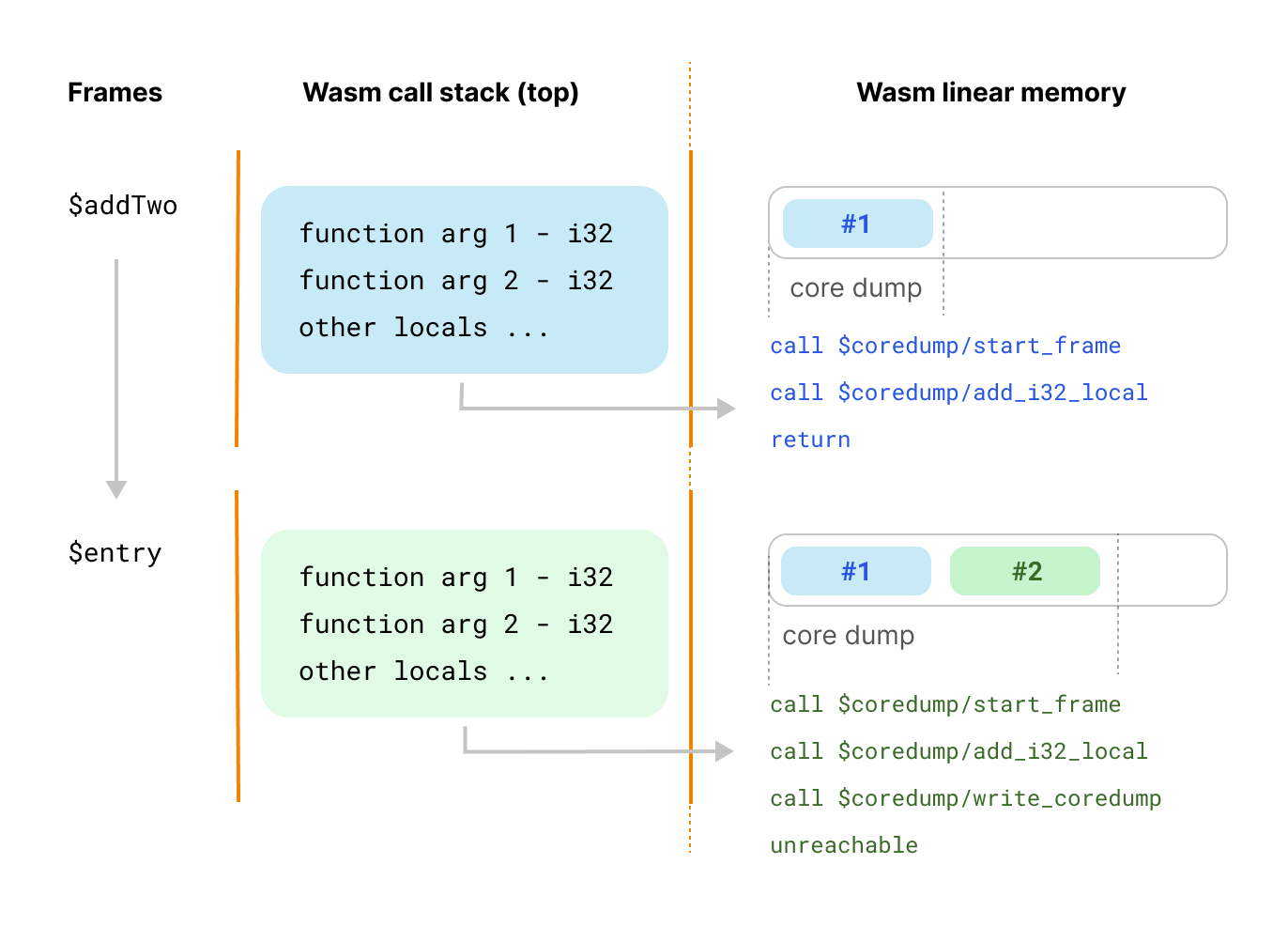
  1. The (unreachable) instruction in addTwo() was replaced by a call to $coredump/unreachable_shim which starts the unwinding process. Then, the location and debugging data is captured, and the function returns normally to the entry() caller.
  2. Code has been added after the addTwo() call instruction in entry() that detects if we have an unwinding process in progress or not. If we do, then it also captures the local debugging data, writes the core dump file and then, finally, moves to the unconditional trap unreachable.

In short, we unwind until the host function entry() gets destroyed by calling unreachable.

Let’s go over the runtime functions that we inject for more clarity, stay with us:

  • $coredump/start_frame(funcidx, local_count) starts a new frame in the coredump.
  • $coredump/add_*_local(value) captures the values of function arguments and in locals (currently capturing values from the stack isn’t implemented.)
  • $coredump/write_coredump is used at the end and writes the core dump in memory. We take advantage of the first 1 KiB of the Wasm linear memory, which is unused, to store our core dump.

A diagram is worth a thousand words:

Wasm core dumps and debugging Rust in Cloudflare Workers

Wait, what’s this about the first 1 KiB of the memory being unused, you ask? Well, it turns out that most WebAssembly linters and tools, including Emscripten and WebAssembly’s LLVM don’t use the first 1 KiB of memory. Rust and Zig also use LLVM, but they changed the default. This isn’t pretty, but the hugely popular Asyncify polyfill relies on the same trick, so there’s reasonable support until we find a better way.

But we digress, let’s continue. After the crash, the host, typically JavaScript in the browser, can now catch the exception and extract the core dump from the Wasm instance’s memory:

try {
    wasmInstance.exports.someExportedFunction();
} catch(err) {
    const image = new Uint8Array(wasmInstance.exports.memory.buffer);
    writeFile("coredump." + Date.now(), image);
}

If you're curious about the actual details of the core dump implementation, you can find the source code here. It was written in AssemblyScript, a TypeScript-like language for WebAssembly.

This is how we use the polyfilling technique to implement Wasm core dumps when the runtime doesn’t support them yet. Interestingly, some Wasm runtimes, being optimizing compilers, are likely to make debugging more difficult because function arguments, locals, or functions themselves can be optimized away. Polyfilling or rewriting the binary could actually preserve more source-level information for debugging.

You might be asking what about performance? We did some testing and found that the impact is negligible; the cost-benefit of being able to debug our crashes is positive. Also, you can easily turn wasm core dumps on or off for specific builds or environments; deciding when you need them is up to you.

Debugging from a core dump

We now know how to generate a core dump, but how do we use it to diagnose and debug a software crash?

Similarly to gdb (GNU Project Debugger) on Linux, wasmgdb is the tool you can use to parse and make sense of core dumps in WebAssembly; it understands the file structure, uses DWARF to provide naming and contextual information, and offers interactive commands to navigate the data. To exemplify how it works, wasmgdb has a demo of a Rust application that deliberately crashes; we will use it.

Let's imagine that our Wasm program crashed, wrote a core dump file, and we want to debug it.

$ wasmgdb source-program.wasm /path/to/coredump
wasmgdb>

When you fire wasmgdb, you enter a REPL (Read-Eval-Print Loop) interface, and you can start typing commands. The tool tries to mimic the gdb command syntax; you can find the list here.

Let's examine the backtrace using the bt command:

wasmgdb> bt
#18     000137 as __rust_start_panic () at library/panic_abort/src/lib.rs
#17     000129 as rust_panic () at library/std/src/panicking.rs
#16     000128 as rust_panic_with_hook () at library/std/src/panicking.rs
#15     000117 as {closure#0} () at library/std/src/panicking.rs
#14     000116 as __rust_end_short_backtrace<std::panicking::begin_panic_handler::{closure_env#0}, !> () at library/std/src/sys_common/backtrace.rs
#13     000123 as begin_panic_handler () at library/std/src/panicking.rs
#12     000194 as panic_fmt () at library/core/src/panicking.rs
#11     000198 as panic () at library/core/src/panicking.rs
#10     000012 as calculate (value=0x03000000) at src/main.rs
#9      000011 as process_thing (thing=0x2cff0f00) at src/main.rs
#8      000010 as main () at src/main.rs
#7      000008 as call_once<fn(), ()> (???=0x01000000, ???=0x00000000) at /rustc/b833ad56f46a0bbe0e8729512812a161e7dae28a/library/core/src/ops/function.rs
#6      000020 as __rust_begin_short_backtrace<fn(), ()> (f=0x01000000) at /rustc/b833ad56f46a0bbe0e8729512812a161e7dae28a/library/std/src/sys_common/backtrace.rs
#5      000016 as {closure#0}<()> () at /rustc/b833ad56f46a0bbe0e8729512812a161e7dae28a/library/std/src/rt.rs
#4      000077 as lang_start_internal () at library/std/src/rt.rs
#3      000015 as lang_start<()> (main=0x01000000, argc=0x00000000, argv=0x00000000, sigpipe=0x00620000) at /rustc/b833ad56f46a0bbe0e8729512812a161e7dae28a/library/std/src/rt.rs
#2      000013 as __original_main () at <directory not found>/<file not found>
#1      000005 as _start () at <directory not found>/<file not found>
#0      000264 as _start.command_export at <no location>

Each line represents a frame from the program's call stack; see frame #3:

#3      000015 as lang_start<()> (main=0x01000000, argc=0x00000000, argv=0x00000000, sigpipe=0x00620000) at /rustc/b833ad56f46a0bbe0e8729512812a161e7dae28a/library/std/src/rt.rs

You can read the funcidx, function name, arguments names and values and source location are all present. Let's select frame #9 now and inspect the locals, which include the function arguments:

wasmgdb> f 9
000011 as process_thing (thing=0x2cff0f00) at src/main.rs
wasmgdb> info locals
thing: *MyThing = 0xfff1c

Let’s use the p command to inspect the content of the thing argument:

wasmgdb> p (*thing)
thing (0xfff2c): MyThing = {
    value (0xfff2c): usize = 0x00000003
}

You can also use the p command to inspect the value of the variable, which can be useful for nested structures:

wasmgdb> p (*thing)->value
value (0xfff2c): usize = 0x00000003

And you can use p to inspect memory addresses. Let’s point at 0xfff2c, the start of the MyThing structure, and inspect:

wasmgdb> p (MyThing) 0xfff2c
0xfff2c (0xfff2c): MyThing = {
    value (0xfff2c): usize = 0x00000003
}

All this information in every step of the stack is very helpful to determine the cause of a crash. In our test case, if you look at frame #10, we triggered an integer overflow. Once you get comfortable walking through wasmgdb and using its commands to inspect the data, debugging core dumps will be another powerful skill under your belt.

Tidying up everything in Cloudflare Workers

We learned about core dumps and how they work, and we know how to make Cloudflare Workers generate them using the wasm-coredump-rewriter polyfill, but how does all this work in practice end to end?

We've been dogfooding the technique described in this blog at Cloudflare for a while now. Wasm core dumps have been invaluable in helping us debug Rust-based services running on top of Cloudflare Workers like D1, Privacy Edge, AMP, or Constellation.

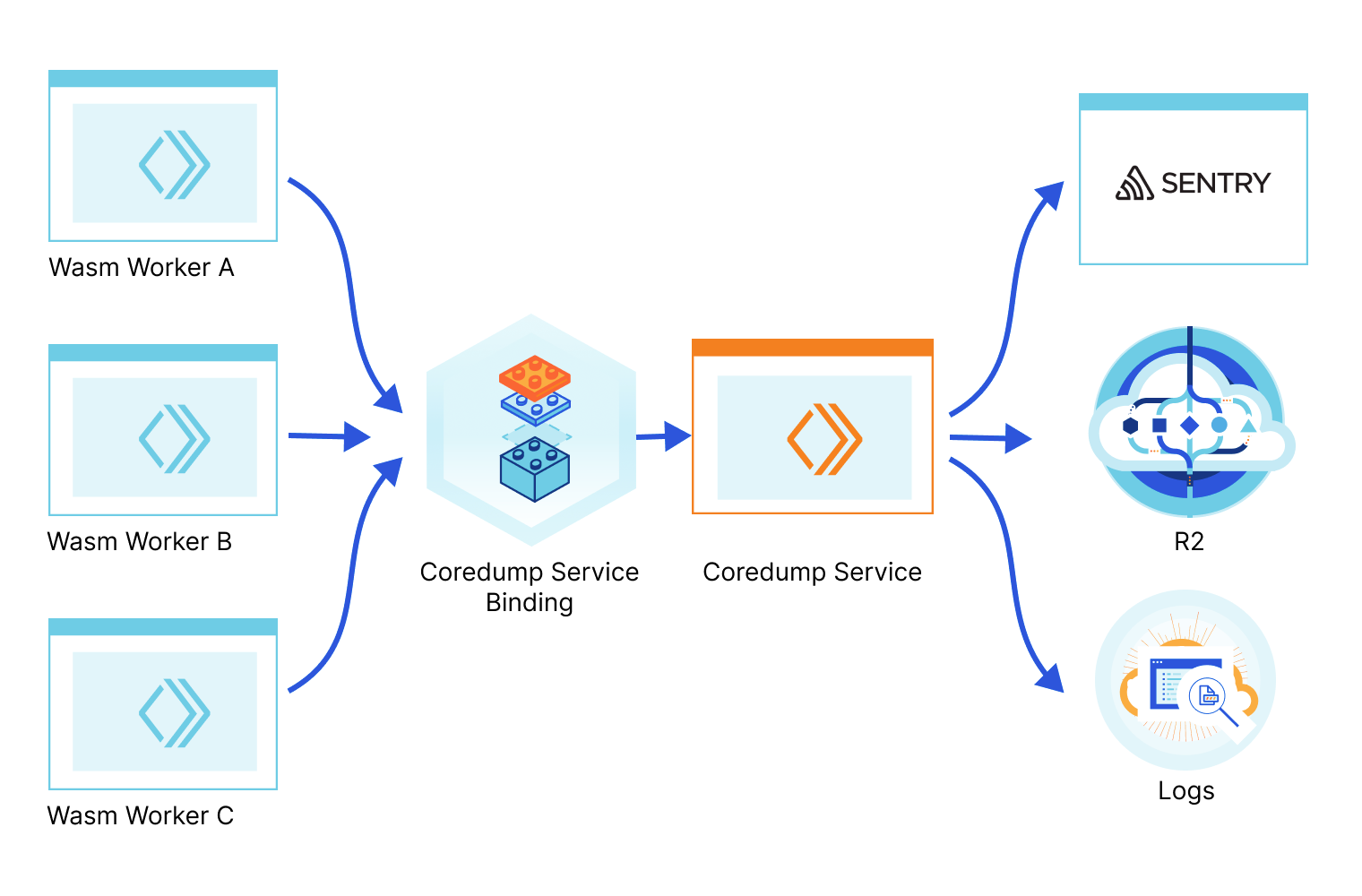
Today we're open-sourcing the Wasm Coredump Service and enabling anyone to deploy it. This service collects the Wasm core dumps originating from your projects and applications when they crash, parses them, prints an exception with the stack information in the logs, and can optionally store the full core dump in a file in an R2 bucket (which you can then use with wasmgdb) or send the exception to Sentry.

We use a service binding to facilitate the communication between your application Worker and the Coredump service Worker. A Service binding allows you to send HTTP requests to another Worker without those requests going over the Internet, thus avoiding network latency or having to deal with authentication. Here’s a diagram of how it works:

Wasm core dumps and debugging Rust in Cloudflare Workers

Using it is as simple as npm/yarn installing @cloudflare/wasm-coredump, configuring a few options, and then adding a few lines of code to your other applications running in Cloudflare Workers, in the exception handling logic:

import shim, { getMemory, wasmModule } from "../build/worker/shim.mjs"

const timeoutSecs = 20;

async function fetch(request, env, ctx) {
    try {
        // see https://github.com/rustwasm/wasm-bindgen/issues/2724.
        return await Promise.race([
            shim.fetch(request, env, ctx),
            new Promise((r, e) => setTimeout(() => e("timeout"), timeoutSecs * 1000))
        ]);
    } catch (err) {
      const memory = getMemory();
      const coredumpService = env.COREDUMP_SERVICE;
      await recordCoredump({ memory, wasmModule, request, coredumpService });
      throw err;
    }
}

The ../build/worker/shim.mjs import comes from the worker-build tool, from the workers-rs packages and is automatically generated when wrangler builds your Rust-based Cloudflare Workers project. If the Wasm throws an exception, we catch it, extract the core dump from memory, and send it to our Core dump service.

You might have noticed that we race the workers-rs shim.fetch() entry point with another Promise to generate a timeout exception if the Rust code doesn't respond earlier. This is because currently, wasm-bindgen, which generates the glue between the JavaScript and Rust land, used by workers-rs, has an issue where a Promise might not be rejected if Rust panics asynchronously (leading to the Worker runtime killing the worker with “Error: The script will never generate a response”.). This can block the wasm-coredump code and make the core dump generation flaky.

We are working to improve this, but in the meantime, make sure to adjust timeoutSecs to something slightly bigger than the typical response time of your application.

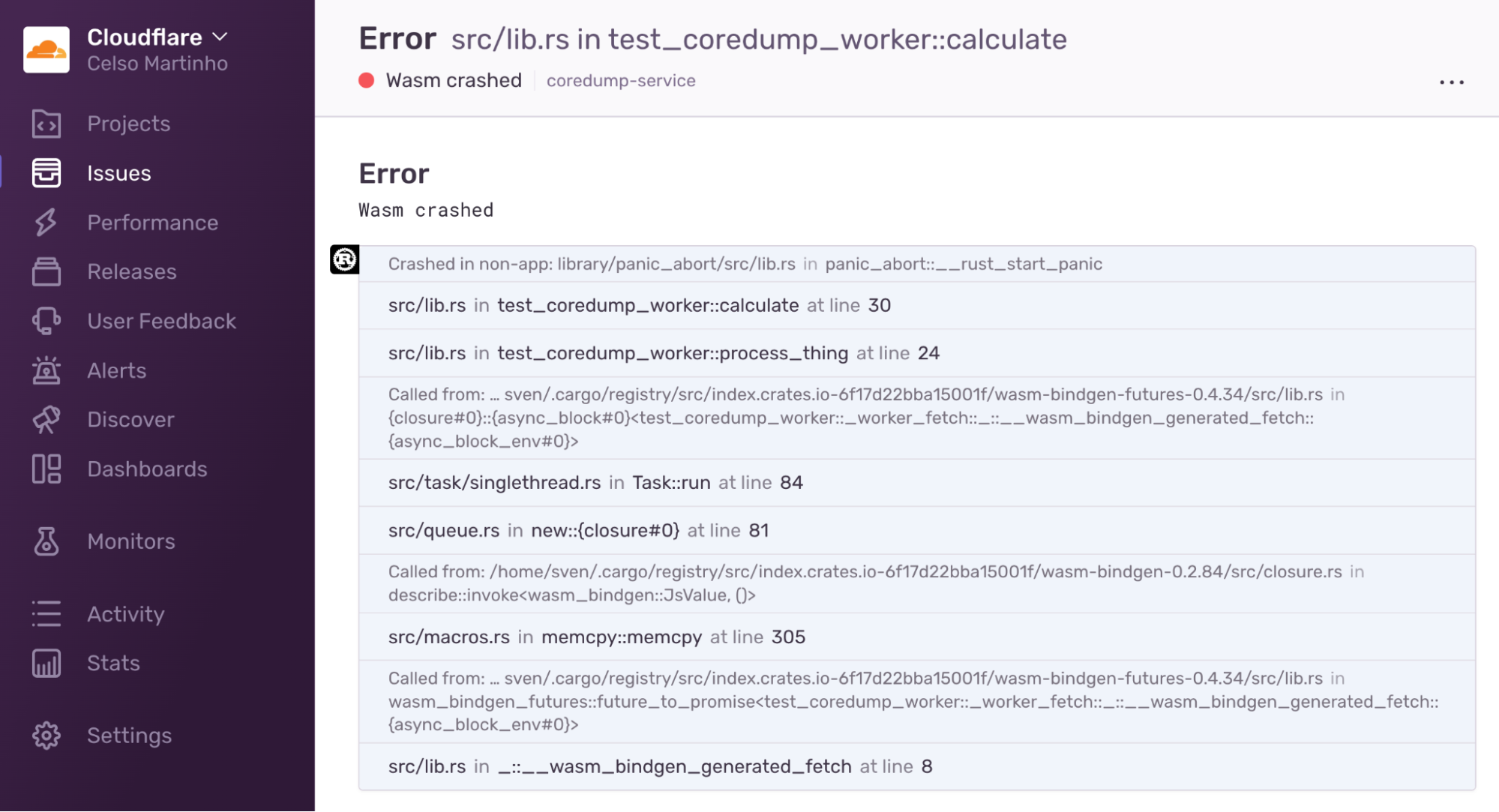
Here’s an example of a Wasm core dump exception in Sentry:

Wasm core dumps and debugging Rust in Cloudflare Workers

You can find a working example, the Sentry and R2 configuration options, and more details in the @cloudflare/wasm-coredump GitHub repository.

Too big to fail

It's worth mentioning one corner case of this debugging technique and the solution: sometimes your codebase is so big that adding core dump and DWARF debugging information might result in a Wasm binary that is too big to fit in a Cloudflare Worker. Well, worry not; we have a solution for that too.

Fortunately the DWARF for WebAssembly specification also supports external DWARF files. To make this work, we have a tool called debuginfo-split that you can add to the build command in the wrangler.toml configuration:

command = "... && debuginfo-split ./build/worker/index.wasm"

What this does is it strips the debugging information from the Wasm binary, and writes it to a new separate file called debug-{UUID}.wasm. You then need to upload this file to the same R2 bucket used by the Wasm Coredump Service (you can automate this as part of your CI or build scripts). The same UUID is also injected into the main Wasm binary; this allows us to correlate the Wasm binary with its corresponding DWARF debugging information. Problem solved.

Binaries without DWARF information can be significantly smaller. Here’s our example:

4.5 MiB debug-63372dbe-41e6-447d-9c2e-e37b98e4c656.wasm
313 KiB build/worker/index.wasm

Final words

We hope you enjoyed reading this blog as much as we did writing it and that it can help you take your Wasm debugging journeys, using Cloudflare Workers or not, to another level.

Note that while the examples used here were around using Rust and WebAssembly because that's a common pattern, you can use the same techniques if you're compiling WebAssembly from other languages like C or C++.

Also, note that the WebAssembly core dump standard is a hot topic, and its implementations and adoption are evolving quickly. We will continue improving the wasm-coredump-rewriter, debuginfo-split, and wasmgdb tools and the wasm-coredump service. More and more runtimes, including V8, will eventually support core dumps natively, thus eliminating the need to use polyfills, and the tooling, in general, will get better; that's a certainty. For now, we present you with a solution that works today, and we have strong incentives to keep supporting it.

As usual, you can talk to us on our Developers Discord or the Community forum or open issues or PRs in our GitHub repositories; the team will be listening.