Cloudflare and VoidZero are now working with Max Schwenk of Owner.com on tsrs, a Rust port of the TypeScript compiler. We are doing this work in close collaboration with the TypeScript team, and incubating tsrs as part of the Oxc JavaScript compiler toolchain.
Our goal is to help developers spend less time waiting for their code to be checked and more time building. Making TypeScript faster and more memory-efficient also helps bring complete development environments to more places, including right in your browser.
To be clear, we are not forking TypeScript. We believe the TypeScript team should remain in full control of the language’s design and direction. They have maintained a long-term vision while guiding TypeScript’s adoption across the JavaScript community. We do not want to change that.
The TypeScript team can move quite fast on many things, but for some features they may spend years intentionally exploring options and making prototypes before picking the right implementation. A Rust port has to follow those decisions closely, or it will eventually fall apart and become incompatible. We have to preserve the TypeScript language strictly based on its original implementation – and the TypeScript team should remain solely responsible for deciding what that looks like.
Performance and memory improvements
Early benchmarks of our Rust port of TypeScript are promising: tsrs is up to 8x faster and uses ~70% less memory compared to TypeScript 7.0 when using the same number of type check workers:
As you can see, the next version of TypeScript already brings many performance improvements, making TypeScript 7.1 beta up to 2.5x faster than TypeScript 7.0. Some of these optimizations were upstreamed from tsrs, and we’re hoping to find more.
You may have seen recent benchmarks of different TypeScript ports with various performance claims, often due to using larger machine types and different options compared to TypeScript’s defaults. We worked with the TypeScript team to ensure the above benchmarks are comparing the same configuration.
By default, tsrs ships with an adaptive configuration dependent on the machine type that uses more memory but is even faster:
Try tsrs
TypeScript in Rust aims to be a faithful port of TypeScript. You can try an experimental release by installing the tsrs package from npm:
npm install tsrs
npx tsrs
Why now?
We’ve seen many attempts at porting TypeScript to other languages over the years. Because of the complexity involved, only one of the ports succeeded: the TypeScript team’s port of TypeScript from JavaScript to Go.
However, frontier AI models can now do large-scale ports almost independently in a matter of days. We have now seen slopforks, faithful ports, and completely re-architected versions of TypeScript in Rust or C++. There is clearly a demand for even faster TypeScript.
Why Rust?
You might be thinking: “TypeScript’s Go port already made TypeScript 10x faster and far more memory efficient than the previous version written in TypeScript. Why isn’t that enough?”
However, it’s not just about speed. Rust offers some unique advantages: running in WebAssembly. The Rust + Wasm story has always been strong, and one of the reasons comes down to the fundamentals of Rust’s language design. When you compile a Go program to Wasm, you have to compile Go’s garbage collector along with it. But Rust’s memory management model enables straightforward memory interactions between a WebAssembly guest and host. This is one of the key things that makes Rust a much better fit for the WebAssembly use-case: memory efficiency.
Cloudflare Workers have supported Wasm for a long time. Just a few weeks ago we announced supporting native Rust in Workers with the new Emscripten target for wasm-bindgen. When you run entire software build and deployment systems in tight loops on Workers, the benefits of a small memory footprint pay off quickly. It means you can run these workloads so efficiently that it’s now possible to run fully encapsulated development systems in places where they couldn’t have been run before.
This enables new possibilities when combined with agents: You are now able to run a development toolchain end-to-end in a fully sandboxed environment on Cloudflare. But with Wasm, you can also run those environments safely client-side in your browser, or on an embedded device, or an IoT application.
How will the tsrs port be maintained?
First, we are working with Theo Browne to merge tsc-rs and tsrs into a single package that supports all of TypeScript’s features including Language Server Protocol (LSP) and content mappers. Second, we’ve seen a lot of success with how we maintain Vinext in sync with its upstream, Next.js. We explained how we do this in a recent blog post:
Each morning, an agent reviews the changes, fetches diffs, and opens tracking issues for anything that could affect Vinext. Every night, the compatibility matrix is regenerated as we run the Next.js test suite against Vinext. When one of these tests or issues reveals a gap, agents are now in the position where they can identify the change across both codebases, build a reproduction, port any relevant tests, and propose a fix.
We will apply the same process to TypeScript, taking extreme care that we don’t introduce diverging behaviors from upstream TypeScript. When we come across performance improvements, we’ll attempt to contribute them back to the TypeScript Go codebase so everyone wins.
Finally, we recognize that there are some differences to the upstream version of TypeScript right now, like for example the order in which diagnostics are printed. We aim to reduce those differences to a minimum by the time we publish a stable release.
What’s next?
Cloudflare is already the home of many free and open source Rust tools that power the JavaScript ecosystem, such as Vite, Rolldown, Oxlint, and Oxfmt. With more than 10 million developers building on Cloudflare, we care a lot about making the underlying developer toolchain faster, more portable, and easier to run in more places. We are excited to experiment with deeper tsrs integrations into our stack, for example for type-aware lint rules in Oxlint.
Like with Vinext, our goal is to run tsrs as a well-maintained healthy open source project — without getting in the way of TypeScript itself. The Oxc team has already begun refactoring the codebase to make it faster, use less memory, and make it maintainable. We know the TypeScript team is taking this seriously – they are experimenting with memory and performance improvements for tsc. We are excited to collaborate with the TypeScript team and the JavaScript community to build the best and fastest implementations of TypeScript together.
VoidZero's tools such as Vite, Vitest, Oxc, and Rolldown — bundled in one toolchain as Vite+ — have made frontend development faster, but building full-stack applications requires more than just a tooling stack. These applications need server routes, databases, local development environments, and a fast and easy way to deploy ideas to production.
We’re excited to open-source three new products that bring server routing, typed data access, and Cloudflare deployment into a unified Vite workflow.
Void Platform: A shared deployment platform for teams to host Void apps on Cloudflare.
Void SDK: A composable JavaScript SDK for building full-stack apps with Vite.
Void CLI: A CLI for provisioning resources and deploying Vite apps to Cloudflare.
The CLI deploys apps built with the SDK to the Platform. All three products are open-sourced as a single JavaScript package and Vite plugin that you can install via npm install void. With Void, you can build your server and client together, carry types from your database to the UI, and let Void automatically provision the Cloudflare resources that your app uses.
We originally set out to build a single, private platform for all users to deploy apps to. After VoidZero joined Cloudflare, we adjusted our direction to open-source the platform and allow anyone to install because we saw a growing need: companies want to encourage vibe-coded internal apps, but are concerned about security and do not want to give cloud access to every employee. Void addresses this problem.
Void Platform: a cloud platform for your company
The Void Platform is fully open source and you can fork it and adapt it to your needs by integrating your company's systems, customize deployment workflows, build features for your customers, or make it work on other deployment platforms. Use the platform as it is, contribute improvements upstream, or fork it and build only the features you need. The open source code can be used out of the box or as a starting point.
As an admin of a Void Platform, you control access, set resource limits, inspect deployments and usage through the Void CLI or admin dashboard, and provide guardrails so everyone else can ship serious and vibe coded apps to the same shared platform.
By installing a Void Platform, your team or customers have a shared deployment environment in your Cloudflare account on top of Workers for Platforms. Void Platform enables:
Faster prototyping. Your team can quickly build prototypes, deploy them, and share working apps for feedback, without setting up a separate Cloudflare account or provisioning resources for every project. This reduces the time to ship internal apps from days/weeks to minutes.
Non-technical teams building. This workflow also lets teammates who do not normally write code work with coding agents to build and share their own apps. A designer can create an interactive prototype, or an operations teammate can build an internal dashboard, then deploy it to the same platform. All with the right security measures in place.
To self-host a Void platform, you need:
A Cloudflare account with Workers for Platforms and R2 enabled
A PostgreSQL database
An account with your chosen login provider
A domain for your apps
Then install Void as a cloud platform by running a single command:
Once your platform is set up, approved users can connect to it via the Void CLI for deployment.
void connect https://api.orange-company.dev
A user builds their app using the Void SDK, which is what powers Void Platform benefits like authentication, framework detection, resource provisioning, and more. In other words, Void Platform only works because of the accompanying SDK and CLI.
Void SDK: zero-config infrastructure
Void turns a Vite app into a full-stack Cloudflare Workers app. You or your agents can write code and Void will automatically infer resource bindings and provision resources such as databases, queues, or AI bindings during deployment.
To get started, add Void as a Vite plugin:
import { defineConfig } from "vite";
import { voidPlugin } from "void";
import { voidReact } from "@void/react/plugin";

export default defineConfig({
  plugins: [voidPlugin(), voidReact()],
});
The Void SDK ships with adapters for popular JavaScript UI frameworks such as React and Vue, provides file-based API routing, pre-rendering, caching, islands, and end-to-end type safety from the database to your UI.
All of Void’s features are optional and composable. Void integrates with existing application frameworks such as Vinext, React Router, SvelteKit, Nuxt, TanStack Start, and Astro. You can use those frameworks for routing and rendering, while Void handles resource APIs using Hono, migrations, deployment, and authentication with Better Auth.
Let's take a look at building a server-rendered page, with types inferred from the database query through to the client:
// pages/blog.server.ts
import { defineHandler, type InferProps } from 'void';
import { db } from 'void/db';
import { posts } from '@schema';

export const loader = defineHandler(async () => ({
  posts: await db.select().from(posts),
}));

export type Props = InferProps<typeof loader>;
By importing void/db, Void provides a local database to your app during development and makes void deploy provision D1 automatically for you in production. This also works for using AI through Cloudflare’s AI Gateway: just by importing void/ai, everything is set up automatically for you.
// routes/api/decide.ts
import { defineHandler } from 'void';
import { ai } from 'void/ai';

export const POST = defineHandler(async (c) => {
  const { question } = await c.req.json();
  const result = await ai.run('@cf/cloudflare/clef', {
    model: 'clef',
    state: {},
    questions: {
      decision: { type: 'noul', instructions: question },
    },
  });
  const probability = result.answers.decision.noul;
  return c.json({
    answer: probability >= 0.5 ? 'yes' : 'no',
    probability,
  });
});
Void's React router is built for Async React, using transitions and Suspense to enable responsive navigation across screens. When you pair this router with a modern data framework such as fate and UI libraries such as Astryx, you can coordinate navigation, data fetching and mutations through React's transitions, as well as actions and optimistic updates across your entire application. Together, these pieces let you build apps that feel synchronous on fast networks, gracefully fall back on slower ones, and keep interactions responsive during expensive rendering updates.
If a user does not need Void Platform’s team management features, they can use their own Cloudflare account. Void SDK also deploys to Cloudflare directly.
Void CLI: one deployment command
The Void CLI is the main interface for Void. The CLI manages the platform and deploys the app. It's built on top of the new cf CLI and works well with agents.
With the Void CLI, you can ask your agent to debug failing requests, read deployment logs, analyze how your app is performing, or have them take care of the full lifecycle by deploying a finished app for you.
Once your app is ready to deploy to Cloudflare, you can run:
The first time you run void deploy, the CLI will prompt you to log into your Cloudflare account. Void builds your app using Vite, applies migrations, automatically provisions resources, and deploys to Cloudflare or a Void Platform. It can be used to handle the full lifecycle of your project such as building, deploying, and managing your resources and projects, for example:
Similar to how the CLI, and an agent by extension, can manage the entire lifecycle of a Void app, you can also use the CLI to manage a Void Platform:
Manage users, project access, and resources
Inspect deployments, logs, and rollbacks
Monitor platform health and usage
Connect with us
VoidZero’s mission is to make JavaScript developers more productive than ever before. We brought Vite, Rolldown, Oxlint, Oxfmt, and Vitest together in Vite+ for development, bundling, code quality, and testing. Void extends that stack to full-stack application development, letting you and your agents build, test, and deploy entire applications.
We’ve been using the Void SDK, CLI, and Platform in production at VoidZero for the past several months and we are excited to see what you'll build with Void. Please share your feedback with us:
The Deno team is joining Cloudflare to radically simplify self-hosting Workers and Durable Objects so developers can use the same primitives in more places.
For what this means and how it came about, here’s the story from Ryan Dahl, Senior Principal Engineer, and Kenton Varda, Distinguished Engineer.
When VoidZero joined Cloudflare four months ago, we made a commitment to open source, promising that Vite, Vitest, Rolldown, Oxc, and Vite+ will stay open source, vendor-agnostic, and community-driven. As part of Cloudflare’s Birthday Week, where Cloudflare gives back to the Internet, we thought it’d be a good time to check in on how we’ve been doing against this commitment.
In the four months since VoidZero joined Cloudflare, we’ve shipped more than 80 releases, closed over 1,200 issues, and landed some big performance improvements, including:
Oxfmt’s JSON, CSS, SCSS, Less, GraphQL, and YAML formatters are now written in Rust, making it 7x faster than Prettier
On top of this, Vite+, which unifies the entire toolchain with a set of great defaults, is now 1.0. And we’re making progress towards shipping “Bundled Dev” (f.k.a. Full Bundle Mode) — a new development mode that has been shaped by working with customers with massive web applications, including Cloudflare’s own dashboard. By being part of Cloudflare, our engineering team gets a much better view into scenarios that only occur in massive codebases.
VoidZero’s mission is to make the next generation of JavaScript developers more productive than ever before. And in 2026, that means making developers’ agents faster.
A faster developer experience for humans and agents
Developer experience and performance were always about improving the feedback loop while creating software. But now when we optimize for developer experience, we no longer just optimize for humans — we optimize for agents. And as inference gets faster, the speed of type-checking, linting, or building the code becomes the bottleneck again. The longer those processes take, the longer an agent has to wait before making progress and completing its goals.
VoidZero has always been focused on performance, but this new era of software has given us even more reason and motivation to make the entire toolchain faster for both agents and humans. And since the tools in the VoidZero toolchain are built on each other, from the compiler (Oxc) to the bundler (Rolldown) to the build tool (Vite), the linter (Oxlint) and the test runner (Vitest), any optimization at one layer automatically benefits everything built on top.
Oxc React Compiler — 10x faster compile times for React.js apps
We’ve recently shipped the Oxc React Compiler, a rewrite of the React Compiler, based on the React team’s rewrite in Rust. It is 10x faster than the original Babel implementation, uses less memory, and has a more complete implementation with better error handling. If you use Vite, you can enable the Oxc React Compiler by installing the oxc-transform-react package and enabling the compiler flag:
Vitest 5 — up to 50% faster than Vitest 4
Vitest 5, released in September, cuts test times by double-digit percentages across many common scenarios.
Faster test runs. Vitest shares transformed files across projects, caches modules on disk, and sends less data between its main process and workers.
vitest doctor. It breaks down setup, import, transform, and test time, then tests other configurations and recommends faster settings.
Trace View. It records browser interactions, assertions, and DOM snapshots, so you can replay failures or inspect them in an HTML report.
Better benchmarks. Benchmarks now work like regular tests, with fixtures, hooks, retries, filters, and assertions.
Fewer false passes. Vitest fails unawaited async assertions, clears mock calls before each test, and adds the --repeats flag to help find intermittent failures.
tsgolint — now stable, up to 18x faster than ESLint in large codebases
tsgolint, the type-aware linting engine behind Oxlint, is now stable. It catches bugs that require TypeScript type data while running 12 to 18 times faster than ESLint with typescript-eslint.
59 type-aware rules. tsgolint now supports 59 of typescript-eslint's 61 type-aware rules.
Enable type-aware linting and TypeScript diagnostics in your Oxlint config:
Oxfmt — 7x faster than Prettier with formatters now written in Rust
Oxfmt brings the speed of the Oxc toolchain to formatting. We rewrote its JSON, CSS, SCSS, Less, GraphQL, and YAML formatters in Rust, making Oxfmt many times faster than Prettier, while keeping Prettier-compatible output and ergonomics.
Bundled Dev — faster dev server for larger apps
We’ve made progress towards shipping “Bundled Dev” (f.k.a. Full Bundle Mode), which uses Vite’s production bundler during development. This should lead to significant dev server speed-ups in larger applications and reduce network overhead when working with remote sandboxes.
We’re looking forward to bringing Bundled Dev out of experimental status soon. Cloudflare’s Dashboard already uses Bundled Dev for all internal developers.
Vite+ is now 1.0 — a unified toolchain
Speeding up tools is one way of making humans and agents ship software faster. Another way is by reducing decision fatigue (“Which linter shall I use?”) and providing great defaults. We are excited to announce that Vite+ is now 1.0. Vite+ bundles all of VoidZero’s tools together into a single unified and fast toolchain.
Vite+ ships with Vite 8, Vitest 5, Rolldown, Oxlint, Oxfmt and task caching built in, and comes with great defaults. Check out the Getting Started guide to try it out today.
Cloudflare’s Open Source Investment
VoidZero was born in open source, and we believe a more sustainable open-source ecosystem benefits everyone. VoidZero is a proud member of the Open Source Pledge and as part of Cloudflare, we have the opportunity to expand that impact.
Cloudflare committed $1M to a Vite ecosystem fund to support maintainers and contributors in the original announcement. Since then, Cloudflare has committed an additional $1M to open source. Together, we’re doubling down on open source.
The open-source toolchain for the entire JavaScript community
There is more to come! Features we plan to ship in the next few months include major improvements to Oxc’s parser with up to 3x potential speedup, a re-designed chunking algorithm in Rolldown, and an open-source, self-hostable version of Void, the Vite-native deployment platform built on top of Cloudflare. Cloudflare and VoidZero both recognize our responsibility that we have to developers, and we do not take the community’s trust in us for granted. We’re in this for the long haul.
We are excited to keep shipping faster tools, and will continue to make every decision with the community in mind, just like we did when raising venture capital, or when we open sourced Vite+, or when we joined Cloudflare. Thank you for continuing to trust us with your projects and apps, supporting us, and building with us.
We’ve rewritten the module registry in workerd, the core open-source component of the Workers runtime, to be faster, more standards-compliant, and more closely aligned with Node.js' module registry.
Over the past few years, we’ve been adding support for more and more Node.js runtime APIs. The Workers runtime now supports every stable API from Node.js that you might want to use in a serverless context, and these APIs are now enabled by default, letting you deploy even larger Node.js apps to Cloudflare (now up to 64 MiB on all plans — we’ve removed the limit on compressed bundle size).
But API compatibility alone is not enough: Node.js applications also depend on how the runtime resolves, loads, and caches modules. ESM, CommonJS, and WebAssembly are each types of modules that you can import in your Worker’s code. The system within the runtime that handles all of this is called the module registry.
When you enable the new_module_registry compatibility flag:
import.meta.url, import.meta.main, and import.meta.resolve() all work.
Module specifiers are parsed and resolved as real URLs, including query strings and fragments.
node: built-ins resolve to the same module instance no matter how you reach them.
Import attributes (with { type: 'json' }) are correctly validated.
require() on an ES module follows Node.js' require(esm) rules.
Errors use consistent classes and messages regardless of which loading path triggered them.
Modules compile lazily when first imported (statically or dynamically).
WebAssembly modules support source phase imports.
For the full deep-dive on how this new module registry interacts with V8’s module APIs, we’ve added reference docs to workerd that break down everything in detail. But for most people building on Workers, you want to understand how these changes improve compatibility and help you build. To do that, we’ll dive into each of these changes in the sections below.
How the Workers runtime loads the code you give it
When you deploy a Worker to Cloudflare, wrangler or Vite “bundles” all of your Worker’s code from many files and dependencies into one or many modules, which are then uploaded to Cloudflare when you run wrangler deploy.
By default, Wrangler bundles nearly all of this code into a single module script. It runs esbuild under the hood, which processes then inlines relative imports and require() calls for most npm dependencies into that one file. The import and require() statements are replaced with regular functions as part of the process. By the time that bundle reaches the Workers runtime (workerd), there usually isn't much of a module graph left for the Workers runtime to deal with. Most of the different modules are bundled into one file. We have seen these scripts grow to as many as multiple hundreds of thousands of lines long.
Why is it necessary to bundle many modules into a single file before uploading server-side code to Cloudflare? It has been technically possible to upload multiple modules, and even modules of different types, in the Workers runtime for many years now. However, the runtime has not resolved modules in a way that was consistent with all the other runtimes. If, for example, your code or dependencies used import.meta.resolve() to resolve the path to another module, that code would fail because import.meta.resolve() was not supported.
When you use the Cloudflare Vite plugin, Vite 8 bundles your code using Rolldown, instead of Wrangler bundling your code using esbuild. Rolldown resolves imports and npm dependencies, converts CommonJS to ESM where necessary, and emits an entry module plus any additional chunks created through code splitting, such as dynamic imports. As a result, the Workers runtime receives a smaller, build-generated module graph rather than the application’s original source graph.
The new module registry implementation in the Workers runtime opens the door to bundlers like Rolldown to perform fewer transformations, and to rely more on the runtime to handle module resolution.
When you import a Node.js API in your worker, by default you are importing a module that is built into workerd. It is not bundled into your code as a polyfill. Wasm, text, and binary modules are provided to the Workers runtime as separate files too. They are referenced by specifier instead of being inlined. And if you deploy with --no-bundle, or your tooling uploads a Worker as multiple modules directly, the full module graph shows up at runtime exactly as you wrote it.
In all of these cases, something has to take a specifier, work out what code it actually points to, compile it, and hand V8 a module object it can link and run. In workerd, that's the module registry's job.
Why a new implementation?
The original registry resolves specifiers as filesystem-style paths, not URLs. That sounds like a minor distinction, but it ruled out a bunch of things: there was no clean way to implement import.meta.url, relative imports didn't follow the same resolution rules as new URL(), and protocols like node: and cloudflare: were handled as special-cased string prefixes instead of, well, protocols.
It also compiles your entire Worker bundle up front, whether or not a given module ever gets imported, and it keeps a separate, private copy of everything per V8 isolate. Cloudflare runs multiple V8 isolate replicas of the same Worker to spread load across CPU cores, so in practice that meant compiling the exact same source more than once, with keeping multiple copies of the source in memory.
None of this is really a bug, but it made it difficult to evolve the implementation without breaking changes. The new registry starts from URLs as the specifier format and treats laziness and cache sharing as things to design in from day one. The existing registry implementation is not going anywhere. Currently, deployed Workers will continue to work as they always have.
import.meta
The import.meta API provides information about the module, such as the module's URL, and whether it is the main entry point module:
That prints something like file:///bundle/index.js, main: true.
import.meta.main is true only for the module configured as your Worker's entrypoint; every other module gets false.
import.meta.resolve() resolves a specifier against the current module without importing it:
It's a pure string transform, same as in Node.js and in browsers: it doesn't check that the resolved URL corresponds to a real module, and it throws a TypeError for a specifier that can't be parsed as a URL at all, rather than returning null. One detail worth knowing if you ever look closely at the output: it normalizes percent-encoding the same way new URL() does, which means it collapses paths like ./a/../b.js, but it does not decode characters that were already percent-encoded. import.meta.resolve('%66oo.js') resolves to file:///bundle/%66oo.js, not file:///bundle/foo.js.
Specifiers are URLs
Relative imports now resolve the same way as new URL(specifier, base) would, because that's literally what's happening under the hood. Full URLs work as specifiers too, not just relative paths:
The more interesting consequence is what happens with query strings and fragments. Per the same module-identity rules browsers use, a specifier with a different query string or fragment is treated as a genuinely distinct module instance, even when it points at the same underlying source:
./counter.js?a and ./counter.js?b load the same source, but they're evaluated separately, each gets its own import.meta.url, and each gets its own copy of any top-level state. Importing the same specifier with the same query string again still gets you back the same instance, so this isn't a way to force re-evaluation on every import.
Import attributes are correctly validated
The original module registry implementation silently ignores the import attributes in violation of the spec. It is expected that implementations throw an exception when any import attribute it does not understand is used.
json is the only import attribute type enabled right now, since it's the only one of the relevant TC39 proposals that has reached Stage 4. text and bytes are recognized, because they track the Import Text and Import Bytes proposals, but they're rejected with a specific error instead of being silently ignored or treated as unsupported syntax:
Any attribute key other than type is now a hard error too, rather than being ignored:
And if the type you specify doesn't match what the module actually is:
require(esm) follows Node.js' rules
If you require() something that turns out to be an ES module, whether that's directly inside a CommonJS module or through require('node:module').createRequire(), the registry follows Node.js' require(esm) behavior:
If the module has a string-named export called 'module.exports', Node.js' actual mechanism for letting an ES module control what require() sees, that value is returned.
Otherwise, require() returns the module's namespace object.
The one exception is workerd's own node: built-ins. They're implemented as ES modules that wrap a CommonJS-style API in a default export, so requiring one returns that default export directly. require('node:buffer').Buffer behaves the way you'd expect; you don't get a namespace object with a .default you need to unwrap yourself.
There's a restriction that comes along with this: if the module you're requiring, or anything in its module graph, has a top-level await, require() throws instead of blocking or handing back something half-finished:
This matches Node.js' own ERR_REQUIRE_ASYNC_MODULE restriction: require() has to return synchronously, and there's no reasonable value to hand back for a module that hasn't finished evaluating yet. Use import() for anything async instead. The check holds regardless of import order too: a module doesn't become require()-able just because something already import()'d and fully evaluated it earlier.
If you're requiring output from a bundler that predates Node.js' require(esm) support and sets a truthy __cjsUnwrapDefault export as a marker, that takes priority over both rules above and returns the default export. That's purely there so existing prebuilt bundles keep working.
Errors are consistent, and use the right class
Regardless of whether resolution fails through a static import, a dynamic import(), or require(), you get the same class of error with the same message shape:
"Module not found" is a plain Error, since it's a failure to locate something rather than a problem with the value you passed in. A specifier that can't be parsed as a URL at all is a TypeError, matching Node.js' own ERR_INVALID_MODULE_SPECIFIER. A circular dependency that V8 can't unwind is also a plain Error, never a TypeError. This mostly matters if you're building something on top of dynamic import(), like your own loader or a retry wrapper, since you can now branch on the error class or message reliably no matter which loading path triggered it.
WebAssembly source phase imports
You can now import the compiled-but-not-instantiated form of a WebAssembly module directly, using source phase imports:
or dynamically:
Either way you get a WebAssembly.Module back directly, instead of importing the module normally and pulling it off the default export. As source phase imports are a new feature of the language, right now this only works for WebAssembly; trying it on any other module type throws a SyntaxError, matching the behavior of Node.js and other runtimes.
What's next
Try it out! Add the new_module_registry compatibility flag to your Worker:
It doesn't have a default on date yet, so it won't turn on automatically for your Worker, old or new, no matter what compatibility date it's using. You will need to add the flag explicitly.
We’d love your feedback. workerd is open source. If you run into behavior that looks like a regression rather than one of the changes described here, please file it against the workerd repository.
Bot mitigation is an adversarial game: attackers adapt, defenders respond, and the cycle continues. At Cloudflare, we stay ahead by combining visibility across our global network with signals from the client-side environment. At the network level, we analyze over 1 trillion requests per day to understand reputation, patterns, and anomalies across more than 20% of the web. On the client side, we’ve pushed detection deeper with Cloudflare Turnstile, which has evolved from a CAPTCHA replacement to a risk-based managed challenge that adapts the amount of friction needed to verify the user is authentic.
Today, Turnstile runs nearly 3 billion times per day on some of the most sensitive endpoints on the Internet, helping verify users at key moments like login, signup, and checkout. This improves protection on the most important areas of customer applications, but still leaves limited visibility into the rest of the application — how humans and bots actually interact across the full user journey.
This is the visibility gap we’re closing today with our launch of Precursor.
Introducing Precursor
Precursor is a client-side, session-based verification system, built with privacy in mind, that uses dynamically injected JavaScript to continuously collect behavioral signals as visitors interact with your application. These signals are processed and incorporated into Cloudflare’s bot protection in real time, allowing us to continuously distinguish human traffic from automated or agentic traffic.
This extends the client-side detections offered by a Challenge to your entire web application. Precursor is an optional complement to Turnstile — both are features of our Enterprise Bot Management.
This user-journey-based detection is powerful because modern automation is increasingly capable of appearing legitimate in short bursts. Bots can execute JavaScript, use real browser environments, and pass individual CAPTCHAs without raising suspicion. What remains difficult to replicate is consistent human behavior over time.
Precursor is built to capture that layer of interaction, turning behavior itself into a reliable signal for detecting fraud and abuse. By evaluating behavior across an entire session, Precursor adds significantly more signal to each decision. This improves detection precision, making it easier to distinguish real users from automation without relying on aggressive Challenges. For legitimate users, Precursor means fewer unnecessary interruptions. For bot developers, it raises the cost of operating automation by requiring them to simulate a full session. This is significantly harder to build, more expensive to maintain, and far less reliable to operate at scale.
To err is human
When a bot developer tries to make a mouse movement look human, they usually add Gaussian noise or uniform random delays. But human movement isn’t just “noisy,” it is also constrained by physics:
Wrist pivot: A human mouse movement is often an arc, limited by the range of the wrist and the rotation of the forearm.
Cognitive load: There is a measurable delay between a human seeing a checkbox and clicking it.
Hand tremor: Even the steadiest human hand oscillates at a physiological tremor frequency.
Bots, by contrast, often behave in ways that give them away. They move in linear interpolations or mathematically ideal Bézier curves. They click with a precision that humans could never replicate. And even when they do manage to simulate human error, there is a rhythm to human movements that can only be seen by examining an entire session.
Mouse movement is just one example of the signals Precursor evaluates, but it illustrates the difference clearly. Below is an example of a mouse automation library interacting with a site. You can see how the mouse moves in perfectly straight lines, always returns to an origin, and reacts with the same velocity.
Now, contrast that with a human navigating the same site: you see irregular paths, small corrections and overshoots, and variations in speed, timing, and direction.
Individually, these interactions might look plausible. But over the course of a session, these patterns diverge in ways that are difficult to fake. Precursor is designed to capture and evaluate these behavioral signatures as they develop over a visitor’s interaction with an application.
How Precursor works
To evaluate behavior over time, Precursor continuously collects interaction data on the client and builds a session-level view of activity for that site.
1. Injection and collection layer
When Precursor is enabled on your application, Cloudflare automatically injects a lightweight script into HTML responses from your site as they pass through our network, with no additional configuration, network connections, or third-party embedding required. The injected Precursor bundle is compact, obfuscated, and assembled dynamically for each response. The bundle is designed to not interfere with any additional page logic of the hosted web application.
The script attaches lightweight event listeners to capture interaction signals such as pointer movement, keyboard activity, focus changes, and visibility. These events are serialized into a compact format and buffered in memory. At regular intervals, the buffered data is sent back to the evaluation layer for analysis.
2. Evaluation layer
On the edge server, incoming Precursor payloads are deserialized into behavioral inputs. A dispatcher runs a roster of evaluators on the input data. Each evaluator reads the Precursor streams it cares about and can raise signals into the shared detection registry.
Evaluators are designed to cross-reference data. For example, they confirm that pointer activity correlates with page visibility duration, or that keyboard events only fire when a text field is focused. This stream of information is then consolidated into individual signals that are used for weighting detections.
3. Session integration
Precursor data is session-scoped, meaning it accumulates throughout a session. Session scoping is important because it means a bot cannot reset its behavioral signature by refreshing the page or starting over with a new challenge. The system also feeds session metadata into downstream detection layers for additional shadow-mode heuristics and session analysis, predicted vs. actual completion, and session delinquency heuristics. These edge-side observations are logged for detection improvement purposes and to adjust the bot score of a session.
4. Privacy by design
Precursor was designed to collect signals that help to distinguish human patterns from automated and abusive patterns.
The event listeners capture the minimum information needed to be a useful signal for detecting automation and abuse. For example, keyboard activity is captured as timing and rhythm, not as the actual keys pressed. In addition, behavioral signals are evaluated as aggregate patterns rather than individual actions and are consumed internally by Cloudflare’s bot detection systems; they are not exposed to customer dashboards or tied to user accounts, login identities, or persistent profiles.
Taken together, this allows Precursor to maintain a continuously evolving evaluation of behavior, maximizing precision while minimizing the friction on good users.
Per-session analytics
To support this new layer of detection, we are introducing session-based views in Security Analytics. These dashboards shift the perspective from individual requests to full visitor journeys. You can now answer questions like:
What does a typical session look like on my site?
Where do sessions diverge from expected behavior?
Which sessions show signs of automation over time?
Use Security Analytics to explore session-based views for your bot management traffic.
These analytics now capture information that per-request analytics can’t — especially the behavior that occurs between requests. Precursor feeds directly into existing systems like bot score, challenge decisions, and security rules, so you benefit from this added context immediately.
What’s next
Precursor is the foundation for extending bot detection across the entire application. We are continuing to expand the range and depth of behavioral signals for security, how session-level insights influence our bot management protections, and new ways to visualize and act on session data. As bots evolve, detection needs to move beyond isolated checkpoints and into the full flow of user activity.
Get started
Precursor is rolling out now and can be enabled directly from your Cloudflare dashboard. Precursor will be free to use until our GA release later this year. Getting started is simple: turn Precursor on for your zone and choose how strictly you want to verify sessions. You can run it in a low-friction mode to observe behavior in the background, or require a fully verified session by enforcing Challenges if a session doesn’t already exist.
Once enabled, Precursor begins enhancing your existing bot defenses immediately, with no changes required to your application. If you’re already using Bot Management or Turnstile, Precursor extends those protections beyond Challenges and into the rest of the session. Enable Precursor to extend detection across the full user session, including the activity between moments you already protect.
Client-side skimming attacks have a boring superpower: they can steal data without breaking anything. The page still loads. Checkout still completes. All it needs is just one malicious script tag.
If that sounds abstract, here are two recent examples of such skimming attacks:
In January 2026, Sansec reported a browser-side keylogger running on an employee merchandise store for a major U.S. bank, harvesting personal data, login credentials, and credit card information.
In September 2025, attackers published malicious releases of widely used npm packages. If those packages were bundled into front-end code, end users could be exposed to crypto-stealing in the browser.
To further our goal of building a better Internet, Cloudflare established a core tenet during our Birthday Week 2025: powerful security features should be accessible without requiring a sales engagement. In pursuit of this objective, we are announcing two key changes today:
First, Cloudflare Client-Side Security Advanced (formerly Page Shield add-on) is now available to self-serve customers. And second, domain-based threat intelligence is now complimentary for all customers on the free Client-Side Security bundle.
In this post, we’ll explain how this product works and highlight a new AI detection system designed to identify malicious JavaScript while minimizing false alarms. We’ll also discuss several real-world applications for these tools.
How Cloudflare Client-Side Security works
Cloudflare Client-Side Security assesses 3.5 billion scripts per day, protecting 2,200 scripts per enterprise zone on average.
Under the hood, Client-Side Security collects these signals using browser reporting (for example, Content Security Policy), which means you don’t need scanners or app instrumentation to get started, and there is zero latency impact to your web applications. The only prerequisite is that your traffic is proxied through Cloudflare.
Client-Side Security Advanced provides immediate access to powerful security features:
Smarter malicious script detection: Using in-house machine learning, this capability is now enhanced with assessments from a Large Language Model (LLM). Read more details below.
Code change monitoring: Continuous code change detection and monitoring is included, which is essential for meeting compliance likePCI DSS v4, requirement 11.6.1.
Proactive blocking rules: Benefit from positive content security rules that are maintained and enforced through continuous monitoring.
Detecting malicious intent JavaScripts
Managing client-side security is a massive data problem. For an average enterprise zone, our systems observe approximately 2,200 unique scripts; smaller business zones frequently handle around 1,000. This volume alone is difficult to manage, but the real challenge is the volatility of the code.
Roughly a third of these scripts undergo code updates within any 30-day window. If a security team attempted to manually approve every new DOM (document object model) interaction or outbound connection, the resulting overhead would paralyze the development pipeline.
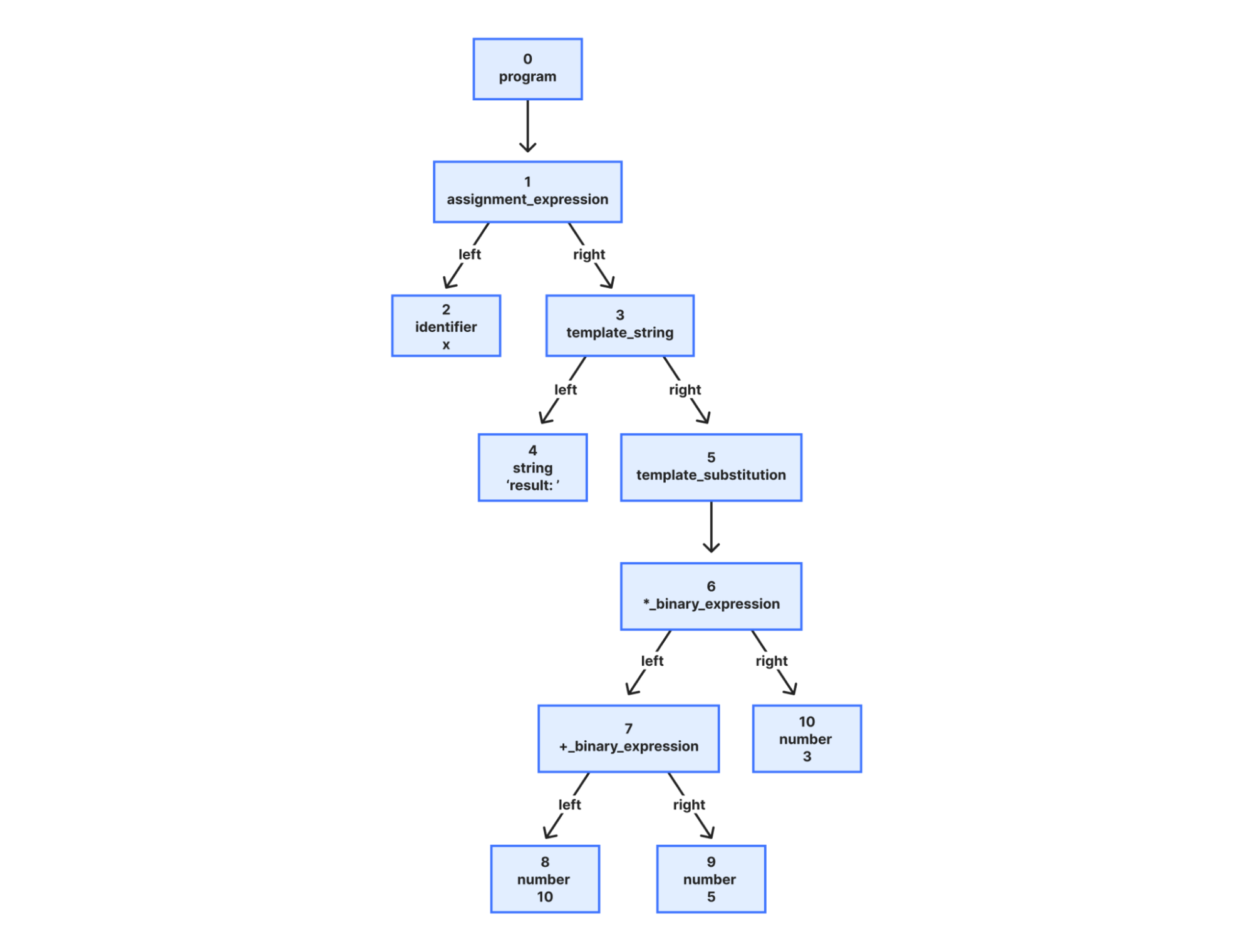
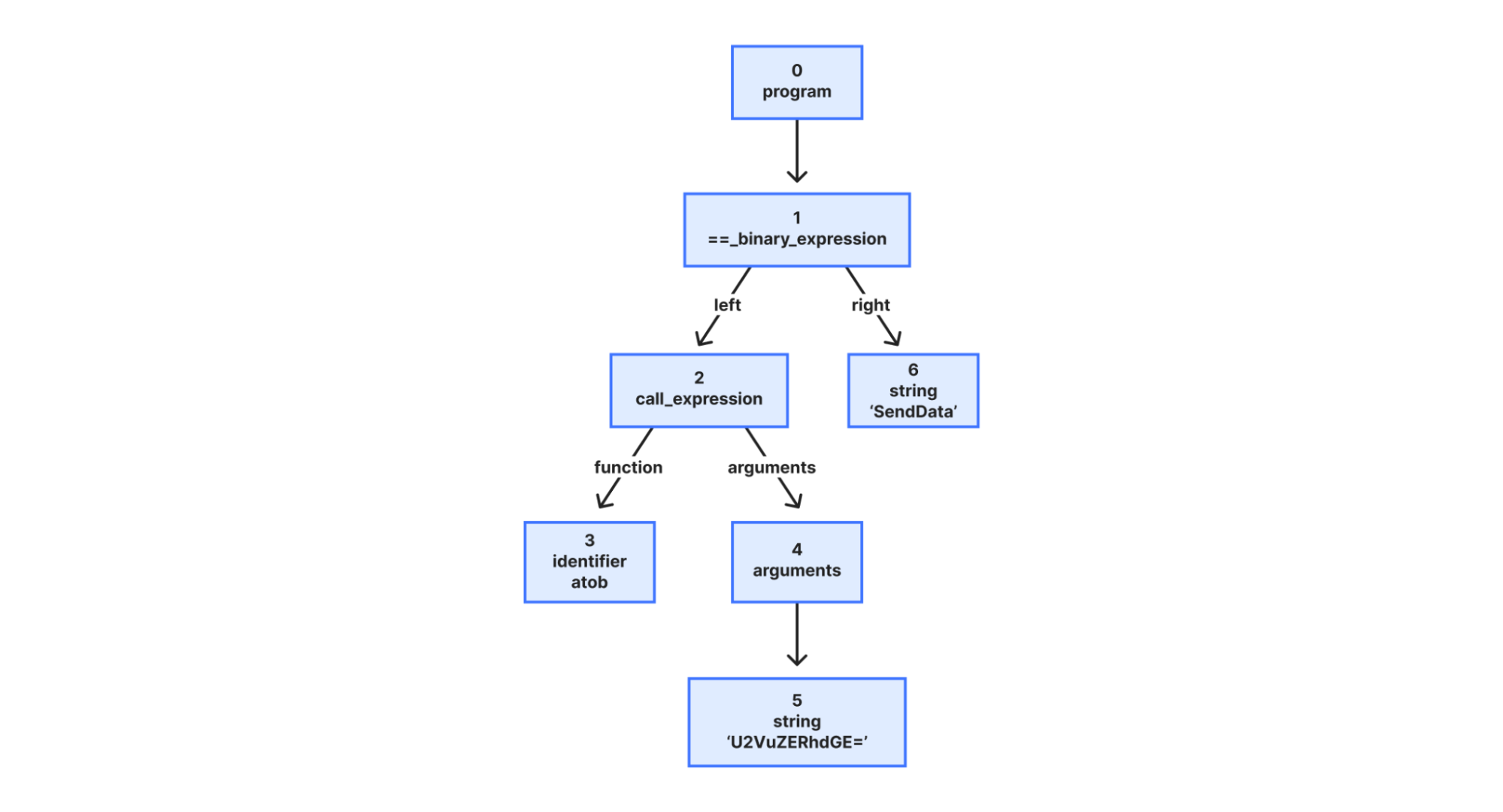
Instead, our detection strategy focuses on what a script is trying to do. That includes intent classification work we’ve written about previously. In short, we analyze the script’s behavior using an Abstract Syntax Tree (AST). By breaking the code down into its logical structure, we can identify patterns that signal malicious intent, regardless of how the code is obfuscated.
The high cost of false positives
Client-side security operates differently than active vulnerability scanners deployed across the web, where a Web Application Firewall (WAF) would constantly observe matched attack signatures. While a WAF constantly blocks high-volume automated attacks, a client-side compromise (such as a breach of an origin server or a third-party vendor) is a rare, high-impact event. In an enterprise environment with rigorous vendor reviews and code scanning, these attacks are rare.
This rarity creates a problem. Because real attacks are infrequent, a security system’s detections are statistically more likely to be false positives. For a security team, these false alarms create fatigue and hide real threats. To solve this, we integrated a Large Language Model (LLM) into our detection pipeline, drastically reducing the false positive rate.
Adding an LLM-based second opinion for triage
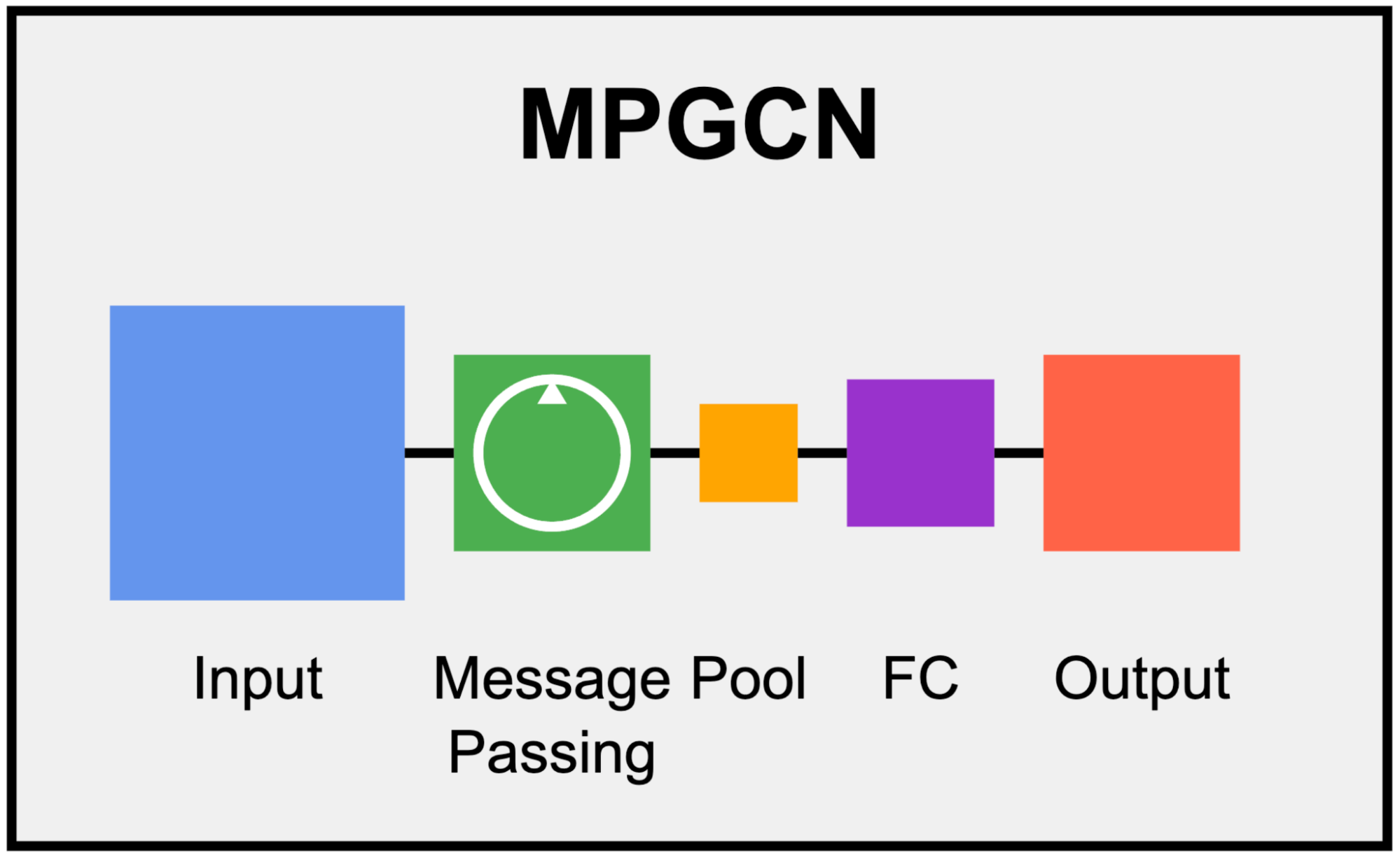
Our frontline detection engine is a Graph Neural Network (GNN). GNNs are particularly well-suited for this task: they operate on the Abstract Syntax Tree (AST) of the JavaScript code, learning structural representations that capture execution patterns regardless of variable renaming, minification, or obfuscation. In machine learning terms, the GNN learns an embedding of the code’s graph structure that generalizes across syntactic variations of the same semantic behavior.
The GNN is tuned for high recall. We want to catch novel, zero-day threats. Its precision is already remarkably high: less than 0.3% of total analyzed traffic is flagged as a false positive (FP). However, at Cloudflare’s scale of 3.5 billion scripts assessed daily, even a sub-0.3% FP rate translates to a volume of false alarms that can be disruptive to customers.
The core issue is a classic class imbalance problem. While we can collect extensive malicious samples, the sheer diversity of benign JavaScript across the web is practically infinite. Heavily obfuscated but perfectly legitimate scripts — like bot challenges, tracking pixels, ad-tech bundles, and minified framework builds — can exhibit structural patterns that overlap with malicious code in the GNN’s learned feature space. As much as we try to cover a huge variety of interesting benign cases, the model simply has not seen enough of this infinite variety during training.
This is precisely where Large Language Models (LLMs) complement the GNN. LLMs possess a deep semantic understanding of real-world JavaScript practices: they recognize domain-specific idioms, common framework patterns, and can distinguish sketchy-but-innocuous obfuscation from genuinely malicious intent.
Rather than replacing the GNN, we designed a cascading classifier architecture:
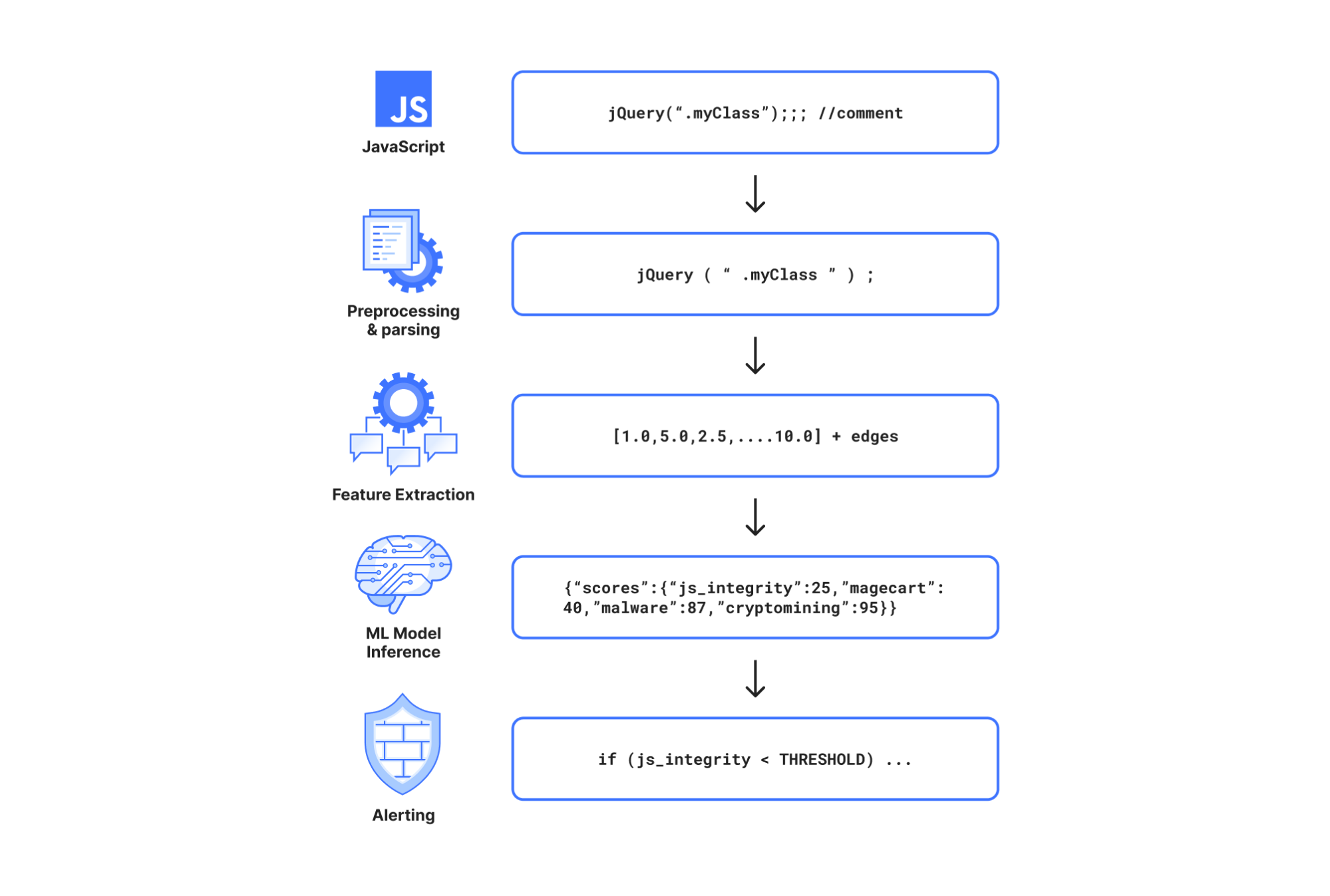
Every script is first evaluated by the GNN. If the GNN predicts the script as benign, the detection pipeline terminates immediately. This incurs only the minimal latency of the GNN for the vast majority of traffic, completely bypassing the heavier computation time of the LLM.
If the GNN flags the script as potentially malicious (above the decision threshold), the script is forwarded to an open-source LLM hosted on Cloudflare Workers AI for a second opinion.
The LLM, provided with a security-specialized prompt context, semantically evaluates the script’s intent. If it determines the script is benign, it overrides the GNN’s verdict.
This two-stage design gives us the best of both worlds: the GNN’s high recall for structural malicious patterns, combined with the LLM’s broad semantic understanding to filter out false positives.
As we previously explained, our GNN is trained on publicly accessible script URLs, the same scripts any browser would fetch. The LLM inference at runtime runs entirely within Cloudflare’s network via Workers AI using open-source models (we currently use gpt-oss-120b).
As an additional safety net, every script flagged by the GNN is logged to Cloudflare R2 for posterior analysis. This allows us to continuously audit whether the LLM’s overrides are correct and catch any edge cases where a true attack might have been inadvertently filtered out. Yes, we dogfood our own storage products for our own ML pipeline.
The results from our internal evaluations on real production traffic are compelling. Focusing on total analyzed traffic under the JS Integrity threat category, the secondary LLM validation layer reduced false positives by nearly 3x: dropping the already low ~0.3% FP rate down to ~0.1%. When evaluating unique scripts, the impact is even more dramatic: the FP rate plummets a whopping ~200x, from ~1.39% down to just 0.007%.
At our scale, cutting the overall false positive rate by two-thirds translates to millions fewer false alarms for our customers every single day. Crucially, our True Positive (actual attack) detection capability includes a fallback mechanism:as noted above, we audit the LLM’s overrides to check for possible true attacks that were filtered by the LLM.
Because the LLM acts as a highly reliable precision filter in this pipeline, we can now afford to lower the GNN’s decision threshold, making it even more aggressive. This means we catch novel, highly obfuscated True Attacks that would have previously fallen just below the detection boundary, all without overwhelming customers with false alarms. In the next phase, we plan to push this even further.
Catching zero-days in the wild: The core.js router exploit
This two-stage architecture is already proving its worth in the wild. Just recently, our detection pipeline flagged a novel, highly obfuscated malicious script (core.js) targeting users in specific regions.
In this case, the payload was engineered to commandeer home routers (specifically Xiaomi OpenWrt-based devices). Upon closer inspection via deobfuscation, the script demonstrated significant situational awareness: it queries the router’s WAN configuration (dynamically adapting its payload using parameters like wanType=dhcp, wanType=static, and wanType=pppoe), overwrites the DNS settings to hijack traffic through Chinese public DNS servers, and even attempts to lock out the legitimate owner by silently changing the admin password. Instead of compromising a website directly, it had been injected into users’ sessions via compromised browser extensions.
To evade detection, the script’s core logic was heavily minified and packed using an array string obfuscator — a classic trick, but effective enough that traditional threat intelligence platforms like VirusTotal have not yet reported detections at the time of this writing.
Our GNN successfully revealed the underlying malicious structure despite the obfuscation, and the Workers AI LLM confidently confirmed the intent. Here is a glimpse of the payload showing the target router API and the attempt to inject a rogue DNS server:
This is exactly the kind of sophisticated, zero-day threat that a static signature-based WAF would miss but our structural and semantic AI approach catches.
Today we are making domain-based threat intelligence available to all Cloudflare Client-Side Security customers, regardless of whether you use the Advanced offering.
In 2025, we saw many non-enterprise customers affected by client-side attacks, particularly those customers running webshops on the Magento platform. These attacks persisted for days or even weeks after they were publicized. Small and medium-sized companies often lack the enterprise-level resources and expertise needed to maintain a high security standard.
By providing domain-based threat intelligence to everyone, we give site owners a critical, direct signal of attacks affecting their users. This information allows them to take immediate action to clean up their site and investigate potential origin compromises.
To begin, simply enable Client-Side Security with a toggle in the dashboard. We will then highlight any JavaScript or connections associated with a known malicious domain.
Get started with Client-Side Security Advanced for PCI DSS v4
To learn more about Client-Side Security Advanced pricing, please visit the plans page. Before committing, we will estimate the cost based on your last month’s HTTP requests, so you know exactly what to expect.
Client-Side Security Advanced has all the tools you need to meet the requirements of PCI DSS v4 as an e-commerce merchant, particularly 6.4.3 and 11.6.1. Sign up today in the dashboard.
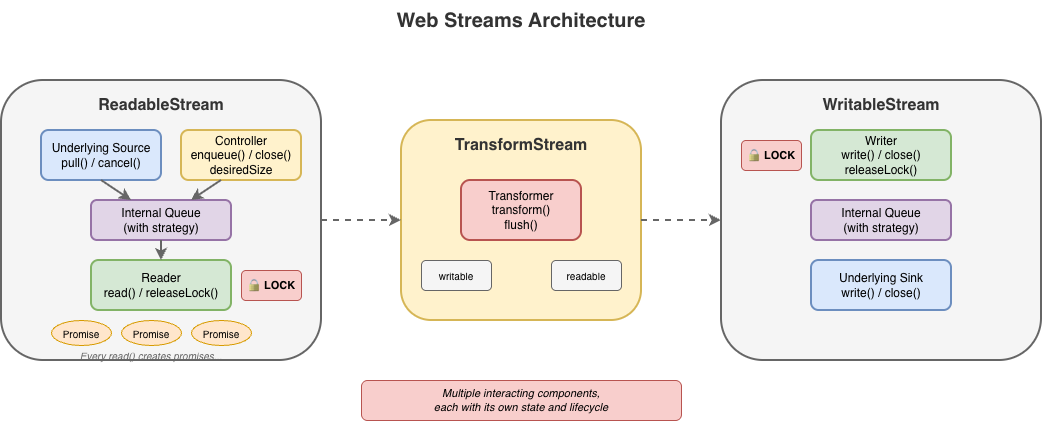
Handling data in streams is fundamental to how we build applications. To make streaming work everywhere, the WHATWG Streams Standard (informally known as “Web streams”) was designed to establish a common API to work across browsers and servers. It shipped in browsers, was adopted by Cloudflare Workers, Node.js, Deno, and Bun, and became the foundation for APIs like fetch(). It’s a significant undertaking, and the people who designed it were solving hard problems with the constraints and tools they had at the time.
But after years of building on Web streams – implementing them in both Node.js and Cloudflare Workers, debugging production issues for customers and runtimes, and helping developers work through far too many common pitfalls – I’ve come to believe that the standard API has fundamental usability and performance issues that cannot be fixed easily with incremental improvements alone. The problems aren’t bugs; they’re consequences of design decisions that may have made sense a decade ago, but don’t align with how JavaScript developers write code today.
This post explores some of the fundamental issues I see with Web streams and presents an alternative approach built around JavaScript language primitives that demonstrate something better is possible.
In benchmarks, this alternative can run anywhere between 2x to 120x faster than Web streams in every runtime I’ve tested it on (including Cloudflare Workers, Node.js, Deno, Bun, and every major browser). The improvements are not due to clever optimizations, but fundamentally different design choices that more effectively leverage modern JavaScript language features. I’m not here to disparage the work that came before; I’m here to start a conversation about what can potentially come next.
Where we’re coming from
The Streams Standard was developed between 2014 and 2016 with an ambitious goal to provide “APIs for creating, composing, and consuming streams of data that map efficiently to low-level I/O primitives.” Before Web streams, the web platform had no standard way to work with streaming data.
Node.js already had its own streaming API at the time that was ported to also work in browsers, but WHATWG chose not to use it as a starting point given that it is chartered to only consider the needs of Web browsers. Server-side runtimes only adopted Web streams later, after Cloudflare Workers and Deno each emerged with first-class Web streams support and cross-runtime compatibility became a priority.
The design of Web streams predates async iteration in JavaScript. The for await...of syntax didn’t land until ES2018, two years after the Streams Standard was initially finalized. This timing meant the API couldn’t initially leverage what would eventually become the idiomatic way to consume asynchronous sequences in JavaScript. Instead, the spec introduced its own reader/writer acquisition model, and that decision rippled through every aspect of the API.
Excessive ceremony for common operations
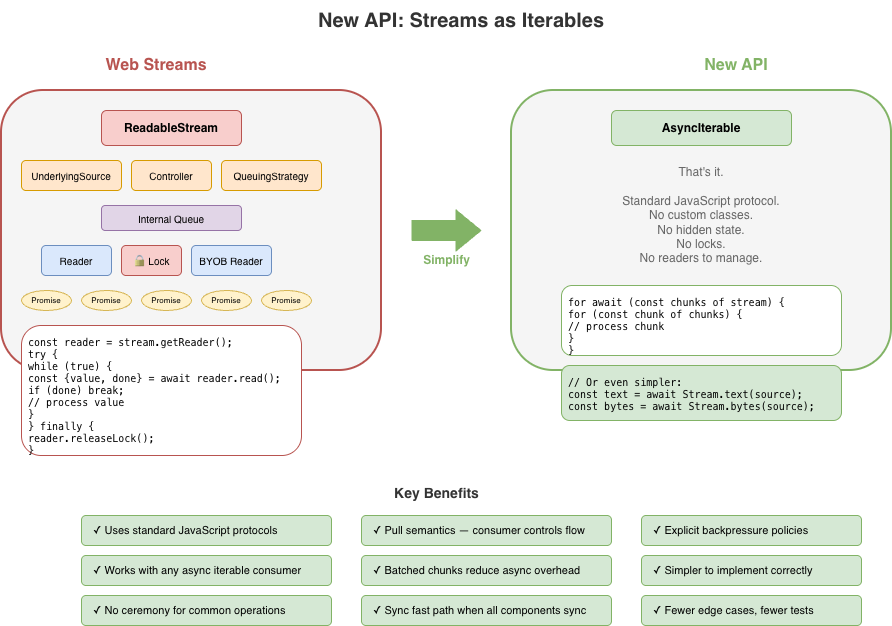
The most common task with streams is reading them to completion. Here’s what that looks like with Web streams:
// First, we acquire a reader that gives an exclusive lock
// on the stream...
const reader = stream.getReader();
const chunks = [];
try {
  // Second, we repeatedly call read and await on the returned
  // promise to either yield a chunk of data or indicate we're
  // done.
  while (true) {
    const { value, done } = await reader.read();
    if (done) break;
    chunks.push(value);
  }
} finally {
  // Finally, we release the lock on the stream
  reader.releaseLock();
}
You might assume this pattern is inherent to streaming. It isn’t. The reader acquisition, the lock management, and the { value, done } protocol are all just design choices, not requirements. They are artifacts of how and when the Web streams spec was written. Async iteration exists precisely to handle sequences that arrive over time, but async iteration did not yet exist when the streams specification was written. The complexity here is pure API overhead, not fundamental necessity.
Consider the alternative approach now that Web streams now do support for await...of:
const chunks = [];
for await (const chunk of stream) {
  chunks.push(chunk);
}
This is better in that there is far less boilerplate, but it doesn’t solve everything. Async iteration was retrofitted onto an API that wasn’t designed for it, and it shows. Features like BYOB (bring your own buffer) reads aren’t accessible through iteration. The underlying complexity of readers, locks, and controllers are still there, just hidden. When something does go wrong, or when additional features of the API are needed, developers find themselves back in the weeds of the original API, trying to understand why their stream is “locked” or why releaseLock() didn’t do what they expected or hunting down bottlenecks in code they don’t control.
The locking problem
Web streams use a locking model to prevent multiple consumers from interleaving reads. When you call getReader(), the stream becomes locked. While locked, nothing else can read from the stream directly, pipe it, or even cancel it – only the code that is actually holding the reader can.
This sounds reasonable until you see how easily it goes wrong:
async function peekFirstChunk(stream) {
  const reader = stream.getReader();
  const { value } = await reader.read();
  // Oops — forgot to call reader.releaseLock()
  // And the reader is no longer available when we return
  return value;
}

const first = await peekFirstChunk(stream);
// TypeError: Cannot obtain lock — stream is permanently locked
for await (const chunk of stream) { /* never runs */ }
Forgetting releaseLock() permanently breaks the stream. The lockedproperty tells you that a stream is locked, but not why, by whom, or whether the lock is even still usable. Piping internally acquires locks, making streams unusable during pipe operations in ways that aren’t obvious.
The semantics around releasing locks with pending reads were also unclear for years. If you called read() but didn’t await it, then called releaseLock(), what happened? The spec was recently clarified to cancel pending reads on lock release – but implementations varied, and code that relied on the previous unspecified behavior can break.
That said, it’s important to recognize that locking in itself is not bad. It does, in fact, serve an important purpose to ensure that applications properly and orderly consume or produce data. The key challenge is with the original manual implementation of it using APIs like getReader() and releaseLock(). With the arrival of automatic lock and reader management with async iterables, dealing with locks from the users point of view became a lot easier.
For implementers, the locking model adds a fair amount of non-trivial internal bookkeeping. Every operation must check lock state, readers must be tracked, and the interplay between locks, cancellation, and error states creates a matrix of edge cases that must all be handled correctly.
BYOB: complexity without payoff
BYOB (bring your own buffer) reads were designed to let developers reuse memory buffers when reading from streams, an important optimization intended for high-throughput scenarios. The idea is sound: instead of allocating new buffers for each chunk, you provide your own buffer and the stream fills it.
In practice, (and yes, there are always exceptions to be found) BYOB is rarely used to any measurable benefit. The API is substantially more complex than default reads, requiring a separate reader type (ReadableStreamBYOBReader) and other specialized classes (e.g. ReadableStreamBYOBRequest), careful buffer lifecycle management, and understanding of ArrayBuffer detachment semantics. When you pass a buffer to a BYOB read, the buffer becomes detached – transferred to the stream – and you get back a different view over potentially different memory. This transfer-based model is error-prone and confusing:
const reader = stream.getReader({ mode: 'byob' });
const buffer = new ArrayBuffer(1024);
let view = new Uint8Array(buffer);

const result = await reader.read(view);
// 'view' should now be detached and unusable
// (it isn't always in every impl)
// result.value is a NEW view, possibly over different memory
view = result.value; // Must reassign
BYOB also can’t be used with async iteration or TransformStreams, so developers who want zero-copy reads are forced back into the manual reader loop.
For implementers, BYOB adds significant complexity. The stream must track pending BYOB requests, handle partial fills, manage buffer detachment correctly, and coordinate between the BYOB reader and the underlying source. The Web Platform Tests for readable byte streams include dedicated test files just for BYOB edge cases: detached buffers, bad views, response-after-enqueue ordering, and more.
BYOB ends up being complex for both users and implementers, yet sees little adoption in practice. Most developers stick with default reads and accept the allocation overhead.
Most userland implementations of custom ReadableStream instances do not typically bother with all the ceremony required to correctly implement both default and BYOB read support in a single stream – and for good reason. It’s difficult to get right and most of the time consuming code is typically going to fallback on the default read path. The example below shows what a “correct” implementation would need to do. It’s big, complex, and error prone, and not a level of complexity that the typical developer really wants to have to deal with:
new ReadableStream({
    type: 'bytes',

    async pull(controller: ReadableByteStreamController) {
      if (offset >= totalBytes) {
        controller.close();
        return;
      }

      // Check for BYOB request FIRST
      const byobRequest = controller.byobRequest;

      if (byobRequest) {
        // === BYOB PATH ===
        // Consumer provided a buffer - we MUST fill it (or part of it)
        const view = byobRequest.view!;
        const bytesAvailable = totalBytes - offset;
        const bytesToWrite = Math.min(view.byteLength, bytesAvailable);

        // Create a view into the consumer's buffer and fill it
        // not critical but safer when bytesToWrite != view.byteLength
        const dest = new Uint8Array(
          view.buffer,
          view.byteOffset,
          bytesToWrite
        );

        // Fill with sequential bytes (our "data source")
        // Can be any thing here that writes into the view
        for (let i = 0; i < bytesToWrite; i++) {
          dest[i] = (offset + i) & 0xFF;
        }

        offset += bytesToWrite;

        // Signal how many bytes we wrote
        byobRequest.respond(bytesToWrite);

      } else {
        // === DEFAULT READER PATH ===
        // No BYOB request - allocate and enqueue a chunk
        const bytesAvailable = totalBytes - offset;
        const chunkSize = Math.min(1024, bytesAvailable);

        const chunk = new Uint8Array(chunkSize);
        for (let i = 0; i < chunkSize; i++) {
          chunk[i] = (offset + i) & 0xFF;
        }

        offset += chunkSize;
        controller.enqueue(chunk);
      }
    },

    cancel(reason) {
      console.log('Stream canceled:', reason);
    }
  });
When a host runtime provides a byte-oriented ReadableStream from the runtime itself, for instance, as the body of a fetch Response, it is often far easier for the runtime itself to provide an optimized implementation of BYOB reads, but those still need to be capable of handling both default and BYOB reading patterns and that requirement brings with it a fair amount of complexity.
Backpressure: good in theory, broken in practice
Backpressure – the ability for a slow consumer to signal a fast producer to slow down – is a first-class concept in Web streams. In theory. In practice, the model has some serious flaws.
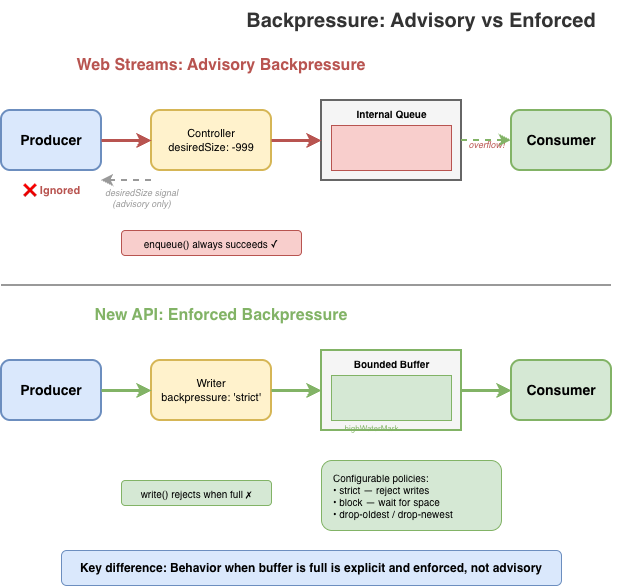
The primary signal is desiredSize on the controller. It can be positive (wants data), zero (at capacity), negative (over capacity), or null (closed). Producers are supposed to check this value and stop enqueueing when it’s not positive. But there’s nothing enforcing this: controller.enqueue() always succeeds, even when desiredSize is deeply negative.
new ReadableStream({
  start(controller) {
    // Nothing stops you from doing this
    while (true) {
      controller.enqueue(generateData()); // desiredSize: -999999
    }
  }
});
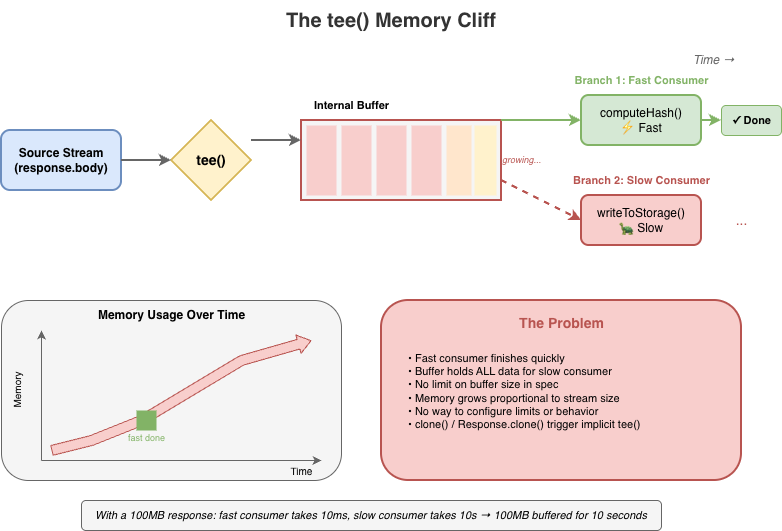
Stream implementations can and do ignore backpressure; and some spec-defined features explicitly break backpressure. tee(), for instance, creates two branches from a single stream. If one branch reads faster than the other, data accumulates in an internal buffer with no limit. A fast consumer can cause unbounded memory growth while the slow consumer catches up, and there’s no way to configure this or opt out beyond canceling the slower branch.
Web streams do provide clear mechanisms for tuning backpressure behavior in the form of the highWaterMark option and customizable size calculations, but these are just as easy to ignore as desiredSize, and many applications simply fail to pay attention to them.
The same issues exist on the WritableStream side. A WritableStream has a highWaterMark and desiredSize. There is a writer.ready promise that producers of data are supposed to pay attention but often don’t.
const writable = getWritableStreamSomehow();
const writer = writable.getWriter();

// Producers are supposed to wait for the writer.ready
// It is a promise that, when resolves, indicates that
// the writables internal backpressure is cleared and
// it is ok to write more data
await writer.ready;
await writer.write(...);
For implementers, backpressure adds complexity without providing guarantees. The machinery to track queue sizes, compute desiredSize, and invoke pull() at the right times must all be implemented correctly. However, since these signals are advisory, all that work doesn’t actually prevent the problems backpressure is supposed to solve.
The hidden cost of promises
The Web streams spec requires promise creation at numerous points, often in hot paths and often invisible to users. Each read() call doesn’t just return a promise; internally, the implementation creates additional promises for queue management, pull() coordination, and backpressure signaling.
This overhead is mandated by the spec’s reliance on promises for buffer management, completion, and backpressure signals. While some of it is implementation-specific, much of it is unavoidable if you’re following the spec as written. For high-frequency streaming – video frames, network packets, real-time data – this overhead is significant.
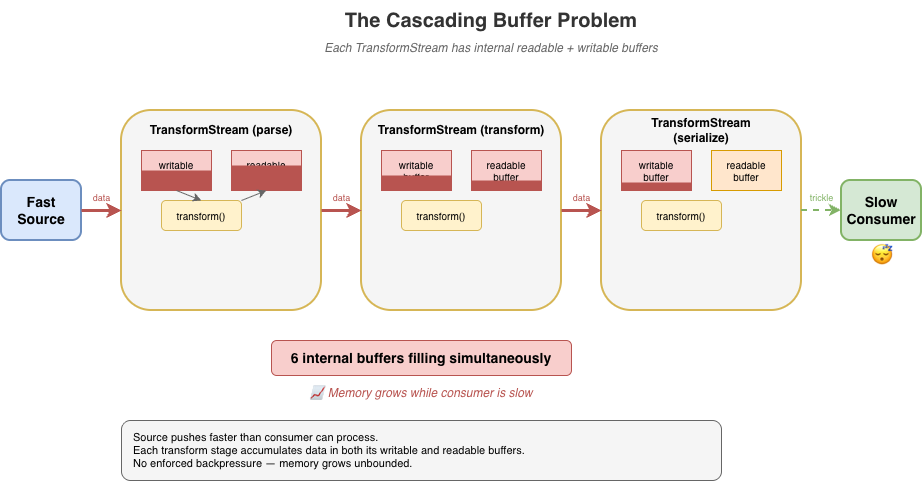
The problem compounds in pipelines. Each TransformStream adds another layer of promise machinery between source and sink. The spec doesn’t define synchronous fast paths, so even when data is available immediately, the promise machinery still runs.
For implementers, this promise-heavy design constrains optimization opportunities. The spec mandates specific promise resolution ordering, making it difficult to batch operations or skip unnecessary async boundaries without risking subtle compliance failures. There are many hidden internal optimizations that implementers do make but these can be complicated and difficult to get right.
While I was writing this blog post, Vercel’s Malte Ubl published their own blog post describing some research work Vercel has been doing around improving the performance of Node.js’ Web streams implementation. In that post they discuss the same fundamental performance optimization problem that every implementation of Web streams face:
“Or consider pipeTo(). Each chunk passes through a full Promise chain: read, write, check backpressure, repeat. An {value, done} result object is allocated per read. Error propagation creates additional Promise branches.
None of this is wrong. These guarantees matter in the browser where streams cross security boundaries, where cancellation semantics need to be airtight, where you do not control both ends of a pipe. But on the server, when you are piping React Server Components through three transforms at 1KB chunks, the cost adds up.
We benchmarked native WebStream pipeThrough at 630 MB/s for 1KB chunks. Node.js pipeline() with the same passthrough transform: ~7,900 MB/s. That is a 12x gap, and the difference is almost entirely Promise and object allocation overhead.”
– Malte Ubl, https://vercel.com/blog/we-ralph-wiggumed-webstreams-to-make-them-10x-faster
As part of their research, they have put together a set of proposed improvements for Node.js’ Web streams implementation that will eliminate promises in certain code paths which can yield a significant performance boost up to 10x faster, which only goes to prove the point: promises, while useful, add significant overhead. As one of the core maintainers of Node.js, I am looking forward to helping Malte and the folks at Vercel get their proposed improvements landed!
In a recent update made to Cloudflare Workers, I made similar kinds of modifications to an internal data pipeline that reduced the number of JavaScript promises created in certain application scenarios by up to 200x. The result is several orders of magnitude improvement in performance in those applications.
Real-world failures
Exhausting resources with unconsumed bodies
When fetch() returns a response, the body is a ReadableStream. If you only check the status and don’t consume or cancel the body, what happens? The answer varies by implementation, but a common outcome is resource leakage.
async function checkEndpoint(url) {
  const response = await fetch(url);
  return response.ok; // Body is never consumed or cancelled
}

// In a loop, this can exhaust connection pools
for (const url of urls) {
  await checkEndpoint(url);
}
This pattern has caused connection pool exhaustion in Node.js applications using undici (the fetch() implementation built into Node.js), and similar issues have appeared in other runtimes. The stream holds a reference to the underlying connection, and without explicit consumption or cancellation, the connection may linger until garbage collection – which may not happen soon enough under load.
The problem is compounded by APIs that implicitly create stream branches. Request.clone() and Response.clone() perform implicit tee() operations on the body stream – a detail that’s easy to miss. Code that clones a request for logging or retry logic may unknowingly create branched streams that need independent consumption, multiplying the resource management burden.
Now, to be certain, these types of issues are implementation bugs. The connection leak was definitely something that undici needed to fix in its own implementation, but the complexity of the specification does not make dealing with these types of issues easy.
“Cloning streams in Node.js’s fetch() implementation is harder than it looks. When you clone a request or response body, you’re calling tee() – which splits a single stream into two branches that both need to be consumed. If one consumer reads faster than the other, data buffers unbounded in memory waiting for the slow branch. If you don’t properly consume both branches, the underlying connection leaks. The coordination required between two readers sharing one source makes it easy to accidentally break the original request or exhaust connection pools. It’s a simple API call with complex underlying mechanics that are difficult to get right.” – Matteo Collina, Ph.D. – Platformatic Co-Founder & CTO, Node.js Technical Steering Committee Chair
Falling headlong off the tee() memory cliff
tee() splits a stream into two branches. It seems straightforward, but the implementation requires buffering: if one branch is read faster than the other, the data must be held somewhere until the slower branch catches up.
const [forHash, forStorage] = response.body.tee();

// Hash computation is fast
const hash = await computeHash(forHash);

// Storage write is slow — meanwhile, the entire stream
// may be buffered in memory waiting for this branch
await writeToStorage(forStorage);
The spec does not mandate buffer limits for tee(). And to be fair, the spec allows implementations to implement the actual internal mechanisms for tee()and other APIs in any way they see fit so long as the observable normative requirements of the specification are met. But if an implementation chooses to implement tee() in the specific way described by the streams specification, then tee() will come with a built-in memory management issue that is difficult to work around.
Implementations have had to develop their own strategies for dealing with this. Firefox initially used a linked-list approach that led to O(n) memory growth proportional to the consumption rate difference. In Cloudflare Workers, we opted to implement a shared buffer model where backpressure is signaled by the slowest consumer rather than the fastest.
Transform backpressure gaps
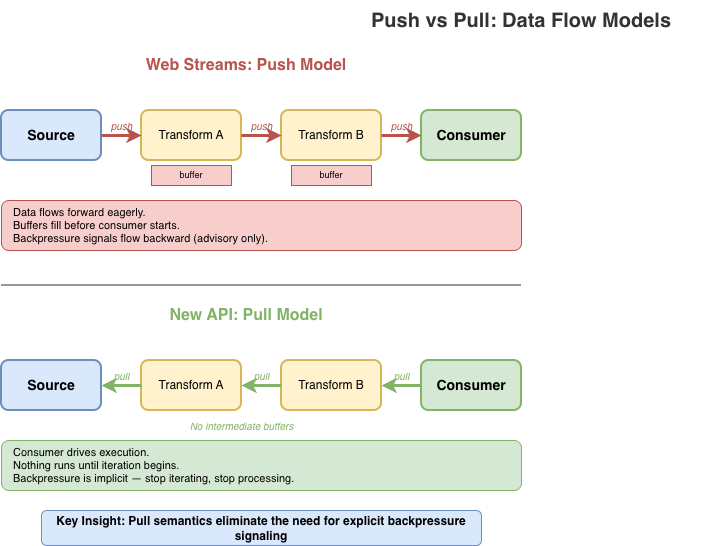
TransformStream creates a readable/writable pair with processing logic in between. The transform() function executes on write, not on read. Processing of the transform happens eagerly as data arrives, regardless of whether any consumer is ready. This causes unnecessary work when consumers are slow, and the backpressure signaling between the two sides has gaps that can cause unbounded buffering under load. The expectation in the spec is that the producer of the data being transformed is paying attention to the writer.ready signal on the writable side of the transform but quite often producers just simply ignore it.
If the transform’s transform() operation is synchronous and always enqueues output immediately, it never signals backpressure back to the writable side even when the downstream consumer is slow. This is a consequence of the spec design that many developers completely overlook. In browsers, where there’s only a single user and typically only a small number of stream pipelines active at any given time, this type of foot gun is often of no consequence, but it has a major impact on server-side or edge performance in runtimes that serve thousands of concurrent requests.
const fastTransform = new TransformStream({
  transform(chunk, controller) {
    // Synchronously enqueue — this never applies backpressure
    // Even if the readable side's buffer is full, this succeeds
    controller.enqueue(processChunk(chunk));
  }
});

// Pipe a fast source through the transform to a slow sink
fastSource
  .pipeThrough(fastTransform)
  .pipeTo(slowSink);  // Buffer grows without bound
What TransformStreams are supposed to do is check for backpressure on the controller and use promises to communicate that back to the writer:
const fastTransform = new TransformStream({
  async transform(chunk, controller) {
    if (controller.desiredSize <= 0) {
      // Wait on the backpressure to clear somehow
    }

    controller.enqueue(processChunk(chunk));
  }
});
A difficulty here, however, is that the TransformStreamDefaultController does not have a ready promise mechanism like Writers do; so the TransformStream implementation would need to implement a polling mechanism to periodically check when controller.desiredSize becomes positive again.
The problem gets worse in pipelines. When you chain multiple transforms – say, parse, transform, then serialize – each TransformStream has its own internal readable and writable buffers. If implementers follow the spec strictly, data cascades through these buffers in a push-oriented fashion: the source pushes to transform A, which pushes to transform B, which pushes to transform C, each accumulating data in intermediate buffers before the final consumer has even started pulling. With three transforms, you can have six internal buffers filling up simultaneously.
Developers using the streams API are expected to remember to use options like highWaterMark when creating their sources, transforms, and writable destinations but often they either forget or simply choose to ignore it.
source
  .pipeThrough(parse)      // buffers filling...
  .pipeThrough(transform)  // more buffers filling...
  .pipeThrough(serialize)  // even more buffers...
  .pipeTo(destination);    // consumer hasn't started yet
Implementations have found ways to optimize transform pipelines by collapsing identity transforms, short-circuiting non-observable paths, deferring buffer allocation, or falling back to native code that does not run JavaScript at all. Deno, Bun, and Cloudflare Workers have all successfully implemented “native path” optimizations that can help eliminate much of the overhead, and Vercel’s recent fast-webstreams research is working on similar optimizations for Node.js. But the optimizations themselves add significant complexity and still can’t fully escape the inherently push-oriented model that TransformStream uses.
GC thrashing in server-side rendering
Streaming server-side rendering (SSR) is a particularly painful case. A typical SSR stream might render thousands of small HTML fragments, each passing through the streams machinery:
// Each component enqueues a small chunk
function renderComponent(controller) {
  controller.enqueue(encoder.encode(`<div>${content}</div>`));
}

// Hundreds of components = hundreds of enqueue calls
// Each one triggers promise machinery internally
for (const component of components) {
  renderComponent(controller);  // Promises created, objects allocated
}
Every fragment means promises created for read() calls, promises for backpressure coordination, intermediate buffer allocations, and { value, done } result objects – most of which become garbage almost immediately.
Under load, this creates GC pressure that can devastate throughput. The JavaScript engine spends significant time collecting short-lived objects instead of doing useful work. Latency becomes unpredictable as GC pauses interrupt request handling. I’ve seen SSR workloads where garbage collection accounts for a substantial portion (up to and beyond 50%) of total CPU time per request. That’s time that could be spent actually rendering content.
The irony is that streaming SSR is supposed to improve performance by sending content incrementally. But the overhead of the streams machinery can negate those gains, especially for pages with many small components. Developers sometimes find that buffering the entire response is actually faster than streaming through Web streams, defeating the purpose entirely.
The optimization treadmill
To achieve usable performance, every major runtime has resorted to non-standard internal optimizations for Web streams. Node.js, Deno, Bun, and Cloudflare Workers have all developed their own workarounds. This is particularly true for streams wired up to system-level I/O, where much of the machinery is non-observable and can be short-circuited.
Finding these optimization opportunities can itself be a significant undertaking. It requires end-to-end understanding of the spec to identify which behaviors are observable and which can safely be elided. Even then, whether a given optimization is actually spec-compliant is often unclear. Implementers must make judgment calls about which semantics they can relax without breaking compatibility. This puts enormous pressure on runtime teams to become spec experts just to achieve acceptable performance.
These optimizations are difficult to implement, frequently error-prone, and lead to inconsistent behavior across runtimes. Bun’s “Direct Streams” optimization takes a deliberately and observably non-standard approach, bypassing much of the spec’s machinery entirely. Cloudflare Workers’ IdentityTransformStream provides a fast-path for pass-through transforms but is Workers-specific and implements behaviors that are not standard for a TransformStream. Each runtime has its own set of tricks and the natural tendency is toward non-standard solutions, because that’s often the only way to make things fast.
This fragmentation hurts portability. Code that performs well on one runtime may behave differently (or poorly) on another, even though it’s using “standard” APIs. The complexity burden on runtime implementers is substantial, and the subtle behavioral differences create friction for developers trying to write cross-runtime code, particularly those maintaining frameworks that must be able to run efficiently across many runtime environments.
It is also necessary to emphasize that many optimizations are only possible in parts of the spec that are unobservable to user code. The alternative, like Bun “Direct Streams”, is to intentionally diverge from the spec-defined observable behaviors. This means optimizations often feel “incomplete”. They work in some scenarios but not in others, in some runtimes but not others, etc. Every such case adds to the overall unsustainable complexity of the Web streams approach which is why most runtime implementers rarely put significant effort into further improvements to their streams implementations once the conformance tests are passing.
Implementers shouldn’t need to jump through these hoops. When you find yourself needing to relax or bypass spec semantics just to achieve reasonable performance, that’s a sign something is wrong with the spec itself. A well-designed streaming API should be efficient by default, not require each runtime to invent its own escape hatches.
The compliance burden
A complex spec creates complex edge cases. The Web Platform Tests for streams span over 70 test files, and while comprehensive testing is a good thing, what’s telling is what needs to be tested.
Consider some of the more obscure tests that implementations must pass:
Prototype pollution defense: One test patches Object.prototype.then to intercept promise resolutions, then verifies that pipeTo() and tee() operations don’t leak internal values through the prototype chain. This tests a security property that only exists because the spec’s promise-heavy internals create an attack surface.
WebAssembly memory rejection: BYOB reads must explicitly reject ArrayBuffers backed by WebAssembly memory, which look like regular buffers but can’t be transferred. This edge case exists because of the spec’s buffer detachment model – a simpler API wouldn’t need to handle it.
Crash regression for state machine conflicts: A test specifically checks that calling byobRequest.respond() after enqueue() doesn’t crash the runtime. This sequence creates a conflict in the internal state machine — the enqueue() fulfills the pending read and should invalidate the byobRequest, but implementations must gracefully handle the subsequent respond() rather than corrupting memory in order to cover the very likely possibility that developers are not using the complex API correctly.
These aren’t contrived scenarios invented by test authors in total vacuum. They’re consequences of the spec’s design and reflect real world bugs.
For runtime implementers, passing the WPT suite means handling intricate corner cases that most application code will never encounter. The tests encode not just the happy path but the full matrix of interactions between readers, writers, controllers, queues, strategies, and the promise machinery that connects them all.
A simpler API would mean fewer concepts, fewer interactions between concepts, and fewer edge cases to get right resulting in more confidence that implementations actually behave consistently.
The takeaway
Web streams are complex for users and implementers alike. The problems with the spec aren’t bugs. They emerge from using the API exactly as designed. They aren’t issues that can be fixed solely through incremental improvements. They’re consequences of fundamental design choices. To improve things we need different foundations.
A better streams API is possible
After implementing the Web streams spec multiple times across different runtimes and seeing the pain points firsthand, I decided it was time to explore what a better, alternative streaming API could look like if designed from first principles today.
What follows is a proof of concept: it’s not a finished standard, not a production-ready library, not even necessarily a concrete proposal for something new, but a starting point for discussion that demonstrates the problems with Web streams aren’t inherent to streaming itself; they’re consequences of specific design choices that could be made differently. Whether this exact API is the right answer is less important than whether it sparks a productive conversation about what we actually need from a streaming primitive.
What is a stream?
Before diving into API design, it’s worth asking: what is a stream?
At its core, a stream is just a sequence of data that arrives over time. You don’t have all of it at once. You process it incrementally as it becomes available.
Unix pipes are perhaps the purest expression of this idea:
cat access.log | grep "error" | sort | uniq -c
Data flows left to right. Each stage reads input, does its work, writes output. There’s no pipe reader to acquire, no controller lock to manage. If a downstream stage is slow, upstream stages naturally slow down as well. Backpressure is implicit in the model, not a separate mechanism to learn (or ignore).
In JavaScript, the natural primitive for “a sequence of things that arrive over time” is already in the language: the async iterable. You consume it with for await...of. You stop consuming by stopping iteration.
This is the intuition the new API tries to preserve: streams should feel like iteration, because that’s what they are. The complexity of Web streams – readers, writers, controllers, locks, queuing strategies – obscures this fundamental simplicity. A better API should make the simple case simple and only add complexity where it’s genuinely needed.
Design principles
I built the proof-of-concept alternative around a different set of principles.
Streams are iterables.
No custom ReadableStream class with hidden internal state. A readable stream is just an AsyncIterable<Uint8Array[]>. You consume it with for await...of. No readers to acquire, no locks to manage.
Pull-through transforms
Transforms don’t execute until the consumer pulls. There’s no eager evaluation, no hidden buffering. Data flows on-demand from source, through transforms, to the consumer. If you stop iterating, processing stops.
Explicit backpressure
Backpressure is strict by default. When a buffer is full, writes reject rather than silently accumulating. You can configure alternative policies – block until space is available, drop oldest, drop newest – but you have to choose explicitly. No more silent memory growth.
Batched chunks
Instead of yielding one chunk per iteration, streams yield Uint8Array[]: arrays of chunks. This amortizes the async overhead across multiple chunks, reducing promise creation and microtask latency in hot paths.
Bytes only
The API deals exclusively with bytes (Uint8Array). Strings are UTF-8 encoded automatically. There’s no “value stream” vs “byte stream” dichotomy. If you want to stream arbitrary JavaScript values, use async iterables directly. While the API uses Uint8Array, it treats chunks as opaque. There is no partial consumption, no BYOB patterns, no byte-level operations within the streaming machinery itself. Chunks go in, chunks come out, unchanged unless a transform explicitly modifies them.
Synchronous fast paths matter
The API recognizes that synchronous data sources are both necessary and common. The application should not be forced to always accept the performance cost of asynchronous scheduling simply because that’s the only option provided. At the same time, mixing sync and async processing can be dangerous. Synchronous paths should always be an option and should always be explicit.
The new API in action
Creating and consuming streams
In Web streams, creating a simple producer/consumer pair requires TransformStream, manual encoding, and careful lock management:
const { readable, writable } = new TransformStream();
const enc = new TextEncoder();
const writer = writable.getWriter();
await writer.write(enc.encode("Hello, World!"));
await writer.close();
writer.releaseLock();

const dec = new TextDecoder();
let text = '';
for await (const chunk of readable) {
  text += dec.decode(chunk, { stream: true });
}
text += dec.decode();
Even this relatively clean version requires: a TransformStream, manual TextEncoder and TextDecoder, and explicit lock release.
Here’s the equivalent with the new API:
import { Stream } from 'new-streams';

// Create a push stream
const { writer, readable } = Stream.push();

// Write data — backpressure is enforced
await writer.write("Hello, World!");
await writer.end();

// Consume as text
const text = await Stream.text(readable);
The readable is just an async iterable. You can pass it to any function that expects one, including Stream.text() which collects and decodes the entire stream.
The writer has a simple interface: write(), writev() for batched writes, end() to signal completion, and abort() for errors. That’s essentially it.
The Writer is not a concrete class. Any object that implements write(), end(), and abort() can be a writer making it easy to adapt existing APIs or create specialized implementations without subclassing. There’s no complex UnderlyingSink protocol with start(), write(), close(), and abort() callbacks that must coordinate through a controller whose lifecycle and state are independent of the WritableStream it is bound to.
Here’s a simple in-memory writer that collects all written data:
// A minimal writer implementation — just an object with methods
function createBufferWriter() {
  const chunks = [];
  let totalBytes = 0;
  let closed = false;

  const addChunk = (chunk) => {
    chunks.push(chunk);
    totalBytes += chunk.byteLength;
  };

  return {
    get desiredSize() { return closed ? null : 1; },

    // Async variants
    write(chunk) { addChunk(chunk); },
    writev(batch) { for (const c of batch) addChunk(c); },
    end() { closed = true; return totalBytes; },
    abort(reason) { closed = true; chunks.length = 0; },

    // Sync variants return boolean (true = accepted)
    writeSync(chunk) { addChunk(chunk); return true; },
    writevSync(batch) { for (const c of batch) addChunk(c); return true; },
    endSync() { closed = true; return totalBytes; },
    abortSync(reason) { closed = true; chunks.length = 0; return true; },

    getChunks() { return chunks; }
  };
}

// Use it
const writer = createBufferWriter();
await Stream.pipeTo(source, writer);
const allData = writer.getChunks();
No base class to extend, no abstract methods to implement, no controller to coordinate with. Just an object with the right shape.
Pull-through transforms
Under the new API design, transforms should not perform any work until the data is being consumed. This is a fundamental principle.
// Nothing executes until iteration begins
const output = Stream.pull(source, compress, encrypt);

// Transforms execute as we iterate
for await (const chunks of output) {
  for (const chunk of chunks) {
    process(chunk);
  }
}
Stream.pull() creates a lazy pipeline. The compress and encrypt transforms don’t run until you start iterating output. Each iteration pulls data through the pipeline on demand.
This is fundamentally different from Web streams’ pipeThrough(), which starts actively pumping data from the source to the transform as soon as you set up the pipe. Pull semantics mean you control when processing happens, and stopping iteration stops processing.
Transforms can be stateless or stateful. A stateless transform is just a function that takes chunks and returns transformed chunks:
// Stateless transform — a pure function
// Receives chunks or null (flush signal)
const toUpperCase = (chunks) => {
  if (chunks === null) return null; // End of stream
  return chunks.map(chunk => {
    const str = new TextDecoder().decode(chunk);
    return new TextEncoder().encode(str.toUpperCase());
  });
};

// Use it directly
const output = Stream.pull(source, toUpperCase);
Stateful transforms are simple objects with member functions that maintain state across calls:
// Stateful transform — a generator that wraps the source
function createLineParser() {
  // Helper to concatenate Uint8Arrays
  const concat = (...arrays) => {
    const result = new Uint8Array(arrays.reduce((n, a) => n + a.length, 0));
    let offset = 0;
    for (const arr of arrays) { result.set(arr, offset); offset += arr.length; }
    return result;
  };

  return {
    async *transform(source) {
      let pending = new Uint8Array(0);

      for await (const chunks of source) {
        if (chunks === null) {
          // Flush: yield any remaining data
          if (pending.length > 0) yield [pending];
          continue;
        }

        // Concatenate pending data with new chunks
        const combined = concat(pending, ...chunks);
        const lines = [];
        let start = 0;

        for (let i = 0; i < combined.length; i++) {
          if (combined[i] === 0x0a) { // newline
            lines.push(combined.slice(start, i));
            start = i + 1;
          }
        }

        pending = combined.slice(start);
        if (lines.length > 0) yield lines;
      }
    }
  };
}

const output = Stream.pull(source, createLineParser());
For transforms that need cleanup on abort, add an abort handler:
// Stateful transform with resource cleanup
function createGzipCompressor() {
  // Hypothetical compression API...
  const deflate = new Deflater({ gzip: true });

  return {
    async *transform(source) {
      for await (const chunks of source) {
        if (chunks === null) {
          // Flush: finalize compression
          deflate.push(new Uint8Array(0), true);
          if (deflate.result) yield [deflate.result];
        } else {
          for (const chunk of chunks) {
            deflate.push(chunk, false);
            if (deflate.result) yield [deflate.result];
          }
        }
      }
    },
    abort(reason) {
      // Clean up compressor resources on error/cancellation
    }
  };
}
For implementers, there’s no Transformer protocol with start(), transform(), flush() methods and controller coordination passed into a TransformStream class that has its own hidden state machine and buffering mechanisms. Transforms are just functions or simple objects: far simpler to implement and test.
Explicit backpressure policies
When a bounded buffer fills up and a producer wants to write more, there are only a few things you can do:
Reject the write: refuse to accept more data
Wait: block until space becomes available
Discard old data: evict what’s already buffered to make room
Discard new data: drop what’s incoming
That’s it. Any other response is either a variation of these (like “resize the buffer,” which is really just deferring the choice) or domain-specific logic that doesn’t belong in a general streaming primitive. Web streams currently always choose Wait by default.
The new API makes you choose one of these four explicitly:
strict (default): Rejects writes when the buffer is full and too many writes are pending. Catches “fire-and-forget” patterns where producers ignore backpressure.
block: Writes wait until buffer space is available. Use when you trust the producer to await writes properly.
drop-oldest: Drops the oldest buffered data to make room. Useful for live feeds where stale data loses value.
drop-newest: Discards incoming data when full. Useful when you want to process what you have without being overwhelmed.
Instead of tee() with its hidden unbounded buffer, you get explicit multi-consumer primitives. Stream.share() is pull-based: consumers pull from a shared source, and you configure the buffer limits and backpressure policy upfront.
There’s also Stream.broadcast() for push-based multi-consumer scenarios. Both require you to think about what happens when consumers run at different speeds, because that’s a real concern that shouldn’t be hidden.
Sync/async separation
Not all streaming workloads involve I/O. When your source is in-memory and your transforms are pure functions, async machinery adds overhead without benefit. You’re paying for coordination of “waiting” that adds no benefit.
The new API has complete parallel sync versions: Stream.pullSync(), Stream.bytesSync(), Stream.textSync(), and so on. If your source and transforms are all synchronous, you can process the entire pipeline without a single promise.
// Async — when source or transforms may be asynchronous
const textAsync = await Stream.text(source);

// Sync — when all components are synchronous
const textSync = Stream.textSync(source);
Here’s a complete synchronous pipeline – compression, transformation, and consumption with zero async overhead:
// Synchronous source from in-memory data
const source = Stream.fromSync([inputBuffer]);

// Synchronous transforms
const compressed = Stream.pullSync(source, zlibCompressSync);
const encrypted = Stream.pullSync(compressed, aesEncryptSync);

// Synchronous consumption — no promises, no event loop trips
const result = Stream.bytesSync(encrypted);
The entire pipeline executes in a single call stack. No promises are created, no microtask queue scheduling occurs, and no GC pressure from short-lived async machinery. For CPU-bound workloads like parsing, compression, or transformation of in-memory data, this can be significantly faster than the equivalent Web streams code – which would force async boundaries even when every component is synchronous.
Web streams has no synchronous path. Even if your source has data ready and your transform is a pure function, you still pay for promise creation and microtask scheduling on every operation. Promises are fantastic for cases in which waiting is actually necessary, but they aren’t always necessary. The new API lets you stay in sync-land when that’s what you need.
Bridging the gap between this and web streams
The async iterator based approach provides a natural bridge between this alternative approach and Web streams. When coming from a ReadableStream to this new approach, simply passing the readable in as input works as expected when the ReadableStream is set up to yield bytes:
const readable = getWebReadableStreamSomehow();
const input = Stream.pull(readable, transform1, transform2);
for await (const chunks of input) {
  // process chunks
}
When adapting to a ReadableStream, a bit more work is required since the alternative approach yields batches of chunks, but the adaptation layer is as easily straightforward:
async function* adapt(input) {
  for await (const chunks of input) {
    for (const chunk of chunks) {
      yield chunk;
    }
  }
}

const input = Stream.pull(source, transform1, transform2);
const readable = ReadableStream.from(adapt(input));
How this addresses the real-world failures from earlier
Unconsumed bodies: Pull semantics mean nothing happens until you iterate. No hidden resource retention. If you don’t consume a stream, there’s no background machinery holding connections open.
The tee() memory cliff: Stream.share() requires explicit buffer configuration. You choose the highWaterMark and backpressure policy upfront: no more silent unbounded growth when consumers run at different speeds.
Transform backpressure gaps: Pull-through transforms execute on-demand. Data doesn’t cascade through intermediate buffers; it flows only when the consumer pulls. Stop iterating, stop processing.
GC thrashing in SSR: Batched chunks (Uint8Array[]) amortize async overhead. Sync pipelines via Stream.pullSync() eliminate promise allocation entirely for CPU-bound workloads.
Performance
The design choices have performance implications. Here are benchmarks from the reference implementation of this possible alternative compared to Web streams (Node.js v24.x, Apple M1 Pro, averaged over 10 runs):
Scenario
Alternative
Web streams
Difference
Small chunks (1KB × 5000)
~13 GB/s
~4 GB/s
~3× faster
Tiny chunks (100B × 10000)
~4 GB/s
~450 MB/s
~8× faster
Async iteration (8KB × 1000)
~530 GB/s
~35 GB/s
~15× faster
Chained 3× transforms (8KB × 500)
~275 GB/s
~3 GB/s
~80–90× faster
High-frequency (64B × 20000)
~7.5 GB/s
~280 MB/s
~25× faster
The chained transform result is particularly striking: pull-through semantics eliminate the intermediate buffering that plagues Web streams pipelines. Instead of each TransformStream eagerly filling its internal buffers, data flows on-demand from consumer to source.
Now, to be fair, Node.js really has not yet put significant effort into fully optimizing the performance of its Web streams implementation. There’s likely significant room for improvement in Node.js’ performance results through a bit of applied effort to optimize the hot paths there. That said, running these benchmarks in Deno and Bun also show a significant performance improvement with this alternative iterator based approach than in either of their Web streams implementations as well.
Browser benchmarks (Chrome/Blink, averaged over 3 runs) show consistent gains as well:
Scenario
Alternative
Web streams
Difference
Push 3KB chunks
~135k ops/s
~24k ops/s
~5–6× faster
Push 100KB chunks
~24k ops/s
~3k ops/s
~7–8× faster
3 transform chain
~4.6k ops/s
~880 ops/s
~5× faster
5 transform chain
~2.4k ops/s
~550 ops/s
~4× faster
bytes() consumption
~73k ops/s
~11k ops/s
~6–7× faster
Async iteration
~1.1M ops/s
~10k ops/s
~40–100× faster
These benchmarks measure throughput in controlled scenarios; real-world performance depends on your specific use case. The difference between Node.js and browser gains reflects the distinct optimization paths each environment takes for Web streams.
It’s worth noting that these benchmarks compare a pure TypeScript/JavaScript implementation of the new API against the native (JavaScript/C++/Rust) implementations of Web streams in each runtime. The new API’s reference implementation has had no performance optimization work; the gains come entirely from the design. A native implementation would likely show further improvement.
The gains illustrate how fundamental design choices compound: batching amortizes async overhead, pull semantics eliminate intermediate buffering, and the freedom for implementations to use synchronous fast paths when data is available immediately all contribute.
“We’ve done a lot to improve performance and consistency in Node streams, but there’s something uniquely powerful about starting from scratch. New streams’ approach embraces modern runtime realities without legacy baggage, and that opens the door to a simpler, performant and more coherent streams model.”
– Robert Nagy, Node.js TSC member and Node.js streams contributor
What’s next
I’m publishing this to start a conversation. What did I get right? What did I miss? Are there use cases that don’t fit this model? What would a migration path for this approach look like? The goal is to gather feedback from developers who’ve felt the pain of Web streams and have opinions about what a better API should look like.
API Reference: See the API.md for complete documentation
Examples: The samples directory has working code for common patterns
I welcome issues, discussions, and pull requests. If you’ve run into Web streams problems I haven’t covered, or if you see gaps in this approach, let me know. But again, the idea here is not to say “Let’s all use this shiny new object!”; it is to kick off a discussion that looks beyond the current status quo of Web Streams and returns back to first principles.
Web streams was an ambitious project that brought streaming to the web platform when nothing else existed. The people who designed it made reasonable choices given the constraints of 2014 – before async iteration, before years of production experience revealed the edge cases.
But we’ve learned a lot since then. JavaScript has evolved. A streaming API designed today can be simpler, more aligned with the language, and more explicit about the things that matter, like backpressure and multi-consumer behavior.
We deserve a better stream API. So let’s talk about what that could look like.
*This post was updated at 12:35 pm PT to fix a typo in the build time benchmarks.
Last week, one engineer and an AI model rebuilt the most popular front-end framework from scratch. The result, vinext (pronounced “vee-next”), is a drop-in replacement for Next.js, built on Vite, that deploys to Cloudflare Workers with a single command. In early benchmarks, it builds production apps up to 4x faster and produces client bundles up to 57% smaller. And we already have customers running it in production.
The whole thing cost about $1,100 in tokens.
The Next.js deployment problem
Next.js is the most popular React framework. Millions of developers use it. It powers a huge chunk of the production web, and for good reason. The developer experience is top-notch.
But Next.js has a deployment problem when used in the broader serverless ecosystem. The tooling is entirely bespoke: Next.js has invested heavily in Turbopack but if you want to deploy it to Cloudflare, Netlify, or AWS Lambda, you have to take that build output and reshape it into something the target platform can actually run.
If you’re thinking: “Isn’t that what OpenNext does?”, you are correct.
That is indeed the problem OpenNext was built to solve. And a lot of engineering effort has gone into OpenNext from multiple providers, including us at Cloudflare. It works, but quickly runs into limitations and becomes a game of whack-a-mole.
Building on top of Next.js output as a foundation has proven to be a difficult and fragile approach. Because OpenNext has to reverse-engineer Next.js’s build output, this results in unpredictable changes between versions that take a lot of work to correct.
Next.js has been working on a first-class adapters API, and we’ve been collaborating with them on it. It’s still an early effort but even with adapters, you’re still building on the bespoke Turbopack toolchain. And adapters only cover build and deploy. During development, next dev runs exclusively in Node.js with no way to plug in a different runtime. If your application uses platform-specific APIs like Durable Objects, KV, or AI bindings, you can’t test that code in dev without workarounds.
Introducing vinext
What if instead of adapting Next.js output, we reimplemented the Next.js API surface on Vite directly? Vite is the build tool used by most of the front-end ecosystem outside of Next.js, powering frameworks like Astro, SvelteKit, Nuxt, and Remix. A clean reimplementation, not merely a wrapper or adapter. We honestly didn’t think it would work. But it’s 2026, and the cost of building software has completely changed.
We got a lot further than we expected.
npm install vinext
Replace next with vinext in your scripts and everything else stays the same. Your existing app/, pages/, and next.config.js work as-is.
vinext dev          # Development server with HMR
vinext build        # Production build
vinext deploy       # Build and deploy to Cloudflare Workers
This is not a wrapper around Next.js and Turbopack output. It’s an alternative implementation of the API surface: routing, server rendering, React Server Components, server actions, caching, middleware. All of it built on top of Vite as a plugin. Most importantly Vite output runs on any platform thanks to the Vite Environment API.
The numbers
Early benchmarks are promising. We compared vinext against Next.js 16 using a shared 33-route App Router application.
Both frameworks are doing the same work: compiling, bundling, and preparing server-rendered routes. We disabled TypeScript type checking and ESLint in Next.js’s build (Vite doesn’t run these during builds), and used force-dynamic so Next.js doesn’t spend extra time pre-rendering static routes, which would unfairly slow down its numbers. The goal was to measure only bundler and compilation speed, nothing else. Benchmarks run on GitHub CI on every merge to main.
Production build time:
Framework
Mean
vs Next.js
Next.js 16.1.6 (Turbopack)
7.38s
baseline
vinext (Vite 7 / Rollup)
4.64s
1.6x faster
vinext (Vite 8 / Rolldown)
1.67s
4.4x faster
Client bundle size (gzipped):
Framework
Gzipped
vs Next.js
Next.js 16.1.6
168.9 KB
baseline
vinext (Rollup)
74.0 KB
56% smaller
vinext (Rolldown)
72.9 KB
57% smaller
These benchmarks measure compilation and bundling speed, not production serving performance. The test fixture is a single 33-route app, not a representative sample of all production applications. We expect these numbers to evolve as three projects continue to develop. The full methodology and historical results are public. Take them as directional, not definitive.
The direction is encouraging, though. Vite’s architecture, and especially Rolldown (the Rust-based bundler coming in Vite 8), has structural advantages for build performance that show up clearly here.
Deploying to Cloudflare Workers
vinext is built with Cloudflare Workers as the first deployment target. A single command takes you from source code to a running Worker:
vinext deploy
This handles everything: builds the application, auto-generates the Worker configuration, and deploys. Both the App Router and Pages Router work on Workers, with full client-side hydration, interactive components, client-side navigation, React state.
For production caching, vinext includes a Cloudflare KV cache handler that gives you ISR (Incremental Static Regeneration) out of the box:
import { KVCacheHandler } from "vinext/cloudflare";
import { setCacheHandler } from "next/cache";

setCacheHandler(new KVCacheHandler(env.MY_KV_NAMESPACE));
KV is a good default for most applications, but the caching layer is designed to be pluggable. That setCacheHandler call means you can swap in whatever backend makes sense. R2 might be a better fit for apps with large cached payloads or different access patterns. We’re also working on improvements to our Cache API that should provide a strong caching layer with less configuration. The goal is flexibility: pick the caching strategy that fits your app.
We also have a live example of Cloudflare Agents running in a Next.js app, without the need for workarounds like getPlatformProxy, since the entire app now runs in workerd, during both dev and deploy phases. This means being able to use Durable Objects, AI bindings, and every other Cloudflare-specific service without compromise. Have a look here.
Frameworks are a team sport
The current deployment target is Cloudflare Workers, but that’s a small part of the picture. Something like 95% of vinext is pure Vite. The routing, the module shims, the SSR pipeline, the RSC integration: none of it is Cloudflare-specific.
Cloudflare is looking to work with other hosting providers about adopting this toolchain for their customers (the lift is minimal — we got a proof-of-concept working on Vercel in less than 30 minutes!). This is an open-source project, and for its long term success, we believe it’s important we work with partners across the ecosystem to ensure ongoing investment. PRs from other platforms are welcome. If you’re interested in adding a deployment target, open an issue or reach out.
Status: Experimental
We want to be clear: vinext is experimental. It’s not even one week old, and it has not yet been battle-tested with any meaningful traffic at scale. If you’re evaluating it for a production application, proceed with appropriate caution.
That said, the test suite is extensive: over 1,700 Vitest tests and 380 Playwright E2E tests, including tests ported directly from the Next.js test suite and OpenNext’s Cloudflare conformance suite. We’ve verified it against the Next.js App Router Playground. Coverage sits at 94% of the Next.js 16 API surface.
Early results from real-world customers are encouraging. We’ve been working with National Design Studio, a team that’s aiming to modernize every government interface, on one of their beta sites, CIO.gov. They’re already running vinext in production, with meaningful improvements in build times and bundle sizes.
vinext already supports Incremental Static Regeneration (ISR) out of the box. After the first request to any page, it’s cached and revalidated in the background, just like Next.js. That part works today.
vinext does not yet support static pre-rendering at build time. In Next.js, pages without dynamic data get rendered during next build and served as static HTML. If you have dynamic routes, you use generateStaticParams() to enumerate which pages to build ahead of time. vinext doesn’t do that… yet.
This was an intentional design decision for launch. It’s on the roadmap, but if your site is 100% prebuilt HTML with static content, you probably won’t see much benefit from vinext today. That said, if one engineer can spend $1,100 in tokens and rebuild Next.js, you can probably spend $10 and migrate to a Vite-based framework designed specifically for static content, like Astro (which also deploys to Cloudflare Workers).
For sites that aren’t purely static, though, we think we can do something better than pre-rendering everything at build time.
Introducing Traffic-aware Pre-Rendering
Next.js pre-renders every page listed in generateStaticParams() during the build. A site with 10,000 product pages means 10,000 renders at build time, even though 99% of those pages may never receive a request. Builds scale linearly with page count. This is why large Next.js sites end up with 30-minute builds.
So we built Traffic-aware Pre-Rendering (TPR). It’s experimental today, and we plan to make it the default once we have more real-world testing behind it.
The idea is simple. Cloudflare is already the reverse proxy for your site. We have your traffic data. We know which pages actually get visited. So instead of pre-rendering everything or pre-rendering nothing, vinext queries Cloudflare’s zone analytics at deploy time and pre-renders only the pages that matter.
For a site with 100,000 product pages, the power law means 90% of traffic usually goes to 50 to 200 pages. Those get pre-rendered in seconds. Everything else falls back to on-demand SSR and gets cached via ISR after the first request. Every new deploy refreshes the set based on current traffic patterns. Pages that go viral get picked up automatically. All of this works without generateStaticParams() and without coupling your build to your production database.
Taking on the Next.js challenge, but this time with AI
A project like this would normally take a team of engineers months, if not years. Several teams at various companies have attempted it, and the scope is just enormous. We tried once at Cloudflare! Two routers, 33+ module shims, server rendering pipelines, RSC streaming, file-system routing, middleware, caching, static export. There’s a reason nobody has pulled it off.
This time we did it in under a week. One engineer (technically engineering manager) directing AI.
The first commit landed on February 13. By the end of that same evening, both the Pages Router and App Router had basic SSR working, along with middleware, server actions, and streaming. By the next afternoon, App Router Playground was rendering 10 of 11 routes. By day three, vinext deploy was shipping apps to Cloudflare Workers with full client hydration. The rest of the week was hardening: fixing edge cases, expanding the test suite, bringing API coverage to 94%.
What changed from those earlier attempts? AI got better. Way better.
Why this problem is made for AI
Not every project would go this way. This one did because a few things happened to line up at the right time.
Next.js is well-specified. It has extensive documentation, a massive user base, and years of Stack Overflow answers and tutorials. The API surface is all over the training data. When you ask Claude to implement getServerSideProps or explain how useRouter works, it doesn’t hallucinate. It knows how Next works.
Next.js has an elaborate test suite. The Next.js repo contains thousands of E2E tests covering every feature and edge case. We ported tests directly from their suite (you can see the attribution in the code). This gave us a specification we could verify against mechanically.
Vite is an excellent foundation.Vite handles the hard parts of front-end tooling: fast HMR, native ESM, a clean plugin API, production bundling. We didn’t have to build a bundler. We just had to teach it to speak Next.js. @vitejs/plugin-rsc is still early, but it gave us React Server Components support without having to build an RSC implementation from scratch.
The models caught up. We don’t think this would have been possible even a few months ago. Earlier models couldn’t sustain coherence across a codebase this size. New models can hold the full architecture in context, reason about how modules interact, and produce correct code often enough to keep momentum going. At times, I saw it go into Next, Vite, and React internals to figure out a bug. The state-of-the-art models are impressive, and they seem to keep getting better.
All of those things had to be true at the same time. Well-documented target API, comprehensive test suite, solid build tool underneath, and a model that could actually handle the complexity. Take any one of them away and this doesn’t work nearly as well.
How we actually built it
Almost every line of code in vinext was written by AI. But here’s the thing that matters more: every line passes the same quality gates you’d expect from human-written code. The project has 1,700+ Vitest tests, 380 Playwright E2E tests, full TypeScript type checking via tsgo, and linting via oxlint. Continuous integration runs all of it on every pull request. Establishing a set of good guardrails is critical to making AI productive in a codebase.
The process started with a plan. I spent a couple of hours going back and forth with Claude in OpenCode to define the architecture: what to build, in what order, which abstractions to use. That plan became the north star. From there, the workflow was straightforward:
Define a task (“implement the next/navigation shim with usePathname, useSearchParams, useRouter“).
Let the AI write the implementation and tests.
Run the test suite.
If tests pass, merge. If not, give the AI the error output and let it iterate.
Repeat.
We wired up AI agents for code review too. When a PR was opened, an agent reviewed it. When review comments came back, another agent addressed them. The feedback loop was mostly automated.
It didn’t work perfectly every time. There were PRs that were just wrong. The AI would confidently implement something that seemed right but didn’t match actual Next.js behavior. I had to course-correct regularly. Architecture decisions, prioritization, knowing when the AI was headed down a dead end: that was all me. When you give AI good direction, good context, and good guardrails, it can be very productive. But the human still has to steer.
For browser-level testing, I used agent-browser to verify actual rendered output, client-side navigation, and hydration behavior. Unit tests miss a lot of subtle browser issues. This caught them.
Over the course of the project, we ran over 800 sessions in OpenCode. Total cost: roughly $1,100 in Claude API tokens.
What this means for software
Why do we have so many layers in the stack? This project forced me to think deeply about this question. And to consider how AI impacts the answer.
Most abstractions in software exist because humans need help. We couldn’t hold the whole system in our heads, so we built layers to manage the complexity for us. Each layer made the next person’s job easier. That’s how you end up with frameworks on top of frameworks, wrapper libraries, thousands of lines of glue code.
AI doesn’t have the same limitation. It can hold the whole system in context and just write the code. It doesn’t need an intermediate framework to stay organized. It just needs a spec and a foundation to build on.
It’s not clear yet which abstractions are truly foundational and which ones were just crutches for human cognition. That line is going to shift a lot over the next few years. But vinext is a data point. We took an API contract, a build tool, and an AI model, and the AI wrote everything in between. No intermediate framework needed. We think this pattern will repeat across a lot of software. The layers we’ve built up over the years aren’t all going to make it.
Acknowledgments
Thanks to the Vite team. Vite is the foundation this whole thing stands on. @vitejs/plugin-rsc is still early days, but it gave me RSC support without having to build that from scratch, which would have been a dealbreaker. The Vite maintainers were responsive and helpful as I pushed the plugin into territory it hadn’t been tested in before.
We also want to acknowledge the Next.js team. They’ve spent years building a framework that raised the bar for what React development could look like. The fact that their API surface is so well-documented and their test suite so comprehensive is a big part of what made this project possible. vinext wouldn’t exist without the standard they set.
Try it
vinext includes an Agent Skill that handles migration for you. It works with Claude Code, OpenCode, Cursor, Codex, and dozens of other AI coding tools. Install it, open your Next.js project, and tell the AI to migrate:
npx skills add cloudflare/vinext
Then open your Next.js project in any supported tool and say:
migrate this project to vinext
The skill handles compatibility checking, dependency installation, config generation, and dev server startup. It knows what vinext supports and will flag anything that needs manual attention.
Or if you prefer doing it by hand:
npx vinext init    # Migrate an existing Next.js project
npx vinext dev     # Start the dev server
npx vinext deploy  # Ship to Cloudflare Workers
Let’s say you are working in an environment with hundreds or thousands of devices. All of these devices are managed from a nice simple management server, ready for you to configure.
However, you want to start monitoring this stack of devices as well. That could mean hundreds or even thousands of devices to configure.
Not only that, these management servers and associated platforms (usually found on DAS or other Network equipment) often include monitoring tools such as API to discover resources and SNMP to receive traps.
How to
Let’s paint a picture here, as it speaks more than words in these technical setups.
The goal here is simple – we are going to do the usual IT engineer trick and be as lazy as possible to get to the simplest solution (please tell me that isn’t just me!)
We only want to create a simple template (technically two) to gather data from those hundreds or thousands of physical devices. In Zabbix, we start with a template to gather the information about the devices. Let’s say we gather the antenna details using an API and the JSON output looks something like this:
Perfect JSON for us to parse through in Zabbix. Now, we need to create our host to collect the DAS management server data first.
We can use that host to get the data with an item in Zabbix and then send it straight over to Low-Level Discovery.
Of course, we need to make sure to capture the name of the antenna devices using JSONPath.
Within this Low-Level Discovery rule, we can then create our Host prototype. Interestingly, since the DAS management server will be sending over all of the data, we should inherit the SNMP interface. All of the Antenna devices will have the same IP address as the DAS management server on this interface, but this will be important later for our SNMP traps.
I also want to store the LLD macro {#DEVICE.NAME} as a User macro {$DEVICE.NAME}, which will be important when we create our Antenna template.
Now, let’s see what happens when LLD runs. All of the Antenna are discovered and added to our Zabbix environment. The template DAS Antenna by SNMP is hooked up to the host and all of them have the SNMP interface, just like the DAS management server.
On the template DAS antenna by SNMP, let’s create the SNMP trap item.
This is where we need the macro we used earlier. The macro will serve as a (part of) the snmptrap item key. Since the SNMP trap items use REGEX to match traps, we can filter only the traps that are related to our device information. We can even extend this further by matching specific OIDs, but only if our Macro is also present after the OID or somewhere else in the trap for example.
Conclusion
The trick here is quite simple. Zabbix matches SNMP trap information based on the IP address.
As long as the host SNMP IP address matches the IP address within the trap and the REGEX in your SNMP trap item, Zabbix will process the trap, even if it is across 500 hosts. Be careful however, as this also means that you could be duplicating traps if your SNMP trap item REGEX isn’t strict enough.
Another thing is to be mindful of the amount of traps being processed in combination with complex regular expressions. The SNMP trap process within Zabbix server and proxy is a single threaded process. A ticket for improvement is open here.
I hope you enjoyed reading this short example! If you have any questions or need help configuring anything on your Zabbix setup feel free to contact me and the team at Opensource ICT Solutions.
You can now develop AWS Lambda functions using Node.js 24, either as a managed runtime or using the container base image. Node.js 24 is in active LTS status and ready for production use. It is expected to be supported with security patches and bugfixes until April 2028.
The Lambda runtime for Node.js 24 includes a new implementation of the Runtime Interface Client (RIC), which integrates your functions code with the Lambda service. Written in TypeScript, the new RIC streamlines and simplifies Node.js support in Lambda, removing several legacy features. In particular, callback-based function handlers are no longer supported.
Node.js 24 includes several additions to the language, such as Explicit Resource Management, as well as changes to the runtime implementation and the standard library. With this release, Node.js developers can take advantage of these new features and enhancements when creating serverless applications on Lambda.
This blog post highlights important changes to the Node.js runtime, notable Node.js language updates, and how you can use the new Node.js 24 runtime in your serverless applications.
Node.js 24 runtime changes
The Lambda Runtime for Node.js 24 includes the following changes relative to the Node.js 22 and earlier runtimes.
Removing support for callback-based function handlers
Starting with the Node.js 24 runtime, Lambda no longer supports the callback-based handler signature for asynchronous operations. Callback-based handlers take three parameters, with the third parameter a callback. For example:
export const handler = (event, context, callback) => {
    try {
        // Some processing...

        // Success case
        // First parameter (error) is null, second is the result
        callback(null, {
            statusCode: 200,
            body: JSON.stringify({
                message: "Operation completed successfully"
            })
        });

    } catch (error) {
        // Error case
        // First parameter contains the error
        callback(error);
    }
};
The modern approach to asynchronous programming in Node.js is to use the async/await pattern. Lambda introduced support for async handlers with the Node.js 8 runtime, launched in 2018. Here’s how the above function looks when using an async handler:
And Node.js 24 still supports response streaming, enabling more responsive applications by accelerating the time-to-first-byte:
export const handler = awslambda.streamifyResponse(async (event, responseStream, context) => {
    // Convert event to a readable stream
    const requestStream = Readable.from(Buffer.from(JSON.stringify(event)));
    // Stream the response using pipeline
    await pipeline(requestStream, responseStream);
});
This change to remove support for callback-based function handlers only affects Node.js 24 (and later) runtimes. Existing runtimes for Node.js 22 and earlier continue to support callback-based function handlers. When migrating functions that use callback-based handlers to Node.js 24, you need to modify your code to use one of the supported function handler signatures
As part of this change, context.callbackWaitsForEmptyEventLoop is removed. In addition, the previously deprecated context.succeed, context.fail, and context.done methods have also been removed. This aligns the runtime with modern Node.js patterns for clearer, more consistent error and result handling.
Harmonizing streaming and non-streaming behavior for unresolved promises
The Node.js 24 runtime also resolves a previous inconsistency in how unresolved promises were handled. Previously, Lambda would not wait for unresolved promises once the handler returns except when using response streaming. Starting with Node.js 24, the response streaming behavior is now consistent with non-streaming behavior, and Lambda no longer waits for unresolved promises once your handler returns or the response stream ends. Any background work (for example, pending timers, fetches, or queued callbacks) is not awaited implicitly. If your response depends on additional asynchronous operations, ensure you await them in your handler or integrate them into the streaming pipeline before closing the stream or returning, so the response only completes after all required work has finished.
Experimental Node.js features
Node.js enables certain experimental features by default in the upstream language releases. Such features include support for importing modules using require() in ECMAScript modules (ES modules) and automatically detecting ES vs CommonJS modules. As they are experimental, these features may be unstable or undergo breaking changes in future Node.js updates. To provide a stable experience, Lambda disables these features by default in the corresponding Lambda runtimes.
Lambda allows you to re-enable these features by adding the --experimental-require-module flag or the --experimental-detect-module flag to the NODE_OPTIONS environment variable. Enabling experimental Node.js features may affect performance and stability, and these features can change or be removed in future Node.js releases; such issues are not covered by AWS Support or the Lambda SLA.
ES modules in CloudFormation inline functions
With AWS CloudFormation inline functions, you provide your function code directly in the CloudFormation template. They’re particularly useful when deploying custom resources. With inline functions, the code filename is always index.js, which by default Node.js interprets as a CommonJS module. With the Node.js 24 runtime, you can use ES modules when authoring inline functions by passing the --experimental-detect-module flag via the NODE_OPTIONS environment variable. Previously, you needed a zip or container package to use ES modules. With Node.js 24, you can write inline functions using standard ESM syntax (import/export) and top‑level await), which simplifies small utilities and bootstrap logic without requiring a packaging step.
Node.js 24 language features
Node.js 24 introduces several language updates and features that enhance developer productivity and improve application performance.
Node.js 24 includes Undici 7, a newer version of the HTTP client that powers global fetch. This version brings performance improvements and broader protocol capabilities. Network‑heavy Lambda functions that call AWS services or external APIs can benefit from better connection management and throughput, especially when reusing clients or using HTTP/2 where supported. Most applications should work without changes, but you should validate behavior for advanced scenarios, such as custom headers or streaming bodies, and continue to define HTTP clients outside of the handler to maximize connection reuse across invocations.
The JavaScript Explicit Resource Management syntax (using and await using) enables deterministic clean-up of resources when a block completes. For Lambda handlers, this makes it easier to ensure short‑lived objects, such as streams, temporary buffers, or file handles, are disposed of promptly, which reduces the risk of resource leaks across warm invocations. You should continue to define long‑lived clients, for example SDK clients or database pools, outside the handler to benefit from connection reuse, and apply explicit disposal only to resources you want to tear down at the end of each invocation.
Finally, the AsyncLocalStorage API now uses AsyncContextFrame by default, improving the performance and reliability of async context propagation. This benefits common serverless patterns such as timers, correlating logs, managing tracing IDs and request‑scoped metadata across async and await boundaries, and streams without manual parameter threading. If you already use AsyncLocalStorage‑based libraries for logging or observability, you may see lower overhead and more consistent context propagation in Node.js 24.
At launch, new Lambda runtimes receive less usage than existing established runtimes. This can result in longer cold start times due to reduced cache residency within internal Lambda sub-systems. Cold start times typically improve in the weeks following launch as usage increases. As a result, AWS recommends not drawing conclusions from side-by-side performance comparisons with other Lambda runtimes until the performance has stabilized. Since performance is highly dependent on workload, customers with performance-sensitive workloads should conduct their own testing, instead of relying on generic test benchmarks.
Builders should continue to measure and test function performance and optimize function code and configuration for any impact. To learn more about how to optimize Node.js performance in Lambda, see our blog post Optimizing Node.js dependencies in AWS Lambda.
Migration from earlier Node.js runtimes
We’ve already discussed changes that are new to the Node.js 24 runtime, such as removing support for callback-based function handlers. As a reminder, we’ll recap some previous changes for customers upgrading from older Node.js functions.
The Node.js 24 runtime is based on the provided.al2023 runtime, which is based on the Amazon Linux 2023 minimal container image. The Amazon Linux 2023 minimal image uses microdnf as a package manager, symlinked as dnf. This replaces the yum package manager used in Node.js 18 and earlier AL2-based images. If you deploy your Lambda function as a container image, you must update your Dockerfile to use dnf instead of yum when upgrading to the Node.js 24 base image from Node.js 18 or earlier.
Finally, we’ll review how to configure your functions to use Node.js 24, using a range of deployment tools.
AWS Management Console
When using the AWS Lambda Console, you can choose Node.js 24.x in the Runtime dropdown when creating a function:
Creating Node.js function in the AWS Management Console
To update an existing Lambda function to Node.js 24, navigate to the function in the Lambda console, click Edit in the Runtime settings panel, then choose Node.js 24.x from the Runtime dropdown:
Editing Node.js function runtime
AWS Lambda container image
Change the Node.js base image version by modifying the FROM statement in your Dockerfile.
FROM public.ecr.aws/lambda/nodejs:24
# Copy function code
COPY lambda_handler.mjs ${LAMBDA_TASK_ROOT}
AWS Serverless Application Model
In AWS SAM, set the Runtime attribute to node24.x to use this version:
AWSTemplateFormatVersion: "2010-09-09"
Transform: AWS::Serverless-2016-10-31
Resources:
  MyFunction:
    Type: AWS::Serverless::Function
    Properties:
      Handler: lambda_function.lambda_handler
      Runtime: nodejs24.x
      CodeUri: my_function/.
      Description: My Node.js Lambda Function
AWS SAM supports generating this template with Node.js 24 for new serverless applications using the sam init command. For more information, refer to the AWS SAM documentation.
AWS Cloud Development Kit (AWS CDK)
In AWS CDK, set the runtime attribute to Runtime.NODEJS_24_X to use this version.
import * as cdk from "aws-cdk-lib";
import * as lambda from "aws-cdk-lib/aws-lambda";
import * as path from "path";
import { Construct } from "constructs";
export class CdkStack extends cdk.Stack {
  constructor(scope: Construct, id: string, props?: cdk.StackProps) {
    super(scope, id, props);
    // The code that defines your stack goes here
    // The Node.js 24 enabled Lambda Function
    const lambdaFunction = new lambda.Function(this, "node24LambdaFunction", {
      runtime: lambda.Runtime.NODEJS_24_X,
      code: lambda.Code.fromAsset(path.join(__dirname, "/../lambda")),
      handler: "index.handler",
    });
  }
}
Conclusion
AWS Lambda now supports Node.js 24 as a managed runtime and container base image. This release uses a new runtime interface client, removes support for callback-based function handlers, and includes several other changes to streamline and simplify Node.js support in Lambda.
You can build and deploy functions using Node.js 24 using the AWS Management Console, AWS CLI, AWS SDK, AWS SAM, AWS CDK, or your choice of infrastructure as code tool. You can also use the Node.js 24 container base image if you prefer to build and deploy your functions using container images.
In early September 2025, attackers used a phishing email to compromise one or more trusted maintainer accounts on npm. They used this to publish malicious releases of 18 widely used npm packages (for example chalk, debug, ansi-styles) that account for more than 2 billion downloads per week. Websites and applications that used these compromised packages were vulnerable to hackers stealing crypto assets (“crypto stealing” or “wallet draining”) from end users. In addition, compromised packages could also modify other packages owned by the same maintainers (using stolen npm tokens) and included code to steal developer tokens for CI/CD pipelines and cloud accounts.
As it relates to end users of your applications, the good news is that Cloudflare Page Shield, our client-side security offering will detect compromised JavaScript libraries and prevent crypto-stealing. More importantly, given the AI powering Cloudflare’s detection solutions, customers are protected from similar attacks in the future, as we explain below.
Excerpt from the injected malicious payload, along with the rest of the innocuous normal code.Among other things, the payload replaces legitimate crypto addresses with attacker’s addresses (for multiple currencies, including bitcoin, ethereum, solana).
Finding needles in a 3.5 billion script haystack
Everyday, Cloudflare Page Shield assesses 3.5 billion scripts per day or 40,000 scripts per second. Of these, less than 0.3% are malicious, based on our machine learning (ML)-based malicious script detection. As explained in a prior blog post, we preprocess JavaScript code into an Abstract Syntax Tree to train a message-passing graph convolutional network (MPGCN) that classifies a given JavaScript file as either malicious or benign.
The intuition behind using a graph-based model is to use both the structure (e.g. function calling, assertions) and code text to learn hacker patterns. For example, in the npm compromise, the malicious code injected in compromised packages uses code obfuscation and also modifies code entry points for crypto wallet interfaces, such as Ethereum’s window.ethereum, to swap payment destinations to accounts in the attacker’s control. Crucially, rather than engineering such behaviors as features, the model learns to distinguish between good and bad code purely from structure and syntax. As a result, it is resilient to techniques used not just in the npm compromise but also future compromise techniques.
Our ML model outputs the probability that a script is malicious which is then transformed into a score ranging from 1 to 99, with low scores indicating likely malicious and high scores indicating benign scripts. Importantly, like many Cloudflare ML models, inferencing happens in under 0.3 seconds.
Model Evaluation
Since the initial launch, our JavaScript classifiers are constantly being evolved to optimize model evaluation metrics, in this case, F1 measure. Our current metrics are
Metric
Latest: Version 2.7
Improvement over prior version
Precision
98%
5%
Recall
90%
233%
F1
94%
123%
Some of the improvements were accomplished through:
More training examples, curated from a combination of open source datasets, security partners, and labeling of Cloudflare traffic
Better training examples, for instance, by removing samples with pure comments in them or scripts with nearly equal structure
Better training set stratification, so that training, validation and test sets all have similar distribution of classes of interest
Tweaking the evaluation criteria to maximize recall with 99% precision
Given the confusion matrix, we should expect about 2 false positives per second, if we assume ~0.3% of the 40,000 scripts per second are flagged as malicious. We employ multiple LLMs alongside expert human security analysts to review such scripts around the clock. Most False Positives we encounter in this way are rather challenging. For example, scripts that read all form inputs except credit card numbers (e.g. reject input values that test true using the Luhn algorithm), injecting dynamic scripts, heavy user tracking, heavy deobfuscation, etc. User tracking scripts often exhibit a combination of these behaviors, and the only reliable way to distinguish truly malicious payloads is by assessing the trustworthiness of their connected domains. We feed all newly labeled scripts back into our ML training (& testing) pipeline.
Most importantly, we verified that Cloudflare Page Shield would have successfully detected all 18 compromised npm packages as malicious (a novel attack, thus, not in the training data)..
Planned improvements
Static script analysis has proven effective and is sometimes the only viable approach (e.g., for npm packages). To address more challenging cases, we are enhancing our ML signals with contextual data including script URLs, page hosts, and connected domains. Modern Agentic AI approaches can wrap JavaScript runtimes as tools in an overall AI workflow. Then, they can enable a hybrid approach that combines static and dynamic analysis techniques to tackle challenging false positive scenarios, such as user tracking scripts.
In the npm attack, we did not see any activity in the Cloudflare network related to this compromise among Page Shield users, though for other exploits, we catch its traffic within minutes. In this case, patches of the compromised npm packages were released in 2 hours or less, and given that the infected payloads had to be built into end user facing applications for end user impact, we suspect that our customers dodged the proverbial bullet. That said, had traffic gotten through, Page Shield was already equipped to detect and block this threat.
Also make sure to consult our Page Shield Script detection to find malicious packages. Consult the Connections tab within Page Shield to view suspicious connections made by your applications.
Several scripts are marked as malicious.
Several connections are marked as malicious.
And be sure to complete the following steps:
Audit your dependency tree for recently published versions (check package-lock.json / npm ls) and look for versions published around early–mid September 2025 of widely used packages.
Rotate any credentials that may have been exposed to your build environment.
Revoke and reissue CI/CD tokens and service keys that might have been used in build pipelines (GitHub Actions, npm tokens, cloud credentials).
Pin dependencies to known-good versions (or use lockfiles), and consider using a package allowlist / verified publisher features from your registry provider.
Scan build logs and repos for suspicious commits/GitHub Actions changes and remove any unknown webhooks or workflows.
While vigilance is key, automated defenses provide a crucial layer of protection against fast-moving supply chain attacks. Interested in better understanding your client-side supply chain? Sign up for our free, custom Client-Side Risk Assessment.
The web is the most powerful application platform in existence. As long as you have the right API, you can safely run anything you want in a browser.
Well… anything but cryptography.
It is as true today as it was in 2011 that Javascript cryptography is Considered Harmful. The main problem is code distribution. Consider an end-to-end-encrypted messaging web application. The application generates cryptographic keys in the client’s browser that lets users view and send end-to-end encrypted messages to each other. If the application is compromised, what would stop the malicious actor from simply modifying their Javascript to exfiltrate messages?
It is interesting to note that smartphone apps don’t have this issue. This is because app stores do a lot of heavy lifting to provide security for the app ecosystem. Specifically, they provide integrity, ensuring that apps being delivered are not tampered with, consistency, ensuring all users get the same app, and transparency, ensuring that the record of versions of an app is truthful and publicly visible.
It would be nice if we could get these properties for our end-to-end encrypted web application, and the web as a whole, without requiring a single central authority like an app store. Further, such a system would benefit all in-browser uses of cryptography, not just end-to-end-encrypted apps. For example, many web-based confidential LLMs, cryptocurrency wallets, and voting systems use in-browser Javascript cryptography for the last step of their verification chains.
In this post, we will provide an early look at such a system, called Web Application Integrity, Consistency, and Transparency (WAICT) that we have helped author. WAICT is a W3C-backed effort among browser vendors, cloud providers, and encrypted communication developers to bring stronger security guarantees to the entire web. We will discuss the problem we need to solve, and build up to a solution resembling the current transparency specification draft. We hope to build even wider consensus on the solution design in the near future.
Defining the Web Application
In order to talk about security guarantees of a web application, it is first necessary to define precisely what the application is. A smartphone application is essentially just a zip file. But a website is made up of interlinked assets, including HTML, Javascript, WASM, and CSS, that can each be locally or externally hosted. Further, if any asset changes, it could drastically change the functioning of the application. A coherent definition of an application thus requires the application to commit to precisely the assets it loads. This is done using integrity features, which we describe now.
Subresource Integrity
An important building block for defining a single coherent application is subresource integrity (SRI). SRI is a feature built into most browsers that permits a website to specify the cryptographic hash of external resources, e.g.,
This causes the browser to fetch underscore.js from cdnjs.cloudflare.com and verify that its SHA-512 hash matches the given hash in the tag. If they match, the script is loaded. If not, an error is thrown and nothing is executed.
If every external script, stylesheet, etc. on a page comes with an SRI integrity attribute, then the whole page is defined by just its HTML. This is close to what we want, but a web application can consist of many pages, and there is no way for a page to enforce the hash of the pages it links to.
Integrity Manifest
We would like to have a way of enforcing integrity on an entire site, i.e., every asset under a domain. For this, WAICT defines an integrity manifest, a configuration file that websites can provide to clients. One important item in the manifest is the asset hashes dictionary, mapping a hash belonging to an asset that the browser might load from that domain, to the path of that asset. Assets that may occur at any path, e.g., an error page, map to the empty string:
The other main component of the manifest is the integrity policy, which tells the browser which data types are being enforced and how strictly. For example, the policy in the manifest below will:
Reject any script before running it, if it’s missing an SRI tag and doesn’t appear in the hashes
Reject any WASM possibly after running it, if it’s missing an SRI tag and doesn’t appear in hashes
Thus, when both SRI and integrity manifests are used, the entire site and its interpretation by the browser is uniquely determined by the hash of the integrity manifest. This is exactly what we wanted. We have distilled the problem of endowing authenticity, consistent distribution, etc. to a web application to one of endowing the same properties to a single hash.
Achieving Transparency
Recall, a transparent web application is one whose code is stored in a publicly accessible, append-only log. This is helpful in two ways: 1) if a user is served malicious code and they learn about it, there is a public record of the code they ran, and so they can prove it to external parties, and 2) if a user is served malicious code and they don’t learn about it, there is still a chance that an external auditor may comb through the historical web application code and find the malicious code anyway. Of course, transparency does not help detect malicious code or even prevent its distribution, but it at least makes it publicly auditable.
Now that we have a single hash that commits to an entire website’s contents, we can talk about ensuring that that hash ends up in a public log. We have several important requirements here:
Do not break existing sites. This one is a given. Whatever system gets deployed, it should not interfere with the correct functioning of existing websites. Participation in transparency should be strictly opt-in.
No added round trips. Transparency should not cause extra network round trips between the client and the server. Otherwise there will be a network latency penalty for users who want transparency.
User privacy. A user should not have to identify themselves to any party more than they already do. That means no connections to new third parties, and no sending identifying information to the website.
User statelessness. A user should not have to store site-specific data. We do not want solutions that rely on storing or gossipping per-site cryptographic information.
Non-centralization. There should not be a single point of failure in the system—if any single party experiences downtime, the system should still be able to make progress. Similarly, there should be no single point of trust—if a user distrusts any single party, the user should still receive all the security benefits of the system.
Ease of opt-in. The barrier of entry for transparency should be as low as possible. A site operator should be able to start logging their site cheaply and without being an expert.
Ease of opt-out. It should be easy for a website to stop participating in transparency. Further, to avoid accidental lock-in like the defunct HPKP spec, it should be possible for this to happen even if all cryptographic material is lost, e.g., in the seizure or selling of a domain.
Opt-out is transparent. As described before, because transparency is optional, it is possible for an attacker to disable the site’s transparency, serve malicious content, then enable transparency again. We must make sure this kind of attack is detectable, i.e., the act of disabling transparency must itself be logged somewhere.
Monitorability. A website operator should be able to efficiently monitor the transparency information being published about their website. In particular, they should not have to run a high-network-load, always-on program just to notify them if their site has been hijacked.
With these requirements in place, we can move on to construction. We introduce a data structure that will be essential to the design.
Hash Chain
Almost everything in transparency is an append-only log, i.e., a data structure that acts like a list and has the ability to produce an inclusion proof, i.e., a proof that an element occurs at a particular index in the list; and a consistency proof, i.e., a proof that a list is an extension of a previous version of the list. A consistency proof between two lists demonstrates that no elements were modified or deleted, only added.
The simplest possible append-only log is a hash chain, a list-like data structure wherein each subsequent element is hashed into the running chain hash. The final chain hash is a succinct representation of the entire list.
A hash chain. The green nodes represent the chain hash, i.e., the hash of the element below it, concatenated with the previous chain hash.
The proof structures are quite simple. To prove inclusion of the element at index i, the prover provides the chain hash before i, and all the elements after i:
Proof of inclusion for the second element in the hash chain. The verifier knows only the final chain hash. It checks equality of the final computed chain hash with the known final chain hash. The light green nodes represent hashes that the verifier computes.
Similarly, to prove consistency between the chains of size i and j, the prover provides the elements between i and j:
Proof of consistency of the chain of size one and chain of size three. The verifier has the chain hashes from the starting and ending chains. It checks equality of the final computed chain hash with the known ending chain hash. The light green nodes represent hashes that the verifier computes.
Building Transparency
We can use hash chains to build a transparency scheme for websites.
Per-Site Logs
As a first step, let’s give every site its own log, instantiated as a hash chain (we will discuss how these all come together into one big log later). The items of the log are just the manifest of the site at a particular point in time:
A site’s hash chain-based log, containing three historical manifests.
In reality, the log does not store the manifest itself, but the manifest hash. Sites designate an asset host that knows how to map hashes to the data they reference. This is a content-addressable storage backend, and can be implemented using strongly cached static hosting solutions.
A log on its own is not very trustworthy. Whoever runs the log can add and remove elements at will and then recompute the hash chain. To maintain the append-only-ness of the chain, we designate a trusted third party, called a witness. Given a hash chain consistency proof and a new chain hash, a witness:
Verifies the consistency proof with respect to its old stored chain hash, and the new provided chain hash.
If successful, signs the new chain hash along with a signature timestamp.
Now, when a user navigates to a website with transparency enabled, the sequence of events is:
The site serves its manifest, an inclusion proof showing that the manifest appears in the log, and all the signatures from all the witnesses who have validated the log chain hash.
The browser verifies the signatures from whichever witnesses it trusts.
The browser verifies the inclusion proof. The manifest must be the newest entry in the chain (we discuss how to serve old manifests later).
The browser proceeds with the usual manifest and SRI integrity checks.
At this point, the user knows that the given manifest has been recorded in a log whose chain hash has been saved by a trustworthy witness, so they can be reasonably sure that the manifest won’t be removed from history. Further, assuming the asset host functions correctly, the user knows that a copy of all the received code is readily available.
The need to signal transparency. The above algorithm works, but we have a problem: if an attacker takes control of a site, they can simply stop serving transparency information and thus implicitly disable transparency without detection. So we need an explicit mechanism that keeps track of every website that has enrolled into transparency.
The Transparency Service
To store all the sites enrolled into transparency, we want a global data structure that maps a site domain to the site log’s chain hash. One efficient way of representing this is a prefix tree (a.k.a., a trie). Every leaf in the tree corresponds to a site’s domain, and its value is the chain hash of that site’s log, the current log size, and the site’s asset host URL. For a site to prove validity of its transparency data, it will have to present an inclusion proof for its leaf. Fortunately, these proofs are efficient for prefix trees.
A prefix tree with four elements. Each leaf’s path corresponds to a domain. Each leaf’s value is the chain hash of its site’s log.
To add itself to the tree, a site proves possession of its domain to the transparency service, i.e., the party that operates the prefix tree, and provides an asset host URL. To update the entry, the site sends the new entry to the transparency service, which will compute the new chain hash. And to unenroll from transparency, the site just requests to have its entry removed from the tree (an adversary can do this too; we discuss how to detect this below).
Proving to Witnesses and Browsers
Now witnesses only need to look at the prefix tree instead of individual site logs, and thus they must verify whole-tree updates. The most important thing to ensure is that every site’s log is append-only. So whenever the tree is updated, it must produce a “proof” containing every new/deleted/modified entry, as well as a consistency proof for each entry showing that the site log corresponding to that entry has been properly appended to. Once the witness has verified this prefix tree update proof, it signs the root.
The sequence of updating a site’s assets and serving the site with transparency enabled.
The client-side verification procedure is as in the previous section, with two modifications:
The client now verifies two inclusion proofs: one for the integrity policy’s membership in the site log, and one for the site log’s membership in a prefix tree.
The client verifies the signature over the prefix tree root, since the witness no longer signs individual chain hashes. As before, the acceptable public keys are whichever witnesses the client trusts.
Signaling transparency. Now that there is a single source of truth, namely the prefix tree, a client can know a site is enrolled in transparency by simply fetching the site’s entry in the tree. This alone would work, but it violates our requirement of “no added round trips,” so we instead require that client browsers will ship with the list of sites included in the prefix tree. We call this the transparency preload list.
If a site appears in the preload list, the browser will expect it to provide an inclusion proof in the prefix tree, or else a proof of non-inclusion in a newer version of the prefix tree, thereby showing they’ve unenrolled. The site must provide one of these proofs until the last preload list it appears in has expired. Finally, even though the preload list is derived from the prefix tree, there is nothing enforcing this relationship. Thus, the preload list should also be published transparently.
Filling in Missing Properties
Remember we still have the requirements of monitorability, opt-out being transparent, and no single point of failure/trust. We fill in those details now.
Adding monitorability. So far, in order for a site operator to ensure their site was not hijacked, they would have to constantly query every transparency service for its domain and verify that it hasn’t been tampered with. This is certainly better than the 500k events per hour that CT monitors have to ingest, but it still requires the monitor to be constantly polling the prefix tree, and it imposes a constant load for the transparency service.
We add a field to the prefix tree leaf structure: the leaf now stores a “created” timestamp, containing the time the leaf was created. Witnesses ensure that the “created” field remains the same over all leaf updates (and it is deleted when the leaf is deleted). To monitor, a site operator need only keep the last observed “created” and “log size” fields of its leaf. If it fetches the latest leaf and sees both unchanged, it knows that no changes occurred since the last check.
Adding transparency of opt-out. We must also do the same thing as above for leaf deletions. When a leaf is deleted, a monitor should be able to learn when the deletion occurred within some reasonable time frame. Thus, rather than outright removing a leaf, the transparency service responds to unenrollment requests by replacing the leaf with a tombstone value, containing just a “created” timestamp. As before, witnesses ensure that this field remains unchanged until the leaf is permanently deleted (after some visibility period) or re-enrolled.
Permitting multiple transparency services. Since we require that there be no single point of failure or trust, we imagine an ecosystem where there are a handful of non-colluding, reasonably trustworthy transparency service providers, each with their own prefix tree. Like Certificate Transparency (CT), this set should not be too large. It must be small enough that reasonable levels of trust can be established, and so that independent auditors can reasonably handle the load of verifying all of them.
Ok that’s the end of the most technical part of this post. We’re now going to talk about how to tweak this system to provide all kinds of additional nice properties.
(Not) Achieving Consistency
Transparency would be useless if, every time a site updates, it serves 100,000 new versions of itself. Any auditor would have to go through every single version of the code in order to ensure no user was targeted with malware. This is bad even if the velocity of versions is lower. If a site publishes just one new version per week, but every version from the past ten years is still servable, then users can still be served extremely old, potentially vulnerable versions of the site, without anyone knowing. Thus, in order to make transparency valuable, we need consistency, the property that every browser sees the same version of the site at a given time.
We will not achieve the strongest version of consistency, but it turns out that weaker notions are sufficient for us. If, unlike the above scenario, a site had 8 valid versions of itself at a given time, then that would be pretty manageable for an auditor. So even though it’s true that users don’t all see the same version of the site, they will all still benefit from transparency, as desired.
We describe two types of inconsistency and how we mitigate them.
Tree Inconsistency
Tree inconsistency occurs when transparency services’ prefix trees disagree on the chain hash of a site, thus disagreeing on the history of the site. One way to fully eliminate this is to establish a consensus mechanism for prefix trees. A simple one is majority voting: if there are five transparency services, a site must present three tree inclusion proofs to a user, showing the chain hash is present in three trees. This, of course, triples the tree inclusion proof size, and lowers the fault tolerance of the entire system (if three log operators go down, then no transparent site can publish any updates).
Instead of consensus, we opt to simply limit the amount of inconsistency by limiting the number of transparency services. In 2025, Chrome trusts eight Certificate Transparency logs. A similar number of transparency services would be fine for our system. Plus, it is still possible to detect and prove the existence of inconsistencies between trees, since roots are signed by witnesses. So if it becomes the norm to use the same version on all trees, then social pressure can be applied when sites violate this.
Temporal Inconsistency
Temporal inconsistency occurs when a user gets a newer or older version of the site (both still unexpired), depending on some external factors such as geographic location or cookie values. In the extreme, as stated above, if a signed prefix root is valid for ten years, then a site can serve a user any version of the site from the last ten years.
As with tree inconsistency, this can be resolved using consensus mechanisms. If, for example, the latest manifest were published on a blockchain, then a user could fetch the latest blockchain head and ensure they got the latest version of the site. However, this incurs an extra network round trip for the client, and requires sites to wait for their hash to get published on-chain before they can update. More importantly, building this kind of consensus mechanism into our specification would drastically increase its complexity. We’re aiming for v1.0 here.
We mitigate temporal inconsistency by requiring reasonably short validity periods for witness signatures. Making prefix root signatures valid for, e.g., one week would drastically limit the number of simultaneously servable versions. The cost is that site operators must now query the transparency service at least once a week for the new signed root and inclusion proof, even if nothing in the site changed. The sites cannot skip this, and the transparency service must be able to handle this load. This parameter must be tuned carefully.
Beyond Integrity, Consistency, and Transparency
Providing integrity, consistency, and transparency is already a huge endeavor, but there are some additional app store-like security features that can be integrated into this system without too much work.
Code Signing
One problem that WAICT doesn’t solve is that of provenance: where did the code the user is running come from, precisely? In settings where audits of code happen frequently, this is not so important, because some third party will be reading the code regardless. But for smaller self-hosted deployments of open-source software, this may not be viable. For example, if Alice hosts her own version of Cryptpad for her friend Bob, how can Bob be sure the code matches the real code in Cryptpad’s Github repo?
WEBCAT. The folks at the Freedom of Press Foundation (FPF) have built a solution to this, called WEBCAT. This protocol allows site owners to announce the identities of the developers that have signed the site’s integrity manifest, i.e., have signed all the code and other assets that the site is serving to the user. Users with the WEBCAT plugin can then see the developer’s Sigstore signatures, and trust the code based on that.
We’ve made WAICT extensible enough to fit WEBCAT inside and benefit from the transparency components. Concretely, we permit manifests to hold additional metadata, which we call extensions. In this case, the extension holds a list of developers’ Sigstore identities. To be useful, browsers must expose an API for browser plugins to access these extension values. With this API, independent parties can build plugins for whatever feature they wish to layer on top of WAICT.
Cooldown
So far we have not built anything that can prevent attacks in the moment. An attacker who breaks into a website can still delete any code-signing extensions, or just unenroll the site from transparency entirely, and continue with their attack as normal. The unenrollment will be logged, but the malicious code will not be, and by the time anyone sees the unenrollment, it may be too late.
To prevent spontaneous unenrollment, we can enforce unenrollment cooldown client-side. Suppose the cooldown period is 24 hours. Then the rule is: if a site appears on the preload list, then the client will require that either 1) the site have transparency enabled, or 2) the site have a tombstone entry that is at least 24 hours old. Thus, an attacker will be forced to either serve a transparency-enabled version of the site, or serve a broken site for 24 hours.
Similarly, to prevent spontaneous extension modifications, we can enforce extension cooldown on the client. We will take code signing as an example, saying that any change in developer identities requires a 24 hour waiting period to be accepted. First, we require that extension dev-ids has a preload list of its own, letting the client know which sites have opted into code signing (if a preload list doesn’t exist then any site can delete the extension at any time). The client rule is as follows: if the site appears in the preload list, then both 1) dev-ids must exist as an extension in the manifest, and 2) dev-ids-inclusion must contain an inclusion proof showing that the current value of dev-ids was in a prefix tree that is at least 24 hours old. With this rule, a client will reject values of dev-ids that are newer than a day. If a site wants to delete dev-ids, they must 1) request that it be removed from the preload list, and 2) in the meantime, replace the dev-ids value with the empty string and update dev-ids-inclusion to reflect the new value.
Deployment Considerations
There are a lot of distinct roles in this ecosystem. Let’s sketch out the trust and resource requirements for each role.
Transparency service. These parties store metadata for every transparency-enabled site on the web. If there are 100 million domains, and each entry is 256B each (a few hashes, plus a URL), this comes out to 26GB for a single tree, not including the intermediate hashes. To prevent size blowup, there would probably have to be a pruning rule that unenrolls sites after a long inactivity period. Transparency services should have largely uncorrelated downtime, since, if all services go down, no transparency-enabled site can make any updates. Thus, transparency services must have a moderate amount of storage, be relatively highly available, and have downtime periods uncorrelated with each other.
Transparency services require some trust, but their behavior is narrowly constrained by witnesses. Theoretically, a service can replace any leaf’s chain hash with its own, and the witness will validate it (as long as the consistency proof is valid). But such changes are detectable by anyone that monitors that leaf.
Witness. These parties verify prefix tree updates and sign the resulting roots. Their storage costs are similar to that of a transparency service, since they must keep a full copy of a prefix tree for every transparency service they witness. Also like the transparency services, they must have high uptime. Witnesses must also be trusted to keep their signing key secret for a long period of time, at least long enough to permit browser trust stores to be updated when a new key is created.
Asset host. These parties carry little trust. They cannot serve bad data, since any query response is hashed and compared to a known hash. The only malicious behavior an asset host can do is refuse to respond to queries. Asset hosts can also do this by accident due to downtime.
Client. This is the most trust-sensitive part. The client is the software that performs all the transparency and integrity checks. This is, of course, the web browser itself. We must trust this.
We at Cloudflare would like to contribute what we can to this ecosystem. It should be possible to run both a transparency service and a witness. Of course, our witness should not monitor our own transparency service. Rather, we can witness other organizations’ transparency services, and our transparency service can be witnessed by other organizations.
Supporting Alternate Ecosystems
WAICT should be compatible with non-standard ecosystems, ones where the large players do not really exist, or at least not in the way they usually do. We are working with the FPF on defining transparency for alternate ecosystems with different network and trust environments. The primary example we have is that of the Tor ecosystem.
A paranoid Tor user may not trust existing transparency services or witnesses, and there might not be any other trusted party with the resources to self-host these functionalities. For this use case, it may be reasonable to put the prefix tree on a blockchain somewhere. This makes the usual domain validation impossible (there’s no validator server to speak of), but this is fine for onion services. Since an onion address is just a public key, a signature is sufficient to prove ownership of the domain.
One consequence of a consensus-backed prefix tree is that witnesses are now unnecessary, and there is only need for the single, canonical, transparency service. This mostly solves the problems of tree inconsistency at the expense of latency of updates.
Next Steps
We are still very early in the standardization process. One of the more immediate next steps is to get subresource integrity working for more data types, particularly WASM and images. After that, we can begin standardizing the integrity manifest format. And then after that we can start standardizing all the other features. We intend to work on this specification hand-in-hand with browsers and the IETF, and we hope to have some exciting betas soon.
In the meantime, you can follow along with our transparency specification draft, check out the open problems, and share your ideas. Pull requests and issues are always welcome!
Acknowledgements
Many thanks to Dennis Jackson from Mozilla for the lengthy back-and-forth meetings on design, to Giulio B and Cory Myers from FPF for their immensely helpful influence and feedback, and to Richard Hansen for great feedback.
Compatibility with the broad JavaScript developer ecosystem has always been a key strategic investment for us. We believe in open standards and an open web. We want you to see Workers as a powerful extension of your development platform with the ability to just drop code in that Just Works. To deliver on this goal, the Cloudflare Workers team has spent the past year significantly expanding compatibility with the Node.js ecosystem, enabling hundreds (if not thousands) of popular npm modules to now work seamlessly, including the ever popular express framework.
Each of these has been carefully implemented to approximate Node.js’ behavior as closely as possible where feasible. Where matching Node.js‘ behavior is not possible, our implementations will throw a clear error when called, rather than silently failing or not being present at all. This ensures that packages that check for the presence of these APIs will not break, even if the functionality is not available.
In some cases, we had to implement entirely new capabilities within the runtime in order to provide the necessary functionality. For node:fs, we added a new virtual file system within the Workers environment. In other cases, such as with node:net, node:tls, and node:http, we wrapped the new Node.js APIs around existing Workers capabilities such as the Sockets API and fetch.
Most importantly, all of these implementations are done natively in the Workers runtime, using a combination of TypeScript and C++. Whereas our earlier Node.js compatibility efforts relied heavily on polyfills and shims injected at deployment time by developer tooling such as Wrangler, we are moving towards a model where future Workers will have these APIs available natively, without need for any additional dependencies. This not only improves performance and reduces memory usage, but also ensures that the behavior is as close to Node.js as possible.
The networking stack
Node.js has a rich set of networking APIs that allow applications to create servers, make HTTP requests, work with raw TCP and UDP sockets, send DNS queries, and more. Workers do not have direct access to raw kernel-level sockets though, so how can we support these Node.js APIs so packages still work as intended? We decided to build on top of the existing managed Sockets and fetch APIs. These implementations allow many popular Node.js packages that rely on networking APIs to work seamlessly in the Workers environment.
Let’s start with the HTTP APIs.
HTTP client and server support
From the moment we announced that we would be pursuing Node.js compatibility within Workers, users have been asking specifically for an implementation of the node:http module. There are countless modules in the ecosystem that depend directly on APIs like http.get(...) and http.createServer(...).
The node:http and node:https modules provide APIs for creating HTTP clients and servers. We have implemented both, allowing you to create HTTP clients using http.request() and servers using http.createServer(). The HTTP client implementation is built on top of the Fetch API, while the HTTP server implementation is built on top of the Workers runtime’s existing request handling capabilities.
The server side is just as simple but likely even more exciting. We’ve often been asked about the possibility of supporting Express, or Koa, or Fastify within Workers, but it was difficult to do because these were so dependent on the Node.js APIs. With the new additions it is now possible to use both Express and Koa within Workers, and we’re hoping to be able to add Fastify support later.
import { createServer } from "node:http";
import { httpServerHandler } from "cloudflare:node";

const server = createServer((req, res) => {
  res.writeHead(200, { "Content-Type": "text/plain" });
  res.end("Hello from Node.js HTTP server!");
});

export default httpServerHandler(server);
The httpServerHandler() function from the cloudflare:node module integrates the HTTP server with the Workers fetch event, allowing it to handle incoming requests.
The node:dns module
The node:dns module provides an API for performing DNS queries.
At Cloudflare, we happen to have a DNS-over-HTTPS (DoH) service and our own DNS service called 1.1.1.1. We took advantage of this when exposing node:dns in Workers. When you use this module to perform a query, it will just make a subrequest to 1.1.1.1 to resolve the query. This way the user doesn’t have to think about DNS servers, and the query will just work.
The node:net and node:tls modules
The node:net module provides an API for creating TCP sockets, while the node:tls module provides an API for creating secure TLS sockets. As we mentioned before, both are built on top of the existing Workers Sockets API. Note that not all features of the node:net and node:tls modules are available in Workers. For instance, it is not yet possible to create a TCP server using net.createServer() yet (but maybe soon!), but we have implemented enough of the APIs to allow many popular packages that rely on these modules to work in Workers.
What does supporting filesystem APIs mean in a serverless environment? When you deploy a Worker, it runs in Region:Earth and we don’t want you needing to think about individual servers with individual file systems. There are, however, countless existing applications and modules in the ecosystem that leverage the file system to store configuration data, read and write temporary data, and more.
Workers do not have access to a traditional file system like a Node.js process does, and for good reason! A Worker does not run on a single machine; a single request to one worker can run on any one of thousands of servers anywhere in Cloudflare’s global network. Coordinating and synchronizing access to shared physical resources such as a traditional file system harbor major technical challenges and risks of deadlocks and more; challenges that are inherent in any massively distributed system. Fortunately, Workers provide powerful tools like Durable Objects that provide a solution for coordinating access to shared, durable state at scale. To address the need for a file system in Workers, we built on what already makes Workers great.
We implemented a virtual file system that allows you to use the node:fs APIs to read and write temporary, in-memory files. This virtual file system is specific to each Worker. When using a stateless worker, files created in one request are not accessible in any other request. However, when using a Durable Object, this temporary file space can be shared across multiple requests from multiple users. This file system is ephemeral (for now), meaning that files are not persisted across Worker restarts or deployments, so it does not replace the use of the Durable Object Storage mechanism, but it provides a powerful new tool that greatly expands the capabilities of your Durable Objects.
The node:fs module provides a rich set of APIs for working with files and directories:
import fs from 'node:fs';

export default {
  async fetch(request) {
    // Write a temporary file
    await fs.promises.writeFile('/tmp/hello.txt', 'Hello, world!');

    // Read the file
    const data = await fs.promises.readFile('/tmp/hello.txt', 'utf-8');

    return new Response(`File contents: ${data}`);
  }
}
The virtual file system supports a wide range of file operations, including reading and writing files, creating and removing directories, and working with file descriptors. It also supports standard input/output/error streams via process.stdin, process.stdout, and process.stderr, symbolic links, streams, and more.
While the current implementation of the virtual file system is in-memory only, we are exploring options for adding persistent storage in the future that would link to existing Cloudflare storage solutions like R2 or Durable Objects. But you don’t have to wait on us! When combined with powerful tools like Durable Objects and JavaScript RPC, it’s certainly possible to create your own general purpose, durable file system abstraction backed by sqlite storage.
Cryptography with node:crypto
The node:crypto module provides a comprehensive set of cryptographic functionality, including hashing, encryption, decryption, and more. We have implemented a full version of the node:crypto module, allowing you to use familiar cryptographic APIs in your Workers applications. There will be some difference in behavior compared to Node.js due to the fact that Workers uses BoringSSL under the hood, while Node.js uses OpenSSL. However, we have strived to make the APIs as compatible as possible, and many popular packages that rely on node:crypto now work seamlessly in Workers.
To accomplish this, we didn’t just copy the implementation of these cryptographic operations from Node.js. Rather, we worked within the Node.js project to extract the core crypto functionality out into a separate dependency project called ncrypto that is used – not only by Workers but Bun as well – to implement Node.js compatible functionality by simply running the exact same code that Node.js is running.
All major capabilities of the node:crypto module are supported, including:
Hashing (e.g., SHA-256, SHA-512)
HMAC
Symmetric encryption/decryption
Asymmetric encryption/decryption
Digital signatures
Key generation and management
Random byte generation
Key derivation functions (e.g., PBKDF2, scrypt)
Cipher and Decipher streams
Sign and Verify streams
KeyObject class for managing keys
Certificate handling (e.g., X.509 certificates)
Support for various encoding formats (e.g., PEM, DER, base64)
and more…
Process & Environment
In Node.js, the node:process module provides a global object that gives information about, and control over, the current Node.js process. It includes properties and methods for accessing environment variables, command-line arguments, the current working directory, and more. It is one of the most fundamental modules in Node.js, and many packages rely on it for basic functionality and simply assume its presence. There are, however, some aspects of the node:process module that do not make sense in the Workers environment, such as process IDs and user/group IDs which are tied to the operating system and process model of a traditional server environment and have no equivalent in the Workers environment.
When nodejs_compat is enabled, the process global will be available in your Worker scripts or you can import it directly via import process from 'node:process'. Note that the process global is only available when the nodejs_compat flag is enabled. If you try to access process without the flag, it will be undefined and the import will throw an error.
Let’s take a look at the process APIs that do make sense in Workers, and that have been fully implemented, starting with process.env.
Environment variables
Workers have had support for environment variables for a while now, but previously they were only accessible via the env argument passed to the Worker function. Accessing the environment at the top-level of a Worker was not possible:
With the new process.env implementation, you can now access environment variables in a more familiar way, just like in Node.js, and at any scope, including the top-level of your Worker:
import process from 'node:process';
const config = process.env.MY_ENVIRONMENT_VARIABLE;

export default {
  async fetch(request, env) {
    // You can still access env here if you need to
    const configFromEnv = env.MY_ENVIRONMENT_VARIABLE;
    // ...
  }
}
Environment variables are set in the same way as before, via the wrangler.toml or wrangler.jsonc configuration file, or via the Cloudflare dashboard or API. They may be set as simple key-value pairs or as JSON objects:
When accessed via process.env, all environment variable values are strings, just like in Node.js.
Because process.env is accessible at the global scope, it is important to note that environment variables are accessible from anywhere in your Worker script, including third-party libraries that you may be using. This is consistent with Node.js behavior, but it is something to be aware of from a security and configuration management perspective. The Cloudflare Secrets Store can provide enhanced handling around secrets within Workers as an alternative to using environment variables.
Importable environment and waitUntil
When not using the nodejs_compat flag, we decided to go a step further and make it possible to import both the environment, and the waitUntil mechanism, as a module, rather than forcing users to always access it via the env and ctx arguments passed to the Worker function. This can make it easier to access the environment in a more modular way, and can help to avoid passing the env argument through multiple layers of function calls. This is not a Node.js-compatibility feature, but we believe it is a useful addition to the Workers environment:
import { env, waitUntil } from 'cloudflare:workers';

const config = env.MY_ENVIRONMENT_VARIABLE;

export default {
  async fetch(request) {
    // You can still access env here if you need to
    const configFromEnv = env.MY_ENVIRONMENT_VARIABLE;
    // ...
  }
}

function doSomething() {
  // Bindings and waitUntil can now be accessed without
  // passing the env and ctx through every function call.
  waitUntil(env.RPC.doSomethingRemote());
}
One important note about process.env: changes to environment variables via process.env will not be reflected in the env argument passed to the Worker function, and vice versa. The process.env is populated at the start of the Worker execution and is not updated dynamically. This is consistent with Node.js behavior, where changes to process.env do not affect the actual environment variables of the running process. We did this to minimize the risk that a third-party library, originally meant to run in Node.js, could inadvertently modify the environment assumed by the rest of the Worker code.
Stdin, stdout, stderr
Workers do not have a traditional standard input/output/error streams like a Node.js process does. However, we have implemented process.stdin, process.stdout, and process.stderr as stream-like objects that can be used similarly. These streams are not connected to any actual process stdin and stdout, but they can be used to capture output that is written to the logs captured by the Worker in the same way as console.log and friends, just like them, they will show up in Workers Logs.
The process.stdout and process.stderr are Node.js writable streams:
import process from 'node:process';

export default {
  async fetch(request) {
    process.stdout.write('This will appear in the Worker logs\n');
    process.stderr.write('This will also appear in the Worker logs\n');
    return new Response('Hello, world!');
  }
}
Support for stdin, stdout, and stderr is also integrated with the virtual file system, allowing you to write to the standard file descriptors 0, 1, and 2 (representing stdin, stdout, and stderr respectively) using the node:fs APIs:
import fs from 'node:fs';
import process from 'node:process';

export default {
  async fetch(request) {
    // Write to stdout
    fs.writeSync(process.stdout.fd, 'Hello, stdout!\n');
    // Write to stderr
    fs.writeSync(process.stderr.fd, 'Hello, stderr!\n');

    return new Response('Check the logs for stdout and stderr output!');
  }
}
Other process APIs
We cannot cover every node:process API in detail here, but here are some of the other notable APIs that we have implemented:
process.nextTick(fn): Schedules a callback to be invoked after the current execution context completes. Our implementation uses the same microtask queue as promises so that it behaves exactly the same as queueMicrotask(fn).
process.cwd() and process.chdir(): Get and change the current virtual working directory. The current working directory is initialized to /bundle when the Worker starts, and every request has its own isolated view of the current working directory. Changing the working directory in one request does not affect the working directory in other requests.
process.exit(): Immediately terminates the current Worker request execution. This is unlike Node.js where process.exit() terminates the entire process. In Workers, calling process.exit() will stop execution of the current request and return an error response to the client.
Compression with node:zlib
The node:zlib module provides APIs for compressing and decompressing data using various algorithms such as gzip, deflate, and brotli. We have implemented the node:zlib module, allowing you to use familiar compression APIs in your Workers applications. This enables a wide range of use cases, including data compression for network transmission, response optimization, and archive handling.
While Workers has had built-in support for gzip and deflate compression via the Web Platform Standard Compression API, the node:zlib module support brings additional support for the Brotli compression algorithm, as well as a more familiar API for Node.js developers.
Timing & scheduling
Node.js provides a set of timing and scheduling APIs via the node:timers module. We have implemented these in the runtime as well.
import timers from 'node:timers';

export default {
  async fetch(request) {
    timers.setInterval(() => {
      console.log('This will log every half-second');
    }, 500);

    timers.setImmediate(() => {
      console.log('This will log immediately after the current event loop');
    });

    return new Promise((resolve) => {
      timers.setTimeout(() => {
        resolve(new Response('Hello after 1 second!'));
      }, 1000);
    });
  }
}
The Node.js implementations of the timers APIs are very similar to the standard Web Platform with one key difference: the Node.js timers APIs return Timeout objects that can be used to manage the timers after they have been created. We have implemented the Timeout class in Workers to provide this functionality, allowing you to clear or re-fire timers as needed.
Console
The node:console module provides a set of console logging APIs that are similar to the standard console global, but with some additional features. We have implemented the node:console module as a thin wrapper around the existing globalThis.console that is already available in Workers.
How to enable the Node.js compatibility features
To enable the Node.js compatibility features as a whole within your Workers, you can set the nodejs_compatcompatibility flag in your wrangler.jsonc or wrangler.toml configuration file. If you are not using Wrangler, you can also set the flag via the Cloudflare dashboard or API:
{
  "name": "my-worker",
  "main": "src/index.js",
  "compatibility_date": "2025-09-21",
  "compatibility_flags": [
    // Get everything Node.js compatibility related
    "nodejs_compat",
  ]
}
The compatibility date here is key! Update that to the most current date, and you’ll always be able to take advantage of the latest and greatest features.
The nodejs_compat flag is an umbrella flag that enables all the Node.js compatibility features at once. This is the recommended way to enable Node.js compatibility, as it ensures that all features are available and work together seamlessly. However, if you prefer, you can also enable or disable some features individually via their own compatibility flags:
Module
Enable Flag (default)
Disable Flag
node:console
enable_nodejs_console_module
disable_nodejs_console_module
node:fs
enable_nodejs_fs_module
disable_nodejs_fs_module
node:http (client)
enable_nodejs_http_modules
disable_nodejs_http_modules
node:http (server)
enable_nodejs_http_server_modules
disable_nodejs_http_server_modules
node:os
enable_nodejs_os_module
disable_nodejs_os_module
node:process
enable_nodejs_process_v2
node:zlib
nodejs_zlib
no_nodejs_zlib
process.env
nodejs_compat_populate_process_env
nodejs_compat_do_not_populate_process_env
By separating these features, you can have more granular control over which Node.js APIs are available in your Workers. At first, we had started rolling out these features under the one nodejs_compat flag, but we quickly realized that some users perform feature detection based on the presence of certain modules and APIs and that by enabling everything all at once we were risking breaking some existing Workers. Users who are checking for the existence of these APIs manually can ensure new changes don’t break their workers by opting out of specific APIs:
{
  "name": "my-worker",
  "main": "src/index.js",
  "compatibility_date": "2025-09-15",
  "compatibility_flags": [
    // Get everything Node.js compatibility related
    "nodejs_compat",
    // But disable the `node:zlib` module if necessary
    "no_nodejs_zlib",
  ]
}
But, to keep things simple, we recommend starting with the nodejs_compat flag, which will enable everything. You can always disable individual features later if needed. There is no performance penalty to having the additional features enabled.
Handling end-of-life’d APIs
One important difference between Node.js and Workers is that Node.js has a defined long term support (LTS) schedule that allows it to make breaking changes at certain points in time. More specifically, Node.js can remove APIs and features when they reach end-of-life (EOL). On Workers, however, we have a rule that once a Worker is deployed, it will continue to run as-is indefinitely, without any breaking changes as long as the compatibility date does not change. This means that we cannot simply remove APIs when they reach EOL in Node.js, since this would break existing Workers. To address this, we have introduced a new set of compatibility flags that allow users to specify that they do not want the nodejs_compat features to include end-of-life APIs. These flags are based on the Node.js major version in which the APIs were removed:
The remove_nodejs_compat_eol flag will remove all APIs that have reached EOL up to your current compatibility date:
{
  "name": "my-worker",
  "main": "src/index.js",
  "compatibility_date": "2025-09-15",
  "compatibility_flags": [
    // Get everything Node.js compatibility related
    "nodejs_compat",
    // Remove Node.js APIs that have reached EOL up to your
    // current compatibility date
    "remove_nodejs_compat_eol",
  ]
}
The remove_nodejs_compat_eol_v22 flag will remove all APIs that reached EOL in Node.js v22. When using removenodejs_compat_eol, this flag will be automatically enabled if your compatibility date is set to a date after Node.js v22’s EOL date (April 30, 2027).
The remove_nodejs_compat_eol_v23 flag will remove all APIs that reached EOL in Node.js v23. When using removenodejs_compat_eol, this flag will be automatically enabled if your compatibility date is set to a date after Node.js v24’s EOL date (April 30, 2028).
The remove_nodejs_compat_eol_v24 flag will remove all APIs that reached EOL in Node.js v24. When using removenodejs_compat_eol, this flag will be automatically enabled if your compatibility date is set to a date after Node.js v24’s EOL date (April 30, 2028).
If you look at the date for remove_nodejs_compat_eol_v23 you’ll notice that it is the same as the date for remove_nodejs_compat_eol_v24. That is not a typo! Node.js v23 is not an LTS release, and as such it has a very short support window. It was released in October 2023 and reached EOL in May 2024. Accordingly, we have decided to group the end-of-life handling of non-LTS releases into the next LTS release. This means that when you set your compatibility date to a date after the EOL date for Node.js v24, you will also be opting out of the APIs that reached EOL in Node.js v23. Importantly, these flags will not be automatically enabled until your compatibility date is set to a date after the relevant Node.js version’s EOL date, ensuring that existing Workers will have plenty of time to migrate before any APIs are removed, or can choose to just simply keep using the older APIs indefinitely by using the reverse compatibility flags like add_nodejs_compat_eol_v24.
Giving back
One other important bit of work that we have been doing is expanding Cloudflare’s investment back into the Node.js ecosystem as a whole. There are now five members of the Workers runtime team (plus one summer intern) that are actively contributing to the Node.js project on GitHub, two of which are members of Node.js’ Technical Steering Committee. While we have made a number of new feature contributions such as an implementation of the Web Platform Standard URLPattern API and improved implementation of crypto operations, our primary focus has been on improving the ability for other runtimes to interoperate and be compatible with Node.js, fixing critical bugs, and improving performance. As we continue to grow our efforts around Node.js compatibility we will also grow our contributions back to the project and ecosystem as a whole.
Aaron Snell
2025 Summer Intern, Cloudflare Containers Node.js Web Infrastructure Team
Cloudflare is also proud to continue supporting critical infrastructure for the Node.js project through its ongoing strategic partnership with the OpenJS Foundation, providing free access to the project to services such as Workers, R2, DNS, and more.
Give it a try!
Our vision for Node.js compatibility in Workers is not just about implementing individual APIs, but about creating a comprehensive platform that allows developers to run existing Node.js code seamlessly in the Workers environment. This involves not only implementing the APIs themselves, but also ensuring that they work together harmoniously, and that they integrate well with the unique aspects of the Workers platform.
In some cases, such as with node:fs and node:crypto, we have had to implement entirely new capabilities that were not previously available in Workers and did so at the native runtime level. This allows us to tailor the implementations to the unique aspects of the Workers environment and ensure both performance and security.
And we’re not done yet. We are continuing to work on implementing additional Node.js APIs, as well as improving the performance and compatibility of the existing implementations. We are also actively engaging with the community to understand their needs and priorities, and to gather feedback on our implementations. If there are specific Node.js APIs or npm packages that you would like to see supported in Workers, please let us know! If there are any issues or bugs you encounter, please report them on our GitHub repository. While we might not be able to implement every single Node.js API, nor match Node.js’ behavior exactly in every case, we are committed to providing a robust and comprehensive Node.js compatibility layer that meets the needs of the community.
All the Node.js compatibility features described in this post are available now. To get started, simply enable the nodejs_compat compatibility flag in your wrangler.toml or wrangler.jsonc file, or via the Cloudflare dashboard or API. You can then start using the Node.js APIs in your Workers applications right away.
Allow us to introduce Cap’n Web, an RPC protocol and implementation in pure TypeScript.
Cap’n Web is a spiritual sibling to Cap’n Proto, an RPC protocol I (Kenton) created a decade ago, but designed to play nice in the web stack. That means:
Like Cap’n Proto, it is an object-capability protocol. (“Cap’n” is short for “capabilities and”.) We’ll get into this more below, but it’s incredibly powerful.
Cap’n Web is more expressive than almost every other RPC system, because it implements an object-capability RPC model. That means it:
Supports bidirectional calling. The client can call the server, and the server can also call the client.
Supports passing functions by reference: If you pass a function over RPC, the recipient receives a “stub”. When they call the stub, they actually make an RPC back to you, invoking the function where it was created. This is how bidirectional calling happens: the client passes a callback to the server, and then the server can call it later.
Similarly, supports passing objects by reference: If a class extends the special marker type RpcTarget, then instances of that class are passed by reference, with method calls calling back to the location where the object was created.
Supports promise pipelining. When you start an RPC, you get back a promise. Instead of awaiting it, you can immediately use the promise in dependent RPCs, thus performing a chain of calls in a single network round trip.
Supports capability-based security patterns.
In short, Cap’n Web lets you design RPC interfaces the way you’d design regular JavaScript APIs – while still acknowledging and compensating for network latency.
The best part is, Cap’n Web is absolutely trivial to set up.
A client looks like this:
import { newWebSocketRpcSession } from "capnweb";

// One-line setup.
let api = newWebSocketRpcSession("wss://example.com/api");

// Call a method on the server!
let result = await api.hello("World");

console.log(result);
And here’s a complete Cloudflare Worker implementing an RPC server:
import { RpcTarget, newWorkersRpcResponse } from "capnweb";

// This is the server implementation.
class MyApiServer extends RpcTarget {
  hello(name) {
    return `Hello, ${name}!`
  }
}

// Standard Workers HTTP handler.
export default {
  fetch(request, env, ctx) {
    // Parse URL for routing.
    let url = new URL(request.url);

    // Serve API at `/api`.
    if (url.pathname === "/api") {
      return newWorkersRpcResponse(request, new MyApiServer());
    }

    // You could serve other endpoints here...
    return new Response("Not found", {status: 404});
  }
}
That’s it. That’s the app.
You can add more methods to MyApiServer, and call them from the client.
You can have the client pass a callback function to the server, and then the server can just call it.
You can define a TypeScript interface for your API, and easily apply it to the client and server.
It just works.
Why RPC? (And what is RPC anyway?)
Remote Procedure Calls (RPC) are a way of expressing communications between two programs over a network. Without RPC, you might communicate using a protocol like HTTP. With HTTP, though, you must format and parse your communications as an HTTP request and response, perhaps designed in REST style. RPC systems try to make communications look like a regular function call instead, as if you were calling a library rather than a remote service. The RPC system provides a “stub” object on the client side which stands in for the real server-side object. When a method is called on the stub, the RPC system figures out how to serialize and transmit the parameters to the server, invoke the method on the server, and then transmit the return value back.
The merits of RPC have been subject to a great deal of debate. RPC is often accused of committing many of the fallacies of distributed computing.
But this reputation is outdated. When RPC was first invented some 40 years ago, async programming barely existed. We did not have Promises, much less async and await. Early RPC was synchronous: calls would block the calling thread waiting for a reply. At best, latency made the program slow. At worst, network failures would hang or crash the program. No wonder it was deemed “broken”.
Things are different today. We have Promise and async and await, and we can throw exceptions on network failures. We even understand how RPCs can be pipelined so that a chain of calls takes only one network round trip. Many large distributed systems you likely use every day are built on RPC. It works.
The fact is, RPC fits the programming model we’re used to. Every programmer is trained to think in terms of APIs composed of function calls, not in terms of byte stream protocols nor even REST. Using RPC frees you from the need to constantly translate between mental models, allowing you to move faster.
When should you use Cap’n Web?
Cap’n Web is useful anywhere where you have two JavaScript applications speaking to each other over a network, including client-to-server and microservice-to-microservice scenarios. However, it is particularly well-suited to interactive web applications with real-time collaborative features, as well as modeling interactions over complex security boundaries.
Cap’n Web is still new and experimental, so for now, a willingness to live on the cutting edge may also be required!
Features, features, features…
Here’s some more things you can do with Cap’n Web.
HTTP batch mode
Sometimes a WebSocket connection is a bit too heavyweight. What if you just want to make a quick one-time batch of calls, but don’t need an ongoing connection?
For that, Cap’n Web supports HTTP batch mode:
import { newHttpBatchRpcSession } from "capnweb";

let batch = newHttpBatchRpcSession("https://example.com/api");

let result = await batch.hello("World");

console.log(result);
(The server is exactly the same as before.)
Note that once you’ve awaited an RPC in the batch, the batch is done, and all the remote references received through it become broken. To make more calls, you need to start over with a new batch. However, you can make multiple calls in a single batch:
let batch = newHttpBatchRpcSession("https://example.com/api");

// We can call make multiple calls, as long as we await them all at once.
let promise1 = batch.hello("Alice");
let promise2 = batch.hello("Bob");

let [result1, result2] = await Promise.all([promise1, promise2]);

console.log(result1);
console.log(result2);
And that brings us to another feature…
Chained calls (Promise Pipelining)
Here’s where things get magical.
In both batch mode and WebSocket mode, you can make a call that depends on the result of another call, without waiting for the first call to finish. In batch mode, that means you can, in a single batch, call a method, then use its result in another call. The entire batch still requires only one network round trip.
let namePromise = batch.getMyName();
let result = await batch.hello(namePromise);

console.log(result);
Notice the initial call to getMyName() returned a promise, but we used the promise itself as the input to hello(), without awaiting it first. With Cap’n Web, this just works: The client sends a message to the server saying: “Please insert the result of the first call into the parameters of the second.”
Or perhaps the first call returns an object with methods. You can call the methods immediately, without awaiting the first promise, like:
let batch = newHttpBatchRpcSession("https://example.com/api");

// Authencitate the API key, returning a Session object.
let sessionPromise = batch.authenticate(apiKey);

// Get the user's name.
let name = await sessionPromise.whoami();

console.log(name);
This works because the promise returned by a Cap’n Web call is not a regular promise. Instead, it’s a JavaScript Proxy object. Any methods you call on it are interpreted as speculative method calls on the eventual result. These calls are sent to the server immediately, telling the server: “When you finish the call I sent earlier, call this method on what it returns.”
Did you spot the security?
This last example shows an important security pattern enabled by Cap’n Web’s object-capability model.
When we call the authenticate() method, after it has verified the provided API key, it returns an authenticated session object. The client can then make further RPCs on the session object to perform operations that require authorization as that user. The server code might look like this:
class MyApiServer extends RpcTarget {
  authenticate(apiKey) {
    let username = await checkApiKey(apiKey);
    return new AuthenticatedSession(username);
  }
}

class AuthenticatedSession extends RpcTarget {
  constructor(username) {
    super();
    this.username = username;
  }

  whoami() {
    return this.username;
  }

  // ...other methods requiring auth...
}
Here’s what makes this work: It is impossible for the client to “forge” a session object. The only way to get one is to call authenticate(), and have it return successfully.
In most RPC systems, it is not possible for one RPC to return a stub pointing at a new RPC object in this way. Instead, all functions are top-level, and can be called by anyone. In such a traditional RPC system, it would be necessary to pass the API key again to every function call, and check it again on the server each time. Or, you’d need to do authorization outside of the RPC system entirely.
This is a common pain point for WebSockets in particular. Due to the design of the web APIs for WebSocket, you generally cannot use headers nor cookies to authorize them. Instead, authorization must happen in-band, by sending a message over the WebSocket itself. But this can be annoying for RPC protocols, as it means the authentication message is “special” and changes the state of the connection itself, affecting later calls. This breaks the abstraction.
The authenticate() pattern shown above neatly makes authentication fit naturally into the RPC abstraction. It’s even type-safe: you can’t possibly forget to authenticate before calling a method requiring auth, because you wouldn’t have an object on which to make the call. Speaking of type-safety…
TypeScript
If you use TypeScript, Cap’n Web plays nicely with it. You can declare your RPC API once as a TypeScript interface, implement in on the server, and call it on the client:
// Shared interface declaration:
interface MyApi {
  hello(name: string): Promise<string>;
}

// On the client:
let api: RpcStub<MyApi> = newWebSocketRpcSession("wss://example.com/api");

// On the server:
class MyApiServer extends RpcTarget implements MyApi {
  hello(name) {
    return `Hello, ${name}!`
  }
}
Now you get end-to-end type checking, auto-completed method names, and so on.
Note that, as always with TypeScript, no type checks occur at runtime. The RPC system itself does not prevent a malicious client from calling an RPC with parameters of the wrong type. This is, of course, not a problem unique to Cap’n Web – JSON-based APIs have always had this problem. You may wish to use a runtime type-checking system like Zod to solve this. (Meanwhile, we hope to add type checking based directly on TypeScript types in the future.)
An alternative to GraphQL?
If you’ve used GraphQL before, you might notice some similarities. One benefit of GraphQL was to solve the “waterfall” problem of traditional REST APIs by allowing clients to ask for multiple pieces of data in one query. For example, instead of making three sequential HTTP calls:
GET /user
GET /user/friends
GET /user/friends/photos
…you can write one GraphQL query to fetch it all at once.
That’s a big improvement over REST, but GraphQL comes with its own tradeoffs:
New language and tooling. You have to adopt GraphQL’s schema language, servers, and client libraries. If your team is all-in on JavaScript, that’s a lot of extra machinery.
Limited composability. GraphQL queries are declarative, which makes them great for fetching data, but awkward for chaining operations or mutations. For example, you can’t easily say: “create a user, then immediately use that new user object to make a friend request, all-in-one round trip.”
Different abstraction model. GraphQL doesn’t look or feel like the JavaScript APIs you already know. You’re learning a new mental model rather than extending the one you use every day.
How Cap’n Web goes further
Cap’n Web solves the waterfall problem without introducing a new language or ecosystem. It’s just JavaScript. Because Cap’n Web supports promise pipelining and object references, you can write code that looks like this:
let user = api.createUser({ name: "Alice" });
let friendRequest = await user.sendFriendRequest("Bob");
What happens under the hood? Both calls are pipelined into a single network round trip:
Create the user.
Take the result of that call (a new User object).
Immediately invoke sendFriendRequest() on that object.
All of this is expressed naturally in JavaScript, with no schemas, query languages, or special tooling required. You just call methods and pass objects around, like you would in any other JavaScript code.
In other words, GraphQL gave us a way to flatten REST’s waterfalls. Cap’n Web lets us go even further: it gives you the power to model complex interactions exactly the way you would in a normal program, with no impedance mismatch.
But how do we solve arrays?
With everything we’ve presented so far, there’s a critical missing piece to seriously consider Cap’n Web as an alternative to GraphQL: handling lists. Often, GraphQL is used to say: “Perform this query, and then, for every result, perform this other query.” For example: “List the user’s friends, and then for each one, fetch their profile photo.”
In short, we need an array.map() operation that can be performed without adding a round trip.
Cap’n Proto, historically, has never supported such a thing.
But with Cap’n Web, we’ve solved it. You can do:
let user = api.authenticate(token);

// Get the user's list of friends (an array).
let friendsPromise = user.listFriends();

// Do a .map() to annotate each friend record with their photo.
// This operates on the *promise* for the friends list, so does not
// add a round trip.
// (wait WHAT!?!?)
let friendsWithPhotos = friendsPromise.map(friend => {
  return {friend, photo: api.getUserPhoto(friend.id))};
}

// Await the friends list with attached photos -- one round trip!
let results = await friendsWithPhotos;
Wait… How!?
.map() takes a callback function, which needs to be applied to each element in the array. As we described earlier, normally when you pass a function to an RPC, the function is passed “by reference”, meaning that the remote side receives a stub, where calling that stub makes an RPC back to the client where the function was created.
But that is NOT what is happening here. That would defeat the purpose: we don’t want the server to have to round-trip to the client to process every member of the array. We want the server to just apply the transformation server-side.
To that end, .map() is special. It does not send JavaScript code to the server, but it does send something like “code”, restricted to a domain-specific, non-Turing-complete language. The “code” is a list of instructions that the server should carry out for each member of the array. In this case, the instructions are:
Invoke api.getUserPhoto(friend.id).
Return an object {friend, photo}, where friend is the original array element and photo is the result of step 1.
But the application code just specified a JavaScript method. How on Earth could we convert this into the narrow DSL?
The answer is record-replay: On the client side, we execute the callback once, passing in a special placeholder value. The parameter behaves like an RPC promise. However, the callback is required to be synchronous, so it cannot actually await this promise. The only thing it can do is use promise pipelining to make pipelined calls. These calls are intercepted by the implementation and recorded as instructions, which can then be sent to the server, where they can be replayed as needed.
And because the recording is based on promise pipelining, which is what the RPC protocol itself is designed to represent, it turns out that the “DSL” used to represent “instructions” for the map function is just the RPC protocol itself. 🤯
Implementation details
JSON-based serialization
Cap’n Web’s underlying protocol is based on JSON – but with a preprocessing step to handle special types. Arrays are treated as “escape sequences” that let us encode other values. For example, JSON does not have an encoding for Date objects, but Cap’n Web does. You might see a message that looks like this:
To encode a literal array, we simply double-wrap it in []:
{
  names: [["Alice", "Bob", "Carol"]]
}
In other words, an array with just one element which is itself an array, evaluates to the inner array literally. An array whose first element is a type name, evaluates to an instance of that type, where the remaining elements are parameters to the type.
Note that only a fixed set of types are supported: essentially, “structured clonable” types, and RPC stub types.
On top of this basic encoding, we define an RPC protocol inspired by Cap’n Proto – but greatly simplified.
RPC protocol
Since Cap’n Web is a symmetric protocol, there is no well-defined “client” or “server” at the protocol level. There are just two parties exchanging messages across a connection. Every kind of interaction can happen in either direction.
In order to make it easier to describe these interactions, I will refer to the two parties as “Alice” and “Bob”.
Alice and Bob start the connection by establishing some sort of bidirectional message stream. This may be a WebSocket, but Cap’n Web also allows applications to define their own transports. Each message in the stream is JSON-encoded, as described earlier.
Alice and Bob each maintain some state about the connection. In particular, each maintains an “export table”, describing all the pass-by-reference objects they have exposed to the other side, and an “import table”, describing the references they have received. Alice’s exports correspond to Bob’s imports, and vice versa. Each entry in the export table has a signed integer ID, which is used to reference it. You can think of these IDs like file descriptors in a POSIX system. Unlike file descriptors, though, IDs can be negative, and an ID is never reused over the lifetime of a connection.
At the start of the connection, Alice and Bob each populate their export tables with a single entry, numbered zero, representing their “main” interfaces. Typically, when one side is acting as the “server”, they will export their main public RPC interface as ID zero, whereas the “client” will export an empty interface. However, this is up to the application: either side can export whatever they want.
From there, new exports are added in two ways:
When Alice sends a message to Bob that contains within it an object or function reference, Alice adds the target object to her export table. IDs assigned in this case are always negative, starting from -1 and counting downwards.
Alice can send a “push” message to Bob to request that Bob add a value to his export table. The “push” message contains an expression which Bob evaluates, exporting the result. Usually, the expression describes a method call on one of Bob’s existing exports – this is how an RPC is made. Each “push” is assigned a positive ID on the export table, starting from 1 and counting upwards. Since positive IDs are only assigned as a result of pushes, Alice can predict the ID of each push she makes, and can immediately use that ID in subsequent messages. This is how promise pipelining is achieved.
After sending a push message, Alice can subsequently send a “pull” message, which tells Bob that once he is done evaluating the “push”, he should proactively serialize the result and send it back to Alice, as a “resolve” (or “reject”) message. However, this is optional: Alice may not actually care to receive the return value of an RPC, if Alice only wants to use it in promise pipelining. In fact, the Cap’n Web implementation will only send a “pull” message if the application has actually awaited the returned promise.
Putting it together, a code sequence like this:
{
  names: [["Alice", "Bob", "Carol"]]
}
Might produce a message exchange like this:
// Call api.getByName(). `api` is the server's main export, so has export ID 0.
-> ["push", ["pipeline", 0, "getMyName", []]
// Call api.hello(namePromise). `namePromise` refers to the result of the first push,
// so has ID 1.
-> ["push", ["pipeline", 0, "hello", [["pipeline", 1]]]]
// Ask that the result of the second push be proactively serialized and returned.
-> ["pull", 2]
// Server responds.
<- ["resolve", 2, "Hello, Alice!"]
Cap’n Web is new and still highly experimental. There may be bugs to shake out. But, we’re already using it today. Cap’n Web is the basis of the recently-launched “remote bindings” feature in Wrangler, allowing a local test instance of workerd to speak RPC to services in production. We’ve also begun to experiment with it in various frontend applications – expect more blog posts on this in the future.
In any case, Cap’n Web is open source, and you can start using it in your own projects now.
We’re making it easier to run your Node.js applications on Cloudflare Workers by adding support for the node:http client and server APIs. This significant addition brings familiar Node.js HTTP interfaces to the edge, enabling you to deploy existing Express.js, Koa, and other Node.js applications globally with zero cold starts, automatic scaling, and significantly lower latency for your users — all without rewriting your codebase. Whether you’re looking to migrate legacy applications to a modern serverless platform or build new ones using the APIs you already know, you can now leverage Workers’ global network while maintaining your existing development patterns and frameworks.
The Challenge: Node.js-style HTTP in a Serverless Environment
Cloudflare Workers operate in a unique serverless environment where direct tcp connection isn’t available. Instead, all networking operations are fully managed by specialized services outside the Workers runtime itself — systems like our Open Egress Router (OER) and Pingora that handle connection pooling, keeping connections warm, managing egress IPs, and all the complex networking details. This means as a developer, you don’t need to worry about TLS negotiation, connection management, or network optimization — it’s all handled for you automatically.
This fully-managed approach is actually why we can’t support certain Node.js APIs — these networking decisions are handled at the system level for performance and security. While this makes Workers different from traditional Node.js environments, it also makes them better for serverless computing — you get enterprise-grade networking without the complexity.
This fundamental difference required us to rethink how HTTP APIs work at the edge while maintaining compatibility with existing Node.js code patterns.
Our Solution: we’ve implemented the core `node:http` APIs by building on top of the web-standard technologies that Workers already excel at. Here’s how it works:
HTTP Client APIs
The node:http client implementation includes the essential APIs you’re familiar with:
http.get() – For simple GET requests
http.request() – For full control over HTTP requests
Our implementations of these APIs are built on top of the standard fetch() API that Workers use natively, providing excellent performance while maintaining Node.js compatibility.
TLS-specific options are not supported (Workers handle TLS automatically).
HTTP Server APIs
The server-side implementation is where things get particularly interesting. Since Workers can’t create traditional TCP servers listening on specific ports, we’ve created a bridge system that connects Node.js-style servers to the Workers request handling model.
When you create an HTTP server and call listen(port), instead of opening a TCP socket, the server is registered in an internal table within your Worker. This internal table acts as a bridge between http.createServer executions and the incoming fetch requests using the port number as the identifier.
You then use one of two methods to bridge incoming Worker requests to your Node.js-style server.
Manual Integration with handleAsNodeRequest
This approach gives you the flexibility to integrate Node.js HTTP servers with other Worker features, and allows you to have multiple handlers in your default entrypoint such as fetch, scheduled, queue, etc.
import { handleAsNodeRequest } from 'cloudflare:node';
import { createServer } from 'node:http';

// Create a traditional Node.js HTTP server
const server = createServer((req, res) => {
  res.writeHead(200, { 'Content-Type': 'text/plain' });
  res.end('Hello from Node.js HTTP server!');
});

// Register the server (doesn't actually bind to port 8080)
server.listen(8080);

// Bridge from Workers fetch handler to Node.js server
export default {
  async fetch(request) {
    // You can add custom logic here before forwarding
    if (request.url.includes('/admin')) {
      return new Response('Admin access', { status: 403 });
    }

    // Forward to the Node.js server
    return handleAsNodeRequest(8080, request);
  },
  async queue(batch, env, ctx) {
    for (const msg of batch.messages) {
      msg.retry();
    }
  },
  async scheduled(controller, env, ctx) {
    ctx.waitUntil(doSomeTaskOnSchedule(controller));
  },
};
Handle some routes differently while delegating others to the Node.js server
Apply custom middleware or request processing
Automatic Integration with httpServerHandler
For use cases where you want to integrate a Node.js HTTP server without any additional features or complexity, you can use the `httpServerHandler` function. This function automatically handles the integration for you. This solution is ideal for applications that don’t need Workers-specific features.
import { httpServerHandler } from 'cloudflare:node';
import { createServer } from 'node:http';

// Create your Node.js HTTP server
const server = createServer((req, res) => {
  if (req.url === '/') {
    res.writeHead(200, { 'Content-Type': 'text/html' });
    res.end('<h1>Welcome to my Node.js app on Workers!</h1>');
  } else if (req.url === '/api/status') {
    res.writeHead(200, { 'Content-Type': 'application/json' });
    res.end(JSON.stringify({ status: 'ok', timestamp: Date.now() }));
  } else {
    res.writeHead(404, { 'Content-Type': 'text/plain' });
    res.end('Not Found');
  }
});

server.listen(8080);

// Export the server as a Workers handler
export default httpServerHandler({ port: 8080 });
// Or you can simply pass the http.Server instance directly:
// export default httpServerHandler(server);
These HTTP APIs open the door to running popular Node.js frameworks like Express.js on Workers. If any of the middlewares for these frameworks don’t work as expected, please open an issue to Cloudflare Workers repository.
import { httpServerHandler } from 'cloudflare:node';
import express from 'express';

const app = express();

app.get('/', (req, res) => {
  res.json({ message: 'Express.js running on Cloudflare Workers!' });
});

app.get('/api/users/:id', (req, res) => {
  res.json({
    id: req.params.id,
    name: 'User ' + req.params.id
  });
});

app.listen(3000);
export default httpServerHandler({ port: 3000 });
// Or you can simply pass the http.Server instance directly:
// export default httpServerHandler(app.listen(3000));
Getting started with serverless Node.js applications
The node:http and node:https APIs are available in Workers with Node.js compatibility enabled using the nodejs_compat compatibility flag with a compatibility date later than 08-15-2025.
The addition of node:http support brings us closer to our goal of making Cloudflare Workers the best platform for running JavaScript at the edge, whether you’re building new applications or migrating existing ones.
We’ve recently added support for the FinalizationRegistry API in Cloudflare Workers. This API allows developers to request a callback when a JavaScript object is garbage-collected, a feature that can be particularly relevant for managing external resources, such as memory allocated by WebAssembly (Wasm). However, despite its availability, our general advice is: avoid using it directly in most scenarios.
Our decision to add FinalizationRegistry — while still cautioning against using it — opens up a bigger conversation: how memory management works when JavaScript and WebAssembly share the same runtime. This is becoming more common in high-performance web apps, and getting it wrong can lead to memory leaks, out-of-memory errors, and performance issues, especially in resource-constrained environments like Cloudflare Workers.
In this post, we’ll look at how JavaScript and Wasm handle memory differently, why that difference matters, and what FinalizationRegistry is actually useful for. We’ll also explain its limitations, particularly around timing and predictability, walk through why we decided to support it, and how we’ve made it safer to use. Finally, we’ll talk about how newer JavaScript language features offer a more reliable and structured approach to solving these problems.
Memory management 101
JavaScript
JavaScript relies on automatic memory management through a process called garbage collection. This means developers do not need to worry about freeing allocated memory, or lifetimes. The garbage collector identifies and reclaims memory occupied by objects that are no longer needed by the program (that is, garbage). This helps prevent memory leaks and simplifies memory management for developers.
function greet() {
  let name = "Alice";         // String is allocated in memory
  console.log("Hello, " + name);
}                             // 'name' goes out of scope

greet();
// JavaScript automatically frees allocated memory at some point in future
WebAssembly
WebAssembly (Wasm) is an assembly-like instruction format designed to run high-performance applications on the web. While it initially gained prominence in web browsers, Wasm is also highly effective on the server side. At Cloudflare, we leverage Wasm to enable users to run code written in a variety of programming languages, such as Rust and Python, directly within our V8 isolates, offering both performance and versatility.
Wasm runtimes are designed to be simple stack machines, and lack built-in garbage collectors. This necessitates manual memory management (allocation and deallocation of memory used by Wasm code), making it an ideal compilation target for languages like Rust and C++ that handle their own memory.
Wasm modules operate on linear memory: a resizable block of raw bytes, which JavaScript views as an ArrayBuffer. This memory is organized in 64 KB pages, and its initial size is defined when the module is compiled or loaded. Wasm code interacts with this memory using 32-bit offsets — integer values functioning as direct pointers that specify a byte offset from the start of its linear memory. This direct memory access model is crucial for Wasm’s high performance. The host environment (which in Cloudflare Workers is JavaScript) also shares this ArrayBuffer, reading and writing (often via TypedArrays) to enable vital data exchange between Wasm and JavaScript.
A core Wasm design is its secure sandbox. This confines Wasm code strictly to its own linear memory and explicitly declared imports from the host, preventing unauthorized memory access or system calls. Direct interaction with JavaScript objects is blocked; communication occurs through numeric values, function references, or operations on the shared ArrayBuffer. This strong isolation is vital for security, ensuring Wasm modules don’t interfere with the host or other application components, which is especially important in multi-tenant environments like Cloudflare Workers.
Bridging WebAssembly memory with JavaScript often involves writing low-level “glue” code to convert raw byte arrays from Wasm into usable JavaScript types. Doing this manually for every function or data structure is both tedious and error-prone. Fortunately, tools like wasm-bindgen and Emscripten (Embind) handle this interop automatically, generating the binding code needed to pass data cleanly between the two environments. We use these same tools under the hood — wasm-bindgen for Rust-based workers-rs projects, and Emscripten for Python Workers — to simplify integration and let developers focus on application logic rather than memory translation.
Interoperability
High-performance web apps often use JavaScript for interactive UIs and data fetching, while WebAssembly handles demanding operations like media processing and complex calculations for significant performance gains, allowing developers to maximize efficiency. Given the difference in memory management models, developers need to be careful when using WebAssembly memory in JavaScript.
For this example, we’ll use Rust to compile a WebAssembly module manually. Rust is a popular choice for WebAssembly because it offers precise control over memory and easy Wasm compilation using standard toolchains.
Rust
Here we have two simple functions. make_buffer creates a string and returns a raw pointer back to JavaScript. The function intentionally “forgets” the memory allocated so that it doesn’t get cleaned up after the function returns. free_buffer, on the other hand, expects the initial string reference handed back and frees the memory.
// Allocate a fresh byte buffer and hand the raw pointer + length to JS.
// *We intentionally “forget” the Vec so Rust will not free it right away;
//   JS now owns it and must call `free_buffer` later.*
#[no_mangle]
pub extern "C" fn make_buffer(out_len: *mut usize) -> *mut u8 {
    let mut data = b"Hello from Rust".to_vec();
    let ptr = data.as_mut_ptr();
    let len  = data.len();

    unsafe { *out_len = len };

    std::mem::forget(data);
    return ptr;
}

/// Counterpart that **must** be called by JS to avoid a leak.
#[no_mangle]
pub unsafe extern "C" fn free_buffer(ptr: *mut u8, len: usize) {
    let _ = Vec::from_raw_parts(ptr, len, len);
}
JavaScript
Back in JavaScript land, we’ll call these Wasm functions and output them using console.log. This is a common pattern in Wasm-based applications since WebAssembly doesn’t have direct access to Web APIs, and rely on a JavaScript “glue” to interface with the outer world in order to do anything useful.
const { instance } = await WebAssembly.instantiate(WasmBytes, {});

const { memory, make_buffer, free_buffer } = instance.exports;

//  Use the Rust functions
const lenPtr = 0;                 // scratch word in Wasm memory
const ptr = make_buffer(lenPtr);

const len = new DataView(memory.buffer).getUint32(lenPtr, true);
const data = new Uint8Array(memory.buffer, ptr, len);

console.log(new TextDecoder().decode(data)); // “Hello from Rust”

free_buffer(ptr, len); // free_buffer must be called to prevent memory leaks
You can find all code samples along with setup instructions here.
As you can see, working with Wasm memory from JavaScript requires care, as it introduces the risk of memory leaks if allocated memory isn’t properly released. JavaScript developers are often unfamiliar with manual memory management, and it’s easy to forget returning memory to WebAssembly after use. This can become especially tricky when Wasm-allocated data is passed into JavaScript libraries, making ownership and lifetime harder to track.
While occasional leaks may not cause immediate issues, over time they can lead to increased memory usage and degrade performance, particularly in memory-constrained environments like Cloudflare Workers.
FinalizationRegistry
FinalizationRegistry, introduced as part of the TC-39 WeakRef proposal, is a JavaScript API which lets you run “finalizers” (aka cleanup callbacks) when an object gets garbage-collected. Let’s look at a simple example to demonstrate the API:
const my_registry = new FinalizationRegistry((obj) => { console.log("Cleaned up: " + obj); });

{
  let temporary = { key: "value" };
  // Register this object in our FinalizationRegistry -- the second argument,
  // "temporary", will be passed to our callback as its obj parameter
  my_registry.register(temporary, "temporary");
}

// At some point in the future when temporary object gets garbage collected, we'll see "Cleaned up: temporary" in our logs.
Let’s see how we can use this API in our Wasm-based application:
const { instance } = await WebAssembly.instantiate(WasmBytes, {});

const { memory, make_buffer, free_buffer } = instance.exports;

// FinalizationRegistry would be responsible for returning memory back to Wasm
const cleanupFr = new FinalizationRegistry(({ ptr, len }) => {
  free_buffer(ptr, len);
});

//  Use the Rust functions
const lenPtr = 0;                 // scratch word in Wasm memory
const ptr = make_buffer(lenPtr);

const len = new DataView(memory.buffer).getUint32(lenPtr, true);
const data = new Uint8Array(memory.buffer, ptr, len);

// Register the data buffer in our FinalizationRegistry so that it gets cleaned up automatically
cleanupFr.register(data, { ptr, len });

console.log(new TextDecoder().decode(data));   // → “Hello from Rust”

// No need to manually call free_buffer, FinalizationRegistry will do this for us
We can use a FinalizationRegistry to manage any object borrowed from WebAssembly by registering it with a finalizer that calls the appropriate free function. This is the same approach used by wasm-bindgen. It shifts the burden of manual cleanup away from the JavaScript developer and delegates it to the JavaScript garbage collector. However, in practice, things aren’t quite that simple.
Inherent issues with FinalizationRegistry
There is a fundamental issue with FinalizationRegistry: garbage collection is non-deterministic, and may clean up your unused memory at some arbitrary point in the future. In some cases, garbage collection might not even run and your “finalizers” will never be triggered.
“A conforming JavaScript implementation, even one that does garbage collection, is not required to call cleanup callbacks. When and whether it does so is entirely down to the implementation of the JavaScript engine. When a registered object is reclaimed, any cleanup callbacks for it may be called then, or some time later, or not at all.”
Even Emscripten mentions this in their documentation: “… finalizers are not guaranteed to be called, and even if they are, there are no guarantees about their timing or order of execution, which makes them unsuitable for general RAII-style resource management.”
Given their non-deterministic nature, developers seldom use finalizers for any essential program logic. Treat them as a last-ditch safety net, not as a primary cleanup mechanism — explicit, deterministic teardown logic is almost always safer, faster, and easier to reason about.
Enabling FinalizationRegistry in Workers
Given its non-deterministic nature and limited early adoption, we initially disabled the FinalizationRegistry API in our runtime. However, as usage of Wasm-based Workers grew — particularly among high-traffic customers — we began to see new demands emerge. One such customer was running an extremely high requests per second (RPS) workload using WebAssembly, and needed tight control over memory to sustain massive traffic spikes without degradation. This highlighted a gap in our memory management capabilities, especially in cases where manual cleanup wasn’t always feasible or reliable. As a result, we re-evaluated our stance and began exploring the challenges and trade-offs of enabling FinalizationRegistry within the Workers environment, despite its known limitations.
Preventing footguns with safe defaults
Because this API could be misused and cause unpredictable results for our customers, we’ve added a few safeguards. Most importantly, cleanup callbacks are run without an active async context, which means they cannot perform any I/O. This includes sending events to a tail Worker, logging metrics, or making fetch requests.
While this might sound limiting, it’s very intentional. Finalization callbacks are meant for cleanup — especially for releasing WebAssembly memory — not for triggering side effects. If we allowed I/O here, developers might (accidentally) rely on finalizers to perform critical logic that depends on when garbage collection happens. That timing is non-deterministic and outside your control, which could lead to flaky, hard-to-debug behavior.
We don’t have full control over when V8’s garbage collector performs cleanup, but V8 does let us nudge the timing of finalizer execution. Like Node and Deno, Workers queue FinalizationRegistry jobs only after the microtask queue has drained, so each cleanup batch slips into the quiet slots between I/O phases of the event loop.
Security concerns
The Cloudflare Workers runtime is specifically engineered to prevent side-channel attacks in a multi-tenant environment. Prior to enabling the FinalizationRegistry API, we did a thorough analysis to assess its impact on our security model and determine the necessity of additional safeguards. The non-deterministic nature of FinalizationRegistry raised concerns about potential information leaks leading to Spectre-like vulnerabilities, particularly regarding the possibility of exploiting the garbage collector (GC) as a confused deputy or using it to create a timer.
GC as confused deputy
One concern was whether the garbage collector (GC) could act as a confused deputy — a security antipattern where a privileged component is tricked into misusing its authority on behalf of untrusted code. In theory, a clever attacker could try to exploit the GC’s ability to access internal object lifetimes and memory behavior in order to infer or manipulate sensitive information across isolation boundaries.
However, our analysis indicated that the V8 GC is effectively contained and not exposed to confused deputy risks within the runtime. This is attributed to our existing threat models and security measures, such as the isolation of user code, where the V8 Isolate serves as the primary security boundary. Furthermore, even though FinalizationRegistry involves some internal GC mechanics, the callbacks themselves execute in the same isolate that registered them — never across isolates — ensuring isolation remains intact.
GC as timer
We also evaluated the possibility of using FinalizationRegistry as a high-resolution timing mechanism — a common vector in side-channel attacks like Spectre. The concern here is that an attacker could schedule object finalization in a way that indirectly leaks information via the timing of callbacks.
In practice, though, the resolution of such a “GC timer” is low and highly variable, offering poor reliability for side-channel attacks. Additionally, we control when finalizer callbacks are scheduled — delaying them until after the microtask queue has drained — giving us an extra layer of control to limit timing precision and reduce risk.
Following a review with our security research team, we determined that our existing security model is sufficient to support this API.
Predictable cleanups?
JavaScript’s Explicit Resource Management proposal introduces a deterministic approach to handle resources needing manual cleanup, such as file handles, network connections, or database sessions. Drawing inspiration from constructs like C#’s using and Python’s with, this proposal introduces the using and await using syntax. This new syntax guarantees that objects adhering to a specific cleanup protocol are automatically disposed of when they are no longer within their scope.
Let’s look at a simple example to understand it a bit better.
class MyResource {
  [Symbol.dispose]() {
    console.log("Resource cleaned up!");
  }

  use() {
    console.log("Using the resource...");
  }
}

{
  using res = new MyResource();
  res.use();
} // When this block ends, Symbol.dispose is called automatically (and deterministically).
The proposal also includes additional features that offer finer control over when dispose methods are called. But at a high level, it provides a much-needed, deterministic way to manage resource cleanup. Let’s now update our earlier WebAssembly-based example to take advantage of this new mechanism instead of relying on FinalizationRegistry:
const { instance } = await WebAssembly.instantiate(WasmBytes, {});
const { memory, make_buffer, free_buffer } = instance.exports;

class WasmBuffer {
  constructor(ptr, len) {
    this.ptr = ptr;
    this.len = len;
  }

  [Symbol.dispose]() {
    free_buffer(this.ptr, this.len);
  }
}

{
  const lenPtr = 0;
  const ptr = make_buffer(lenPtr);
  const len = new DataView(memory.buffer).getUint32(lenPtr, true);

  using buf = new WasmBuffer(ptr, len);

  const data = new Uint8Array(memory.buffer, ptr, len);
  console.log(new TextDecoder().decode(data));  // → “Hello from Rust”
} // Symbol.dispose or free_buffer gets called deterministically here
Explicit Resource Management provides a more dependable way to clean up resources than FinalizationRegistry, as it runs cleanup logic — such as calling free_buffer in WasmBuffer via [Symbol.dispose]() and the using syntax — deterministically, rather than relying on the garbage collector’s unpredictable timing. This makes it a more reliable choice for managing critical resources, especially memory.
Future
Emscripten already makes use of Explicit Resource Management for handling Wasm memory, using FinalizationRegistry as a last resort, while wasm-bindgen supports it in experimental mode. The proposal has seen growing adoption across the ecosystem and was recently conditionally advanced to Stage 4 in the TC39 process, meaning it’ll soon officially be part of the JavaScript language standard. This reflects a broader shift toward more predictable and structured memory cleanup in WebAssembly applications.
We recently added support for this feature in Cloudflare Workers as well, enabling developers to take advantage of deterministic resource cleanup in edge environments. As support for the feature matures, it’s likely to become a standard practice for managing linear memory safely and reliably.
FinalizationRegistry: still not dead yet?
Explicit Resource Management brings much-needed structure and predictability to resource cleanup in WebAssembly and JavaScript interop applications, but it doesn’t make FinalizationRegistry obsolete. There are still important use cases, particularly when a Wasm-allocated object’s lifecycle is out of your hands or when explicit disposal isn’t practical. In scenarios involving third-party libraries, dynamic lifecycles, or integration layers that don’t follow using patterns, FinalizationRegistry remains a valuable fallback to prevent memory leaks.
Looking ahead, a hybrid approach will likely become the standard in Wasm-JavaScript applications. Developers can use ERM for deterministic cleanup of Wasm memory and other resources, while relying on FinalizationRegistry as a safety net when full control isn’t possible. Together, they offer a more reliable and flexible foundation for managing memory across the JavaScript and WebAssembly boundary.
Program your traffic at the edge — fast, flexible, and free
Cloudflare Snippets are now generally available (GA) for all paid plans, giving you a fast, flexible way to control HTTP traffic using lightweight JavaScript “code rules” — at no extra cost.
Need to transform headers dynamically, fine-tune caching, rewrite URLs, retry failed requests, replace expired links, throttle suspicious traffic, or validate authentication tokens? Snippets provide a production-ready solution built for performance, security, and control.
With GA, we’re introducing a new code editor to streamline writing and testing logic. This summer, we’re also rolling out an integration with Secrets Store — enabling you to bind and manage sensitive values like API keys directly in Snippets, securely and at scale.
What are Snippets?
Snippets bring the power of JavaScript to Cloudflare Rules, letting you write logic that runs before a request reaches your origin or after a response returns from upstream. They’re ideal when built-in rule actions aren’t quite enough. While Cloudflare Rules let you define traffic logic without code, Snippets extend that model with greater flexibility for advanced scenarios.
Automated deployment and versioning via Terraform.
Best of all? Snippets are included at no extra cost for Pro, Business, and Enterprise plans — with no usage-based fees.
The journey to GA: How Snippets became production-grade
Cloudflare Snippets started as a bold idea: bring the power of JavaScript-based logic to Cloudflare Rules, without the complexity of a full-stack developer platform.
Over the past two years, Snippets have evolved into a production-ready “code rules” solution, shaping the future of HTTP traffic control.
2022: Cloudflare Snippets were announced during Developer Week as a solution for users needing flexible HTTP traffic modifications without a full Worker.
2023:Alpha launch — hundreds of users tested Snippets for high-performance traffic logic.
2024:7x traffic growth, processing 17,000 requests per second. Terraform support and production-grade backend were released.
2025:General Availability — Snippets introduces a new code editor, increased limits alongside other Cloudflare Rules products, integration with Trace, and a production-grade experience built for scale, handling over 2 million requests per second at peak. Integration with the Secrets Store is rolling out this summer.
New: Snippets + Trace
Cloudflare Trace now shows exactly which Snippets were triggered on a request. This makes it easier to debug traffic behavior, verify logic execution, and understand how your Snippets interact with other products in the request pipeline.
Whether you’re fine-tuning header logic or troubleshooting a routing issue, Trace gives you real-time insight into how your edge logic behaves in production.
Coming soon: Snippets + Secrets Store
In the third quarter, you’ll be able to securely access API keys, authentication tokens, and other sensitive values from Secrets Store directly in your Snippets. No more plaintext secrets in your code, no more workarounds.
Once rolled out, secrets can be configured for Snippets via the dashboard or API under the new “Settings” button.
When to use Snippets vs. Cloudflare Workers
Snippets are fast, flexible, and free, but how do they compare to Cloudflare Workers? Both allow you to programmatically control traffic. However, they solve different problems:
Feature
Snippets
Workers
Execute scripts based on request attributes (headers, geolocation, cookies, etc.)
✅
❌
Modify HTTP requests/responses or serve a different response
✅
✅
Add, remove, or rewrite headers dynamically
✅
✅
Cache assets at the edge
✅
✅
Route traffic dynamically between origins
✅
✅
Authenticate requests, pre-sign URLs, run A/B testing
✅
✅
Perform compute-intensive tasks (e.g., AI inference, image processing)
❌
✅
Store persistent data (e.g., KV, Durable Objects, D1)
❌
✅
Deploy via CLI (Wrangler)
❌
✅
Use TypeScript, Python, Rust or other programming languages
❌
✅
Use Snippets when:
You need ultra-fast conditional traffic modifications directly on Cloudflare’s network.
You want to extend Cloudflare Rules beyond built-in actions.
You need free, unlimited invocations within the execution limits.
You are migrating from VCL, Akamai’s EdgeWorkers, or on-premise logic.
Use Workers when:
Your application requires state management, Developer Platform product integrations, or high compute limits.
You are building APIs, full-stack applications, or complex workflows.
You need logging, debugging tools, CLI support, and gradual rollouts.
Still unsure? Check out our detailed guide for best practices.
Snippets in action: real-world use cases
Below are practical use cases demonstrating Snippets. Each script can be dynamically triggered using our powerful Rules language, so you can granularly control which requests your Snippets will be applied to.
1. Dynamically modify headers
Inject custom headers, remove unnecessary ones, and tweak values on the fly:
export default {
  async fetch(request) {
    const timestamp = Date.now().toString(16); // convert timestamp to HEX
    const modifiedRequest = new Request(request, { headers: new Headers(request.headers) });
    modifiedRequest.headers.set("X-Hex-Timestamp", timestamp); // send HEX timestamp to upstream

    const response = await fetch(modifiedRequest);
    const newResponse = new Response(response.body, response); // make response from upstream immutable

    newResponse.headers.append("x-snippets-hello", "Hello from Cloudflare Snippets"); // add new response header
    newResponse.headers.delete("x-header-to-delete"); // delete response header
    newResponse.headers.set("x-header-to-change", "NewValue"); // replace the value of existing response header

    return newResponse;
  },
};
2. Serve a custom maintenance page
Route traffic to a maintenance page when your origin is undergoing planned maintenance:
export default {
    async fetch(request) { // for all matching requests, return predefined HTML response with 503 status code
        return new Response(`
            <!DOCTYPE html>
            <html lang="en">
            <head>
                <meta charset="UTF-8">
                <title>We'll Be Right Back!</title>
                <style> body { font-family: Arial, sans-serif; text-align: center; padding: 20px; } </style>
            </head>
            <body>
                <h1>We'll Be Right Back!</h1>
                <p>Our site is undergoing maintenance. Check back soon!</p>
            </body>
            </html>
        `, { status: 503, headers: { "Content-Type": "text/html" } });
    }
};
3. Retry failed requests to a backup origin
Ensure reliability by automatically rerouting requests when your primary origin returns an unexpected response:
export default {
  async fetch(request) {
    const response = await fetch(request); // send original request to the origin

    if (!response.ok && !response.redirected) { // if response is not 200 OK or a redirect, send to another origin
      const newRequest = new Request(request); // clone the original request to construct a new request
      newRequest.headers.set("X-Rerouted", "1"); // add a header to identify a re-routed request at the new origin
      const url = new URL(request.url); // clone the original URL
      url.hostname = "backup.example.com"; // send request to a different origin / hostname
      return await fetch(url, newRequest); // serve response from the backup origin
    }

    return response; // otherwise, serve response from the primary origin
  },
};
4. Redirect users based on their location
Send visitors to region-specific sites for better localization:
export default {
    async fetch(request) {
        const country = request.cf.country; // identify visitor's country using request.cf property
        const redirectMap = { US: "https://example.com/us", EU: "https://example.com/eu" }; // define redirects for each country
        if (redirectMap[country]) return Response.redirect(redirectMap[country], 301); // redirect on match
        return fetch(request); // otherwise, proceed to upstream normally
    }
};
Getting started with Snippets
Snippets are available right now in the Cloudflare dashboard under Rules > Snippets:
Go to Rules → Snippets.
Use prebuilt templates or write your own JavaScript code.
Configure a flexible rule to trigger your Snippet.
Cloudflare Snippets are now generally available, bringing fast, cost-free, and intelligent HTTP traffic control to all paid plans.
With native integration into Cloudflare Rules and Terraform — and Secrets Store integration coming this summer — Snippets provide the most efficient way to manage advanced traffic logic at scale.
Explore Snippets in the Cloudflare Dashboard and start optimizing your traffic with lightweight, flexible rules that enhance performance and reduce complexity.
Today, we are excited to announce that we have contributed an implementation of the URLPattern API to Node.js, and it is available starting with the v23.8.0 update. We’ve done this by adding our URLPattern implementation to Ada URL, the high-performance URL parser that now powers URL handling in both Node.js and Cloudflare Workers. This marks an important step toward bringing this API to the broader JavaScript ecosystem.
Cloudflare Workers has, from the beginning, embraced a standards-based JavaScript programming model, and Cloudflare was one of the founding companies for what has evolved into ECMA’s 55th Technical Committee, focusing on interoperability between Web-interoperable runtimes like Workers, Node.js, Deno, and others. This contribution highlights and marks our commitment to this ongoing philosophy. Ensuring that all the JavaScript runtimes work consistently and offer at least a minimally consistent set of features is critical to ensuring the ongoing health of the ecosystem as a whole.
URLPattern API contribution is just one example of Cloudflare’s ongoing commitment to the open-source ecosystem. We actively contribute to numerous open-source projects including Node.js, V8, and Ada URL, while also maintaining our own open-source initiatives like workerd and wrangler. By upstreaming improvements to foundational technologies that power the web, we strengthen the entire developer ecosystem while ensuring consistent features across JavaScript runtimes. This collaborative approach reflects our belief that open standards and shared implementations benefit everyone – reducing fragmentation, improving developer experience and creating a better Internet.
What is URLPattern?
URLPattern is a standard published by the WHATWG (Web Hypertext Application Technology Working Group) which provides a pattern-matching system for URLs. This specification is available at urlpattern.spec.whatwg.org. The API provides developers with an easy-to-use, regular expression (regex)-based approach to handling route matching, with built-in support for named parameters, wildcards, and more complex pattern matching that works uniformly across all URL components.
URLPattern is part of the WinterTC Minimum Common API, a soon-to-be standardized subset of web platform APIs designed to ensure interoperability across JavaScript runtimes, particularly for server-side and non-browser environments, and includes other APIs such as URL and URLSearchParams.
Cloudflare Workers has supported URLPattern for a number of years now, reflecting our commitment to enabling developers to use standard APIs across both browsers and server-side JavaScript runtimes. Contributing to Node.js and unifying the URLPattern implementation simplifies the ecosystem by reducing fragmentation, while at the same time improving our own implementation in Cloudflare Workers by making it faster and more specification compliant.
The following example demonstrates how URLPattern is used by creating a pattern that matches URLs with a “/blog/:year/:month/:slug” path structure, then tests if one specific URL string matches this pattern, and extracts the named parameters from a second URL using the exec method.
const pattern = new URLPattern({
  pathname: '/blog/:year/:month/:slug'
});

if (pattern.test('https://example.com/blog/2025/03/urlpattern-launch')) {
  console.log('Match found!');
}

const result = pattern.exec('https://example.com/blog/2025/03/urlpattern-launch');
console.log(result.pathname.groups.year); // "2025"
console.log(result.pathname.groups.month); // "03"
console.log(result.pathname.groups.slug); // "urlpattern-launch"
The URLPattern constructor accepts pattern strings or objects defining patterns for individual URL components. The test() method returns a boolean indicating if a URL simply matches the pattern. The exec() method provides detailed match results including captured groups. Behind this simple API, there’s sophisticated machinery working behind the scenes:
When a URLPattern is used, it internally breaks down a URL, matching it against eight distinct components: protocol, username, password, hostname, port, pathname, search, and hash. This component-based approach gives the developer control over which parts of a URL to match.
Upon creation of the instance, URLPattern parses your input patterns for each component and compiles them internally into eight specialized regular expressions (one for each component type). This compilation step happens just once when you create an URLPattern object, optimizing subsequent matching operations.
During a match operation (whether using test() or exec()), these regular expressions are used to determine if the input matches the given properties. The test() method tells you if there’s a match, while exec() provides detailed information about what was matched, including any named capture groups from your pattern.
Fixing things along the way
While implementing URLPattern, we discovered some inconsistencies between the specification and the web-platform tests, a cross-browser test suite maintained by all major browsers to test conformance to web standard specifications. For instance, we found that URLs with non-special protocols (opaque-paths) and URLs with invalid characters in hostnames were not correctly defined and processed within the URLPattern specification. We worked actively with the Chromium and the Safari teams to address these issues.
URLPatterns constructed from hostname components that contain newline or tab characters were expected to fail in the corresponding web-platform tests. This was due to an inconsistency with the original URLPattern implementation and the URLPattern specification.
const pattern = new URL({ "hostname": "bad\nhostname" });
const matched = pattern.test({ "hostname": "badhostname" });
// This now returns true.
We opened several issues to document these inconsistencies and followed up with a pull-request to fix the specification, ensuring that all implementations will eventually converge on the same corrected behavior. This also resulted in fixing several inconsistencies in web-platform tests, particularly around handling certain types of white space (such as newline or tab characters) in hostnames.
Getting started with URLPattern
If you’re interested in using URLPattern today, you can:
Use it natively in modern browsers by accessing the global URLPattern class
Try it in Cloudflare Workers (which has had URLPattern support for some time, now with improved spec compliance and performance)
Here is a more complex example showing how URLPattern can be used for routing in a Cloudflare Worker — a common use case when building API endpoints or web applications that need to handle different URL paths efficiently and differently. The following example shows a pattern for REST APIs that matches both “/users” and “/users/:userId”
const routes = [
  new URLPattern({ pathname: '/users{/:userId}?' }),
];

export default {
  async fetch(request, env, ctx): Promise<Response> {
    const url = new URL(request.url);
    for (const route of routes) {
      const match = route.exec(url);
      if (match) {
        const { userId } = match.pathname.groups;
        if (userId) {
          return new Response(`User ID: ${userId}`);
        }
        return new Response('List of users');
      }
    }
    // No matching route found
    return new Response('Not Found', { status: 404 });
  },
} satisfies ExportedHandler<Env>;
What does the future hold?
The contribution of URLPattern to Ada URL and Node.js is just the beginning. We’re excited about the possibilities this opens up for developers across different JavaScript environments.
In the future, we expect to contribute additional improvements to URLPattern’s performance, enabling more use cases for web application routing. Additionally, efforts to standardize the URLPatternList proposal will help deliver faster matching capabilities for server-side runtimes. We’re excited about these developments and encourage you to try URLPattern in your projects today.
Try it and let us know what you think by creating an issue on the workerd repository. Your feedback is invaluable as we work to further enhance URLPattern.
We hope to do our part to build a unified Javascript ecosystem, and encourage others to do the same. This may mean looking for opportunities, such as we have with URLPattern, to share API implementations across backend runtimes. It could mean using or contributing to web-platform-tests if you are working on a server-side runtime or web-standard APIs, or it might mean joining WinterTC to help define web-interoperable standards for server-side JavaScript.
Modern websites rely heavily on JavaScript. Leveraging third-party scripts accelerates web app development, enabling organizations to deploy new features faster without building everything from scratch. However, supply chain attacks targeting third-party JavaScript are no longer just a theoretical concern — they have become a reality, as recent incidents have shown. Given the vast number of scripts and the rapid pace of updates, manually reviewing each one is not a scalable security strategy.
Cloudflare provides automated client-side protection through Page Shield. Until now, Page Shield could scan JavaScript dependencies on a web page, flagging obfuscated script content which also exfiltrates data. However, these are only indirect indicators of compromise or malicious intent. Our original approach didn’t provide clear insights into a script’s specific malicious objectives or the type of attack it was designed to execute.
Taking things a step further, we have developed a new AI model that allows us to detect the exact malicious intent behind each script. This intelligence is now integrated into Page Shield, available to all Page Shield add-on customers. We are starting with three key threat categories: Magecart, crypto mining, and malware.
Screenshot of Page Shield dashboard showing results of three types of analysis.
With these improvements, Page Shield provides deeper visibility into client-side threats, empowering organizations to better protect their users from evolving security risks. This new capability is available to all Page Shield customers with the add-on. Head over to the dashboard, and you can find the new malicious code analysis for each of the scripts monitored.
In the following sections, we take a deep dive into how we developed this model.
Training the model to detect hidden malicious intent
We built this new Page Shield AI model to detect the intent of JavaScript threats at scale. Training such a model for JavaScript comes with unique challenges, including dealing with web code written in many different styles, often obfuscated yet benign. For instance, the following three snippets serve the same function.
With such a variance of styles (and many more), our machine learning solution needs to balance precision (low false positive rate), recall (don’t miss an attack vector), and speed. Here’s how we do it:
Using syntax trees to classify malicious code
JavaScript files are parsed into syntax trees (connected acyclic graphs). These serve as the input to a Graph Neural Network (GNN). GNNs are used because they effectively capture the interdependencies (relationships between nodes) in executing code, such as a function calling another function. This contrasts with treating the code as merely a sequence of words — something a code compiler, incidentally, does not do. Another motivation to use GNNs is the insight that the syntax trees of malicious versus benign JavaScript tend to be different. For example, it’s not rare to find attacks that consist of malicious snippets inserted into, but otherwise isolated from, the rest of a benign base code.
To parse the files, the tree-sitter library was chosen for its speed. One peculiarity of this parser, specialized for text editors, is that it parses out concrete syntax trees (CST). CSTs retain everything from the original text input, including spacing information, comments, and even nodes attempting to repair syntax errors. This differs from abstract syntax trees (AST), the data structures used in compilers, which have just the essential information to execute the underlying code while ignoring the rest. One key reason for wanting to convert the CST to an AST-like structure, is that it reduces the tree size, which in turn reduces computation and memory usage. To do that, we abstract and filter out unnecessary nodes such as code comments. Consider for instance, how the following snippet
x = `result: ${(10+5) * 3}`;;; //this is a comment
… gets converted to an AST-like representation:
Abstract Syntax Tree (AST) representation of the sample code above. Unnecessary elements get removed (e.g. comments, spacing) whereas others get encoded in the tree structure (order of operations due to parentheses).
One benefit of working with parsed syntax trees is that tokenization comes for free! We collect and treat the node leaves’ text as our tokens, which will be used as features (inputs) for the machine learning model. Note that multiple characters in the original input, for instance backticks to form a template string, are not treated as tokens per se, but remain encoded in the graph structure given to the GNN. (Notice in the sample tree representations the different node types, such as “assignment_expression”). Moreover, some details in the exact text input become irrelevant in the executing AST, such as whether a string was originally written using double quotes vs. single quotes.
We encode the node tokens and node types into a matrix of counts. Currently, we lowercase the nodes’ text to reduce vocabulary size, improving efficiency and reducing sparsity. Note that JavaScript is a case-sensitive language, so this is a trade-off we continue to explore. This matrix and, importantly, the information about the node edges within the tree, is the input to the GNN.
How do we deal with obfuscated code? We don’t treat it specially. Rather, we always parse the JavaScript text as is, which incidentally unescapes escape characters too. For instance, the resulting AST shown below for the following input exemplifies that:
Abstract Syntax Tree (AST) representation of the sample code above. JavaScript escape characters are unescaped.
Moreover, our vocabulary contains several tokens that are commonly used in obfuscated code, such as double escaped hexadecimal-encoded characters. That, together with the graph structure information, is giving us satisfying results — the model successfully classifies malicious code whether it’s obfuscated or not. Analogously, our model’s scores remain stable when applied to plain benign scripts compared to obfuscating them in different ways. In other words, the model’s score on a script is similar to the score on an obfuscated version of the same script. Having said that, some of our model’s false positives (FPs) originate from benign but obfuscated code, so we continue to investigate how we can improve our model’s intelligence.
Architecting the Graph Neural Network
We train a message-passing graph convolutional network (MPGCN) that processes the input trees. The message-passing layers iteratively update each node’s internal representation, encoded in a matrix, by aggregating information from its neighbors (parent and child nodes in the tree). A pooling layer then condenses this matrix into a feature vector, discarding the explicit graph structure (edge connections between nodes). At this point, standard neural network layers, such as fully connected layers, can be applied to progressively refine the representation. Finally, a softmax activation layer produces a probability distribution over the four possible classes: benign, magecart, cryptomining, and malware.
We use the TF-GNN library to implement graph neural networks, with Keras serving as the high-level frontend for model building and training. This works well for us with one exception: TF-GNN does not support sparse matrices / tensors. (That lack of support increases memory consumption, which also adds some latency.) Because of this, we are considering switching to PyTorch Geometric instead.
Graph neural network architecture, transforming the input tree with features down to the 4 classification probabilities.
The model’s output probabilities are finally inverted and scaled into scores (ranging from 1 to 99). The “js_integrity” score aggregates the malicious classes (magecart, malware, cryptomining). A low score means likely malicious, and a high score means likely benign. We use this output format for consistency with other Cloudflare detection systems, such as Bot Management and the WAF Attack Score. The following diagram illustrates the preprocessing and feature analysis pipeline of the model down to the inference results.
Model inference pipeline to sniff out and alert on malicious JavaScript.
Tackling unbalanced data: malicious scripts are the minority
Finding malicious scripts is like finding a needle in a haystack; they are anomalies among plenty of otherwise benign JavaScript. This naturally results in a highly imbalanced dataset. For example, our Magecart-labeled scripts only account for ~6% of the total dataset.
Not only that, but the “benign” category contains an immense variance (and amount) of JavaScript to classify. The lengths of the scripts are highly diverse (ranging from just a few bytes to several megabytes), their coding styles vary widely, some are obfuscated whereas others are not, etc. To make matters worse, malicious payloads are often just small, carefully inserted fragments within an otherwise perfectly valid and functional benign script. This all creates a cacophony of token distributions for an ML model to make sense of.
Still, our biggest problem remains finding enough malevolent JavaScript to add to our training dataset. Thus, simplifying it, our strategy for data collection and annotation is two-fold:
Malicious scripts are about quantity → the more, the merrier (for our model, that is 😉). Of course, we still care about quality and diversity. But because we have so few of them (in comparison to the number of benign scripts), we take what we can.
Benign scripts are about quality → the more variance, the merrier. Here we have the opposite situation. Because we can collect so many of them easily, the value is in adding differentiated scripts.
Learning key scripts only: reduce false positives with minimal annotation time
To filter out semantically-similar scripts (mostly benign), we employed the latest advancements in LLM for generating code embeddings. We added those scripts that are distant enough from each other to our dataset, as measured by vector cosine similarity. Our methodology is simple — for a batch of potentially new scripts:
Call an LLM to generate its embedding. We’ve had good results with starcoder2, and most recently qwen2.5-coder.
Search in the database for the top-1 closest other script’s vectors.
If the distance > threshold (0.10), select it and add it to the database.
Else, discard the script (though we consider it for further validations and tests).
Although this methodology has an inherent bias in gradually favoring the first seen scripts, in practice we’ve used it for batches of newly and randomly sampled JavaScript only. To review the whole existing dataset, we could employ other but similar strategies, like applying HDBSCAN to identify an unknown number of clusters and then selecting the medoids, boundary, and anomaly data points.
We’ve successfully employed this strategy for pinpointing a few highly varied scripts that were relevant for the model to learn from. Our security researchers save a tremendous amount of time on manual annotation, while false positives are drastically reduced. For instance, in a large and unlabeled bucket of scripts, one of our early evaluation models identified ~3,000 of them as malicious. That’s too many to manually review! By removing near duplicates, we narrowed the need for annotation down to only 196 samples, less than 7% of the original amount (see the t-SNE visualization below of selected points and clusters). Three of those scripts were actually malicious, one we could not fully determine, and the rest were benign. By just re-training with these new labeled scripts, a tiny fraction of our whole dataset, we reduced false positives by 50% (as gauged in the same bucket and in a controlled test set). We have consistently repeated this procedure to iteratively enhance successive model versions.
2D visualization of scripts projected onto an embedding space, highlighting those sufficiently dissimilar from one another.
From the lab, to the real world
Our latest model in evaluation has both a macro accuracy and an overall malicious precision nearing 99%(!) on our test dataset. So we are done, right? Wrong! The real world is not the same as the lab, where many more variances of benign JavaScript can be seen. To further assure minimum prediction changes between model releases, we follow these three anti-fool measures:
Evaluate metrics uncertainty
First, we thoroughly estimate the uncertainty of our offline evaluation metrics. How accurate are our accuracy metrics themselves? To gauge that, we calculate the standard error and confidence intervals for our offline metrics (precision, recall, F1 measure). To do that, we calculate the model’s predicted scores on the test set once (the original sample), and then generate bootstrapped resamples from it. We use simple random (re-)sampling as it offers us a more conservative estimate of error than stratified or balanced sampling.
We would generate 1,000 resamples, each a fraction of 15% resampled from the original test sample, then calculate the metrics for each individual resample. This results in a distribution of sampled data points. We measure its mean, the standard deviation (with Bessel’s correction), and finally the standard error and a confidence interval (CI) (using the percentile method, such as the 2.5 and 97.5 percentiles for a 95% CI). See below for an example of a bootstrapped distribution for precision (P), illustrating that a model’s performance is a continuum rather than a fixed value, and that might exhibit subtly (left-)skewed tails. For some of our internally evaluated models, it can easily happen that some of the sub-sampled metrics decrease by up to 20 percentage points within a 95% confidence range. High standard errors and/or confidence ranges signal needs for model improvement and for improving and increasing our test set.
An evaluation metric, here precision (P), might change significantly depending on what’s exactly tested. We thoroughly estimate the metric’s standard error and confidence intervals.
Benchmark against massive offline unlabeled dataset
We run our model on the entire corpus of scripts seen by Cloudflare’s network and temporarily cached in the last 90 days. By the way, that’s nearly 1 TiB and 26 million different JavaScript files! With that, we can observe the model’s behavior against real traffic, yet completely offline (to ensure no impact to production). We check the malicious prediction rate, latency, throughput, etc. and sample some of the predictions for verification and annotation.
Review in staging and shadow mode
Only after all the previous checks were cleared, we then run this new tentative version in our staging environment. For major model upgrades, we also deploy them in shadow mode (log-only mode) — running on production, alongside our existing model. We study the model’s behavior for a while before finally marking it as production ready, otherwise we go back to the drawing board.
AI inference at scale
At the time of writing, Page Shield sees an average of 40,000 scripts per second. Many of those scripts are repeated, though. Everything on the Internet follows a Zipf’s law distribution, and JavaScript seen on the Cloudflare network is no exception. For instance, it is estimated that different versions of the Bootstrap library run on more than 20% of websites. It would be a waste of computing resources if we repeatedly re-ran the AI model for the very same inputs — inference result caching is needed. Not to mention, GPU utilization is expensive!
The question is, what is the best way to cache the scripts? We could take an SHA-256 hash of the plain content as is. However, any single change in the transmitted content (comments, spacing, or a different character set) changes the SHA-256 output hash.
A better caching approach? Since we need to parse the code into syntax trees for our GNN model anyway, this tree structure and content is what we use to hash the JavaScript. As described above, we filter out nodes in the syntax tree like comments or empty statements. In addition, some irrelevant details get abstracted out in the AST (escape sequences are unescaped, the way of writing strings is normalized, unnecessary parentheses are removed for the operations order is encoded in the tree, etc.).
Using such a tree-based approach to caching, we can conclude that at any moment over 99.9% of reported scripts have already been seen in our network! Unless we deploy a new model with significant improvements, we don’t re-score previously seen JavaScript but just return the cached score. As a result, the model only needs to be called fewer than 10 times per minute, even during peak times!
Let AI help ease PCI DSS v4 compliance
One of the most popular use cases for deploying Page Shield is to help meet the two new client-side security requirements in PCI DSS v4 — 6.4.3 and 11.6.1. These requirements make companies responsible for approving scripts used in payment pages, where payment card data could be compromised by malicious JavaScript. Both of these requirements become effective on March 31, 2025.
Page Shield with AI malicious JavaScript detection can be deployed with just a few clicks, especially if your website is already proxied through Cloudflare. Sign up here to fast track your onboarding!
The collective thoughts of the interwebz
Manage Consent
To provide the best experiences, we use technologies like cookies to store and/or access device information. Consenting to these technologies will allow us to process data such as browsing behavior or unique IDs on this site. Not consenting or withdrawing consent, may adversely affect certain features and functions.
Functional
Always active
The technical storage or access is strictly necessary for the legitimate purpose of enabling the use of a specific service explicitly requested by the subscriber or user, or for the sole purpose of carrying out the transmission of a communication over an electronic communications network.
Preferences
The technical storage or access is necessary for the legitimate purpose of storing preferences that are not requested by the subscriber or user.
Statistics
The technical storage or access that is used exclusively for statistical purposes.The technical storage or access that is used exclusively for anonymous statistical purposes. Without a subpoena, voluntary compliance on the part of your Internet Service Provider, or additional records from a third party, information stored or retrieved for this purpose alone cannot usually be used to identify you.
Marketing
The technical storage or access is required to create user profiles to send advertising, or to track the user on a website or across several websites for similar marketing purposes.