Post Syndicated from Bruce Schneier original https://www.schneier.com/blog/archives/2025/01/shredos.html
ShredOS is a stripped-down operating system designed to destroy data.
GitHub page here.
Post Syndicated from Bruce Schneier original https://www.schneier.com/blog/archives/2025/01/shredos.html
ShredOS is a stripped-down operating system designed to destroy data.
GitHub page here.
Post Syndicated from Marek Majkowski original https://blog.cloudflare.com/multi-path-tcp-revolutionizing-connectivity-one-path-at-a-time/
The Internet is designed to provide multiple paths between two endpoints. Attempts to exploit multi-path opportunities are almost as old as the Internet, culminating in RFCs documenting some of the challenges. Still, today, virtually all end-to-end communication uses only one available path at a time. Why? It turns out that in multi-path setups, even the smallest differences between paths can harm the connection quality due to packet reordering and other issues. As a result, Internet devices usually use a single path and let the routers handle the path selection.
There is another way. Enter Multi-Path TCP (MPTCP), which exploits the presence of multiple interfaces on a device, such as a mobile phone that has both Wi-Fi and cellular antennas, to achieve multi-path connectivity.
MPTCP has had a long history — see the Wikipedia article and the spec (RFC 8684) for details. It’s a major extension to the TCP protocol, and historically most of the TCP changes failed to gain traction. However, MPTCP is supposed to be mostly an operating system feature, making it easy to enable. Applications should only need minor code changes to support it.
There is a caveat, however: MPTCP is still fairly immature, and while it can use multiple paths, giving it superpowers over regular TCP, it’s not always strictly better than it. Whether MPTCP should be used over TCP is really a case-by-case basis.
In this blog post we show how to set up MPTCP to find out.
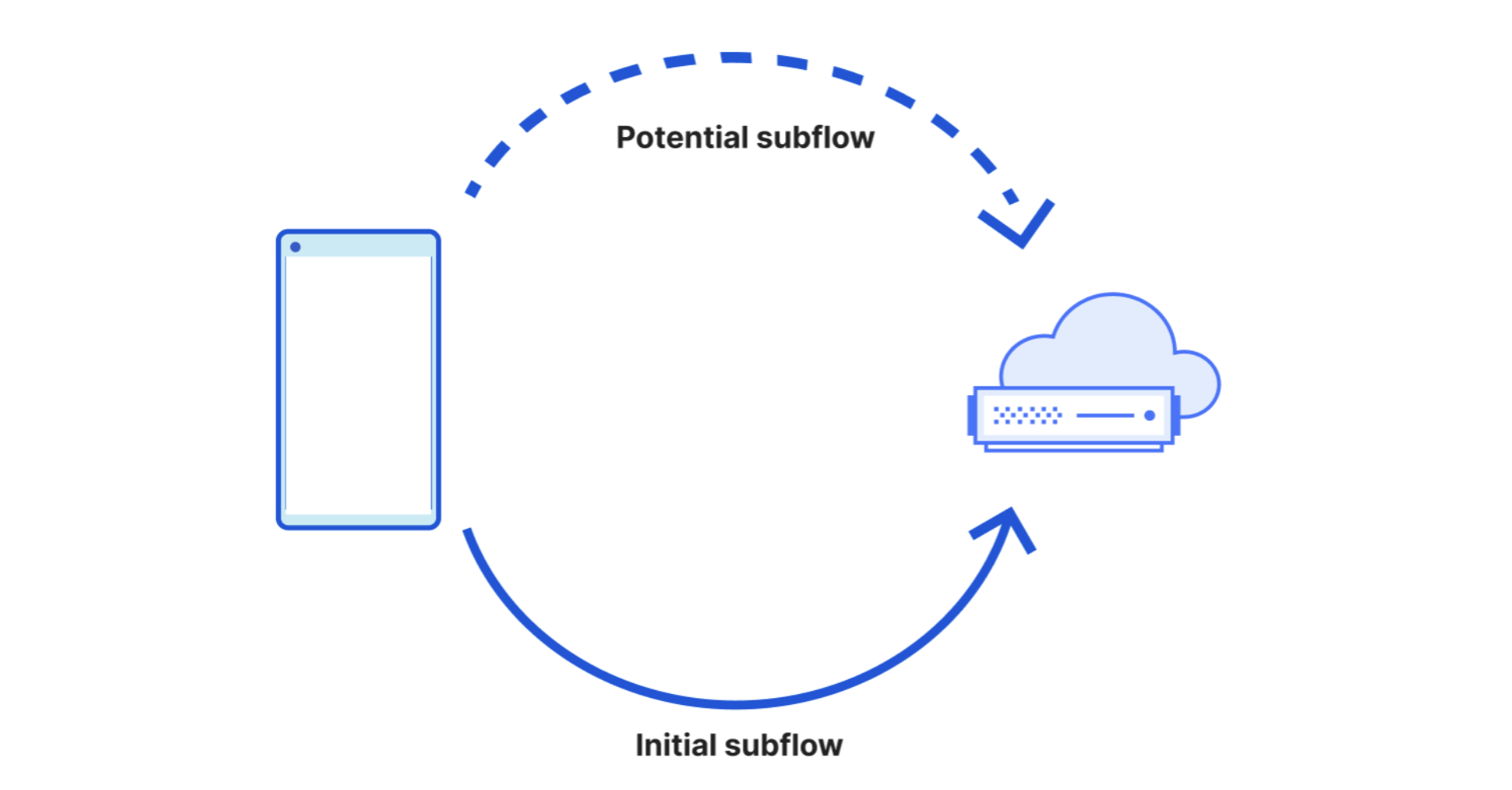
Internally, MPTCP extends TCP by introducing “subflows”. When everything is working, a single TCP connection can be backed by multiple MPTCP subflows, each using different paths. This is a big deal – a single TCP byte stream is now no longer identified by a single 5-tuple. On Linux you can see the subflows with ss -M, like:
marek$ ss -tMn dport = :443 | cat
tcp   ESTAB 0  	0 192.168.2.143%enx2800af081bee:57756 104.28.152.1:443
tcp   ESTAB 0  	0       192.168.1.149%wlp0s20f3:44719 104.28.152.1:443
mptcp ESTAB 0  	0                 192.168.2.143:57756 104.28.152.1:443
Here you can see a single MPTCP connection, composed of two underlying TCP flows.
Being able to separate the lifetime of a connection from the lifetime of a flow allows MPTCP to address two problems present in classical TCP: aggregation and mobility.
Aggregation: MPTCP can aggregate the bandwidth of many network interfaces. For example, in a data center scenario, it’s common to use interface bonding. A single flow can make use of just one physical interface. MPTCP, by being able to launch many subflows, can expose greater overall bandwidth. I’m personally not convinced if this is a real problem. As we’ll learn below, modern Linux has a BLESS-like MPTCP scheduler and macOS stack has the “aggregation” mode, so aggregation should work, but I’m not sure how practical it is. However, there are certainly projects that are trying to do link aggregation using MPTCP.
Mobility: On a customer device, a TCP stream is typically broken if the underlying network interface goes away. This is not an uncommon occurrence — consider a smartphone dropping from Wi-Fi to cellular. MPTCP can fix this — it can create and destroy many subflows over the lifetime of a single connection and survive multiple network changes.
Improving reliability for mobile clients is a big deal. While some software can use QUIC, which also works on Multipath Extensions, a large number of classical services still use TCP. A great example is SSH: it would be very nice if you could walk around with a laptop and keep an SSH session open and switch Wi-Fi networks seamlessly, without breaking the connection.
MPTCP work was initially driven by UCLouvain in Belgium. The first serious adoption was on the iPhone. Apparently, users have a tendency to use Siri while they are walking out of their home. It’s very common to lose Wi-Fi connectivity while they are doing this. (source)
Currently, there are only two major MPTCP implementations — Linux kernel support from v5.6, but realistically you need at least kernel v6.1 (MPTCP is not supported on Android yet) and iOS from version 7 / Mac OS X from 10.10.
Typically, Linux is used on the server side, and iOS/macOS as the client. It’s possible to get Linux to work as a client-side, but it’s not straightforward, as we’ll learn soon. Beware — there is plenty of outdated Linux MPTCP documentation. The code has had a bumpy history and at least two different APIs were proposed. See the Linux kernel source for the mainline API and the mptcp.dev website.
Conceptually, the MPTCP design is pretty sensible. After the initial TCP handshake, each peer may announce additional addresses (and ports) on which it can be reached. There are two ways of doing this. First, in the handshake TCP packet each peer specifies the “Do not attempt to establish new subflows to this address and port” bit, also known as bit [C], in the MPTCP TCP extensions header.
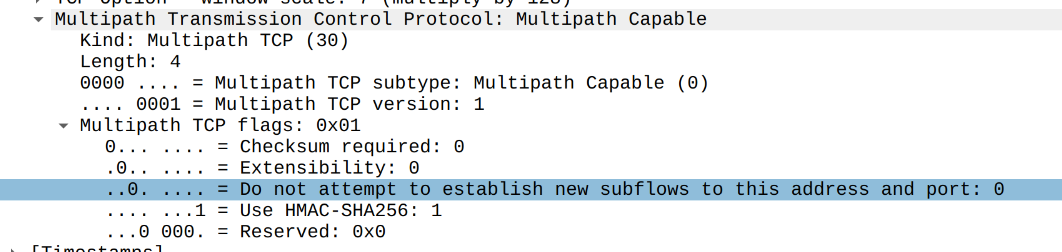
Wireshark dissecting MPTCP flags from a SYN packet. Tcpdump does not report this flag yet.
With this bit cleared, the other peer is free to assume the two-tuple is fine to be reconnected to. Typically, the server allows the client to reuse the server IP/port address. Usually, the client is not listening and disallows the server to connect back to it. There are caveats though. For example, in the context of Cloudflare, where our servers are using Anycast addressing, reconnecting to the server IP/port won’t work. Going twice to the IP/port pair is unlikely to reach the same server. For us it makes sense to set this flag, disallowing clients from reconnecting to our server addresses. This can be done on Linux with:
# Linux server sysctl - useful for ECMP or Anycast servers
$ sysctl -w net.mptcp.allow_join_initial_addr_port=0
There is also a second way to advertise a listening IP/port. During the lifetime of a connection, a peer can send an ADD-ADDR MPTCP signal which advertises a listening IP/port. This can be managed on Linux by ip mptcp endpoint ... signal, like:
# Linux server - extra listening address
$ ip mptcp endpoint add 192.51.100.1 dev eth0 port 4321 signal
With such a config, a Linux peer (typically server) will report the additional IP/port with ADD-ADDR MPTCP signal in an ACK packet, like this:
host > host: Flags [.], ack 1, win 8, options [mptcp 30 add-addr v1 id 1 192.51.100.1:4321 hmac 0x...,nop,nop], length 0
It’s important to realize that either peer can send ADD-ADDR messages. Unusual as it might sound, it’s totally fine for the client to advertise extra listening addresses. The most common scenario though, consists of either nobody, or just a server, sending ADD-ADDR.
Technically, to launch an MPTCP socket on Linux, you just need to replace IPPROTO_TCP with IPPROTO_MPTCP in the application code:
IPPROTO_MPTCP = 262
sd = socket(AF_INET, SOCK_STREAM, IPPROTO_MPTCP)
In practice, though, this introduces some changes to the sockets API. Currently not all setsockopt’s work yet — like TCP_USER_TIMEOUT. Additionally, at this stage, MPTCP is incompatible with kTLS.
Once the peers have exchanged the address information, MPTCP is ready to kick in and perform the magic. There are two independent pieces of logic that MPTCP handles. First, given the address information, MPTCP must figure out if it should establish additional subflows. The component that decides on this is called “Path Manager”. Then, another component called “scheduler” is responsible for choosing a specific subflow to transmit the data over.
Both peers have a path manager, but typically only the client uses it. A path manager has a hard task to launch enough subflows to get the benefits, but not too many subflows which could waste resources. This is where the MPTCP stacks get complicated.
On Linux, path manager is an operating system feature, not an application feature. The in-kernel path manager requires some configuration — it must know which IP addresses and interfaces are okay to start new subflows. This is configured with ip mptcp endpoint ... subflow, like:
$ ip mptcp endpoint add dev wlp1s0 192.0.2.3 subflow # Linux client
This informs the path manager that we (typically a client) own a 192.0.2.3 IP address on interface wlp1s0, and that it’s fine to use it as source of a new subflow. There are two additional flags that can be passed here: “backup” and “fullmesh”. Maintaining these ip mptcp endpoints on a client is annoying. They need to be added and removed every time networks change. Fortunately, NetworkManager from 1.40 supports managing these by default. If you want to customize the “backup” or “fullmesh” flags, you can do this here (see the documentation):
ubuntu$ cat /etc/NetworkManager/conf.d/95-mptcp.conf
# set "subflow" on all managed "ip mptcp endpoints". 0x22 is the default.
[connection]
connection.mptcp-flags=0x22
Path manager also takes a “limit” setting, to set a cap of additional subflows per MPTCP connection, and limit the received ADD-ADDR messages, like:
$ ip mptcp limits set subflow 4 add_addr_accepted 2 # Linux client
I experimented with the “mobility” use case on my Ubuntu 22 Linux laptop. I repeatedly enabled and disabled Wi-Fi and Ethernet. On new kernels (v6.12), it works, and I was able to hold a reliable MPTCP connection over many interface changes. I was less lucky with the Ubuntu v6.8 kernel. Unfortunately, the default path manager on Linux client only works when the flag “Do not attempt to establish new subflows to this address and port” is cleared on the server. Server-announced ADD-ADDR don’t result in new subflows created, unless ip mptcp endpoint has a fullmesh flag.
It feels like the underlying MPTCP transport code works, but the path manager requires a bit more intelligence. With a new kernel, it’s possible to get the “interactive” case working out of the box, but not for the ADD-ADDR case.
Linux allows for two implementations of a path manager component. It can either use built-in kernel implementation (default), or userspace netlink daemon.
$ sysctl -w net.mptcp.pm_type=1 # use userspace path manager
However, from what I found there is no serious implementation of configurable userspace path manager. The existing implementations don’t do much, and the API seems immature yet.
Thus far we’ve covered Path Manager, but what about the scheduler that chooses which link to actually use? It seems that on Linux there is only one built-in “default” scheduler, and it can do basic failover on packet loss. The developers want to write MPTCP schedulers in BPF, and this work is in-progress.
As opposed to Linux, macOS and iOS expose a raw MPTCP API. On those operating systems, path manager is not handled by the kernel, but instead can be an application responsibility. The exposed low-level API is based on connectx(). For example, here’s an example of obscure code that establishes one connection with two subflows:
int sock = socket(AF_MULTIPATH, SOCK_STREAM, 0);
connectx(sock, ..., &cid1);
connectx(sock, ..., &cid2);
This powerful API is hard to use though, as it would require every application to listen for network changes. Fortunately, macOS and iOS also expose higher-level APIs. One example is nw_connection in C, which uses nw_parameters_set_multipath_service.
Another, more common example is using Network.framework, and would look like this:
let parameters = NWParameters.tcp
parameters.multipathServiceType = .interactive
let connection = NWConnection(host: host, port: port, using: parameters)
The API supports three MPTCP service type modes:
Handover Mode: Tries to minimize cellular. Uses only Wi-Fi. Uses cellular only when Wi-Fi Assist is enabled and makes such a decision.
Interactive Mode: Used for Siri. Reduces latency. Only for low-bandwidth flows.
Aggregation Mode: Enables resource pooling but it’s only available for developer accounts and not deployable.
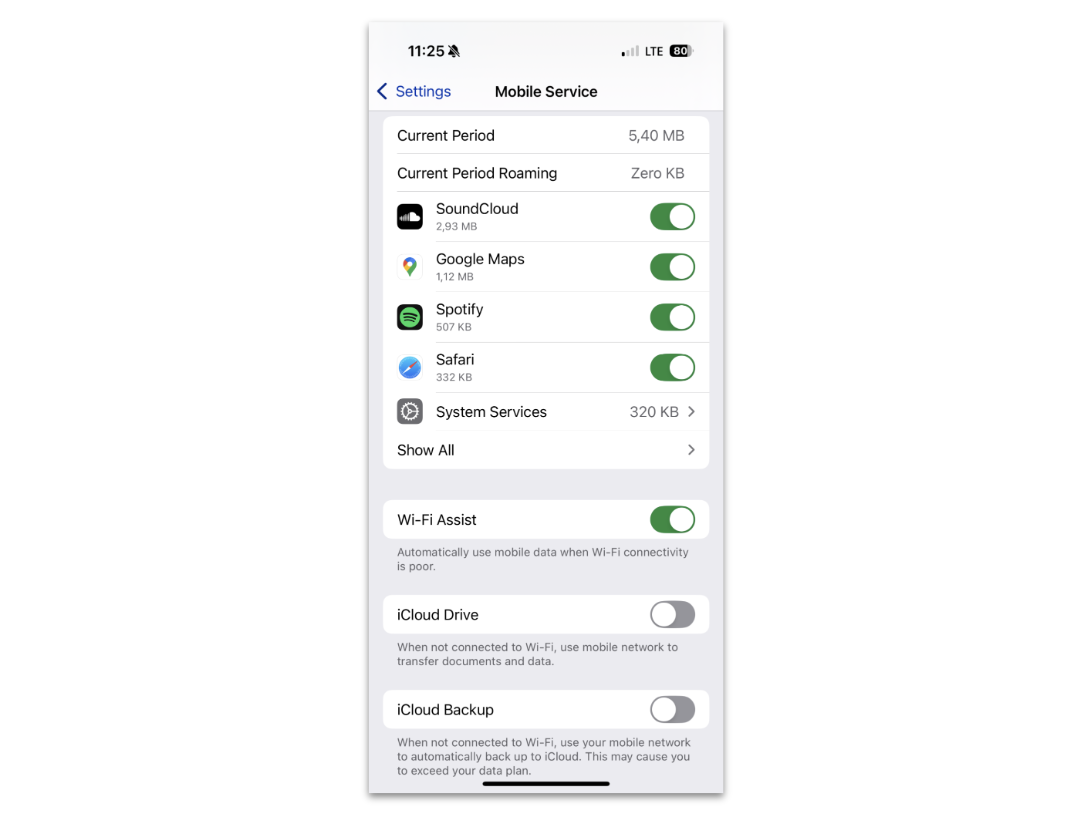
The MPTCP API is nicely integrated with the iPhone “Wi-Fi Assist” feature. While the official documentation is lacking, it’s possible to find sources explaining how it actually works. I was able to successfully test both the cleared “Do not attempt to establish new subflows” bit and ADD-ADDR scenarios. Hurray!
Sadly, MPTCP IPv6 has a caveat. Since IPv6 addresses are long, and MPTCP uses the space-constrained TCP Extensions field, there is not enough room for ADD-ADDR messages if TCP timestamps are enabled. If you want to use MPTCP and IPv6, it’s something to consider.
I find MPTCP very exciting, being one of a few deployable serious TCP extensions. However, current implementations are limited. My experimentation showed that the only practical scenario where currently MPTCP might be useful is:
Linux as a server
macOS/iOS as a client
“interactive” use case
With a bit of effort, Linux can be made to work as a client.
Don’t get me wrong, Linux developers did tremendous work to get where we are, but, in my opinion for any serious out-of-the-box use case, we’re not there yet. I’m optimistic that Linux can develop a good MPTCP client story relatively soon, and the possibility of implementing the Path manager and Scheduler in BPF is really enticing.
Time will tell if MPTCP succeeds — it’s been 15 years in the making. In the meantime, Multi-Path QUIC is under active development, but it’s even further from being usable at this stage.
We’re not quite sure if it makes sense for Cloudflare to support MPTCP. Reach out if you have a use case in mind!
Shoutout to Matthieu Baerts for tremendous help with this blog post.
Post Syndicated from The History Guy: History Deserves to Be Remembered original https://www.youtube.com/watch?v=xyDyrcqLrbY
Post Syndicated from daroc original https://lwn.net/Articles/1004067/
Security updates have been issued by Debian (linux-6.1), Fedora (iwd and libell), Red Hat (python-requests), and SUSE (velero).
Post Syndicated from Matt Granger original https://www.youtube.com/watch?v=5__b5yqZjtA
Post Syndicated from The History Guy: History Deserves to Be Remembered original https://www.youtube.com/watch?v=R6oOL5aUYjE
Post Syndicated from Cliff Robinson original https://www.servethehome.com/the-mikrotik-css318-16g-2sin-half-width-switch-is-coming/
The MikroTik CSS318-16G-2S+IN is a new half-width switch sporting 18 ports, low power consumption, and a very compact package
The post The MikroTik CSS318-16G-2S+IN Half-Width Switch is Coming appeared first on ServeTheHome.
Post Syndicated from Matt Granger original https://www.youtube.com/watch?v=0Ou1YjL7Xm4
Post Syndicated from xkcd.com original https://xkcd.com/3033/

Post Syndicated from The History Guy: History Deserves to Be Remembered original https://www.youtube.com/watch?v=1uqokF0rl-M
Post Syndicated from Netflix Technology Blog original https://netflixtechblog.com/part-2-a-survey-of-analytics-engineering-work-at-netflix-4f1f53b4ab0f
This article is the second in a multi-part series sharing a breadth of Analytics Engineering work at Netflix, recently presented as part of our annual internal Analytics Engineering conference. Need to catch up? Check out Part 1. In this article, we highlight a few exciting analytic business applications, and in our final article we’ll go into aspects of the technical craft.
Yimeng Tang, Claire Willeck, Sagar Palao
Netflix has been launching games for the past three years, during which it has initiated various marketing efforts, including User Acquisition (UA) campaigns, to promote these games across different countries. These UA campaigns typically feature static creatives, launch trailers, and game review videos on platforms like Google, Meta, and TikTok. The primary goals of these campaigns are to encourage more people to install and play the games, making incremental installs and engagement crucial metrics for evaluating their effectiveness.
Most UA campaigns are conducted at the country level, meaning that everyone in the targeted countries can see the ads. However, due to the absence of a control group in these countries, we adopt a synthetic control framework (blog post) to estimate the counterfactual scenario. This involves creating a weighted combination of countries not exposed to the UA campaign to serve as a counterfactual for the treated countries. To facilitate easier access to incrementality results, we have developed an interactive tool powered by this framework. This tool allows users to directly obtain the lift in game installs and engagement, view plots for both the treated country and the synthetic control unit, and assess the p-value from placebo tests.
To better guide the design and budgeting of future campaigns, we are developing an Incremental Return on Investment model. This model incorporates factors such as the incremental impact, the value of the incremental engagement and incremental signups, and the cost of running the campaign. In addition to using the causal inference framework mentioned earlier to estimate incrementality, we also leverage other frameworks, such as Incremental Account Lifetime Valuation (blog post), to assign value to the incremental engagement and signups resulting from the campaigns.
Netflix is a subscription service meaning members buy subscriptions which include games but not the individual games themselves. This makes it difficult to measure the impact of different game launches on acquisition. We only observe signups, not why members signed up.
This means we need to estimate incremental signups. We adopt an approach developed at Netflix to estimate incremental acquisition (technical paper). This approach uses simple assumptions to estimate a counterfactual for the rate that new members start playing the game.
Because games differ from series/films, it’s crucial to validate this estimation method for games. Ideally, we would have causal estimates from an A/B test to use for validation, but since that is not available, we use another causal inference design as one of our ensemble of validation approaches. This causal inference design involves a systematic framework we designed to measure game events that relies on synthetic control (blog post).
As we mentioned above, we have been launching User Acquisition (UA) campaigns in select countries to boost game engagement and new memberships. We can use this cross-country variation to form a synthetic control and measure the incremental signups due to the UA campaign. The incremental signups from UA campaigns differ from those attributed to a game, but they should be similar. When our estimated incremental acquisition numbers over a campaign period are similar to the incremental acquisition numbers calculated using synthetic control, we feel more confident in our approach to measuring incremental signups for games.
At Netflix Games, we aim to have a high number of members engaging with games each month, referred to as Monthly Active Accounts (MAA). To evaluate our progress toward this objective and to find areas to boost our MAA, we modeled the Netflix players’ journey as a state machine.
We track a daily state machine showing the probability of account transitions between states.
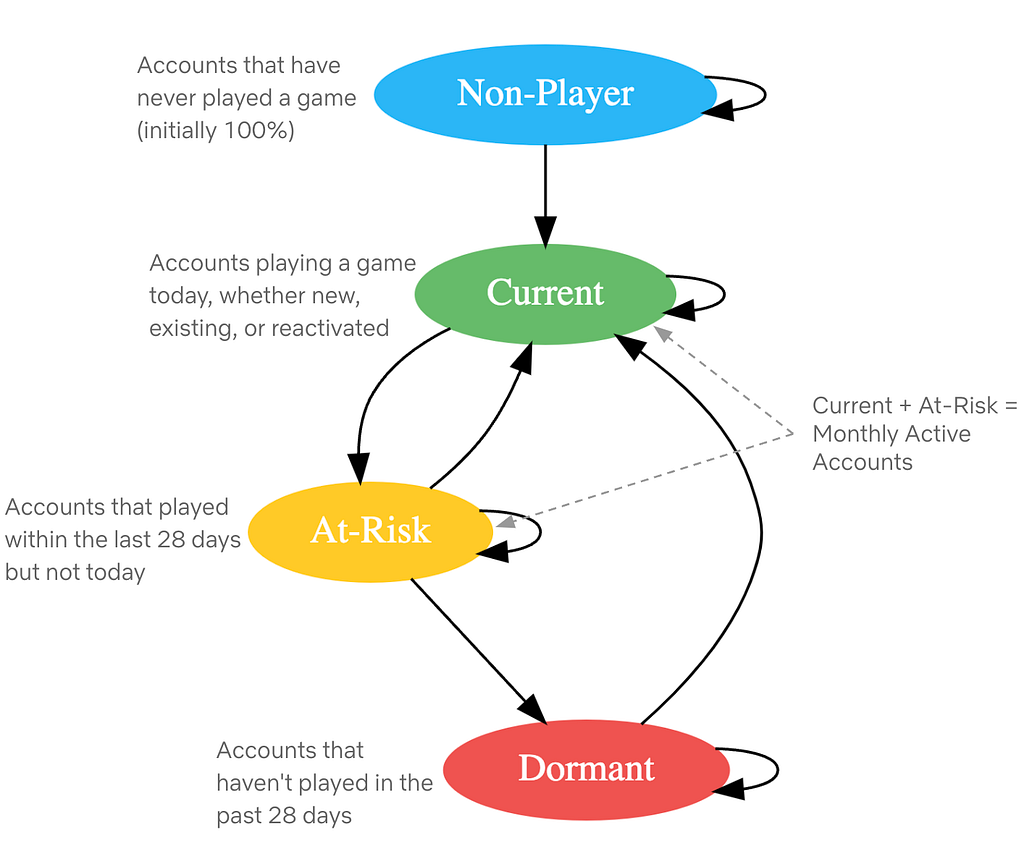
Fig: Netflix Players’ Journey as State machine
Modeling the players’ journey as a state machine allows us to simulate future states and assess progress toward engagement goals. The most basic operation involves multiplying the daily state-transition matrix with the current state values to determine the next day’s state values.

This basic operation allows us to explore various scenarios:
Beyond predicting future states, we use the state machine for sensitivity analysis to find which transition rates most impact MAA. By making small changes to each transition rate we calculate the resulting MAA and measure its impact. This guides us in prioritizing efforts on top-of-funnel improvements, member retention, or reactivation.
At Netflix we produce a variety of entertainment: movies, series, documentaries, stand-up specials, and more. Each format has a different production process and different patterns of cash spend, called our “Content Forecast”. Looking into the future, Netflix keeps a plan of how many titles we intend to produce, what kinds, and when. Because we don’t yet know what specific titles that content will eventually become, these generic placeholders are called “TBD Slots.” A sizable portion of our Content Forecast is represented by TBD Slots.
Almost all businesses have a cash forecasting process informing how much cash they need in a given time period to continue executing on their plans. As plans change, the cash forecast will change. Netflix has a cash forecast that projects our cash needs to produce the titles we plan to make. This presents the question: how can we optimally forecast cash needs for TBD Slots, given we don’t have details on what real titles they will become?
The large majority of our titles are funded throughout the production process — starting from when we begin developing the title to shooting the actual shows and movies to launch on our Netflix service.
Since cash spend is driven by what is happening on a production, we model it by breaking down into these three steps:
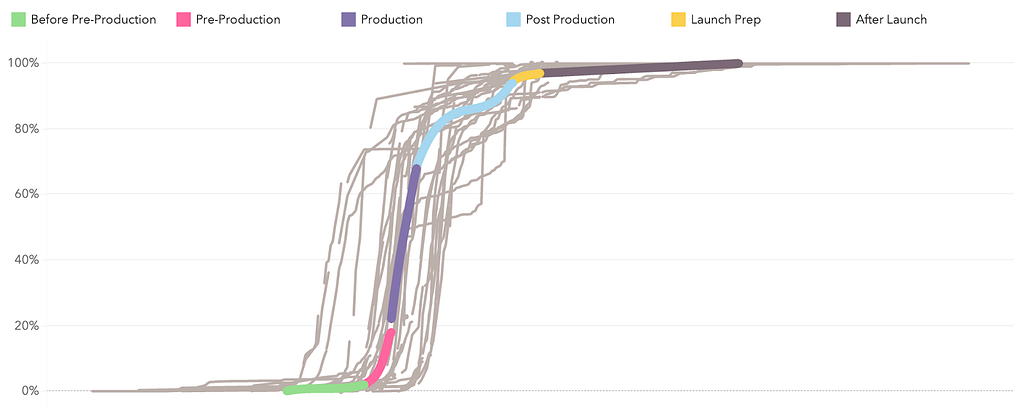
Putting these three pieces together allows us to generate a generic estimation of cash spend per day leading up to and beyond a title’s launch date (a proxy for “completion”). We could distribute this spend linearly across each phase, but this approach allows us to capture nuance around patterns of spend that ramp up slowly, or are concentrated at the start and taper off throughout.
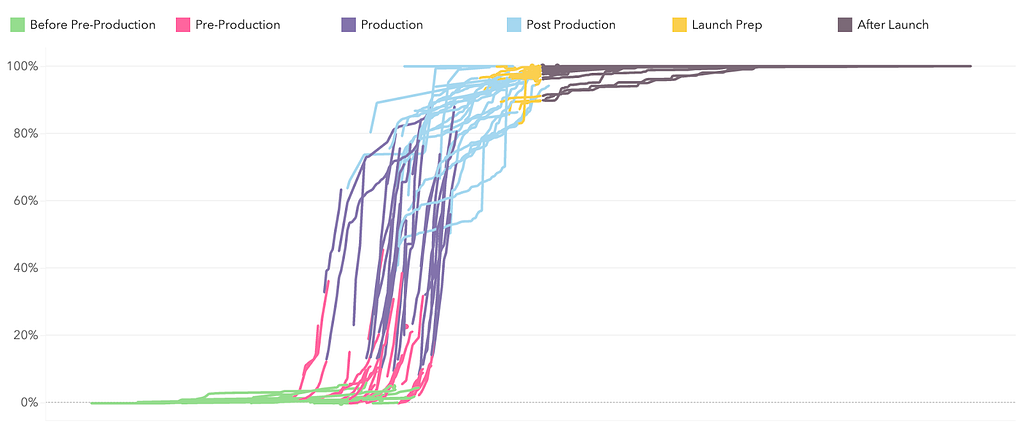
Before starting any math, we need to ensure a high quality historical dataset. Data quality plays a huge role in this work. For example, if we see 80% of our cash spent before production even started, it might be safe to say that either the production dates (which are manually captured) are incorrect or that title had a unique spending pattern that we don’t want to anticipate our future titles will follow.
For the first two steps, finding the estimated phase durations and cash percent per phase, we’ve found that simple math works best, for interpretability and consistency. We use a weighted average across our “clean” historical actuals to produce these estimated assumptions.
For modeling the shape of spend throughout each phase, we perform constrained optimization to fit a 3rd degree polynomial function. The constraints include:
The optimization’s objective function minimizes the sum of squared residuals and returns the coefficients of the polynomial that will guide the shape of cash spend through each phase.
Once we have these coefficients, we can evaluate this polynomial at each day of the expected phase duration, and then multiply the result by the expected cash per phase. With some additional data processing, this yields an expected percent of cash spend each day leading up to and beyond the launch date, which we can base our forecasts on.
Great stories can come from anywhere and be loved everywhere. At Netflix, we strive to make our titles accessible to a global audience, transcending language barriers to connect with viewers worldwide. One of the key ways we achieve this is through creating dubs in many languages.
From the transcription of the original titles all the way to the delivery of the dub audio, we blend innovation with human expertise to preserve the original creative intent.
Leveraging technologies like Assistive Speech Recognition (ASR), we seek to make the transcription part of the process more efficient for our linguists. Transcription, in our context, involves creating a verbatim script of the spoken dialogue, along with precise timing information to perfectly align the text with the original video. With ASR, instead of starting the transcription from scratch, linguists get a pre-generated starting point which they can use and edit for complete accuracy.
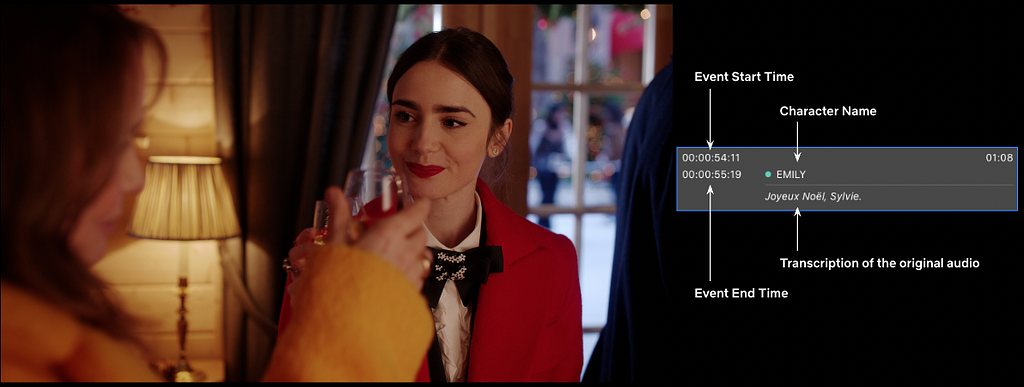
This efficiency enables linguists to focus more on other creative tasks, such as adding cultural annotations and references, which are crucial for downstream dubbing.
With ASR, and other new and enhanced technologies we introduce, rigorous analytics and measurement are essential to their success. To effectively evaluate our ASR system, we’ve established a multi-layered measurement framework that provides comprehensive insights into its performance across many dimensions (for example, the accuracy of the text and timing predictions), offline and online.
ASR is expected to perform differently for various languages; therefore, at a high level, we track metrics by original language of the show, allowing us to assess overall ASR effectiveness and identify trends across different linguistic contexts. We further break down performance by various dimensions, e.g. content type, genre, etc… to help us pinpoint specific areas where the ASR system may encounter difficulties. Furthermore, our framework allows us to conduct in-depth analyses of individual titles’ transcription, focusing on critical quality dimensions around text and timing accuracy of ASR suggestions. By zooming in on where the system falls short, we gain valuable insights into specific challenges, enabling us to further refine our understanding of ASR performance.
These measurement layers collectively empower us to continuously monitor, identify improvement areas, and implement targeted enhancements, ensuring that our ASR technology gets more and more accurate, effective, and helpful to linguists across diverse content types and languages. By refining our dubbing workflows through these innovations, we aim to keep improving the quality of our dubs to help great stories travel across the globe and bring joy to our members.
Analytics Engineering is a key contributor to building our deep data culture at Netflix, and we are proud to have a large group of stunning colleagues that are not only applying but advancing our analytical capabilities at Netflix. The 2024 Analytics Summit continued to be a wonderful way to give visibility to one another on work across business verticals, celebrate our collective impact, and highlight what’s to come in analytics practice at Netflix.
To learn more, follow the Netflix Research Site, and if you are also interested in entertaining the world, have a look at our open roles!

Part 2: A Survey of Analytics Engineering Work at Netflix was originally published in Netflix TechBlog on Medium, where people are continuing the conversation by highlighting and responding to this story.
Post Syndicated from Bruce Schneier original https://www.schneier.com/blog/archives/2025/01/google-is-allowing-device-fingerprinting.html
Lukasz Olejnik writes about device fingerprinting, and why Google’s policy change to allow it in 2025 is a major privacy setback.
EDITED TO ADD (1/12): Shashdot thread.
Post Syndicated from Geographics original https://www.youtube.com/watch?v=xnK6XlHdt7w
Post Syndicated from The Hook Up original https://www.youtube.com/watch?v=otcFjKE8zbU
Post Syndicated from corbet original https://lwn.net/Articles/1003780/
We are reliably informed by the calendar that yet another year has begun.
That can only mean one thing: the time has come to go out on a limb with a
series of ill-advised predictions that are almost certainly not how
the year will actually go. We have to try; it’s traditional, after all.
Read on for our view of what’s coming and how it may play out.
Post Syndicated from jake original https://lwn.net/Articles/1003984/
Greg Kroah-Hartman has announced the release of the 6.12.8, 6.6.69, and 6.1.123 stable kernels. They contain
important fixes throughout the kernel tree, as usual.
Post Syndicated from jake original https://lwn.net/Articles/1003983/
Security updates have been issued by Red Hat (container-tools:rhel8) and SUSE (liboqs, oqs-provider and python-Jinja2).
Post Syndicated from Brian Beach original https://aws.amazon.com/blogs/devops/the-most-visited-devops-and-developer-productivity-blog-posts-in-2024-copy/
As we kick off 2025, I wanted to take a moment to highlight the top posts from 2024. Without further ado, here are the top 10 DevOps and developer productivity blog posts of 2024.
Announcing CDK Migrate A single command to migrate to the AWS CDK – This blog post announces the general availability of CDK Migrate, a new feature of the AWS Cloud Development Kit (CDK). CDK Migrate allows users to easily convert existing AWS CloudFormation templates, deployed CloudFormation stacks, or resources created outside of Infrastructure as Code (IaC) into a CDK application. The post explains the benefits of using IaC and compares CDK Migrate to the CloudFormation IaC Generator and CDK Import. It then provides a detailed walkthrough of how to use CDK Migrate to convert a CloudFormation template into a CDK application, including the migration process, code generation, and deployment steps.
Import entire applications into AWS CloudFormation – This blog post introduces AWS CloudFormation’s new IaC generator feature, which allows users to import entire applications and their related resources into Infrastructure as Code (IaC) management. The feature scans an AWS account, identifies relationships between resources, and generates a CloudFormation template based on existing infrastructure. This solves the challenge of manually creating templates for non-IaC resources and enables a more holistic approach to managing resource groups. The post demonstrates the feature’s use in importing a complex VPC setup into CloudFormation, highlighting its ability to simplify the process of bringing existing resources under IaC management, thus extending benefits like repeatability, reliability, and auditability to previously unmanaged resources.
Terraform CI CD and testing on AWS with the new Terraform Test Framework – This blog post discusses the use of Terraform Test, a new framework for validating Terraform modules on AWS. It explains how to create and run various test scenarios, including basic resource creation validation, input variable validation, and testing with supporting resources like KMS keys. The post also outlines how to integrate Terraform Test into a CI/CD pipeline using AWS services such as CodeCommit, CodeBuild, CodePipeline, and S3. It compares Terraform Test with other testing strategies and provides guidance on when to use each approach. The article concludes by recommending further resources for learning about Terraform testing and CI/CD on AWS.
AWS CodePipeline adds support for Branch based development and Monorepos – This AWS blog post announces new features for CodePipeline, including triggers and execution modes, which support branch-based development and monorepo strategies. The post outlines three pipeline examples: a GitFlow release pipeline using queued execution mode, a pull request validation pipeline using parallel execution mode, and a monorepo pipeline that triggers only for specific folder changes. These new capabilities allow teams to create more flexible and efficient continuous delivery pipelines. The post explains how to set up each pipeline type using the AWS Management Console, detailing the configuration of triggers, branch filters, and execution modes. These enhancements aim to simplify pipeline management for various development workflows.
Best practices for managing Terraform State files in AWS CI CD Pipeline – This blog post discusses best practices for managing Terraform state files in AWS CI/CD pipelines. It highlights the challenges of handling state files locally and recommends using remote backends, particularly Amazon S3 with DynamoDB for state locking. The post outlines steps to create and secure S3 buckets and DynamoDB tables for state management. It then provides an example architecture and implementation guide for integrating Terraform state management into an AWS CI pipeline using CodeCommit, CodeBuild, and Lambda. The post includes code snippets and instructions for setting up the infrastructure, deploying an application, and verifying the state file storage in S3 and DynamoDB.
How we sped up AWS CloudFormation deployments with optimistic stabilization – This AWS blog post discusses how CloudFormation improved its resource provisioning process, introducing an optimistic stabilization strategy that can reduce stack deployment times by up to 40%. The post explains the concept of resource stabilization in CloudFormation, contrasting it with direct AWS CLI deployments. It details the evolution from a sequential deployment approach to the new optimistic strategy, which allows for parallel resource creation while maintaining dependency checks. The update also includes a new CONFIGURATION_COMPLETE status, providing better visibility into the deployment process. These improvements aim to enhance deployment speed and efficiency for CloudFormation users.
Best practices working with self hosted GitHub Action runners at scale on AWS – This AWS blog post discusses best practices for using self-hosted GitHub Action runners on AWS at scale. It covers key aspects such as security, performance, and cost optimization. The post recommends using ephemeral runners and short-lived AWS credentials to enhance security, utilizing runner groups for isolation, and implementing warm pools to reduce startup times. It also suggests using optimized AMIs, considering Spot instances for cost savings, and leveraging Amazon CloudWatch for metrics and observability. The blog emphasizes the importance of understanding security responsibilities and provides strategies for efficient scaling and management of GitHub Action runners in AWS environments.
Amazon Q Developer just reached a 260 million dollar milestone – This blog post, dated August 1, 2024, highlights a significant milestone achieved by Amazon Q Developer, an AI-powered assistant for software development. Amazon CEO Andy Jassy announced that the tool’s code transformation agent helped migrate thousands of production applications from Java 8 or 11 to Java 17. This effort saved an estimated 4,500 years of development work for over a thousand developers and resulted in performance improvements worth $260 million in annual cost savings. The post also mentions that Amazon Q Developer offers various agents to assist with tasks like feature implementation, code refactoring, and documentation, potentially increasing developer productivity by up to 40%.
A new and improved AWS CDK construct for Amazon DynamoDB tables – This blog post introduces TableV2, a new AWS Cloud Development Kit (CDK) construct for Amazon DynamoDB tables. TableV2 offers several improvements over the original construct, including native support for global tables, simplified configuration of global secondary indexes and auto scaling, and CloudFormation drift detection across all replicas. It eliminates the need for a separate Lambda function to manage replicas and provides more granular control over replica properties. The post discusses the background, features, and benefits of TableV2, highlighting its capabilities in managing replicas, billing, and encryption. Overall, TableV2 is presented as a more powerful and flexible tool for building and managing DynamoDB tables at scale.
Introducing the next level of AI powered workflows with Amazon Q Developer inline chat – This blog post announces the introduction of inline chat for Amazon Q Developer, a new feature that combines in-IDE chat with direct code updates. Powered by Anthropic’s latest Claude 3.5 Sonnet model, this capability allows developers to describe issues or ideas within the code editor and receive AI-generated responses seamlessly integrated into their codebase. The post highlights how inline chat improves upon existing features like inline suggestions and separate chat windows, making it ideal for tasks such as editing existing files, fixing bugs, optimizing code, refactoring, and adding comments. Two examples demonstrate its effectiveness in refactoring code and adding documentation, showcasing the feature’s potential to enhance developer productivity.
Post Syndicated from Brian Beach original https://aws.amazon.com/blogs/devops/reinvent-2024-devops-and-developer-productivity-playlist/
The dust has settled after another re:Invent. I once again had the privilege of organizing the DevOps and Developer Productivity (DOP) track along with Jessie VanderVeen, Krishna Dalal, Megan Sattler and countless others. For 2024, the DOP track included 60 sessions. If you weren’t able to attend, I have compiled a list of the on-demand sessions for you below.
DOP220 Reimagining the Developer Experience at AWS – Software development is undergoing a seismic shift driven by generative AI, transforming how developers work, what they build, and who can become a developer. AWS empowers developers to fearlessly embrace this evolution, integrating cutting-edge yet responsible generative AI solutions across the development lifecycle. Explore real-world use cases accelerating legacy modernization, elevating cloud-native innovation, and unlocking remarkable results. Gain insights into AWS’s pragmatic approach, fueling creativity and customer impact. Join the vibrant community on this transformative journey, where generative AI is redefining software development, opening new frontiers for innovation, and democratizing access to coding for diverse creators shaping technology’s future.
DOP201 AWS infrastructure as code: A year in review – AWS provides services that enable the creation, deployment and maintenance of application infrastructure in a programmatic, descriptive, and declarative way. These services provide rigor, clarity, and reliability to application development. Join this session to learn about the new features and improvements for AWS infrastructure as code with AWS CloudFormation and AWS Cloud Development Kit (AWS CDK) and discover how they can benefit your team.
DOP202 Continuous integration and continuous delivery (CI/CD) for AWS – AWS provides one place where you can plan work, collaborate on code, and build, test, and deploy applications with continuous integration and continuous delivery (CI/CD) tools. In this session, learn about creating complete CI/CD pipelines using infrastructure as code on AWS.
DOP203 Governance and security with infrastructure as code – In this session, learn how to use AWS CloudFormation and the AWS CDK to deploy cloud applications in regulated environments while enforcing security controls. Find out how to catch issues early with cdk-nag, validate your pipelines with cfn-guard, and protect your accounts from unintended changes with CloudFormation Hooks.
DOP204 Amazon Q Developer: Your gen AI assistant for software development In this session, learn how Amazon Q Developer is transforming the developer experience by speeding up a range of tasks that support you as you research how to get started, evaluate system design, build secure and scalable applications, upgrade existing applications, and optimize application performance. Learn firsthand how Amazon Q capabilities for building, troubleshooting, and transforming applications faster and more easily frees you up to focus on experimentation and innovation.
DOP208 Accelerate .NET porting from Windows to Linux with Amazon Q Developer – Are you dreading the complexity and costs of migrating legacy .NET applications from Windows to Linux? Generative AI can help. In this session, learn how Amazon Q Developer transformation capabilities now automate .NET modernization tasks like dependency analysis and version upgrades, reducing costs by up to 40%. Explore how to rapidly port .NET applications to Linux, transition away from Windows, and break free of the security issues, rising license costs, and challenges with scaling—all while freeing your teams to focus on high-impact features that deliver business value.
DOP209 Accelerate application maintenance and upgrades with generative AI Developers spend significant time completing the undifferentiated work of maintaining and upgrading legacy applications. Teams need to balance investments in building new features with mandatory patching and update work. Now, using the power of generative AI, the Amazon Q Developer agent for code transformation can expedite these critical upgrade tasks, transforming applications to use the latest language features and versions in hours or days and saving significant costs. Join the session to learn what’s new and how your team can automate Java application upgrades.
DOP210 Accelerate multi-step SDLC tasks with Amazon Q Developer Agents While existing AI assistants focus on code generation with close human guidance, Amazon Q Developer has a unique capability called agents that can use reasoning and planning capabilities to perform multi-step tasks beyond code generation with minimal human intervention. Its agent for software development can solve complex tasks that go beyond code suggestions, such as building entire application features, refactoring code, or generating documentation. Join this session to discover new agent capabilities that help developers go from planning to getting new features in front of customers even faster.
DOP211 Optimize your AWS operations with generative AI and Amazon Q Developer Unlock the power of Amazon Q Developer to streamline your AWS operations. In this session, discover how to use this innovative tool within the AWS console to accelerate deployment, configuration, troubleshooting, and more across AWS Lambda, Amazon ECS, Amazon EC2, Amazon S3, and beyond. Harness first-party skills for Amazon Redshift, AWS Glue, and Amazon VPC, and explore third-party integrations with Wiz and Datadog. Gain insights into optimizing your AWS environments and supercharging operational tasks, empowering you to work smarter, not harder.
DOP213 Amazon Q Developer, Amazon Inspector & AI remediation for secure SDLCElevate your security posture with AWS offerings across the software development lifecycle (SDLC). Use Amazon Q Developer in the IDE to scan code before committing, Amazon CodeGuru in the CI/CD pipeline to block insecure deployments, and Amazon Inspector at runtime for continuous scanning. Harness the power of generative AI to automate remediation of security findings. This session demonstrates how to seamlessly integrate these services, empowering you to proactively identify and mitigate vulnerabilities throughout the SDLC, ensuring robust security from code to production.
DOP214 Unleashing generative AI: Amazon’s journey with Amazon Q Developer Join us to discover how Amazon rolled out Amazon Q Developer to thousands of developers, trained them in prompt engineering, and measured its transformative impact on productivity. In this session, learn best practices for effectively adopting generative AI in your organization. Gain insights into training strategies, productivity metrics, and real-world use cases to empower your developers to harness the full potential of this game-changing technology. Don’t miss this opportunity to stay ahead of the curve and drive innovation within your team.
DOP215 Next-generation CDK development with Amazon Q DeveloperThe AWS Cloud Development Kit (AWS CDK) has emerged as a powerful infrastructure as code tool, but building custom high-level constructs can be challenging. This session demonstrates how to leverage Amazon Q Developer, an AI-powered assistant for software development, to create tailored CDK constructs that encapsulate cloud architecture patterns. Learn to design effective constructs, utilize Amazon Q’s features for automated documentation and testing, and explore customization options to optimize the developer experience with infrastructure as code using AWS CDK and Amazon Q Developer.
DOP216 Customize Amazon Q Developer to speed up enterprise development Significantly accelerate development by customizing Amazon Q Developer. Generate even more relevant inline code recommendations and chat responses (in preview) by making it aware of your internal libraries, APIs, best practices, and architectural patterns. Save time building new features, refactoring code, improving application performance, or onboarding to a new codebase. In this session, learn how you can take advantage of Amazon Q Developer and your internal codebases to improve your developer experience and productivity. Also learn how National Australia Bank is using Amazon Q Developer to enable their development teams to ship faster and innovate more for their customers.
DOP217 Best practices for customizing Amazon Q DeveloperWith Amazon Q Developer, you can securely connect to your private repositories to generate even more relevant code recommendations based on your internal code repositories, ask questions about your company code, and understand your internal code bases faster. In this session, learn how to set up customizations and generate code based on your internal repos. Use the Amazon Q Developer chat in your IDE to ask questions about how your internal code base is structured, where and how certain functions or libraries are used, and how to use specific functions, methods, or APIs.
DOP218 Ship faster with Amazon Q Developer agent for software development With Amazon Q Developer, you can securely connect to your private repositories to generate even more relevant code recommendations based on your internal code repositories, ask questions about your company code, and understand your internal code bases faster. In this lightning session, you’ll learn how to set up customizations and generate code based on your internal repos. We’ll also use the Amazon Q Developer chat in the IDE to ask questions about how your internal code base is structured, where and how certain functions or libraries are used, or how to use specific functions, methods, or APIs.
DOP221 Modernize mainframe applications faster using Amazon Q Developer – Modernizing and migrating mainframe applications to cloud can require prolonged efforts including assessment, planning, and project execution. Generative AI can simplify and accelerate the journey. This session provides an overview of how Amazon Q Developer transformation capabilities can intelligently automate many of the burdensome steps involved in code base analysis, code documentation, code decomposition, modernization planning, and code refactoring, and can assist modernization consultants and mainframe teams with intelligent guidance rooted in mainframe and cloud expertise. Learn how modernization teams can focus on higher-value tasks with less undifferentiated heavy lifting and deliver modernized cloud-based applications fueling agility and innovation.
DOP223 What’s new with Amazon Q Developer agents Amazon Q Developer– agent capabilities can perform a range of tasks with minimal input—from implementing features and documenting and refactoring code to performing software upgrades. In this session, learn about the newly launched capabilities of the Amazon Q Developer agents. With a deep understanding of your code base, the agents can now help you generate in-depth documentation from source code, iteratively create unit tests across your code base, automatically perform code reviews, and assess the deployment risk of your code updates. See how these new capabilities can help you significantly speed up your entire software development lifecycle and ship higher-quality code to your customers.
DOP224 Accelerate modernization of VMware workloads using Amazon Q Developer – Ready to learn about how the new Amazon Q Developer transformation capabilities can simplify and automate the modernization and migration of VMware environments to AWS? This session shows you how Amazon Q Developer accelerates transformation projects from discovery, planning, and replatforming to deploying your VMware environments in Amazon EC2. Learn how the generative AI–powered capabilities help you scale and innovate by streamlining VMware migrations to AWS in a matter of months. Gain insights into how modernization teams can reduce undifferentiated heavy lifting, be more productive, and deliver business value faster.
Post Syndicated from Matt Granger original https://www.youtube.com/watch?v=xNjF-s0dZ_c