Post Syndicated from BeardedTinker original https://www.youtube.com/watch?v=NsLEzyi9Qu4
Gigaplus GP-S25-0802P PoE 8-port 2.5GbE and 2-port 10G Review
Post Syndicated from Rohit Kumar original https://www.servethehome.com/gigaplus-gp-s25-0802p-poe-8-port-2-5gbe-and-2-port-10g-review/
The Gigaplus GP-S25-0802P is an updated version of our favorite 2.5GbE switch with dual SFP+ 10G ports, with PoE+ features
The post Gigaplus GP-S25-0802P PoE 8-port 2.5GbE and 2-port 10G Review appeared first on ServeTheHome.
First Allied Major Amphibious Invasion of WWII
Post Syndicated from The History Guy: History Deserves to Be Remembered original https://www.youtube.com/watch?v=iy3UlZ13xzs
Comic for 2024.12.28 – Time Machine
Post Syndicated from Explosm.net original https://explosm.net/comics/time-machine-2
New Cyanide and Happiness Comic
Peter Attia on the science and art of longevity
Post Syndicated from Talks at Google original https://www.youtube.com/watch?v=vFRdsQYnI00
Amazon EMR 7.5 runtime for Apache Spark and Iceberg can run Spark workloads 3.6 times faster than Spark 3.5.3 and Iceberg 1.6.1
Post Syndicated from Atul Payapilly original https://aws.amazon.com/blogs/big-data/amazon-emr-7-5-runtime-for-apache-spark-and-iceberg-can-run-spark-workloads-3-6-times-faster-than-spark-3-5-3-and-iceberg-1-6-1/
The Amazon EMR runtime for Apache Spark offers a high-performance runtime environment while maintaining 100% API compatibility with open source Apache Spark and Apache Iceberg table format. Amazon EMR on EC2, Amazon EMR Serverless, Amazon EMR on Amazon EKS, Amazon EMR on AWS Outposts and AWS Glue all use the optimized runtimes.
In this post, we demonstrate the performance benefits of using the Amazon EMR 7.5 runtime for Spark and Iceberg compared to open source Spark 3.5.3 with Iceberg 1.6.1 tables on the TPC-DS 3TB benchmark v2.13.
Iceberg is a popular open source high-performance format for large analytic tables. Our benchmarks demonstrate that Amazon EMR can run TPC-DS 3 TB workloads 3.6 times faster, reducing the runtime from 1.54 hours to 0.42 hours. Additionally, the cost efficiency improves by 2.9 times, with the total cost decreasing from $16.00 to $5.39 when using Amazon Elastic Compute Cloud (Amazon EC2) On-Demand r5d.4xlarge instances, providing observable gains for data processing tasks.
This is a further 32% increase from the optimizations shipped in Amazon EMR 7.1 covered in a previous post, Amazon EMR 7.1 runtime for Apache Spark and Iceberg can run Spark workloads 2.7 times faster than Apache Spark 3.5.1 and Iceberg 1.5.2. Since then we have continued adding more support for DataSource V2 for eight more existing query optimizations in the EMR runtime for Spark.
In addition to these DataSource V2 specific improvements, we have made more optimizations to Spark operators since Amazon EMR 7.1 that also contribute to the additional speedup.
Benchmark results for Amazon EMR 7.5 compared to4 open source Spark 3.5.3 and Iceberg 1.6.1
To assess the Spark engine’s performance with the Iceberg table format, we performed benchmark tests using the 3 TB TPC-DS dataset, version 2.13 (our results derived from the TPC-DS dataset are not directly comparable to the official TPC-DS results due to setup differences). Benchmark tests for the EMR runtime for Spark and Iceberg were conducted on Amazon EMR 7.5 EC2 clusters vs open source Spark 3.5.3 and Iceberg 1.6.1 on EC2 clusters.
The setup instructions and technical details are available in our GitHub repository. To minimize the influence of external catalogs like AWS Glue and Hive, we used the Hadoop catalog for the Iceberg tables. This uses the underlying file system, specifically Amazon S3, as the catalog. We can define this setup by configuring the property spark.sql.catalog.<catalog_name>.type. The fact tables used the default partitioning by the date column, which have a number of partitions varying from 200–2,100. No precalculated statistics were used for these tables.
We ran a total of 104 SparkSQL queries in three sequential rounds, and the average runtime of each query across these rounds was taken for comparison. The average runtime for the three rounds on Amazon EMR 7.5 with Iceberg enabled was 0.42 hours, demonstrating a 3.6-fold speed increase compared to open source Spark 3.5.3 and Iceberg 1.6.1. The following figure presents the total runtimes in seconds.

The following table summarizes the metrics.
| Metric | Amazon EMR 7.5 on EC2 | Amazon EMR 7.1 on EC2 | Open Source Spark 3.5.3 and Iceberg 1.6.1 |
| Average runtime in seconds | 1535.62 | 2033.17 | 5546.16 |
| Geometric mean over queries in seconds | 8.30046 | 10.13153 | 20.40555 |
| Cost* | $5.39 | $7.18 | $16.00 |
*Detailed cost estimates are discussed later in this post.
The following chart demonstrates the per-query performance improvement of Amazon EMR 7.5 relative to open source Spark 3.5.3 and Iceberg 1.6.1. The extent of the speedup varies from one query to another, with the fastest up to 9.4 times faster for q93, with Amazon EMR outperforming open source Spark with Iceberg tables. The horizontal axis arranges the TPC-DS 3TB benchmark queries in descending order based on the performance improvement seen with Amazon EMR, and the vertical axis depicts the magnitude of this speedup as a ratio.

Cost comparison
Our benchmark provides the total runtime and geometric mean data to assess the performance of Spark and Iceberg in a complex, real-world decision support scenario. For additional insights, we also examine the cost aspect. We calculate cost estimates using formulas that account for EC2 On-Demand instances, Amazon Elastic Block Store (Amazon EBS), and Amazon EMR expenses.
- Amazon EC2 cost (includes SSD cost) = number of instances * r5d.4xlarge hourly rate * job runtime in hours
- r5d.4xlarge hourly rate = $1.152 per hour in us-east-1
- Root Amazon EBS cost = number of instances * Amazon EBS per GB-hourly rate * root EBS volume size * job runtime in hours
- Amazon EMR cost = number of instances * r5d.4xlarge Amazon EMR cost * job runtime in hours
- 4xlarge Amazon EMR cost = $0.27 per hour
- Total cost = Amazon EC2 cost + root Amazon EBS cost + Amazon EMR cost
The calculations reveal that the Amazon EMR 7.5 benchmark yields a 2.9-fold cost efficiency improvement over open source Spark 3.5.3 and Iceberg 1.6.1 in running the benchmark job.
| Metric | Amazon EMR 7.5 | Amazon EMR 7.1 | Open Source Spark 3.5.1 and Iceberg 1.5.2 |
| Runtime in hours | 0.426 | 0.564 | 1.540 |
|
Number of EC2 instances (Includes primary node) |
9 | 9 | 9 |
| Amazon EBS Size | 20gb | 20gb | 20gb |
|
Amazon EC2 (Total runtime cost) |
$4.35 | $5.81 | $15.97 |
| Amazon EBS cost | $0.01 | $0.01 | $0.04 |
| Amazon EMR cost | $1.02 | $1.36 | $0 |
| Total cost | $5.38 | $7.18 | $16.01 |
| Cost savings | Amazon EMR 7.5 is 2.9 times better | Amazon EMR 7.1 is 2.2 times better | Baseline |
In addition to the time-based metrics discussed so far, data from Spark event logs show that Amazon EMR scanned approximately 3.4 times less data from Amazon S3 and 4.1 times fewer records than the open source version in the TPC-DS 3 TB benchmark. This reduction in Amazon S3 data scanning contributes directly to cost savings for Amazon EMR workloads.
Run open source Spark benchmarks on Iceberg tables
We used separate EC2 clusters, each equipped with nine r5d.4xlarge instances, for testing both open source Spark 3.5.3 and Amazon EMR 7.5 for Iceberg workload. The primary node was equipped with 16 vCPU and 128 GB of memory, and the eight worker nodes together had 128 vCPU and 1024 GB of memory. We conducted tests using the Amazon EMR default settings to showcase the typical user experience and minimally adjusted the settings of Spark and Iceberg to maintain a balanced comparison.
The following table summarizes the Amazon EC2 configurations for the primary node and eight worker nodes of type r5d.4xlarge.
| EC2 Instance | vCPU | Memory (GiB) | Instance Storage (GB) | EBS Root Volume (GB) |
| r5d.4xlarge | 16 | 128 | 2 x 300 NVMe SSD | 20 GB |
Prerequisites
The following prerequisites are required to run the benchmarking:
- Using the instructions in the emr-spark-benchmark GitHub repo, set up the TPC-DS source data in your S3 bucket and on your local computer.
- Build the benchmark application following the steps provided in Steps to build spark-benchmark-assembly application and copy the benchmark application to your S3 bucket. Alternatively, copy spark-benchmark-assembly-3.5.3.jar to your S3 bucket.
- Create Iceberg tables from the TPC-DS source data. Follow the instructions on GitHub to create Iceberg tables using the Hadoop catalog. For example, the following code uses an EMR 7.5 cluster with Iceberg enabled to create the tables:
Note the Hadoop catalog warehouse location and database name from the preceding step. We use the same iceberg tables to run benchmarks with Amazon EMR 7.5 and open source Spark.
This benchmark application is built from the branch tpcds-v2.13_iceberg. If you’re building a new benchmark application, switch to the correct branch after downloading the source code from the GitHub repo.
Create and configure a YARN cluster on Amazon EC2
To compare Iceberg performance between Amazon EMR on Amazon EC2 and open source Spark on Amazon EC2, follow the instructions in the emr-spark-benchmark GitHub repo to create an open source Spark cluster on Amazon EC2 using Flintrock with eight worker nodes.
Based on the cluster selection for this test, the following configurations are used:
Make sure to replace the placeholder <private ip of primary node>, in the yarn-site.xml file, with the primary node’s IP address of your Flintrock cluster.
Run the TPC-DS benchmark with Spark 3.5.3 and Iceberg 1.6.1
Complete the following steps to run the TPC-DS benchmark:
- Log in to the open source cluster primary node using
flintrock login $CLUSTER_NAME. - Submit your Spark job:
- Choose the correct Iceberg catalog warehouse location and database that has the created Iceberg tables.
- The results are created in
s3://<YOUR_S3_BUCKET>/benchmark_run. - You can track progress in
/media/ephemeral0/spark_run.log.
Summarize the results
After the Spark job finishes, retrieve the test result file from the output S3 bucket at s3://<YOUR_S3_BUCKET>/benchmark_run/timestamp=xxxx/summary.csv/xxx.csv. This can be done either through the Amazon S3 console by navigating to the specified bucket location or by using the AWS Command Line Interface (AWS CLI). The Spark benchmark application organizes the data by creating a timestamp folder and placing a summary file within a folder labeled summary.csv. The output CSV files contain four columns without headers:
- Query name
- Median time
- Minimum time
- Maximum time
With the data from three separate test runs with one iteration each time, we can calculate the average and geometric mean of the benchmark runtimes.
Run the TPC-DS benchmark with the EMR runtime for Spark
Most of the instructions are similar to Steps to run Spark Benchmarking with a few Iceberg-specific details.
Prerequisites
Complete the following prerequisite steps:
- Run
aws configureto configure the AWS CLI shell to point to the benchmarking AWS account. Refer to Configure the AWS CLI for instructions. - Upload the benchmark application JAR file to Amazon S3.
Deploy the EMR cluster and run the benchmark job
Complete the following steps to run the benchmark job:
- Use the AWS CLI command as shown in Deploy EMR on EC2 Cluster and run benchmark job to spin up an EMR on EC2 cluster. Make sure to enable Iceberg. See Create an Iceberg cluster for more details. Choose the correct Amazon EMR version, root volume size, and same resource configuration as the open source Flintrock setup. Refer to create-cluster for a detailed description of the AWS CLI options.
- Store the cluster ID from the response. We need this for the next step.
- Submit the benchmark job in Amazon EMR using
add-stepsfrom the AWS CLI:- Replace <cluster ID> with the cluster ID from Step 2.
- The benchmark application is at
s3://<your-bucket>/spark-benchmark-assembly-3.5.3.jar. - Choose the correct Iceberg catalog warehouse location and database that has the created Iceberg tables. This should be the same as the one used for the open source TPC-DS benchmark run.
- The results will be in
s3://<your-bucket>/benchmark_run.
Summarize the results
After the step is complete, you can see the summarized benchmark result at s3://<YOUR_S3_BUCKET>/benchmark_run/timestamp=xxxx/summary.csv/xxx.csv in the same way as the previous run and compute the average and geometric mean of the query runtimes.
Clean up
To prevent any future charges, delete the resources you created by following the instructions provided in the Cleanup section of the GitHub repository.
Summary
Amazon EMR is consistently enhancing the EMR runtime for Spark when used with Iceberg tables, achieving a performance that is 3.6 times faster than open source Spark 3.5.3 and Iceberg 1.6.1 with EMR 7.5 on TPC-DS 3 TB, v2.13. This is a further increase of 32% from EMR 7.1. We encourage you to keep up to date with the latest Amazon EMR releases to fully benefit from ongoing performance improvements.
To stay informed, subscribe to the AWS Big Data Blog’s RSS feed, where you can find updates on the EMR runtime for Spark and Iceberg, as well as tips on configuration best practices and tuning recommendations.
About the Authors
 Atul Felix Payapilly is a software development engineer for Amazon EMR at Amazon Web Services.
 Udit Mehrotra is an Engineering Manager for EMR at Amazon Web Services.
Three stable kernel updates
Post Syndicated from daroc original https://lwn.net/Articles/1003607/
Greg Kroah-Hartman has posted three new stable kernel updates:
6.12.7,
6.6.68, and
6.1.122. As usual, he warns that all users of
stable kernels must upgrade, although for many systems that seems unlikely to
happen until January.
What’s new in Cloudflare: MASQUE now powers 1.1.1.1 & WARP apps, DEX now generally available with Remote Captures
Post Syndicated from Mari Galicer original https://blog.cloudflare.com/masque-now-powers-1-1-1-1-and-warp-apps-dex-available-with-remote-captures/
At Cloudflare, we are constantly innovating and launching new features and capabilities across our product portfolio. Today’s roundup blog post shares two exciting updates across our platform: our cross-platform 1.1.1.1 & WARP applications (consumer) and device agents (Zero Trust) now use MASQUE, a cutting-edge HTTP/3-based protocol, to secure your Internet connection. Additionally, DEX is now available for general availability.

We’re excited to announce that as of today, our cross-platform 1.1.1.1 & WARP apps now use MASQUE, a cutting-edge HTTP/3-based protocol, to secure your Internet connection.
As a reminder, our 1.1.1.1 & WARP apps have two main functions: send all DNS queries through 1.1.1.1, our privacy-preserving DNS resolver, and protect your device’s network traffic via WARP by creating a private and encrypted tunnel to the resources you’re accessing, preventing unwanted third parties or public Wi-Fi networks from snooping on your traffic.
There are many ways to encrypt and proxy Internet traffic — you may have heard of a few, such as IPSec, WireGuard, or OpenVPN. There are many tradeoffs we considered when choosing a protocol, but we believe MASQUE is the future of fast, secure, and stable Internet proxying, it aligns with our belief in building on top of open Internet standards, and we’ve deployed it successfully at scale for customers like iCloud Private Relay and Microsoft Edge Secure Network.
MASQUE is a modern framework for proxying traffic that allows a variety of application protocols, including HTTP/3, to utilize QUIC as their transport mechanism. That’s a lot of acronyms, so let’s make sure those are clear.
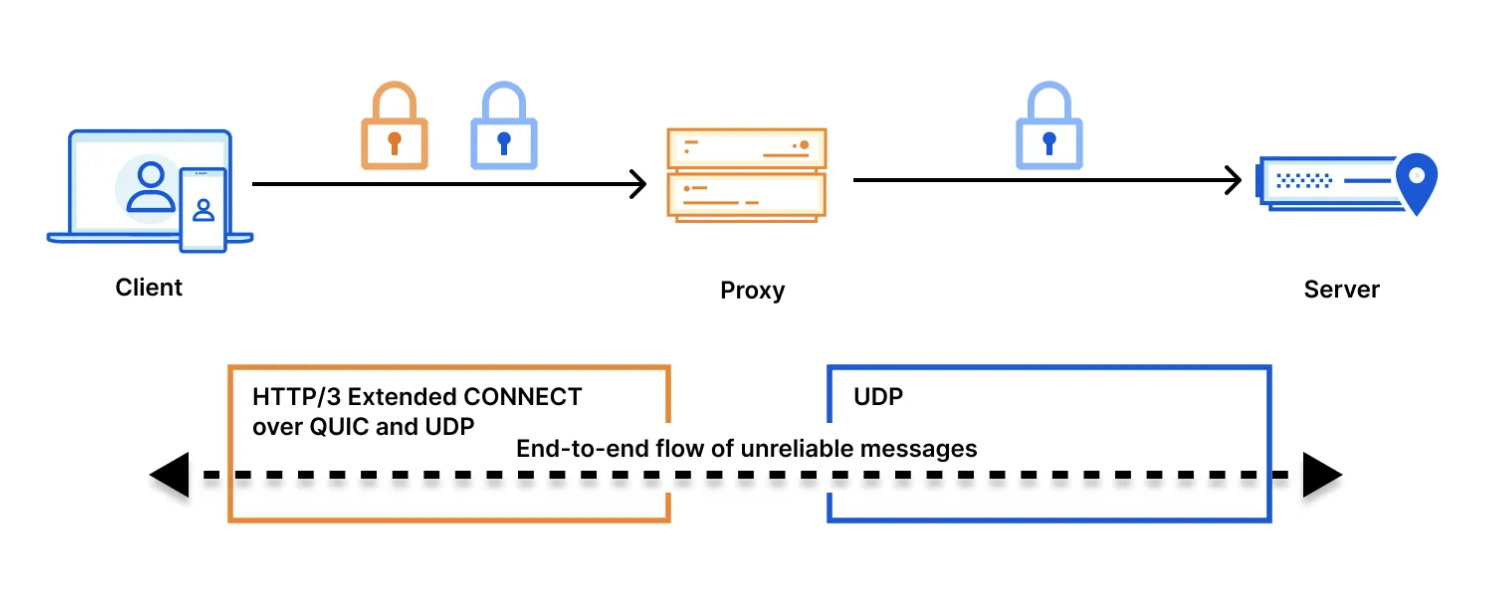
QUIC is a general-purpose transport protocol and Internet standard that operates on top of UDP (instead of TCP), is encrypted by default, and solves several performance issues that plagued its predecessors. HTTP/3 is the latest version of the HTTP protocol, defining the application-layer protocol that runs on top of QUIC as its transport mechanism. MASQUE is a set of mechanisms for tunneling traffic over HTTP. It extends the existing HTTP CONNECT model, to allow tunneling UDP and IP traffic. This is especially efficient when combined with the QUIC’s unreliable datagram extension.
For example, we can use MASQUE’s CONNECT-IP method to establish a tunnel that can send multiple concurrent requests over a single QUIC connection:
HEADERS
:method = CONNECT
:protocol = connect-ip
:scheme = https
:path = /.well-known/masque/ip/*/*/
:authority = example.org
capsule-protocol = ?1
The benefit these protocols have for the quality and security of everyone’s Internet browsing experience is real. Earlier transport protocols were built before the advent of smartphones and mobile networks, so QUIC was designed to support a mobile world, maintaining connections even in poorly connected networks, and minimizing disruptions as people switch rapidly between networks as they move through their day. Leveraging HTTP/3 as the application layer means that MASQUE is more like “normal” HTTP traffic on the Internet, meaning that it is easier to support, is compatible with existing firewall and security rules, and that it supports cryptographic agility (i.e. support for post-quantum crypto), making this traffic more secure and resilient in the long term.
All new installations of our 1.1.1.1 & WARP apps support MASQUE, including iOS, Android, macOS, Windows, and Linux, and we’ve started to roll it out as the preferred protocol over WireGuard. On mobile, to check if your connection is already secured over MASQUE, or change your device’s default option, you can toggle this setting via Advanced > Connection options > Tunnel protocol:
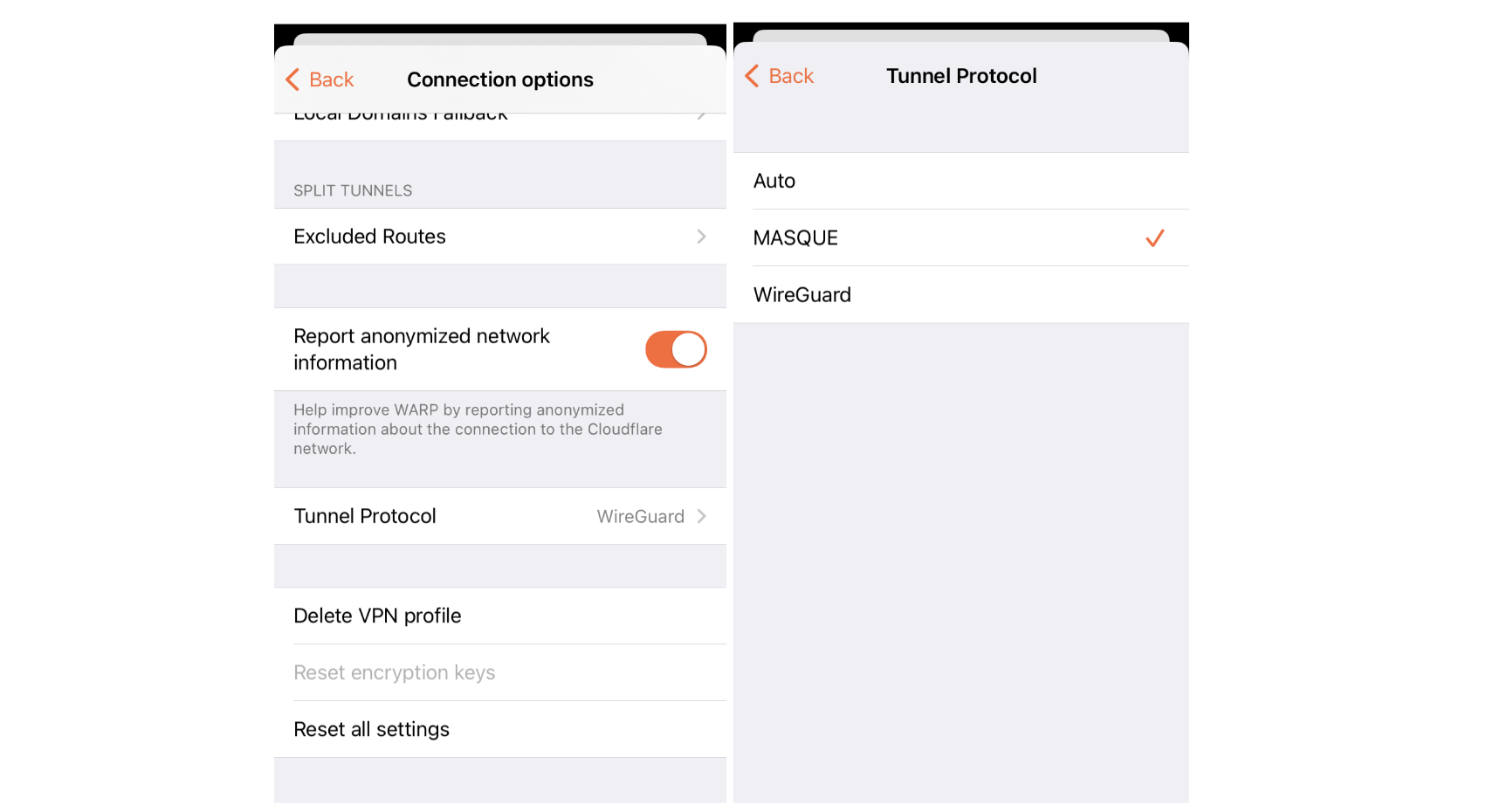
Protocol connection options shown here on the iOS app
We offer the following options:
-
Auto: this allows the app to choose the protocol.
-
MASQUE: always use MASQUE to secure your connection.
-
WireGuard: always use WireGuard to secure your connection.
On desktop versions, you can switch the protocol by using the WARP command-line interface. For example:
warp-cli tunnel protocol set WireGuard
warp-cli tunnel protocol set MASQUE
With this rollout, we’re excited to see MASQUE deliver increased performance and stability to millions of users. Download one of the WARP apps today!

Following the successful beta launch of Digital Experience Monitoring (DEX), we are thrilled to announce the general availability of DEX, along with new Remote Captures functionality.
In today’s hyper distributed environment, user experience is paramount. Recurring performance problems can lead to decreased user satisfaction, lost productivity, and damaged brand reputation. Digital Experience Monitoring (DEX) offers a comprehensive solution to these challenges. Previous blog posts have discussed the solution and its capabilities. (Introducing Digital Experience Monitoring, Understanding end user-connectivity and performance with Digital Experience Monitoring, now available in beta, What’s new in Cloudflare One: Digital Experience monitoring notifications)
Imagine this: an end user is frustrated with a slow application, and your IT team is struggling to pinpoint the root cause. Traditionally, troubleshooting such issues involved contacting the end user and asking them to manually collect and share network traffic data. This process is time-consuming, prone to errors, and often disruptive to the end user’s workflow.
Building upon the capabilities of DEX, we are excited to introduce Remote Captures, a powerful new feature that empowers IT admins to gain unprecedented visibility into end-user devices and network performance. DEX now introduces Remote Captures, a powerful new feature that empowers IT admins to remotely initiate network packet captures (PCAP) and WARP Diag logs directly from your end users’ devices and capture diagnostic information automatically from our device client. This streamlined approach accelerates troubleshooting, reduces the burden on end users, and provides valuable insights into network performance and security.
Remote Captures offer several key advantages. By analyzing detailed network traffic, IT teams can quickly pinpoint the root cause of network issues. Furthermore, granular network data empowers security teams to proactively detect and investigate potential threats. Finally, by identifying bottlenecks and latency issues, Remote Captures enable organizations to optimize network performance for a smoother user experience.
Initiating a Remote Capture is straightforward. First, select the specific device you wish to troubleshoot. Then, with a few simple clicks, start capturing network traffic and/or WARP Diag data. Once the capture is complete, download the captured data and utilize your preferred tools for in-depth analysis.
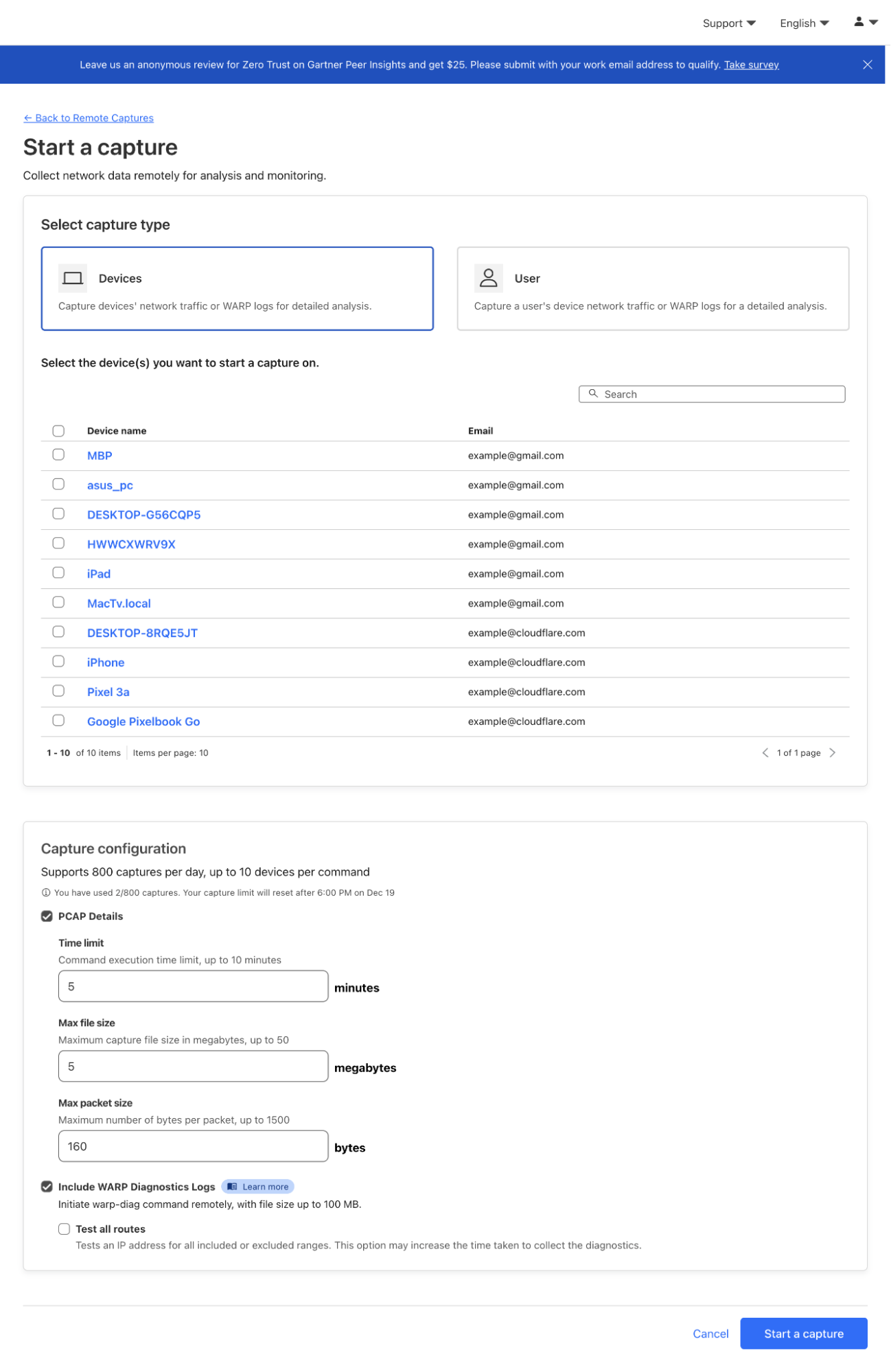
DEX Remote Captures are now available for Cloudflare One customers. They can be configured by going to Cloudflare Dashboard > Zero Trust > DEX > Remote Captures, and then selecting the device you wish to collect from. For more information, refer to Remote captures. This new capability highlights just one of the many ways our unified SASE platform helps organizations find and fix security issues across SaaS applications. Try it out now using our free tier to get started.
We hope you enjoy reading our roundup blog posts as we continue to build and innovate. Stay tuned to the Cloudflare Blog for the latest news and updates.
Security updates for Friday
Post Syndicated from daroc original https://lwn.net/Articles/1003601/
Security updates have been issued by Debian (node-postcss), Fedora (age, dr_libs, incus, libxml2, moodle, and python-sql), and SUSE (poppler and python-grpcio).
USS Jacob Jones: The First US Navy Destroyer Lost in Combat
Post Syndicated from The History Guy: History Deserves to Be Remembered original https://www.youtube.com/watch?v=KWtXxBYwxuY
Comic for 2024.12.27 – Angry Wizard
Post Syndicated from Explosm.net original https://explosm.net/comics/angry-wizard
New Cyanide and Happiness Comic
Casino Players Using Hidden Cameras for Cheating
Post Syndicated from Bruce Schneier original https://www.schneier.com/blog/archives/2024/12/casino-players-using-hidden-cameras-for-cheating.html
The basic strategy is to place a device with a hidden camera in a position to capture normally hidden card values, which are interpreted by an accomplice off-site and fed back to the player via a hidden microphone. Miniaturization is making these devices harder to detect. Presumably AI will soon obviate the need for an accomplice.
Friday Squid Blogging: Squid on Pizza
Post Syndicated from Bruce Schneier original https://www.schneier.com/blog/archives/2024/12/friday-squid-blogging-squid-on-pizza.html
Pizza Hut in Taiwan has a history of weird pizzas, including a “2022 scalloped pizza with Oreos around the edge, and deep-fried chicken and calamari studded throughout the middle.”
WisdPi WP-UT5 5Gbps USB-C to 5GbE Adapter Review
Post Syndicated from Rohit Kumar original https://www.servethehome.com/wisdpi-wp-ut5-5gbps-usb-c-to-5gbe-adapter-review/
In our WisdPi WP-UT5 5Gbps USB-C to 5GbE adapter review, we see how this Realtek RTL8157-based NIC performs and what it offers
The post WisdPi WP-UT5 5Gbps USB-C to 5GbE Adapter Review appeared first on ServeTheHome.
Halifax and Boston
Post Syndicated from The History Guy: History Deserves to Be Remembered original https://www.youtube.com/watch?v=CtCO-8hSImo
Lasering Incidents
Post Syndicated from xkcd.com original https://xkcd.com/3030/

Mars Color-by-numbers.
Post Syndicated from The History Guy: History Deserves to Be Remembered original https://www.youtube.com/watch?v=eOCetuLUrjk
Ruby 3.4 released
Post Syndicated from jake original https://lwn.net/Articles/1003547/
Continuing its tradition of yearly major releases on December 25, the Ruby programming-language project
has released
Ruby 3.4.0 (followed quickly by 3.4.1,
which simply updates the version number). Ruby 3.4 includes lots of
changes, including the addition of it as a
less-confusing shorthand for _1 as a block parameter, switching to
Prism as the default
parser, adding the Happy Eyeballs
version 2 algorithm to the socket library,
just-in-time (JIT) compiler (YJIT) improvements, garbage-collection
modularization, and more.
Scams Based on Fake Google Emails
Post Syndicated from Bruce Schneier original https://www.schneier.com/blog/archives/2024/12/scams-based-on-fake-google-emails.html
Scammers are hacking Google Forms to send email to victims that come from google.com.
Brian Krebs reports on the effects.
Boing Boing post.
Annie & Kerry Xu | Badminton: Twin Sisters Represent USA at Paris Olympics 2024 | Talks at Google
Post Syndicated from Talks at Google original https://www.youtube.com/watch?v=VDuu5ZKyQJc