Post Syndicated from Irfan Saleem original https://aws.amazon.com/blogs/architecture/data-caching-across-microservices-in-a-serverless-architecture/
Organizations are re-architecting their traditional monolithic applications to incorporate microservices. This helps them gain agility and scalability and accelerate time-to-market for new features.
Each microservice performs a single function. However, a microservice might need to retrieve and process data from multiple disparate sources. These can include data stores, legacy systems, or other shared services deployed on premises in data centers or in the cloud. These scenarios add latency to the microservice response time because multiple real-time calls are required to the backend systems. The latency often ranges from milliseconds to a few seconds depending on size of the data, network bandwidth, and processing logic. In certain scenarios, it makes sense to maintain a cache close to the microservices layer to improve performance by reducing or eliminating the need for the real-time backend calls.
Caches reduce latency and service-to-service communication of microservice architectures. A cache is a high-speed data storage layer that stores a subset of data. When data is requested from a cache, it is delivered faster than if you accessed the data’s primary storage location.
While working with our customers, we have observed use cases where data caching helps reduce latency in the microservices layer. Caching can be implemented in several ways. In this blog post, we discuss a couple of these use cases that customers have built. In both use cases, the microservices layer is created using Serverless on AWS offerings. It requires data from multiple data sources deployed locally in the cloud or on premises. The compute layer is built using AWS Lambda. Though Lambda functions are short-lived, the cached data can be used by subsequent instances of the same microservice to avoid backend calls.
Use case 1: On-demand cache to reduce real-time calls
In this use case, the Cache-Aside design pattern is used for lazy loading of frequently accessed data. This means that an object is only cached when it is requested by a consumer, and the respective microservice decides if the object is worth saving.
This use case is typically useful when the microservices layer makes multiple real-time calls to fetch and process data. These calls can be greatly reduced by caching frequently accessed data for a short period of time.
Let’s discuss a real-world scenario. Figure 1 shows a customer portal that provides a list of car loans, their status, and the net outstanding amount for a customer:
- The Billing microservice gets a request. It then tries to get required objects (for example, the list of car loans, their status, and the net outstanding balance) from the cache using an object_key. If the information is available in the cache, a response is sent back to the requester using cached data.
- If requested objects are not available in the cache (a cache miss), the Billing microservice makes multiple calls to local services, applications, and data sources to retrieve data. The result is compiled and sent back to the requester. It also resides in the cache for a short period of time.
- Meanwhile, if a customer makes a payment using the Payment microservice, the balance amount in the cache must be invalidated/deleted. The Payment microservice processes the payment and invokes an asynchronous event (payment_processed) with the respective object key for the downstream processes that will remove respective objects from the cache.
- The events are stored in the event store.
- The CacheManager microservice gets the event (payment_processed) and makes a delete request to the cache for the respective object_key. If necessary, the CacheManager can also refresh cached data. It can call a resource within the Billing service or it can refresh data directly from the source system depending on the data refresh logic.

Figure 1. Reducing latency by caching frequently accessed data on demand
Figure 2 shows AWS services for use case 1. The microservices layer (Billing, Payments, and Profile) is created using Lambda. The Amazon API Gateway is exposing Lambda functions as API operations to the internal or external consumers.
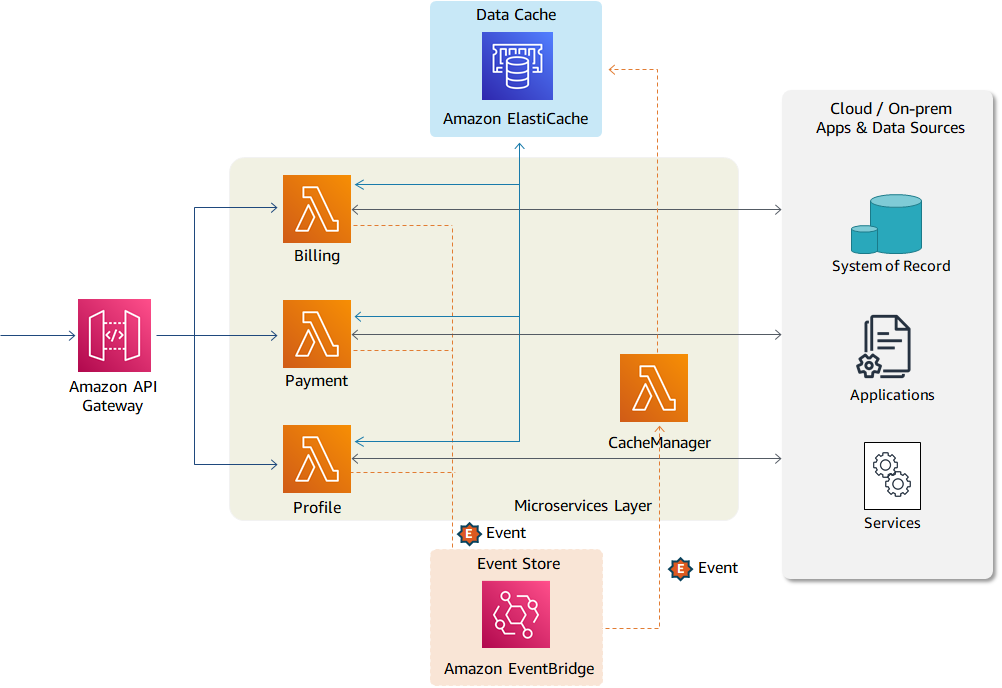
Figure 2. Suggested AWS services for implementing use case 1
All three microservices are connected with the data cache and can save and retrieve objects from the cache. The cache is maintained in-memory using Amazon ElastiCache. The data objects are kept in cache for a short period of time. Every object has an associated TTL (time to live) value assigned to it. After that time period, the object expires. The custom events (such as payment_processed) are published to Amazon EventBridge for downstream processing.
Use case 2: Proactive caching of massive volumes of data
During large modernization and migration initiatives, not all data sources are colocated for a certain period of time. Some legacy systems, such as mainframe, require a longer decommissioning period. Many legacy backend systems process data through periodic batch jobs. In such scenarios, front-end applications can use cached data for a certain period of time (ranging from a few minutes to few hours) depending on nature of data and its usage. The real-time calls to the backend systems cannot deal with the extensive call volume on the front-end application.
In such scenarios, required data/objects can be identified up front and loaded directly into the cache through an automated process as shown in Figure 3:
- An automated process loads data/objects in the cache during the initial load. Subsequent changes to the data sources (either in a mainframe database or another system of record) are captured and applied to the cache through an automated CDC (change data capture) pipeline.
- Unlike use case 1, the microservices layer does not make real-time calls to load data into the cache. In this use case, microservices use data already cached for their processing.
- However, the microservices layer may create an event if data in the cache is stale or specific objects have been changed by another service (for example, by the Payment service when a payment is made).
- The events are stored in Event Manager. Upon receiving an event, the CacheManager initiates a backend process to refresh stale data on demand.
- All data changes are sent directly to the system of record.

Figure 3. Eliminating real-time calls by caching massive data volumes proactively
As shown in Figure 4, the data objects are maintained in Amazon DynamoDB, which provides low-latency data access at any scale. The data retrieval is managed through DynamoDB Accelerator (DAX), a fully managed, highly available, in-memory cache. It delivers up to a 10 times performance improvement, even at millions of requests per second.

Figure 4. Suggested AWS services for implementing use case 2
The data in DynamoDB can be loaded through different methods depending on the customer use case and technology landscape. API Gateway, Lambda, and EventBridge are providing similar functionality as described in use case 1.
Use case 2 is also beneficial in scenarios where front-end applications must cache data for an extended period of time, such as a customer’s shopping cart.
In addition to caching, the following best practices can also be used to reduce latency and to improve performance within the Lambda compute layer:
- Best practices for working with AWS Lambda functions shows you how to use execution environment reuse to improve the performance of your Lambda functions
- The Introducing AWS Lambda Extensions blog post shows you how to implement configuration and data cache using AWS Lambda Extensions
Conclusion
The microservices architecture allows you to build several caching layers depending on your use case. In this blog, we discussed data caching within the compute layer to reduce latency when data is retrieved from disparate sources. The information from use case 1 can help you reduce real-time calls to your back-end system by saving frequently used data to the cache. Use case 2 helps you maintain large volumes of data in caches for extended periods of time when real-time calls to the backend system are not possible.