At Rapid7, we know the most powerful tools in your security portfolio are the ones that help you understand your risks quickly. With our new automated login for InsightAppSec, you can access and scan even the most complex, modern applications quickly and easily. That means you’ll spend less time worrying about whether your scans are authenticating and more time assessing and responding to vulnerabilities.
In the world before automated login — we’ll call these the dark ages — security professionals needed to write scripts and rely on macros to navigate more complex applications with their many layers of authentication. This has always been a time-consuming process that takes resources away from the work of identifying and remediating vulnerabilities.
InsightAppSec with automated authentication analyzes and identifies the login pages, enters the credentials, and logs in to the app automatically. Then, it provides you with a confidence score so you’re sure it’s been logged in successfully. Fewer confusing steps, fewer macros — just more understanding of risk from the restricted parts of your web applications.
A look inside
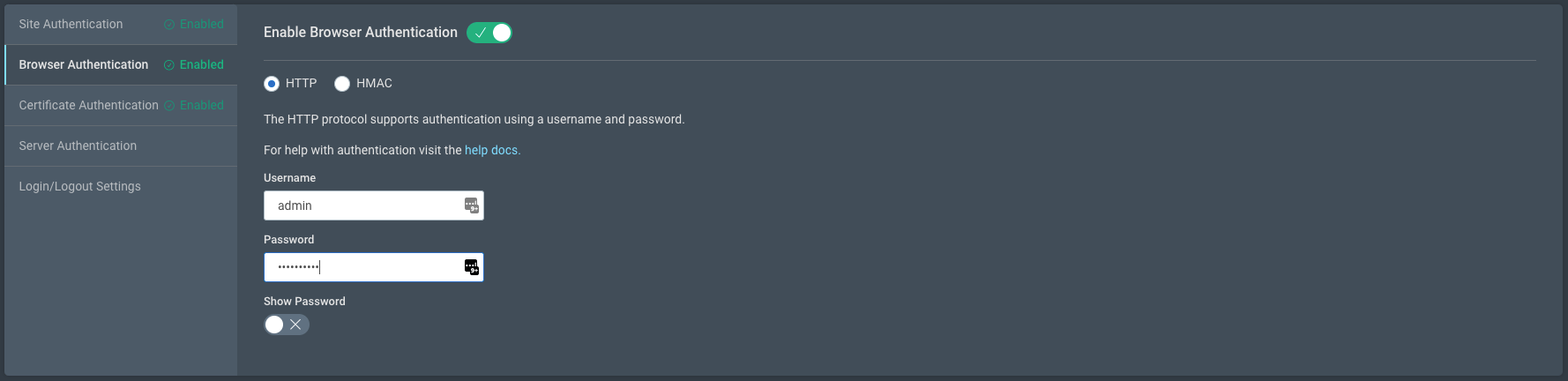
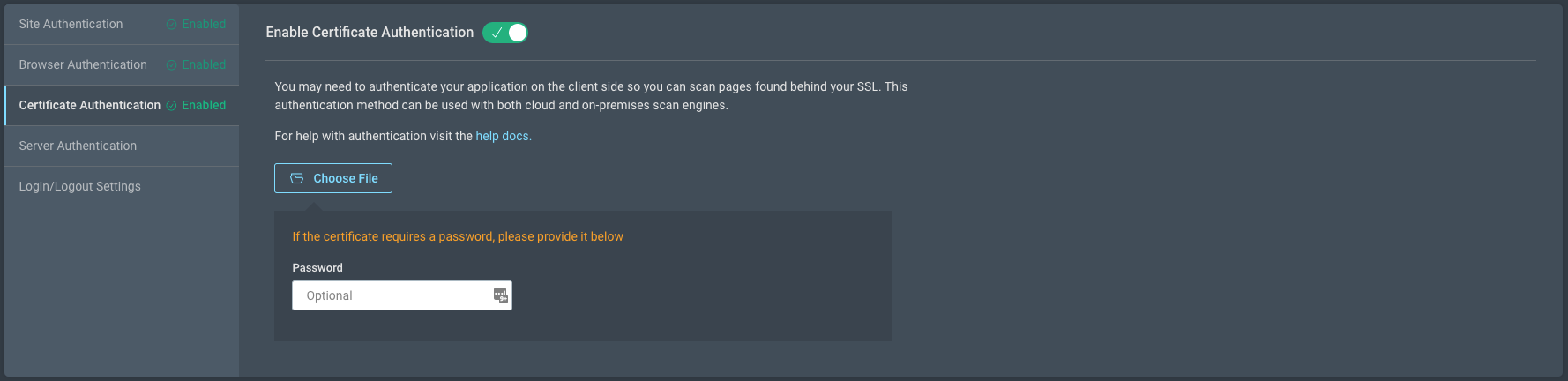
So, what’s different? Well, for starters, the look and feel of the scan will be intuitive and easy to use. We’ve taken great pains to maximize your efficiency at every turn so when you start a new application scan and select authentication, automated authentication will be the default.
We’ve also improved secondary navigation to include new, more logical groupings, making settings easier to find.
The process couldn’t be easier. Simply choose the application you wish to scan from the InsightAppSec All Apps page, open Scan Config, and select Automated Authentication from the Authentication’s page. Enter your credentials once, and you’re good to save for later or start the scan now.
Moving to automated login is more than just a single new feature — it opens the door to more innovations. Automated login uses a new architecture that allows InsightAppSec to interact with web apps in the same way a user and their browser would behave. This is critical as applications become more complex, which in turn presents new challenges to automating certain processes. Automated login is just the first feature we’re rolling out based on this new, more innovative architecture.
As web applications become more complex, the solutions you employ to secure them should become more powerful. Automated authentication provides your security team with the ability to efficiently and accurately scan even the most complex applications quickly and in an intuitive way right out of the box. It flattens the learning curve for setting up and running scans, giving any member of your security team the ability to run scans and identify vulnerabilities.
We are including automated login through InsightAppSec for existing and new customers right away. If you want to learn more, click here for more resources.
Abstract: A master face is a face image that passes face-based identity-authentication for a large portion of the population. These faces can be used to impersonate, with a high probability of success, any user, without having access to any user-information. We optimize these faces, by using an evolutionary algorithm in the latent embedding space of the StyleGAN face generator. Multiple evolutionary strategies are compared, and we propose a novel approach that employs a neural network in order to direct the search in the direction of promising samples, without adding fitness evaluations. The results we present demonstrate that it is possible to obtain a high coverage of the population (over 40%) with less than 10 master faces, for three leading deep face recognition systems.
Sonja Drummer describes (with photographs) two medieval security techniques. The first is a for authentication: a document has been cut in half with an irregular pattern, so that the two halves can be brought together to prove authenticity. The second is for integrity: hashed lines written above and below a block of text ensure that no one can add additional text at a later date.
As most developers can attest, dealing with security protocols and identity tokens, as well as user and device authentication, can be challenging. Imagine having multiple protocols, multiple tokens, 200M+ users, and thousands of device types, and the problem can explode in scope. A few years ago, we decided to address this complexity by spinning up a new initiative, and eventually a new team, to move the complex handling of user and device authentication, and various security protocols and tokens, to the edge of the network, managed by a set of centralized services, and a single team. In the process, we changed end-to-end identity propagation within the network of services to use a cryptographically-verifiable token-agnostic identity object.
Read on to learn more about this journey and how we have been able to:
Reduce complexity for service owners, who no longer need to have knowledge of and responsibility for terminating security protocols and dealing with myriad security tokens,
Improve security by delegating token management to services and teams with expertise in this area, and
Improve audit-ability and forensic analysis.
How We Got Here
Netflix started as a website that allowed members to manage their DVD queue. This website was later enhanced with the capability to stream content. Streaming devices came a bit later, but these initial devices were limited in capability. Over time, devices increased in capability and functions that were once only accessible on the website became accessible through streaming devices. Scale of the Netflix service was growing rapidly, with over 2000 device types supported.
Services supporting these functions now had an increased burden of being able to understand multiple tokens and security protocols in order to identify the user and device and authorize access to those functions. The whole system was quite complex, and starting to become brittle. Plus, the architecture of the Edge tier was evolving to a PaaS (platform as a service) model, and we had some tough decisions to make about how, and where, to handle identity token handling.
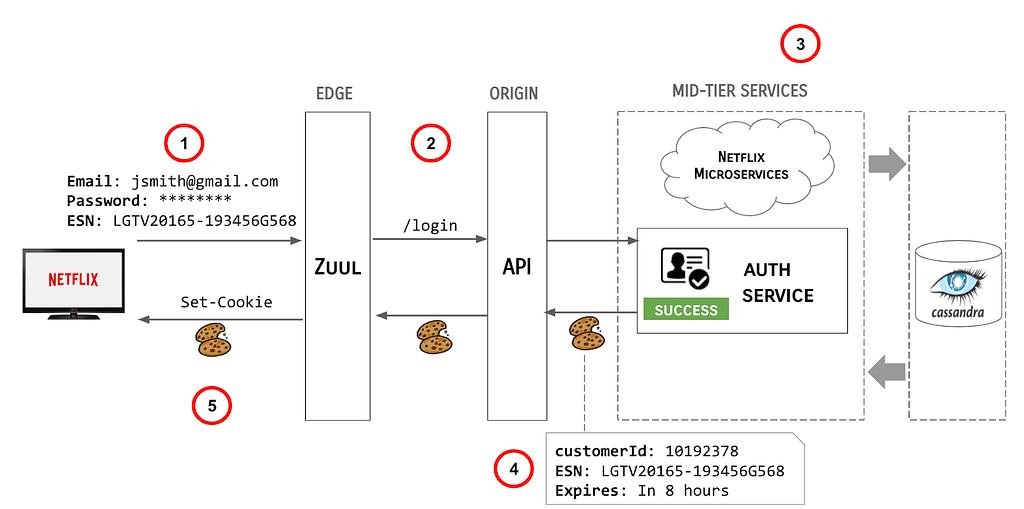
To demonstrate the complexity of the system, following is a description of how the user login flow worked prior to the changes described in this article:
At the highest level, the steps involved in this (greatly simplified) flow are as follows:
User enters their credentials and the Netflix client transmits the credentials, along with the ESN of the device to the Edge gateway, AKA Zuul.
Zuul redirects the user call to the API /login endpoint.
The API server orchestrates backend systems to authenticate the user.
Upon successful authentication of the claims provided, the API server sends a cookie response back upstream, including the customerId (a Long), the ESN (a String) and an expiration directive.
Zuul sends the Cookies back to the Netflix client.
This model had some problems, e.g.:
Externally valid tokens were being minted deep down in the stack and they needed to be propagated all the way upstream, opening possibilities for them to be logged inappropriately or potentially mismanaged.
Upstream systems had to reopen the tokens to identify the user logging in and potentially manage multiple parallel identity data structures, which could easily get out of sync.
Multiple Protocols & Tokens
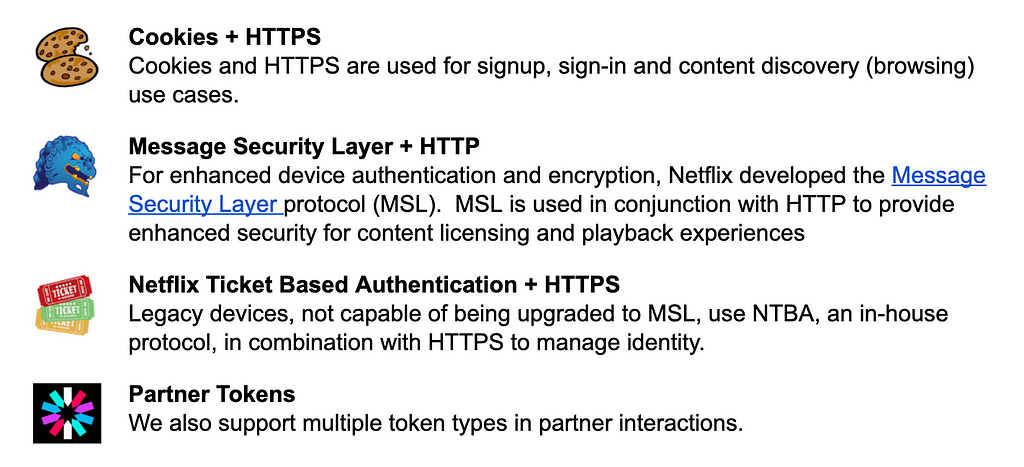
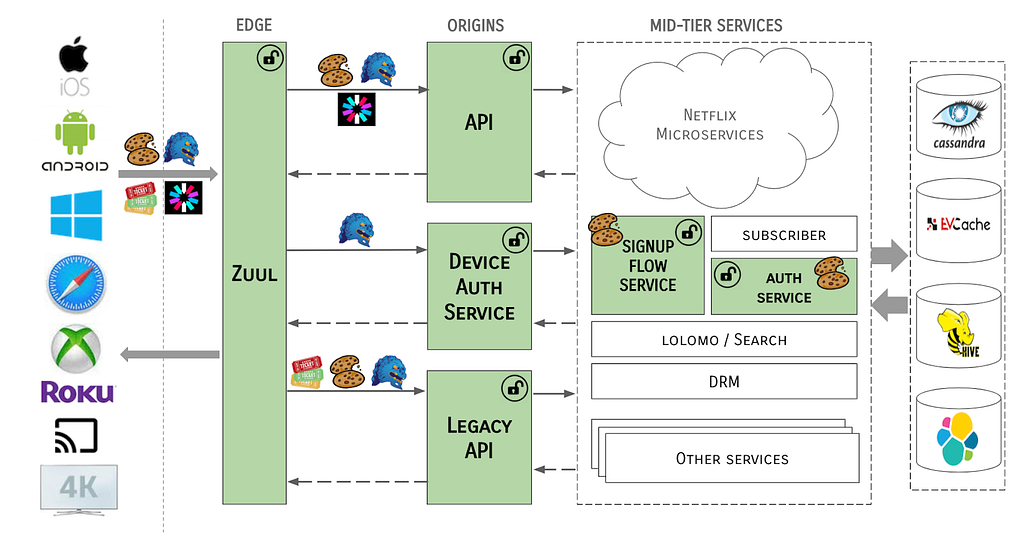
The example above shows one flow, dealing with one protocol (HTTP/S) and one type of token (Cookies). There are several protocols and tokens in use across the Netflix streaming product, as summarized below:
These tokens were consumed by, and potentially mutated by, several systems within the Netflix streaming ecosystem, for example:
To complicate things further, there were multiple methods for transmitting these tokens, or the data contained therein, from system to system. In some cases, tokens were cracked open and identity data elements extracted as simple primitives or strings to be used in API calls, or passed from system to system via request context headers, or even as URL parameters. There were no checks in place to ensure the integrity of the tokens or the data contained therein.
At Netflix Scale
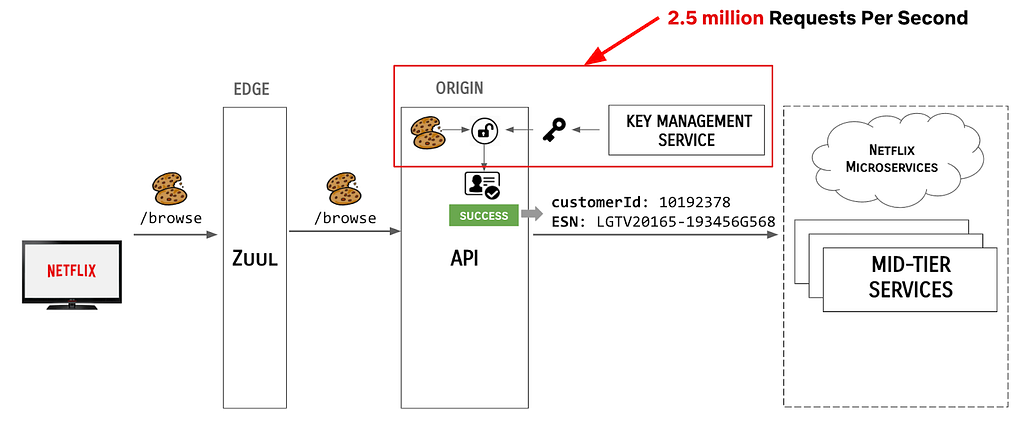
Meanwhile, the scale at which Netflix operated grew exponentially. At the time of this article, Netflix has 200M+ subscribers, with over a billion devices. We are serving over 2.5 million requests per second, a large percentage of which require some form of authentication. In the old architecture, each of these requests resulted in an API call to authenticate the claims presented with the request, as shown:
EdgePaas Enters the Picture
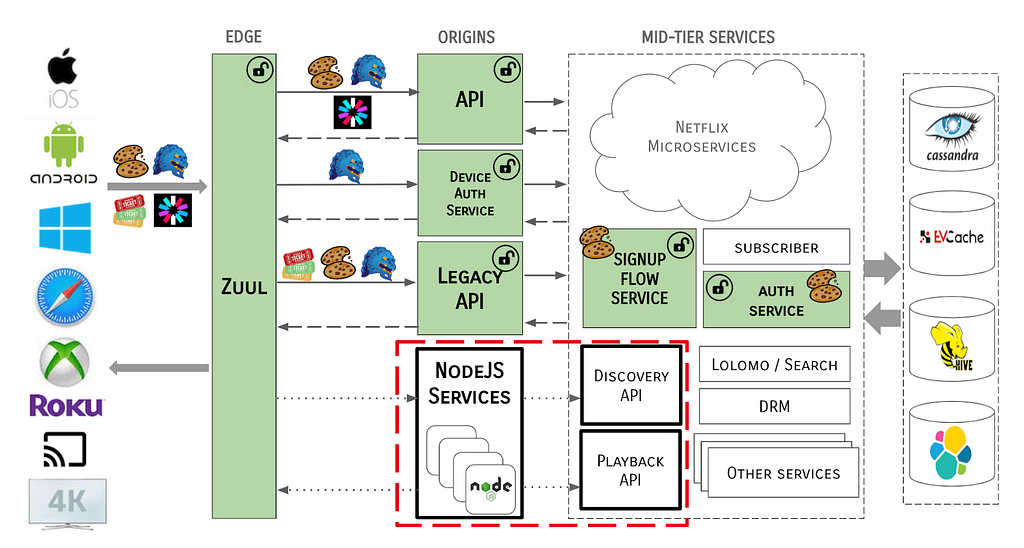
To further complicate the situation, the Edge Engineering team was in the middle of migrating from an old API server architecture to a new PaaS-based approach. As we migrated to EdgePaaS, front-end services were moved from the Java-based API to a BFF (backend for frontend), aka NodeQuark, as shown:
This model enables front-end engineers to own and operate their services outside of the core API framework. However, this introduced another layer of complexity — how would these NodeQuark services deal with identity tokens? NodeQuark services are written in JavaScript and terminating a protocol as complex as MSL would have been difficult and wasteful, as would replicating all of the logic for token management.
So, Where Were We Again?
To summarize, we found ourselves with a complex and inefficient solution for handling authentication and identity tokens at massive scale. We had multiple types and sources of identity tokens, each requiring special handling, the logic for which was replicated in various systems. Critical identity data was being propagated throughout the server ecosystem in an inconsistent fashion.
Edge Authentication to the Rescue
We realized that in order to solve this problem, a unified identity model was needed. We would need to process authentication tokens (and protocols) further upstream. We did this by moving authentication and protocol termination to the edge of the network, and created a new integrity-protected token-agnostic identity object to propagate throughout the server ecosystem.
Moving Authentication to the Edge
Keeping in mind our objectives to improve security and reduce complexity, and ultimately provide a better user experience, we strategized on how to centralize device authentication operations and user identification and authentication token management to the services edge.
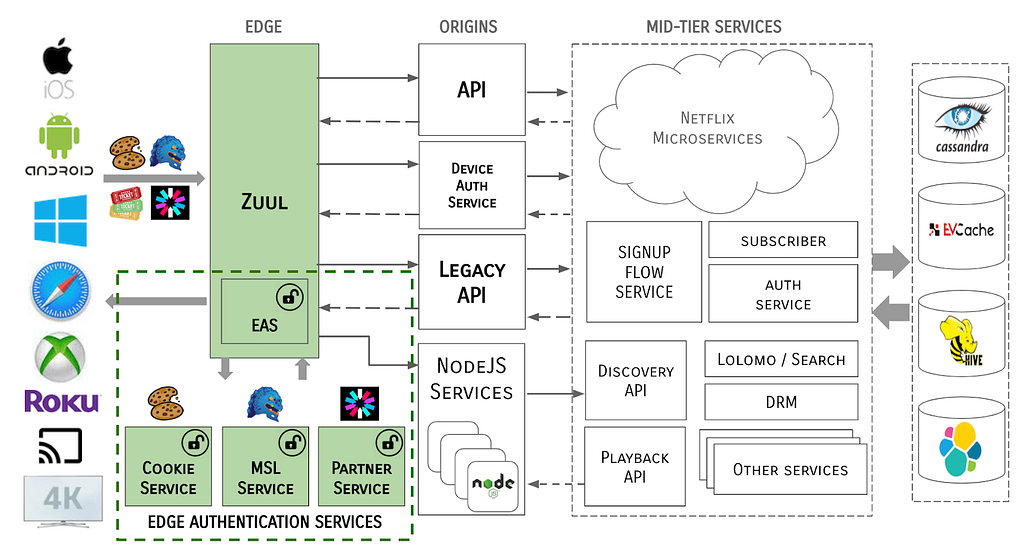
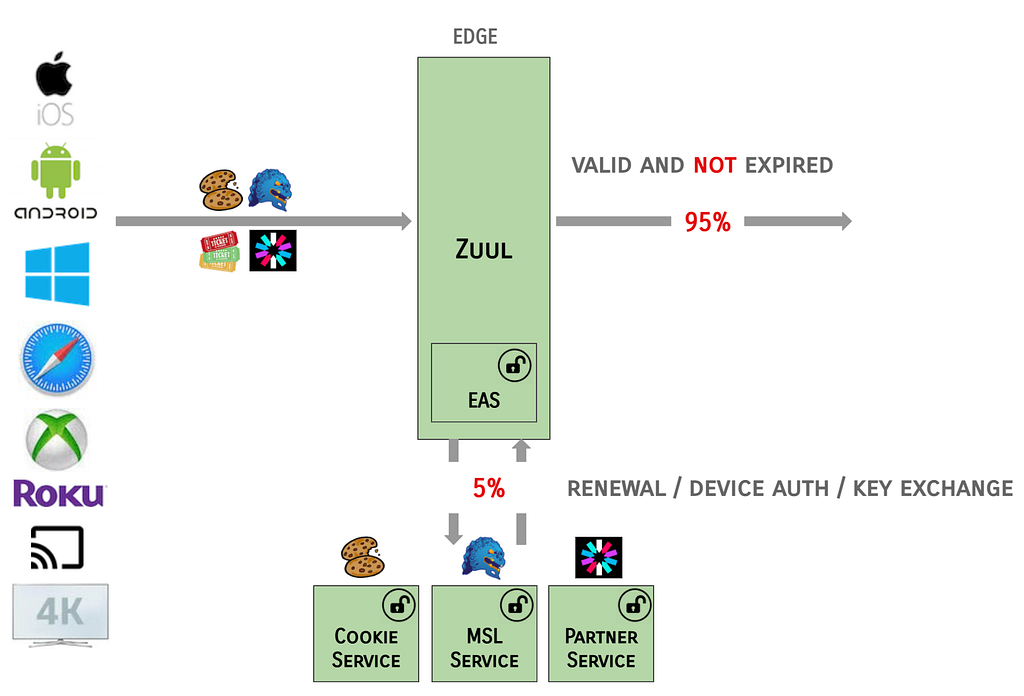
At a high-level, Zuul (cloud gateway) was to become the termination point for token inspection and payload encryption/decryption. In the case that Zuul would be unable to handle these operations (a small percentage), e.g., if tokens were not present, needed to be renewed, or were otherwise invalid, Zuul would delegate those operations to a new set of Edge Authentication Services to handle cryptographic key exchange and token creation or renewal.
Edge Authentication Services
Edge Authentication Services (EAS) is both an architectural concept of moving authentication and identification of devices and users higher up on the stack to the cloud edge, as well as a suite of services that have been developed to handle each token type.
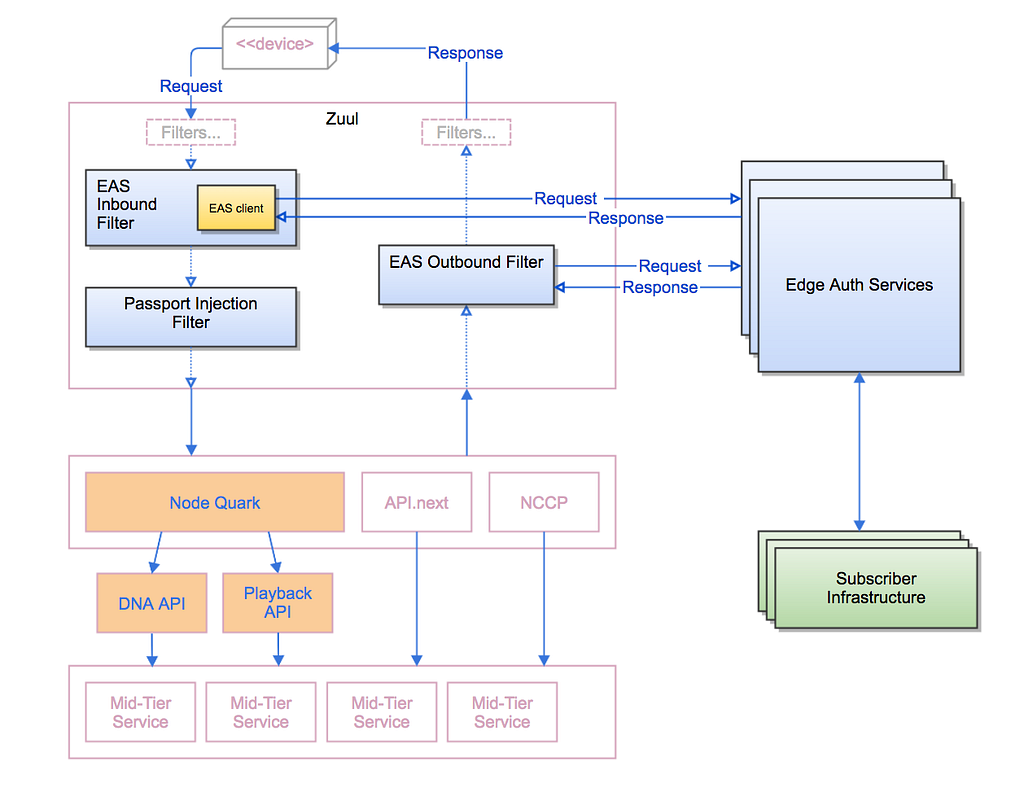
EAS is functionally a series of filters that run in Zuul, which may call out to external services to support their domain, e.g., to a service to handle MSL tokens or another for Cookies. EAS also covers the read-only processing of tokens to create Passports (more on that later).
The basic pattern for how EAS handles requests is as follows:
For each request coming into the Netflix service, the EAS Inbound Filter in Zuul inspects the tokens provided by the device client and either passes through the request to the Passport Injection Filter, or delegates to one of the Edge Authentication Services to process. The Passport Injection Filter generates a token-agnostic identity to propagate down through the rest of the server ecosystem. On the response path, the EAS Outbound Filter determines, with help from the Edge Authentication Services as needed, generates the tokens needed to send back to the client device.
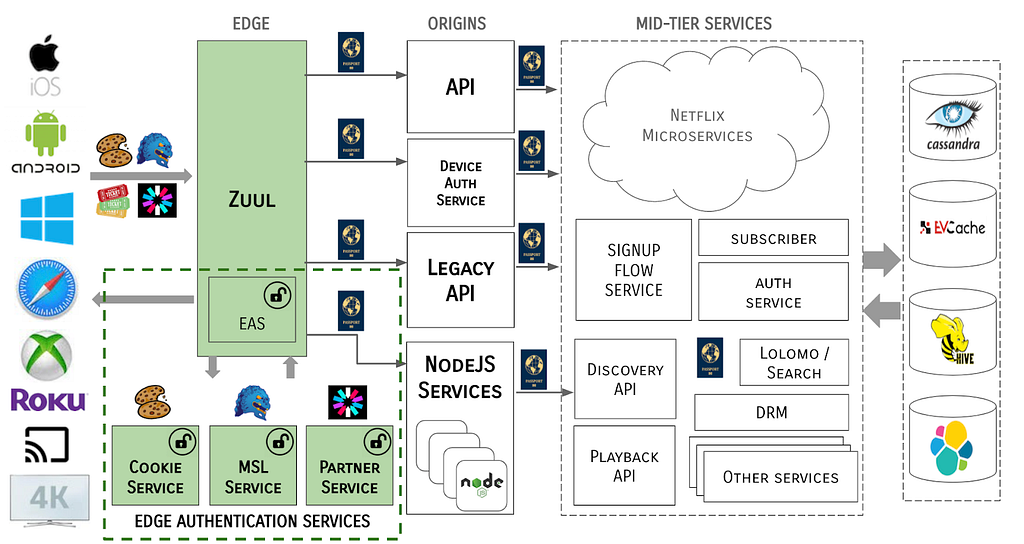
The system architecture now takes the form of:
Notice that tokens never traverse past the Edge gateway / EAS boundary. The MSL security protocol is terminated at the Edge and all tokens are cracked open and identity data is propagated through the server ecosystem in a token-agnostic manner.
A Note on Resilience
On the happy path, Zuul is able to process the large percentage of tokens that are valid and not expired, and the Edge Auth Services handle the remainder of the requests.
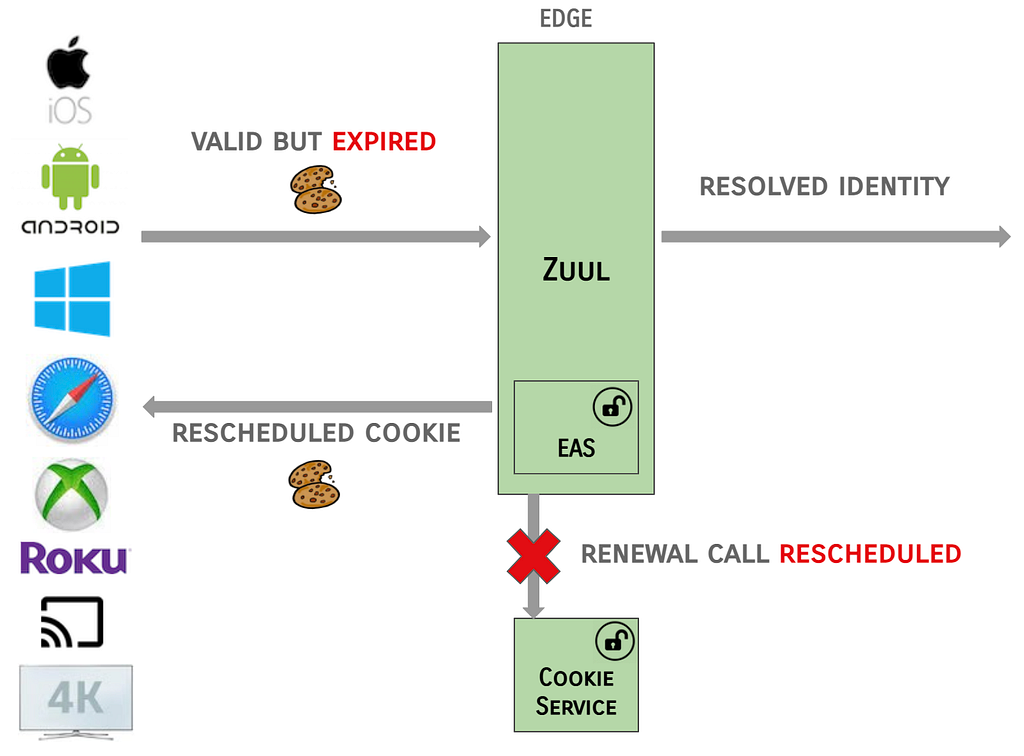
The EAS services are designed to be fault tolerant, e.g., in the case where Zuul identifies that Cookies are valid, but expired, and the renewal call to EAS fails or is latent:
In this failure scenario, the EAS filter in Zuul will be lenient and allow the resolved identity to be propagated and will indicate that the renewal call should be rescheduled on the next request.
Token-Agnostic Identity (Passport)
An easily mutable identity structure would not suffice because that would mean passing less trusted identities from service to service. A token-agnostic identity structure was needed.
We introduced an identity structure called “Passport” which allowed us to propagate the user and device identity information in a uniform way. The Passport is also a kind of token, but there are many benefits to using an internal structure that differs from external tokens. However, downstream systems still need access to the user and device identity.
A Passport is a short-lived identity structure created at the Edge for each request, i.e., it is scoped to the life of the request and it is completely internal to the Netflix ecosystem. These are generated in Zuul via a set of Identity Filters. A Passport contains both user & device identity, is in protobuf format, and is integrity protected by HMAC.
Passport Structure
As noted above, the Passport is modeled as a Protocol Buffer. At the highest level, the definition of the Passport is as follows:
messagePassport {
Header header = 1;
UserInfo user_info = 2;
DeviceInfo device_info = 3;
Integrity user_integrity = 4;
Integrity device_integrity = 5;
}
The Header element communicates the name of the service that created the Passport. What’s more interesting is what is propagated related to the user and device.
User & Device Information
The UserInfo element contains all of the information required to identify the user on whose behalf requests are being made, with the DeviceInfo element containing all of the information required for the device on which the user is visiting Netflix:
Both UserInfo and DeviceInfo carry the Source and PassportAuthenticationLevel for the request. The Source list is a classification of claims, with the protocol being used and the services used to validate the claims. The PassportAuthenticationLevel is the level of trust that we put into the authentication claims.
enum Source {
NONE = 0;
COOKIE = 1;
COOKIE_INSECURE = 2;
MSL = 3;
PARTNER_TOKEN = 4;
…
}
enum PassportAuthenticationLevel {
LOW = 1; // untrusted transport
HIGH = 2; // secure tokens over TLS
HIGHEST = 3; // MSL or user credentials
}
Downstream applications can use these values to make Authorization and/or user experience decisions.
Passport Integrity
The integrity of the Passport is protected via an HMAC (hash-based message authentication code), which is a specific type of MAC involving a crytographic hash function and a secret cryptographic key. It may be used to simultaneously verify both the data integrity and authenticity of a message.
User and device integrity are defined as:
messageIntegrity {
int32 version = 1;
string key_name = 2;
bytes hmac = 3;
}
Version 1 of the Integrity element uses SHA-256 for the HMAC, which is encoded as a ByteArray. Future versions of Integrity may use a different has function or encoding. In version 1, the HMAC field contains the 256 bits from MacSpec.SHA_256.
Integrity protection guarantees that Passport field are not mutated after the Passport is created. Client applications can use the Passport Introspector to check the integrity of the Passport before using any of the values contained therein.
Passport Introspector
The Passport object itself is opaque; clients can use the Passport Introspector to extract the Passport from the headers and retrieve the contents inside it. The Passport Introspector is a wrapper over the Passport binary data. Clients create an Introspector via a factory and then have access to basic accessor methods:
public interface PassportIntrospector {
Long getCustomerId();
Long getAccountOwnerId();
String getEsn();
Integer getDeviceTypeId();
String getPassportAsString();
…
}
Passport Actions
In the Passport protocol buffer definition shown above, there are Passport Actions defined:
messageUserInfo {
repeated UserAction actions = 12;
…
}
messageDeviceInfo {
repeated DeviceAction actions = 7;
…
}
Passport Actions are explicit signals sent by downstream services, when an update to user or device identity has been performed. The signal is used by EAS to either create or update the corresponding type of token.
Login Flow, Revisited
Let’s wrap up with an example of all of these solutions working together.
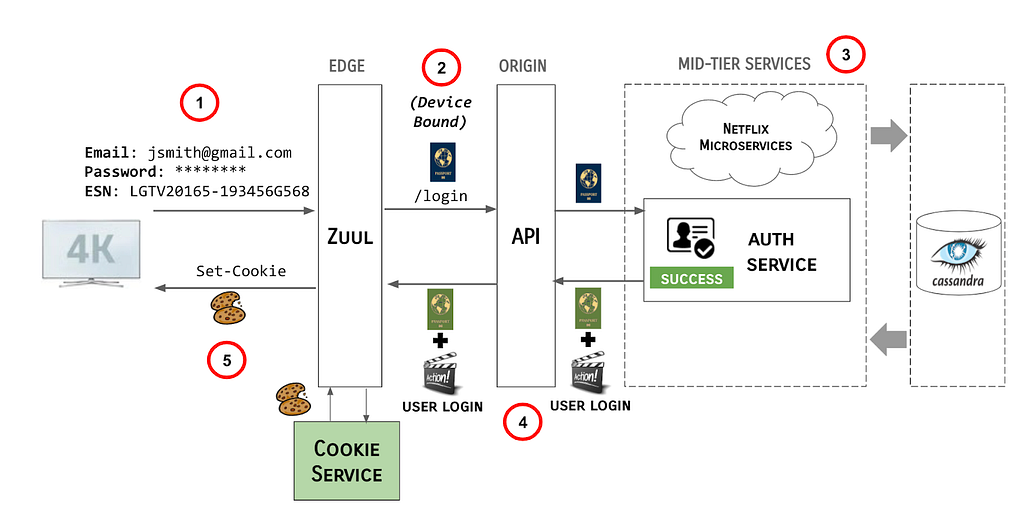
With the movement of authentication and protocol termination to the Edge, and the introduction of Passports as identity, the Login Flow described earlier has morphed into the following:
User enters their credentials and the Netflix client transmits the credentials, along with the ESN of the device to the Edge gateway, AKA Zuul.
Identity filters running in Zuul generate a device-bound Passport and pass it along to the API /login endpoint.
The API server propagates the Passport to the mid-tier services responsible for authentication the user.
Upon successful authentication of the claims provided, these services create a Passport Action and send it, along with the original Passport, back up stream to API and Zuul.
Zuul makes a call to the Cookie Service to resolve the Passport and Passport Actions and sends the Cookies back to the Netflix client.
Key Benefits and Learnings
Simplified Authorization
One of the reasons there were external tokens flowing into downstream systems was because authorization decisions often depend on authentication claims in tokens and the trust associated with each token type. In our Passport structure, we have assigned levels to this trust, meaning that systems requiring authorization decisions can write sensible rules around the Passport instead of replicating the trust rules in code across many services.
An Explicit and Extensible Identity Model
Having a structure that is the canonical identity is very useful. Alternatives where identity primitives are passed around are brittle and hard to debug. If the customer identity changed from service A to service D in a call chain, who changed it? Once the identity structure is passed through all key systems, it is relatively easy to add new external token types, new trust levels, or new ways to represent identity.
Operational Concerns and Visibility
Having a structure, like Passport, allows you to define the services that can write a Passport and other services can validate it. When the Passport is propagated and when we see it in logs, we can open it up, validate it, and know what the identity is. We also know the provenance of the Passport, and can trace it back to where it entered the system. This makes the debugging of any identity-related anomalies much easier.
Reduced Downstream System Complexity & Load
Passing a uniform structure to downstream systems means that those systems can easily look up the device and user identity, using an introspection library. Instead of having separate handling for each type of external token, they can use the common structure.
By offloading token processing from these systems to the central Edge Authentication Services, downstream systems saw significant gains in CPU, request latency, and garbage collection metrics, all of which help reduce cluster footprint and cloud costs. The following examples of these gains are from the primary API service.
In the prior implementation, it was necessary to incur decryption/termination costs twice per request because we needed the ability to route at the edge but also needed rich termination in the downstream service. Some of the performance improvement is due to consolidation of this — MSL requests now only need to be processed once.
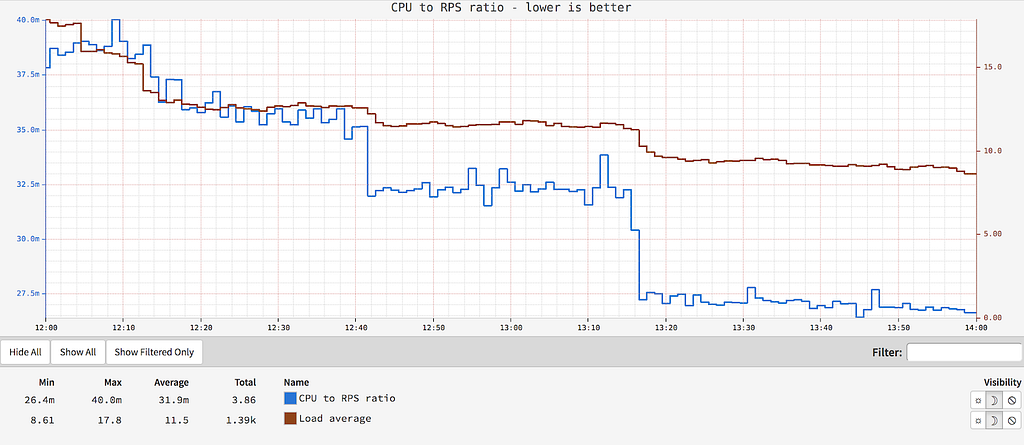
CPU to RPS Ratio
Offloading token processing resulted in a 30% reduction in CPU cost per request and a 40% reduction in load average. The following graph shows the CPU to RPS ratio, where lower is better:
API Response Time
Response times for all calls on the API service showed significant improvement, with a 30% reduction in average latency and a 20% drop in 99th percentile latency:
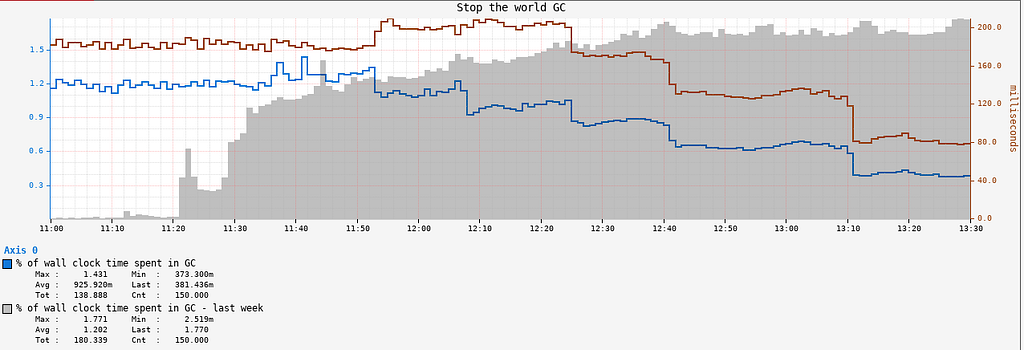
Garbage Collection
The API service also saw a significant reduction in GC pressure and GC pause times, as shown in the Stop The World Garbage Collection metrics:
Developer Velocity
Abstracting these authentication and identity-related concerns away from the developers of microservices means that they can focus on their core domain. Changes in this area are now done once, and in one set of specialized services, versus being distributed across multiple.
What’s Next?
Strong(er) Authentication
We are currently expanding the Edge Authentication Services to support Multi-Factor Authentication via a new service called “Resistor”. We selectively introduce the second factor for connections that are suspicious, based on machine learning models. As we onboard new flows, we are introducing new factors, e.g., one-time passwords (OTP) sent to email or phone, push notifications to mobile devices, and third-party authenticator applications. We may also explore opt-in Multi-Factor Authentication for users who desire the added security on their accounts.
Flexible Authorization
Now that we have a verified identity flowing through the system, we can use that as a strong signal for authorization decisions. Last year, we started to explore a new Product Access Strategy (PACS) and are currently working on moving it into production for several new experiences in the Netflix streaming product. PACS recently powered the experience access control for the Streamfest, a weekend of free Netflix in India.
Want More?
Team members presented this work at QCon San Francisco (and were two of the top three attended talks at the conference!):
The NSA has published an advisory outlining how “malicious cyber actors” are “are manipulating trust in federated authentication environments to access protected data in the cloud.” This is related to the SolarWinds hack I have previouslywrittenabout, and represents one of the techniques the SVR is using once it has gained access to target networks.
Malicious cyberactors are abusing trust in federated authentication environments to access protected data. The exploitation occurs after the actors have gained initial access to a victim’s on-premises network. The actors leverage privileged access in the on-premises environment to subvert the mechanisms that the organization uses to grant access to cloud and on-premises resources and/or to compromise administrator credentials with the ability to manage cloud resources. The actors demonstrate two sets of tactics, techniques,and procedures (TTP) for gaining access to the victim network’s cloud resources, often with a particular focus on organizational email.
In the first TTP, the actors compromise on-premises components of a federated SSO infrastructure and steal the credential or private key that is used to sign Security Assertion Markup Language (SAML) tokens(TA0006, T1552, T1552.004). Using the private keys, the actors then forge trusted authentication tokens to access cloud resources. A recent NSA Cybersecurity Advisory warned of actors exploiting a vulnerability in VMware Access and VMware Identity Manager that allowed them to perform this TTP and abuse federated SSO infrastructure.While that example of this TTP may have previously been attributed to nation-state actors, a wealth of actors could be leveraging this TTP for their objectives. This SAML forgery technique has been known and used by cyber actors since at least 2017.
In a variation of the first TTP, if the malicious cyber actors are unable to obtain anon-premises signing key, they would attempt to gain sufficient administrative privileges within the cloud tenant to add a malicious certificate trust relationship for forging SAML tokens.
In the second TTP, the actors leverage a compromised global administrator account to assign credentials to cloud application service principals (identities for cloud applications that allow the applications to be invoked to access other cloud resources). The actors then invoke the application’s credentials for automated access to cloud resources (often email in particular) that would otherwise be difficult for the actors to access or would more easily be noticed as suspicious (T1114, T1114.002).
This is an ongoing story, and I expect to see a lot more about TTP — nice acronym there — in coming weeks.
Toward the end of the second incident that Volexity worked involving Dark Halo, the actor was observed accessing the e-mail account of a user via OWA. This was unexpected for a few reasons, not least of which was the targeted mailbox was protected by MFA. Logs from the Exchange server showed that the attacker provided username and password authentication like normal but were not challenged for a second factor through Duo. The logs from the Duo authentication server further showed that no attempts had been made to log into the account in question. Volexity was able to confirm that session hijacking was not involved and, through a memory dump of the OWA server, could also confirm that the attacker had presented cookie tied to a Duo MFA session named duo-sid.
Volexity’s investigation into this incident determined the attacker had accessed the Duo integration secret key (akey) from the OWA server. This key then allowed the attacker to derive a pre-computed value to be set in the duo-sid cookie. After successful password authentication, the server evaluated the duo-sid cookie and determined it to be valid. This allowed the attacker with knowledge of a user account and password to then completely bypass the MFA set on the account. It should be noted this is not a vulnerability with the MFA provider and underscores the need to ensure that all secrets associated with key integrations, such as those with an MFA provider, should be changed following a breach.
Again, this is not a Duo vulnerability. From ArsTechnica:
While the MFA provider in this case was Duo, it just as easily could have involved any of its competitors. MFA threat modeling generally doesn’t include a complete system compromise of an OWA server. The level of access the hacker achieved was enough to neuter just about any defense.
This is a weird story of a building owner commissioning an artist to paint a mural on the side of his building — except that he wasn’t actually the building’s owner.
The fake landlord met Hawkins in person the day after Thanksgiving, supplying the paint and half the promised fee. They met again a couple of days later for lunch, when the job was mostly done. Hawkins showed him photographs. The patron seemed happy. He sent Hawkins the rest of the (sorry) dough.
But when Hawkins invited him down to see the final result, his client didn’t answer the phone. Hawkins called again. No answer. Hawkins emailed. Again, no answer.
[…]
Two days later, Hawkins got a call from the real Comte. And that Comte was not happy.
Comte says that he doesn’t believe Hawkins’s story, but I don’t think I would have demanded to see a photo ID before taking the commission.
Over the last ten years, Cloudflare has become an important part of Internet infrastructure, powering websites, APIs, and web services to help make them more secure and efficient. The Internet is growing in terms of its capacity and the number of people using it and evolving in terms of its design and functionality. As a player in the Internet ecosystem, Cloudflare has a responsibility to help the Internet grow in a way that respects and provides value for its users. Today, we’re making several announcements around improving Internet protocols with respect to something important to our customers and Internet users worldwide: privacy.
Developing a superior protocol forpasswordauthentication, OPAQUE, that makes password breaches less likely to occur
Each of these projects impacts an aspect of the Internet that influences our online lives and digital footprints. Whether we know it or not, there is a lot of private information about us and our lives floating around online. This is something we can help fix.
For over a year, we have been working through standards bodies like the IETF and partnering with the biggest names in Internet technology (including Mozilla, Google, Equinix, and more) to design, deploy, and test these new privacy-preserving protocols at Internet scale. Each of these three protocols touches on a critical aspect of our online lives, and we expect them to help make real improvements to privacy online as they gain adoption.
A continuing tradition at Cloudflare
One of Cloudflare’s core missions is to support and develop technology that helps build a better Internet. As an industry, we’ve made exceptional progress in making the Internet more secure and robust. Cloudflare is proud to have played a part in this progress through multiple initiatives over the years.
Here are a few highlights:
Universal SSL™. We’ve been one of the driving forces for encrypting the web. We launched Universal SSL in 2014 to give website encryption to our customers for free and have actively been working along with certificate authorities like Let’s Encrypt, web browsers, and website operators to help remove mixed content. Before Universal SSL launched to give all Cloudflare customers HTTPS for free, only 30% of connections to websites were encrypted. Through the industry’s efforts, that number is now 80% — and a much more significant proportion of overall Internet traffic. Along with doing our part to encrypt the web, we have supported the Certificate Transparency project via Nimbus and Merkle Town, which has improved accountability for the certificate ecosystem HTTPS relies on for trust.
TLS 1.3 and QUIC. We’ve also been a proponent of upgrading existing security protocols. Take Transport Layer Security (TLS), the underlying protocol that secures HTTPS. Cloudflare engineers helped contribute to the design of TLS 1.3, the latest version of the standard, and in 2016 we launched support for an early version of the protocol. This early deployment helped lead to improvements to the final version of the protocol. TLS 1.3 is now the most widely used encryption protocol on the web and a vital component of the emerging QUIC standard, of which we were also early adopters.
Securing Routing, Naming, and Time. We’ve made major efforts to help secure other critical components of the Internet. Our efforts to help secure Internet routing through our RPKI toolkit, measurement studies, and “Is BGP Safe Yet” tool have significantly improved the Internet’s resilience against disruptive route leaks. Our time service (time.cloudflare.com) has helped keep people’s clocks in sync with more secure protocols like NTS and Roughtime. We’ve also made DNS more secure by supporting DNS-over-HTTPS and DNS-over-TLS in 1.1.1.1 at launch, along with one-click DNSSEC in our authoritative DNS service and registrar.
Continuing to improve the security of the systems of trust online is critical to the Internet’s growth. However, there is a more fundamental principle at play: respect. The infrastructure underlying the Internet should be designed to respect its users.
Building an Internet that respects users
When you sign in to a specific website or service with a privacy policy, you know what that site is expected to do with your data. It’s explicit. There is no such visibility to the users when it comes to the operators of the Internet itself. You may have an agreement with your Internet Service Provider (ISP) and the site you’re visiting, but it’s doubtful that you even know which networks your data is traversing. Most people don’t have a concept of the Internet beyond what they see on their screen, so it’s hard to imagine that people would accept or even understand what a privacy policy from a transit wholesaler or an inspection middlebox would even mean.
Without encryption, Internet browsing information is implicitly shared with countless third parties online as information passes between networks. Without secure routing, users’ traffic can be hijacked and disrupted. Without privacy-preserving protocols, users’ online life is not as private as they would think or expect. The infrastructure of the Internet wasn’t built in a way that reflects their expectations.
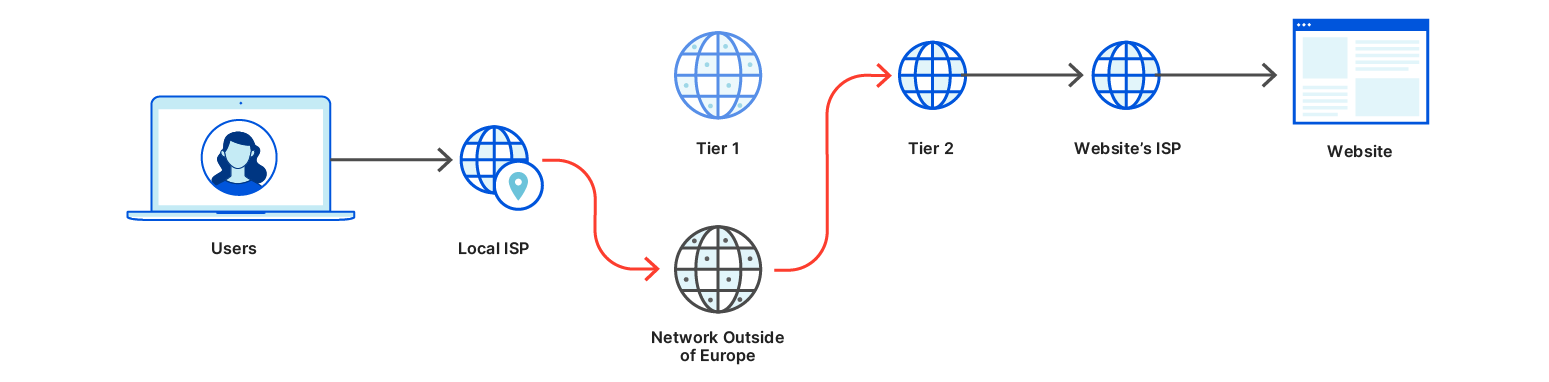
Normal network flowNetwork flow with malicious route leak
The good news is that the Internet is continuously evolving. One of the groups that help guide that evolution is the Internet Architecture Board (IAB). The IAB provides architectural oversight to the Internet Engineering Task Force (IETF), the Internet’s main standard-setting body. The IAB recently published RFC 8890, which states that individual end-users should be prioritized when designing Internet protocols. It says that if there’s a conflict between the interests of end-users and the interest of service providers, corporations, or governments, IETF decisions should favor end users. One of the prime interests of end-users is the right to privacy, and the IAB published RFC 6973 to indicate how Internet protocols should take privacy into account.
Today’s technical blog posts are about improvements to the Internet designed to respect user privacy. Privacy is a complex topic that spans multiple disciplines, so it’s essential to clarify what we mean by “improving privacy.” We are specifically talking about changing the protocols that handle privacy-sensitive information exposed “on-the-wire” and modifying them so that this data is exposed to fewer parties. This data continues to exist. It’s just no longer available or visible to third parties without building a mechanism to collect it at a higher layer of the Internet stack, the application layer. These changes go beyond website encryption; they go deep into the design of the systems that are foundational to making the Internet what it is.
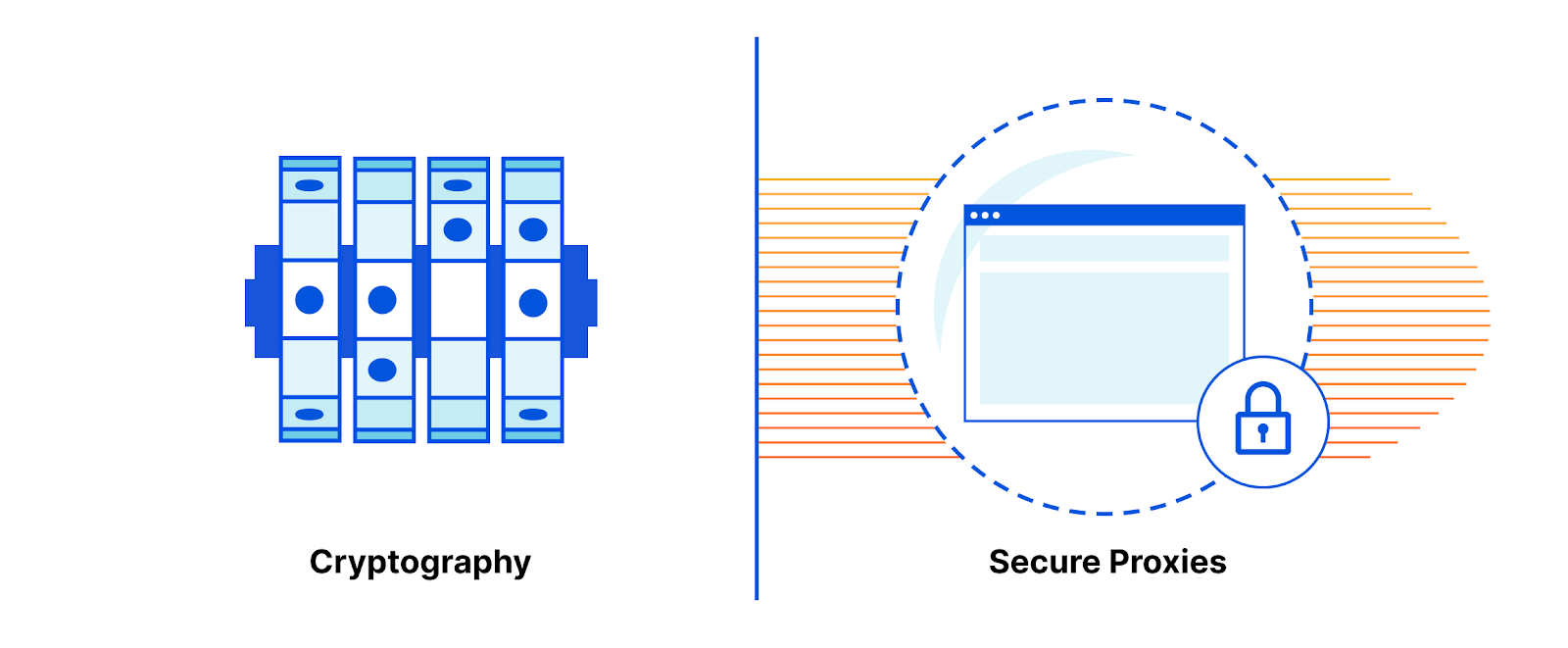
The toolbox: cryptography and secure proxies
Two tools for making sure data can be used without being seen are cryptography and secureproxies.
Cryptography allows information to be transformed into a format that a very limited number of people (those with the key) can understand. Some describe cryptography as a tool that transforms data security problems into key management problems. This is a humorous but fair description. Cryptography makes it easier to reason about privacy because only key holders can view data.
Another tool for protecting access to data is isolation/segmentation. By physically limiting which parties have access to information, you effectively build privacy walls. A popular architecture is to rely on policy-aware proxies to pass data from one place to another. Such proxies can be configured to strip sensitive data or block data transfers between parties according to what the privacy policy says.
Both these tools are useful individually, but they can be even more effective if combined. Onion routing (the cryptographic technique underlying Tor) is one example of how proxies and encryption can be used in tandem to enforce strong privacy. Broadly, if party A wants to send data to party B, they can encrypt the data with party B’s key and encrypt the metadata with a proxy’s key and send it to the proxy.
Platforms and services built on top of the Internet can build in consent systems, like privacy policies presented through user interfaces. The infrastructure of the Internet relies on layers of underlying protocols. Because these layers of the Internet are so far below where the user interacts with them, it’s almost impossible to build a concept of user consent. In order to respect users and protect them from privacy issues, the protocols that glue the Internet together should be designed with privacy enabled by default.
Data vs. metadata
The transition from a mostly unencrypted web to an encrypted web has done a lot for end-user privacy. For example, the “coffeeshop stalker” is no longer an issue for most sites. When accessing the majority of sites online, users are no longer broadcasting every aspect of their web browsing experience (search queries, browser versions, authentication cookies, etc.) over the Internet for any participant on the path to see. Suppose a site is configured correctly to use HTTPS. In that case, users can be confident their data is secure from onlookers and reaches only the intended party because their connections are both encrypted and authenticated.
However, HTTPS only protects the content of web requests. Even if you only browse sites over HTTPS, that doesn’t mean that your browsingpatterns are private. This is because HTTPS fails to encrypt a critical aspect of the exchange: the metadata. When you make a phone call, the metadata is the phone number, not the call’s contents. Metadata is the data about the data.
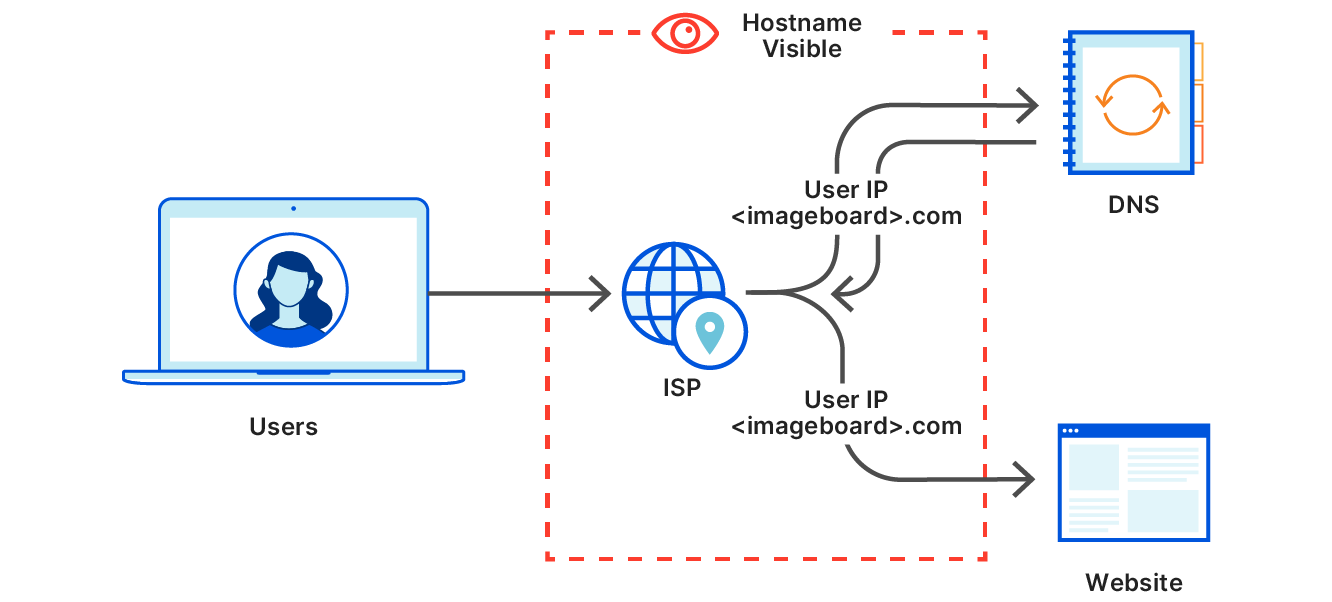
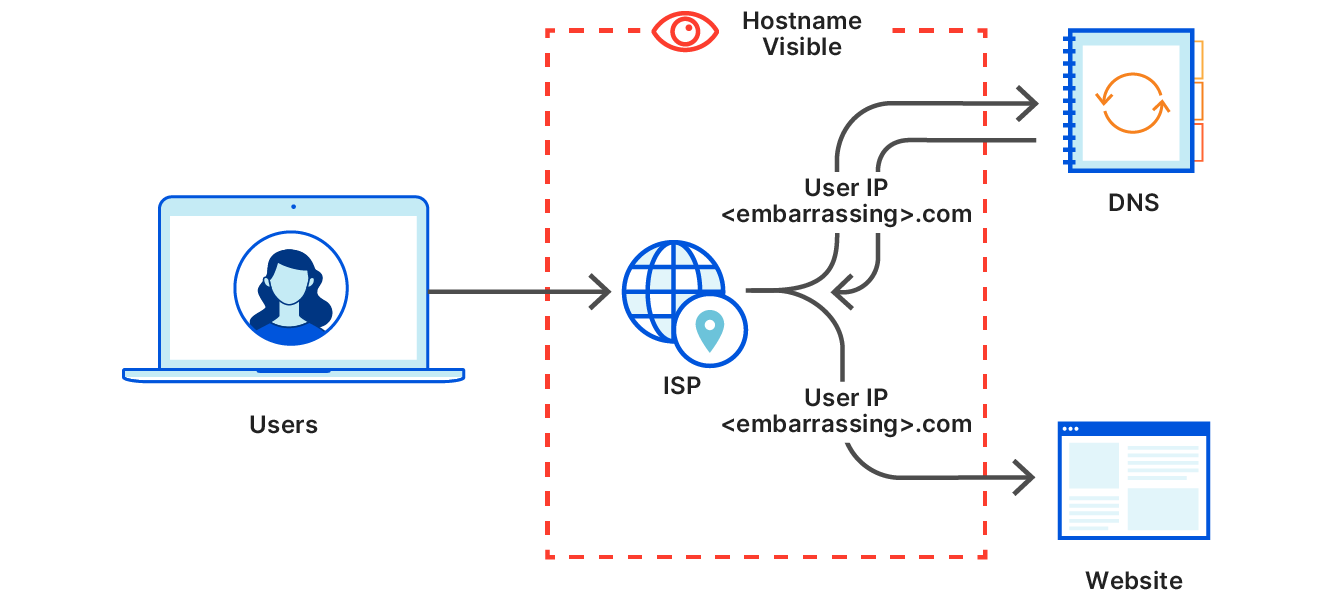
To illustrate the difference and why it matters, here’s a diagram of what happens when you visit a website like an imageboard. Say you’re going to a specific page on that board (https://<imageboard>.com/room101/) that has specific embedded images hosted on <embarassing>.com.
Page load for an imageboard, returning an HTML page with an image from an embarassing siteSubresource fetch for the image from an embarassing site
The space inside the dotted line here represents the part of the Internet that your data needs to transit. They include your local area network or coffee shop, your ISP, an Internet transit provider, and it could be the network portion of the cloud provider that hosts the server. Users often don’t have a relationship with these entities or a contract to prevent these parties from doing anything with the user’s data. And even if those entities don’t look at the data, a well-placed observer intercepting Internet traffic could see anything sent unencrypted. It would be best if they just didn’t see it at all. In this example, the fact that the user visited <imageboard>.com can be seen by an observer, which is expected. However, though page content is encrypted, it’s possible to learn which specific page you’ve visited can be seen since <embarassing>.com is also visible.
It’s a general rule that if data is available to on-path parties on the Internet, some of these on-path parties will use this data. It’s also true that these on-path parties need some metadata in order to facilitate the transport of this data. This balance is explored in RFC 8558, which explains how protocols should be designed thoughtfully with respect to the balance between too much metadata (bad for privacy) and too little metadata (bad for operations).
In an ideal world, Internet protocols would be designed with the principle of least privilege. They would provide the minimum amount of information needed for the on-path parties (the pipes) to do the job of transporting the data to the right place and keep everything else confidential by default. Current protocols, including TLS 1.3 and QUIC, are important steps towards this ideal but fall short with respect to metadata privacy.
Knowing both who you are and what you do online can lead to profiling
Today’s announcements reflect two metadata protection levels: the first involves limiting the amount of metadata available to third-party observers (like ISPs). The second involves restricting the amount of metadata that users share with service providers themselves.
Hostnames are an example of metadata that needs to be protected from third-party observers, which DoH and ECH intend to do. However, it doesn’t make sense to hide the hostname from the site you’re visiting. It also doesn’t make sense to hide it from a directory service like DNS. A DNS server needs to know which hostname you’re resolving to resolve it for you!
A privacy issue arises when a service provider knows about both what sites you’re visiting and who you are. Individual websites do not have this dangerous combination of information (except in the case of third party cookies, which are going away soon in browsers), but DNS providers do. Thankfully, it’s not actually necessary for a DNS resolver to know *both* the hostname of the service you’re going to and which IP you’re coming from. Disentangling the two, which is the goal of ODoH, is good for privacy.
The Internet is part of ‘our’ Infrastructure
Roads should be well-paved, well lit, have accurate signage, and be optimally connected. They aren’t designed to stop a car based on who’s inside it. Nor should they be! Like transportation infrastructure, Internet infrastructure is responsible for getting data where it needs to go, not looking inside packets, and making judgments. But the Internet is made of computers and software, and software tends to be written to make decisions based on the data it has available to it.
Privacy-preserving protocols attempt to eliminate the temptation for infrastructure providers and others to peek inside and make decisions based on personal data. A non-privacy preserving protocol like HTTP keeps data and metadata, like passwords, IP addresses, and hostnames, as explicit parts of the data sent over the wire. The fact that they are explicit means that they are available to any observer to collect and act on. A protocol like HTTPS improves upon this by making some of the data (such as passwords and site content) invisible on the wire using encryption.
The three protocols we are exploring today extend this concept.
ECH takes most of the unencrypted metadata in TLS (including the hostname) and encrypts it with a key that was fetched ahead of time.
ODoH (a new variant of DoH co-designed by Apple, Cloudflare, and Fastly engineers) uses proxies and onion-like encryption to make the source of a DNS query invisible to the DNS resolver. This protects the user’s IP address when resolving hostnames.
OPAQUE uses a new cryptographic technique to keep passwords hidden even from the server. Utilizing a construction called an Oblivious Pseudo-Random Function (as seen in Privacy Pass), the server does not learn the password; it only learns whether or not the user knows the password.
By making sure Internet infrastructure acts more like physical infrastructure, user privacy is more easily protected. The Internet is more private if private data can only be collected where the user has a chance to consent to its collection.
Doing it together
As much as we’re excited about working on new ways to make the Internet more private, innovation at a global scale doesn’t happen in a vacuum. Each of these projects is the output of a collaborative group of individuals working out in the open in organizations like the IETF and the IRTF. Protocols must come about through a consensus process that involves all the parties that make up the interconnected set of systems that power the Internet. From browser builders to cryptographers, from DNS operators to website administrators, this is truly a global team effort.
We also recognize that sweeping technical changes to the Internet will inevitably also impact the technical community. Adopting these new protocols may have legal and policy implications. We are actively working with governments and civil society groups to help educate them about the impact of these potential changes.
We’re looking forward to sharing our work today and hope that more interested parties join in developing these protocols. The projects we are announcing today were designed by experts from academia, industry, and hobbyists together and were built by engineers from Cloudflare Research (including the work of interns, which we will highlight) with everyone’s support Cloudflare.
If you’re interested in this type of work, we’re hiring!
Security questions still exist. They are less dominant now, but we haven’t yet condemned them as an industry hard enough so that they stop being added to authentication flows.
But they are bad. They are like passwords, but more easily guessable, because you have a password hint. And while there are opinions that they might be okay in certain scenarios, they have so many pitfalls that in practice we should just not consider them an option.
What are those pitfalls? Social engineering. Almost any security question’s answer is guessable by doing research on the target person online. We share more about our lives and don’t even realize how that affects us security-wise. Many security questions have a limited set of possible answers that can be enumerated with a brute force attack (e.g. what are the most common pet names; what are the most common last names in a given country for a given period of time, in order to guess someone’s mother’s maiden name; what are the high schools in the area where the person lives, and so on). So when someone wants to takeover your account, if all they have to do is open your Facebook profile or try 20-30 options, you have no protection.
But what are they for in the first place? Account recovery. You have forgotten your password and the system asks you some details about you to allow you to reset your password. We already have largely solved the problem of account recovery – send a reset password link to the email of the user. If the system itself is an email service, or in a couple of other scenarios, you can use a phone number, where a one-time password is sent for recovery purposes (or a secondary email, for email providers).
So we have the account recovery problem largely solved, why are security questions still around? Inertia, I guess. And the five monkeys experiment. There is no good reason to have a security question if you can have recovery email or phone. And you can safely consider that to be true (ok, maybe there are edge cases).
There are certain types of account recovery measures that resemble security questions and can be implemented as an additional layer, on top of a phone or email recovery. For more important services (e.g. your Facebook account or your main email), it may not be safe to consider just owning the phone or just having access to the associated email to be enough. Phones get stolen, emails get “broken into”. That’s why a security-like set of questions may serve as additional protection. For example – guessing recent activity. Facebook does that sometimes by asking you about your activity on the site or about your friends. This is not perfect, as it can be monitored by the malicious actor, but is an option. For your email, you can be asked what are the most recent emails that you’ve sent, and be presented with options to choose from, with some made up examples. These things are hard to implement because of geographic and language differences, but “guess your recent activity among these choices”, e.g. dynamically defined security questions, may be an acceptable additional step for account recovery.
But fixed security questions – no. Let’s kill those. I’m not the first to argue against security questions, but we need to be reminded that certain bad security practices should be left in the past.
Authentication is changing. We are desperately trying to get rid of the password itself (and still failing to do so), but before we manage to do so, we should first get rid of the “bad password in disguise”, the security question.
In this post, I’ll be showing you how to configure Amazon Cognito as an OpenID provider (OP) with a single-page web application.
This use case describes using Amazon Cognito to integrate with an existing authorization system following the OpenID Connect (OIDC) specification. OIDC is an identity layer on top of the OAuth 2.0 protocol to enable clients to verify the identity of users. Amazon Cognito lets you add user sign-up, sign-in, and access control to your web and mobile apps quickly and easily. Some key reasons customers select Amazon Cognito include:
Simplicity of implementation: The console is very intuitive; it takes a short time to understand how to configure and use Amazon Cognito. Amazon Cognito also has key out-of-the-box functionality, including social sign-in, multi-factor authentication (MFA), forgotten password support, and infrastructure as code (AWS CloudFormation) support.
Ability to customize workflows: Amazon Cognito offers the option of a hosted UI where users can sign-in directly to Amazon Cognito or sign-in via social identity providers such as Amazon, Google, Apple, and Facebook. The Amazon Cognito hosted UI and workflows help save your team significant time and effort.
OIDC support: Amazon Cognito can securely pass user profile information to an existing authorization system following the ODIC authorization code flow. The authorization system uses the user profile information to secure access to the app.
Amazon Cognito overview
Amazon Cognito follows the OIDC specification to authenticate users of web and mobile apps. Users can sign in directly through the Amazon Cognito hosted UI or through a federated identity provider, such as Amazon, Facebook, Apple, or Google. The hosted UI workflows include sign-in and sign-up, password reset, and MFA. Since not all customer workflows are the same, you can customize Amazon Cognito workflows at key points with AWS Lambda functions, allowing you to run code without provisioning or managing servers. After a user authenticates, Amazon Cognito returns standard OIDC tokens. You can use the user profile information in the ID token to grant your users access to your own resources or you can use the tokens to grant access to APIs hosted by Amazon API Gateway. You can also exchange the tokens for temporary AWS credentials to access other AWS services.
Figure 1: Amazon Cognito sign-in flow
OAuth 2.0 and OIDC
OAuth 2.0 is an open standard that allows a user to delegate access to their information to other websites or applications without handing over credentials. OIDC is an identity layer on top of OAuth 2.0 that uses OAuth 2.0 flows. OAuth 2.0 defines a number of flows to manage the interaction between the application, user, and authorization server. The right flow to use depends on the type of application.
The client credentials flow is used in machine-to-machine communications. You can use the client credentials flow to request an access token to access your own resources, which means you can use this flow when your app is requesting the token on its own behalf, not on behalf of a user. The authorization code grant flow is used to return an authorization code that is then exchanged for user pool tokens. Because the tokens are never exposed directly to the user, they are less likely to be shared broadly or accessed by an unauthorized party. However, a custom application is required on the back end to exchange the authorization code for user pool tokens. For security reasons, we recommend the Authorization Code Flow with Proof Key Code Exchange (PKCE) for public clients, such as single-page apps or native mobile apps.
The following table shows recommended flows per application type.
Application
CFlow
Description
Machine
Client credentials
Use this flow when your application is requesting the token on its own behalf, not on behalf of the user
Web app on a server
Authorization code grant
A regular web app on a web server
Single-page app
Authorization code grant PKCE
An app running in the browser, such as JavaScript
Mobile app
Authorization code grant PKCE
iOS or Android app
Securing the authorization code flow
Amazon Cognito can help you achieve compliance with regulatory frameworks and certifications, but it’s your responsibility to use the service in a way that remains compliant and secure. You need to determine the sensitivity of the user profile data in Amazon Cognito; adhere to your company’s security requirements, applicable laws and regulations; and configure your application and corresponding Amazon Cognito settings appropriately for your use case.
We recommend that you use the authorization code flow with PKCE for single-page apps. Applications that use PKCE generate a random code verifier that’s created for every authorization request. Proof Key for Code Exchange by OAuth Public Clients has more information on use of a code verifier. In the following sections, I will show you how to set up the Amazon Cognito authorization endpoint for your app to support a code verifier.
The authorization code flow
In OpenID terms, the app is the relying party (RP) and Amazon Cognito is the OP. The flow for the authorization code flow with PKCE is as follows:
The user enters the app home page URL in the browser and the browser fetches the app.
The app generates the PKCE code challenge and redirects the request to the Amazon Cognito OAuth2 authorization endpoint (/oauth2/authorize).
Amazon Cognito responds back to the user’s browser with the Amazon Cognito hosted sign-in page.
The user signs in with their user name and password, signs up as a new user, or signs in with a federated sign-in. After a successful sign-in, Amazon Cognito returns the authorization code to the browser, which redirects the authorization code back to the app.
The app sends a request to the Amazon Cognito OAuth2 token endpoint (/oauth2/token) with the authorization code, its client credentials, and the PKCE verifier.
Amazon Cognito authenticates the app with the supplied credentials, validates the authorization code, validates the request with the code verifier, and returns the OpenID tokens, access token, ID token, and refresh token.
The app validates the OpenID ID token and then uses the user profile information (claims) in the ID token to provide access to resources.(Optional) The app can use the access token to retrieve the user profile information from the Amazon Cognito user information endpoint (/userInfo).
Amazon Cognito returns the user profile information (claims) about the authenticated user to the app. The app then uses the claims to provide access to resources.
The following diagram shows the authorization code flow with PKCE.
Figure 2: Authorization code flow
Implementing an app with Amazon Cognito authentication
Now that you’ve learned about Amazon Cognito OAuth implementation, let’s create a working example app that uses Amazon Cognito OAuth implementation. You’ll create an Amazon Cognito user pool along with an app client, the app, an Amazon Simple Storage Service (Amazon S3) bucket, and an Amazon CloudFront distribution for the app, and you’ll configure the app client.
Step 1. Create a user pool
Start by creating your user pool with the default configuration.
Create a user pool:
Go to the Amazon Cognito console and select Manage User Pools. This takes you to the User Pools Directory.
Select Create a user pool in the upper corner.
Enter a Pool name, select Review defaults, and select Create pool.
Copy the Pool ID, which will be used later to create your single-page app. It will be something like region_xxxxx. You will use it to replace the variable YOUR_USERPOOL_ID in a later step.(Optional) You can add additional features to the user pool, but this demonstration uses the default configuration. For more information see, the Amazon Cognito documentation.
The following figure shows you entering the user pool name.
Figure 3: Enter a name for the user pool
The following figure shows the resulting user pool configuration.
Figure 4: Completed user pool configuration
Step 2. Create a domain name
The Amazon Cognito hosted UI lets you use your own domain name or you can add a prefix to the Amazon Cognito domain. This example uses an Amazon Cognito domain with a prefix.
Create a domain name:
Sign in to the Amazon Cognito console, select Manage User Pools, and select your user pool.
Under App integration, select Domain name.
In the Amazon Cognito domain section, add your Domain prefix (for example, myblog).
Select Check availability. If your domain isn’t available, change the domain prefix and try again.
When your domain is confirmed as available, copy the Domain prefix to use when you create your single-page app. You will use it to replace the variable YOUR_COGNITO_DOMAIN_PREFIX in a later step.
Choose Save changes.
The following figure shows creating an Amazon Cognito hosted domain.
Figure 5: Creating an Amazon Cognito hosted UI domain
Step 3. Create an app client
Now create the app client user pool. An app client is where you register your app with the user pool. Generally, you create an app client for each app platform. For example, you might create an app client for a single-page app and another app client for a mobile app. Each app client has its own ID, authentication flows, and permissions to access user attributes.
Create an app client:
Sign in to the Amazon Cognito console, select Manage User Pools, and select your user pool.
Under General settings, select App clients.
Choose Add an app client.
Enter a name for the app client in the App client name field.
Uncheck Generate client secret and accept the remaining default configurations.
Note: The client secret is used to authenticate the app client to the user pool. Generate client secret is unchecked because you don’t want to send the client secret on the URL using client-side JavaScript. The client secret is used by applications that have a server-side component that can secure the client secret.
Choose Create app client as shown in the following figure.
Figure 6: Create and configure an app client
Copy the App client ID. You will use it to replace the variable YOUR_APPCLIENT_ID in a later step.
The following figure shows the App client ID which is automatically generated when the app client is created.
Figure 7: App client configuration
Step 4. Create an Amazon S3 website bucket
Amazon S3 is an object storage service that offers industry-leading scalability, data availability, security, and performance. We use Amazon S3 here to host a static website.
Sign in to the AWS Management Console and open the Amazon S3 console.
Choose Create bucket to start the Create bucket wizard.
In Bucket name, enter a DNS-compliant name for your bucket. You will use this in a later step to replace the YOURS3BUCKETNAME variable.
In Region, choose the AWS Region where you want the bucket to reside.
Note: It’s recommended to create the Amazon S3 bucket in the same AWS Region as Amazon Cognito.
Look up the region code from the region table (for example, US-East [N. Virginia] has a region code of us-east-1). You will use the region code to replace the variable YOUR_REGION in a later step.
Choose Next.
Select the Versioning checkbox.
Choose Next.
Choose Next.
Choose Create bucket.
Select the bucket you just created from the Amazon S3 bucket list.
Select the Properties tab.
Choose Static website hosting.
Choose Use this bucket to host a website.
For the index document, enter index.html and then choose Save.
Step 5. Create a CloudFront distribution
Amazon CloudFront is a fast content delivery network service that helps securely deliver data, videos, applications, and APIs to customers globally with low latency and high transfer speeds—all within a developer-friendly environment. In this step, we use CloudFront to set up an HTTPS-enabled domain for the static website hosted on Amazon S3.
On the first page of the Create Distribution Wizard, in the Web section, choose Get Started.
Choose the Origin Domain Name from the dropdown list. It will be YOURS3BUCKETNAME.s3.amazonaws.com.
For Restrict Bucket Access, select Yes.
For Origin Access Identity, select Create a New Identity.
For Grant Read Permission on Bucket, select Yes, Update Bucket Policy.
For the Viewer Protocol Policy, select Redirect HTTP to HTTPS.
For Cache Policy, select Managed-Caching Disabled.
Set the Default Root Object to index.html.(Optional) Add a comment. Comments are a good place to describe the purpose of your distribution, for example, “Amazon Cognito SPA.”
Select Create Distribution. The distribution will take a few minutes to create and update.
Copy the Domain Name. This is the CloudFront distribution domain name, which you will use in a later step as the DOMAINNAME value in the YOUR_REDIRECT_URI variable.
Step 6. Create the app
Now that you’ve created the Amazon S3 bucket for static website hosting and the CloudFront distribution for the site, you’re ready to use the code that follows to create a sample app.
Use the following information from the previous steps:
YOUR_COGNITO_DOMAIN_PREFIX is from Step 2.
YOUR_REGION is the AWS region you used in Step 4 when you created your Amazon S3 bucket.
YOUR_APPCLIENT_ID is the App client ID from Step 3.
YOUR_USERPOOL_ID is the Pool ID from Step 1.
YOUR_REDIRECT_URI, which is https://DOMAINNAME/index.html, where DOMAINNAME is your domain name from Step 5.
Create userprofile.js
Use the following text to create the userprofile.js file. Substitute the preceding pre-existing values for the variables in the text.
var myHeaders = new Headers();
myHeaders.set('Cache-Control', 'no-store');
var urlParams = new URLSearchParams(window.location.search);
var tokens;
var domain = "YOUR_COGNITO_DOMAIN_PREFIX";
var region = "YOUR_REGION";
var appClientId = "YOUR_APPCLIENT_ID";
var userPoolId = "YOUR_USERPOOL_ID";
var redirectURI = "YOUR_REDIRECT_URI";

//Convert Payload from Base64-URL to JSON
const decodePayload = payload => {
  const cleanedPayload = payload.replace(/-/g, '+').replace(/_/g, '/');
  const decodedPayload = atob(cleanedPayload)
  const uriEncodedPayload = Array.from(decodedPayload).reduce((acc, char) => {
    const uriEncodedChar = ('00' + char.charCodeAt(0).toString(16)).slice(-2)
    return `${acc}%${uriEncodedChar}`
  }, '')
  const jsonPayload = decodeURIComponent(uriEncodedPayload);

  return JSON.parse(jsonPayload)
}

//Parse JWT Payload
const parseJWTPayload = token => {
    const [header, payload, signature] = token.split('.');
    const jsonPayload = decodePayload(payload)

    return jsonPayload
};

//Parse JWT Header
const parseJWTHeader = token => {
    const [header, payload, signature] = token.split('.');
    const jsonHeader = decodePayload(header)

    return jsonHeader
};

//Generate a Random String
const getRandomString = () => {
    const randomItems = new Uint32Array(28);
    crypto.getRandomValues(randomItems);
    const binaryStringItems = randomItems.map(dec => `0${dec.toString(16).substr(-2)}`)
    return binaryStringItems.reduce((acc, item) => `${acc}${item}`, '');
}

//Encrypt a String with SHA256
const encryptStringWithSHA256 = async str => {
    const PROTOCOL = 'SHA-256'
    const textEncoder = new TextEncoder();
    const encodedData = textEncoder.encode(str);
    return crypto.subtle.digest(PROTOCOL, encodedData);
}

//Convert Hash to Base64-URL
const hashToBase64url = arrayBuffer => {
    const items = new Uint8Array(arrayBuffer)
    const stringifiedArrayHash = items.reduce((acc, i) => `${acc}${String.fromCharCode(i)}`, '')
    const decodedHash = btoa(stringifiedArrayHash)

    const base64URL = decodedHash.replace(/\+/g, '-').replace(/\//g, '_').replace(/=+$/, '');
    return base64URL
}

// Main Function
async function main() {
  var code = urlParams.get('code');

  //If code not present then request code else request tokens
  if (code == null){

    // Create random "state"
    var state = getRandomString();
    sessionStorage.setItem("pkce_state", state);

    // Create PKCE code verifier
    var code_verifier = getRandomString();
    sessionStorage.setItem("code_verifier", code_verifier);

    // Create code challenge
    var arrayHash = await encryptStringWithSHA256(code_verifier);
    var code_challenge = hashToBase64url(arrayHash);
    sessionStorage.setItem("code_challenge", code_challenge)

    // Redirtect user-agent to /authorize endpoint
    location.href = "https://"+domain+".auth."+region+".amazoncognito.com/oauth2/authorize?response_type=code&state="+state+"&client_id="+appClientId+"&redirect_uri="+redirectURI+"&scope=openid&code_challenge_method=S256&code_challenge="+code_challenge;
  } else {

    // Verify state matches
    state = urlParams.get('state');
    if(sessionStorage.getItem("pkce_state") != state) {
        alert("Invalid state");
    } else {

    // Fetch OAuth2 tokens from Cognito
    code_verifier = sessionStorage.getItem('code_verifier');
  await fetch("https://"+domain+".auth."+region+".amazoncognito.com/oauth2/token?grant_type=authorization_code&client_id="+appClientId+"&code_verifier="+code_verifier+"&redirect_uri="+redirectURI+"&code="+ code,{
  method: 'post',
  headers: {
    'Content-Type': 'application/x-www-form-urlencoded'
  }})
  .then((response) => {
    return response.json();
  })
  .then((data) => {

    // Verify id_token
    tokens=data;
    var idVerified = verifyToken (tokens.id_token);
    Promise.resolve(idVerified).then(function(value) {
      if (value.localeCompare("verified")){
        alert("Invalid ID Token - "+ value);
        return;
      }
      });
    // Display tokens
    document.getElementById("id_token").innerHTML = JSON.stringify(parseJWTPayload(tokens.id_token),null,'\t');
    document.getElementById("access_token").innerHTML = JSON.stringify(parseJWTPayload(tokens.access_token),null,'\t');
  });

    // Fetch from /user_info
    await fetch("https://"+domain+".auth."+region+".amazoncognito.com/oauth2/userInfo",{
      method: 'post',
      headers: {
        'authorization': 'Bearer ' + tokens.access_token
    }})
    .then((response) => {
      return response.json();
    })
    .then((data) => {
      // Display user information
      document.getElementById("userInfo").innerHTML = JSON.stringify(data, null,'\t');
    });
  }}}
  main();
Create the verifier.js file
Use the following text to create the verifier.js file.
var key_id;
var keys;
var key_index;

//verify token
async function verifyToken (token) {
//get Cognito keys
keys_url = 'https://cognito-idp.'+ region +'.amazonaws.com/' + userPoolId + '/.well-known/jwks.json';
await fetch(keys_url)
.then((response) => {
return response.json();
})
.then((data) => {
keys = data['keys'];
});

//Get the kid (key id)
var tokenHeader = parseJWTHeader(token);
key_id = tokenHeader.kid;

//search for the kid key id in the Cognito Keys
const key = keys.find(key =>key.kid===key_id)
if (key === undefined){
return "Public key not found in Cognito jwks.json";
}

//verify JWT Signature
var keyObj = KEYUTIL.getKey(key);
var isValid = KJUR.jws.JWS.verifyJWT(token, keyObj, {alg: ["RS256"]});
if (isValid){
} else {
return("Signature verification failed");
}

//verify token has not expired
var tokenPayload = parseJWTPayload(token);
if (Date.now() >= tokenPayload.exp * 1000) {
return("Token expired");
}

//verify app_client_id
var n = tokenPayload.aud.localeCompare(appClientId)
if (n != 0){
return("Token was not issued for this audience");
}
return("verified");
};
Create an index.html file
Use the following text to create the index.html file.
Upload the files into the Amazon S3 Bucket you created earlier
Upload the files you just created to the Amazon S3 bucket that you created in Step 4. If you’re using Chrome or Firefox browsers, you can choose the folders and files to upload and then drag and drop them into the destination bucket. Dragging and dropping is the only way that you can upload folders.
Sign in to the AWS Management Console and open the Amazon S3 console.
In the Bucket name list, choose the name of the bucket that you created earlier in Step 4.
In a window other than the console window, select the index.html file to upload. Then drag and drop the file into the console window that lists the destination bucket.
In the Upload dialog box, choose Upload.
Choose Create Folder.
Enter the name js and choose Save.
Choose the js folder.
In a window other than the console window, select the userprofile.js and verifier.js files to upload. Then drag and drop the files into the console window js folder.
Note: The Amazon S3 bucket root will contain the index.html file and a js folder. The js folder will contain the userprofile.js and verifier.js files.
Step 7. Configure the app client settings
Use the Amazon Cognito console to configure the app client settings, including identity providers, OAuth flows, and OAuth scopes.
Select App integration, and then select App client settings.
Under Enabled Identity Providers, select Cognito User Pool.(Optional) You can add federated identity providers. Adding User Pool Sign-in Through a Third-Party has more information about how to add federation providers.
Enter the Callback URL(s) where the user is to be redirected after successfully signing in. The callback URL is the URL of your web app that will receive the authorization code. In our example, this will be the Domain Name for the CloudFront distribution you created earlier. It will look something like https://DOMAINNAME/index.html where DOMAINNAME is xxxxxxx.cloudfront.net.
Note: HTTPS is required for the Callback URLs. For this example, I used CloudFront as a HTTPS endpoint for the app in Amazon S3.
Next, select Authorization code grant from the Allowed OAuth Flows and OpenID from Allowed OAuth Scopes. The OpenID scope will return the ID token and grant access to all user attributes that are readable by the client.
Choose Save changes.
Step 8. Show the app home page
Now that the Amazon Cognito user pool is configured and the sample app is built, you can test using Amazon Cognito as an OP from the sample JavaScript app you created in Step 6.
View the app’s home page:
Open a web browser and enter the app’s home page URL using the CloudFront distribution to serve your index.html page created in Step 6 (https://DOMAINNAME/index.html) and the app will redirect the browser to the Amazon Cognito /authorize endpoint.
The /authorize endpoint redirects the browser to the Amazon Cognito hosted UI, where the user can sign in or sign up. The following figure shows the user sign-in page.
Figure 8: User sign-in page
Step 9. Create a user
You can use the Amazon Cognito user pool to manage your users or you can use a federated identity provider. Users can sign in or sign up from the Amazon Cognito hosted UI or from a federated identity provider. If you configured a federated identity provider, users will see a list of federated providers that they can choose from. When a user chooses a federated identity provider, they are redirected to the federated identity provider sign-in page. After signing in, the browser is directed back to Amazon Cognito. For this post, Amazon Cognito is the only identity provider, so you will use the Amazon Cognito hosted UI to create an Amazon Cognito user.
Create a new user using Amazon Cognito hosted UI:
Create a new user by selecting Sign up and entering a username, password, and email address. Then select the Sign up button. The following figure shows the sign up screen.
Figure 9: Sign up with a new account
The Amazon Cognito sign up workflow will verify the email address by sending a verification code to that address. The following figure shows the prompt to enter the verification code.
Figure 10: Enter the verification code
Enter the code from the verification email in the Verification Code text box.
Select Confirm Account.
Step 10. Viewing the Amazon Cognito tokens and profile information
After authentication, the app displays the tokens and user information. The following figure shows the OAuth2 access token and OIDC ID token that are returned from the /token endpoint and the user profile returned from the /userInfo endpoint. Now that the user has been authenticated, the application can use the user’s email address to look up the user’s account information in an application data store. Based on the user’s account information, the application can grant/restrict access to paid content or show account information like order history.
Figure 11: Token and user profile information
Note: Many browsers will cache redirects. If your browser is repeatedly redirecting to the index.html page, clear the browser cache.
Summary
In this post, we’ve shown you how easy it is to add user authentication to your web and mobile apps with Amazon Cognito.
We created a Cognito User Pool as our user directory, assigned a domain name to the Amazon Cognito hosted UI, and created an application client for our application. Then we created an Amazon S3 bucket to host our website. Next, we created a CloudFront distribution for our Amazon S3 bucket. Then we created our application and uploaded it to our Amazon S3 website bucket. From there, we configured the client app settings with our identity provider, OAuth flows, and scopes. Then we accessed our application and used the Amazon Cognito sign-in flow to create a username and password. Finally, we logged into our application to see the OAuth and OIDC tokens.
Amazon Cognito saves you time and effort when implementing authentication with an intuitive UI, OAuth2 and OIDC support, and customizable workflows. You can now focus on building features that are important to your core business.
If you have feedback about this post, submit comments in the Comments section below. If you have questions about this post, start a new thread on the Amazon Cognito forum or contact AWS Support.
Want more AWS Security how-to content, news, and feature announcements? Follow us on Twitter.
Abstract: Risk-based Authentication (RBA) is an adaptive security measure to strengthen password-based authentication. RBA monitors additional features during login, and when observed feature values differ significantly from previously seen ones, users have to provide additional authentication factors such as a verification code. RBA has the potential to offer more usable authentication, but the usability and the security perceptions of RBA are not studied well.
We present the results of a between-group lab study (n=65) to evaluate usability and security perceptions of two RBA variants, one 2FA variant, and password-only authentication. Our study shows with significant results that RBA is considered to be more usable than the studied 2FA variants, while it is perceived as more secure than password-only authentication in general and comparably se-cure to 2FA in a variety of application types. We also observed RBA usability problems and provide recommendations for mitigation.Our contribution provides a first deeper understanding of the users’perception of RBA and helps to improve RBA implementations for a broader user acceptance.
Terminology-wise, there is a clear distinction between two-factor authentication (multi-factor authentication) and two-step verification (authentication), as this article explains. 2FA/MFA is authentication using more than one factors, i.e. “something you know” (password), “something you have” (token, card) and “something you are” (biometrics). Two-step verification is basically using two passwords – one permanent and another one that is short-lived and one-time.
At least that’s the theory. In practice it’s more complicated to say which authentication methods belongs to which category (“something you X”). Let me illustrate that with a few emamples:
An OTP hardware token is considered “something you have”. But it uses a shared symmetric secret with the server so that both can generate the same code at the same time (if using TOTP), or the same sequence. This means the secret is effectively “something you know”, because someone may steal it from the server, even though the hardware token is protected. Unless, of course, the server stores the shared secret in an HSM and does the OTP comparison on the HSM itself (some support that). And there’s still a theoretical possibility for the keys to leak prior to being stored on hardware. So is a hardware token “something you have” or “something you know”? For practical purposes it can be considered “something you have”
Smartphone OTP is often not considered as secure as a hardware token, but it should be, due to the secure storage of modern phones. The secret is shared once during enrollment (usually with on-screen scanning), so it should be “something you have” as much as a hardware token
SMS is not considered secure and often given as an example for 2-step verification, because it’s just another password. While that’s true, this is because of a particular SS7 vulnerability (allowing the interception of mobile communication). If mobile communication standards were secure, the SIM card would be tied to the number and only the SIM card holder would be able to receive the message, making it “something you have”. But with the known vulnerabilities, it is “something you know”, and that something is actually the phone number.
Fingerprint scanners represent “something you are”. And in most devices they are built in a way that the scanner authenticates to the phone (being cryptographically bound to the CPU) while transmitting the fingerprint data, so you can’t just intercept the bytes transferred and then replay them. That’s the theory; it’s not publicly documented how it’s implemented. But if it were not so, then “something you are” is “something you have” – a sequence of bytes representing your fingerprint scan, and that can leak. This is precisely why biometric identification should only be done locally, on the phone, without any server interaction – you can’t make sure the server is receiving sensor-scanned data or captured and replayed data. That said, biometric factors are tied to the proper implementation of the authenticating smartphone application – if your, say, banking application needs a fingerprint scan to run, a malicious actor should not be able to bypass that by stealing shared credentials (userIDs, secrets) and do API calls to your service. So to the server there’s no “something you are”. It’s always “something that the client-side application has verified that you are, if implemented properly”
A digital signature (via a smartcard or yubikey or even a smartphone with secure hardware storage for private keys) is “something you have” – it works by signing one-time challenges, sent by the server and verifying that the signature has been created by the private key associated with the previously enrolled public key. Knowing the public key gives you nothing, because of how public-key cryptography works. There’s no shared secret and no intermediary whose data flow can be intercepted. A private key is still “something you know”, but by putting it in hardware it becomes “something you have”, i.e. a true second factor. Of course, until someone finds out that the random generation of primes used for generating the private key has been broken and you can derive the private key form the public key (as happened recently with one vendor).
There isn’t an obvious boundary between theoretical and practical. “Something you are” and “something you have” can eventually be turned into “something you know” (or “something someone stores”). Some theoretical attacks can become very practical overnight.
I’d suggest we stick to calling everything “two-factor authentication”, because it’s more important to have mass understanding of the usefulness of the technique than to nitpick on the terminology. 2FA does not solve phishing, unfortunately, but it solves leaked credentials, which is good enough and everyone should have some form of it. Even SMS is better than nothing (obviously, for high-profile systems, digital signatures is the way to go).
The issue is with a protocol called Cross-Transport Key Derivation (or CTKD, for short). When, say, an iPhone is getting ready to pair up with Bluetooth-powered device, CTKD’s role is to set up two separate authentication keys for that phone: one for a “Bluetooth Low Energy” device, and one for a device using what’s known as the “Basic Rate/Enhanced Data Rate” standard. Different devices require different amounts of data — and battery power — from a phone. Being able to toggle between the standards needed for Bluetooth devices that take a ton of data (like a Chromecast), and those that require a bit less (like a smartwatch) is more efficient. Incidentally, it might also be less secure.
According to the researchers, if a phone supports both of those standards but doesn’t require some sort of authentication or permission on the user’s end, a hackery sort who’s within Bluetooth range can use its CTKD connection to derive its own competing key. With that connection, according to the researchers, this sort of erzatz authentication can also allow bad actors to weaken the encryption that these keys use in the first place — which can open its owner up to more attacks further down the road, or perform “man in the middle” style attacks that snoop on unprotected data being sent by the phone’s apps and services.
Patches are not immediately available at the time of writing. The only way to protect against BLURtooth attacks is to control the environment in which Bluetooth devices are paired, in order to prevent man-in-the-middle attacks, or pairings with rogue devices carried out via social engineering (tricking the human operator).
However, patches are expected to be available at one point. When they’ll be, they’ll most likely be integrated as firmware or operating system updates for Bluetooth capable devices.
The timeline for these updates is, for the moment, unclear, as device vendors and OS makers usually work on different timelines, and some may not prioritize security patches as others. The number of vulnerable devices is also unclear and hard to quantify.
Many Bluetooth devices can’t be patched.
Final note: this seems to be another example of simultaneous discovery:
According to the Bluetooth SIG, the BLURtooth attack was discovered independently by two groups of academics from the École Polytechnique Fédérale de Lausanne (EPFL) and Purdue University.
When Yahoo and AOL came together a year ago as a part of the new Verizon subsidiary Oath, we took on the challenge of unifying their identity platforms based on current identity standards. Identity standards have been a critical part of the Internet ecosystem over the last 20+ years. From single-sign-on and identity federation with SAML; to the newer identity protocols including OpenID Connect, OAuth2, JOSE, and SCIM (to name a few); to the explorations of “self-sovereign identity” based on distributed ledger technologies; standards have played a key role in providing a secure identity layer for the Internet.
As we navigated this journey, we ran across a number of different use cases where there was either no standard or no best practice available for our varied and complicated needs. Instead of creating entirely new standards to solve our problems, we found it more productive to use existing standards in new ways.
One such use case arose when we realized that we needed to migrate the identity stored in mobile apps from the legacy identity provider to the new Oath identity platform. For most browser (mobile or desktop) use cases, this doesn’t present a huge problem; some DNS magic and HTTP redirects and the user will sign in at the correct endpoint. Also it’s expected for users accessing services via their browser to have to sign in now and then.
However, for mobile applications it’s a completely different story. The normal user pattern for mobile apps is for the user to sign in (via OpenID Connect or OAuth2) and for the app to then be issued long-lived tokens (well, the refresh token is long lived) and the user never has to sign in again on the device (entering a password on the device is NOT a good experience for the user).
So the issue is, how do we allow the mobile app to move from one
identity provider to another without the user having to re-enter their
credentials? The solution came from researching what standards currently
exist that might addres this use case (see figure “Standards Landscape”
below) and finding the OAuth 2.0 Token Exchange draft specification (https://tools.ietf.org/html/draft-ietf-oauth-token-exchange-13).
The Token Exchange draft allows for a given token to be exchanged for new tokens in a different domain. This could be used to manage the “audience” of a token that needs to be passed among a set of microservices to accomplish a task on behalf of the user, as an example. For the use case at hand, we created a specific implementation of the Token Exchange specification (a profile) to allow the refresh token from the originating Identity Provider (IDP) to be exchanged for new tokens from the consolidated IDP. By profiling this draft standard we were able to create a much better user experience for our consumers and do so without inventing proprietary mechanisms.
During this identity technical consolidation we also had to address how to support sharing signed-in users across mobile applications written by the same company (technically, signed with the same vendor signing key). Specifically, how can a signed-in user to Yahoo Mail not have to re-sign in when they start using the Yahoo Sports app? The current best practice for this is captured in OAuth 2.0 for Natives Apps (RFC 8252). However, the flow described by this specification requires that the mobile device system browser hold the user’s authenticated sessions. This has some drawbacks such as users clearing their cookies, or using private browsing mode, or even worse, requiring the IDPs to support multiple users signed in at the same time (not something most IDPs support).
While, RFC 8252 provides a mechanism for single-sign-on (SSO) across mobile apps provided by any vendor, we wanted a better solution for apps provided by Oath. So we looked at how could we enable mobile apps signed by the vendor to share the signed-in state in a more “back channel” way. One important fact is that mobile apps cryptographically signed by the same vender can securely share data via the device keychain on iOS and Account Manager on Android.
Using this as a starting point we defined a new OAuth2 scope, device_sso, whose purpose is to require the Authorization Server (AS) to return a unique “secret” assigned to that specific device. The precedent for using a scope to define specification behaviour is OpenID Connect itself, which defines the “openid” scope as the trigger for the OpenID Provider (an OAuth2 AS) to implement the OpenID Connect specification. The device_secret is returned to a mobile app when the OAuth2 code is exchanged for tokens and then stored by the mobile app in the device keychain and with the id_token identifying the user who signed in.
At this point, a second mobile app signed by the same vendor can look in the keychain and find the id_token, ask the user if they want to use that identity with the new app, and then use a profile of the token exchange spec to obtain tokens for the second mobile app based on the id_token and the device_secret. The full sequence of steps looks like this:
As a result of our identity consolidation work over the past year, we derived a set of principles identity architects should find useful for addressing use cases that don’t have a known specification or best practice. Moreover, these are applicable in many contexts outside of identity standards:
Spend time researching the existing set of standards and draft standards. As the diagram shows, there are a lot of standards out there already, so understanding them is critical.
Don’t invent something new if you can just profile or combine already existing specifications.
Make sure you understand the spirit and intent of the existing specifications.
For those cases where an extension is required, make sure to extend the specification based on its spirit and intent.
Ask the community for clarity regarding any existing specification or draft.
Contribute back to the community via blog posts, best practice documents, or a new specification.
As we learned during the consolidation of our Yahoo and AOL identity platforms, and as demonstrated in our examples, there is no need to resort to proprietary solutions for use cases that at first look do not appear to have a standards-based solution. Instead, it’s much better to follow these principles, avoid the NIH (not-invented-here) syndrome, and invest the time to build solutions on standards.
The collective thoughts of the interwebz
Manage Consent
To provide the best experiences, we use technologies like cookies to store and/or access device information. Consenting to these technologies will allow us to process data such as browsing behavior or unique IDs on this site. Not consenting or withdrawing consent, may adversely affect certain features and functions.
Functional
Always active
The technical storage or access is strictly necessary for the legitimate purpose of enabling the use of a specific service explicitly requested by the subscriber or user, or for the sole purpose of carrying out the transmission of a communication over an electronic communications network.
Preferences
The technical storage or access is necessary for the legitimate purpose of storing preferences that are not requested by the subscriber or user.
Statistics
The technical storage or access that is used exclusively for statistical purposes.The technical storage or access that is used exclusively for anonymous statistical purposes. Without a subpoena, voluntary compliance on the part of your Internet Service Provider, or additional records from a third party, information stored or retrieved for this purpose alone cannot usually be used to identify you.
Marketing
The technical storage or access is required to create user profiles to send advertising, or to track the user on a website or across several websites for similar marketing purposes.