Tag Archives: Cloud Storage

Querying a Decade of Drive Stats Data

Post Syndicated from Pat Patterson original https://www.backblaze.com/blog/querying-a-decade-of-drive-stats-data/

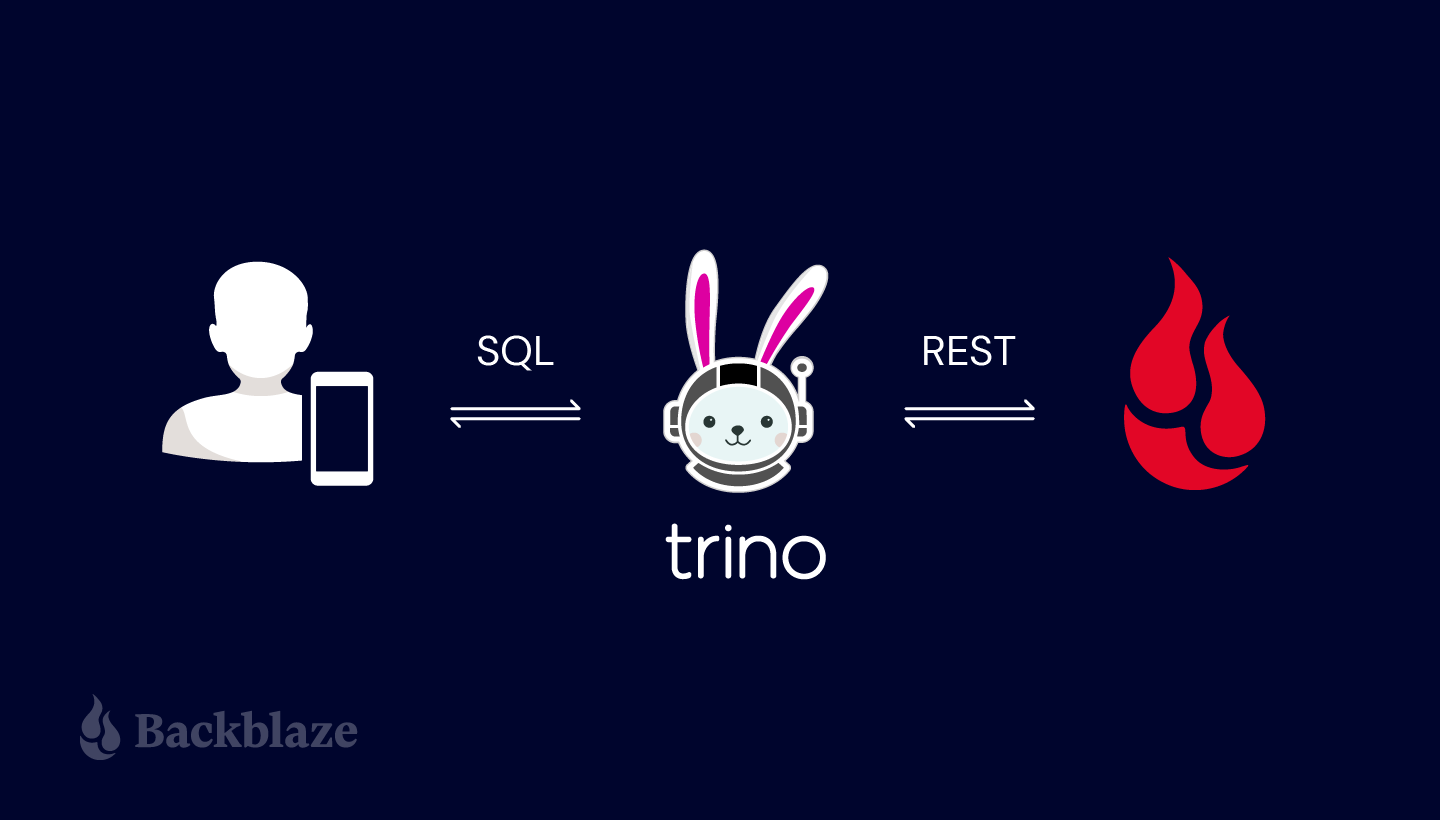
Last week, we published Backblaze Drive Stats for Q3 2022, sharing the metrics we’ve gathered on our fleet of over 230,000 hard drives. In this blog post, I’ll explain how we’re now using the Trino open source SQL query engine in ensuring the integrity of Drive Stats data, and how we plan to use Trino in future to generate the Drive Stats result set for publication.

Converting Zipped CSV Files into Parquet

In his blog post Storing and Querying Analytical Data in Backblaze B2, my colleague Greg Hamer explained how we started using Trino to analyze Drive Stats data earlier this year. We quickly discovered that formatting the data set as Apache Parquet minimized the amount of data that Trino needed to download from Backblaze B2 Cloud Storage to process queries, resulting in a dramatic improvement in query performance over the original CSV-formatted data.

As Greg mentioned in the earlier post, Drive Stats data is published quarterly to Backblaze B2 as a single .zip file containing a CSV file for each day of the quarter. Each CSV file contains a record for each drive that was operational on that day (see this list of the fields in each record).

When Greg and I started working with the Parquet-formatted Drive Stats data, we took a simple, but somewhat inefficient, approach to converting the data from zipped CSV to Parquet:

  • Download the existing zip files to local storage.
  • Unzip them.
  • Run a Python script to read the CSV files and write Parquet-formatted data back to local storage.
  • Upload the Parquet files to Backblaze B2.

We were keen to automate this process, so we reworked the script to use the Python ZipFile module to read the zipped CSV data directly from its Backblaze B2 Bucket and write Parquet back to another bucket. We’ve shared the script in this GitHub gist.

After running the script, the drivestats table now contains data up until the end of Q3 2022:

trino:ds> SELECT DISTINCT year, month, day 
FROM drivestats ORDER BY year DESC, month DESC, day DESC LIMIT 1;
year | month | day 
------+-------+-----
 2022 |     9 |  30 
(1 row)

In the last article, we were working with data running until the end of Q1 2022. On March 31, 2022, the Drive Stats dataset comprised 296 million records, and there were 211,732 drives in operation. Let’s see what the current situation is:

trino:ds> SELECT COUNT(*) FROM drivestats;
   _col0 
-----------
 346006813 
(1 row) 

trino:ds> SELECT COUNT(*) FROM drivestats 
    WHERE year = 2022 AND month = 9 AND day = 30;
   _col0 
--------
 230897 
(1 row)

So, since the end of March, we’ve added 50 million rows to the dataset, and Backblaze is now spinning nearly 231,000 drives—over 19,000 more than at the end of March 2022. Put another way, we’ve added more than 100 drives per day to the Backblaze Cloud Storage Platform in the past six months. Finally, how many exabytes of raw data storage does Backblaze now manage?

trino:ds> SELECT ROUND(SUM(CAST(capacity_bytes AS bigint))/1e+18, 2)
FROM drivestats WHERE year = 2022 AND month = 9 AND day = 30;
 _col0 
-------
  2.62 
(1 row)

Will we cross the three exabyte mark this year? Stay tuned to find out.

Ensuring the Integrity of Drive Stats Data

As Andy Klein, the Drive Stats supremo, collates each quarter’s data, he looks for instances of healthy drives being removed and then returned to service. This can happen for a variety of operational reasons, but it shows up in the data as the drive having failed, then later revived. This subset of data shows the phenomenon:

trino:ds> SELECT year, month, day, failure FROM drivestats WHERE 
serial_number = 'ZHZ4VLNV' AND year >= 2021 ORDER BY year, month, 
day;
 year | month | day | failure 
------+-------+-----+---------
...
 2021 |    12 |  26 |       0 
 2021 |    12 |  27 |       0 
 2021 |    12 |  28 |       0 
 2021 |    12 |  29 |       1 
 2022 |     1 |   3 |       0 
 2022 |     1 |   4 |       0 
 2022 |     1 |   5 |       0 
...

This drive appears to have failed on Dec 29, 2021, but was returned to service on Jan 3, 2022.

Since these spurious “failures” would skew the reliability statistics, Andy searches for and removes them from each quarter’s data. However, even Andy can’t see into the future, so, when a drive is taken offline at the end of one quarter and then returned to service in the next quarter, as in the above case, there is a bit of a manual process to find anomalies and clean up past data.

With the entire dataset in a single location, we can now write a SQL query to find drives that were removed, then returned to service, no matter when it occurred. Let’s build that query up in stages.

We start by finding the serial numbers and failure dates for each drive failure:

trino:ds> SELECT serial_number, DATE(FORMAT('%04d-%02d-%02d', year, 
month, day)) AS date 
FROM drivestats 
WHERE failure = 1;
  serial_number  |    date    
-----------------+------------
 ZHZ3KMX4        | 2021-04-01 
 ZA12RBBM        | 2021-04-01 
 S300Z52X        | 2017-03-01 
 Z3051FWK        | 2017-03-01 
 Z304JQAE        | 2017-03-02 
...
(17092 rows)

Now we find the most recent record for each drive:

trino:ds> SELECT serial_number, MAX(DATE(FORMAT('%04d-%02d-%02d', 
year, month, day))) AS date
    FROM drivestats 
    GROUP BY serial_number;
  serial_number   |    date    
------------------+------------
 ZHZ65F2W         | 2022-09-30 
 ZLW0GQ82         | 2022-09-30 
 ZLW0GQ86         | 2022-09-30 
 Z8A0A057F97G     | 2022-09-30 
 ZHZ62XAR         | 2022-09-30 
...
(329908 rows)

We then join the two result sets to find spurious failures; that is, failures where the drive was later returned to service. Note the join condition—we select records whose serial numbers match and where the most recent record is later than the failure:

trino:ds> SELECT f.serial_number, f.failure_date
FROM (
    SELECT serial_number, DATE(FORMAT('%04d-%02d-%02d', year, month, 
day)) AS failure_date
    FROM drivestats 
    WHERE failure = 1
) AS f
INNER JOIN (
    SELECT serial_number, MAX(DATE(FORMAT('%04d-%02d-%02d', year, 
month, day))) AS last_date
    FROM drivestats 
    GROUP BY serial_number
) AS l
ON f.serial_number = l.serial_number AND l.last_date > f.failure_date;
  serial_number  | failure_date 
-----------------+--------------
 2003261ED34D    | 2022-06-09 
 W300STQ5        | 2022-06-11 
 ZHZ61JMQ        | 2022-06-17 
 ZHZ4VL2P        | 2022-06-21 
 WD-WX31A2464044 | 2015-06-23 
(864 rows)

As you can see, the current schema makes date comparisons a little awkward, pointing the way to optimizing the schema by adding a DATE-typed column to the existing year, month, and day. This kind of denormalization is common in analytical data.

Calculating the Quarterly Failure Rates

In calculating failure rates per drive model for each quarter, Andy loads the quarter’s data into MySQL and defines a set of views. We additionally define the current_quarter view to restrict the failure rate calculation to data in July, August, and September 2022:

CREATE VIEW current_quarter AS 
    SELECT * FROM drivestats
    WHERE year = 2022 AND month in (7, 8, 9);

CREATE VIEW drive_days AS 
    SELECT model, COUNT(*) AS drive_days 
    FROM current_quarter
    GROUP BY model;

CREATE VIEW failures AS
    SELECT model, COUNT(*) AS failures
    FROM current_quarter
    WHERE failure = 1
    GROUP BY model
UNION
    SELECT DISTINCT(model), 0 AS failures
    FROM current_quarter
    WHERE model NOT IN
    (
        SELECT model
        FROM current_quarter
        WHERE failure = 1
        GROUP BY model
    );

CREATE VIEW failure_rates AS
    SELECT drive_days.model AS model,
           drive_days.drive_days AS drive_days,
           failures.failures AS failures, 
           100.0 * (1.0 * failures) / (drive_days / 365.0) AS 
annual_failure_rate
    FROM drive_days, failures
    WHERE drive_days.model = failures.model;

Running the above statements in Trino, then querying the failure_rates view, yields a superset of the data that we published in the Q3 2022 Drive Stats report. The difference is that this result set includes drives that Andy excludes from the Drive Stats report: SSD boot drives, drives that were used for testing purposes, and drive models which did not have at least 60 drives in service:

trino:ds> SELECT * FROM failure_rates ORDER BY model;
        model         | drive_days | failures | annual_failure_rate 
----------------------+------------+----------+---------------------
 CT250MX500SSD1       |      32171 |        2 |                2.27 
 DELLBOSS VD          |      33706 |        0 |                0.00 
 HGST HDS5C4040ALE630 |       2389 |        0 |                0.00 
 HGST HDS724040ALE640 |         92 |        0 |                0.00 
 HGST HMS5C4040ALE640 |     341509 |        3 |                0.32 
 ...
 WDC WD60EFRX         |        276 |        0 |                0.00 
 WDC WDS250G2B0A      |       3867 |        0 |                0.00 
 WDC WUH721414ALE6L4  |     765990 |        5 |                0.24 
 WDC WUH721816ALE6L0  |     242954 |        0 |                0.00 
 WDC WUH721816ALE6L4  |     308630 |        6 |                0.71 
(74 rows)

Query 20221102_010612_00022_qscbi, FINISHED, 1 node
Splits: 139 total, 139 done (100.00%)
8.63 [82.4M rows, 5.29MB] [9.54M rows/s, 628KB/s]

Optimizing the Drive Stats Production Process

Now that we have shown that we can derive the required statistics by querying the Parquet-formatted data with Trino, we can streamline the Drive Stats process. Starting with the Q4 2022 report, rather than wrangling each quarter’s data with a mixture of tools on his laptop, Andy will use Trino to both clean up the raw data and produce the Drive Stats result set for publication.

Accessing the Drive Stats Parquet Dataset

When Greg and I started experimenting with Trino, our starting point was Brian Olsen’s Trino Getting Started GitHub repository, in particular, the Hive connector over MinIO file storage tutorial. Since MinIO and Backblaze B2 both have S3-compatible APIs, it was easy to adapt the tutorial’s configuration to target the Drive Stats data in Backblaze B2, and Brian was kind enough to accept my contribution of a new tutorial showing how to use the Hive connector over Backblaze B2 Cloud Storage. This tutorial will get you started using Trino with data stored in Backblaze B2 Buckets, and includes a section on accessing the Drive Stats dataset.

You might be interested to know that Backblaze is sponsoring this year’s Trino Summit, taking place virtually and in person in San Francisco, on November 10. Registration is free; if you do attend, come say hi to Greg and me at the Backblaze booth and see Trino in action, querying data stored in Backblaze B2.

The post Querying a Decade of Drive Stats Data appeared first on Backblaze Blog | Cloud Storage & Cloud Backup.

Backblaze Drive Stats for Q3 2022

Post Syndicated from original https://www.backblaze.com/blog/backblaze-drive-stats-for-q3-2022/

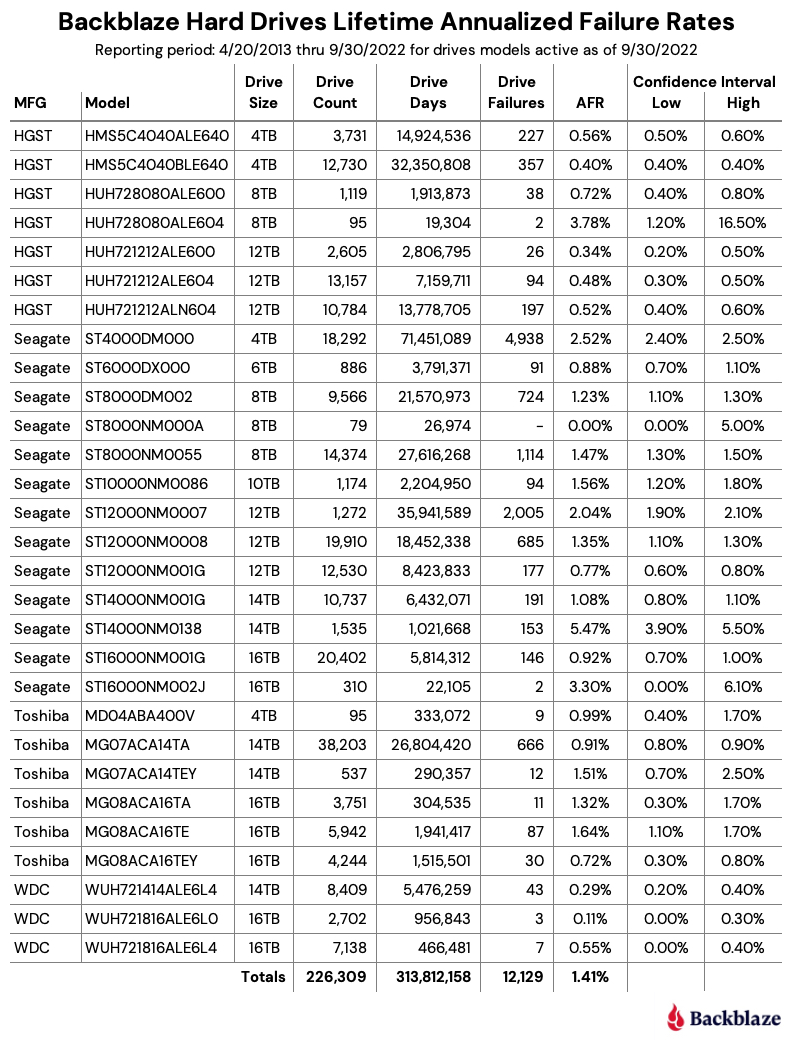
As of the end of Q3 2022, Backblaze was monitoring 230,897 hard drives and SSDs in our data centers around the world. Of that number, 4,200 are boot drives, with 2,778 SSDs and 1,422 HDDs. The SSDs were previously covered in our recently published Midyear SSD Report. Today, we’ll focus on the 226,697 data drives under management as we review their quarterly and lifetime failure rates as of the end of Q3 2022.

We’ll also take a look at the relationship between hard drive failure rates and hard drive cost. Along the way, we’ll share our observations and insights on the data presented, and, as always, we look forward to you doing the same in the comments section at the end of the post.

Q3 2022 Hard Drive Failure Rates

Let’s start with reviewing our data for the Q3 2022 period. In that quarter, we tracked 226,697 hard drives used to store data. For our evaluation, we removed 388 drives from consideration as they were used for testing purposes or drive models which did not have at least 60 drives. This leaves us with 226,309 hard drives grouped into 29 different models to analyze.

Notes and Observations on the Q2 2022 Stats

Zero failures for Q3: Three drives had zero failures this quarter: the 8TB HGST (model: HUH728080ALE604), the 8TB Seagate (model: ST8000NM000A), and the 16TB WDC (model: WUH721816ALE6L0). For the 8TB HGST, that was the second quarter in a row with zero failures. Of the three, only the WDC model has enough lifetime data (drive days) to be comfortable with the calculated annualized failure rate (AFR). As we will see later in this review, this 14TB WDC model has a lifetime AFR of 0.11% with the confidence interval range of just 0.30 at a 95% confidence level.

The new disks in town: There are two new models in this quarter’s data: the 8TB Seagate (model: ST8000NM000A) and the 16TB Seagate (model: ST16000NM002J). Neither has enough data to be interesting yet, but as noted above, the 8TB Seagate had zero failures in its first quarter in operation. These additions give us 29 different models we are tracking, up from 27 in the previous quarter.

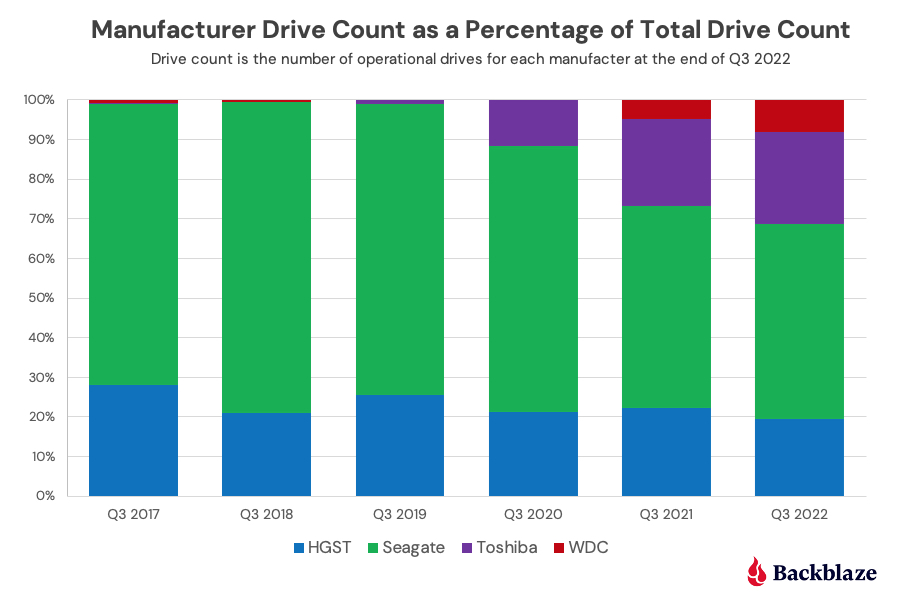
The 29 models break down by manufacturer as:

  • HGST: 7 models
  • Seagate: 13 models
  • Toshiba: 6 models
  • WDC: 3 models

The chart below shows, by manufacturer, how our drive fleet has changed over the past six years.

The old guard is feeling old: All three of the oldest drives we currently use are showing signs of their age as each experienced an increase in AFR from Q2 to Q3 2022 as shown below.

MFG Model Size Q3 2022 Avg Age Q2 AFR Q3 AFR
Seagate ST4000DM000 4TB 83.1 3.42% 4.38%
Seagate ST6000DX000 6TB 89.6 0.91% 1.34%
TOSHIBA MD04ABA400V 4TB 88.3 0.00% 8.25%

Note that the 4TB Toshiba only had two failures in Q3 2022. The high AFR (8.25%) is due to the limited number of drive days in the quarter (8,849) from only 95 drives. For all three, it seems their spindles, actuators, and media are starting to wear out after seven years or so of constant spinning.

The Quarterly AFR continues to rise: The AFR for Q3 2022 was 1.64%, increasing from 1.46% in Q2 2022 and from 1.10% a year ago. As noted previously, this is related to the aging of the entire drive fleet and we would expect this number to go down as older drives are retired and replaced over the next year. A possible harbinger of what is to come can be seen in the 16TB models which as a group had an 0.80% AFR in Q3 2022. As these drives are used to replace the aging 4TB drives, the quarterly AFR should decrease.

Hard Drive Failure Versus Hard Drive Cost

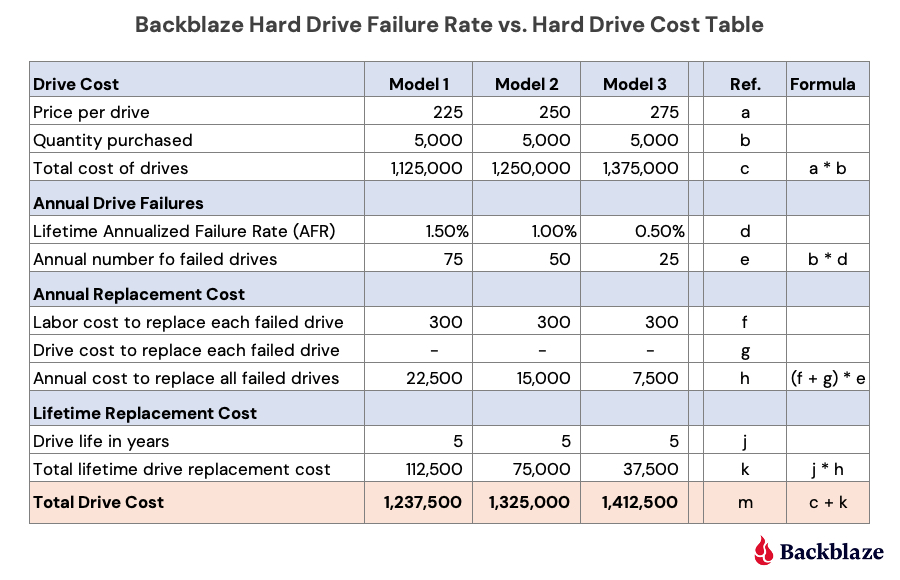
One question that comes up is why we would continue to buy a drive model that has a higher annualized failure rate versus a comparably sized, but more expensive, model. Two primary reasons: First, we are able to do so as our cloud storage Backblaze Vault architecture is designed for drive failure. Second, by studying data like drive stats and such, we work hard to understand our environment from the inside out. Understanding the relationship between cost and drive failure is one of those learnings. Here’s a simple example below using three fictitious models of 14TB drives, Model 1, Model 2, and Model 3.

Let’s take a look at the different sections (i.e. blue rows) of this table.

Drive Cost: Each model has a different price: low ($225), medium ($250), and high ($275). We would buy the same number of drives (5,000) of each model and we get the cost of each model.

Annual Drive Failures: This is the AFR of each drive model. For this example, we assigned the lowest price model to the highest failure rate, the highest price model to the lowest failure rate, and so on. In practice, we would use our own AFR numbers for a given model that we are considering purchasing. Regardless, we get the annual number of failed drives for each model.

Annual Replacement Cost: Labor cost covers the human cost involved from identifying the failure to returning and replacing the drive. Drive cost is zero here as the assumption is that all drives are returned for credit or replacement to the manufacturer or their agent. A zero value here may not always be the case; hence the line item. In either case, the annual cost to replace the failed drives for each model is computed.

Lifetime Replacement Cost: Take the number of years you expect the drive model to be in service times the annual cost to replace the failed drives. All of this gets us the total cost of each drive model—the peach section. In our example, the most expensive model (Model 3) is the most expensive drive over the five-year life expectancy and the lowest cost drive model (Model 1) is the least expensive over the same period, even with a higher annualized failure rate.

But we’re not done. The next question is: What would the annualized failure rate for the least expensive choice, Model 1, need to be such that the total cost after five years would be the same as Model 2 and then Model 3? In other words, how much failure can we tolerate before our original purchase decision is wrong? When we crunch the numbers we come out with the following:

  • Model 1 and Model 2 have the same total drive cost ($1,325,000) when the annualized failure rate for Model 1 is 2.67%.
  • Model 1 and Model 3 have the same total drive cost ($1,412,500) when the annualized failure rate for Model 1 is 3.83%.

The model presented is a simplified version of how we think about drive purchase decisions using annualized drive failure rates as part of the equation. You can make this model more accurate, and complicated, by adding in the drive failure rate changes over time (the bathtub curve) and prorating the cost of returning failed drives over the years. Whether that is needed is up to you.

The need for such a model is important in our business if you are interested in optimizing the efficiency of your cloud storage platform. Otherwise, just robotically buying the most expensive, or least expensive, drives is turning a blind eye to the expense side of the ledger.

On an individual or small office/home office level, your drive purchasing decision requires a lot less math, and often comes down to what drive can you afford. Even so, you should still try to do some research. Our drive stats can help, but in all cases you should have a solid backup plan in place as no drive you can buy is failure proof.

Lifetime Hard Drive Failure Rates

As of September 30, 2022, Backblaze was monitoring 226,697 hard drives used to store data. For our evaluation, we removed 388 drives from consideration as they were used for testing purposes or drive models which did not have at least 60 drives. This leaves us with 226,309 hard drives grouped into 29 different models to analyze for the lifetime report.

Notes and Observations About the Lifetime Stats

The lifetime annualized failure rate for all the drives listed above is 1.41%. That is a slight increase from the previous quarter of 1.39%, but lower than one year ago (Q3 2021) which was 1.45%.

The usual caution should be applied to those drive models that have wide confidence intervals, one percent or greater. Such a gap indicates there is not enough data or that the data we do have is not readily predictable.

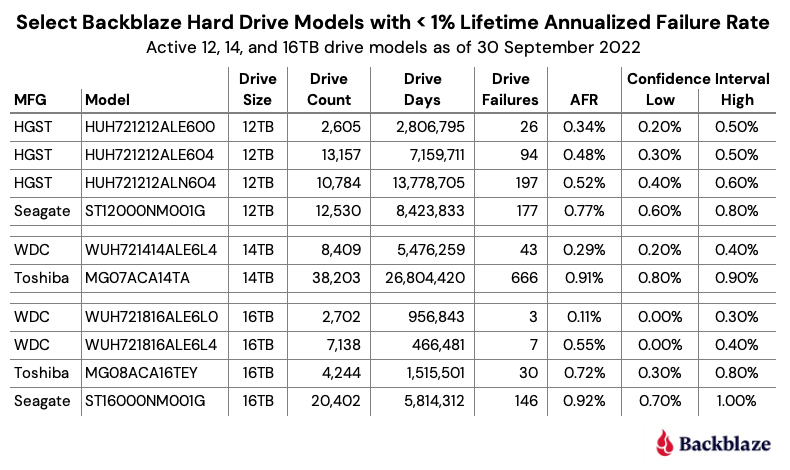
That said, we do have plenty of drive models for which we have solid data. Below we’ve extracted the 12TB, 14TB, and 16TB models from the lifetime table above that have a Lifetime AFR of less than 1% and have a confidence interval of 0.5% or less. These are hard drives which, up to this point, have shown solid reliability in our environment.

The Hard Drive Stats Data

The complete data set used to create the information in this review is available on our Hard Drive Test Data page. You can download and use this data for free for your own purpose. All we ask are three things: 1) you cite Backblaze as the source if you use the data, 2) you accept that you are solely responsible for how you use the data, and 3) you do not sell this data to anyone; it is free.

If you want the tables and charts used in this report, you can download the .zip file from Backblaze B2 Cloud Storage which contains the .jpg and/or .xlsx files as applicable.

Good luck, and let us know if you find anything interesting.

The post Backblaze Drive Stats for Q3 2022 appeared first on Backblaze Blog | Cloud Storage & Cloud Backup.

Ransomware Takeaways From Q3 2022

Post Syndicated from Jeremy Milk original https://www.backblaze.com/blog/ransomware-takeaways-from-q3-2022/

No matter which way war, the global economy, or superstorms are headed, one thing remains constant: ransomware threats continue to persist and evolve. That’s not new information, of course, but understanding the sophistication of emerging attacks is useful for anyone responsible for defending vulnerable infrastructure. Cybercriminals continue to target more industries such as healthcare and education that might not be as well-equipped to defend themselves. New strategies have allowed them to do more damage.

The landscape continues to change, but staying informed is one of the best ways to protect your organization against the ever-present threat of ransomware. It’s no substitute for comprehensive training for your team and a safely object-locked backup solution, but it never hurts to know too much. Here are a few of the biggest stories in ransomware from Q3.

This post is a part of our ongoing series on ransomware. Take a look at our other posts for more information on how businesses can defend themselves against a ransomware attack, and more.

➔ Download The Complete Guide to Ransomware

1. Threats to “Soft Targets” Are Growing

With businesses ramping up their ransomware protection, cybercriminals have begun shifting toward more so-called “soft targets” including hospitals and small municipal governments. This has proven dangerous, as not only do these targets have fewer resources to devote to cybersecurity, but a compromise of their systems can lead to real-world disaster.

Three different hospitals around the country—CHI Memorial Hospital in Tennessee, hospitals in the St. Luke’s system within Texas, and Virginia Mason Franciscan Health in Seattle—were all recently hit with ransomware attacks, causing widespread delays in patient care. This has become a sadly common story, as attacks continue on healthcare targets.

Ransomware groups have increasingly been targeting school systems as well. One such group, The Vice Society, were recently the subject of an FBI warning, identifying their activity as “disproportionately targeting the education sector” and that those attacks against school districts “may increase as the 2022/2023 school year begins and criminal ransomware groups perceive opportunities for successful attacks.”

Key Takeaway: No vertical is safe from the threat of ransomware, but the rise of these threats has led to greater protections specifically for soft target sectors. Cybersecurity and Infrastructure Security Agency (CISA) has provided a wealth of tools for education, and companies have begun pivoting to create budget-friendly options for cash-strapped public sector CIOs.

2. Ransomware Gangs May Now Be Deploying “Triple Extortion”

This past quarter saw several high-profile attacks against larger businesses, including Cisco, Uber, and Rockstar Games, but it also saw signs that the ongoing war between black hat and white hat hackers may be entering a new realm.

In June, LockBit Ransomware was able to infect systems at Entrust, giving the ransomware gang access to nearly 300GB of data which they threatened to publish if their demands were not met. Entrust did not pay the ransom, and while the company did not claim credit for it, someone shortly after launched a DDoS attack against the site that LockBit was going to use to publish the data.

In retaliation, the Lockbit ransomware gang began actively recruiting DDoSers to begin executing a “triple extortion” tactic, layering the possibility of a DDoS attack on top of attacks via ransomware. In a post to a popular forum for black hat hackers, LockBit’s public face LockBitSupp wrote, “have felt the power of dudos [DDoS] and how it invigorates and makes life more interesting.”

Key Takeaway: Time and time again we see hackers creating new tactics, and simple non-negotiation doesn’t protect your business or solve for operational downtime. We’ve seen that paying ransoms doesn’t stop attacks, and engaging in counterattacks rarely has the desired outcome. Strong defensive strategies, like object lock capability, can’t block cybercriminals from accessing and publishing information, but it does ensure that you have everything you need to bring your business back online as quickly as possible.

3. The Geopolitical Landscape is Impacting Cybercrime

The Council on Foreign Relations recently released a bombshell report titled, “Confronting Reality in Cyberspace: Foreign Policy for a Fragmented Internet” that outlined the extent to which state-sponsored hackers have begun undermining American sovereignty through attacks. This dovetails with recent reports of the information wars between Russia and Ukraine spilling out beyond the battlefield. A report from Wired showed how pro-Russia group Killnet has launched cyberattacks against 10 different countries for supporting Ukraine.

This isn’t necessarily new information: the 2020 Homeland Security Threat Assessment calls out several nations, including Russia, China, North Korea, and Iran, as likely to employ cybersecurity attacks against the U.S. What is new is that the Senate voted $45 million in support of cybertools that are specifically earmarked to protect the U.S. power grid. Some groups—including the U.S. Government Accountability Office—don’t think that we’re doing enough. The impact here is that we’re not just talking about ransomware attacks exposing private data; we’ve evaluated as likely, and have started protecting ourselves against, attacks that will functionally shut down basic utilities.

Key Takeaway: As the lines blur between malicious hacking and state-sponsored attacks, the sophistication of the threats faced by most businesses and individuals will only grow. New laws and policies may eventually emerge to combat this trend, but until then it will be on you to ensure your infrastructure is safe.

The Bottom Line

The threat of cybercrime will only continue to expand in coming years. No matter what industry you’re in or what size organization’s infrastructure you have been tasked with protecting, continuous vigilance is crucial.

The post Ransomware Takeaways From Q3 2022 appeared first on Backblaze Blog | Cloud Storage & Cloud Backup.

Backblaze at Educause ’22: Fueling Innovation in Higher Education

Post Syndicated from Jennifer Newman original https://www.backblaze.com/blog/backblaze-at-educause-22-fueling-innovation-in-higher-education/


Like many industries, higher education has spent the last decade discovering the transformative power of the cloud and moving into the next century. The cost savings of running a more efficient tech stack and easier access to the vital data it contains have allowed those institutions to pursue the practical and academic discoveries they were built for.

Graduating to Cloud Storage

Across the board, colleges and universities are pushing the boundaries of what cloud storage can do—and their creativity is paying huge dividends for their efficiency and security. We’ve included a few examples below that show just how these institutions have been able to maximize their cloud storage capabilities to reduce costs, modernize outdated operations, protect sensitive student and research data, and extend their ability to provide knowledge to a wider audience.

Citing Our Work

Pittsburg State: Located in Kansas, this university found themselves with nearly five decades of data in harm’s way due to the constant threat of tornadoes. Adding off-premises storage with Backblaze B2 not only gave them the geographical separation they needed, but the addition of a virtual air gap through Object Lock quadrupled their protection against ransomware.

Coast Community College District: CCCD aiming to update its data management system and eliminate costly delays from tape backups. Their existing tapes needed to be physically chauffeured between the three colleges in the district—Coastline Community College, Golden West College, and Orange Coast College—in friendly L.A. traffic. Backblaze B2’s S3 Compatible APIs made for a seamless integration with Cohesity backup.

UCSC–Silicon Valley: A 22-person video production team at the university’s online learning program, UC–Scout had quickly reached their storage capacity after archiving thousands of videos. By leveraging Backblaze B2, their IT team was able to streamline the entire production process, saving money and unleashing the team’s full creative potential.

Kanopy: The “Netflix for libraries” overhauled its tech stack in order to share its massive selection of more than 25,000 videos with thousands of schools and public libraries. After migrating to Backblaze B2, Kanopy was able to scale efficiently and rapidly accelerate content onboarding.

Gladstone Institutes: Gladstone Institutes needed an affordable, reliable backup system that would allow their researchers to focus on the life-saving developments they were pursuing in the lab. Cloud storage’s increased reliability allowed them to move away from LTO, and off-premise storage shielded their findings from the potential for natural disasters.

Office Hours—No Lectures

If you’re planning to attend EduCause ’22, you can learn more about the many possibilities Backblaze opens up in higher education. Through a new partnership between Backblaze and Carahsoft, public sector customers can now leverage their existing state, local, and federal buying programs to access Backblaze B2 Cloud Storage.

In addition to a live demo of Instant Recovery in the Veeam booth, we’re proud to sponsor the Carahsoft Happy Hour Reception. With special cocktails you won’t find anywhere else (try the “Backblaze Special;” you’ll love it), this is a great opportunity to network with fellow educators and learn more about how Backblaze can help you leverage your tech stack.

The post Backblaze at Educause ’22: Fueling Innovation in Higher Education appeared first on Backblaze Blog | Cloud Storage & Cloud Backup.

How to Download and Back Up Dropbox Data

Post Syndicated from Lora Maslenitsyna original https://www.backblaze.com/blog/how-to-download-and-back-up-dropbox-data/

If you’ve ever told an IT professional that you’re using Dropbox to back up files and were greeted with a side eye and a stifled “well, actually…” it’s because Dropbox isn’t actually a backup. It’s for syncing data. The distinction is subtle, but critical.

If you’re reading this post, you probably already know that data is always at risk of loss to accidental deletion, system updates, or even if you forget your password and get locked out of your account. The difference between backing up and syncing is that syncing your data will not protect it from these risks.

It’s easy to accidentally lose access to a sync service where you might be keeping files or images that no longer live on your computer. Many colleges and universities now even offer file hosting service subscriptions to students for free—until they graduate. After students earn their diplomas and leave the dorms, these services graduate, too, and students either get locked out of their accounts or have to choose between switching to a free tier and compromising on storage space or paying the fees to keep their existing subscription tier.

To make sure your data stays safe and secure, you’ll want to make sure you have a copy of it on your local device as well as a copy backed up to the cloud. A 3-2-1 backup strategy is always your best bet for securely storing your data. In this post, we’ll walk you through downloading your data from Dropbox and some strategies for backing up your downloaded files.

Back Up Everything But the Kitchen Sync

As we mentioned earlier, saving your data to a sync service is not the same as backing it up. Sync and backup services are complimentary, but only a backup will save a copy of your data and keep it safe against accidental deletion, updates, a ransomware attack, and more.

To help you save your synced computer data, we’re developing a series of guides to downloading and backing up your data across different sync services, like OneDrive. Comment below to let us know what other sync services you’d like to see us cover.

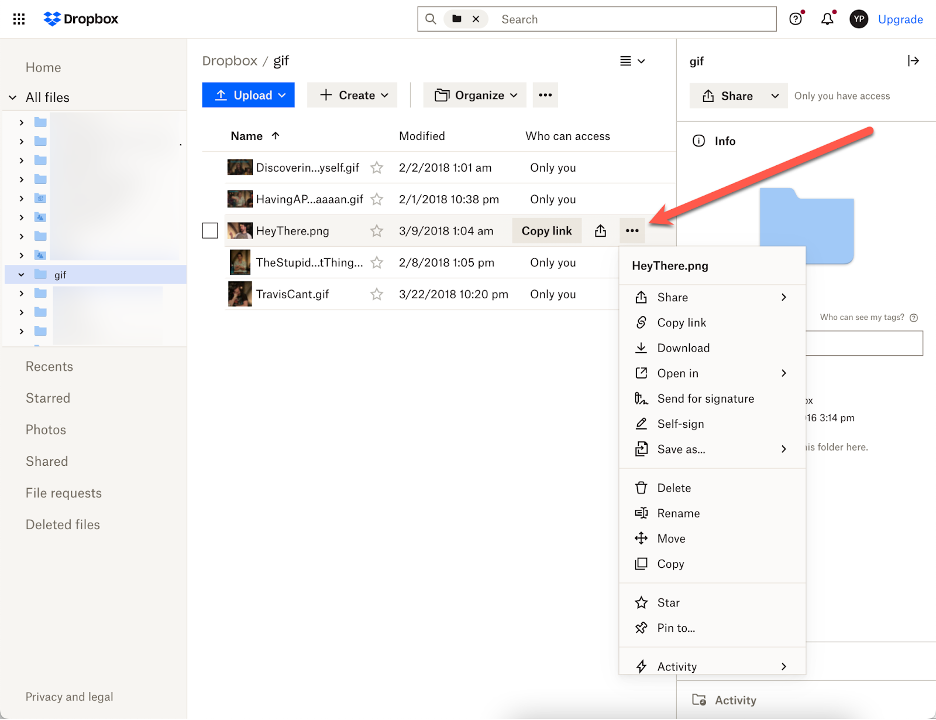
How to Download Files From Dropbox

Note: If you are using the Dropbox client to sync the files that are on your computer, the option to download your files may be replaced by an option to open them, instead. Clicking on “Open” will open up the files directly from the file on your computer where they are saved.

To download a file or folder from Dropbox, follow these steps:

    1. Sign in to your Dropbox account. (We know, this is pretty self-evident. We’re just trying to be thorough here).
    2. Find the file or folder you’d like to download and hover your cursor over it.
    3. Click on the three dots.
    4. Select Download. Your files will appear in the Downloads folder on your computer, and folders will be downloaded as .zip files.

    It’s also important to note that Dropbox only supports downloads of folders that are less than 20GB and contain fewer than 10,000 total files.

    How to Back Up Your Dropbox Data

    Now that you have all of your Dropbox files downloaded to your computer, you’ll want to follow through with the next steps of the 3-2-1 backup strategy. By saving a copy of your data on an external or secondary device (like a hard drive), and a third copy in an off-site location (like the cloud) your data will be protected from any number of possible risks. Backblaze Personal Backup automatically and continuously backs up a copy of all of the data on your computer to the cloud, making it that much easier to fulfill the 3-2-1 backup strategy.

    Bonus: How to Export a File From Dropbox to an App on Your Phone or Mobile Device

    If you want to send a portion of your files elsewhere for safekeeping, or to share with another app, you can follow the set of instructions below. Just remember that downloading your files to your phone or emailing them to yourself isn’t the same as keeping a full copy of your data on an external device—your data is still susceptible to damage or loss.

    First, you’ll need to download the Dropbox mobile app to access your synced files on your mobile device.

    1. Open the app and select the three dots next to the file or folder you’d like to export. On an iPhone or iPad, the dots will appear horizontal, and on an Android device they’ll be vertical.
    2. Select Share.
    3. Select Export file, which will show a list of apps that can open the file. Choose the app you’d like to open the file. Note: once you export the file, if you make any changes to that file in the other app, those changes may not be saved back to your Dropbox account unless the app integrates with Dropbox.

    Back Up Your Dropbox Before It’s Too Late

    Have a lot of Dropbox data you don’t want to take up space on your computer? Upload and store your data in Backblaze B2 Cloud Storage as a part of your 3-2-1 approach. Also, let us know in the comments if you’d like to see more guides to downloading and backing up the data saved to other sync services.

The post How to Download and Back Up Dropbox Data appeared first on Backblaze Blog | Cloud Storage & Cloud Backup.

Media Workflowing in The Big Apple: NAB Show New York Preview

Post Syndicated from Jeremy Milk original https://www.backblaze.com/blog/media-workflowing-in-the-big-apple-nab-show-new-york-preview/


You can send media in milliseconds to just about every corner of the earth with an origin store at your favorite cloud storage company and a snappy CDN. Sadly, delivering people across continents is a touch more complicated and time intensive. Nevertheless, the Backblaze team is saddling up planes, trains, and automobiles to bring the latest on media workflows to the attendees of NAB Show New York. Whether you’re there in person or virtually, we’ll be discussing and demo-ing all the newest Backblaze B2 Cloud Storage solutions that will ensure your data can travel with ease—no mass transit needed—everywhere you need it to be.

Learn More LIVE in NYC

If you’re attending the NAB Show New York, join us in booth 1239 to learn about integrating B2 Cloud Storage into your workflow. Stop by anytime or you can schedule a meeting here. We’d love to see you.

NAB Show New York Preview: What’s New for Backblaze B2 Media Workflow Solutions

Our booth will have all the goodness you’d expect of us: partners, friendly faces, spots to take a load off and talk about making your data work harder, and, of course, some next-level SWAG. Let’s get into what you can expect.

New Pricing Models and Migration Tools

Our team is on hand to talk you through two new offerings that have been generating a lot of excitement among teams across media organizations:

  • Backblaze B2 Reserve: You can now purchase the Backblaze service many know and love in capacity-based bundles through resellers. If your team seeks 100% budget predictability with transaction fees and premium support included, you should check out this new offering. Check it out here.
  • Universal Data Migration: Recently an International Broadcasting Convention (IBC) 2022 Best of Show nominee, the service makes it easy and FREE to move data into Backblaze from legacy cloud, on-premises, and LTO/tape origins. If your current data storage is holding your team or your budget back, we’ll pay to free your media and move it to B2 Cloud Storage. Learn more here.

Six Flavors of Media Workflow Deep Dives

We’ve gathered materials and expertise to discuss or demo our six most asked about workflow improvements. We’re happy to talk about many other tools and improvements, but here are the six areas we expect to talk about the most:

  1. Moving more (or all) media production to the cloud. Ensuring everyone—clients, collaborators, employers, everyone—has easy real-time access to content is essential for the inevitable geographical distribution of modern media workflows.
  2. Reducing costs. Cloud workflows don’t need to come with costly gotchas, minimum retention penalties, and/or high costs when you actually want to use your content. We’ll explain how the right partners will unlock your budget so you can save on cloud services and spend more on creative projects.
  3. Streamlining delivery. Pairing cloud storage with the right CDN is essential to making sure your media is consumable and monetizable at the edge. From streaming services to ecommerce outlets to legacy media outlets, we’ve helped every type of media organization do more with their content.
  4. Freeing storage. Empty your expensive on-prem storage and stop adding HDs and tapes to the pile by moving finished projects to always-hot cloud storage. This doesn’t just free up space and money: Instantly accessible archives means you can work with and monetize older content with little friction in your creative process.
  5. Safeguarding content. All those tapes or HDs on a shelf, in the closet, or wherever you keep them are hard to manage and harder to access and use. Parking everything safely and securely in the cloud means all that data is centrally accessible, protected, and available for more use.
  6. Backing up (better!). Yes, we’ve got roots in backup going back >15 years—so when it comes to making sure your precious media is protected with easy access for speedy recovery, we’ve got a few thoughts (and solutions).

Partners, Partners, and More Partners…

“The more we get together, the happier we’ll be,” might as well be the theme lyric of cloud workflows. Combining best of breed platforms unlocks better value and functionality, and offers you the ability to build your cloud stack exactly how you need it for your business. We’ve got a large ecosystem of Alliance Partners, and we’re happy to get deep into your needs and demo how you can combine Backblaze B2 Cloud Storage with one or more partners including iconik, LucidLink, Synology (who will also be right next to us in the Javits Center!), and Fastly to best achieve your objectives.

Hoping to visit NAB Show New York but not yet registered? All good. You can register free on the NAB site with promo code NY4429.

Hoping We Can Help You Soon

Whether it’s in person at NAB Show New York or virtually when it works for you, we’d love to walk you through any of the solutions we can serve for hardworking media teams. If you will be in Manhattan, schedule a meeting to ensure you’ll get the right expert on our team, then stick around for the swag and good times. This invitation applies to you too, Channel Partners and Resellers—whether you have active projects or just want to learn more, let’s meet up and chat about ways to deliver more value together. If you’re not making the trip, not a problem. Just contact us here so we can arrange to help virtually.

The post Media Workflowing in The Big Apple: NAB Show New York Preview appeared first on Backblaze Blog | Cloud Storage & Cloud Backup.

Announcing Tech Day ‘22: Live Tech Talks, Demos, and Dialogues

Post Syndicated from Amrit Singh original https://www.backblaze.com/blog/announcing-tech-day-22-live-tech-talks-demos-and-dialogues/

For those looking to build and grow blazing applications and do more with their data, we’d like to welcome you to this year’s Tech Day ‘22. We have a great community that works with Backblaze B2 Cloud Storage, including our internal team, IT professionals, developers, tech decision makers, cloud partners and more—and we felt it was high time to bring you all together again to share ideas, discuss upcoming changes, win some swag, and network.

Join our Technical Evangelists in live interactive sessions, demos, and tech talks that help you unlock your cloud potential and put B2 Cloud Storage to work for you. Whatever your role in the tech world—or if you’re simply curious about leveraging the Backblaze B2 platform—we invite you to join us!

➔ Register Now

Here’s What to Expect at Tech Day ’22

Tech Day ’22 is happening October 31, 10 a.m. PT. Can’t make it? Sign up anyway and we’ll share the event recording straight to your inbox.

IaaS Unboxed

A live chat about leveraging the independent cloud ecosystem for storage, compute, delivery, and backup, along with a customer showcase.

Sneak Peek

An early look at the Q3 2022 Drive Stats data with Andy Klein as he walks through the latest learnings to inform your thinking and purchase decisions.

Hands-On Demos

Pat Patterson (Chief Technical Evangelist), and Greg Hamer (Senior Developer Evangelist) team up to facilitate an action-packed set of interactive sessions aimed at helping you do more in the cloud. If you don’t have an account already, you’ll definitely want to create a free Backblaze B2 account so you can follow along. All you need to do is sign up with your email and create a password—it’s really that easy.

  • Scaling a Social App with Appwrite: Appwrite is a self-hosted backend-as-a-service platform that provides developers with all the core APIs required to build any application. Appwrite’s storage abstraction allows developers to store project files in a range of devices, including Backblaze B2. In this session, you’ll learn how to get started with Appwrite, and quickly build a social app that stores user-generated content in a Backblaze B2 Bucket.
  • Go Serverless with Fastly Compute@Edge: Fastly has long been a Backblaze partner—mutual customers are able to serve assets stored in Backblaze B2 Buckets via Fastly’s global content delivery network with zero download charges from Backblaze B2. Compute@Edge leverages Fastly’s network to enable developers to create high-scale, globally-distributed applications, and execute code at the edge. Discover how to build a simple serverless application in JavaScript and deploy it globally with a single command.
  • Provisioning Resources with the Backblaze B2 Terraform Provider: Hashicorp Terraform is an open-source infrastructure-as-code software tool that enables you to safely and predictably create, change, and improve infrastructure. Learn how our Terraform Provider unlocks Backblaze B2’s capabilities for DevOps engineers, allowing you to create, list, and delete Buckets and application keys, as well as upload and download objects.
  • Storing and Querying Analytical Data with Trino: Trino is a SQL-compliant query engine that supports a wide range of business intelligence and analytical tools, allowing you to write queries against structured and semi-structured data in a variety of formats and storage locations. We’ll share how we optimized Backblaze’s Drive Stats data for queries and used Trino to gain new insights into nine years of real-world data.

And So Much More

Join the live Q&A and our user community of tech leaders, IT pros, and developers like you. Register for free to grab your spot (and swag) and we’ll see you on October 31.

➔ Register Now

The post Announcing Tech Day ‘22: Live Tech Talks, Demos, and Dialogues appeared first on Backblaze Blog | Cloud Storage & Cloud Backup.

The Storage Pod Story: Innovation to Commodity

Post Syndicated from original https://www.backblaze.com/blog/the-storage-pod-story-innovation-to-commodity/

It has been over six years since we released Storage Pod 6.0. Yes, we have improved that system since then, several times. We’ve added more memory, upgraded the CPU, and of course deployed larger disks. I suppose we could have written blog posts about those improvements, a Storage Pod 6.X post or two or three, but somehow that felt a bit hollow.

About 18 months ago, we talked about The Next Backblaze Storage Pod. We had started using Dell servers in our Amsterdam data center, although we were still building and deploying the version 6.X storage pods in our U.S. data centers. That changed about six months ago and we haven’t built or deployed a Backblaze Storage Pod since that time. Here’s what we’ve done instead.

A Backblaze-Worthy Storage Server

In September of 2019, we wrote a blog post to celebrate the 10 year anniversary of open sourcing our Storage Pod design. In that post we mused about the build/buy decision and stated the criteria we needed to consider if we were going to buy storage servers from someone else: cost, ease of maintenance, the use of commodity parts, ability to scale production, and so on. Also in that post, we compiled a list of storage servers on the market at the time which were similar to our Storage Pod design.

We then proceeded to test several different storage servers from the list and elsewhere. The testing was done over a period of about a year using the criteria noted earlier. The process progressed and one server, a 60-drive Supermicro server, was selected to move on to the next stage, production performance testing.

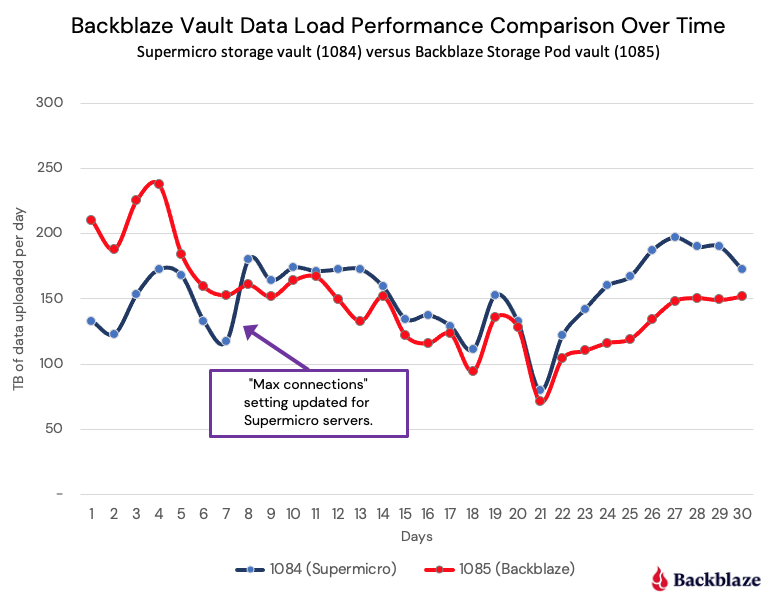
Here we would observe the server’s performance and test its compatibility with our operational architecture. We built a vault of 20 Supermicro servers and placed it into production, and at the same time we placed a standard Storage Pod vault into production. The two vaults ran the same software and we would track each vault’s performance throughout.

When a Backblaze Vault enters production, 60 tomes of storage come online at the same time joining thousands of other tomes ready to receive data. Each vault has the same opportunity to load data, but this will vary depending on the performance of the vault to process the requests received. In general, the more performant the vault, the more data it can upload each day.

The comparison of how much data each vault uploaded each day is shown below. Vault 1084 is composed of 20 Supermicro servers and Vault 1085 is composed of 20 Backblaze Storage Pods.

The Supermicro vault (1084) started with a limit of 2,500 simultaneous connections allowed for the first seven days. Once that limit was lifted and both vaults were set to 5,000 simultaneous connections, the Supermicro vault generally outperformed the Backblaze vault over the remainder of the observation period.

What happened to the data once the test was over? It stayed in the Supermicro vault and that vault became a permanent part of our production environment. It is still in operation today, joined by over 1,100 additional Supermicro servers. Safe to say, we moved ahead with using the Supermicro servers in our environment in place of building new Storage Pods.

The Server Model We Use

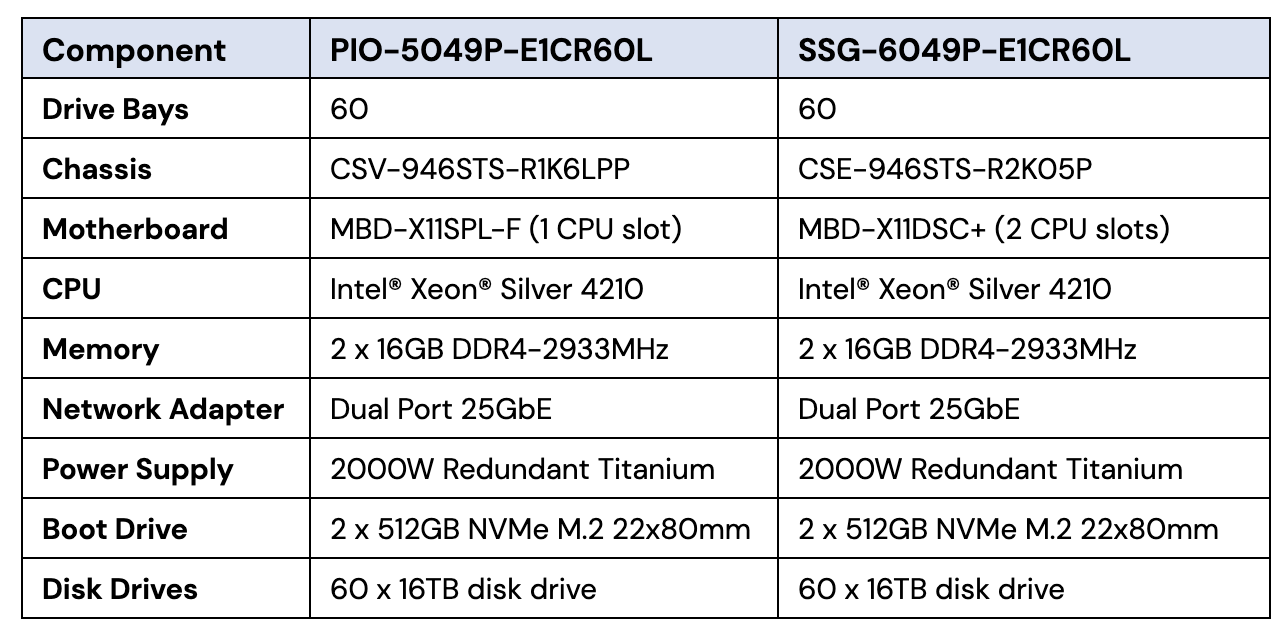
The Supermicro model we order from Supermicro is the PIO-5049P-E1CR60L (PIO-5049). That model is not sold via the Supermicro website. That said, model SSG-6049P-E1CR60L (SSG-6049) is similar and is widely available. Both models have 60 drives, but the chassis is slightly different, and the motherboards are different with the PIO-5049 model having a single CPU slot, and the SSG-6049 model having two CPU slots. Let’s compare the basics of the two models below.

In practice, the Supermicro SSG-6049 model supports newer components such as the latest CPUs and allows more memory versus the Supermicro PIO-5049 model, but the latter is more than capable of supporting our needs.

Can You Build It?

A little over 13 years ago, we wrote the Petabytes on a Budget blog post introducing Backblaze Storage Pods to the world and open sourcing the design. Since then, many individuals, organizations, and businesses have taken the various storage pod designs we published over the years and built their own storage servers. That’s awesome.

We know building a Storage Pod was not easy. Oh, the assembly was simple enough, but getting all the parts you needed was a challenge: searching endlessly for 5-port backplanes (minimum order quantity 1,000-ouch, sorry) or having to build your own power supply cables. While many of you enjoyed the challenge; many didn’t.
For the Supermicro system, let’s work with the Supermicro SSG-6049 model as it is available to everyone and see what it would take for you to acquire/assemble/build a single Supermicro storage server.

Option One: Go Standard

The easiest thing to do is to order a pre-configured SSG-6049 model from Supermicro or you can try one of their online reseller sites such as Canada Computers & Electronics or ComputerLink, which offer the same “complete system”. In these cases, the ability to customize the server is minimal and requires direct contact with the vendor for most changes. If that works for you, then you’re all set.

Option Two: Configure

If you want to design your own system you can try Supermicro resellers such as IT Creations (US) and Server Simply (EU) which have configurators that allow you to select your CPU, motherboard, network cards, memory, and various other components. This is a great option but given the number of different options and the possibility of incompatibilities between components, you need to be careful here. Don’t rely on the configurator to catch a component mismatch.

Option Three: Create

Here you might buy the most stripped-down server you can find and replace nearly everything inside—motherboard, CPU, fans, switches, cables and so on. You’ll probably void any warranty you had on the system, but we suspect you knew that already. Regardless, you can take the base system and stuff it full of smoking-fast everything so that your copy of “Ferris Buellers Day Off” downloads in picoseconds. That’s the fun part of building your own storage server, when you are done it is uniquely yours.

Which option you choose is, of course, your choice, and while ordering a standard system from Supermicro may not be as satisfying as soldering heat sinks to the motherboard or neatly tying off your SATA cable runs, it will give you more time to watch Ferris, so there’s that.

FYI, Supermicro has an extensive network of resellers around the world. While the options above fall neatly into three categories, each reseller has their own way of working with their clients. If you are going to buy or build your own Supermicro storage server or have already done so, share your experience with your colleagues in the comments below or on your favorite forum or community site.

What About Pricing

Supermicro does not publish prices and we are not going to out them here, but we wanted to see if we could determine the street price for the Supermicro SSG-6049 system by surveying reseller websites. It was not pretty. In our research, we saw prices for the Supermicro SSG-6049 model range from $6K to 40K on different reseller sites. On the website with the $6K price they started with a fictitious base system that you could not order, and then listed the various components you were required to add, such as CPU, memory, hard drives, etc. At the $40K website the reseller didn’t bother to list any of the components; it just had the model and the price—no specs or technical information. Classic buyer beware scenarios in both cases.

The other variable that made the street price hard to determine was that resellers often bundled other services into the price of the system such as installation, annual maintenance, and even shipping. All are reasonable services for a reseller to offer, but they cloud the picture when trying to determine the actual cost of the product you are trying to buy. At best, we can say that the street price is somewhere between $20K and $30K, but we are not very confident with that range.

Storage Server Pricing Over Time

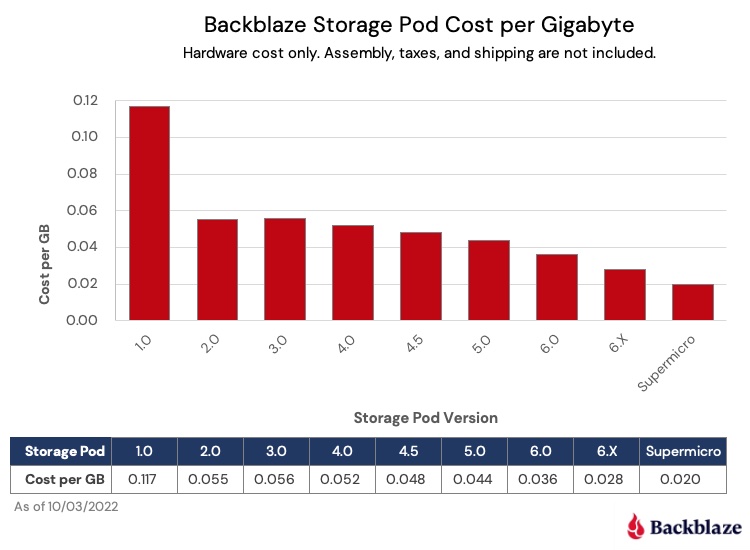
Since 2009 we have tracked the cost per GB of each Storage Pod version we have produced. We’ve updated the chart below to add both Storage Pod version 6.X, our most current Storage Pod configuration, and the Supermicro storage server we are buying, model PIO-5049.

The cost per GB is computed by taking the total hardware cost of a storage server, including the hard drives, and dividing by the total storage in the server at the time. When Storage Pod 1.0 was released in September 2009, the system cost was about $0.12/GB, and as you can see that has decreased over time to $0.02/GB in the Supermicro systems.

One point to note is that both the Storage Pod 6.X ($0.028/GB) and Supermicro ($0.020/GB) servers use the same 16TB hard drive models. We believe the difference between the cost per GB of the two cohorts ($0.008) is primarily based on the operational efficiency obtained by Supermicro in making and selling tens of thousands of units a month versus Backblaze assembling a hundred 6.X Storage Pods on our own. In other words, Supermicro’s scale of production has enabled us to get performant systems for less than if we continued to build them ourselves.

What’s Next for Storage Pods

No one here at Backblaze is ready to write the obituary for our beloved red Backblaze Storage Pods. Afterall, the innovation that was the Storage Pod created the opportunity for Backblaze to change the dynamics of the storage market. Now that the Storage Pod hardware has been commoditized, our cloud storage software platform is what enables us to continue to deliver value to businesses and individuals alike.

All that means is that our next Storage Pod probably won’t be an incremental change, but instead something completely new, at least for us. It may not even be a Storage Pod—who knows? That said, we will continue to upgrade our existing Storage Pods with new CPUs, memory, and such, and they’ll be around for years to come. At which point we may give them away or crush them (again). In the meantime, we’ll probably do another blog post or two so we can post a few pictures and tell a few stories. Or maybe we’ll just move on. Hard to say right now.

Thanks to all our Storage Pod readers for your comments and suggestions over the years. You’ve made us better along the way and we look forward to continuing to hear from you as our journey continues.

The post The Storage Pod Story: Innovation to Commodity appeared first on Backblaze Blog | Cloud Storage & Cloud Backup.

“An Ideal Solution”: Daltix’s Automated Data Lake Archive Saves $100K

Post Syndicated from Amrit Singh original https://www.backblaze.com/blog/an-ideal-solution-daltixs-automated-data-lake-archive-saves-100k/

In the fast-moving consumer goods space, Daltix is a pioneer in providing complete, transparent, and high-quality retail data. With global industry leaders like GFK and Unilever depending on their pricing, product, promotion, and location data to build go-to market strategies and make critical decisions, maintaining a reliable data ecosystem is an imperative for Daltix.

As the company has grown since its founding in 2016, the amount of data Daltix is processing has increased exponentially. They’re currently managing around 250TB, but that amount is spread across billions of files, which soon created a massive drag on time and resources. With an infrastructure built almost entirely around AWS and billions of miniscule files to manage, Daltix started to outgrow AWS’ storage options in both scalability and cost efficiency.

The Daltix team in Belgium.

We got to chat with Charlie Orford, Principal Software Engineer for Daltix, about how Datix switched to Backblaze B2 Cloud Storage and their takeaways from that process. Here are some highlights:

  • They used a custom engine to migrate billions of files from AWS S3 to Backblaze B2.
  • Monthly costs reduced by $2,500 while increasing data portability and reliability.
  • Daltix established the infrastructure to automatically back up 8.4 million data objects every day.

Read on to learn how they did it.

A Complex Data Pipeline Built Around AWS

Most of the S3-based infrastructure Daltix built in the company’s early days is still intact. Historically, the data pipeline started with web-scraped resources written directly to Amazon S3, which were then standardized by Lamba-based extractors before being sent back to S3. Then AWS Batch picked up the resources to be augmented and enriched using other data sources.

All those steps took place before the data was ready for Daltix’s team of analysts. In order to optimize the pipeline and increase efficiency, Orford started absorbing pieces of that process into Kubernetes. But there was still a data storage problem; Daltix generates about 300GB of compressed data per day, and that figure was growing rapidly. “As we’d scaled up our data collection, we’d had to sharpen our focus on cost control, data portability, and reliability,” said Orford. “They’re obvious, but at scale, they’re extremely important.”

Cost Concerns Inspire The Search For Warm Archival Storage

By 2020, Daltix had started to realize the limitations of building so much of their infrastructure in AWS. For example, heavy customization around S3 metadata made the ability to move objects entirely dependent on the target system’s compatibility with S3. Orford was also concerned about the costs of permanently storing such a huge data lake in S3. As he puts it, “It was clear that there was no need to have everything in S3 forever. If we didn’t do anything about it, our S3 costs were going to continue to rise and eventually dwarf virtually all of our other AWS costs.”

Side-by-side comparison of server costs.

Because Daltix works with billions of tiny files, using Glacier was out of the question as its pricing model is based around retrieval fees. Even using Glacier Instant Retrieval, the sheer number of files Daltix works with would have forced them to rack up an additional $200,000 in fees per year. So Daltix’s data collection team—which produces more than 85% of the company’s overall data—pushed for an alternative solution that could address a number of competing concerns:

  • The sheer size of the data lake.
  • The need to store raw resources as discrete files (which means that batching is not an option).
  • Limitations on the team’s ability to invest time and effort.
  • A desire for simplicity to guarantee the solution’s reliability.

Daltix settled on using Amazon S3 for hot storage and moving warm storage into a new archival solution, which would reduce costs while keeping priority data accessible—even if the intention is to keep files stored away. “It was important to find something that would be very easy to integrate, have a low development risk, and start meaningfully eating into our costs,” said Orford. “For us, Backblaze really ticked all the boxes.”

Initial Migration Unlocks Immediate Savings of $2,000 Per Month

Before launching into a full migration, Orford and his team tested a proof of concept (POC) to make sure the solution addressed his key priorities:

  • Making sure the huge volume of data was migrated successfully.
  • Avoiding data corruption and checking for errors with audit logs.
  • Preserving custom metadata on each individual object.

“Early on, Backblaze worked with us hand-in-hand to come up with a custom migration tool that fit all our requirements,” said Orford. “That’s what gave us the confidence to proceed.” In partnership with Flexify, Backblaze delivered a tailor-made engine to ensure that the migration process would transfer the entire data lake reliably and with object-level metadata intact. After the initial POC bucket was migrated successfully, Daltix had everything they needed to start modeling and forecasting future costs. “As soon as we started interacting with Backblaze, we stopped looking at other options,” Orford said.

In August 2021, Daltix moved a 120TB bucket of 2.2 billion objects from standard storage in S3 to Backblaze B2 cloud storage. That initial migration alone unlocked an immediate cost savings of $2,000 per month, or $24,000 per year.

A peaceful data lake.

Quadruple the Data, Direct S3 Compatibility, and $100,000 Cumulative Savings

Today, Daltix is migrating about 3.2 million data objects (approximately 70GB of data) from Amazon S3 into Backblaze B2 every day. They keep 18 months of hot data in S3, and as soon as an object reaches 18 months and one day, it becomes eligible for archiving in B2. On the rare occasions that Daltix receives requests for data outside that 18-month window, they can pull data directly from Backblaze B2 into Amazon S3 thanks to Backblaze’s S3-compatible API and ever-available data.

Daily audit logs summarize how much data has been transferred, and the entire migration process happens automatically every day. “It runs in the background, there’s nothing to manage, we have full visibility, and it’s cost effective,” Orford said. “Backblaze B2 is an ideal solution for us.”

As daily data collection increases and more data ages out of the hot storage window, Orford expects more cost reductions. Orford expects it will take about a year and a half for daily migrations to nearly triple their current levels: that means Daltix will be backing up 9 million objects (about 450GB of data) to Backblaze B2 every day. Taking that long-term view, we see incredible cost savings for Daltix by switching from Amazon S3 to Backblaze B2. “By 2023, we forecast we will have realized a cumulative saving in the region of $75,000-$100,000 on our storage spend thanks to leveraging Backblaze B2, with expected ongoing savings of at least $30,000 per year,” said Orford.

“It runs in the background, there’s nothing to manage, we have full visibility, and it’s cost effective. B2 is an ideal solution for us.” —Charlie Orford, Principal Software Engineer, Daltix

Crunch the Numbers and See for Yourself

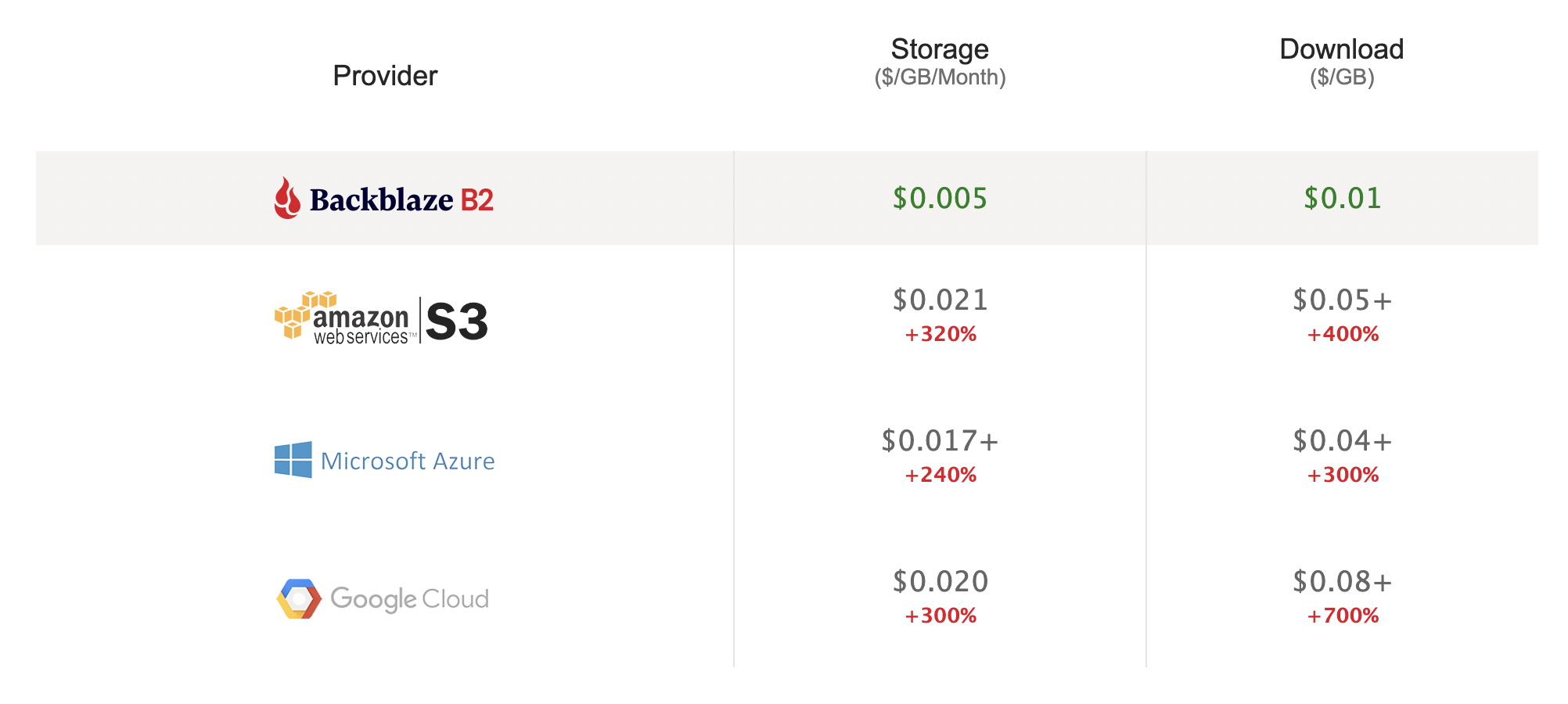
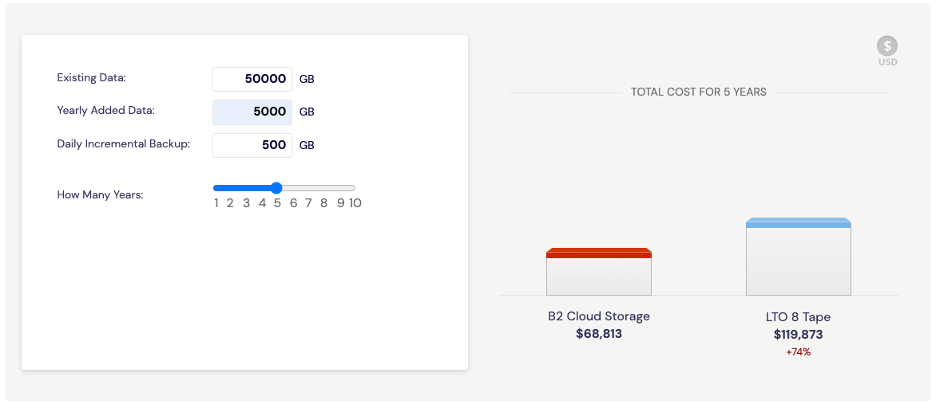
Want to find out what your business could do with an extra $30,000 a year? Check out our Cloud Storage Pricing Calculator to see what you could save switching to Backblaze B2.

The post “An Ideal Solution”: Daltix’s Automated Data Lake Archive Saves $100K appeared first on Backblaze Blog | Cloud Storage & Cloud Backup.

How to Migrate From LTO to the Cloud

Post Syndicated from Jeremy Milk original https://www.backblaze.com/blog/how-to-migrate-from-lto-to-the-cloud/

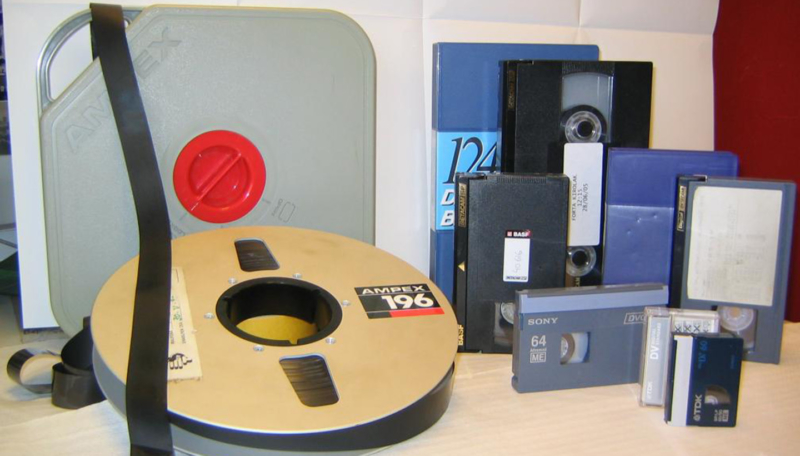
Using Linear-Tape Open (LTO) backups has been a solid strategy used by companies with robust media libraries for a long time. The downside of LTO is, of course, the sheer volume of space dedicated to storing these vast piles of tapes, the laboriously slow process of accessing the data on them, and the fact that they can only be accessed where they’re stored—so if there’s a natural disaster or a break-in, your data is at risk. Anyone staring down a shelf sagging under the weight of years of data and picturing the extra editing bay you could put in its place is probably thinking about making a move to the cloud.

Once you have decided to migrate your data, you need a plan to move forward. The following article will give you the basic tools for migrating from LTO to the Cloud. Before we dive in, let’s talk about some of the vast benefits of migration (other than reclaiming your storage closet).

Benefits of Moving Your Data to the Cloud

Some pretty convincing benefits come with moving away from tape to cloud storage. First is the cost. Some people might think cloud storage is more expensive, but a closer crunching of the numbers proves that it actually saves you money. We’ve created a handy LTO to Cloud Storage calculator to figure out individual savings. If you’re concerned about migration/egress fees, utilizing a Universal Data Migration (UDM) service can help eliminate those costs. In addition, tape players and tapes need maintenance and eventually replacement, adding another budgetary benefit to migrating things to the cloud.

Another benefit is easy access to files. Rather than being hidden among the files on one particular tape in one particular area of one particular stack, files can be accessed, viewed and downloaded immediately from cloud storage. With many industries moving towards remote work, being able to access your files or archives from afar is increasingly important.

So much tape; so little time.

Cloud storage is also more secure than people think. Many cloud services providers offer products like Object Lock to keep files immutable (a huge concern for compliance-heavy industries like healthcare). In the case of a ransomware attack, off-site cloud storage data means that you’re safe from the threat and restore your data quickly and get back to normal.

With all those benefits, the only concern left is that anytime you make a change to your data infrastructure, you want it to be as easy as possible. Let’s walk through a typical LTO to cloud migration so you can explore how it aligns with your process.

Six Steps to Migrate from LTO to Cloud Storage (or a Hybrid Solution)

Migrating can feel like a daunting task, but breaking it down into bite-sized pieces will help a lot. Fears about data loss and team bandwidth will obviously play a factor in migration. Don’t worry: it’s much easier than you think, and the long-term benefits will outweigh the short-term migration considerations.

Follow the steps below for a seamless, successful migration.

Step One: Take Stock of Your Content

The first concern of migration: how do you ensure that all the data you need to move is there and will be there at the end of the process? Well, now is the time to take a complete content inventory. It may have been a long time since you reviewed what is stored on tape, where it is located, and if you even want to continue keeping it. You may have old, archived data that is safe to get rid of now.

In addition to an inventory, if there was ever a good time to clean out unused/unneeded files, now is the time. It’s also a good opportunity to eliminate any duplicates—that will ensure that you’re not wasting money on storage costs or time and confusion ensuring that you’re looking at the correct file.

Does data fold?

Instead of looking at it as a pain point or chore you dread, consider a content inventory as an opportunity to clean out old files, eliminate waste, and streamline your data to only what you need and want to keep. It’s like inviting Marie Kondo over to ask whether your files spark joy. It’s also a great time to reorganize your files. Consider renaming files and folders to make it easy to retrieve items once they are stored in the cloud. Bonus: this walk down memory lane might spark ideas for refreshing or repurposing old content.

Step Two: Update Your Tracking System

LTO backups involve rotating many tapes on different days and sorting them by type of data (what is stored on them) and on varying schedules. You will need to update your tracking system for your tape strategy to how you will use tape going forward. You can also formulate a plan for tracking your cloud-based backup data as well. It may be as simple as cataloging where files are located, what type of data needs to be on tape, how often they will be backed up, when files move from hot storage to archive, and so on.

Step Three: Plan for Your Migration

To ensure a successful migration, spend some time planning exactly how to execute the move. Here are a few common questions that come up:

  • Are you moving the data in phases or all at once? If you’re moving data in phases, what needs to move first and why?
  • How many personnel are you dedicating to work on the project? And what kind of support will they need from other stakeholders?
  • Are you planning on keeping any information on tape long-term (a hybrid solution)? Some companies like healthcare, government contractors, education, and accounting firms are subject to data retention and storage laws, so that might come into play here.

Document how you want to proceed so that everyone involved has their needs met. Planning ahead will help you feel like you have a good handle on things before jumping into the deep water.

Also, it’s important to evaluate your internet bandwidth and speed to ensure you don’t experience any bottlenecks. If you have to upgrade your internet package, do so before you begin migrating. Migrate using an Ethernet-connected device with a stable connection. Wi-Fi is much slower and less reliable. If you’re moving a significant amount of data at once, you may even want to consider something like Backblaze’s Fireball service.

Backblaze’s Fireball, ready to help you transfer data.

Another thing to consider is that the cloud will let you categorize and interact with your data in different ways. For example, with Backblaze B2 storage, you can create up to 1,000 buckets per account to categorize your data your way and keep files separate—how is that different from how you’re currently interacting with your data? Who will have access to your cloud storage backups? Do you need to employ Extended Version History or Object Lock to make sure that your backups aren’t unintentionally changed?

Step Four: Back Up Both Ways

For a short while, you might want to back up to both LTO and the cloud, keeping them in tandem while you ensure a smooth and successful data migration. Once all your critical files have been moved over, you can stop backing up to tape. (Unless your organization has decided that a hybrid model works for you.)

Again, keep in mind that you may want to keep some files archived on tape and stored away. It depends on your industry, compliance issues, and data infrastructure preferences.

Step Five: Execute the Migration

Now it’s time to take the plunge. You can use the Universal Data Migration (UDM) service to move your data over and absorb any egress fees. You can move your data in days, not weeks, streamlining this chore.

All roads lead to cloud.

Step Six: Review and Compare Cloud and LTO Backups

Before you stop running your backup systems concurrently (LTO and cloud), be sure to test your backups thoroughly. When you run those tests, you don’t want to just look at the files; you actually want to restore several files, just as if you’d had them deleted from your system. Run tests restoring individual files and whole folders to ensure data integrity and master the restore process. Make sure to run those tests for your servers and with files in both Mac and PC environments.

Depending on which backup solution you use, restore procedures may differ. Sometimes, working with a company that provides end-to-end backup and restore services may work well for your organization. For example, many people prefer to back up with Veeam and integrate it with Backblaze B2 Cloud Storage.

At the end of the day, cloud storage offers many benefits like secure storage, easy access, and cost-efficient backups. Once you get past the hurdle of migration, you’ll be glad you made the switch.

Let’s Talk Solutions in Person

If you’re attending the 2022 NAB Show New York, stop by the Backblaze booth for an opportunity to see how making the move from tape to the cloud could help streamline your workflow. If nothing else, you’ll get some great swag out of it! Stop by our booth or schedule a meeting to talk to the team.

The post How to Migrate From LTO to the Cloud appeared first on Backblaze Blog | Cloud Storage & Cloud Backup.

Lights, Camera, Custom Action (Part Two): Inside Integrating Frame.io + Backblaze B2

Post Syndicated from Pat Patterson original https://www.backblaze.com/blog/lights-camera-custom-action-part-two-inside-integrating-frame-io-backblaze-b2/

Part 2 in a series covering the Frame.io/Backblaze B2 integration, covering the implementation. See Part 1 here, which covers the UI.

In Lights, Camera, Custom Action: Integrating Frame.io with Backblaze B2, we described a custom action for the Frame.io cloud-based media asset management (MAM) platform. The custom action allows users to export assets and projects from Frame.io to Backblaze B2 Cloud Storage and import them back from Backblaze B2 to Frame.io.

The custom action is implemented as a Node.js web service using the Express framework, and its complete source code is open-sourced under the MIT license in the backblaze-frameio GitHub repository. In this blog entry we’ll focus on how we secured the solution, how we made it deployable anywhere (including to options with free bandwidth), and how you can customize it to your needs.

What is a Custom Action?

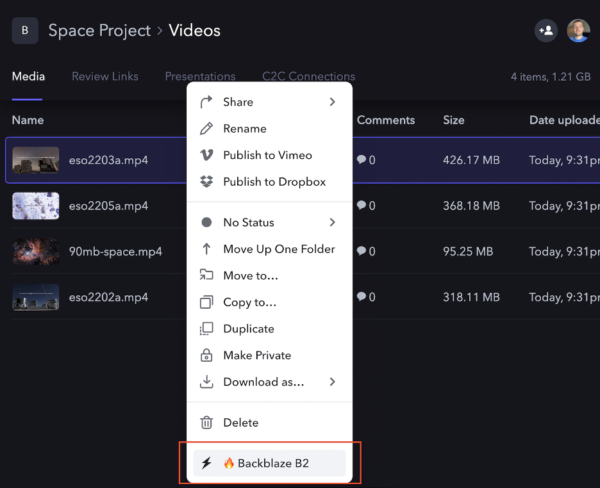
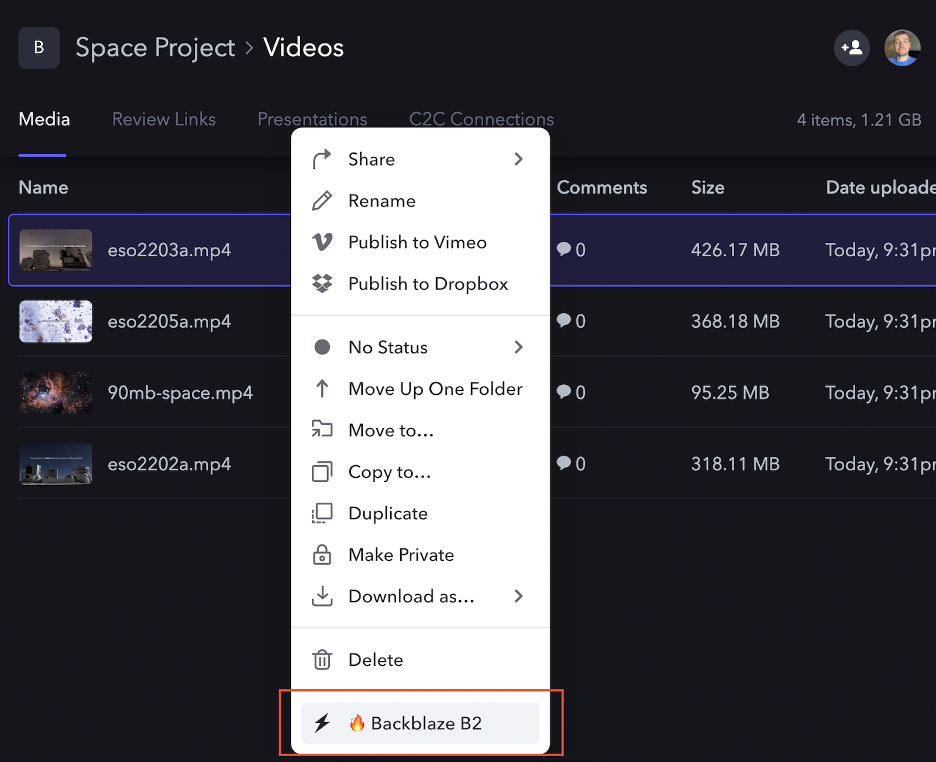
Custom Actions are a way for you to build integrations directly into Frame.io as programmable UI components. This enables event-based workflows that can be triggered by users within the app, but controlled by an external system. You create custom actions in the Frame.io Developer Site, specifying a name (shown as a menu item in the Frame.io UI), URL, and Frame.io team, among other properties. The user sees the custom action in the contextual/right-click dropdown menu available on each asset:

When the user selects the custom action menu item, Frame.io sends an HTTP POST request to the custom action URL, containing the asset’s id. For example:

{
  "action_id": "2444cccc-7777-4a11-8ddd-05aa45bb956b",
  "interaction_id": "aafa3qq2-c1f6-4111-92b2-4aa64277c33f",
  "resource": {
    "type": "asset",
    "id": "9q2e5555-3a22-44dd-888a-abbb72c3333b"
  },
  "type": "my.action"
}

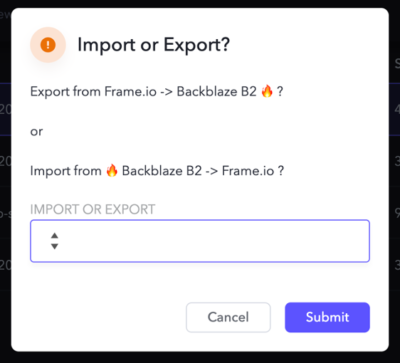
The custom action can optionally respond with a JSON description of a form to gather more information from the user. For example, our custom action needs to know whether the user wishes to export or import data, so its response is:

{
  "title": "Import or Export?",
  "description": "Import from Backblaze B2, or export to Backblaze B2?",
  "fields": [
    {
      "type": "select",
      "label": "Import or Export",
      "name": "copytype",
      "options": [
        {
          "name": "Export to Backblaze B2",
          "value": "export"
        },
        {
          "name": "Import from Backblaze B2",
          "value": "import"
        }
      ]
    }
  ]
}

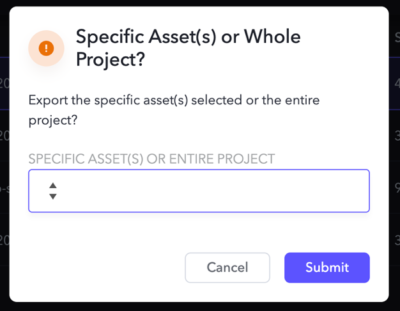
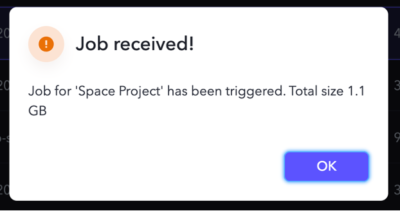
When the user submits the form, Frame.io sends another HTTP POST request to the custom action URL, containing the data entered by the user. The custom action can respond with a form as many times as necessary to gather the data it needs, at which point it responds with a suitable message. For example, when it has all the information it needs to export data, our custom action indicates that an asynchronous job has been initiated:

{
  "title": "Job submitted!",
  "description": "Export job submitted for asset."
}

Securing the Custom Action

When you create a custom action in the Frame.io Developer Tools, a signing key is generated for it. The custom action code uses this key to verify that the request originates from Frame.io.

When Frame.io sends a POST request, it includes the following HTTP headers:

X-Frameio-Request-Timestamp The time the custom action was triggered, in Epoch Epoch timetime (seconds since midnight UTC, Jan 1, 1970).
X-Frameio-Signature The request signature.

The timestamp can be used to prevent replay attacks; Frame.io recommends that custom actions verify that this time is within five minutes of local time. The signature is an HMAC SHA-256 hash secured with the custom action’s signing key—a secret shared exclusively between Frame.io and the custom action. If the custom action is able to correctly verify the HMAC, then we know that the request came from Frame.io (message authentication) and it has not been changed in transit (message integrity).

The process for verifying the signature is:

    • Combine the signature version (currently “v0”), timestamp, and request body, separated by colons, into a string to be signed.
    • Compute the HMAC SHA256 signature using the signing key.
    • If the computed signature and signature header are not identical, then reject the request.

The custom action’s verify TimestampAndSignature() function implements the above logic, throwing an error if the timestamp is missing, outside the accepted range, or the signature is invalid. In all cases, 403 Forbidden is returned to the caller.

Custom Action Deployment Options

The root directory of the backblaze-frameio GitHub repository contains three directories, comprising two different deployment options and a directory containing common code:

  • node-docker—generic: Node.js deployment
  • node-risingcloud: Rising Cloud deployment
  • backblaze-frameio-common: common code

The node-docker directory contains a generic Node.js implementation suitable for deployment on any Internet-addressable machine–for example, an Optimized Cloud Compute VM on Vultr. The app comprises an Express web service that handles requests from Frame.io, providing form responses to gather information from the user, and a worker task that the web service executes as a separate process to actually copy files between Frame.io and Backblaze B2.

You might be wondering why the web service doesn’t just do the work itself, rather than spinning up a separate process to do so. Well, media projects can contain dozens or even hundreds of files, containing a terabyte or more of data. If the web service were to perform the import or export, it would tie up resources and ultimately be unable to respond to Frame.io. Spinning up a dedicated worker process frees the web service to respond to new requests while the work is being done.

The downside of this approach is that you have to deploy the custom action on a machine capable of handling the peak expected load. The node-risingcloud implementation works identically to the generic Node.js app, but takes advantage of Rising Cloud’s serverless platform to scale elastically. A web service handles the form responses, then starts a task to perform the work. The difference here is that the task isn’t a process on the same machine, but a separate job running in Rising Cloud’s infrastructure. Jobs can be queued and new task instances can be started dynamically in response to rising workloads.

Note that since both Vultr and Rising Cloud are Backblaze Compute Partners, apps deployed on those platforms enjoy zero-cost downloads from Backblaze B2.

Customizing the Custom Action

We published the source code for the custom action to GitHub under the permissive MIT license. You are free to “use, copy, modify, merge, publish, distribute, sublicense, and/or sell copies of the Software” as long as you include the copyright notice and MIT permission notice when you do so.

At present, the user must supply the name of a file when importing an asset from Backblaze B2, but it would be straightforward to add code to browse the bucket and allow the user to navigate the file tree. Similarly, it would be straightforward to extend the custom action to allow the user to import a whole tree of files based on a prefix such as raw_footage/2022-09-07. Feel free to adapt the custom action to your needs; we welcome pull requests for fixes and new features!

The post Lights, Camera, Custom Action (Part Two): Inside Integrating Frame.io + Backblaze B2 appeared first on Backblaze Blog | Cloud Storage & Cloud Backup.

The SSD Edition: 2022 Drive Stats Mid-year Review

Post Syndicated from original https://www.backblaze.com/blog/ssd-drive-stats-mid-2022-review/

Welcome to the midyear SSD edition of the Backblaze Drive Stats report. This report builds on the 2021 SSD report published previously and is based on data from the SSDs we use as storage server boot drives in our Backblaze Cloud Storage platform. We will review the quarterly and lifetime failure rates for these drives and, later in this report, we will also compare the performance of these SSDs to hard drives we also use as boot drives. Along the way, we’ll offer observations and insights to the data presented and, as always, we look forward to your questions and comments.

Overview

Boot drives in our environment do much more than boot the storage servers: they also store log files and temporary files produced by the storage server. Each day a boot drive will read, write, and delete files depending on the activity of the storage server itself. In our early storage servers, we used HDDs exclusively for boot drives. We began using SSDs in this capacity in Q4 2018. Since that time, all new storage servers, and any with failed HDD boot drives, have had SSDs installed.

Midyear SSD Results by Quarter

As of June 30, 2022, there were 2,558 SSDs in our storage servers. This compares to 2,200 SSDs we reported in our 2021 SSD report. We’ll start by presenting and discussing the quarterly data from each of the last two quarters (Q1 2022 and Q2 2022).

Notes and Observations

Form factors: All of the drives listed above are the standard 2.5” form factor, except the Dell (DELLVOSS VD) and Micron (MTFDDAV240TCB) models each of which are the M.2 form factor.

Most drives added: Since our last SSD report, ending in Q4 2021, the Crucial (model: CT250MX500SSD1) lead the way with 192 new drives added, followed by 101 new DELL drives (model: DELLBOSS VD) and 42 WDC drives (model: WDS250G2B0A).

New drive models: In Q2 2022 we added two new SSD models, both from Seagate, the 500GB model: ZA500CM10003 (3 drives), and the 250 GB model: ZA250NM1000 (18 drives). Neither has enough drives or drive days to reach any conclusions, although they each had zero failures, so nice start.

Crucial is not critical: In our previous SSD report, a few readers took exception to the high failure rate we reported for the Crucial SSD (model: CT250MX500SSD1) although we observed that it was with a very limited amount of data. Now that our Crucial drives have settled in, we’ve had no failures in either Q1 or Q2. Please call off the dogs.

One strike and you’re out: Three drives had only one failure in a given quarter, but the AFR they posted was noticeable: WDC model WDS250G2B0A – 10.93%, Micron – Model MTFDDAV240TCB – 4.52%, and the Seagate model: SSD – 3.81%. Of course if any of these models had 1 less failure their AFR would be zero, zip, bupkus, nada – you get it.

It’s all good man: For any given drive model in this cohort of SSDs, we like to see at least 100 drives and 10,000 drives-days in a given quarter as a minimum before we begin to consider the calculated AFR to be “reasonable”. That said, quarterly data can be volatile, so let’s next take a look at the data for each of these drives over their lifetime.

SSD Lifetime Annualized Failure Rates

As of the end of Q2 2022 there were 2,558 SSDs in our storage servers. The table below is based on the lifetime data for the drive models which were active as of the end of Q2 2022.

Notes and Observations

Lifetime annualized failure rate (AFR): The lifetime data is cumulative over the period noted, in this case from Q4 2018 through Q2 2022. As SSDs age, lifetime failure rates can be used to see trends over time. We’ll see how this works in the next section when we compare SSD and HDD lifetime annualized failure rates over time.

Falling failure rate?: The lifetime AFR for all of the SSDs for Q2 2022 was 0.92%. That was down from 1.04% at the end of 2021, but exactly the same as the Q2 2021 AFR of 0.92%.

Confidence Intervals: In general, the more data you have, and the more consistent that data is, the more confident you are in your predictions based on that data. For SSDs we like to see a confidence interval of 1.0% or less between the low and the high values before we are comfortable with the calculated AFR. This doesn’t mean that drive models with a confidence interval greater than 1.0% are wrong, it just means we’d like to get more data to be sure.

Speaking of Confidence Intervals: You’ll notice from the table above that the three drives with the highest lifetime annualized failure rates also have sizable confidence intervals.


Conversely, there are three drives with a confidence interval of 1% or less, as shown below:


Of these three, the Dell drive seems the best. It is a server-class drive in an M.2 form factor, but it might be out of the price range for many of us as it currently sells from Dell for $468.65. The two remaining drives are decidedly consumer focused and have the traditional SSD form factor. The Seagate model ZA250CM10003 is no longer available new, only refurbished, and the Seagate model ZA250CM10002 is currently available on Amazon for $45.00.

SSD Versus HDD Annualized Failure Rates

Last year we compared SSD and HDD failure rates when we asked: Are SSDs really more reliable than Hard Drives? At that time the answer was maybe. We now have a year’s worth of data available to help answer that question, but first, a little background to catch everyone up.

The SSDs and HDDs we are reporting on are all boot drives. They perform the same functions: booting the storage servers, recording log files, acting as temporary storage for SMART stats, and so on. In other words they perform the same tasks. As noted earlier, we used HDDs until late 2018, then switched to SSDs. This creates a situation where the two cohorts are at different places in their respective life expectancy curves.

To fairly compare the SSDs and HDDs, we controlled for average age of the two cohorts, so that SSDs that were on average one year old, were compared to HDDs that were on average one year old, and so on. The chart below shows the results through Q2 2021 as we controlled for the average age of the two cohorts.


Through Q2 2021 (Year 4 in the chart for SSDs) the SSDs followed the failure rate of the HDDs over time, albeit with a slightly lower AFR. But, it was not clear whether the failure rate of the SSD cohort would continue to follow that of the HDDs, flatten out, or fall somewhere in between.

Now that we have another year of data, the answer appears to be obvious as seen in the chart below, which is based on data through Q2 2022 data and gives us the SSD data for Year 5.

And the Winner Is…

At this point we can reasonably claim that SSDs are more reliable than HDDs, at least when used as boot drives in our environment. This supports the anecdotal stories and educated guesses made by our readers over the past year or so. Well done.

We’ll continue to collect and present the SSD data on a regular basis to confirm these findings and see what’s next. It is highly certain that the failure rate of SSDs will eventually start to rise. It is also possible that at some point the SSDs could hit the wall, perhaps when they start to reach their media wearout limits. To that point, over the coming months we’ll take a look at the SMART stats for our SSDs and see how they relate to drive failure. We also have some anecdotal information of our own that we’ll try to confirm on how far past the media wearout limits you can push an SSD. Stay tuned.

The SSD Stats Data

The data collected and analyzed for this review is available on our Hard Drive Test Data page. You’ll find SSD and HDD data in the same files and you’ll have to use the model number to locate the drives you want, as there is no field to designate a drive as SSD or HDD. You can download and use this data for free for your own purpose. All we ask are three things: 1) you cite Backblaze as the source if you use the data, 2) you accept that you are solely responsible for how you use the data, and 3) you do not sell this data to anyone—it is free.

You can also download the Backblaze Drive Stats data via SNIA IOTTA Trace Repository if desired. Same data; you’ll just need to comply with the license terms listed. Thanks to Geoff Kuenning and Manjari Senthilkumar for volunteering their time and brainpower to make this happen. Awesome work.

Good luck and let us know if you find anything interesting.

The post The SSD Edition: 2022 Drive Stats Mid-year Review appeared first on Backblaze Blog | Cloud Storage & Cloud Backup.

Quest Integrates Backblaze into Rapid Recovery Version 6.7

Post Syndicated from Jennifer Newman original https://www.backblaze.com/blog/quest-integrates-backblaze-into-rapid-recovery-version-6-7/

It’s the classic “tree falls in the woods” scenario: if your company experiences data loss, but your users never feel it, did it even happen? That’s the value proposition our friends over at Quest—an IT platform that solves complex problems with simple software solutions—present with their popular Rapid Recovery tool:

Back up and quickly recover anything — systems, apps, and data — anywhere, whether it’s physical, virtual, or in the cloud. This data recovery software allows you to run without restore, with zero impact on your users, and as if the outage or data loss never happened.

Quest Rapid Recovery Version 6.7 Adds Backblaze B2 in Cloud Tier

As of today—whether you’re a Quest customer or a Backblaze B2 Cloud Storage user—you can combine all this value with the astonishingly easy cloud storage we’re known for here at Backblaze. In Quest’s 6.7 release of Rapid Recovery, navigate to Cloud Accounts in the menu (see screenshot below for menu location), click Add New Account.


Enter a display name, select B2 Cloud Storage, and choose Amazon S3 as the cloud type. Then you just need to enter your Access key (keyID), Secret Key (applicationKey), and your service endpoint URL.


Your data will be safe, useful, and affordable at a quarter of the price of legacy cloud providers. Try it out today or contact our sales team to learn more.

So, What’s Changed?

If you’re already a Quest Rapid Recovery user, you may notice that setup hasn’t changed. What’s changed is actually in the code—Rapid Recovery will now work more seamlessly and more efficiently. Bug fixes have been baked into version 6.7 and their support will be more robust. We love a seamless partnership—and stay tuned for more integrations between Quest and Backblaze in the future!

More About Quest’s Rapid Recovery Tool

If you’re a Backblaze B2 Cloud Storage user who is in the market for a recovery solution for your business, you can dig into the details about Rapid Recovery here. Here’s a brief primer of the solutions capabilities:

  • Simplify backup and restore: One cloud-based management console allows you to restore lost or damaged systems and data with near-zero recovery time and no impact to users—an advanced, admin-friendly solution.
  • Address demanding recovery point objectives (RPO): Leverage image-based snapshots for RPOs and reduce risk of data loss and downtime with tracked change blocks to accelerate backups and reduce storage.
  • Wide application support: Lightning-fast recovery for file servers and applications on both Microsoft Windows and Linux systems gets business-critical applications online to keep your business rolling.
  • Cloud-based backup, archive, and disaster recovery: (This is where we come in…) Point-and-click cloud connectivity makes for easy replication of application backups for no-stress cloud backup.
  • Virtual environment protection: Agentless backup and recovery for Microsoft Exchange and SQL databases residing on your virtual machines and low-cost VM-only tiered licensing for on-premises and cloud virtual environments.
  • Data deduplication and replication: With B2 Cloud storage, you’ll already save upwards of 75% versus other cloud storage solutions, but you can reduce costs further by leveraging built-in compression and deduplication. Nice.

More about Backblaze B2 Cloud Storage

Backblaze B2 Cloud Storage is purpose-built for ease, instant access to files and data, and infinite scalability. Backblaze B2 is priced so users don’t have to choose between what matters and what doesn’t when it comes to backup, archive, data organization, workflow streamlining, and more. Signing up couldn’t be more simple: a few clicks and you’re storing data. The first 10GB is free, and if you need more capacity to run a proof of concept you can talk to our sales team. Otherwise, when you’re ready to store data, you can pay one of two ways:

  • Our per-byte consumption pricing: Only pay for what you store. It’s $5 TB/month, no hidden delete fees or gotchas. What you see is what you get.
  • Our B2 Reserve capacity pricing: If you’d like to by predictable blocks of storage, you can work with any of our reseller partners to unlock the following benefits:
    • Free egress up to the amount of storage purchased per month.
    • Free transaction calls.
    • Enhanced migration services.
    • No delete penalties.
    • Tera support.

The Answer to the Question

You all can debate the philosophical implications of trees falling in woods and the sound they make. But when it comes to Rapid Recovery, it seems like we can guarantee one thing: your users might not hear the data loss when it happens, but you can bet the sight of relief your IT team breathes when they rapidly recover will be audible.

The post Quest Integrates Backblaze into Rapid Recovery Version 6.7 appeared first on Backblaze Blog | Cloud Storage & Cloud Backup.

Backblaze Rides the Nautilus Data Center Wave

Post Syndicated from original https://www.backblaze.com/blog/backblaze-rides-the-nautilus-data-center-wave/

On the outside and on the inside, our newest data center (DC) is more than a little different: there are no cooling towers chugging on the roof, no chillers, or coolants at all. No, we’re not doing a drive stats experiment on how well data centers run at 54° Celsius. This data center, owned and developed by Nautilus Data Technologies, is nice and cool inside. Built with a unique mix of proven maritime and industrial water-cooling technologies that use river water to cool everything inside—racks, servers, switches, and people—this new DC is innovative, environmentally awesome, secure, fascinating, and other such words and phrases, all rolled into one. And it just happens to be located on a barge on a river in California.

It’s a unique setup, one that might raise a few eyebrows. It certainly did for us. But once our team dug in, we didn’t just find room for another exabyte of data, we found an extremely resilient data center that supports our durability requirements and decreases our environmental impact of providing you cloud storage. You can do a deep dive into the Nautilus technology on their website, but of course I needed to make my own visit to look into this shiny new tech on my own. What follows is an overview of what I learned: how the technology works and why we decided to make the Nautilus data center part of our cloud storage platform.


Source

Nautilus Data Center Overview

In the Port of Stockton in California, an odd looking barge is moored next to the shore of the San Joaquin River. If you were able to get close enough, you might notice the massive mooring poles the barge is attached to. And if you were a student of such things, you might recognize these mooring poles as having the same rating as the mooring poles whose attached boats and barges survived hurricane Katrina. The barge isn’t going anywhere.

Above deck are the data center halls. Once inside, it feels like, well, a data center—almost. The power distribution units (PDUs) and other power-related equipment hum quietly and racks of servers and networking gear are lined up across the floor, but there are no hot and cold aisles, and no air conditioning grates or ductwork either. Instead the ceiling is lined with an orderly arrangement of pipes carrying water that’s been cooled by the river outside.

Upriver from the data center, water is collected from the river and filtered before running through the heat exchanger that cools water circulating in a closed loop inside the data center. River water never enters the data center hall.

The technology used to collect and filter the water has been used for decades in power plants, submarines, aircraft carriers, and so on. The entire collection system is marine wildlife-friendly and certified by multiple federal and state agencies, commissions, and water boards, including the California Department of Fish and Wildlife. One of the reasons Nautilus chose the Port of Stockton was the truism that, if you can get something certified for operation in the state of California, then you can typically get it certified pretty much anywhere.


Source

Inside the data center, at specific intervals, water supply and return lines run down to the rear door on each rack. The server fans expel hot air through the rear door and the water inside the door removes the heat to deliver cool air into the room. We use ColdLogik Rear Door Coolers to perform the heat exchange process. The closed loop water system is under vacuum—meaning that it’s leak proof, so water will never touch the servers. A nice bit of innovation by the Nautilus designers and engineers.

Downriver from the data center, the water is discharged. The water can be up to 4° Fahrenheit warmer than when it started upriver. As we mentioned before, the various federal and state authorities worked with Nautilus engineers to select a discharge location which was marine wildlife-friendly. Within seconds of being discharged the water is back to river temperature and continues its journey to the Sacramento Delta. The water spends less than 15 seconds end-to-end in the system which operates with no additional water, uses no chemicals, and adds zero pollutants to the river.

Why Nautilus

For Backblaze, the process of choosing a data center location is a bit more rigorous than throwing a dart at a map and putting some servers there. Our due diligence checklist is long and thorough, taking into consideration redundancy, capacity, scalability, cost, network providers, power providers, stability of the data center owner, and so on. The Nautilus facility passed all of our tests and will enable us to store over an exabyte of data on-site to optimize our operational scalability. In addition, the Nautilus relationship brings us a few additional benefits not traditionally heard of when talking about data centers.

Innovation

Storage Pods, Drive Farming, Drive Stats, and even Backblaze B2 Cloud Storage are all innovations in their own way as they changed market dynamics or defined a different way to do things. They all have in common the trait of putting together proven ideas and technologies in a new way that adds value to the marketplace. In this case, Nautilus marries proven maritime and industrial water cooling and distribution technologies with a new approach to data center infrastructure. The result is an innovative way to use a precious resource to help meet the ever-increasing demand for data storage. This is the kind of engineering and innovation we admire and respect.

Environmental Awesomeness

We can appreciate the environmental impact of the Nautilus data center from two perspectives. The first is obvious: taking a precious resource, river water, and using it to not only lower the carbon footprint of the data center (Nautilus projects by up to 30%), but to also do so without permanently affecting the resource and ecosystem. That’s awesome. The world has been harnessing the power of Mother Nature for thousands of years, yet doing so responsibly has not always been top-of-mind in the process. In the case of Nautilus, the environmental impact is at the top of their list.

The second reason this is awesome is that Nautilus chose to do this in California, coming face-to-face with probably the most stringent environmental requirements in the United States. Almost anywhere else would have been easier, but if you are looking to show your environmental credibility and commitment, then California is the place to start. We commend them for their effort.

Unique Security

Like any well-run data center site, Nautilus has a multitude of industry standard security practices in place: a 24x7x365 security staff, cameras, biometric access, and so on. But the security doesn’t stop there. Being a data center on a barge also means that divers regularly inspect the underwater systems and the barge itself for maintenance and security purposes. In addition, by nature of being a data center on a barge in the Port of Stockton, the data center has additional security: the port itself is protected by the U.S. Department of Homeland Security (DHS) and the waterways are patrolled by the U.S. Coast Guard. This enhanced collection of protective resources is unique for data centers in the U.S., except possibly the kind of data centers we are not supposed to know anything about.

The Manatee in the River

Let’s get to the elephant in the room here: is there risk in putting a data center on a barge in a river? Yes—but no more so than putting one in a desert, or near any body of water, or near a forest, or in an abandoned mine, or near a mountain, or in a city. You get the idea: they all have some level of risk. We’d argue that this new data center—with its decreased reliance on energy and air conditioning and its protection by DHS, among other positives—is quite a bit more reliable than most places the world stores its data. As always, though, we continue to encourage folks to have their data in multiple places.

Still, putting a data center on a river is novel. We’re sure some people will make jokes, and probably pretty funny ones—we’re happy to laugh at our own expense. (It’s certainly happened before.) We are also sure some competitors will use this as part of their sales and marketing—FUD (fear, uncertainty and doubt) as it is called behind your back. We don’t play that game, and, as with our past innovations, we’re used to people sniping a bit when we move out ahead on technology. As always, we encourage you to dig in, get the facts, and be comfortable with the choice you make. Here at Backblaze, we won’t sell you up the river, but we may put your data there.

The post Backblaze Rides the Nautilus Data Center Wave appeared first on Backblaze Blog | Cloud Storage & Cloud Backup.

Lights, Camera, Custom Action: Integrating Frame.io with Backblaze B2

Post Syndicated from Pat Patterson original https://www.backblaze.com/blog/lights-camera-custom-action-integrating-frame-io-with-backblaze-b2/

At Backblaze, we love hearing from our customers about their unique and varied storage needs. Our media and entertainment customers have some of the most interesting use cases and often tell us about their workflow needs moving assets at every stage of the process, from camera to post-production and everywhere in between.

The desire to have more flexibility controlling data movement in their media management systems is a consistent theme. In the interest of helping customers with not just storing their data, but using their data, today we are publishing a new open-source custom integration we have created for Frame.io. Read on to learn more about how to use Frame.io to streamline your media workflows.

What is Frame.io?

Frame.io, an Adobe company, has built a cloud-based media asset management (MAM) platform allowing creative professionals to collaborate at every step of the video production process. For example, videographers can upload footage from the set after each take; editors can work with proxy files transcoded by Frame.io to speed the editing process; and production staff can share sound reports, camera logs, and files like Color Decision Lists.

The Backblaze B2 Custom Action for Frame.io

Creative professionals who use Frame.io know that it can be a powerful tool for content collaboration. Many of those customers also leverage Backblaze B2 for long-term archive, and often already have large asset inventories in Backblaze B2 as well.

What our Backblaze B2 Custom Action for Frame.io does is quite simple: it allows you to quickly move data between Backblaze B2 and Frame.io. Media professionals can use the action to export selected assets or whole projects from Frame.io to B2 Cloud Storage, and then later import exported assets and projects from B2 Cloud Storage back to Frame.io.

How to Use the Backblaze B2 Custom Action for Frame.io

Let’s take a quick look at how to use the custom action:

As you can see, after enabling the Custom Action, a new option appears in the asset context dropdown. Once you select the action, you are presented with a dialog to select Import or Export of data:

After selecting Export, you can choose whether you want just the single selected asset, or the entire project sent to Backblaze B2.

Once you make a selection, that’s it! The custom action handles the movement for you behind the scenes. The export is a point-in-time snapshot of the data from Frame.io—which remains as it was—to Backblaze B2.

The Custom Action creates a new exports folder in your B2 bucket, and then uploads the asset(s) to the folder. If you opt to upload the entire Project, it will be structured the same way it is organized in Frame.io.

How to Get Started With Backblaze B2 and Frame.io

To get started using the Custom Action described above, you will need:

  • A Frame.io account.
  • Access to a compute resource to run the custom action code.
  • A Backblaze B2 account.

If you don’t have a Backblaze B2 account yet, you can sign up here and get 10GB free, or contact us here to run a proof of concept with more than 10GB.

What’s Next?

We’ve written previously about similar open-sourced custom integrations for other tools, and by releasing this one we are continuing in that same spirit. If you are interested in learning more about this integration, you can jump straight to the source code on GitHub.

Watch this space for a follow-up post diving into more of the technical details. We’ll discuss how we secured the solution, made it deployable anywhere (including to options with free bandwidth), and how you can customize it to your needs.

We would love to hear your feedback on this integration, and also any other integrations you would like to see from Backblaze. Feel free to reach out to us in the comments below or through our social channels. We’re particularly active on Twitter and Reddit—let’s chat!

The post Lights, Camera, Custom Action: Integrating Frame.io with Backblaze B2 appeared first on Backblaze Blog | Cloud Storage & Cloud Backup.

Five Misconceptions About Moving From Tape to Cloud

Post Syndicated from Jeremy Milk original https://www.backblaze.com/blog/five-misconceptions-about-moving-from-tape-to-cloud/

There are a lot of pros and cons that go along with using the old, reliable LTO system for your backups. And while the medium still has many adherents, there is a growing movement of folks looking to move beyond magnetic tape, a form of storage technology that has been around since 1928. Technically, it’s the same age as sliced bread.

Those working in IT already know the benefits of migrating from LTO to cloud storage, which include everything from nearly universal ease of access to reduced maintenance, but those who hold the company’s pursestrings might still need convincing. Some organizations delay making a move because of misconceptions about the cost, inconvenience, risk, and security, but they may not have all the details. Let’s explore five top misconceptions about migrating from tape so you can help your team make an informed decision.

Misconception #1 – Total Cost of Ownership is Higher in the Cloud

The first misconception is that moving from a tape-based backup solution to cloud storage is expensive. Using our LTO vs. B2 Cloud Storage calculator, you can enter the amount of existing data you have, the amount of data you add yearly, and your daily incremental data to determine the actual cost savings.

For example, say you have 50TB of existing data, you add 5TB more every year, and your daily incremental backup data is 500GB. If that were the case, you could expect to pay almost 75% less backing up with cloud storage versus tape. The calculator also includes details about the assumptions we used in the computations so you can adjust accordingly. These assumptions include the LTO Backup Model, Data Compression Ratio and Data Retention Policy, as well as a handful of others you can dig into on your own if you’d like to fine tune the math.

Misconception #2 – Migration Costs are Impossible to Manage

We have shown how much more affordable it is to store on the cloud vs. on tape, but what about the costs of moving all of your data? Everyone with a frequently accessed data archive and especially those serving data to end users live in fear of large egress fees. Understandably the idea of paying egress fees for ALL of their data at once can be paralyzing. There is one service available today that pays for your data migration—egress fees, transfer costs, administration, all of it.

The new Universal Data Migration (UDM) service covers data migration fees for customers in US, Canada, Europe storing more than 10TB—including any legacy provider egress fees. The service offers a suite of tools and resources to make moving your data over to cloud storage a breeze, including high speed processes for reading tape media (reel cassettes and cartridges) and transferring directly to Backblaze B2 via a high-speed data connection. This all comes with full solution engineer support throughout the process and beyond. Data is transferred quickly and securely within days, not weeks.

Short story: Even if it might feel like it some days, your data does not have to be held hostage by egress expenses. Migration can be the opposite of a “killer”–it can open your budget for other investments and free your teams to access the data they need whenever they need it.

Misconception #3 – Cloud Storage Is a Security Risk

A topic on everyone’s minds these days is security. It’s reasonable to worry about risks when transitioning from tapes stored on-premises or off-site to the cloud. You can see the tapes on site; they’re disconnected from the internet and locked in a storage space on your property. When it comes to cybercriminals accessing data, you’re breathing easy. Statistics on data breaches and ransomware show that businesses of every size are at risk when it comes to cyberattacks, so this is an understandable stance. But when you look at the big picture, the cloud can offer greater peace of mind across a wide range of risks:

  • Cut Risk by Tiering Data Off Site: Cybercrime is certainly a huge threat, so it’s wise to keep it front of mind in your planning. There are a number of other risk factors that deserve equal consideration, however. Whether you live in an area prone to natural disasters, are headquartered in an older building, or just have bad luck, getting a copy of your data offsite is essential to ensuring you can recover from most disasters.
  • Apply Object Lock for Virtual Air Gapping: Air gaps used to be the big divider between cloud and tape on the security front. But setting immutability through Object Lock means you can set a virtual air gap on all of your cloud data. This functionality is available through Veeam, MSP 360, and a number of other leading backup management software providers. You don’t have to rely on tape to attain object lock.
  • Boost Security without Burdening IT: Cloud storage providers’ full time job is maintaining the durability of the data they hold—they focus 24/7 on maintenance and upkeep so you don’t have to worry about whether your hardware and software are up to date and properly maintained. No need to sweat security updates, patches, or dealing with alerts. That’s your provider’s problem.

Misconception #4 – It’s All or Nothing with Data Migration

For certain industries, regulations require that certain data sets stay on-site. In the past, managing some data on-site and some in the cloud was just too much of a hassle. But hybrid services have come a long way toward making the process smoother and more efficient.

For all of your data that doesn’t have to stay on-site, you could start using cloud storage for daily incremental backups today, while keeping your tape system in place for older archived data. Not only would this save you time not worrying about as many tapes, but you can also restore the cloud-based files instantly if you need to.

Using software from StarWind VTL or Archiware P5, you can start backing up to the cloud instantly and make the job of migrating more manageable.

The Hybrid Approach

If you’re not able to go in on the all-in cloud approach right away, you may want to continue to keep some archived data on tape and move over any current data that is more critical. A hybrid system gives you options and allows you to make the transition on your schedule.

Some of the ways companies execute the hybrid model are:

  • Date Hybrid: Pick a cut-off date; everything after that date is stored in cloud storage and everything before stays on tape.
  • Classic Hybrid: Full backups remain on tape and incremental data is stored in the cloud.
  • Type Hybrid: You might store different data types on tape and other types in the cloud. For example, perhaps you store employee files on tape and customer data in cloud storage.

Regardless of how you choose to break it up, the hybrid model makes it faster and easier to migrate.

Misconception #5 – The Costs Outweigh the Benefits

If you’re going to go through the process of migrating your data from LTO to the cloud—even though we’ve shown it to be fairly painless—you want to make sure there’s an upside, right?

Let’s start with the simple ease of access. With tape storage, the nature of physical media means that access is limited by its nature. You have to be on premises to locate the data you need (no small feat if you have a catalog of tapes to sort through).

By putting all that data in the cloud, you enable instant access to anyone in your organization with the right provisions. This shifts hours of burden from your IT department, helping the organization get more out of the resources and infrastructure they already have.

Bonus Pro-Tip: Use a “Cheat Sheet” or Checklist to Convince Your CFO or COO

When you pitch the idea of migrating from tape to cloud storage to your CFO or COO, you can allay their fears by presenting them with a cheat sheet or checklist that proactively addresses any concerns they might have.

Some things to include in your cheat sheet are basically what we’ve outlined above: First, that cloud storage is not more expensive than tape; it actually saves you money. Second, using a hybrid model, you can move your data over conveniently on your own time. There is no cost to you to migrate your data using our UDM service, and your data is fully protected against loss and secured by Object Lock to keep it safe and sound in the cloud.

Migration Success Stories

Check out these tape migration success stories to help you decide if this solution is right for you.

Kings County, CA

Kings County, California, experienced a natural disaster destroying their tapes and tape drive, prompting an $80,000 price tag to continue backing up critical county data like HIPAA records and legal information. John Devlin, CIO of Kings County, decided it was time for a change. His plan was to move away from capital expenditures (tapes and tape drives) to operating expenses like cloud storage and backup software. After much debate, Kings County decided on Veeam Software paired with Backblaze B2 Cloud Storage for its backup solution, and it’s been smooth sailing ever since!

Austin City Limits

Austin City Limits is a public TV program that has stored more than 4,000 hours of priceless live music performances on tape. As those tapes were rapidly beginning to deteriorate, the company opted to transfer recordings to Backblaze B2 Cloud Storage for immediate and ongoing archiving with real-time, hot access. Utilizing a Backblaze Fireball rapid data ingest tool, they were able to securely back up hours of footage without tying up bandwidth. Thanks to their quick actions, irreplaceable performances from Johnny Cash, Stevie Ray Vaughan and The Foo Fighters are now preserved for posterity.

In Summary

So, we’ve covered that moving your backups to a storage cloud can save your organization time and money, is a fairly painless process to undertake, doesn’t present a higher security risk, and creates important geo-redundancies that represent best practices. Hopefully, we’ve helped clear up those misconceptions and we’ve helped you decide whether migrating from tape to cloud storage makes sense for your business.

The post Five Misconceptions About Moving From Tape to Cloud appeared first on Backblaze Blog | Cloud Storage & Cloud Backup.

Media Workflowing to Europe: IBC 2022 in Amsterdam Preview

Post Syndicated from Jeremy Milk original https://www.backblaze.com/blog/media-workflowing-to-europe-ibc-2022-in-amsterdam-preview/

You can send media in milliseconds to just about every corner of the earth with an origin store at your favorite cloud storage company and a snappy content delivery network (CDN). Sadly, delivering people to Europe is a touch more complicated and time intensive. Nevertheless, the Backblaze team is saddling up planes, trains, and automobiles to bring the latest on media workflows to the attendees of IBC 2022. Whether you’re there in person or virtually, we’ll be discussing and demo-ing all the newest Backblaze B2 Cloud Storage solutions that will ensure your data can travel with ease—no mass transit needed—everywhere you need it to be.

Learn More LIVE in Amsterdam

If you’re attending the IBC 2022 conference in Amsterdam, join us at stand 7.B06 to learn about integrating B2 Cloud Storage into your workflow. Stop by anytime or you can schedule a meeting here. We’d love to see you.

IBC 2022 Preview: What’s New for Backblaze B2 Media Workflow Solutions

Our stand will have all the usual goodness: partners, friendly faces, spots to take a load off and talk about making your data work harder, and, of course, some next-level SWAG. Let’s get into what you can expect.

New Pricing Models and Migration Tools

Our team is on hand to talk you through two new offerings that have been generating a lot of excitement among teams across media organizations:

  • Backblaze B2 Reserve: You can now purchase the Backblaze service many know and love in capacity-based bundles through resellers. If your team needs 100% budget predictability and would like waived transaction fees and premium support included as well, you should check out this new pricing model. Check it out here.
  • Universal Data Migration: This IBC 2022 Best of Show nominee makes it easy and FREE to move data into Backblaze from legacy cloud, on-premises, and LTO/tape origins. If your current data storage is holding your team or your budget back, we’ll pay to free your media and move it to B2 Cloud Storage. Learn more here.

Six Flavors of Media Workflow Deep Dives

We’ve gathered materials and expertise to discuss or demo our six most asked about workflow improvements. We’re happy to talk about many other tools and improvements, but here are the six areas we expect to talk about the most:

  1. Moving more (or all) media production to the cloud. Ensuring everyone—clients, collaborators, employers, everyone—has easy real-time access to content is essential for the inevitable geographical distribution of modern media workflows.
  2. Reducing costs. Cloud workflows don’t need to come with costly gotchas, minimum retention penalties, and/or high costs when you actually want to use your content. We’ll explain how the right partners will unlock your budget so you can save on cloud services and spend more on creative projects.
  3. Streamlining delivery. Pairing cloud storage with the right CDN is essential to make sure your media is consumable and monetizable at the edge. From streaming services to ecommerce outlets to legacy media outlets, we’ve helped every type of media organization do more with their content.
  4. Freeing storage. Empty your expensive on-prem storage and stop adding HDs and tapes to the pile by moving finished projects to always-hot cloud storage. This doesn’t just free up space and money: Instantly accessible archives means you can work with and monetize older content with little friction in your creative process.
  5. Safeguarding content. All those tapes or HDs on a shelf, in the closet, or wherever you keep them are hard to manage and harder to access and use. Parking everything safely and securely in the cloud means all that data is centrally accessible, protected, and available for more use.
  6. Backing up (better!). Yes, we’ve got roots in backup going back >15 years—so when it comes to making sure your precious media is protected with easy access for speedy recovery, we’ve got a few thoughts (and solutions).

Partners, Partners, and More Partners…

“The more we get together, the happier we’ll be,” might as well be the theme lyric of cloud workflows. Combining best of breed platforms unlocks better value and functionality, and offers you the ability to build your cloud stack exactly how you need it for your business. We’ve got a massive ecosystem of integration partners to bring to bear on your challenges, and we’re happy to share our IBC 2022 stand with two incredible members of that group: media management and collaboration company iconik and the cloud NAS platform LucidLink.

We’ll be demoing a brand new, free Backblaze B2 Storage Plug-in for iconik which enables users of Backblaze, iconik, and LucidLink to move files between services in just a click–we’d love to walk you through it.

Hoping We Can Help You Soon

Whether it’s in person at IBC 2022 or virtually when it works for you, we’d love to walk you through any of the solutions we can serve for hardworking media teams. If you will be in Amsterdam, schedule a meeting to ensure you’ll get the right expert on our team, then stick around for the swag and good times. If you’re not making the trip, please reach out to to us here where we can share all of the same information.

The post Media Workflowing to Europe: IBC 2022 in Amsterdam Preview appeared first on Backblaze Blog | Cloud Storage & Cloud Backup.

ELEMENTS Media Platform Adds Backblaze B2 as Native Cloud Option

Post Syndicated from Jennifer Newman original https://www.backblaze.com/blog/elements-media-platform-adds-backblaze-b2-as-native-cloud-option/

Cloud workflows are rapidly becoming a driver of every modern media team’s day-to-day creative output. Whether it’s enabling remote shoots, distributed teams, or leveraging budgets more effectively, the cloud can deliver a ton of value to any team. But workflows, by their nature, are complex—and plenty of legacy cloud solutions only add to that complexity with tangled pricing models and limits to egress and collaboration.

ELEMENTS has been simplifying media workflows for more than a decade. Cloud storage has always been part of the ELEMENTS DNA, but they’ll be presenting revolutionary platform updates for cloud workflows in 2023 and beyond at IBC 2022. Part of this new focus on cloud solutions is their addition of an easy, transparent cloud storage option to their platform in Backblaze B2 Cloud Storage. Nimble post-production teams are always on the lookout for more straightforward and easy-to-understand cloud plans with transparent costs—this is a market that Backblaze serves more effectively than the other legacy providers accessible through the platform.

Learn More About This Solution Live in Amsterdam

If you’re attending the 2022 IBC Conference in Amsterdam, join us at stand 7.B06 to learn about integrating B2 Cloud Storage into your workflow. You can schedule a meeting here.

The Backblaze + ELEMENTS Integration

The ELEMENTS platform makes it simple to upload and download files straight from on-premises storage while also offering smart and fully customisable archiving workflows, cloud-based media asset management (MAM), and a number of other tools and features that remove the borders between cloud and on-premises storage. Once connected, ELEMENTS enables users to search, edit, or automate changes to media assets. This extends to team collaboration and setting rights to folders and data across the connected networks. ELEMENTS has provided an intuitive interface making this an easy-to-use solution that is designed for the M&E industry.

Connecting your Backblaze account with ELEMENTS is easy. Simply navigate to the System > Integrations menu and enter your Backblaze login credentials. After this, Backblaze B2 Buckets of the connected account can be mounted as a volume on ELEMENTS.

If you’d like to run a proof of concept with Backblaze, the first 10 GB is free and setting up a Backblaze account only takes a few clicks. Or you can contact sales for more information.

If you’re already a Backblaze B2 customer and would like to check out the ELEMENTS platform, contact ELEMENTS directly here.

Simplifying Your Workflow AND Your Budget

Backblaze focuses on end-to-end ease, including how it works in your budget. Businesses can select a pay-as-you go option or work with a reseller to access capacity plans.

B2 Cloud Storage – This is a general cloud plan for applications, backups and almost all of your business needs. The pricing is simple: $5 per TB per month + $0.01 per GB download fee. As with all plans, the files are located on one storage tier and can always be easily accessed.

B2 Reserve – This is the sweet spot for most media use cases. B2 Reserve is a cloud package starting from 20TB per month. This plan comes at a slightly higher cost than the standard B2 Cloud Storage plan but is free from egress fees up to the amount of storage purchased per month. B2 Reserve will quickly work in your favor if you plan on accessing your files regularly. NOTE: B2 Reserve is only available through resellers.

Top Benefits for Teams Using Backblaze and ELEMENTS Together

The ELEMENTS platform offers a set of robust tools that unlock time and budgets for creative teams to do more. We’ll underline how these different features can work with Backblaze B2.

Automation Engine

The ELEMENTS Automation Engine allows users to create workflows with any number of steps. This tool has a growing list of templates, two of which are Archive and Restore automations. These can be used to archive footage to Backblaze and delete it from the on-premises storage while keeping a lightweight preview proxy. If you need the original footage after previewing the proxy, triggering the Restore automation is all you need to do. The hi-res footage will automatically be downloaded from the Backblaze B2 bucket and placed onto the original location.

A huge benefit of using cloud storage through the ELEMENTS platform is that the individual users do not need to have cloud accounts or direct cloud access. Users will only be able to use the cloud features through the preset automation jobs and according to their permissions.

Media Library

Cloud technologies open up a number of new possibilities within the Media Library, our powerful, browser-based media asset management (MAM) platform.

For example, if your post-production facility has a locally-deployed media library which is running on your ELEMENTS storage and is connected to your Backblaze account, users can playback all of your footage at any time, no matter where it is stored—on-premises, in the cloud, or even in your LTO archive.

The Media Library adds a layer of functionality to the cloud and allows you to easily build a true cloud archive—one that can be accessed from anywhere, in which footage can easily be previewed and just as easily restored with a click of a button.

File Manager

The File Manager is a functionality of the ELEMENTS Web UI that allows you to browse and manage content on your storage on-premises and, very soon, in the cloud. It provides you with a clear overview of all your files, no matter how many file systems and cloud buckets you have. File Managers’ support for cloud storage means users will be able to manage all of their files in one place, without having to navigate through a host of different cloud providers’ interfaces.

ELEMENTS Client

The ELEMENTS Client is an intuitive connection manager that allows admins to decide who gets to mount what—providing a secure gatekeeper to your footage.
The latest function, coming soon to the ELEMENTS Client, will allow users to mount cloud workspaces. This means that users will be able to access the contents of the Backblaze B2 Bucket as if it were a local drive. With optional access logging, users will have the ability to access the cloud-stored content while admins can maintain a high level of security.

Bringing Independent Cloud Storage to the ELEMENTS Platform

Offering B2 Cloud Storage as a native option within the ELEMENTS platform brings a whole new type of cloud offering to Elements’ users. We’re eager to see how creatives use an easier, more affordable, independent option in their workflows.

Learn More About this Solution Live in Amsterdam

If you’re attending the 2022 IBC Conference in Amsterdam, join us at stand 7.B06 to learn about integrating B2 Cloud Storage into your workflow. You can schedule a meeting here.

The post ELEMENTS Media Platform Adds Backblaze B2 as Native Cloud Option appeared first on Backblaze Blog | Cloud Storage & Cloud Backup.

Announcing Backblaze B2 Object Lock for MSP360: Enhanced Ransomware Protection

Post Syndicated from Jennifer Newman original https://www.backblaze.com/blog/announcing-backblaze-b2-object-lock-for-msp360/

The potential threat of ransomware is something every modern business lives with. It’s a frightening prospect, but it’s a manageable risk with technology that’s readily available on many major platforms. Today, we’re adding one more tool to that list: we’re excited to announce that our long-time partners at MSP360 have now made Backblaze B2 Object Lock functionality available to customers that use B2 Cloud Storage as cloud tier for their backup data.

How Backblaze B2 Object Lock Works with MSP360 Data

Backups are the last line of defense against cyberattacks and accidental data loss. From ransomware attacks to hacking unattended devices, there are plenty of attack vectors available to cybercriminals, not to mention the very real risk of human error. But, when activated by an IT admin in MSP360 Managed Backup 6.0, Backblaze B2 Object Lock provides an additional layer of security to a business’ backups by blocking deletion or modification by anyone (including admins) during a user-defined retention period. Object Lock puts the data in an immutable state—it’s accessible and usable, but it can’t be changed or trashed. For anyone worried about attacks on their last line of defense, this is a huge relief. It’s also increasingly a requirement, as it’s becoming more common to request immutability as proof of compliance for many industries with strict standards.

“Our customers have clients operating in a range of IT environments. With whatever we do, we want to keep that in mind and ensure we provide our customers with options. Offering Backblaze B2 Object Lock to our customers provides them another tool in the fight against ransomware, arguably still cybersecurity’s biggest challenge.”—Brian Helwig, CEO, MSP360

How to Use Object Lock with MSP360 Today

If you’re already using Backblaze B2 as a cloud storage tier for MSP360 and you’re running the latest version, you can choose to enable Object Lock when you create a new bucket. If you’re interested in checking out the joint solution now that Object Lock is enabled, you can learn more here.

“MSP360 has been a long-time partner of Backblaze and continues to impress us with their commitment to delivering a well-rounded platform to customers. We’re very happy to extend Backblaze B2 Object Lock to MSP360’s customers to meet their security, disaster recovery, and cloud storage needs.”—Nilay Patel, Vice President, Sales & Partnerships, Backblaze

Want to Learn More About Object Lock?

Protecting data is one of our favorite things, so, appropriately, we’ve written about the value of Object Lock quite a bit. You can learn more about the basics in this general guide to Object Lock. If you’re interested in how this feature will integrate into your existing security policy, you can read about adding Object Lock to your IT security policy here.

And if you want to hear more from the experts on the subject, register for our webinar, Cybersecurity and the Public Cloud: Cloud Backup Best Practices on September 21. The webinar features John Hill, Cybersecurity Expert; Troy Liljedahl, Director of Solutions Engineering at Backblaze; and David Gugick, VP Product Management at MSP360, and you’ll learn about a few of the common security concerns facing you today as you back up data into the public cloud. If you can’t join us live, the webinar will be available on demand on the Backblaze BrightTALK channel.

We hope these guides can be useful for you, but drop a comment if there’s anything else we can cover.

The post Announcing Backblaze B2 Object Lock for MSP360: Enhanced Ransomware Protection appeared first on Backblaze Blog | Cloud Storage & Cloud Backup.

Storing and Querying Analytical Data in Backblaze B2

Post Syndicated from Greg Hamer original https://www.backblaze.com/blog/storing-and-querying-analytical-data-in-backblaze-b2/

Note: This blog is the result of a collaborative effort of the Backblaze Evangelism team members Andy Klein, Pat Patterson and Greg Hamer.

Have You Ever Used Backblaze B2 Cloud Storage for Your Data Analytics?

Backblaze customers find that Backblaze B2 Cloud Storage is optimal for a wide variety of use cases. However, one application that many teams might not yet have tried is using Backblaze B2 for data analytics. You may find that having a highly reliable pre-provisioned storage option like Backblaze B2 Cloud Storage for your data lakes can be a useful and very cost-effective alternative for your data analytic workloads.

This article is an introductory primer on getting started using Backblaze B2 for data analytics that uses our Drive Stats as the example of the data being analyzed. For readers new to data lakes, this article can help you get your own data lake up and going on Backblaze B2 Cloud Storage.

As you probably know, a commonly used technology for data analytics is SQL (Structured Query Language). Most people know SQL from databases. However, SQL can be used against collections of files stored outside of databases, now commonly referred to as data lakes. We will focus here on several options using SQL for analyzing Drive Stats data stored on Backblaze B2 Cloud Storage.

It should be noted that data lakes most frequently prove optimal for read-only or append-only datasets. Whereas databases often remain optimal for “hot” data with active insert, update and delete of individual rows, and especially updates of individual column values on individual rows.

We can only scratch the surface of storing, querying, and analyzing tabular data in a single blog post. So for this introductory article, we will:

  • Briefly explain the Drive Stats data.
  • Introduce open-source Trino as one option for executing SQL against the Drive Stats data.
  • Query Drive Stats data both in raw CSV format versus enhanced performance after transforming the data into the open-source Apache Parquet format.

The sections below take a step-by-step approach including details on the performance improvements realized when implementing recommended data engineering options. We start with a demonstration of analysis of raw data. Then progress through “data engineering” that transforms the data into formats that are optimal for accelerating repeated queries of the dataset. We conclude by highlighting our hosted, consolidated, complete Drive Stats dataset.

As mentioned earlier, this blog post is intended only as an introductory primer. In future blog posts, we will detail additional best practices and other common issues and opportunities with data analysis using Backblaze B2.

Backblaze Hard Drive Data and Stats (aka Drive Stats)

Drive Stats is an open-source data set of the daily metrics on the hard drives in Backblaze’s cloud storage infrastructure that Backblaze has open-sourced starting with April 2013. Currently, Drive Stats comprises nearly 300 million records, occupying over 90GB of disk space in raw comma-separated values (CSV) format, rising by over 200,000 records, or about 75MB of CSV data, per day. Drive Stats is an append-only dataset effectively logging daily statistics that once written are never updated or deleted.

The Drive Stats dataset is not quite “big data,” where datasets range from a few dozen terabytes to many zettabytes, but enough that physical data architecture starts to have a significant effect in both the amount of space that the data occupies and how the data can be accessed.

At the end of each quarter, Backblaze creates a CSV file for each day of data, ZIP those 90 or so files together, and make the compressed file available for download from a Backblaze B2 Bucket. While it’s easy to download and decompress a single file containing three months of data, this data architecture is not very flexible. With a little data engineering, though, it’s possible to make analytical data, such as the Drive Stats data set, available for modern data analysis tools to directly access from cloud storage, unlocking new opportunities for data analysis and data science.

Later, for comparison, we include a brief demonstration of performance of the data lake versus a traditional relational database. Architecturally, a difference between a data lake and a database is that databases integrate together both the query engine and the data storage. When data is either inserted or loaded into a database, the database has optimized internal storage structures it uses. Alternatively, with a data lake, the query engine and the data storage are separate. What we highlight below are basics for optimizing data storage in a data lake to enable the query engine to deliver the fastest query response times.

As with all data analysis, it is helpful to understand details of what the data represents. Before showing results, let’s take a deeper dive into the nature of the Drive Stats data. (For readers interested in first reviewing outcomes and improved query performance results, please skip ahead to the later sections “Compressed CSV” and “Enter Apache Parquet.”)

Navigating the Drive Stats Data

At Backblaze we collect a Drive Stats record from each hard drive, each day, containing the following data:

  • date: the date of collection.
  • serial_number: the unique serial number of the drive.
  • model: the manufacturer’s model number of the drive.
  • capacity_bytes: the drive’s capacity, in bytes.
  • failure: 1 if this was the last day that the drive was operational before failing, 0 if all is well.
  • A collection of SMART attributes. The number of attributes collected has risen over time; currently we store 87 SMART attributes in each record, each one in both raw and normalized form, with field names of the form smart_n_normalized and smart_n_raw, where n is between 1 and 255.

In total, each record currently comprises 179 fields of data describing the state of an individual hard drive on a given day (the number of SMART attributes collected has risen over time).

Comma-Separated Values, a Lingua Franca for Tabular Data

A CSV file is a delimited text file that, as its name implies, uses a comma to separate values. Typically, the first line of a CSV file is a header containing the field names for the data, separated by commas. The remaining lines in the file hold the data: one line per record, with each line containing the field values, again separated by commas.

Here’s a subset of the Drive Stats data represented as CSV. We’ve omitted most of the SMART attributes to make the records more manageable.

date,serial_number,model,capacity_bytes,failure,
smart_1_normalized,smart_1_raw
2022-01-01,ZLW18P9K,ST14000NM001G,14000519643136,0,73,20467240
2022-01-01,ZLW0EGC7,ST12000NM001G,12000138625024,0,84,228715872
2022-01-01,ZA1FLE1P,ST8000NM0055,8001563222016,0,82,157857120
2022-01-01,ZA16NQJR,ST8000NM0055,8001563222016,0,84,234265456
2022-01-01,1050A084F97G,TOSHIBA MG07ACA14TA,14000519643136,0,100,0

Currently, we create a CSV file for each day’s data, comprising a record for each drive that was operational at the beginning of that day. The CSV files are each named with the appropriate date in year-month-day order, for example, 2022-06-28.csv. As mentioned above, we make each quarter’s data available as a ZIP file containing the CSV files.

At the beginning of the last Drive Stats quarter, Jan 1, 2022, we were spinning over 200,000 hard drives, so each daily file contained over 200,000 lines and occupied nearly 75MB of disk space. The ZIP file containing the Drive Stats data for the first quarter of 2022 compressed 90 files totaling 6.63GB of CSV data to a single 1.06GB file made available for download here.

Big Data Analytics in the Cloud with Trino

Zipped CSV files allow users to easily download, inspect, and analyze the data locally, but a new generation of tools allows us to explore and query data in situ on Backblaze B2 and other cloud storage platforms. One example is the open-source Trino query engine (formerly known as Presto SQL). Trino can natively query data in Backblaze B2, Cassandra, MySQL, and many other data sources without copying that data into its own dedicated store.

A powerful capability of Trino is that it is a distributed query engine and offers what is sometimes referred to as massively parallel processing (MPP). Thus, adding more nodes in your Trino compute cluster consistently delivers dramatically shorter query execution times. Faster results are always desirable. We achieved the results we report below running Trino on only a single node.

Note: If you are unfamiliar with Trino, the open-source project was previously known as Presto and leverages the Hadoop ecosystem.

In preparing this blog post, our team used Brian Olsen’s excellent Hive connector over MinIO file storage tutorial as a starting point for integrating Trino with Backblaze B2. The tutorial environment includes a preconfigured Docker Compose environment comprising the Trino Docker image and other required services for working with data in Backblaze B2. We brought up the environment in Docker Desktop; alternately on ThinkPads and MacBook Pros.

As a first step, we downloaded the data set for the most recent quarter, unzipped it to our local disks, and then finally reuploaded the unzipped CSV into Backblaze B2 buckets. As mentioned above, the uncompressed CSV data occupies 6.63GB of storage, so we confined our initial explorations to just a single day’s data: over 200,000 records, occupying 72.8MB.

A Word About Apache Hive

Trino accesses analytical data in Backblaze B2 and other cloud storage platforms via its Hive connector. Quoting from the Trino documentation:

The Hive connector allows querying data stored in an Apache Hive data warehouse. Hive is a combination of three components:

  • Data files in varying formats, that are typically stored in the Hadoop Distributed File System (HDFS) or in object storage systems such as Amazon S3.
  • Metadata about how the data files are mapped to schemas and tables. This metadata is stored in a database, such as MySQL, and is accessed via the Hive metastore service.
  • A query language called HiveQL. This query language is executed on a distributed computing framework such as MapReduce or Tez.

Trino only uses the first two components: the data and the metadata. It does not use HiveQL or any part of Hive’s execution environment.

The Hive connector tutorial includes Docker images for the Hive metastore service (HMS) and MariaDB, so it’s a convenient way to explore this functionality with Backblaze B2.

Configuring Trino for Backblaze B2

The tutorial uses MinIO, an open-source implementation of the Amazon S3 API, so it was straightforward to adapt the sample MinIO configuration to Backblaze B2’s S3 Compatible API by just replacing the endpoint and credentials. Here’s the b2.properties file we created:

connector.name=hive
hive.metastore.uri=thrift://hive-metastore:9083
hive.s3.path-style-access=true
hive.s3.endpoint=https://s3.us-west-004.backblazeb2.com
hive.s3.aws-access-key=
hive.s3.aws-secret-key=
hive.non-managed-table-writes-enabled=true
hive.s3select-pushdown.enabled=false
hive.storage-format=CSV
hive.allow-drop-table=true

Similarly, we edited the Hive configuration files, again replacing the MinIO configuration with the corresponding Backblaze B2 values. Here’s a sample core-site.xml:

<?xml version="1.0"?>
<configuration>

    <property>
        <name>fs.defaultFS</name>
        <value>s3a://b2-trino-getting-started</value>
    </property>


    <!-- B2 properties -->
    <property>
        <name>fs.s3a.connection.ssl.enabled</name>
        <value>true</value>
    </property>

    <property>
        <name>fs.s3a.endpoint</name>
        <value>https://s3.us-west-004.backblazeb2.com</value>
    </property>

    <property>
        <name>fs.s3a.access.key</name>
        <value><my b2 application key id></value>
    </property>

    <property>
        <name>fs.s3a.secret.key</name>
        <value><my b2 application key id></value>
    </property>

    <property>
        <name>fs.s3a.path.style.access</name>
        <value>true</value>
    </property>

    <property>
        <name>fs.s3a.impl</name>
        <value>org.apache.hadoop.fs.s3a.S3AFileSystem</value>
    </property>

</configuration>

We made a similar set of edits to metastore-site.xml and restarted the Docker instances so our changes took effect.

Uncompressed CSV

Our first test validated creating a table and running a query on a single-day CSV data set. Hive tables are configured with the directory containing the actual data files, so we uploaded 2020-01-01.csv from a local disk to data_20220101_csv/2020-01-01.csv in a Backblaze B2 bucket, opened the Trino CLI, and created a schema and a table:

CREATE SCHEMA b2.ds
WITH (location = 's3a://b2-trino-getting-started/');

USE b2.ds;

CREATE TABLE jan1_csv (
    date VARCHAR,
    serial_number VARCHAR,
    model VARCHAR,
    capacity_bytes VARCHAR,
    failure VARCHAR,
    smart_1_normalized VARCHAR,
    smart_1_raw VARCHAR,
    ...
    smart_255_normalized VARCHAR,
    smart_255_raw VARCHAR)
WITH (format = 'CSV',
    skip_header_line_count = 1,
    external_location = '
s3a://b2-trino-getting-started/data_20220101_csv');

Unfortunately, the Trino Hive connector only supports the VARCHAR data type when accessing CSV data, but, as we’ll see in a moment, we can use the CAST function in queries to convert character data to numeric and other types.

Now to run some queries! A good test is to check if all the data is there:

trino:ds> SELECT COUNT(*) FROM jan1_csv;
 _col0  
--------
 206954 
(1 row)

Query 20220629_162533_00024_qy4c6, FINISHED, 1 node
Splits: 8 total, 8 done (100.00%)
8.23 [207K rows, 69.4MB] [25.1K rows/s, 8.43MB/s]
Note: If you’re wondering about the discrepancy between the size of the CSV file–72.8MB–and the amount of data read by Trino–69.4MB–it’s accounted for in the different usage of the ‘MB’ abbreviation. For instance Mac interprets MB as a megabyte, 1,000,000 bytes, while Trino is reporting mebibytes, 1,048,576 bytes. Strictly speaking, Trino should use the abbreviation MiB. Pat opened an issue for this (with a goal of fixing it and submitting a pull request to the Trino project).

Now let’s see how many drives failed that day, grouped by the drive model:

trino:ds> SELECT model, COUNT(*) as failures 
       -> FROM jan1_csv 
       -> WHERE failure = 1 
       -> GROUP BY model 
       -> ORDER BY failures DESC;
       model        | failures 
--------------------+----------
 TOSHIBA MQ01ABF050 |        1 
 ST4000DM005        |        1 
 ST8000NM0055       |        1 
(3 rows)

Query 20220629_162609_00025_qy4c6, FINISHED, 1 node
Splits: 17 total, 17 done (100.00%)
8.23 [207K rows, 69.4MB] [25.1K rows/s, 8.43MB/s]

Notice that the query execution time is identical between the two queries. This makes sense–the time taken to run the query is dominated by the time required to download the data from Backblaze B2.

Finally, we can use the CAST function with SUM and ROUND to see how many exabytes of storage we were spinning on that day:

trino:ds> SELECT ROUND(SUM(CAST(capacity_bytes AS bigint))/1e+18, 2) FROM jan1_csv;
 _col0 
-------
  2.25 
(1 row)

Query 20220629_172703_00047_qy4c6, FINISHED, 1 node
Splits: 12 total, 12 done (100.00%)
7.83 [207K rows, 69.4MB] [26.4K rows/s, 8.86MB/s]

Although this performance may seem too long running, please note that this is against raw data. What we are highlighting here with Drive Stats data can also be used for querying data in log files. As new records are written on this append-only dataset they immediately appear as new rows in the query. This is very powerful for both real-time and near real-time analysis, and faster performance is easily achieved by scaling out the Trino cluster. Remember, Trino is a distributed query engine. For this demonstration, we have limited Trino to running on just a single node.

Compressed CSV

This is pretty neat, but not exactly fast. Extrapolating, we might expect it to take about 12 minutes to run a query against a whole quarter of Drive Stats data.

Can we improve performance? Absolutely–we simply need to reduce the amount of data that needs to be downloaded for each query!

Commonplace in the world of data analytics are data pipelines, often known as ETL for Extract, Transform, and Load. Where data is repeatedly queried, it is often advantageous to “transform” data from the raw form that it originates in into some format more optimized for the repeated queries that follow through the next stages of that data’s life cycle.

For our next test we will perform an elementary transformation of the data using a lossless compression of the CSV data with Hive’s preferred gzip format, resulting in an 11.7 MB file, 2020-01-01.csv.gz. After uploading the compressed file to data_20220101_csv_gz/2020-01-01.csv.gz, we created a second table, copying the schema from the first:

CREATE TABLE jan1_csv_gz (
	LIKE jan1_csv
)
WITH (FORMAT = 'CSV',
    EXTERNAL_LOCATION = 's3a://b2-trino-getting-started/data_20220101_csv_gz');

Trying the failure count query:

trino:ds> SELECT model, COUNT(*) as failures 
       -> FROM jan1_csv_gz 
       -> WHERE failure = 1 
       -> GROUP BY model 
       -> ORDER BY failures DESC;
       model        | failures 
--------------------+----------
 TOSHIBA MQ01ABF050 |        1 
 ST8000NM0055       |        1 
 ST4000DM005        |        1 
(3 rows)

Query 20220629_162713_00027_qy4c6, FINISHED, 1 node
Splits: 15 total, 15 done (100.00%)
2.71 [207K rows, 11.1MB] [76.4K rows/s, 4.1MB/s]

As you might expect, given that Trino has to download less than ⅙ as much data as previously, the query time fell dramatically–from just over 8 seconds to under 3 seconds. Can we do even better than this?

Enter Apache Parquet

The issue with running this kind of analytical query is that it often results in a “full table scan”–Trino has to read the model and failure fields from every record to execute the query. The row-oriented layout of CSV data means that Trino ends up reading the entire file. We can get around this by using a file format designed specifically for analytical workloads.

While CSV files comprise a line of text for each record, Parquet is a column-oriented, binary file format, storing the binary values for each column contiguously. Here’s a simple visualization of the difference between row and column orientation:

Table representation:

Row orientation:

Column Orientation:


Parquet also implements run-length encoding and other compression techniques. Where a series of records have the same value for a given field the Parquet file need only store the value and the number of repetitions:

The result is a compact file format well suited for analytical queries.

There are many tools to manipulate tabular data from one format to another. In this case, we wrote a very simple Python script that used the pyarrow library to do the job:

import pyarrow.csv as csv
import pyarrow.parquet as parquet

filename = '2022-01-01.csv'

parquet.write_table(csv.read_csv(filename), 
filename.replace('.csv', '.parquet'))

The resulting Parquet file occupies 12.8MB–only 1.1MB more than the gzip file. Again, we uploaded the resulting file and created a table in Trino.

CREATE TABLE jan1_parquet (
    date DATE,
    serial_number VARCHAR,
    model VARCHAR,
    capacity_bytes BIGINT,
    failure TINYINT,
    smart_1_normalized BIGINT,
    smart_1_raw BIGINT,
    ...
    smart_255_normalized BIGINT,
    smart_255_raw BIGINT)
WITH (FORMAT = 'PARQUET',
    EXTERNAL_LOCATION = 
's3a://b2-trino-getting-started/data_20220101_parquet);

Note that the conversion to Parquet automatically formatted the data using appropriate types, which we used in the table definition.

Let’s run a query and see how Parquet fares against compressed CSV:

trino:ds> SELECT model, COUNT(*) as failures 
       -> FROM jan1_parquet 
       -> WHERE failure = 1 
       -> GROUP BY model 
       -> ORDER BY failures DESC;
       model        | failures 
--------------------+----------
 TOSHIBA MQ01ABF050 |        1 
 ST4000DM005        |        1 
 ST8000NM0055       |        1 
(3 rows)

Query 20220629_163018_00031_qy4c6, FINISHED, 1 node
Splits: 15 total, 15 done (100.00%)
0.78 [207K rows, 334KB] [265K rows/s, 427KB/s]

The test query is executed in well under a second! Looking at the last line of output, we can see that the same number of rows were read, but only 334KB of data was retrieved. Trino was able to retrieve just the two columns it needed, out of the 179 columns in the file, to run the query.

Similar analytical queries execute just as efficiently. Calculating the total amount of storage in exabytes:

trino:ds> SELECT ROUND(SUM(capacity_bytes)/1e+18, 2) FROM jan1_parquet;
 _col0 
-------
  2.25 
(1 row)

Query 20220629_163058_00033_qy4c6, FINISHED, 1 node
Splits: 10 total, 10 done (100.00%)
0.83 [207K rows, 156KB] [251K rows/s, 189KB/s]

What was the capacity of the largest drive in terabytes?

trino:ds> SELECT max(capacity_bytes)/1e+12 FROM jan1_parquet;
      _col0      
-----------------
 18.000207937536 
(1 row)

Query 20220629_163139_00034_qy4c6, FINISHED, 1 node
Splits: 10 total, 10 done (100.00%)
0.80 [207K rows, 156KB] [259K rows/s, 195KB/s]

Parquet’s columnar layout excels with analytical workloads, but if we try a query more suited to an operational database, Trino has to read the entire file, as we would expect:

trino:ds> SELECT * FROM jan1_parquet WHERE serial_number = 'ZLW18P9K';
    date    | serial_number |     model     | capacity_bytes | failure
------------+---------------+---------------+----------------+--------
 2022-01-01 | ZLW18P9K      | ST14000NM001G | 14000519643136 |       0
(1 row)

Query 20220629_163206_00035_qy4c6, FINISHED, 1 node
Splits: 5 total, 5 done (100.00%)
2.05 [207K rows, 12.2MB] [101K rows/s, 5.95MB/s]

Scaling Up

After validating our Trino configuration with just a single day’s data, our next step up was to create a Parquet file containing an entire quarter. The file weighed in at 1.0GB, a little smaller than the zipped CSV.

Here’s the failed drives query for the entire quarter, limited to the top 10 results:

trino:ds> SELECT model, COUNT(*) as failures 
       -> FROM q1_2022_parquet 
       -> WHERE failure = 1 
       -> GROUP BY model 
       -> ORDER BY failures DESC 
       -> LIMIT 10;
        model         | failures 
----------------------+----------
 ST4000DM000          |      117 
 TOSHIBA MG07ACA14TA  |       88 
 ST8000NM0055         |       86 
 ST12000NM0008        |       73 
 ST8000DM002          |       38 
 ST16000NM001G        |       24 
 ST14000NM001G        |       24 
 HGST HMS5C4040ALE640 |       21 
 HGST HUH721212ALE604 |       21 
 ST12000NM001G        |       20 
(10 rows)

Query 20220629_183338_00050_qy4c6, FINISHED, 1 node
Splits: 43 total, 43 done (100.00%)
3.38 [18.8M rows, 15.8MB] [5.58M rows/s, 4.68MB/s]

Of course, those are absolute failure numbers; they don’t take account of how many of each drive model are in use. We can construct a more complex query that tells us the percentages of failed drives, by model:

trino:ds> SELECT drives.model AS model, drives.drives AS drives, 
       ->   failures.failures AS failures, 
       ->   ROUND((CAST(failures AS double)/drives)*100, 6) AS percentage
       -> FROM
       -> (
       ->   SELECT model, COUNT(*) as drives 
       ->   FROM q1_2022_parquet 
       ->   GROUP BY model
       -> ) AS drives
       -> RIGHT JOIN
       -> (
       ->   SELECT model, COUNT(*) as failures 
       ->   FROM q1_2022_parquet 
       ->   WHERE failure = 1 
       ->   GROUP BY model
       -> ) AS failures
       -> ON drives.model = failures.model
       -> ORDER BY percentage DESC
       -> LIMIT 10;
        model         | drives | failures | percentage 
----------------------+--------+----------+------------
 ST12000NM0117        |    873 |        1 |   0.114548 
 ST10000NM001G        |   1028 |        1 |   0.097276 
 HGST HUH728080ALE604 |   4504 |        3 |   0.066607 
 TOSHIBA MQ01ABF050M  |  26231 |       13 |    0.04956 
 TOSHIBA MQ01ABF050   |  24765 |       12 |   0.048455 
 ST4000DM005          |   3331 |        1 |   0.030021 
 WDC WDS250G2B0A      |   3338 |        1 |   0.029958 
 ST500LM012 HN        |  37447 |       11 |   0.029375 
 ST12000NM0007        | 118349 |       19 |   0.016054 
 ST14000NM0138        | 144333 |       17 |   0.011778 
(10 rows)

Query 20220629_191755_00010_tfuuz, FINISHED, 1 node
Splits: 82 total, 82 done (100.00%)
8.70 [37.7M rows, 31.6MB] [4.33M rows/s, 3.63MB/s]

This query took twice as long as the last one! Again, data transfer time is the limiting factor–Trino downloads the data for each subquery. A real-world deployment would take advantage of the Hive Connector’s storage caching feature to avoid repeatedly retrieving the same data.

Picking the Right Tool for the Job

You might be wondering how a relational database would stack up against the Trino/Parquet/Backblaze B2 combination. As a quick test, we installed PostgreSQL 14 on a MacBook Pro, loaded the same quarter’s data into a table, and ran the same set of queries:

Count Rows

sql_stmt=# \timing
Timing is on.
sql_stmt=# SELECT COUNT(*) FROM q1_2022;

  count   
----------
 18845260
(1 row)

Time: 1579.532 ms (00:01.580)

Absolute Number of Failures

sql_stmt=# SELECT model, COUNT(*) as failures                                                                                                          FROM q1_2022                                                                                                                                             WHERE failure = 't'                                                                                                                                      GROUP BY model                                                                                                                                           ORDER BY failures DESC                                                                                                                                   LIMIT 10;

        model         | failures 
----------------------+----------
 ST4000DM000          |      117
 TOSHIBA MG07ACA14TA  |       88
 ST8000NM0055         |       86
 ST12000NM0008        |       73
 ST8000DM002          |       38
 ST14000NM001G        |       24
 ST16000NM001G        |       24
 HGST HMS5C4040ALE640 |       21
 HGST HUH721212ALE604 |       21
 ST12000NM001G        |       20
(10 rows)

Time: 2052.019 ms (00:02.052)

Relative Number of Failures

sql_stmt=# SELECT drives.model AS model, drives.drives AS drives,                                                                                      failures.failures,                                                                                                                                       ROUND((CAST(failures AS numeric)/drives)*100, 6) AS percentage                                                                                           FROM                                                                                                                                                     (                                                                                                                                                        SELECT model, COUNT(*) as drives                                                                                                                         FROM q1_2022                                                                                                                                             GROUP BY model                                                                                                                                           ) AS drives                                                                                                                                              RIGHT JOIN                                                                                                                                               (                                                                                                                                                        SELECT model, COUNT(*) as failures                                                                                                                       FROM q1_2022                                                                                                                                             WHERE failure = 't'                                                                                                                                      GROUP BY model                                                                                                                                           ) AS failures                                                                                                                                            ON drives.model = failures.model                                                                                                                         ORDER BY percentage DESC                                                                                                                                 LIMIT 10;
        model         | drives | failures | percentage 
----------------------+--------+----------+------------
 ST12000NM0117        |    873 |        1 |   0.114548
 ST10000NM001G        |   1028 |        1 |   0.097276
 HGST HUH728080ALE604 |   4504 |        3 |   0.066607
 TOSHIBA MQ01ABF050M  |  26231 |       13 |   0.049560
 TOSHIBA MQ01ABF050   |  24765 |       12 |   0.048455
 ST4000DM005          |   3331 |        1 |   0.030021
 WDC WDS250G2B0A      |   3338 |        1 |   0.029958
 ST500LM012 HN        |  37447 |       11 |   0.029375
 ST12000NM0007        | 118349 |       19 |   0.016054
 ST14000NM0138        | 144333 |       17 |   0.011778
(10 rows)

Time: 3831.924 ms (00:03.832)

Retrieve a Single Record by Serial Number and Date

Modifying the query, since we have an entire quarter’s data:

sql_stmt=# SELECT * FROM q1_2022 WHERE serial_number = 'ZLW18P9K' AND date = '2022-01-01';
    date    | serial_number |     model     | capacity_bytes | failure
------------+---------------+---------------+----------------+-------- 
 2022-01-01 | ZLW18P9K      | ST14000NM001G | 14000519643136 | f       (1 row)

Time: 1690.091 ms (00:01.690)

For comparison, we tried to run the same query against the quarter’s data in Parquet format, but Trino crashed with an out of memory error after 58 seconds. Clearly some tuning of the default configuration is required!

Bringing the numbers together for the quarterly data sets. All times are in seconds.

PostgreSQL is faster for most operations, but not by much, especially considering that its data is on the local SSD, rather than Backblaze B2!

It’s worth mentioning that there are yet more tuning optimizations that we have not demonstrated in this exercise. For instance, the Trino Hive connector supports storage caching. Implementing a cache yields further performance gains by avoiding repeatedly retrieving the same data from Backblaze B2. Further, Trino is a distributed query engine. Trino’s architecture is horizontally scalable. This means that Trino can also deliver shorter query run times by adding more nodes in your Trino compute cluster. We have limited all timings in this demonstration to Trino running on just a single node.
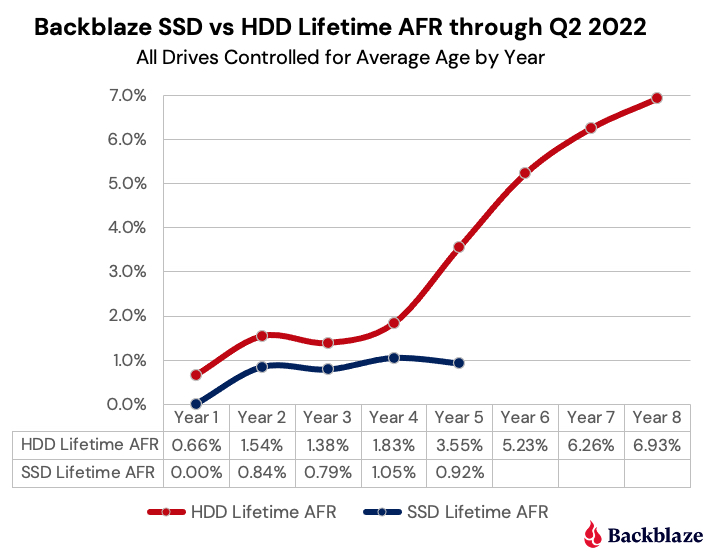
Partitioning Your Data Lake

Our final exercise was to create a single Drive Stats dataset containing all nine years of Drive Stats data. As stated above, at the time of writing the full Drive Stats dataset comprises nearly 300 million records, occupying over 90GB of disk space when in raw CSV format, rising by over 200,000 records per day, or about 75MB of CSV data.

As the dataset grows in size, an additional data engineering best practice is to include partitions.

In the introduction we mentioned that databases use optimized internal storage structures. Foremost among these are indexes. Data lakes have limited support for indexes. Data lakes do, however, support partitions. Data lake partitions are functionally similar to what databases alternately refer to as either a primary key index or index-organized tables. Regardless of the name, they effectively achieve faster data retrieval by having the data itself physically sorted. Since Drive Stats is append-only, when sorting on a date field, new records are appended to the dataset.

Having the data physically sorted greatly aids retrieval in cases that are known as range queries. To achieve fastest retrieval on a given query, it is important to only retrieve data that resolves true on the predicate in the WHERE clause. In the case of Drive Stats, for a query on only a single month or several consecutive months we get the fastest time to the result if we can read only the data for these months. Without partitioning Trino would need to do a full table scan, resulting in slower response due to the overhead of reading records for which the WHERE clause logic resolves to false. Organizing the Drive Stats data into partitions enables Trino to efficiently skip records that resolve the WHERE clause to false. Thus with partitions, many queries are far more efficient and incur the read cost only of those records whose WHERE clause logic resolves to true.

Our final transformation required a tweak to the Python script to iterate over all of the Drive Stats CSV files, writing Parquet files partitioned by year and month, so the files have prefixes of the form.

/drivestats/year={year}/month={month}/

For example:

/drivestats/year=2021/month=12/

The number of SMART attributes reported can change from one day to the next, and a single Parquet file can have only one schema, so there are one or more files with each prefix, named

{year}-{month}-{index}.parquet

For example:

2021-12-1.parquet

Again, we uploaded the resulting files and created a table in Trino.

CREATE TABLE drivestats (
    serial_number VARCHAR,
    model VARCHAR,
    capacity_bytes BIGINT,
    failure TINYINT,
    smart_1_normalized BIGINT,
    smart_1_raw BIGINT,
    ...
    smart_255_normalized BIGINT,
    smart_255_raw BIGINT,
    day SMALLINT,
    year SMALLINT,
    month SMALLINT
)
WITH (format = 'PARQUET',
 PARTITIONED_BY = ARRAY['year', 'month'],
      EXTERNAL_LOCATION = 's3a://b2-trino-getting-started/drivestats-parquet');

Note that the conversion to Parquet automatically formatted the data using appropriate types, which we used in the table definition.

This command tells Trino to scan for partition files.

CALL system.sync_partition_metadata('ds', 'drivestats', 'FULL');

Let’s run a query and see the performance against the full Drive Stats dataset in Parquet format, partitioned by month:

trino:ds> SELECT COUNT(*) FROM drivestats;
   _col0   
-----------
296413574 
(1 row)

Query 20220707_182743_00055_tshdf, FINISHED, 1 node
Splits: 412 total, 412 done (100.00%)
15.84 [296M rows, 5.63MB] [18.7M rows/s, 364KB/s]

It takes 16 seconds to count the total number of records, reading only 5.6MB of the 15.3GB total data.

Next, let’s run a query against just one month’s data:

trino:ds> SELECT COUNT(*) FROM drivestats WHERE year = 2022 AND month = 1;
  _col0  
---------
 6415842 
(1 row)

Query 20220707_184801_00059_tshdf, FINISHED, 1 node
Splits: 16 total, 16 done (100.00%)
0.85 [6.42M rows, 56KB] [7.54M rows/s, 65.7KB/s]

Counting the records for a given month takes less than a second, retrieving just 56KB of data–partitioning is working!

Now we have the entire Drive Stats data set loaded into Backblaze B2 in an efficient format and layout for running queries. Our next blog post will look at some of the queries we’ve run to clean up the data set and gain insight into nine years of hard drive metrics.

Conclusion

We hope that this article inspires you to try using Backblaze for your data analytics workloads if you’re not already doing so, and that it also serves as a useful primer to help you set up your own data lake using Backblaze B2 Cloud Storage. Our Drive Stats data is just one example of the type of data set that can be used for data analytics on Backblaze B2.

Hopefully, you too will find that Backblaze B2 Cloud Storage can be a useful, powerful, and very cost effective option for your data lake workloads.

If you’d like to get started working with analytical data in Backblaze B2, sign up here for 10 GB storage, free of charge, and get to work. If you’re already storing and querying analytical data in Backblaze B2, please let us know in the comments what tools you’re using and how it’s working out for you!

If you already work with Trino (or other data lake analytic engines), and would like connection credentials for our partitioned, Parquet, complete Drive Stats data set that is now hosted on Backblaze B2 Cloud Storage, please contact us at [email protected].
Future blog posts focused on Drive Stats and analytics will be using this complete Drive Stats dataset.

Similarly, please let us know if you would like to run a proof of concept hosting your own data in a Backblaze B2 data lake and would like the assistance of the Backblaze Developer Evangelism team.

And lastly, if you think this article may be of interest to your colleagues, we’d very much appreciate you sharing it with them.

The post Storing and Querying Analytical Data in Backblaze B2 appeared first on Backblaze Blog | Cloud Storage & Cloud Backup.