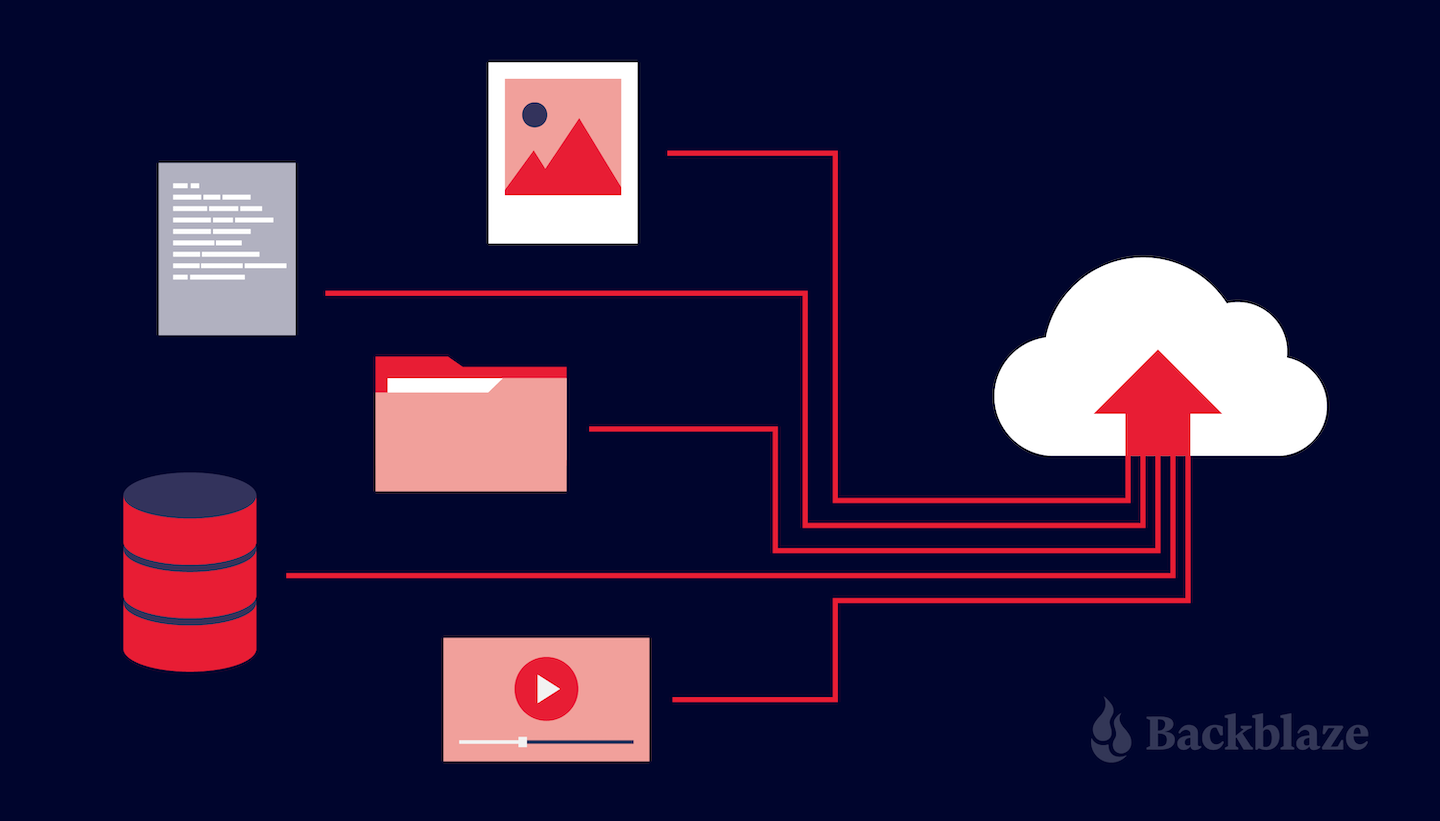
Customers storing data in Backblaze B2 Cloud Storage enjoy zero-cost downloads via our Content Delivery Network (CDN) partners: Cloudflare, Fastly, and Bunny.net. Configuring a CDN to proxy access to a Backblaze B2 Bucket is straightforward and improves the user experience, since the CDN caches data close to end-users. Ensuring that end-users can only access content via the CDN, and not directly from the bucket, requires a little more effort. A new technical article, Cloudflare Workers for Backblaze B2, provides the steps to serve content from Backblaze B2 via your own Cloudflare Worker.
In this blog post, I’ll explain why you might want to prevent direct downloads from your Backblaze B2 Bucket, and how you can use a Cloudflare Worker to do so.
Why Prevent Direct Downloads?
As mentioned above, Backblaze’s partnerships with CDN providers allow our customers to deliver content to end users with zero costs for data egress from Backblaze to the CDN. To illustrate why you might want to serve data to your end users exclusively through the CDN, let’s imagine you’re creating a website, storing your website’s images in a Backblaze B2 Bucket with public-read access, acme-images.
For the initial version, you build web pages with direct links to the images of the form https://acme-images.s3.us-west-001.backblazeb2.com/logos/acme.png. As users browse your site, their browsers will download images directly from Backblaze B2. Everything works just fine for users near the Backblaze data center hosting your bucket, but the further a user is from that data center, the longer it will take each image to appear on screen. No matter how fast the network connection, there’s no getting around the speed of light!
Aside from the degraded user experience, there are costs associated with end users downloading data directly from Backblaze. The first GB of data downloaded each day is free, then we charge $0.01 for each subsequent GB. Depending on your provider’s pricing plan, adding a CDN to your architecture can both reduce download costs and improve the user experience, as the CDN will transfer data through its own network and cache content close to end users. Another detail to note when comparing costs is that Backblaze and Cloudflare’s Bandwidth Alliance means that data flows from Backblaze to Cloudflare free of download charges, unlike data flowing from, for example, Amazon S3 to Cloudflare.
Typically, you need to set up a custom domain, say images.acme.com, that resolves to an IP address at the CDN. You then configure one or more origin servers or backends at the CDN with your Backblaze B2 Buckets’ S3 endpoints. In this example, we’ll use a single bucket, with endpoint acme-images.s3.us-west-001.backblazeb2.com, but you might use Cloud Replication to replicate content between buckets in multiple regions for greater resilience.
Now, after you update the image links in your web pages to the form https://images.acme.com/logos/acme.png, your users will enjoy an improved experience, and your operating costs will be reduced.
As you might have guessed, however, there is one chink in the armor. Clients can still download images directly from the Backblaze B2 Bucket, incurring charges on your Backblaze account. For example, users might have bookmarked or shared links to images in the bucket, or browsers or web crawlers might have cached those links.
The solution is to make the bucket private and create an edge function: a small piece of code running on the CDN infrastructure at the images.acme.com endpoint, with the ability to securely access the bucket.
Both Cloudflare and Fastly offer edge computing platforms; in this blog post, I’ll focus on Cloudflare Workers and cover Fastly Compute@Edge at a later date.
Proxying Backblaze B2 Downloads With a Cloudflare Worker
API clients, such as Workers, downloading data from a private Backblaze B2 Bucket via the Backblaze S3 Compatible API must digitally sign each request with a Backblaze Application Key ID (access key ID in AWS parlance) and Application Key (secret access key). On receiving a signed request, the Backblaze B2 service verifies the identity of the sender (authentication) and that the request was not changed in transit (integrity) before returning the requested data.
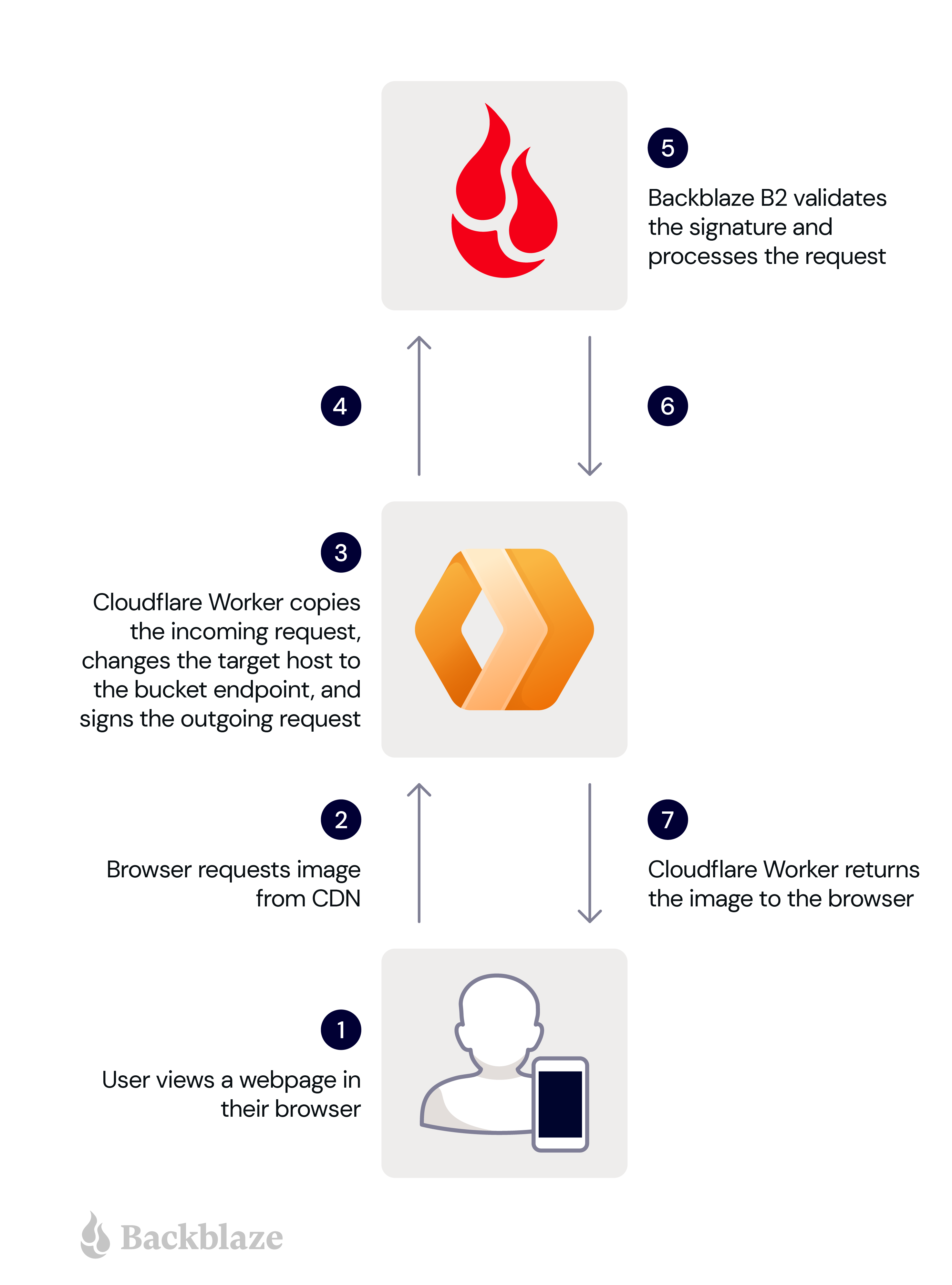
So when the Worker receives an unsigned HTTP request from an end user’s browser, it must sign it, forward it to Backblaze B2, and return the response to the browser. Here are the steps in more detail:
A user views a web page in their browser.
The user’s browser requests an image from the Cloudflare Worker.
The Worker makes a copy of the incoming request, changing the target host in the copy to the bucket endpoint, and signs the copy with its application key and key ID.
The Worker sends the signed request to Backblaze B2.
Backblaze B2 validates the signature, and processes the request.
Backblaze B2 returns the image to the Worker.
The Worker forwards the image to the user’s browser.
These steps are illustrated in the diagram below.
The signing process imposes minimal overhead, since GET requests have no payload. The Worker need not even read the incoming response payload into memory, instead returning the response from Backblaze B2 to the Cloudflare Workers framework to be streamed directly to the user’s browser.
Now you understand the use case, head over to our newly published technical article, Cloudflare Workers for Backblaze B2, and follow the steps to serve content from Backblaze B2 via your own Cloudflare Worker.
Put the Proxy to Work!
The Cloudflare Worker for Backblaze B2 can be used as-is to ensure that clients download files from one or more Backblaze B2 Buckets via Cloudflare, rather than directly from Backblaze B2. At the same time, it can be readily adapted for different requirements. For example, the Worker could verify that clients pass a shared secret in an HTTP header, or route requests to buckets in different data centers depending on the location of the edge server. The possibilities are endless.
AI is really having a moment. There’s DALL-E, Lensa, ChatGPT. Your social media feed is probably full of new avatars and AI-generated haiku. Naturally, we at Backblaze were intrigued by this brave new world of AI-generated content. The technology has been wildly popular, but is not without controversy, raising questions about intellectual property, copyright law, artist disenfranchisement, possible displacement of jobs, and general fear over the rise of the machines. On the other side of that coin, there’s definitely a place for AI in the future of work and life. So, I wanted to experiment with it.
Let’s start with Stable Diffusion.
Stable Diffusion is one of the new text-to-image technologies popping up all over the internet that allows users to input words and phrases and get back amazing pictures created by its deep learning model. What makes Stable Diffusion so interesting is that it has been open sourced to allow anyone to create their own models for text-to-image generation.
After playing with an online instance of Stable Diffusion, I sought out content on some more ways to use the AI tool. I found several examples of how to use Stable Diffusion with your own images like this one and this one. The most common use case for this was taking advantage of AI to create art from a model based on your own face. Sounds cool, right? But what if I also had a bunch more pictures in Backblaze B2 Cloud Storage? Could I do the same thing to create art, graphics, branded images, and more, from my content in the cloud? The answer is a resounding YES.
Use Cases for Stable Diffusion
For me, this was a fun experiment, but we see a number of different ways this set up could be used both individually and for businesses. I started with about 20 images or so as fodder for Stable Diffusion’s algorithm. But, that’s just the beginning.
Let’s say you’re a marketing team at a small company. You could use Stable Diffusion’s paid version and get access to hundreds of thousands of random images from Google, but you really only care about analyzing and generating photos that are relevant to your business. So, you run Stable Diffusion in a cloud compute instance and have it analyze a Backblaze B2 Bucket where you store your own library of images, which you’ve probably been collecting for years. Set up that way, you have your own customized AI engine that analyzes and generates only images that are pertinent to your needs, rather than a bunch of images you don’t care about.
In this experiment, I used Google Colab, which worked well for my needs. But for a real implementation, you could use a Backblaze cloud compute partner like Vultr. Egress between Backblaze and Vultr is free, so the analysis won’t cost you anything beyond what it costs to use the two services.
This could be hugely useful for marketing teams, but we also see the value for individuals or businesses who want to keep their data private but still take advantage of AI technology. This way, you aren’t serving up images on public sites.
So, how does it all work? Let’s get into it.
Getting Started with Stable Diffusion and Backblaze B2
A smartphone to take pictures if you don’t have 20 or so pictures of whatever subject you want to use lying around.
Whatever software tool you’d like to use to mount Backblaze B2 as a drive on your computer. I use Rclone in this example but any cloud drive software will work.
The first thing you’ll need to do is create an account at Hugging Face. Hugging Face is the home of the modern AI community and is where Stable Diffusion lives. In your Hugging Face account, navigate to your Account Settings and go to Access Tokens—we’ll need one of these to allow our environment to use the Stable Diffusion engines.
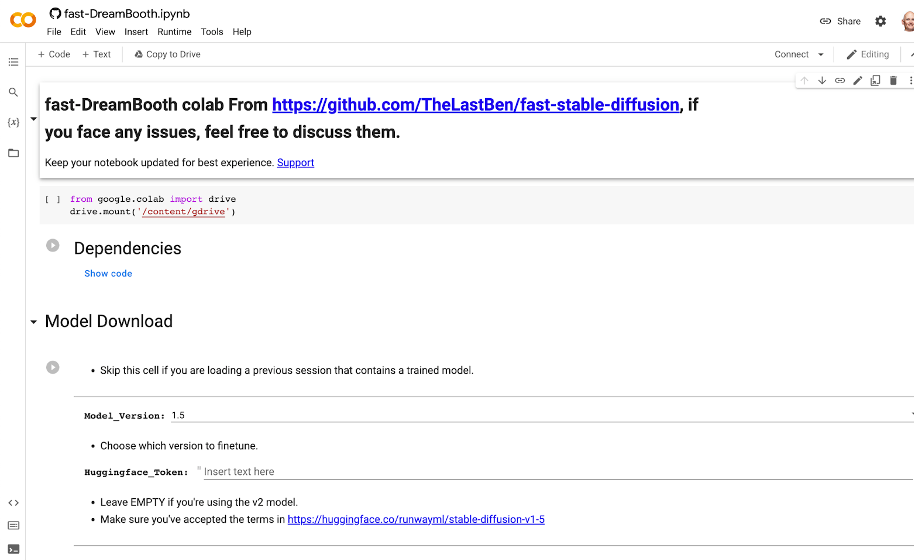
Now as to the environment, this can be on your own computer, in a virtual machine (VM), really wherever. My favorite (and free) method I found was a Google Colab notebook created by GitHub user TheLastBen that makes the process so incredibly simple that anyone can do this. The Colab notebook also takes advantage of DreamBooth, a Google Research project that provides for incredible detail on the art and images created by a diffusion model. In short, this is the easiest way to get really good looking AI art. You can get started with the Colab notebook here.
In the Colab notebook there are a ton of different options and a great step-by-step guide that explains them, but I’ll walk you through the basic settings to get going:
First, hit the Play button next to Dependencies.
Once that’s done, copy your User Access Token from your Hugging Face account.
In the Model Download section, paste that User Access Token into the Huggingface_Token field.
Click the Play button for Model Download.
You’ll see the script run below all the fields here. You can proceed when you see “DONE!”
Finally, in the Dreambooth section, provide a name in the Session_Name field. This will be the name of the session that gets saved in your Google Drive. That name can be reused later to skip these steps next time.
Training the Stable Diffusion Model
Now the pictures: You’ll want at least 20 pictures or so for your AI model to analyze in order to avoid creating a bunch of generic person art or nightmare fuel. So bust out your phone and take some selfies! If you have a friend to throw in two or three full body pictures this will help as well. A few optional tips:
Use different expressions and angles.
Use different backgrounds if you can.
Use a square or 1:1 ratio setting. By default, Stable Diffusion’s default image size is 512 x 512 pixels, so using square images makes your input more similar to your desired output.
If you’re an iPhone user, you will need to take one extra step here to save your files in JPEG format. You can find a guide for that in this article.
As you save your photos, make sure the file names include the name you’re going to use when generating your AI art. For example, my photos were all named troy (1).jpg, troy (2).jpg, troy (3).jpg, etc. This is important so that the AI understands what to call you (or your subject) when generating your images.
Once you have your photos, it’s time to upload them to a Bucket in Backblaze B2 Cloud Storage. You can easily do this in the Backblaze mobile app or on the Backblaze website.
With your selfies safely in Backblaze B2, make sure you make them accessible on your computer using a tool such as Rclone mount. If you don’t have an account yet, you can check out our guide on how to set up and configure Rclone mount.
You might be wondering why you should upload the photos to a Backblaze B2 Bucket and then mount the Bucket so that we can access it locally, rather than just saving the files to a local folder?
The answer is simple. In this example, we’re working with a few images representing a single subject, so you likely won’t have issues working from your local drive. As you further experiment with more subjects and more images of each subject, you’ll likely outgrow your local drive. Backblaze B2 Cloud Storage scales infinitely so you won’t have to worry about running out of space.
Now, back to the Colab notebook, hit the play button on Instance Images and click the button that shows up to Choose Files. In the pop up, choose your mounted instance of your B2 Bucket and select the photos.
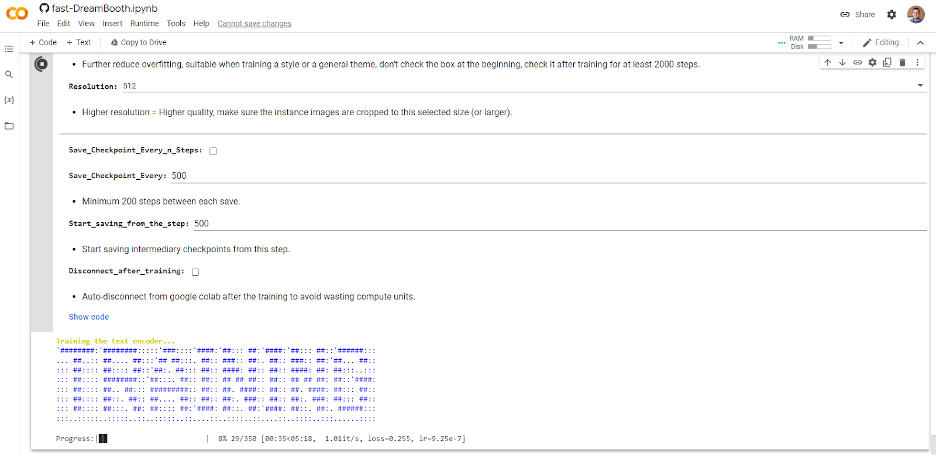
Once they are uploaded, skip the Concept Images section and click the play button for Training. If you’ve done everything right, you should see some ASCII art like this:
Depending on how many photos you selected, this can take some time. So grab a coffee, go for a walk, listen to a podcast, or perhaps all three.
Creating Your Own AI-Generated Masterpieces
Once complete, click the Play button under Test the Trained Model. This will launch a temporary instance of Stable Diffusion with your new custom model in Gradio, which is an open-source Python library for running machine learning apps. Click the Gradio link generated and we’re ready to start making some AI art.
Again, there are a ton of options and configurations but all you really need to do at this point is enter some text into the Prompt box and click the big Generate button.
Creating prompts for AI art is quickly becoming its own art form. There are tons of resources out there to inspire you, but here are a few prompts I used along with the resulting art.
Pro Tip: You may need to click the Generate button a few times if something looks off. This is totally normal—your new AI friend is learning over time, and it does this by repeating the generation process.
Prompt: “Photo of troy digital painting”
Prompt: “Photo of troy person digital painting”
Prompt: “Photo of troy person digital painting asymmetrical headshot smiling”
And finally for something fun…
Prompt: ”photo of troy person hand-drawn cartoon”
It even has an artist signature! Although I’m not sure who fRny Y is?
So, there you have it. Your very own AI engine, customized to generate versions of your face (or your library of images).
Good luck to all the budding AI artists out there. If you give this a try, we’d love to see your images on social media. You can find us @backblaze on Twitter, Facebook, and LinkedIn. I look forward to seeing what you all create!
Another one bites the dust. Amazon announced they’re putting Amazon Cloud Drive in the rearview to focus on Amazon Photos in a phased deprecation through December 2023. Today, we’ll dig into what this means for folks with data on Amazon Cloud Drive, especially those with files other than photos and videos.
Dear Amazon Drive User
When Amazon dropped the news, they explained the phased approach they would take to deprecating Amazon Drive. They’re not totally eliminating Drive—yet. Here’s what they’ve done so far, and what they plan to do moving forward:
October 31, 2022: Amazon removed the Drive app from iOS and Android app stores. The app doesn’t get bug fixes and security updates anymore.
January 31, 2023: Uploading to the Amazon Drive website will be cut off. You will have read-only access to your files.
December 31, 2023: Amazon Drive will no longer be supported and access to files will be cut off. Every file stored on Amazon Drive, except photo or video files, needs a new home. Users can access photo and video files on Amazon Photos.
Now, users face two options for what to do with files stored on Amazon Drive:
Follow instructions to download Amazon Photos for iOS and Android devices. And, use the Amazon Drive website to download and store all other files locally or with another service.
Transfer your entire library of photos, videos, and other data to another service.
Looking for an Amazon Cloud Drive Alternative?
Shameless plug: If you used Amazon Cloud Drive to store anything other than photos and you need a new place to keep your data, give Backblaze B2 Cloud Storage a try. The first 10GB are free, and our storage is priced at a flat rate of $5/TB/month ($0.005/GB/month) after that. And if you’re a business customer, we also offer the choice of capacity-based pricing with Backblaze B2 Reserve.
A Quick History of Amazon Cloud Drive
In 2014, Amazon offered free, unlimited photo storage on Amazon Cloud Drive as a loyalty perk for Prime members. The following year, they rolled out a subscription-based offering to store other types of files in addition to photos—video, documents, etc.—on Cloud Drive.
Then, in 2017, they capped the free tier at 5GB. This was just one of many in a string of cloud storage providers ending a free offering and forcing users to pay or move.
All Amazon account holders—regardless of whether they paid for Prime or not—got 5GB for photos and other file types free of charge. If you wanted or needed more storage than that, you had to sign up for the subscription-based offering starting at $11.99 per year for 100GB of storage, and prices went up from there.
You might consider this the beginning of the end for Amazon Cloud Drive.
Why Say Goodbye?
When tech companies deprecate a feature—as Amazon has done with Drive—it’s for any number of reasons:
To combine one feature with another.
To rectify naming inconsistencies.
When a newer version makes supporting the older one impossible or impractical.
To avoid flaws in a necessary feature.
When a better alternative replaced the feature.
To simplify the system as a whole.
Amazon’s reason for deprecating Drive? To provide a dedicated solution for photos and videos. The company stated, “We are taking the opportunity to more fully focus our efforts on Amazon Photos to provide customers a dedicated solution for photos and video storage.” Unfortunately, that leaves folks who store anything else high and dry.
Where Do We Go From Here?
The bottom line: Amazon Drive customers must park emails, documents, spreadsheets, PDFs, and text files somewhere else. If you’re an Amazon Drive customer looking to move your files out before you lose access, we invite you to try Backblaze B2. The first 10GB is on us.
Upload your data to Backblaze B2. Many customers choose to do so directly through the web interface, while others prefer to use integrated transfer solutions like Cyberduck, which is free and open-source, or Panic’s Transmit for Macs.
Sit back and relax knowing your data is safely stored in the Backblaze B2 Storage Cloud.
In the last couple of years, Backblaze has taken residence in three new data center facilities. In the West, we added the CyrusOne facility in Chandler, Arizona and the Nautilus Data Center in Stockton, California. In the East, we just added the Coresight facility in Reston, Virginia as our anchor to our new U.S. East data region. Each of these data centers will house over an exabyte of customer data. A number like an exabyte of storage is nice, and we’ll share a bunch more numbers as we go. But what I really wanted to share are the stories behind the scenes as we moved into the Coresight facility in Reston, which we call IAD 1.
The process of turning a big empty room into a data center location is complex and requires intense coordination, an adaptable project plan, and folks who can think on their feet. Let’s face it, no project is perfect, and building out a data center is no different. But, once in a while, it’s fun to peek behind the curtain to see how the actual work gets done. Let’s take a look.
Big Boxes, Tight Spaces, and Construction
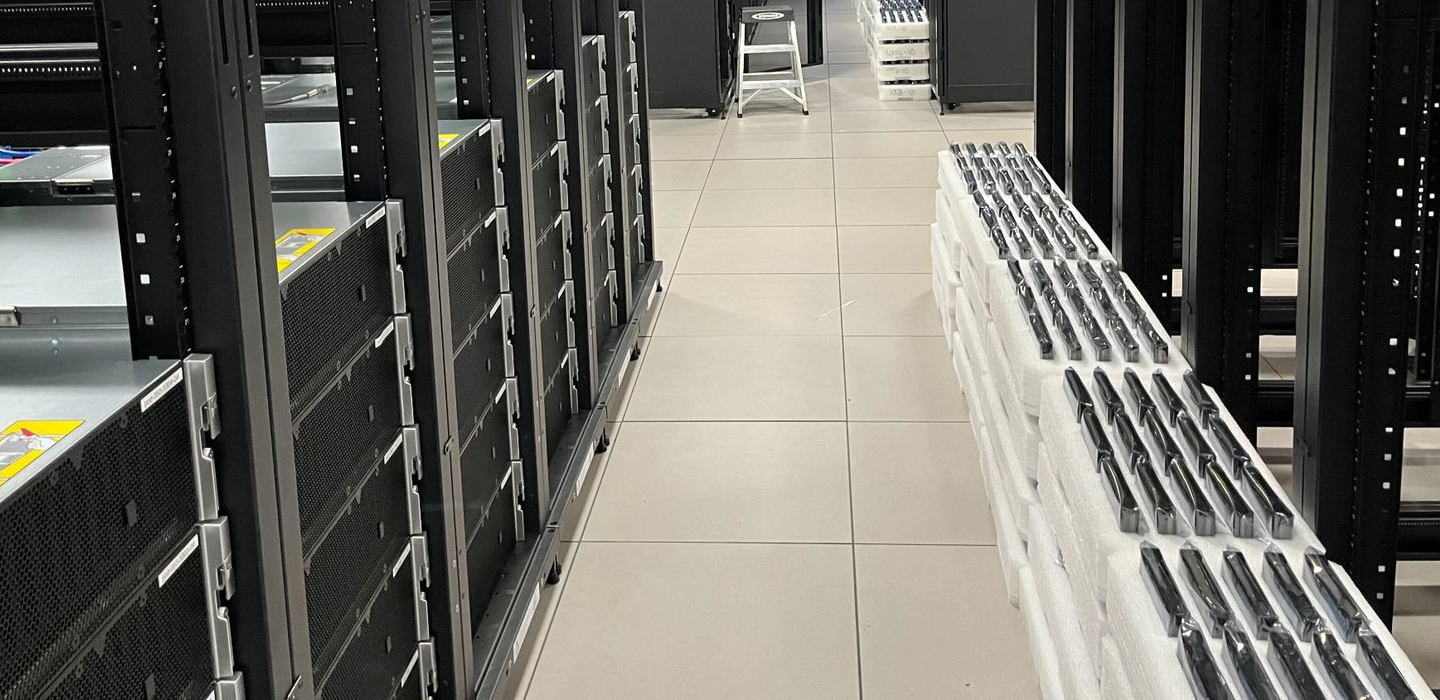
There were over 700 boxes of various shapes and sizes to be received at the IAD site. This included server cabinets, storage servers, support servers, networking equipment, and other odds and ends. The cabinet and storage server boxes were particularly large, and only four of these boxes at a time could fit into the service elevator used to move everything from the loading dock to the Backblaze facility on the fourth floor.
Cabinets and servers are normally received almost daily, but the IAD data center was undergoing construction which limited where and how trucks could unload their cargo. One poor fellow spent the better part of three hours trying to manipulate his semi into the loading dock. The construction also limited the amount of cargo that could stay in the dock area to basically zero. When a truck arrived and started unloading Backblaze goods, our process was: load four boxes, go up four floors, unload four boxes, go down four floors, and repeat until the truck was empty.
Each time a truck arrived, the race was on, and there were a lot of trucks as everything was scheduled to arrive within a 30-day window. Why 30 days? We wanted to install the cabinets all at once, so we could run the networking once and not have to piecemeal it in. To help out, we enlisted the help of the Coresight staff to assemble and install the cabinets, while we ran the networking and installed the servers and other gear.
Taking the Long Way Home
The Backblaze presence is spread across two buildings. One building houses the data center itself and includes the maintenance area. The Backblaze office is located in another building. It’s not ideal, but sometimes things work out that way. But, what it means is this: If you don’t know where you are going you’re either not supposed to be there or you are new. Data centers are not known for having a lot of “you are here” signs, nor are there a lot of folks around to ask if you are lost.
Being new can turn a five minute walk from the office to the data center floor into a 30 minute expletive laden stroll through unmarked halls and deadend corridors complete with visions of serial killers being behind every door. Lucky for us, Coresight does background checks on all their employees.
Let’s Talk Boxes
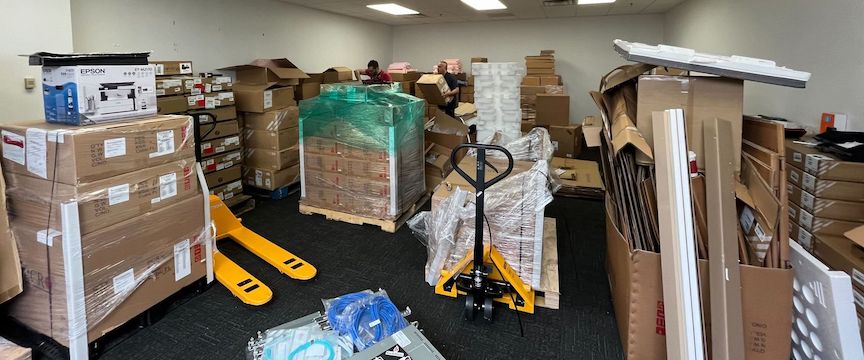
While Backblaze was responsible for getting the boxes to the new space and unboxing the contents, Coresight helped out by providing us with some temporary storage space as we built out our facility. Given our aggressive schedule, things occasionally got messy (as seen below).
Shortly after this photo was taken, we learned the site had “the crusher”, which takes boxes or garbage or whatever and, well, crushes such things into dumpster-suitable or recycling-suitable packages. While not as fun as a Megabot, the crusher ensured that we didn’t lose any employees under an avalanche of boxes.
How many boxes? Well, there were 126 boxes containing cabinets, one per box. Each cabinet was assembled and installed by the Coresight folks. There were hundreds of smaller boxes containing networking servers, conduits, networking cables, and, of course, thousands of various types of cable ties used by the Backblaze cabling ninjas as we see below.
The cabinets are 52U tall, and 120 of them will be used to house 1,440 storage servers which will make up 72 Backblaze Vaults. Each vault consists of twenty storage servers. Each storage server has 60 16TB drives, which totals 960TB of raw storage per server. Doing the math, the IAD data center will have over 1.3EB of raw storage. Subtracting formatting and parity, the capacity is still over 1EB. Of course, over time we expect to use larger hard drives in all of our data centers as the cost per gigabyte for hard drives continues to decrease.
A Note on Parity
The IAD data center uses our own open-source Reed-Solomon erasure coding in a 16/4 data/parity scheme for storing data. This is our new normal when using 16TB drives and above, versus the 17/3 scheme used with smaller drives. This helps lessen the time it takes to recover from a failed drive in our farm.
My Kingdom for a Storage Pod
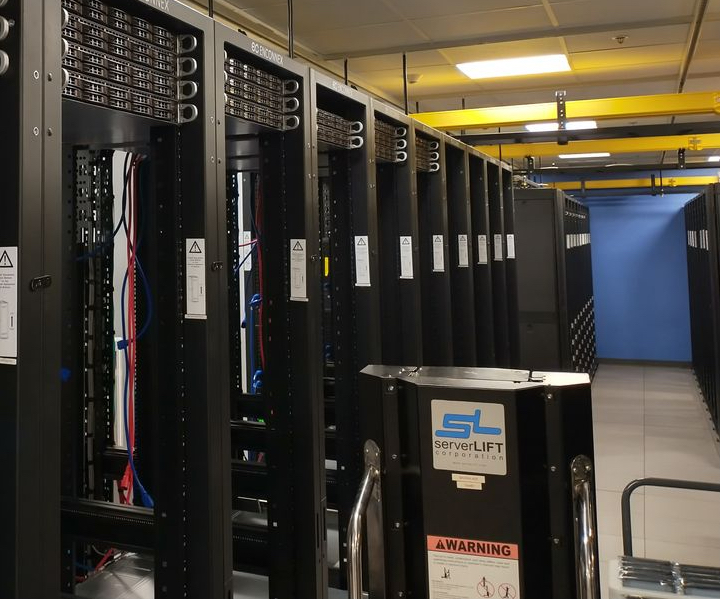
Not to be a villain here, but there are no Backblaze Storage Pods in the IAD 1 data center. All 100 of the storage servers used for the initial build out of the IAD data center are the Supermicro models we detailed in the recent Storage Pod Story blog post. You can see from the photo below each of the five vaults are racked and waiting for their hard drives to be installed. Maybe one day Supermicro will make us some pretty red bezels.
An Old Friend to the Rescue
The 52U Enconnex cabinets are 94.49 inches (2400 mm) tall. The 4U Supermicro storage servers will eventually be stacked 12 high in the cabinet, leaving 4U at the top of each for 1U core servers and IPMI (Intelligent Platform Management Interface) switches. Lifting a 4U 150lb (68kg) storage server is difficult, but so is lifting a 1U core server to nearly eight feet high. We needed some muscle, and there’s no one better than Guido, our first and most experienced server lift. He was flown in from the Phoenix data center to help the IAD staff get set up, and if he likes the gig he can stay. After all, he earned the right to a choice after nearly 12 years of heavy lifting for Backblaze.
Power
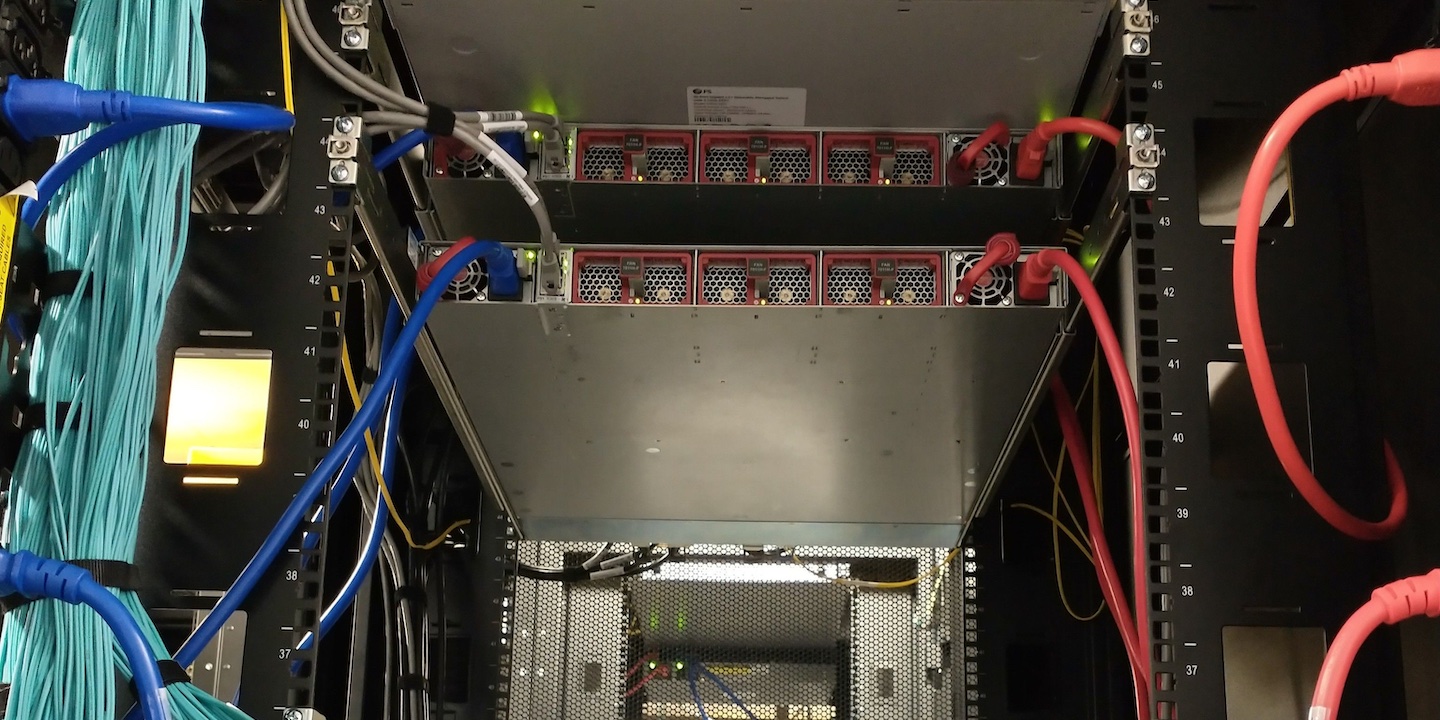
The data center provides fully redundant power to each cabinet. Each separate power source connects to a PDU in each cabinet. In each cabinet, there is a red PDU and a blue PDU with each color representing a power source. Since most of the servers we use in the data center support redundant power, a given server connects to each PDU (red and blue) in their cabinet as shown below.
The PDUs that we used were recommended by the data center and not a brand we had used before. The PDU manufacturer does not make the power cables, but they do recommend a couple of brands. We happened to like our red and blue cables and used them instead. We were surprised to discover they were a bad fit and kept falling out of the PDUs—so much for standards. Amazingly, it just so happens that a company makes PDU plug locks to keep the plugs from falling out. The plug locks also help when someone accidentally bumps into a power plug connected to the PDU while working on some equipment, so there’s that.
Security
As with all data center facilities, security is a prime concern. At the Coresite facility, Backblaze personnel must pass through a minimum of four checkpoints to get from the parking lot to the Backblaze data center facility or the Backblaze office. Along the way, both badge access and biometric scans are employed—sometimes separately and sometimes together. In addition, Backblaze personnel are limited in where they can go. For example, they are not allowed on the second and third floors of the data center building, only the fourth floor, and then they can only enter our facility. Getting lost while going from the office to the datacenter floor should make a little more sense now.
Within the Backblaze facility there are cameras that monitor everything inside. There are also cameras used by the Coresight staff to monitor the common areas such as hallways, the loading dock, and the parking lot. Before you can enter or leave the parking lot, an access badge and visual confirmation are required by the Coresight staff. This led to a very interesting dinner one evening for Backblaze and Coresight personnel…
Huevos Rancheros
Several of the Backblaze staff were temporarily deployed to Reston to set up the IAD data center. One of their favorite places to eat was Ted’s Bulletin, located in Reston near the data center. They serve breakfast all day until they close at 10 p.m. or so. Working into the evening is typical for data center set ups, and the gang decided to order from Ted’s and have it delivered via DoorDash so they could keep working.
The Dasher arrived with their order at the back gate of the compound. That’s not a public entrance and the Dasher was told to go around to the public gate. “This is where it says to go,” said the Dasher. He wasn’t even sure where he was; he just followed the GPS. Jack, who placed the DoorDash order, got a call from the Dasher. He was going to leave if someone didn’t meet him at the gate. Not wanting to see his huevos rancheros go to waste, Jack found his way to the back gate talking to the Dasher all the way so he wouldn’t leave. Jack showed his credentials to the security camera, but they would not open the gate. Why? The Dasher was a visitor at a non-visitor gate, and Jack was not a vehicle that needed to exit. The compromise; the Dasher was allowed to hand Jack the containers of food through a narrow opening in the gate. Jack showed his huevos rancheros and the other delights to security as he passed through the various checkpoints to get to a Backblaze office, and breakfast for dinner was had by all.
Three days later they wanted Ted’s again. They drove.
Epilogue
The Backblaze U.S. East data region is ready to go with five Backblaze Vaults online and accepting data. That’s 100 servers and thousands of connections open for business on day one with more vaults waiting in the wings to be deployed by the end of the year. Many thanks to Jack, Jessie, Zachary, Brent, Rich, Mark, and the supporting cast back at Backblaze HQ in San Mateo for getting IAD 1 up and running. Jessie and Zachary are part of the permanent crew at IAD 1 with more folks joining them over the coming months.
One last shoutout to the IAD crew for having the courage and sense of humor to share their stories with me. Having a Dasher squeezing your huevos through a gate in the dark while security folks watch on a live feed is not something I could ever make up. Thanks again.
Putting the New Region to Work for Your Business
With the addition of the new region, customers have more options for storing data and replicating datasets to separate cloud locations. Even better: Egress is free for Cloud Replication across the Backblaze platform. Go to our website for more information, check out our FAQ, and feel free to contact our Support Team if you have any questions.
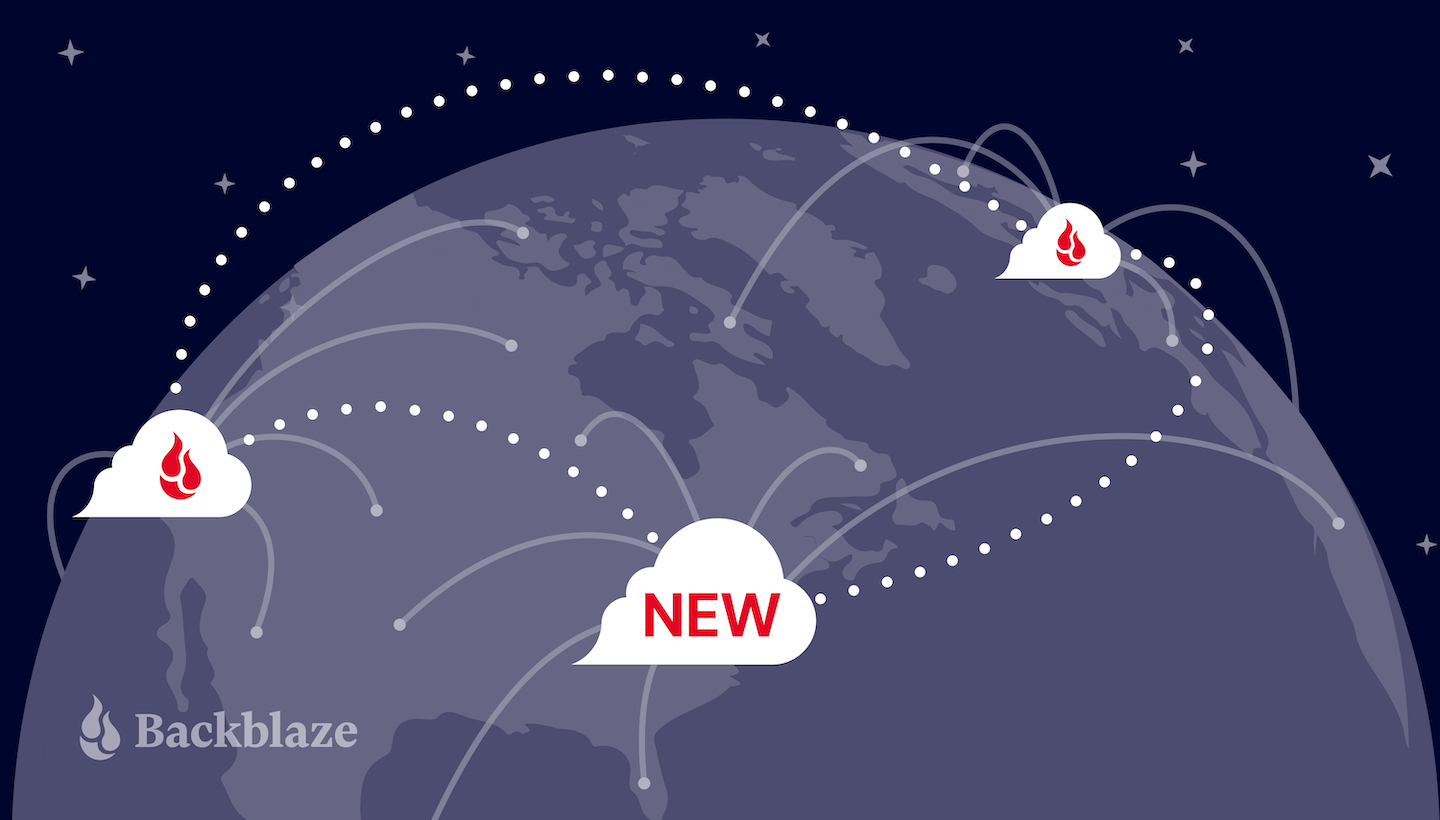
Customers looking for more local availability and data resilience can get both with the opening of the U.S. East data region, now available to current and future Backblaze users. With an expanded data center footprint, customers can easily store replicated datasets to two or more cloud locations for compliance and continuity. Plus, data egress for Cloud Replication is free, so you can copy data at no expense across the Backblaze platform.
Data Regions Deliver Speed, Security, and Scalability
Achieve redundancy in the cloud. Automatically replicate datasets across North America, whether it’s for compliance, protection from cyberattacks, continuity needs, or to keep data closer to users or customers. (We love a redundant backup plan.)
Deliver your data faster. Store data closer to end users to improve latency for primary data sets—especially important if you’re an East Coast-based company.
Scale sustainably. Increase or decrease your storage requirements as your business expands—no need to invest in additional hardware. And minimize costs associated with managing a data center, including hardware, software, support, and other costs.
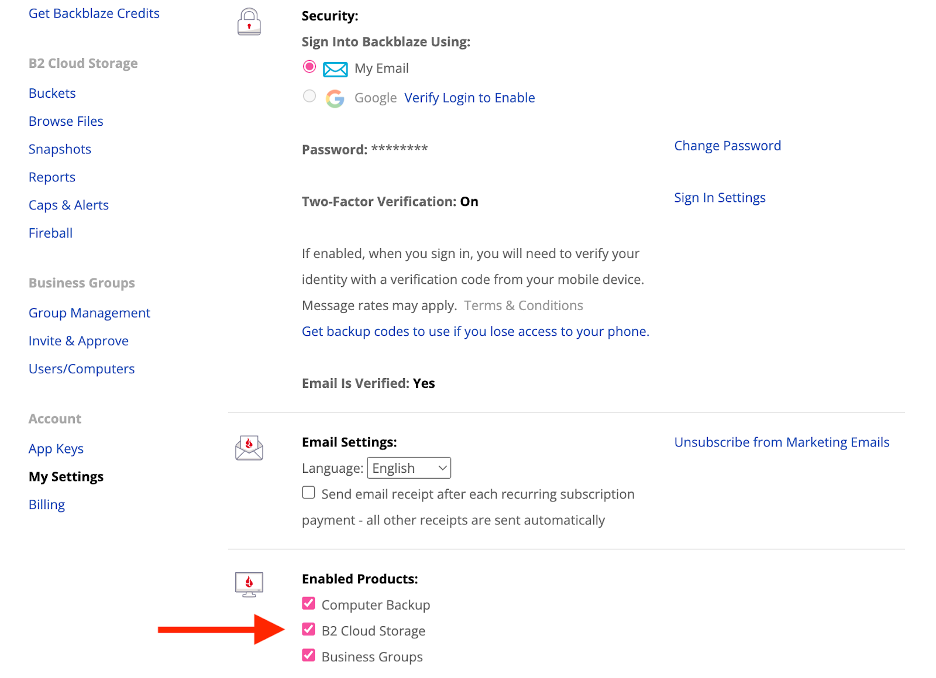
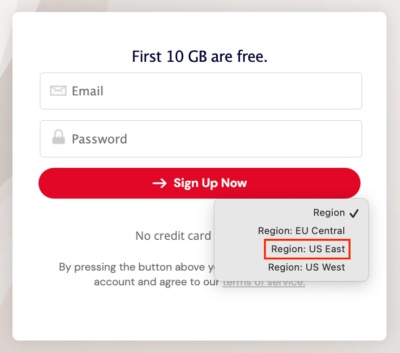
To start storing data in U.S. East today, you can choose “Region: US East” when you create a Backblaze account.
Astonishingly Easy Cloud Replication
Backblaze’s multi-region cloud infrastructure allows you to further take advantage of Cloud Replication to improve reliability, accessibility, and overall fault tolerance. Even better: While other cloud providers charge you to replicate your data, there are no egress fees across the Backblaze platform for Cloud Replication.
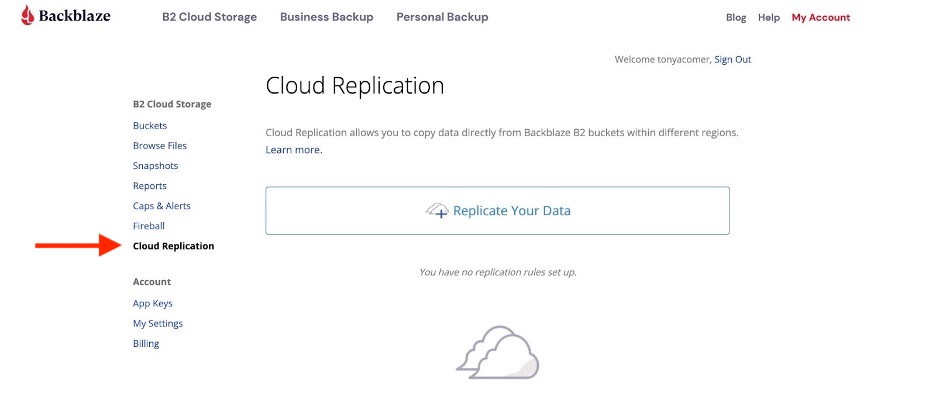
It’s easy to get started. If you’re an existing customer, all you have to do to implement Cloud Replication is to log in to your B2 Storage Cloud account and click on Cloud Replication in the right-hand column. Go to our website for more information, check out our FAQ, and feel free to contact our Support Team if you have any questions.
New Data Region; Same Data Center Standards
Data stored in U.S. East will reside in Backblaze’s newest data center, IAD 1, located in Reston, Virginia. Backblaze has a high standard for our data centers, and this new facility is best-in-class. All Backblaze data centers are SSAE-18/SOC-2 compliant, use biometric security, and have ID checks and area locks that require badge-level access to keep your data safe. In addition to SOC 2 Type 2, this latest data center is ISO 27001, NIST 800-53, and HIPAA compliant.
Cloud Storage That Meets Evolving Needs
The way businesses use and access cloud storage is changing. Rather than relying on local storage, companies are increasingly turning to the cloud to meet their data storage needs, including data protection and redundancy. Opening our U.S. East data region is the next logical step to better serve our customers, now and in the future, as they increasingly adopt cloud-only infrastructures. And for the many customers who continue to store data on-premises, the new region gives them more choices for their backup needs as well.
Look out for Backblaze Evangelist, Andy Klein, to fill you in all the details of our newest data center in an upcoming blog post, and feel free to comment below if you want to know more.
We launched our Channel Partner program about seven months ago. In the months since, we’ve rapidly onboarded some great strategic resellers, added new benefits, welcomed more staff to our team, and completed our initial launch of Backblaze B2 Reserve, our capacity-based cloud storage offering that includes download fees, premium support, and our Universal Data Migration service, exclusively for Backblaze resellers—but we’re still just getting started.
We’re very excited to announce another partner today.
Exertis Broadcast + Backblaze
Exertis Broadcast now offers resellers the full value and benefits of our Backblaze B2 Reserve program. This new partnership is doubly exciting to us because a number of our alliance partners already work with Exertis Broadcast—including Quantum, Studio Network Solutions (SNS), and SoDA—which means the world class Exertis engineers can package a suite of best-in-breed cloud workflow solutions in one seamless package for teams working in media and entertainment, modern data protection, and/or disaster recovery solutions industries.
If you’re a reseller looking for a distribution partner that can help your customers with their cloud storage needs, here are a few of the benefits Exertis offers:
Sales and Support dedicated to customer success.
Engineering Team available to consult on the best products and solutions to fit any needs.
Tools and Resources ranging from a state-of-the-art demo center to an innovative video solution builder.
Video Production to create cutting-edge content.
Marketing Professionals to design effective marketing content to keep you abreast of industry news and events.
To get started, resellers can contact us at [email protected] today.
The Backblaze Channel Partner Program
The Channel Partner program exists to provide easy, transparent, predictable cloud storage solutions to accelerate growth for resellers through the value of our Backblaze B2 Reserve offering.
The program provides benefits ranging from deal registration to joint marketing; rewards like seller incentives and market development funds (coming soon); as well as support including a Partner Portal and sales and marketing staff assistance.
Join Us!
We can’t wait to join with our current and future Channel Partners to deliver tomorrow’s solutions to any customer who can use astonishingly easy cloud storage. (We think that’s pretty much everybody.)
If you’re a reseller, we’d love to hear from you. If you’re a customer interested in benefiting from any of the above, we’d love to connect you with the right Channel Partner team to serve your needs. Either way, the doors are open and we look forward to helping out.
’Tis the season—for ransomware attacks that is. The Federal Bureau of Investigation (FBI) and the Cybersecurity and Infrastructure Security Agency (CISA) observed increases in cyber attacks on weekends and holidays. Several of the largest ransomware attacks in 2021 happened over holiday weekends, including Mother’s Day, Memorial Day, and the Fourth of July. This tactic may be attractive because it gives cyber attackers a head start to map networks and propagate ransomware throughout networks when organizations are at limited capacity.
The reason for this is simple: one of the easiest and most effective ways for bad actors to gain access to secure networks is by targeting the people who use them through phishing attacks and other social engineering techniques. Employees are already behind the eight ball so to speak, as email volume can increase up to 100x during the holiday season. Add to the equation that businesses often have increased workloads with fewer folks in office, or even office closures, and you have an ideal environment for a ransomware attack.
Phew! Aren’t we supposed to be celebrating this time of year? Absolutely. So, let’s talk about ten things you can do to help protect your business from cyberattacks and organized crime during the holiday season.
Get the Ransomware Ebook
There’s never been a better time to strengthen your ransomware defenses. Get our comprehensive guide to defending your business against ransomware this holiday season.
10 Security Tips for Your Business This Holiday Season
1. Update Your Tech
Teams should ensure that systems are up to date and that any new patches are tested and applied as soon as they are released, no matter how busy the company is at this time. This is, of course, important for your core applications, but don’t forget cell phones and web browsers. Additionally, personnel should be assigned to monitor alerts remotely when the business is closed or workers are out of the office so that critical patches aren’t delayed.
2. Review Your Company Security Policy With All of Your Employees
All businesses should review company security policies as the holiday season approaches. Ensure that all employees understand the importance of keeping access credentials private, know how to spot cybercrime, and know what to do if a crime happens. Whether your staff is in-office or remote, all employees should be up to date on security policies and special holiday circumstances.
3. Conduct Phishing Simulation Training
Another important step that organizations can take to ensure security over the holidays is to conduct phishing simulation training at the beginning of the season, and ideally on a monthly basis. This kind of training gives employees a chance to practice their ability to identify malicious links and attachments without a real threat looming. It’s a good opportunity to teach workers not to share login information with anyone over email and the importance of verifying emails.
4. Then, Make Sure Recommended Measures Are Set Up, Especially MFA
Multifactor authentication (MFA) fatigue happens when workers get tired of logging in and out with an authenticator app, push notification, or with a text message—but it’s one of the single best tools in your security arsenal. During the holidays, workers might be busier than usual, and therefore, more frustrated by MFA requirements. But, MFA is crucial for keeping your business safe from ransomware and domain denial of service (DDoS) attacks.
5. Have an Offline Backup
It’s easy to forget, in our ever-more-connected world, that taking business data offline is one of the best protections you can offer. You still need to have a process to make sure those offline backups are regularly updated, so set a cadence. But, particularly with your business-critical data, offline backups represent a last line of defense that can make all the difference.
6. Adjust Property Access Privileges
You might be surprised to know that physical security is a cybercrime prevention tool as well. Doors and devices should be the most highly protected areas of your space. Before the holidays, be sure to do a thorough review of your business’ access privileges so that no one has more access than is necessary to perform their duties. And, before shutting down for a much-needed break, check all exterior doors, windows, and other entry points to ensure they are fully secured. Don’t forget to update any automated systems to keep everything locked down before your return to work.
7. Don’t Advertise That You Will Be Closed
It’s common practice to alert customers when your business will be closed so that you can avoid any inconvenience. However, this practice could put your business at risk during times of the year when the crime rate is elevated, including the holiday season. Instead of posting signage or on social media declaring that no one will be in the building for a certain period, it’s better to use an automated voice or email response to alert customers of your closing. This way, crime opportunists will be less tempted.
8. Check In on Your Backup Strategy
For years, the industry standard was the 3-2-1 backup strategy. A 3-2-1 strategy means having at least three total copies of your data, two of which are local but on different media, and at least one off-site copy (in the cloud). These days, the 3-2-1 backup strategy is table stakes: still necessary, but there are now even more advanced approaches. Consider a cyber resilience stance for your company.
9. Consider Cyber Insurance
Cyber insurance adoption rates are hard to track, but all data points to an increase in businesses getting coverage. Cyber insurance can cover everything from forensic post-breach reviews to litigation expenses. It also forces us all to review security policies and bring everything up to industry best practices.
10. Test Your Disaster Recovery Strategy
If you don’t have a disaster recovery strategy, this is the time to create one. If you do have one, this is also a great time to put it to the test. You should know going into the holidays that you can respond quickly and effectively should your company suffer a security breach.
Protecting Business Data During the Holidays
Here’s the secret eleventh tip: The best thing you can do for your security is, ironically, the same thing that cyber criminals do—to treat your employees as humans. Studies have shown that one the long-term costs of ransomware is actually employee stress. We can’t expect humans to be perfect, and a learning-based (versus punitive) approach will help you in two ways: you’ll be setting up processes with the real world in mind, and your employees won’t feel disincentivized to report incidents early and improve when they make mistakes in training (or even in the real world).
While it may be impossible to prevent all instances of data theft and cybercrime from happening, there are steps that companies can take to protect themselves. So, train, prepare, back up your data, and then celebrate knowing that you’ve done what you can.
2023 was a record-breaking year for ransomware, with threat actors targeting higher ed institutions, schools, governments, and hospitals, amongst other targets. And, a study by cybersecurity firm Sophos found that 94% of organizations hit by ransomware in the past year said that the cybercriminals attempted to compromise their backups during the attack.
If your backups are compromised, you lose one of the strongest cards in your hand when it comes to recovery. But with advances in backup protection like Object Lock, you can add one more layer of defense between cybercriminals and your business data.
In this post, we’ll explain:
What Object Lock is.
What Object Lock does.
Why you should use it.
When you should use it.
More On Protecting Your Business from Ransomware Attacks
This post is a part of our ongoing series on ransomware. Take a look at our other posts for more information on how businesses can defend themselves against a ransomware attack, the latest patterns in ransomware attacks, and more.
Object Lock is a powerful backup protection tool that prevents a file from being altered or deleted until a given date. When you set the lock, you can specify the length of time an object should be locked. Any attempts to manipulate, copy, encrypt, change, or delete the file will be rejected during that time. (NOTE: At Backblaze, the Object Lock feature was previously referred to as “File Lock,” and you may see the term from time to time in documentation. They are one and the same.)
Reminder: What Is an Object?
An object is a discrete unit of data that includes both the information itself—a file, image, video, or any other digital content—and its metadata. Objects are typically stored in object storage systems (hey, that’s us!), where each object is uniquely identified and accessed via a unique address.
What Does Object Lock Do?
Object Lock allows you to store data using a write once, read many (WORM) model. You write the data to a storage medium, then it can only be read after that for a defined period of time. No one can change it, including the data owner, the cloud provider storing the data, or whoever set the Object Lock.
Enabling Object Lock is a one-time operation. Once it is enabled on a bucket (either a new or existing bucket), you can assign Object Lock settings on specific files, but you can’t disable it. There are a two different Object Lock modes:
In compliance mode, not only can objects not be deleted or modified while the lock is in place, but the lock also cannot be removed, only extended.
In governance mode, the lock can be removed or overwritten via an API call with the appropriate application key.
What is Object Lock Legal Hold?
Object Lock Legal Hold is a feature that also prevents data from being changed or deleted, but the lock does not have a defined retention period—it can be turned on and off at any time.
A Deeper Dive
For more information on how compliance mode, governance mode, and Object Lock Legal Hold work, check out Digging Deeper into Object Lock or our Tech Docs. They’re both required reading if you want to avoid accidentally locking your data for 100 years, a very safe but impractical way to store your data. Remember, once you set a lock in compliance mode, even the cloud provider is unable to unlock or delete data in response to a support request.
What Is an Air Gap, and How Does Object Lock Provide One?
Object Lock creates a virtual air gap for your data. The term comes from the world of LTO tape. When backups are written to tape, the tapes are then physically removed from the network, creating a physical gap of air between backups and production systems. In the event of a ransomware attack, you can just pull the tapes from the previous day to restore systems.
Object Lock does the same thing, but it all happens in the cloud. Instead of physically isolating data, Object Lock virtually isolates the data.
What Is Immutable Data? Is It the Same as Object Lock?
In object storage, immutability is a characteristic of an object that cannot be modified or changed. It is different from Object Lock in that Object Lock is a function that allows you to create immutable or unchangeable objects. Immutability is the characteristic you want to achieve, and Object Lock is the way you achieve it.
How Does Object Lock Work with Veeam Ransomware Protection?
Veeam, a backup software provider, offers immutability as a feature to protect your data. The immutability feature in Veeam works hand in hand with the Object Lock functionality offered by cloud providers like Backblaze. If you’re using a cloud storage provider to store your Veeam backups and they support Object Lock (which we think all providers should, not that we’re biased), you can configure Veeam to save your backups to a storage bucket with Object Lock enabled. As a certified Veeam Ready-Object and Veeam Ready-Object with Immutability partner, utilizing this feature with Backblaze is as simple as checking a box in your settings (and in your Veeam settings too, of course).
For a step-by-step guide on how to back up Veeam to Backblaze B2 Cloud Storage with Object Lock functionality, check out the video below.
Does Object Lock Work with Other Integrations?
Object Lock works with many Backblaze B2 integrations in addition to Veeam, including MSP360, Commvault, Rubrik, and more. You can also enable Object Lock using the Backblaze S3 Compatible API, the B2 Native API, the Backblaze B2 SDKs, and the CLI.
Why Should You Use Object Lock?
With cyber threats becoming increasingly sophisticated, the ability to store data with immutability provides an essential layer of protection. Even if your system falls victim to an attack, the original data remains recoverable, minimizing the impact on business operations and reputation. Even you can’t edit or delete your data.
There’s no added cost to use Object Lock with Backblaze B2 beyond what you would pay to store the data anyway. (But other cloud providers charge for API calls related to Object Lock, so if you ever need to renew an Object Lock on a file, you may get charged for that call. Your Object Locks can renew fairly often based on the immutability settings in your software, so be sure to ask when comparing cloud storage providers).
Finally, data security experts strongly recommend using Object Lock to protect your critical backups. Not only is it recommended, but in some industries Object Lock is necessary to maintain data protection standards required by compliance agencies. One other thing to consider: Many companies are adopting cyber insurance, and often those companies require immutable backups for you to be fully covered.
The question really isn’t, “Why should you use Object Lock?” but rather “Why aren’t you using Object Lock?”
When Should You Use Object Lock?
The immutability achieved by Object Lock is useful for protecting against ransomware, but there are some additional use cases that make it valuable to businesses as well.
To Replace an LTO System:Most folks looking to migrate from tape are concerned about maintaining the security of the air gap that tape provides. With Object Lock you can create a backup that’s just as secure as air-gapped tape without the need for expensive physical infrastructure.
For Compliance: If you work in an industry subject to HIPAA, GDPR, or SEC Rule 17a-4 regulations or if you need to retain and protect data for legal reasons, Object Lock allows you to easily set appropriate retention periods for regulatory compliance.
For Data Governance and Auditability: Object Lock enables you to demonstrate data integrity and compliance with audit trails. This can be important for regulatory audits or internal investigations.
For Long-Term Data Preservation: For archival purposes or long-term storage, Object Lock ensures that data remains accessible and unaltered for extended periods, mitigating the risk of data loss from accidental deletion.
For Disaster Recovery and Business Continuity: The last thing you want to worry about in the event you are attacked by ransomware is whether your backups are safe. Being able to restore systems from backups stored with Object Lock can help you minimize downtime and interruptions, comply with cybersecurity insurance requirements, and achieve recovery time objectives easier.
Protecting Your Data with Object Lock
To summarize, here are a few key points to remember about Object Lock:
Object Lock creates a virtual air gap using a WORM model.
Data that is protected using Object Lock is immutable, meaning it’s unchangeable.
With Object Lock enabled, your data can’t be modified or deleted for the length of the lock.
Object Lock can be used to replace tapes, protect sensitive data, and defend against ransomware.
Ransomware attacks can be disruptive, but your story doesn’t have to end with you feeling forced into a ransom payment against your better judgment or facing extended downtime. As cybercriminals become bolder and more advanced, creating immutable, air-gapped backups using Object Lock functionality puts a manageable recovery in closer reach.
Have questions about Object Lock functionality and ransomware? Let us know in the comments.
The holiday season should be all about spending some much-needed time off with friends and family, not dealing with cyberattacks at work. But the holiday season is the most wonderful time of year for cybercriminals, too. Cyberattacks surge between Thanksgiving and New Year’s. Many businesses and workers may be too busy or distracted to check every security alert or look over every email for suspicious content.
All businesses should be aware of cybersecurity risks during the holiday season, but small and medium sized businesses face different challenges when it comes to cyberattacks compared with large enterprises. Small businesses (with fewer than 500 employees) comprise 99.9% of all businesses in the United States. And microbusinesses, or businesses with four or fewer employees, comprise 91%. Due to their staffing and budget constraints, it is likely they are more vulnerable to cyberattacks than larger organizations.
Let’s take a closer look at why the holidays are so dangerous when it comes to digital security, and how you can prepare your business for a holiday cyberattack and retain your holiday cheer.
Download our Ransomware Guide
There’s never been a better time to strengthen your ransomware defenses. Get our comprehensive guide to defending your business against ransomware this holiday season.
The Most Vulnerable Time of the Year
So, why do cybercriminals choose the holiday season to perform their most damaging attacks? Here are a few reasons:
1. Companies Are Short-Staffed
Many companies find themselves short-staffed during the peak of the holiday season. Between holiday travel, events, and obligations, it’s easier for things to fall through the cracks. No matter how much you plan to have a full staff, there will always be times when you wish you had more personnel. End-of-year planning, increased order volumes, more time spent performing customer service duties, and technology hiccups keep staff more than busy at this time of year. Not to mention that there’s an added burden on IT professionals during the holidays, who are busy trying to keep office networks and remote access safe and secure, responding to help tickets, and keeping an eye on increased anomalous activity.
2. Workers Are Distracted
When employees are spread thin and juggling numerous duties and holiday obligations, office duties often take a back seat. Employees are looking forward to the holidays just as much as you are, so you can imagine that they might be more inattentive than at less festive times of the year. Workers that are distracted from their normal cybersecurity awareness might miss a clue that an email is coming from an illegitimate source.
Cybersecurity activities include scanning for vulnerabilities, mitigating risks, and looking for bad actors moving through systems. Among the hustle and bustle of the holidays, it might seem like there is no time for cybersecurity, or that it can wait till next year. That’s exactly why cybercriminals will be waiting to launch their attack when you least expect it.
Just a little office gift wrapping.
3. Email Activity Increases
With so many “happy holidays” emails from vendors, internal employees, and even outside addresses, there are plenty of opportunities for a fraudster to plant a malicious link that goes unnoticed. If a worker falls for a scam on a company device, the entire company could be at risk for a malware attack.
Cybersecurity Risks During the Holiday Season
Ransomware is one of the most damaging threats to businesses of all kinds. Last year there was a 30% increase in ransomware attacks targeting companies during the holiday season. When a worker unknowingly clicks on a malicious link or accesses a hijacked website on a company device, the business may become infected with ransomware. Attackers can then hold the organization for ransom by threatening to leak information. The advice is generally to refuse to pay.
Whether your company is in finance, retail, logistics, or any other industry, the first step to getting prepared for the holiday season is to reevaluate your cybersecurity. Ensure that you are ready in case one of these cybersecurity risks hits you this year.
Phishing
Phishing is a popular attack vector that cybercriminals use to gain access to a company’s system. Phishing emails can be very convincing when they impersonate another organization or legitimate person to trick the receiver into divulging crucial login information.
While many people think they would be able to recognize a phishing email, they’re the entry point for 90% of data breaches. Plus, busy workers may not have the time to focus on the minute details of every message they receive this holiday season. Attackers will use that to their advantage.
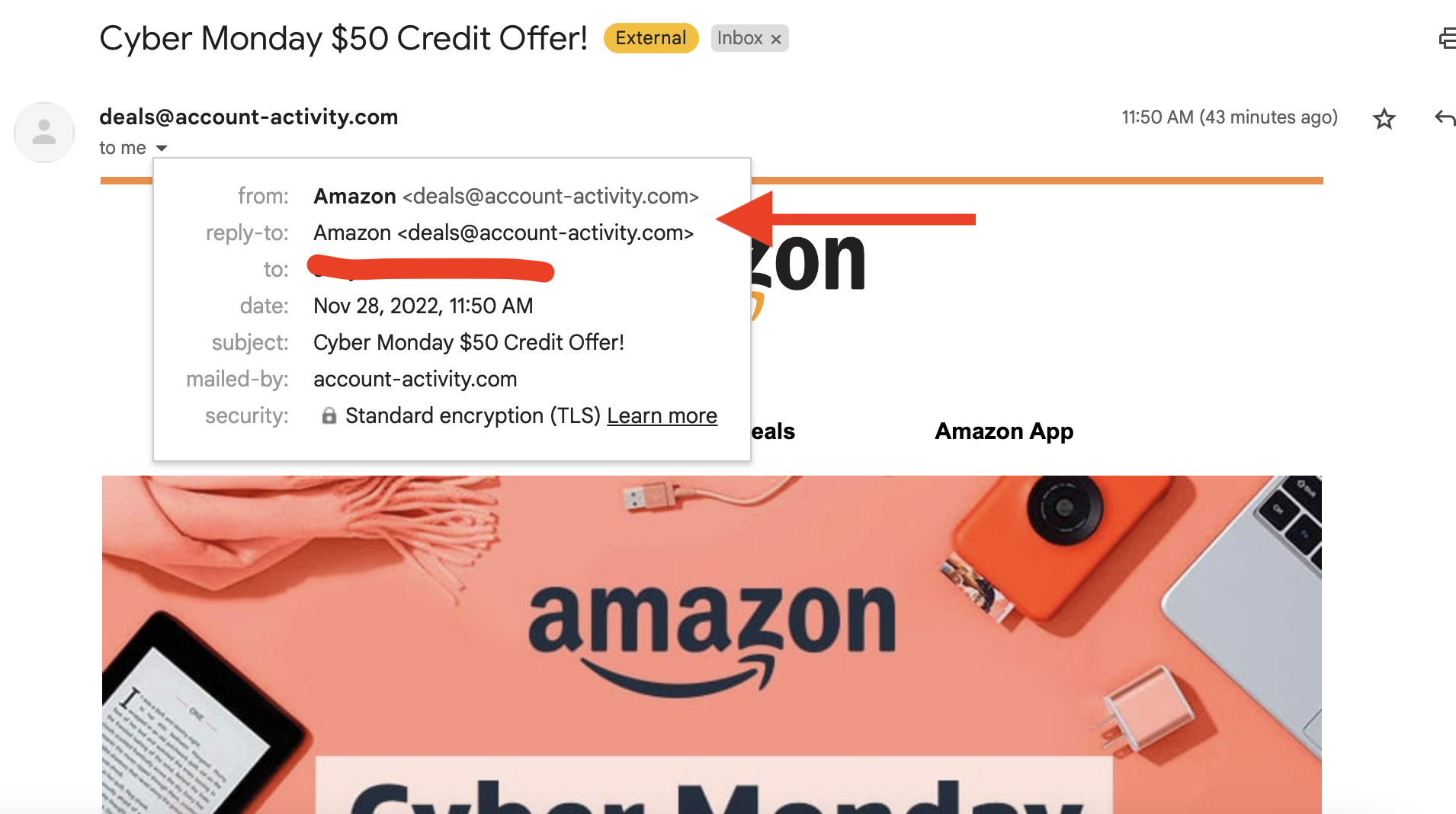
A phishing email recently received by the author that came from a false sender address.
Distributed Denial of Service (DDoS) Attacks
Another serious threat to business during the holidays is a DDoS attack. This is an especially popular route for cyberattacks at this time of year. Why? Simply put: Because businesses are busy, and attackers are keen to take advantage of that distraction to launch an attack. Cybercriminals use DDoS attacks to overload business systems with so much traffic that none of your applications can function.
Compromised Passwords
The best way for a cybercriminal to gain access to your business websites, accounts, and other mission-critical apps is to obtain compromised credentials. There are many ways that fraudsters can attempt to steal company login credentials with minimal effort. In fact, there have been several well-publicized password-related breaches that made passwords available to anyone who cares to search for that information—people have even created APIs so that you can easily see if you’re affected by those breaches. We humans are also prone to reusing passwords. According to a 2022 report, employees admitted to reusing passwords across an average of 16 different workplace accounts.
Protect Your Business This Holiday Season
So, what can you do to minimize your risks as cybercriminals ramp up their attacks? Here are some tips to help protect your business this holiday season:
Ensure your anti-virus and/or anti-phishing software scans for vulnerabilities regularly.
Discuss phishing email best practices with your staff year-round, but especially during the holiday season.
Never click on suspicious links or download email attachments from unknown senders.
Turn on safe browsing capabilities in your browser.
Update your software and apply patches when they are released.
Use strong passwords, multi-factor authentication, and a secure password manager to generate and store secure passwords.
Even if you’ve done everything right, there is still a chance that you could be outsmarted by a cybercriminal this holiday season. Every business, no matter how big or small, needs to have an incident response plan in place to help staff identify the breach before it’s too late.
Don’t forget to include thorough training on the specific security protocols that workers need to follow in the event that a cyberattack does occur. If your business becomes the victim of a cyberattack, the sooner you can identify the breach, the better.
And just in case the worst happens, it’s smart to invest in a reliable backup solution. A decentralized approach to data security can help protect your business and safeguard your private information from anyone who wants to take advantage of your company. If your systems do go down and a cybercriminal locks you out of your business applications, you will still have your backup data, which means that you can restore your business data and resume business as usual with as little disruption as possible.
The holiday season is a money-maker for businesses and cybercriminals alike. Make sure that your company is protected so you can focus on the joy of the season instead of giving cybercriminals an easy payday.
“A penny for your thoughts” is a common boomer expression (so says my 23 year old). Instead, how about “a penny for a gigabyte of hard disk”? That’s new, tech-y, and, well, it’s almost true.
When Backblaze purchased hard drives back in 2009, we paid over $0.11 per gigabyte. In 2017, when we did a review of the cost of hard drives, the cost per gigabyte had fallen to just below $0.03 per gigabyte. Today, we can get 16TB hard drives for about $0.014 per gigabyte on average. That’s not quite a penny, but we think we’ll get there soon enough. In the meantime, let’s look at our hard drive purchases over the years and see what we can learn about the cost per gigabyte of hard drive storage.
How Many Drives?
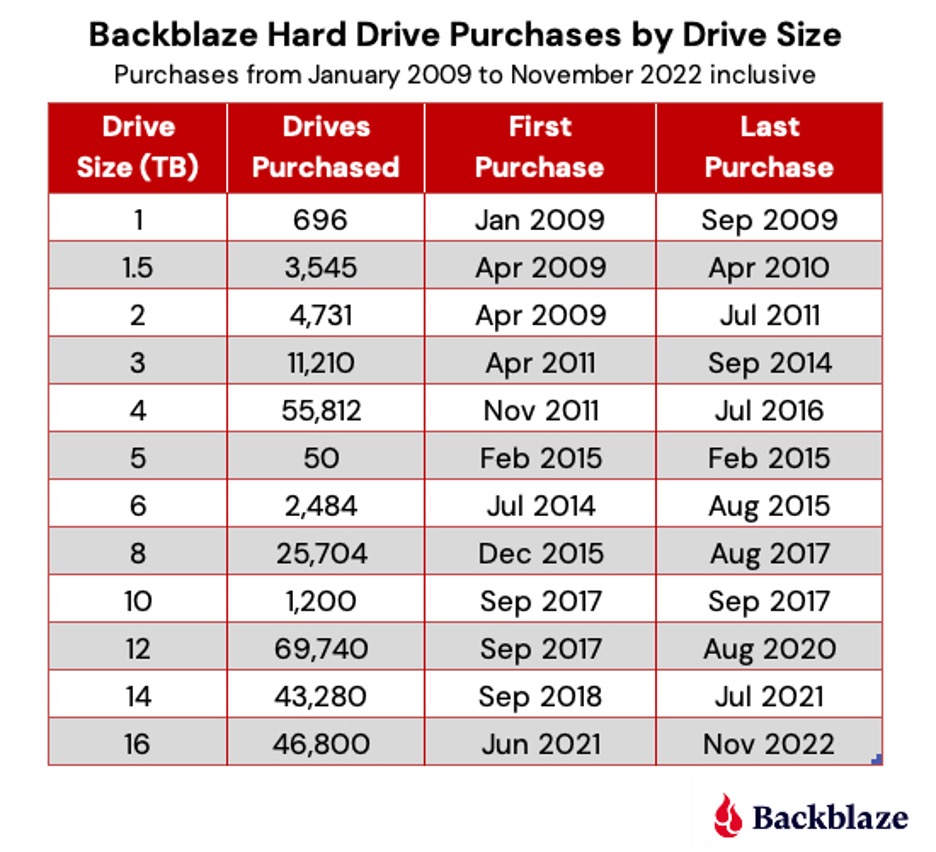
Backblaze has purchase records going back to 2009. In that time, we’ve purchased 265,332 hard drives. We even recorded each of the hundreds of hard drives purchased during our drive farming days in 2011 and our crowdsourcing days in 2012. Thank you, Cecilia! The 265,322 number is not precise—some drives were purchased before 2009, some drives were purchased and never put into service, and, occasionally, we received a small number of test drives from manufacturers. Still, the 265,332 number is close. The breakdown in drives purchased by drive size is shown below.
The 16TB drives are the only drive size we are currently purchasing. It is possible we could purchase a small group of spares for one of the other drive sizes. Unlikely at this point, but possible. In addition, the 16TB count does not include 12,000 drives purchased and scheduled for delivery over the next few months.
In 2023 we expect to qualify 18TB, 20TB, and potentially 22TB drives. Of course, we will wait a bit before purchasing in bulk to ensure the qualified drive models are stable over time and the price per gigabyte meets our expectations. Speaking of expectations, look for those drives to show up in the quarterly Drive Stats reports starting about mid-2023.
Drive Type
All of the drives we purchase use Perpendicular Magnetic Recording (PMR), also known as Conventional Magnetic Recording (CMR). We do not use Shingled Magnetic Recording (SMR) drives. SMR drives are sometimes less expensive but are demonstrably slower with random writes and when they are reusing space made available from previous file deletes. In most data backup use cases, where variable length writes and file deletions are the norm, the minimal cost savings of SMR drives is negated by the storage inefficiencies introduced by having to perform multiple writes to store data in tracks where data had been previously deleted.
The Cost Per Gigabyte
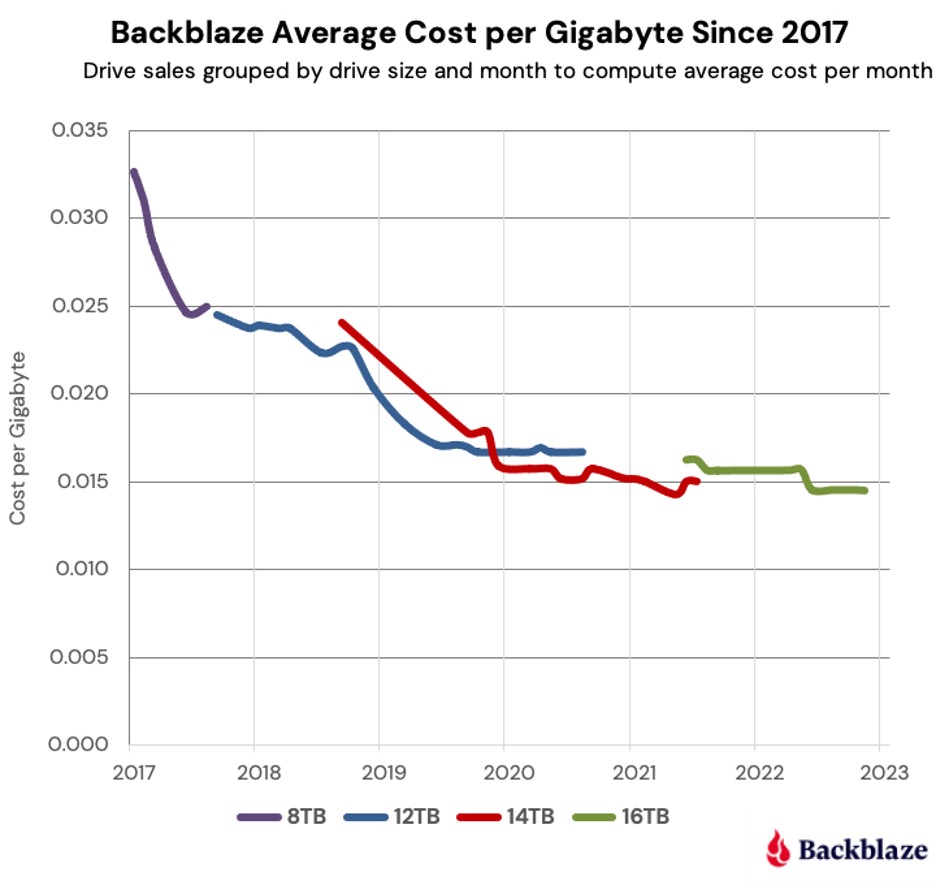
As noted earlier, our hard drive cost per gigabyte had fallen to a little over $0.03 by the end of 2017. At that point 8TB drives were our primary drives. Over the next few years we added 12TB, 14TB, and 16TB drives to the mix and the average cost per gigabyte continued to decrease as shown in the chart below.
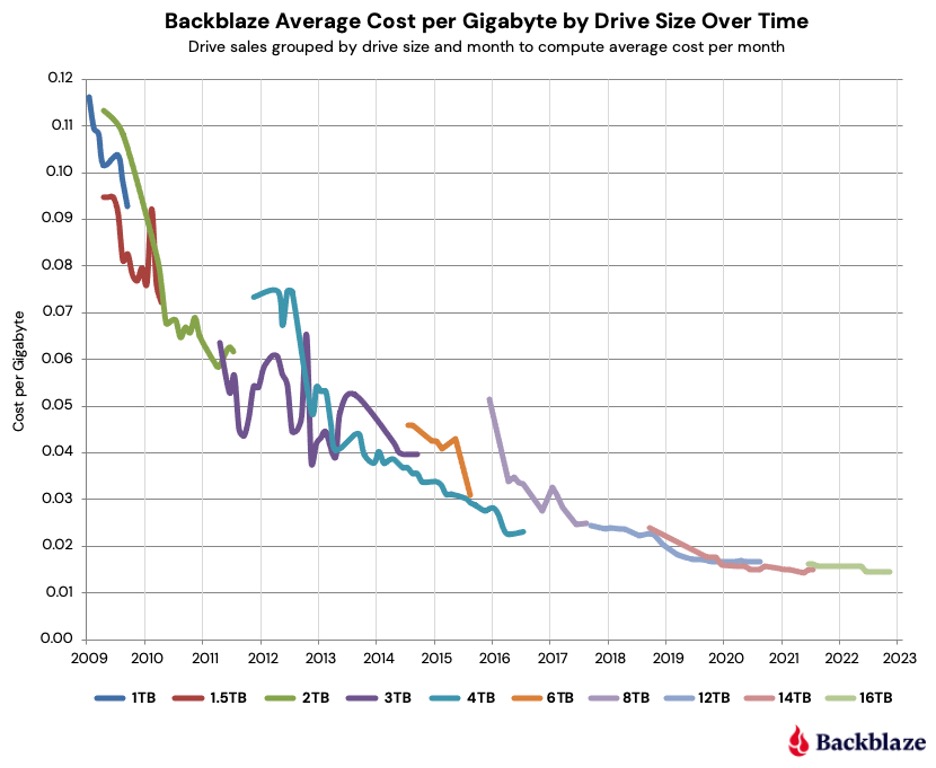
From 2017 to November 2022, the average cost per gigabyte decreased by 56.36% for all of the drives ($0.033 down to $0.0144). That’s over 9% per year on average across the four drive sizes. To put that data in context, below is the complete chart from 2009 through November 2022 for all drives sizes we have used as data drives during that period.
You can observe the overall down and to the right trend over the period, although the 3TB and 4TB drives make that drop messy. This was due primarily to the Thailand drive crisis which began in the second half of 2011 and continued to affect the market into 2013 before things got back to normal.
Overall, the drop in the average price per gigabyte was from $0.114 in 2009 to just $0.014 as of November 2022. That’s a difference of $0.100 (one thin dime) over the period. That equates to an 87.4% decrease in the average cost per terabyte since 2009. If we calculate the average decrease per month over that period, we get the cost per gigabyte of the hard drives we use decreasing 0.52% per month since January 2009.
During that time drive technology hardly stood still as drive manufacturers crammed more platters in the same basic 3 ½ inch chassis, dramatically increased areal media density, figured out how to use helium inside the drives, started using glass substrates for their platters, and other improvements and innovations. Regardless of what you may think of a given drive manufacturer, that’s pretty awesome for the industry as a whole.
At this point, a fair question would be why the cost we charge for storage hasn’t decreased 87% since 2009? Our friends at IDC (source: Figure 10; IDC Thought Leadership Practice Case Study) have calculated that in 2009, there was about 0.3 zettabytes of data stored on hard drives worldwide, and they estimated that by the end of 2022 there would be 1.8 zettabytes. That’s an increase of 500% for the amount of data stored on hard drives over the period. Let’s just say the global population is storing a lot more data and leave it at that.
Dollars and Sense
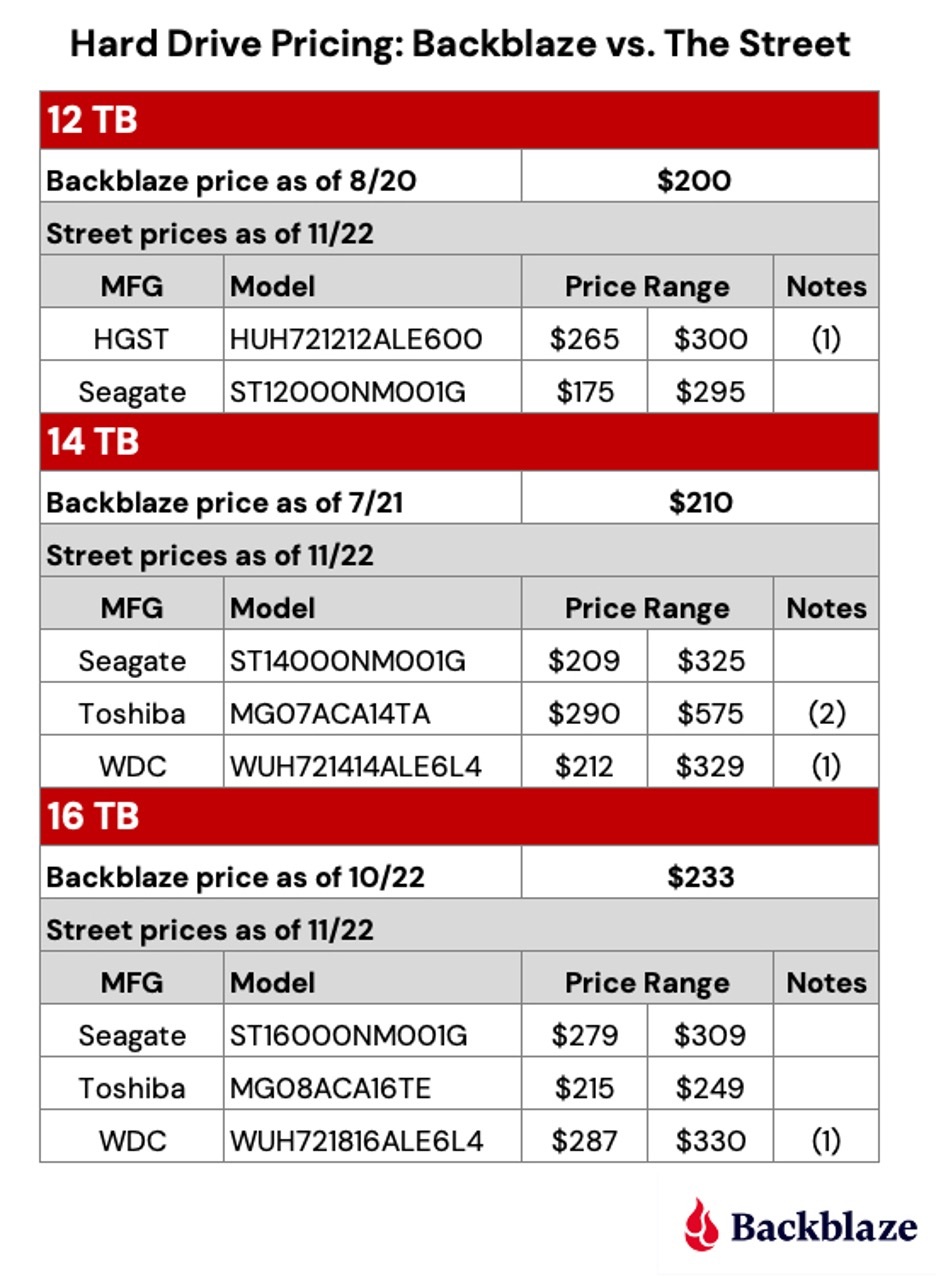
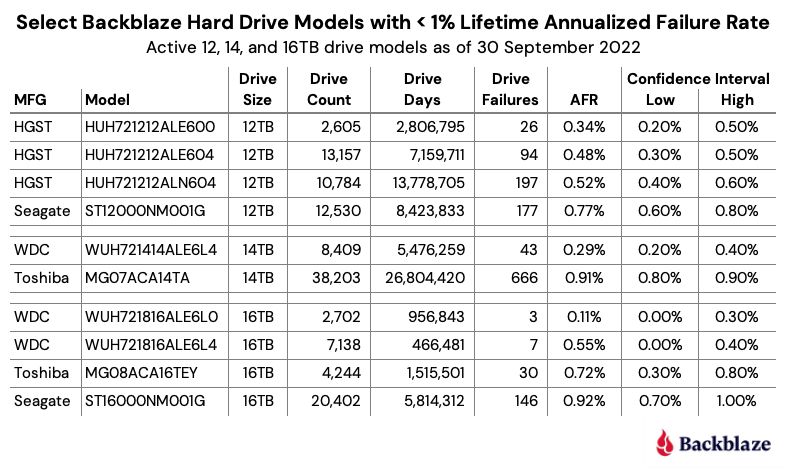
Of course, you don’t buy hard drives using percentages, you use dollars (or pesos, or pounds, or euros, and so on.) Let’s take a minute to see what price you would have to pay versus what we have paid. We’ve listed the best street price we could find for some of the 12TB, 14TB, and 16TB drives we use.
Notes:
As Western Digital continues to assimilate the HGST drive business, the model numbers of these drives are changing to WDC standards.
This model is sold as a server-based drive, similar models such as the MG07ACA14TE are less expensive.
Remember, we buy drives in bulk quantity and on contract with guaranteed pricing, delivery dates, and such. It’s not quite the same thing as buying a drive from a shrink wrapped pallet at Costco or from a Cyber Monday deal on Amazon. You may be able to buy a couple of drives at a great price, but when you need 12,000 drives delivered to your front door on a certain date, Amazon Prime isn’t going to cut it. As a result, it may cost a dollar or two more per drive to ensure we have what we need when we need it.
Lessons Learned
The cost per gigabyte has continued to fall over the past 13 years we’ve been tracking our drive purchases. This was in spite of the Thailand drive crisis which started in 2011, as well as the Coronavirus and the continuing supply chain problems it caused.
Drive manufacturer consolidation hasn’t stopped the cost per gigabyte from decreasing from 2009 through 2022. That said, it is impossible to say what the cost per gigabyte would be without consolidation.
On average, the cost per gigabyte of a drive will fall on average about 0.5% per month over time, slowly at first, then accelerating for some period before bottoming out.
In nearly every case, the cost per gigabyte of each new drive size introduced will eventually fall below that of its predecessor. For example, the cost per gigabyte for a 14TB drive will be less than a 12TB, and the cost per gigabyte for the 16TB drive will be less than the 14TB.
Where Is the Bottom?
When we published our 2017 report on this topic, we proclaimed the race to the bottom was over, implying that the cost per gigabyte could not go much (if any) lower. We were wrong.
So where is the bottom? There’s an expression that goes something like, “We have done so much for so long with so little that we can now do practically anything with nothing.” There are probably folks at the drive manufacturers mumbling that expression to themselves on a daily basis as they try to cram more bits in less space on increasingly thin sheets of coated glass racing by at 5,400/7,200/15,000 revolutions per minute.
Getting back to reality, the next milestone we can see is $0.01 per gigabyte for a hard drive—that’s not a sale price, but a stable street price. Let’s go out on a limb and say that we will reach that in mid-2025 with 22TB or 24TB drives. That would mean you could buy a 22TB drive at Costco or on Amazon for about $220, or a 24TB for $240.
Is $0.01 per gigabyte the bottom? At the risk of having boomers shout “How low can you go?” and throw their backs out doing the limbo, we’ll ask: How low can the cost per gigabyte go? Tell us what you think.
This post has been updated since it was originally published in 2017.
Programs, processes, and threads are all terms that relate to software execution, but you may not know what they really mean. Whether you’re a seasoned developer, an aspiring enthusiast, or you’re just wondering what you’re looking at when you open Task Manager on a PC or Activity Monitor on a Mac, learning these terms is essential for understanding how a computer works.
This post explains the technical concepts behind computer programs, processes, and threads to give you a better understanding of the functionality of your digital devices. With this knowledge, you can quickly diagnose problems and come up with solutions, like knowing if you need to install more memory for better performance. If you care about having a fast, efficient computer, it is worth taking the time to understand these key terms.
What Is a Computer Program?
A program is a sequence of coded commands that tells a computer to perform a given task. There are many types of programs, including programs built into the operating system (OS) and ones to complete specific tasks. Generally, task-specific programs are called applications (or apps). For example, you are probably reading this post using a web browser application like Google Chrome, Mozilla Firefox, or Apple Safari. Other common applications include email clients, word processors, and games.
The process of creating a computer program involves designing algorithms, writing code in a programming language, and then compiling or interpreting that code to transform it into machine-readable instructions that the computer can execute.
What Are Programming Languages?
Programming languages are the way that humans and computers talk to each other. They are formalized sets of rules and syntax.
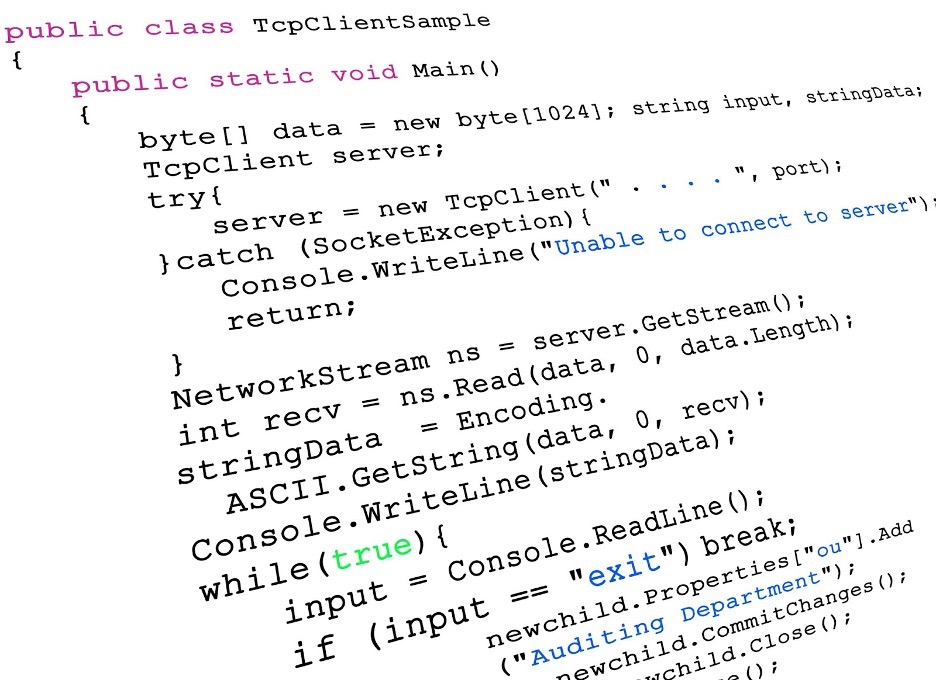
C# example of program code.
Compiled vs. Interpreted Programs
Many programs are written in a compiled language and created using programming languages like C, C++, C#. The end result is a text file of code that is compiled into binary form in order to run on the computer (more on binary form in a few paragraphs). The text file speaks directly to your computer. While they’re typically fast, they are also fixed compared to interpreted programs. That has positives and negatives: you have more control over things like memory management, but you’re platform dependent and, if you have to change something in your code, it typically takes longer to build and test.
There is another kind of program called an interpreted program. They require an additional program to take your program instructions and translate that to code for your computer. Compared with compiled languages, these types of programs are platform-independent (you just have to find a different interpreter, instead of writing a whole new program) and they typically take up less space. Some of the most common interpreted programming languages are Python, PHP, JavaScript, and Ruby.
Ultimately, both kinds of programs are run and loaded into memory in binary form. Programs have to run in binary because your computer’s CPU understands only binary instructions.
What Is Binary Code?
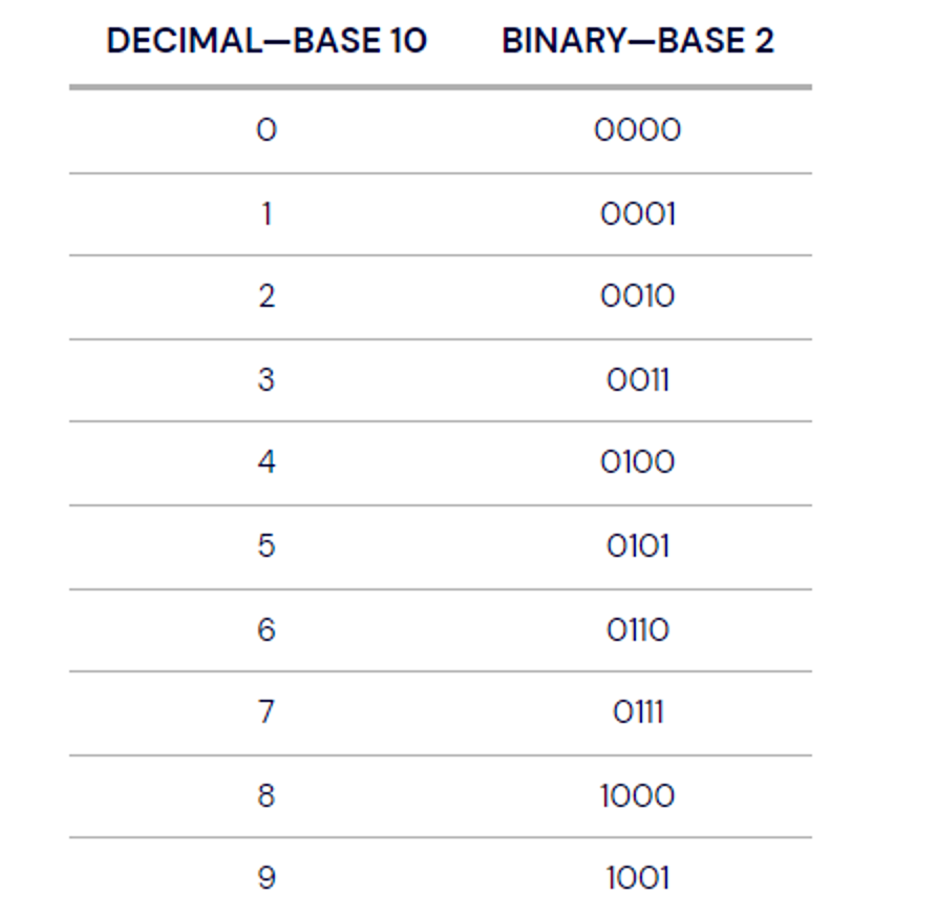
Binary is the native language of computers. At their most basic level, computers use only two states of electrical current—on and off. The on state is represented by 1 and the off state is represented by 0. Binary is different from the number system—base 10—that we use in daily life. In base 10, each digit position can be anything from 0 to 9. In the binary system, also known as base 2, each position is either a 0 or a 1.
Perhaps you’ve heard the programmer’s joke, “There are only 10 types of people in the world, those who understand binary, and those who don’t.”
How Are Computer Programs Stored and Run?
Programs are typically stored on a disk or in nonvolatile memory in executable format. Let’s break that down to understand why.
In this context, we’ll talk about your computer having two types of memory: volatile and nonvolatile. Volatile memory is temporary and processes in real time. It’s faster, easily accessible, and increases the efficiency of your computer. However, it’s not permanent. When your computer turns off, this type of memory resets.
Nonvolatile memory, on the other hand, is permanent unless deleted. While it’s slower to access, it can store more information. So, that makes it a better place to store programs. A file in an executable format is simply one that runs a program. It can be run directly by your CPU (that’s your processor). Examples of these file types are .exe in Windows and .app in Mac.
What Resources Does a Program Need to Run?
Once a program has been loaded into memory in binary form, what happens next?
Your executing program needs resources from the OS and memory to run. Without these resources, you can’t use the program. Fortunately, your OS manages the work of allocating resources to your programs automatically. Whether you use Microsoft Windows, macOS, Linux, Android, or something else, your OS is always hard at work directing your computer’s resources needed to turn your program into a running process.
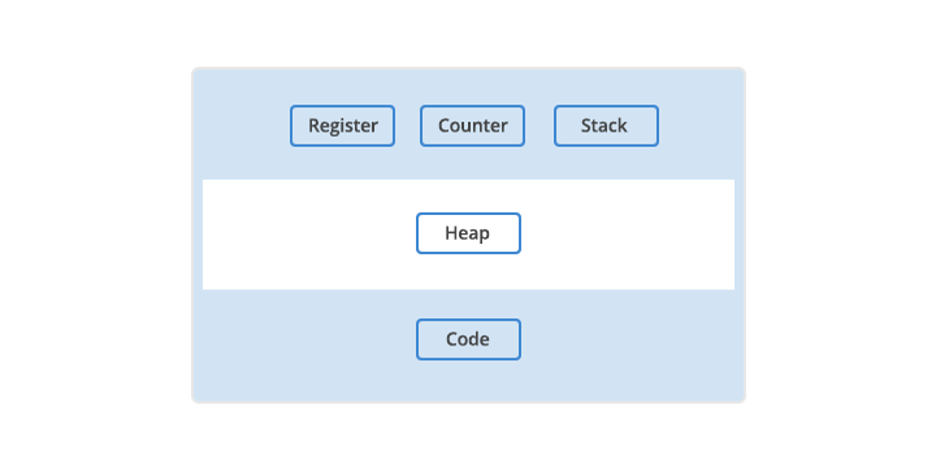
In addition to OS and memory resources, there are a few essential resources that every program needs.
Register. Think of a register as a holding pen that contains data that may be needed by a process like instructions, storage addresses, or other data.
Program counter. Also known as an instruction pointer, the program counter plays an organizational role. It keeps track of where a computer is in its program sequence.
Stack. A stack is a data structure that stores information about the active subroutines of a computer program. It is used as scratch space for the process. It is distinguished from dynamically allocated memory for the process that is known as the “heap.”
The main resources a program needs to run.
What Is a Computer Process?
When a program is loaded into memory along with all the resources it needs to operate, it is called a process. You might have multiple instances of a single program. In that situation, each instance of that running program is a process.
Each process has a separate memory address space. That separate memory address is helpful because it means that a process runs independently and is isolated from other processes. However, processes cannot directly access shared data in other processes. Switching from one process to another requires some amount of time (relatively speaking) for saving and loading registers, memory maps, and other resources.
Having independent processes matters for users because it means one process won’t corrupt or wreak havoc on other processes. If a single process has a problem, you can close that program and keep using your computer. Practically, that means you can end a malfunctioning program and keep working with minimal disruptions.
What Are Threads?
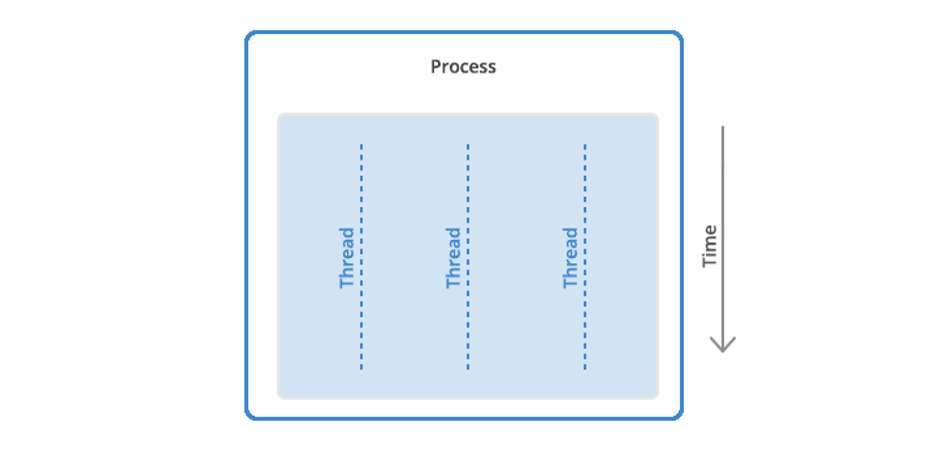
The final piece of the puzzle is threads. A thread is the unit of execution within a process.
A process can have anywhere from one thread to many.
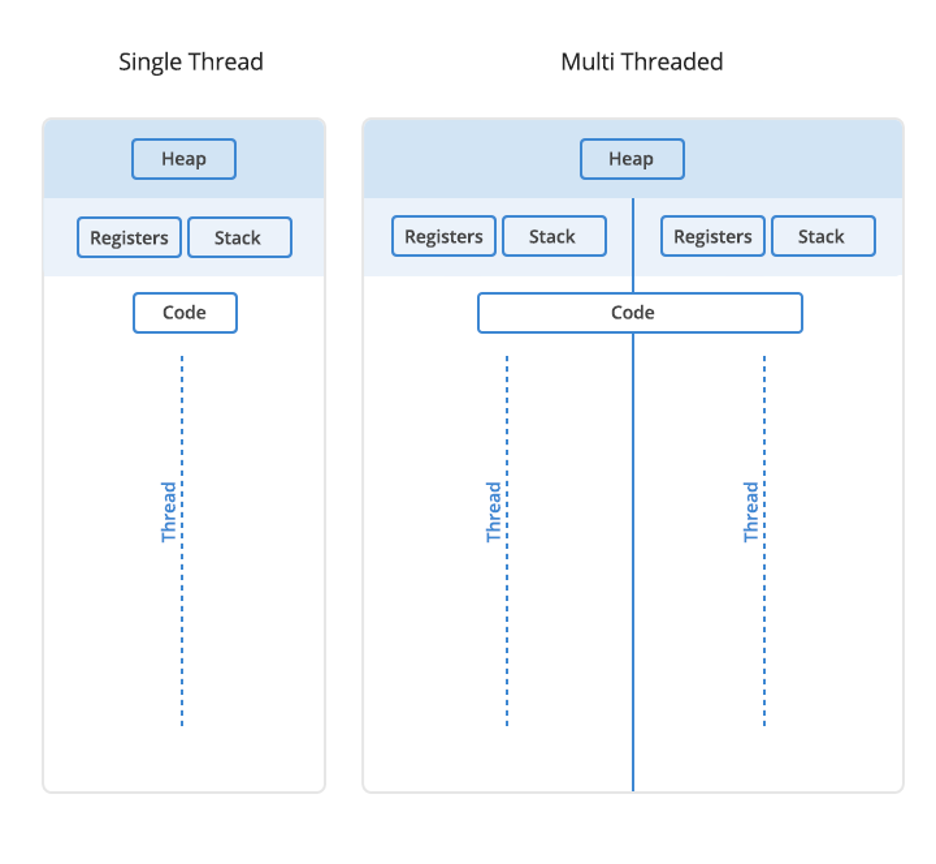
When a process starts, it receives an assignment of memory and other computing resources. Each thread in the process shares that memory and resources. With single-threaded processes, the process contains one thread.
The difference between single thread and multi-thread processes.
In multi-threaded processes, the process contains more than one thread, and the process is accomplishing a number of things at the same time (to be more accurate, we should say “virtually” the same time—you can read more about that in the section below on concurrency).
Earlier, we talked about the stack and the heap, the two kinds of memory available to a thread or process. Distinguishing between these kinds of memory matters because each thread will have its own stack. However, all the threads in a process will share the heap.
Some people call threads lightweight processes because they have their own stack but can access shared data. Since threads share the same address space as the process and other threads within the process, it is easy to communicate between the threads. The disadvantage is that one malfunctioning thread in a process can impact the viability of the process itself.
How Threads and Processes Work Step By Step
Here’s what happens when you open an application on your computer.
The program starts out as a text file of programming code.
The program is compiled or interpreted into binary form.
The program is loaded into memory.
The program becomes one or more running processes. Processes are typically independent of one another.
Threads exist as the subset of a process.
Threads can communicate with each other more easily than processes can.
Threads are more vulnerable to problems caused by other threads in the same process.
Computer Process vs. Threads
Aspect
Processes
Threads
Definition
Independent programs with their own memory space.
Lightweight, smaller units of a process, share memory.
Creation Overhead
Higher overhead due to separate memory space.
Lower overhead as they share the same memory space.
Isolation
Processes are isolated from each other.
Threads share the same memory space.
Resource Allocation
Each process has its own set of system resources.
Threads share resources within the same process.
Independence
Processes are more independent of each other.
Threads are dependent on each other within a process.
Failure Impact
A failure in one process does not directly affect others.
A failure in one thread can affect others in the same process.
Sychronization
Less need from synchronization, as processes are isolated.
Requires careful synchronization due to shared resources.
Example Use Cases
Running multiple independent applications.
Multithreading within a single application for parallelism.
Memory Usage
Typically consumes more memory.
Consumes less memory compared to processes.
What About Concurrency and Parallelism?
A question you might ask is whether processes or threads can run at the same time. The answer is: it depends. In environments with multiple processors or CPU cores, simultaneous execution of multiple processes or threads is feasible. However, on a single processor system, true simultaneous execution isn’t possible. In these cases, a process scheduling algorithm is employed to share the CPU among running processes or threads, creating the illusion of parallel execution. Each task is allocated a “time slice,” and the swift switching between tasks occurs seamlessly, typically imperceptible to users. The terms “parallelism” (denoting genuine simultaneous execution) and “concurrency” (indicating the interleaving of processes over time to simulate simultaneous execution) distinguish between the two modes of operation, whether truly simultaneous or approximated.
How Google Chrome Uses Processes and Threads
To illustrate the impact of processes and threads, let’s consider a real-world example with a program that many of us use, Google Chrome.
When Google designed the Chrome browser, they faced several important decisions. For instance, how should Chrome handle the fact that many different tasks often happen at the same time when using a browser? Every browser window (or tab) may communicate with several servers on the internet to download audio, video, text, and other resources. In addition, many users have 10 to 20 browser tabs (or more…) open most of the time, and each of these tabs may perform multiple tasks.
Google had to decide how to handle all of these tasks. They chose to run each browser window in Chrome as a separate process rather than a thread or many threads. That approach brought several benefits.
Running each window as a process protects the overall application from bugs and glitches.
Isolating a JavaScript program in a process prevents it from using too much CPU time and memory and making the entire browser unresponsive.
That said, there is a trade-off cost to Google’s design decision. Starting a new process for each browser window has a higher fixed cost in memory and resources compared to using threads. They were betting that their approach would end up with less memory bloat overall.
Using processes instead of threads provides better memory usage when memory is low. In practice, an inactive browser window is treated as a lower priority. That means the operating system may swap it to disk when memory is needed for other processes. If the windows were threaded, it would be more difficult to allocate memory efficiently which ultimately leads to lost computer performance.
The screen capture below shows the Google Chrome processes running on a MacBook Air with many tabs open. You can see that some Chrome processes are using a fair amount of CPU time and resources (e.g., the one at the top is using 44 threads) while others are using fewer.
Mac Activity Monitor displaying Google Chrome threads.
The Activity Monitor on the Mac (or Task Manager in Windows) on your system can be a valuable ally in fine-tuning your computer or troubleshooting problems. If your computer is running slowly or a program or browser window isn’t responding for a while, you can check its status using the system monitor.
In some cases, you’ll see a process marked as “Not Responding.” Try quitting that process and see if your system runs better. If an application is a memory hog, you might consider choosing a different application that will accomplish the same task.
Made It This Far?
We hope this Tron-like dive into the fascinating world of computer programs, processes, and threads has cleared up some questions.
At the start, we promised clarity on using these terms to improve performance. You can use Activity Monitor on the Mac or Task Manager on Windows to close applications and processes that are malfunctioning. That’s beneficial because it means you can end a malfunctioning program without the hassle of turning off your computer.
Still have questions? We’d love to hear from you in the comments.
FAQ
1. What are computer programs?
Computer programs are sets of coded instructions written in programming languages to direct computers in performing specific tasks or functions. Ranging from simple scripts to complex applications, computer programs enable users to interact with and leverage the capabilities of computing devices.
2. What are computer processes?
Computer processes are instances of executing computer programs. They represent the active state of a running application or task. Each process operates independently, with its own memory space and system resources, ensuring isolation from other processes. Processes are managed by the operating system, and they facilitate multitasking and parallel execution.
3. What are computer threads?
Computer threads are smaller units within computer processes, enabling parallel execution of tasks. Threads share the same memory space and resources within a process, allowing for more efficient communication and coordination. Unlike processes, threads operate in a cooperative manner, sharing data and context, making them suitable for tasks requiring simultaneous execution.
4. What’s the difference between computer processes and threads?
Computer processes are independent program instances with their own memory space and resources, operating in isolation. In contrast, threads are smaller units within processes that share the same memory, making communication easier but requiring careful synchronization. Processes are more independent, while threads enable concurrent execution and resource sharing within a process. The choice depends on the application’s requirements, balancing isolation with the benefits of parallelism and resource efficiency.
5. What’s the difference between concurrency and parallel processing?
Concurrency involves the execution of multiple tasks during overlapping time periods, enhancing system responsiveness. It doesn’t necessarily imply true simultaneous execution but rather the interleaving of processes to create an appearance of parallelism. Parallel processing, on the other hand, refers to the simultaneous execution of multiple tasks using multiple processors or cores, achieving genuine parallelism. Concurrency emphasizes efficient task management, while parallel processing focuses on concurrent tasks executing simultaneously for improved performance in tasks that can be divided into independent subtasks.
For schools and universities, data storage is paramount. Staff, administrators, and educators, not to mention students, need a secure place to store files. Add to that the legacy accounts of alumni storing irreplaceable files from their education, and you have a massive need for storage.
For a long time, Google was happy to oblige. In 2006, the company launched Google Apps for Education (later G Suite for Education; now Google Workplace for Education), offering free unlimited storage for qualifying schools and districts. But when they’d reached market penetration—somewhere in the neighborhood of 83% of school districts according to EdWeek Research Center—they ended the unlimited storage policy many schools had come to rely on.
If you already know about Google’s policy change and are looking for a solution to save your data and your budget, getting started with Backblaze B2 is easy. Otherwise, read on to learn more about the change, what it may mean for you in the long-term, and a Backblaze partnership with Carahsoft that eases purchasing through local, state, and federal buying programs.
Office Hours Are Over—Google Ends Unlimited Storage for Educational Institutions
Google’s policy change took effect in July 2022, and many schools and universities had to find alternative storage solutions or change their internal storage policies to stay within the new limits. Under the terms of the new policy, Google offers a baseline of 100TB of pooled storage shared across all users.
The policy shift was spurred, Google says, because “as we’ve grown to serve more schools and universities each year, storage consumption has also rapidly accelerated. Storage is not being consumed equitably across—nor within—institutions, and school leaders often don’t have the tools they need to manage this.”
For some school districts, colleges, and universities, this policy shift meant having to reach out to alumni with the request that they back up all their own data. It also hit some already-strapped IT budgets particularly hard. Estimates vary, but depending on the size of the school and their data needs, they could be looking at anywhere up to an extra $70,000 a year in storage costs.
That’s a non-negligible fee for a service that has become increasingly vital for schools. We’ve written about how important cloud storage is for schools, but it’s worth reiterating here.
School is in Session
Not only will a secure cloud storage solution help protect school districts from threats of ransomware, it can also help maintain predictable operating expenses and create opportunities for collaboration through remote learning. In cases like Kansas’ Pittsburg State University, it helped keep data safe from natural disasters that abound in places like Tornado Alley. Pittsburg State implemented Backblaze B2 as their off-site backup in the event of disaster and used Object Lock functionality to safeguard data from ransomware.
Photo Credit: Pittsburg State University
The academic world is still adjusting to Google’s policy change. Stories have emerged of schools simply dropping Google and being forced to move data out of thousands of alumni accounts. A quick-fix solution to avoid Google’s new fee structure, this strategy is being undertaken without a clear answer to the question of how alumni can access their own data after the move. After all, how up to date are those alumni email lists?
A Google Alternative for Schools
School districts, colleges, and universities need to find a new, budget-friendly way forward. If you’re still struggling to find an alternative storage solution now that the bell has rung and Google has dismissed its free storage, Backblaze can help you find a new home on the cloud.
Backblaze B2 offers schools unlimited, pay-as-you-go storage at a fraction of the price of Google, enabling you to continue offering students and alumni the storage space they’ve come to expect. For colleges, universities, and school districts not buying through government purchasing programs, you can sign up for Backblaze B2 directly. We offer 10TB of storage free so that you can see if it works for you, but if you want to do a larger or customized proof of concept, reach out to our Sales team.
Accessing Backblaze Through Your Local, State, or Federal Buying Program
As we revealed during this year’s Educause conference, Backblaze has recently rolled out a partnership with Carahsoft aimed squarely at budget-conscious educational institutions. The partnership brings Backblaze services to educational institutions with a capacity-based pricing model that’s a fraction of the price of traditional cloud providers like Google. And it can be purchased through local, state, or federal buying programs. If you buy IT services for your district through a distributor, this solution could work for you. Visit the partnership announcement to learn more.
Streamlining your digital media workflow can make all the difference when it comes to your productivity—not to mention your budget. For folks in media, entertainment, post-production, corporate, education, government, or content creation, media workflows just got a little easier thanks to a partnership between Backblaze and Telestream.
Now joint customers can store transcoded media files on Backblaze B2 Cloud Storage as their origin store for delivery via Telestream’s Vantage CloudPort product. Read on to learn more about the partnership and what it means for you.
What Does Telestream Do?
Telestream, a Backblaze alliance partner, specializes in products that make it possible to get video content to any audience regardless of how it is created, distributed, or viewed. Throughout the entire digital media lifecycle, from capture to viewing, for consumers through high-end professionals, Telestream products range from desktop components and cross-platform applications to fully-automated, enterprise-class digital media transcoding, and workflow systems. Telestream enables users in a broad range of business environments to leverage the value of their video content.
How Does This Partnership Benefit Joint Customers?
Content is king, as they say, and being able to efficiently and effectively produce content and make it available to the audiences that are going to consume it is critical. This partnership benefits joint customers in a few key ways:
Customers can benefit from cost savings in the cloud: Backblaze is a fraction of the cost of diversified cloud providers.
By storing transcoded media files in the cloud, customers can leverage other services like QC in the cloud to ensure quality is up to their high standards.
Customers can leave on-premises storage in the past and move to the cloud to leverage the cloud’s infinite scalability and parallelism.
Making the move to the cloud also reduces the risk of having a single point of failure on premises.
“Telestream and Backblaze are driven by a shared mission to empower our customers and help them make their businesses more efficient. With this collaboration, we can meet our customers where their content is stored and apply Telestream’s best in class media processing tools.”
—Tim MacGregor, Senior Director, Head of Strategy and Product Development, Telestream Cloud
Support from our partners is part of what makes Backblaze so easy to use for so many folks, and today we’re continuing our efforts to make working with us even easier with the launch of our new Partner Program.
For businesses, it cuts through the complexity and cost that may have stopped them from adopting cloud storage and backup. For partners—including resellers, integrators, managed service providers, and more—it boosts their array of cloud solutions and brings even more value to their clients. The program builds on our long commitment to develop new solutions for partners and help them grow their businesses.
Partner Program Offerings
The program provides new opportunities for four key partner groups: Channel Partners, Technology Partners, Managed Service Providers (MSPs), and Affiliates.
As part of this new program, Channel Partners can take advantage of special capacity-based pricing with B2 Reserve, as well as a self-service resource providing discounts, deal registration, and in-house support. It also offers training and education resources.
Technology Partners can enjoy complimentary solution expertise and joint go-to-market and co-branding opportunities. MSPs will notice the ease of the new admin console and the utility of in-house support, digital assets, training materials, and data sheets, not to mention the recurring 10% commissions on computer backup. And of course, Affiliates, too, can enjoy recurring 10% commissions.
With the launch of the program, Backblaze is doubling down on its commitment to its partners, proving why Backblaze has built its reputation on easy-to-use, affordable cloud storage.
“Ease of use and accessibility can have a significant impact for our partners and their business. We are continuously looking for ways to innovate and develop for our partners. Offering this easy, accessible, and efficient resource will strengthen our relationship with our customers.”
—Nilay Patel, Vice President of Sales, Backblaze
Visit our Partner page to learn more about the Partner Program, visit the Partner Portal, or get started as a new partner.
Last week, we published Backblaze Drive Stats for Q3 2022, sharing the metrics we’ve gathered on our fleet of over 230,000 hard drives. In this blog post, I’ll explain how we’re now using the Trino open source SQL query engine in ensuring the integrity of Drive Stats data, and how we plan to use Trino in future to generate the Drive Stats result set for publication.
Converting Zipped CSV Files into Parquet
In his blog post Storing and Querying Analytical Data in Backblaze B2, my colleague Greg Hamer explained how we started using Trino to analyze Drive Stats data earlier this year. We quickly discovered that formatting the data set as Apache Parquet minimized the amount of data that Trino needed to download from Backblaze B2 Cloud Storage to process queries, resulting in a dramatic improvement in query performance over the original CSV-formatted data.
As Greg mentioned in the earlier post, Drive Stats data is published quarterly to Backblaze B2 as a single .zip file containing a CSV file for each day of the quarter. Each CSV file contains a record for each drive that was operational on that day (see this list of the fields in each record).
When Greg and I started working with the Parquet-formatted Drive Stats data, we took a simple, but somewhat inefficient, approach to converting the data from zipped CSV to Parquet:
Download the existing zip files to local storage.
Unzip them.
Run a Python script to read the CSV files and write Parquet-formatted data back to local storage.
Upload the Parquet files to Backblaze B2.
We were keen to automate this process, so we reworked the script to use the Python ZipFile module to read the zipped CSV data directly from its Backblaze B2 Bucket and write Parquet back to another bucket. We’ve shared the script in this GitHub gist.
After running the script, the drivestats table now contains data up until the end of Q3 2022:
trino:ds> SELECT DISTINCT year, month, day
FROM drivestats ORDER BY year DESC, month DESC, day DESC LIMIT 1;
year | month | day
------+-------+-----
 2022 |     9 |  30
(1 row)
In the last article, we were working with data running until the end of Q1 2022. On March 31, 2022, the Drive Stats dataset comprised 296 million records, and there were 211,732 drives in operation. Let’s see what the current situation is:
trino:ds> SELECT COUNT(*) FROM drivestats;
   _col0
-----------
 346006813
(1 row)

trino:ds> SELECT COUNT(*) FROM drivestats
    WHERE year = 2022 AND month = 9 AND day = 30;
   _col0
--------
 230897
(1 row)
So, since the end of March, we’ve added 50 million rows to the dataset, and Backblaze is now spinning nearly 231,000 drives—over 19,000 more than at the end of March 2022. Put another way, we’ve added more than 100 drives per day to the Backblaze Cloud Storage Platform in the past six months. Finally, how many exabytes of raw data storage does Backblaze now manage?
trino:ds> SELECT ROUND(SUM(CAST(capacity_bytes AS bigint))/1e+18, 2)
FROM drivestats WHERE year = 2022 AND month = 9 AND day = 30;
 _col0
-------
  2.62
(1 row)
Will we cross the three exabyte mark this year? Stay tuned to find out.
Ensuring the Integrity of Drive Stats Data
As Andy Klein, the Drive Stats supremo, collates each quarter’s data, he looks for instances of healthy drives being removed and then returned to service. This can happen for a variety of operational reasons, but it shows up in the data as the drive having failed, then later revived. This subset of data shows the phenomenon:
trino:ds> SELECT year, month, day, failure FROM drivestats WHERE
serial_number = 'ZHZ4VLNV' AND year >= 2021 ORDER BY year, month,
day;
 year | month | day | failure
------+-------+-----+---------
...
 2021 |    12 |  26 |       0
 2021 |    12 |  27 |       0
 2021 |    12 |  28 |       0
 2021 |    12 |  29 |       1
 2022 |     1 |   3 |       0
 2022 |     1 |   4 |       0
 2022 |     1 |   5 |       0
...
This drive appears to have failed on Dec 29, 2021, but was returned to service on Jan 3, 2022.
Since these spurious “failures” would skew the reliability statistics, Andy searches for and removes them from each quarter’s data. However, even Andy can’t see into the future, so, when a drive is taken offline at the end of one quarter and then returned to service in the next quarter, as in the above case, there is a bit of a manual process to find anomalies and clean up past data.
With the entire dataset in a single location, we can now write a SQL query to find drives that were removed, then returned to service, no matter when it occurred. Let’s build that query up in stages.
We start by finding the serial numbers and failure dates for each drive failure:
trino:ds> SELECT serial_number, DATE(FORMAT('%04d-%02d-%02d', year,
month, day)) AS date
FROM drivestats
WHERE failure = 1;
  serial_number  |    date
-----------------+------------
 ZHZ3KMX4        | 2021-04-01
 ZA12RBBM        | 2021-04-01
 S300Z52X        | 2017-03-01
 Z3051FWK        | 2017-03-01
 Z304JQAE        | 2017-03-02
...
(17092 rows)
Now we find the most recent record for each drive:
trino:ds> SELECT serial_number, MAX(DATE(FORMAT('%04d-%02d-%02d',
year, month, day))) AS date
    FROM drivestats
    GROUP BY serial_number;
  serial_number   |    date
------------------+------------
 ZHZ65F2W         | 2022-09-30
 ZLW0GQ82         | 2022-09-30
 ZLW0GQ86         | 2022-09-30
 Z8A0A057F97G     | 2022-09-30
 ZHZ62XAR         | 2022-09-30
...
(329908 rows)
We then join the two result sets to find spurious failures; that is, failures where the drive was later returned to service. Note the join condition—we select records whose serial numbers match and where the most recent record is later than the failure:
trino:ds> SELECT f.serial_number, f.failure_date
FROM (
    SELECT serial_number, DATE(FORMAT('%04d-%02d-%02d', year, month,
day)) AS failure_date
    FROM drivestats
    WHERE failure = 1
) AS f
INNER JOIN (
    SELECT serial_number, MAX(DATE(FORMAT('%04d-%02d-%02d', year,
month, day))) AS last_date
    FROM drivestats
    GROUP BY serial_number
) AS l
ON f.serial_number = l.serial_number AND l.last_date > f.failure_date;
  serial_number  | failure_date
-----------------+--------------
 2003261ED34D    | 2022-06-09
 W300STQ5        | 2022-06-11
 ZHZ61JMQ        | 2022-06-17
 ZHZ4VL2P        | 2022-06-21
 WD-WX31A2464044 | 2015-06-23
(864 rows)
As you can see, the current schema makes date comparisons a little awkward, pointing the way to optimizing the schema by adding a DATE-typed column to the existing year, month, and day. This kind of denormalization is common in analytical data.
Calculating the Quarterly Failure Rates
In calculating failure rates per drive model for each quarter, Andy loads the quarter’s data into MySQL and defines a set of views. We additionally define the current_quarter view to restrict the failure rate calculation to data in July, August, and September 2022:
CREATE VIEW current_quarter AS
    SELECT * FROM drivestats
    WHERE year = 2022 AND month in (7, 8, 9);

CREATE VIEW drive_days AS
    SELECT model, COUNT(*) AS drive_days
    FROM current_quarter
    GROUP BY model;

CREATE VIEW failures AS
    SELECT model, COUNT(*) AS failures
    FROM current_quarter
    WHERE failure = 1
    GROUP BY model
UNION
    SELECT DISTINCT(model), 0 AS failures
    FROM current_quarter
    WHERE model NOT IN
    (
        SELECT model
        FROM current_quarter
        WHERE failure = 1
        GROUP BY model
    );

CREATE VIEW failure_rates AS
    SELECT drive_days.model AS model,
           drive_days.drive_days AS drive_days,
           failures.failures AS failures,
           100.0 * (1.0 * failures) / (drive_days / 365.0) AS
annual_failure_rate
    FROM drive_days, failures
    WHERE drive_days.model = failures.model;
Running the above statements in Trino, then querying the failure_rates view, yields a superset of the data that we published in the Q3 2022 Drive Stats report. The difference is that this result set includes drives that Andy excludes from the Drive Stats report: SSD boot drives, drives that were used for testing purposes, and drive models which did not have at least 60 drives in service:
Now that we have shown that we can derive the required statistics by querying the Parquet-formatted data with Trino, we can streamline the Drive Stats process. Starting with the Q4 2022 report, rather than wrangling each quarter’s data with a mixture of tools on his laptop, Andy will use Trino to both clean up the raw data and produce the Drive Stats result set for publication.
Accessing the Drive Stats Parquet Dataset
When Greg and I started experimenting with Trino, our starting point was Brian Olsen’s Trino Getting Started GitHub repository, in particular, the Hive connector over MinIO file storage tutorial. Since MinIO and Backblaze B2 both have S3-compatible APIs, it was easy to adapt the tutorial’s configuration to target the Drive Stats data in Backblaze B2, and Brian was kind enough to accept my contribution of a new tutorial showing how to use the Hive connector over Backblaze B2 Cloud Storage. This tutorial will get you started using Trino with data stored in Backblaze B2 Buckets, and includes a section on accessing the Drive Stats dataset.
You might be interested to know that Backblaze is sponsoring this year’s Trino Summit, taking place virtually and in person in San Francisco, on November 10. Registration is free; if you do attend, come say hi to Greg and me at the Backblaze booth and see Trino in action, querying data stored in Backblaze B2.
As of the end of Q3 2022, Backblaze was monitoring 230,897 hard drives and SSDs in our data centers around the world. Of that number, 4,200 are boot drives, with 2,778 SSDs and 1,422 HDDs. The SSDs were previously covered in our recently published Midyear SSD Report. Today, we’ll focus on the 226,697 data drives under management as we review their quarterly and lifetime failure rates as of the end of Q3 2022.
We’ll also take a look at the relationship between hard drive failure rates and hard drive cost. Along the way, we’ll share our observations and insights on the data presented, and, as always, we look forward to you doing the same in the comments section at the end of the post.
Q3 2022 Hard Drive Failure Rates
Let’s start with reviewing our data for the Q3 2022 period. In that quarter, we tracked 226,697 hard drives used to store data. For our evaluation, we removed 388 drives from consideration as they were used for testing purposes or drive models which did not have at least 60 drives. This leaves us with 226,309 hard drives grouped into 29 different models to analyze.
Notes and Observations on the Q2 2022 Stats
Zero failures for Q3: Three drives had zero failures this quarter: the 8TB HGST (model: HUH728080ALE604), the 8TB Seagate (model: ST8000NM000A), and the 16TB WDC (model: WUH721816ALE6L0). For the 8TB HGST, that was the second quarter in a row with zero failures. Of the three, only the WDC model has enough lifetime data (drive days) to be comfortable with the calculated annualized failure rate (AFR). As we will see later in this review, this 14TB WDC model has a lifetime AFR of 0.11% with the confidence interval range of just 0.30 at a 95% confidence level.
The new disks in town: There are two new models in this quarter’s data: the 8TB Seagate (model: ST8000NM000A) and the 16TB Seagate (model: ST16000NM002J). Neither has enough data to be interesting yet, but as noted above, the 8TB Seagate had zero failures in its first quarter in operation. These additions give us 29 different models we are tracking, up from 27 in the previous quarter.
The 29 models break down by manufacturer as:
HGST: 7 models
Seagate: 13 models
Toshiba: 6 models
WDC: 3 models
The chart below shows, by manufacturer, how our drive fleet has changed over the past six years.
The old guard is feeling old: All three of the oldest drives we currently use are showing signs of their age as each experienced an increase in AFR from Q2 to Q3 2022 as shown below.
MFG
Model
Size
Q3 2022 Avg Age
Q2 AFR
Q3 AFR
Seagate
ST4000DM000
4TB
83.1
3.42%
4.38%
Seagate
ST6000DX000
6TB
89.6
0.91%
1.34%
TOSHIBA
MD04ABA400V
4TB
88.3
0.00%
8.25%
Note that the 4TB Toshiba only had two failures in Q3 2022. The high AFR (8.25%) is due to the limited number of drive days in the quarter (8,849) from only 95 drives. For all three, it seems their spindles, actuators, and media are starting to wear out after seven years or so of constant spinning.
The Quarterly AFR continues to rise: The AFR for Q3 2022 was 1.64%, increasing from 1.46% in Q2 2022 and from 1.10% a year ago. As noted previously, this is related to the aging of the entire drive fleet and we would expect this number to go down as older drives are retired and replaced over the next year. A possible harbinger of what is to come can be seen in the 16TB models which as a group had an 0.80% AFR in Q3 2022. As these drives are used to replace the aging 4TB drives, the quarterly AFR should decrease.
Hard Drive Failure Versus Hard Drive Cost
One question that comes up is why we would continue to buy a drive model that has a higher annualized failure rate versus a comparably sized, but more expensive, model. Two primary reasons: First, we are able to do so as our cloud storage Backblaze Vault architecture is designed for drive failure. Second, by studying data like drive stats and such, we work hard to understand our environment from the inside out. Understanding the relationship between cost and drive failure is one of those learnings. Here’s a simple example below using three fictitious models of 14TB drives, Model 1, Model 2, and Model 3.
Let’s take a look at the different sections (i.e. blue rows) of this table.
Drive Cost: Each model has a different price: low ($225), medium ($250), and high ($275). We would buy the same number of drives (5,000) of each model and we get the cost of each model.
Annual Drive Failures: This is the AFR of each drive model. For this example, we assigned the lowest price model to the highest failure rate, the highest price model to the lowest failure rate, and so on. In practice, we would use our own AFR numbers for a given model that we are considering purchasing. Regardless, we get the annual number of failed drives for each model.
Annual Replacement Cost: Labor cost covers the human cost involved from identifying the failure to returning and replacing the drive. Drive cost is zero here as the assumption is that all drives are returned for credit or replacement to the manufacturer or their agent. A zero value here may not always be the case; hence the line item. In either case, the annual cost to replace the failed drives for each model is computed.
Lifetime Replacement Cost: Take the number of years you expect the drive model to be in service times the annual cost to replace the failed drives. All of this gets us the total cost of each drive model—the peach section. In our example, the most expensive model (Model 3) is the most expensive drive over the five-year life expectancy and the lowest cost drive model (Model 1) is the least expensive over the same period, even with a higher annualized failure rate.
But we’re not done. The next question is: What would the annualized failure rate for the least expensive choice, Model 1, need to be such that the total cost after five years would be the same as Model 2 and then Model 3? In other words, how much failure can we tolerate before our original purchase decision is wrong? When we crunch the numbers we come out with the following:
Model 1 and Model 2 have the same total drive cost ($1,325,000) when the annualized failure rate for Model 1 is 2.67%.
Model 1 and Model 3 have the same total drive cost ($1,412,500) when the annualized failure rate for Model 1 is 3.83%.
The model presented is a simplified version of how we think about drive purchase decisions using annualized drive failure rates as part of the equation. You can make this model more accurate, and complicated, by adding in the drive failure rate changes over time (the bathtub curve) and prorating the cost of returning failed drives over the years. Whether that is needed is up to you.
The need for such a model is important in our business if you are interested in optimizing the efficiency of your cloud storage platform. Otherwise, just robotically buying the most expensive, or least expensive, drives is turning a blind eye to the expense side of the ledger.
On an individual or small office/home office level, your drive purchasing decision requires a lot less math, and often comes down to what drive can you afford. Even so, you should still try to do some research. Our drive stats can help, but in all cases you should have a solid backup plan in place as no drive you can buy is failure proof.
Lifetime Hard Drive Failure Rates
As of September 30, 2022, Backblaze was monitoring 226,697 hard drives used to store data. For our evaluation, we removed 388 drives from consideration as they were used for testing purposes or drive models which did not have at least 60 drives. This leaves us with 226,309 hard drives grouped into 29 different models to analyze for the lifetime report.
Notes and Observations About the Lifetime Stats
The lifetime annualized failure rate for all the drives listed above is 1.41%. That is a slight increase from the previous quarter of 1.39%, but lower than one year ago (Q3 2021) which was 1.45%.
The usual caution should be applied to those drive models that have wide confidence intervals, one percent or greater. Such a gap indicates there is not enough data or that the data we do have is not readily predictable.
That said, we do have plenty of drive models for which we have solid data. Below we’ve extracted the 12TB, 14TB, and 16TB models from the lifetime table above that have a Lifetime AFR of less than 1% and have a confidence interval of 0.5% or less. These are hard drives which, up to this point, have shown solid reliability in our environment.
The Hard Drive Stats Data
The complete data set used to create the information in this review is available on our Hard Drive Test Data page. You can download and use this data for free for your own purpose. All we ask are three things: 1) you cite Backblaze as the source if you use the data, 2) you accept that you are solely responsible for how you use the data, and 3) you do not sell this data to anyone; it is free.
If you want the tables and charts used in this report, you can download the .zip file from Backblaze B2 Cloud Storage which contains the .jpg and/or .xlsx files as applicable.
Good luck, and let us know if you find anything interesting.
No matter which way war, the global economy, or superstorms are headed, one thing remains constant: ransomware threats continue to persist and evolve. That’s not new information, of course, but understanding the sophistication of emerging attacks is useful for anyone responsible for defending vulnerable infrastructure. Cybercriminals continue to target more industries such as healthcare and education that might not be as well-equipped to defend themselves. New strategies have allowed them to do more damage.
The landscape continues to change, but staying informed is one of the best ways to protect your organization against the ever-present threat of ransomware. It’s no substitute for comprehensive training for your team and a safely object-locked backup solution, but it never hurts to know too much. Here are a few of the biggest stories in ransomware from Q3.
This post is a part of our ongoing series on ransomware. Take a look at our other posts for more information on how businesses can defend themselves against a ransomware attack, and more.
With businesses ramping up their ransomware protection, cybercriminals have begun shifting toward more so-called “soft targets” including hospitals and small municipal governments. This has proven dangerous, as not only do these targets have fewer resources to devote to cybersecurity, but a compromise of their systems can lead to real-world disaster.
Three different hospitals around the country—CHI Memorial Hospital in Tennessee, hospitals in the St. Luke’s system within Texas, and Virginia Mason Franciscan Health in Seattle—were all recently hit with ransomware attacks, causing widespread delays in patient care. This has become a sadly common story, as attacks continue on healthcare targets.
Ransomware groups have increasingly been targeting school systems as well. One such group, The Vice Society, were recently the subject of an FBI warning, identifying their activity as “disproportionately targeting the education sector” and that those attacks against school districts “may increase as the 2022/2023 school year begins and criminal ransomware groups perceive opportunities for successful attacks.”
Key Takeaway: No vertical is safe from the threat of ransomware, but the rise of these threats has led to greater protections specifically for soft target sectors. Cybersecurity and Infrastructure Security Agency (CISA) has provided a wealth of tools for education, and companies have begun pivoting to create budget-friendly options for cash-strapped public sector CIOs.
2. Ransomware Gangs May Now Be Deploying “Triple Extortion”
This past quarter saw several high-profile attacks against larger businesses, including Cisco, Uber, and Rockstar Games, but it also saw signs that the ongoing war between black hat and white hat hackers may be entering a new realm.
In June, LockBit Ransomware was able to infect systems at Entrust, giving the ransomware gang access to nearly 300GB of data which they threatened to publish if their demands were not met. Entrust did not pay the ransom, and while the company did not claim credit for it, someone shortly after launched a DDoS attack against the site that LockBit was going to use to publish the data.
In retaliation, the Lockbit ransomware gang began actively recruiting DDoSers to begin executing a “triple extortion” tactic, layering the possibility of a DDoS attack on top of attacks via ransomware. In a post to a popular forum for black hat hackers, LockBit’s public face LockBitSupp wrote, “have felt the power of dudos [DDoS] and how it invigorates and makes life more interesting.”
Key Takeaway: Time and time again we see hackers creating new tactics, and simple non-negotiation doesn’t protect your business or solve for operational downtime. We’ve seen that paying ransoms doesn’t stop attacks, and engaging in counterattacks rarely has the desired outcome. Strong defensive strategies, like object lock capability, can’t block cybercriminals from accessing and publishing information, but it does ensure that you have everything you need to bring your business back online as quickly as possible.
3. The Geopolitical Landscape is Impacting Cybercrime
The Council on Foreign Relations recently released a bombshell report titled, “Confronting Reality in Cyberspace: Foreign Policy for a Fragmented Internet” that outlined the extent to which state-sponsored hackers have begun undermining American sovereignty through attacks. This dovetails with recent reports of the information wars between Russia and Ukraine spilling out beyond the battlefield. A report from Wired showed how pro-Russia group Killnet has launched cyberattacks against 10 different countries for supporting Ukraine.
This isn’t necessarily new information: the 2020 Homeland Security Threat Assessment calls out several nations, including Russia, China, North Korea, and Iran, as likely to employ cybersecurity attacks against the U.S. What is new is that the Senate voted $45 million in support of cybertools that are specifically earmarked to protect the U.S. power grid. Some groups—including the U.S. Government Accountability Office—don’t think that we’re doing enough. The impact here is that we’re not just talking about ransomware attacks exposing private data; we’ve evaluated as likely, and have started protecting ourselves against, attacks that will functionally shut down basic utilities.
Key Takeaway: As the lines blur between malicious hacking and state-sponsored attacks, the sophistication of the threats faced by most businesses and individuals will only grow. New laws and policies may eventually emerge to combat this trend, but until then it will be on you to ensure your infrastructure is safe.
The Bottom Line
The threat of cybercrime will only continue to expand in coming years. No matter what industry you’re in or what size organization’s infrastructure you have been tasked with protecting, continuous vigilance is crucial.
Like many industries, higher education has spent the last decade discovering the transformative power of the cloud and moving into the next century. The cost savings of running a more efficient tech stack and easier access to the vital data it contains have allowed those institutions to pursue the practical and academic discoveries they were built for.
Graduating to Cloud Storage
Across the board, colleges and universities are pushing the boundaries of what cloud storage can do—and their creativity is paying huge dividends for their efficiency and security. We’ve included a few examples below that show just how these institutions have been able to maximize their cloud storage capabilities to reduce costs, modernize outdated operations, protect sensitive student and research data, and extend their ability to provide knowledge to a wider audience.
Citing Our Work
Pittsburg State: Located in Kansas, this university found themselves with nearly five decades of data in harm’s way due to the constant threat of tornadoes. Adding off-premises storage with Backblaze B2 not only gave them the geographical separation they needed, but the addition of a virtual air gap through Object Lock quadrupled their protection against ransomware.
Coast Community College District: CCCD aiming to update its data management system and eliminate costly delays from tape backups. Their existing tapes needed to be physically chauffeured between the three colleges in the district—Coastline Community College, Golden West College, and Orange Coast College—in friendly L.A. traffic. Backblaze B2’s S3 Compatible APIs made for a seamless integration with Cohesity backup.
UCSC–Silicon Valley: A 22-person video production team at the university’s online learning program, UC–Scout had quickly reached their storage capacity after archiving thousands of videos. By leveraging Backblaze B2, their IT team was able to streamline the entire production process, saving money and unleashing the team’s full creative potential.
Kanopy: The “Netflix for libraries” overhauled its tech stack in order to share its massive selection of more than 25,000 videos with thousands of schools and public libraries. After migrating to Backblaze B2, Kanopy was able to scale efficiently and rapidly accelerate content onboarding.
Gladstone Institutes: Gladstone Institutes needed an affordable, reliable backup system that would allow their researchers to focus on the life-saving developments they were pursuing in the lab. Cloud storage’s increased reliability allowed them to move away from LTO, and off-premise storage shielded their findings from the potential for natural disasters.
Office Hours—No Lectures
If you’re planning to attend EduCause ’22, you can learn more about the many possibilities Backblaze opens up in higher education. Through a new partnership between Backblaze and Carahsoft, public sector customers can now leverage their existing state, local, and federal buying programs to access Backblaze B2 Cloud Storage.
In addition to a live demo of Instant Recovery in the Veeam booth, we’re proud to sponsor the Carahsoft Happy Hour Reception. With special cocktails you won’t find anywhere else (try the “Backblaze Special;” you’ll love it), this is a great opportunity to network with fellow educators and learn more about how Backblaze can help you leverage your tech stack.
If you’ve ever told an IT professional that you’re using Dropbox to back up files and were greeted with a side eye and a stifled “well, actually…” it’s because Dropbox isn’t actually a backup. It’s for syncing data. The distinction is subtle, but critical.
If you’re reading this post, you probably already know that data is always at risk of loss to accidental deletion, system updates, or even if you forget your password and get locked out of your account. The difference between backing up and syncing is that syncing your data will not protect it from these risks.
It’s easy to accidentally lose access to a sync service where you might be keeping files or images that no longer live on your computer. Many colleges and universities now even offer file hosting service subscriptions to students for free—until they graduate. After students earn their diplomas and leave the dorms, these services graduate, too, and students either get locked out of their accounts or have to choose between switching to a free tier and compromising on storage space or paying the fees to keep their existing subscription tier.
To make sure your data stays safe and secure, you’ll want to make sure you have a copy of it on your local device as well as a copy backed up to the cloud. A 3-2-1 backup strategy is always your best bet for securely storing your data. In this post, we’ll walk you through downloading your data from Dropbox and some strategies for backing up your downloaded files.
To help you save your synced computer data, we’re developing a series of guides to downloading and backing up your data across different sync services, like OneDrive. Comment below to let us know what other sync services you’d like to see us cover.
How to Download Files From Dropbox
Note: If you are using the Dropbox client to sync the files that are on your computer, the option to download your files may be replaced by an option to open them, instead. Clicking on “Open” will open up the files directly from the file on your computer where they are saved.
To download a file or folder from Dropbox, follow these steps:
Sign in to your Dropbox account. (We know, this is pretty self-evident. We’re just trying to be thorough here).
Find the file or folder you’d like to download and hover your cursor over it.
Click on the three dots.
Select Download. Your files will appear in the Downloads folder on your computer, and folders will be downloaded as .zip files.
It’s also important to note that Dropbox only supports downloads of folders that are less than 20GB and contain fewer than 10,000 total files.
How to Back Up Your Dropbox Data
Now that you have all of your Dropbox files downloaded to your computer, you’ll want to follow through with the next steps of the 3-2-1 backup strategy. By saving a copy of your data on an external or secondary device (like a hard drive), and a third copy in an off-site location (like the cloud) your data will be protected from any number of possible risks. Backblaze Personal Backup automatically and continuously backs up a copy of all of the data on your computer to the cloud, making it that much easier to fulfill the 3-2-1 backup strategy.
Bonus: How to Export a File From Dropbox to an App on Your Phone or Mobile Device
If you want to send a portion of your files elsewhere for safekeeping, or to share with another app, you can follow the set of instructions below. Just remember that downloading your files to your phone or emailing them to yourself isn’t the same as keeping a full copy of your data on an external device—your data is still susceptible to damage or loss.
First, you’ll need to download the Dropbox mobile app to access your synced files on your mobile device.
Open the app and select the three dots next to the file or folder you’d like to export. On an iPhone or iPad, the dots will appear horizontal, and on an Android device they’ll be vertical.
Select Share.
Select Export file, which will show a list of apps that can open the file. Choose the app you’d like to open the file. Note: once you export the file, if you make any changes to that file in the other app, those changes may not be saved back to your Dropbox account unless the app integrates with Dropbox.
Back Up Your Dropbox Before It’s Too Late
Have a lot of Dropbox data you don’t want to take up space on your computer? Upload and store your data in Backblaze B2 Cloud Storage as a part of your 3-2-1 approach. Also, let us know in the comments if you’d like to see more guides to downloading and backing up the data saved to other sync services.
You can send media in milliseconds to just about every corner of the earth with an origin store at your favorite cloud storage company and a snappy CDN. Sadly, delivering people across continents is a touch more complicated and time intensive. Nevertheless, the Backblaze team is saddling up planes, trains, and automobiles to bring the latest on media workflows to the attendees of NAB Show New York. Whether you’re there in person or virtually, we’ll be discussing and demo-ing all the newest Backblaze B2 Cloud Storage solutions that will ensure your data can travel with ease—no mass transit needed—everywhere you need it to be.
Learn More LIVE in NYC
If you’re attending the NAB Show New York, join us in booth 1239 to learn about integrating B2 Cloud Storage into your workflow. Stop by anytime or you can schedule a meeting here. We’d love to see you.
NAB Show New York Preview: What’s New for Backblaze B2 Media Workflow Solutions
Our booth will have all the goodness you’d expect of us: partners, friendly faces, spots to take a load off and talk about making your data work harder, and, of course, some next-level SWAG. Let’s get into what you can expect.
New Pricing Models and Migration Tools
Our team is on hand to talk you through two new offerings that have been generating a lot of excitement among teams across media organizations:
Backblaze B2 Reserve: You can now purchase the Backblaze service many know and love in capacity-based bundles through resellers. If your team seeks 100% budget predictability with transaction fees and premium support included, you should check out this new offering. Check it out here.
Universal Data Migration: Recently an International Broadcasting Convention (IBC) 2022 Best of Show nominee, the service makes it easy and FREE to move data into Backblaze from legacy cloud, on-premises, and LTO/tape origins. If your current data storage is holding your team or your budget back, we’ll pay to free your media and move it to B2 Cloud Storage. Learn more here.
Six Flavors of Media Workflow Deep Dives
We’ve gathered materials and expertise to discuss or demo our six most asked about workflow improvements. We’re happy to talk about many other tools and improvements, but here are the six areas we expect to talk about the most:
Moving more (or all) media production to the cloud. Ensuring everyone—clients, collaborators, employers, everyone—has easy real-time access to content is essential for the inevitable geographical distribution of modern media workflows.
Reducing costs. Cloud workflows don’t need to come with costly gotchas, minimum retention penalties, and/or high costs when you actually want to use your content. We’ll explain how the right partners will unlock your budget so you can save on cloud services and spend more on creative projects.
Streamlining delivery. Pairing cloud storage with the right CDN is essential to making sure your media is consumable and monetizable at the edge. From streaming services to ecommerce outlets to legacy media outlets, we’ve helped every type of media organization do more with their content.
Freeing storage. Empty your expensive on-prem storage and stop adding HDs and tapes to the pile by moving finished projects to always-hot cloud storage. This doesn’t just free up space and money: Instantly accessible archives means you can work with and monetize older content with little friction in your creative process.
Safeguarding content. All those tapes or HDs on a shelf, in the closet, or wherever you keep them are hard to manage and harder to access and use. Parking everything safely and securely in the cloud means all that data is centrally accessible, protected, and available for more use.
Backing up (better!). Yes, we’ve got roots in backup going back >15 years—so when it comes to making sure your precious media is protected with easy access for speedy recovery, we’ve got a few thoughts (and solutions).
Partners, Partners, and More Partners…
“The more we get together, the happier we’ll be,” might as well be the theme lyric of cloud workflows. Combining best of breed platforms unlocks better value and functionality, and offers you the ability to build your cloud stack exactly how you need it for your business. We’ve got a large ecosystem of Alliance Partners, and we’re happy to get deep into your needs and demo how you can combine Backblaze B2 Cloud Storage with one or more partners including iconik, LucidLink, Synology (who will also be right next to us in the Javits Center!), and Fastly to best achieve your objectives.
Hoping to visit NAB Show New York but not yet registered? All good. You can register free on the NAB site with promo code NY4429.
Hoping We Can Help You Soon
Whether it’s in person at NAB Show New York or virtually when it works for you, we’d love to walk you through any of the solutions we can serve for hardworking media teams. If you will be in Manhattan, schedule a meeting to ensure you’ll get the right expert on our team, then stick around for the swag and good times. This invitation applies to you too, Channel Partners and Resellers—whether you have active projects or just want to learn more, let’s meet up and chat about ways to deliver more value together. If you’re not making the trip, not a problem. Just contact us here so we can arrange to help virtually.
To provide the best experiences, we use technologies like cookies to store and/or access device information. Consenting to these technologies will allow us to process data such as browsing behavior or unique IDs on this site. Not consenting or withdrawing consent, may adversely affect certain features and functions.
Functional
Always active
The technical storage or access is strictly necessary for the legitimate purpose of enabling the use of a specific service explicitly requested by the subscriber or user, or for the sole purpose of carrying out the transmission of a communication over an electronic communications network.
Preferences
The technical storage or access is necessary for the legitimate purpose of storing preferences that are not requested by the subscriber or user.
Statistics
The technical storage or access that is used exclusively for statistical purposes.The technical storage or access that is used exclusively for anonymous statistical purposes. Without a subpoena, voluntary compliance on the part of your Internet Service Provider, or additional records from a third party, information stored or retrieved for this purpose alone cannot usually be used to identify you.
Marketing
The technical storage or access is required to create user profiles to send advertising, or to track the user on a website or across several websites for similar marketing purposes.