Tag Archives: GitHub Copilot code review

How we make AI coding more cost efficient without sacrificing task quality

Post Syndicated from Erik Kristensen original https://github.blog/ai-and-ml/github-copilot/how-we-make-ai-coding-more-cost-efficient-without-sacrificing-task-quality/


Output quality is important when working with AI coding agents, but true efficiency comes from getting work done quickly, efficiently, and with the right context.

That’s why token count of individual interactions alone isn’t a meaningful measure of efficiency. The goal shouldn’t be to use fewer tokens, but to tap into the right amount of context to move a task forward. A concise tool response can sometimes require additional calls or work if it leaves out information the agent needs, ultimately making the task slower and more expensive.

That’s why we want to optimize for the outcome rather than the tool call. This post examines four changes in GitHub Copilot that put that principle into practice:

  • Preserve useful context while reducing repetitive output.
  • Remove formatting that adds no value to the task.
  • Shorten instructions without changing useful behavior.
  • Deliver completed background work without an extra retrieval step.

Possible changes were evaluated offline using agentic coding benchmarks. The most promising changes were then validated through controlled online experiments before shipping. The examples in this post come from GitHub Copilot CLI. Multiple other Copilot products, such as the GitHub Copilot app and Copilot code review, use the same underlying harness and also become more efficient through these improvements.
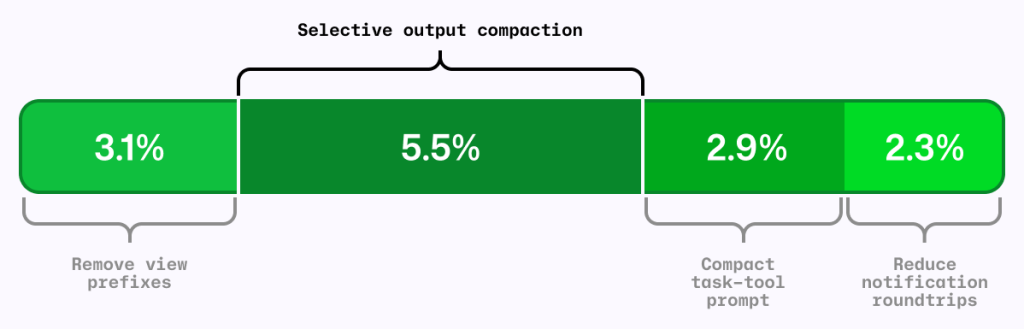
Chart showing 3.1% 'Remove view previxes', 5.5% 'Selective output compaction', 2.9% 'Compact task-tool prompt', and 2.3% 'Reduce notification roundtrips'.
Figure 1: Four independent A/B experiments using the same AI-credit metric. The segments are shown together for comparison; their effects are not necessarily strictly additive. 

The local metric trap

It’s common to shorten the output from each tool call as a way to reduce agent costs. RTK (Rust Token Killer) is a utility that shortens shell output before an agent reads it. We evaluated its effect on GitHub Copilot using our agentic coding benchmarks.

In our harness and benchmark configuration, RTK shortened some responses, but when the omitted text mattered, the model sometimes reopened the original output or reran the command to recover what it needed.

Those recovery steps added turns and carried more context forward. The individual tool response was shorter, but on average, the task used more tokens and took longer. We saved tokens locally and spent more globally.
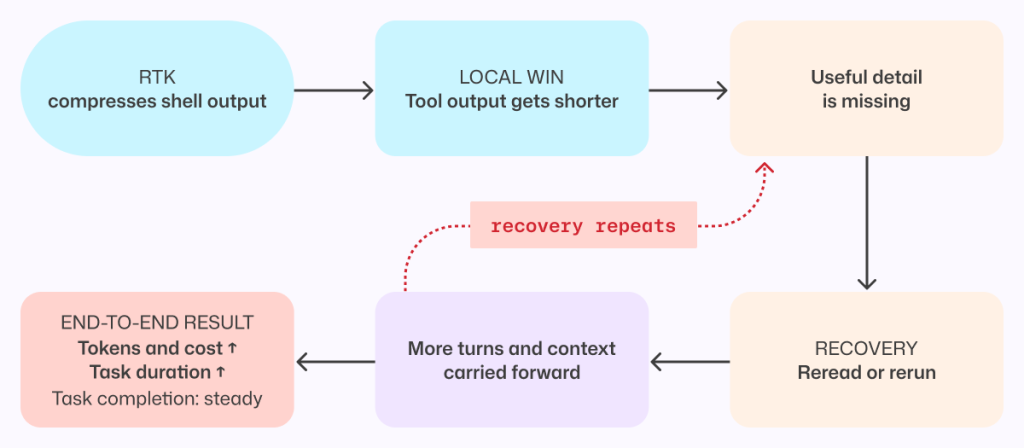
Flow chart showing: RTK, compresses shell output > Local win, tool output gets shorter > Useful detail is missing > Recovery, reread or rerun > More turns and context carried forward. Then the option of finishing at 'End-to-end result, Tokens and cost up, Task duration up, Task completion: steady,' or 'Recovery repeats' going back to 'useful detail is missing'.
Figure 2: A shorter tool response can make the completed task more expensive when missing details force the agent to reread output, rerun commands, and carry more context forward. 

This result applies to the integration and workloads we tested, not to every RTK configuration or to output compression in general. This meant that tokens per tool call is the wrong objective. An efficiency change has to be evaluated across the complete task, from the user’s request through the final result.

More useful was to look at what can we remove without making the model repeat work.

Compress noise, preserve useful information

The goal was to shorten repetitive output while preserving the context an agent needs to complete its task without retracing steps.

Analysis of benchmark runs showed that install, build, test, and lint output often contains repetitive noise, while source-like output and arbitrary command results are more likely to contain the information an agent needs. That analysis informed a selective output compressor, informed in part by RTK and similar approaches.

The prototype was evaluated on agentic coding benchmarks and a range of open source repositories, exercising their build, test, and lint systems.

Early versions were too aggressive. They made the model repeat work or read the full saved output, increasing end-to-end cost and reducing task success. For example, we initially compressed git diff but removed that filter after benchmark tasks showed agents reopening the original output to recover missing information.

Those early failures led to a three-part policy:

  1. Preserve source-like and arbitrary output. Commands such as cat, git diff, git show, and arbitrary scripts are returned unchanged.
  2. Reorganize search results without dropping content. Matches and file lists from tools such as grep can be grouped more efficiently while retaining every result.
  3. Compress repetitive noise selectively. Install, build, test, and progress output is compressed only when the savings are substantial.

The shipped version emerged through repeated evaluation and refinement. It is conservative not because the goal was to build a conservative compressor, but because that is what the evaluations supported.

When output is compressed, the agent can still retrieve the complete original through a direct recovery path.
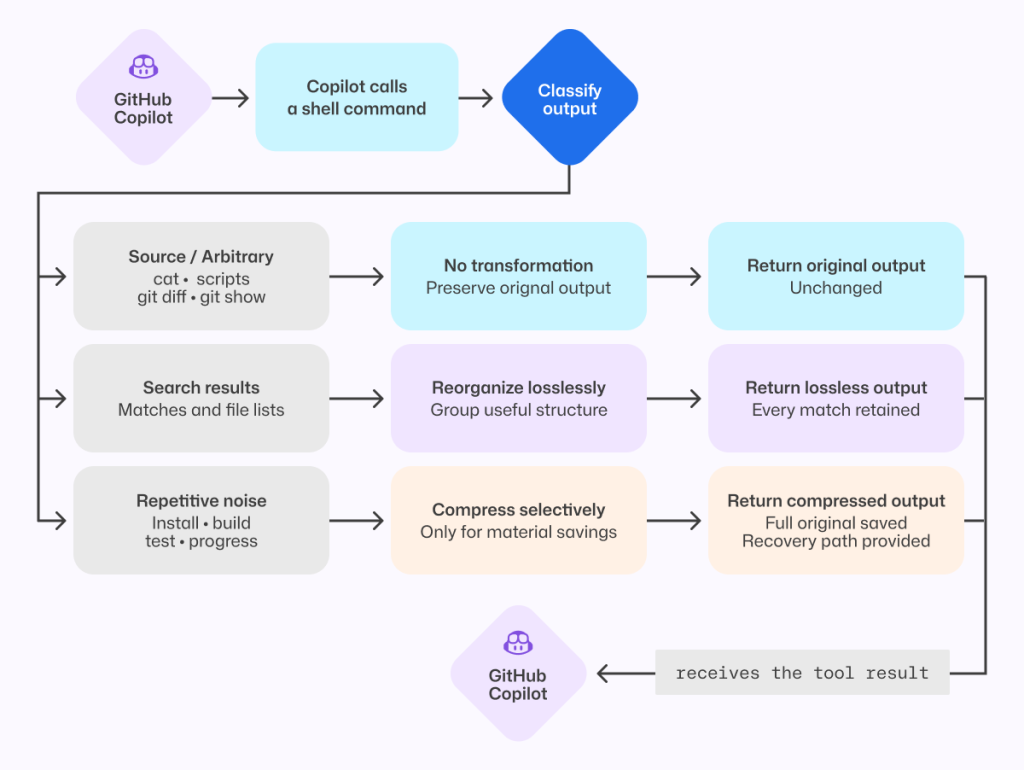
Flowchart showing how GitHub Copilot handles shell-command output. Copilot calls a shell command, classifies the output, then chooses one of three paths: keep arbitrary/source output unchanged, reorganize search results without losing any matches, or selectively compress repetitive noise (like install/build/test logs) while preserving full output and providing a recovery path. The processed result is returned to Copilot.
Figure 3: The shipped compressor preserves source-like output, reorganizes search results without loss, and compresses only predictable repetitive noise while retaining the full original.

That recovery path is both a safety mechanism and an evaluation signal. We tracked whether the agent opened the saved original, reran commands, repeated exploration, narrowed its searches, or took additional turns. Frequent recovery would indicate that the compressor had removed something valuable.

On offline tasks where output compression triggered, no statistically significant task-success regression was detected, and agents extremely rarely opened the saved originals. In the online experiment, average cost decreased slightly with no material regression detected in the tracked quality metrics.

Remove formatting before removing information

One clean token optimization came from the view tool, which agents use to read file contents into context.

Previously, view prefixed every line with a number before showing the contents to the model. Earlier file-editing tools used those numbers to target changes, but current tools instead match surrounding code and do not use line numbers. The line-number prefixes remained even though the normal workflow no longer used them.

Each prefix was small. Repeated across every line and every file read, however, that unused formatting accumulated throughout a session. So, we removed it.

Before-and-after image of code snippets. The line-number prefixes re removed from the 'After' image.
Figure 4: Removing line-number prefixes preserves the source exactly while eliminating formatting that was repeated across every file read.

Line numbers remain useful in diffs and short snippets. They were wasteful here because they were attached to every file read without serving the current editing workflow.

Removing them caused model-inference cost to fall by roughly 5% in offline agentic coding benchmarks. Success rates stayed within the expected run-to-run variance, and edit failures did not increase.

We then tested the change with Copilot CLI users. The online experiment reduced average daily model-inference cost per user by about 3%, with no material regression detected in the quality or satisfaction metrics we tracked.

For developers, that means more of the context window is available for the work itself rather than formatting the agent does not use.

This was the ideal change: no new instructions for the model, no source of information to recover, and no additional decision to make. The file contents reached the model unchanged.

Compress prompts without compressing intent

Prompts carry instructions that shape how an agent works, and they are sent to the model on every turn. Shortening them only improves efficiency if the agent keeps the behaviors developers depend on.

In GitHub Copilot, the task tool launches specialized agents for parallel work. Its guidance had accumulated across tool descriptions, schemas, agent definitions, system instructions, and companion tools.

A meta-prompting loop, in which Copilot iteratively wrote its own prompt, reduced that prompt by roughly half. Copilot produced and refined smaller candidates, and targeted behavioral tests checked the requirements we wanted to preserve.

The first online experiment found a regression that the initial offline evaluations had missed. The meta-prompting loop had rewritten cautious parallelism guidance into a hard scheduling policy, causing independent custom agents to run sequentially.

We stopped the experiment. Before changing the prompt again, we wrote a regression evaluation for the behavior users had exposed. The eventual fix replaced an explicit allowlist and denylist with one sentence:

Independent agents can run in parallel; consider side effects.

That sentence was shorter and less restrictive; it deferred the choice of whether to run sub-agents in parallel to the model instead of the previous explicit guidance. With it, our new behavior test passed without causing any existing behavioral tests to fail.

Prompt behavior needs tests. If a behavior is not tested, a shorter prompt can remove it without anyone noticing. 
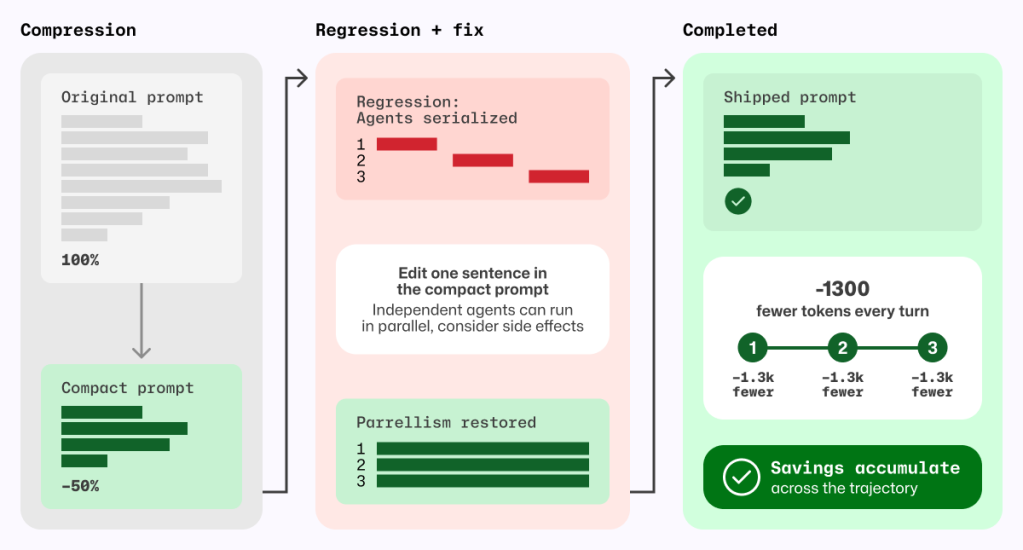
Three-stage diagram labeled Compression → Regression + fix → Completed. Left panel shows an original prompt compressed by about 50%. Middle panel highlights a regression where agents became serialized, then a fix by editing one sentence to restore parallelism. Right panel shows final shipped prompt with restored behavior and cumulative savings of about 1,300 fewer tokens per turn across steps.
Figure 5 Prompt compression became safe only after a regression test exposed serialized agents and a one-sentence fix restored parallelism; the resulting token savings recur on every model turn.

The shipped prompt removes about 1,300 task-tool prompt tokens per turn, corresponding to approximately 1.8% fewer total prompt tokens per session and 2.9% lower normalized cost per active hour, with no quality regression detected in the measured evaluations.

Deliver completed background work without an extra retrieval turn

Agents often run independent work in the background, such as a long-running shell command alongside a sub-agent investigation. Notifications let the agent continue until that work is ready without spending a tool call waiting.

If the agent does not explicitly wait for either task, the harness wakes the model and notifies it when the shell command or sub-agent finishes.

Previously, that notification did not include the completed result, so the agent had to spend another turn retrieving output Copilot had already received. When several tasks finished close together, that detour could repeat. Copilot now batches eligible completion notifications and delivers completed results directly in the existing tool-result format. The agent can continue with the information it needs, without spending an extra turn asking for it again. Explicit reads for work that is still running behave as before.
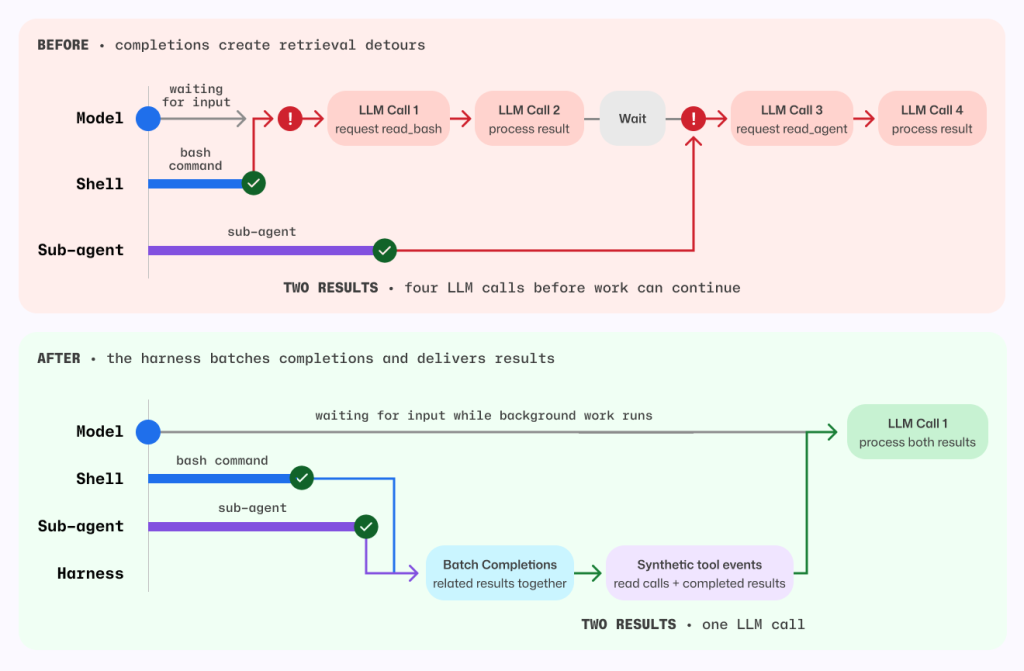
Before-and-after sequence diagram comparing orchestration behavior.

Before: model waits on separate shell and sub-agent completions, causing retrieval detours and four LLM calls to process two results.
After: a harness batches related completions and emits synthetic tool events so background work continues while waiting; both results are processed together in a single LLM call.
The visual emphasizes reduced latency and fewer model round trips.
Figure 6 Before, each background completion could wake a retrieval-only model turn. After, the harness batches eligible completions and delivers completed results in the existing tool-result format.

Before this change, each completed task required one model call to request its result and another to process it. For the shell command and sub-agent shown above, that meant four model calls before work could continue.

Now, the harness batches both completions and supplies their results together, so a single model call can process both. Removing those retrieval detours also avoids carrying the full session context through unnecessary calls.

By delivering completed results directly, without compressing, summarizing, or withholding anything, the harness reduced average token-related usage, as measured in AI Credits, by about 2.3%.

Measure changes in context

A change that saves tokens in one Copilot workflow can increase costs in another.

For example, a tighter set of file-tool instructions was inspired by positive results in Copilot code review. In a Copilot CLI online experiment, it increased cost, so we did not ship it.

By contrast, removing line-number prefixes and selectively compressing output each reduced average prompt tokens per review by roughly 5% in independent evaluations across a large set of Copilot code review tasks using the production model. We detected no material change in the tracked review-quality metrics.

These findings are separate from the earlier migration of Copilot code review to the shared file tools, which, together with review-instruction tuning, reduced code review cost by about 20%.

Each change needs to be measured in the workflow where it runs.

Five lessons for building efficient AI coding agents

  1. Optimize the completed task, not the tool call. Shorter output is not cheaper if the agent spends more turns recovering what was removed.
  2. Optimize orchestration, not just model output. Eliminate model turns that perform work the harness can complete deterministically.
  3. Compress by what the output represents. Preserve exact content, prefer lossless transformations, and measure how often agents use the recovery path.
  4. Prompt rewrites sometimes have unintended consequences. Validate that intended behavior is preserved.
  5. Evidence is local to the workload. Re-evaluate changes in offline benchmarks, online experiments, and every product surface where they ship.

None of these changes made the model smarter. They removed work the model never needed to do.

The changes described in this post are shipping across GitHub Copilot experiences that use the same underlying harness.

Bring agentic workflows to your terminal
with GitHub Copilot CLI >

The post How we make AI coding more cost efficient without sacrificing task quality appeared first on The GitHub Blog.
Better tools made Copilot code review worse. Here’s how we actually improved it.

Post Syndicated from Napalys Klicius original https://github.blog/ai-and-ml/github-copilot/better-tools-made-copilot-code-review-worse-heres-how-we-actually-improved-it/


Give an agent better tools and it should do better work. That’s the instinct, anyway.

When you open a pull request, Copilot code review reads the diff and explores the surrounding code to find the problems that matter before they ship. To do that, it used its own code exploration tools. So when we swapped in the better-maintained, shared tools that power the Copilot CLI, grep, glob, and view, we expected a clean upgrade.

Instead, in our benchmarks, we found that the cost of reviews was higher and fewer issues were being caught.

But the tools weren’t the problem. The instructions were. Once we rewrote them for the way a reviewer actually reads a pull request, the regression flipped into a win: roughly 20% lower average review cost, while maintaining the same review quality.

This is the story of how adjusting the workflows around the tools led us to a fix.

Same tools, wrong instincts

If you’ve built on top of an agent framework, you’ve probably inherited its tools too. They work, so you keep them, until the day your use case drifts far enough from what they were designed for that they quietly start working against you. That’s the situation we were in. Before trying to use the shared CLI tools, Copilot code review used its own code exploration tools. That tool layer was inspired by earlier agentic systems, including ideas from SWE-agent-style repository navigation and GitHub Copilot Autofix: list directories, search files, search directories, and read code. Those tools worked, but they were specific to Copilot code review, and they were designed for how models behaved at the time. Earlier agentic coding models made fewer tool calls and were worse at automatically pulling in necessary context. This meant it was more important to include all relevant information in the few tool calls that the model made.

Meanwhile, the Copilot CLI harness has a shared set of Unix-inspired code exploration tools: grep, glob, and view. That harness is also used by a growing number of Copilot agent products, including GitHub Copilot cloud agent, so harness improvements can benefit more than one product. We wanted to clean up and share infrastructure where possible, so we experimented with using the tools from the Copilot CLI harness in Copilot code review. The goal was to reduce duplicated tool implementations, create one shared place to improve code exploration tools, and make it easier to carry those improvements across Copilot products.

On paper, the migration looked simple:

Old Copilot code review GitHub Copilot CLI Purpose
list_dir  glob  Discover candidate files and directories before opening code. 
search_file and search_dir  grep  Search code for matching text, symbols, or call sites. 
read_code  view  Read the relevant file contents once a path or range is known. 

The existing review tools were not thin wrappers. When searching for a directory or reading a code range, they could return the matched or requested lines plus extra surrounding code context. That added token cost, but it also matched how earlier models often benefited from having nearby context included automatically.

Initially, we hoped this would be a simple migration: swap one set of tools for another. But when we tested the shared tools in offline benchmarks, the review agent became less efficient and less effective. Average cost increased, and the number of useful comments dropped.

The trace revealed a browsing loop

Our internal Copilot code review benchmarks were useful because they show more than a final score. They show the path the agent took, including which tools it called, how much output came back, where errors happened, and whether it was narrowing toward evidence or widening the search.

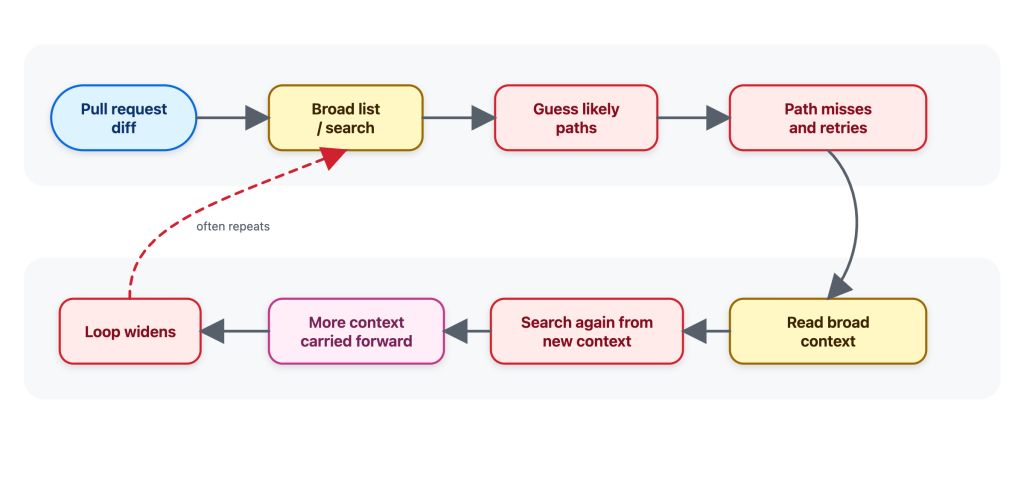
When we first tried the shared Copilot CLI tools in offline benchmarks, the agent often behaved as if it was browsing a repository instead of investigating a pull request. It would search broadly, guess likely paths, read broadly, find more things to search, and carry that extra context forward.

Diagram showing the flow before — a simplified illustration of the general-purpose behavior we observed: widening the search, guessing paths, and accumulating context.
Figure 1: Before — a simplified illustration of the general-purpose behavior we observed: widening the search, guessing paths, and accumulating context.

That pattern is understandable. Broad exploration can be useful when the task is “understand this repo.” But it’s not how a reviewer would usually review a pull request.

When I review a pull request, I start from the diff and ask targeted questions:

  • Where is this function called?
  • Is this config key used anywhere else?
  • Is there a test or helper with the same pattern?
  • What is the smallest nearby code range that explains this behavior?

I do not want to open a large part of the repository before I know what I am looking for. I want the minimal context needed to answer the question, without overloading the review with unrelated code.

That matters because every tool result becomes part of the agent’s working context. Extra file contents can be carried forward into later reasoning, increasing cost and sometimes making the review less focused. A tool result is not a disposable printout; for an agent, it’s extra tokens that stay in the context window.

The traces made that difference visible. The shared tools were not the problem. The instructions were giving the agent the wrong instincts to do an efficient and effective review.

The tools themselves worked, but their instructions were tuned for their use within the Copilot CLI and implied the wrong workflow: the agent used grep, glob, and view like a broad coding assistant instead of a reviewer. A coding assistant may map a whole area before making a change to ensure it doesn’t break some other corner of the code. On the other hand, a reviewer usually starts from the diff, asks whether the change introduced a problem, and then looks for the narrowest nearby evidence required to confirm or dismiss it.

General coding-assistant tool instructions, like the ones used by Copilot CLI or Copilot cloud agent, make sense for an interactive assistant. A developer may ask it to understand a repository, plan a change, edit files, and continue over multiple turns.

Copilot code review has a narrower job: start from a pull request diff, gather enough surrounding evidence to decide whether a change introduces a real issue, and avoid loading context that is not needed for that review question.

It was therefore clear that we couldn’t simply replace the previous Copilot code review tools with the tools from the Copilot CLI without additional prompting work. The problem became: how do we design tool instructions that use these shared tools effectively in a code review setting?

Rewriting the tool instructions for a reviewer’s workflow

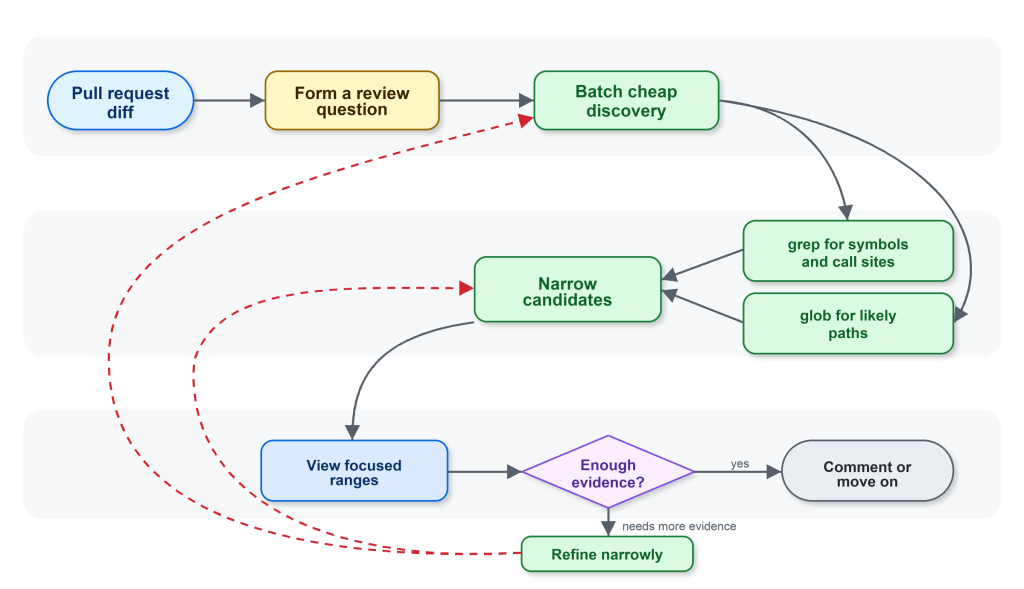
The next iterations made the guidance specific to code review. The workflow we wanted Copilot code review to follow was:

  1. Start from the diff and form specific review questions.
  2. Use glob when the path is uncertain and grep to find candidate files, symbols, and call sites.
  3. Batch cheap discovery before reading files.
  4. Use view only when the agent knows which file or line range it needs.
  5. Batch focused reads instead of alternating between one search and one read.

In oversimplified form, this was the behavior we encoded:

Generic posture: Use the available tools to inspect repository context that may be relevant.

Review-shaped guidance: Start from the diff. Narrow first with grep and glob; read exact evidence with view. If grep fails to find relevant context, retry with a simpler escaped search. If a path is wrong, pivot to glob instead of guessing nearby paths.

For example, imagine the diff changes an authorization helper that decides whether an operation is allowed. A relevant review question is not “show me the full contents of every file that calls this helper.” It could instead be the narrower: “are any request-handling callers relying on the old behavior?”

The intended path is short:

start from the helper changed in the diff 
grep for callers of that helper 
glob for likely route, handler, or controller files 
view the most relevant caller ranges 
decide whether any caller changes the risk

The guidance also changed how the agent recovered from failed searches. If an input made grep fail, the better next step was one simpler, corrected search. If a path was wrong, the better next step was glob, not guessing neighboring paths and reading whatever happened to exist. That nudged the agent away from letting a small tool failure turn into a larger exploration loop.

Diagram showing the flow after: a simplified illustration of the review-shaped behavior the prompt guided toward: stay anchored to the diff, narrow with grep and glob, then read focused ranges with view.
Figure 2: After — a simplified illustration of the review-shaped behavior the prompt guided toward: stay anchored to the diff, narrow with grep and glob, then read focused ranges with view.

The change was small in wording and large in effect. It changed the rhythm of the agent from “browse, read, search again” to “ask, narrow, read, decide.”

Benchmarks let us debug behavior, not just scores

The shared harness gave us the tools. The internal Copilot code review benchmarks gave us the feedback loop.

We could run the same review examples, compare tool traces, update the instructions, and run again. That let us ask concrete questions:

  • Did the agent narrow first, or read broadly first?
  • Did it batch independent searches?
  • Did it call view only when it had a reason?
  • Did a tool-instruction change reduce tool errors, or just move them somewhere else?
  • Did the trace stay focused on evidence from the diff?
  • Did the review still preserve the quality metrics we cared about?

The most useful signal was not “the instructions are better.” It was more concrete. The agent was making a similar number of tool calls, but spending more of them on relevant evidence instead of repeatedly expanding the search.

That connected product-level outcomes to understandable engineering behavior. Instead of guessing why a score moved, we could inspect the workflow that produced it.

The result: roughly 20% lower average review cost

In production, the tuned behavior showed roughly 20% lower average review cost compared with the control. Importantly, it did not show a quality signal that could block shipping.

The reduction did not come from the tools by themselves, it came from the workflow around them. Shared code exploration tools, Copilot code review custom tool instructions, and internal benchmarks made the agent’s behavior visible enough to tune.

That framing matters when building with agents. It can be tempting to treat tools as implementation details by swapping one tool for another, then comparing the final answer. But for an agent, the tool surface is part of the product experience. It changes what the agent notices, how it searches, how much context it carries forward, and when it decides it has enough evidence.

Tool descriptions and system instructions are closer to API documentation. Unclear API docs can leave a developer confused and lead to inefficient or wrong decisions. Unclear tool prompting can do the same for an LLM; a small wording change can affect cost, quality, and the shape of the investigation because it changes how the agent spends its attention.

Same tools, different job

We also tried to apply the same kind of focused tool instructions in the CLI, where it did not produce the same kind of win. That is a useful counterexample, and an important guardrail for the lesson.

Copilot code review is anchored to a diff and a review question. Copilot CLI handles broader, interactive coding tasks where exploration can be part of the job. There may be no single diff anchor, the user may change direction over multiple turns, and the right context may not be obvious at the start. The same grep, glob, and view tools can support both products, but the workflow around those tools has to match the product.

The takeaway is that shared tools scale when the instructions and benchmarks match the job.

Try it out yourself using GitHub Copilot code review.

The post Better tools made Copilot code review worse. Here’s how we actually improved it. appeared first on The GitHub Blog.