Tag Archives: LLMs

How we make AI coding more cost efficient without sacrificing task quality

Post Syndicated from Erik Kristensen original https://github.blog/ai-and-ml/github-copilot/how-we-make-ai-coding-more-cost-efficient-without-sacrificing-task-quality/


Output quality is important when working with AI coding agents, but true efficiency comes from getting work done quickly, efficiently, and with the right context.

That’s why token count of individual interactions alone isn’t a meaningful measure of efficiency. The goal shouldn’t be to use fewer tokens, but to tap into the right amount of context to move a task forward. A concise tool response can sometimes require additional calls or work if it leaves out information the agent needs, ultimately making the task slower and more expensive.

That’s why we want to optimize for the outcome rather than the tool call. This post examines four changes in GitHub Copilot that put that principle into practice:

  • Preserve useful context while reducing repetitive output.
  • Remove formatting that adds no value to the task.
  • Shorten instructions without changing useful behavior.
  • Deliver completed background work without an extra retrieval step.

Possible changes were evaluated offline using agentic coding benchmarks. The most promising changes were then validated through controlled online experiments before shipping. The examples in this post come from GitHub Copilot CLI. Multiple other Copilot products, such as the GitHub Copilot app and Copilot code review, use the same underlying harness and also become more efficient through these improvements.
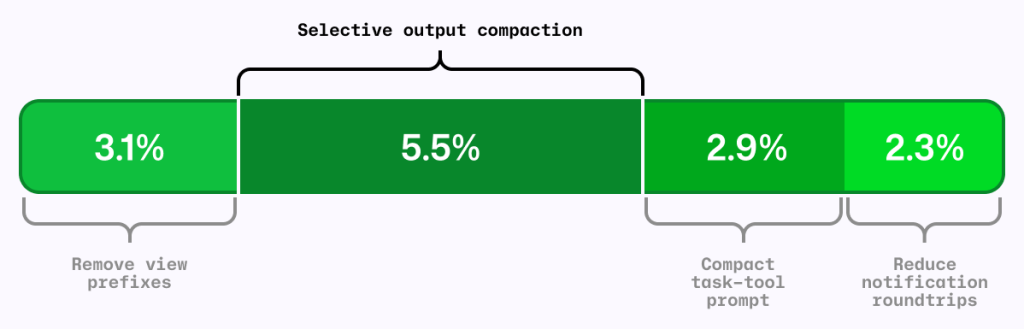
Chart showing 3.1% 'Remove view previxes', 5.5% 'Selective output compaction', 2.9% 'Compact task-tool prompt', and 2.3% 'Reduce notification roundtrips'.
Figure 1: Four independent A/B experiments using the same AI-credit metric. The segments are shown together for comparison; their effects are not necessarily strictly additive. 

The local metric trap

It’s common to shorten the output from each tool call as a way to reduce agent costs. RTK (Rust Token Killer) is a utility that shortens shell output before an agent reads it. We evaluated its effect on GitHub Copilot using our agentic coding benchmarks.

In our harness and benchmark configuration, RTK shortened some responses, but when the omitted text mattered, the model sometimes reopened the original output or reran the command to recover what it needed.

Those recovery steps added turns and carried more context forward. The individual tool response was shorter, but on average, the task used more tokens and took longer. We saved tokens locally and spent more globally.
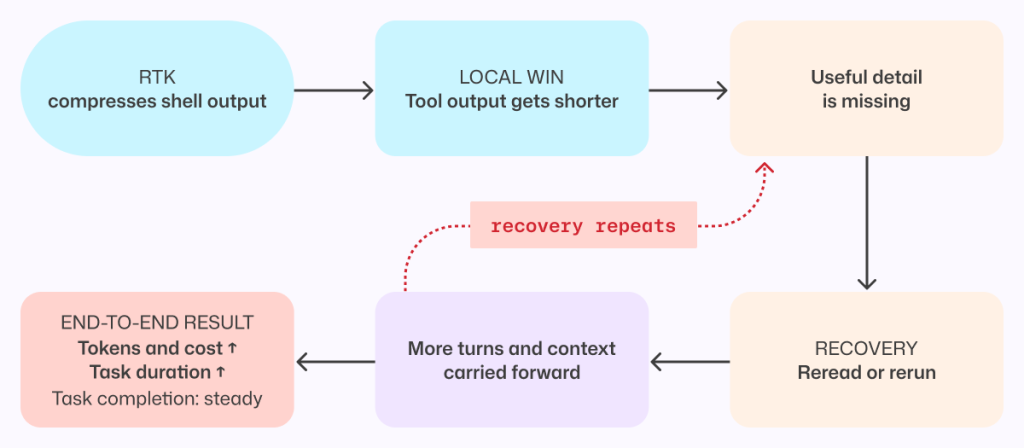
Flow chart showing: RTK, compresses shell output > Local win, tool output gets shorter > Useful detail is missing > Recovery, reread or rerun > More turns and context carried forward. Then the option of finishing at 'End-to-end result, Tokens and cost up, Task duration up, Task completion: steady,' or 'Recovery repeats' going back to 'useful detail is missing'.
Figure 2: A shorter tool response can make the completed task more expensive when missing details force the agent to reread output, rerun commands, and carry more context forward. 

This result applies to the integration and workloads we tested, not to every RTK configuration or to output compression in general. This meant that tokens per tool call is the wrong objective. An efficiency change has to be evaluated across the complete task, from the user’s request through the final result.

More useful was to look at what can we remove without making the model repeat work.

Compress noise, preserve useful information

The goal was to shorten repetitive output while preserving the context an agent needs to complete its task without retracing steps.

Analysis of benchmark runs showed that install, build, test, and lint output often contains repetitive noise, while source-like output and arbitrary command results are more likely to contain the information an agent needs. That analysis informed a selective output compressor, informed in part by RTK and similar approaches.

The prototype was evaluated on agentic coding benchmarks and a range of open source repositories, exercising their build, test, and lint systems.

Early versions were too aggressive. They made the model repeat work or read the full saved output, increasing end-to-end cost and reducing task success. For example, we initially compressed git diff but removed that filter after benchmark tasks showed agents reopening the original output to recover missing information.

Those early failures led to a three-part policy:

  1. Preserve source-like and arbitrary output. Commands such as cat, git diff, git show, and arbitrary scripts are returned unchanged.
  2. Reorganize search results without dropping content. Matches and file lists from tools such as grep can be grouped more efficiently while retaining every result.
  3. Compress repetitive noise selectively. Install, build, test, and progress output is compressed only when the savings are substantial.

The shipped version emerged through repeated evaluation and refinement. It is conservative not because the goal was to build a conservative compressor, but because that is what the evaluations supported.

When output is compressed, the agent can still retrieve the complete original through a direct recovery path.
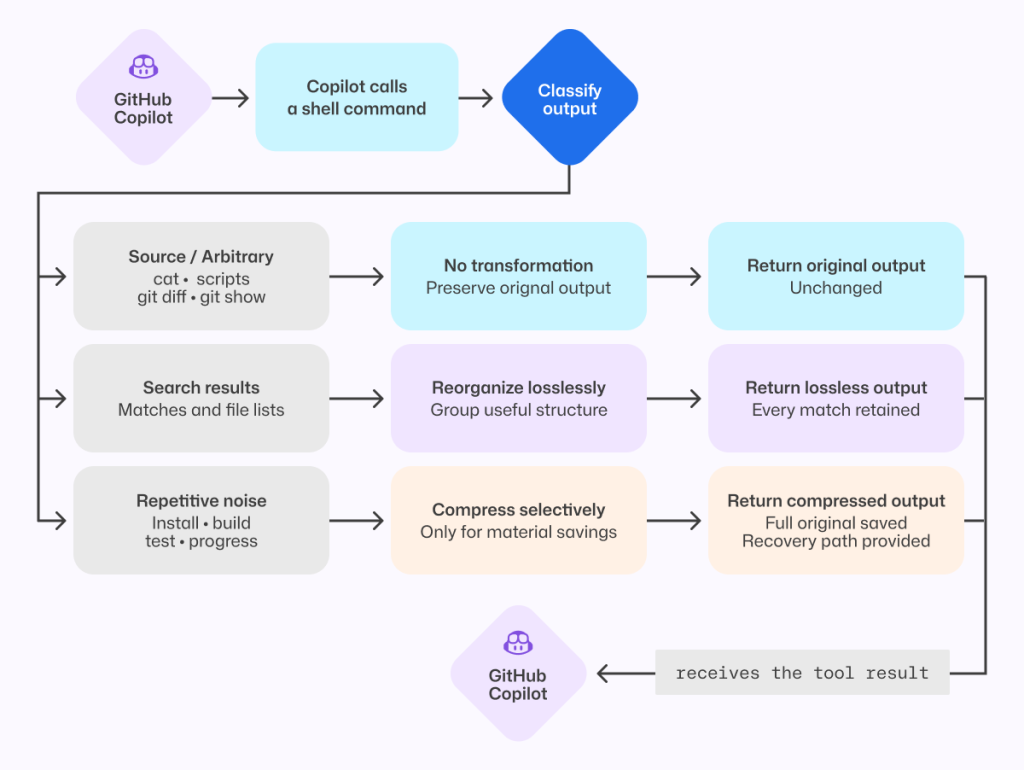
Flowchart showing how GitHub Copilot handles shell-command output. Copilot calls a shell command, classifies the output, then chooses one of three paths: keep arbitrary/source output unchanged, reorganize search results without losing any matches, or selectively compress repetitive noise (like install/build/test logs) while preserving full output and providing a recovery path. The processed result is returned to Copilot.
Figure 3: The shipped compressor preserves source-like output, reorganizes search results without loss, and compresses only predictable repetitive noise while retaining the full original.

That recovery path is both a safety mechanism and an evaluation signal. We tracked whether the agent opened the saved original, reran commands, repeated exploration, narrowed its searches, or took additional turns. Frequent recovery would indicate that the compressor had removed something valuable.

On offline tasks where output compression triggered, no statistically significant task-success regression was detected, and agents extremely rarely opened the saved originals. In the online experiment, average cost decreased slightly with no material regression detected in the tracked quality metrics.

Remove formatting before removing information

One clean token optimization came from the view tool, which agents use to read file contents into context.

Previously, view prefixed every line with a number before showing the contents to the model. Earlier file-editing tools used those numbers to target changes, but current tools instead match surrounding code and do not use line numbers. The line-number prefixes remained even though the normal workflow no longer used them.

Each prefix was small. Repeated across every line and every file read, however, that unused formatting accumulated throughout a session. So, we removed it.

Before-and-after image of code snippets. The line-number prefixes re removed from the 'After' image.
Figure 4: Removing line-number prefixes preserves the source exactly while eliminating formatting that was repeated across every file read.

Line numbers remain useful in diffs and short snippets. They were wasteful here because they were attached to every file read without serving the current editing workflow.

Removing them caused model-inference cost to fall by roughly 5% in offline agentic coding benchmarks. Success rates stayed within the expected run-to-run variance, and edit failures did not increase.

We then tested the change with Copilot CLI users. The online experiment reduced average daily model-inference cost per user by about 3%, with no material regression detected in the quality or satisfaction metrics we tracked.

For developers, that means more of the context window is available for the work itself rather than formatting the agent does not use.

This was the ideal change: no new instructions for the model, no source of information to recover, and no additional decision to make. The file contents reached the model unchanged.

Compress prompts without compressing intent

Prompts carry instructions that shape how an agent works, and they are sent to the model on every turn. Shortening them only improves efficiency if the agent keeps the behaviors developers depend on.

In GitHub Copilot, the task tool launches specialized agents for parallel work. Its guidance had accumulated across tool descriptions, schemas, agent definitions, system instructions, and companion tools.

A meta-prompting loop, in which Copilot iteratively wrote its own prompt, reduced that prompt by roughly half. Copilot produced and refined smaller candidates, and targeted behavioral tests checked the requirements we wanted to preserve.

The first online experiment found a regression that the initial offline evaluations had missed. The meta-prompting loop had rewritten cautious parallelism guidance into a hard scheduling policy, causing independent custom agents to run sequentially.

We stopped the experiment. Before changing the prompt again, we wrote a regression evaluation for the behavior users had exposed. The eventual fix replaced an explicit allowlist and denylist with one sentence:

Independent agents can run in parallel; consider side effects.

That sentence was shorter and less restrictive; it deferred the choice of whether to run sub-agents in parallel to the model instead of the previous explicit guidance. With it, our new behavior test passed without causing any existing behavioral tests to fail.

Prompt behavior needs tests. If a behavior is not tested, a shorter prompt can remove it without anyone noticing. 
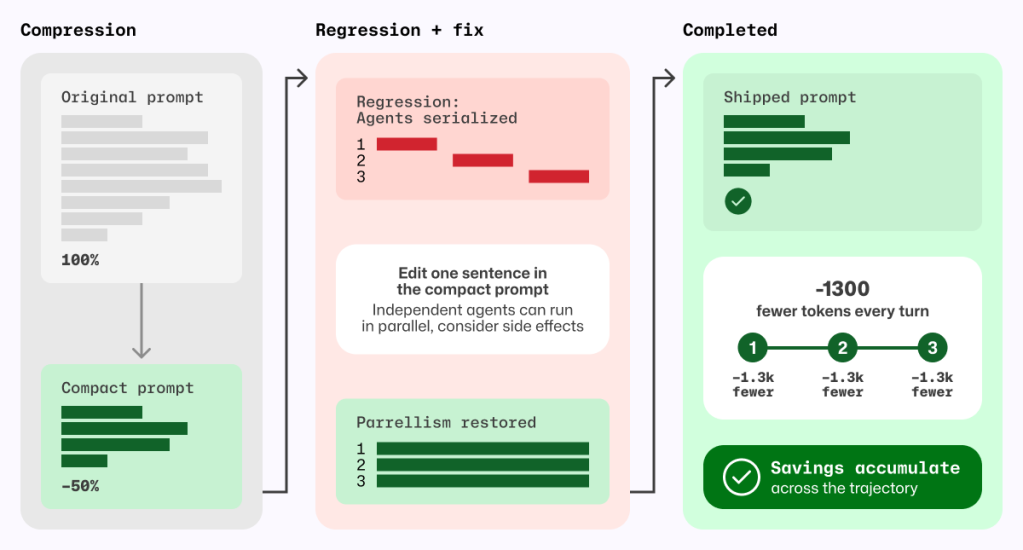
Three-stage diagram labeled Compression → Regression + fix → Completed. Left panel shows an original prompt compressed by about 50%. Middle panel highlights a regression where agents became serialized, then a fix by editing one sentence to restore parallelism. Right panel shows final shipped prompt with restored behavior and cumulative savings of about 1,300 fewer tokens per turn across steps.
Figure 5 Prompt compression became safe only after a regression test exposed serialized agents and a one-sentence fix restored parallelism; the resulting token savings recur on every model turn.

The shipped prompt removes about 1,300 task-tool prompt tokens per turn, corresponding to approximately 1.8% fewer total prompt tokens per session and 2.9% lower normalized cost per active hour, with no quality regression detected in the measured evaluations.

Deliver completed background work without an extra retrieval turn

Agents often run independent work in the background, such as a long-running shell command alongside a sub-agent investigation. Notifications let the agent continue until that work is ready without spending a tool call waiting.

If the agent does not explicitly wait for either task, the harness wakes the model and notifies it when the shell command or sub-agent finishes.

Previously, that notification did not include the completed result, so the agent had to spend another turn retrieving output Copilot had already received. When several tasks finished close together, that detour could repeat. Copilot now batches eligible completion notifications and delivers completed results directly in the existing tool-result format. The agent can continue with the information it needs, without spending an extra turn asking for it again. Explicit reads for work that is still running behave as before.
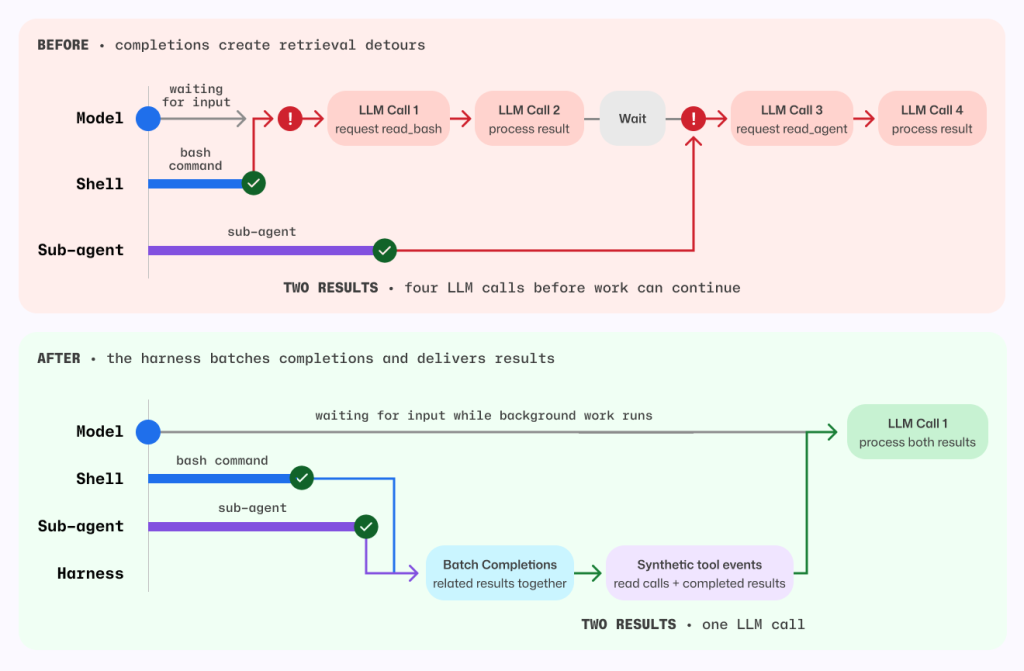
Before-and-after sequence diagram comparing orchestration behavior.

Before: model waits on separate shell and sub-agent completions, causing retrieval detours and four LLM calls to process two results.
After: a harness batches related completions and emits synthetic tool events so background work continues while waiting; both results are processed together in a single LLM call.
The visual emphasizes reduced latency and fewer model round trips.
Figure 6 Before, each background completion could wake a retrieval-only model turn. After, the harness batches eligible completions and delivers completed results in the existing tool-result format.

Before this change, each completed task required one model call to request its result and another to process it. For the shell command and sub-agent shown above, that meant four model calls before work could continue.

Now, the harness batches both completions and supplies their results together, so a single model call can process both. Removing those retrieval detours also avoids carrying the full session context through unnecessary calls.

By delivering completed results directly, without compressing, summarizing, or withholding anything, the harness reduced average token-related usage, as measured in AI Credits, by about 2.3%.

Measure changes in context

A change that saves tokens in one Copilot workflow can increase costs in another.

For example, a tighter set of file-tool instructions was inspired by positive results in Copilot code review. In a Copilot CLI online experiment, it increased cost, so we did not ship it.

By contrast, removing line-number prefixes and selectively compressing output each reduced average prompt tokens per review by roughly 5% in independent evaluations across a large set of Copilot code review tasks using the production model. We detected no material change in the tracked review-quality metrics.

These findings are separate from the earlier migration of Copilot code review to the shared file tools, which, together with review-instruction tuning, reduced code review cost by about 20%.

Each change needs to be measured in the workflow where it runs.

Five lessons for building efficient AI coding agents

  1. Optimize the completed task, not the tool call. Shorter output is not cheaper if the agent spends more turns recovering what was removed.
  2. Optimize orchestration, not just model output. Eliminate model turns that perform work the harness can complete deterministically.
  3. Compress by what the output represents. Preserve exact content, prefer lossless transformations, and measure how often agents use the recovery path.
  4. Prompt rewrites sometimes have unintended consequences. Validate that intended behavior is preserved.
  5. Evidence is local to the workload. Re-evaluate changes in offline benchmarks, online experiments, and every product surface where they ship.

None of these changes made the model smarter. They removed work the model never needed to do.

The changes described in this post are shipping across GitHub Copilot experiences that use the same underlying harness.

Bring agentic workflows to your terminal
with GitHub Copilot CLI >

The post How we make AI coding more cost efficient without sacrificing task quality appeared first on The GitHub Blog.
Better tools made Copilot code review worse. Here’s how we actually improved it.

Post Syndicated from Napalys Klicius original https://github.blog/ai-and-ml/github-copilot/better-tools-made-copilot-code-review-worse-heres-how-we-actually-improved-it/


Give an agent better tools and it should do better work. That’s the instinct, anyway.

When you open a pull request, Copilot code review reads the diff and explores the surrounding code to find the problems that matter before they ship. To do that, it used its own code exploration tools. So when we swapped in the better-maintained, shared tools that power the Copilot CLI, grep, glob, and view, we expected a clean upgrade.

Instead, in our benchmarks, we found that the cost of reviews was higher and fewer issues were being caught.

But the tools weren’t the problem. The instructions were. Once we rewrote them for the way a reviewer actually reads a pull request, the regression flipped into a win: roughly 20% lower average review cost, while maintaining the same review quality.

This is the story of how adjusting the workflows around the tools led us to a fix.

Same tools, wrong instincts

If you’ve built on top of an agent framework, you’ve probably inherited its tools too. They work, so you keep them, until the day your use case drifts far enough from what they were designed for that they quietly start working against you. That’s the situation we were in. Before trying to use the shared CLI tools, Copilot code review used its own code exploration tools. That tool layer was inspired by earlier agentic systems, including ideas from SWE-agent-style repository navigation and GitHub Copilot Autofix: list directories, search files, search directories, and read code. Those tools worked, but they were specific to Copilot code review, and they were designed for how models behaved at the time. Earlier agentic coding models made fewer tool calls and were worse at automatically pulling in necessary context. This meant it was more important to include all relevant information in the few tool calls that the model made.

Meanwhile, the Copilot CLI harness has a shared set of Unix-inspired code exploration tools: grep, glob, and view. That harness is also used by a growing number of Copilot agent products, including GitHub Copilot cloud agent, so harness improvements can benefit more than one product. We wanted to clean up and share infrastructure where possible, so we experimented with using the tools from the Copilot CLI harness in Copilot code review. The goal was to reduce duplicated tool implementations, create one shared place to improve code exploration tools, and make it easier to carry those improvements across Copilot products.

On paper, the migration looked simple:

Old Copilot code review GitHub Copilot CLI Purpose
list_dir  glob  Discover candidate files and directories before opening code. 
search_file and search_dir  grep  Search code for matching text, symbols, or call sites. 
read_code  view  Read the relevant file contents once a path or range is known. 

The existing review tools were not thin wrappers. When searching for a directory or reading a code range, they could return the matched or requested lines plus extra surrounding code context. That added token cost, but it also matched how earlier models often benefited from having nearby context included automatically.

Initially, we hoped this would be a simple migration: swap one set of tools for another. But when we tested the shared tools in offline benchmarks, the review agent became less efficient and less effective. Average cost increased, and the number of useful comments dropped.

The trace revealed a browsing loop

Our internal Copilot code review benchmarks were useful because they show more than a final score. They show the path the agent took, including which tools it called, how much output came back, where errors happened, and whether it was narrowing toward evidence or widening the search.

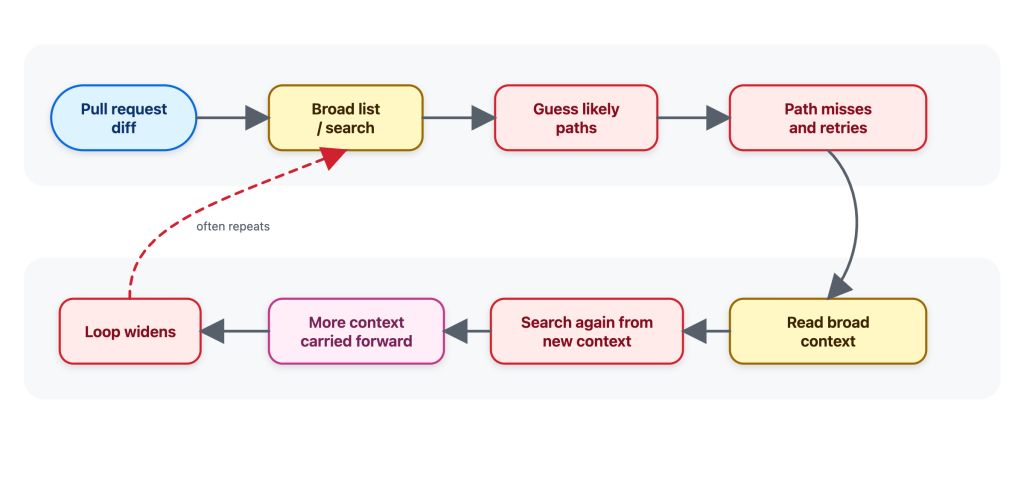
When we first tried the shared Copilot CLI tools in offline benchmarks, the agent often behaved as if it was browsing a repository instead of investigating a pull request. It would search broadly, guess likely paths, read broadly, find more things to search, and carry that extra context forward.

Diagram showing the flow before — a simplified illustration of the general-purpose behavior we observed: widening the search, guessing paths, and accumulating context.
Figure 1: Before — a simplified illustration of the general-purpose behavior we observed: widening the search, guessing paths, and accumulating context.

That pattern is understandable. Broad exploration can be useful when the task is “understand this repo.” But it’s not how a reviewer would usually review a pull request.

When I review a pull request, I start from the diff and ask targeted questions:

  • Where is this function called?
  • Is this config key used anywhere else?
  • Is there a test or helper with the same pattern?
  • What is the smallest nearby code range that explains this behavior?

I do not want to open a large part of the repository before I know what I am looking for. I want the minimal context needed to answer the question, without overloading the review with unrelated code.

That matters because every tool result becomes part of the agent’s working context. Extra file contents can be carried forward into later reasoning, increasing cost and sometimes making the review less focused. A tool result is not a disposable printout; for an agent, it’s extra tokens that stay in the context window.

The traces made that difference visible. The shared tools were not the problem. The instructions were giving the agent the wrong instincts to do an efficient and effective review.

The tools themselves worked, but their instructions were tuned for their use within the Copilot CLI and implied the wrong workflow: the agent used grep, glob, and view like a broad coding assistant instead of a reviewer. A coding assistant may map a whole area before making a change to ensure it doesn’t break some other corner of the code. On the other hand, a reviewer usually starts from the diff, asks whether the change introduced a problem, and then looks for the narrowest nearby evidence required to confirm or dismiss it.

General coding-assistant tool instructions, like the ones used by Copilot CLI or Copilot cloud agent, make sense for an interactive assistant. A developer may ask it to understand a repository, plan a change, edit files, and continue over multiple turns.

Copilot code review has a narrower job: start from a pull request diff, gather enough surrounding evidence to decide whether a change introduces a real issue, and avoid loading context that is not needed for that review question.

It was therefore clear that we couldn’t simply replace the previous Copilot code review tools with the tools from the Copilot CLI without additional prompting work. The problem became: how do we design tool instructions that use these shared tools effectively in a code review setting?

Rewriting the tool instructions for a reviewer’s workflow

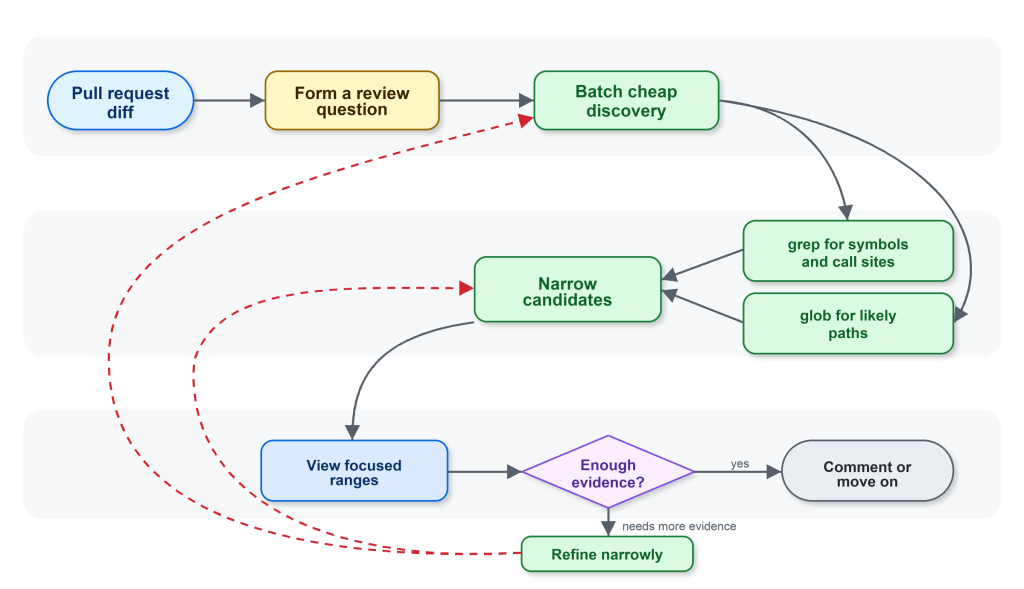
The next iterations made the guidance specific to code review. The workflow we wanted Copilot code review to follow was:

  1. Start from the diff and form specific review questions.
  2. Use glob when the path is uncertain and grep to find candidate files, symbols, and call sites.
  3. Batch cheap discovery before reading files.
  4. Use view only when the agent knows which file or line range it needs.
  5. Batch focused reads instead of alternating between one search and one read.

In oversimplified form, this was the behavior we encoded:

Generic posture: Use the available tools to inspect repository context that may be relevant.

Review-shaped guidance: Start from the diff. Narrow first with grep and glob; read exact evidence with view. If grep fails to find relevant context, retry with a simpler escaped search. If a path is wrong, pivot to glob instead of guessing nearby paths.

For example, imagine the diff changes an authorization helper that decides whether an operation is allowed. A relevant review question is not “show me the full contents of every file that calls this helper.” It could instead be the narrower: “are any request-handling callers relying on the old behavior?”

The intended path is short:

start from the helper changed in the diff 
grep for callers of that helper 
glob for likely route, handler, or controller files 
view the most relevant caller ranges 
decide whether any caller changes the risk

The guidance also changed how the agent recovered from failed searches. If an input made grep fail, the better next step was one simpler, corrected search. If a path was wrong, the better next step was glob, not guessing neighboring paths and reading whatever happened to exist. That nudged the agent away from letting a small tool failure turn into a larger exploration loop.

Diagram showing the flow after: a simplified illustration of the review-shaped behavior the prompt guided toward: stay anchored to the diff, narrow with grep and glob, then read focused ranges with view.
Figure 2: After — a simplified illustration of the review-shaped behavior the prompt guided toward: stay anchored to the diff, narrow with grep and glob, then read focused ranges with view.

The change was small in wording and large in effect. It changed the rhythm of the agent from “browse, read, search again” to “ask, narrow, read, decide.”

Benchmarks let us debug behavior, not just scores

The shared harness gave us the tools. The internal Copilot code review benchmarks gave us the feedback loop.

We could run the same review examples, compare tool traces, update the instructions, and run again. That let us ask concrete questions:

  • Did the agent narrow first, or read broadly first?
  • Did it batch independent searches?
  • Did it call view only when it had a reason?
  • Did a tool-instruction change reduce tool errors, or just move them somewhere else?
  • Did the trace stay focused on evidence from the diff?
  • Did the review still preserve the quality metrics we cared about?

The most useful signal was not “the instructions are better.” It was more concrete. The agent was making a similar number of tool calls, but spending more of them on relevant evidence instead of repeatedly expanding the search.

That connected product-level outcomes to understandable engineering behavior. Instead of guessing why a score moved, we could inspect the workflow that produced it.

The result: roughly 20% lower average review cost

In production, the tuned behavior showed roughly 20% lower average review cost compared with the control. Importantly, it did not show a quality signal that could block shipping.

The reduction did not come from the tools by themselves, it came from the workflow around them. Shared code exploration tools, Copilot code review custom tool instructions, and internal benchmarks made the agent’s behavior visible enough to tune.

That framing matters when building with agents. It can be tempting to treat tools as implementation details by swapping one tool for another, then comparing the final answer. But for an agent, the tool surface is part of the product experience. It changes what the agent notices, how it searches, how much context it carries forward, and when it decides it has enough evidence.

Tool descriptions and system instructions are closer to API documentation. Unclear API docs can leave a developer confused and lead to inefficient or wrong decisions. Unclear tool prompting can do the same for an LLM; a small wording change can affect cost, quality, and the shape of the investigation because it changes how the agent spends its attention.

Same tools, different job

We also tried to apply the same kind of focused tool instructions in the CLI, where it did not produce the same kind of win. That is a useful counterexample, and an important guardrail for the lesson.

Copilot code review is anchored to a diff and a review question. Copilot CLI handles broader, interactive coding tasks where exploration can be part of the job. There may be no single diff anchor, the user may change direction over multiple turns, and the right context may not be obvious at the start. The same grep, glob, and view tools can support both products, but the workflow around those tools has to match the product.

The takeaway is that shared tools scale when the instructions and benchmarks match the job.

Try it out yourself using GitHub Copilot code review.

The post Better tools made Copilot code review worse. Here’s how we actually improved it. appeared first on The GitHub Blog.

Automating cross-repo documentation with GitHub Agentic Workflows

Post Syndicated from David Pine original https://github.blog/ai-and-ml/github-copilot/automating-cross-repo-documentation-with-github-agentic-workflows/


“Where are the docs?” It’s a question nobody on a product team enjoys answering. The honest reply is usually some variant of “behind.” A writer is staring at a closed pull request, trying to reverse-engineer what changed. The pull request’s author has already moved on. By the time the doc actually publishes, the feature has shipped, sometimes more than once.

That used to be us on the Aspire team (we’re a small team of 10 building dev tools for distributed apps). A few months back, we were trying to figure out how to safely bring AI into automations we already trusted. That’s when we discovered GitHub Agentic Workflows. I started bolting prototypes into microsoft/aspire.

Here’s what that bought us, in numbers pulled straight out of GitHub: for Aspire 13.3 and 13.4, 82 feature-docs pull requests merged at a median of 44.8 hours after the product pull request, every one of them reviewed by the engineer who shipped the feature. No new headcount. No process retraining. Just a different way of asking “who writes this?”

🔒 The constraint: cross-repo automation is the hard part

Our product lives in microsoft/aspire and our docs site lives in microsoft/aspire.dev—different repo, deploy target, and review chain. Most teams figure out same-repo automation pretty quickly; cross-repo automation is where things get sharp. Broad repo-scoped tokens belong in a museum, and any responsible security posture (ours included) restricts them accordingly. That’s a good thing. It’s also a real bottleneck if the place where you write the docs isn’t the place where you write the code.

The default workflow for years was:

  1. Engineer ships a feature in microsoft/aspire.
  2. Docs writer notices weeks later.
  3. Docs writer opens the pull request, reads the diff, and pings the engineer to clarify what changed.
  4. Engineer is on the next feature, vaguely remembers, replies with half the picture.
  5. Docs draft ships, sometimes against a release that’s already out.

This is the reverse-engineering tax. We needed automation that crossed repos without handing an agent a write-everywhere token. GitHub Agentic Workflows turned out to be the answer.

🤖 Why GitHub Agentic Workflows

GitHub Agentic Workflows is a project from the GitHub Next team that I keep describing to people as “GitHub Actions, but with a model as the work-item processor and guard rails that satisfy security review.” That’s reductive, but it’s close.

The shape of it:

  • You author a workflow as a single markdown file (.github/workflows/my-thing.md). YAML-style frontmatter on top, an English-language prompt underneath.
  • You run GitHub Agentic Workflows compile, and it generates a sibling .lock.yml (a normal GitHub Actions workflow) that you commit alongside.
  • At runtime, the workflow runs an agent against your prompt with a constrained toolset.
  • Critically, the agent doesn’t write to GitHub directly. It emits intent (a JSON blob describing the pull requests, issues, and comments it wants to create), and a separate, narrowly scoped job (the safe-outputs handler) materializes that intent against a per-workflow GitHub app.

That last bullet is the unlock. The agent gets read access and a prompt. Writes go through a tiny verifiable pipeline with explicit allow-lists. Security review nods. We ship.

💚 A small aside: kindred stacks

I love when the tools you’re using to build are built with the same tools you’re using to build with. The GitHub Agentic Workflows docs are built with Astro and Starlight. So is aspire.dev—Astro with Starlight, dressed up with the wider Starlight plugin ecosystem (astro-mermaid, starlight-llms-txt, starlight-sidebar-topics, starlight-image-zoom, the gorgeous @catppuccin/starlight theme, and more. Shout-out to Chris Swithinbank and the Starlight maintainers, the entire ecosystem feels designed by people who genuinely care).

There’s a real kinship there. The tool we use to automate docs and the docs site we automate into share the same foundation. Convenient, because the Mermaid sequence diagram in the next section renders the exact same way in both worlds.

The end-to-end pipeline

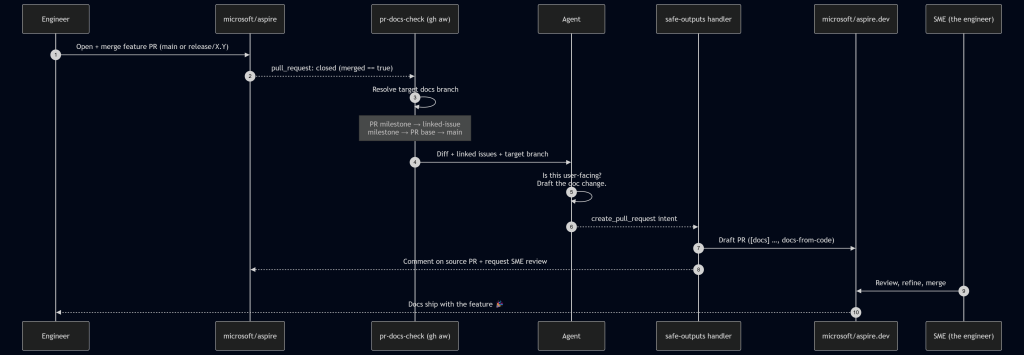
Here’s the flow we landed on. The protagonist is a workflow called pr-docs-check.md living in microsoft/aspire.

Sequence diagram showing an automated docs workflow: merging a feature pull request in microsoft/aspire triggers a GitHub Actions check that has an agent draft the documentation, open a draft pull request in microsoft/aspire.dev, and request SME review—so docs ship with the feature.

A run starts on pull_request: closed against main or release/*, gated by merged == true. From there, the workflow first runs a deterministic target branch resolver in plain bash before the agent ever wakes up:

  1. Pull request milestone title (e.g. 13.4 → release/13.4 on aspire.dev).
  2. Linked-issue milestone title (parse Fixes/Closes/Resolves #N from the body, fetch each issue, take the first non-empty milestone).
  3. Pull request base ref, if it matches release/X.Y[.Z].
  4. Fall back to main.

This is the linchpin. Milestones in the product repo map cleanly to release branches in the docs repo. When the agent finally runs, it knows exactly where the docs should land without any creative writing about target branches or guessing.

The agent reads the diff, scans linked issues, and decides: does this need docs? If yes, it drafts the actual content in a checked-out microsoft/aspire.dev workspace, following our existing doc-writer skill (voice, MDX conventions, Starlight components). It then emits a create_pull_request safe-output and hands off.

The safe-outputs handler takes over:

  • Title prefix: [docs]
  • Label: docs-from-code
  • draft: true (we never auto-merge)
  • Base branch: agent-supplied, restricted to main or release/*
  • Target repo: microsoft/aspire.dev
  • Reviewer: the SME identified from the source pull request’s reviews—i.e., whoever the product team trusted to approve the feature, now gets asked to approve the doc for that feature.

A companion job posts a marker comment back on the source pull request with the docs pull request link and minimizes any older pr-docs-check comments on re-run. The engineer who just hit Merge gets a notification within a few minutes: “Here’s the docs draft. Look it over?”

🔐 The safe-outputs contract

The whole security story comes down to a small, boring stretch of frontmatter:

tools: 
  github: 
    toolsets: [repos, issues, pull_requests] 
    min-integrity: approved          # only run pinned, integrity-checked actions 
    allowed-repos: 
      - microsoft/* 
    github-app: 
      app-id: ${{ secrets.ASPIRE_BOT_APP_ID }} 
      private-key: ${{ secrets.ASPIRE_BOT_PRIVATE_KEY }} 
      owner: "microsoft" 
      repositories: ["aspire.dev", "aspire"] 

safe-outputs: 
  create-pull-request: 
    title-prefix: "[docs] " 
    labels: [docs-from-code] 
    draft: true                      # human-in-the-loop, always 
    base-branch: main 
    allowed-base-branches: [main, release/*] 
    target-repo: "microsoft/aspire.dev" 
    protected-files: blocked         # AGENTS.md, manifests, security config: hands off 
    fallback-as-issue: true 

That’s the deal in plain text. The agent gets a GitHub App token whose installation is scoped to exactly two repositories—the product repo and the docs repo—and nothing else in the org is reachable. It can only land pull requests against main or release/*. AGENTS.md and dependency manifests are off-limits by policy. If the pull request creation fails (network blip, conflict, anything), the framework falls back to filing an issue, so nothing is silently dropped.

This is the part security review actually liked. The agent’s reasoning is fuzzy. The action surface is not.

📊 By the numbers

Here are the stats from a rolling 30-day window (May 3 – June 2, 2026) spanning the back end of the Aspire 13.3 release and the run-up to 13.4:

Metric  Value 
Product pull requests merged in microsoft/aspire  396 (338 main / 50 release/13.3 / 8 release/13.2) 
pr-docs-check workflow runs  396 
Draft docs pull requests created on microsoft/aspire.dev  82 
  – Merged  82 (100%) 
  – Closed without merge 
  – Still open 
Docs pull requests target branches  52 → release/13.3, 27 → release/13.4, 3 → main 
Median time-to-merge (docs)  44.8 hours 
Merged within 24 h / 7 days  38% / 96% 

Note: Numbers captured at the time of writing; the workflows keep running, so the totals only go up. 

A few of those numbers deserve a second look:

  • 396 runs → 82 pull requests is not a defect. The workflow runs on every merged pull request; most of them are internal refactors, test fixes, or dependency bumps with no user-facing surface. The agent saying “no docs needed” 300+ times is a feature.
  • 100% merge rate says the agent’s docs picks are right. The tighter prompt we shipped after the v1 false-positive phase is paying off.

✅ What worked, what didnt

What worked

  • Milestone → release-branch mapping. This was the single highest-leverage choice we made. Engineers already set milestones on pull requests and issues; we got accurate target-branch routing for free.
  • Draft-only, SME-as-reviewer. The agent never merges. The engineer who shipped the feature is the one who confirms the docs are right. We’ve stopped reverse-engineering features at the doc layer. The engineer just tells the docs draft what to say, in the place where they already are.
  • Scoped GitHub app per workflow. Each workflow gets its own app token with explicit repo and permission scopes. Security review approved. We approved too; the first time we needed to rotate keys.
  • protected-files: blocked. The agent cannot touch AGENTS.md, package manifests, or repo security config. Period.

What didn’t (at first)

  • ❌ The agent’s “is this docs-worthy?” gate was too generous in the first version. It drafted pull requests for changes that were genuinely internal, such as a CI tweak or a logging refactor. The result: 9 closures of 69 pull requests (≈13%), so we tightened the prompt’s user-facing-change definition and added explicit negative examples (CI, internal helpers, tests-only). Now, the rate is trending down.
  • ❌ Cross-repo pull request creation needed a mirrored checkout pattern that wasn’t obvious from the docs. The agent works in one repo; safe-outputs needs to find the target repo to push a branch. We solved it by checking out microsoft/aspire.dev twice—once as the current workspace, once under _repos/aspire.dev—so the safe-outputs handler can rediscover it deterministically.
  • ❌ Big diffs blow prompt budgets. We pre-extract pull request metadata (linked issues, milestone, base ref) in pre-agent-steps bash, so the agent gets a small, structured summary instead of a giant payload. This is GitHub Agentic Workflow’s designed-in pattern, and it works.

Wrapping up

The changes we made shifted our thinking. A feature wasn’t considered done until the docs were. Docs no longer trail along behind it like a tin can on a string. The engineer’s review is the gate; the bot does the typing.

Critically, this doesn’t replace docs writers; it un-burdens them. Our writers used to spend most of their time reverse-engineering features. Now they spend their time on the things only a human can do well: narrative pages, sample programs, conceptual walkthroughs, the parts of the docs that don’t fall out of a diff. The bot handles the mechanical “this new option was added; here’s the reference page update” work that was never enjoyable for anyone.

Huge thanks to the GitHub Next team for GitHub Agentic Workflows (and for making the safe-outputs primitive a first-class part of the design), and to Chris Swithinbank and the Starlight maintainers for the docs platform we automate into. A genuine thank-you, too, to the security folks whose guardrails forced us to design this the right way the first time. The boring secret of good automation is that strong security constraints make the system more trustworthy and more correct.

If you build a product in one repo and ship docs in another—and especially if you have to do it inside any nontrivial security boundary—GitHub Agentic Workflows is worth a serious look. Start with one workflow, such as pr-docs-check, and watch what happens to your median time-to-docs.

🔗 The other workflows

pr-docs-check is the one I wrote this post about, but it’s not running alone. If you’re curious about the rest, the source is public:

  • milestone-changelog.md: runs every two hours, picks up newly merged pull requests in the active milestone, and maintains a 13.x-Change-log wiki page (new features, improvements, notable bug fixes) with a companion editorial-feedback issue. 346 runs.
  • release-update-support-mdx.md: on a stable Aspire release, drafts a [support] pull request on aspire.dev that updates the support policy page (promotes the new version, demotes the previous one, refreshes the “Last updated” badge).
  • update-integration-data.md: lives in the docs repo; runs pnpm update:all daily, refreshes NuGet metadata + GitHub stats + sample data, and opens a chore: Update integration data PR with supersede-and-close logic for stale runs. 27 runs, eight merged pull requests.
  • repo-pulse.md: a rolling three-day repo dashboard pinned to a single issue and updated in place: recent merges, pull requests awaiting review, new issues, discussion activity. One issue, always fresh.

Happy automating, friends! 🤖🚀

The post Automating cross-repo documentation with GitHub Agentic Workflows appeared first on The GitHub Blog.

Why I’m Not So Alarmed About AI And Jobs

Post Syndicated from Bozho original https://techblog.bozho.net/why-im-not-so-alarmed-about-ai-and-jobs/

With the advances in large language models (e.g. ChatGPT), referred to as AI, concerns are rising about a sweeping loss of jobs because of the new tools. Some claim jobs will be completely replaced, others claim that jobs will be cut because of a significant increase in efficiency. Labour parties and unions are organizing conferences about the future of jobs, universal basic income, etc.

These concerns are valid and these debates should be held. I’m addressing this post to the more extreme alarmists and not trying to diminish the rapid changes that these technological advances are bringing. We have to think about regulations, ethical AI and safeguards. And the recent advances are pushing us in that direction, which is good.

But in technology we often live the phrase “when you have a hammer, everything looks like a nail”. The blockchain revolution didn’t happen, and so I think we are a bit more eager than warranted about the recent advances in AI. Let me address three aspects:

First – automation. The claim is, AI will swiftly automate a lot of jobs and many people with fall out of the labour market. The reality is that GPT/LLMs should be integrated in existing business processes. If regular automation hasn’t already killed those jobs, AI won’t do it so quickly. If an organization doesn’t use automation already for boilerplate tasks, it won’t overnight automate them with AI. Let me remind you that RPA (Robotic process automation) solutions have been advertised as AI. They really “kill” jobs in the enterprise. They’ve been around for nearly two decades and we haven’t heard a large alarmed choir about RPA. I’m aware there is a significant difference in LLMs and RPA, but the idea that a piece of technology will swiftly lead to staff reduction across industries is not something I agree with.

Second – efficiency. Especially in software development, where products like Copilot are already production-ready, it seems that with the increase of efficiency, there may be staff reduction. But if a piece of software used to be built for 6 months before AI, it will be built for, say, 3 months with AI. Note that code writing speed is not the only aspect of software development – other overhead and blockers will continue to exist – requirement clarifications, customer feedback, architecture decisions, operational and scalability issues, etc., so increase in efficiency is unlikely to be orders of magnitude. AT the same time, there is a shortage of software developers. With the advances of AI, there will be less of a shortage, meaning more software can be built within the same timeframe.

For outsourcing this means that the price per hour or per finished product may increase because of AI (speed is also a factor in pricing). A company will be able to service more customers for a given time. And there’s certainly a lot of demand for digital transformation. For product companies this increase in efficiency will mean faster time-to-market for the product and new features. Which will make product companies more competitive. In both cases, AI is unlikely to kills jobs in the near future.

Sure, ChatGPT can write a website. You can create a free website with site-builders even today. And this hasn’t killed web developers. It just makes the easiest websites cheaper. By the way, building software once and maintaining it are completely different things. Even if ChatGPT can build a website, maintenance is going to be tough through prompts.

At the same time, AI will put more intellectual pressure on junior developers, who are typically given the boilerplate work, which is going to be more automatable. But on the other hand AI will improve the training process of those junior developers. Companies may have to put more effort in training developers, and career paths may have to be adjusted, but it’s unlikely that the demand for software developers will drop.

Third, there is a claim that generative AI will kill jobs in the creative professions. Ever since I wrote an algorthmic music generator, I’ve been saying that it will not. Sure, composers of elevator music will be eventually gone. But poets, for example, won’t. ChatGPT is rather bad at poetry. It can’t actually write proper poetry. It seems to know just the AABB rhyme scheme, it ignores instructions on meter (“use dactylic tetrameter” doesn’t seem to mean anything to it). With image and video generation, the problem with unrealistic hands and fingers (and similar ones) doesn’t seem to be going away with larger models (even though the latest version of Midjourney is neatly going around it). It will certainly require post-editing. Will it make certain industries more efficient? Yes, which will allow them to produce more content for a given time. Will there be enough demand? I can’t say. The market will decide.

LLMs and AI will be change things. It will improve efficiency. It will disrupt some industries. And we have to debate this. But we still have time.

The post Why I’m Not So Alarmed About AI And Jobs appeared first on Bozho's tech blog.