Tag Archives: Peering

500 Tbps of capacity: 16 years of scaling our global network

Post Syndicated from Tanner Ryan original https://blog.cloudflare.com/500-tbps-of-capacity/

Cloudflare’s global network and backbone in 2026.

Cloudflare’s network recently passed a major milestone: we crossed 500 terabits per second (Tbps) of external capacity.

When we say 500 Tbps, we mean total provisioned external interconnection capacity: the sum of every port facing a transit provider, private peering partner, Internet exchange, or Cloudflare Network Interconnect (CNI) port across all 330+ cities. This is not peak traffic. On any given day, our peak utilization is a fraction of that number. (The rest is our DDoS budget.)

It’s a long way from where we started. In 2010, we launched from a small office above a nail salon in Palo Alto, with a single transit provider and a reverse proxy you could set up by changing two nameservers.

The early days of transit and peering

Our first transit provider was nLayer Communications, a network most people now know as GTT. nLayer gave us our first capacity and our first hands-on company experience in peering relationships and the careful balance between cost and performance.

From there, we grew city by city: Chicago, Ashburn, San Jose, Amsterdam, Tokyo. Each new data center meant negotiating colocation contracts, pulling fiber, racking servers, and establishing peering through Internet exchanges. The Internet isn’t actually a cloud, of course. It is a collection of specific rooms full of cables, and we spent years learning the nuances of every one of them.

Not every city was a straightforward deployment, having to deal with missing hardware, customs strikes, and even dental floss. In a single month in 2018, we opened up in 31 cities in 24 days: from Kathmandu and Baghdad to Reykjavík and Chișinău. When we opened our 127th data center in Macau, we were protecting 7 million Internet properties. Today, with data centers in 330+ cities, we protect more than 20% of the web.

When the network became the security layer 

As our footprint grew, customers asked for more than just website caching. They needed to protect employees, replace aging Multiprotocol Label Switching (MPLS) circuits, and secure entire enterprise networks. Instead of traditional appliances, we built systems to establish secure tunnels to private subnets and advertise enterprise IP space directly from our global network via BGP.

The scale of threats grew in parallel. In 2025, we mitigated a 31.4 Tbps DDoS attack lasting 35 seconds. The source was the Aisuru-Kimwolf botnet, including many infected Android TVs. It was one of over 5,000 attacks we blocked that day. No engineer was paged.


A decade ago, an attack of that magnitude would have required nation-state resources to counter. Today, our network handles it in seconds without human intervention. That is what operating at a 500 Tbps scale requires: moving the intelligence to every server in our network so the network can defend itself.

How our network responds to an attack

Here is what actually happens when an attack hits our network. Packets arrive at the network interface card (NIC) and immediately enter an eXpress Data Path (XDP) program chain managed by xdpd, running in driver mode. Among the first programs in that chain is l4drop, which evaluates each packet against mitigation rules in extended Berkeley Packet Filter (eBPF). Those rules are generated by dosd, our denial of service daemon, which runs on every server in our fleet. Each dosd instance samples incoming traffic, builds a table of the heaviest hitters it sees, and broadcasts that table to every other instance in the colo. The result is a shared colo-wide view of traffic, and because every server works from the same data, they reach the same mitigation decision.


When dosd detects an attack pattern, the resulting rule is applied locally via l4drop and propagates globally via Quicksilver, our distributed key-value (KV) store, reaching every server in every data center within seconds. Only after surviving l4drop do packets reach Unimog, our Layer 4 (L4) load balancer, which distributes them across healthy servers in the data center. For Magic Transit customers routing enterprise network traffic through our edge, flowtrackd adds a further layer of stateful TCP inspection, tracking connection state and dropping packets that don’t belong to legitimate flows.

The 31.4 Tbps attack we mitigated followed exactly this path. No traffic was backhauled to a centralized scrubbing center. No human intervened. Every server in the targeted data centers independently recognized the attack and began dropping malicious packets at line rate, before those packets consumed a single CPU cycle of application processing. The software is only half the story: none of it works if the ports aren’t there to absorb the traffic in the first place.

A distributed developer platform

Running code on every server in our network was a natural consequence of controlling the full stack. If we already ran eBPF programs on every machine to drop attack traffic, we could run customer application code there too. That insight became Workers, and later KV and Durable Objects.

Our developer platform runs in every city we operate in, not in a handful of cloud regions. In 2025, we added Containers to Workers, so heavier workloads can run at the edge too. V8 isolates and custom filesystem layers minimize cold starts. Your code runs where your users are, on the same servers that drop attack traffic at line rate via l4drop. Attack traffic is dropped before it reaches the network stack. Your application never sees it.

Forward-looking protocols: IPv6, RPKI, ASPA

We were early adopters of IPv6 and Resource Public Key Infrastructure (RPKI). BGP hijacks cause real outages and security breaches. RPKI allows us to drop invalid routes from peers, ensuring traffic goes where it is supposed to. We sign Route Origin Authorizations (ROAs) for our prefixes and enforce Route Origin Validation on ingress. We reject RPKI-invalid routes, even when that occasionally breaks reachability to networks with misconfigured ROAs.

Autonomous System Provider Authorization (ASPA) is next. RPKI validates who owns a prefix. ASPA validates the path it took to get here. RPKI is a passport check at the destination, confirming the right owner, while ASPA is a flight manifest check: it verifies every network the traffic passed through. A route leak is like a passenger who boarded in the wrong city; RPKI would not catch it, but ASPA will.

Current ecosystem adoption for ASPA looks like RPKI did in 2015. We were one of the first networks to deploy RPKI at scale, and today, 867,000 prefixes in the global routing table have valid RPKI certificates, up from near zero a decade ago. At our scale, the protocols we choose have real consequences for the broader Internet. We push for adoption early because waiting means more hijacks and more leaks in the meantime.

AI agents and the evolving Internet

AI has changed what it means to have a presence on the web. For most of the Internet’s history, traffic was human-generated, by people clicking links in browsers. Today, AI crawlers, model training pipelines, and autonomous agents now account for more than 4% of all HTML requests across our network, comparable to Googlebot itself. “User action” crawling, where an AI visits a page because a human asked it a question, grew over 15x in 2025 alone.

AI crawlers behave differently than browsers at the infrastructure level. Browsers load a page and stop. Crawlers instead fetch every linked resource at maximum throughput with no pause between requests. At our scale, distinguishing legitimate AI crawling from actual attacks is a real engineering problem. Our detection systems use a combination of verified bot IP ranges, TLS fingerprinting, behavioral analysis, and robots.txt compliance signals to make that distinction, and to give site owners the data they need to decide which crawlers to allow.

At the TLS layer, for example, a legitimate browser presents a ClientHello with a predictable set of cipher suites, extensions, and ordering that matches its declared User-Agent. A crawler spoofing that User-Agent but using a stripped-down TLS library will present a different fingerprint, and that mismatch is one of the signals our systems use to classify the request before it reaches the origin.

Help us build the next 500 Tbps

What started above a nail salon in Palo Alto is now a 500 Tbps network in 330+ cities across 125+ countries, where every server runs our developer platform and security services, not just cache. That is sixteen years of architectural decisions compounding, and we owe it to the 13,000+ networks and partners who peer with us. We are not done.

If you are a network operator, peer with us. Our peering policy and interconnection details are on PeeringDB. If you are interested in embedding Cloudflare infrastructure directly within your network, reach out to our team at [email protected], to join the Edge Partner Program.
Making peering easy with the new Cloudflare Peering Portal

Post Syndicated from David Tuber original https://blog.cloudflare.com/making-peering-easy-with-the-new-cloudflare-peering-portal/

Making peering easy with the new Cloudflare Peering Portal

Making peering easy with the new Cloudflare Peering Portal

In 2018, we launched the Cloudflare Peering Portal, which allows network operators to see where your traffic is coming from and to identify the best possible places to interconnect with Cloudflare. We’re excited to announce that we’ve made it even easier to interconnect with Cloudflare through this portal by removing Cloudflare-specific logins and allowing users to request sessions in the portal itself!

We’re going to walk through the changes we’ve made to make peering easier, but before we do that, let’s talk a little about peering: what it is, why it’s important, and how Cloudflare is making peering easier.

What is peering and why is it important?

Put succinctly, peering is the act of connecting two networks together. If networks are like towns, peering is the bridges, highways, and streets that connect the networks together. There are lots of different ways to connect networks together, but when networks connect, traffic between them flows to their destination faster. The reason for this is that peering reduces the number of Border Gateway Protocol (BGP) hops between networks.

What is BGP?

For a quick refresher, Border Gateway Protocol (or BGP for short) is a protocol that propagates instructions on how networks should forward packets so that traffic can get from its origin to its destination. BGP provides packets instructions on how to get from one network to another by indicating which networks the packets need to go through to get to the destination, prioritizing the paths with the smallest number of hops between origin and destination. BGP sees networks as Autonomous Systems (AS), and each AS has its own number. For example, Cloudflare’s ASN is 13335.

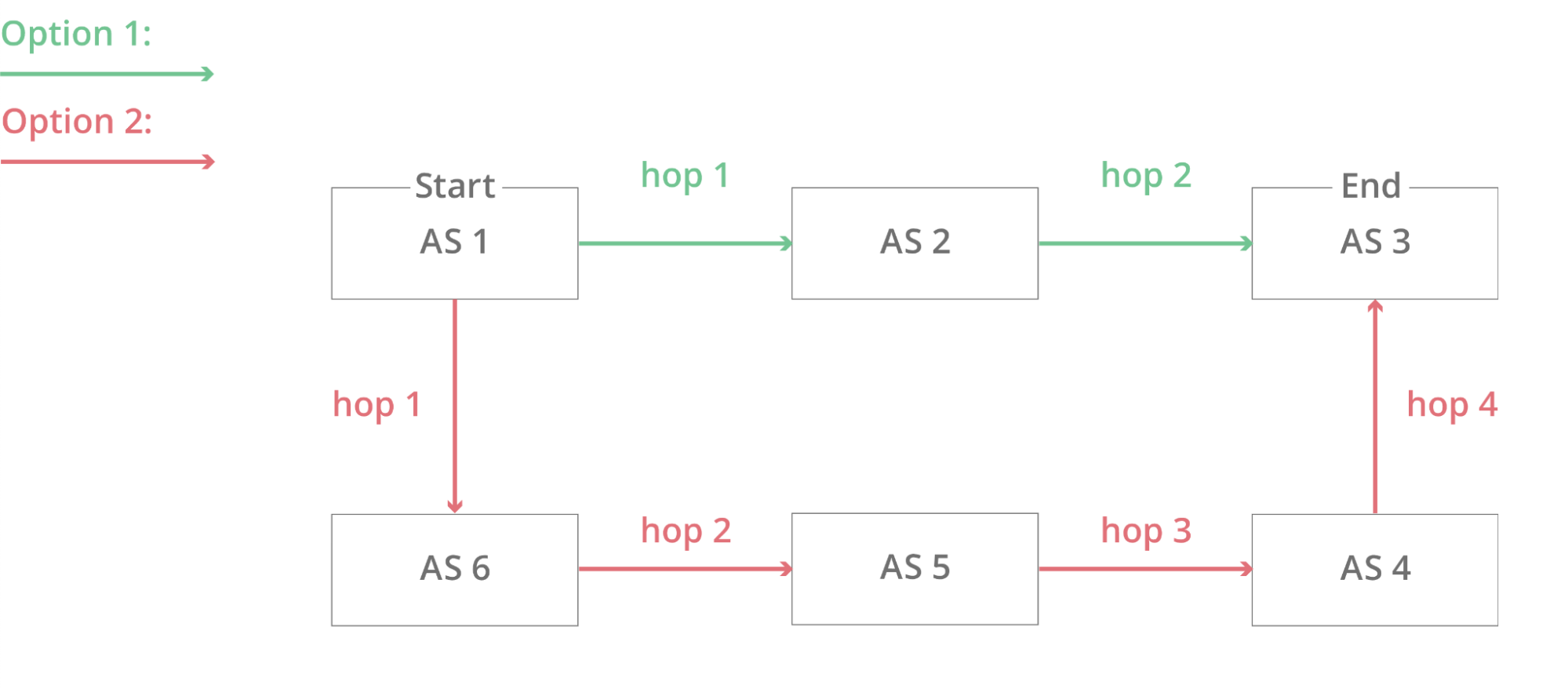
In the example below, AS 1 is trying to send packets to AS 3, but there are two possible paths the packets can go:

Making peering easy with the new Cloudflare Peering Portal

The BGP decision algorithm will select the path with the least number of hops, meaning that the path the packets will take is AS 1 → AS 2 → AS 3.

When two networks peer with each other, the number of networks needed to connect AS 1 and AS 3 is reduced to one, because AS 1 and AS 3 are directly connected with each other. But “connecting with” another network can be kind of vague, so let’s be more specific. In general, there are three ways that networks can connect with other networks: directly through Private Network Interconnects (PNI), at Internet Exchanges (IX), and through transit networks that connect with many networks.

Private Network Interconnect

A private network interconnect (PNI) sounds complicated, but it’s really simple at its core: it’s a cable connecting two networks to each other. If networks are in the same datacenter facility, it’s often easy for these two networks to connect and by doing so over a private connection, they can get dedicated bandwidth to each other as well as reliable uptime. Cloudflare has a product called Cloudflare Network Interconnect (CNI) that allows other networks to directly connect their networks to Cloudflare in this way.

Internet Exchanges

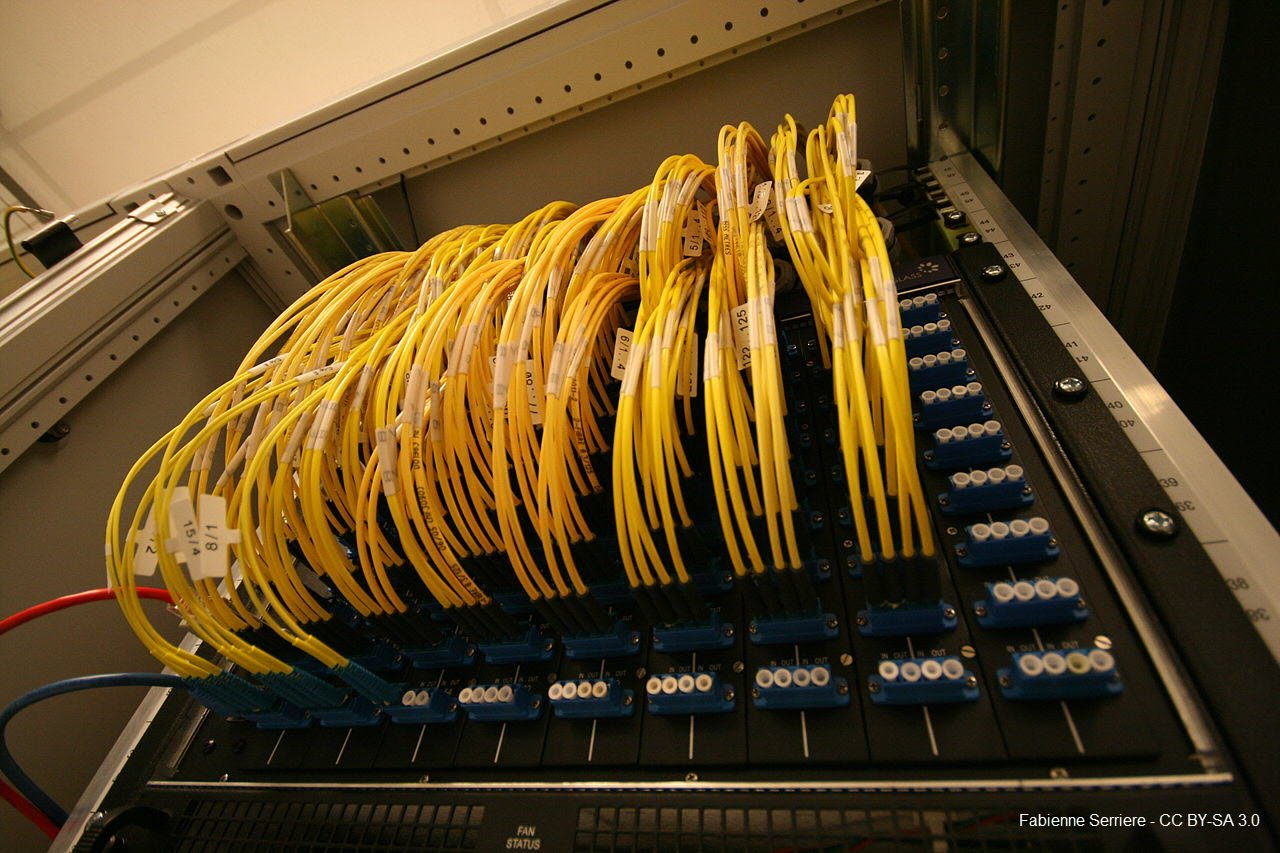
An Internet exchange (IX) is a building that specifically houses many networks in the same place. Each network gets one or more ports, and plugs into what is essentially a shared switch so that every network has the potential to interconnect. These switches are massive and house hundreds, even thousands of networks. This is similar to a PNI, but instead of two networks directly connecting to each other, thousands of networks connect to the same device and establish BGP sessions through that device.

Making peering easy with the new Cloudflare Peering Portal
Fabienne Serriere: An optical patch panel of the AMS-IX Internet exchange point, in Amsterdam, Netherlands. CC BY-SA 3.0

At Internet Exchanges, traffic is generally exchanged between networks free of charge, and it’s a great way to interconnect a network with other networks and save money on bandwidth between networks.

Transit networks

Transit networks are networks that are specifically designed to carry packets between other networks. These networks peer at Internet Exchanges and directly with many other networks to provide connectivity for your network without having to get PNIs or IX presence with networks. This service comes at a price, and may impact network performance as the transit network is an intermediary hop between your network and the place your traffic is trying to reach. Transit networks aren’t peering, but they do peering on your behalf.

No matter how you may decide to connect your network to Cloudflare, we have an open peering policy, and strongly encourage you to connect your networks directly to Cloudflare. If you’re interested, you can get started by going through the Cloudflare Peering Portal, which has now been made even easier. But let’s take a second to talk about why peering is so important.

Why is peering important?

Peering is important on the Internet for three reasons: it distributes traffic across many networks reducing single points of failure of the Internet, it often reduces bandwidth prices on the Internet making overall costs lower, and it improves performance by removing network hops. Let’s talk about each of those benefits.

Peering improves the overall uptime of the Internet by distributing traffic across multiple networks, meaning that if one network goes down, traffic from your network will still be able to reach your users. Compare that to connecting to a transit network: if the transit network has an issue, your network will be unreachable because that network was the only thing connecting your network to the rest of the Internet (unless you decide to pay multiple transit providers). With peering, any individual network failure will not completely impact the ability for your users to reach your network.

Peering helps reduce your network bandwidth costs because it distributes the cost you pay an Internet Exchange for a port across all the networks you interconnect with at the IX. If you’re paying \$1000/month for a port at an IX, and you’re peered with 100 networks there, you’re effectively paying \$10/network, as opposed to paying \$1000/month to connect to one transit network. Furthermore, many networks including Cloudflare have open peering policies and settlement free peering, which means we don’t charge you to send traffic to us or the other way round, making peering even more economical.

Peering also improves performance for Internet traffic by bringing networks closer together, reducing the time it takes for a packet to go from one network to another. The more two networks peer with each other, the more physical places on the planet they can exchange traffic directly, meaning that users everywhere see better performance.

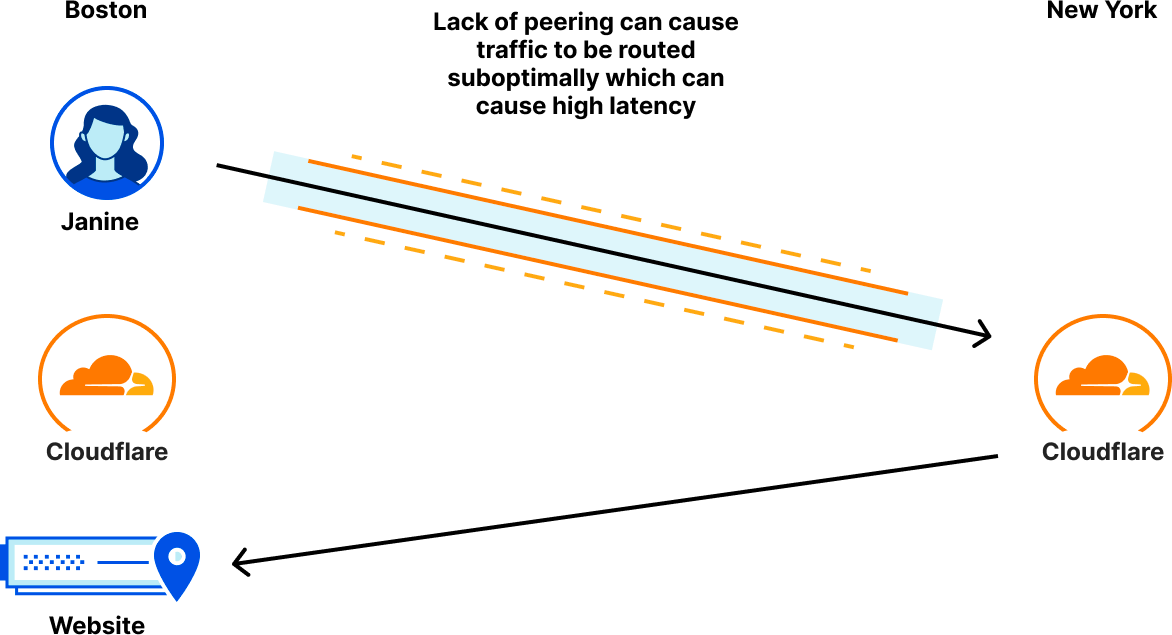
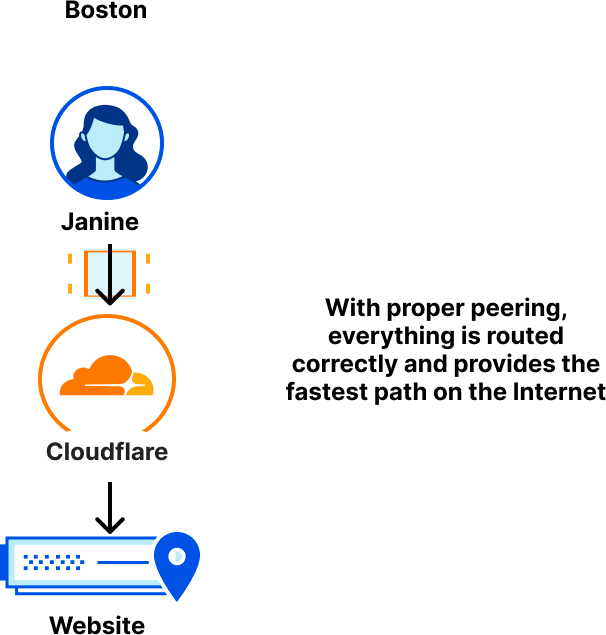
Here’s an example. Janine is trying to order food from Acme Food Services, a site protected by Cloudflare. She lives in Boston and connects to Cloudflare via her ISP. Acme Food Services has their origin in Boston as well, so for Janine to see the fastest performance, her ISP should connect to Cloudflare in Boston and then Cloudflare should route her traffic directly to the Acme origin in Boston. Unfortunately for Janine, her ISP doesn’t peer with Cloudflare in Boston, but instead peers with Cloudflare in New York: meaning that when Janine connects to Acme, her traffic is going through her ISP to New York before it reaches Cloudflare, and then all the way back to Boston to the Acme origins!

Making peering easy with the new Cloudflare Peering Portal

But with proper peering, we can ensure that traffic is routed over the fastest possible path to ensure Janine connects to Cloudflare in Boston and everything stays local:

Making peering easy with the new Cloudflare Peering Portal

Fortunately for Janine, Cloudflare peers with over 10,000 networks in the world in over 275 locations, so high latency on the network is rare. And every time a new network peers with us, we help make user traffic even faster. So now let’s talk about how we’ve made peering even easier.

Cloudflare Peering Portal supports PeeringDB login

Cloudflare, along with many other networks, rely on PeeringDB as a source of truth for which networks are present on the Internet. PeeringDB is a community-maintained database of all the networks that are present on the Internet and what datacenter facilities and IXs they are present at, as well as what IPs are used for peering at each public location. Many networks, including Cloudflare, require you to have an account on PeeringDB before you can initiate a peering session with their network.

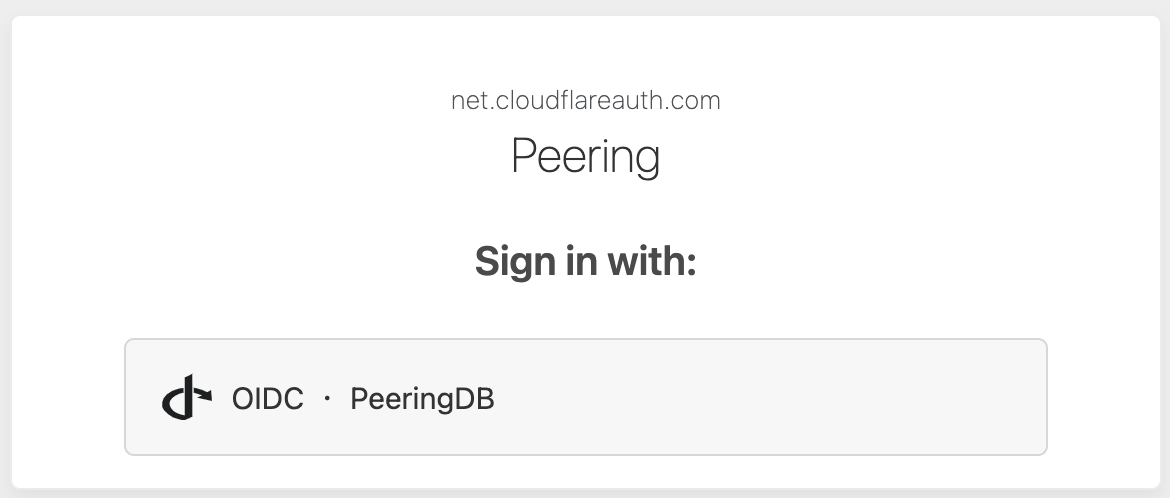
You can now use that same PeeringDB account to log into the Cloudflare Peering Portal directly, saving you the need to make a specific Cloudflare Peering Portal account.

When you log into the Cloudflare Peering Portal, simply click on the PeeringDB login button and enter your PeeringDB credentials. Cloudflare will then use this login information to determine what networks you are responsible for and automatically load data for those networks.

Making peering easy with the new Cloudflare Peering Portal

From here you can see all the places your network exchanges traffic with Cloudflare. You can see all the places you currently have direct peering with us, as well as locations for potential peering: places you could peer with us but currently don’t. Wouldn’t it be great if you could just click a button and configure a peering session with Cloudflare directly from that view? Well now you can!

Requesting sessions in the Peering Portal

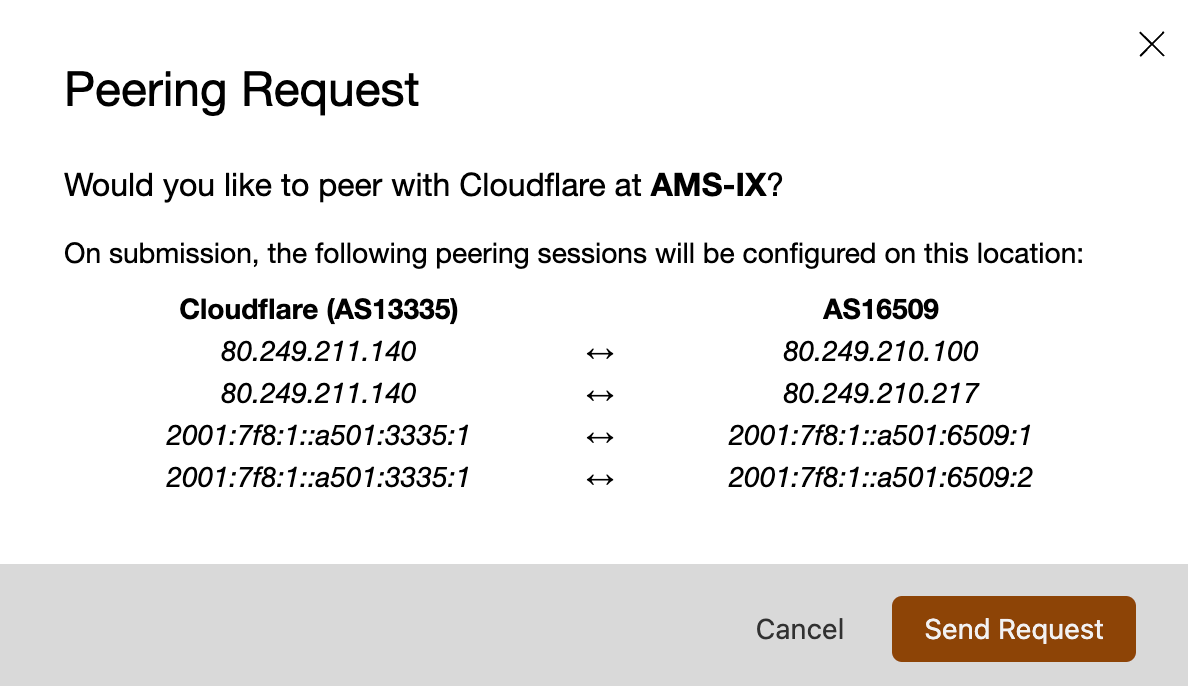
Starting today, you can now request peering sessions with Cloudflare at Internet Exchanges right from the peering portal, making it even easier to get connected with Cloudflare. When you’re looking at potential peering sessions in the portal, you’ll now see a button that will allow you to verify your peering information is correct, and if it is to proceed with a peering request:

Making peering easy with the new Cloudflare Peering Portal

Once you click that button, a ticket will go immediately to our network team to configure a peering session with you using the details already provided in PeeringDB. Our network team looks at whether we already have existing connections with your network at that location, and also what the impact to your Internet traffic will be if we peer with you there. Once we’ve evaluated these variables, we’ll proceed to establish a BGP session with you at the location and inform you via email that you’ve already provided via PeeringDB. Then all you have to do is accept the BGP sessions, and you’ll be exchanging traffic with Cloudflare!

Peer with Cloudflare today!

It has never been easier to peer with Cloudflare, and our simplified peering portal will make it even easier to get connected. Visit our peering portal today and get started on the path of faster, cheaper connectivity to Cloudflare!