Tag Archives: Network Services

One IP address, many users: detecting CGNAT to reduce collateral effects

Post Syndicated from Vasilis Giotsas original https://blog.cloudflare.com/detecting-cgn-to-reduce-collateral-damage/

IP addresses have historically been treated as stable identifiers for non-routing purposes such as for geolocation and security operations. Many operational and security mechanisms, such as blocklists, rate-limiting, and anomaly detection, rely on the assumption that a single IP address represents a cohesive, accountable entity or even, possibly, a specific user or device.

But the structure of the Internet has changed, and those assumptions can no longer be made. Today, a single IPv4 address may represent hundreds or even thousands of users due to widespread use of Carrier-Grade Network Address Translation (CGNAT), VPNs, and proxy middleboxes. This concentration of traffic can result in significant collateral damage – especially to users in developing regions of the world – when security mechanisms are applied without taking into account the multi-user nature of IPs.

This blog post presents our approach to detecting large-scale IP sharing globally. We describe how we build reliable training data, and how detection can help avoid unintentional bias affecting users in regions where IP sharing is most prevalent. Arguably it’s those regional variations that motivate our efforts more than any other. 

Why this matters: Potential socioeconomic bias

Our work was initially motivated by a simple observation: CGNAT is a likely unseen source of bias on the Internet. Those biases would be more pronounced wherever there are more users and few addresses, such as in developing regions. And these biases can have profound implications for user experience, network operations, and digital equity.

The reasons are understandable for many reasons, not least because of necessity. Countries in the developing world often have significantly fewer available IPs, and more users. The disparity is a historical artifact of how the Internet grew: the largest blocks of IPv4 addresses were allocated decades ago, primarily to organizations in North America and Europe, leaving a much smaller pool for regions where Internet adoption expanded later. 

To visualize the IPv4 allocation gap, we plot country-level ratios of users to IP addresses in the figure below. We take online user estimates from the World Bank Group and the number of IP addresses in a country from Regional Internet Registry (RIR) records. The colour-coded map that emerges shows that the usage of each IP address is more concentrated in regions that generally have poor Internet penetration. For example, large portions of Africa and South Asia appear with the highest user-to-IP ratios. Conversely, the lowest user-to-IP ratios appear in Australia, Canada, Europe, and the USA — the very countries that otherwise have the highest Internet user penetration numbers.


The scarcity of IPv4 address space means that regional differences can only worsen as Internet penetration rates increase. A natural consequence of increased demand in developing regions is that ISPs would rely even more heavily on CGNAT, and is compounded by the fact that CGNAT is common in mobile networks that users in developing regions so heavily depend on. All of this means that actions known to be based on IP reputation or behaviour would disproportionately affect developing economies. 

Cloudflare is a global network in a global Internet. We are sharing our methodology so that others might benefit from our experience and help to mitigate unintended effects. First, let’s better understand CGNAT.

When one IP address serves multiple users

Large-scale IP address sharing is primarily achieved through two distinct methods. The first, and more familiar, involves services like VPNs and proxies. These tools emerge from a need to secure corporate networks or improve users’ privacy, but can be used to circumvent censorship or even improve performance. Their deployment also tends to concentrate traffic from many users onto a small set of exit IPs. Typically, individuals are aware they are using such a service, whether for personal use or as part of a corporate network.

Separately, another form of large-scale IP sharing often goes unnoticed by users: Carrier-Grade NAT (CGNAT). One way to explain CGNAT is to start with a much smaller version of network address translation (NAT) that very likely exists in your home broadband router, formally called a Customer Premises Equipment (or CPE), which translates unseen private addresses in the home to visible and routable addresses in the ISP. Once traffic leaves the home, an ISP may add an additional enterprise-level address translation that causes many households or unrelated devices to appear behind a single IP address.

The crucial difference between large-scale IP sharing is user choice: carrier-grade address sharing is not a user choice, but is configured directly by Internet Service Providers (ISPs) within their access networks. Users are not aware that CGNATs are in use. 

The primary driver for this technology, understandably, is the exhaustion of the IPv4 address space. IPv4’s 32-bit architecture supports only 4.3 billion unique addresses — a capacity that, while once seemingly vast, has been completely outpaced by the Internet’s explosive growth. By the early 2010s, Regional Internet Registries (RIRs) had depleted their pools of unallocated IPv4 addresses. This left ISPs unable to easily acquire new address blocks, forcing them to maximize the use of their existing allocations.

While the long-term solution is the transition to IPv6, CGNAT emerged as the immediate, practical workaround. Instead of assigning a unique public IP address to each customer, ISPs use CGNAT to place multiple subscribers behind a single, shared IP address. This practice solves the problem of IP address scarcity. Since translated addresses are not publicly routable, CGNATs have also had the positive side effect of protecting many home devices that might be vulnerable to compromise. 

CGNATs also create significant operational fallout stemming from the fact that hundreds or even thousands of clients can appear to originate from a single IP address. This means an IP-based security system may inadvertently block or throttle large groups of users as a result of a single user behind the CGNAT engaging in malicious activity.

This isn’t a new or niche issue. It has been recognized for years by the Internet Engineering Task Force (IETF), the organization that develops the core technical standards for the Internet. These standards, known as Requests for Comments (RFCs), act as the official blueprints for how the Internet should operate. RFC 6269, for example, discusses the challenges of IP address sharing, while RFC 7021 examines the impact of CGNAT on network applications. Both explain that traditional abuse-mitigation techniques, such as blocklisting or rate-limiting, assume a one-to-one relationship between IP addresses and users: when malicious activity is detected, the offending IP address can be blocked to prevent further abuse.

In shared IPv4 environments, such as those using CGNAT or other address-sharing techniques, this assumption breaks down because multiple subscribers can appear under the same public IP. Blocking the shared IP therefore penalizes many innocent users along with the abuser. In 2015 Ofcom, the UK’s telecommunications regulator, reiterated these concerns in a report on the implications of CGNAT where they noted that, “In the event that an IPv4 address is blocked or blacklisted as a source of spam, the impact on a CGNAT would be greater, potentially affecting an entire subscriber base.” 

While the hope was that CGNAT was only a temporary solution until the eventual switch to IPv6, as the old proverb says, nothing is more permanent than a temporary solution. While IPv6 deployment continues to lag, CGNAT deployments have become increasingly common, and so do the related problems. 

CGNAT detection at Cloudflare

To enable a fairer treatment of users behind CGNAT IPs by security techniques that rely on IP reputation, our goal is to identify large-scale IP sharing. This allows traffic filtering to be better calibrated and collateral damage minimized. Additionally, we want to distinguish CGNAT IPs from other large-scale sharing (LSS) IP technologies, such as VPNs and proxies, because we may need to take different approaches to different kinds of IP-sharing technologies.

To do this, we decided to take advantage of Cloudflare’s extensive view of the active IP clients, and build a supervised learning classifier that would distinguish CGNAT and VPN/proxy IPs from IPs that are allocated to a single subscriber (non-LSS IPs), based on behavioural characteristics. The figure below shows an overview of our supervised classifier: 


While our classification approach is straightforward, a significant challenge is the lack of a reliable, comprehensive, and labeled dataset of CGNAT IPs for our training dataset.

Detecting CGNAT using public data sources 

Detection begins by building an initial dataset of IPs believed to be associated with CGNAT. Cloudflare has vast HTTP and traffic logs. Unfortunately there is no signal or label in any request to indicate what is or is not a CGNAT. 

To build an extensive labelled dataset to train our ML classifier, we employ a combination of network measurement techniques, as described below. We rely on public data sources to help disambiguate an initial set of large-scale shared IP addresses from others in Cloudflare’s logs.   

Distributed Traceroutes

The presence of a client behind CGNAT can often be inferred through traceroute analysis. CGNAT requires ISPs to insert a NAT step that typically uses the Shared Address Space (RFC 6598) after the customer premises equipment (CPE). By running a traceroute from the client to its own public IP and examining the hop sequence, the appearance of an address within 100.64.0.0/10 between the first private hop (e.g., 192.168.1.1) and the public IP is a strong indicator of CGNAT.

Traceroute can also reveal multi-level NAT, which CGNAT requires, as shown in the diagram below. If the ISP assigns the CPE a private RFC 1918 address that appears right after the local hop, this indicates at least two NAT layers. While ISPs sometimes use private addresses internally without CGNAT, observing private or shared ranges immediately downstream combined with multiple hops before the public IP strongly suggests CGNAT or equivalent multi-layer NAT.


Although traceroute accuracy depends on router configurations, detecting private and shared IP ranges is a reliable way to identify large-scale IP sharing. We apply this method to distributed traceroutes from over 9,000 RIPE Atlas probes to classify hosts as behind CGNAT, single-layer NAT, or no NAT.

Scraping WHOIS and PTR records

Many operators encode metadata about their IPs in the corresponding reverse DNS pointer (PTR) record that can signal administrative attributes and geographic information. We first query the DNS for PTR records for the full IPv4 space and then filter for a set of known keywords from the responses that indicate a CGNAT deployment. For example, each of the following three records matches a keyword (cgnat, cgn or lsn) used to detect CGNAT address space:

node-lsn.pool-1-0.dynamic.totinternet.net
103-246-52-9.gw1-cgnat.mobile.ufone.nz
cgn.gsw2.as64098.net

WHOIS and Internet Routing Registry (IRR) records may also contain organizational names, remarks, or allocation details that reveal whether a block is used for CGNAT pools or residential assignments. 

Given that both PTR and WHOIS records may be manually maintained and therefore may be stale, we try to sanitize the extracted data by validating the fact that the corresponding ISPs indeed use CGNAT based on customer and market reports. 

Collecting VPN and proxy IPs 

Compiling a list of VPN and proxy IPs is more straightforward, as we can directly find such IPs in public service directories for anonymizers. We also subscribe to multiple VPN providers, and we collect the IPs allocated to our clients by connecting to a unique HTTP endpoint under our control. 

Modeling CGNAT with machine learning

By combining the above techniques, we accumulated a dataset of labeled IPs for more than 200K CGNAT IPs, 180K VPNs & proxies and close to 900K IPs allocated that are not LSS IPs. These were the entry points to modeling with machine learning.

Feature selection

Our hypothesis was that aggregated activity from CGNAT IPs is distinguishable from activity generated from other non-CGNAT IP addresses. Our feature extraction is an evaluation of that hypothesis — since networks do not disclose CGNAT and other uses of IPs, the quality of our inference is strictly dependent on our confidence in the training data. We claim the key discriminator is diversity, not just volume. For example, VM-hosted scanners may generate high numbers of requests, but with low information diversity. Similarly, globally routable CPEs may have individually unique characteristics, but with volumes that are less likely to be caught at lower sampling rates.

In our feature extraction, we parse a 1% sampled HTTP requests log for distinguishing features of IPs compiled in our reference set, and the same features for the corresponding /24 prefix (namely IPs with the same first 24 bits in common). We analyse the features for each of the VPNs, proxies, CGNAT, or non LSS IP. We find that features from the following broad categories are key discriminators for the different types of IPs in our training dataset:

  • Client-side signals: We analyze the aggregate properties of clients connecting from an IP. A large, diverse user base (like on a CGNAT) naturally presents a much wider statistical variety of client behaviors and connection parameters than a single-tenant server or a small business proxy.

  • Network and transport-level behaviors: We examine traffic at the network and transport layers. The way a large-scale network appliance (like a CGNAT) manages and routes connections often leaves subtle, measurable artifacts in its traffic patterns, such as in port allocation and observed network timing.

  • Traffic volume and destination diversity: We also model the volume and “shape” of the traffic. An IP representing thousands of independent users will, on average, generate a higher volume of requests and target a much wider, less correlated set of destinations than an IP representing a single user.

Crucially, to distinguish CGNAT from VPNs and proxies (which is absolutely necessary for calibrated security filtering), we had to aggregate these features at two different scopes: per-IP and per /24 prefixes. CGNAT IPs are typically allocated large blocks of IPs, whereas VPNs IPs are more scattered across different IP prefixes. 

Classification results

We compute the above features from HTTP logs over 24-hour intervals to increase data volume and reduce noise due to DHCP IP reallocation. The dataset is split into 70% training and 30% testing sets with disjoint /24 prefixes, and VPN and proxy labels are merged due to their similarity and lower operational importance compared to CGNAT detection.

Then we train a multi-class XGBoost model with class weighting to address imbalance, assigning each IP to the class with the highest predicted probability. XGBoost is well-suited for this task because it efficiently handles large feature sets, offers strong regularization to prevent overfitting, and delivers high accuracy with limited parameter tuning. The classifier achieves 0.98 accuracy, 0.97 weighted F1, and 0.04 log loss. The figure below shows the confusion matrix of the classification.


Our model is accurate for all three labels. The errors observed are mainly misclassifications of VPN/proxy IPs as CGNATs, mostly for VPN/proxy IPs that are within a /24 prefix that is also shared by broadband users outside of the proxy service. We also evaluate the prediction accuracy using k-fold cross validation, which provides a more reliable estimate of performance by training and validating on multiple data splits, reducing variance and overfitting compared to a single train–test split. We select 10 folds and we evaluate the Area Under the ROC Curve (AUC) and the multi-class logloss. We achieve a macro-average AUC of 0.9946 (σ=0.0069) and log loss of 0.0429 (σ=0.0115). Prefix-level features are the most important contributors to classification performance.

Users behind CGNAT are more likely to be rate limited

The figure below shows the daily number of CGNAT IP inferences generated by our CDN-deployed detection service between December 17, 2024 and January 9, 2025. The number of inferences remains largely stable, with noticeable dips during weekends and holidays such as Christmas and New Year’s Day. This pattern reflects expected seasonal variations, as lower traffic volumes during these periods lead to fewer active IP ranges and reduced request activity.


Next, recall that actions that rely on IP reputation or behaviour may be unduly influenced by CGNATs. One such example is bot detection. In an evaluation of our systems, we find that bot detection is resilient to those biases. However, we also learned that customers are more likely to rate limit IPs that we find are CGNATs.

We analyze bot labels by analyzing how often requests from CGNAT and non-CGNAT IPs are labeled as bots. Cloudflare assigns a bot score to each HTTP request using CatBoost models trained on various request features, and these scores are then exposed through the Web Application Firewall (WAF), allowing customers to apply filtering rules. The median bot rate is nearly identical for CGNAT (4.8%) and non-CGNAT (4.7%) IPs. However, the mean bot rate is notably lower for CGNATs (7%) than for non-CGNATs (13.1%), indicating different underlying distributions. Non-CGNAT IPs show a much wider spread, with some reaching 100% bot rates, while CGNAT IPs cluster mostly below 15%. This suggests that non-CGNAT IPs tend to be dominated by either human or bot activity, whereas CGNAT IPs reflect mixed behavior from many end users, with human traffic prevailing.

Interestingly, despite bot scores that indicate traffic is more likely to be from human users, CGNAT IPs are subject to rate limiting three times more often than non-CGNAT IPs. This is likely because multiple users share the same public IP, increasing the chances that legitimate traffic gets caught by customers’ bot mitigation and firewall rules.

This tells us that users behind CGNAT IPs are indeed susceptible to collateral effects, and identifying those IPs allows us to tune mitigation strategies to disrupt malicious traffic quickly while reducing collateral impact on benign users behind the same address.

A global view of the CGNAT ecosystem

One of the early motivations of this work was to understand if our knowledge about IP addresses might hide a bias along socio-economic boundaries—and in particular if an action on an IP address may disproportionately affect populations in developing nations, often referred to as the Global South. Identifying where different IPs exist is a necessary first step.

The map below shows the fraction of a country’s inferred CGNAT IPs over all IPs observed in the country. Regions with a greater reliance on CGNAT appear darker on the map. This view highlights the geodiversity of CGNATs in terms of importance; for example, much of Africa and Central and Southeast Asia rely on CGNATs. 


As further evidence of continental differences, the boxplot below shows the distribution of distinct user agents per IP across /24 prefixes inferred to be part of a CGNAT deployment in each continent. 


Notably, Africa has a much higher ratio of user agents to IP addresses than other regions, suggesting more clients share the same IP in African ASNs. So, not only do African ISPs rely more extensively on CGNAT, but the number of clients behind each CGNAT IP is higher. 

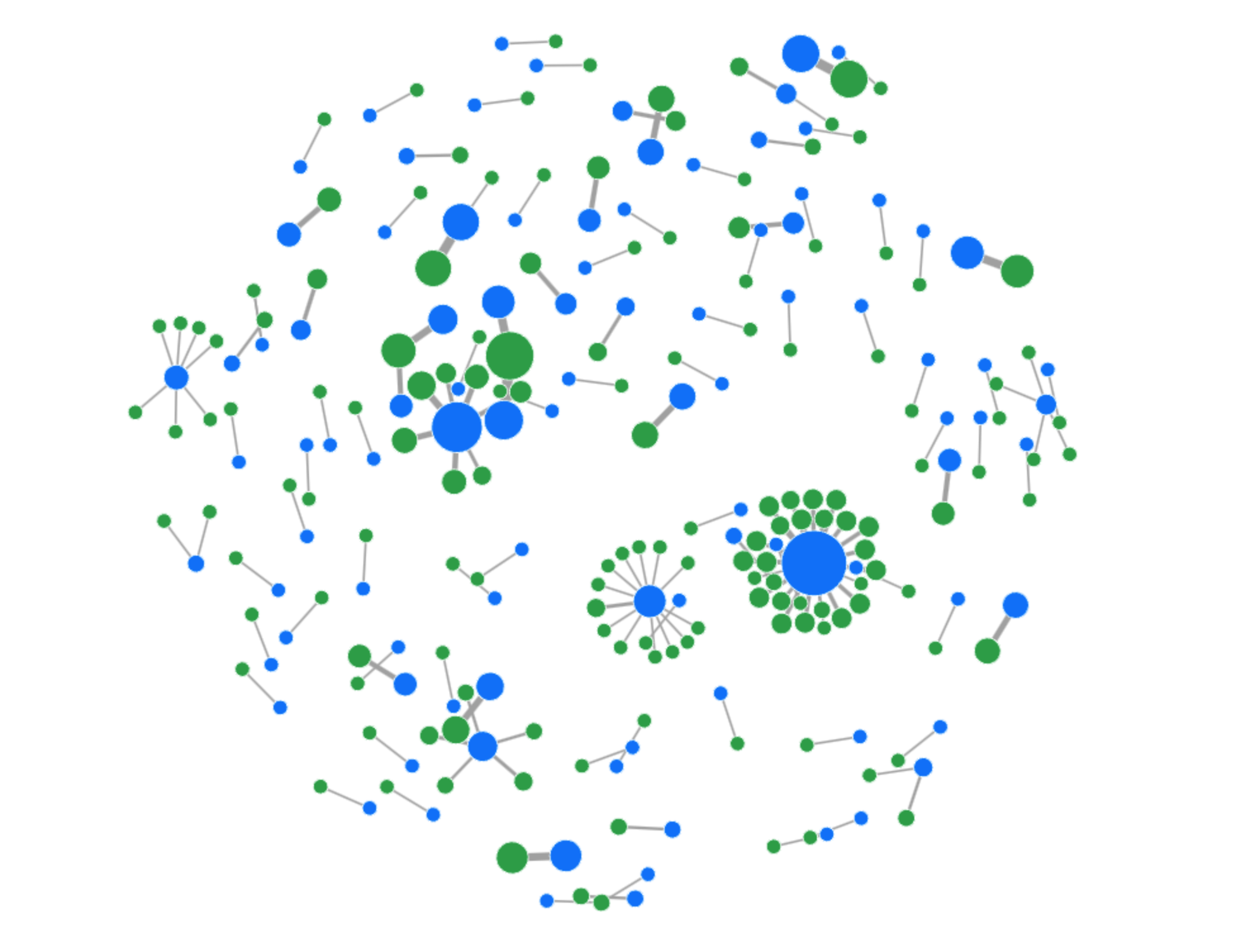
While the deployment rate of CGNAT per country is consistent with the users-per-IP ratio per country, it is not sufficient by itself to confirm deployment. The scatterplot below shows the number of users (according to APNIC user estimates) and the number of IPs per ASN for ASNs where we detect CGNAT. ASNs that have fewer available IP addresses than their user base appear below the diagonal. Interestingly the scatterplot indicates that many ASNs with more addresses than users still choose to deploy CGNAT. Presumably, these ASNs provide additional services beyond broadband, preventing them from dedicating their entire address pool to subscribers. 


What this means for everyday Internet users

Accurate detection of CGNAT IPs is crucial for minimizing collateral effects in network operations and for ensuring fair and effective application of security measures. Our findings underscore the potential socio-economic and geographical variations in the use of CGNATs, revealing significant disparities in how IP addresses are shared across different regions. 

At Cloudflare we are going beyond just using these insights to evaluate policies and practices. We are using the detection systems to improve our systems across our application security suite of features, and working with customers to understand how they might use these insights to improve the protections they configure.

Our work is ongoing and we’ll share details as we go. In the meantime, if you’re an ISP or network operator that operates CGNAT and want to help, get in touch at [email protected]. Sharing knowledge and working together helps make better and equitable user experience for subscribers, while preserving web service safety and security.

Network performance update: Birthday Week 2025

Post Syndicated from Lai Yi Ohlsen original https://blog.cloudflare.com/network-performance-update-birthday-week-2025/

We are committed to being the fastest network in the world because improvements in our performance translate to improvements for the own end users of your application. We are excited to share that Cloudflare continues to be the fastest network for the most peered networks in the world.

We relentlessly measure our own performance and our performance against peers. We publish those results routinely, starting with our first update in June 2021 and most recently with our last post in September 2024.

Today’s update breaks down where we have improved since our update last year and what our priorities are going into the next year. While we are excited to be the fastest in the greatest number of last-mile ISPs, we are never done improving and have more work to do.

How do we measure this metric, and what are the results?

We measure network performance by attempting to capture what the experience is like for Internet users across the globe. To do that we need to simulate what their connection is like from their last-mile ISP to our networks.

We start by taking the 1,000 largest networks in the world based on estimated population. We use that to give ourselves a representation of real users in nearly every geography.

We then measure performance itself with TCP connection time. TCP connection time is the time it takes for an end user to connect to the website or endpoint they are trying to reach. We chose this metric because we believe this most closely approximates what users perceive to be Internet speed, as opposed to other metrics which are either too scientific (ignoring real world challenges like congestion or distance) or too broad.

We take the trimean measurement of TCP connection times to calculate our metric. The trimean is a weighted average of three statistical values: the first quartile, the median, and the third quartile. This approach allows us to reduce some of the noise and outliers and get a comprehensive picture of quality.

For this year’s update, we examined the trimean of TCP connection times measured from August 6 to September 4, Cloudflare is the #1 provider in 40% of the top 1000 networks. In our September 2024 update, we shared that we were the #1 provider in 44% of the top 1000 networks.


The TCP Connection Time (Trimean) graph shows that we are the fastest TCP connection time in 383 networks, but that would make us the fastest in 38% of the top 1,000. We exclude networks that aren’t last-mile ISPs, such as transit networks, since they don’t reflect the end user experience, which brings the number of measured networks to 964 and makes Cloudflare the fastest in 40% of measured ISPs and the fastest across the top networks.

How do we capture this data? 

A Cloudflare-branded error page does more than just display an error; it kicks off a real-world speed test. Behind the scenes, on a selection of our error pages, we use Real User Measurements (RUM), which involves a browser retrieving a small file from multiple networks, including Cloudflare, Amazon CloudFront, Google, Fastly and Akamai.

Running these tests lets us gather performance data directly from the user’s perspective, providing a genuine comparison of different network speeds. We do this to understand where our network is fastest and, more importantly, where we can make further improvements. For a deeper dive into the technical details, the Speed Week blog post covers the full methodology.

By using RUM data, we track key metrics like TCP Connection Time, Time to First Byte (TTFB), and Time to Last Byte (TTLB). These are widely recognized, industry-standard metrics that allow us to objectively measure how quickly and efficiently a website loads for actual users. By monitoring these benchmarks, we can objectively compare our performance against other networks.

We specifically chose the top 1000 networks by estimated population from APNIC, excluding those that aren’t last-mile ISPs. Consistency is key: by analyzing the same group of networks in every cycle, we ensure our measurements and reporting remain reliable and directly comparable over time.

How do the results compare across countries?

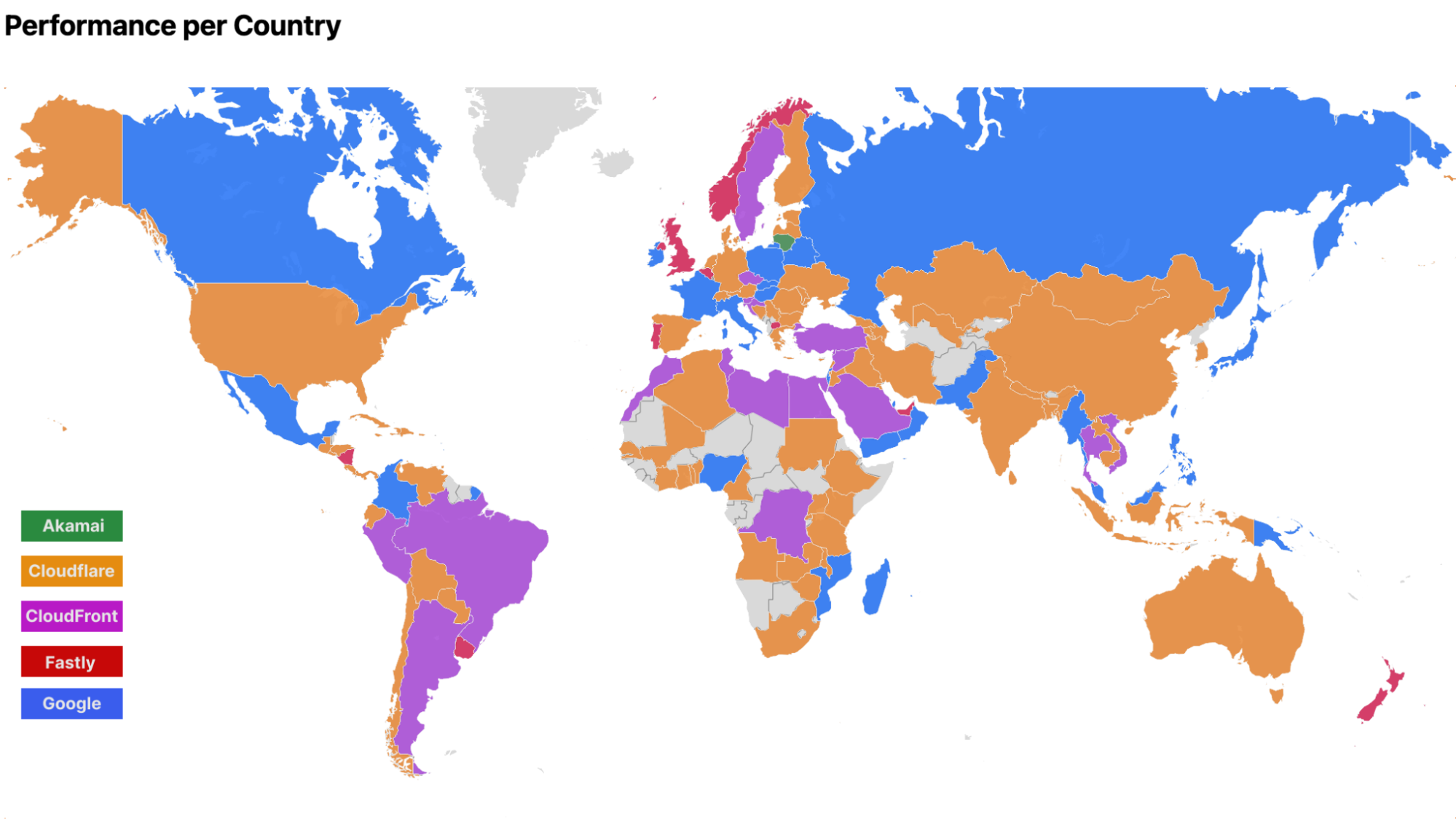
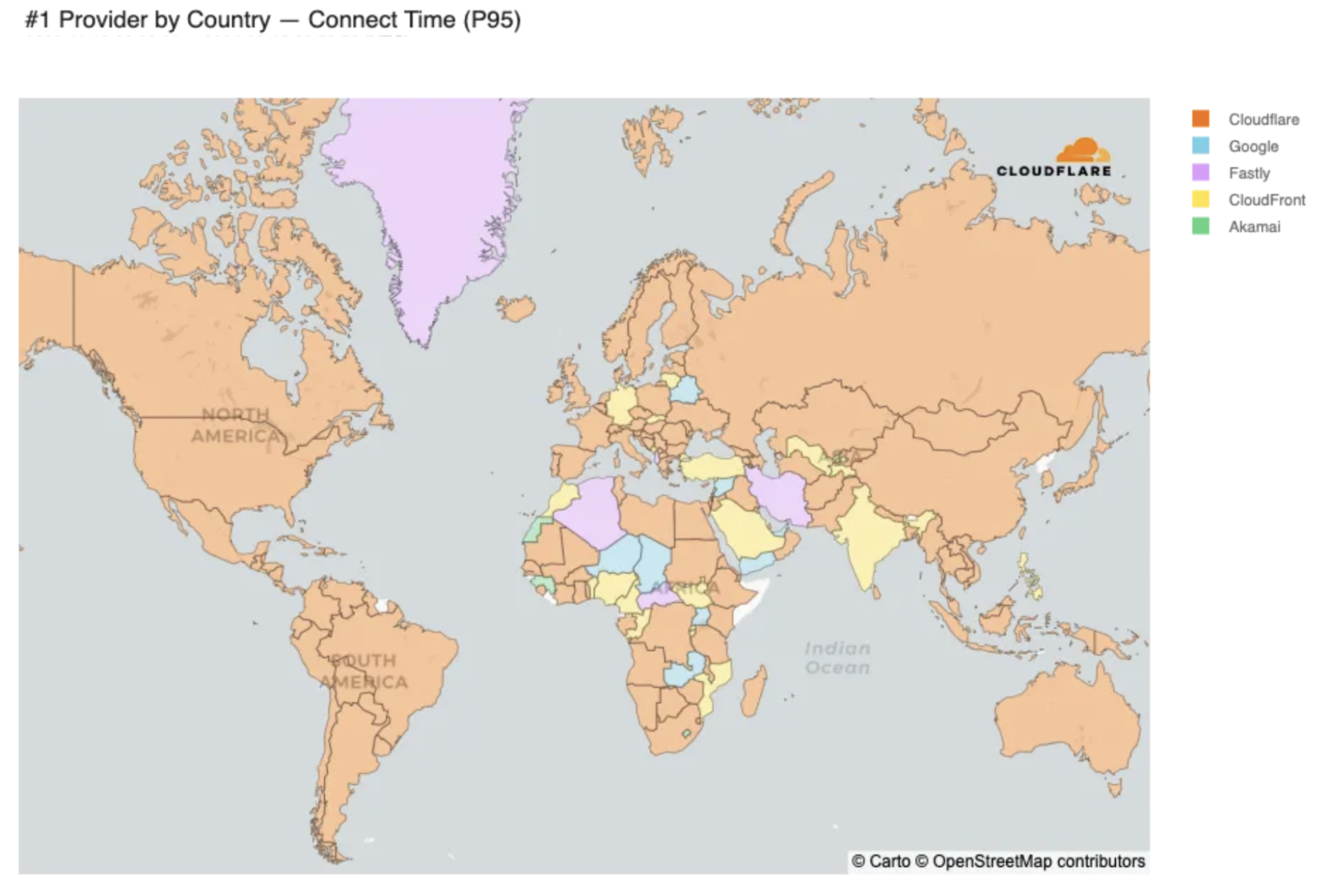
The map below shows the fastest providers per country and Cloudflare is fastest in dozens of countries. 


The color coding is generated by grouping all the measurements we generate by which country the measurement originates from. Then we look at the trimean measurements for each provider to identify who is the fastest… Akamai was measured as well, but providers are only represented in the map if they ranked first in a country which Akamai does not anywhere in the world.

These slim margins mean that the fastest provider in a country is often determined by latency differences so small that the fastest provider is often only faster by less than 5%. As an example, let’s look at India, a country where we are currently the second-fastest provider.

India (IN)

Rank

Entity 

Connect Time (Trimean)

#1 Diff

#1

CloudFront

107 ms

#2

Cloudflare

113 ms

+4.81% (+5.16 ms)

#3

Google

117 ms

+8.74% (+9.39 ms)

#4 

Fastly

133 ms

+24% (+26 ms)

#5

Akamai

144 ms

+34% (+37 ms)

In India, Cloudflare is 5ms behind Cloudfront, the #1 provider (To put milliseconds into perspective, the average human eye blink lasts between 100ms and 400ms). The competition for the number one spot in many countries is fierce and often shifts day by day. For example, in Mexico on Tuesday, August 5th, Cloudflare was the second-fastest provider by 0.73 ms but then on Tuesday, August 12th, Cloudflare was the fastest provider by 3.72 ms. 

Mexico (MX)

Date

Rank

Entity 

Connect Time (Trimean)

#1 Diff

August 5, 2025

#1

CloudFront

116 ms

#2

Cloudflare

116 ms

+0.63% (+0.73 ms)

August 12, 2025

#1

Cloudflare

106 ms

#2

CloudFront

109 ms

+3.52% (+3.72 ms)

Because ranking reorderings are common, we also review country and network level rankings to evaluate and benchmark our performance. 

Focusing on where we are not the fastest yet

As mentioned above, in September 2024, Cloudflare was fastest in 44% of measured ISPs. These values can shift as providers constantly make improvements to their networks. One way we focus in on how we are prioritizing improving is to not just observe where we are not the fastest but to measure how far we are from the leader.

In these locations we tend to pace extremely close to the fastest provider, giving us an opportunity to capture the spot as we relentlessly improve. In networks where Cloudflare is 2nd, over 50% of those networks have a less than 5% difference (10ms or less) with the top provider.

Country

ASN

#1

Cloudflare Rank

#1 Diff (ms)

#1 Diff (%)

US

AS36352

Google

2

25 ms

32%

US

AS46475

Google

2

35 ms

29%

US

AS29802

Google

2

8.03 ms

21%

US

AS20473

Google

2

15 ms

13%

US

AS7018

CloudFront

2

23 ms

13%

US

AS4181

CloudFront

2

8.19 ms

11%

US

AS62240

Google

2

18 ms

9.77%

US

AS22773

CloudFront

2

12 ms

9.48%

US

AS6167

CloudFront

2

13 ms

7.55%

US

AS11427

Google

2

9.33 ms

5.27%

US

AS6614

CloudFront

2

6.68 ms

4.12%

US

AS4922

Google

2

3.38 ms

3.86%

US

AS11492

Fastly

2

3.73 ms

3.33%

US

AS11351

Google

2

5.14 ms

3.04%

US

AS396356

Google

2

4.12 ms

2.23%

US

AS212238

Google

2

3.42 ms

1.35%

US

AS20055

Fastly

2

1.22 ms

1.33%

US

AS40021

CloudFront

2

2.06 ms

0.91%

US

AS12271

Fastly

2

1.26 ms

0.89%

US

AS141039

CloudFront

2

1.26 ms

0.88%

In networks where Cloudflare is 3rd, 50% of those networks are less than a 10% difference with the top provider (10ms or less). Margins are small and suggest that in instances where Cloudflare isn’t number one across networks, we’re extremely close to our competitors and the top networks change day over day. 

Country

ASN

#1

Cloudflare Rank

#1 Diff (ms)

#1 Diff (%)

US

AS6461

Google

3

33 ms

39%

US

AS81

Fastly

3

43 ms

35%

US

AS14615

Google

3

24 ms

24%

US

AS13977

CloudFront

3

21 ms

19%

US

AS33363

Google

3

29 ms

18%

US

AS63949

Google

3

9.56 ms

14%

US

AS14593

Fastly

3

17 ms

13%

US

AS23089

CloudFront

3

7.4 ms

11%

US

AS16509

Fastly

3

10 ms

9.48%

US

AS209

CloudFront

3

9.69 ms

6.87%

US

AS27364

CloudFront

3

8.76 ms

6.61%

US

AS11404

CloudFront

3

6.11 ms

6.16%

US

AS46690

CloudFront

3

5.91 ms

5.43%

US

AS136787

CloudFront

3

8.23 ms

5.18%

US

AS6079

Fastly

3

5.45 ms

4.49%

US

AS5650

Google

3

3.91 ms

3.35%

Countries with an abundance of networks, like the United States, have a lot of noise we need to calibrate against. For example, the graph below represents the performance of all providers for a major ISP like AS701 (Verizon Business).

AS701 (Verizon Business) Connect Time (P95) between 2025-08-09 and 2025-09-09


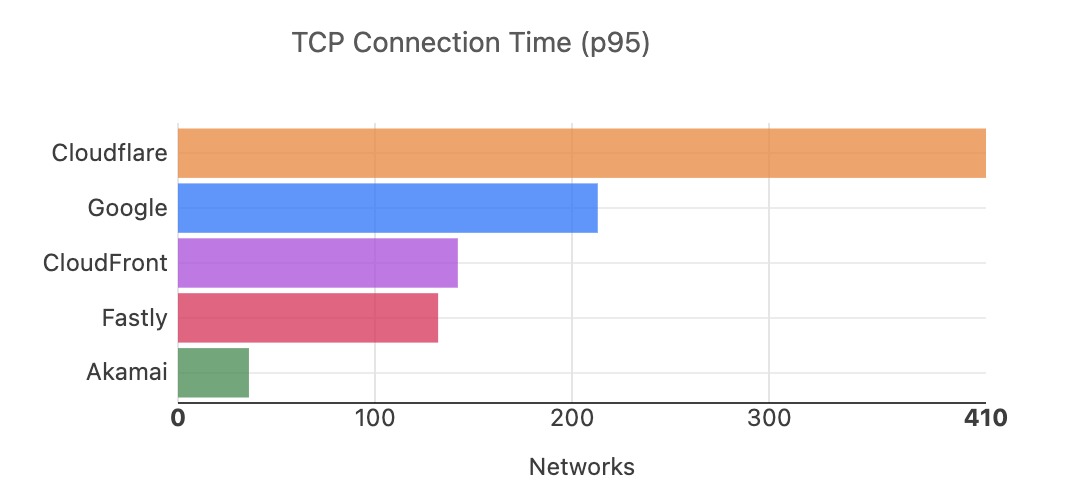
In this chart, the “P95” value, or 95th percentile, refers to one point of a percentile distribution. The P95 shows the value below which 95% of the data points fall and is specifically good at helping identify the slowest or worst-case user experiences, such as those on poor networks or older devices. Additionally, we review the other numbers lower on the percentile chain in the table below, which tell us how performance varies across the full range of data. When we do so, the picture becomes more nuanced.

AS701 (Verizon Business) Provider Rankings for Connect Time at P95, P75 and P50

Rank

Entity 

Connect Time (P95)

Connect Time (P75)

Connect Time (P50)

#1

Fastly

128 ms

66 ms

48 ms

#2

Google

134 ms

72 ms

54 ms

#3

CloudFront

139 ms

67 ms

47 ms

#4 

Cloudflare

141 ms

68 ms

49 ms

#5

Akamai

160 ms

84 ms

61 ms

At the 95th percentile for AS701, Cloudflare ranks 4th but at the 75th and 50th, Cloudflare is only 2 milliseconds slower than the fastest provider. In other words, when reviewing more than one point along the distribution at the network level, Cloudflare is keeping up with the top providers for the less extreme samples. To capture these details, it’s important to look at the range of outcomes, not just one percentile.

To better reflect the full spectrum of user experiences, we started using the trimean in July 2025 to rank providers. This metric combines values from across the distribution of data – specifically the 75th, 50th and 25th percentiles – which gives a more balanced representation of overall performance, rather than only focusing on the extremes. Summarizing user experience with a single number is always challenging, but the trimean helps us compare providers in a way that better reflects how users actually experience the Internet.

Cloudflare is the fastest provider in 40% of networks in the majority of real-world conditions, not just in worst-case scenarios. Still, the 95th percentile remains key to understanding how performance holds up in challenging conditions and where other providers might fall behind in performance. When we review the 95th percentile across the same date range for all the networks, not just AS701, Cloudflare is fastest across roughly the same amount of networks but by 103 more networks than the next fastest provider. Being faster in such a wide margin of networks tells us that Cloudflare is particularly strong in the challenging, long-tail cases that other providers struggle with.


Our performance data shows that even when we are not the top-ranked provider, we remain exceptionally competitive, often trailing the leader by a mere handful of percentage points. Our strength at the 95th percentile also highlights our superior performance in the most challenging scenarios. Cloudflare’s ability to outperform other providers, in the worst-case, is a testament to the resilience and efficiency of our network.

Moving forward, we’ll continue to share multiple metrics and continue to make improvements to our network —and we’ll use this data to do it! Let’s talk about how. 

How does Cloudflare use this data to improve?

Cloudflare applies this data to identify regions and networks that need prioritization. If we are consistently slower than other providers in a network, we want to know why, so we can fix it.

For example, the graph below shows the 95th percentile of Connect Time for AS8966. Prior to June 13, 2025, our performance was suffering, and we were the slowest provider for the network. By referencing our own measurement data, we prioritized partner data centers in the region and almost immediately performance improved for users connecting through AS8966.

Cloudflare’s partner data centers consist of collaborations with local service providers who host Cloudflare’s equipment within their own facilities. This allows us to expand our network to new locations and get closer to users more quickly. In the case of AS8966, adding a new partner data center took us from being ranked last to ranked first and improved latency by roughly 150ms in one day. By using a data-driven approach, we made our network faster and most importantly, improved the end user experience.

TCP Connect Time (P95) for AS8966


What’s next?

We are always working to build a faster network and will continue sharing our process as we go. Our approach is straightforward: identify performance bottlenecks, implement fixes, and report the results. We believe in being transparent about our methods and are committed to a continuous cycle of improvement to achieve the best possible performance. Follow our blog for the latest performance updates as we continue to optimize our network and share our progress.

Cloudflare’s commitment to CISA Secure-By-Design pledge: delivering new kernels, faster

Post Syndicated from Brandon Harris original https://blog.cloudflare.com/cloudflare-delivers-on-commitment-to-cisa/

As cyber threats continue to exploit systemic vulnerabilities in widely used technologies, the United States Cybersecurity and Infrastructure Agency (CISA) produced best practices for the technology industry with their Secure-by-Design pledge. Cloudflare proudly signed this pledge on May 8, 2024, reinforcing our commitment to creating resilient systems where security is not just a feature, but a foundational principle.

We’re excited to share and provide transparency into how our security patching process meets one of CISA’s goals in the pledge: Demonstrating actions taken to increase installation of security patches for our customers.

Balancing security patching and customer experience 

Managing and deploying Linux kernel updates is one of Cloudflare’s most challenging security processes. In 2024, over 1000 CVEs were logged against the Linux kernel and patched. To keep our systems secure, it is vital to perform critical patch deployment across systems while maintaining the user experience. 

A common technical support phrase is “Have you tried turning it off and then on again?”.  One may be  surprised how often this tactic is used — it is also an essential part of how Cloudflare operates at scale when it comes to applying our most critical patches. Frequently restarting systems exercises the restart process, applies the latest firmware changes, and refreshes the filesystem. Simply put, the Linux kernel requires a restart to take effect.

However, considering that a single Cloudflare server may be processing hundreds of thousands of requests at any point in time, rebooting it would impact user experience. As a result, a calculated approach is required, and traffic must be carefully removed from the server before it can safely reboot. 

First, the server is marked for maintenance. This action alerts our load balancing system, unimog, to stop sending traffic to this server. Next, the server waits for this flow of traffic to terminate, and once public traffic is gone, the server begins to disable internal traffic. Internal traffic has multiple purposes, such as determining optimal routing, service discovery, and system health checks. Once the server is no longer actively serving any traffic, it can safely restart, using the new kernel.

Kernel lifecycle at Cloudflare

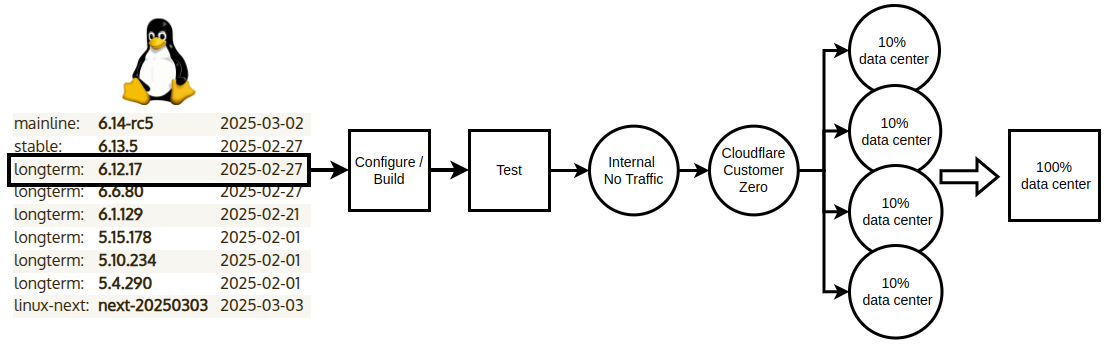
This diagram is a high level view of the lifecycle of the Linux kernel at Cloudflare. The list of kernel versions shown is a point in time example snapshot from kernel.org.


First, a new kernel is released by the upstream kernel developers. We follow the longterm stable branch of the kernel. Each new kernel release is pulled into our internal repository automatically, where the kernel is built and tested. Once all testing has successfully passed, several flavors of the kernel are built and readied for a preliminary deployment.

The first stage of deployment is an internal environment that receives no traffic. Once it is confirmed that there are no crashes or unintended behavior, it is promoted to a production environment with traffic generated by Cloudflare employees as eyeballs.

Cloudflare employees are connected via Zero Trust to this environment. This allows our telemetry to collect information regarding CPU utilization, memory usage, and filesystem behavior, which is then analyzed for deviations from the previous kernel. This is the first time that a new kernel is interacting with live traffic and real users in a Cloudflare environment. 

Once we are satisfied with kernel performance and behavior, we begin to deploy this kernel to customer traffic. This progression starts as a small percentage of traffic in multiple datacenters and ends in one large regional datacenter. This is an important qualification phase for a new kernel, as we need to collect data on real world traffic. Once we are satisfied with performance and behavior, we have a candidate release that can go everywhere.

When a new kernel is ready for release, an automated cycle named the Edge Reboot Release is initiated. The Edge Reboot Release begins and completes every 30 days. This guarantees that we are running an up-to-date kernel in our infrastructure every month.

What about patches for the kernel that are needed faster than the standard cycle? We can live patch changes to close those gaps faster, and we have even written about closing one of these CVE’s.

Automating kernel updates in our Control Plane 

The Cloudflare network is 50 ms from 95% of the world’s Internet-connected population. The Control Plane runs different workloads than our network, and is composed of 80 different clustered workloads responsible for persistence of information and decisions that feed the Cloudflare network. Until 2024, the Control Plane kernel maintenance was performed ad-hoc, and this caused the working kernel for Control Plane workloads to fall behind on patches. Under the pledge, this had to change and become just as consistent as the rest of our network.


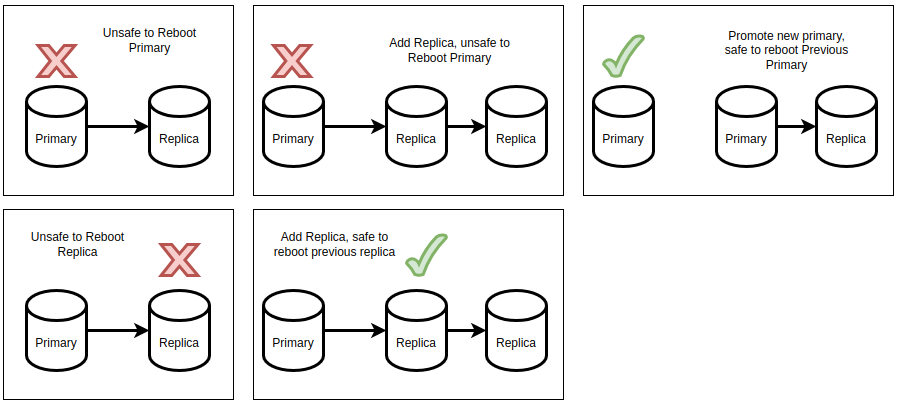
Consider a relational database as an example workload, as illustrated in the diagram above. One would need a copy available to restart the original in order to provide a seamless end user experience. This copy is called a database replica. That replica should then be promoted to become the primary serving database. Now that a new primary is serving traffic, the old primary is free to restart. If a database replica reboot is needed, an additional replica would be needed to take its place, allowing another safe restart. In this example, we have 2 different ways to restart a member of the clustered workload. Every clustered workload has different safe methodologies to restart one of its members.

Reboau (short for reboot automation) is an internally-built tool to manage custom reboot logic in the Control Plane. Reboau offers additional efficiencies described as “rack aware”, meaning it can operate on a rack of servers vs. a single server at a time. This optimization is helpful for a clustered workload, where it may be more efficient to drain and reboot a rack versus a single server. It also leverages metrics to determine when it is safe to lose a clustered member, execute the reboot, and ensure the system is healthy through the process.

In 2024, Cloudflare migrated Control Plane workloads to leverage Reboau and follow the same kernel upgrade cadence as the network. Now all of our infrastructure benefits from faster patching of the Linux kernel, to improve security and reliability for our customers.

Conclusion 

Irrespective of the industry, if your organization builds software, we encourage you to familiarize yourself with CISA’s ‘Secure by Design’ principles and create a plan to implement them in your company. The CISA Secure by Design pledge is built around seven security goals, prioritizing the security of customers, and challenges organizations to think differently about security. 

By implementing automated security patching through kernel updates, Cloudflare has demonstrated measurable progress in implementing functionality that allows automatic deployment of software patches by default. This process highlights Cloudflare’s commitment to protecting our infrastructure and keeping our customers against emerging vulnerabilities.

For more updates on our CISA progress, you check out our blog. Cloudflare has delivered five of the seven CISA Secure by Design pledge goals, and we aim to complete the entirety of the pledge goals by May 2025.

Introducing Cloudy, Cloudflare’s AI agent for simplifying complex configurations

Post Syndicated from Alex Dunbrack original https://blog.cloudflare.com/introducing-ai-agent/

It’s a big day here at Cloudflare! Not only is it Security Week, but today marks Cloudflare’s first step into a completely new area of functionality, intended to improve how our users both interact with, and get value from, all of our products.

We’re excited to share a first glance of how we’re embedding AI features into the management of Cloudflare products you know and love. Our first mission? Focus on security and streamline the rule and policy management experience. The goal is to automate away the time-consuming task of manually reviewing and contextualizing Custom Rules in Cloudflare WAF, and Gateway policies in Cloudflare One, so you can instantly understand what each policy does, what gaps they have, and what you need to do to fix them.

Meet Cloudy, Cloudflare’s first AI agent

Our initial step toward a fully AI-enabled product experience is the introduction of Cloudy, the first version of Cloudflare AI agents, assistant-like functionality designed to help users quickly understand and improve their Cloudflare configurations in multiple areas of the product suite. You’ll start to see Cloudy functionality seamlessly embedded into two Cloudflare products across the dashboard, which we’ll talk about below.

And while the name Cloudy may be fun and light-hearted, our goals are more serious: Bring Cloudy and AI-powered functionality to every corner of Cloudflare, and optimize how our users operate and manage their favorite Cloudflare products. Let’s start with two places where Cloudy is now live and available to all customers using the WAF and Gateway products.

WAF Custom Rules

Let’s begin with AI-powered overviews of WAF Custom Rules. For those unfamiliar, Cloudflare’s Web Application Firewall (WAF) helps protect web applications from attacks like SQL injection, cross-site scripting (XSS), and other vulnerabilities. 

One specific feature of the WAF is the ability to create WAF Custom Rules. These allow users to tailor security policies to block, challenge, or allow traffic based on specific attributes or security criteria.

However, for customers with dozens or even hundreds of rules deployed across their organization, it can be challenging to maintain a clear understanding of their security posture. Rule configurations evolve over time, often managed by different team members, leading to potential inefficiencies and security gaps. What better problem for Cloudy to solve?


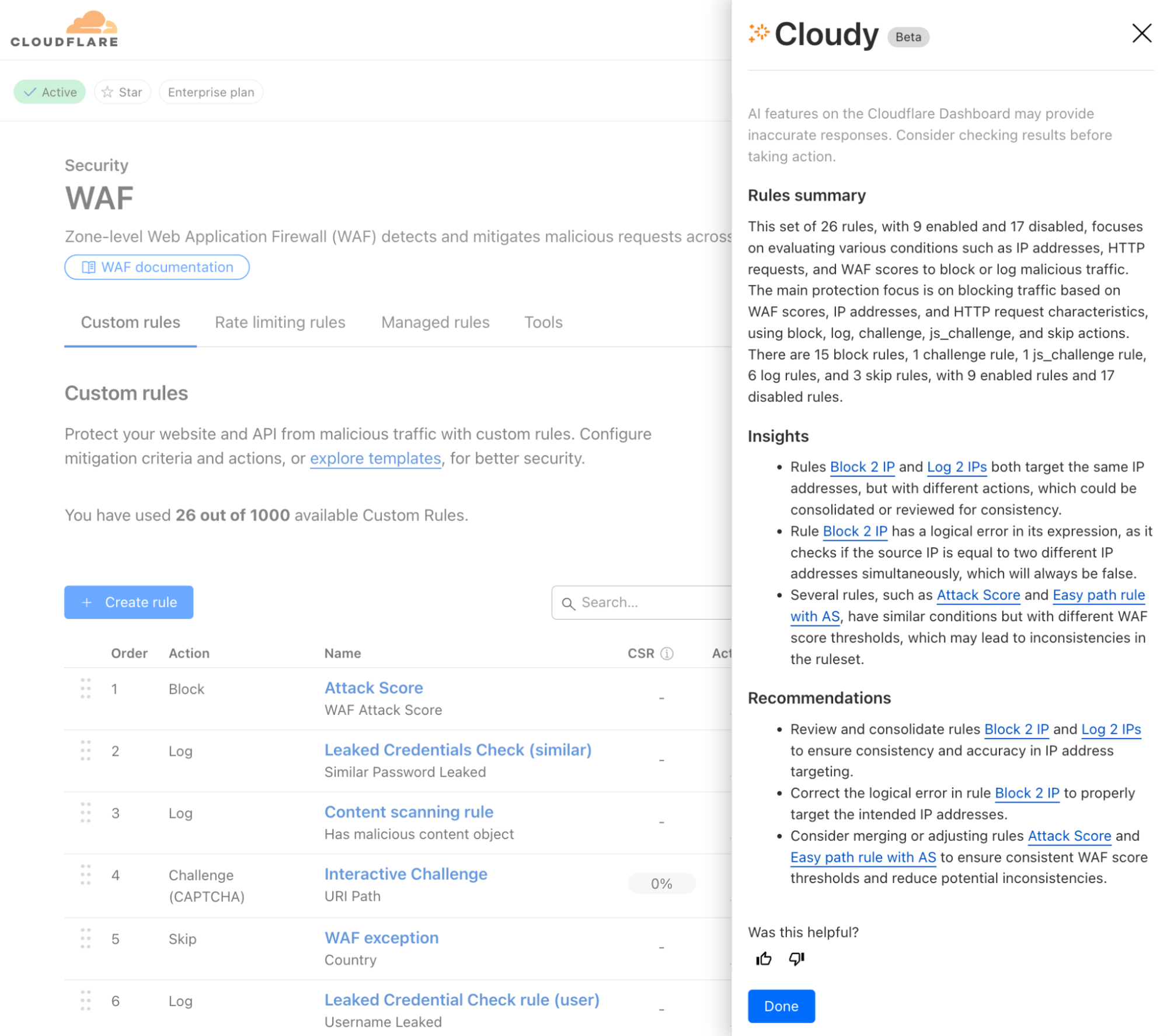
Powered by Workers AI, today we’ll share how Cloudy will help review your WAF Custom Rules and provide a summary of what’s configured across them. Cloudy will also help you identify and solve issues such as:

  • Identifying redundant rules: Identify when multiple rules are performing the same function, or using similar fields, helping you streamline your configuration.

  • Optimising execution order: Spot cases where rules ordering affects functionality, such as when a terminating rule (block/challenge action) prevents subsequent rules from executing.

  • Analysing conflicting rules: Detect when rules counteract each other, such as one rule blocking traffic that another rule is designed to allow or log.

  • Identifying disabled rules: Highlight potentially important security rules that are in a disabled state, helping ensure that critical protections are not accidentally left inactive.

Cloudy won’t just summarize your rules, either. It will analyze the relationships and interactions between rules to provide actionable recommendations. For security teams managing complex sets of Custom Rules, this means less time spent auditing configurations and more confidence in your security coverage.

Available to all users, we’re excited to show how Cloudflare AI Agents can enhance the usability of our products, starting with WAF Custom Rules. But this is just the beginning.

Cloudflare One Firewall policies


We’ve also added Cloudy to Cloudflare One, our SASE platform, where enterprises manage the security of their employees and tools from a single dashboard.

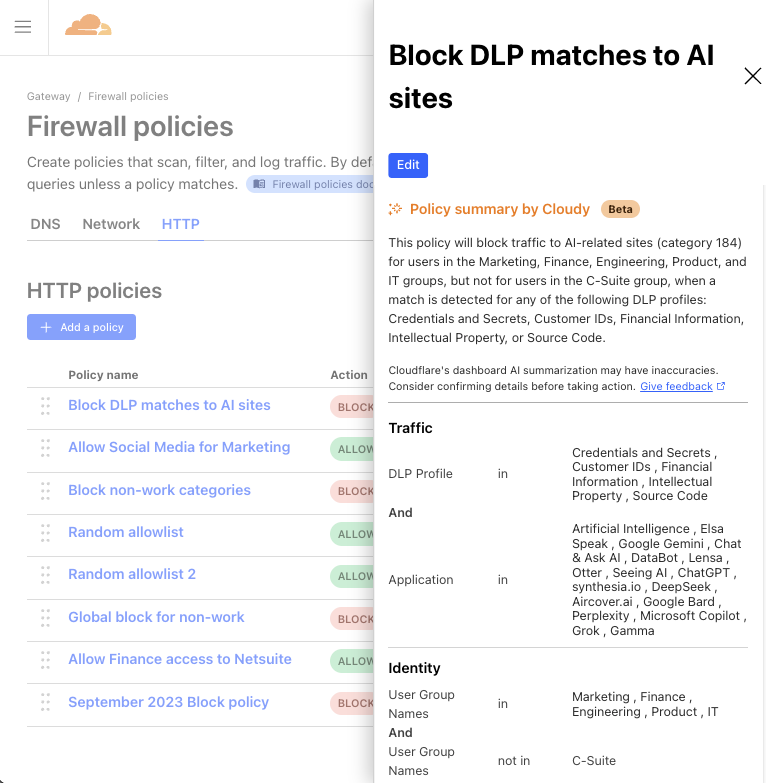
In Cloudflare Gateway, our Secure Web Gateway offering, customers can configure policies to manage how employees do their jobs on the Internet. These Gateway policies can block access to malicious sites, prevent data loss violations, and control user access, among other things.

But similar to WAF Custom Rules, Gateway policy configurations can become overcomplicated and bogged down over time, with old, forgotten policies that do who-knows-what. Multiple selectors and operators working in counterintuitive ways. Some blocking traffic, others allowing it. Policies that include several user groups, but carve out specific employees. We’ve even seen policies that block hundreds of URLs in a single step. All to say, managing years of Gateway policies can become overwhelming.

So, why not have Cloudy summarize Gateway policies in a way that makes their purpose clear and concise?

Available to all Cloudflare Gateway users (create a free Cloudflare One account here), Cloudy will now provide a quick summary of any Gateway policy you view. It’s now easier than ever to get a clear understanding of each policy at a glance, allowing admins to spot misconfigurations, redundant controls, or other areas for improvement, and move on with confidence.

Built on Workers AI

At the heart of our new functionality is Cloudflare Workers AI (yes, the same version that everyone uses!) that leverages advanced large language models (LLMs) to process vast amounts of information; in this case, policy and rules data. Traditionally, manually reviewing and contextualizing complex configurations is a daunting task for any security team. With Workers AI, we automate that process, turning raw configuration data into consistent, clear summaries and actionable recommendations.

How it works

Cloudflare Workers AI ingests policy and rule configurations from your Cloudflare setup and combines them with a purpose-built LLM prompt. We leverage the same publicly-available LLM models that we offer our customers, and then further enrich the prompt with some additional data to provide it with context. For this specific task of analyzing and summarizing policy and rule data, we provided the LLM:

  • Policy & rule data: This is the primary data itself, including the current configuration of policies/rules for Cloudy to summarize and provide suggestions against.

  • Documentation on product abilities: We provide the model with additional technical details on the policy/rule configurations that are possible with each product, so that the model knows what kind of recommendations are within its bounds.

  • Enriched datasets: Where WAF Custom Rules or CF1 Gateway policies leverage other ‘lists’ (e.g., a WAF rule referencing multiple countries, a Gateway policy leveraging a specific content category), the list item(s) selected must be first translated from an ID to plain-text wording so that the LLM can interpret which policy/rule values are actually being used.

  • Output instructions: We specify to the model which format we’d like to receive the output in. In this case, we use JSON for easiest handling.

  • Additional clarifications: Lastly, we explicitly instruct the LLM to be sure about its output, valuing that aspect above all else. Doing this helps us ensure that no hallucinations make it to the final output.

By automating the analysis of your WAF Custom Rules and Gateway policies, Cloudflare Workers AI not only saves you time but also enhances security by reducing the risk of human error. You get clear, actionable insights that allow you to streamline your configurations, quickly spot anomalies, and maintain a strong security posture—all without the need for labor-intensive manual reviews.

What’s next for Cloudy

Beta previews of Cloudy are live for all Cloudflare customers today. But this is just the beginning of what we envision for AI-powered functionality across our entire product suite.
Throughout the rest of 2025, we plan to roll out additional AI agent capabilities across other areas of Cloudflare. These new features won’t just help customers manage security more efficiently, but they’ll also provide intelligent recommendations for optimizing performance, streamlining operations, and enhancing overall user experience.

We’re excited to hear your thoughts as you get to meet Cloudy and try out these new AI features – send feedback to us at [email protected], or post your thoughts on X, LinkedIn, or Mastodon tagged with #SecurityWeek! Your feedback will help shape our roadmap for AI enhancement, and bring our users smarter, more efficient tooling that helps everyone get more secure.


Watch on Cloudflare TV

Resolving a Mutual TLS session resumption vulnerability

Post Syndicated from Matt Bullock original https://blog.cloudflare.com/resolving-a-mutual-tls-session-resumption-vulnerability/

On January 23, 2025, Cloudflare was notified via its Bug Bounty Program of a vulnerability in Cloudflare’s Mutual TLS (mTLS) implementation. 

The vulnerability affected customers who were using mTLS and involved a flaw in our session resumption handling. Cloudflare’s investigation revealed no evidence that the vulnerability was being actively exploited. And tracked as CVE-2025-23419, Cloudflare mitigated the vulnerability within 32 hours after being notified. Customers who were using Cloudflare’s API shield in conjunction with WAF custom rules that validated the issuer’s Subject Key Identifier (SKI) were not vulnerable. Access policies such as identity verification, IP address restrictions, and device posture assessments were also not vulnerable.

Background

The bug bounty report detailed that a client with a valid mTLS certificate for one Cloudflare zone could use the same certificate to resume a TLS session with another Cloudflare zone using mTLS, without having to authenticate the certificate with the second zone.

Cloudflare customers can implement mTLS through Cloudflare API Shield with Custom Firewall Rules and the Cloudflare Zero Trust product suite. Cloudflare establishes the TLS session with the client and forwards the client certificate to Cloudflare’s Firewall or Zero Trust products, where customer policies are enforced.

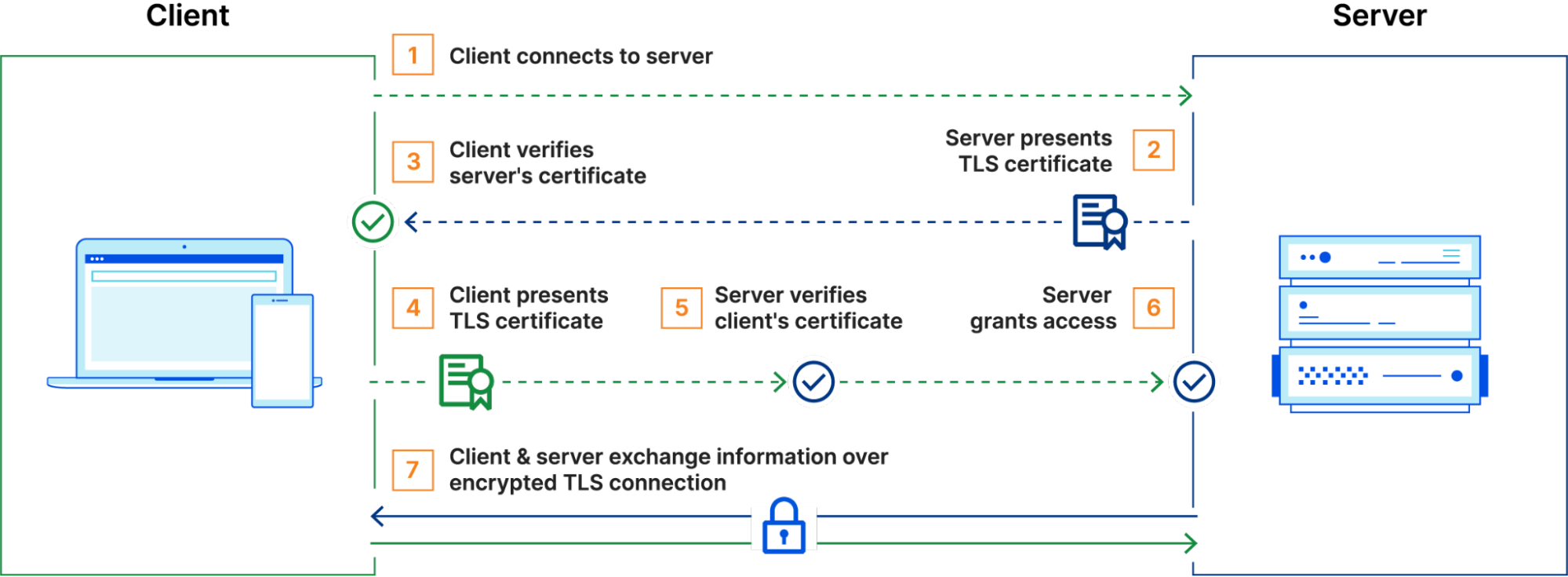
mTLS operates by extending the standard TLS handshake to require authentication from both sides of a connection – the client and the server. In a typical TLS session, a client connects to a server, which presents its TLS certificate. The client verifies the certificate, and upon successful validation, an encrypted session is established. However, with mTLS, the client also presents its own TLS certificate, which the server verifies before the connection is fully established. Only if both certificates are validated does the session proceed, ensuring bidirectional trust.


mTLS is useful for securing API communications, as it ensures that only legitimate and authenticated clients can interact with backend services. Unlike traditional authentication mechanisms that rely on credentials or tokens, mTLS requires possession of a valid certificate and its corresponding private key.

To improve TLS connection performance, Cloudflare employs session resumption. Session resumption speeds up the handshake process, reducing both latency and resource consumption. The core idea is that once a client and server have successfully completed a TLS handshake, future handshakes should be streamlined — assuming that fundamental parameters such as the cipher suite or TLS version remain unchanged.

There are two primary mechanisms for session resumption: session IDs and session tickets. With session IDs, the server stores the session context and associates it with a unique session ID. When a client reconnects and presents this session ID in its ClientHello message, the server checks its cache. If the session is still valid, the handshake is resumed using the cached state.

Session tickets function in a stateless manner. Instead of storing session data, the server encrypts the session context and sends it to the client as a session ticket. In future connections, the client includes this ticket in its ClientHello, which the server can then decrypt to restore the session, eliminating the need for the server to maintain session state.

A resumed mTLS session leverages previously established trust, allowing clients to reconnect to a protected application without needing to re-initiate an mTLS handshake.

The mTLS resumption vulnerability

In Cloudflare’s mTLS implementation, however, session resumption introduced an unintended behavior.  BoringSSL, the TLS library that Cloudflare uses, will store the client certificate from the originating, full TLS handshake in the session. Upon resuming that session, the client certificate is not revalidated against the full chain of trust, and the original handshake’s verification status is respected. To avoid this situation, BoringSSL provides an API to partition session caches/tickets between different “contexts” defined by the application. Unfortunately, Cloudflare’s use of this API was not correct, which allowed TLS sessions to be resumed when they shouldn’t have been. 

To exploit this vulnerability, the security researcher first set up two zones on Cloudflare and configured them behind Cloudflare’s proxy with mTLS enabled. Once their domains were configured, the researcher authenticated to the first zone using a valid client certificate, allowing Cloudflare to issue a TLS session ticket against that zone. 

The researcher then changed the TLS Server Name Indication (SNI) and HTTP Host header from the first zone (which they had authenticated with) to target the second zone (which they had not authenticated with). The researcher then presented the session ticket when handshaking with the second Cloudflare-protected mTLS zone. This resulted in Cloudflare resuming the session with the second zone and reporting verification status for the cached client certificate as successful,bypassing the mTLS authentication that would normally be required to initiate a session.

If you were using additional validation methods in your API Shield or Access policies – for example, checking the issuers SKI, identity verification, IP address restrictions, or device posture assessments – these controls continued to function as intended. However, due to the issue with TLS session resumption, the mTLS checks mistakenly returned a passing result without re-evaluating the full certificate chain.

Remediation and next steps

We have disabled TLS session resumption for all customers that have mTLS enabled. As a result, Cloudflare will no longer allow resuming sessions that cache client certificates and their verification status.

We are exploring ways to bring back the performance improvements from TLS session resumption for mTLS customers.

Further hardening

Customers can further harden their mTLS configuration and add enhanced logging to detect future issues by using Cloudflare’s Transform Rules, logging, and firewall features.

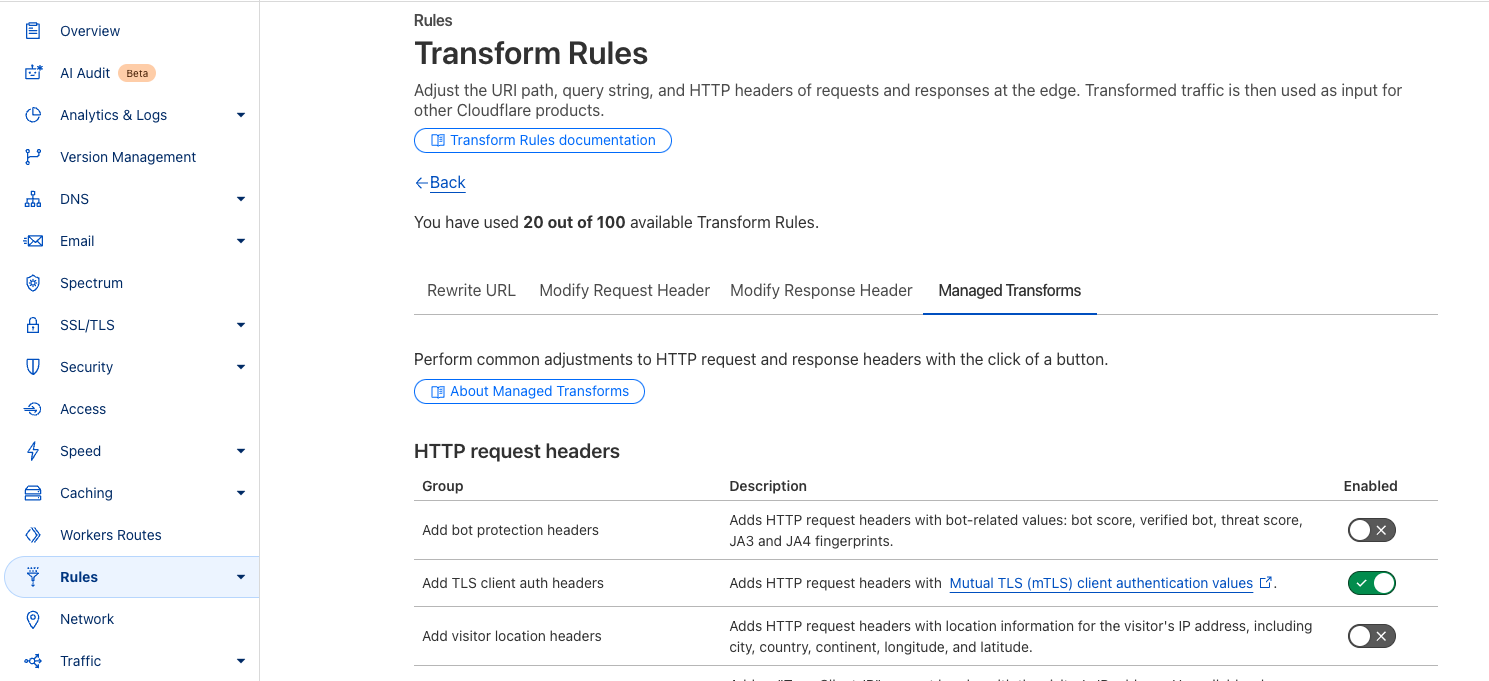
While Cloudflare has mitigated the issue by disabling session resumption for mTLS connections, customers may want to implement additional monitoring at their origin to enforce stricter authentication policies. All customers using mTLS can also enable additional request headers using our Managed Transforms product. Enabling this feature allows us to pass additional metadata to your origin with the details of the client certificate that was used for the connection.


Enabling this feature allows you to see the following headers where mTLS is being utilized on a request.

{
  "headers": {
    "Cf-Cert-Issuer-Dn": "CN=Taskstar Root CA,OU=Taskstar\\, Inc.,L=London,ST=London,C=UK",
    "Cf-Cert-Issuer-Dn-Legacy": "/C=UK/ST=London/L=London/OU=Taskstar, Inc./CN=Taskstar Root CA",
    "Cf-Cert-Issuer-Dn-Rfc2253": "CN=Taskstar Root CA,OU=Taskstar\\, Inc.,L=London,ST=London,C=UK",
    "Cf-Cert-Issuer-Serial": "7AB07CC0D10C38A1B554C728F230C7AF0FF12345",
    "Cf-Cert-Issuer-Ski": "A5AC554235DBA6D963B9CDE0185CFAD6E3F55E8F",
    "Cf-Cert-Not-After": "Jul 29 10:26:00 2025 GMT",
    "Cf-Cert-Not-Before": "Jul 29 10:26:00 2024 GMT",
    "Cf-Cert-Presented": "true",
    "Cf-Cert-Revoked": "false",
    "Cf-Cert-Serial": "0A62670673BFBB5C9CA8EB686FA578FA111111B1B",
    "Cf-Cert-Sha1": "64baa4691c061cd7a43b24bccb25545bf28f1111",
    "Cf-Cert-Sha256": "528a65ce428287e91077e4a79ed788015b598deedd53f17099c313e6dfbc87ea",
    "Cf-Cert-Ski": "8249CDB4EE69BEF35B80DA3448CB074B993A12A3",
    "Cf-Cert-Subject-Dn": "CN=MB,OU=Taskstar Admins,O=Taskstar,L=London,ST=Essex,C=UK",
    "Cf-Cert-Subject-Dn-Legacy": "/C=UK/ST=Essex/L=London/O=Taskstar/OU=Taskstar Admins/CN=MB ",
    "Cf-Cert-Subject-Dn-Rfc2253": "CN=MB,OU=Taskstar Admins,O=Taskstar,L=London,ST=London,C=UK",
    "Cf-Cert-Verified": "true",
    "Cf-Client-Cert-Sha256": "083129c545d7311cd5c7a26aabe3b0fc76818495595cea92efe111150fd2da2",
    }
}

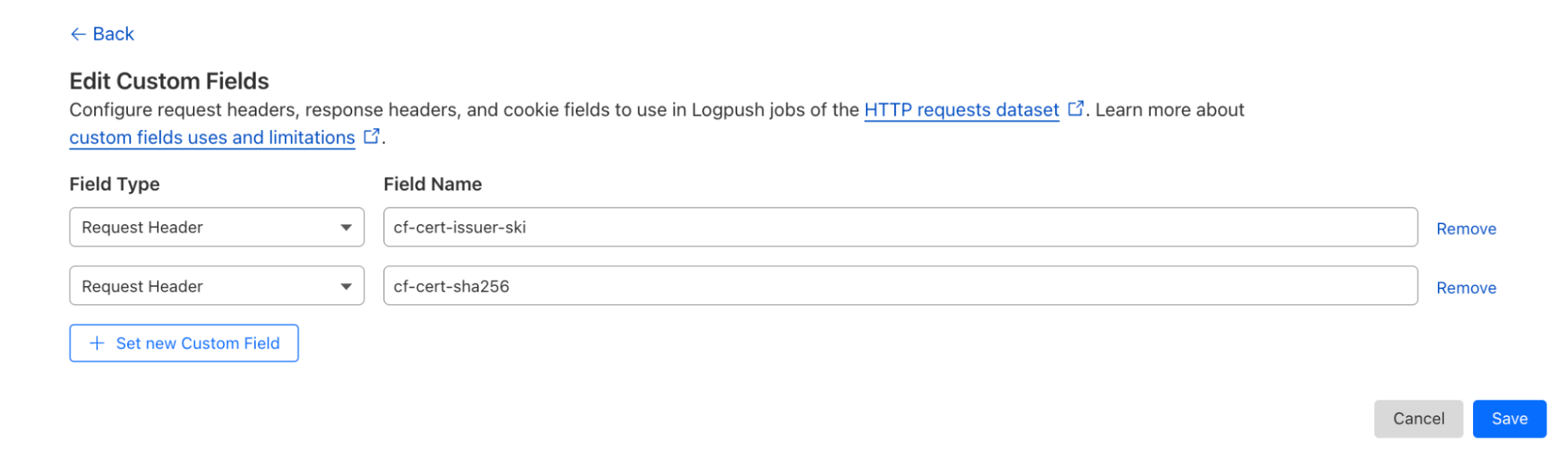
Enterprise customers can also use our Cloudflare Log products to add these headers via the Logs Custom Fields feature. For example:


This will add the following information to Cloudflare Logs.

"RequestHeaders": {
    "cf-cert-issuer-ski": "A5AC554235DBA6D963B9CDE0185CFAD6E3F55E8F",
    "cf-cert-sha256": "528a65ce428287e91077e4a79ed788015b598deedd53f17099c313e6dfbc87ea"
  },

Customers already logging this information — either at their origin or via Cloudflare Logs — can retroactively check for unexpected certificate hashes or issuers that did not trigger any security policy.

Users are also able to use this information within their WAF custom rules to conduct additional checks. For example, checking the Issuer’s SKI can provide an extra layer of security.


Customers who enabled this additional check were not vulnerable.

Conclusion

We sincerely thank the security researcher who responsibly disclosed this issue via our HackerOne Bug Bounty Program, allowing us to identify and mitigate the vulnerability. We welcome further submissions from our community of researchers to continually improve our products’ security.

Finally, we want to apologize to our mTLS customers. Security is at the core of everything we do at Cloudflare, and we deeply regret any concerns this issue may have caused. We have taken immediate steps to resolve the vulnerability and have implemented additional safeguards to prevent similar issues in the future. 

Timeline 

All timestamps are in UTC

  • 2025-01-23 15:40 – Cloudflare is notified of a vulnerability in Mutual TLS and the use of session resumption.

  • 2025-01-23 16:02 to 21:06 – Cloudflare validates Mutual TLS vulnerability and prepares a release to disable session resumption for Mutual TLS.

  • 2025-01-23 21:26 – Cloudflare begins rollout of remediation.

  • 2025-01-24 20:15 – Rollout completed. Vulnerability is remediated.

Cloudflare thwarts over 47 million cyberthreats against Jewish and Holocaust educational websites

Post Syndicated from Omer Yoachimik original https://blog.cloudflare.com/cloudflare-thwarts-over-47-million-cyberthreats-against-jewish-and-holocaust/

January 27 marks the International Holocaust Remembrance Day — a solemn occasion to honor the memory of the six million Jews who perished in the Holocaust, along with countless others who fell victim to the Nazi regime’s campaign of hatred and intolerance. This tragic chapter in human history serves as a stark reminder of the catastrophic consequences of prejudice and extremism. 

The United Nations General Assembly designated January 27 — the anniversary of the liberation of Auschwitz-Birkenau —  as International Holocaust Remembrance Day. This year, we commemorate the 80th anniversary of the liberation of this infamous extermination camp.

As the world reflects on this dark period, a troubling resurgence of antisemitism underscores the importance of vigilance. This growing hatred has spilled into the digital realm, with cyberattacks increasingly targeting Jewish and Holocaust remembrance and educational websites — spaces dedicated to preserving historical truth and fostering awareness.

For this reason, here at Cloudflare, we began to publish annual reports covering cyberattacks that target these organizations. These cyberattacks include DDoS attacks as well as bot and application attacks. The insights and trends are based on websites protected by Cloudflare. This is our fourth report, and you can view our previous Holocaust Remembrance Day blogs here.

Project Galileo

At Cloudflare, we are proud to support these vital organizations through Project Galileo, an initiative providing free security protections to vulnerable groups worldwide. If you or your organization could benefit from this program, consider applying today to help protect these essential platforms and the invaluable work they do.


Project Galileo overview. Source: Cloudflare 2024 Impact Report

One of the organizations that we protect through Project Galileo is Muzeon, a museum dedicated to preserving Jewish history in Cluj-Napoca, Romania. Muzeon faced significant cyberattacks that impacted their website’s performance and hindered operations before using Cloudflare.

As part of Project Galileo, Muzeon implemented Cloudflare’s DDoS mitigation, Web Application Firewall (WAF), Managed DNS, and other services. These measures drastically reduced the attacks and allowed Muzeon to focus on its important mission of storytelling and preserving cultural heritage. 

Cloudflare’s solutions not only protected their digital infrastructure but also freed up time for Muzeon to expand its interactive exhibits, ensuring they could continue sharing their essential work globally. You can read more about this case study here

Significant rise in antisemitism around the world

Following the October 7, 2023, Hamas-led attack on Israel, there has been a surge in global antisemitic incidents. In the U.S. alone there have been more than 10,000 antisemitic incidents from October 7, 2023 to September 24, 2024, representing an over 200-percent increase compared to the incidents reported during the same period a year before. As we’ve seen, the digital world is often a mirror to the real world. As a result, it is not surprising that websites dedicated to sharing information about the Holocaust, as well as Jewish memorial and education platforms, are now increasingly being targeted online. 

Cyberattacks against Jewish and Holocaust educational websites 

For the years 2020, 2021, and 2022, the number of cyberthreats targeting Holocaust and Jewish educational and memorial websites protected by Cloudflare was, on average, 736,339 malicious HTTP requests annually.

After the October 7 Hamas-led attack, cyberattacks skyrocketed. In 2023, the amount of blocked HTTP requests surged by 872% to 35.7 million compared to 2022. Most of these cyberattacks occurred after October 7, 2023. 

In 2024, the number of blocked HTTP requests exceeded 47 million — representing a 30% increase compared to 2023. Over 3 out of every 100 HTTP requests towards Holocaust and Jewish memorial and education websites protected by Cloudflare were malicious and blocked. 


Cyber threats against Holocaust and Jewish memorial and educational websites by year

Cyberattacks by quarter

In the fourth quarter of 2023, the volume of malicious requests exceeded 27 million. Throughout the first three quarters of 2024, we saw a gradual decrease in the quantity of malicious requests. But in the fourth quarter of 2024, cyberattacks spiked by 33%, to 36 million requests, following the one-year anniversary of the October 7 assault.


Cyber threats against Holocaust and Jewish memorial and educational websites by quarter

Cyberattacks by month

Breaking down the quarters into months, we can see an initial peak in October 2023 after the October 7 Hamas-led attack. The volume of cyberattacks remained elevated during November and December 2023.

Afterward, as we entered 2024, the quantity and percentage of cyberattacks against these websites significantly decreased. In November, over a third (34%) of all requests towards these websites were blocked, with over 36 million requests blocked that month alone.


Cyber threats against Holocaust and Jewish memorial and educational websites by month

Helping build a safer Internet and a better world

On the International Holocaust Remembrance Day, we reflect on the importance of standing against both antisemitism and cyber threats — issues that have escalated since the October 7, 2023, Hamas-led attack. 

At Cloudflare, we are unwavering in our commitment to create a safer, more inclusive Internet. The rise in antisemitism has made it even more critical to protect educational websites and communities from harmful cyber attacks. We invite everyone to join us in this fight. Even with our free plan, we offer strong security and performance, ensuring that vital resources and websites remain safe and accessible. By working together, we can protect the lessons of history and foster a more secure digital world for all.

Global elections in 2024: Internet traffic and cyber threat trends

Post Syndicated from João Tomé original https://blog.cloudflare.com/elections-2024-internet/

Elections define the course of democracies (even as there are several types of democracies), and 2024 was a landmark year, with over 60 countries — plus the European Union — holding national elections, impacting half the world’s population. As highlighted in Pew Research’s global elections report, this was a year of “political disruption,” where the Internet was a relevant stage for both democratic engagement and cyber threats.

At Cloudflare, with our presence in over 330 cities and 120 countries and interconnection with 12,500 networks, we’ve witnessed firsthand the digital impact of these elections. From monitoring Internet traffic patterns to mitigating cyberattacks, we’ve observed trends that reveal how elections increasingly play out online. As detailed in our just-published Cloudflare Impact report, we’ve also worked to protect media outlets, political campaigns, and help elections worldwide.

Here’s the map of countries with national elections that took place in 2024, from our elections report.


We’ve been monitoring 2024 elections worldwide on our blog and in the 2024 Election Insights report available on Cloudflare Radar.

In terms of Internet patterns, we’ve observed how cyber activity in 2024 continues to intersect with real-world events. Online attacks are clearly a significant part of elections, even when unsuccessful in disrupting candidates or election-related websites due to strong protections. Additionally, Internet traffic patterns often vary on election day depending on the country, and government-directed Internet shutdowns continue, including ones related to elections. Email activity is also influenced, especially for more popular candidates in “polarized battles.”

Let’s start our review with attacks. 

Rising threats: political and election-related cyberattacks in 2024

During 2024, elections saw a rise in DDoS attacks targeting political campaigns, parties, and election infrastructure.

In the United States, over 6 billion malicious requests were blocked between November 1-6. A set of DDoS attacks leading up to Election Day on November 5 targeted one of the campaigns with multiple days of attacks, peaking at 700,000 requests per second and sustaining 8 Gbps during major strikes. Key attack tactics included cache-busting, geodiverse patterns, and randomized user agents.


State and local websites also faced increased threats, with 290 million malicious requests blocked since September under Cloudflare’s Athenian Project. Compared to 2020, attacks in 2024 were far more intense, underscoring the growing need for robust cybersecurity to protect elections from disruption.

In France, DDoS attacks plagued multiple political parties, with peaks reaching 96,000 requests per second (rps) on election day, July 7. Additional details are available in our related blog post.


In the United Kingdom, DDoS attacks targeted political parties, with the most severe incident affecting a campaign website, reaching 156,000 rps shortly after the results were announced on election day. Additional details are available in our related blog post.


During the European parliamentary elections in early June, cyberattacks targeted several political websites around election days. Notably, a significant DDoS attack focused on two politically-related websites in the Netherlands on June 5–6 (with June 6 being election day), peaking at 73,000 rps.


In Romania, the weeks leading up to the election cycle culminating in the December 1 parliamentary elections saw DDoS attacks targeting political party websites and news organizations.

In South Africa, where the general election took place on May 29, there was a relevant DDoS attack in the weeks leading up to the election, targeting a major news site within the country for several days, with a peak on May 7 of 54,000 requests per second.

In Portugal, several DDoS attacks targeted political party websites on election day, March 10, particularly after polling stations closed. One political party’s websites experienced a peak of 69,000 rps on May 11 at 00:50 UTC.


In Taiwan, a local fact-checking website faced a DDoS attack three days before the election, on January 10.

In Japan, a DDoS attack targeted a website used to report scams and misinformation a week before the October 27 election.

While some of these rates may seem small to Cloudflare, they can be devastating for websites not well-protected against such high levels of traffic. DDoS attacks not only overwhelm systems but also serve, if successful, as a distraction for IT teams while attackers attempt other types of breaches.

Election-related Internet shutdowns 

Several times in 2024, election-related Internet shutdowns were imposed by authorities for various reasons, such as in the Comoros and Pakistan.

Comoros, a small archipelago country in Southeastern Africa with a population of less than 1 million, held presidential elections on January 14, which led to protests against the re-election of President Azali Assoumani. Authorities shut down the Internet on January 17, causing a 50% drop in traffic compared to the previous week, lasting for two days.


Pakistan’s general election day on February 8 was marked by an Internet shutdown targeting mobile networks. The outage began around 02:00 UTC, reducing Internet traffic by 50% compared to the previous week. Traffic only began recovering after 15:00, highlighting the severe impact of government-initiated shutdowns on Internet connectivity.


In Mauritius, an island nation in the Indian Ocean with under 2 million residents, the government suspended access to social media platforms from November 1 to November 11 ahead of the November 10 parliamentary elections. 

Other election-related Internet traffic trends 

Election-day Internet traffic patterns often reflect a country’s dominant device usage, with mobile-first nations like Indonesia, Mozambique, and Ghana experiencing noticeable traffic drops after polling stations closed. While mobile-friendly countries generally see steady or higher weekend traffic compared to desktop-focused regions like Europe and the Americas, no consistent trend emerged linking device preference to overall election-day traffic increases or decreases.

Here’s a world map from our Year in Review 2024 showing countries where mobile (purple) or desktop (green) dominates Internet traffic.


Now, let’s explore a selection of relevant elections with Internet traffic impacts, ordered by election dates:

Taiwan (January 13)
Taiwan’s presidential election saw traffic drop slightly during polling hours, especially in the morning with an 8% drop. Traffic returned to usual levels after 17:00 local time. Post-election, traffic rose by 5% the next morning compared to the previous week.


Finland (January 28)
On January 28, Finland held its presidential election. Internet traffic dropped by 24% at 11:00 local time, coinciding with higher voter turnout in the morning. A second noticeable drop of 13% occurred at 20:00 when polling stations closed and TV stations broadcast initial projections, though traffic was slightly higher than usual afterward.

Indonesia (February 14) 
Indonesia held its general election on February 14. With over 200 million voters spread across 17,000 islands, it likely had the highest number of voters on a single day, unlike India’s multi-week election. During polling hours (08:00 to 13:00 local time), Internet traffic dropped by up to 15%. Traffic remained lower than the previous week for the rest of the day, with drops ranging from 8% to 16% throughout the night. Mobile device usage surged to 77%, the highest of the year, reflecting Indonesia’s mobile-first Internet culture. Traffic recovered the next morning, surpassing the previous week’s levels.


Portugal (March 10)
Portugal’s parliamentary election on March 10 saw a sharp 16% traffic drop at 20:00 local time when TV stations began broadcasting projections. Traffic picked up after that and remained stable during the day.

Russia (March 17)
Russia’s presidential election showed steady Internet traffic throughout the day but experienced a 7% decrease after polls closed as results and reactions were broadcast on TV. Unlike other countries, where post-election traffic surges are common, Russia’s pattern reflects the strong influence of broadcast media on election coverage.

South Korea (April 10)
South Korea held legislative elections on April 10. Traffic was higher than usual before 05:00 local time but dropped 14% by 07:15 after polling stations opened at 06:00. By 11:45, traffic had rebounded above typical levels. After polling stations closed at 18:00, traffic dropped again, with a 7% decline compared to the previous week.

India (April 19–June 1) – related blog post
India’s seven-phase general election saw significant Internet traffic fluctuations. May 7 recorded the largest nationwide traffic dip of 6%, with populous states like Uttar Pradesh seeing a 9% drop and Maharashtra experiencing a 17% decline. On the final election day (June 1), mobile device usage peaked at 68%, the highest of the year. These patterns underscore India’s mobile-first Internet habits and its diverse election timelines.


North Macedonia (April 24 & May 8)
North Macedonia’s two-round presidential election featured a 56% traffic increase after 11:00 local time on May 8, sustained throughout the day. Similar, albeit smaller, trends were observed during the first round on April 24.

Panama (May 5)
On May 5, Panama’s presidential and parliamentary election day, Internet traffic dropped significantly while voting stations were open, with a 23% decrease in the afternoon and 25% lower traffic at 21:30 local time as results were announced. Traffic picked up after that.

South Africa (May 29) – related blog post
On May 29, South Africa’s general election saw Internet traffic decrease by 16% at 05:45 and remain lower throughout polling hours. Traffic surged by 25% the night before the election, peaking at midnight. Post-election, traffic increased by up to 12% early on May 30, highlighting the transition from offline to online engagement.

Mexico (June 2) – related blog post
Mexico’s general election on June 2 saw a 3% daily traffic drop, with hourly dips of up to 11% during polling hours (08:00–20:00 local time). Traffic surged by 14% at 01:30 the following day as results were announced, peaking at 8% above the previous week by 22:00 local time.

Iceland (June 1)
Iceland’s presidential election on June 1 saw minor Internet traffic drops, including a 12% dip between 14:00 and 16:00 local time, but traffic increased at night by as much as 11% at 20:00. The day after, traffic rose by 26% compared to the previous week. Iceland elected Halla Tómasdóttir as its second female president.

European Union (June 6–9) – related blog post
The 2024 European Parliament elections showed notable Internet traffic shifts and cybersecurity challenges. The Czech Republic and Slovakia experienced traffic drops of over 10%, while Finland and Ireland saw moderate declines. Key speeches, such as Belgian Prime Minister Alexander De Croo’s resignation and French President Macron’s snap election announcement, also caused traffic fluctuations.


Source: Cloudflare; created with Datawrapper

Iran (June 28)
Iran’s presidential election saw significant traffic fluctuations, with traffic falling by 16% after 17:30 local time. Extended polling hours (including at night) led to continued drops, falling to 24% lower by 22:30. After midnight, traffic rebounded, showing a 13% increase compared to the previous week.

France (June 30 & July 7) – related blog post
France’s legislative elections brought significant Internet and cybersecurity activity. On July 7, Internet traffic dropped 16% at 20:00 local time as polling stations closed and TV broadcasts announced results. Mobile device usage surged to 58%, and DNS traffic to news outlets spiked by 250% during the first round and by 244% on runoff day, reflecting heightened public interest.


United Kingdom (July 4) – related blog post
The UK’s general election on July 4 saw the Labour Party win a majority after 14 years of Conservative rule. Internet traffic declined slightly during voting hours, with a 2% drop at noon, before surging in the evening as results were announced. Northern Ireland experienced the sharpest traffic drop (10%), compared to 6% in Scotland and 5% in Wales. DNS traffic to election-related domains peaked with increases of 600% at 22:00 and 671% at 04:00 the following day.


Sri Lanka (September 21)
Sri Lanka’s presidential election caused a 9% morning traffic dip and an 18% post-election surge after polls closed. Results triggered a 109% traffic increase at 03:00 local time on September 22.

Tunisia (October 6)
Tunisia’s presidential election saw a 15% traffic dip at 17:00, followed by a 13% decline at 19:30 when results started arriving. The steady traffic decrease highlights the evening focus on offline engagement and result tracking.

Mozambique (October 9)
Mozambique’s election drove an Internet traffic drop throughout the day, falling as much as 51% by 20:30 local time, and continuing lower than usual after that. A post-election surge of 16% occurred at 01:30. The election, held on a public holiday, resulted in a 31% daily traffic drop compared to the previous week.

Georgia (October 26)
When Georgia held its parliamentary election on October 26, Internet traffic was 11% higher than the previous week, peaking at 67% above normal around 23:00 when results were announced. Unlike other countries, traffic only dipped slightly (2%) in the afternoon during polling hours.

Japan (October 27)
Japan’s House of Representatives election saw Internet traffic decrease by 4% at 20:00 after polling stations closed, but it rose later in the evening.

Botswana (October 30)
A traffic drop was observed throughout the day of Botswana’s general election, with a 42% decrease around 21:30 local time compared to the previous week.

United States (November 5) – related blog post
The US elections saw a 15% spike in Internet traffic, particularly after polls closed, with the Midwest leading. There were also specific spikes related to key moments during election night, as the next chart shows: 


DNS traffic surged by 756% to polling services and 325% to news sites. As highlighted in our recent Internet Services Year in Review blog post, the US election also boosted DNS traffic and ranking positions for CNN, Fox News, and The New York Times, underscoring the Internet’s critical role during major political events.

In the US, beyond election day, we also reported in 2024 on trends surrounding the first Biden vs. Trump debate, the attempted assassination of Trump and the Republican National Convention, the Democratic National Convention, and the Harris-Trump presidential debate.

Ghana (December 7)
Ghana’s general election caused mid-morning traffic drops of 11%, followed by declines of 13% and 14% after polling stations closed at 17:00. These patterns indicate offline focus during results announcements.

Romania (December 1)
Romania’s parliamentary election showed minimal traffic fluctuations during the day, though its November 24 presidential election remains disputed.

Email perspectives on the US presidential election

From a cybersecurity perspective, trending events, topics, and individuals often attract more emails, including malicious, phishing, and spam messages. In our analysis earlier this year, we focused on the US presidential elections and the two major party candidates.

From June 1 to November 5, 2024, Cloudflare processed over 19 million emails mentioning “Donald Trump” or “Kamala Harris,” with Trump appearing more frequently and in higher rates of spam (12%) and malicious emails (1.3%) compared to Harris (0.6% spam, 0.2% malicious). Nearly half were sent after September, with a surge in the final 10 campaign days.


Conclusion: the election cycle doesn’t stop

As a global election year, 2024 underscored how deeply the Internet is woven into the democratic process, serving both as a tool for engagement and a target for disruption. From relevant DDoS attacks to government-imposed Internet shutdowns, the challenges faced during these elections reflect a growing need for robust cybersecurity measures to safeguard critical infrastructure and ensure free, fair electoral processes.

In this context, Germany has announced an anticipated federal election for February 23, 2025, following the collapse of its governing coalition during the 2024 government crisis. This snap election joins others in France and the UK, reflecting a growing trend of political instability requiring urgent electoral responses.

Looking ahead, the increasing frequency and complexity of cyber threats, such as DDoS attacks on campaigns and election infrastructure, demand proactive defenses. Shutdowns like those in Pakistan and Comoros, along with surges in phishing and misinformation, highlight the need for closer collaboration between governments, technology providers, and civil society to safeguard democracy in the digital era.

If you want to follow more trends and insights about the Internet and elections in particular, you can check Cloudflare Radar, and more specifically our new 2024 Elections Insights report.

Robotcop: enforcing your robots.txt policies and stopping bots before they reach your website

Post Syndicated from Celso Martinho original https://blog.cloudflare.com/ai-audit-enforcing-robots-txt

Cloudflare’s AI Audit dashboard allows you to easily understand how AI companies and services access your content. AI Audit gives a summary of request counts broken out by bot, detailed path summaries for more granular insights, and the ability to filter by categories like AI Search or AI Crawler.

Today, we’re going one step further. You can now quickly see which AI services are honoring your robots.txt policies, which aren’t, and then programmatically enforce these policies. 

What is robots.txt?

Robots.txt is a plain text file hosted on your domain that implements the Robots Exclusion Protocol, a standard that has been around since 1994. This file tells crawlers like Google, Bing, and many others which parts of your site, if any, they are allowed to access. 

There are many reasons why site owners would want to define which portions of their websites crawlers are allowed to access: they might not want certain content available on search engines or social networks, they might trust one platform more than another, or they might simply want to reduce automated traffic to their servers.

With the advent of generative AI, AI services have started crawling the Internet to collect training data for their models. These models are often proprietary and commercial and are used to generate new content. Many content creators and publishers that want to exercise control over how their content is used have started using robots.txt to declare policies that cover these AI bots, in addition to the traditional search engines.

Here’s an abbreviated real-world example of the robots.txt policy from a top online news site:

User-agent: GPTBot
Disallow: /

User-agent: ChatGPT-User
Disallow: /

User-agent: anthropic-ai
Disallow: /

User-agent: Google-Extended
Disallow: /

User-agent: Bytespider
Disallow: /

This policy declares that the news site doesn’t want ChatGPT, Anthropic AI, Google Gemini, or ByteDance’s Bytespider to crawl any of their content.

From voluntary compliance to enforcement

Compliance with the Robots Exclusion Protocol has historically been voluntary. 

That’s where our new feature comes in. We’ve extended AI Audit to give our customers both the visibility into how AI services providers honor their robots.txt policies and the ability to enforce those policies at the network level in your WAF

Your robots.txt file declares your policy, but now we can help you enforce it. You might even call it … your Robotcop.  

How it works

AI Audit takes the robots.txt files from your web properties, parses them, and then matches their rules against the AI bot traffic we see for the selected property. The summary table gives you an aggregated view of the number of requests and violations we see for every Bot across all paths. If you hover your mouse over the Robots.txt column, we will show you the defined policies for each Bot in the tooltip. You can also filter by violations from the top of the page. 


In the “Most popular paths” section, whenever a path in your site gets traffic that has violated your policy, we flag it for visibility. Ideally, you wouldn’t see violations in the Robots.txt column — if you do see them, someone’s not complying.


But that’s not all… More importantly, AI Audit allows you to enforce your robots.txt policy at the network level. By pressing the “Enforce robots.txt rules” button on the top of the summary table, we automatically translate the rules defined for AI Bots in your robots.txt into an advanced firewall rule, redirect you to the WAF configuration screen, and allow you to deploy the rule in our network.

This is how the robots.txt policy mentioned above looks after translation:


Once you deploy a WAF rule built from your robots.txt policies, you are no longer simply requesting that AI services respect your policy, you’re enforcing it.

Conclusion

With AI Audit, we are giving our customers even more visibility into how AI services access their content, helping them define their policies and then enforcing them at the network level.

This feature is live today for all Cloudflare customers. Simply log into the dashboard and navigate to your domain to begin auditing the bot traffic from AI services and enforcing your robots.txt directives.

Reaffirming our commitment to free

Post Syndicated from Nitin Rao original https://blog.cloudflare.com/cloudflares-commitment-to-free

Cloudflare launched our free tier at the same time our company launched — fourteen years ago, on September 27, 2010. Of course, a bit has changed since then — there are now millions of Internet properties behind Cloudflare. As we’ve grown in size and amassed millions of free customers, one of the questions we often get asked is: how can Cloudflare afford to do this at such scale?

Cloudflare always has, and always will, offer a generous free version for public-facing applications (Application Services), internal private networks and people (Cloudflare One), and developer tools (Developer Platform). Counterintuitively: our free service actually helps us keep our costs lower. Not only is it mission-aligned, our free tier is business-aligned. We want to make abundantly clear: our free plan is here to stay, and we reaffirmed that commitment this week with 15 releases across our product portfolio that make the Free plan even better.

Understanding our Cost of Goods Sold

To understand the economics of Free, you need to understand our Cost of Goods Sold (COGS). Cloudflare hasn’t outsourced its network — we built it ourselves, and it spans more than 330 cities. We design and ship our own hardware across the world, we interconnect with more than 12,500 networks, and we manage over 300 Tbps of network capacity. We even have a dedicated backbone that spans the globe.

There are three major costs of running our network, which together comprise about 80% of our COGS. First and largest is bandwidth: the traffic that traverses our network. Then there is hardware: the servers that process traffic. And third are colocation costs: the power and space at the data centers where we house our servers. There are other parts of COGS, too, like our SRE team that keeps the network running, and our payment processor fees, without which we couldn’t collect revenue.

To get traffic across the Internet for a network of our scale, we need a lot of bandwidth. Typically, a network like ours would pay third-party transit networks and Internet Service Providers (ISPs) to transmit data anywhere on the Internet. But there are thousands of ISPs that we don’t have to pay at all, and hundreds that also offer us space in their data center at no cost. How did we manage that? The surprising answer: Free.

How our Free services keep costs low

Imagine you run an ISP serving your local community. Your job is to connect your customers to the Internet. You notice that your customers are often visiting sites behind Cloudflare, which sits in front of roughly 20% of the web. You need to deliver those webpages and facilitate connections to the applications behind Cloudflare, but right now you have to pay a transit provider to reach them. Instead, you could choose to peer directly with Cloudflare and exchange traffic at no cost.

Cloudflare is one of the most peered networks in the world. We freely exchange traffic with thousands of ISPs, who in turn benefit because they can cut out a third-party transit provider to reach the millions of sites and applications behind Cloudflare.

Continuing with this hypothetical, if as an ISP, your customers pay for Internet connectivity based on data usage (a common model outside of Western Europe and the US), your revenue scales with data consumption. One simple way to increase data consumption? Make the Internet faster! Hosting Cloudflare’s servers in your facility, as close to your users as possible, reduces latency for millions of websites and apps. So it’s in your best interest to host Cloudflare’s servers in your data centers, too.

We have hundreds of ISP partnerships that look just like that. The value ISPs get from Cloudflare stems from the breadth of the web that sits behind Cloudflare, a number driven by our Free customers. This arrangement is a big part of why we have a free service, and is part of what enables us to continue to offer one. PS: If you really are an operator for a local ISP and don’t partner with us yet, please connect with us through our peering portal!

These days, we are at such a scale that the traffic our customers generate requires much more capacity than can fit within our ISP partners. To reliably serve our enterprise customers, we operate in multiple facilities in every major Internet hub city. And yet, the traffic patterns of our enterprise customers are typically very predictable. They usually follow a diurnal cycle, with peaks and troughs throughout a day. Enterprise customer traffic is prioritized and served as close to end users as possible, regardless of the time of day. But our Free customers use off-cycle headroom. That’s why we’re able to continue to offer unmetered bandwidth on the Free plan: we serve the traffic from across our network, wherever there is spare room. It might not have quite the same performance as our enterprise traffic, but it’s still reliable and fast.

There do have to be some rules for this to continue to work, however. Free traffic needs to remain a manageable proportion of our total traffic. To ensure that remains true, and that we can continue to offer unmetered traffic to Free customers at no cost, we have to be opinionated about what kind of traffic we serve for free. Our terms of service specify that large assets (like videos) are not supported on our Free plan. So we require that customers pushing large files and videos move onto one of our paid services, like Images and Stream.

Free customers help us build better products and grow our business

The benefits of our Free plan extend well beyond direct economics.

Our Free plan gives Cloudflare access to unique threat intelligence. A wide surface area exposes our network to diverse traffic and attacks that we wouldn’t otherwise see, often allowing us to identify potential security and reliability issues at the earliest stage. Like an immune system, we learn from these attacks and adapt to improve our products for all customers. This is a special competitive advantage. Visibility into attacks allows us to build products that no one else could.

Our Free customers help us do quality assurance (QA) quickly. Free customers are often the first to try new products and features. When we launch something new, we get signal immediately and at an incredible scale. We use that signal to swiftly address bugs and iterate on our products. 

Offering a Free plan challenges us to build more intuitive products. Free customers represent a broad audience, from tech enthusiasts to those simply looking to secure their website or build an application. Building for a broad spectrum of users forces us to create more user-friendly tools for everyone.

Offering a Free service has other benefits, too. Some of our strongest customer advocates are folks that used our Free plan on their hobby projects before bringing Cloudflare with them to work. Some of them even end up working at Cloudflare!

Our free plan will keep getting better

Our Free offering is a flywheel that helps make Cloudflare’s products, team, and cost structure more efficient. We pay back these efficiencies by continuing to improve our free offerings. Just this week, we’ve announced 15 updates that make our Free plans even better:

We offer a Free plan out of more than goodwill — it is a core business differentiator that helps us build better products, drive growth, and keep costs low. And it helps us advance our mission. Building a better Internet is a collective effort. Today, more than 30 million domains, comprising some 20% of the web, sit behind Cloudflare. Our Free plan makes that portion of the web faster, more secure, and more efficient. Free is not just a commitment — it’s a cornerstone of our strategy.

Become part of a better Internet and sign up for Cloudflare’s Free plan.


Cloudflare partners with Internet Service Providers and network equipment providers to deliver a safer browsing experience to millions of homes

Post Syndicated from Kelly May Johnston original https://blog.cloudflare.com/safer-resolver


A committed journey of privacy and security

In 2018, Cloudflare announced 1.1.1.1, one of the fastest, privacy-first consumer DNS services. 1.1.1.1 was the first consumer product Cloudflare ever launched, focused on reaching a wider audience. This service was designed to be fast and private, and does not retain information that would identify who is making a request.

In 2020, Cloudflare announced 1.1.1.1 for Families, designed to add a layer of protection to our existing 1.1.1.1 public resolver. The intent behind this product was to provide consumers, namely families, the ability to add a security and adult content filter to block unsuspecting users from accessing specific sites when browsing the Internet.

Today, we are officially announcing that any ISP and equipment manufacturer can use our DNS resolvers for free. Internet service, network, and hardware equipment providers can sign up and join this program to partner with Cloudflare to deliver a safer browsing experience that is easy to use, industry leading, and at no cost to anyone.

Leading companies have already partnered with Cloudflare to deliver superior and customized offerings to protect their customers. By delivering this service in a place where the customer is familiar, you can help us make the Internet a safe place for all. 

A need to intentionally focus on families

COVID-19 presented new challenges beginning in 2020 as kids’ online activity increased and the reliance on home networks was more present than ever before. Research shows around 67% of adolescents have access to a tablet, with ages as low as two years old accessing media content. While it is often impressive to watch the ease with which a young child can navigate a smartphone or tablet handed to them and pull up their favorite YouTube show, it becomes increasingly concerning that kids may unintentionally stumble onto harmful content in the process.

Our launch of 1.1.1.1 for Families in 2020 provided that peace of mind to users around the globe, and it continues to deliver those protections. Today, households can set up this service using our guide. They can select the DNS resolver they want to use, focusing on just privacy, or include blocking security threats and adult content across their entire home network.

Although this service is available and free for anyone to use, there are still many users who browse online daily without protections in place. Setting up protection like this can feel daunting, and many users are at a loss on where to begin and/or how to configure this on their devices or home network. Today we are announcing a partnership that will make setup and configuration much easier for users.

Partnering to extend security even further 

ISPs and network providers can use Cloudflare’s different resolver services to provide various offerings to their customers. Our existing partners have taken these offerings and built them into their platforms as an extension of the services that they are already providing to their customers. This built-in model allows for easy adoption and a consistent and comprehensive end customer journey. Each service is designed with a specific purpose in mind, outlined below:

Our core privacy resolver (1.1.1.1) is designed for speed and privacy.  Additionally, DNS requests to our public resolver can be sent over a secure channel using DNS over HTTPS (DoH) or DNS over TLS (DoT), significantly decreasing the odds of any unwanted spying or monster-in-the-middle attacks.

Our security resolver (1.1.1.2) has all the benefits of 1.1.1.1, with the additional benefit of protecting users from sites that contain malware, spam, botnet command and control attacks, or phishing threats.

Our family resolver (1.1.1.3) provides all the benefits of 1.1.1.2, with the additional benefit of blocking unwanted adult content from both direct site navigation, as well as locking public search engines to Safe Search only. This prevents anyone from unknowingly searching for something that might return an unwanted result. 

Premium Safety & Customizations 

If users want even more flexibility than what our public DNS resolvers provide, Cloudflare also offers a Gateway product that allows customized filtering, reporting, logging, analytics, and scheduling. This advanced Gateway offering includes over 114 categories ranging from social media, online messaging platforms, gaming, and “safe search” results, all the way to “home & garden”.

The additional filters and scheduling functionality empowers users to exercise more nuanced and time-based controls, such as limiting social media during school hours or dinner time. 

If you are an ISP or equipment manufacturer looking to provide easily customizable options for your customers, this is also an available option. We have a multi-tenant environment available for our Gateway offering that enables our customers to empower their individual subscribers to configure their own individual filters for their users and homes. If you are a device manufacturer or ISP looking to offer customizable protections for your individual subscribers, this may be a good option for you.

Our continued commitment to privacy, security, and safety

An easy choice 

Simply put, Cloudflare is an easy and obvious choice for protecting individuals and families. This is why leading companies have all chosen to partner with Cloudflare to help protect customers and their families. In 2020, after launching 1.1.1.1 for Families, we were serving 200+ billion DNS queries per day for 1.1.1.1. Today, we serve 1.7 trillion queries per day for 1.1.1.1 and our network presence spans over 330 cities and interconnects with over 12,500+ other networks. It is this network that puts us within a blink of an eye for 95% of the world’s Internet-connected population (your customers), ensuring they receive lightning fast speed while browsing.

Beyond our speed, Cloudflare is used as a reverse proxy by nearly ~ 20% of all websites across the globe. This gives us incredible insight to the latest Internet trends, threats, and research. In partnering with us, you can leverage our strengths — powerful infrastructure, extensive data insights, and a dedicated threat intelligence team – while focusing on your core priorities.  There is no better partner to have than one who provides global reach, excellent performance, and built-in privacy.

Join us in making a safe browsing experience easy for everyone

Cloudflare began with a singular goal of helping build a better Internet, and our annual Birthday Week is a catalyst for many developments that have shaped a better Internet for everyone.

We remain committed to helping to protect and build a better Internet for every user, and to do so, we need to meet them where they are. Our partnerships are critical in making this a reality, and we want you to be a part of the solution with us.

Whether you are interested in our public DNS resolvers or our more advanced Gateway options, Cloudflare has easy and scalable options for everyone. You can sign up to join this program as a partner today by submitting this form, and we will be in touch to understand your needs and bring you on board.


Network performance update: Birthday Week 2024

Post Syndicated from Emily Music original https://blog.cloudflare.com/network-performance-update-birthday-week-2024

When it comes to the Internet, everyone wants to be the fastest. At Cloudflare, we’re no different. We want to be the fastest network in the world, and are constantly working towards that goal. Since June 2021, we’ve been measuring and ranking our network performance against the top global networks. We use this data to improve our performance, and to share the results of those initiatives. 

In this post, we’re going to share with you how our network performance has changed since our last post in March 2024, and discuss the tools and processes we are using to assess network performance. 

Digging into the data

Cloudflare has been measuring network performance across these top networks from the top 1,000 ISPs by estimated population (according to the Asia Pacific Network Information Centre (APNIC)), and optimizing our network for ISPs and countries where we see opportunities to improve. For performance benchmarking, we look at TCP connection time. This is the time it takes an end user to connect to the website or endpoint they are trying to reach. We chose this metric to show how our network helps make your websites faster by serving your traffic where your customers are. Back in June 2021, Cloudflare was ranked #1 in 33% of the networks.

As of September 2024, examining 95th percentile (p95) TCP connect times measured from September 4 to September 19, Cloudflare is the #1 provider in 44% of the top 1000 networks:


This graph shows that we are fastest in 410 networks, but that would only make us the fastest in 41% of the top 1,000. To make sure we’re looking at the networks that eyeballs connect from, we exclude networks like transit networks that aren’t last-mile ISPs. That brings the number of measured networks to 932, which makes us fastest in 44% of ISPs.

Now let’s take a look at the fastest provider by country. The map below shows the top network by 95th percentile TCP connection time, and Cloudflare is fastest in many countries. For those where we weren’t, we were within a few milliseconds of our closest competitor.


This color coding is generated by grouping all the measurements we generate by which country the measurement originates from, and then looking at the 95th percentile measurements for each provider to see who is the fastest. This is in contrast to how we measure who is fastest in individual networks, which involves grouping the measurements by ISP and measuring which provider is fastest. Cloudflare is still the fastest provider in 44% of the measured networks, which is consistent with our March report. Cloudflare is also the fastest in many countries, but the map is less orange than it was when we published our measurements from March 2024:


This can be explained by the fact that the fastest provider in a country is often determined by latency differences so small it is often less than 5% faster than the second-fastest provider. As an example, let’s take a look at India, a country where we are now the fastest:

India performance by provider

Rank

Entity

95th percentile TCP Connect (ms)

Difference from #1

1

Cloudflare

290 ms

2

Google

291 ms

+0.28% (+0.81 ms)

3

CloudFront

304 ms

+4.61% (+13 ms)

4

Fastly

325 ms

+12% (+35 ms)

5

Akamai

373 ms

+29% (+83 ms)

In India, we are the fastest network, but we are beating the runner-up by less than a millisecond, which shakes out to less than 1% difference between us and the number two! The competition for the number one spot in many countries is fierce and sometimes can be determined by what days you’re looking at the data, because variance in connectivity or last-mile outages can materially impact this data.

For example, on September 17, there was an outage on a major network in India, which impacted many users’ ability to access the Internet. People using this network were significantly impacted in their ability to connect to Cloudflare, and you can actually see that impact in the data. Here’s what the data looked like on the day of the outage, as we dropped from the number one spot that day:

India performance by provider

Rank

Entity

95th percentile TCP Connect (ms)

Difference from #1

1

Google

219 ms

2

CloudFront

230 ms

+5% (+11 ms)

3

Cloudflare

236 ms

+7.47% (+16 ms)

4

Fastly

261 ms

+19% (+41 ms)

5

Akamai

286 ms

+30% (+67 ms)

We were impacted more than other providers here because our automated traffic management systems detected the high packet loss as a result of the outage and aggressively moved all of our traffic away from the impacted provider. After review internally, we have identified opportunities to improve our traffic management to be more fine-grained in our approach to outages of this type, which would help us continue to be fast despite changes in the surrounding ecosystem. These unplanned occurrences can happen to any network, but these events also provide us opportunities to improve and mitigate the randomness we see on the Internet.

The phenomenon of providers having fluctuating latencies can also work against us. Consider Poland, a country where we were the fastest provider in March, but are no longer the fastest provider today. Digging into the data a bit more, we can see that even though we are no longer the fastest, we’re slower by less than a millisecond, giving us confidence that our architecture is optimized for performance in the region:
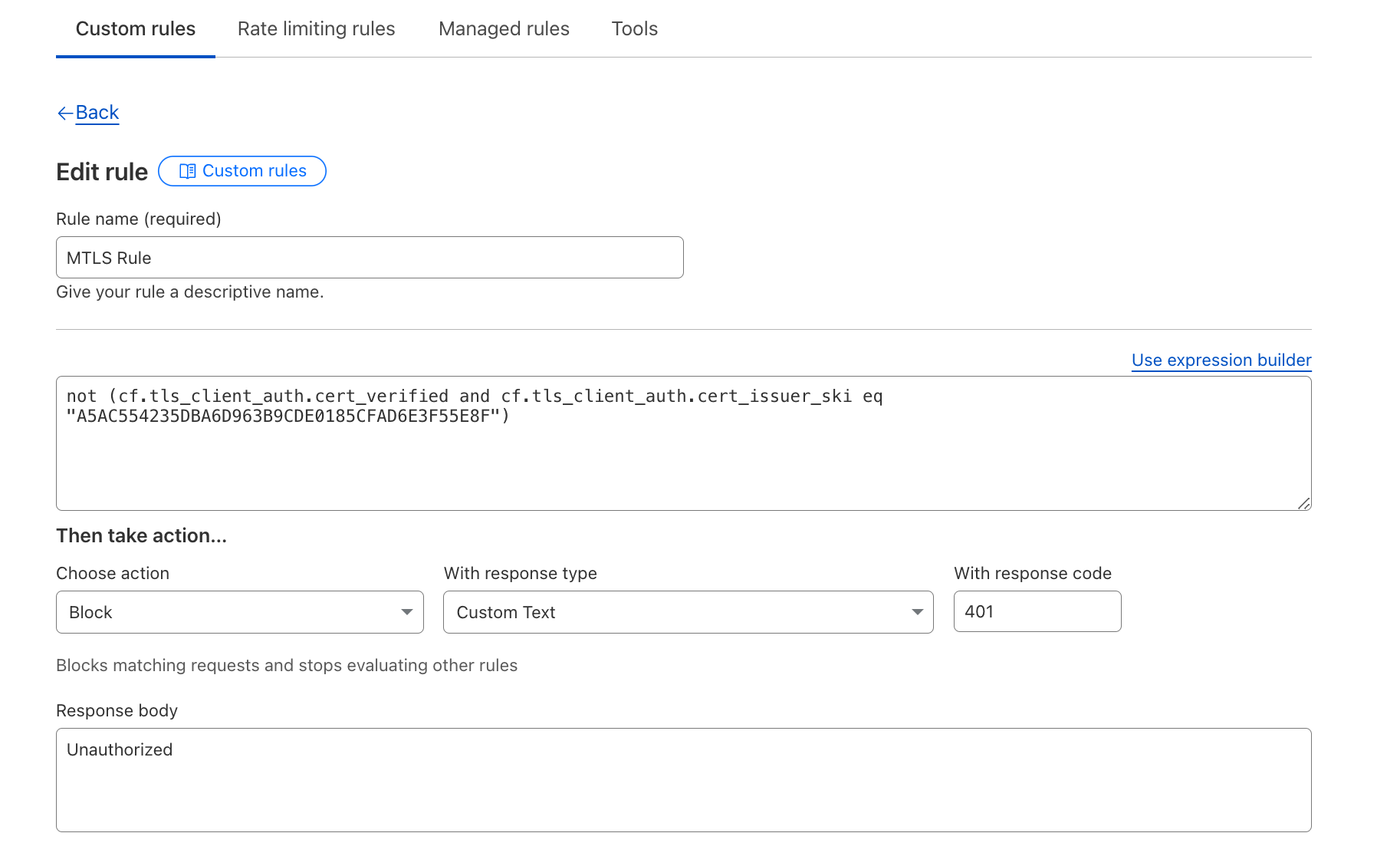
Poland performance by provider

Rank

Entity

95th percentile TCP Connect (ms)

Difference from #1

1

Google

246 ms

2

Cloudflare

246 ms

+0.15% (+0.36 ms)

3

CloudFront

250 ms

+1.7% (+4.17 ms)

4

Akamai

272 ms

+11% (+26 ms)

5

Fastly

295 ms

+20% (+50 ms)

These nuances in the data can make us look slower in more countries than we actually are. From a numbers’ perspective we’re neck-and-neck with our competitors and still fastest in the most networks around the world. Going forward, we’re going to take a longer look at how we’re visualizing our network performance to paint a clearer picture for you around performance. But let’s go into more about how we actually get the underlying data we use to measure ourselves.

How we measure performance

When you see a Cloudflare-branded error page, something interesting happens behind the scenes. Every time one of these error pages is displayed, Cloudflare gathers Real User Measurements (RUM) by fetching a tiny file from various networks, including Cloudflare, Akamai, Amazon CloudFront, Fastly, and Google Cloud CDN. Your browser sends back performance data from the end-user’s perspective, helping us get a clear view of how these different networks stack up in terms of speed. The main goal? Figure out where we’re fast, and more importantly, where we can make Cloudflare even faster. If you’re curious about the details, the original Speed Week blog post dives deeper into the methodology.

Using this RUM data, we track key performance metrics such as TCP Connection Time, Time to First Byte (TTFB), and Time to Last Byte (TTLB) for Cloudflare and the other networks. 

Starting from March, we fixed the list of networks we look at to be the top 1000 networks by estimated population as determined by APNIC, and we removed networks that weren’t last-mile ISPs. This change makes our measurements and reporting more consistent because we look at the same set of networks for every reporting cycle.

How does Cloudflare use this data?

Cloudflare uses this data to improve our network performance in lagging regions. For example, in 2022 we recognized that performance on a network in Finland was not as fast as some comparable regions. Users were taking 300+ ms to connect to Cloudflare at the 95th percentile:

Performance for Finland network

Rank

Entity

95th percentile TCP Connect (ms)

Difference from #1

1

Fastly

15 ms

2

CloudFront

19 ms

+19% (+3 ms)

3

Akamai

20 ms

+28% (+4.3 ms)

4

Google

72 ms

+363% (+56 ms)

5

Cloudflare

368 ms

+2378% (+353 ms)

After investigating, we recognized that one major network in Finland was seeing high latency due to issues resulting from congestion. Simply put, we were using all the capacity we had. We immediately planned an expansion, and within two weeks of that expansion completion, our latency decreased, and we became the fastest provider in the region, as you can see in the map above.

We are constantly improving our network and infrastructure to better serve our customers. Data like this helps us identify where we can be most impactful, and improve service for our customers. 

What’s next 

We’re sharing our updates on our journey to become as fast as we can be everywhere so that you can see what goes into running the fastest network in the world. From here, our plan is the same as always: identify where we’re slower, fix it, and then tell you how we’ve gotten faster.

Introducing Ephemeral IDs: a new tool for fraud detection

Post Syndicated from Oliver Payne original https://blog.cloudflare.com/turnstile-ephemeral-ids-for-fraud-detection

In the early days of the Internet, a single IP address was a reliable indicator of a single user. However, today’s Internet is more complex. Shared IP addresses are now common, with users connecting via mobile IP address pools, VPNs, or behind CGNAT (Carrier Grade Network Address Translation). This makes relying on IP addresses alone a weak method to combat modern threats like automated attacks and fraudulent activity. Additionally, many Internet users have no option but to use an IP address which they don’t have sole control over, and as such, should not be penalized for that.

At Cloudflare, we are solving this complexity with Turnstile, our CAPTCHA alternative. And now, we’re taking the next step in advancing security with Ephemeral IDs, a new feature that generates a unique short-lived ID, without relying on any network-level information.

When a website visitor interacts with Turnstile, we now calculate an Ephemeral ID that can link behavior to a specific client instead of an IP address. This means that even when attackers rotate through large pools of IP addresses, we can still identify and block malicious actions. For example, in attacks like credential stuffing or account signups, where fraudsters attempt to disguise themselves using different IP addresses, Ephemeral IDs allow us to detect abuse patterns more accurately beyond just determining whether the visitor is a human or a bot. Multiple fraudulent actions from the same client are grouped together, improving our detection rate while reducing false positives.

How Ephemeral IDs work

Turnstile detects bots by analyzing browser attributes and signals. Using these aggregated client-side signals, we generate a short-lived Ephemeral ID without setting any cookies or using similar client-side storage. These IDs are intentionally not 100% unique and have a brief lifespan, making them highly effective in identifying patterns of fraud and abuse, without compromising user privacy.

When the same visitor interacts with Turnstile widgets from different Cloudflare customers, they receive different Ephemeral IDs for each one. Additionally, because these IDs change frequently, they cannot be used to track a single visitor over multiple days.


Blue: A single IP address | Green: A single Ephemeral ID
The bigger the node, the more frequently seen that ID or IP address was in our dataset.

The graphic above illustrates the complex reality of the modern Internet, where the relationship between clients and IP addresses is far from a simple one-to-one mapping. While some straightforward mappings still exist, they are no longer the norm.

During a period where a site or service is under attack, we observe a “nest” of highly correlated Ephemeral IDs. In the example below, the correlation is based on both Ephemeral ID and IP address.


Nest in the center of the diagram visualizes thousands of IP addresses (blue) which are correlated by the commonly identified Ephemeral IDs (green). The bigger the node, the more frequently seen that ID or IP address was in our dataset.

This is real-world data showing fraudulent activity on one of Cloudflare’s public-facing forms. Even with access to a broad range of IP addresses, attackers struggle to completely disguise their requests because Ephemeral IDs are generated based on patterns beyond IP addresses. This means that even if they rotate addresses, the underlying client characteristics are still detected, making it harder for them to evade our security measures. This makes it easier for us to group these requests and apply appropriate business logic, whether that means discarding the requests, requiring further validation, enforcing multi-factor authentication (MFA), or other actions. 

This new client identification technology seamlessly integrates into the broader advancements we’ve made to Turnstile over the past year. Whether you’re protecting login forms, signup pages, or high value transactions, you’ll immediately benefit from this extra layer of abuse detection without needing to change a single line of code. We’ll take care of all the heavy lifting and analysis behind the scenes, and our system will continue to improve its accuracy and effectiveness over time.

What does this mean for you? Starting today, Turnstile will go beyond just identifying bots. All websites protected by Turnstile will automatically benefit from the integration of Ephemeral IDs into our detection logic. This means we can more effectively identify and penalize offending clients without impacting other users on the same network, or IP address, improving security and user experience for everyone.

Ephemeral IDs in action

Everyone benefits from the addition of Ephemeral IDs to the Challenge Platform, but for those who want to use it beyond that, the Ephemeral ID is available through the Turnstile siteverify response. A practical use case for Ephemeral IDs is preventing fraudulent account signups. Imagine a bad actor, a real person using a real device, creating hundreds of fake accounts while rotating IP addresses to avoid detection. By ingesting Ephemeral IDs and logging them alongside your account creation logs, you can set up alerts based on account creation thresholds in real-time or retroactively investigate suspicious activity. Even though Ephemeral IDs are short-lived and may have changed by the time an investigation begins, they still provide valuable insights through aggregate analysis, and provide an extra dimension to identify fraud and abuse.

For our Turnstile Enterprise and Bot Management Enterprise customers, you now have the option to access Ephemeral IDs directly through the Turnstile siteverify response. Get in touch with your Account Executive to enable it on your account.

Below is an example of siteverify response for those who have enabled Ephemeral IDs.

curl 'https://challenges.cloudflare.com/turnstile/v0/siteverify' --data 'secret=verysecret&response=<RESPONSE>'
{
    "success": true,
    "error-codes": [],
    "challenge_ts": "2024-09-10T17:29:00.463Z",
    "hostname": "example.com",
    "metadata": {
        "ephemeral_id": "x:9f78e0ed210960d7693b167e"
    }
}

What’s next for Turnstile?

We launched Turnstile with a bold mission: to redefine CAPTCHAs with a frictionless, privacy-first solution that eliminates the annoyance of picking puzzles, selecting stoplights, and clicking crosswalks to prove our humanity. It’s incredible to think that Turnstile has been generally available for a whole year now! During this time, it has blocked over one trillion bots, and is actively protecting more than 350,000 domains worldwide.

As we celebrate Turnstile’s second birthday, we’re proud of the progress we’ve made and thrilled to introduce our latest innovations. While Ephemeral IDs represent the newest evolution of Turnstile, they’re part of our ongoing commitment to continuous improvement. Over the past year, we’ve also introduced a Cloudflare Pages Plugin and partnered with Google Firebase, ensuring that developers have easy access to Turnstile.

Earlier this year, we also launched Pre-Clearance for Turnstile, integrating it with Cloudflare WAF’s Challenge action, making it easier for customers to use Cloudflare’s Application Security products together. If you want to learn more about how to use Turnstile with Cloudflare’s Bot Management and WAF in more detail, check it out here!

We’re incredibly excited about what’s ahead. The introduction of Ephemeral IDs is just one of many innovations on the horizon. We’re committed to making the Internet a safer, more private place for everyone, eliminating the need for frustrating CAPTCHA puzzles while keeping security our top priority. And with our free tier remaining open and unlimited for all, there’s no barrier to getting started with Turnstile today.
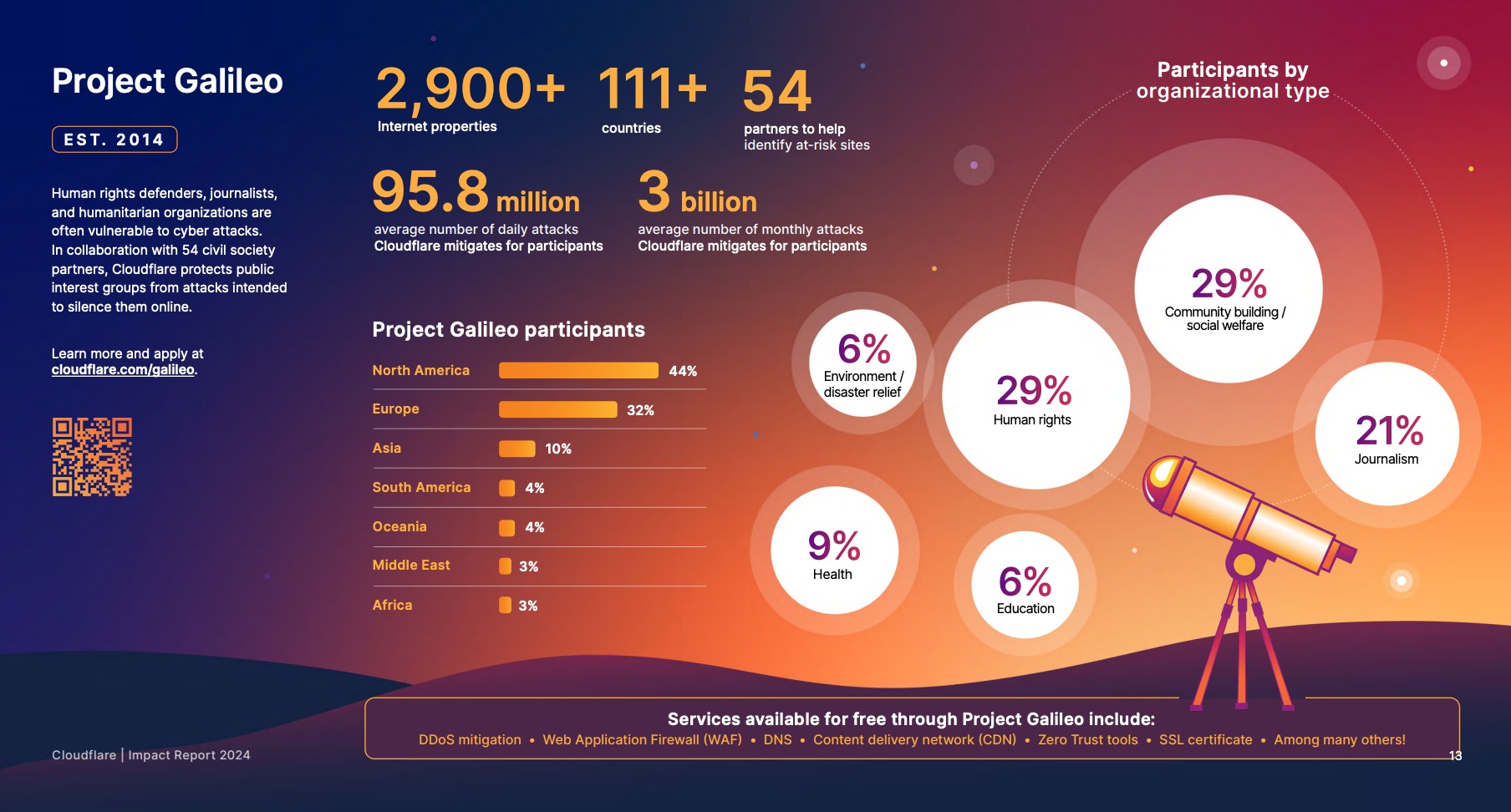
Join us in revolutionizing online security – get started with Turnstile now or dive straight into our how-to guides. Let’s help make the Internet a better place, together!

Removing uncertainty through “what-if” capacity planning

Post Syndicated from Curt Robords original https://blog.cloudflare.com/scenario-planner

Infrastructure planning for a network serving more than 81 million requests at peak and which is globally distributed across more than 330 cities in 120+ countries is complex. The capacity planning team at Cloudflare ensures there is enough capacity in place all over the world so that our customers have one less thing to worry about – our infrastructure, which should just work. Through our processes, the team puts careful consideration into “what-ifs”. What if something unexpected happens and one of our data centers fails? What if one of our largest customers triples, or quadruples their request count?  Across a gamut of scenarios like these, the team works to understand where traffic will be served from and how the Cloudflare customer experience may change.

This blog post gives a look behind the curtain of how these scenarios are modeled at Cloudflare, and why it’s so critical for our customers.

Scenario planning and our customers

Cloudflare customers rely on the data centers that Cloudflare has deployed all over the world, placing us within 50 ms of approximately 95% of the Internet-connected population globally. But round-trip time to our end users means little if those data centers don’t have the capacity to serve requests. Cloudflare has invested deeply into systems that are working around the clock to optimize the requests flowing through our network because we know that failures happen all the time: the Internet can be a volatile place. See our blog post from August 2024 on how we handle this volatility in real time on our backbone, and our blog post from late 2023 about how another system, Traffic Manager, actively works in and between data centers, moving traffic to optimize the customer experience around constraints in our data centers. Both of these systems do a fantastic job in real time, but there is still a gap — what about over the long term?  

Most of the volatility that the above systems are built to manage is resolved within shorter time scales than which we build plans for. (There are, of course, some failures that are exceptions.) Most scenarios we model still need to take into account the state of our data centers in the future, as well as what actions systems like Traffic Manager will take during those periods.  But before getting into those constraints, it’s important to note how capacity planning measures things: in units of CPU Time, defined as the time that each request takes in the CPU.  This is done for the same reasons that Traffic Manager uses CPU Time, in that it enables the team to 1) use a common unit across different types of customer workloads and 2) speak a common language with other teams and systems (like Traffic Manager). The same reasoning the Traffic Manager team cited in their own blog post is equally applicable for capacity planning: 

…using requests per second as a metric isn’t accurate enough when actually moving traffic. The reason for this is that different customers have different resource costs to our service; a website served mainly from cache with the WAF deactivated is much cheaper CPU wise than a site with all WAF rules enabled and caching disabled. So we record the time that each request takes in the CPU. We can then aggregate the CPU time across each plan to find the CPU time usage per plan. We record the CPU time in ms, and take a per second value, resulting in a unit of milliseconds per second.

This is important for customers for the same reason that the Traffic Manager team cited in their blog post as well: we can correlate CPU time to performance, specifically latency.

Now that we know our unit of measurement is CPU time, we need to set up our models with the new constraints associated with the change that we’re trying to model.  Specifically, there are a subset of constraints that we are particularly interested in because we know that they have the ability to impact our customers by impacting the availability of CPU in a data center.  These are split into two main inputs in our models: Supply and Demand.  We can think of these as “what-if” questions, such as the following examples:

Demand what-ifs

  • What if a new customer onboards to Cloudflare with a significant volume of requests and/or bytes?  

  • What if an existing customer increased its volume of requests and/or bytes by some multiplier (i.e. 2x, 3x, nx), at peak, for the next three months?

  • What if the growth rate, in number of requests and bytes, of all of our data centers worldwide increased from X to Y two months from now, indefinitely?

  • What if the growth rate, in number of requests and bytes, of data center facility A increased from X to Y one month from now?

  • What if traffic egressing from Cloudflare to a last-mile network shifted from one location (such as Boston) to another (such as New York City) next week?

Supply what-ifs

  • What if data center facility A lost some or all of its available servers two months from now?

  • What if we added X servers to data center facility A today?

  • What if some or all of our connectivity to other ASNs (12,500 Networks/nearly 300 Tbps) failed now?

Output

For any one of these, or a combination of them, in our model’s output, we aim to provide answers to the following: 

  • What will the overall capacity picture look like over time? 

  • Where will the traffic go? 

  • How will this impact our costs?

  • Will we need to deploy additional servers to handle the increased load?

Given these sets of questions and outputs, manually creating a model to answer each of these questions, or a combination of these questions, quickly becomes an operational burden for any team.  This is what led us to launch “Scenario Planner”.

Scenario Planner

In August 2024, the infrastructure team finished building “Scenario Planner”, a system that enables anyone at Cloudflare to simulate “what-ifs”. This provides our team the opportunity to quickly model hypothetical changes to our demand and supply metrics across time and in any of Cloudflare’s data centers. The core functionality of the system has to do with the same questions we need to answer in the manual models discussed above.  After we enter the changes we want to model, Scenario Planner converts from units that are commonly associated with each question to our common unit of measurement: CPU Time. These inputs are then used to model the updated capacity across all of our data centers, including how demand may be distributed in cases where capacity constraints may start impacting performance in a particular location.  As we know, if that happens then it triggers Traffic Manager to serve some portion of those requests from a nearby location to minimize impact on customers and user experience.

Updated demand questions with inputs

  • Question: What if a new customer onboards to Cloudflare with a significant volume of requests?  

  • Input: The new customer’s expected volume, geographic distribution, and timeframe of requests, converted to a count of virtual CPUs

  • Calculation(s): Scenario Planner converts from server count to CPU Time, and distributes the new demand across the regions selected according to the aggregate distribution of all customer usage.  

  • Question: What if an existing customer increased its volume of requests and/or bytes by some multiplier (i.e. 2x, 3x, nx), at peak, for the next three months?

  • Input: Select the customer name, the multiplier, and the timeframe

  • Calculation(s): Scenario Planner already has how the selected customer’s traffic is distributed across all data centers globally, so this involves simply multiplying that value by the multiplier selected by the user

  • Question: What if the growth rate, in number of requests and bytes, of all of our data centers worldwide increased from X to Y two months from now, indefinitely?

  • Input: Enter a new global growth rate and timeframe

  • Calculation(s): Scenario Planner distributes this growth across all data centers globally according to their current growth rate.  In other words, the global growth is an aggregation of all individual data center’s growth rates, and to apply a new “Global” growth rate, the system scales up each of the individual data center’s growth rates commensurate with the current distribution of growth.

  • Question: What if the growth rate, in number of requests and bytes, of data center facility A increased from X to Y one month from now?

  • Input: Select a data center facility, enter a new growth rate for that data center and the timeframe to apply that change across.

  • Calculation(s): Scenario Planner passes the new growth rate for the data center to the backend simulator, across the timeline specified by the user

Updated supply questions with inputs

  • Question: What if data center facility A lost some or all of its available servers two months from now?

  • Input: Select a data center, and enter the number of servers to remove, or select to remove all servers in that location, as well as the timeframe for when those servers will not be available

  • Calculation(s): Scenario Planner converts the server count entered (including all servers in a given location) to CPU Time before passing to the backend

  • Question: What if we added X servers to data center facility A today?

  • Input: Select a data center, and enter the number of servers to add, as well as the timeline for when those servers will first go live

  • Calculation(s): Scenario Planner converts the server count entered (including all servers in a given location) to CPU Time before passing to the backend

We made it simple for internal users to understand the impact of those changes because Scenario Planner outputs the same views that everyone who has seen our heatmaps and visual representations of our capacity status is familiar with. There are two main outputs the system provides: a heatmap and an “Expected Failovers” view. Below, we explore what these are, with some examples.

Heatmap

Capacity planning evaluates its success on its ability to predict demand: we generally produce a weekly, monthly, and quarterly forecast of 12 months to three years worth of demand, and nearly all of our infrastructure decisions are based on the output of this forecast.  Scenario Planner provides a view of the results of those forecasts that are implemented via a heatmap: it shows our current state, as well as future planned server additions that are scheduled based on the forecast.  

Here is an example of our heatmap, showing some of our largest data centers in Eastern North America (ENAM). Ashburn is showing as yellow, briefly, because our capacity planning threshold for adding more server capacity to our data centers is 65% utilization (based on CPU time supply and demand): this gives the Cloudflare teams time to procure additional servers, ship them, install them, and bring them live before customers will be impacted and systems like Traffic Manager would begin triggering.  The little cloud icons indicate planned upgrades of varying sizes to get ahead of forecasted future demand well ahead of time to avoid customer performance degradation.


The question Scenario Planner answers then is how this view changes with a hypothetical scenario: What if our Ashburn, Miami, and Atlanta facilities shut down completely?  This is unlikely to happen, but we would expect to see enormous impact on the remaining largest facilities in ENAM. We’ll simulate all three of these failing at the same time, taking them offline indefinitely:


This results in a view of our capacity through the rest of the year in the remaining large data centers in ENAM — capacity is clearly constrained: Traffic Manager will be working hard to mitigate any impact to customer performance if this were to happen. Our capacity view in the heatmap is capped at 75%: this is because Traffic Manager typically engages around this level of CPU utilization. Beyond 75%, Cloudflare customers may begin to experience increased latency, though this is dependent on the product and workload, and is in reality much more dynamic.


This outcome in the heatmap is not unexpected.  But now we typically get a follow-up question: clearly this traffic won’t fit in just Newark, Chicago, and Toronto, so where do all these requests get served from?  Enter the failover simulator: Capacity Planning has been simulating how Traffic Manager may work in the long term for quite a while, and for Scenario Planner, it was simple to extend this functionality to answer exactly this question.

There is currently no traffic being moved by Traffic Manager from these data centers, but our simulation shows a significant portion of the Atlanta CPU time being served from our DFW/Dallas data center as well as Newark (bottom pink), and Chicago (orange) through the rest of the year, during this hypothetical failure. With Scenario Planner, Capacity Planning can take this information and simulate multiple failures all over the world to understand the impact to customers, taking action to ensure that customers trusting Cloudflare with their web properties can expect high performance even in instances of major data center failures. 


Planning with uncertainty

Capacity planning a large global network comes with plenty of uncertainties. Scenario Planner is one example of the work the Capacity Planning team is doing to ensure that the millions of web properties our customers entrust to Cloudflare can expect consistent, top tier performance all over the world.

The Capacity Planning team is hiring — check out the Cloudflare careers page and search for open roles on the Capacity Planning team.

Introducing Automatic SSL/TLS: securing and simplifying origin connectivity

Post Syndicated from Alex Krivit original https://blog.cloudflare.com/introducing-automatic-ssl-tls-securing-and-simplifying-origin-connectivity


During Birthday Week 2022, we pledged to provide our customers with the most secure connection possible from Cloudflare to their origin servers automatically. I’m thrilled to announce we will begin rolling this experience out to customers who have the SSL/TLS Recommender enabled on August 8, 2024. Following this, remaining Free and Pro customers can use this feature beginning September 16, 2024, with Business and Enterprise customers to follow.

Although it took longer than anticipated to roll out, our priority was to achieve an automatic configuration both transparently and without risking any site downtime. Taking this additional time allowed us to balance enhanced security with seamless site functionality, especially since origin server security configuration and capabilities are beyond Cloudflare’s direct control. The new Automatic SSL/TLS setting will maximize and simplify the encryption modes Cloudflare uses to communicate with origin servers by using the SSL/TLS Recommender.

We first talked about this process in 2014: at that time, securing connections was hard to configure, prohibitively expensive, and required specialized knowledge to set up correctly. To help alleviate these pains, Cloudflare introduced Universal SSL, which allowed web properties to obtain a free SSL/TLS certificate to enhance the security of connections between browsers and Cloudflare.

This worked well and was easy because Cloudflare could manage the certificates and connection security from incoming browsers. As a result of that work, the number of encrypted HTTPS connections on the entire Internet doubled at that time. However, the connections made from Cloudflare to origin servers still required manual configuration of the encryption modes to let Cloudflare know the capabilities of the origin.

Today we’re excited to begin the sequel to Universal SSL and make security between Cloudflare and origins automatic and easy for everyone.

History of securing origin-facing connections

Ensuring that more bytes flowing across the Internet are automatically encrypted strengthens the barrier against interception, throttling, and censorship of Internet traffic by third parties.

Generally, two communicating parties (often a client and server) establish a secure connection using the TLS protocol. For a simplified breakdown:

  • The client advertises the list of encryption parameters it supports (along with some metadata) to the server.
  • The server responds back with its own preference of the chosen encryption parameters. It also sends a digital certificate so that the client can authenticate its identity.
  • The client validates the server identity, confirming that the server is who it says it is.
  • Both sides agree on a symmetric secret key for the session that is used to encrypt and decrypt all transmitted content over the connection.

Because Cloudflare acts as an intermediary between the client and our customer’s origin server, two separate TLS connections are established. One between the user’s browser and our network, and the other from our network to the origin server. This allows us to manage and optimize the security and performance of both connections independently.

Unlike securing connections between clients and Cloudflare, the security capabilities of origin servers are not under our direct control. For example, we can manage the certificate (the file used to verify identity and provide context on establishing encrypted connections) between clients and Cloudflare because it’s our job in that connection to provide it to clients, but when talking to origin servers, Cloudflare is the client.

Customers need to acquire and provision an origin certificate on their host. They then have to configure Cloudflare to expect the new certificate from the origin when opening a connection. Needing to manually configure connection security across multiple different places requires effort and is prone to human error.

This issue was discussed in the original Universal SSL blog:

For a site that did not have SSL before, we will default to our Flexible SSL mode, which means traffic from browsers to Cloudflare will be encrypted, but traffic from Cloudflare to a site’s origin server will not. We strongly recommend site owners install a certificate on their web servers so we can encrypt traffic to the origin … Once you’ve installed a certificate on your web server, you can enable the Full or Strict SSL modes which encrypt origin traffic and provide a higher level of security.

Over the years Cloudflare has introduced numerous products to help customers configure how Cloudflare should talk to their origin. These products include a certificate authority to help customers obtain a certificate to verify their origin server’s identity and encryption capabilities, Authenticated Origin Pulls that ensures only HTTPS (encrypted) requests from Cloudflare will receive a response from the origin server, and Cloudflare Tunnels that can be configured to proactively establish secure and private tunnels to the nearest Cloudflare data center. Additionally, the ACME protocol and its corresponding Certbot tooling make it easier than ever to obtain and manage publicly-trusted certificates on customer origins. While these technologies help customers configure how Cloudflare should communicate with their origin server, they still require manual configuration changes on the origin and to Cloudflare settings.

Ensuring certificates are configured appropriately on origin servers and informing Cloudflare about how we should communicate with origins can be anxiety-inducing because misconfiguration can lead to downtime if something isn’t deployed or configured correctly.

To simplify this process and help identify the most secure options that customers could be using without any misconfiguration risk, Cloudflare introduced the SSL/TLS Recommender in 2021. The Recommender works by probing customer origins with different SSL/TLS settings to provide a recommendation whether the SSL/TLS encryption mode for the web property can be improved. The Recommender has been in production for three years and has consistently managed to provide high quality origin-security recommendations for Cloudflare’s customers.

The SSL/TLS Recommender system serves as the brain of the automatic origin connection service that we are announcing today.
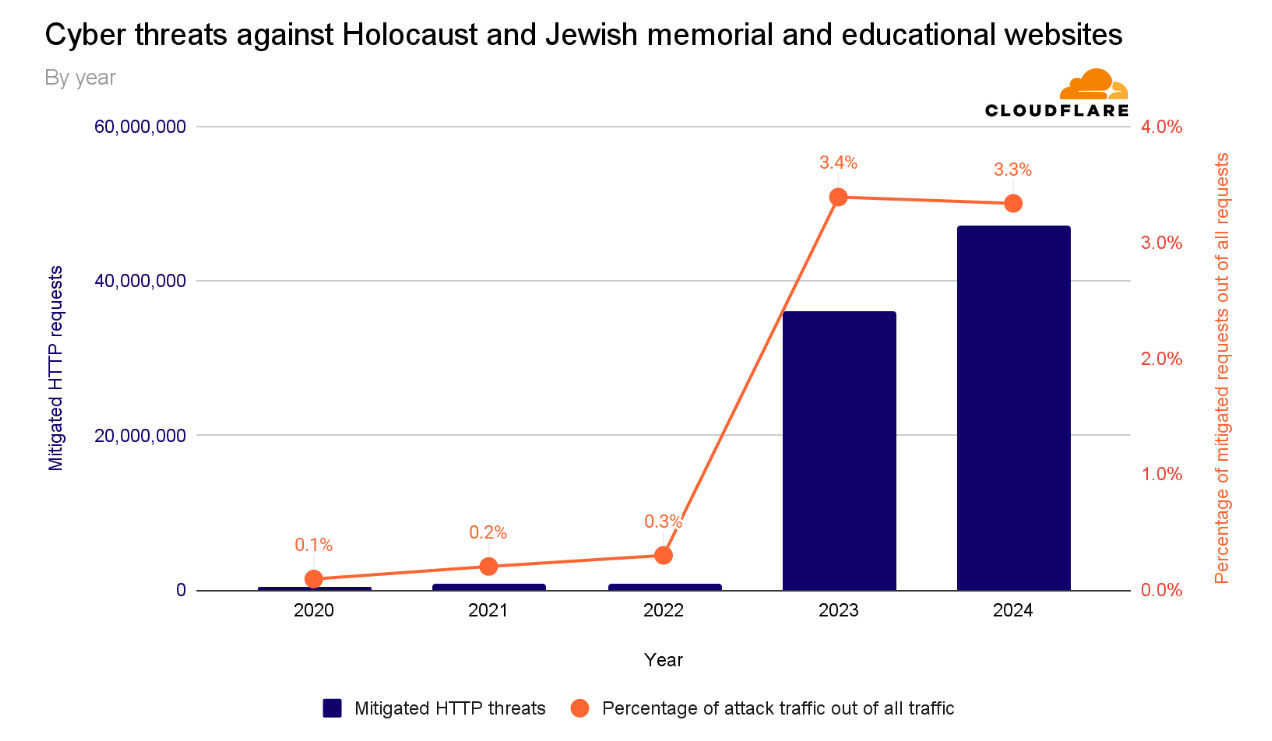
How does SSL/TLS Recommendation work?

The Recommender works by actively comparing content on web pages that have been downloaded using different SSL/TLS modes to see if it is safe and risk-free to update the mode Cloudflare uses to connect to origin servers.

Cloudflare currently offers five SSL/TLS modes:

  1. Off: No encryption is used for traffic between browsers and Cloudflare or between Cloudflare and origins. Everything is cleartext HTTP.
  2. Flexible: Traffic from browsers to Cloudflare can be encrypted via HTTPS, but traffic from Cloudflare to the origin server is not. This mode is common for origins that do not support TLS, though upgrading the origin configuration is recommended whenever possible. A guide for upgrading is available here.
  3. Full: Cloudflare matches the browser request protocol when connecting to the origin. If the browser uses HTTP, Cloudflare connects to the origin via HTTP; if HTTPS, Cloudflare uses HTTPS without validating the origin’s certificate. This mode is common for origins that use self-signed or otherwise invalid certificates.
  4. Full (Strict): Similar to Full Mode, but with added validation of the origin server’s certificate, which can be issued by a public CA like Let’s Encrypt or by Cloudflare Origin CA.
  5. Strict (SSL-only origin pull): Regardless of whether the browser-to-Cloudflare connection uses HTTP or HTTPS, Cloudflare always connects to the origin over HTTPS with certificate validation.

HTTP from visitor

HTTPS from visitor

Off

HTTP to origin

HTTP to origin

Flexible

HTTP to origin

HTTP to origin

Full

HTTP to origin

HTTPS without cert validation to origin

Full (strict)

HTTP to origin

HTTPS with cert validation to origin

Strict (SSL-only origin pull)

HTTPS with cert validation to origin

HTTPS with cert validation to origin

The SSL/TLS Recommender works by crawling customer sites and collecting links on the page (like any web crawler). The Recommender downloads content over both HTTP and HTTPS, making GET requests to avoid modifying server resources. It then uses a content similarity algorithm, adapted from the research paper “A Deeper Look at Web Content Availability and Consistency over HTTP/S” (TMA Conference 2020), to determine if content matches. If the content does match, the Recommender makes a determination for whether the SSL/TLS mode can be increased without misconfiguration risk.

The recommendations are currently delivered to customers via email.

When the Recommender is making security recommendations, it errs on the side of maintaining current site functionality to avoid breakage and usability issues. If a website is non-functional, blocks all bots, or has SSL/TLS-specific Page Rules or Configuration Rules, the Recommender may not complete its scans and provide a recommendation. It was designed to maximize domain security, but will not help resolve website or domain functionality issues.

The crawler uses the user agent “Cloudflare-SSLDetector” and is included in Cloudflare’s list of known good bots. It ignores robots.txt (except for rules specifically targeting its user agent) to ensure accurate recommendations.

When downloading content from your origin server over both HTTP and HTTPS and comparing the content, the Recommender understands the current SSL/TLS encryption mode that your website uses and what risk there might be to the site functionality if the recommendation is followed.

Using SSL/TLS Recommender to automatically manage SSL/TLS settings

Previously, signing up for the SSL/TLS Recommender provided a good experience for customers, but only resulted in an email recommendation in the event that a zone’s current SSL/TLS modes could be updated. To Cloudflare, this was a positive signal that customers wanted their websites to have more secure connections to their origin servers – over 2 million domains have enabled the SSL/TLS Recommender. However, we found that a significant number of users would not complete the next step of pushing the button to inform Cloudflare that we could communicate over the upgraded settings. Only 30% of the recommendations that the system provided were followed.

With the system designed to increase security while avoiding any breaking changes, we wanted to provide an option for customers to allow the Recommender to help upgrade their site security, without requiring further manual action from the customer. Therefore, we are introducing a new option for managing SSL/TLS configuration on Cloudflare: Automatic SSL/TLS.

Automatic SSL/TLS uses the SSL/TLS Recommender to make the determination as to what encryption mode is the most secure and safest for a website to be set to. If there is a more secure option for your website (based on your origin certification or capabilities), Automatic SSL/TLS will find it and apply it for your domain. The other option, Custom SSL/TLS, will work exactly like the setting the encryption mode does today. If you know what setting you want, just select it using Custom SSL/TLS, and we’ll use it.
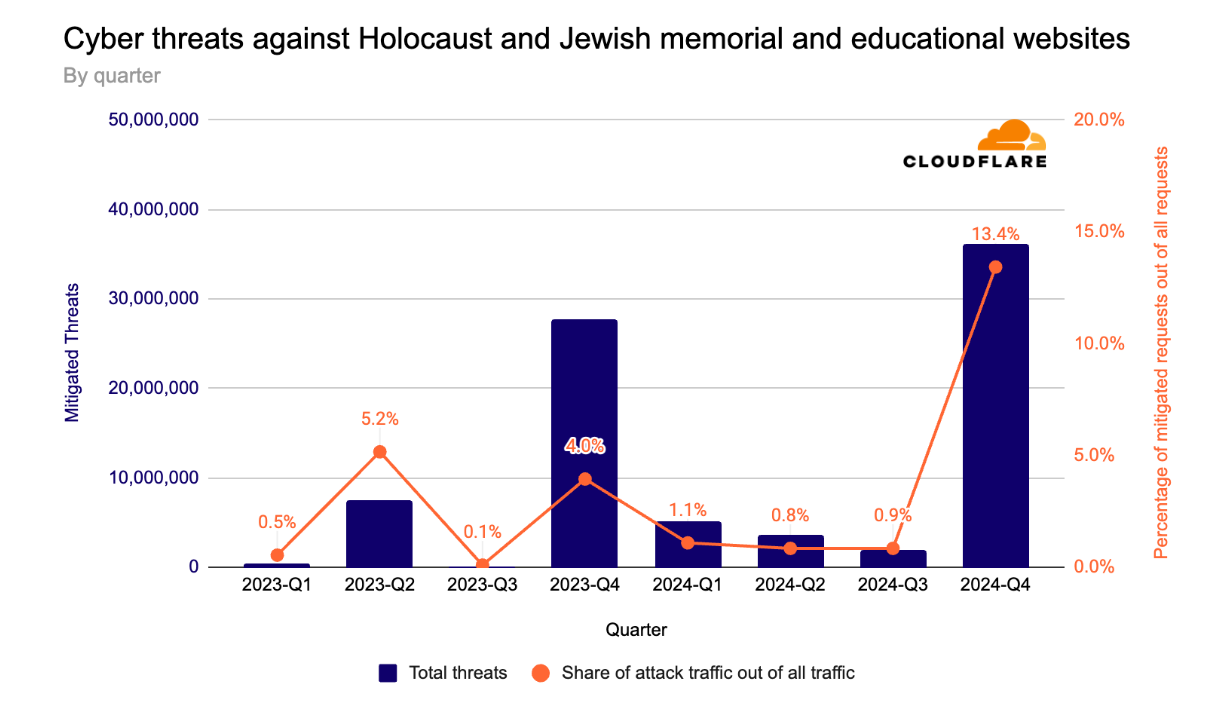
Automatic SSL/TLS is currently meant to service an entire website, which typically works well for those with a single origin. For those concerned that they have more complex setups which use multiple origin servers with different security capabilities, don’t worry. Automatic SSL/TLS will still avoid breaking site functionality by looking for the best setting that works for all origins serving a part of the site’s traffic.
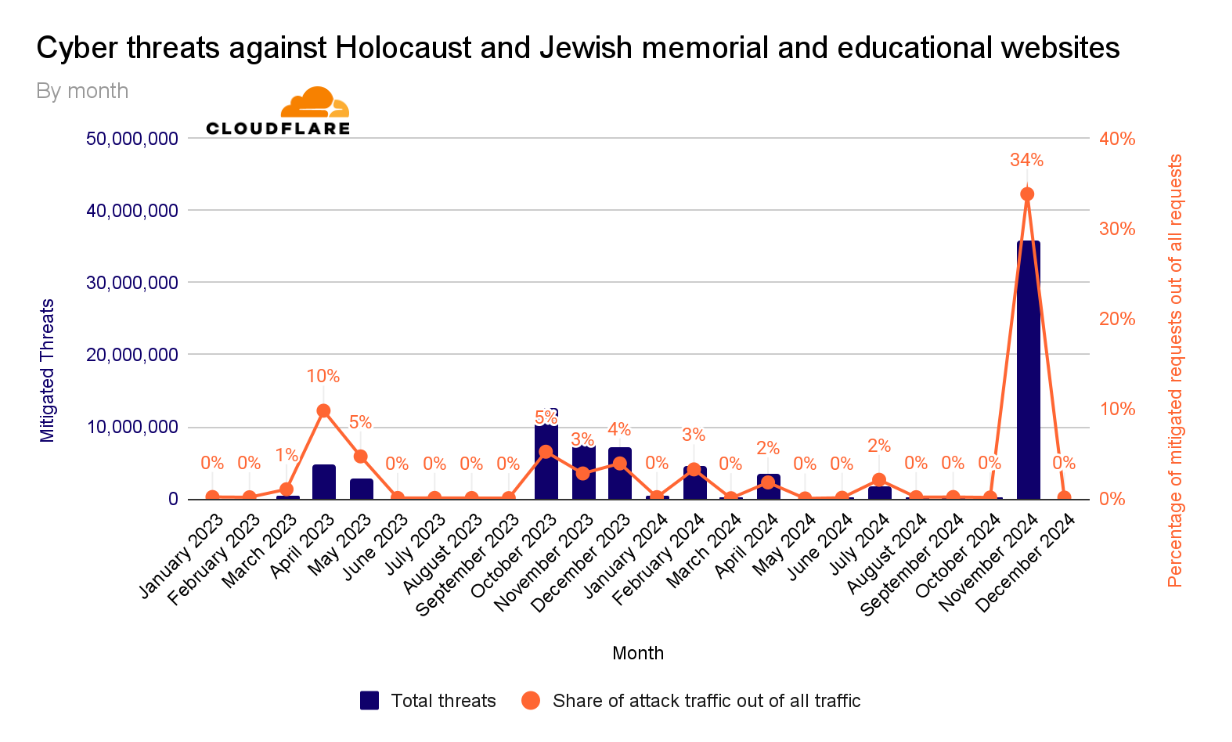
If customers want to segment the SSL/TLS mode used to communicate with the numerous origins that service their domain, they can achieve this by using Configuration Rules. These rules allow you to set more precise modes that Cloudflare should respect (based on path or subdomain or even IP address) to maximize the security of the domain based on your desired Rules criteria. If your site uses SSL/TLS-specific settings in a Configuration Rule or Page rule, those settings will override the zone-wide Automatic and Custom settings.

The goal of Automatic SSL/TLS is to simplify and maximize the origin-facing security for customers on Cloudflare. We want this to be the new default for all websites on Cloudflare, but we understand that not everyone wants this new default, and we will respect your decision for how Cloudflare should communicate with your origin server. If you block the Recommender from completing its crawls, the origin server is non-functional or can’t be crawled, or if you want to opt out of this default and just continue using the same encryption mode you are using today, we will make it easy for you to tell us what you prefer.

How to onboard to Automatic SSL/TLS

To improve the security settings for everyone by default, we are making the following default changes to how Cloudflare configures the SSL/TLS level for all zones:

Starting on August 8, 2024, websites with the SSL/TLS Recommender currently enabled will have the Automatic SSL/TLS setting enabled by default. Enabling does not mean that the Recommender will begin scanning and applying new settings immediately though. There will be a one-month grace period before the first scans begin and the recommended settings are applied. Enterprise (ENT) customers will get a six-week grace period. Origin scans will start getting scheduled by September 9, 2024, for non-Enterprise customers and September 23rd for ENT customers with the SSL Recommender enabled. This will give customers the ability to opt out by removing Automatic SSL/TLS and selecting the Custom mode that they want to use instead.

Further, during the second week of September all new zones signing up for Cloudflare will start seeing the Automatic SSL/TLS setting enabled by default.

Beginning September 16, 2024, remaining Free and Pro customers will start to see the new Automatic SSL/TLS setting. They will also have a one-month grace period to opt out before the scans start taking effect.

Customers in the cohort having the new Automatic SSL/TLS setting applied will receive an email communication regarding the date that they are slated for this migration as well as a banner on the dashboard that mentions this transition as well. If they do not wish for Cloudflare to change anything in their configurations, the process for opt-out of this migration is outlined below.

Following the successful migration of Free and Pro customers, we will proceed to Business and Enterprise customers with a similar cadence. These customers will get email notifications and information in the dashboard when they are in the migration cohort.

The Automatic SSL/TLS setting will not impact users that are already in Strict or Full (strict) mode nor will it impact websites that have opted-out.

Opting out

There are a number of reasons why someone might want to configure a lower-than-optimal security setting for their website. Some may want to set a lower security setting for testing purposes or to debug some behavior. Whatever the reason, the options to opt-out of the Automatic SSL/TLS setting during the migration process are available in the dashboard and API.

To opt-out, simply select Custom SSL/TLS in the dashboard (instead of the enabled Automatic SSL/TLS) and we will continue to use the previously set encryption mode that you were using prior to the migration. Automatic and Custom SSL/TLS modes can be found in the Overview tab of the SSL/TLS section of the dashboard. To enable your preferred mode, select configure.

If you want to opt out via the API you can make this API call on or before the grace period expiration date.

    curl --request PATCH \
        --url https://api.cloudflare.com/client/v4/zones/<insert_zone_tag_here>/settings/ssl_automatic_mode \
        --header 'Authorization: Bearer <insert_api_token_here>' \
        --header 'Content-Type: application/json' \
        --data '{"value":"custom"}'

If an opt-out is triggered, there will not be a change to the currently configured SSL/TLS setting. You are also able to change the security level at any time by going to the SSL/TLS section of the dashboard and choosing the Custom setting you want (similar to how this is accomplished today).

If at a later point you’d like to opt in to Automatic SSL/TLS, that option is available by changing your setting from Custom to Automatic.

What if I want to be more secure now?

We will begin to roll out this change to customers with the SSL/TLS Recommender enabled on August 8, 2024. If you want to enroll in that group, we recommend enabling the Recommender as soon as possible.

If you read this and want to make sure you’re at the highest level of backend security already, we recommend Full (strict) or Strict mode. Directions on how to make sure you’re correctly configured in either of those settings are available here and here.

If you prefer to wait for us to automatically upgrade your connection to the maximum encryption mode your origin supports, please watch your inbox for the date we will begin rolling out this change for you.

Avoiding downtime: modern alternatives to outdated certificate pinning practices

Post Syndicated from Dina Kozlov original https://blog.cloudflare.com/why-certificate-pinning-is-outdated


In today’s world, technology is quickly evolving and some practices that were once considered the gold standard are quickly becoming outdated. At Cloudflare, we stay close to industry changes to ensure that we can provide the best solutions to our customers. One practice that we’re continuing to see in use that no longer serves its original purpose is certificate pinning. In this post, we’ll dive into certificate pinning, the consequences of using it in today’s Public Key Infrastructure (PKI) world, and alternatives to pinning that offer the same level of security without the management overhead.  

PKI exists to help issue and manage TLS certificates, which are vital to keeping the Internet secure – they ensure that users access the correct applications or servers and that data between two parties stays encrypted. The mis-issuance of a certificate can pose great risk. For example, if a malicious party is able to issue a TLS certificate for your bank’s website, then they can potentially impersonate your bank and intercept that traffic to get access to your bank account. To prevent a mis-issued certificate from intercepting traffic, the server can give a certificate to the client and say “only trust connections if you see this certificate and drop any responses that present a different certificate” – this practice is called certificate pinning.

In the early 2000s, it was common for banks and other organizations that handle sensitive data to pin certificates to clients. However, over the last 20 years, TLS certificate issuance has evolved and changed, and new solutions have been developed to help customers achieve the security benefit they receive through certificate pinning, with simpler management, and without the risk of disruption.

Cloudflare’s mission is to help build a better Internet, which is why our teams are always focused on keeping domains secure and online.

Why certificate pinning is causing more outages now than it did before

Certificate pinning is not a new practice, so why are we emphasizing the need to stop using it now? The reason is that the PKI ecosystem is moving towards becoming more agile, flexible, and secure. As a part of this change, certificate authorities (CAs) are starting to rotate certificates and their intermediates, certificates that bridge the root certificate and the domain certificate, more frequently to improve security and encourage automation.

These more frequent certificate rotations are problematic from a pinning perspective because certificate pinning relies on the exact matching of certificates. When a certificate is rotated, the new certificate might not match the pinned certificate on the client side. If the pinned certificate is not updated to reflect the contents of the rotated certificate, the client will reject the new certificate, even if it’s valid and issued by the same CA. This mismatch leads to a failure in establishing a secure connection, causing the domain or application to become inaccessible until the pinned certificate is updated.

Since the start of 2024, we have seen the number of customer reported outages caused by certificate pinning significantly increase. (As of this writing, we are part way through July and Q3 has already seen as many outages as the last three quarters of 2023 combined.)

We can attribute this rise to two major events: Cloudflare migrating away from using DigiCert as a certificate authority and Google and Let’s Encrypt intermediate CA rotations.

Before migrating customer’s certificates away from using DigiCert as the CA, Cloudflare sent multiple notifications to customers to inform them that they should update or remove their certificate pins, so that the migration does not impact their domain’s availability.

However, what we’ve learned is that almost all customers that were impacted by the change were unaware that they had a certificate pin in place. One of the consequences of using certificate pinning is that the “set and forget” mentality doesn’t work, now that certificates are being rotated more frequently. Instead, changes need to be closely monitored to ensure that a regular certificate renewal doesn’t cause an outage. This goes to show that to implement certificate pinning successfully, customers need a robust system in place to track certificate changes and implement them.

We built our Universal SSL pipeline to be resilient and redundant, ensuring that we can always issue and renew a TLS certificate on behalf of our customers, even in the event of a compromise or revocation. CAs are starting to make changes like more frequent certificate rotations to encourage a move towards a more secure ecosystem. Now, it’s up to domain owners to stop implementing legacy practices like certificate pinning, which cause breaking changes, and instead start adopting modern standards that aim to provide the same level of security, but without the management overhead or risk.

Modern standards & practices are making the need for certificate pinning obsolete

Shorter certificate lifetimes

Over the last few years, we have seen certificate lifetimes quickly decrease. Before 2011, a certificate could be valid for up to 96 months (eight years) and now, in 2024, the maximum validity period for a certificate is 1 year. We’re seeing this trend continue to develop, with Google Chrome pushing for shorter CA, intermediate, and certificate lifetimes, advocating for 3 month certificate validity as the new standard.

This push improves security and redundancy of the entire PKI ecosystem in several ways. First, it reduces the scope of a compromise by limiting the amount of time that a malicious party could control a TLS certificate or private key. Second, it reduces reliance on certificate revocation, a process that lacks standardization and enforcement by clients, browsers, and CAs. Lastly, it encourages automation as a replacement for legacy certificate practices that are time-consuming and error-prone.

Cloudflare is moving towards only using CAs that follow the ACME (Automated Certificate Management Environment) protocol, which by default, issues certificates with 90 day validity periods. We have already started to roll this out to Universal SSL certificates and have removed the ability to issue 1-year certificates as a part of our reduced usage of DigiCert.

Regular rotation of intermediate certificates

The CAs that Cloudflare partners with, Let’s Encrypt and Google Trust Services, are starting to rotate their intermediate CAs more frequently. This increased rotation is beneficial from a security perspective because it limits the lifespan of intermediate certificates, reducing the window of opportunity for attackers to exploit a compromised intermediate. Additionally, regular rotations make it easier to revoke an intermediate certificate if it becomes compromised, enhancing the overall security and resiliency of the PKI ecosystem.

Both Let’s Encrypt and Google Trust Services changed their intermediate chains in June 2024. In addition, Let’s Encrypt has started to balance their certificate issuance across 10 intermediates (5 RSA and 5 ECDSA).

Cloudflare customers using Advanced Certificate Manager have the ability to choose their issuing CA. The issue is that even if Cloudflare uses the same CA for a certificate renewal, there is no guarantee that the same certificate chain (root or intermediate) will be used to issue the renewed certificate. As a result, if pinning is used, a successful renewal could cause a full outage for a domain or application.

This happens because certificate pinning relies on the exact matching of certificates. When an intermediate certificate is rotated or changed, the new certificate might not match the pinned certificate on the client side. As a result, the client will reject the renewed certificate, even if it’s a valid certificate issued by the same CA. This mismatch leads to a failure on the client side, causing the domain to become inaccessible until the pinned certificate is updated to reflect the new intermediate certificate. This risk of an unexpected outage is a major downside of continuing to use certificate pinning, especially as CAs increasingly update their intermediates as a security measure.

Increased use of certificate transparency

Certificate transparency (CT) logs provide a standardized framework for monitoring and auditing the issuance of TLS certificates. CT logs help detect misissued or malicious certificates and Cloudflare customers can set up CT monitoring to receive notifications about any certificates issued for their domain. This provides a better mechanism for detecting certificate mis-issuance, reducing the need for pinning.

Why modern standards make certificate pinning obsolete

Together, these practices – shorter certificate lifetimes, regular rotations of intermediate certificates, and increased use of certificate transparency – address the core security concerns that certificate pinning was initially designed to mitigate. Shorter lifetimes and frequent rotations limit the impact of compromised certificates, while certificate transparency allows for real time monitoring and detection of misissued certificates. These advancements are automated, scalable, and robust and eliminate the need for the manual and error-prone process of certificate pinning. By adopting these modern standards, organizations can achieve a higher level of security and resiliency without the management overhead and risk associated with certificate pinning.

Reasons behind continued use of certificate pinning

Originally, certificate pinning was designed to prevent monster-in-the-middle (MITM) attacks by associating a hostname with a specific TLS certificate, ensuring that a client could only access an application if the server presented a certificate issued by the domain owner.

Certificate pinning was traditionally used to secure IoT (Internet of Things) devices, mobile applications, and APIs. IoT devices are usually equipped with more limited processing power and are oftentimes unable to perform software updates. As a result, they’re less likely to perform things like certificate revocation checks to ensure that they’re using a valid certificate. As a result, it’s common for these devices to come pre-installed with a set of trusted certificate pins to ensure that they can maintain a high level of security. However, the increased frequency of certificate changes poses significant risk, as many devices have immutable software, preventing timely updates to certificate pins during renewals.

Similarly, certificate pinning has been employed to secure Android and iOS applications, ensuring that only the correct certificates are served. Despite this, both Apple and Google warn developers against the use of certificate pinning due to the potential for failures if not implemented correctly.

Understanding the trade-offs of different certificate pinning implementations

While certificate pinning can be applied at various levels of the certificate chain, offering different levels of granularity and security, we don’t recommend it due to the challenges and risks associated with its use.

Pinning certificates at the root certificate

Pinning the root certificate instructs a client to only trust certificates issued by that specific Certificate Authority (CA).

Advantages:

  • Simplified management: Since root certificates have long lifetimes (>10 years) and rarely change, pinning at the root reduces the need to frequently update certificate pins, making this the easiest option in terms of management overhead.

Disadvantages:

  • Broader trust: Most Certificate Authorities (CAs) issue their certificates from one root, so pinning a root CA certificate enables the client to trust every certificate issued from that CA. However, this broader trust can be problematic. If the root CA is compromised, every certificate issued by that CA is also compromised, which significantly increases the potential scope and impact of a security breach. This broad trust can therefore create a single point of failure, making the entire ecosystem more vulnerable to attacks.
  • Neglected Maintenance: Root certificates are infrequently rotated, which can lead to a “set and forget” mentality when pinning them. Although it’s rare, CAs do change their roots and when this happens, a correctly renewed certificate will break the pin, causing an outage. Since these pins are rarely updated, resolving such outages can be time-consuming as engineering teams try to identify and locate where the outdated pins have been set.

Pinning certificates at the intermediate certificate

Pinning an intermediate certificate instructs a client to only trust certificates issued by a specific intermediate CA, issued from a trusted root CA. With lifetimes ranging from 3 to 10 years, intermediate certificates offer a better balance between security and flexibility.

Advantages:

  • Better security: Narrows down the trust to certificates issued by a specific intermediate CA.
  • Simpler management: With intermediate CA lifetimes spanning a few years, certificate pins require less frequent updates, reducing the maintenance burden.

Disadvantages:

  • Broad trust: While pinning on an intermediate certificate is more restrictive than pinning on a root certificate, it still allows for a broad range of certificates to be trusted.
  • Maintenance: Intermediate certificates are rotated more frequently than root certificates, requiring more regular updates to pinned certificates.
  • Less predictability: With CAs like Let’s Encrypt issuing their certificates from varying intermediates, it’s no longer possible to predict which certificate chain will be used during a renewal, making it more likely for a certificate renewal to break a certificate pin and cause an outage.

Pinning certificates at the leaf certificate

Pinning the leaf certificate instructs a client to only trust that specific certificate. Although this option offers the highest level of security, it also poses the greatest risk of causing an outage during a certificate renewal.

Advantages:

  • High security: Provides the highest level of security by ensuring that only a specific certificate is trusted, minimizing the risk of a monster-in-the-middle attack.

Disadvantages:

  • Risky: Requires careful management of certificate renewals to prevent outages.
  • Management burden: Leaf certificates have shorter lifetimes, with 90 days becoming the standard, requiring constant updates to the certificate pin to avoid a breaking change during a renewal.

Alternatives to certificate pinning

Given the risks and challenges associated with certificate pinning, we recommend the following as more effective and modern alternatives to achieve the same level of security (preventing a mis-issued certificate from intercepting traffic) that certificate pinning aims to provide.

Shorter certificate lifetimes

Using shorter certificate lifetimes ensures that certificates are regularly renewed and replaced, reducing the risk of misuse of a compromised certificate by limiting the window of opportunity for attackers.

By default, Cloudflare issues 90-day certificates for customers. Customers using Advanced Certificate Manager can request TLS certificates with lifetimes as short as 14 days.

CAA records to restrict which CAs can issue certificates for a domain

Certification Authority Authorization (CAA) DNS records allow domain owners to specify which CAs are allowed to issue certificates for their domain. This adds an extra layer of security by restricting issuance to trusted authorities, providing a similar benefit as pinning a root CA certificate. For example, if you’re using Google Trust Services as your CA, you can add the following CAA DNS record to ensure that only that CA issues certificates for your domain:

example.com         CAA 0 issue "pki.goog"

By default, Cloudflare sets CAA records on behalf of customers to ensure that certificates can be issued from the CAs that Cloudflare partners with. Customers can choose to further restrict that list of CAs by adding their own CAA records.

Certificate Transparency & monitoring

Certificate Transparency (CT) provides the ability to monitor and audit certificate issuances. By logging certificates in publicly accessible CT logs, organizations are able to monitor, detect, and respond to misissued certificates at the time they are issued.

Cloudflare customers can set up CT Monitoring to receive notifications when certificates are issued in their domain. Today, we notify customers using the product about all certificates issued for their domains. In the future, we will allow customers to filter those notifications, so that they are only notified when an external party that isn’t Cloudflare issues a certificate for the owner’s domain. This product is available to all customers and can be enabled with the click of a button.

Multi-vantage point Domain Control Validation (DCV) checks to prevent mis-issuances

For a CA to issue a certificate, the domain owner needs to prove ownership of the domain by serving Domain Control Validation (DCV) records. While uncommon, one attack vector of DCV validation allows an actor to perform BGP hijacking to spoof the DNS response and trick a CA into mis-issuing a certificate. To prevent this form of attack, CAs have started to perform DCV validation checks from multiple locations to ensure that a certificate is only issued when a full quorum is met.

Cloudflare has developed its own solution that CAs can use to perform multi vantage point DCV checks. In addition, Cloudflare partners with CAs like Let’s Encrypt who continue to develop these checks to support new locations, reducing the risk of a certificate mis-issuance.

Specifying ACME account URI in CAA records

A new enhancement to the ACME protocol allows certificate requesting parties to specify an ACME account URI, the ID of the ACME account that will be requesting the certificates, in CAA records to tighten control over the certificate issuance process. This ensures that only certificates issued through an authorized ACME account are trusted, adding another layer of verification to certificate issuance. Let’s Encrypt supports this extension to CAA records which allows users with a Let’s Encrypt certificate to set a CAA DNS record, such as the following:

example.com         CAA 0 issue "letsencrypt.org;accounturi=https://acme-v02.api.letsencrypt.org/acme/acct/<account_id>"

With this record, Let’s Encrypt subscribers can ensure that only Let’s Encrypt can issue certificates for their domain and that these certificates were only issued through their ACME account.

Cloudflare will look to support this enhancement automatically for customers in the future.

Conclusion

Years ago, certificate pinning was a valuable tool for enhancing security, but over the last 20 years, it has failed to keep up with new advancements in the certificate ecosystem. As a result, instead of providing the intended security benefit, it has increased the number of outages caused during a successful certificate renewal. With new enhancements in certificate issuance standards and certificate transparency, we’re encouraging our customers and the industry to move towards adopting those new standards and deprecating old ones.

If you’re a Cloudflare customer and are required to pin your certificate, the only way to ensure a zero-downtime renewal is to upload your own custom certificates. We recommend using the staging network to test your certificate renewal to ensure you have updated your certificate pin.

Making Magic Transit health checks faster and more responsive

Post Syndicated from Meyer Zinn original https://blog.cloudflare.com/making-magic-transit-health-checks-faster-and-more-responsive/

Making Magic Transit health checks faster and more responsive

Making Magic Transit health checks faster and more responsive

Magic Transit advertises our customer’s IP prefixes directly from our edge network, applying DDoS mitigation and firewall policies to all traffic destined for the customer’s network. After the traffic is scrubbed, we deliver clean traffic to the customer over GRE tunnels (over the public Internet or Cloudflare Network Interconnect). But sometimes, we experience inclement weather on the Internet: network paths between Cloudflare and the customer can become unreliable or go down. Customers often configure multiple tunnels through different network paths and rely on Cloudflare to pick the best tunnel to use if, for example, some router on the Internet is having a stormy day and starts dropping traffic.

Making Magic Transit health checks faster and more responsive

Because we use Anycast GRE, every server across Cloudflare’s 200+ locations globally can send GRE traffic to customers. Every server needs to know the status of every tunnel, and every location has completely different network routes to customers. Where to start?

In this post, I’ll break down my work to improve the Magic Transit GRE tunnel health check system, creating a more stable experience for customers and dramatically reducing CPU and memory usage at Cloudflare’s edge.

Everybody has their own weather station

To decide where to send traffic, Cloudflare edge servers need to periodically send health checks to each customer tunnel endpoint.

When Magic Transit was first launched, every server sent a health check to every tunnel once per minute. This naive, “shared-nothing” approach was simple to implement and served customers well, but would occasionally deliver less than optimal health check behavior in two specific ways.

Way #1: Inconsistent weather reports

Sometimes a server just runs into bad luck, and a check randomly fails. From there, the server would mark the tunnel as degraded and immediately start shifting traffic towards a fallback tunnel. Imagine you and I were standing right next to each other under a clear sky, and I felt a single drop of water and declared, “It’s raining!” whereas you felt no raindrops and declared, “It’s all clear!”

With relatively minimal data per server, it means that health determinations can be imprecise. It also means that individual servers could overreact to individual failures. From a customer’s point of view, it’s like Cloudflare detected a problem with the primary tunnel. But, in reality, the server just got a bad weather forecast and made a different judgement call.

Way #2: Slow to respond to storms

Even when tunnel states are consistent across servers, they can be slow to respond. In this case, if a server runs a health check which succeeds, but a second later the tunnel goes down, the next health check won’t happen for another 59 seconds. Until that next health check fails, the server has no idea anything is wrong, so it keeps sending traffic over unhealthy tunnels, leading to packet loss and latency for the customer.

Much like how a live, up-to-the-minute rain forecast helps you decide when to leave to avoid the rain, servers that send tunnel checks more frequently get a finer view of the Internet weather and can respond faster to localized storms. But if every server across Cloudflare’s edge sent health checks too frequently, we would very quickly start to overwhelm our customers’ networks.

All of the weather stations nearby start sharing observations

Clearly, we needed to hammer out some kinks. We wanted servers in the same location to come to the same conclusions about where to send traffic, and we wanted faster detection of issues without increasing the frequency of tunnel checks.

Health checks sent from servers in the same data center take the same route across the Internet. Why not share the results among them?

Instead of a single raindrop causing me to declare that it’s raining, I’d tell you about the raindrop I felt, and you’d tell me about the clear sky you’re looking at. Together, we come to the same conclusion: there isn’t enough rain to open an umbrella.

There is even a special networking protocol that allows us to easily share information between servers in the same private network. From the makers of Unicast and Anycast, now presenting: Multicast!

A single IP address does not necessarily represent a single machine in a network. The Internet Protocol specifies a way to send one message that gets delivered to a group of machines, like writing to an email list. Every machine has to opt into the group—we can’t just enroll people at random for our email list—but once a machine joins, it receives a copy of any message sent to the group’s address.

Making Magic Transit health checks faster and more responsive

The servers in a Cloudflare edge data center are part of the same private network, so for “version 2” of our health check system, we had each server in a data center join a multicast group and share their health check results with one another. Each server still made an independent assessment for each tunnel, but that assessment was based on data collected by all servers in the same location.

This second version of tunnel health checks resulted in more consistent  tunnel health determinations by servers in the same data center. It also resulted in faster response times—especially in large data centers where servers receive updates from their peers very rapidly.

However, we started seeing scaling problems. As we added more customers, we added more tunnel endpoints where we need to check the weather. In some of our larger data centers, each server was receiving close to half a billion messages per minute.

Imagine it’s not just you and me telling each other about the weather above us. You’re in a crowd of hundreds of people, and now everyone is shouting the weather updates for thousands of cities around the world!

One weather station to rule them all

As an engineering intern on the Magic Transit team, my project this summer has been developing a third approach. Rather than having every server infrequently check the weather for every tunnel and shouting the observation to everyone else, now every server tunnel can frequently check the weather for a few tunnels. With this new approach, servers would then only tell the others about the overall weather report—not every individual measurement.

That scenario sounds more efficient, but we need to distribute the task of sending tunnel health checks across all the servers in a location so one server doesn’t get an overwhelming amount of work. So how can we assign tunnels to servers in a way that doesn’t require a centralized orchestrator or shared database? Enter consistent hashing, the single coolest distributed computing concept I got to apply this summer.

Every server sends a multicast “heartbeat” every few seconds. Then, by listening for multicast heartbeats, each server can construct a list of the IP addresses of peers known to be alive, including its own address, sorted by taking the hash of each address. Every server in a data center has the same list of peers in the same order.

When a server needs to decide which tunnels it is responsible for sending health checks to, the server simply hashes each tunnel to an integer and searches through the list of peer addresses to find the peer with the smallest hash greater than the tunnel’s hash, wrapping around to the first peer if no peer is found. The server is responsible for sending health checks to the tunnel when the assigned peer’s address equals the server’s address.

If a server stops sending messages for a long enough period of time, the server gets removed from the known peers list. As a consequence, the next time another server tries to hash a tunnel the removed peer was previously assigned, the tunnel simply gets reassigned to the next peer in the list.

And like magic, we have devised a scheme to consistently assign tunnels to servers in a way that is resilient to server failures and does not require any extra coordination between servers beyond heartbeats. Now, the assigned server can send health checks way more frequently, compose more precise weather forecasts, and share those forecasts without being drowned out by the crowd.

Results

Releasing the new health check system globally reduced Magic Transit’s CPU usage by over 70% and memory usage by nearly 85%.

Memory usage (measured in terabytes):

Making Magic Transit health checks faster and more responsive

CPU usage (measured in CPU-seconds per two minute interval, averaged over two days):

Making Magic Transit health checks faster and more responsive

Reducing the number of multicast messages means that servers can now keep up with the Internet weather, even in the largest data centers. We’re now poised for the next stage of Magic Transit’s growth, just in time for our two-year anniversary.

If you want to help build the future of networking, join our team.