Post Syndicated from Greg Brimble original https://blog.cloudflare.com/next-on-pages/


You can now deploy Next.js applications which opt in to the Edge Runtime on Cloudflare Pages. Next.js is the fourth full-stack web framework that the Pages platform officially supports, and it is one of the most popular in the ‘Jamstack-y’ space.
Cloudflare Pages started its journey as a platform for static websites, but with last year’s addition of Pages Functions powered by Cloudflare Workers, the platform has progressed to support an even more diverse range of use cases. Pages Functions allows developers to sprinkle in small pieces of server-side code with its simple file-based routing, or, as we’ve seen with the adoption from other frameworks (namely SvelteKit, Remix and Qwik), Pages Functions can be used to power your entire full-stack app. The folks behind Remix previously talked about the advantages of adopting open standards, and we’ve seen this again with Next.js’ Edge Runtime.
Next.js’ Edge Runtime
Next.js’ Edge Runtime is an experimental mode that developers can opt into which results in a different type of application being built. Previously, Next.js applications which relied on server-side rendering (SSR) functionality had to be deployed on a Node.js server. Running a Node.js server has significant overhead, and our Cloudflare Workers platform was fundamentally built on a different technology, V8.
However, when Next.js introduced the Edge Runtime mode in June 2022, we saw the opportunity to bring this widely used framework to our platform. We’re very excited that this is being developed in coordination with the WinterCG standards to ensure interoperability across the various web platforms and to ensure that developers have the choice on where they run their business, without fearing any significant vendor lock-in.
It’s important to note that some existing Next.js apps built for Node.js won’t immediately work on Pages. If your application relies on any Node.js built-ins or long-running processes, then Pages may not support your app with today’s announcement as we’re working on expanding our support for Node.js.
However, we see the migration to the Edge Runtime as an effort that’s worthy of investment, to run your applications, well, on the edge! These applications are cheaper to run, respond faster to users and have the latest features that full-stack frameworks offer. We’re seeing increased interest in third-party npm packages and libraries that support standardized runtimes, and in combination with Cloudflare’s data products (e.g. KV, Durable Objects and D1), we’re confident that the edge is going to be the first place that people will want to deploy applications going forward.
Deploy your Next.js app to Cloudflare Pages
Let’s walk through an example, creating a new Next.js application that opts into this Edge Runtime and deploying it to Cloudflare Pages.
npx create-next-app@latest my-app
This will create a new Next.js app in the my-app folder. The default template comes with a traditional Node.js powered API route, so let’s update that to instead use the Edge Runtime.
// pages/api/hello.js

// Next.js Edge API Routes: https://nextjs.org/docs/api-routes/edge-api-routes

export const config = {
  runtime: 'experimental-edge',
}

export default async function (req) {
  return new Response(
    JSON.stringify({ name: 'John Doe' }),
    {
      status: 200,
      headers: {
        'Content-Type': 'application/json'
      }
    }
  )
}
Thanks to the Edge Runtime adopting the Web API standards, if you’ve ever written a Cloudflare Worker before, this might look familiar.
Next, we can update the global next.config.js configuration file to use the Edge Runtime. This will enable us to use the getServerSideProps() API and server-side render (SSR) our webpages.
// next.config.js

/** @type {import('next').NextConfig} */
const nextConfig = {
  experimental: {
    runtime: 'experimental-edge',
  },
  reactStrictMode: true,
  swcMinify: true,
}
module.exports = nextConfig
Finally, we’re ready to deploy the project. Publish it to a GitHub or GitLab repository, create a new Pages project, and select “Next.js” from the list of framework presets. This will configure your project to use the @cloudflare/next-on-pages CLI which builds and transforms your project into something we can deploy on Pages. Navigate to the project settings and add an environment variable, NODE_VERSION set to 14 or greater, as well as the following compatibility flags: streams_enable_constructors and transformstream_enable_standard_constructor. You should now be able to deploy your Next.js application. If you want to read more, you can find a detailed guide in our documentation.
How it runs on Cloudflare Pages
Compatibility Dates and Compatibility Flags
Cloudflare Workers has solved the versioning problem by introducing compatibility dates and compatibility flags. While it has been in beta, Pages Functions has always defaulted to using the oldest version of the Workers runtime. We’ve now introduced controls to allow developers to set these dates and flags on their Pages projects environments.
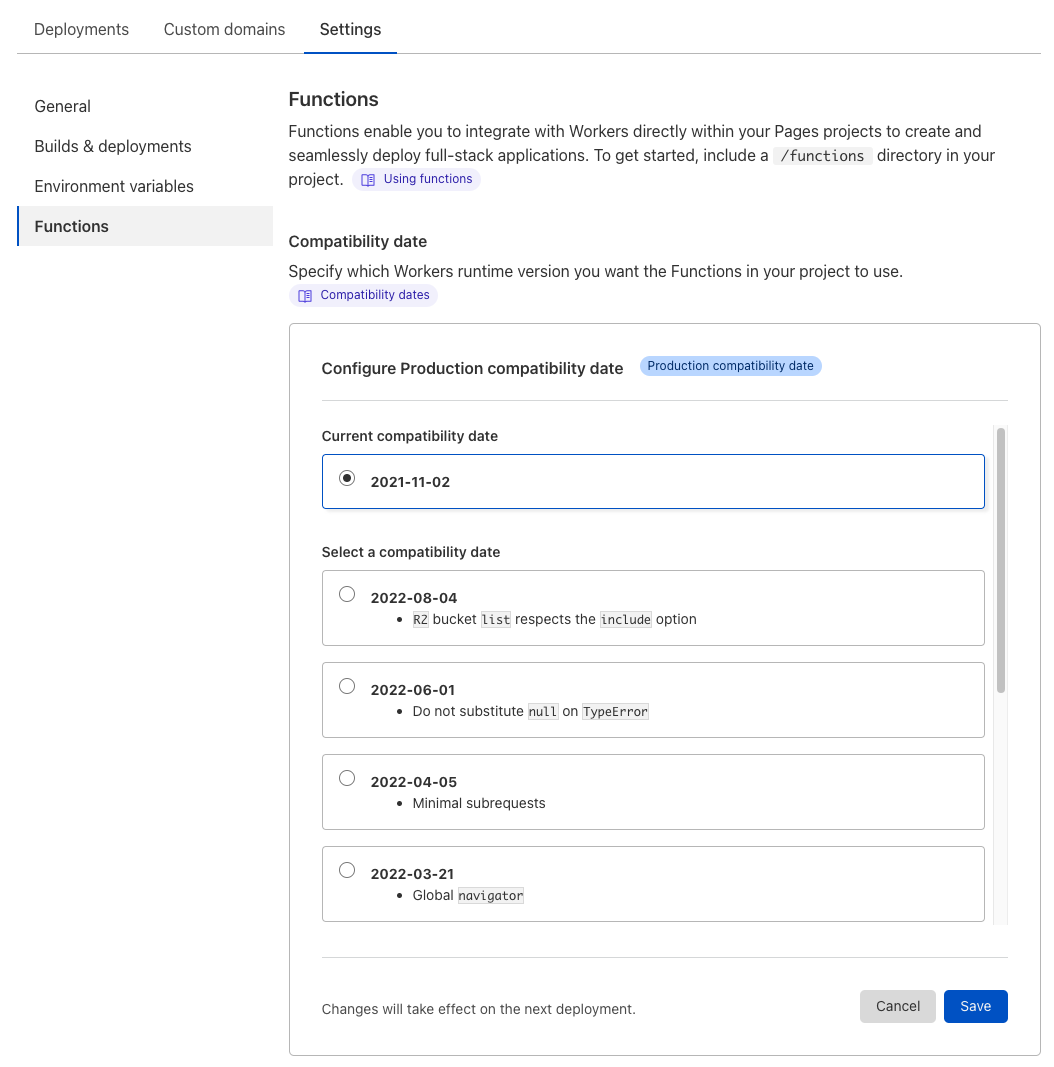
By keeping this date recent, you are able to opt in to the latest features and bug fixes that the Cloudflare Workers runtime offers, but equally, you’re completely free to keep the date on whatever works for you today, and we’ll continue to support the functionality at that point in time, forever. We also allow you to set these dates for your production and preview environments independently which will let you test these changes out safely in a preview deployment before rolling it out in production.
We’ve been working on adding more support for the Streams API to the Workers Runtime, and some of this functionality is gated behind the flags we added to the project earlier. These flags are currently scheduled to graduate and become on-by-default on a future compatibility date, 2022-11-30.
The @cloudflare/next-on-pages CLI
Vercel introduced the Build Output API in July 2022 as a “zero configuration” directory structure which the Vercel platform inherently understands and can deploy. We’ve decided to hook into this same API as a way to build Next.js projects consistently that we can understand and deploy.
The open-source @cloudflare/next-on-pages CLI runs npx vercel build behind the scenes, which produces a .vercel/output directory. This directory conforms to the Build Output API, and of particular interest, contains a config.json, static folder and folder of functions. The @cloudflare/next-on-pages CLI then parses this config.json manifest, and combines all the functions into a single Pages Functions ‘advanced mode’ _worker.js.
At this point, the build is finished. Pages then automatically picks up this _worker.js and deploys it with Pages Functions atop the static directory.
Although currently just an implementation detail, we opted to use this Build Output API for a number of reasons. We’re also exploring other similar functionality natively on the Pages platform. We already have one “magical” directory, the functions directory which we use for the file-based routing of Pages Functions. It’s possible that we offer other fixed directory structures which would reduce the need for configuration of any projects using frameworks which adopt the API. Let us know in Discord if you have any thoughts or preferences on what you would like to see!
Additionally, if more full-stack frameworks do adopt Vercel’s Build Output API, we may have automatic support for them running on Pages with this CLI. We’ve only been experimenting with Next.js here so far (and SvelteKit, Remix and Qwik all have their own way of building their projects on Pages at the moment), but it’s possible that in the future we may converge on a standard approach which could be shared between frameworks and platforms. We’re excited to see how this might transpire. Again, let us know if you have thoughts!
Experimental webpack minification
As part of the compilation from .vercel/output/functions to an _worker.js, the @cloudflare/next-on-pages CLI can perform an experimental minification to give you more space for your application to run on Workers. Right now, most accounts are limited to a maximum script size of 1MB (although this can be raised in some circumstances—get in touch!). You can ordinarily fit quite a lot of code in this, but one thing notable about Next.js’ build process at the moment is that it creates webpack-compiled, fully-formed and fully-isolated functions scripts in each of the directories in .vercel/output/functions. This means that each function ends up looking something like this:
let _ENTRIES = {};
(() => {
  // webpackBootstrap
})();

(self["webpackChunk_N_E"] = self["webpackChunk_N_E"] || []).push([100], {

  123: (() => {
    // webpack chunk #123
  }),
  234: (() => {
    // webpack chunk #234
  }),
  345: (() => {
    // webpack chunk #345
  }),

  // …lots of webpack chunks…

}, () => {
  // webpackRuntimeModules
}]);

export default {
  async fetch(request, env, ctx) {
    return _ENTRIES['some_function'].default.call(request);
  }
}
The script contains everything that’s needed to deploy this function, and most of the logic exists in these webpack chunks, but that means that each function has a lot of code shared with its siblings. Quickly, you’ll reach the 1MB limit, if you naively deployed all these functions together.
Our @cloudflare/next-on-pages --experimental-minify CLI argument deals with this problem by analyzing webpack chunks which are re-used in multiple places in this .vercel/output/functions directory and extracts out that code to a common place. This allows our compiler (esbuild) to efficiently combine this code, without duplicating it in all of these places. This process is experimental for the time being, while we look to make this as efficient as possible, without introducing any bugs as a result. Please file an issue on GitHub if you notice any difference in behavior when using --experimental-minify.
What’s next?
Pages Functions has been in beta for almost a year, and we’re very excited to say that general availability is just around the corner. We’re polishing off the last of the remaining features which includes analytics, logging, and billing. In fact, for billing, we recently made the announcement of how you’ll be able to use the Workers Paid plan to remove the request limits of the Pages Functions beta from November 15.
Finally, we’re also looking at how we can bring Wasm support to Pages Functions which will unlock ever more use-cases for your full-stack applications. Stay tuned for more information on how we’ll be offering this soon.
Try creating a Next.js Edge Runtime application and deploying it to Cloudflare Pages with the example above or by following the guide in our documentation. Let us know if you have any questions or face any issues in Discord or on GitHub, and please report any quirks of the --experimental-minify argument. As always, we’re excited to see what you build!